$30 off During Our Annual Pro Sale. View Details »

ステップバイステップで考える Amazon ECS の CI/CD と IaC

Avatar for kenicazu kenicazu
December 02, 2025
9

ステップバイステップで考える Amazon ECS の CI/CD と IaC

2024年に開催された AWS Innovate Migrate. Modernize. Build の登壇資料です。
2025年のアップデート内容については盛り込まれていないため、例えばECSのNative B/Gの内容であったり、Express Modeなどのお話しは含まれておりません。

Avatar for kenicazu

kenicazu

December 02, 2025
Tweet

Transcript

  1. © 2024, Amazon Web Services, Inc. or its affiliates. All

    rights reserved. © 2024, Amazon Web Services, Inc. or its affiliates. All rights reserved. Kenichi Azuma アマゾン ウェブ サービス ジャパン合同会社 ソリューションアーキテクト ステップバイステップで考える Amazon ECS の CI/CD と IaC T 5 - 4

  2. © 2024, Amazon Web Services, Inc. or its affiliates. All

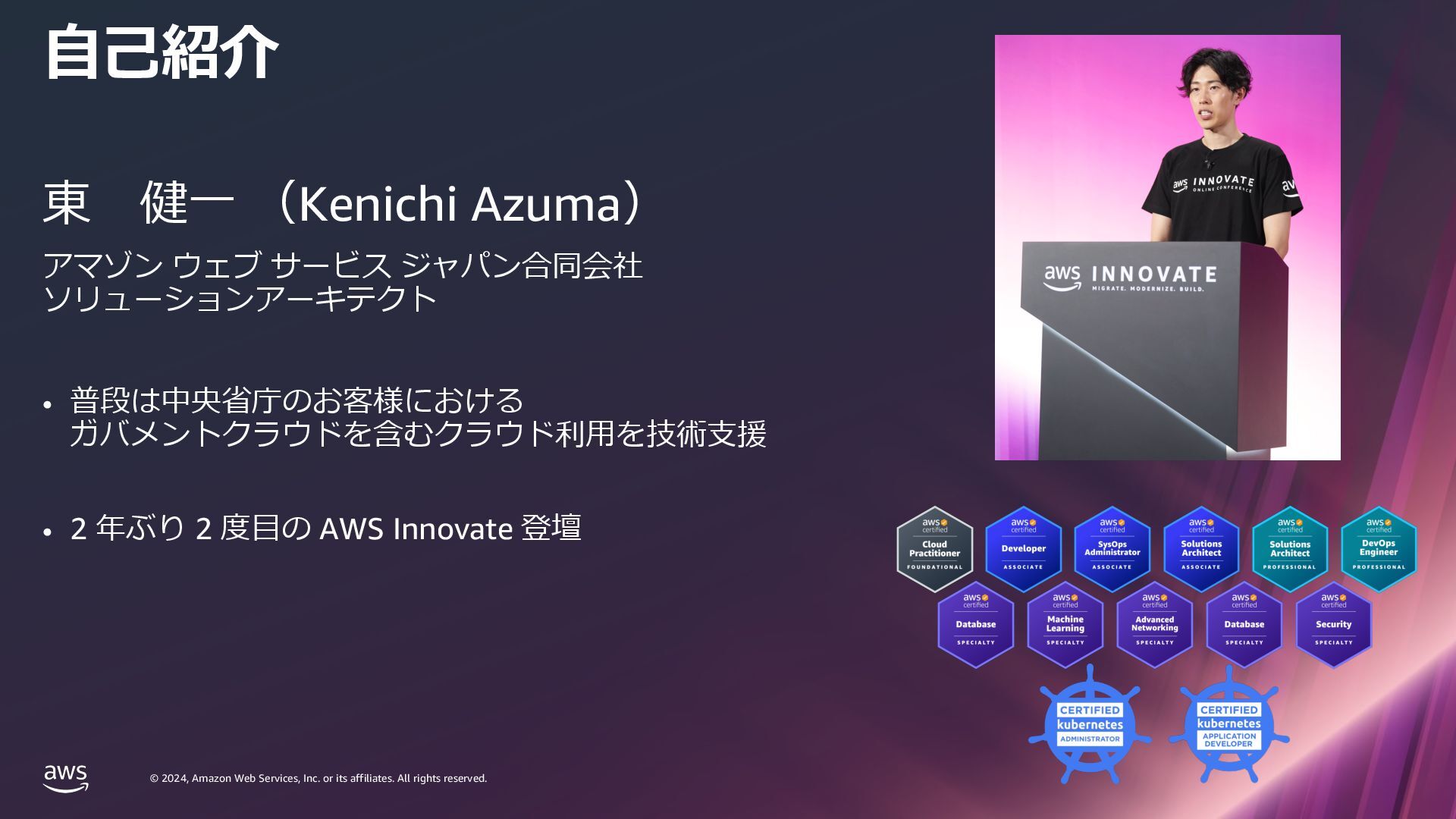
    rights reserved. © 2024, Amazon Web Services, Inc. or its affiliates. All rights reserved. ⾃⼰紹介 東 健⼀ (Kenichi Azuma) アマゾン ウェブ サービス ジャパン合同会社 ソリューションアーキテクト • 普段は中央省庁のお客様における ガバメントクラウドを含むクラウド利⽤を技術⽀援 • 2 年ぶり 2 度⽬の AWS Innovate 登壇
  3. © 2024, Amazon Web Services, Inc. or its affiliates. All

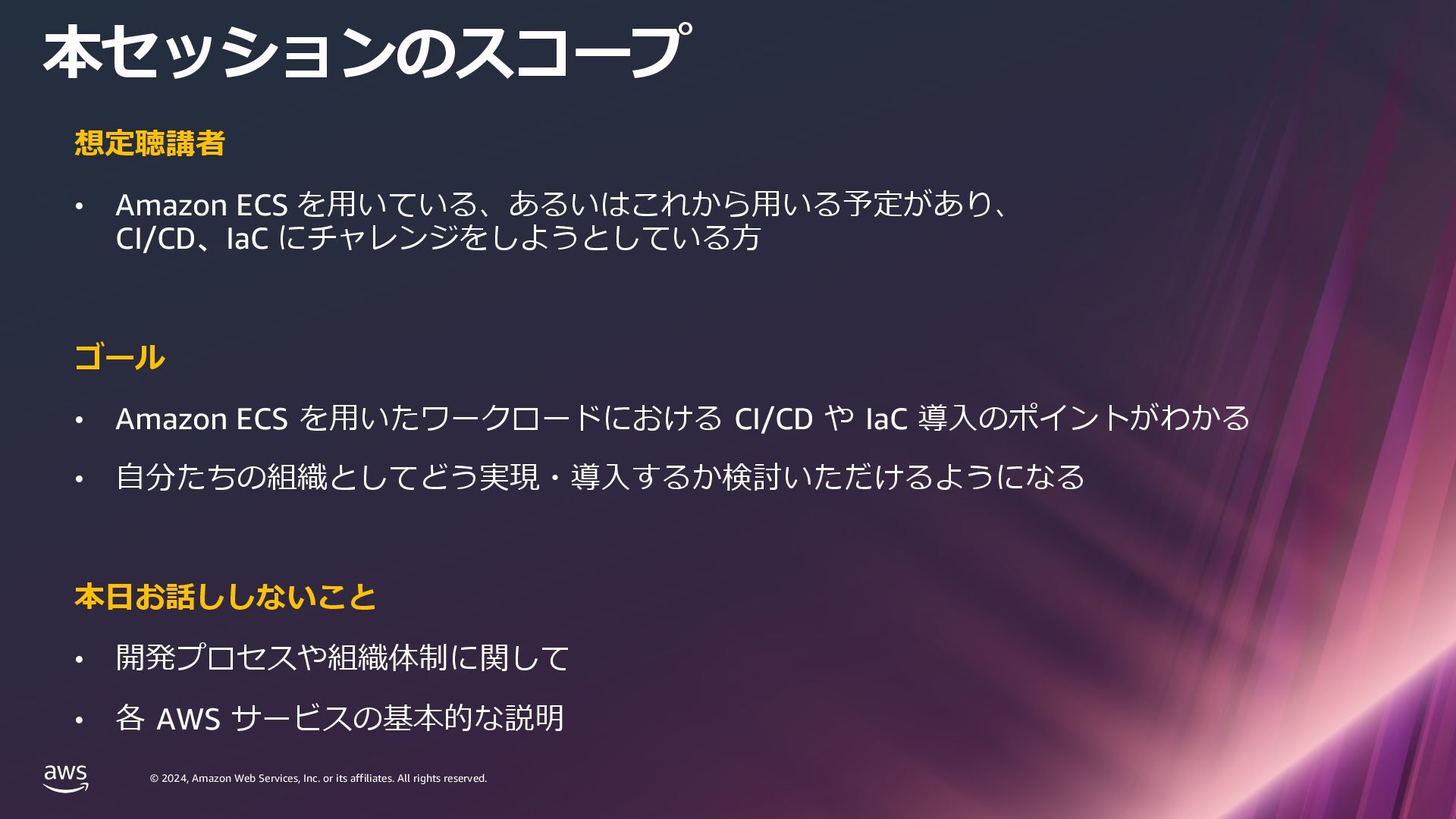
    rights reserved. © 2024, Amazon Web Services, Inc. or its affiliates. All rights reserved. 想定聴講者 • Amazon ECS を⽤いている、あるいはこれから⽤いる予定があり、 CI/CD、IaC にチャレンジをしようとしている⽅ ゴール • Amazon ECS を⽤いたワークロードにおける CI/CD や IaC 導⼊のポイントがわかる • ⾃分たちの組織としてどう実現・導⼊するか検討いただけるようになる 本⽇お話ししないこと • 開発プロセスや組織体制に関して • 各 AWS サービスの基本的な説明 本セッションのスコープ
  4. © 2024, Amazon Web Services, Inc. or its affiliates. All

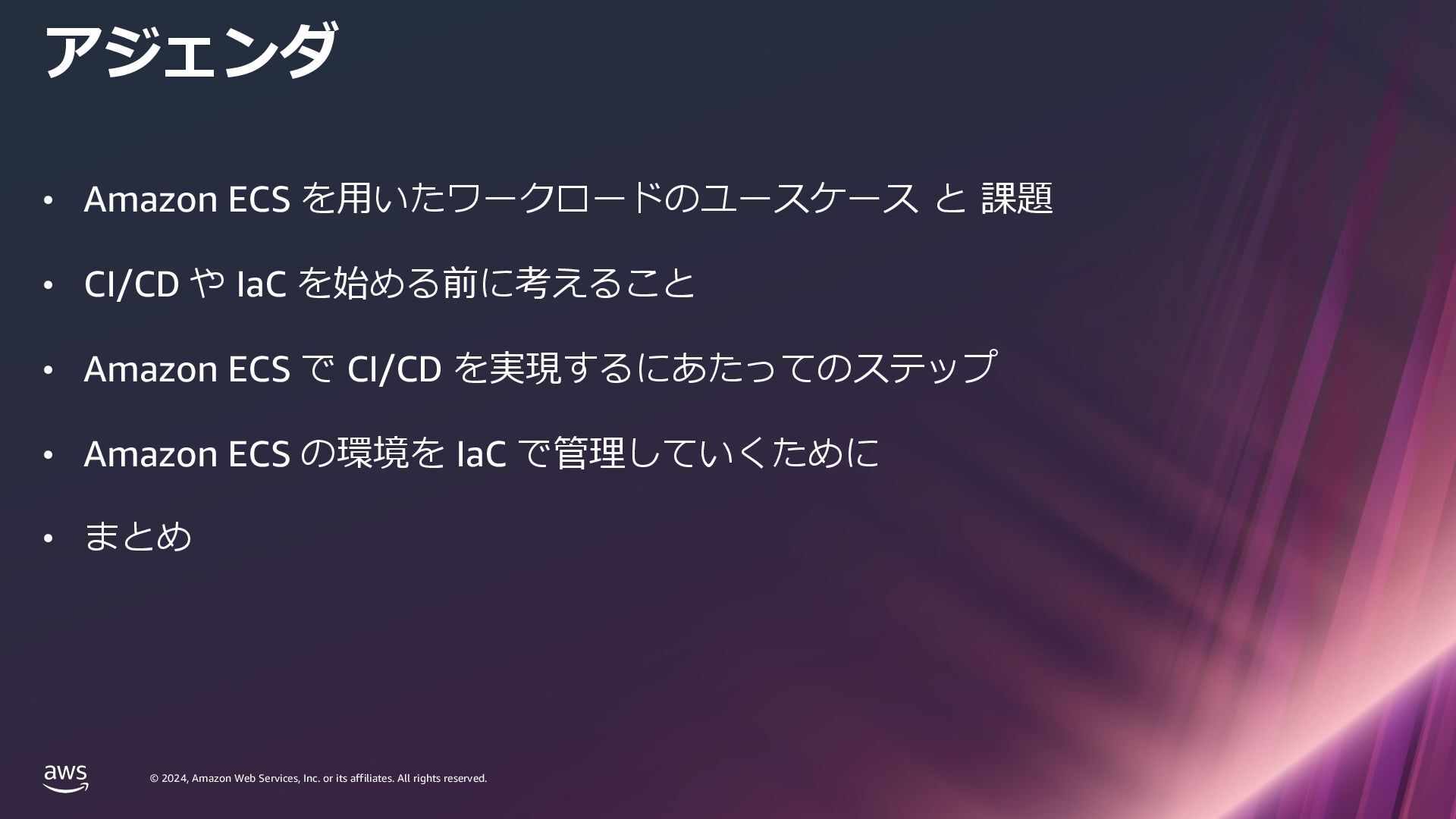
    rights reserved. © 2024, Amazon Web Services, Inc. or its affiliates. All rights reserved. • Amazon ECS を⽤いたワークロードのユースケース と 課題 • CI/CD や IaC を始める前に考えること • Amazon ECS で CI/CD を実現するにあたってのステップ • Amazon ECS の環境を IaC で管理していくために • まとめ アジェンダ
  5. © 2024, Amazon Web Services, Inc. or its affiliates. All

    rights reserved. © 2024, Amazon Web Services, Inc. or its affiliates. All rights reserved. Amazon ECS を⽤いたワークロードの ユースケース と 課題
  6. © 2024, Amazon Web Services, Inc. or its affiliates. All

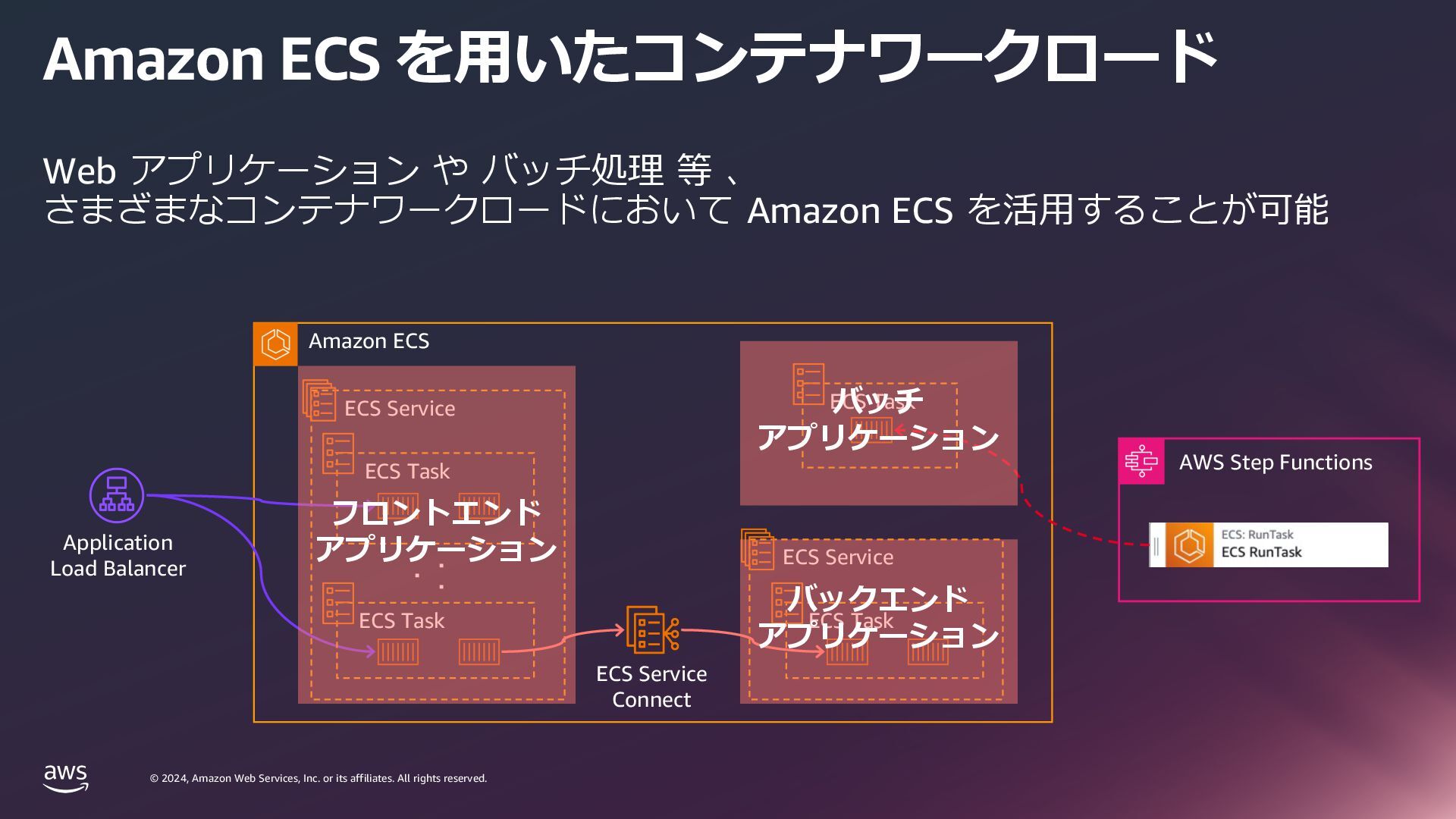
    rights reserved. © 2024, Amazon Web Services, Inc. or its affiliates. All rights reserved. Amazon ECS Amazon ECS を⽤いたコンテナワークロード Web アプリケーション や バッチ処理 等 、 さまざまなコンテナワークロードにおいて Amazon ECS を活⽤することが可能 ・・ ・ Application Load Balancer ECS Service ECS Task ECS Task ECS Task AWS Step Functions ECS Service Connect ECS Service ECS Task バッチ アプリケーション バックエンド アプリケーション フロントエンド アプリケーション
  7. © 2024, Amazon Web Services, Inc. or its affiliates. All

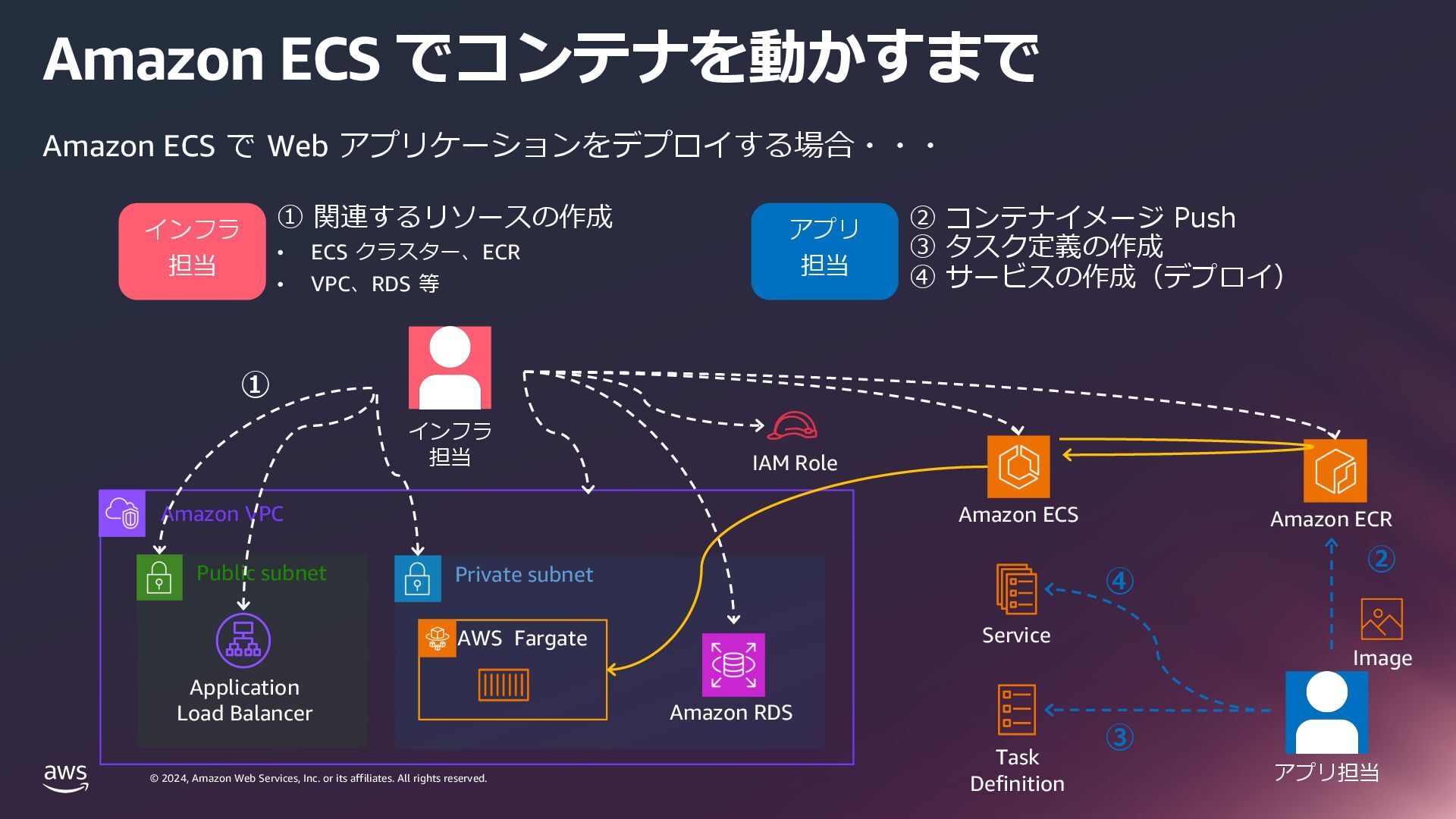
    rights reserved. © 2024, Amazon Web Services, Inc. or its affiliates. All rights reserved. Amazon VPC Private subnet Public subnet Amazon ECS でコンテナを動かすまで Amazon ECS で Web アプリケーションをデプロイする場合・・・ Application Load Balancer Amazon ECR Amazon ECS Image Task Definition Service ② AWS Fargate Amazon RDS ① ③ ④ IAM Role インフラ 担当 アプリ担当 インフラ 担当 ① 関連するリソースの作成 • ECS クラスター、ECR • VPC、RDS 等 アプリ 担当 ② コンテナイメージ Push ③ タスク定義の作成 ④ サービスの作成(デプロイ)
  8. © 2024, Amazon Web Services, Inc. or its affiliates. All

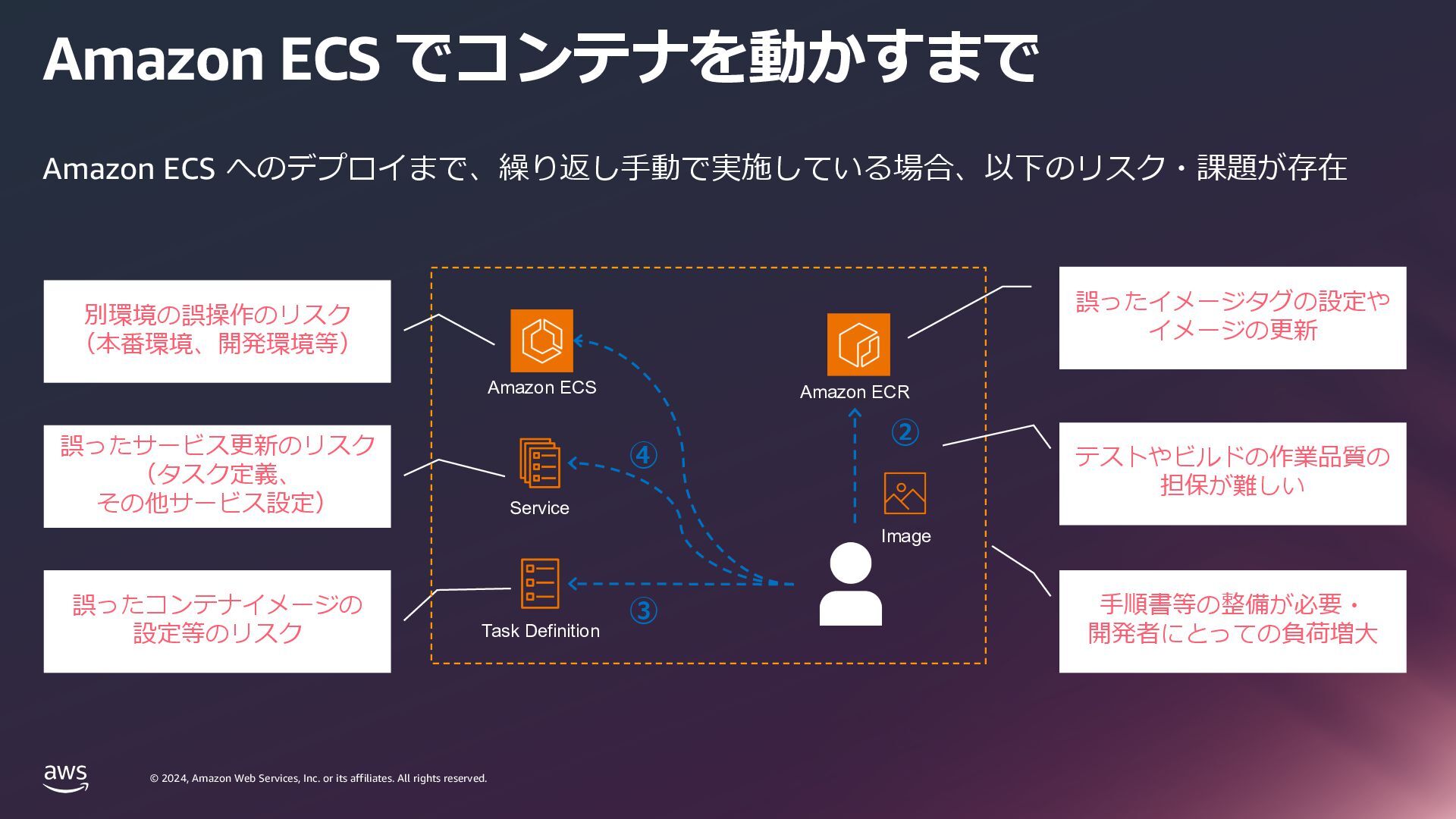
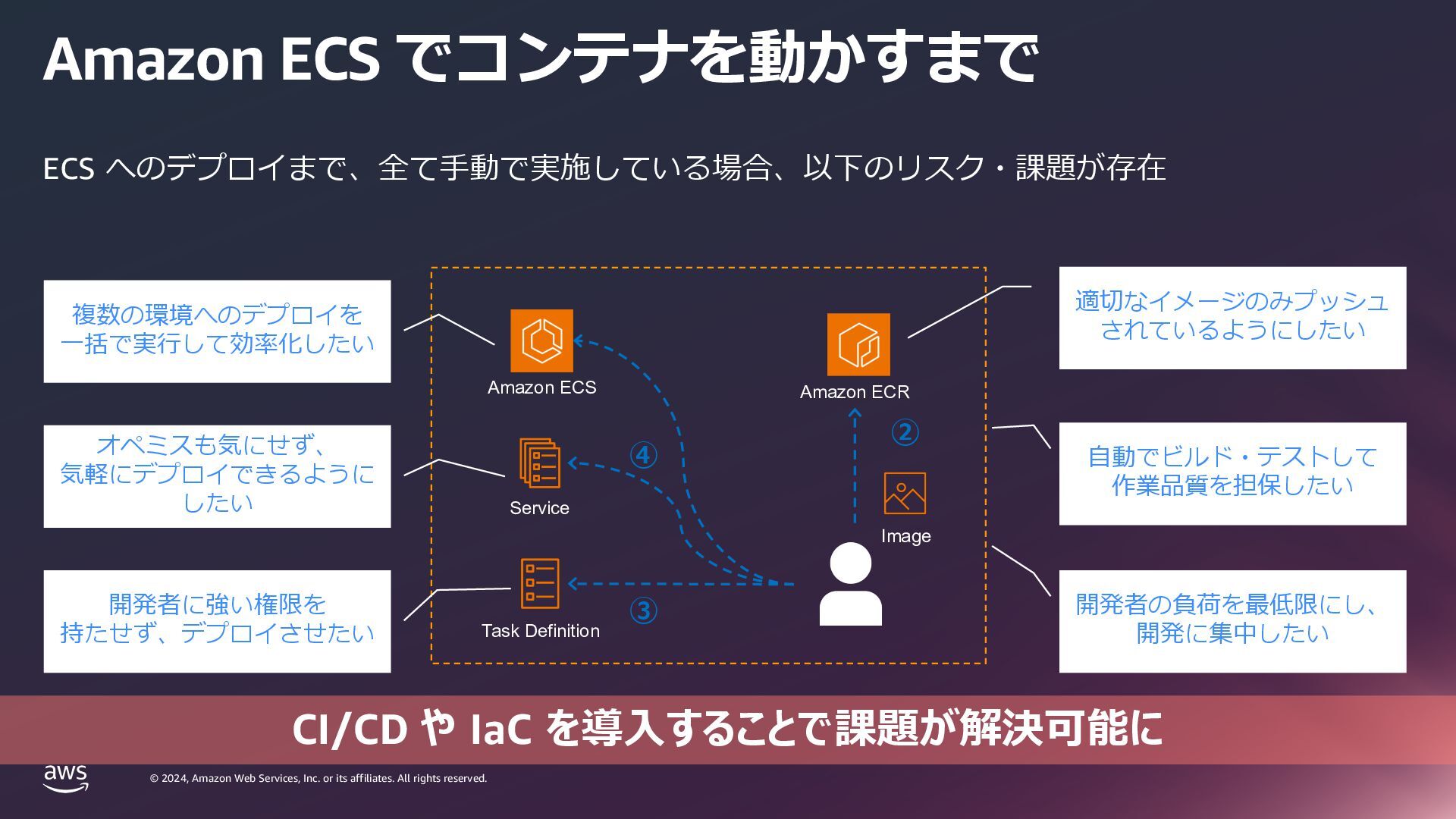
    rights reserved. © 2024, Amazon Web Services, Inc. or its affiliates. All rights reserved. Amazon ECS でコンテナを動かすまで Amazon ECS へのデプロイまで、繰り返し⼿動で実施している場合、以下のリスク・課題が存在 Amazon ECR Amazon ECS Image Task Definition Service ② ③ ④ 誤ったイメージタグの設定や イメージの更新 誤ったサービス更新のリスク (タスク定義、 その他サービス設定) 誤ったコンテナイメージの 設定等のリスク ⼿順書等の整備が必要・ 開発者にとっての負荷増⼤ 別環境の誤操作のリスク (本番環境、開発環境等) テストやビルドの作業品質の 担保が難しい
  9. © 2024, Amazon Web Services, Inc. or its affiliates. All

    rights reserved. © 2024, Amazon Web Services, Inc. or its affiliates. All rights reserved. Amazon ECS でコンテナを動かすまで Amazon ECR Amazon ECS Image Task Definition Service ② ③ ④ 適切なイメージのみプッシュ されているようにしたい 開発者の負荷を最低限にし、 開発に集中したい ⾃動でビルド・テストして 作業品質を担保したい オペミスも気にせず、 気軽にデプロイできるように したい 開発者に強い権限を 持たせず、デプロイさせたい 複数の環境へのデプロイを ⼀括で実⾏して効率化したい ECS へのデプロイまで、全て⼿動で実施している場合、以下のリスク・課題が存在 CI/CD や IaC を導⼊することで課題が解決可能に
  10. © 2024, Amazon Web Services, Inc. or its affiliates. All

    rights reserved. © 2024, Amazon Web Services, Inc. or its affiliates. All rights reserved. CI/CD や IaC を始める前に 考えること
  11. © 2024, Amazon Web Services, Inc. or its affiliates. All

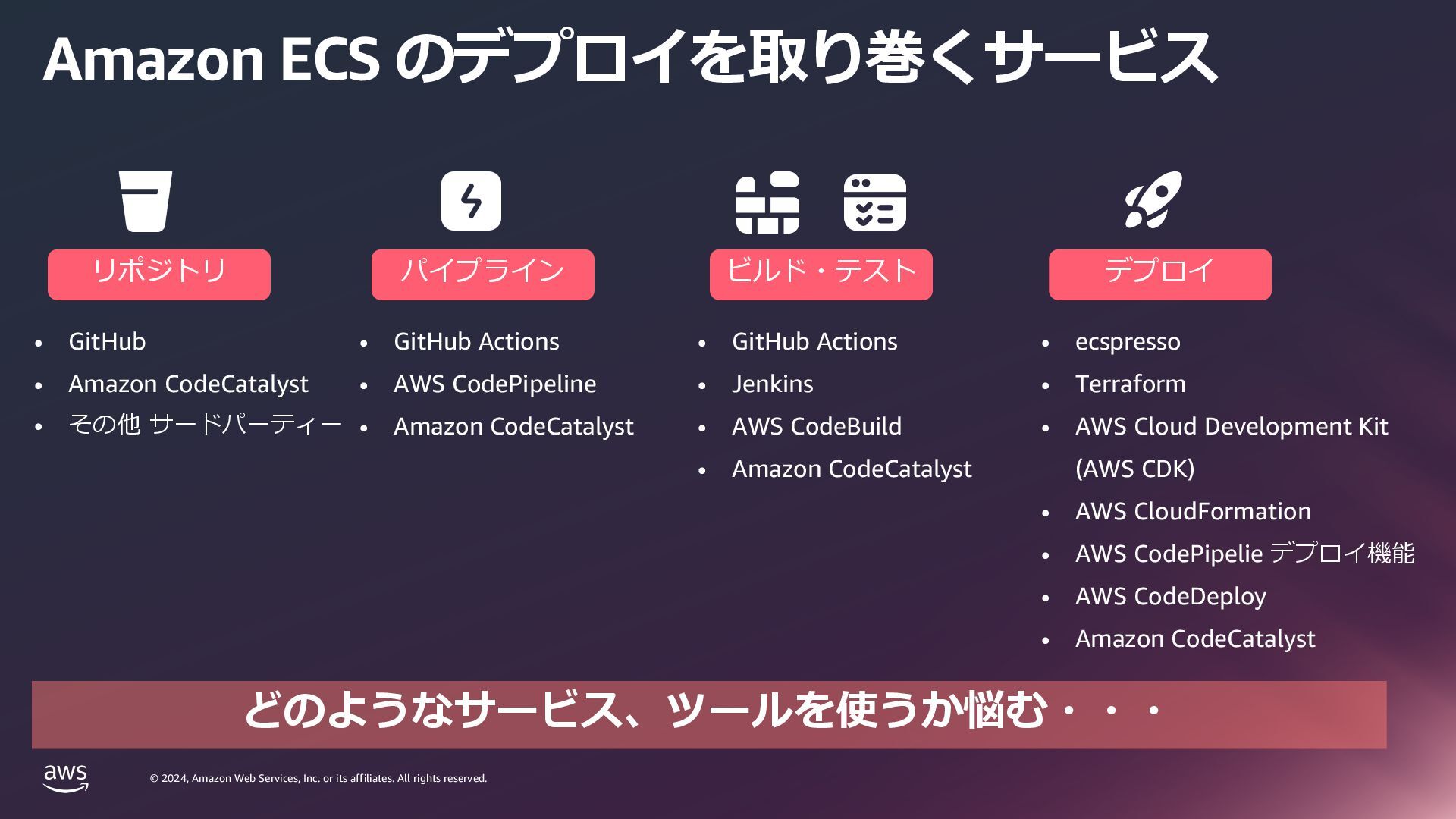
    rights reserved. © 2024, Amazon Web Services, Inc. or its affiliates. All rights reserved. Amazon ECS のデプロイを取り巻くサービス • GitHub • Amazon CodeCatalyst • その他 サードパーティー リポジトリ パイプライン デプロイ • GitHub Actions • AWS CodePipeline • Amazon CodeCatalyst • ecspresso • Terraform • AWS Cloud Development Kit (AWS CDK) • AWS CloudFormation • AWS CodePipelie デプロイ機能 • AWS CodeDeploy • Amazon CodeCatalyst ビルド・テスト • GitHub Actions • Jenkins • AWS CodeBuild • Amazon CodeCatalyst どのようなサービス、ツールを使うか悩む・・・
  12. © 2024, Amazon Web Services, Inc. or its affiliates. All

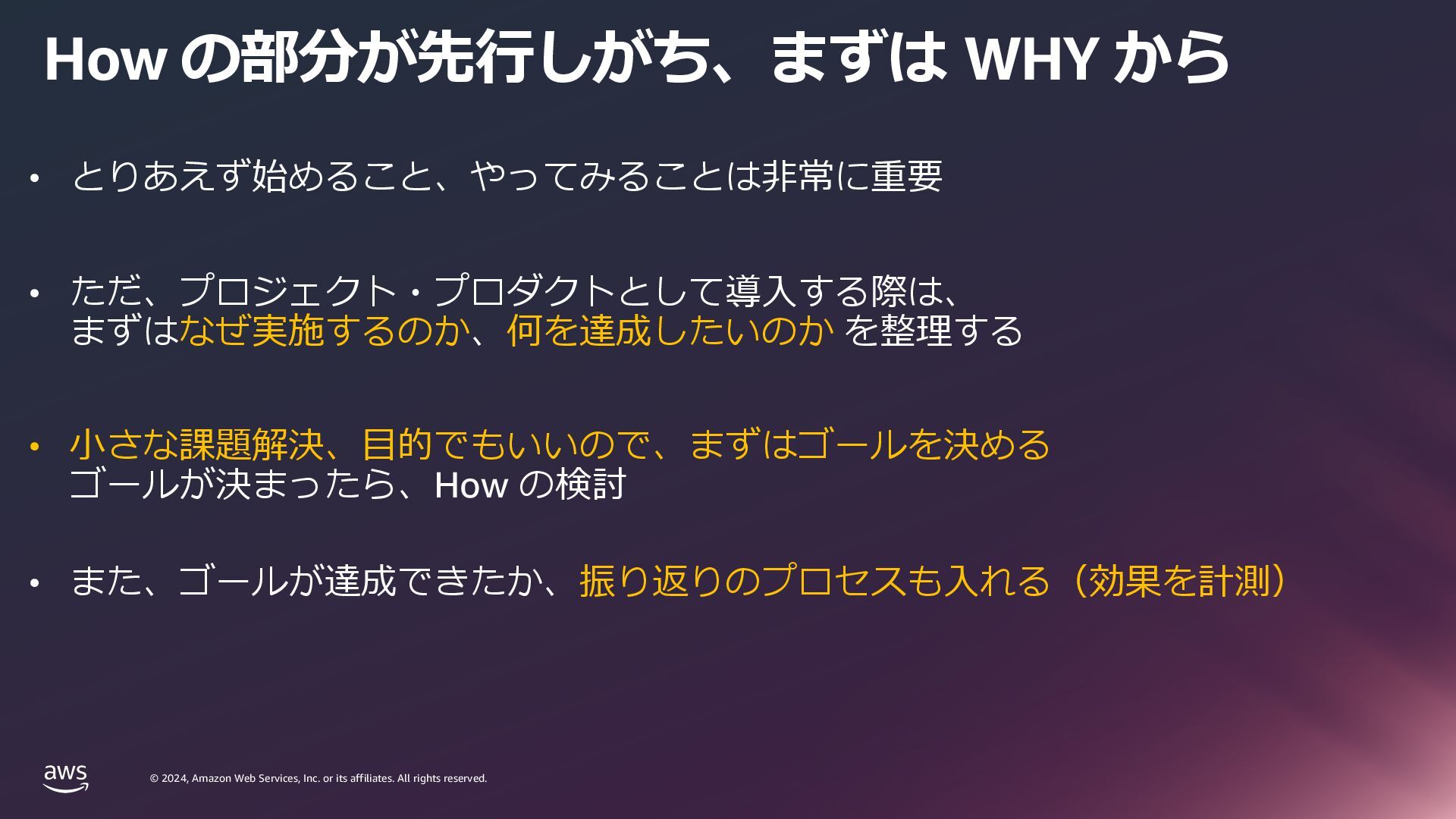
    rights reserved. © 2024, Amazon Web Services, Inc. or its affiliates. All rights reserved. How の部分が先⾏しがち、まずは WHY から • とりあえず始めること、やってみることは⾮常に重要 • ただ、プロジェクト・プロダクトとして導⼊する際は、 まずはなぜ実施するのか、何を達成したいのか を整理する • ⼩さな課題解決、⽬的でもいいので、まずはゴールを決める ゴールが決まったら、How の検討 • また、ゴールが達成できたか、振り返りのプロセスも⼊れる(効果を計測)
  13. © 2024, Amazon Web Services, Inc. or its affiliates. All

    rights reserved. © 2024, Amazon Web Services, Inc. or its affiliates. All rights reserved. Amazon ECS で CI/CD を 実現するにあたってのステップ
  14. © 2024, Amazon Web Services, Inc. or its affiliates. All

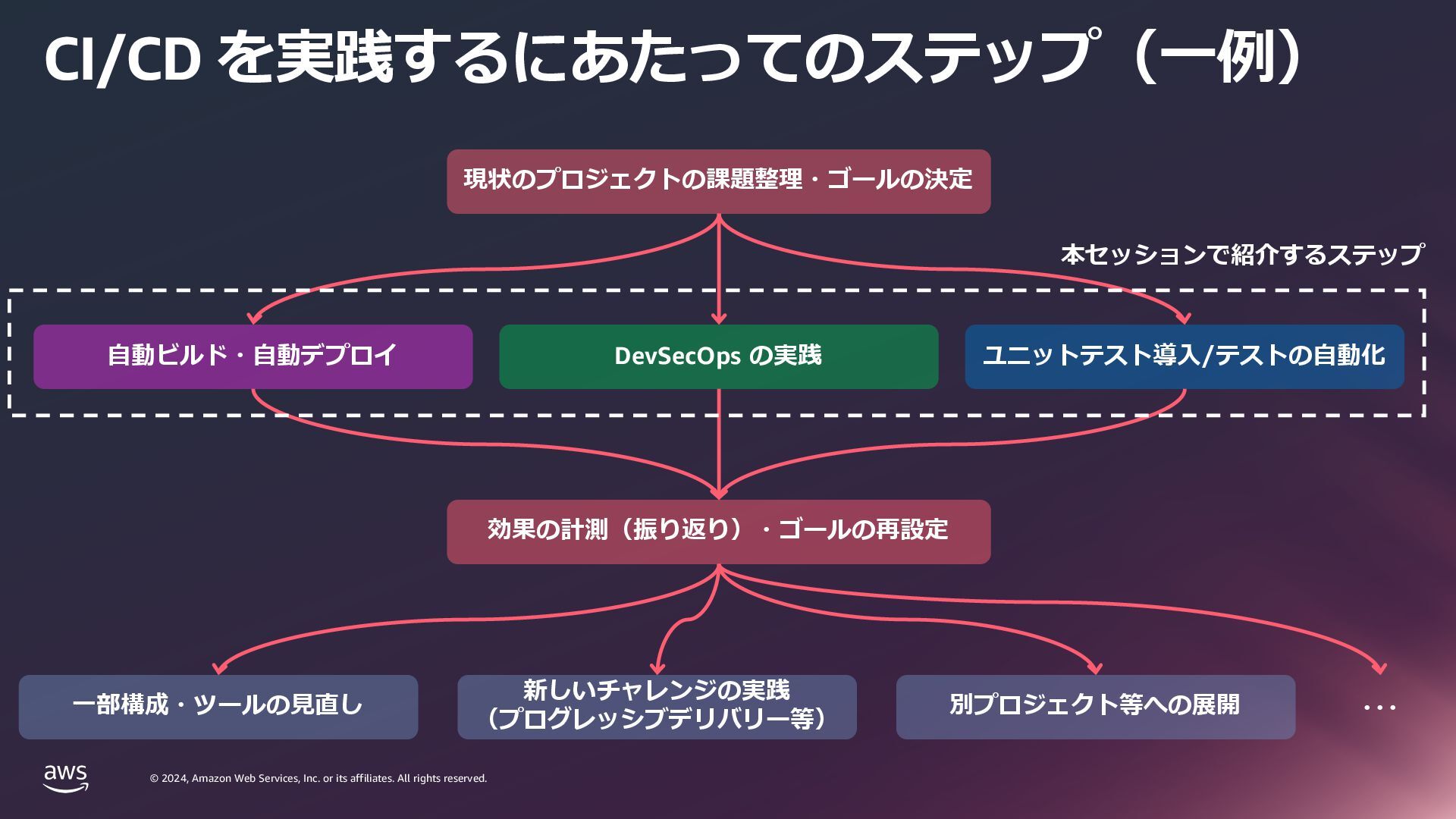
    rights reserved. © 2024, Amazon Web Services, Inc. or its affiliates. All rights reserved. CI/CD を実践するにあたってのステップ(⼀例) ⾃動ビルド・⾃動デプロイ DevSecOps の実践 ユニットテスト導⼊/テストの⾃動化 現状のプロジェクトの課題整理・ゴールの決定 効果の計測(振り返り)・ゴールの再設定 ⼀部構成・ツールの⾒直し 新しいチャレンジの実践 (プログレッシブデリバリー等) 別プロジェクト等への展開 ・・・ 本セッションで紹介するステップ
  15. © 2024, Amazon Web Services, Inc. or its affiliates. All

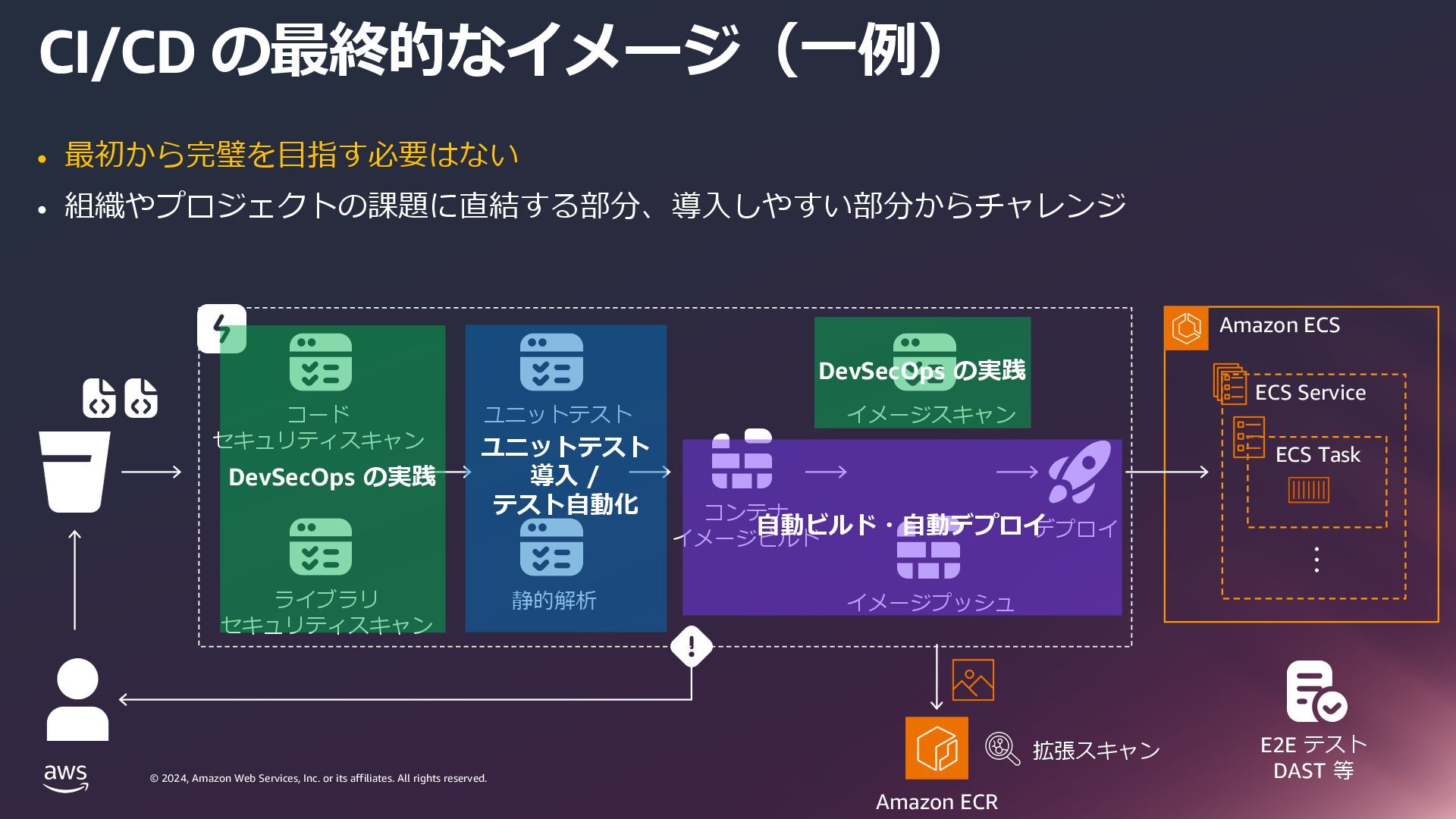
    rights reserved. © 2024, Amazon Web Services, Inc. or its affiliates. All rights reserved. CI/CD の最終的なイメージ(⼀例) Amazon ECS ・・・ ECS Service ECS Task コード セキュリティスキャン コンテナ イメージビルド デプロイ ライブラリ セキュリティスキャン ユニットテスト イメージスキャン イメージプッシュ 静的解析 E2E テスト DAST 等 ⾃動ビルド・⾃動デプロイ DevSecOps の実践 DevSecOps の実践 ユニットテスト 導⼊ / テスト⾃動化 Amazon ECR 拡張スキャン • 最初から完璧を⽬指す必要はない • 組織やプロジェクトの課題に直結する部分、導⼊しやすい部分からチャレンジ
  16. © 2024, Amazon Web Services, Inc. or its affiliates. All

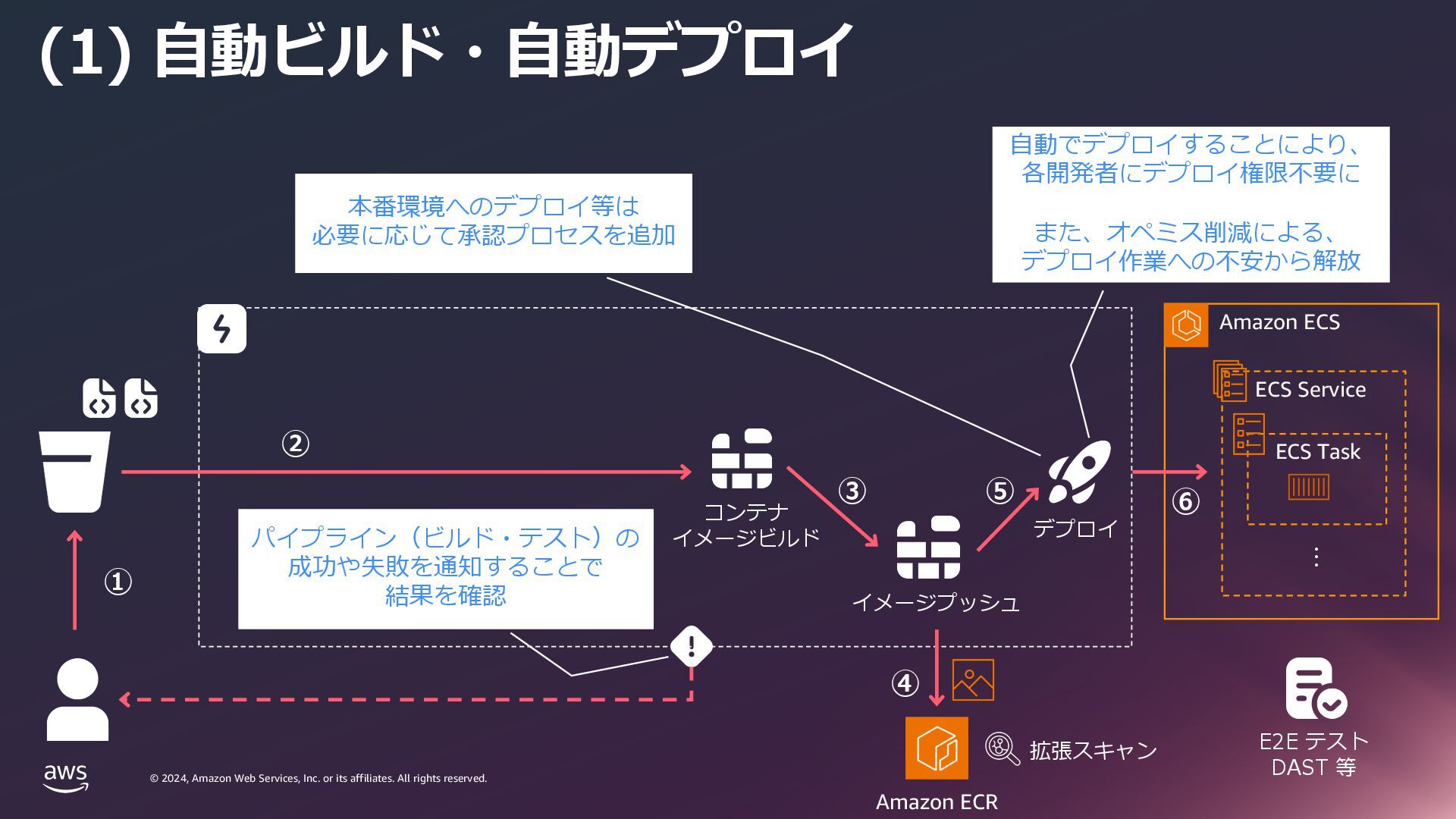
    rights reserved. © 2024, Amazon Web Services, Inc. or its affiliates. All rights reserved. (1) ⾃動ビルド・⾃動デプロイ Amazon ECS ・・・ ECS Service ECS Task Amazon ECR コンテナ イメージビルド デプロイ イメージプッシュ 本番環境へのデプロイ等は 必要に応じて承認プロセスを追加 E2E テスト DAST 等 ⾃動でデプロイすることにより、 各開発者にデプロイ権限不要に また、オペミス削減による、 デプロイ作業への不安から解放 パイプライン(ビルド・テスト)の 成功や失敗を通知することで 結果を確認 拡張スキャン ① ② ③ ④ ⑤ ⑥
  17. © 2024, Amazon Web Services, Inc. or its affiliates. All

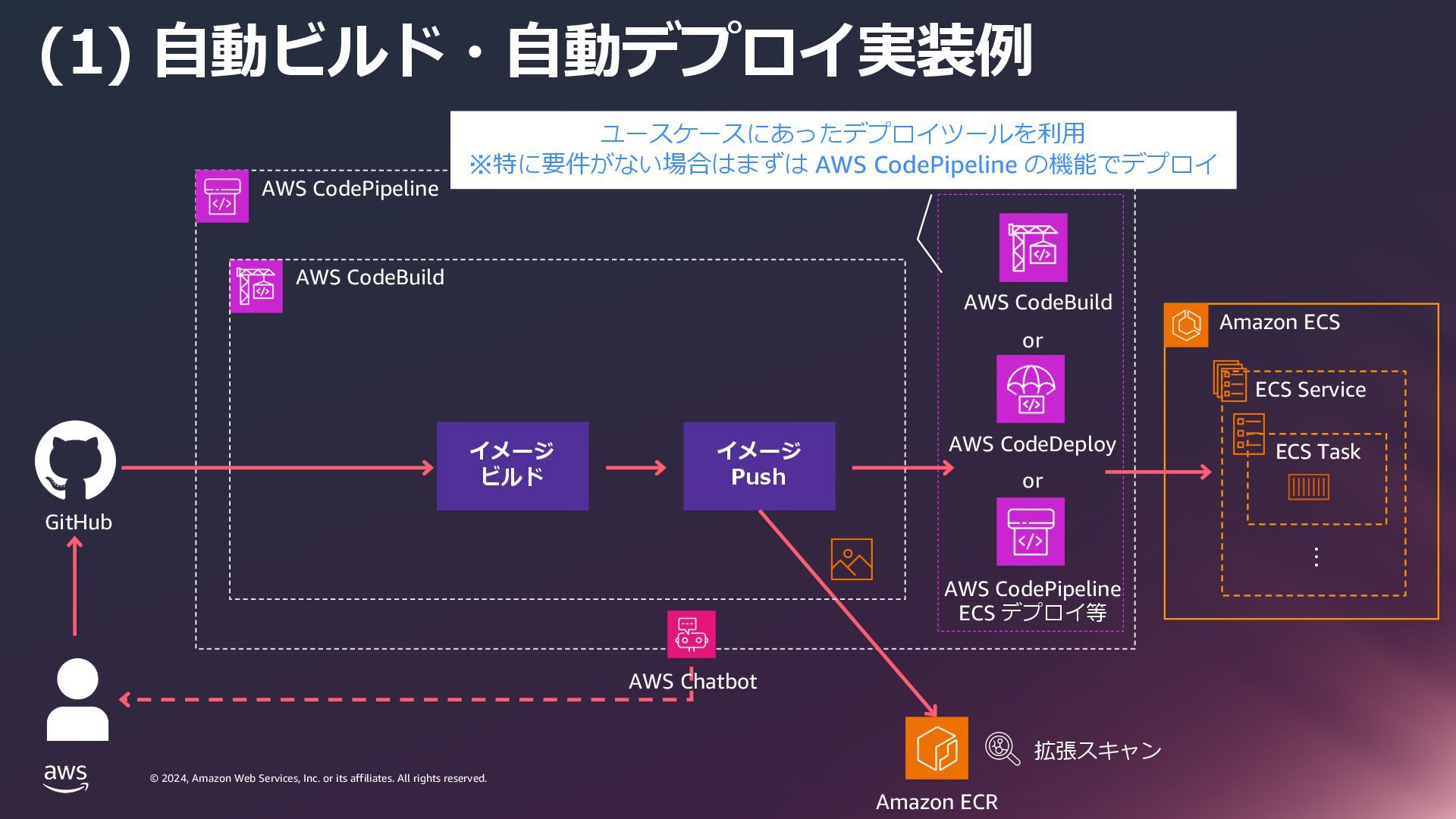
    rights reserved. © 2024, Amazon Web Services, Inc. or its affiliates. All rights reserved. (1) ⾃動ビルド・⾃動デプロイ実装例 AWS CodePipeline Amazon ECS ・・・ ECS Service ECS Task AWS CodeDeploy GitHub AWS Chatbot AWS CodePipeline ECS デプロイ等 or AWS CodeBuild or ユースケースにあったデプロイツールを利⽤ ※特に要件がない場合はまずは AWS CodePipeline の機能でデプロイ Amazon ECR 拡張スキャン AWS CodeBuild イメージ ビルド イメージ Push
  18. © 2024, Amazon Web Services, Inc. or its affiliates. All

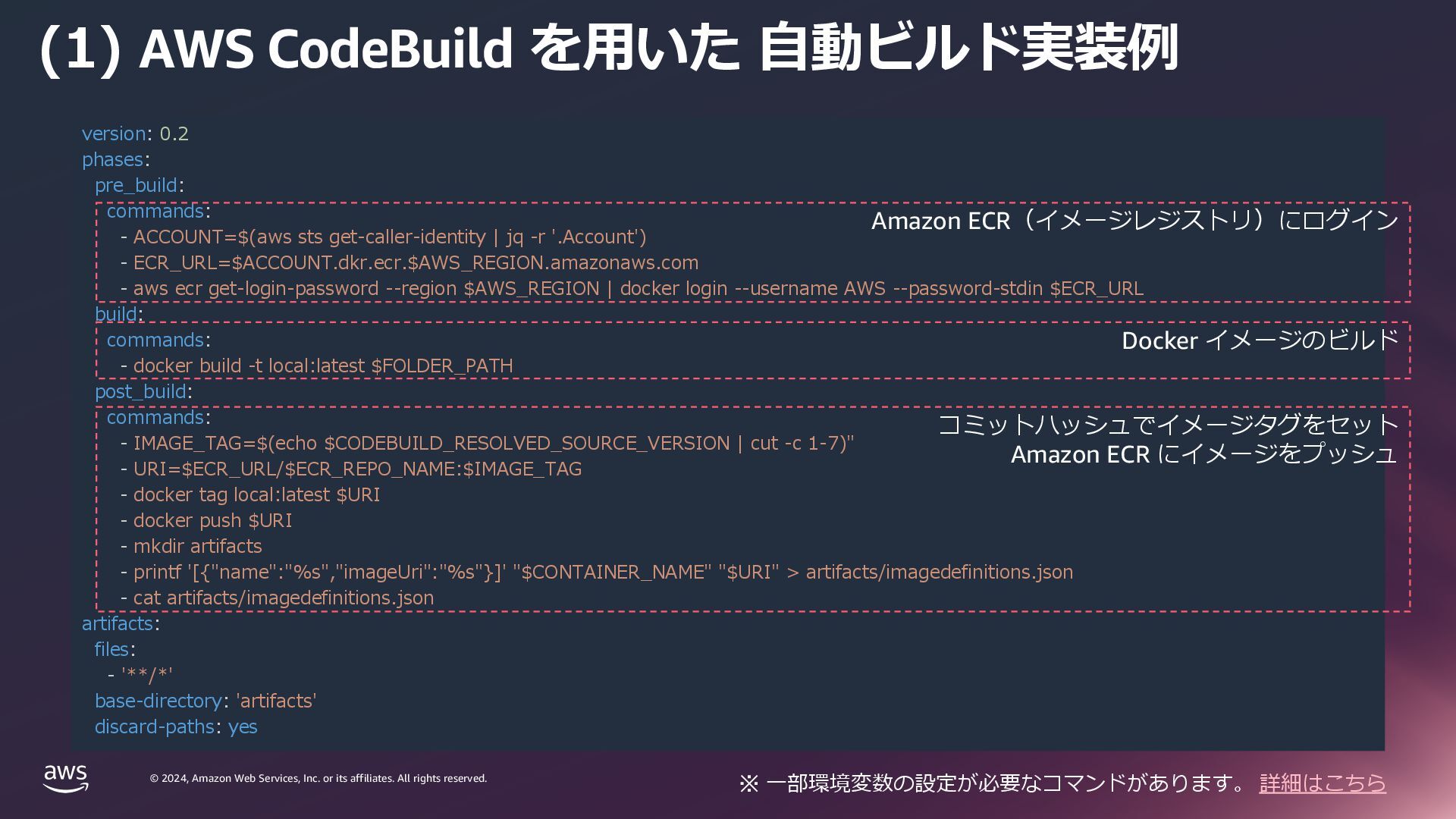
    rights reserved. © 2024, Amazon Web Services, Inc. or its affiliates. All rights reserved. (1) AWS CodeBuild を⽤いた ⾃動ビルド実装例 version: 0.2 phases: pre_build: commands: - ACCOUNT=$(aws sts get-caller-identity | jq -r '.Account') - ECR_URL=$ACCOUNT.dkr.ecr.$AWS_REGION.amazonaws.com - aws ecr get-login-password --region $AWS_REGION | docker login --username AWS --password-stdin $ECR_URL build: commands: - docker build -t local:latest $FOLDER_PATH post_build: commands: - IMAGE_TAG=$(echo $CODEBUILD_RESOLVED_SOURCE_VERSION | cut -c 1-7)" - URI=$ECR_URL/$ECR_REPO_NAME:$IMAGE_TAG - docker tag local:latest $URI - docker push $URI - mkdir artifacts - printf '[{"name":"%s","imageUri":"%s"}]' "$CONTAINER_NAME" "$URI" > artifacts/imagedefinitions.json - cat artifacts/imagedefinitions.json artifacts: files: - '**/*' base-directory: 'artifacts' discard-paths: yes コミットハッシュでイメージタグをセット Amazon ECR にイメージをプッシュ Amazon ECR(イメージレジストリ)にログイン Docker イメージのビルド ※ ⼀部環境変数の設定が必要なコマンドがあります。 詳細はこちら
  19. © 2024, Amazon Web Services, Inc. or its affiliates. All

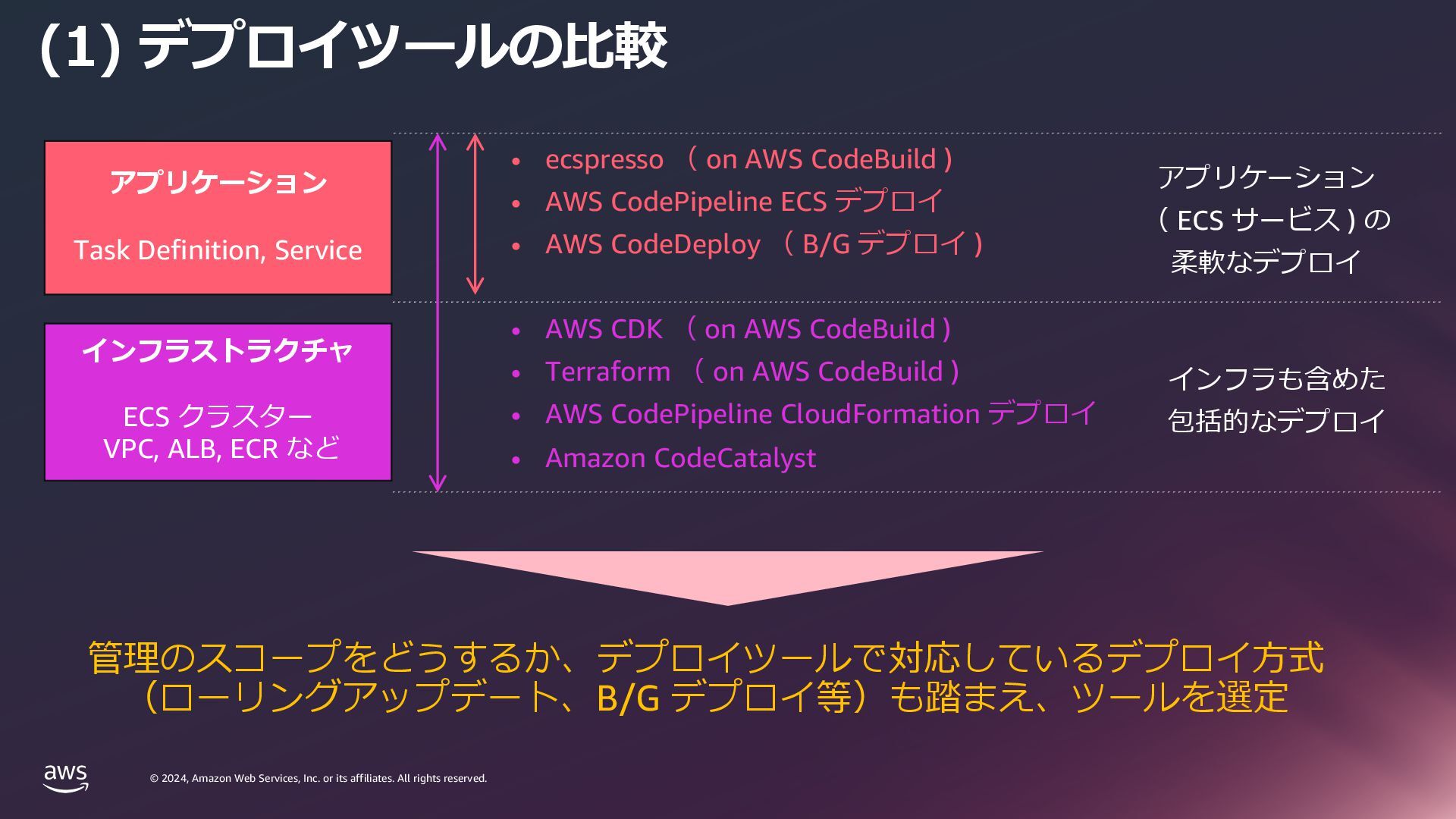
    rights reserved. © 2024, Amazon Web Services, Inc. or its affiliates. All rights reserved. (1) デプロイツールの⽐較 アプリケーション Task Definition, Service インフラストラクチャ ECS クラスター VPC, ALB, ECR など • ecspresso ( on AWS CodeBuild ) • AWS CodePipeline ECS デプロイ • AWS CodeDeploy ( B/G デプロイ ) • AWS CDK ( on AWS CodeBuild ) • Terraform ( on AWS CodeBuild ) • AWS CodePipeline CloudFormation デプロイ • Amazon CodeCatalyst 管理のスコープをどうするか、デプロイツールで対応しているデプロイ⽅式 (ローリングアップデート、B/G デプロイ等)も踏まえ、ツールを選定 アプリケーション ( ECS サービス ) の 柔軟なデプロイ インフラも含めた 包括的なデプロイ
  20. © 2024, Amazon Web Services, Inc. or its affiliates. All

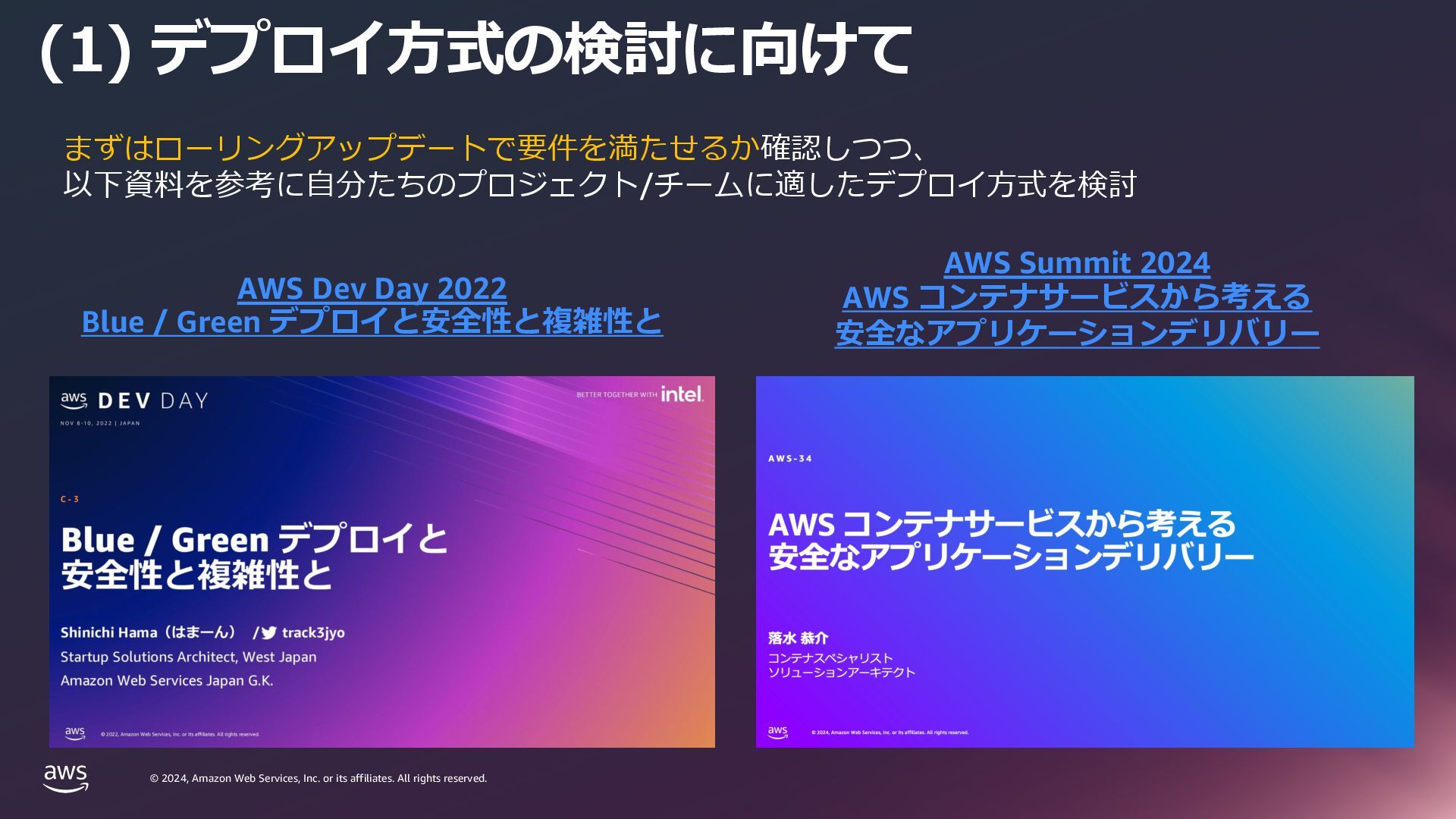
    rights reserved. © 2024, Amazon Web Services, Inc. or its affiliates. All rights reserved. (1) デプロイ⽅式の検討に向けて AWS Dev Day 2022 Blue / Green デプロイと安全性と複雑性と AWS Summit 2024 AWS コンテナサービスから考える 安全なアプリケーションデリバリー まずはローリングアップデートで要件を満たせるか確認しつつ、 以下資料を参考に⾃分たちのプロジェクト/チームに適したデプロイ⽅式を検討
  21. © 2024, Amazon Web Services, Inc. or its affiliates. All

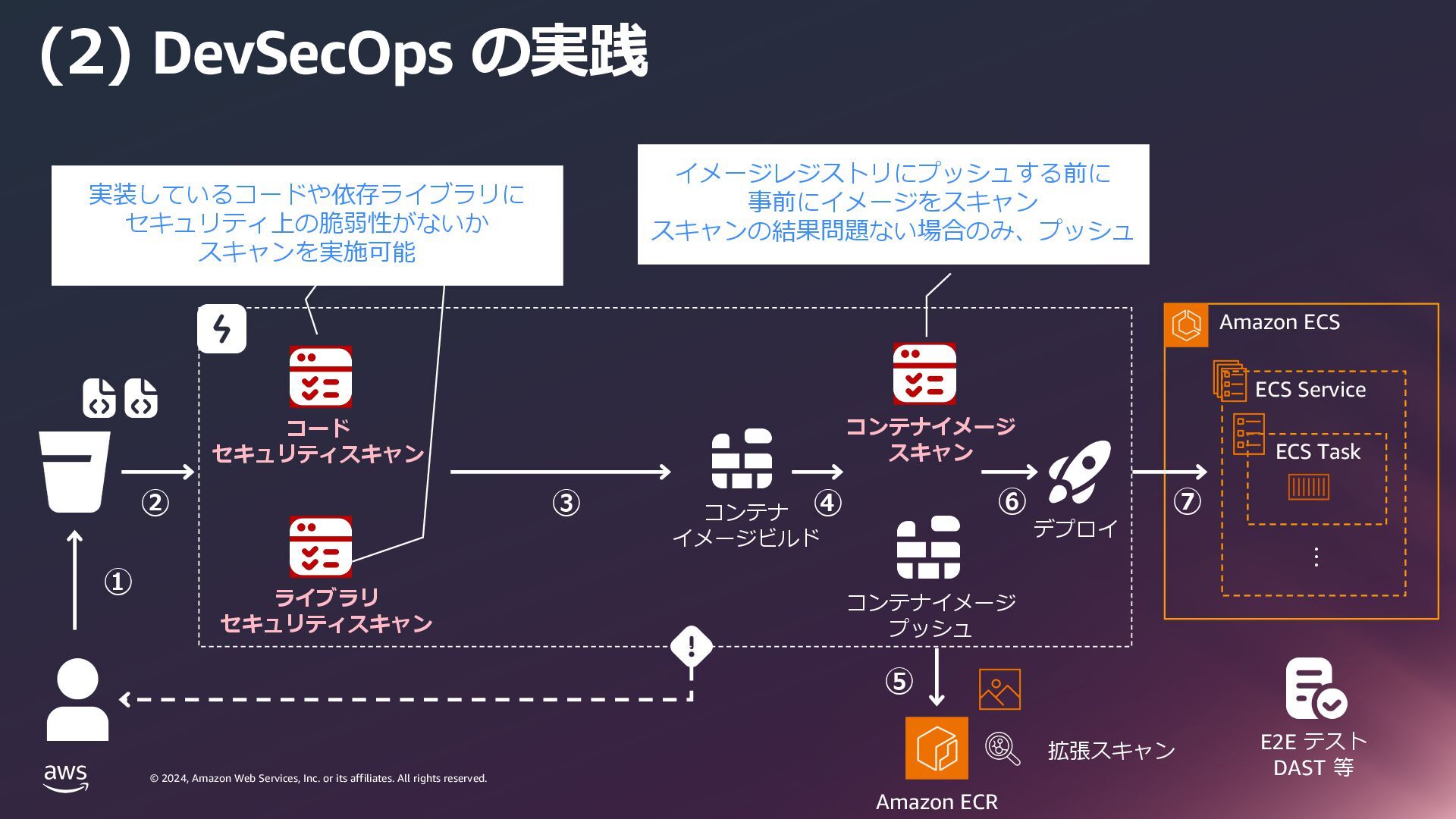
    rights reserved. © 2024, Amazon Web Services, Inc. or its affiliates. All rights reserved. (2) DevSecOps の実践 Amazon ECS ・・・ ECS Service ECS Task コード セキュリティスキャン コンテナ イメージビルド デプロイ ライブラリ セキュリティスキャン コンテナイメージ スキャン コンテナイメージ プッシュ E2E テスト DAST 等 イメージレジストリにプッシュする前に 事前にイメージをスキャン スキャンの結果問題ない場合のみ、プッシュ 実装しているコードや依存ライブラリに セキュリティ上の脆弱性がないか スキャンを実施可能 Amazon ECR 拡張スキャン ① ② ③ ④ ⑤ ⑥ ⑦
  22. © 2024, Amazon Web Services, Inc. or its affiliates. All

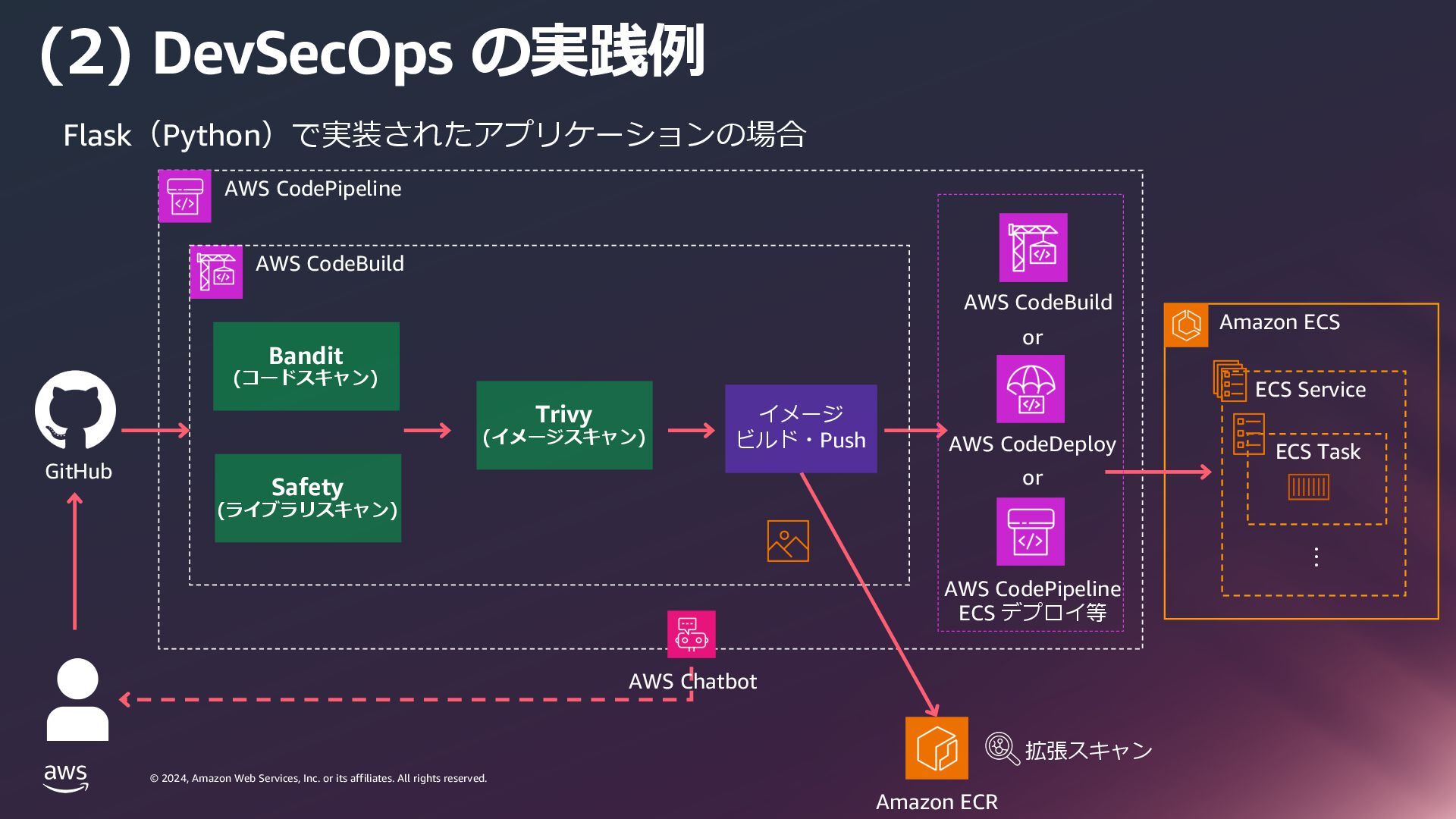
    rights reserved. © 2024, Amazon Web Services, Inc. or its affiliates. All rights reserved. (2) DevSecOps の実践例 AWS CodePipeline Amazon ECS ・・・ ECS Service ECS Task or or Flask(Python)で実装されたアプリケーションの場合 GitHub AWS CodeDeploy AWS CodePipeline ECS デプロイ等 AWS CodeBuild Amazon ECR 拡張スキャン AWS CodeBuild Bandit (コードスキャン) Safety (ライブラリスキャン) イメージ ビルド・Push Trivy (イメージスキャン) AWS Chatbot
  23. © 2024, Amazon Web Services, Inc. or its affiliates. All

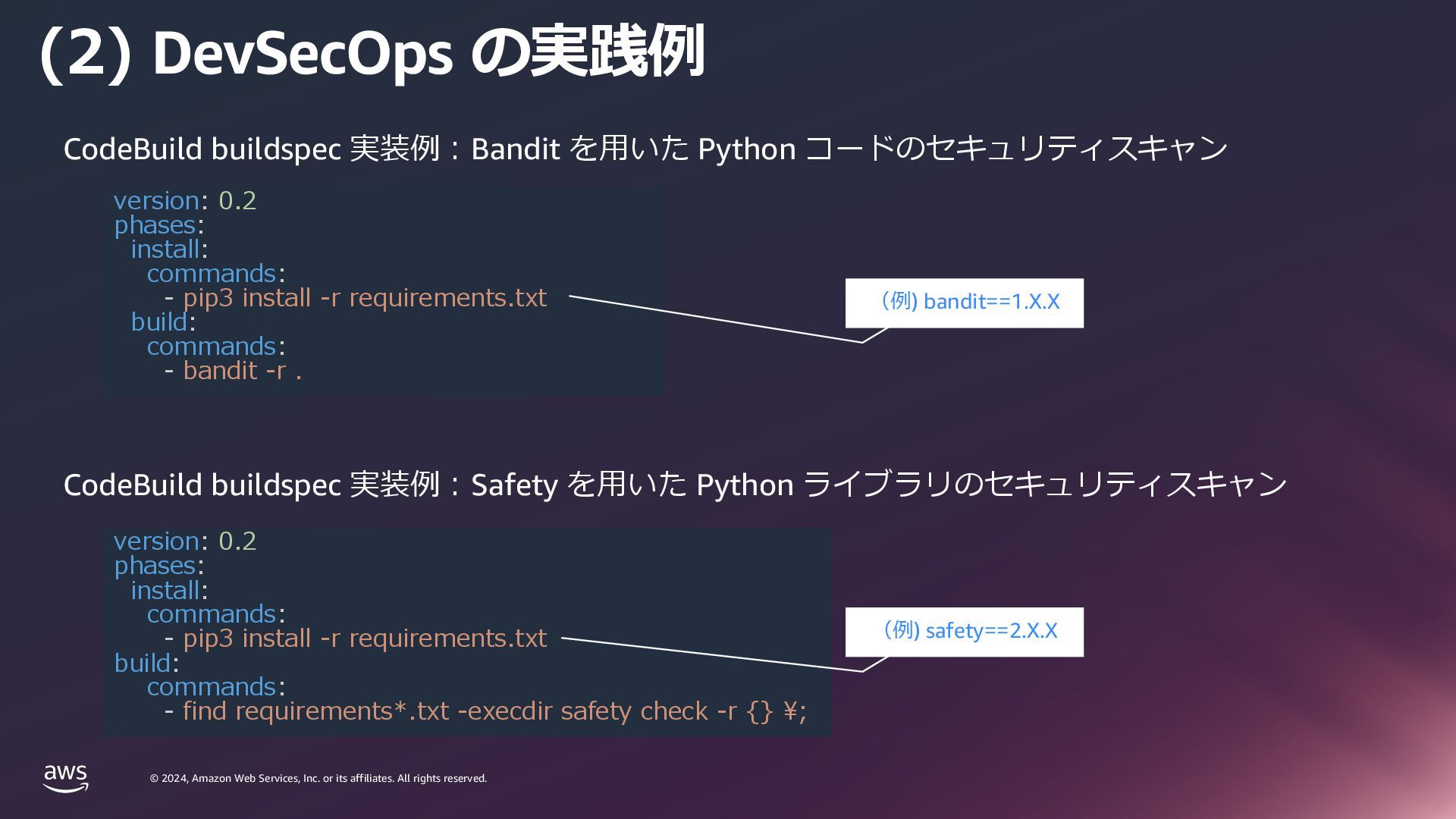
    rights reserved. © 2024, Amazon Web Services, Inc. or its affiliates. All rights reserved. (2) DevSecOps の実践例 CodeBuild buildspec 実装例︓Bandit を⽤いた Python コードのセキュリティスキャン version: 0.2 phases: install: commands: - pip3 install -r requirements.txt build: commands: - bandit -r . version: 0.2 phases: install: commands: - pip3 install -r requirements.txt build: commands: - find requirements*.txt -execdir safety check -r {} \; CodeBuild buildspec 実装例︓Safety を⽤いた Python ライブラリのセキュリティスキャン (例) bandit==1.X.X (例) safety==2.X.X
  24. © 2024, Amazon Web Services, Inc. or its affiliates. All

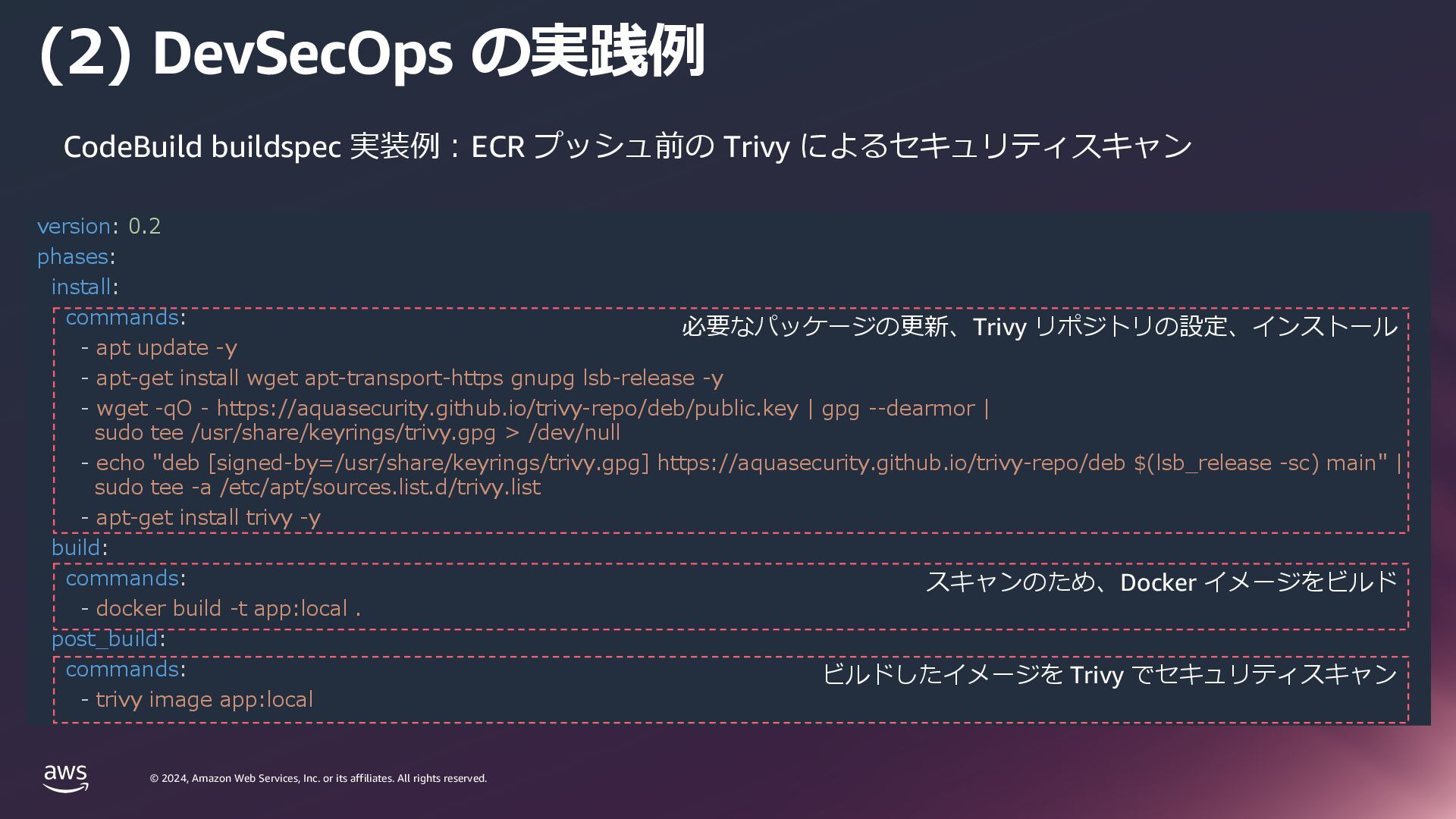
    rights reserved. © 2024, Amazon Web Services, Inc. or its affiliates. All rights reserved. (2) DevSecOps の実践例 CodeBuild buildspec 実装例︓ECR プッシュ前の Trivy によるセキュリティスキャン version: 0.2 phases: install: commands: - apt update -y - apt-get install wget apt-transport-https gnupg lsb-release -y - wget -qO - https://aquasecurity.github.io/trivy-repo/deb/public.key | gpg --dearmor | sudo tee /usr/share/keyrings/trivy.gpg > /dev/null - echo "deb [signed-by=/usr/share/keyrings/trivy.gpg] https://aquasecurity.github.io/trivy-repo/deb $(lsb_release -sc) main" | sudo tee -a /etc/apt/sources.list.d/trivy.list - apt-get install trivy -y build: commands: - docker build -t app:local . post_build: commands: - trivy image app:local 必要なパッケージの更新、Trivy リポジトリの設定、インストール スキャンのため、Docker イメージをビルド ビルドしたイメージを Trivy でセキュリティスキャン
  25. © 2024, Amazon Web Services, Inc. or its affiliates. All

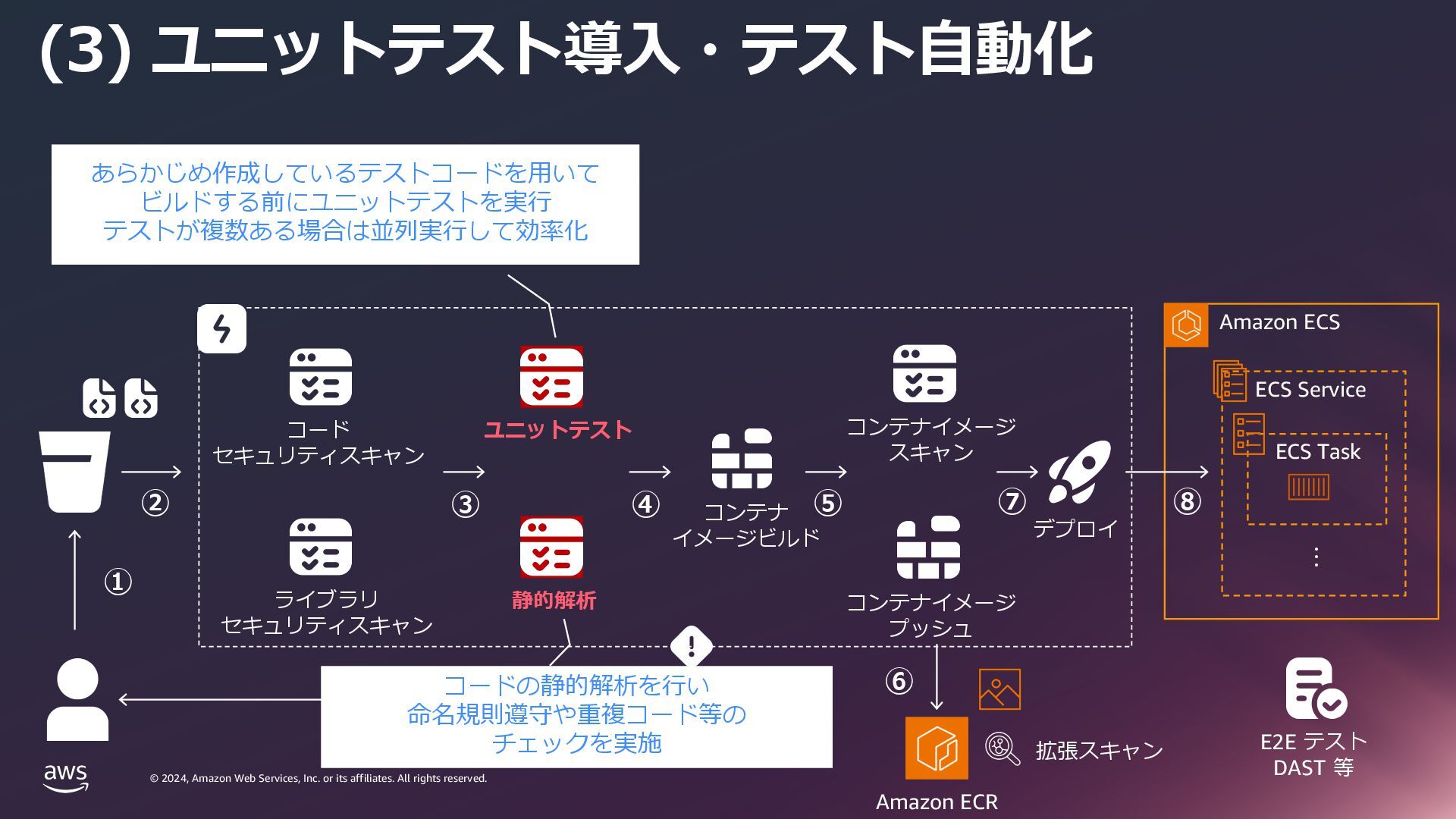
    rights reserved. © 2024, Amazon Web Services, Inc. or its affiliates. All rights reserved. (3) ユニットテスト導⼊・テスト⾃動化 Amazon ECS ・・・ ECS Service ECS Task コード セキュリティスキャン コンテナ イメージビルド デプロイ ライブラリ セキュリティスキャン ユニットテスト コンテナイメージ スキャン コンテナイメージ プッシュ 静的解析 E2E テスト DAST 等 あらかじめ作成しているテストコードを⽤いて ビルドする前にユニットテストを実⾏ テストが複数ある場合は並列実⾏して効率化 コードの静的解析を⾏い 命名規則遵守や重複コード等の チェックを実施 Amazon ECR 拡張スキャン ① ② ③ ⑤ ⑥ ⑦ ⑧ ④
  26. © 2024, Amazon Web Services, Inc. or its affiliates. All

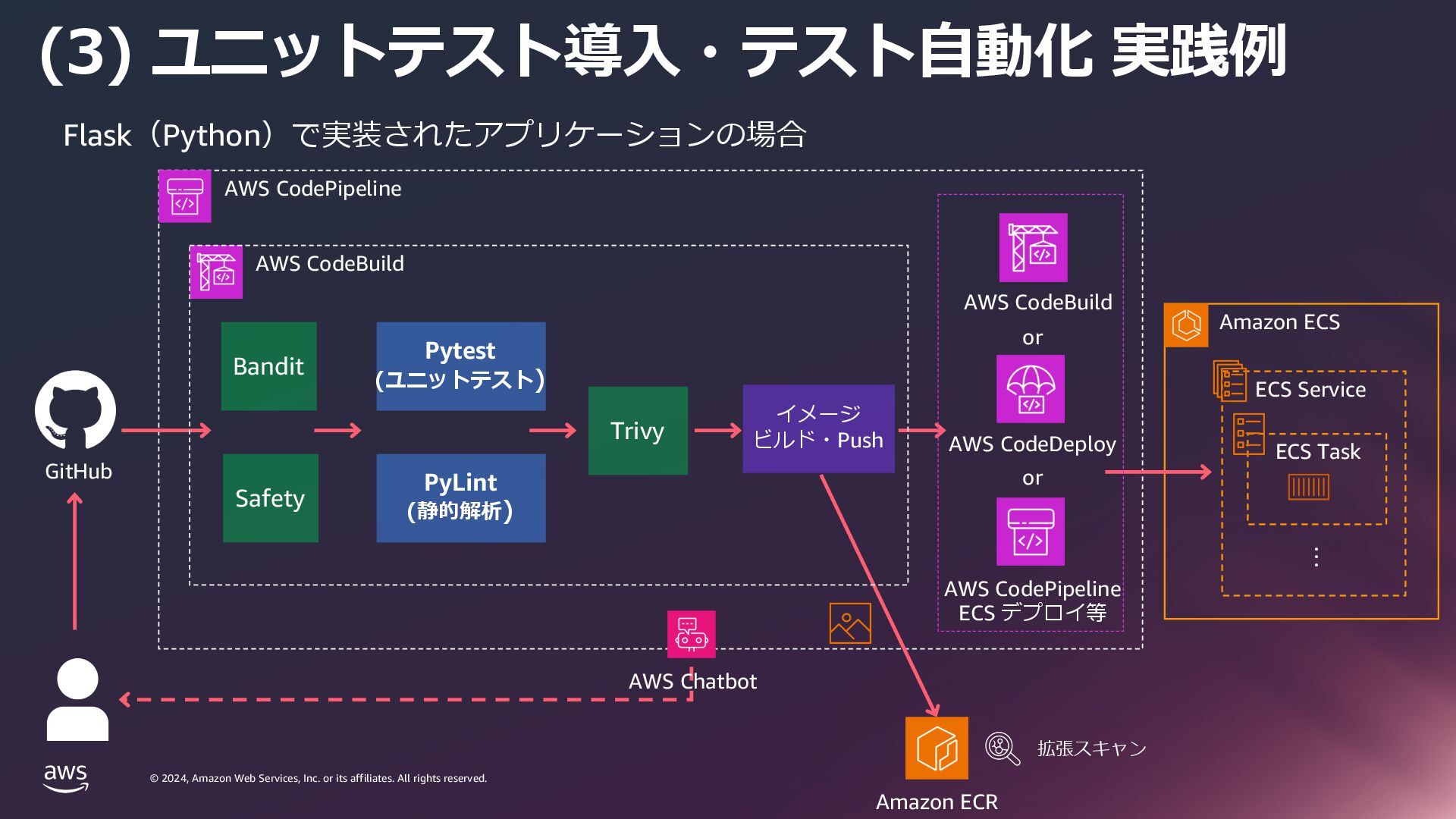
    rights reserved. © 2024, Amazon Web Services, Inc. or its affiliates. All rights reserved. (3) ユニットテスト導⼊・テスト⾃動化 実践例 AWS CodePipeline Amazon ECS ・・・ ECS Service ECS Task or or Flask(Python)で実装されたアプリケーションの場合 GitHub AWS CodeDeploy AWS CodePipeline ECS デプロイ等 AWS CodeBuild Amazon ECR 拡張スキャン AWS CodeBuild Bandit Safety Trivy Pytest (ユニットテスト) PyLint (静的解析) イメージ ビルド・Push AWS Chatbot
  27. © 2024, Amazon Web Services, Inc. or its affiliates. All

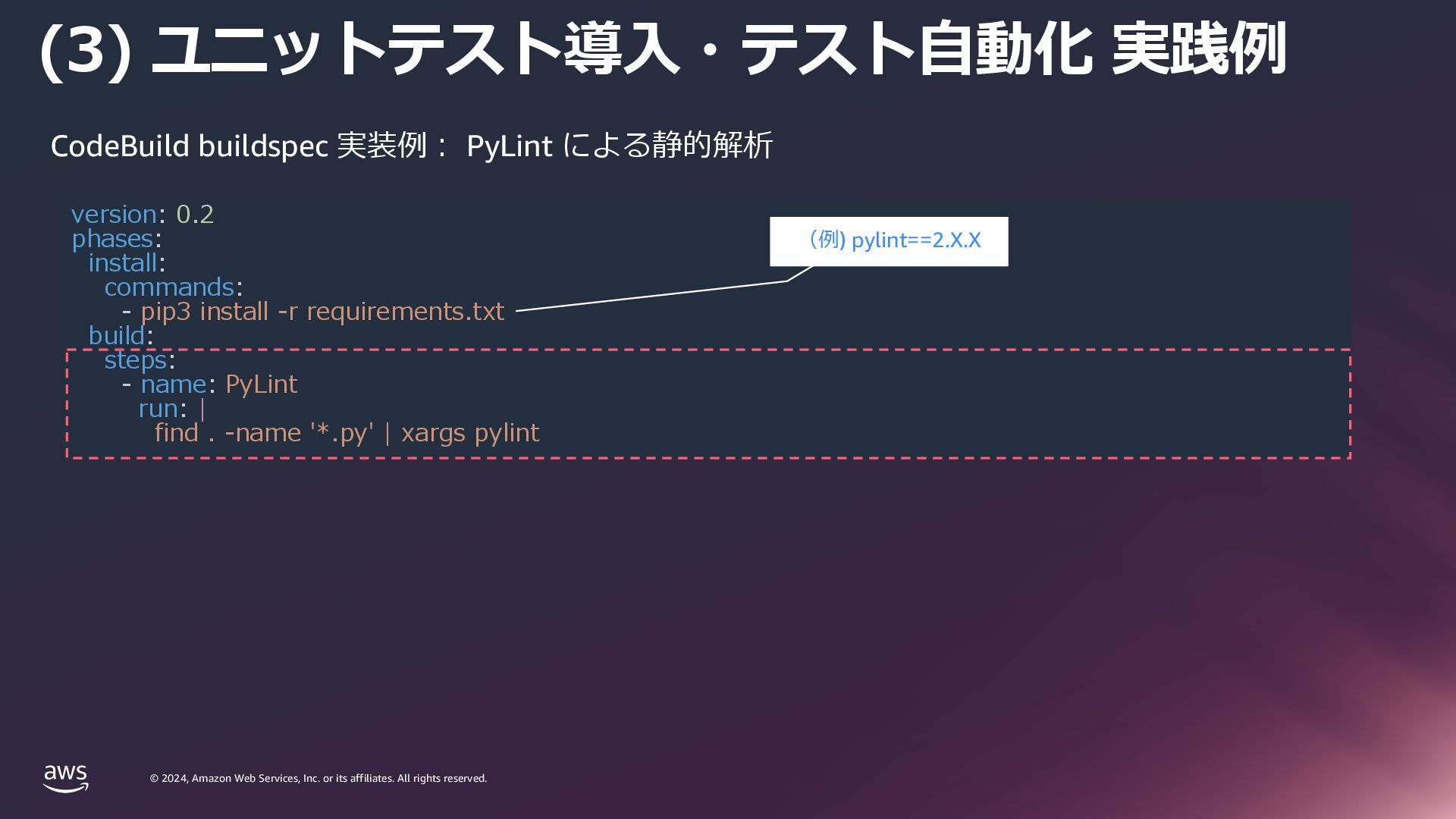
    rights reserved. © 2024, Amazon Web Services, Inc. or its affiliates. All rights reserved. (3) ユニットテスト導⼊・テスト⾃動化 実践例 CodeBuild buildspec 実装例︓ PyLint による静的解析 version: 0.2 phases: install: commands: - pip3 install -r requirements.txt build: steps: - name: PyLint run: | find . -name '*.py' | xargs pylint (例) pylint==2.X.X
  28. © 2024, Amazon Web Services, Inc. or its affiliates. All

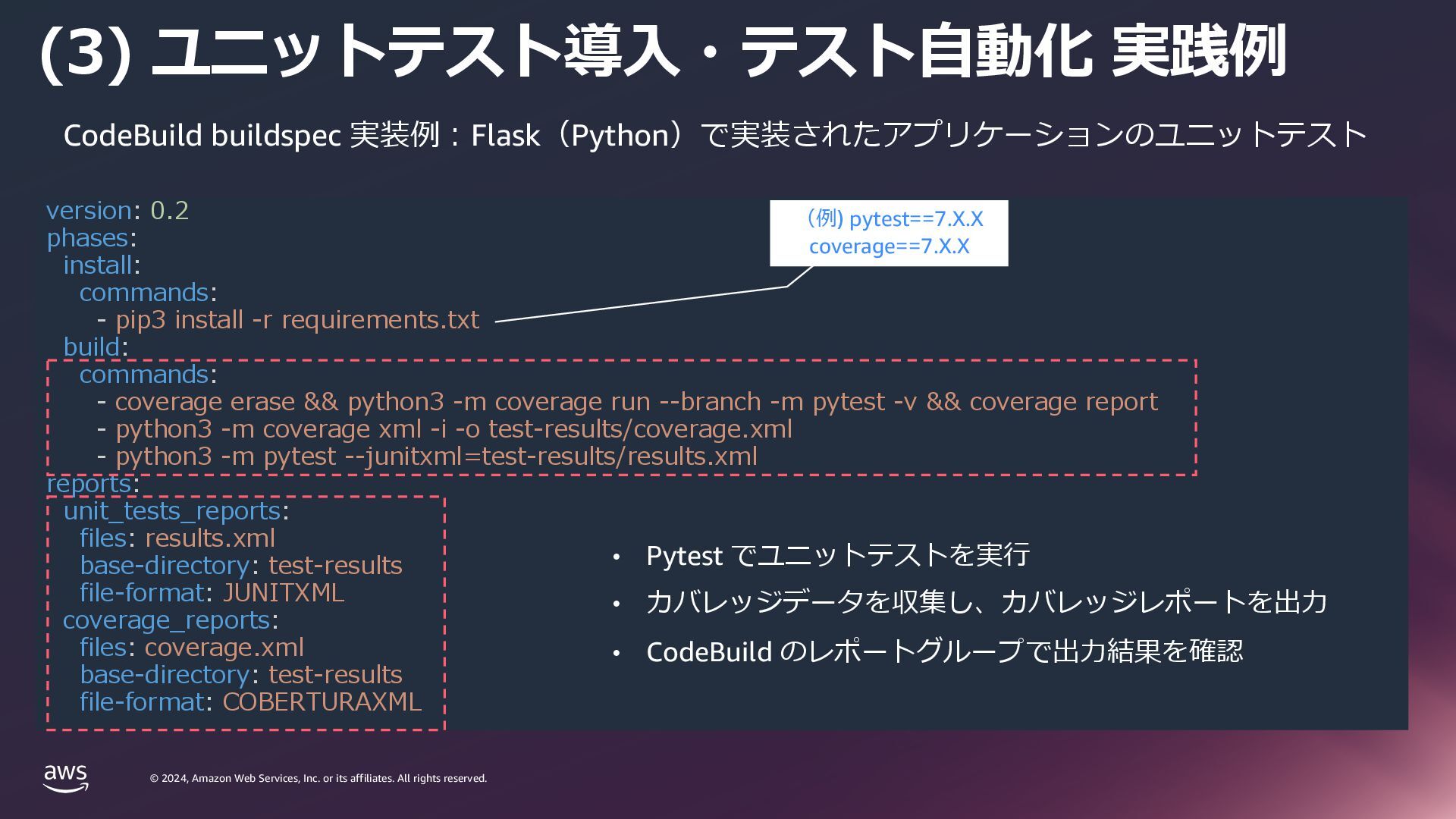
    rights reserved. © 2024, Amazon Web Services, Inc. or its affiliates. All rights reserved. (3) ユニットテスト導⼊・テスト⾃動化 実践例 CodeBuild buildspec 実装例︓Flask(Python)で実装されたアプリケーションのユニットテスト version: 0.2 phases: install: commands: - pip3 install -r requirements.txt build: commands: - coverage erase && python3 -m coverage run --branch -m pytest -v && coverage report - python3 -m coverage xml -i -o test-results/coverage.xml - python3 -m pytest --junitxml=test-results/results.xml reports: unit_tests_reports: files: results.xml base-directory: test-results file-format: JUNITXML coverage_reports: files: coverage.xml base-directory: test-results file-format: COBERTURAXML • Pytest でユニットテストを実⾏ • カバレッジデータを収集し、カバレッジレポートを出⼒ • CodeBuild のレポートグループで出⼒結果を確認 (例) pytest==7.X.X coverage==7.X.X
  29. © 2024, Amazon Web Services, Inc. or its affiliates. All

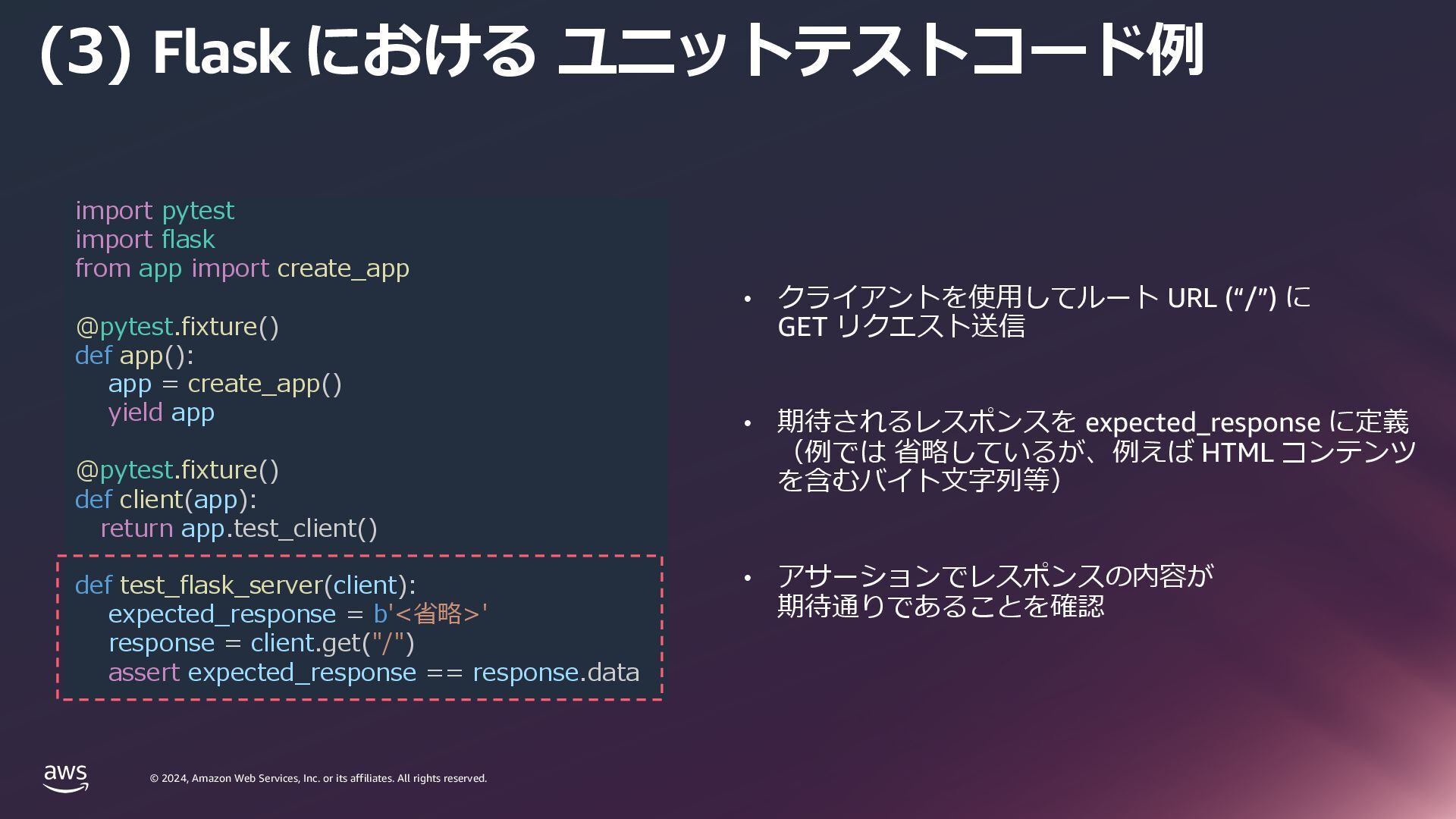
    rights reserved. © 2024, Amazon Web Services, Inc. or its affiliates. All rights reserved. (3) Flask における ユニットテストコード例 • クライアントを使⽤してルート URL (“/”) に GET リクエスト送信 • 期待されるレスポンスを expected_response に定義 (例では 省略しているが、例えば HTML コンテンツ を含むバイト⽂字列等) • アサーションでレスポンスの内容が 期待通りであることを確認 import pytest import flask from app import create_app @pytest.fixture() def app(): app = create_app() yield app @pytest.fixture() def client(app): return app.test_client() def test_flask_server(client): expected_response = b'<省略>' response = client.get("/") assert expected_response == response.data
  30. © 2024, Amazon Web Services, Inc. or its affiliates. All

    rights reserved. © 2024, Amazon Web Services, Inc. or its affiliates. All rights reserved. Amazon ECS の環境を IaC で 管理していくために
  31. © 2024, Amazon Web Services, Inc. or its affiliates. All

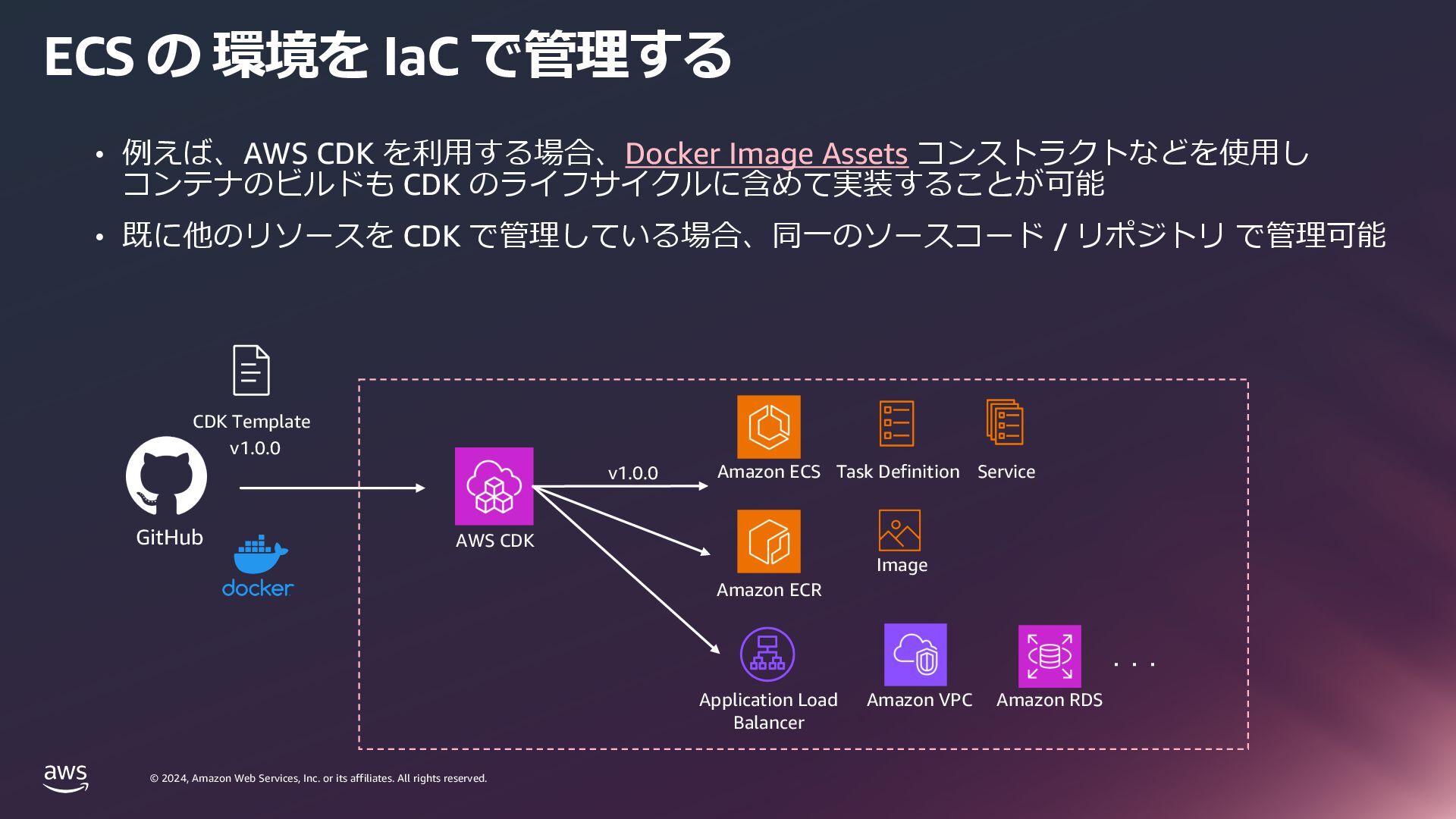
    rights reserved. © 2024, Amazon Web Services, Inc. or its affiliates. All rights reserved. ECS の 環境を IaC で管理する CDK Template Amazon ECS • 例えば、AWS CDK を利⽤する場合、Docker Image Assets コンストラクトなどを使⽤し コンテナのビルドも CDK のライフサイクルに含めて実装することが可能 • 既に他のリソースを CDK で管理している場合、同⼀のソースコード / リポジトリ で管理可能 v1.0.0 v1.0.0 Task Definition Service Application Load Balancer Amazon RDS Amazon VPC AWS CDK ・・・ Amazon ECR Image GitHub
  32. © 2024, Amazon Web Services, Inc. or its affiliates. All

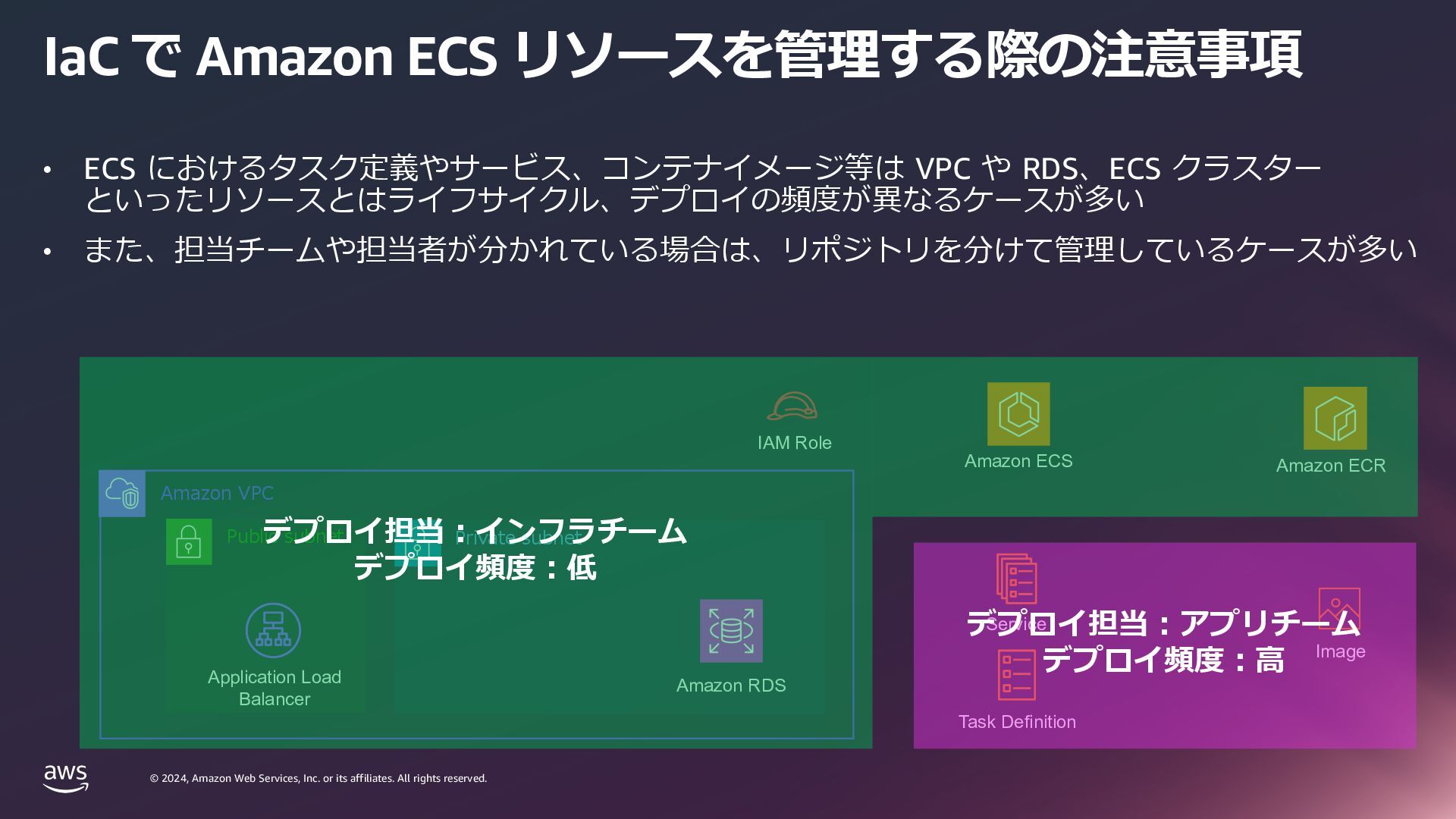
    rights reserved. © 2024, Amazon Web Services, Inc. or its affiliates. All rights reserved. Amazon VPC Private subnet Public subnet IaC で Amazon ECS リソースを管理する際の注意事項 • ECS におけるタスク定義やサービス、コンテナイメージ等は VPC や RDS、ECS クラスター といったリソースとはライフサイクル、デプロイの頻度が異なるケースが多い • また、担当チームや担当者が分かれている場合は、リポジトリを分けて管理しているケースが多い Application Load Balancer Amazon ECR Amazon ECS Image Task Definition Service Amazon RDS IAM Role デプロイ担当︓アプリチーム デプロイ頻度︓⾼ デプロイ担当︓インフラチーム デプロイ頻度︓低
  33. © 2024, Amazon Web Services, Inc. or its affiliates. All

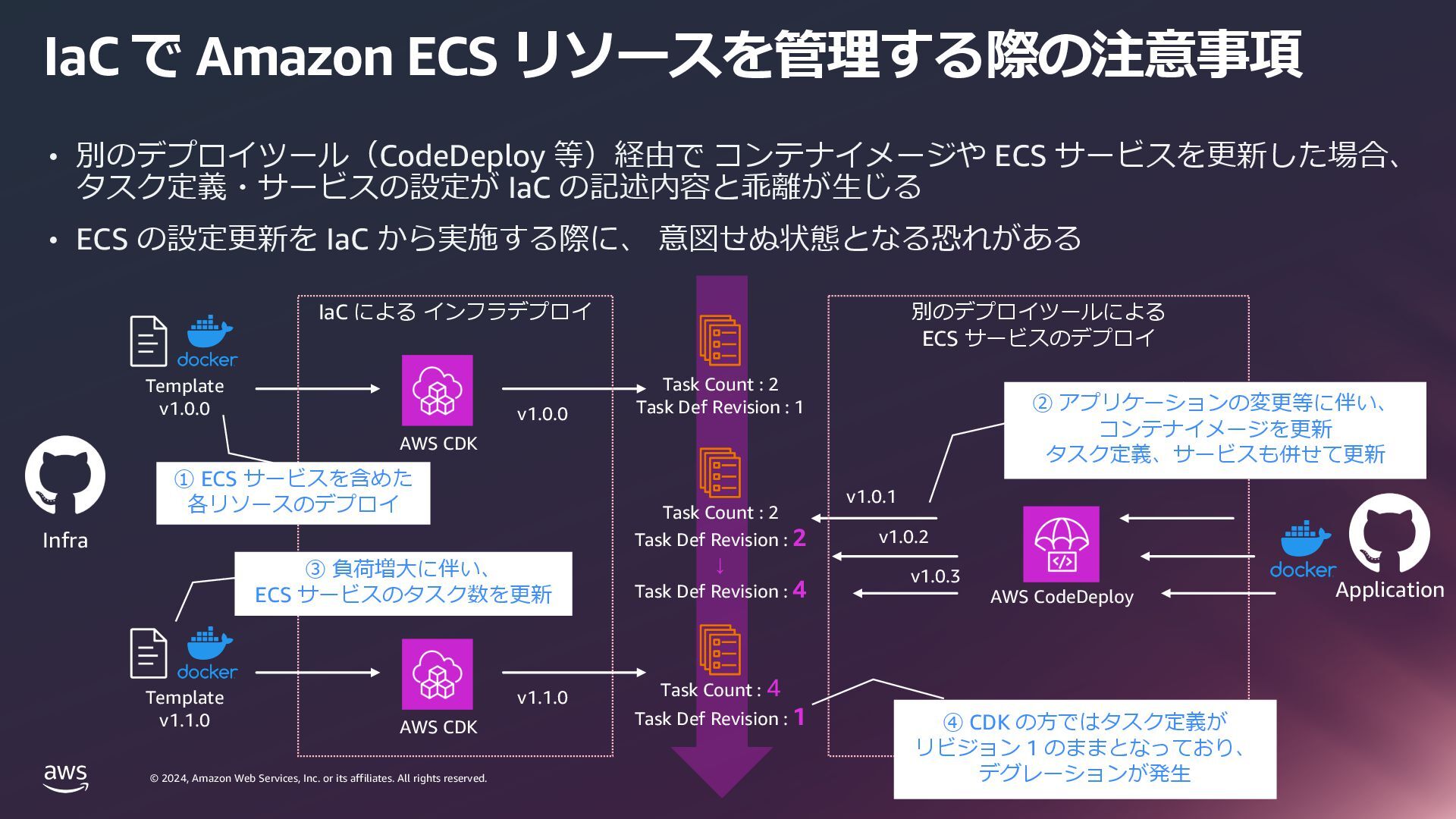
    rights reserved. © 2024, Amazon Web Services, Inc. or its affiliates. All rights reserved. IaC で Amazon ECS リソースを管理する際の注意事項 Template v1.0.0 AWS CodeDeploy v1.0.0 IaC による インフラデプロイ 別のデプロイツールによる ECS サービスのデプロイ • 別のデプロイツール(CodeDeploy 等)経由で コンテナイメージや ECS サービスを更新した場合、 タスク定義・サービスの設定が IaC の記述内容と乖離が⽣じる • ECS の設定更新を IaC から実施する際に、 意図せぬ状態となる恐れがある AWS CDK Task Count : 2 Task Def Revision : 1 Application Task Count : 2 Task Def Revision : 2 ↓ Task Def Revision : 4 Task Count : 4 Task Def Revision : 1 Template v1.1.0 v1.1.0 AWS CDK v1.0.1 v1.0.2 v1.0.3 ① ECS サービスを含めた 各リソースのデプロイ ② アプリケーションの変更等に伴い、 コンテナイメージを更新 タスク定義、サービスも併せて更新 ③ 負荷増⼤に伴い、 ECS サービスのタスク数を更新 ④ CDK の⽅ではタスク定義が リビジョン 1 のままとなっており、 デグレーションが発⽣ Infra
  34. © 2024, Amazon Web Services, Inc. or its affiliates. All

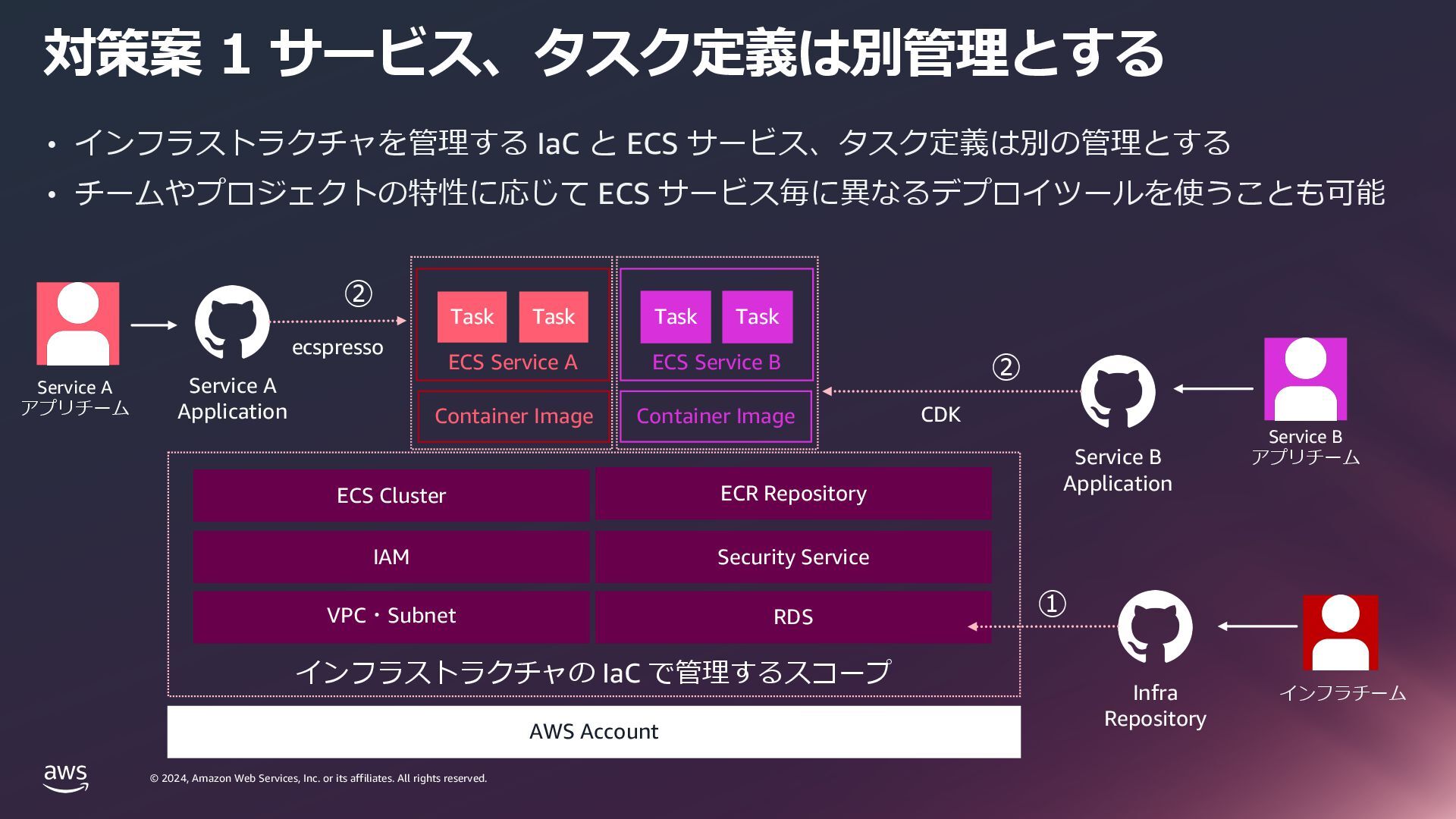
    rights reserved. © 2024, Amazon Web Services, Inc. or its affiliates. All rights reserved. 対策案 1 サービス、タスク定義は別管理とする AWS Account VPC・Subnet IAM ECS Cluster ECS Service A Task Task ECS Service B Task Task Container Image Container Image インフラストラクチャの IaC で管理するスコープ RDS Security Service ECR Repository Service B Application Infra Repository Service B アプリチーム インフラチーム ② ① Service A Application Service A アプリチーム ② • インフラストラクチャを管理する IaC と ECS サービス、タスク定義は別の管理とする • チームやプロジェクトの特性に応じて ECS サービス毎に異なるデプロイツールを使うことも可能 ecspresso CDK
  35. © 2024, Amazon Web Services, Inc. or its affiliates. All

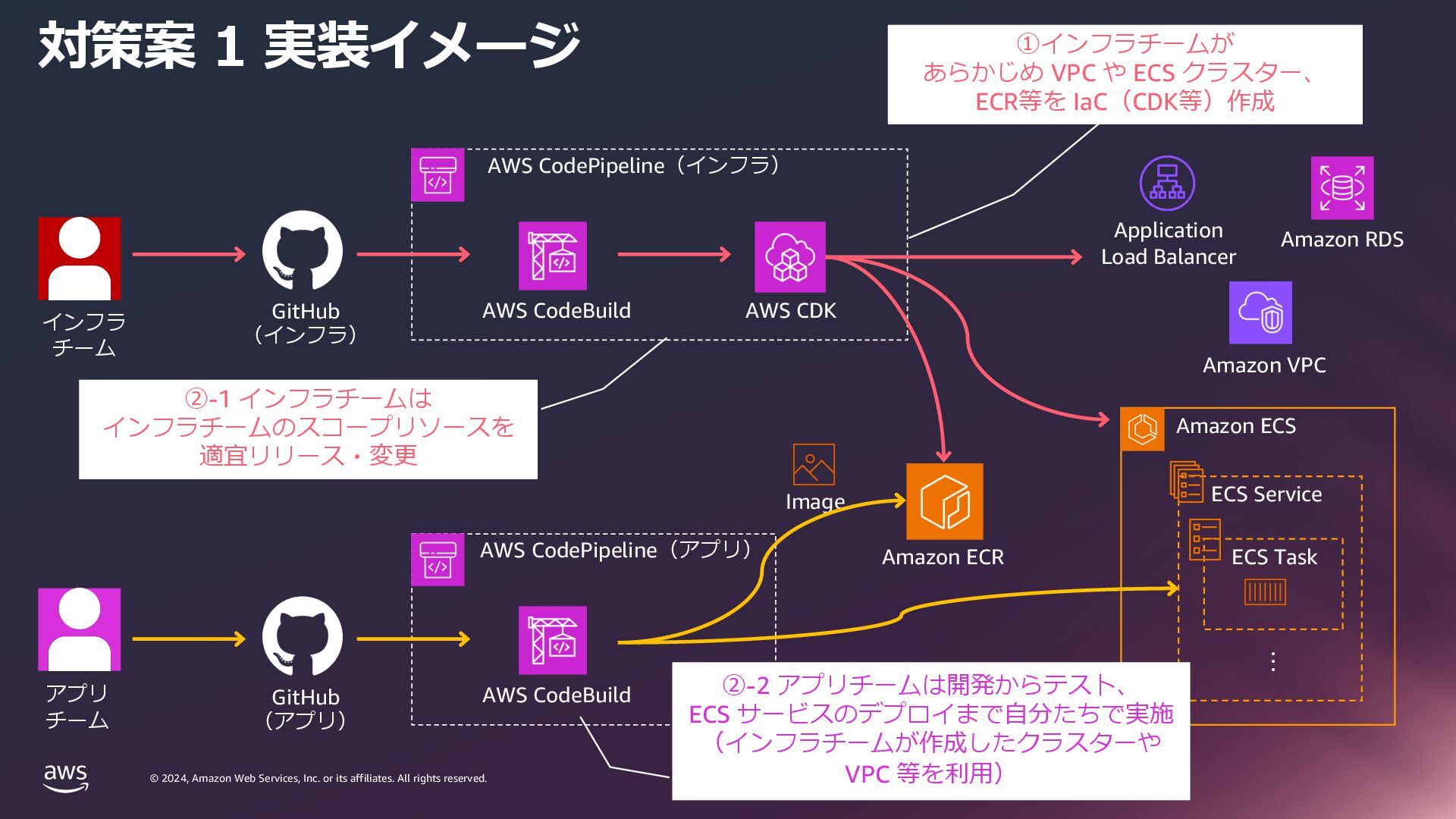
    rights reserved. © 2024, Amazon Web Services, Inc. or its affiliates. All rights reserved. 対策案 1 実装イメージ AWS CodePipeline(インフラ) Amazon ECS ・・・ ECS Service ECS Task GitHub (インフラ) AWS CodeBuild AWS CDK AWS CodePipeline(アプリ) AWS CodeBuild Amazon ECR Image アプリ チーム インフラ チーム ①インフラチームが あらかじめ VPC や ECS クラスター、 ECR等を IaC(CDK等)作成 ②-2 アプリチームは開発からテスト、 ECS サービスのデプロイまで⾃分たちで実施 (インフラチームが作成したクラスターや VPC 等を利⽤) ②-1 インフラチームは インフラチームのスコープリソースを 適宜リリース・変更 Application Load Balancer Amazon RDS Amazon VPC GitHub (アプリ)
  36. © 2024, Amazon Web Services, Inc. or its affiliates. All

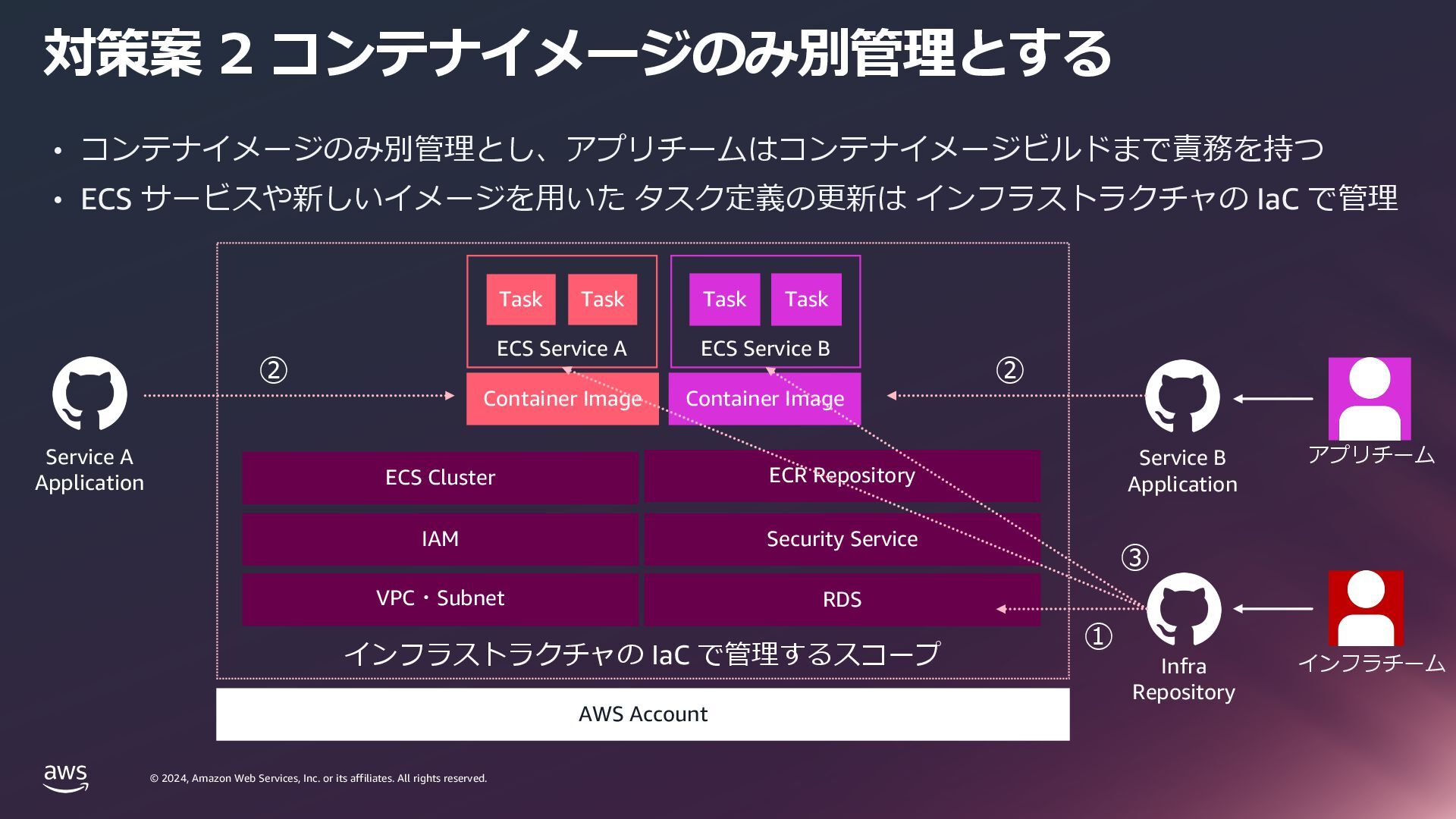
    rights reserved. © 2024, Amazon Web Services, Inc. or its affiliates. All rights reserved. 対策案 2 コンテナイメージのみ別管理とする AWS Account VPC・Subnet IAM ECS Cluster Task Task Task Task Container Image Container Image インフラストラクチャの IaC で管理するスコープ RDS Security Service ECR Repository Service B Application Infra Repository アプリチーム インフラチーム • コンテナイメージのみ別管理とし、アプリチームはコンテナイメージビルドまで責務を持つ • ECS サービスや新しいイメージを⽤いた タスク定義の更新は インフラストラクチャの IaC で管理 ECS Service A ECS Service B Service A Application ① ② ② ③
  37. © 2024, Amazon Web Services, Inc. or its affiliates. All

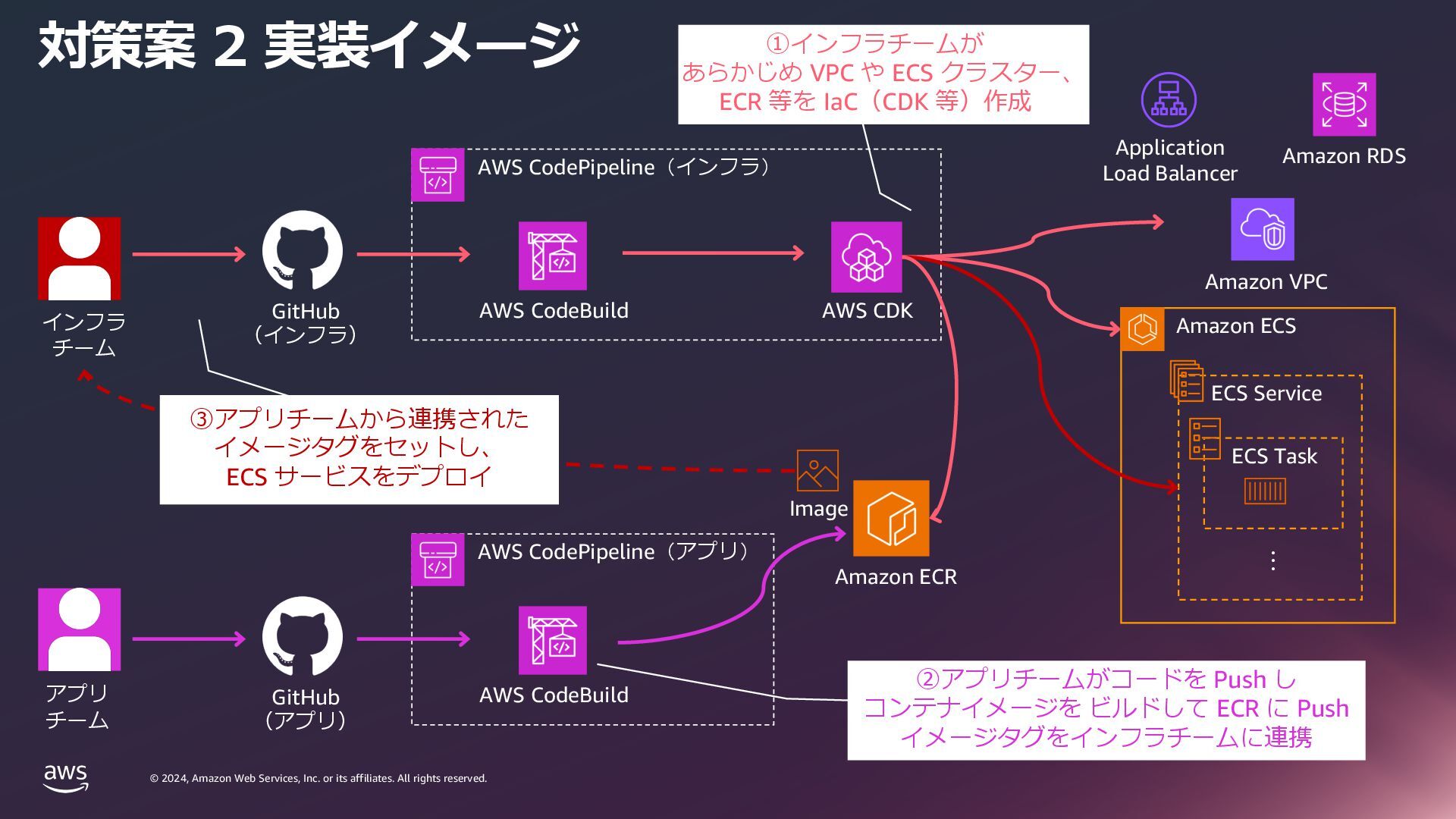
    rights reserved. © 2024, Amazon Web Services, Inc. or its affiliates. All rights reserved. 対策案 2 実装イメージ AWS CodePipeline(インフラ) Amazon ECS ・・・ ECS Service ECS Task AWS CodeBuild AWS CDK AWS CodePipeline(アプリ) AWS CodeBuild Amazon ECR Image アプリ チーム インフラ チーム ①インフラチームが あらかじめ VPC や ECS クラスター、 ECR 等を IaC(CDK 等)作成 ②アプリチームがコードを Push し コンテナイメージを ビルドして ECR に Push イメージタグをインフラチームに連携 GitHub (インフラ) GitHub (アプリ) Application Load Balancer Amazon RDS Amazon VPC ③アプリチームから連携された イメージタグをセットし、 ECS サービスをデプロイ
  38. © 2024, Amazon Web Services, Inc. or its affiliates. All

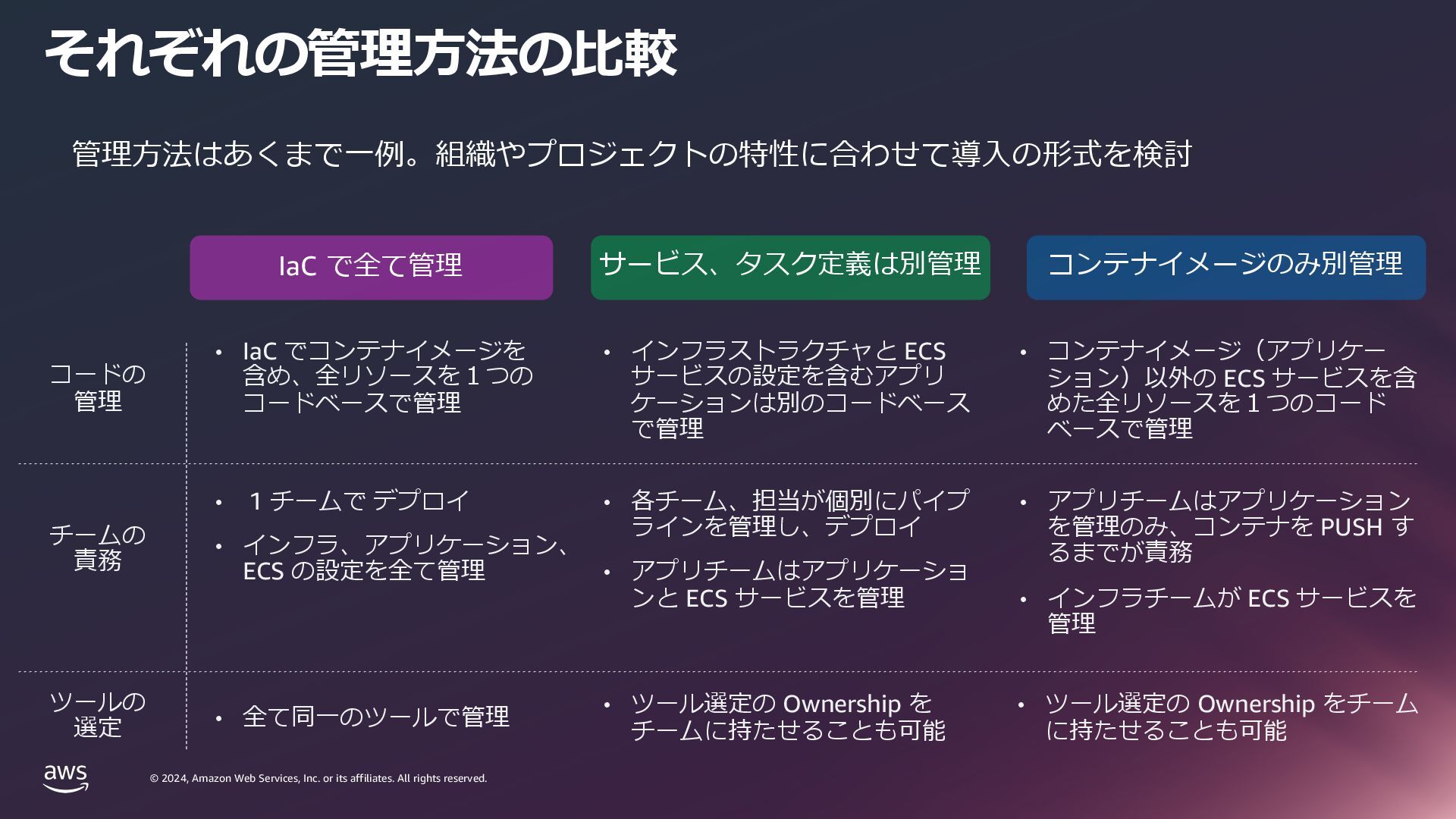
    rights reserved. © 2024, Amazon Web Services, Inc. or its affiliates. All rights reserved. それぞれの管理⽅法の⽐較 • インフラストラクチャと ECS サービスの設定を含むアプリ ケーションは別のコードベース で管理 • 各チーム、担当が個別にパイプ ラインを管理し、デプロイ • アプリチームはアプリケーショ ンと ECS サービスを管理 • コンテナイメージ(アプリケー ション)以外の ECS サービスを含 めた全リソースを1つのコード ベースで管理 • アプリチームはアプリケーション を管理のみ、コンテナを PUSH す るまでが責務 • インフラチームが ECS サービスを 管理 IaC で全て管理 サービス、タスク定義は別管理 コンテナイメージのみ別管理 管理⽅法はあくまで⼀例。組織やプロジェクトの特性に合わせて導⼊の形式を検討 • IaC でコンテナイメージを 含め、全リソースを1つの コードベースで管理 • 1 チームで デプロイ • インフラ、アプリケーション、 ECS の設定を全て管理 コードの 管理 チームの 責務 ツールの 選定 • ツール選定の Ownership を チームに持たせることも可能 • ツール選定の Ownership をチーム に持たせることも可能 • 全て同⼀のツールで管理
  39. © 2024, Amazon Web Services, Inc. or its affiliates. All

    rights reserved. © 2024, Amazon Web Services, Inc. or its affiliates. All rights reserved. まとめ
  40. © 2024, Amazon Web Services, Inc. or its affiliates. All

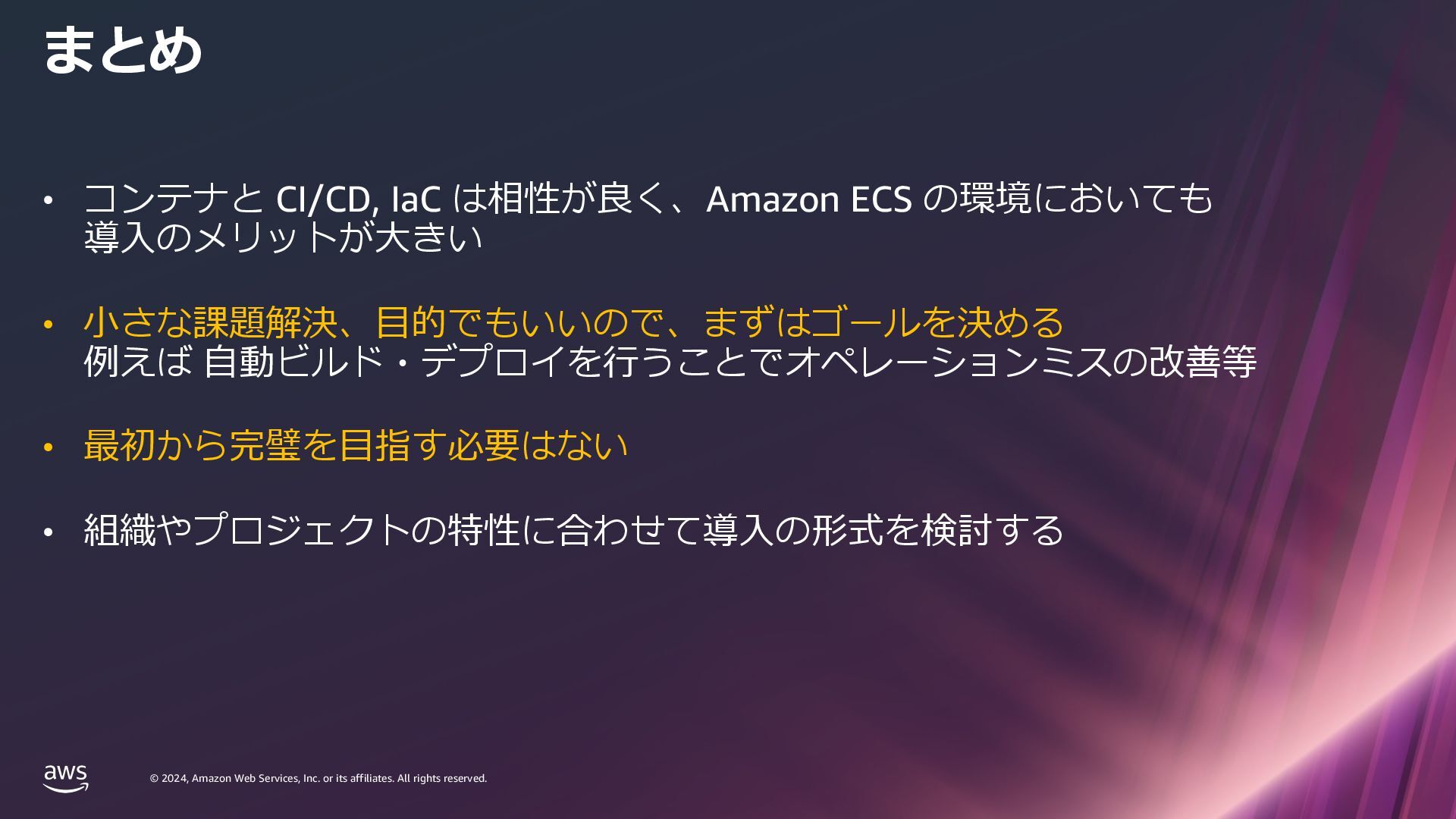
    rights reserved. © 2024, Amazon Web Services, Inc. or its affiliates. All rights reserved. • コンテナと CI/CD, IaC は相性が良く、Amazon ECS の環境においても 導⼊のメリットが⼤きい • ⼩さな課題解決、⽬的でもいいので、まずはゴールを決める 例えば ⾃動ビルド・デプロイを⾏うことでオペレーションミスの改善等 • 最初から完璧を⽬指す必要はない • 組織やプロジェクトの特性に合わせて導⼊の形式を検討する まとめ
  41. © 2024, Amazon Web Services, Inc. or its affiliates. All

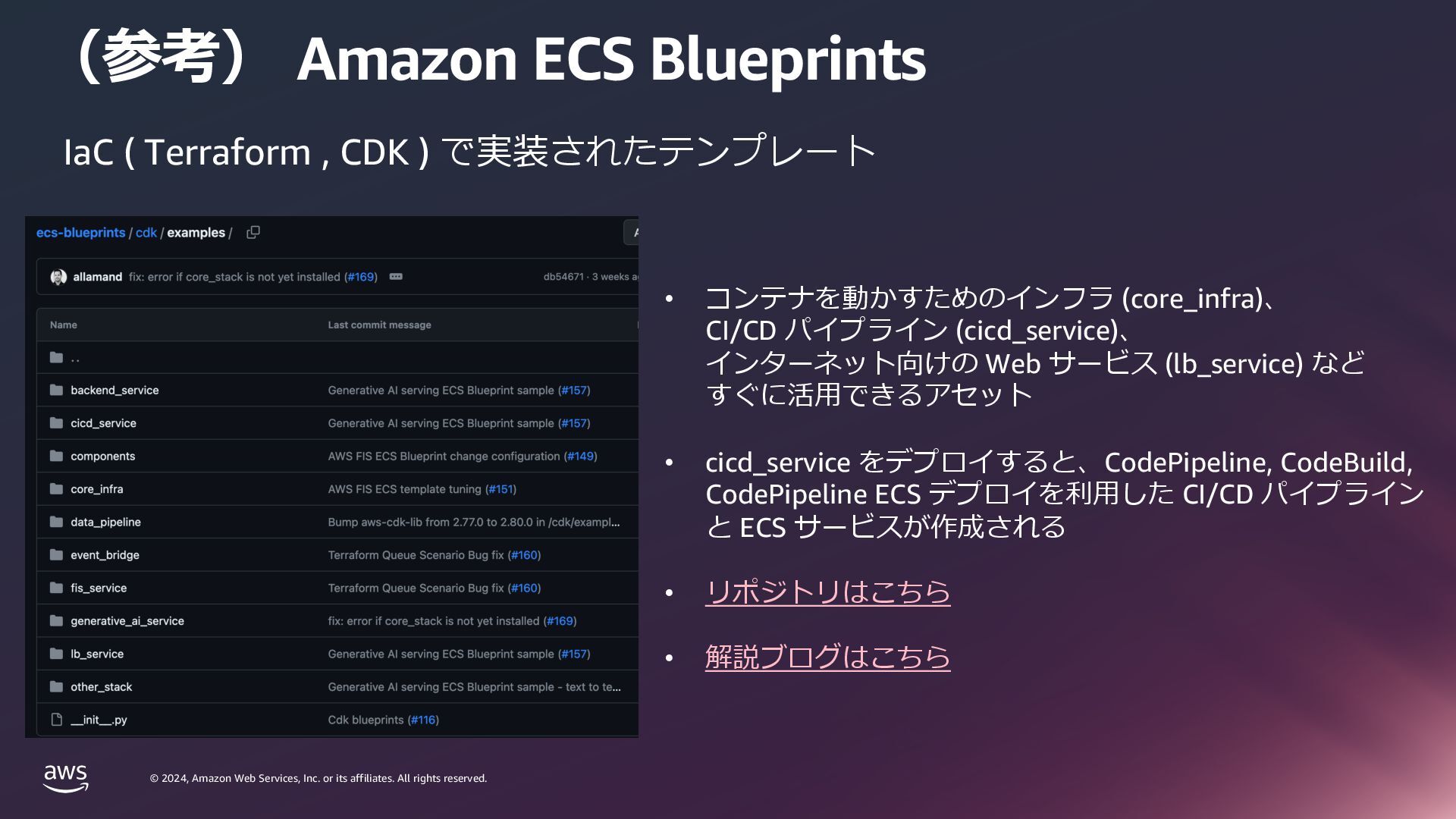
    rights reserved. © 2024, Amazon Web Services, Inc. or its affiliates. All rights reserved. (参考) Amazon ECS Blueprints IaC ( Terraform , CDK ) で実装されたテンプレート • コンテナを動かすためのインフラ (core_infra)、 CI/CD パイプライン (cicd_service)、 インターネット向けの Web サービス (lb_service) など すぐに活⽤できるアセット • cicd_service をデプロイすると、CodePipeline, CodeBuild, CodePipeline ECS デプロイを利⽤した CI/CD パイプライン と ECS サービスが作成される • リポジトリはこちら • 解説ブログはこちら
  42. © 2024, Amazon Web Services, Inc. or its affiliates. All

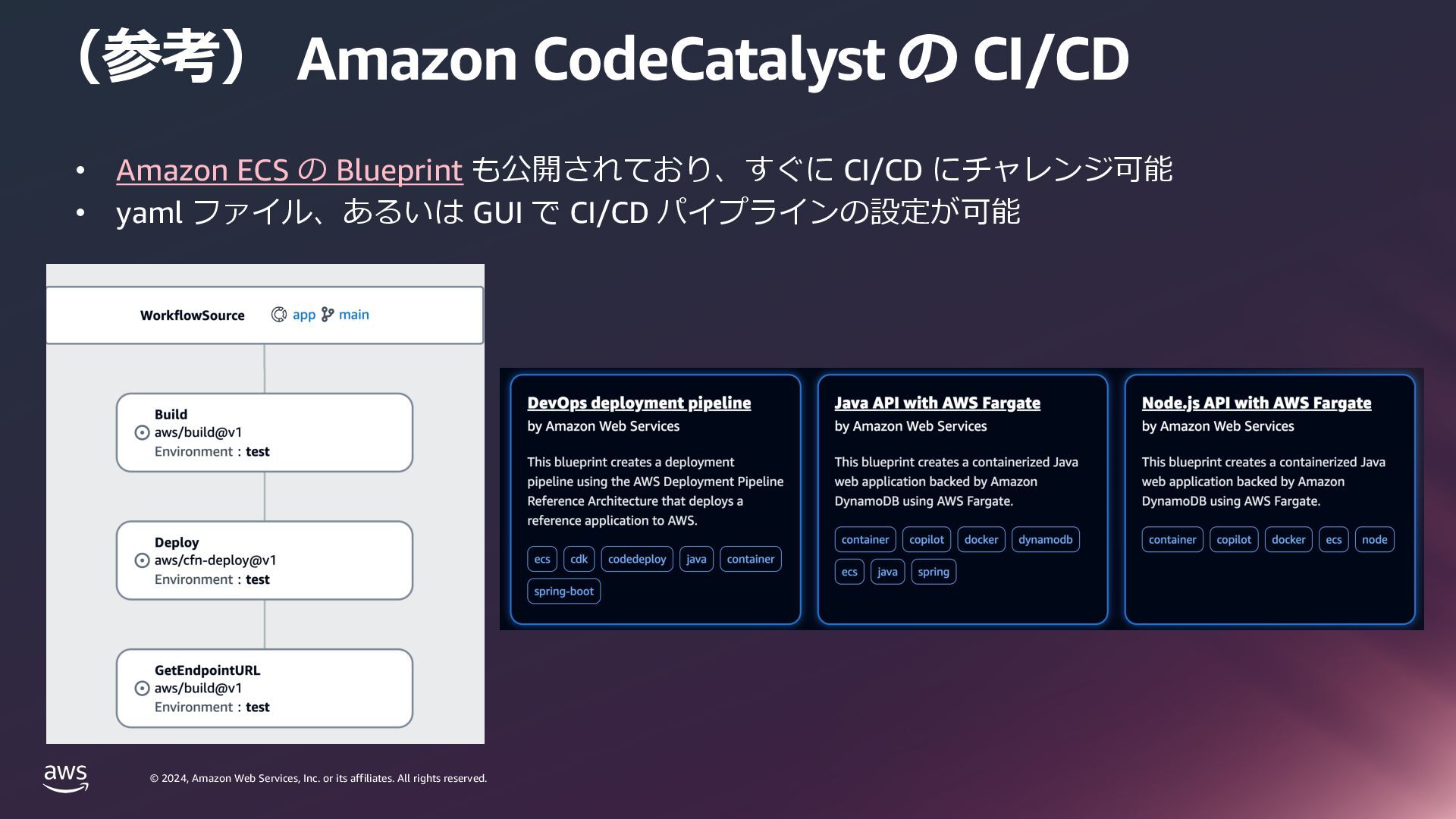
    rights reserved. © 2024, Amazon Web Services, Inc. or its affiliates. All rights reserved. (参考) Amazon CodeCatalyst の CI/CD • Amazon ECS の Blueprint も公開されており、すぐに CI/CD にチャレンジ可能 • yaml ファイル、あるいは GUI で CI/CD パイプラインの設定が可能
  43. © 2024, Amazon Web Services, Inc. or its affiliates. All

    rights reserved. © 2024, Amazon Web Services, Inc. or its affiliates. All rights reserved. AWSトレーニングと認定資格 無料デジタルトレーニングで始めよう AWS Skill Builder にアクセスして AWS のエキスパートが開発した無料の AI & ML 学習プランコースで学ぼう ⾃分のペースで進められるデジタルオンデマンド トレーニングと、技術的なスキルの向上を⽀援 するランプアップガイドをご利⽤いただけます。 機械学習、⼈⼯知能、ディープラーニングを どのように応⽤し、新しい洞察と価値を引き出す かを学びます。 ⾃ 分 だ け の ⽅ 法 で 学 ぶ E X P L O R E . S K I L L B U I L D E R . A W S » 認定資格「AWS Certified Machine Learning - Specialty Certification」であなたの専⾨知識を 証明するために踏み出しましょう。