Upgrade to Pro
— share decks privately, control downloads, hide ads and more …
Speaker Deck
Sign up for free
Menu
Search
Features
All features
Private URLs
Password Protection
Custom URLS
Scheduled publishing
Remove Branding
Restrict embedding
Deck Collections
Notes
Features
All features
Private URLs
Password Protection
Custom URLS
Scheduled publishing
Remove Branding
Restrict embedding
Deck Collections
Notes
Explore
Featured decks
Featured speakers
Programming
Technology
Storyboards
Explore
Featured decks
Featured speakers
Programming
Technology
Storyboards
Pricing
Search
Sign in
Sign up for free
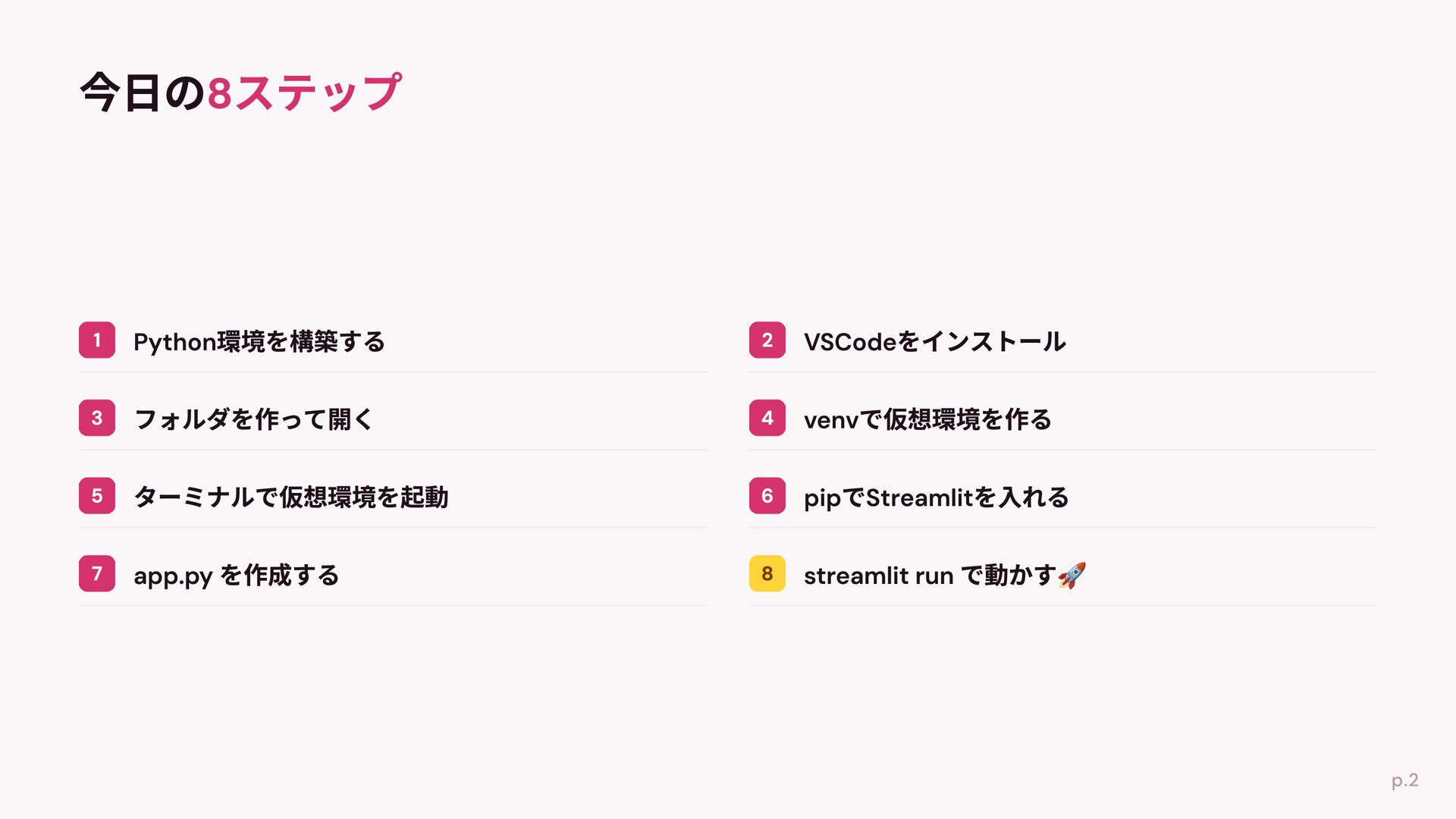
自分のPCにPython環境を用意して_VSCodeでStreamlitアプリを動かすまでの8...
Search
Sponsored
·
Ship Features Fearlessly
Turn features on and off without deploys. Used by thousands of Ruby developers.
→
mizzsugar
July 04, 2026
Programming
140
0
Share
Embed
Copy iframe code
Copy JS code
Copy link
Start on current slide
自分のPCにPython環境を用意して_VSCodeでStreamlitアプリを動かすまでの8ステップ.pdf
mizzsugar
July 04, 2026
More Decks by mizzsugar
See All by mizzsugar
Colabのみで初心者向けPythonハンズオン.pdf
mizzsugar
0
99
厳しさとゆるさの間で迷う人に捧げる個人開発記
mizzsugar
0
76
SQLModel入門〜クエリと型〜
mizzsugar
3
1.6k
フルリモート向いてないと思っていた私が、なんだかんだ健やかに 1年半フルリモート出来ている話
mizzsugar
1
170
Djangoでのプロジェクトだって型ヒントを運用出来る!
mizzsugar
4
9.2k
「動くものは作れる」の一歩先へ 〜「自走プログラマー」の紹介〜
mizzsugar
0
670
pytestの第一歩 〜「テスト駆動Python」の紹介〜
mizzsugar
3
500
データ分析ツール開発でpoetryを使う選択肢
mizzsugar
1
1.2k
unittest.mockを使ってテストを書こう
mizzsugar
5
7.1k
Other Decks in Programming
See All in Programming
Apple Intelligenceとオンデバイス時代の到来
yahir0
0
140
エージェントを使い続けるためのメタワーク / Meta-work for keeping using the agent
rkaga
6
1.9k
学びを記事・スライド・Xへ高速展開する― AI-assisted Learning Loopで回すコンテンツ生成術
ochtum
0
140
設計次第でAIコードの読む量は減らせる / designing-for-code-reading
minodriven
35
17k
気持ちぃ〜角丸 Squircle
ryu1013
0
340
Lambda durable functionsでHuman in the Loopを楽に…楽に……
har1101
1
200
最近”作らせてる” ローカルAIアプリの話
akit37
0
500
ChromeでローカルLLM
ryu1013
0
160
Jetpack Compose Mechanisms
skydoves
3
870
[JA] Domain Modeling with Vanilla Rails: 「操作」から再考するRailsの設計論
yasaichi
4
970
Agentic Software Factoryに、すごく賢いIF文を。 / super smart IF statement into the Agentic Software Factory.
rkaga
8
2.4k
Snowflake Openflow Connector利用の勘所 / 20261024developersio2026tokyo-snowflake-openflow
kasacchiful
PRO
0
180
Featured
See All Featured
Connecting the Dots Between Site Speed, User Experience & Your Business [WebExpo 2025]
tammyeverts
11
1.1k
First, design no harm
axbom
PRO
2
1.4k
Why You Should Never Use an ORM
jnunemaker
PRO
61
10k
AI in Enterprises - Java and Open Source to the Rescue
ivargrimstad
0
1.6k
The SEO identity crisis: Don't let AI make you average
varn
0
610
Site-Speed That Sticks
csswizardry
13
1.6k
Gemini Prompt Engineering: Practical Techniques for Tangible AI Outcomes
mfonobong
2
600
Ecommerce SEO: The Keys for Success Now & Beyond - #SERPConf2024
aleyda
1
2.2k
VelocityConf: Rendering Performance Case Studies
addyosmani
331
25k
KATA
mclloyd
PRO
35
16k
We Analyzed 250 Million AI Search Results: Here's What I Found
joshbly
2
2.1k
Data-driven link building: lessons from a $708K investment (BrightonSEO talk)
szymonslowik
1
1.4k
Transcript
PC Python 8 2026-07-11 PyLadies Shizuoka Meetup #1 Welcome Day
mizzsugar VSCode Streamlit
None
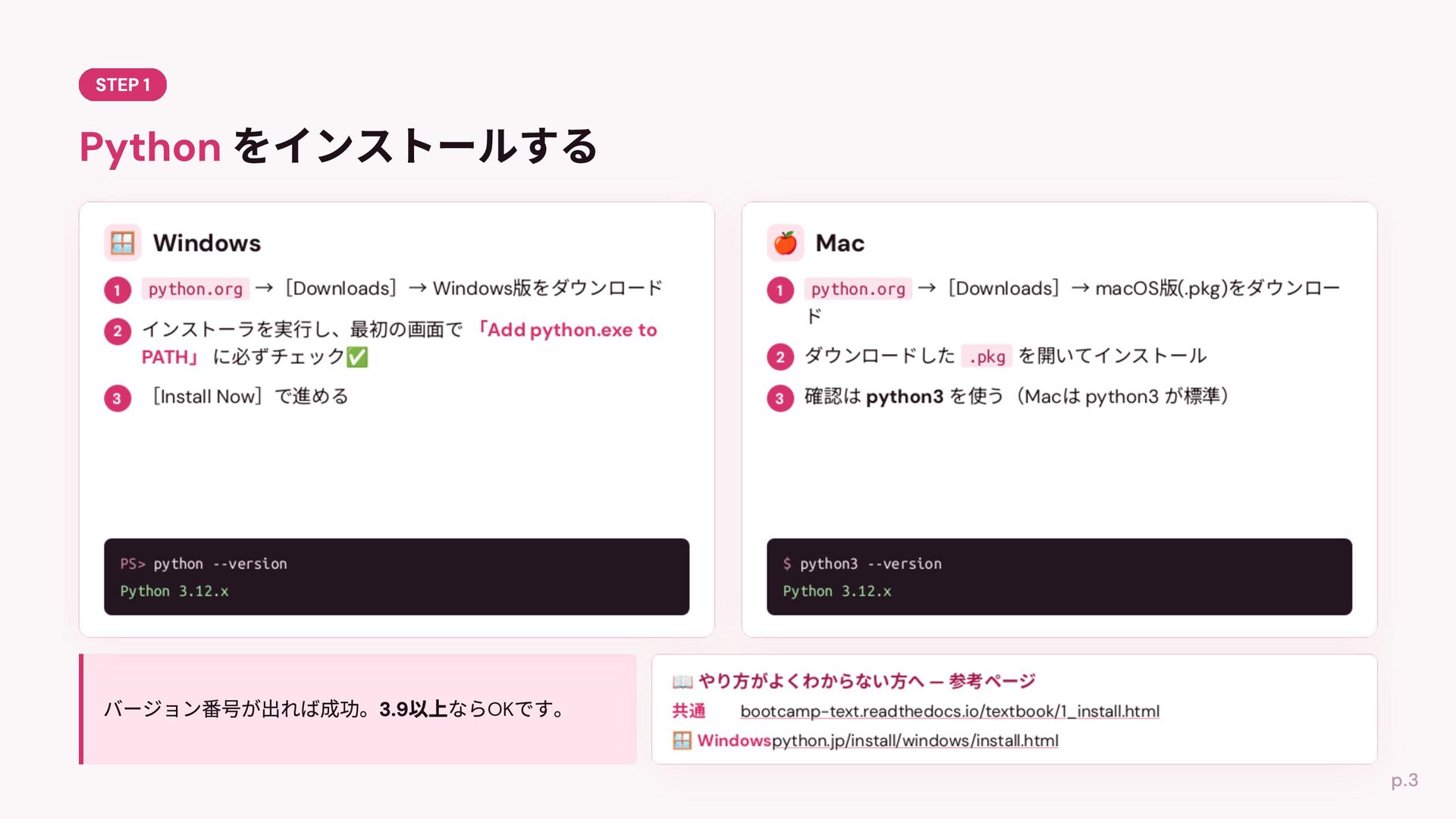
python.org Downloads Windows python.org Downloads macOS (.pkg) .pkg Install Now
Mac PS> python --version $ python3 --version Python 3.12.x Python 3.12.x OK python3 bootcamp-text.readthedocs.io/textbook/1_install.html python.jp/install/windows/install.html
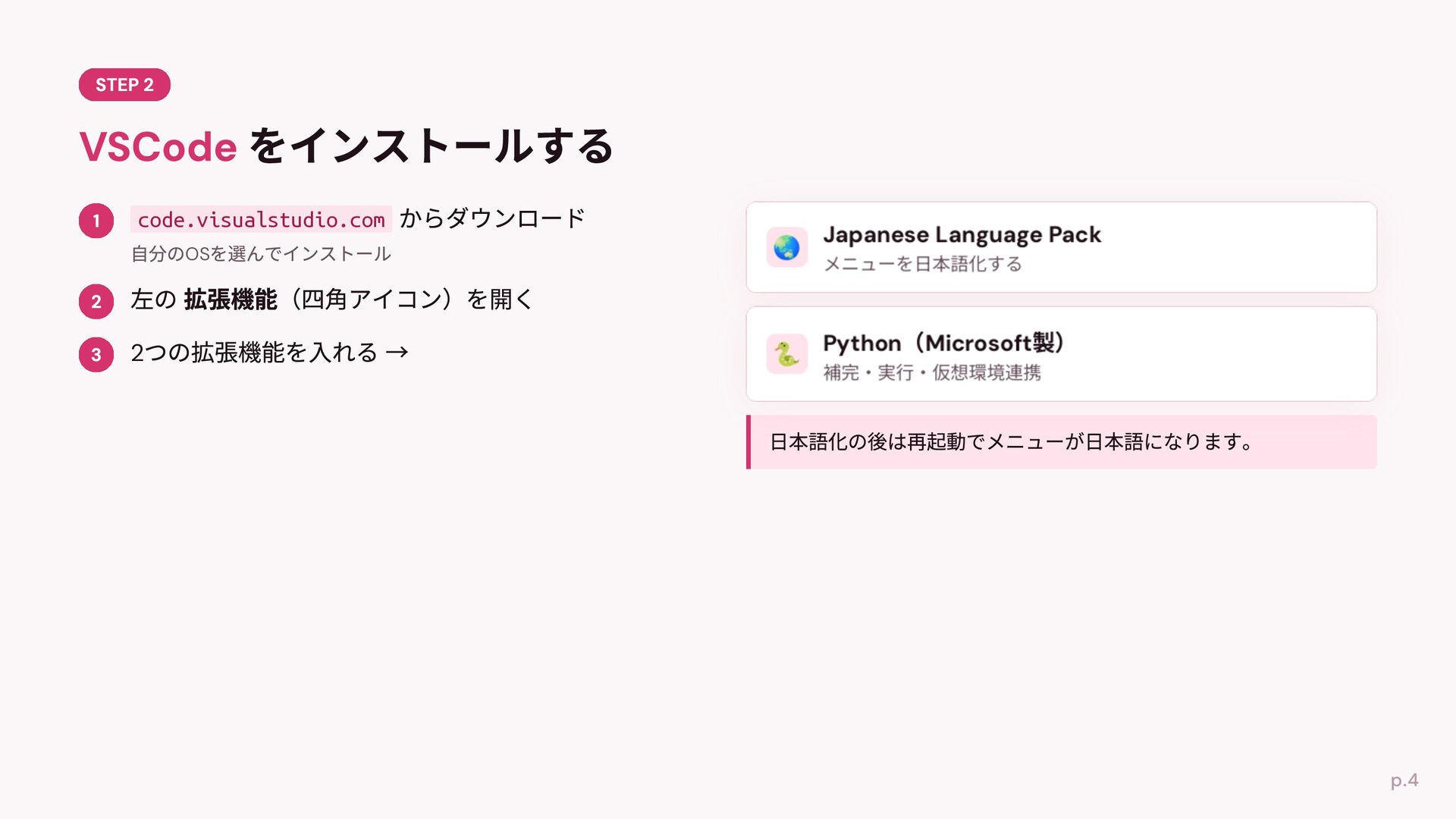
code.visualstudio.com OS 2
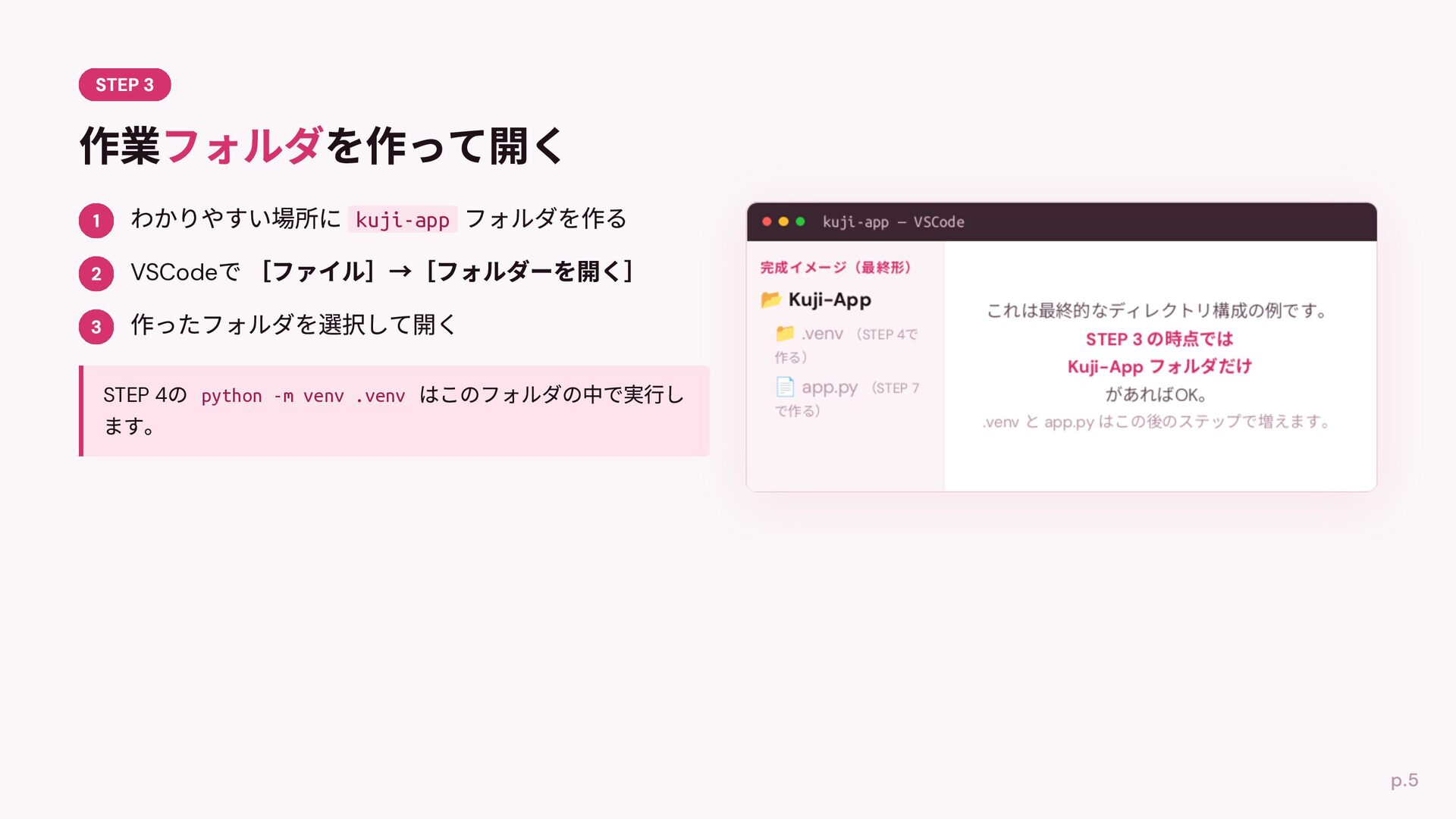
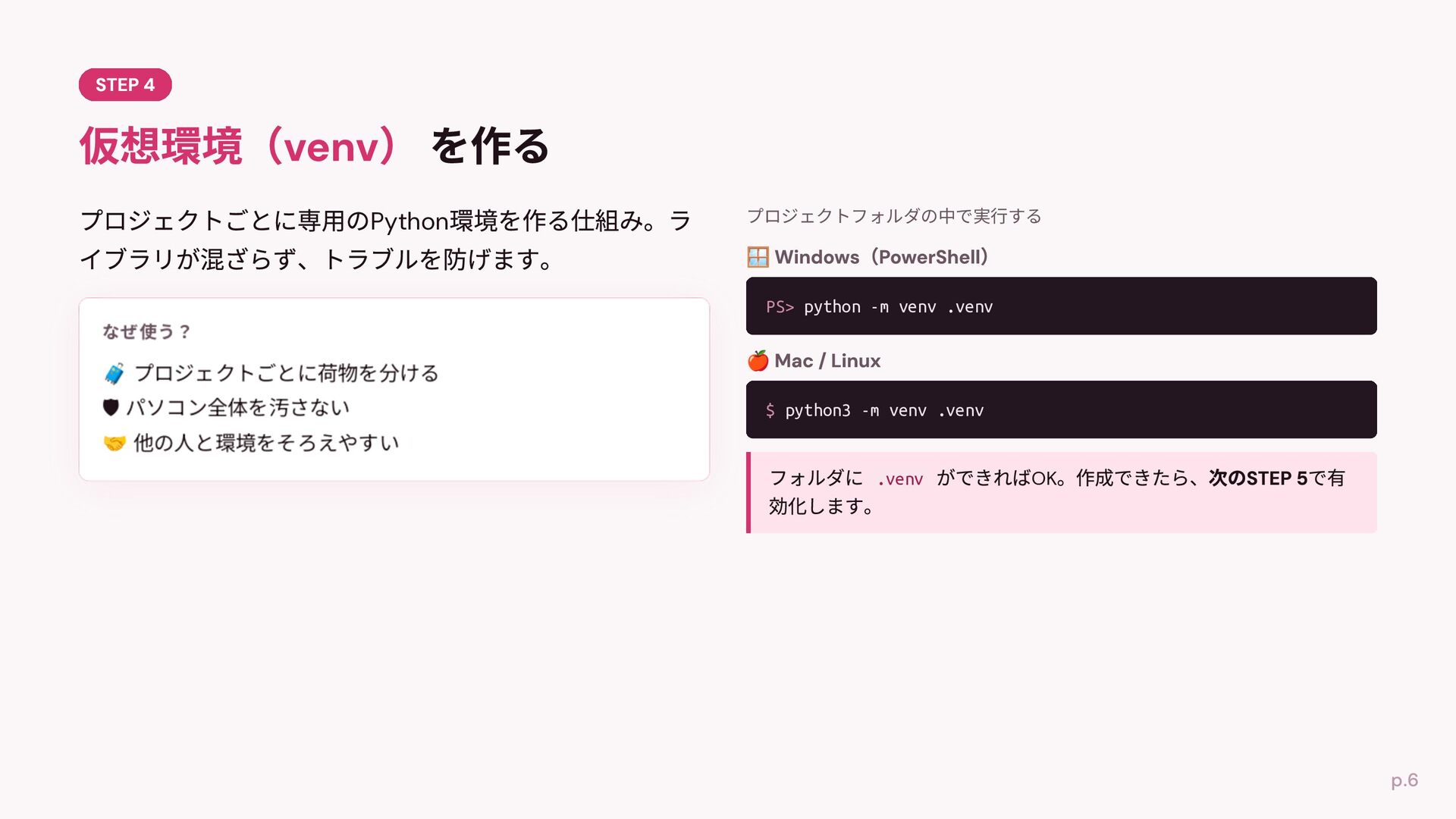
kuji-app kuji-app — VSCode VSCode .venv STEP 4 python -m
venv .venv app.py STEP 4 STEP 7 OK .venv app.py
Python プロジェクトフォルダの中で実⾏する PS> python -m venv .venv 🛡 $ python3
-m venv .venv .venv OK
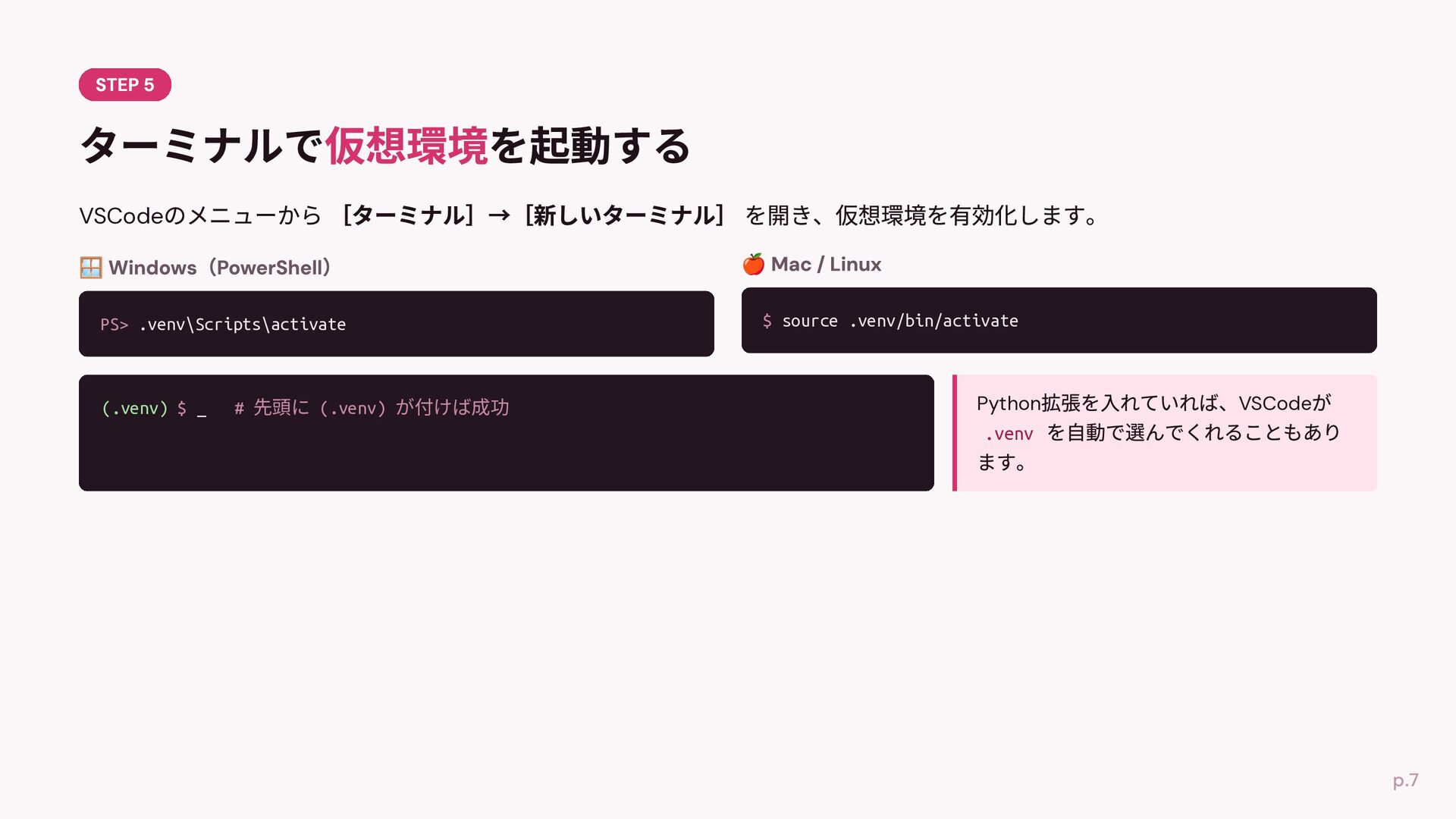
VSCode PS> .venv\Scripts\activate (.venv) $ _ # 先頭に (.venv) が付けば成功
$ source .venv/bin/activate Python .venv VSCode
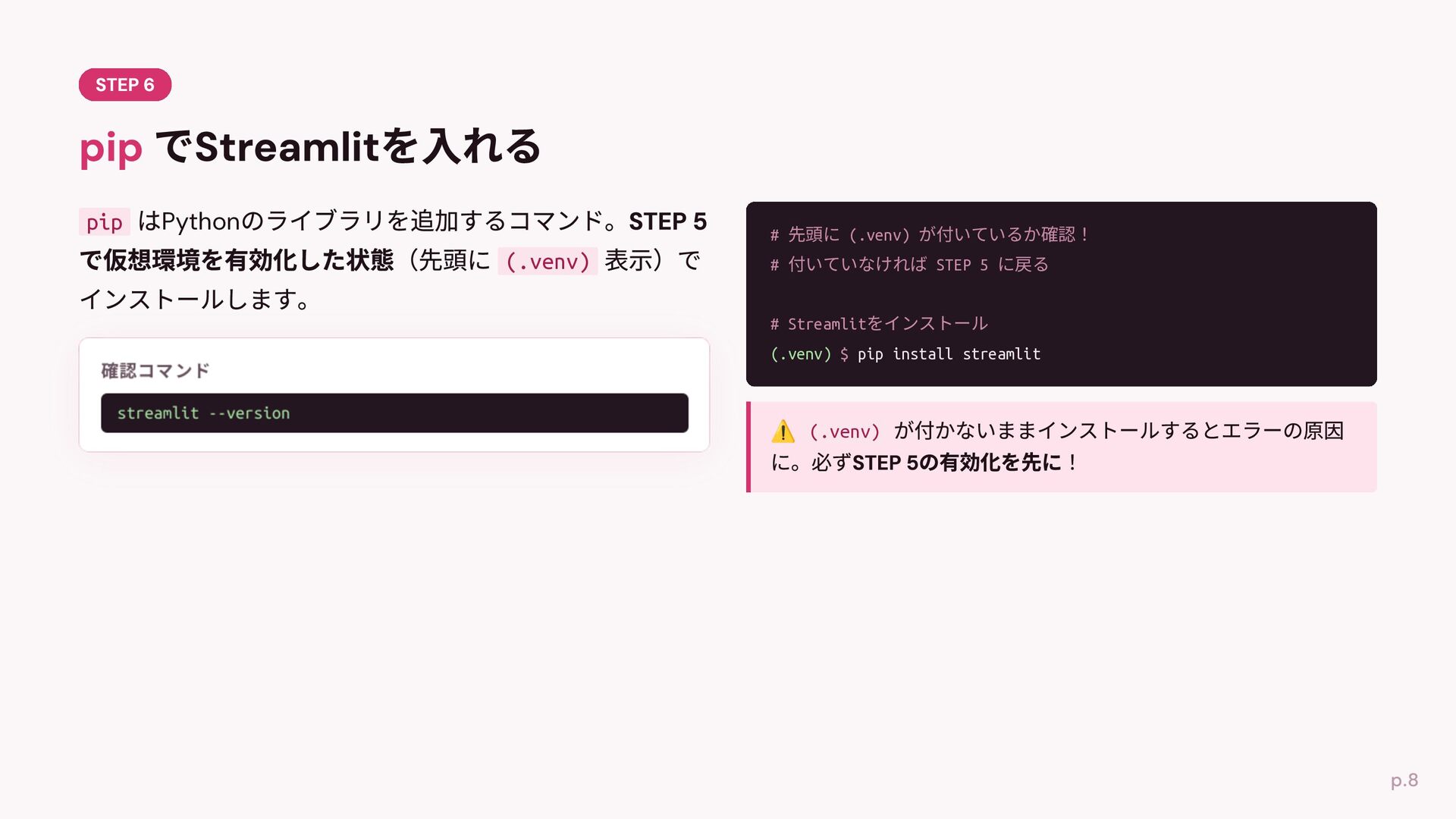
pip Python # 先頭に (.venv) が付いているか確認! (.venv) # 付いていなければ STEP
5 に戻る # Streamlitをインストール (.venv) $ pip install streamlit streamlit --version (.venv)
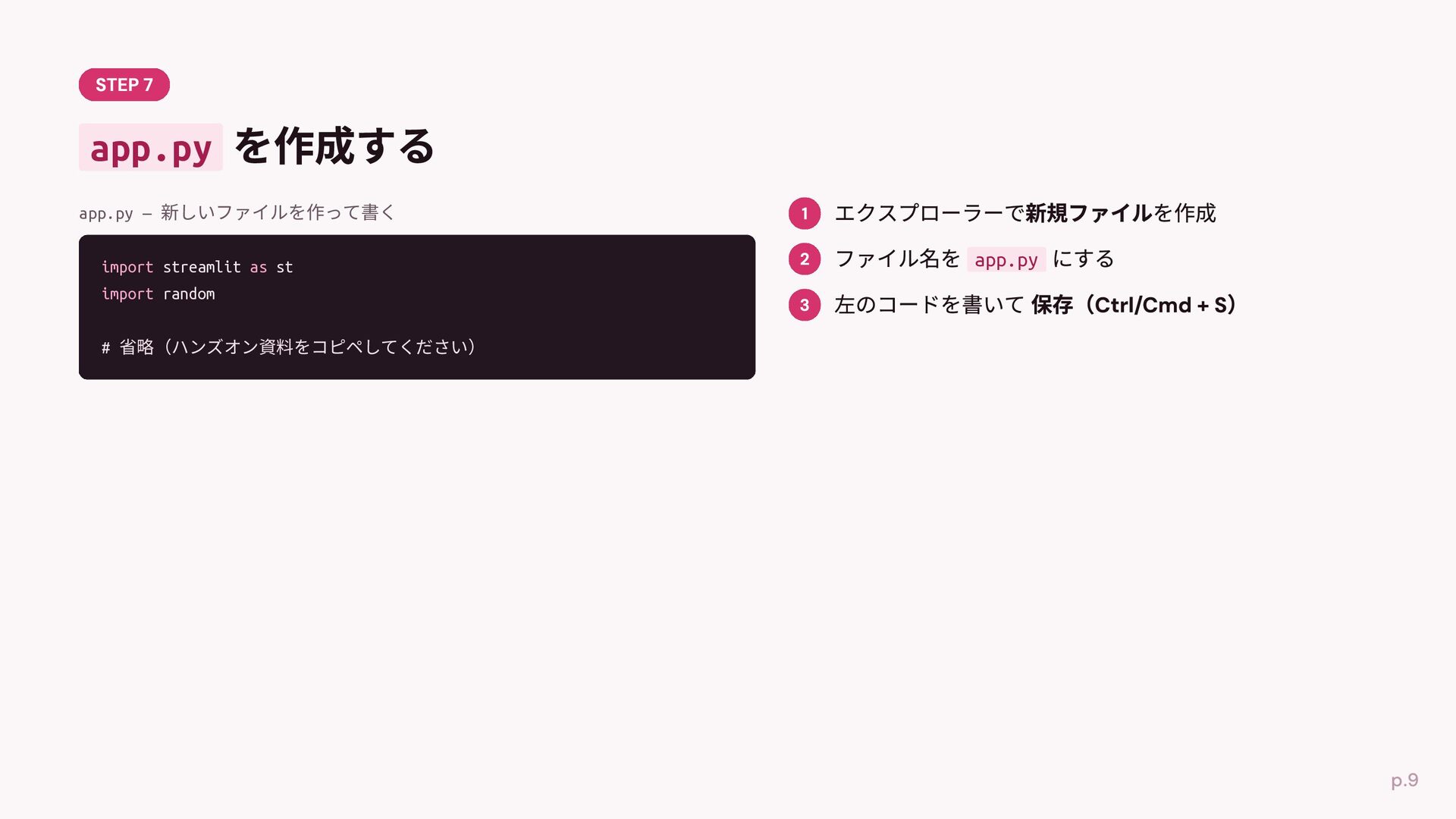
app.py app.py — 新しいファイルを作って書く https://github.com/PyLadiesShizuoka/welcomeday-handson-2026-07-11/blob/main/kuji-app/app.py app.py import random import streamlit
as st def kuji(name): fortunes = ["⼤吉", "中吉", "吉", "⼩吉", "凶"] fortune = random.choice(fortunes) message = f"{name}さんは{fortune}です!" if fortune == "⼤吉": message += "おめでとうございます!" return message st.title("おみくじアプリ") st.write("名前を⼊れてくじを引いてみよう!") name = st.text_input("あなたの名前") if st.button("くじを引く"): message = kuji(name) st.success(message)
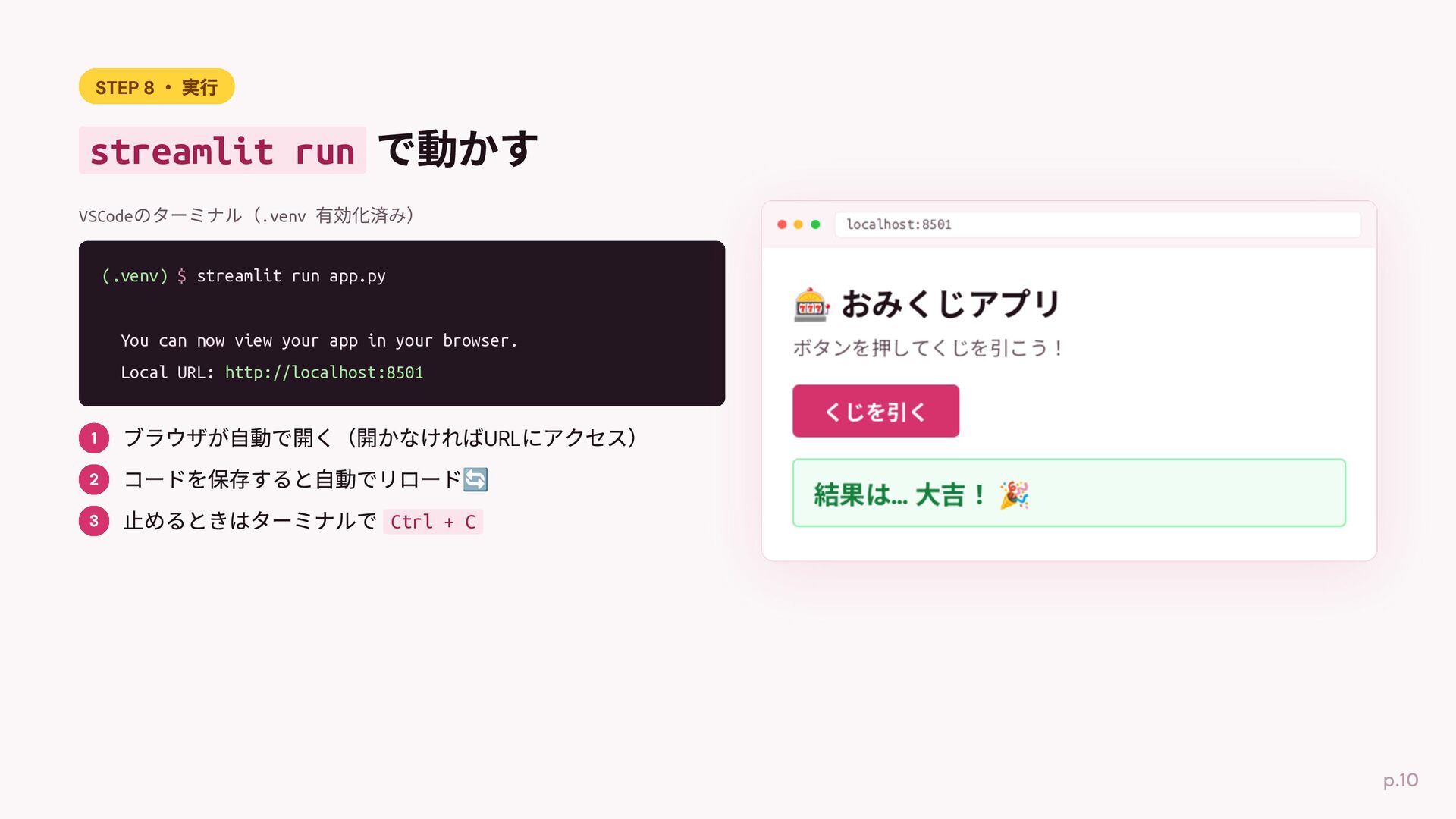
streamlit run VSCodeのターミナル(.venv 有効化済み) localhost:8501 (.venv) $ streamlit run app.py
You can now view your app in your browser. Local URL: http://localhost:8501 URL Ctrl + C
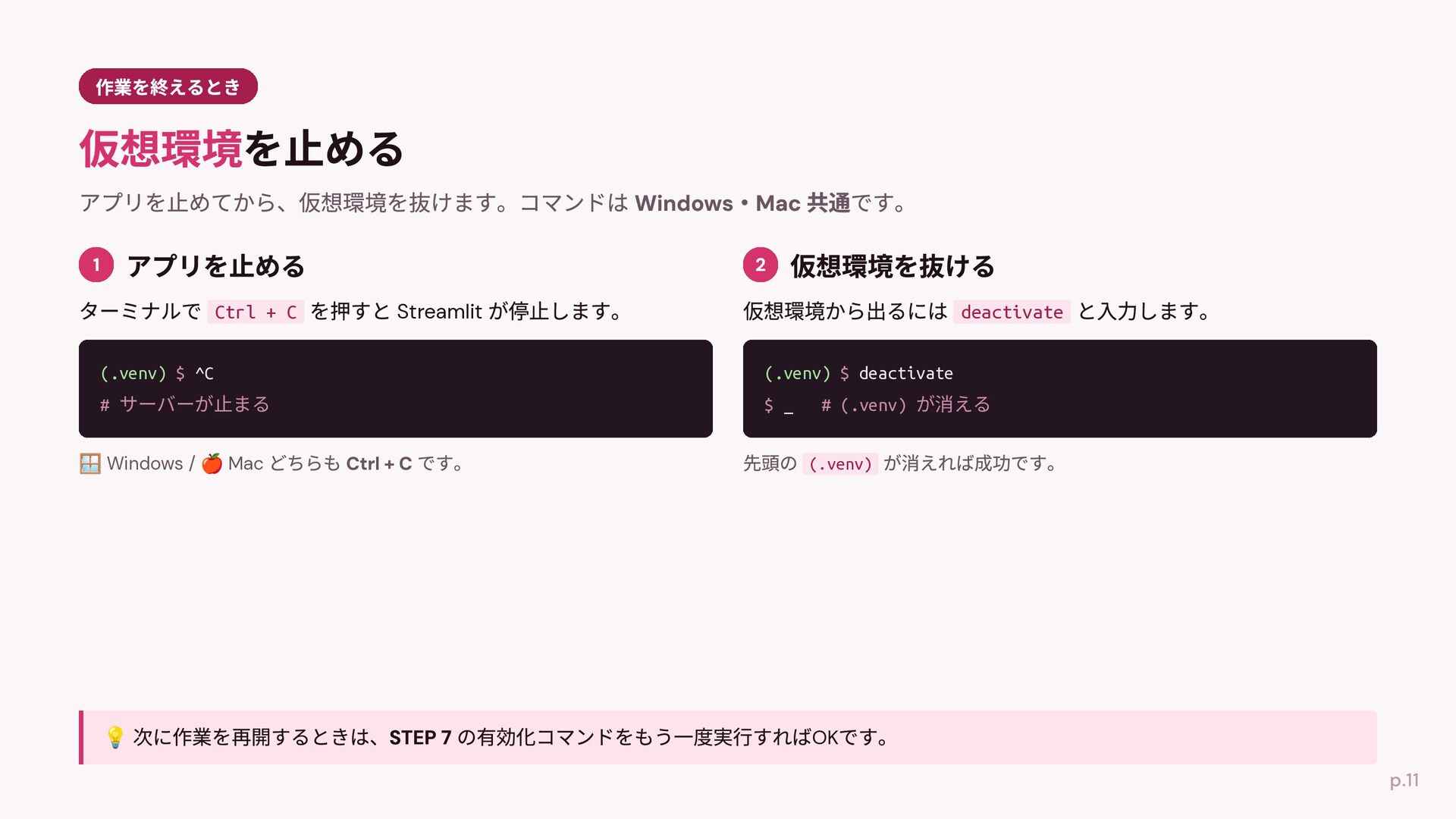
Ctrl + C Streamlit deactivate (.venv) $ ^C (.venv) $
deactivate # サーバーが⽌まる $ _ Windows / Mac # (.venv) が消える (.venv) OK
None


 mizzsugar
 yahir0
 rkaga
rkaga
 ochtum
 minodriven
 ryu1013
 har1101
 akit37
 skydoves
 yasaichi
 kasacchiful
 tammyeverts
 axbom
axbom
 jnunemaker
 ivargrimstad
 varn
varn
 csswizardry
 mfonobong
 aleyda
 addyosmani
 mclloyd
 joshbly
 szymonslowik