Share
Embed
Structured output and streaming (Typed answers and streamed answers) | Learn Strands Agents with Kiro 06
This Level 200 deck shows how to get typed values from a Strands Agents agent with a Pydantic schema (structured_output_model, the validation retry, the forced retry and the attempt limit) and how it works, using the official docs and real output from Amazon Bedrock in the Tokyo Region. It also covers streaming answers with stream_async and callback handlers, returning them from FastAPI, and the order and contents of the events, as deck 06 (Go deeper) of the series Learn Strands Agents with Kiro.

Riku INADA PRO
November 11, 2026
Annual Pro sale · Save $30
Have presentations of your own?
Share with private links, password protection, and more control over your work.
Transcript
38 slides
-
Learn Strands Agents with Kiro 06 Go deeper Structured output
and streaming Typed answers and streamed answers Level 200 / November 2026 November 2026 Riku Inada Amazon Web Services Japan © 2026, Amazon Web Services, Inc. or its affiliates. All rights reserved. 06 Kiro + Strands Agents 1 -
Introduction About me Riku Inada Amazon Web Services Japan G.K.
Solutions Architect Works mainly with manufacturing customers Recent work Promoting the AI-Driven Development Life Cycle (AI-DLC) Writing and speaking about Kiro and AWS Amplify © 2026, Amazon Web Services, Inc. or its affiliates. All rights reserved. X @inada_riku Speaker Deck speakerdeck.com/inariku Zenn zenn.dev/inariku GitHub github.com/inariku 2 -
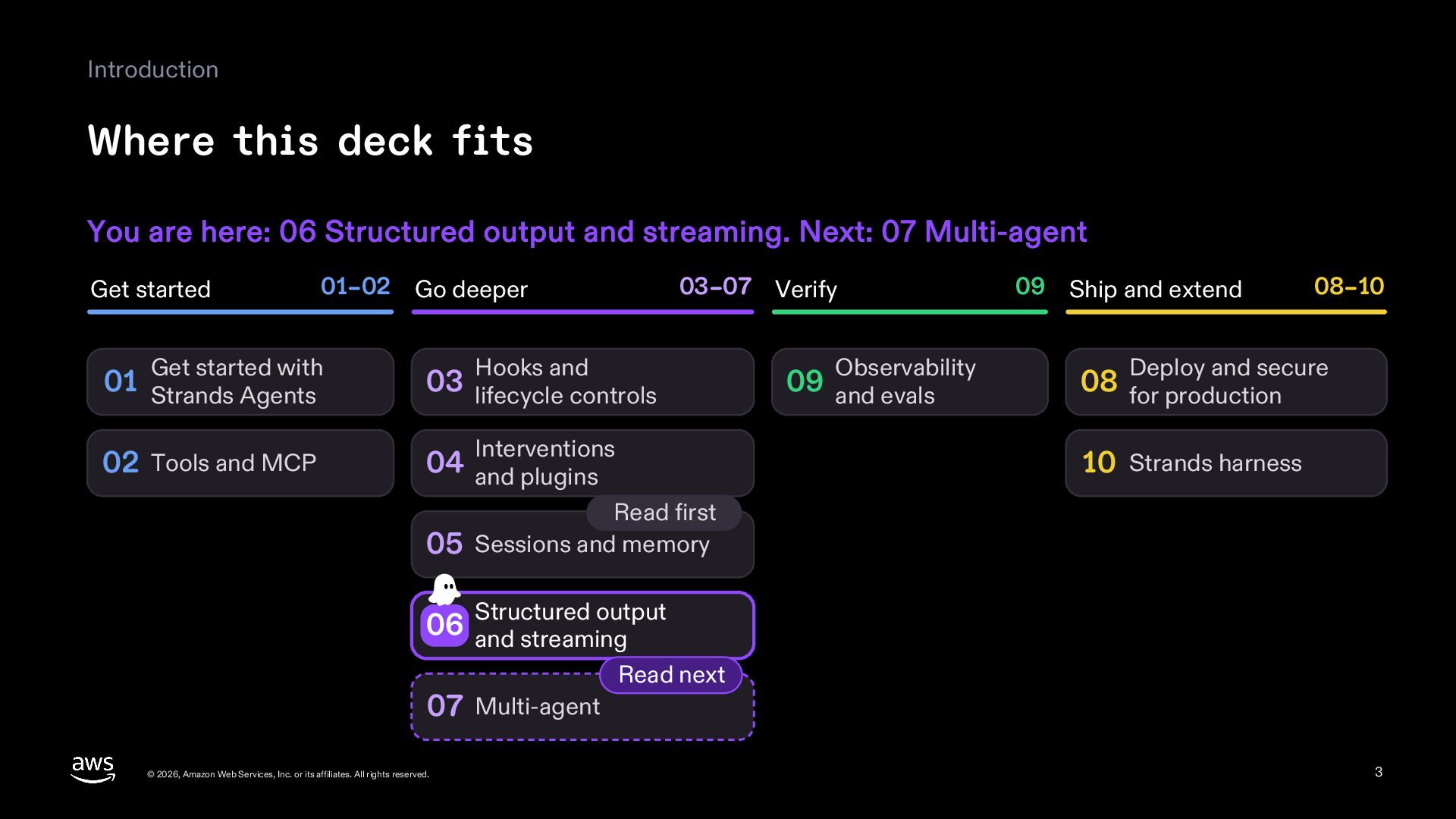
Introduction Where this deck fits You are here: 06 Structured
output and streaming. Next: 07 Multi-agent Get started 01–02 Go deeper Get started with 03–07 Verify Hooks and 01 Strands Agents 03 lifecycle controls 02 Tools and MCP 04 and plugins Interventions Observability 09 and evals 09 Ship and extend 08–10 Deploy and secure 08 for production 10 Strands harness Read first 05 Sessions and memory output 06 Structured and streaming 07 Multi-agent © 2026, Amazon Web Services, Inc. or its affiliates. All rights reserved. Read next 3 -
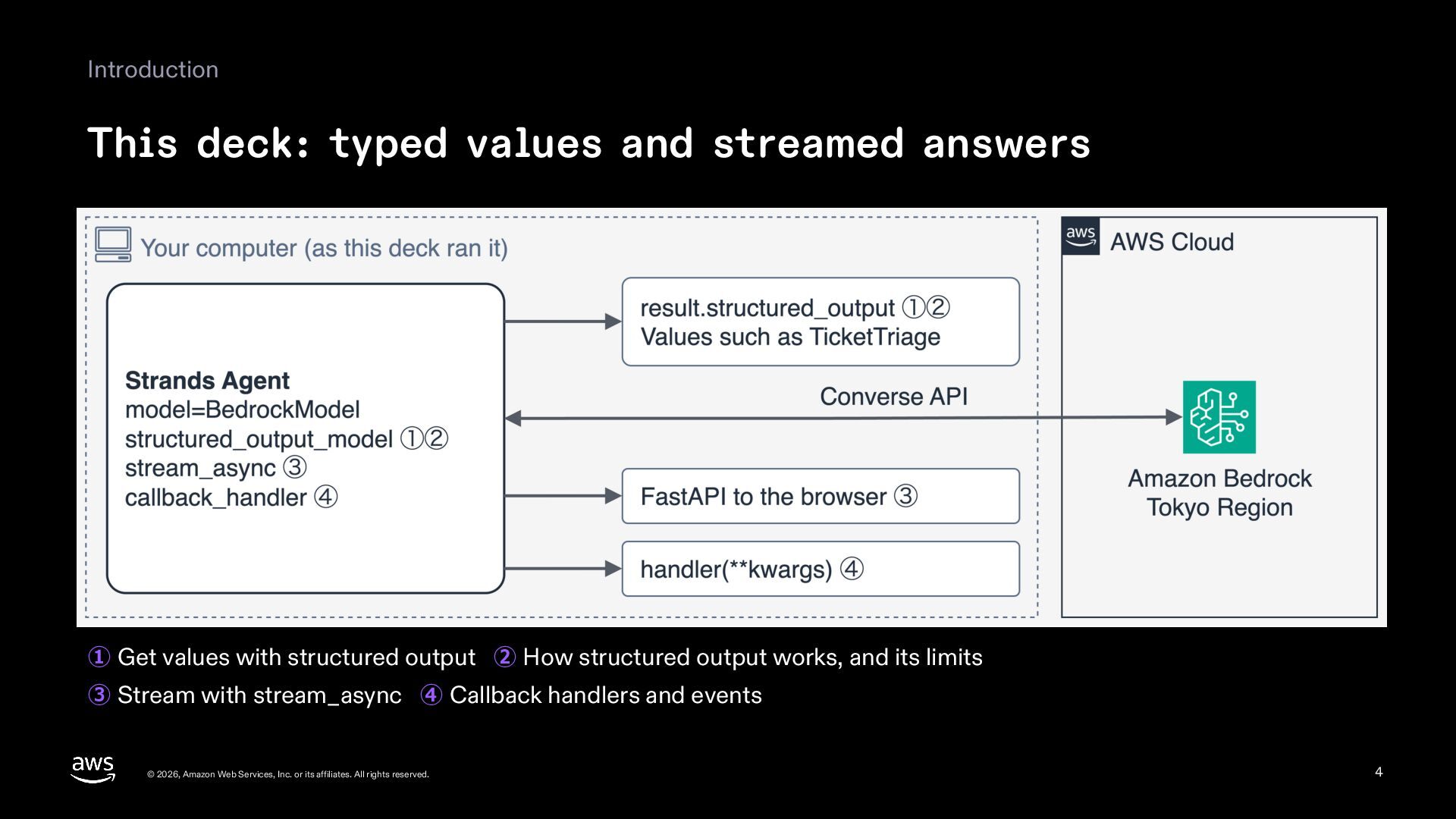
Introduction This deck: typed values and streamed answers ① Get
values with structured output ② How structured output works, and its limits ③ Stream with stream_async ④ Callback handlers and events © 2026, Amazon Web Services, Inc. or its affiliates. All rights reserved. 4 -
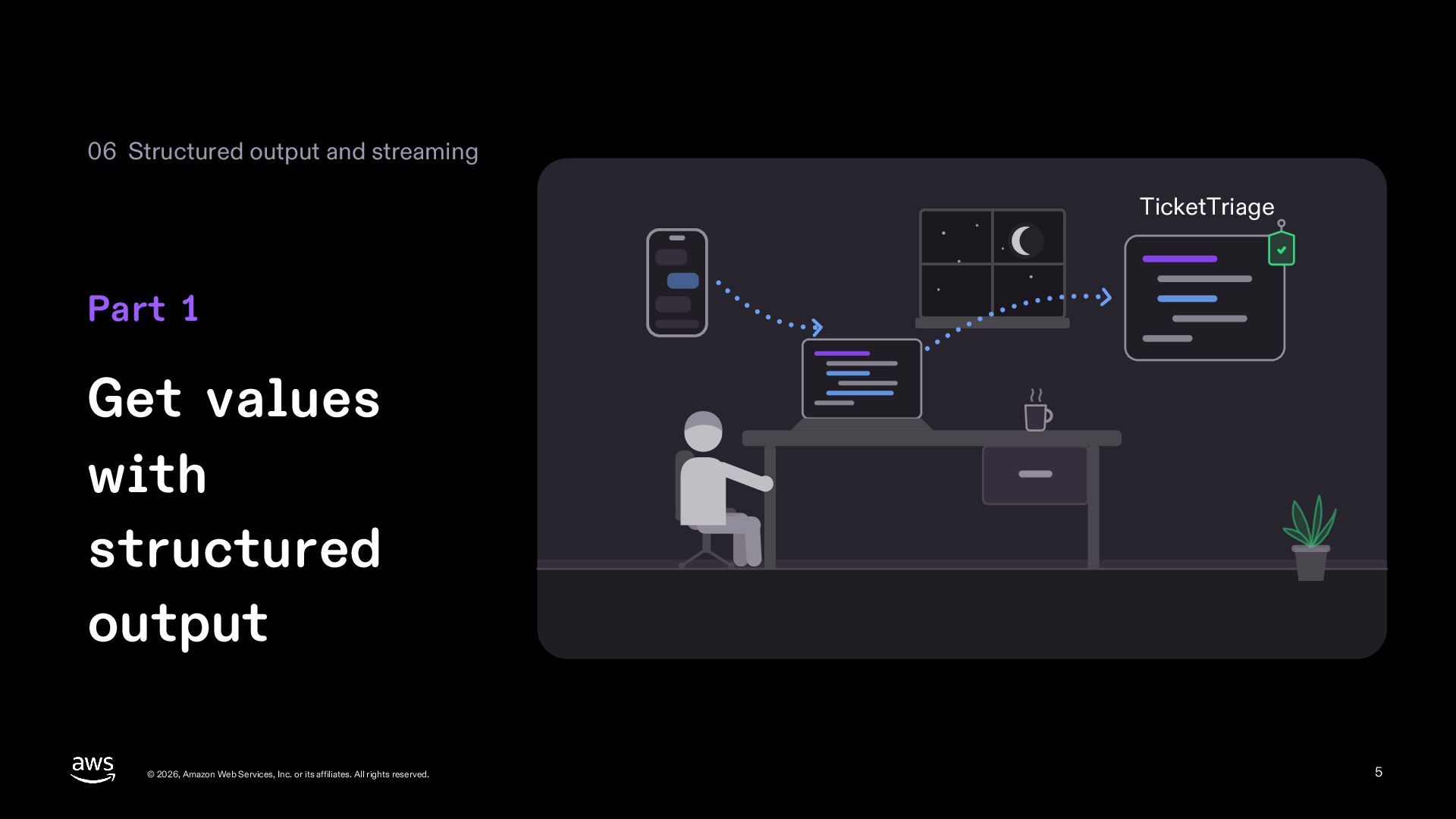
06 Structured output and streaming TicketTriage Part 1 Get values
with structured output © 2026, Amazon Web Services, Inc. or its affiliates. All rights reserved. 5 -
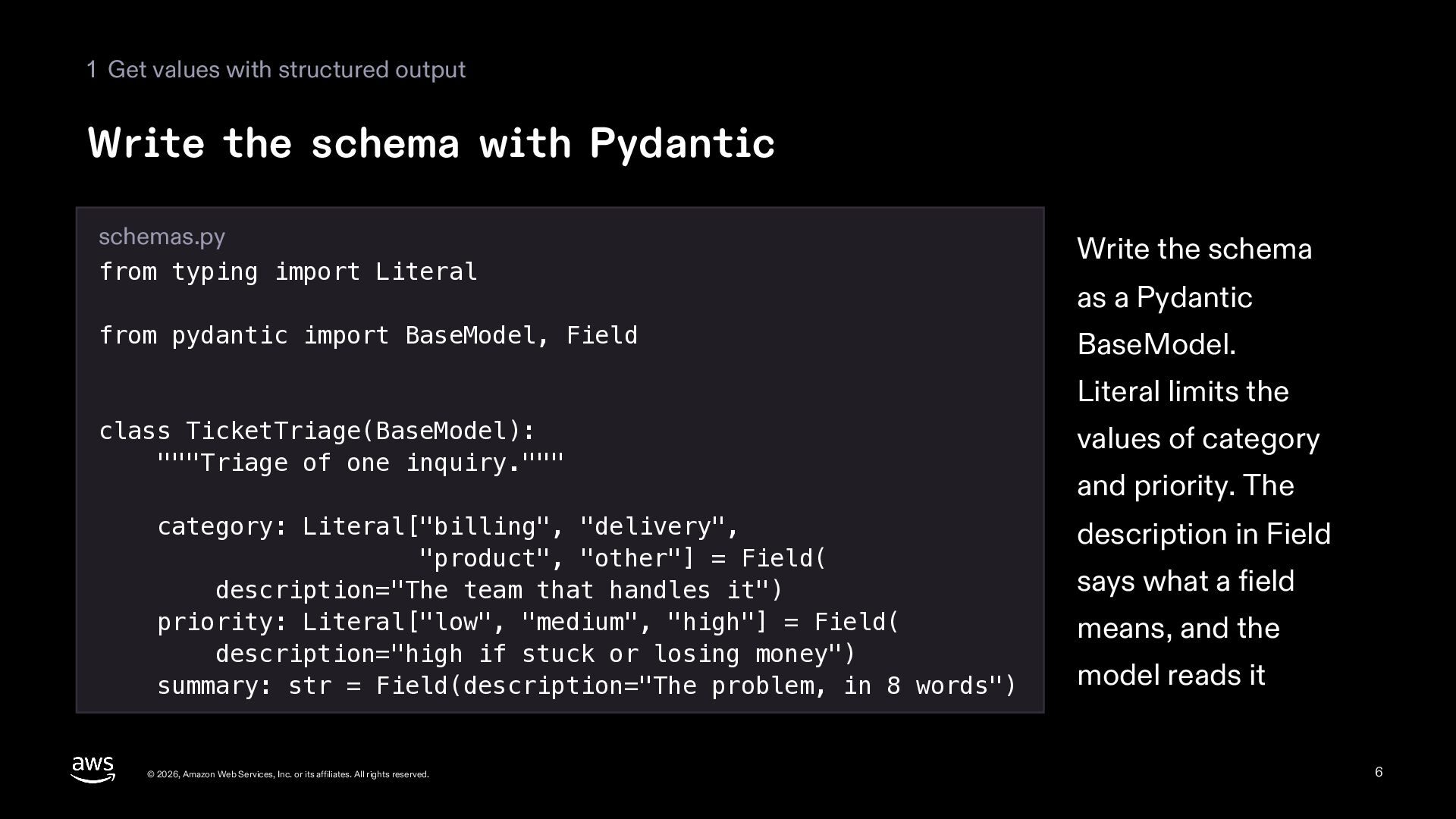
1 Get values with structured output Write the schema with
Pydantic schemas.py from typing import Literal Write the schema from pydantic import BaseModel, Field BaseModel. as a Pydantic Literal limits the class TicketTriage(BaseModel): """Triage of one inquiry.""" category: Literal["billing", "delivery", "product", "other"] = Field( description="The team that handles it") priority: Literal["low", "medium", "high"] = Field( description="high if stuck or losing money") summary: str = Field(description="The problem, in 8 words") © 2026, Amazon Web Services, Inc. or its affiliates. All rights reserved. values of category and priority. The description in Field says what a field means, and the model reads it 6 -
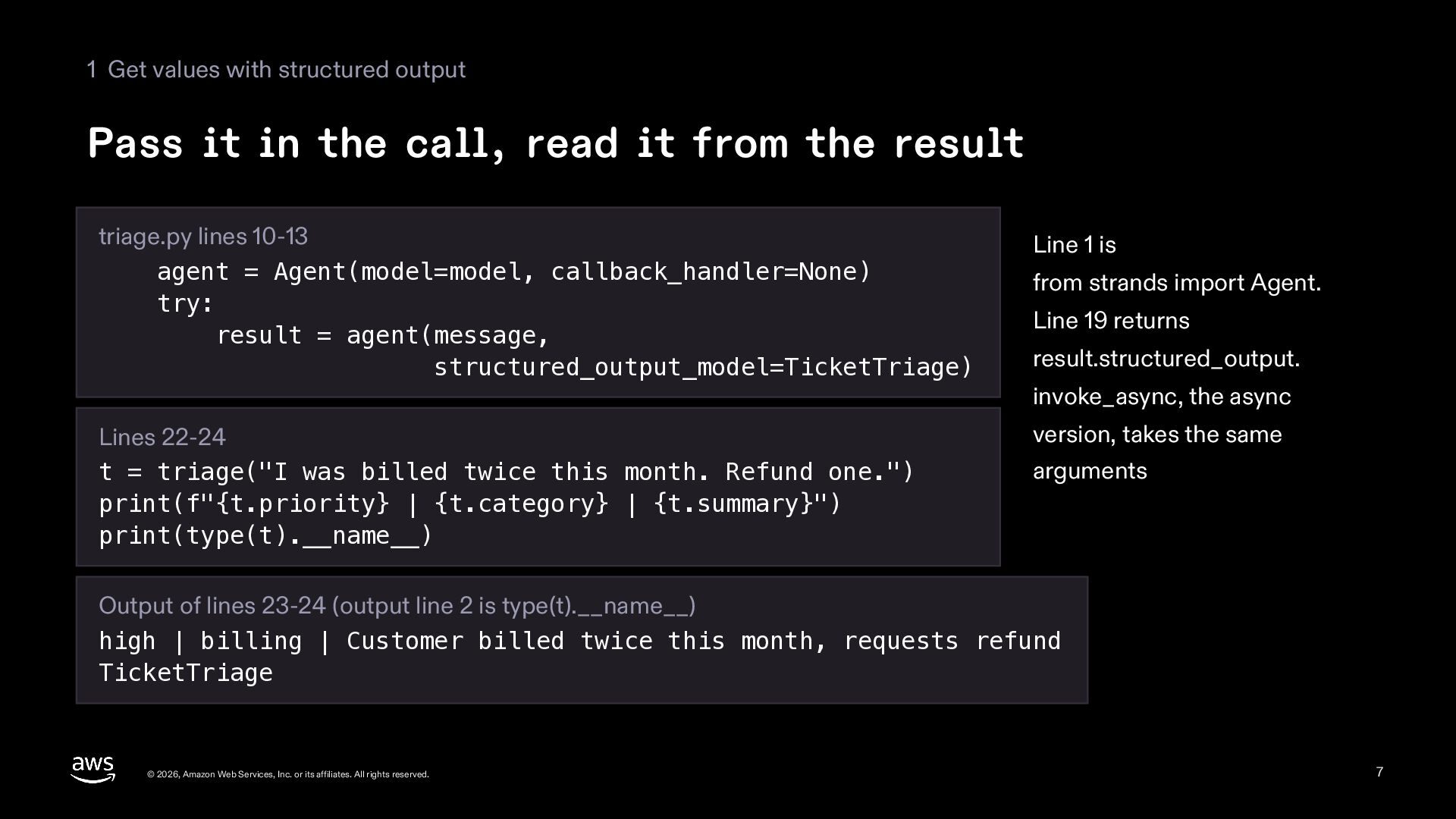
1 Get values with structured output Pass it in the
call, read it from the result triage.py lines 10-13 agent = Agent(model=model, callback_handler=None) try: result = agent(message, structured_output_model=TicketTriage) Line 1 is Lines 22-24 t = triage("I was billed twice this month. Refund one.") print(f"{t.priority} | {t.category} | {t.summary}") print(type(t).__name__) version, takes the same from strands import Agent. Line 19 returns result.structured_output. invoke_async, the async arguments Output of lines 23-24 (output line 2 is type(t).__name__) high | billing | Customer billed twice this month, requests refund TicketTriage © 2026, Amazon Web Services, Inc. or its affiliates. All rights reserved. 7 -
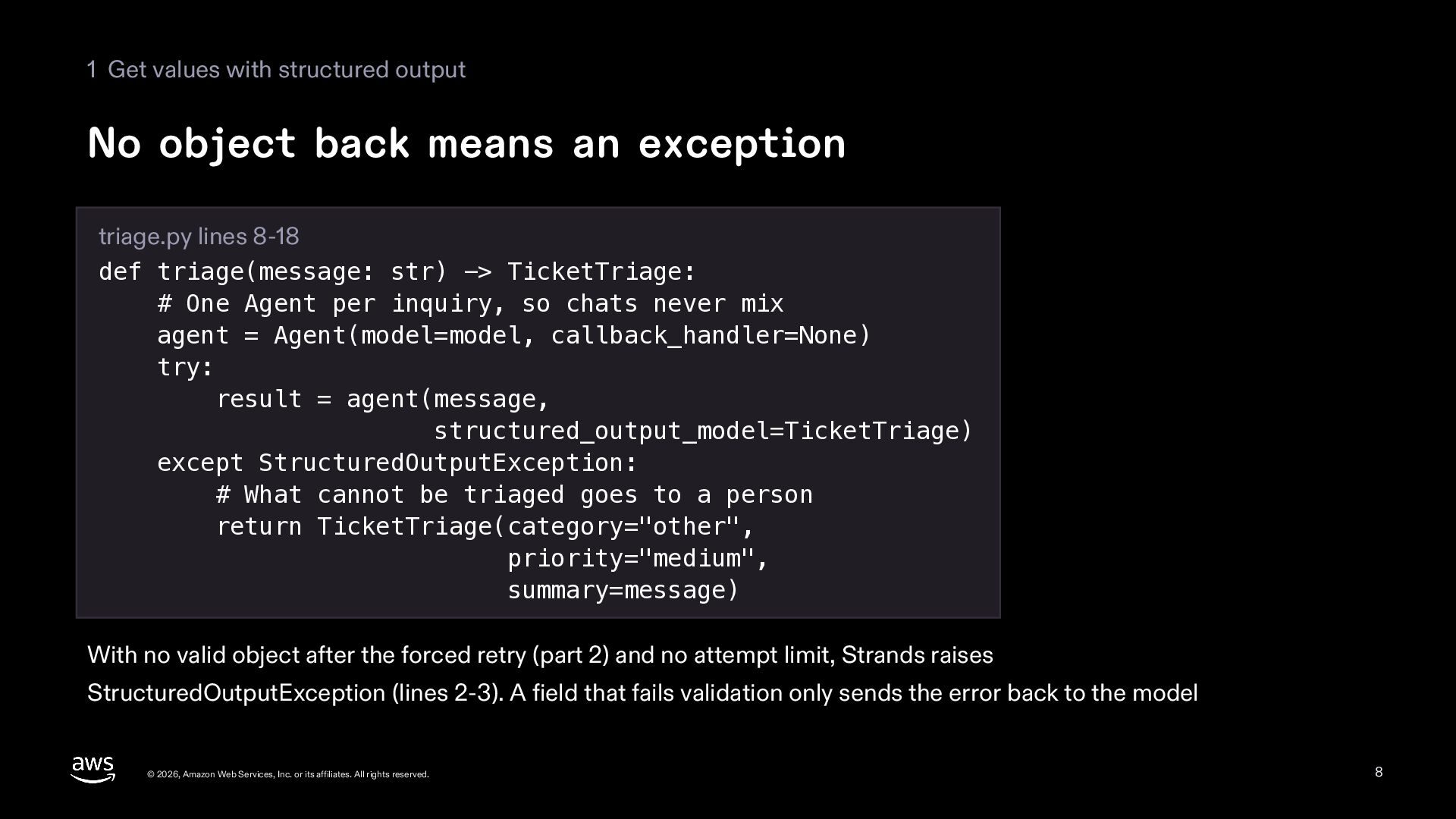
1 Get values with structured output No object back means
an exception triage.py lines 8-18 def triage(message: str) -> TicketTriage: # One Agent per inquiry, so chats never mix agent = Agent(model=model, callback_handler=None) try: result = agent(message, structured_output_model=TicketTriage) except StructuredOutputException: # What cannot be triaged goes to a person return TicketTriage(category="other", priority="medium", summary=message) With no valid object after the forced retry (part 2) and no attempt limit, Strands raises StructuredOutputException (lines 2-3). A field that fails validation only sends the error back to the model © 2026, Amazon Web Services, Inc. or its affiliates. All rights reserved. 8 -
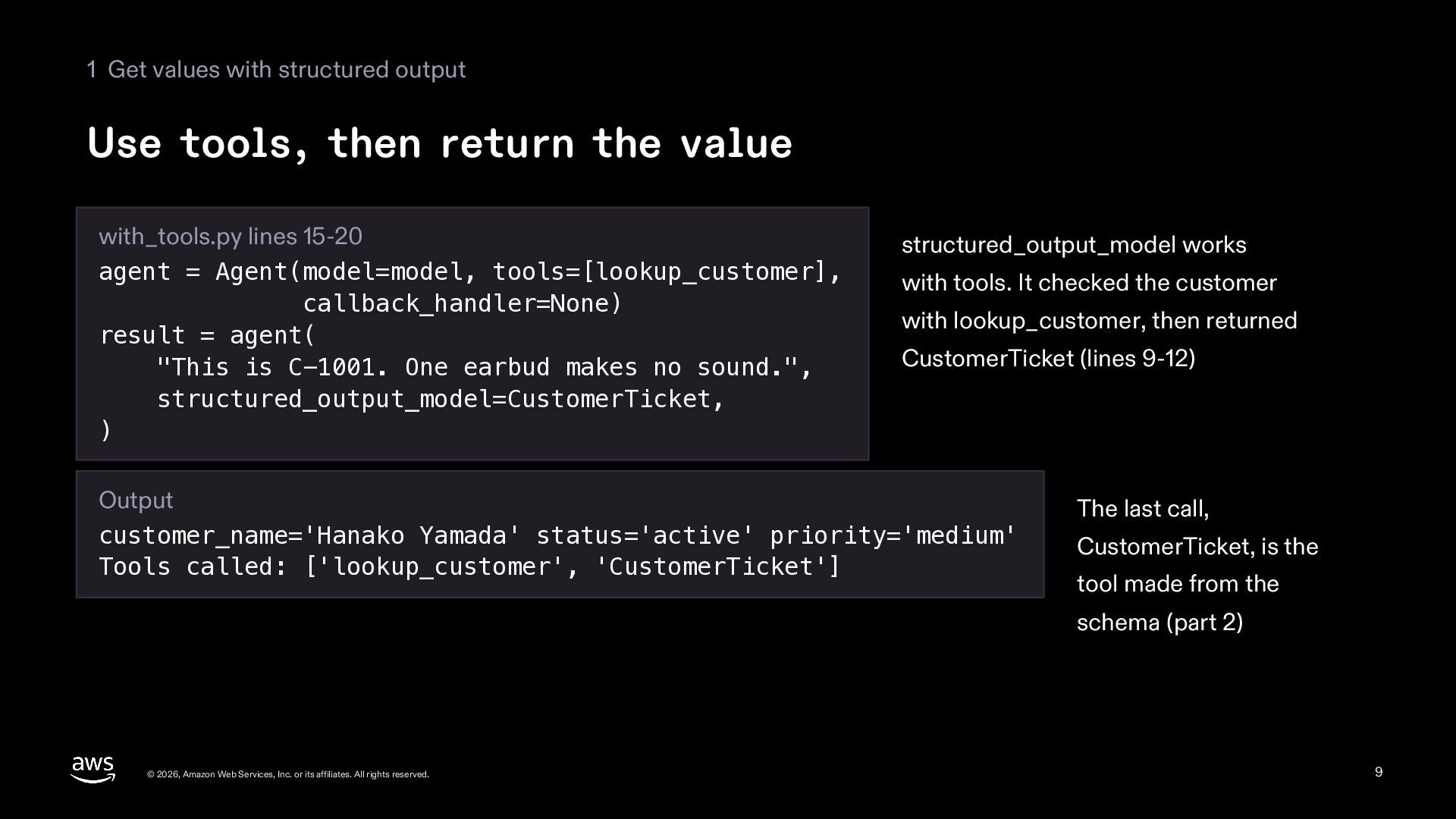
1 Get values with structured output Use tools, then return
the value with_tools.py lines 15-20 agent = Agent(model=model, tools=[lookup_customer], callback_handler=None) result = agent( "This is C-1001. One earbud makes no sound.", structured_output_model=CustomerTicket, ) structured_output_model works with tools. It checked the customer with lookup_customer, then returned CustomerTicket (lines 9-12) Output customer_name='Hanako Yamada' status='active' priority='medium' Tools called: ['lookup_customer', 'CustomerTicket'] The last call, CustomerTicket, is the tool made from the schema (part 2) © 2026, Amazon Web Services, Inc. or its affiliates. All rights reserved. 9 -
1 Get values with structured output Fill the fields from
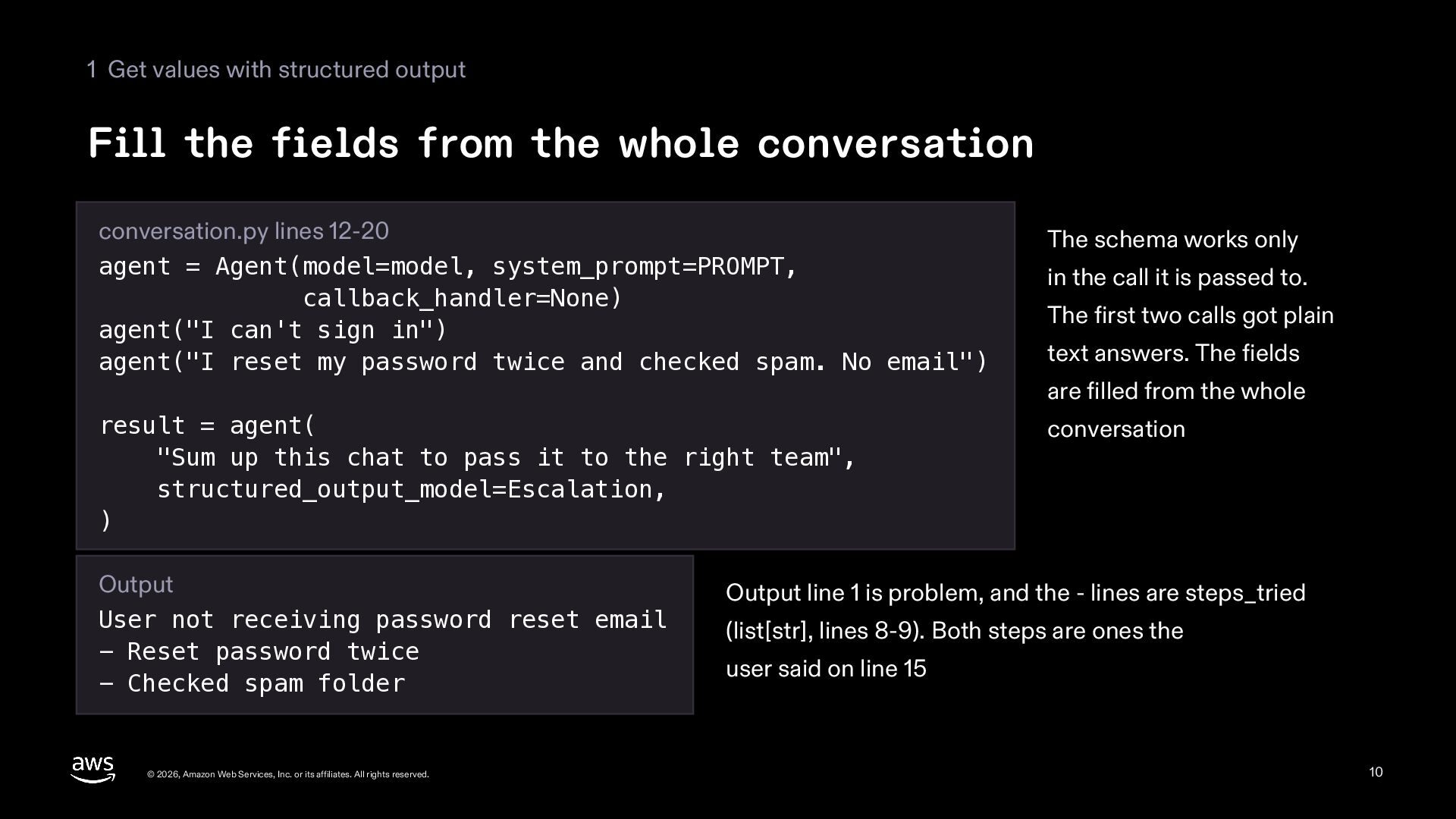
the whole conversation conversation.py lines 12-20 agent = Agent(model=model, system_prompt=PROMPT, callback_handler=None) agent("I can't sign in") agent("I reset my password twice and checked spam. No email") The schema works only result = agent( "Sum up this chat to pass it to the right team", structured_output_model=Escalation, ) conversation Output User not receiving password reset email - Reset password twice - Checked spam folder © 2026, Amazon Web Services, Inc. or its affiliates. All rights reserved. in the call it is passed to. The first two calls got plain text answers. The fields are filled from the whole Output line 1 is problem, and the - lines are steps_tried (list[str], lines 8-9). Both steps are ones the user said on line 15 10 -
1 Get values with structured output A stream takes the
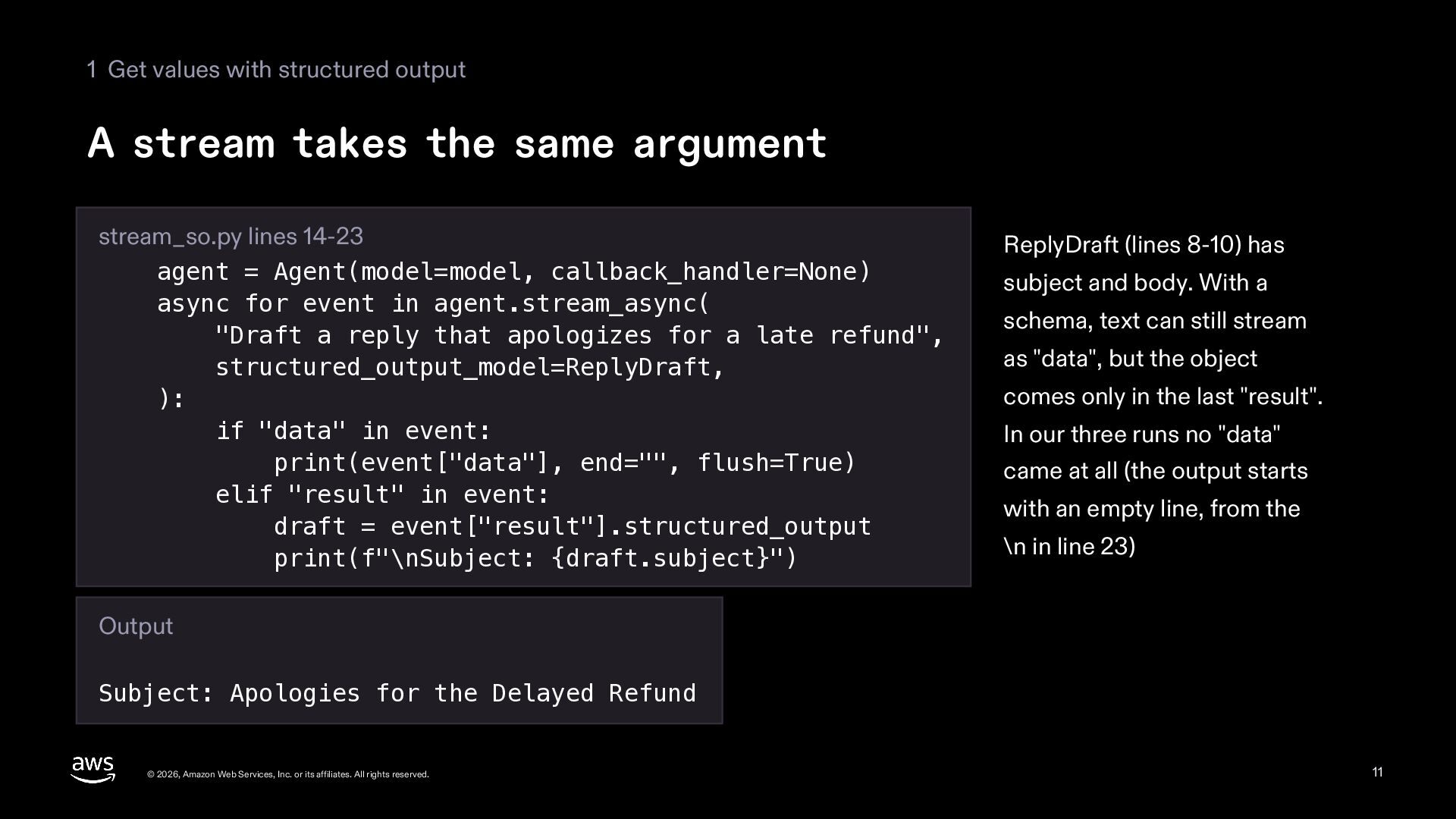
same argument stream_so.py lines 14-23 agent = Agent(model=model, callback_handler=None) async for event in agent.stream_async( "Draft a reply that apologizes for a late refund", structured_output_model=ReplyDraft, ): if "data" in event: print(event["data"], end="", flush=True) elif "result" in event: draft = event["result"].structured_output print(f"\nSubject: {draft.subject}") ReplyDraft (lines 8-10) has subject and body. With a schema, text can still stream as "data", but the object comes only in the last "result". In our three runs no "data" came at all (the output starts with an empty line, from the \n in line 23) Output Subject: Apologies for the Delayed Refund © 2026, Amazon Web Services, Inc. or its affiliates. All rights reserved. 11 -
06 Structured output and streaming Part 2 How structured output
works, and its limits © 2026, Amazon Web Services, Inc. or its affiliates. All rights reserved. 12 -
2 How structured output works, and its limits A schema
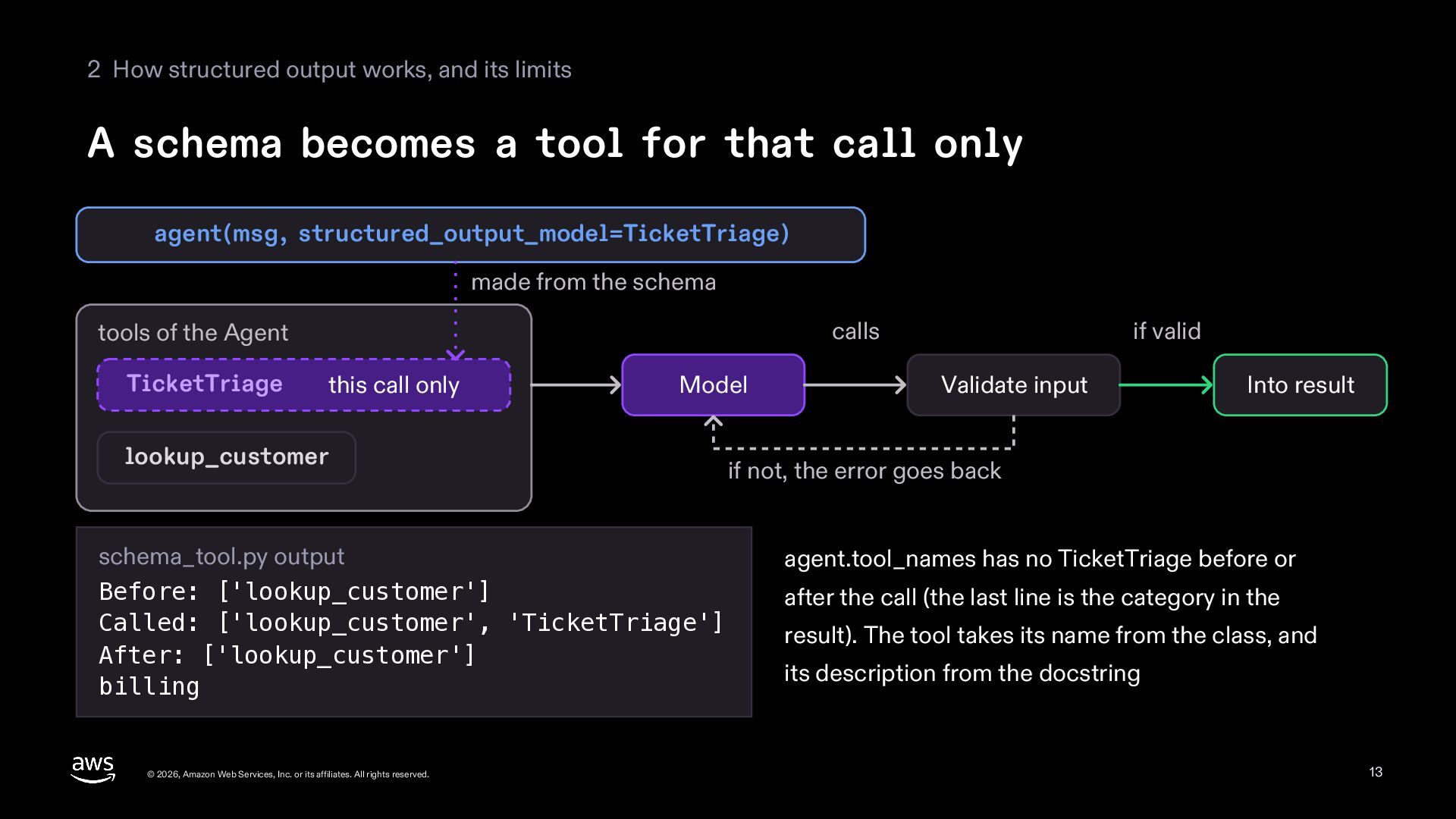
becomes a tool for that call only agent(msg, structured_output_model=TicketTriage) made from the schema calls tools of the Agent TicketTriage this call only Model lookup_customer schema_tool.py output Before: ['lookup_customer'] Called: ['lookup_customer', 'TicketTriage'] After: ['lookup_customer'] billing © 2026, Amazon Web Services, Inc. or its affiliates. All rights reserved. if valid Validate input Into result if not, the error goes back agent.tool_names has no TicketTriage before or after the call (the last line is the category in the result). The tool takes its name from the class, and its description from the docstring 13 -
2 How structured output works, and its limits A schema
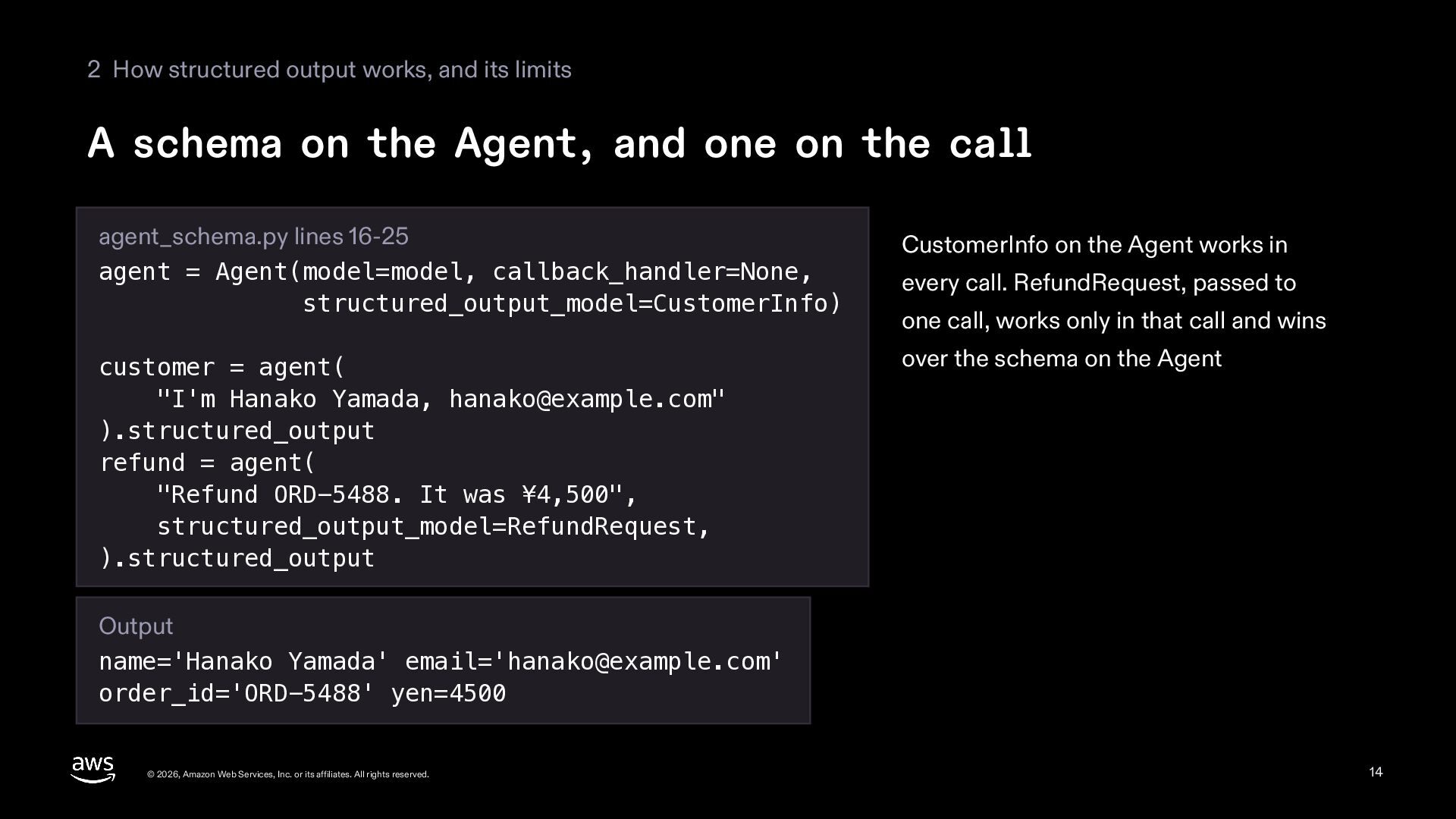
on the Agent, and one on the call agent_schema.py lines 16-25 agent = Agent(model=model, callback_handler=None, structured_output_model=CustomerInfo) CustomerInfo on the Agent works in customer = agent( "I'm Hanako Yamada, [email protected]" ).structured_output refund = agent( "Refund ORD-5488. It was ¥4,500", structured_output_model=RefundRequest, ).structured_output over the schema on the Agent every call. RefundRequest, passed to one call, works only in that call and wins Output name='Hanako Yamada' email='[email protected]' order_id='ORD-5488' yen=4500 © 2026, Amazon Web Services, Inc. or its affiliates. All rights reserved. 14 -
2 How structured output works, and its limits Where to
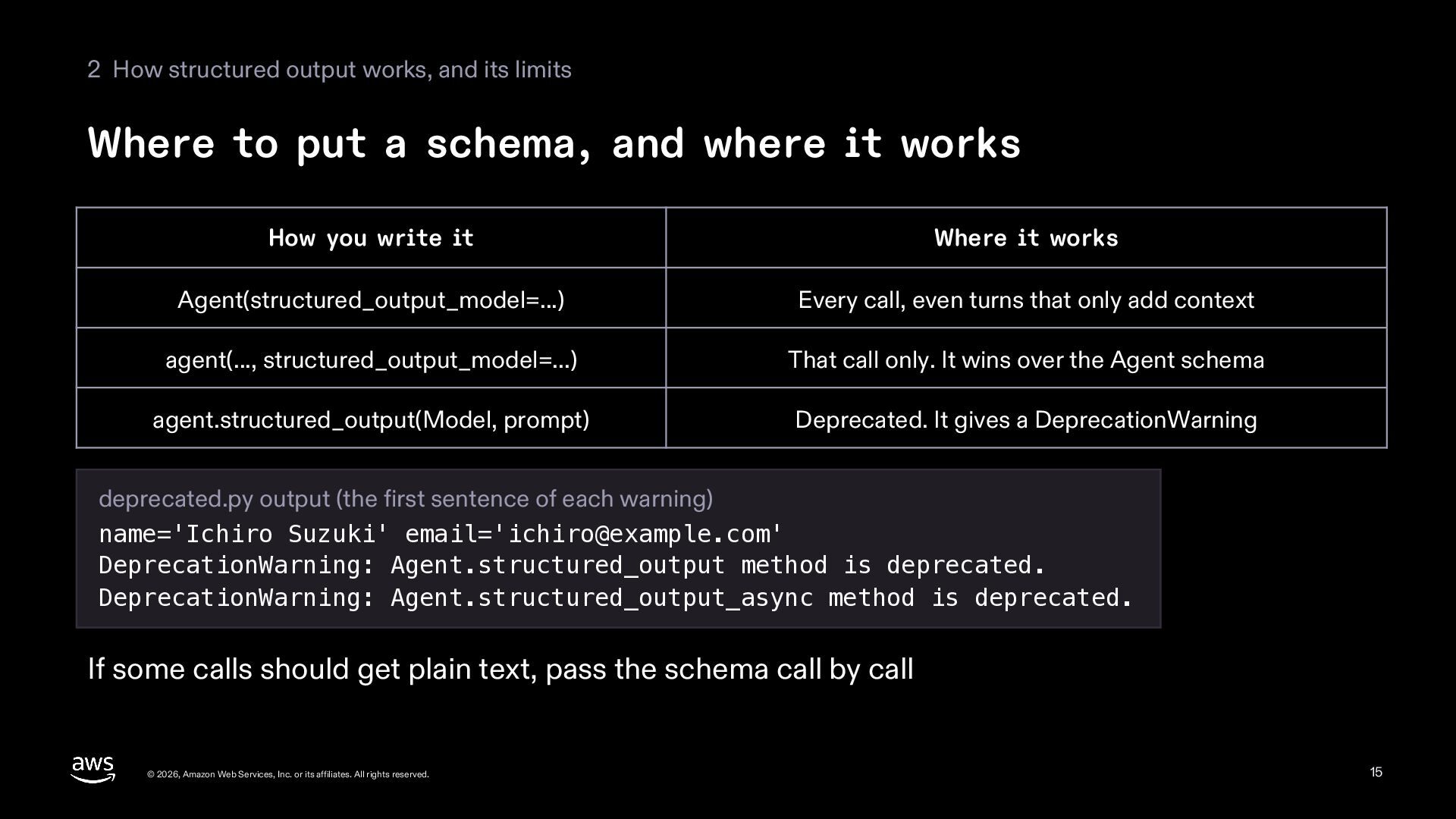
put a schema, and where it works How you write it Where it works Agent(structured_output_model=...) Every call, even turns that only add context agent(..., structured_output_model=...) That call only. It wins over the Agent schema agent.structured_output(Model, prompt) Deprecated. It gives a DeprecationWarning deprecated.py output (the first sentence of each warning) name='Ichiro Suzuki' email='[email protected]' DeprecationWarning: Agent.structured_output method is deprecated. DeprecationWarning: Agent.structured_output_async method is deprecated. If some calls should get plain text, pass the schema call by call © 2026, Amazon Web Services, Inc. or its affiliates. All rights reserved. 15 -
2 How structured output works, and its limits Write validation
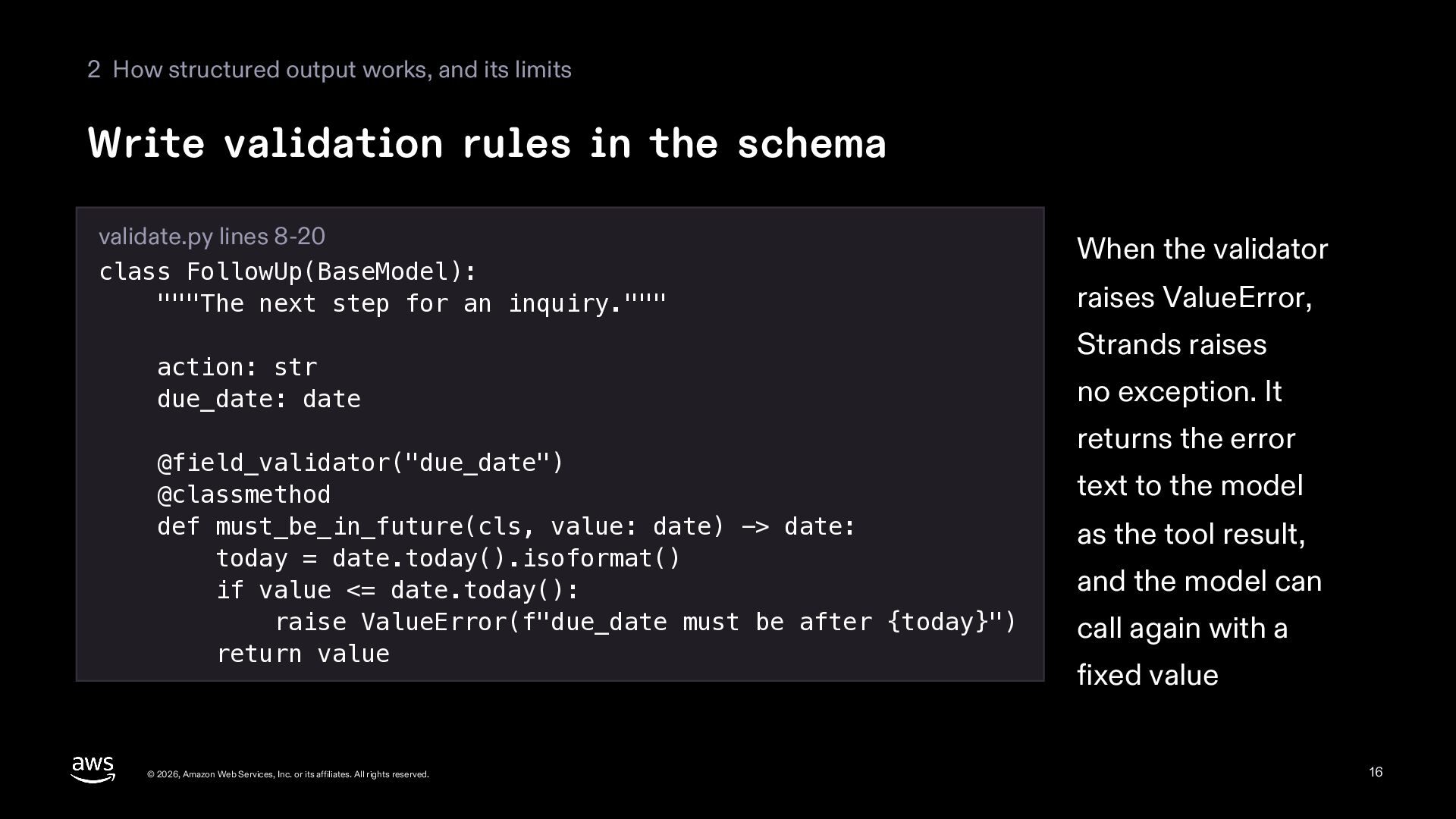
rules in the schema validate.py lines 8-20 class FollowUp(BaseModel): """The next step for an inquiry.""" action: str due_date: date @field_validator("due_date") @classmethod def must_be_in_future(cls, value: date) -> date: today = date.today().isoformat() if value <= date.today(): raise ValueError(f"due_date must be after {today}") return value © 2026, Amazon Web Services, Inc. or its affiliates. All rights reserved. When the validator raises ValueError, Strands raises no exception. It returns the error text to the model as the tool result, and the model can call again with a fixed value 16 -
2 How structured output works, and its limits The model
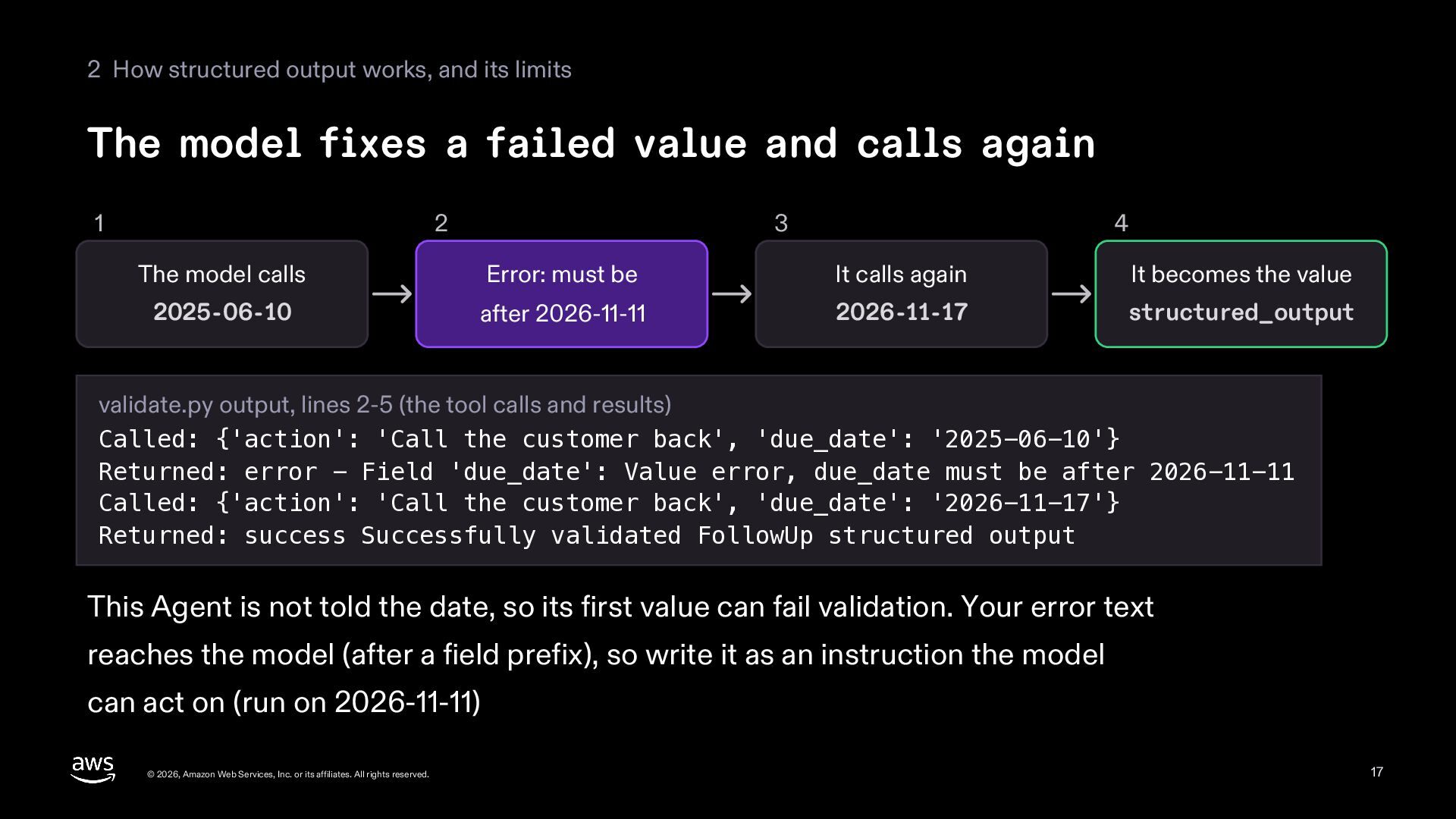
fixes a failed value and calls again 1 2 3 4 The model calls Error: must be It calls again It becomes the value 2025-06-10 after 2026-11-11 2026-11-17 structured_output validate.py output, lines 2-5 (the tool calls and results) Called: {'action': 'Call the customer back', 'due_date': '2025-06-10'} Returned: error - Field 'due_date': Value error, due_date must be after 2026-11-11 Called: {'action': 'Call the customer back', 'due_date': '2026-11-17'} Returned: success Successfully validated FollowUp structured output This Agent is not told the date, so its first value can fail validation. Your error text reaches the model (after a field prefix), so write it as an instruction the model can act on (run on 2026-11-11) © 2026, Amazon Web Services, Inc. or its affiliates. All rights reserved. 17 -
2 How structured output works, and its limits With no
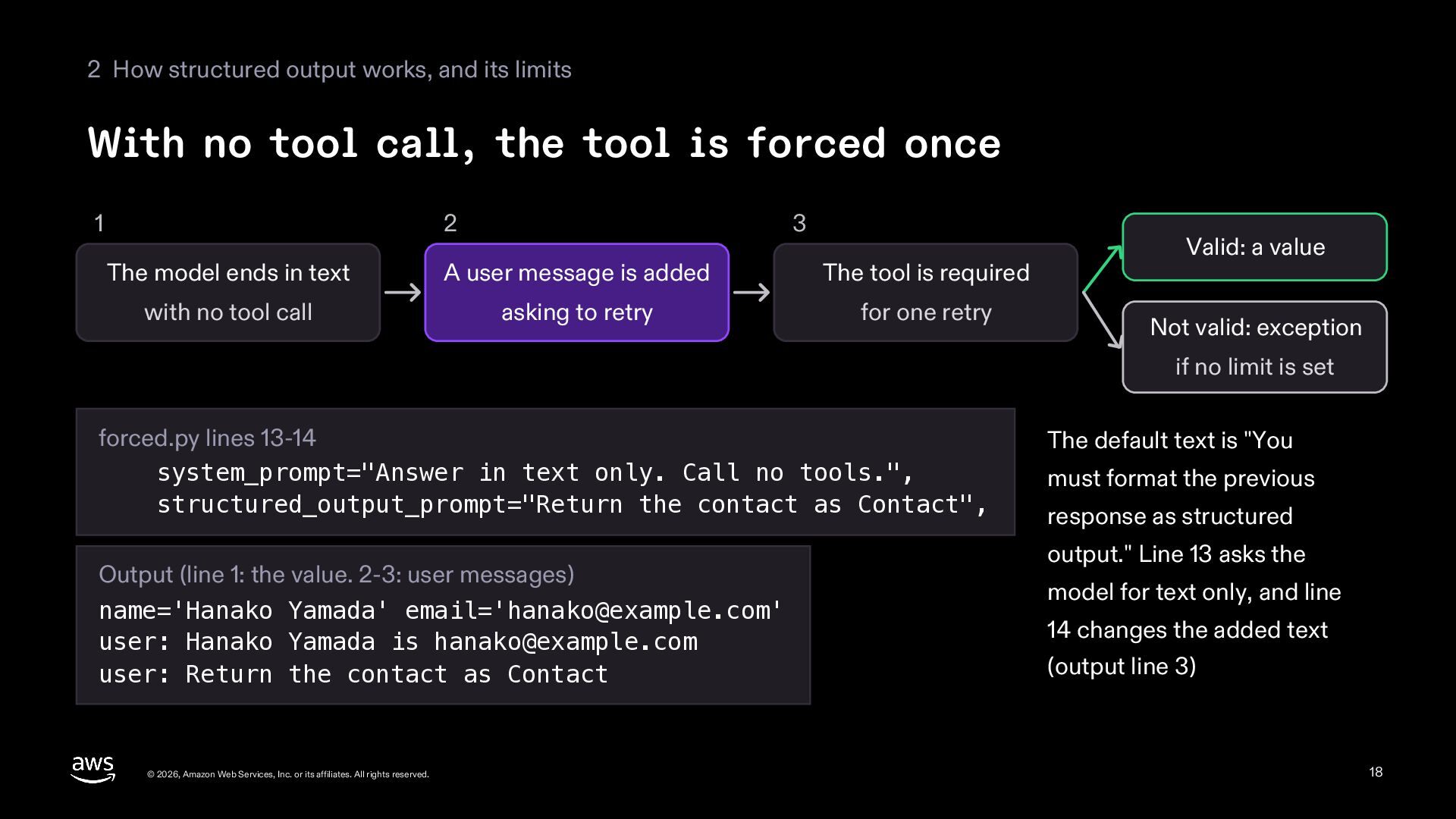
tool call, the tool is forced once 1 2 3 The model ends in text A user message is added The tool is required with no tool call asking to retry for one retry Valid: a value Not valid: exception if no limit is set forced.py lines 13-14 system_prompt="Answer in text only. Call no tools.", structured_output_prompt="Return the contact as Contact", Output (line 1: the value. 2-3: user messages) name='Hanako Yamada' email='[email protected]' user: Hanako Yamada is [email protected] user: Return the contact as Contact © 2026, Amazon Web Services, Inc. or its affiliates. All rights reserved. The default text is "You must format the previous response as structured output." Line 13 asks the model for text only, and line 14 changes the added text (output line 3) 18 -
2 How structured output works, and its limits Cap the
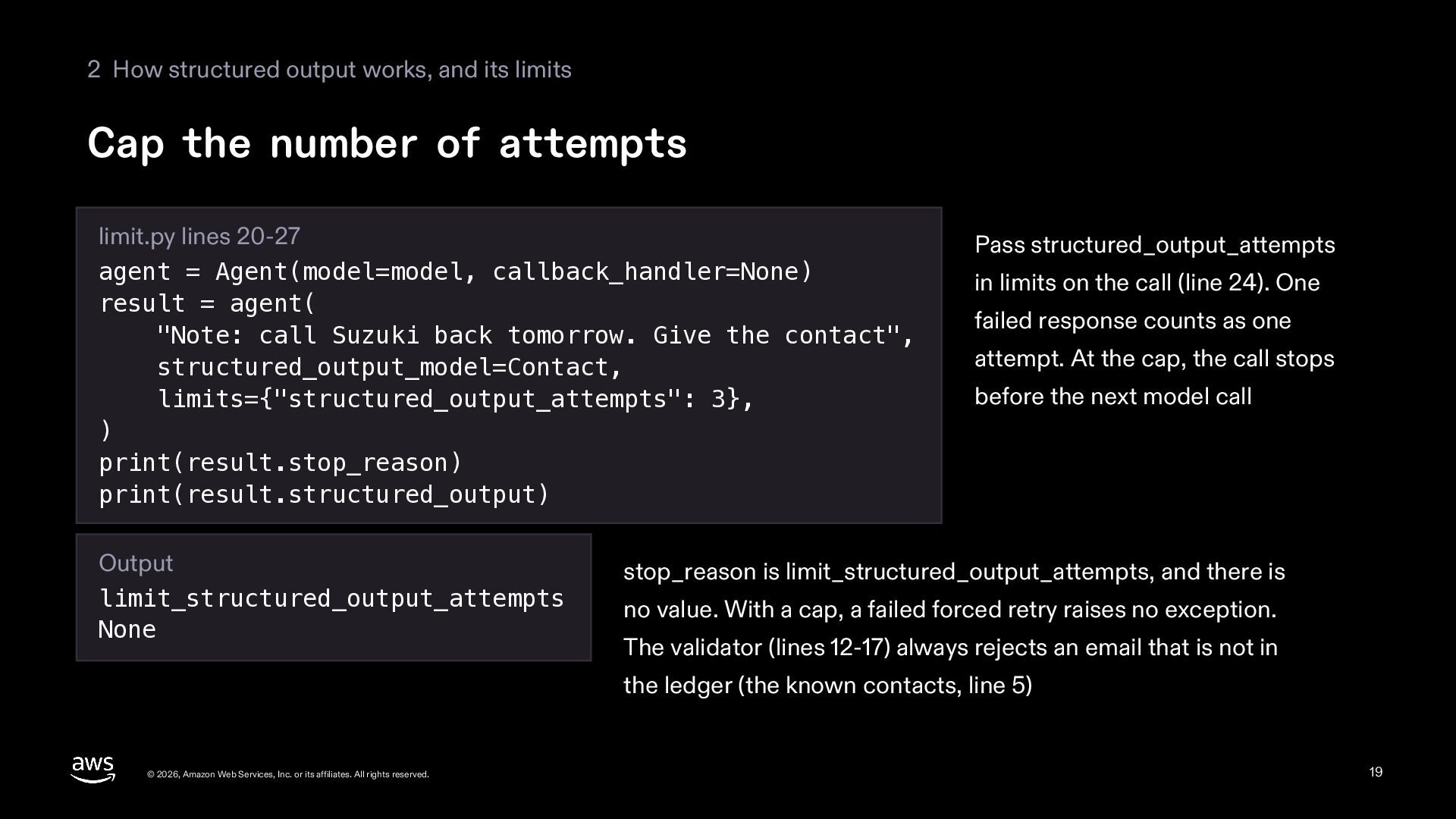
number of attempts limit.py lines 20-27 agent = Agent(model=model, callback_handler=None) result = agent( "Note: call Suzuki back tomorrow. Give the contact", structured_output_model=Contact, limits={"structured_output_attempts": 3}, ) print(result.stop_reason) print(result.structured_output) Output limit_structured_output_attempts None Pass structured_output_attempts in limits on the call (line 24). One failed response counts as one attempt. At the cap, the call stops before the next model call stop_reason is limit_structured_output_attempts, and there is no value. With a cap, a failed forced retry raises no exception. The validator (lines 12-17) always rejects an email that is not in the ledger (the known contacts, line 5) © 2026, Amazon Web Services, Inc. or its affiliates. All rights reserved. 19 -
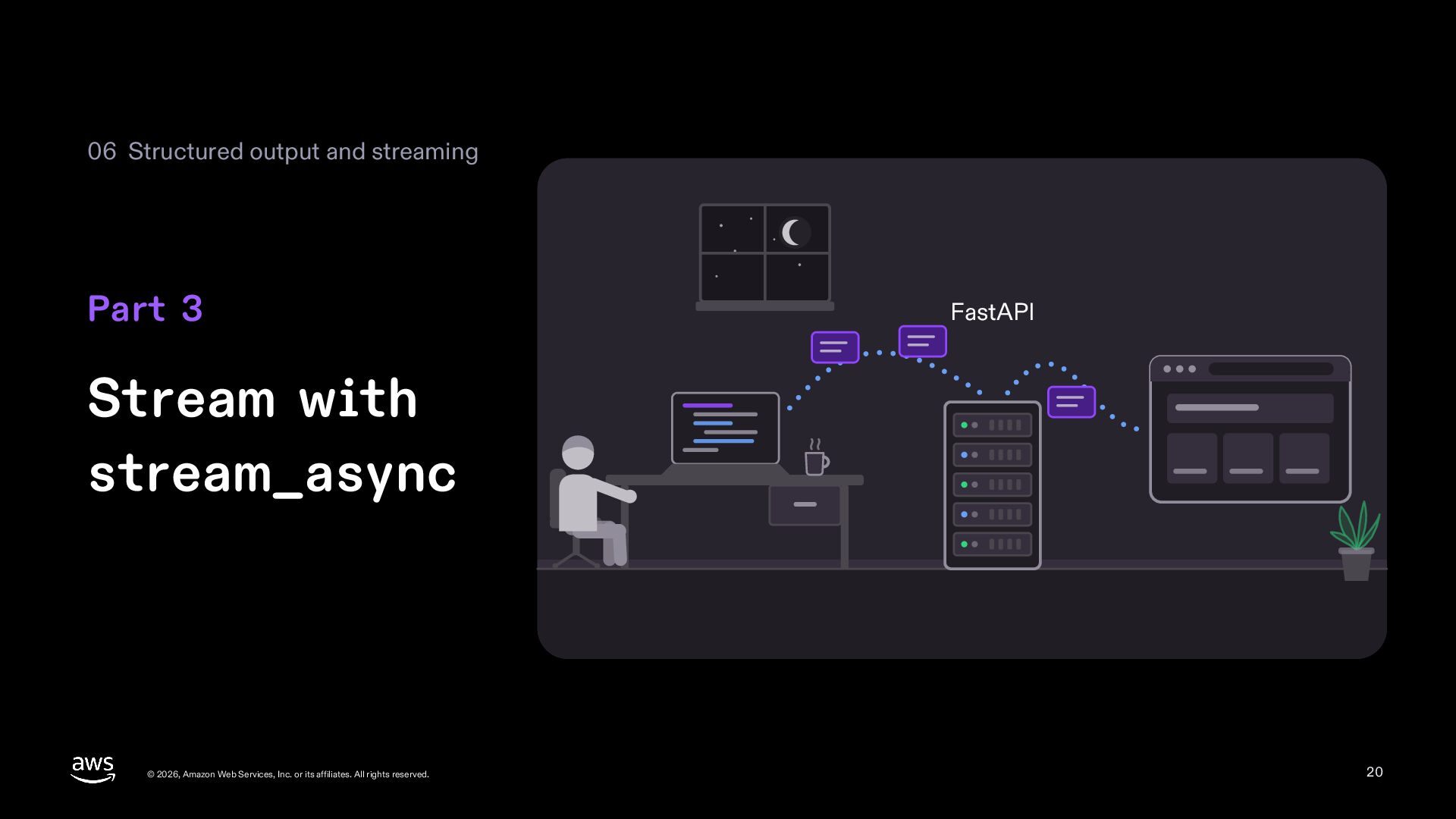
06 Structured output and streaming Part 3 FastAPI Stream with
stream_async © 2026, Amazon Web Services, Inc. or its affiliates. All rights reserved. 20 -
3 Stream with stream_async stream_async prints the answer in chunks
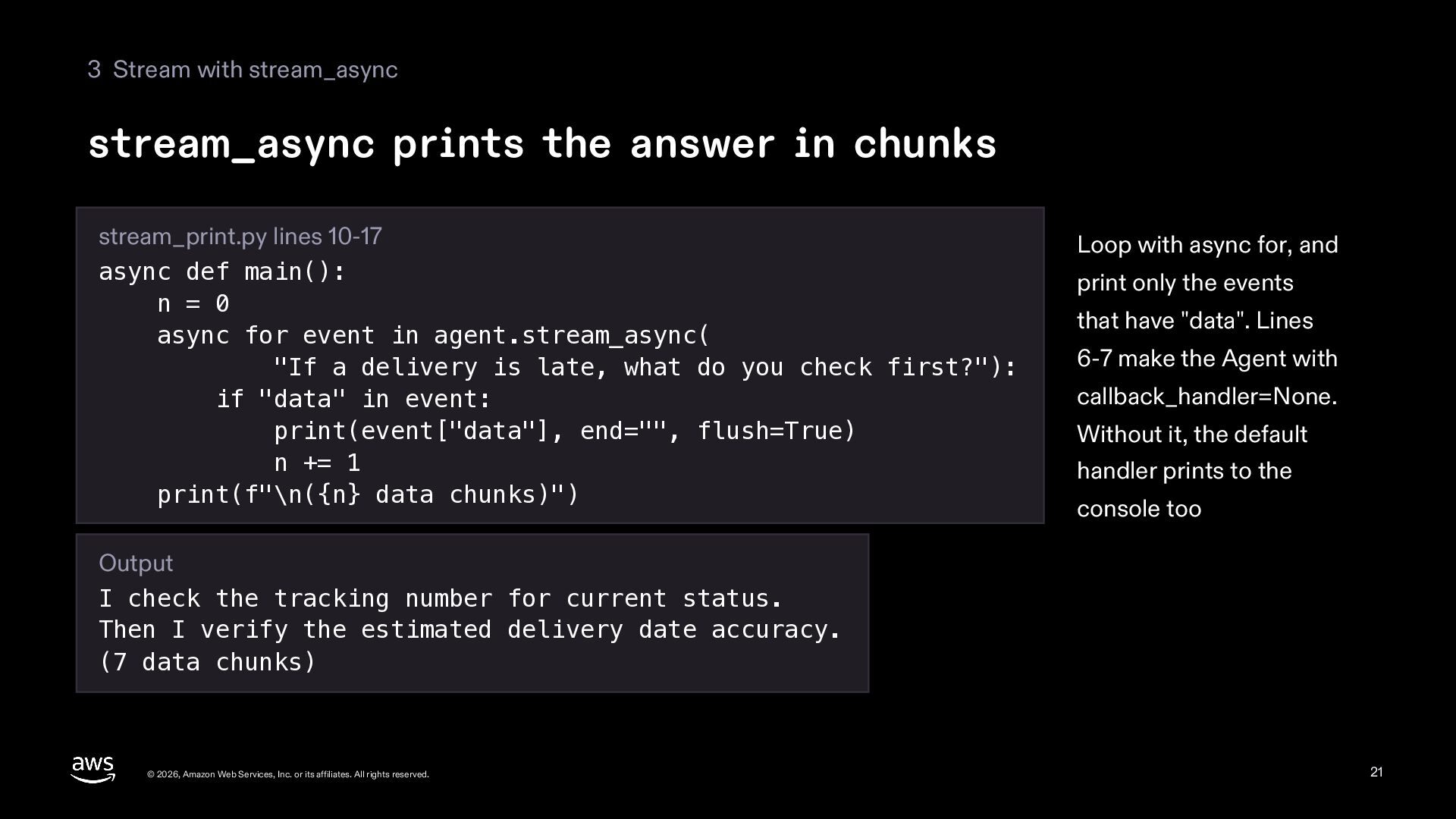
stream_print.py lines 10-17 async def main(): n = 0 async for event in agent.stream_async( "If a delivery is late, what do you check first?"): if "data" in event: print(event["data"], end="", flush=True) n += 1 print(f"\n({n} data chunks)") Loop with async for, and print only the events that have "data". Lines 6-7 make the Agent with callback_handler=None. Without it, the default handler prints to the console too Output I check the tracking number for current status. Then I verify the estimated delivery date accuracy. (7 data chunks) © 2026, Amazon Web Services, Inc. or its affiliates. All rights reserved. 21 -
3 Stream with stream_async Two ways to receive the stream
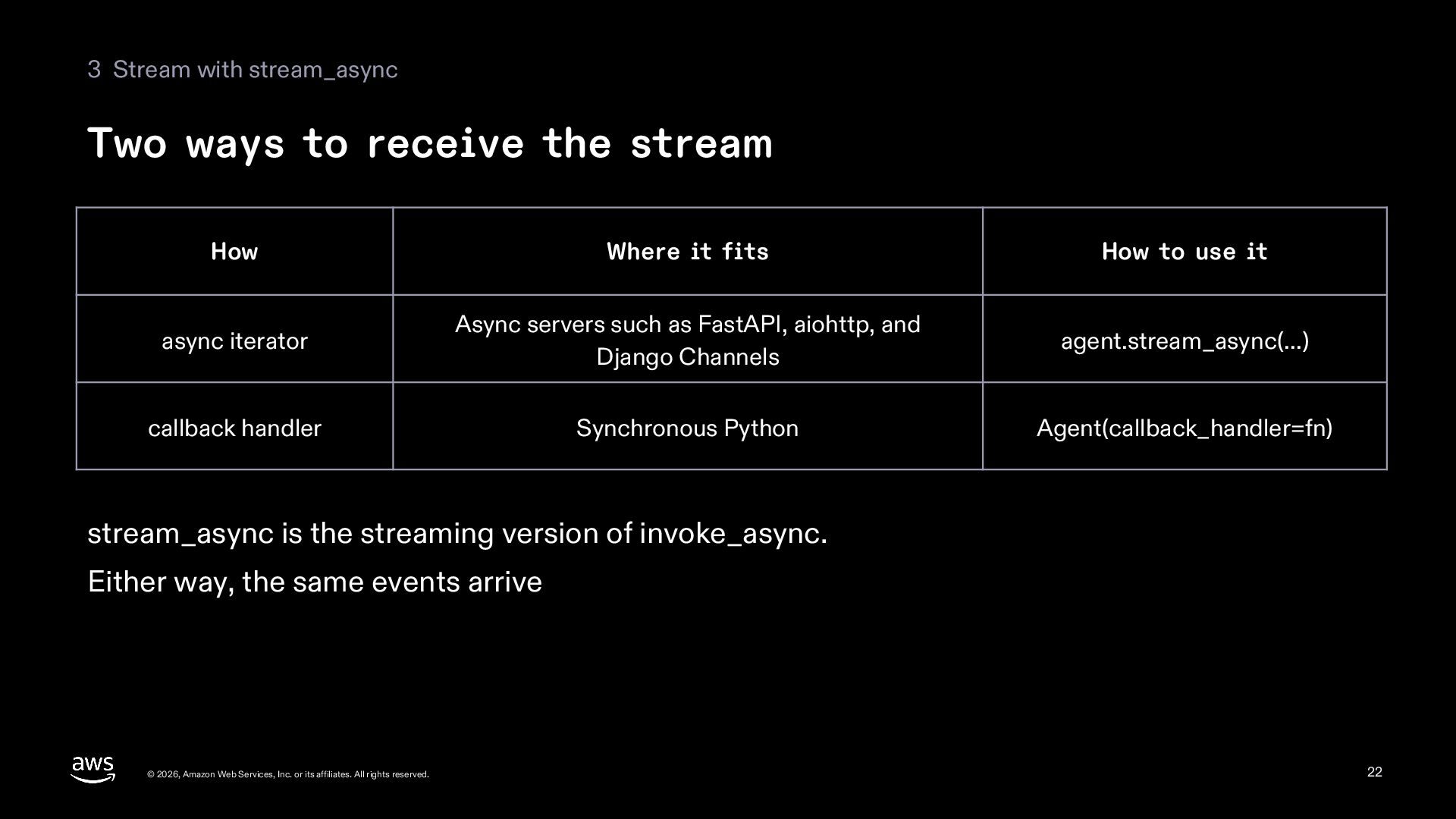
How Where it fits How to use it async iterator Async servers such as FastAPI, aiohttp, and Django Channels agent.stream_async(...) callback handler Synchronous Python Agent(callback_handler=fn) stream_async is the streaming version of invoke_async. Either way, the same events arrive © 2026, Amazon Web Services, Inc. or its affiliates. All rights reserved. 22 -
3 Stream with stream_async Make an Agent for each call
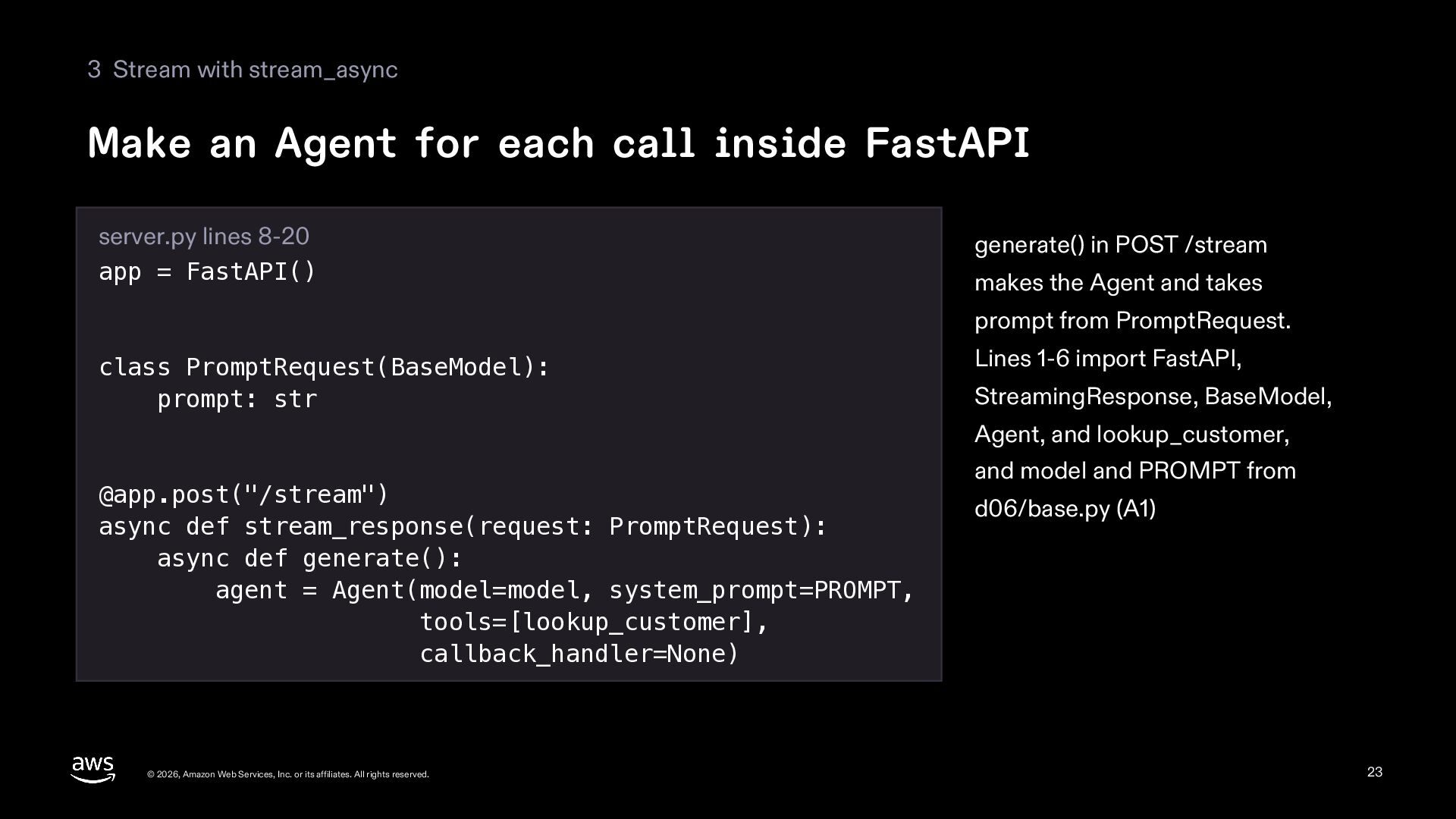
inside FastAPI server.py lines 8-20 app = FastAPI() generate() in POST /stream makes the Agent and takes prompt from PromptRequest. class PromptRequest(BaseModel): prompt: str Lines 1-6 import FastAPI, StreamingResponse, BaseModel, Agent, and lookup_customer, @app.post("/stream") async def stream_response(request: PromptRequest): async def generate(): agent = Agent(model=model, system_prompt=PROMPT, tools=[lookup_customer], callback_handler=None) © 2026, Amazon Web Services, Inc. or its affiliates. All rights reserved. and model and PROMPT from d06/base.py (A1) 23 -
3 Stream with stream_async Stream only the text chunks with
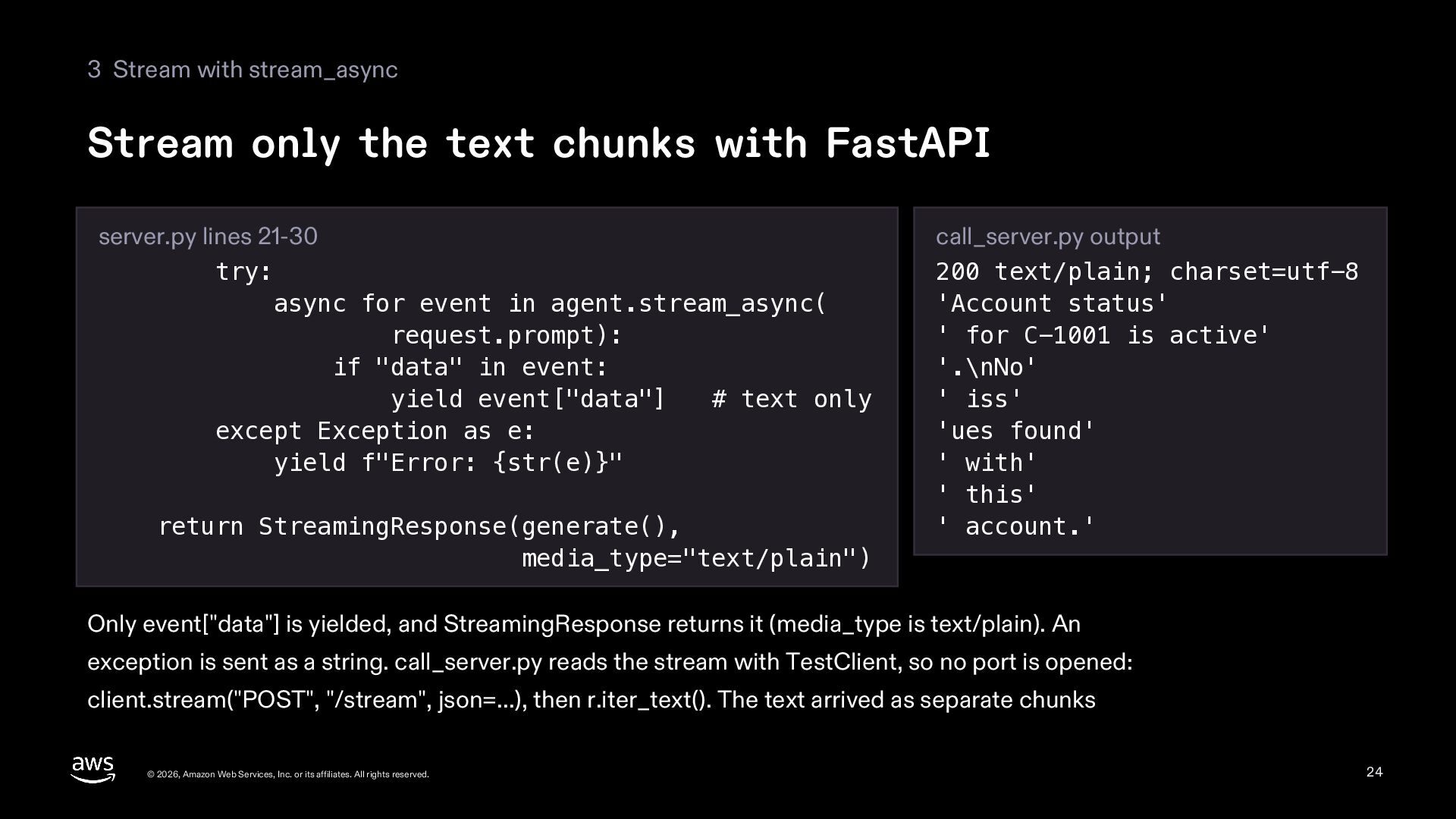
FastAPI server.py lines 21-30 try: async for event in agent.stream_async( request.prompt): if "data" in event: yield event["data"] # text only except Exception as e: yield f"Error: {str(e)}" return StreamingResponse(generate(), media_type="text/plain") call_server.py output 200 text/plain; charset=utf-8 'Account status' ' for C-1001 is active' '.\nNo' ' iss' 'ues found' ' with' ' this' ' account.' Only event["data"] is yielded, and StreamingResponse returns it (media_type is text/plain). An exception is sent as a string. call_server.py reads the stream with TestClient, so no port is opened: client.stream("POST", "/stream", json=...), then r.iter_text(). The text arrived as separate chunks © 2026, Amazon Web Services, Inc. or its affiliates. All rights reserved. 24 -
3 Stream with stream_async The order of events in one
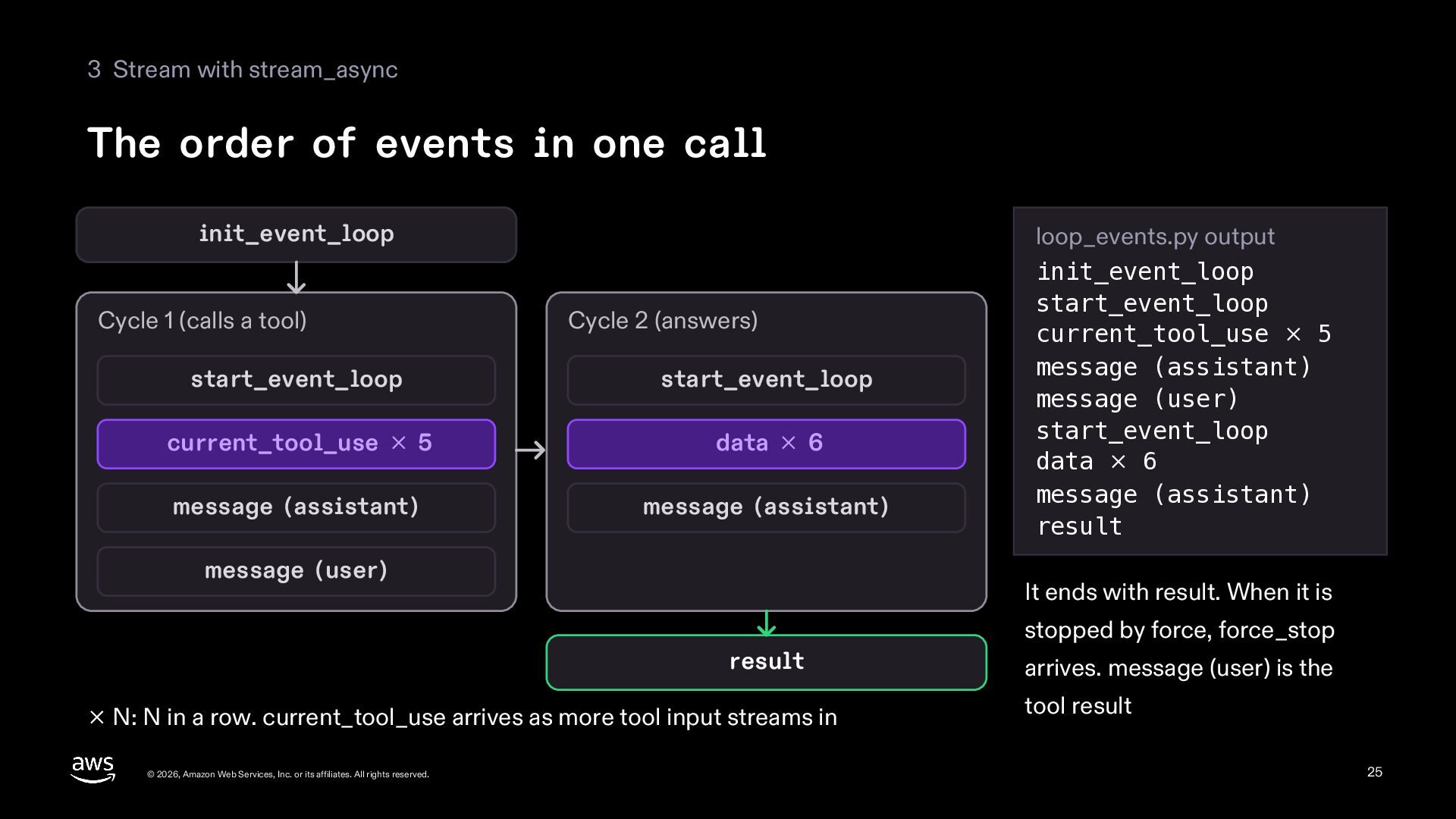
call init_event_loop Cycle 1 (calls a tool) Cycle 2 (answers) start_event_loop start_event_loop current_tool_use × 5 data × 6 message (assistant) message (assistant) message (user) loop_events.py output init_event_loop start_event_loop current_tool_use × 5 message (assistant) message (user) start_event_loop data × 6 message (assistant) result It ends with result. When it is stopped by force, force_stop result × N: N in a row. current_tool_use arrives as more tool input streams in © 2026, Amazon Web Services, Inc. or its affiliates. All rights reserved. arrives. message (user) is the tool result 25 -
3 Stream with stream_async Events of a child Agent on
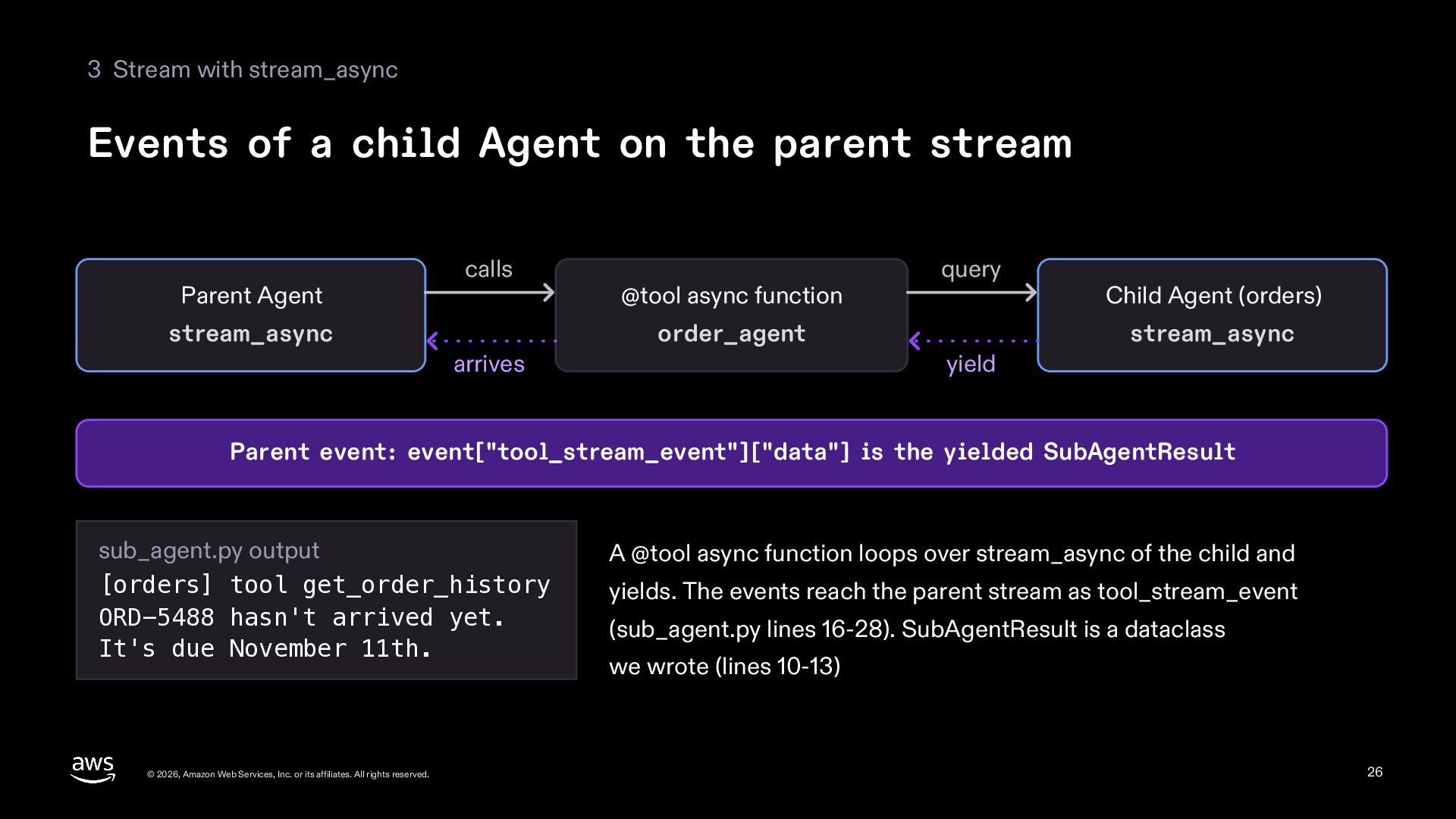
the parent stream Parent Agent stream_async calls arrives @tool async function order_agent query yield Child Agent (orders) stream_async Parent event: event["tool_stream_event"]["data"] is the yielded SubAgentResult sub_agent.py output [orders] tool get_order_history ORD-5488 hasn't arrived yet. It's due November 11th. © 2026, Amazon Web Services, Inc. or its affiliates. All rights reserved. A @tool async function loops over stream_async of the child and yields. The events reach the parent stream as tool_stream_event (sub_agent.py lines 16-28). SubAgentResult is a dataclass we wrote (lines 10-13) 26 -
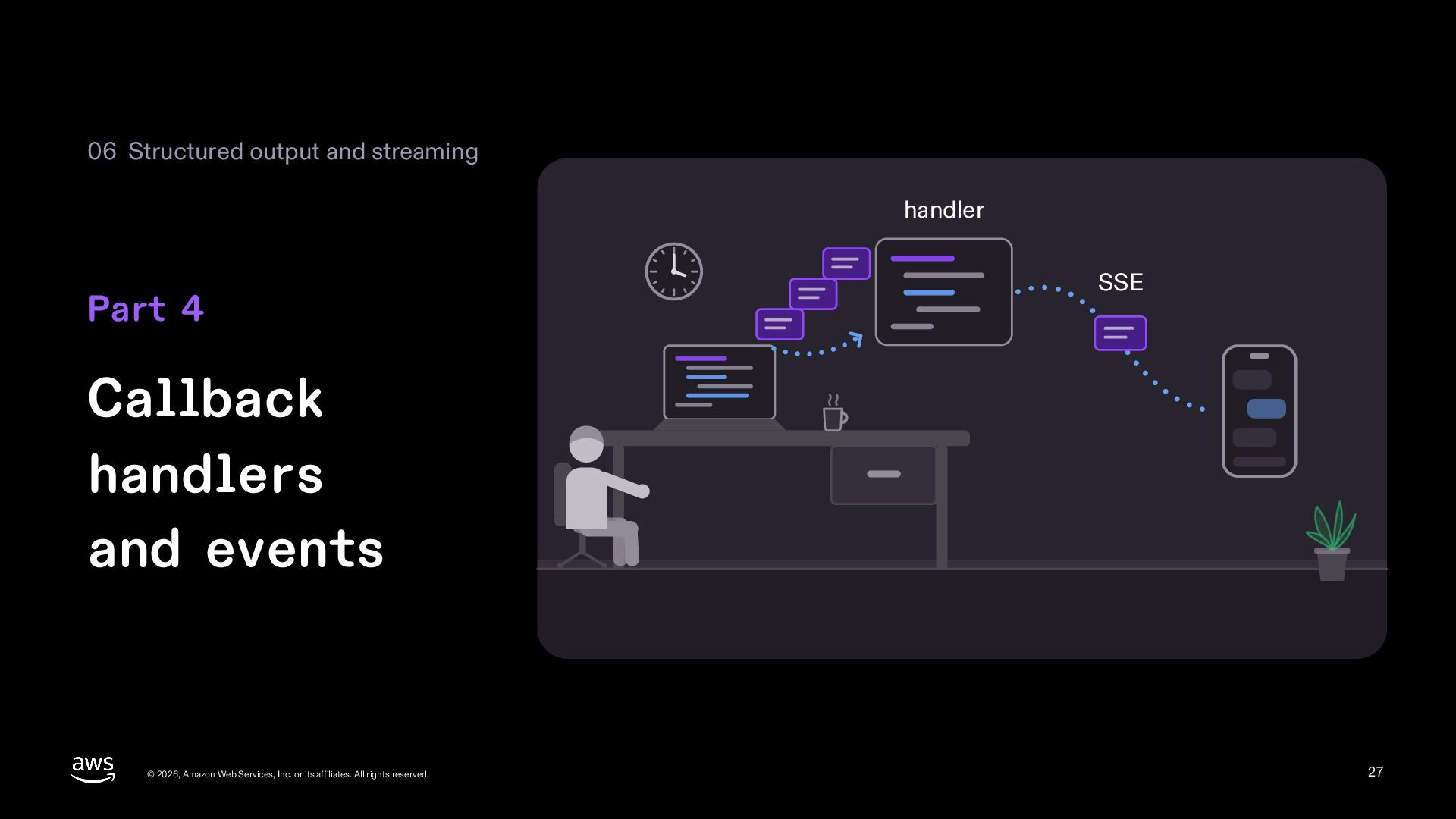
06 Structured output and streaming handler Part 4 SSE Callback
handlers and events © 2026, Amazon Web Services, Inc. or its affiliates. All rights reserved. 27 -
4 Callback handlers and events Pass a callback handler to
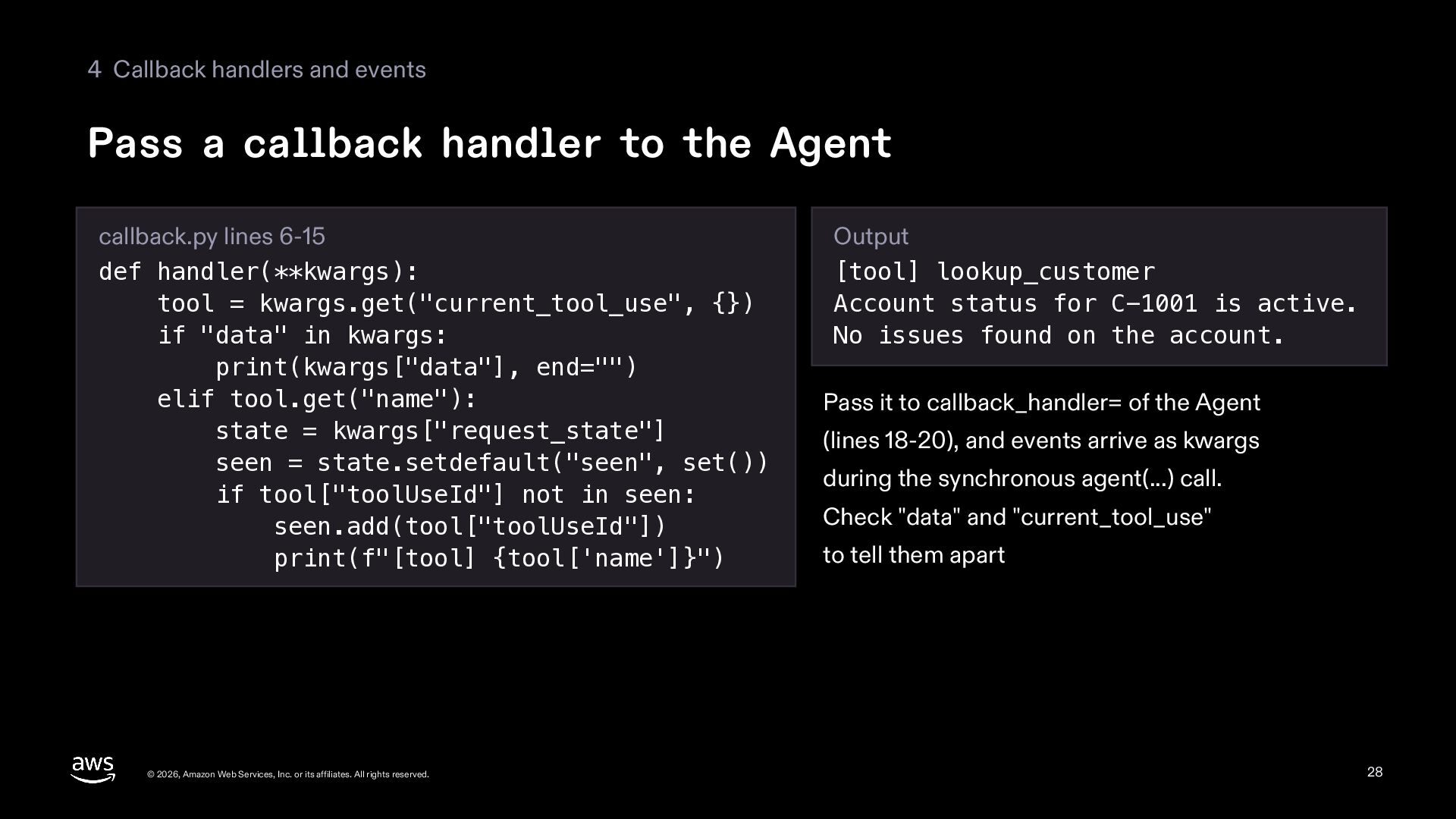
the Agent callback.py lines 6-15 def handler(**kwargs): tool = kwargs.get("current_tool_use", {}) if "data" in kwargs: print(kwargs["data"], end="") elif tool.get("name"): state = kwargs["request_state"] seen = state.setdefault("seen", set()) if tool["toolUseId"] not in seen: seen.add(tool["toolUseId"]) print(f"[tool] {tool['name']}") © 2026, Amazon Web Services, Inc. or its affiliates. All rights reserved. Output [tool] lookup_customer Account status for C-1001 is active. No issues found on the account. Pass it to callback_handler= of the Agent (lines 18-20), and events arrive as kwargs during the synchronous agent(...) call. Check "data" and "current_tool_use" to tell them apart 28 -
4 Callback handlers and events The default handler, and None
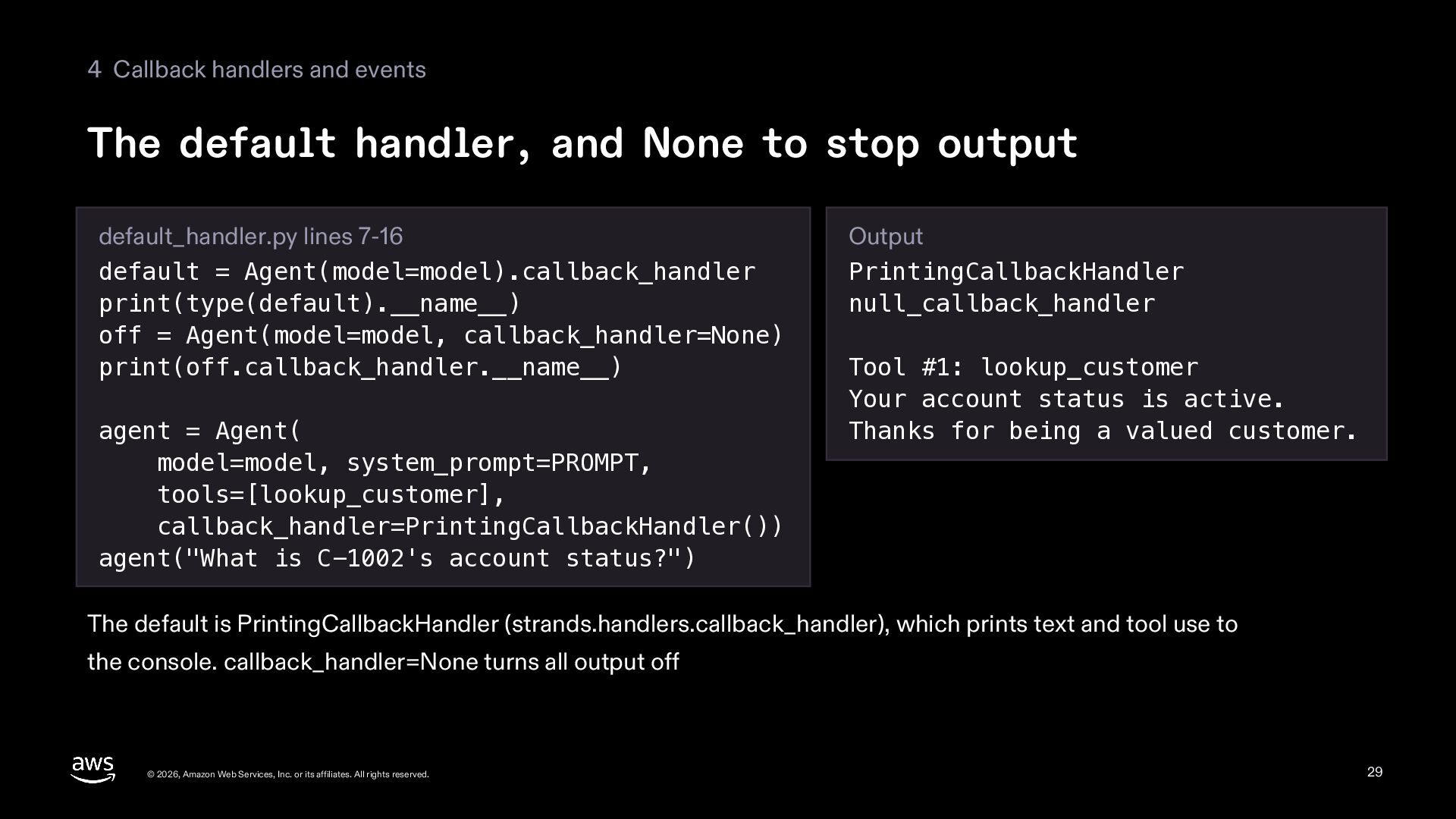
to stop output default_handler.py lines 7-16 default = Agent(model=model).callback_handler print(type(default).__name__) off = Agent(model=model, callback_handler=None) print(off.callback_handler.__name__) agent = Agent( model=model, system_prompt=PROMPT, tools=[lookup_customer], callback_handler=PrintingCallbackHandler()) agent("What is C-1002's account status?") Output PrintingCallbackHandler null_callback_handler Tool #1: lookup_customer Your account status is active. Thanks for being a valued customer. The default is PrintingCallbackHandler (strands.handlers.callback_handler), which prints text and tool use to the console. callback_handler=None turns all output off © 2026, Amazon Web Services, Inc. or its affiliates. All rights reserved. 29 -
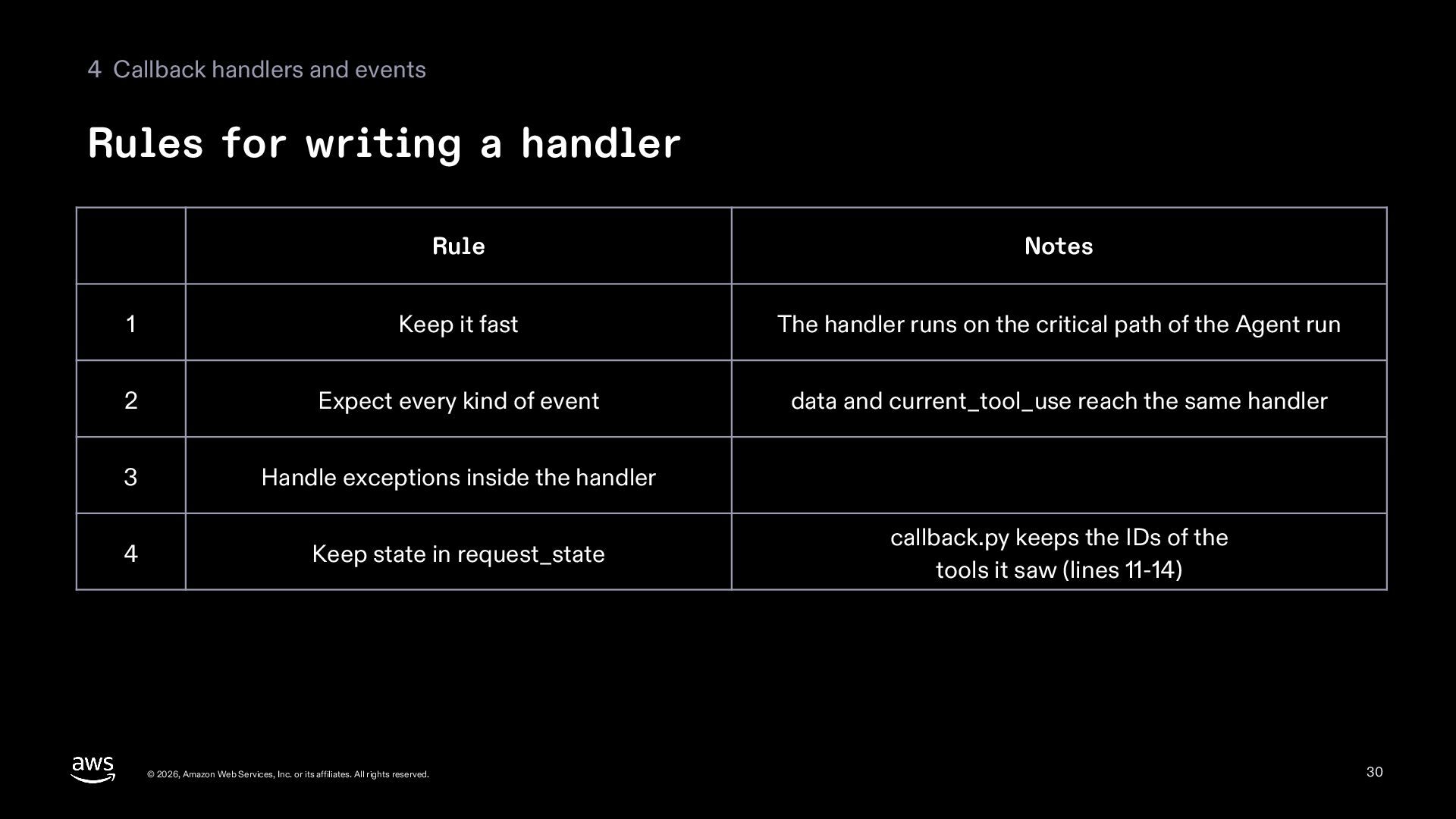
4 Callback handlers and events Rules for writing a handler
Rule Notes 1 Keep it fast The handler runs on the critical path of the Agent run 2 Expect every kind of event data and current_tool_use reach the same handler 3 Handle exceptions inside the handler 4 Keep state in request_state © 2026, Amazon Web Services, Inc. or its affiliates. All rights reserved. callback.py keeps the IDs of the tools it saw (lines 11-14) 30 -
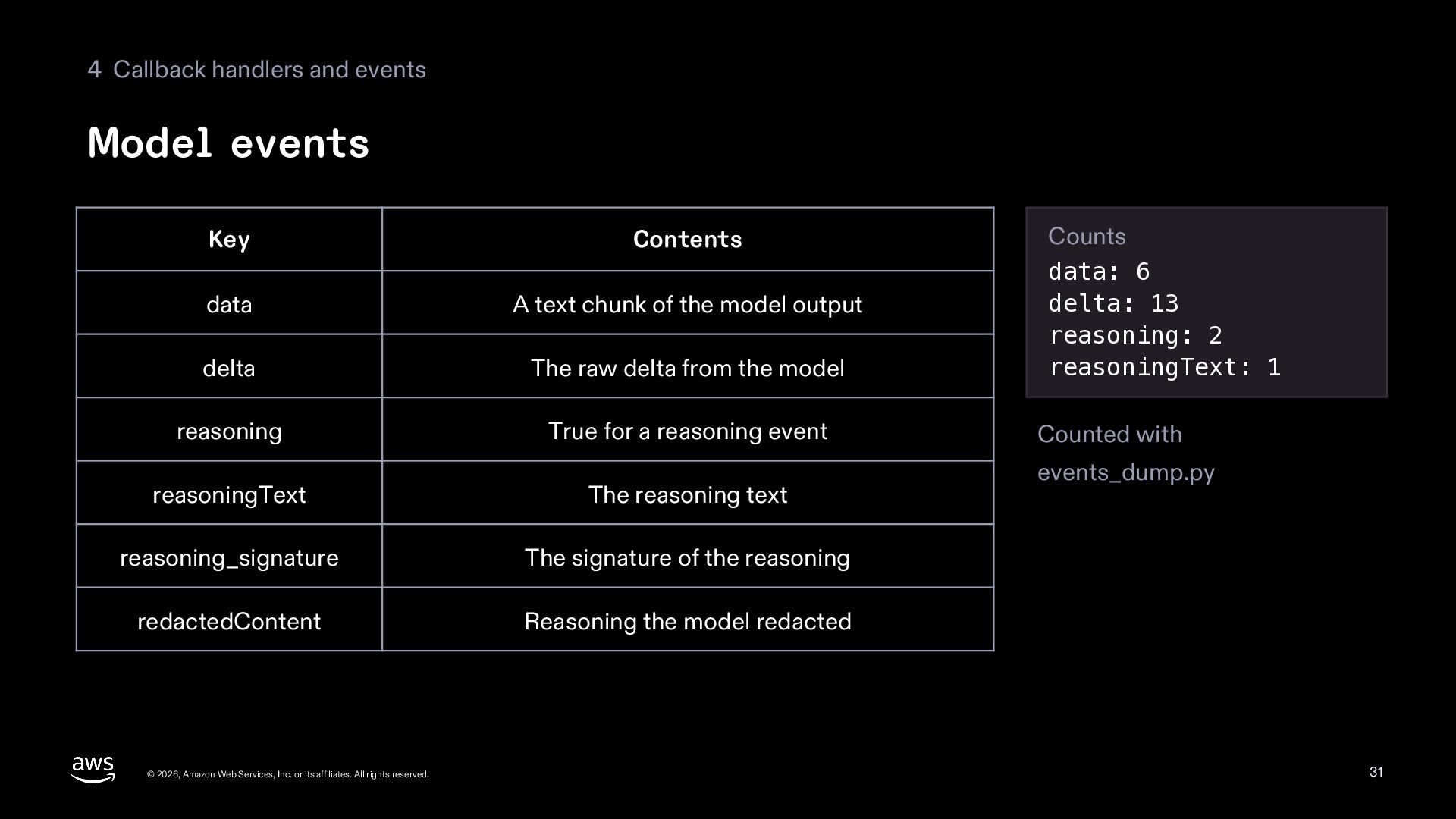
4 Callback handlers and events Model events Key Contents data
A text chunk of the model output delta The raw delta from the model reasoning True for a reasoning event reasoningText The reasoning text reasoning_signature The signature of the reasoning redactedContent Reasoning the model redacted © 2026, Amazon Web Services, Inc. or its affiliates. All rights reserved. Counts data: 6 delta: 13 reasoning: 2 reasoningText: 1 Counted with events_dump.py 31 -
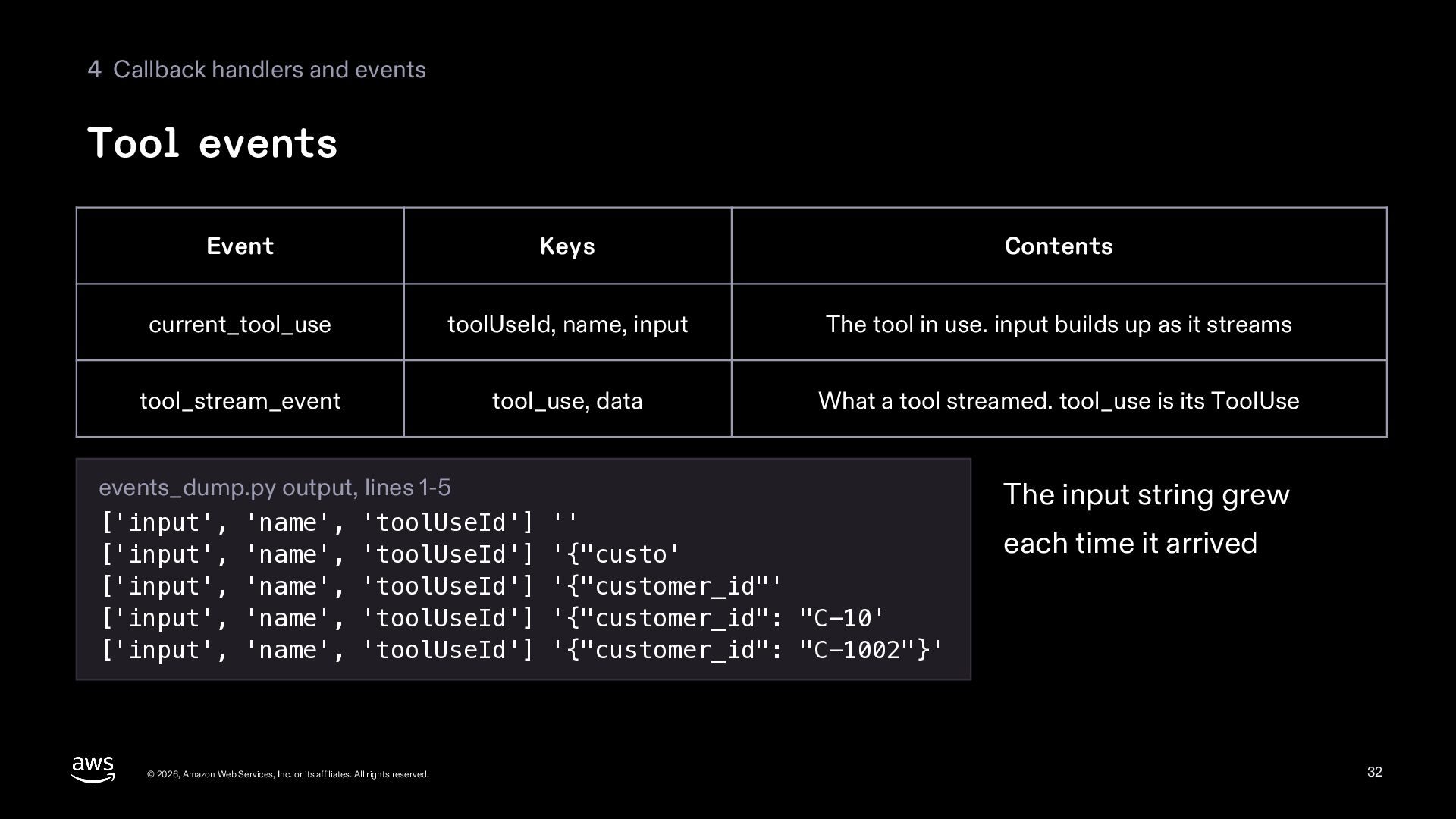
4 Callback handlers and events Tool events Event Keys Contents
current_tool_use toolUseId, name, input The tool in use. input builds up as it streams tool_stream_event tool_use, data What a tool streamed. tool_use is its ToolUse events_dump.py output, lines 1-5 ['input', 'name', 'toolUseId'] '' ['input', 'name', 'toolUseId'] '{"custo' ['input', 'name', 'toolUseId'] '{"customer_id"' ['input', 'name', 'toolUseId'] '{"customer_id": "C-10' ['input', 'name', 'toolUseId'] '{"customer_id": "C-1002"}' © 2026, Amazon Web Services, Inc. or its affiliates. All rights reserved. The input string grew each time it arrived 32 -
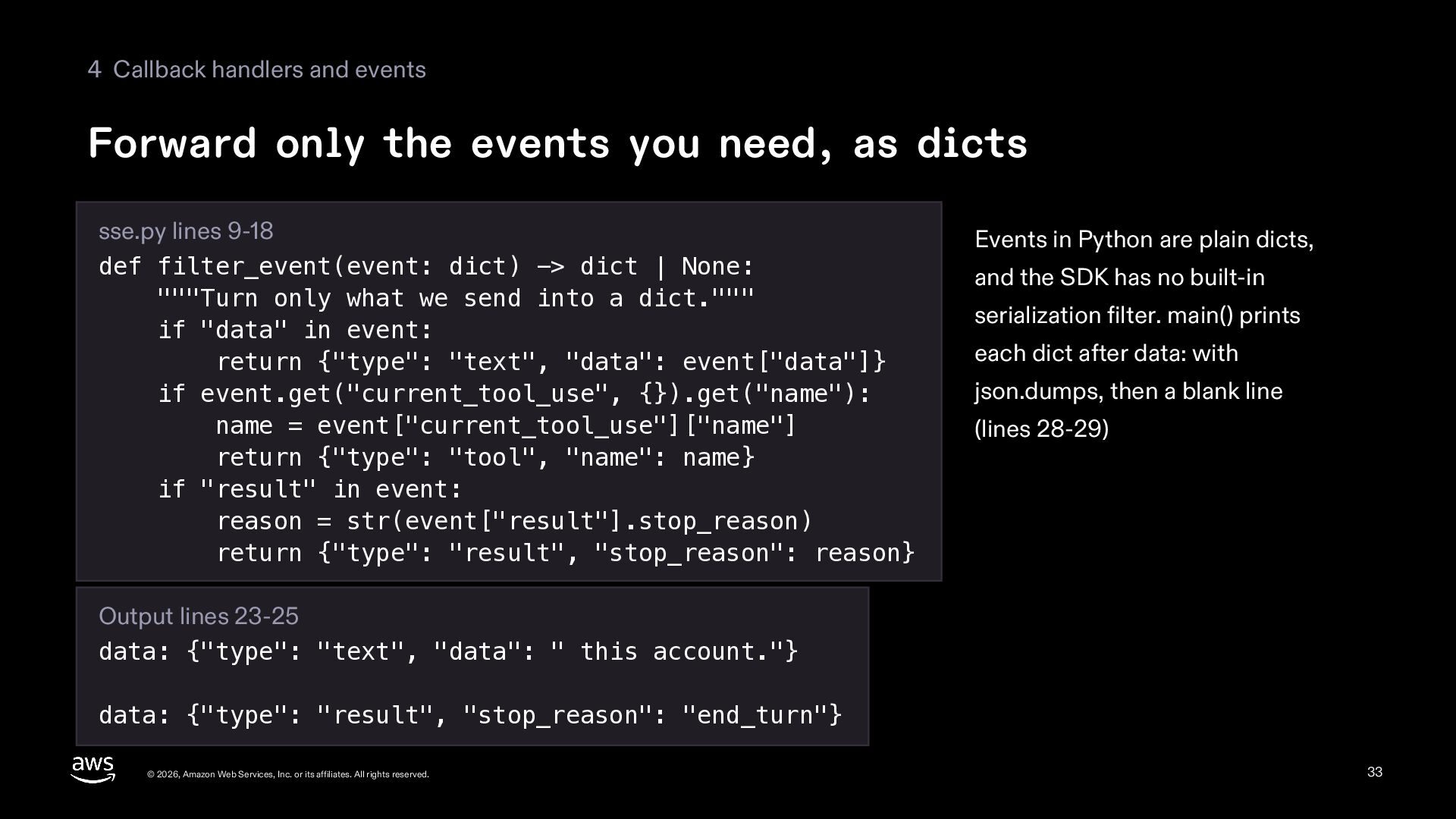
4 Callback handlers and events Forward only the events you
need, as dicts sse.py lines 9-18 def filter_event(event: dict) -> dict | None: """Turn only what we send into a dict.""" if "data" in event: return {"type": "text", "data": event["data"]} if event.get("current_tool_use", {}).get("name"): name = event["current_tool_use"]["name"] return {"type": "tool", "name": name} if "result" in event: reason = str(event["result"].stop_reason) return {"type": "result", "stop_reason": reason} Events in Python are plain dicts, and the SDK has no built-in serialization filter. main() prints each dict after data: with json.dumps, then a blank line (lines 28-29) Output lines 23-25 data: {"type": "text", "data": " this account."} data: {"type": "result", "stop_reason": "end_turn"} © 2026, Amazon Web Services, Inc. or its affiliates. All rights reserved. 33 -
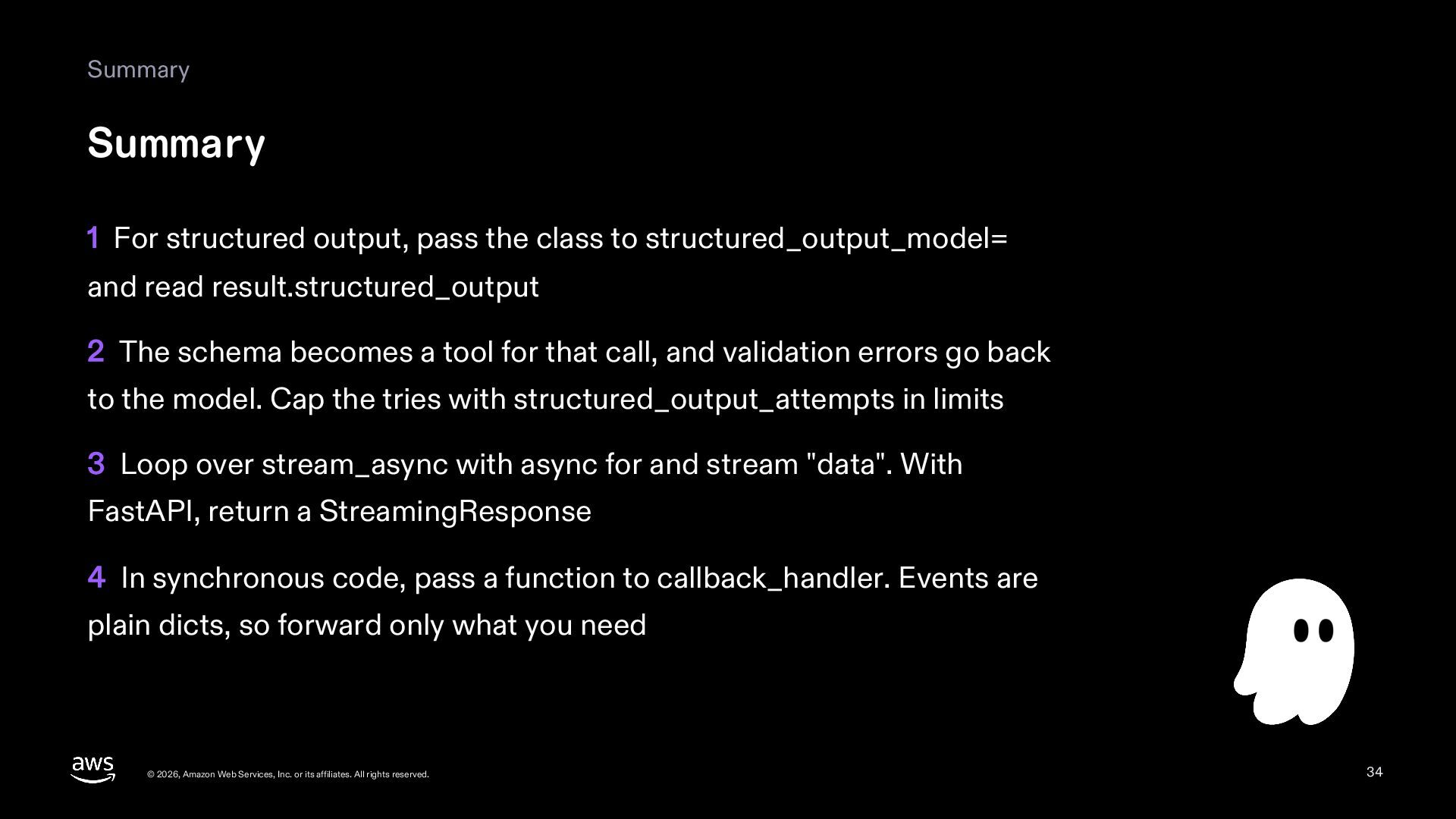
Summary Summary 1 For structured output, pass the class to
structured_output_model= and read result.structured_output 2 The schema becomes a tool for that call, and validation errors go back to the model. Cap the tries with structured_output_attempts in limits 3 Loop over stream_async with async for and stream "data". With FastAPI, return a StreamingResponse 4 In synchronous code, pass a function to callback_handler. Events are plain dicts, so forward only what you need © 2026, Amazon Web Services, Inc. or its affiliates. All rights reserved. 34 -
Summary Read next 07 Multi-agent Combine agents with agents as
tools, Swarm, Graph, Workflow, and A2A © 2026, Amazon Web Services, Inc. or its affiliates. All rights reserved. 35 -
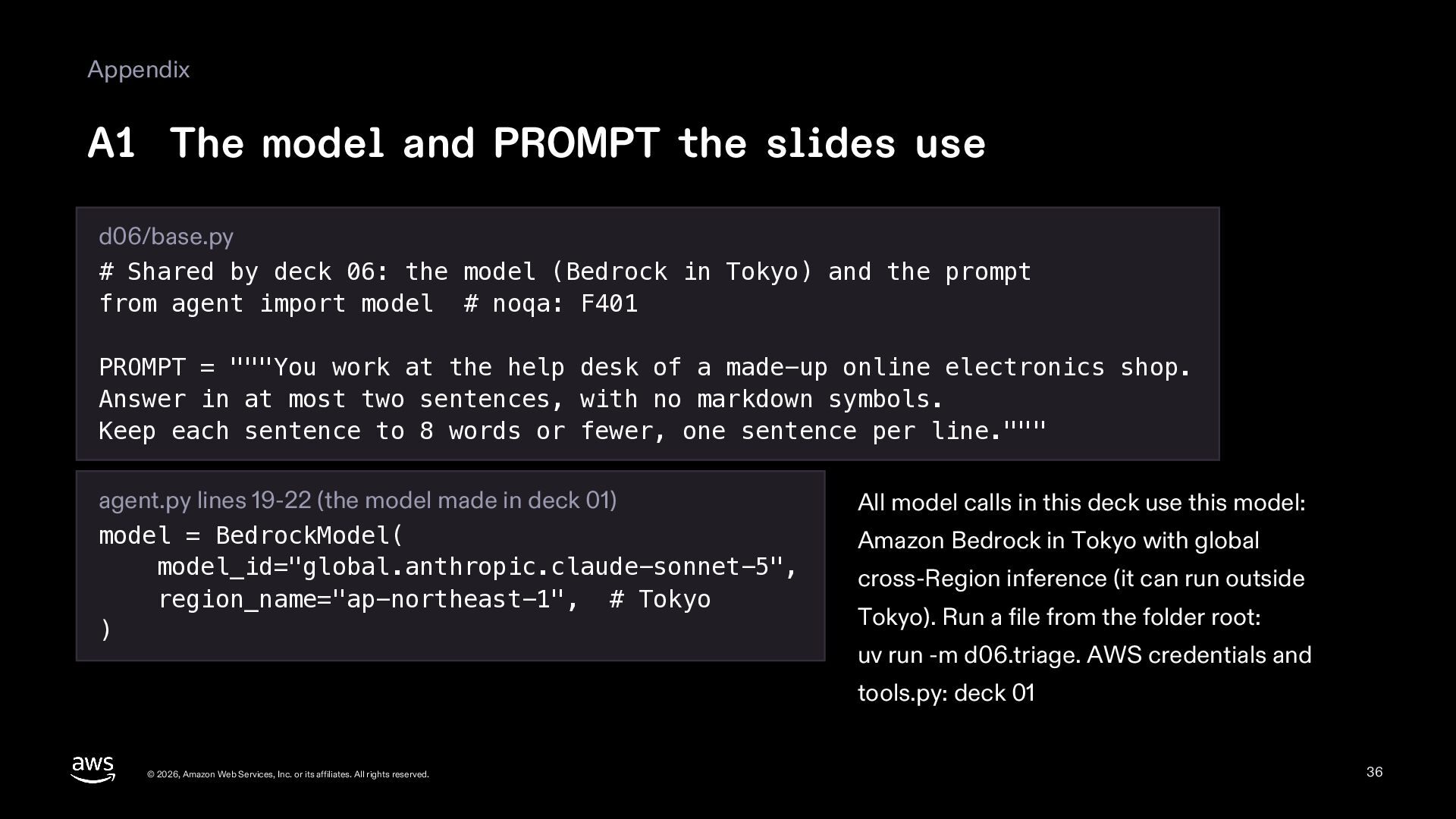
Appendix A1 The model and PROMPT the slides use d06/base.py
# Shared by deck 06: the model (Bedrock in Tokyo) and the prompt from agent import model # noqa: F401 PROMPT = """You work at the help desk of a made-up online electronics shop. Answer in at most two sentences, with no markdown symbols. Keep each sentence to 8 words or fewer, one sentence per line.""" agent.py lines 19-22 (the model made in deck 01) model = BedrockModel( model_id="global.anthropic.claude-sonnet-5", region_name="ap-northeast-1", # Tokyo ) All model calls in this deck use this model: Amazon Bedrock in Tokyo with global cross-Region inference (it can run outside Tokyo). Run a file from the folder root: uv run -m d06.triage. AWS credentials and tools.py: deck 01 © 2026, Amazon Web Services, Inc. or its affiliates. All rights reserved. 36 -
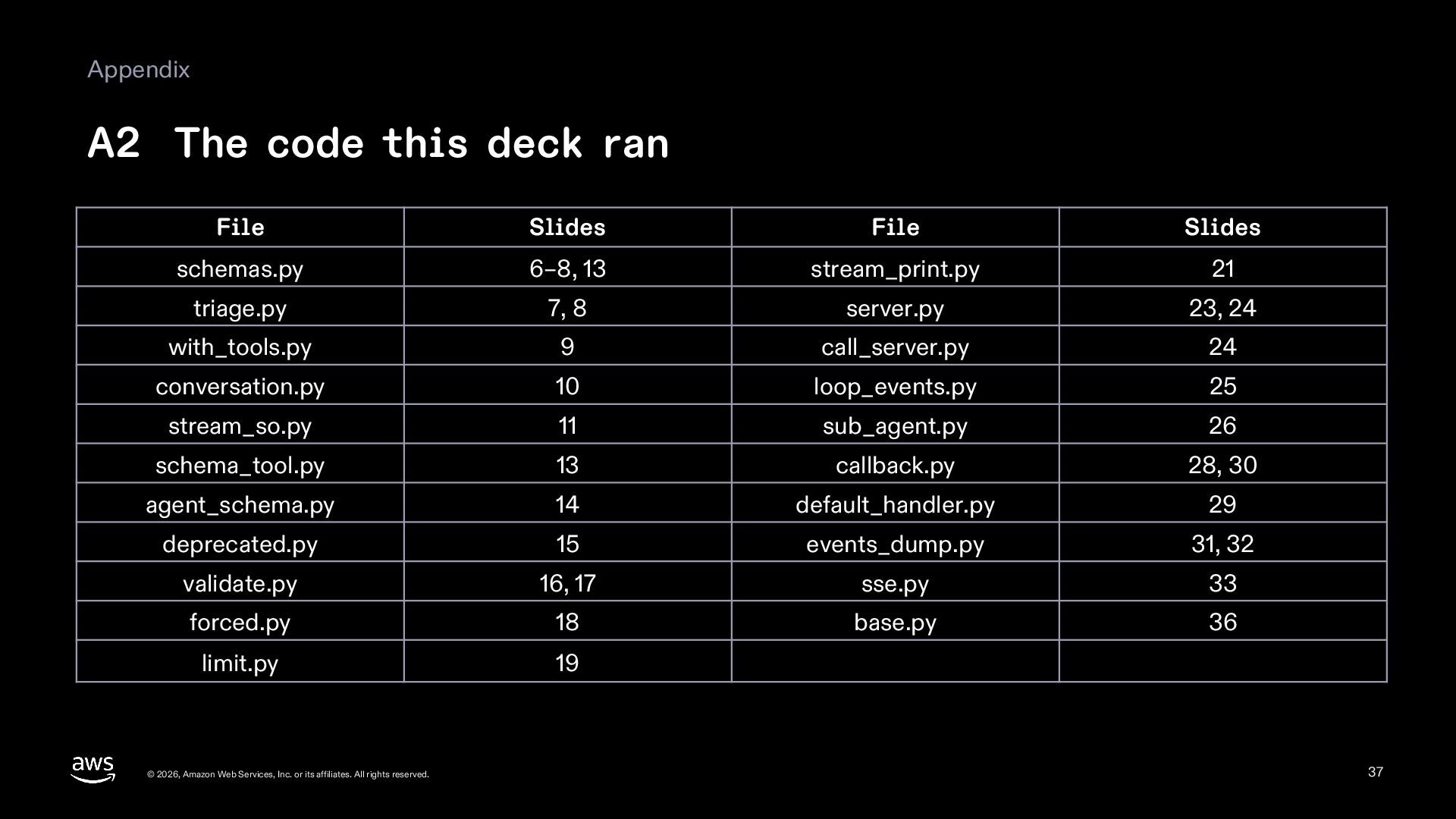
Appendix A2 The code this deck ran File Slides File
Slides schemas.py 6–8, 13 stream_print.py 21 triage.py 7, 8 server.py 23, 24 with_tools.py 9 call_server.py 24 conversation.py 10 loop_events.py 25 stream_so.py 11 sub_agent.py 26 schema_tool.py 13 callback.py 28, 30 agent_schema.py 14 default_handler.py 29 deprecated.py 15 events_dump.py 31, 32 validate.py 16, 17 sse.py 33 forced.py 18 base.py 36 limit.py 19 © 2026, Amazon Web Services, Inc. or its affiliates. All rights reserved. 37 -
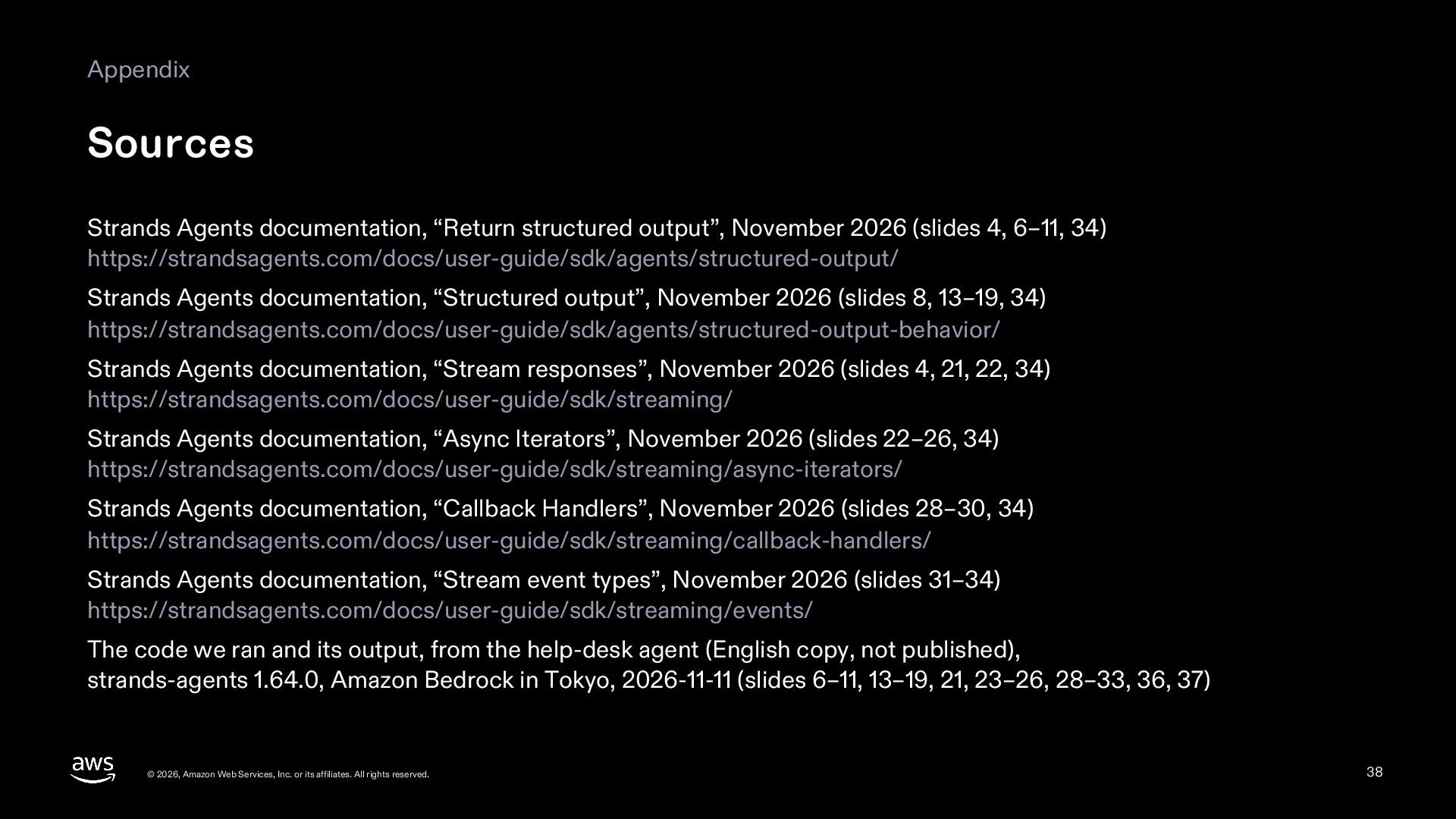
Appendix Sources Strands Agents documentation, “Return structured output”, November 2026
(slides 4, 6–11, 34) https://strandsagents.com/docs/user-guide/sdk/agents/structured-output/ Strands Agents documentation, “Structured output”, November 2026 (slides 8, 13–19, 34) https://strandsagents.com/docs/user-guide/sdk/agents/structured-output-behavior/ Strands Agents documentation, “Stream responses”, November 2026 (slides 4, 21, 22, 34) https://strandsagents.com/docs/user-guide/sdk/streaming/ Strands Agents documentation, “Async Iterators”, November 2026 (slides 22–26, 34) https://strandsagents.com/docs/user-guide/sdk/streaming/async-iterators/ Strands Agents documentation, “Callback Handlers”, November 2026 (slides 28–30, 34) https://strandsagents.com/docs/user-guide/sdk/streaming/callback-handlers/ Strands Agents documentation, “Stream event types”, November 2026 (slides 31–34) https://strandsagents.com/docs/user-guide/sdk/streaming/events/ The code we ran and its output, from the help-desk agent (English copy, not published), strands-agents 1.64.0, Amazon Bedrock in Tokyo, 2026-11-11 (slides 6–11, 13–19, 21, 23–26, 28–33, 36, 37) © 2026, Amazon Web Services, Inc. or its affiliates. All rights reserved. 38
 inariku
 nagix
 qatonchan
 bitkey
 _kotobuki_
 morihirok
 fujie
 minorun365
 safie_recruit
 sansantech
 tascript
 kawasy
 timakin
 baasie
 stephenakadiri
 bermonpainter
 tammyeverts
 techseoconnect
 aki_iinuma
 malarkey
 tessaabrams
 seathinner
 varn
 honzajavorek
 aleyda