Upgrade to Pro
— share decks privately, control downloads, hide ads and more …
Speaker Deck
Sign up for free
Menu
Search
Features
All features
Private URLs
Password Protection
Custom URLS
Scheduled publishing
Remove Branding
Restrict embedding
Deck Collections
Notes
Features
All features
Private URLs
Password Protection
Custom URLS
Scheduled publishing
Remove Branding
Restrict embedding
Deck Collections
Notes
Explore
Featured decks
Featured speakers
Programming
Technology
Storyboards
Explore
Featured decks
Featured speakers
Programming
Technology
Storyboards
Pricing
Search
Sign in
Sign up for free
今日から使える AWS Step Functions 小技集 / AWS Step Funct...
Search
Masanori Yamaguchi
December 08, 2025
Technology
950
8
Share
Embed
Copy iframe code
Copy JS code
Copy link
Start on current slide
今日から使える AWS Step Functions 小技集 / AWS Step Functions Tips
Masanori Yamaguchi
December 08, 2025
More Decks by Masanori Yamaguchi
See All by Masanori Yamaguchi
AWS DevOps Agent スキルをつかいこなそう / Master AWS DevOps Agent Skills
kinunori
2
740
現場で使える AWS DevOps Agent 活用ノウハウ - Release Management 機能の検証結果を添えて / AWS DevOps Agent Release Management and Know-How
kinunori
6
1.5k
[チョークトーク資料]AWS DevOps Agent を使いこなす / AWS Dev Ops Agent Chalk Talk AWS Summit Japan 2026
kinunori
4
1.3k
AWS DevOps Agentはチームメイトになれるのか?/ Can AWS DevOps Agent become a teammate
kinunori
7
1.1k
AWS DevOps Agent x ECS on Fargate検証 / AWS DevOps Agent x ECS on Fargate
kinunori
4
1k
AWS DevOps Agent 検証で見えた可能性と限界 / AWS DevOps Agent
kinunori
6
2.7k
AWS re:Invent 2025事前勉強会資料 / AWS re:Invent 2025 pre study meetup
kinunori
0
3.3k
AWS Well-Architected な インシデントレスポンスを実装しよう / Implementing Incident Response with AWS Well-Architected
kinunori
2
940
pre:Invent から気になった サービスを深掘りしてみる - ECS 予測スケーリング編 / ECS-predictive-scaling
kinunori
2
370
Other Decks in Technology
See All in Technology
AI × アーキテクト 第1・2章|生成AIの課題とアーキテクトの素養
daidaidai
0
190
フロントエンドカンファレンス関西2026 - 速すぎるUIに、待ち時間を
teamlab
PRO
0
210
LLM-as-a-Judgeは本当に信頼できるのか――評価器を評価する話
taka_aki
2
740
⾮構造化データを価値に変える AI エージェント基盤とその組織
ivry_presentationmaterials
0
210
日本語に強いオープンな大規模言語モデル「LLM-jp」
odashi
5
1.2k
ウォンテッドリーの最近のプロダクトと技術の紹介
stomk
0
260
初海外で注意すべきこと12選!!!安全快適なre:invent生活にするために
yuuuuuuu168
1
180
大型犬好きによるPugの紹介
yamanoku
1
160
価値について
gree_tech
PRO
0
110
FinOps Agentが生んだ技術負債:コスト自動調査の落とし穴と解消までの道のり
oasis1994liveforever
2
180
NDIでApple Vision Proにリアルタイム映像送信
jyouryuusui
0
130
Claude の新機能を、 出た日に触って社内に届けるまで
rfdnxbro
1
200
Featured
See All Featured
Impact Scores and Hybrid Strategies: The future of link building
tamaranovitovic
0
460
Agile Leadership in an Agile Organization
kimpetersen
PRO
0
290
Sharpening the Axe: The Primacy of Toolmaking
bcantrill
46
3k
ピンチをチャンスに:未来をつくるプロダクトロードマップ #pmconf2020
aki_iinuma
128
56k
Marketing to machines
jonoalderson
1
5.9k
CSS Pre-Processors: Stylus, Less & Sass
bermonpainter
360
31k
Practical Tips for Bootstrapping Information Extraction Pipelines
honnibal
25
2.1k
Save Time (by Creating Custom Rails Generators)
garrettdimon
PRO
33
5.3k
職位にかかわらず全員がリーダーシップを発揮するチーム作り / Building a team where everyone can demonstrate leadership regardless of position
madoxten
69
67k
Accessibility Awareness
sabderemane
1
250
How to make the Groovebox
asonas
2
2.5k
Documentation Writing (for coders)
carmenintech
77
5.6k
Transcript
今日から使える AWS Step Functions 小技集 山口 正徳 / Masanori YAMAGUCHI
JAWS-UG 茨城 #9 1周年だよ!水戸に集合だぁ! #jawsugibaraki
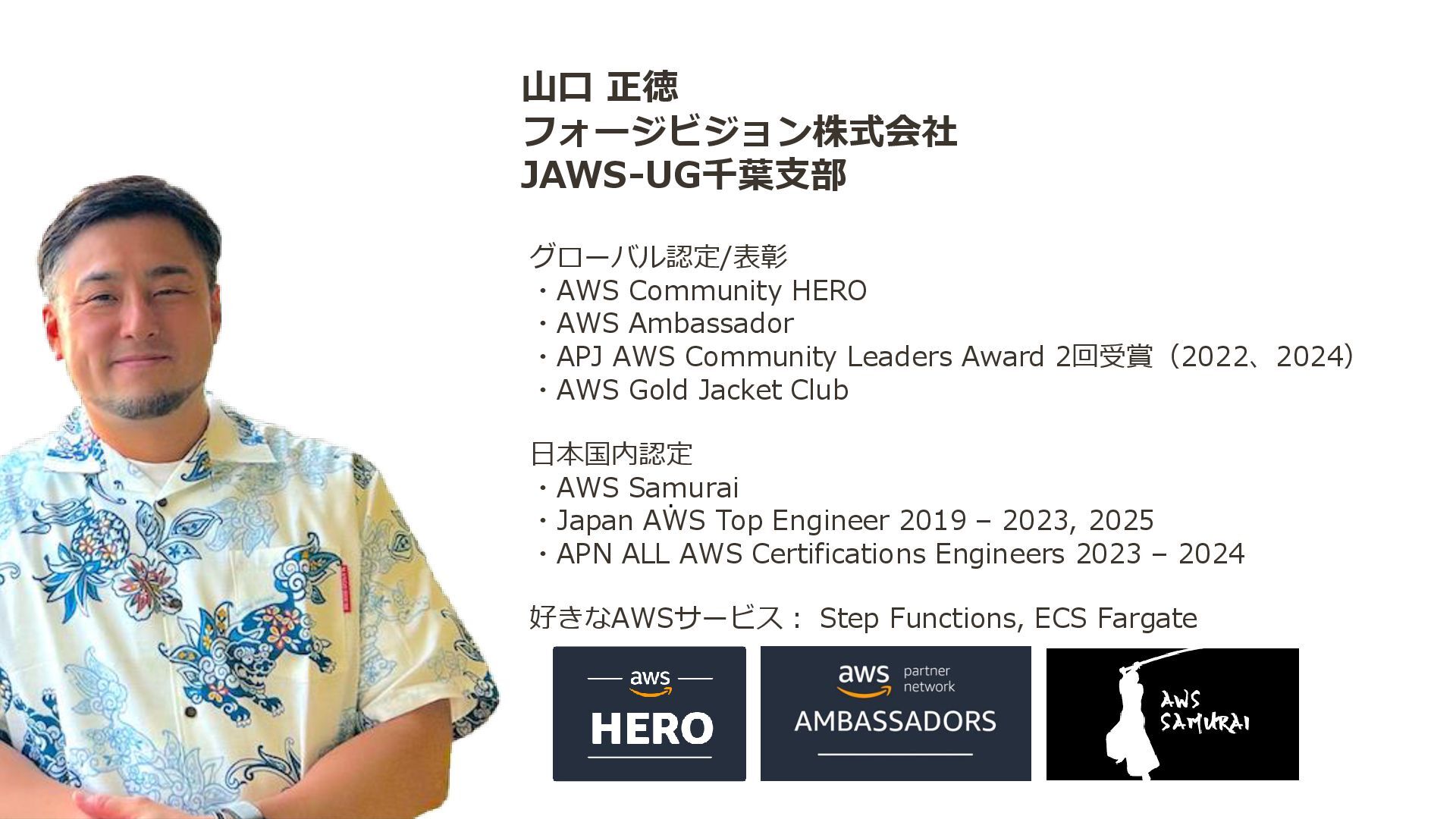
山口 正徳 フォージビジョン株式会社 JAWS-UG千葉支部 グローバル認定/表彰 ・AWS Community HERO ・AWS Ambassador
・APJ AWS Community Leaders Award 2回受賞(2022、2024) ・AWS Gold Jacket Club 日本国内認定 ・AWS Samurai ・Japan AWS Top Engineer 2019 – 2023, 2025 ・APN ALL AWS Certifications Engineers 2023 – 2024 好きなAWSサービス: Step Functions, ECS Fargate
None
4 Step Functions と 私
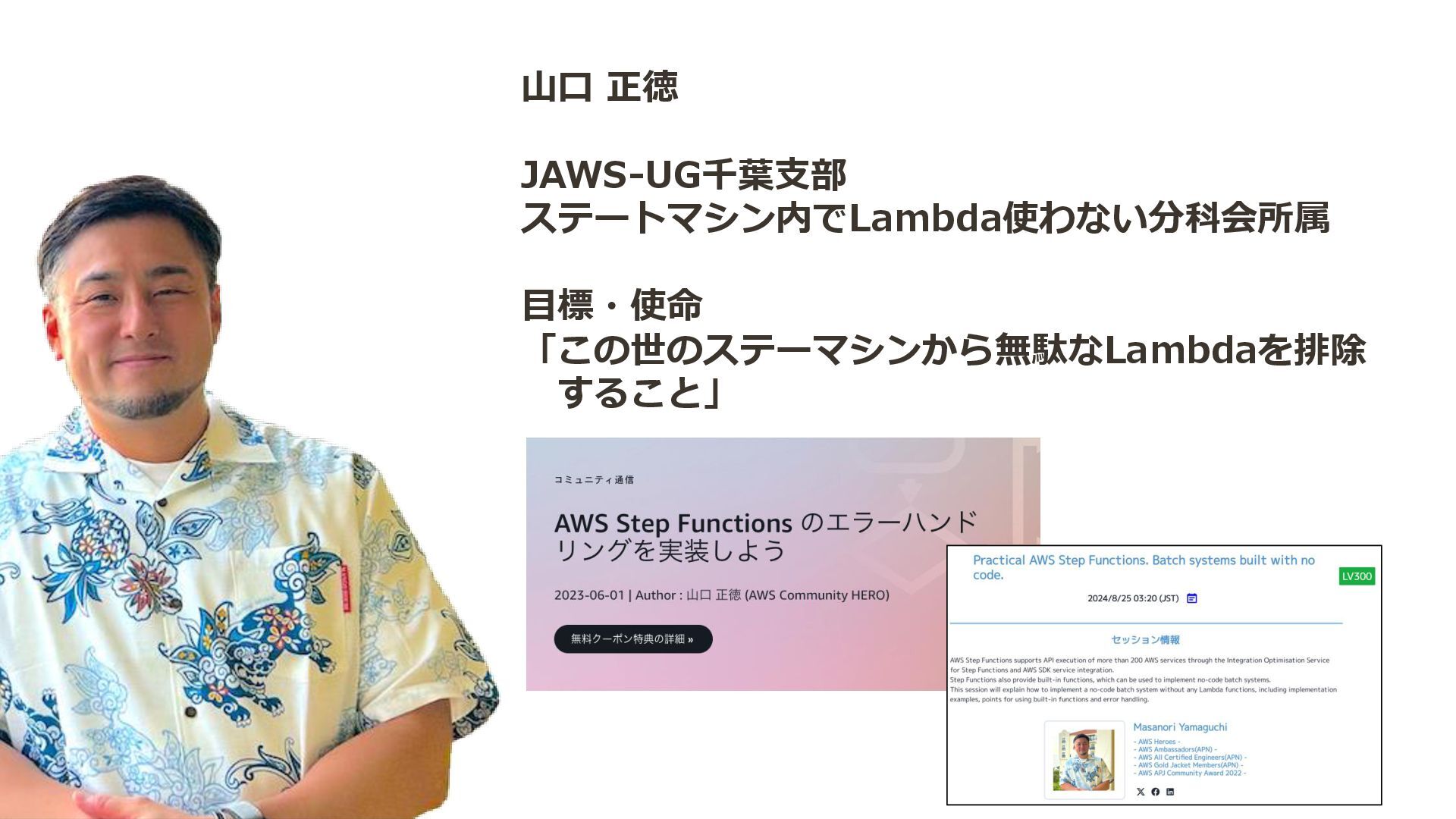
山口 正徳 JAWS-UG千葉支部 ステートマシン内でLambda使わない分科会所属 目標・使命 「この世のステーマシンから無駄なLambdaを排除 すること」
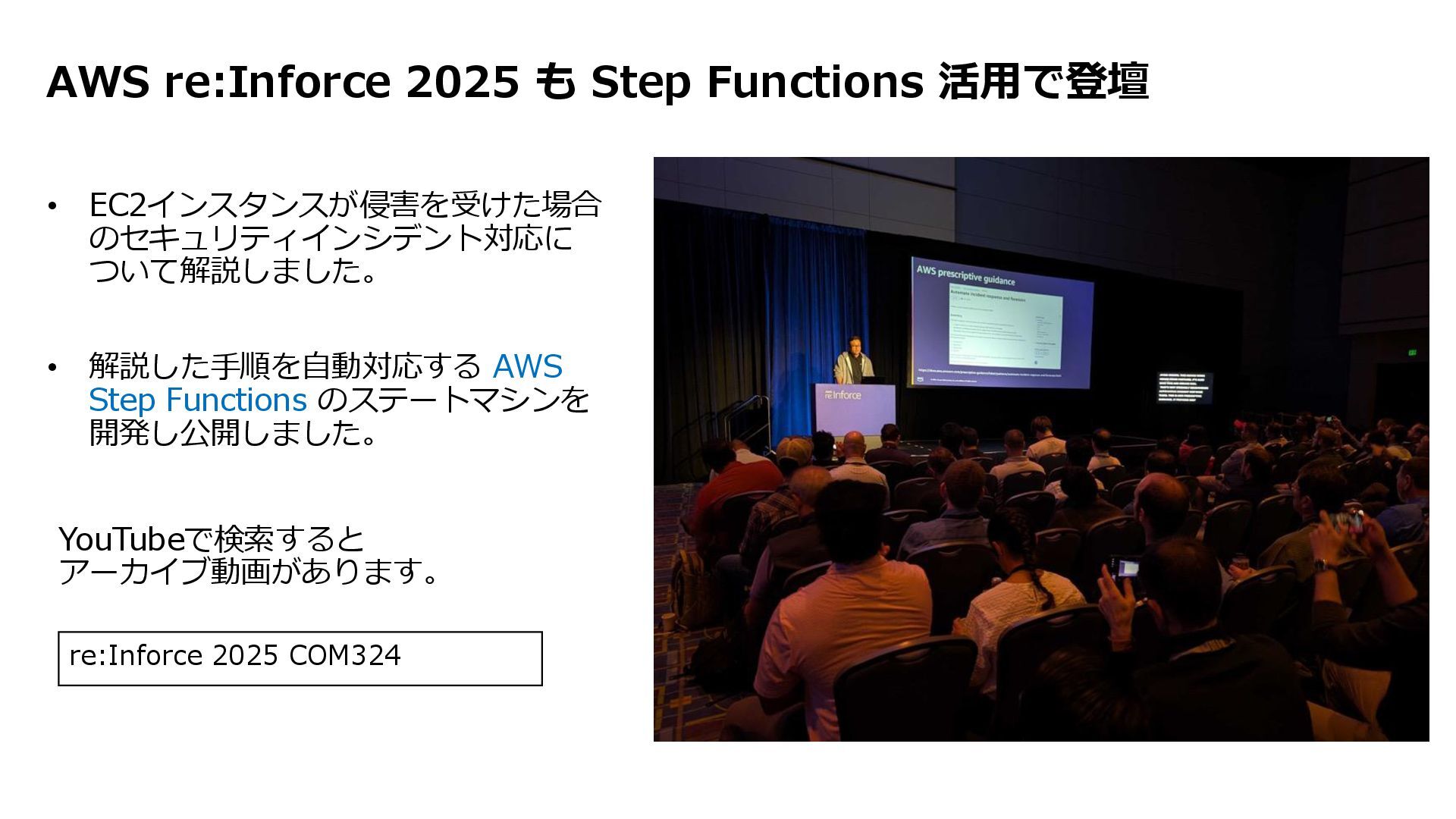
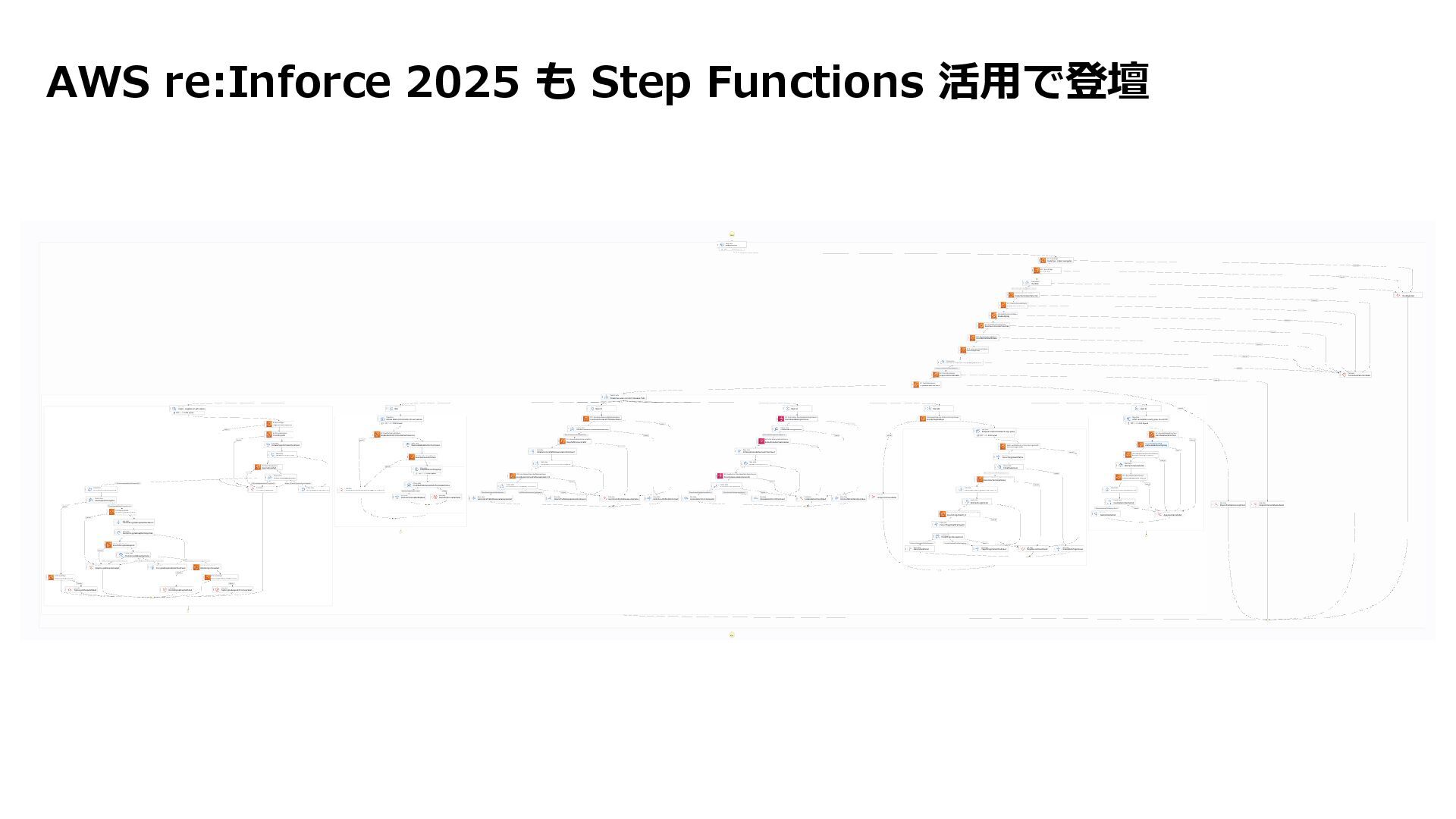
AWS re:Inforce 2025 も Step Functions 活用で登壇 • EC2インスタンスが侵害を受けた場合 のセキュリティインシデント対応に
ついて解説しました。 • 解説した手順を自動対応する AWS Step Functions のステートマシンを 開発し公開しました。 re:Inforce 2025 COM324 YouTubeで検索すると アーカイブ動画があります。
© 2025, Amazon Web Services, Inc. or its affiliates. All
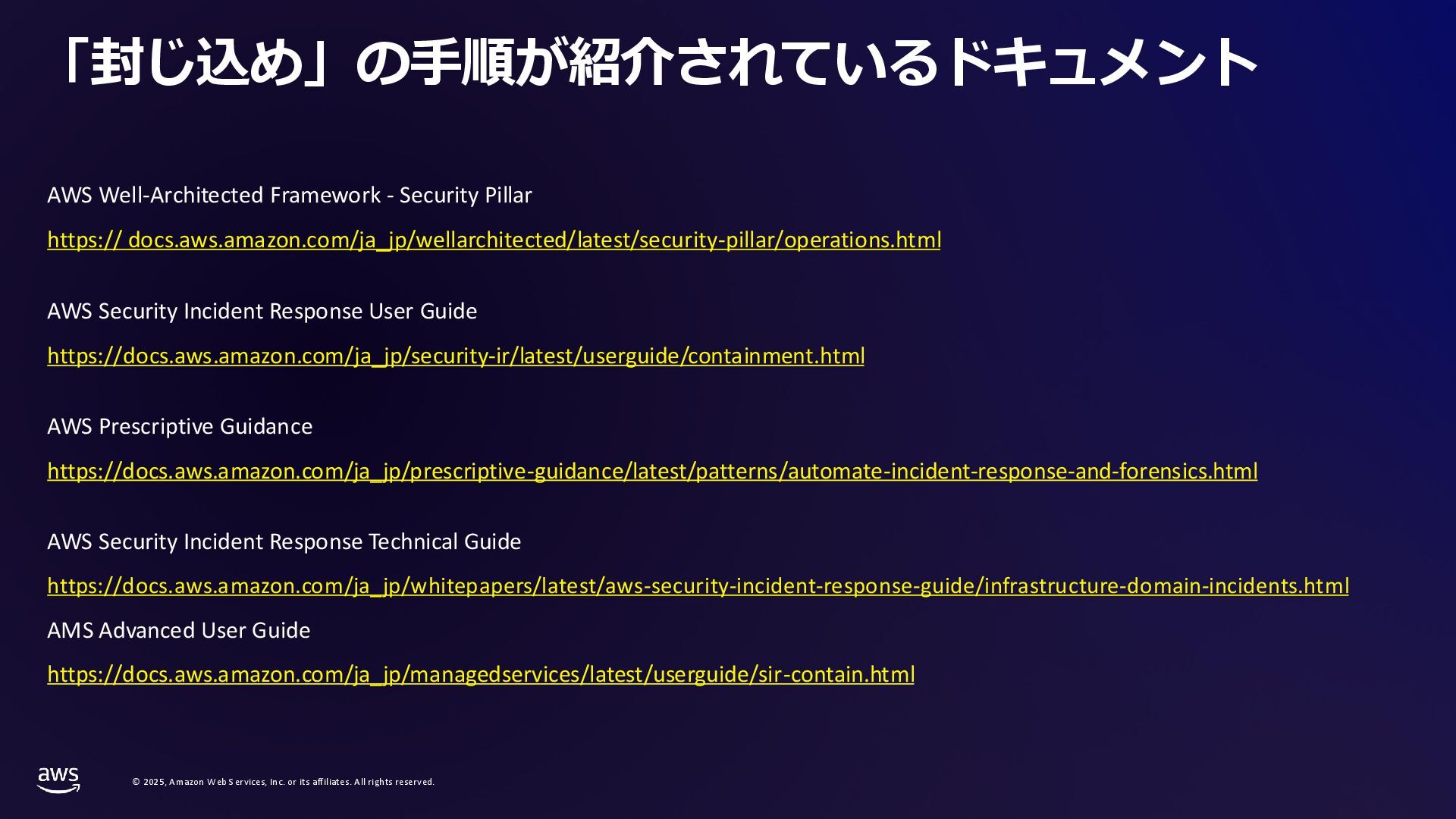
rights reserved. 「封じ込め」の手順が紹介されているドキュメント AWS Well-Architected Framework - Security Pillar https:// docs.aws.amazon.com/ja_jp/wellarchitected/latest/security-pillar/operations.html AWS Security Incident Response User Guide https://docs.aws.amazon.com/ja_jp/security-ir/latest/userguide/containment.html AWS Prescriptive Guidance https://docs.aws.amazon.com/ja_jp/prescriptive-guidance/latest/patterns/automate-incident-response-and-forensics.html AWS Security Incident Response Technical Guide https://docs.aws.amazon.com/ja_jp/whitepapers/latest/aws-security-incident-response-guide/infrastructure-domain-incidents.html AMS Advanced User Guide https://docs.aws.amazon.com/ja_jp/managedservices/latest/userguide/sir-contain.html
© 2025, Amazon Web Services, Inc. or its affiliates. All
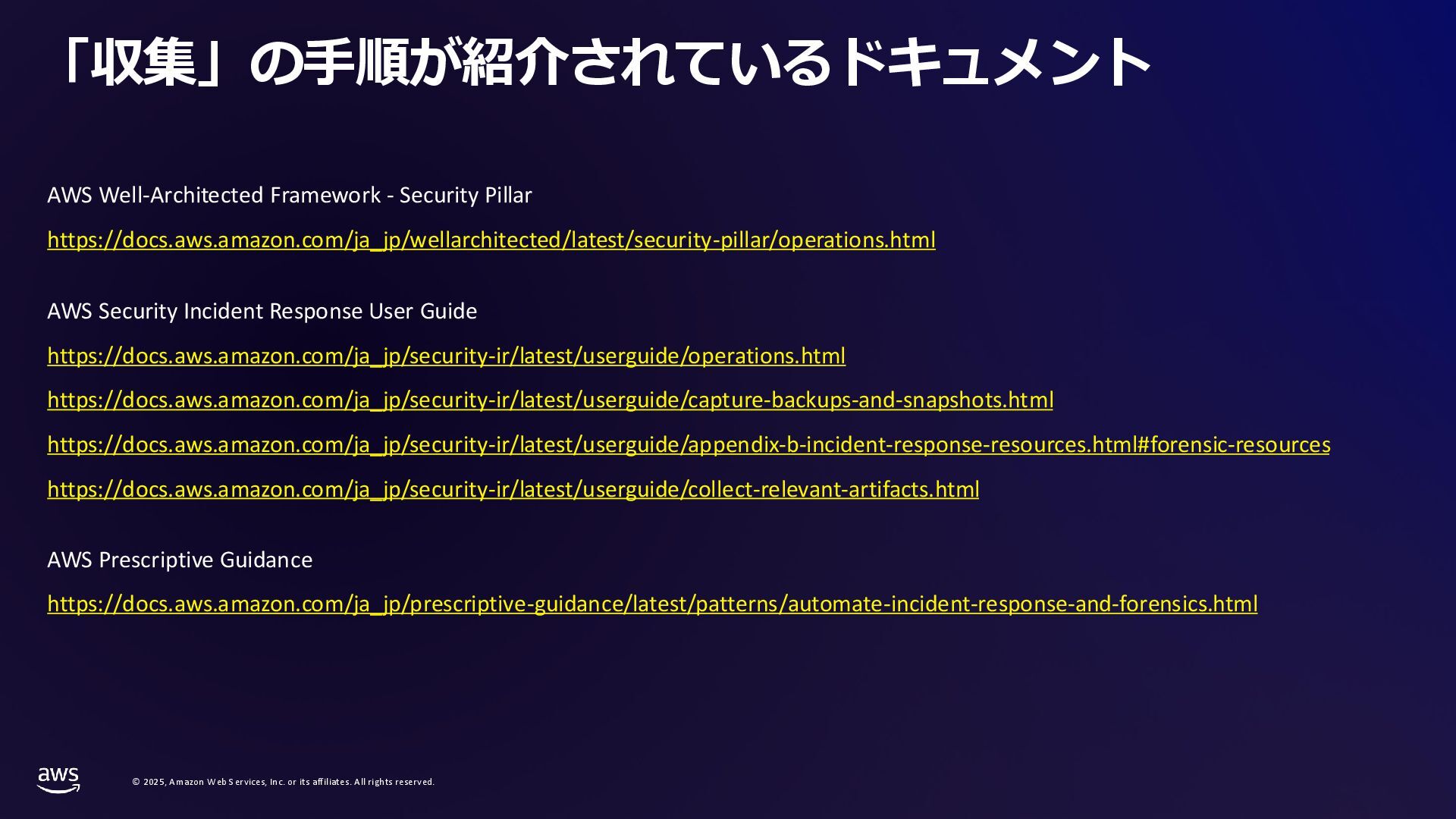
rights reserved. 「収集」の手順が紹介されているドキュメント AWS Well-Architected Framework - Security Pillar https://docs.aws.amazon.com/ja_jp/wellarchitected/latest/security-pillar/operations.html AWS Security Incident Response User Guide https://docs.aws.amazon.com/ja_jp/security-ir/latest/userguide/operations.html https://docs.aws.amazon.com/ja_jp/security-ir/latest/userguide/capture-backups-and-snapshots.html https://docs.aws.amazon.com/ja_jp/security-ir/latest/userguide/appendix-b-incident-response-resources.html#forensic-resources https://docs.aws.amazon.com/ja_jp/security-ir/latest/userguide/collect-relevant-artifacts.html AWS Prescriptive Guidance https://docs.aws.amazon.com/ja_jp/prescriptive-guidance/latest/patterns/automate-incident-response-and-forensics.html
© 2025, Amazon Web Services, Inc. or its affiliates. All
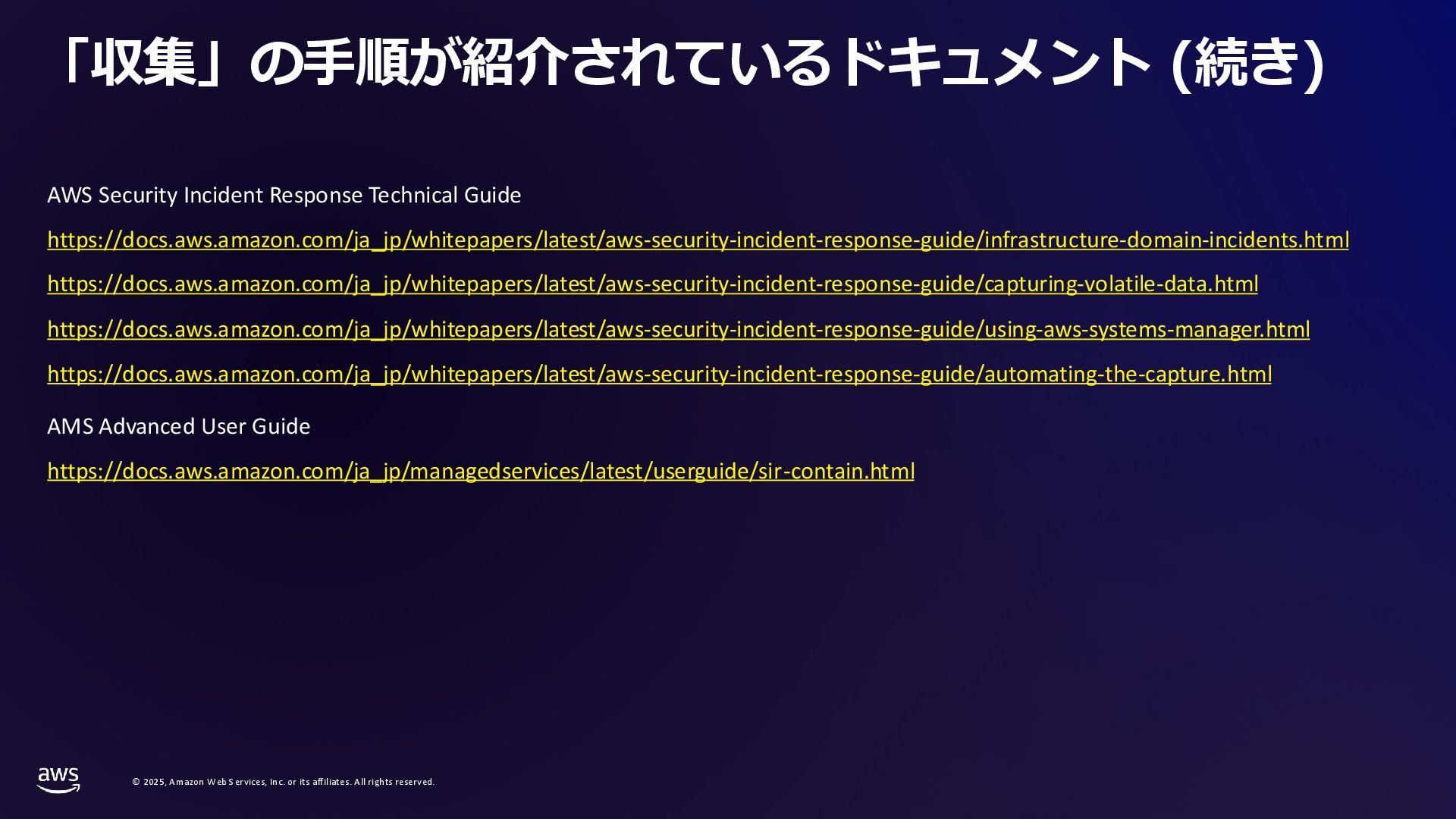
rights reserved. 「収集」の手順が紹介されているドキュメント (続き) AWS Security Incident Response Technical Guide https://docs.aws.amazon.com/ja_jp/whitepapers/latest/aws-security-incident-response-guide/infrastructure-domain-incidents.html https://docs.aws.amazon.com/ja_jp/whitepapers/latest/aws-security-incident-response-guide/capturing-volatile-data.html https://docs.aws.amazon.com/ja_jp/whitepapers/latest/aws-security-incident-response-guide/using-aws-systems-manager.html https://docs.aws.amazon.com/ja_jp/whitepapers/latest/aws-security-incident-response-guide/automating-the-capture.html AMS Advanced User Guide https://docs.aws.amazon.com/ja_jp/managedservices/latest/userguide/sir-contain.html
AWS re:Inforce 2025 も Step Functions 活用で登壇
11 Step Functions 小技 初級編 #jawsugibaraki
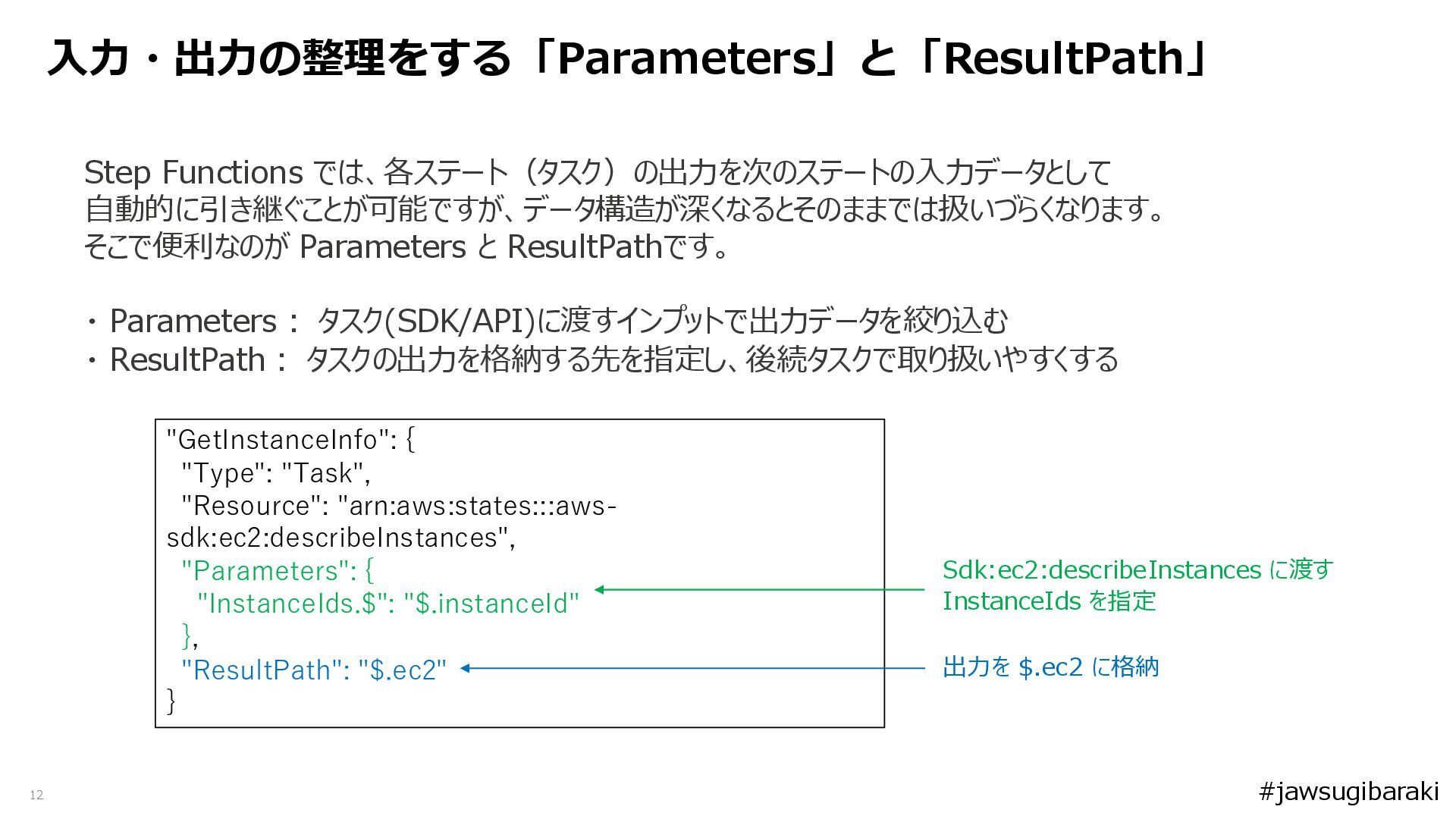
12 Step Functions では、各ステート(タスク)の出力を次のステートの入力データとして 自動的に引き継ぐことが可能ですが、データ構造が深くなるとそのままでは扱いづらくなります。 そこで便利なのが Parameters と ResultPathです。 ・
Parameters: タスク(SDK/API)に渡すインプットで出力データを絞り込む ・ ResultPath: タスクの出力を格納する先を指定し、後続タスクで取り扱いやすくする 入力・出力の整理をする「Parameters」と「ResultPath」 "GetInstanceInfo": { "Type": "Task", "Resource": "arn:aws:states:::aws- sdk:ec2:describeInstances", "Parameters": { "InstanceIds.$": "$.instanceId" }, "ResultPath": "$.ec2" } Sdk:ec2:describeInstances に渡す InstanceIds を指定 出力を $.ec2 に格納 #jawsugibaraki
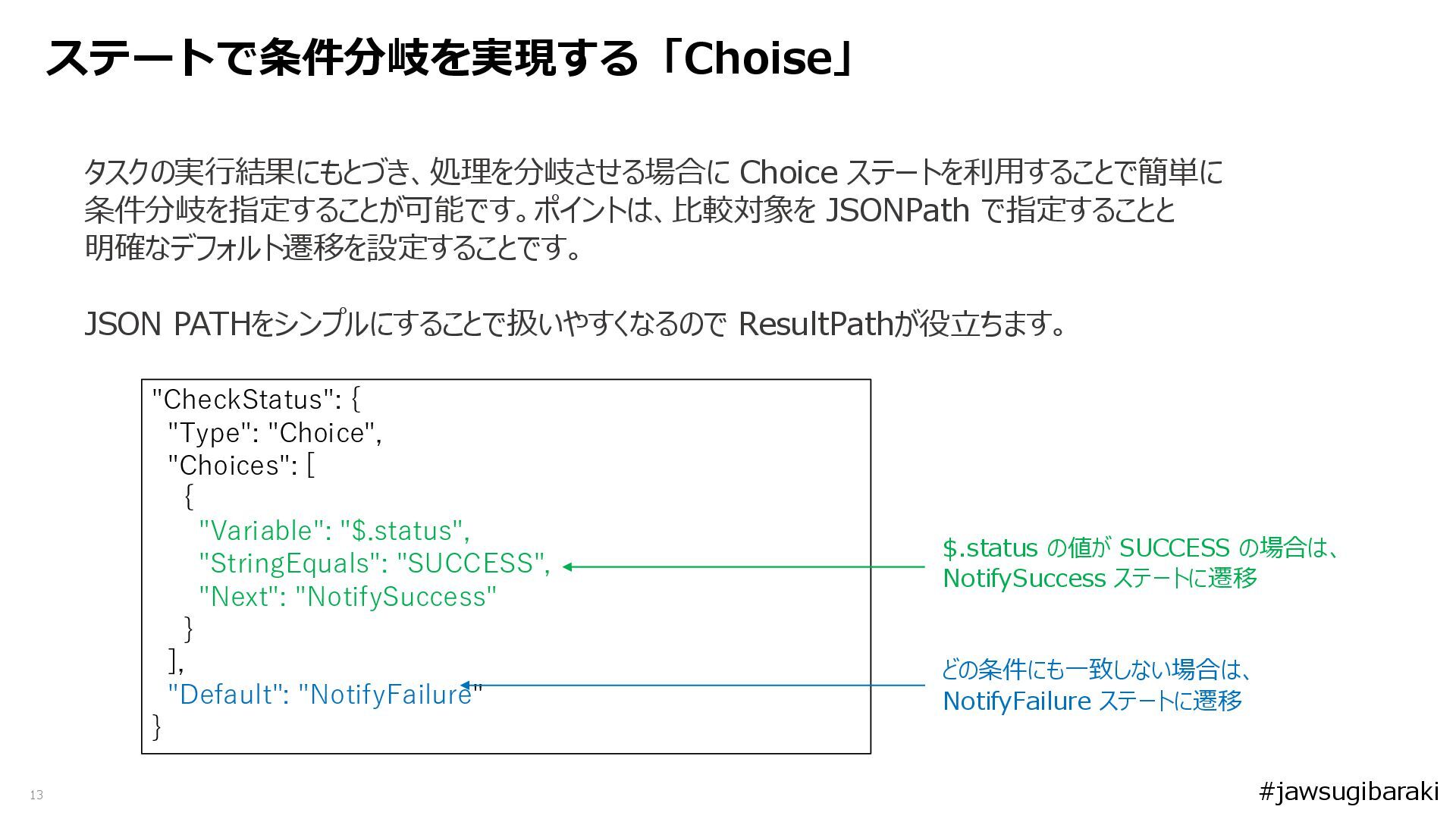
13 タスクの実行結果にもとづき、処理を分岐させる場合に Choice ステートを利用することで簡単に 条件分岐を指定することが可能です。ポイントは、比較対象を JSONPath で指定することと 明確なデフォルト遷移を設定することです。 JSON PATHをシンプルにすることで扱いやすくなるので
ResultPathが役立ちます。 ステートで条件分岐を実現する「Choise」 "CheckStatus": { "Type": "Choice", "Choices": [ { "Variable": "$.status", "StringEquals": "SUCCESS", "Next": "NotifySuccess" } ], "Default": "NotifyFailure" } $.status の値が SUCCESS の場合は、 NotifySuccess ステートに遷移 どの条件にも一致しない場合は、 NotifyFailure ステートに遷移 #jawsugibaraki
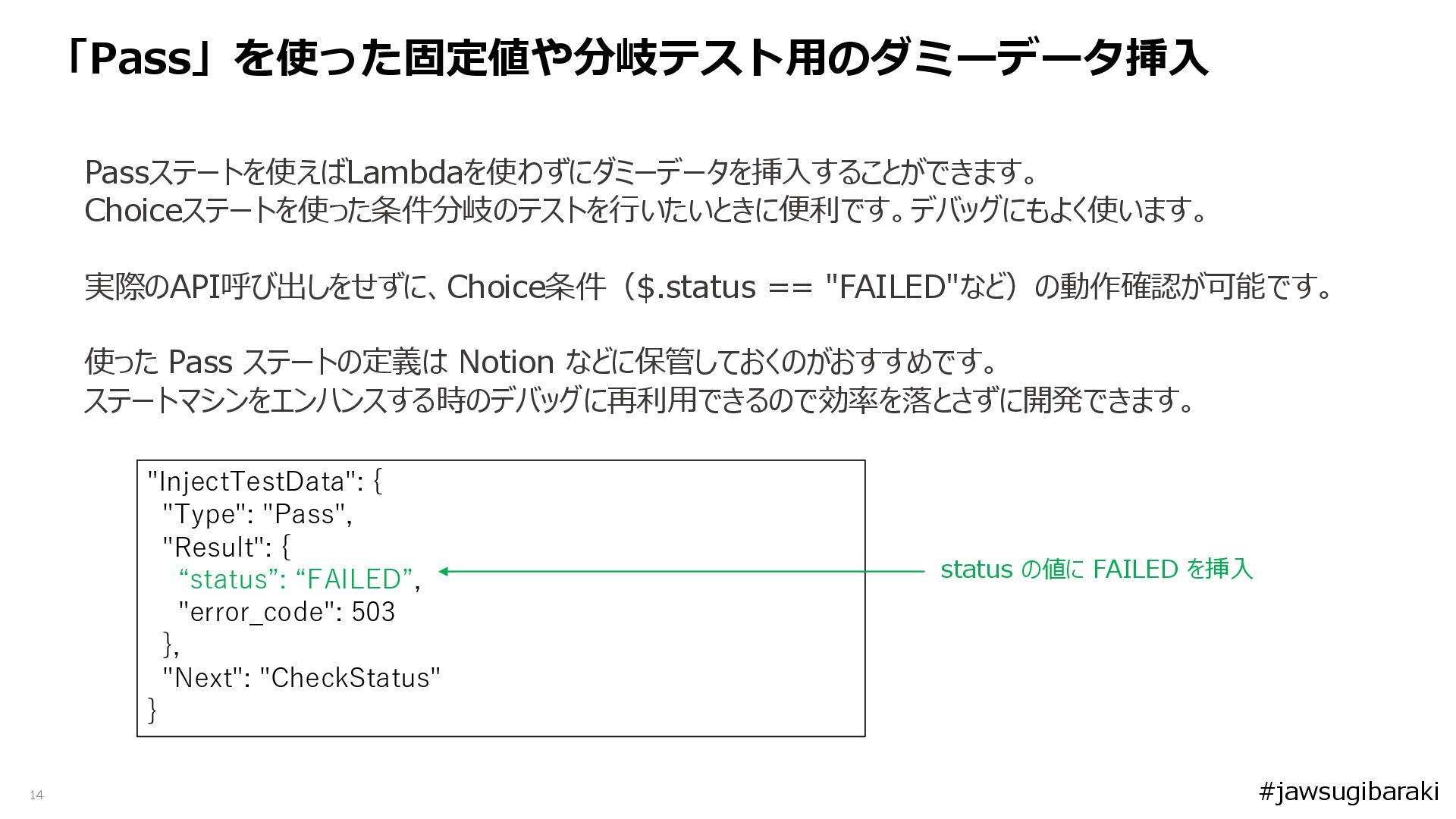
14 Passステートを使えばLambdaを使わずにダミーデータを挿入することができます。 Choiceステートを使った条件分岐のテストを行いたいときに便利です。デバッグにもよく使います。 実際のAPI呼び出しをせずに、Choice条件($.status == "FAILED"など)の動作確認が可能です。 使った Pass ステートの定義は Notion
などに保管しておくのがおすすめです。 ステートマシンをエンハンスする時のデバッグに再利用できるので効率を落とさずに開発できます。 「Pass」を使った固定値や分岐テスト用のダミーデータ挿入 "InjectTestData": { "Type": "Pass", "Result": { “status”: “FAILED”, "error_code": 503 }, "Next": "CheckStatus" } status の値に FAILED を挿入 #jawsugibaraki
15 Step Functions 小技 中級編 #jawsugibaraki
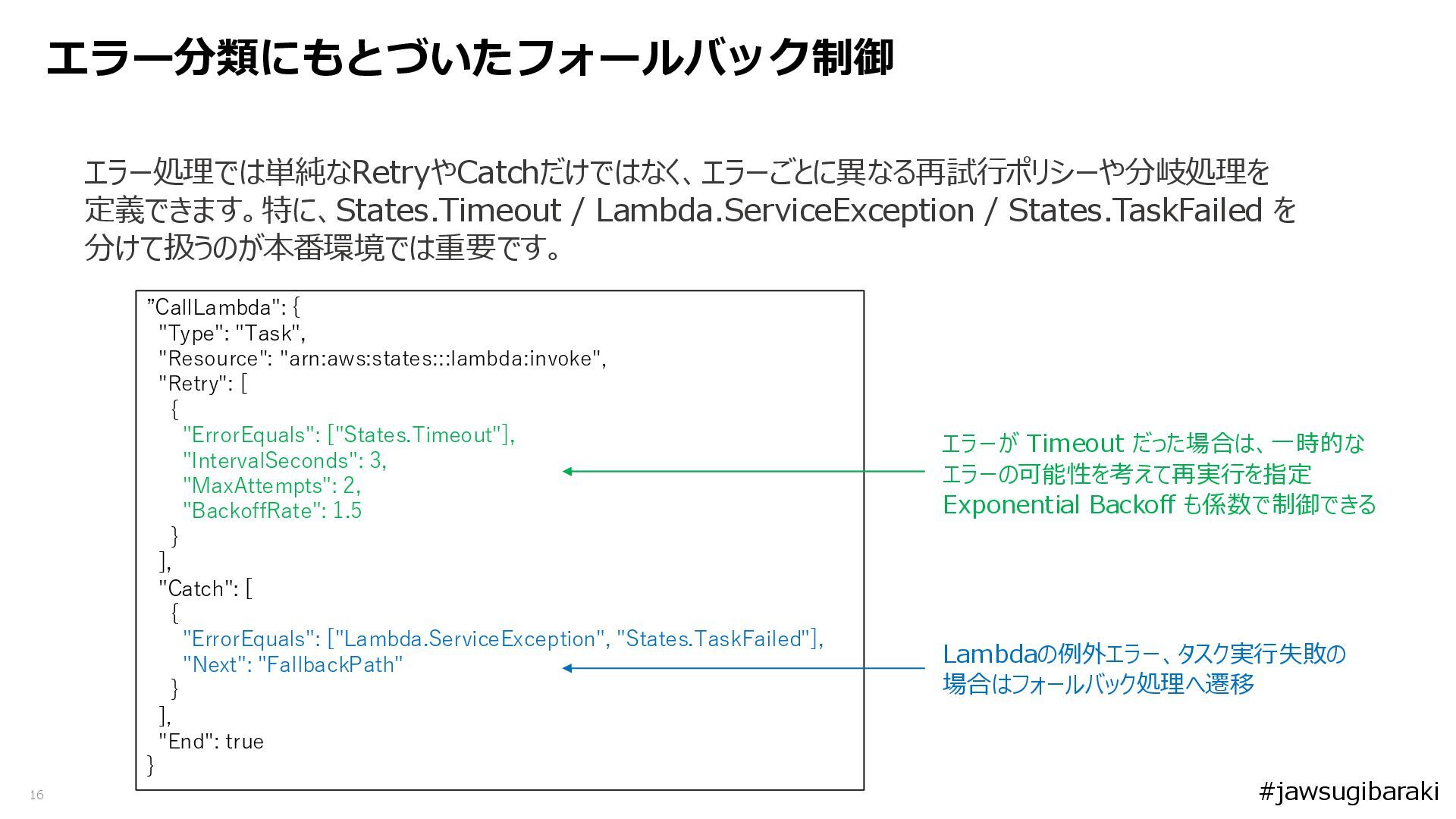
16 エラー処理では単純なRetryやCatchだけではなく、エラーごとに異なる再試行ポリシーや分岐処理を 定義できます。特に、States.Timeout / Lambda.ServiceException / States.TaskFailed を 分けて扱うのが本番環境では重要です。 エラー分類にもとづいたフォールバック制御
”CallLambda": { "Type": "Task", "Resource": "arn:aws:states:::lambda:invoke", "Retry": [ { "ErrorEquals": ["States.Timeout"], "IntervalSeconds": 3, "MaxAttempts": 2, "BackoffRate": 1.5 } ], "Catch": [ { "ErrorEquals": ["Lambda.ServiceException", "States.TaskFailed"], "Next": "FallbackPath" } ], "End": true } エラーが Timeout だった場合は、一時的な エラーの可能性を考えて再実行を指定 Exponential Backoff も係数で制御できる Lambdaの例外エラー、タスク実行失敗の 場合はフォールバック処理へ遷移 #jawsugibaraki
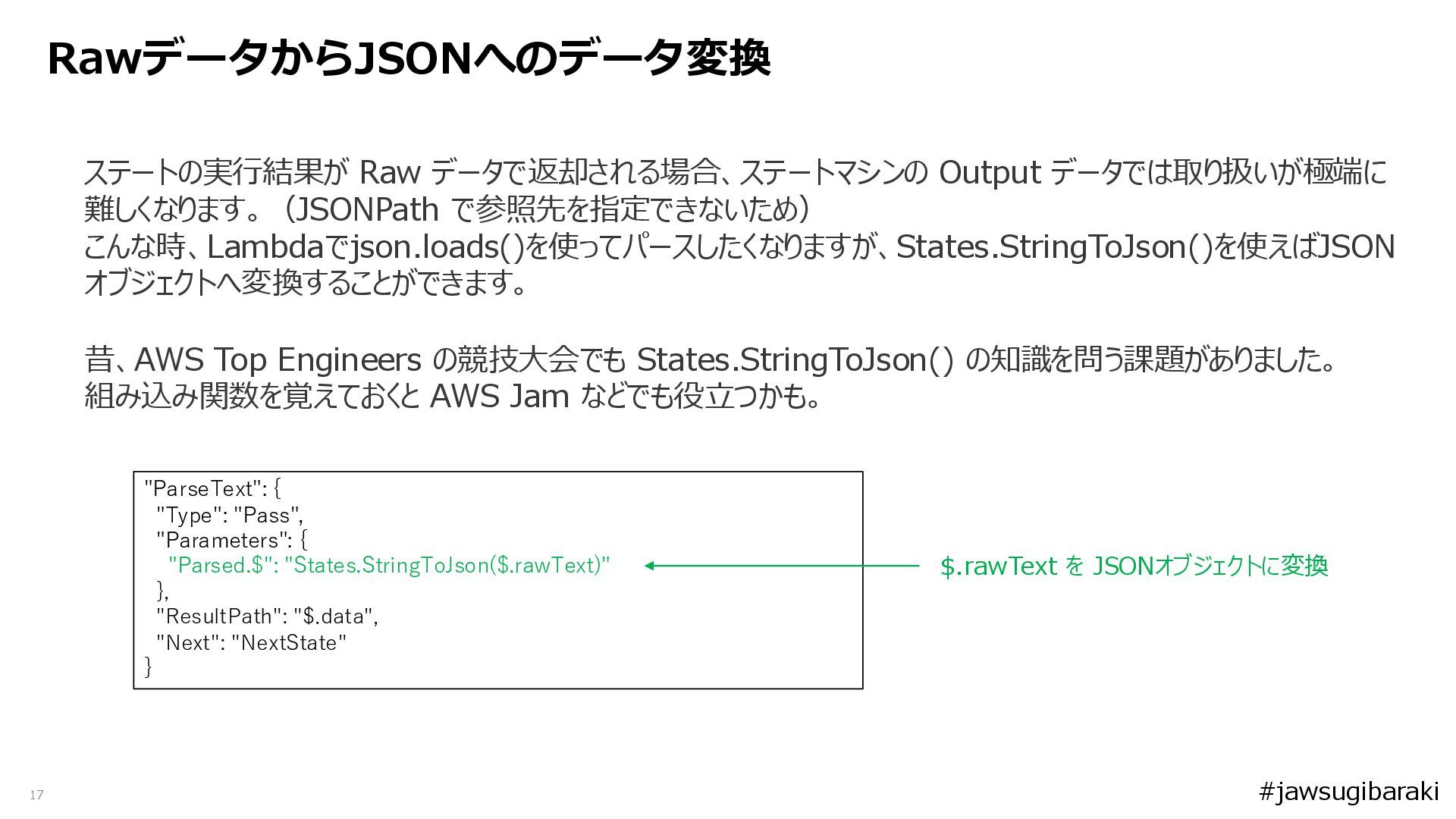
17 ステートの実行結果が Raw データで返却される場合、ステートマシンの Output データでは取り扱いが極端に 難しくなります。(JSONPath で参照先を指定できないため) こんな時、Lambdaでjson.loads()を使ってパースしたくなりますが、States.StringToJson()を使えばJSON オブジェクトへ変換することができます。
昔、AWS Top Engineers の競技大会でも States.StringToJson() の知識を問う課題がありました。 組み込み関数を覚えておくと AWS Jam などでも役立つかも。 RawデータからJSONへのデータ変換 "ParseText": { "Type": "Pass", "Parameters": { "Parsed.$": "States.StringToJson($.rawText)" }, "ResultPath": "$.data", "Next": "NextState" } $.rawText を JSONオブジェクトに変換 #jawsugibaraki
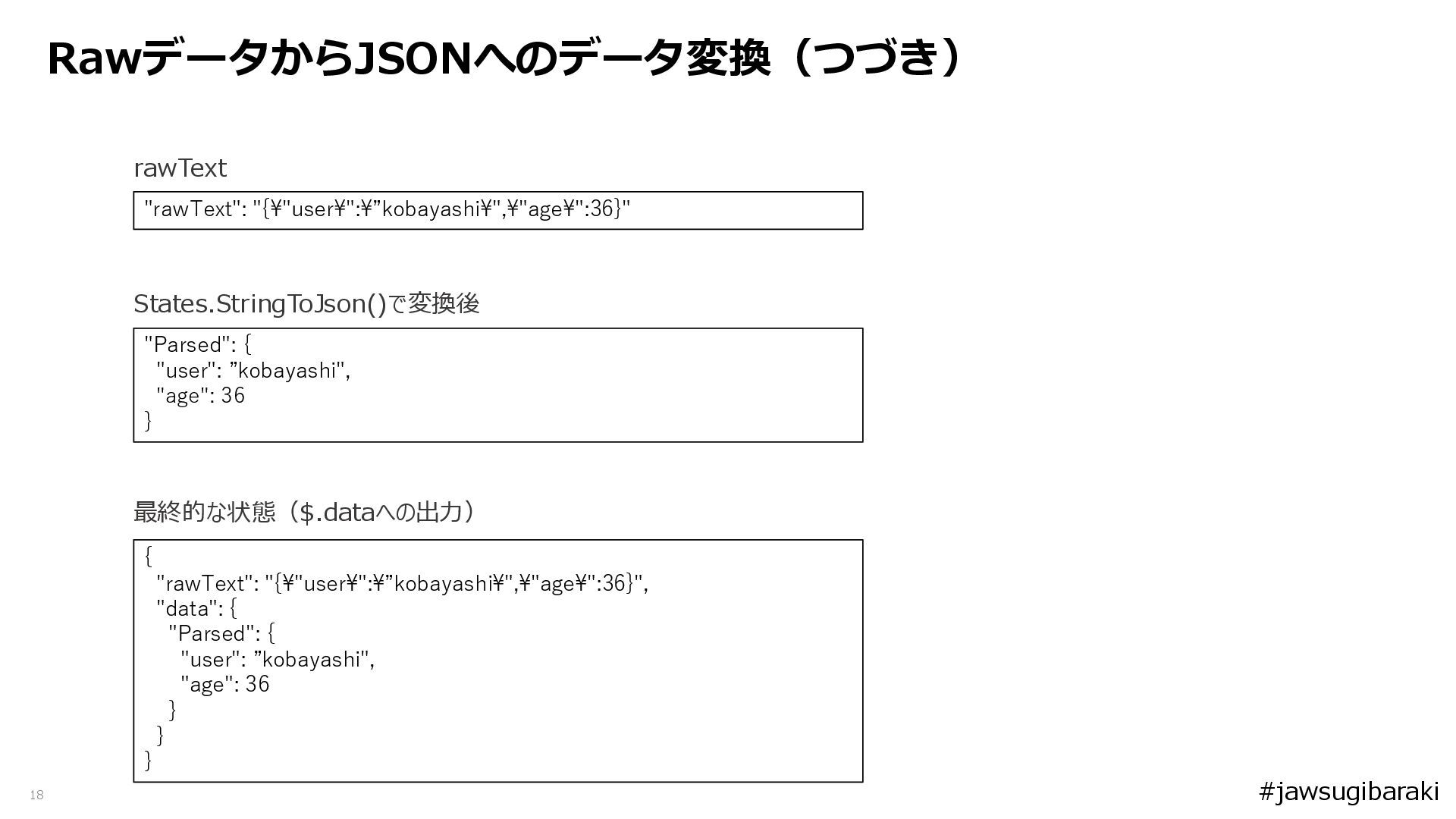
18 rawText RawデータからJSONへのデータ変換(つづき) "rawText": "{\"user\":\”kobayashi\",\"age\":36}" States.StringToJson()で変換後 "Parsed": { "user": ”kobayashi",
"age": 36 } { "rawText": "{\"user\":\”kobayashi\",\"age\":36}", "data": { "Parsed": { "user": ”kobayashi", "age": 36 } } } 最終的な状態($.dataへの出力) #jawsugibaraki
19 Step Functions 小技 上級編 #jawsugibaraki
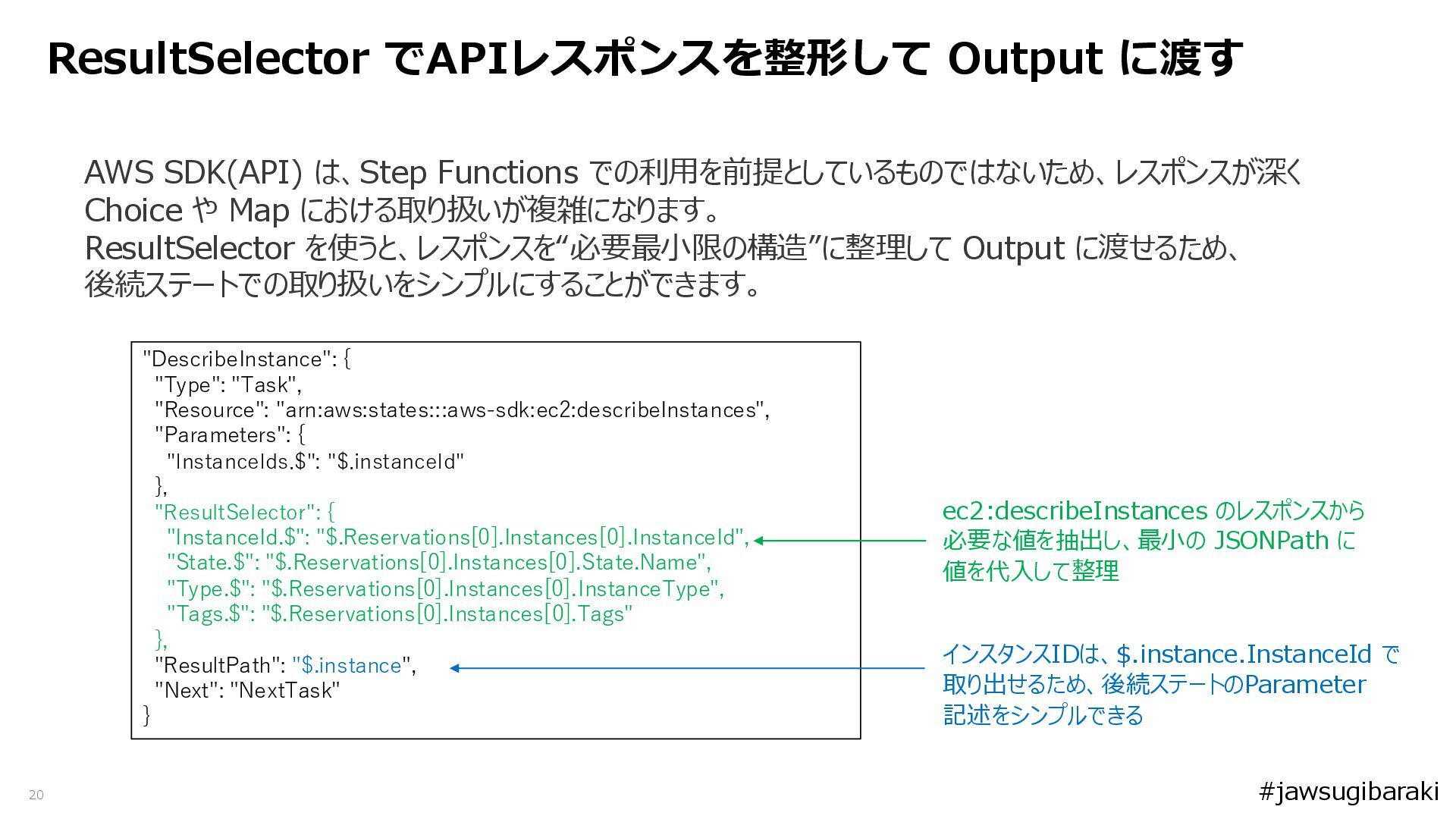
20 ResultSelector でAPIレスポンスを整形して Output に渡す AWS SDK(API) は、Step Functions での利用を前提としているものではないため、レスポンスが深く
Choice や Map における取り扱いが複雑になります。 ResultSelector を使うと、レスポンスを“必要最小限の構造”に整理して Output に渡せるため、 後続ステートでの取り扱いをシンプルにすることができます。 "DescribeInstance": { "Type": "Task", "Resource": "arn:aws:states:::aws-sdk:ec2:describeInstances", "Parameters": { "InstanceIds.$": "$.instanceId" }, "ResultSelector": { "InstanceId.$": "$.Reservations[0].Instances[0].InstanceId", "State.$": "$.Reservations[0].Instances[0].State.Name", "Type.$": "$.Reservations[0].Instances[0].InstanceType", "Tags.$": "$.Reservations[0].Instances[0].Tags" }, "ResultPath": "$.instance", "Next": "NextTask" } ec2:describeInstances のレスポンスから 必要な値を抽出し、最小の JSONPath に 値を代入して整理 インスタンスIDは、$.instance.InstanceId で 取り出せるため、後続ステートのParameter 記述をシンプルできる #jawsugibaraki
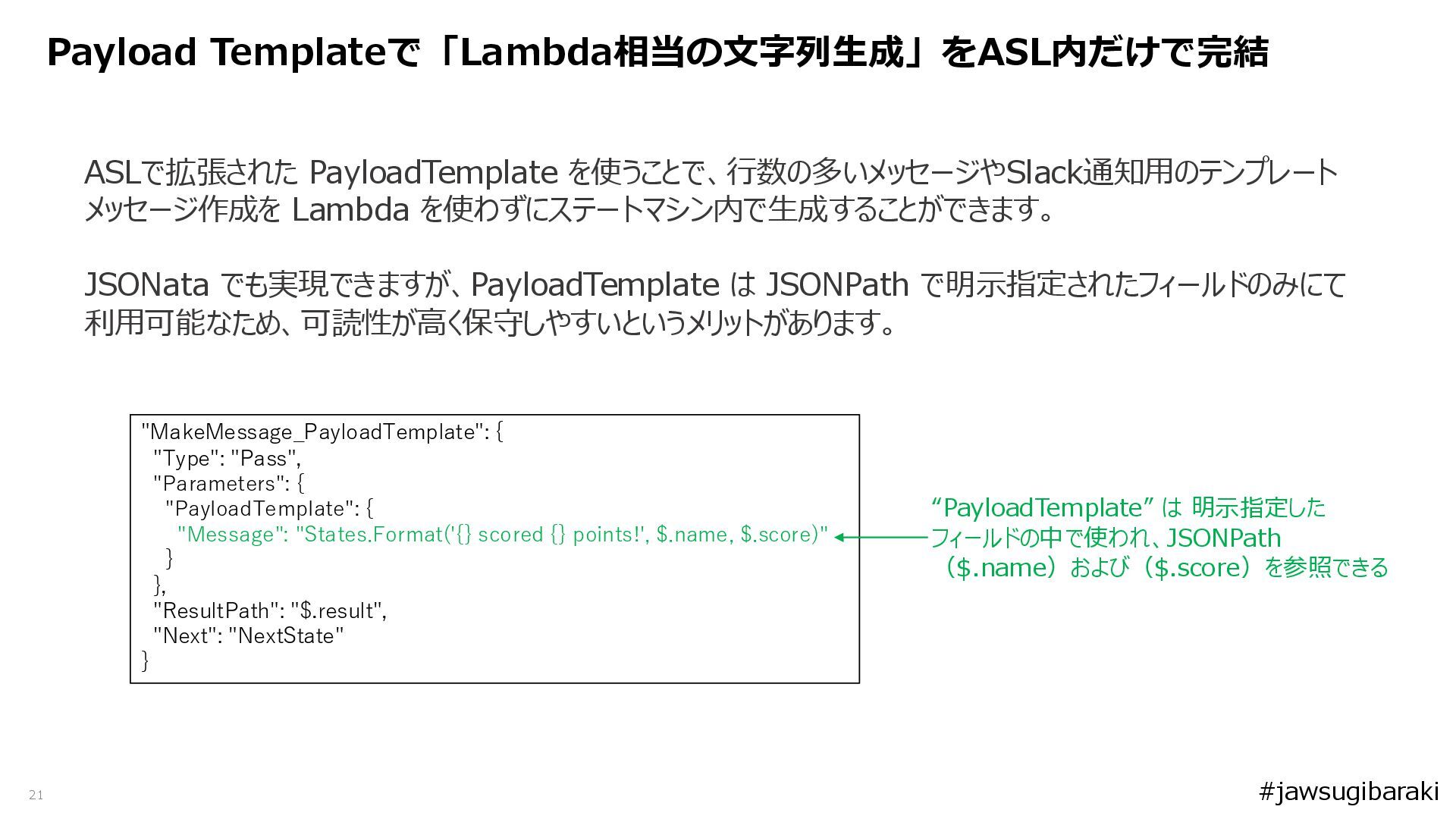
21 Payload Templateで「Lambda相当の文字列生成」をASL内だけで完結 ASLで拡張された PayloadTemplate を使うことで、行数の多いメッセージやSlack通知用のテンプレート メッセージ作成を Lambda を使わずにステートマシン内で生成することができます。 JSONata
でも実現できますが、PayloadTemplate は JSONPath で明示指定されたフィールドのみにて 利用可能なため、可読性が高く保守しやすいというメリットがあります。 "MakeMessage_PayloadTemplate": { "Type": "Pass", "Parameters": { "PayloadTemplate": { "Message": "States.Format('{} scored {} points!', $.name, $.score)" } }, "ResultPath": "$.result", "Next": "NextState" } “PayloadTemplate” は 明示指定した フィールドの中で使われ、JSONPath ($.name)および($.score)を参照できる #jawsugibaraki
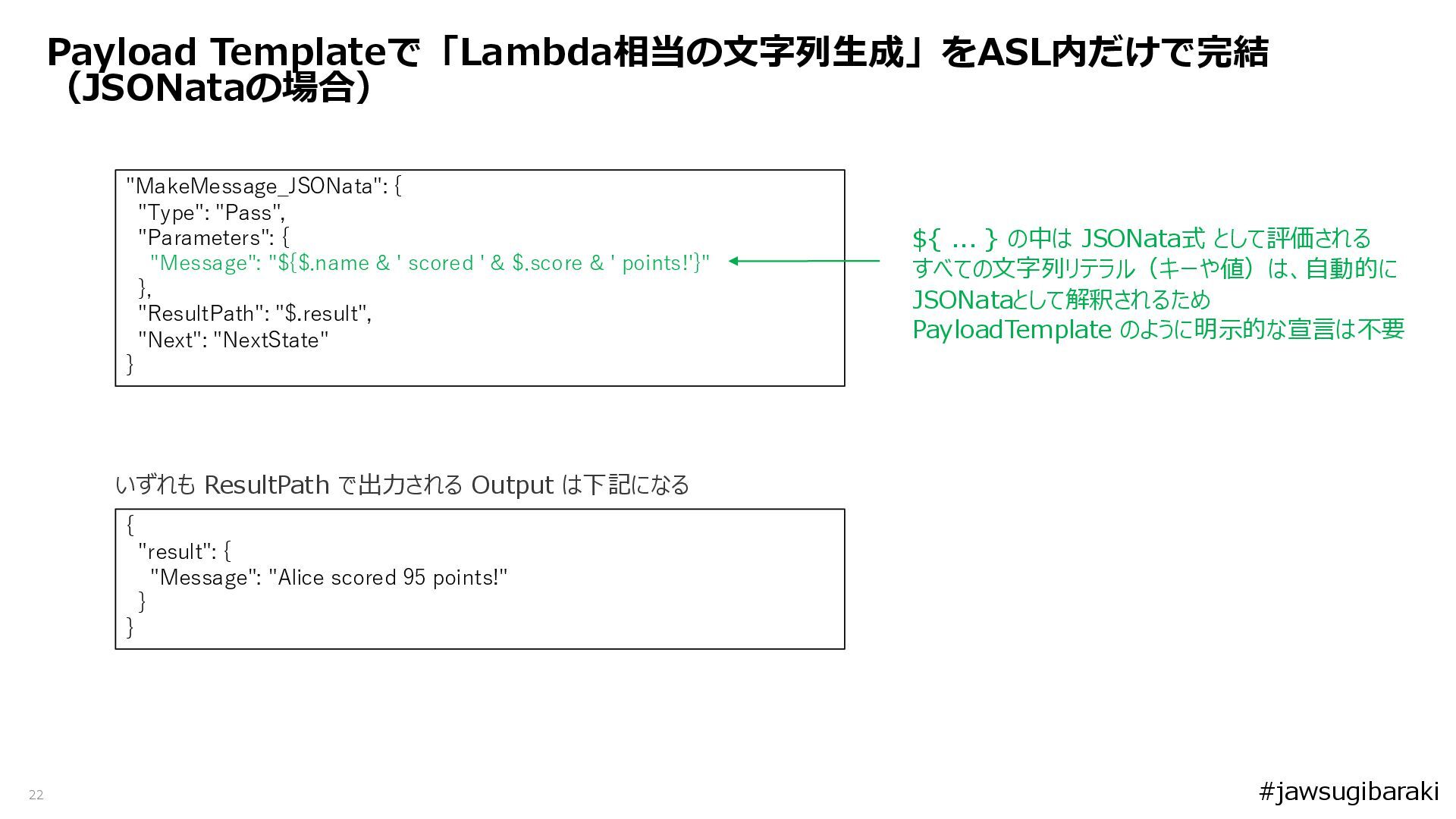
22 Payload Templateで「Lambda相当の文字列生成」をASL内だけで完結 (JSONataの場合) "MakeMessage_JSONata": { "Type": "Pass", "Parameters": {
"Message": "${$.name & ' scored ' & $.score & ' points!'}" }, "ResultPath": "$.result", "Next": "NextState" } ${ ... } の中は JSONata式 として評価される すべての文字列リテラル(キーや値)は、自動的に JSONataとして解釈されるため PayloadTemplate のように明示的な宣言は不要 { "result": { "Message": "Alice scored 95 points!" } } いずれも ResultPath で出力される Output は下記になる #jawsugibaraki
23 さいごに #jawsugibaraki
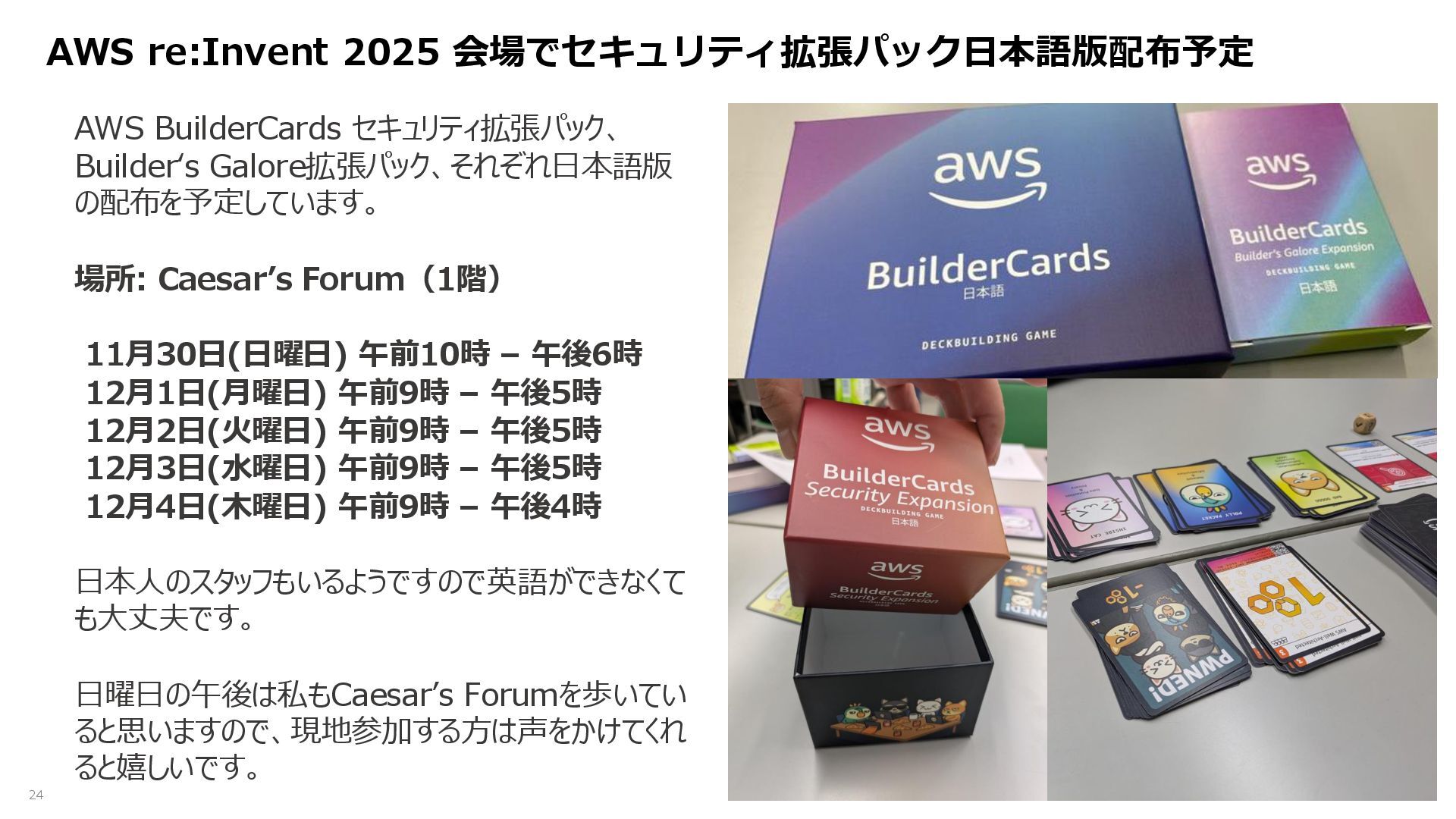
24 AWS re:Invent 2025 会場でセキュリティ拡張パック日本語版配布予定 AWS BuilderCards セキュリティ拡張パック、 Builder‘s Galore拡張パック、それぞれ日本語版
の配布を予定しています。 場所: Caesar’s Forum(1階) 11月30日(日曜日) 午前10時 – 午後6時 12月1日(月曜日) 午前9時 – 午後5時 12月2日(火曜日) 午前9時 – 午後5時 12月3日(水曜日) 午前9時 – 午後5時 12月4日(木曜日) 午前9時 – 午後4時 日本人のスタッフもいるようですので英語ができなくて も大丈夫です。 日曜日の午後は私もCaesar’s Forumを歩いてい ると思いますので、現地参加する方は声をかけてくれ ると嬉しいです。
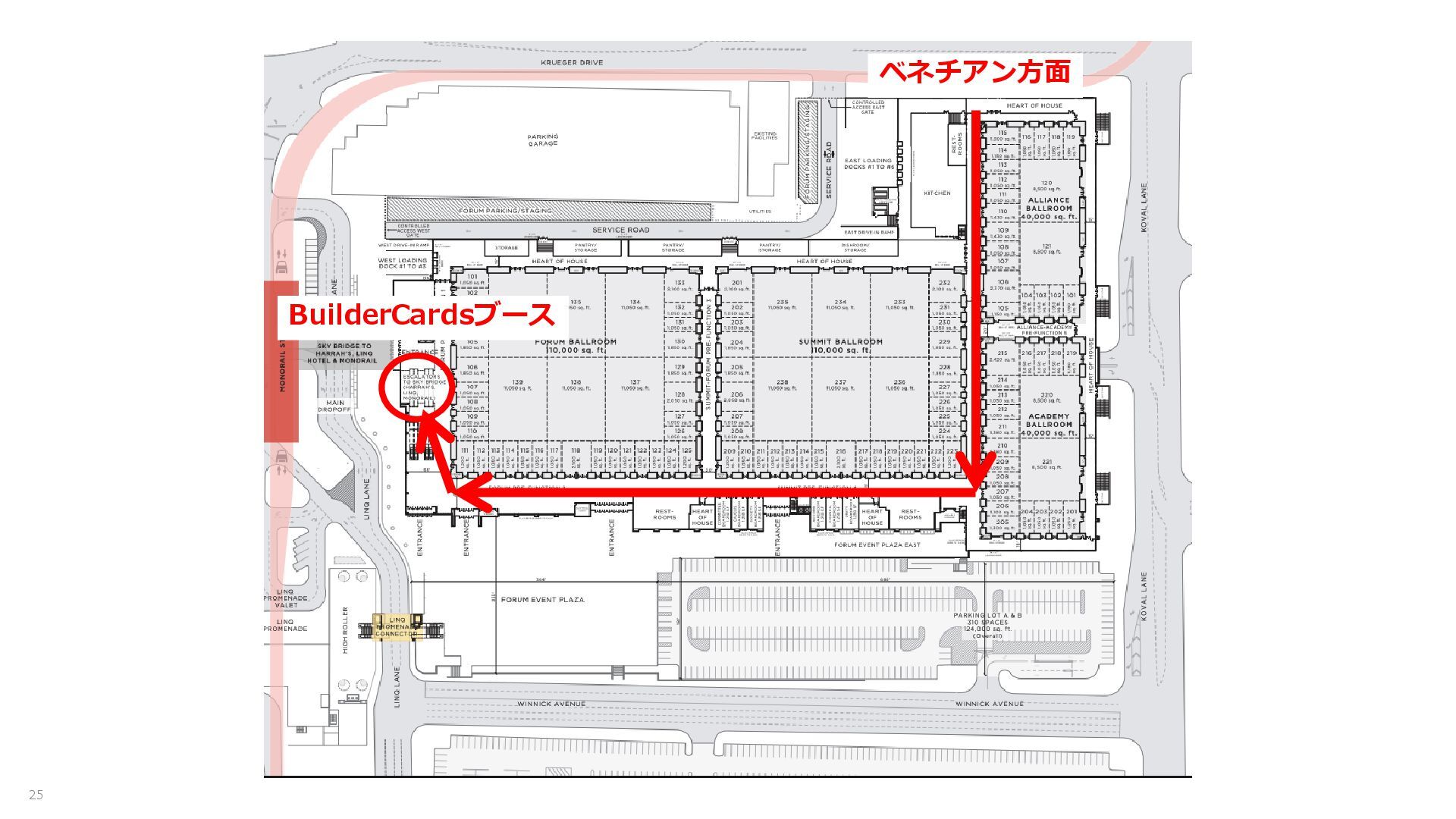
25 BuilderCardsブース ベネチアン方面
- 26 - ご清聴ありがとうございました。 #jawsugibaraki


 kinunori
 daidaidai
 teamlab
 taka_aki
 ivry_presentationmaterials
 odashi
 stomk
stomk
 yuuuuuuu168
 yamanoku
 gree_tech
 oasis1994liveforever
 jyouryuusui
 rfdnxbro
 tamaranovitovic
 kimpetersen
 bcantrill
 aki_iinuma
 jonoalderson
 bermonpainter
 honnibal
 garrettdimon
 madoxten
 sabderemane
 asonas
 carmenintech