Upgrade to Pro
— share decks privately, control downloads, hide ads and more …
Speaker Deck
Features
Speaker Deck
PRO
Sign in
Sign up for free
Search
Search
turtleであそぼう!
Search
ksnt
September 18, 2020
310
0
Share
Embed
Copy iframe code
Copy JS code
Copy link
Start on current slide
turtleであそぼう!
はんなりPython #32
ksnt
September 18, 2020
More Decks by ksnt
See All by ksnt
AutoGenを触ってみた
ksnt
0
360
データ分析者にとってのDjango: StreamlitやDashとの比較
ksnt
1
2k
データ分析で切り拓け! エンジニアとしてのデータ分析職キャリア戦略
ksnt
0
1.1k
勉強会で発表してみよう!
ksnt
0
340
Kaggleに置かれているデータを 可視化する
ksnt
0
430
CourseraのDigital Transformationというコースを受けてみた
ksnt
2
720
Pythonで挑む計算社会科学
ksnt
0
1.5k
データ分析と競技プログラミングに使えるPython標準ライブラリ入門
ksnt
1
680
DashユーザーがStreamlitを使ってアプリケーションをつくってみた
ksnt
0
2.2k
Featured
See All Featured
A better future with KSS
kneath
240
18k
Mozcon NYC 2025: Stop Losing SEO Traffic
samtorres
1
410
The Illustrated Children's Guide to Kubernetes
chrisshort
51
53k
End of SEO as We Know It (SMX Advanced Version)
ipullrank
3
4.3k
Optimising Largest Contentful Paint
csswizardry
37
3.8k
The Cult of Friendly URLs
andyhume
79
7k
Applied NLP in the Age of Generative AI
inesmontani
PRO
4
2.4k
We Have a Design System, Now What?
morganepeng
55
8.2k
Prompt Engineering for Job Search
mfonobong
0
380
The Invisible Side of Design
smashingmag
301
52k
Agile Leadership in an Agile Organization
kimpetersen
PRO
0
190
Visual Storytelling: How to be a Superhuman Communicator
reverentgeek
2
590
Transcript
turtleであそぼう! ksnt
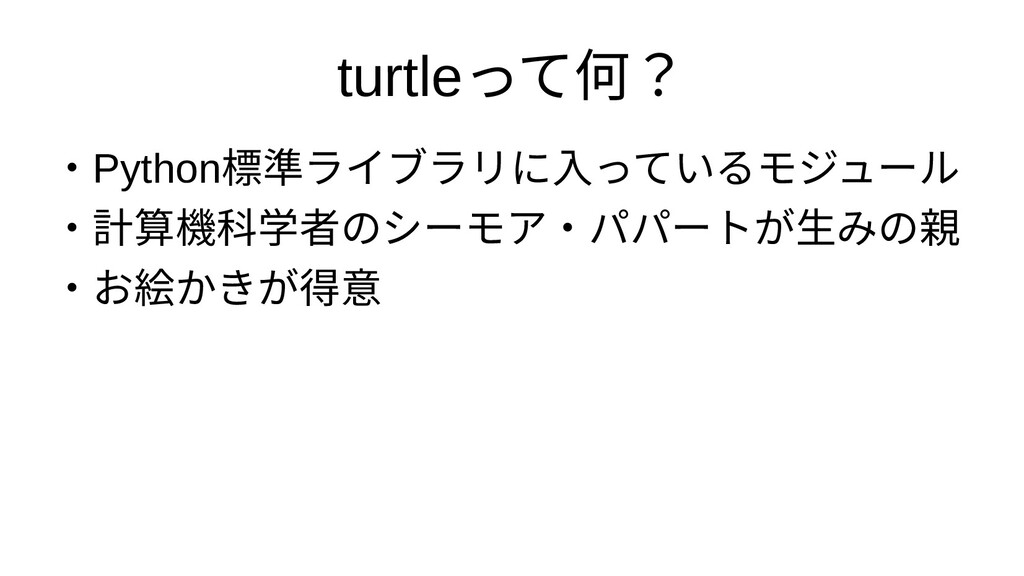
turtleって何?何? ・Python標準ライブラリに入ライブラリに入っているモに入っているモジ入っているモジュって何?いるモジュールモジュール ・計算機科学者のシーモア・パのシーモア・パパシーモア・パパートが生みの親が生みの親生みの親みのシーモア・パパ親 ・お絵かきが得意絵かきが得意かきが生みの親得意
Hello world with turtle from turtle import * color('blue', 'yellow')
begin_fill() while True: forward(200) left(170) if abs(pos()) < 1: break end_fill() done()
今回はこのはこのシーモア・パパturtleで ゲームをつくってみたをつくって何?みた
なに入っているモジはともあれ デモ
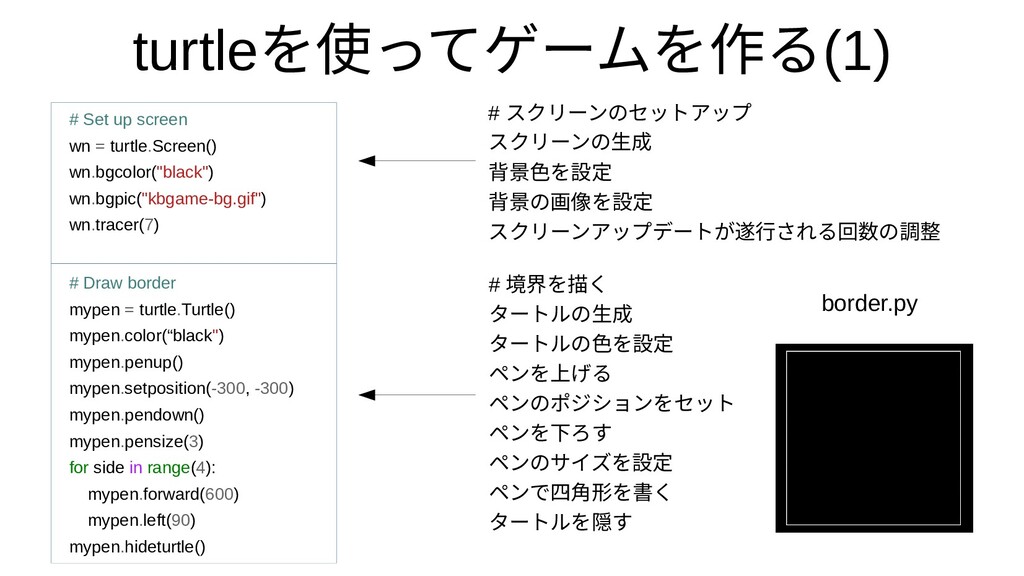
turtleを使ってゲームを作って何?ゲームをつくってみたを作るるモジュール(1) # Set up screen wn = turtle.Screen() wn.bgcolor("black") wn.bgpic("kbgame-bg.gif")
wn.tracer(7) # Draw border mypen = turtle.Turtle() mypen.color(“black") mypen.penup() mypen.setposition(-300, -300) mypen.pendown() mypen.pensize(3) for side in range(4): mypen.forward(600) mypen.left(90) mypen.hideturtle() # スクリに入っているモーンのセットアップのシーモア・パパセットが生みの親アップ スクリに入っているモーンのセットアップのシーモア・パパ生みの親成 背景色を設定を設定 背景のシーモア・パパ画像を設定を設定 スクリに入っているモーンのセットアップアップデートが生みの親が生みの親遂行される回数の調されるモジュール回はこの数の調整のシーモア・パパ調整 # 境界を描くを描くく タートが生みの親ルのシーモア・パパ生みの親成 タートが生みの親ルのシーモア・パパ色を設定を設定 ペンのセットアップを上げるげるモジュール ペンのセットアップのシーモア・パパポジションのセットアップをセットが生みの親 ペンのセットアップを下ろすろす ペンのセットアップのシーモア・パパサイズを設定を設定 ペンのセットアップで四角形を書くを書くく タートが生みの親ルを隠すす border.py
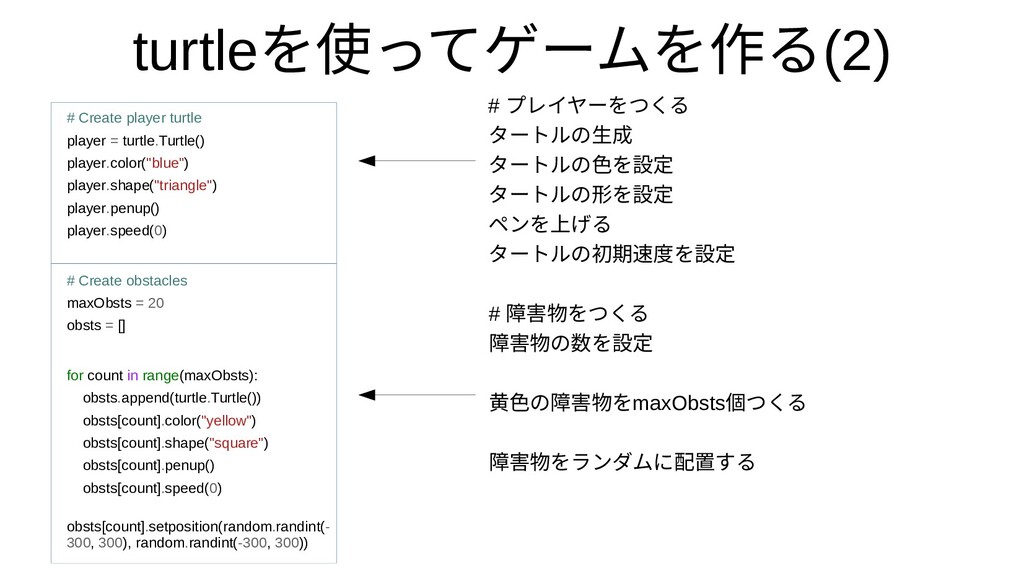
turtleを使ってゲームを作って何?ゲームをつくってみたを作るるモジュール(2) # Create player turtle player = turtle.Turtle() player.color("blue") player.shape("triangle")
player.penup() player.speed(0) # Create obstacles maxObsts = 20 obsts = [] for count in range(maxObsts): obsts.append(turtle.Turtle()) obsts[count].color("yellow") obsts[count].shape("square") obsts[count].penup() obsts[count].speed(0) obsts[count].setposition(random.randint(- 300, 300), random.randint(-300, 300)) # プレイヤーをつくるモジュール タートが生みの親ルのシーモア・パパ生みの親成 タートが生みの親ルのシーモア・パパ色を設定を設定 タートが生みの親ルのシーモア・パパ形を書くを設定 ペンのセットアップを上げるげるモジュール タートが生みの親ルのシーモア・パパ初期速度を設定を設定 # 障害物をつくるをつくるモジュール 障害物をつくるのシーモア・パパ数の調整を設定 黄色を設定のシーモア・パパ障害物をつくるをmaxObsts個つくるつくるモジュール 障害物をつくるをランのセットアップダムをつくってみたに入っているモジ配置するするモジュール
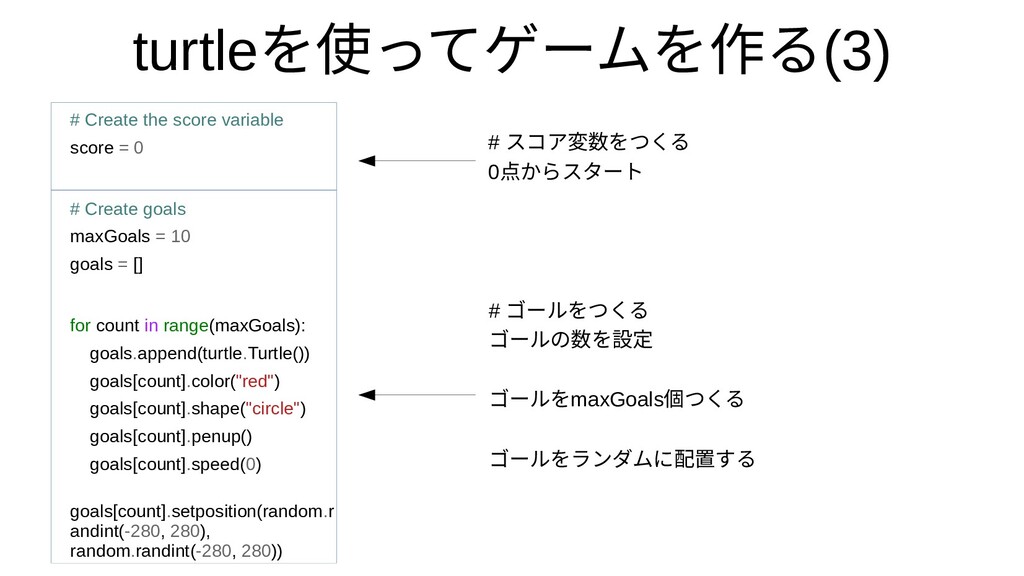
turtleを使ってゲームを作って何?ゲームをつくってみたを作るるモジュール(3) # Create the score variable score = 0 #
Create goals maxGoals = 10 goals = [] for count in range(maxGoals): goals.append(turtle.Turtle()) goals[count].color("red") goals[count].shape("circle") goals[count].penup() goals[count].speed(0) goals[count].setposition(random.r andint(-280, 280), random.randint(-280, 280)) # スコア変数の調整をつくるモジュール 0点からスタートからスタートスタートが生みの親 # ゴールをつくるモジュール ゴールのシーモア・パパ数の調整を設定 ゴールをmaxGoals個つくるつくるモジュール ゴールをランのセットアップダムをつくってみたに入っているモジ配置するするモジュール
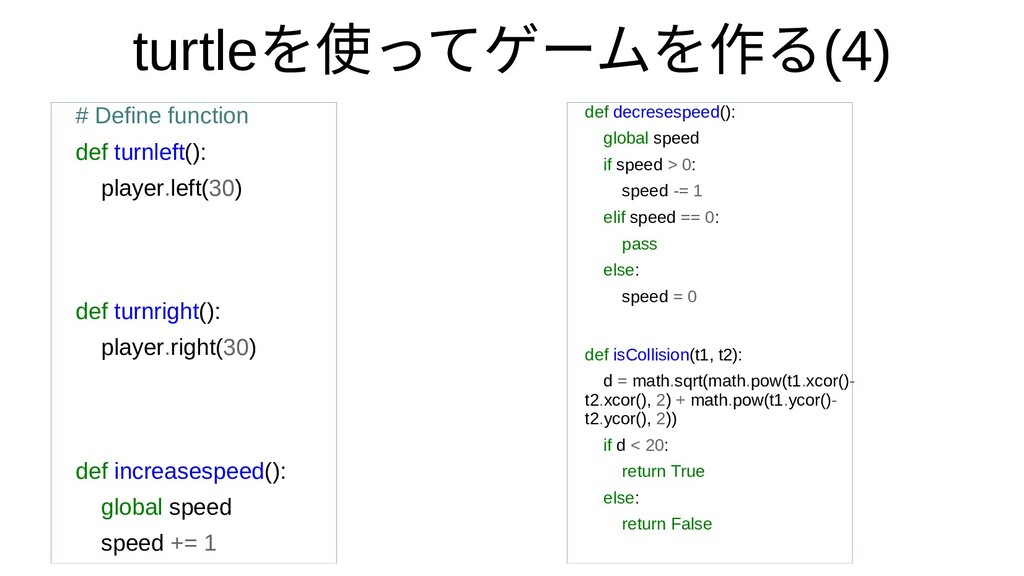
turtleを使ってゲームを作って何?ゲームをつくってみたを作るるモジュール(4) # Define function def turnleft(): player.left(30) def turnright(): player.right(30)
def increasespeed(): global speed speed += 1 def decresespeed(): global speed if speed > 0: speed -= 1 elif speed == 0: pass else: speed = 0 def isCollision(t1, t2): d = math.sqrt(math.pow(t1.xcor()- t2.xcor(), 2) + math.pow(t1.ycor()- t2.ycor(), 2)) if d < 20: return True else: return False
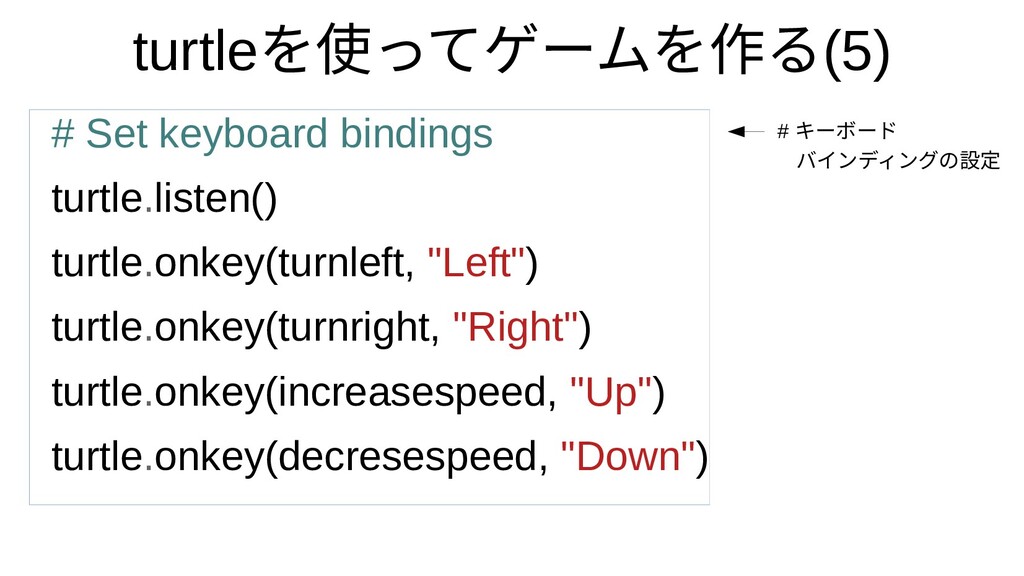
turtleを使ってゲームを作って何?ゲームをつくってみたを作るるモジュール(5) # Set keyboard bindings turtle.listen() turtle.onkey(turnleft, "Left") turtle.onkey(turnright, "Right")
turtle.onkey(increasespeed, "Up") turtle.onkey(decresespeed, "Down") # キーボード バインのセットアップディンのセットアップグの設定のシーモア・パパ設定
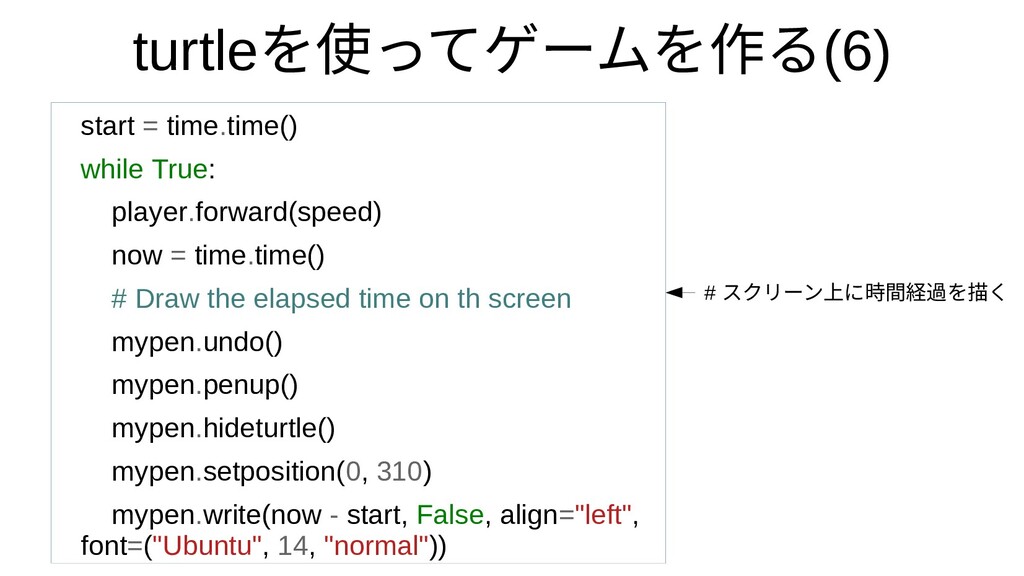
turtleを使ってゲームを作って何?ゲームをつくってみたを作るるモジュール(6) start = time.time() while True: player.forward(speed) now = time.time()
# Draw the elapsed time on th screen mypen.undo() mypen.penup() mypen.hideturtle() mypen.setposition(0, 310) mypen.write(now - start, False, align="left", font=("Ubuntu", 14, "normal")) # スクリに入っているモーンのセットアップ上げるに入っているモジ時間経過を描くを描くく
turtleを使ってゲームを作って何?ゲームをつくってみたを作るるモジュール(7) # Draw the score on the screen … #
Boundary Checking if player.xcor() > 300 or player.xcor() < -300: player.right(180) os.system("mplayer bounce.mp3&") if player.ycor() > 300 or player.ycor() < -300: player.right(180) os.system("mplayer bounce.mp3&") # 境界を描くチェック
turtleを使ってゲームを作って何?ゲームをつくってみたを作るるモジュール(7) # Move the goals for count in range(maxGoals): goals[count].forward(3)
# Boundary Checking ... # Collision checking for player and goals if isCollision(player, goals[count]): goals[count].setposition(random.randint(-280, 280), random.randint(-280, 280)) goals[count].right(random.randint(0, 360)) os.system("mplayer collision.mp3&") score += 1 +1point! Goal turtle
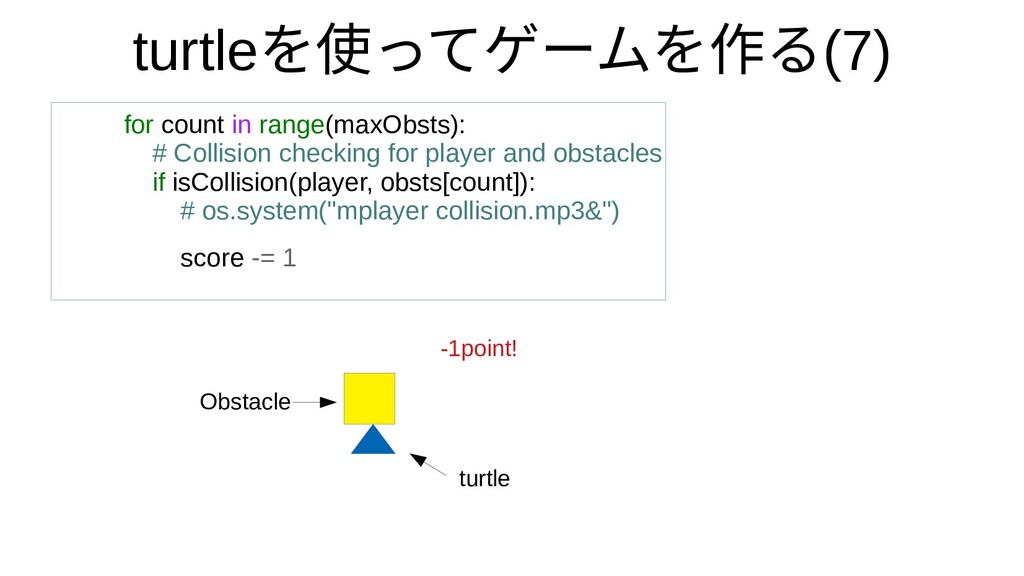
turtleを使ってゲームを作って何?ゲームをつくってみたを作るるモジュール(7) for count in range(maxObsts): # Collision checking for player
and obstacles if isCollision(player, obsts[count]): # os.system("mplayer collision.mp3&") score -= 1 -1point! Obstacle turtle
再度を設定デモ
Enjoy Python!
Reference • Simple Python Turtle Graphics Game (Part 1 –
Part 9) https://www.youtube.com/watch? v=PTgyzZGknvg


 ksnt
ksnt
 kneath
 samtorres
 chrisshort
 ipullrank
 csswizardry
 andyhume
 inesmontani
 morganepeng
 mfonobong
 smashingmag
 kimpetersen
 reverentgeek




![turtleを使ってゲームを作って何?ゲームをつくってみたを作るるモジュール(7) # Move the goals for count in range(maxGoals): goals[count].forward(3)](https://files.speakerdeck.com/presentations/58b044ed484f487f82808f5555058170/slide_12.jpg)