Upgrade to Pro
— share decks privately, control downloads, hide ads and more …
Speaker Deck
Sign up for free
Menu
Search
Features
All features
Private URLs
Password Protection
Custom URLS
Scheduled publishing
Remove Branding
Restrict embedding
Deck Collections
Notes
Features
All features
Private URLs
Password Protection
Custom URLS
Scheduled publishing
Remove Branding
Restrict embedding
Deck Collections
Notes
Explore
Featured decks
Featured speakers
Programming
Technology
Storyboards
Explore
Featured decks
Featured speakers
Programming
Technology
Storyboards
Pricing
Search
Sign in
Sign up for free
OWASP ZAP-API #OWASP Night 21th
Search
OWASP Japan
June 13, 2016
1.8k
1
Share
Embed
Copy iframe code
Copy JS code
Copy link
Start on current slide
OWASP ZAP-API #OWASP Night 21th
OWASP Japan
June 13, 2016
More Decks by OWASP Japan
See All by OWASP Japan
OWASP Night 2019.03 Tokyo
owaspjapan
0
420
OWASP SAMMを活用したセキュア開発の推進
owaspjapan
0
1.1k
20190107_AbuseCaseCheatSheet
owaspjapan
0
240
セキュリティ要求定義で使える非機能要求グレードとASVS
owaspjapan
5
1.2k
AWSクラスタに捧ぐウェブを衛っていく方法論と死なない程度の修羅場の価値
owaspjapan
9
3.6k
Shifting Left Like a Boss
owaspjapan
2
360
OWASP Top 10 and Your Web Apps
owaspjapan
2
450
OWASP Japan Proposal: Encouraging Japanese Translation
owaspjapan
1
310
elegance_of_OWASP_Top10_2017
owaspjapan
2
590
Featured
See All Featured
10 Git Anti Patterns You Should be Aware of
lemiorhan
PRO
659
62k
Building Experiences: Design Systems, User Experience, and Full Site Editing
marktimemedia
1
630
Mozcon NYC 2025: Stop Losing SEO Traffic
samtorres
1
570
My Coaching Mixtape
mlcsv
0
350
"I'm Feeling Lucky" - Building Great Search Experiences for Today's Users (#IAC19)
danielanewman
230
23k
Digital Projects Gone Horribly Wrong (And the UX Pros Who Still Save the Day) - Dean Schuster
uxyall
1
3.4k
Thoughts on Productivity
jonyablonski
76
5.4k
Evolution of real-time – Irina Nazarova, EuRuKo, 2024
irinanazarova
9
1.6k
ピンチをチャンスに:未来をつくるプロダクトロードマップ #pmconf2020
aki_iinuma
128
56k
Building Flexible Design Systems
yeseniaperezcruz
330
41k
SEO in 2025: How to Prepare for the Future of Search
ipullrank
3
3.9k
Typedesign – Prime Four
hannesfritz
42
3.2k
Transcript
OWASP ZAP API + hubot/slack で作る脆弱性スキャンボット OWASP Night 21th
目次 1.自己紹介 2.OWASP ZAP APIとは 3.APIを利用したスキャンの流れ 4.hubotを利用したslack経由での実行
自己紹介
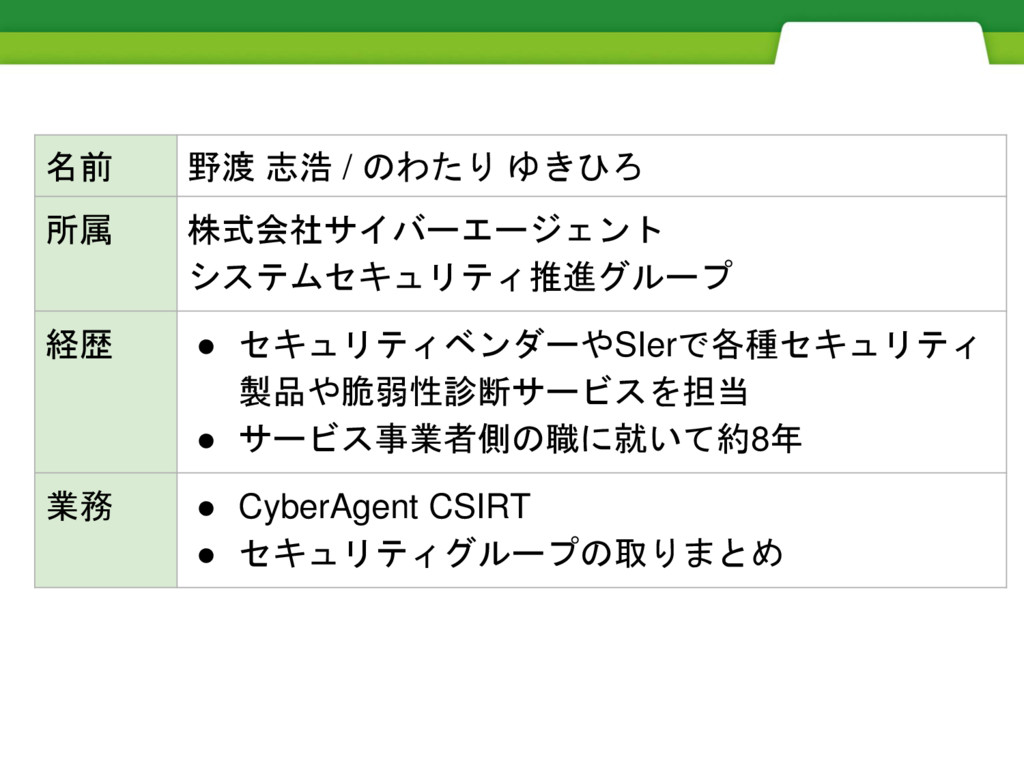
名前 野渡 志浩 / のわたり ゆきひろ 所属 株式会社サイバーエージェント システムセキュリティ推進グループ 経歴
• セキュリティベンダーやSIerで各種セキュリティ 製品や脆弱性診断サービスを担当 • サービス事業者側の職に就いて約8年 業務 • CyberAgent CSIRT • セキュリティグループの取りまとめ
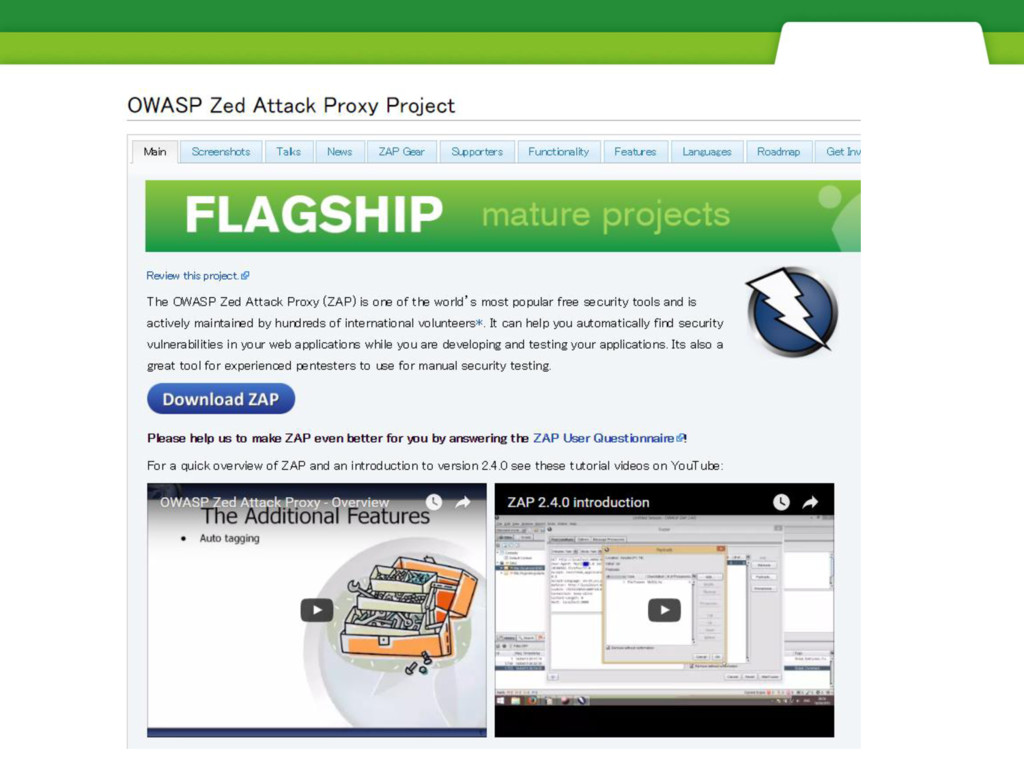
OWASP ZAP APIとは
None
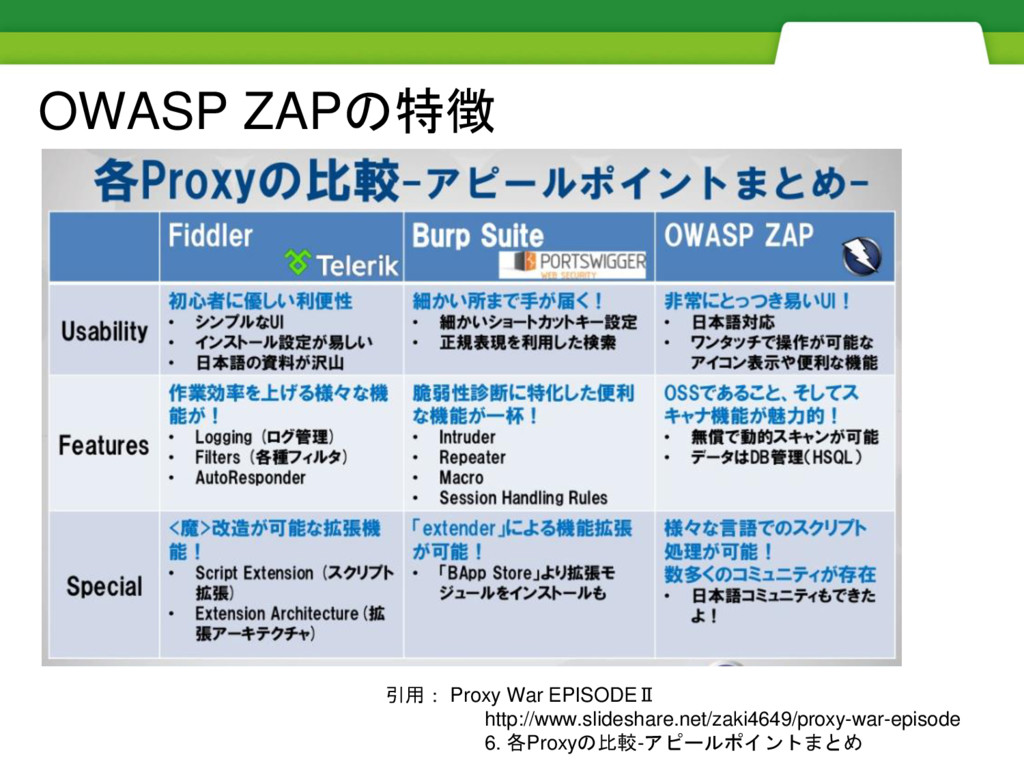
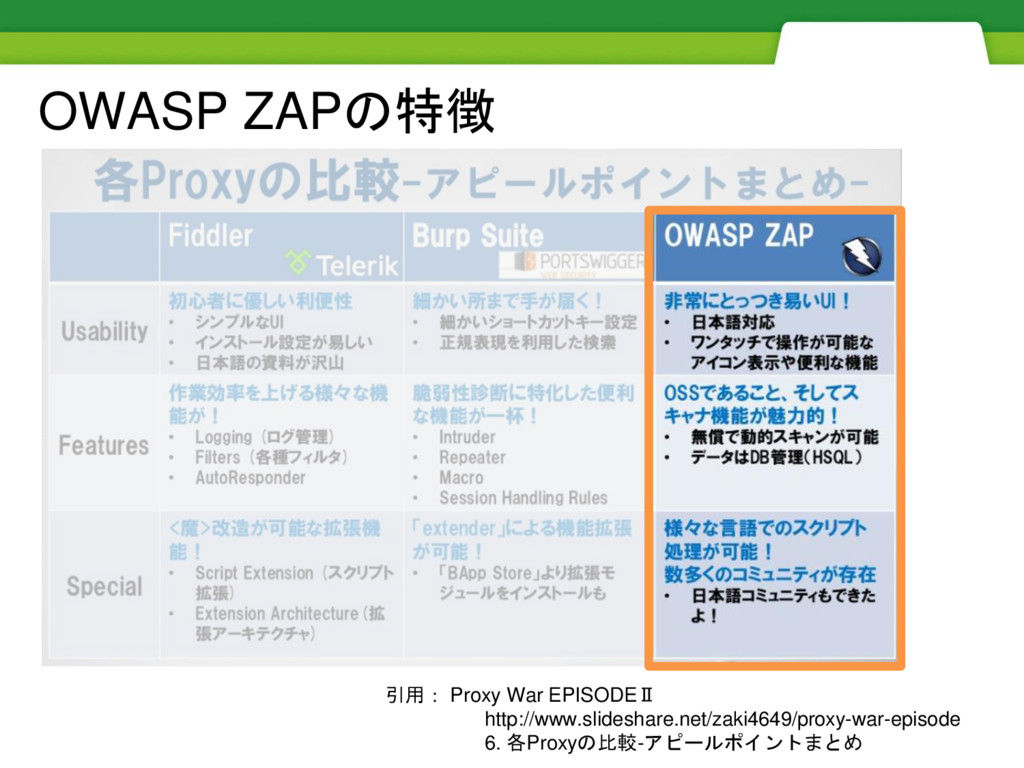
引用: Proxy War EPISODEⅡ http://www.slideshare.net/zaki4649/proxy-war-episode 6. 各Proxyの比較-アピールポイントまとめ OWASP ZAPの特徴
引用: Proxy War EPISODEⅡ http://www.slideshare.net/zaki4649/proxy-war-episode 6. 各Proxyの比較-アピールポイントまとめ OWASP ZAPの特徴
None
None
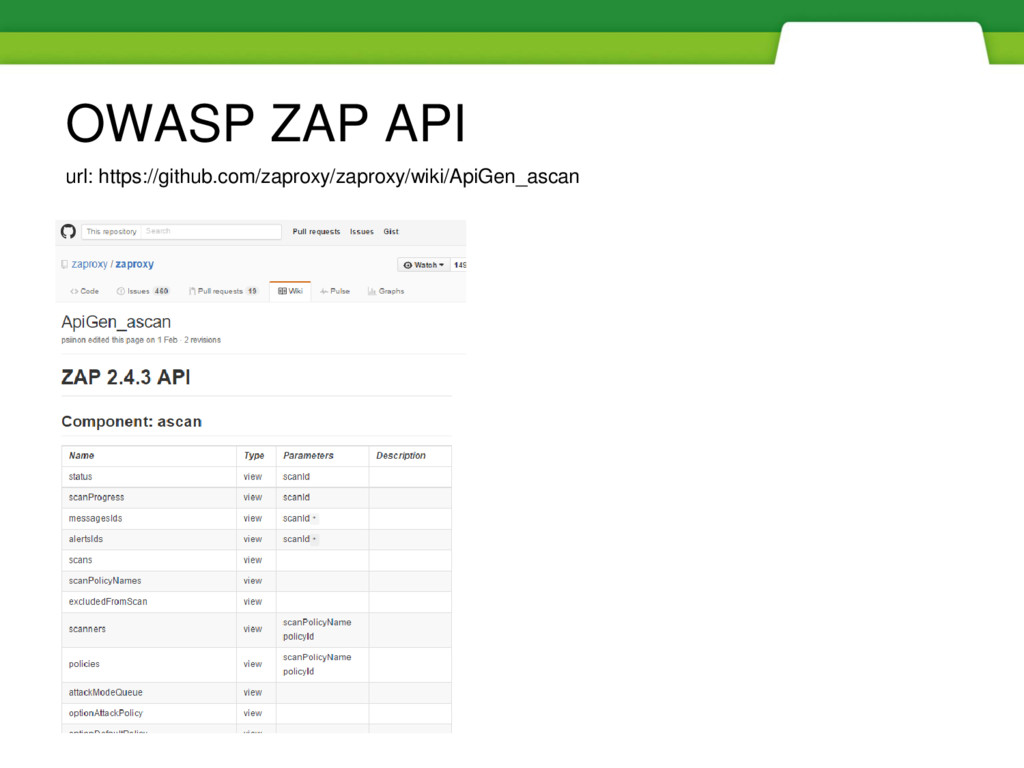
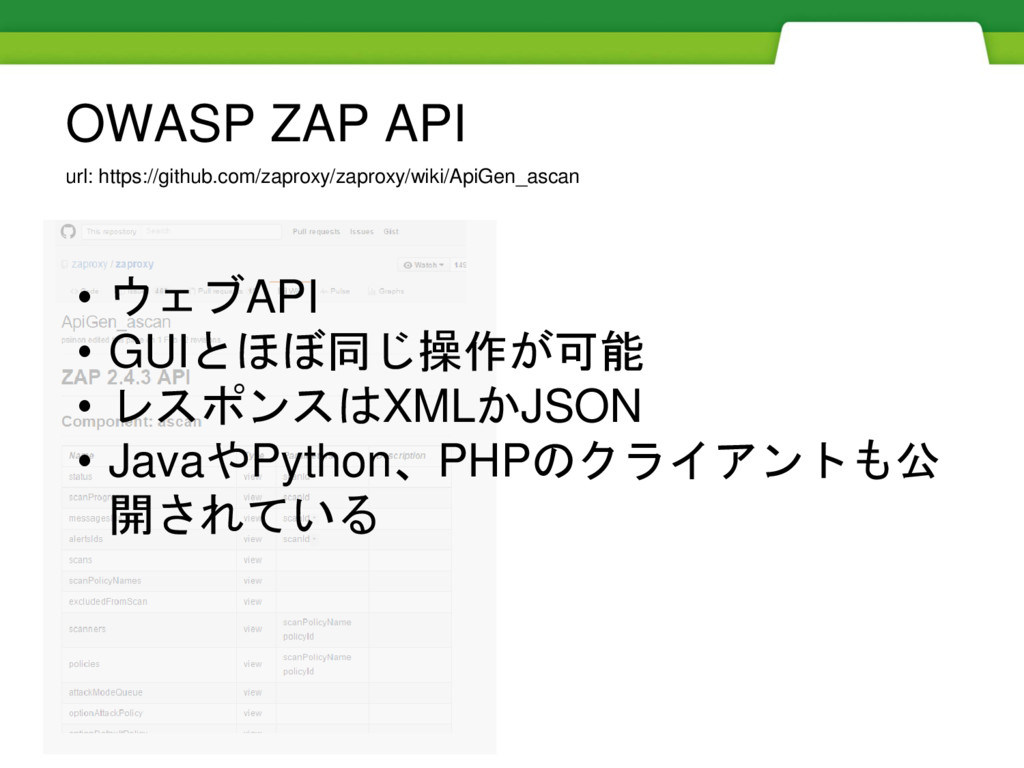
url: https://github.com/zaproxy/zaproxy/wiki/ApiGen_ascan OWASP ZAP API
url: https://github.com/zaproxy/zaproxy/wiki/ApiGen_ascan OWASP ZAP API • ウェブAPI • GUIとほぼ同じ操作が可能 •
レスポンスはXMLかJSON • JavaやPython、PHPのクライアントも公 開されている
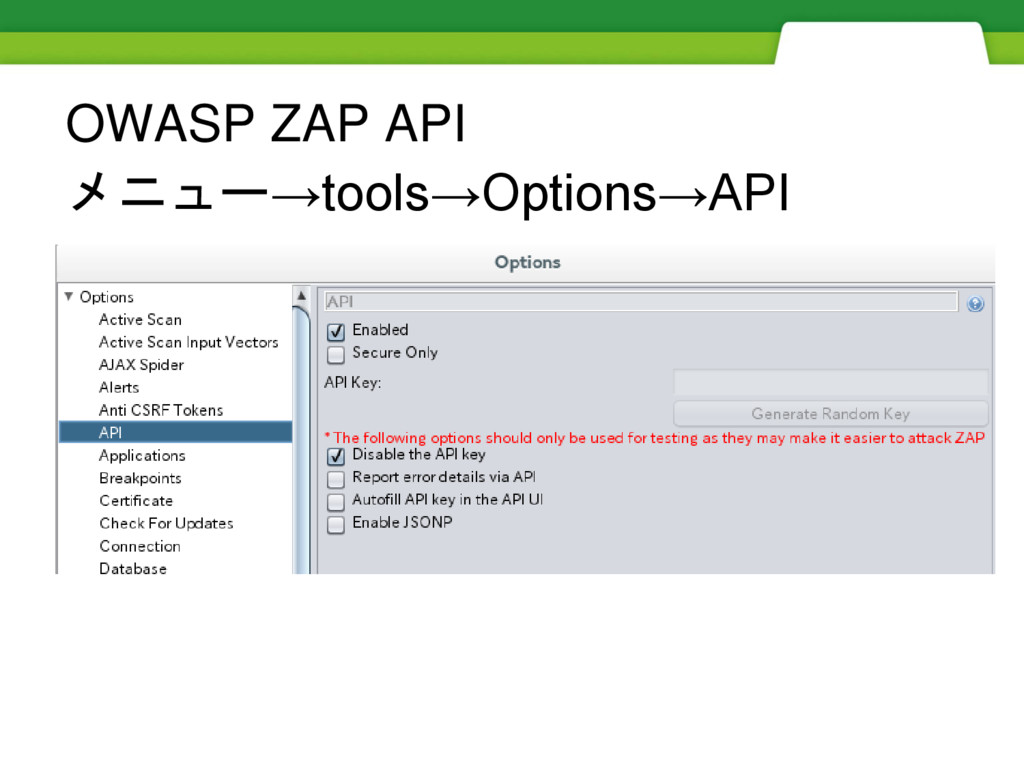
OWASP ZAP API メニュー→tools→Options→API
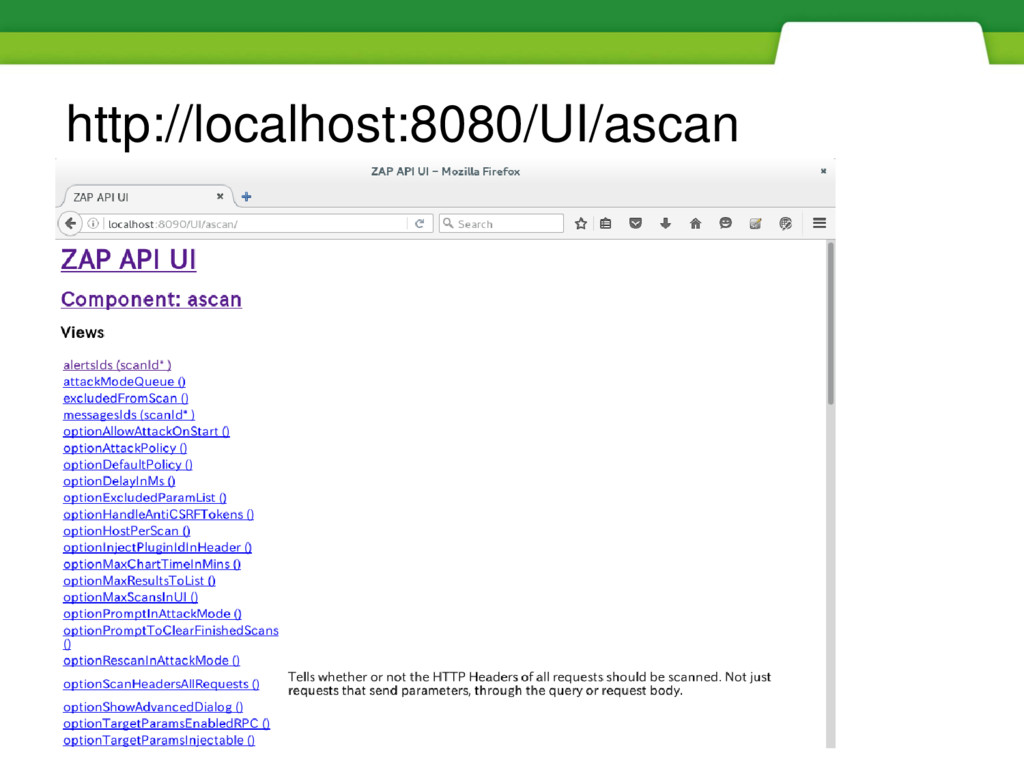
http://localhost:8080/UI/ascan
url: https://github.com/zaproxy/zaproxy/wiki/ApiDetailsUrlFormat リクエストフォーマット http://zap/<format>/<component>/<operation>/<operation name>[/?<parameters>] 例:http://192.168.1.20にスパイダーを実行する場合 http://localhost:8090/JSON/spider/action/scan/?url=https://192.168.1.20/ API keyを有効にしている場合 http://localhost:8090/JSON/spider/action/scan/?url=https://192.168.1.20/&apikey={key}
format JSONやXML、コンポーネントによってはHTMLを指定 component spiderやascanなどzapの機能を指定 参照:Components operation view、action、otherなど動作を指定 operation name scan、pause、stopなどコンポーネントに定義された 操作を指定
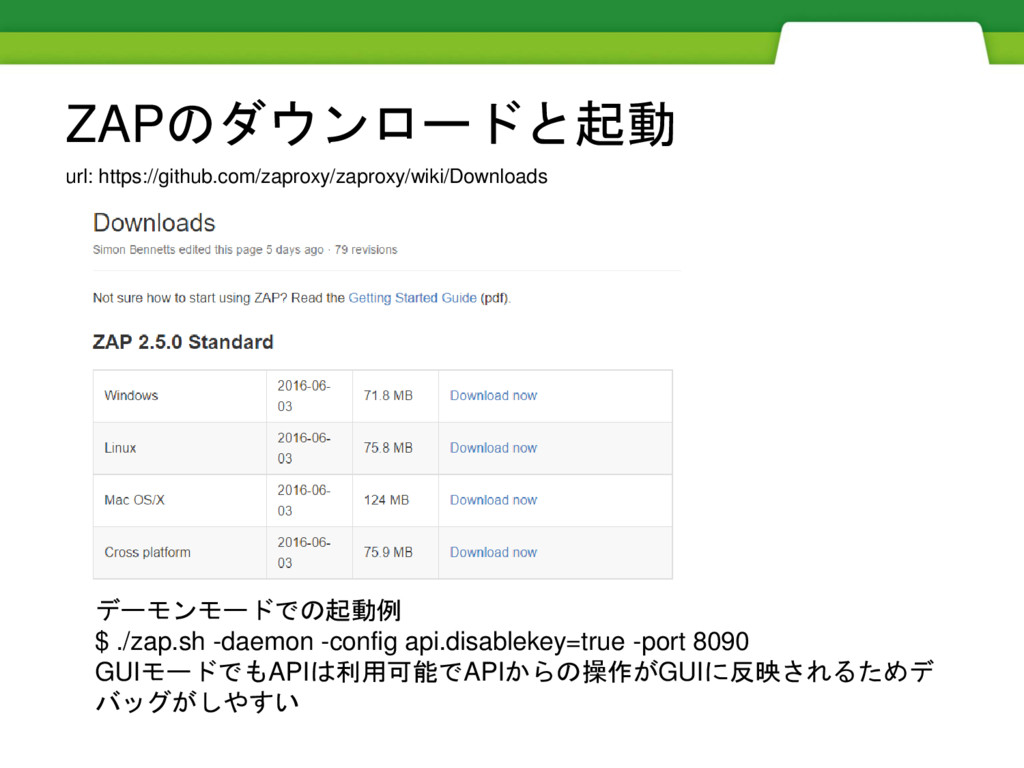
デーモンモードでの起動例 $ ./zap.sh -daemon -config api.disablekey=true -port 8090 GUIモードでもAPIは利用可能でAPIからの操作がGUIに反映されるためデ バッグがしやすい
url: https://github.com/zaproxy/zaproxy/wiki/Downloads ZAPのダウンロードと起動
APIを利用したスキャンの流れ
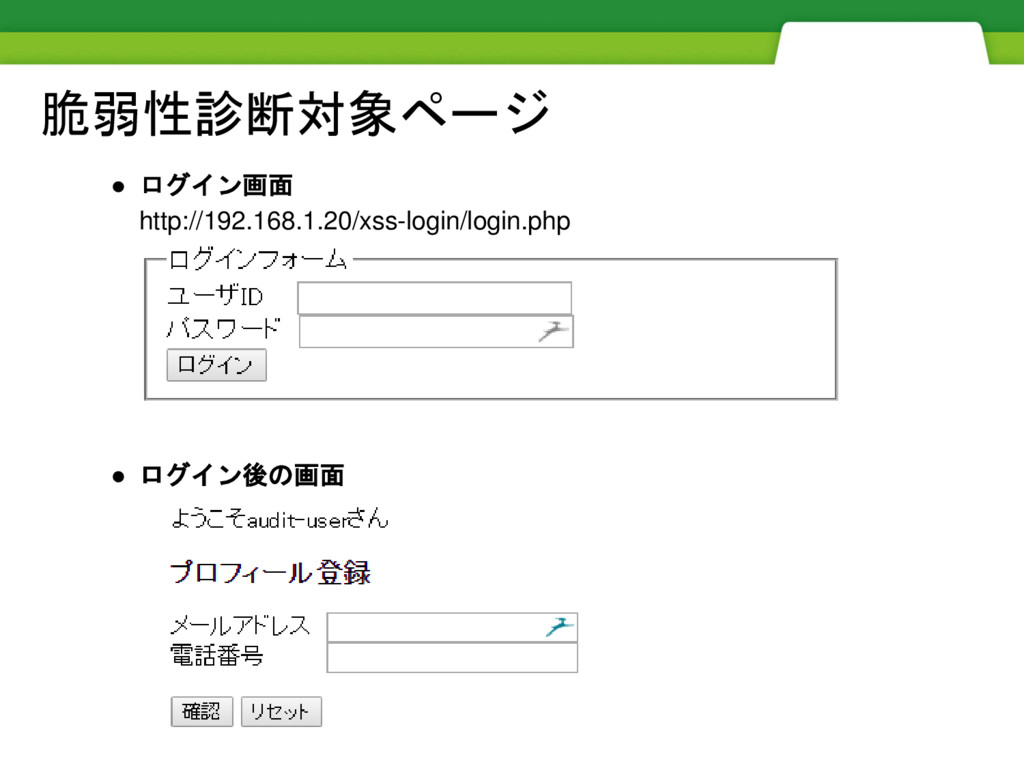
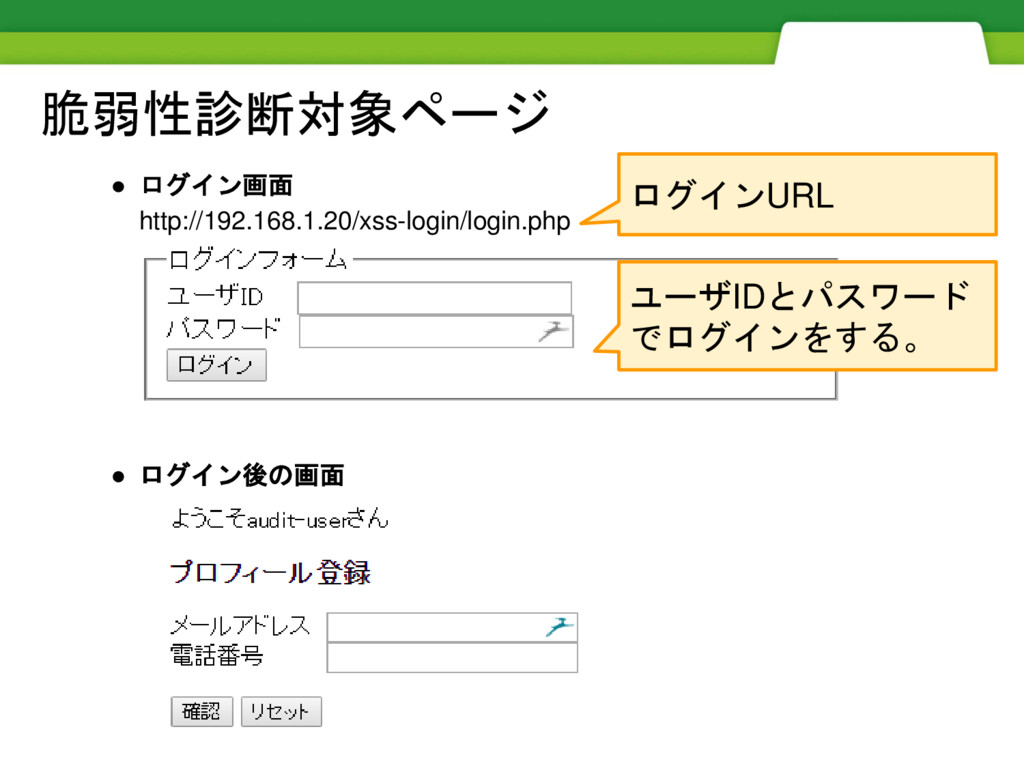
脆弱性診断対象ページ • ログイン画面 http://192.168.1.20/xss-login/login.php • ログイン後の画面
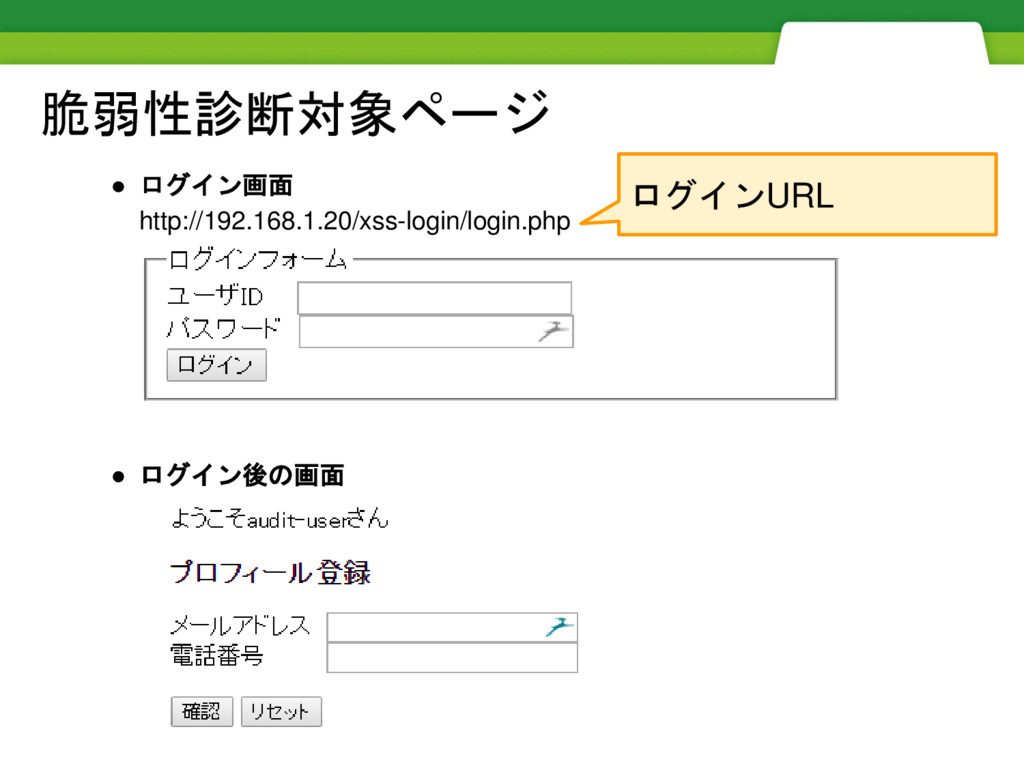
脆弱性診断対象ページ • ログイン画面 http://192.168.1.20/xss-login/login.php • ログイン後の画面 ログインURL
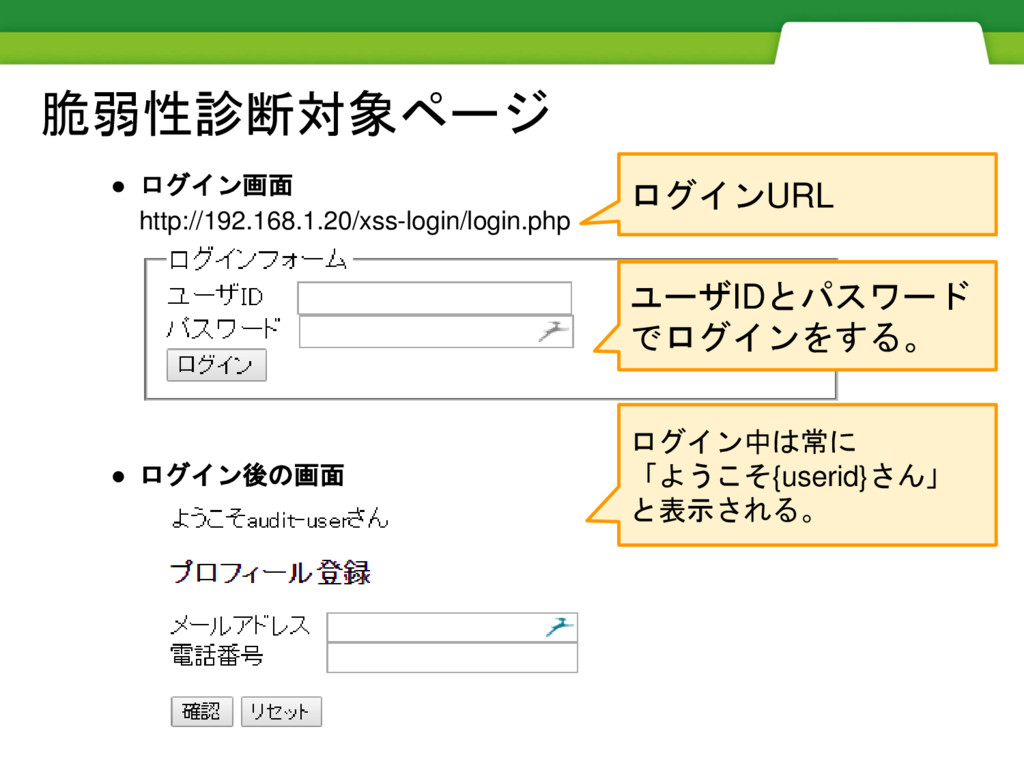
脆弱性診断対象ページ • ログイン画面 http://192.168.1.20/xss-login/login.php • ログイン後の画面 ユーザIDとパスワード でログインをする。 ログインURL
脆弱性診断対象ページ • ログイン画面 http://192.168.1.20/xss-login/login.php • ログイン後の画面 ユーザIDとパスワード でログインをする。 ログイン中は常に 「ようこそ{userid}さん」
と表示される。 ログインURL
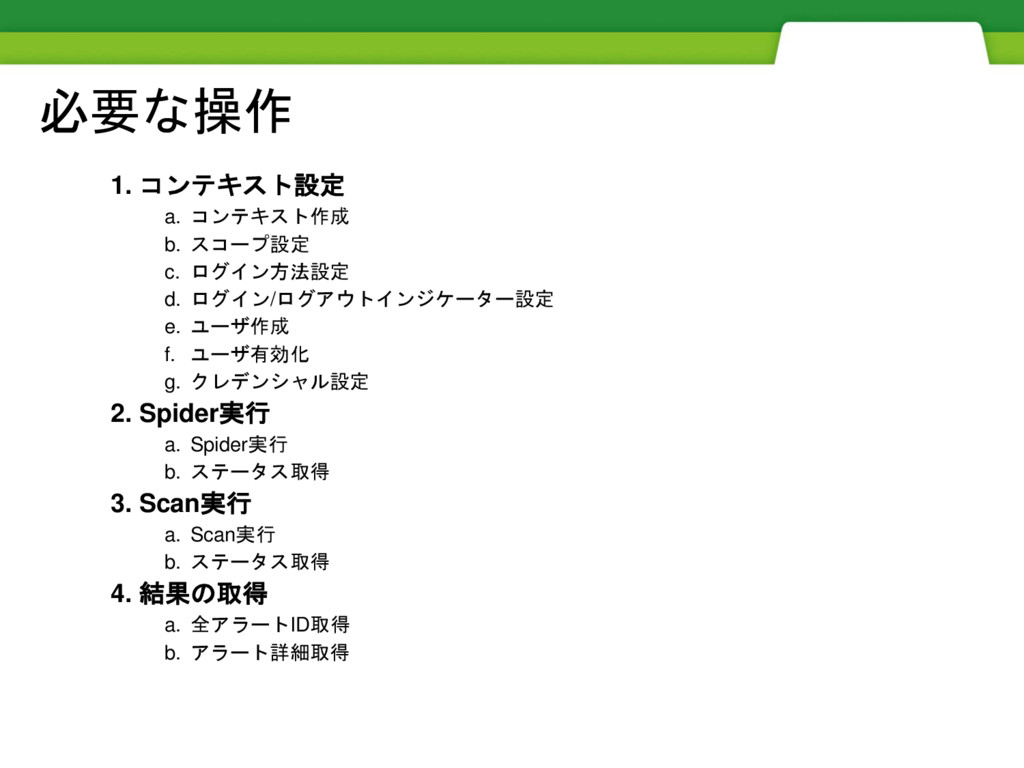
必要な操作 1. コンテキスト設定 a. コンテキスト作成 b. スコープ設定 c. ログイン方法設定 d.
ログイン/ログアウトインジケーター設定 e. ユーザ作成 f. ユーザ有効化 g. クレデンシャル設定 2. Spider実行 a. Spider実行 b. ステータス取得 3. Scan実行 a. Scan実行 b. ステータス取得 4. 結果の取得 a. 全アラートID取得 b. アラート詳細取得
コンテキストの設定
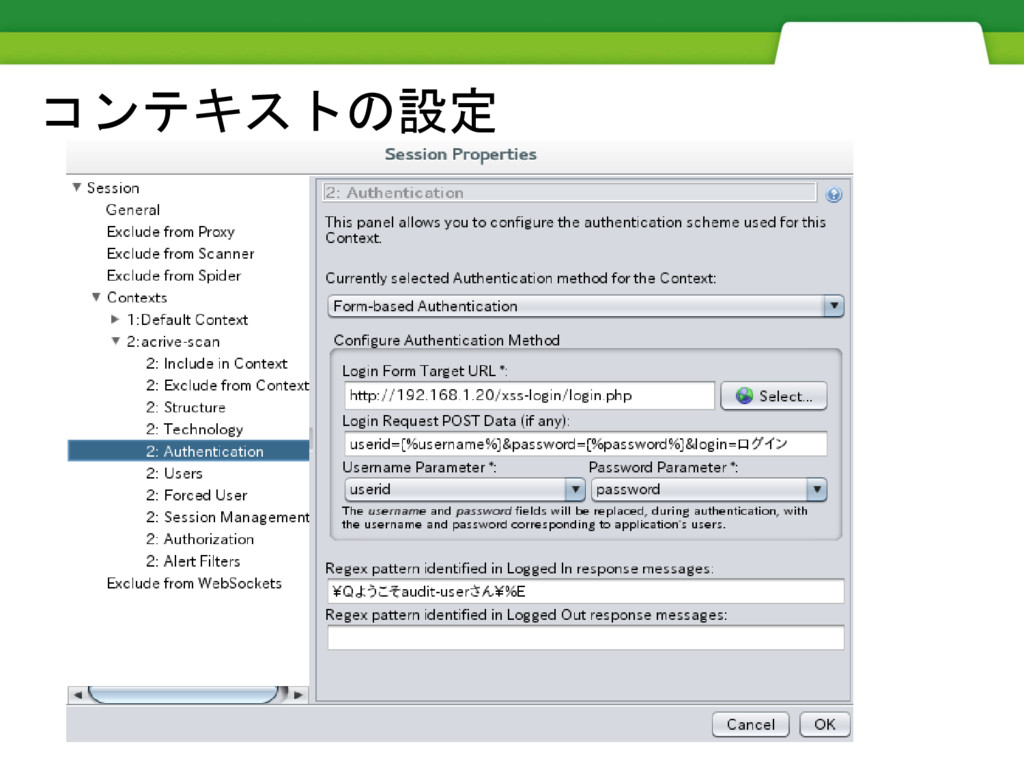
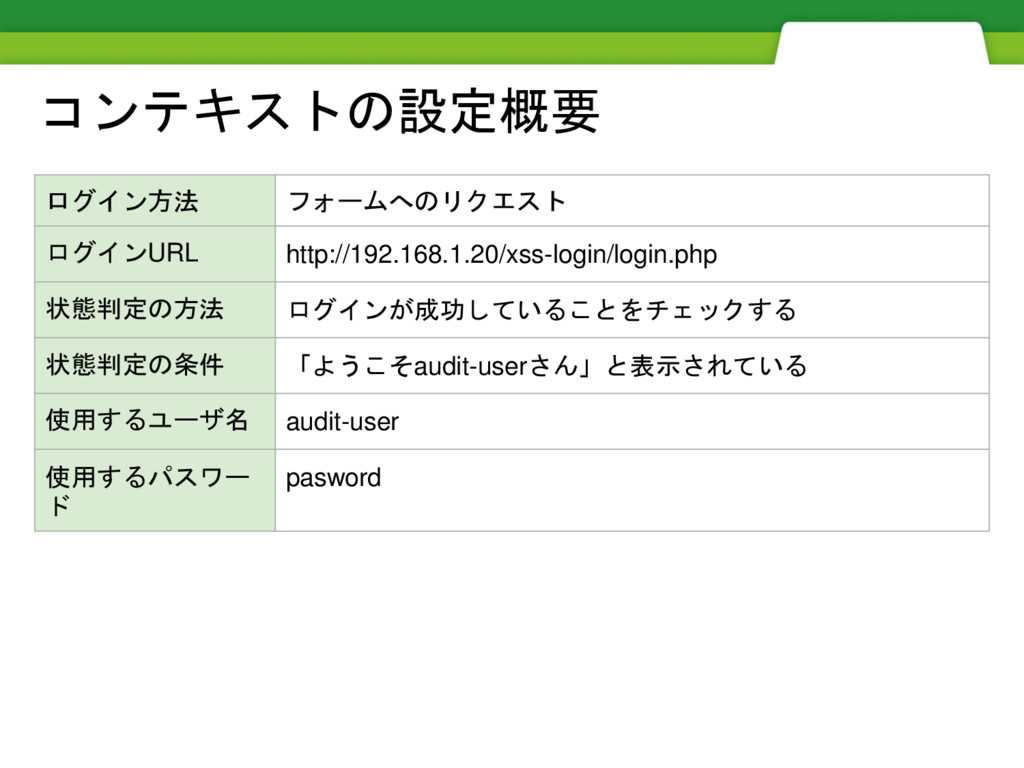
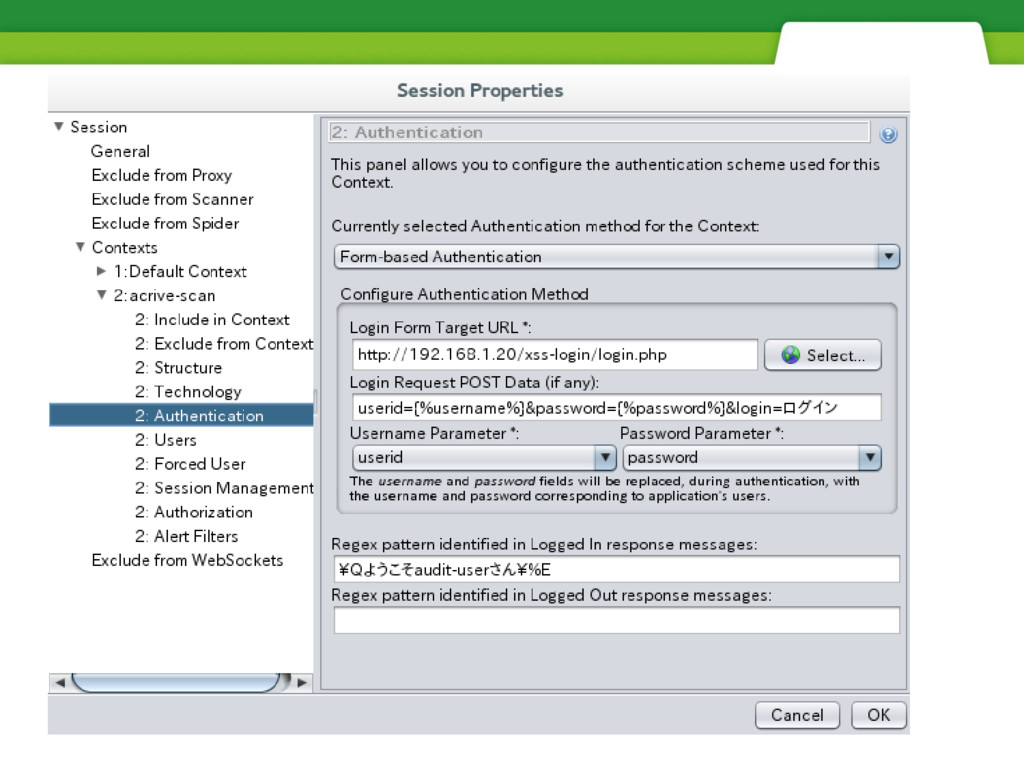
コンテキストの設定概要 ログイン方法 フォームへのリクエスト ログインURL http://192.168.1.20/xss-login/login.php 状態判定の方法 ログインが成功していることをチェックする 状態判定の条件 「ようこそaudit-userさん」と表示されている 使用するユーザ名
audit-user 使用するパスワー ド pasword
コンテキストの設定
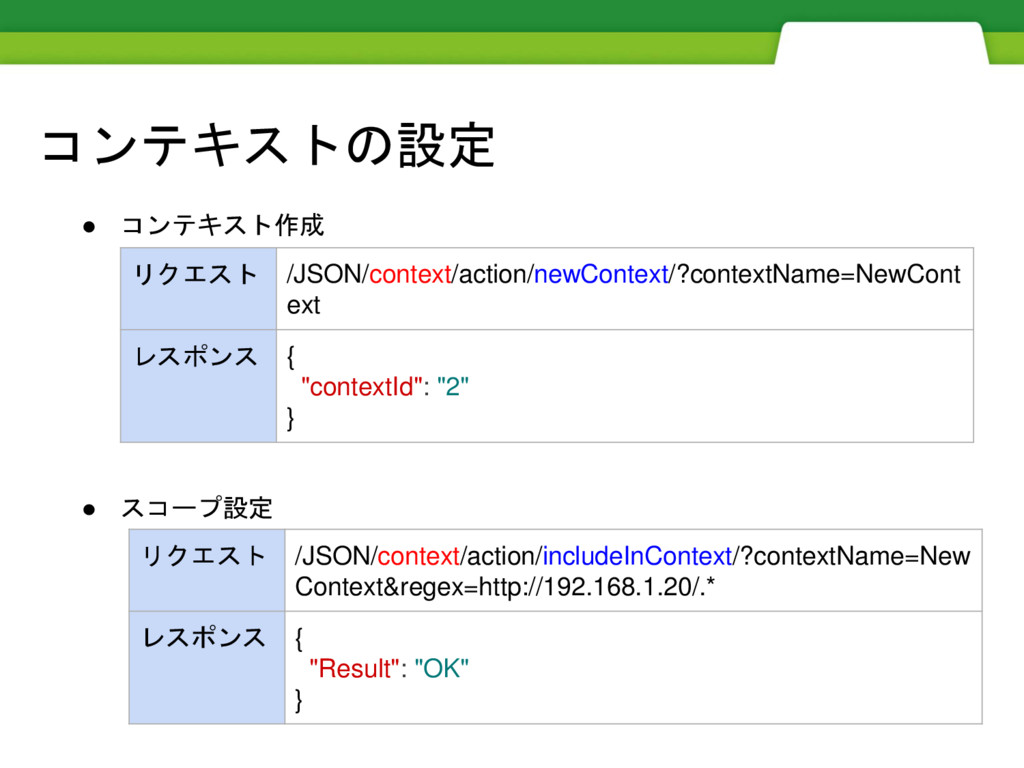
コンテキストの設定 • コンテキスト作成 • スコープ設定 リクエスト /JSON/context/action/newContext/?contextName=NewCont ext レスポンス {
"contextId": "2" } リクエスト /JSON/context/action/includeInContext/?contextName=New Context®ex=http://192.168.1.20/.* レスポンス { "Result": "OK" }
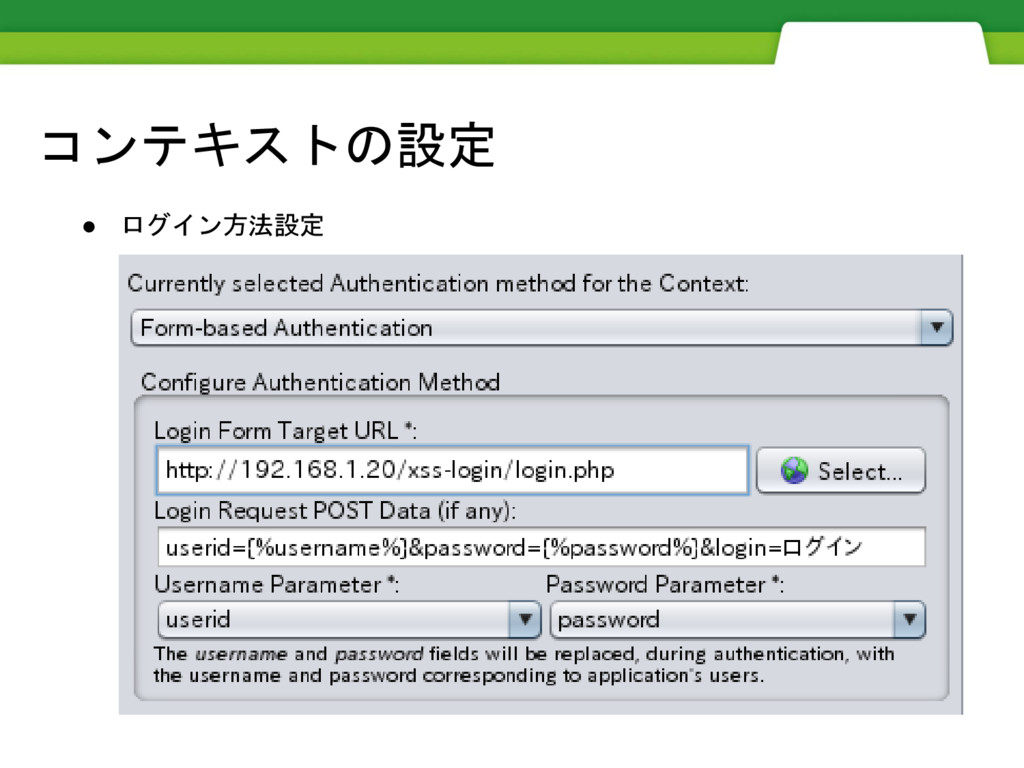
コンテキストの設定 • ログイン方法設定
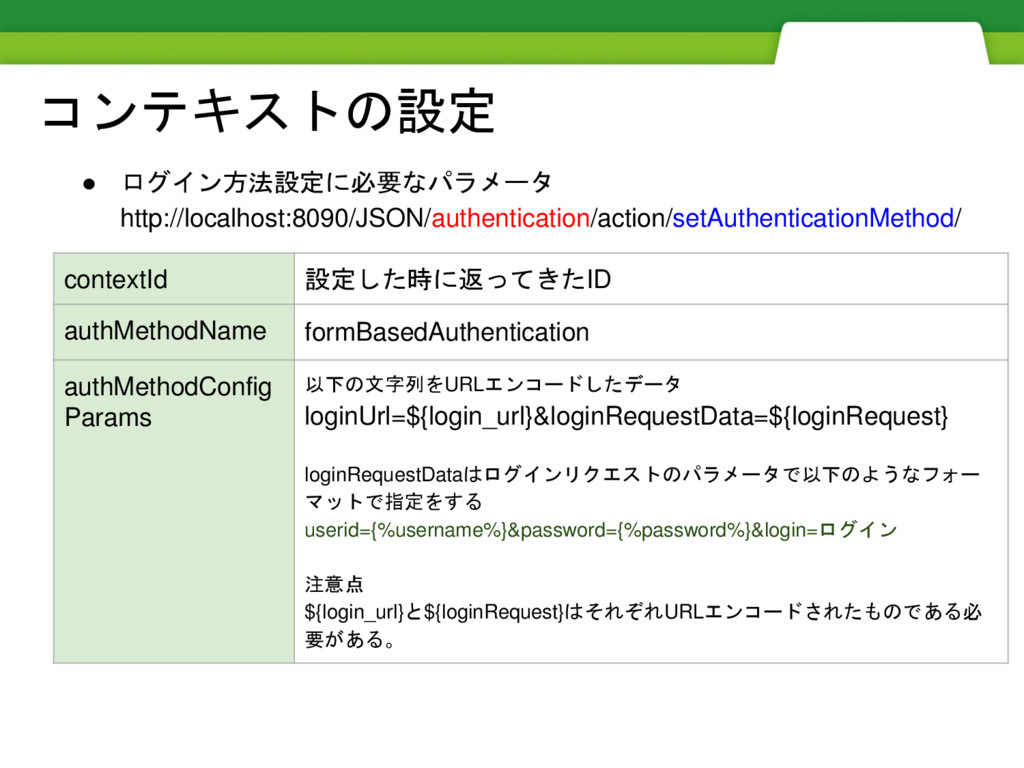
コンテキストの設定 • ログイン方法設定に必要なパラメータ http://localhost:8090/JSON/authentication/action/setAuthenticationMethod/ contextId 設定した時に返ってきたID authMethodName formBasedAuthentication authMethodConfig Params
以下の文字列をURLエンコードしたデータ loginUrl=${login_url}&loginRequestData=${loginRequest} loginRequestDataはログインリクエストのパラメータで以下のようなフォー マットで指定をする userid={%username%}&password={%password%}&login=ログイン 注意点 ${login_url}と${loginRequest}はそれぞれURLエンコードされたものである必 要がある。
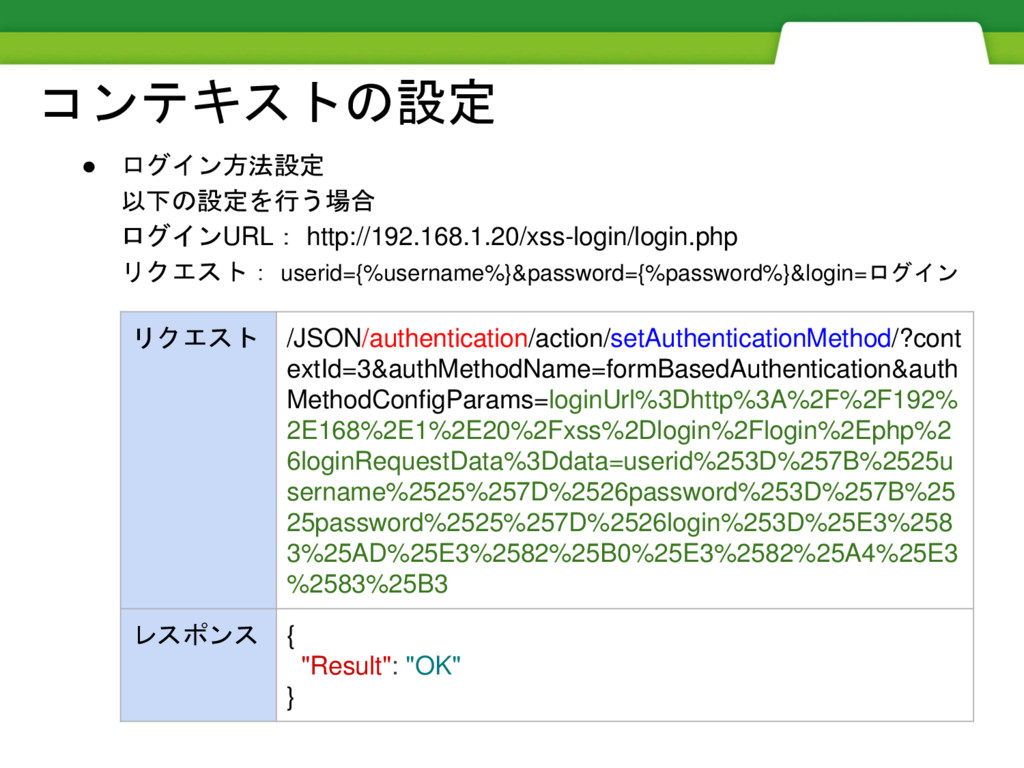
コンテキストの設定 • ログイン方法設定 以下の設定を行う場合 ログインURL: http://192.168.1.20/xss-login/login.php リクエスト: userid={%username%}&password={%password%}&login=ログイン リクエスト /JSON/authentication/action/setAuthenticationMethod/?cont
extId=3&authMethodName=formBasedAuthentication&auth MethodConfigParams=loginUrl%3Dhttp%3A%2F%2F192% 2E168%2E1%2E20%2Fxss%2Dlogin%2Flogin%2Ephp%2 6loginRequestData%3Ddata=userid%253D%257B%2525u sername%2525%257D%2526password%253D%257B%25 25password%2525%257D%2526login%253D%25E3%258 3%25AD%25E3%2582%25B0%25E3%2582%25A4%25E3 %2583%25B3 レスポンス { "Result": "OK" }
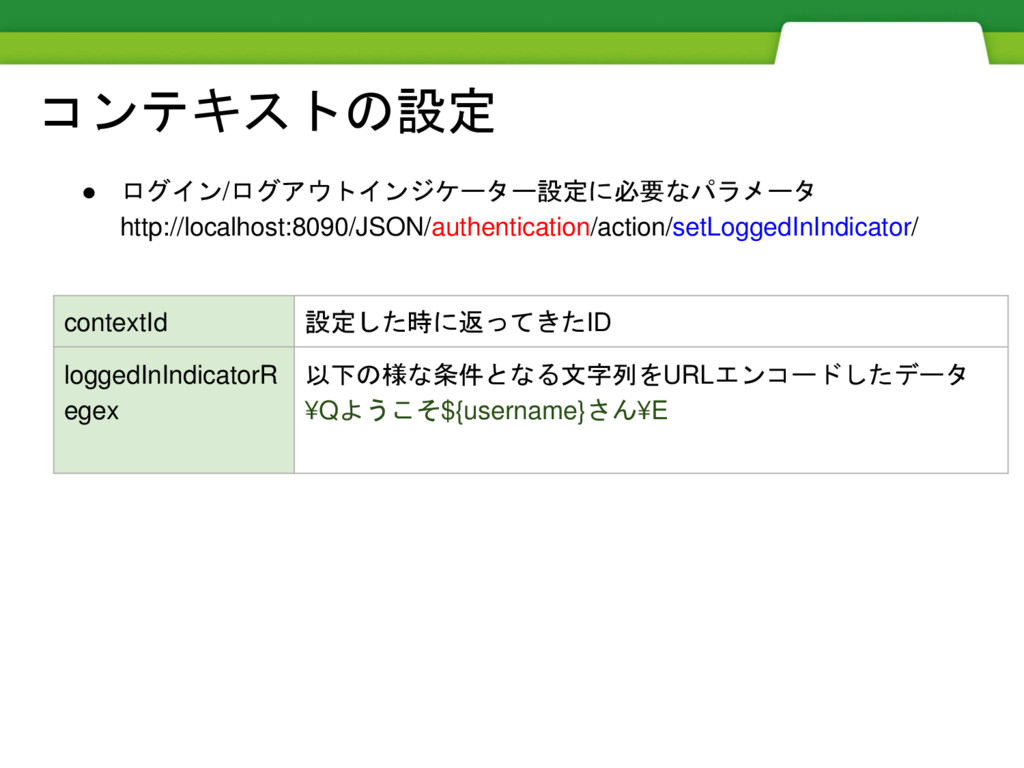
コンテキストの設定 • ログイン/ログアウトインジケーター設定に必要なパラメータ http://localhost:8090/JSON/authentication/action/setLoggedInIndicator/ contextId 設定した時に返ってきたID loggedInIndicatorR egex 以下の様な条件となる文字列をURLエンコードしたデータ ¥Qようこそ${username}さん¥E
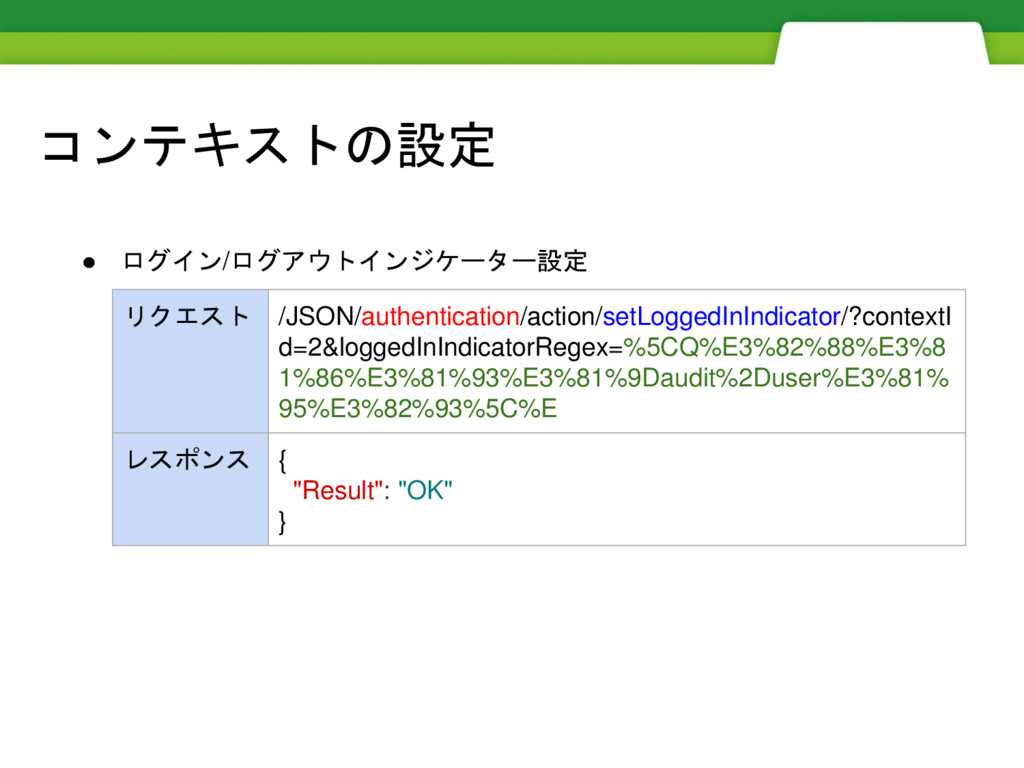
コンテキストの設定 • ログイン/ログアウトインジケーター設定 リクエスト /JSON/authentication/action/setLoggedInIndicator/?contextI d=2&loggedInIndicatorRegex=%5CQ%E3%82%88%E3%8 1%86%E3%81%93%E3%81%9Daudit%2Duser%E3%81% 95%E3%82%93%5C%E レスポンス {
"Result": "OK" }
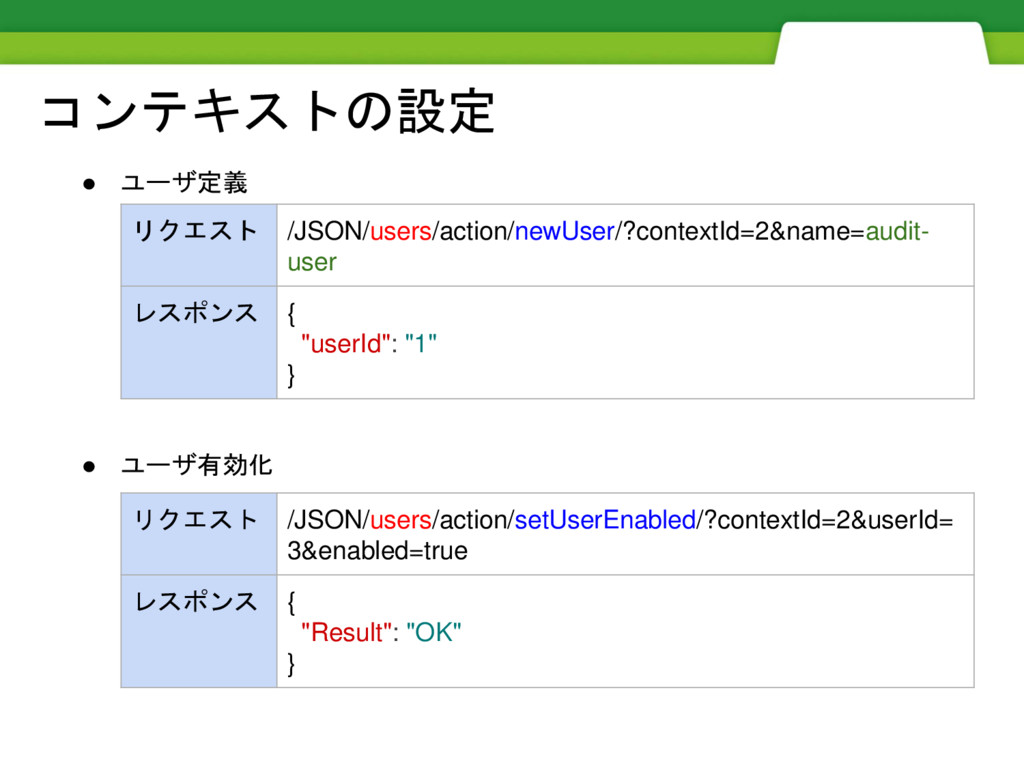
コンテキストの設定 • ユーザ定義 • ユーザ有効化 リクエスト /JSON/users/action/newUser/?contextId=2&name=audit- user レスポンス {
"userId": "1" } リクエスト /JSON/users/action/setUserEnabled/?contextId=2&userId= 3&enabled=true レスポンス { "Result": "OK" }
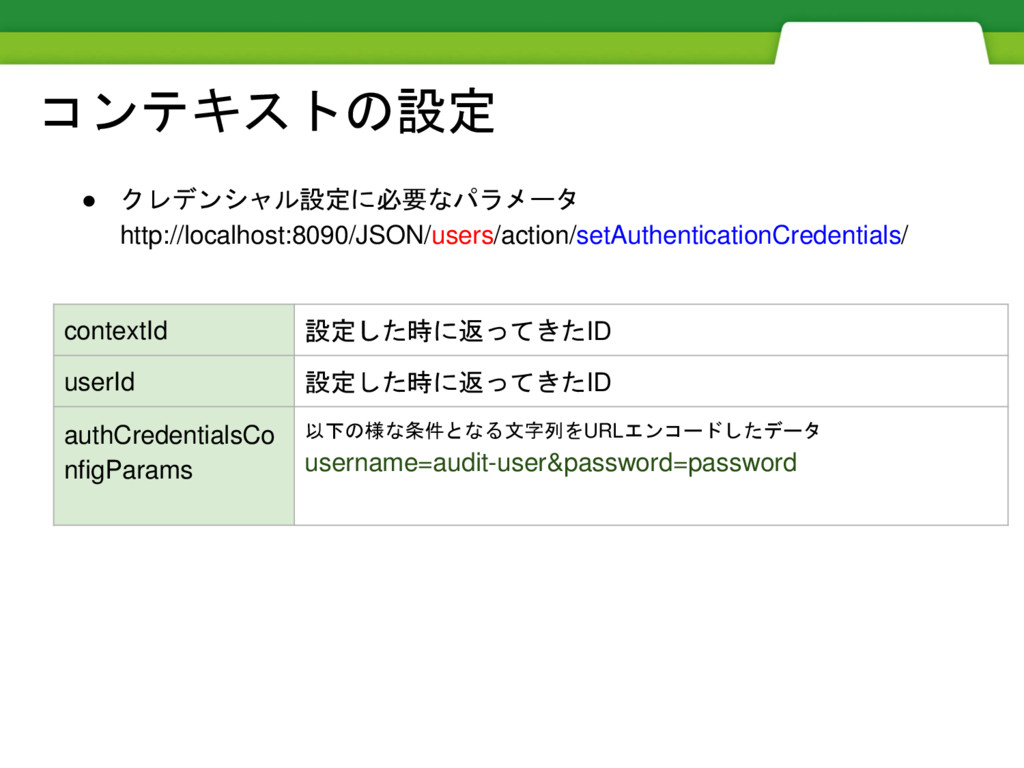
コンテキストの設定 • クレデンシャル設定に必要なパラメータ http://localhost:8090/JSON/users/action/setAuthenticationCredentials/ contextId 設定した時に返ってきたID userId 設定した時に返ってきたID authCredentialsCo nfigParams
以下の様な条件となる文字列をURLエンコードしたデータ username=audit-user&password=password
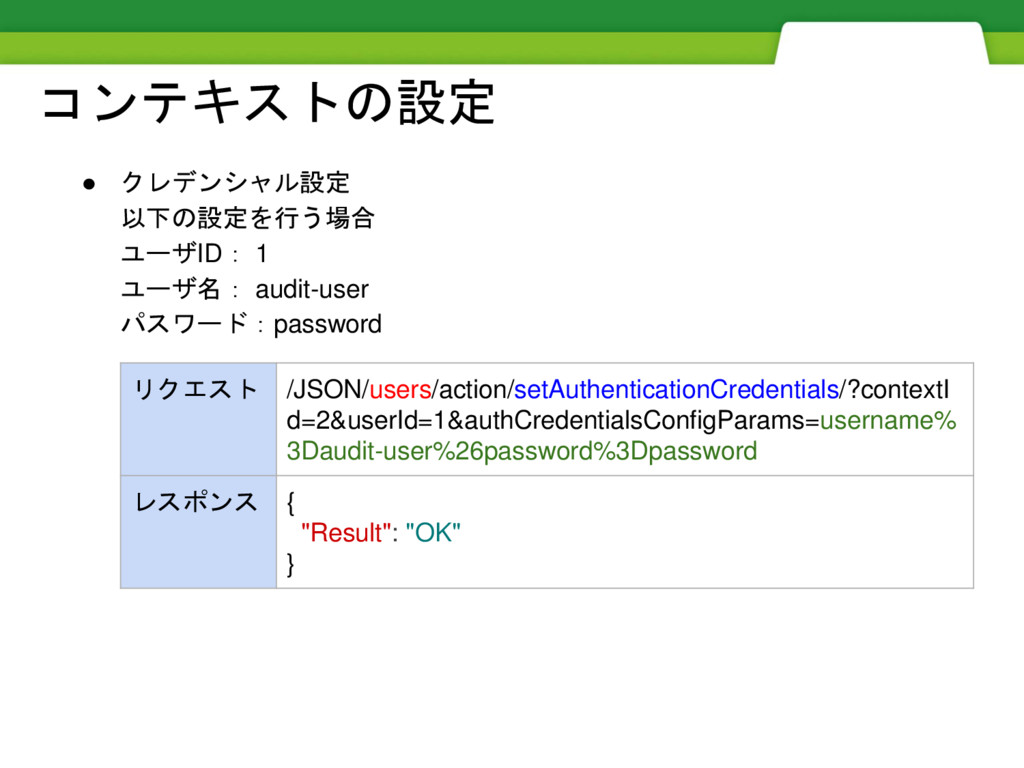
コンテキストの設定 • クレデンシャル設定 以下の設定を行う場合 ユーザID: 1 ユーザ名: audit-user パスワード:password リクエスト
/JSON/users/action/setAuthenticationCredentials/?contextI d=2&userId=1&authCredentialsConfigParams=username% 3Daudit-user%26password%3Dpassword レスポンス { "Result": "OK" }
Spider(オートクロール)実行
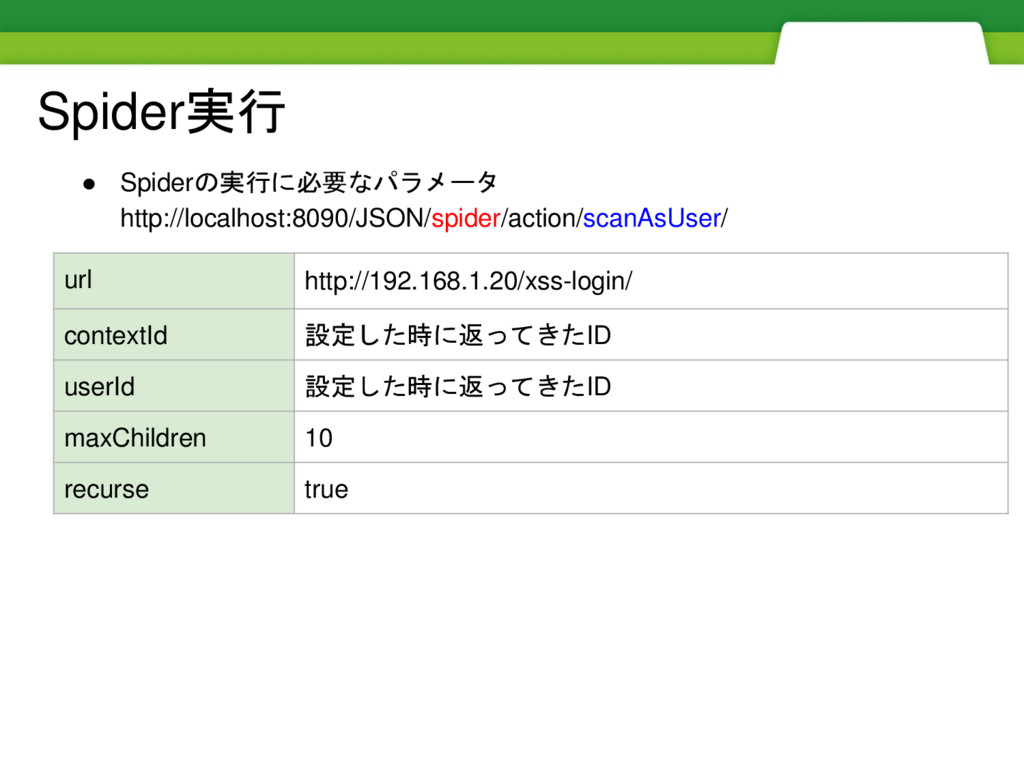
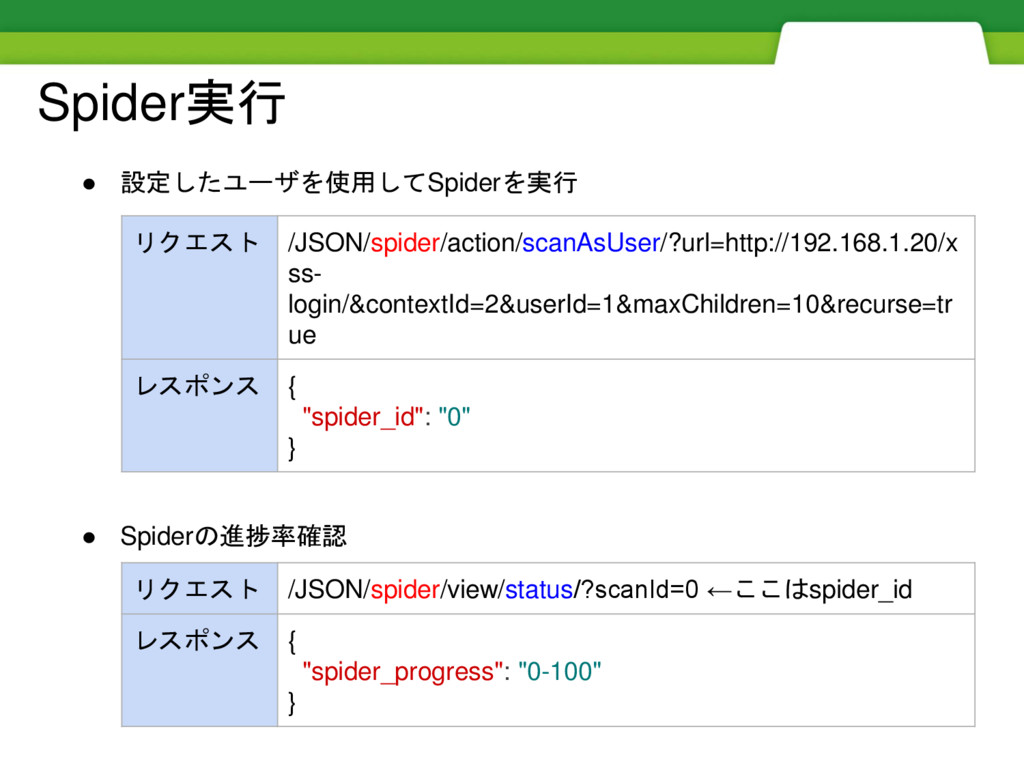
Spider実行 • Spiderの実行に必要なパラメータ http://localhost:8090/JSON/spider/action/scanAsUser/ url http://192.168.1.20/xss-login/ contextId 設定した時に返ってきたID userId 設定した時に返ってきたID
maxChildren 10 recurse true
Spider実行 • 設定したユーザを使用してSpiderを実行 • Spiderの進捗率確認 リクエスト /JSON/spider/action/scanAsUser/?url=http://192.168.1.20/x ss- login/&contextId=2&userId=1&maxChildren=10&recurse=tr ue
レスポンス { "spider_id": "0" } リクエスト /JSON/spider/view/status/?scanId=0 ←ここはspider_id レスポンス { "spider_progress": "0-100" }
スキャンの実行
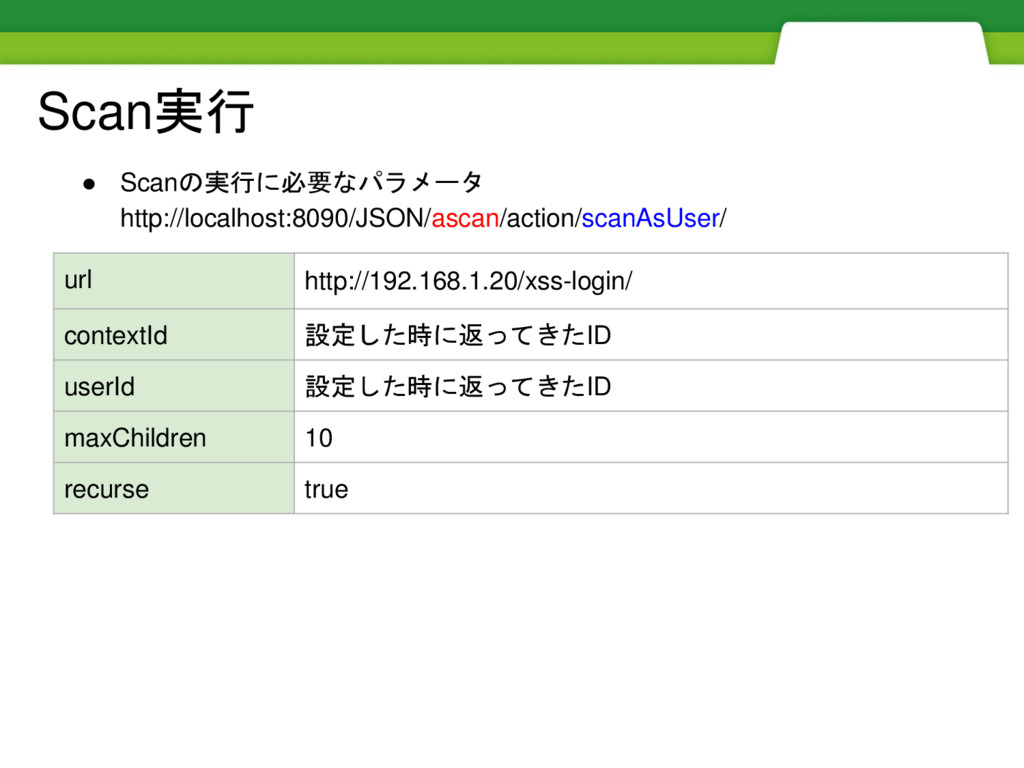
Scan実行 • Scanの実行に必要なパラメータ http://localhost:8090/JSON/ascan/action/scanAsUser/ url http://192.168.1.20/xss-login/ contextId 設定した時に返ってきたID userId 設定した時に返ってきたID
maxChildren 10 recurse true
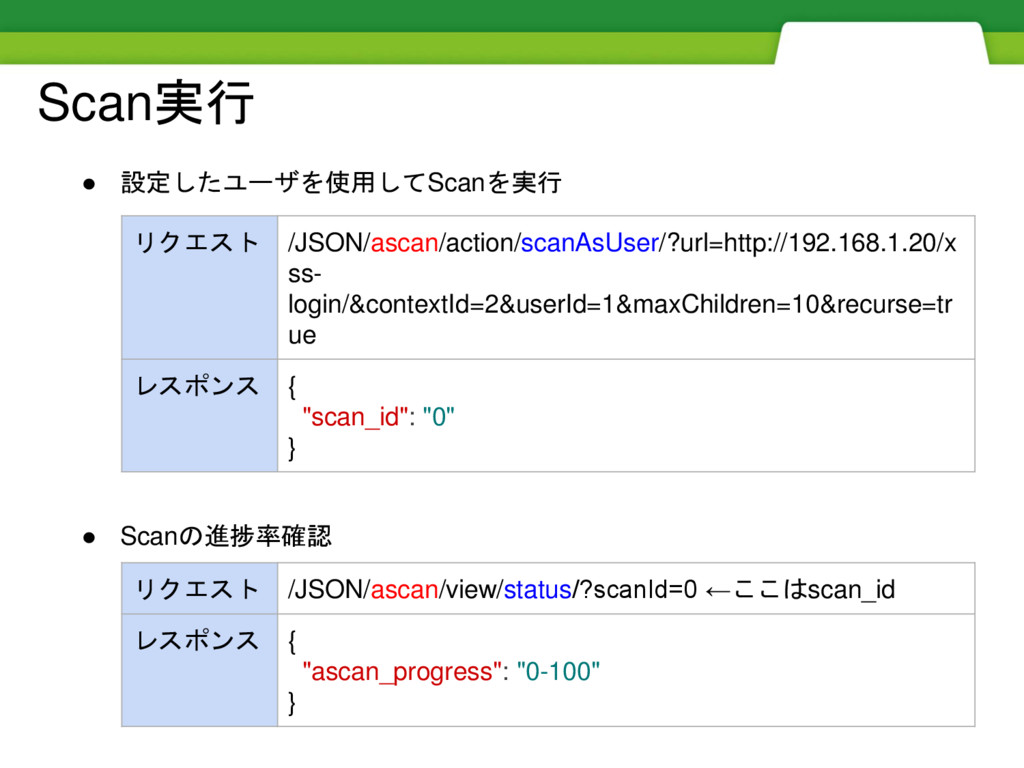
Scan実行 • 設定したユーザを使用してScanを実行 • Scanの進捗率確認 リクエスト /JSON/ascan/action/scanAsUser/?url=http://192.168.1.20/x ss- login/&contextId=2&userId=1&maxChildren=10&recurse=tr ue
レスポンス { "scan_id": "0" } リクエスト /JSON/ascan/view/status/?scanId=0 ←ここはscan_id レスポンス { "ascan_progress": "0-100" }
結果の取得
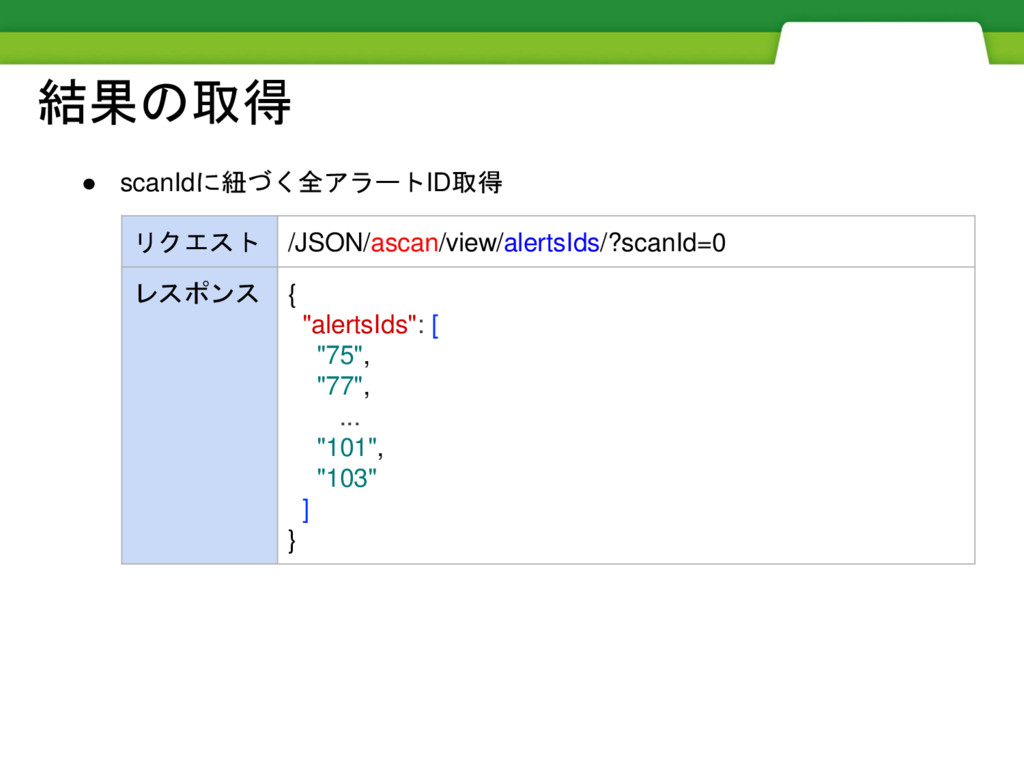
結果の取得 • scanIdに紐づく全アラートID取得 リクエスト /JSON/ascan/view/alertsIds/?scanId=0 レスポンス { "alertsIds": [ "75",
"77", ... "101", "103" ] }
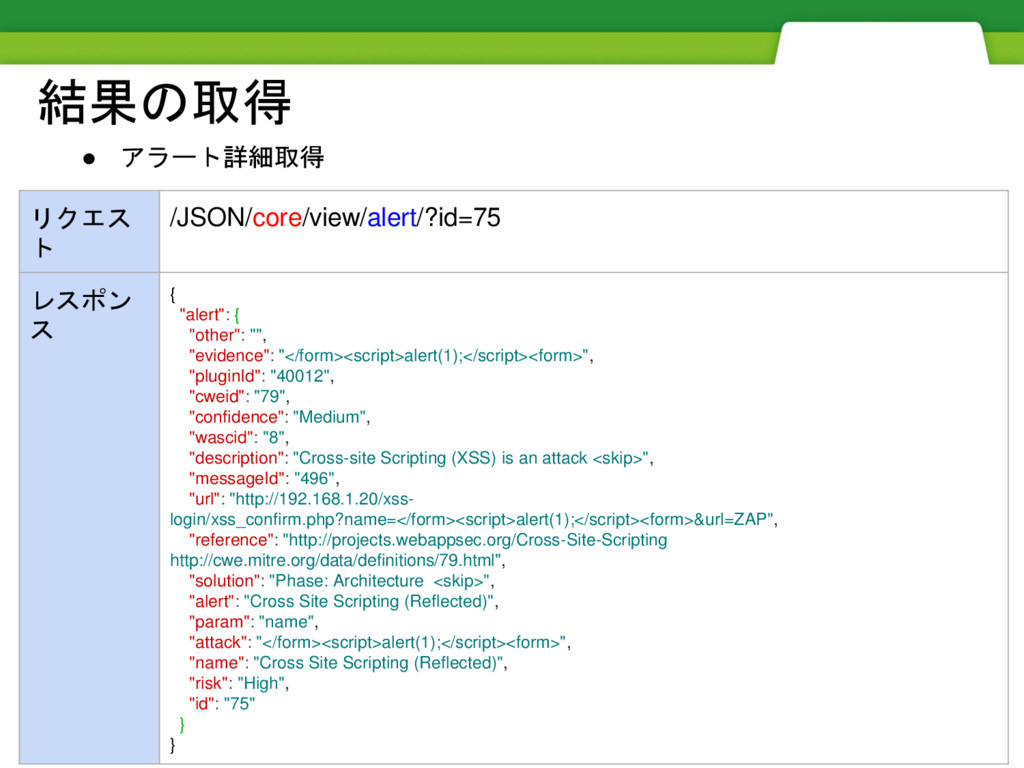
結果の取得 • アラート詳細取得 リクエス ト /JSON/core/view/alert/?id=75 レスポン ス { "alert":
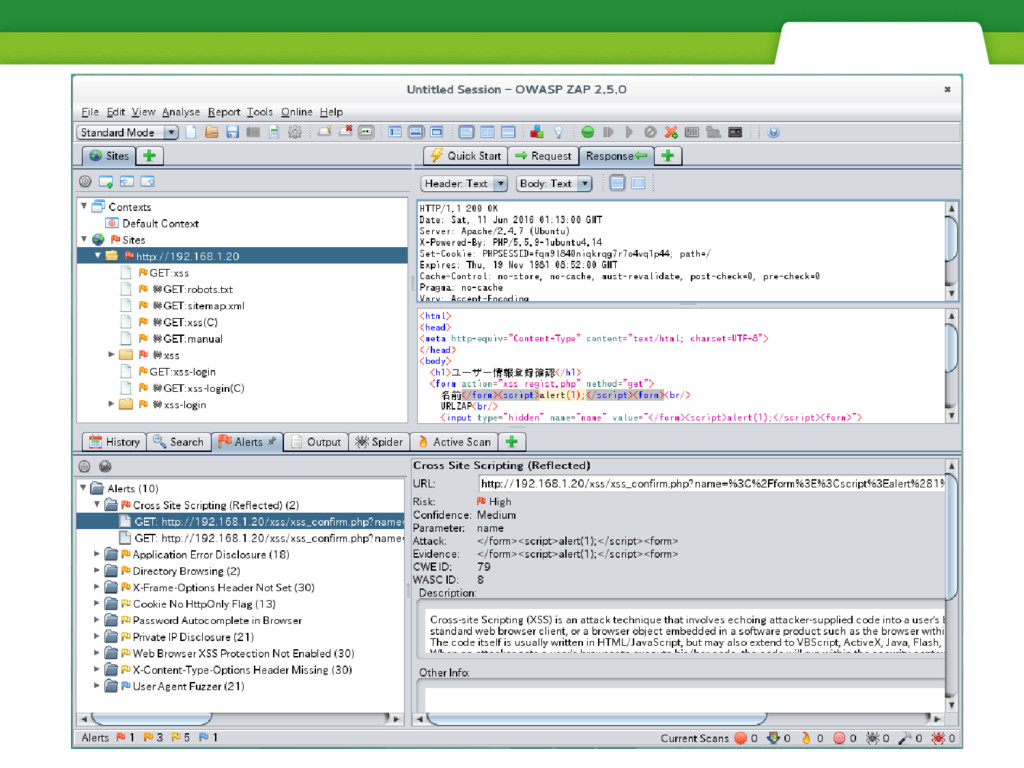
{ "other": "", "evidence": "</form><script>alert(1);</script><form>", "pluginId": "40012", "cweid": "79", "confidence": "Medium", "wascid": "8", "description": "Cross-site Scripting (XSS) is an attack <skip>", "messageId": "496", "url": "http://192.168.1.20/xss- login/xss_confirm.php?name=</form><script>alert(1);</script><form>&url=ZAP", "reference": "http://projects.webappsec.org/Cross-Site-Scripting http://cwe.mitre.org/data/definitions/79.html", "solution": "Phase: Architecture <skip>", "alert": "Cross Site Scripting (Reflected)", "param": "name", "attack": "</form><script>alert(1);</script><form>", "name": "Cross Site Scripting (Reflected)", "risk": "High", "id": "75" } }
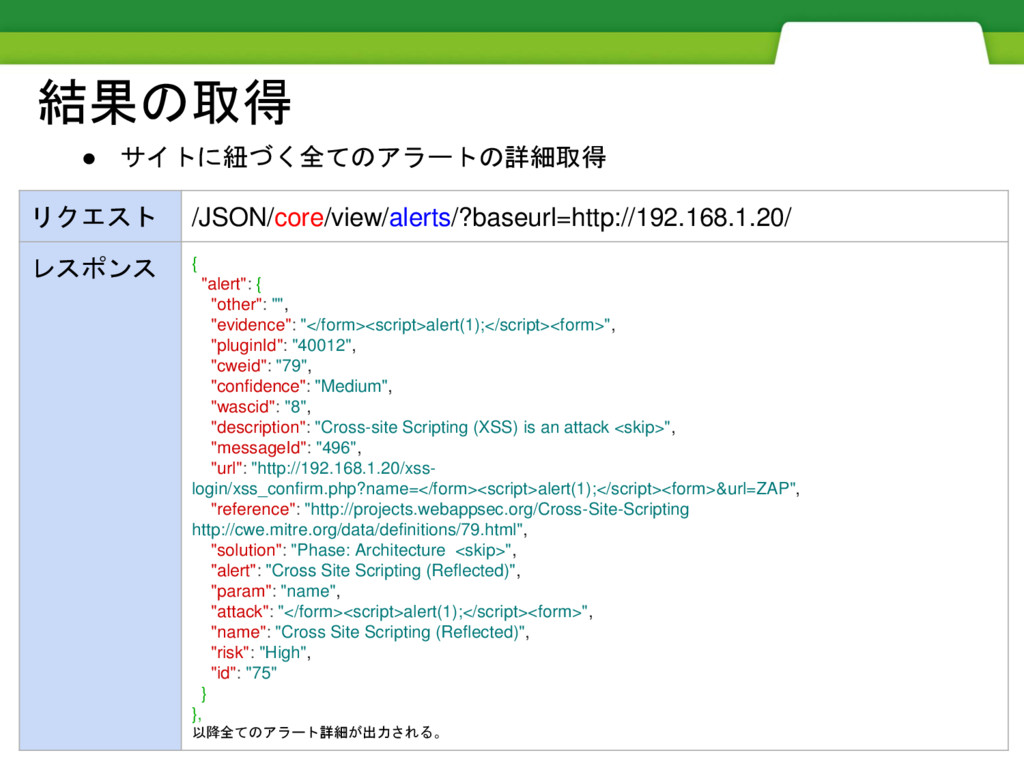
結果の取得 • サイトに紐づく全てのアラートの詳細取得 リクエスト /JSON/core/view/alerts/?baseurl=http://192.168.1.20/ レスポンス { "alert": { "other":
"", "evidence": "</form><script>alert(1);</script><form>", "pluginId": "40012", "cweid": "79", "confidence": "Medium", "wascid": "8", "description": "Cross-site Scripting (XSS) is an attack <skip>", "messageId": "496", "url": "http://192.168.1.20/xss- login/xss_confirm.php?name=</form><script>alert(1);</script><form>&url=ZAP", "reference": "http://projects.webappsec.org/Cross-Site-Scripting http://cwe.mitre.org/data/definitions/79.html", "solution": "Phase: Architecture <skip>", "alert": "Cross Site Scripting (Reflected)", "param": "name", "attack": "</form><script>alert(1);</script><form>", "name": "Cross Site Scripting (Reflected)", "risk": "High", "id": "75" } }, 以降全てのアラート詳細が出力される。
スキャンを実行するスクリプトを用意する
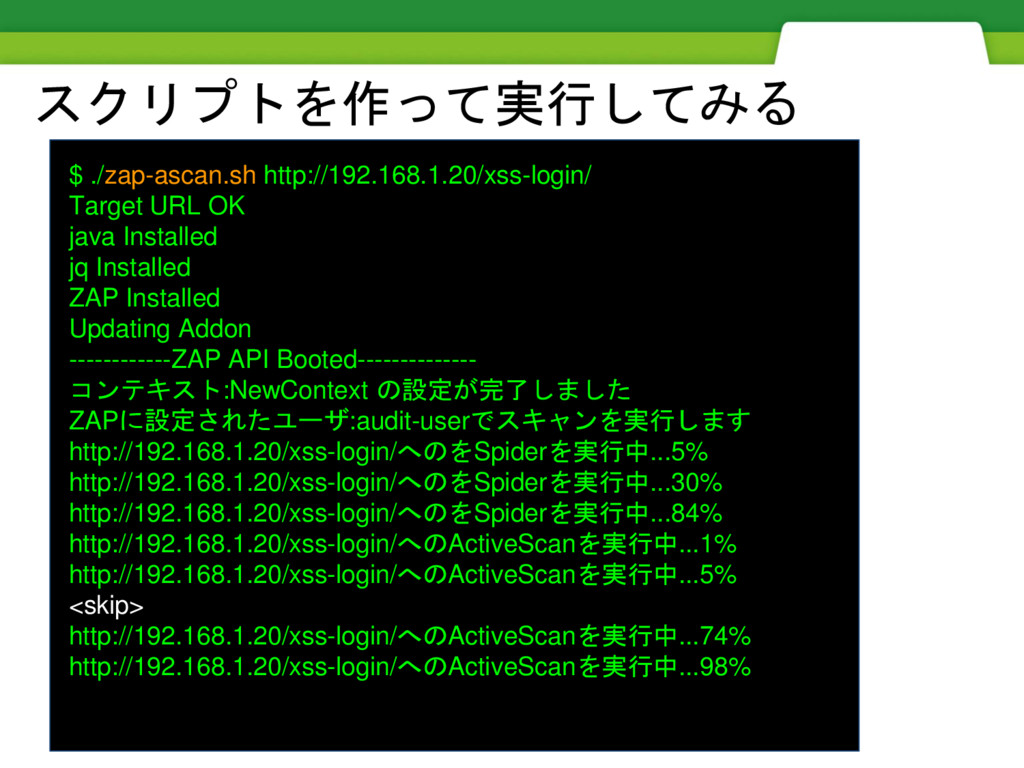
スクリプトを作って実行してみる $ ./zap-ascan.sh http://192.168.1.20/xss-login/ Target URL OK java Installed jq
Installed ZAP Installed Updating Addon ------------ZAP API Booted-------------- コンテキスト:NewContext の設定が完了しました ZAPに設定されたユーザ:audit-userでスキャンを実行します http://192.168.1.20/xss-login/へのをSpiderを実行中...5% http://192.168.1.20/xss-login/へのをSpiderを実行中...30% http://192.168.1.20/xss-login/へのをSpiderを実行中...84% http://192.168.1.20/xss-login/へのActiveScanを実行中...1% http://192.168.1.20/xss-login/へのActiveScanを実行中...5% <skip> http://192.168.1.20/xss-login/へのActiveScanを実行中...74% http://192.168.1.20/xss-login/へのActiveScanを実行中...98%
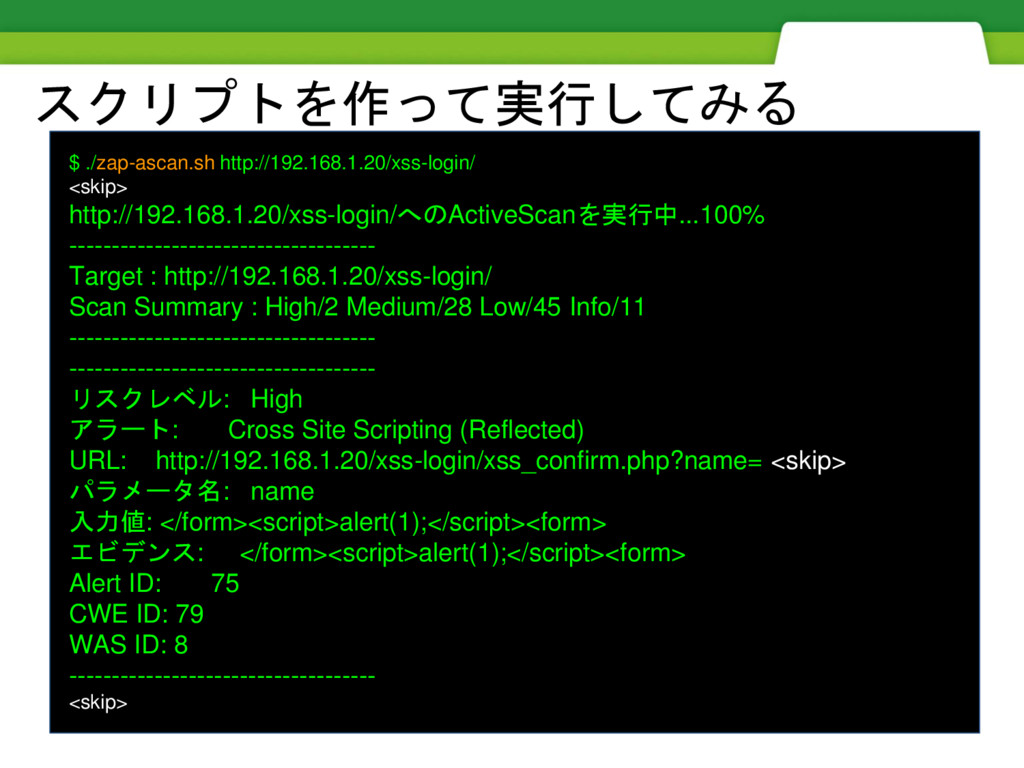
スクリプトを作って実行してみる $ ./zap-ascan.sh http://192.168.1.20/xss-login/ <skip> http://192.168.1.20/xss-login/へのActiveScanを実行中...100% ------------------------------------ Target : http://192.168.1.20/xss-login/
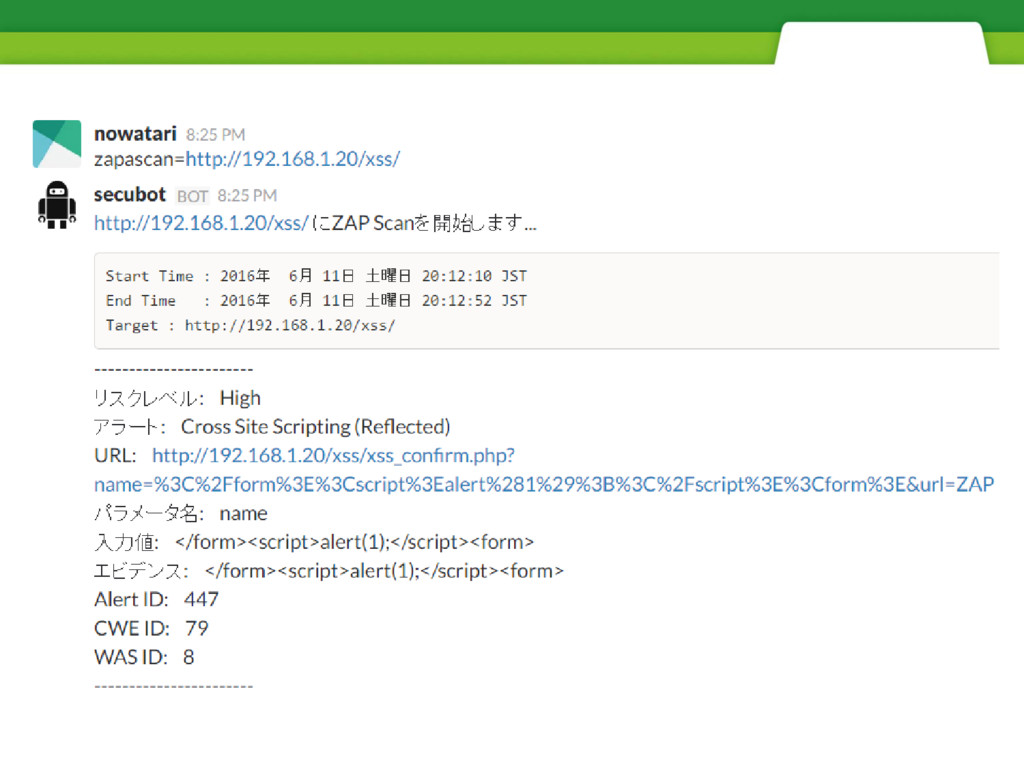
Scan Summary : High/2 Medium/28 Low/45 Info/11 ------------------------------------ ------------------------------------ リスクレベル: High アラート: Cross Site Scripting (Reflected) URL: http://192.168.1.20/xss-login/xss_confirm.php?name= <skip> パラメータ名: name 入力値: </form><script>alert(1);</script><form> エビデンス: </form><script>alert(1);</script><form> Alert ID: 75 CWE ID: 79 WAS ID: 8 ------------------------------------ <skip>
hubotを利用したslack経由での実行
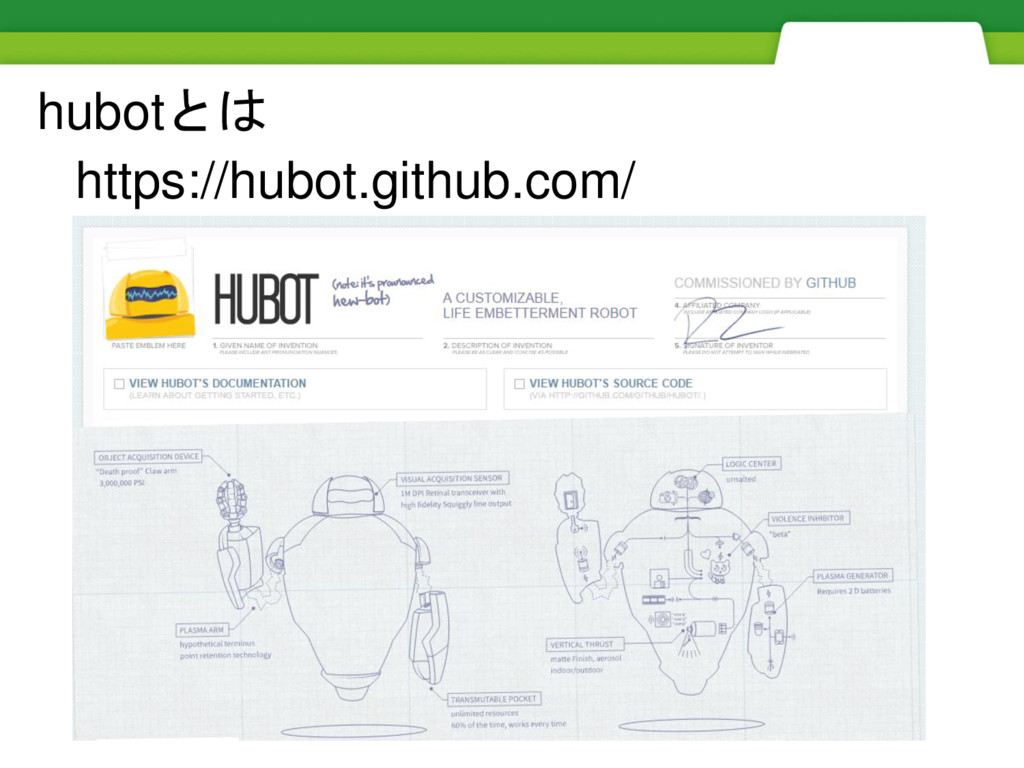
hubotとは https://hubot.github.com/
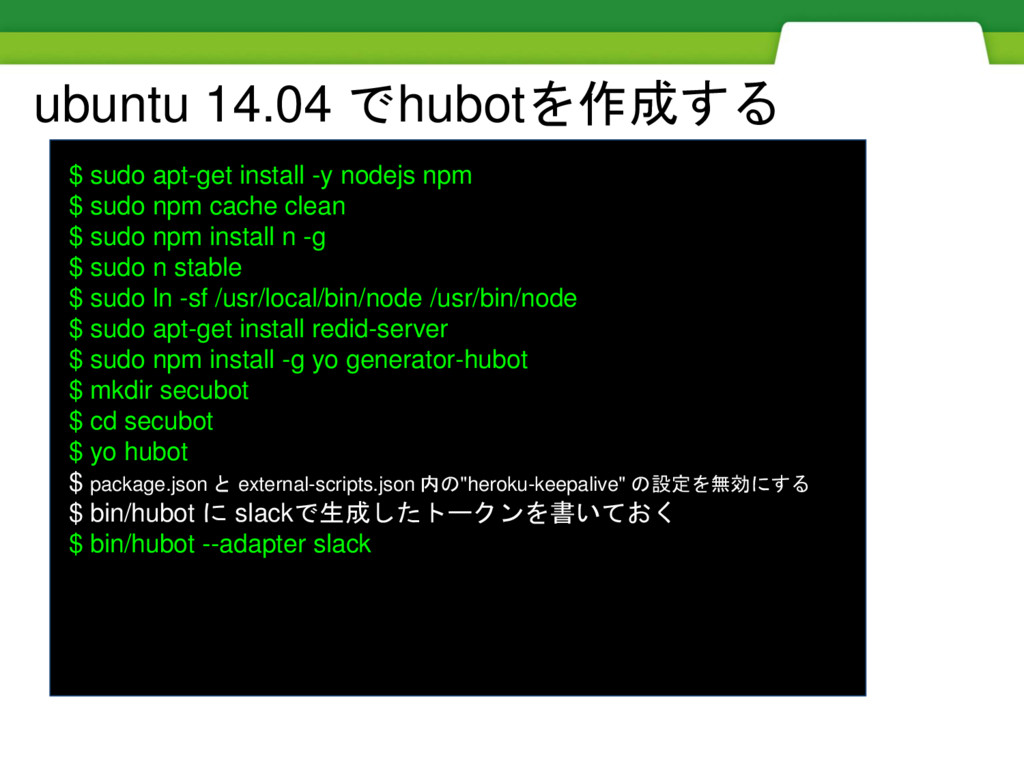
$ sudo apt-get install -y nodejs npm $ sudo npm
cache clean $ sudo npm install n -g $ sudo n stable $ sudo ln -sf /usr/local/bin/node /usr/bin/node $ sudo apt-get install redid-server $ sudo npm install -g yo generator-hubot $ mkdir secubot $ cd secubot $ yo hubot $ package.json と external-scripts.json 内の"heroku-keepalive" の設定を無効にする $ bin/hubot に slackで生成したトークンを書いておく $ bin/hubot --adapter slack ubuntu 14.04 でhubotを作成する
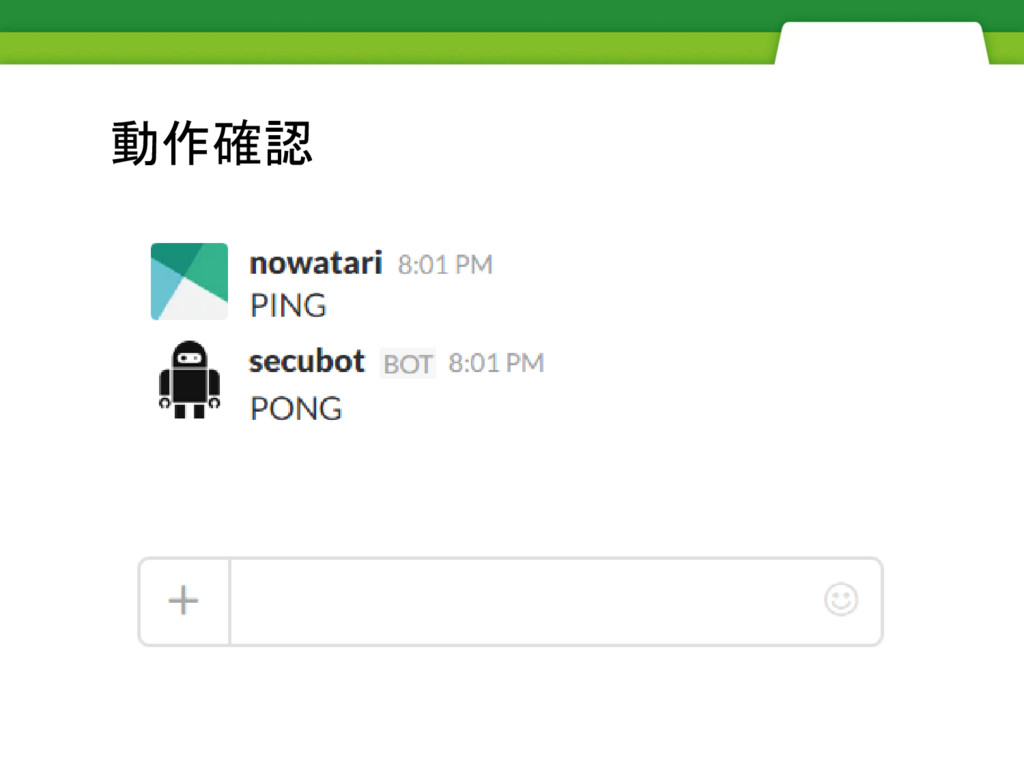
動作確認
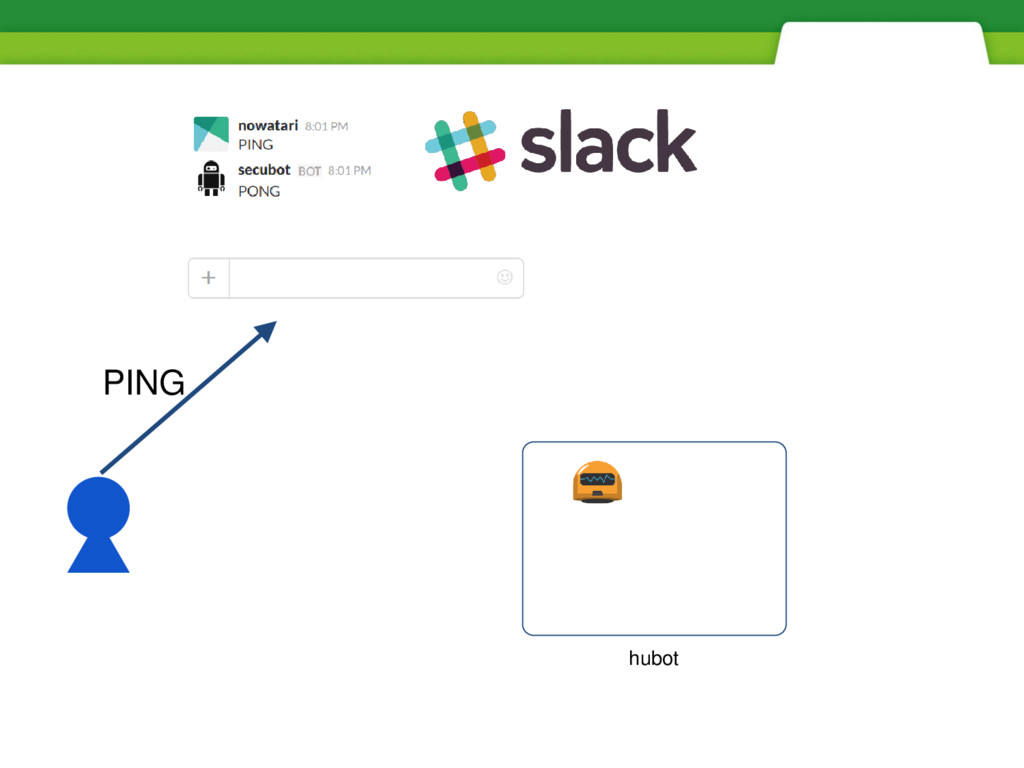
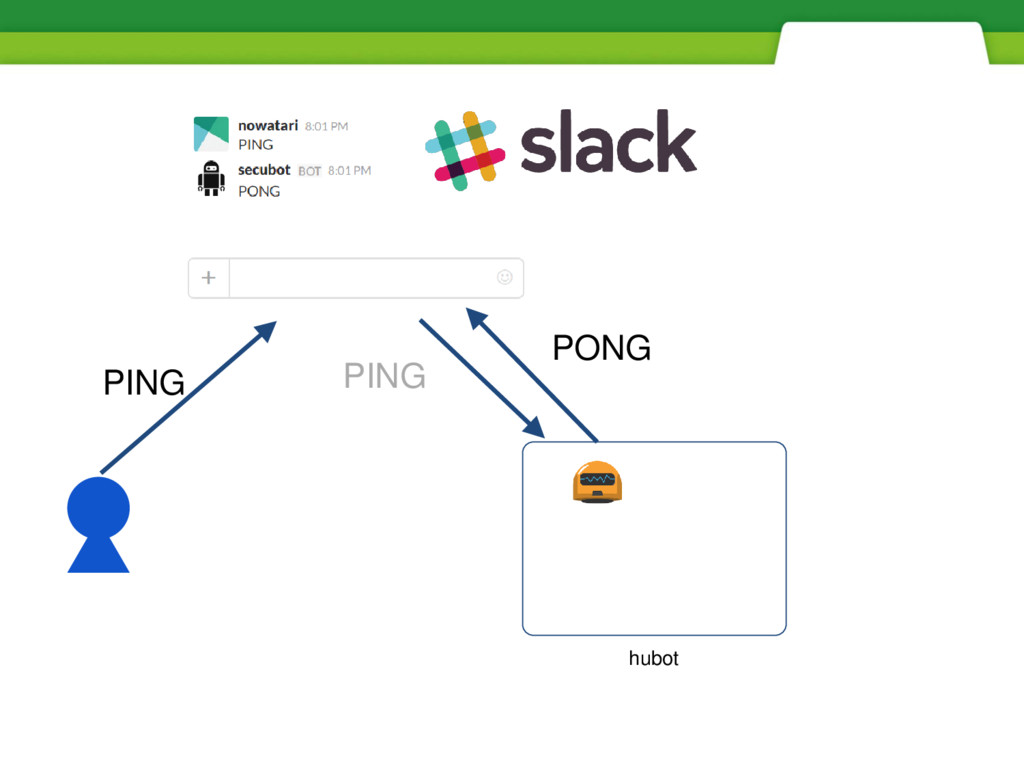
hubot PING
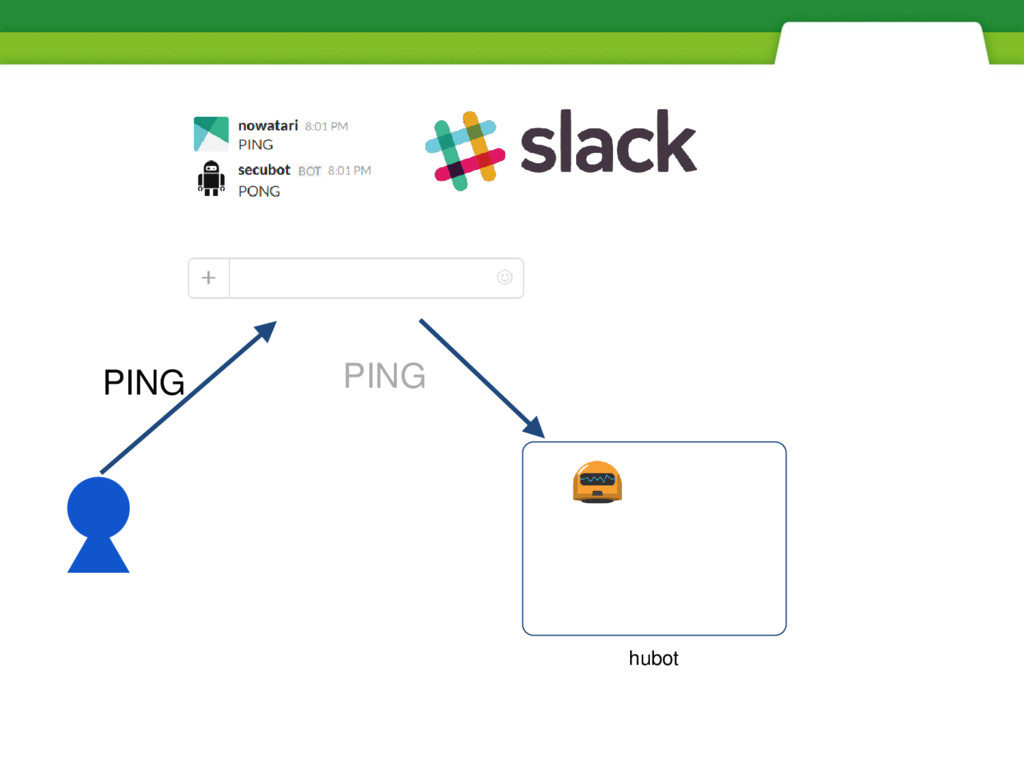
hubot PING PING
hubot PING PONG PING
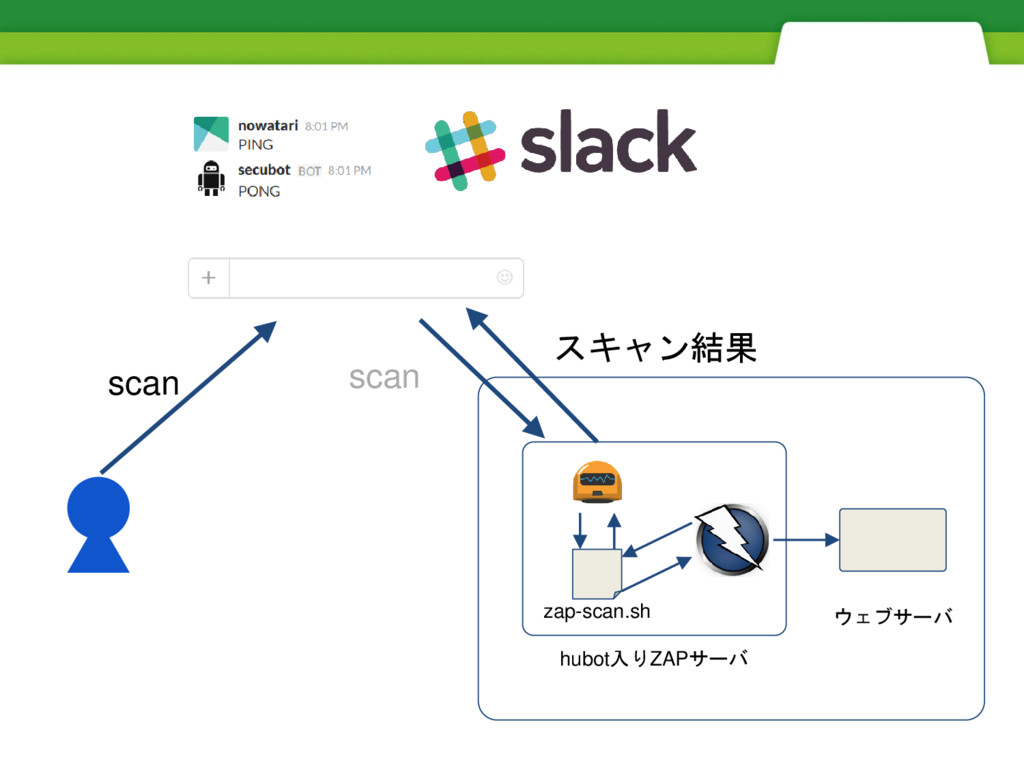
先ほどのスクリプトを実 行するようにする
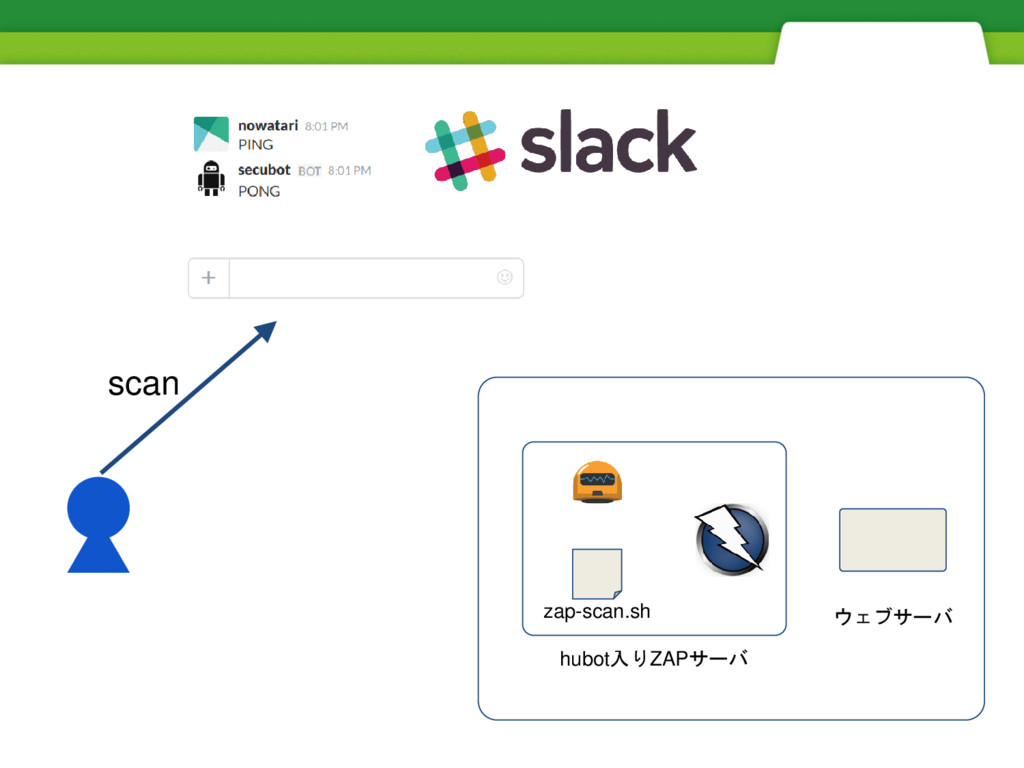
hubot入りZAPサーバ ウェブサーバ scan zap-scan.sh
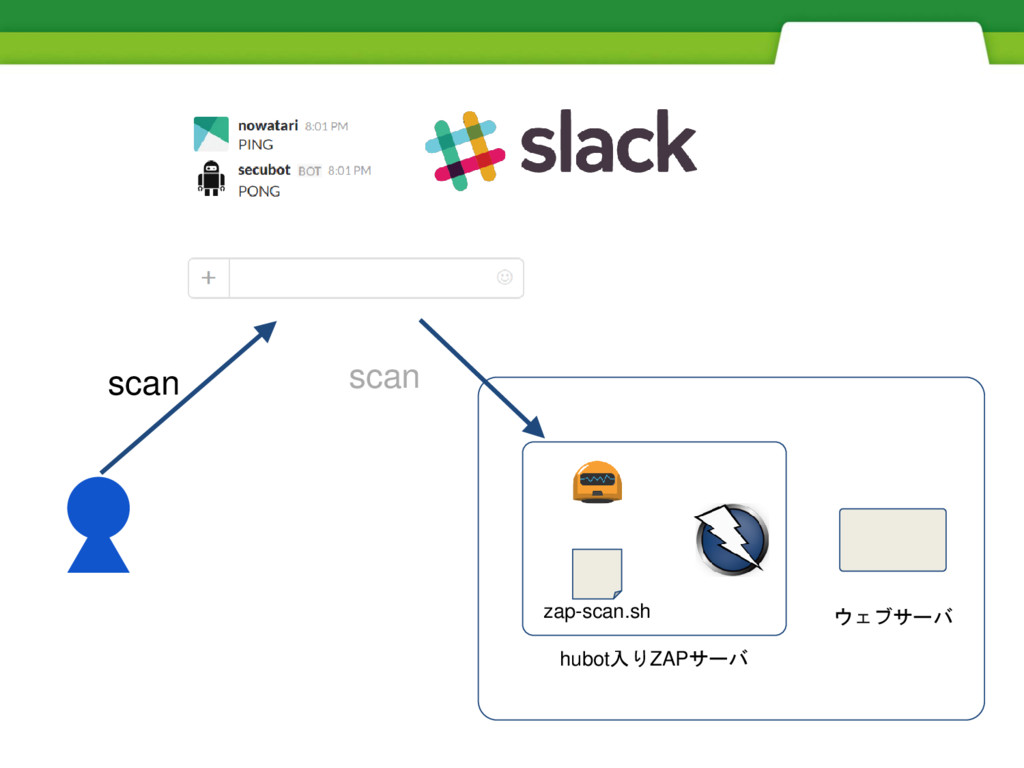
hubot入りZAPサーバ ウェブサーバ scan scan zap-scan.sh
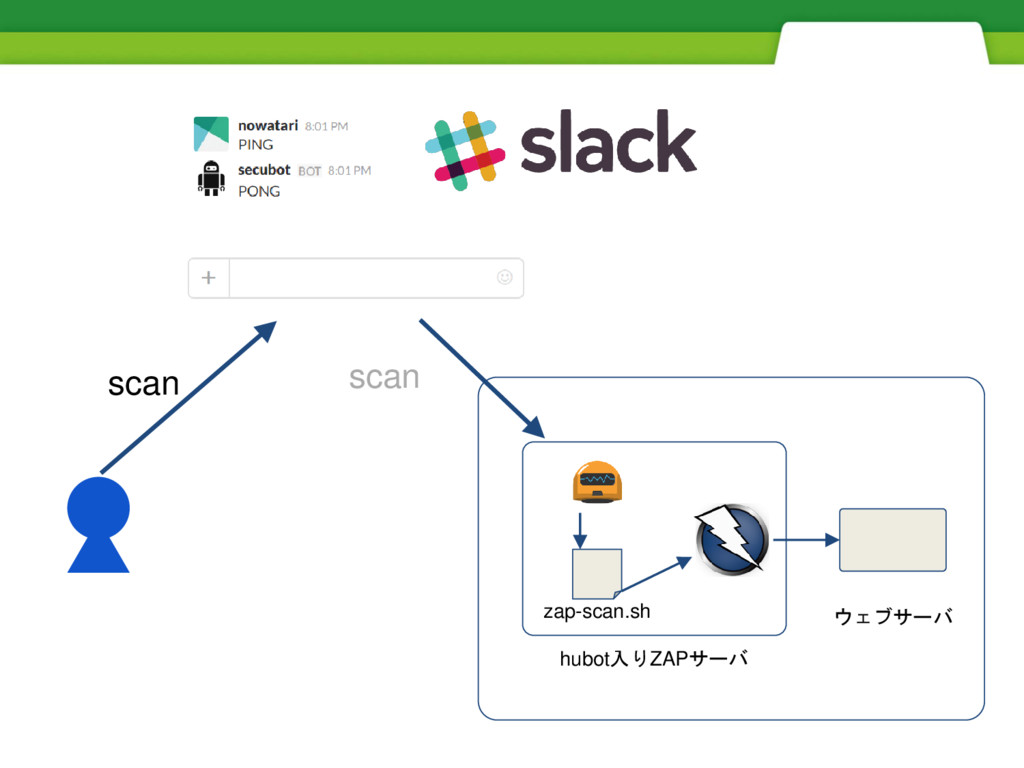
hubot入りZAPサーバ ウェブサーバ scan scan zap-scan.sh
hubot入りZAPサーバ ウェブサーバ scan スキャン結果 scan zap-scan.sh
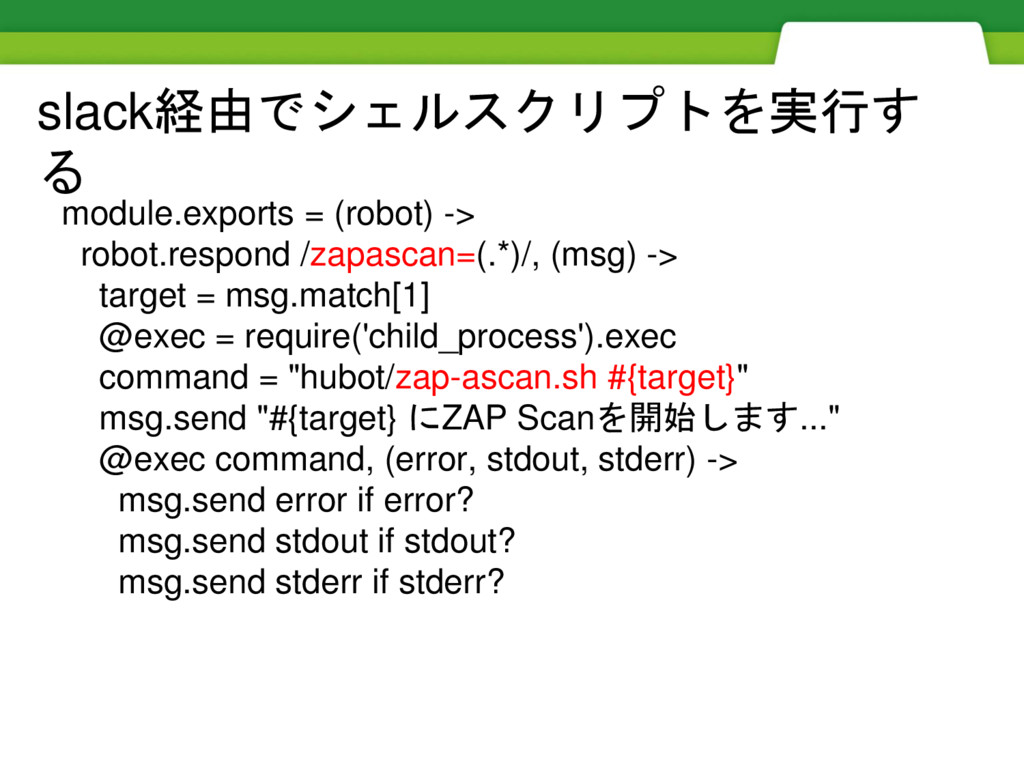
module.exports = (robot) -> robot.respond /zapascan=(.*)/, (msg) -> target =
msg.match[1] @exec = require('child_process').exec command = "hubot/zap-ascan.sh #{target}" msg.send "#{target} にZAP Scanを開始します..." @exec command, (error, stdout, stderr) -> msg.send error if error? msg.send stdout if stdout? msg.send stderr if stderr? slack経由でシェルスクリプトを実行す る
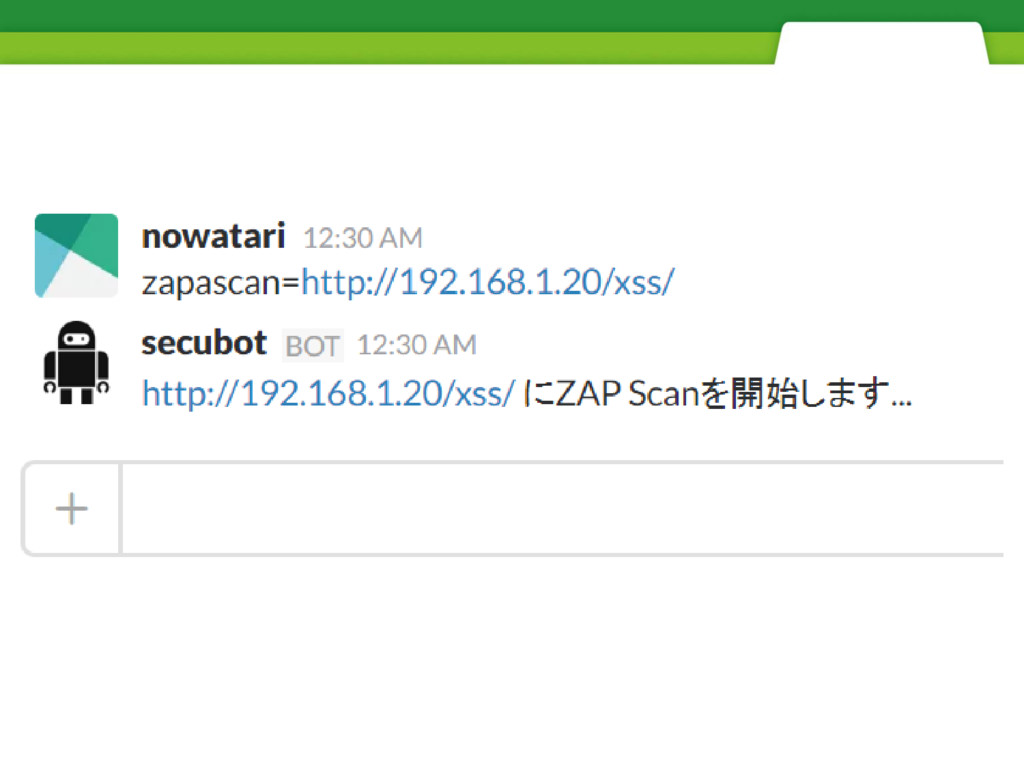
脆弱性スキャンボットを試す
None
None
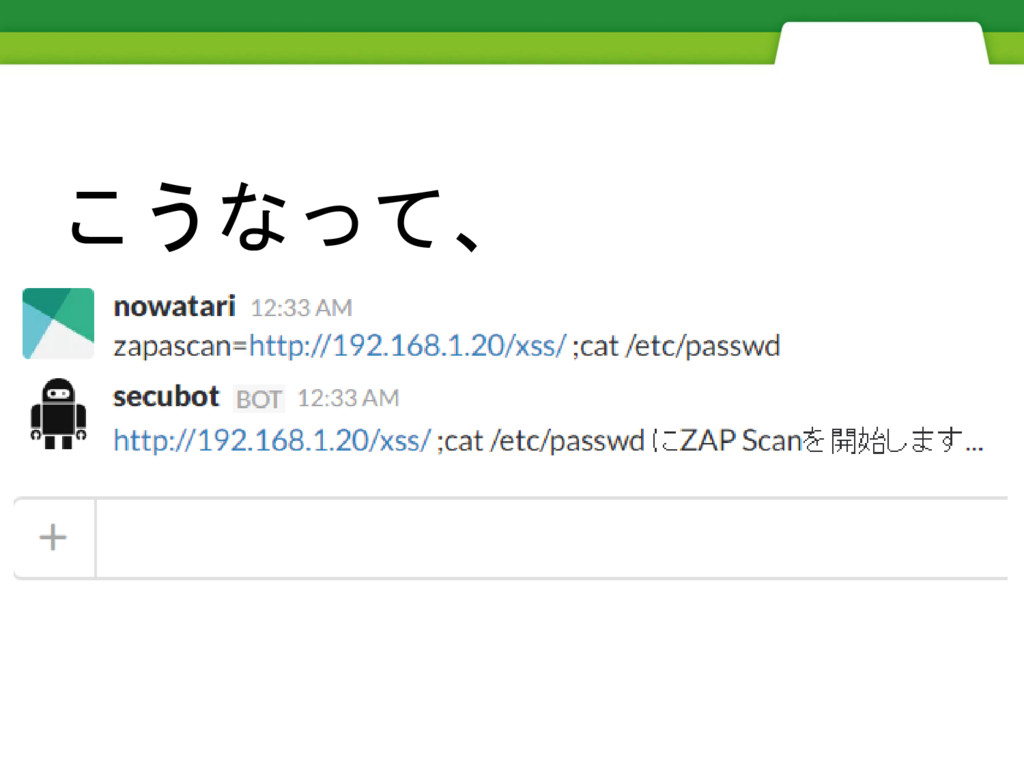
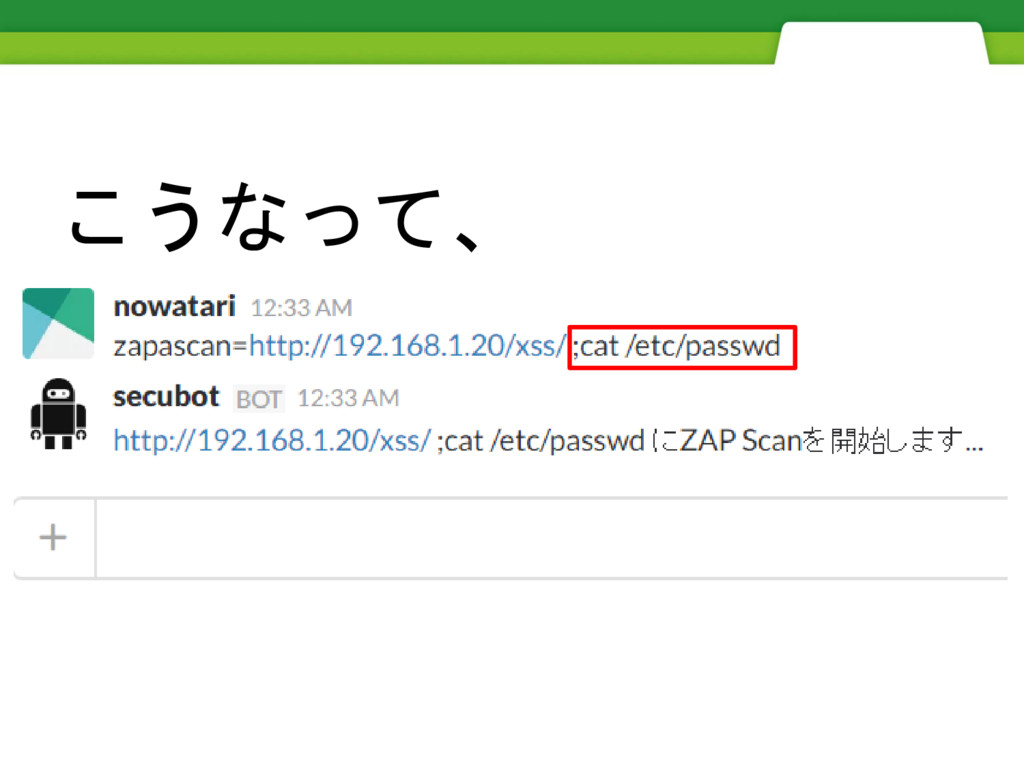
ただ、こういうことをすると
こうなって、
こうなって、
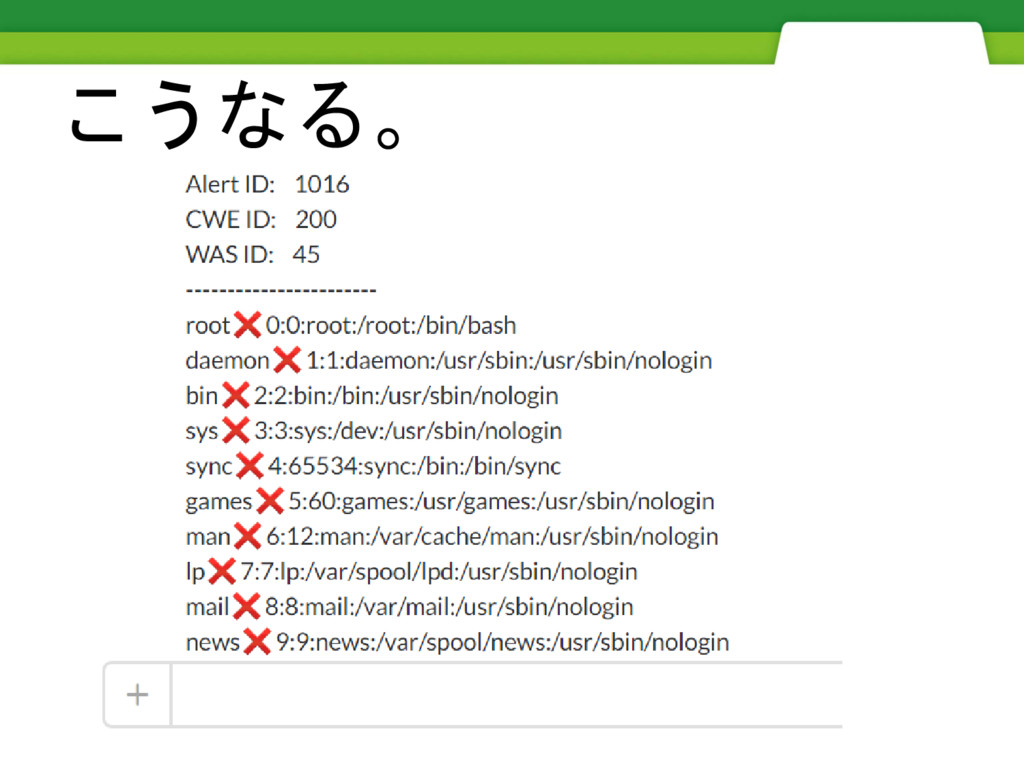
こうなる。
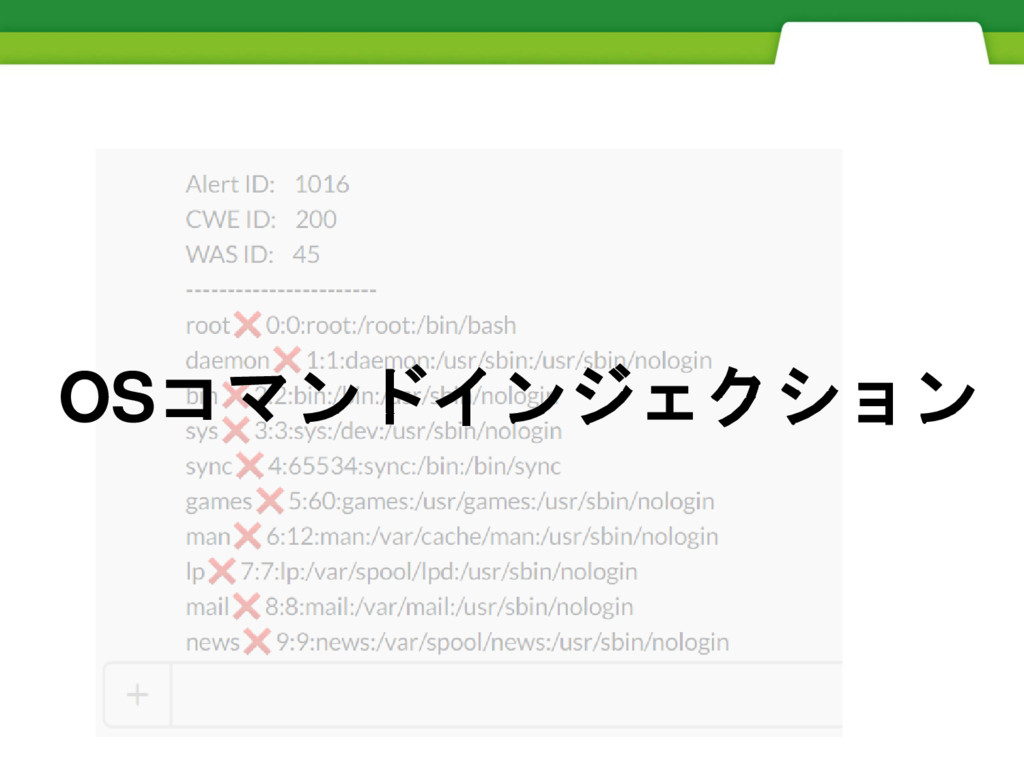
OSコマンドインジェクション
slack-hubotからの入力を OSのコマンドに渡すのは やめましょう。
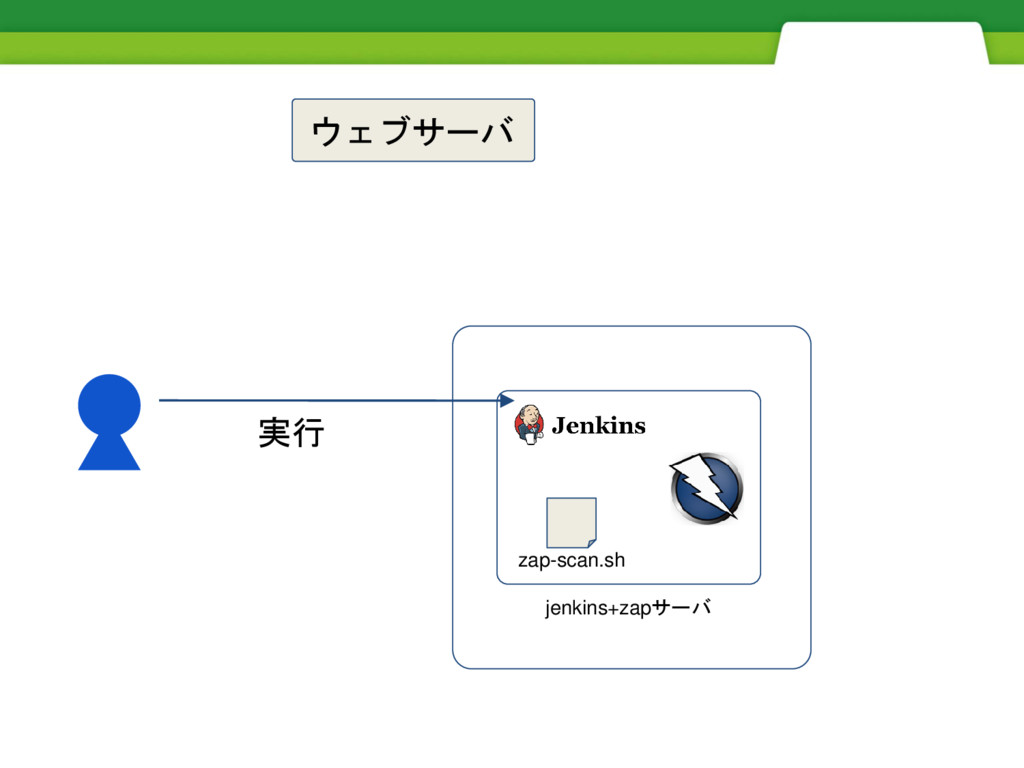
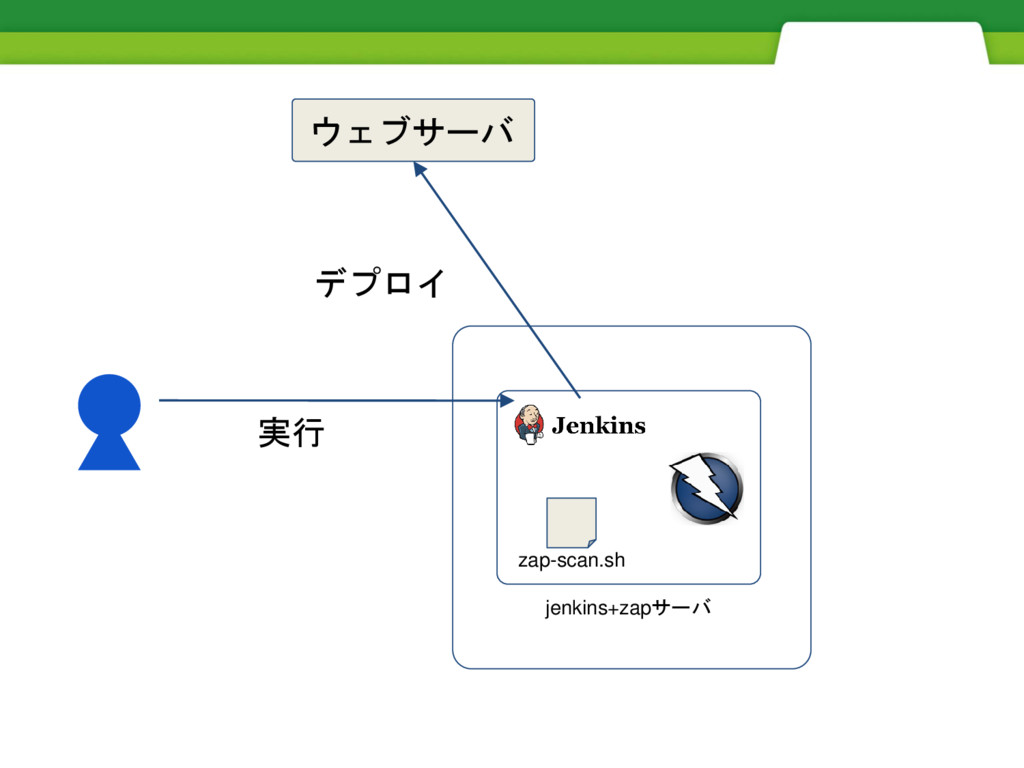
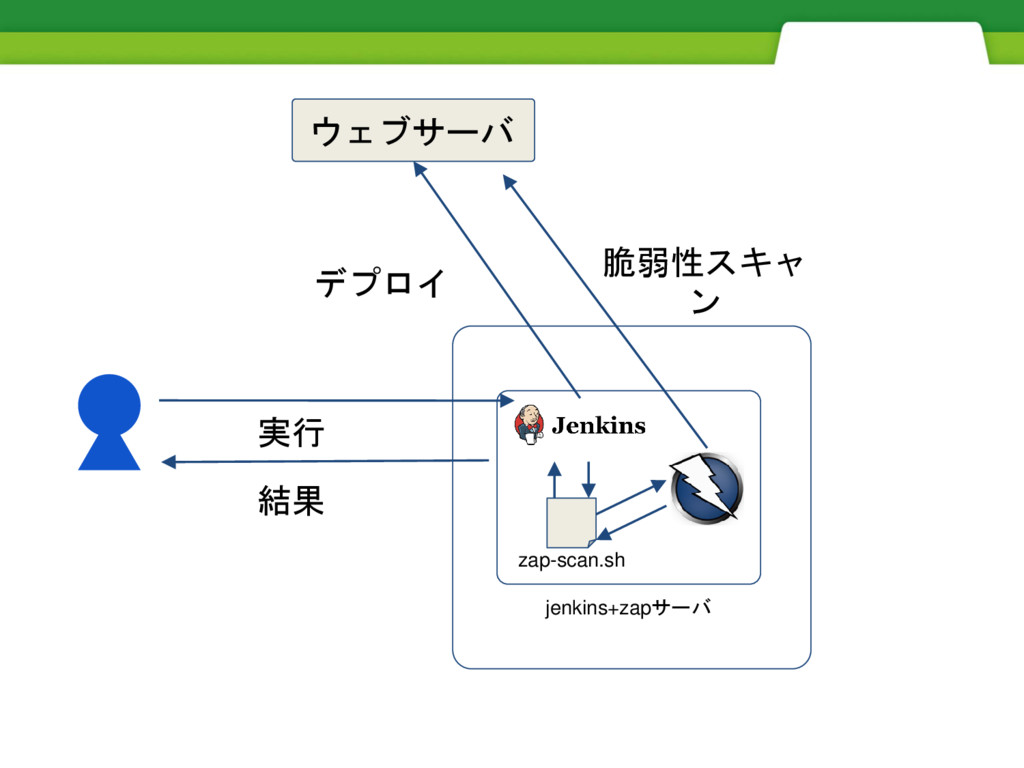
正しく使えばとても便利です。 例えばCI、
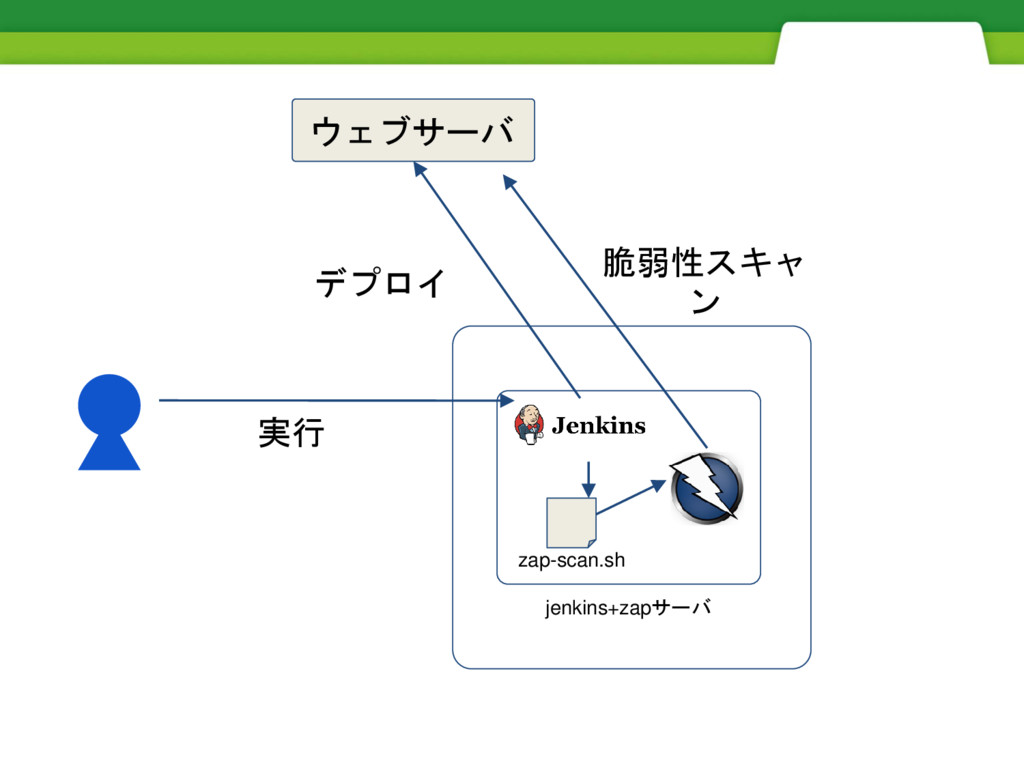
jenkins+zapサーバ zap-scan.sh 実行 ウェブサーバ
jenkins+zapサーバ zap-scan.sh 実行 デプロイ ウェブサーバ
jenkins+zapサーバ zap-scan.sh 実行 デプロイ 脆弱性スキャ ン ウェブサーバ
jenkins+zapサーバ zap-scan.sh 実行 デプロイ 脆弱性スキャ ン ウェブサーバ 結果
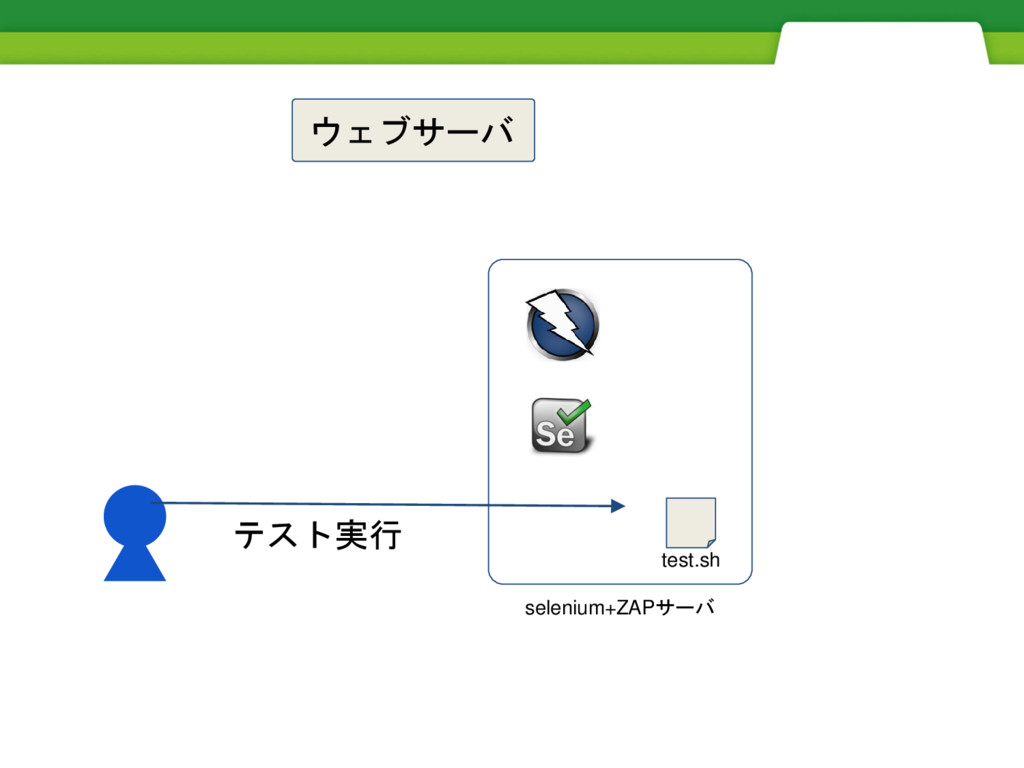
例えばテスト、
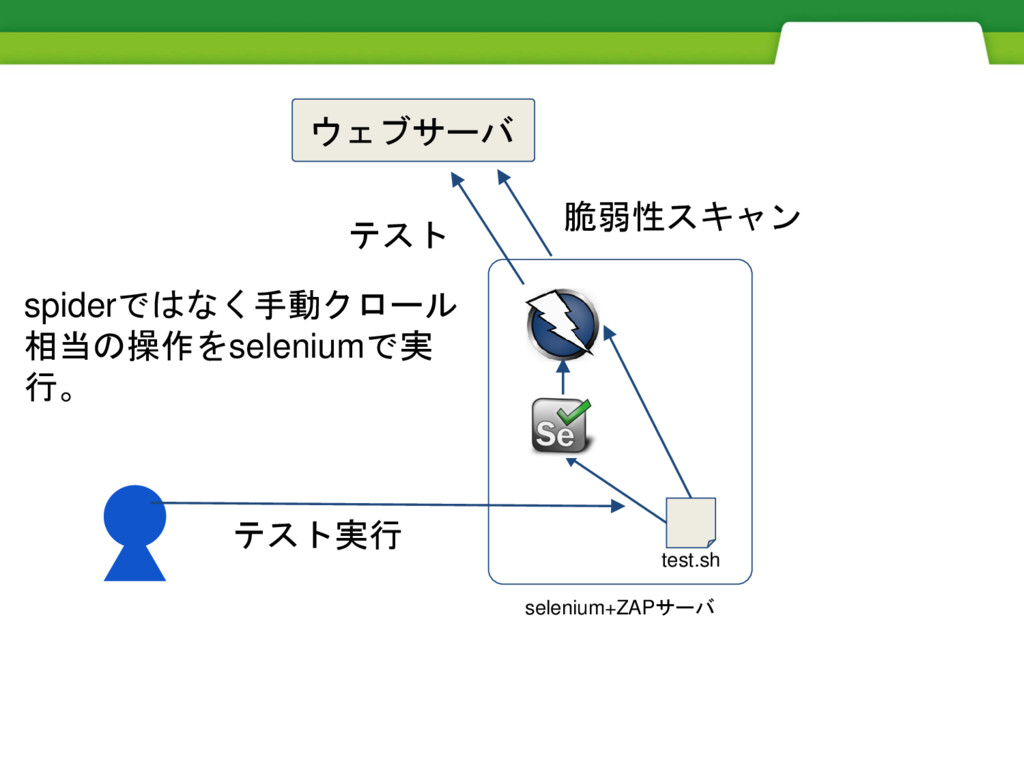
selenium+ZAPサーバ test.sh テスト実行 ウェブサーバ
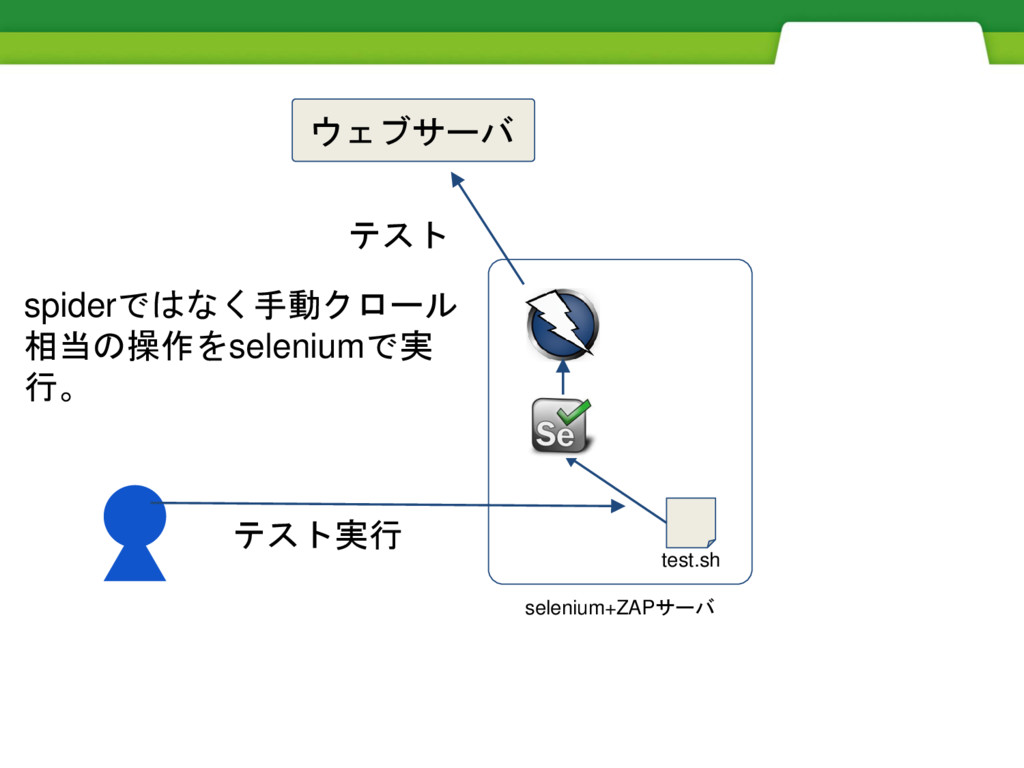
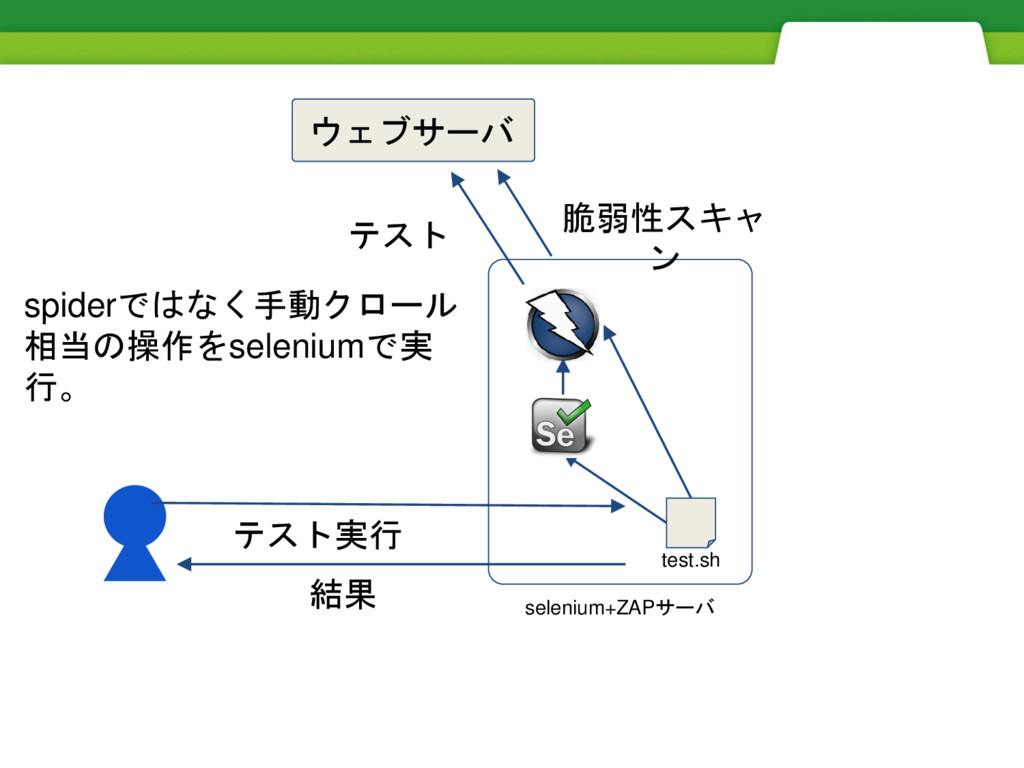
selenium+ZAPサーバ test.sh テスト実行 テスト ウェブサーバ spiderではなく手動クロール 相当の操作をseleniumで実 行。
selenium+ZAPサーバ test.sh テスト実行 テスト 脆弱性スキャン ウェブサーバ spiderではなく手動クロール 相当の操作をseleniumで実 行。
selenium+ZAPサーバ test.sh テスト実行 テスト 脆弱性スキャ ン ウェブサーバ spiderではなく手動クロール 相当の操作をseleniumで実 行。
結果
まとめ
1.ZAP APIはシンプル
1.ZAP APIはシンプル 2.コンテキストの設定はデー タの整形が面倒
1.ZAP APIはシンプル 2.コンテキストの設定はデー タの整形が面倒 3.hubotのご利用は計画的に
OWASP ZAP APIを使って 脆弱性診断を自動化しよう


 owaspjapan
 lemiorhan
 marktimemedia
 samtorres
 mlcsv
mlcsv
 danielanewman
 uxyall
 jonyablonski
 irinanazarova
 aki_iinuma
 yeseniaperezcruz
 ipullrank
 hannesfritz

![url: https://github.com/zaproxy/zaproxy/wiki/ApiDetailsUrlFormat リクエストフォーマット http://zap/<format>/<component>/<operation>/<operation name>[/?<parameters>] 例:http://192.168.1.20にスパイダーを実行する場合 http://localhost:8090/JSON/spider/action/scan/?url=https://192.168.1.20/ API keyを有効にしている場合 http://localhost:8090/JSON/spider/action/scan/?url=https://192.168.1.20/&apikey={key}](https://files.speakerdeck.com/presentations/834001959d224b6fbf795690a641bb5a/slide_14.jpg)