Upgrade to Pro — share decks privately, control downloads, hide ads and more …

複数のSONiCディストリビューションを触りながら比較してみた

 複数のSONiCディストリビューションを触りながら比較してみた

複数のSONiCディストリビューションを触りながら比較してみた

ネットワンシステムズ株式会社
平河内 竜樹

SONiC Workshop Japan 2026
https://sonic.connpass.com/event/385386/

Avatar for SONiC Users Group Japan

SONiC Users Group Japan

June 19, 2026

More Decks by SONiC Users Group Japan

Other Decks in Technology

Transcript

  1. 目次 自己紹介 1. はじめに 2. やってみた 3. 詳細情報の抜粋 4. おわりに

    Appendix さまざまなお客様のニーズや環境 さまざまな製品の実装 ネットワンシステムズ株式会社 平河内 竜樹 (ひらこうち りゅうき) 2
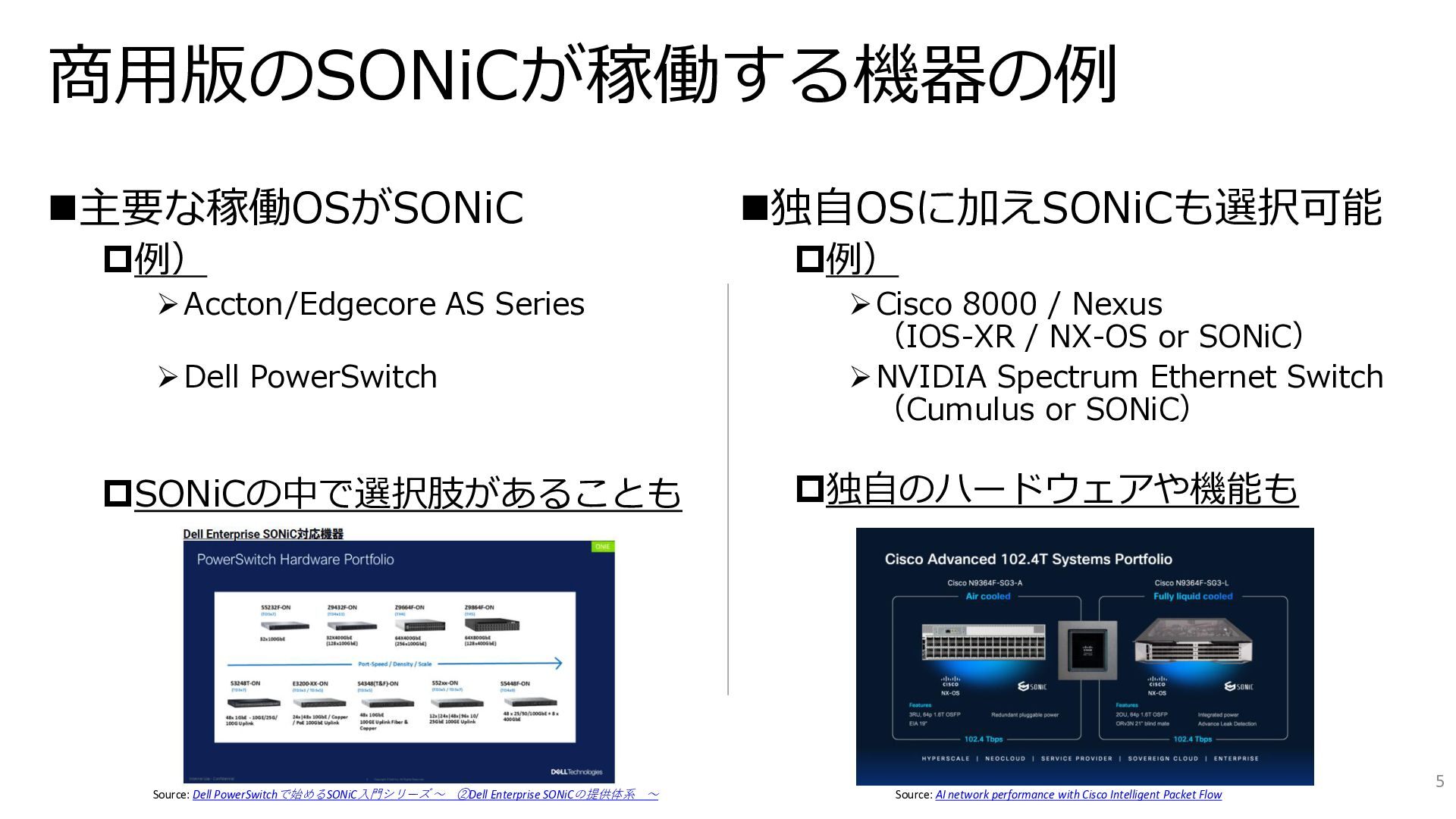
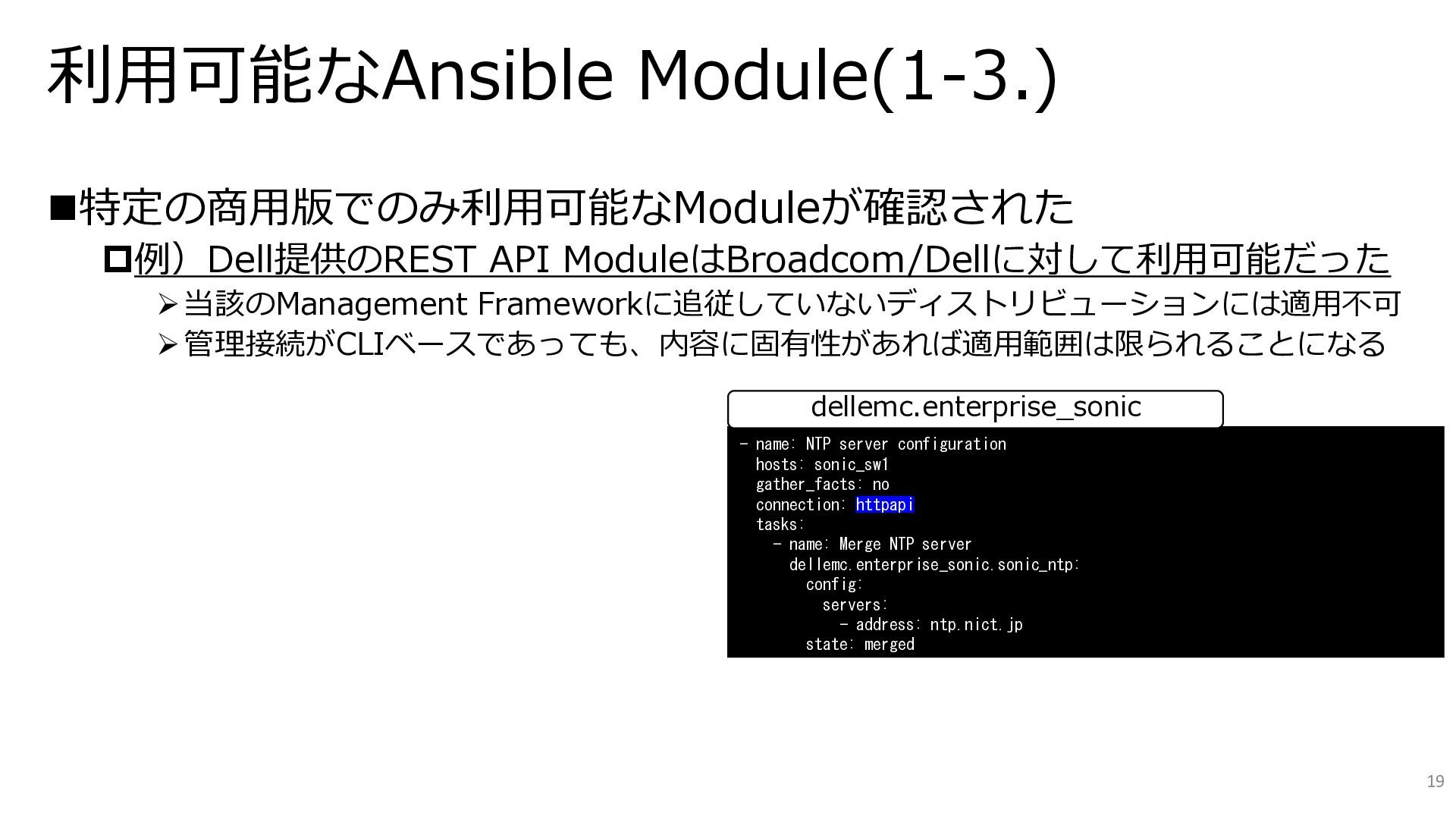
  2. ◼主要な稼働OSがSONiC 例) ➢Accton/Edgecore AS Series ➢Dell PowerSwitch SONiCの中で選択肢があることも 商用版のSONiCが稼働する機器の例 Source:

    Dell PowerSwitchで始めるSONiC入門シリーズ ~ ②Dell Enterprise SONiCの提供体系 ~ ◼独自OSに加えSONiCも選択可能 例) ➢Cisco 8000 / Nexus (IOS-XR / NX-OS or SONiC) ➢NVIDIA Spectrum Ethernet Switch (Cumulus or SONiC) 独自のハードウェアや機能も Source: AI network performance with Cisco Intelligent Packet Flow 5
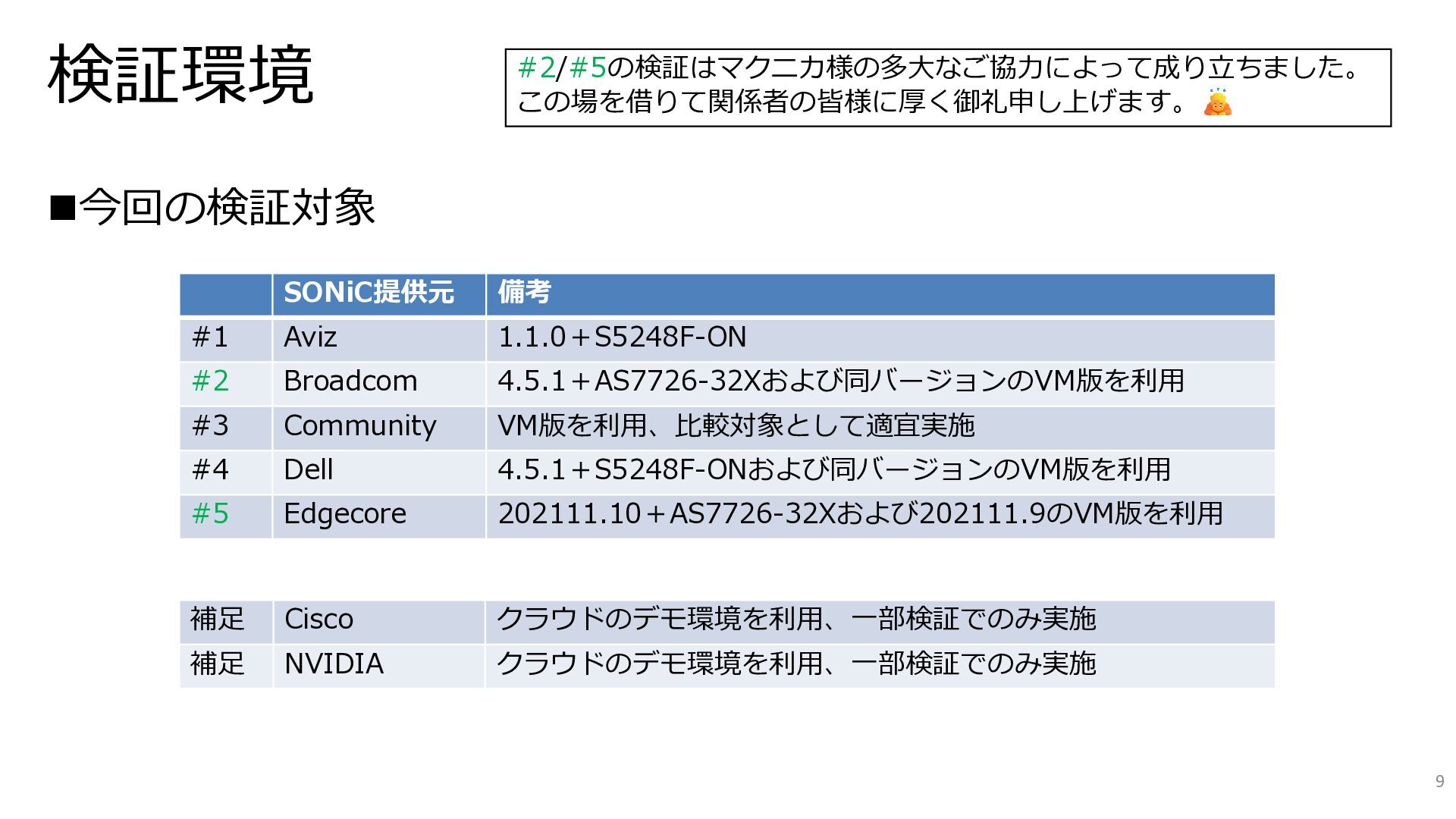
  3. 検証環境 ◼今回の検証対象 補足 Cisco クラウドのデモ環境を利用、一部検証でのみ実施 補足 NVIDIA クラウドのデモ環境を利用、一部検証でのみ実施 SONiC提供元 備考

    #1 Aviz 1.1.0+S5248F-ON #2 Broadcom 4.5.1+AS7726-32Xおよび同バージョンのVM版を利用 #3 Community VM版を利用、比較対象として適宜実施 #4 Dell 4.5.1+S5248F-ONおよび同バージョンのVM版を利用 #5 Edgecore 202111.10+AS7726-32Xおよび202111.9のVM版を利用 #2/#5の検証はマクニカ様の多大なご協力によって成り立ちました。 この場を借りて関係者の皆様に厚く御礼申し上げます。 9
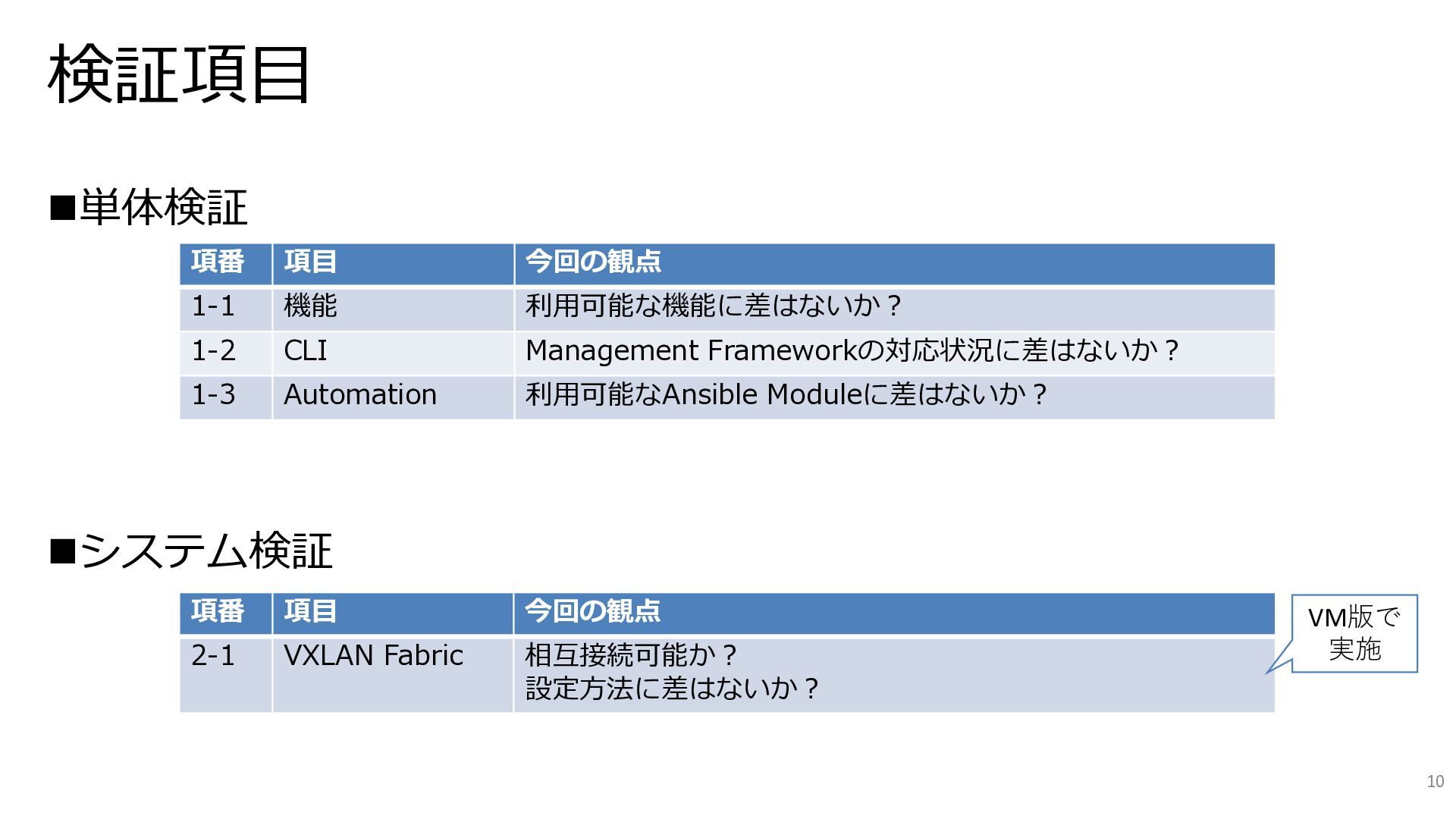
  4. 検証項目 ◼単体検証 ◼システム検証 項番 項目 今回の観点 1-1 機能 利用可能な機能に差はないか? 1-2

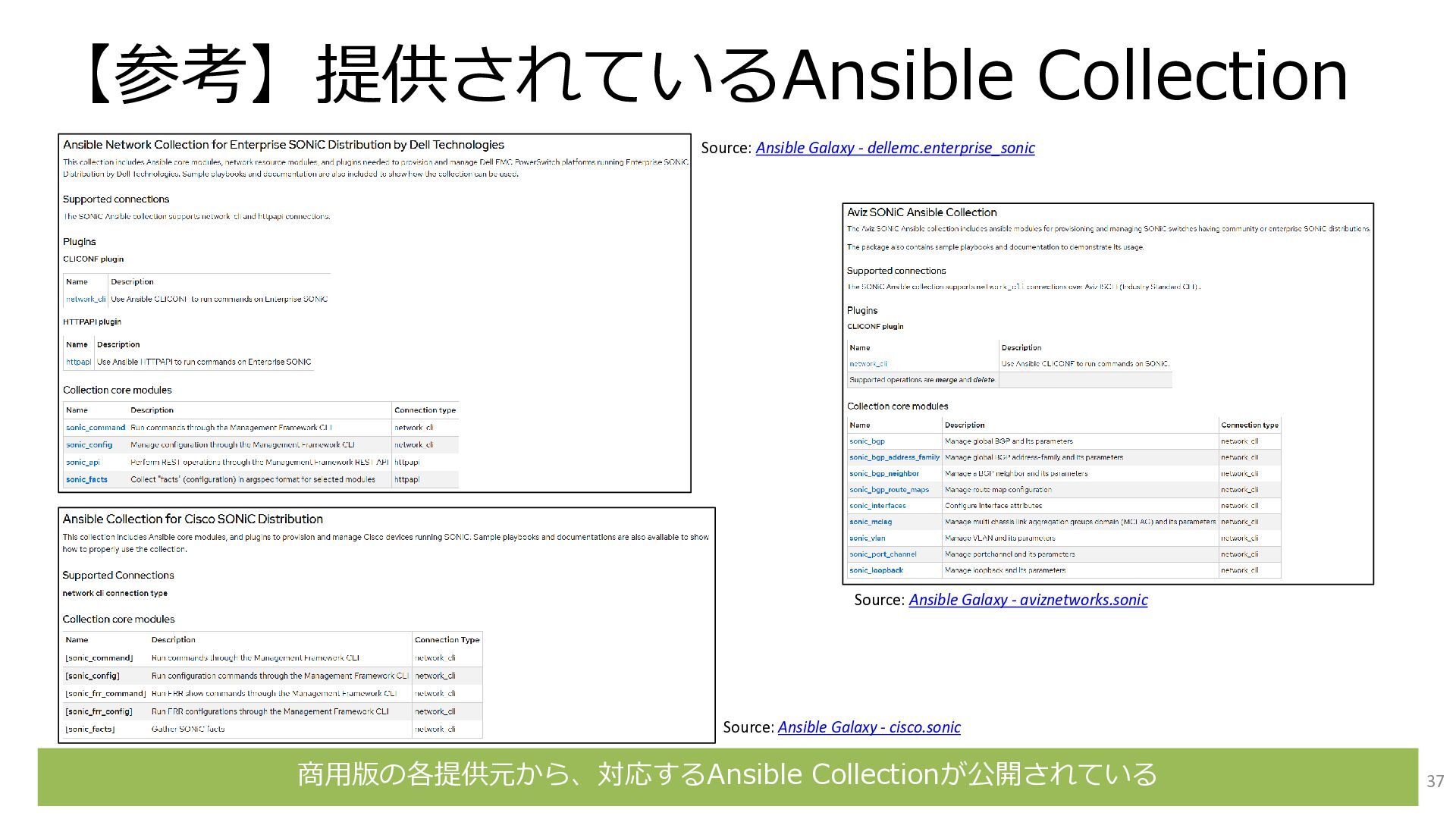
    CLI Management Frameworkの対応状況に差はないか? 1-3 Automation 利用可能なAnsible Moduleに差はないか? 項番 項目 今回の観点 2-1 VXLAN Fabric 相互接続可能か? 設定方法に差はないか? 10 VM版で 実施
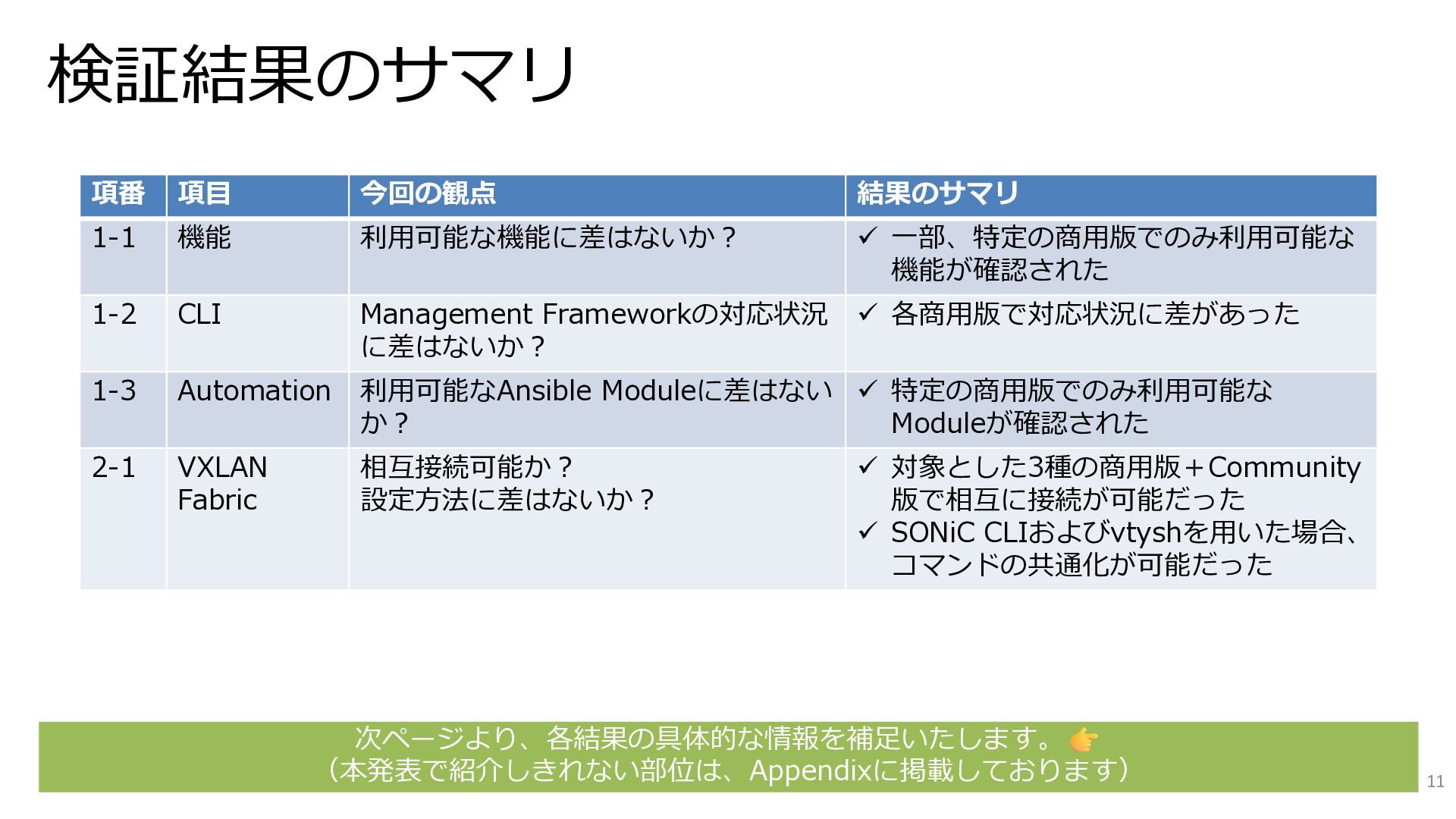
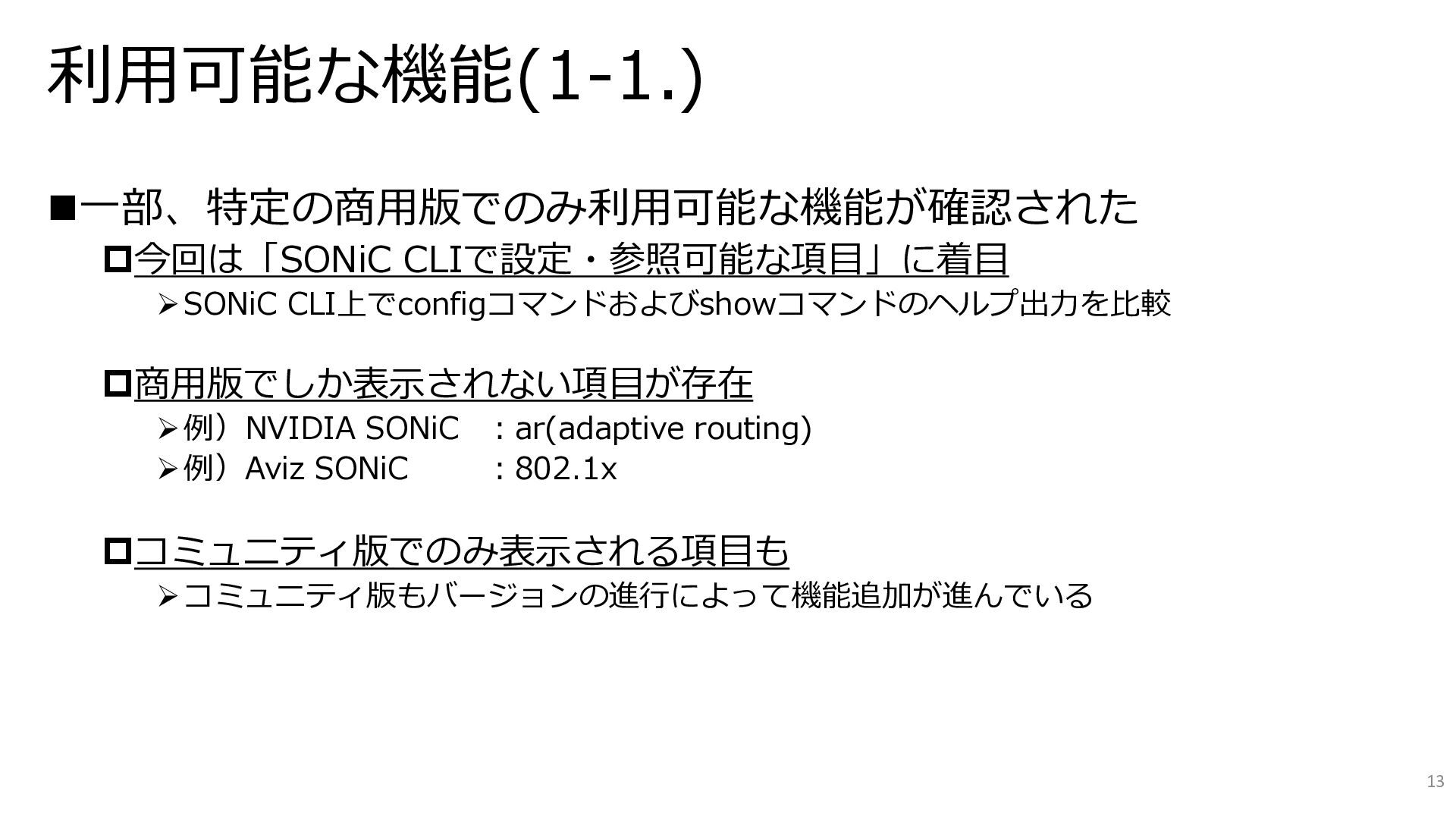
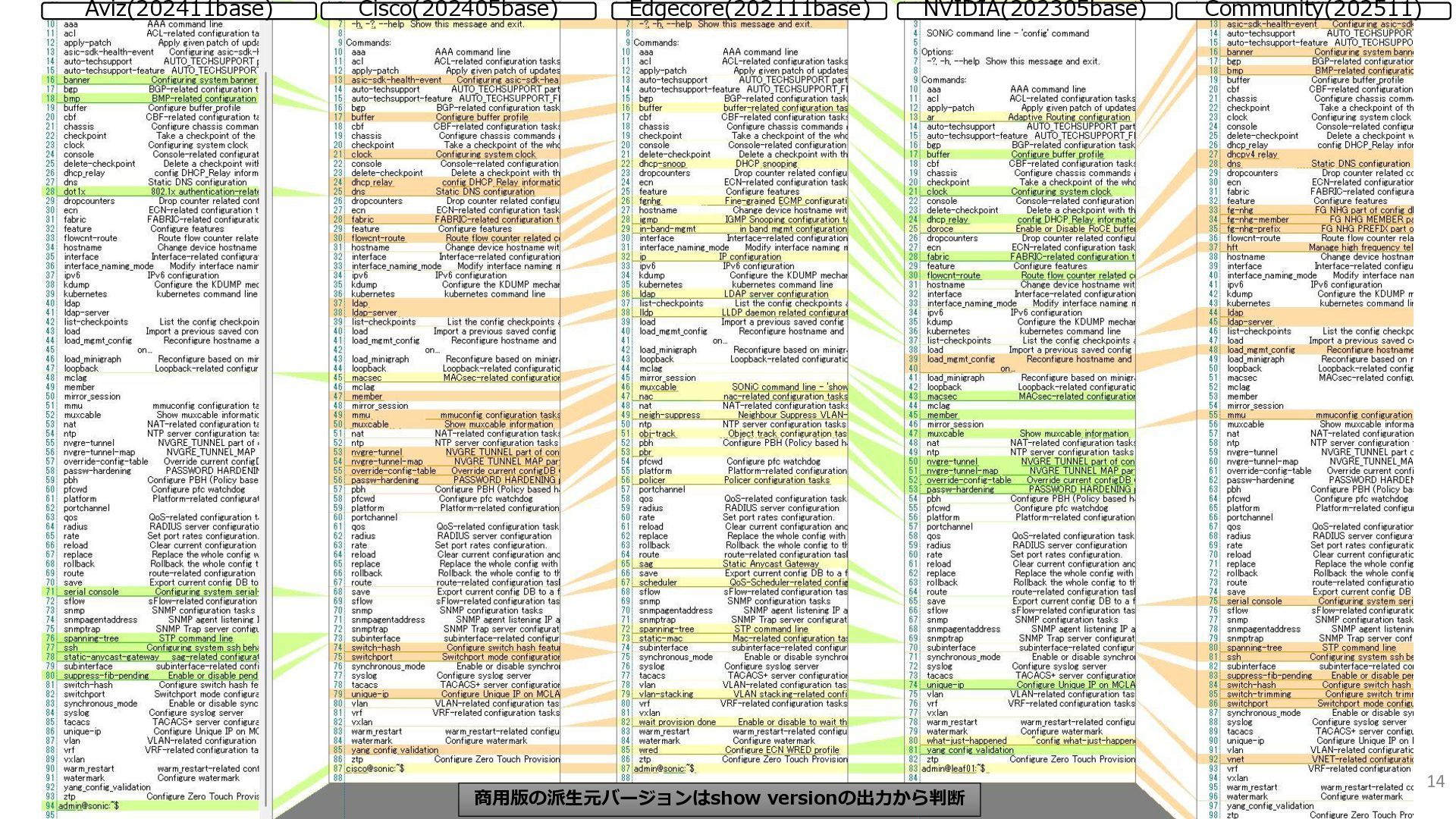
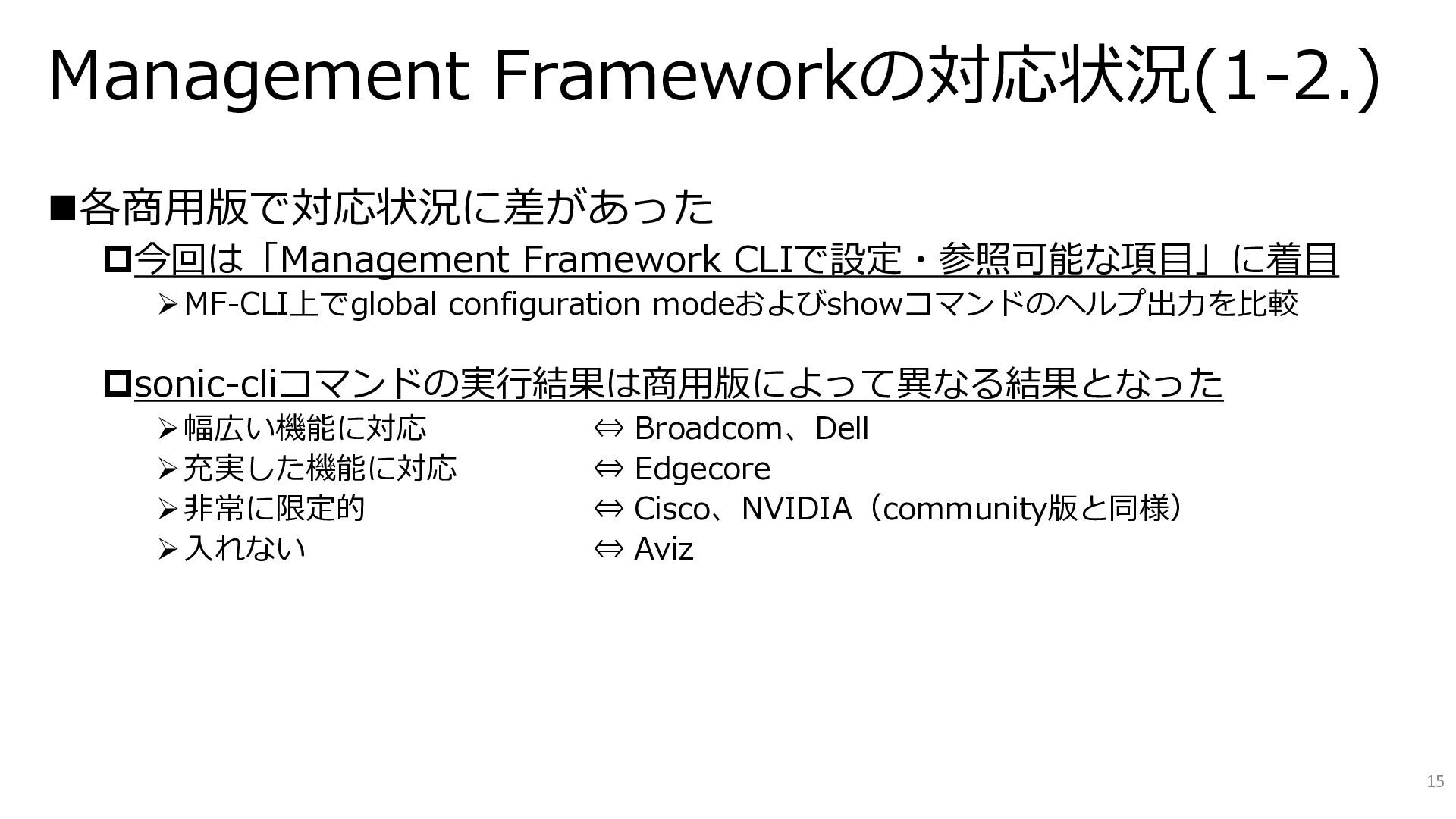
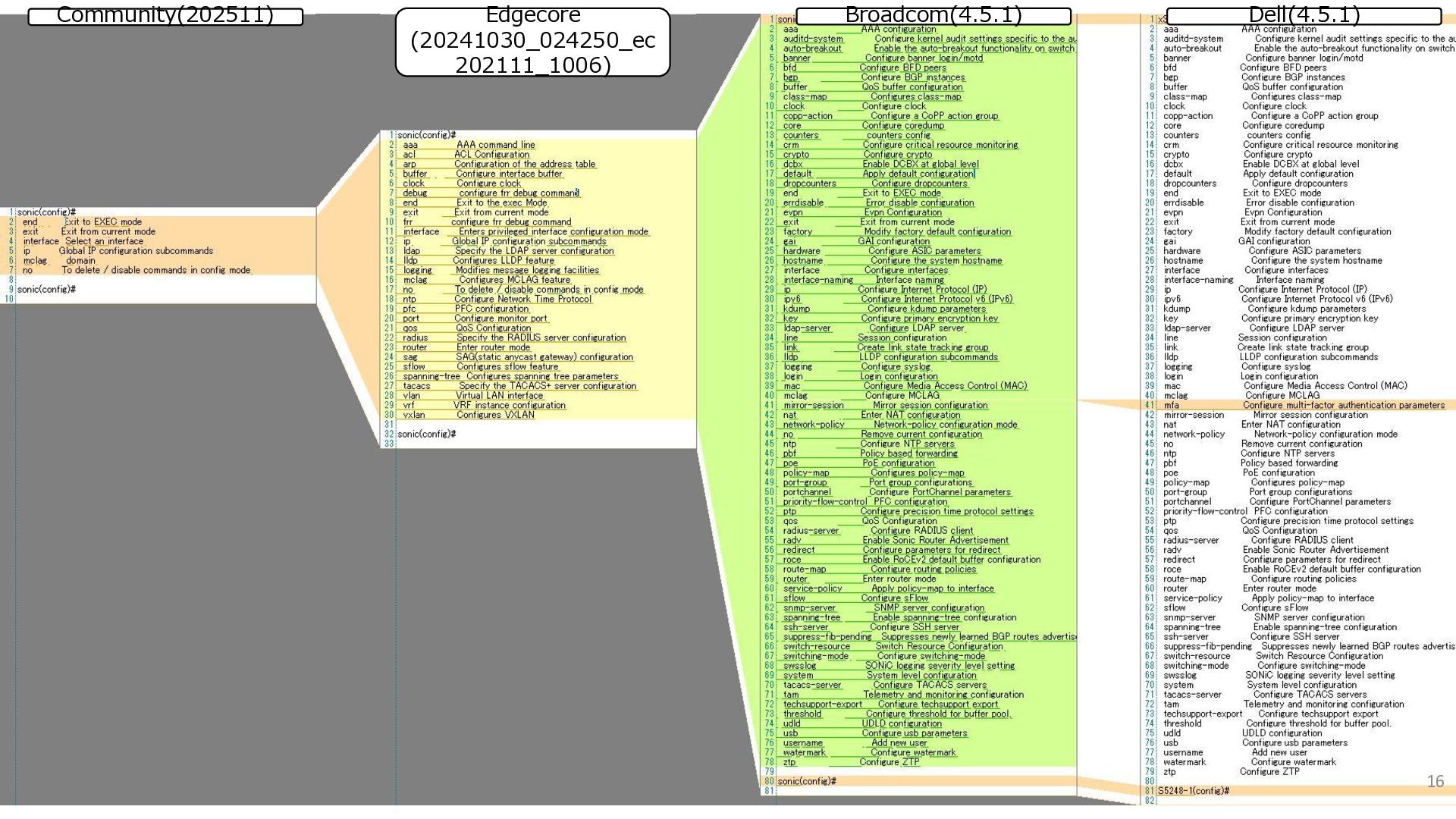
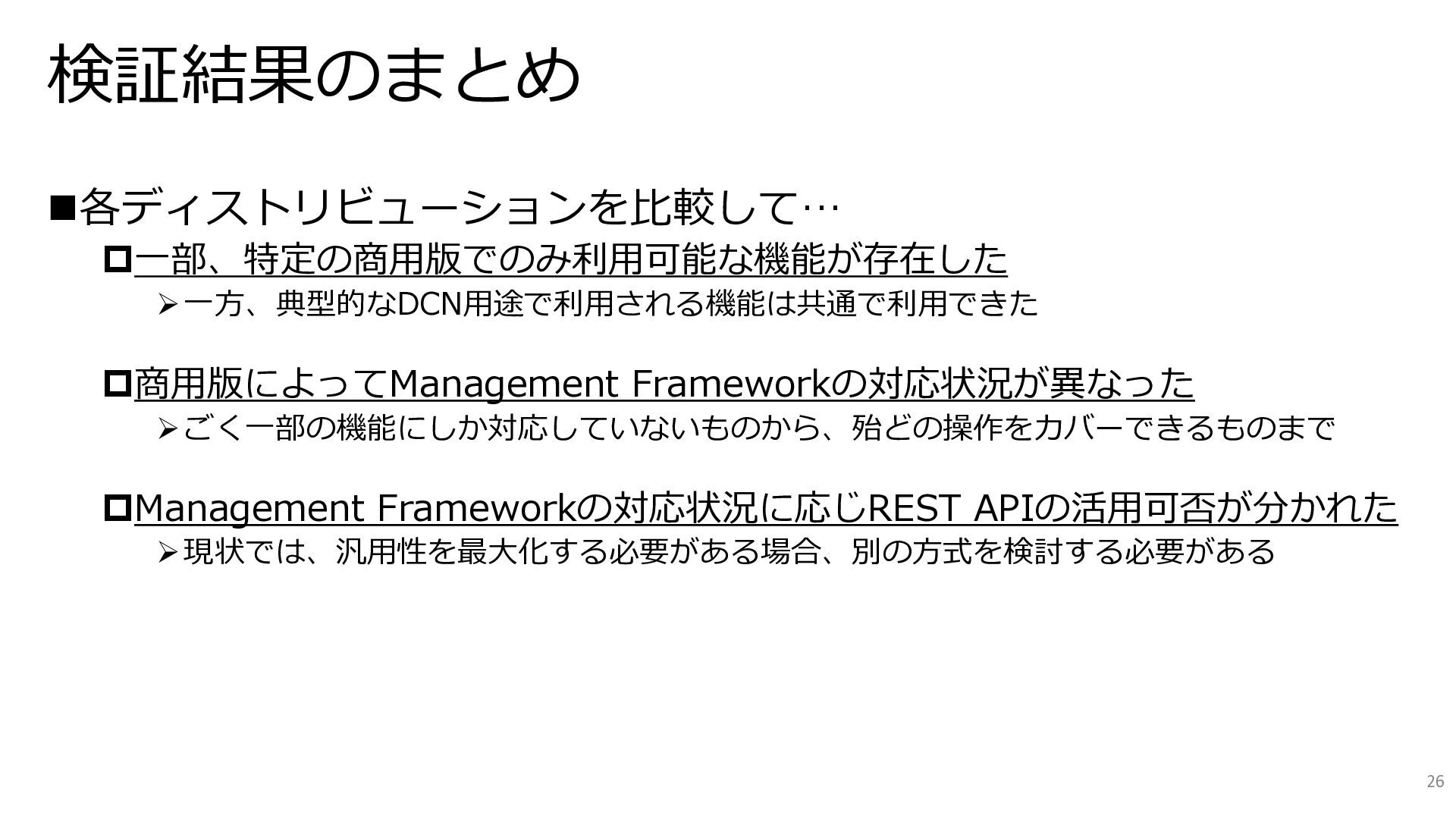
  5. 検証結果のサマリ 項番 項目 今回の観点 結果のサマリ 1-1 機能 利用可能な機能に差はないか? ✓ 一部、特定の商用版でのみ利用可能な

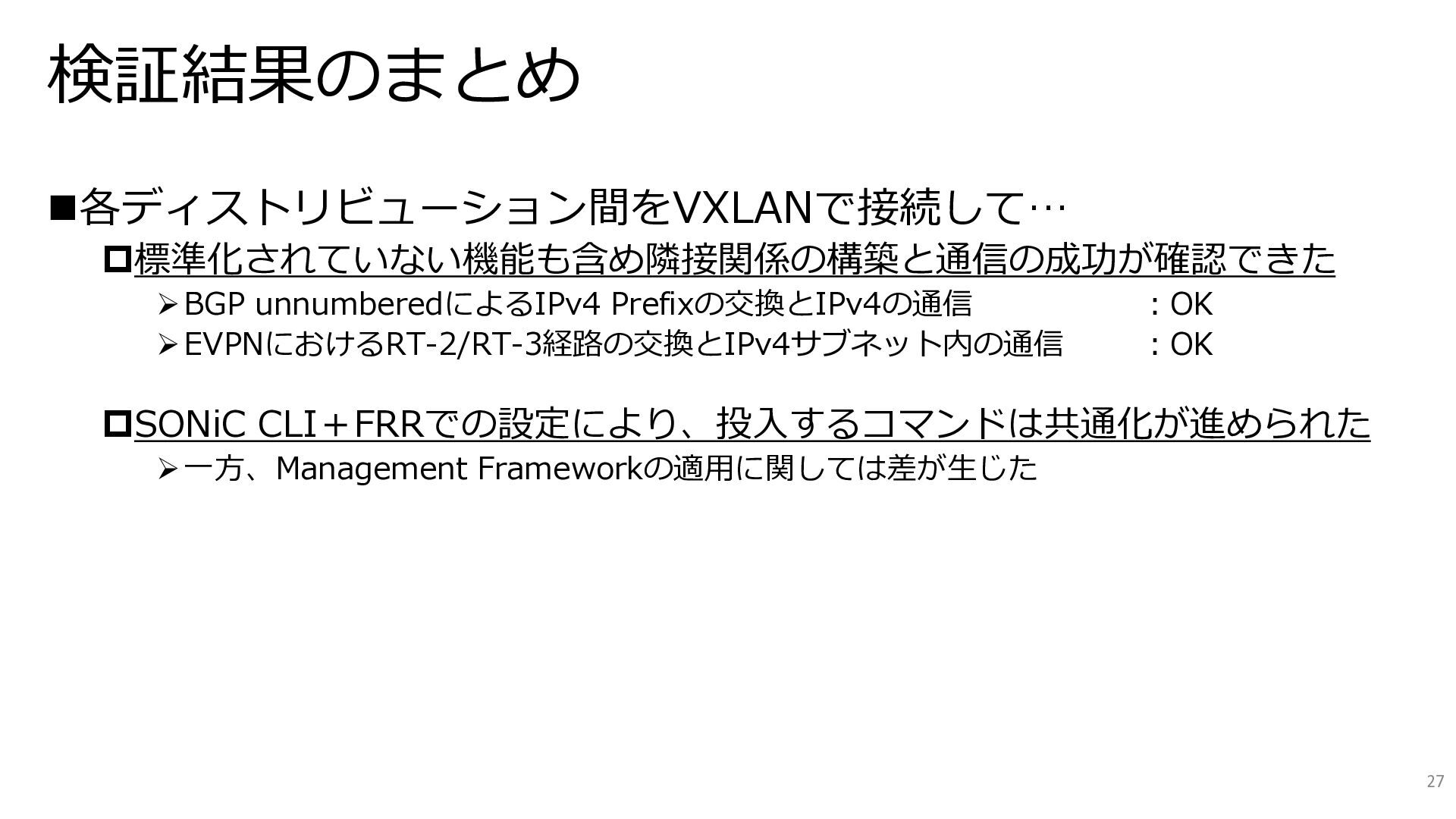
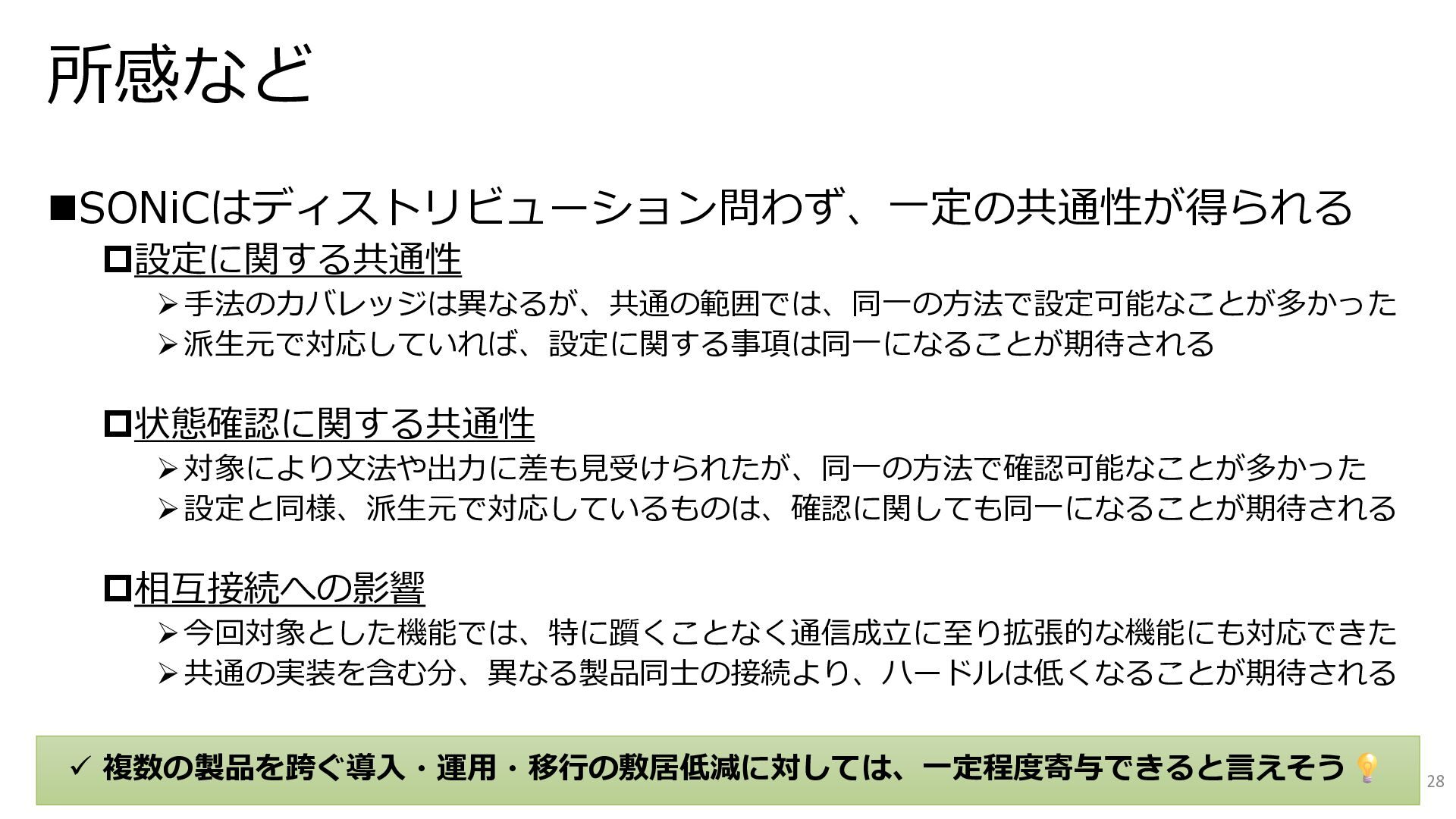
    機能が確認された 1-2 CLI Management Frameworkの対応状況 に差はないか? ✓ 各商用版で対応状況に差があった 1-3 Automation 利用可能なAnsible Moduleに差はない か? ✓ 特定の商用版でのみ利用可能な Moduleが確認された 2-1 VXLAN Fabric 相互接続可能か? 設定方法に差はないか? ✓ 対象とした3種の商用版+Community 版で相互に接続が可能だった ✓ SONiC CLIおよびvtyshを用いた場合、 コマンドの共通化が可能だった 次ページより、各結果の具体的な情報を補足いたします。 (本発表で紹介しきれない部位は、Appendixに掲載しております) 11
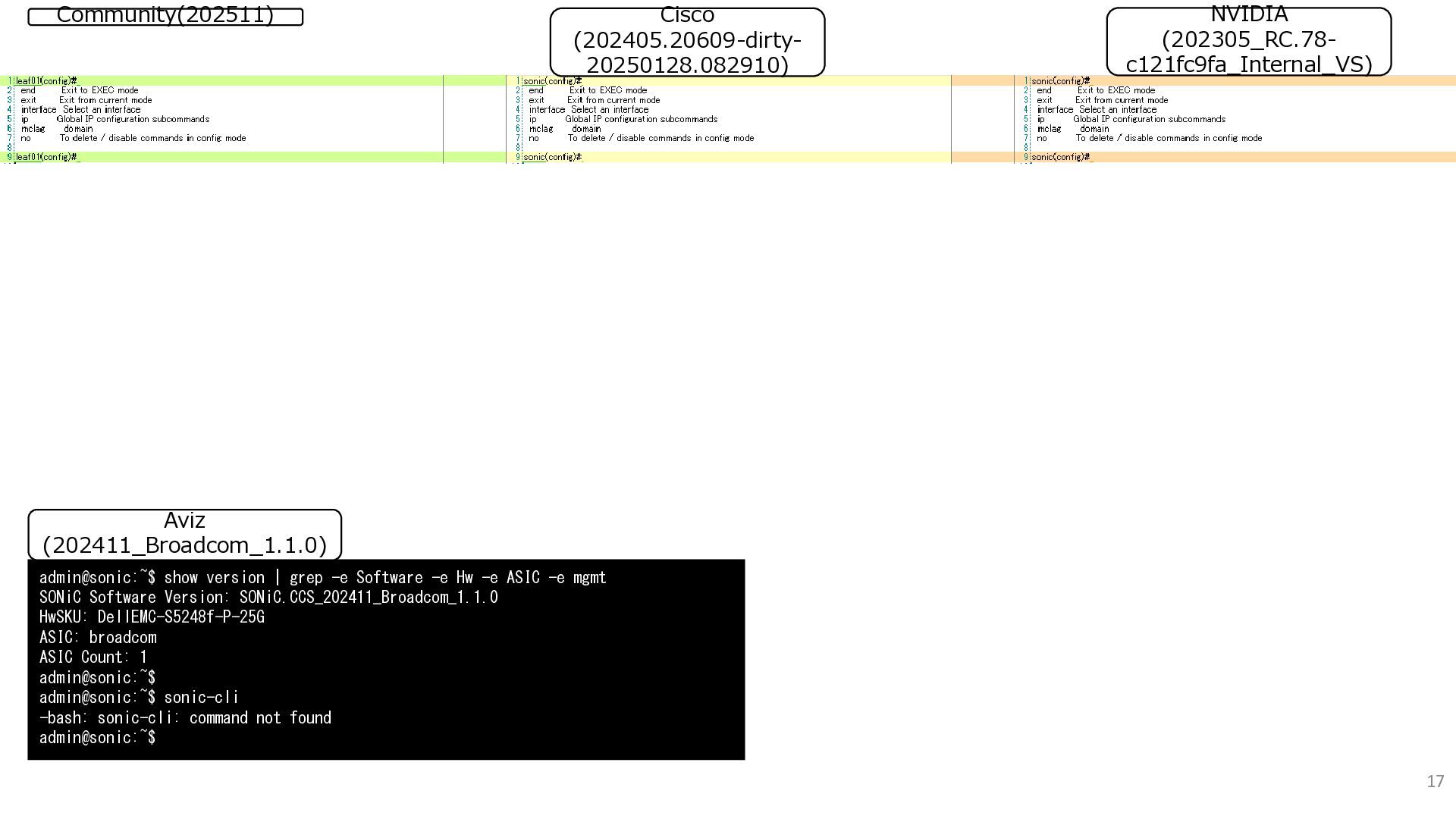
  6. 17 Community(202511) NVIDIA (202305_RC.78- c121fc9fa_Internal_VS) Cisco (202405.20609-dirty- 20250128.082910) admin@sonic:~$ show

    version | grep -e Software -e Hw -e ASIC -e mgmt SONiC Software Version: SONiC.CCS_202411_Broadcom_1.1.0 HwSKU: DellEMC-S5248f-P-25G ASIC: broadcom ASIC Count: 1 admin@sonic:~$ admin@sonic:~$ sonic-cli -bash: sonic-cli: command not found admin@sonic:~$ Aviz (202411_Broadcom_1.1.0)
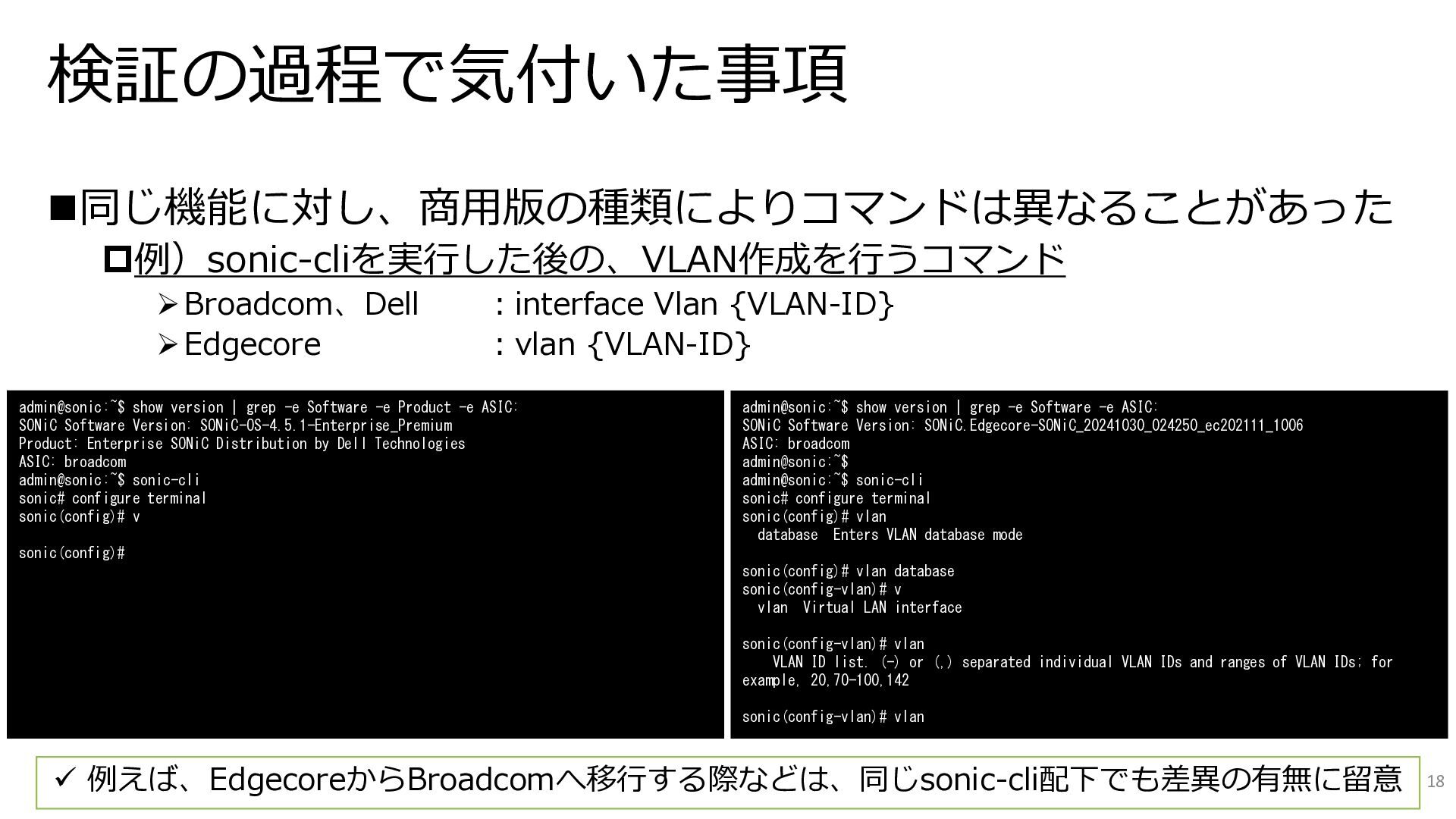
  7. 検証の過程で気付いた事項 ◼同じ機能に対し、商用版の種類によりコマンドは異なることがあった 例)sonic-cliを実行した後の、VLAN作成を行うコマンド ➢Broadcom、Dell :interface Vlan {VLAN-ID} ➢Edgecore :vlan {VLAN-ID}

    18 ✓ 例えば、EdgecoreからBroadcomへ移行する際などは、同じsonic-cli配下でも差異の有無に留意 admin@sonic:~$ show version | grep -e Software -e Product -e ASIC: SONiC Software Version: SONiC-OS-4.5.1-Enterprise_Premium Product: Enterprise SONiC Distribution by Dell Technologies ASIC: broadcom admin@sonic:~$ sonic-cli sonic# configure terminal sonic(config)# v sonic(config)# admin@sonic:~$ show version | grep -e Software -e ASIC: SONiC Software Version: SONiC.Edgecore-SONiC_20241030_024250_ec202111_1006 ASIC: broadcom admin@sonic:~$ admin@sonic:~$ sonic-cli sonic# configure terminal sonic(config)# vlan database Enters VLAN database mode sonic(config)# vlan database sonic(config-vlan)# v vlan Virtual LAN interface sonic(config-vlan)# vlan VLAN ID list. (-) or (,) separated individual VLAN IDs and ranges of VLAN IDs; for example, 20,70-100,142 sonic(config-vlan)# vlan
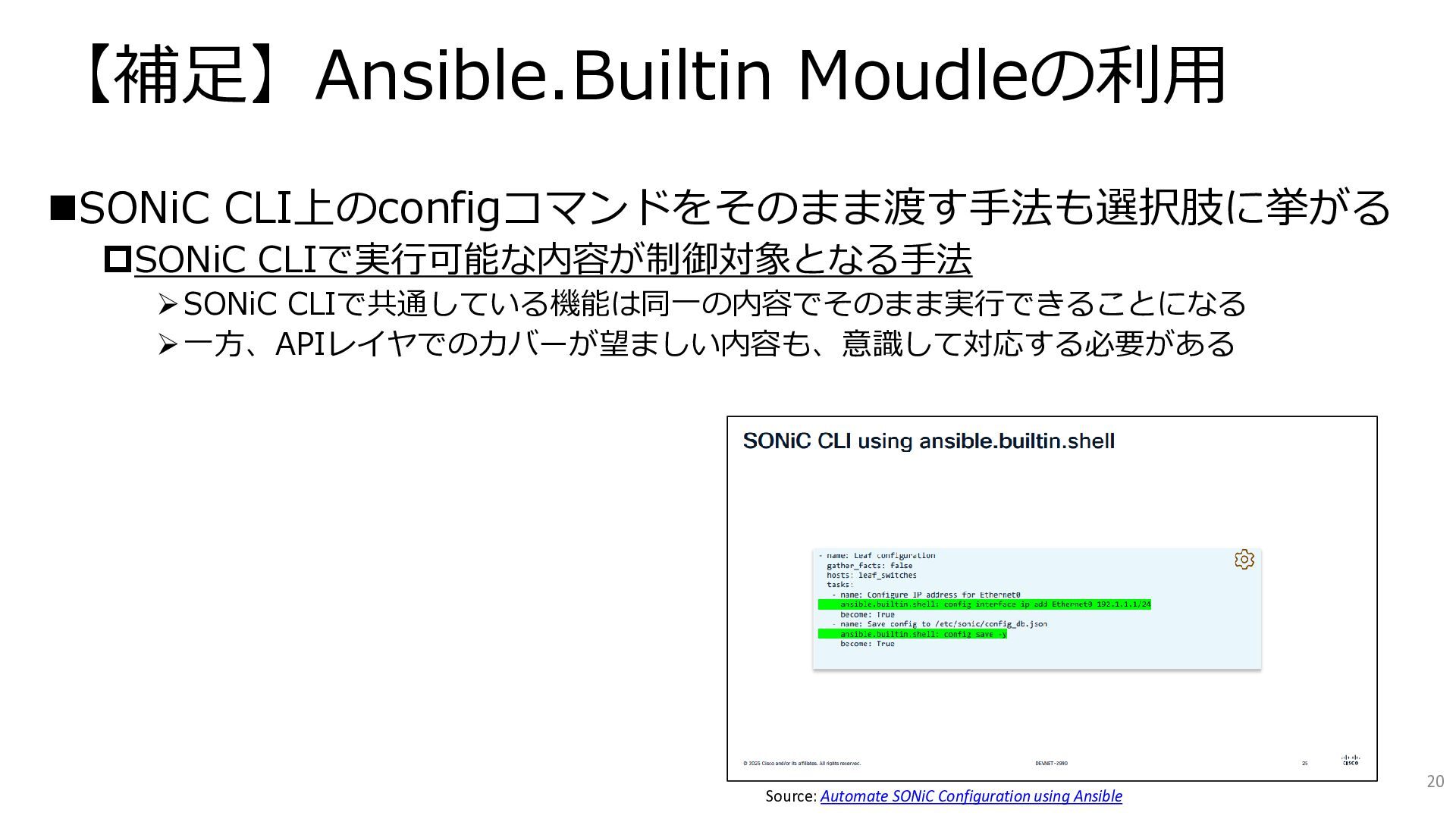
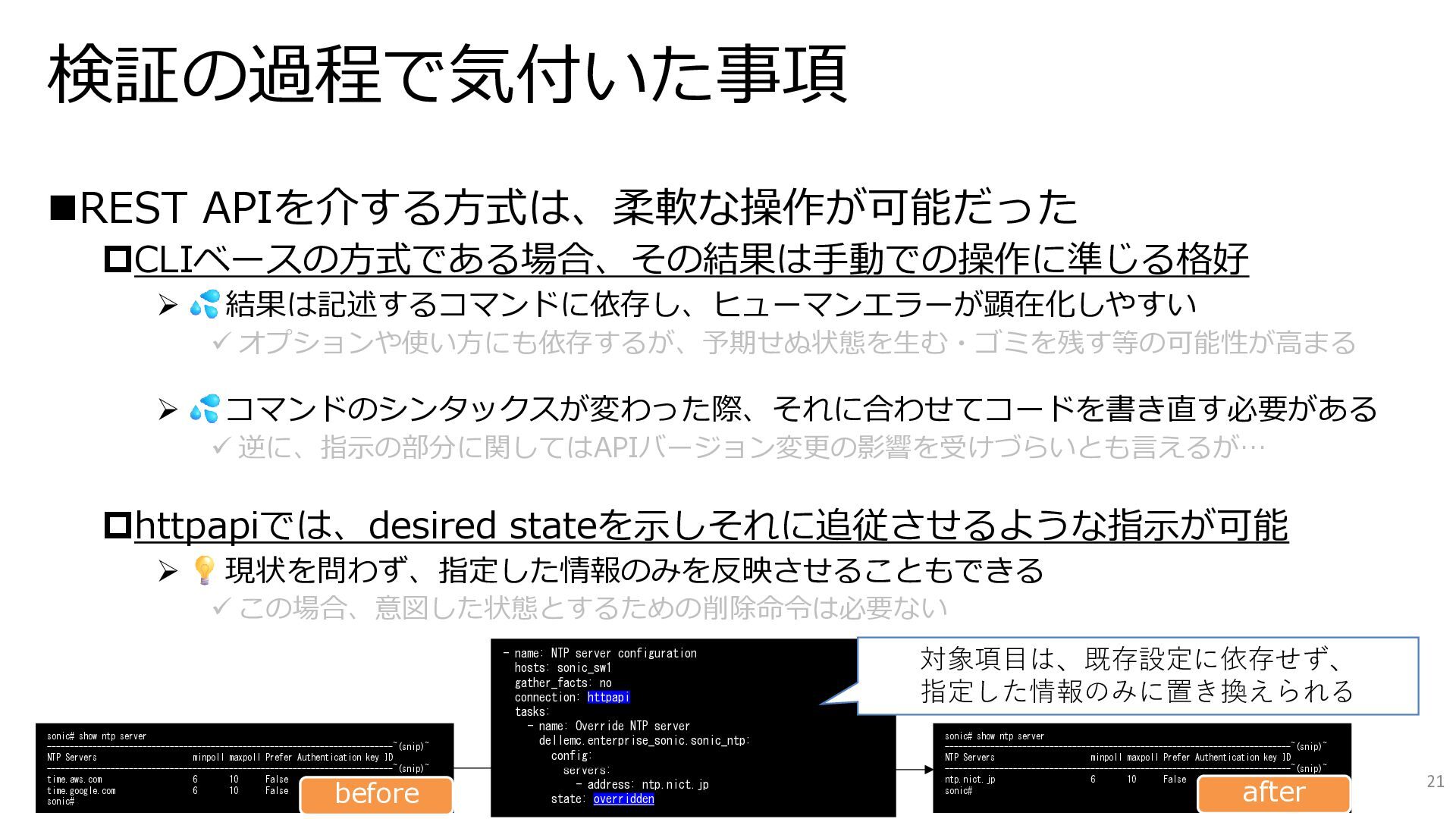
  8. 検証の過程で気付いた事項 ◼REST APIを介する方式は、柔軟な操作が可能だった CLIベースの方式である場合、その結果は手動での操作に準じる格好 ➢ 結果は記述するコマンドに依存し、ヒューマンエラーが顕在化しやすい ✓ オプションや使い方にも依存するが、予期せぬ状態を生む・ゴミを残す等の可能性が高まる ➢ コマンドのシンタックスが変わった際、それに合わせてコードを書き直す必要がある

    ✓ 逆に、指示の部分に関してはAPIバージョン変更の影響を受けづらいとも言えるが… httpapiでは、desired stateを示しそれに追従させるような指示が可能 ➢ 現状を問わず、指定した情報のみを反映させることもできる ✓ この場合、意図した状態とするための削除命令は必要ない 21 - name: NTP server configuration hosts: sonic_sw1 gather_facts: no connection: httpapi tasks: - name: Override NTP server dellemc.enterprise_sonic.sonic_ntp: config: servers: - address: ntp.nict.jp state: overridden 対象項目は、既存設定に依存せず、 指定した情報のみに置き換えられる sonic# show ntp server ----------------------------------------------------------------------------~(snip)~ NTP Servers minpoll maxpoll Prefer Authentication key ID ----------------------------------------------------------------------------~(snip)~ ntp.nict.jp 6 10 False sonic# sonic# show ntp server ----------------------------------------------------------------------------~(snip)~ NTP Servers minpoll maxpoll Prefer Authentication key ID ----------------------------------------------------------------------------~(snip)~ time.aws.com 6 10 False time.google.com 6 10 False sonic# before after
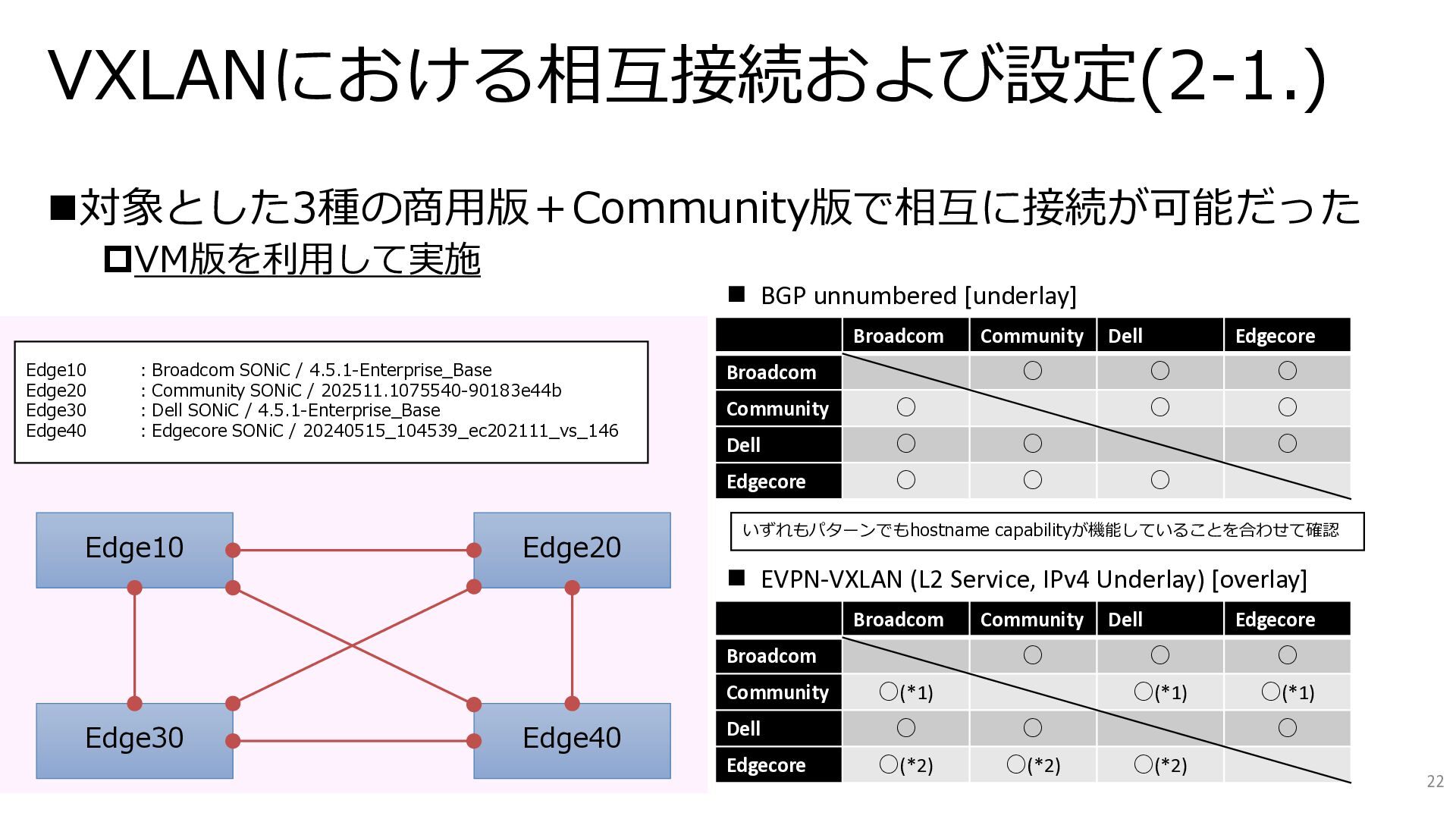
  9. VXLANにおける相互接続および設定(2-1.) ◼対象とした3種の商用版+Community版で相互に接続が可能だった VM版を利用して実施 22 Broadcom Community Dell Edgecore Broadcom ◦

    ◦ ◦ Community ◦ ◦ ◦ Dell ◦ ◦ ◦ Edgecore ◦ ◦ ◦ Broadcom Community Dell Edgecore Broadcom ◦ ◦ ◦ Community ◦(*1) ◦(*1) ◦(*1) Dell ◦ ◦ ◦ Edgecore ◦(*2) ◦(*2) ◦(*2) ◼ BGP unnumbered [underlay] ◼ EVPN-VXLAN (L2 Service, IPv4 Underlay) [overlay] Edge10 Edge30 Edge20 Edge40 Edge10 :Broadcom SONiC / 4.5.1-Enterprise_Base Edge20 :Community SONiC / 202511.1075540-90183e44b Edge30 :Dell SONiC / 4.5.1-Enterprise_Base Edge40 :Edgecore SONiC / 20240515_104539_ec202111_vs_146 いずれもパターンでもhostname capabilityが機能していることを合わせて確認
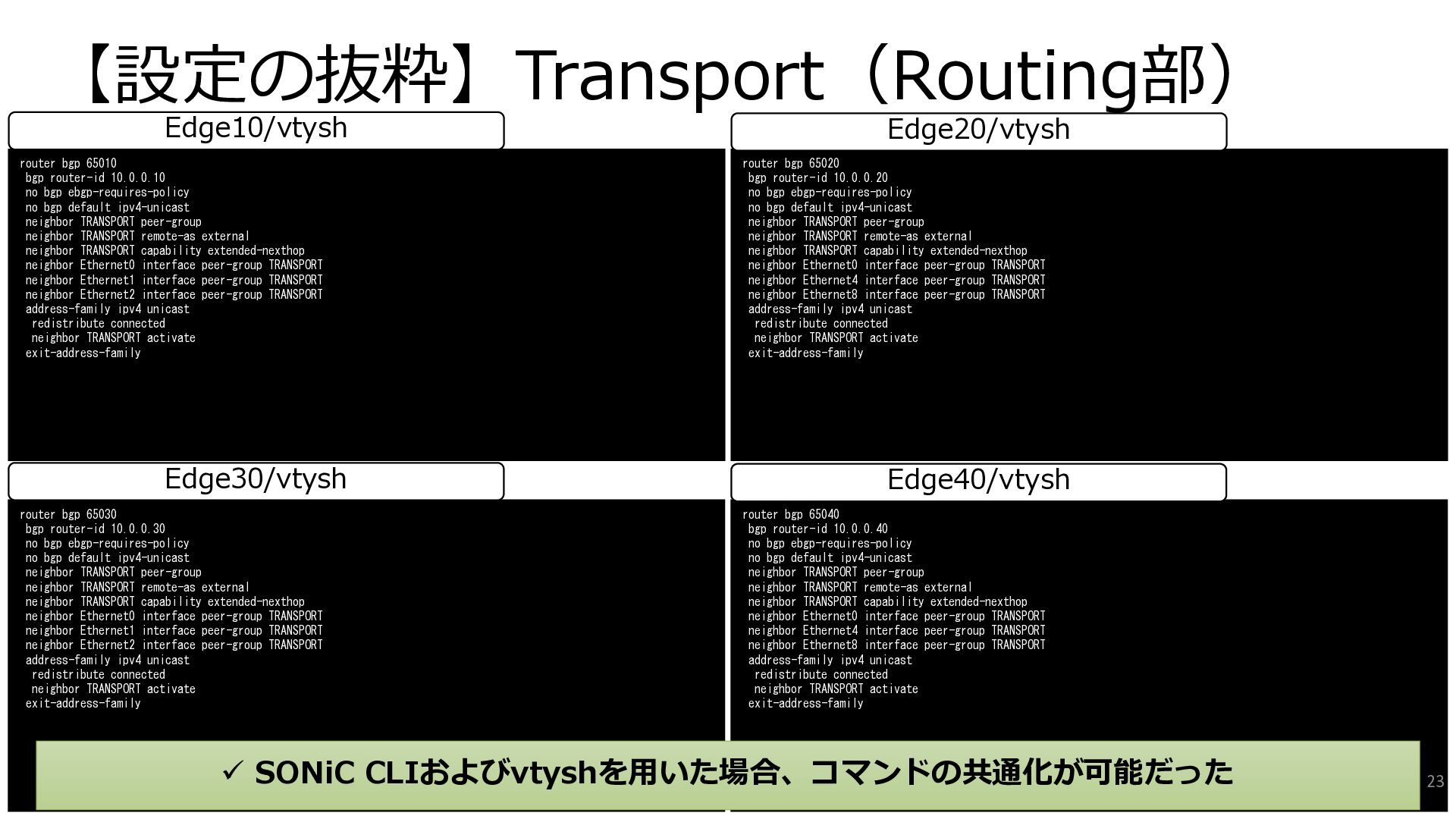
  10. 【設定の抜粋】Transport(Routing部) router bgp 65030 bgp router-id 10.0.0.30 no bgp ebgp-requires-policy

    no bgp default ipv4-unicast neighbor TRANSPORT peer-group neighbor TRANSPORT remote-as external neighbor TRANSPORT capability extended-nexthop neighbor Ethernet0 interface peer-group TRANSPORT neighbor Ethernet1 interface peer-group TRANSPORT neighbor Ethernet2 interface peer-group TRANSPORT address-family ipv4 unicast redistribute connected neighbor TRANSPORT activate exit-address-family router bgp 65040 bgp router-id 10.0.0.40 no bgp ebgp-requires-policy no bgp default ipv4-unicast neighbor TRANSPORT peer-group neighbor TRANSPORT remote-as external neighbor TRANSPORT capability extended-nexthop neighbor Ethernet0 interface peer-group TRANSPORT neighbor Ethernet4 interface peer-group TRANSPORT neighbor Ethernet8 interface peer-group TRANSPORT address-family ipv4 unicast redistribute connected neighbor TRANSPORT activate exit-address-family Edge30/vtysh Edge40/vtysh ✓ SONiC CLIおよびvtyshを用いた場合、コマンドの共通化が可能だった router bgp 65010 bgp router-id 10.0.0.10 no bgp ebgp-requires-policy no bgp default ipv4-unicast neighbor TRANSPORT peer-group neighbor TRANSPORT remote-as external neighbor TRANSPORT capability extended-nexthop neighbor Ethernet0 interface peer-group TRANSPORT neighbor Ethernet1 interface peer-group TRANSPORT neighbor Ethernet2 interface peer-group TRANSPORT address-family ipv4 unicast redistribute connected neighbor TRANSPORT activate exit-address-family router bgp 65020 bgp router-id 10.0.0.20 no bgp ebgp-requires-policy no bgp default ipv4-unicast neighbor TRANSPORT peer-group neighbor TRANSPORT remote-as external neighbor TRANSPORT capability extended-nexthop neighbor Ethernet0 interface peer-group TRANSPORT neighbor Ethernet4 interface peer-group TRANSPORT neighbor Ethernet8 interface peer-group TRANSPORT address-family ipv4 unicast redistribute connected neighbor TRANSPORT activate exit-address-family Edge10/vtysh Edge20/vtysh 23
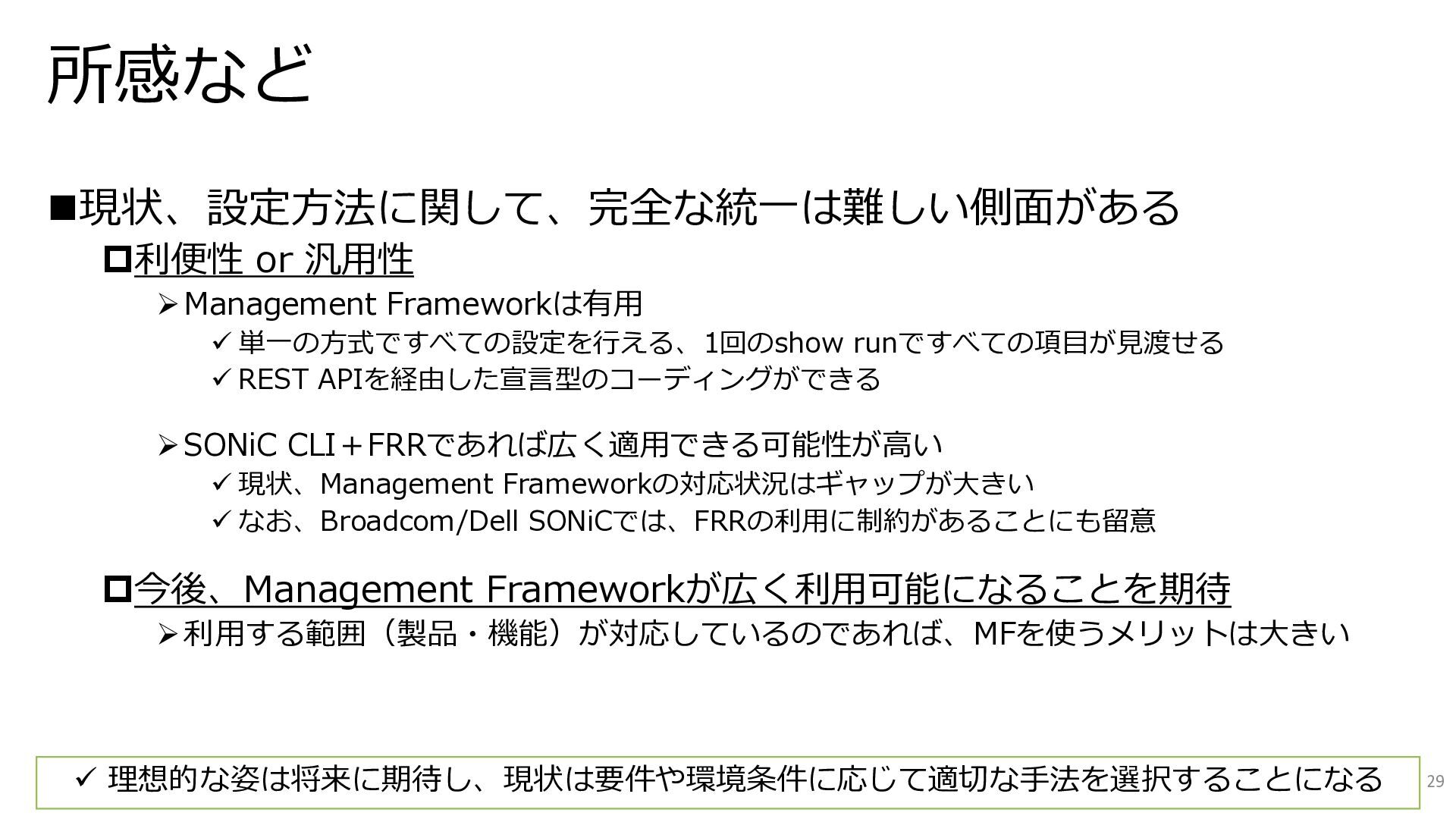
  11. 所感など ◼現状、設定方法に関して、完全な統一は難しい側面がある 利便性 or 汎用性 ➢Management Frameworkは有用 ✓ 単一の方式ですべての設定を行える、1回のshow runですべての項目が見渡せる

    ✓ REST APIを経由した宣言型のコーディングができる ➢SONiC CLI+FRRであれば広く適用できる可能性が高い ✓ 現状、Management Frameworkの対応状況はギャップが大きい ✓ なお、Broadcom/Dell SONiCでは、FRRの利用に制約があることにも留意 今後、Management Frameworkが広く利用可能になることを期待 ➢利用する範囲(製品・機能)が対応しているのであれば、MFを使うメリットは大きい 29 ✓ 理想的な姿は将来に期待し、現状は要件や環境条件に応じて適切な手法を選択することになる
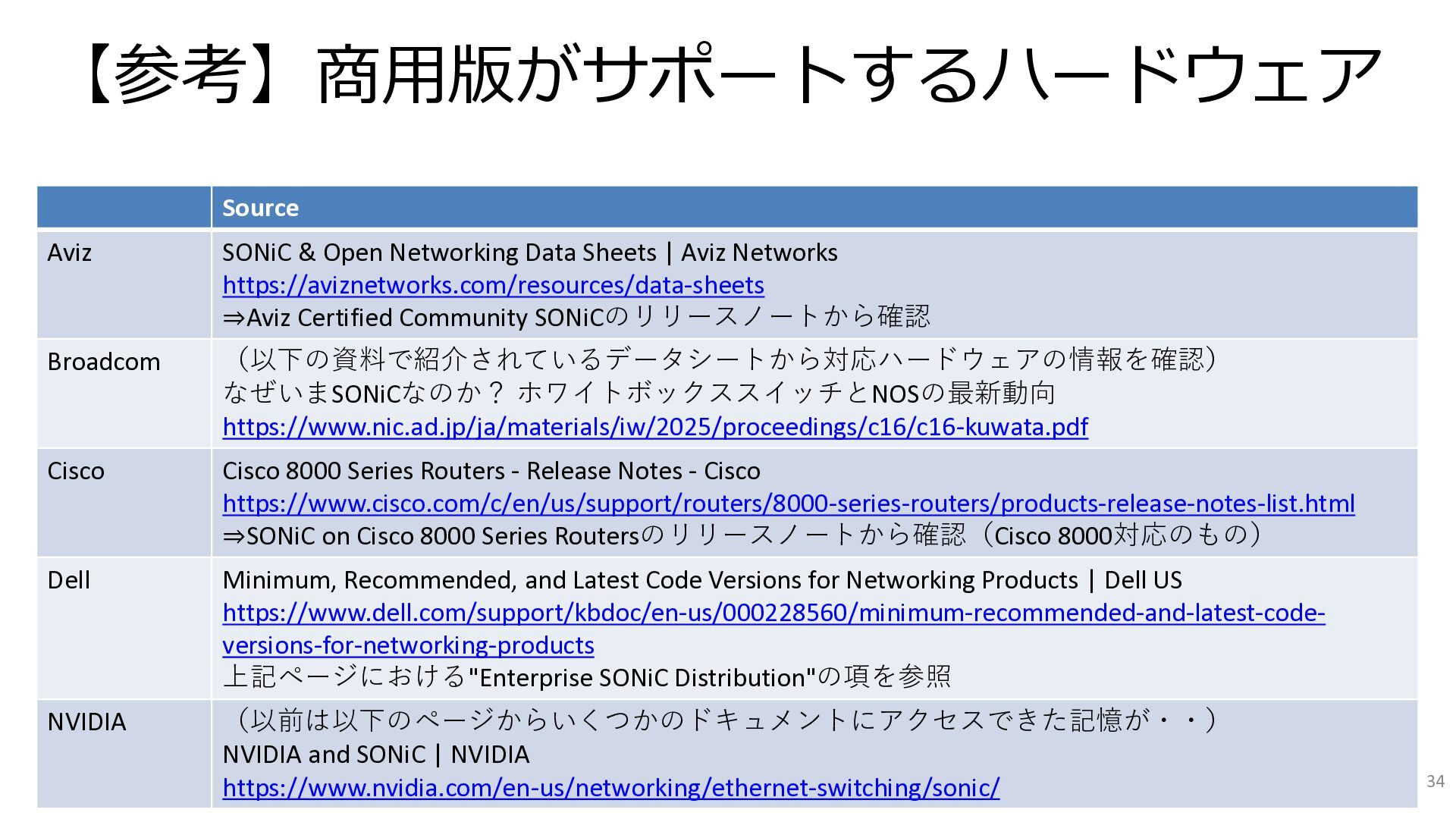
  12. 【参考】商用版がサポートするハードウェア Source Aviz SONiC & Open Networking Data Sheets |

    Aviz Networks https://aviznetworks.com/resources/data-sheets ⇒Aviz Certified Community SONiCのリリースノートから確認 Broadcom (以下の資料で紹介されているデータシートから対応ハードウェアの情報を確認) なぜいまSONiCなのか? ホワイトボックススイッチとNOSの最新動向 https://www.nic.ad.jp/ja/materials/iw/2025/proceedings/c16/c16-kuwata.pdf Cisco Cisco 8000 Series Routers - Release Notes - Cisco https://www.cisco.com/c/en/us/support/routers/8000-series-routers/products-release-notes-list.html ⇒SONiC on Cisco 8000 Series Routersのリリースノートから確認(Cisco 8000対応のもの) Dell Minimum, Recommended, and Latest Code Versions for Networking Products | Dell US https://www.dell.com/support/kbdoc/en-us/000228560/minimum-recommended-and-latest-code- versions-for-networking-products 上記ページにおける"Enterprise SONiC Distribution"の項を参照 NVIDIA (以前は以下のページからいくつかのドキュメントにアクセスできた記憶が・・) NVIDIA and SONiC | NVIDIA https://www.nvidia.com/en-us/networking/ethernet-switching/sonic/ 34
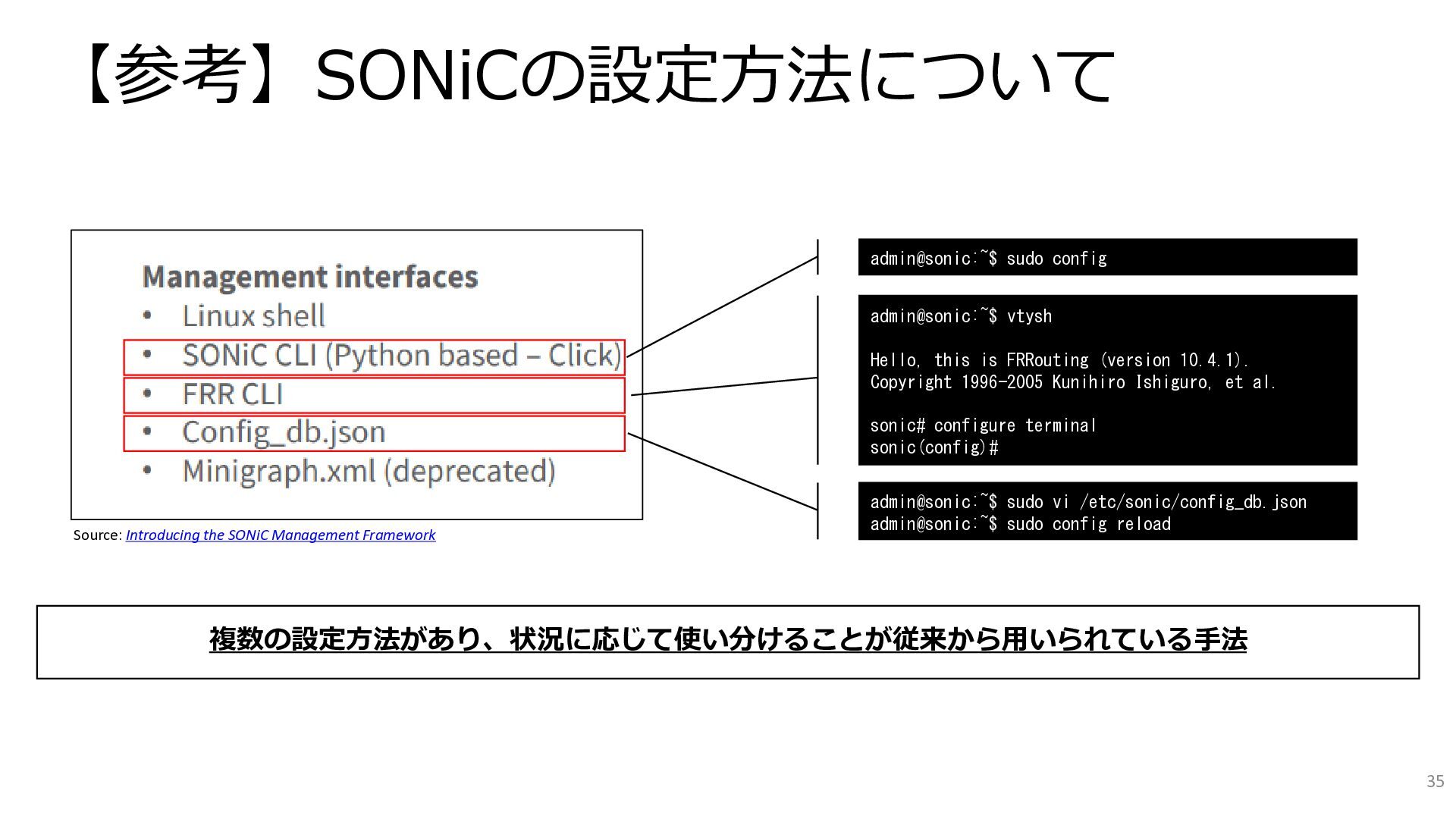
  13. 【参考】SONiCの設定方法について Source: Introducing the SONiC Management Framework admin@sonic:~$ sudo config

    admin@sonic:~$ vtysh Hello, this is FRRouting (version 10.4.1). Copyright 1996-2005 Kunihiro Ishiguro, et al. sonic# configure terminal sonic(config)# admin@sonic:~$ sudo vi /etc/sonic/config_db.json admin@sonic:~$ sudo config reload 複数の設定方法があり、状況に応じて使い分けることが従来から用いられている手法 35
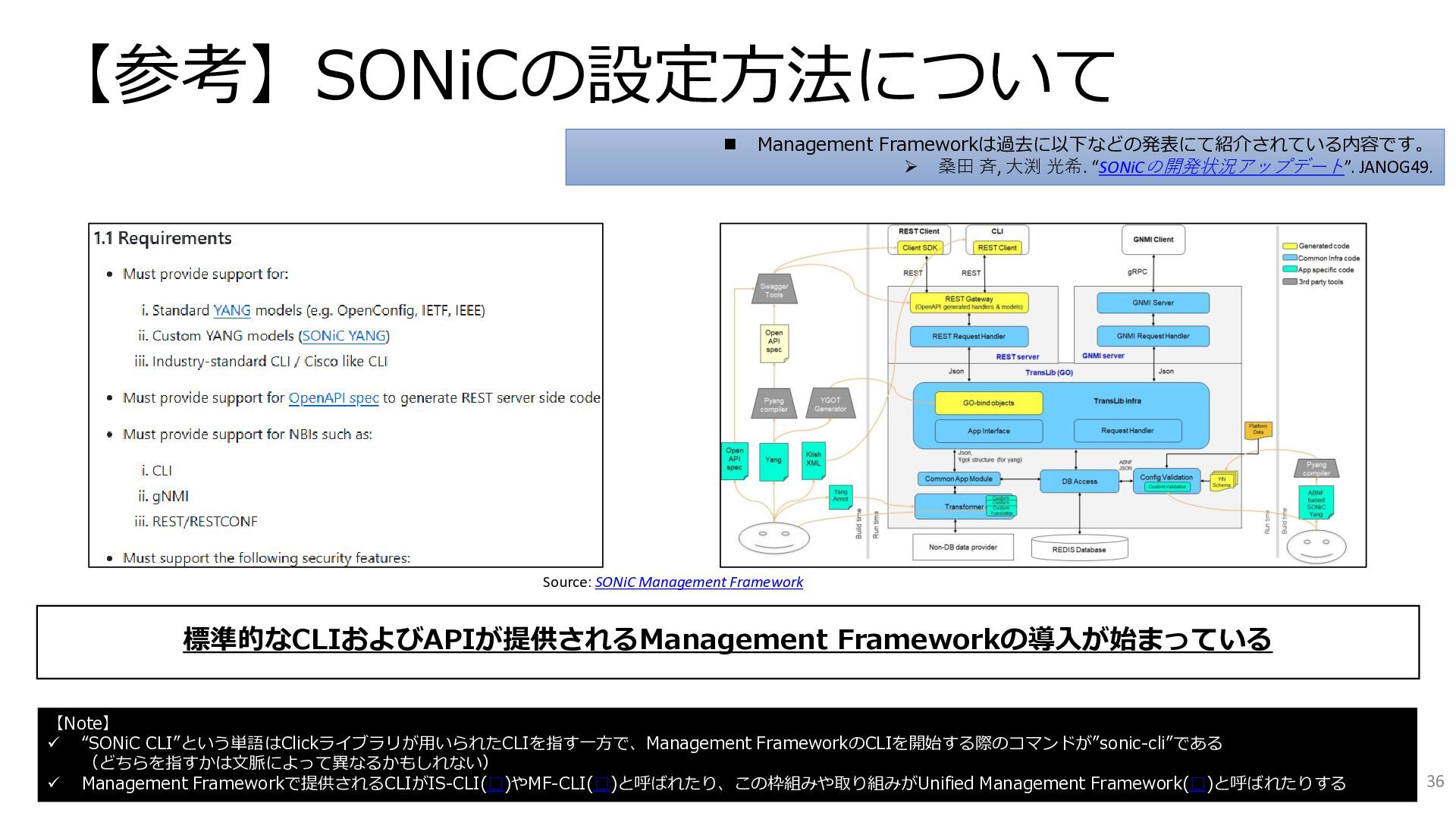
  14. 【参考】SONiCの設定方法について Source: SONiC Management Framework 標準的なCLIおよびAPIが提供されるManagement Frameworkの導入が始まっている 【Note】 ✓ “SONiC

    CLI”という単語はClickライブラリが用いられたCLIを指す一方で、Management FrameworkのCLIを開始する際のコマンドが”sonic-cli”である (どちらを指すかは文脈によって異なるかもしれない) ✓ Management Frameworkで提供されるCLIがIS-CLI(□)やMF-CLI(□)と呼ばれたり、この枠組みや取り組みがUnified Management Framework(□)と呼ばれたりする ◼ Management Frameworkは過去に以下などの発表にて紹介されている内容です。 ➢ 桑田 斉, 大渕 光希. “SONiCの開発状況アップデート”. JANOG49. 36
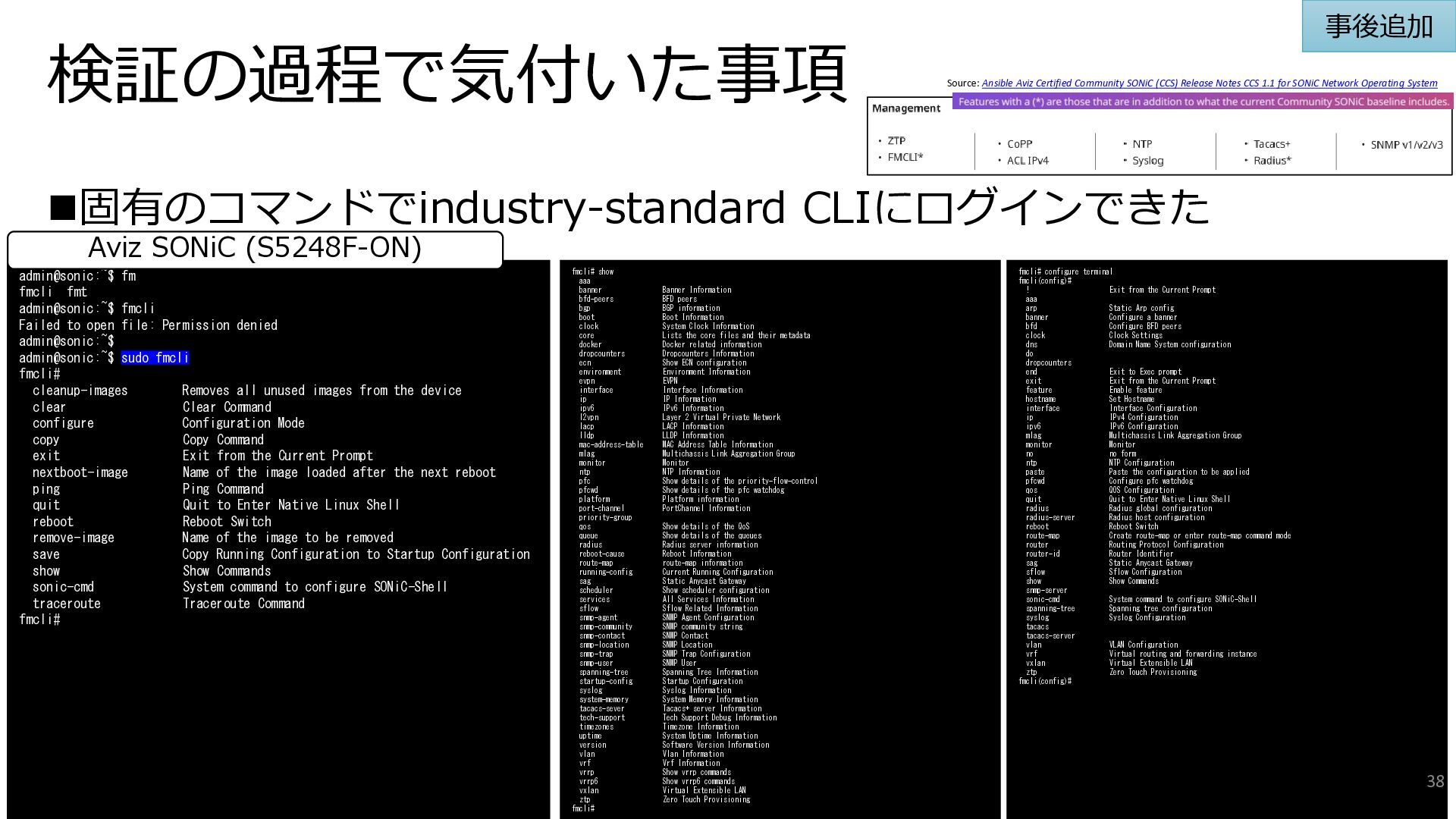
  15. 検証の過程で気付いた事項 ◼固有のコマンドでindustry-standard CLIにログインできた admin@sonic:~$ fm fmcli fmt admin@sonic:~$ fmcli Failed

    to open file: Permission denied admin@sonic:~$ admin@sonic:~$ sudo fmcli fmcli# cleanup-images Removes all unused images from the device clear Clear Command configure Configuration Mode copy Copy Command exit Exit from the Current Prompt nextboot-image Name of the image loaded after the next reboot ping Ping Command quit Quit to Enter Native Linux Shell reboot Reboot Switch remove-image Name of the image to be removed save Copy Running Configuration to Startup Configuration show Show Commands sonic-cmd System command to configure SONiC-Shell traceroute Traceroute Command fmcli# fmcli# show aaa banner Banner Information bfd-peers BFD peers bgp BGP information boot Boot Information clock System Clock Information core Lists the core files and their metadata docker Docker related information dropcounters Dropcounters Information ecn Show ECN configuration environment Environment Information evpn EVPN interface Interface Information ip IP Information ipv6 IPv6 Information l2vpn Layer 2 Virtual Private Network lacp LACP Information lldp LLDP Information mac-address-table MAC Address Table Information mlag Multichassis Link Aggregation Group monitor Monitor ntp NTP Information pfc Show details of the priority-flow-control pfcwd Show details of the pfc watchdog platform Platform information port-channel PortChannel Information priority-group qos Show details of the QoS queue Show details of the queues radius Radius server information reboot-cause Reboot Information route-map route-map information running-config Current Running Configuration sag Static Anycast Gateway scheduler Show scheduler configuration services All Services Information sflow Sflow Related Information snmp-agent SNMP Agent Configuration snmp-community SNMP community string snmp-contact SNMP Contact snmp-location SNMP Location snmp-trap SNMP Trap Configuration snmp-user SNMP User spanning-tree Spanning Tree Information startup-config Startup Configuration syslog Syslog Information system-memory System Memory Information tacacs-sever Tacacs+ server Information tech-support Tech Support Debug Information timezones Timezone Information uptime System Uptime Information version Software Version Information vlan Vlan Information vrf Vrf Information vrrp Show vrrp commands vrrp6 Show vrrp6 commands vxlan Virtual Extensible LAN ztp Zero Touch Provisioning fmcli# fmcli# configure terminal fmcli(config)# ! Exit from the Current Prompt aaa arp Static Arp config banner Configure a banner bfd Configure BFD peers clock Clock Settings dns Domain Name System configuration do dropcounters end Exit to Exec prompt exit Exit from the Current Prompt feature Enable feature hostname Set Hostname interface Interface Configuration ip IPv4 Configuration ipv6 IPv6 Configuration mlag Multichassis Link Aggregation Group monitor Monitor no no form ntp NTP Configuration paste Paste the configuration to be applied pfcwd Configure pfc watchdog qos QOS Configuration quit Quit to Enter Native Linux Shell radius Radius global configuration radius-server Radius host configuration reboot Reboot Switch route-map Create route-map or enter route-map command mode router Routing Protocol Configuration router-id Router Identifier sag Static Anycast Gateway sflow Sflow Configuration show Show Commands snmp-server sonic-cmd System command to configure SONiC-Shell spanning-tree Spanning tree configuration syslog Syslog Configuration tacacs tacacs-server vlan VLAN Configuration vrf Virtual routing and forwarding instance vxlan Virtual Extensible LAN ztp Zero Touch Provisioning fmcli(config)# Aviz SONiC (S5248F-ON) 事後追加 Source: Ansible Aviz Certified Community SONiC (CCS) Release Notes CCS 1.1 for SONiC Network Operating System 38
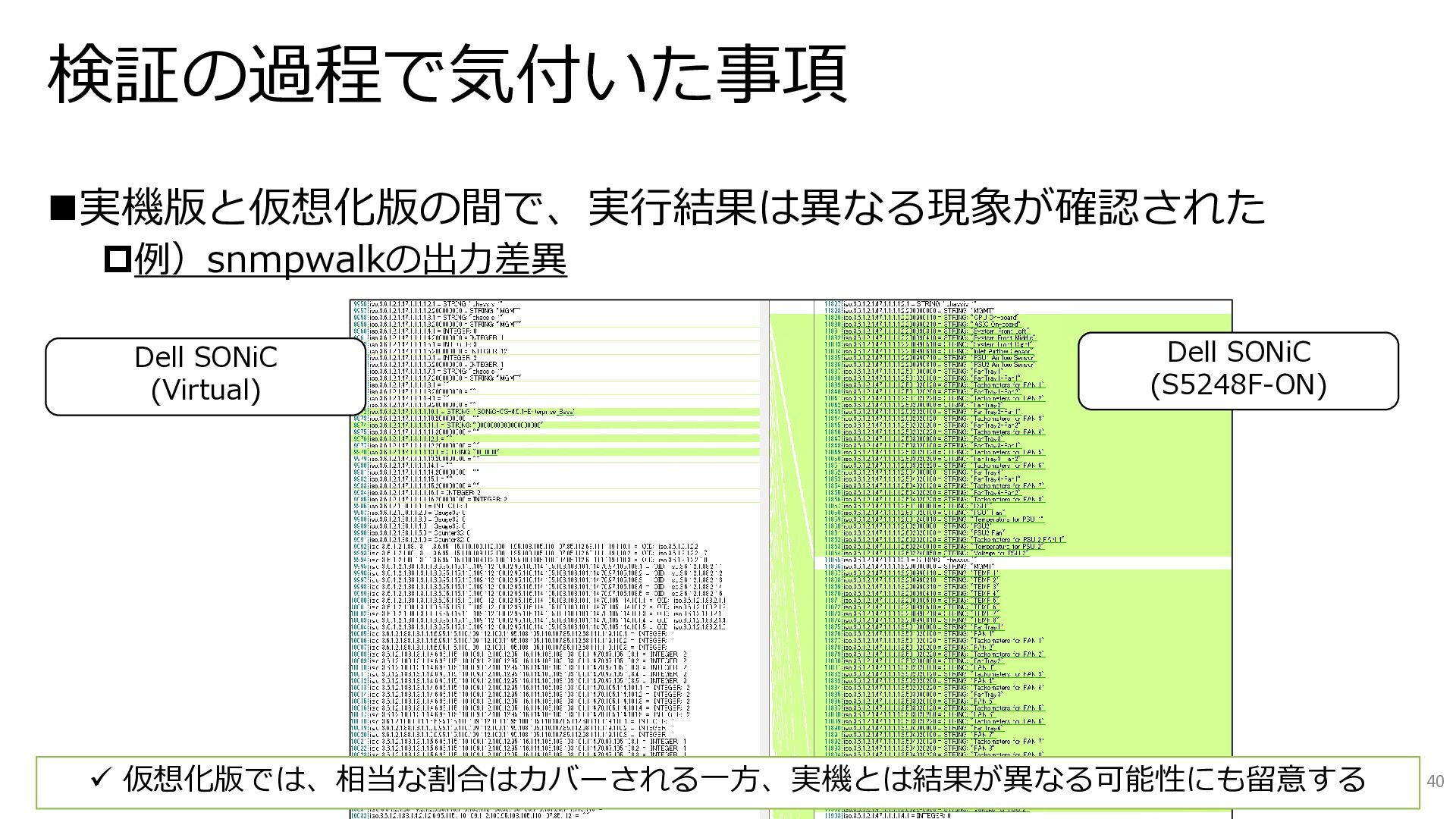
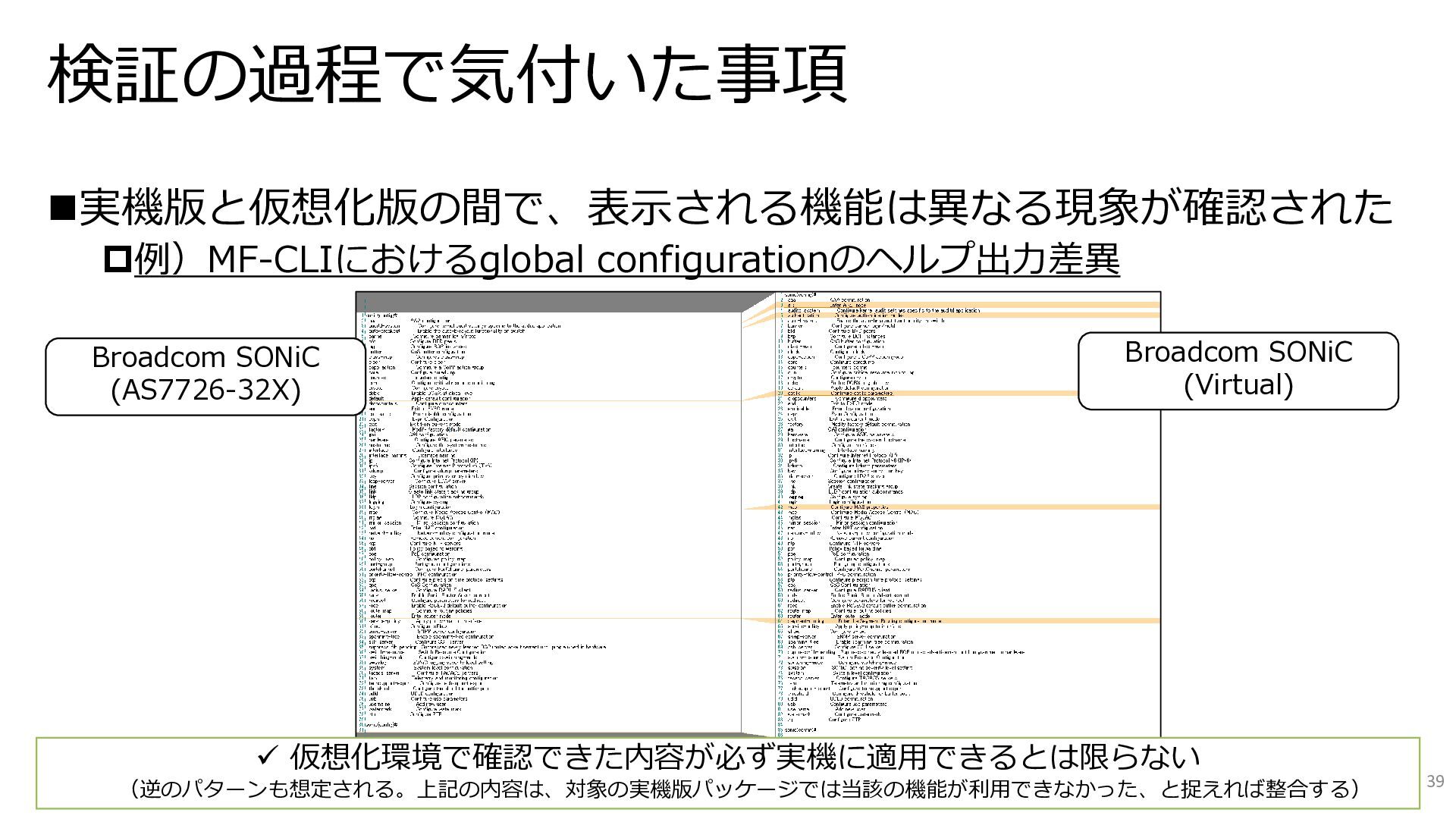
  16. 検証の過程で気付いた事項 ◼実機版と仮想化版の間で、表示される機能は異なる現象が確認された 例)MF-CLIにおけるglobal configurationのヘルプ出力差異 39 Broadcom SONiC (AS7726-32X) Broadcom SONiC

    (Virtual) ✓ 仮想化環境で確認できた内容が必ず実機に適用できるとは限らない (逆のパターンも想定される。上記の内容は、対象の実機版パッケージでは当該の機能が利用できなかった、と捉えれば整合する)
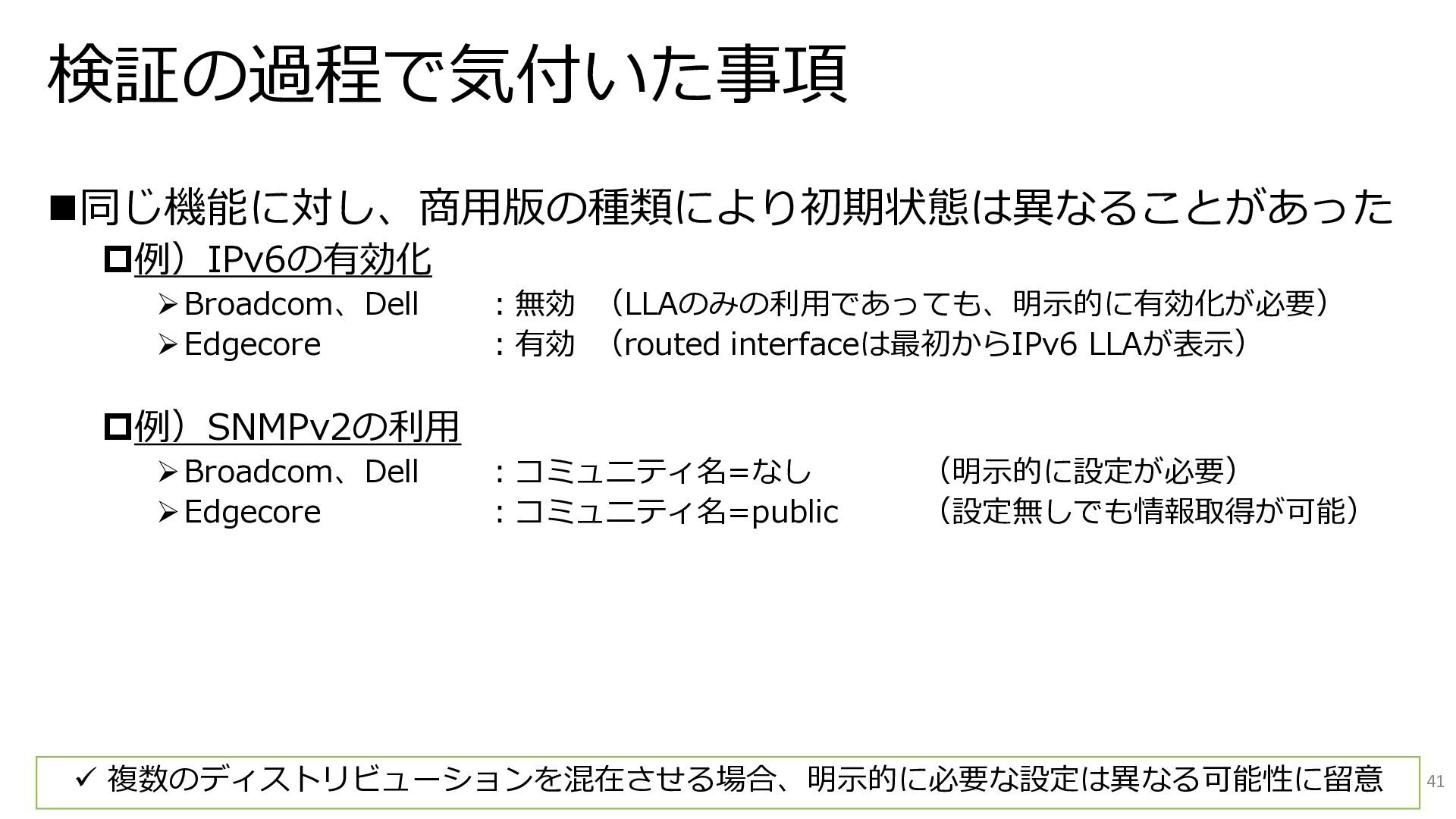
  17. 検証の過程で気付いた事項 ◼同じ機能に対し、商用版の種類により初期状態は異なることがあった 例)IPv6の有効化 ➢Broadcom、Dell :無効 (LLAのみの利用であっても、明示的に有効化が必要) ➢Edgecore :有効 (routed interfaceは最初からIPv6

    LLAが表示) 例)SNMPv2の利用 ➢Broadcom、Dell :コミュニティ名=なし (明示的に設定が必要) ➢Edgecore :コミュニティ名=public (設定無しでも情報取得が可能) 41 ✓ 複数のディストリビューションを混在させる場合、明示的に必要な設定は異なる可能性に留意
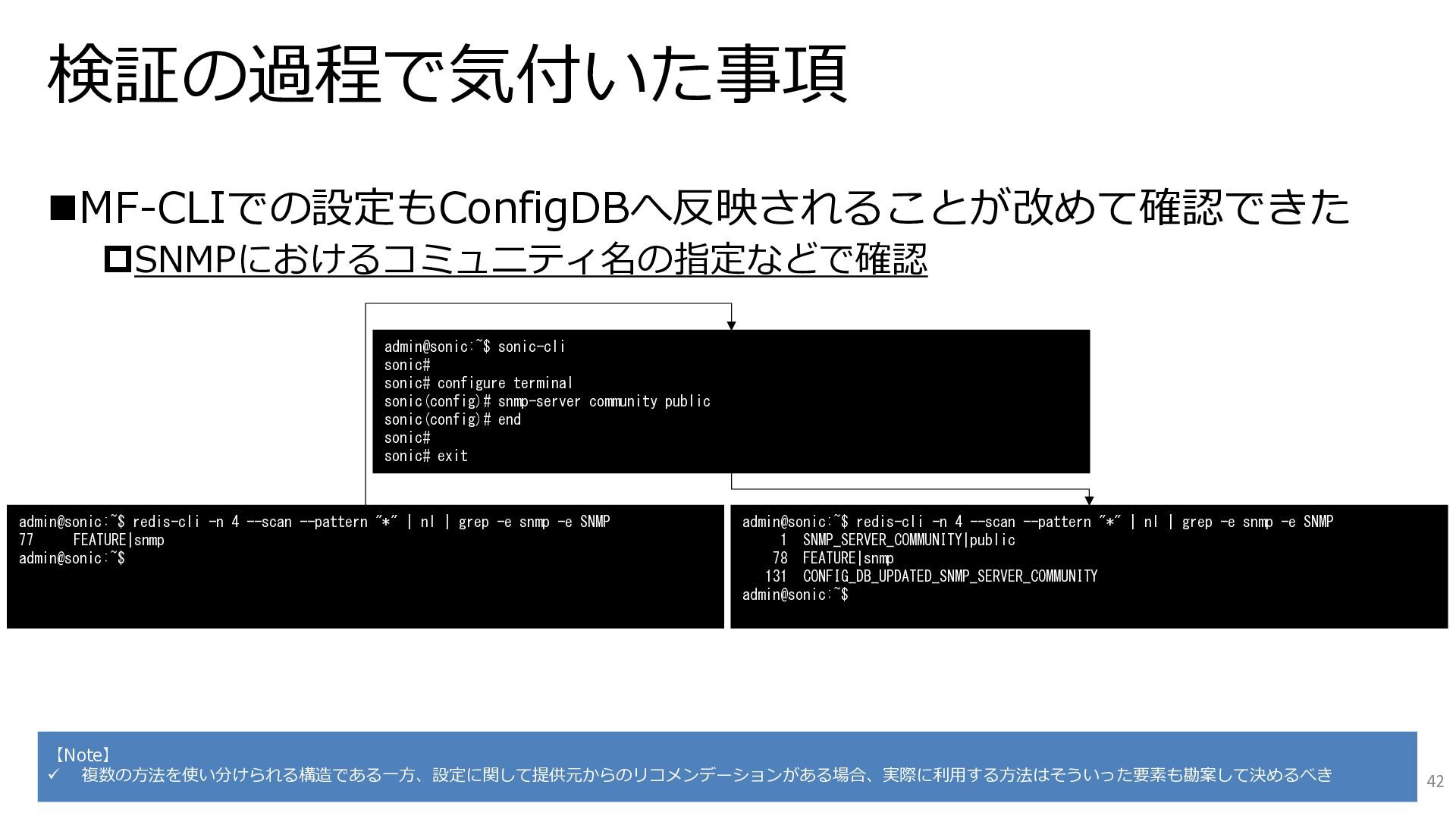
  18. 検証の過程で気付いた事項 ◼MF-CLIでの設定もConfigDBへ反映されることが改めて確認できた SNMPにおけるコミュニティ名の指定などで確認 admin@sonic:~$ sonic-cli sonic# sonic# configure terminal sonic(config)#

    snmp-server community public sonic(config)# end sonic# sonic# exit admin@sonic:~$ redis-cli -n 4 --scan --pattern "*" | nl | grep -e snmp -e SNMP 77 FEATURE|snmp admin@sonic:~$ admin@sonic:~$ redis-cli -n 4 --scan --pattern "*" | nl | grep -e snmp -e SNMP 1 SNMP_SERVER_COMMUNITY|public 78 FEATURE|snmp 131 CONFIG_DB_UPDATED_SNMP_SERVER_COMMUNITY admin@sonic:~$ 【Note】 ✓ 複数の方法を使い分けられる構造である一方、設定に関して提供元からのリコメンデーションがある場合、実際に利用する方法はそういった要素も勘案して決めるべき 42
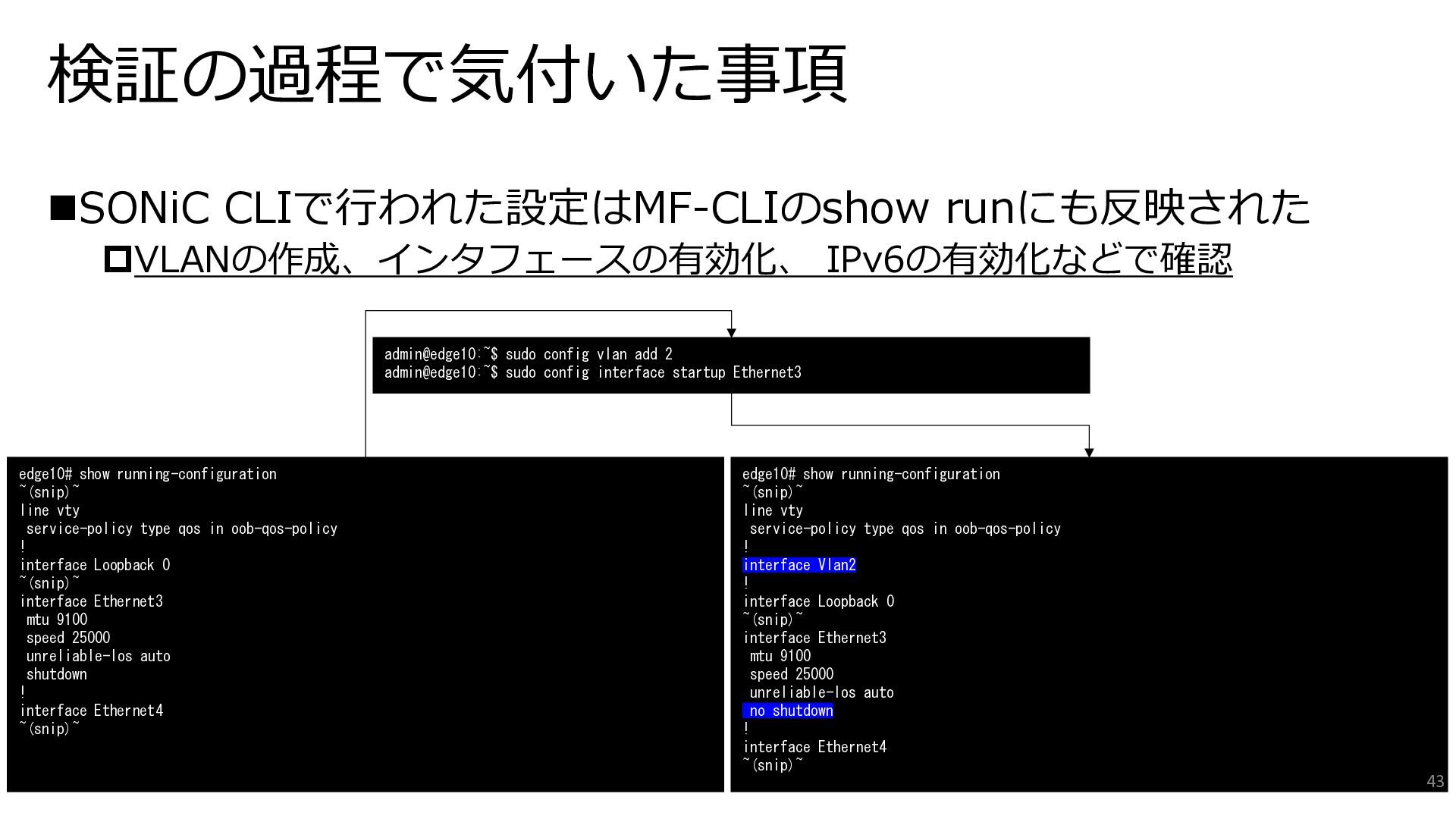
  19. 検証の過程で気付いた事項 ◼SONiC CLIで行われた設定はMF-CLIのshow runにも反映された VLANの作成、インタフェースの有効化、 IPv6の有効化などで確認 admin@edge10:~$ sudo config vlan

    add 2 admin@edge10:~$ sudo config interface startup Ethernet3 edge10# show running-configuration ~(snip)~ line vty service-policy type qos in oob-qos-policy ! interface Loopback 0 ~(snip)~ interface Ethernet3 mtu 9100 speed 25000 unreliable-los auto shutdown ! interface Ethernet4 ~(snip)~ edge10# show running-configuration ~(snip)~ line vty service-policy type qos in oob-qos-policy ! interface Vlan2 ! interface Loopback 0 ~(snip)~ interface Ethernet3 mtu 9100 speed 25000 unreliable-los auto no shutdown ! interface Ethernet4 ~(snip)~ 43
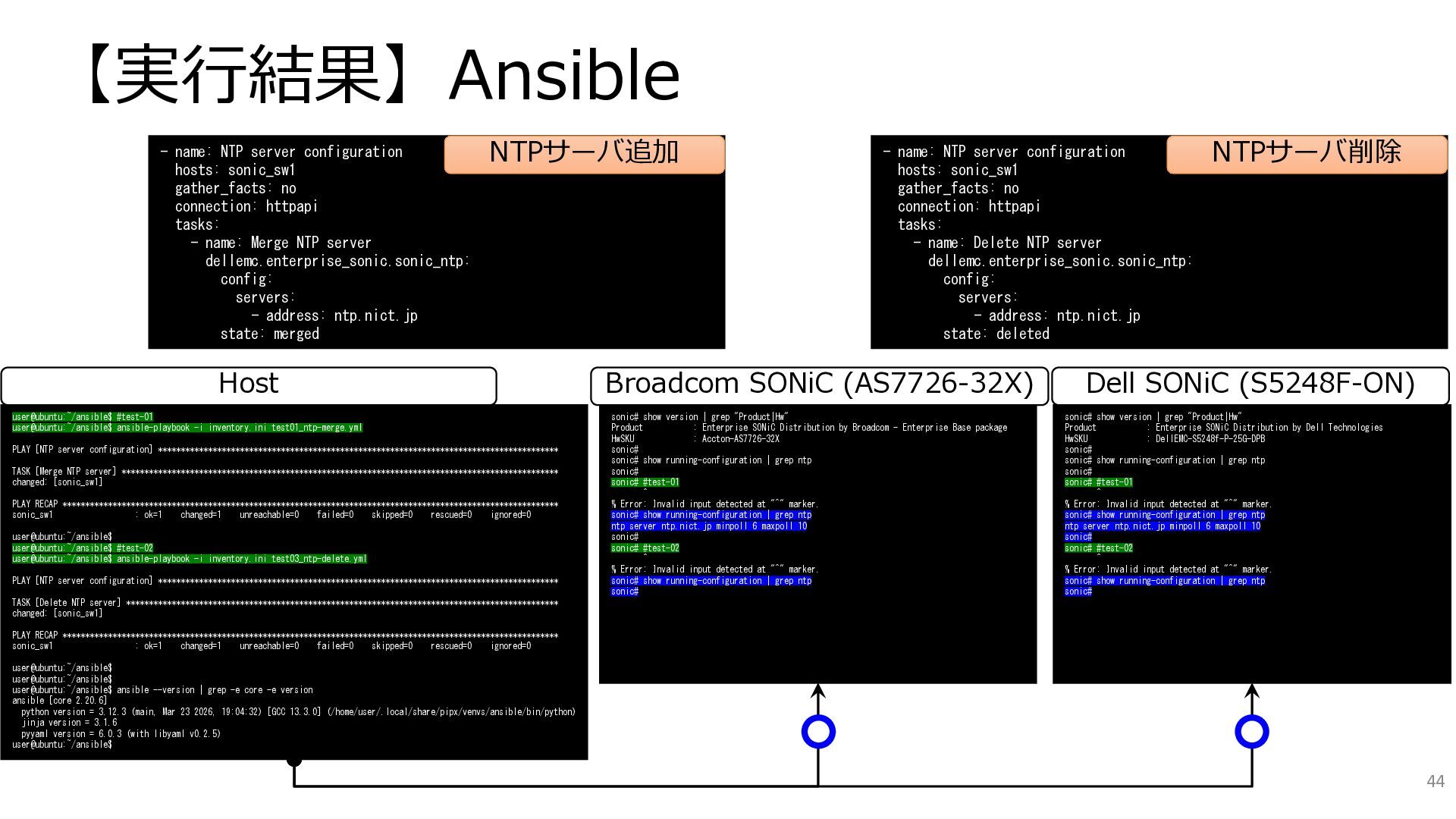
  20. 【実行結果】Ansible - name: NTP server configuration hosts: sonic_sw1 gather_facts: no

    connection: httpapi tasks: - name: Merge NTP server dellemc.enterprise_sonic.sonic_ntp: config: servers: - address: ntp.nict.jp state: merged - name: NTP server configuration hosts: sonic_sw1 gather_facts: no connection: httpapi tasks: - name: Delete NTP server dellemc.enterprise_sonic.sonic_ntp: config: servers: - address: ntp.nict.jp state: deleted NTPサーバ追加 NTPサーバ削除 user@ubuntu:~/ansible$ #test-01 user@ubuntu:~/ansible$ ansible-playbook -i inventory.ini test01_ntp-merge.yml PLAY [NTP server configuration] **************************************************************************************** TASK [Merge NTP server] ************************************************************************************************ changed: [sonic_sw1] PLAY RECAP ************************************************************************************************************* sonic_sw1 : ok=1 changed=1 unreachable=0 failed=0 skipped=0 rescued=0 ignored=0 user@ubuntu:~/ansible$ user@ubuntu:~/ansible$ #test-02 user@ubuntu:~/ansible$ ansible-playbook -i inventory.ini test03_ntp-delete.yml PLAY [NTP server configuration] **************************************************************************************** TASK [Delete NTP server] *********************************************************************************************** changed: [sonic_sw1] PLAY RECAP ************************************************************************************************************* sonic_sw1 : ok=1 changed=1 unreachable=0 failed=0 skipped=0 rescued=0 ignored=0 user@ubuntu:~/ansible$ user@ubuntu:~/ansible$ user@ubuntu:~/ansible$ ansible --version | grep -e core -e version ansible [core 2.20.6] python version = 3.12.3 (main, Mar 23 2026, 19:04:32) [GCC 13.3.0] (/home/user/.local/share/pipx/venvs/ansible/bin/python) jinja version = 3.1.6 pyyaml version = 6.0.3 (with libyaml v0.2.5) user@ubuntu:~/ansible$ sonic# show version | grep "Product|Hw" Product : Enterprise SONiC Distribution by Dell Technologies HwSKU : DellEMC-S5248f-P-25G-DPB sonic# sonic# show running-configuration | grep ntp sonic# sonic# #test-01 ^ % Error: Invalid input detected at "^" marker. sonic# show running-configuration | grep ntp ntp server ntp.nict.jp minpoll 6 maxpoll 10 sonic# sonic# #test-02 ^ % Error: Invalid input detected at "^" marker. sonic# show running-configuration | grep ntp sonic# Host Dell SONiC (S5248F-ON) sonic# show version | grep "Product|Hw" Product : Enterprise SONiC Distribution by Broadcom - Enterprise Base package HwSKU : Accton-AS7726-32X sonic# sonic# show running-configuration | grep ntp sonic# sonic# #test-01 ^ % Error: Invalid input detected at "^" marker. sonic# show running-configuration | grep ntp ntp server ntp.nict.jp minpoll 6 maxpoll 10 sonic# sonic# #test-02 ^ % Error: Invalid input detected at "^" marker. sonic# show running-configuration | grep ntp sonic# Broadcom SONiC (AS7726-32X) 44
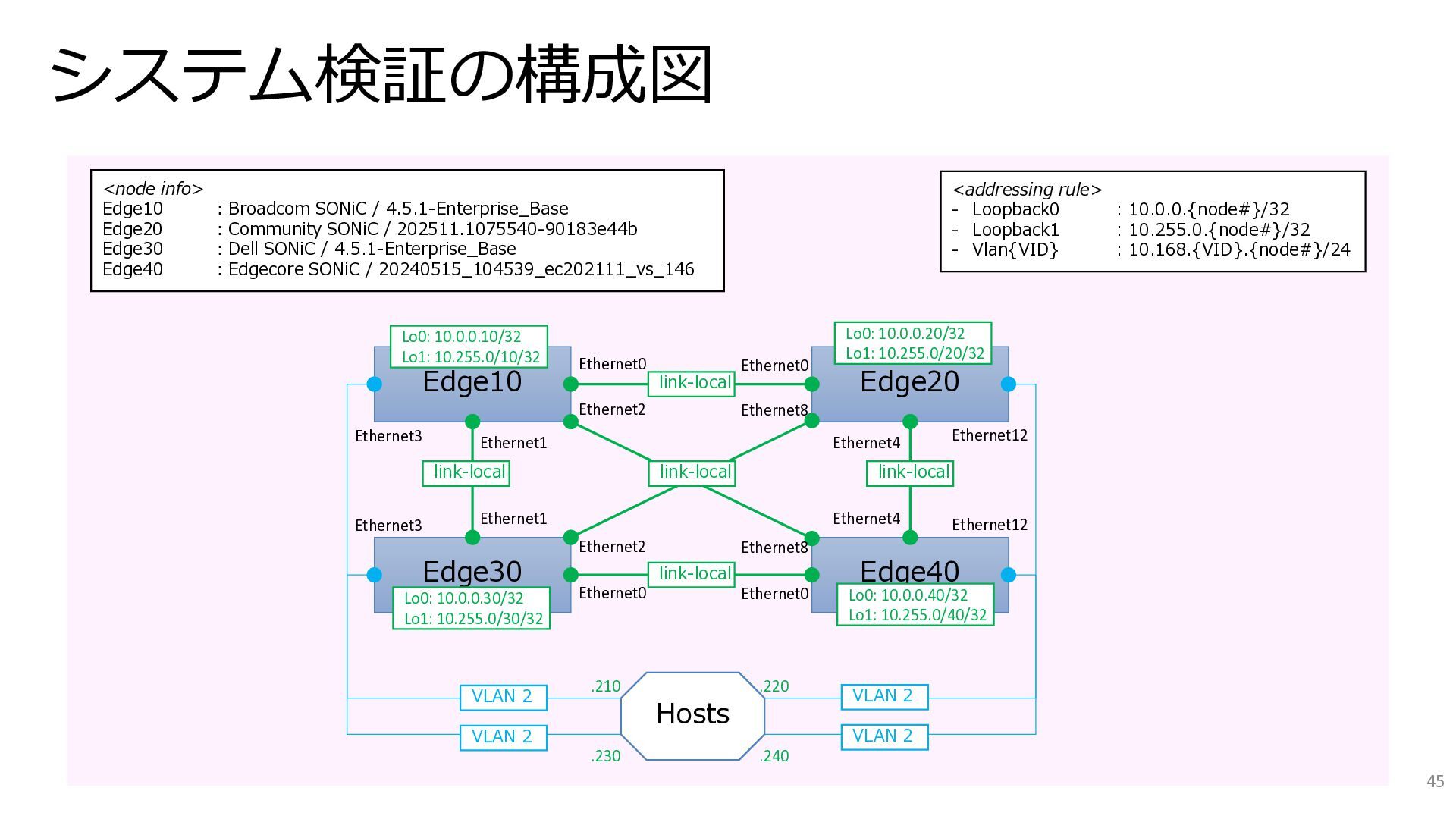
  21. システム検証の構成図 45 Edge10 Edge30 Edge20 Edge40 <node info> Edge10 :Broadcom

    SONiC / 4.5.1-Enterprise_Base Edge20 :Community SONiC / 202511.1075540-90183e44b Edge30 :Dell SONiC / 4.5.1-Enterprise_Base Edge40 :Edgecore SONiC / 20240515_104539_ec202111_vs_146 <addressing rule> - Loopback0 : 10.0.0.{node#}/32 - Loopback1 : 10.255.0.{node#}/32 - Vlan{VID} : 10.168.{VID}.{node#}/24 link-local link-local link-local link-local link-local Ethernet0 Lo0: 10.0.0.10/32 Lo1: 10.255.0/10/32 Lo0: 10.0.0.30/32 Lo1: 10.255.0/30/32 Ethernet0 Ethernet0 Ethernet0 Ethernet2 Ethernet8 Ethernet2 Ethernet8 Ethernet1 Ethernet1 Ethernet4 Ethernet4 Ethernet3 Ethernet3 Ethernet12 Ethernet12 Hosts VLAN 2 VLAN 2 VLAN 2 VLAN 2 Lo0: 10.0.0.20/32 Lo1: 10.255.0/20/32 Lo0: 10.0.0.40/32 Lo1: 10.255.0/40/32 .210 .220 .230 .240
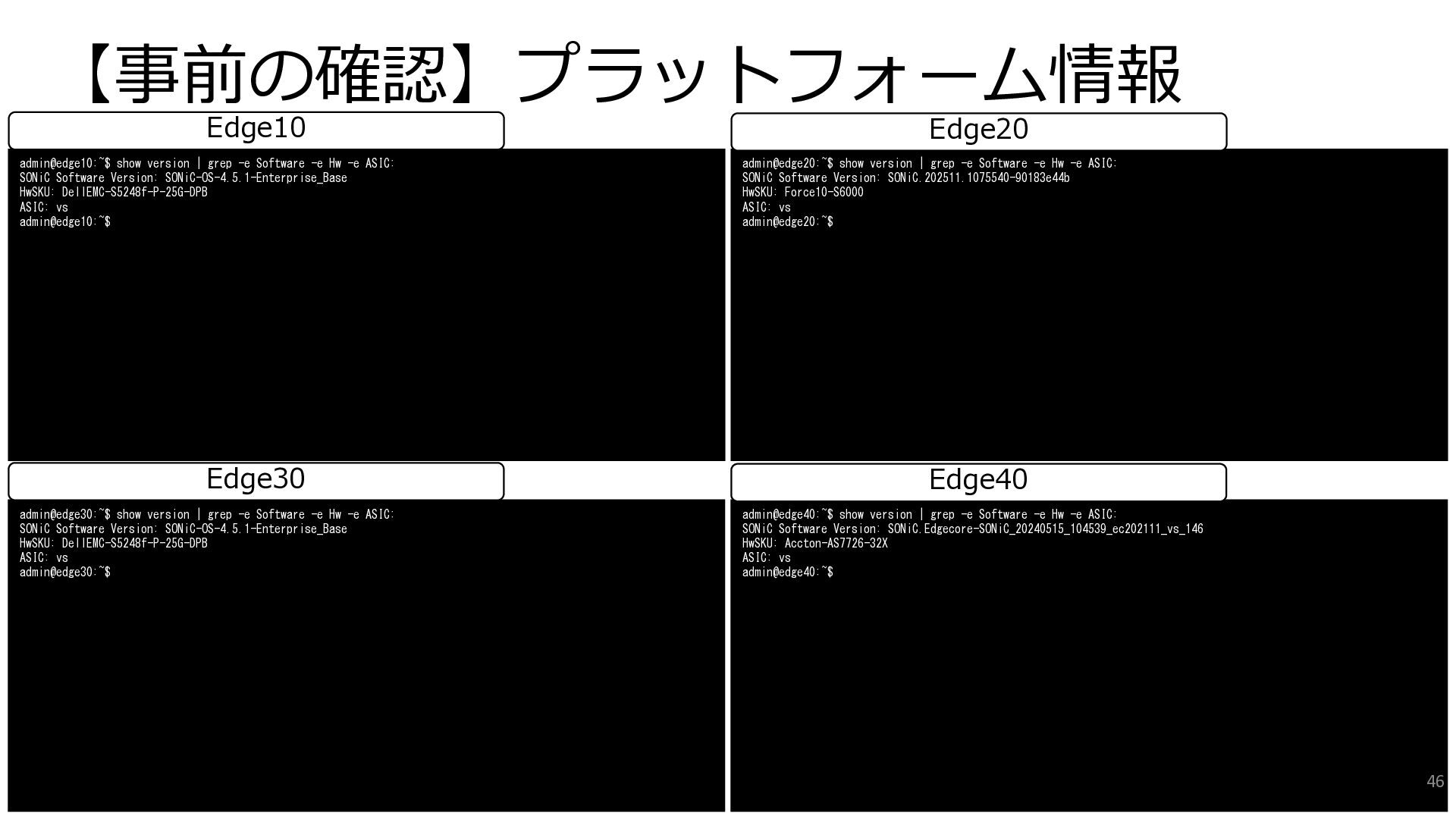
  22. 【事前の確認】プラットフォーム情報 admin@edge30:~$ show version | grep -e Software -e Hw

    -e ASIC: SONiC Software Version: SONiC-OS-4.5.1-Enterprise_Base HwSKU: DellEMC-S5248f-P-25G-DPB ASIC: vs admin@edge30:~$ admin@edge40:~$ show version | grep -e Software -e Hw -e ASIC: SONiC Software Version: SONiC.Edgecore-SONiC_20240515_104539_ec202111_vs_146 HwSKU: Accton-AS7726-32X ASIC: vs admin@edge40:~$ Edge30 Edge40 admin@edge10:~$ show version | grep -e Software -e Hw -e ASIC: SONiC Software Version: SONiC-OS-4.5.1-Enterprise_Base HwSKU: DellEMC-S5248f-P-25G-DPB ASIC: vs admin@edge10:~$ admin@edge20:~$ show version | grep -e Software -e Hw -e ASIC: SONiC Software Version: SONiC.202511.1075540-90183e44b HwSKU: Force10-S6000 ASIC: vs admin@edge20:~$ Edge10 Edge20 46
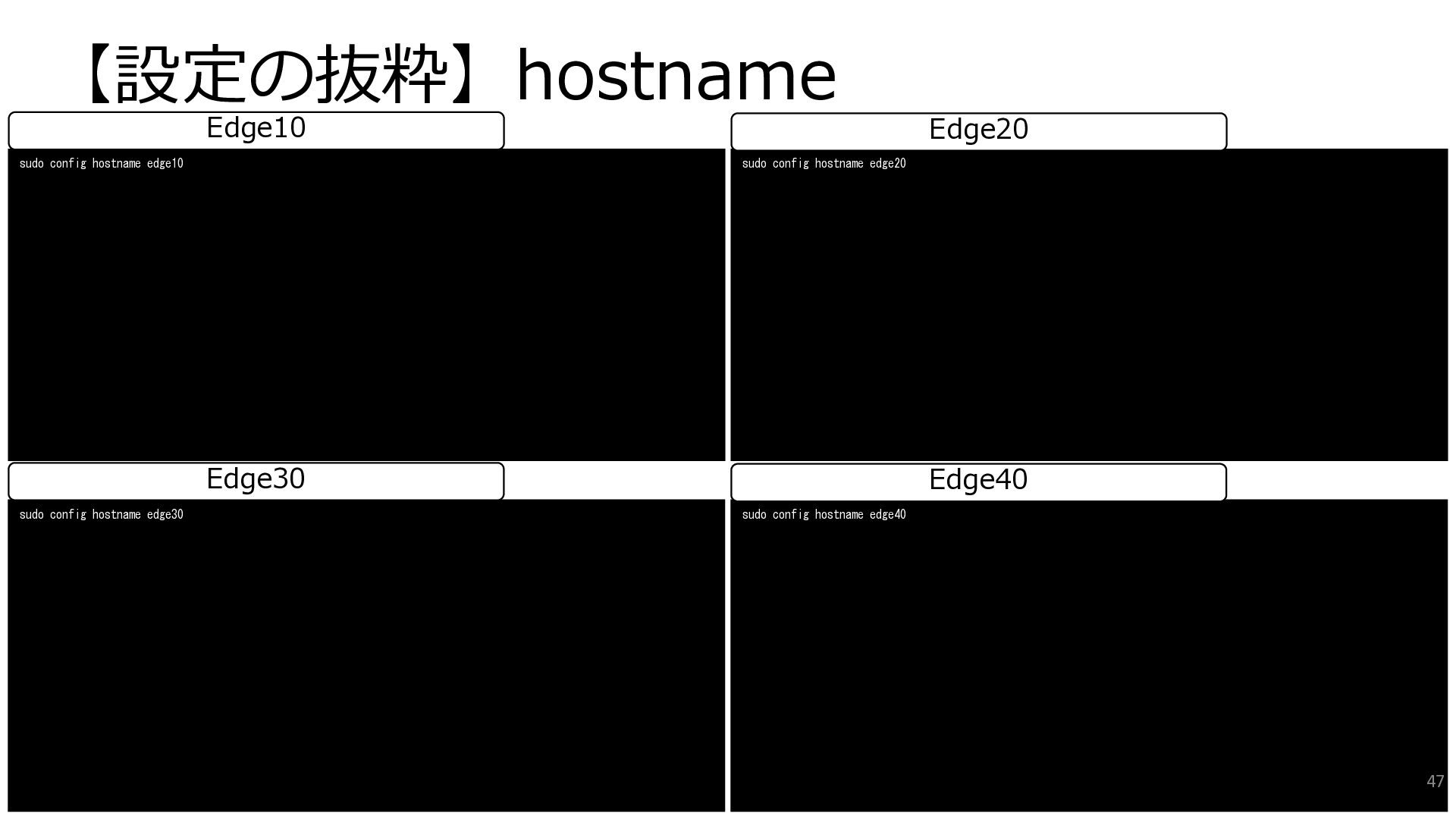
  23. 【設定の抜粋】hostname sudo config hostname edge30 sudo config hostname edge40 Edge30

    Edge40 sudo config hostname edge10 sudo config hostname edge20 Edge10 Edge20 47
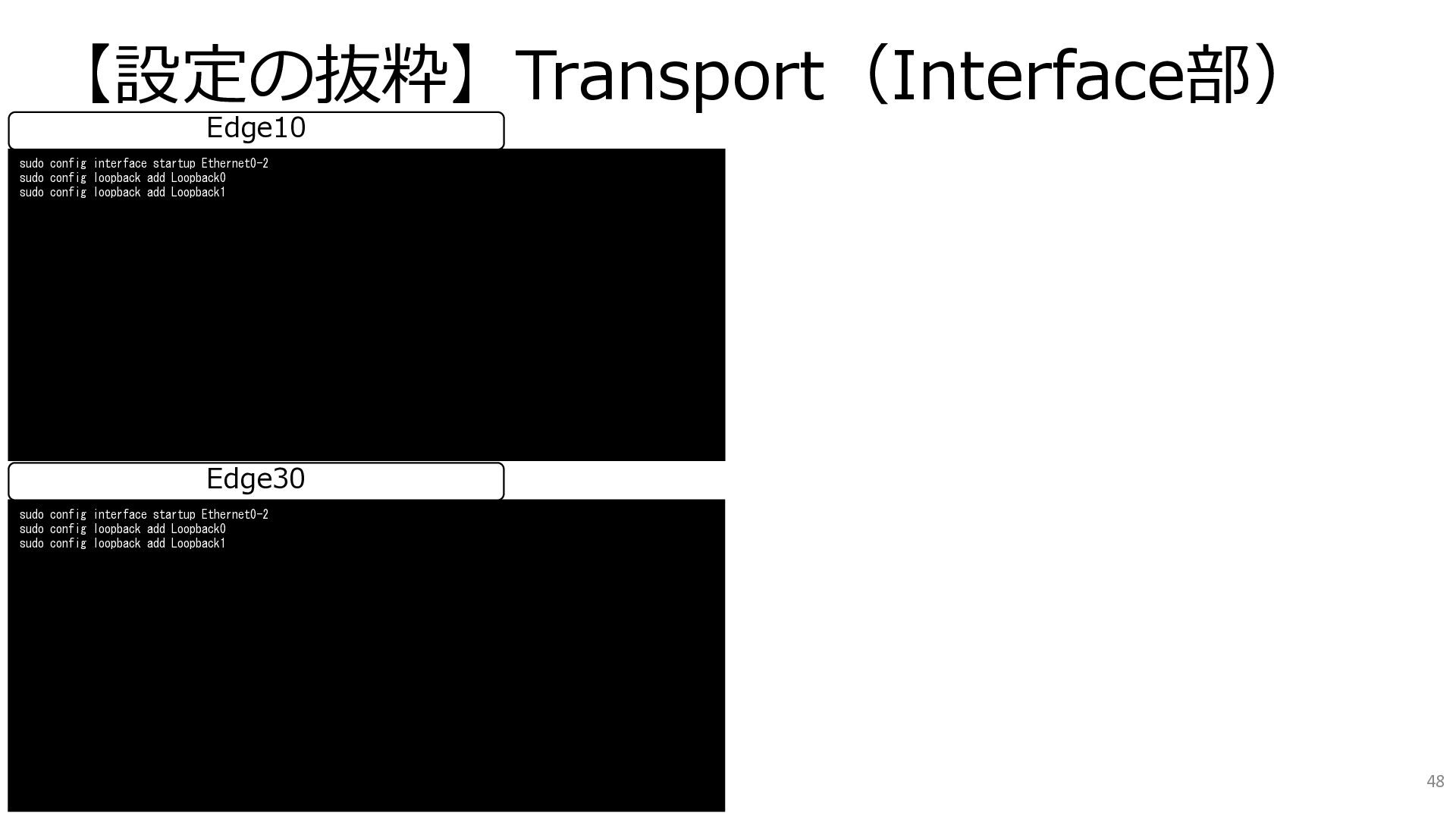
  24. 【設定の抜粋】Transport(Interface部) sudo config interface startup Ethernet0-2 sudo config loopback add

    Loopback0 sudo config loopback add Loopback1 Edge30 sudo config interface startup Ethernet0-2 sudo config loopback add Loopback0 sudo config loopback add Loopback1 Edge10 48
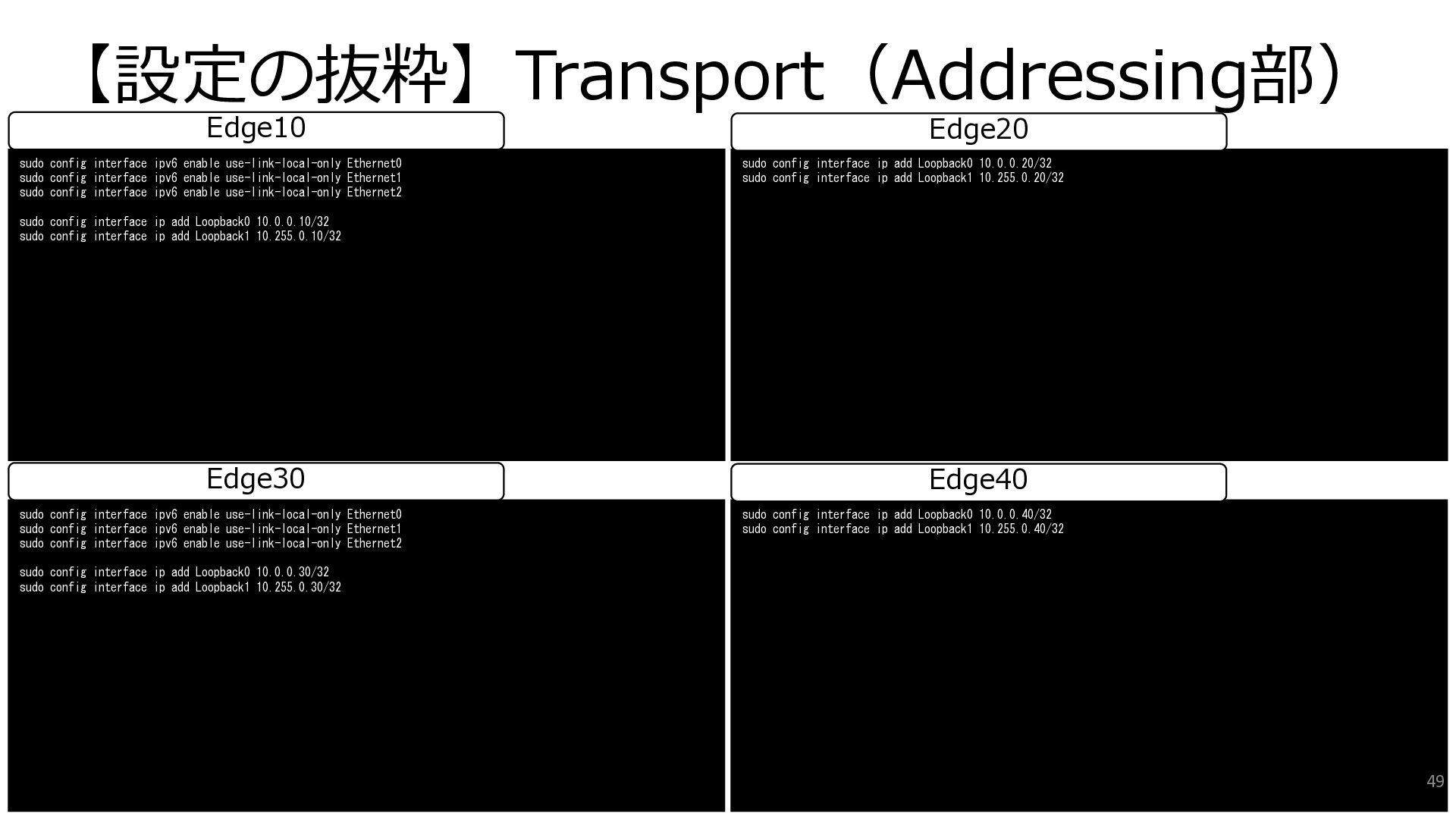
  25. 【設定の抜粋】Transport(Addressing部) sudo config interface ipv6 enable use-link-local-only Ethernet0 sudo config

    interface ipv6 enable use-link-local-only Ethernet1 sudo config interface ipv6 enable use-link-local-only Ethernet2 sudo config interface ip add Loopback0 10.0.0.30/32 sudo config interface ip add Loopback1 10.255.0.30/32 sudo config interface ip add Loopback0 10.0.0.40/32 sudo config interface ip add Loopback1 10.255.0.40/32 Edge30 Edge40 sudo config interface ipv6 enable use-link-local-only Ethernet0 sudo config interface ipv6 enable use-link-local-only Ethernet1 sudo config interface ipv6 enable use-link-local-only Ethernet2 sudo config interface ip add Loopback0 10.0.0.10/32 sudo config interface ip add Loopback1 10.255.0.10/32 sudo config interface ip add Loopback0 10.0.0.20/32 sudo config interface ip add Loopback1 10.255.0.20/32 Edge10 Edge20 49
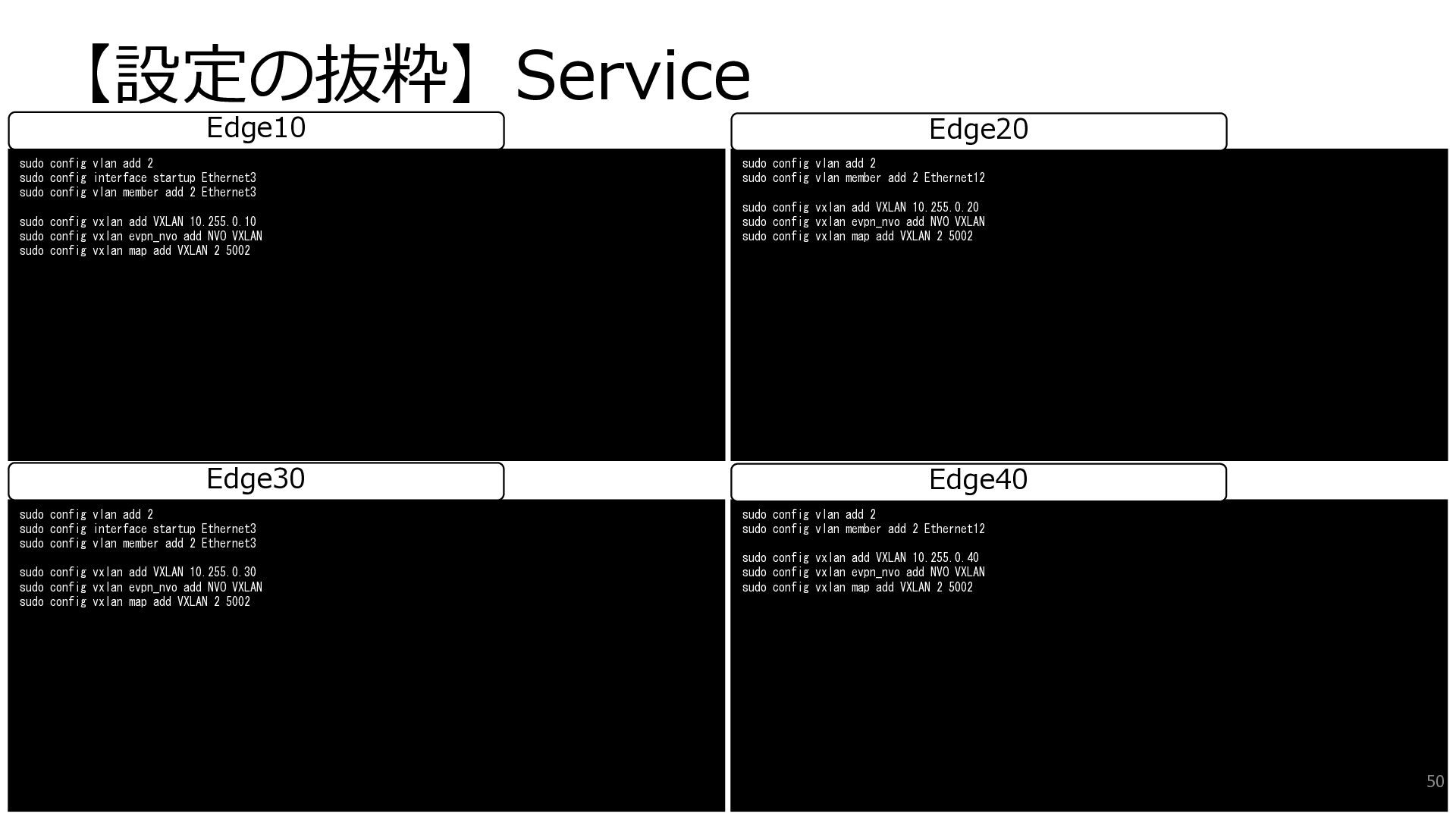
  26. 【設定の抜粋】Service sudo config vlan add 2 sudo config interface startup

    Ethernet3 sudo config vlan member add 2 Ethernet3 sudo config vxlan add VXLAN 10.255.0.30 sudo config vxlan evpn_nvo add NVO VXLAN sudo config vxlan map add VXLAN 2 5002 sudo config vlan add 2 sudo config vlan member add 2 Ethernet12 sudo config vxlan add VXLAN 10.255.0.40 sudo config vxlan evpn_nvo add NVO VXLAN sudo config vxlan map add VXLAN 2 5002 Edge30 Edge40 sudo config vlan add 2 sudo config interface startup Ethernet3 sudo config vlan member add 2 Ethernet3 sudo config vxlan add VXLAN 10.255.0.10 sudo config vxlan evpn_nvo add NVO VXLAN sudo config vxlan map add VXLAN 2 5002 sudo config vlan add 2 sudo config vlan member add 2 Ethernet12 sudo config vxlan add VXLAN 10.255.0.20 sudo config vxlan evpn_nvo add NVO VXLAN sudo config vxlan map add VXLAN 2 5002 Edge10 Edge20 50
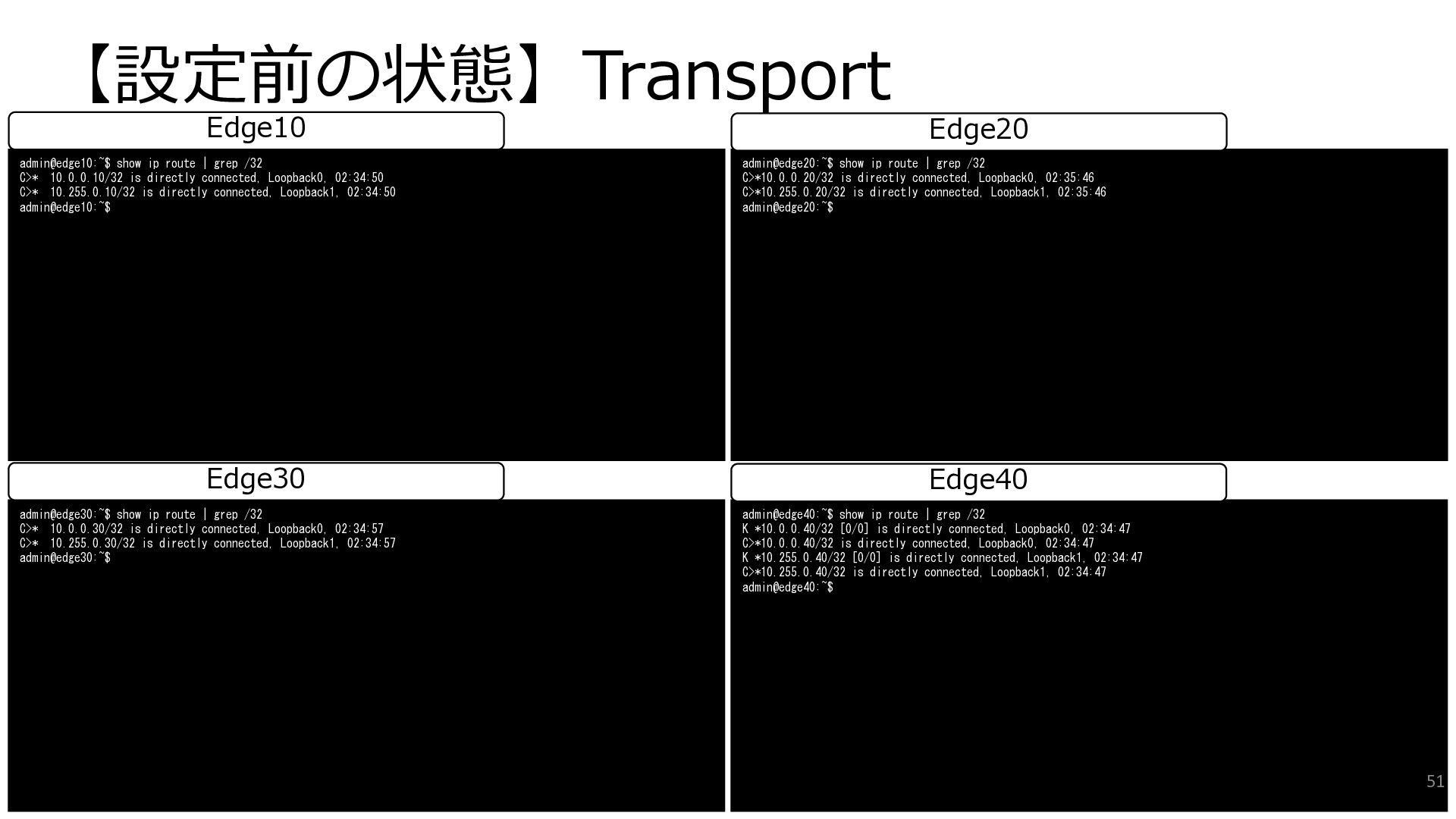
  27. 【設定前の状態】Transport admin@edge30:~$ show ip route | grep /32 C>* 10.0.0.30/32

    is directly connected, Loopback0, 02:34:57 C>* 10.255.0.30/32 is directly connected, Loopback1, 02:34:57 admin@edge30:~$ admin@edge40:~$ show ip route | grep /32 K *10.0.0.40/32 [0/0] is directly connected, Loopback0, 02:34:47 C>*10.0.0.40/32 is directly connected, Loopback0, 02:34:47 K *10.255.0.40/32 [0/0] is directly connected, Loopback1, 02:34:47 C>*10.255.0.40/32 is directly connected, Loopback1, 02:34:47 admin@edge40:~$ Edge30 Edge40 admin@edge10:~$ show ip route | grep /32 C>* 10.0.0.10/32 is directly connected, Loopback0, 02:34:50 C>* 10.255.0.10/32 is directly connected, Loopback1, 02:34:50 admin@edge10:~$ admin@edge20:~$ show ip route | grep /32 C>*10.0.0.20/32 is directly connected, Loopback0, 02:35:46 C>*10.255.0.20/32 is directly connected, Loopback1, 02:35:46 admin@edge20:~$ Edge10 Edge20 51
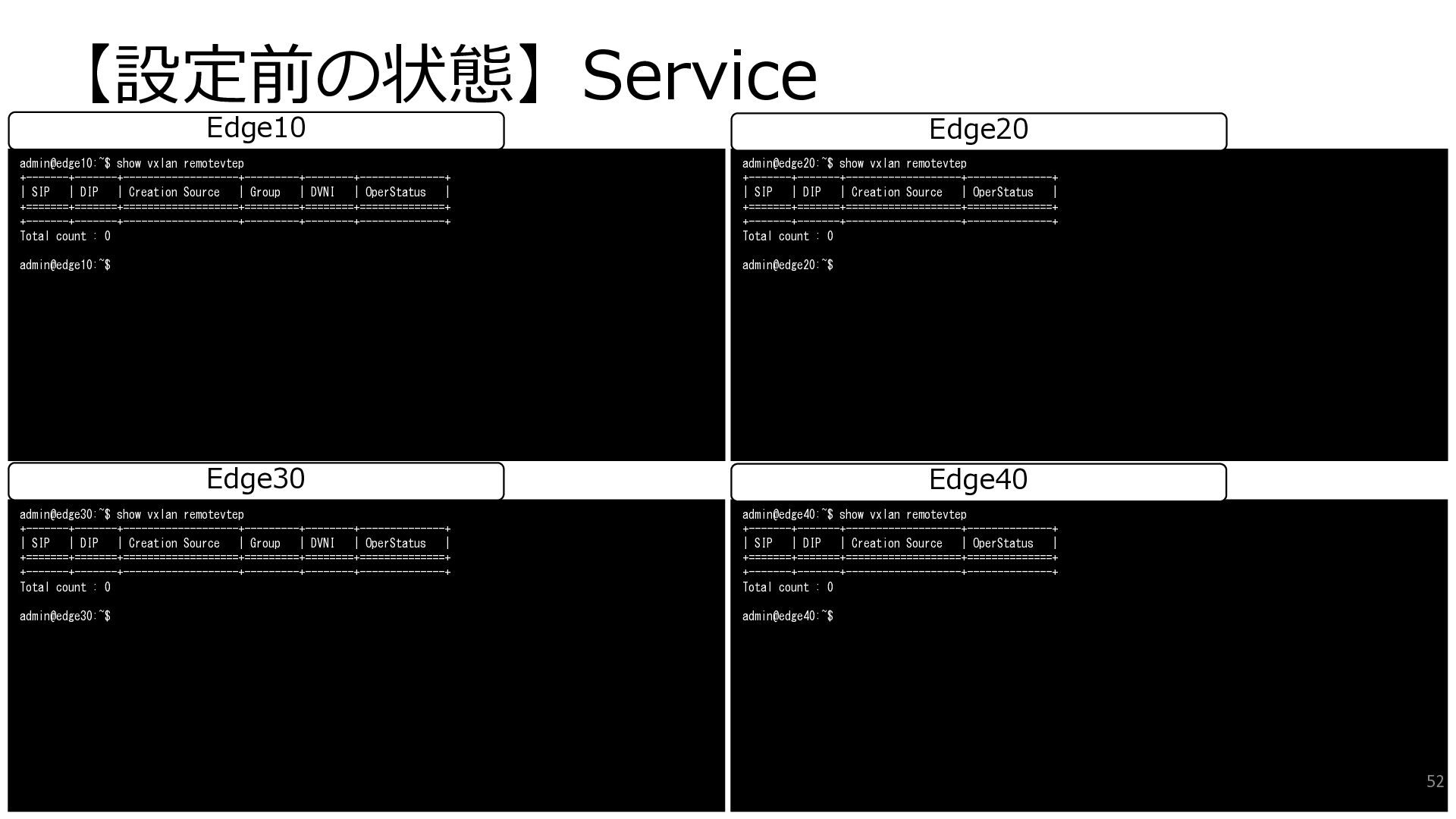
  28. 【設定前の状態】Service admin@edge30:~$ show vxlan remotevtep +-------+-------+-------------------+---------+--------+--------------+ | SIP | DIP

    | Creation Source | Group | DVNI | OperStatus | +=======+=======+===================+=========+========+==============+ +-------+-------+-------------------+---------+--------+--------------+ Total count : 0 admin@edge30:~$ admin@edge40:~$ show vxlan remotevtep +-------+-------+-------------------+--------------+ | SIP | DIP | Creation Source | OperStatus | +=======+=======+===================+==============+ +-------+-------+-------------------+--------------+ Total count : 0 admin@edge40:~$ Edge30 Edge40 admin@edge10:~$ show vxlan remotevtep +-------+-------+-------------------+---------+--------+--------------+ | SIP | DIP | Creation Source | Group | DVNI | OperStatus | +=======+=======+===================+=========+========+==============+ +-------+-------+-------------------+---------+--------+--------------+ Total count : 0 admin@edge10:~$ admin@edge20:~$ show vxlan remotevtep +-------+-------+-------------------+--------------+ | SIP | DIP | Creation Source | OperStatus | +=======+=======+===================+==============+ +-------+-------+-------------------+--------------+ Total count : 0 admin@edge20:~$ Edge10 Edge20 52
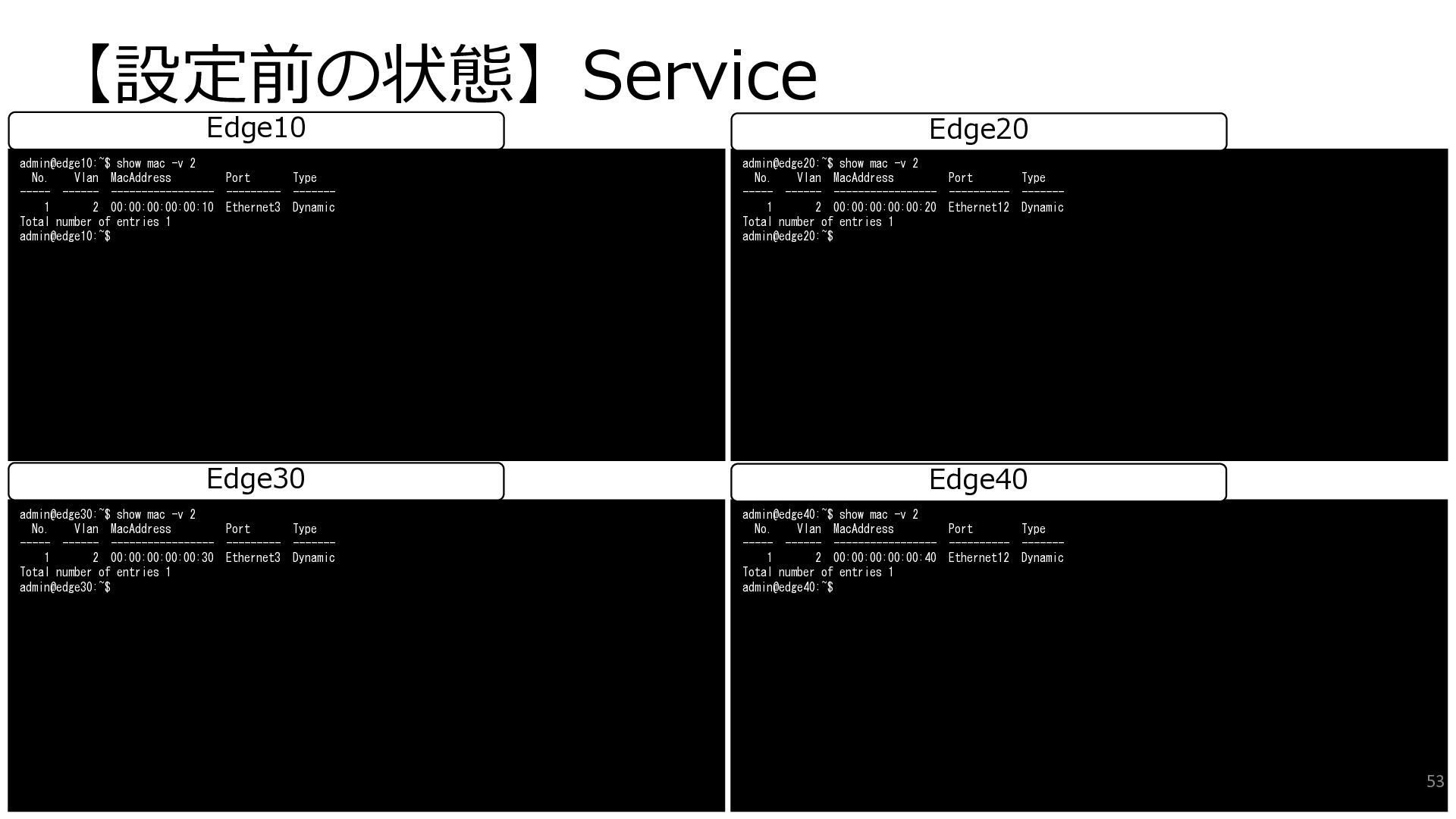
  29. 【設定前の状態】Service admin@edge30:~$ show mac -v 2 No. Vlan MacAddress Port

    Type ----- ------ ----------------- --------- ------- 1 2 00:00:00:00:00:30 Ethernet3 Dynamic Total number of entries 1 admin@edge30:~$ admin@edge40:~$ show mac -v 2 No. Vlan MacAddress Port Type ----- ------ ----------------- ---------- ------- 1 2 00:00:00:00:00:40 Ethernet12 Dynamic Total number of entries 1 admin@edge40:~$ Edge30 Edge40 admin@edge10:~$ show mac -v 2 No. Vlan MacAddress Port Type ----- ------ ----------------- --------- ------- 1 2 00:00:00:00:00:10 Ethernet3 Dynamic Total number of entries 1 admin@edge10:~$ admin@edge20:~$ show mac -v 2 No. Vlan MacAddress Port Type ----- ------ ----------------- ---------- ------- 1 2 00:00:00:00:00:20 Ethernet12 Dynamic Total number of entries 1 admin@edge20:~$ Edge10 Edge20 53
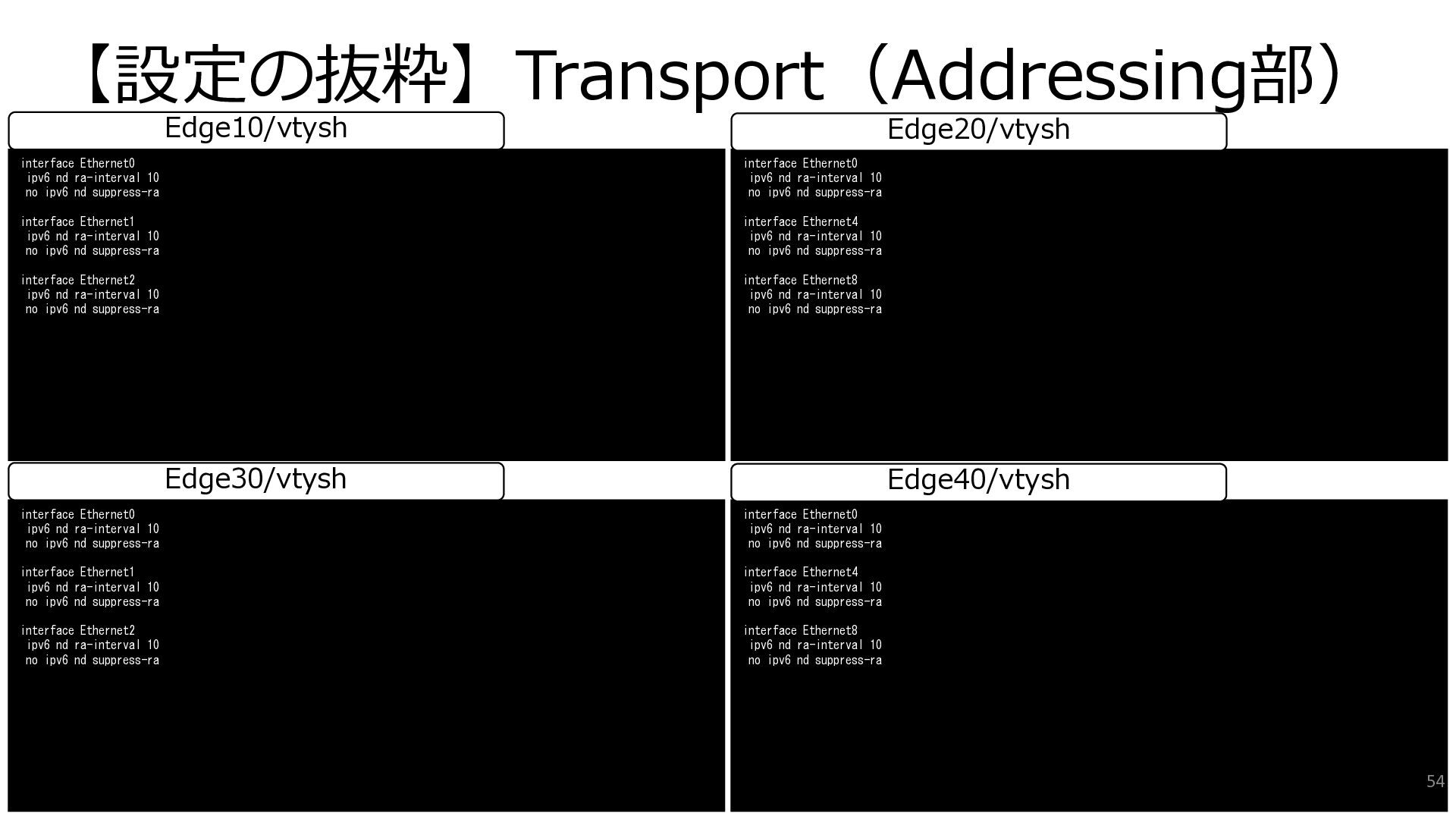
  30. 【設定の抜粋】Transport(Addressing部) interface Ethernet0 ipv6 nd ra-interval 10 no ipv6 nd

    suppress-ra interface Ethernet1 ipv6 nd ra-interval 10 no ipv6 nd suppress-ra interface Ethernet2 ipv6 nd ra-interval 10 no ipv6 nd suppress-ra interface Ethernet0 ipv6 nd ra-interval 10 no ipv6 nd suppress-ra interface Ethernet4 ipv6 nd ra-interval 10 no ipv6 nd suppress-ra interface Ethernet8 ipv6 nd ra-interval 10 no ipv6 nd suppress-ra Edge30/vtysh Edge40/vtysh interface Ethernet0 ipv6 nd ra-interval 10 no ipv6 nd suppress-ra interface Ethernet1 ipv6 nd ra-interval 10 no ipv6 nd suppress-ra interface Ethernet2 ipv6 nd ra-interval 10 no ipv6 nd suppress-ra interface Ethernet0 ipv6 nd ra-interval 10 no ipv6 nd suppress-ra interface Ethernet4 ipv6 nd ra-interval 10 no ipv6 nd suppress-ra interface Ethernet8 ipv6 nd ra-interval 10 no ipv6 nd suppress-ra Edge10/vtysh Edge20/vtysh 54
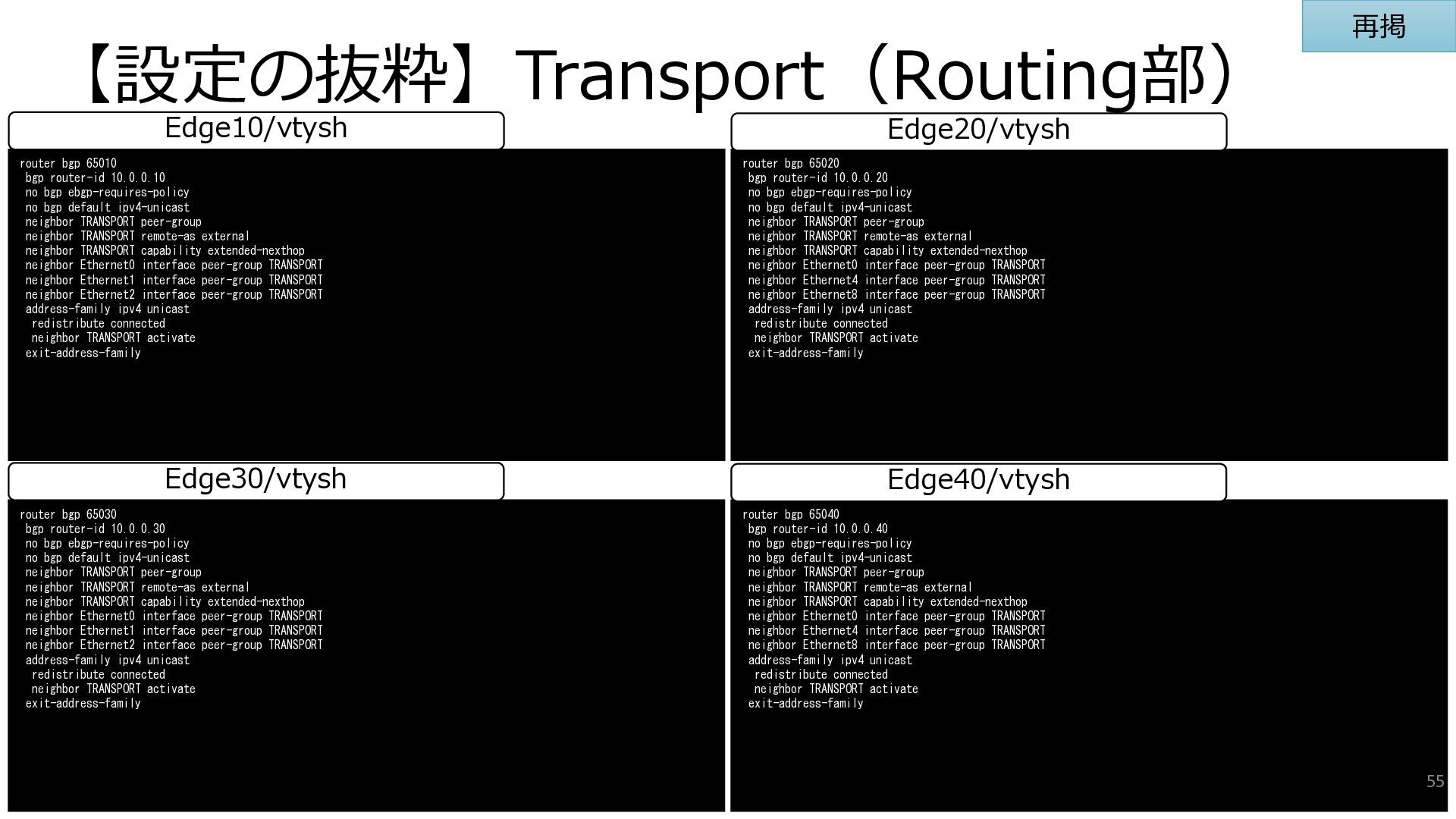
  31. 【設定の抜粋】Transport(Routing部) router bgp 65030 bgp router-id 10.0.0.30 no bgp ebgp-requires-policy

    no bgp default ipv4-unicast neighbor TRANSPORT peer-group neighbor TRANSPORT remote-as external neighbor TRANSPORT capability extended-nexthop neighbor Ethernet0 interface peer-group TRANSPORT neighbor Ethernet1 interface peer-group TRANSPORT neighbor Ethernet2 interface peer-group TRANSPORT address-family ipv4 unicast redistribute connected neighbor TRANSPORT activate exit-address-family router bgp 65040 bgp router-id 10.0.0.40 no bgp ebgp-requires-policy no bgp default ipv4-unicast neighbor TRANSPORT peer-group neighbor TRANSPORT remote-as external neighbor TRANSPORT capability extended-nexthop neighbor Ethernet0 interface peer-group TRANSPORT neighbor Ethernet4 interface peer-group TRANSPORT neighbor Ethernet8 interface peer-group TRANSPORT address-family ipv4 unicast redistribute connected neighbor TRANSPORT activate exit-address-family Edge30/vtysh Edge40/vtysh router bgp 65010 bgp router-id 10.0.0.10 no bgp ebgp-requires-policy no bgp default ipv4-unicast neighbor TRANSPORT peer-group neighbor TRANSPORT remote-as external neighbor TRANSPORT capability extended-nexthop neighbor Ethernet0 interface peer-group TRANSPORT neighbor Ethernet1 interface peer-group TRANSPORT neighbor Ethernet2 interface peer-group TRANSPORT address-family ipv4 unicast redistribute connected neighbor TRANSPORT activate exit-address-family router bgp 65020 bgp router-id 10.0.0.20 no bgp ebgp-requires-policy no bgp default ipv4-unicast neighbor TRANSPORT peer-group neighbor TRANSPORT remote-as external neighbor TRANSPORT capability extended-nexthop neighbor Ethernet0 interface peer-group TRANSPORT neighbor Ethernet4 interface peer-group TRANSPORT neighbor Ethernet8 interface peer-group TRANSPORT address-family ipv4 unicast redistribute connected neighbor TRANSPORT activate exit-address-family Edge10/vtysh Edge20/vtysh 55 再掲
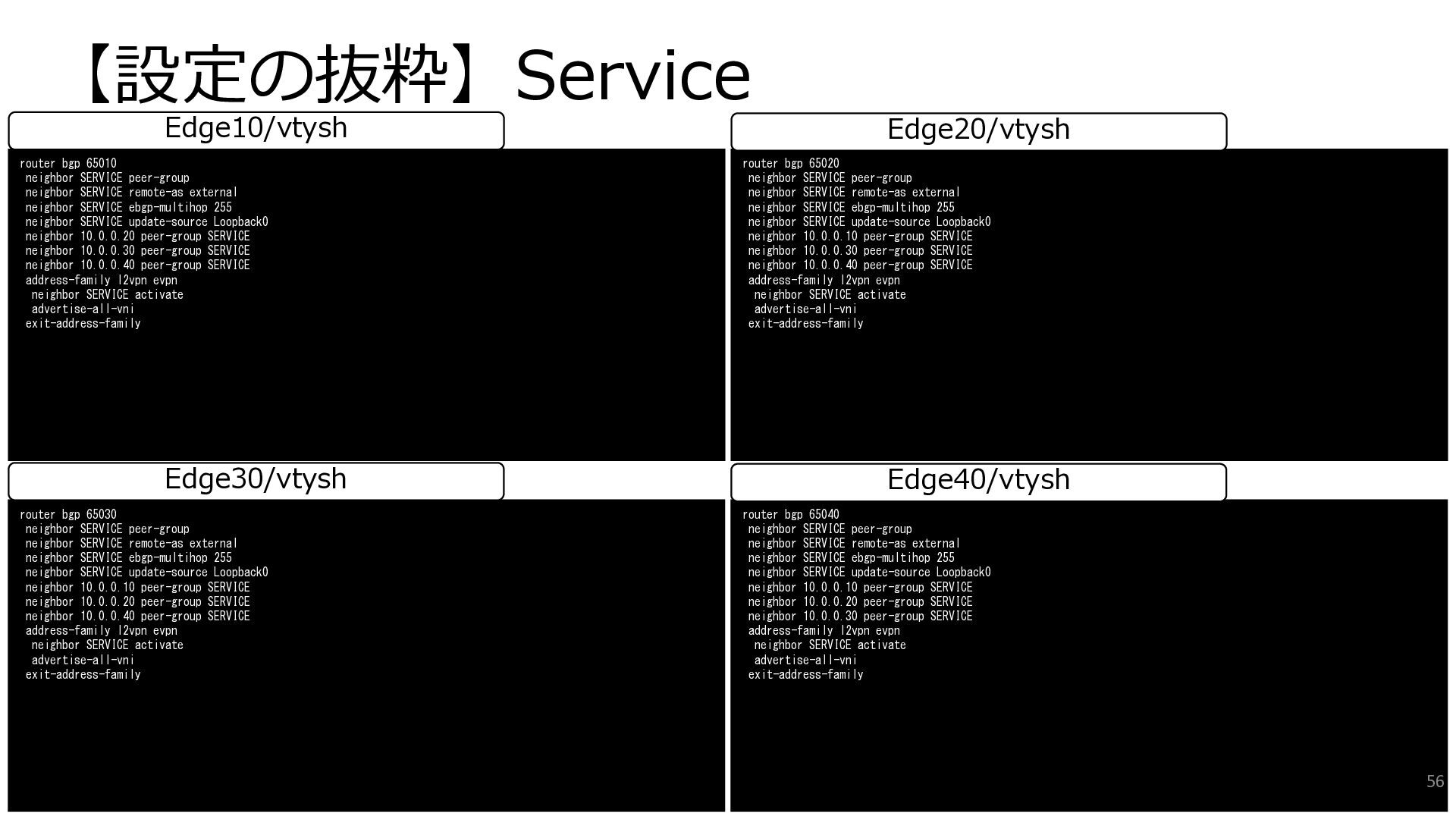
  32. 【設定の抜粋】Service router bgp 65030 neighbor SERVICE peer-group neighbor SERVICE remote-as

    external neighbor SERVICE ebgp-multihop 255 neighbor SERVICE update-source Loopback0 neighbor 10.0.0.10 peer-group SERVICE neighbor 10.0.0.20 peer-group SERVICE neighbor 10.0.0.40 peer-group SERVICE address-family l2vpn evpn neighbor SERVICE activate advertise-all-vni exit-address-family router bgp 65040 neighbor SERVICE peer-group neighbor SERVICE remote-as external neighbor SERVICE ebgp-multihop 255 neighbor SERVICE update-source Loopback0 neighbor 10.0.0.10 peer-group SERVICE neighbor 10.0.0.20 peer-group SERVICE neighbor 10.0.0.30 peer-group SERVICE address-family l2vpn evpn neighbor SERVICE activate advertise-all-vni exit-address-family Edge30/vtysh Edge40/vtysh router bgp 65010 neighbor SERVICE peer-group neighbor SERVICE remote-as external neighbor SERVICE ebgp-multihop 255 neighbor SERVICE update-source Loopback0 neighbor 10.0.0.20 peer-group SERVICE neighbor 10.0.0.30 peer-group SERVICE neighbor 10.0.0.40 peer-group SERVICE address-family l2vpn evpn neighbor SERVICE activate advertise-all-vni exit-address-family router bgp 65020 neighbor SERVICE peer-group neighbor SERVICE remote-as external neighbor SERVICE ebgp-multihop 255 neighbor SERVICE update-source Loopback0 neighbor 10.0.0.10 peer-group SERVICE neighbor 10.0.0.30 peer-group SERVICE neighbor 10.0.0.40 peer-group SERVICE address-family l2vpn evpn neighbor SERVICE activate advertise-all-vni exit-address-family Edge10/vtysh Edge20/vtysh 56
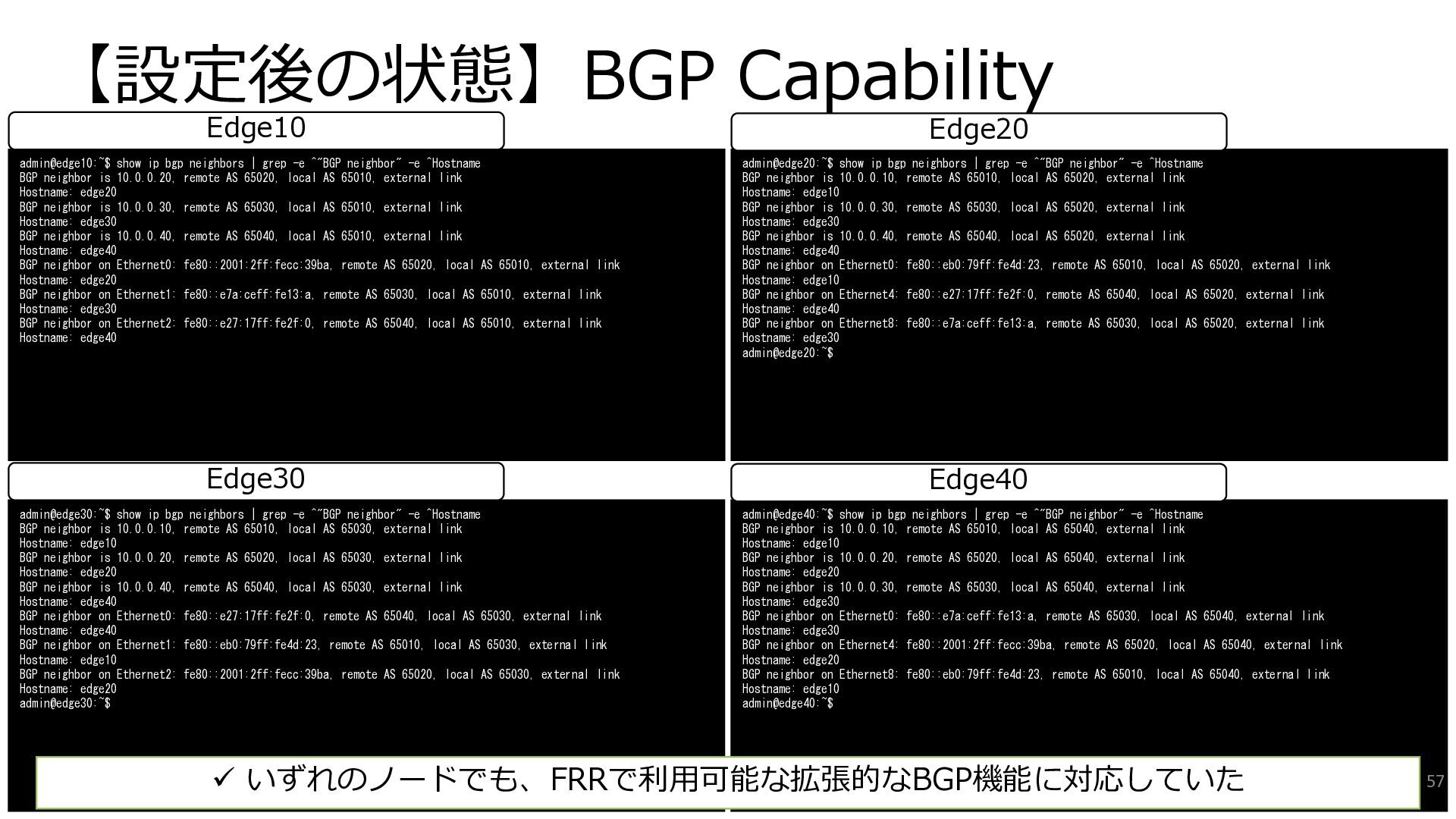
  33. 【設定後の状態】BGP Capability admin@edge30:~$ show ip bgp neighbors | grep -e

    ^"BGP neighbor" -e ^Hostname BGP neighbor is 10.0.0.10, remote AS 65010, local AS 65030, external link Hostname: edge10 BGP neighbor is 10.0.0.20, remote AS 65020, local AS 65030, external link Hostname: edge20 BGP neighbor is 10.0.0.40, remote AS 65040, local AS 65030, external link Hostname: edge40 BGP neighbor on Ethernet0: fe80::e27:17ff:fe2f:0, remote AS 65040, local AS 65030, external link Hostname: edge40 BGP neighbor on Ethernet1: fe80::eb0:79ff:fe4d:23, remote AS 65010, local AS 65030, external link Hostname: edge10 BGP neighbor on Ethernet2: fe80::2001:2ff:fecc:39ba, remote AS 65020, local AS 65030, external link Hostname: edge20 admin@edge30:~$ admin@edge40:~$ show ip bgp neighbors | grep -e ^"BGP neighbor" -e ^Hostname BGP neighbor is 10.0.0.10, remote AS 65010, local AS 65040, external link Hostname: edge10 BGP neighbor is 10.0.0.20, remote AS 65020, local AS 65040, external link Hostname: edge20 BGP neighbor is 10.0.0.30, remote AS 65030, local AS 65040, external link Hostname: edge30 BGP neighbor on Ethernet0: fe80::e7a:ceff:fe13:a, remote AS 65030, local AS 65040, external link Hostname: edge30 BGP neighbor on Ethernet4: fe80::2001:2ff:fecc:39ba, remote AS 65020, local AS 65040, external link Hostname: edge20 BGP neighbor on Ethernet8: fe80::eb0:79ff:fe4d:23, remote AS 65010, local AS 65040, external link Hostname: edge10 admin@edge40:~$ admin@edge10:~$ show ip bgp neighbors | grep -e ^"BGP neighbor" -e ^Hostname BGP neighbor is 10.0.0.20, remote AS 65020, local AS 65010, external link Hostname: edge20 BGP neighbor is 10.0.0.30, remote AS 65030, local AS 65010, external link Hostname: edge30 BGP neighbor is 10.0.0.40, remote AS 65040, local AS 65010, external link Hostname: edge40 BGP neighbor on Ethernet0: fe80::2001:2ff:fecc:39ba, remote AS 65020, local AS 65010, external link Hostname: edge20 BGP neighbor on Ethernet1: fe80::e7a:ceff:fe13:a, remote AS 65030, local AS 65010, external link Hostname: edge30 BGP neighbor on Ethernet2: fe80::e27:17ff:fe2f:0, remote AS 65040, local AS 65010, external link Hostname: edge40 admin@edge20:~$ show ip bgp neighbors | grep -e ^"BGP neighbor" -e ^Hostname BGP neighbor is 10.0.0.10, remote AS 65010, local AS 65020, external link Hostname: edge10 BGP neighbor is 10.0.0.30, remote AS 65030, local AS 65020, external link Hostname: edge30 BGP neighbor is 10.0.0.40, remote AS 65040, local AS 65020, external link Hostname: edge40 BGP neighbor on Ethernet0: fe80::eb0:79ff:fe4d:23, remote AS 65010, local AS 65020, external link Hostname: edge10 BGP neighbor on Ethernet4: fe80::e27:17ff:fe2f:0, remote AS 65040, local AS 65020, external link Hostname: edge40 BGP neighbor on Ethernet8: fe80::e7a:ceff:fe13:a, remote AS 65030, local AS 65020, external link Hostname: edge30 admin@edge20:~$ ✓ いずれのノードでも、FRRで利用可能な拡張的なBGP機能に対応していた 57 Edge30 Edge40 Edge10 Edge20
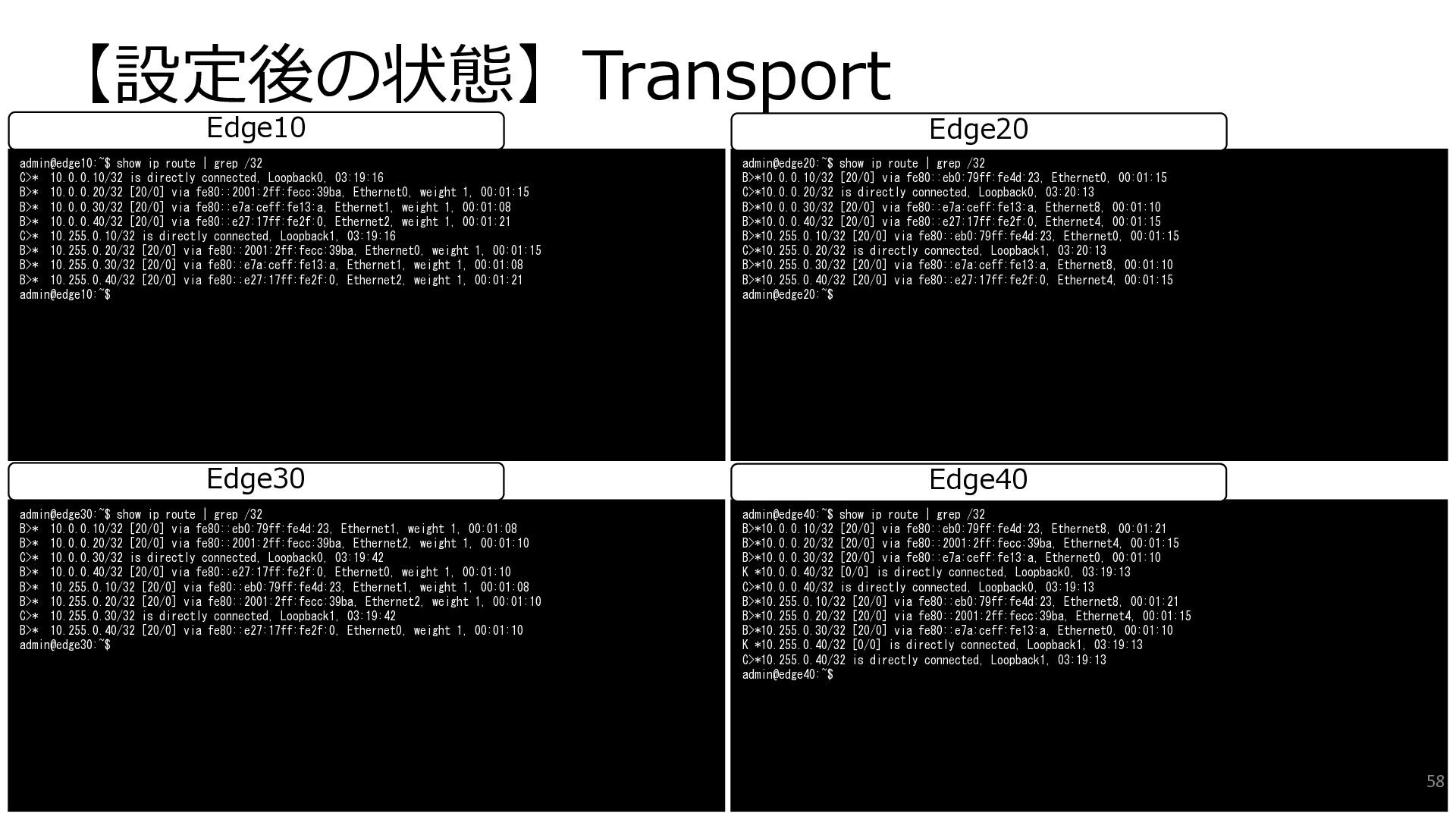
  34. 【設定後の状態】Transport admin@edge30:~$ show ip route | grep /32 B>* 10.0.0.10/32

    [20/0] via fe80::eb0:79ff:fe4d:23, Ethernet1, weight 1, 00:01:08 B>* 10.0.0.20/32 [20/0] via fe80::2001:2ff:fecc:39ba, Ethernet2, weight 1, 00:01:10 C>* 10.0.0.30/32 is directly connected, Loopback0, 03:19:42 B>* 10.0.0.40/32 [20/0] via fe80::e27:17ff:fe2f:0, Ethernet0, weight 1, 00:01:10 B>* 10.255.0.10/32 [20/0] via fe80::eb0:79ff:fe4d:23, Ethernet1, weight 1, 00:01:08 B>* 10.255.0.20/32 [20/0] via fe80::2001:2ff:fecc:39ba, Ethernet2, weight 1, 00:01:10 C>* 10.255.0.30/32 is directly connected, Loopback1, 03:19:42 B>* 10.255.0.40/32 [20/0] via fe80::e27:17ff:fe2f:0, Ethernet0, weight 1, 00:01:10 admin@edge30:~$ admin@edge40:~$ show ip route | grep /32 B>*10.0.0.10/32 [20/0] via fe80::eb0:79ff:fe4d:23, Ethernet8, 00:01:21 B>*10.0.0.20/32 [20/0] via fe80::2001:2ff:fecc:39ba, Ethernet4, 00:01:15 B>*10.0.0.30/32 [20/0] via fe80::e7a:ceff:fe13:a, Ethernet0, 00:01:10 K *10.0.0.40/32 [0/0] is directly connected, Loopback0, 03:19:13 C>*10.0.0.40/32 is directly connected, Loopback0, 03:19:13 B>*10.255.0.10/32 [20/0] via fe80::eb0:79ff:fe4d:23, Ethernet8, 00:01:21 B>*10.255.0.20/32 [20/0] via fe80::2001:2ff:fecc:39ba, Ethernet4, 00:01:15 B>*10.255.0.30/32 [20/0] via fe80::e7a:ceff:fe13:a, Ethernet0, 00:01:10 K *10.255.0.40/32 [0/0] is directly connected, Loopback1, 03:19:13 C>*10.255.0.40/32 is directly connected, Loopback1, 03:19:13 admin@edge40:~$ Edge30 Edge40 admin@edge10:~$ show ip route | grep /32 C>* 10.0.0.10/32 is directly connected, Loopback0, 03:19:16 B>* 10.0.0.20/32 [20/0] via fe80::2001:2ff:fecc:39ba, Ethernet0, weight 1, 00:01:15 B>* 10.0.0.30/32 [20/0] via fe80::e7a:ceff:fe13:a, Ethernet1, weight 1, 00:01:08 B>* 10.0.0.40/32 [20/0] via fe80::e27:17ff:fe2f:0, Ethernet2, weight 1, 00:01:21 C>* 10.255.0.10/32 is directly connected, Loopback1, 03:19:16 B>* 10.255.0.20/32 [20/0] via fe80::2001:2ff:fecc:39ba, Ethernet0, weight 1, 00:01:15 B>* 10.255.0.30/32 [20/0] via fe80::e7a:ceff:fe13:a, Ethernet1, weight 1, 00:01:08 B>* 10.255.0.40/32 [20/0] via fe80::e27:17ff:fe2f:0, Ethernet2, weight 1, 00:01:21 admin@edge10:~$ admin@edge20:~$ show ip route | grep /32 B>*10.0.0.10/32 [20/0] via fe80::eb0:79ff:fe4d:23, Ethernet0, 00:01:15 C>*10.0.0.20/32 is directly connected, Loopback0, 03:20:13 B>*10.0.0.30/32 [20/0] via fe80::e7a:ceff:fe13:a, Ethernet8, 00:01:10 B>*10.0.0.40/32 [20/0] via fe80::e27:17ff:fe2f:0, Ethernet4, 00:01:15 B>*10.255.0.10/32 [20/0] via fe80::eb0:79ff:fe4d:23, Ethernet0, 00:01:15 C>*10.255.0.20/32 is directly connected, Loopback1, 03:20:13 B>*10.255.0.30/32 [20/0] via fe80::e7a:ceff:fe13:a, Ethernet8, 00:01:10 B>*10.255.0.40/32 [20/0] via fe80::e27:17ff:fe2f:0, Ethernet4, 00:01:15 admin@edge20:~$ Edge10 Edge20 58
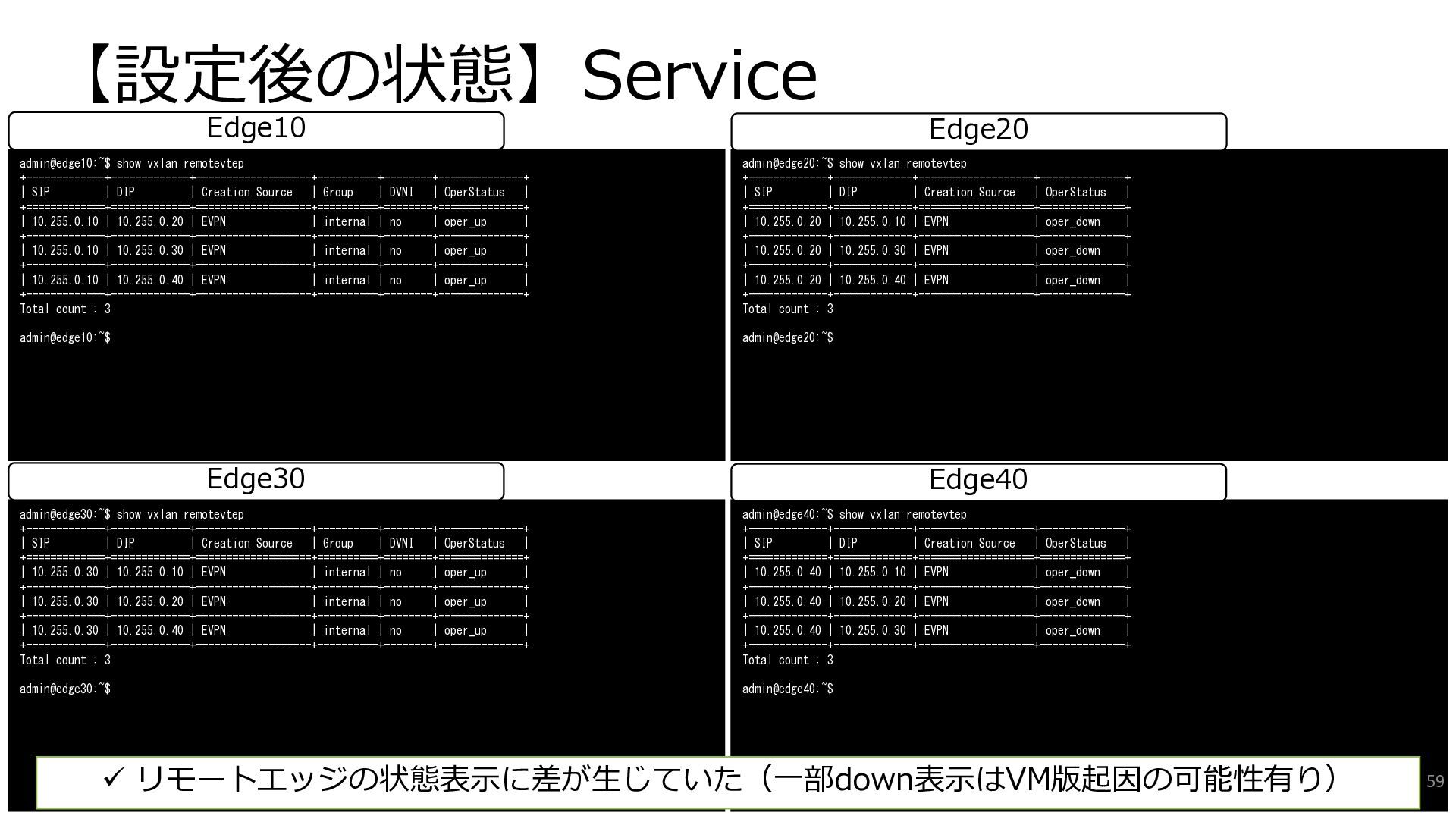
  35. 【設定後の状態】Service admin@edge30:~$ show vxlan remotevtep +-------------+-------------+-------------------+----------+--------+--------------+ | SIP | DIP

    | Creation Source | Group | DVNI | OperStatus | +=============+=============+===================+==========+========+==============+ | 10.255.0.30 | 10.255.0.10 | EVPN | internal | no | oper_up | +-------------+-------------+-------------------+----------+--------+--------------+ | 10.255.0.30 | 10.255.0.20 | EVPN | internal | no | oper_up | +-------------+-------------+-------------------+----------+--------+--------------+ | 10.255.0.30 | 10.255.0.40 | EVPN | internal | no | oper_up | +-------------+-------------+-------------------+----------+--------+--------------+ Total count : 3 admin@edge30:~$ admin@edge40:~$ show vxlan remotevtep +-------------+-------------+-------------------+--------------+ | SIP | DIP | Creation Source | OperStatus | +=============+=============+===================+==============+ | 10.255.0.40 | 10.255.0.10 | EVPN | oper_down | +-------------+-------------+-------------------+--------------+ | 10.255.0.40 | 10.255.0.20 | EVPN | oper_down | +-------------+-------------+-------------------+--------------+ | 10.255.0.40 | 10.255.0.30 | EVPN | oper_down | +-------------+-------------+-------------------+--------------+ Total count : 3 admin@edge40:~$ Edge30 Edge40 admin@edge10:~$ show vxlan remotevtep +-------------+-------------+-------------------+----------+--------+--------------+ | SIP | DIP | Creation Source | Group | DVNI | OperStatus | +=============+=============+===================+==========+========+==============+ | 10.255.0.10 | 10.255.0.20 | EVPN | internal | no | oper_up | +-------------+-------------+-------------------+----------+--------+--------------+ | 10.255.0.10 | 10.255.0.30 | EVPN | internal | no | oper_up | +-------------+-------------+-------------------+----------+--------+--------------+ | 10.255.0.10 | 10.255.0.40 | EVPN | internal | no | oper_up | +-------------+-------------+-------------------+----------+--------+--------------+ Total count : 3 admin@edge10:~$ admin@edge20:~$ show vxlan remotevtep +-------------+-------------+-------------------+--------------+ | SIP | DIP | Creation Source | OperStatus | +=============+=============+===================+==============+ | 10.255.0.20 | 10.255.0.10 | EVPN | oper_down | +-------------+-------------+-------------------+--------------+ | 10.255.0.20 | 10.255.0.30 | EVPN | oper_down | +-------------+-------------+-------------------+--------------+ | 10.255.0.20 | 10.255.0.40 | EVPN | oper_down | +-------------+-------------+-------------------+--------------+ Total count : 3 admin@edge20:~$ Edge10 Edge20 59 ✓ リモートエッジの状態表示に差が生じていた(一部down表示はVM版起因の可能性有り)
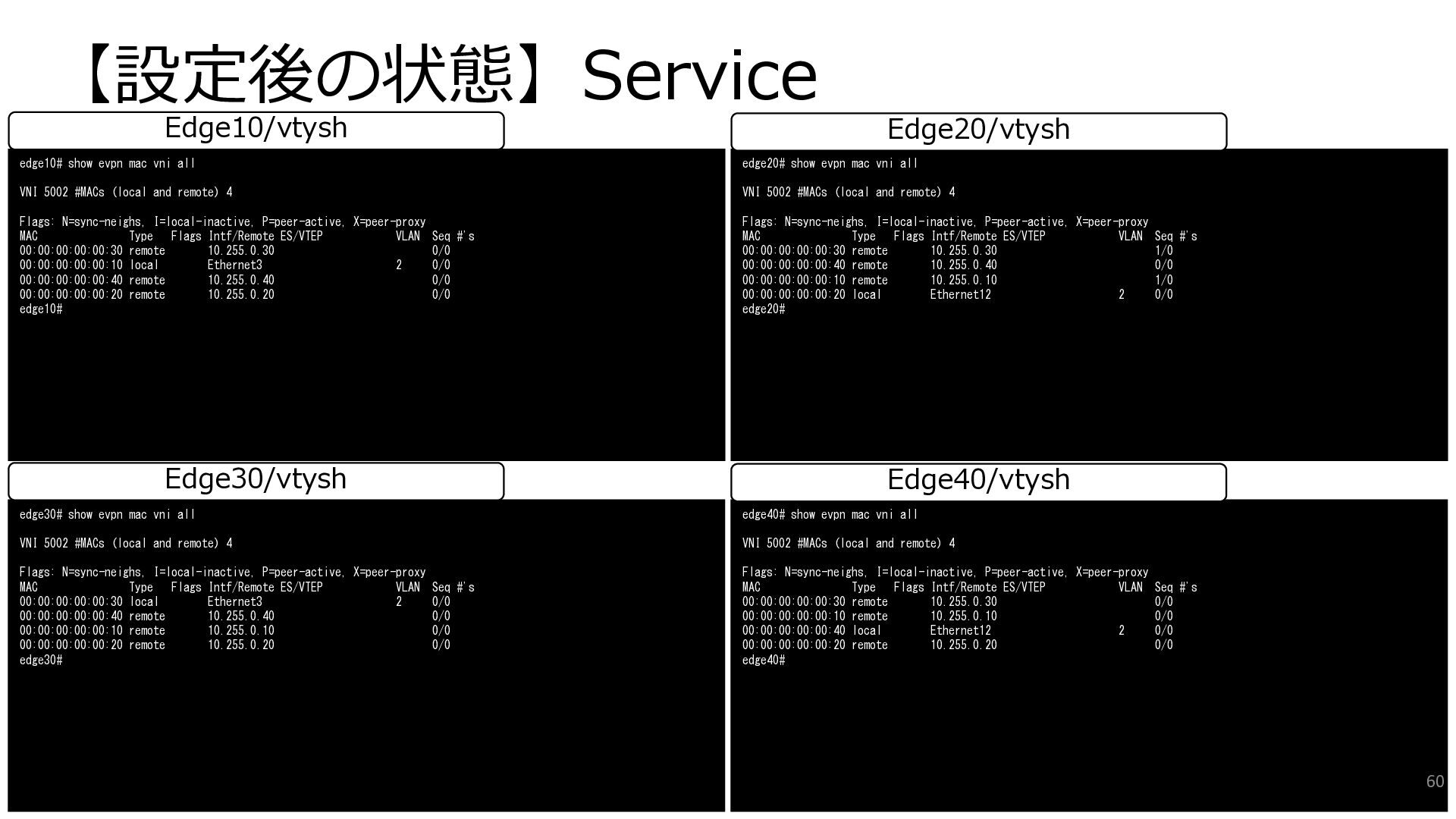
  36. 【設定後の状態】Service edge30# show evpn mac vni all VNI 5002 #MACs
    (local and remote) 4 Flags: N=sync-neighs, I=local-inactive, P=peer-active, X=peer-proxy MAC Type Flags Intf/Remote ES/VTEP VLAN Seq #'s 00:00:00:00:00:30 local Ethernet3 2 0/0 00:00:00:00:00:40 remote 10.255.0.40 0/0 00:00:00:00:00:10 remote 10.255.0.10 0/0 00:00:00:00:00:20 remote 10.255.0.20 0/0 edge30# edge40# show evpn mac vni all VNI 5002 #MACs (local and remote) 4 Flags: N=sync-neighs, I=local-inactive, P=peer-active, X=peer-proxy MAC Type Flags Intf/Remote ES/VTEP VLAN Seq #'s 00:00:00:00:00:30 remote 10.255.0.30 0/0 00:00:00:00:00:10 remote 10.255.0.10 0/0 00:00:00:00:00:40 local Ethernet12 2 0/0 00:00:00:00:00:20 remote 10.255.0.20 0/0 edge40# Edge30/vtysh Edge40/vtysh edge10# show evpn mac vni all VNI 5002 #MACs (local and remote) 4 Flags: N=sync-neighs, I=local-inactive, P=peer-active, X=peer-proxy MAC Type Flags Intf/Remote ES/VTEP VLAN Seq #'s 00:00:00:00:00:30 remote 10.255.0.30 0/0 00:00:00:00:00:10 local Ethernet3 2 0/0 00:00:00:00:00:40 remote 10.255.0.40 0/0 00:00:00:00:00:20 remote 10.255.0.20 0/0 edge10# edge20# show evpn mac vni all VNI 5002 #MACs (local and remote) 4 Flags: N=sync-neighs, I=local-inactive, P=peer-active, X=peer-proxy MAC Type Flags Intf/Remote ES/VTEP VLAN Seq #'s 00:00:00:00:00:30 remote 10.255.0.30 1/0 00:00:00:00:00:40 remote 10.255.0.40 0/0 00:00:00:00:00:10 remote 10.255.0.10 1/0 00:00:00:00:00:20 local Ethernet12 2 0/0 edge20# Edge10/vtysh Edge20/vtysh 60
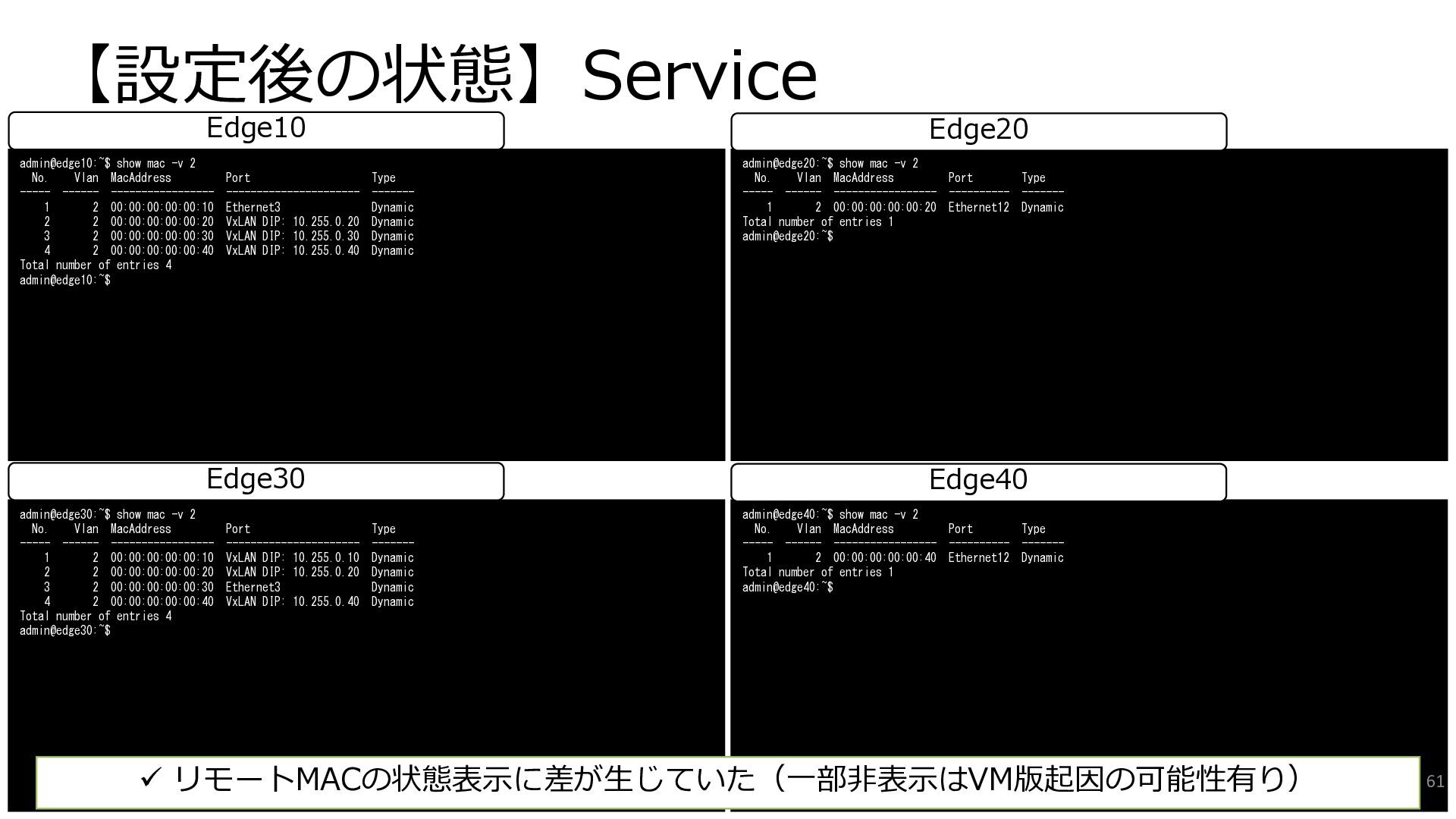
  37. 【設定後の状態】Service admin@edge30:~$ show mac -v 2 No. Vlan MacAddress Port

    Type ----- ------ ----------------- ---------------------- ------- 1 2 00:00:00:00:00:10 VxLAN DIP: 10.255.0.10 Dynamic 2 2 00:00:00:00:00:20 VxLAN DIP: 10.255.0.20 Dynamic 3 2 00:00:00:00:00:30 Ethernet3 Dynamic 4 2 00:00:00:00:00:40 VxLAN DIP: 10.255.0.40 Dynamic Total number of entries 4 admin@edge30:~$ admin@edge40:~$ show mac -v 2 No. Vlan MacAddress Port Type ----- ------ ----------------- ---------- ------- 1 2 00:00:00:00:00:40 Ethernet12 Dynamic Total number of entries 1 admin@edge40:~$ Edge30 Edge40 admin@edge10:~$ show mac -v 2 No. Vlan MacAddress Port Type ----- ------ ----------------- ---------------------- ------- 1 2 00:00:00:00:00:10 Ethernet3 Dynamic 2 2 00:00:00:00:00:20 VxLAN DIP: 10.255.0.20 Dynamic 3 2 00:00:00:00:00:30 VxLAN DIP: 10.255.0.30 Dynamic 4 2 00:00:00:00:00:40 VxLAN DIP: 10.255.0.40 Dynamic Total number of entries 4 admin@edge10:~$ admin@edge20:~$ show mac -v 2 No. Vlan MacAddress Port Type ----- ------ ----------------- ---------- ------- 1 2 00:00:00:00:00:20 Ethernet12 Dynamic Total number of entries 1 admin@edge20:~$ Edge10 Edge20 61 ✓ リモートMACの状態表示に差が生じていた(一部非表示はVM版起因の可能性有り)
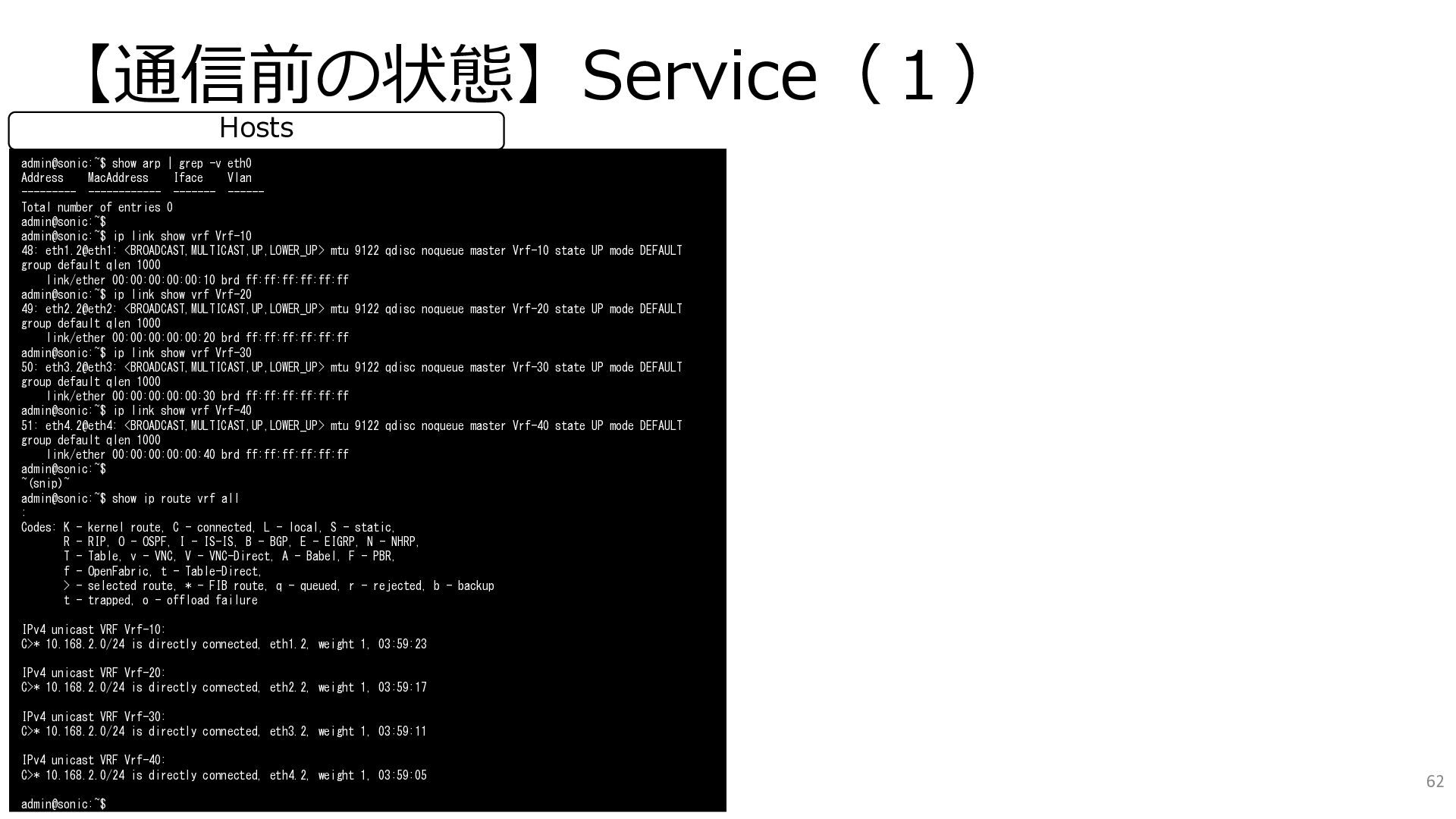
  38. 【通信前の状態】Service(1) admin@sonic:~$ show arp | grep -v eth0 Address MacAddress

    Iface Vlan --------- ------------ ------- ------ Total number of entries 0 admin@sonic:~$ admin@sonic:~$ ip link show vrf Vrf-10 48: eth1.2@eth1: <BROADCAST,MULTICAST,UP,LOWER_UP> mtu 9122 qdisc noqueue master Vrf-10 state UP mode DEFAULT group default qlen 1000 link/ether 00:00:00:00:00:10 brd ff:ff:ff:ff:ff:ff admin@sonic:~$ ip link show vrf Vrf-20 49: eth2.2@eth2: <BROADCAST,MULTICAST,UP,LOWER_UP> mtu 9122 qdisc noqueue master Vrf-20 state UP mode DEFAULT group default qlen 1000 link/ether 00:00:00:00:00:20 brd ff:ff:ff:ff:ff:ff admin@sonic:~$ ip link show vrf Vrf-30 50: eth3.2@eth3: <BROADCAST,MULTICAST,UP,LOWER_UP> mtu 9122 qdisc noqueue master Vrf-30 state UP mode DEFAULT group default qlen 1000 link/ether 00:00:00:00:00:30 brd ff:ff:ff:ff:ff:ff admin@sonic:~$ ip link show vrf Vrf-40 51: eth4.2@eth4: <BROADCAST,MULTICAST,UP,LOWER_UP> mtu 9122 qdisc noqueue master Vrf-40 state UP mode DEFAULT group default qlen 1000 link/ether 00:00:00:00:00:40 brd ff:ff:ff:ff:ff:ff admin@sonic:~$ ~(snip)~ admin@sonic:~$ show ip route vrf all : Codes: K - kernel route, C - connected, L - local, S - static, R - RIP, O - OSPF, I - IS-IS, B - BGP, E - EIGRP, N - NHRP, T - Table, v - VNC, V - VNC-Direct, A - Babel, F - PBR, f - OpenFabric, t - Table-Direct, > - selected route, * - FIB route, q - queued, r - rejected, b - backup t - trapped, o - offload failure IPv4 unicast VRF Vrf-10: C>* 10.168.2.0/24 is directly connected, eth1.2, weight 1, 03:59:23 IPv4 unicast VRF Vrf-20: C>* 10.168.2.0/24 is directly connected, eth2.2, weight 1, 03:59:17 IPv4 unicast VRF Vrf-30: C>* 10.168.2.0/24 is directly connected, eth3.2, weight 1, 03:59:11 IPv4 unicast VRF Vrf-40: C>* 10.168.2.0/24 is directly connected, eth4.2, weight 1, 03:59:05 admin@sonic:~$ Hosts 62
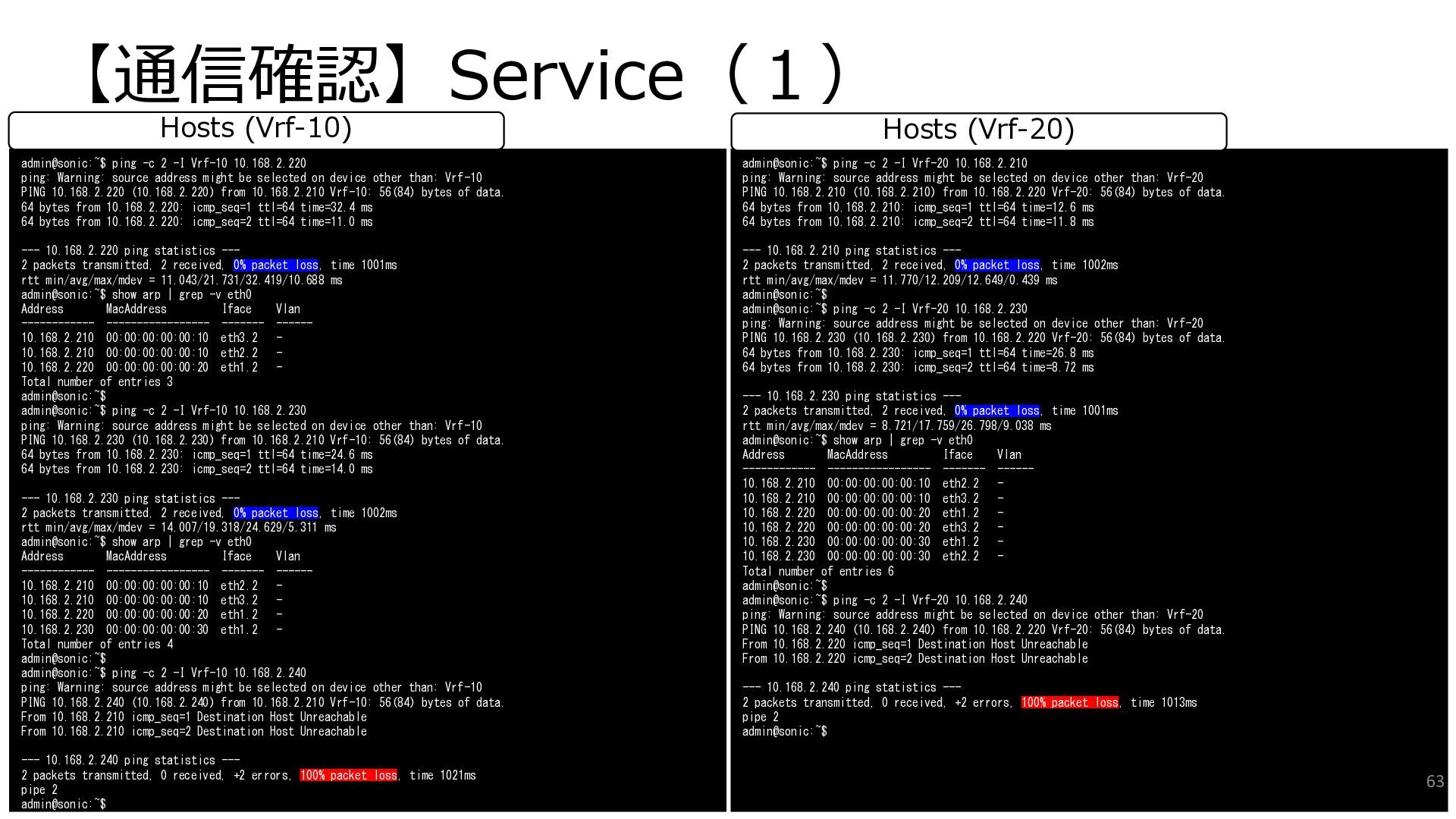
  39. 【通信確認】Service(1) admin@sonic:~$ ping -c 2 -I Vrf-10 10.168.2.220 ping: Warning:

    source address might be selected on device other than: Vrf-10 PING 10.168.2.220 (10.168.2.220) from 10.168.2.210 Vrf-10: 56(84) bytes of data. 64 bytes from 10.168.2.220: icmp_seq=1 ttl=64 time=32.4 ms 64 bytes from 10.168.2.220: icmp_seq=2 ttl=64 time=11.0 ms --- 10.168.2.220 ping statistics --- 2 packets transmitted, 2 received, 0% packet loss, time 1001ms rtt min/avg/max/mdev = 11.043/21.731/32.419/10.688 ms admin@sonic:~$ show arp | grep -v eth0 Address MacAddress Iface Vlan ------------ ----------------- ------- ------ 10.168.2.210 00:00:00:00:00:10 eth3.2 - 10.168.2.210 00:00:00:00:00:10 eth2.2 - 10.168.2.220 00:00:00:00:00:20 eth1.2 - Total number of entries 3 admin@sonic:~$ admin@sonic:~$ ping -c 2 -I Vrf-10 10.168.2.230 ping: Warning: source address might be selected on device other than: Vrf-10 PING 10.168.2.230 (10.168.2.230) from 10.168.2.210 Vrf-10: 56(84) bytes of data. 64 bytes from 10.168.2.230: icmp_seq=1 ttl=64 time=24.6 ms 64 bytes from 10.168.2.230: icmp_seq=2 ttl=64 time=14.0 ms --- 10.168.2.230 ping statistics --- 2 packets transmitted, 2 received, 0% packet loss, time 1002ms rtt min/avg/max/mdev = 14.007/19.318/24.629/5.311 ms admin@sonic:~$ show arp | grep -v eth0 Address MacAddress Iface Vlan ------------ ----------------- ------- ------ 10.168.2.210 00:00:00:00:00:10 eth2.2 - 10.168.2.210 00:00:00:00:00:10 eth3.2 - 10.168.2.220 00:00:00:00:00:20 eth1.2 - 10.168.2.230 00:00:00:00:00:30 eth1.2 - Total number of entries 4 admin@sonic:~$ admin@sonic:~$ ping -c 2 -I Vrf-10 10.168.2.240 ping: Warning: source address might be selected on device other than: Vrf-10 PING 10.168.2.240 (10.168.2.240) from 10.168.2.210 Vrf-10: 56(84) bytes of data. From 10.168.2.210 icmp_seq=1 Destination Host Unreachable From 10.168.2.210 icmp_seq=2 Destination Host Unreachable --- 10.168.2.240 ping statistics --- 2 packets transmitted, 0 received, +2 errors, 100% packet loss, time 1021ms pipe 2 admin@sonic:~$ Hosts (Vrf-10) admin@sonic:~$ ping -c 2 -I Vrf-20 10.168.2.210 ping: Warning: source address might be selected on device other than: Vrf-20 PING 10.168.2.210 (10.168.2.210) from 10.168.2.220 Vrf-20: 56(84) bytes of data. 64 bytes from 10.168.2.210: icmp_seq=1 ttl=64 time=12.6 ms 64 bytes from 10.168.2.210: icmp_seq=2 ttl=64 time=11.8 ms --- 10.168.2.210 ping statistics --- 2 packets transmitted, 2 received, 0% packet loss, time 1002ms rtt min/avg/max/mdev = 11.770/12.209/12.649/0.439 ms admin@sonic:~$ admin@sonic:~$ ping -c 2 -I Vrf-20 10.168.2.230 ping: Warning: source address might be selected on device other than: Vrf-20 PING 10.168.2.230 (10.168.2.230) from 10.168.2.220 Vrf-20: 56(84) bytes of data. 64 bytes from 10.168.2.230: icmp_seq=1 ttl=64 time=26.8 ms 64 bytes from 10.168.2.230: icmp_seq=2 ttl=64 time=8.72 ms --- 10.168.2.230 ping statistics --- 2 packets transmitted, 2 received, 0% packet loss, time 1001ms rtt min/avg/max/mdev = 8.721/17.759/26.798/9.038 ms admin@sonic:~$ show arp | grep -v eth0 Address MacAddress Iface Vlan ------------ ----------------- ------- ------ 10.168.2.210 00:00:00:00:00:10 eth2.2 - 10.168.2.210 00:00:00:00:00:10 eth3.2 - 10.168.2.220 00:00:00:00:00:20 eth1.2 - 10.168.2.220 00:00:00:00:00:20 eth3.2 - 10.168.2.230 00:00:00:00:00:30 eth1.2 - 10.168.2.230 00:00:00:00:00:30 eth2.2 - Total number of entries 6 admin@sonic:~$ admin@sonic:~$ ping -c 2 -I Vrf-20 10.168.2.240 ping: Warning: source address might be selected on device other than: Vrf-20 PING 10.168.2.240 (10.168.2.240) from 10.168.2.220 Vrf-20: 56(84) bytes of data. From 10.168.2.220 icmp_seq=1 Destination Host Unreachable From 10.168.2.220 icmp_seq=2 Destination Host Unreachable --- 10.168.2.240 ping statistics --- 2 packets transmitted, 0 received, +2 errors, 100% packet loss, time 1013ms pipe 2 admin@sonic:~$ Hosts (Vrf-20) 63
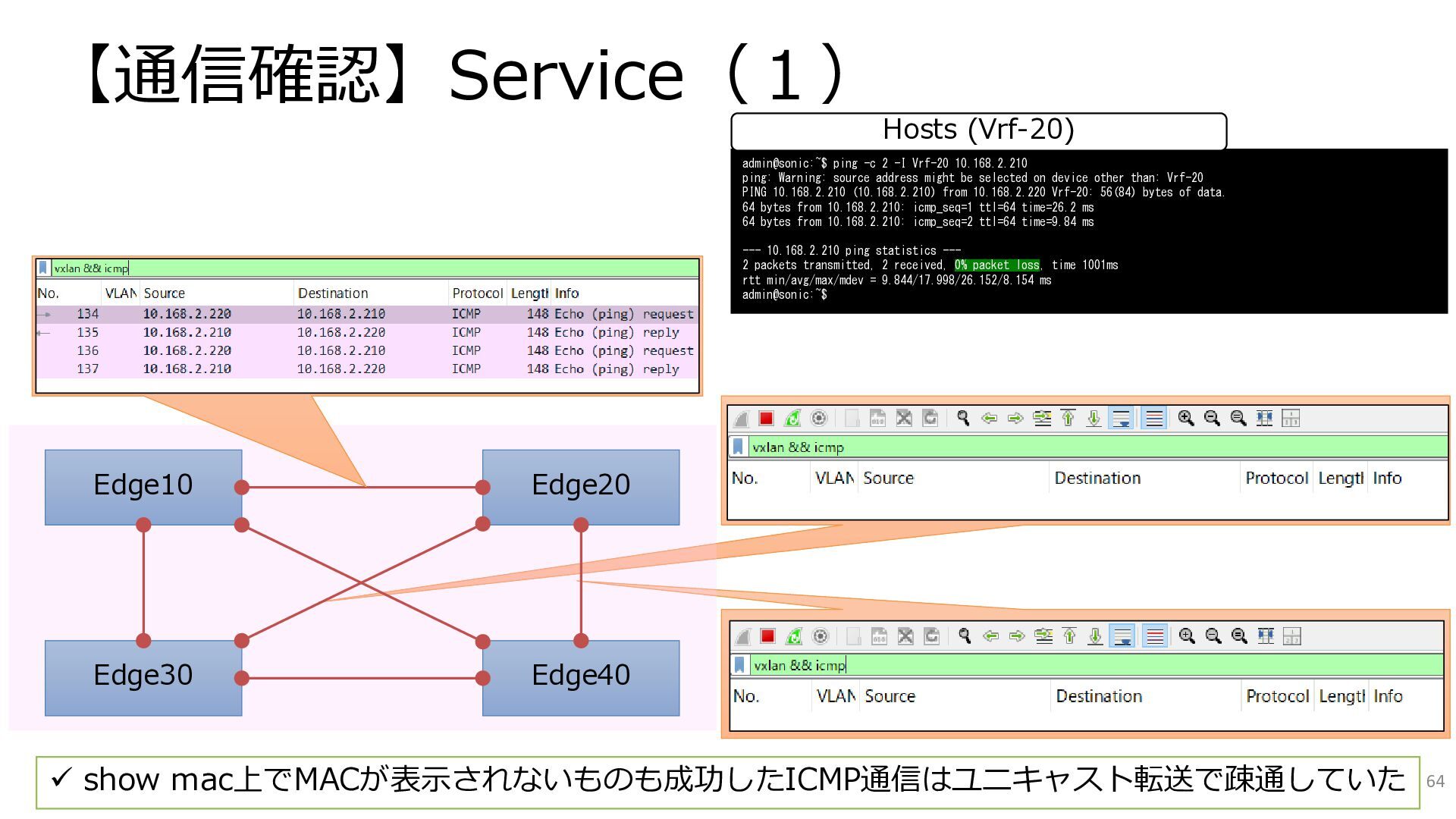
  40. 【通信確認】Service(1) 64 ✓ show mac上でMACが表示されないものも成功したICMP通信はユニキャスト転送で疎通していた admin@sonic:~$ ping -c 2 -I

    Vrf-20 10.168.2.210 ping: Warning: source address might be selected on device other than: Vrf-20 PING 10.168.2.210 (10.168.2.210) from 10.168.2.220 Vrf-20: 56(84) bytes of data. 64 bytes from 10.168.2.210: icmp_seq=1 ttl=64 time=26.2 ms 64 bytes from 10.168.2.210: icmp_seq=2 ttl=64 time=9.84 ms --- 10.168.2.210 ping statistics --- 2 packets transmitted, 2 received, 0% packet loss, time 1001ms rtt min/avg/max/mdev = 9.844/17.998/26.152/8.154 ms admin@sonic:~$ Hosts (Vrf-20) Edge10 Edge30 Edge20 Edge40
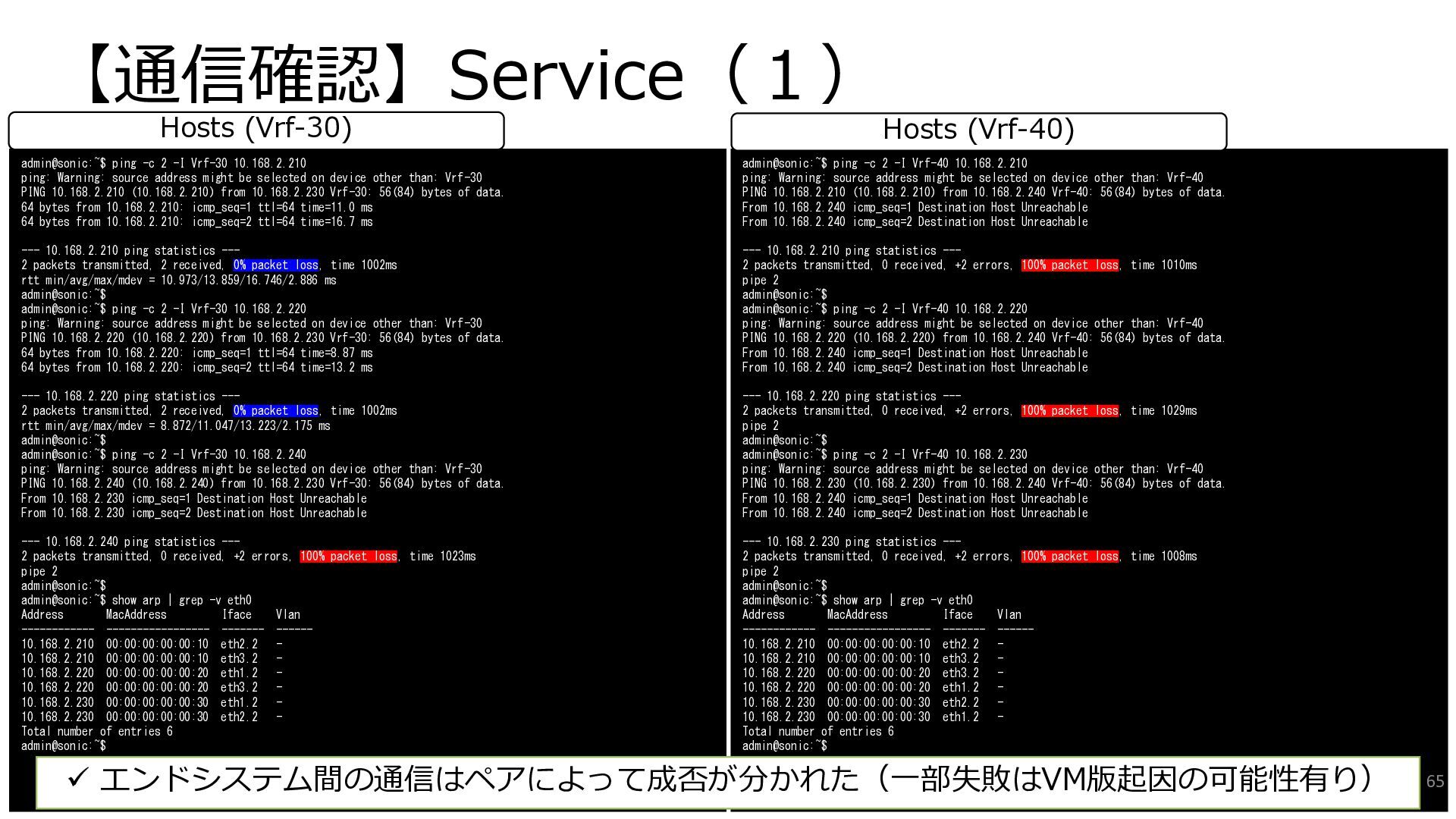
  41. 【通信確認】Service(1) admin@sonic:~$ ping -c 2 -I Vrf-30 10.168.2.210 ping: Warning:

    source address might be selected on device other than: Vrf-30 PING 10.168.2.210 (10.168.2.210) from 10.168.2.230 Vrf-30: 56(84) bytes of data. 64 bytes from 10.168.2.210: icmp_seq=1 ttl=64 time=11.0 ms 64 bytes from 10.168.2.210: icmp_seq=2 ttl=64 time=16.7 ms --- 10.168.2.210 ping statistics --- 2 packets transmitted, 2 received, 0% packet loss, time 1002ms rtt min/avg/max/mdev = 10.973/13.859/16.746/2.886 ms admin@sonic:~$ admin@sonic:~$ ping -c 2 -I Vrf-30 10.168.2.220 ping: Warning: source address might be selected on device other than: Vrf-30 PING 10.168.2.220 (10.168.2.220) from 10.168.2.230 Vrf-30: 56(84) bytes of data. 64 bytes from 10.168.2.220: icmp_seq=1 ttl=64 time=8.87 ms 64 bytes from 10.168.2.220: icmp_seq=2 ttl=64 time=13.2 ms --- 10.168.2.220 ping statistics --- 2 packets transmitted, 2 received, 0% packet loss, time 1002ms rtt min/avg/max/mdev = 8.872/11.047/13.223/2.175 ms admin@sonic:~$ admin@sonic:~$ ping -c 2 -I Vrf-30 10.168.2.240 ping: Warning: source address might be selected on device other than: Vrf-30 PING 10.168.2.240 (10.168.2.240) from 10.168.2.230 Vrf-30: 56(84) bytes of data. From 10.168.2.230 icmp_seq=1 Destination Host Unreachable From 10.168.2.230 icmp_seq=2 Destination Host Unreachable --- 10.168.2.240 ping statistics --- 2 packets transmitted, 0 received, +2 errors, 100% packet loss, time 1023ms pipe 2 admin@sonic:~$ admin@sonic:~$ show arp | grep -v eth0 Address MacAddress Iface Vlan ------------ ----------------- ------- ------ 10.168.2.210 00:00:00:00:00:10 eth2.2 - 10.168.2.210 00:00:00:00:00:10 eth3.2 - 10.168.2.220 00:00:00:00:00:20 eth1.2 - 10.168.2.220 00:00:00:00:00:20 eth3.2 - 10.168.2.230 00:00:00:00:00:30 eth1.2 - 10.168.2.230 00:00:00:00:00:30 eth2.2 - Total number of entries 6 admin@sonic:~$ Hosts (Vrf-30) admin@sonic:~$ ping -c 2 -I Vrf-40 10.168.2.210 ping: Warning: source address might be selected on device other than: Vrf-40 PING 10.168.2.210 (10.168.2.210) from 10.168.2.240 Vrf-40: 56(84) bytes of data. From 10.168.2.240 icmp_seq=1 Destination Host Unreachable From 10.168.2.240 icmp_seq=2 Destination Host Unreachable --- 10.168.2.210 ping statistics --- 2 packets transmitted, 0 received, +2 errors, 100% packet loss, time 1010ms pipe 2 admin@sonic:~$ admin@sonic:~$ ping -c 2 -I Vrf-40 10.168.2.220 ping: Warning: source address might be selected on device other than: Vrf-40 PING 10.168.2.220 (10.168.2.220) from 10.168.2.240 Vrf-40: 56(84) bytes of data. From 10.168.2.240 icmp_seq=1 Destination Host Unreachable From 10.168.2.240 icmp_seq=2 Destination Host Unreachable --- 10.168.2.220 ping statistics --- 2 packets transmitted, 0 received, +2 errors, 100% packet loss, time 1029ms pipe 2 admin@sonic:~$ admin@sonic:~$ ping -c 2 -I Vrf-40 10.168.2.230 ping: Warning: source address might be selected on device other than: Vrf-40 PING 10.168.2.230 (10.168.2.230) from 10.168.2.240 Vrf-40: 56(84) bytes of data. From 10.168.2.240 icmp_seq=1 Destination Host Unreachable From 10.168.2.240 icmp_seq=2 Destination Host Unreachable --- 10.168.2.230 ping statistics --- 2 packets transmitted, 0 received, +2 errors, 100% packet loss, time 1008ms pipe 2 admin@sonic:~$ admin@sonic:~$ show arp | grep -v eth0 Address MacAddress Iface Vlan ------------ ----------------- ------- ------ 10.168.2.210 00:00:00:00:00:10 eth2.2 - 10.168.2.210 00:00:00:00:00:10 eth3.2 - 10.168.2.220 00:00:00:00:00:20 eth3.2 - 10.168.2.220 00:00:00:00:00:20 eth1.2 - 10.168.2.230 00:00:00:00:00:30 eth2.2 - 10.168.2.230 00:00:00:00:00:30 eth1.2 - Total number of entries 6 admin@sonic:~$ Hosts (Vrf-40) ✓ エンドシステム間の通信はペアによって成否が分かれた(一部失敗はVM版起因の可能性有り) 65
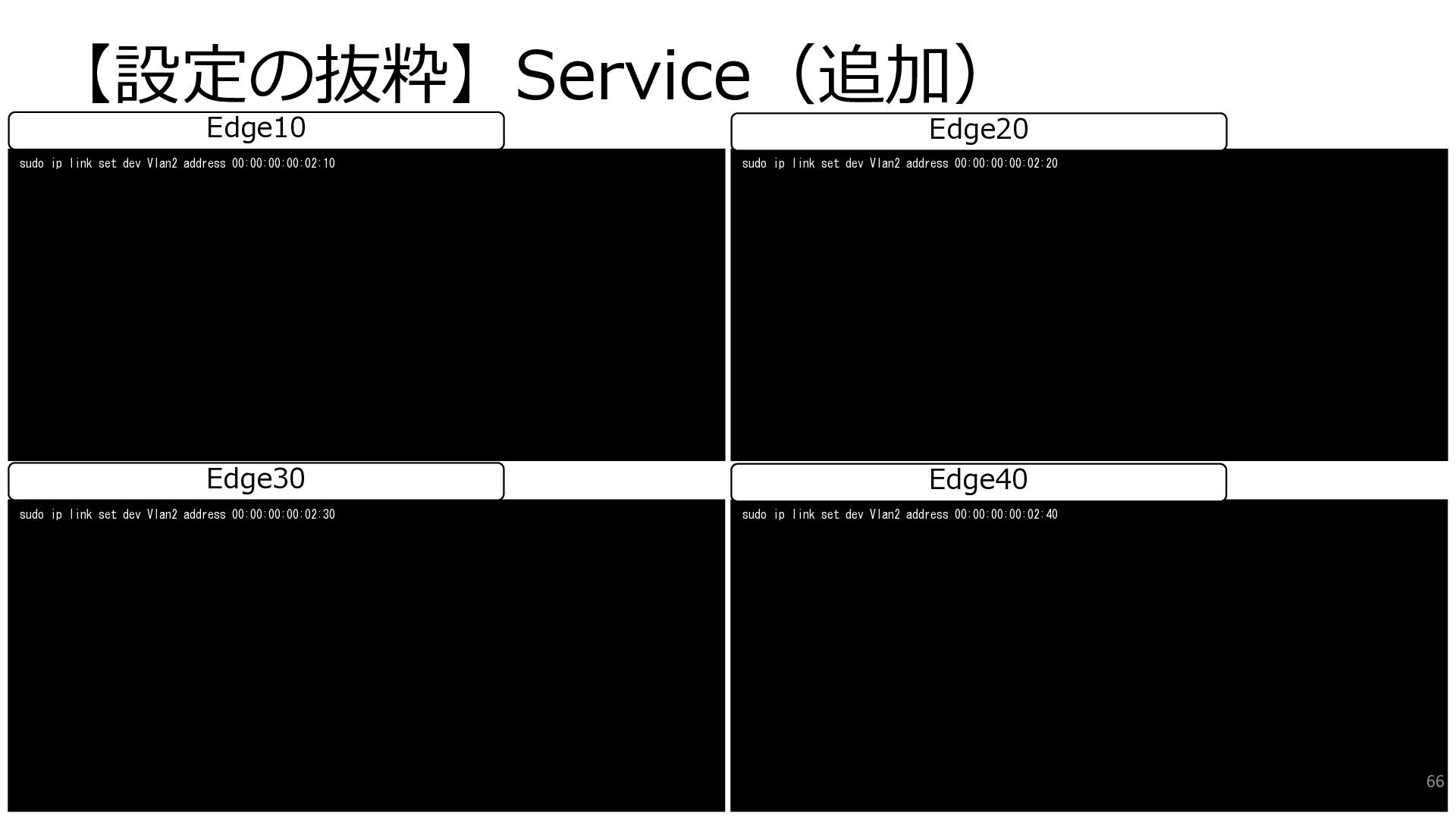
  42. 【設定の抜粋】Service(追加) sudo ip link set dev Vlan2 address 00:00:00:00:02:30 sudo

    ip link set dev Vlan2 address 00:00:00:00:02:40 Edge30 Edge40 sudo ip link set dev Vlan2 address 00:00:00:00:02:10 sudo ip link set dev Vlan2 address 00:00:00:00:02:20 Edge10 Edge20 66
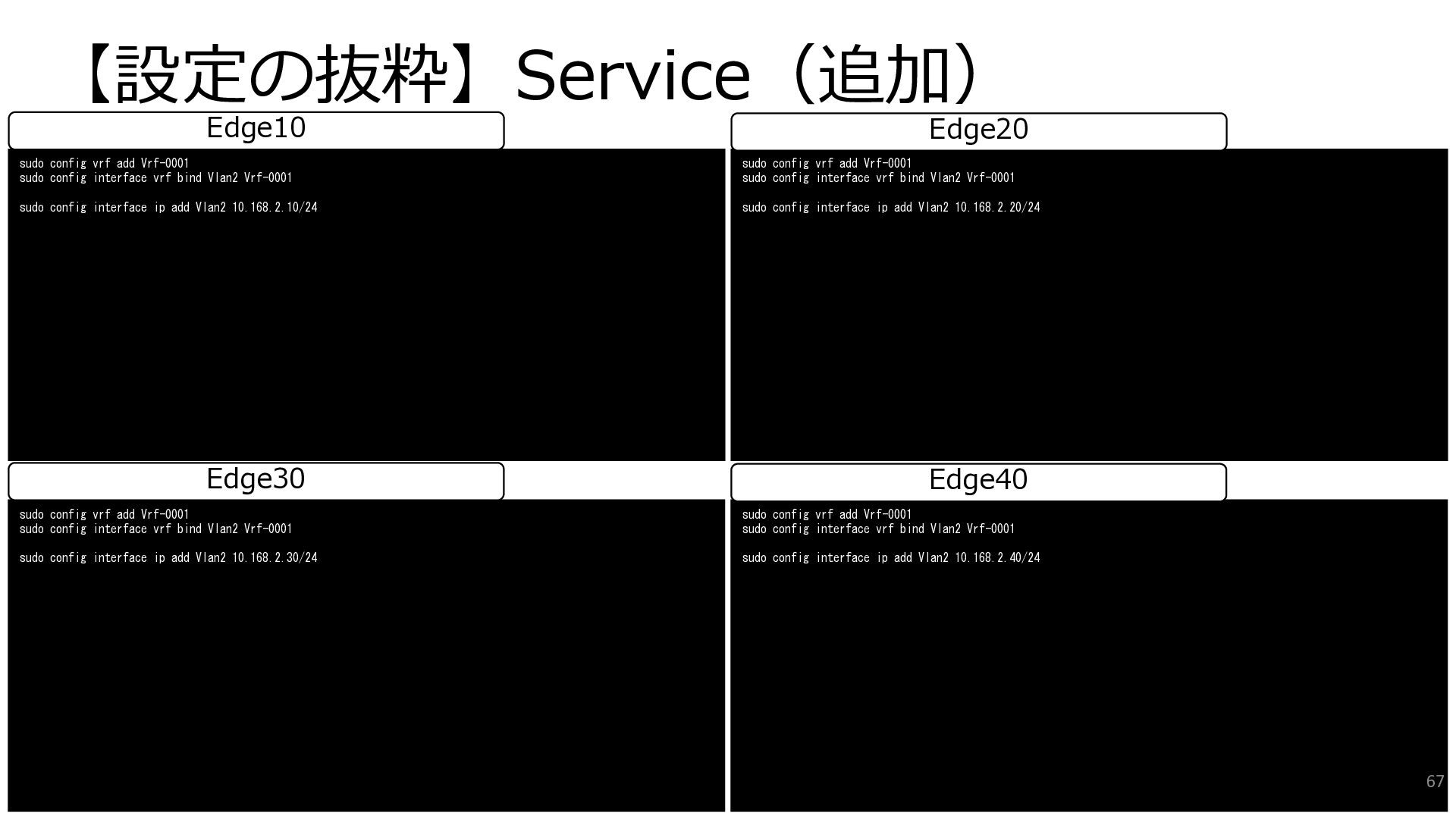
  43. 【設定の抜粋】Service(追加) sudo config vrf add Vrf-0001 sudo config interface vrf

    bind Vlan2 Vrf-0001 sudo config interface ip add Vlan2 10.168.2.30/24 sudo config vrf add Vrf-0001 sudo config interface vrf bind Vlan2 Vrf-0001 sudo config interface ip add Vlan2 10.168.2.40/24 Edge30 Edge40 sudo config vrf add Vrf-0001 sudo config interface vrf bind Vlan2 Vrf-0001 sudo config interface ip add Vlan2 10.168.2.10/24 sudo config vrf add Vrf-0001 sudo config interface vrf bind Vlan2 Vrf-0001 sudo config interface ip add Vlan2 10.168.2.20/24 Edge10 Edge20 67
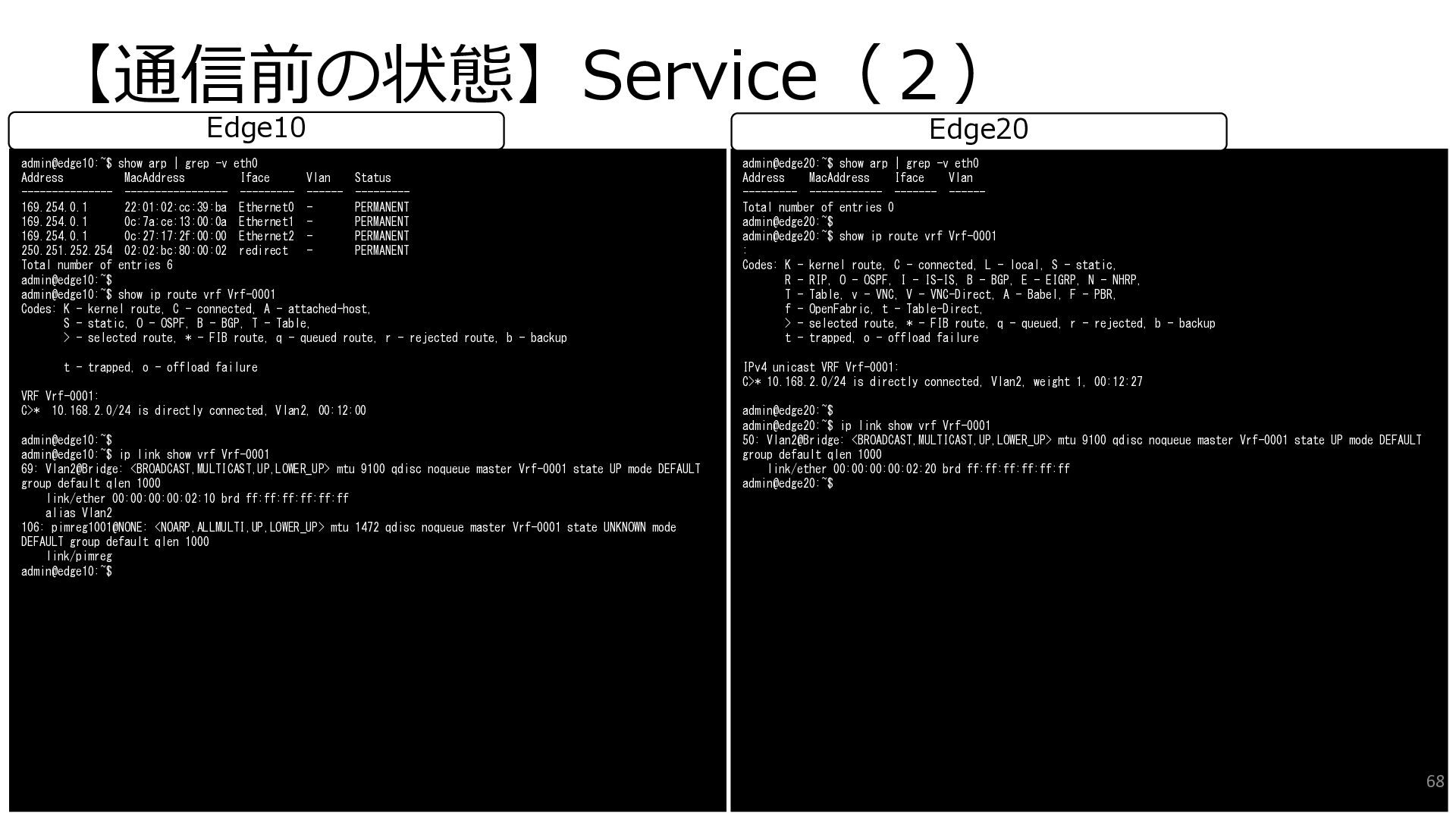
  44. 【通信前の状態】Service(2) admin@edge10:~$ show arp | grep -v eth0 Address MacAddress

    Iface Vlan Status --------------- ----------------- --------- ------ --------- 169.254.0.1 22:01:02:cc:39:ba Ethernet0 - PERMANENT 169.254.0.1 0c:7a:ce:13:00:0a Ethernet1 - PERMANENT 169.254.0.1 0c:27:17:2f:00:00 Ethernet2 - PERMANENT 250.251.252.254 02:02:bc:80:00:02 redirect - PERMANENT Total number of entries 6 admin@edge10:~$ admin@edge10:~$ show ip route vrf Vrf-0001 Codes: K - kernel route, C - connected, A - attached-host, S - static, O - OSPF, B - BGP, T - Table, > - selected route, * - FIB route, q - queued route, r - rejected route, b - backup t - trapped, o - offload failure VRF Vrf-0001: C>* 10.168.2.0/24 is directly connected, Vlan2, 00:12:00 admin@edge10:~$ admin@edge10:~$ ip link show vrf Vrf-0001 69: Vlan2@Bridge: <BROADCAST,MULTICAST,UP,LOWER_UP> mtu 9100 qdisc noqueue master Vrf-0001 state UP mode DEFAULT group default qlen 1000 link/ether 00:00:00:00:02:10 brd ff:ff:ff:ff:ff:ff alias Vlan2 106: pimreg1001@NONE: <NOARP,ALLMULTI,UP,LOWER_UP> mtu 1472 qdisc noqueue master Vrf-0001 state UNKNOWN mode DEFAULT group default qlen 1000 link/pimreg admin@edge10:~$ Edge10 admin@edge20:~$ show arp | grep -v eth0 Address MacAddress Iface Vlan --------- ------------ ------- ------ Total number of entries 0 admin@edge20:~$ admin@edge20:~$ show ip route vrf Vrf-0001 : Codes: K - kernel route, C - connected, L - local, S - static, R - RIP, O - OSPF, I - IS-IS, B - BGP, E - EIGRP, N - NHRP, T - Table, v - VNC, V - VNC-Direct, A - Babel, F - PBR, f - OpenFabric, t - Table-Direct, > - selected route, * - FIB route, q - queued, r - rejected, b - backup t - trapped, o - offload failure IPv4 unicast VRF Vrf-0001: C>* 10.168.2.0/24 is directly connected, Vlan2, weight 1, 00:12:27 admin@edge20:~$ admin@edge20:~$ ip link show vrf Vrf-0001 50: Vlan2@Bridge: <BROADCAST,MULTICAST,UP,LOWER_UP> mtu 9100 qdisc noqueue master Vrf-0001 state UP mode DEFAULT group default qlen 1000 link/ether 00:00:00:00:02:20 brd ff:ff:ff:ff:ff:ff admin@edge20:~$ Edge20 68
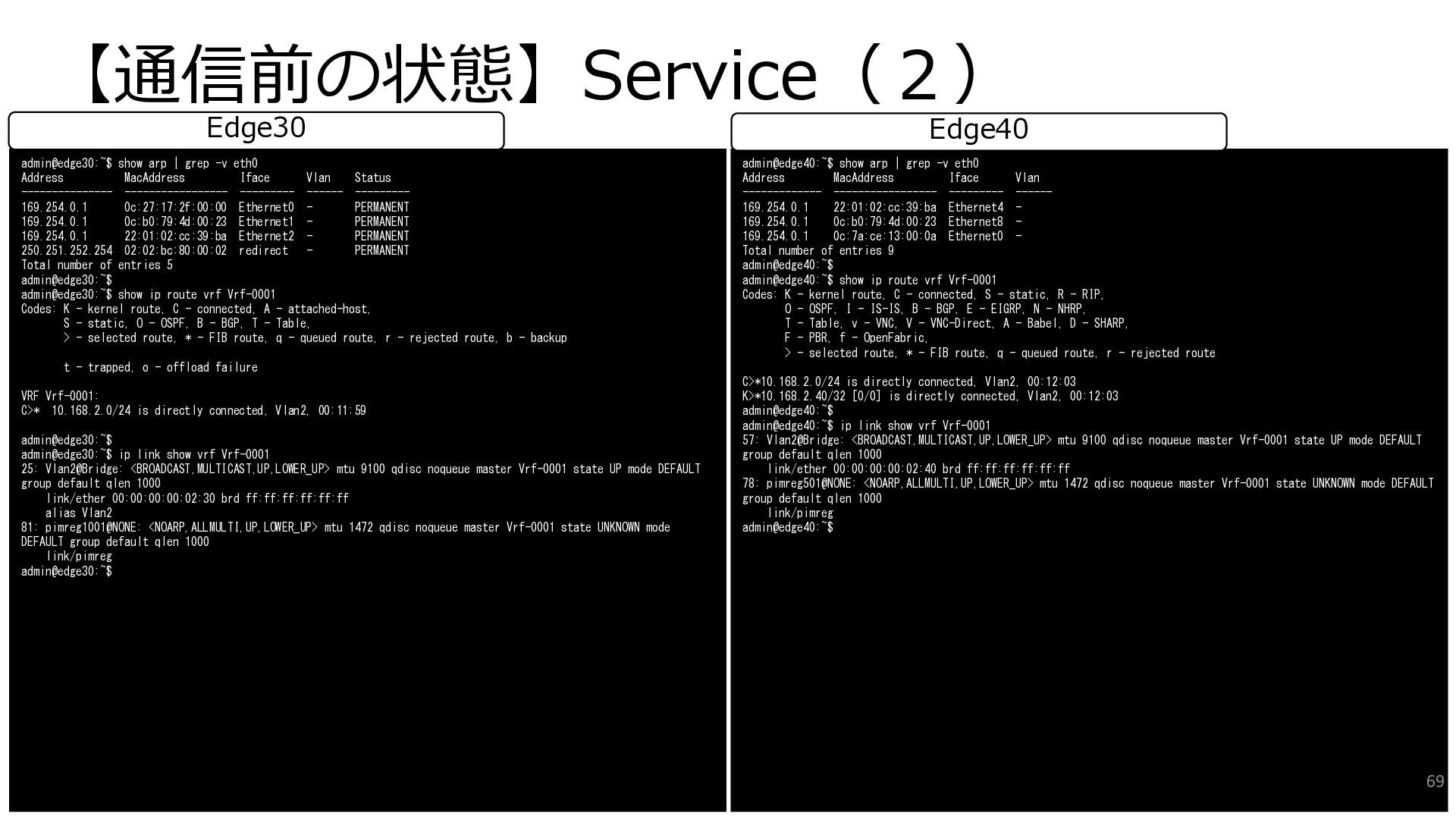
  45. 【通信前の状態】Service(2) admin@edge30:~$ show arp | grep -v eth0 Address MacAddress

    Iface Vlan Status --------------- ----------------- --------- ------ --------- 169.254.0.1 0c:27:17:2f:00:00 Ethernet0 - PERMANENT 169.254.0.1 0c:b0:79:4d:00:23 Ethernet1 - PERMANENT 169.254.0.1 22:01:02:cc:39:ba Ethernet2 - PERMANENT 250.251.252.254 02:02:bc:80:00:02 redirect - PERMANENT Total number of entries 5 admin@edge30:~$ admin@edge30:~$ show ip route vrf Vrf-0001 Codes: K - kernel route, C - connected, A - attached-host, S - static, O - OSPF, B - BGP, T - Table, > - selected route, * - FIB route, q - queued route, r - rejected route, b - backup t - trapped, o - offload failure VRF Vrf-0001: C>* 10.168.2.0/24 is directly connected, Vlan2, 00:11:59 admin@edge30:~$ admin@edge30:~$ ip link show vrf Vrf-0001 25: Vlan2@Bridge: <BROADCAST,MULTICAST,UP,LOWER_UP> mtu 9100 qdisc noqueue master Vrf-0001 state UP mode DEFAULT group default qlen 1000 link/ether 00:00:00:00:02:30 brd ff:ff:ff:ff:ff:ff alias Vlan2 81: pimreg1001@NONE: <NOARP,ALLMULTI,UP,LOWER_UP> mtu 1472 qdisc noqueue master Vrf-0001 state UNKNOWN mode DEFAULT group default qlen 1000 link/pimreg admin@edge30:~$ Edge30 admin@edge40:~$ show arp | grep -v eth0 Address MacAddress Iface Vlan ------------- ----------------- --------- ------ 169.254.0.1 22:01:02:cc:39:ba Ethernet4 - 169.254.0.1 0c:b0:79:4d:00:23 Ethernet8 - 169.254.0.1 0c:7a:ce:13:00:0a Ethernet0 - Total number of entries 9 admin@edge40:~$ admin@edge40:~$ show ip route vrf Vrf-0001 Codes: K - kernel route, C - connected, S - static, R - RIP, O - OSPF, I - IS-IS, B - BGP, E - EIGRP, N - NHRP, T - Table, v - VNC, V - VNC-Direct, A - Babel, D - SHARP, F - PBR, f - OpenFabric, > - selected route, * - FIB route, q - queued route, r - rejected route C>*10.168.2.0/24 is directly connected, Vlan2, 00:12:03 K>*10.168.2.40/32 [0/0] is directly connected, Vlan2, 00:12:03 admin@edge40:~$ admin@edge40:~$ ip link show vrf Vrf-0001 57: Vlan2@Bridge: <BROADCAST,MULTICAST,UP,LOWER_UP> mtu 9100 qdisc noqueue master Vrf-0001 state UP mode DEFAULT group default qlen 1000 link/ether 00:00:00:00:02:40 brd ff:ff:ff:ff:ff:ff 78: pimreg501@NONE: <NOARP,ALLMULTI,UP,LOWER_UP> mtu 1472 qdisc noqueue master Vrf-0001 state UNKNOWN mode DEFAULT group default qlen 1000 link/pimreg admin@edge40:~$ Edge40 69
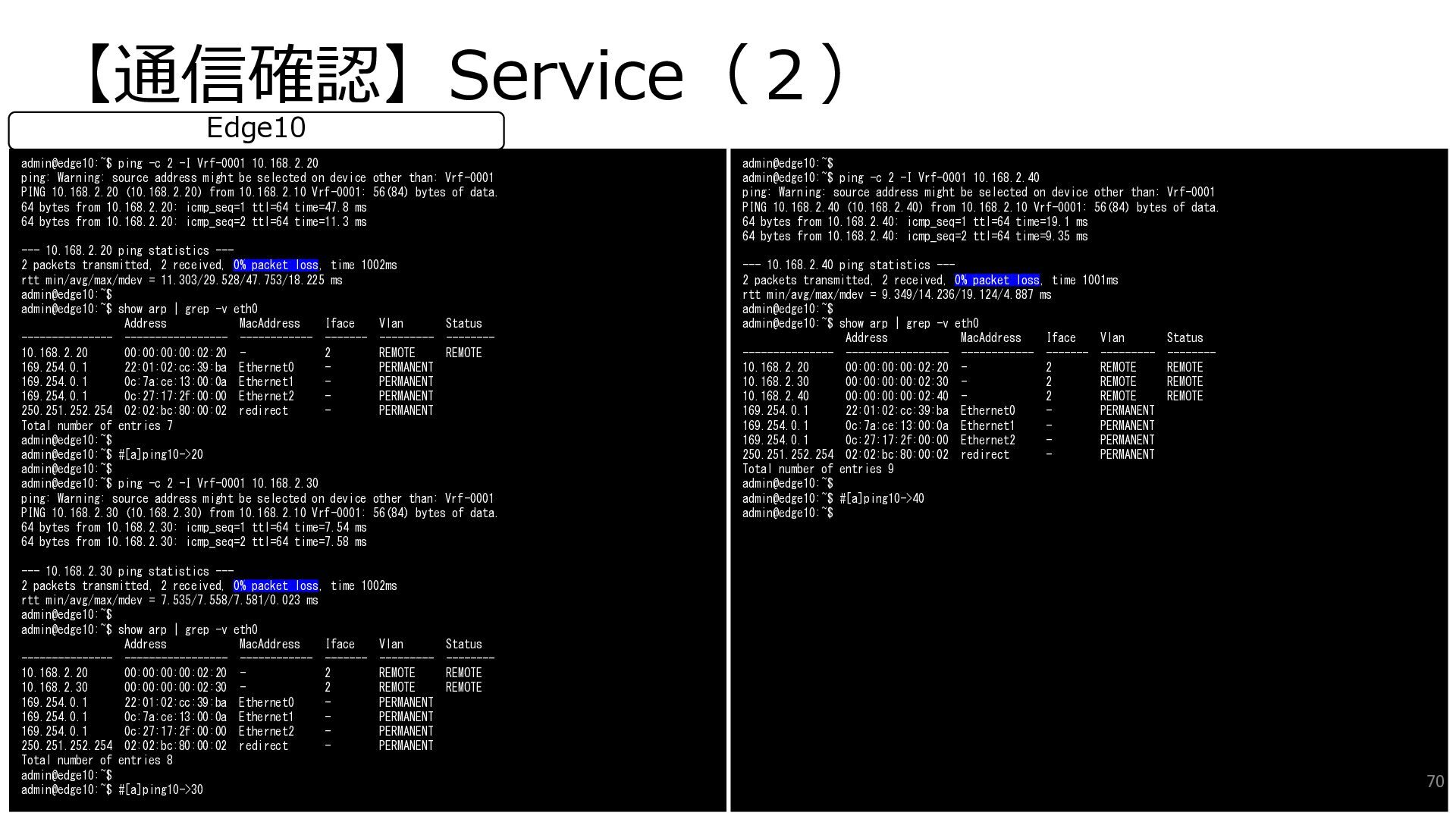
  46. 【通信確認】Service(2) admin@edge10:~$ ping -c 2 -I Vrf-0001 10.168.2.20 ping: Warning:

    source address might be selected on device other than: Vrf-0001 PING 10.168.2.20 (10.168.2.20) from 10.168.2.10 Vrf-0001: 56(84) bytes of data. 64 bytes from 10.168.2.20: icmp_seq=1 ttl=64 time=47.8 ms 64 bytes from 10.168.2.20: icmp_seq=2 ttl=64 time=11.3 ms --- 10.168.2.20 ping statistics --- 2 packets transmitted, 2 received, 0% packet loss, time 1002ms rtt min/avg/max/mdev = 11.303/29.528/47.753/18.225 ms admin@edge10:~$ admin@edge10:~$ show arp | grep -v eth0 Address MacAddress Iface Vlan Status --------------- ----------------- ------------ ------- --------- -------- 10.168.2.20 00:00:00:00:02:20 - 2 REMOTE REMOTE 169.254.0.1 22:01:02:cc:39:ba Ethernet0 - PERMANENT 169.254.0.1 0c:7a:ce:13:00:0a Ethernet1 - PERMANENT 169.254.0.1 0c:27:17:2f:00:00 Ethernet2 - PERMANENT 250.251.252.254 02:02:bc:80:00:02 redirect - PERMANENT Total number of entries 7 admin@edge10:~$ admin@edge10:~$ #[a]ping10->20 admin@edge10:~$ admin@edge10:~$ ping -c 2 -I Vrf-0001 10.168.2.30 ping: Warning: source address might be selected on device other than: Vrf-0001 PING 10.168.2.30 (10.168.2.30) from 10.168.2.10 Vrf-0001: 56(84) bytes of data. 64 bytes from 10.168.2.30: icmp_seq=1 ttl=64 time=7.54 ms 64 bytes from 10.168.2.30: icmp_seq=2 ttl=64 time=7.58 ms --- 10.168.2.30 ping statistics --- 2 packets transmitted, 2 received, 0% packet loss, time 1002ms rtt min/avg/max/mdev = 7.535/7.558/7.581/0.023 ms admin@edge10:~$ admin@edge10:~$ show arp | grep -v eth0 Address MacAddress Iface Vlan Status --------------- ----------------- ------------ ------- --------- -------- 10.168.2.20 00:00:00:00:02:20 - 2 REMOTE REMOTE 10.168.2.30 00:00:00:00:02:30 - 2 REMOTE REMOTE 169.254.0.1 22:01:02:cc:39:ba Ethernet0 - PERMANENT 169.254.0.1 0c:7a:ce:13:00:0a Ethernet1 - PERMANENT 169.254.0.1 0c:27:17:2f:00:00 Ethernet2 - PERMANENT 250.251.252.254 02:02:bc:80:00:02 redirect - PERMANENT Total number of entries 8 admin@edge10:~$ admin@edge10:~$ #[a]ping10->30 Edge10 admin@edge10:~$ admin@edge10:~$ ping -c 2 -I Vrf-0001 10.168.2.40 ping: Warning: source address might be selected on device other than: Vrf-0001 PING 10.168.2.40 (10.168.2.40) from 10.168.2.10 Vrf-0001: 56(84) bytes of data. 64 bytes from 10.168.2.40: icmp_seq=1 ttl=64 time=19.1 ms 64 bytes from 10.168.2.40: icmp_seq=2 ttl=64 time=9.35 ms --- 10.168.2.40 ping statistics --- 2 packets transmitted, 2 received, 0% packet loss, time 1001ms rtt min/avg/max/mdev = 9.349/14.236/19.124/4.887 ms admin@edge10:~$ admin@edge10:~$ show arp | grep -v eth0 Address MacAddress Iface Vlan Status --------------- ----------------- ------------ ------- --------- -------- 10.168.2.20 00:00:00:00:02:20 - 2 REMOTE REMOTE 10.168.2.30 00:00:00:00:02:30 - 2 REMOTE REMOTE 10.168.2.40 00:00:00:00:02:40 - 2 REMOTE REMOTE 169.254.0.1 22:01:02:cc:39:ba Ethernet0 - PERMANENT 169.254.0.1 0c:7a:ce:13:00:0a Ethernet1 - PERMANENT 169.254.0.1 0c:27:17:2f:00:00 Ethernet2 - PERMANENT 250.251.252.254 02:02:bc:80:00:02 redirect - PERMANENT Total number of entries 9 admin@edge10:~$ admin@edge10:~$ #[a]ping10->40 admin@edge10:~$ 70
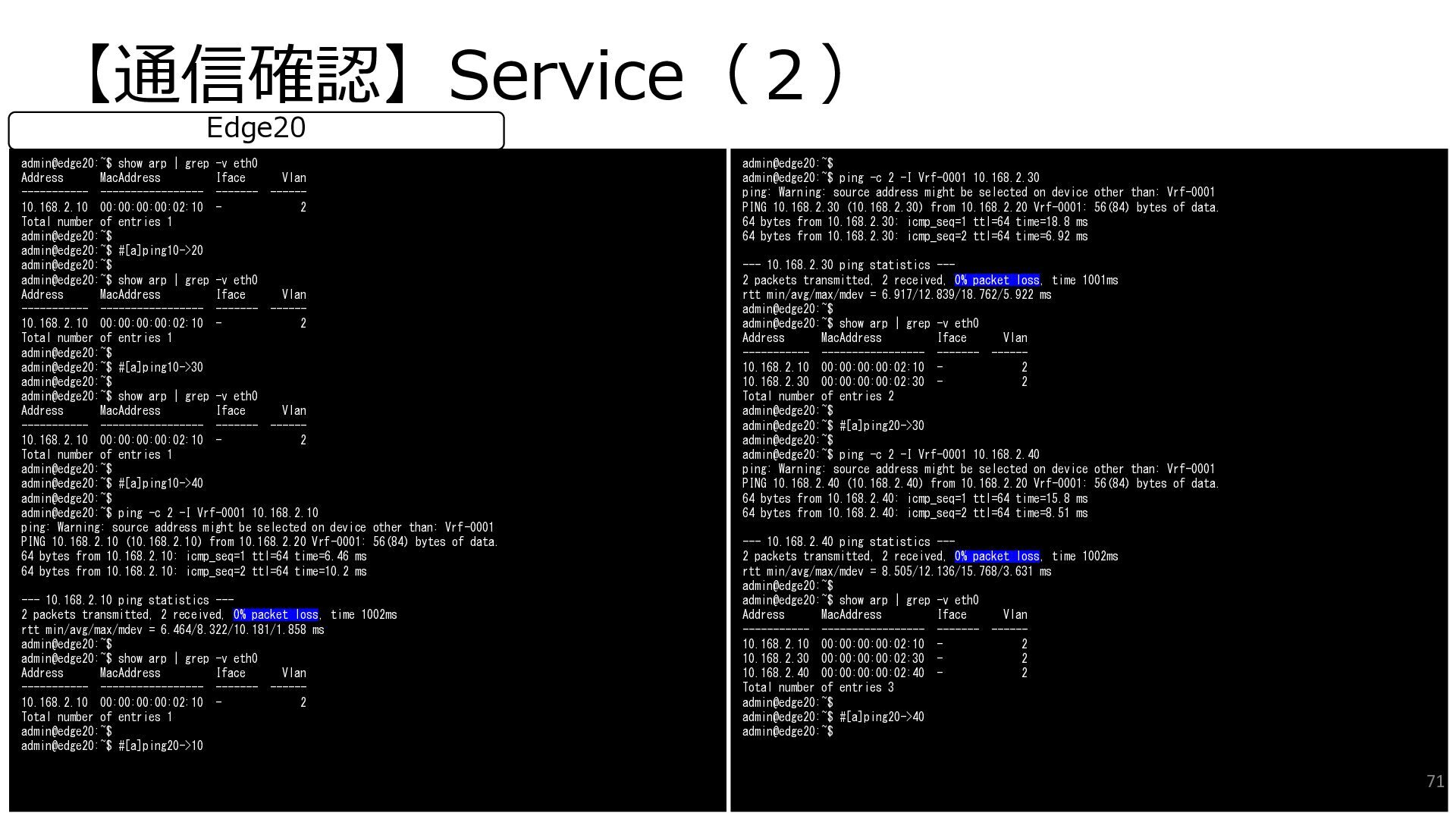
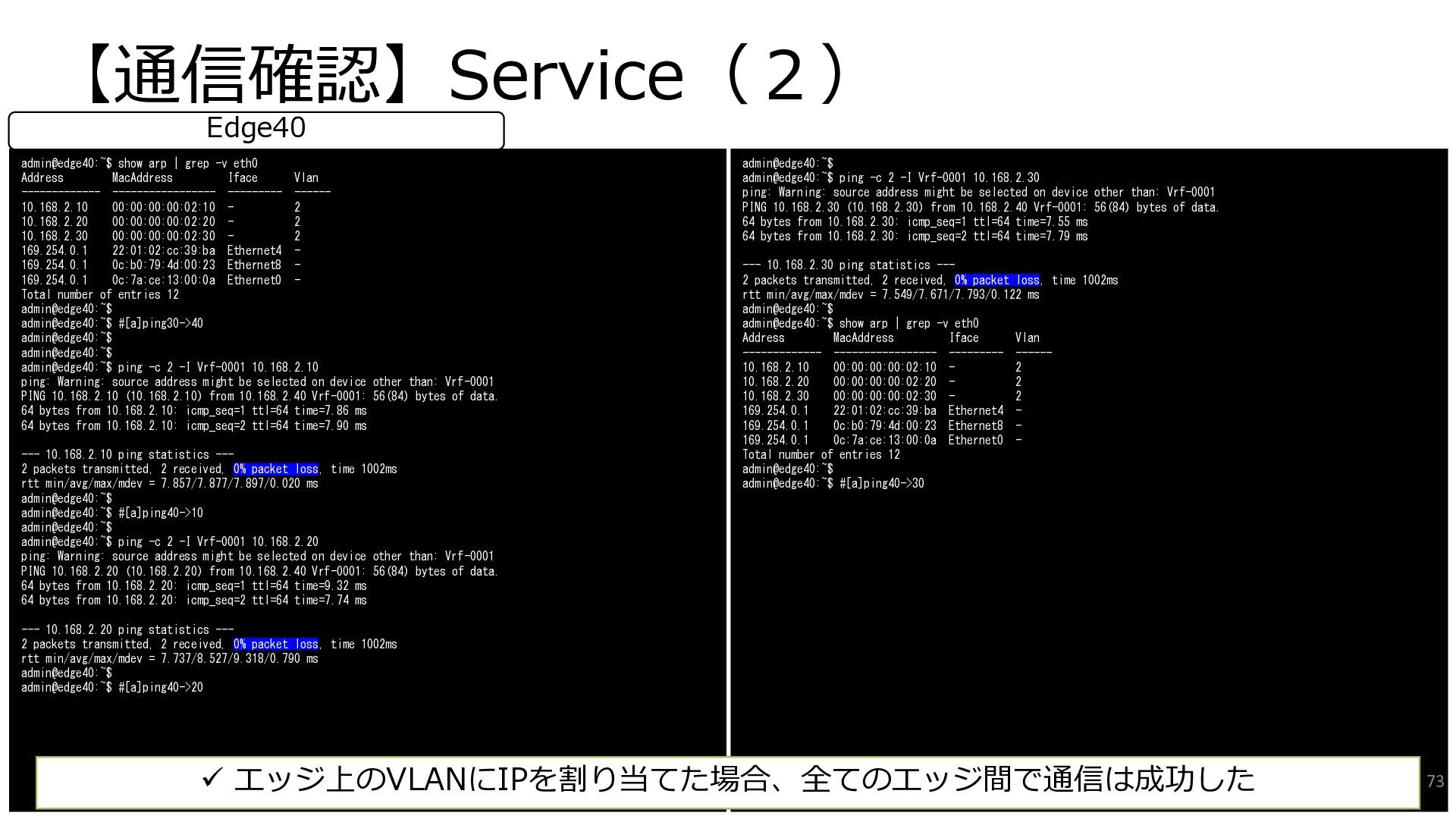
  47. 【通信確認】Service(2) admin@edge20:~$ show arp | grep -v eth0 Address MacAddress

    Iface Vlan ----------- ----------------- ------- ------ 10.168.2.10 00:00:00:00:02:10 - 2 Total number of entries 1 admin@edge20:~$ admin@edge20:~$ #[a]ping10->20 admin@edge20:~$ admin@edge20:~$ show arp | grep -v eth0 Address MacAddress Iface Vlan ----------- ----------------- ------- ------ 10.168.2.10 00:00:00:00:02:10 - 2 Total number of entries 1 admin@edge20:~$ admin@edge20:~$ #[a]ping10->30 admin@edge20:~$ admin@edge20:~$ show arp | grep -v eth0 Address MacAddress Iface Vlan ----------- ----------------- ------- ------ 10.168.2.10 00:00:00:00:02:10 - 2 Total number of entries 1 admin@edge20:~$ admin@edge20:~$ #[a]ping10->40 admin@edge20:~$ admin@edge20:~$ ping -c 2 -I Vrf-0001 10.168.2.10 ping: Warning: source address might be selected on device other than: Vrf-0001 PING 10.168.2.10 (10.168.2.10) from 10.168.2.20 Vrf-0001: 56(84) bytes of data. 64 bytes from 10.168.2.10: icmp_seq=1 ttl=64 time=6.46 ms 64 bytes from 10.168.2.10: icmp_seq=2 ttl=64 time=10.2 ms --- 10.168.2.10 ping statistics --- 2 packets transmitted, 2 received, 0% packet loss, time 1002ms rtt min/avg/max/mdev = 6.464/8.322/10.181/1.858 ms admin@edge20:~$ admin@edge20:~$ show arp | grep -v eth0 Address MacAddress Iface Vlan ----------- ----------------- ------- ------ 10.168.2.10 00:00:00:00:02:10 - 2 Total number of entries 1 admin@edge20:~$ admin@edge20:~$ #[a]ping20->10 Edge20 admin@edge20:~$ admin@edge20:~$ ping -c 2 -I Vrf-0001 10.168.2.30 ping: Warning: source address might be selected on device other than: Vrf-0001 PING 10.168.2.30 (10.168.2.30) from 10.168.2.20 Vrf-0001: 56(84) bytes of data. 64 bytes from 10.168.2.30: icmp_seq=1 ttl=64 time=18.8 ms 64 bytes from 10.168.2.30: icmp_seq=2 ttl=64 time=6.92 ms --- 10.168.2.30 ping statistics --- 2 packets transmitted, 2 received, 0% packet loss, time 1001ms rtt min/avg/max/mdev = 6.917/12.839/18.762/5.922 ms admin@edge20:~$ admin@edge20:~$ show arp | grep -v eth0 Address MacAddress Iface Vlan ----------- ----------------- ------- ------ 10.168.2.10 00:00:00:00:02:10 - 2 10.168.2.30 00:00:00:00:02:30 - 2 Total number of entries 2 admin@edge20:~$ admin@edge20:~$ #[a]ping20->30 admin@edge20:~$ admin@edge20:~$ ping -c 2 -I Vrf-0001 10.168.2.40 ping: Warning: source address might be selected on device other than: Vrf-0001 PING 10.168.2.40 (10.168.2.40) from 10.168.2.20 Vrf-0001: 56(84) bytes of data. 64 bytes from 10.168.2.40: icmp_seq=1 ttl=64 time=15.8 ms 64 bytes from 10.168.2.40: icmp_seq=2 ttl=64 time=8.51 ms --- 10.168.2.40 ping statistics --- 2 packets transmitted, 2 received, 0% packet loss, time 1002ms rtt min/avg/max/mdev = 8.505/12.136/15.768/3.631 ms admin@edge20:~$ admin@edge20:~$ show arp | grep -v eth0 Address MacAddress Iface Vlan ----------- ----------------- ------- ------ 10.168.2.10 00:00:00:00:02:10 - 2 10.168.2.30 00:00:00:00:02:30 - 2 10.168.2.40 00:00:00:00:02:40 - 2 Total number of entries 3 admin@edge20:~$ admin@edge20:~$ #[a]ping20->40 admin@edge20:~$ 71
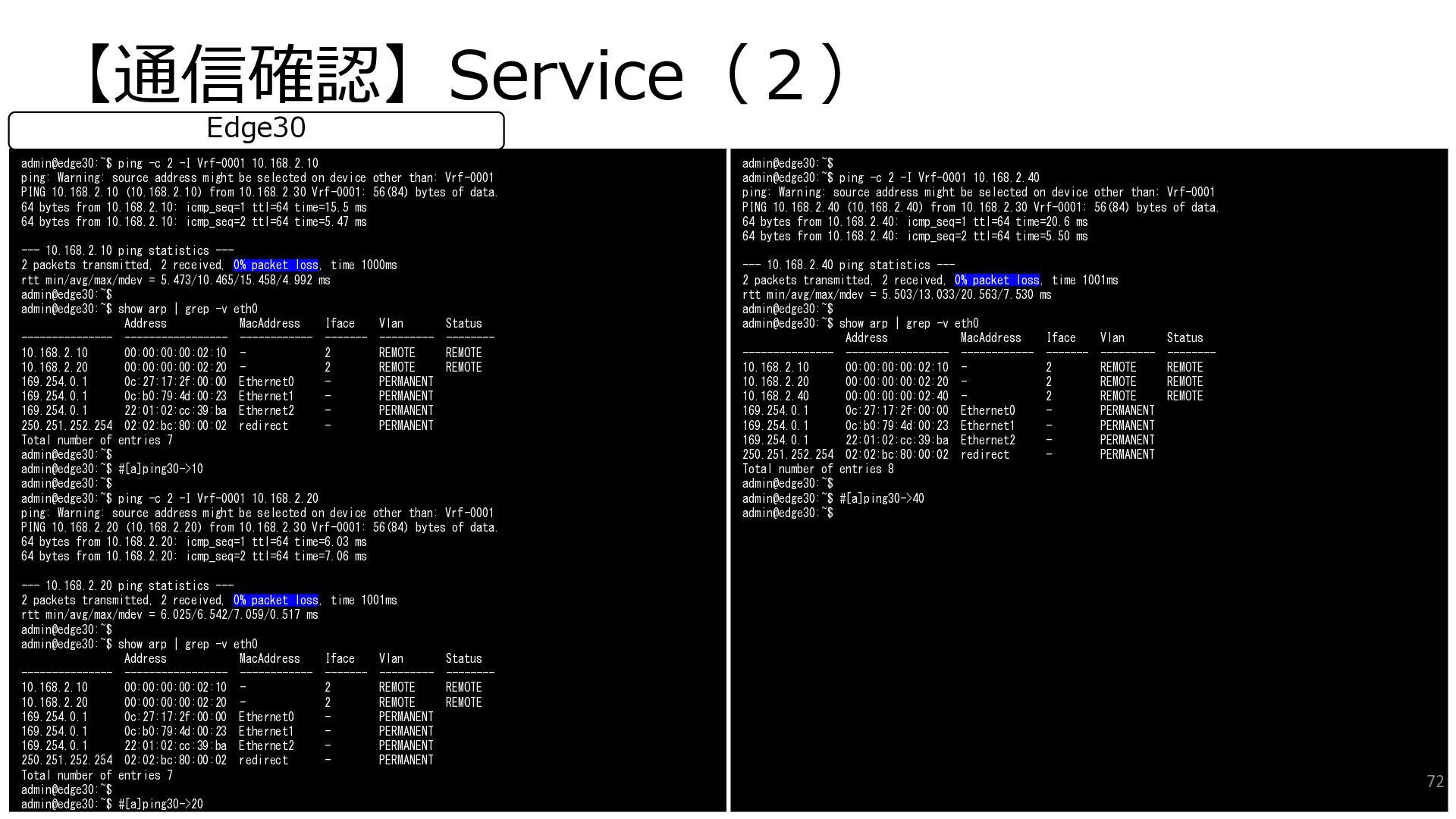
  48. 【通信確認】Service(2) admin@edge30:~$ ping -c 2 -I Vrf-0001 10.168.2.10 ping: Warning:

    source address might be selected on device other than: Vrf-0001 PING 10.168.2.10 (10.168.2.10) from 10.168.2.30 Vrf-0001: 56(84) bytes of data. 64 bytes from 10.168.2.10: icmp_seq=1 ttl=64 time=15.5 ms 64 bytes from 10.168.2.10: icmp_seq=2 ttl=64 time=5.47 ms --- 10.168.2.10 ping statistics --- 2 packets transmitted, 2 received, 0% packet loss, time 1000ms rtt min/avg/max/mdev = 5.473/10.465/15.458/4.992 ms admin@edge30:~$ admin@edge30:~$ show arp | grep -v eth0 Address MacAddress Iface Vlan Status --------------- ----------------- ------------ ------- --------- -------- 10.168.2.10 00:00:00:00:02:10 - 2 REMOTE REMOTE 10.168.2.20 00:00:00:00:02:20 - 2 REMOTE REMOTE 169.254.0.1 0c:27:17:2f:00:00 Ethernet0 - PERMANENT 169.254.0.1 0c:b0:79:4d:00:23 Ethernet1 - PERMANENT 169.254.0.1 22:01:02:cc:39:ba Ethernet2 - PERMANENT 250.251.252.254 02:02:bc:80:00:02 redirect - PERMANENT Total number of entries 7 admin@edge30:~$ admin@edge30:~$ #[a]ping30->10 admin@edge30:~$ admin@edge30:~$ ping -c 2 -I Vrf-0001 10.168.2.20 ping: Warning: source address might be selected on device other than: Vrf-0001 PING 10.168.2.20 (10.168.2.20) from 10.168.2.30 Vrf-0001: 56(84) bytes of data. 64 bytes from 10.168.2.20: icmp_seq=1 ttl=64 time=6.03 ms 64 bytes from 10.168.2.20: icmp_seq=2 ttl=64 time=7.06 ms --- 10.168.2.20 ping statistics --- 2 packets transmitted, 2 received, 0% packet loss, time 1001ms rtt min/avg/max/mdev = 6.025/6.542/7.059/0.517 ms admin@edge30:~$ admin@edge30:~$ show arp | grep -v eth0 Address MacAddress Iface Vlan Status --------------- ----------------- ------------ ------- --------- -------- 10.168.2.10 00:00:00:00:02:10 - 2 REMOTE REMOTE 10.168.2.20 00:00:00:00:02:20 - 2 REMOTE REMOTE 169.254.0.1 0c:27:17:2f:00:00 Ethernet0 - PERMANENT 169.254.0.1 0c:b0:79:4d:00:23 Ethernet1 - PERMANENT 169.254.0.1 22:01:02:cc:39:ba Ethernet2 - PERMANENT 250.251.252.254 02:02:bc:80:00:02 redirect - PERMANENT Total number of entries 7 admin@edge30:~$ admin@edge30:~$ #[a]ping30->20 Edge30 admin@edge30:~$ admin@edge30:~$ ping -c 2 -I Vrf-0001 10.168.2.40 ping: Warning: source address might be selected on device other than: Vrf-0001 PING 10.168.2.40 (10.168.2.40) from 10.168.2.30 Vrf-0001: 56(84) bytes of data. 64 bytes from 10.168.2.40: icmp_seq=1 ttl=64 time=20.6 ms 64 bytes from 10.168.2.40: icmp_seq=2 ttl=64 time=5.50 ms --- 10.168.2.40 ping statistics --- 2 packets transmitted, 2 received, 0% packet loss, time 1001ms rtt min/avg/max/mdev = 5.503/13.033/20.563/7.530 ms admin@edge30:~$ admin@edge30:~$ show arp | grep -v eth0 Address MacAddress Iface Vlan Status --------------- ----------------- ------------ ------- --------- -------- 10.168.2.10 00:00:00:00:02:10 - 2 REMOTE REMOTE 10.168.2.20 00:00:00:00:02:20 - 2 REMOTE REMOTE 10.168.2.40 00:00:00:00:02:40 - 2 REMOTE REMOTE 169.254.0.1 0c:27:17:2f:00:00 Ethernet0 - PERMANENT 169.254.0.1 0c:b0:79:4d:00:23 Ethernet1 - PERMANENT 169.254.0.1 22:01:02:cc:39:ba Ethernet2 - PERMANENT 250.251.252.254 02:02:bc:80:00:02 redirect - PERMANENT Total number of entries 8 admin@edge30:~$ admin@edge30:~$ #[a]ping30->40 admin@edge30:~$ 72
  49. 【通信確認】Service(2) admin@edge40:~$ show arp | grep -v eth0 Address MacAddress

    Iface Vlan ------------- ----------------- --------- ------ 10.168.2.10 00:00:00:00:02:10 - 2 10.168.2.20 00:00:00:00:02:20 - 2 10.168.2.30 00:00:00:00:02:30 - 2 169.254.0.1 22:01:02:cc:39:ba Ethernet4 - 169.254.0.1 0c:b0:79:4d:00:23 Ethernet8 - 169.254.0.1 0c:7a:ce:13:00:0a Ethernet0 - Total number of entries 12 admin@edge40:~$ admin@edge40:~$ #[a]ping30->40 admin@edge40:~$ admin@edge40:~$ admin@edge40:~$ ping -c 2 -I Vrf-0001 10.168.2.10 ping: Warning: source address might be selected on device other than: Vrf-0001 PING 10.168.2.10 (10.168.2.10) from 10.168.2.40 Vrf-0001: 56(84) bytes of data. 64 bytes from 10.168.2.10: icmp_seq=1 ttl=64 time=7.86 ms 64 bytes from 10.168.2.10: icmp_seq=2 ttl=64 time=7.90 ms --- 10.168.2.10 ping statistics --- 2 packets transmitted, 2 received, 0% packet loss, time 1002ms rtt min/avg/max/mdev = 7.857/7.877/7.897/0.020 ms admin@edge40:~$ admin@edge40:~$ #[a]ping40->10 admin@edge40:~$ admin@edge40:~$ ping -c 2 -I Vrf-0001 10.168.2.20 ping: Warning: source address might be selected on device other than: Vrf-0001 PING 10.168.2.20 (10.168.2.20) from 10.168.2.40 Vrf-0001: 56(84) bytes of data. 64 bytes from 10.168.2.20: icmp_seq=1 ttl=64 time=9.32 ms 64 bytes from 10.168.2.20: icmp_seq=2 ttl=64 time=7.74 ms --- 10.168.2.20 ping statistics --- 2 packets transmitted, 2 received, 0% packet loss, time 1002ms rtt min/avg/max/mdev = 7.737/8.527/9.318/0.790 ms admin@edge40:~$ admin@edge40:~$ #[a]ping40->20 Edge40 admin@edge40:~$ admin@edge40:~$ ping -c 2 -I Vrf-0001 10.168.2.30 ping: Warning: source address might be selected on device other than: Vrf-0001 PING 10.168.2.30 (10.168.2.30) from 10.168.2.40 Vrf-0001: 56(84) bytes of data. 64 bytes from 10.168.2.30: icmp_seq=1 ttl=64 time=7.55 ms 64 bytes from 10.168.2.30: icmp_seq=2 ttl=64 time=7.79 ms --- 10.168.2.30 ping statistics --- 2 packets transmitted, 2 received, 0% packet loss, time 1002ms rtt min/avg/max/mdev = 7.549/7.671/7.793/0.122 ms admin@edge40:~$ admin@edge40:~$ show arp | grep -v eth0 Address MacAddress Iface Vlan ------------- ----------------- --------- ------ 10.168.2.10 00:00:00:00:02:10 - 2 10.168.2.20 00:00:00:00:02:20 - 2 10.168.2.30 00:00:00:00:02:30 - 2 169.254.0.1 22:01:02:cc:39:ba Ethernet4 - 169.254.0.1 0c:b0:79:4d:00:23 Ethernet8 - 169.254.0.1 0c:7a:ce:13:00:0a Ethernet0 - Total number of entries 12 admin@edge40:~$ admin@edge40:~$ #[a]ping40->30 ✓ エッジ上のVLANにIPを割り当てた場合、全てのエッジ間で通信は成功した 73
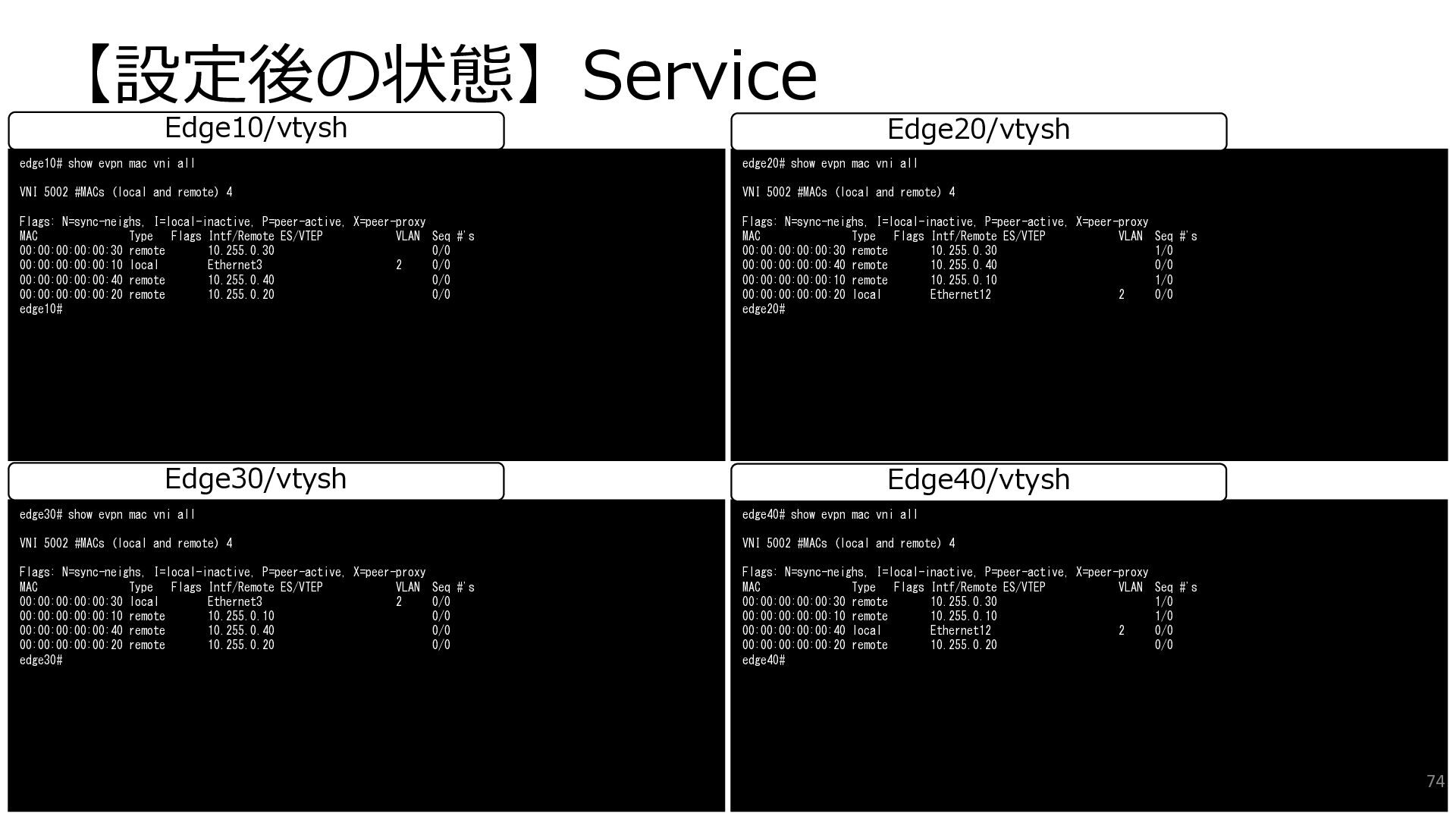
  50. 【設定後の状態】Service edge30# show evpn mac vni all VNI 5002 #MACs

    (local and remote) 4 Flags: N=sync-neighs, I=local-inactive, P=peer-active, X=peer-proxy MAC Type Flags Intf/Remote ES/VTEP VLAN Seq #'s 00:00:00:00:00:30 local Ethernet3 2 0/0 00:00:00:00:00:10 remote 10.255.0.10 0/0 00:00:00:00:00:40 remote 10.255.0.40 0/0 00:00:00:00:00:20 remote 10.255.0.20 0/0 edge30# edge40# show evpn mac vni all VNI 5002 #MACs (local and remote) 4 Flags: N=sync-neighs, I=local-inactive, P=peer-active, X=peer-proxy MAC Type Flags Intf/Remote ES/VTEP VLAN Seq #'s 00:00:00:00:00:30 remote 10.255.0.30 1/0 00:00:00:00:00:10 remote 10.255.0.10 1/0 00:00:00:00:00:40 local Ethernet12 2 0/0 00:00:00:00:00:20 remote 10.255.0.20 0/0 edge40# Edge30/vtysh Edge40/vtysh edge10# show evpn mac vni all VNI 5002 #MACs (local and remote) 4 Flags: N=sync-neighs, I=local-inactive, P=peer-active, X=peer-proxy MAC Type Flags Intf/Remote ES/VTEP VLAN Seq #'s 00:00:00:00:00:30 remote 10.255.0.30 0/0 00:00:00:00:00:10 local Ethernet3 2 0/0 00:00:00:00:00:40 remote 10.255.0.40 0/0 00:00:00:00:00:20 remote 10.255.0.20 0/0 edge10# edge20# show evpn mac vni all VNI 5002 #MACs (local and remote) 4 Flags: N=sync-neighs, I=local-inactive, P=peer-active, X=peer-proxy MAC Type Flags Intf/Remote ES/VTEP VLAN Seq #'s 00:00:00:00:00:30 remote 10.255.0.30 1/0 00:00:00:00:00:40 remote 10.255.0.40 0/0 00:00:00:00:00:10 remote 10.255.0.10 1/0 00:00:00:00:00:20 local Ethernet12 2 0/0 edge20# Edge10/vtysh Edge20/vtysh 74
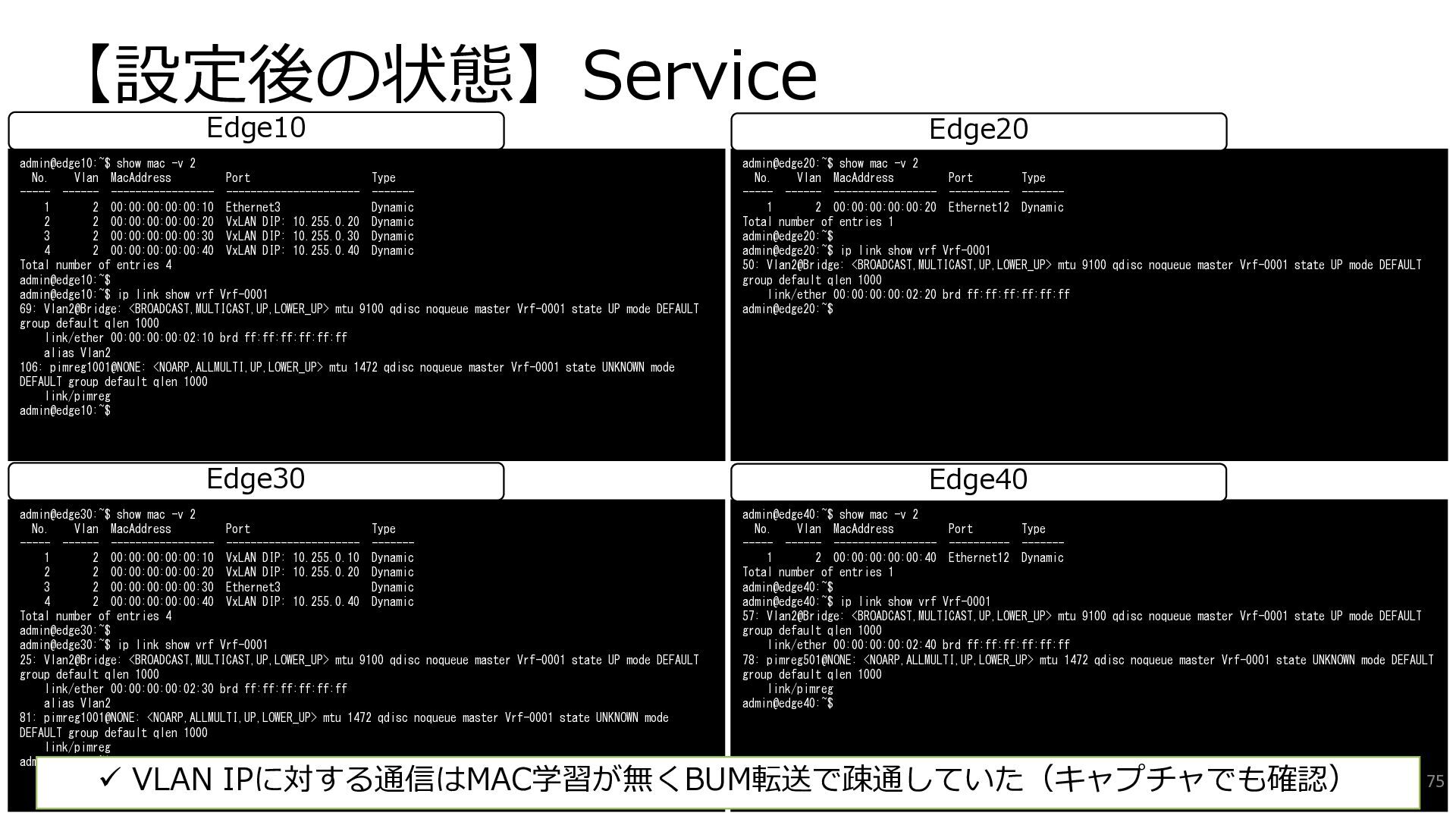
  51. 【設定後の状態】Service admin@edge30:~$ show mac -v 2 No. Vlan MacAddress Port

    Type ----- ------ ----------------- ---------------------- ------- 1 2 00:00:00:00:00:10 VxLAN DIP: 10.255.0.10 Dynamic 2 2 00:00:00:00:00:20 VxLAN DIP: 10.255.0.20 Dynamic 3 2 00:00:00:00:00:30 Ethernet3 Dynamic 4 2 00:00:00:00:00:40 VxLAN DIP: 10.255.0.40 Dynamic Total number of entries 4 admin@edge30:~$ admin@edge30:~$ ip link show vrf Vrf-0001 25: Vlan2@Bridge: <BROADCAST,MULTICAST,UP,LOWER_UP> mtu 9100 qdisc noqueue master Vrf-0001 state UP mode DEFAULT group default qlen 1000 link/ether 00:00:00:00:02:30 brd ff:ff:ff:ff:ff:ff alias Vlan2 81: pimreg1001@NONE: <NOARP,ALLMULTI,UP,LOWER_UP> mtu 1472 qdisc noqueue master Vrf-0001 state UNKNOWN mode DEFAULT group default qlen 1000 link/pimreg admin@edge30:~$ admin@edge40:~$ show mac -v 2 No. Vlan MacAddress Port Type ----- ------ ----------------- ---------- ------- 1 2 00:00:00:00:00:40 Ethernet12 Dynamic Total number of entries 1 admin@edge40:~$ admin@edge40:~$ ip link show vrf Vrf-0001 57: Vlan2@Bridge: <BROADCAST,MULTICAST,UP,LOWER_UP> mtu 9100 qdisc noqueue master Vrf-0001 state UP mode DEFAULT group default qlen 1000 link/ether 00:00:00:00:02:40 brd ff:ff:ff:ff:ff:ff 78: pimreg501@NONE: <NOARP,ALLMULTI,UP,LOWER_UP> mtu 1472 qdisc noqueue master Vrf-0001 state UNKNOWN mode DEFAULT group default qlen 1000 link/pimreg admin@edge40:~$ Edge30 Edge40 admin@edge10:~$ show mac -v 2 No. Vlan MacAddress Port Type ----- ------ ----------------- ---------------------- ------- 1 2 00:00:00:00:00:10 Ethernet3 Dynamic 2 2 00:00:00:00:00:20 VxLAN DIP: 10.255.0.20 Dynamic 3 2 00:00:00:00:00:30 VxLAN DIP: 10.255.0.30 Dynamic 4 2 00:00:00:00:00:40 VxLAN DIP: 10.255.0.40 Dynamic Total number of entries 4 admin@edge10:~$ admin@edge10:~$ ip link show vrf Vrf-0001 69: Vlan2@Bridge: <BROADCAST,MULTICAST,UP,LOWER_UP> mtu 9100 qdisc noqueue master Vrf-0001 state UP mode DEFAULT group default qlen 1000 link/ether 00:00:00:00:02:10 brd ff:ff:ff:ff:ff:ff alias Vlan2 106: pimreg1001@NONE: <NOARP,ALLMULTI,UP,LOWER_UP> mtu 1472 qdisc noqueue master Vrf-0001 state UNKNOWN mode DEFAULT group default qlen 1000 link/pimreg admin@edge10:~$ admin@edge20:~$ show mac -v 2 No. Vlan MacAddress Port Type ----- ------ ----------------- ---------- ------- 1 2 00:00:00:00:00:20 Ethernet12 Dynamic Total number of entries 1 admin@edge20:~$ admin@edge20:~$ ip link show vrf Vrf-0001 50: Vlan2@Bridge: <BROADCAST,MULTICAST,UP,LOWER_UP> mtu 9100 qdisc noqueue master Vrf-0001 state UP mode DEFAULT group default qlen 1000 link/ether 00:00:00:00:02:20 brd ff:ff:ff:ff:ff:ff admin@edge20:~$ Edge10 Edge20 75 ✓ VLAN IPに対する通信はMAC学習が無くBUM転送で疎通していた(キャプチャでも確認)
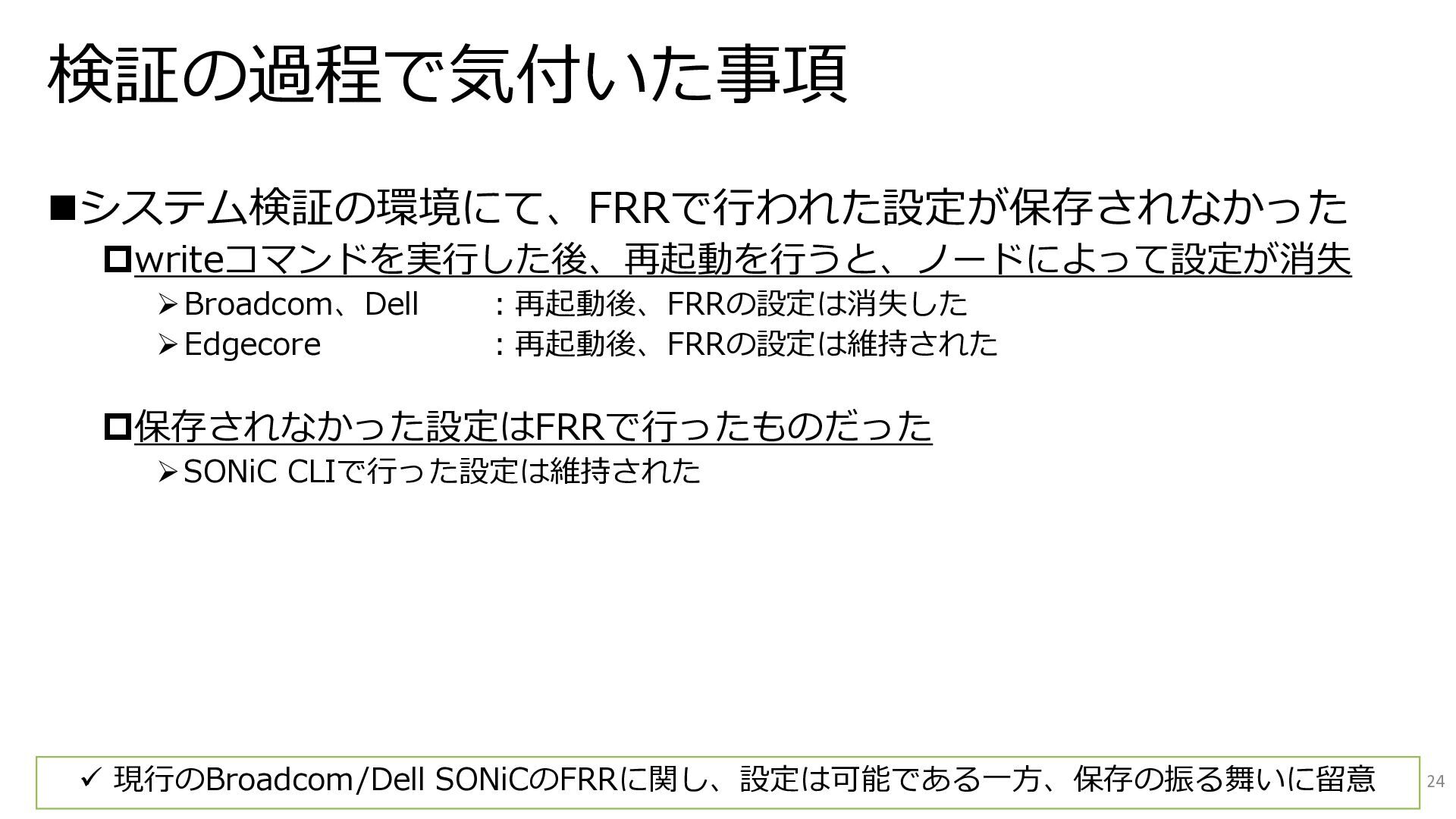
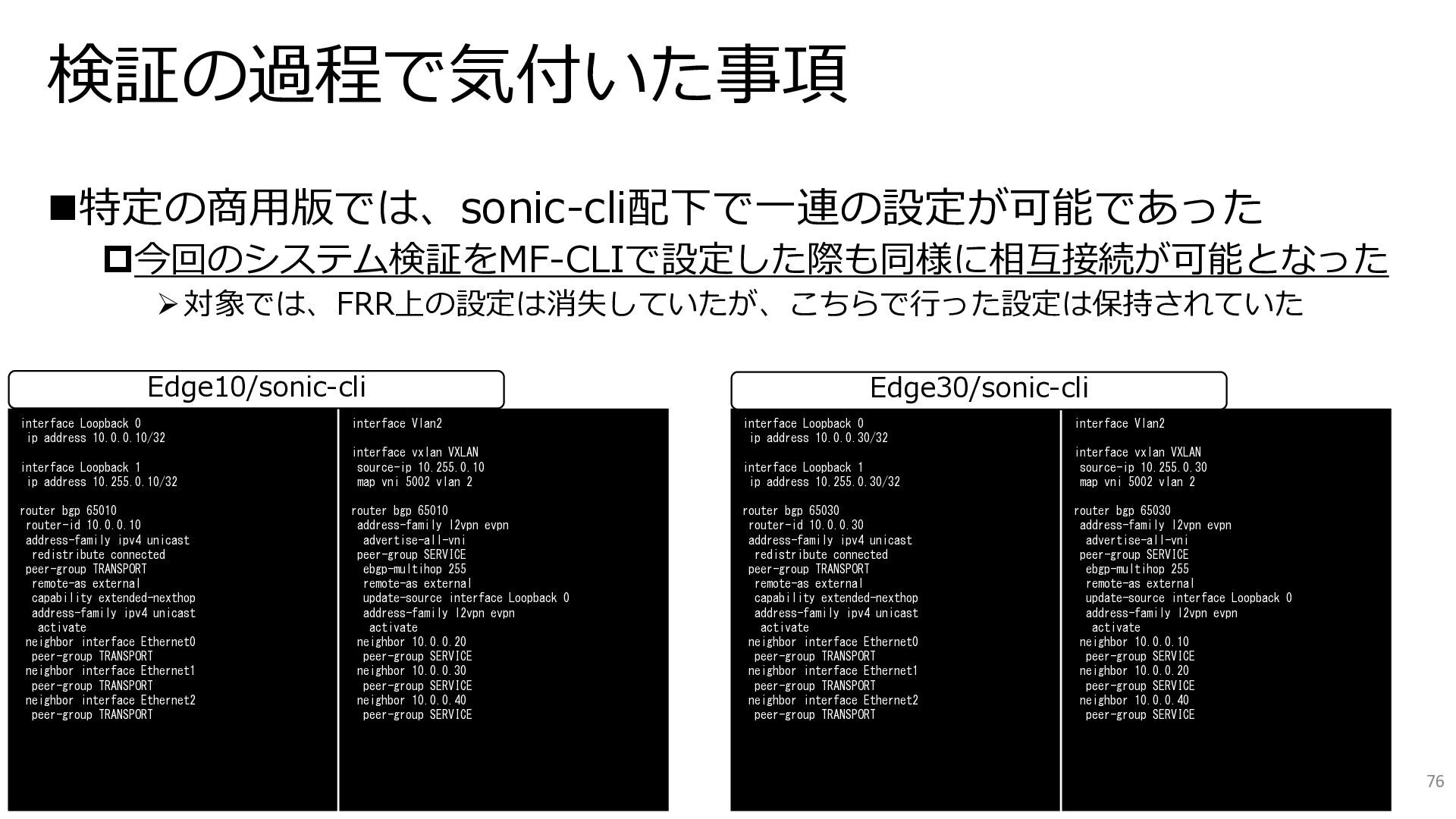
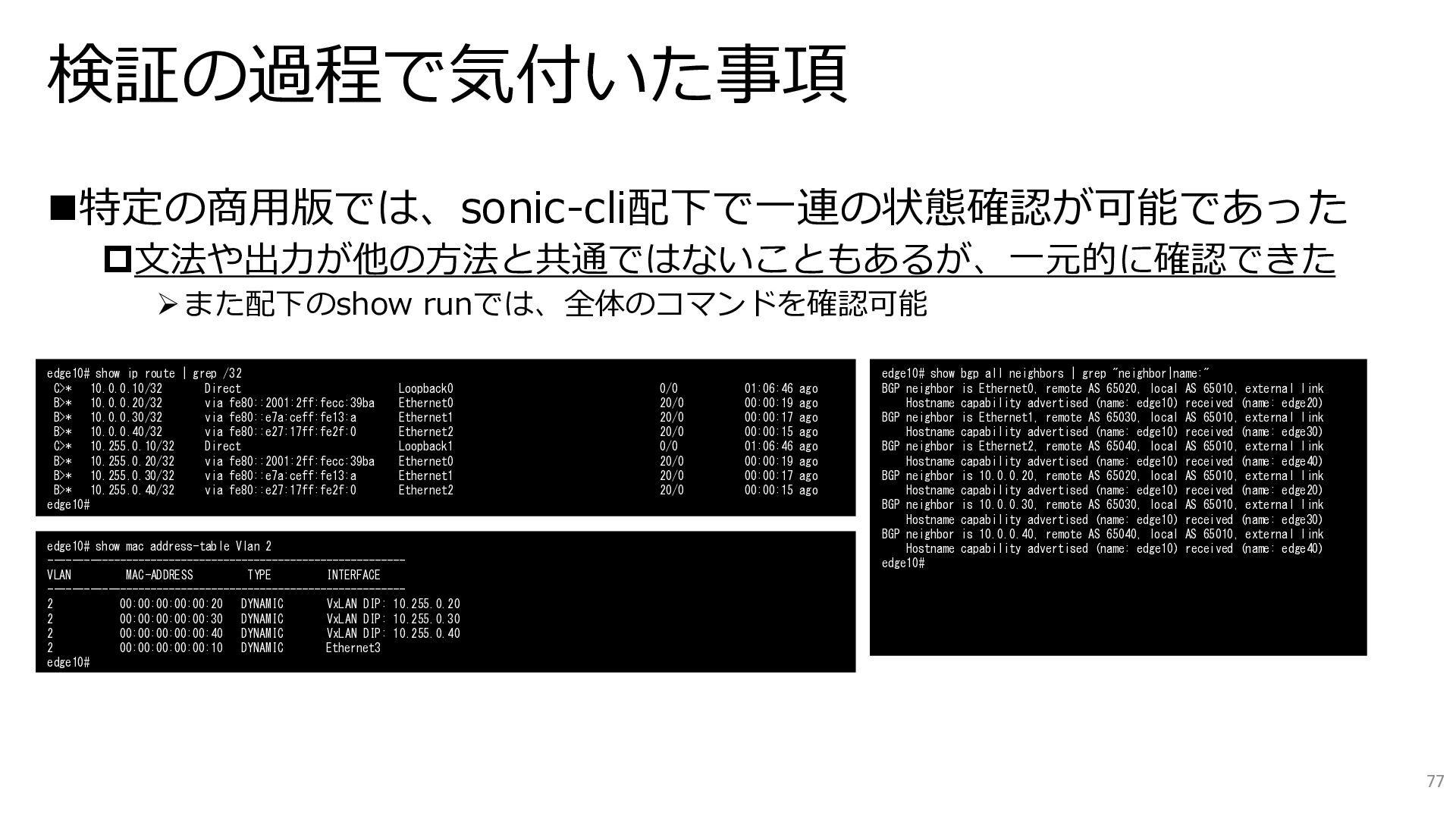
  52. 検証の過程で気付いた事項 ◼特定の商用版では、sonic-cli配下で一連の設定が可能であった 今回のシステム検証をMF-CLIで設定した際も同様に相互接続が可能となった ➢対象では、FRR上の設定は消失していたが、こちらで行った設定は保持されていた 76 interface Loopback 0 ip address

    10.0.0.10/32 interface Loopback 1 ip address 10.255.0.10/32 router bgp 65010 router-id 10.0.0.10 address-family ipv4 unicast redistribute connected peer-group TRANSPORT remote-as external capability extended-nexthop address-family ipv4 unicast activate neighbor interface Ethernet0 peer-group TRANSPORT neighbor interface Ethernet1 peer-group TRANSPORT neighbor interface Ethernet2 peer-group TRANSPORT interface Loopback 0 ip address 10.0.0.30/32 interface Loopback 1 ip address 10.255.0.30/32 router bgp 65030 router-id 10.0.0.30 address-family ipv4 unicast redistribute connected peer-group TRANSPORT remote-as external capability extended-nexthop address-family ipv4 unicast activate neighbor interface Ethernet0 peer-group TRANSPORT neighbor interface Ethernet1 peer-group TRANSPORT neighbor interface Ethernet2 peer-group TRANSPORT interface Vlan2 interface vxlan VXLAN source-ip 10.255.0.10 map vni 5002 vlan 2 router bgp 65010 address-family l2vpn evpn advertise-all-vni peer-group SERVICE ebgp-multihop 255 remote-as external update-source interface Loopback 0 address-family l2vpn evpn activate neighbor 10.0.0.20 peer-group SERVICE neighbor 10.0.0.30 peer-group SERVICE neighbor 10.0.0.40 peer-group SERVICE interface Vlan2 interface vxlan VXLAN source-ip 10.255.0.30 map vni 5002 vlan 2 router bgp 65030 address-family l2vpn evpn advertise-all-vni peer-group SERVICE ebgp-multihop 255 remote-as external update-source interface Loopback 0 address-family l2vpn evpn activate neighbor 10.0.0.10 peer-group SERVICE neighbor 10.0.0.20 peer-group SERVICE neighbor 10.0.0.40 peer-group SERVICE Edge10/sonic-cli Edge30/sonic-cli
  53. 検証の過程で気付いた事項 ◼特定の商用版では、sonic-cli配下で一連の状態確認が可能であった 文法や出力が他の方法と共通ではないこともあるが、一元的に確認できた ➢また配下のshow runでは、全体のコマンドを確認可能 77 edge10# show ip route

    | grep /32 C>* 10.0.0.10/32 Direct Loopback0 0/0 01:06:46 ago B>* 10.0.0.20/32 via fe80::2001:2ff:fecc:39ba Ethernet0 20/0 00:00:19 ago B>* 10.0.0.30/32 via fe80::e7a:ceff:fe13:a Ethernet1 20/0 00:00:17 ago B>* 10.0.0.40/32 via fe80::e27:17ff:fe2f:0 Ethernet2 20/0 00:00:15 ago C>* 10.255.0.10/32 Direct Loopback1 0/0 01:06:46 ago B>* 10.255.0.20/32 via fe80::2001:2ff:fecc:39ba Ethernet0 20/0 00:00:19 ago B>* 10.255.0.30/32 via fe80::e7a:ceff:fe13:a Ethernet1 20/0 00:00:17 ago B>* 10.255.0.40/32 via fe80::e27:17ff:fe2f:0 Ethernet2 20/0 00:00:15 ago edge10# edge10# show mac address-table Vlan 2 ----------------------------------------------------------- VLAN MAC-ADDRESS TYPE INTERFACE ----------------------------------------------------------- 2 00:00:00:00:00:20 DYNAMIC VxLAN DIP: 10.255.0.20 2 00:00:00:00:00:30 DYNAMIC VxLAN DIP: 10.255.0.30 2 00:00:00:00:00:40 DYNAMIC VxLAN DIP: 10.255.0.40 2 00:00:00:00:00:10 DYNAMIC Ethernet3 edge10# edge10# show bgp all neighbors | grep "neighbor|name:" BGP neighbor is Ethernet0, remote AS 65020, local AS 65010, external link Hostname capability advertised (name: edge10) received (name: edge20) BGP neighbor is Ethernet1, remote AS 65030, local AS 65010, external link Hostname capability advertised (name: edge10) received (name: edge30) BGP neighbor is Ethernet2, remote AS 65040, local AS 65010, external link Hostname capability advertised (name: edge10) received (name: edge40) BGP neighbor is 10.0.0.20, remote AS 65020, local AS 65010, external link Hostname capability advertised (name: edge10) received (name: edge20) BGP neighbor is 10.0.0.30, remote AS 65030, local AS 65010, external link Hostname capability advertised (name: edge10) received (name: edge30) BGP neighbor is 10.0.0.40, remote AS 65040, local AS 65010, external link Hostname capability advertised (name: edge10) received (name: edge40) edge10#