Upgrade to Pro — share decks privately, control downloads, hide ads and more …

Getting Started with Signal Processing in Pytho...

Sponsored · Your Podcast. Everywhere. Effortlessly. Share. Educate. Inspire. Entertain. You do you. We'll handle the rest. →
Avatar for wat wat
October 18, 2026

Getting Started with Signal Processing in Python: Visualizing Sound with Spectrograms

This talk introduces audio signal processing with Python through practical visualization examples. Signal processing can look difficult at first, but sound is a familiar and intuitive subject. By using waveforms, frequency spectra, and spectrograms, attendees can understand how Python can be used to “see” sound.

The talk is based on a session I presented at PyCon JP 2025, updated and adapted for an international audience. It focuses on intuition and practical Python code rather than heavy mathematics. The goal is to help attendees start writing their own simple audio analysis programs after the session.

Avatar for wat

wat

October 18, 2026

More Decks by wat

Other Decks in Programming

Transcript

  1. /26 PyCon TW 2026 Getting Started with Signal Processing in

    Python: Visualizing Sound with Spectrograms 2026.10.17(Day1) 11:30-12:00 wat @watlablog
  2. About me 1 /26 wat @watlablog Kenta Watanabe @Japan Mechanical

    engineer in Japan: • Simulation and testing in sound, vibration, heat transfer, and fluid flow Python activities: • A blog about Python: WATLAB https://watlab-blog.com/ • Author of a Python book in Japanese Hobbies: Python, Piano, Go (圍棋) A beginner’s guide to Python Published in Japanese by SHOEISYA
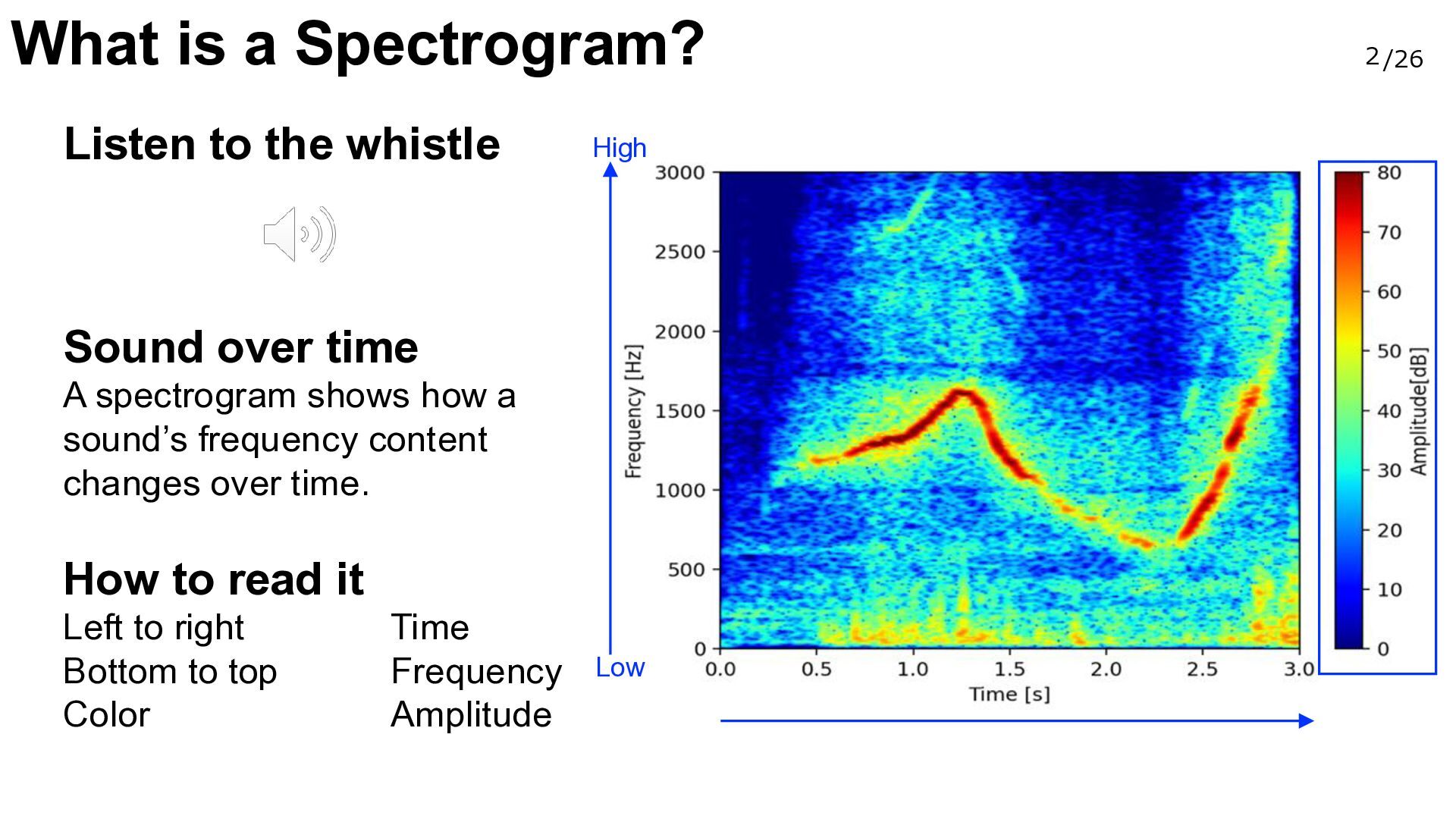
  3. What is a Spectrogram? Listen to the whistle High Sound

    over time A spectrogram shows how a sound’s frequency content changes over time. How to read it Left to right Bottom to top Color Time Frequency Amplitude Low 2 /26
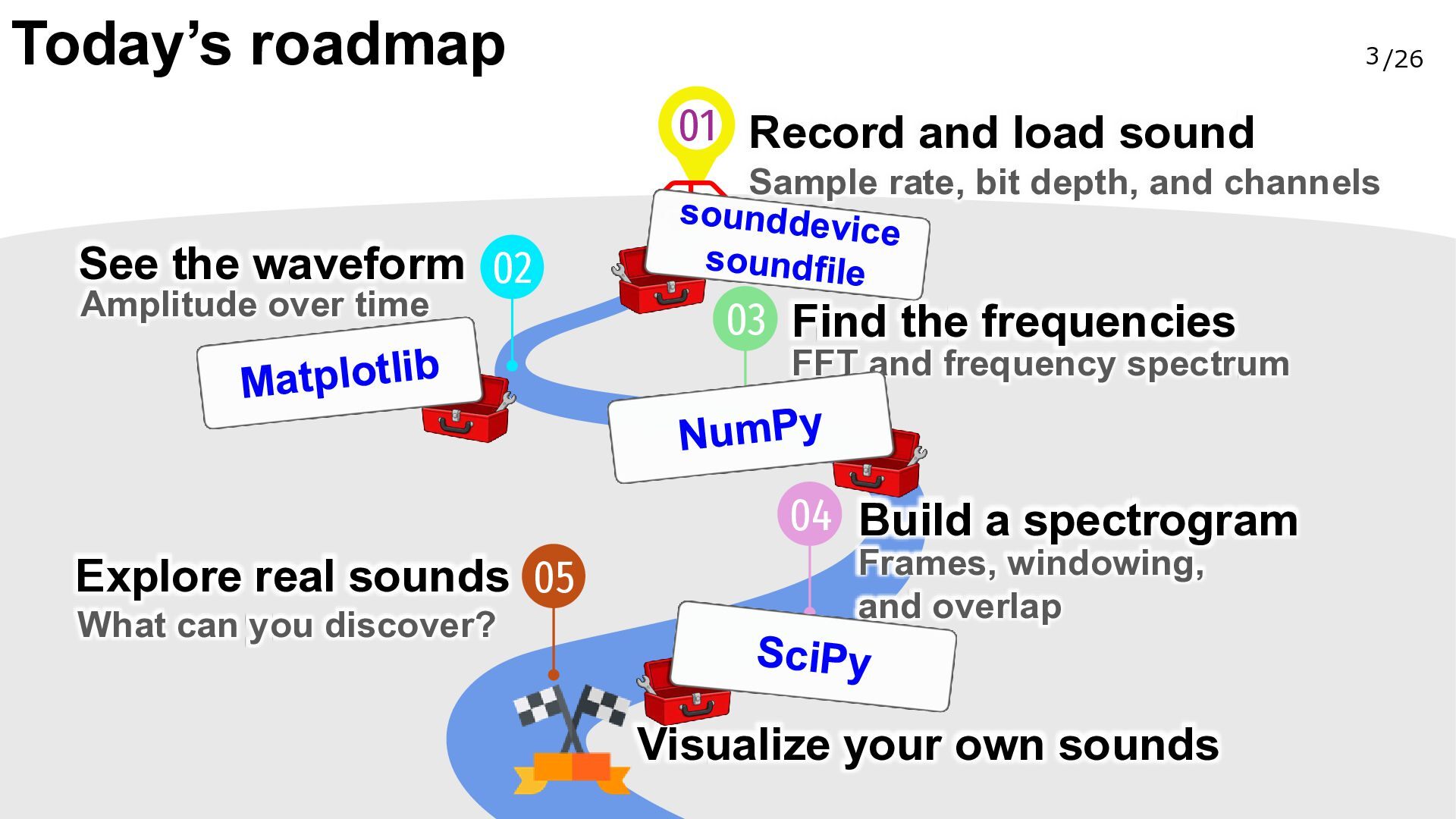
  4. Today’s roadmap 3 /26 01 Record and load sound Sample

    rate, bit depth, and channels See the waveform 02 Amplitude over time 03 Find the frequencies FFT and frequency spectrum 04 Build a spectrogram Explore real sounds 05 What can you discover? Frames, windowing, and overlap Visualize your own sounds
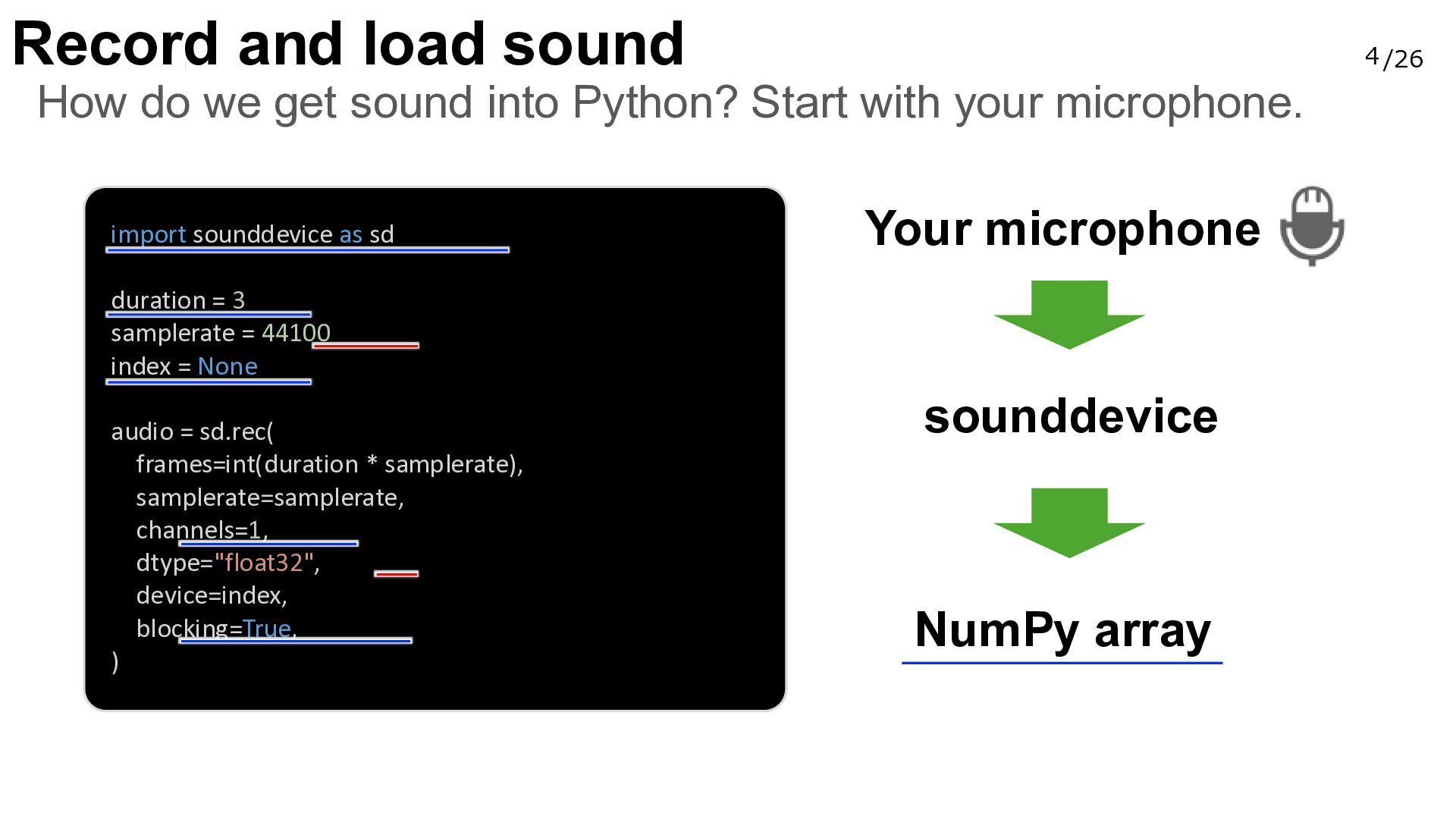
  5. Record and load sound 4 /26 How do we get

    sound into Python? Start with your microphone. import sounddevice as sd Your microphone duration = 3 samplerate = 44100 index = None audio = sd.rec( frames=int(duration * samplerate), samplerate=samplerate, channels=1, dtype="float32", device=index, blocking=True, ) sounddevice NumPy array
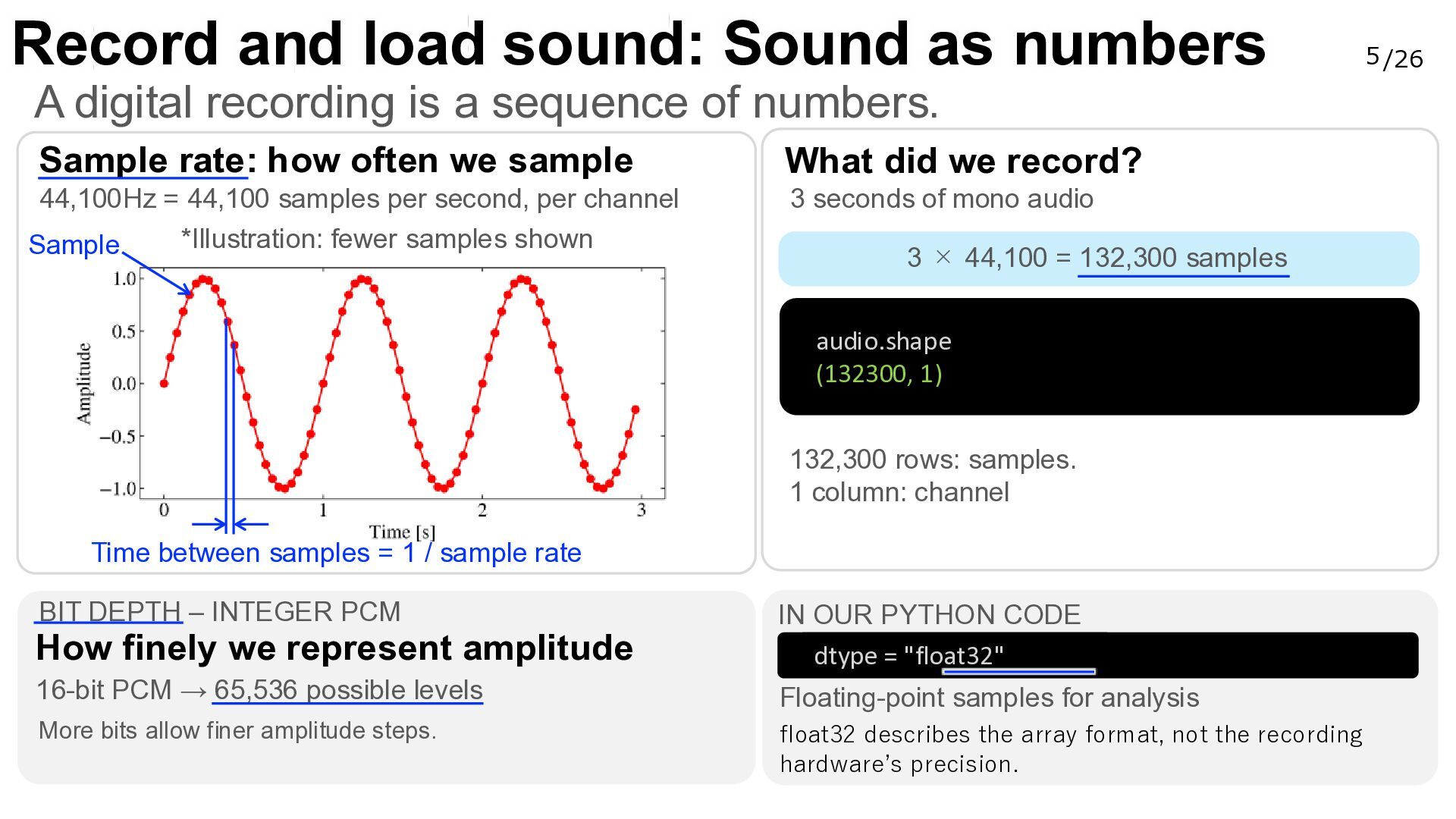
  6. Record and load sound: Sound as numbers A digital recording

    is a sequence of numbers. Sample rate: how often we sample What did we record? 44,100Hz = 44,100 samples per second, per channel *Illustration: fewer samples shown Sample 3 seconds of mono audio 3 × 44,100 = 132,300 samples audio.shape (132300, 1) 132,300 rows: samples. 1 column: channel Time between samples = 1 / sample rate BIT DEPTH – INTEGER PCM How finely we represent amplitude IN OUR PYTHON CODE dtype = "float32" 16-bit PCM → 65,536 possible levels Floating-point samples for analysis More bits allow finer amplitude steps. float32 describes the array format, not the recording hardware’s precision. 5 /26
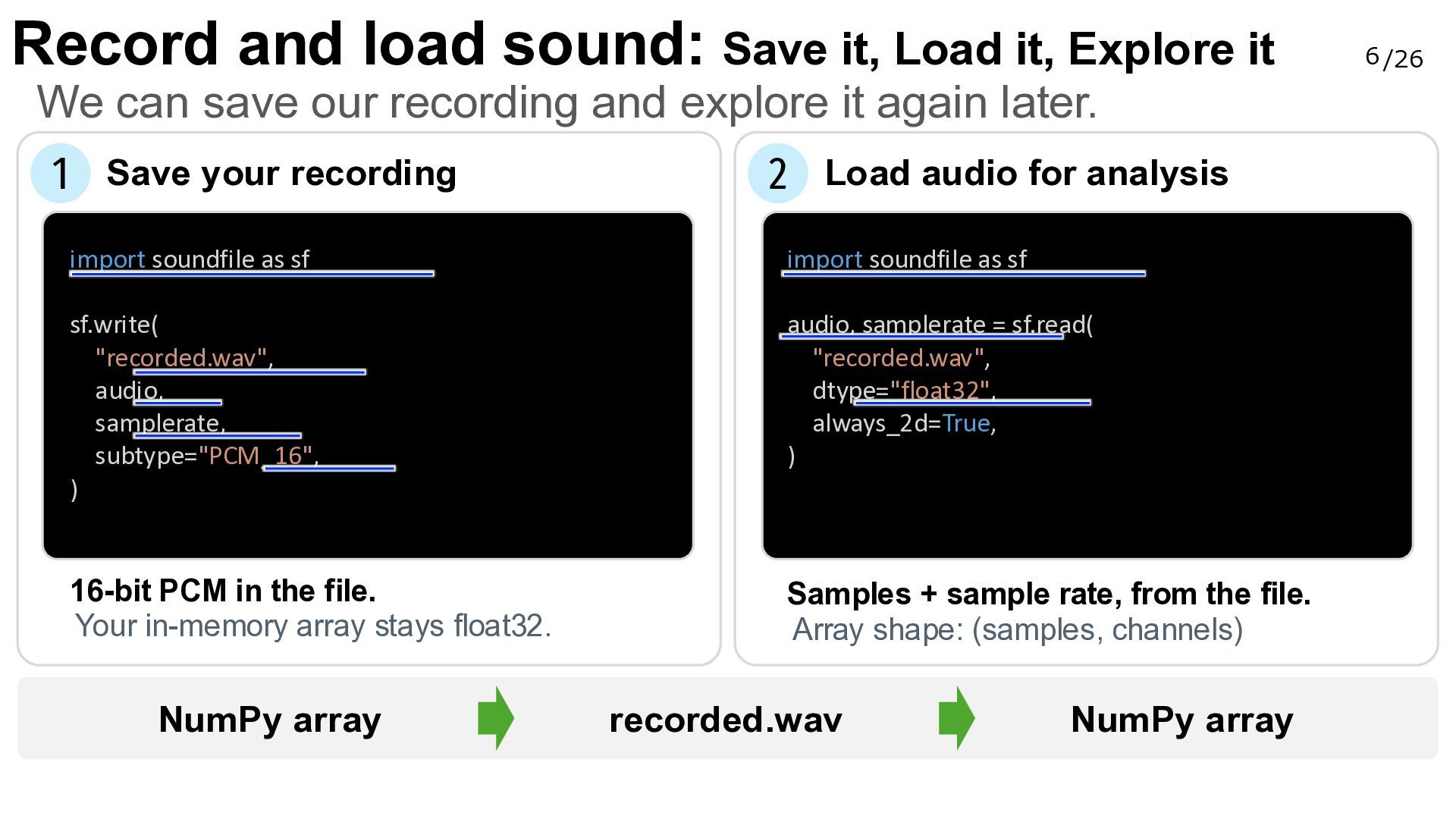
  7. Record and load sound: Save it, Load it, Explore it

    We can save our recording and explore it again later. 1 Save your recording 2 Load audio for analysis import soundfile as sf import soundfile as sf sf.write( "recorded.wav", audio, samplerate, subtype="PCM_16", ) audio, samplerate = sf.read( "recorded.wav", dtype="float32", always_2d=True, ) 16-bit PCM in the file. Your in-memory array stays float32. Samples + sample rate, from the file. Array shape: (samples, channels) NumPy array recorded.wav NumPy array 6 /26
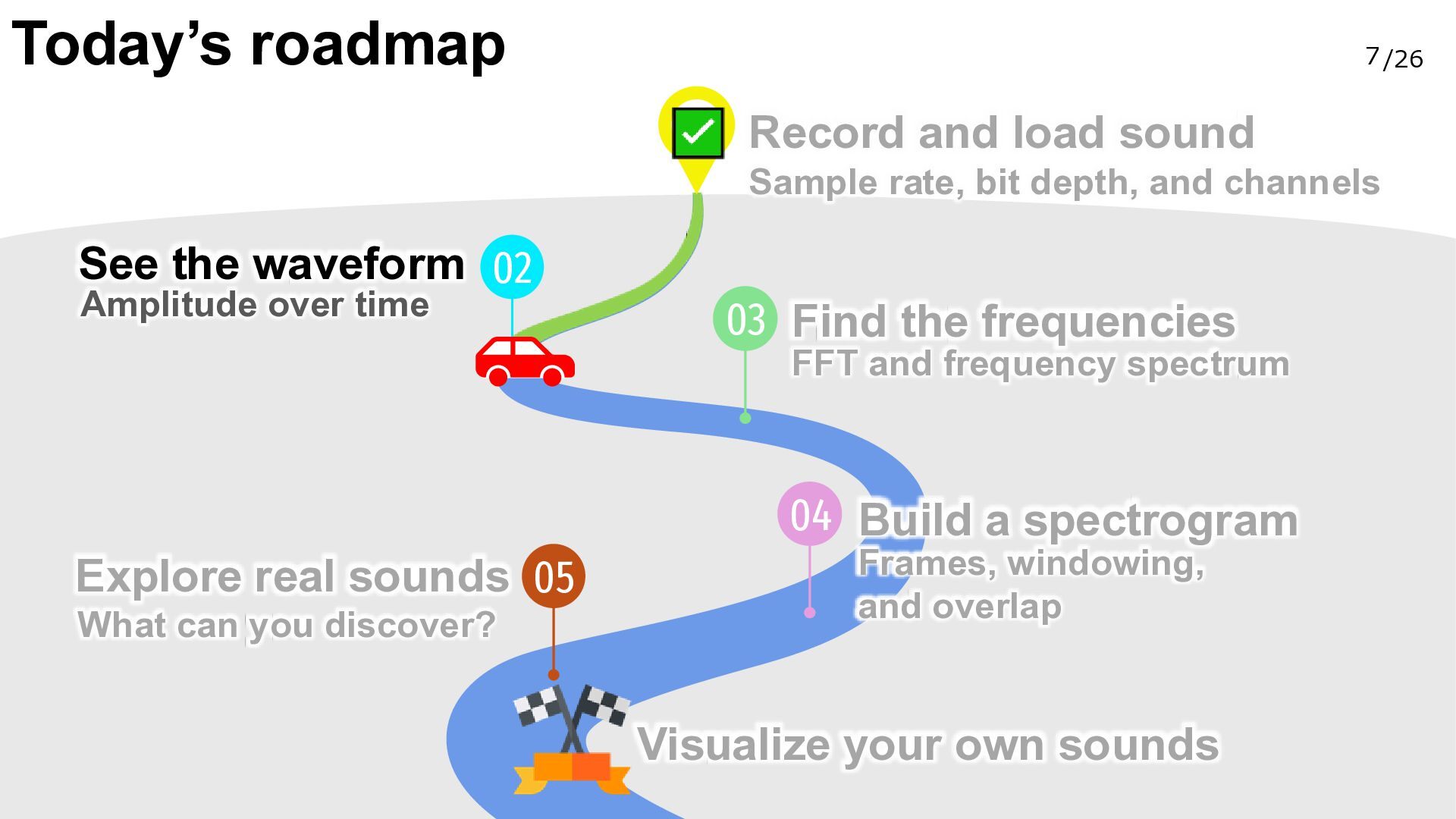
  8. Today’s roadmap 7 /26 Record and load sound Sample rate,

    bit depth, and channels See the waveform 02 Amplitude over time 03 Find the frequencies FFT and frequency spectrum 04 Build a spectrogram Explore real sounds 05 What can you discover? Frames, windowing, and overlap Visualize your own sounds
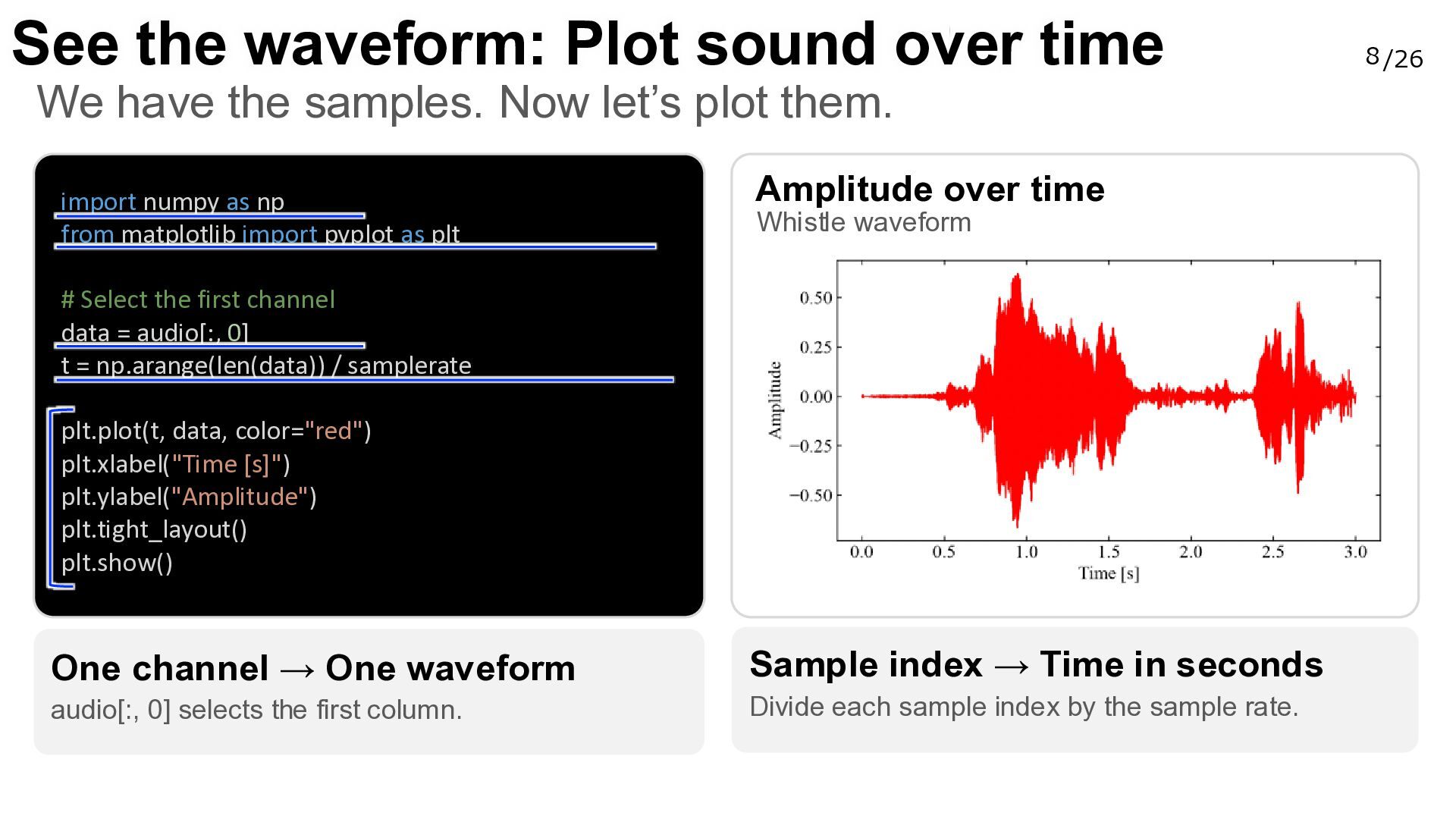
  9. See the waveform: Plot sound over time We have the

    samples. Now let’s plot them. import numpy as np from matplotlib import pyplot as plt Amplitude over time Whistle waveform # Select the first channel data = audio[:, 0] t = np.arange(len(data)) / samplerate plt.plot(t, data, color="red") plt.xlabel("Time [s]") plt.ylabel("Amplitude") plt.tight_layout() plt.show() One channel → One waveform Sample index → Time in seconds audio[:, 0] selects the first column. Divide each sample index by the sample rate. 8 /26
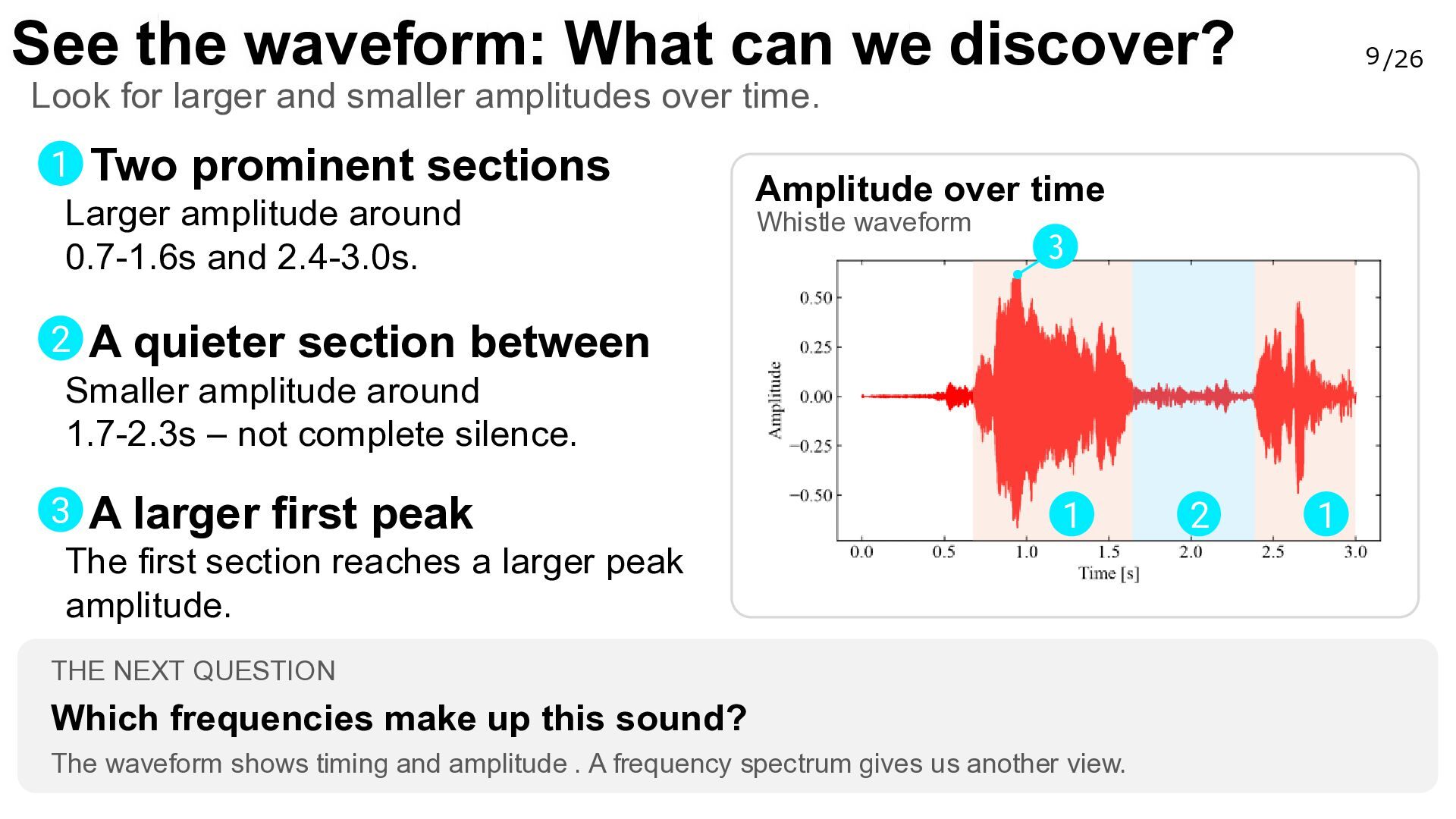
  10. See the waveform: What can we discover? 9 /26 Look

    for larger and smaller amplitudes over time. 1 Two prominent sections Larger amplitude around 0.7-1.6s and 2.4-3.0s. Amplitude over time Whistle waveform 3 2 A quieter section between Smaller amplitude around 1.7-2.3s – not complete silence. 3 A larger first peak The first section reaches a larger peak amplitude. 1 THE NEXT QUESTION Which frequencies make up this sound? The waveform shows timing and amplitude . A frequency spectrum gives us another view. 2 1
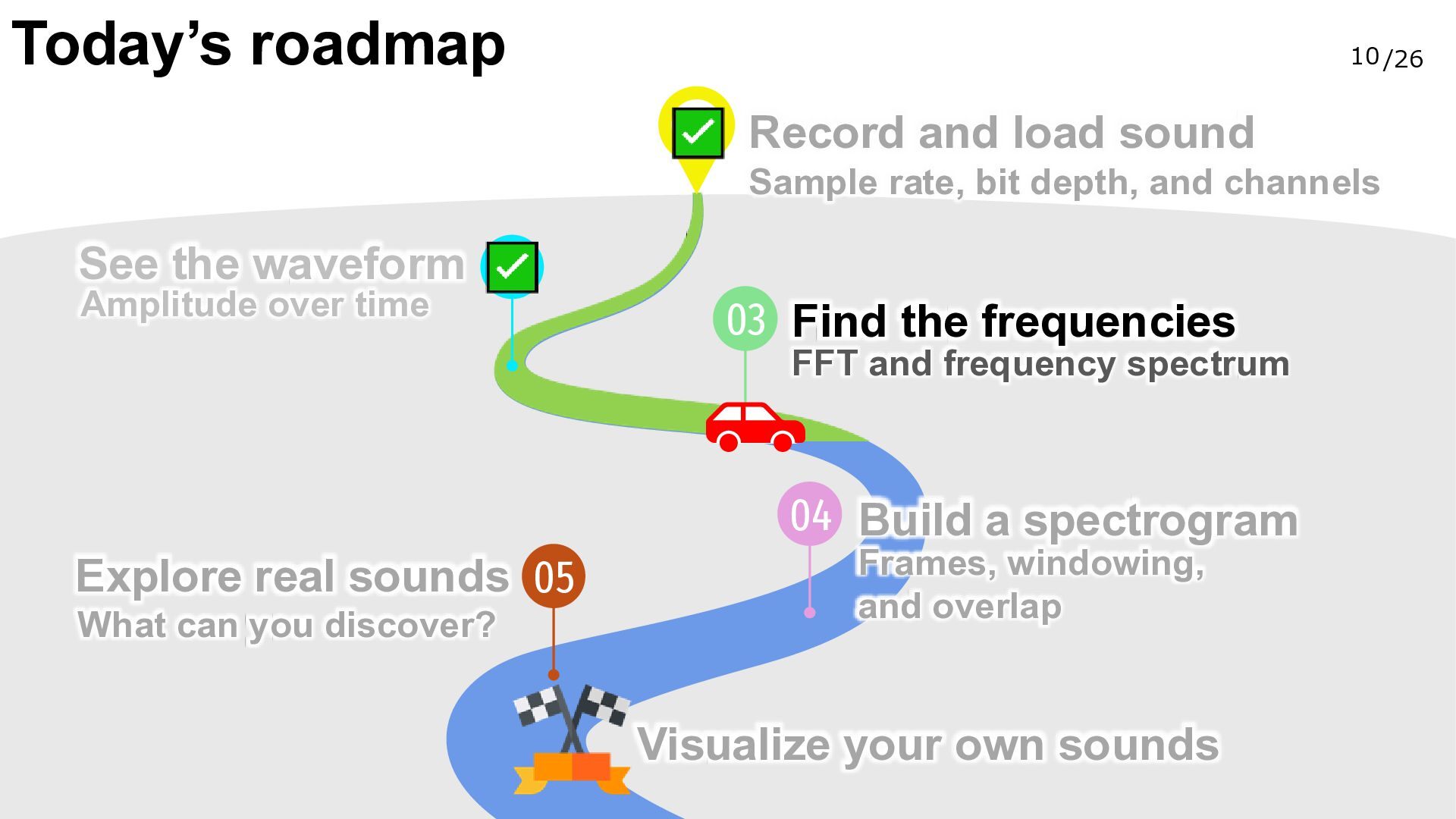
  11. Today’s roadmap 10 /26 Record and load sound Sample rate,

    bit depth, and channels See the waveform Amplitude over time 03 Find the frequencies FFT and frequency spectrum 04 Build a spectrogram Explore real sounds 05 What can you discover? Frames, windowing, and overlap Visualize your own sounds
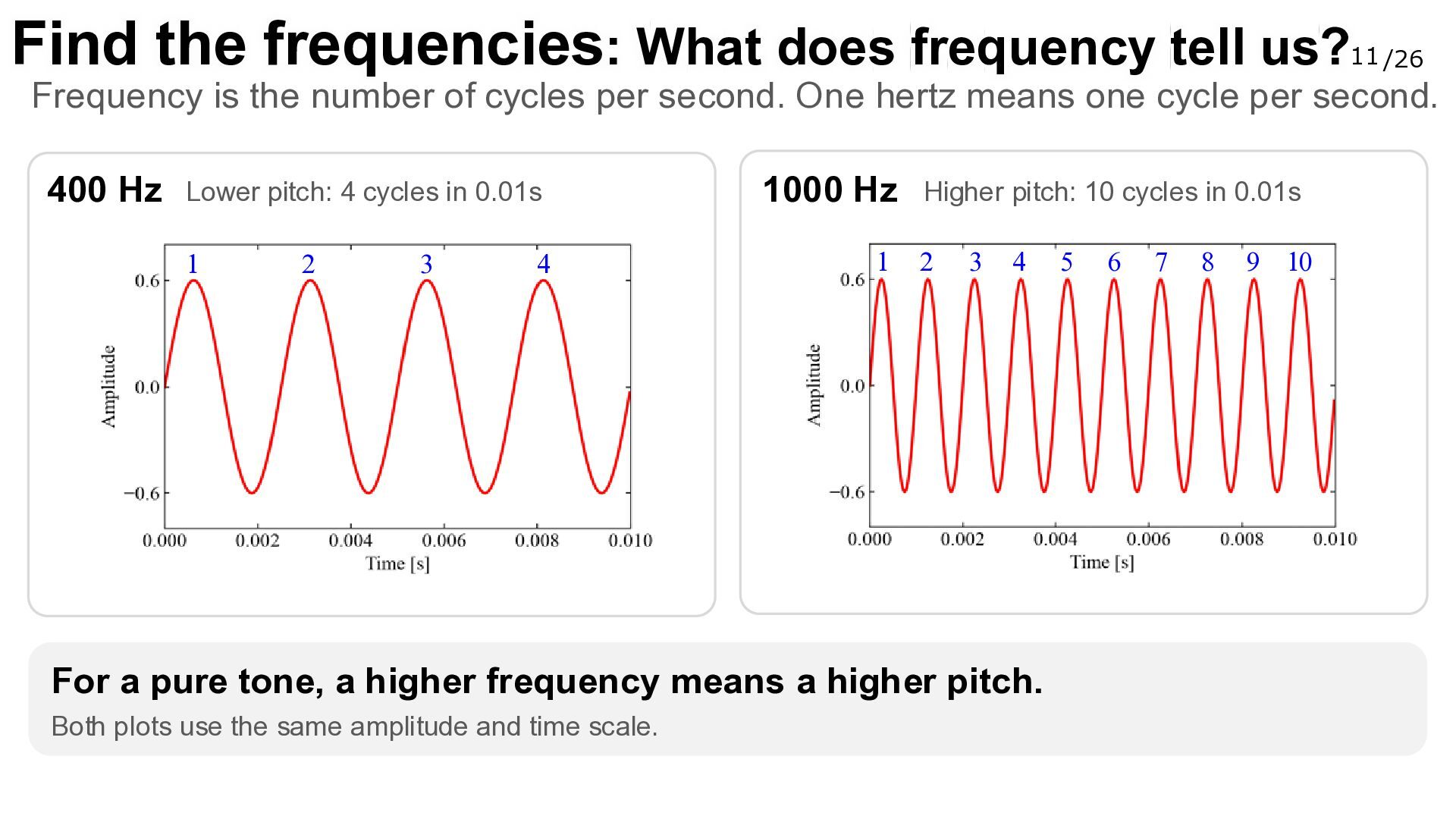
  12. Find the frequencies: What does frequency tell us? 11 /26

    Frequency is the number of cycles per second. One hertz means one cycle per second. 400 Hz Lower pitch: 4 cycles in 0.01s 1 2 3 4 1000 Hz 1 Higher pitch: 10 cycles in 0.01s 2 3 4 For a pure tone, a higher frequency means a higher pitch. Both plots use the same amplitude and time scale. 5 6 7 8 9 10
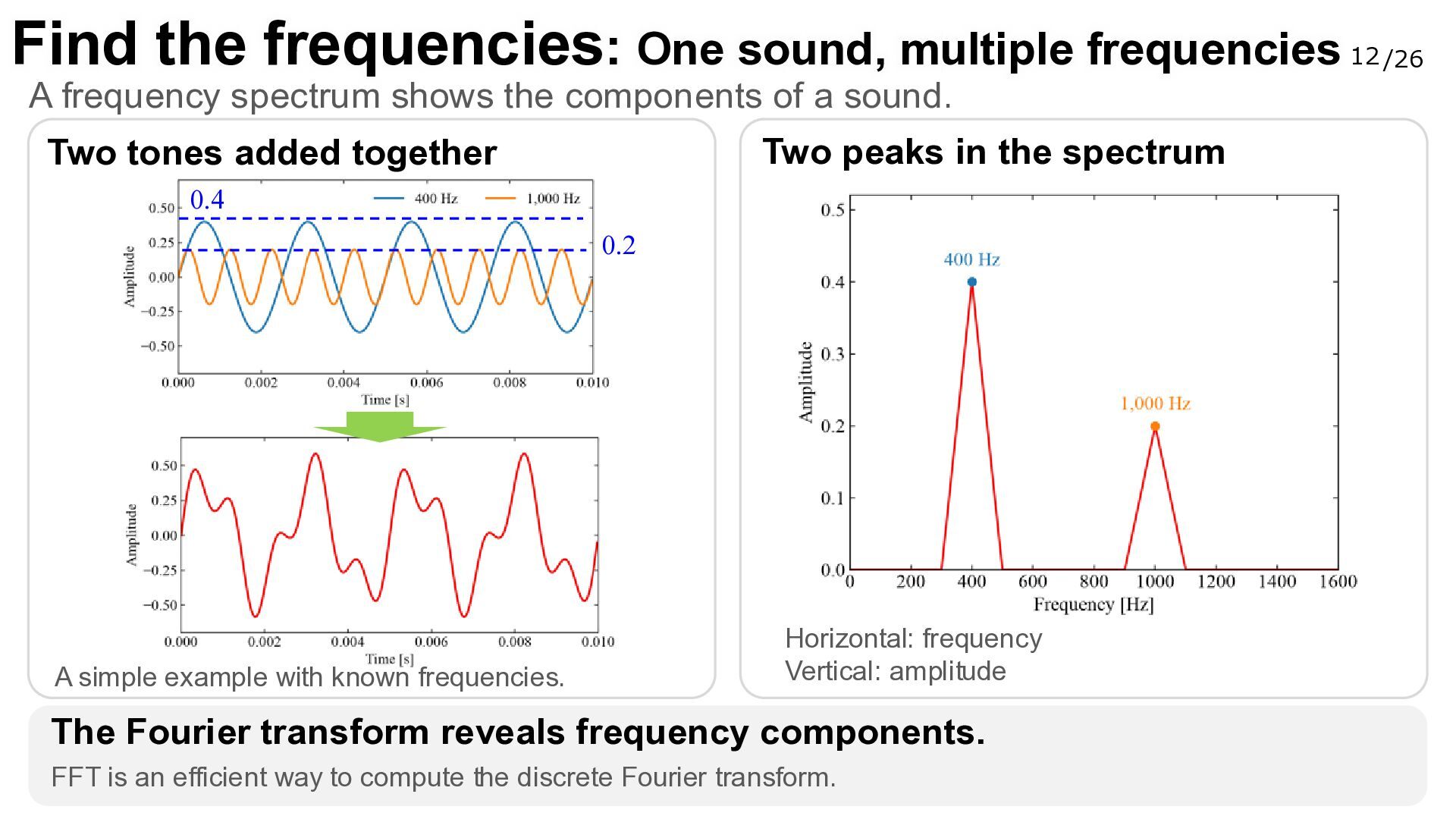
  13. Find the frequencies: One sound, multiple frequencies A frequency spectrum

    shows the components of a sound. Two peaks in the spectrum Two tones added together 0.4 0.2 A simple example with known frequencies. Horizontal: frequency Vertical: amplitude The Fourier transform reveals frequency components. FFT is an efficient way to compute the discrete Fourier transform. 12 /26
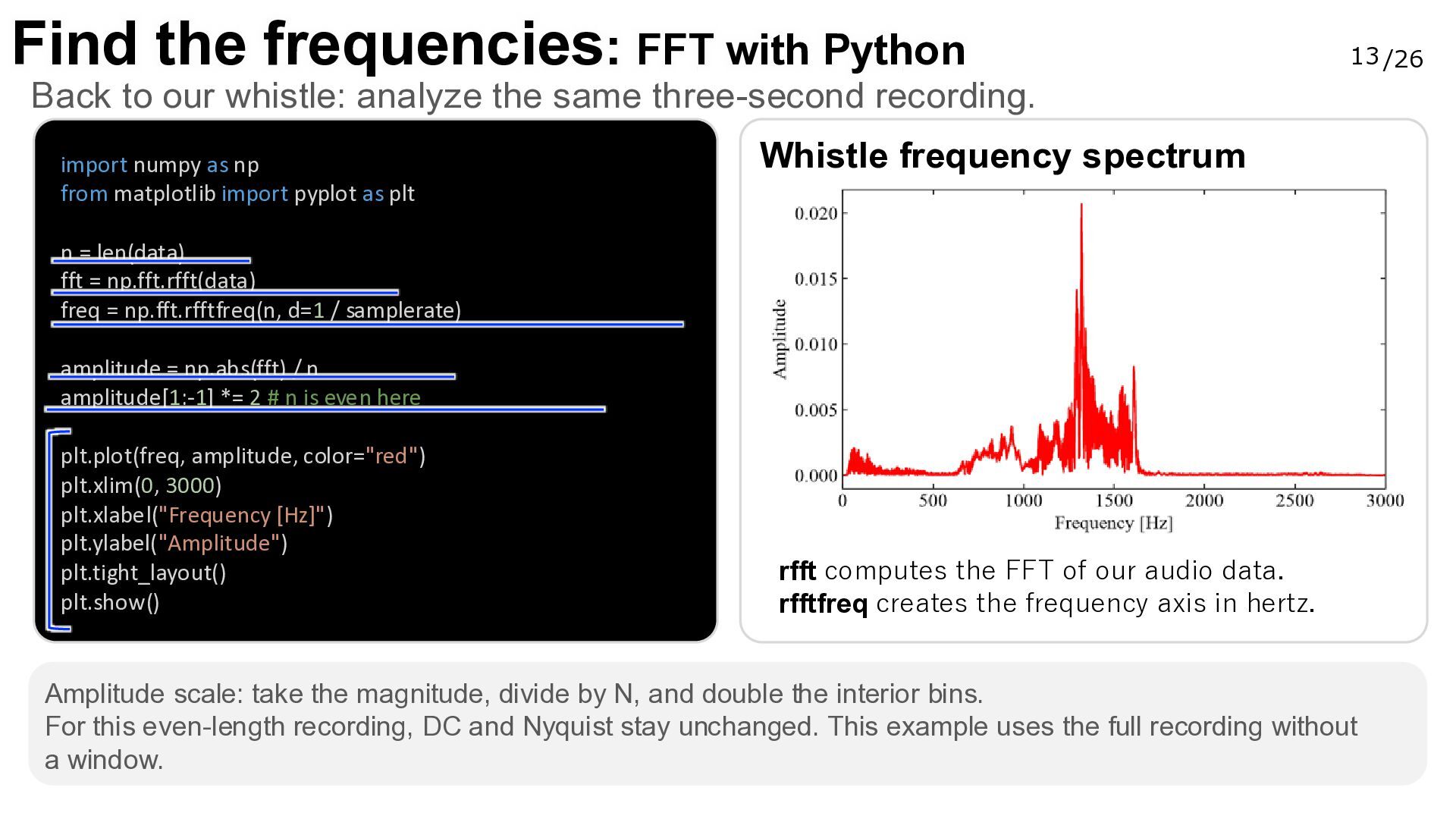
  14. Find the frequencies: FFT with Python 13 /26 Back to

    our whistle: analyze the same three-second recording. import numpy as np from matplotlib import pyplot as plt Whistle frequency spectrum n = len(data) fft = np.fft.rfft(data) freq = np.fft.rfftfreq(n, d=1 / samplerate) amplitude = np.abs(fft) / n amplitude[1:-1] *= 2 # n is even here plt.plot(freq, amplitude, color="red") plt.xlim(0, 3000) plt.xlabel("Frequency [Hz]") plt.ylabel("Amplitude") plt.tight_layout() plt.show() rfft computes the FFT of our audio data. rfftfreq creates the frequency axis in hertz. Amplitude scale: take the magnitude, divide by N, and double the interior bins. For this even-length recording, DC and Nyquist stay unchanged. This example uses the full recording without a window.
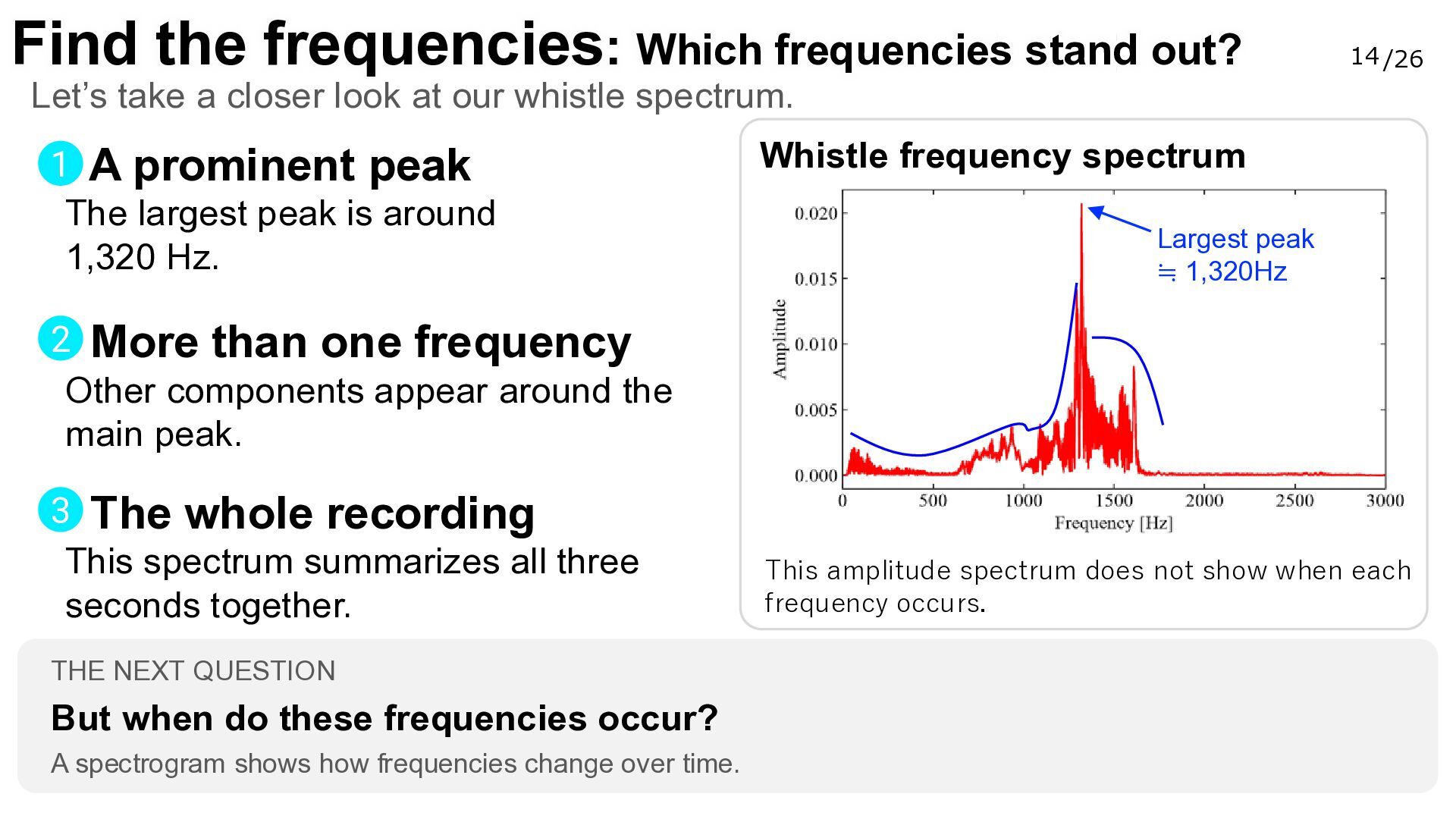
  15. Find the frequencies: Which frequencies stand out? 14 /26 Let’s

    take a closer look at our whistle spectrum. 1 A prominent peak The largest peak is around 1,320 Hz. Whistle frequency spectrum Largest peak ≒ 1,320Hz 2 More than one frequency Other components appear around the main peak. 3 The whole recording This spectrum summarizes all three seconds together. THE NEXT QUESTION But when do these frequencies occur? A spectrogram shows how frequencies change over time. This amplitude spectrum does not show when each frequency occurs.
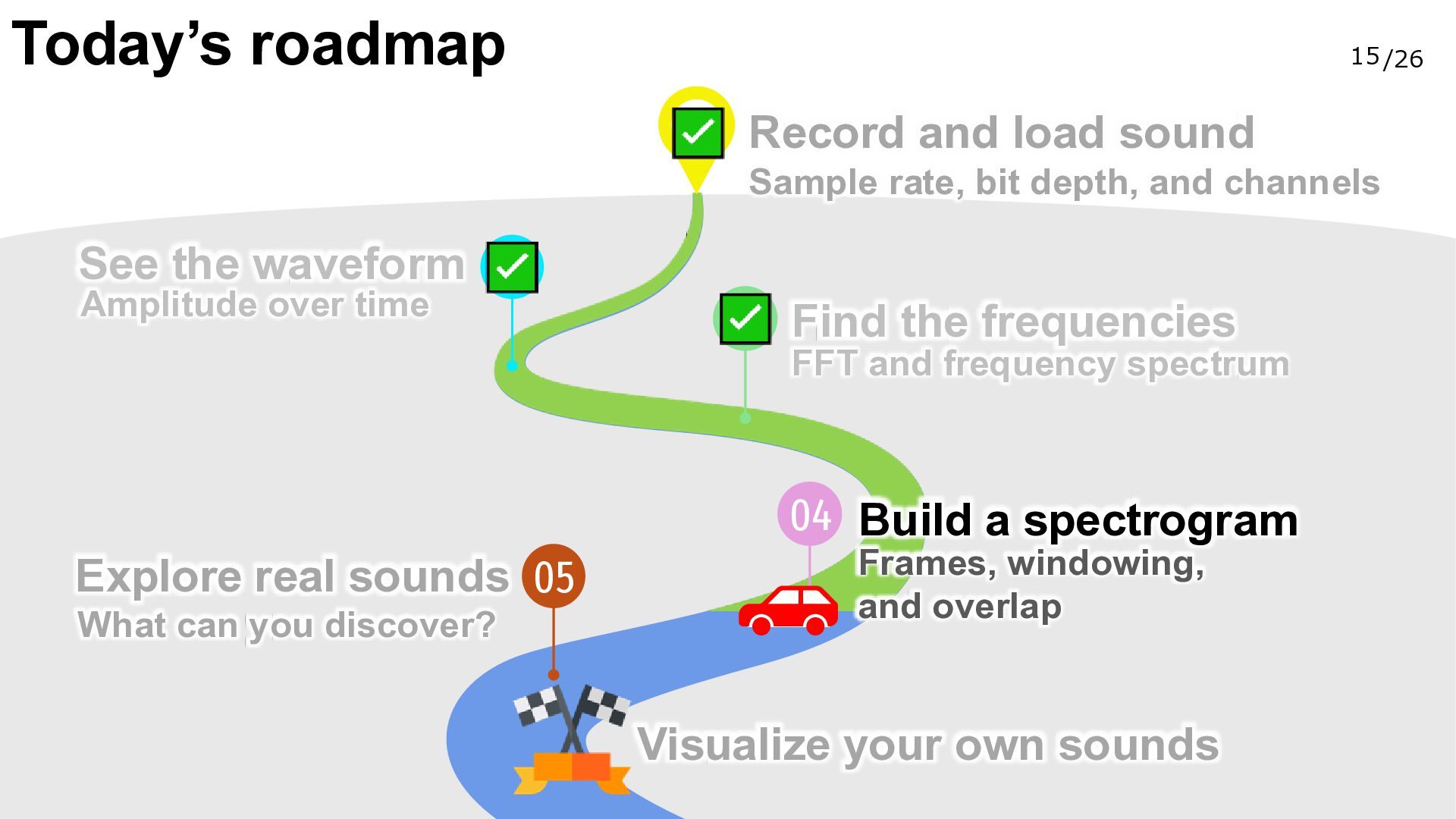
  16. Today’s roadmap 15 /26 Record and load sound Sample rate,

    bit depth, and channels See the waveform Amplitude over time Find the frequencies FFT and frequency spectrum 04 Build a spectrogram Explore real sounds 05 What can you discover? Frames, windowing, and overlap Visualize your own sounds
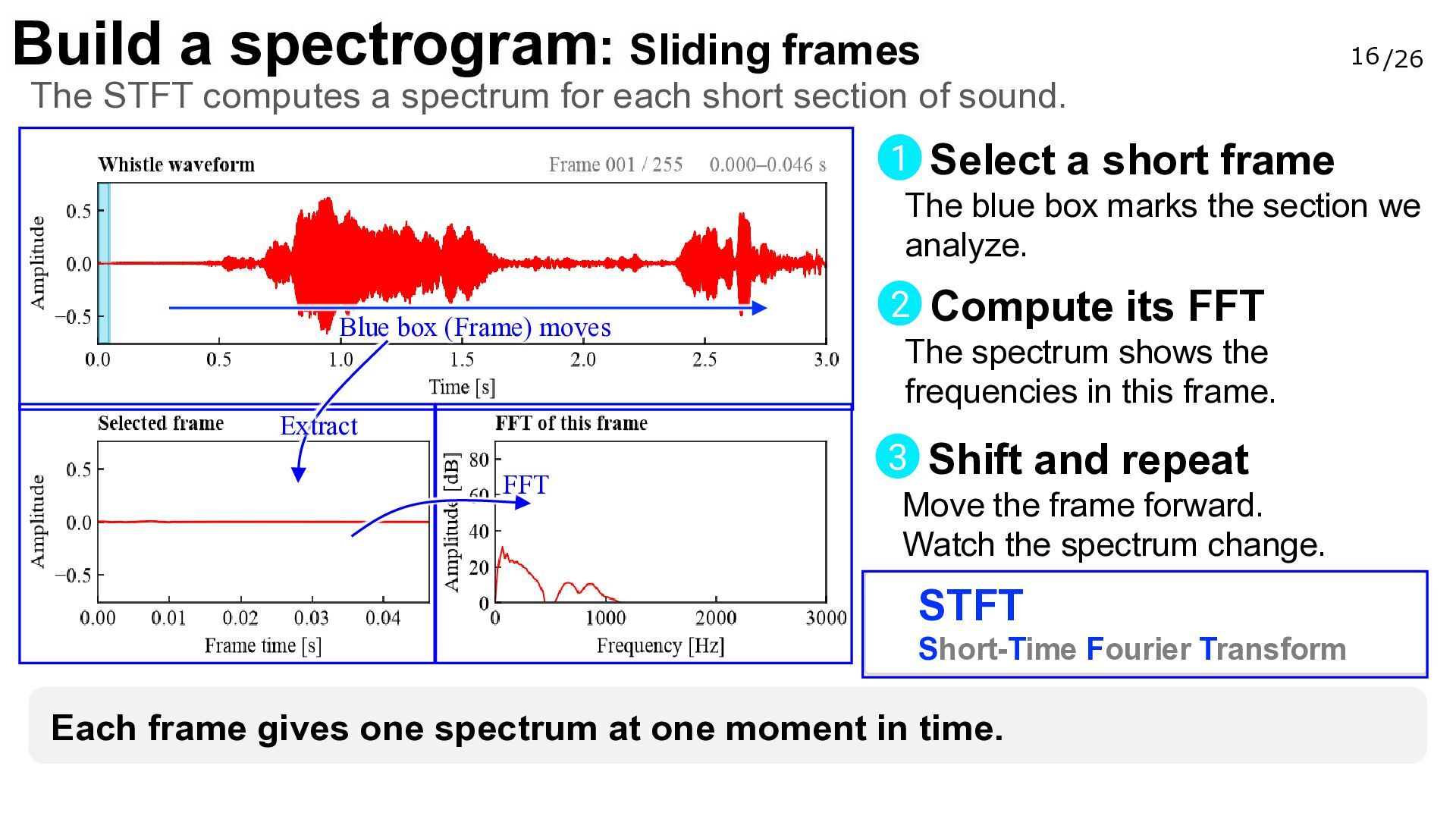
  17. Build a spectrogram: Sliding frames 16 /26 The STFT computes

    a spectrum for each short section of sound. 1 Select a short frame The blue box marks the section we analyze. Blue box (Frame) moves Extract FFT 2 Compute its FFT The spectrum shows the frequencies in this frame. 3 Shift and repeat Move the frame forward. Watch the spectrum change. STFT Short-Time Fourier Transform Each frame gives one spectrum at one moment in time.
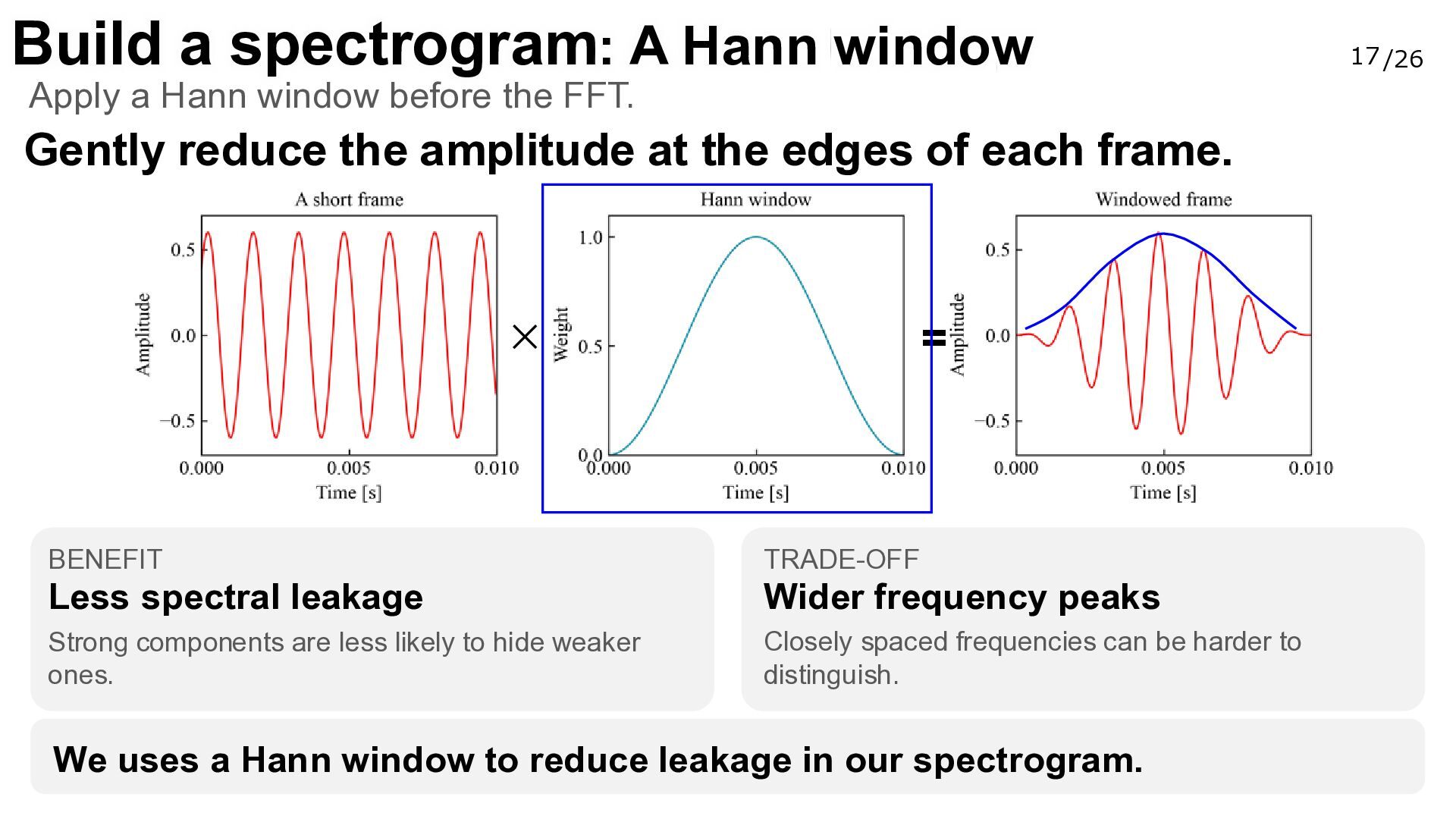
  18. Build a spectrogram: A Hann window Apply a Hann window

    before the FFT. Gently reduce the amplitude at the edges of each frame. = × BENEFIT TRADE-OFF Less spectral leakage Wider frequency peaks Strong components are less likely to hide weaker ones. Closely spaced frequencies can be harder to distinguish. We uses a Hann window to reduce leakage in our spectrogram. 17 /26
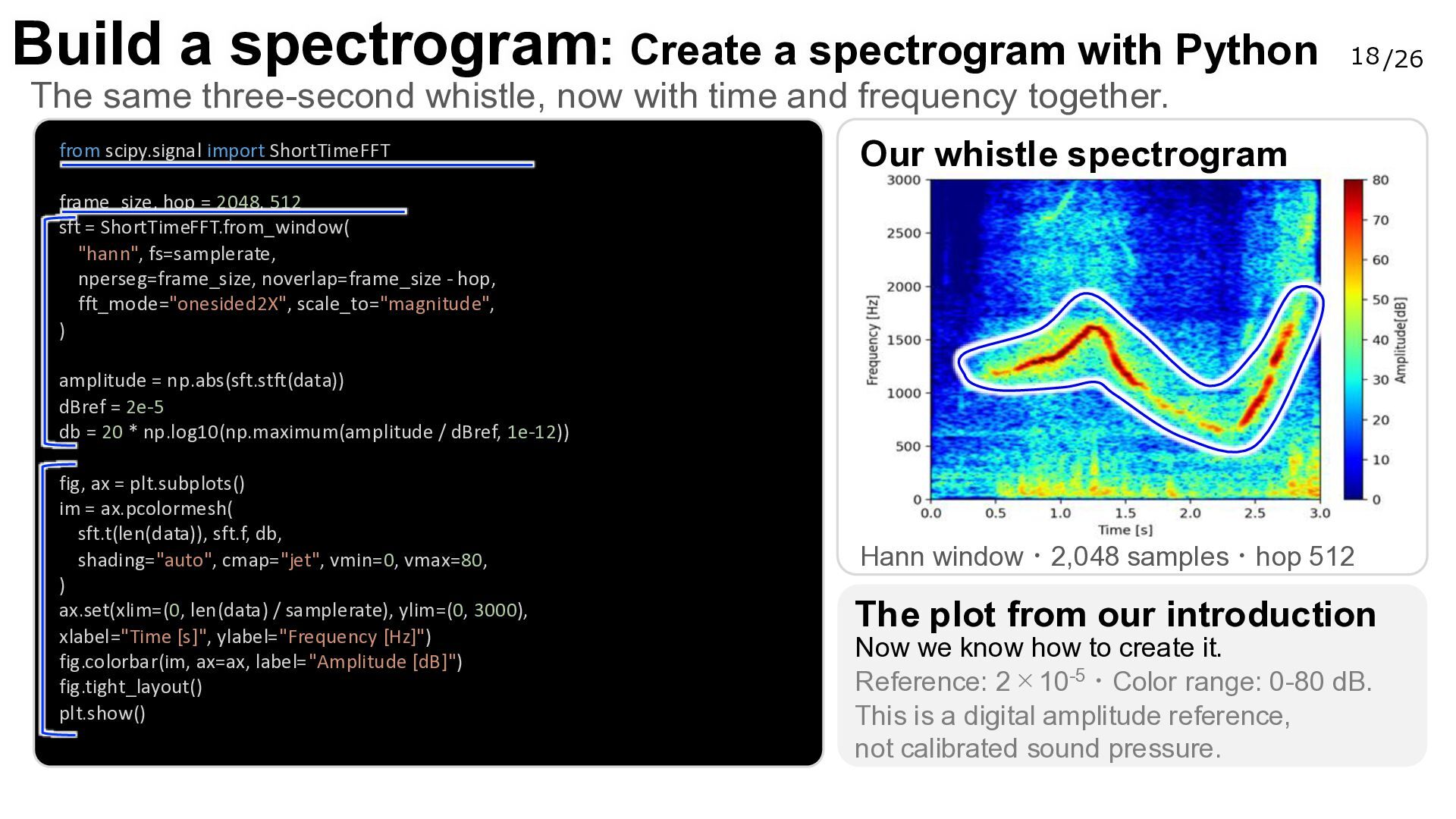
  19. Build a spectrogram: Create a spectrogram with Python 18 /26

    The same three-second whistle, now with time and frequency together. from scipy.signal import ShortTimeFFT Our whistle spectrogram frame_size, hop = 2048, 512 sft = ShortTimeFFT.from_window( "hann", fs=samplerate, nperseg=frame_size, noverlap=frame_size - hop, fft_mode="onesided2X", scale_to="magnitude", ) amplitude = np.abs(sft.stft(data)) dBref = 2e-5 db = 20 * np.log10(np.maximum(amplitude / dBref, 1e-12)) fig, ax = plt.subplots() im = ax.pcolormesh( sft.t(len(data)), sft.f, db, shading="auto", cmap="jet", vmin=0, vmax=80, ) ax.set(xlim=(0, len(data) / samplerate), ylim=(0, 3000), xlabel="Time [s]", ylabel="Frequency [Hz]") fig.colorbar(im, ax=ax, label="Amplitude [dB]") fig.tight_layout() plt.show() Hann window・2,048 samples・hop 512 The plot from our introduction Now we know how to create it. Reference: 2×10⁻⁵・Color range: 0-80 dB. This is a digital amplitude reference, not calibrated sound pressure.
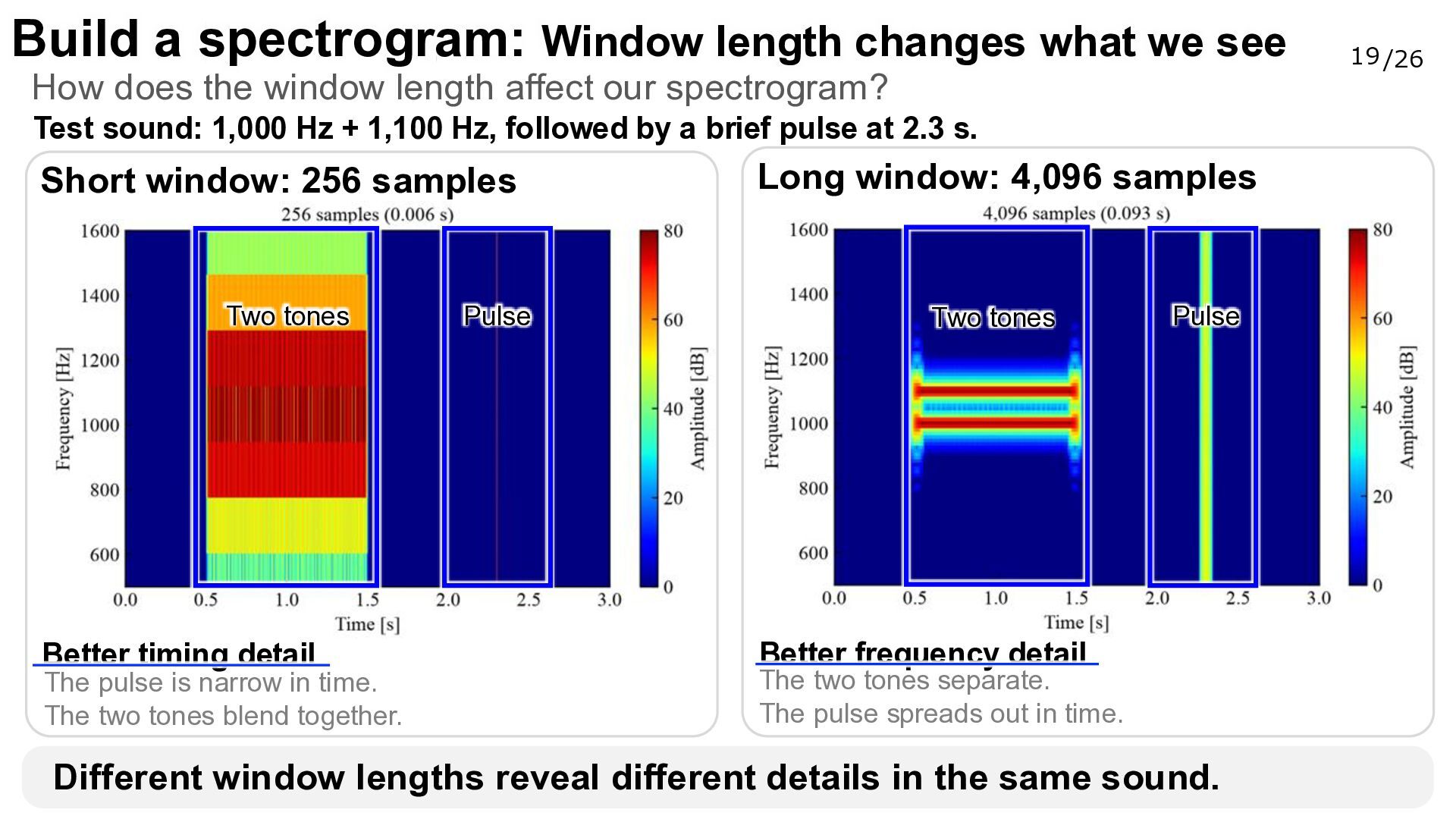
  20. Build a spectrogram: Window length changes what we see How

    does the window length affect our spectrogram? Test sound: 1,000 Hz + 1,100 Hz, followed by a brief pulse at 2.3 s. Short window: 256 samples Long window: 4,096 samples Two tones Two tones Better timing detail The pulse is narrow in time. The two tones blend together. Pulse Pulse Better frequency detail The two tones separate. The pulse spreads out in time. Different window lengths reveal different details in the same sound. 19 /26
  21. Build a spectrogram: How far do we move each frame?

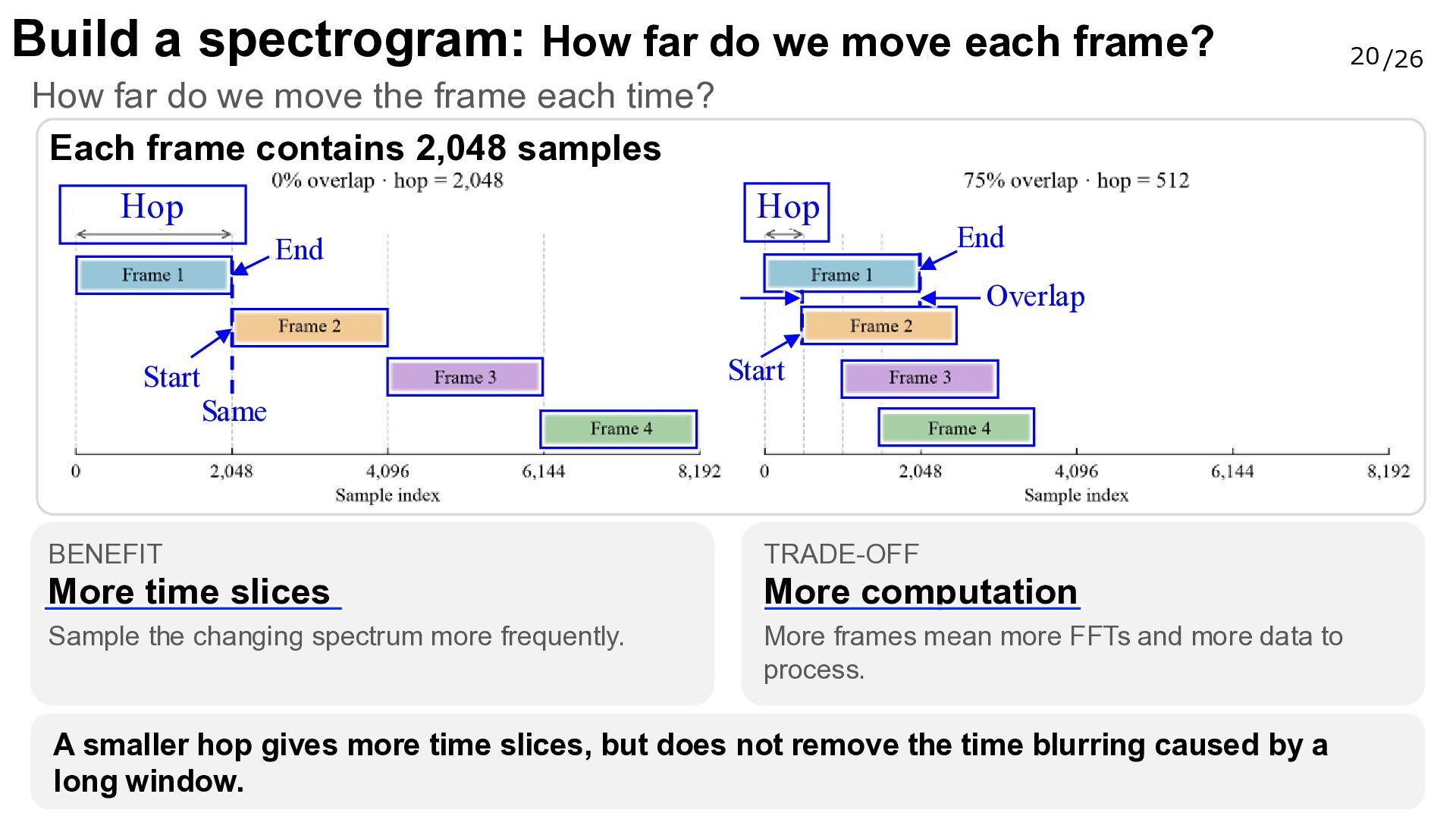
    How far do we move the frame each time? Each frame contains 2,048 samples Hop Hop End End Overlap Start Start Same BENEFIT TRADE-OFF More time slices More computation Sample the changing spectrum more frequently. More frames mean more FFTs and more data to process. A smaller hop gives more time slices, but does not remove the time blurring caused by a long window. 20 /26
  22. Today’s roadmap 21 /26 Record and load sound Sample rate,

    bit depth, and channels See the waveform Amplitude over time Find the frequencies FFT and frequency spectrum Build a spectrogram Explore real sounds 05 What can you discover? Frames, windowing, and overlap Visualize your own sounds
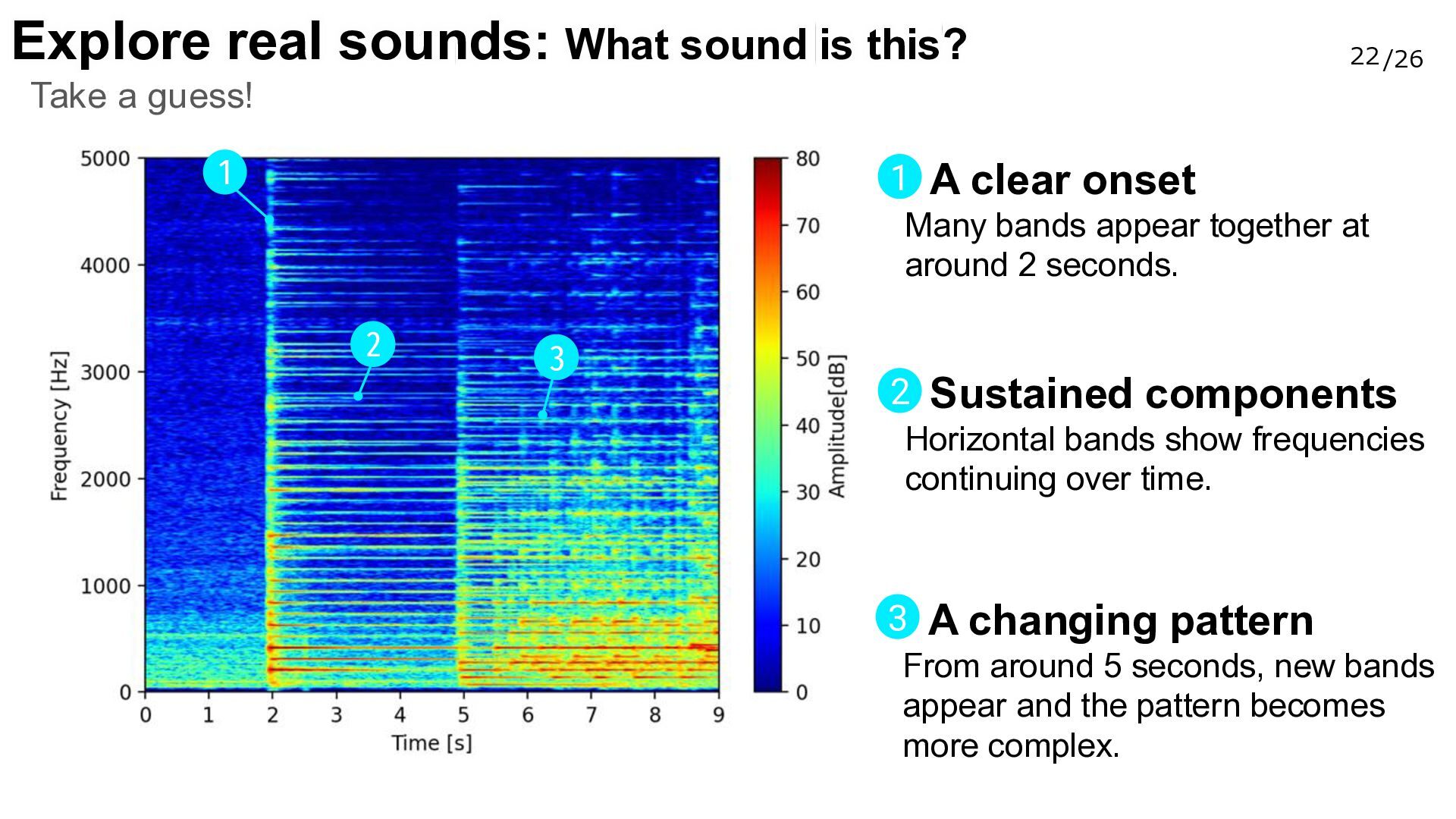
  23. Explore real sounds: What sound is this? 22 /26 Take

    a guess! 1 1 A clear onset Many bands appear together at around 2 seconds. 2 3 2 Sustained components Horizontal bands show frequencies continuing over time. 3 A changing pattern From around 5 seconds, new bands appear and the pattern becomes more complex.
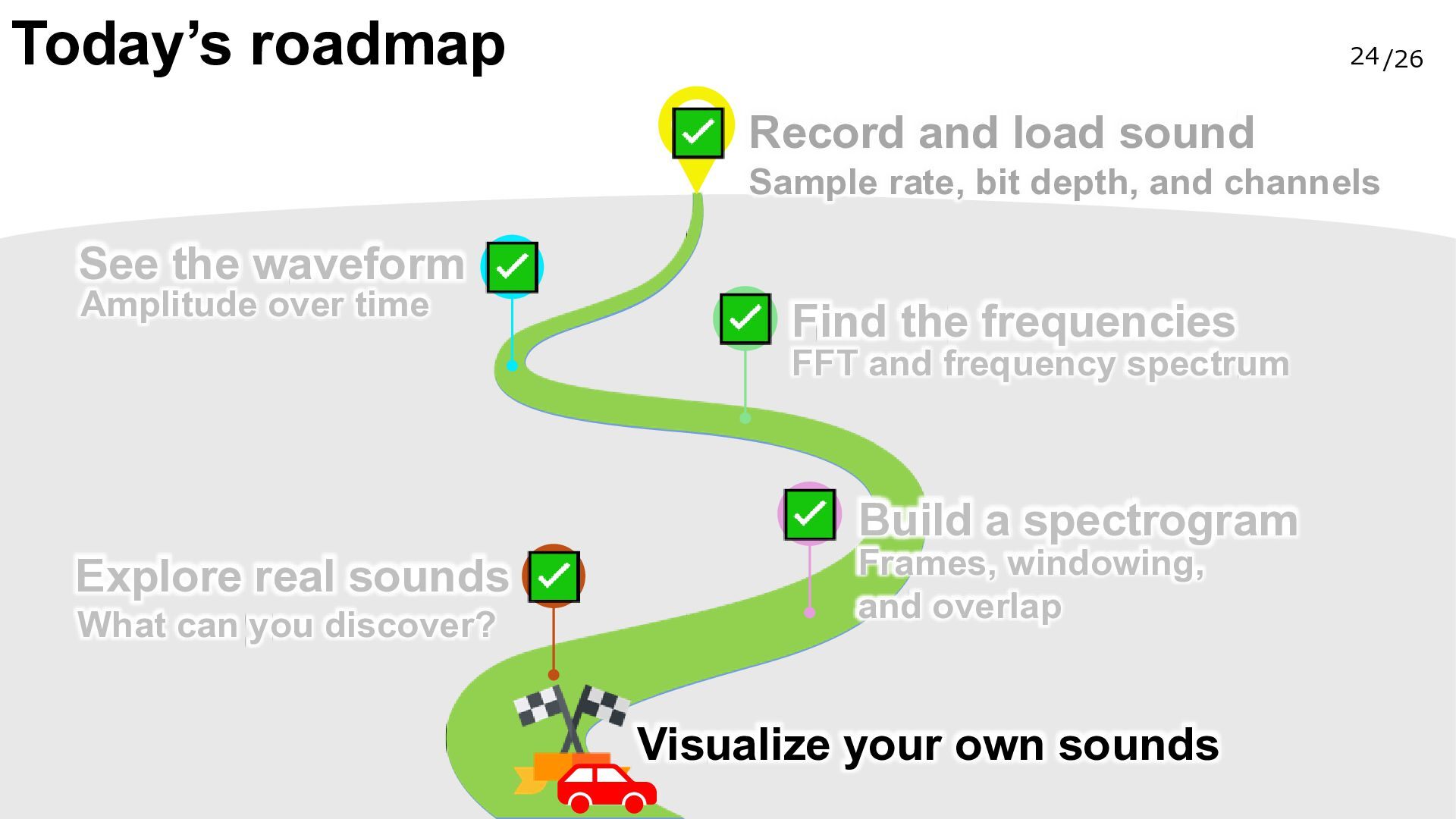
  24. Today’s roadmap 24 /26 Record and load sound Sample rate,

    bit depth, and channels See the waveform Amplitude over time Find the frequencies FFT and frequency spectrum Build a spectrogram Explore real sounds What can you discover? Frames, windowing, and overlap Visualize your own sounds
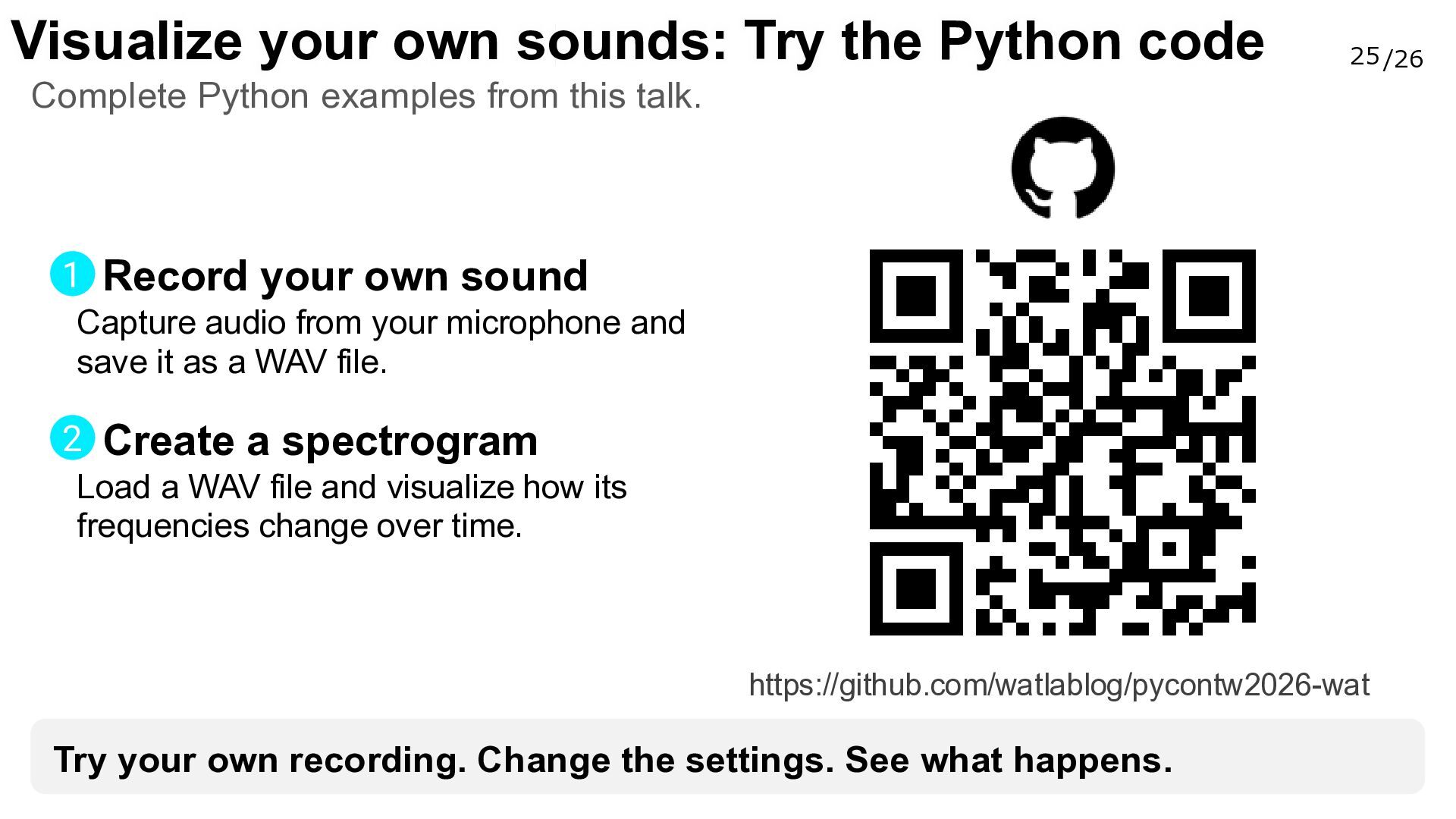
  25. Visualize your own sounds: Try the Python code 25 /26

    Complete Python examples from this talk. 1 Record your own sound Capture audio from your microphone and save it as a WAV file. 2 Create a spectrogram Load a WAV file and visualize how its frequencies change over time. https://github.com/watlablog/pycontw2026-wat Try your own recording. Change the settings. See what happens.
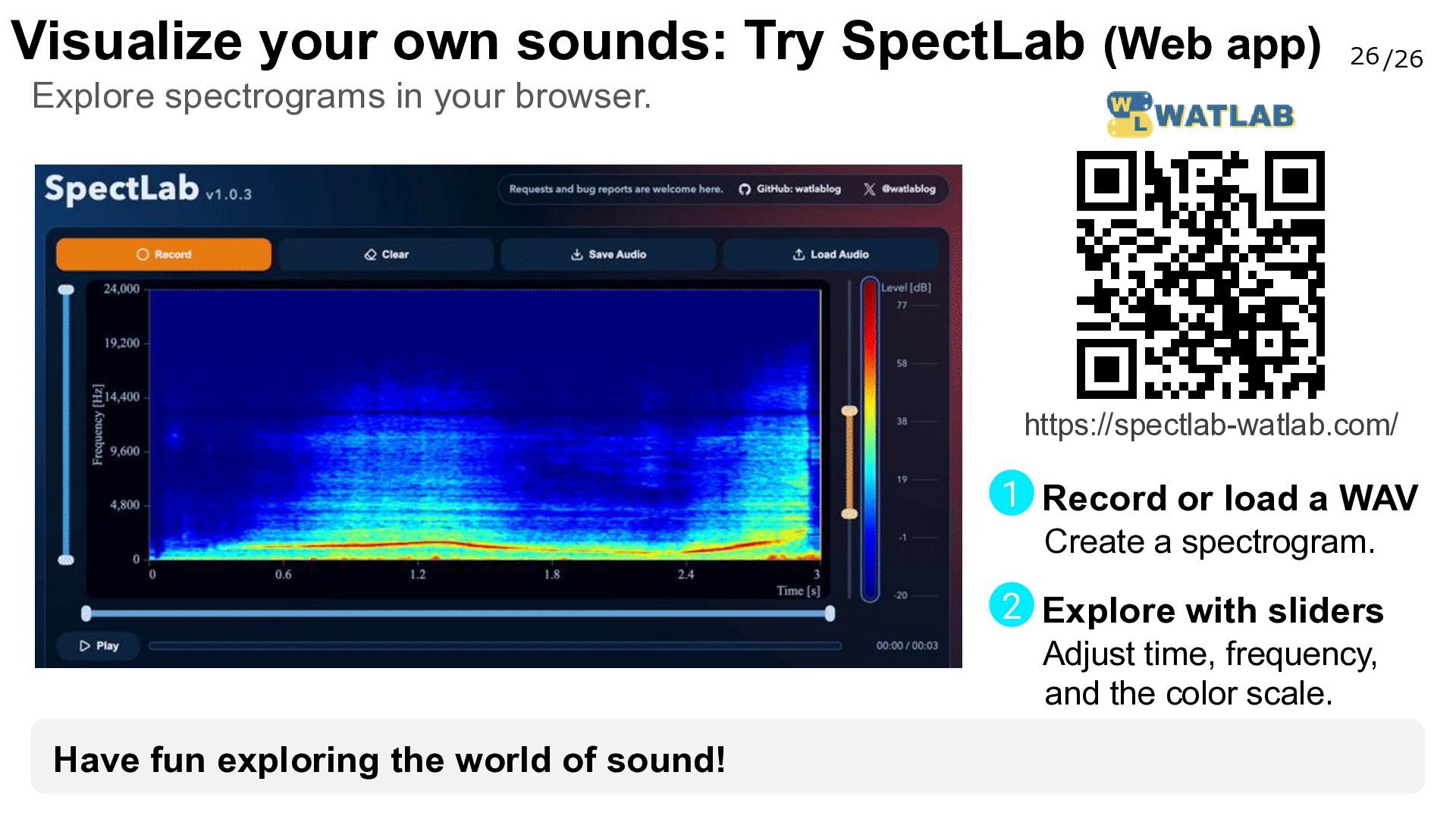
  26. Visualize your own sounds: Try SpectLab (Web app) 26 /26

    Explore spectrograms in your browser. https://spectlab-watlab.com/ 1 Record or load a WAV Create a spectrogram. 2 Explore with sliders Adjust time, frequency, and the color scale. Have fun exploring the world of sound!