Upgrade to Pro — share decks privately, control downloads, hide ads and more …

Rails で Remote MCP サーバーを作った話

Sponsored · Your Podcast. Everywhere. Effortlessly. Share. Educate. Inspire. Entertain. You do you. We'll handle the rest.
Avatar for 4geru 4geru
July 03, 2026
0

Rails で Remote MCP サーバーを作った話

Avatar for 4geru

4geru

July 03, 2026

More Decks by 4geru

Transcript

  1. ~/terasu — rails server $ rails generate talk Rails で

    Remote MCP サーバー を作った話 # 認証・実装・セキュリティ、全部やった 関西 Ruby 会議 09 · @4geru
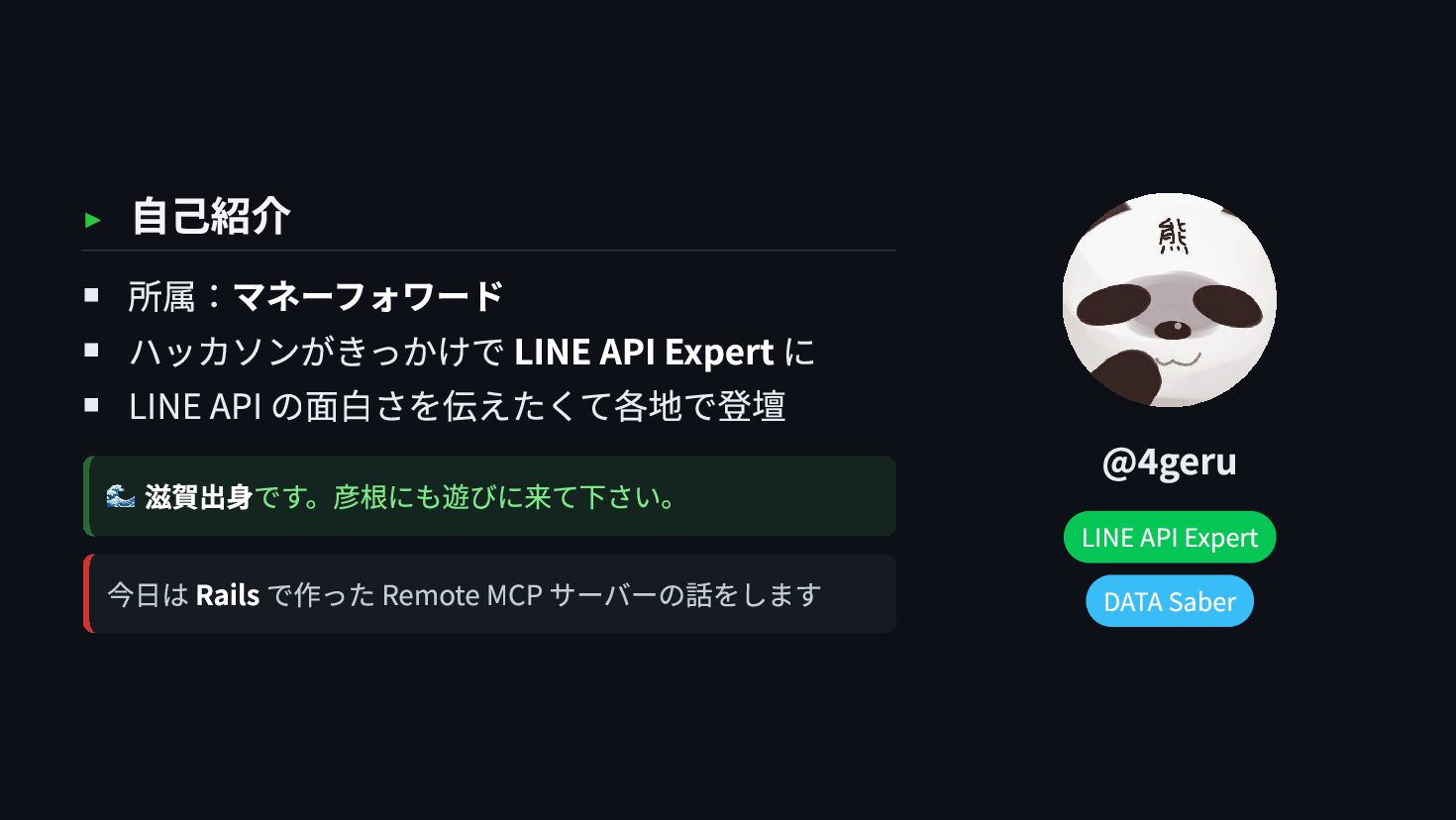
  2. ▸ 自己紹介 所属:マネーフォワード ハッカソンがきっかけで LINE API Expert に LINE API

    の面白さを伝えたくて各地で登壇 🌊 滋賀出身です。彦根にも遊びに来て下さい。 今日は Rails で作った Remote MCP サーバーの話をします @4geru LINE API Expert DATA Saber
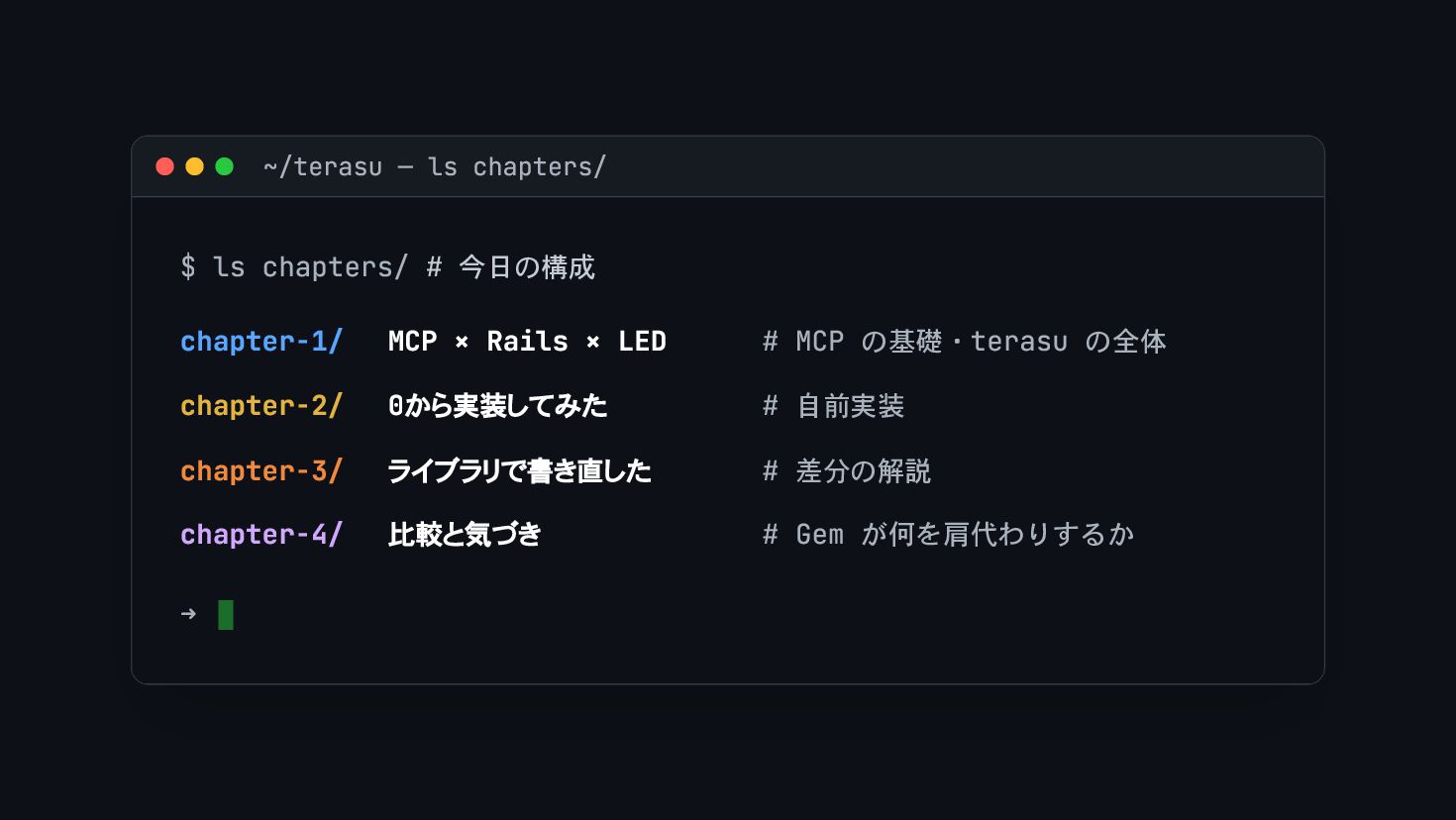
  3. ~/terasu — ls chapters/ $ ls chapters/ # 今日の構成 chapter-1/

    MCP × Rails × LED # MCP の基礎・terasu の全体 chapter-2/ 0から実装してみた # 自前実装 chapter-3/ ライブラリで書き直した # 差分の解説 chapter-4/ 比較と気づき # Gem が何を肩代わりするか ➜
  4. ~/terasu — chapter 1 $ cd chapter-1/ MCP × Rails

    × LED # 今日作ったもの ➜
  5. ▸ MCP は AI とツールの「中央ハブ」 MCP(Model Context Protocol) — 1

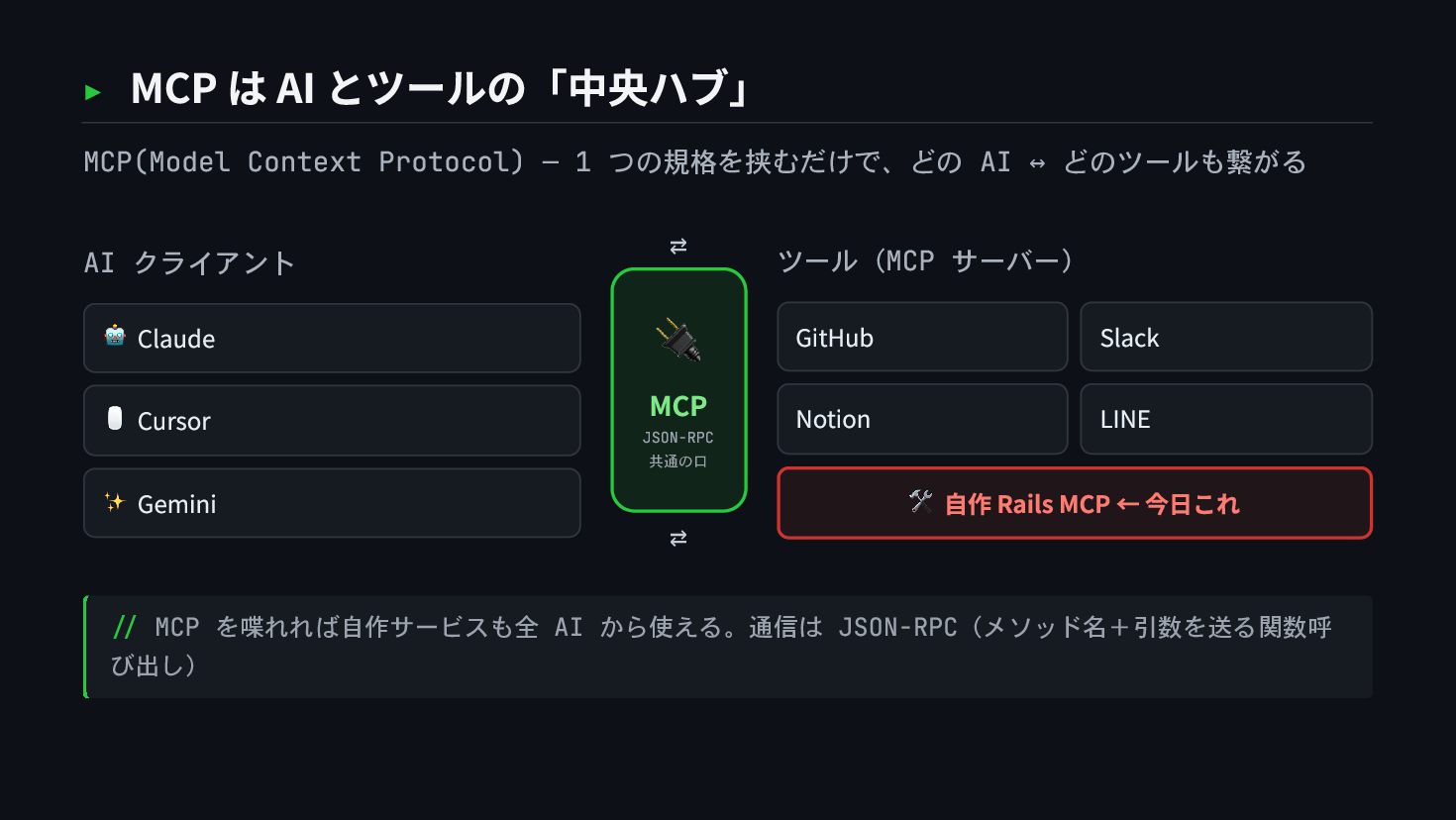
    つの規格を挟むだけで、どの AI ↔ どのツールも繋がる AI クライアント 🤖 Claude 🖱 Cursor ✨ Gemini ⇄ 🔌 MCP JSON-RPC 共通の口 ⇄ ツール(MCP サーバー) GitHub Slack Notion LINE 🛠 自作 Rails MCP ← 今日これ // MCP を喋れれば自作サービスも全 AI から使える。通信は JSON-RPC(メソッド名+引数を送る関数呼 び出し)
  6. ▸ Local MCP vs Remote MCP 同じ MCP でも、配り方が違うと別物 Local

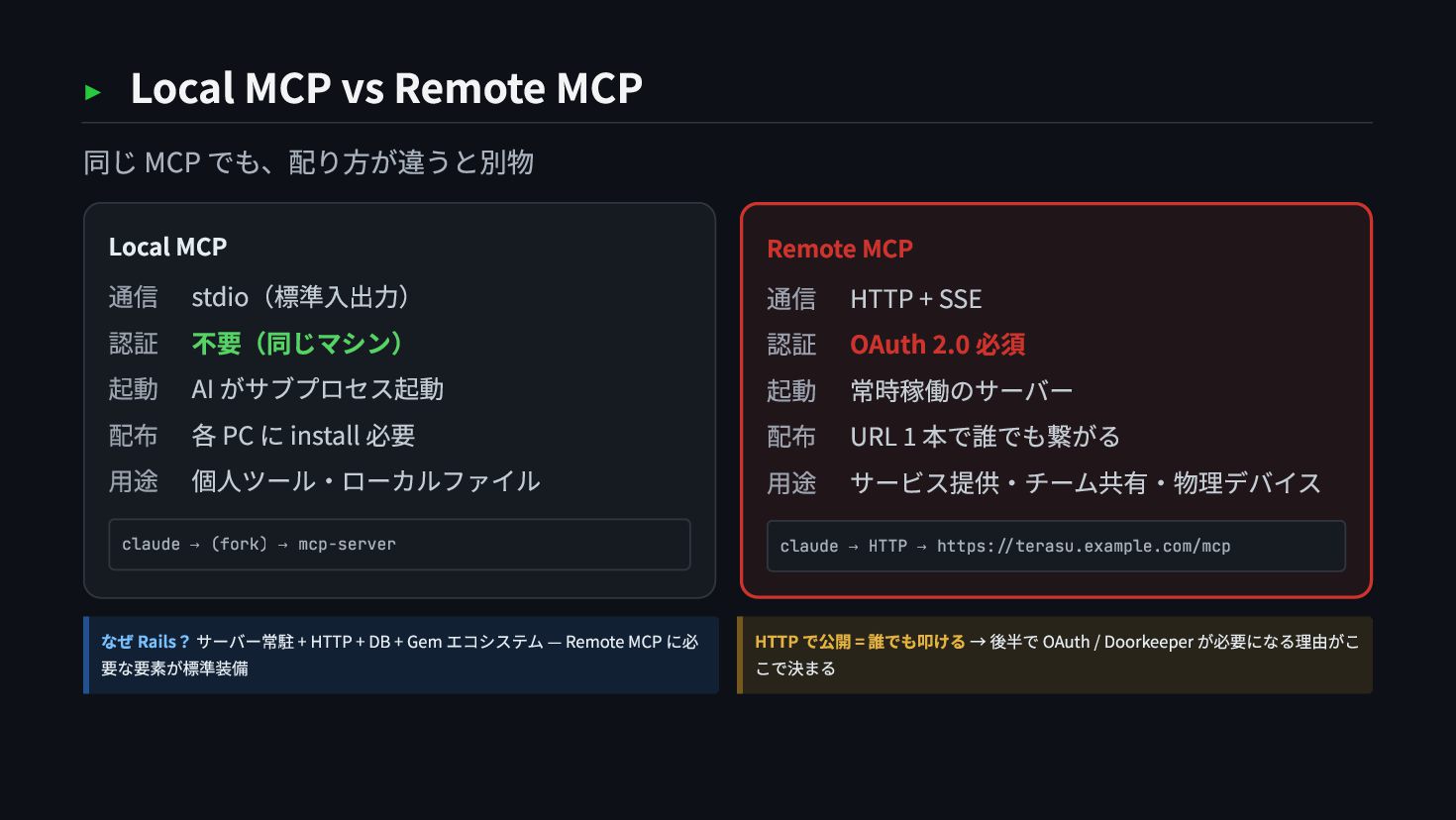
    MCP 通信 stdio(標準入出力) 認証 不要(同じマシン) 起動 AI がサブプロセス起動 配布 各 PC に install 必要 用途 個人ツール・ローカルファイル claude → (fork) → mcp-server Remote MCP 通信 HTTP + SSE 認証 OAuth 2.0 必須 起動 常時稼働のサーバー 配布 URL 1 本で誰でも繋がる 用途 サービス提供・チーム共有・物理デバイス claude → HTTP → https://terasu.example.com/mcp なぜ Rails? サーバー常駐 + HTTP + DB + Gem エコシステム — Remote MCP に必 要な要素が標準装備 HTTP で公開 = 誰でも叩ける → 後半で OAuth / Doorkeeper が必要になる理由がこ こで決まる
  7. ▸ 今日作ったもの: terasu(照) terasu(照) Rails 製 Remote MCP サーバー。Claude Code

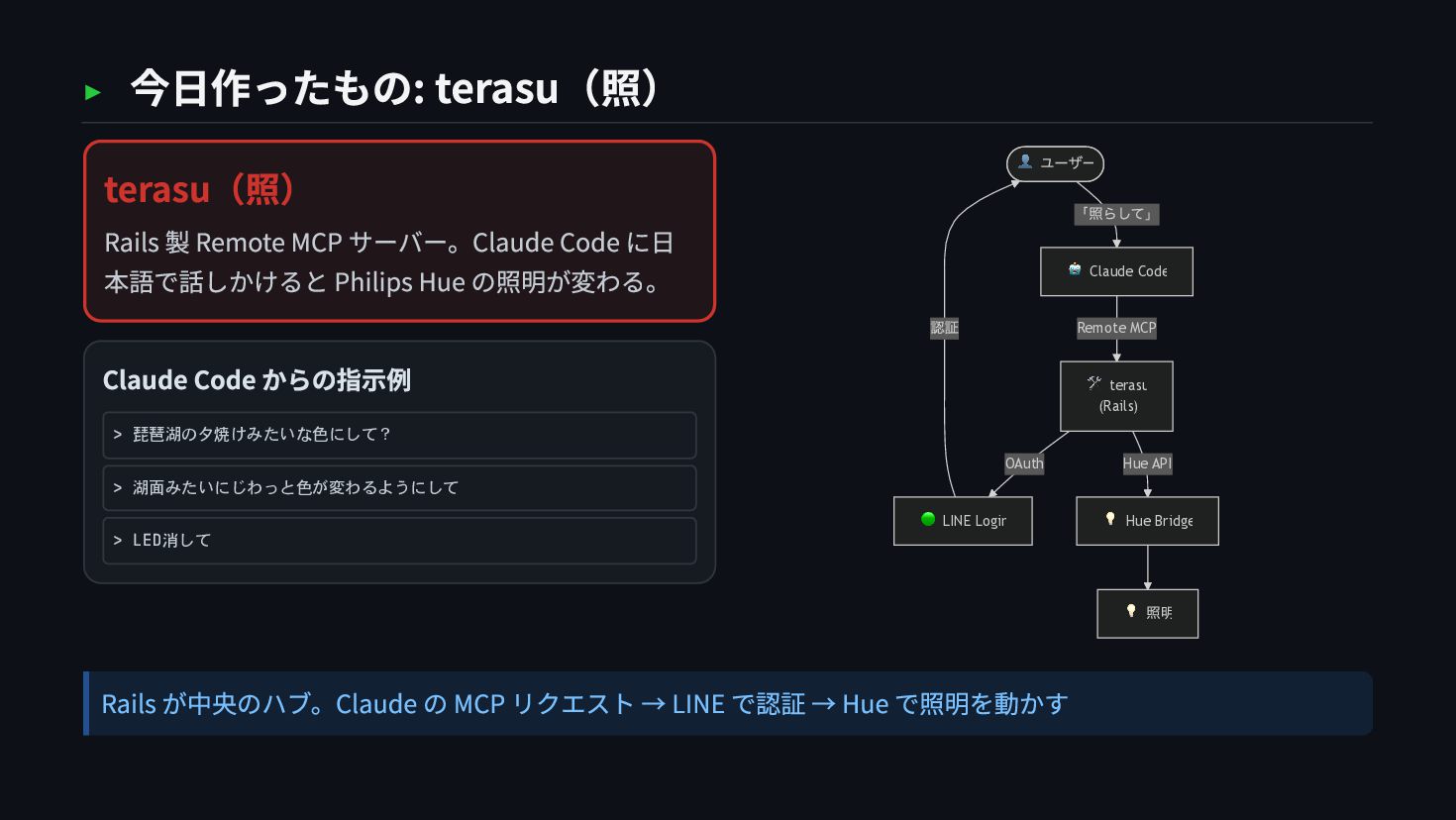
    に日 本語で話しかけると Philips Hue の照明が変わる。 Claude Code からの指示例 > 琵琶湖の夕焼けみたいな色にして? > 湖面みたいにじわっと色が変わるようにして > LED消して 「照らして」 Remote MCP OAuth 認証 Hue API 👤 ユーザー 🤖 Claude Code 🛠 terasu (Rails) 🟢 LINE Login 💡 Hue Bridge 💡 照明 Rails が中央のハブ。Claude の MCP リクエスト → LINE で認証 → Hue で照明を動かす
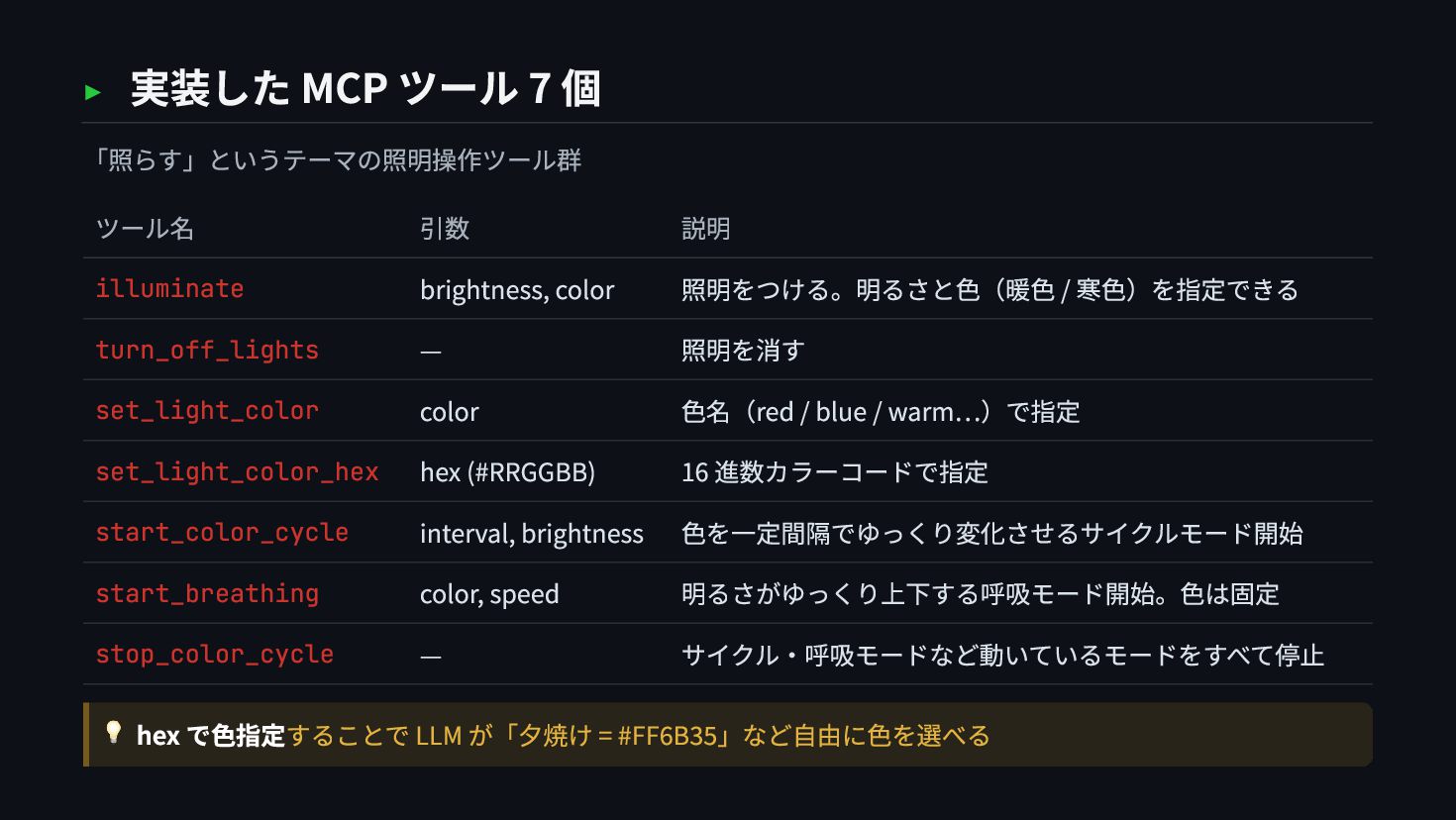
  8. ▸ 実装した MCP ツール 7 個 「照らす」というテーマの照明操作ツール群 ツール名 引数 説明

    illuminate brightness, color 照明をつける。明るさと色(暖色 / 寒色)を指定できる turn_off_lights — 照明を消す set_light_color color 色名(red / blue / warm…)で指定 set_light_color_hex hex (#RRGGBB) 16 進数カラーコードで指定 start_color_cycle interval, brightness 色を一定間隔でゆっくり変化させるサイクルモード開始 start_breathing color, speed 明るさがゆっくり上下する呼吸モード開始。色は固定 stop_color_cycle — サイクル・呼吸モードなど動いているモードをすべて停止 💡 hex で色指定することで LLM が「夕焼け = #FF6B35」など自由に色を選べる
  9. ~/terasu — chapter 2 $ cd chapter-2/ 0から実装してみた # OAuth・LINE

    ログイン・tools を全部自前で書く / state / PKCE ➜
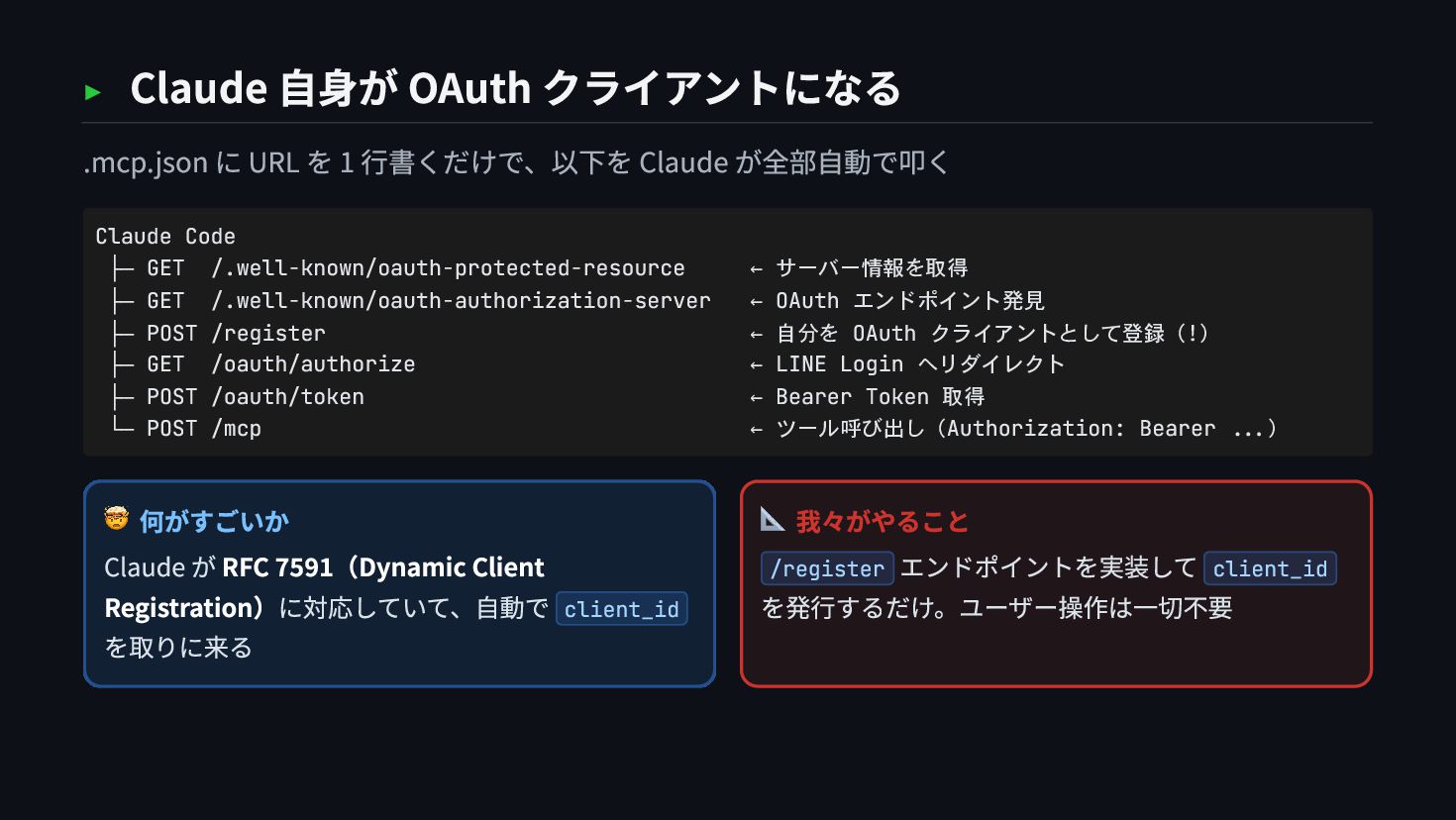
  10. ▸ Claude 自身が OAuth クライアントになる .mcp.json に URL を 1

    行書くだけで、以下を Claude が全部自動で叩く 🤯 何がすごいか Claude が RFC 7591(Dynamic Client Registration)に対応していて、自動で client_id を取りに来る 📐 我々がやること /register エンドポイントを実装して client_id を発行するだけ。ユーザー操作は一切不要 Claude Code ├─ GET /.well-known/oauth-protected-resource ← サーバー情報を取得 ├─ GET /.well-known/oauth-authorization-server ← OAuth エンドポイント発見 ├─ POST /register ← 自分を OAuth クライアントとして登録(!) ├─ GET /oauth/authorize ← LINE Login へリダイレクト ├─ POST /oauth/token ← Bearer Token 取得 └─ POST /mcp ← ツール呼び出し(Authorization: Bearer ...)
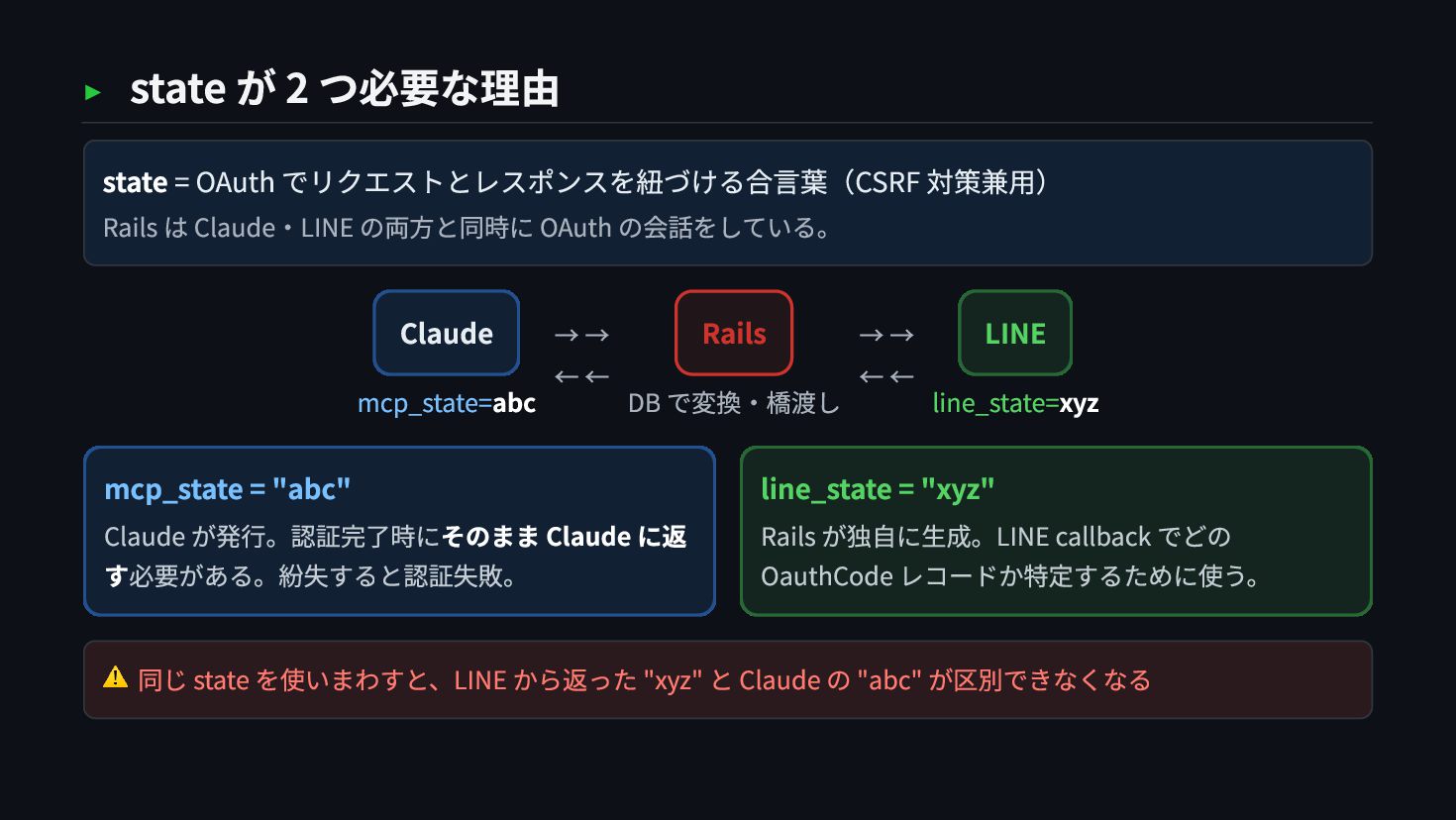
  11. ▸ state が 2 つ必要な理由 state = OAuth でリクエストとレスポンスを紐づける合言葉(CSRF 対策兼用)

    Rails は Claude・LINE の両方と同時に OAuth の会話をしている。 Claude mcp_state=abc → → ← ← Rails DB で変換・橋渡し → → ← ← LINE line_state=xyz mcp_state = "abc" Claude が発行。認証完了時にそのまま Claude に返 す必要がある。紛失すると認証失敗。 line_state = "xyz" Rails が独自に生成。LINE callback でどの OauthCode レコードか特定するために使う。 ⚠️ 同じ state を使いまわすと、LINE から返った "xyz" と Claude の "abc" が区別できなくなる
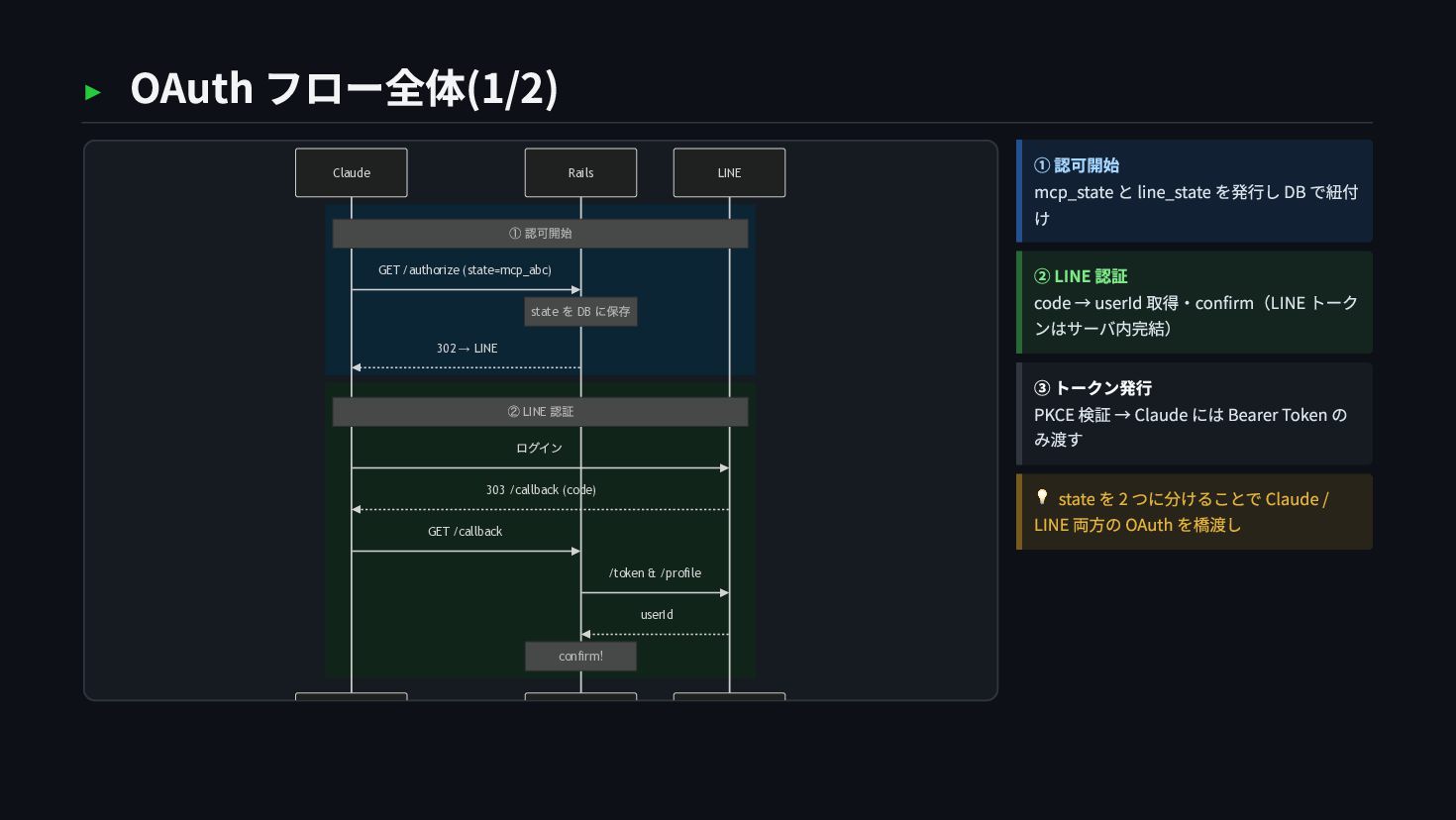
  12. ▸ OAuth フロー全体(1/2) LINE Rails Claude ① 認可開始 state を

    DB に保存 ② LINE 認証 confirm! GET /authorize (state=mcp_abc) 302 → LINE ログイン 303 /callback (code) GET /callback /token & /profile userId ① 認可開始 mcp_state と line_state を発行し DB で紐付 け ② LINE 認証 code → userId 取得・confirm(LINE トーク ンはサーバ内完結) ③ トークン発行 PKCE 検証 → Claude には Bearer Token の み渡す 💡 state を 2 つに分けることで Claude / LINE 両方の OAuth を橋渡し
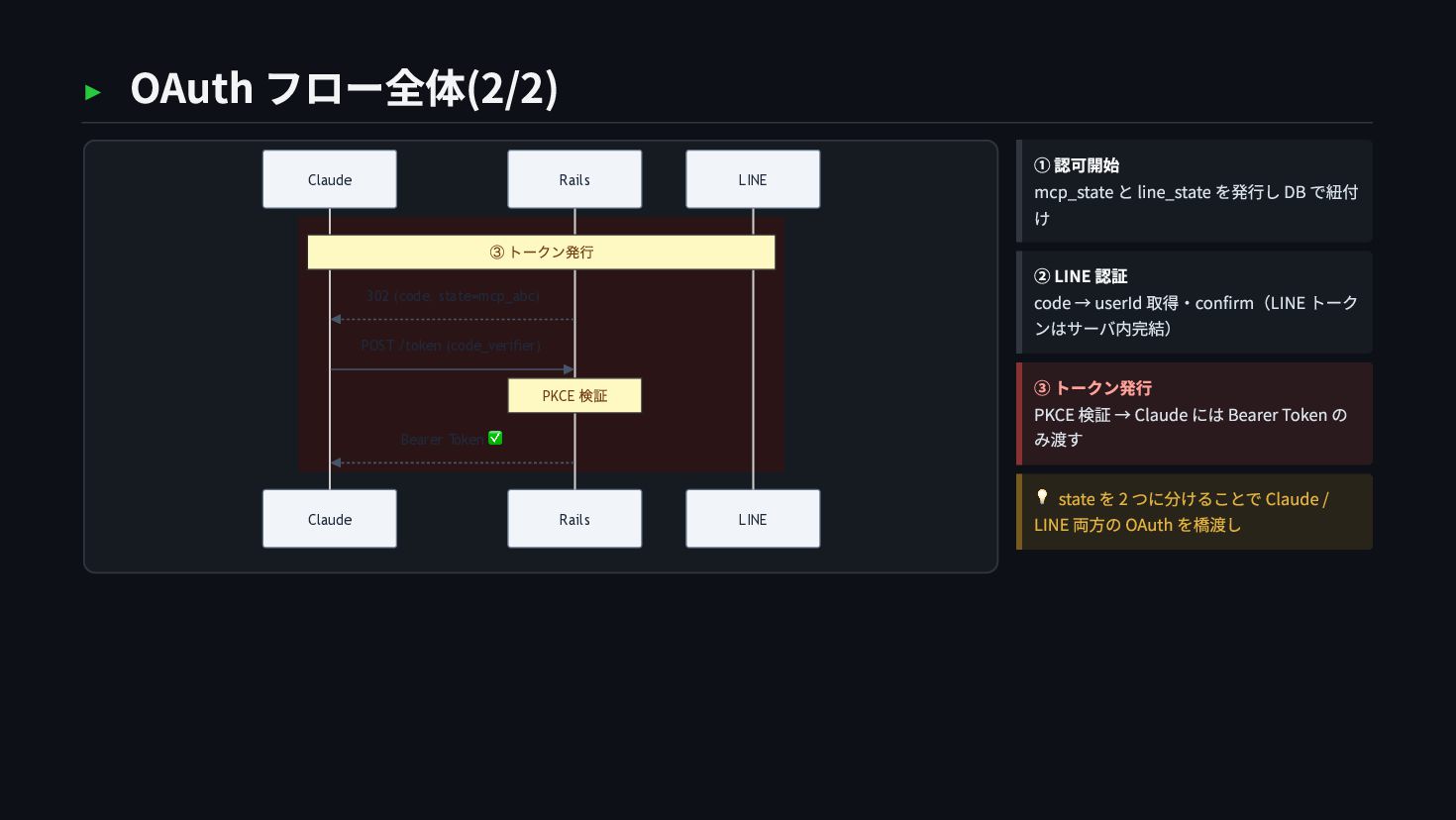
  13. ▸ OAuth フロー全体(2/2) LINE Rails Claude LINE Rails Claude ③

    トークン発行 PKCE 検証 302 (code, state=mcp_abc) POST /token (code_verifier) Bearer Token ✅ ① 認可開始 mcp_state と line_state を発行し DB で紐付 け ② LINE 認証 code → userId 取得・confirm(LINE トーク ンはサーバ内完結) ③ トークン発行 PKCE 検証 → Claude には Bearer Token の み渡す 💡 state を 2 つに分けることで Claude / LINE 両方の OAuth を橋渡し
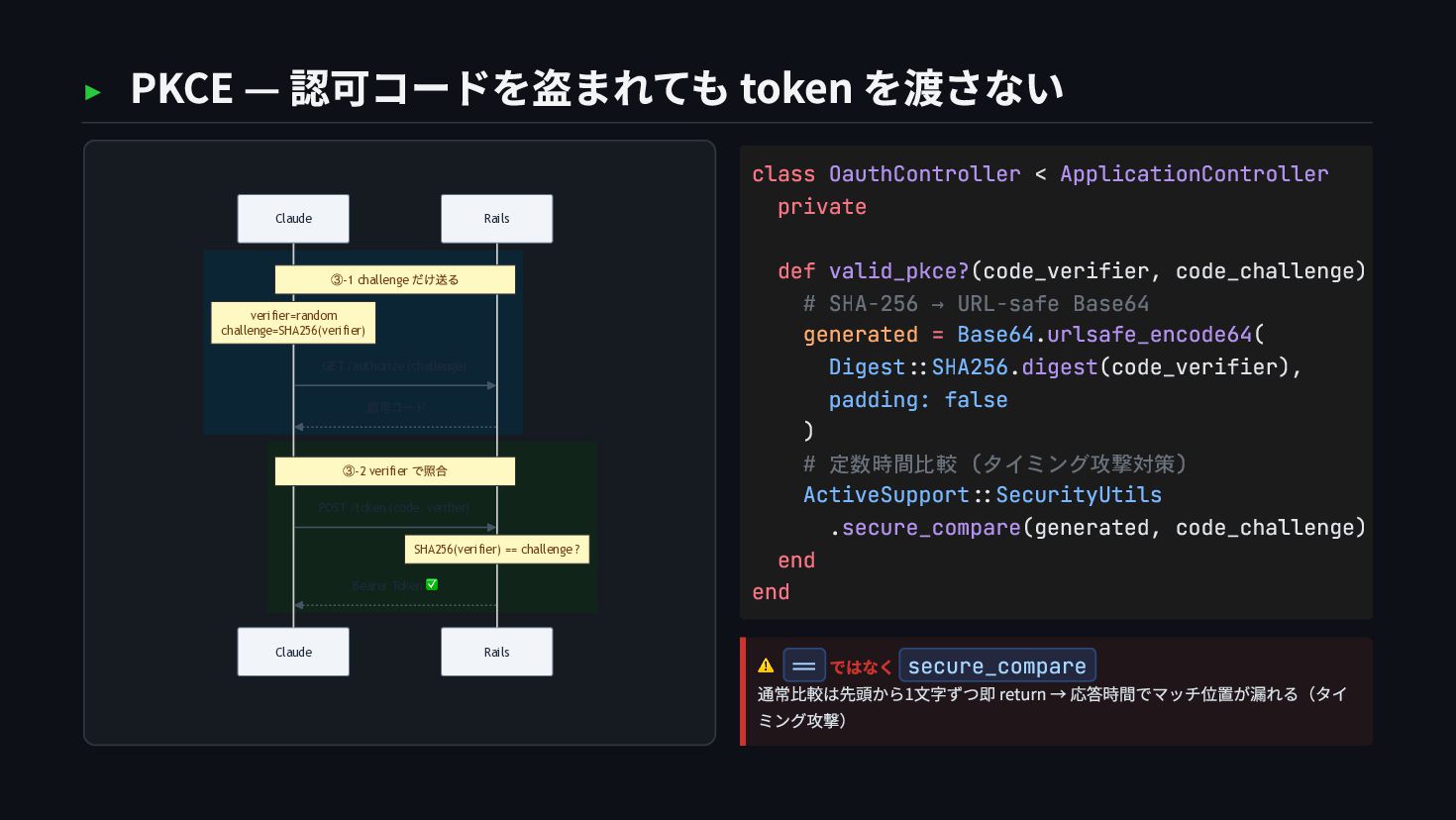
  14. ▸ PKCE — 認可コードを盗まれても token を渡さない Rails Claude Rails Claude

    ③-1 challenge だけ送る verifier=random challenge=SHA256(verifier) ③-2 verifier で照合 SHA256(verifier) == challenge ? GET /authorize (challenge) 認可コード POST /token (code, verifier) Bearer Token ✅ ⚠️ == ではなく secure_compare 通常比較は先頭から1文字ずつ即 return → 応答時間でマッチ位置が漏れる(タイ ミング攻撃) class OauthController < ApplicationController private def valid_pkce?(code_verifier, code_challenge) # SHA-256 → URL-safe Base64 generated = Base64.urlsafe_encode64( Digest::SHA256.digest(code_verifier), padding: false ) # 定数時間比較 (タイミング攻撃対策) ActiveSupport::SecurityUtils .secure_compare(generated, code_challenge) end end
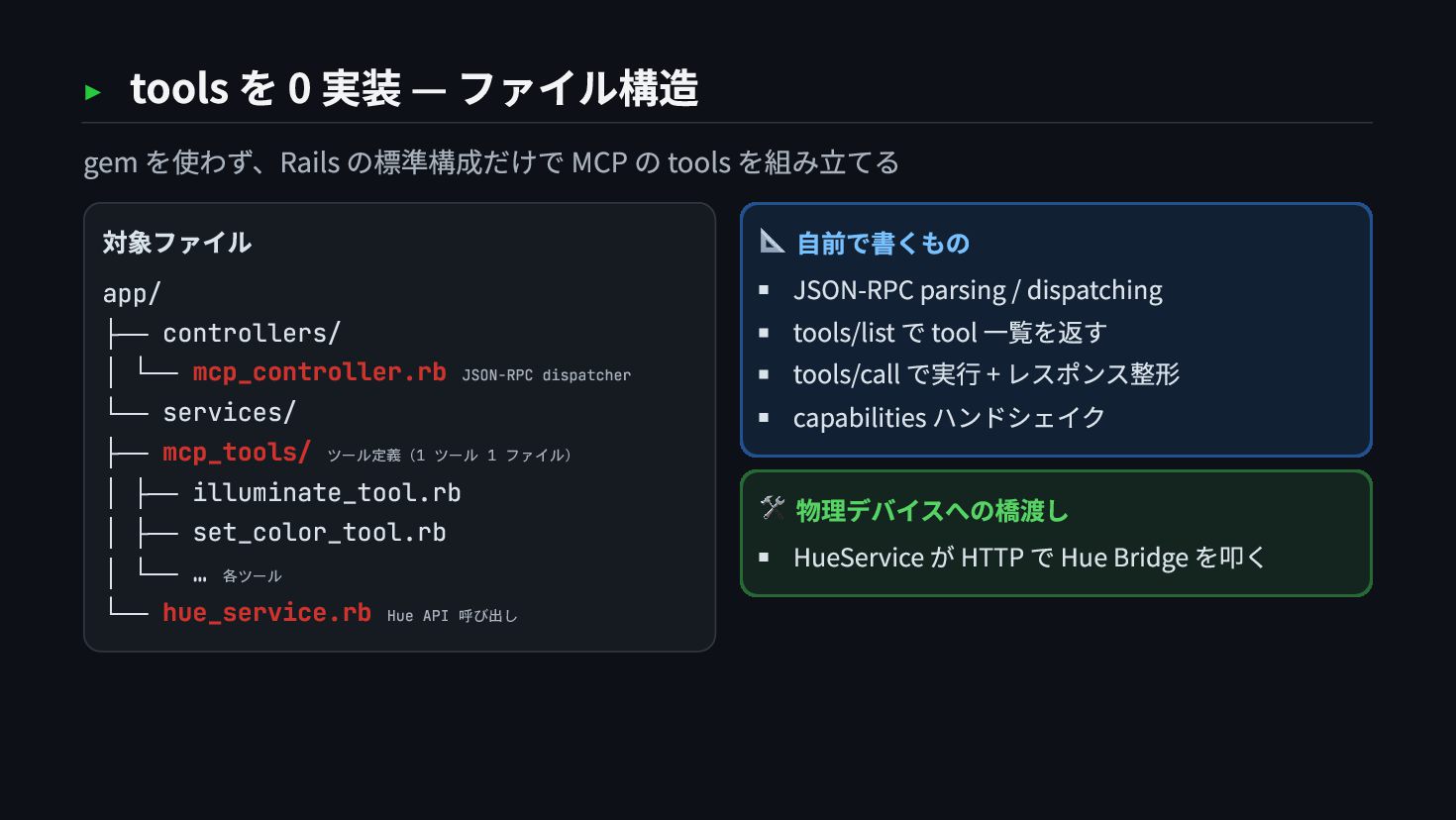
  15. ▸ tools を 0 実装 — ファイル構造 gem を使わず、Rails の標準構成だけで

    MCP の tools を組み立てる 対象ファイル app/ ├── controllers/ │ └── mcp_controller.rb JSON-RPC dispatcher └── services/ ├── mcp_tools/ ツール定義(1 ツール 1 ファイル) │ ├── illuminate_tool.rb │ ├── set_color_tool.rb │ └── … 各ツール └── hue_service.rb Hue API 呼び出し 📐 自前で書くもの JSON-RPC parsing / dispatching tools/list で tool 一覧を返す tools/call で実行 + レスポンス整形 capabilities ハンドシェイク 🛠 物理デバイスへの橋渡し HueService が HTTP で Hue Bridge を叩く
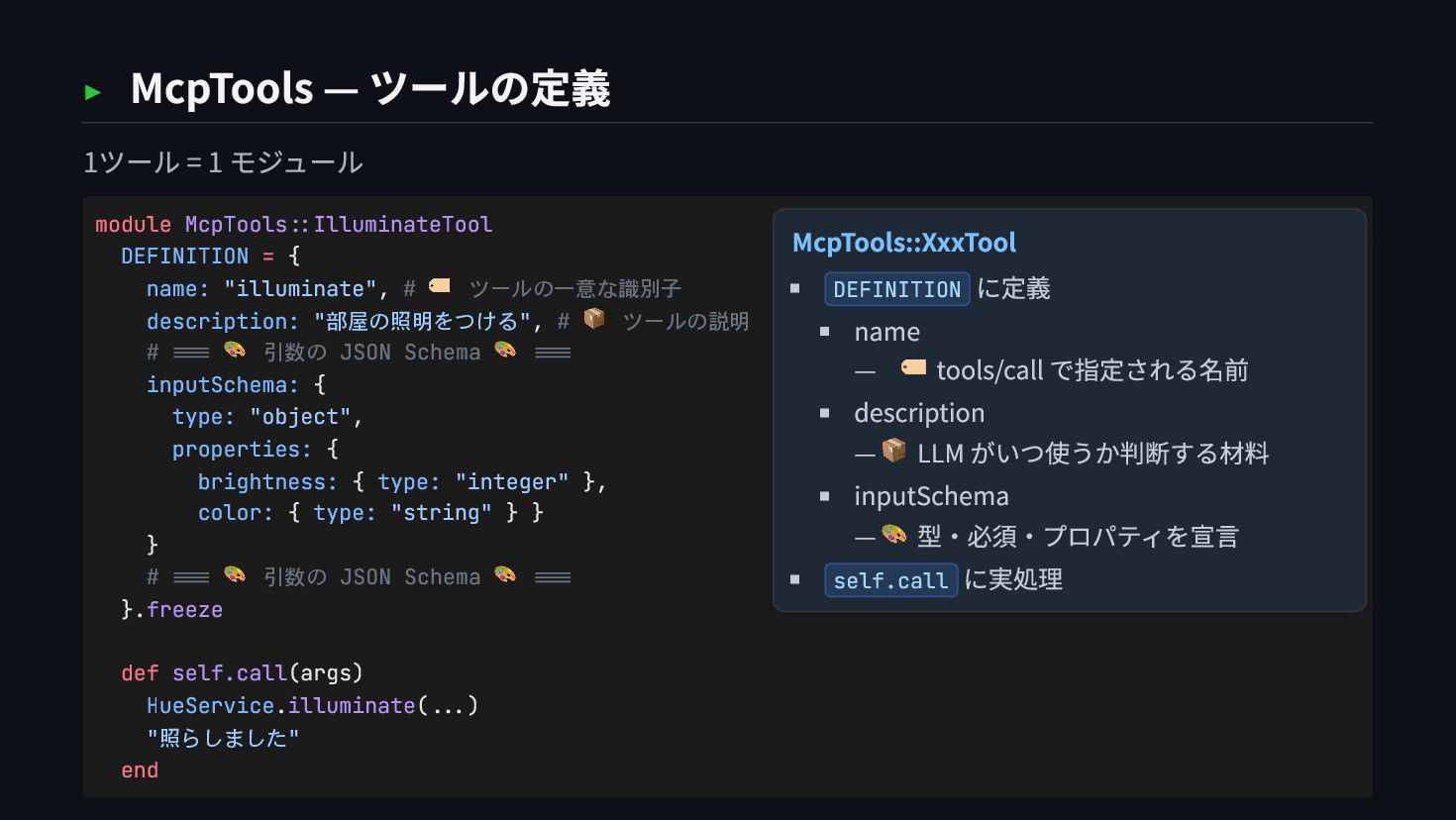
  16. ▸ McpTools — ツールの定義 1ツール = 1 モジュール module McpTools::IlluminateTool

    DEFINITION = { name: "illuminate", # 🏷️ ツールの一意な識別子 description: "部屋の照明をつける", # 📦 ツールの説明 # === 🎨 引数の JSON Schema 🎨 === inputSchema: { type: "object", properties: { brightness: { type: "integer" }, color: { type: "string" } } } # === 🎨 引数の JSON Schema 🎨 === }.freeze def self.call(args) HueService.illuminate(...) "照らしました" end McpTools::XxxTool DEFINITION に定義 name — 🏷️ tools/call で指定される名前 description — 📦 LLM がいつ使うか判断する材料 inputSchema — 🎨 型・必須・プロパティを宣言 self.call に実処理
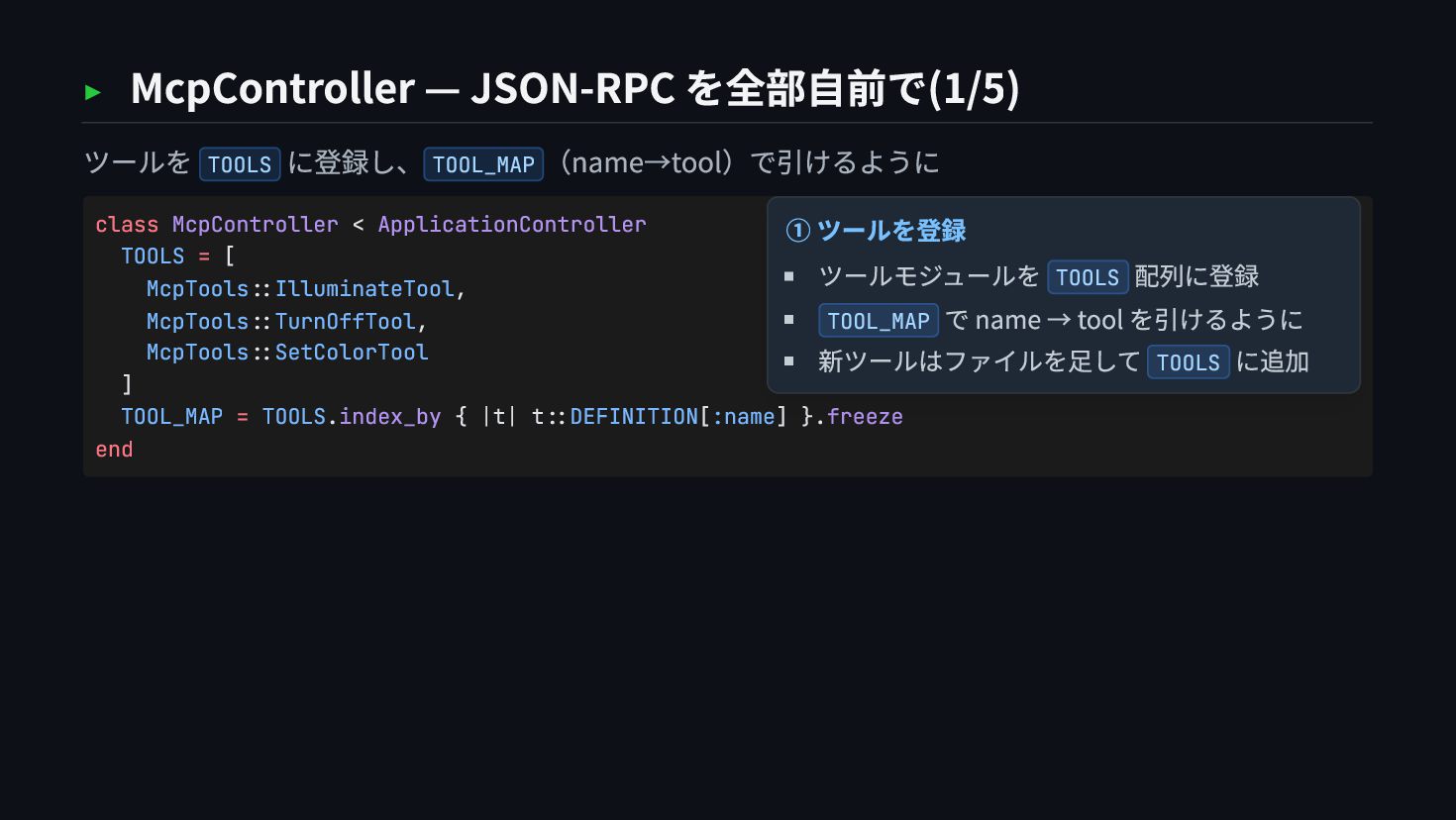
  17. ▸ McpController — JSON-RPC を全部自前で(1/5) ツールを TOOLS に登録し、 TOOL_MAP (name→tool)で引けるように

    class McpController < ApplicationController TOOLS = [ McpTools::IlluminateTool, McpTools::TurnOffTool, McpTools::SetColorTool ] TOOL_MAP = TOOLS.index_by { |t| t::DEFINITION[:name] }.freeze end ① ツールを登録 ツールモジュールを TOOLS 配列に登録 TOOL_MAP で name → tool を引けるように 新ツールはファイルを足して TOOLS に追加
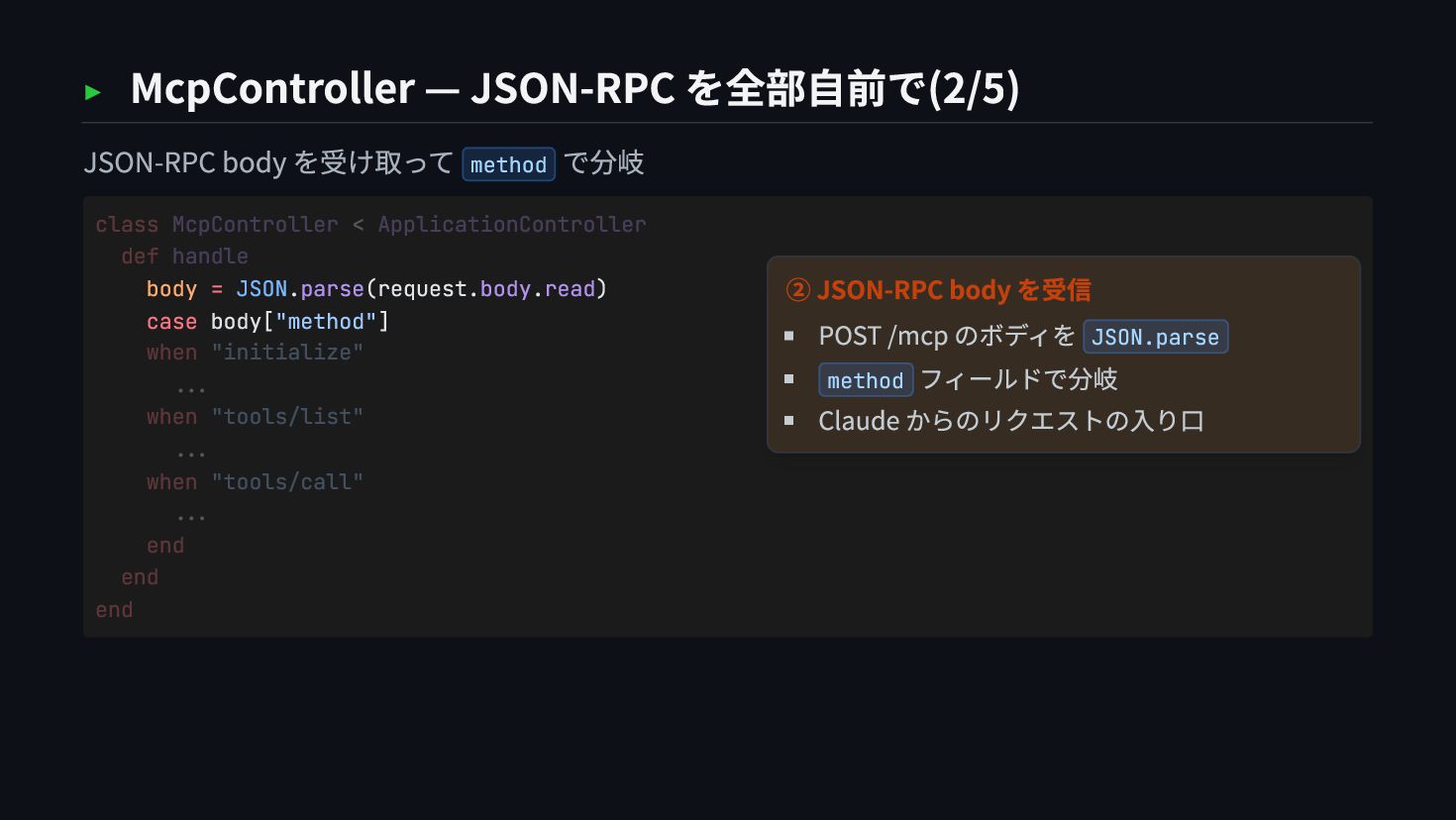
  18. ▸ McpController — JSON-RPC を全部自前で(2/5) JSON-RPC body を受け取って method で分岐

    body = JSON.parse(request.body.read) case body["method"] class McpController < ApplicationController def handle when "initialize" ... when "tools/list" ... when "tools/call" ... end end end ② JSON-RPC body を受信 POST /mcp のボディを JSON.parse method フィールドで分岐 Claude からのリクエストの入り口
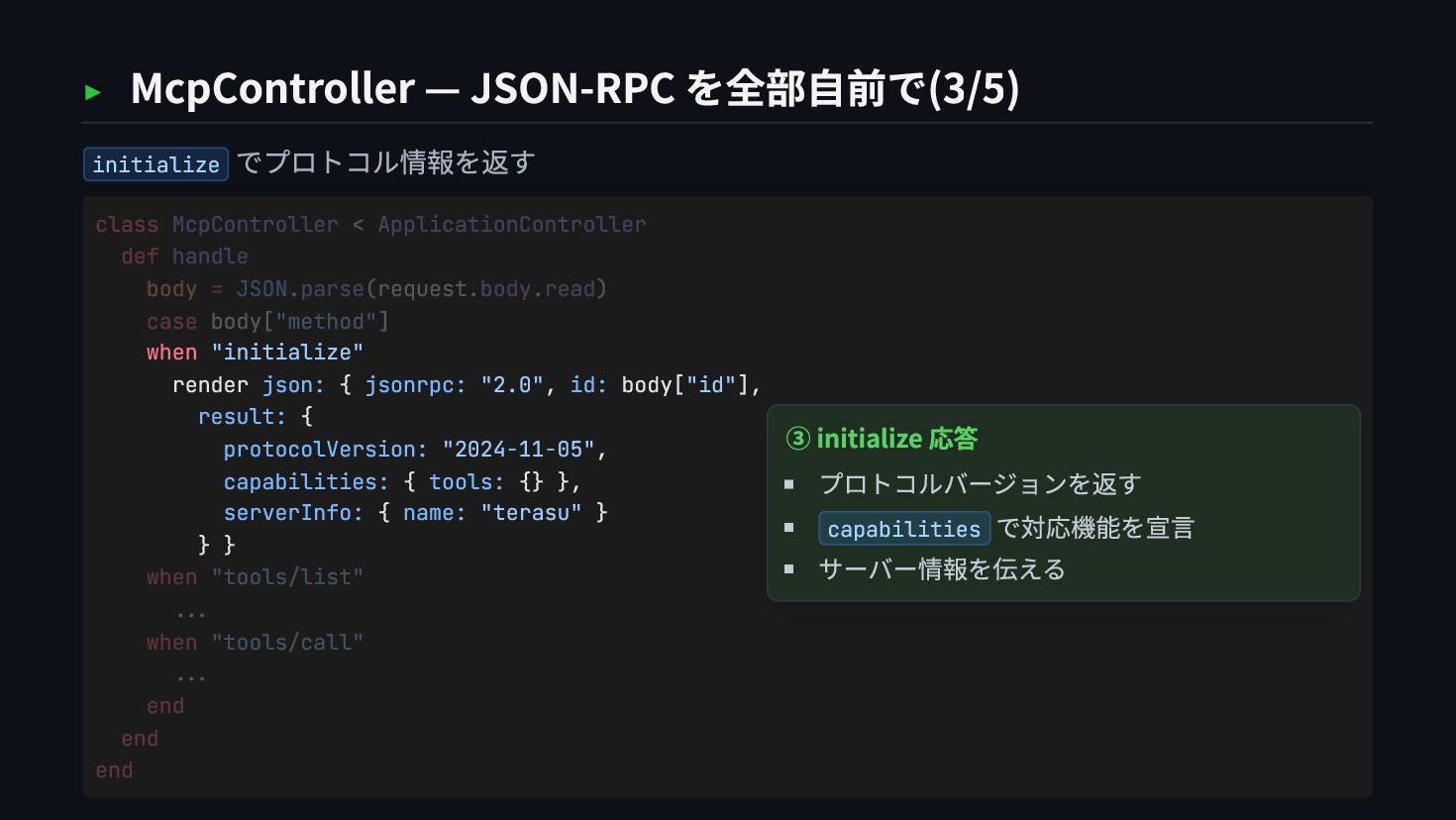
  19. ▸ McpController — JSON-RPC を全部自前で(3/5) initialize でプロトコル情報を返す when "initialize" render

    json: { jsonrpc: "2.0", id: body["id"], result: { protocolVersion: "2024-11-05", capabilities: { tools: {} }, serverInfo: { name: "terasu" } } } class McpController < ApplicationController def handle body = JSON.parse(request.body.read) case body["method"] when "tools/list" ... when "tools/call" ... end end end ③ initialize 応答 プロトコルバージョンを返す capabilities で対応機能を宣言 サーバー情報を伝える
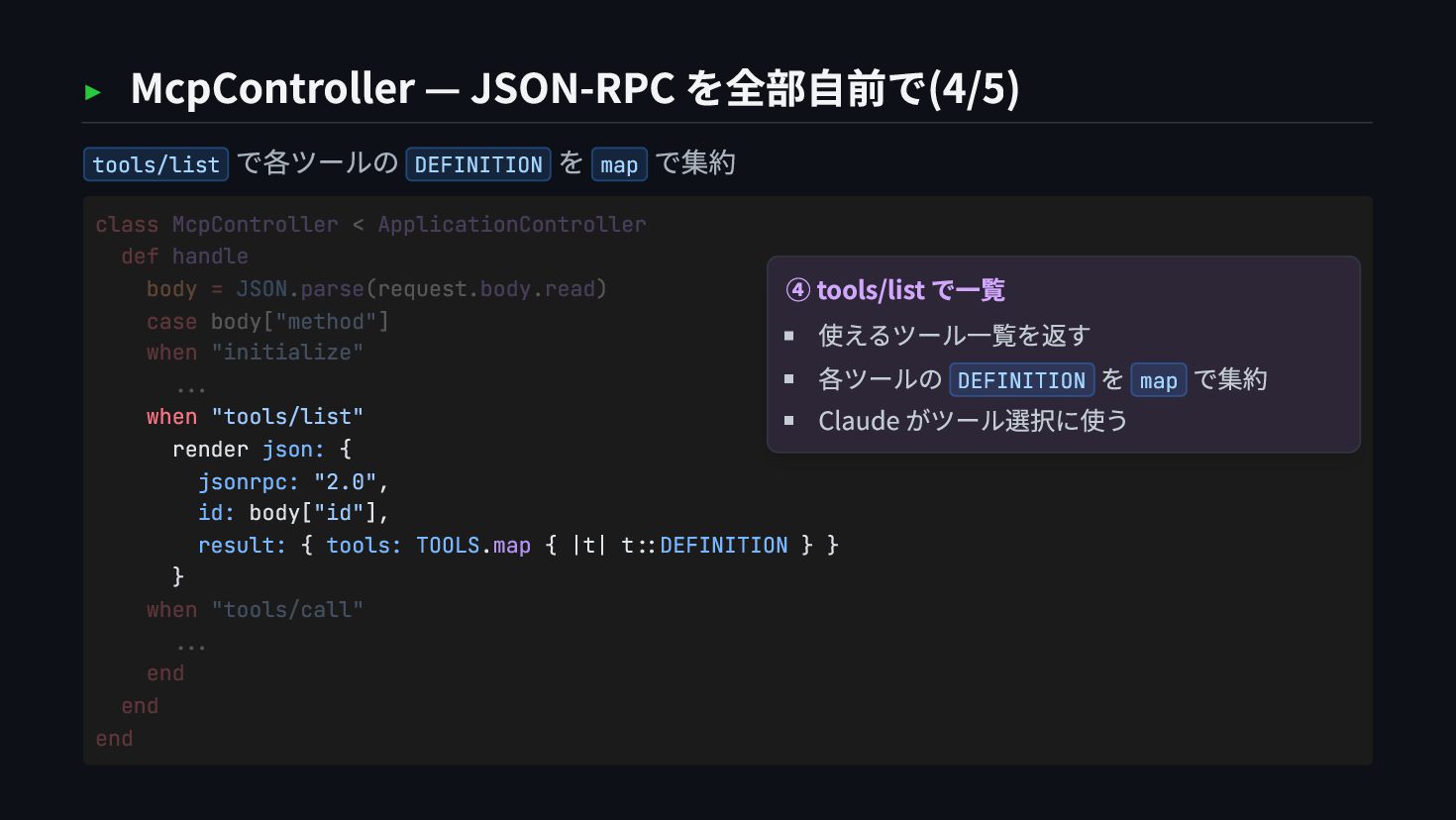
  20. ▸ McpController — JSON-RPC を全部自前で(4/5) tools/list で各ツールの DEFINITION を map

    で集約 when "tools/list" render json: { jsonrpc: "2.0", id: body["id"], result: { tools: TOOLS.map { |t| t::DEFINITION } } } class McpController < ApplicationController def handle body = JSON.parse(request.body.read) case body["method"] when "initialize" ... when "tools/call" ... end end end ④ tools/list で一覧 使えるツール一覧を返す 各ツールの DEFINITION を map で集約 Claude がツール選択に使う
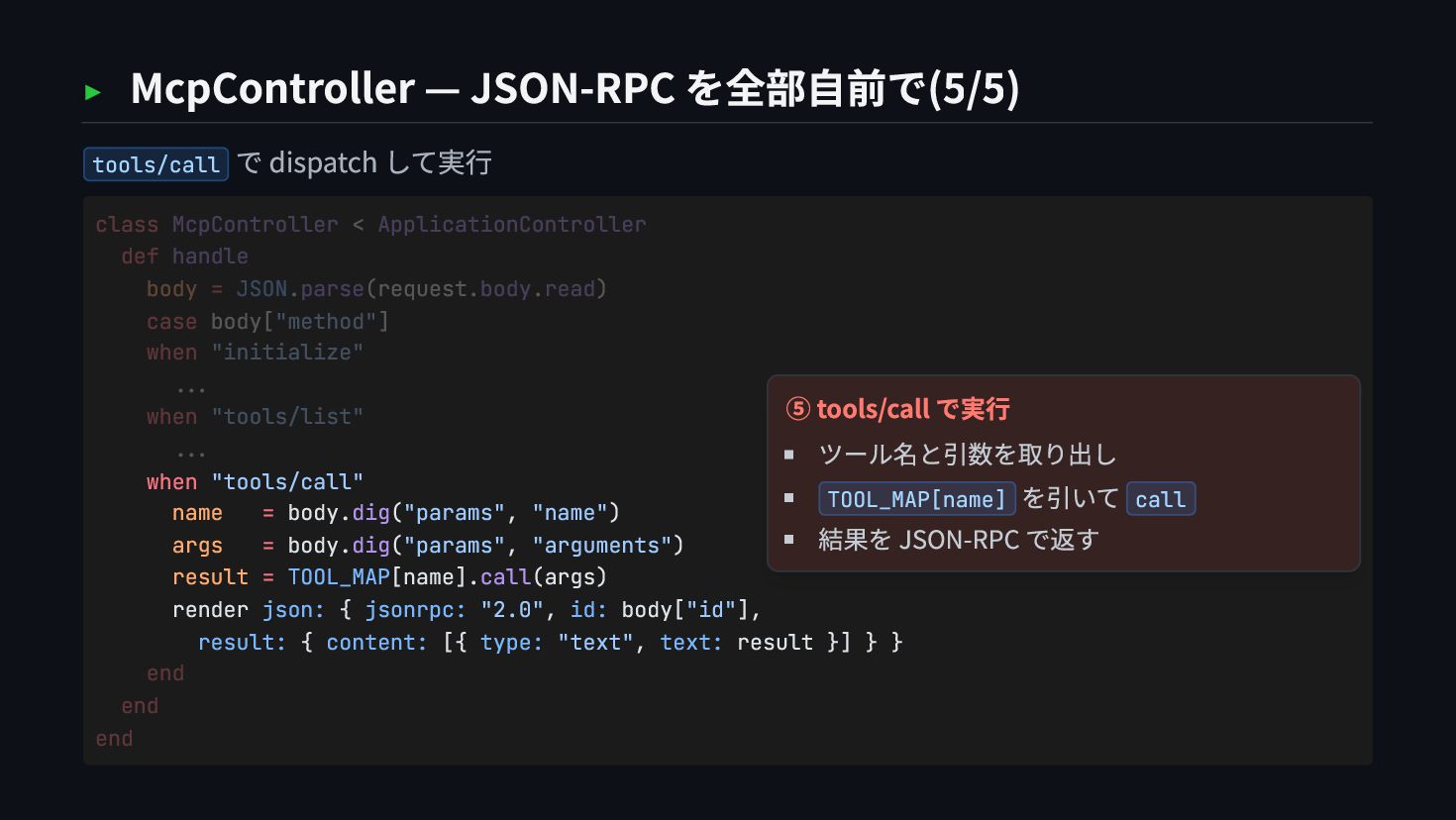
  21. ▸ McpController — JSON-RPC を全部自前で(5/5) tools/call で dispatch して実行 when

    "tools/call" name = body.dig("params", "name") args = body.dig("params", "arguments") result = TOOL_MAP[name].call(args) render json: { jsonrpc: "2.0", id: body["id"], result: { content: [{ type: "text", text: result }] } } class McpController < ApplicationController def handle body = JSON.parse(request.body.read) case body["method"] when "initialize" ... when "tools/list" ... end end end ⑤ tools/call で実行 ツール名と引数を取り出し TOOL_MAP[name] を引いて call 結果を JSON-RPC で返す
  22. ~/terasu — chapter 3 $ cd chapter-3/ ライブラリで書き直した # 認証

    (OmniAuth) / 認可 (Doorkeeper) # セッション (Devise) / Protocol (ruby-sdk) ※ 実装済みは Protocol (ruby-sdk)。認証・認可の Gem 化は「こう書け る」設計例 ➜
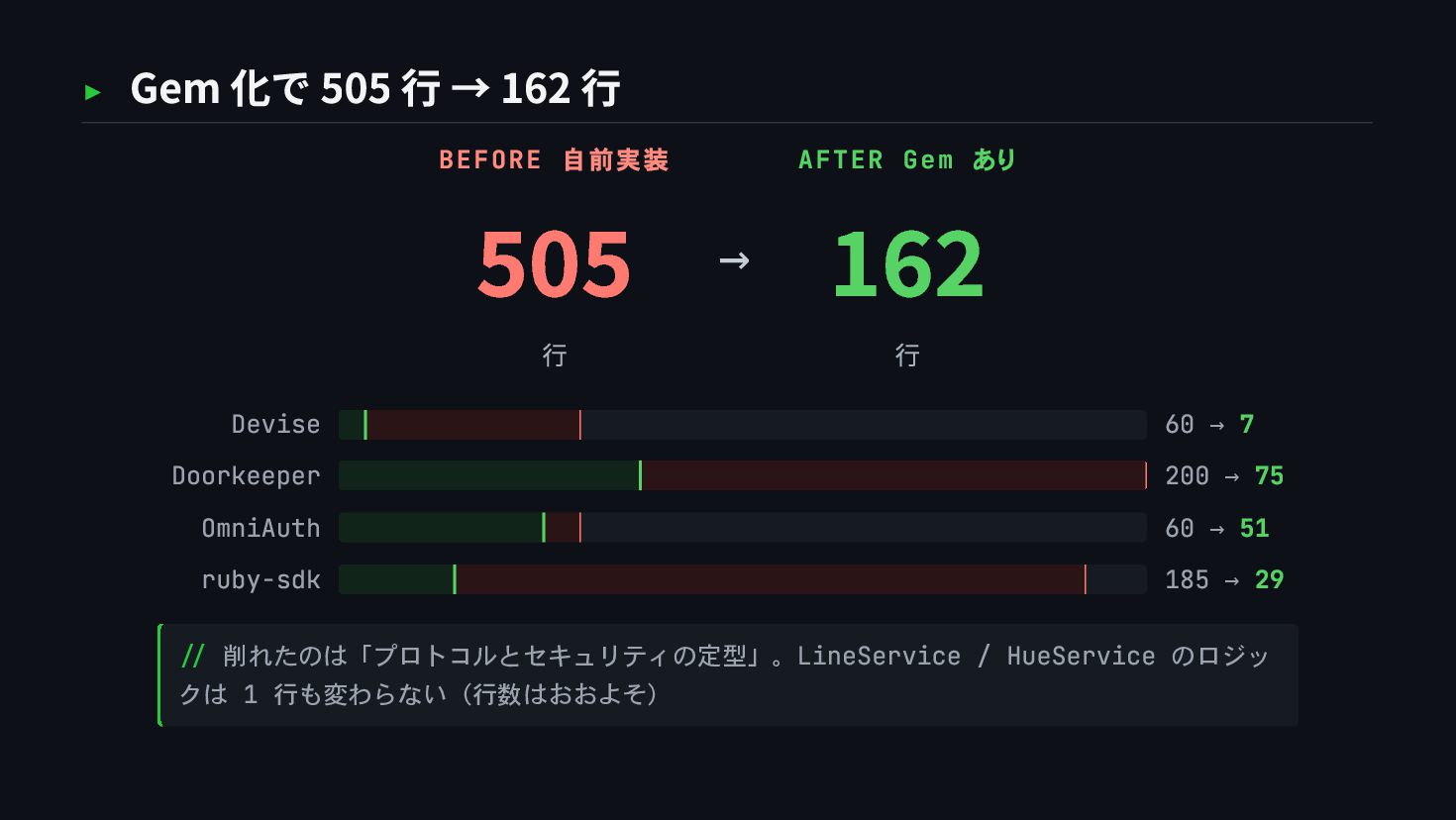
  23. ▸ Gem 化で 505 行 → 162 行 BEFORE 自前実装

    505 行 → AFTER Gem あり 162 行 Devise 60 → 7 Doorkeeper 200 → 75 OmniAuth 60 → 51 ruby-sdk 185 → 29 // 削れたのは「プロトコルとセキュリティの定型」。LineService / HueService のロジッ クは 1 行も変わらない(行数はおおよそ)
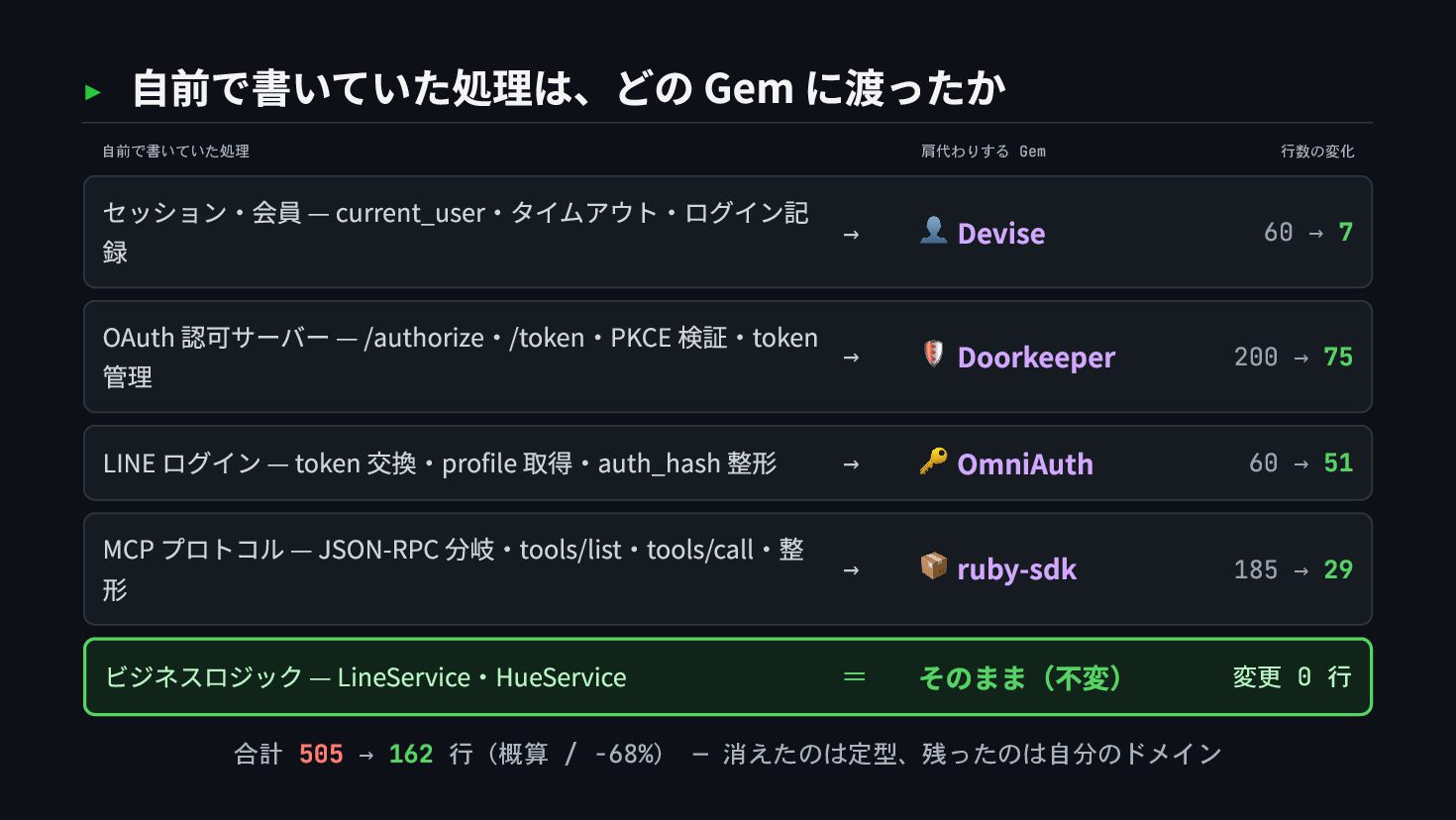
  24. ▸ 自前で書いていた処理は、どの Gem に渡ったか 自前で書いていた処理 肩代わりする Gem 行数の変化 セッション・会員 —

    current_user・タイムアウト・ログイン記 録 → 👤 Devise 60 → 7 OAuth 認可サーバー — /authorize・/token・PKCE 検証・token 管理 → 🛡 Doorkeeper 200 → 75 LINE ログイン — token 交換・profile 取得・auth_hash 整形 → 🔑 OmniAuth 60 → 51 MCP プロトコル — JSON-RPC 分岐・tools/list・tools/call・整 形 → 📦 ruby-sdk 185 → 29 ビジネスロジック — LineService・HueService = そのまま(不変) 変更 0 行 合計 505 → 162 行(概算 / -68%) — 消えたのは定型、残ったのは自分のドメイン
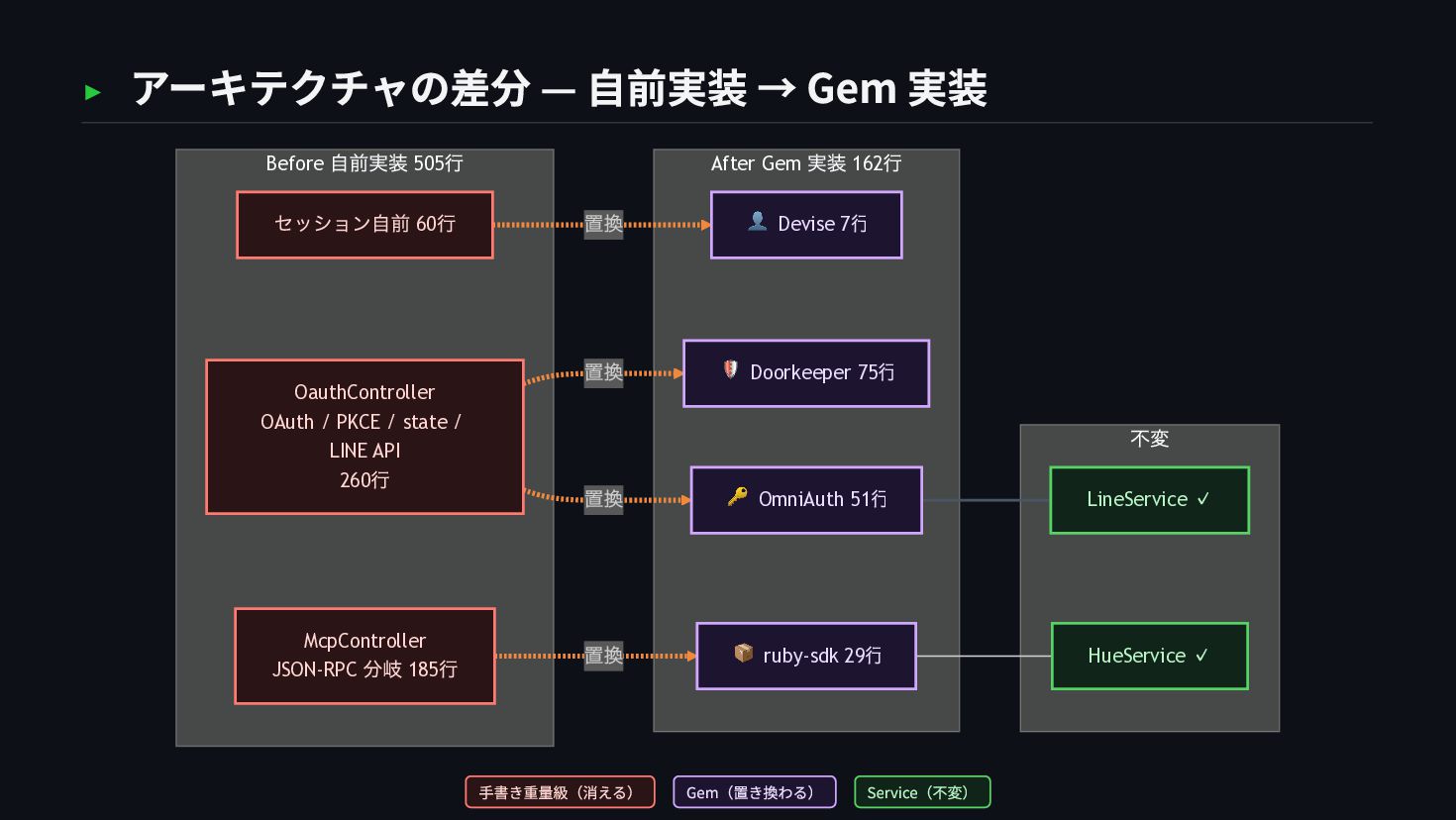
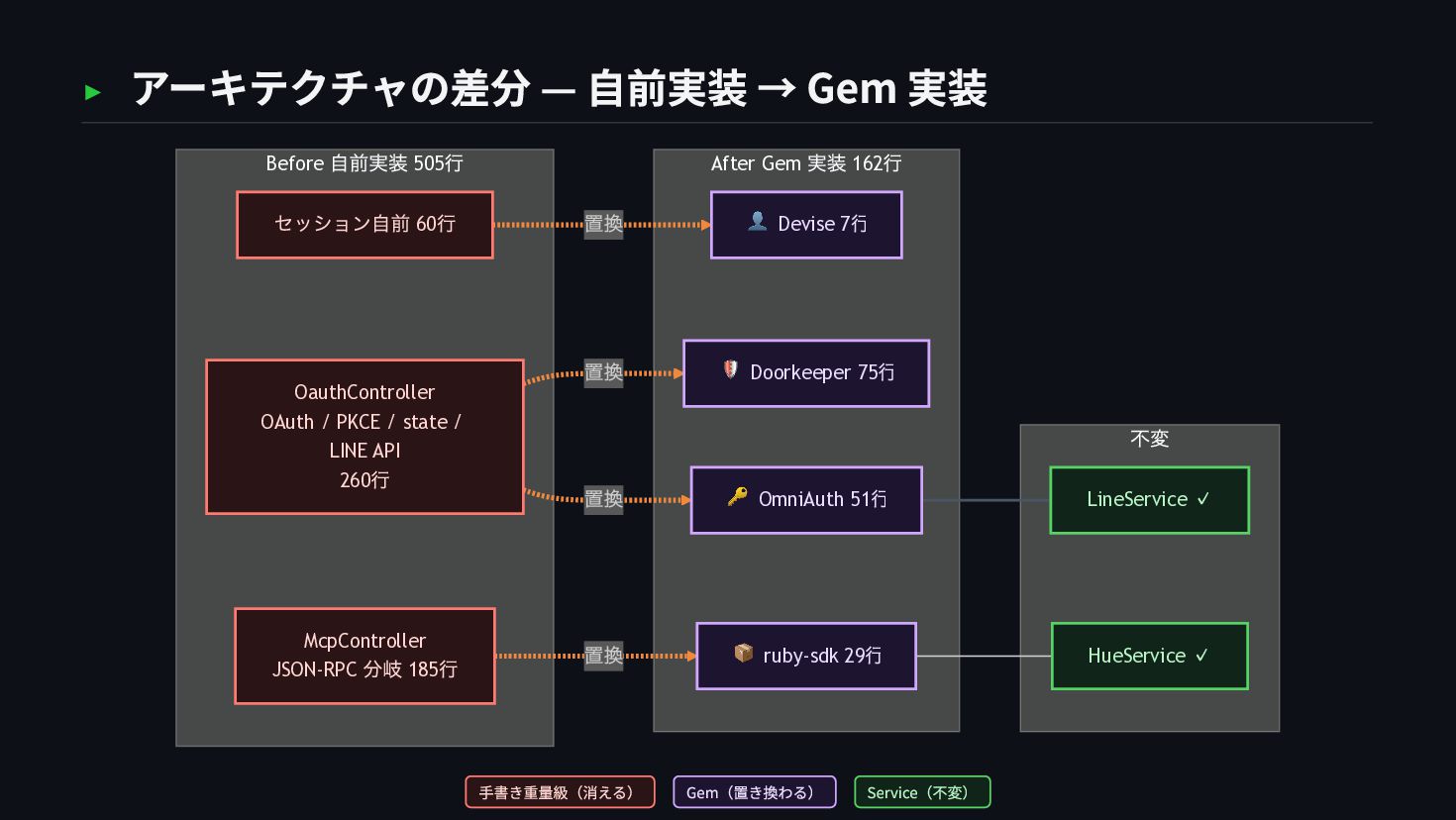
  25. ▸ アーキテクチャの差分 — 自前実装 → Gem 実装 不変 After Gem

    実装 162 行 Before 自前実装 505 行 置換 置換 置換 置換 OauthController OAuth / PKCE / state / LINE API 260 行 セッション自前 60 行 McpController JSON-RPC 分岐 185 行 👤 Devise 7 行 🛡 Doorkeeper 75 行 🔑 OmniAuth 51 行 📦 ruby-sdk 29 行 LineService ✓ HueService ✓ 手書き重量級(消える) Gem(置き換わる) Service(不変)
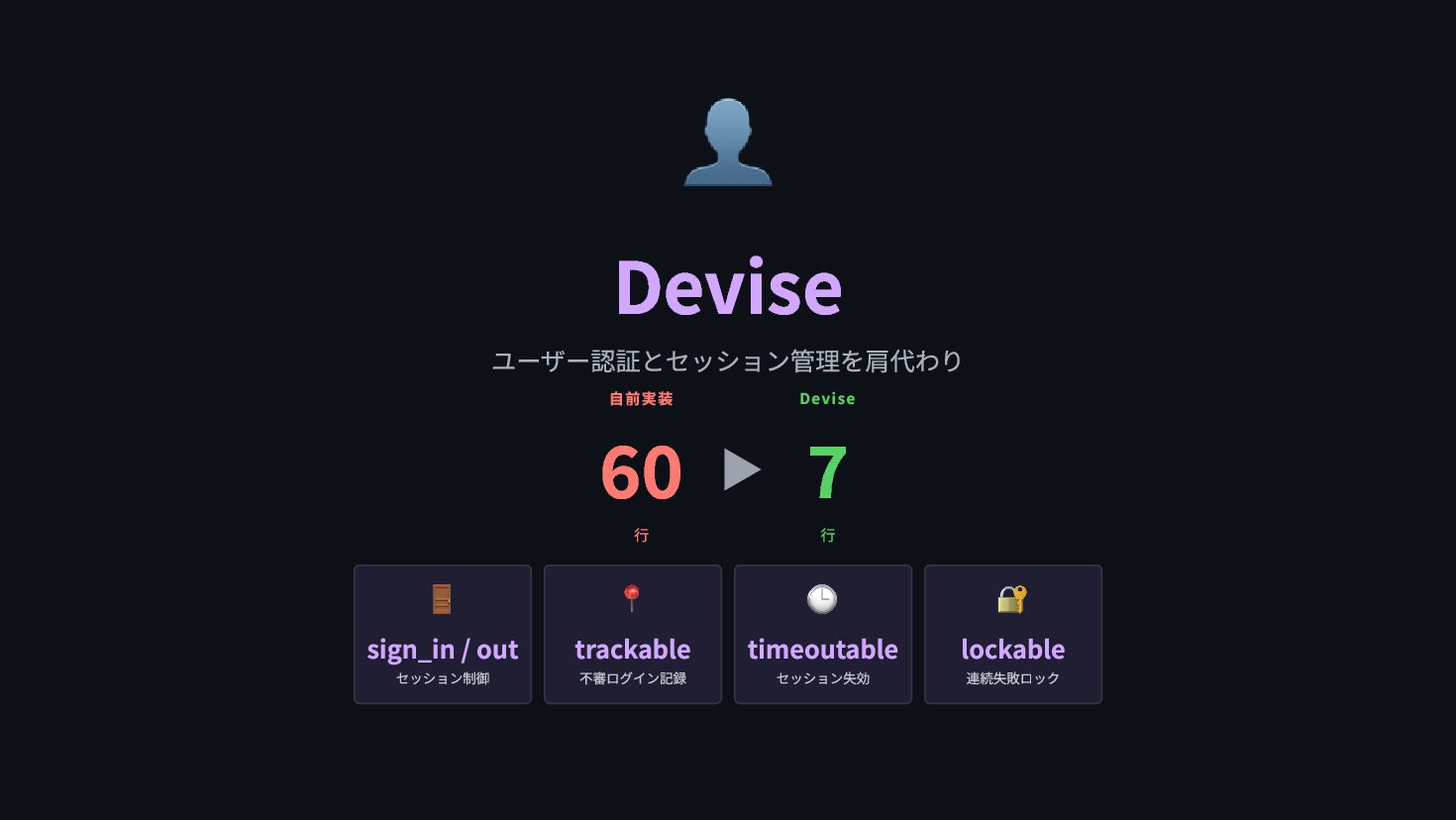
  26. 👤 Devise ユーザー認証とセッション管理を肩代わり 自前実装 60 行 ▶ Devise 7 行

    🚪 sign_in / out セッション制御 📍 trackable 不審ログイン記録 🕒 timeoutable セッション失効 🔐 lockable 連続失敗ロック
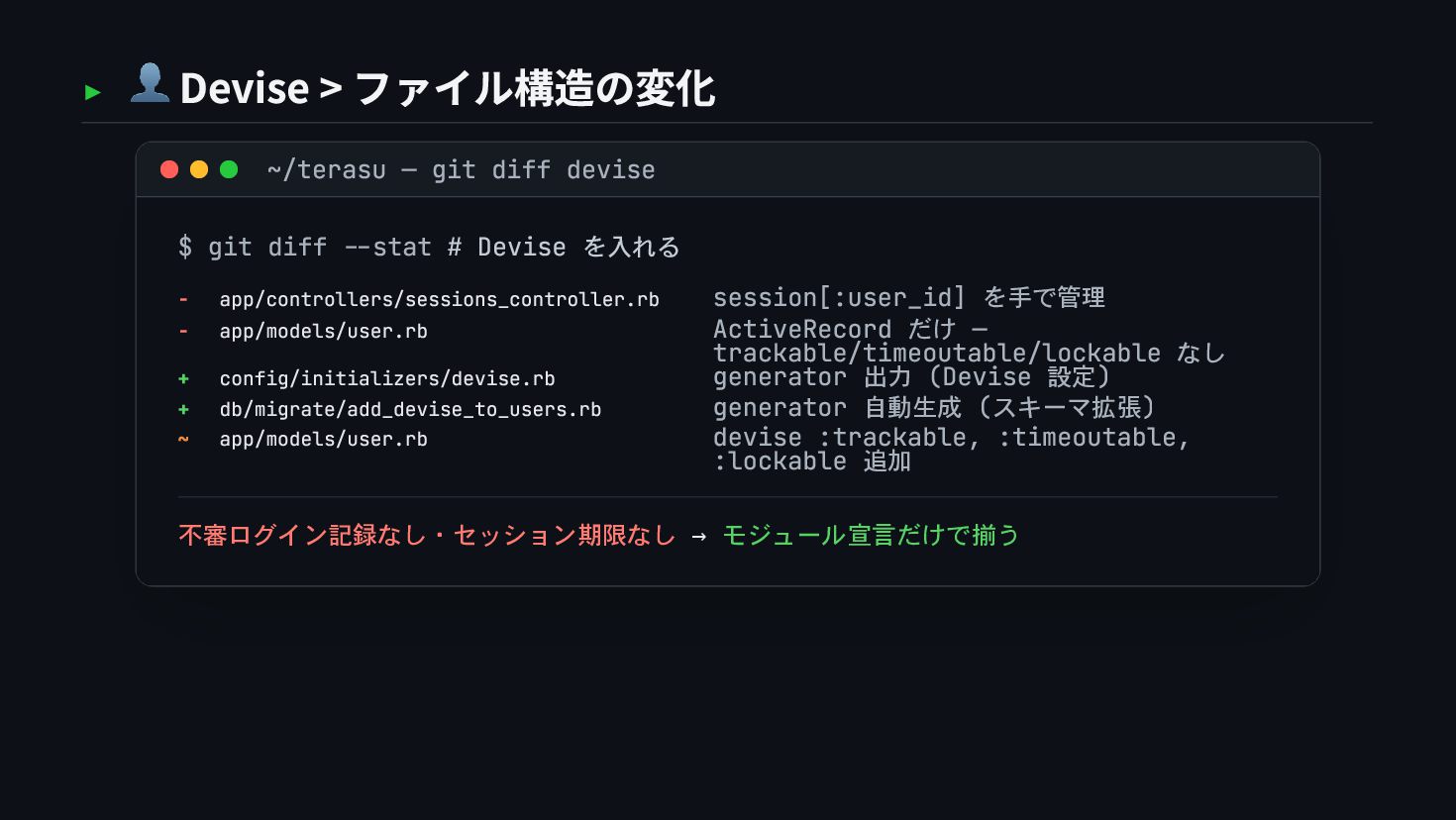
  27. ▸ 👤 Devise > ファイル構造の変化 ~/terasu — git diff devise

    $ git diff --stat # Devise を入れる - app/controllers/sessions_controller.rb session[:user_id] を手で管理 - app/models/user.rb ActiveRecord だけ — trackable/timeoutable/lockable なし + config/initializers/devise.rb generator 出力 (Devise 設定) + db/migrate/add_devise_to_users.rb generator 自動生成 (スキーマ拡張) ~ app/models/user.rb devise :trackable, :timeoutable, :lockable 追加 不審ログイン記録なし・セッション期限なし → モジュール宣言だけで揃う
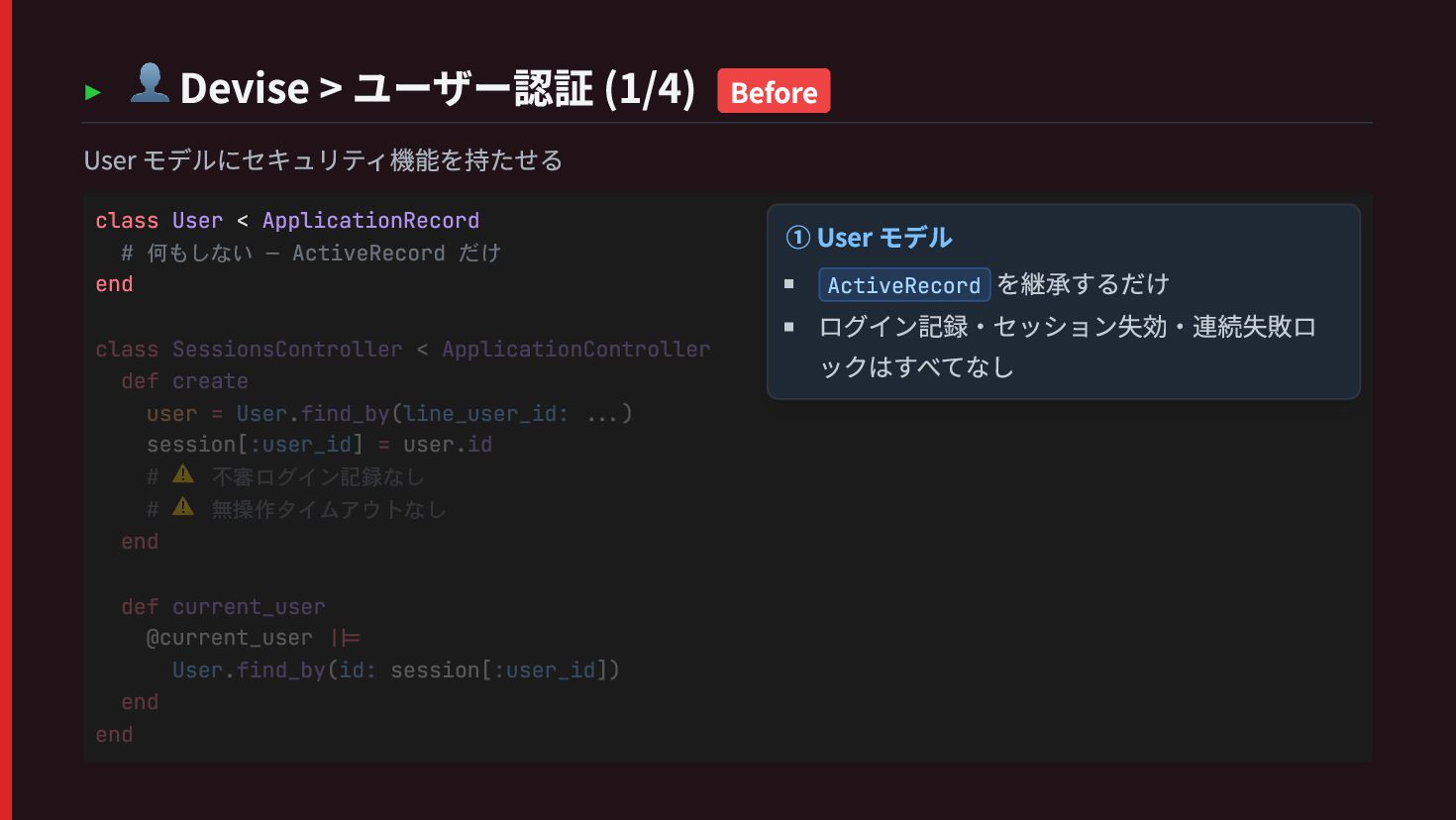
  28. ▸ 👤 Devise > ユーザー認証 (1/4) Before User モデルにセキュリティ機能を持たせる class

    User < ApplicationRecord # 何もしない — ActiveRecord だけ end class SessionsController < ApplicationController def create user = User.find_by(line_user_id: ...) session[:user_id] = user.id # ⚠️ 不審ログイン記録なし # ⚠️ 無操作タイムアウトなし end def current_user @current_user ||= User.find_by(id: session[:user_id]) end end ① User モデル ActiveRecord を継承するだけ ログイン記録・セッション失効・連続失敗ロ ックはすべてなし
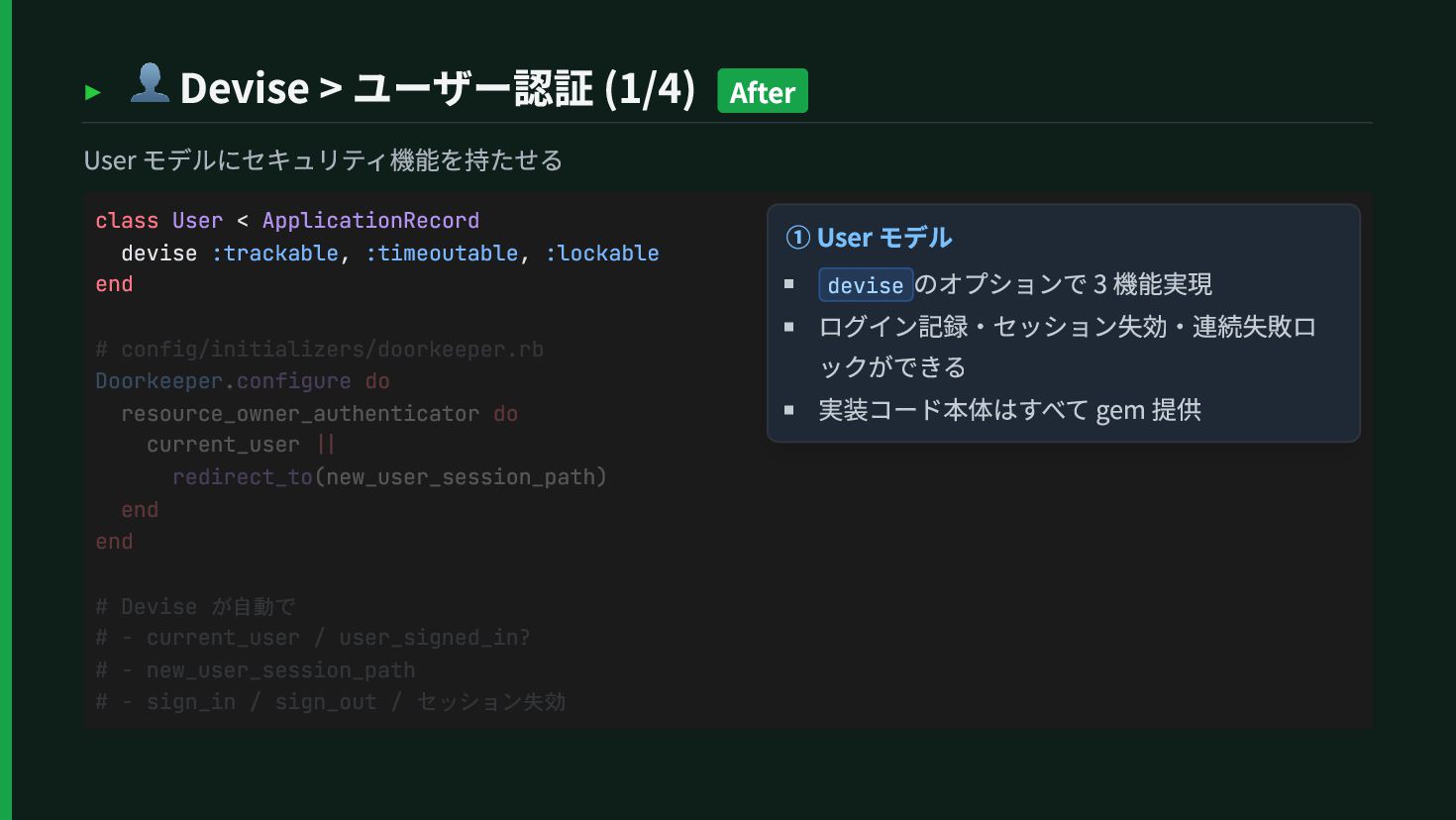
  29. ▸ 👤 Devise > ユーザー認証 (1/4) After User モデルにセキュリティ機能を持たせる class

    User < ApplicationRecord devise :trackable, :timeoutable, :lockable end # config/initializers/doorkeeper.rb Doorkeeper.configure do resource_owner_authenticator do current_user || redirect_to(new_user_session_path) end end # Devise が自動で # - current_user / user_signed_in? # - new_user_session_path # - sign_in / sign_out / セッション失効 ① User モデル devise のオプションで 3 機能実現 ログイン記録・セッション失効・連続失敗ロ ックができる 実装コード本体はすべて gem 提供
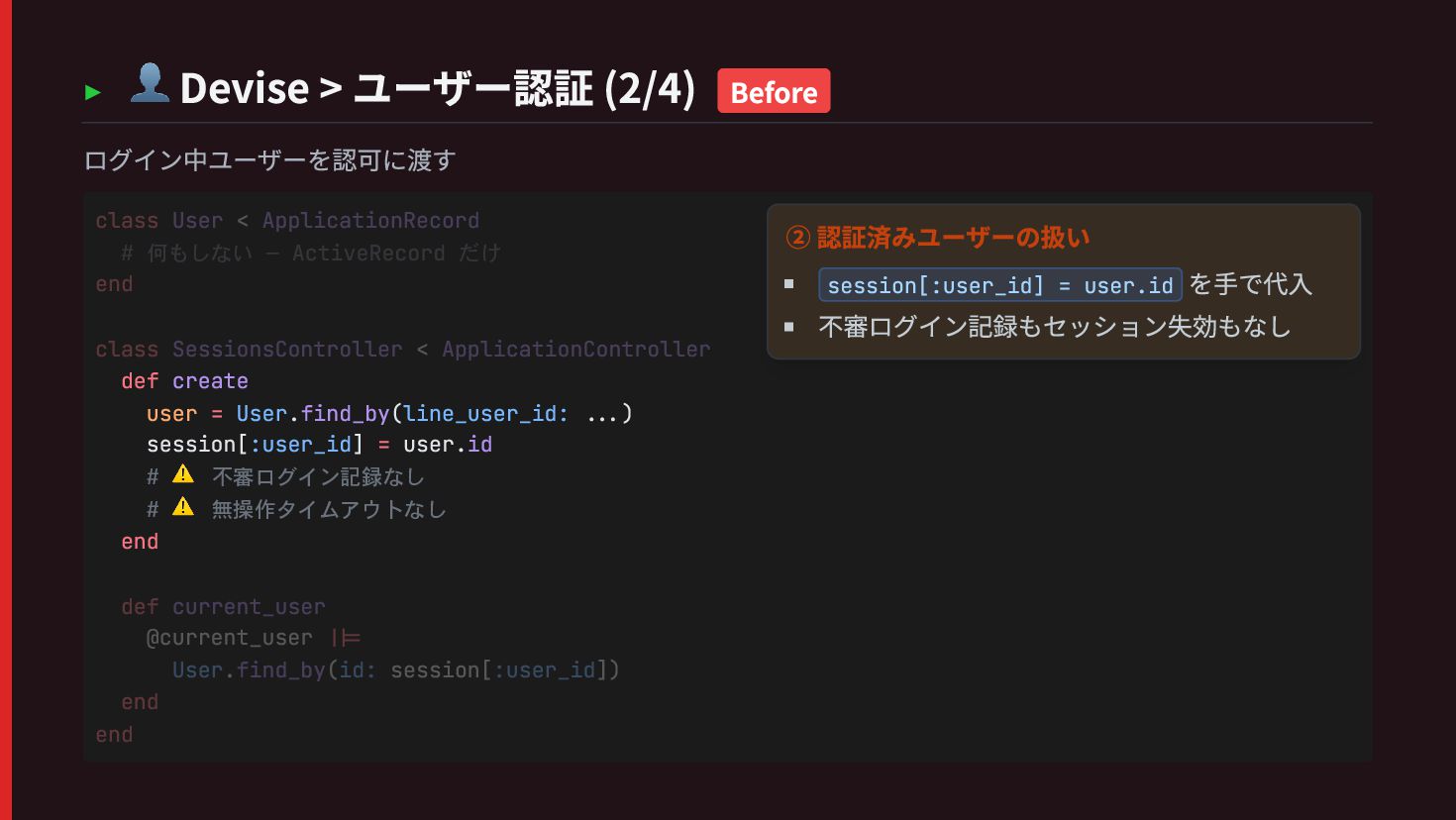
  30. ▸ 👤 Devise > ユーザー認証 (2/4) Before ログイン中ユーザーを認可に渡す def create

    user = User.find_by(line_user_id: ...) session[:user_id] = user.id # ⚠️ 不審ログイン記録なし # ⚠️ 無操作タイムアウトなし end class User < ApplicationRecord # 何もしない — ActiveRecord だけ end class SessionsController < ApplicationController def current_user @current_user ||= User.find_by(id: session[:user_id]) end end ② 認証済みユーザーの扱い session[:user_id] = user.id を手で代入 不審ログイン記録もセッション失効もなし
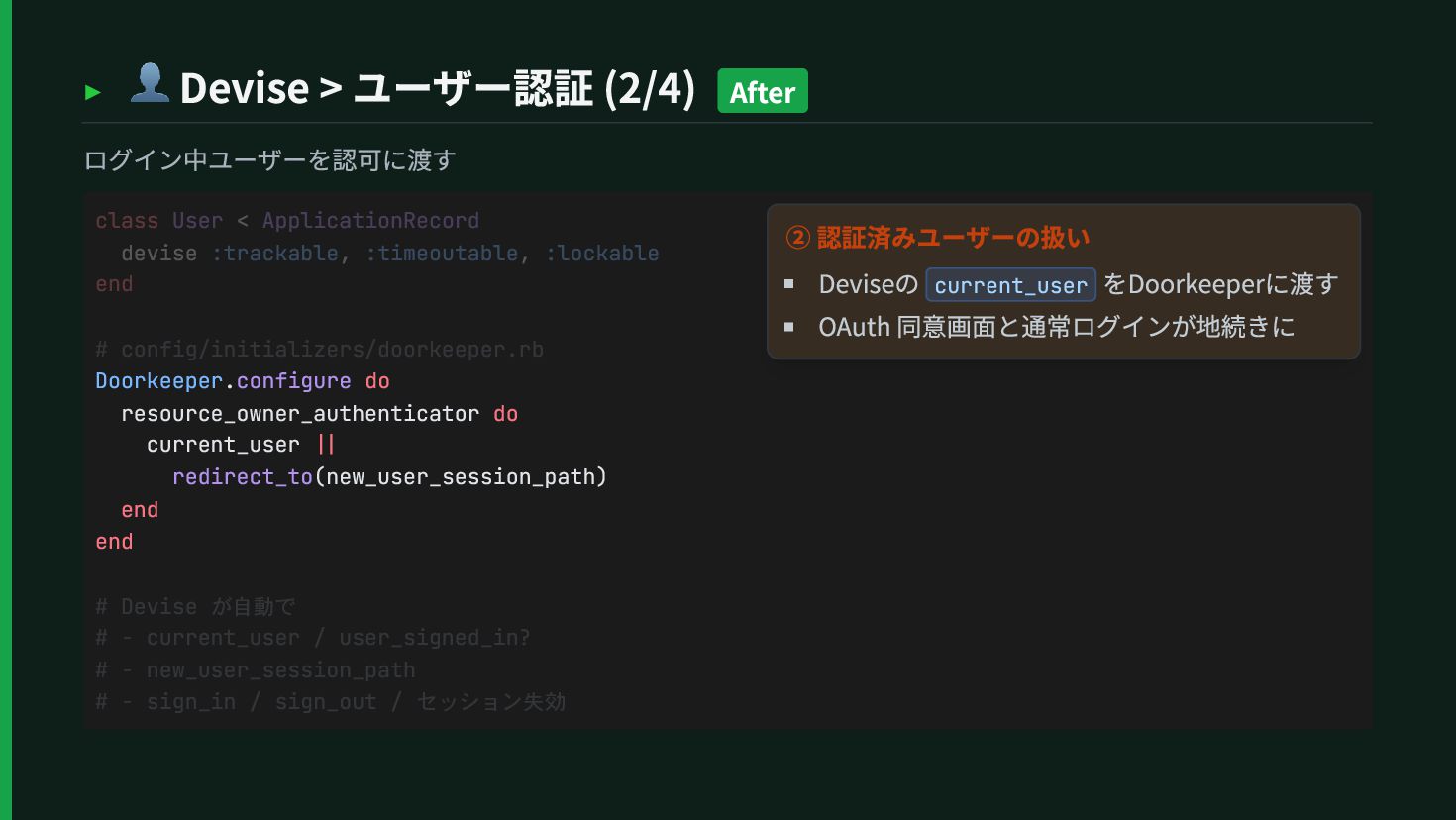
  31. ▸ 👤 Devise > ユーザー認証 (2/4) After ログイン中ユーザーを認可に渡す Doorkeeper.configure do

    resource_owner_authenticator do current_user || redirect_to(new_user_session_path) end end class User < ApplicationRecord devise :trackable, :timeoutable, :lockable end # config/initializers/doorkeeper.rb # Devise が自動で # - current_user / user_signed_in? # - new_user_session_path # - sign_in / sign_out / セッション失効 ② 認証済みユーザーの扱い Deviseの current_user をDoorkeeperに渡す OAuth 同意画面と通常ログインが地続きに
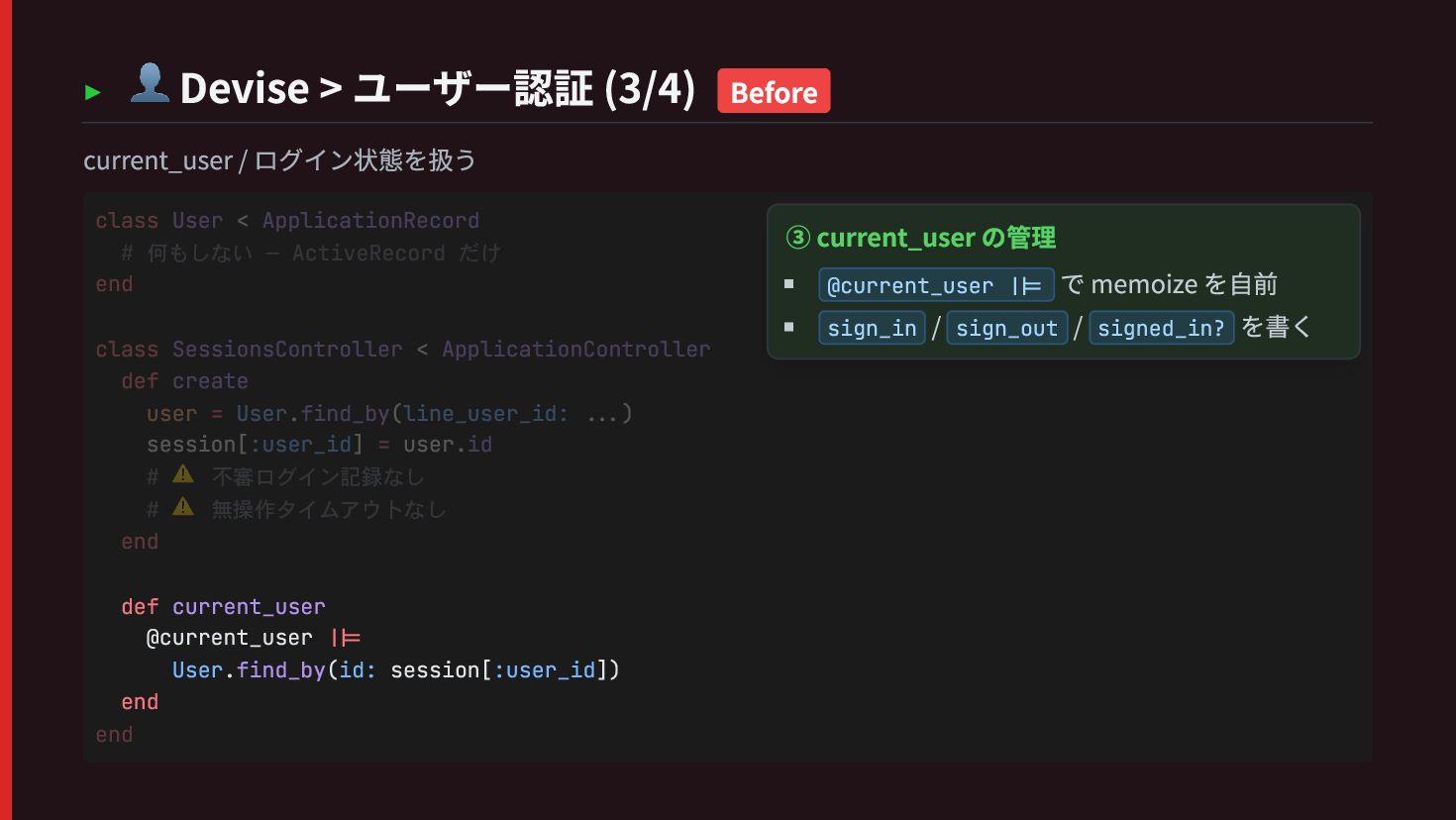
  32. ▸ 👤 Devise > ユーザー認証 (3/4) Before current_user / ログイン状態を扱う

    def current_user @current_user ||= User.find_by(id: session[:user_id]) end class User < ApplicationRecord # 何もしない — ActiveRecord だけ end class SessionsController < ApplicationController def create user = User.find_by(line_user_id: ...) session[:user_id] = user.id # ⚠️ 不審ログイン記録なし # ⚠️ 無操作タイムアウトなし end end ③ current_user の管理 @current_user ||= で memoize を自前 sign_in / sign_out / signed_in? を書く
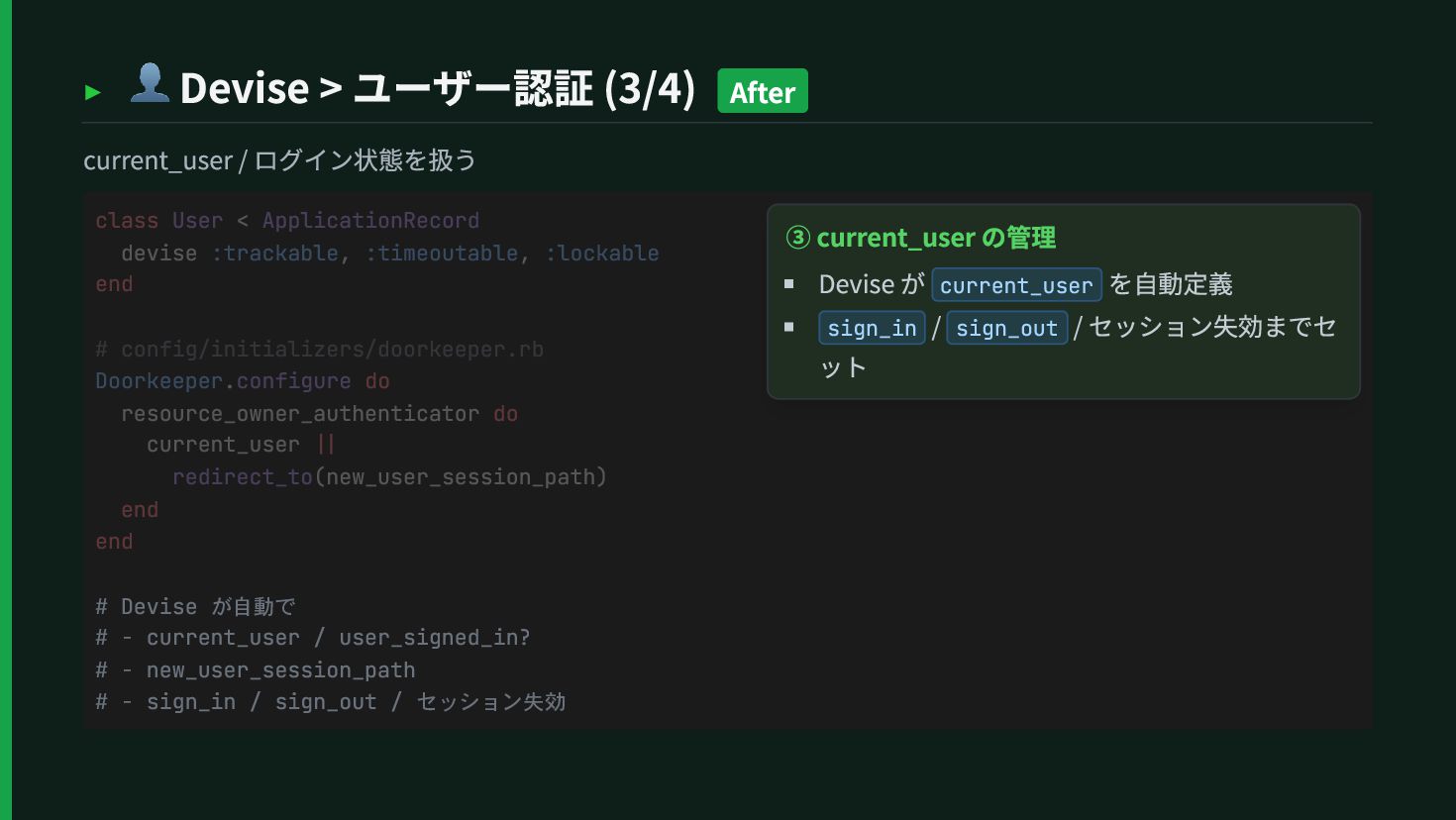
  33. ▸ 👤 Devise > ユーザー認証 (3/4) After current_user / ログイン状態を扱う

    # Devise が自動で # - current_user / user_signed_in? # - new_user_session_path # - sign_in / sign_out / セッション失効 class User < ApplicationRecord devise :trackable, :timeoutable, :lockable end # config/initializers/doorkeeper.rb Doorkeeper.configure do resource_owner_authenticator do current_user || redirect_to(new_user_session_path) end end ③ current_user の管理 Devise が current_user を自動定義 sign_in / sign_out / セッション失効までセ ット
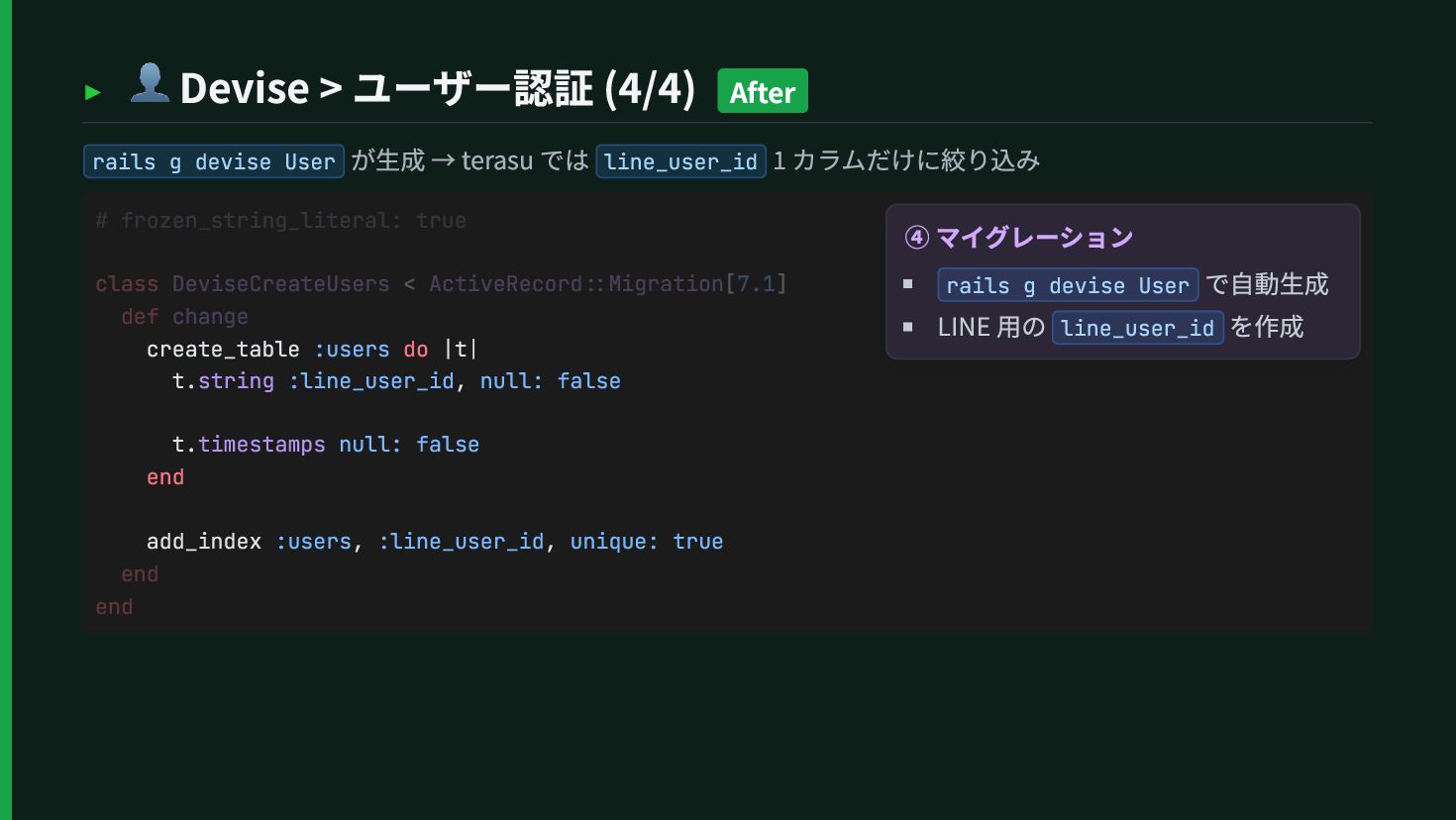
  34. ▸ 👤 Devise > ユーザー認証 (4/4) After rails g devise

    User が生成 → terasu では line_user_id 1 カラムだけに絞り込み create_table :users do |t| t.string :line_user_id, null: false t.timestamps null: false end add_index :users, :line_user_id, unique: true # frozen_string_literal: true class DeviseCreateUsers < ActiveRecord::Migration[7.1] def change end end ④ マイグレーション rails g devise User で自動生成 LINE 用の line_user_id を作成
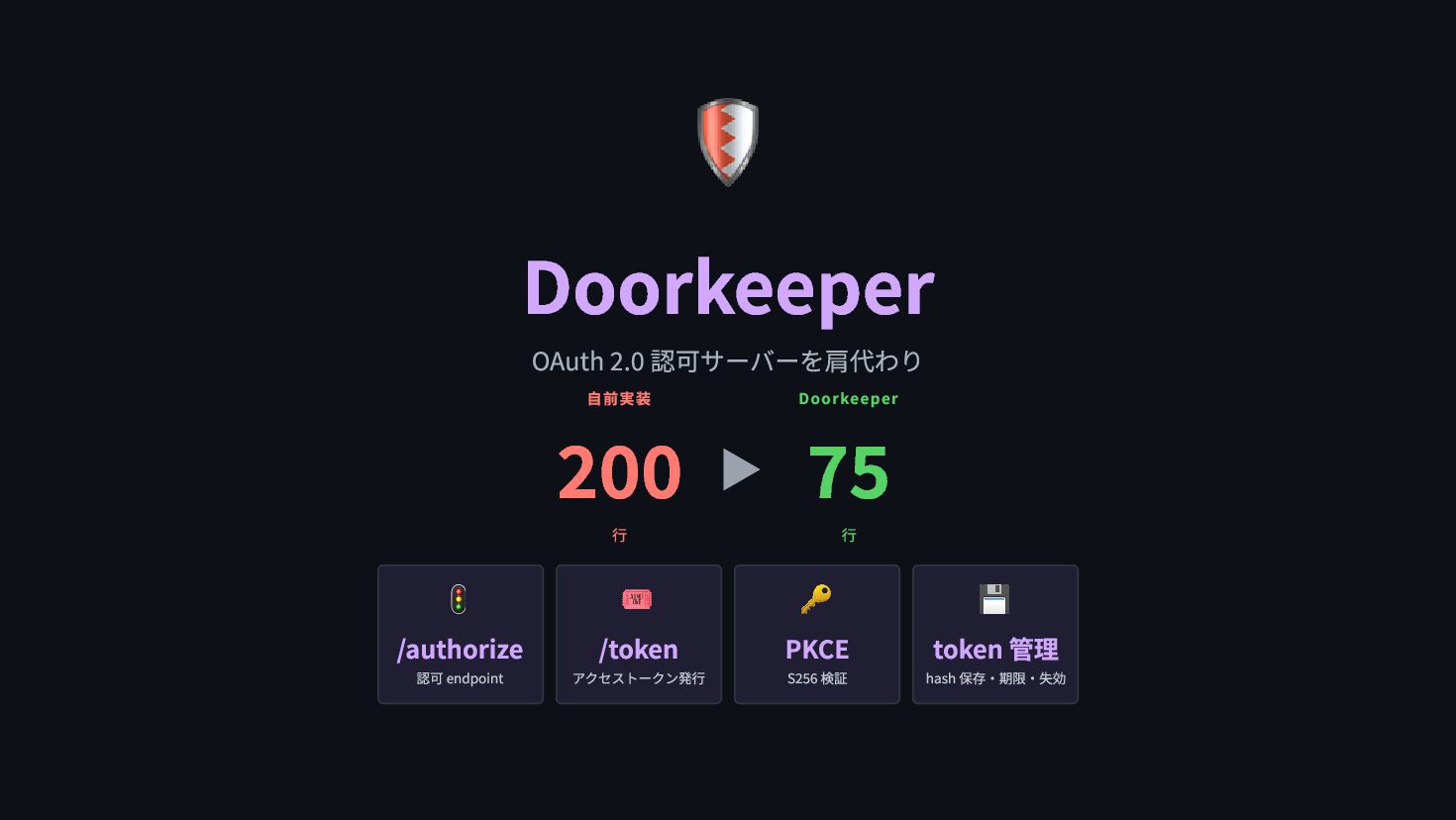
  35. 🛡 Doorkeeper OAuth 2.0 認可サーバーを肩代わり 自前実装 200 行 ▶ Doorkeeper

    75 行 🚦 /authorize 認可 endpoint 🎟 /token アクセストークン発行 🔑 PKCE S256 検証 💾 token 管理 hash 保存・期限・失効
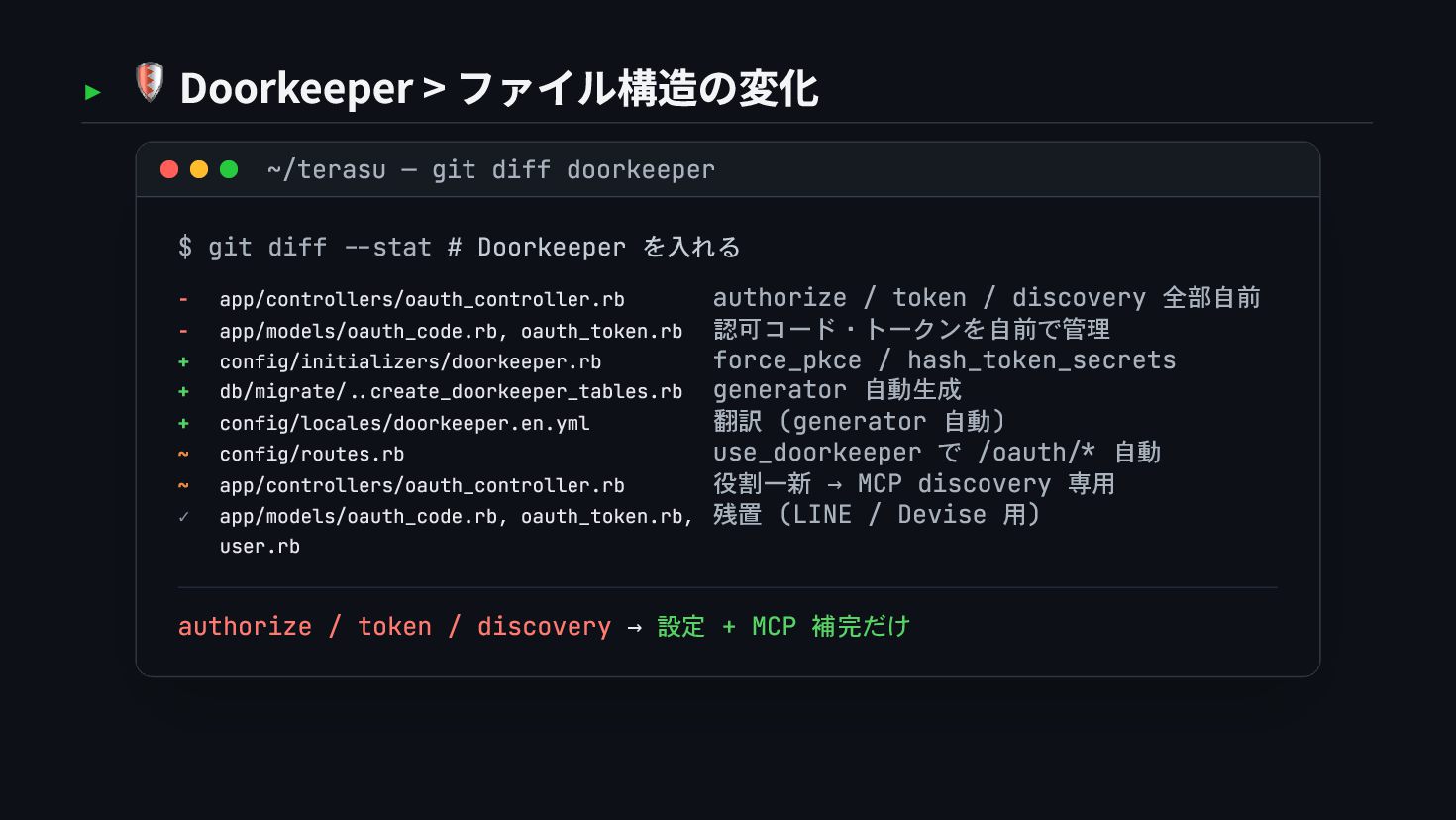
  36. ▸ 🛡 Doorkeeper > ファイル構造の変化 ~/terasu — git diff doorkeeper

    $ git diff --stat # Doorkeeper を入れる - app/controllers/oauth_controller.rb authorize / token / discovery 全部自前 - app/models/oauth_code.rb, oauth_token.rb 認可コード・トークンを自前で管理 + config/initializers/doorkeeper.rb force_pkce / hash_token_secrets + db/migrate/..create_doorkeeper_tables.rb generator 自動生成 + config/locales/doorkeeper.en.yml 翻訳 (generator 自動) ~ config/routes.rb use_doorkeeper で /oauth/* 自動 ~ app/controllers/oauth_controller.rb 役割一新 → MCP discovery 専用 ✓ app/models/oauth_code.rb, oauth_token.rb, user.rb 残置 (LINE / Devise 用) authorize / token / discovery → 設定 + MCP 補完だけ
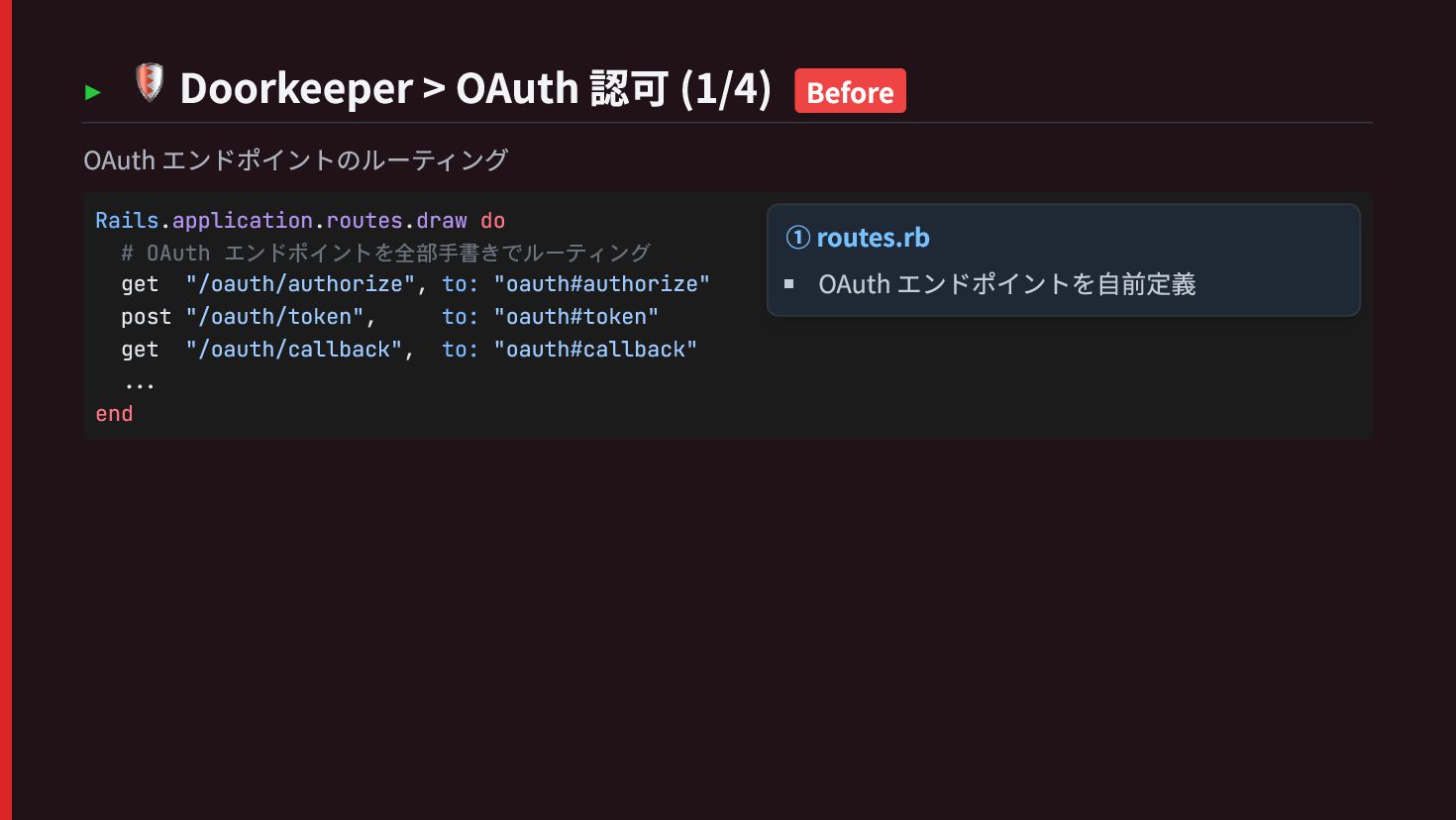
  37. ▸ 🛡 Doorkeeper > OAuth 認可 (1/4) Before OAuth エンドポイントのルーティング

    Rails.application.routes.draw do # OAuth エンドポイントを全部手書きでルーティング get "/oauth/authorize", to: "oauth#authorize" post "/oauth/token", to: "oauth#token" get "/oauth/callback", to: "oauth#callback" ... end ① routes.rb OAuth エンドポイントを自前定義
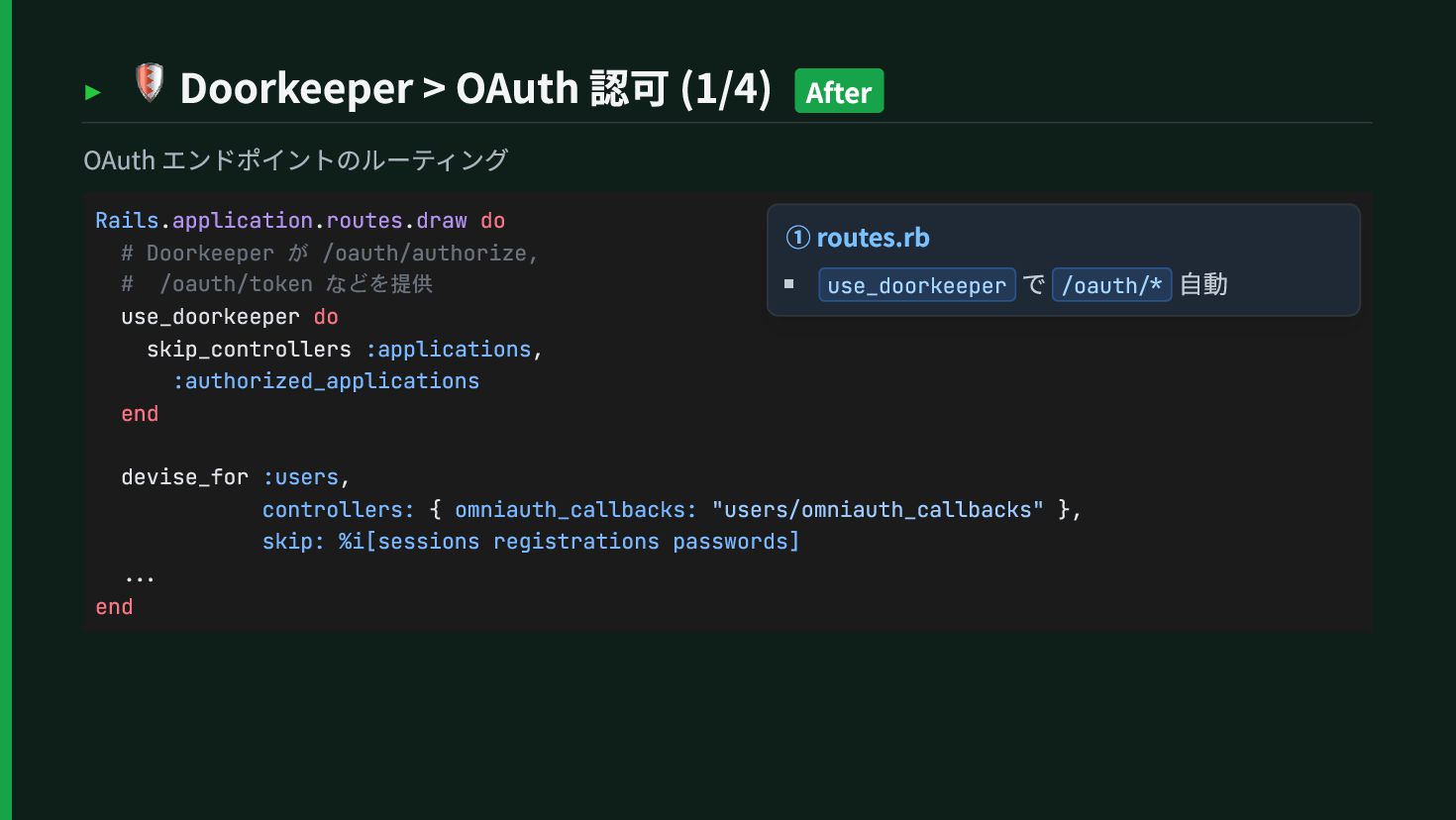
  38. ▸ 🛡 Doorkeeper > OAuth 認可 (1/4) After OAuth エンドポイントのルーティング

    Rails.application.routes.draw do # Doorkeeper が /oauth/authorize, # /oauth/token などを提供 use_doorkeeper do skip_controllers :applications, :authorized_applications end devise_for :users, controllers: { omniauth_callbacks: "users/omniauth_callbacks" }, skip: %i[sessions registrations passwords] ... end ① routes.rb use_doorkeeper で /oauth/* 自動
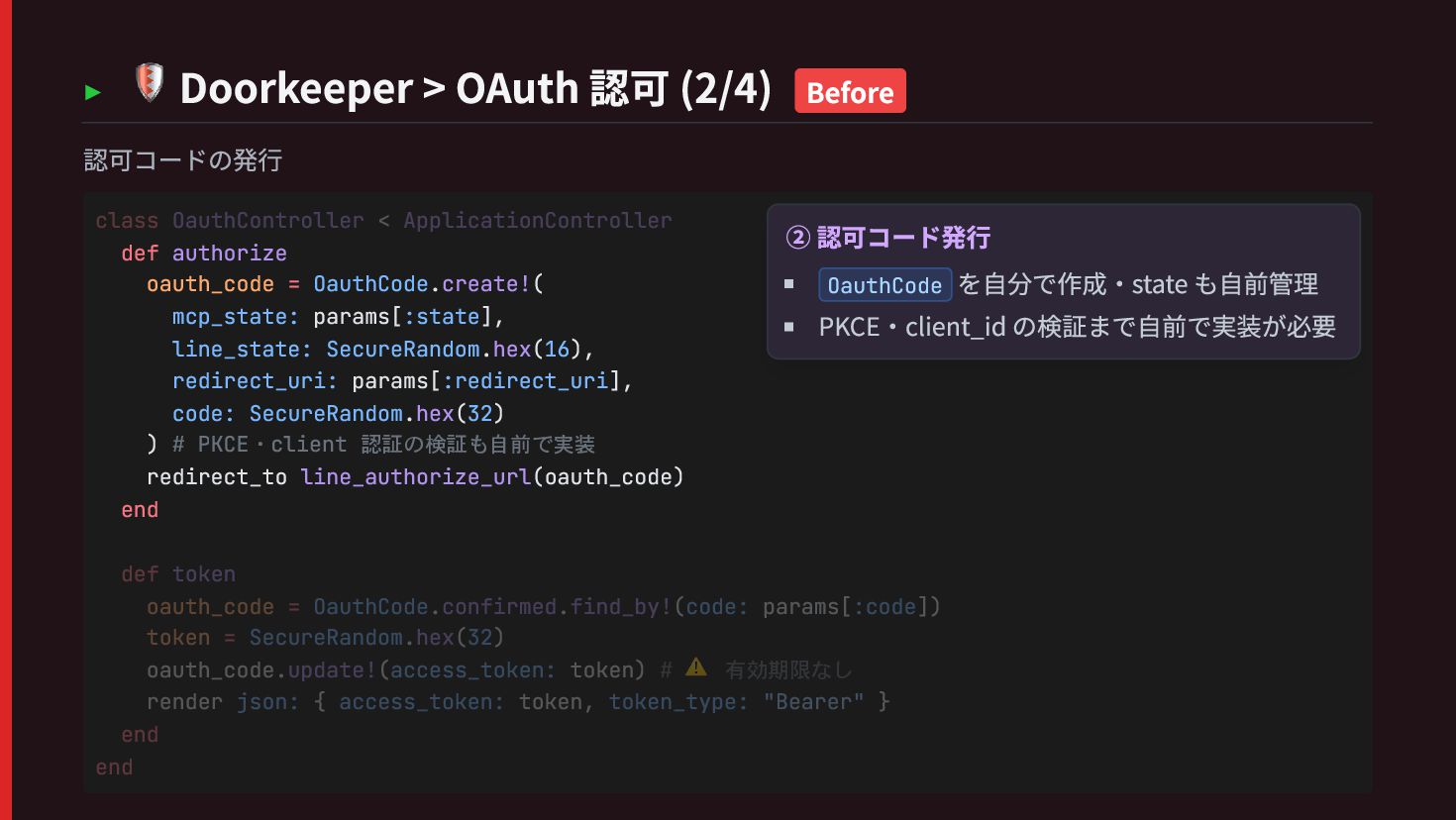
  39. ▸ 🛡 Doorkeeper > OAuth 認可 (2/4) Before 認可コードの発行 def

    authorize oauth_code = OauthCode.create!( mcp_state: params[:state], line_state: SecureRandom.hex(16), redirect_uri: params[:redirect_uri], code: SecureRandom.hex(32) ) # PKCE・client 認証の検証も自前で実装 redirect_to line_authorize_url(oauth_code) end class OauthController < ApplicationController def token oauth_code = OauthCode.confirmed.find_by!(code: params[:code]) token = SecureRandom.hex(32) oauth_code.update!(access_token: token) # ⚠️ 有効期限なし render json: { access_token: token, token_type: "Bearer" } end end ② 認可コード発行 OauthCode を自分で作成・state も自前管理 PKCE・client_id の検証まで自前で実装が必要
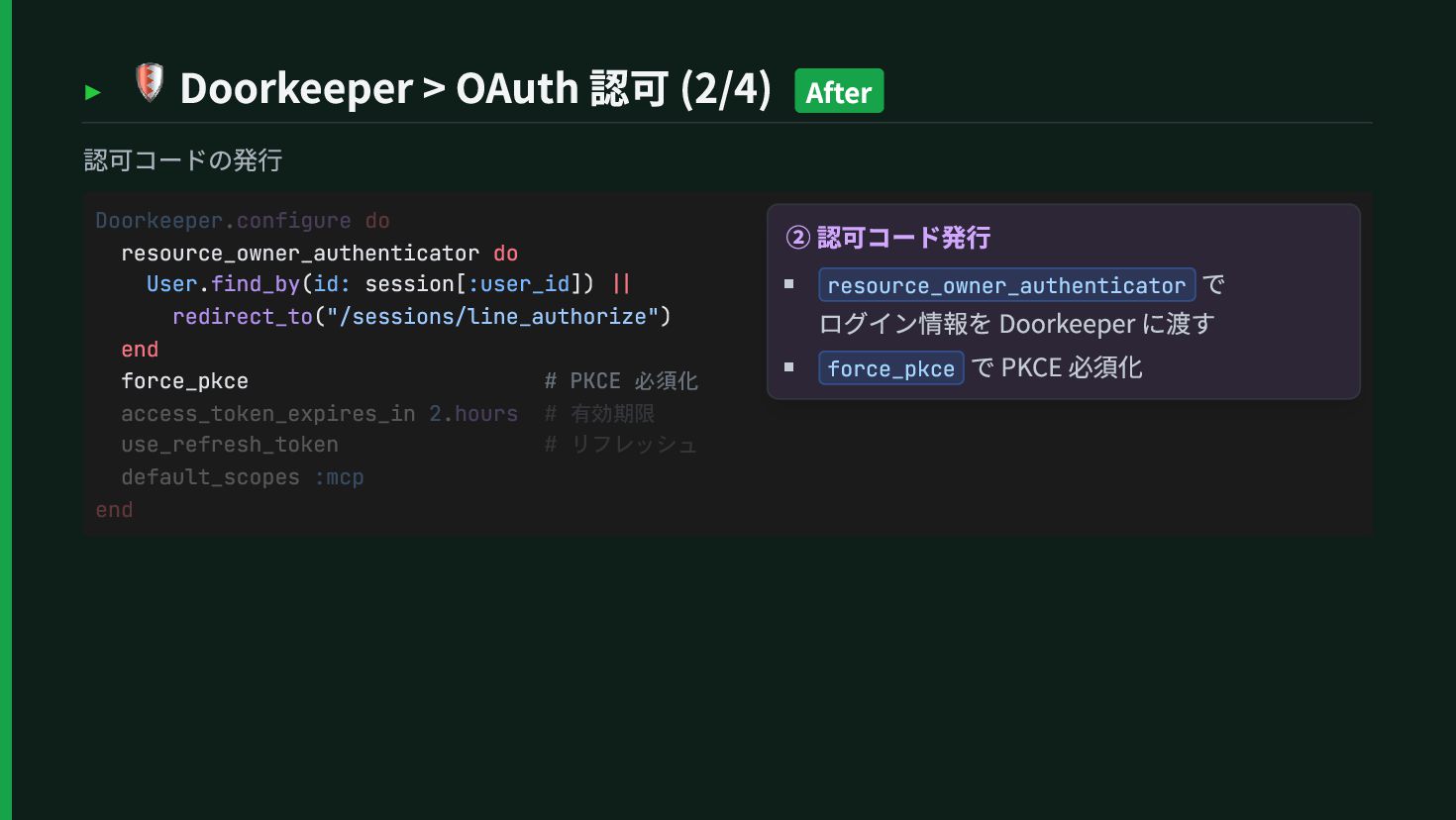
  40. ▸ 🛡 Doorkeeper > OAuth 認可 (2/4) After 認可コードの発行 resource_owner_authenticator

    do User.find_by(id: session[:user_id]) || redirect_to("/sessions/line_authorize") end force_pkce # PKCE 必須化 Doorkeeper.configure do access_token_expires_in 2.hours # 有効期限 use_refresh_token # リフレッシュ default_scopes :mcp end ② 認可コード発行 resource_owner_authenticator で ログイン情報を Doorkeeper に渡す force_pkce で PKCE 必須化
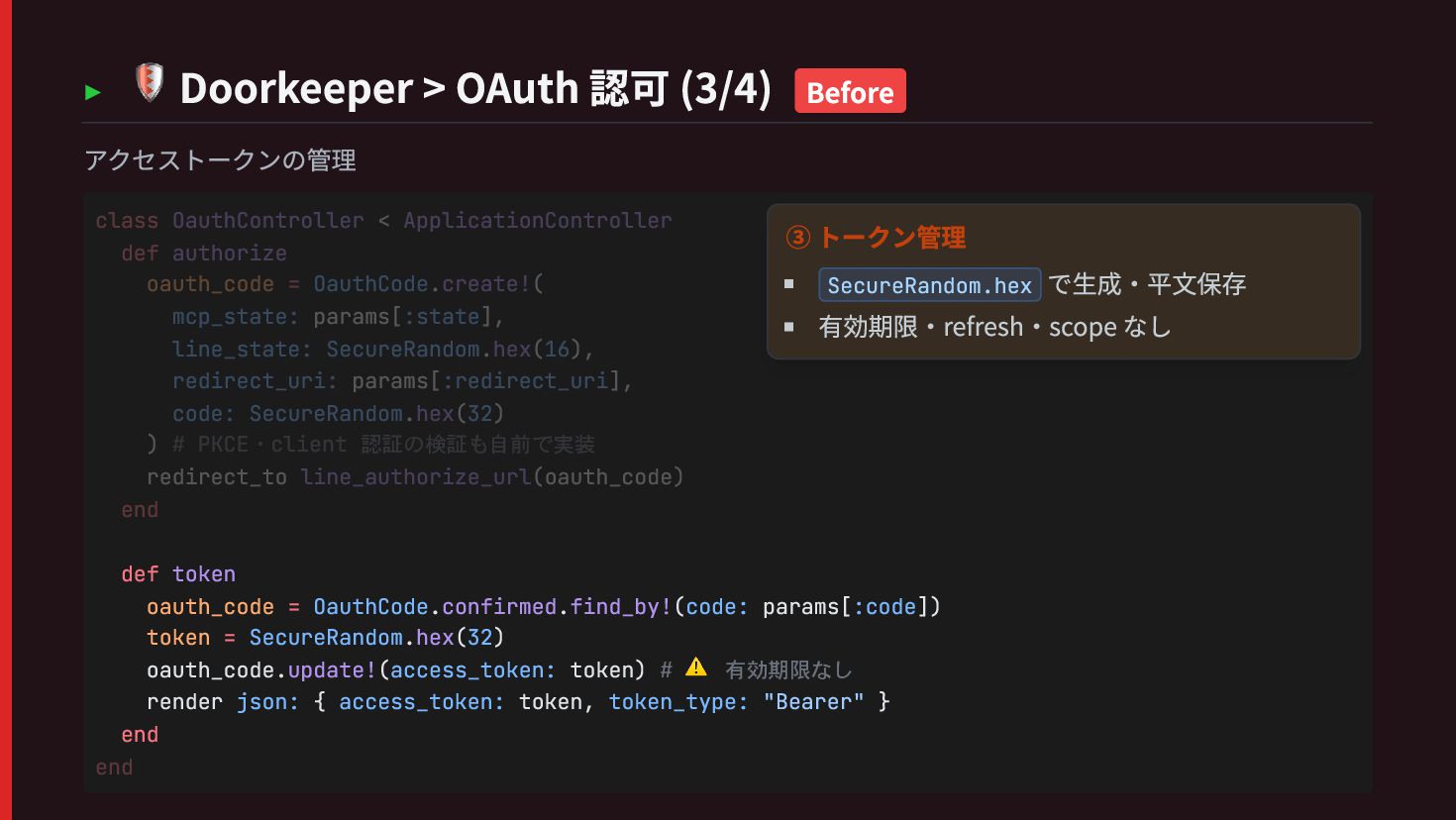
  41. ▸ 🛡 Doorkeeper > OAuth 認可 (3/4) Before アクセストークンの管理 def

    token oauth_code = OauthCode.confirmed.find_by!(code: params[:code]) token = SecureRandom.hex(32) oauth_code.update!(access_token: token) # ⚠️ 有効期限なし render json: { access_token: token, token_type: "Bearer" } end class OauthController < ApplicationController def authorize oauth_code = OauthCode.create!( mcp_state: params[:state], line_state: SecureRandom.hex(16), redirect_uri: params[:redirect_uri], code: SecureRandom.hex(32) ) # PKCE・client 認証の検証も自前で実装 redirect_to line_authorize_url(oauth_code) end end ③ トークン管理 SecureRandom.hex で生成・平文保存 有効期限・refresh・scope なし
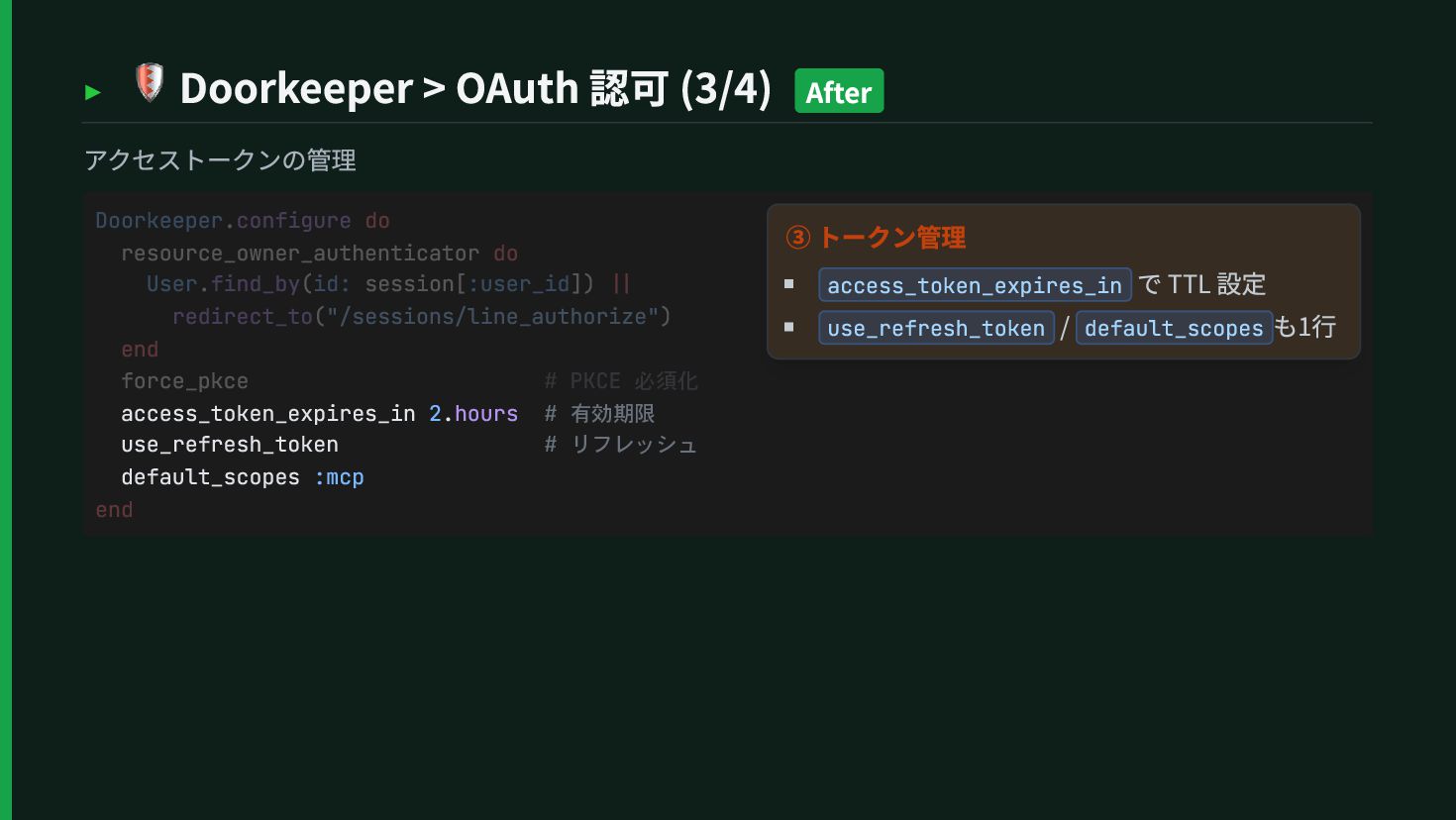
  42. ▸ 🛡 Doorkeeper > OAuth 認可 (3/4) After アクセストークンの管理 access_token_expires_in

    2.hours # 有効期限 use_refresh_token # リフレッシュ default_scopes :mcp Doorkeeper.configure do resource_owner_authenticator do User.find_by(id: session[:user_id]) || redirect_to("/sessions/line_authorize") end force_pkce # PKCE 必須化 end ③ トークン管理 access_token_expires_in で TTL 設定 use_refresh_token / default_scopes も1行
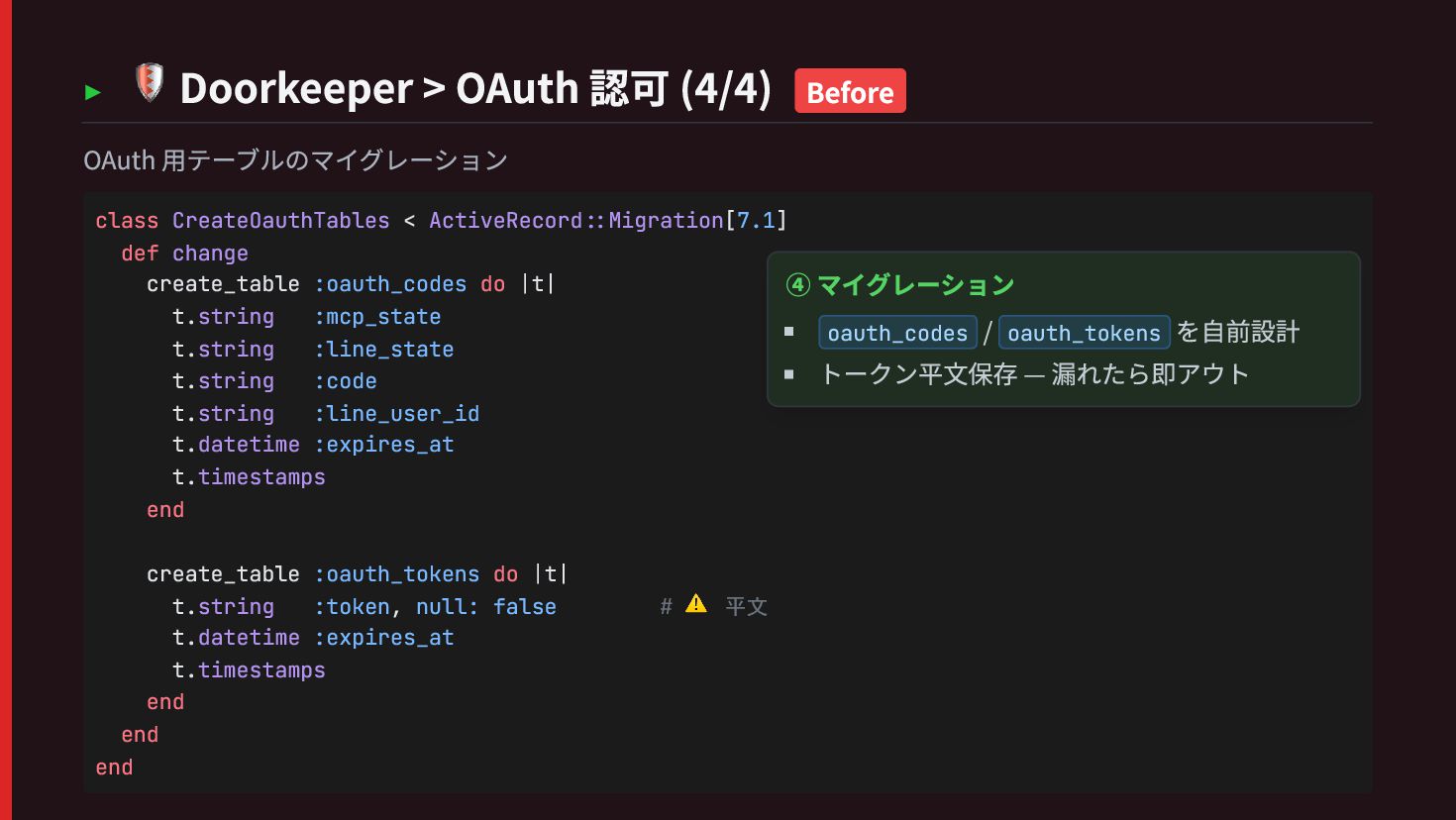
  43. ▸ 🛡 Doorkeeper > OAuth 認可 (4/4) Before OAuth 用テーブルのマイグレーション

    class CreateOauthTables < ActiveRecord::Migration[7.1] def change create_table :oauth_codes do |t| t.string :mcp_state t.string :line_state t.string :code t.string :line_user_id t.datetime :expires_at t.timestamps end create_table :oauth_tokens do |t| t.string :token, null: false # ⚠️ 平文 t.datetime :expires_at t.timestamps end end end ④ マイグレーション oauth_codes / oauth_tokens を自前設計 トークン平文保存 — 漏れたら即アウト
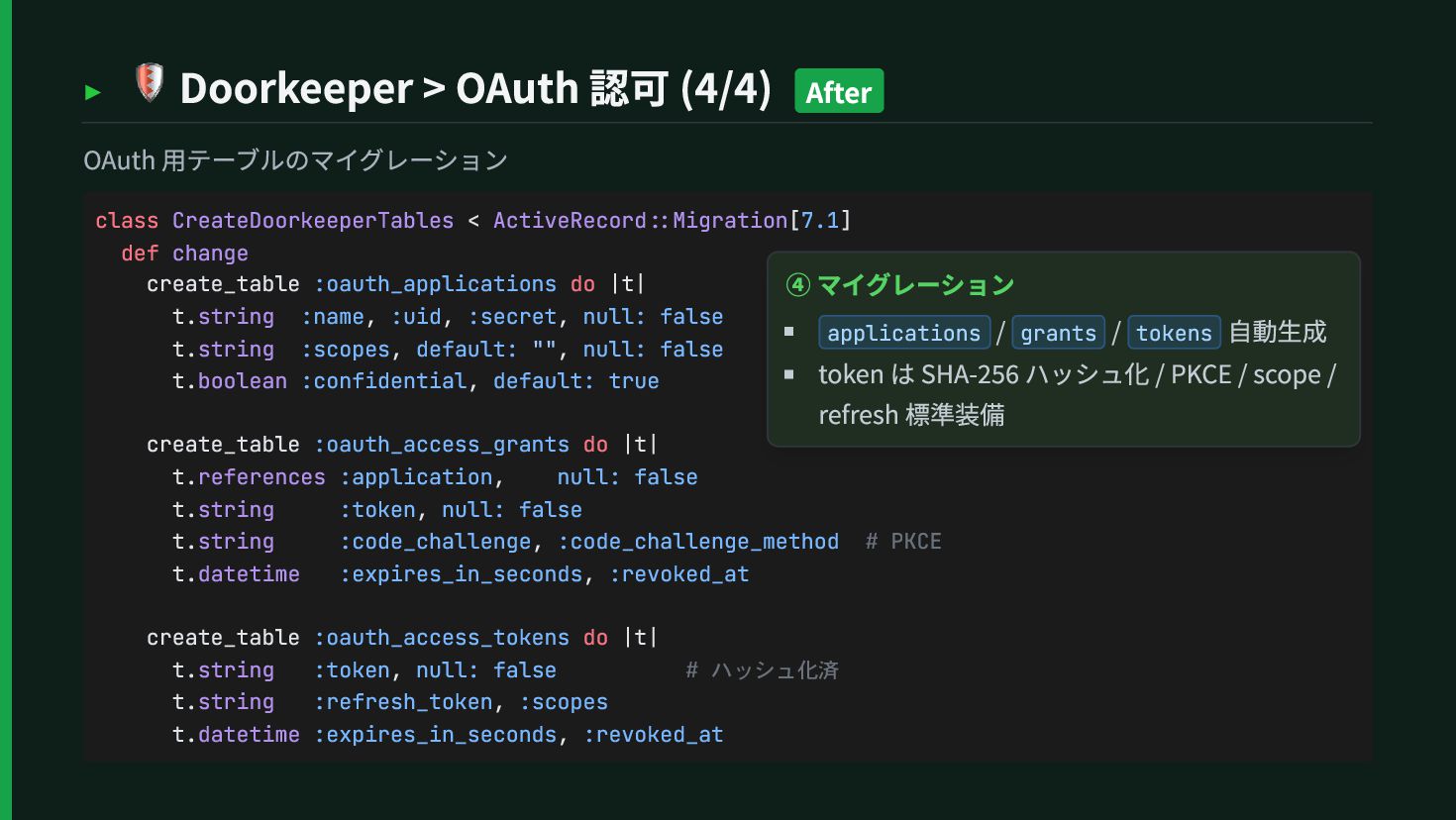
  44. ▸ 🛡 Doorkeeper > OAuth 認可 (4/4) After OAuth 用テーブルのマイグレーション

    class CreateDoorkeeperTables < ActiveRecord::Migration[7.1] def change create_table :oauth_applications do |t| t.string :name, :uid, :secret, null: false t.string :scopes, default: "", null: false t.boolean :confidential, default: true create_table :oauth_access_grants do |t| t.references :application, null: false t.string :token, null: false t.string :code_challenge, :code_challenge_method # PKCE t.datetime :expires_in_seconds, :revoked_at create_table :oauth_access_tokens do |t| t.string :token, null: false # ハッシュ化済 t.string :refresh_token, :scopes t.datetime :expires_in_seconds, :revoked_at ④ マイグレーション applications / grants / tokens 自動生成 token は SHA-256 ハッシュ化 / PKCE / scope / refresh 標準装備
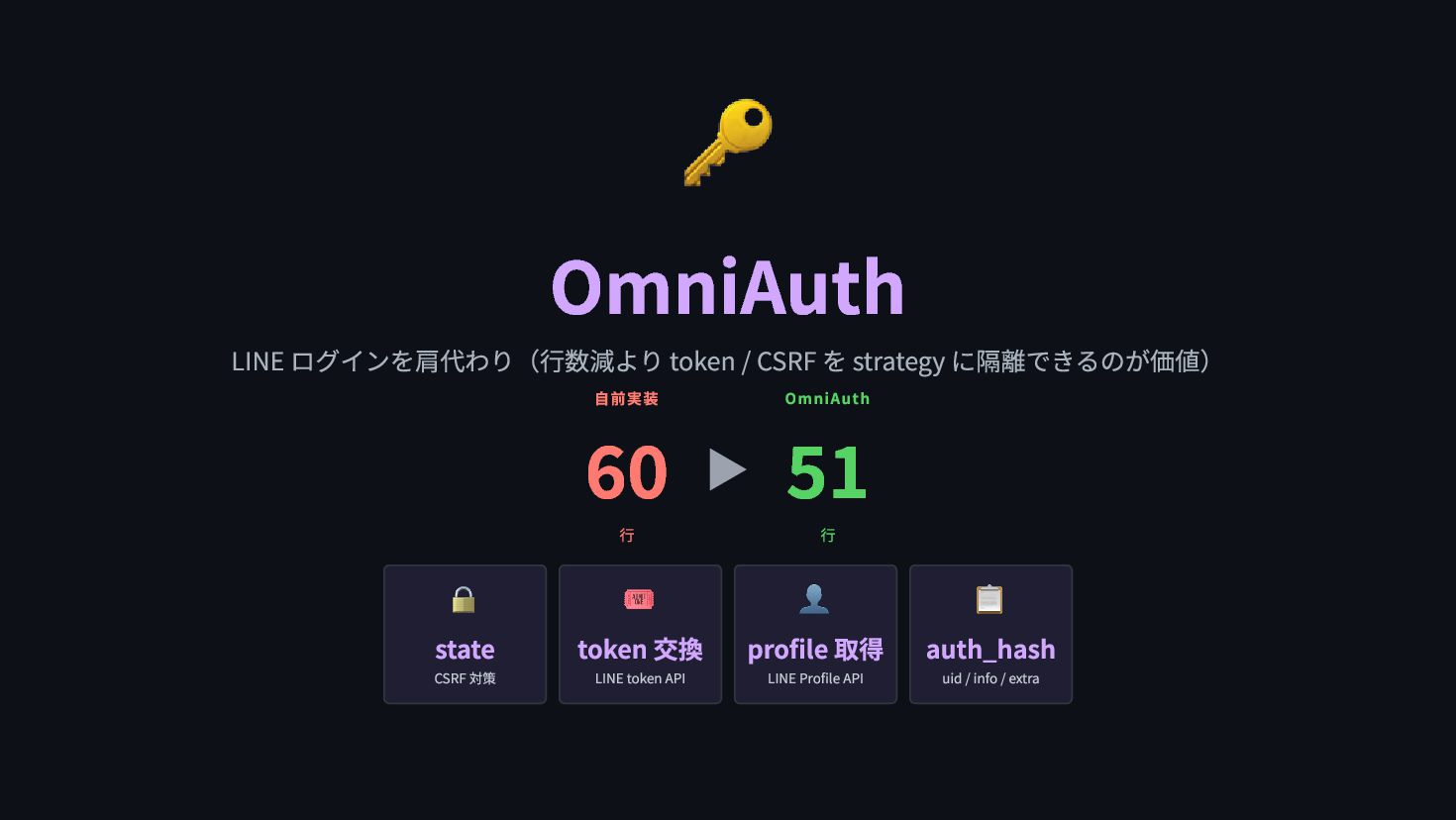
  45. 🔑 OmniAuth LINE ログインを肩代わり(行数減より token / CSRF を strategy に隔離できるのが価値)

    自前実装 60 行 ▶ OmniAuth 51 行 🔒 state CSRF 対策 🎟 token 交換 LINE token API 👤 profile 取得 LINE Profile API 📋 auth_hash uid / info / extra
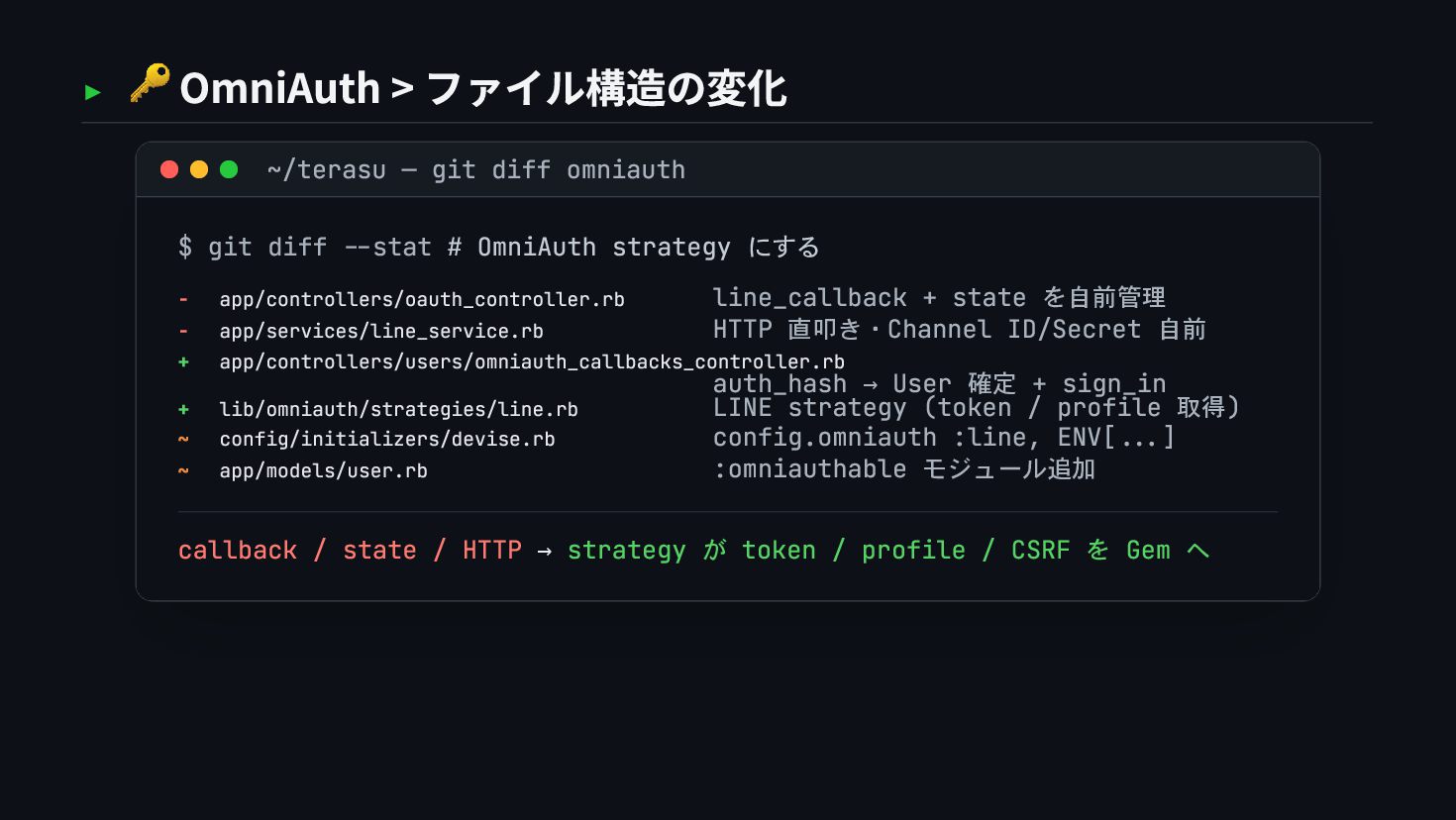
  46. ▸ 🔑 OmniAuth > ファイル構造の変化 ~/terasu — git diff omniauth

    $ git diff --stat # OmniAuth strategy にする - app/controllers/oauth_controller.rb line_callback + state を自前管理 - app/services/line_service.rb HTTP 直叩き・Channel ID/Secret 自前 + app/controllers/users/omniauth_callbacks_controller.rb auth_hash → User 確定 + sign_in + lib/omniauth/strategies/line.rb LINE strategy (token / profile 取得) ~ config/initializers/devise.rb config.omniauth :line, ENV[...] ~ app/models/user.rb :omniauthable モジュール追加 callback / state / HTTP → strategy が token / profile / CSRF を Gem へ
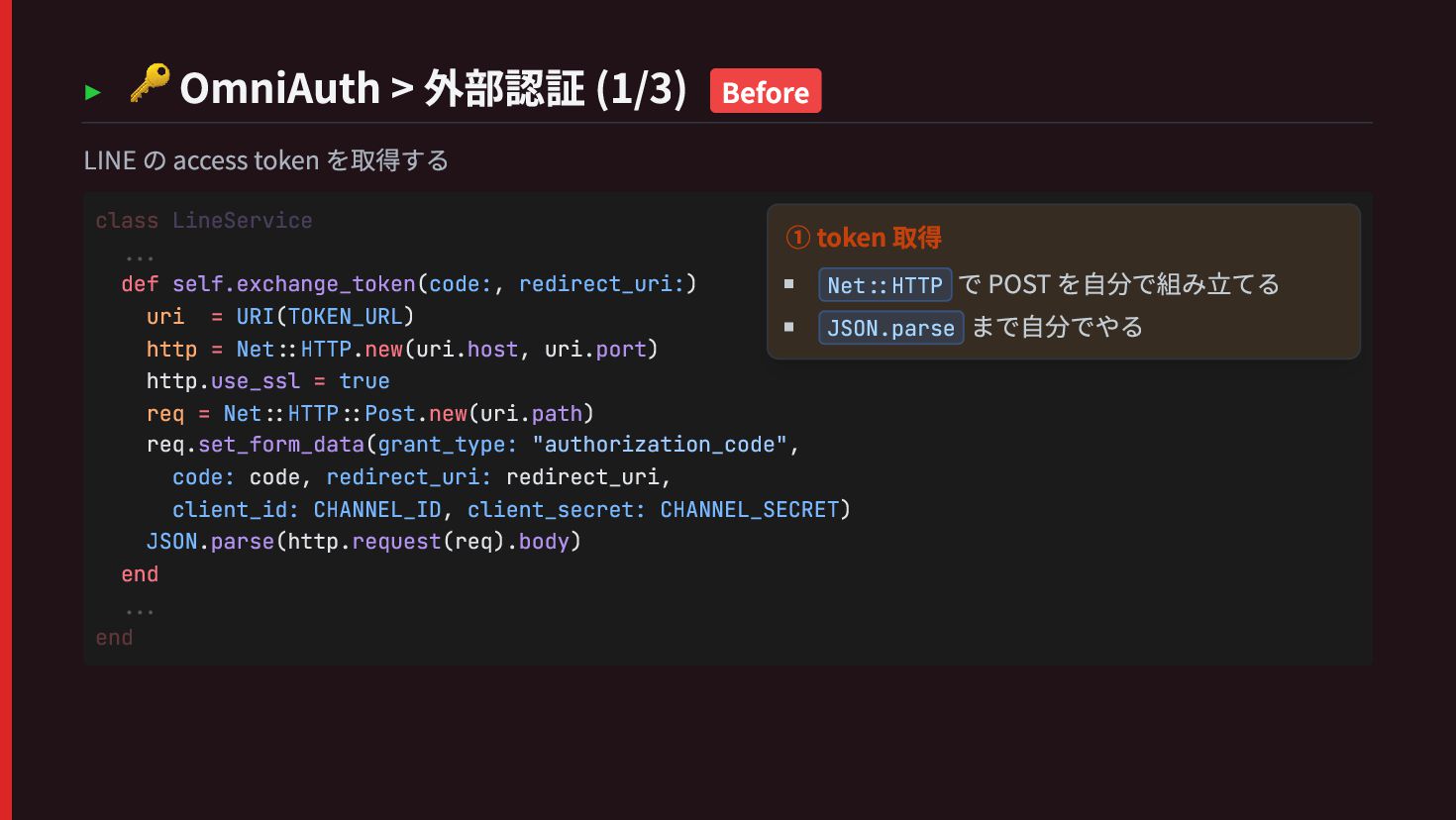
  47. ▸ 🔑 OmniAuth > 外部認証 (1/3) Before LINE の access

    token を取得する def self.exchange_token(code:, redirect_uri:) uri = URI(TOKEN_URL) http = Net::HTTP.new(uri.host, uri.port) http.use_ssl = true req = Net::HTTP::Post.new(uri.path) req.set_form_data(grant_type: "authorization_code", code: code, redirect_uri: redirect_uri, client_id: CHANNEL_ID, client_secret: CHANNEL_SECRET) JSON.parse(http.request(req).body) end class LineService ... ... end ① token 取得 Net::HTTP で POST を自分で組み立てる JSON.parse まで自分でやる
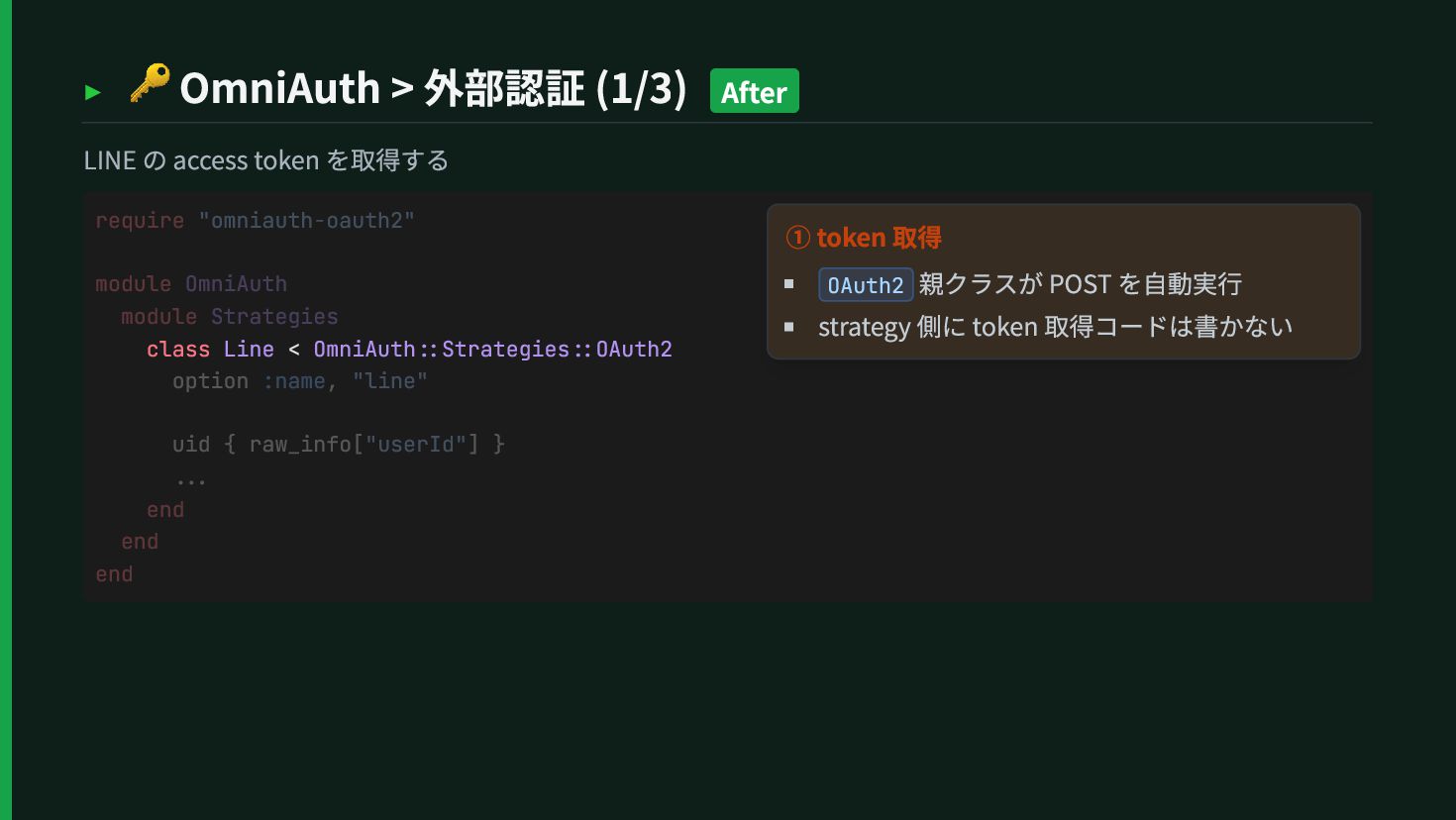
  48. ▸ 🔑 OmniAuth > 外部認証 (1/3) After LINE の access

    token を取得する class Line < OmniAuth::Strategies::OAuth2 require "omniauth-oauth2" module OmniAuth module Strategies option :name, "line" uid { raw_info["userId"] } ... end end end ① token 取得 OAuth2 親クラスが POST を自動実行 strategy 側に token 取得コードは書かない
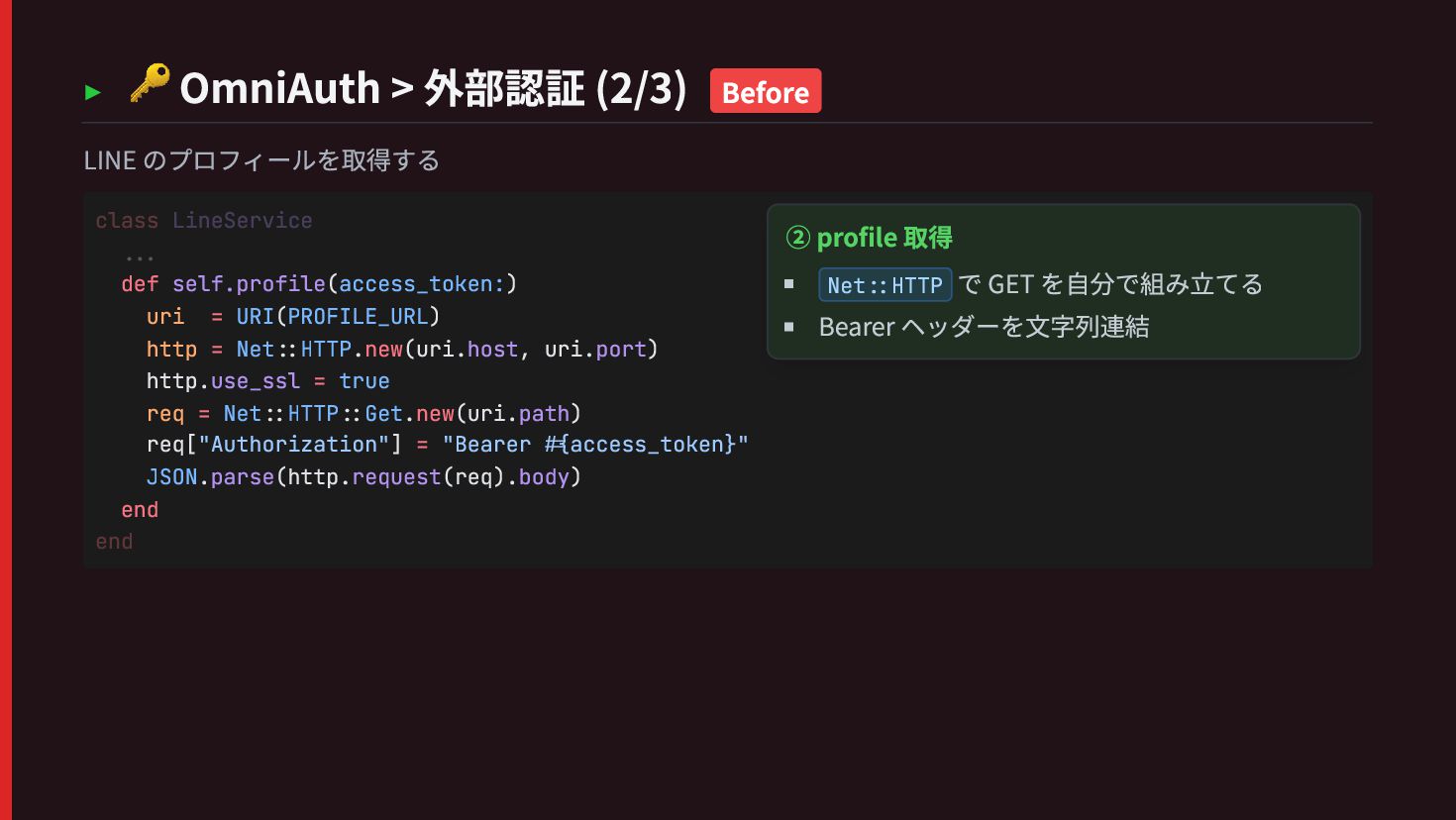
  49. ▸ 🔑 OmniAuth > 外部認証 (2/3) Before LINE のプロフィールを取得する def

    self.profile(access_token:) uri = URI(PROFILE_URL) http = Net::HTTP.new(uri.host, uri.port) http.use_ssl = true req = Net::HTTP::Get.new(uri.path) req["Authorization"] = "Bearer #{access_token}" JSON.parse(http.request(req).body) end class LineService ... end ② profile 取得 Net::HTTP で GET を自分で組み立てる Bearer ヘッダーを文字列連結
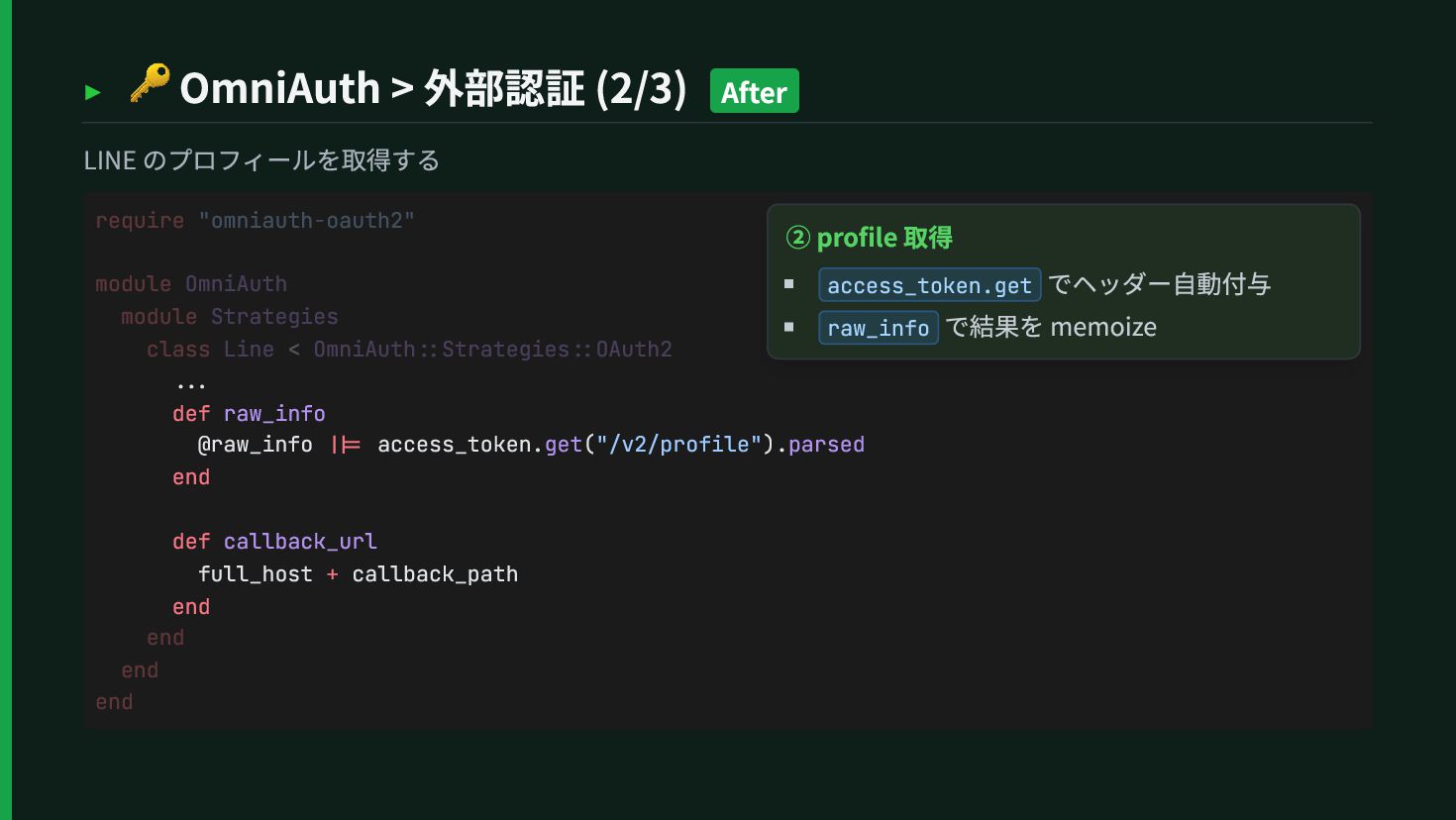
  50. ▸ 🔑 OmniAuth > 外部認証 (2/3) After LINE のプロフィールを取得する ...

    def raw_info @raw_info ||= access_token.get("/v2/profile").parsed end def callback_url full_host + callback_path end require "omniauth-oauth2" module OmniAuth module Strategies class Line < OmniAuth::Strategies::OAuth2 end end end ② profile 取得 access_token.get でヘッダー自動付与 raw_info で結果を memoize
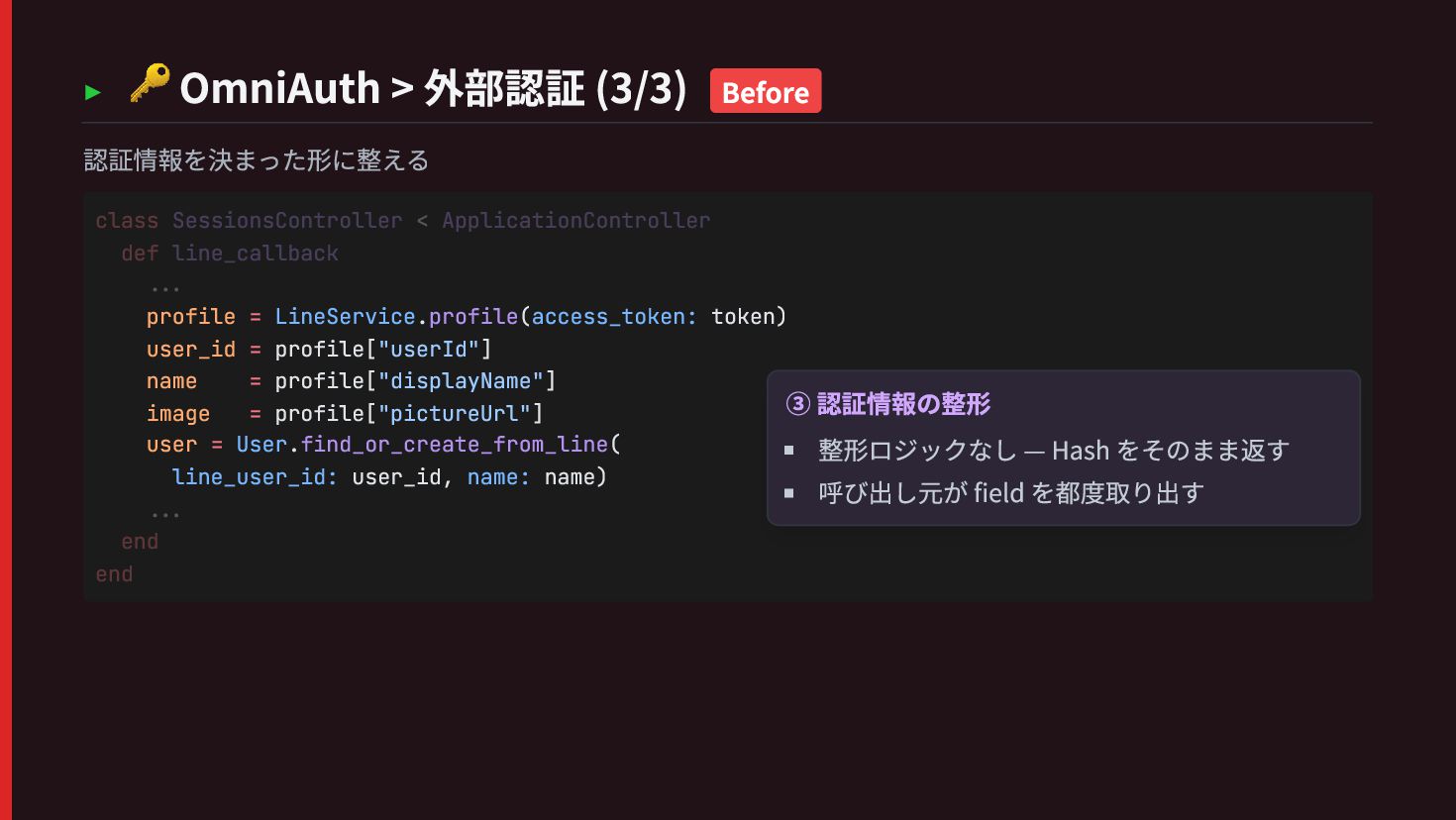
  51. ▸ 🔑 OmniAuth > 外部認証 (3/3) Before 認証情報を決まった形に整える profile =

    LineService.profile(access_token: token) user_id = profile["userId"] name = profile["displayName"] image = profile["pictureUrl"] user = User.find_or_create_from_line( line_user_id: user_id, name: name) class SessionsController < ApplicationController def line_callback ... ... end end ③ 認証情報の整形 整形ロジックなし — Hash をそのまま返す 呼び出し元が field を都度取り出す
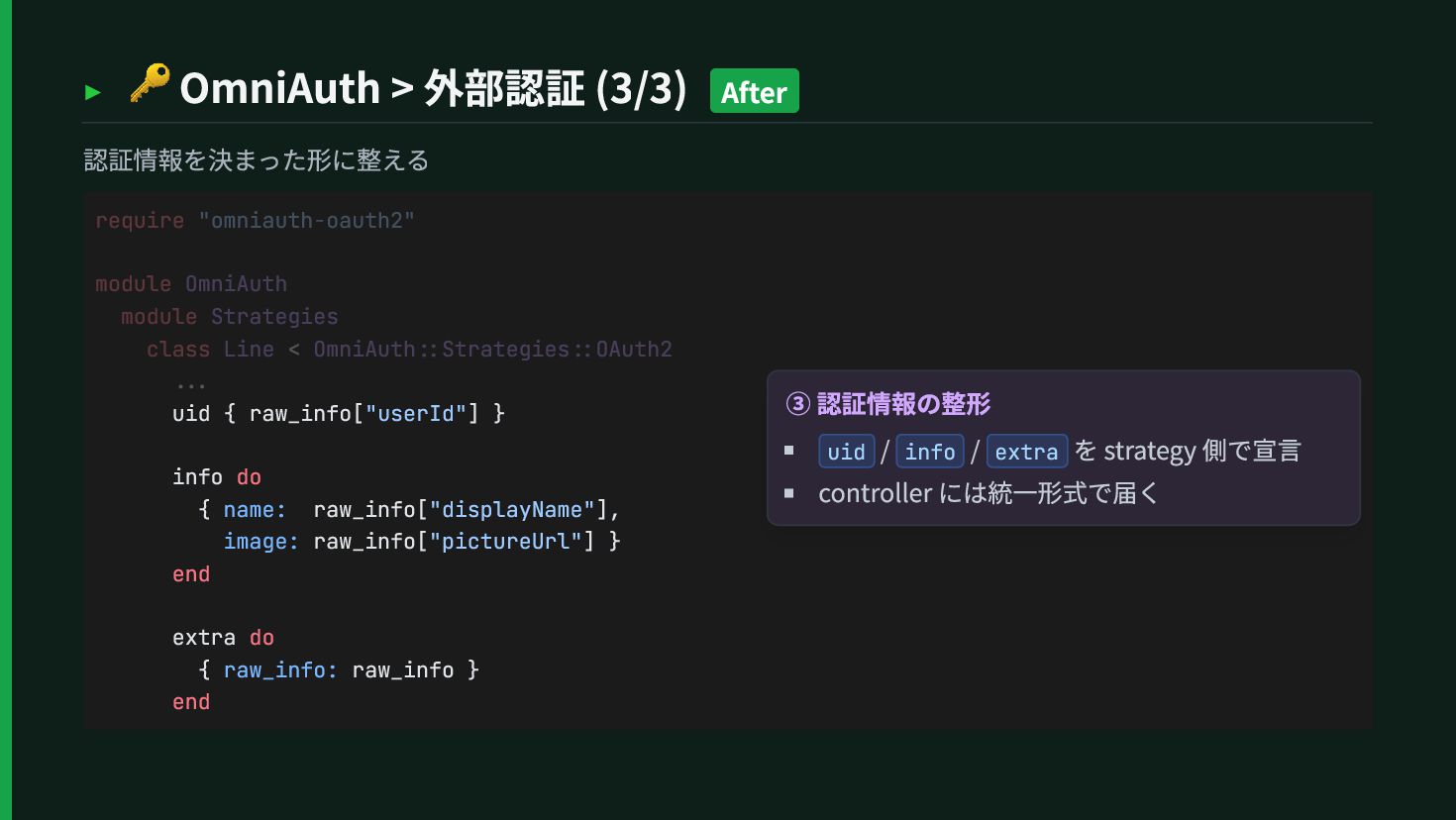
  52. ▸ 🔑 OmniAuth > 外部認証 (3/3) After 認証情報を決まった形に整える uid {

    raw_info["userId"] } info do { name: raw_info["displayName"], image: raw_info["pictureUrl"] } end extra do { raw_info: raw_info } end require "omniauth-oauth2" module OmniAuth module Strategies class Line < OmniAuth::Strategies::OAuth2 ... ③ 認証情報の整形 uid / info / extra を strategy 側で宣言 controller には統一形式で届く
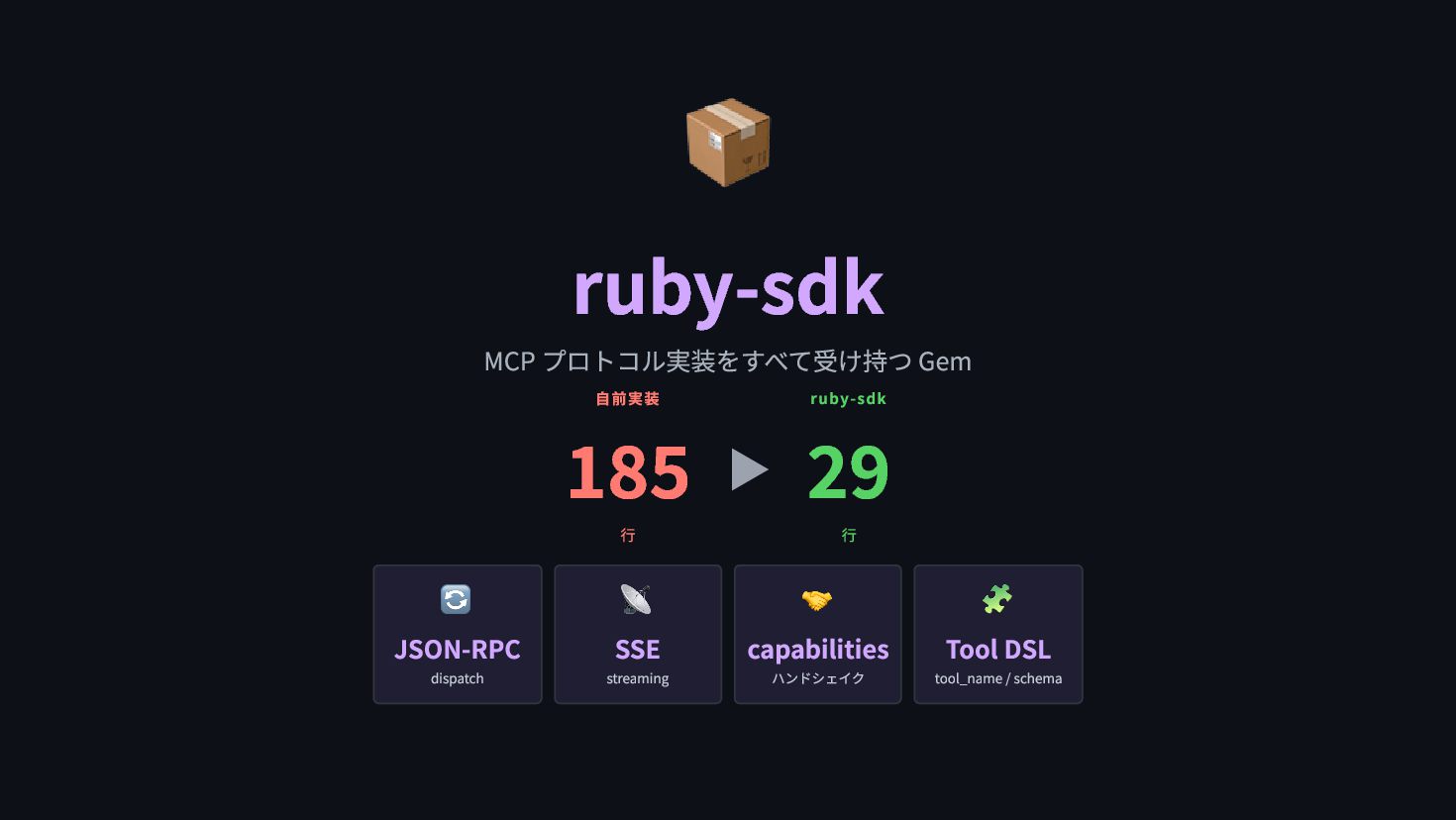
  53. 📦 ruby-sdk MCP プロトコル実装をすべて受け持つ Gem 自前実装 185 行 ▶ ruby-sdk

    29 行 🔄 JSON-RPC dispatch 📡 SSE streaming 🤝 capabilities ハンドシェイク 🧩 Tool DSL tool_name / schema
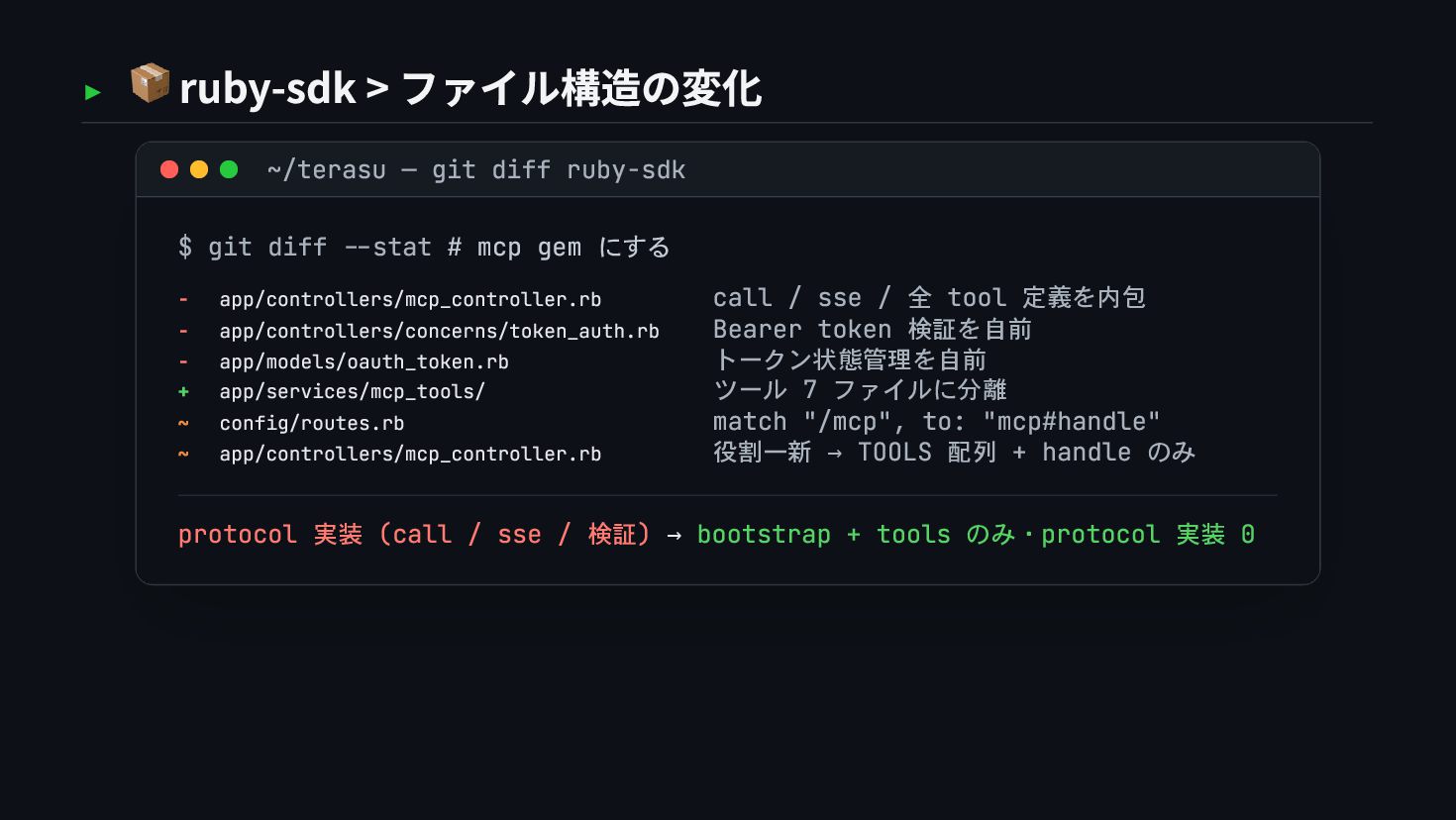
  54. ▸ 📦 ruby-sdk > ファイル構造の変化 ~/terasu — git diff ruby-sdk

    $ git diff --stat # mcp gem にする - app/controllers/mcp_controller.rb call / sse / 全 tool 定義を内包 - app/controllers/concerns/token_auth.rb Bearer token 検証を自前 - app/models/oauth_token.rb トークン状態管理を自前 + app/services/mcp_tools/ ツール 7 ファイルに分離 ~ config/routes.rb match "/mcp", to: "mcp#handle" ~ app/controllers/mcp_controller.rb 役割一新 → TOOLS 配列 + handle のみ protocol 実装 (call / sse / 検証) → bootstrap + tools のみ・protocol 実装 0
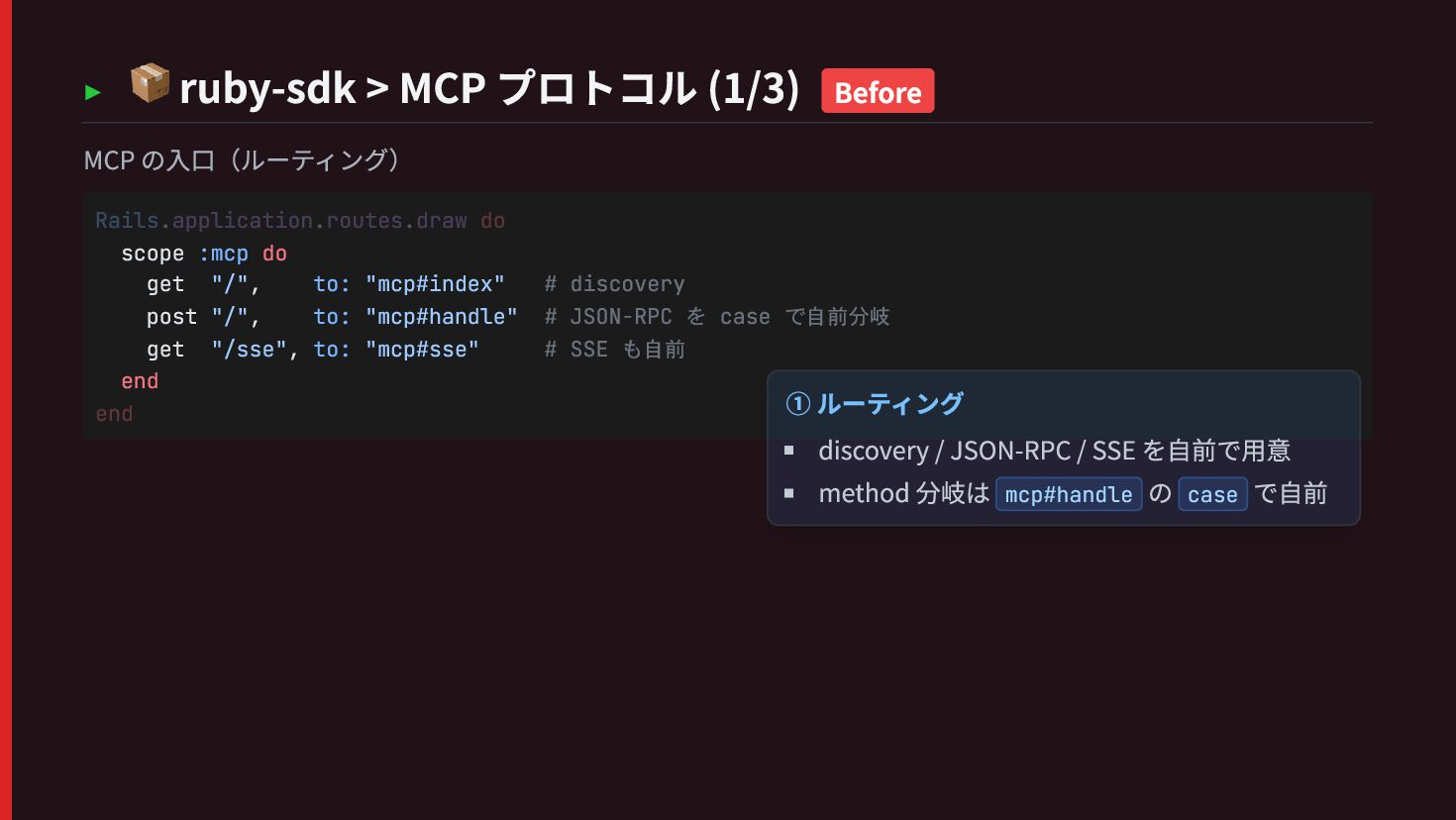
  55. ▸ 📦 ruby-sdk > MCP プロトコル (1/3) Before MCP の入口(ルーティング)

    scope :mcp do get "/", to: "mcp#index" # discovery post "/", to: "mcp#handle" # JSON-RPC を case で自前分岐 get "/sse", to: "mcp#sse" # SSE も自前 end Rails.application.routes.draw do end ① ルーティング discovery / JSON-RPC / SSE を自前で用意 method 分岐は mcp#handle の case で自前
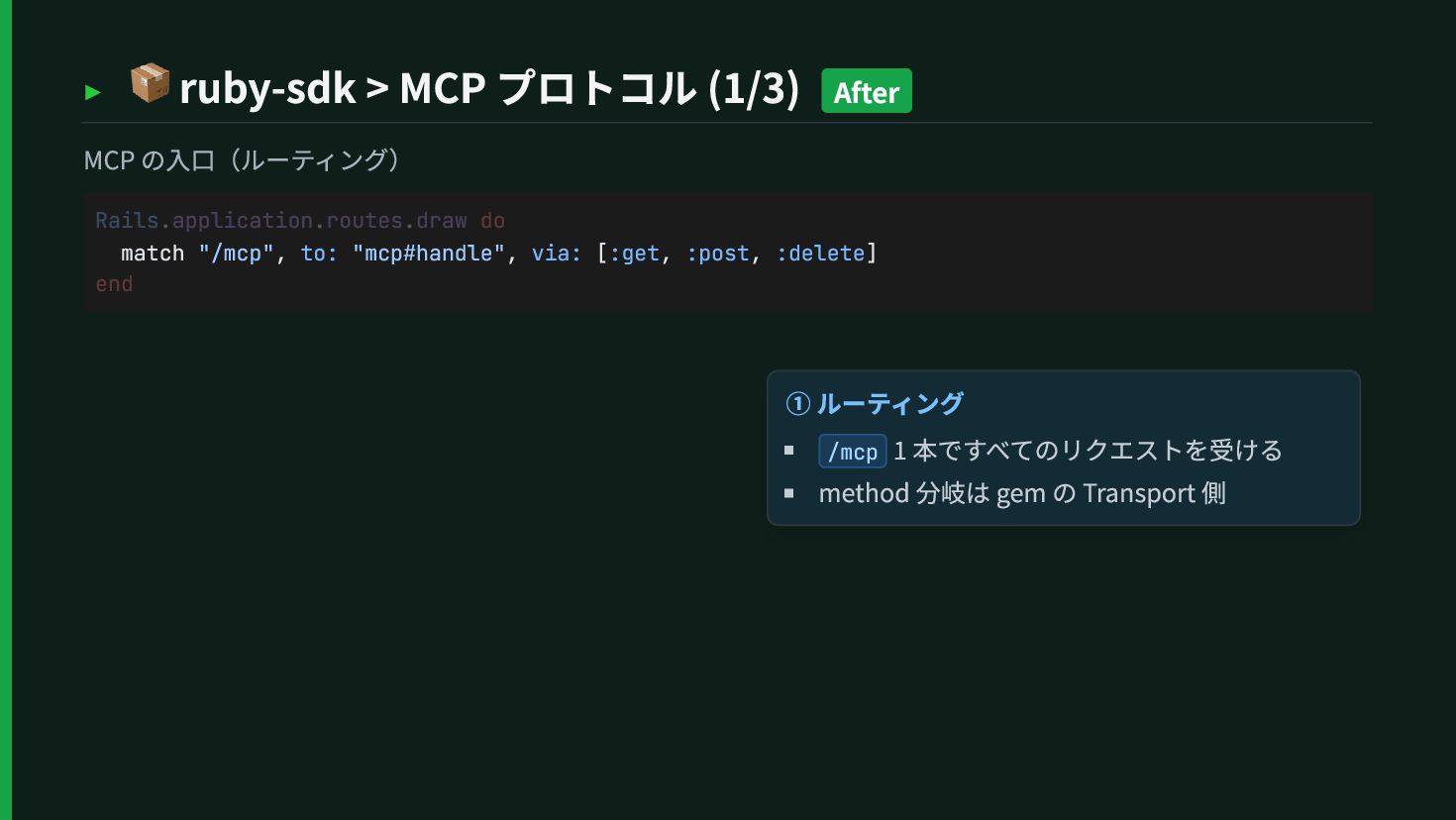
  56. ▸ 📦 ruby-sdk > MCP プロトコル (1/3) After MCP の入口(ルーティング)

    match "/mcp", to: "mcp#handle", via: [:get, :post, :delete] Rails.application.routes.draw do end ① ルーティング /mcp 1 本ですべてのリクエストを受ける method 分岐は gem の Transport 側
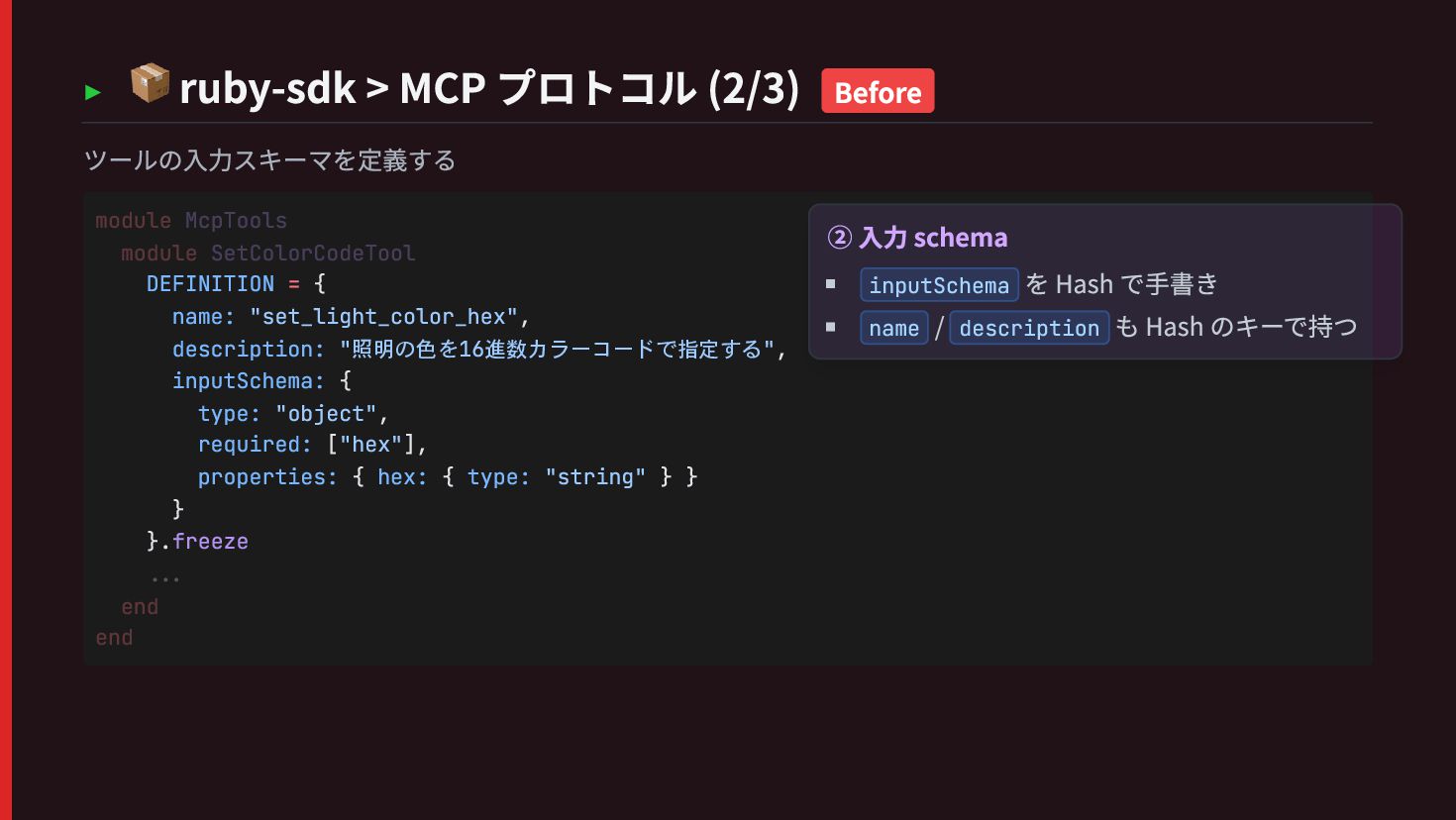
  57. ▸ 📦 ruby-sdk > MCP プロトコル (2/3) Before ツールの入力スキーマを定義する DEFINITION
    = { name: "set_light_color_hex", description: "照明の色を16進数カラーコードで指定する", inputSchema: { type: "object", required: ["hex"], properties: { hex: { type: "string" } } } }.freeze module McpTools module SetColorCodeTool ... end end ② 入力 schema inputSchema を Hash で手書き name / description も Hash のキーで持つ
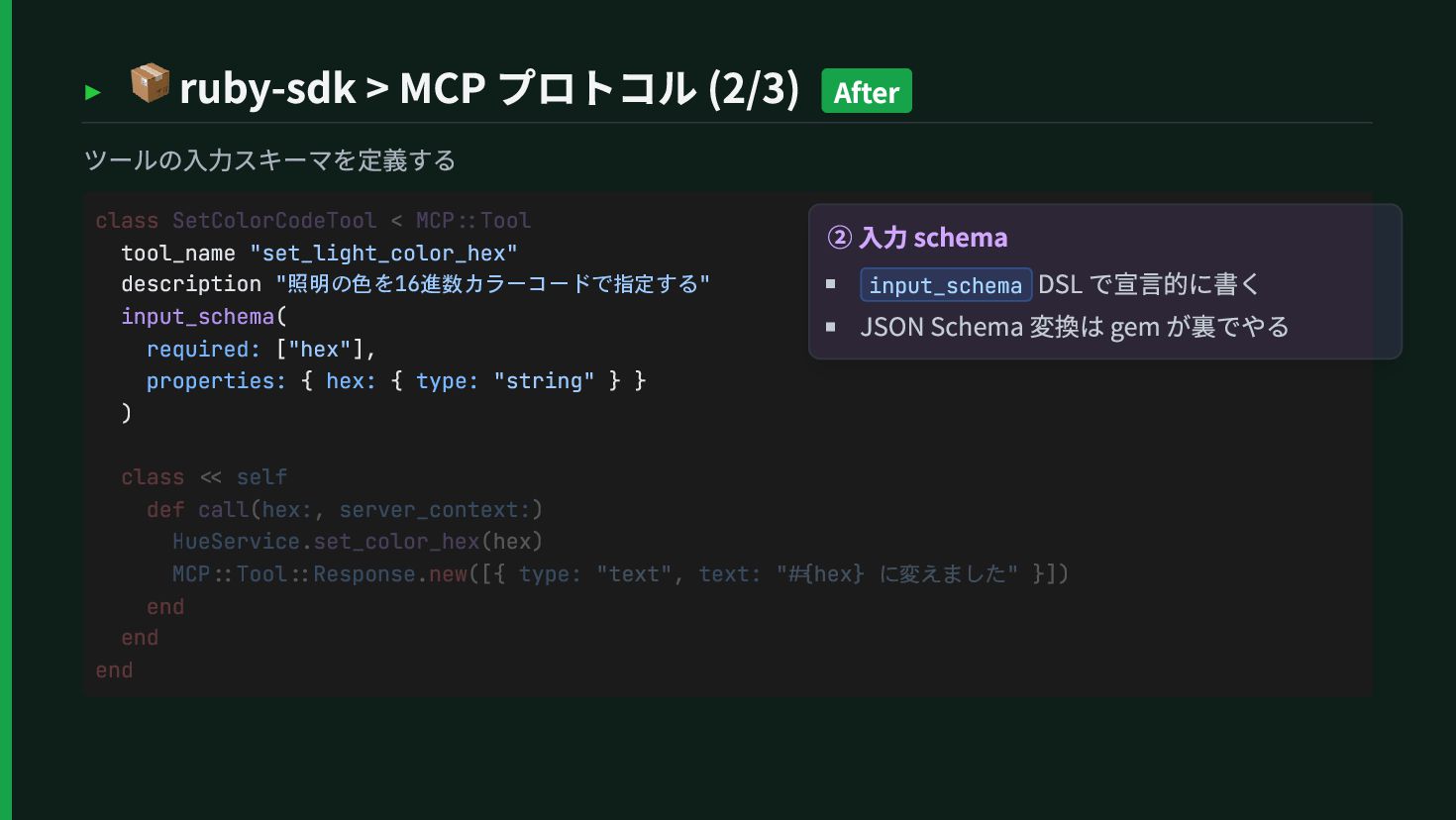
  58. ▸ 📦 ruby-sdk > MCP プロトコル (2/3) After ツールの入力スキーマを定義する tool_name

    "set_light_color_hex" description "照明の色を16進数カラーコードで指定する" input_schema( required: ["hex"], properties: { hex: { type: "string" } } ) class SetColorCodeTool < MCP::Tool class << self def call(hex:, server_context:) HueService.set_color_hex(hex) MCP::Tool::Response.new([{ type: "text", text: "#{hex} に変えました" }]) end end end ② 入力 schema input_schema DSL で宣言的に書く JSON Schema 変換は gem が裏でやる
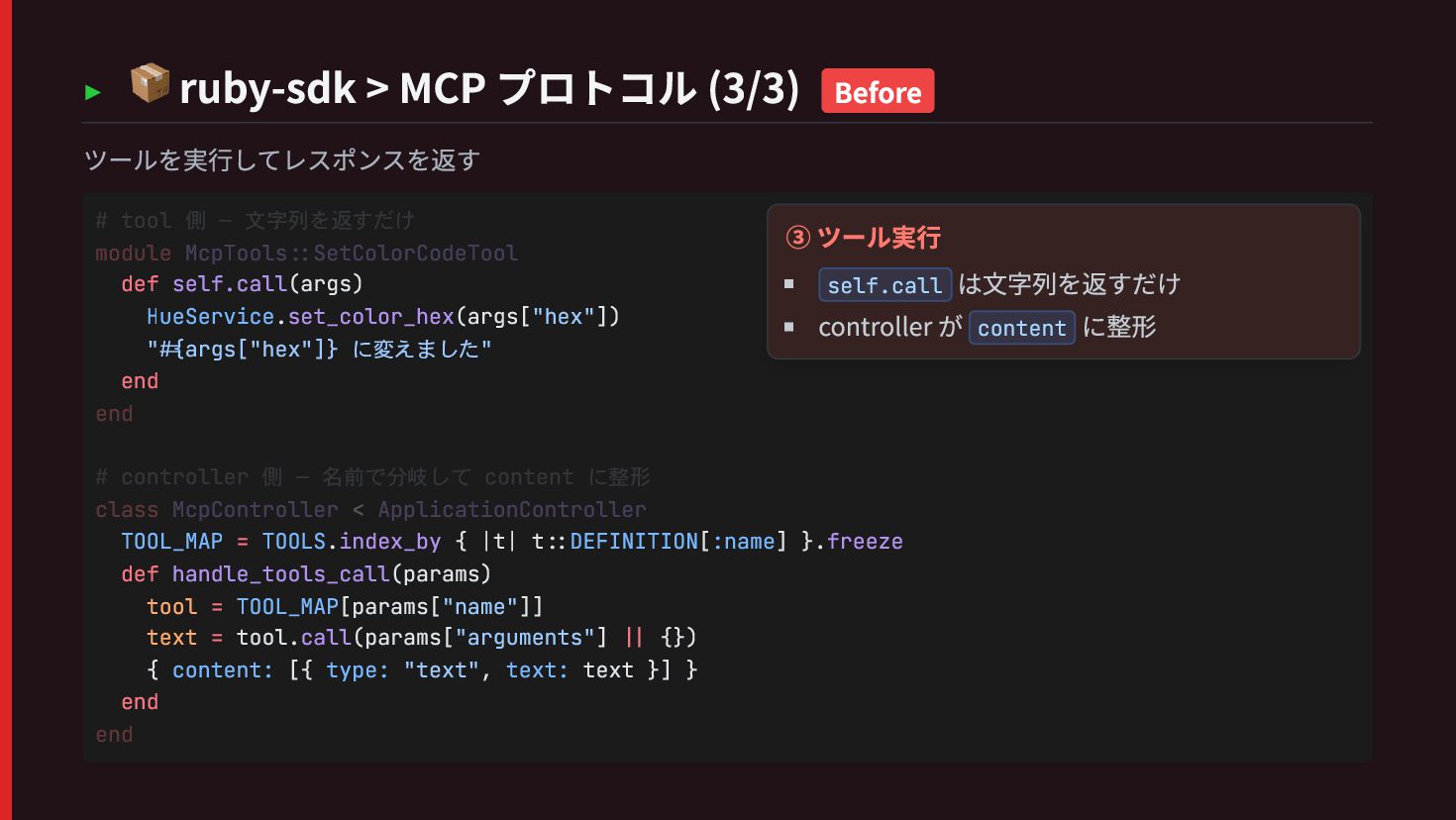
  59. ▸ 📦 ruby-sdk > MCP プロトコル (3/3) Before ツールを実行してレスポンスを返す def

    self.call(args) HueService.set_color_hex(args["hex"]) "#{args["hex"]} に変えました" end TOOL_MAP = TOOLS.index_by { |t| t::DEFINITION[:name] }.freeze def handle_tools_call(params) tool = TOOL_MAP[params["name"]] text = tool.call(params["arguments"] || {}) { content: [{ type: "text", text: text }] } end # tool 側 — 文字列を返すだけ module McpTools::SetColorCodeTool end # controller 側 — 名前で分岐して content に整形 class McpController < ApplicationController end ③ ツール実行 self.call は文字列を返すだけ controller が content に整形
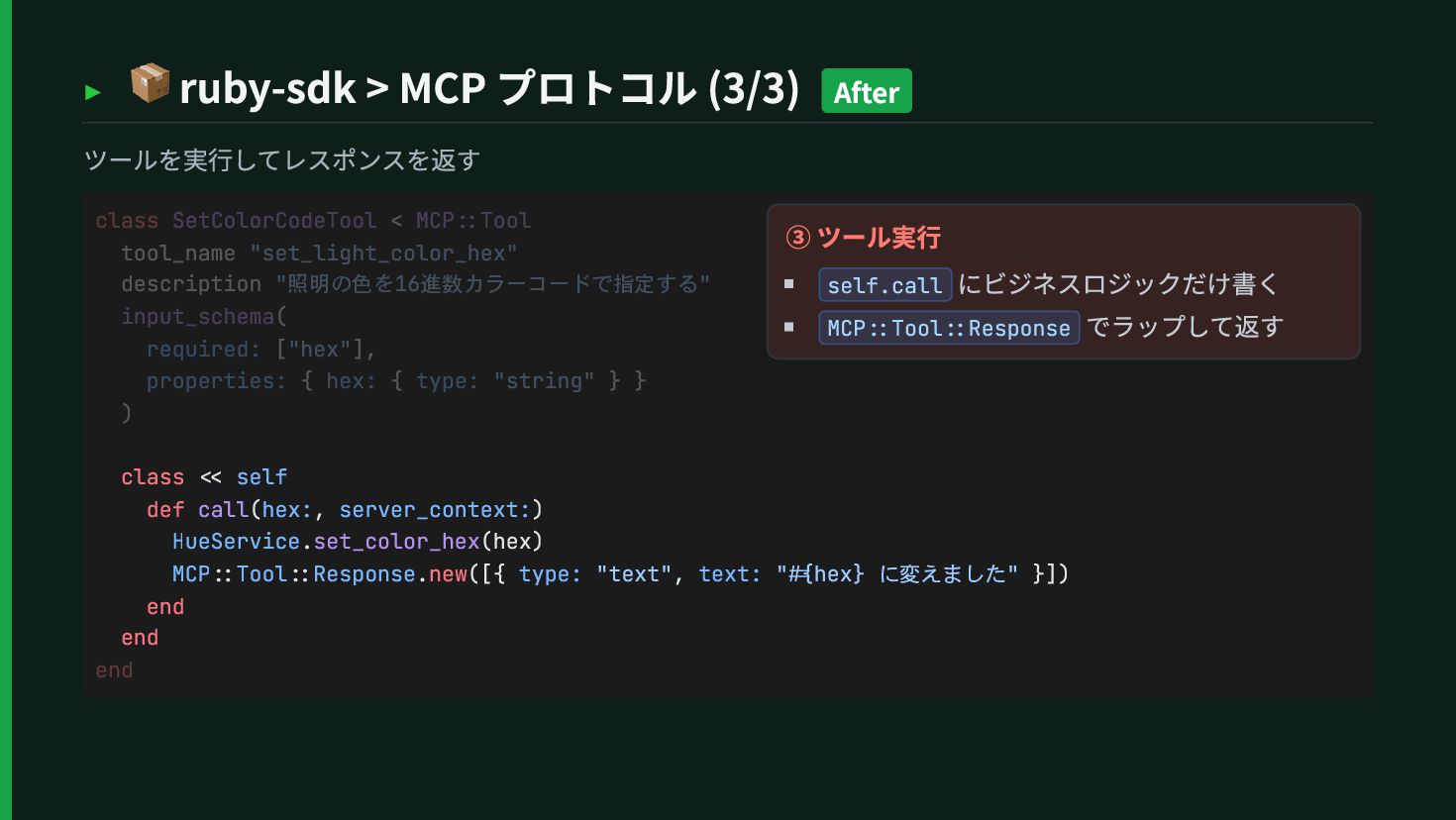
  60. ▸ 📦 ruby-sdk > MCP プロトコル (3/3) After ツールを実行してレスポンスを返す class

    << self def call(hex:, server_context:) HueService.set_color_hex(hex) MCP::Tool::Response.new([{ type: "text", text: "#{hex} に変えました" }]) end end class SetColorCodeTool < MCP::Tool tool_name "set_light_color_hex" description "照明の色を16進数カラーコードで指定する" input_schema( required: ["hex"], properties: { hex: { type: "string" } } ) end ③ ツール実行 self.call にビジネスロジックだけ書く MCP::Tool::Response でラップして返す
  61. ▸ アーキテクチャの差分 — 自前実装 → Gem 実装 不変 After Gem

    実装 162 行 Before 自前実装 505 行 置換 置換 置換 置換 OauthController OAuth / PKCE / state / LINE API 260 行 セッション自前 60 行 McpController JSON-RPC 分岐 185 行 👤 Devise 7 行 🛡 Doorkeeper 75 行 🔑 OmniAuth 51 行 📦 ruby-sdk 29 行 LineService ✓ HueService ✓ 手書き重量級(消える) Gem(置き換わる) Service(不変)
  62. ~/terasu — chapter 4 $ cd chapter-4/ 比較と気づき # Gem

    が何を肩代わりするか — コード削減 + セキュリティ ➜
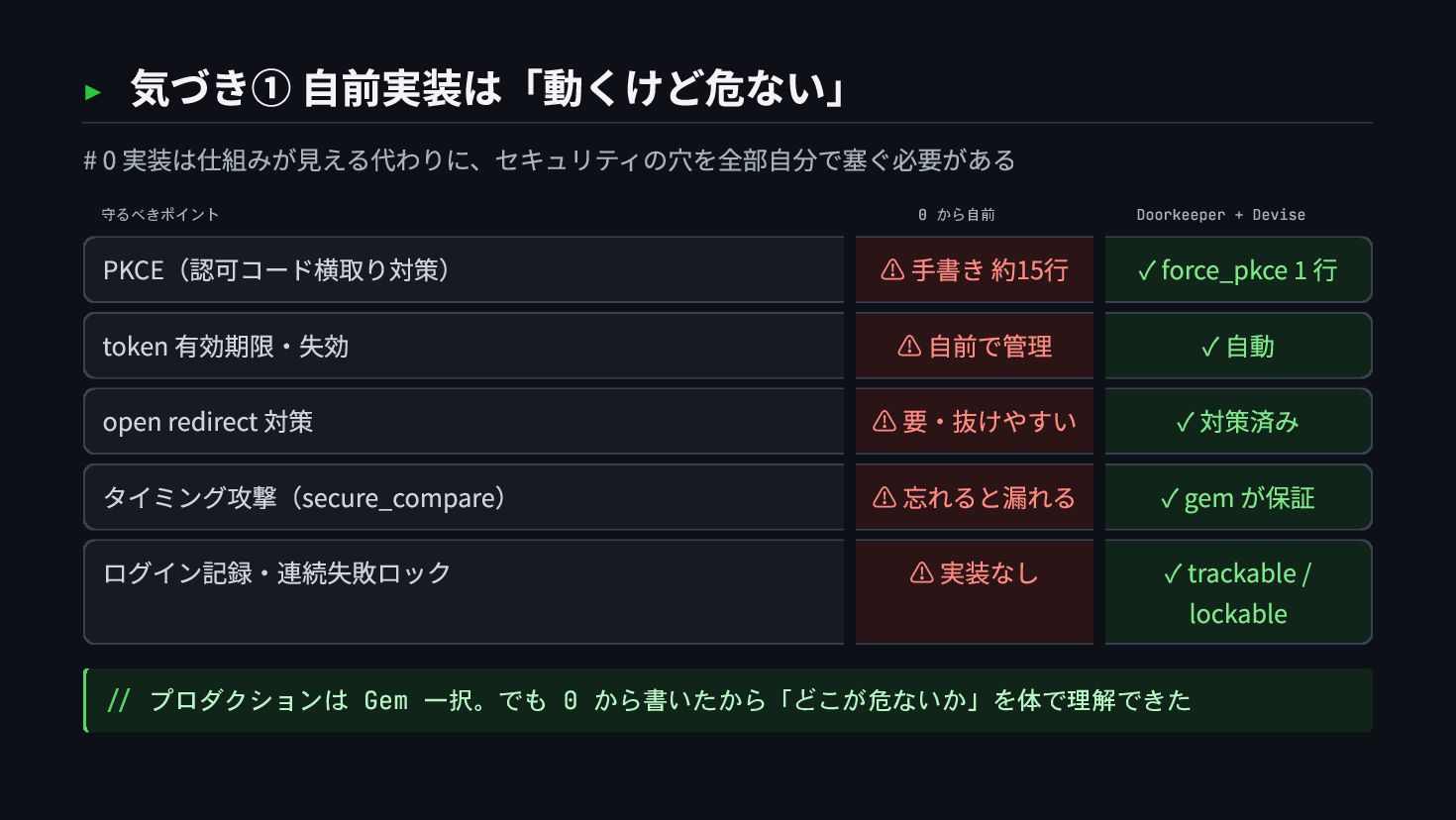
  63. ▸ 気づき① 自前実装は「動くけど危ない」 # 0 実装は仕組みが見える代わりに、セキュリティの穴を全部自分で塞ぐ必要がある 守るべきポイント 0 から自前 Doorkeeper

    + Devise PKCE(認可コード横取り対策) ⚠ 手書き 約15行 ✓ force_pkce 1 行 token 有効期限・失効 ⚠ 自前で管理 ✓ 自動 open redirect 対策 ⚠ 要・抜けやすい ✓ 対策済み タイミング攻撃(secure_compare) ⚠ 忘れると漏れる ✓ gem が保証 ログイン記録・連続失敗ロック ⚠ 実装なし ✓ trackable / lockable // プロダクションは Gem 一択。でも 0 から書いたから「どこが危ないか」を体で理解できた
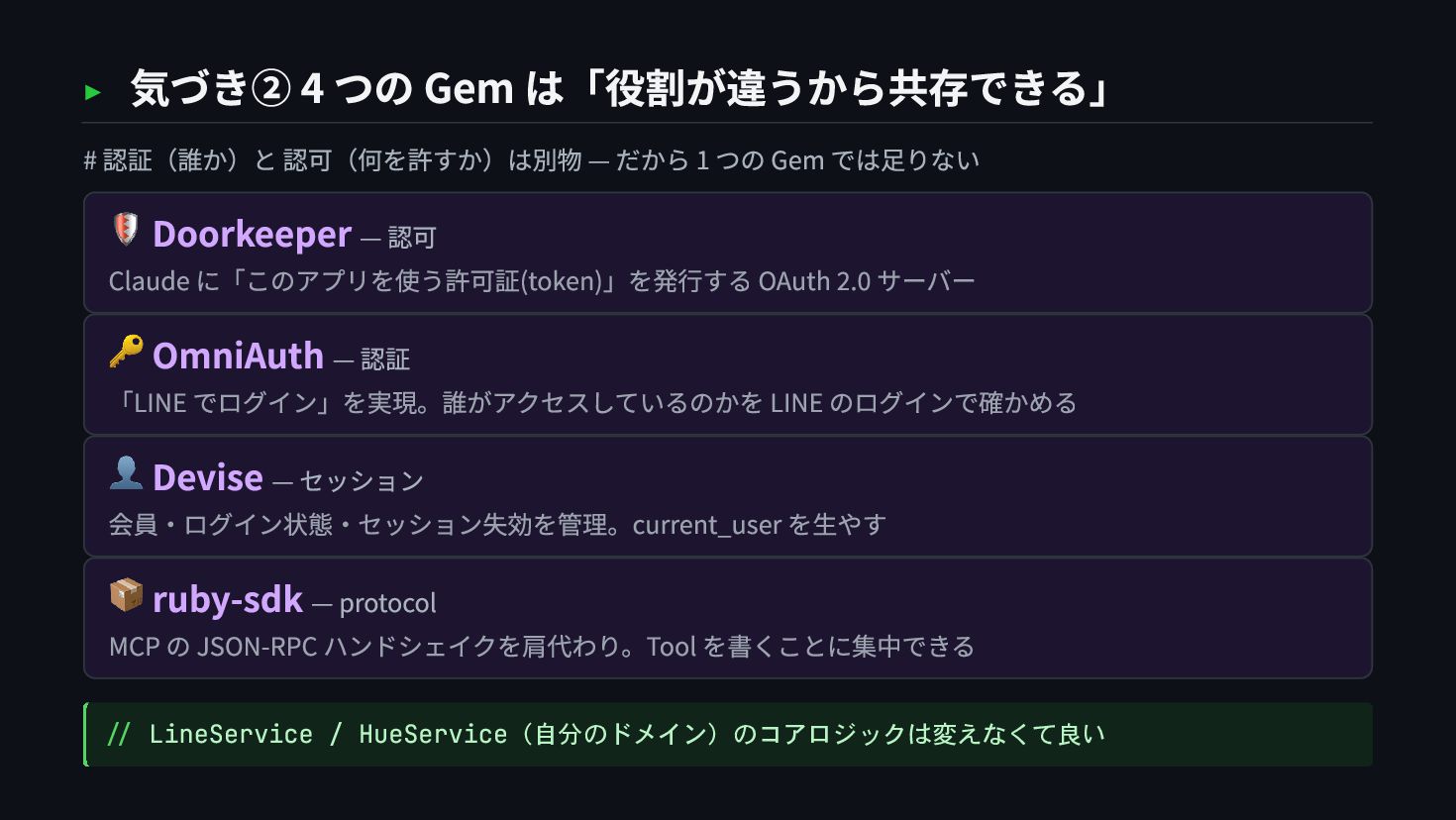
  64. ▸ 気づき② 4 つの Gem は「役割が違うから共存できる」 # 認証(誰か)と 認可(何を許すか)は別物 —

    だから 1 つの Gem では足りない 🛡 Doorkeeper — 認可 Claude に「このアプリを使う許可証(token)」を発行する OAuth 2.0 サーバー 🔑 OmniAuth — 認証 「LINE でログイン」を実現。誰がアクセスしているのかを LINE のログインで確かめる 👤 Devise — セッション 会員・ログイン状態・セッション失効を管理。current_user を生やす 📦 ruby-sdk — protocol MCP の JSON-RPC ハンドシェイクを肩代わり。Tool を書くことに集中できる // LineService / HueService(自分のドメイン)のコアロジックは変えなくて良い
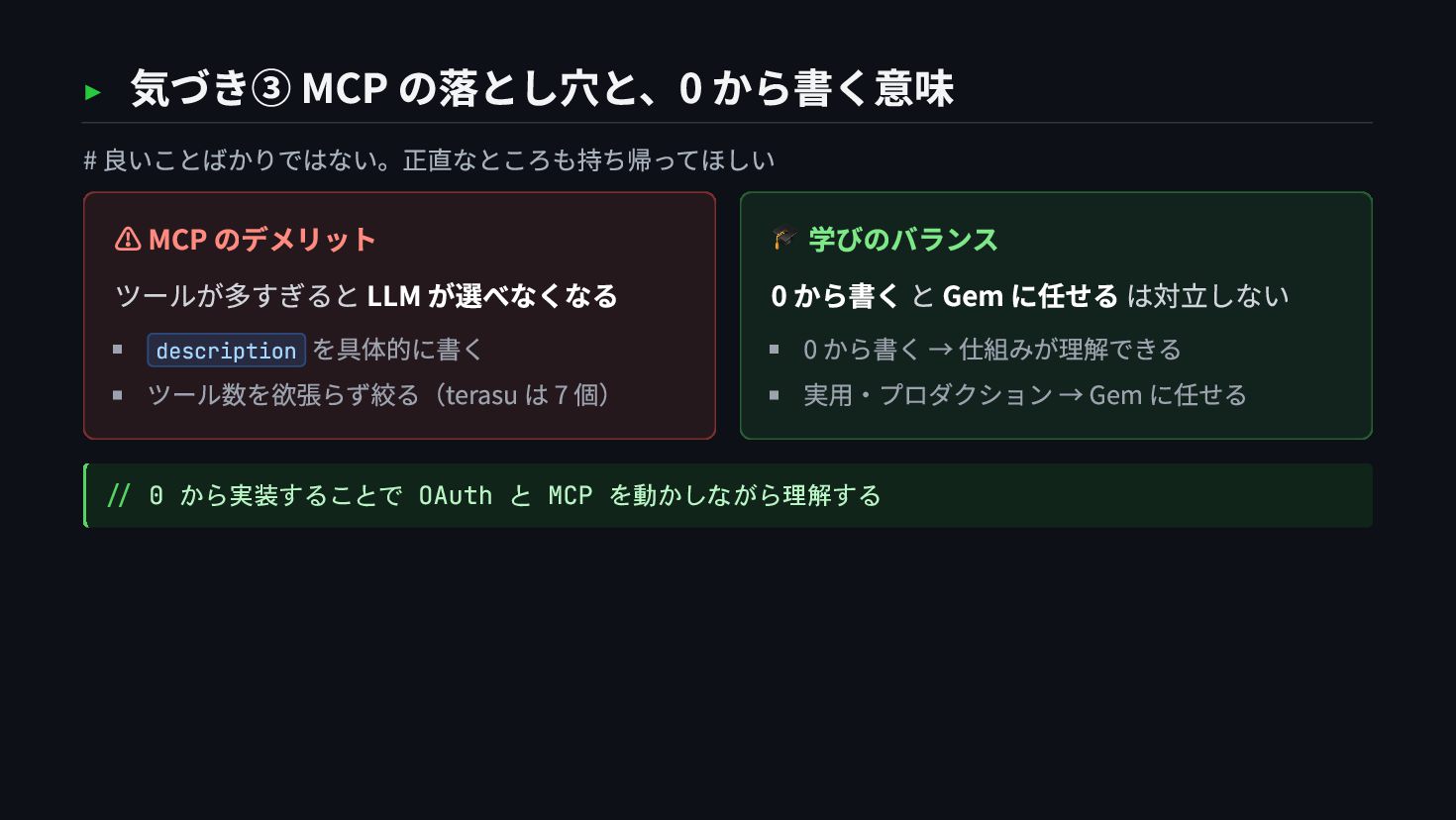
  65. ▸ 気づき③ MCP の落とし穴と、0 から書く意味 # 良いことばかりではない。正直なところも持ち帰ってほしい ⚠ MCP のデメリット

    ツールが多すぎると LLM が選べなくなる description を具体的に書く ツール数を欲張らず絞る(terasu は 7 個) 🎓 学びのバランス 0 から書く と Gem に任せる は対立しない 0 から書く → 仕組みが理解できる 実用・プロダクション → Gem に任せる // 0 から実装することで OAuth と MCP を動かしながら理解する
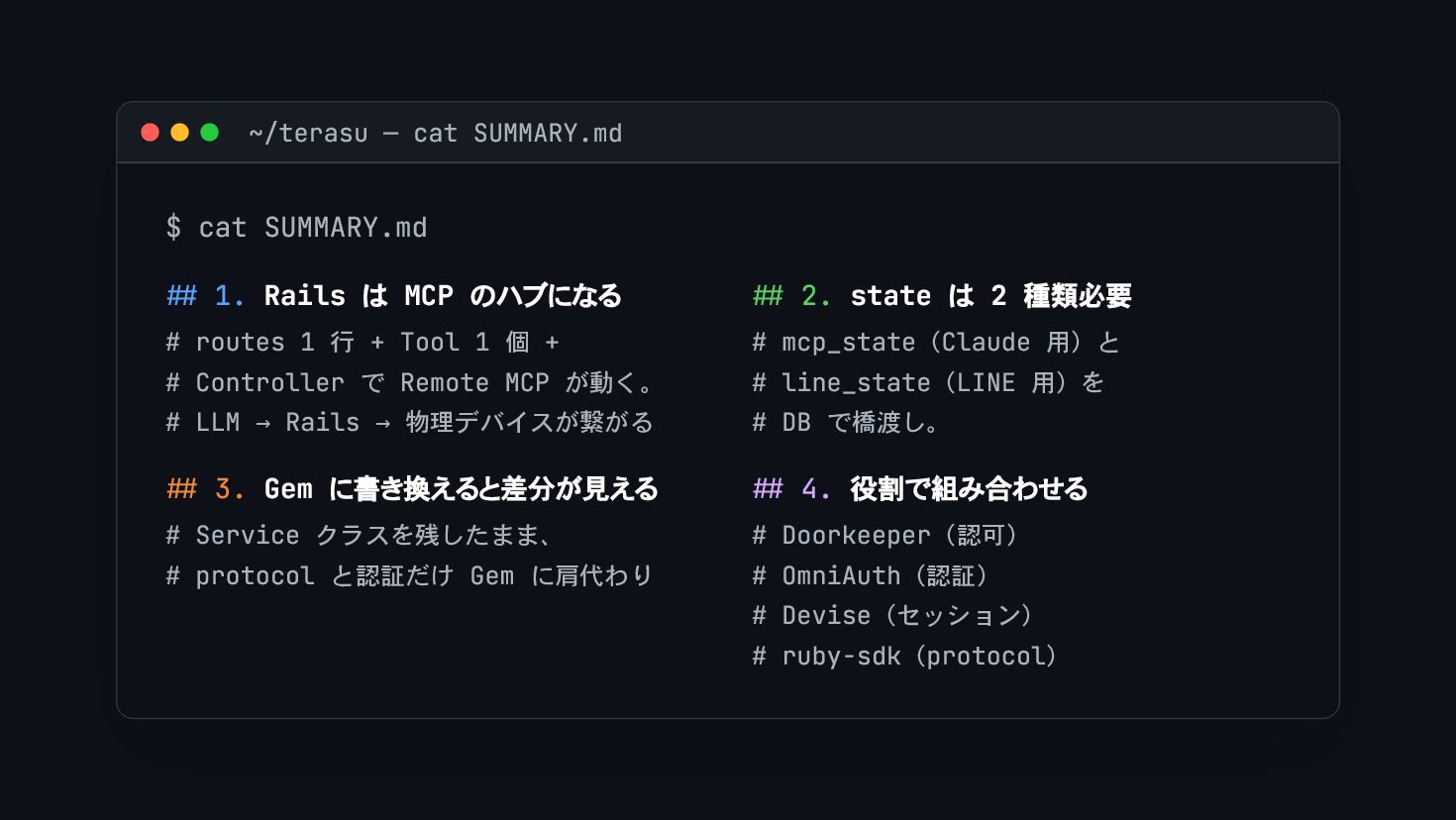
  66. ~/terasu — cat SUMMARY.md $ cat SUMMARY.md ## 1. Rails

    は MCP のハブになる # routes 1 行 + Tool 1 個 + # Controller で Remote MCP が動く。 # LLM → Rails → 物理デバイスが繋がる ## 2. state は 2 種類必要 # mcp_state(Claude 用)と # line_state(LINE 用)を # DB で橋渡し。 ## 3. Gem に書き換えると差分が見える # Service クラスを残したまま、 # protocol と認証だけ Gem に肩代わり ## 4. 役割で組み合わせる # Doorkeeper(認可) # OmniAuth(認証) # Devise(セッション) # ruby-sdk(protocol)
  67. ~/terasu — 最後にひとつ $ terasu illuminate --message "ありがとうございました" lights on

    — Rails で、文字通り部屋を 照 らせました Rails × MCP × LINE Login、ぜひ試してみてください ➜ 🌊 Welcome to 滋賀県 🐮 @4geru · Money Forward, Inc. · github.com/4geru