Share
Embed
GPU on OpenStack
JP Ops Workshopでのお話です。訂正しました。図を追加しわかりやすくしたのとGPUのお話なので題名変えました。GPUを追加した時の方法を訂正しました。あとからさらに訂正かけます。
masafumi_ohta
July 07, 2016
Transcript
31 slides
-
Who am I > Working for ‘SIer’ as System Engineer.
Working on some OpenStack PoC projects. Proposing OpenStack system to a manufacturer Investigating OpenStack issues reading some codes on OpenStack (working very hard..) For more https://jp.linkedin.com/in/ohtamasafumi -
Introduction Now ‘Specific use on OpenStack’ is needed.. Hadoop(Sahara),HPC Almost
is not filed therefore we have to investigate with search listings. Say ‘document lost’ in openstack.org.. Need to gather those to docs.openstack.org -
How about ‘GPU’ trends. Using GPU for using many cores.
It is better for some calculations to use many MPU cores though each MPU is small and low-speed. Low electric power consumption with GPU is great for HPC end users. Compact systems. is very good for us Japanese HPC systems… -
How ‘GPU on OpenStack’? It can be used only on
‘PCI passthrough’ Perhaps so is AWS. It depends on KVM VSphere only can split GPU core to each vm. Can we split with GPU like vSphere? NO,we can only add on with GPU unit in KVM -
What is GPU OpenStack for Instant HPC use Try some
calculates and then destroy vm. Orchestrate some vms to try HPC grid computings. Use it like AWS EC2 with GPU Would like to use it internal use - especially manufacturer can’t have some systems on EC2 -
PCI Passthrough(1) PCI devices directly connect to VM via Linux
hosts Needs to detach the devices from physical host Depends on KVM,not depends on OpenStack One devices to one VM GPU itself cannot share and split the cores each VMs. Limitation in KVM,not OpenStack -
PCI Passthrough(2) Redhat officially support passthrough but they dare not
to recommend to use that. Ubuntu seems not to document… gather the information with ‘search-listings’ -
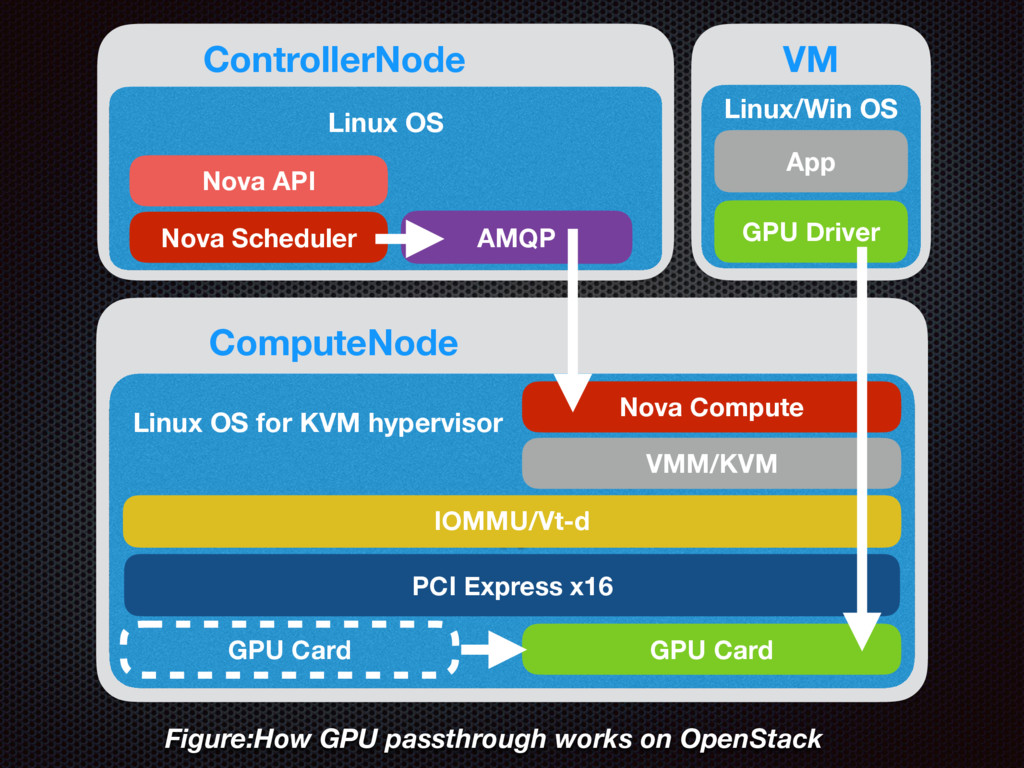
K Linux OS for KVM hypervisor GPU Driver App VM
VMM/KVM IOMMU/Vt-d PCI Express x16 Linux/Win OS ComputeNode GPU Card GPU Card Nova Compute Nova Scheduler AMQP Nova API Linux OS ControllerNode Figure:How GPU passthrough works on OpenStack -
Check GPU on KVM host Check GPU first on KVM
host with lspci -nn | grep -i nvidia lspci -nn | grep -i nvidia 88:00.0 VGA compatible controller [0300]: NVIDIA Corporation Device [10de:11b4] (rev a1) 88:00.1 Audio device [0403]: NVIDIA Corporation GK104 HDMI Audio Controller [10de:0e0a] (rev a1) All of GPU units should be passthroughed. Not only GPU itself but also HDMI ports should be done Or it doesn’t work on VM.. (not completely passthroughed..) -
GPU output ports GPU has some HDMI ports,which has some
audio devices.should be passthroughed as well -
IOMMU setup IOMMU(Input/Output Memory Management Unit) is needed by virtual
system to use physical devices. Of course intel vt-d must be on (by default in EFI/BIOS) Need to set to grab on /etc/default/grab GRUB_CMDLINE_LINUX_DEFAULT="quiet splash intel_iommu=on vfio_iommu_type1.allow_unsafe_interrupts=1” -
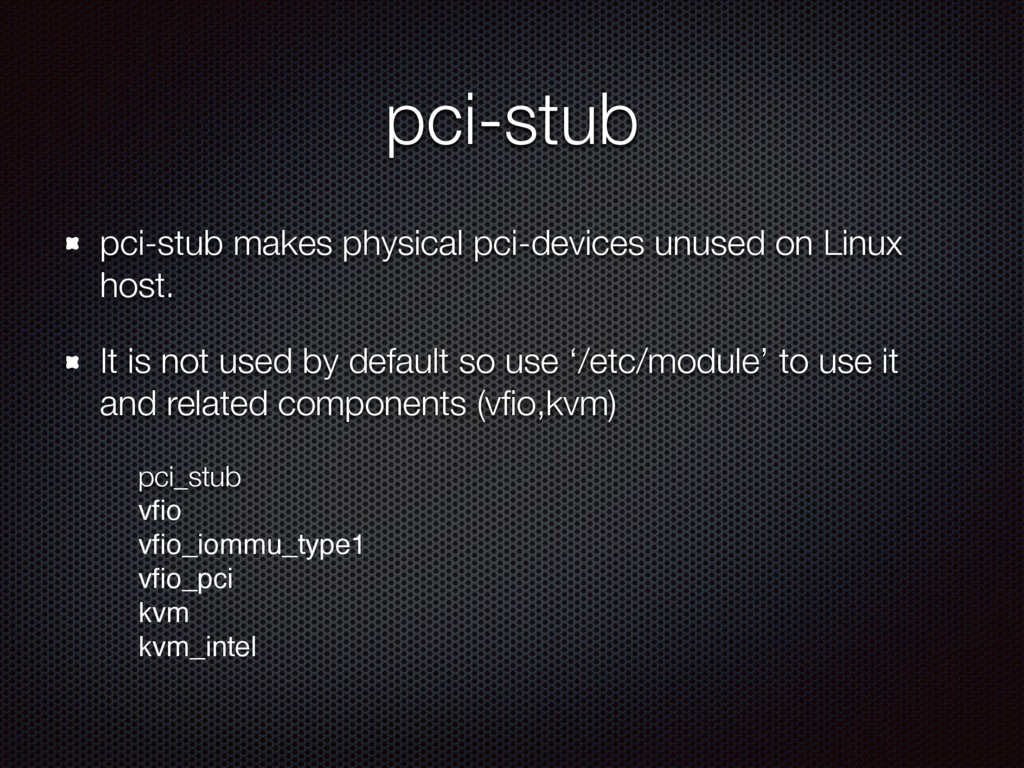
pci-stub pci-stub makes physical pci-devices unused on Linux host. It
is not used by default so use ‘/etc/module’ to use it and related components (vfio,kvm) pci_stub vfio vfio_iommu_type1 vfio_pci kvm kvm_intel -
VFIO(1) Those passthroughed should be added on VFIO(Virtual Function IO)
removing from physical devices. Prohibit to recognized those devices from ramfs /etc/initramfs-tools/modules to initramfs (ubuntu) echo ‘pci_stub ids=10de:11b4,10de:0e0a’ >> /etc/initramfs-tools/modules sudo update-initramfs -u && sudo reboot -
VFIO(2) Prohibit to recognized those devices while booting /etc/modprobe.d/blacklist.conf to
add below: blacklist nvidia blacklist nvidia-uvm Note compatible drivers should be blacklisted.. blacklist nouveau -
Unbind from Physical should check pci-stub to ‘unbind from physical
host to bind to VM’:entry passthroughed drivers to new_id to use VM and unbind related identifiers from physical host and bind them to vm. echo 11de 11b4 > /sys/bus/pci/drivers/pci-stub/new_id echo 11de 0e0a > /sys/bus/pci/drivers/pci-stub/new_id echo 0000:88:00.0 > /sys/bus/pci/devices/0000:88:00.0/driver/unbind echo 0000:88:00.1 > /sys/bus/pci/devices/0000:88:00.1/driver/unbind echo 0000:88:00.0 > /sys/bus/pci/drivers/pci-stub/bind echo 0000:88:00.1 > /sys/bus/pci/drivers/pci-stub/bind Check claimed while booting to remove from physical machine. pci-stub 0000:88:00.1: claimed by stub -
Physical devices pci-stub (use it on virtual) GPU Units (all
the devices) ‘Unbind GPU from physical device and bind to virtual device’ echo 11de 11b4 > /sys/bus/pci/drivers/pci-stub/new_id echo 11de 0e0a > /sys/bus/pci/drivers/pci-stub/new_id echo 0000:88:00.0 > /sys/bus/pci/drivers/pci-stub/bind echo 0000:88:00.1 > /sys/bus/pci/drivers/pci-stub/bind echo 0000:88:00.0 > /sys/bus/pci/devices/0000:88:00.0/driver/unbind echo 0000:88:00.1 > /sys/bus/pci/devices/0000:88:00.1/driver/unbind -
Add more GPUs(1) check the result of lspci - there
should be two device IDs in the result.(that depends on your system..) lspci -nn | grep -i nvidia 88:00.0 VGA compatible controller [0300]: NVIDIA Corporation Device [10de:11b4] (rev a1) 88:00.1 Audio device [0403]: NVIDIA Corporation GK104 HDMI Audio Controller [10de:0e0a] (rev a1) 84:00.0 VGA compatible controller [0300]: NVIDIA Corporation Device [10de:11b4] (rev a1) 84:00.1 Audio device [0403]: NVIDIA Corporation GK104 HDMI Audio Controller [10de:0e0a] (rev a1) -
Add more GPUs(2) unbind more devices to passthrough with pci-stab.
echo 0000:84:00.0 > /sys/bus/pci/devices/0000:84:00.0/driver/unbind echo 0000:84:00.1 > /sys/bus/pci/devices/0000:84:00.1/driver/unbind echo 0000:84:00.0 > /sys/bus/pci/drivers/pci-stub/bind echo 0000:84:00.1 > /sys/bus/pci/drivers/pci-stub/bind Need to same GPU’s to use some CUDA apps.they asks it need the same. /nbody -benchmark -numdevices=2 -num bodies=65536 -
Add more GPUs(3) Here is the result if succeed GPUs
working. ubuntu@guestos$ lspci -nn | grep -i nvidia 00:07.0 VGA compatible controller [0300]: NVIDIA Corporation GK104GL [Quadro K4200] [10de:11b4] (rev a1) 00:08.0 VGA compatible controller [0300]: NVIDIA Corporation GK104GL [Quadro K4200] [10de:11b4] (rev a1) -
Nova to use passthrough(1) In ComputeNodes whitelist alias should be
used for pci passthrough and vm-with-gpu-deployment setting to them to /etc/nova/nova.conf to add pci_passthrough_whitelist pci_passthrough_whitelist={"name":"K4200","vendor_id":"10de","product_id": "11b4"} -
Nova to use passthrough(2) In ControllerNodes nova alias should be
used for pci passthrough setting to them to /etc/nova/nova.conf to add pci_aliases pci_alias={“name”:”K4200”,"vendor_id":"10de","product_id":"11b4"} -
Nova to use passthrough(3) Also in ControllerNodes we should add
the pci passthrough filter to nova.conf setting them to /etc/nova/nova.conf following the underline. scheduler_available_filters=nova.scheduler.filters.all_filters scheduler_available_filters=nova.scheduler.filters.pci_passthrough_filter.PciPass throughFilter scheduler_default_filters=DifferentHostFilter,RetryFilter,AvailabilityZoneFilter,Ra mFilter,CoreFilter,DiskFilter,ComputeFilter,ComputeCapabilitiesFilter,ImageProp ertiesFilter,ServerGroupAntiAffinityFilter,ServerGroupAffinityFilter,AggregateInst anceExtraSpecsFilter,PciPassthroughFilter -
nova alias set flavor-key to use GPU instance.add your flavor
to pci_passthrough:alias:pci_alias name and amount of gpu you would like to use. nova flavor-key $flavor_name set “pci_passthrough:alias”=“K4200:$amount_of_gpu” -
Cloud image issue Images are very small for using GPU
thus we need to be resized those cloud images with qemu-img CUDA driver needs perl-packages(dev packages) when installing it. Even though it is .deb or .rpm packages.those package is not binary files,they build the binary from CUDA source codes to run ‘make’ while installing on the system. Nvidia says it will be fixed in CUDA future release.add spec file to those related perl (dev) packages. It will be fixed on CUDA 7.6 or later.. -
Windows as VDI CUDA on Windows is so faster if
you succeed installation but it is often jumpy a bit. it might be occurred by disk speeds on vm.. you might better use ephemeral or something faster (SSD or..etc) And vm works with context switch thus heavy workloads by CUDA or something might cause jumpy a bit. I haven’t tried yet.I should investigate why it happens. but a customer says ‘yes,it works almost good’. -
Live migration issue We can't do ‘live-migration’ when using PCI
passthrough.vm won’t remove connection to PCI on old host. workaround:remove the old connection below in mysql DB nova.pci_devices.and then reboot old host thus ‘not useful!’ | 2016-08-11 00:54:45 | 2016-08-19 04:58:01 | NULL | 0 | 45 | 21 | 0000:84:00.0 | 11b4 | 10de | type-PCI | pci_0000_84_00_0 | label_10de_11b4 | available | {} | NULL | NULL | 1 | <<-- old-host | 2016-08-11 00:54:45 | 2016-08-19 04:58:01 | NULL | 0 | 48 | 21 | 0000:88:00.0 | 11b4 | 10de | type-PCI | pci_0000_88_00_0 | label_10de_11b4 | available | {} | NULL | NULL | 1 | <<-- old-host