Share
Embed
Transcript
79 slides
-
double delayInSeconds = 0.1; dispatch_time_t popTime = dispatch_time(DISPATCH_TIME_NOW, (int64_t)(delayInSeconds *
NSEC_PER_SEC)); dispatch_after(popTime, dispatch_get_main_queue(), ^(void){ // make sure this gets triggered after a layout pass. }); Rethink your code. -
☞ Your scrolling is too slow ☞ When doing network
requests, your app gets unresponsive ☞ When importing data, your app gets unresponsive -
It's all about shared resources ☞ GPU ☞ CPU ☞
Areas in memory (objects, numbers, ...) ☞ Files -
Why is concurrency hard? It's hard to test asynchronous apps,
because it's non-deterministic -
❝Before you even consider redesigning your code to support concurrency,
you should ask yourself whether doing so is necessary.❞ — Concurrency Programming Guide -
Recipe Improving the responsiveness of your app ➀ Determine what
is slow: analyze and measure ➁ If neccessary: factor out units of work ➂ Isolate the units in a separate queue ➃ Measure again -
Draw Complicated Drawing Core data URL Request Draw What's happening?
(The main thread) -
How to solve this? We should free up the main
thread so that drawing and user input gets handled immediately -
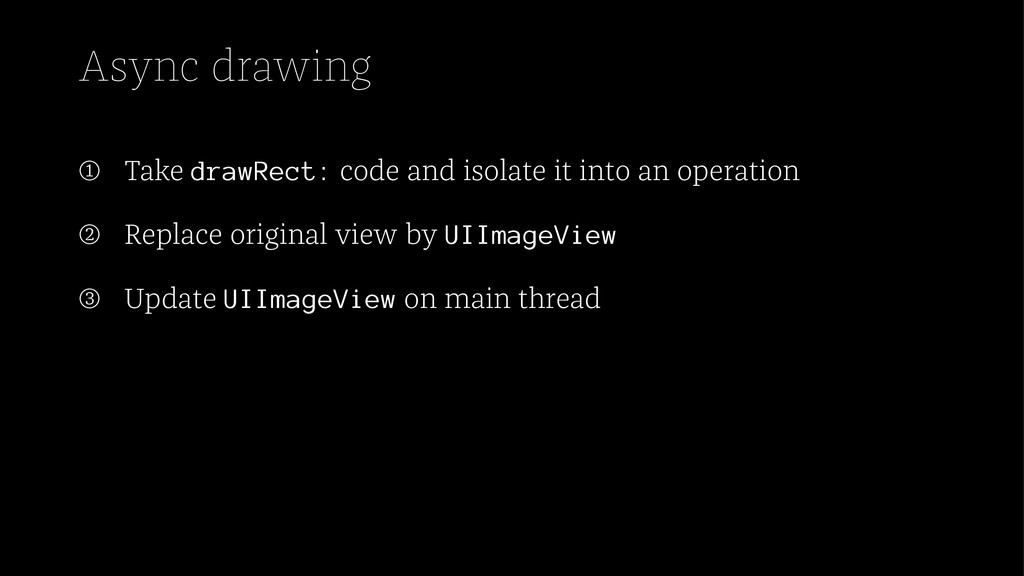
Async drawing ➀ Take drawRect: code and isolate it into
an operation ➁ Replace original view by UIImageView ➂ Update UIImageView on main thread -
After: [queue addOperationWithBlock:^{ UIGraphicsBeginImageContextWithOptions(size, NO, 0); // expensive // drawing
// code UIImage *i = UIGraphicsGetImageFromCurrentImageContext(); UIGraphicsEndImageContext(); [[NSOperationQueue mainQueue] addOperationWithBlock:^{ self.imageView.image = i; }]; }]; -
Async CoreImage [self.queue addOperationWithBlock:^{ CIImage *ciImage = [CIImage imageWithContentsOfURL:sourceURL]; CIFilter
*depthOfFieldFilter = [CIFilter filterWithName:@"CIDepthOfField"]; ... CIImage *finalImage = [alphaFilter valueForKey:kCIOutputImageKey]; CGContextRef cgContext = CGBitmapContextCreate(NULL, size.width, size.height, 8, size.width * 4, colorSpace, kCGImageAlphaPremultipliedLast); CIContext *context = [CIContext contextWithCGContext:cgContext options:nil]; CGImageRef outputImage = [context createCGImage:finalImage fromRect:ciImage.extent]; ... CGImageDestinationAddImage(destination, outputImage, nil); CGImageDestinationFinalize(destination); }]; What's the problem? -
NSDictionary *options = @{kCIContextUseSoftwareRenderer: @NO}; CIContext *context = [CIContext contextWithCGContext:cgContext
options:options]; ... and ... self.queue.maxConcurrentOperationCount = 1; -
Problem Drawing a complicated image dispatch_async(backgroundQueue, ^{ NSArray *graphData =
[self generateDataPointsForGraph]; UIImage* image = [self drawGraph:graphData]; dispatch_async(dispatch_get_main_queue(), ^{ self.imageView.image = image; }); }); -
Problem Drawing a complicated image dispatch_async(backgroundQueue, ^{ NSArray *graphData =
[self generateDataPointsForGraph]; UIImage* image = [self drawGraph:graphData]; dispatch_async(dispatch_get_main_queue(), ^{ self.imageView.image = image; }); }); How to remove this from the queue? -
Problem Drawing a complicated image dispatch_async(backgroundQueue, ^{ NSArray *graphData =
[self generateDataPointsForGraph]; UIImage* image = [self drawGraph:graphData]; dispatch_async(dispatch_get_main_queue(), ^{ self.imageView.image = image; }); }); How to cancel this if the operation already started? -
Step 1: Use NSOperation NSOperationQueue* drawingQueue; [drawingQueue addOperationWithBlock:^{ NSArray *graphData
= [self generateDataPointsForGraph]; UIImage* image = [self drawGraph:graphData]; [[NSOperationQueue mainQueue] addOperationWithBlock:^{ self.imageView.image = image; }]; }]; How to cancel this? -
Step 2: Use NSBlockOperation NSBlockOperation* drawingOperation = [NSBlockOperation blockOperationWithBlock:^{ NSArray
*graphData = [self generateDataPointsForGraph]; UIImage* image = [self drawGraph:graphData]; [[NSOperationQueue mainQueue] addOperationWithBlock:^{ self.imageView.image = image; }]; }]; [drawingQueue addOperation:drawingOperation]; -
Step 3: Pull out the completion handler NSOperation* drawingOperation =
[NSBlockOperation blockOperationWithBlock:^{ NSArray *graphData = [self generateDataPointsForGraph]; self.image = [self drawGraph:graphData]; }]; drawingOperation.completionBlock = ^{ [[NSOperationQueue mainQueue] addOperationWithBlock:^{ self.imageView.image = self.image; }]; }; -
Step 4: Custom NSOperation subclass NSOperation* drawingOperation = [DrawingOperation drawingOperationWithData:[self
generateDataPointsForGraph]]; drawingOperation.completionBlock = ^{ [[NSOperationQueue mainQueue] addOperationWithBlock:^{ self.imageView.image = image; }]; }; -
Let's add some networking dispatch_async(backgroundQueue, ^{ NSData *data = [NSData
dataWithContentsOfURL:url]; NSArray *graphItems = [NSJSONSerialization JSONObjectWithData:data options:0 error:&error]; UIImage* image = [self drawGraph:graphItems]; dispatch_async(dispatch_get_main_queue(), ^{ self.imageView.image = image; }); }); -
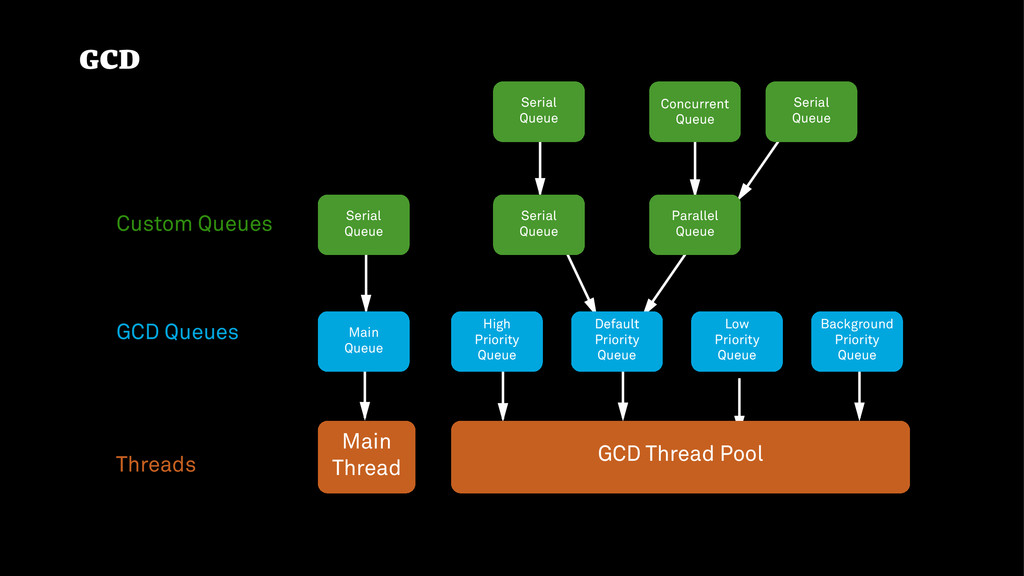
GCD Thread Pool Main Thread High Priority Queue Serial Queue
Parallel Queue Serial Queue Main Queue Serial Queue Concurrent Queue Serial Queue Default Priority Queue Low Priority Queue Background Priority Queue Custom Queues GCD Queues Threads GCD -
GCD Thread Pool Main Thread High Priority Queue Serial Queue
Parallel Queue Serial Queue Main Queue Serial Queue Concurrent Queue Serial Queue Default Priority Queue Low Priority Queue Background Priority Queue Custom Queues GCD Queues Threads GCD adds more threads. This is expensive. -
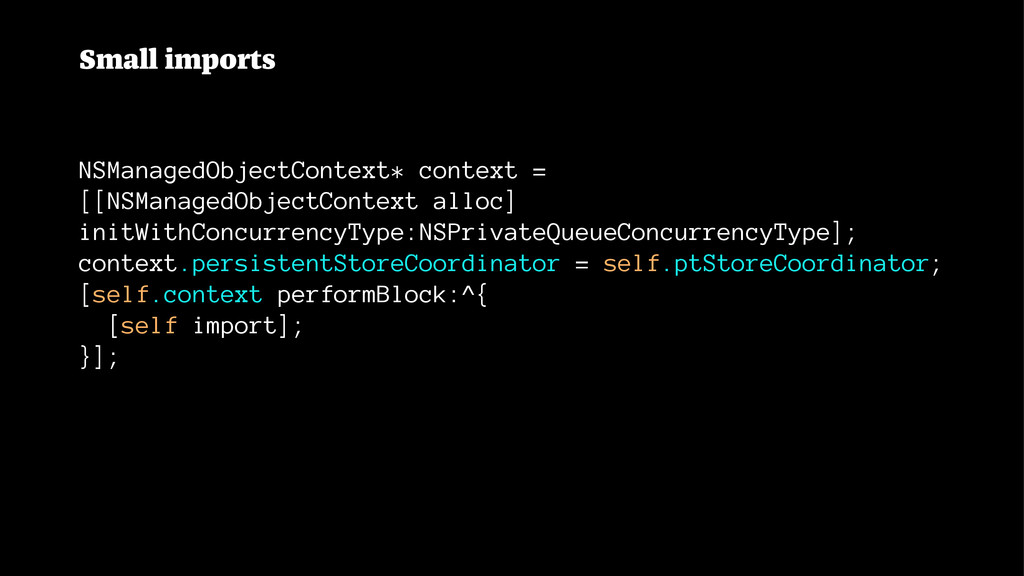
Small imports NSManagedObjectContext* context = [[NSManagedObjectContext alloc] initWithConcurrencyType:NSPrivateQueueConcurrencyType]; context.persistentStoreCoordinator =
self.ptStoreCoordinator; [self.context performBlock:^{ [self import]; }]; -
[[NSNotificationCenter defaultCenter] addObserverForName:NSManagedObjectContextDidSaveNotification object:nil queue:nil usingBlock:^(NSNotification* note) { NSManagedObjectContext *moc
= self.mainMOC; if (note.object != moc) { [moc performBlock:^(){ [moc mergeChangesFromContextDidSaveNotification:note]; }]; }; }]; -
❝You might want to consider using a different concurrency style,
and this time you have two persistent store coordinators, two almost completely separate Core Data stacks.❞ Source: http://asciiwwdc.com/2013/sessions/211 -
SQLite ! NSPersistentStore NSPersistentStoreCoordinator NSManagedObjectContext NSPersistentStore NSPersistentStoreCoordinator NSManagedObjectContext ! !
! NSPersistentStore NSPersistentStoreCoordinator NSManagedObjectContext NSPersistentStore NSPersistentStoreCoordinator NSManagedObjectContext ! ! ! -
SQLite ! NSPersistentStore NSPersistentStoreCoordinator NSManagedObjectContext NSPersistentStore NSPersistentStoreCoordinator NSManagedObjectContext ! !
! NSPersistentStore NSPersistentStoreCoordinator NSManagedObjectContext NSPersistentStore NSPersistentStoreCoordinator NSManagedObjectContext ! ! ! NSManagedObjectContext NSManagedObjectContext NSManagedObjectContext ! SQLite NSPersistentStore NSPersistentStoreCoordinator ! ! ! -
@interface Account : NSObject @property (nonatomic) double balance; - (void)transfer:(double)euros
to:(Account*)other; @end -
- (void)transfer:(double)euros to:(Account*)other { self.balance = self.balance - euros; other.balance
= other.balance + euros; } What happens if two methods call this method at the same time? From different threads? -
The same code, how the compiler sees it - (void)transfer:(double)euros
to:(Account*)other { double currentBalance = self.balance; self.balance = currentBalance - euros; double otherBalance = other.balance; other.balance = otherBalance + euros; } -
a b [a.transfer:20 to:b] [a.transfer:30 to:b] 100 0 currentBalance =
100 currentBalance = 100 100 0 a.balance = 100 - 20 80 0 b.balance = b.balance + 20 80 20 a.balance = 100 - 30 70 20 -
a b [a.transfer:20 to:b] [a.transfer:30 to:b] 100 0 currentBalance =
100 currentBalance = 100 100 0 a.balance = 100 - 20 80 0 b.balance = b.balance + 20 80 20 a.balance = 100 - 30 70 20 -
- (void)transfer:(double)euros to:(Account*)other { @synchronized(self) { self.balance = self.balance -
euros; other.balance = other.balance + euros; } } -
- (void)transfer:(double)euros to:(Account*)other { @synchronized(self) { @synchronized(other) { self.balance =
self.balance - euros; other.balance = other.balance + euros; } } } Problem: deadlock. -
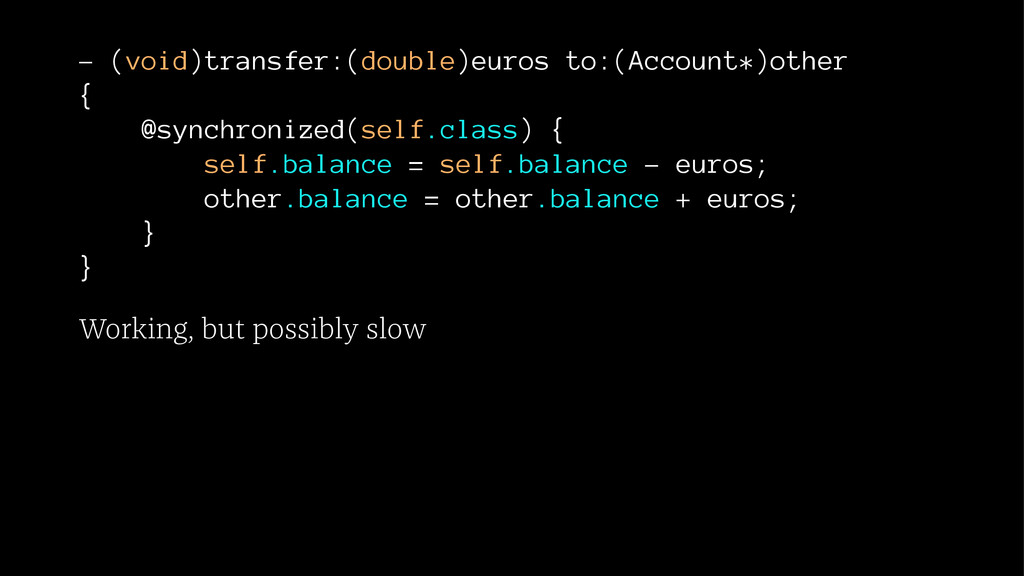
- (void)transfer:(double)euros to:(Account*)other { @synchronized(self.class) { self.balance = self.balance -
euros; other.balance = other.balance + euros; } } Working, but possibly slow -
- (void)transfer:(double)euros to:(Account*)other { objc_sync_enter(self.class) objc_exception_try_enter setjmp objc_exception_extract self.balance =
self.balance - euros; other.balance = other.balance + euros; objc_exception_try_exit objc_sync_exit(self.class) ... objc_exception_throw ... } } -
Do it the GCD way Account* account = [Account new];
Account* other = [Account new]; dispatch_queue_t accountOperations = dispatch_queue_create("accounting", DISPATCH_QUEUE_SERIAL); dispatch_async(accountOperations, ^{ [account transfer:200 to:other]; }); dispatch_async will never block. -
Realize: at which level in your app do you want
to be concurrent? -
A Person object @interface Person : NSObject @property (nonatomic,copy) NSString*
name; @property (nonatomic) NSDate* birthDate; @property (nonatomic) NSUInteger numberOfKids; @end -
Mutation Sometimes mutation is very handy. Most of the times
it will bite you. -
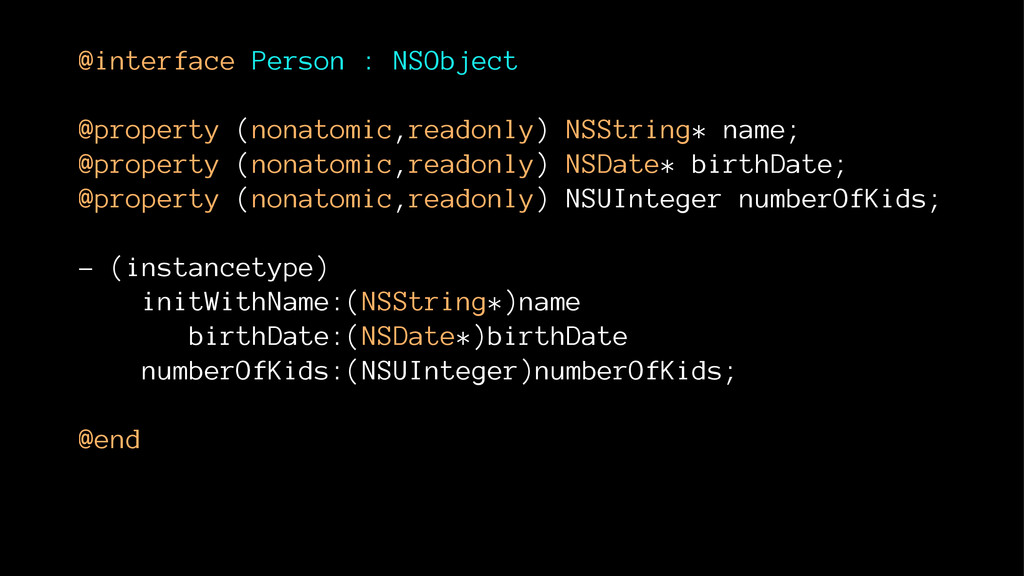
@interface Person : NSObject @property (nonatomic,readonly) NSString* name; @property (nonatomic,readonly)
NSDate* birthDate; @property (nonatomic,readonly) NSUInteger numberOfKids; - (instancetype) initWithName:(NSString*)name birthDate:(NSDate*)birthDate numberOfKids:(NSUInteger)numberOfKids; @end -
Value Objects ☞ Use lots of them. ☞ Make them
immutable, and use the immutable collections. -
KVO self.queue = [NSOperationQueue new]; [self addObserver:self forKeyPath:@"name" options:0 context:nil];
self.name = @"hello"; [self.queue addOperationWithBlock:^{ self.name = @"hi"; }]; -
KVO Observing - (void)observeValueForKeyPath:(NSString *)keyPath ofObject:(id)object change:(NSDictionary *)change context:(void *)context
{ NSLog(@"is main thread: %d", [NSThread isMainThread]); } -
KVO Results 2014-03-16 14:29:45.563 AsyncProgramming[71243:60b] is main thread: 1 2014-03-16
14:29:45.566 AsyncProgramming[71243:1303] is main thread: 0 -
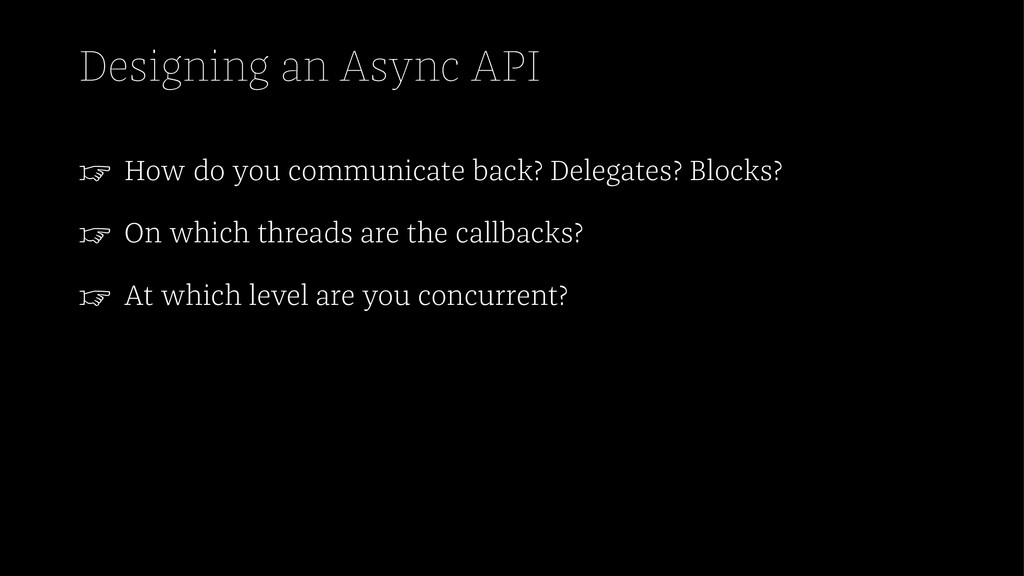
Designing an Async API ☞ How do you communicate back?
Delegates? Blocks? ☞ On which threads are the callbacks? ☞ At which level are you concurrent? -
Conclusion ☞ Lots of subtle problems that don't show up
during testing. ☞ Make it easy for yourself ☞ Use the main thread when possible -
Resources ☞ Concurrency Programming Guide ☞ Threading Programming Guide ☞
NSOperationQueue class reference ☞ http://www.objc.io/issue-2/ ☞ http://www.opensource.apple.com/source/objc4/objc4-551.1/ runtime/objc-sync.mm ☞ http://googlemac.blogspot.de/2006/10/synchronized- swimming.html