Share
Embed
Android Animation
Bringing your application to life. Covers why you should animate, what you should animate, the fundamentals of animation, and some actual code samples to get you going.
Dallas Gutauckis
December 18, 2013
Transcript
62 slides
-
ANDROID ANIMATION BRINGING YOUR APPLICATION TO LIFE DALLAS GUTAUCKIS •
Sr. Architect at MeetMe • Organizer for Android Alliance Philly " (GDG Philadelphia) • Creator of Parcelabler (not Parcelable) • dallasgutauckis.com • github.com/dallasgutauckis -
FORM – Creates a more compelling experience – Animations are fun!
– Eases transitions -
FUNCTION – Hides loading time – Hints at gestures –
Informs on features -
Google+ +1’ing – This is whimsical. This makes the experience
more fun for the user, since it’s a relatively simple action -
MeetMe Giving a gold star – This is whimsical. This
just makes the experience more fun for the user, since it’s a relatively simple action -
MeetMe Requesting friendship – Animates out of visibility to get
out of the way when you’re done with it -
Play Music Showing the current song selection – Animates on
tap to show the user he can swipe the view if he desires as well -
12 Basic Principles – The Illusion of Life: Disney Animation
– 1981 by Ollie Johnston and Frank Thomas h"p://en.wikipedia.org/wiki/ 12_basic_principles_of_anima:on -
SQUASH AND STRETCH – Most things don’t squash/stretch this much,
but this exaggeration (another principle) helps to show the physical nature of the object (and you don’t notice how much it’s happening when at speed) Lampman, Wikipedia -
ANTICIPATION – Often times, when things are getting ready to
move, they make a movement in the opposite first – Baseball pitcher pulls arm back before going forward to throw the ball – Person crouches before jumping h"p://en.wikipedia.org/wiki/12_basic_principles_of_anima:on -
SLOW IN AND SLOW OUT – Movement doesn’t just start
and stop immediately – Running doesn’t just HAPPEN • You speed up before getting to your running speed • You slow down over time before coming to a stop – (Unless like Chet said, you hit a brick wall – good one Chet.) -
EVERYTHING – Not really, but sorta… – Animate when… – Something
changes • +1 • Add friend • Drawer closes – You want to show off (Travis calls this whimsy) • Gold star • +1 • … but don’t get in the way -
WHAT CAN WE ANIMATE? – Basic animations include – Alpha – Scale
(x and y, x, y) – Rotation (x, y, and z) – Position (x, y) – Complex animations can animate anything you can program… -
overridePendingTransition – overridePendingTransition(int enter, int exit) – Probably not something
you’ll change often though -
setCustomAnimations – Custom Fragment transitions – setCustomAnimations(int enter, int exit)
– setCustomAnimations(int enter, int exit, int popEnter, int popExit) 13 (3.2) -
android:animateLayoutChanges="true" – Supports standard views and layouts – ListView – LinearLayout – RelativeLayout
– Support for custom animations with LayoutTransition via setLayoutTransition(…) 11 (3.0) -
Features – Duration – Value interpolator – Sets – Sequentially – Together
– Listeners – Repetition – Animate any target (Object) -
Example: alpha out ObjectAnimator alphaAnim = ObjectAnimator.ofFloat(myView, "alpha", 0); alphaAnim.setDuration(200);
// Default is 300 alphaAnim.setInterpolator(new AccelerateDecelerateInterpolator()); alphaAnim.addListener(new Animator.AnimatorListener() { @Override public void onAnimationEnd(Animator animation) { myView.setVisibility(View.GONE); } @Override public void onAnimationStart(Animator animation) {} @Override public void onAnimationCancel(Animator animation) {} @Override public void onAnimationRepeat(Animator animation) {} }); alphaAnim.start(); 11 (3.0) -
Example: alpha & translationX ObjectAnimator alphaAnim = ObjectAnimator.ofFloat(myView, "alpha", 0);
... alphaAnim.start(); ObjectAnimator translationXAnim = ObjectAnimator.ofFloat(myView, "translationX", -100); AnimatorSet set = new AnimatorSet(); set.playTogether( alphaAnim, translationXAnim ); set.start(); 11 (3.0) -
Example: AnimatorSet AnimatorSet set = new AnimatorSet(); set.playTogether( ObjectAnimator.ofFloat(myView, "alpha",
0), ObjectAnimator.ofFloat(myView, "translationX", -100) ); set.setInterpolator(new AccelerateDecelerateInterpolator()); set.setDuration(250); // Default is 300 set.addListener(new Animator.AnimatorListener() { @Override public void onAnimationEnd(Animator animation) { myView.setVisibility(View.GONE); } @Override public void onAnimationStart(Animator animation) {} @Override public void onAnimationCancel(Animator animation) {} @Override public void onAnimationRepeat(Animator animation) {} }); set.start(); 11 (3.0) -
Example: hardware acceleration AnimatorSet set = new AnimatorSet(); set.playTogether( ObjectAnimator.ofFloat(myView,
"alpha", 0), ObjectAnimator.ofFloat(myView, "translationX", -100) ); set.setInterpolator(new AccelerateDecelerateInterpolator()); set.setDuration(250); // Default is 300 set.addListener(new Animator.AnimatorListener() { @Override public void onAnimationEnd(Animator animation) { myView.setLayerType(View.LAYER_TYPE_NONE, null); myView.setVisibility(View.GONE); } @Override public void onAnimationStart(Animator animation) {} @Override public void onAnimationCancel(Animator animation) {} @Override public void onAnimationRepeat(Animator animation) {} }); myView.setLayerType(View.LAYER_TYPE_HARDWARE, null); set.start(); 16 (4.1) -
Example: arbitrary value myPancakeView.setPancakeCount(1); ObjectAnimator animator = ObjectAnimator.ofInt(myPancakeView, ”pancakeCount",
20); animator.setDuration(250); // Default is 300 animator.addListener(new Animator.AnimatorListener() { @Override public void onAnimationEnd(Animator animation) { myPancakeView.addButter(); myPancakeView.addSyrup(); } @Override public void onAnimationStart(Animator animation) {} @Override public void onAnimationCancel(Animator animation) {} @Override public void onAnimationRepeat(Animator animation) {} }); animator.start(); -
Features – Duration – Value interpolator – Listeners – Start
delay – Fluent interface -
Example: alpha out myView.animate() .alpha(0) .setDuration(250) // Default is 300
.setInterpolator(new AccelerateDecelerateInterpolator()) .setListener(new Animator.AnimatorListener() { @Override public void onAnimationStart(Animator animation) {} @Override public void onAnimationEnd(Animator animation) { myView.setVisibility(View.GONE); } @Override public void onAnimationCancel(Animator animation) {} @Override public void onAnimationRepeat(Animator animation) {} }) .start(); 12 (3.1) -
Example: alpha & translationX myView.animate() .alpha(0) .translationX(-100) .setDuration(250) // Default
is 300 .setInterpolator(new AccelerateDecelerateInterpolator()) .setListener(new Animator.AnimatorListener() { @Override public void onAnimationStart(Animator animation) {} @Override public void onAnimationEnd(Animator animation) { myView.setVisibility(View.GONE); } @Override public void onAnimationCancel(Animator animation) {} @Override public void onAnimationRepeat(Animator animation) {} }) .start(); 12 (3.1) -
Example: hardware acceleration myView.animate() .alpha(0) .translationX(-100) .withLayer() .setDuration(250) // Default
is 300 .setInterpolator(new AccelerateDecelerateInterpolator()) .setListener(new Animator.AnimatorListener() { @Override public void onAnimationStart(Animator animation) {} @Override public void onAnimationEnd(Animator animation) { myView.setVisibility(View.GONE); } @Override public void onAnimationCancel(Animator animation) {} @Override public void onAnimationRepeat(Animator animation) {} }) .start(); 16 (4.1) -
INTERPOLATORS – Determine the output value based on input –
Imagine animating from 0 to 1 over 100 frames – Normally just 0, 0.01, 0.02, 0.03, …, 1 – Now, something else… -
Linear 0 0.2 0.4 0.6 0.8
1 1.2 0 0.09 0.18 0.27 0.36 0.45 0.54 0.63 0.72 0.81 0.9 0.99 Output Output output = input -
Overshoot 0 0.2 0.4 0.6 0.8
1 1.2 0 0.09 0.18 0.27 0.36 0.45 0.54 0.63 0.72 0.81 0.9 0.99 Output Output output = (input - 1) * (input - 1) * (([tension]2 + 1) * (input - 1) + [tension]2) + 1 -
AccelerateDecelerate 0 0.2 0.4 0.6 0.8
1 1.2 0 0.09 0.18 0.27 0.36 0.45 0.54 0.63 0.72 0.81 0.9 0.99 Output Output output = (cos((input + 1) * π) / 2) + 0.5 -
RE-RUNNING ANIMATIONS ON SAME VIEW myListener = new SimpleAnimatorListener(){ @Override
public void onAnimationEnd(Animator animation){ v.animate().scaleYBy(0.5f).start(); } }; v.animate().scaleY(2f).setListener(myListener).start(); .setListener(null) -
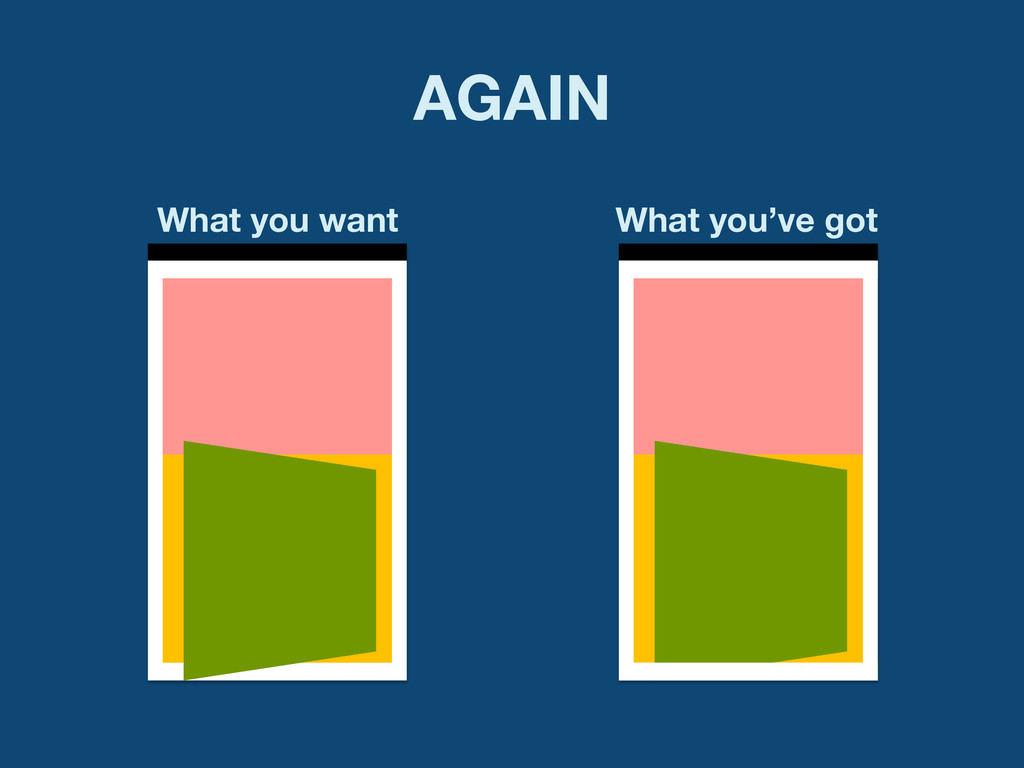
VIEW CLIPPING – Parent view encapsulates child drawing – Can’t draw
outside – Refactor your layout -
WHAT YOU’VE GOT <FrameLayout> <LinearLayout bg=y> <View bg=r /> <View
bg=g /> </Linearlayout> </FrameLayout> -
WHAT YOU WANT <RelativeLayout> <View bg=y/> <View bg=r/> <View br=g/>
</RelativeLayout> -
VIEW COMPOSITING – VideoView extends SurfaceView – Behind the window – Can’t
be efficiently moved, scaled, rotated – Can’t be rotated on X or Y axis at all -
VIEW COMPOSITING – Use a TextureView instead – Only for
animations/movement use cases 14 (4.0) -
TransitionManager – Manages animations between layouts – New hotness –
Compatibility library/libraries already in the works 18 (4.3) -
ALL THE INCOMPATIBILITY – NineOldAndroids – Open source! – Hyper-compatible (all the
way to 1.0) – So much win! • Doesn’t support animateLayoutChanges • Doesn’t support LayoutTransition • Doesn’t support selector animations – ViewCompat – [set]hasTransientState -
ADDITIONAL RESOURCES https://speakerdeck.com/dlew/i-can-animate-and-so-can-you I Can Animate and So Can You
Daniel Lew h"p://en.wikipedia.org/wiki/12_basic_principles_of_anima:on 12 Basic Principles of Animation Wikipedia, the free encyclopedia h"ps://www.youtube.com/watch?v=ihzZrS69i_s Google I/O 2013: A Moving Experience Chet Haase & Romain Guy