Share
Embed
A crash course of async/await
A crash course of async/await, as presented by Shai Mishali in Swift Heroes 2022.

Shai Mishali
April 09, 2022
Transcript
111 slides
-
Senior iOS Tech Lead @ monday.com Open Source ❤ Hackathon
fan and winner of some International Speaker @freak4pc Ab t Me -
Involved in dozens of tutorials and several published books Author
& Editor at raywenderlich.com iOS Team @freak4pc Ab t Me -
# Concurrency “The ability to execute more than one program
or task simultaneously.” -
# Concurrency Let’s make a Pizza! $ (Disclaimer: I don’t
actually know how to make a pizza) -
# Concurrency Make & rise dough Heat oven Make &
add sauce Add % Add & Bake $ 1h 10m 15m 5m 1m 1m 15m 1 Pizza = 1hr 47m Serial Execution Make & rise dough Heat oven Add sauce Add % Add & Bake Make sauce Concurrent execution $ 1 Pizza = 1hr 27m * Not actual pizza recipe ' -
# Concurrency $ 1h 27m Serial Execution 3 Pizzas =
1hr 27m 3 Pizzas = 4h2 21m $ 1h 27m $ 1h 27m $$ $ $$ $ $ $ $ * Not actual pizza recipe ' 1 pizza shop Concurrent execution 3 pizza shops -
( Swift pre-async/await Grand Central Dispatch (.") { result in
Completion handlers ) Combine -
Synchronous func updatePersonInfo(_ person: Person) { lblName.text = person.name /$
Synchronous, blocking imgAvatar.image = person.loadImage() lblWebsite.text = person.website } func updatePersonInfo(_ person: Person) { lblName.text = person.name /$ Asynchronous, non-blocking person.loadImage { [imgAvatar] image in imgAvatar.image = image } lblWebsite.text = person.website } Asynchronous Fetching and updating a single resource Closures ( Swift pre-async/await -
Synchronous Asynchronous Fetching and updating multiple resources (waiting) Closures func
updatePersonInfo(_ person: Person) { lblName.text = person.name /$ Synchronous, blocking let image = person.loadImage() let inviteCount = "Has \(person.loadInvitesCount()) invites" let friends = person.loadFriends() imgAvatar.image = image btnInvite.setTitle( "You have \(inviteCount) invites”, for: .normal ) self.friends = friends lblWebsite.text = person.website } func updatePersonInfo(_ person: Person) { lblName.text = person.name /$ Asynchronous, pyramid-of-doom person.loadImage { image in person.loadInvitesCount { count in person.loadFriends { [weak self] friends in self?'imgAvatar.image = image self?'btnInvite.setTitle( "You have \(count) invites”, for: .normal ) self?'friends = friends } } } } ( Swift pre-async/await -
1v Fetching and updating multiple resources (parallel) Dispatch Groups func
updatePersonInfo(_ person: Person) { let group = DispatchGroup() var image: UIImage? var invitesCount: Int? var friends = [Friend]() group.enter() person.loadImage { fetchedImage in defer { group.leave() } image = fetchedImage } group.enter() person.loadInvitesCount { count in defer { group.leave() } invitesCount = count } group.enter() person.loadFriends { allFriends in friends = allFriends } group.notify(queue: DispatchQueue.main) { [weak self] in /$ Have all 3 values only here, /$ what about errors though ?! self?'imgAvatar.image = image self?'btnInvite.setTitle( "You have \(invitesCount) invites", for: .normal ) self?'friends = friends } } Other options: Semaphore DispatchWorkItems Combine Publishers How do we deal with accumulated errors here? How do we short-circuit? How do we cancel work? Which queue are we running on? -
Startin Starting off iOS in 2010, Concurrency / Asynchrony was
the hardest topic for me to grasp. Not obvious, too many methodologies, too many dark corners, and I’m not the only one: Fan moment: Matt Thomposon (NSHipster) created Alamofire and AFNetworking * tl;dr: Async is HARD -
* tl;dr: Async is HARD Startin With the rise of
SwiftUI, Swift and other modern standards - working with asynchronous work is an obvious standard But it didn’t get any easier. Yet … Our code is modern now, sort of … -
# Concurrency Good Easy to read and follow Predictable Simple
error handling Bad Serial Blocking Single thread Poor resource utilization Good Concurrent Non-blocking Multi-threaded Superior resource optimization Bad Difficult to follow (sometimes) unpredictable Handling errors is involved / error-prone Synchronous Asynchronous -
+Concurrency Manifesto Many others thought the state of async work
is non-optimal in Swift For example, this very smart person: Main author of LLVM, Clang & Swift Chris Lattner https://gist.github.com/lattner/31ed37682ef1576b16bca1432ea9f782 Swift Concurrency Manifesto: First commit: August 11, 2017 -
❓What is async/await? It is a well-defined standard used across
many other programming languages async/await is a new syntax and part of a set of language features titled “Swift Concurrency”. (each with its own implementation) and more … -
❓What is async/await? async lets you define asynchronous functions func
loadImage(completion: (Result<UIImage, Error>) -) Void) func loadImage() async throws -) UIImage -
❓What is async/await? async lets you define asynchronous functions func
loadImage(completion: (Result<UIImage, Error>) -) Void) func loadImage() async throws -) UIImage -
❓What is async/await? async lets you define asynchronous functions func
loadImage(completion: (Result<UIImage, Error>) -) Void) func loadImage() async throws -) UIImage -
await lets you wait for the results of an asynchronous
function It also marks a suspension point person.loadImage { [weak self] fetchedImage in switch fetchedImage { case .success(let image): self?'image = image case .failure(let error): handleError(error) } } do { self.image = try await person.loadImage() } catch { handleError(error) } ❓What is async/await? -
You might ask yourself: “Can I just wait for the
result of these asynchronous functions anywhere?” ❓What is async/await? -
Where can you run an async function? An async function
can only be called from within an asynchronous context. This means either from a function which itself is async, or a task. func updatePersonInfo() async throws { let image = try await person.loadImage() } func updatePersonInfo() { Task { do { let image = try await person.loadImage() } catch { /$ handle error } } } Called from an async function: Called from a Task: ❓What is async/await? -
person.loadImage { image in person.loadInvitesCount { count in person.loadFriends {
[weak self] friends in /$ access image, count and friends } } } let image = await person.loadImage() let count = await person.loadInvitesCount() let friends = await person.loadFriends() /$ Access image, count and friends This might be confusing, but from a functionality perspective, these two pieces of code are equal: person.loadImage { image in person.loadInvitesCount { count in person.loadFriends { [weak self] friends in /$ access image, count and friends } } } ❓What is async/await? -
This might be confusing, but from a functionality perspective, these
two pieces of code are equal: These only seem synchronous, but each of them suspends and waits for its result before resuming to the next steps ❓What is async/await? let image = await person.loadImage() let count = await person.loadInvitesCount() let friends = await person.loadFriends() /$ Access image, count and friends -
Good Easy to read and follow Predictable Simple error handling
Bad Serial Blocking Single thread Poor resource utilization Good Concurrent Non-blocking Multi-threaded Superior resource optimization Bad Difficult to follow (sometimes) unpredictable Handling errors is involved / error-prone Synchronous Asynchronous + = async/await ❓What is async/await? -
⚙ How async/await works Task A Task represents a unit
of asynchronous work which could be a child of a different Task It has several initializers that let us create new asynchronous contexts: Task { … } Task(priority:) { ." } Creating tasks that inherit context, task values, etc: class ViewController: UIViewController { override func viewDidLoad() { super.viewDidLoad() Task { /$ Executes asynchronously, /$ but on the main thread print(Thread.isMainThread) /$ true } } } -
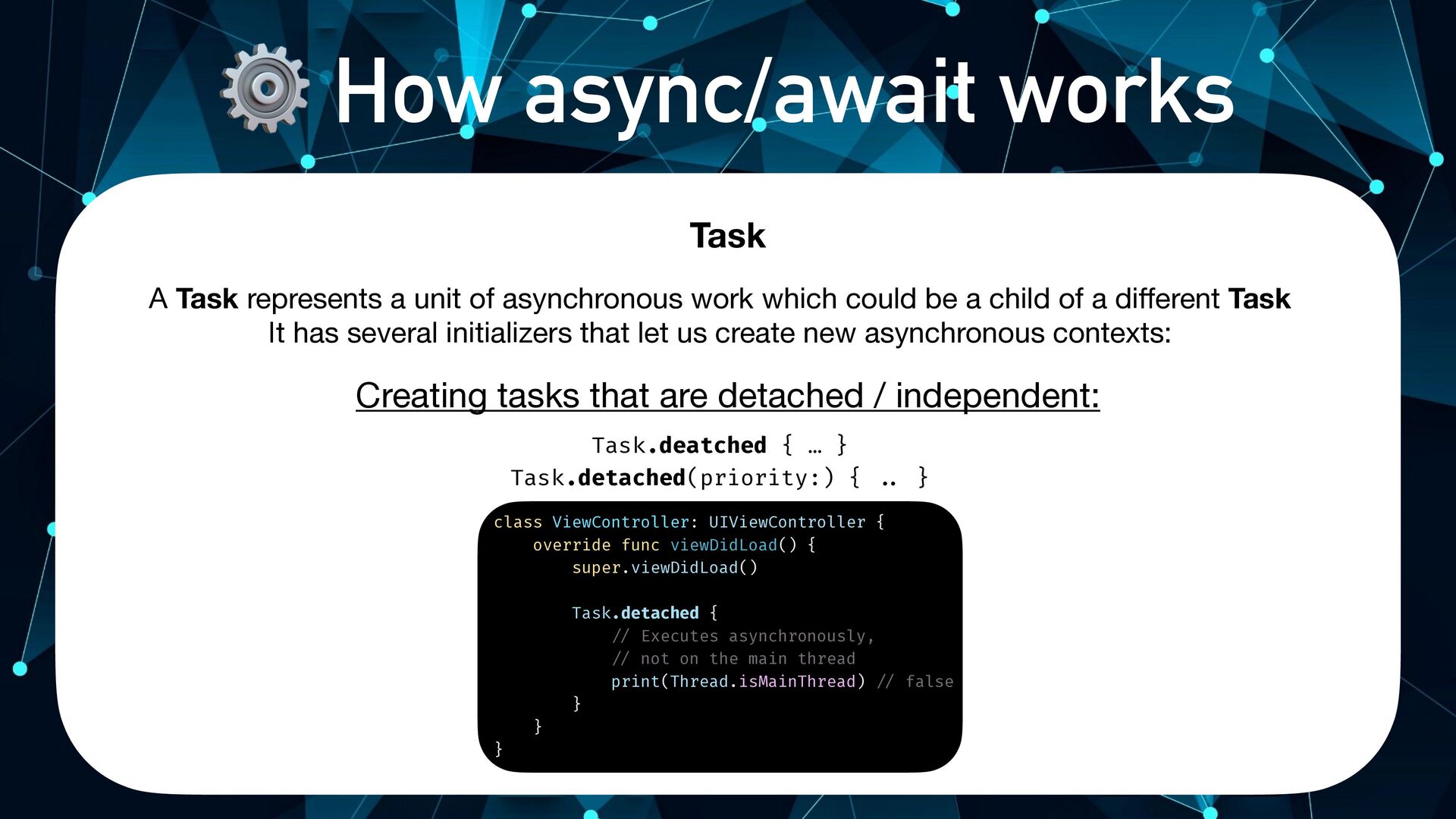
⚙ How async/await works Task Task.deatched { … } Task.detached(priority:)
{ ." } Creating tasks that are detached / independent: class ViewController: UIViewController { override func viewDidLoad() { super.viewDidLoad() Task.detached { /$ Executes asynchronously, /$ not on the main thread print(Thread.isMainThread) /$ false } } } A Task represents a unit of asynchronous work which could be a child of a different Task It has several initializers that let us create new asynchronous contexts: -
⚙ How async/await works Task Task is actually generic over
a Success and Failure, But the default for these initializers (and most common scenario here) is Void and Never, accordingly Task { ..+ } = Task<Void, Never> { ..+ } let task = Task<String, Never> { return someExpensiveComputation() } let result = await task.value It also exposes an await-able value getter: -
⚙ How async/await works Swift Concurrency uses a Cooperative Thread
Pool model A pool of threads available to run asynchronous functions ! Tasks must always make forward progress or suspend No more than one thread per CPU core (as opposed to GCD) Avoid thread explosion Avoid the overhead and performance penalty of thread switching Can suspend tasks and resume them later to prioritize other, more important, pieces of work, thanks to a lightweight abstraction called a Continuation -
⚙ How async/await works Marking a function as async lets
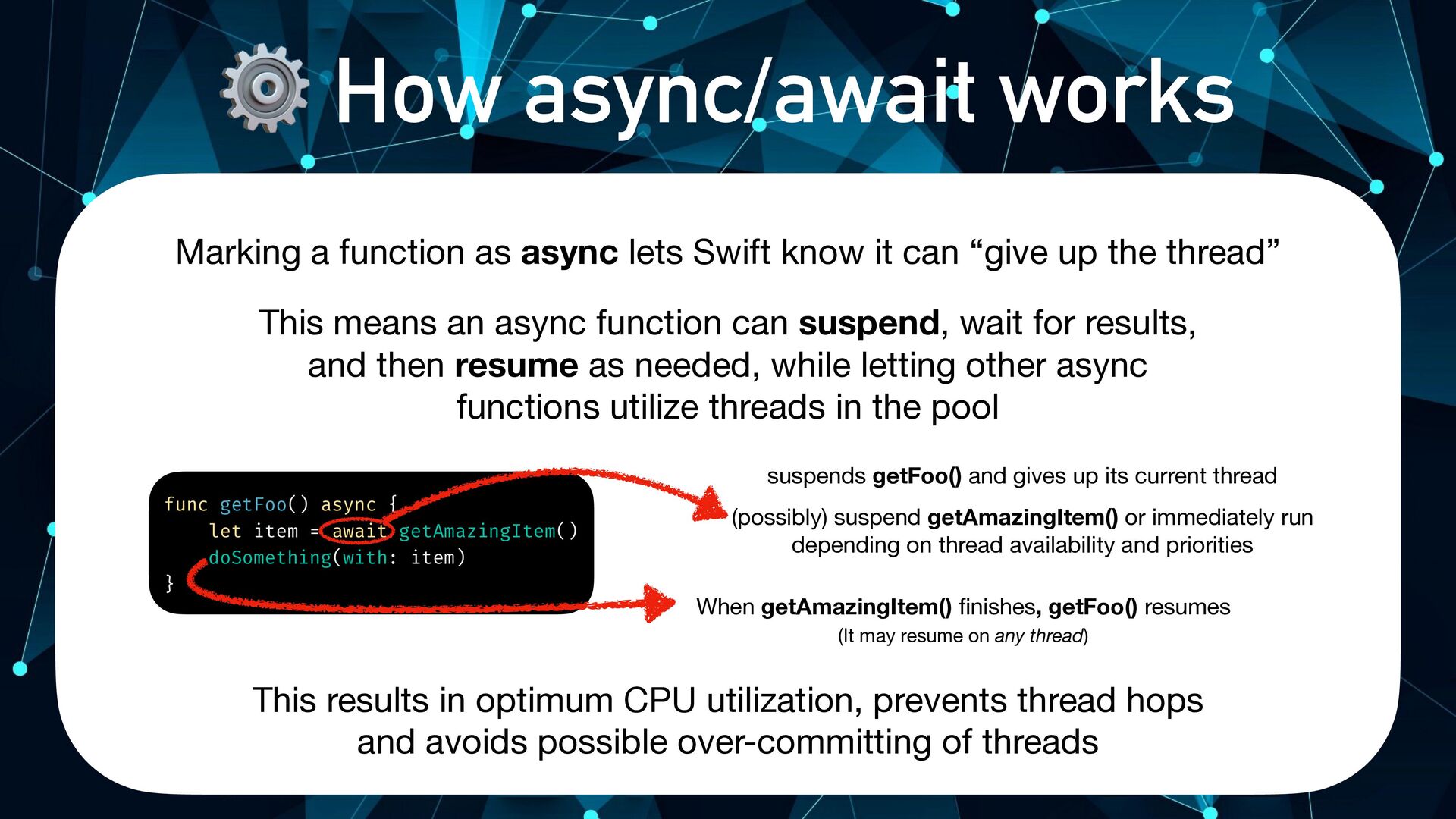
Swift know it can “give up the thread” This means an async function can suspend, wait for results, and then resume as needed, while letting other async functions utilize threads in the pool func getFoo() async { let item = await getAmazingItem() doSomething(with: item) } suspends getFoo() and gives up its current thread (possibly) suspend getAmazingItem() or immediately run depending on thread availability and priorities -
⚙ How async/await works Marking a function as async lets
Swift know it can “give up the thread” This means an async function can suspend, wait for results, and then resume as needed, while letting other async functions utilize threads in the pool This results in optimum CPU utilization, prevents thread hops and avoids possible over-committing of threads func getFoo() async { let item = await getAmazingItem() doSomething(with: item) } suspends getFoo() and gives up its current thread (possibly) suspend getAmazingItem() or immediately run depending on thread availability and priorities When getAmazingItem() finishes, getFoo() resumes (It may resume on any thread) -
. More async/await person.loadImage { image, error1 in person.loadInvitesCount {
count, error2 in person.loadFriends { [weak self] friends, error3 in /$ Somehow deal with the accumulation of all errors /$ What about cancellation and early short circuit?! } } } Error handling pre-async/await is … painful, to say the least. It’s very easy to miss handling errors, and handle all the edge cases Error handling -
Error handling do { try await person.loadImage() try await person.loadInvitesCount()
try await person.loadFriends() } catch { /$ handle error } async/await makes error handling feel natural to Swift, and identical to synchronous functions syntactically If any of the tasks fail, consecutive tasks will simply not run (or cancel) . More async/await -
The compiler watches over you The compiler and runtime also
prevents us from writing incorrect code: func loadInsanelyLargeResource(completion: (Result<Resource, Error>) -) Void) { guard let resource = loadOptionalResource() else { return } completion(.success(resource)) } . More async/await -
The compiler watches over you The compiler and runtime also
prevents us from writing incorrect code: func loadInsanelyLargeResource(completion: (Result<Resource, Error>) -) Void) { guard let resource = loadOptionalResource() else { return } completion(.success(resource)) } Oops, forgot to complete with an error! . More async/await -
The compiler watches over you func loadInsanelyLargeResource() async throws -)
Resource { guard let resource = loadOptionalResource() else { return } return resource } The compiler and runtime also prevents us from writing incorrect code: Impossible to forget error handling . More async/await -
The compiler watches over you func loadInsanelyLargeResource() async throws -)
Resource { guard let resource = loadOptionalResource() else { throw Error.invalidResource } return resource } The compiler and runtime also prevents us from writing incorrect code: . More async/await -
Async getters async isn’t exclusive to functions, you can also
make properties async, and even throw from them! struct Person { let avatarURL: URL } let shai = Person(..+) userImage.image = try await shai.avatar . More async/await var avatar: UIImage? { get async throws { let (data, _) = try await URLSession.shared.data(from: avatarURL) return UIImage(data: data) } } -
With async/await, very convoluted flows become trivial to write and
reason about . More async/await Refresh token about to expire? Renew refresh token # Refresh access token / Fetch user and return 0 Error handling for each phase Yes No, refresh token is valid -
func refreshTokenIfNeeded(_ token: JWT, completion: (Result<User, Error>) -) Void) {
if token.isAboutToExpire(within: 15) { service.renew { error in if let error = error { completion(.failure(error)) return } refreshTokenIfNeeded(token, completion: completion) } return } service.getAuthenticatedUser(for: token) { user in switch user { case .success(let user): completion(.success(user)) case .failure: service.notifyExpiration { error in if let error = error { completion(.failure(error)) } } } } } JWT Refresh with Closures We have to recurse back into the function since we can’t “continue” the control flow after a closure Messy error handling and hard to follow . More async/await -
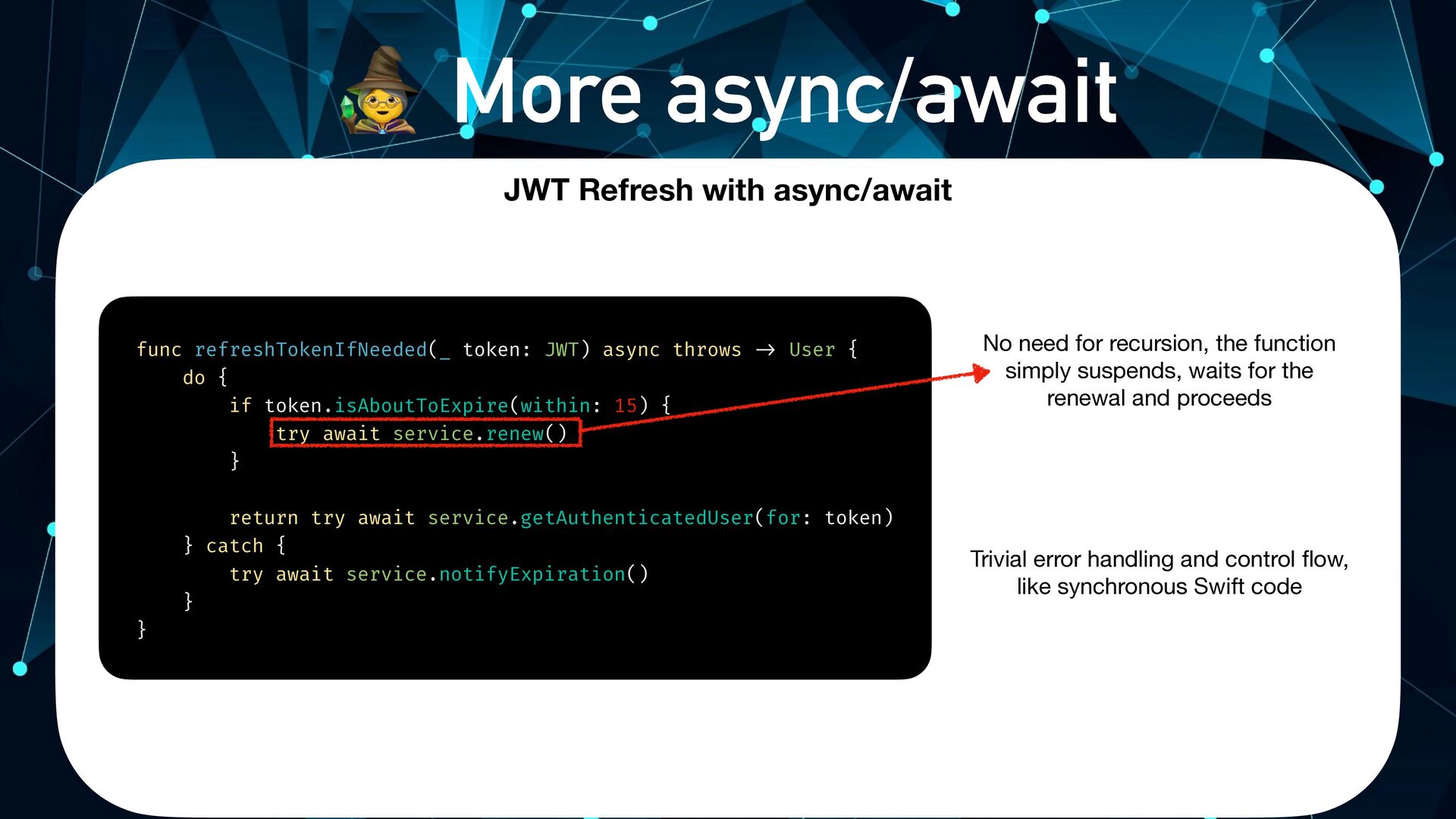
func refreshTokenIfNeeded(_ token: JWT) async throws -) User { do
{ if token.isAboutToExpire(within: 15) { try await service.renew() } return try await service.getAuthenticatedUser(for: token) } catch { try await service.notifyExpiration() } } No need for recursion, the function simply suspends, waits for the renewal and proceeds Trivial error handling and control flow, like synchronous Swift code . More async/await JWT Refresh with async/await -
person.loadImage { image in person.loadInvitesCount { count in person.loadFriends {
[weak self] friends in /$ access image, count and friends } } } let image = await person.loadImage() let count = await person.loadInvitesCount() let friends = await person.loadFriends() /$ Access image, count and friends Asynchronous execution with straight-line “synchronous” code is awesome. But, it still waits for each task to complete. We can do better! person.loadImage { image in person.loadInvitesCount { count in person.loadFriends { [weak self] friends in /$ access image, count and friends } } } let image = await person.loadImage() let count = await person.loadInvitesCount() let friends = await person.loadFriends() /$ Access image, count and friends Back to our person info example… . More async/await -
person.loadImage { image in person.loadInvitesCount { count in person.loadFriends {
[weak self] friends in /$ access image, count and friends } } } func updatePersonInfo(_ person: Person) async { async let image = person.loadImage() async let count = person.loadInvitesCount() async let friends = person.loadFriends() await handleInfo(image, count, friends) } func updatePersonInfo(_ person: Person) { let group = DispatchGroup() var image: UIImage? var invitesCount: Int? var friends = [Friend]() group.enter() person.loadImage { fetchedImage in defer { group.leave() } image = fetchedImage } group.enter() person.loadInvitesCount { count in defer { group.leave() } invitesCount = count } group.enter() person.loadFriends { allFriends in friends = allFriends } group.notify(queue: DispatchQueue.main) { [weak self] in /$ Have all 3 values only here, /$ what about errors though ?! handleInfo(image, invitesCount, friends) } } async let bindings let you run multiple independent tasks in parallel, while awaiting all of their results together . More async/await -
What about Cancellation? Similarly to the “Cooperative Thread Pool”, async/await
uses a “Cooperative Cancellation” mechanism. struct Person { let avatarURL: URL var avatar: UIImage? { get async throws { let (data, _) = try await URLSession.shared.data(from: avatarURL) return UIImage(data: data) } } } This basically means each task is responsible to short-circuit its own execution if it’s canceled. . More async/await -
What about Cancellation? Similarly to the “Cooperative Thread Pool”, async/await
uses a “Cooperative Cancellation” mechanism. struct Person { let avatarURL: URL var avatar: UIImage? { get async throws { let (data, _) = try await URLSession.shared.data(from: avatarURL) return UIImage(data: data) } } } Task might have been canceled by the time fetching the data finished This basically means each task is responsible to short-circuit its own execution if it’s canceled. . More async/await -
What about Cancellation? Similarly to the “Cooperative Thread Pool”, async/await
uses a “Cooperative Cancellation” mechanism. This basically means each task is responsible to short-circuit its own execution if it’s canceled. struct Person { let avatarURL: URL var avatar: UIImage? { get async throws { let (data, _) = try await URLSession.shared.data(from: avatarURL) try Task.checkCancellation() return UIImage(data: data) } } } Throws a special CancellationError if the task was canceled and stop the control flow . More async/await -
What about Cancellation? Sometimes you might want to perform a
different flow based on whether or not the task was cancelled: struct Person { let avatarURL: URL var avatar: UIImage? { get async throws { let (data, _) = try await URLSession.shared.data(from: avatarURL) if Task.isCancelled { return UIImage(named: "placeholder") } return UIImage(data: data) } } } . More async/await -
What about Cancellation? Lastly, you can use withTaskCancellationHandler to have
a closure immediately execute upon Task cancellation var avatar: UIImage? { get async throws { try await withTaskCancellationHandler( operation: { let (data, _) = try await URLSession.shared.data(from: avatarURL) return UIImage(data: data) }, onCancel: { MyCache.shared.clear(for: avatarURL) } ) } } . More async/await -
1 Task groups Let’s say we have a list of
people, and we want to fetch all of their images, and arrange them into an array of assets (many) async requests You might be tempted to do it this way: func getAllUserPhotos() async -) [UIImage] { var result = [UIImage]() for person in people { await result.append(person.loadAvatar()) } return result } -
1 Task groups This will work, but … will take
quite some time since it’s serial: (many) async requests func getAllUserPhotos() async -) [UIImage] { var result = [UIImage]() for person in people { await result.append(person.loadAvatar()) } return result } Suspends and waits for each image in its turn -
1 Task groups (many) concurrent async requests Your instinct to
perform many concurrent tasks might be to reach for async let bindings But this isn’t feasible / useful when we’re talking about varying / dynamic amount of async functions /$ ??? func getAllUserPhotos() async -) [UIImage] { var result = [UIImage]() for person in people { async let thing = person.loadAvatar() } return result } /" ??? -
1 Task groups Your instinct to perform many concurrent tasks
might be to reach for async let bindings (many) concurrent async requests func getAllUserPhotos() async -) [UIImage] { var result = [UIImage]() for person in people { async let thing = person.loadAvatar() result.append(thing) } return result } But this isn’t feasible / useful when we’re talking about varying / dynamic amount of async functions -
1 Task groups A task group groups together other child
tasks, in a hierarchical way Task groups await withTaskGroup(of: ..+) { group in await withThrowingTaskGroup(of: ..+) { group in Type of each child task’s result, or - each individual resource we want to await in the group await withTaskGroup(of: UIImage.self) { group in -
1 Task groups Simply add as many async Tasks as
you need to the group Task groups func getAllUserPhotos() async -) [UIImage] { await withTaskGroup(of: UIImage.self) { group in for person in people { group.addTask { await person.loadAvatar() } } var result = [UIImage]() for await image in group { result.append(image) } return result } } -
1 Task groups Then, you can easily iterate over the
async results, as if they were a simple Swift Collection Task groups func getAllUserPhotos() async -) [UIImage] { await withTaskGroup(of: UIImage.self) { group in for person in people { group.addTask { await person.loadAvatar() } } var result = [UIImage]() for await image in group { result.append(image) } return result } } -
1 Task groups You can even prioritize some tasks over
others: Task groups func getAllUserPhotos() async -) [UIImage] { await withTaskGroup(of: UIImage.self) { group in for person in people { group.addTask(priority: person.isImportant ? .high : nil) { await person.loadAvatar() } } var result = [UIImage]() for await image in group { result.append(image) } return result } } -
1 Task groups Results might return in any order, so
it’s worth sorting or keeping track of the different tasks somehow Task groups func getAllUserPhotos() async -) [UUID: UIImage] { await withTaskGroup(of: (UUID, UIImage).self) { group in for person in people { group.addTask { await (person.id, person.loadAvatar()) } } return await group.reduce(into: [UUID: UIImage]()) { $0[$1.0] = $1.1 } } } -
1 Task groups Structured & Unstructured Concurrency When we talk
about Structured Concurrency, we talk about hierarchy. Having this dependency hierarchy lets Swift do smart things such as propagate cancellation to child tasks. Child Task 1 Child Task 2 Child Task 3 Child Task 4 Task<UIImage, Never> Task<UIImage, Never> Task<UIImage, Never> Task<UIImage, Never> TaskGroup<UIImage> Parent task Task groups are a prime example of this, as well as async let bindings -
1 Task groups Structured & Unstructured Concurrency With Unstructured concurrency
- we can create Tasks that aren’t part of any hierarchy, and don’t have a parent task. We can store them, and cancel them or interact with them later on. A good example we’ve already talked about: Task { … } Task.detached { … } -
2 AsyncSequence Async Sequences Up until now, we’ve been dealing
with async functions that return a single result. But often, you will have asynchronous work that might return multiple values - Sockets, Publishers, File handles, and more… Time for Async Sequences -
2 AsyncSequence Async Sequences AsyncSequence is similar to a regular
Swift Sequence, except that every value is awaited asynchronously You’ve already seen an example of this with Task Groups: await withTaskGroup(of: UIImage.self) { group in for person in people { group.addTask { await person.loadAvatar() } } var result = [UIImage]() for await image in group { result.append(image) } return result } -
2 AsyncSequence Async Sequences Swift includes various built-in methods that
leverage Async Sequences Let’s explore a few of these ! Files " URL Requests -
2 AsyncSequence Async Sequences Let’s say we have a huge
CSV file with hundreds of thousands of lines, and we want to fetch and parse it into a struct: 1,Shai 2,Elia 3,Ethan 4,Ariel 5,Natan 6,Yuval 7,Igor ..+ 300000,Steve -
2 AsyncSequence Async Sequences A naive way would be fetching
the file in its entirety and then iterating over all of its available lines: let (data, _) = try await URLSession.shared.data(for: URLRequest(url: largeCSV)) var people = [Person]() let lines = String(data: data, encoding: .utf8)?'components(separatedBy: "\n") ?, [] for line in lines { people.append(Person(csvLine: line)) } Greedily fetch the entire file, parse it as a single large String and split into lines -
2 AsyncSequence Async Sequences But there’s a better way, with
the new bytes(for:) API: let (bytes, _) = try await URLSession.shared.bytes(for: URLRequest(url: largeCSV)) var people = [Person]() for try await line in bytes.lines { people.append(Person(csvLine: line)) } Processes the lines lazily, while the data transfer is ongoing -
2 AsyncSequence Async Sequences We can do the same for
reading local files: Reads the entire file synchronously, and then parses the lines let data = FileManager.default.contents(atPath: localFile.absoluteString) ?, Data() var people = [Person]() let lines = String(data: data, encoding: .utf8)?'components(separatedBy: "\n") ?, [] for line in lines { people.append(Person(csvLine: line)) } -
2 AsyncSequence Async Sequences We can do the same for
reading local files: let handle = try FileHandle(forReadingFrom: localFile) var people = [Person]() for try await line in handle.bytes.lines { people.append(Person(csvLine: line)) } Read the lines one-by-ones using the new bytes API on FileHandle -
AsyncSequence 3 More async/await It’s simply a protocol, so you
can easily conform to it and make your own async sequences - but we’ll get to that in a bit :) -
Actors 4 Actors Working with Actors is a very wide
and deep topic, so we’ll only touch some of the “must knows” of it It’s worth digging up the documentation and relevant WWDC Sessions (WWDC21-10133) -
Trea Actors 4 Actors One of the trickiest things to
get right in asynchronous programming is Data Races A data race usually involves shared mutable state, with two or more threads trying to access that state at the same time - and at least one of these accesses is a write Shared State One of these threads might get the wrong piece of data, or flat-out crash and burn 5 Thread 1 Thread 2 -
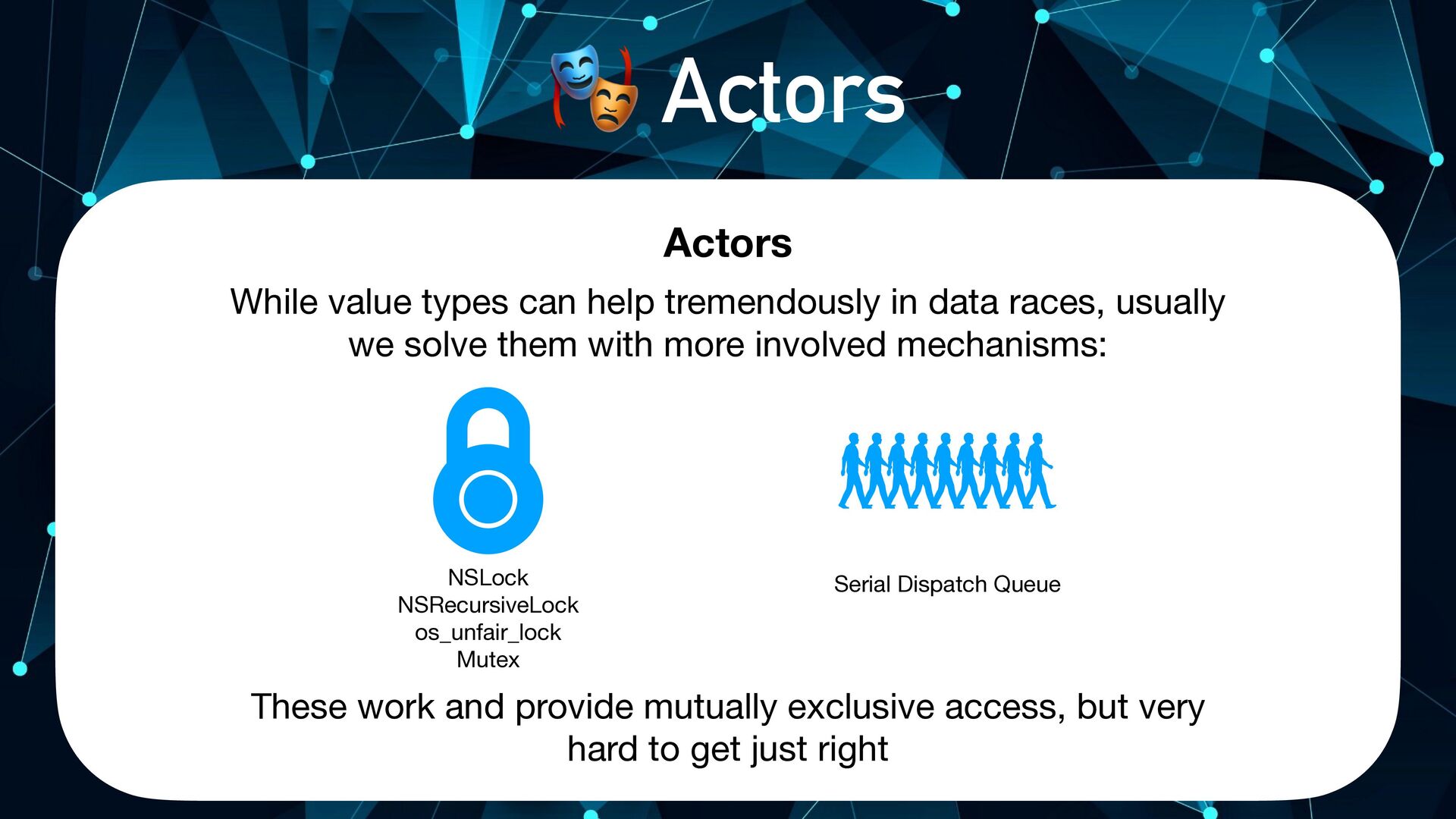
Actors 4 Actors While value types can help tremendously in
data races, usually we solve them with more involved mechanisms: NSLock NSRecursiveLock os_unfair_lock Mutex Serial Dispatch Queue These work and provide mutually exclusive access, but very hard to get just right -
Actors 4 Actors Actors are reference-type objects (like Classes) that
provide automatic synchronization and isolation for its state Actor Read/Write Synchronous Different Actor Its origins are rooted in high-scale languages such as Akka and Erlang Read/Write Asynchronous -
Actors 4 Actors Concurrent read/write races are extremely common in
even the simplest of scenarios: class DataSource { let items = ["Shai", "Elia", "Ethan", "Ariel", "Natan", "Yuval", "Igor"] private var index = 0 func next() { print(items[index]) if items.indices.contains(index + 1) { index += 1 } else { index = 0 } } } let ds = DataSource() DispatchQueue.global().async { ds.next() } DispatchQueue.global().async { ds.next() } DispatchQueue.global().async { ds.next() } Shai Shai Shai Prints: -
Actors 4 Actors Concurrent read/write races are extremely common in
even the simplest of scenarios: actor DataSource { let items = ["Shai", "Elia", "Ethan", "Ariel", "Natan", "Yuval", "Igor"] private var index = 0 func next() { print(items[index]) if items.indices.contains(index + 1) { index += 1 } else { index = 0 } } } let ds = DataSource() DispatchQueue.global().async { ds.next() } DispatchQueue.global().async { ds.next() } DispatchQueue.global().async { ds.next() } -
Actors 4 Actors actor DataSource { let items = ["Shai",
"Elia", "Ethan", "Ariel", "Natan", "Yuval", "Igor"] private var index = 0 func next() { print(items[index]) if items.indices.contains(index + 1) { index += 1 } else { index = 0 } } } let ds = DataSource() Task.detached { await ds.next() } Task.detached { await ds.next() } Task.detached { await ds.next() } Shai Elia Ethan Prints: When working “outside the actor”, you must access the data asynchronously: -
@MainActor 4 Actors MainActor.run There’s another special kind of actor
called The Main Actor. In essence, it represents the Main Thread. DispatchQueue.main.async = -
@MainActor 4 Actors You can annotate specific methods or even
entire types with @MainActor, to make sure they always run on the main thread: @MainActor class AwesomeViewModel { func doesUIThing1() { /$ Runs on Main Thread } func doesUIThing2() { /$ Runs on Main Thread } } -
@MainActor 4 Actors You can opt-out specific methods so they
don’t run on the main actor by marking them as nonisolated: @MainActor class AwesomeViewModel { func doesUIThing() { /$ Runs on Main Thread } nonisolated func doesNonUIThing() { /$ Not isolated to Main Actor } } -
A few more topics 4 Actors We only looked into
a portion of the Actors story, there are many topics we haven’t looked into at all, such as: ⚪ @Sendable ⚪ @globalActor ⚪ @preconcurrency ⚪ nonisolated ⚪ Using the Thread Sanitizer with Actors ⚪ And much more … -
Deployment Target 7 Using in your codebase Swift Concurrency is
available on iOS 13 and up It is built into the SDK on iOS 15, and back-deployed in older OS versions by the concurrency compatibility library -
Creating your own continuations So far, you’ve learned about existing
async functions, but you’ll often want to create your own to wrap other closure- based functions, for example: You can do this using these built-in functions: withCheckedContinuation withCheckedThrowingContinuation withUnsafeContinuation withUnsafeThrowingContinuation 7 Using in your codebase -
Creating your own continuations Given this closure-based function: You can
wrap it as an async function like so: func loadImage(completion: (Result<UIImage, Error>) -) Void) func loadImage() async throws -) UIImage { try await withCheckedThrowingContinuation { continuation in loadImage { result in switch result { case .success(let image): continuation.resume(returning: image) case .failure(let error): continuation.resume(throwing: error) } } } } 7 Using in your codebase -
Creating your own continuations There’s even an overload to resume
with a Result: func loadImage() async throws -) UIImage { try await withCheckedThrowingContinuation { continuation in loadImage { result in continuation.resume(with: result) } } } Note: You mustn’t resume the continuation more than once! 7 Using in your codebase -
Creating your own Async Sequences enum StockChange { case change(Stock)
case finished } func monitorStocks(stockChange: (StockChange) -) Void) { ..+ } 7 Using in your codebase As mentioned before, AsyncSequence is simply a protocol. But luckily, you don’t have to implement it yourself. You can simply use AsyncStream, instead -
Creating your own Async Sequences func monitorStocks() -) AsyncStream<Stock> {
AsyncStream<Stock> { continuation in monitorStocks { change in switch change { case .change(let stock): continuation.yield(stock) case .finished: continuation.finish() } } } } Task { for await stock in monitorStocks() { print("Current stock: \(stock)") } } 7 Using in your codebase As mentioned before, AsyncSequence is simply a protocol. But luckily, you don’t have to implement it yourself. You can simply use AsyncStream, instead -
x Objective-C Interoperability - (void)fetchNumbers:(void(^)(NSArray<NSNumber */*))completion; For Objective-C code, the
Swift Compiler automatically generated async versions of block-based methods: 7 Using in your codebase -
Objective-C Interoperability You can further refine their name and usage
using NS_SWIFT_ASYNC_NAME and NS_REFINED_FOR_SWIFT_ASYNC - (void)fetchNumbers:(void(^)(NSArray<NSNumber */*))completion NS_SWIFT_ASYNC_NAME(numbers()); 7 Using in your codebase -
Objective-C Interoperability As you can imagine, this means that most
Apple-built code that has completion handlers gets free bridging to async/await 7 Using in your codebase -
SwiftUI To execute async functions from within your SwiftUI code,
simply use the new .task modifier (iOS 15+) 7 Using in your codebase struct MyView: View { @State var numbers = [Int]() var body: some View { Text("\(numbers.count) numbers") .task { self.numbers = await fetchNumbers() } } } iOS 15+ struct MyView: View { @State var numbers = [Int]() var body: some View { Text("\(numbers.count) numbers") .onAppear { Task { @MainActor in self.numbers = await fetchNumbers() } } } } iOS 13+ -
And what about Combine? You might’ve thought to yourself -
this AsyncSequence thing is pretty similar to a Combine Publisher! 7 Using in your codebase Well, you’re absolutely right - and you can even use a Publisher this way using the values property: Combine & Sink: Combine & async/await: numbers .map { $0 * 2 } .prefix(3) .dropFirst() .sink( receiveCompletion: { _ in print("Done!") }, receiveValue: { print("Value \($0)") } ) .store(in: &subscriptions) let publisher = numbers .map { $0 * 2 } .prefix(3) .dropFirst() for await number in publisher.values { print("Value \(number)") } print("Done!") -
Combine without Combine? But what about all of these awesome
operators?! How can I use them in async/ await, without Combine? 7 Using in your codebase Apple seems to be shifting its focus heavily towards async/await, as evident by their latest release of swift-async-algorithms: A set of Combine-like operators for AsyncSequences: https://github.com/apple/swift-async-algorithms
 freak4pc
 lindahogenes
 csswizardry
 jnunemaker
 skipperchong
 morganepeng
 aleyda
 lcolladotor
 helenjbeal
 gurzu
 tessaabrams
 marketingsoph