Share
Embed
ES2015 - Javascript For Modern Times
Slides from a lecture I did at a SiSense Tech Meetup on January 24th, 2016 about ES2015. Full Video + Lecture (Hebrew + Subs) will be uploaded soon.
For any questions feel free to contact me at [email protected]

Shai Mishali
January 24, 2016
Transcript
96 slides
-
ES2015 Javascript For Modern Times ES JS +
by Shai Mishali -
Shai Mishali All-around geek. Mobile to Web to Backend. Constantly
messing with new & weird technologies Winner of: BattleHack TLV 2014 BattleHack World Finals 2014 Ford TLV Developer Challenge 2015 freak4pc Shai Mishali -
A Bit of History • May 1995 - Brendan Eich,
then an employee of Netscape, creates the first version of Javascript in just 10 days. • Originally named Mocha, then renamed to LiveScript, and eventually named JavaScript • ECMAScript is a standard specification. Javascript is merely a language implementing that standard (such as ActionScript) • ES1 - 1997, ES2 - 1998, ES3 - 1999, ES4 - 2000, ES5 - 2011, ES6/ES2015 - 2013 -
The Horrors of Hoisting y = 8 console.log(y) // Trying
to run any of the following commands // without prior var will result in an error >> Uncaught ReferenceError: y is not defined >> Uncaught ReferenceError: y is not defined -
// But, What do you think the following code will
do ? console.log(y) var y = 8 The Horrors of Hoisting // Or even worse... this code ? y = 8 console.log(y + " " + x) var y var x = 4 -
>> undefined The Horrors of Hoisting // But, What do
you think the following code will do ? console.log(y) var y = 8 // Or even worse... this code ? y = 8 console.log(y + " " + x) var y var x = 4 >> 8 undefined -
// This: console.log(y) var y = 8 // And this:
y = 8 console.log(y + "" + x) var y var x = 4 Prior to executing our code, Javascript moves our var declarations to the top of the scope. This is known as Hoisting. The Horrors of Hoisting -
Prior to executing our code, Javascript moves our var declarations
to the top of the scope. This is known as Hoisting. // This: console.log(y) var y = 8 // And this: y = 8 console.log(y + "" + x) var y var x = 4 // This: var y console.log(y) y = 8 // And this: var y, x y = 8 console.log(y) x = 4 Turns To The Horrors of Hoisting -
This becomes even more unexpected and hazardous in loops. Take
this simple for loop, for example The Horrors of Hoisting for(var i = 0; i < 4; i++){ setTimeout(function(){ console.log(i) }) } >> 0 1 2 3 // expected behaviour -
This becomes even more unexpected and hazardous in loops. Take
this simple for loop, for example The Horrors of Hoisting for(var i = 0; i < 4; i++){ setTimeout(function(){ console.log(i) }) } >> 0 1 2 3 // expected behaviour >> 4 4 4 4 // actual behaviour -
The var in the loop is actually hoisted to the
top of the loop, so all iterations of the loop use the same i ! The Horrors of Hoisting for(var i = 0; i < 4; i++){ setTimeout(function(){ console.log(i) }) } var i for(i = 0; i < 4; i++){ setTimeout(function(){ console.log(i) }) } // i = 4 and only then // setTimeout(s) execute -
let variables are scoped to the nearest block and are
NOT hoisted. var variables are scoped to the nearest function / global scope and ARE hoisted. Let is the new Var // lets are not hoisted so // y doesn't exist in first line y = 8 console.log(y) let y // let is block-scoped so y isn’t // visible in the second block // if this was a var, we would see "8" { let y = 8 } { console.log(y) } -
let variables are scoped to the nearest block and are
NOT hoisted. var variables are scoped to the nearest function / global scope and ARE hoisted. Let is the new Var // lets are not hoisted so // y doesn't exist in first line y = 8 console.log(y) let y // let is block-scoped so y isn’t // visible in the second block // if this was a var, we would see "8" { let y = 8 } { console.log(y) } >> Uncaught ReferenceError: y is not defined -
This also solves our for loop issue. Each iteration of
the loop is assigned its own i. Meaning, i is not shared across iterations. Let is the new Var for(let i = 0; i < 4; i++){ setTimeout(function(){ console.log(i) }) } >> 0 1 2 3 // expected behaviour let -
This also solves our for loop issue. Each iteration of
the loop is assigned its own i. Meaning, i is not shared across iterations. Let is the new Var for(let i = 0; i < 4; i++){ setTimeout(function(){ console.log(i) }) } >> 0 1 2 3 // expected behaviour >> 0 1 2 3 // actual behaviour let -
This also solves our for loop issue. Each iteration of
the loop is assigned its own i. Meaning, i is not shared across iterations. Let is the new Var for(let i = 0; i < 4; i++){ setTimeout(function(){ console.log(i) }) } >> 0 1 2 3 // expected behaviour >> 0 1 2 3 // actual behaviour let -
Const const creates a read-only, block-scoped reference to a value.
Commonly used as a magic-value holder. if(lessons.length > 20) { throw "Maximum Number of Lessons Exceeded" } const MAX_LESSONS = 20 if(lessons.length > MAX_LESSONS) { throw "Maximum Number of Lessons Exceeded" } // Constants require an initial value const MAX_LESSONS >> SyntaxError: missing = in const declaration // And can't be modified const MAX_STUDENTS = 500 MAX_STUDENTS = 350 // Silently ignored // They also can't be redeclared const MAX_STUDENTS = 500 const MAX_LESSONS = 20 const MAX_STUDENTS = 350 >> Uncaught TypeError: Identifier ‘MAX_STUDENTS' has already been declared constants require an initial value and can’t be redeclared -
Rest Parameters Lets say we have a setTags method on
our User object that can accept any number of arguments (Variadic Function) User.setTags("music") User.setTags("music", "programming") User.setTags("music", "programming", "weightlifting") Nerdy User Or Or -
Usually we would use the arguments object, which is a
built-in Array-like object containing the arguments of the function. Current Solution function setTags(){ for(let i in arguments){ console.log(arguments[i]) } } setTags("music", "programming") >> music programming -
This technique works - but is very confusing and hard
to read & maintain. Its really unclear where arguments come from and which arguments should the function accept. Current Solution function setTags(){ for(let i in arguments){ console.log(arguments[i]) } } setTags("music", "programming") >> music programming Where is this arguments var coming from? What should the function accept? -
This technique also breaks easily which makes maintenance a nightmare.
What if we need some other arguments in our function ? Current Solution function setTags(nickname, age){ for(let i in arguments){ console.log(arguments[i]) } } setTags("freak4pc", 28, "music", "programming") >> freak4pc 28 music programming -
This technique also breaks easily which makes maintenance a nightmare.
What if we need some other arguments in our function ? Current Solution function setTags(nickname, age){ for(let i in arguments){ console.log(arguments[i]) } } setTags("freak4pc", 28, "music", "programming") >> freak4pc 28 music programming These are not tags! -
The new rest operator allows us to represent an indefinite
number of arguments as an Array which makes our code much more readable and less likely to break. Rest Parameters function setTags(nickname, age, ...tags){ for(let i in tags){ console.log(tags[i]) } } setTags("freak4pc", 28, "music", "programming") -
Rest Parameters function setTags(nickname, age, ...tags){ for(let i in tags){
console.log(tags[i]) } } setTags("freak4pc", 28, "music", "programming") The REST of the arguments >> music programming The new rest operator allows us to represent an indefinite number of arguments as an Array which makes our code much more readable and less likely to break. -
Let’s say we want to take some data from an
HTTP request and push it to our new User.setTags method Spread Operator API.getAllTags(function(data){ // data.tags is ["music", "programming"] User.setTags("freak4pc", 28, data.tags) }) -
Let’s say we want to take some data from an
HTTP request and push it to our new User.setTags method Spread Operator API.getAllTags(function(data){ // data.tags is ["music", "programming"] User.setTags("freak4pc", 28, data.tags) }) data.tags is an Array! Not individual items, as expected by setTags -
The Spread operator lets us expand an expression where multiple
arguments / elements are expected. Spread Operator API.getAllTags(function(data){ // data.tags is ["music", "programming"] User.setTags("freak4pc", 28, ...data.tags) }) -
The Spread operator lets us expand an expression where multiple
arguments / elements are expected. Spread Operator API.getAllTags(function(data){ // data.tags is ["music", "programming"] User.setTags("freak4pc", 28, ...data.tags) }) data.tags is converted to individual "music", "programming" -
Spread Operator We can use Spread for function calls, as
well as array literals. Here are some sample usages: let adjs = ['pretty', 'awesome'] // No Spread let bad = ['spread', 'is', adjs, 'right?'] console.log(bad) >> spread, is, [pretty, awesome], right? >> spread, is, pretty, awesome, right? let adjs = ['pretty', 'awesome'] // With Spread let good = ['spread', 'is', ...adjs, 'right?'] console.log(good) let arr1 = ['all', 'your', 'items'] let arr2 = ['are', 'belong', 'to', 'us'] // No Spread arr1.push(arr2) >> all, your, items, [are, belong, to, us] let arr1 = ['all', 'your', 'items'] let arr2 = ['are', 'belong', 'to', 'us'] // With Spread arr1.push(...arr2) >> all, your, items, are, belong, to, us -
Same same… but different The Spread operator and Rest parameters
operator just look the same, but they are both used in different situations // Rest Parameters function setTags(...tags){ for(let i in tags){ let tag = tags[i] console.log(tag) } } Rest Parameters are used in function definitions Spread Operator is used in function invocations // Spread Parameters API.getAllTags(function(data){ User.setTags("shai", ...data.tags) }) … and array literals let adjs = ['pretty', 'awesome'] let are = ['spread', 'is', ...adjs, 'right?'] -
Arrow Functions Nicer Functions One-line functions Getting rid of bind()
for scoping issues -
Let’s examine the following piece of code processing an array
of products. It will get the lowest price of a product within our price range. Function Gotchas - Syntax let products = [{"name": "MacBook", "price": 1299}, ...] let data = products .filter(function(p){ return p.price > 800 && p.price < 2000 }) // Filter products in prince range (800 to 2000) .map(function(p){ return p.price }) // Map just the price field to an Array .reduce(function(prev, curr){ return (prev < curr) ? prev : curr }) // Get the cheapest price in range -
Notice how many times we have to repeat the function
keyword, and how many blocks we have to create for just single-line functions. Function Gotchas - Syntax let products = [{"name": "MacBook", "price": 1299}, ...] let data = products .filter(function(p){ return p.price > 800 && p.price < 2000 }) // Filter products in prince range (800 to 2000) .map(function(p){ return p.price }) // Map just the price field to an Array .reduce(function(prev, curr){ return (prev < curr) ? prev : curr }) // Get the cheapest price in range -
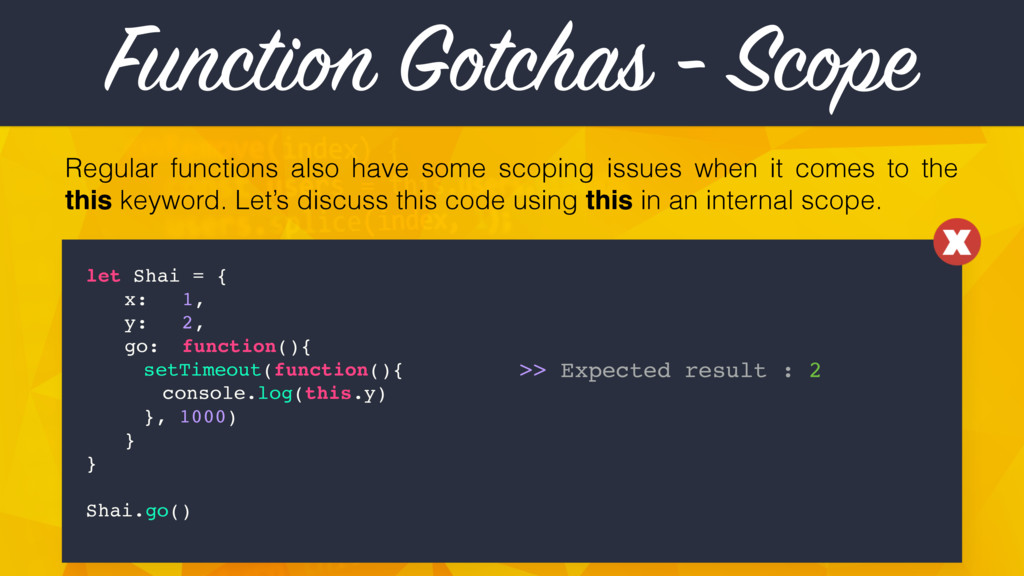
Regular functions also have some scoping issues when it comes
to the this keyword. Let’s discuss this code using this in an internal scope. Function Gotchas - Scope let Shai = { x: 1, y: 2, go: function(){ setTimeout(function(){ console.log(this.y) }, 1000) } } Shai.go() >> Expected result : 2 -
Regular functions also have some scoping issues when it comes
to the this keyword. Let’s discuss this code using this in an internal scope. Function Gotchas - Scope let Shai = { x: 1, y: 2, go: function(){ setTimeout(function(){ console.log(this.y) }, 1000) } } Shai.go() >> Actual result : undefined >> Expected result : 2 -
Regular functions also have some scoping issues when it comes
to the this keyword. Let’s discuss this code using this in an internal scope. Function Gotchas - Scope let Shai = { x: 1, y: 2, go: function(){ setTimeout(function(){ console.log(this.y) }, 1000) } } Shai.go() This line thinks this relates to the context of setTimeout, and not the lexical scope -
Current solution consists on binding this to the lexical scope,
which adds unneeded code, and is just plain ugly and unreadable (especially when needed often). Function Gotchas - Scope let Shai = { x: 1, y: 2, go: function(){ setTimeout(function(){ console.log(this.y) } } } Shai.go() >> Expected result : 2 .bind(this) , 1000) -
Current solution consists on binding this to the lexical scope,
which adds unneeded code, and is just plain ugly and unreadable (especially when needed often). Function Gotchas - Scope let Shai = { x: 1, y: 2, go: function(){ setTimeout(function(){ console.log(this.y) } } } Shai.go() >> Actual result : 2 >> Expected result : 2 Works, but ugly… .bind(this) , 1000) -
Arrow Functions Arrow Functions have a shorter syntax compared to
the regular function expressions. It also solves our scoping issues, as it always lexically binds ‘this’. API.getUser(function(data, err){ // Do stuff }) API.getUser((data, err) => { // Do stuff }) setTimeout(function(){ console.log("Timing Out!") }, 1000) setTimeout(() => { console.log("Timing Out!") }, 1000) -
Arrow Functions We also get free one-line-functions for simple methods
and also built-in lexical binding for ‘this’ (no more bind(), yay!) ['3', '5', '7'].map(function(n){ return n * n }) // YAY for one-liners ! \o/ ['3', '5', '7'].map(n => n * n) ['3', '5', ‘7’].map((n) => { return n * n; }) Or: setTimeout(function(){ console.log(this.x) }.bind(this), 1000) setTimeout(() => { console.log(this.x) }, 1000) // NO BIND, ‘this’ is lexically binded! One-line shorthand functions: Lexical ‘this’ binding: -
Arrow Functions Lets wrap it all up with one big
final example. Let’s go back to our preview example with map, filter and reduce and start optimizing. let products = [{"name": "MacBook", "price": 1299}, ...] let data = products .filter( function( ){ return p.price > 800 && p.price < 2000 p }) .map( .reduce( function( ){ p return p.price }) function { }) return (prev < curr) ? prev : curr (prev, curr) -
Arrow Functions Lets wrap it all up with one big
final example. Let’s go back to our preview example with map, filter and reduce and start optimizing. let products = [{"name": "MacBook", "price": 1299}, ...] let data = products .filter( p.price > 800 && p.price < 2000 p => .map( .reduce( ) p p.price (prev < curr) ? prev : curr (prev, curr) => ) 10 lines become 4 lines! Much Better :-) => ) -
Default Values Finally makes sense Scales Rather Easily No ugly
y = y || undefined -
Default Values Having no default values for functions is quite
the issue. Many unexpected results for both the user and the developer can occur… >> TypeError: Cannot read property 'length' of undefined No guarantee users will be an Array, or even defined Also, looking at the function signature, it’s not clear which type users should be numberOfUsers() numberOfUsers(undefined) function numberOfUsers(users){ let size = users.length console.log(size) } -
Default Values One of the current workarounds around this is
checking for the presence of the argument in the beginning of a function function numberOfUsers(users){ let size = users.length console.log(size) } numberOfUsers() numberOfUsers(undefined) >> 0 // doesn’t break, falls back to [] users = users || [] Unfortunately, this option is too verbose, hard to maintain, and doesn’t scale well for many arguments function getClasses(user, city, date) { user = user || new User() city = city || "N/A" date = date || new Date() // etc ... // etc ... UGH!! } -
Default Values Luckily, ES2015 finally introduced Default Values as part
of the specification, which makes our life much easier: function numberOfUsers(users = []){ let size = users.length console.log(size) } function getClasses(user = new User(), city = "N/A", date = new Date()){ // awesome code ... // more awesome code ... console.log(date); // [object Date] } users defaults to an empty Array, and it’s easy to know it expects one Date String User object numberOfUsers() // 0 numberOfUsers(undefined) // 0 default values could be of any type, which sort-of creates hinting for devs -
For Of A sane partner for for … in get
values, not indexes -
For Of Up until now, the only for iterator we
had is for … in , which returns the indexes of the object, and NOT the values themselves let users = ['shai', 'elia', 'guy', 'roni', 'tom'] for(let item in users){ console.log(item) } >> Expected result : 'shai', 'elia', 'guy', 'roni', 'tom' >> Actual result : 0, 1, 2, 3, 4 -
For Of ECMAScript 2015 yet again to the rescue. Replacing
in for of gives us the expected behaviour. let users = ['shai', 'elia', 'guy', 'roni', 'tom'] for(let item of users){ console.log(item) } >> Expected result : 'shai', 'elia', 'guy', 'roni', 'tom' >> Actual result : 'shai', 'elia', 'guy', 'roni', 'tom' -
Template Literal ES5 String templating is a painful subject since
it’s very awkward and especially weird with Multi-lined strings. It looks pretty much like this ... let name = 'Shai', age = 28, lang = 'Javascript' console.log("My name is " + name + " (" + age + "). I love " + lang + "!") >> My name is Shai (28). I love Javascript! This is even icky-er with multi-line strings let id = 'divvy', content = 'Awesome Content!' let div = '<div id="' + id + '">' + '<p>' + content + '</p>' + '</div>' -
Template Literal In ES2015, Using a backtick ( ` )
instead of an apostrophe ( ‘ ) gives you inline embedded expressions using ${expression}, as well as multi-line support let name = 'Shai', age = 28, lang = 'Javascript' console.log(`My name is ${name} (${age}). I love ${lang}!`) >> My name is Shai (28). I love Javascript! Multi-line support is also substantially easier let id = 'divvy', content = 'Awesome Content!' let div = `<div id="${id}"> <p>${content}</p> </div>` No ugly + sign concatenation! Much more readable -
Destructuring Split values from data structures Join value into data
structures Return multiple values Similar to Tuple in Python/Swift -
Destructuring Destructuring is a new assignment syntax allowing us to
extract multiple pieces of data from Arrays and Objects. Very similar to Tuples in Python/Swift. let user = ['Shai Mishali’, ‘[email protected]', 'freak4pc'] // ES5 let name = user[0] let email = user[1] let github = user[2] We can also skip values if only some of them are needed let [name, , github] = user let user = ['Shai Mishali’, ‘[email protected]', ‘freak4pc'] // ES2015 Destructuring let [name, email, github] = user } -
We can also use destructuring to return multiple values from
a function, for example this function that returns a numbers’ Power of 2 and Square Root: function powAndSqrt(a){ return [Math.pow(a, 2), Math.sqrt(a)] } Now we want to take both values and print them out No Destructuring (ES5): With Destructuring: let result = powAndSqrt(9) let power = result[0] let root = result[1] let [power, root] = powAndSqrt(9) console.log(power) // 81 console.log(root) // 3 console.log(power) // 81 console.log(root) // 3 or an inline arrow function … let [power, root] = (a) => [Math.pow(a,2), Math.sqrt(a)] Destructuring -
Deconstructing isn’t only for Arrays. It’s also extremely useable with
Objects of most kinds. Let’s take a look at fetching data from document.location. What we would usually do would look like that Destructuring let location = document.location let {protocol, hostname, port} = location No Destructuring (ES5): With Destructuring: let location = document.location let protocol = location.protocol let hostname = location.hostname let port = location.port -
Another cool thing we can use Object Destructuring for is
loops: Destructuring No Destructuring (ES5): With Destructuring: for(let product of products){ let price = product.price let name = product.name console.log(`${name} : ${price}USD`) } for(let {price, name} of products){ console.log(`${name} : ${price}USD`) } This is applicable and really useful for arrays as well: No Destructuring (ES5): With Destructuring: for(let place of places){ let name = place.name let coords = place.coords let lat = coords[0] let lng = coords[1] console.log(`${name} at ${lat} by ${lng}`) } for(let {name, coords: [lat, lng]} of places){ console.log(`${name} at ${lat} by ${lng}`) } } } -
Classes Javascript finally gets OOP ! Syntactic Sugar Allows Extending
Classes Much Cleaner & Makes More Sense -
Classes Up until today, creating a Class-like object consisted of
a Function Expression. For example, this Product Class: function Product(title = "", model = ""){ this.title = title this.model = model this.getOrders = function(){ return ["OD23533", "OD11423", "OD72839"] } } let p = new Product("MacBook Pro", "MF83922/A") console.log(p) [object Object] { getOrders: function () { return ["OD23533", "OD11423", "OD72839"]; }, model: "MF83922/A", title: "MacBook Pro" } >> -
Classes There are several issues with this method: function Product(title
= "", model = ""){ this.title = title this.model = model this.getOrders = function(){ return ["OD23533", "OD11423", "OD72839"] } } let p = new Product("MacBook Pro", "MF83922/A") console.log(p) [object Object] { getOrders: function () { return ["OD23533", "OD11423", "OD72839"]; }, model: "MF83922/A", title: "MacBook Pro" } >> function doesn’t syntactically make sense as a Class No OOP Concepts such as constructor/getter/setter Inheritance is a big headache, only using __proto__ -
Classes ES2015 classes finally introduce actual OOP concepts into Javascript
and allows actual syntactical meaning. Let’s transform our Product to a Class: class Product{ constructor(title = "", model = ""){ this.title = title this.model = model } getOrders(){ return ["OD23533", "OD11423", "OD72839"] } } let p = new Product("MacBook Pro", "MF83922/A") console.log(p.getOrders()) ["OD23533", "OD11423", "OD72839"]; >> -
Classes Even though ES2015 Classes are purely syntactical sugar (meaning
they base off function expressions and __proto__), we still get a much clearer syntax for even more complex abilities such a inheritance and getters: class Laptop extends Product{ constructor(title = "", model = "", price = 1000){ super(title, model) this.price = 1000 } get details(){ return `${this.title}, Model ${this.model} (${this.price}USD)` } } let l = new Laptop("MacBook Pro", "MF83922/A", 1400) console.log(l.details) MacBook Pro, Model MF83922/A (1000USD) >> -
Other cool subjects • Promises • Generators • Modules •
Proxy • Reflect Some other cool subjects we unfortunately don’t have time for today: -
Use ES2015 Today! Unfortunately, ES2015 is still not fully supported
in all browsers. http://bit.ly/es6-compat-table -
Use ES2015 Today! The best solution we have today is
called Babel. Babel is a Transpiler - Translating ES2015 code to ES5, until ES2015 is fully compatible. It also provides a live REPL to test code online. (https://babeljs.io/repl/) https://babeljs.io
 freak4pc
 takuyay0ne
 ryutakondo
 bengo4com
 butadora
 xkxaxkx
 falken
 nicholsjasper
 tkito
 biwashi
 nealle
 minorun365
 ama_ch
 frankvandijk
 codingconduct
 bluesmoon
 elsirapls
 mojombo
 malarkey
 szymonslowik
 nonsquared
 inesmontani
 tonyrice
 ivargrimstad
 emna__ayadi