Upgrade to Pro — share decks privately, control downloads, hide ads and more …

設定で組む | Kiro と学ぶ Amazon Bedrock AgentCore 06

設定で組む | Kiro と学ぶ Amazon Bedrock AgentCore 06

新しいエージェントを作るたびに、モデル、道具、記憶、記録を同じように自分でつなぐのは手間です。この資料では、harness.yaml と system-prompt.md の 2 つのファイルを書いて deploy すると、ループの実行、道具、Memory、記録を Amazon Bedrock AgentCore が持つ AgentCore harness の仕組みを、公式のアイコンの構成図と流れの図で説明します。04 の AgentCore Gateway の道具をつなぎ、返金は inline function でお店のアプリに返して店長の承認を待ってから受け付ける問い合わせ窓口を、AgentCore CLI で東京に載せ、止まって待つところと、アプリが結果を返して答えるところを本物の端末の画面の大事な行で見せます。allowedTools で道具を絞ること、lifecycle hooks、既定で付く記憶、ファイルの置き場とセッションの寿命、版と endpoint で本番を前の版にとどめて戻すこと、Strands のコードへの書き出し、Runtime と比べてどちらで始めるか、片付けも扱います。設定の全文、結果を返すアプリの抜き書き、実行ロールの絞り方、命令の全文は付録にあります。Level 300 (仕組み、設定の選び方、作り方)。シリーズ「Kiro と学ぶ Amazon Bedrock AgentCore」の 06 (作り込む) です。

Avatar for Riku INADA

Riku INADA PRO

November 11, 2026

More Decks by Riku INADA

Other Decks in Technology

Transcript

  1. Kiro と学ぶ Amazon Bedrock AgentCore 06 作り込む Level 300 設定で組む

    AgentCore harness 2026-11 時点 (AgentCore CLI 1.0.2) 2026 年 11 ⽉ 稲⽥ ⼤陸 アマゾン ウェブ サービス ジャパン © 2026, Amazon Web Services, Inc. or its affiliates. All rights reserved. 06 Kiro + AgentCore 1
  2. はじめに ⾃⼰紹介 稲⽥ ⼤陸 いなだ りく (いなりく) アマゾン ウェブ サービス

    ジャパン合同会社 ソリューションアーキテクト 製造業のお客様を中⼼に⽀援 最近の取り組み AI 駆動開発ライフサイクルの推進 Kiro と AWS Amplify の情報発信 © 2026, Amazon Web Services, Inc. or its affiliates. All rights reserved. X @inada_riku Speaker Deck speakerdeck.com/inariku Zenn zenn.dev/inariku GitHub github.com/inariku 2
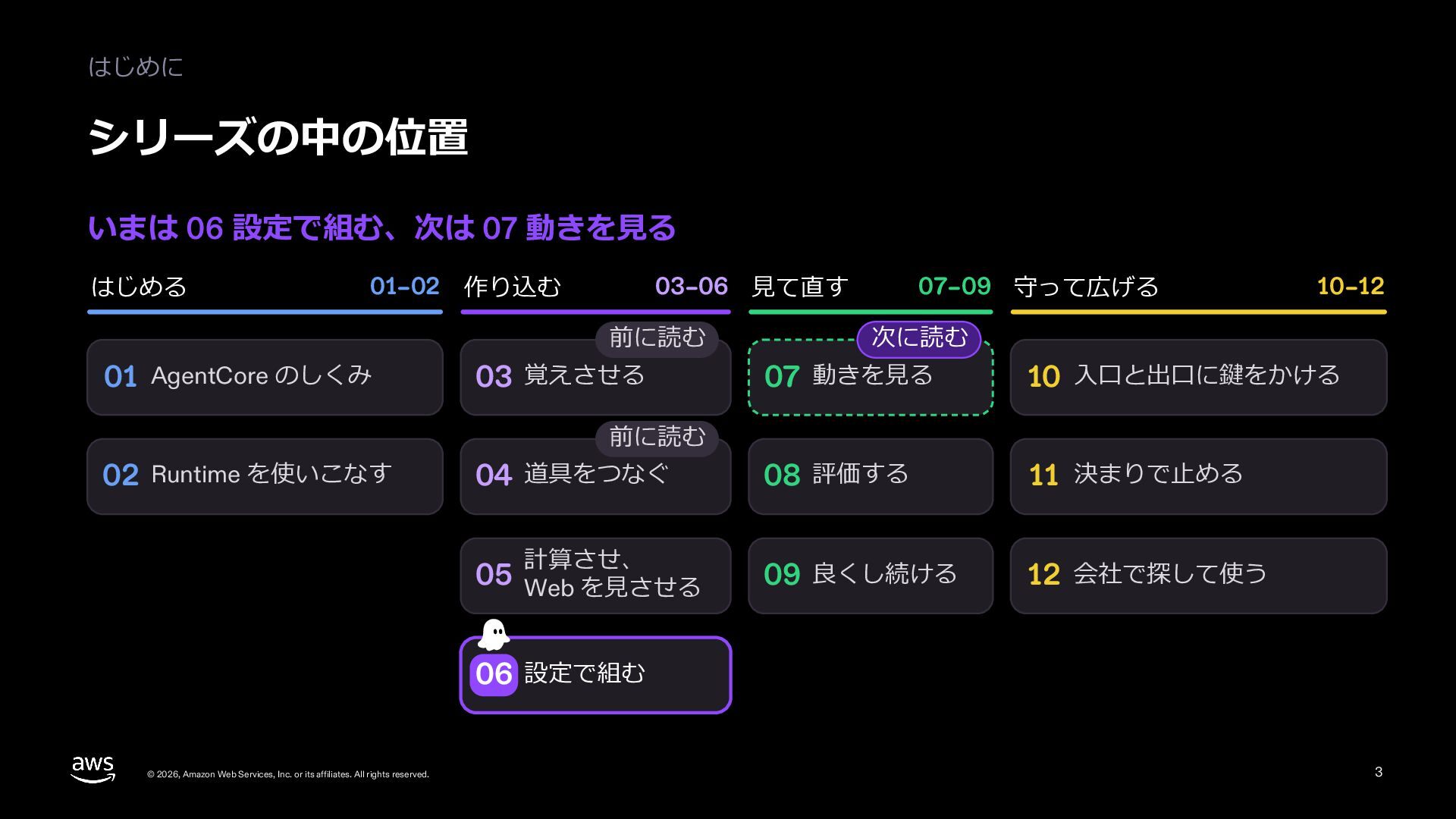
  3. はじめに シリーズの中の位置 いまは 06 設定で組む、次は 07 動きを⾒る はじめる 01–02 作り込む

    03–06 ⾒て直す 前に読む 01 AgentCore のしくみ 03 覚えさせる 07–09 守って広げる 10–12 次に読む 07 動きを⾒る 10 ⼊⼝と出⼝に鍵をかける 08 評価する 11 決まりで⽌める 09 良くし続ける 12 会社で探して使う 前に読む 02 Runtime を使いこなす 04 道具をつなぐ 計算させ、 05 Web を⾒させる 06 設定で組む © 2026, Amazon Web Services, Inc. or its affiliates. All rights reserved. 3
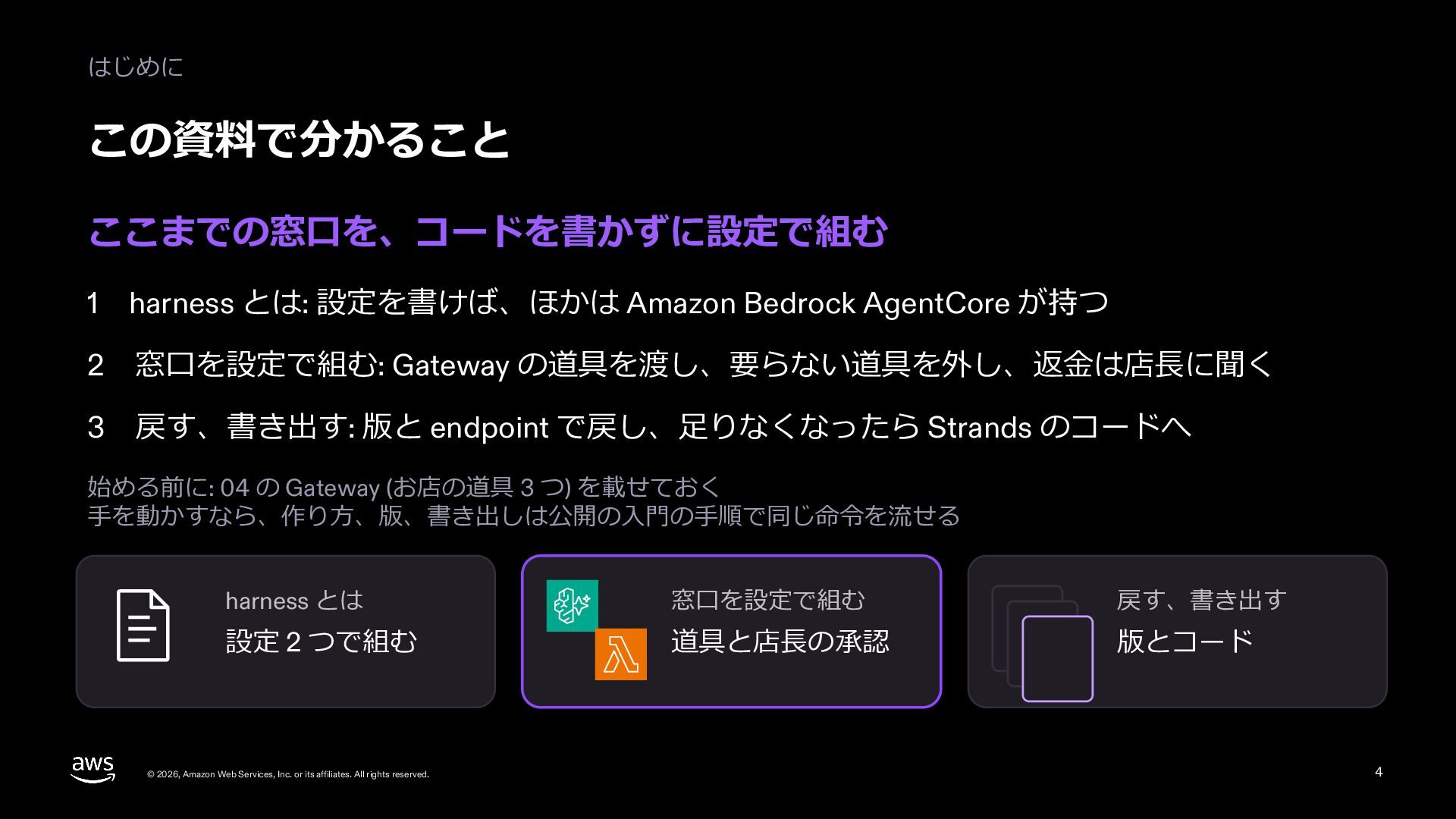
  4. はじめに この資料で分かること ここまでの窓⼝を、コードを書かずに設定で組む 1 harness とは: 設定を書けば、ほかは Amazon Bedrock AgentCore

    が持つ 2 窓⼝を設定で組む: Gateway の道具を渡し、要らない道具を外し、返⾦は店⻑に聞く 3 戻す、書き出す: 版と endpoint で戻し、⾜りなくなったら Strands のコードへ 始める前に: 04 の Gateway (お店の道具 3 つ) を載せておく ⼿を動かすなら、作り⽅、版、書き出しは公開の⼊⾨の⼿順で同じ命令を流せる harness とは 窓⼝を設定で組む 戻す、書き出す 設定 2 つで組む 道具と店⻑の承認 版とコード © 2026, Amazon Web Services, Inc. or its affiliates. All rights reserved. 4
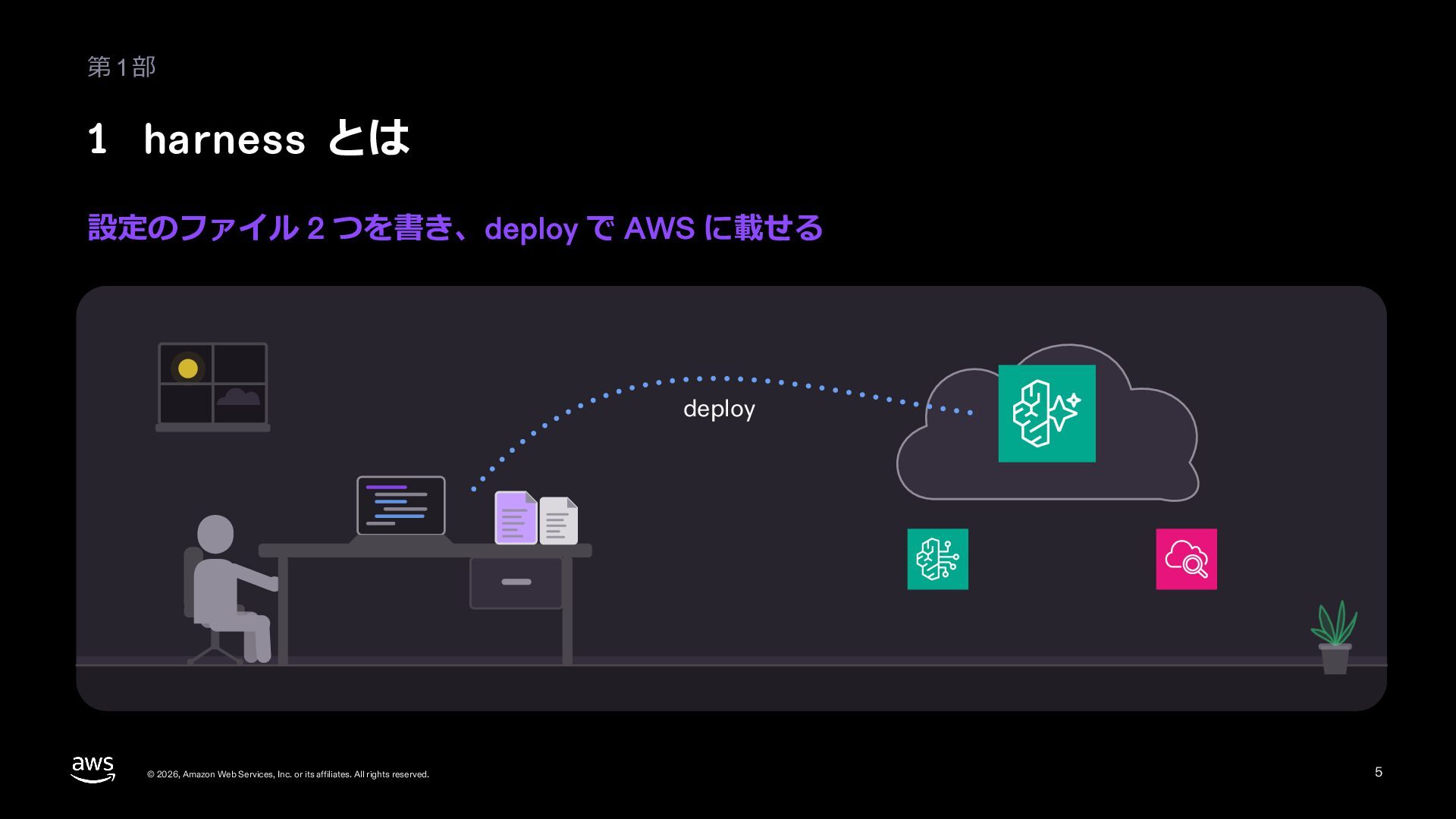
  5. 第1部 1 harness とは 設定のファイル 2 つを書き、deploy で AWS に載せる

    deploy © 2026, Amazon Web Services, Inc. or its affiliates. All rights reserved. 5
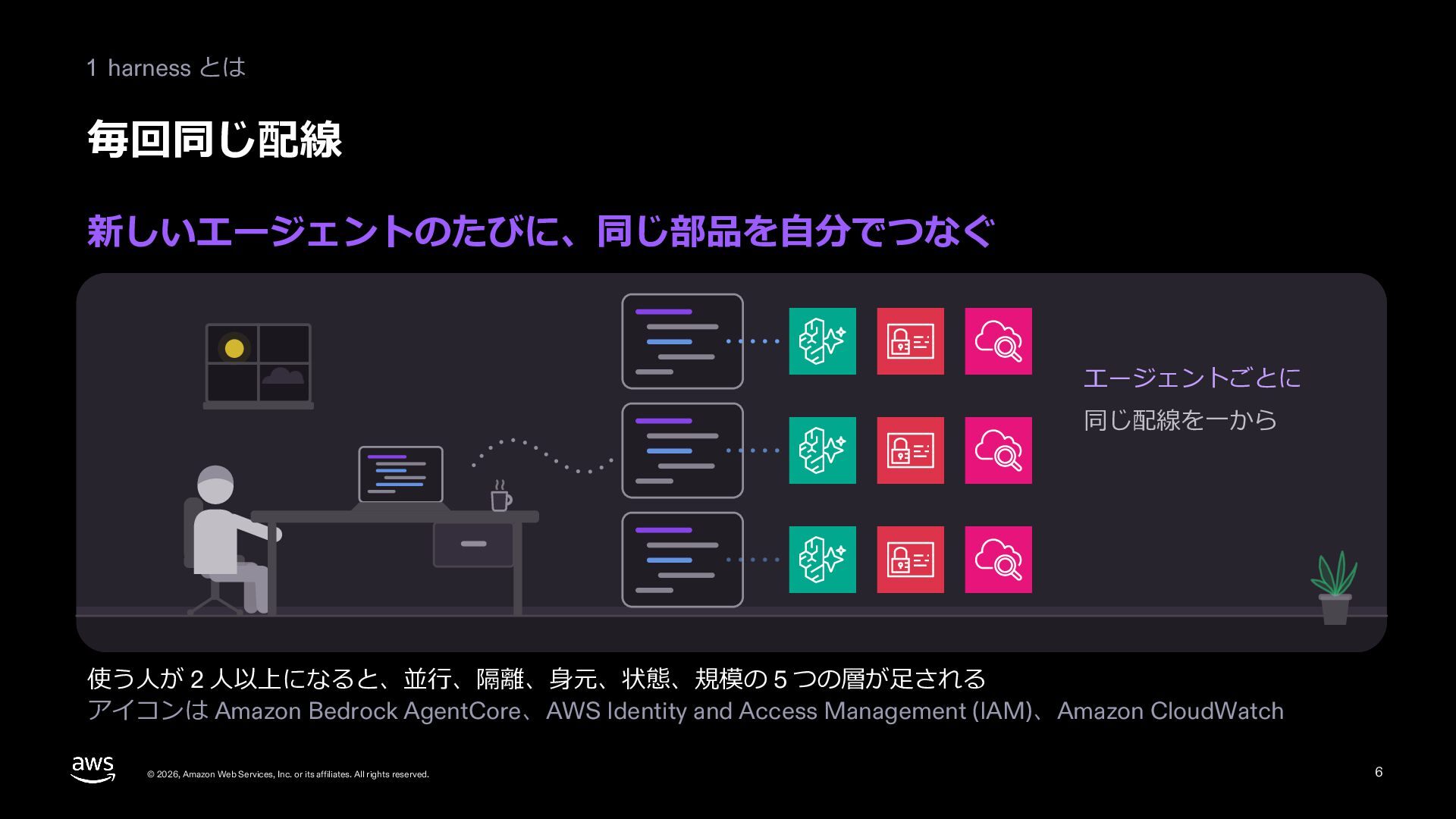
  6. 1 harness とは 毎回同じ配線 新しいエージェントのたびに、同じ部品を⾃分でつなぐ エージェントごとに 同じ配線を⼀から 使う⼈が 2 ⼈以上になると、並⾏、隔離、⾝元、状態、規模の

    5 つの層が⾜される アイコンは Amazon Bedrock AgentCore、AWS Identity and Access Management (IAM)、Amazon CloudWatch © 2026, Amazon Web Services, Inc. or its affiliates. All rights reserved. 6
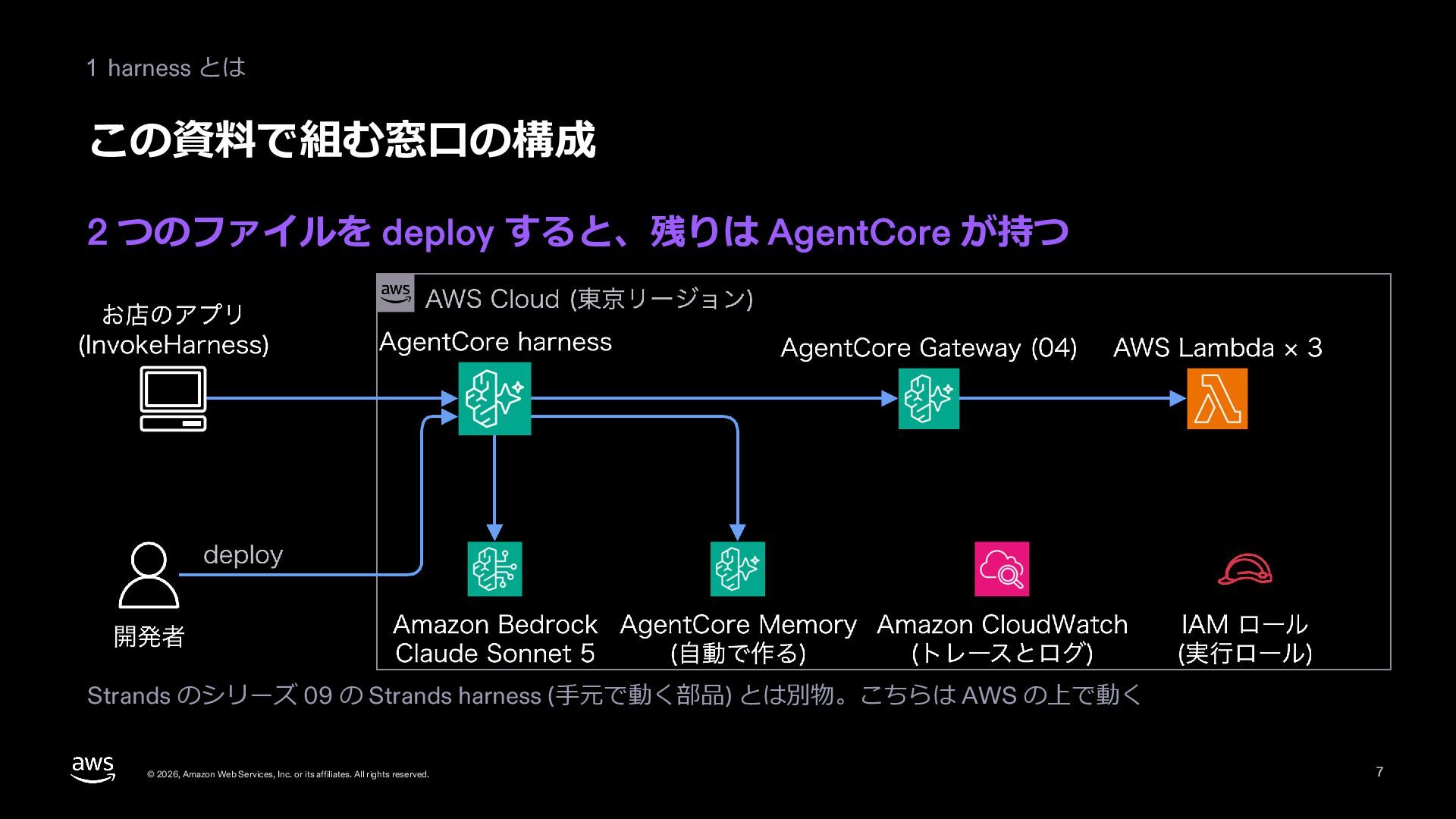
  7. 1 harness とは この資料で組む窓⼝の構成 2 つのファイルを deploy すると、残りは AgentCore が持つ

    Strands のシリーズ 09 の Strands harness (⼿元で動く部品) とは別物。こちらは AWS の上で動く © 2026, Amazon Web Services, Inc. or its affiliates. All rights reserved. 7
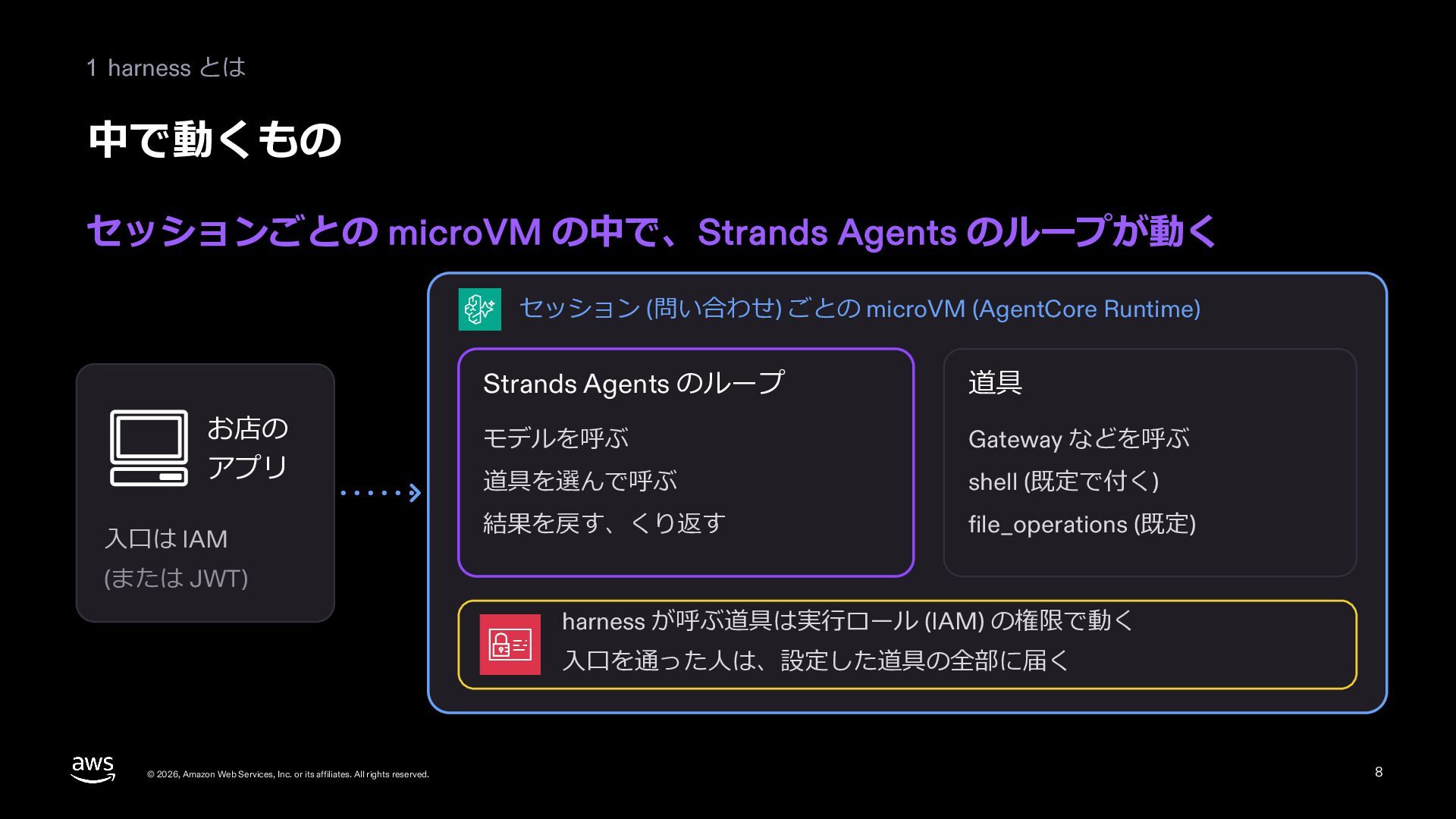
  8. 1 harness とは 中で動くもの セッションごとの microVM の中で、Strands Agents のループが動く セッション

    (問い合わせ) ごとの microVM (AgentCore Runtime) お店の アプリ ⼊⼝は IAM Strands Agents のループ 道具 モデルを呼ぶ Gateway などを呼ぶ 道具を選んで呼ぶ shell (既定で付く) 結果を戻す、くり返す file_operations (既定) (または JWT) harness が呼ぶ道具は実⾏ロール (IAM) の権限で動く ⼊⼝を通った⼈は、設定した道具の全部に届く © 2026, Amazon Web Services, Inc. or its affiliates. All rights reserved. 8
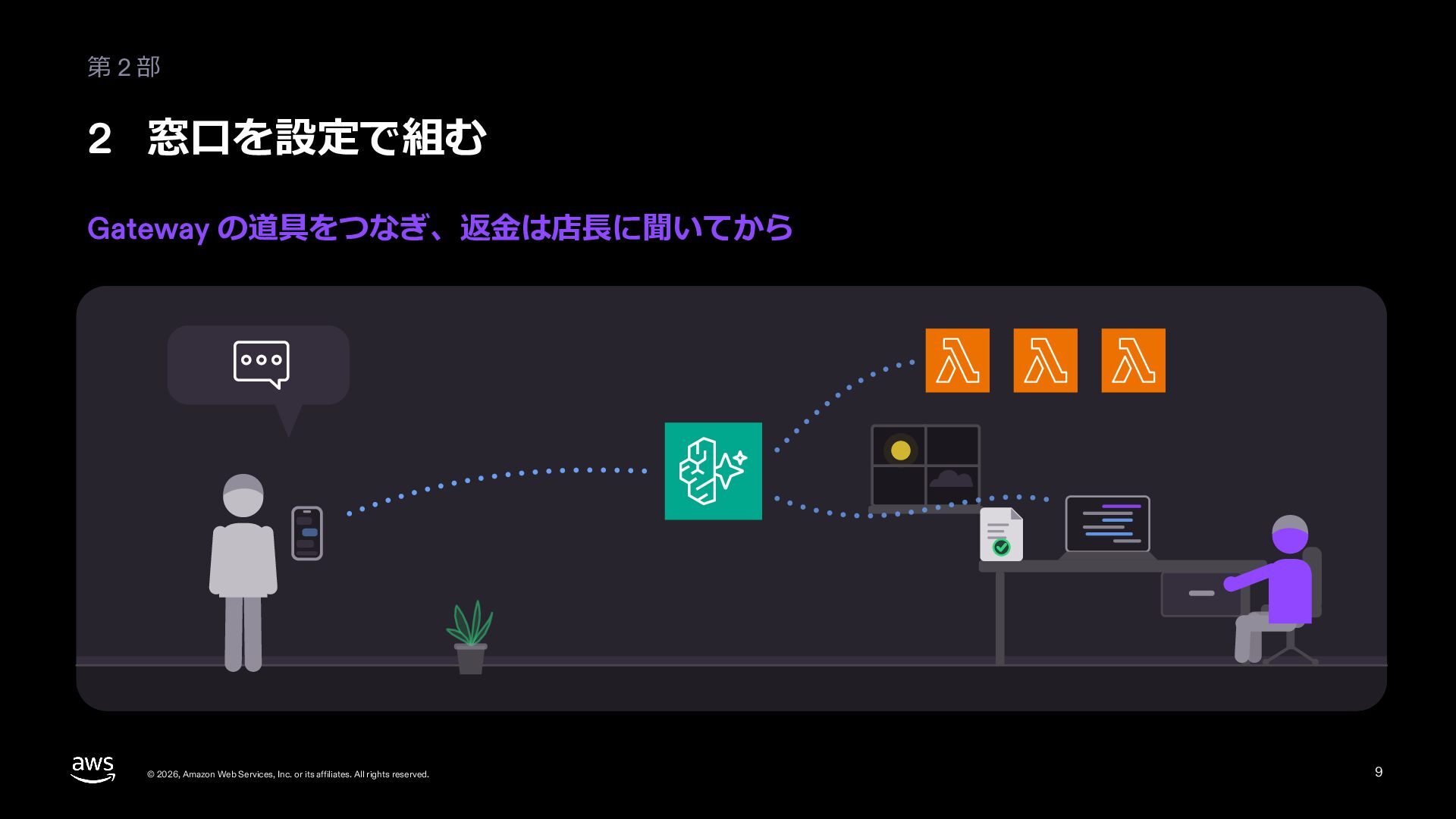
  9. 2 窓⼝を設定で組む 作る: 対話で選ぶと、⼿元にファイルができる config-based を選ぶと harness になる。AWS の資源は deploy

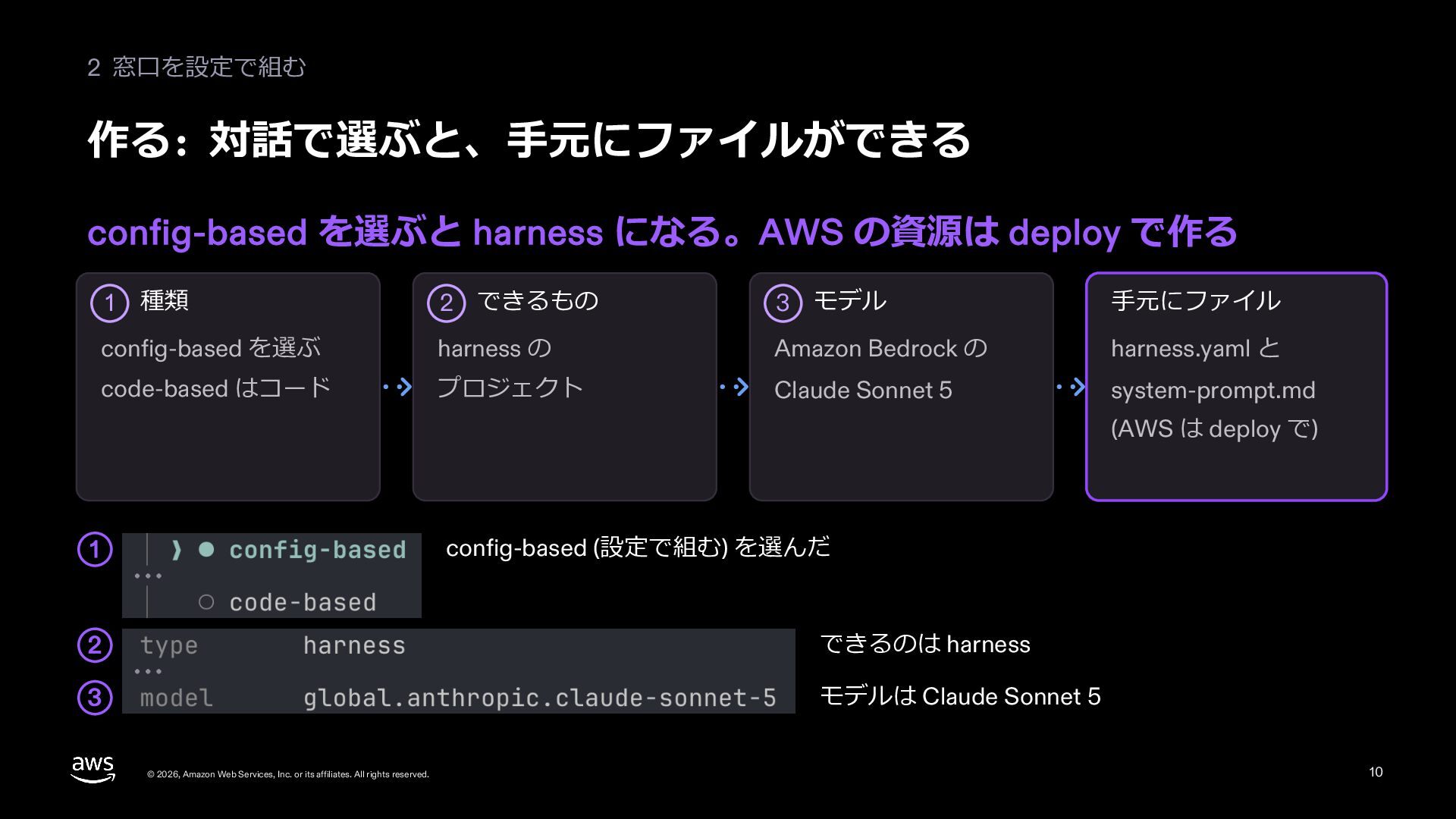
    で作る 2 できるもの 3 モデル ⼿元にファイル config-based を選ぶ harness の Amazon Bedrock の harness.yaml と code-based はコード プロジェクト Claude Sonnet 5 system-prompt.md 1 種類 (AWS は deploy で) config-based (設定で組む) を選んだ 1 2 できるのは harness 3 モデルは Claude Sonnet 5 © 2026, Amazon Web Services, Inc. or its affiliates. All rights reserved. 10
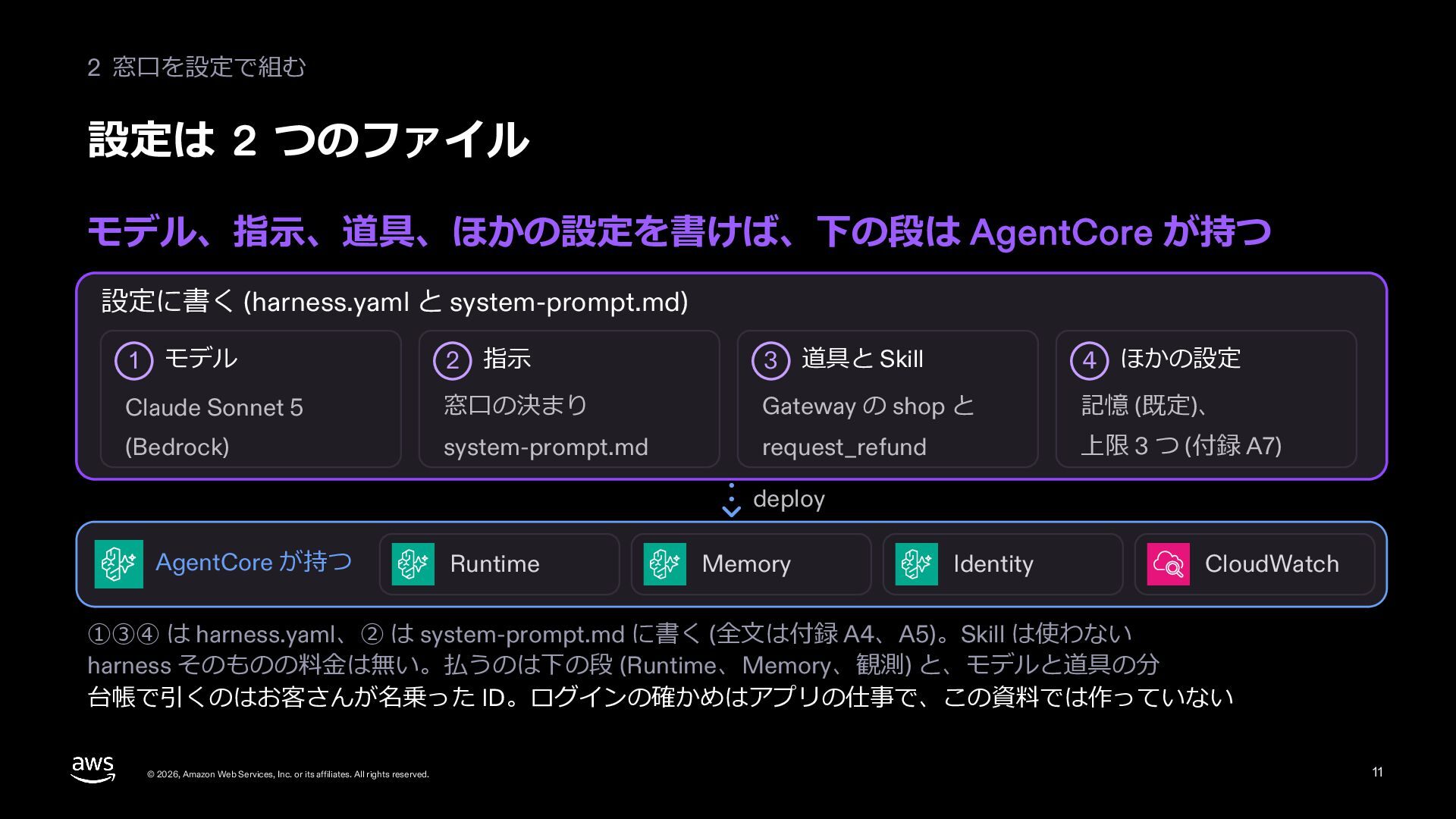
  10. 2 窓⼝を設定で組む 設定は 2 つのファイル モデル、指⽰、道具、ほかの設定を書けば、下の段は AgentCore が持つ 設定に書く (harness.yaml

    と system-prompt.md) 2 指⽰ 3 道具と Skill 4 ほかの設定 Claude Sonnet 5 窓⼝の決まり Gateway の shop と 記憶 (既定)、 (Bedrock) system-prompt.md request_refund 上限 3 つ (付録 A7) 1 モデル deploy AgentCore が持つ Runtime Memory Identity CloudWatch ①③④ は harness.yaml、② は system-prompt.md に書く (全⽂は付録 A4、A5)。Skill は使わない harness そのものの料⾦は無い。払うのは下の段 (Runtime、Memory、観測) と、モデルと道具の分 台帳で引くのはお客さんが名乗った ID。ログインの確かめはアプリの仕事で、この資料では作っていない © 2026, Amazon Web Services, Inc. or its affiliates. All rights reserved. 11
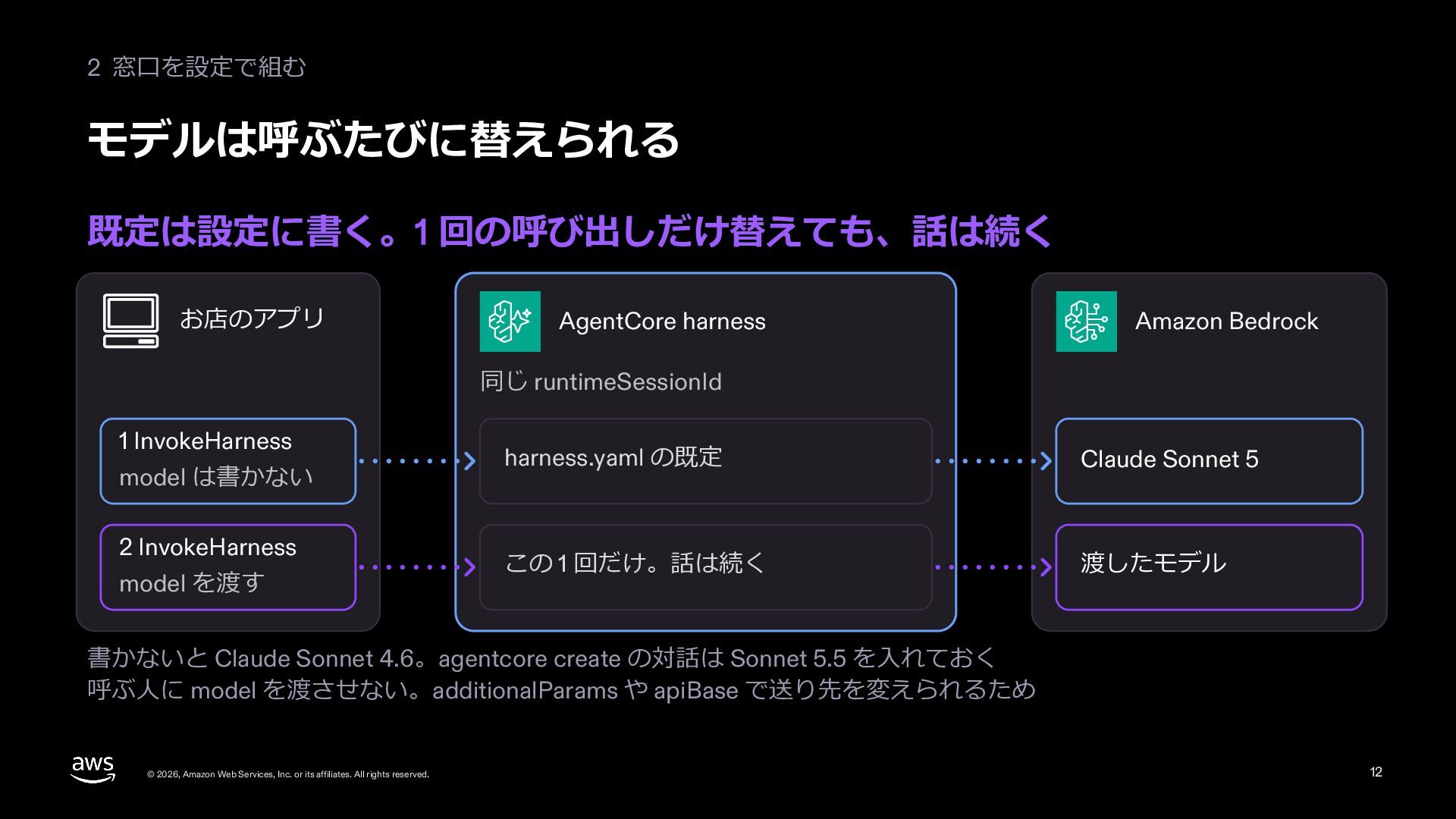
  11. 2 窓⼝を設定で組む モデルは呼ぶたびに替えられる 既定は設定に書く。1 回の呼び出しだけ替えても、話は続く お店のアプリ AgentCore harness Amazon Bedrock

    同じ runtimeSessionId 1 InvokeHarness model は書かない 2 InvokeHarness model を渡す harness.yaml の既定 Claude Sonnet 5 この 1 回だけ。話は続く 渡したモデル 書かないと Claude Sonnet 4.6。agentcore create の対話は Sonnet 5.5 を⼊れておく 呼ぶ⼈に model を渡させない。additionalParams や apiBase で送り先を変えられるため © 2026, Amazon Web Services, Inc. or its affiliates. All rights reserved. 12
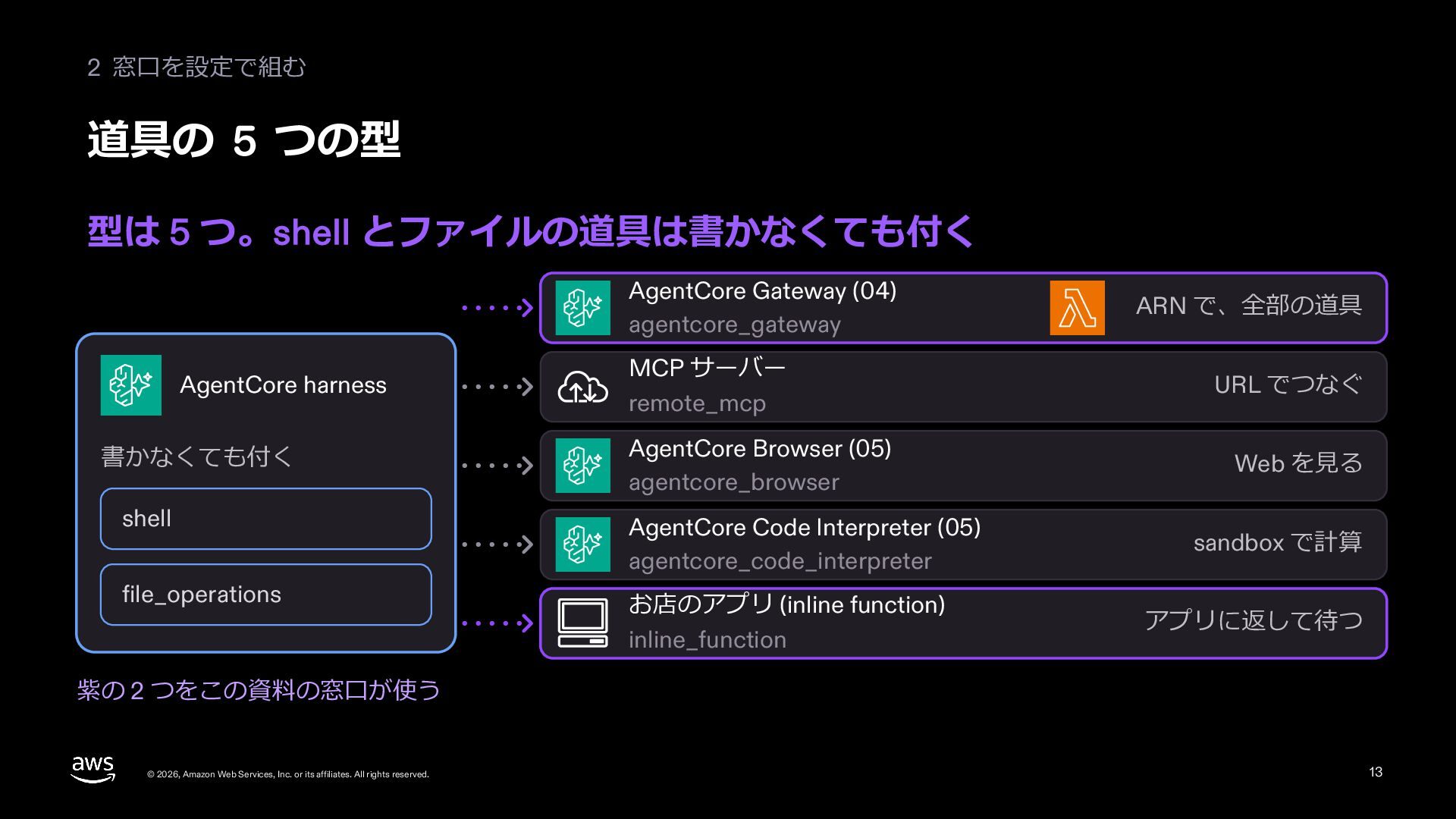
  12. 2 窓⼝を設定で組む 道具の 5 つの型 型は 5 つ。shell とファイルの道具は書かなくても付く AgentCore

    Gateway (04) agentcore_gateway AgentCore harness 書かなくても付く MCP サーバー remote_mcp AgentCore Browser (05) agentcore_browser shell AgentCore Code Interpreter (05) agentcore_code_interpreter file_operations お店のアプリ (inline function) inline_function ARN で、全部の道具 URL でつなぐ Web を⾒る sandbox で計算 アプリに返して待つ 紫の 2 つをこの資料の窓⼝が使う © 2026, Amazon Web Services, Inc. or its affiliates. All rights reserved. 13
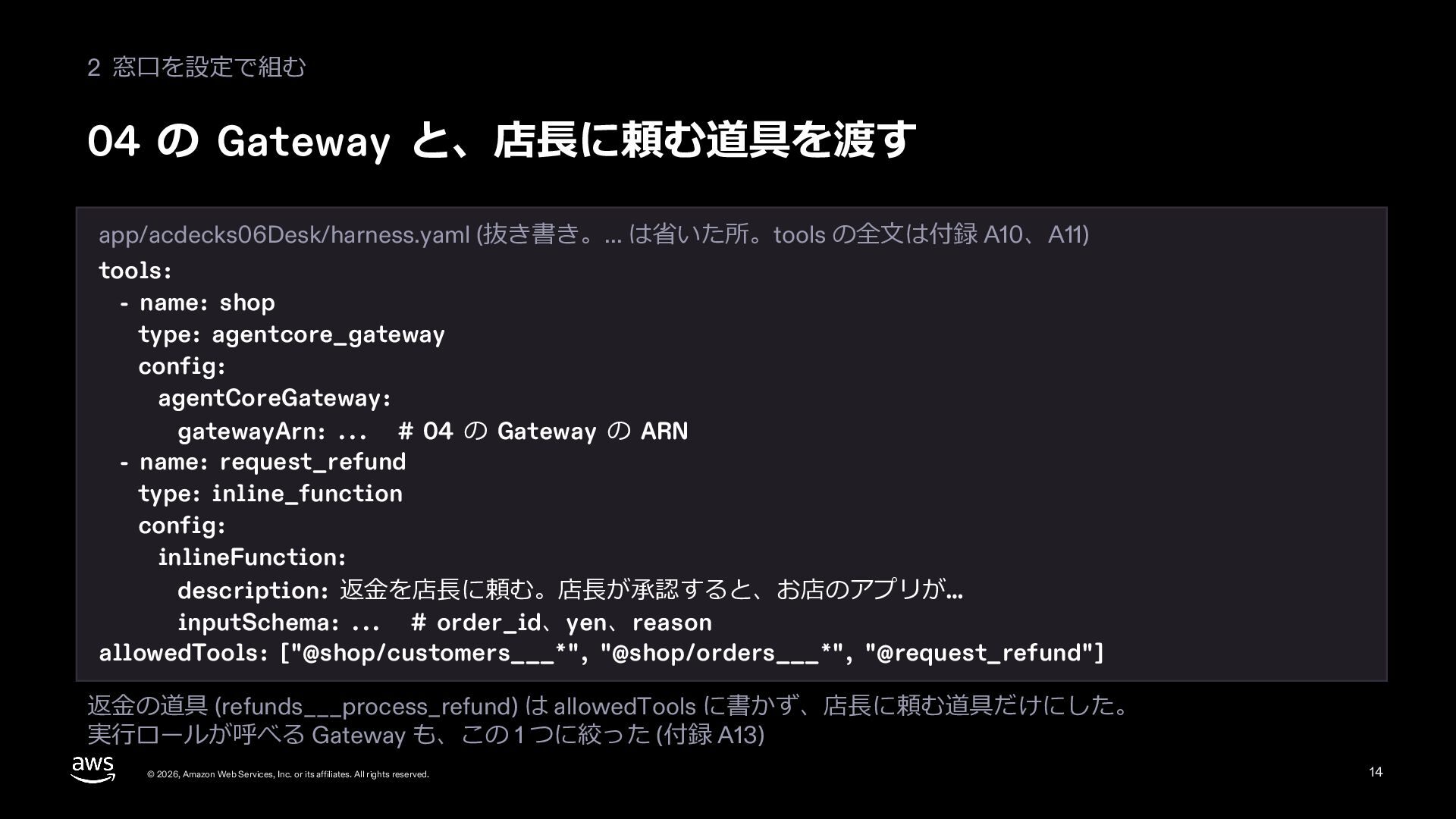
  13. 2 窓⼝を設定で組む 04 の Gateway と、店⻑に頼む道具を渡す app/acdecks06Desk/harness.yaml (抜き書き。... は省いた所。tools の全⽂は付録

    A10、A11) tools: - name: shop type: agentcore_gateway config: agentCoreGateway: gatewayArn: ... # 04 の Gateway の ARN - name: request_refund type: inline_function config: inlineFunction: description: 返⾦を店⻑に頼む。店⻑が承認すると、お店のアプリが… inputSchema: ... # order_id、yen、reason allowedTools: ["@shop/customers___*", "@shop/orders___*", "@request_refund"] 返⾦の道具 (refunds___process_refund) は allowedTools に書かず、店⻑に頼む道具だけにした。 実⾏ロールが呼べる Gateway も、この 1 つに絞った (付録 A13) © 2026, Amazon Web Services, Inc. or its affiliates. All rights reserved. 14
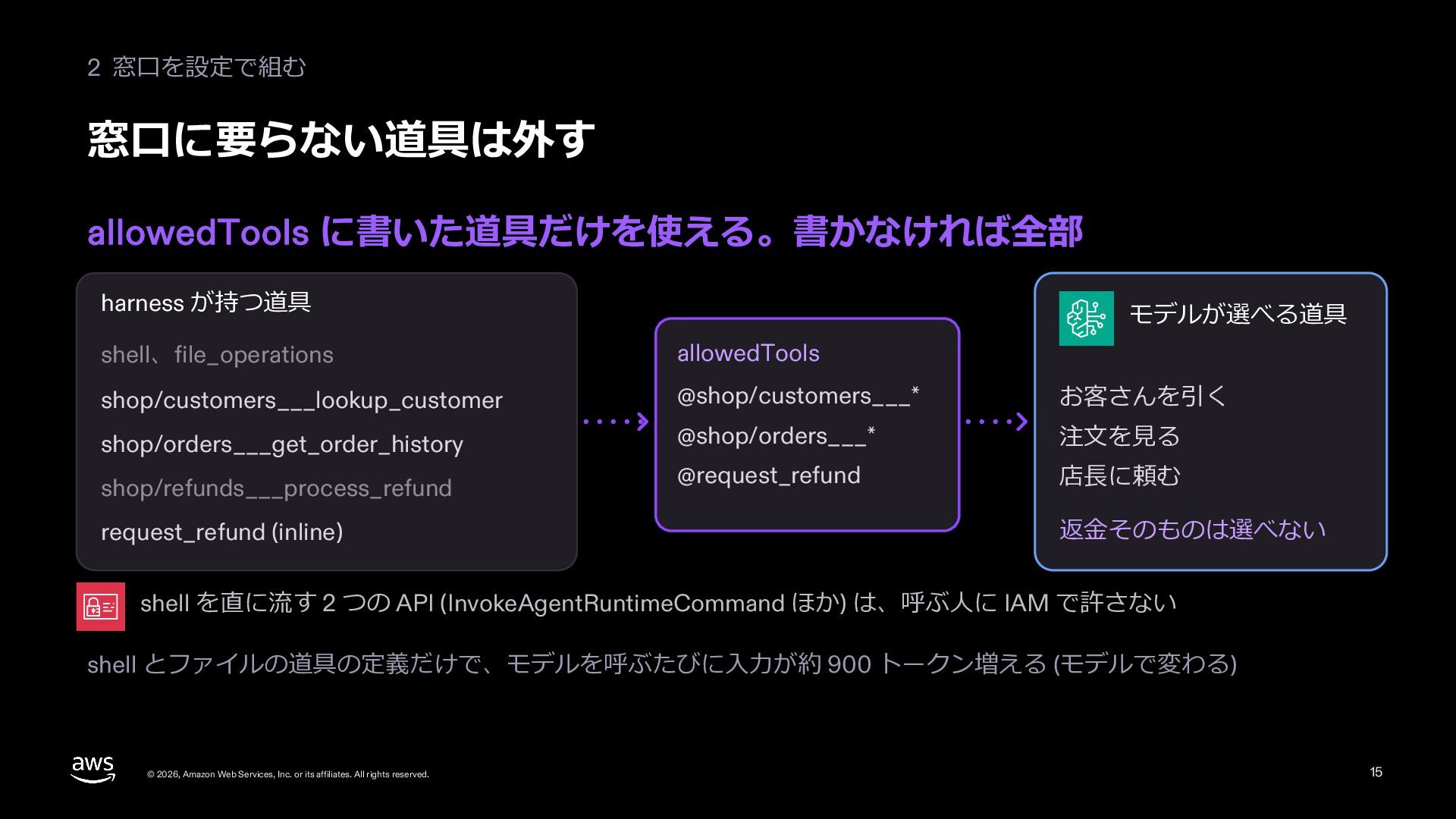
  14. 2 窓⼝を設定で組む 窓⼝に要らない道具は外す allowedTools に書いた道具だけを使える。書かなければ全部 harness が持つ道具 モデルが選べる道具 shell、file_operations allowedTools

    shop/customers___lookup_customer @shop/customers___* お客さんを引く shop/orders___get_order_history @shop/orders___* 注⽂を⾒る @request_refund 店⻑に頼む shop/refunds___process_refund request_refund (inline) 返⾦そのものは選べない shell を直に流す 2 つの API (InvokeAgentRuntimeCommand ほか) は、呼ぶ⼈に IAM で許さない shell とファイルの道具の定義だけで、モデルを呼ぶたびに⼊⼒が約 900 トークン増える (モデルで変わる) © 2026, Amazon Web Services, Inc. or its affiliates. All rights reserved. 15
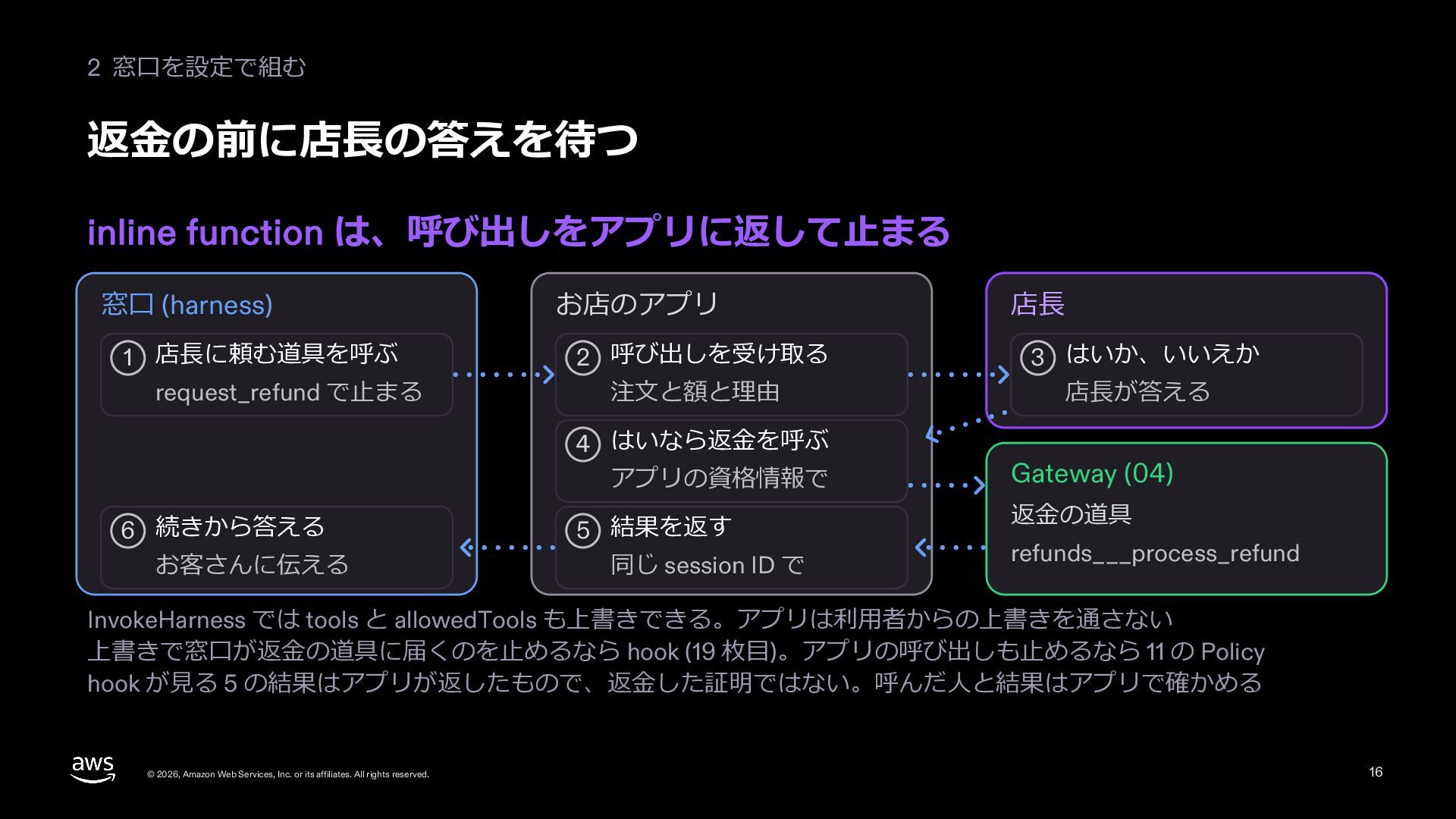
  15. 2 窓⼝を設定で組む 返⾦の前に店⻑の答えを待つ inline function は、呼び出しをアプリに返して⽌まる 窓⼝ (harness) 1 店⻑に頼む道具を呼ぶ

    request_refund で⽌まる お店のアプリ 2 呼び出しを受け取る 注⽂と額と理由 4 はいなら返⾦を呼ぶ アプリの資格情報で 6 続きから答える お客さんに伝える 5 結果を返す 同じ session ID で 店⻑ 3 はいか、いいえか 店⻑が答える Gateway (04) 返⾦の道具 refunds___process_refund InvokeHarness では tools と allowedTools も上書きできる。アプリは利⽤者からの上書きを通さない 上書きで窓⼝が返⾦の道具に届くのを⽌めるなら hook (19 枚⽬)。アプリの呼び出しも⽌めるなら 11 の Policy hook が⾒る 5 の結果はアプリが返したもので、返⾦した証明ではない。呼んだ⼈と結果はアプリで確かめる © 2026, Amazon Web Services, Inc. or its affiliates. All rights reserved. 16
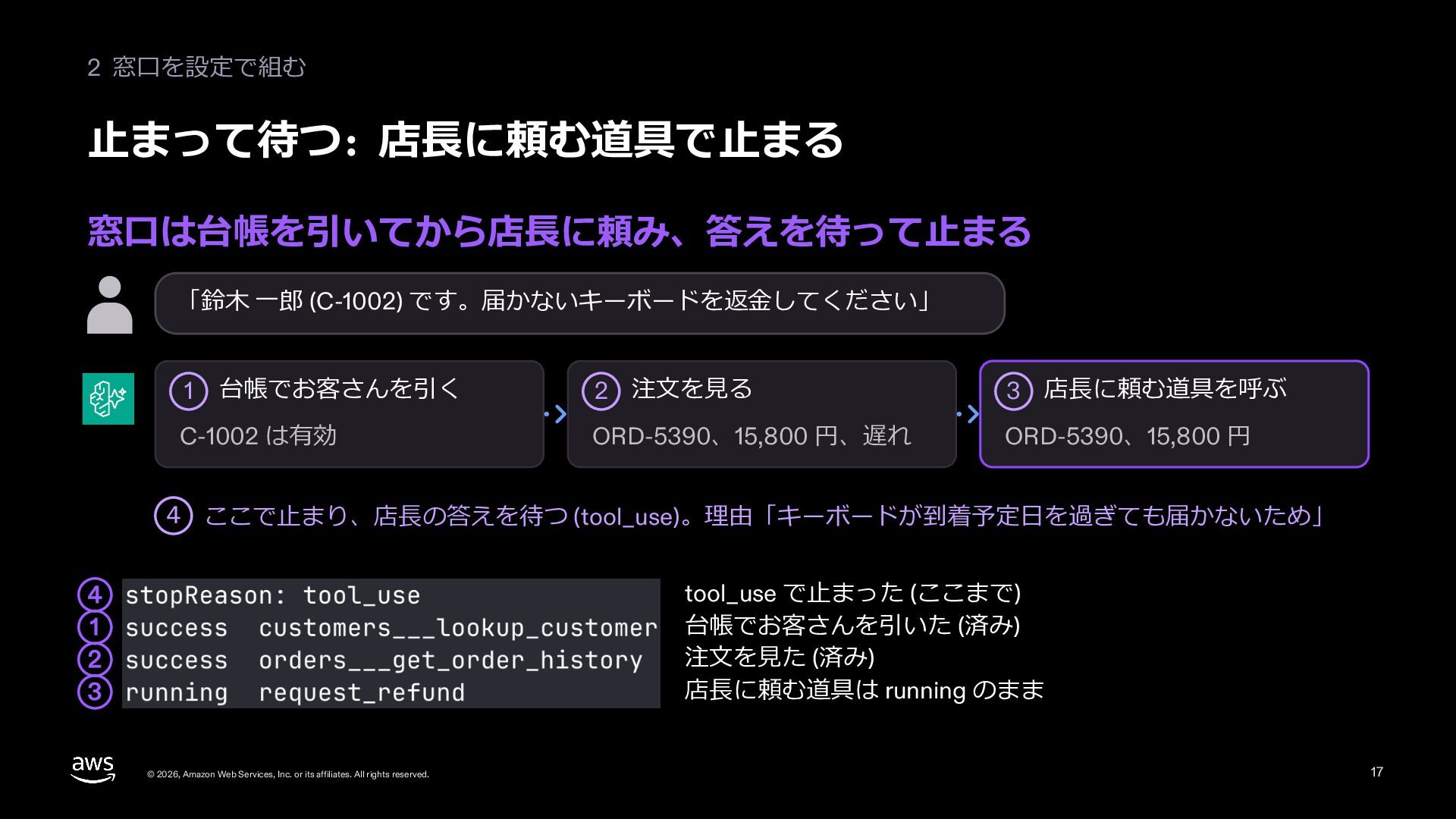
  16. 2 窓⼝を設定で組む ⽌まって待つ: 店⻑に頼む道具で⽌まる 窓⼝は台帳を引いてから店⻑に頼み、答えを待って⽌まる 「鈴⽊ ⼀郎 (C-1002) です。届かないキーボードを返⾦してください」 1

    台帳でお客さんを引く C-1002 は有効 2 注⽂を⾒る 3 店⻑に頼む道具を呼ぶ ORD-5390、15,800 円、遅れ ORD-5390、15,800 円 4 ここで⽌まり、店⻑の答えを待つ (tool_use)。理由「キーボードが到着予定⽇を過ぎても届かないため」 tool_use で⽌まった (ここまで) 台帳でお客さんを引いた (済み) 注⽂を⾒た (済み) 店⻑に頼む道具は running のまま 4 1 2 3 © 2026, Amazon Web Services, Inc. or its affiliates. All rights reserved. 17
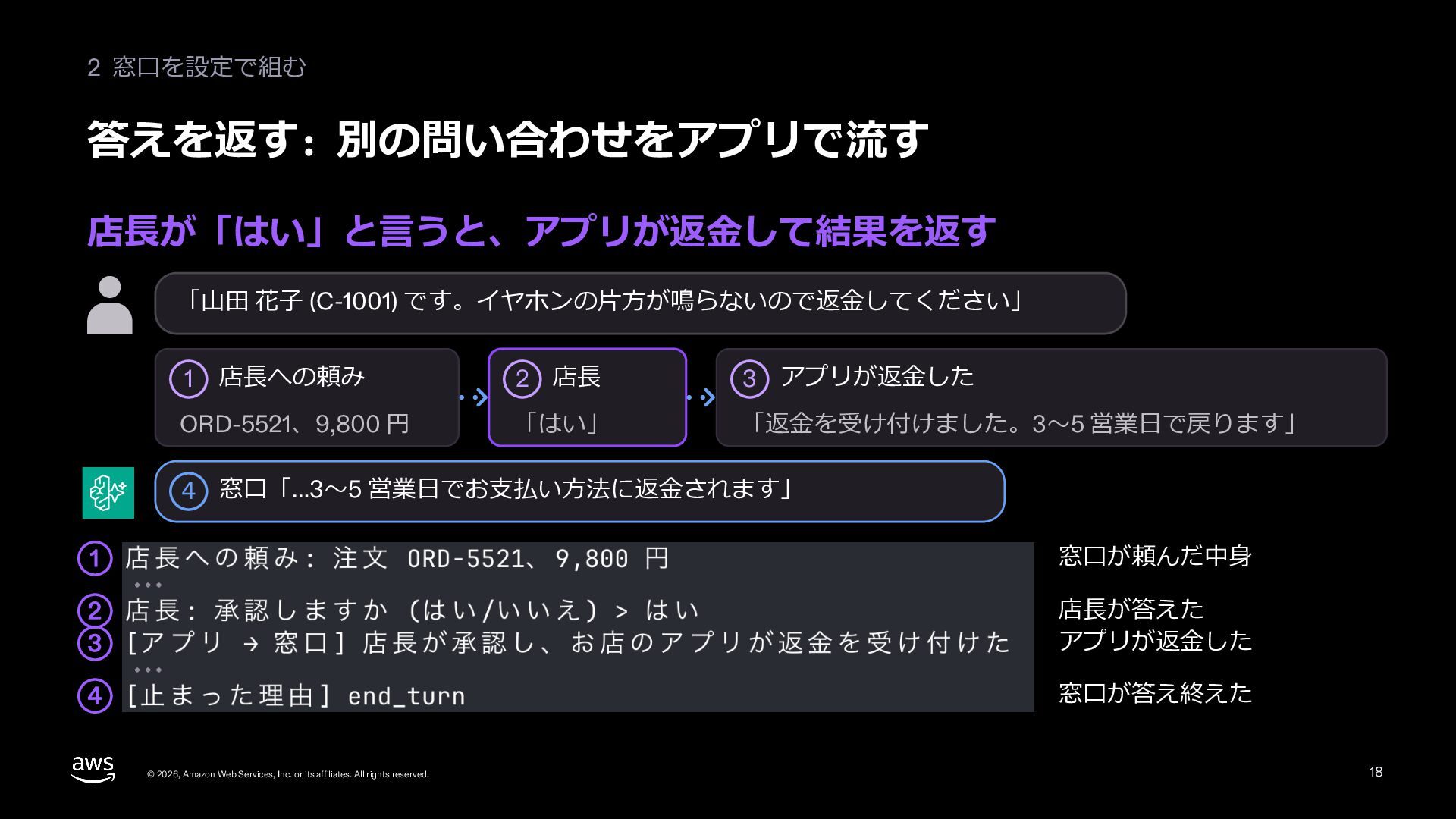
  17. 2 窓⼝を設定で組む 答えを返す: 別の問い合わせをアプリで流す 店⻑が「はい」と⾔うと、アプリが返⾦して結果を返す 「⼭⽥ 花⼦ (C-1001) です。イヤホンの⽚⽅が鳴らないので返⾦してください」 店⻑への頼み

    2 店⻑ 3 アプリが返⾦した ORD-5521、9,800 円 「はい」 「返⾦を受け付けました。3〜5 営業⽇で戻ります」 1 4 窓⼝「…3〜5 営業⽇でお⽀払い⽅法に返⾦されます」 1 窓⼝が頼んだ中⾝ 2 3 店⻑が答えた アプリが返⾦した 4 窓⼝が答え終えた © 2026, Amazon Web Services, Inc. or its affiliates. All rights reserved. 18
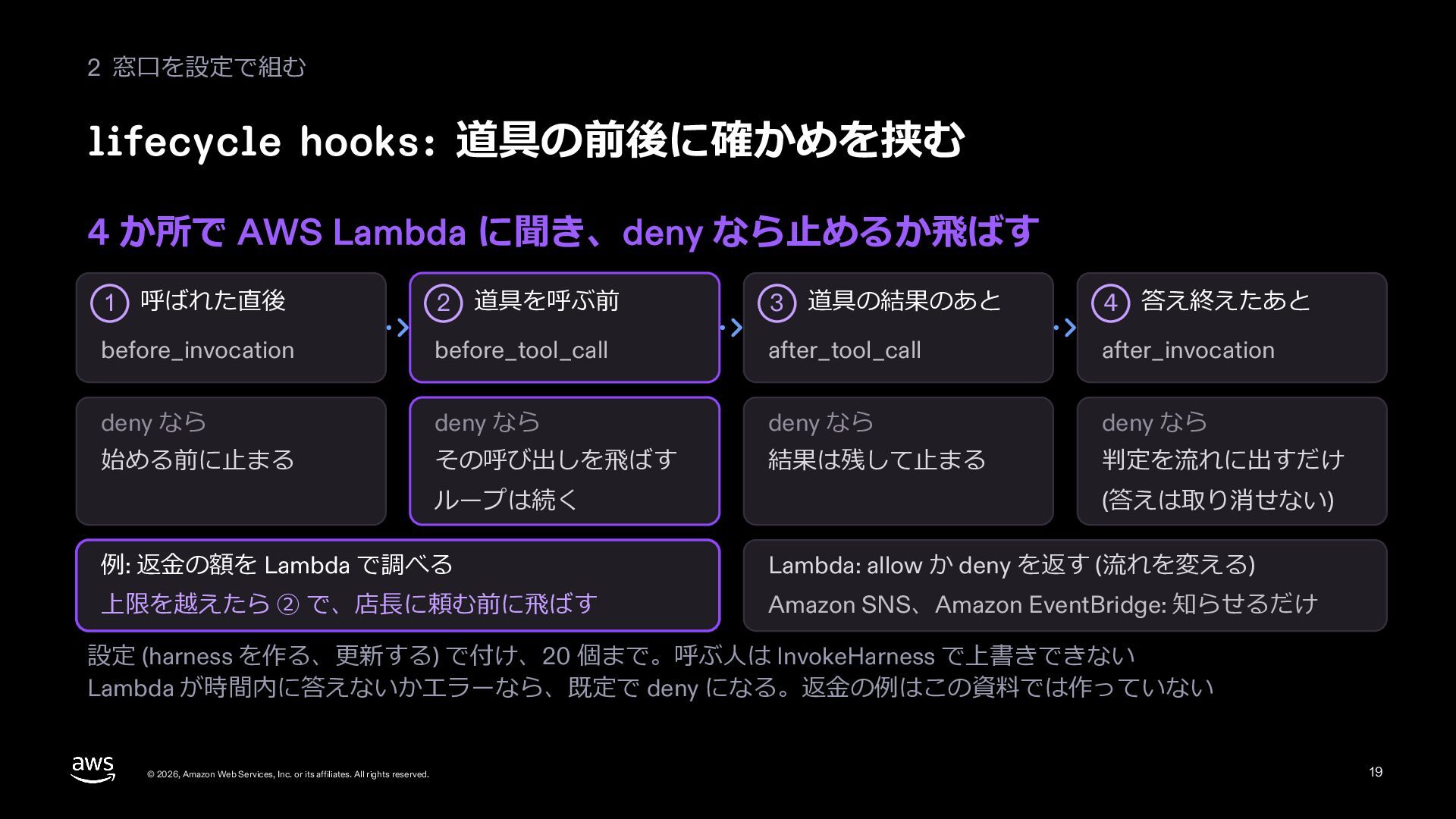
  18. 2 窓⼝を設定で組む lifecycle hooks: 道具の前後に確かめを挟む 4 か所で AWS Lambda に聞き、deny

    なら⽌めるか⾶ばす 呼ばれた直後 2 道具を呼ぶ前 3 道具の結果のあと 4 答え終えたあと before_invocation before_tool_call after_tool_call after_invocation deny なら deny なら deny なら deny なら 始める前に⽌まる その呼び出しを⾶ばす 結果は残して⽌まる 判定を流れに出すだけ 1 ループは続く (答えは取り消せない) 例: 返⾦の額を Lambda で調べる Lambda: allow か deny を返す (流れを変える) 上限を越えたら ② で、店⻑に頼む前に⾶ばす Amazon SNS、Amazon EventBridge: 知らせるだけ 設定 (harness を作る、更新する) で付け、20 個まで。呼ぶ⼈は InvokeHarness で上書きできない Lambda が時間内に答えないかエラーなら、既定で deny になる。返⾦の例はこの資料では作っていない © 2026, Amazon Web Services, Inc. or its affiliates. All rights reserved. 19
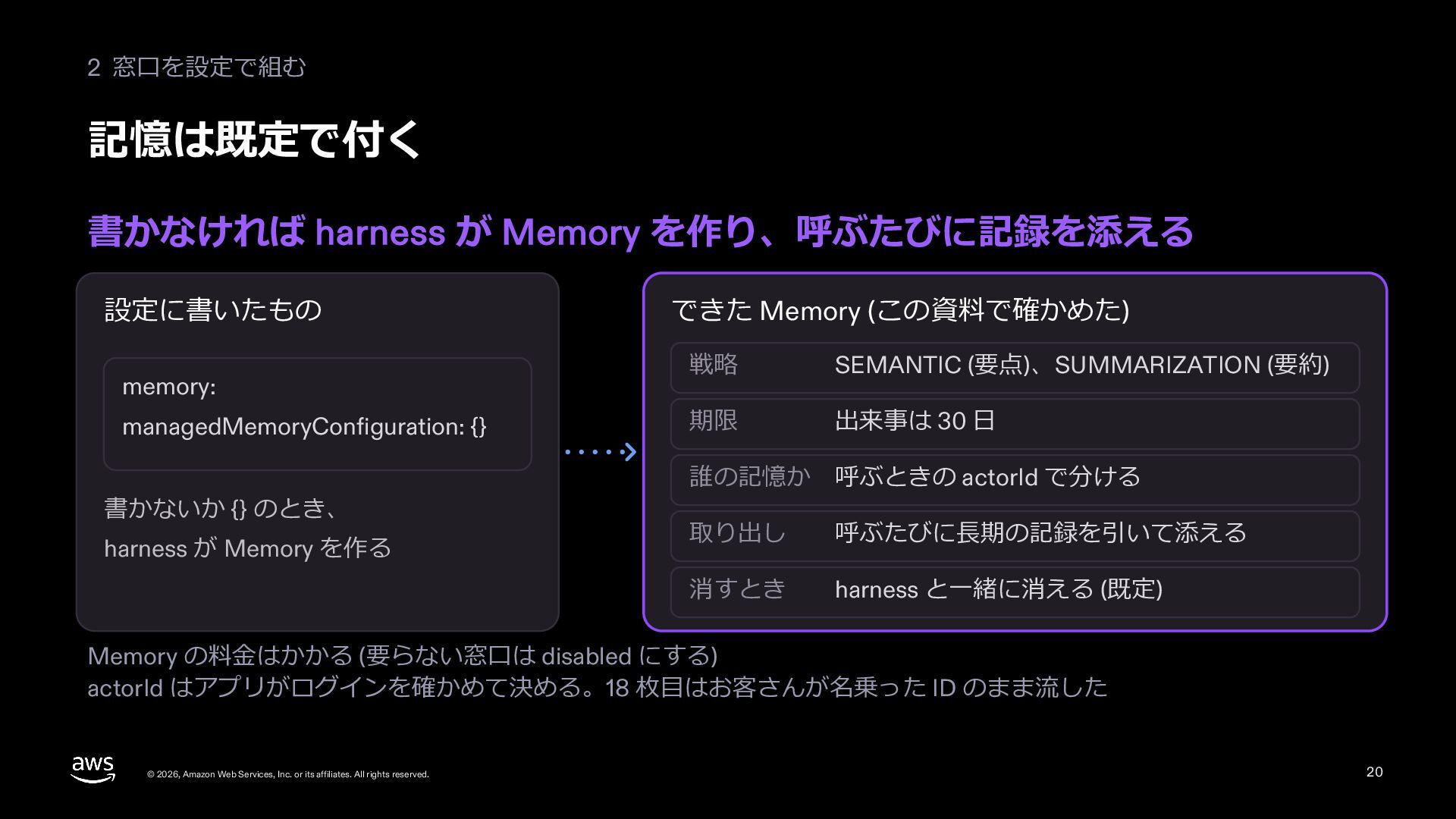
  19. 2 窓⼝を設定で組む 記憶は既定で付く 書かなければ harness が Memory を作り、呼ぶたびに記録を添える 設定に書いたもの memory:

    managedMemoryConfiguration: {} 書かないか {} のとき、 harness が Memory を作る できた Memory (この資料で確かめた) 戦略 SEMANTIC (要点)、SUMMARIZATION (要約) 期限 出来事は 30 ⽇ 誰の記憶か 呼ぶときの actorId で分ける 取り出し 呼ぶたびに⻑期の記録を引いて添える 消すとき harness と⼀緒に消える (既定) Memory の料⾦はかかる (要らない窓⼝は disabled にする) actorId はアプリがログインを確かめて決める。18 枚⽬はお客さんが名乗った ID のまま流した © 2026, Amazon Web Services, Inc. or its affiliates. All rights reserved. 20
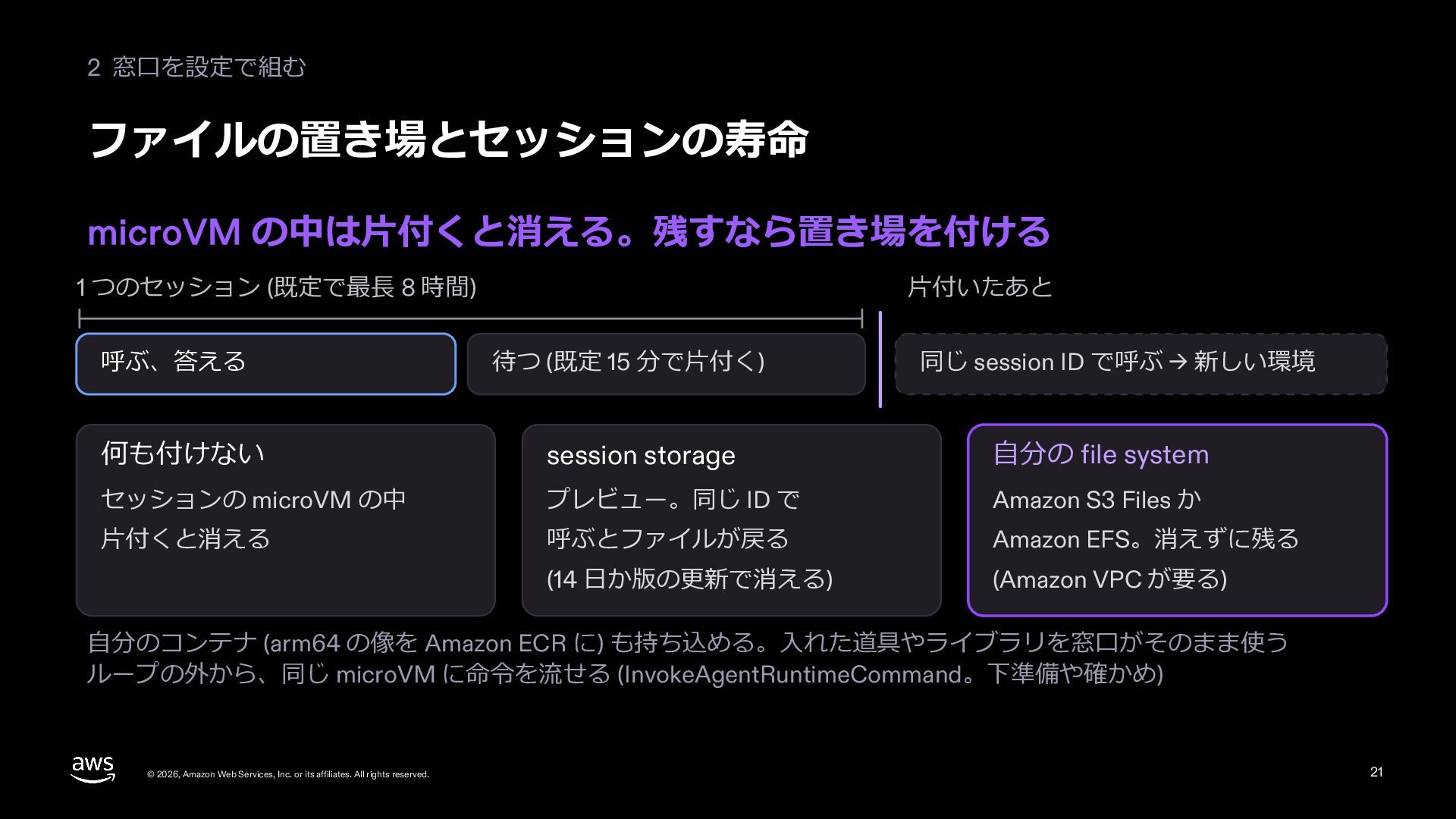
  20. 2 窓⼝を設定で組む ファイルの置き場とセッションの寿命 microVM の中は⽚付くと消える。残すなら置き場を付ける 1 つのセッション (既定で最⻑ 8 時間)

    ⽚付いたあと 呼ぶ、答える 待つ (既定 15 分で⽚付く) 同じ session ID で呼ぶ → 新しい環境 何も付けない session storage ⾃分の file system セッションの microVM の中 プレビュー。同じ ID で Amazon S3 Files か ⽚付くと消える 呼ぶとファイルが戻る Amazon EFS。消えずに残る (14 ⽇か版の更新で消える) (Amazon VPC が要る) ⾃分のコンテナ (arm64 の像を Amazon ECR に) も持ち込める。⼊れた道具やライブラリを窓⼝がそのまま使う ループの外から、同じ microVM に命令を流せる (InvokeAgentRuntimeCommand。下準備や確かめ) © 2026, Amazon Web Services, Inc. or its affiliates. All rights reserved. 21
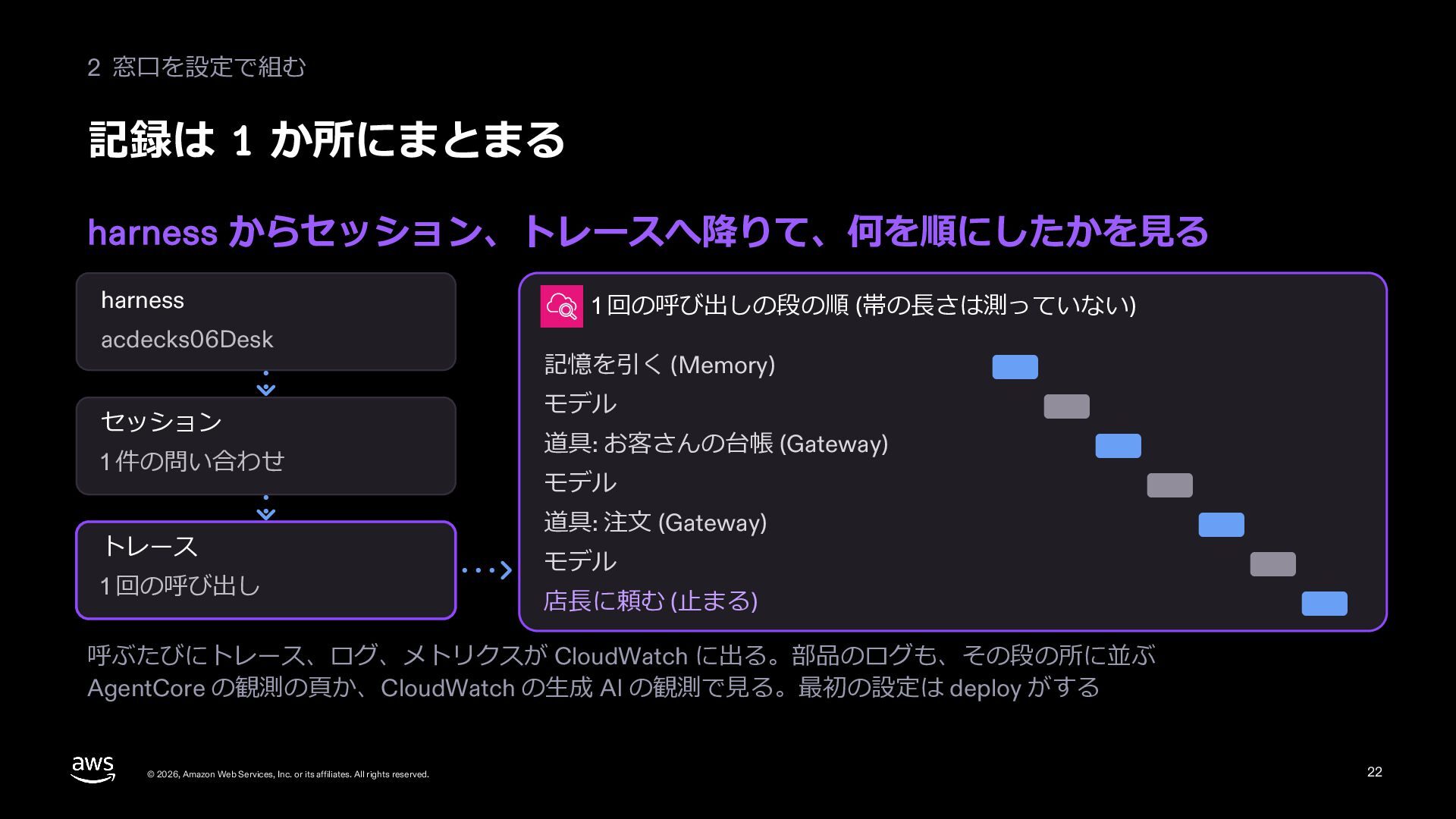
  21. 2 窓⼝を設定で組む 記録は 1 か所にまとまる harness からセッション、トレースへ降りて、何を順にしたかを⾒る harness acdecks06Desk セッション

    1 件の問い合わせ トレース 1 回の呼び出し 1 回の呼び出しの段の順 (帯の⻑さは測っていない) 記憶を引く (Memory) モデル 道具: お客さんの台帳 (Gateway) モデル 道具: 注⽂ (Gateway) モデル 店⻑に頼む (⽌まる) 呼ぶたびにトレース、ログ、メトリクスが CloudWatch に出る。部品のログも、その段の所に並ぶ AgentCore の観測の⾴か、CloudWatch の⽣成 AI の観測で⾒る。最初の設定は deploy がする © 2026, Amazon Web Services, Inc. or its affiliates. All rights reserved. 22
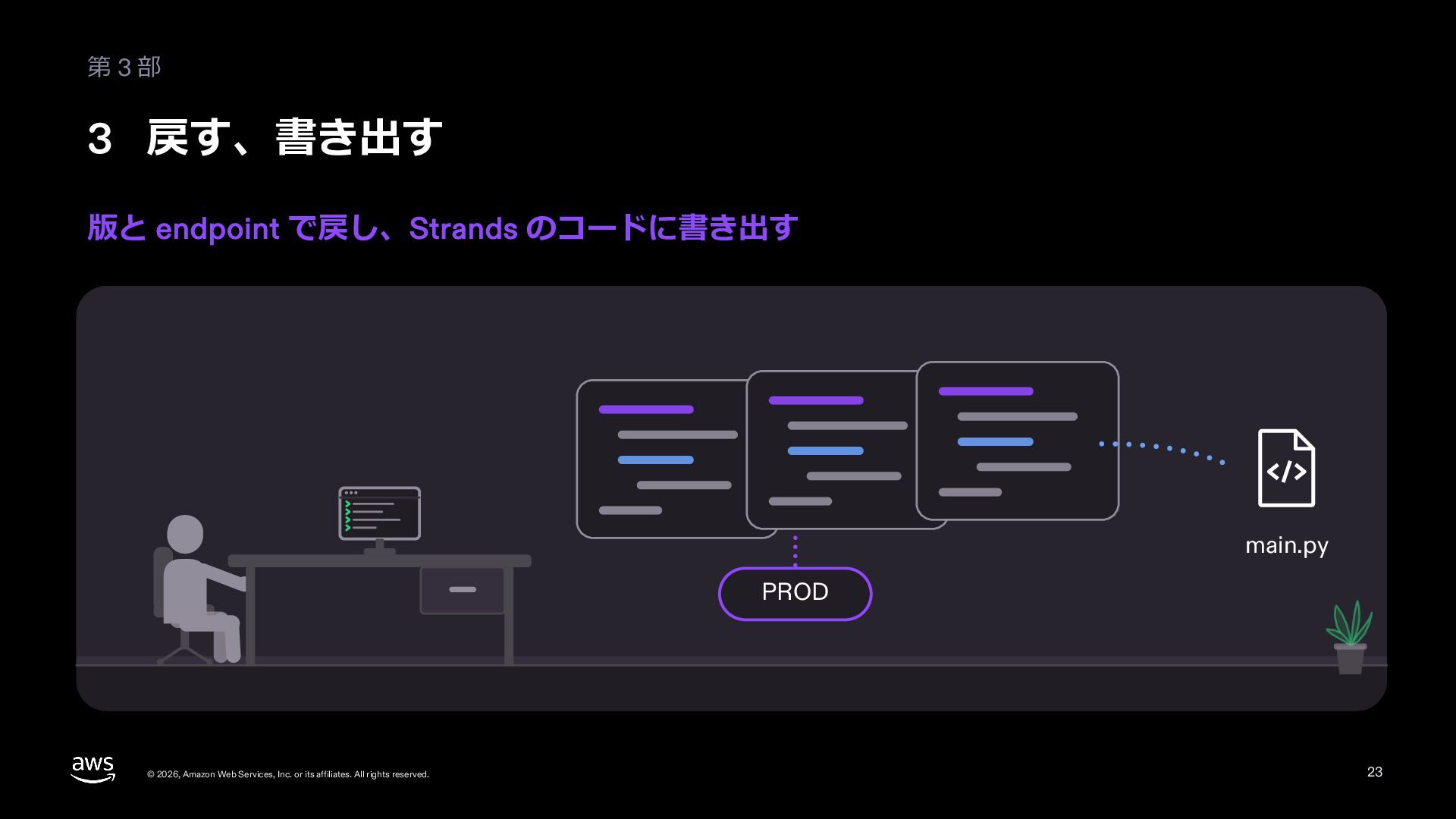
  22. 第3部 3 戻す、書き出す 版と endpoint で戻し、Strands のコードに書き出す main.py PROD ©

    2026, Amazon Web Services, Inc. or its affiliates. All rights reserved. 23
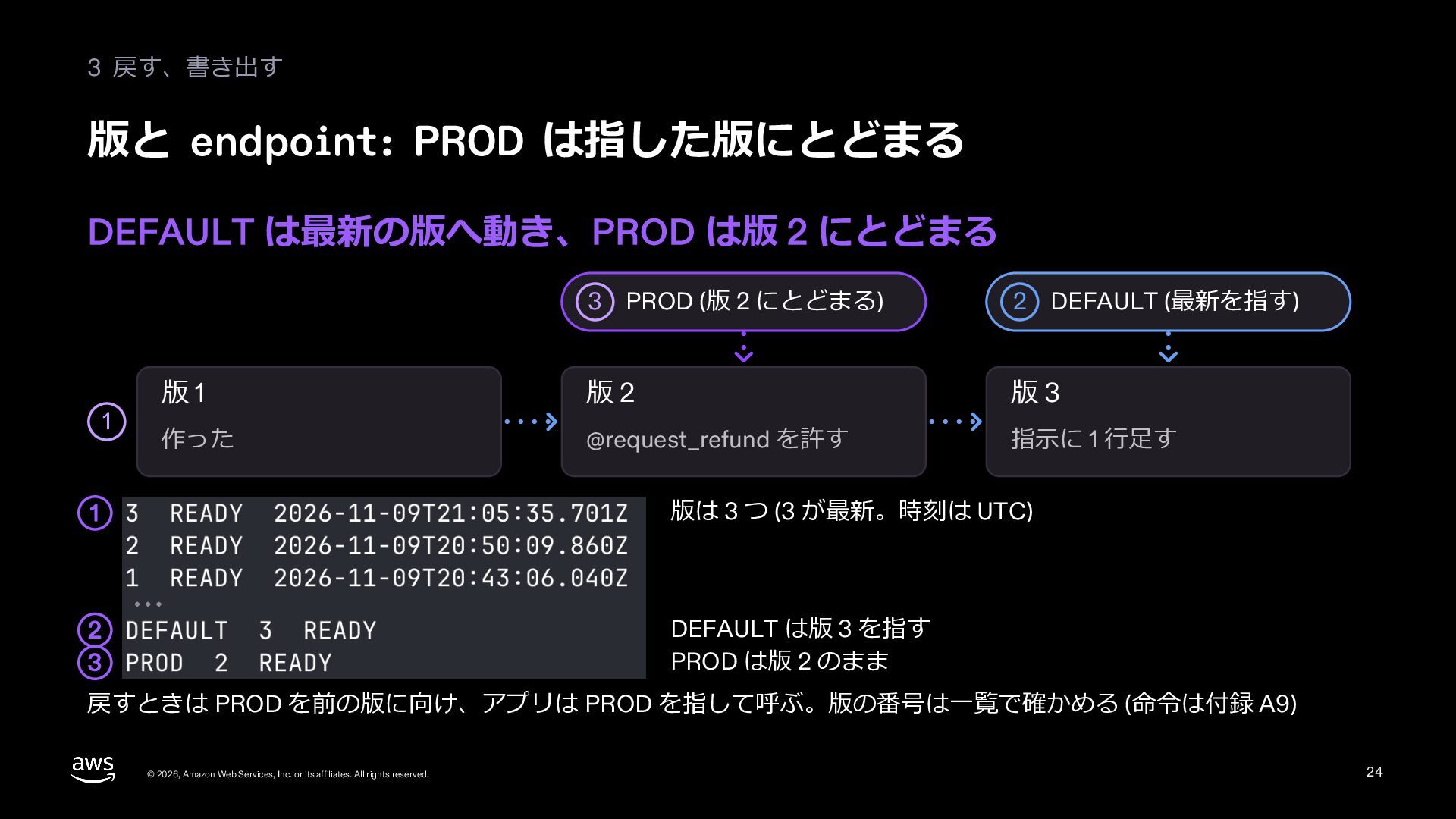
  23. 3 戻す、書き出す 版と endpoint: PROD は指した版にとどまる DEFAULT は最新の版へ動き、PROD は版 2

    にとどまる 1 3 PROD (版 2 にとどまる) 2 DEFAULT (最新を指す) 版1 版2 版3 作った @request_refund を許す 指⽰に 1 ⾏⾜す 1 版は 3 つ (3 が最新。時刻は UTC) 2 3 DEFAULT は版 3 を指す PROD は版 2 のまま 戻すときは PROD を前の版に向け、アプリは PROD を指して呼ぶ。版の番号は⼀覧で確かめる (命令は付録 A9) © 2026, Amazon Web Services, Inc. or its affiliates. All rights reserved. 24
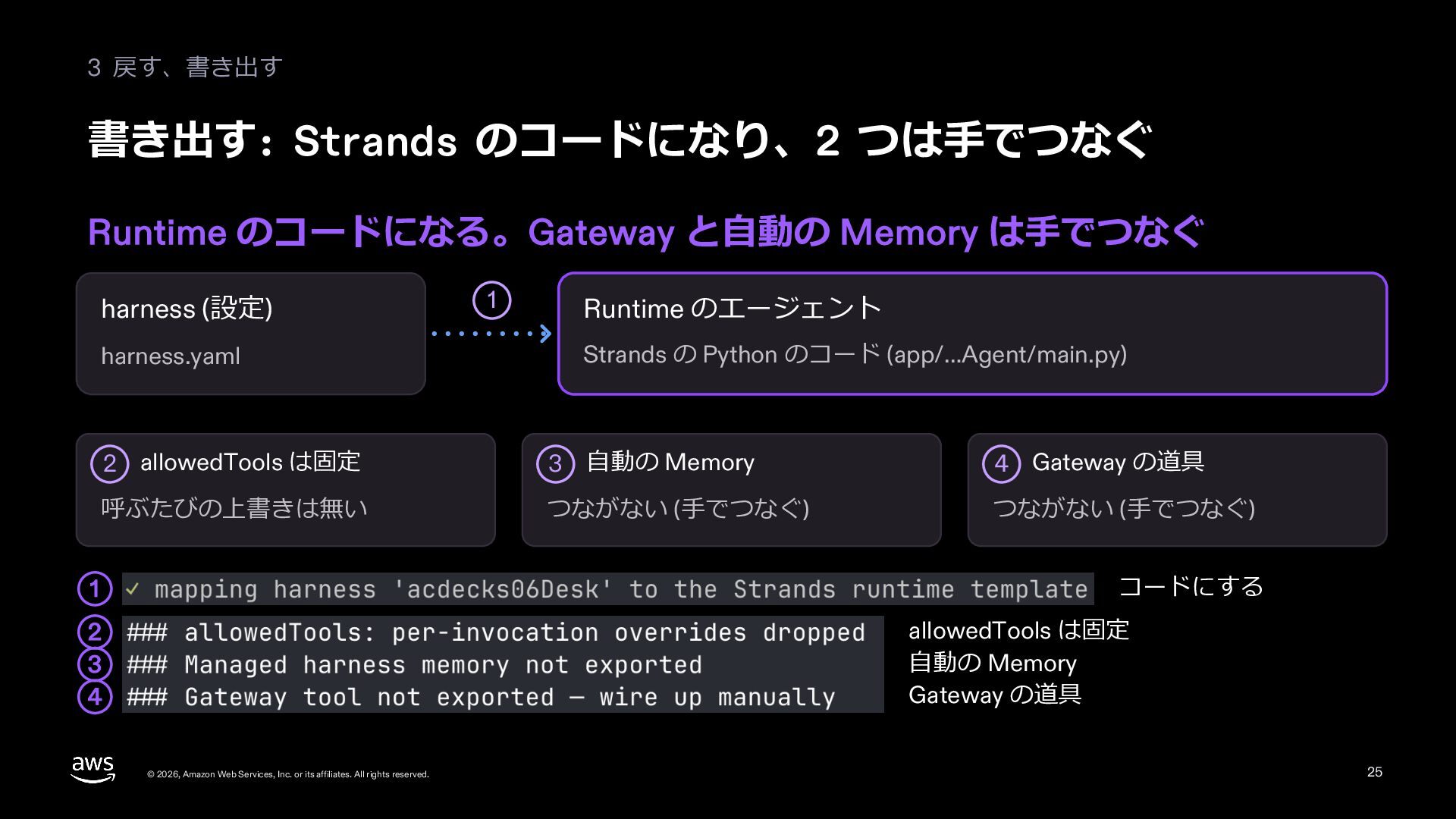
  24. 3 戻す、書き出す 書き出す: Strands のコードになり、2 つは⼿でつなぐ Runtime のコードになる。Gateway と⾃動の Memory

    は⼿でつなぐ harness (設定) harness.yaml 1 Runtime のエージェント Strands の Python のコード (app/…Agent/main.py) 2 allowedTools は固定 3 ⾃動の Memory 4 Gateway の道具 呼ぶたびの上書きは無い つながない (⼿でつなぐ) つながない (⼿でつなぐ) コードにする 1 allowedTools は固定 ⾃動の Memory Gateway の道具 2 3 4 © 2026, Amazon Web Services, Inc. or its affiliates. All rights reserved. 25
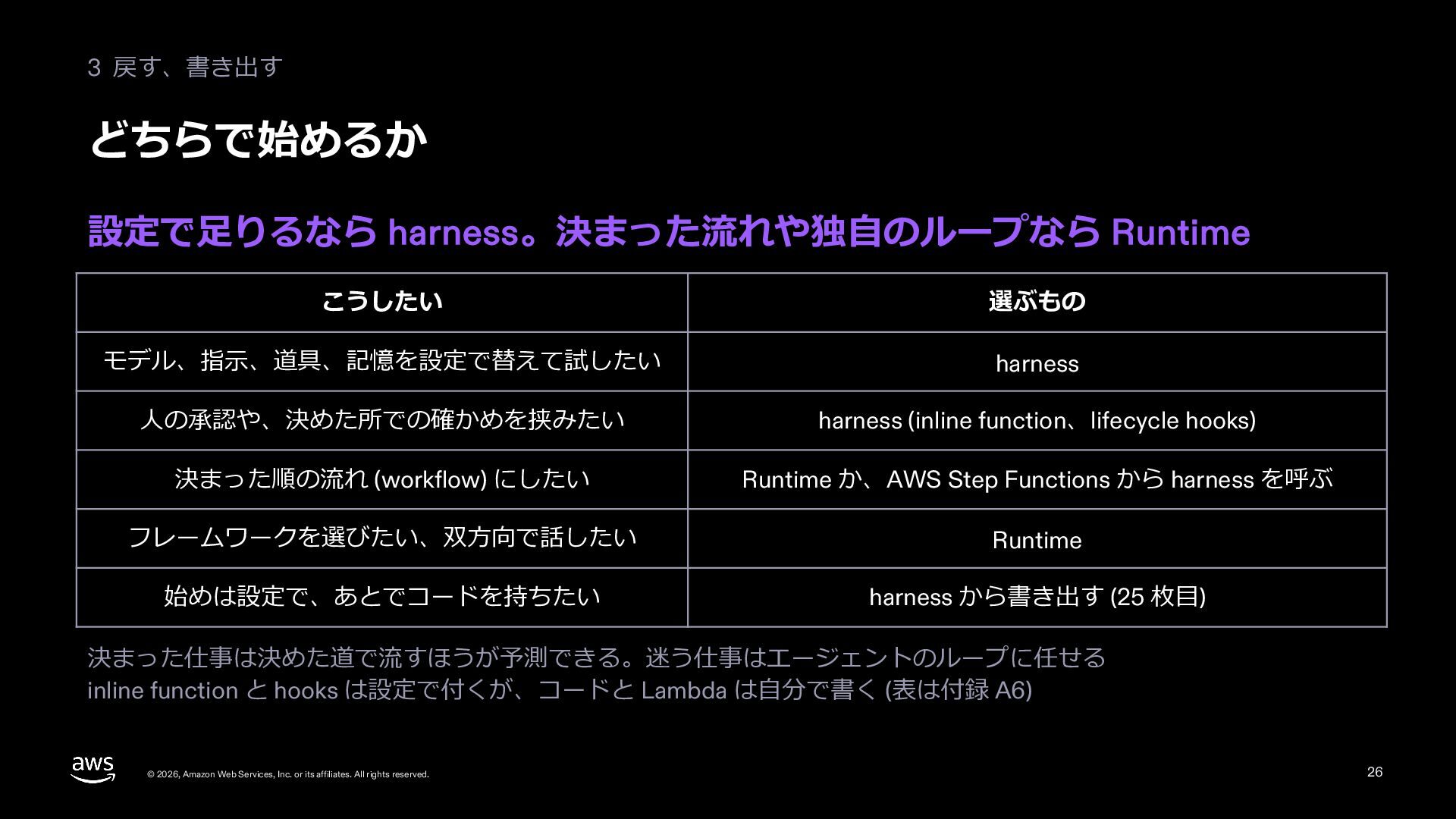
  25. 3 戻す、書き出す どちらで始めるか 設定で⾜りるなら harness。決まった流れや独⾃のループなら Runtime こうしたい 選ぶもの モデル、指⽰、道具、記憶を設定で替えて試したい harness

    ⼈の承認や、決めた所での確かめを挟みたい harness (inline function、lifecycle hooks) 決まった順の流れ (workflow) にしたい Runtime か、AWS Step Functions から harness を呼ぶ フレームワークを選びたい、双⽅向で話したい Runtime 始めは設定で、あとでコードを持ちたい harness から書き出す (25 枚⽬) 決まった仕事は決めた道で流すほうが予測できる。迷う仕事はエージェントのループに任せる inline function と hooks は設定で付くが、コードと Lambda は⾃分で書く (表は付録 A6) © 2026, Amazon Web Services, Inc. or its affiliates. All rights reserved. 26
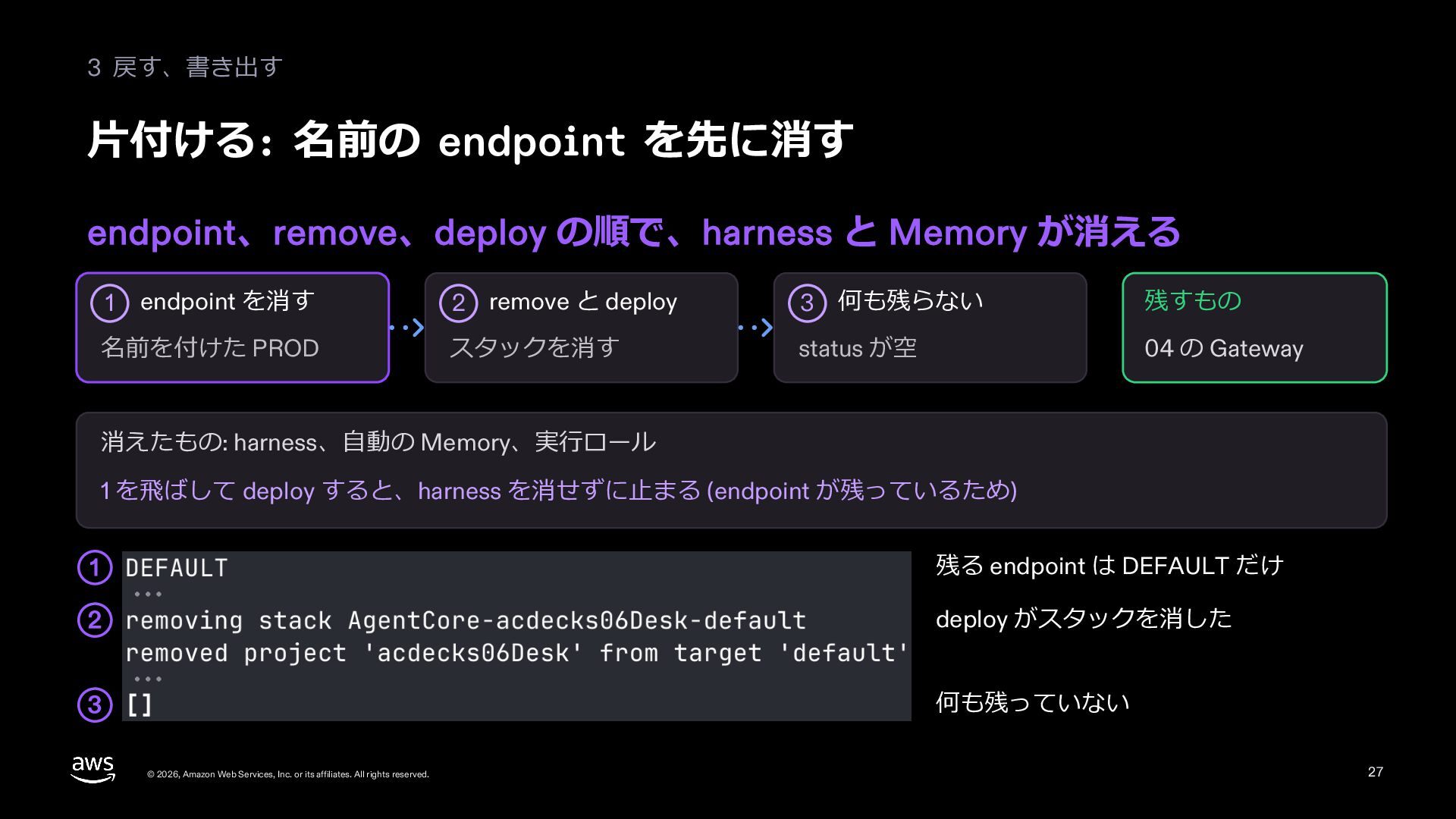
  26. 3 戻す、書き出す ⽚付ける: 名前の endpoint を先に消す endpoint、remove、deploy の順で、harness と Memory

    が消える 1 endpoint を消す 名前を付けた PROD 2 remove と deploy 3 何も残らない 残すもの スタックを消す status が空 04 の Gateway 消えたもの: harness、⾃動の Memory、実⾏ロール 1 を⾶ばして deploy すると、harness を消せずに⽌まる (endpoint が残っているため) 1 残る endpoint は DEFAULT だけ 2 deploy がスタックを消した 3 何も残っていない © 2026, Amazon Web Services, Inc. or its affiliates. All rights reserved. 27
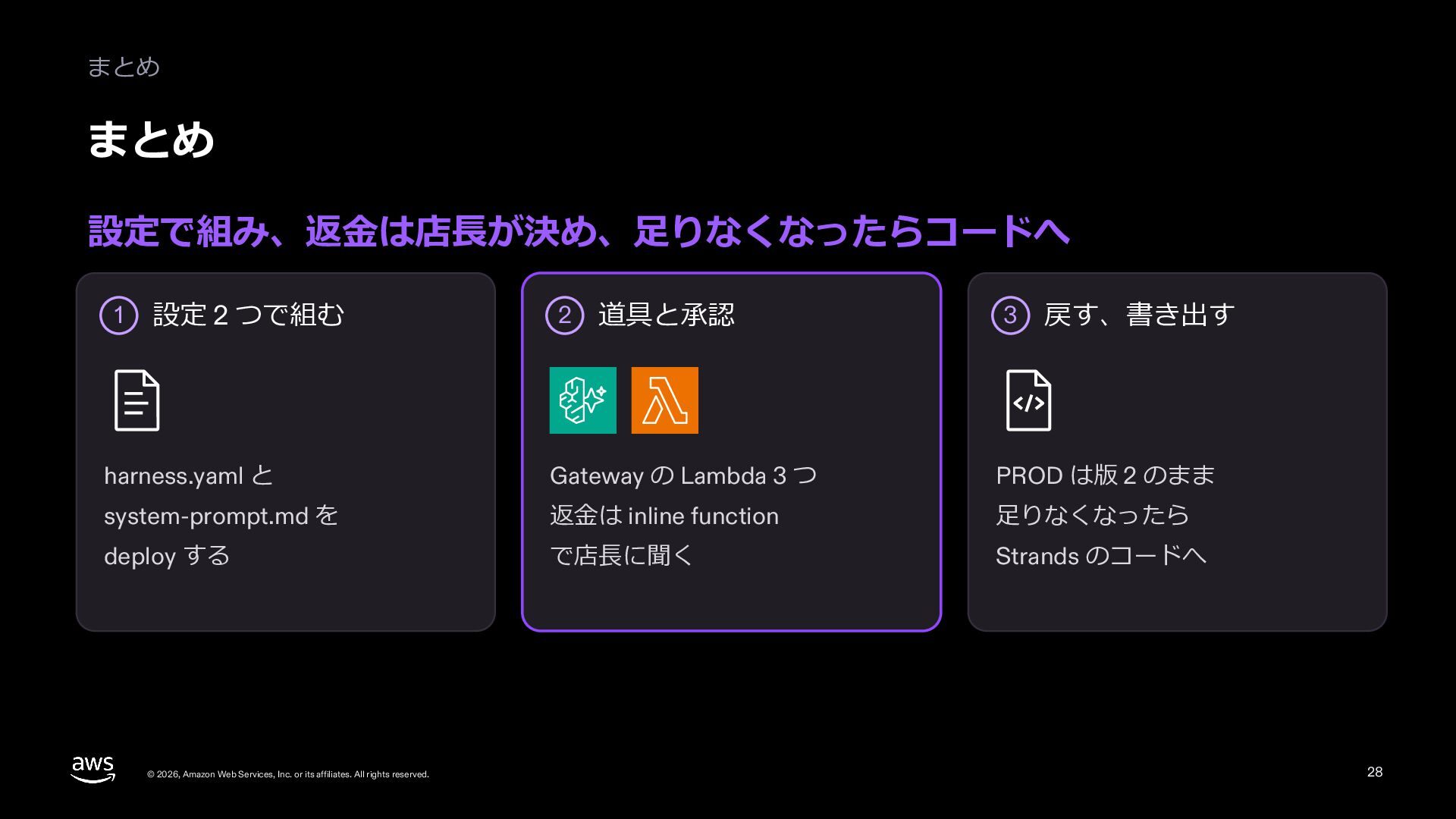
  27. まとめ まとめ 設定で組み、返⾦は店⻑が決め、⾜りなくなったらコードへ 1 設定 2 つで組む 2 道具と承認 3

    戻す、書き出す harness.yaml と Gateway の Lambda 3 つ PROD は版 2 のまま system-prompt.md を 返⾦は inline function ⾜りなくなったら deploy する で店⻑に聞く Strands のコードへ © 2026, Amazon Web Services, Inc. or its affiliates. All rights reserved. 28
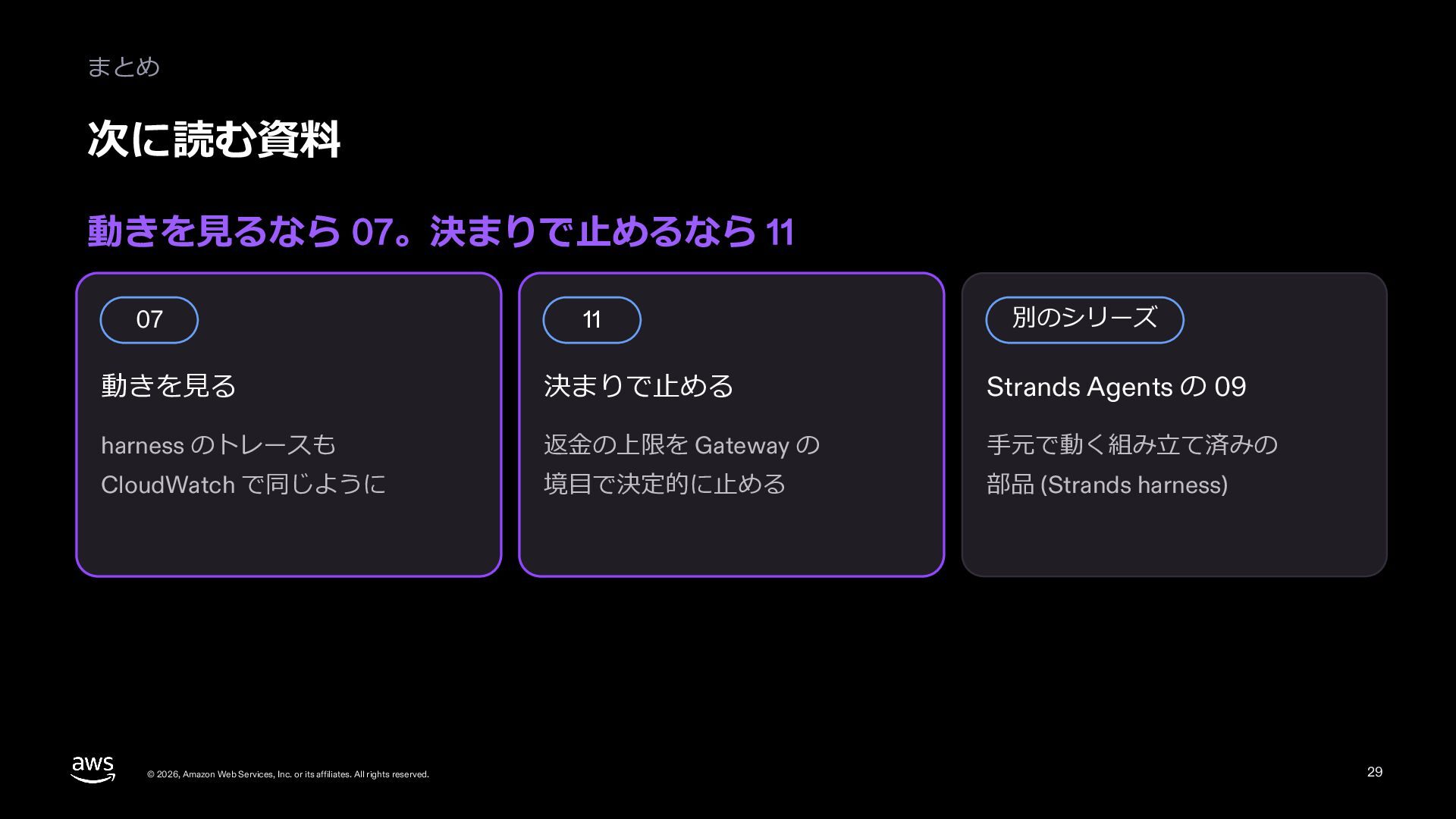
  28. まとめ 次に読む資料 動きを⾒るなら 07。決まりで⽌めるなら 11 07 11 別のシリーズ 動きを⾒る 決まりで⽌める

    Strands Agents の 09 harness のトレースも 返⾦の上限を Gateway の ⼿元で動く組み⽴て済みの CloudWatch で同じように 境⽬で決定的に⽌める 部品 (Strands harness) © 2026, Amazon Web Services, Inc. or its affiliates. All rights reserved. 29
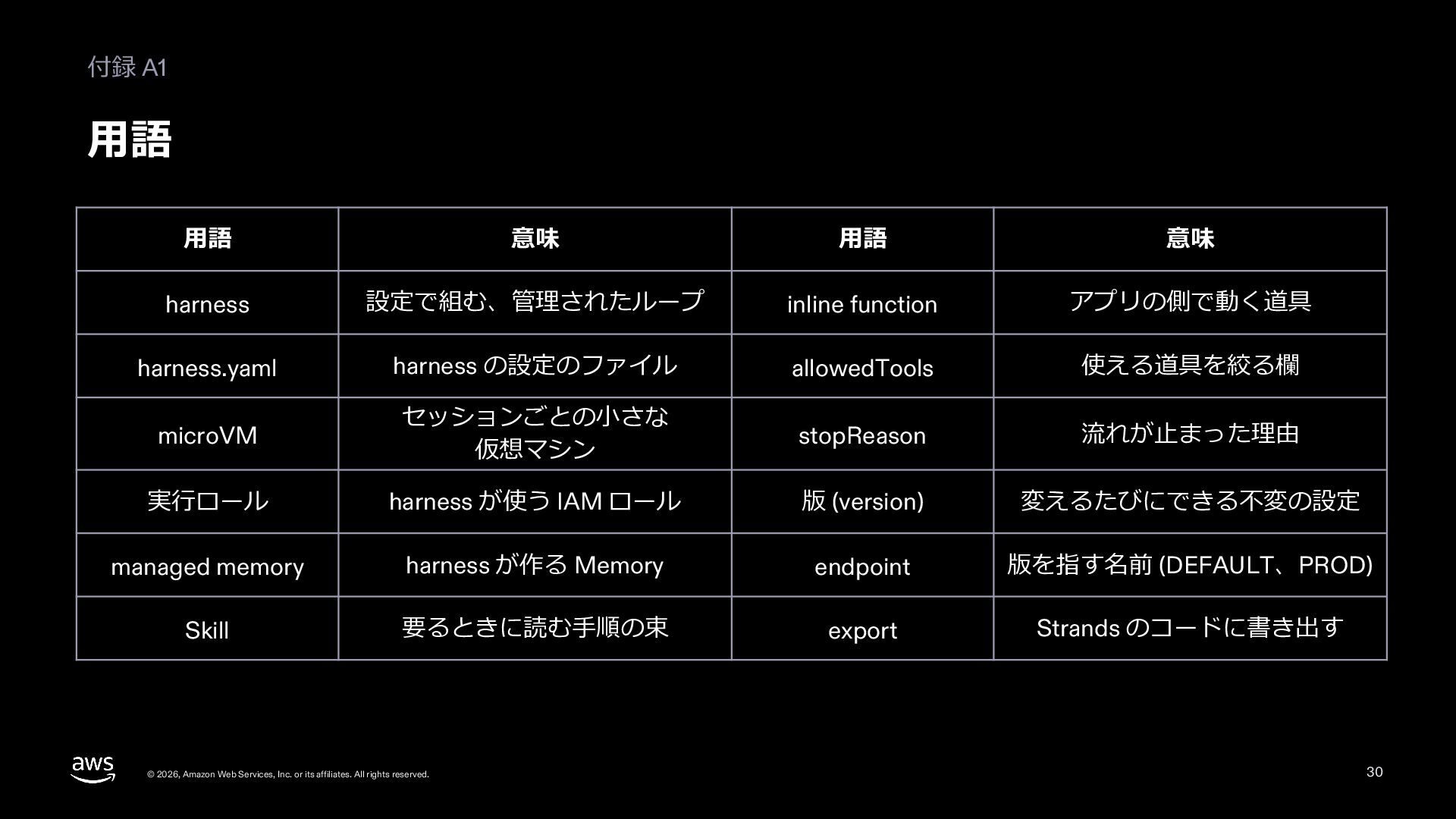
  29. 付録 A1 ⽤語 ⽤語 意味 ⽤語 意味 harness 設定で組む、管理されたループ inline

    function アプリの側で動く道具 harness.yaml harness の設定のファイル allowedTools 使える道具を絞る欄 microVM セッションごとの⼩さな 仮想マシン stopReason 流れが⽌まった理由 実⾏ロール harness が使う IAM ロール 版 (version) 変えるたびにできる不変の設定 managed memory harness が作る Memory endpoint 版を指す名前 (DEFAULT、PROD) Skill 要るときに読む⼿順の束 export Strands のコードに書き出す © 2026, Amazon Web Services, Inc. or its affiliates. All rights reserved. 30
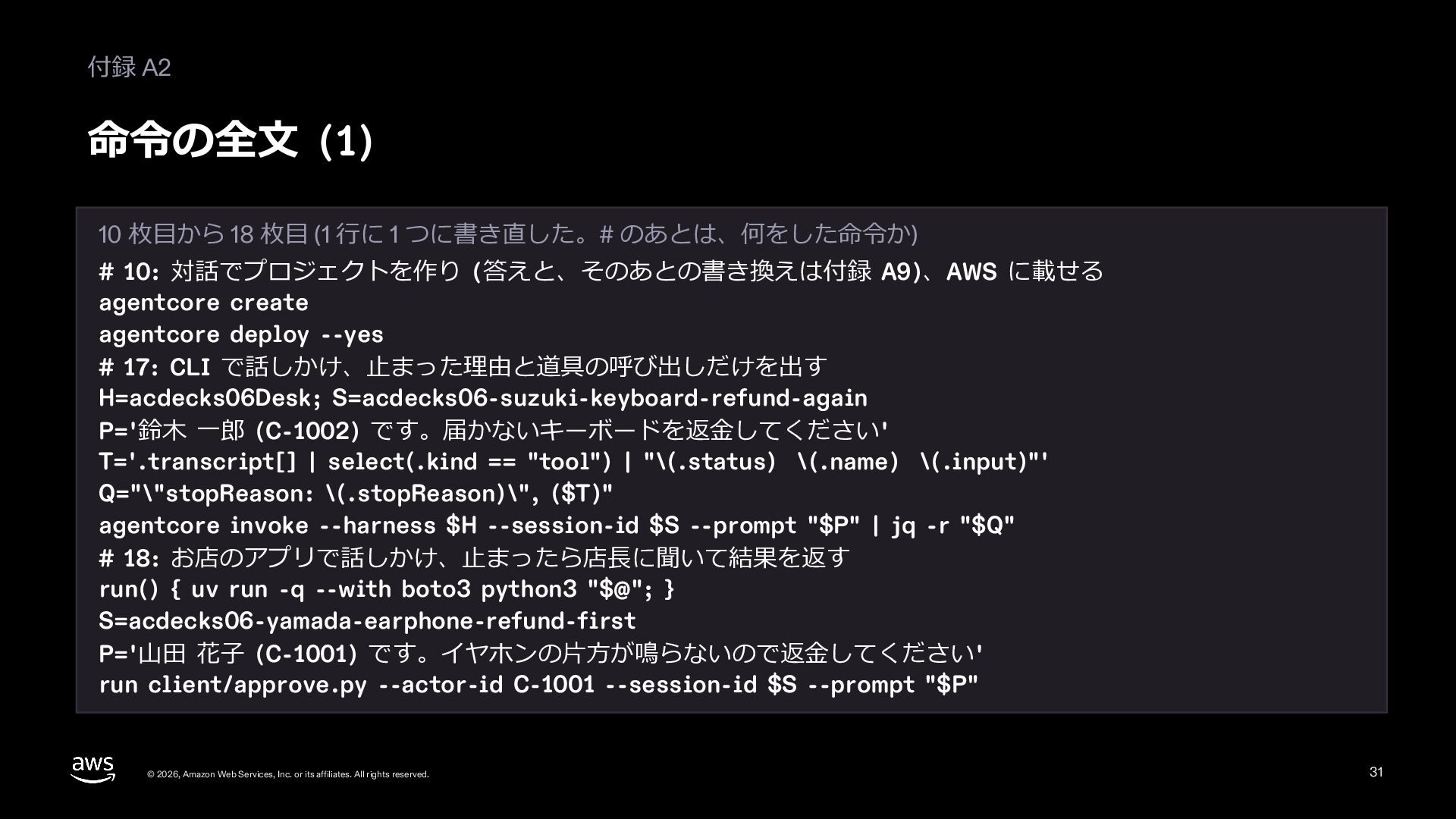
  30. 付録 A2 命令の全⽂ (1) 10 枚⽬から 18 枚⽬ (1 ⾏に

    1 つに書き直した。# のあとは、何をした命令か) # 10: 対話でプロジェクトを作り (答えと、そのあとの書き換えは付録 A9)、AWS に載せる agentcore create agentcore deploy --yes # 17: CLI で話しかけ、⽌まった理由と道具の呼び出しだけを出す H=acdecks06Desk; S=acdecks06-suzuki-keyboard-refund-again P='鈴⽊ ⼀郎 (C-1002) です。届かないキーボードを返⾦してください' T='.transcript[] | select(.kind == "tool") | "\(.status) \(.name) \(.input)"' Q="\"stopReason: \(.stopReason)\", ($T)" agentcore invoke --harness $H --session-id $S --prompt "$P" | jq -r "$Q" # 18: お店のアプリで話しかけ、⽌まったら店⻑に聞いて結果を返す run() { uv run -q --with boto3 python3 "$@"; } S=acdecks06-yamada-earphone-refund-first P='⼭⽥ 花⼦ (C-1001) です。イヤホンの⽚⽅が鳴らないので返⾦してください' run client/approve.py --actor-id C-1001 --session-id $S --prompt "$P" © 2026, Amazon Web Services, Inc. or its affiliates. All rights reserved. 31
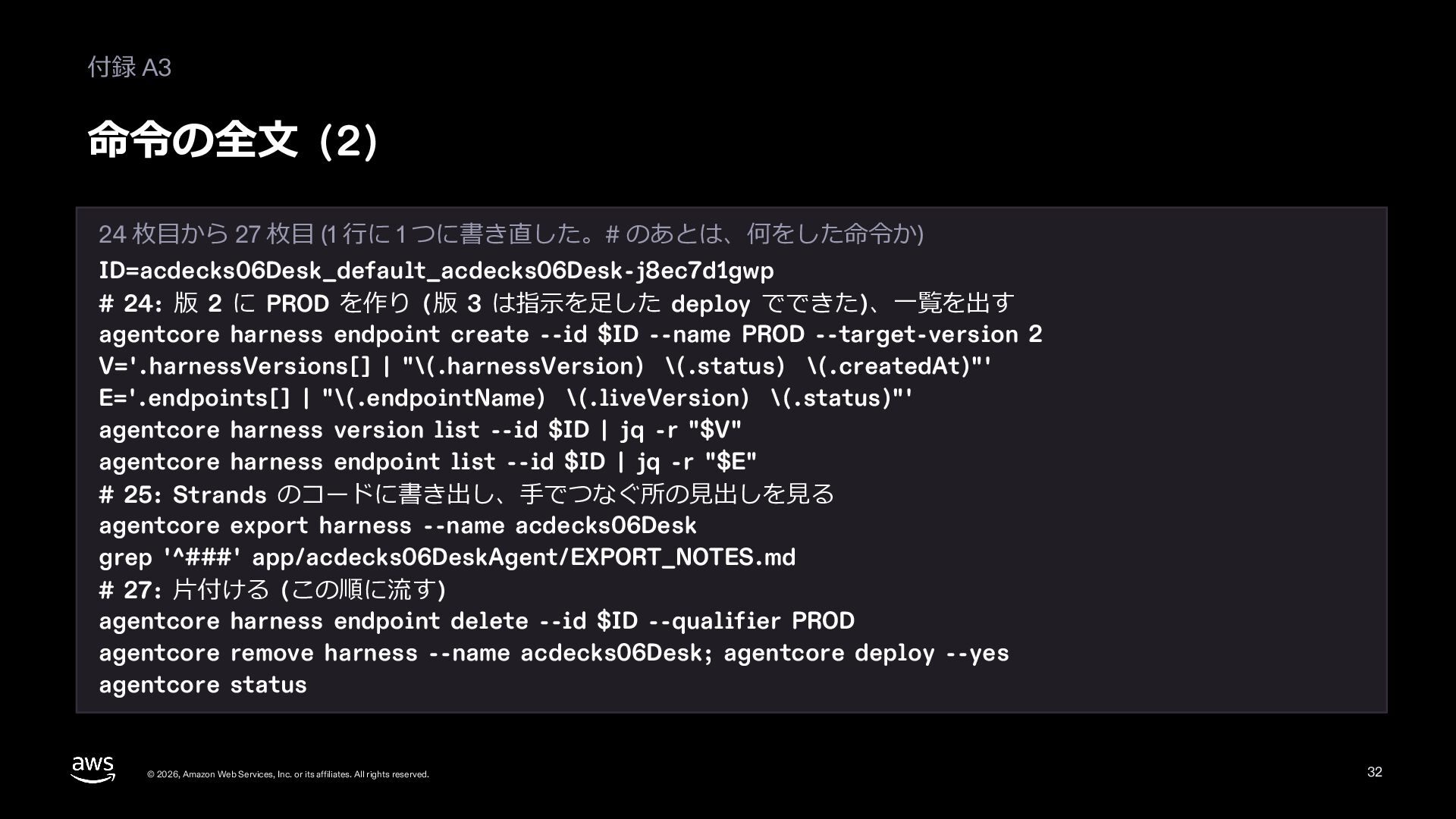
  31. 付録 A3 命令の全⽂ (2) 24 枚⽬から 27 枚⽬ (1 ⾏に

    1 つに書き直した。# のあとは、何をした命令か) ID=acdecks06Desk_default_acdecks06Desk-j8ec7d1gwp # 24: 版 2 に PROD を作り (版 3 は指⽰を⾜した deploy でできた)、⼀覧を出す agentcore harness endpoint create --id $ID --name PROD --target-version 2 V='.harnessVersions[] | "\(.harnessVersion) \(.status) \(.createdAt)"' E='.endpoints[] | "\(.endpointName) \(.liveVersion) \(.status)"' agentcore harness version list --id $ID | jq -r "$V" agentcore harness endpoint list --id $ID | jq -r "$E" # 25: Strands のコードに書き出し、⼿でつなぐ所の⾒出しを⾒る agentcore export harness --name acdecks06Desk grep '^###' app/acdecks06DeskAgent/EXPORT_NOTES.md # 27: ⽚付ける (この順に流す) agentcore harness endpoint delete --id $ID --qualifier PROD agentcore remove harness --name acdecks06Desk; agentcore deploy --yes agentcore status © 2026, Amazon Web Services, Inc. or its affiliates. All rights reserved. 32
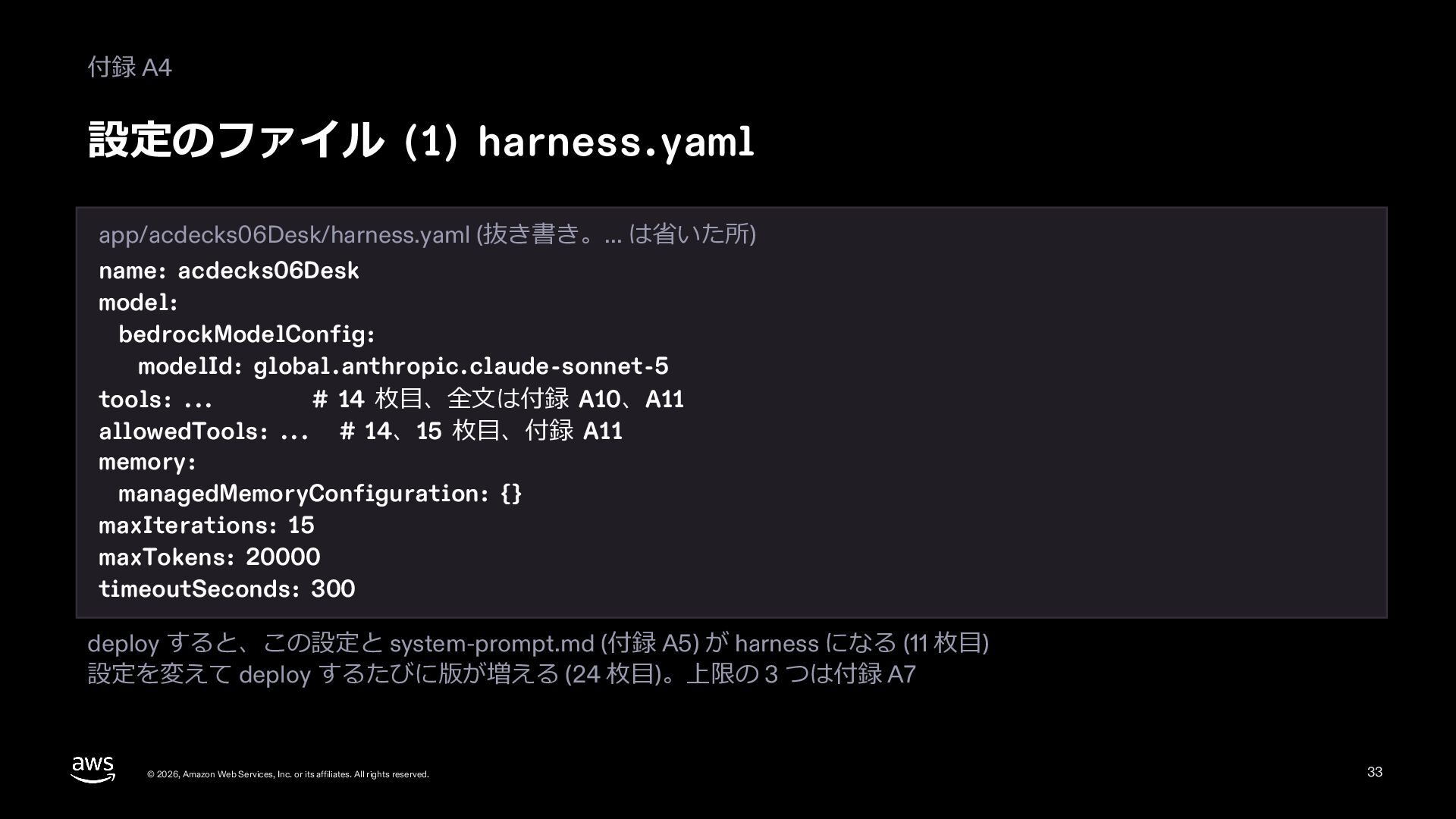
  32. 付録 A4 設定のファイル (1) harness.yaml app/acdecks06Desk/harness.yaml (抜き書き。... は省いた所) name: acdecks06Desk

    model: bedrockModelConfig: modelId: global.anthropic.claude-sonnet-5 tools: ... # 14 枚⽬、全⽂は付録 A10、A11 allowedTools: ... # 14、15 枚⽬、付録 A11 memory: managedMemoryConfiguration: {} maxIterations: 15 maxTokens: 20000 timeoutSeconds: 300 deploy すると、この設定と system-prompt.md (付録 A5) が harness になる (11 枚⽬) 設定を変えて deploy するたびに版が増える (24 枚⽬)。上限の 3 つは付録 A7 © 2026, Amazon Web Services, Inc. or its affiliates. All rights reserved. 33
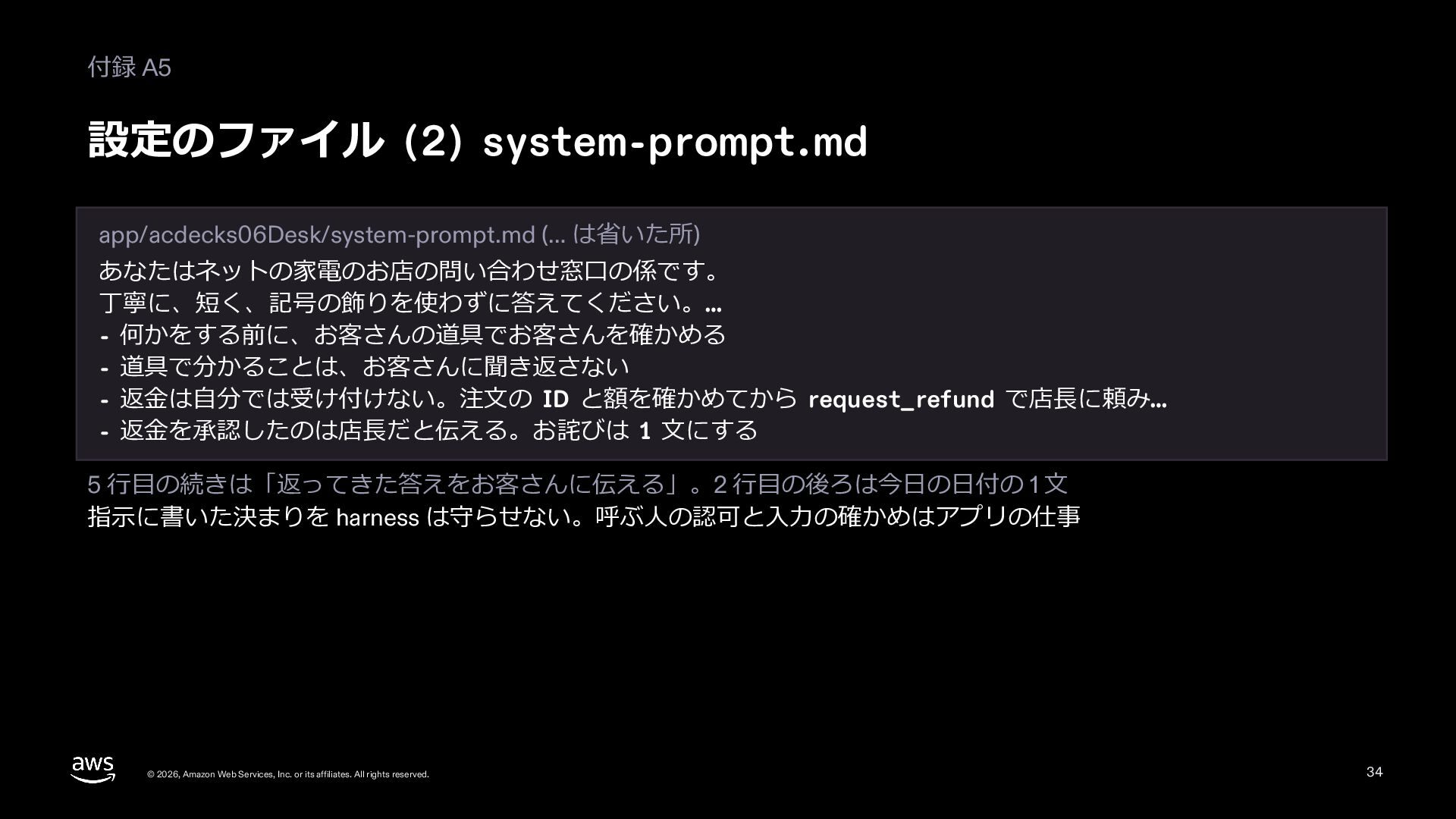
  33. 付録 A5 設定のファイル (2) system-prompt.md app/acdecks06Desk/system-prompt.md (… は省いた所) あなたはネットの家電のお店の問い合わせ窓⼝の係です。 丁寧に、短く、記号の飾りを使わずに答えてください。…

    - 何かをする前に、お客さんの道具でお客さんを確かめる - 道具で分かることは、お客さんに聞き返さない - 返⾦は⾃分では受け付けない。注⽂の ID と額を確かめてから request_refund で店⻑に頼み… - 返⾦を承認したのは店⻑だと伝える。お詫びは 1 ⽂にする 5 ⾏⽬の続きは「返ってきた答えをお客さんに伝える」。2 ⾏⽬の後ろは今⽇の⽇付の 1 ⽂ 指⽰に書いた決まりを harness は守らせない。呼ぶ⼈の認可と⼊⼒の確かめはアプリの仕事 © 2026, Amazon Web Services, Inc. or its affiliates. All rights reserved. 34
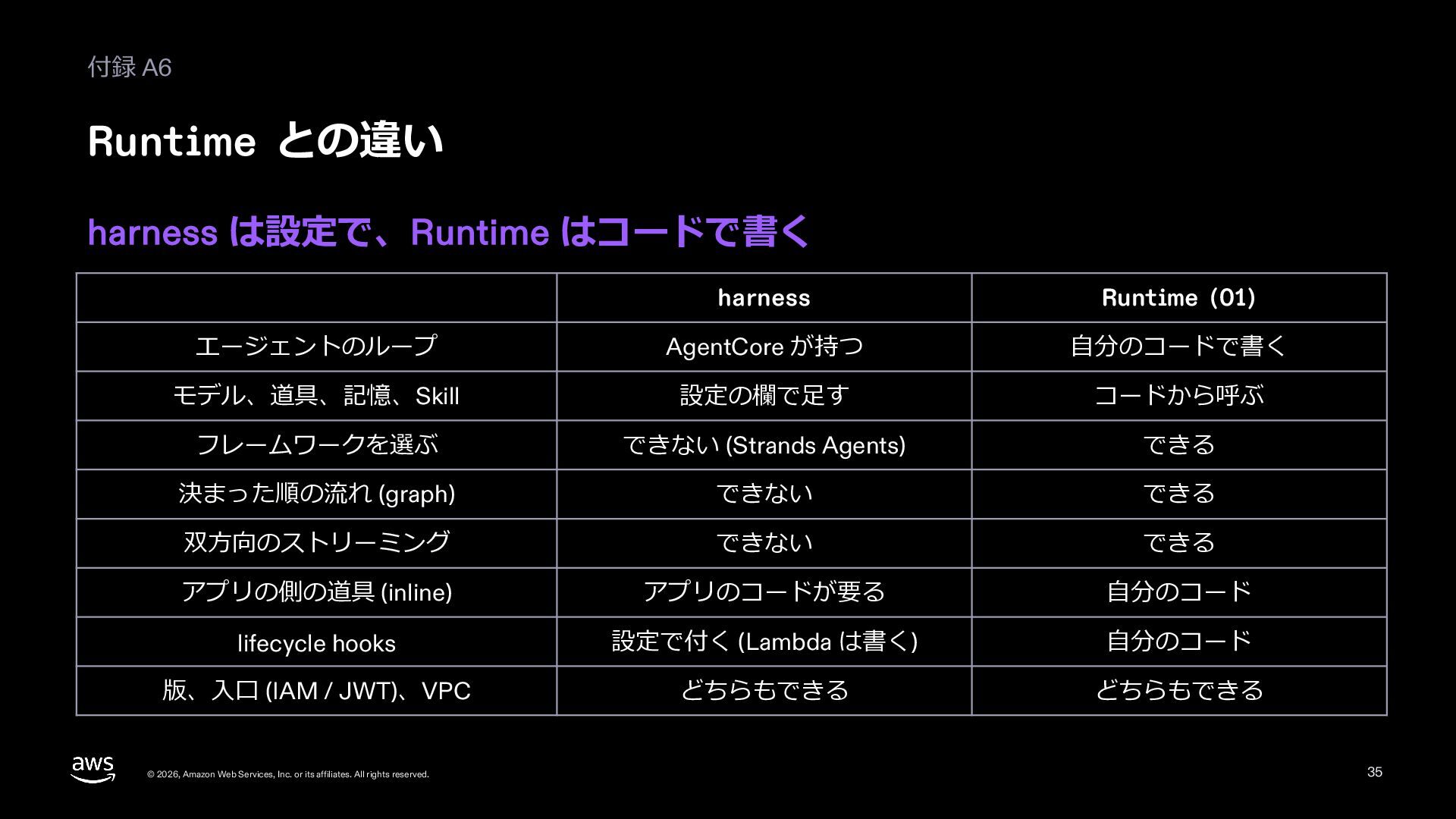
  34. 付録 A6 Runtime との違い harness は設定で、Runtime はコードで書く harness Runtime (01)

    エージェントのループ AgentCore が持つ ⾃分のコードで書く モデル、道具、記憶、Skill 設定の欄で⾜す コードから呼ぶ フレームワークを選ぶ できない (Strands Agents) できる 決まった順の流れ (graph) できない できる 双⽅向のストリーミング できない できる アプリの側の道具 (inline) アプリのコードが要る ⾃分のコード lifecycle hooks 設定で付く (Lambda は書く) ⾃分のコード 版、⼊⼝ (IAM / JWT)、VPC どちらもできる どちらもできる © 2026, Amazon Web Services, Inc. or its affiliates. All rights reserved. 35
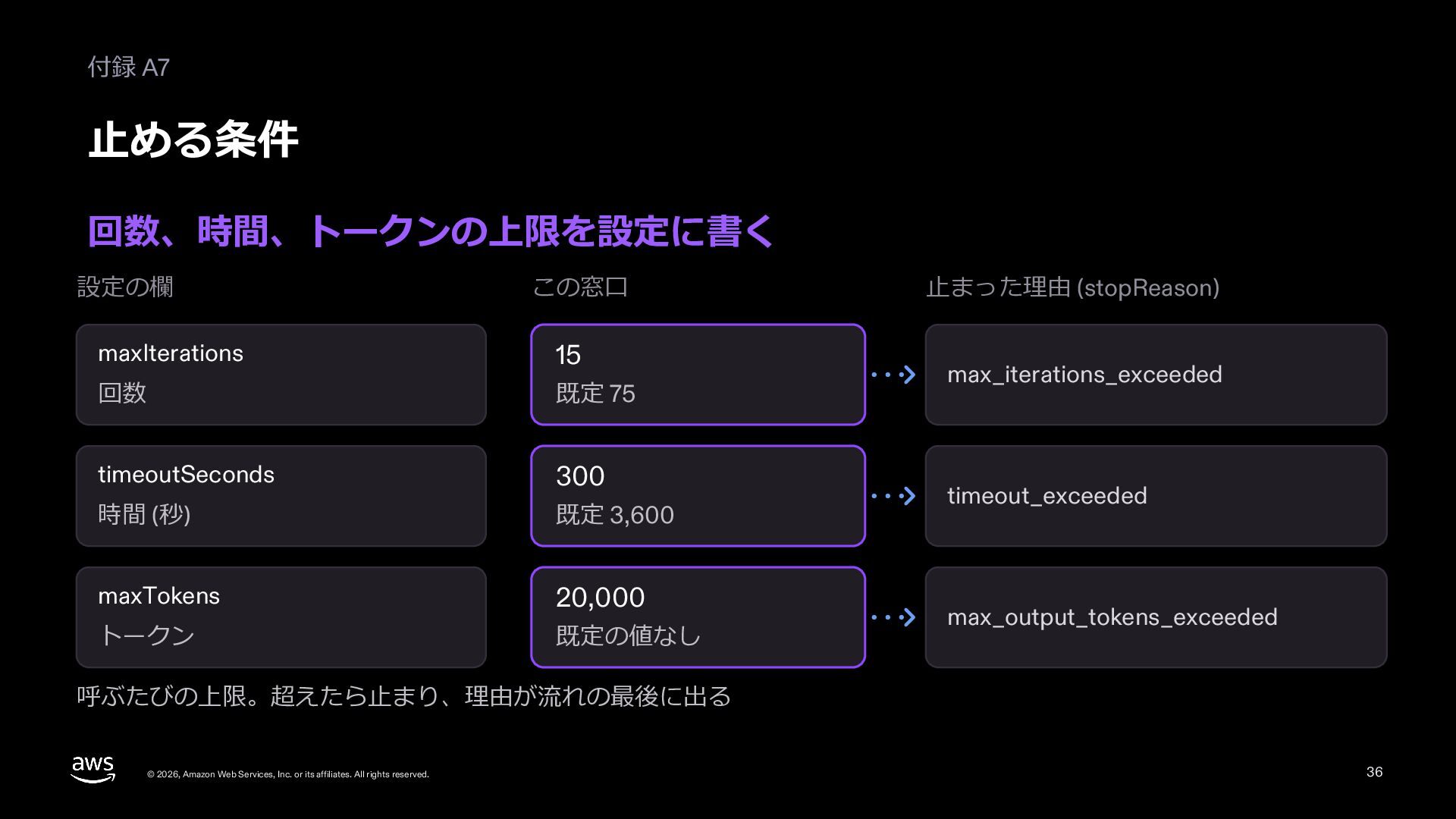
  35. 付録 A7 ⽌める条件 回数、時間、トークンの上限を設定に書く 設定の欄 この窓⼝ maxIterations 15 回数 既定

    75 timeoutSeconds 300 時間 (秒) 既定 3,600 maxTokens 20,000 トークン 既定の値なし ⽌まった理由 (stopReason) max_iterations_exceeded timeout_exceeded max_output_tokens_exceeded 呼ぶたびの上限。超えたら⽌まり、理由が流れの最後に出る © 2026, Amazon Web Services, Inc. or its affiliates. All rights reserved. 36
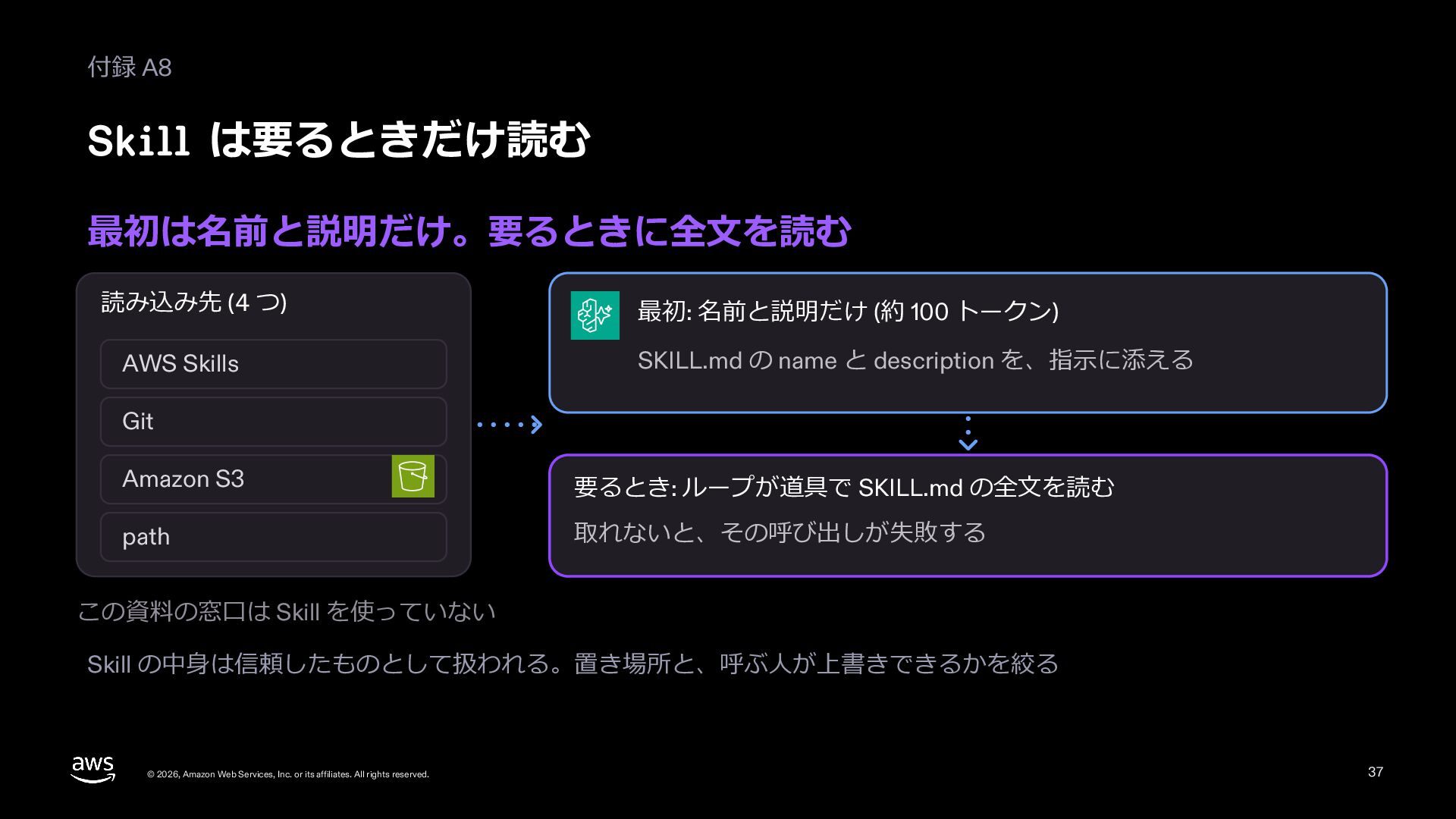
  36. 付録 A8 Skill は要るときだけ読む 最初は名前と説明だけ。要るときに全⽂を読む 読み込み先 (4 つ) AWS Skills

    最初: 名前と説明だけ (約 100 トークン) SKILL.md の name と description を、指⽰に添える Git Amazon S3 要るとき: ループが道具で SKILL.md の全⽂を読む path 取れないと、その呼び出しが失敗する この資料の窓⼝は Skill を使っていない Skill の中⾝は信頼したものとして扱われる。置き場所と、呼ぶ⼈が上書きできるかを絞る © 2026, Amazon Web Services, Inc. or its affiliates. All rights reserved. 37
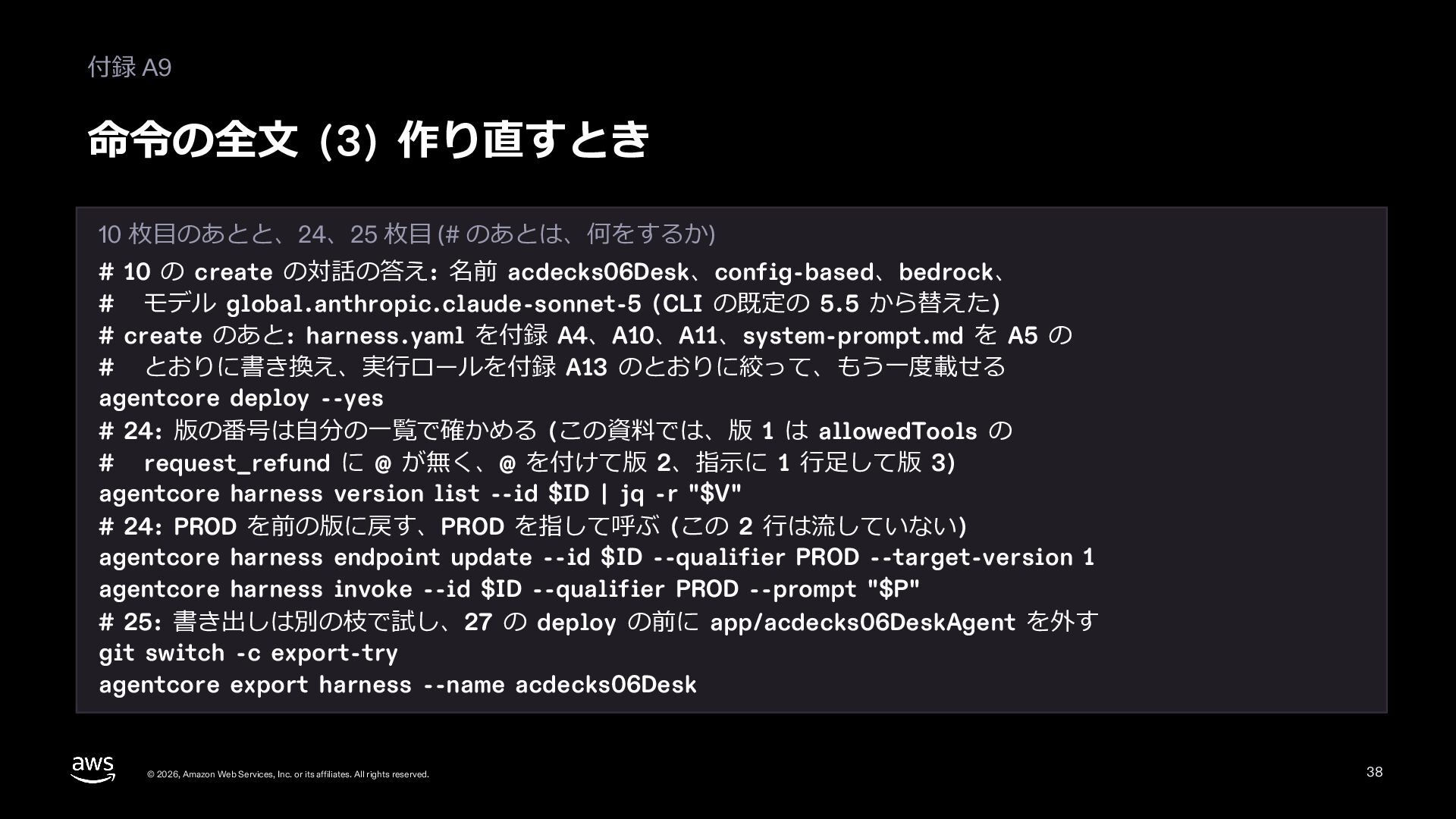
  37. 付録 A9 命令の全⽂ (3) 作り直すとき 10 枚⽬のあとと、24、25 枚⽬ (# のあとは、何をするか)

    # 10 の create の対話の答え: 名前 acdecks06Desk、config-based、bedrock、 # モデル global.anthropic.claude-sonnet-5 (CLI の既定の 5.5 から替えた) # create のあと: harness.yaml を付録 A4、A10、A11、system-prompt.md を A5 の # とおりに書き換え、実⾏ロールを付録 A13 のとおりに絞って、もう⼀度載せる agentcore deploy --yes # 24: 版の番号は⾃分の⼀覧で確かめる (この資料では、版 1 は allowedTools の # request_refund に @ が無く、@ を付けて版 2、指⽰に 1 ⾏⾜して版 3) agentcore harness version list --id $ID | jq -r "$V" # 24: PROD を前の版に戻す、PROD を指して呼ぶ (この 2 ⾏は流していない) agentcore harness endpoint update --id $ID --qualifier PROD --target-version 1 agentcore harness invoke --id $ID --qualifier PROD --prompt "$P" # 25: 書き出しは別の枝で試し、27 の deploy の前に app/acdecks06DeskAgent を外す git switch -c export-try agentcore export harness --name acdecks06Desk © 2026, Amazon Web Services, Inc. or its affiliates. All rights reserved. 38
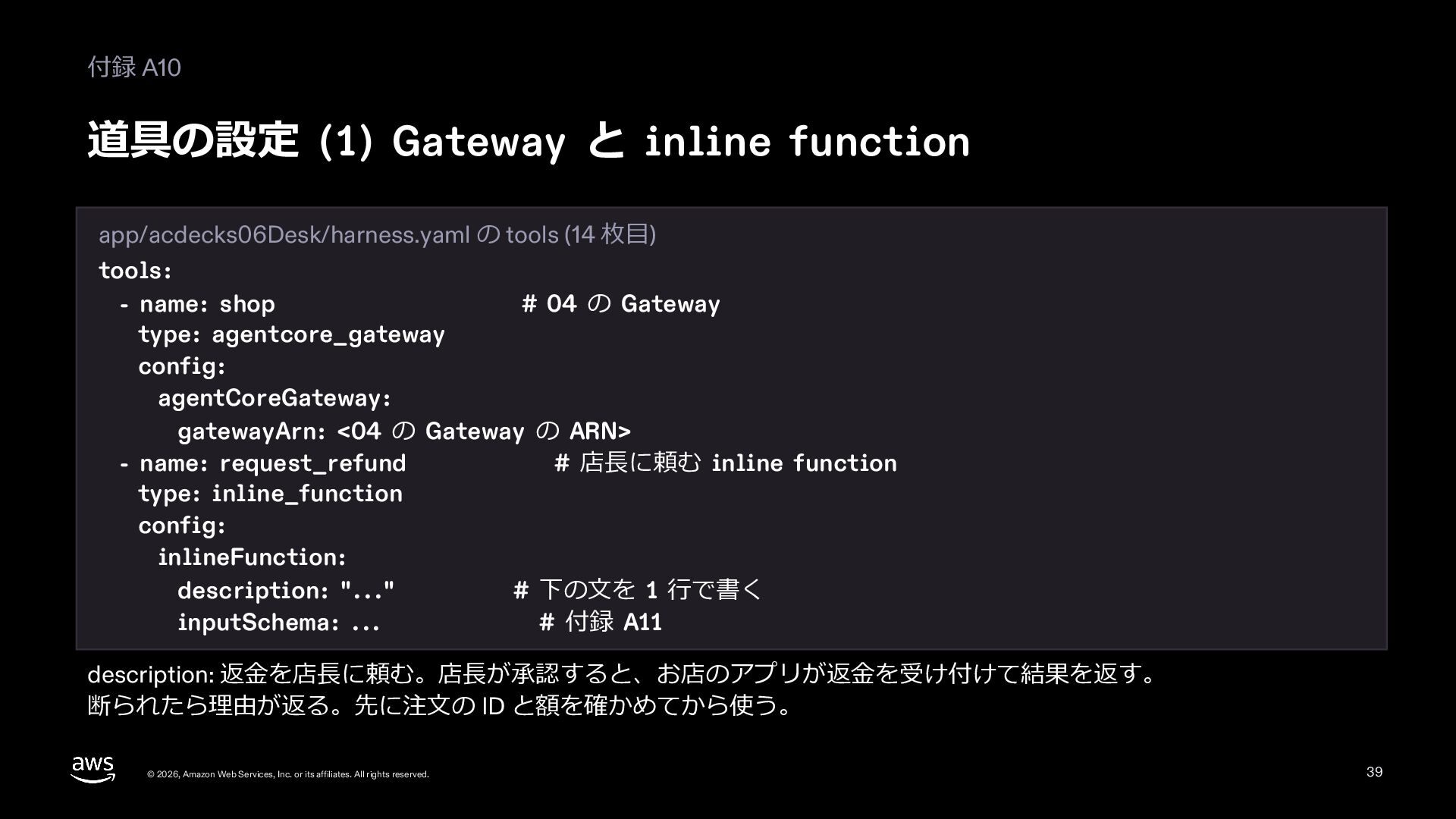
  38. 付録 A10 道具の設定 (1) Gateway と inline function app/acdecks06Desk/harness.yaml の

    tools (14 枚⽬) tools: - name: shop # 04 の Gateway type: agentcore_gateway config: agentCoreGateway: gatewayArn: <04 の Gateway の ARN> - name: request_refund # 店⻑に頼む inline function type: inline_function config: inlineFunction: description: "..." # 下の⽂を 1 ⾏で書く inputSchema: ... # 付録 A11 description: 返⾦を店⻑に頼む。店⻑が承認すると、お店のアプリが返⾦を受け付けて結果を返す。 断られたら理由が返る。先に注⽂の ID と額を確かめてから使う。 © 2026, Amazon Web Services, Inc. or its affiliates. All rights reserved. 39
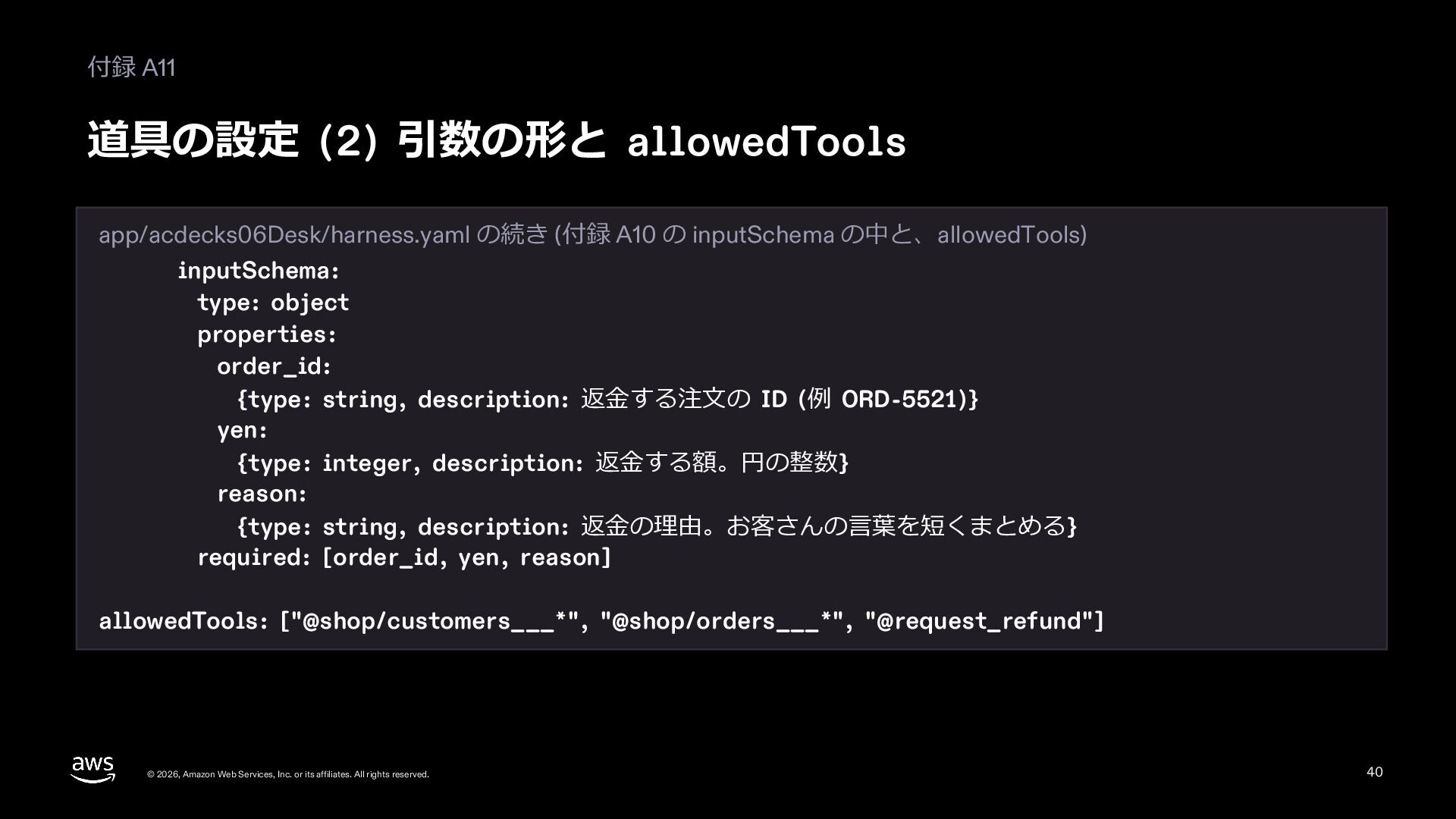
  39. 付録 A11 道具の設定 (2) 引数の形と allowedTools app/acdecks06Desk/harness.yaml の続き (付録 A10

    の inputSchema の中と、allowedTools) inputSchema: type: object properties: order_id: {type: string, description: 返⾦する注⽂の ID (例 ORD-5521)} yen: {type: integer, description: 返⾦する額。円の整数} reason: {type: string, description: 返⾦の理由。お客さんの⾔葉を短くまとめる} required: [order_id, yen, reason] allowedTools: ["@shop/customers___*", "@shop/orders___*", "@request_refund"] © 2026, Amazon Web Services, Inc. or its affiliates. All rights reserved. 40
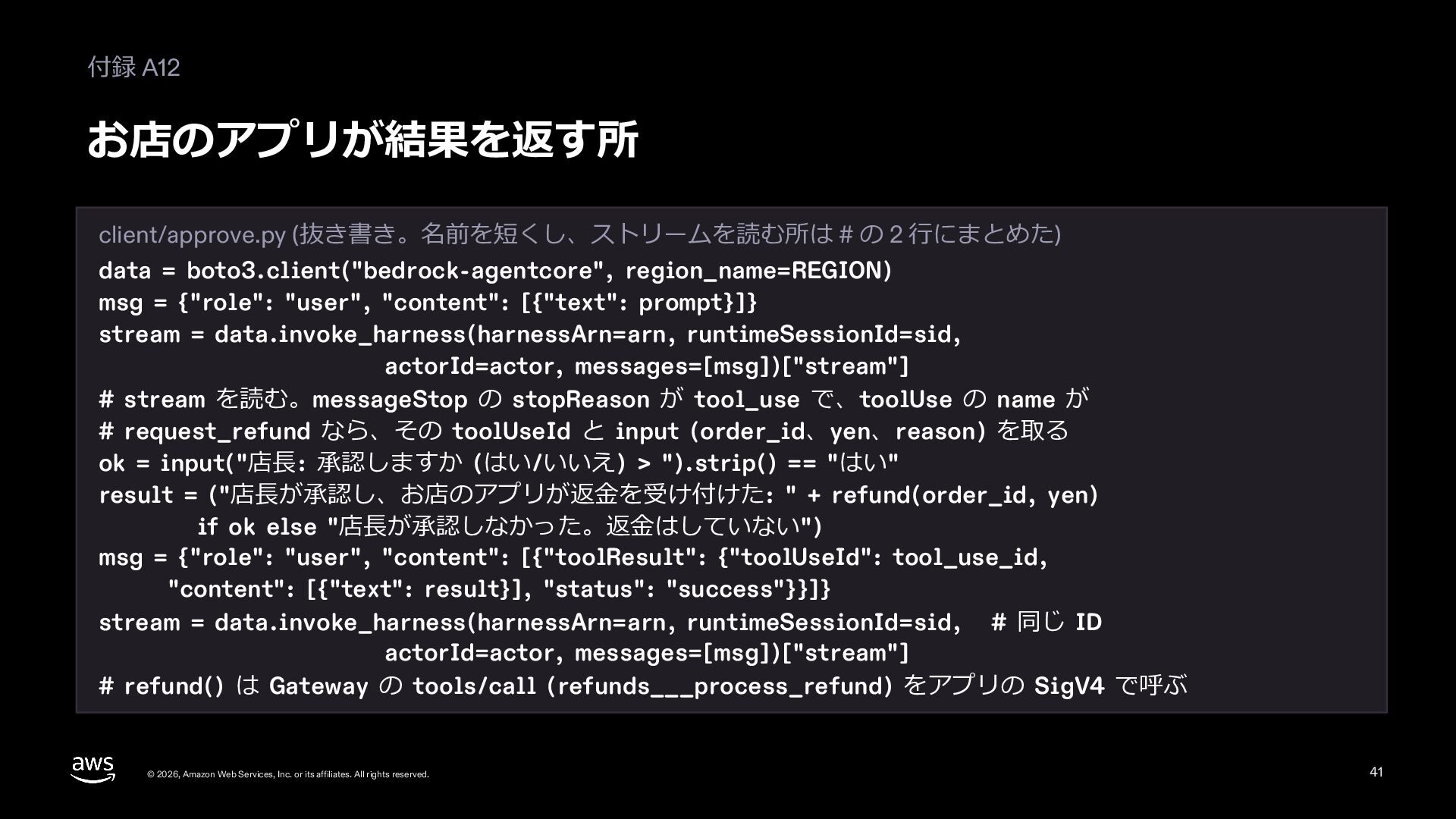
  40. 付録 A12 お店のアプリが結果を返す所 client/approve.py (抜き書き。名前を短くし、ストリームを読む所は # の 2 ⾏にまとめた) data

    = boto3.client("bedrock-agentcore", region_name=REGION) msg = {"role": "user", "content": [{"text": prompt}]} stream = data.invoke_harness(harnessArn=arn, runtimeSessionId=sid, actorId=actor, messages=[msg])["stream"] # stream を読む。messageStop の stopReason が tool_use で、toolUse の name が # request_refund なら、その toolUseId と input (order_id、yen、reason) を取る ok = input("店⻑: 承認しますか (はい/いいえ) > ").strip() == "はい" result = ("店⻑が承認し、お店のアプリが返⾦を受け付けた: " + refund(order_id, yen) if ok else "店⻑が承認しなかった。返⾦はしていない") msg = {"role": "user", "content": [{"toolResult": {"toolUseId": tool_use_id, "content": [{"text": result}], "status": "success"}}]} stream = data.invoke_harness(harnessArn=arn, runtimeSessionId=sid, # 同じ ID actorId=actor, messages=[msg])["stream"] # refund() は Gateway の tools/call (refunds___process_refund) をアプリの SigV4 で呼ぶ © 2026, Amazon Web Services, Inc. or its affiliates. All rights reserved. 41
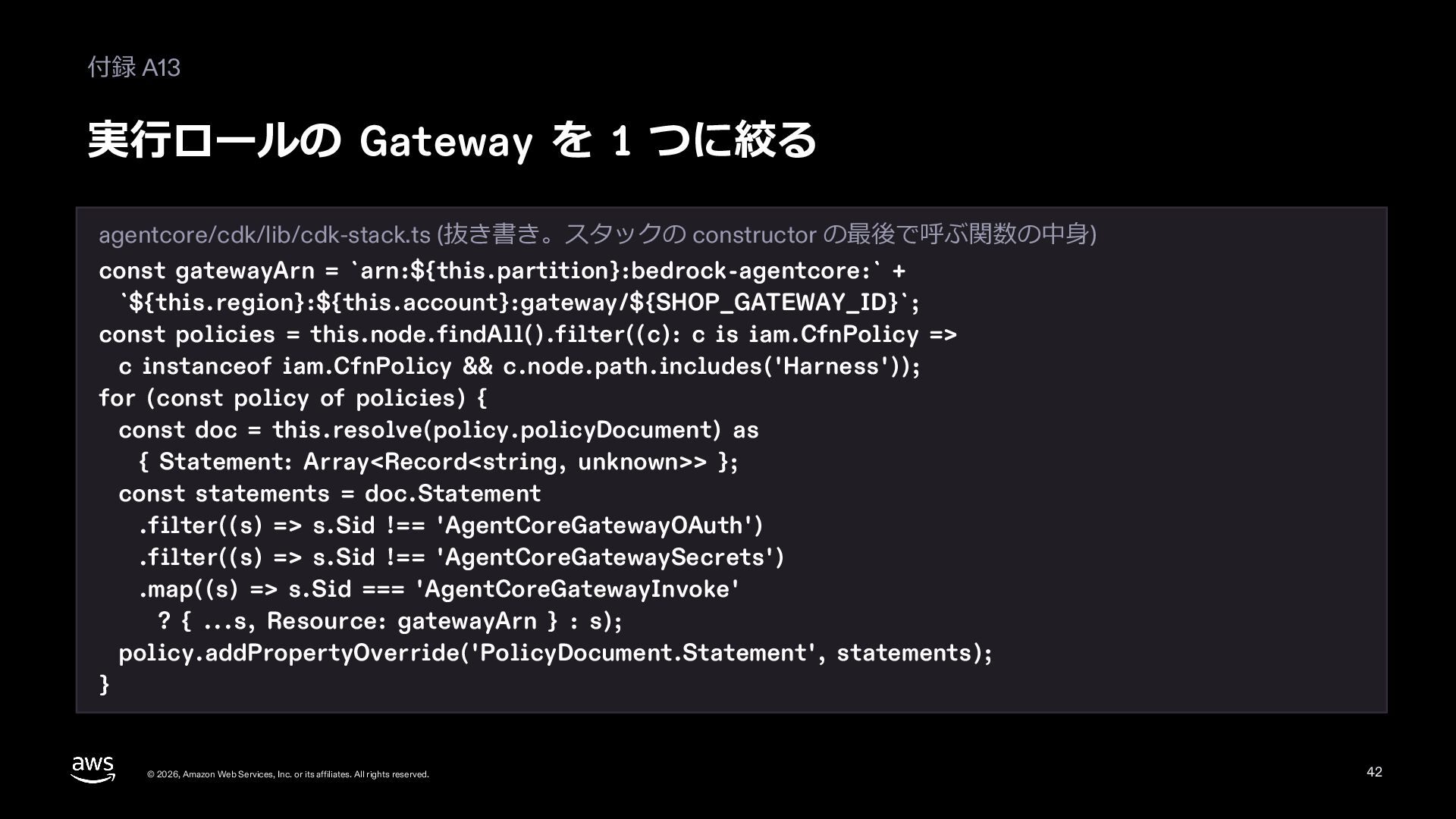
  41. 付録 A13 実⾏ロールの Gateway を 1 つに絞る agentcore/cdk/lib/cdk-stack.ts (抜き書き。スタックの constructor

    の最後で呼ぶ関数の中⾝) const gatewayArn = `arn:${this.partition}:bedrock-agentcore:` + `${this.region}:${this.account}:gateway/${SHOP_GATEWAY_ID}`; const policies = this.node.findAll().filter((c): c is iam.CfnPolicy => c instanceof iam.CfnPolicy && c.node.path.includes('Harness')); for (const policy of policies) { const doc = this.resolve(policy.policyDocument) as { Statement: Array<Record<string, unknown>> }; const statements = doc.Statement .filter((s) => s.Sid !== 'AgentCoreGatewayOAuth') .filter((s) => s.Sid !== 'AgentCoreGatewaySecrets') .map((s) => s.Sid === 'AgentCoreGatewayInvoke' ? { ...s, Resource: gatewayArn } : s); policy.addPropertyOverride('PolicyDocument.Statement', statements); } © 2026, Amazon Web Services, Inc. or its affiliates. All rights reserved. 42
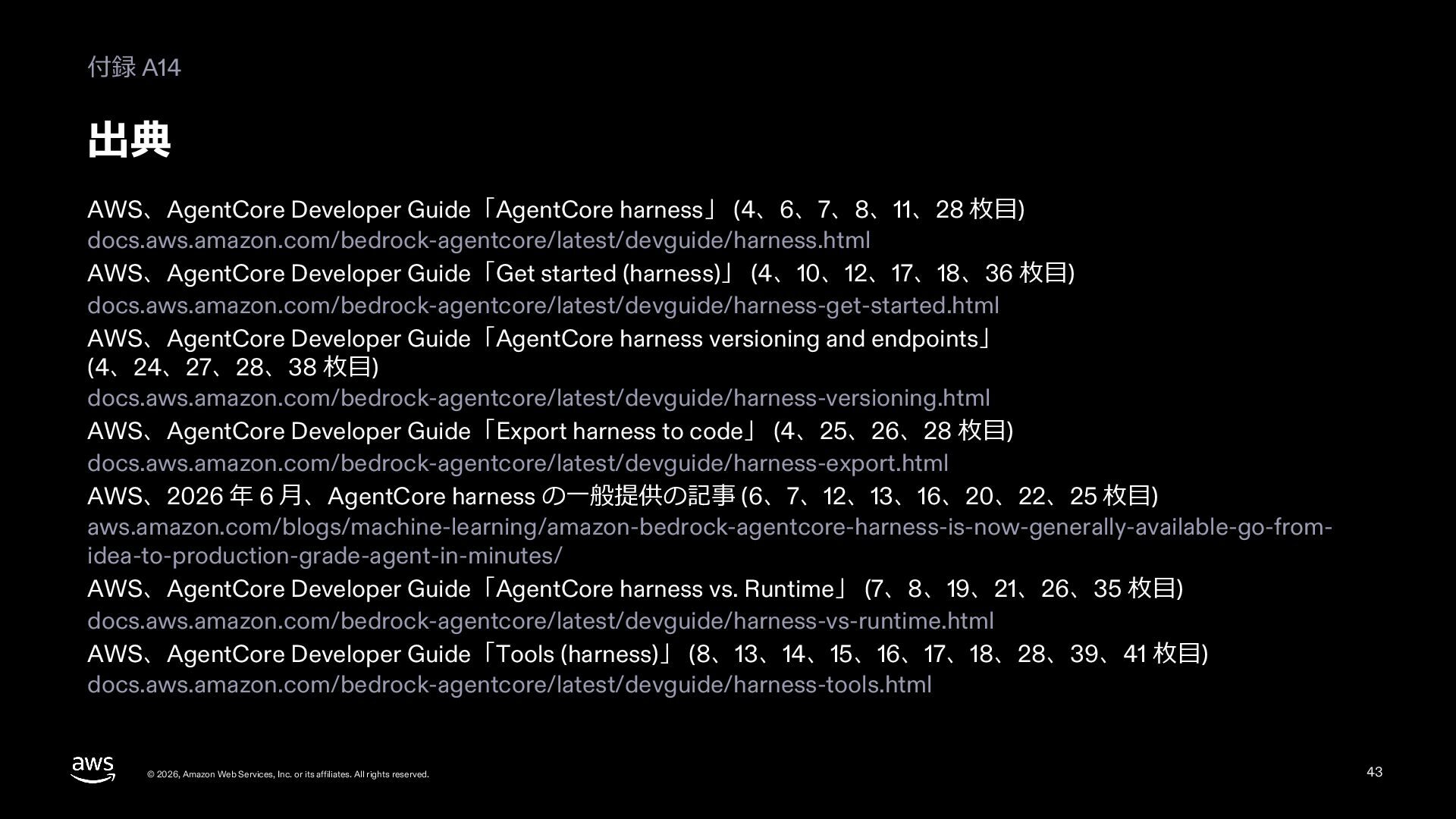
  42. 付録 A14 出典 AWS、AgentCore Developer Guide「AgentCore harness」 (4、6、7、8、11、28 枚⽬) docs.aws.amazon.com/bedrock-agentcore/latest/devguide/harness.html

    AWS、AgentCore Developer Guide「Get started (harness)」 (4、10、12、17、18、36 枚⽬) docs.aws.amazon.com/bedrock-agentcore/latest/devguide/harness-get-started.html AWS、AgentCore Developer Guide「AgentCore harness versioning and endpoints」 (4、24、27、28、38 枚⽬) docs.aws.amazon.com/bedrock-agentcore/latest/devguide/harness-versioning.html AWS、AgentCore Developer Guide「Export harness to code」 (4、25、26、28 枚⽬) docs.aws.amazon.com/bedrock-agentcore/latest/devguide/harness-export.html AWS、2026 年 6 ⽉、AgentCore harness の⼀般提供の記事 (6、7、12、13、16、20、22、25 枚⽬) aws.amazon.com/blogs/machine-learning/amazon-bedrock-agentcore-harness-is-now-generally-available-go-fromidea-to-production-grade-agent-in-minutes/ AWS、AgentCore Developer Guide「AgentCore harness vs. Runtime」 (7、8、19、21、26、35 枚⽬) docs.aws.amazon.com/bedrock-agentcore/latest/devguide/harness-vs-runtime.html AWS、AgentCore Developer Guide「Tools (harness)」 (8、13、14、15、16、17、18、28、39、41 枚⽬) docs.aws.amazon.com/bedrock-agentcore/latest/devguide/harness-tools.html © 2026, Amazon Web Services, Inc. or its affiliates. All rights reserved. 43
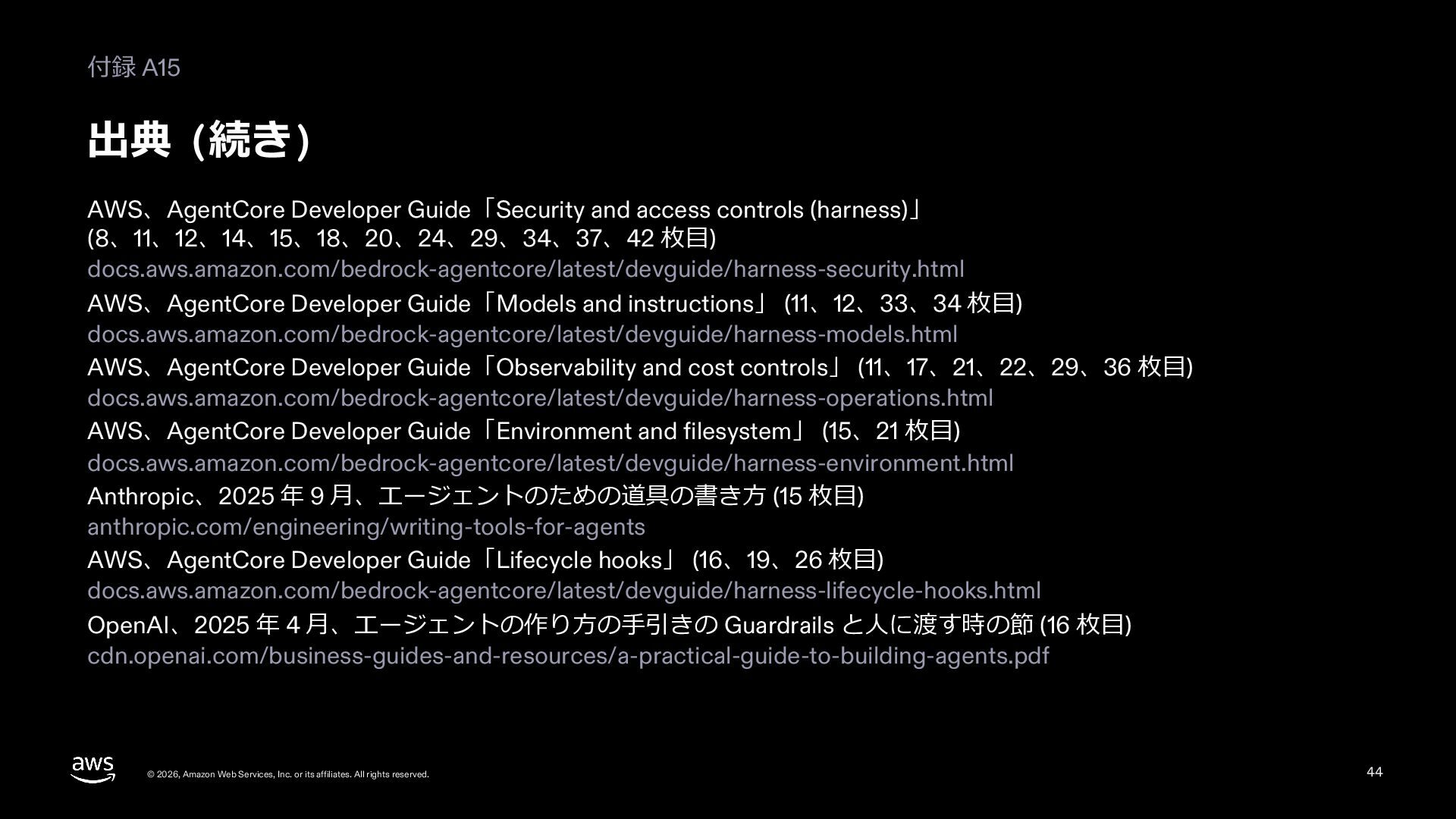
  43. 付録 A15 出典 (続き) AWS、AgentCore Developer Guide「Security and access controls

    (harness)」 (8、11、12、14、15、18、20、24、29、34、37、42 枚⽬) docs.aws.amazon.com/bedrock-agentcore/latest/devguide/harness-security.html AWS、AgentCore Developer Guide「Models and instructions」 (11、12、33、34 枚⽬) docs.aws.amazon.com/bedrock-agentcore/latest/devguide/harness-models.html AWS、AgentCore Developer Guide「Observability and cost controls」 (11、17、21、22、29、36 枚⽬) docs.aws.amazon.com/bedrock-agentcore/latest/devguide/harness-operations.html AWS、AgentCore Developer Guide「Environment and filesystem」 (15、21 枚⽬) docs.aws.amazon.com/bedrock-agentcore/latest/devguide/harness-environment.html Anthropic、2025 年 9 ⽉、エージェントのための道具の書き⽅ (15 枚⽬) anthropic.com/engineering/writing-tools-for-agents AWS、AgentCore Developer Guide「Lifecycle hooks」 (16、19、26 枚⽬) docs.aws.amazon.com/bedrock-agentcore/latest/devguide/harness-lifecycle-hooks.html OpenAI、2025 年 4 ⽉、エージェントの作り⽅の⼿引きの Guardrails と⼈に渡す時の節 (16 枚⽬) cdn.openai.com/business-guides-and-resources/a-practical-guide-to-building-agents.pdf © 2026, Amazon Web Services, Inc. or its affiliates. All rights reserved. 44
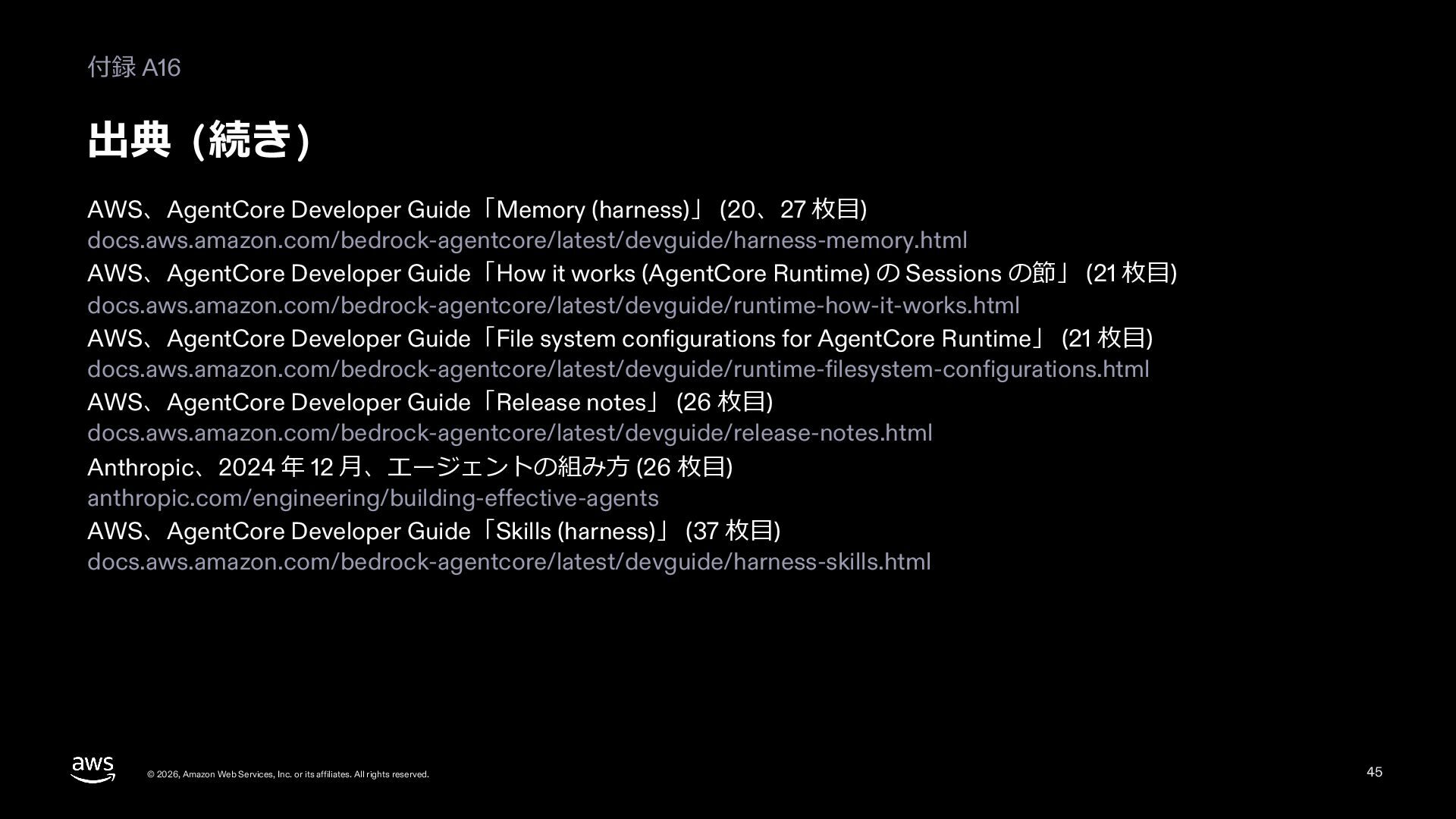
  44. 付録 A16 出典 (続き) AWS、AgentCore Developer Guide「Memory (harness)」 (20、27 枚⽬)

    docs.aws.amazon.com/bedrock-agentcore/latest/devguide/harness-memory.html AWS、AgentCore Developer Guide「How it works (AgentCore Runtime) の Sessions の節」 (21 枚⽬) docs.aws.amazon.com/bedrock-agentcore/latest/devguide/runtime-how-it-works.html AWS、AgentCore Developer Guide「File system configurations for AgentCore Runtime」 (21 枚⽬) docs.aws.amazon.com/bedrock-agentcore/latest/devguide/runtime-filesystem-configurations.html AWS、AgentCore Developer Guide「Release notes」 (26 枚⽬) docs.aws.amazon.com/bedrock-agentcore/latest/devguide/release-notes.html Anthropic、2024 年 12 ⽉、エージェントの組み⽅ (26 枚⽬) anthropic.com/engineering/building-effective-agents AWS、AgentCore Developer Guide「Skills (harness)」 (37 枚⽬) docs.aws.amazon.com/bedrock-agentcore/latest/devguide/harness-skills.html © 2026, Amazon Web Services, Inc. or its affiliates. All rights reserved. 45