Upgrade to Pro
— share decks privately, control downloads, hide ads and more …
Speaker Deck
Sign up for free
Menu
Search
Features
All features
Private URLs
Password Protection
Custom URLS
Scheduled publishing
Remove Branding
Restrict embedding
Deck Collections
Notes
Features
All features
Private URLs
Password Protection
Custom URLS
Scheduled publishing
Remove Branding
Restrict embedding
Deck Collections
Notes
Explore
Featured decks
Featured speakers
Programming
Technology
Storyboards
Explore
Featured decks
Featured speakers
Programming
Technology
Storyboards
Pricing
Search
Sign in
Sign up for free
cie-inspector
Search
Sponsored
·
Ship Features Fearlessly
Turn features on and off without deploys. Used by thousands of Ruby developers.
→
Takumi Okamoto
October 10, 2026
Technology
8
0
Share
Embed
Copy iframe code
Copy JS code
Copy link
Start on current slide
cie-inspector
ROSConJP 2026のLTで発表した内容です。
Takumi Okamoto
October 10, 2026
Other Decks in Technology
See All in Technology
SREのためのFinOps入門
muziyoshiz
2
730
PostgreSQL オプティマイザ統計の秘密
nori_shinoda
1
440
分析作業をどこまで任せるか自分で決められる AIネイティブBI『Golden Analytics』が 良さげな話 /golden-analytics-is-ai-native-bi
shinyaa31
0
130
長い仕事を任せる (Workflows、クラウドセッション、Kiro Web) | 目指せ Kiro マスター 10
inariku
PRO
3
150
AWSを利用する上で知っておきたい名前解決の話 2026
nagisa53
5
3.3k
自治体AIコンタクトセンター、何をどこに任せる?~Amazon Connect Customer +Amazon Bedrockの実践知~ / 20261107 Satoshi Torano
shift_evolve
PRO
1
120
続・ソフトウェアアーキテクトのための意思決定術: Decision Readiness, Revisited — When AI Changes the Economics of Software Architecture
snoozer05
PRO
9
2.8k
AWS基盤改善を支える 私たちの理念と行動指針
kentosuzuki
0
140
Building Audio Plugin Ecosystem for Android in 2026
atsushieno
2
160
超⼩型・多⾔語検索モデル Bekko Embedding
hotchpotch
1
140
基本から分かる!AWSセキュリティ運用の考え方と任せ方
cmusudakeisuke
1
470
レガシーコードに対する loop engineering的なAI開発プロセス導入について
kubell_hr
0
300
Featured
See All Featured
Leadership Guide Workshop - DevTernity 2021
reverentgeek
1
430
Refactoring Trust on Your Teams (GOTO; Chicago 2020)
rmw
35
3.9k
Mozcon NYC 2025: Stop Losing SEO Traffic
samtorres
1
600
Crafting Experiences
bethany
1
430
Exploring anti-patterns in Rails
aemeredith
4
560
Self-Hosted WebAssembly Runtime for Runtime-Neutral Checkpoint/Restore in Edge–Cloud Continuum
chikuwait
0
930
How to Create Impact in a Changing Tech Landscape [PerfNow 2023]
tammyeverts
56
3.5k
Dominate Local Search Results - an insider guide to GBP, reviews, and Local SEO
greggifford
PRO
0
400
Agile Actions for Facilitating Distributed Teams - ADO2019
mkilby
0
340
How to Ace a Technical Interview
jacobian
280
24k
Designing for Timeless Needs
cassininazir
1
550
Statistics for Hackers
jakevdp
799
230k
Transcript
cie-inspector ビルドせず‧実⾏せず、ROS 2 の callback / CallbackGroup 構造を ソースコードから抽出する NO
BUILD NO ROS NO RUN ROSConJP 2026 Lightning Talk / Takumi Okmaoto a.k.a @MrBearing2 2026/8/4-/5 つくばカピオ
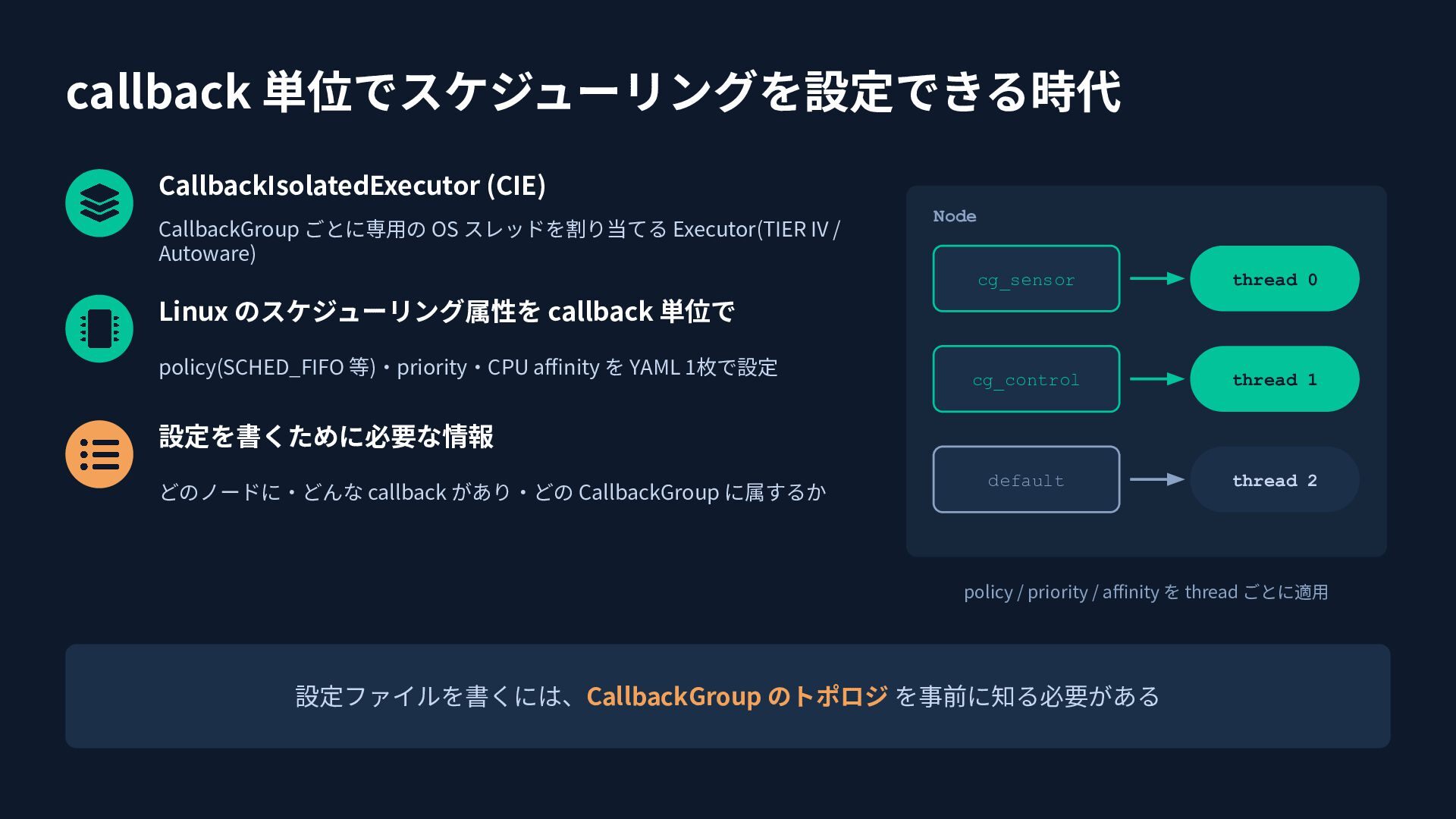
callback 単位でスケジューリングを設定できる時代 CallbackIsolatedExecutor (CIE) CallbackGroup ごとに専⽤の OS スレッドを割り当てる Executor(TIER IV
/ Autoware) Node cg_sensor thread 0 cg_control thread 1 default thread 2 Linux のスケジューリング属性を callback 単位で policy(SCHED_FIFO 等)‧priority‧CPU affinity を YAML 1枚で設定 設定を書くために必要な情報 どのノードに‧どんな callback があり‧どの CallbackGroup に属するか policy / priority / affinity を thread ごとに適⽤ 設定ファイルを書くには、CallbackGroup のトポロジ を事前に知る必要がある
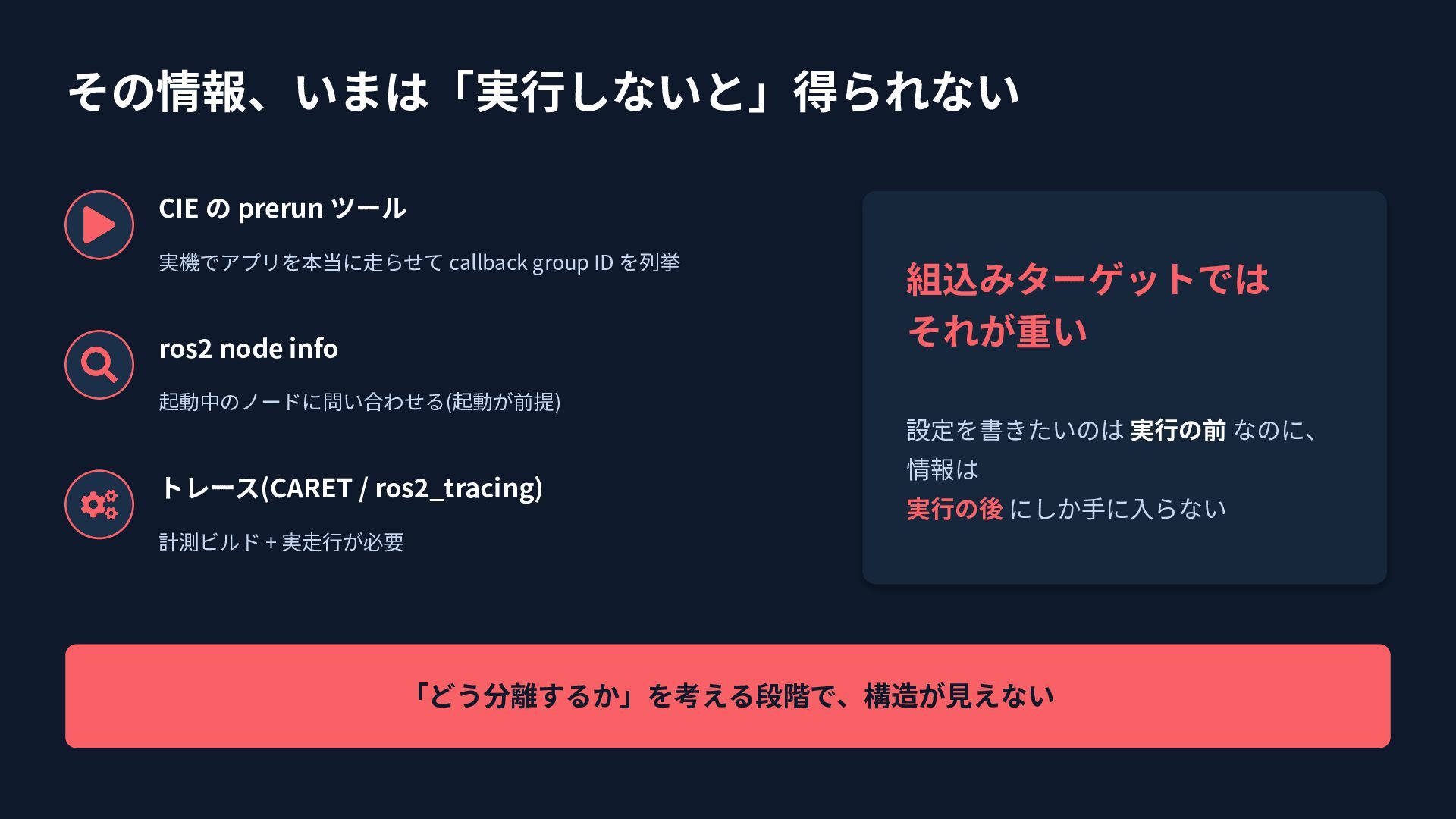
その情報、いまは「実⾏しないと」得られない CIE の prerun ツール 実機でアプリを本当に⾛らせて callback group ID を列挙
ros2 node info 組込みターゲットでは それが重い 起動中のノードに問い合わせる(起動が前提) 設定を書きたいのは 実⾏の前 なのに、 トレース(CARET / ros2_tracing) 情報は 実⾏の後 にしか⼿に⼊らない 計測ビルド + 実⾛⾏が必要 「どう分離するか」を考える段階で、構造が⾒えない
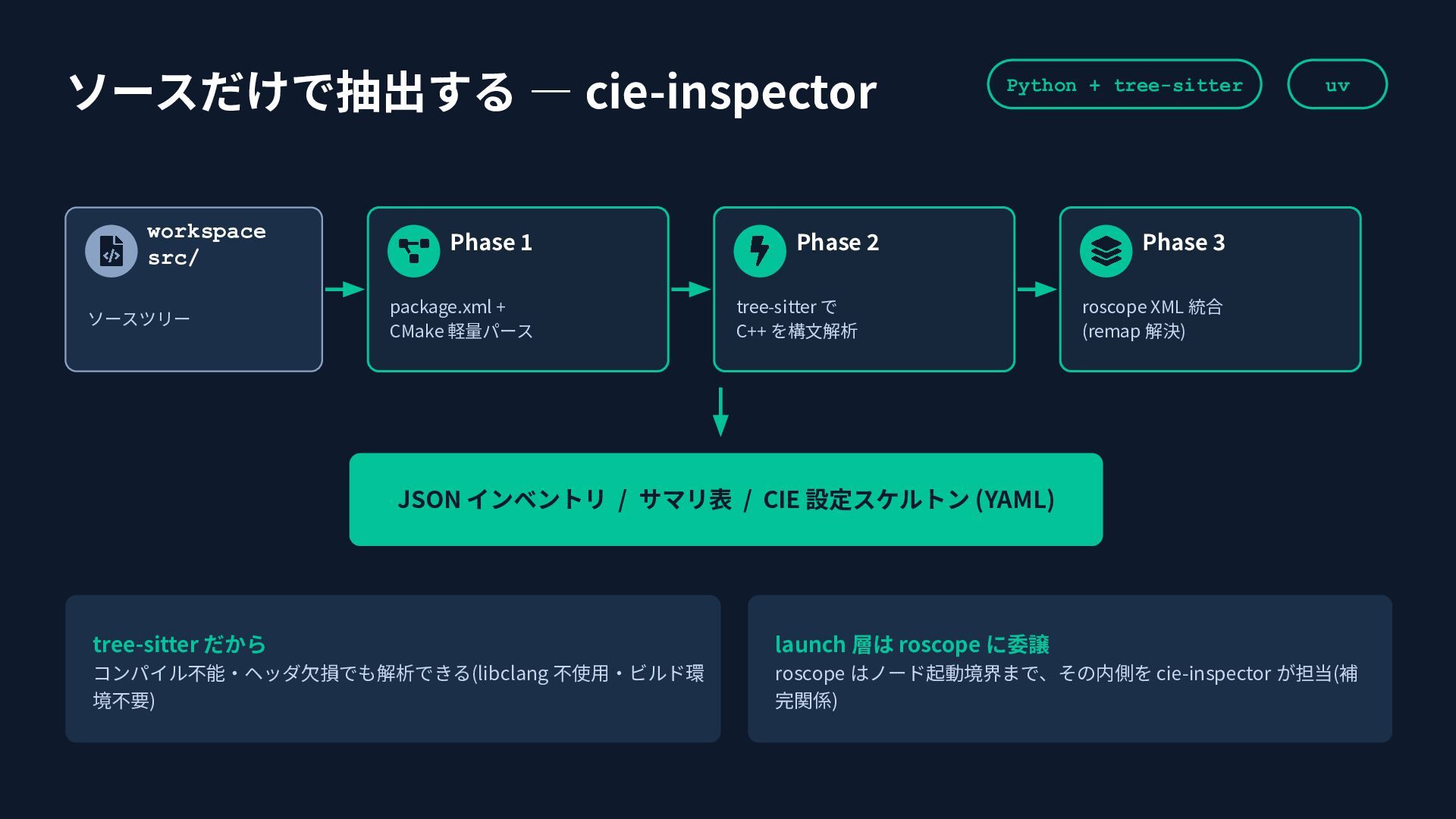
ソースだけで抽出する ― cie-inspector workspace src/ ソースツリー Phase 1 package.xml +
CMake 軽量パース Python + tree-sitter Phase 2 tree-sitter で C++ を構⽂解析 uv Phase 3 roscope XML 統合 (remap 解決) JSON インベントリ / サマリ表 / CIE 設定スケルトン (YAML) tree-sitter だから launch 層は roscope に委譲 コンパイル不能‧ヘッダ⽋損でも解析できる(libclang 不使⽤‧ビルド環 境不要) roscope はノード起動境界まで、その内側を cie-inspector が担当(補 完関係)
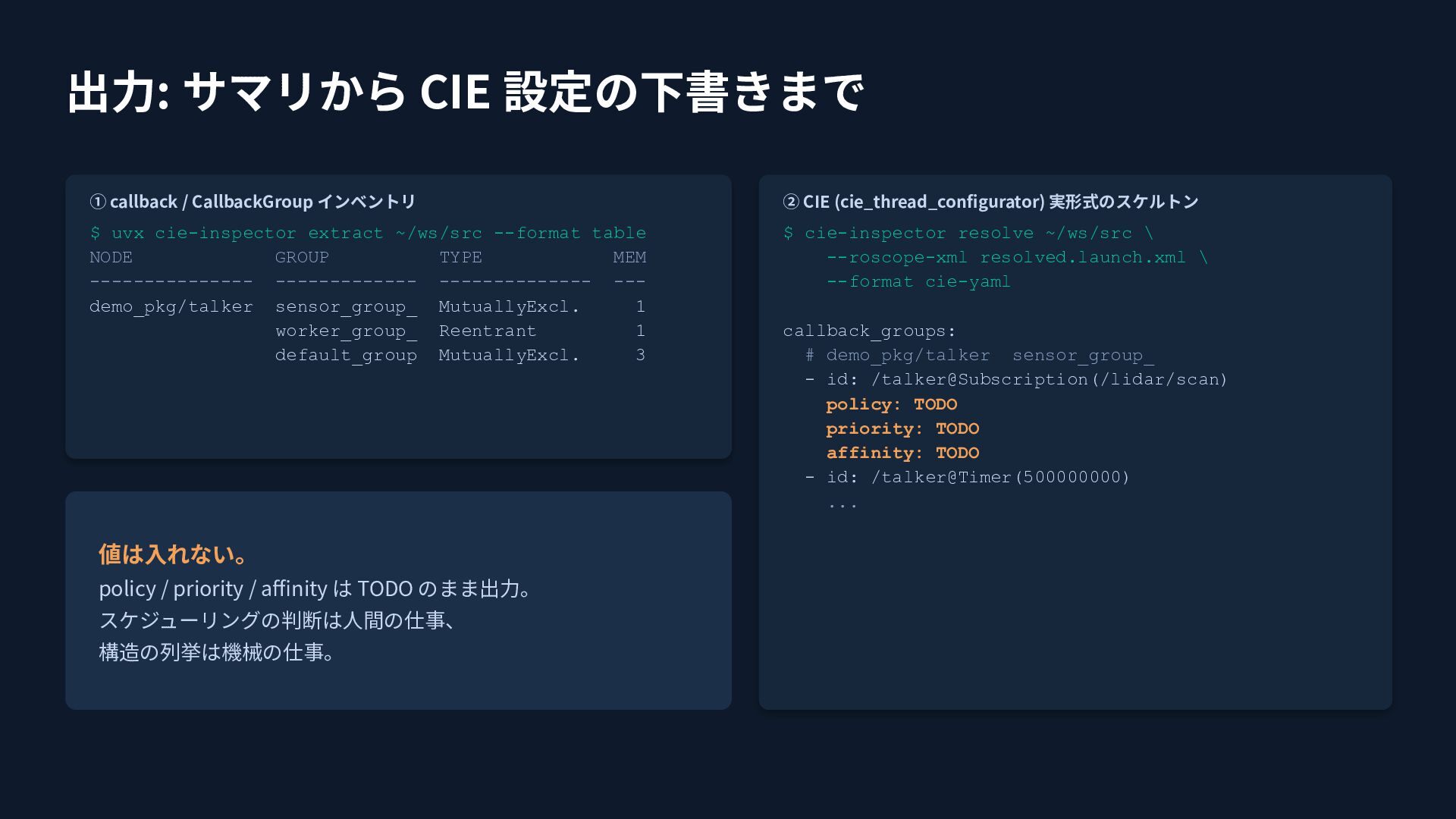
出⼒: サマリから CIE 設定の下書きまで ① callback / CallbackGroup インベントリ ②
CIE (cie_thread_configurator) 実形式のスケルトン $ uvx cie-inspector extract ~/ws/src --format table NODE GROUP TYPE MEM --------------- ------------- -------------- --demo_pkg/talker sensor_group_ MutuallyExcl. 1 worker_group_ Reentrant 1 default_group MutuallyExcl. 3 $ cie-inspector resolve ~/ws/src \ --roscope-xml resolved.launch.xml \ --format cie-yaml 値は⼊れない。 policy / priority / affinity は TODO のまま出⼒。 スケジューリングの判断は⼈間の仕事、 構造の列挙は機械の仕事。 callback_groups: # demo_pkg/talker sensor_group_ - id: /talker@Subscription(/lidar/scan) policy: TODO priority: TODO affinity: TODO - id: /talker@Timer(500000000) ...
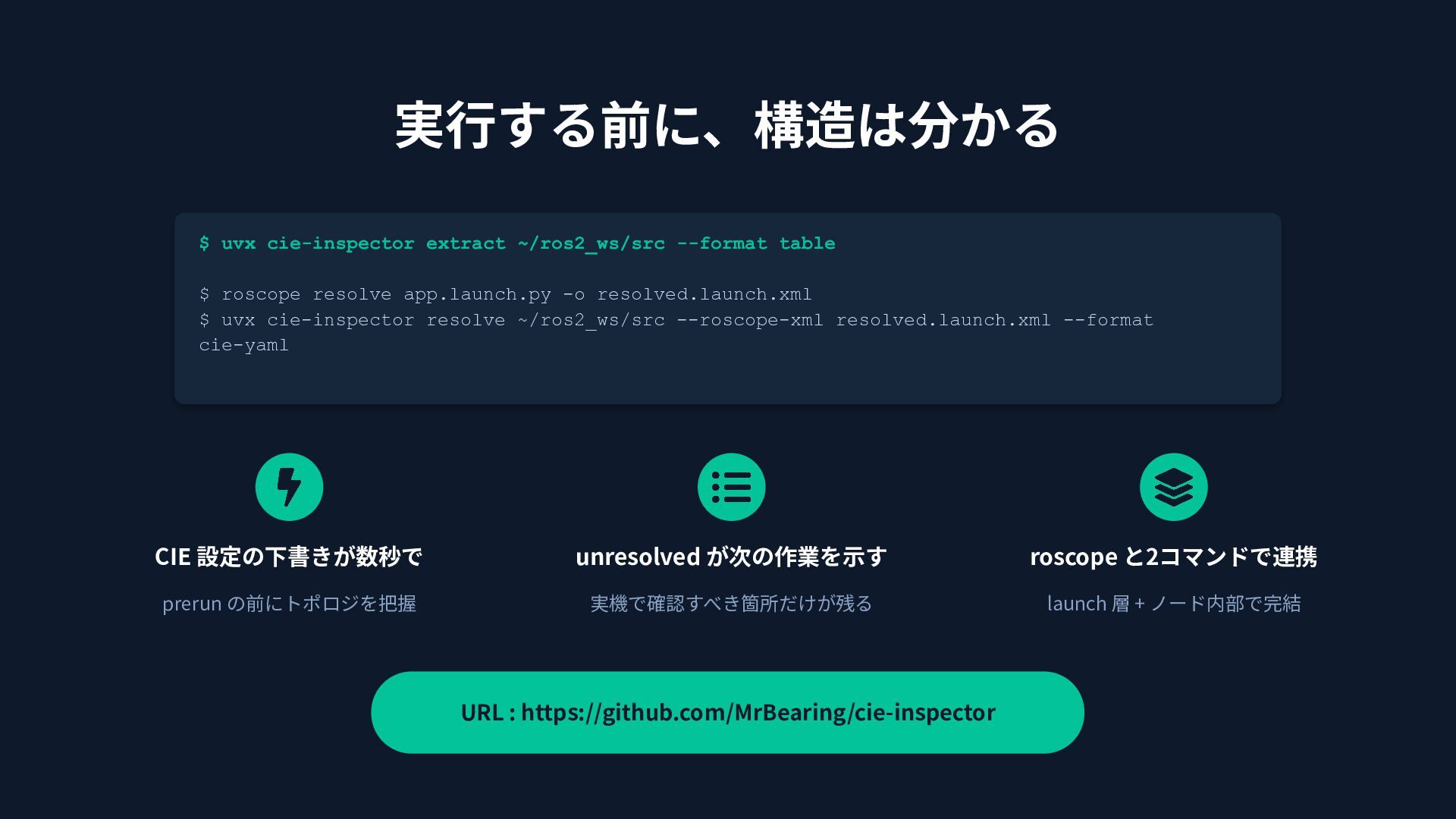
実⾏する前に、構造は分かる $ uvx cie-inspector extract ~/ros2_ws/src --format table $ roscope
resolve app.launch.py -o resolved.launch.xml $ uvx cie-inspector resolve ~/ros2_ws/src --roscope-xml resolved.launch.xml --format cie-yaml CIE 設定の下書きが数秒で unresolved が次の作業を⽰す roscope と2コマンドで連携 prerun の前にトポロジを把握 実機で確認すべき箇所だけが残る launch 層 + ノード内部で完結 URL : https://github.com/MrBearing/cie-inspector


 muziyoshiz
 nori_shinoda
 shinyaa31
 inariku
 nagisa53
 shift_evolve
 snoozer05
 kentosuzuki
 atsushieno
 hotchpotch
 cmusudakeisuke
 kubell_hr
 reverentgeek
 rmw
 samtorres
 bethany
 aemeredith
 chikuwait
 tammyeverts
 greggifford
 mkilby
 jacobian
 cassininazir
 jakevdp