Upgrade to Pro
— share decks privately, control downloads, hide ads and more …
Speaker Deck
Features
Speaker Deck
PRO
Sign in
Sign up for free
Search
Search
Material designのWindow size classについて
Search
oyuk
June 20, 2023
Programming
1.5k
0
Share
Embed
Copy iframe code
Copy JS code
Copy link
Start on current slide
Material designのWindow size classについて
oyuk
June 20, 2023
More Decks by oyuk
See All by oyuk
Shorebird について
oyuk
0
510
Swiftでなんで[weak self]するのか?
oyuk
2
5.3k
LLVMについて調べた
oyuk
0
220
Swiftのmapからその次へ
oyuk
1
1.4k
Other Decks in Programming
See All in Programming
レビュー履歴をAIに食わせて、 Compose移行を加速するs
shihochan
0
260
AIを上手に使っていこうとしたら越境せざるを得なくなった話 〜実践1年で見えた境界を越えなければならない理由と進め方〜 / Crossing borders with AI
tomoyakitaura
3
1k
初めての模倣学習とVLA
natsutan
0
480
AWS Step Functions 大規模並列の壁を越える / jaws-sonic-2026-niigata-step-functions
kasacchiful
PRO
0
360
AIの中の人になってみる
htkym
0
160
Go を使い始めて 2 ヶ月の学び / My first two months with Go
contour_gara
0
420
AI駆動開発にグラフDBを重ねてみた
satoshi256kbyte
2
730
まずはプロンプトガイドを読もう、話はそれからだ
kiakiraki
1
260
Go 1.27からのGODEBUG / Go 1.27 リリースパーティ #go127party
mazrean
0
310
【デモ】Kiroで体験する仕様駆動開発|設計からコーディングまでAIと進める開発フロー
cmkudo
0
580
Oxlintはいいぞ(続)
yug1224
1
540
XHTMLが残したもの
yosuke_furukawa
PRO
1
400
Featured
See All Featured
Music & Morning Musume
bryan
47
7.4k
Templates, Plugins, & Blocks: Oh My! Creating the theme that thinks of everything
marktimemedia
31
2.9k
The agentic SEO stack - context over prompts
schlessera
0
900
The browser strikes back
jonoalderson
0
1.6k
Visualization
eitanlees
152
17k
How to Get Subject Matter Experts Bought In and Actively Contributing to SEO & PR Initiatives.
livdayseo
0
190
コードの90%をAIが書く世界で何が待っているのか / What awaits us in a world where 90% of the code is written by AI
rkaga
63
45k
XXLCSS - How to scale CSS and keep your sanity
sugarenia
249
1.3M
What the history of the web can teach us about the future of AI
inesmontani
PRO
1
680
Principles of Awesome APIs and How to Build Them.
keavy
128
18k
HDC tutorial
michielstock
2
850
Mobile First: as difficult as doing things right
swwweet
225
10k
Transcript
Material designのWindow size classについて potatotips #82 2023/6/20 oyuk
自己紹介 oyuk(@oydku) プログラマ 株式会社RelicでFlutterやってます。
Window size classとは? 画面サイズ毎に分割した区分の事 [1] https://m3.material.io/foundations/layout/applying-layout/window-size-classes#6e960b82-eff3-4f1b-92d3- 5edb5e338f49
Window size classとは? [2] https://m3.material.io/foundations/layout/applying-layout/window-size-classes
Window size classの用途 Window classに応じてコンポーネントの配置、表示状態を変更する事でより良いユーザー体 験を提供できる。 [3] https://m3.material.io/foundations/layout/applying-layout/window-size-classes#6e960b82-eff3-4f1b-92d3- 5edb5e338f49
Window size classの用途 Window class毎のデザイン作成方法 1. まず一つWindow classのデザインを作成する。 2. 次の5つの質問に回答していき、次のWindow
class sizeを作っていく。 i. 何が表示されるべきか? ii. 画面をどのように分割するか? iii. 何のサイズを変える必要があるか? iv. 何の位置を変える必要があるか? v. 何を交換する必要があるか?
Window size classの用途 1 何が表示されるべきか? 小さい画面では表示されていないコンポーネントが大きい画面では表示したほうが良い場合 がある。 画像ではpaneが表示状態がcompact、expandedで違っている。 [4] https://m3.material.io/foundations/layout/applying-layout/window-size-classes
Window size classの用途 2 画面をどのように分割するか? 一つのpaneはcompact,medium、二つのpaneはexpandedで使用すると良い。 [5] https://m3.material.io/foundations/layout/applying-layout/window-size-classes#64506ae2-f4c1-4810-8ee9- d2434ab8616c
Window size classの用途 3 何のサイズを変える必要があるか? compactでのコンポーネントのサイズはmedium,expandedでは大きくする事が可能である。 [6] https://m3.material.io/foundations/layout/applying-layout/window-size-classes#69b87bd8-6ed7-4df5-a91d- 04247c47ebe1
Window size classの用途 4 何の位置を変える必要があるか? Window classが大きくなればよりスペースが大きくなる。これに合わせてコンポーネントの 位置を変える事を検討する。 例 Cardの位置を変更する
コンテンツに二つ目のカラムを追加する
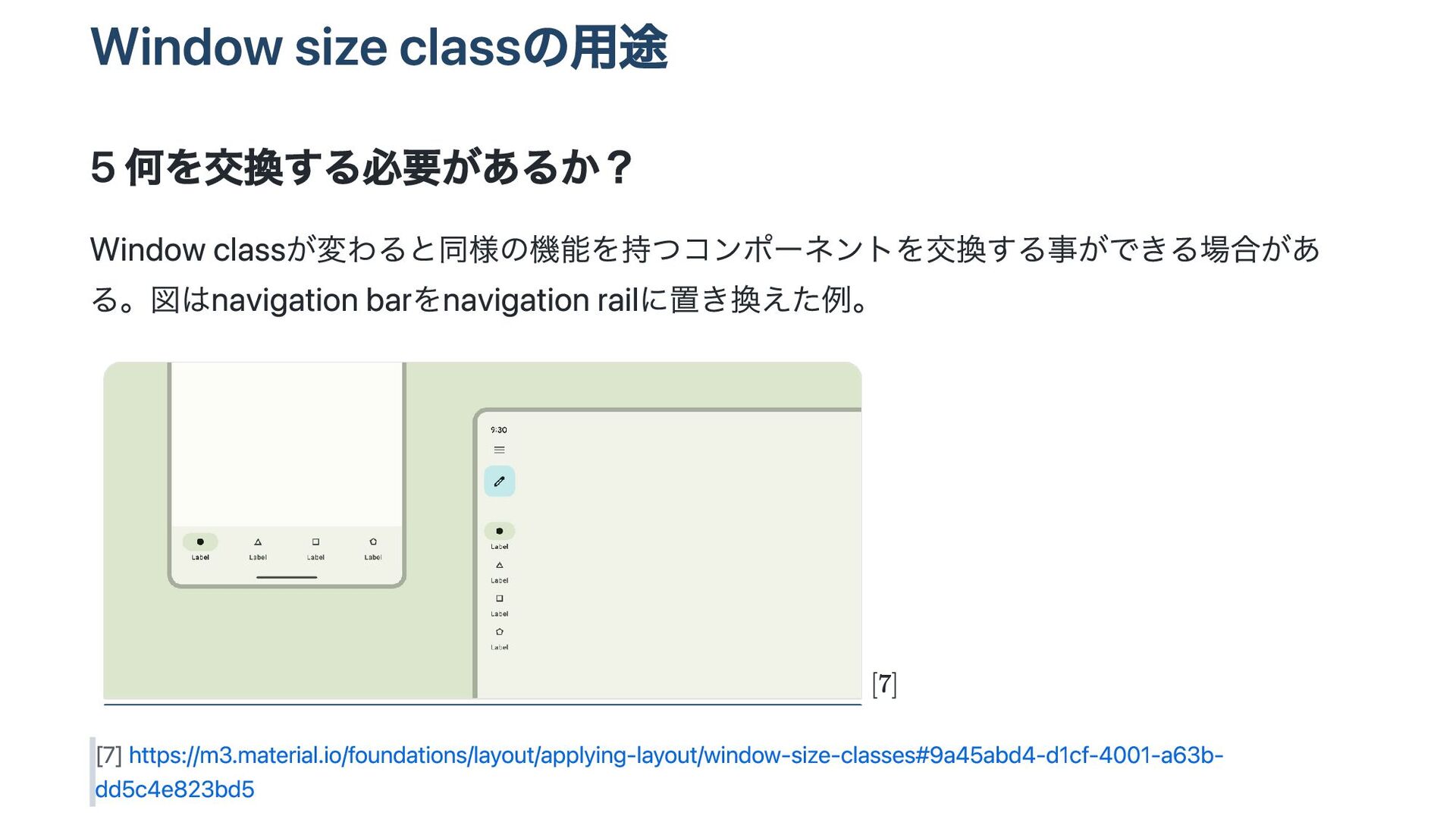
Window size classの用途 5 何を交換する必要があるか? Window classが変わると同様の機能を持つコンポーネントを交換する事ができる場合があ る。図はnavigation barをnavigation railに置き換えた例。
[7] https://m3.material.io/foundations/layout/applying-layout/window-size-classes#9a45abd4-d1cf-4001-a63b- dd5c4e823bd5
実装方法 AdaptiveScaffoldとAdaptiveLayoutというAPIが提供されている。 AdaptiveLayoutの方がカスタマイズ性が高い。 https://github.com/flutter/packages/tree/main/packages/flutter_adaptive_scaffold
実装方法 これらのコンポーネントが画面サイズに応じて何を表示するかを指定する。 [8] https://github.com/flutter/packages/tree/main/packages/flutter_adaptive_scaffold#adaptivelayout
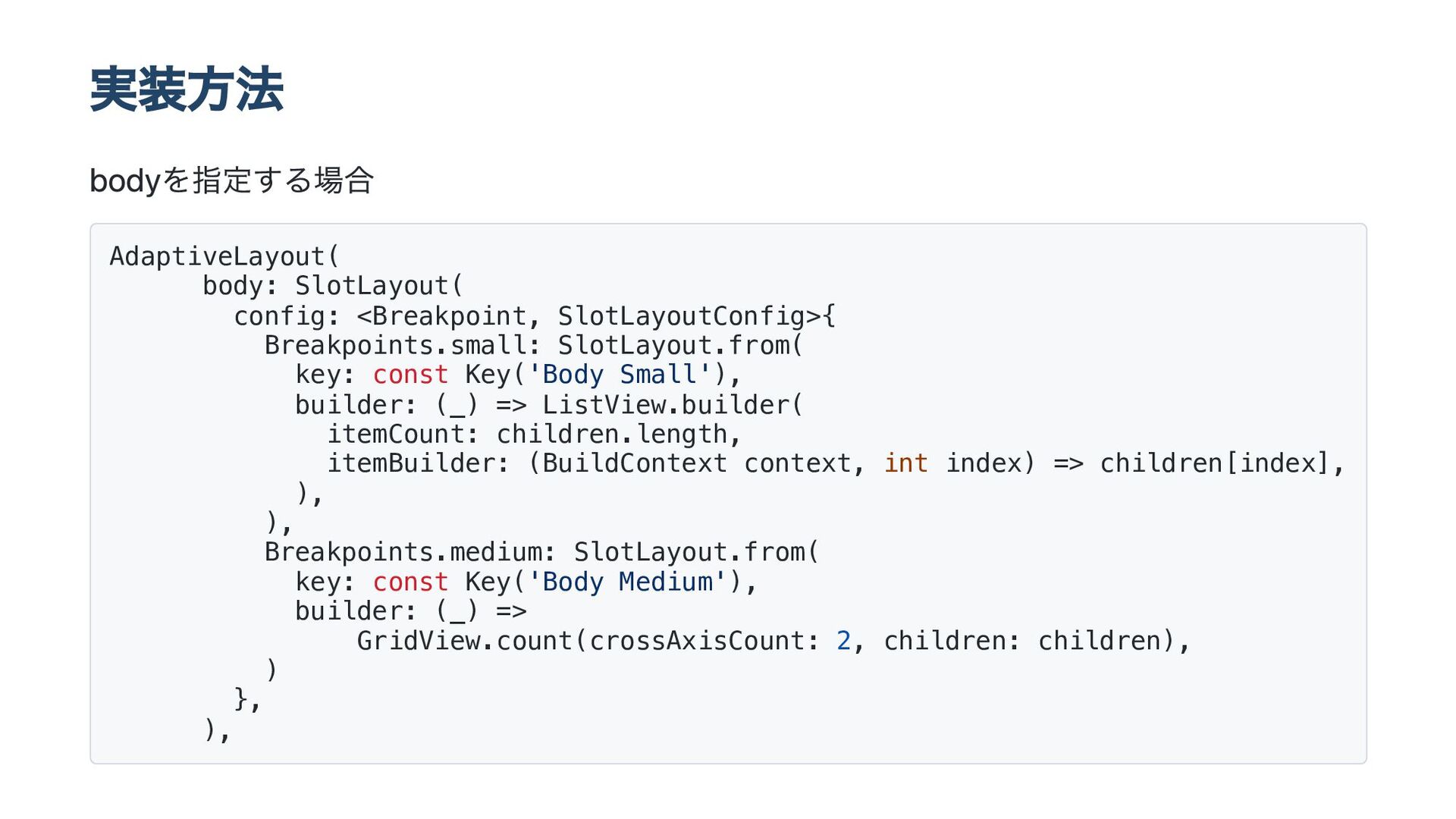
実装方法 bodyを指定する場合 AdaptiveLayout( body: SlotLayout( config: <Breakpoint, SlotLayoutConfig>{ Breakpoints.small: SlotLayout.from(
key: const Key('Body Small'), builder: (_) => ListView.builder( itemCount: children.length, itemBuilder: (BuildContext context, int index) => children[index], ), ), Breakpoints.medium: SlotLayout.from( key: const Key('Body Medium'), builder: (_) => GridView.count(crossAxisCount: 2, children: children), ) }, ),
実装方法 topNavigation等も設定可能。 const AdaptiveLayout({ super.key, this.topNavigation, this.primaryNavigation, this.secondaryNavigation, this.bottomNavigation, this.body,
this.secondaryBody, this.bodyRatio, this.internalAnimations = true, this.bodyOrientation = Axis.horizontal, });
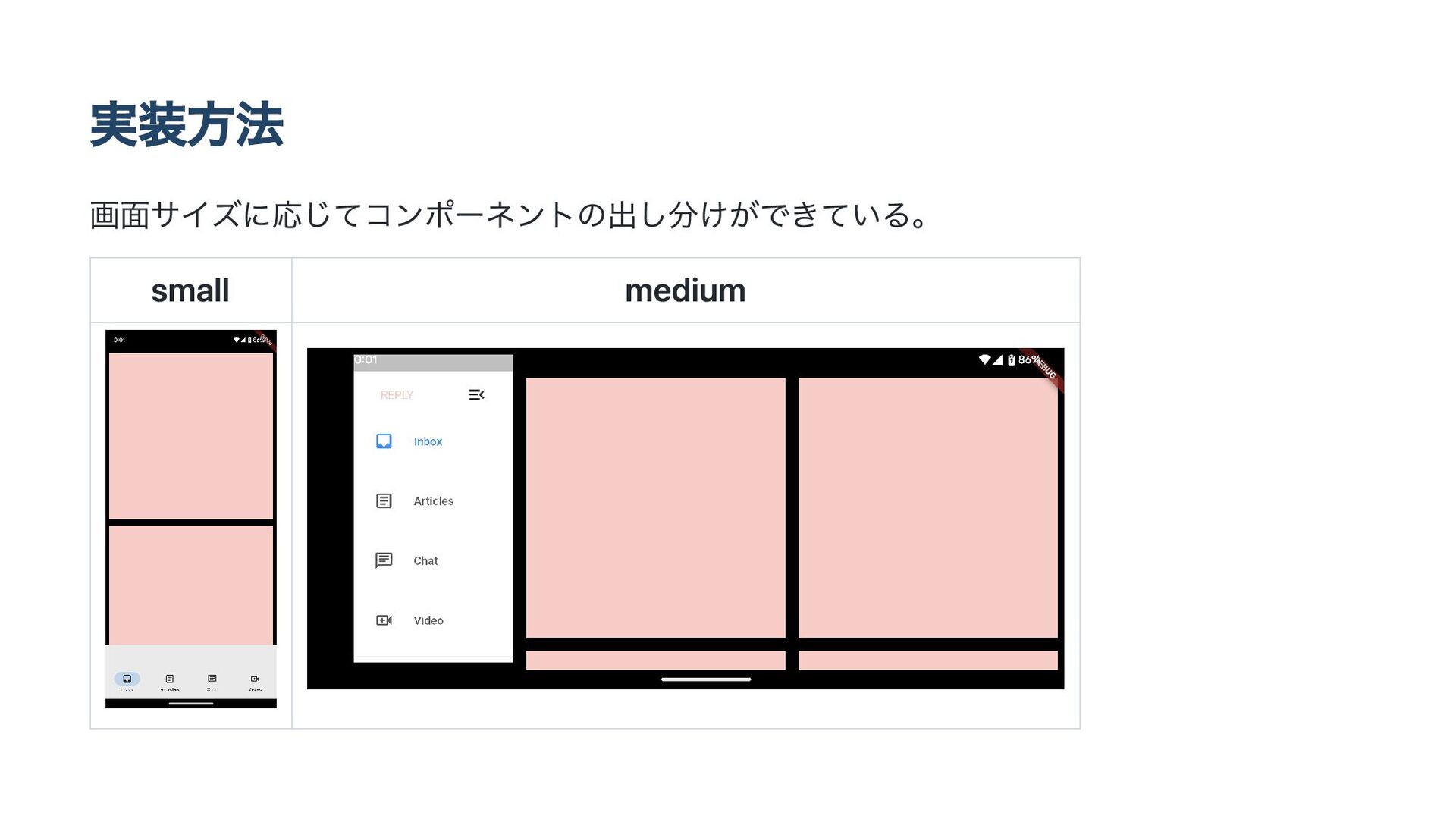
実装方法 画面サイズに応じてコンポーネントの出し分けができている。 small medium
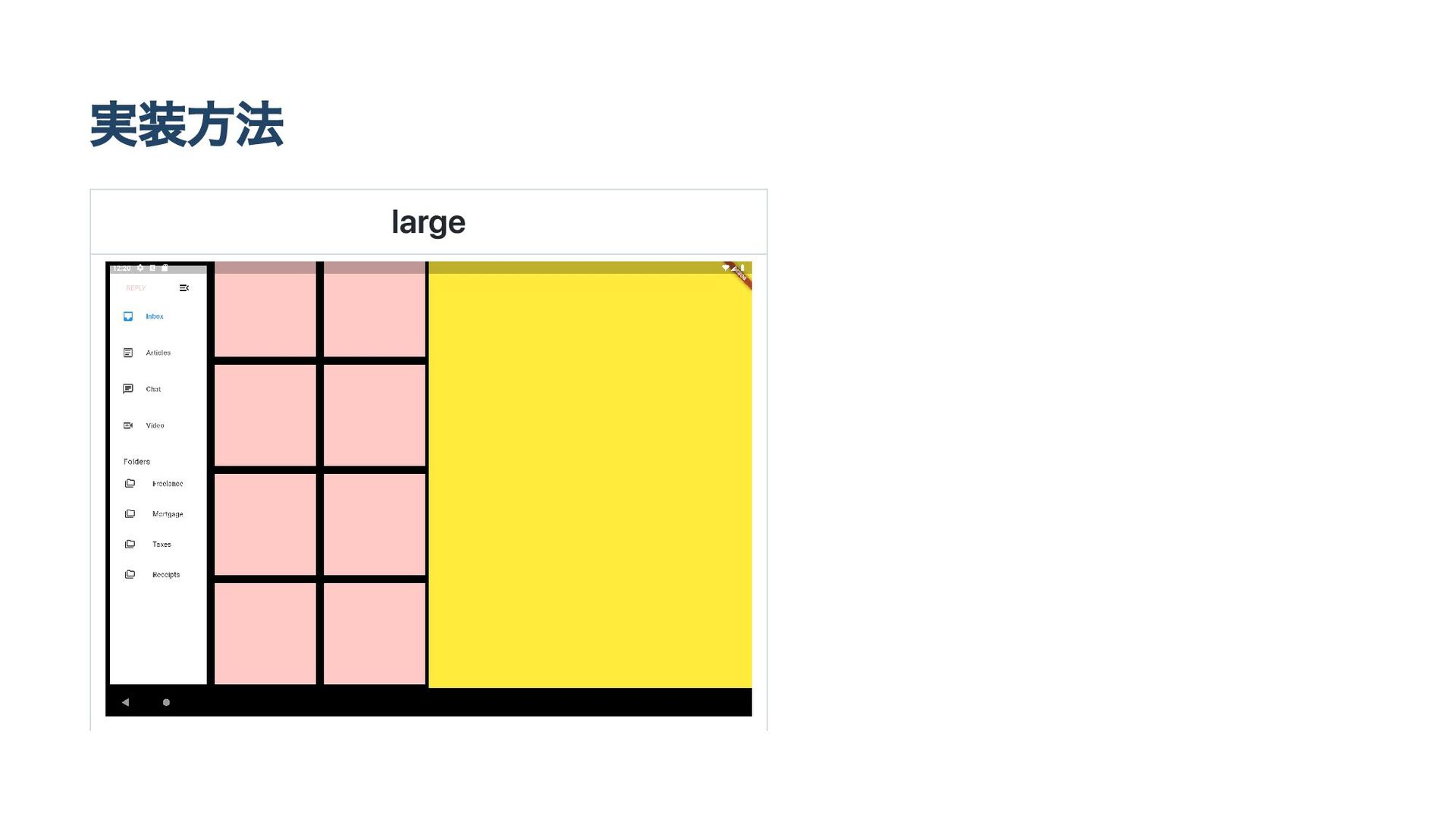
実装方法 large


 oyuk
oyuk
 shihochan
 tomoyakitaura
 natsutan
 kasacchiful
 htkym
htkym
 contour_gara
 satoshi256kbyte
 kiakiraki
 mazrean
 cmkudo
 yug1224
 yosuke_furukawa
 bryan
bryan
 marktimemedia
 schlessera
 jonoalderson
 eitanlees
 livdayseo
 rkaga
rkaga
 sugarenia
 inesmontani
 keavy
keavy
 michielstock
 swwweet

![Window size classとは? 画面サイズ毎に分割した区分の事 [1] https://m3.material.io/foundations/layout/applying-layout/window-size-classes#6e960b82-eff3-4f1b-92d3- 5edb5e338f49](https://files.speakerdeck.com/presentations/68057ca4eebe425b9a5fdb385346a696/slide_2.jpg)
![Window size classとは? [2] https://m3.material.io/foundations/layout/applying-layout/window-size-classes](https://files.speakerdeck.com/presentations/68057ca4eebe425b9a5fdb385346a696/slide_3.jpg)
![Window size classの用途 Window classに応じてコンポーネントの配置、表示状態を変更する事でより良いユーザー体 験を提供できる。 [3] https://m3.material.io/foundations/layout/applying-layout/window-size-classes#6e960b82-eff3-4f1b-92d3- 5edb5e338f49](https://files.speakerdeck.com/presentations/68057ca4eebe425b9a5fdb385346a696/slide_4.jpg)
![Window size classの用途 1 何が表示されるべきか? 小さい画面では表示されていないコンポーネントが大きい画面では表示したほうが良い場合 がある。 画像ではpaneが表示状態がcompact、expandedで違っている。 [4] https://m3.material.io/foundations/layout/applying-layout/window-size-classes](https://files.speakerdeck.com/presentations/68057ca4eebe425b9a5fdb385346a696/slide_6.jpg)
![Window size classの用途 2 画面をどのように分割するか? 一つのpaneはcompact,medium、二つのpaneはexpandedで使用すると良い。 [5] https://m3.material.io/foundations/layout/applying-layout/window-size-classes#64506ae2-f4c1-4810-8ee9- d2434ab8616c](https://files.speakerdeck.com/presentations/68057ca4eebe425b9a5fdb385346a696/slide_7.jpg)
![Window size classの用途 3 何のサイズを変える必要があるか? compactでのコンポーネントのサイズはmedium,expandedでは大きくする事が可能である。 [6] https://m3.material.io/foundations/layout/applying-layout/window-size-classes#69b87bd8-6ed7-4df5-a91d- 04247c47ebe1](https://files.speakerdeck.com/presentations/68057ca4eebe425b9a5fdb385346a696/slide_8.jpg)


![実装方法 これらのコンポーネントが画面サイズに応じて何を表示するかを指定する。 [8] https://github.com/flutter/packages/tree/main/packages/flutter_adaptive_scaffold#adaptivelayout](https://files.speakerdeck.com/presentations/68057ca4eebe425b9a5fdb385346a696/slide_12.jpg)