Share
Embed
API Design Hands-On Lab
Hand On Lab at Oracle Code One 2018. API Design & Testing using Apiary, API Blueprint and Dredd
Emmanuel Paraskakis
October 24, 2018
Transcript
38 slides
-
Copyright © 2018, Oracle and/or its affiliates. All rights reserved.
| Confidential – Oracle Internal/Restricted/Highly Restricted Accelerate Your Development with Design-First API Management Hand On Lab Emmanuel Paraskakis Sr. Director of Product Management Oracle API Platform @manp -
Agenda 1. Introduction to API Design 2. Hands-On API Design
Tutorial 3. Deploying an API 4. Next Steps Ends 16:45 -
What you will learn • Design a basic JSON API
in API Blueprint • Use API Documentation and Mocking • Use Automated Testing Tools • Where to go from here -
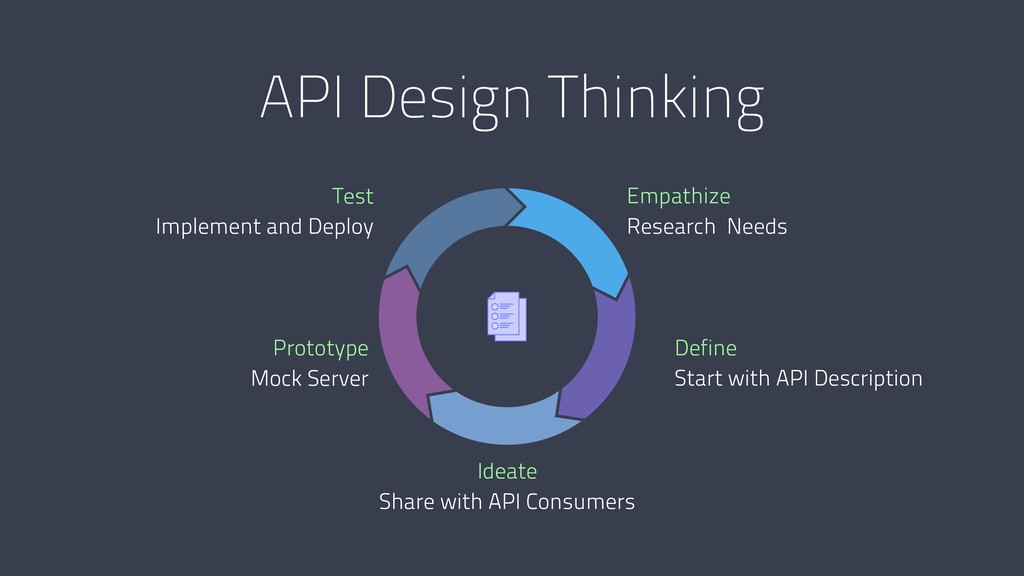
API Design Thinking Define Start with API Description Ideate Share
with API Consumers Prototype Mock Server Test Implement and Deploy Empathize Research Needs -
How we Built APIs & Services API as a by-product
of building apps API documentation generated from code Design-first API Development -
2006: API as a By-Product API as a by-product of
building apps API documentation generated from code Design-first API Development -
2010: API Docs from Code API documentation generated from code
Design-first API Development API as a by-product of building apps -
2014: Design-first API Development Design-first API Development API as a
by-product of building apps API documentation generated from code -
2018 API as a by-product of building apps API documentation
generated from code Design-first API Development Layered API Descriptions -
Scenario ➡ You: API Designer (Developer, Architect, PM) ➡ Instructor:
• Customer • Service Developer • DevOps ➡ Objective: Design an API you can use to publish polls and have users vote on -
What you will need • Browser: • https://apiary.io • http://bit.ly/api-design-tutorial
• Optional: • Git & GitHub • Node or Docker to run tests -
Apiary - Free! • Source of Truth for API Design
• Interactive API Documentation • Collaboration (invite others to edit) • GitHub Syncing • Mock Service • Traffic Inspector • Automated Tests https://help.apiary.io/ -
Run Dredd with Docker $ docker run -it -v $PWD:/api
-w /api apiaryio/dredd dredd -
0. Create a new API Design • Go into Apiary
and “Create New API Project” • Keep “API Blueprint” Selected and name the API • You now have a working API using a template • Optional: Sync the API to GitHub: 1.Create a new repo in GitHub 2.In Apiary “Link this Project to GitHub” 3.On your Laptop: $ git clone your repo -
1. Multiple Responses • Find the /questions resource • Copy
the response and paste above existing one • Change the 201 to a 200 - Save • Optional: 1.Push to GitHub from Apiary 2.$ git pull on your Laptop 3.test with $ dredd apiary.apib http://polls.apiblueprint.org/ -
2. Add a query parameter • Add an optional {?page}
numeric parameter with default value 1 to the /questions resource - Save • Optional: 1.Push to GitHub from Apiary 2.$ git pull on your Laptop 3.test with $ dredd apiary.apib http://polls.apiblueprint.org/ -
3. Add a resource with path param • Add /questions/{question_id}
as the first resource in your API. The parameter should be a number with default value 1 and is required • A GET method retrieves the question’s detail. Give an example JSON response (hint: it should be the same as an element in the /questions response array) • Optional: 1.Push to GitHub from Apiary 2.$ git pull on your Laptop 3.test with $ dredd apiary.apib http://polls.apiblueprint.org/ -
4. Multiple path params • Add a resource to use
as a voting mechanism on the choices of a question • Nesting parameters will work here: /questions/{question_id}/choices/{choice_id} • POST is a nice way to tell our service we are voting • Response should be a 201, no response body needed • Optional: push from Apiary, pull on your laptop and test -
5. Scratch the surface of Hypermedia • We want an
easy way to discover what the API can do • Easiest way is to add a top-level root “/“ resource that tells us what other resources are available in the API • Response looks like: {"questions_url": "/questions"} • Optional: push from Apiary, pull on your laptop and test -
6. Different way to query • We want a quick
way to list the choices to vote on • Add a resource /questions/{question_id}/choices • GET should return an array of choices (hint: look at the POST /questions request body) • Optional: test with dredd -
Failing Tests • What we specced out has not been
implemented! • $ echo $? gives exit code: 0=success, >1=failure • Hard to detect by eyeballing • Hard to write tests by hand and keep them in sync • Important to have so you don’t break clients • API Design + Dredd in your CI/CD -
1. MSON • Extends API Blueprint with language for Data
Structures • No more writing JSON payloads! Rendered for you • Compact, reusable, comment on data structures https://apiblueprint.org/documentation/mson/tutorial.html -
2. OpenAPI 2.0 • FKA Swagger 2.0 - supported in
Apiary • Apiary will be supporting OpenAPI 3.0 in future • Industry standard - YAML https://help.apiary.io/api_101/swagger-tutorial/ -
3. Deploy to Gateway • Oracle API Management - OCI
• Gateways, API Deployments, Policies, Dev Portal • Understands API Design • Use $300 trial on Oracle Cloud https://myservices.us.oraclecloud.com/mycloud/signup -
4. Apiary Pro • Paid version, adds features: 1.Manage team’s
access to API Designs 2.Style Guide for consistency across APIs 3.Advanced GitHub integration with branches 4.Use with Oracle API Platform • To get it: “Create a Team” from within Apiary • Can also get as part of Oracle Cloud Trial -
Copyright © 2018, Oracle and/or its affiliates. All rights reserved.
| Confidential – Oracle Internal/Restricted/Highly Restricted Thank you! @manp 38 Thursday • OOW: The future of API Management with Oracle API Platform & Apiary [PRM6971] - Robert, Jakub, Emmanuel • OOW: How Rabobank Is Using Oracle API Platform to Achieve API Success [CAS4501] - Robert