Share
Embed
Kubernetes Cluster Autoscaler Deep Dive
Kubernetes Meetup Tokyo #30 の資料です。

Mizuki Urushida
April 23, 2020
Annual Pro sale · Save $30
Have presentations of your own?
Share with private links, password protection, and more control over your work.
Transcript
64 slides
-
Kubernetes Cluster Autoscaler Deep Dive @zuiurs (Mizuki Urushida) Kubernetes Meetup
Tokyo #30 (2020/04/23) -
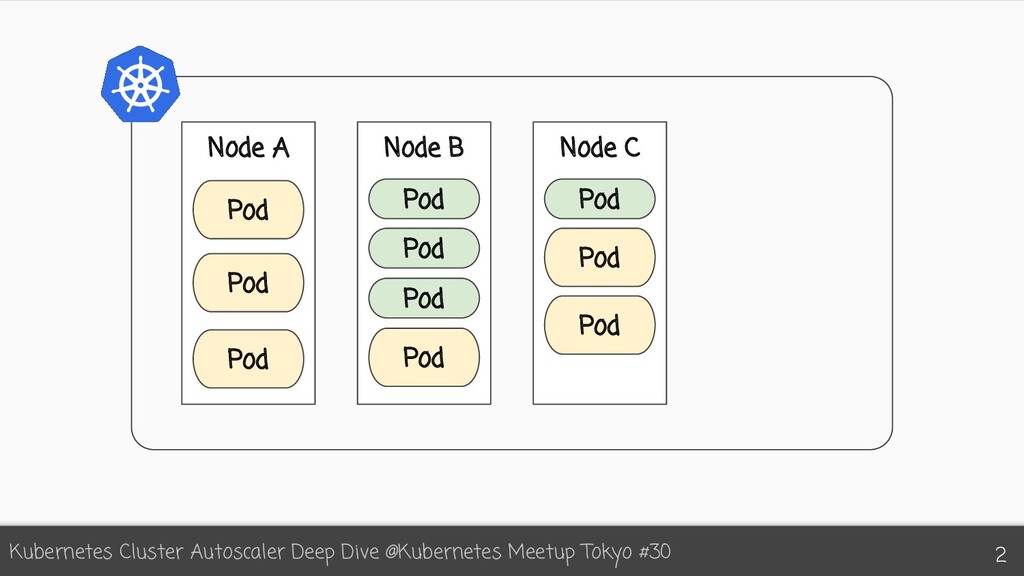
Kubernetes Cluster Autoscaler Deep Dive @Kubernetes Meetup Tokyo #30 2
Node A Node B Node C Pod Pod Pod Pod Pod Pod Pod Pod Pod Pod -
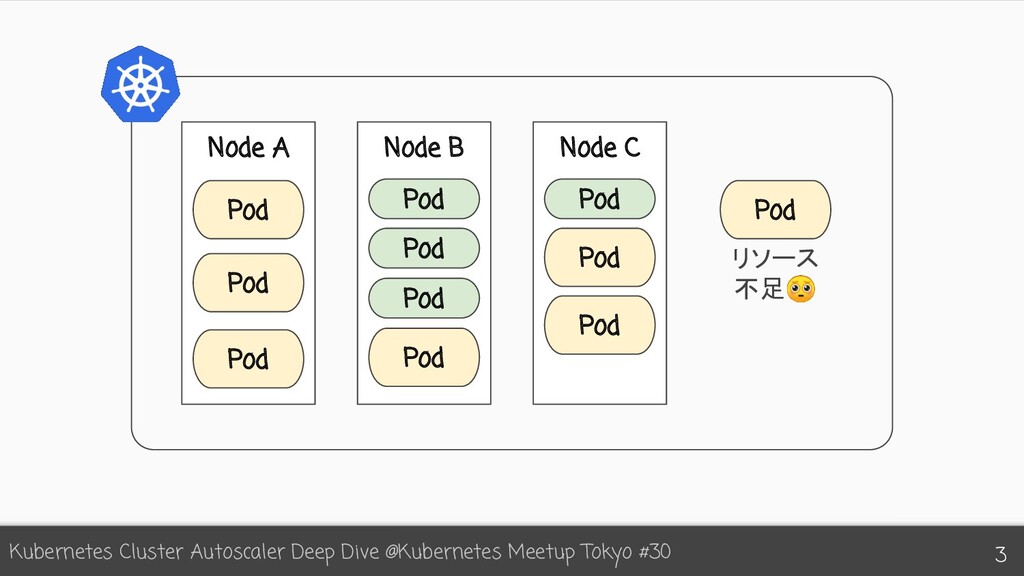
Kubernetes Cluster Autoscaler Deep Dive @Kubernetes Meetup Tokyo #30 3
Node A Node B Node C Pod Pod Pod Pod Pod Pod Pod Pod Pod Pod Pod リソース 不足 -
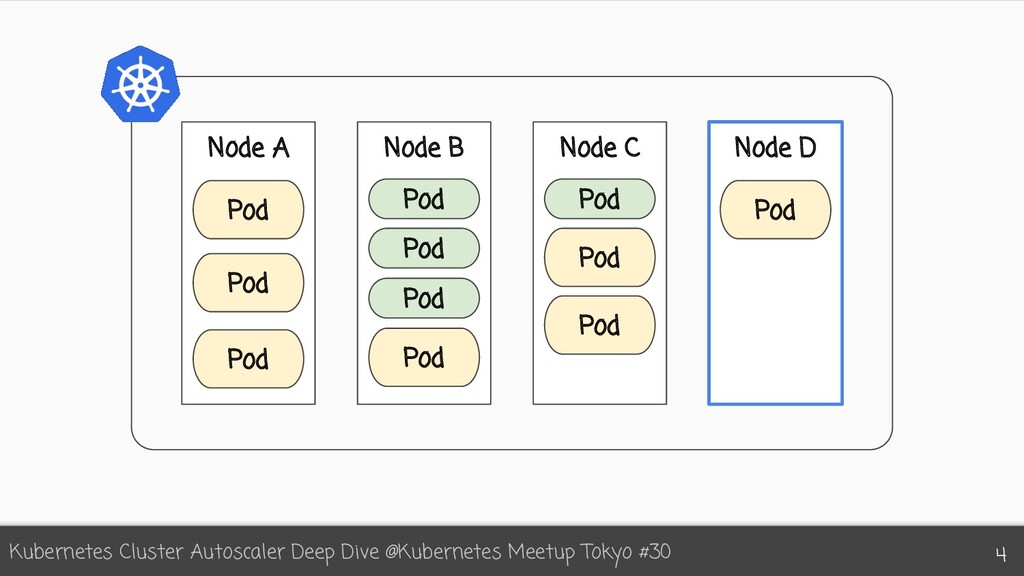
Kubernetes Cluster Autoscaler Deep Dive @Kubernetes Meetup Tokyo #30 4
Node A Node B Node C Node D Pod Pod Pod Pod Pod Pod Pod Pod Pod Pod Pod -
Kubernetes Cluster Autoscaler Deep Dive @Kubernetes Meetup Tokyo #30 5
☺ Cluster Autoscaler Basic ☺ Architecture ☺ Status of Autoscaler ☺ Execution Cycle -
自己紹介 6 • Mizuki Urushida (@zuiurs) • 2018~ CyberAgent, Inc.
• 最近の業務 ◦ Cluster Autoscaler の Cloud Provider 実装 ◦ HPA に時系列予測を組み込む Custom Controller の実装 ◦ Go 勉強会 / ML 勉強会 ◦ Kubernetes-native Testbed の構築・実装 • タイピングが好き -
Kubernetes Cluster Autoscaler Deep Dive @Kubernetes Meetup Tokyo #30 7
☺ Cluster Autoscaler Basic ☺ Architecture ☺ Status of Autoscaler ☺ Execution Cycle -
Cluster Autoscaler 8 • Kubernetes Node の水平スケール機能 ◦ リソース不足を検知してノードを増やす (スケールアウト)
◦ リソース過多を検知してノードを減らす (スケールイン) • Pros ◦ 必要なリソースにノード数がフィットするので課金額が適切になる ◦ Pod 系の Autoscaler との併用で負荷の上昇に無人で対応できる • Cons ◦ スケールイン対応したアプリケーション実装が必要 • sig-autoscaling で開発中のプロジェクト ◦ 他に HPA (Pod の水平スケール) や VPA (Pod の垂直スケール) など -
Kubernetes Cluster Autoscaler Deep Dive @Kubernetes Meetup Tokyo #30 NodePool
A ( 1 ~ 4 ) 9 Node A2 Cluster Autoscaler Node A1 NodePool B ( 2 ~ 3 ) Node B2 Node B1 NodePool C ( Disable ) Node C2 Node C1 操作対象 -
Kubernetes Cluster Autoscaler Deep Dive @Kubernetes Meetup Tokyo #30 NodePool
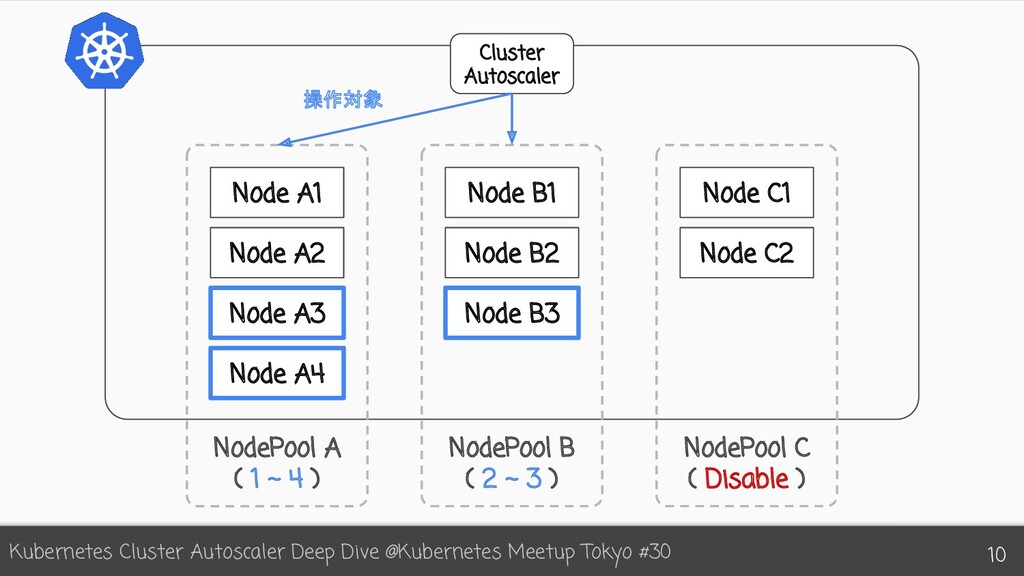
A ( 1 ~ 4 ) 10 Node A2 Cluster Autoscaler Node A1 NodePool B ( 2 ~ 3 ) Node B2 Node B1 NodePool C ( Disable ) Node C2 Node C1 Node A4 Node A3 操作対象 Node B3 -
Kubernetes Cluster Autoscaler Deep Dive @Kubernetes Meetup Tokyo #30 NodePool
A ( 1 ~ 4 ) 11 Node A2 Cluster Autoscaler Node A1 NodePool B ( 2 ~ 3 ) Node B2 Node B1 NodePool C ( Disable ) Node C2 Node C1 操作対象 Node A4 Node A3 Node B3 -
Kubernetes Cluster Autoscaler Deep Dive @Kubernetes Meetup Tokyo #30 NodePool
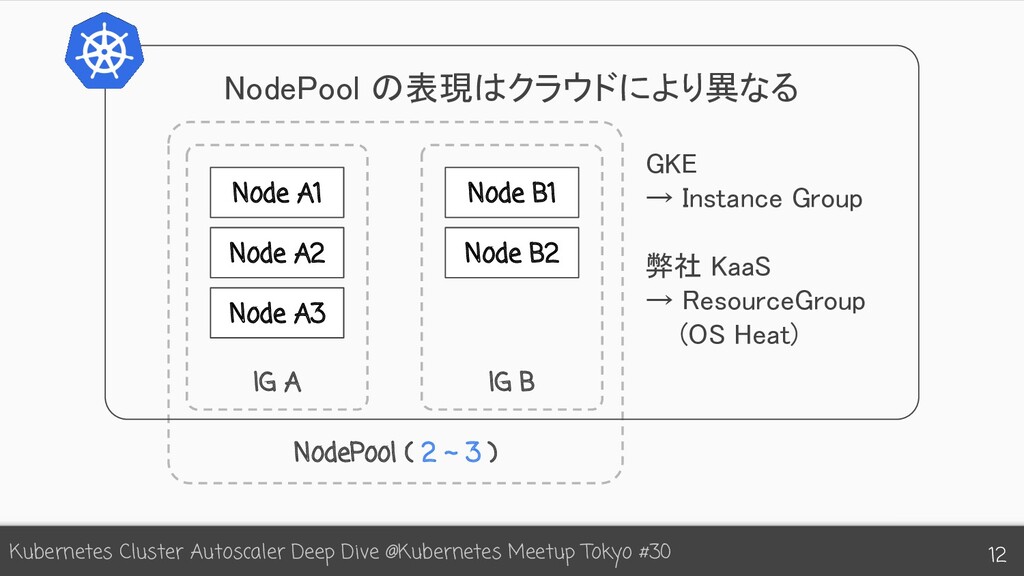
( 2 ~ 3 ) IG A 12 Node A2 Node A1 IG B Node B2 Node B1 NodePool の表現はクラウドにより異なる GKE → Instance Group 弊社 KaaS → ResourceGroup (OS Heat) Node A3 -
Kubernetes Cluster Autoscaler Deep Dive @Kubernetes Meetup Tokyo #30 13
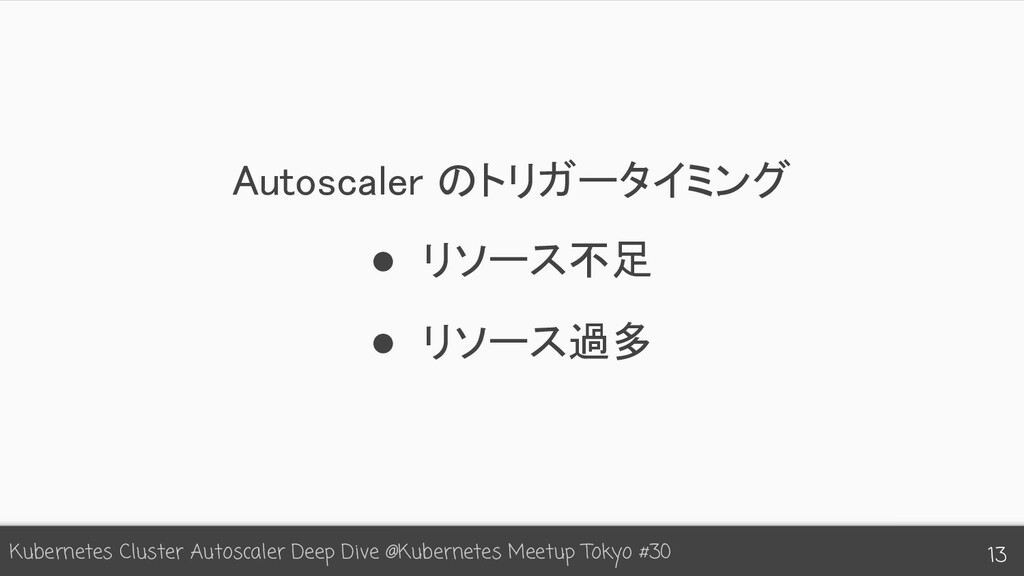
Autoscaler のトリガータイミング • リソース不足 • リソース過多 -
リソース不足とは 14 • Pod を起動することができない状態 • Pending ステータスがそれを表す • Pending
になるケース Pod Node Request CPU 300m Remain CPU 200m Pod Node No Torelations Taints A -
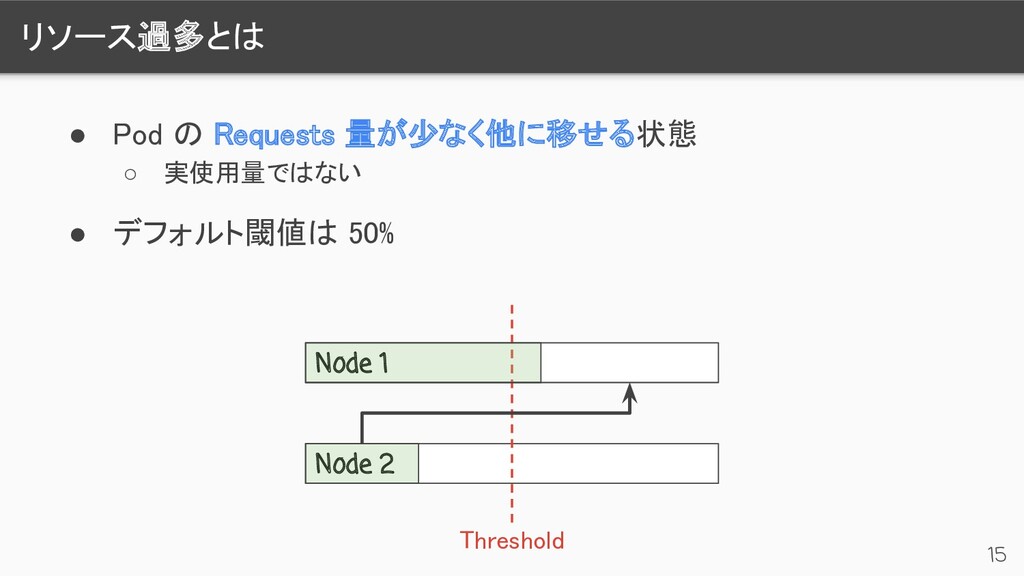
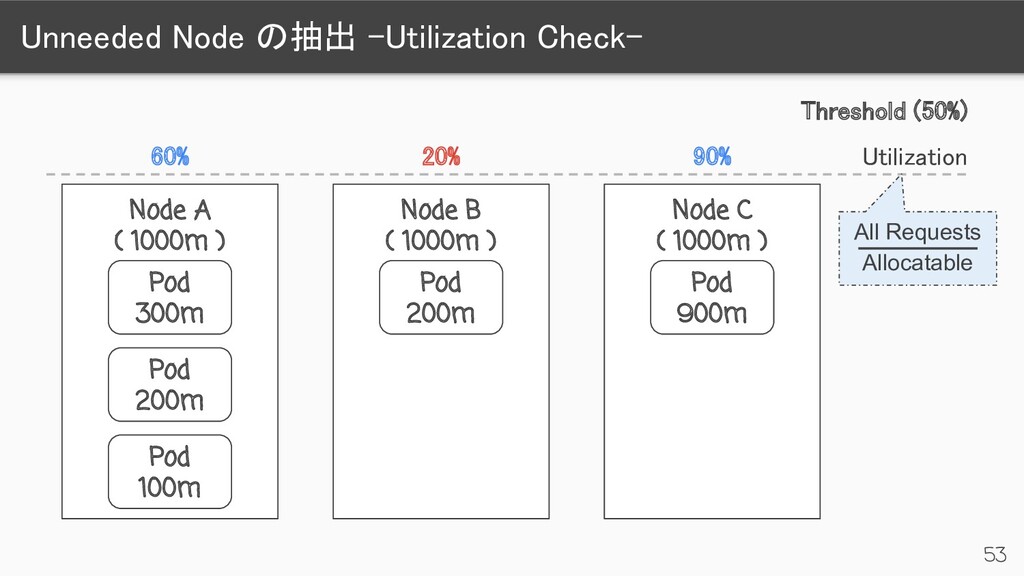
リソース過多とは 15 • Pod の Requests 量が少なく他に移せる状態 ◦ 実使用量ではない •
デフォルト閾値は 50% Node 1 Node 2 Threshold -
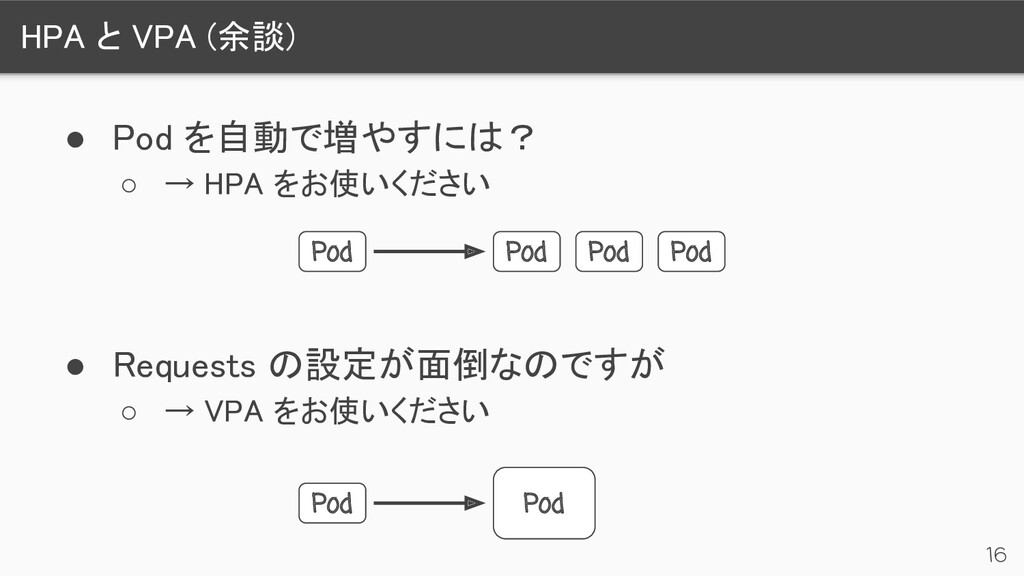
HPA と VPA (余談) 16 • Pod を自動で増やすには? ◦ →
HPA をお使いください Pod Pod Pod Pod • Requests の設定が面倒なのですが ◦ → VPA をお使いください Pod Pod -
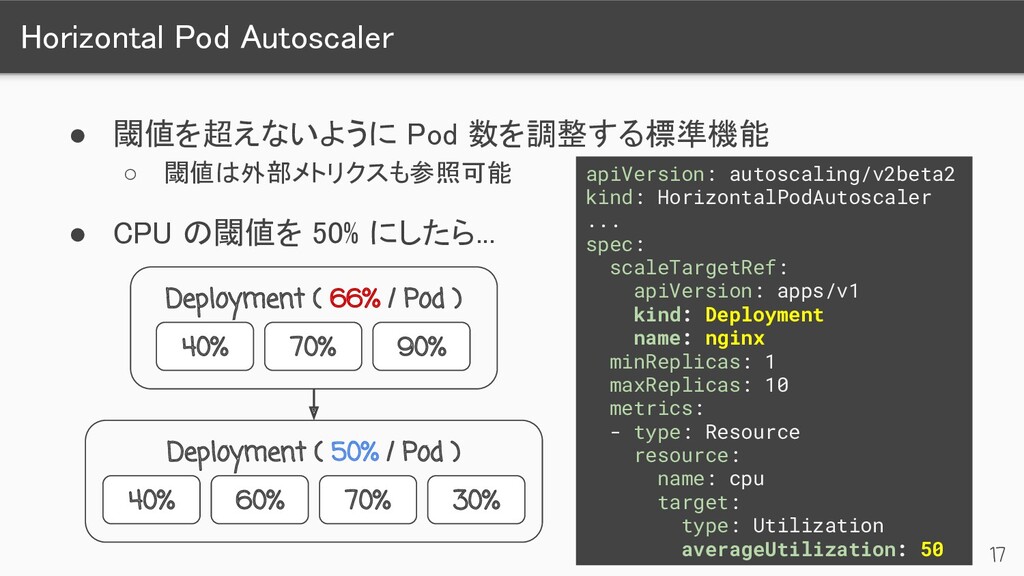
• 閾値を超えないように Pod 数を調整する標準機能 ◦ 閾値は外部メトリクスも参照可能 • CPU の閾値を 50%
にしたら... Deployment ( 66% / Pod ) Horizontal Pod Autoscaler 17 apiVersion: autoscaling/v2beta2 kind: HorizontalPodAutoscaler ... spec: scaleTargetRef: apiVersion: apps/v1 kind: Deployment name: nginx minReplicas: 1 maxReplicas: 10 metrics: - type: Resource resource: name: cpu target: type: Utilization averageUtilization: 50 40% 70% Deployment ( 50% / Pod ) 90% 40% 60% 70% 30% -
requests を設定する 18 • Pod のリソース実使用量を見て設定 ◦ kubectl top pod
▪ 負荷が一番高いときの量を設定するのが無難 ◦ Node のリソース量 (kubectl decribe node) も必要なら確認 • CPU 基本的に 1000m 以下で Replica を増やすのがベスト ◦ ちゃんとマルチコアの実装がされていればその限りではない • limits はリソース計算には無関係 ◦ 過剰な Overcommit 状態を防ぐために設定しておく -
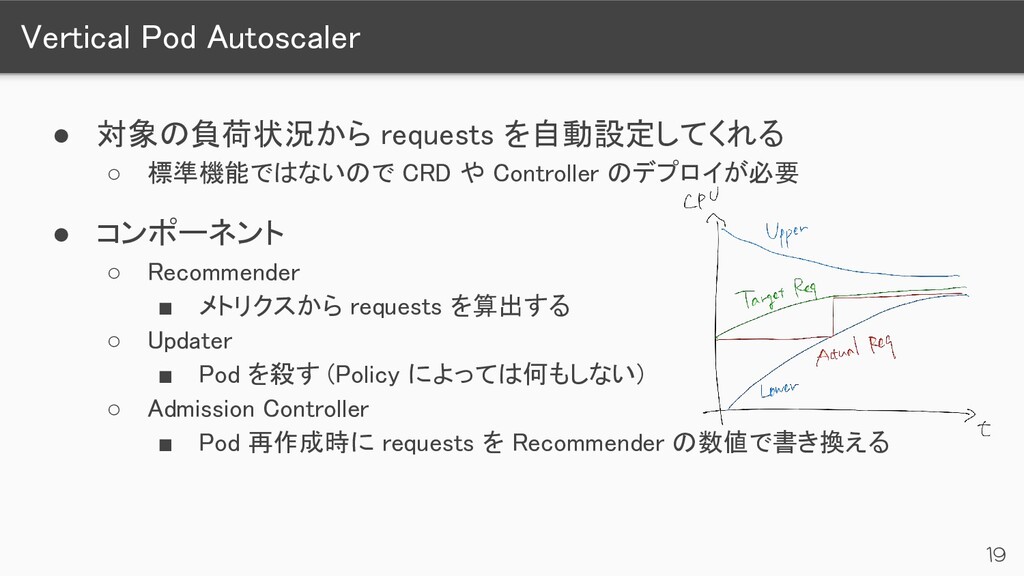
Vertical Pod Autoscaler 19 • 対象の負荷状況から requests を自動設定してくれる ◦ 標準機能ではないので
CRD や Controller のデプロイが必要 • コンポーネント ◦ Recommender ▪ メトリクスから requests を算出する ◦ Updater ▪ Pod を殺す (Policy によっては何もしない) ◦ Admission Controller ▪ Pod 再作成時に requests を Recommender の数値で書き換える -
Kubernetes Cluster Autoscaler Deep Dive @Kubernetes Meetup Tokyo #30 20
☺ Cluster Autoscaler Basic ☺ Architecture ☺ Status of Autoscaler ☺ Execution Cycle -
Kubernetes Cluster Autoscaler Deep Dive @Kubernetes Meetup Tokyo #30 22
Cluster Autoscaler Core Logic Cloud Provider Logic Status ConfigMap Cloud -
Kubernetes Cluster Autoscaler Deep Dive @Kubernetes Meetup Tokyo #30 23
Cluster Autoscaler Core Logic Cloud Provider Logic Status ConfigMap Cloud ・k8s 上リソース情報の取得 ・Pod の起動シミュレーション ・リソース計算 ・スケールイン/アウトのトリガー ・NodePool の情報 ・Autoscaler 管理対象のノード数 ・スケールイン候補情報 ・各種タイムスタンプ -
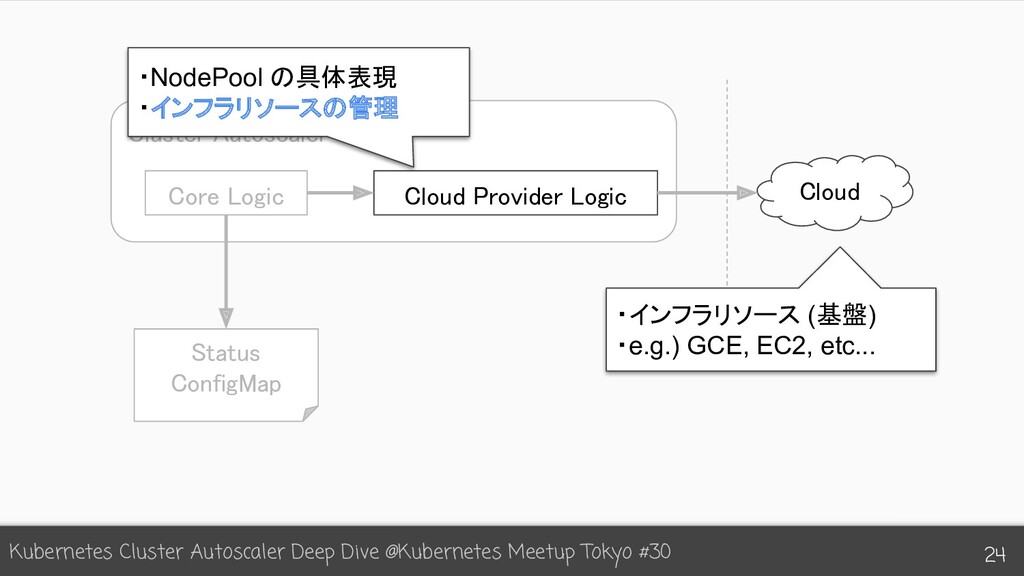
Kubernetes Cluster Autoscaler Deep Dive @Kubernetes Meetup Tokyo #30 24
Cluster Autoscaler Core Logic Cloud Provider Logic Status ConfigMap Cloud ・NodePool の具体表現 ・インフラリソースの管理 ・インフラリソース (基盤) ・e.g.) GCE, EC2, etc... -
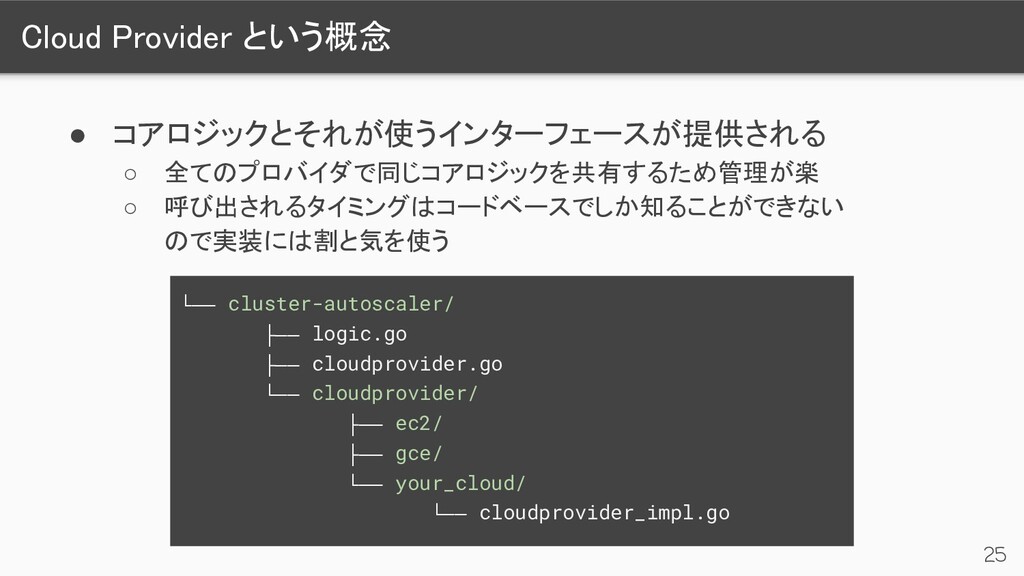
Cloud Provider という概念 25 • コアロジックとそれが使うインターフェースが提供される ◦ 全てのプロバイダで同じコアロジックを共有するため管理が楽 ◦ 呼び出されるタイミングはコードベースでしか知ることができない
ので実装には割と気を使う └── cluster-autoscaler/ ├── logic.go ├── cloudprovider.go └── cloudprovider/ ├── ec2/ ├── gce/ └── your_cloud/ └── cloudprovider_impl.go -
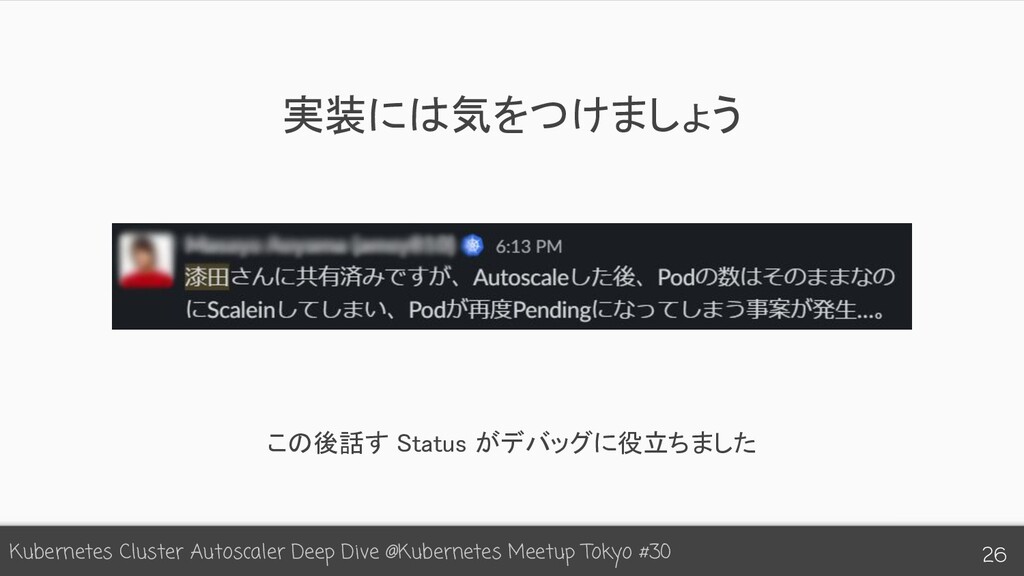
Kubernetes Cluster Autoscaler Deep Dive @Kubernetes Meetup Tokyo #30 26
実装には気をつけましょう この後話す Status がデバッグに役立ちました -
Kubernetes Cluster Autoscaler Deep Dive @Kubernetes Meetup Tokyo #30 27
☺ Cluster Autoscaler Basic ☺ Architecture ☺ Status of Autoscaler ☺ Execution Cycle -
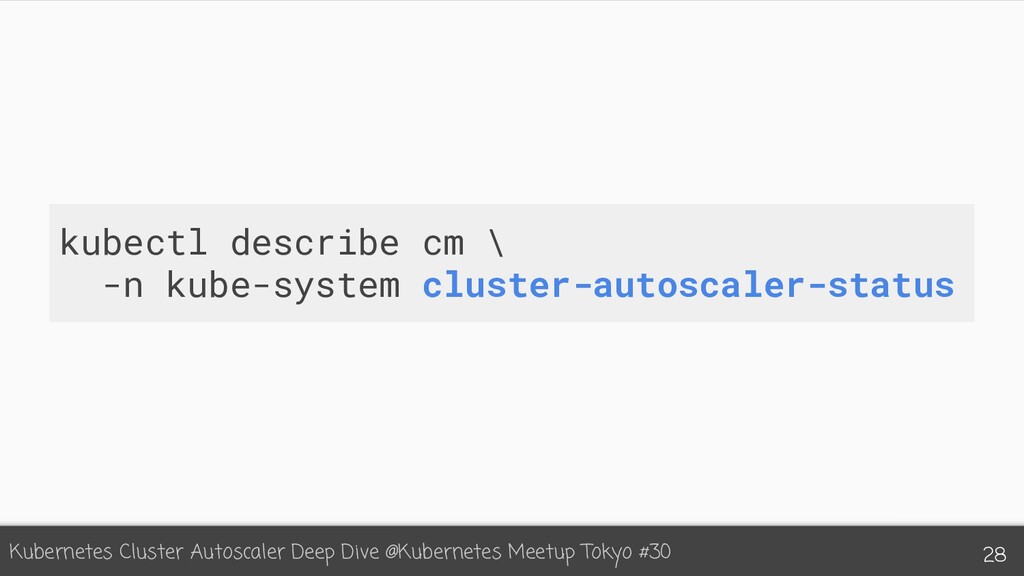
Kubernetes Cluster Autoscaler Deep Dive @Kubernetes Meetup Tokyo #30 28
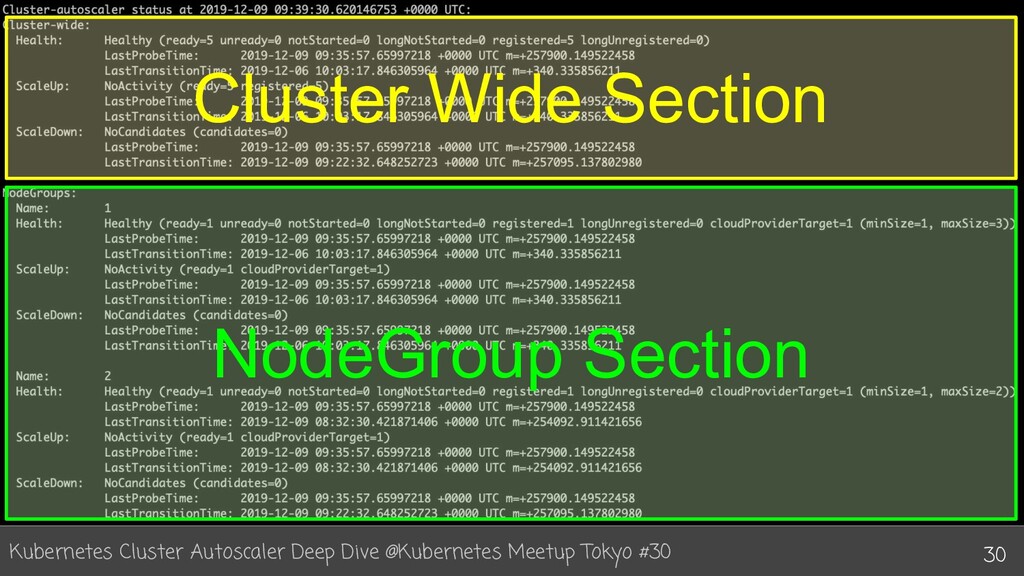
kubectl describe cm \ -n kube-system cluster-autoscaler-status -
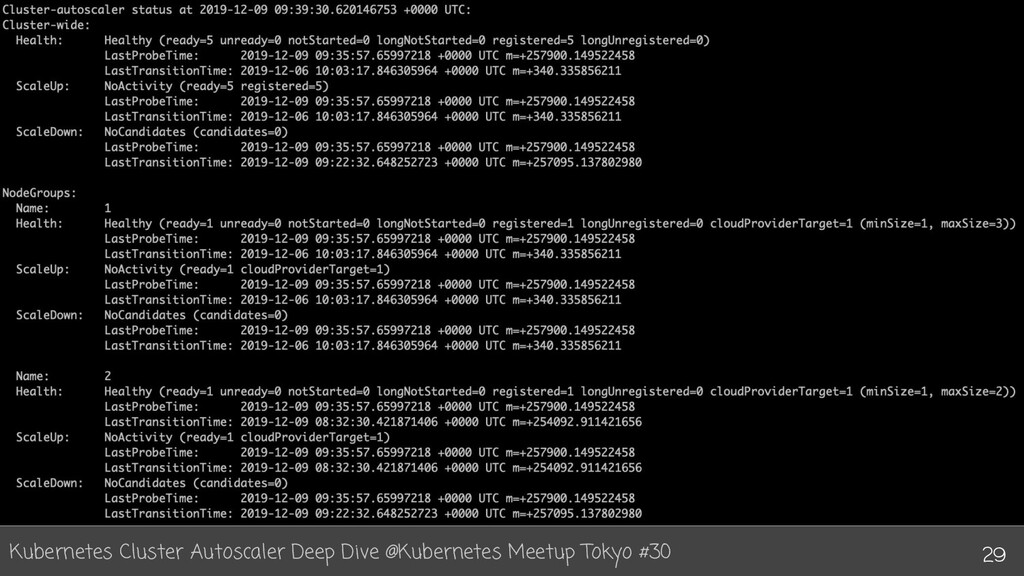
Kubernetes Cluster Autoscaler Deep Dive @Kubernetes Meetup Tokyo #30 30
Cluster Wide Section NodeGroup Section -
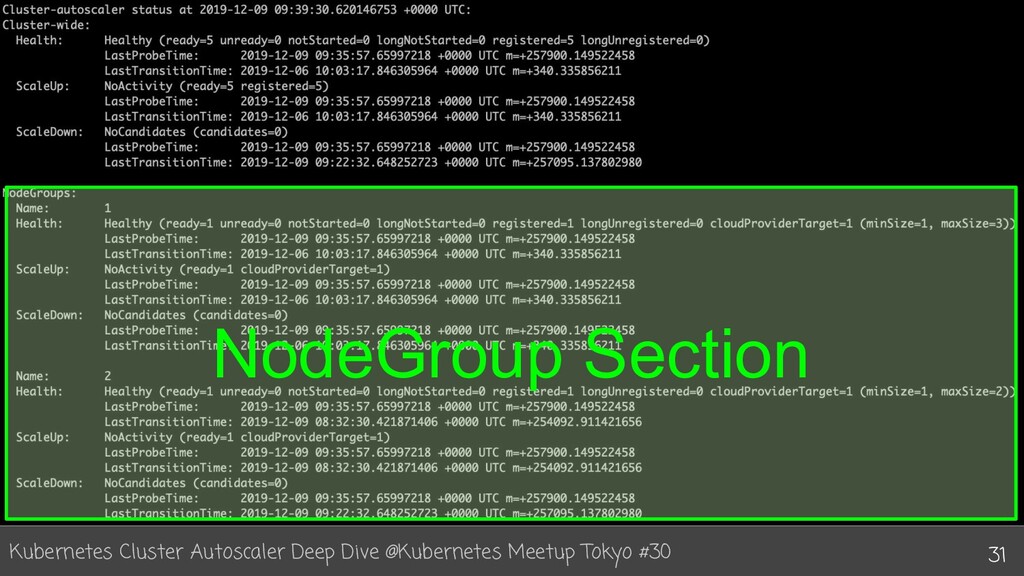
Kubernetes Cluster Autoscaler Deep Dive @Kubernetes Meetup Tokyo #30 31
NodeGroup Section -
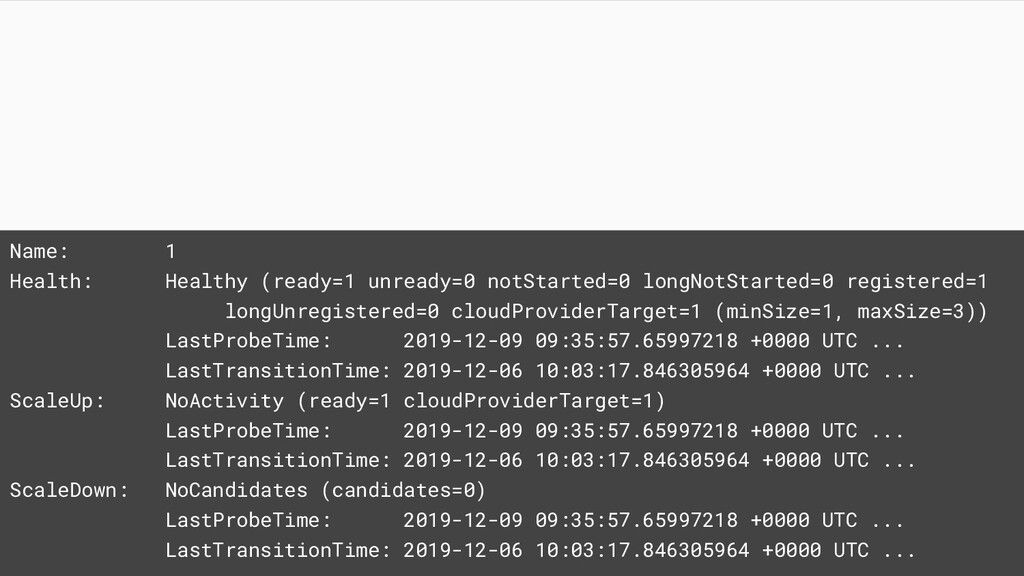
Kubernetes Cluster Autoscaler Deep Dive @Kubernetes Meetup Tokyo #30 32
Name: 1 Health: Healthy (ready=1 unready=0 notStarted=0 longNotStarted=0 registered=1 longUnregistered=0 cloudProviderTarget=1 (minSize=1, maxSize=3)) LastProbeTime: 2019-12-09 09:35:57.65997218 +0000 UTC ... LastTransitionTime: 2019-12-06 10:03:17.846305964 +0000 UTC ... ScaleUp: NoActivity (ready=1 cloudProviderTarget=1) LastProbeTime: 2019-12-09 09:35:57.65997218 +0000 UTC ... LastTransitionTime: 2019-12-06 10:03:17.846305964 +0000 UTC ... ScaleDown: NoCandidates (candidates=0) LastProbeTime: 2019-12-09 09:35:57.65997218 +0000 UTC ... LastTransitionTime: 2019-12-06 10:03:17.846305964 +0000 UTC ... -
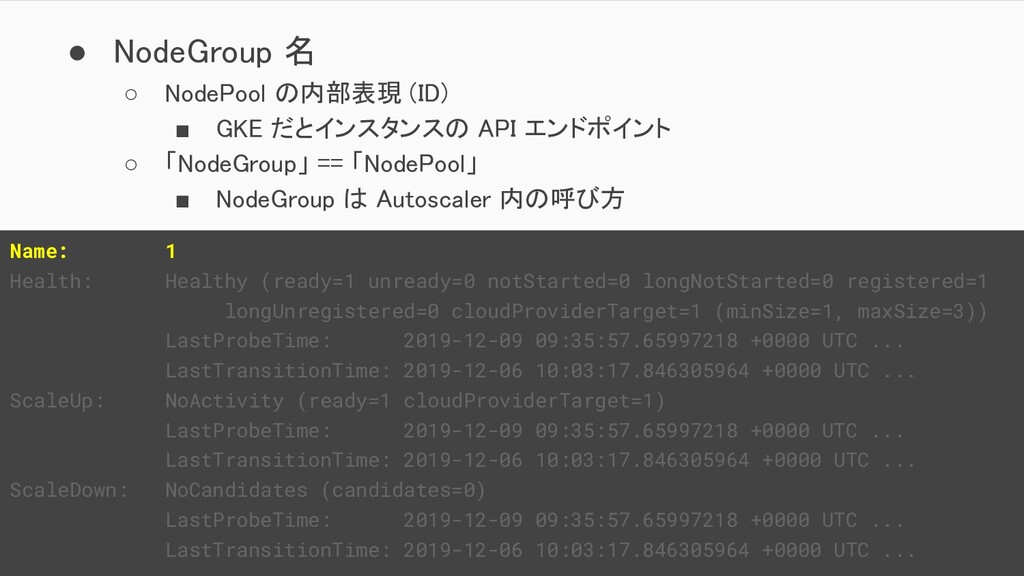
Kubernetes Cluster Autoscaler Deep Dive @Kubernetes Meetup Tokyo #30 33
• NodeGroup 名 ◦ NodePool の内部表現 (ID) ▪ GKE だとインスタンスの API エンドポイント ◦ 「NodeGroup」 == 「NodePool」 ▪ NodeGroup は Autoscaler 内の呼び方 Name: 1 Health: Healthy (ready=1 unready=0 notStarted=0 longNotStarted=0 registered=1 longUnregistered=0 cloudProviderTarget=1 (minSize=1, maxSize=3)) LastProbeTime: 2019-12-09 09:35:57.65997218 +0000 UTC ... LastTransitionTime: 2019-12-06 10:03:17.846305964 +0000 UTC ... ScaleUp: NoActivity (ready=1 cloudProviderTarget=1) LastProbeTime: 2019-12-09 09:35:57.65997218 +0000 UTC ... LastTransitionTime: 2019-12-06 10:03:17.846305964 +0000 UTC ... ScaleDown: NoCandidates (candidates=0) LastProbeTime: 2019-12-09 09:35:57.65997218 +0000 UTC ... LastTransitionTime: 2019-12-06 10:03:17.846305964 +0000 UTC ... -
Kubernetes Cluster Autoscaler Deep Dive @Kubernetes Meetup Tokyo #30 34
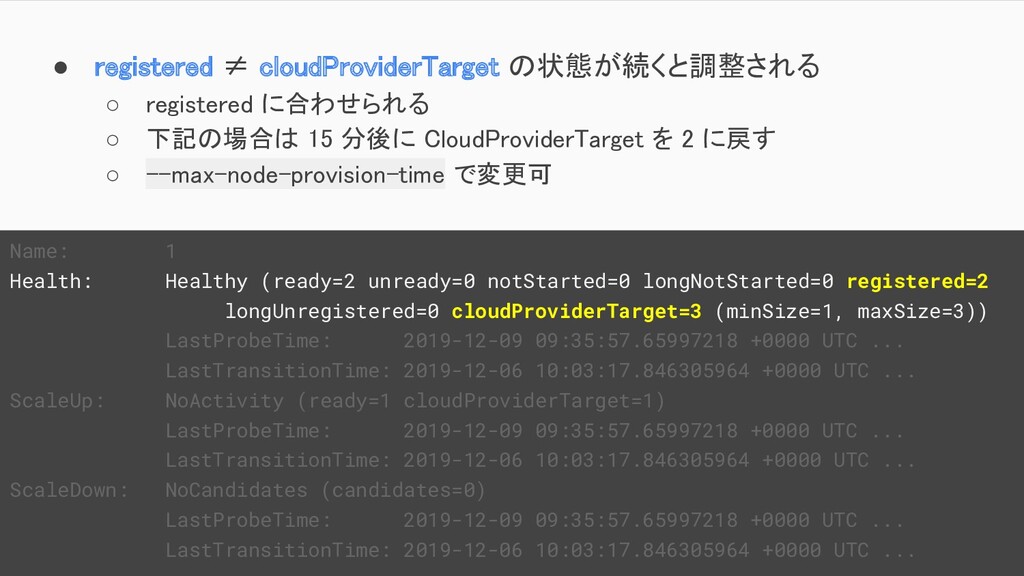
Name: 1 Health: Healthy (ready=2 unready=0 notStarted=0 longNotStarted=0 registered=2 longUnregistered=0 cloudProviderTarget=3 (minSize=1, maxSize=3)) LastProbeTime: 2019-12-09 09:35:57.65997218 +0000 UTC ... LastTransitionTime: 2019-12-06 10:03:17.846305964 +0000 UTC ... ScaleUp: NoActivity (ready=1 cloudProviderTarget=1) LastProbeTime: 2019-12-09 09:35:57.65997218 +0000 UTC ... LastTransitionTime: 2019-12-06 10:03:17.846305964 +0000 UTC ... ScaleDown: NoCandidates (candidates=0) LastProbeTime: 2019-12-09 09:35:57.65997218 +0000 UTC ... LastTransitionTime: 2019-12-06 10:03:17.846305964 +0000 UTC ... Node 2 Node 1 ready ≒ registered = 2 Cloud cloudProviderTarget = 3 (Node 数を 3 に設定) (要するに Desired) Creating Cluster Autoscaler -
Kubernetes Cluster Autoscaler Deep Dive @Kubernetes Meetup Tokyo #30 35
Name: 1 Health: Healthy (ready=2 unready=0 notStarted=0 longNotStarted=0 registered=2 longUnregistered=0 cloudProviderTarget=3 (minSize=1, maxSize=3)) LastProbeTime: 2019-12-09 09:35:57.65997218 +0000 UTC ... LastTransitionTime: 2019-12-06 10:03:17.846305964 +0000 UTC ... ScaleUp: NoActivity (ready=1 cloudProviderTarget=1) LastProbeTime: 2019-12-09 09:35:57.65997218 +0000 UTC ... LastTransitionTime: 2019-12-06 10:03:17.846305964 +0000 UTC ... ScaleDown: NoCandidates (candidates=0) LastProbeTime: 2019-12-09 09:35:57.65997218 +0000 UTC ... LastTransitionTime: 2019-12-06 10:03:17.846305964 +0000 UTC ... • registered ≠ cloudProviderTarget の状態が続くと調整される ◦ registered に合わせられる ◦ 下記の場合は 15 分後に CloudProviderTarget を 2 に戻す ◦ --max-node-provision-time で変更可 -
Kubernetes Cluster Autoscaler Deep Dive @Kubernetes Meetup Tokyo #30 36
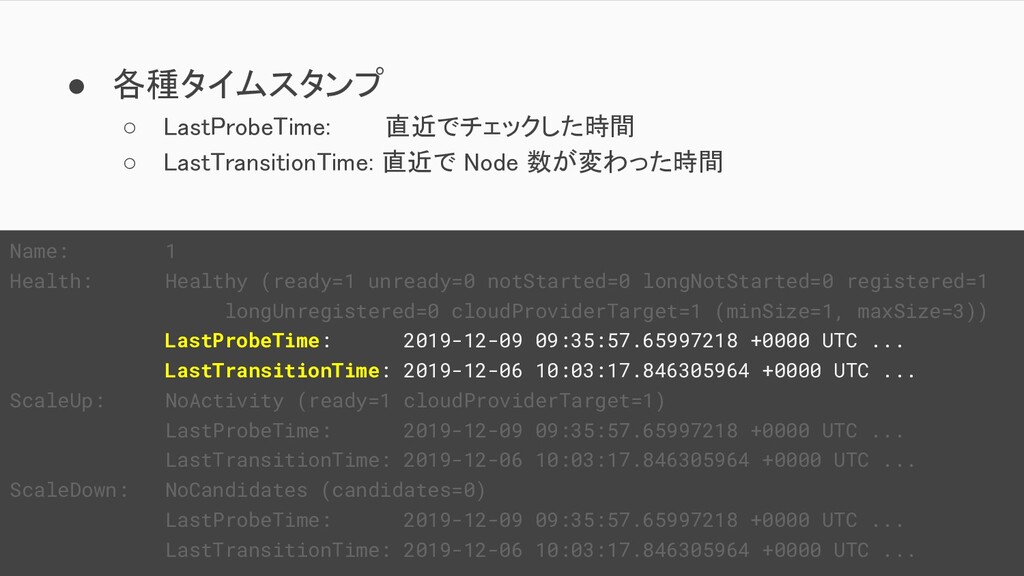
Name: 1 Health: Healthy (ready=1 unready=0 notStarted=0 longNotStarted=0 registered=1 longUnregistered=0 cloudProviderTarget=1 (minSize=1, maxSize=3)) LastProbeTime: 2019-12-09 09:35:57.65997218 +0000 UTC ... LastTransitionTime: 2019-12-06 10:03:17.846305964 +0000 UTC ... ScaleUp: NoActivity (ready=1 cloudProviderTarget=1) LastProbeTime: 2019-12-09 09:35:57.65997218 +0000 UTC ... LastTransitionTime: 2019-12-06 10:03:17.846305964 +0000 UTC ... ScaleDown: NoCandidates (candidates=0) LastProbeTime: 2019-12-09 09:35:57.65997218 +0000 UTC ... LastTransitionTime: 2019-12-06 10:03:17.846305964 +0000 UTC ... • 各種タイムスタンプ ◦ LastProbeTime: 直近でチェックした時間 ◦ LastTransitionTime: 直近で Node 数が変わった時間 -
Kubernetes Cluster Autoscaler Deep Dive @Kubernetes Meetup Tokyo #30 37
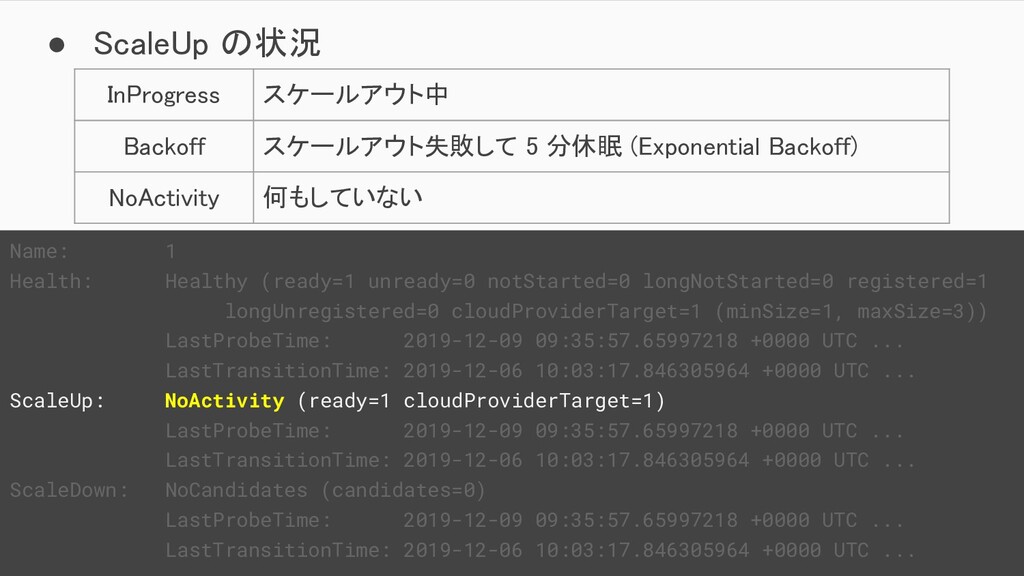
Name: 1 Health: Healthy (ready=1 unready=0 notStarted=0 longNotStarted=0 registered=1 longUnregistered=0 cloudProviderTarget=1 (minSize=1, maxSize=3)) LastProbeTime: 2019-12-09 09:35:57.65997218 +0000 UTC ... LastTransitionTime: 2019-12-06 10:03:17.846305964 +0000 UTC ... ScaleUp: NoActivity (ready=1 cloudProviderTarget=1) LastProbeTime: 2019-12-09 09:35:57.65997218 +0000 UTC ... LastTransitionTime: 2019-12-06 10:03:17.846305964 +0000 UTC ... ScaleDown: NoCandidates (candidates=0) LastProbeTime: 2019-12-09 09:35:57.65997218 +0000 UTC ... LastTransitionTime: 2019-12-06 10:03:17.846305964 +0000 UTC ... • ScaleUp の状況 InProgress スケールアウト中 Backoff スケールアウト失敗して 5 分休眠 (Exponential Backoff) NoActivity 何もしていない -
Kubernetes Cluster Autoscaler Deep Dive @Kubernetes Meetup Tokyo #30 38
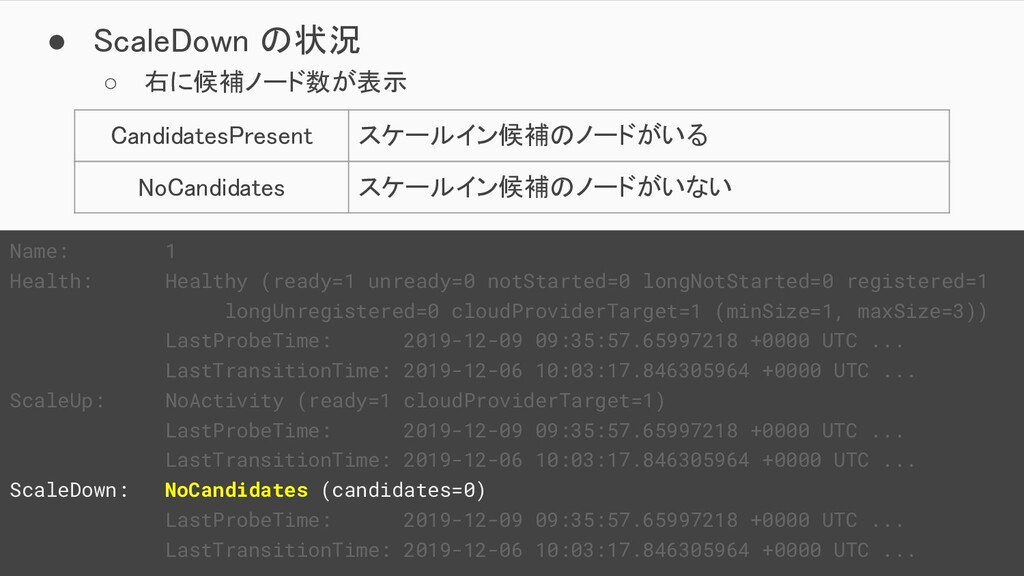
Name: 1 Health: Healthy (ready=1 unready=0 notStarted=0 longNotStarted=0 registered=1 longUnregistered=0 cloudProviderTarget=1 (minSize=1, maxSize=3)) LastProbeTime: 2019-12-09 09:35:57.65997218 +0000 UTC ... LastTransitionTime: 2019-12-06 10:03:17.846305964 +0000 UTC ... ScaleUp: NoActivity (ready=1 cloudProviderTarget=1) LastProbeTime: 2019-12-09 09:35:57.65997218 +0000 UTC ... LastTransitionTime: 2019-12-06 10:03:17.846305964 +0000 UTC ... ScaleDown: NoCandidates (candidates=0) LastProbeTime: 2019-12-09 09:35:57.65997218 +0000 UTC ... LastTransitionTime: 2019-12-06 10:03:17.846305964 +0000 UTC ... CandidatesPresent スケールイン候補のノードがいる NoCandidates スケールイン候補のノードがいない • ScaleDown の状況 ◦ 右に候補ノード数が表示 -
Kubernetes Cluster Autoscaler Deep Dive @Kubernetes Meetup Tokyo #30 39
☺ Cluster Autoscaler Basic ☺ Architecture ☺ Status of Autoscaler ☺ Execution Cycle -
Kubernetes Cluster Autoscaler Deep Dive @Kubernetes Meetup Tokyo #30 40
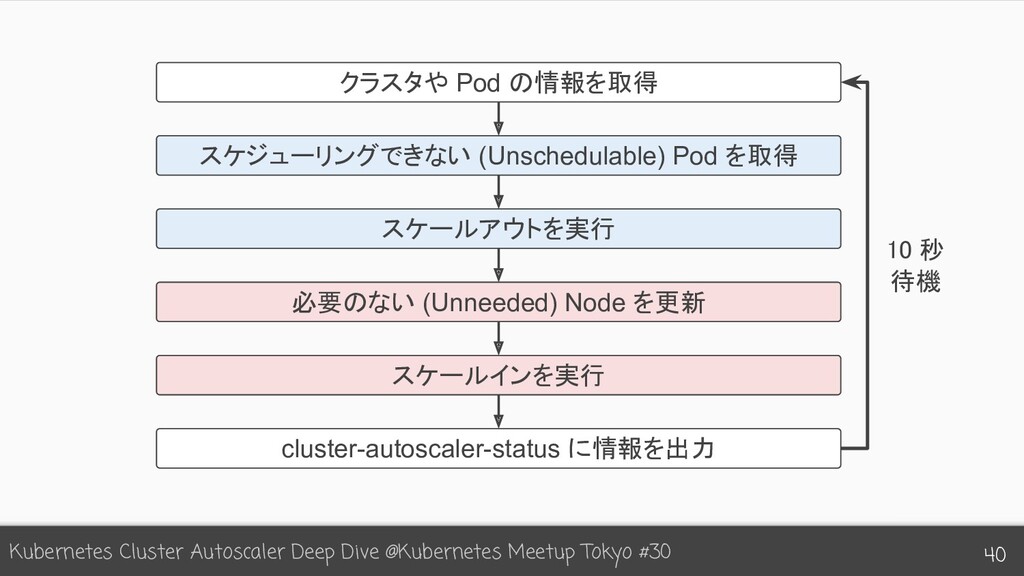
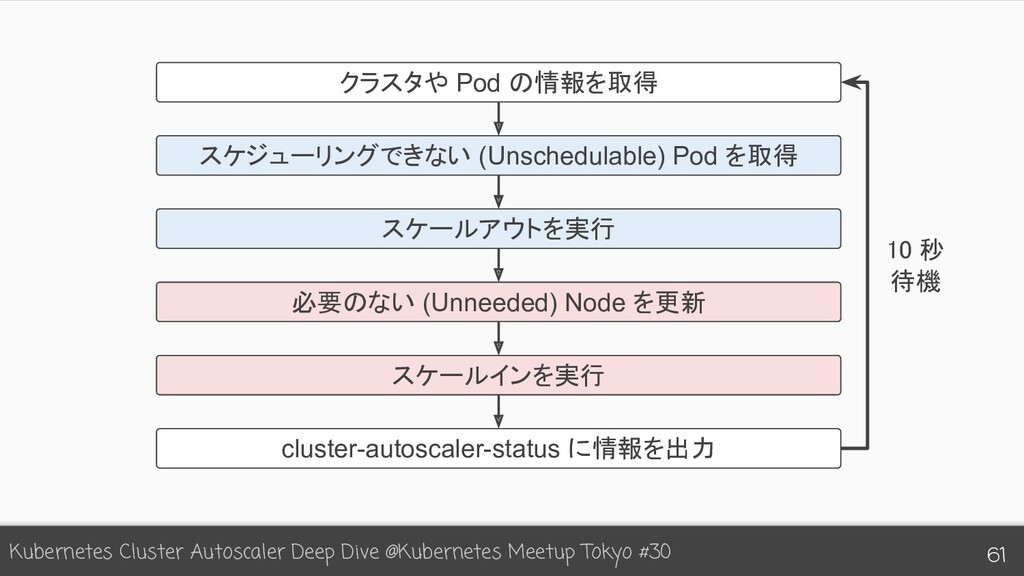
クラスタや Pod の情報を取得 スケジューリングできない (Unschedulable) Pod を取得 スケールアウトを実行 必要のない (Unneeded) Node を更新 cluster-autoscaler-status に情報を出力 スケールインを実行 10 秒 待機 -
Kubernetes Cluster Autoscaler Deep Dive @Kubernetes Meetup Tokyo #30 41
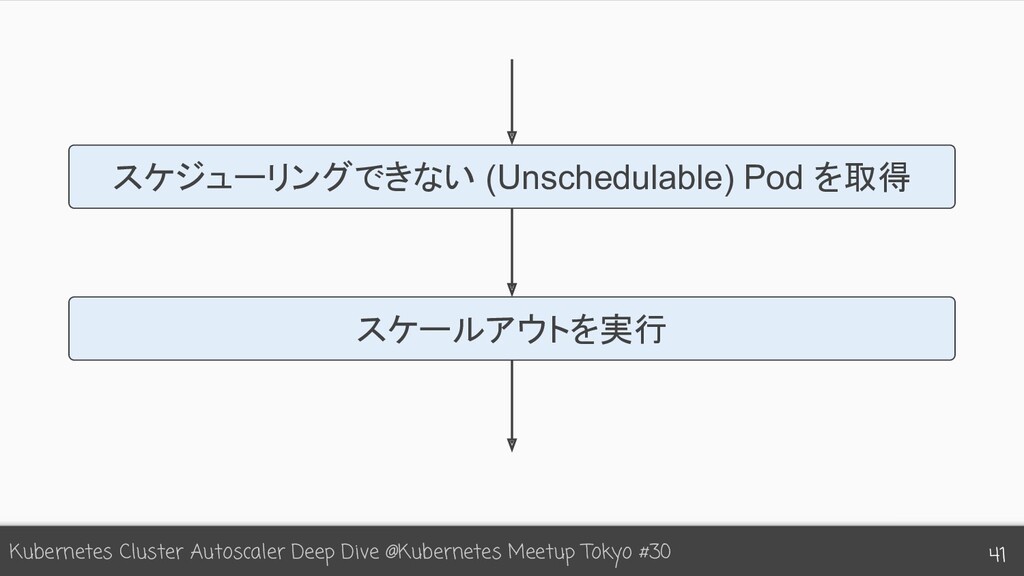
スケジューリングできない (Unschedulable) Pod を取得 スケールアウトを実行 -
Expansion Option の生成 -Pending Pod の検出- 42 Pod A Pod
B Pod C Pod D Pod E Pod List Running Running Pending Pending Pending -
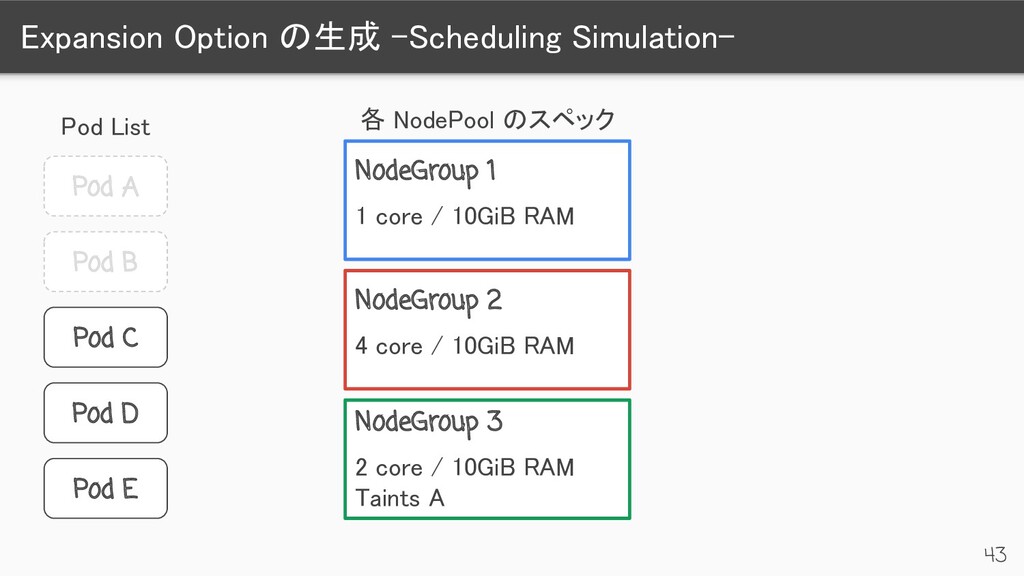
Expansion Option の生成 -Scheduling Simulation- 43 Pod A Pod B
Pod List Pod C Pod D Pod E NodeGroup 1 1 core / 10GiB RAM NodeGroup 2 4 core / 10GiB RAM NodeGroup 3 2 core / 10GiB RAM Taints A 各 NodePool のスペック -
Expansion Option の生成 -Scheduling Simulation- 44 Pod A Pod B
Pod List Pod C Pod D Pod E NodeGroup 1 1 core / 10GiB RAM NodeGroup 2 4 core / 10GiB RAM NodeGroup 3 2 core / 10GiB RAM Taints A 各 NodePool のスペック -
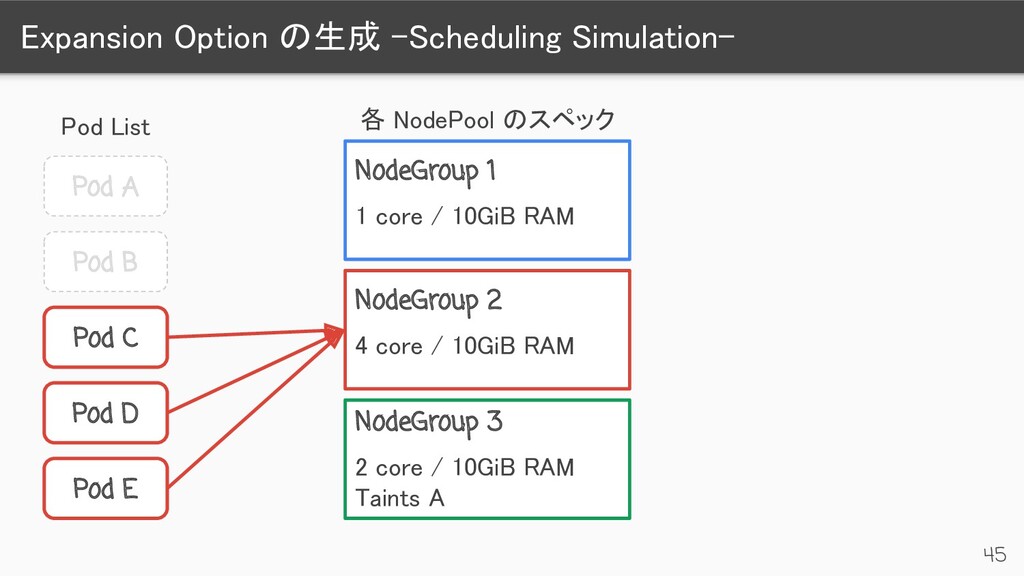
Expansion Option の生成 -Scheduling Simulation- 45 Pod A Pod B
Pod List Pod C Pod D Pod E NodeGroup 1 1 core / 10GiB RAM NodeGroup 2 4 core / 10GiB RAM NodeGroup 3 2 core / 10GiB RAM Taints A 各 NodePool のスペック -
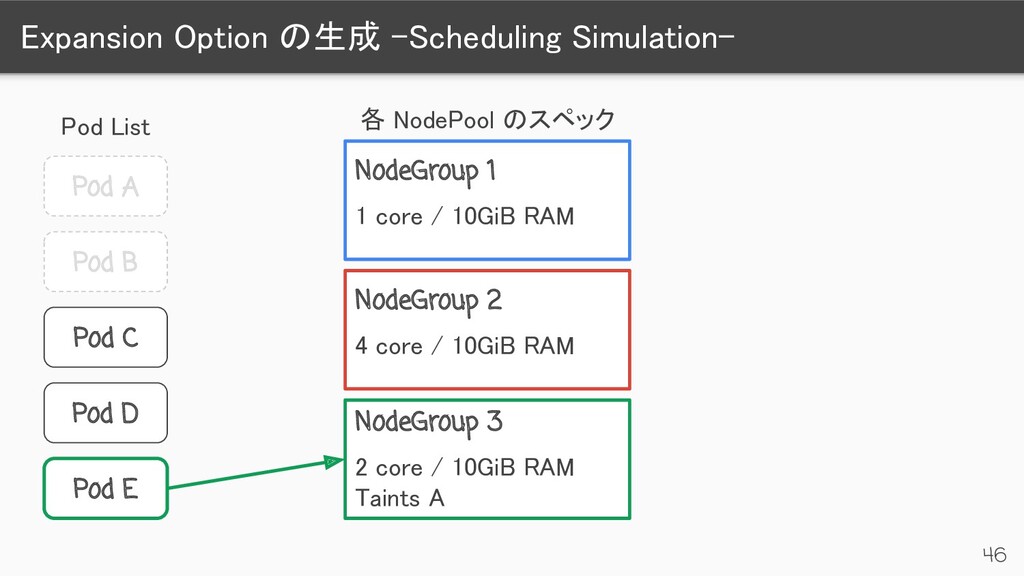
Expansion Option の生成 -Scheduling Simulation- 46 Pod A Pod B
Pod List Pod C Pod D Pod E NodeGroup 1 1 core / 10GiB RAM NodeGroup 2 4 core / 10GiB RAM NodeGroup 3 2 core / 10GiB RAM Taints A 各 NodePool のスペック -
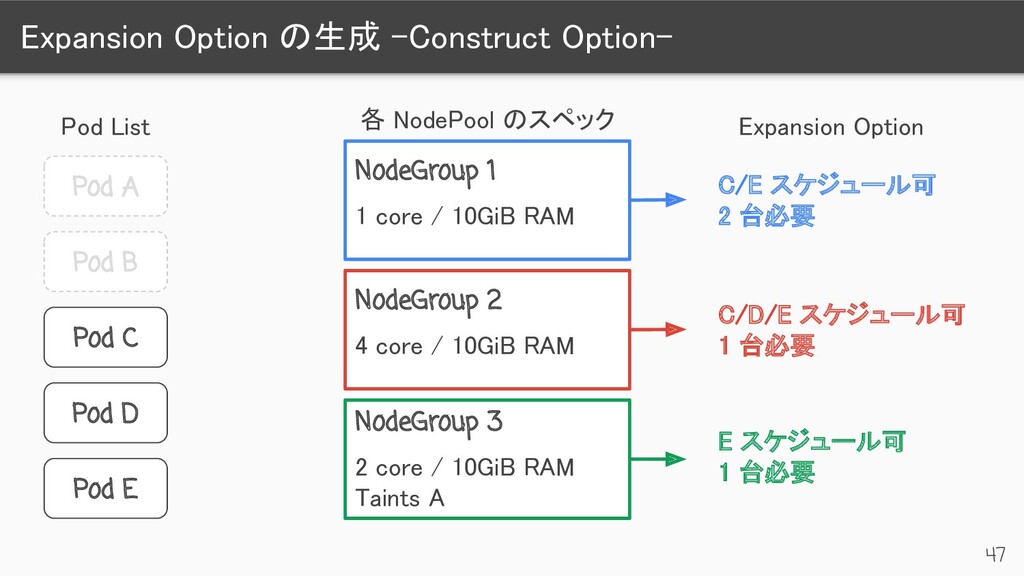
Expansion Option の生成 -Construct Option- 47 Pod A Pod B
Pod List Pod C Pod D Pod E NodeGroup 1 1 core / 10GiB RAM Expansion Option NodeGroup 2 4 core / 10GiB RAM NodeGroup 3 2 core / 10GiB RAM Taints A C/E スケジュール可 2 台必要 C/D/E スケジュール可 1 台必要 E スケジュール可 1 台必要 各 NodePool のスペック -
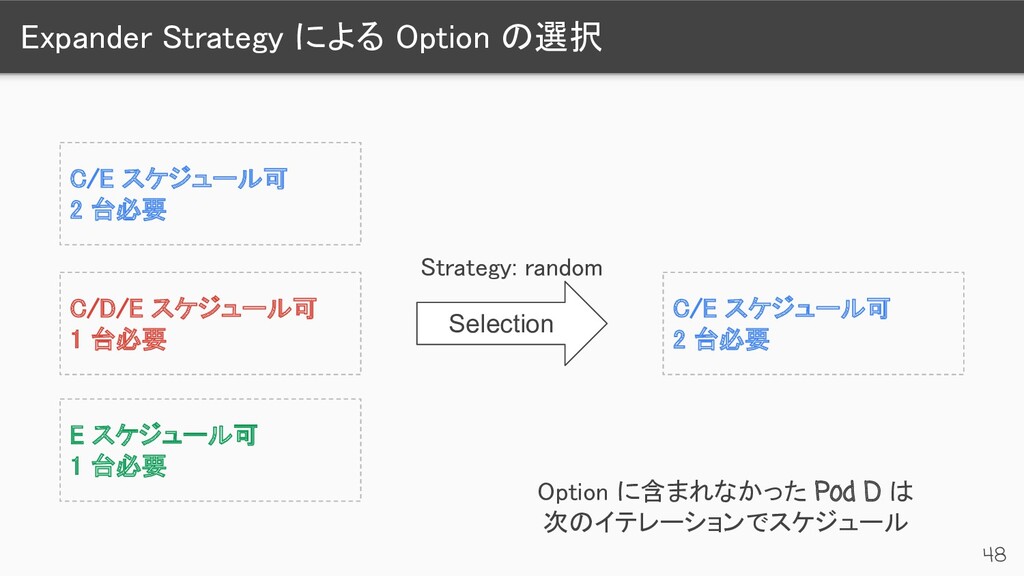
Expander Strategy による Option の選択 48 C/E スケジュール可 2 台必要
C/D/E スケジュール可 1 台必要 E スケジュール可 1 台必要 Selection C/E スケジュール可 2 台必要 Strategy: random Option に含まれなかった Pod D は 次のイテレーションでスケジュール -
Expander Strategy 49 • 選択された NodePool と類似するものと Balancing も可能 ◦
Core 数が同じか、Memory の差異が 128MiB 以内か、などをチェック ◦ --balance-similar-node-groups random 乱択 most-pods 配置できる Pod が最も多い least-waste Pod の Requests 量に最もフィットしている price コストが一番低い priority ユーザー定義の優先度 (NodeGroup 名で指定) -
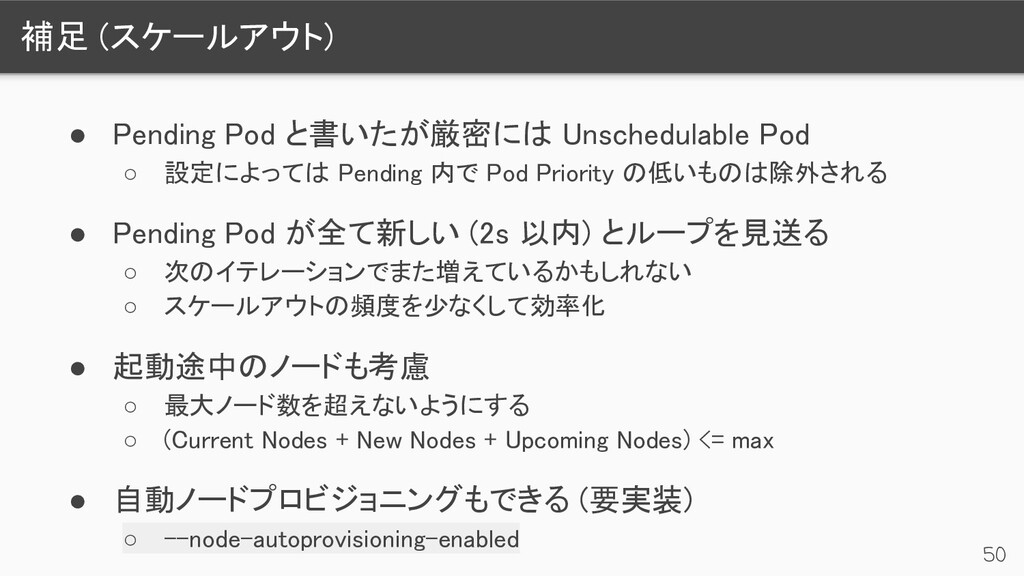
補足 (スケールアウト) 50 • Pending Pod と書いたが厳密には Unschedulable Pod ◦
設定によっては Pending 内で Pod Priority の低いものは除外される • Pending Pod が全て新しい (2s 以内) とループを見送る ◦ 次のイテレーションでまた増えているかもしれない ◦ スケールアウトの頻度を少なくして効率化 • 起動途中のノードも考慮 ◦ 最大ノード数を超えないようにする ◦ (Current Nodes + New Nodes + Upcoming Nodes) <= max • 自動ノードプロビジョニングもできる (要実装) ◦ --node-autoprovisioning-enabled -
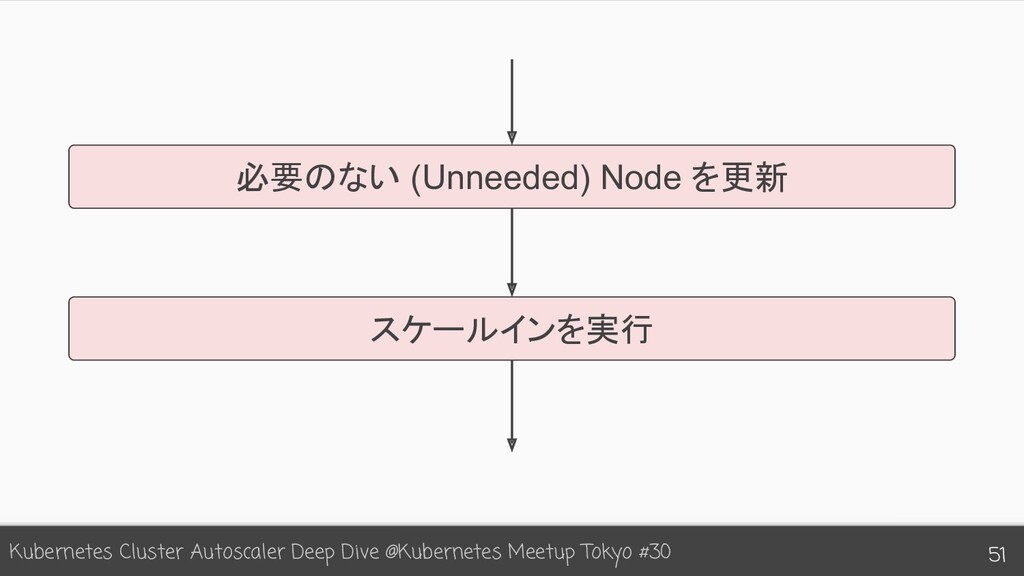
Kubernetes Cluster Autoscaler Deep Dive @Kubernetes Meetup Tokyo #30 51
必要のない (Unneeded) Node を更新 スケールインを実行 -
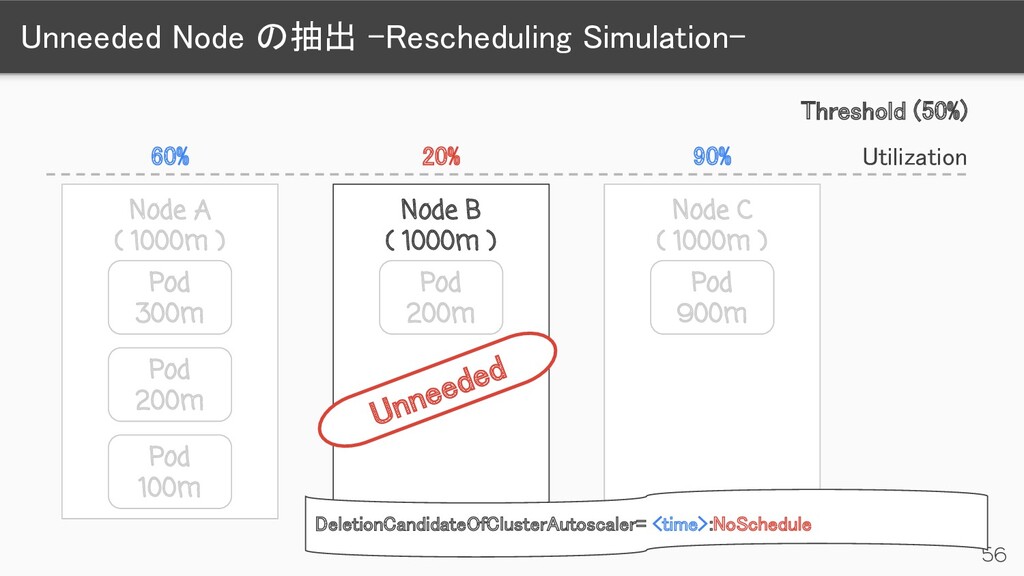
Unneeded Node の抽出 -Utilization Check- 52 Node A ( 1000m
) Pod 300m Pod 200m Pod 100m Node B ( 1000m ) Pod 200m Node C ( 1000m ) Pod 900m Utilization All Requests Allocatable -
Unneeded Node の抽出 -Utilization Check- 53 Node A ( 1000m
) Pod 300m Pod 200m Pod 100m Node B ( 1000m ) Pod 200m Node C ( 1000m ) Pod 900m 90% 20% 60% All Requests Allocatable Threshold (50%) Utilization -
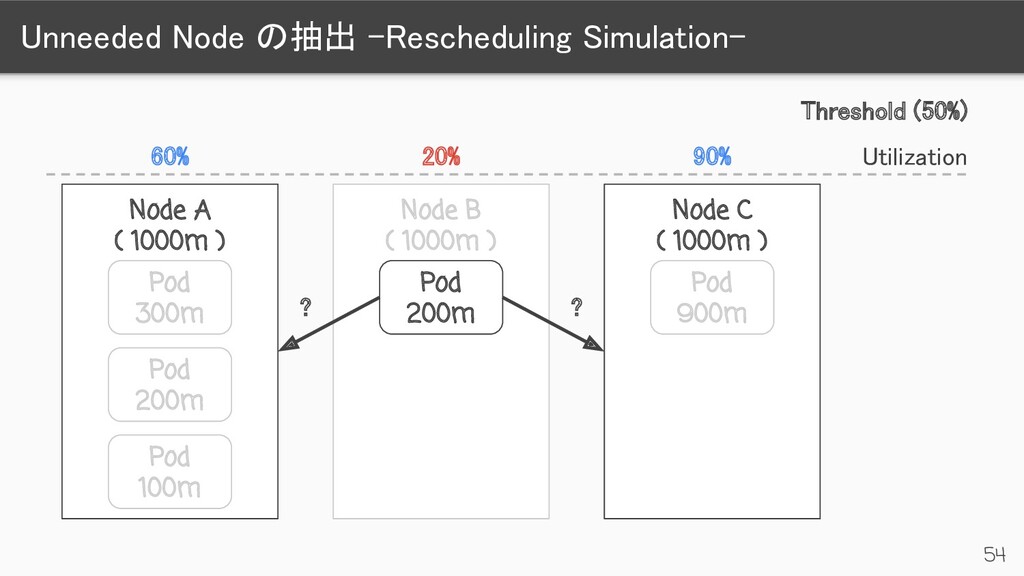
Unneeded Node の抽出 -Rescheduling Simulation- 54 Node A ( 1000m
) Pod 300m Pod 200m Pod 100m Node B ( 1000m ) Pod 200m Node C ( 1000m ) Pod 900m 90% 20% 60% Threshold (50%) Utilization ? ? -
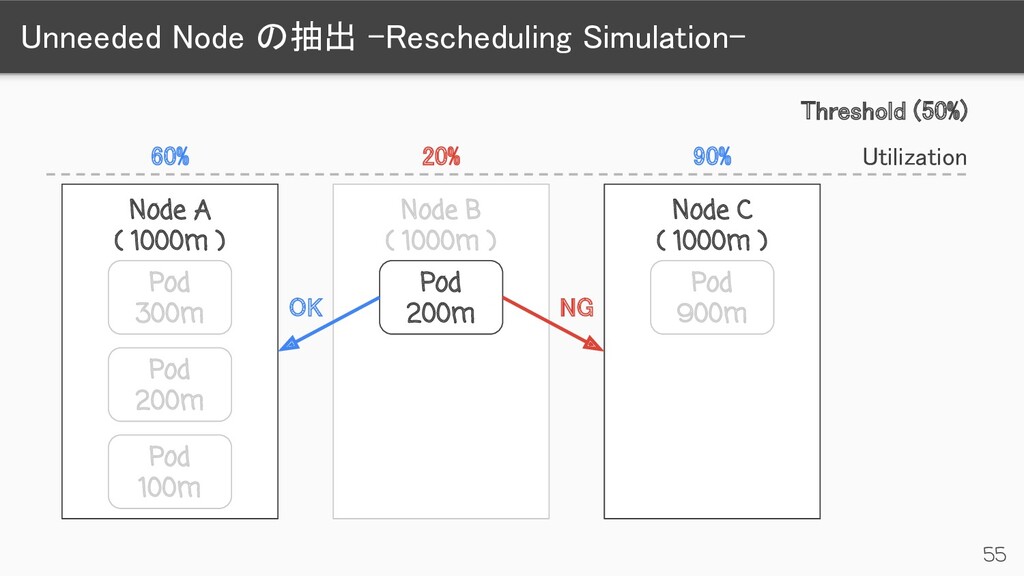
Unneeded Node の抽出 -Rescheduling Simulation- 55 Node A ( 1000m
) Pod 300m Pod 200m Pod 100m Node B ( 1000m ) Pod 200m Node C ( 1000m ) Pod 900m 90% 20% 60% Threshold (50%) Utilization OK NG -
Unneeded Node の抽出 -Rescheduling Simulation- 56 Node A ( 1000m
) Pod 300m Pod 200m Pod 100m Node B ( 1000m ) Pod 200m Node C ( 1000m ) Pod 900m 90% 20% 60% Threshold (50%) Utilization Unneeded DeletionCandidateOfClusterAutoscaler= <time>:NoSchedule -
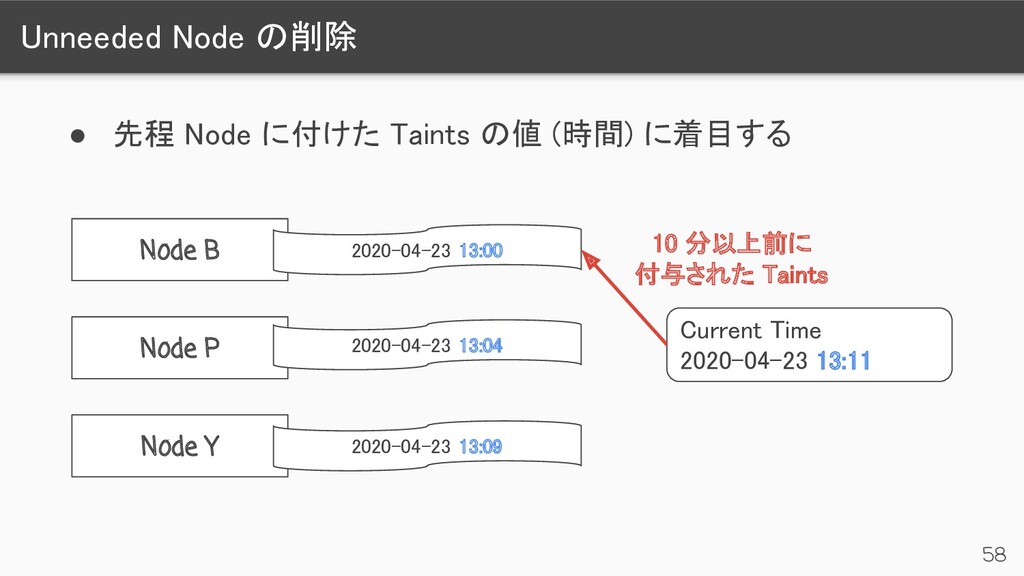
• 先程 Node に付けた Taints の値 (時間) に着目する Unneeded Node
の削除 57 Node B Node P Node Y 2020-04-23 13:00 2020-04-23 13:04 2020-04-23 13:09 Current Time 2020-04-23 13:10 -
• 先程 Node に付けた Taints の値 (時間) に着目する Unneeded Node
の削除 58 Node B Node P Node Y 2020-04-23 13:00 2020-04-23 13:04 2020-04-23 13:09 Current Time 2020-04-23 13:11 10 分以上前に 付与された Taints -
• 先程 Node に付けた Taints の値 (時間) に着目する Unneeded Node
の削除 59 Node B Node P Node Y 2020-04-23 13:00 2020-04-23 13:04 2020-04-23 13:09 Current Time 2020-04-23 13:11 Taints 付与 & Drain & 削除 ToBeDeletedByClusterAutoscaler=<time>: NoSchedule -
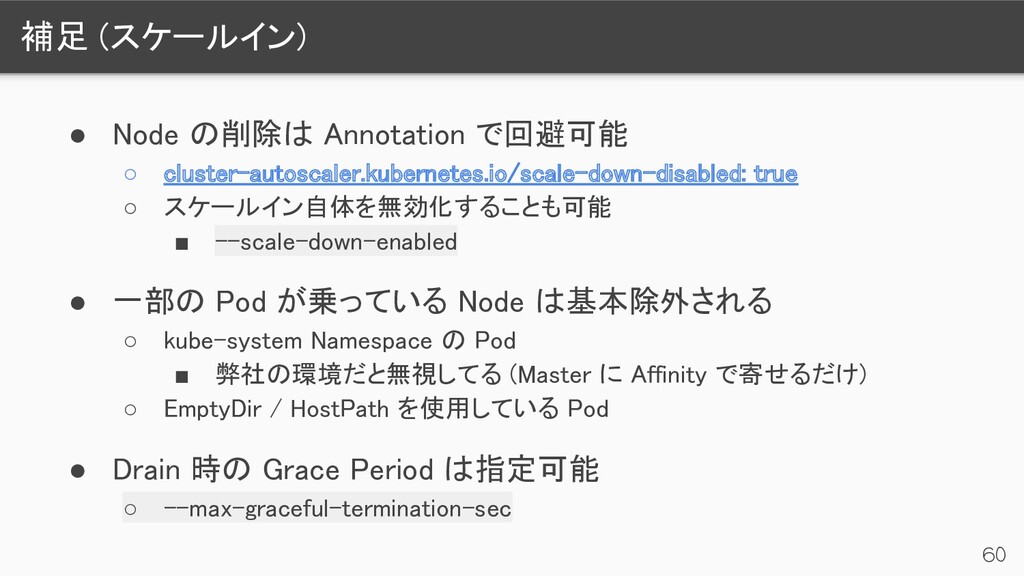
補足 (スケールイン) 60 • Node の削除は Annotation で回避可能 ◦ cluster-autoscaler.kubernetes.io/scale-down-disabled:
true ◦ スケールイン自体を無効化することも可能 ▪ --scale-down-enabled • 一部の Pod が乗っている Node は基本除外される ◦ kube-system Namespace の Pod ▪ 弊社の環境だと無視してる (Master に Affinity で寄せるだけ) ◦ EmptyDir / HostPath を使用している Pod • Drain 時の Grace Period は指定可能 ◦ --max-graceful-termination-sec -
Kubernetes Cluster Autoscaler Deep Dive @Kubernetes Meetup Tokyo #30 61
クラスタや Pod の情報を取得 スケジューリングできない (Unschedulable) Pod を取得 スケールアウトを実行 必要のない (Unneeded) Node を更新 cluster-autoscaler-status に情報を出力 スケールインを実行 10 秒 待機 -
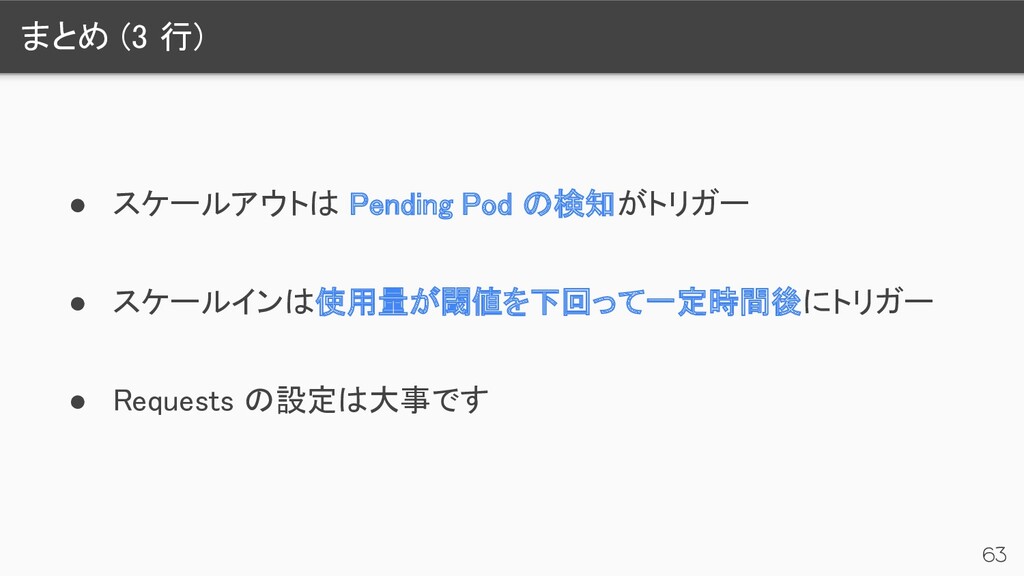
まとめ (3 行) 63 • スケールアウトは Pending Pod の検知がトリガー •
スケールインは使用量が閾値を下回って一定時間後にトリガー • Requests の設定は大事です
 zuiurs
 mineo_matsuya
 yuriemori
 inariku
 anatofuz
 yoshimura_datam
 chocoumai
 kaminashi
 arawn
 koji_kawamura
 10xinc
 suh1101
 tarappo
 jonrohan
 rasmusluckow
 ks91
 eileencodes
 aleyda
 frankvandijk
 mfonobong
 wayneb77
 shpigford
 signer
 addyosmani
 skoyamalab