Upgrade to Pro
— share decks privately, control downloads, hide ads and more …
Speaker Deck
Sign up for free
Menu
Search
Features
All features
Private URLs
Password Protection
Custom URLS
Scheduled publishing
Remove Branding
Restrict embedding
Deck Collections
Notes
Features
All features
Private URLs
Password Protection
Custom URLS
Scheduled publishing
Remove Branding
Restrict embedding
Deck Collections
Notes
Explore
Featured decks
Featured speakers
Programming
Technology
Storyboards
Explore
Featured decks
Featured speakers
Programming
Technology
Storyboards
Pricing
Search
Sign in
Sign up for free
プレイブックの検証環境をdocker-composeで作った話/playbook tes...
Search
Sponsored
·
SiteGround - Reliable hosting with speed, security, and support you can count on.
→
あんでぃー
February 12, 2020
Technology
920
5
Share
Embed
Copy iframe code
Copy JS code
Copy link
Start on current slide
プレイブックの検証環境をdocker-composeで作った話/playbook test environment by docker-compose
あんでぃー
February 12, 2020
More Decks by あんでぃー
See All by あんでぃー
AnsibleでVSCode拡張を管理しちゃおう!/why dont you manage vscode extension with Ansible?
answerd
2
820
なぜSIerは自動化するのか/Why do SIers automate?
answerd
0
200
Other Decks in Technology
See All in Technology
プロダクトが成長すると、 プロダクトマネージャーの仕事はどう変わるのか - 「まず作る」から「小さく学び、確かめながら進む」へ
sansantech
PRO
1
370
Teaching Python with three kinds of AI
reuven
0
120
スクラム祭り2026福井トラック_閉じたループから価値のスパイラルへ
kc_nakanishi
0
170
撮るだけでは終わらない。ソニーが挑むB2Bカメラソリューション開発
sony
0
110
dbt Semantic Layerで進めるenechainのデータ民主化
akizhou
1
270
正解のない研修に放り出されて / Being thrown into a training program with no right answers
ohnoeight
1
150
1週間、Opus封印でお願いします
kintotechdev
0
160
Draft AIエージェントの トークン消費を最小化する 8つの原則
kinopeee
5
1.7k
ビジネス部門からPOを迎えての半年間の進歩と課題
zozotech
PRO
0
140
Temporal 最高!でも改めて「日付」について調べたら人類の負債すぎる件
riyaamemiya
0
230
契約で守るコンパウンドプロダクトのデザインシステム
yug1224
1
1.4k
企画を Software Factory-ready にする——開発が高速になったとき、PdMの仕事はどう変わったか
yachibit
1
270
Featured
See All Featured
A Modern Web Designer's Workflow
chriscoyier
699
190k
Design in an AI World
tapps
1
360
The Cost Of JavaScript in 2023
addyosmani
55
10k
Jamie Indigo - Trashchat’s Guide to Black Boxes: Technical SEO Tactics for LLMs
techseoconnect
PRO
0
710
Skip the Path - Find Your Career Trail
mkilby
1
260
Chrome DevTools: State of the Union 2024 - Debugging React & Beyond
addyosmani
10
1.4k
The Anti-SEO Checklist Checklist. Pubcon Cyber Week
ryanjones
0
270
The Impact of AI in SEO - AI Overviews June 2024 Edition
aleyda
6
1.2k
Helping Users Find Their Own Way: Creating Modern Search Experiences
danielanewman
31
3.4k
Lightning talk: Run Django tests with GitHub Actions
sabderemane
0
300
Hiding What from Whom? A Critical Review of the History of Programming languages for Music
tomoyanonymous
3
1.4k
Visual Storytelling: How to be a Superhuman Communicator
reverentgeek
2
720
Transcript
ϓϨΠϒοΫͷݕূڥΛ docker-composeͰ࡞ͬͨ ͋ΜͰ͌ʔ @answer_d
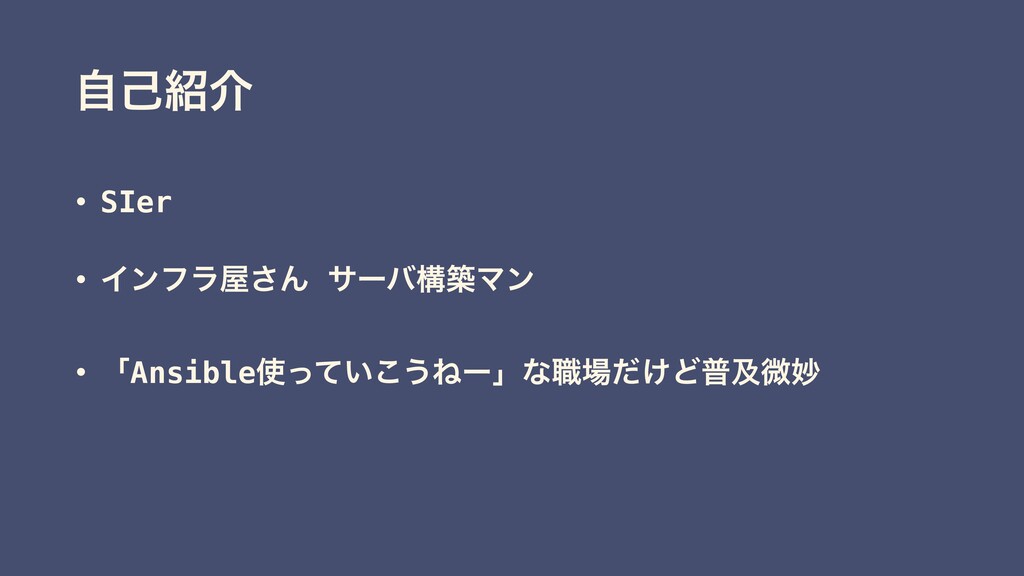
ࣗݾհ • SIer • Πϯϑϥ͞Μ αʔόߏஙϚϯ • ʮAnsible͍ͬͯ͜͏Ͷʔʯͳ৬͚ͩͲීٴඍົ
͋ΔͷͰ͖͝ͱ
͋ΜͰ͌ʔ͘ΜAnsible Ͱ͖ΔΜͩΑͶʁ ͪΐͬͱͬͯΑʂ ͔͜͠·Γ
։ൃڥʁ ͳ͍ΑɺඞཁͩͬͨΒԿ͔ߟ͑ͯ
ΦϯϓϨҊ݅͋Δ͋Δ(͔ʁ)
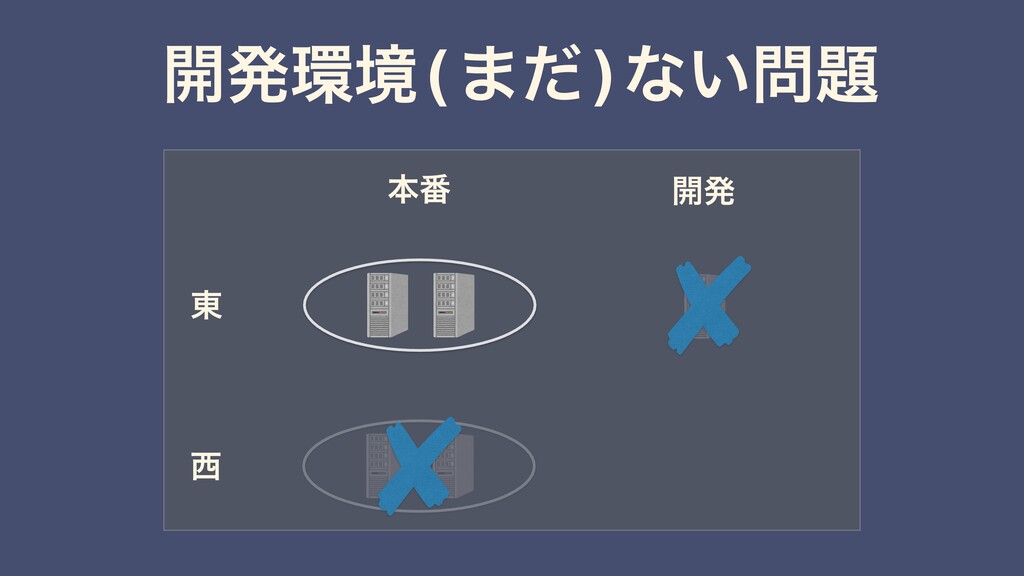
ຊ൪ ։ൃ ౦ ։ൃڥ(·ͩ)ͳ͍
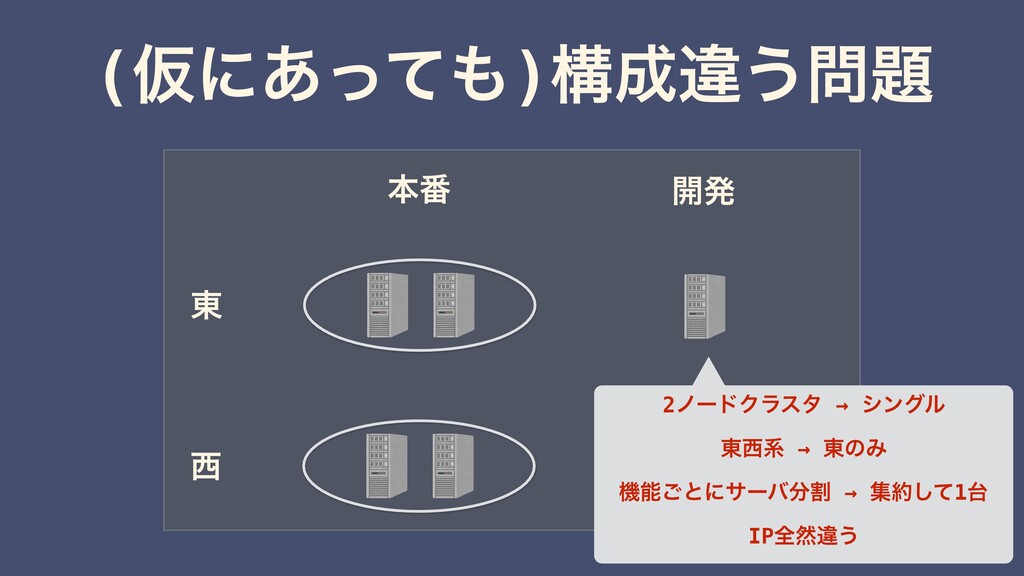
ຊ൪ ։ൃ ౦ (Ծʹ͋ͬͯ)ߏҧ͏ 2ϊʔυΫϥελ → γϯάϧ ౦ܥ →
౦ͷΈ ػೳ͝ͱʹαʔόׂ → ूͯ͠1 IPશવҧ͏
ϓϨΠϒοΫͷ࣭֬อ Ͳ͏͠Α͏ɾɾɾ
Ͱ͖Ε ຊ൪Ͱྲྀ͢ϓϨΠϒοΫΛ ͦͷ··ྲྀͯ͠ಈ࡞֬ೝ͍ͨ͠
DockerͰͰ͖ΔΜ͡ΌͶʁ
Γ·ͨ͠
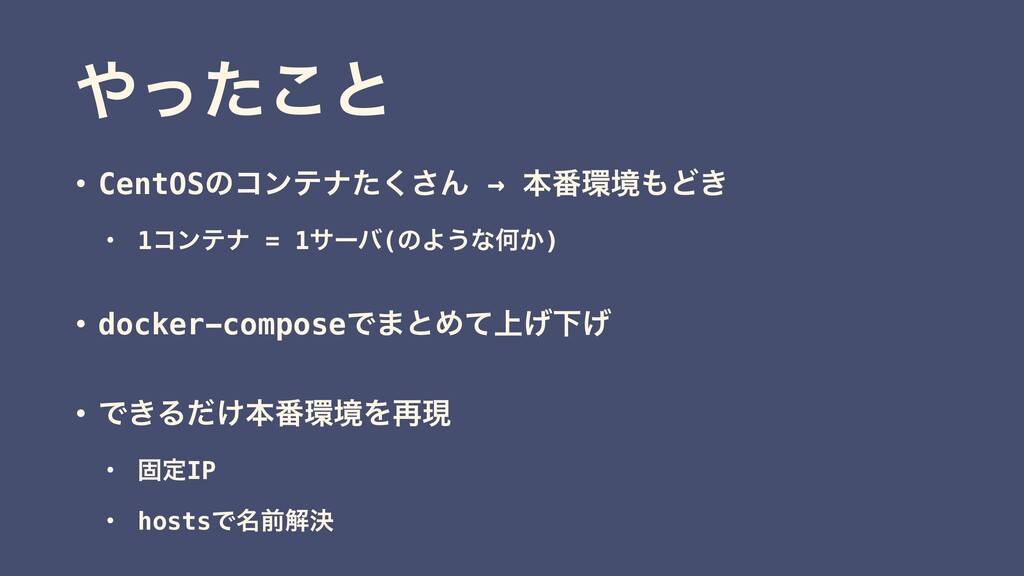
ͬͨ͜ͱ • CentOSͷίϯςφͨ͘͞Μ → ຊ൪ڥͲ͖ ɾ 1ίϯςφ = 1αʔό(ͷΑ͏ͳԿ͔) •
docker-composeͰ·ͱΊ্ͯ͛Լ͛ • Ͱ͖Δ͚ͩຊ൪ڥΛ࠶ݱ ɾ ݻఆIP ɾ hostsͰ໊લղܾ
͍ํΠϝʔδ
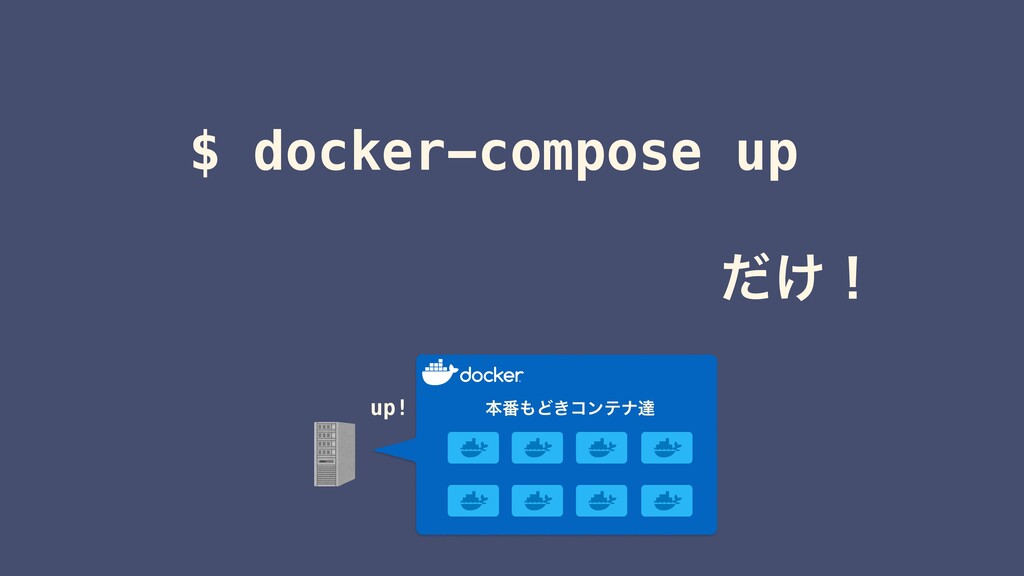
$ docker-compose up up! ͚ͩʂ ຊ൪Ͳ͖ίϯςφୡ
࡞ͬͨͭ
Dockerfile
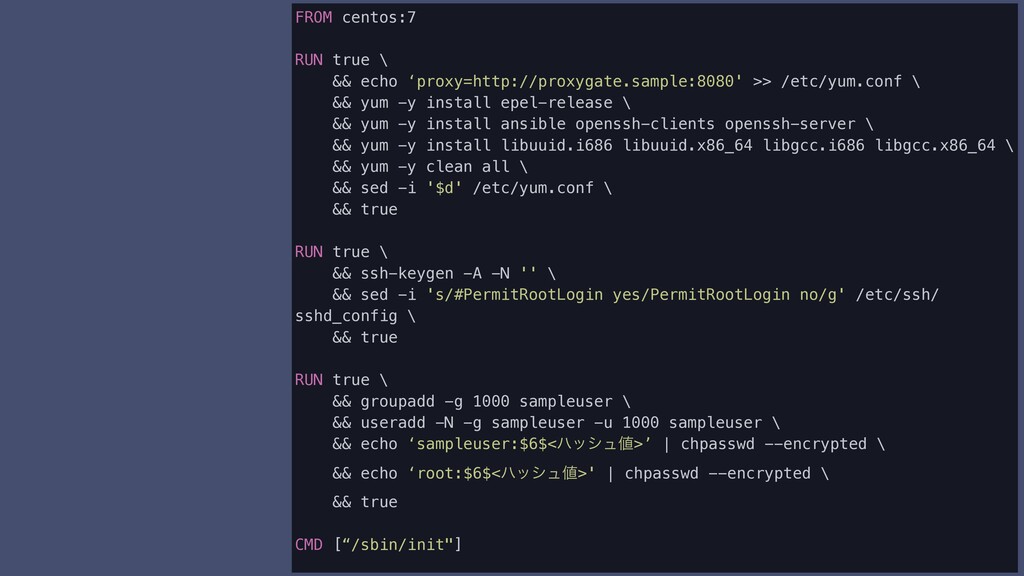
FROM centos:7 RUN true \ && echo ‘proxy=http://proxygate.sample:8080' >> /etc/yum.conf
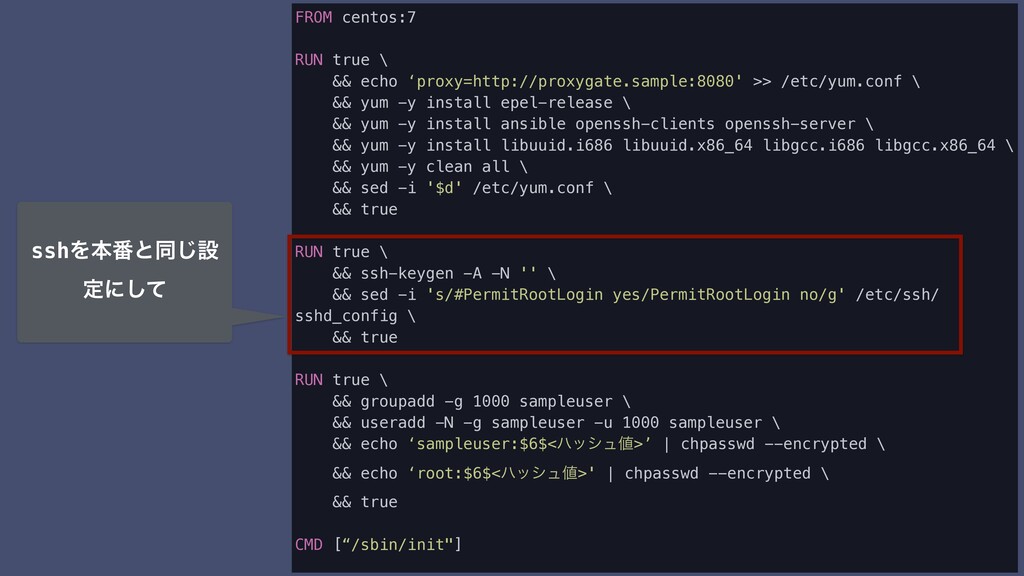
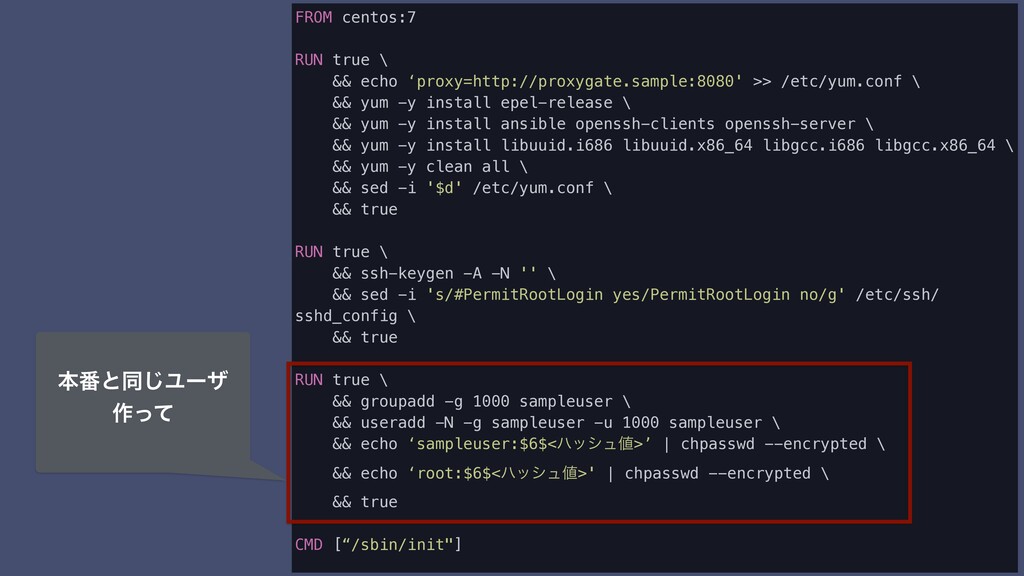
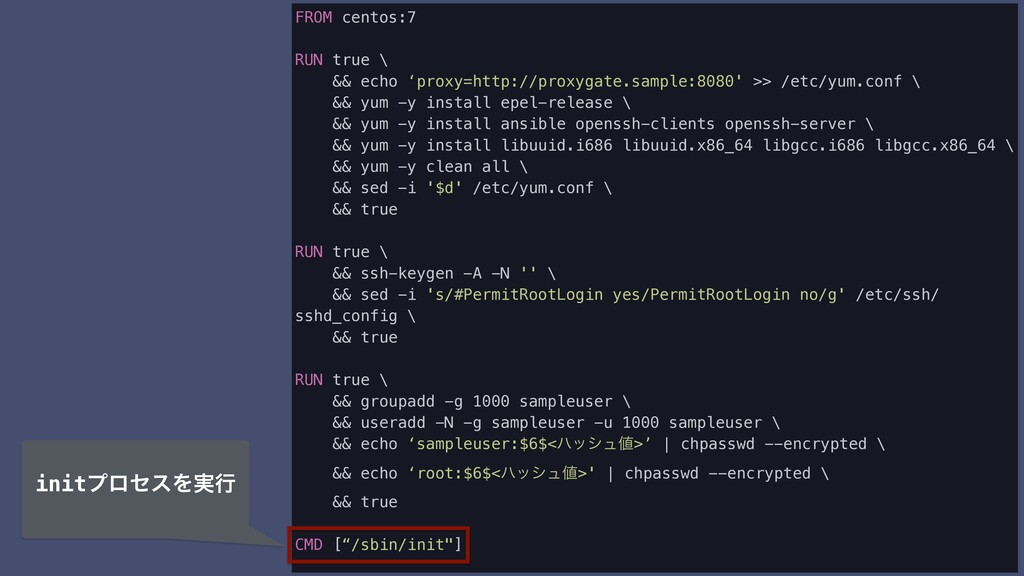
\ && yum -y install epel-release \ && yum -y install ansible openssh-clients openssh-server \ && yum -y install libuuid.i686 libuuid.x86_64 libgcc.i686 libgcc.x86_64 \ && yum -y clean all \ && sed -i '$d' /etc/yum.conf \ && true RUN true \ && ssh-keygen -A -N '' \ && sed -i 's/#PermitRootLogin yes/PermitRootLogin no/g' /etc/ssh/ sshd_config \ && true RUN true \ && groupadd -g 1000 sampleuser \ && useradd -N -g sampleuser -u 1000 sampleuser \ && echo ‘sampleuser:$6$<ϋογϡ>’ | chpasswd --encrypted \ && echo ‘root:$6$<ϋογϡ>' | chpasswd --encrypted \ && true CMD [“/sbin/init"]
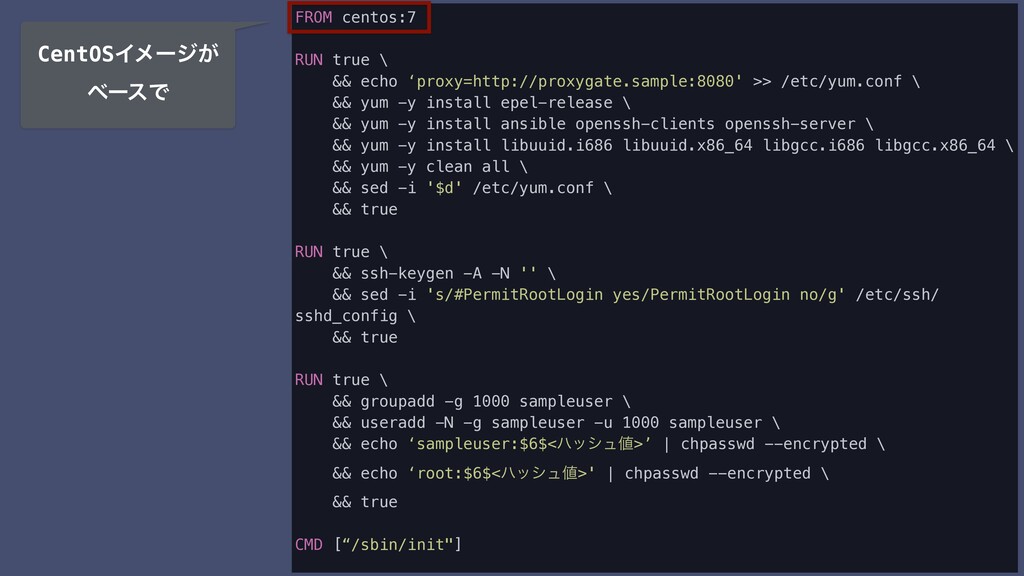
FROM centos:7 RUN true \ && echo ‘proxy=http://proxygate.sample:8080' >> /etc/yum.conf
\ && yum -y install epel-release \ && yum -y install ansible openssh-clients openssh-server \ && yum -y install libuuid.i686 libuuid.x86_64 libgcc.i686 libgcc.x86_64 \ && yum -y clean all \ && sed -i '$d' /etc/yum.conf \ && true RUN true \ && ssh-keygen -A -N '' \ && sed -i 's/#PermitRootLogin yes/PermitRootLogin no/g' /etc/ssh/ sshd_config \ && true RUN true \ && groupadd -g 1000 sampleuser \ && useradd -N -g sampleuser -u 1000 sampleuser \ && echo ‘sampleuser:$6$<ϋογϡ>’ | chpasswd --encrypted \ && echo ‘root:$6$<ϋογϡ>' | chpasswd --encrypted \ && true CMD [“/sbin/init"] CentOSΠϝʔδ͕ ϕʔεͰ
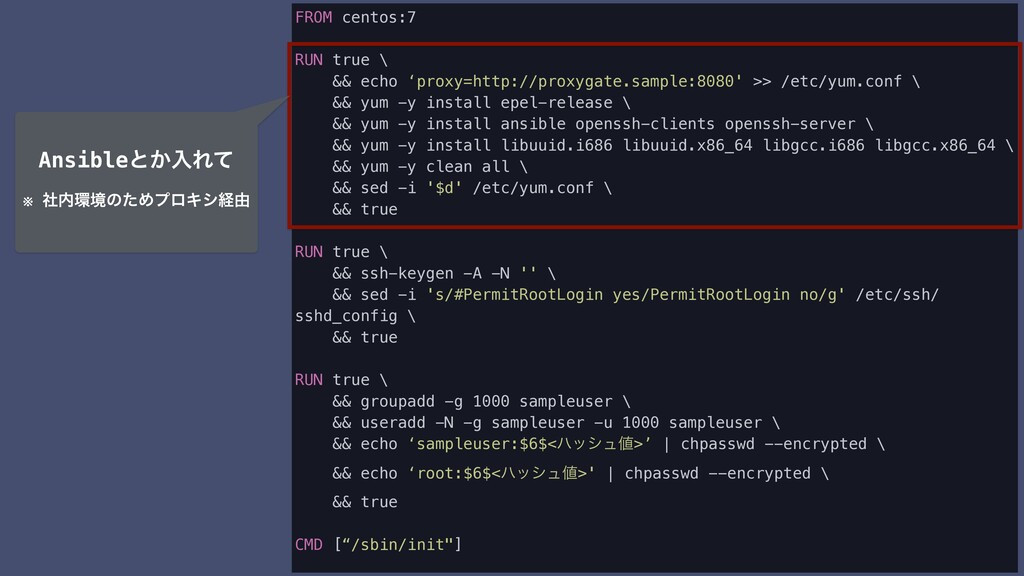
FROM centos:7 RUN true \ && echo ‘proxy=http://proxygate.sample:8080' >> /etc/yum.conf
\ && yum -y install epel-release \ && yum -y install ansible openssh-clients openssh-server \ && yum -y install libuuid.i686 libuuid.x86_64 libgcc.i686 libgcc.x86_64 \ && yum -y clean all \ && sed -i '$d' /etc/yum.conf \ && true RUN true \ && ssh-keygen -A -N '' \ && sed -i 's/#PermitRootLogin yes/PermitRootLogin no/g' /etc/ssh/ sshd_config \ && true RUN true \ && groupadd -g 1000 sampleuser \ && useradd -N -g sampleuser -u 1000 sampleuser \ && echo ‘sampleuser:$6$<ϋογϡ>’ | chpasswd --encrypted \ && echo ‘root:$6$<ϋογϡ>' | chpasswd --encrypted \ && true CMD [“/sbin/init"] Ansibleͱ͔ೖΕͯ ※ ࣾڥͷͨΊϓϩΩγܦ༝
FROM centos:7 RUN true \ && echo ‘proxy=http://proxygate.sample:8080' >> /etc/yum.conf
\ && yum -y install epel-release \ && yum -y install ansible openssh-clients openssh-server \ && yum -y install libuuid.i686 libuuid.x86_64 libgcc.i686 libgcc.x86_64 \ && yum -y clean all \ && sed -i '$d' /etc/yum.conf \ && true RUN true \ && ssh-keygen -A -N '' \ && sed -i 's/#PermitRootLogin yes/PermitRootLogin no/g' /etc/ssh/ sshd_config \ && true RUN true \ && groupadd -g 1000 sampleuser \ && useradd -N -g sampleuser -u 1000 sampleuser \ && echo ‘sampleuser:$6$<ϋογϡ>’ | chpasswd --encrypted \ && echo ‘root:$6$<ϋογϡ>' | chpasswd --encrypted \ && true CMD [“/sbin/init"] sshΛຊ൪ͱಉ͡ઃ ఆʹͯ͠
FROM centos:7 RUN true \ && echo ‘proxy=http://proxygate.sample:8080' >> /etc/yum.conf
\ && yum -y install epel-release \ && yum -y install ansible openssh-clients openssh-server \ && yum -y install libuuid.i686 libuuid.x86_64 libgcc.i686 libgcc.x86_64 \ && yum -y clean all \ && sed -i '$d' /etc/yum.conf \ && true RUN true \ && ssh-keygen -A -N '' \ && sed -i 's/#PermitRootLogin yes/PermitRootLogin no/g' /etc/ssh/ sshd_config \ && true RUN true \ && groupadd -g 1000 sampleuser \ && useradd -N -g sampleuser -u 1000 sampleuser \ && echo ‘sampleuser:$6$<ϋογϡ>’ | chpasswd --encrypted \ && echo ‘root:$6$<ϋογϡ>' | chpasswd --encrypted \ && true CMD [“/sbin/init"] ຊ൪ͱಉ͡Ϣʔβ ࡞ͬͯ
FROM centos:7 RUN true \ && echo ‘proxy=http://proxygate.sample:8080' >> /etc/yum.conf
\ && yum -y install epel-release \ && yum -y install ansible openssh-clients openssh-server \ && yum -y install libuuid.i686 libuuid.x86_64 libgcc.i686 libgcc.x86_64 \ && yum -y clean all \ && sed -i '$d' /etc/yum.conf \ && true RUN true \ && ssh-keygen -A -N '' \ && sed -i 's/#PermitRootLogin yes/PermitRootLogin no/g' /etc/ssh/ sshd_config \ && true RUN true \ && groupadd -g 1000 sampleuser \ && useradd -N -g sampleuser -u 1000 sampleuser \ && echo ‘sampleuser:$6$<ϋογϡ>’ | chpasswd --encrypted \ && echo ‘root:$6$<ϋογϡ>' | chpasswd --encrypted \ && true CMD [“/sbin/init"] initϓϩηεΛ࣮ߦ
docker-compose.yml
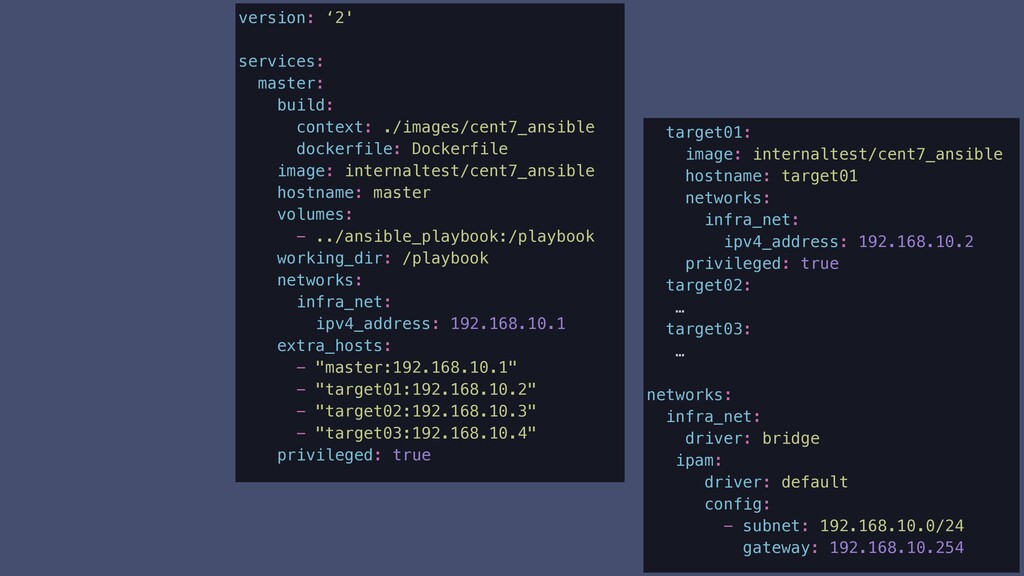
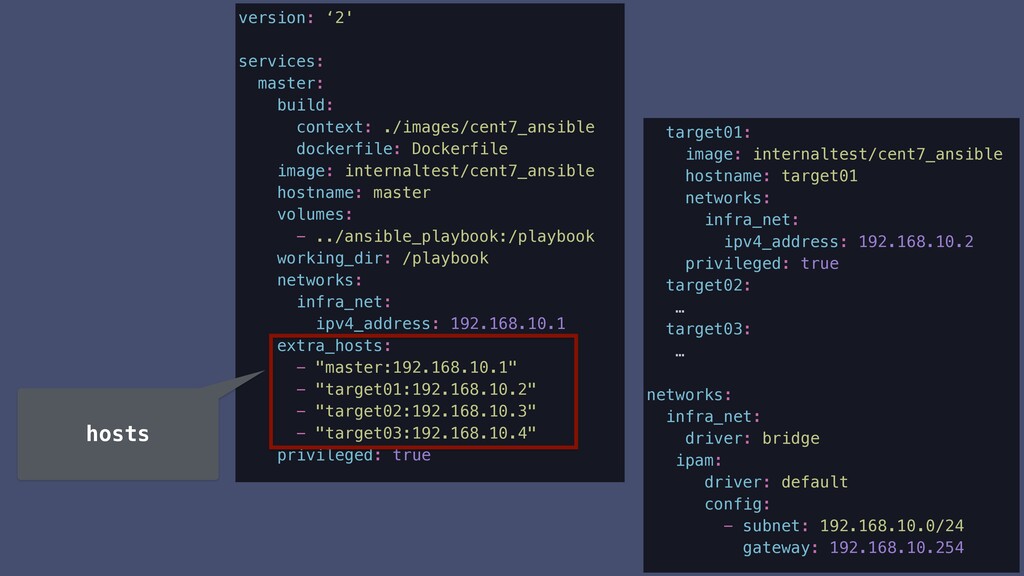
version: ‘2' services: master: build: context: ./images/cent7_ansible dockerfile: Dockerfile image:
internaltest/cent7_ansible hostname: master volumes: - ../ansible_playbook:/playbook working_dir: /playbook networks: infra_net: ipv4_address: 192.168.10.1 extra_hosts: - "master:192.168.10.1" - "target01:192.168.10.2" - "target02:192.168.10.3" - "target03:192.168.10.4" privileged: true target01: image: internaltest/cent7_ansible hostname: target01 networks: infra_net: ipv4_address: 192.168.10.2 privileged: true target02: … target03: … networks: infra_net: driver: bridge ipam: driver: default config: - subnet: 192.168.10.0/24 gateway: 192.168.10.254
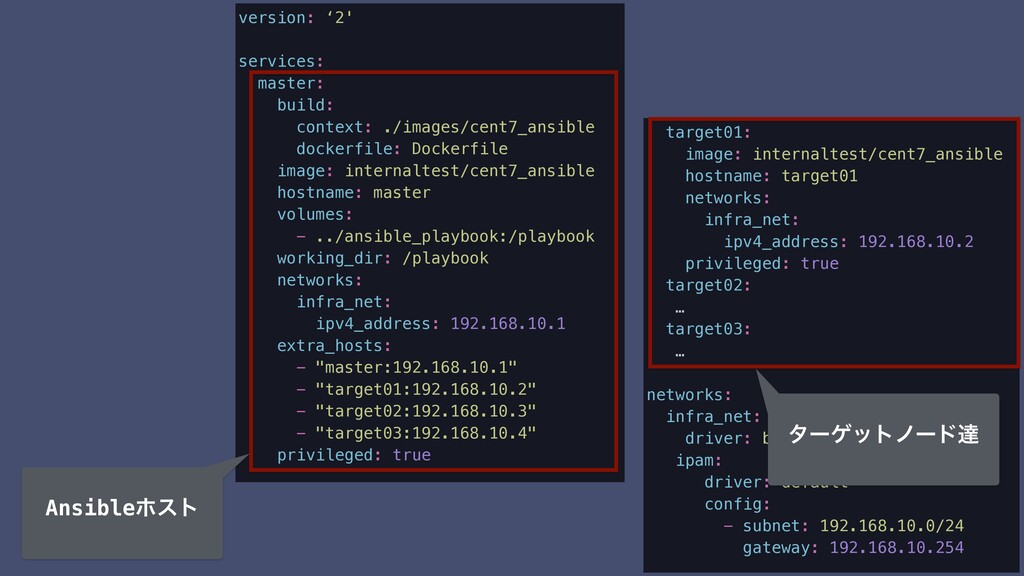
target01: image: internaltest/cent7_ansible hostname: target01 networks: infra_net: ipv4_address: 192.168.10.2 privileged:
true target02: … target03: … networks: infra_net: driver: bridge ipam: driver: default config: - subnet: 192.168.10.0/24 gateway: 192.168.10.254 version: ‘2' services: master: build: context: ./images/cent7_ansible dockerfile: Dockerfile image: internaltest/cent7_ansible hostname: master volumes: - ../ansible_playbook:/playbook working_dir: /playbook networks: infra_net: ipv4_address: 192.168.10.1 extra_hosts: - "master:192.168.10.1" - "target01:192.168.10.2" - "target02:192.168.10.3" - "target03:192.168.10.4" privileged: true Ansibleϗετ λʔήοτϊʔυୡ
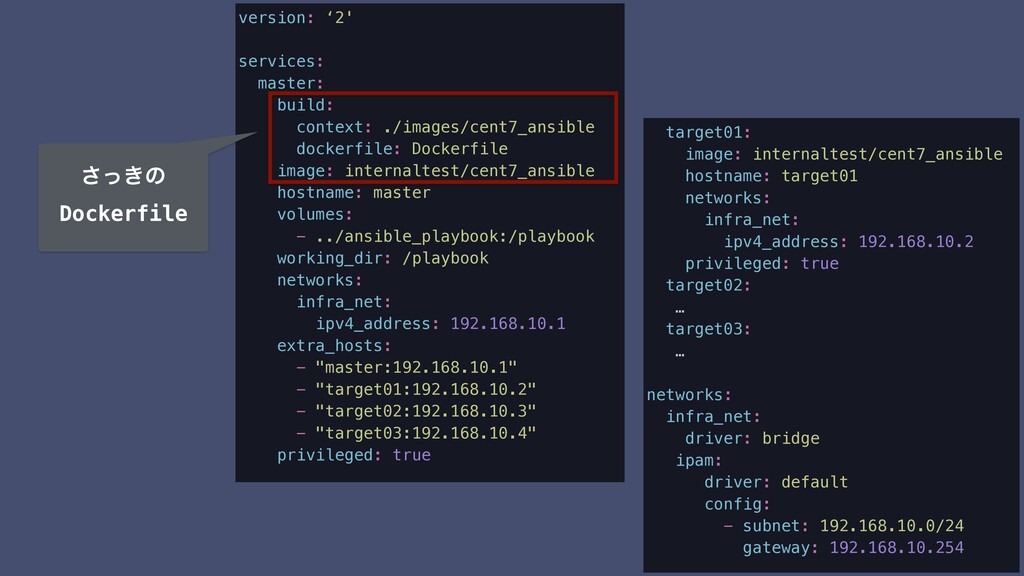
version: ‘2' services: master: build: context: ./images/cent7_ansible dockerfile: Dockerfile image:
internaltest/cent7_ansible hostname: master volumes: - ../ansible_playbook:/playbook working_dir: /playbook networks: infra_net: ipv4_address: 192.168.10.1 extra_hosts: - "master:192.168.10.1" - "target01:192.168.10.2" - "target02:192.168.10.3" - "target03:192.168.10.4" privileged: true ͖ͬ͞ͷ Dockerfile target01: image: internaltest/cent7_ansible hostname: target01 networks: infra_net: ipv4_address: 192.168.10.2 privileged: true target02: … target03: … networks: infra_net: driver: bridge ipam: driver: default config: - subnet: 192.168.10.0/24 gateway: 192.168.10.254
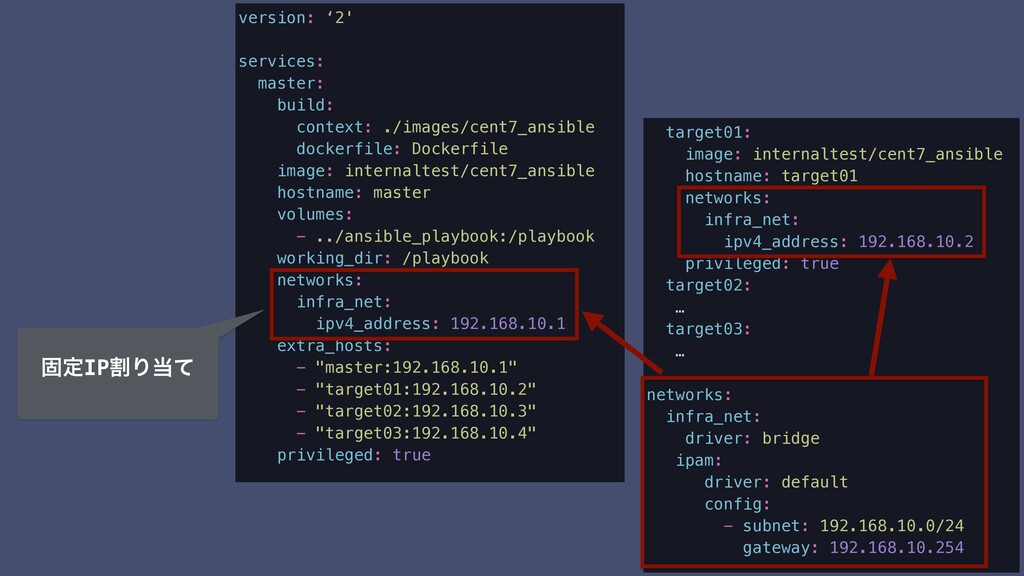
version: ‘2' services: master: build: context: ./images/cent7_ansible dockerfile: Dockerfile image:
internaltest/cent7_ansible hostname: master volumes: - ../ansible_playbook:/playbook working_dir: /playbook networks: infra_net: ipv4_address: 192.168.10.1 extra_hosts: - "master:192.168.10.1" - "target01:192.168.10.2" - "target02:192.168.10.3" - "target03:192.168.10.4" privileged: true target01: image: internaltest/cent7_ansible hostname: target01 networks: infra_net: ipv4_address: 192.168.10.2 privileged: true target02: … target03: … networks: infra_net: driver: bridge ipam: driver: default config: - subnet: 192.168.10.0/24 gateway: 192.168.10.254 ݻఆIPׂΓͯ
version: ‘2' services: master: build: context: ./images/cent7_ansible dockerfile: Dockerfile image:
internaltest/cent7_ansible hostname: master volumes: - ../ansible_playbook:/playbook working_dir: /playbook networks: infra_net: ipv4_address: 192.168.10.1 extra_hosts: - "master:192.168.10.1" - "target01:192.168.10.2" - "target02:192.168.10.3" - "target03:192.168.10.4" privileged: true hosts target01: image: internaltest/cent7_ansible hostname: target01 networks: infra_net: ipv4_address: 192.168.10.2 privileged: true target02: … target03: … networks: infra_net: driver: bridge ipam: driver: default config: - subnet: 192.168.10.0/24 gateway: 192.168.10.254
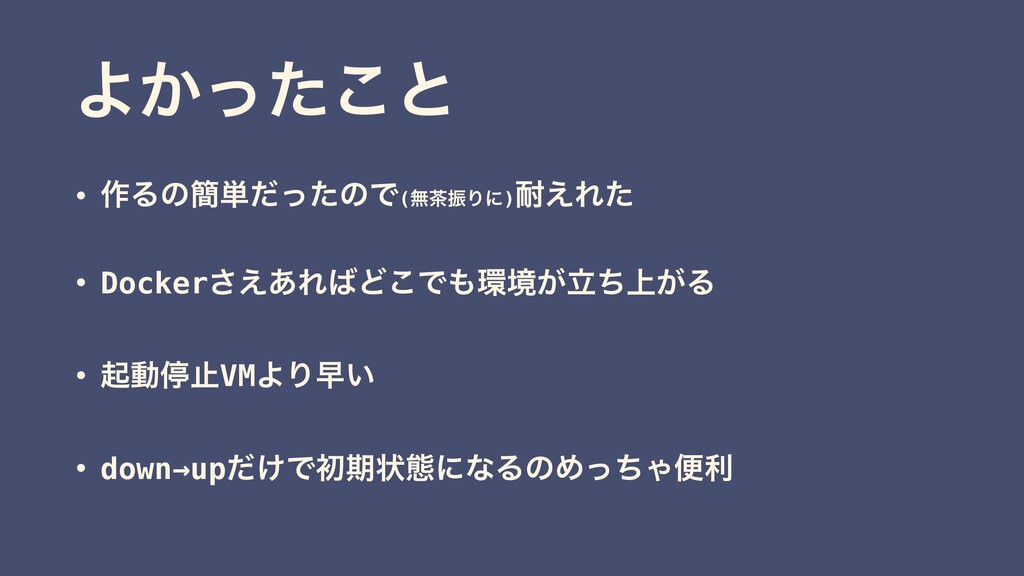
Α͔ͬͨ͜ͱ • ࡞Δͷ؆୯ͩͬͨͷͰ(ແৼΓʹ) ͑Εͨ • Docker͑͋͞ΕͲ͜Ͱڥ্ཱ͕͕ͪΔ • ىಈఀࢭVMΑΓૣ͍ • down→up͚ͩͰॳظঢ়ଶʹͳΔͷΊͬͪΌศར
·ͱΊ
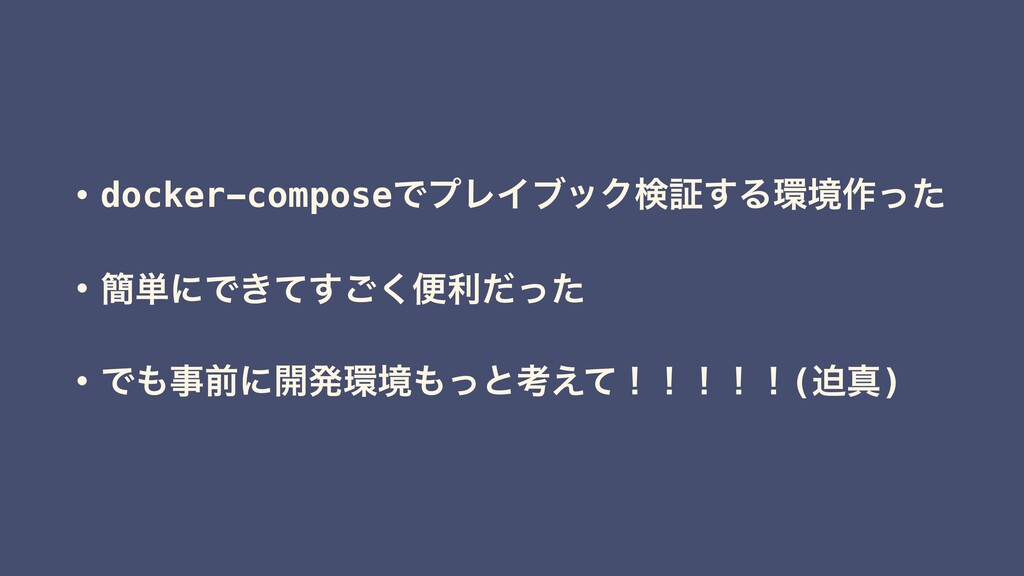
• docker-composeͰϓϨΠϒοΫݕূ͢Δڥ࡞ͬͨ • ؆୯ʹͰ͖ͯ͘͢͝ศརͩͬͨ • Ͱࣄલʹ։ൃڥͬͱߟ͑ͯʂʂʂʂʂ(ഭਅ)
͝ਗ਼ௌ͋Γ͕ͱ͏͍͟͝·ͨ͠ʂ

 SiteGround - Reliable hosting with speed, security, and support you can count on.


 answerd
 sansantech
 reuven
 kc_nakanishi
 sony
sony
 akizhou
 ohnoeight
 kintotechdev
 kinopeee
 zozotech
 riyaamemiya
 yug1224
 yachibit
 chriscoyier
 tapps
tapps
 addyosmani
 techseoconnect
 mkilby
 ryanjones
 aleyda
 danielanewman
 sabderemane
 tomoyanonymous
 reverentgeek