Share
Embed
Twitter Ads API #TechTalk (NYC)
Twitter Ads API on-boarding workshop for the Ruby SDK.
https://dev.twitter.com/ads
http://twitterdev.github.io/twitter-ruby-ads-sdk/
http://bit.ly/ads-api-techtalk-ruby
https://github.com/brandonblack/presentations
Brandon Black
October 14, 2015
Transcript
31 slides
-
A D S A P I # T E C
H TA L K -
PA R T N E R E N G I
N E E R I N G @hwz @jaakkosf @brandonmblack -
W H AT W E D O API DESIGN Implementation
review for all API features. TECHNICAL COMMS Newsletters and all technical communications. COMMUNITY & PARTNER SUPPORT Forums, inquiries and office hours events. DOCS, CODE SAMPLES AND SDKs Guides, tutorials, examples. INTEGRATION On-boarding and consulting. PRODUCT FEEDBACK Internal advocacy and product feedback. -
Help? Join the conversation in the Twitter Community forums Follow
@AdsAPI for platform updates -
W H AT W E D O API DESIGN Implementation
review for all API features. TECHNICAL COMMS Newsletters and all technical communications. COMMUNITY & PARTNER SUPPORT Forums, inquiries and office hours events. DOCS, CODE SAMPLES AND SDKs Guides, tutorials, examples. INTEGRATION On-boarding and consulting. PRODUCT FEEDBACK Internal advocacy and product feedback. G E T T I N G S TA R T E D -
</> SETUP PRE-REQUISITES $ ruby -v ruby 2.0.0p643 (2015-02-25 revision
49749) [x86_64-darwin14.1.0] RUBY VERSION $ gem install pry jsonpretty twurl INSTALLING TOOLS & DEPENDENCIES Note: Depending on how your Ruby installation is setup, you may need to run the above “gem install” commands with “sudo”. -
AUTHORIZATION The Ads API uses OAuth 1.0a for authorization and
implements the 3-legged OAuth flow. OAUTH 1.0A More info at: https://dev.twitter.com/oauth -
AUTHORIZATION API key and secret are available under the “Keys
and Access Tokens” tab. Your consumer key is a publicly visible identifier for your app. You should never share your consumer secret. CONSUMER KEY & SECRET -
</> SETUP PRE-REQUISITES $ twurl authorize --consumer-key key --consumer-secret secret
AUTHORIZATION $ cat ~/.twurlrc VALIDATE SETUP $ twurl -H ads-api-sandbox.twitter.com "/0/accounts" | jsonpretty TRY IT OUT -
C O N F I D E N T I
A L PER MINS / ENDPOINT 25 REQUESTS READS PER MIN / CATEGORY 100 REQUESTS WRITES D E V E LO P E R R AT E L I M I TS More info at: https://dev.twitter.com/ads/basics/rate-limiting -
W H AT W E D O API DESIGN Implementation
review for all API features. TECHNICAL COMMS Newsletters and all technical communications. COMMUNITY & PARTNER SUPPORT Forums, inquiries and office hours events. DOCS, CODE SAMPLES AND SDKs Guides, tutorials, examples. INTEGRATION On-boarding and consulting. PRODUCT FEEDBACK Internal advocacy and product feedback. W O R K S H O P -
WHAT WE’LL LEARN TODAY CREATIVE 1 CAMPAIGN SETUP 2 TARGETING
3 MEASUREMENT 4 -
</> SETUP RUBY SDK $ gem install twitter-ads INSTALLING THE
RUBY SDK $ twitter-ads START AN INTERACTIVE SESSION Note: Depending on how your Ruby installation is setup, you may need to run the above “gem install” commands with “sudo”. -
</> CLIENT RUBY SDK require 'twitter-ads' # enable sandbox mode
CLIENT.options[:sandbox] = true # load up the account instance account = CLIENT.accounts.first -
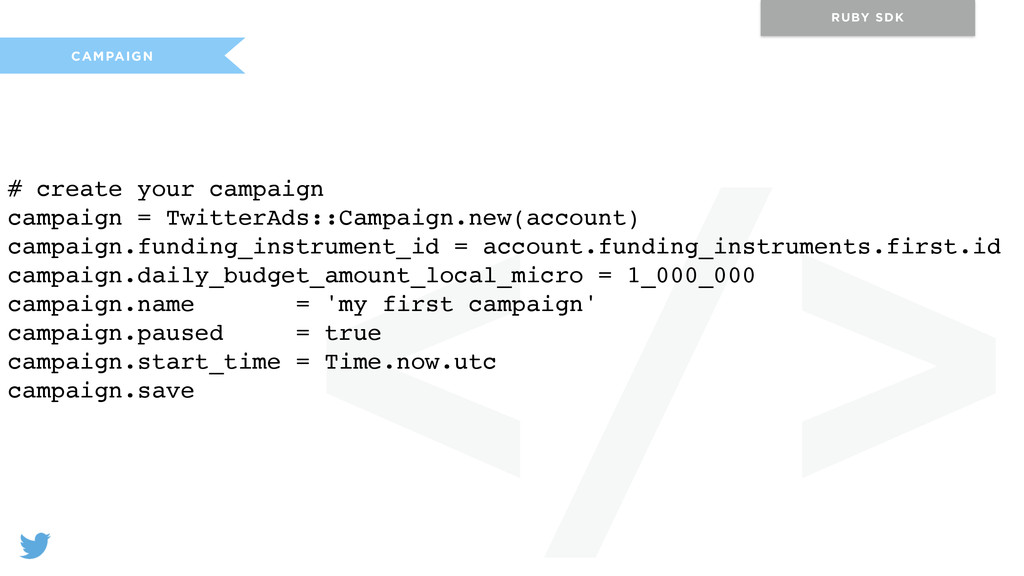
</> CAMPAIGN RUBY SDK # create your campaign campaign =
TwitterAds::Campaign.new(account) campaign.funding_instrument_id = account.funding_instruments.first.id campaign.daily_budget_amount_local_micro = 1_000_000 campaign.name = 'my first campaign' campaign.paused = true campaign.start_time = Time.now.utc campaign.save -
</> LINE ITEM RUBY SDK # create a line item
for the campaign line_item = TwitterAds::LineItem.new(account) line_item.campaign_id = campaign.id line_item.name = 'my first ad' line_item.product_type = TwitterAds::Product::PROMOTED_TWEETS line_item.placements = [TwitterAds::Placement::ALL_ON_TWITTER] line_item.objective = TwitterAds::Objective::TWEET_ENGAGEMENTS line_item.bid_amount_local_micro = 10_000 line_item.paused = true line_item.save -
</> PROMOTED TWEET RUBY SDK # resource url for tweet
creation resource = "/0/accounts/#{account.id}/tweet" # create request for a simple null-casted tweet tweet_params = { status: ‘Hello @AdsAPI!’ } request = TwitterAds::Request.new(CLIENT, :post, resource, params: tweet_params) tweet = request.perform # promote the tweet using our line item promoted_tweet = TwitterAds::Creative::PromotedTweet.new(account) promoted_tweet.line_item_id = line_item.id promoted_tweet.tweet_id = tweet.body[:data][:id] promoted_tweet.save -
</> PROMOTED TWEET (CARD) RUBY SDK # create request for
a null-casted tweet with a website card website_card = TwitterAds::Creative::WebsiteCard.all(account).first tweet_params = { status: “Hello @AdsAPI #{website_card.preview_url}" } request = TwitterAds::Request.new(client, :post, resource, params: tweet_params) tweet = request.perform -
</> TARGETING RUBY SDK # fetching targeting criteria values resource
= '/0/targeting_criteria/locations' params = { location_type: 'CITY', q: 'port' } request = TwitterAds::Request.new(CLIENT, :get, resource, params: params) cursor = TwitterAds::Cursor.new(nil, request) # add targeting criteria targeting_criteria = TwitterAds::TargetingCriteria.new(account) targeting_criteria.line_item_id = line_item.id targeting_criteria.targeting_type = 'LOCATION' targeting_criteria.targeting_value = '00a8b25e420adc94' targeting_criteria.save -
</> ANALYTICS RUBY SDK # limit request count and grab
the first 10 line items from TwitterAds::Cursor line_items = account.line_items(nil, count: 10)[0..9] # the list of metrics we want to fetch metrics = [:billed_engagements, :billed_follows] # fetching stats on the instance line_items.first.stats(metrics) # fetching stats for multiple line items ids = line_items.map(&:id) TwitterAds::LineItem.stats(account, ids, metrics)