and understanding through thought, experience, and the senses." It encompasses processes such as knowledge, attention, memory and working memory, judgment and evaluation, reasoning and "computation", problem solving and decision making, comprehension and production of language. Source: https://en.wikipedia.org/wiki/Cognition
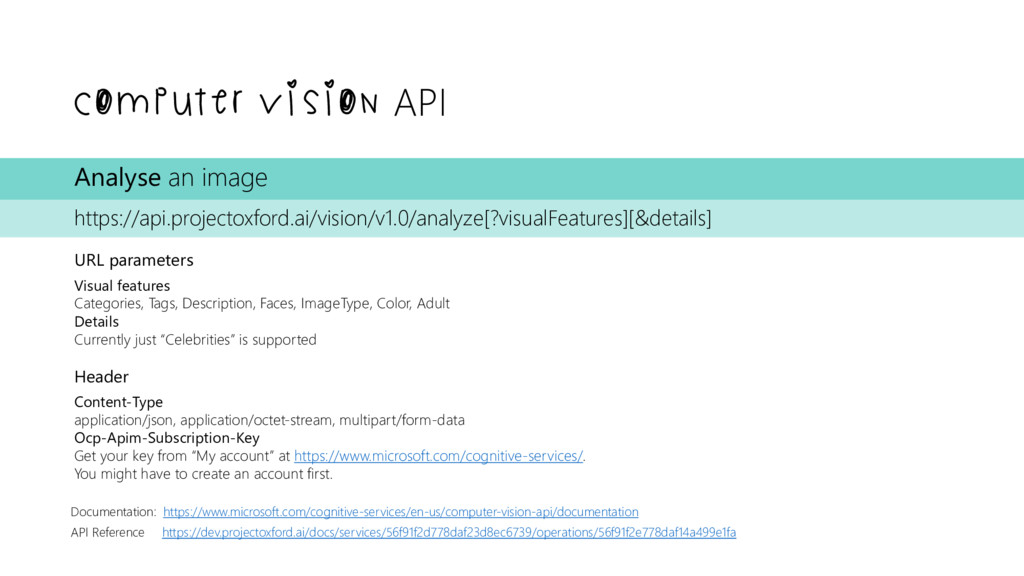
image https://api.projectoxford.ai/vision/v1.0/analyze[?visualFeatures][&details] URL parameters Visual features Categories, Tags, Description, Faces, ImageType, Color, Adult Details Currently just “Celebrities” is supported Header Content-Type application/json, application/octet-stream, multipart/form-data Ocp-Apim-Subscription-Key Get your key from “My account” at https://www.microsoft.com/cognitive-services/. You might have to create an account first.
https://api.projectoxford.ai/emotion/v1.0/recognize Header Content-Type application/json, application/octet-stream, multipart/form-data Ocp-Apim-Subscription-Key Get your key from “My account” at https://www.microsoft.com/cognitive-services/. You might have to create an account first.
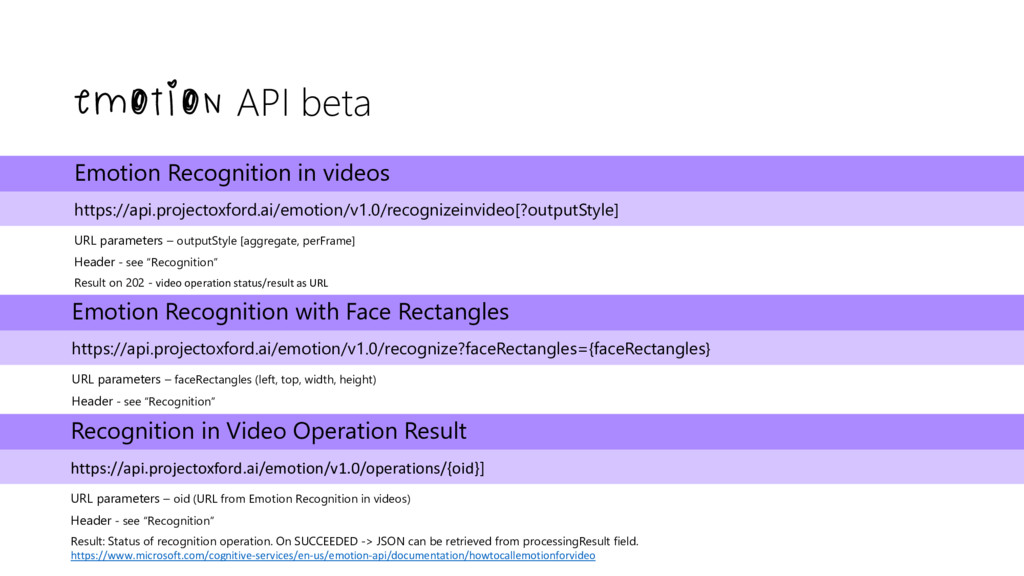
– outputStyle [aggregate, perFrame] Header - see “Recognition” Result on 202 - video operation status/result as URL Emotion Recognition with Face Rectangles https://api.projectoxford.ai/emotion/v1.0/recognize?faceRectangles={faceRectangles} URL parameters – faceRectangles (left, top, width, height) Header - see “Recognition” Recognition in Video Operation Result https://api.projectoxford.ai/emotion/v1.0/operations/{oid}] URL parameters – oid (URL from Emotion Recognition in videos) Header - see “Recognition” Result: Status of recognition operation. On SUCCEEDED -> JSON can be retrieved from processingResult field. https://www.microsoft.com/cognitive-services/en-us/emotion-api/documentation/howtocallemotionforvideo
https://api.projectoxford.ai/face/v1.0/detect[?returnFaceId][&returnFaceLandmarks][&returnFaceAttributes] URL parameters returnFaceId faceId needed if face should later be attached to a person returnFaceLandmarks get position of e.g. eyes, pupils, nose, eyebrows,… returnFaceAttributes get attributes “age, gender, smile, facialHair, headPose, glasses” for a face Header Content-Type application/json, application/octet-stream, multipart/form-data Ocp-Apim-Subscription-Key Get your key from “My account” at https://www.microsoft.com/cognitive-services/. You might have to create an account first.
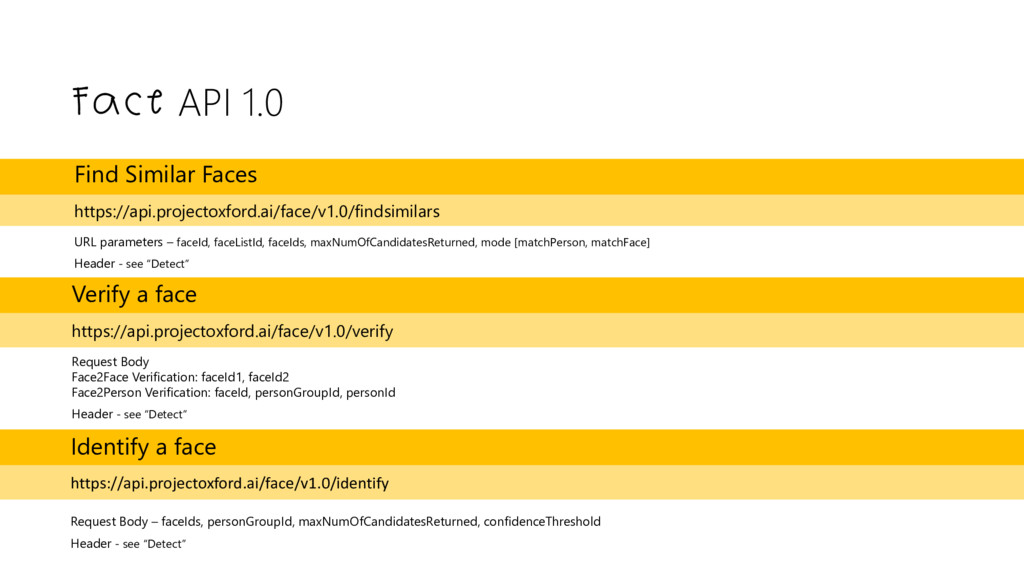
faceId, faceListId, faceIds, maxNumOfCandidatesReturned, mode [matchPerson, matchFace] Header - see “Detect” Verify a face https://api.projectoxford.ai/face/v1.0/verify Request Body Face2Face Verification: faceId1, faceId2 Face2Person Verification: faceId, personGroupId, personId Header - see “Detect” Identify a face https://api.projectoxford.ai/face/v1.0/identify Request Body – faceIds, personGroupId, maxNumOfCandidatesReturned, confidenceThreshold Header - see “Detect”
Research created a telepresence robot which feels human in his interactions. Link to the paper: https://s3-us-west- 1.amazonaws.com/disneyresearch/wp- content/uploads/20160503162533/A-Hybrid- Hydrostatic-Transmission-and-Human-Safe- Haptic-Telepresence-Robot-Paper.pdf


 codeprincess
 miccheng
 hasutosasaki
 yosuke_furukawa
 nasum
 shogogg
 pvcresin
 tsutsui
 mitohato14
 sakawe_ee
 takateeen_knj
 naruogram
 akihisaikeda
 malarkey
 aleyda
 maggiecrowley
 reverentgeek
 cassininazir
 morganepeng
 kneath
 badams
 lfama
 inesmontani
 akademiya2063