Share
Embed
Connect your Android Things with Firebase (APAC April 2018)
Wanna build an IoT device? If you have Android experience, it's easy with Android Things! How do you keep it connected with other Things and mobile devices? With Firebase, of course. In this session, we'll take a look at how some Firebase platform products were used to build a connected home appliance along with a companion Android app. It makes use of Cloud Storage, Firestore, Cloud Functions, and Cloud Messaging to keep everything connected, in addition to Google’s Nearby API.
Doug Stevenson
April 01, 2018
Transcript
80 slides
-
@CodingDoug 3.5mm audio in/out RJ45 ethernet USB Type-A (host) USB
Type-C (power & adb) PICO-PI-IMX7 — System on Module (SoM) • ARM Cortex-A7 @ 1GHz • 512 MB • 4GB eMMC storage WiFi 40-pin expansion headers Micro USB (debug) Camera pins Touch screen pins -
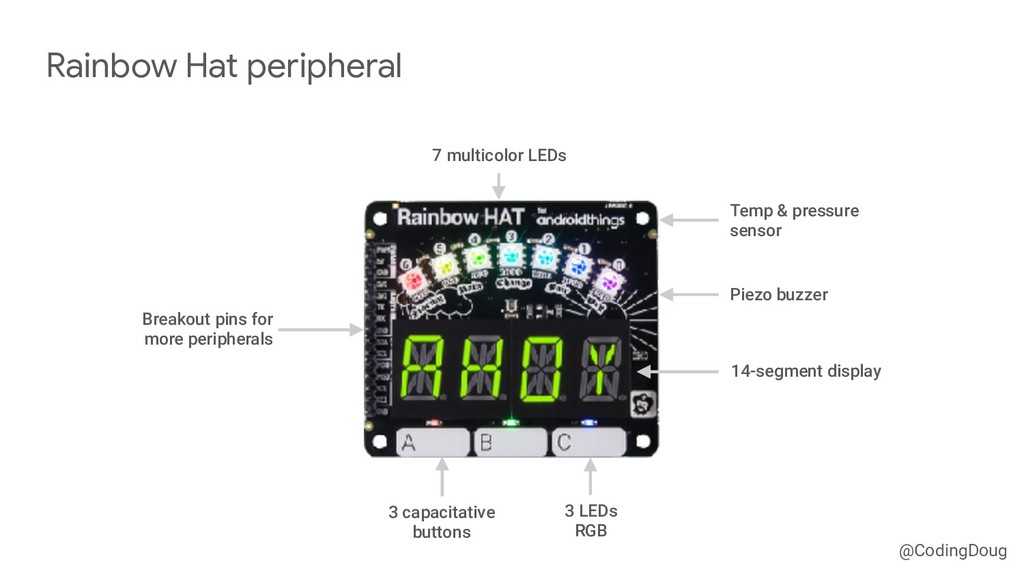
@CodingDoug Rainbow Hat peripheral 3 capacitative buttons 3 LEDs RGB
14-segment display 7 multicolor LEDs Breakout pins for more peripherals Temp & pressure sensor Piezo buzzer -
@CodingDoug General Purpose Input/Output (GPIO) • Digital inputs and outputs
with an on/off state. • Buttons, relays, and proximity sensors. Pulse Width Modulation (PWM) • Variable control of a peripheral level. • Servo motors, speakers, LEDs Types of peripheral I/O -
@CodingDoug Inter-Integrated Circuit (I2C) • Synchronous master serial bus allowing
multiple slave devices addressed in software. • Sensors, displays, advanced peripherals Inter-IC Sound (I2S) • Synchronous serial bus connecting digital sound peripherals that support PCM audio data. • Digital microphones and digital-analog converters (DAC) Types of peripheral I/O -
@CodingDoug Serial Peripheral Interface (SPI) • Synchronous master serial bus
allowing multiple slave devices addressed in hardware. • Sensors, displays, higher speed peripherals Universal Asynchronous Receiver Transmitter (UART) • Asynchronous serial port used commonly in interrupt-driven applications. • GPS, printers, RFID readers, barcode scanners Types of peripheral I/O -
@CodingDoug Android Things Drivers dependencies { compileOnly 'com.google.android.things:androidthings:0.7-devpreview' implementation 'com.google.android.things.contrib:driver-rainbowhat:0.10'
implementation ‘com.google.android.things.contrib:driver-button:0.6' implementation 'com.google.android.things.contrib:driver-bmx280:0.5' implementation 'com.google.android.things.contrib:driver-ht16k33:0.5' implementation 'com.google.android.things.contrib:driver-apa102:0.6' implementation ‘com.google.android.things.contrib:driver-pwmspeaker:0.4' } -
@CodingDoug Cloud Storage Cloud Functions Cloud Firestore Cloud Messaging Cloud
Firestore Cloud Functions Cloud Messaging capture picture upload picture download picture trigger write ring send message notify share auth token write answer trigger send msg notify read ring -
@CodingDoug You can use the Android Camera2 API! Official sample:
goo.gl/mSDPm3 Issues I discovered: • Camera preview renders to TextureView, but it’s slow ◦ Development device has no GPU ◦ Ported to use SurfaceView instead • Removed code that depends on autofocus ◦ Portable code should check to see if camera has autofocus Capturing the picture -
@CodingDoug Uploading to Cloud Storage private fun uploadFile(file: File) {
val sdf = SimpleDateFormat("yyyyMMddHHmmss", Locale.US) val storagePath = "/pictures/${sdf.format(Date())}.jpg" val ref = FirebaseStorage.getInstance().getReference(storagePath) ref.putFile(Uri.fromFile(file)) .addOnSuccessListener(this) { Log.i(TAG, "Picture uploaded”) } .addOnFailureListener(this) { e -> Log.i(TAG, "Upload failed", e) } .addOnCompleteListener(this) { file.delete() } } -
@CodingDoug Cloud Storage Cloud Functions Cloud Firestore capture picture upload
picture trigger write ring -
@CodingDoug Storage upload trigger pt. 1 - add document to
Firestore export const onRing = functions.storage.object().onFinalize(_onRing) async function _onRing(object: functions.storage.ObjectMetadata): Promise<any> { const path = object.name const id = basename(path, '.jpg') try { // Add a document to Firestore with the details of this ring // const ring: Ring = { id: id, date: new Date(), imagePath: path, } await firestore.collection(‘rings’).doc(id).set(ring) // continued... -
@CodingDoug Cloud Storage Cloud Functions Cloud Firestore Cloud Messaging capture
picture upload picture trigger write ring send message -
@CodingDoug Storage upload trigger pt. 2 - send notification to
app // Send a notification to the app // const payload = { notification: { title: 'Ring Ring!', body: 'There is someone at the door!', click_action: 'com.hyperaware.doorbell.ANSWER_RING' }, data: { ring_id: id } } const response = await fcm.sendToTopic('rings', payload) -
@CodingDoug Cloud Storage Cloud Functions Cloud Firestore Cloud Messaging capture
picture upload picture trigger write ring send message notify -
@CodingDoug Receiving the notification Background? Display notification Invoke Firebase MessagingService
onMessageReceived (RemoteMessage) Display Ring UI message received yes no notification click ring_id ring_id -
@CodingDoug Earlier: Subscribe to “rings” topic class MyInstanceIdService : FirebaseInstanceIdService()
{ companion object { private const val TAG = "MyInstanceIdService" } override fun onTokenRefresh() { super.onTokenRefresh() Log.d(TAG, "FCM token refresh: ${FirebaseInstanceId.getInstance().token!!}") FirebaseMessaging.getInstance().subscribeToTopic("rings") } } -
@CodingDoug Handle incoming ring data message class OnRingMessagingService : FirebaseMessagingService()
{ override fun onMessageReceived(remoteMessage: RemoteMessage) { super.onMessageReceived(remoteMessage) if (remoteMessage.data.containsKey("ring_id")) { val ringId = remoteMessage.data["ring_id"] val intent = Intent(this, AnswerRingActivity::class.java) intent.putExtra("ring_id", ringId) startActivity(intent) } else { Log.w(TAG, "Data message received without ring_id") } } } -
@CodingDoug Handle incoming ring (AnswerRingActivity) override fun onCreate(savedInstanceState: Bundle?) {
super.onCreate(savedInstanceState) val extras = intent.extras if (extras == null) { Log.e(TAG, "ring_id was not provided") finish() return } val ringId = extras.getString("ring_id") if (ringId.isEmpty()) { Log.e(TAG, "ring_id was empty") finish() return } // display it... } -
@CodingDoug Cloud Storage Cloud Functions Cloud Firestore Cloud Messaging capture
picture upload picture download picture trigger write ring send message notify read ring -
@CodingDoug Fetch ring data from Firestore private fun populateViews(ringId: String)
{ ringReference = FirebaseFirestore.getInstance().collection("rings").document(ringId) ringReference.get() .addOnSuccessListener(this) { snap -> if (snap.exists()) { val ring = snap.toObject(Ring::class.java) val ref = FirebaseStorage.getInstance().getReference(ring.imagePath!!) Glide.with(this@AnswerRingActivity).load(ref).into(ivGuest) } } .addOnFailureListener(this) { error -> Log.e(TAG, "Can't fetch ring $ringId", error) } } -
@CodingDoug Glide Module — Cloud Storage for Firebase plugin @GlideModule
class MyAppGlideModule : AppGlideModule() { override fun registerComponents(context: Context, glide: Glide, registry: Registry) { // Register FirebaseImageLoader from FirebaseUI to handle StorageReference registry.append(StorageReference::class.java, InputStream::class.java, FirebaseImageLoader.Factory()) } } -
@CodingDoug Cloud Storage Cloud Functions Cloud Firestore Cloud Messaging Cloud
Firestore capture picture upload picture download picture trigger write ring send message notify write answer read ring -
@CodingDoug Update ring disposition in Firestore val disposition = button_click_true_or_false
ringReference.update( "answer.uid", uid, "answer.disposition", disposition) .addOnCompleteListener(this) { Log.d(TAG, "Answer written to database") finish() } .addOnFailureListener(this, { e -> Log.d(TAG, "Answer not written to database", e) finish() }) -
@CodingDoug Cloud Storage Cloud Functions Cloud Firestore Cloud Messaging Cloud
Firestore Cloud Functions Cloud Messaging capture picture upload picture download picture trigger write ring send message notify write answer trigger send msg read ring -
@CodingDoug Firestore trigger pt. 1 — send answer to Android
Thing export const onAnswer = functions.firestore.document('/rings/{ringId}').onUpdate(_onAnswer) async function _onAnswer(change: functions.Change<DocumentSnapshot>): Promise<any> { const ringId = change.before.id // e.g. 20180327123000 const previous = change.before.data() as Ring const ring = change.after.data() as Ring // Only interested in rings that have a new answer if (previous.answer || !ring.answer) { console.log("This is not the update you're looking for.") return Promise.resolve() } // cont’d... -
@CodingDoug Firestore trigger pt. 2 — send answer to Android
Thing const payload = { data: { disposition: ring.answer.disposition.toString(), ring_id: ringId } } try { const response = await fcm.sendToTopic('answers', payload) console.log(`ring ${ringId} answer sent:`, response) } catch (err) { console.error(`ring ${ringId} answer error:`, err) } } -
@CodingDoug Cloud Storage Cloud Functions Cloud Firestore Cloud Messaging Cloud
Firestore Cloud Functions Cloud Messaging capture picture upload picture download picture trigger write ring send message notify write answer trigger send msg notify read ring -
@CodingDoug On Thing, earlier: Subscribe to “answers” topic class MyInstanceIdService
: FirebaseInstanceIdService() { companion object { private const val TAG = "MyInstanceIdService" } override fun onTokenRefresh() { super.onTokenRefresh() Log.d(TAG, "FCM token refresh: ${FirebaseInstanceId.getInstance().token!!}") FirebaseMessaging.getInstance().subscribeToTopic("answers") } } -
@CodingDoug Handle incoming answer data message class OnAnswerMessagingService : FirebaseMessagingService()
{ override fun onMessageReceived(remoteMessage: RemoteMessage) { super.onMessageReceived(remoteMessage) if (remoteMessage.data.containsKey("disposition")) { val d = java.lang.Boolean.parseBoolean(remoteMessage.data["disposition"]) val intent = Intent(this, ResponseActivity::class.java) intent.putExtra("disposition", d) startActivity(intent) } else { Log.w(TAG, "Data message received without disposition") } } } -
@CodingDoug Cloud Storage Cloud Functions Cloud Firestore Cloud Messaging Cloud
Firestore Cloud Functions Cloud Messaging capture picture upload picture download picture trigger write ring send message notify write answer trigger send msg notify read ring -
@CodingDoug This is a RecyclerView FirestoreRecyclerAdapter makes this super easy!
FirebaseUI FTW https://goo.gl/oQsk4h -
@CodingDoug Cloud Storage Cloud Functions Cloud Firestore Cloud Messaging Cloud
Firestore Cloud Functions Cloud Messaging capture picture upload picture download picture trigger write ring send message notify write answer trigger send msg notify read ring -
@CodingDoug Cloud Storage security rules — universal read and write
service firebase.storage { match /b/{bucket}/o { match /{allPaths=**} { allow read, write: if true; } } } -
@CodingDoug Firestore security rules — universal read and write service
cloud.firestore { match /databases/{database}/documents { match /{document=**} { allow read, write: if true; } } } -
@CodingDoug • Yeah, it’s easy to get started without security
• All reads and writes should require user authentication (minimally) • Also consider data validation rules • For Storage: https://firebase.google.com/docs/storage/security/ For Firestore: https://firebase.google.com/docs/firestore/security/get-started What to do about security? -
@CodingDoug App login with FirebaseUI — launch UI flow findViewById<Button>(R.id.btn_sign_in).setOnClickListener
{ startActivityForResult( AuthUI.getInstance() .createSignInIntentBuilder() .setAvailableProviders(listOf(AuthUI.IdpConfig.GoogleBuilder().build())) .build(), RC_SIGN_IN) } -
@CodingDoug App login with FirebaseUI — handle sign in results
override fun onActivityResult(requestCode: Int, resultCode: Int, data: Intent) { super.onActivityResult(requestCode, resultCode, data) if (requestCode == RC_SIGN_IN) { val response = IdpResponse.fromResultIntent(data) if (resultCode == Activity.RESULT_OK) { // handle login } } } -
@CodingDoug • UI for various provider logins aren’t supported on
Android Things • Android Thing may not even have a screen! • Anonymous login works, not a great solution • Best to get proper user credentials for a real login Phone apps are easy, but how does a Thing get signed in? -
@CodingDoug Share an auth credential from app to Thing Authentication
ID token But how? R/W protected data -
@CodingDoug • Peer-to-peer pub/sub messaging model • Device pairing via
combo of Wifi, BT, BLE, near-ultrasonic radio • Data payload exchange via Google Cloud project • Didn’t work with Android Things 0.6.1, works now in 0.7.0 Nearby Messages -
@CodingDoug • Peer-to-peer networking, high bandwidth, low latency • Data
exchange via Wifi, BT, BLE (no internet required) Nearby Connections -
@CodingDoug Publish a Nearby Message pt. 1 — configuration val
strategy = Strategy.Builder() .setDiscoveryMode(Strategy.DISCOVERY_MODE_BROADCAST) .setTtlSeconds(Strategy.TTL_SECONDS_MAX) .build() val publishOpts = PublishOptions.Builder() .setStrategy(strategy) .setCallback(object : PublishCallback() { override fun onExpired() { Log.d(TAG, "onExpired") } }) .build() -
@CodingDoug Publish a Nearby Message pt. 2 — publish val
client = Nearby.getMessagesClient(this) val message = Message("Hello, Firebase Thing!") client.publish(message, publishOpts) .addOnSuccessListener(this) { Log.e(TAG, "publish success") } .addOnFailureListener(this) { e -> Log.e(TAG, "publish failed", e) } -
@CodingDoug Subscribe to a Nearby Message pt. 1 — configuration
val strategy = Strategy.Builder() .setDiscoveryMode(Strategy.DISCOVERY_MODE_SCAN) .setTtlSeconds(Strategy.TTL_SECONDS_MAX) .build() val subscribeOpts = SubscribeOptions.Builder() .setStrategy(strategy) .setCallback(object : SubscribeCallback() { override fun onExpired() { Log.d(TAG, "onExpired") } }) .build() -
@CodingDoug Subscribe to a Nearby Message pt. 2 — subscribe
val client = Nearby.getMessagesClient(this) private val messageListener = object : MessageListener() { override fun onFound(message: Message) { // messsage.content contains payload } override fun onLost(message: Message) {} } client.subscribe(messageListener, subscribeOpts) .addOnSuccessListener(this) { Log.d(TAG, "subscribe success") } .addOnFailureListener(this) { e -> Log.e(TAG, "subscribe failure", e) } -
@CodingDoug Log in Thing with Google and Firebase APIs private
fun trySignIn() { Log.d(TAG, "Signing in with token " + token) val credential = GoogleAuthProvider.getCredential(token, null) FirebaseAuth.getInstance().signInWithCredential(credential) .addOnSuccessListener(this, { result -> val user = result.user Log.d(TAG, "signInWithCredential ${user.displayName} ${user.email}") finish() }) .addOnFailureListener(this, { e -> Log.e(TAG, "signInWithCredential onFailure", e) }) } -
@CodingDoug Too much code to show here! 1. Both: Check
for ACCESS_COARSE_LOCATION permission 2. Thing: Begin “advertising” with P2P_CLUSTER strategy 3. App: Begin “discovering” with P2P_CLUSTER strategy 4. Both: Connect to peer 5. Both: Send/receive Google Auth token 6. Both: Disconnect 7. Thing: Sign in with token using Google Auth and Firebase Auth APIs Use Nearby Connections to share an auth token -
@CodingDoug Cloud Storage Cloud Functions Cloud Firestore Cloud Messaging Cloud
Firestore Cloud Functions Cloud Messaging capture picture upload picture download picture trigger write ring send message notify share auth token write answer trigger send msg notify read ring -
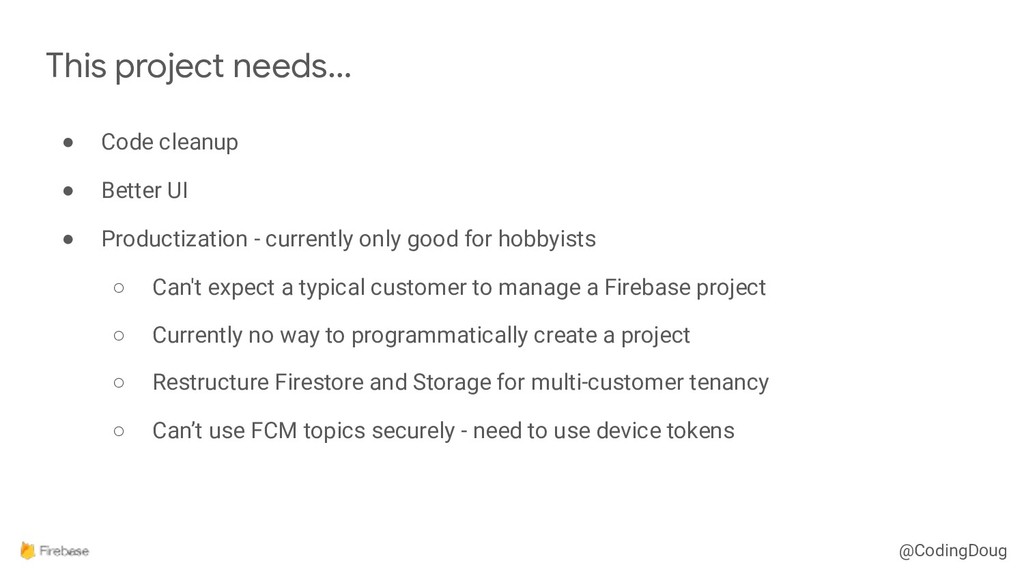
@CodingDoug • Code cleanup • Better UI • Productization -
currently only good for hobbyists ◦ Can't expect a typical customer to manage a Firebase project ◦ Currently no way to programmatically create a project ◦ Restructure Firestore and Storage for multi-customer tenancy ◦ Can’t use FCM topics securely - need to use device tokens This project needs… -
@CodingDoug • Better security ◦ Allow users to confirm auth
tokens received from Nearby (like BT pairing) ◦ Tighter security rules for both Storage and Firestore This project needs… -
@CodingDoug • Facial sentiment detection via Cloud Functions • Voice
intercom (AudioTrack, AudioRecord) ◦ Add speech to text with Google Cloud Speech API • “Digital keys” ◦ Guest app ◦ QR codes Some ideas