Upgrade to Pro
— share decks privately, control downloads, hide ads and more …
Speaker Deck
Sign up for free
Menu
Search
Features
All features
Private URLs
Password Protection
Custom URLS
Scheduled publishing
Remove Branding
Restrict embedding
Deck Collections
Notes
Features
All features
Private URLs
Password Protection
Custom URLS
Scheduled publishing
Remove Branding
Restrict embedding
Deck Collections
Notes
Explore
Featured decks
Featured speakers
Programming
Technology
Storyboards
Explore
Featured decks
Featured speakers
Programming
Technology
Storyboards
Pricing
Search
Sign in
Sign up for free
Automatización de tareas con Ansible
Search
Sponsored
·
Ship Features Fearlessly
Turn features on and off without deploys. Used by thousands of Ruby developers.
→
César Suárez Ortega
March 14, 2015
Programming
400
1
Share
Embed
Copy iframe code
Copy JS code
Copy link
Start on current slide
Automatización de tareas con Ansible
César Suárez Ortega
March 14, 2015
More Decks by César Suárez Ortega
See All by César Suárez Ortega
Symfony y concurrencia: el componente Lock
csuarez
0
1.2k
PHP Episodio VII: El Despertar de la Fuerza
csuarez
1
310
Consumiendo una API REST con AngularJS
csuarez
0
400
Construyendo una API REST con Python y MongoDB
csuarez
0
360
Procesanso datos con Hadoop: MapReduce y YARN
csuarez
0
380
Introducción a SCRUM
csuarez
0
370
Introducción a GIT
csuarez
1
270
Using CAD Systems and E-Learning in radiologist training
csuarez
0
150
CETA-CIEMAT: Salud + Investigación
csuarez
0
150
Other Decks in Programming
See All in Programming
Are APIs Still Relevant in the AI Era?
soyuka
0
410
Simple Storage Service(S3) is not simple
iwatsukayura
0
120
巨大モノリシックアプリ モダン化大作戦
ktcryomm
1
1.3k
The Rails Doctrine Decade
koic
2
470
Starting & Sustaining Code-Based E2E Testing for Non-Coding QA Teams( #jasstniigata )
teyamagu
PRO
1
860
JAWS-UG 東京支部が始める、JAWS-UG支部コラボ / JAWS-UG lunchtime LT Collaboration
y0hgi
0
180
mrbgem 三角測量 開発
ogom
0
180
設計次第でAIコードの読む量は減らせる / designing-for-code-reading
minodriven
33
15k
ソニーのクラウド共通基盤の変遷と AI時代の開発スタイルに合わせた進化 / The Journey of Sony’s Common Cloud Platform and Its Evolution for AI-Native Development
kenjiyoneyama
0
220
FreeBSDでZabbixを動かす
kenkino
0
350
APNsからLive Activityを開始する話
yumnumm
0
150
機械に任せるテスト、人が見るテスト ⽣成AIで引き直した、運⽤保守フェーズの線引き
dske104
0
150
Featured
See All Featured
HTML-Aware ERB: The Path to Reactive Rendering @ RubyCon 2026, Rimini, Italy
marcoroth
5
760
AI Search: Where Are We & What Can We Do About It?
aleyda
0
8k
Accessibility Awareness
sabderemane
1
230
A Guide to Academic Writing Using Generative AI - A Workshop
ks91
PRO
1
500
The B2B funnel & how to create a winning content strategy
katarinadahlin
PRO
1
550
Become a Pro
speakerdeck
PRO
31
6.3k
A designer walks into a library…
pauljervisheath
211
25k
Rails Girls Zürich Keynote
gr2m
96
14k
Responsive Adventures: Dirty Tricks From The Dark Corners of Front-End
smashingmag
254
22k
Abbi's Birthday
coloredviolet
4
10k
Redefining SEO in the New Era of Traffic Generation
szymonslowik
1
460
Templates, Plugins, & Blocks: Oh My! Creating the theme that thinks of everything
marktimemedia
31
2.9k
Transcript
Automatización de tareas con Seminario TheEvnt Preguntando a las ballenas
Devops con Ansible y Docker 13-14 Febrero (Cáceres)
csuarez César Suárez Ortega Software Engineer / Researcher tharandur
[email protected]
Software Engineer / Researcher César Suárez Ortega
None
http://www.meetup.com/phpcaceres 24 de Marzo // 18:30 // 7 Jardines LESS
IS MORE By Juan José Galán (@Jgalanlo)
www.suicidebystar.com
HERRAMIENTAS DE AUTOMATIZACIÓN ¿PARA QUÉ VALEN?
DESPLIEGUE DE APLICACIONES CONTINOUS DELIVERY VIRTUALIZACIÓN CLOUDS VAGRANT GESTIÓN DE
CONFIGURACIONES DOCKER TEST HOMOGENEIZACIÓN
None
Lenguaje Ruby DSL YAML YAML Agentless No No Sí Sí
Arquitectura Master/Slave Master/Slave Masterless Ambos Comunicación Propio Propio SSH ZeroMQ
None
¿Por qué Ansible? ¥ “Radically simple” ¥ Agentless ¥ Pocos requisitos (python, OpenSSH,
…) ¥ Curva de aprendizaje escasa ¥ Configuración legible (YAML) ¥ Buena documentación ¥ http://docs.ansible.com/
Cualquiera es mejor que nada
ANSIBLE 101 Empezando con Ansible
Instalación $ sudo apt-get install software-properties-common! $ sudo apt-add-repository ppa:ansible/ansible!
$ sudo apt-get update! $ sudo apt-get install ansible! $ sudo yum install epel-release! $ sudo yum install ansible! $ brew update! $ brew install ansible! $ sudo pip install ansible! http://brew.sh/
None
Inventories ¥ Inventario de máquinas ¥ Definición de nuestra infraestructura
¥ Formato INI ¥ Por defecto en /etc/ansible/hosts! ¥ Muchas vitaminas ¥ Grupos ¥ Rangos ¥ Parámetros ¥ … ¥ Inventories dinámicos
Inventories ! [webservers]! server1.company.com! server2.company.com! 188.234.123.12! ! [databases]! mysql-prod-[1:10].company.com! mysql-test-[a:f].company.com!
! [base]! dns.company.com ansible_ssh_user=root ansible_ssh_password=chapuza! dhcp.company.com ansible_conection=ssh! ! [storage]! ftp.company.com ftp_port=23! ! [misc]! some_alias ansible_ssh_host=134.23.42.123! !
$ ansible all -m command -a ”pwd” –f 10 -k
! $ ssh-keygen -t rsa -C "
[email protected]
"! ! $ cat ~/.ssh/id_rsa.pub | \! ssh <user>@<host> “cat >> .ssh/authorized_keys”! Confianza SSH o
Nuestro primer comando :) ¥ ansible: Comando! ¥ all: Parte del inventario
a usar.! ¥ -m command: Módulo ¥ -a "ls /tmp": Atributos del módulo $ ansible all -m command -a "ls /tmp”!
Más comandos $ ansible all -m copy -a "src=/tmp/foo dest=/tmp/foo"!
$ ansible webservers -m yum -a "name=php5 state=present"! $ ansible all -m command -a ”pwd” –f 10 ! $ ansible all -m command -a ”rm –rf /” –i custom_inventory!
PLAYBOOKS
Introducción a Playbooks ¥ Automatización de tareas complejas. ¥ Ficheros en formato
YAML. ¥ Definición de: ¥ Tareas ¥ Pasos ¥ Variables “Los módulos son las herramientas y los playbooks los planos”
YAML Ain’t Another Markup Language ---! - hosts: webservers! ..vars:!
....http_port: 80! ....max_clients: 200! ....remote_user: root! ..tasks:! ....- name: ensure apache is at the latest version! ......yum: pkg=httpd state=latest! ....- name: write the apache config file! ......template: src=/srv/httpd.j2 dest=/etc/httpd.conf! ....- name: ensure apache is running! ......service: name=httpd state=started!
---! - hosts: webservers! vars:! http_port: 80! max_clients: 200! remote_user:
root! tasks:! - name: ensure apache is at the latest version! yum: pkg=httpd state=latest! - name: write the apache config file! template: src=/srv/httpd.j2 dest=/etc/httpd.conf! - name: ensure apache is running! service: name=httpd state=started! ! ! $ ansible-playbook my-playbook.yml! ! !
None
Módulos ¥ +200 incluidos por defecto ¥ Aceptan parámetros clave-valor: ¥ key1=value1,
key2=value2, key3=value3! ¥ Ídempotentes ¥ No se ejecutan si no hace falta. ¥ Documentación: $ ansible-doc <module_name>! http://docs.ansible.com/modules.html ! o
Manejo de ficheros template: src=www.conf dest=/etc/php-fpm.d/www.conf! copy: src=www.conf dest=/etc/php-fpm.d/www.conf! copy
template lineinfile: dest=/etc/foo regexp=^SELINUX= line=SELINUX=enforcing! lineinfile replace: dest=/foo regexp='(\s+)old(\s+.*)?$' replace='\1new\2’! replace
template [www]! ! listen = 127.0.0.1:9000! ! listen.allowed_clients = 127.0.0.1!
! user = {{ php_user }}! group = {{ php_group }}! ! pm = dynamic! pm.max_children = 50! pm.start_servers = 5! pm.min_spare_servers = 5! pm.max_spare_servers = 35! ! php_admin_value[error_log] = /var/log/php-fpm/www-error.log! php_admin_flag[log_errors] = on! ! php_value[session.save_handler] = files! php_value[session.save_path] = /var/lib/php/session!
Linux básico shell: chmod –R 777 /tmp! command: touch /tmp/foo!
command shell yum: name=php-fpm state=latest #present, absent, ...! yum / apt service: name=httpd state=stopped #started, restarted, ...! service
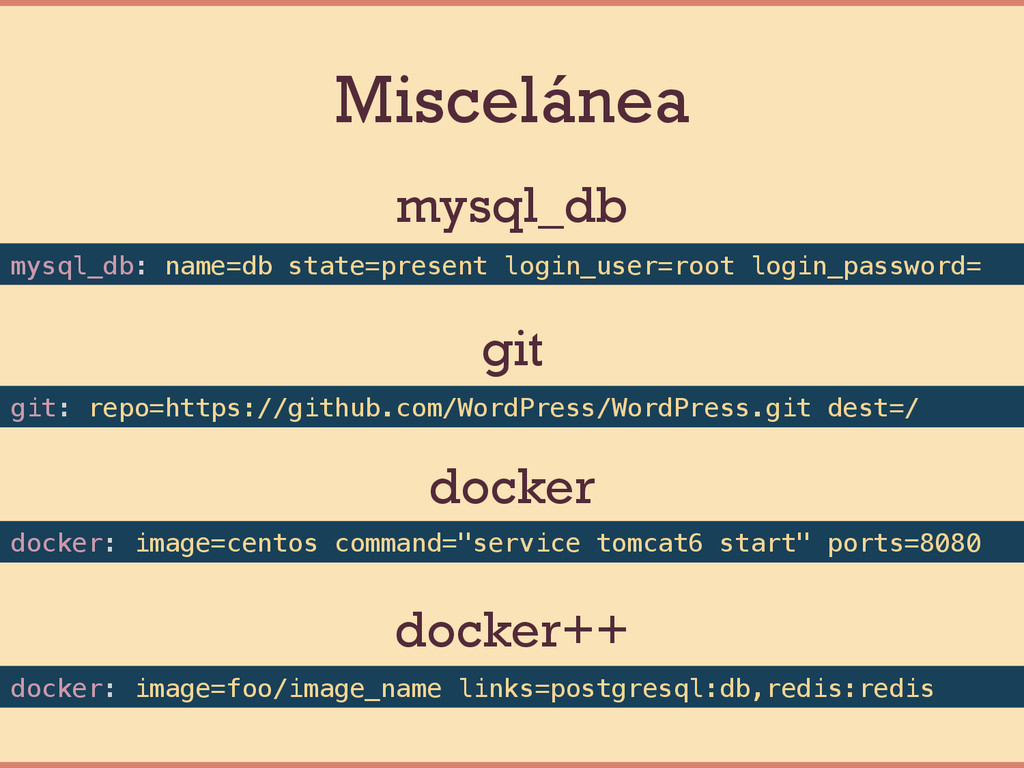
Miscelánea git: repo=https://github.com/WordPress/WordPress.git dest=/! mysql_db: name=db state=present login_user=root login_password=! mysql_db
git docker: image=foo/image_name links=postgresql:db,redis:redis! docker++ docker: image=centos command="service tomcat6 start" ports=8080! docker
None
PLAYBOOKS++
Variables
Uso de variables ! ! ! ! ! ! ---!
- hosts: webservers! vars:! deploy_path: /var/www/html/current! base_packages: [php-fpm, mysql, nginx] ! tasks:! - name: deploy code! copy: src=local_wordpress/ dest={{ deploy_path }}! ! - name: copy wp-config! copy: src=config.php dest={{ deploy_path }}/wp-config.php! ! ! !
Filtros ! ! ! ! {{ random_variable | mandatory }}!
! ! {{ some_port | default(80) }}! ! ! {{ http_response | to_nice_json }}! ! ! {{ password | hash(‘md5’) }}! ! ! {{ something | regex_replace(‘!@#/”!!!’) }}! ! ! !
Facts ¥ Variables del “sistema”. ¥ Algunas ¥ ansible_hostname! ¥ ansible_kernal! ¥ ansible_eth0.ipv4.address! ¥ …! ¥ Obtener
todas: $ ansible all –m setup!
Condicionales
when ! ! ! ! ! ! ! - name:
”apagar sistema Debian”! command: /sbin/shutdown -t now! when: ansible_os_family == ”Debian” ! ! - shell: echo ”sistemas RedHat 6 o superiores"! when: ansible_os_family == "RedHat" ! and ansible_lsb.major_release|int >= 6! ! ! ! ! ! !
Filtros interesantes ! tasks:! ! - shell: /usr/bin/foo! register: result!
ignore_errors: True! ! - debug: msg=”¡falló!"! when: result|failed! ! - debug: msg=”¡cambió!"! when: result|changed! ! - debug: msg=”¡funcionó!"! when: result|success! ! - debug: msg=”¡se saltó!"! when: result|skipped! ! !
Loops
with_xxx vars:! php_packages: [php-xml, php-mysql, php-gd]! users:! user1:! nombre: Curro!
apellido: Rodríguez! user2:! nombre: Álvaro! apellido: De la Mata! ! tasks:! - name: Instalar paquetes PHP! yum: name={{ item }} state=latest! with_items: php_packages! ! - name: Imprimir nombres! debug: msg=“{{ item.key }}: {{ item.value.nombre }} {{ item.value.apellido }}"! with_dict: users! ! - name: Copiar ficheros! copy: src={{ item }} dest=/tmp/! with_fileglob:! - /home/user/*! ! !
Handlers
Handlers ¥ Lanzar acciones cuando un módulo cambia ---! - hosts:
webservers! vars:! http_port: 80! tasks:! - name: ensure apache is at the latest version! yum: pkg=httpd state=latest! - name: write the apache config file! template: src=/srv/httpd.j2 dest=/etc/httpd.conf! notify:! - restart apache! - name: ensure apache is running! service: name=httpd state=started! handlers:! - name: restart apache! service: name=httpd state=restarted!
Tags
! ! ---! - hosts: webservers! - tasks:! - name:
ensure apache is running! service: name=httpd state=started! tags:! - apache! - name: ensure php-fpm is running! service: name=php-fpm state=started! tags:! - php! ! ! $ ansible-playbook my-playbook.yml –-tags “php”! ! !
Includes
includes ! ! ! ! tasks:! ! - include: tasks/foo.yml!
! - include: wordpress.yml wp_user=timmy! - include: wordpress.yml wp_user=alice! - include: wordpress.yml wp_user=bob! ! - include: tasks/sometasks.yml! when: ansible_os_family == 'Debian’! ! ! ! ! ! !
ROLES
¿Qué son los roles? ¥ Organización de playbooks. ¥ “Convention over configuration”
¥ Carga automática de: ¥ Tasks ¥ Vars ¥ Handlers ¥ Dependencias ¥ Reutilizables
Estructura de roles ¥ some_role/! ¥ files/ * Ficheros para
copy ¥ templates/ * Ficheros para template ¥ tasks/ ¥ handlers/ ¥ vars/ ¥ defaults/ * Valores por defecto ¥ meta/ * Dependencias ---! - hosts: webservers! roles:! - some_role! ! !
http://github.com/csuarez/theevnt-ansible
None
None


 csuarez
 soyuka
 iwatsukayura
 ktcryomm
 koic
koic
 teyamagu
 y0hgi
y0hgi
 ogom
ogom
 minodriven
 kenjiyoneyama
 kenkino
.jpg) yumnumm
yumnumm
 dske104
 marcoroth
 aleyda
 sabderemane
 ks91
ks91
 katarinadahlin
 speakerdeck
 pauljervisheath
 gr2m
gr2m
 smashingmag
 coloredviolet
 szymonslowik
 marktimemedia

![csuarez César Suárez Ortega Software Engineer / Researcher tharandur [email protected]](https://files.speakerdeck.com/presentations/b263f84e8aa24d9a8c57e7a43dc9be2e/slide_1.jpg)


![Inventories ! [webservers]! server1.company.com! server2.company.com! 188.234.123.12! ! [databases]! mysql-prod-[1:10].company.com! mysql-test-[a:f].company.com!](https://files.speakerdeck.com/presentations/b263f84e8aa24d9a8c57e7a43dc9be2e/slide_17.jpg)


![template [www]! ! listen = 127.0.0.1:9000! ! listen.allowed_clients = 127.0.0.1!](https://files.speakerdeck.com/presentations/b263f84e8aa24d9a8c57e7a43dc9be2e/slide_28.jpg)



![with_xxx vars:! php_packages: [php-xml, php-mysql, php-gd]! users:! user1:! nombre: Curro!](https://files.speakerdeck.com/presentations/b263f84e8aa24d9a8c57e7a43dc9be2e/slide_41.jpg)


