Upgrade to Pro
— share decks privately, control downloads, hide ads and more …
Speaker Deck
Sign up for free
Menu
Search
Features
All features
Private URLs
Password Protection
Custom URLS
Scheduled publishing
Remove Branding
Restrict embedding
Deck Collections
Notes
Features
All features
Private URLs
Password Protection
Custom URLS
Scheduled publishing
Remove Branding
Restrict embedding
Deck Collections
Notes
Explore
Featured decks
Featured speakers
Programming
Technology
Storyboards
Explore
Featured decks
Featured speakers
Programming
Technology
Storyboards
Pricing
Search
Sign in
Sign up for free
Honeypot_on_GCP-20191006.pdf
Search
hiro
October 06, 2019
Technology
1.6k
4
Share
Embed
Copy iframe code
Copy JS code
Copy link
Start on current slide
Honeypot_on_GCP-20191006.pdf
hiro
October 06, 2019
More Decks by hiro
See All by hiro
Observe_C2Servers_Phorpiex_Avaddon_-20200630.pdf
ctrl_z3r0
1
1.5k
Observe_C2Servers_via_MonitoringService-20200330.pdf
ctrl_z3r0
2
1.2k
Remove_obfuscation_in_Emotet_PowershellScript-20200129.pdf
ctrl_z3r0
2
2.7k
Honeypot-on-GCP-20191201.pdf
ctrl_z3r0
0
930
HackingDojo_De-Ice_1.110_-20191203.pdf
ctrl_z3r0
5
1.5k
Investigating-Malware-20191030
ctrl_z3r0
4
1.6k
AntiPortscan-20190925
ctrl_z3r0
2
1.3k
Honeypot on GCE (Google Compute Engine)
ctrl_z3r0
1
1.1k
Authentication-and-7pay-case.pdf
ctrl_z3r0
6
1.4k
Other Decks in Technology
See All in Technology
[2026 Oracle Technical Deep Dive] オンプレミスDBのCloud移行アプローチ:移行計画に基づくメソッドとツールの選択 (2026年9月17日開催)
oracle4engineer
PRO
0
150
全人類(ほぼ)AWS Organizations の上でAWSを利用している、その世界を知る話
htan
0
120
契約書画像からの情報抽出に特化した視覚接地モデルを育てる話
sansantech
PRO
1
150
雪かき部 #7 もう怖くない!SELECT文!
foursue
0
280
AgentCoreで実践するハーネスエンジニアリング
yakumo
1
290
BedrockとLambdaで作る リアルタイム進行型推理ゲーム
kawametho
0
190
「とりあえず動く」の先へ。 AI時代のチーム開発と内部設計/2026-slsdays
slsops
0
150
IR Today: Theory, Practice, and Agents
dtunkelang
0
350
継続的なAIコスト最適化
bgpat
1
160
OSC2026on_the-world-is-waiting-for-your-voice.pdf
naruoga
0
350
転んだ話が背中を預ける理由になる / A_story_about_falling_down_gives_you_a_reason_to_watch_each_other_s_backs.pdf
pauli
3
310
事業活動を AI Ready にする攻めと守りのデータエンジニアリング / data-engineering-for-ai-ready-business
pei0804
3
1.1k
Featured
See All Featured
State of Search Keynote: SEO is Dead Long Live SEO
ryanjones
0
310
How to build a perfect <img>
jonoalderson
1
6.1k
Test your architecture with Archunit
thirion
2
2.4k
A Tale of Four Properties
chriscoyier
163
24k
Let's Do A Bunch of Simple Stuff to Make Websites Faster
chriscoyier
508
140k
Technical Leadership for Architectural Decision Making
baasie
3
590
How to Think Like a Performance Engineer
csswizardry
28
2.9k
Git: the NoSQL Database
bkeepers
PRO
433
67k
CoffeeScript is Beautiful & I Never Want to Write Plain JavaScript Again
sstephenson
162
16k
GitHub's CSS Performance
jonrohan
1033
470k
Have SEOs Ruined the Internet? - User Awareness of SEO in 2025
akashhashmi
0
510
The agentic SEO stack - context over prompts
schlessera
0
970
Transcript
ハニーポット 0円生活 ~GCPの無料枠を活用しよう!~ 第1回ハニーポット情報共有会(仮) 2019/10/06 hiro(@ctrl_z3r0) a.k.a ねこさん⚡(@catnap707)
自己紹介
アジェンダ 1 ハニーポットとは 2 ハニーポットに必要なもの 3 仮想サーバ(VPS)の準備 4 GCP/GPEを使ってみよう 5 ハニーポットの選定 6 ハニーポットの設置 7 まとめ ▪参考情報 ・これから始めるGCP(GCE)安全に無料枠を使い倒せ(2019-05-23)
https://qiita.com/Brutus/items/22dfd31a681b67837a74 この内容は、仕事とは無関係です。個人の意見です。 間違っている場合は、あとでこっそり教えてください
4 1 ハニーポットとは
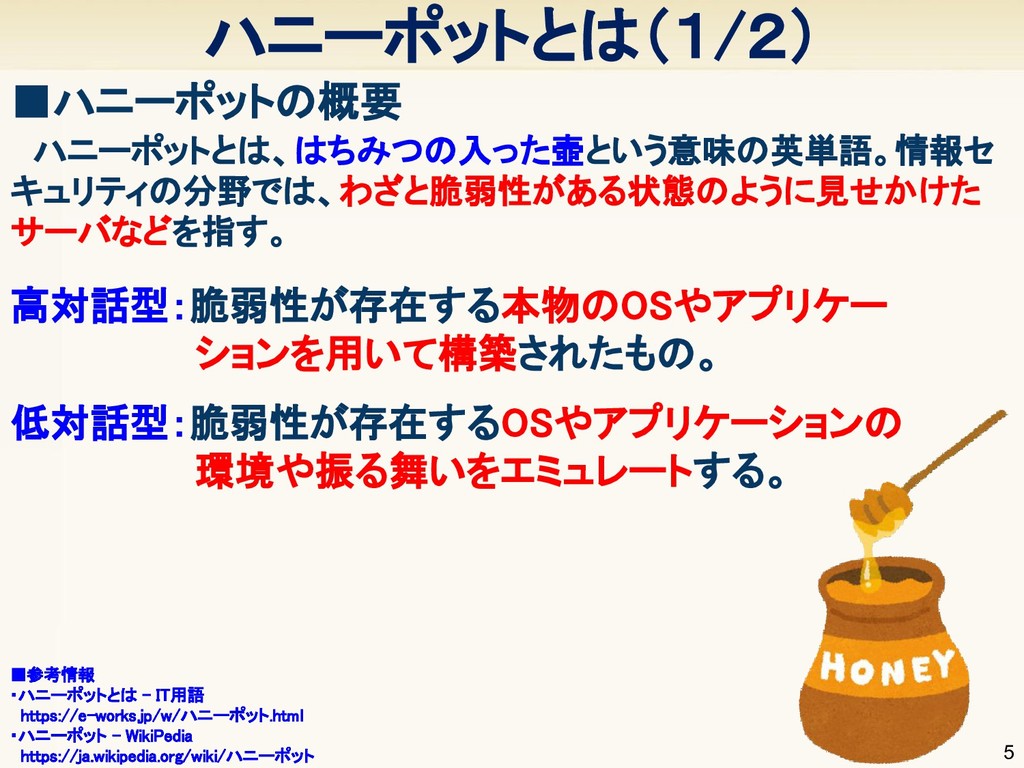
ハニーポットとは(1/2) 5 ▪ハニーポットの概要 ▪参考情報 ・ハニーポットとは - IT用語 https://e-works.jp/w/ハニーポット.html ・ハニーポット
- WikiPedia https://ja.wikipedia.org/wiki/ハニーポット ハニーポットとは、はちみつの入った壺という意味の英単語。情報セ キュリティの分野では、わざと脆弱性がある状態のように見せかけた サーバなどを指す。 高対話型:脆弱性が存在する本物のOSやアプリケー ションを用いて構築されたもの。 低対話型:脆弱性が存在するOSやアプリケーションの 環境や振る舞いをエミュレートする。
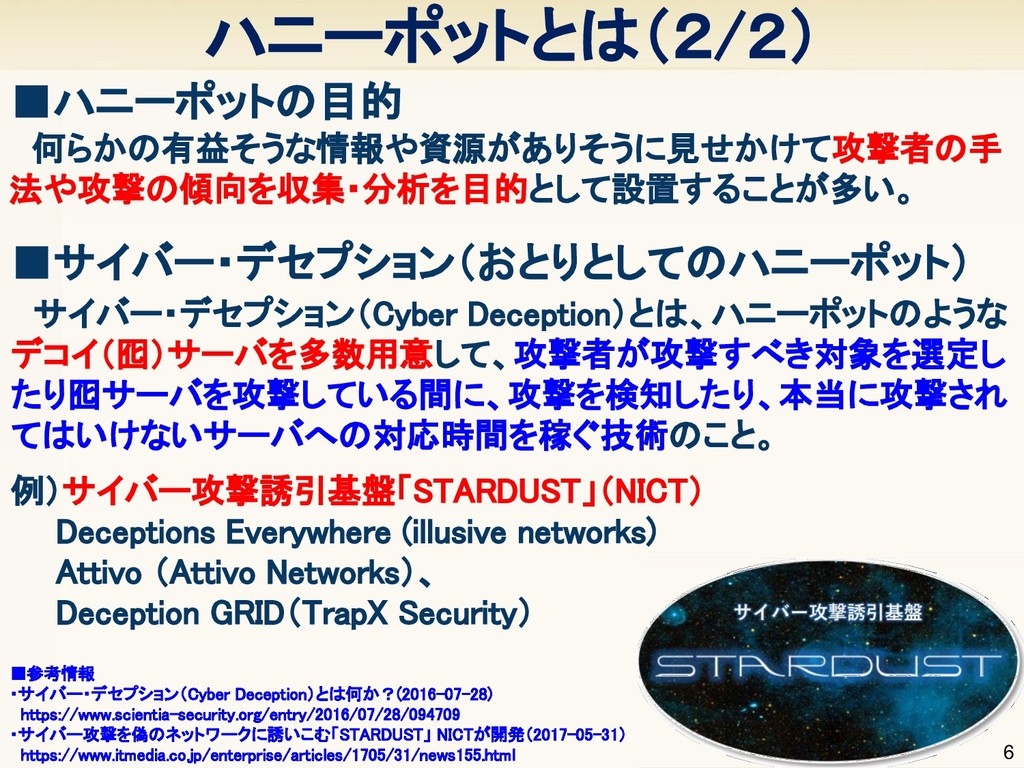
6 ▪ハニーポットの目的 ▪参考情報 ・サイバー・デセプション(Cyber Deception)とは何か?(2016-07-28) https://www.scientia-security.org/entry/2016/07/28/094709 ・サイバー攻撃を偽のネットワークに誘いこむ「STARDUST」 NICTが開発(2017-05-31) https://www.itmedia.co.jp/enterprise/articles/1705/31/news155.html
何らかの有益そうな情報や資源がありそうに見せかけて攻撃者の手 法や攻撃の傾向を収集・分析を目的として設置することが多い。 ハニーポットとは(2/2) サイバー・デセプション(Cyber Deception)とは、ハニーポットのような デコイ(囮)サーバを多数用意して、攻撃者が攻撃すべき対象を選定し たり囮サーバを攻撃している間に、攻撃を検知したり、本当に攻撃され てはいけないサーバへの対応時間を稼ぐ技術のこと。 例)サイバー攻撃誘引基盤「STARDUST」(NICT) Deceptions Everywhere (illusive networks) Attivo (Attivo Networks)、 Deception GRID(TrapX Security) ▪サイバー・デセプション(おとりとしてのハニーポット)
7 2 ハニーポットに必要なもの
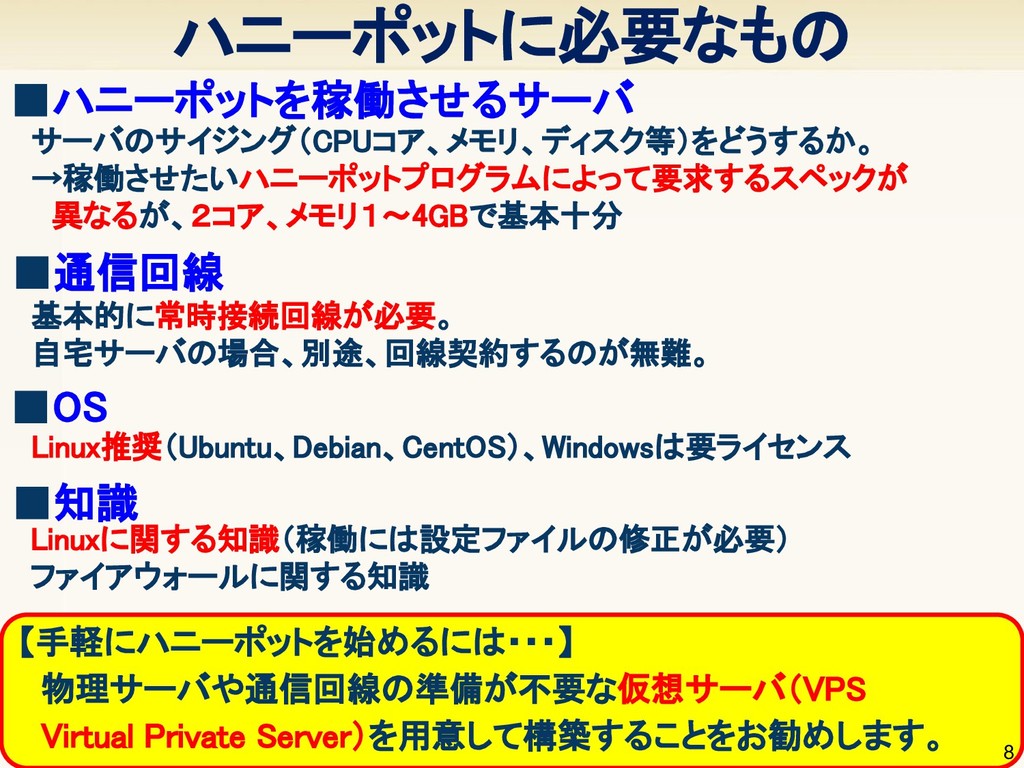
【手軽にハニーポットを始めるには・・・】 物理サーバや通信回線の準備が不要な仮想サーバ(VPS Virtual Private Server)を用意して構築することをお勧めします。 ハニーポットに必要なもの 8 ▪ハニーポットを稼働させるサーバ サーバのサイジング(CPUコア、メモリ、ディスク等)をどうするか。 →稼働させたいハニーポットプログラムによって要求するスペックが
異なるが、2コア、メモリ1〜4GBで基本十分 ▪通信回線 基本的に常時接続回線が必要。 自宅サーバの場合、別途、回線契約するのが無難。 ▪OS Linux推奨(Ubuntu、Debian、CentOS)、Windowsは要ライセンス ▪知識 Linuxに関する知識(稼働には設定ファイルの修正が必要) ファイアウォールに関する知識
9 3 仮想サーバ(VPS)の準備
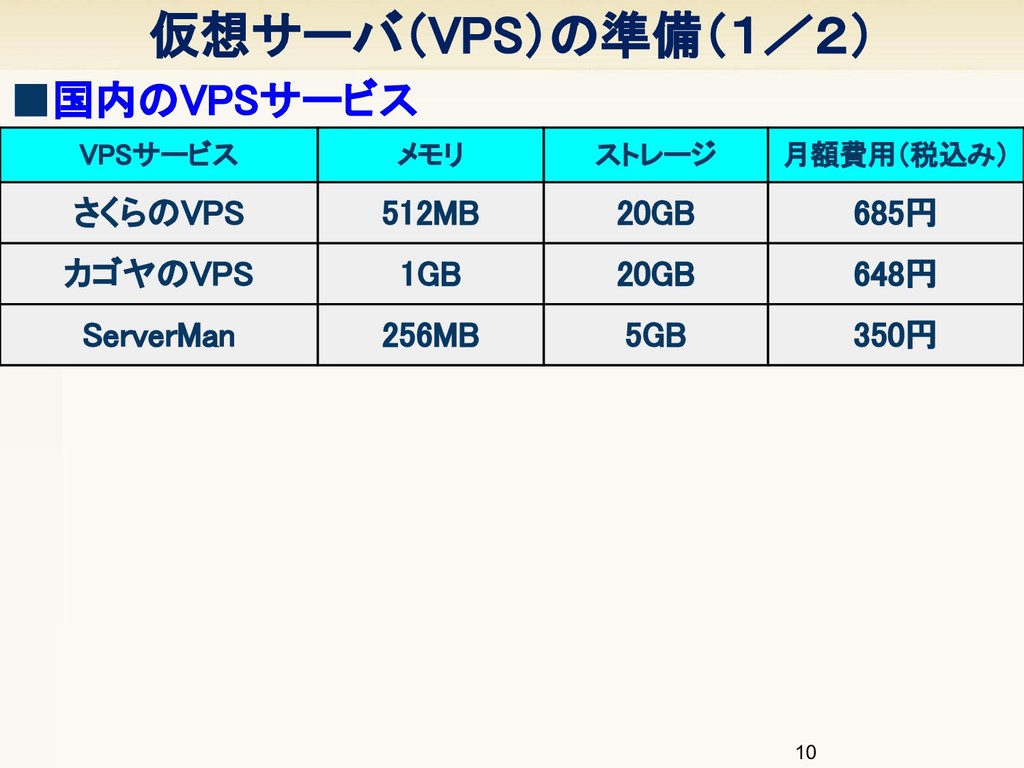
仮想サーバ(VPS)の準備(1/2) 10 VPSサービス メモリ ストレージ 月額費用(税込み) さくらのVPS 512MB 20GB 685円
カゴヤのVPS 1GB 20GB 648円 ServerMan 256MB 5GB 350円 ▪国内のVPSサービス
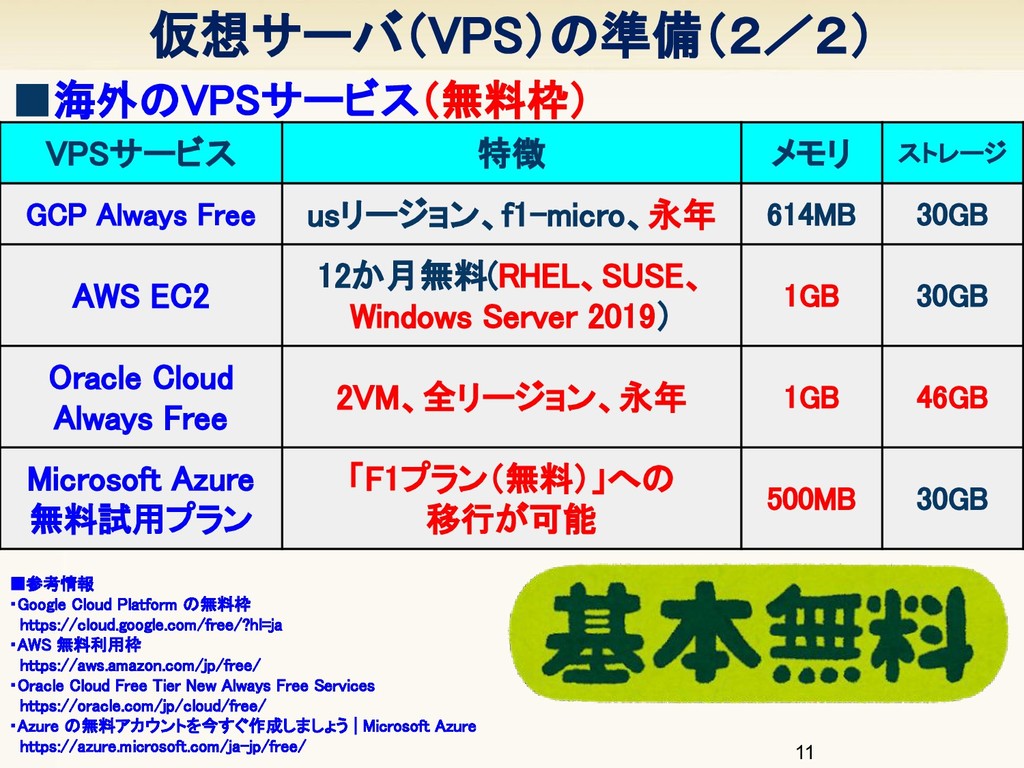
仮想サーバ(VPS)の準備(2/2) 11 ▪参考情報 ・Google Cloud Platform の無料枠 https://cloud.google.com/free/?hl=ja ・AWS 無料利用枠
https://aws.amazon.com/jp/free/ ・Oracle Cloud Free Tier New Always Free Services https://oracle.com/jp/cloud/free/ ・Azure の無料アカウントを今すぐ作成しましょう | Microsoft Azure https://azure.microsoft.com/ja-jp/free/ ▪海外のVPSサービス(無料枠) VPSサービス 特徴 メモリ ストレージ GCP Always Free usリージョン、f1-micro、永年 614MB 30GB AWS EC2 12か月無料(RHEL、SUSE、 Windows Server 2019) 1GB 30GB Oracle Cloud Always Free 2VM、全リージョン、永年 1GB 46GB Microsoft Azure 無料試用プラン 「F1プラン(無料)」への 移行が可能 500MB 30GB
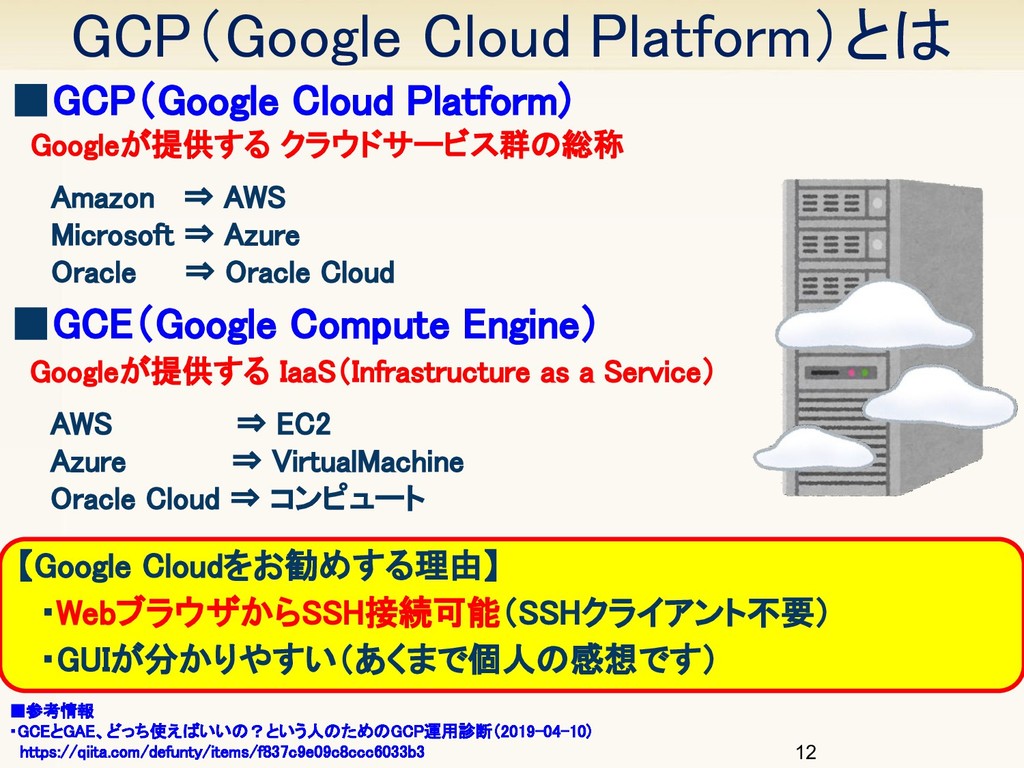
GCP(Google Cloud Platform)とは 12 ▪GCP(Google Cloud Platform) ▪参考情報 ・GCEとGAE、どっち使えばいいの?という人のためのGCP運用診断(2019-04-10) https://qiita.com/defunty/items/f837c9e09c8ccc6033b3
Googleが提供する クラウドサービス群の総称 Amazon ⇒ AWS Microsoft ⇒ Azure Oracle ⇒ Oracle Cloud ▪GCE(Google Compute Engine) Googleが提供する IaaS(Infrastructure as a Service) AWS ⇒ EC2 Azure ⇒ VirtualMachine Oracle Cloud ⇒ コンピュート 【Google Cloudをお勧めする理由】 ・WebブラウザからSSH接続可能(SSHクライアント不要) ・GUIが分かりやすい(あくまで個人の感想です)
13 4 GCP/GCEを使ってみよう
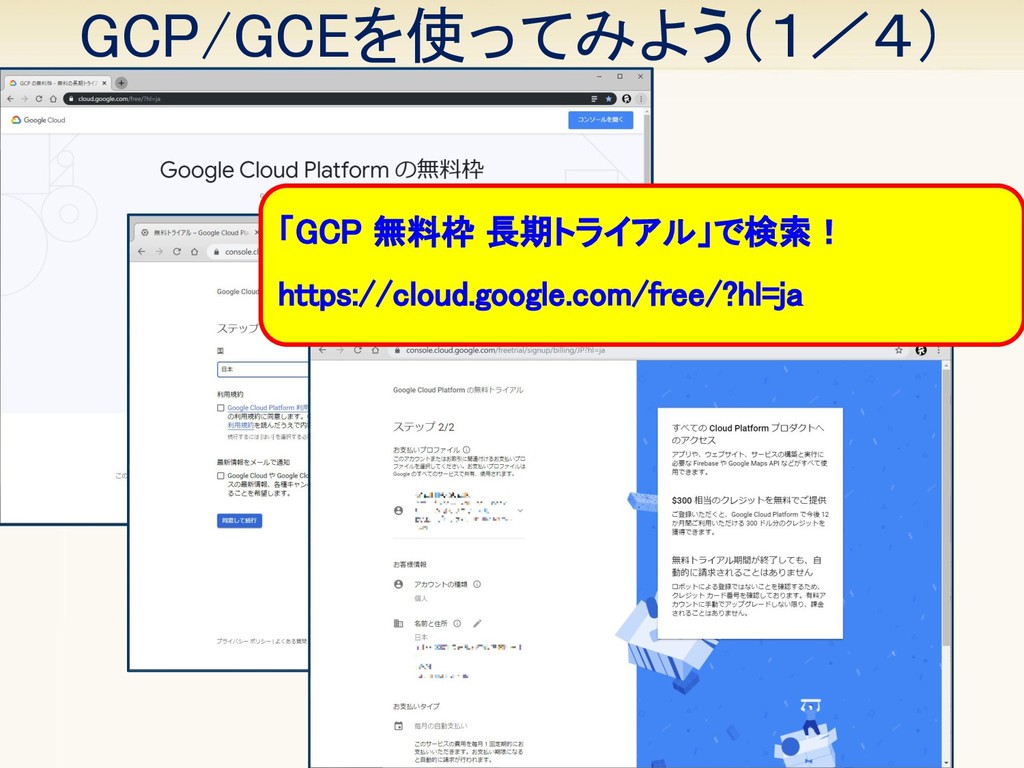
GCP/GCEを使ってみよう(1/4) 14 「GCP 無料枠 長期トライアル」で検索! https://cloud.google.com/free/?hl=ja
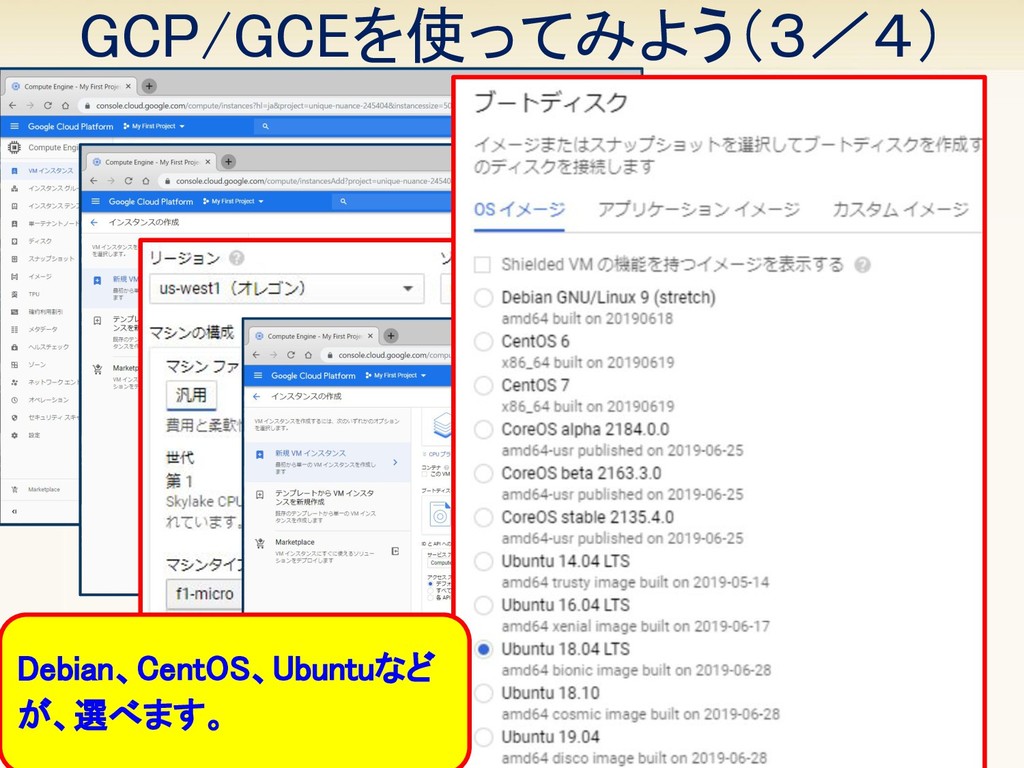
GCP/GCEを使ってみよう(2/4) 15 無料枠(Always Free)の条件は3つ ①アメリカusのリージョンを選択する。 (西海岸のus-west1が東京に近くておすすめ) ②f1-microというマシンタイプを選択する。 ③ストレージは30GBのHDDを選択する。
GCP/GCEを使ってみよう(3/4) 16 Debian、CentOS、Ubuntuなど が、選べます。
GCP/GCEを使ってみよう(4/4) 17 タブレット(iPad)のGoogle Consoleアプリなら、SSH ログインもできちゃいます!
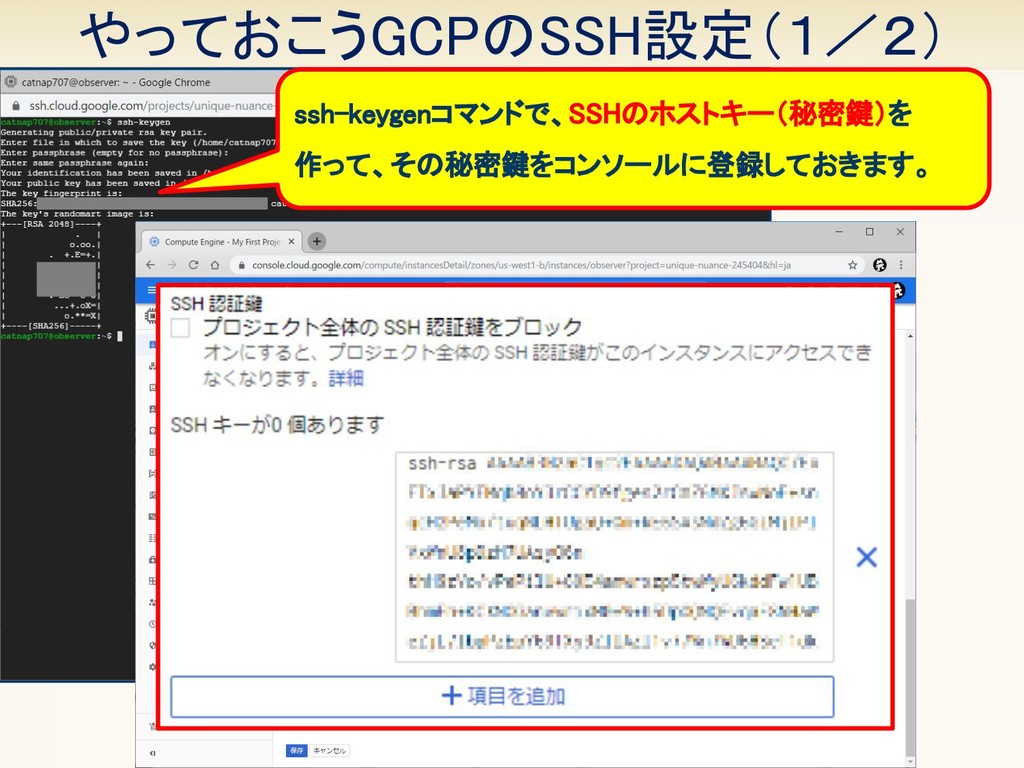
やっておこうGCPのSSH設定(1/2) 18 ssh-keygenコマンドで、SSHのホストキー(秘密鍵)を 作って、その秘密鍵をコンソールに登録しておきます。
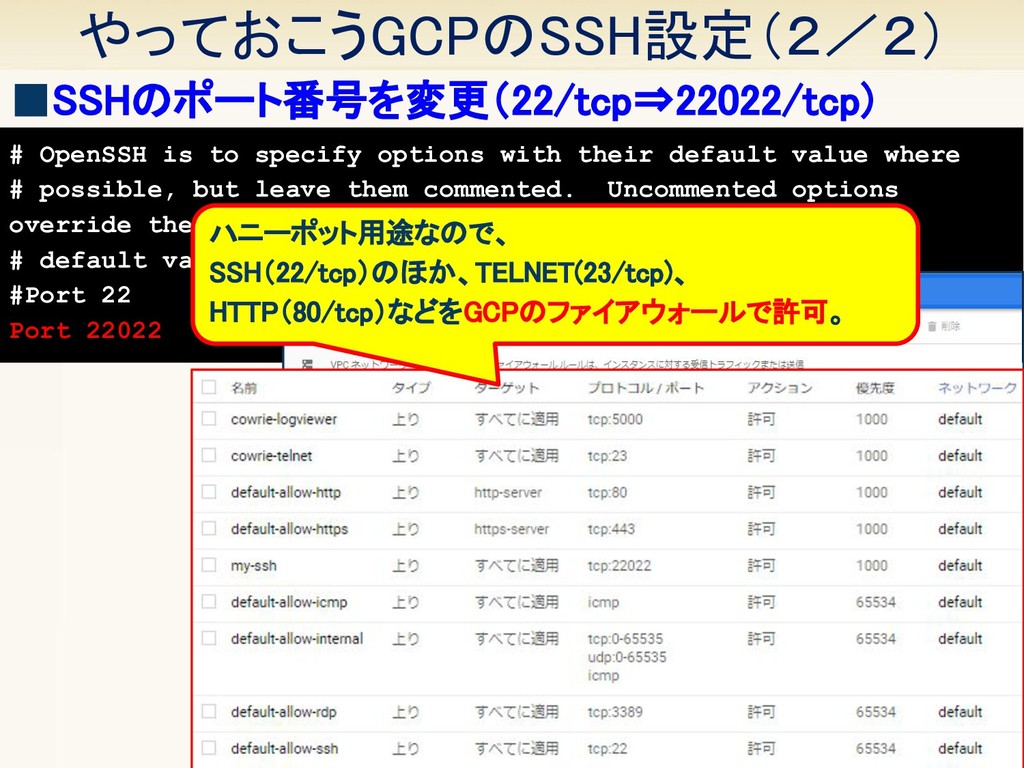
やっておこうGCPのSSH設定(2/2) 19 ▪SSHのポート番号を変更(22/tcp⇒22022/tcp) # OpenSSH is to specify options with
their default value where # possible, but leave them commented. Uncommented options override the # default value. #Port 22 Port 22022 ハニーポット用途なので、 SSH(22/tcp)のほか、TELNET(23/tcp)、 HTTP(80/tcp)などをGCPのファイアウォールで許可。
20 5 ハニーポットの選定
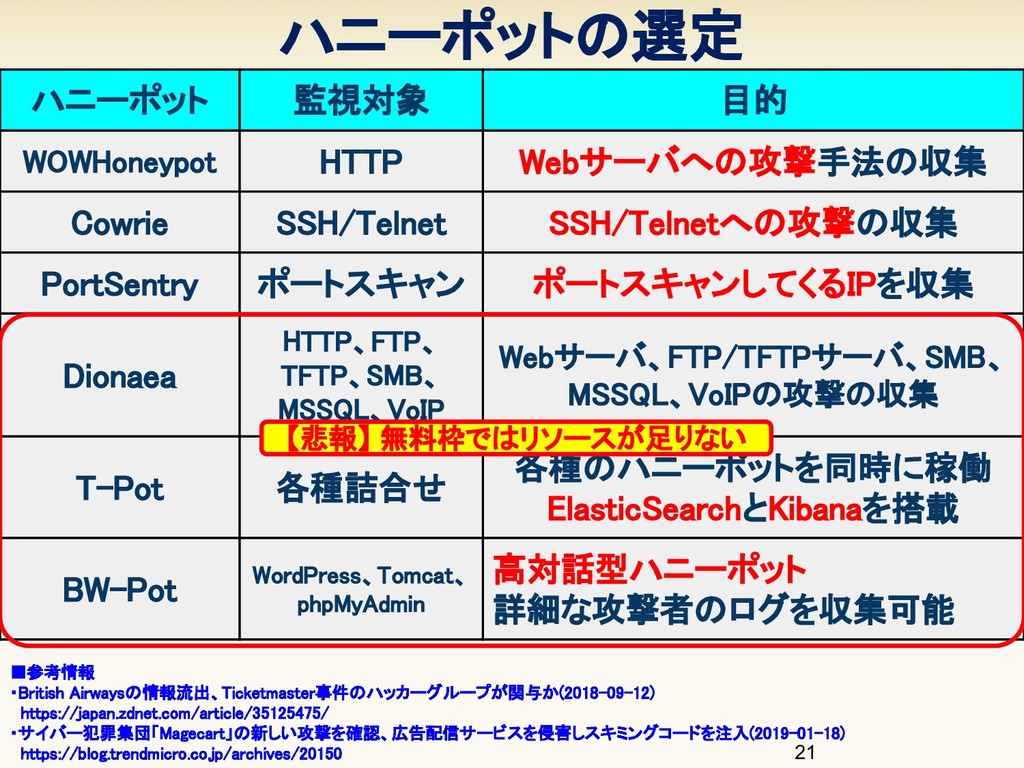
ハニーポットの選定 21 ▪参考情報 ・British Airwaysの情報流出、Ticketmaster事件のハッカーグループが関与か(2018-09-12) https://japan.zdnet.com/article/35125475/ ・サイバー犯罪集団「Magecart」の新しい攻撃を確認、広告配信サービスを侵害しスキミングコードを注入(2019-01-18) https://blog.trendmicro.co.jp/archives/20150 ハニーポット 監視対象
目的 WOWHoneypot HTTP Webサーバへの攻撃手法の収集 Cowrie SSH/Telnet SSH/Telnetへの攻撃の収集 PortSentry ポートスキャン ポートスキャンしてくるIPを収集 Dionaea HTTP、FTP、 TFTP、SMB、 MSSQL、VoIP Webサーバ、FTP/TFTPサーバ、SMB、 MSSQL、VoIPの攻撃の収集 T-Pot 各種詰合せ 各種のハニーポットを同時に稼働 ElasticSearchとKibanaを搭載 BW-Pot WordPress、Tomcat、 phpMyAdmin 高対話型ハニーポット 詳細な攻撃者のログを収集可能 【悲報】 無料枠ではリソースが足りない
22 6 ハニーポットの構築
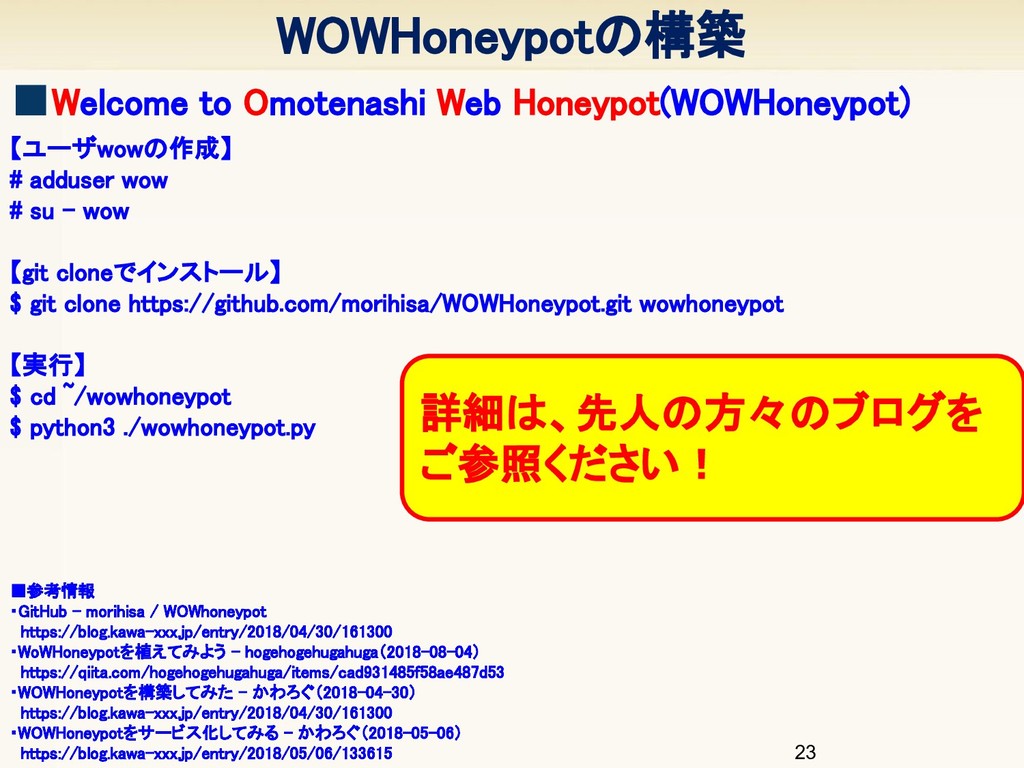
WOWHoneypotの構築 23 ▪参考情報 ・GitHub - morihisa / WOWhoneypot https://blog.kawa-xxx.jp/entry/2018/04/30/161300
・WoWHoneypotを植えてみよう - hogehogehugahuga(2018-08-04) https://qiita.com/hogehogehugahuga/items/cad931485f58ae487d53 ・WOWHoneypotを構築してみた - かわろぐ(2018-04-30) https://blog.kawa-xxx.jp/entry/2018/04/30/161300 ・WOWHoneypotをサービス化してみる - かわろぐ(2018-05-06) https://blog.kawa-xxx.jp/entry/2018/05/06/133615 ▪Welcome to Omotenashi Web Honeypot(WOWHoneypot) 【ユーザwowの作成】 # adduser wow # su - wow 【git cloneでインストール】 $ git clone https://github.com/morihisa/WOWHoneypot.git wowhoneypot 【実行】 $ cd ~/wowhoneypot $ python3 ./wowhoneypot.py 詳細は、先人の方々のブログを ご参照ください!
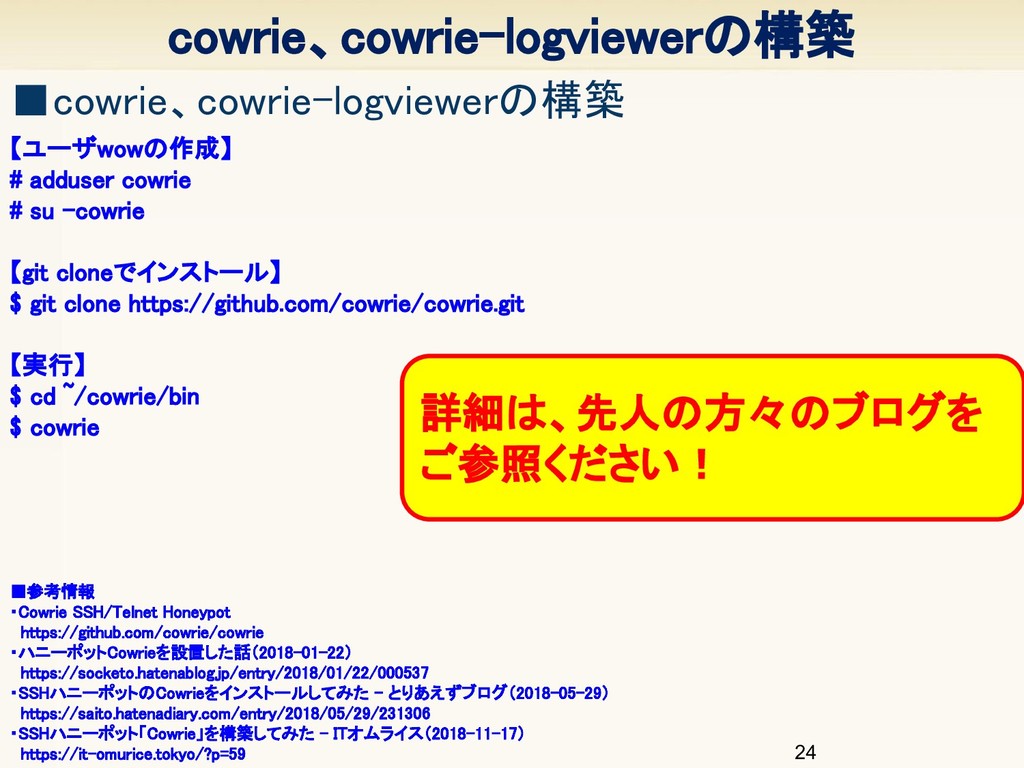
cowrie、cowrie-logviewerの構築 24 ▪参考情報 ・Cowrie SSH/Telnet Honeypot https://github.com/cowrie/cowrie ・ハニーポットCowrieを設置した話(2018-01-22) https://socketo.hatenablog.jp/entry/2018/01/22/000537 ・SSHハニーポットのCowrieをインストールしてみた
- とりあえずブログ(2018-05-29) https://saito.hatenadiary.com/entry/2018/05/29/231306 ・SSHハニーポット「Cowrie」を構築してみた - ITオムライス(2018-11-17) https://it-omurice.tokyo/?p=59 ▪cowrie、cowrie-logviewerの構築 【ユーザwowの作成】 # adduser cowrie # su -cowrie 【git cloneでインストール】 $ git clone https://github.com/cowrie/cowrie.git 【実行】 $ cd ~/cowrie/bin $ cowrie 詳細は、先人の方々のブログを ご参照ください!
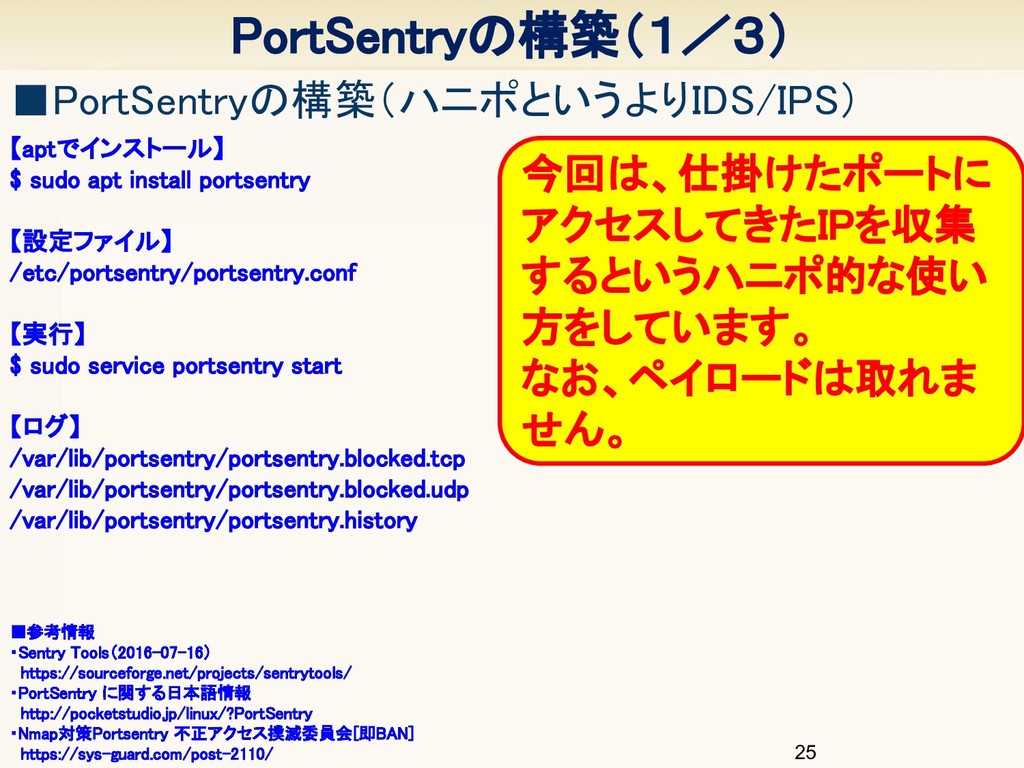
PortSentryの構築(1/3) 25 ▪参考情報 ・Sentry Tools(2016-07-16) https://sourceforge.net/projects/sentrytools/ ・PortSentry に関する日本語情報 http://pocketstudio.jp/linux/?PortSentry ・Nmap対策Portsentry
不正アクセス撲滅委員会[即BAN] https://sys-guard.com/post-2110/ ▪PortSentryの構築(ハニポというよりIDS/IPS) 【aptでインストール】 $ sudo apt install portsentry 【設定ファイル】 /etc/portsentry/portsentry.conf 【実行】 $ sudo service portsentry start 【ログ】 /var/lib/portsentry/portsentry.blocked.tcp /var/lib/portsentry/portsentry.blocked.udp /var/lib/portsentry/portsentry.history 今回は、仕掛けたポートに アクセスしてきたIPを収集 するというハニポ的な使い 方をしています。 なお、ペイロードは取れま せん。
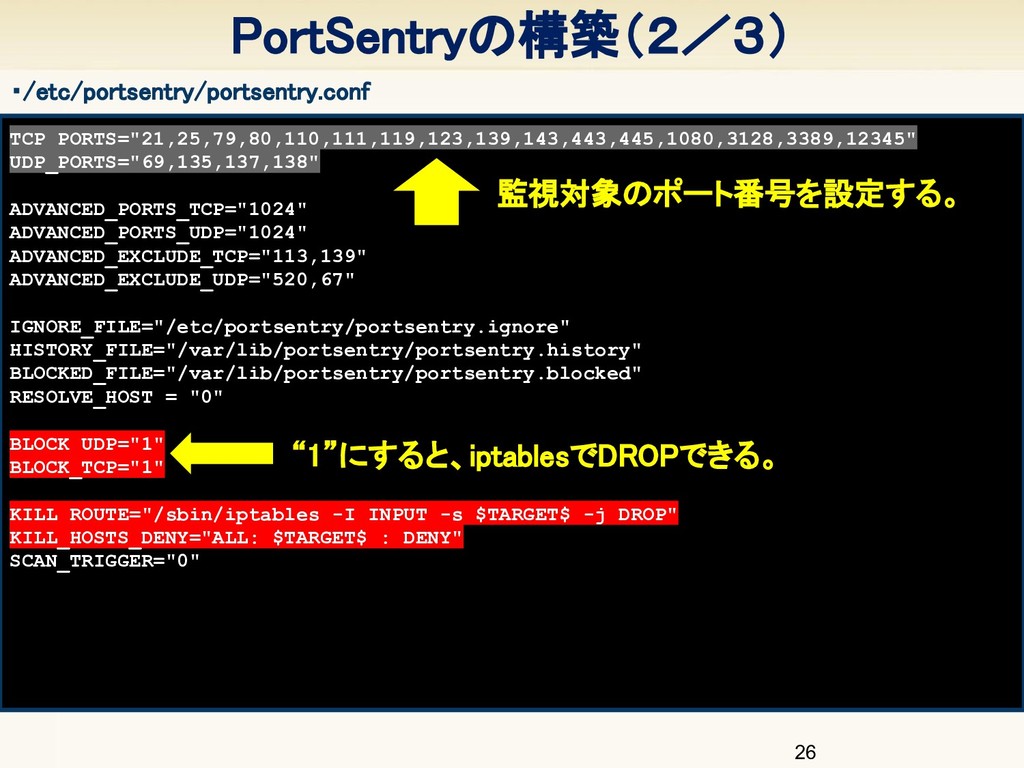
TCP_PORTS="21,25,79,80,110,111,119,123,139,143,443,445,1080,3128,3389,12345" UDP_PORTS="69,135,137,138" ADVANCED_PORTS_TCP="1024" ADVANCED_PORTS_UDP="1024" ADVANCED_EXCLUDE_TCP="113,139" ADVANCED_EXCLUDE_UDP="520,67" IGNORE_FILE="/etc/portsentry/portsentry.ignore" HISTORY_FILE="/var/lib/portsentry/portsentry.history" BLOCKED_FILE="/var/lib/portsentry/portsentry.blocked" RESOLVE_HOST
= "0" BLOCK_UDP="1" BLOCK_TCP="1" KILL_ROUTE="/sbin/iptables -I INPUT -s $TARGET$ -j DROP" KILL_HOSTS_DENY="ALL: $TARGET$ : DENY" SCAN_TRIGGER="0" PortSentryの構築(2/3) 26 “1”にすると、iptablesでDROPできる。 ・/etc/portsentry/portsentry.conf 監視対象のポート番号を設定する。
PortSentryの構築(3/3) 27 portsentry[2430]: attackalert: Connect from host: 185.156.xxx.xxx/185.156.xxx.xxx to TCP
port: 3389 portsentry[2430]: attackalert: Host 185.156.xxx.xxx has been blocked via wrappers with string: "ALL: 185.156.xxx.xxx : DENY" portsentry[2430]: attackalert: Host 185.156.xxx.xxx has been blocked via dropped route using command: "/sbin/iptables -I INPUT -s 185.156.xxx.xxx -j DROP" ALL: 185.156.xxx.xxx : DENY Chain INPUT (policy ACCEPT) target prot opt source destination DROP all -- 185.156.xxx.xxx 0.0.0.0/0 Chain FORWARD (policy ACCEPT) target prot opt source destination Chain OUTPUT (policy ACCEPT) target prot opt source destination ・/var/log/syslog ・/etc/hosts.deny ・iptables -L -n RDP(3389/tcp)へのアクセスを 検知し、DROP
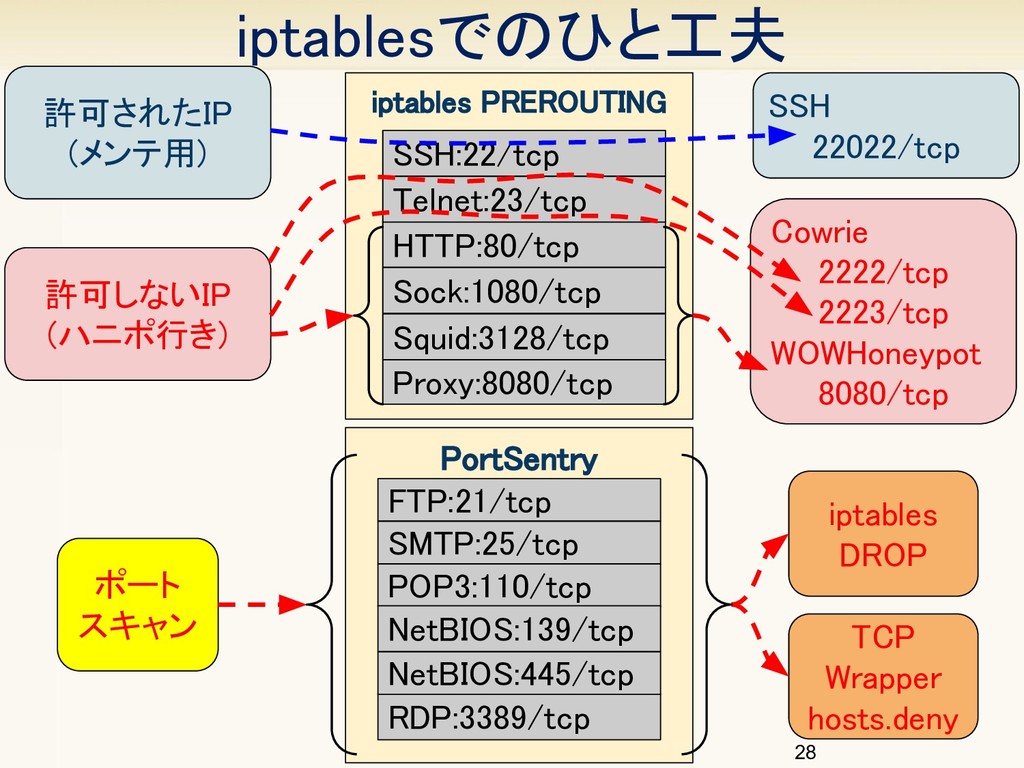
iptablesでのひと工夫 許可されたIP (メンテ用) 許可しないIP (ハニポ行き) iptables PREROUTING
SSH 22022/tcp Cowrie 2222/tcp 2223/tcp WOWHoneypot 8080/tcp PortSentry HTTP:80/tcp SSH:22/tcp Telnet:23/tcp Proxy:8080/tcp Squid:3128/tcp Sock:1080/tcp iptables DROP TCP Wrapper hosts.deny ポート スキャン 28 FTP:21/tcp RDP:3389/tcp SMTP:25/tcp POP3:110/tcp NetBIOS:139/tcp NetBIOS:445/tcp
29 7 まとめ
30 ハニーポット依存症にはご注意
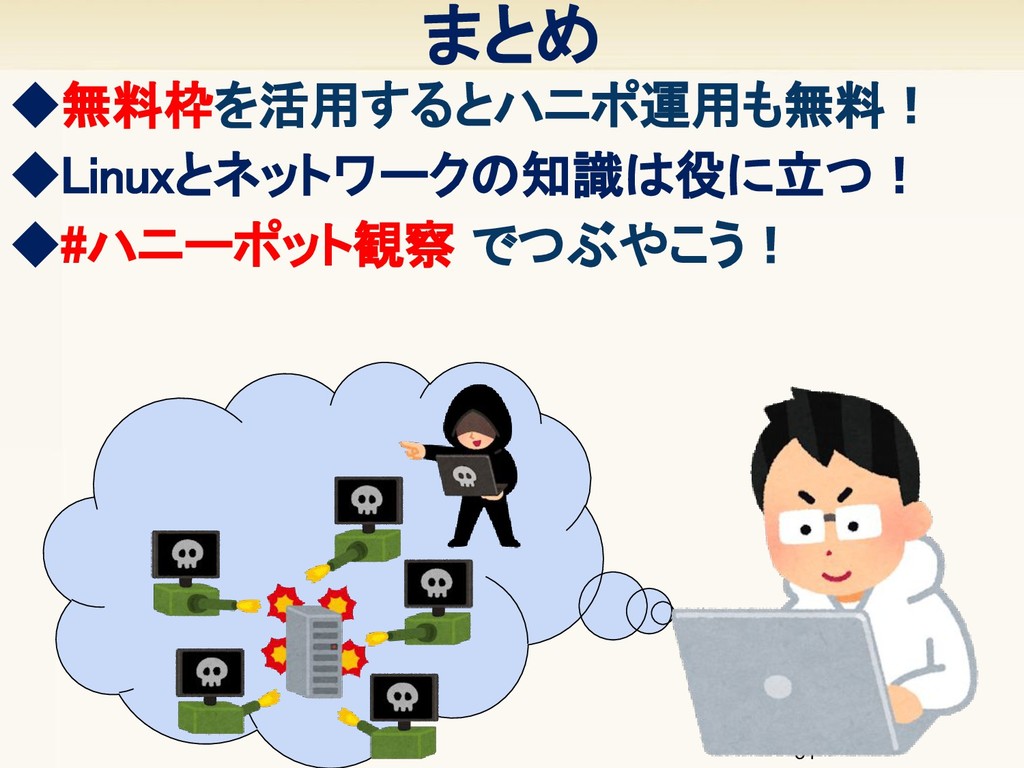
◆#ハニーポット観察 でつぶやこう! まとめ ◆無料枠を活用するとハニポ運用も無料! ◆Linuxとネットワークの知識は役に立つ! 31
ご清聴ありがとうございました。 フォロー待ってるニャ! @catnap707
33


 ctrl_z3r0
 oracle4engineer
 htan
htan
 sansantech
 foursue
 yakumo
 kawametho
 slsops
 dtunkelang
 bgpat
bgpat
 naruoga
 pauli
pauli
 pei0804
 ryanjones
 jonoalderson
 thirion
 chriscoyier
 baasie
 csswizardry
 bkeepers
 sstephenson
 jonrohan
 akashhashmi
 schlessera









![PortSentryの構築(3/3) 27 portsentry[2430]: attackalert: Connect from host: 185.156.xxx.xxx/185.156.xxx.xxx to TCP](https://files.speakerdeck.com/presentations/80e2a698df8a4e21aa69b06fba25cac7/slide_26.jpg)