Upgrade to Pro — share decks privately, control downloads, hide ads and more …

Building Web APIs with Hapi.js and MongoDB (Mon...

Sponsored · SiteGround - Reliable hosting with speed, security, and support you can count on. →

Building Web APIs with Hapi.js and MongoDB (Mongoose)

Avatar for Donn Felker

Donn Felker

April 02, 2014

More Decks by Donn Felker

Other Decks in Technology

Transcript

  1. Node.js is a platform built on Chrome's JavaScript runtime for

    easily building fast, scalable network applications. Node.js uses an event-driven, non-blocking I/O model that makes it lightweight and efficient, perfect for data-intensive real-time applications that run across distributed devices. -nodejs.org
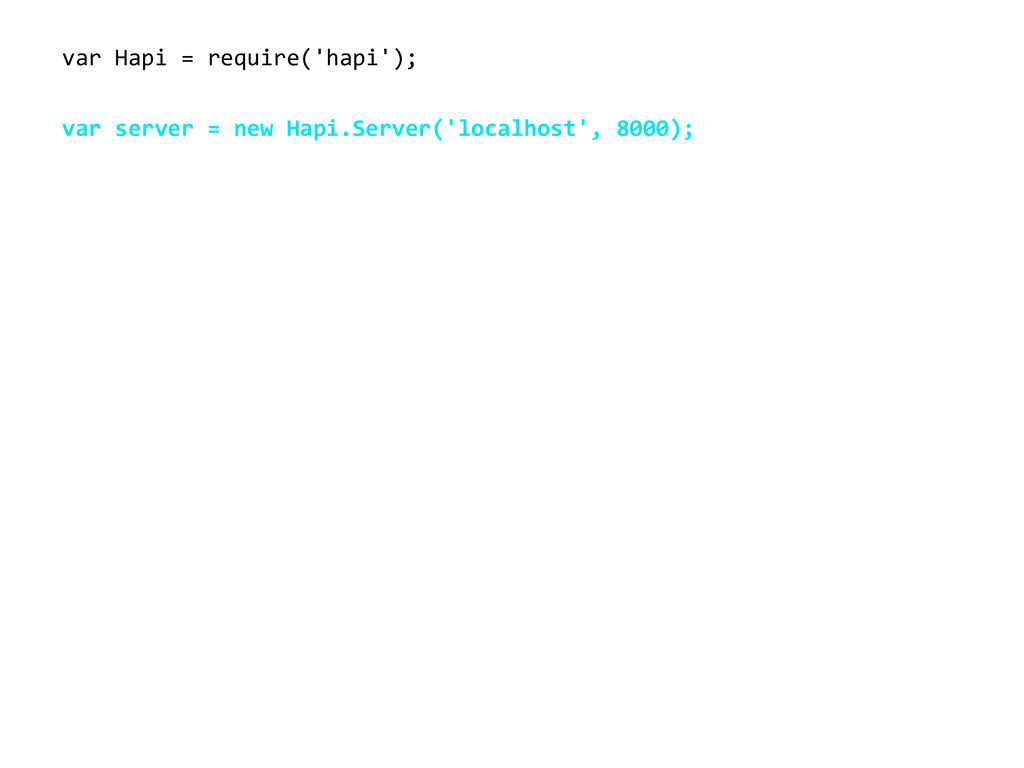
  2. var  Hapi  =  require('hapi'); var  server  =  new  Hapi.Server('localhost',  8000);

    var  handler  =  function(request,  reply)  {   reply({  message:  "Hello  from  Hapi.js!"}); };
  3. var  Hapi  =  require('hapi'); var  server  =  new  Hapi.Server('localhost',  8000);

    var  handler  =  function(request,  reply)  {   reply({  name:  "Ian"}); }; server.route({   method:  'GET',   path:  '/user',   handler:  handler });
  4. var  Hapi  =  require('hapi'); var  server  =  new  Hapi.Server('localhost',  8000);

    var  handler  =  function(request,  reply)  {   reply({  name:  "Ian"}); }; server.route({   method:  'GET',   path:  '/user',   handler:  handler }); server.start(function  ()  {        console.log('Server  started  at:  '  +  server.info.uri); });
  5. var  Hapi  =  require('hapi'); var  server  =  new  Hapi.Server('localhost',  8000);

    var  handler  =  function(request,  reply)  {   reply({  name:  "Ian"}); }; server.route({   method:  'GET',   path:  '/user',   handler:  handler }); server.start(function  ()  {        console.log('Server  started  at:  '  +  server.info.uri); });
  6. server.route({   method:  'GET',   path:  '/user',   config:  {

        handler:  rootHandler,     cache:  {       expiresIn:  5  *  60  *  1000,     }   } });
  7. server.route({   method:  'GET',   path:  '/user',   config:  {

        handler:  rootHandler,     cache:  {       expiresIn:  5  *  60  *  1000, staleIn:  4  *  60  *  1000, staleTimeout:  200     }   } });
  8. server.route({   method:  'GET',   path:  '/user',   config:  {

        handler:  rootHandler,  validate:  {      query:  {          id:  Joi.number()  }  }   } });
  9. server.route({   method:  'GET',   path:  '/user',   config:  {

        handler:  rootHandler,  validate:  {      query:  {          id:  Joi.number().min(100).required()  }  }   } });
  10. server.route({   method:  'GET',   path:  '/user',   config:  {

        handler:  rootHandler,  validate:  {      query:  {          id:  Joi.number().min(100).required(),          username:  Joi.string().alphanum().min(3).max(20)  }  }   } });
  11. server.route({   method:  'GET',   path:  '/user',   config:  {

        handler:  rootHandler,  validate:  {      query:  {          id:  Joi.number().min(100).required().xor(‘username’),          username:  Joi.string().alphanum().min(3).max(20)  }  }   } });
  12. records are stored known as ‘documents’ and resemble json {

      "source"  :  "127.0.0.1",   "action"  :  "testAction",   "category"  :  "testCategory",   "_id"  :  ObjectId("532deb3d1d4b597d8bfbd270"),   "dateCreated"  :  ISODate("2014-­‐03-­‐22T19:57:49.062Z"), }
  13. var mongoose = require('mongoose'); var db = mongoose.createConnection('localhost', 'felkerlytics'); var

    schema = mongoose.Schema({ action: 'string', category: 'string' }); // ... etc var AnalyticEvent = db.model('analytic_event', schema); var analyticEvent = new AnalyticEvent({ action: 'linkClick' }); analyticEvent.save(function (err) { if (err) // ... reply(Boom.wrap(err)); }); mongoose mongoosejs.com
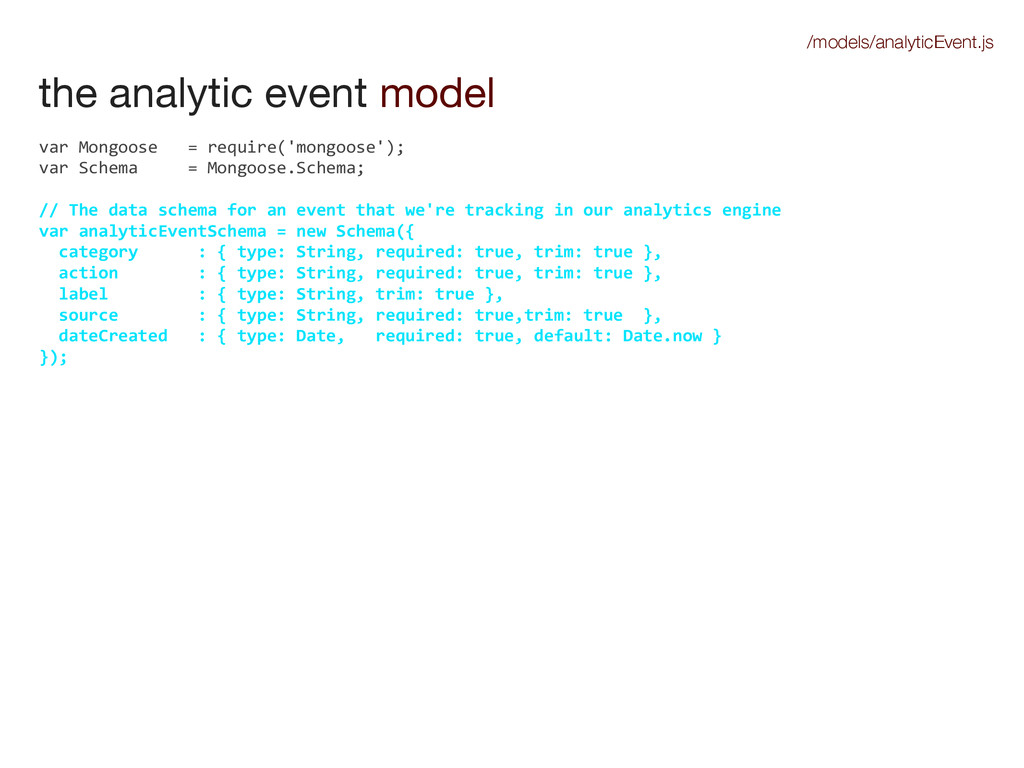
  14. the analytic event model var  Mongoose      =  require('mongoose');

    var  Schema          =  Mongoose.Schema; //  The  data  schema  for  an  event  that  we're  tracking  in  our  analytics  engine var  analyticEventSchema  =  new  Schema({    category            :  {  type:  String,  required:  true,  trim:  true  },    action                :  {  type:  String,  required:  true,  trim:  true  },    label                  :  {  type:  String,  trim:  true  },    source                :  {  type:  String,  required:  true,trim:  true    },              dateCreated      :  {  type:  Date,      required:  true,  default:  Date.now  } }); var  analyticEvent  =  Mongoose.model('analytic_event',  analyticEventSchema); module.exports  =  {    AnalyticEvent:  analyticEvent }; /models/analyticEvent.js
  15. the analytic event model var  Mongoose      =  require('mongoose');

    var  Schema          =  Mongoose.Schema; //  The  data  schema  for  an  event  that  we're  tracking  in  our  analytics  engine var  analyticEventSchema  =  new  Schema({    category            :  {  type:  String,  required:  true,  trim:  true  },    action                :  {  type:  String,  required:  true,  trim:  true  },    label                  :  {  type:  String,  trim:  true  },    source                :  {  type:  String,  required:  true,trim:  true    },    dateCreated      :  {  type:  Date,      required:  true,  default:  Date.now  } }); var  analyticEvent  =  Mongoose.model('analytic_event',  analyticEventSchema); module.exports  =  {    AnalyticEvent:  analyticEvent }; /models/analyticEvent.js
  16. the analytic event model var  Mongoose      =  require('mongoose');

    var  Schema          =  Mongoose.Schema; //  The  data  schema  for  an  event  that  we're  tracking  in  our  analytics  engine var  analyticEventSchema  =  new  Schema({    category            :  {  type:  String,  required:  true,  trim:  true  },    action                :  {  type:  String,  required:  true,  trim:  true  },    label                  :  {  type:  String,  trim:  true  },    source                :  {  type:  String,  required:  true,trim:  true    },                  dateCreated      :  {  type:  Date,      required:  true,  default:  Date.now  } }); var  analyticEvent  =  Mongoose.model('analytic_event',  analyticEventSchema); module.exports  =  {    AnalyticEvent:  analyticEvent }; /models/analyticEvent.js
  17. the analytic event model var  Mongoose      =  require('mongoose');

    var  Schema          =  Mongoose.Schema; //  The  data  schema  for  an  event  that  we're  tracking  in  our  analytics  engine var  analyticEventSchema  =  new  Schema({    category            :  {  type:  String,  required:  true,  trim:  true  },    action                :  {  type:  String,  required:  true,  trim:  true  },    label                  :  {  type:  String,  trim:  true  },    source                :  {  type:  String,  required:  true,trim:  true    },\    dateCreated      :  {  type:  Date,      required:  true,  default:  Date.now  } }); var  analyticEvent  =  Mongoose.model('analytic_event',  analyticEventSchema); module.exports  =  {    AnalyticEvent:  analyticEvent }; /models/analyticEvent.js
  18. new hapi project mkdir felkerlytics; cd felkerlytics { "name": "analytics-engine",

    "version": "0.0.1", "description": "An example hapi and mongo db app", "main": "server.js", "dependencies": { "hapi": "3.0.1", "mongoose": "~3.8.7", "boom": "^2.2.2", "lodash": "^2.4.1", "joi": "^2.8.0" } } create a package.json file with these contents create a folder for the app $ npm install install dependencies and install express