Upgrade to Pro
— share decks privately, control downloads, hide ads and more …
Speaker Deck
Sign up for free
Menu
Search
Features
All features
Private URLs
Password Protection
Custom URLS
Scheduled publishing
Remove Branding
Restrict embedding
Deck Collections
Notes
Features
All features
Private URLs
Password Protection
Custom URLS
Scheduled publishing
Remove Branding
Restrict embedding
Deck Collections
Notes
Explore
Featured decks
Featured speakers
Programming
Technology
Storyboards
Explore
Featured decks
Featured speakers
Programming
Technology
Storyboards
Pricing
Search
Sign in
Sign up for free
Integration Service
Search
HANACCHI
January 19, 2023
Technology
150
0
Share
Embed
Copy iframe code
Copy JS code
Copy link
Start on current slide
Integration Service
HANACCHI
January 19, 2023
More Decks by HANACCHI
See All by HANACCHI
どこかで誰かが見ていてくれる
hanacchi
0
68
単体試験の生産性向上と私
hanacchi
0
150
PowerAutomatefordesktopでの開発シーンで
hanacchi
0
35
ChatGPTにテストデータを作ってもらう
hanacchi
0
210
AI JIMYで数独
hanacchi
0
69
メール本文をどうやっつけるか
hanacchi
0
400
2024年のローコード界隈最新事情~業務担当者でもAI・生成AIを活用できる!~
hanacchi
0
480
AI JIMY - 登壇(インストール編)
hanacchi
0
560
AI JIMY - 登壇(設定編)
hanacchi
0
520
Other Decks in Technology
See All in Technology
フロントエンドカンファレンス関西2026 - 速すぎるUIに、待ち時間を
teamlab
PRO
0
120
Code for Security プロジェクト紹介 2026年10月
yu23ki14
0
100
触りたくないデータに、どう触るか AI時代のRBACアクセスガバナンス
ivry_presentationmaterials
0
230
TinyGoでオブザーバビリティ?OpenTelemetryはTinyGoで使えるのか / Is OpenTelemetry available in TinyGo environment?
ymotongpoo
2
140
OptunaHub: ブラックボックス最適化のためのプラットフォーム
pfn
PRO
0
130
[JAWS-UG彩の国埼玉#12]そろそろ準備する?re:Invent2026をやさしく解説 / reinvent2026-sainokuni
sh_fk2
1
310
DGX Spark でどこまでハッキングができるのか?
kash1064
3
1.3k
QA4AI 2026-Oct 生成AI時代の品質保証
tokuty
1
840
Active Record Connection Adaptersにおける長年の課題に再び取り組む
yahonda
0
130
AIは「聞けば答える」から「任せると自分で進める」へ - JACTIMペナン地域部会・ペナン三水会講演
knishioka
0
110
Cognition AI Japan - ウェビナー2_テストQA_運用監視
cogakira
0
140
Rust で関数型ドメインモデリング
takonda
0
120
Featured
See All Featured
The Organizational Zoo: Understanding Human Behavior Agility Through Metaphoric Constructive Conversations (based on the works of Arthur Shelley, Ph.D)
kimpetersen
PRO
0
500
Agile Actions for Facilitating Distributed Teams - ADO2019
mkilby
0
310
The Illustrated Guide to Node.js - THAT Conference 2024
reverentgeek
1
570
Highjacked: Video Game Concept Design
rkendrick25
PRO
1
480
BBQ
matthewcrist
90
10k
Agile Leadership in an Agile Organization
kimpetersen
PRO
0
280
Applied NLP in the Age of Generative AI
inesmontani
PRO
4
2.5k
A brief & incomplete history of UX Design for the World Wide Web: 1989–2019
jct
2
530
How To Stay Up To Date on Web Technology
chriscoyier
790
250k
The Illustrated Children's Guide to Kubernetes
chrisshort
51
53k
The Invisible Side of Design
smashingmag
301
52k
XXLCSS - How to scale CSS and keep your sanity
sugarenia
250
1.3M
Transcript
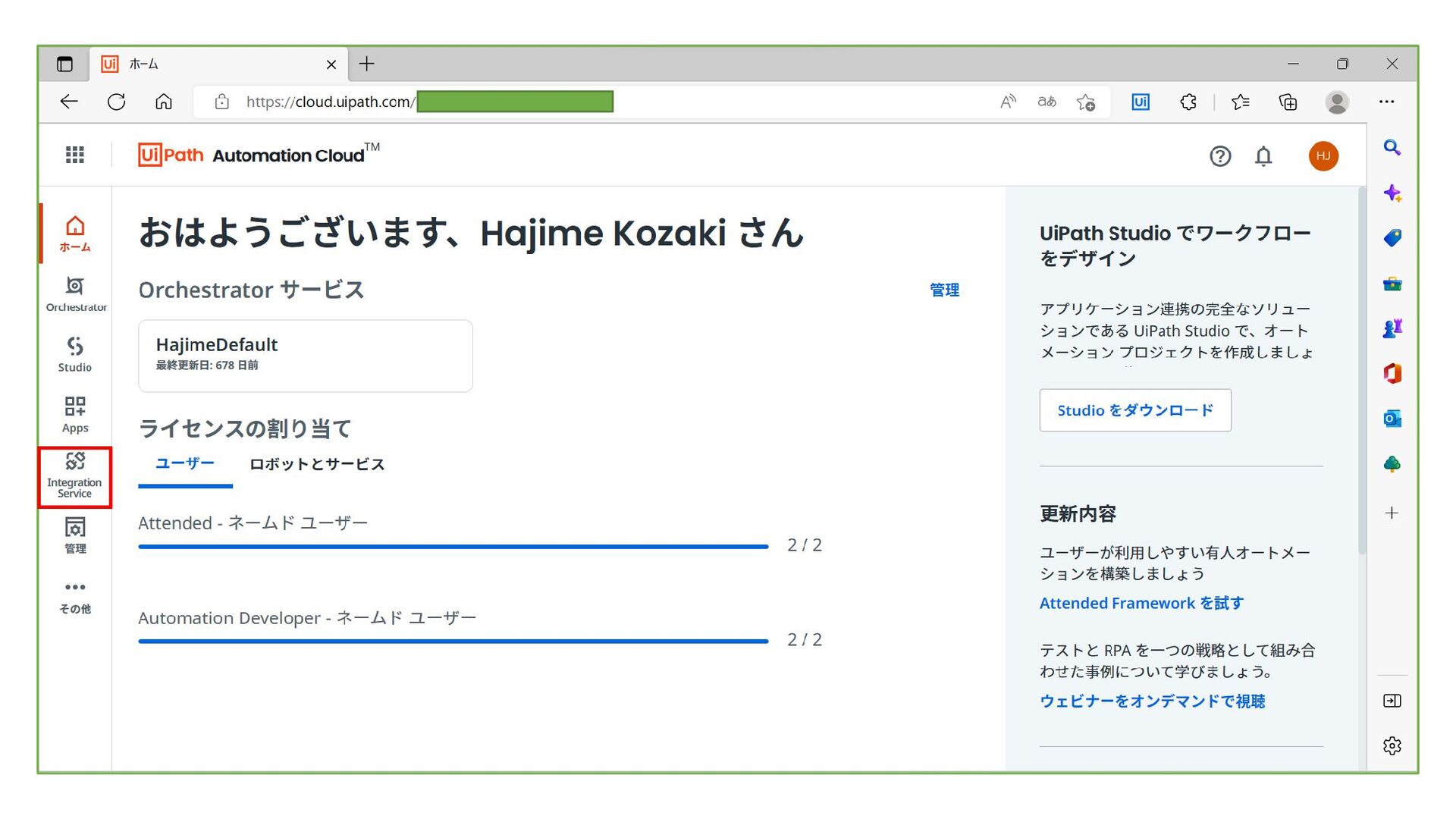
Integration Service
None
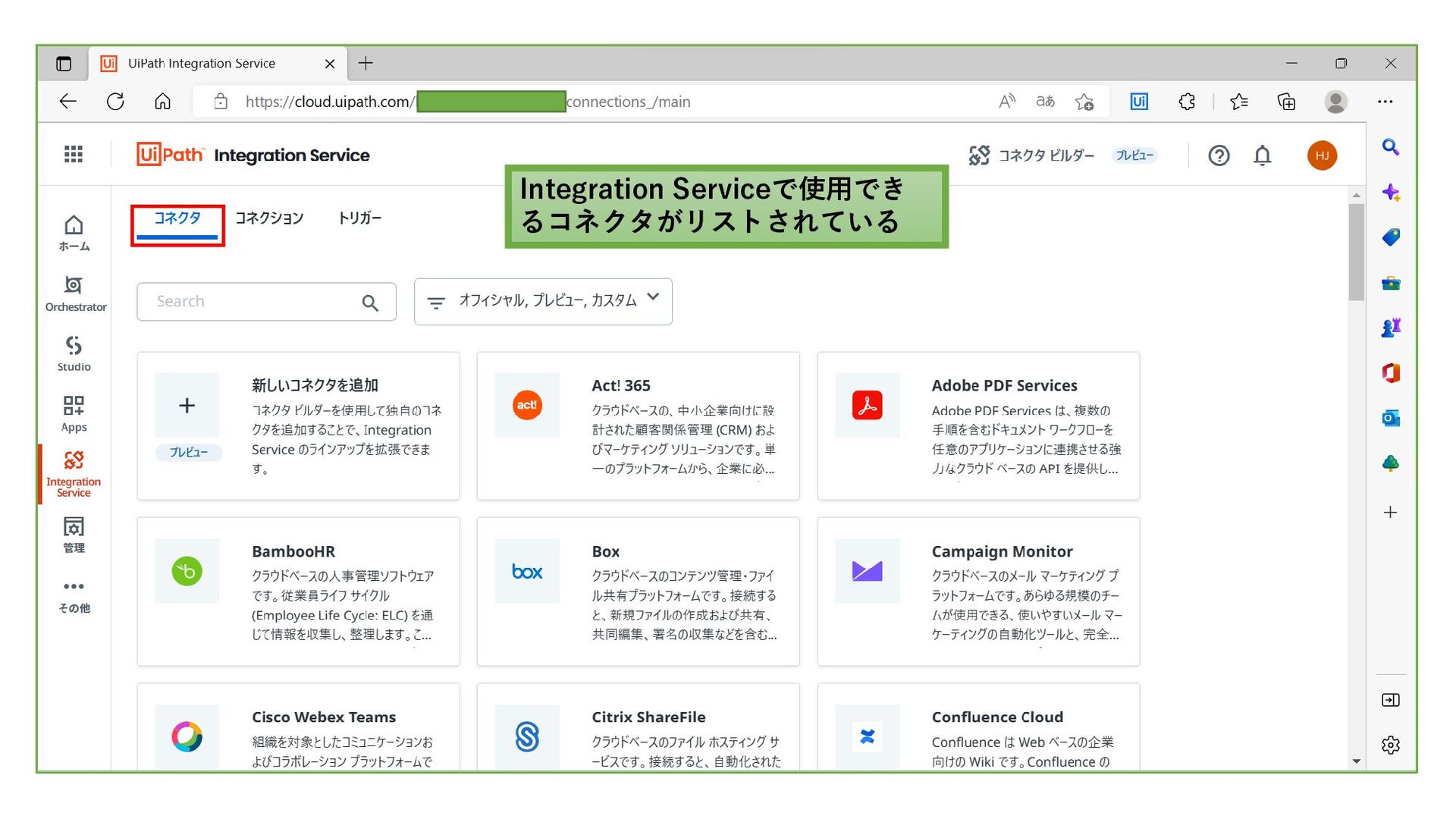
Integration Serviceで使用でき るコネクタがリストされている
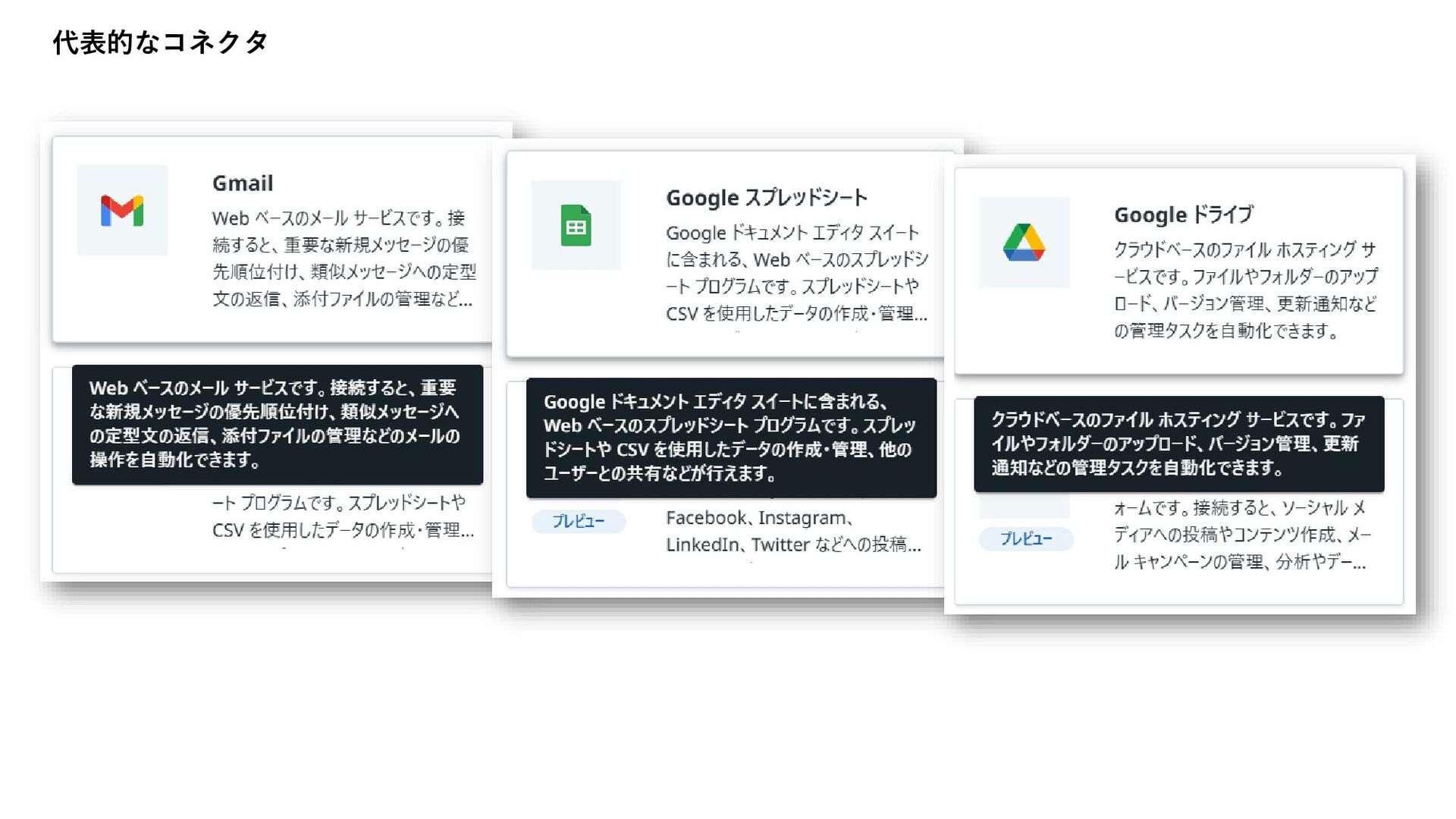
代表的なコネクタ
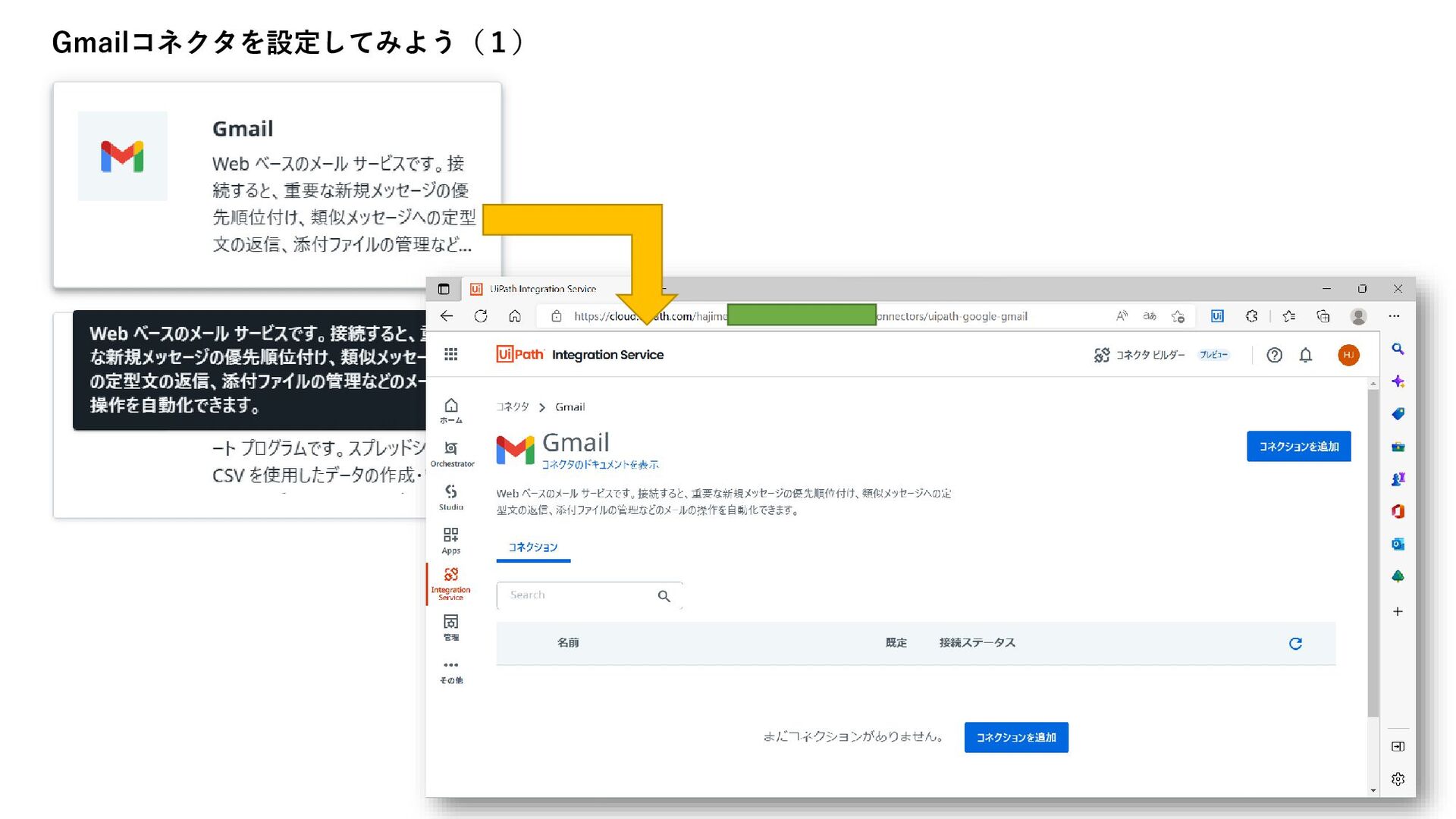
Gmailコネクタを設定してみよう(1)
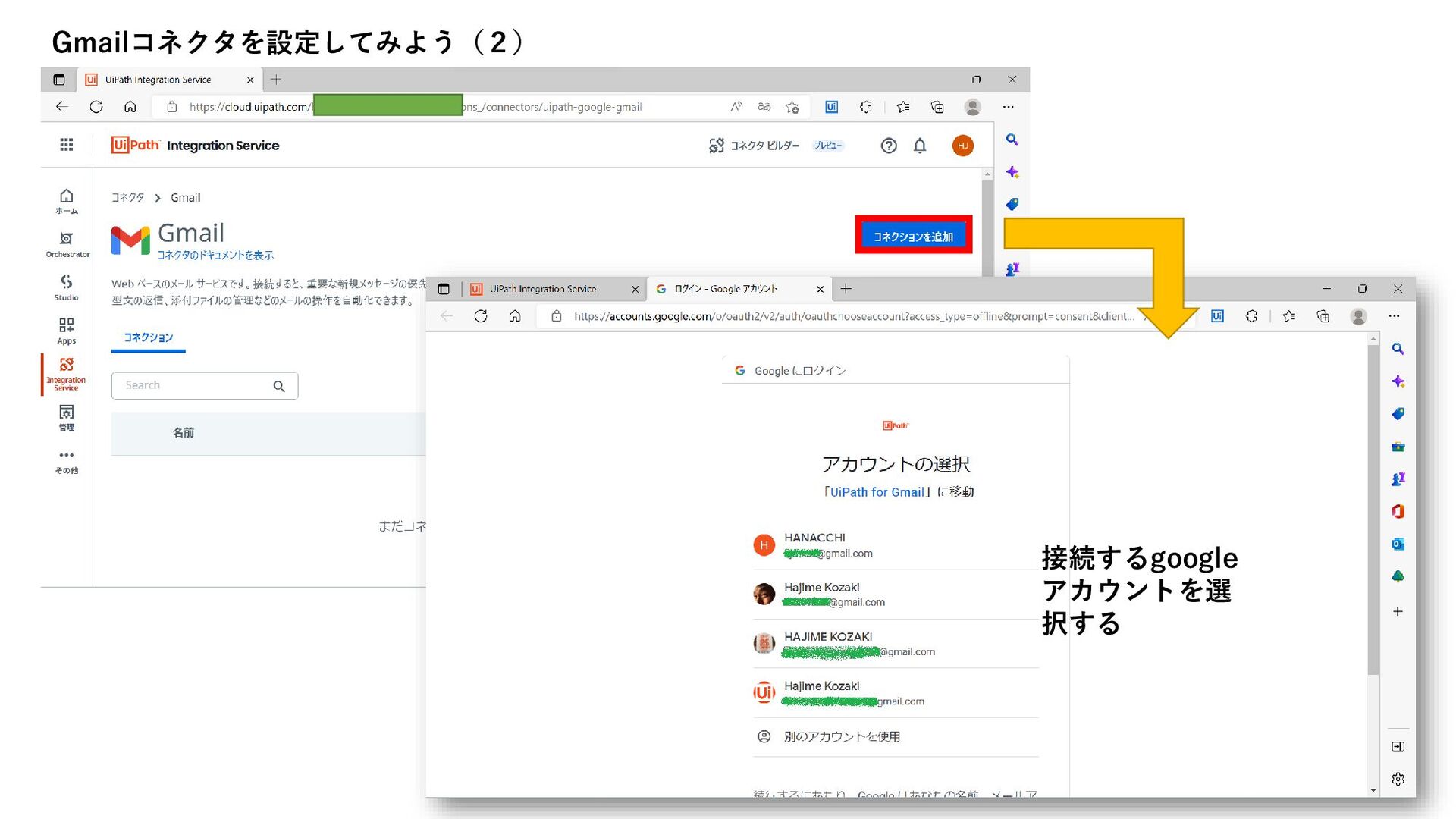
Gmailコネクタを設定してみよう(2) 接続するgoogle アカウントを選 択する
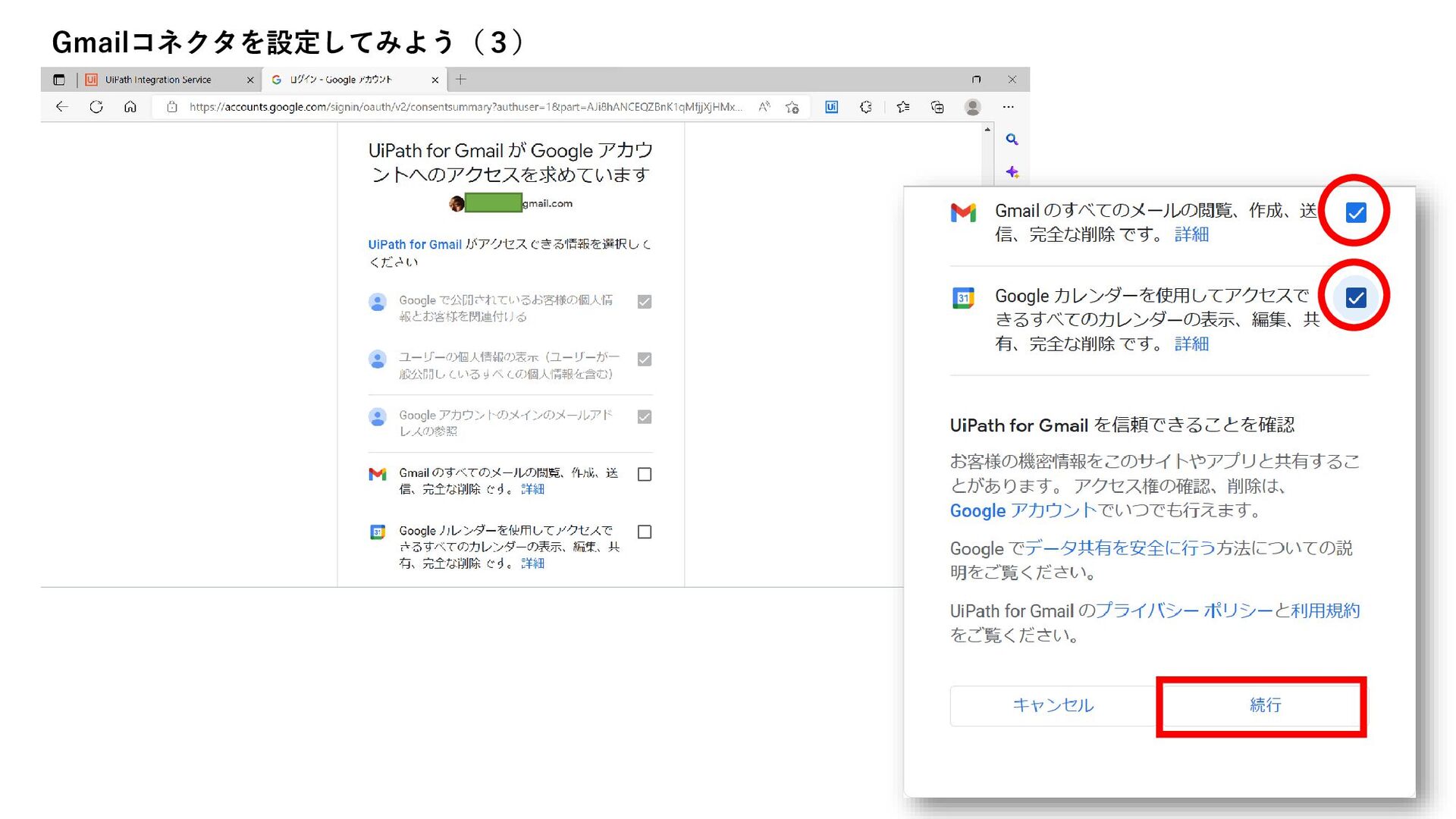
Gmailコネクタを設定してみよう(3)
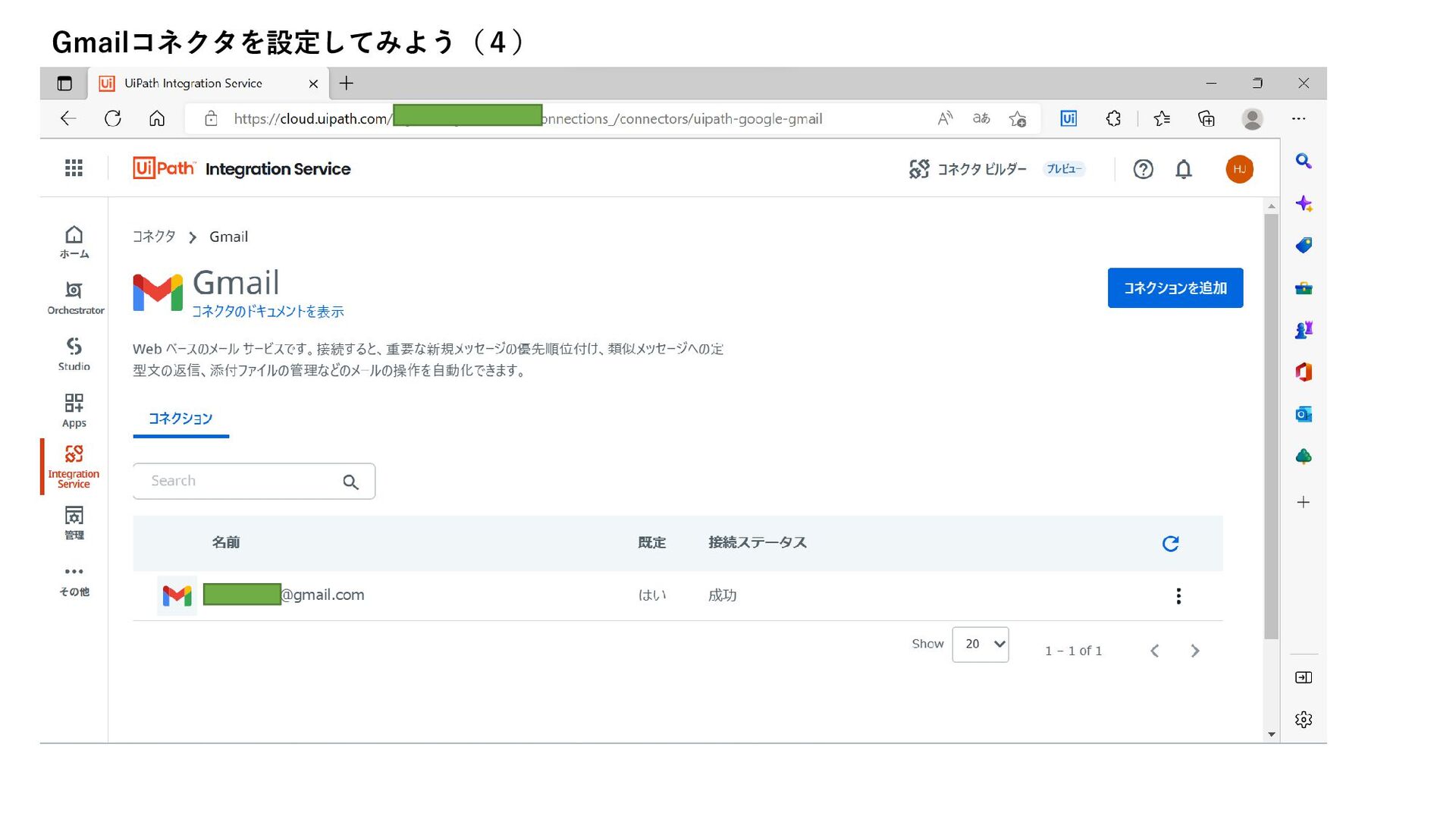
Gmailコネクタを設定してみよう(4)
Gmailコネクタを設定してみよう(5) 名前をマウスオーバすると表示され るエンピツアイコンをクリックする 事で、名前を変える事ができます。 [接続を編集]で、アカウントを変更する 事が出来ます。 この時、ロボ側の設定変更は不要です。
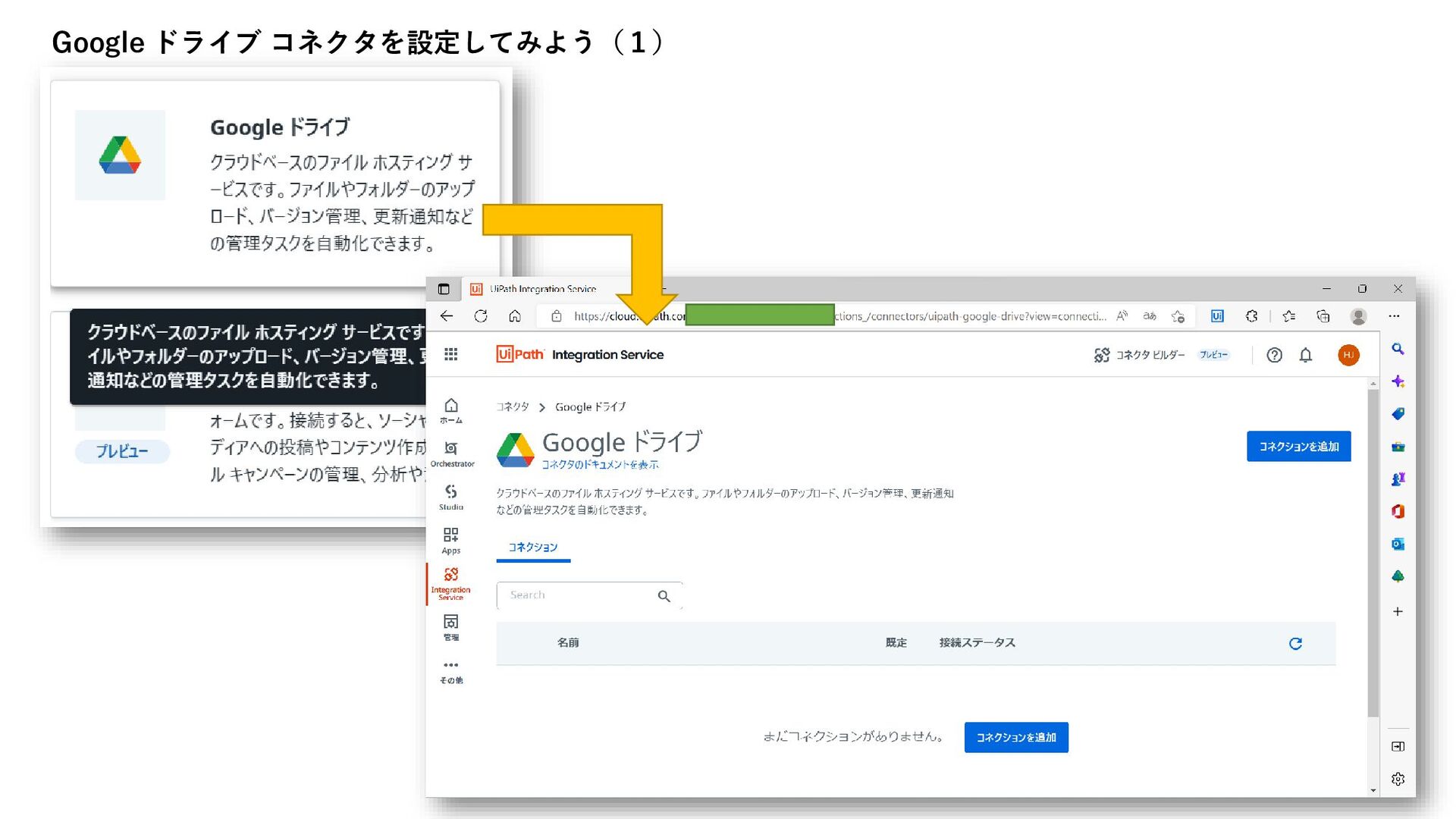
Google ドライブ コネクタを設定してみよう(1)
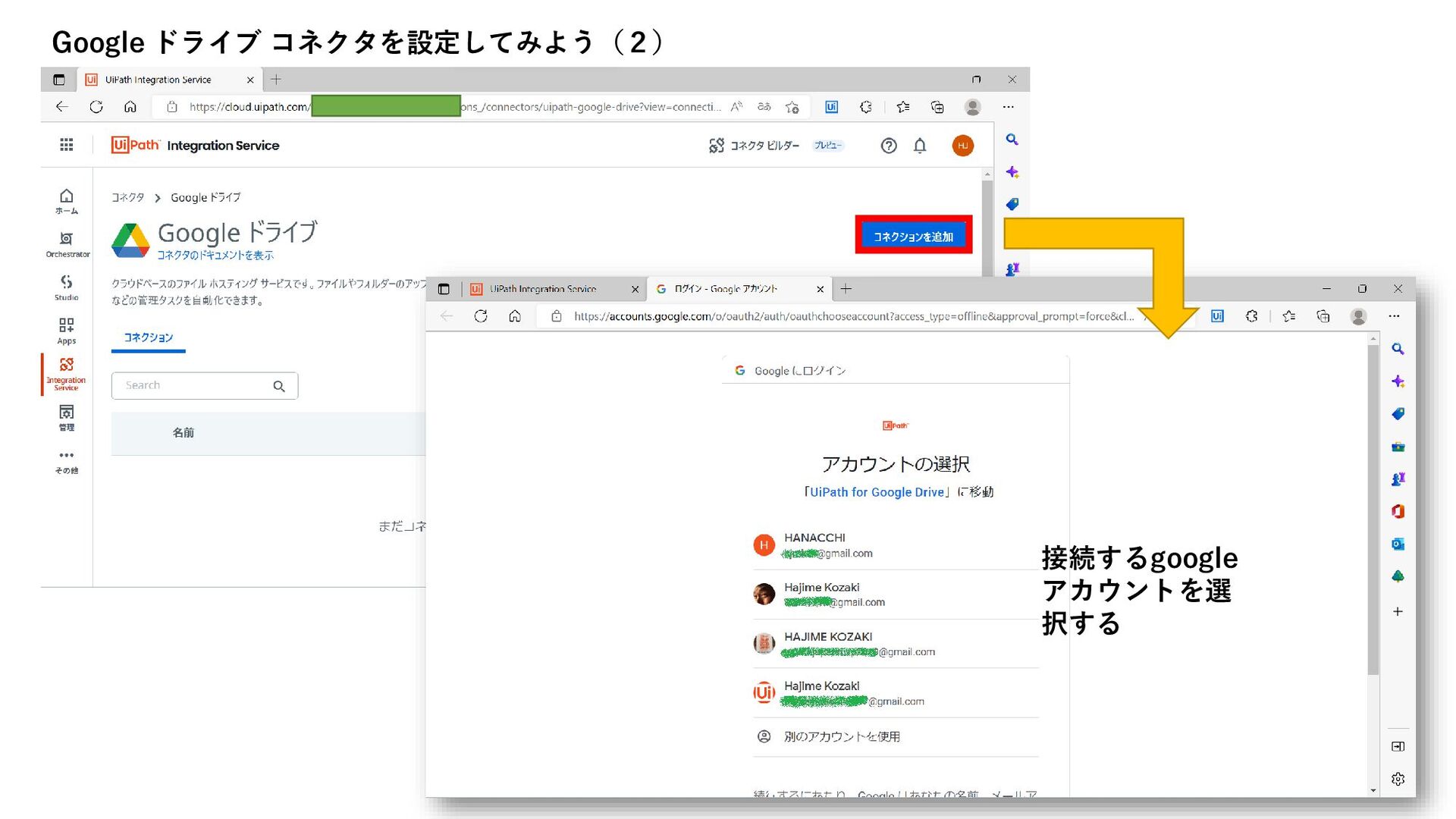
Google ドライブ コネクタを設定してみよう(2) 接続するgoogle アカウントを選 択する
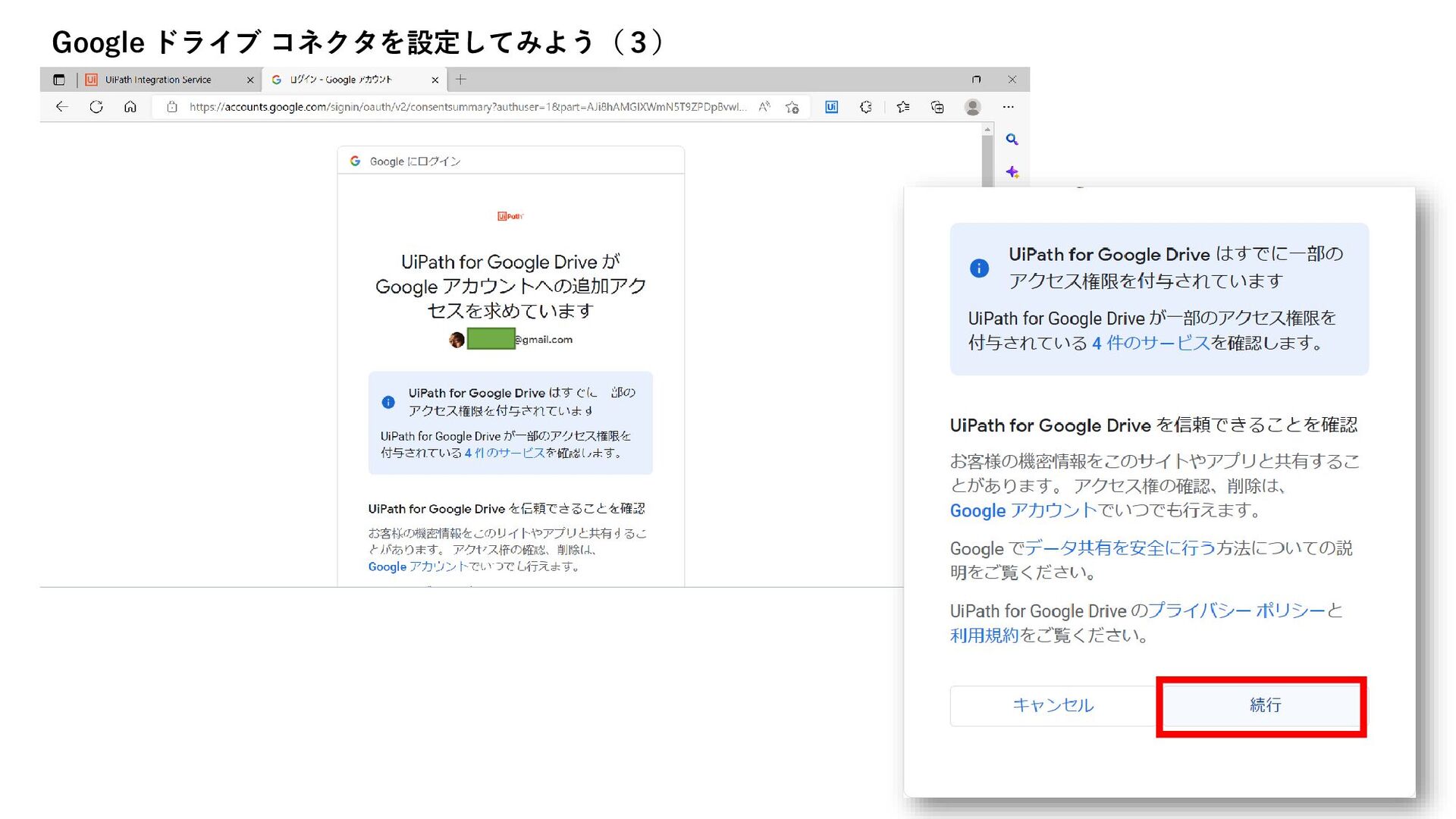
Google ドライブ コネクタを設定してみよう(3)
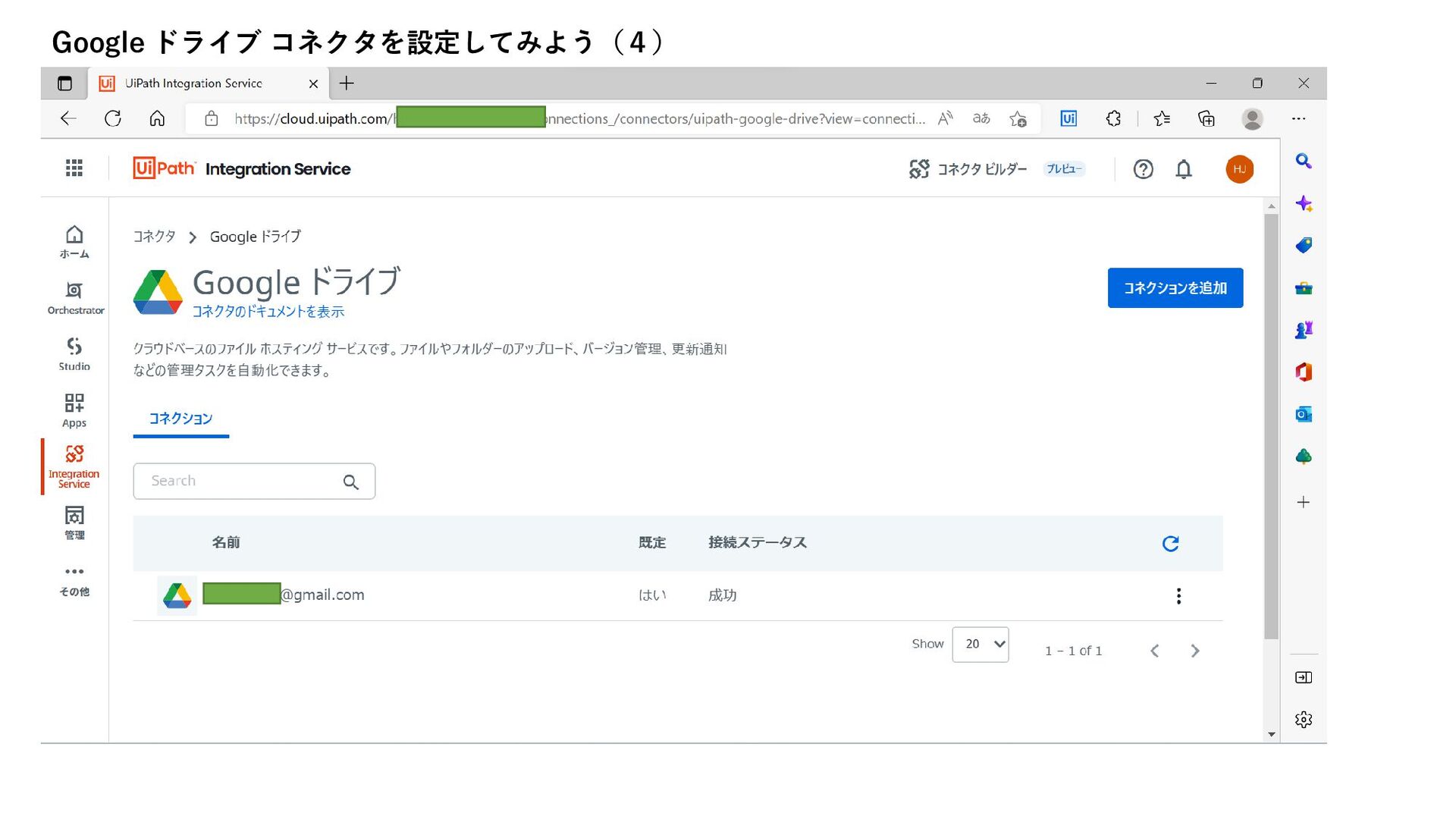
Google ドライブ コネクタを設定してみよう(4)
Google ドライブ コネクタを設定してみよう(5) 名前をマウスオーバすると表示され るエンピツアイコンをクリックする 事で、名前を変える事ができます。 [接続を編集]で、アカウントを変更する 事が出来ます。 この時、ロボ側の設定変更は不要です。
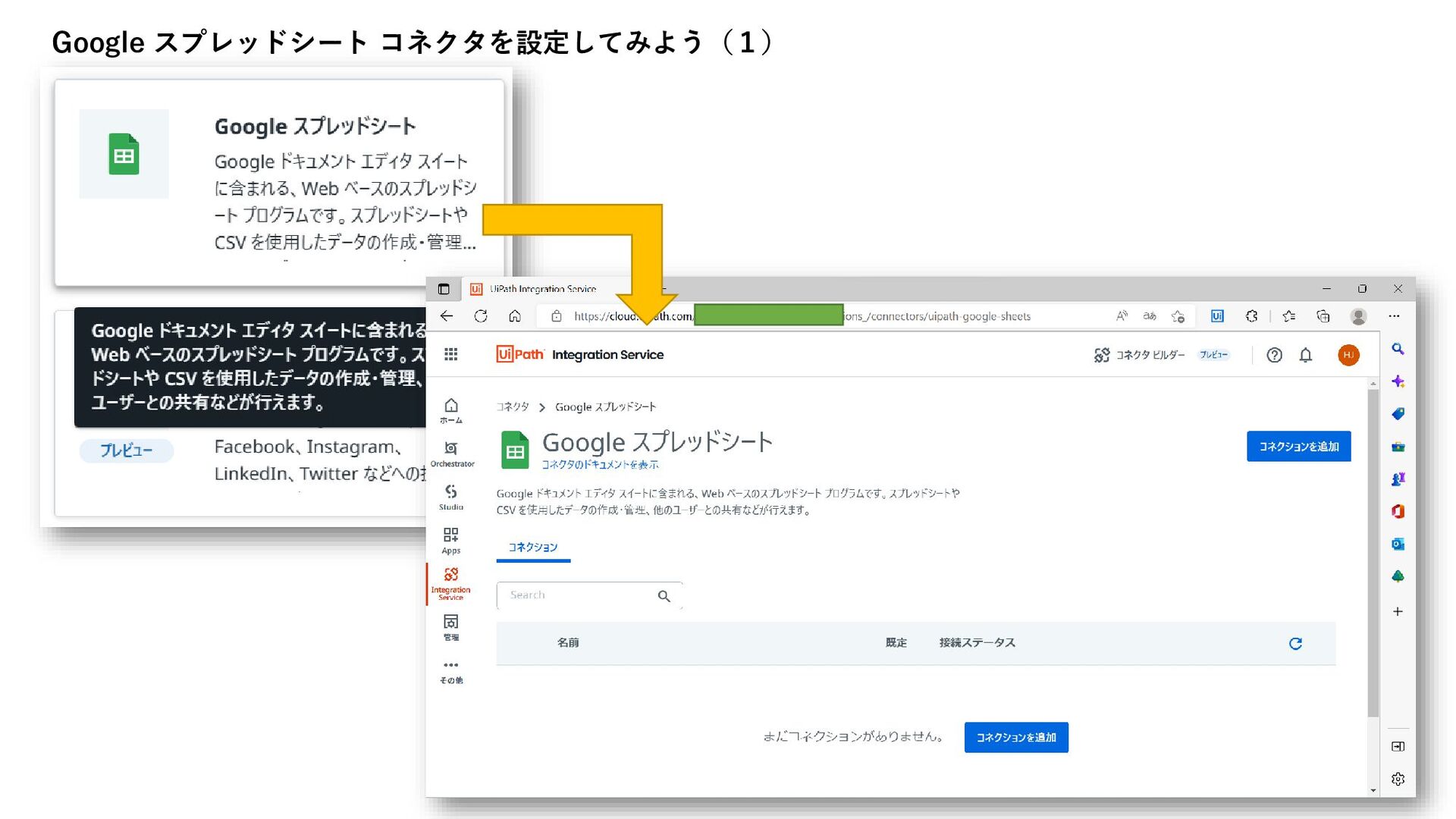
Google スプレッドシート コネクタを設定してみよう(1)
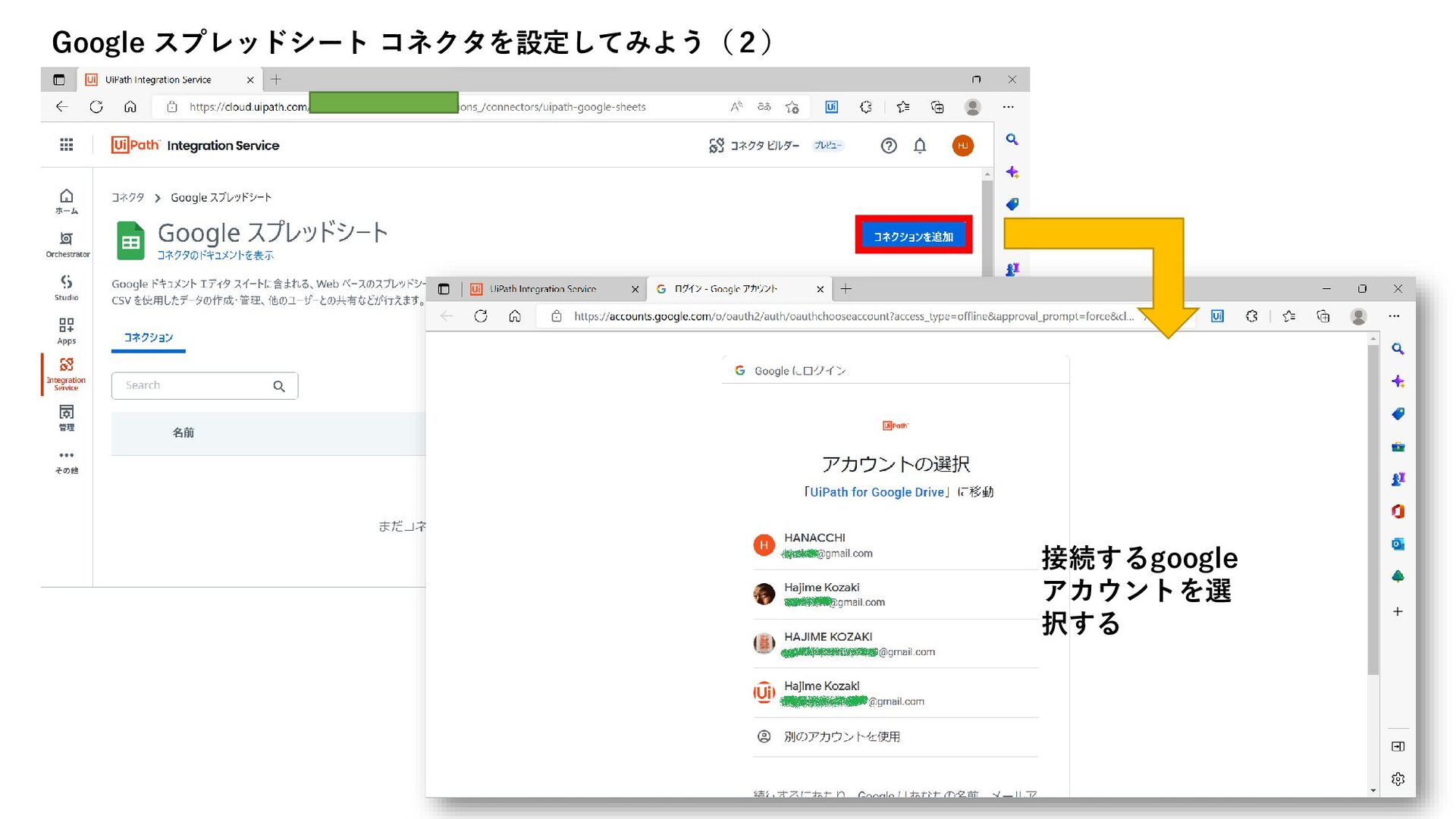
接続するgoogle アカウントを選 択する Google スプレッドシート コネクタを設定してみよう(2)
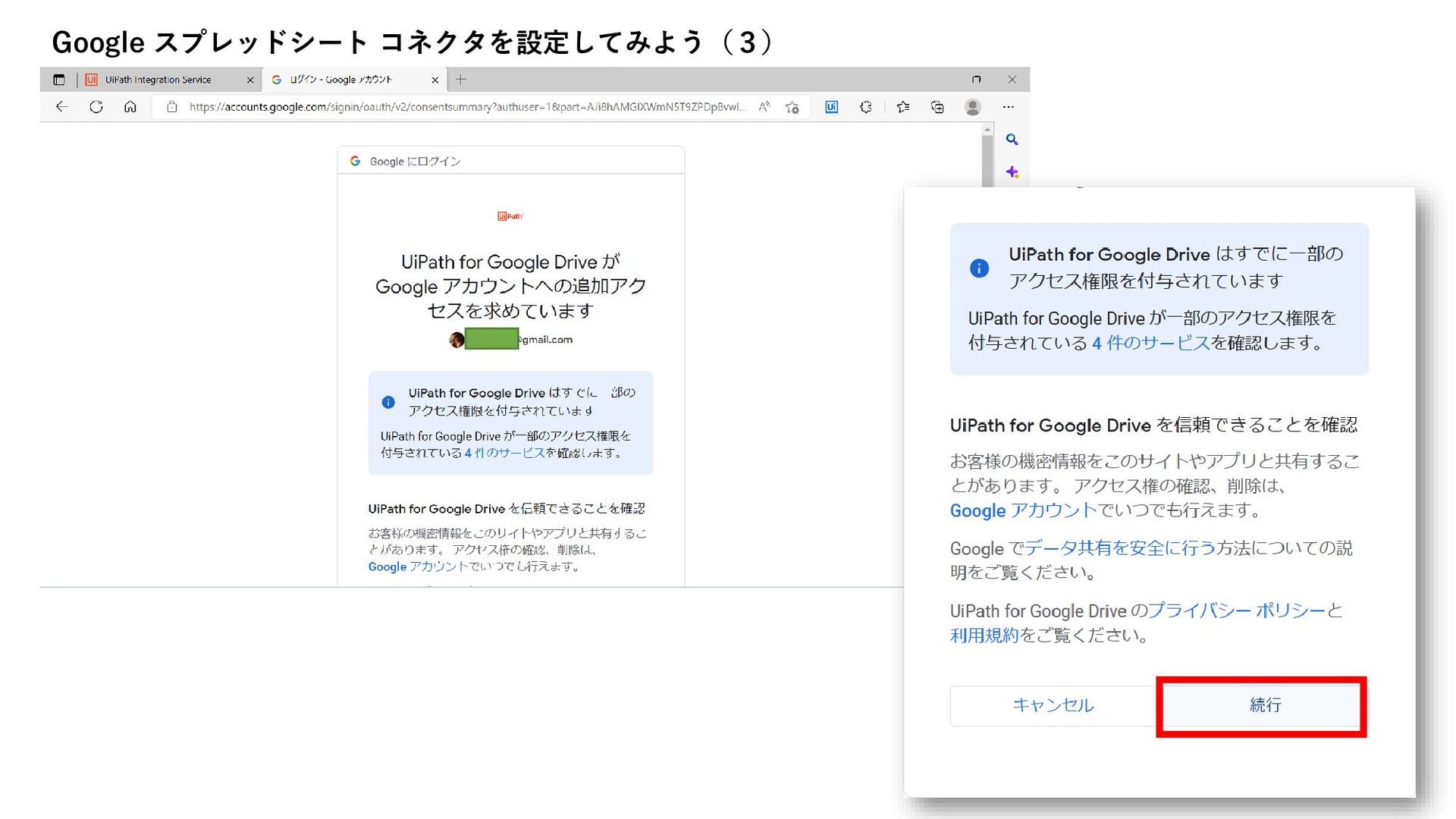
Google スプレッドシート コネクタを設定してみよう(3)
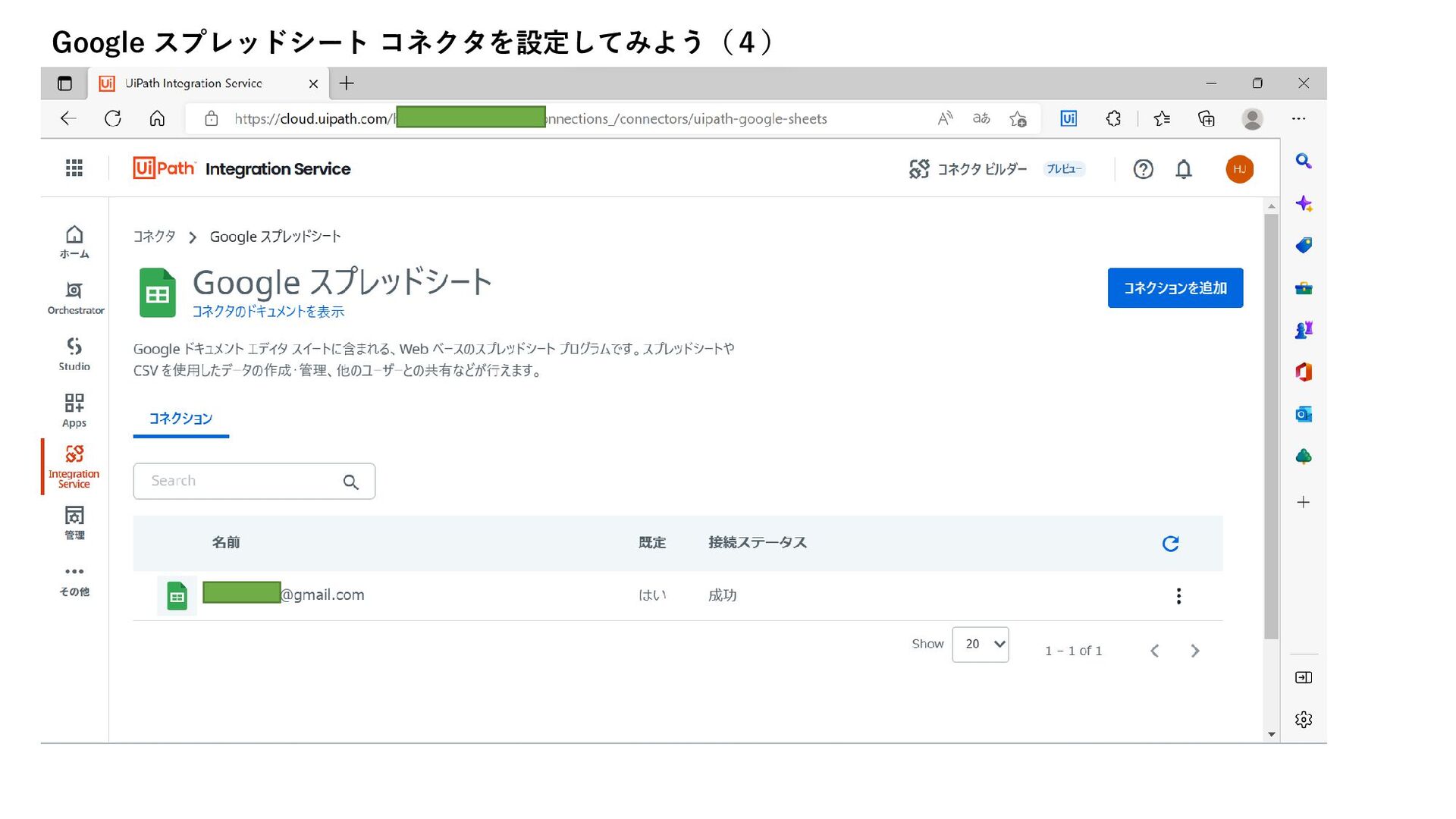
Google スプレッドシート コネクタを設定してみよう(4)
名前をマウスオーバすると表示され るエンピツアイコンをクリックする 事で、名前を変える事ができます。 [接続を編集]で、アカウントを変更する 事が出来ます。 この時、ロボ側の設定変更は不要です。 Google スプレッドシート コネクタを設定してみよう(5)
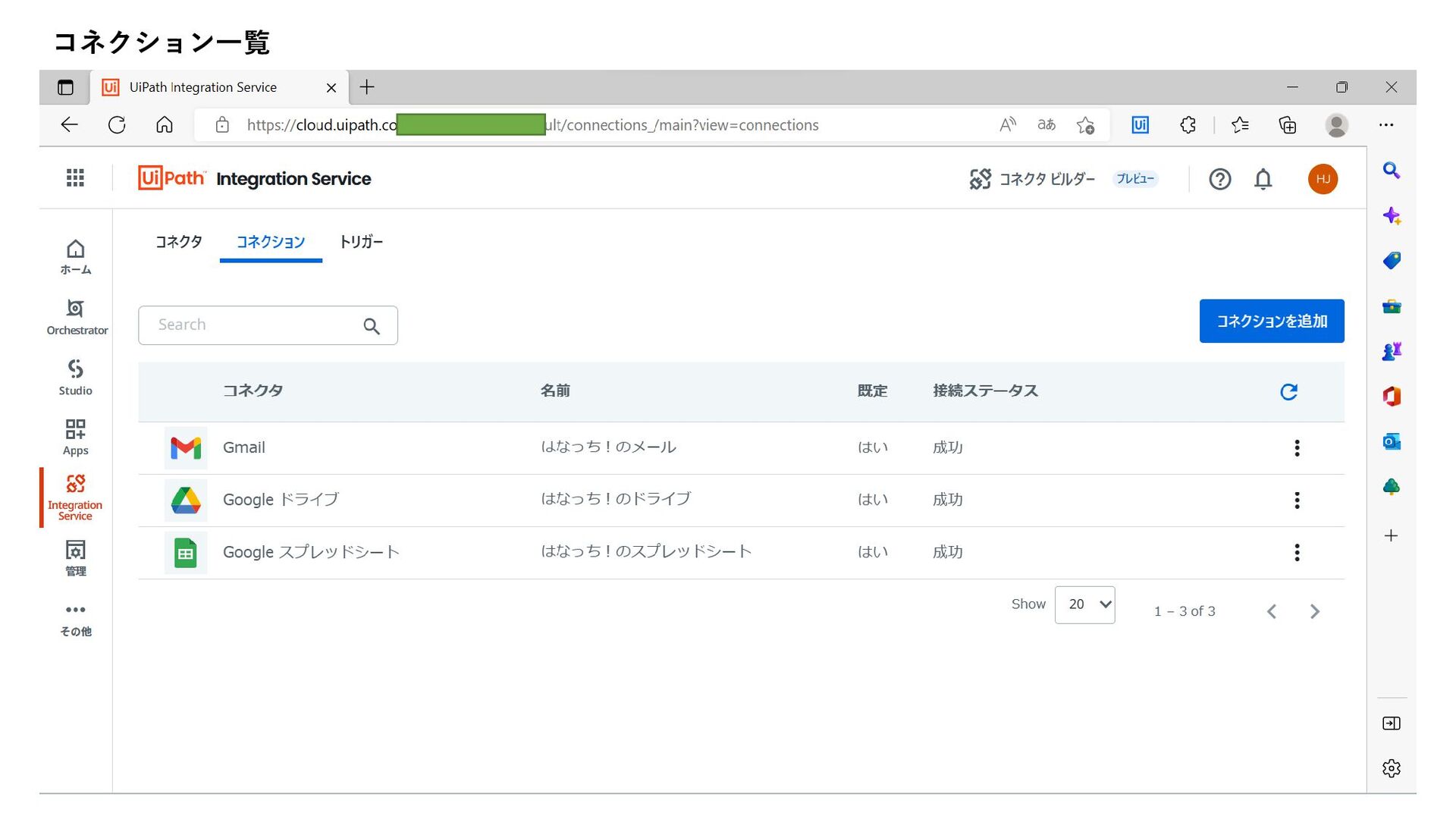
コネクション一覧
Mail.Activities
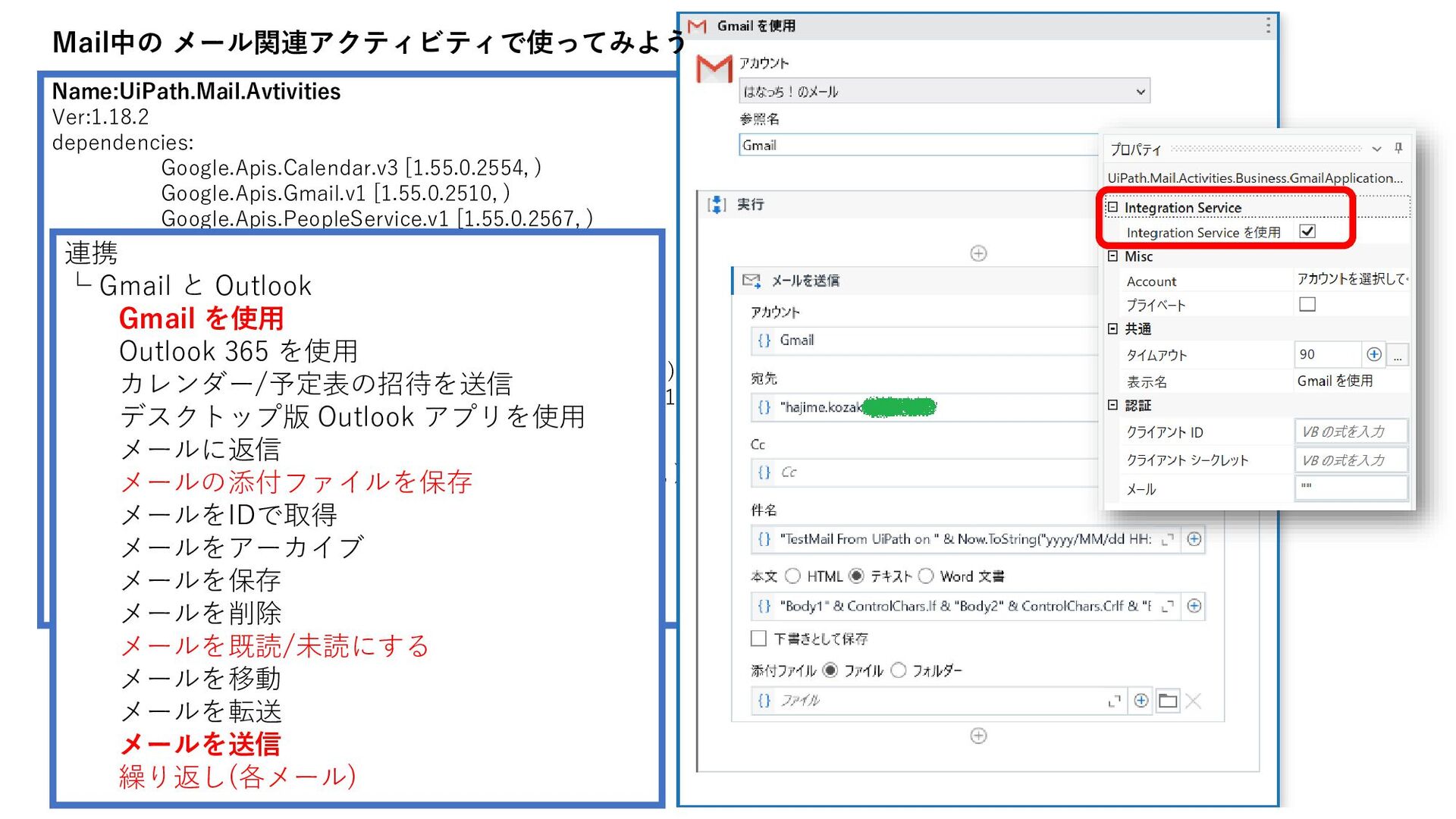
Name:UiPath.Mail.Avtivities Ver:1.18.2 dependencies: Google.Apis.Calendar.v3 [1.55.0.2554, ) Google.Apis.Gmail.v1 [1.55.0.2510, ) Google.Apis.PeopleService.v1
[1.55.0.2567, ) HtmlAgilityPack [1.11.38, ) MailKit [3.1.1, ) Microsoft.Extensions.FileSystemGlobbing [5.0.0, ) Microsoft.Graph [4.11.0, ) Newtonsoft.Json [13.0.1, ) System.Configuration.ConfigurationManager [5.0.0, ) System.Data.DataSetExtensions [4.6.0-preview3.19128.7, ) System.IdentityModel.Tokens.Jwt [6.12.2, ) System.Net.Http [4.3.4, ) System.Security.Cryptography.ProtectedData [5.0.0, ) System.ValueTuple [4.5.0, ) UiPath.Activities.RuntimeGovernance [1.1.6, ) UiPath.ConnectionClient [1.4.1, ) UiPath.Platform [22.4.0, ) UiPath.Telemetry.Client [1.5.3, ) 連携 └ Gmail と Outlook Gmail を使用 Outlook 365 を使用 カレンダー/予定表の招待を送信 デスクトップ版 Outlook アプリを使用 メールに返信 メールの添付ファイルを保存 メールをIDで取得 メールをアーカイブ メールを保存 メールを削除 メールを既読/未読にする メールを移動 メールを転送 メールを送信 繰り返し(各メール) Mail中の メール関連アクティビティで使ってみよう
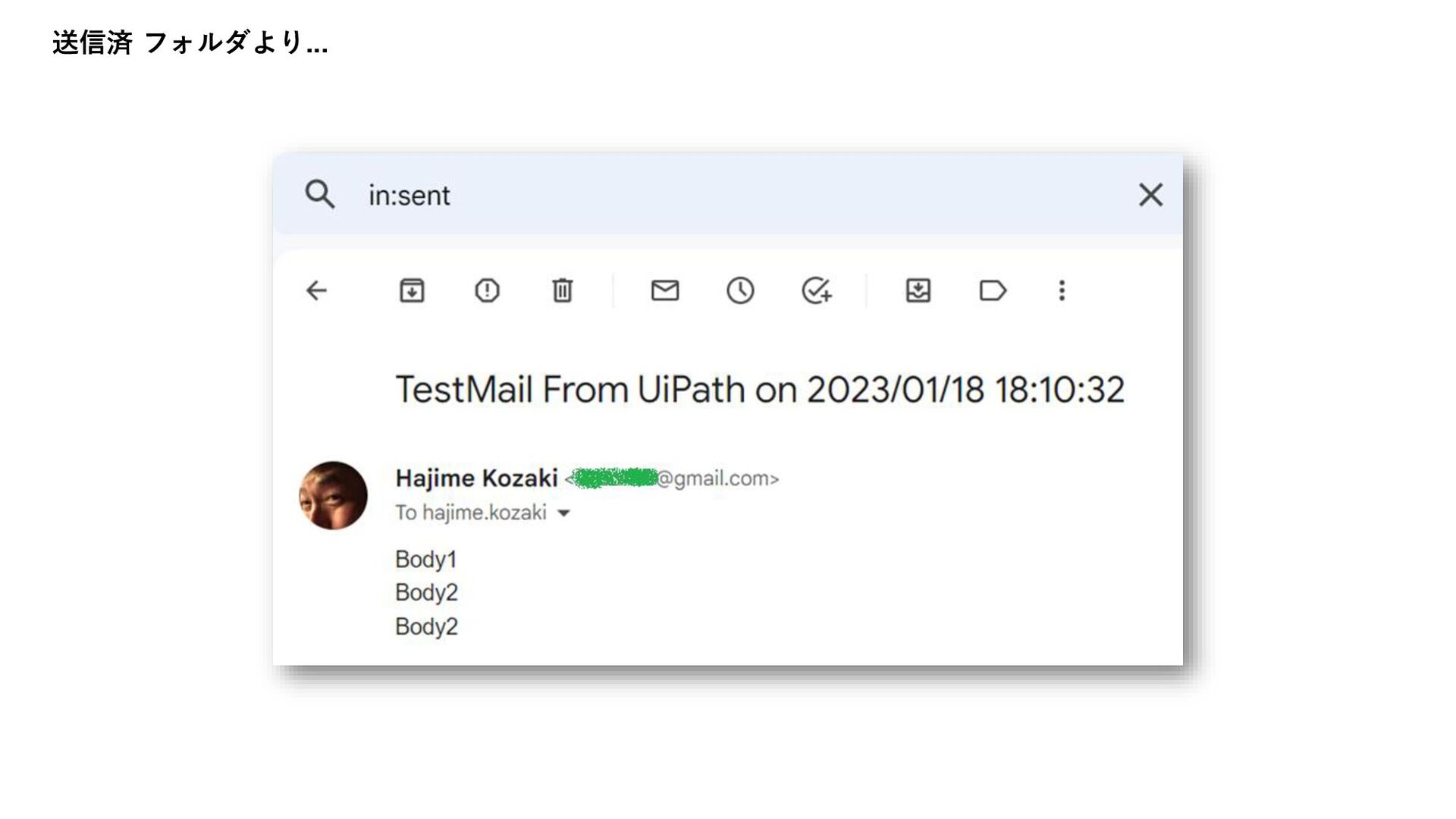
送信済 フォルダより...
GSuite.Activities
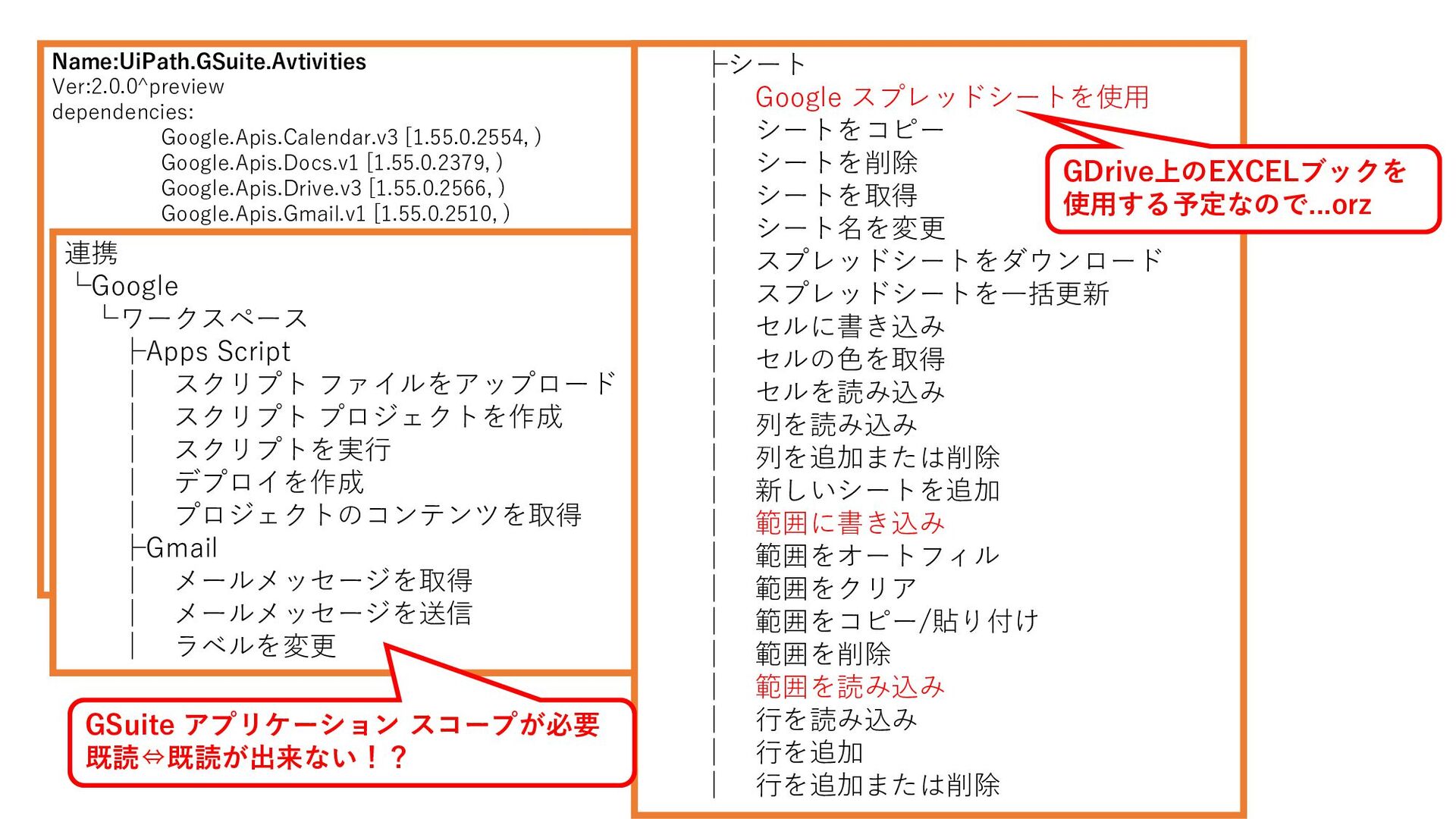
Name:UiPath.GSuite.Avtivities Ver:2.0.0^preview dependencies: Google.Apis.Calendar.v3 [1.55.0.2554, ) Google.Apis.Docs.v1 [1.55.0.2379, ) Google.Apis.Drive.v3
[1.55.0.2566, ) Google.Apis.Gmail.v1 [1.55.0.2510, ) Google.Apis.PeopleService.v1 [1.55.0.2567, ) Google.Apis.Script.v1 [1.55.0.2555, ) Google.Apis.Sheets.v4 [1.55.0.2371, ) Microsoft.Bcl.AsyncInterfaces [5.0.0, ) Microsoft.Win32.Registry [5.0.0, ) MimeKit [2.10.0, ) Newtonsoft.Json [13.0.1, ) NodaTime [2.4.7, ) System.Linq.Async.Queryable [5.0.0, ) System.Security.Cryptography.ProtectedData [5.0.0, ) UiPath.Activities.RuntimeGovernance [1.1.6, ) UiPath.ConnectionClient [1.4.2-20221020.8, ) UiPath.Platform [22.10.2, ) UiPath.Telemetry.Client [1.5.3, ) 連携 └Google └ワークスペース ├Apps Script │ スクリプト ファイルをアップロード │ スクリプト プロジェクトを作成 │ スクリプトを実行 │ デプロイを作成 │ プロジェクトのコンテンツを取得 ├Gmail │ メールメッセージを取得 │ メールメッセージを送信 │ ラベルを変更 ├シート │ Google スプレッドシートを使用 │ シートをコピー │ シートを削除 │ シートを取得 │ シート名を変更 │ スプレッドシートをダウンロード │ スプレッドシートを一括更新 │ セルに書き込み │ セルの色を取得 │ セルを読み込み │ 列を読み込み │ 列を追加または削除 │ 新しいシートを追加 │ 範囲に書き込み │ 範囲をオートフィル │ 範囲をクリア │ 範囲をコピー/貼り付け │ 範囲を削除 │ 範囲を読み込み │ 行を読み込み │ 行を追加 │ 行を追加または削除 GSuite アプリケーション スコープが必要 既読⇔既読が出来ない!? GDrive上のEXCELブックを 使用する予定なので...orz
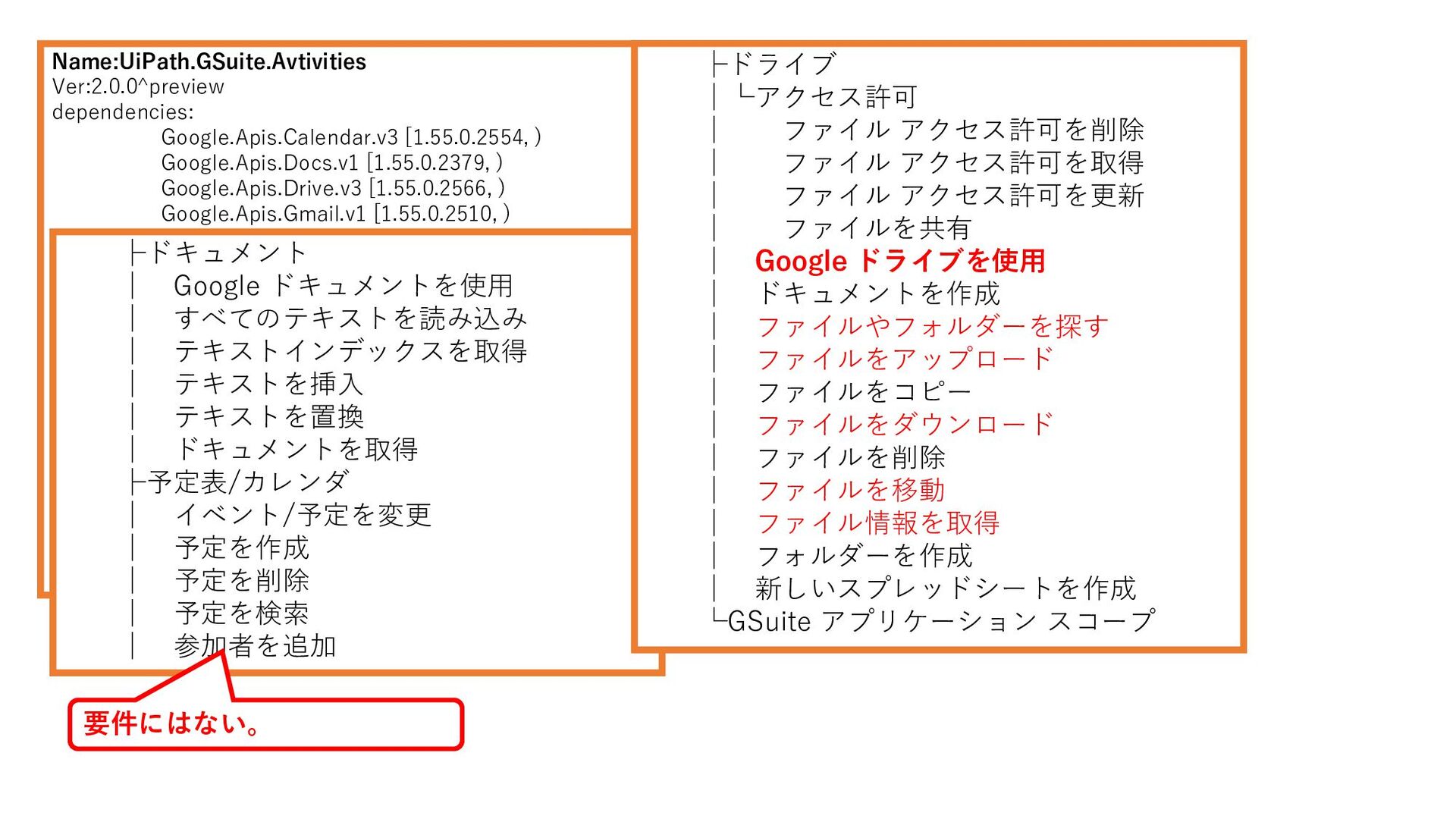
Name:UiPath.GSuite.Avtivities Ver:2.0.0^preview dependencies: Google.Apis.Calendar.v3 [1.55.0.2554, ) Google.Apis.Docs.v1 [1.55.0.2379, ) Google.Apis.Drive.v3
[1.55.0.2566, ) Google.Apis.Gmail.v1 [1.55.0.2510, ) Google.Apis.PeopleService.v1 [1.55.0.2567, ) Google.Apis.Script.v1 [1.55.0.2555, ) Google.Apis.Sheets.v4 [1.55.0.2371, ) Microsoft.Bcl.AsyncInterfaces [5.0.0, ) Microsoft.Win32.Registry [5.0.0, ) MimeKit [2.10.0, ) Newtonsoft.Json [13.0.1, ) NodaTime [2.4.7, ) System.Linq.Async.Queryable [5.0.0, ) System.Security.Cryptography.ProtectedData [5.0.0, ) UiPath.Activities.RuntimeGovernance [1.1.6, ) UiPath.ConnectionClient [1.4.2-20221020.8, ) UiPath.Platform [22.10.2, ) UiPath.Telemetry.Client [1.5.3, ) ├ドキュメント │ Google ドキュメントを使用 │ すべてのテキストを読み込み │ テキストインデックスを取得 │ テキストを挿入 │ テキストを置換 │ ドキュメントを取得 ├予定表/カレンダ │ イベント/予定を変更 │ 予定を作成 │ 予定を削除 │ 予定を検索 │ 参加者を追加 ├ドライブ │└アクセス許可 │ ファイル アクセス許可を削除 │ ファイル アクセス許可を取得 │ ファイル アクセス許可を更新 │ ファイルを共有 │ Google ドライブを使用 │ ドキュメントを作成 │ ファイルやフォルダーを探す │ ファイルをアップロード │ ファイルをコピー │ ファイルをダウンロード │ ファイルを削除 │ ファイルを移動 │ ファイル情報を取得 │ フォルダーを作成 │ 新しいスプレッドシートを作成 └GSuite アプリケーション スコープ 要件にはない。
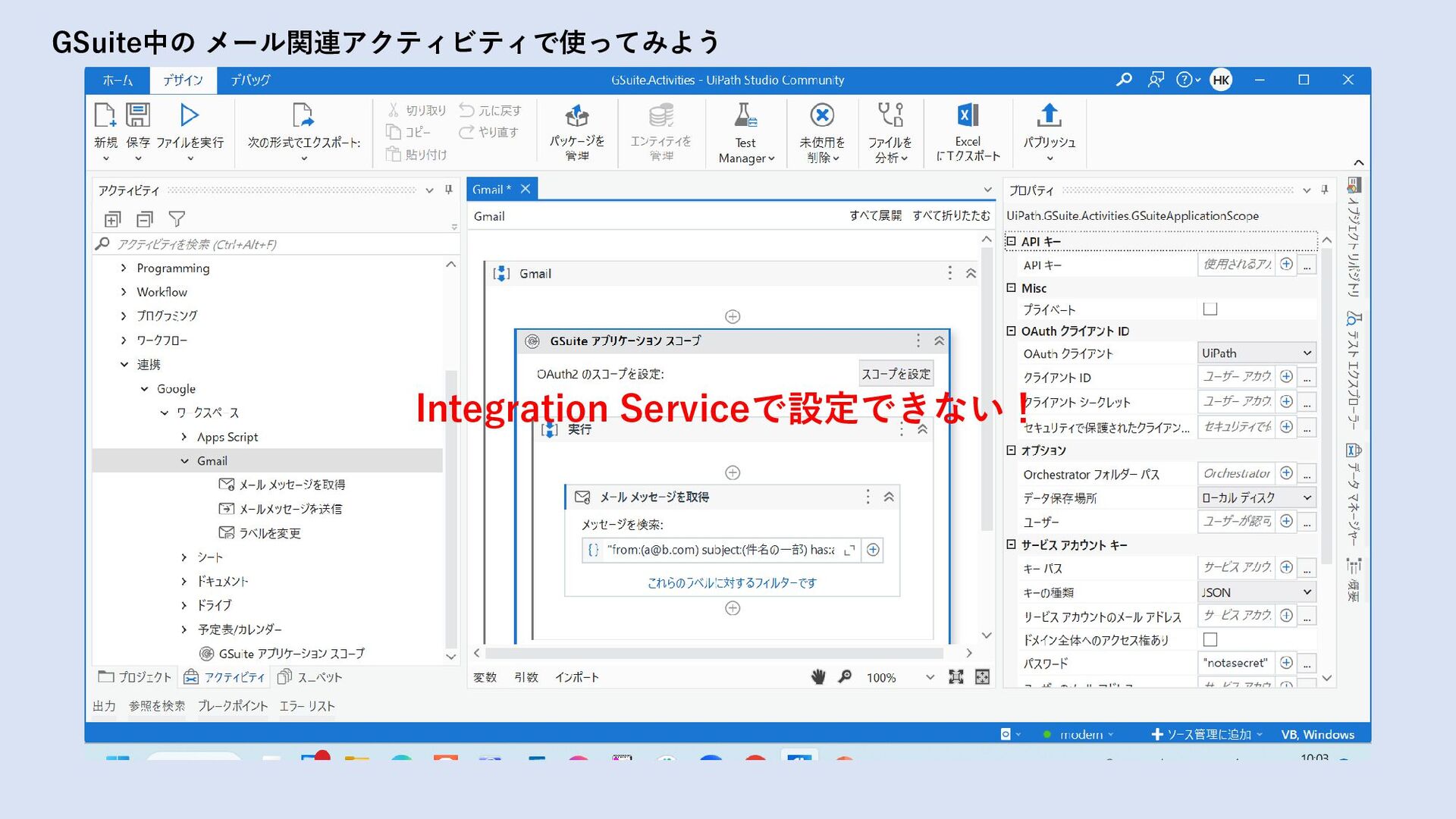
GSuite中の メール関連アクティビティで使ってみよう Integration Serviceで設定できない!
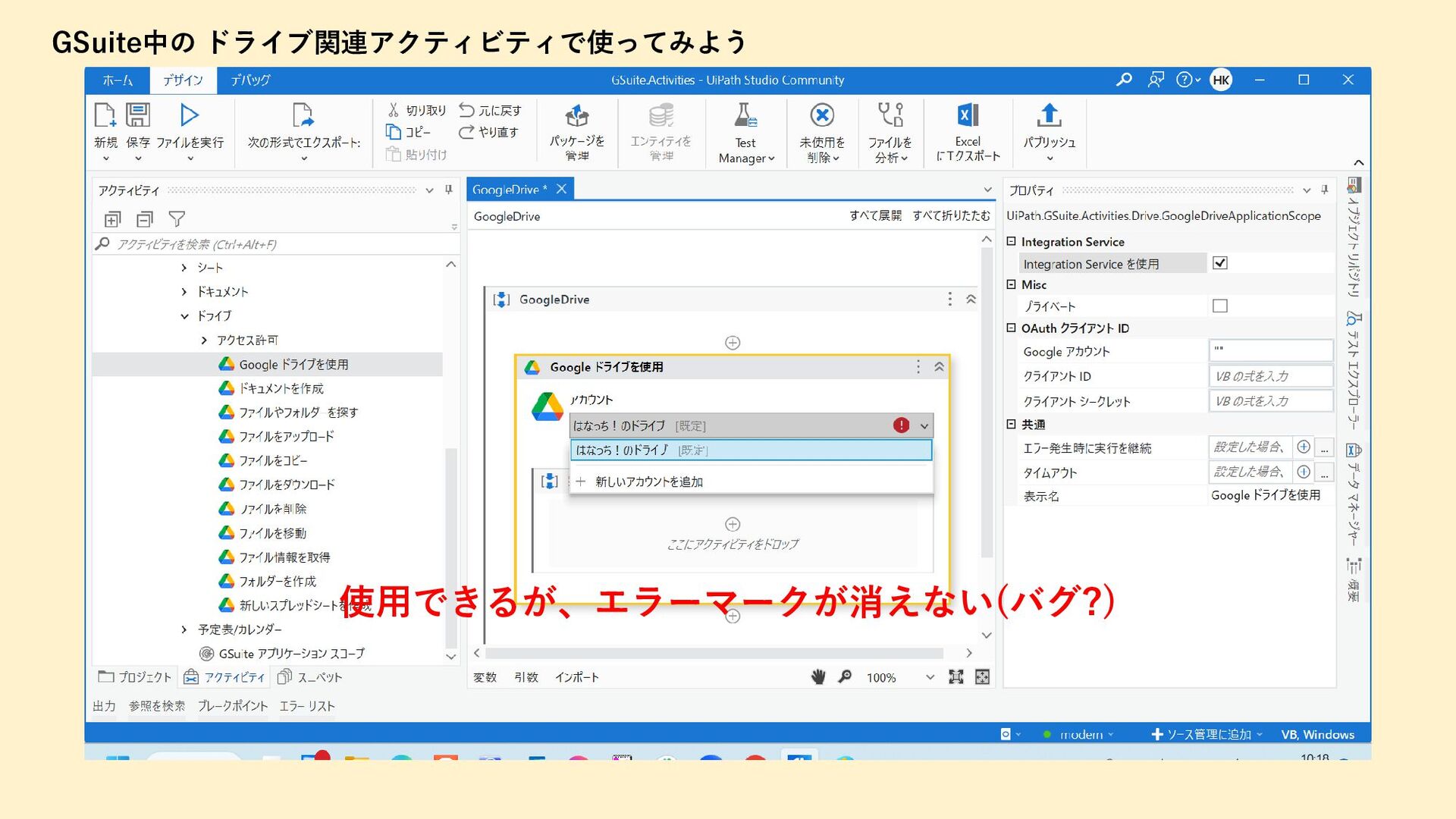
GSuite中の ドライブ関連アクティビティで使ってみよう 使用できるが、エラーマークが消えない(バグ?)
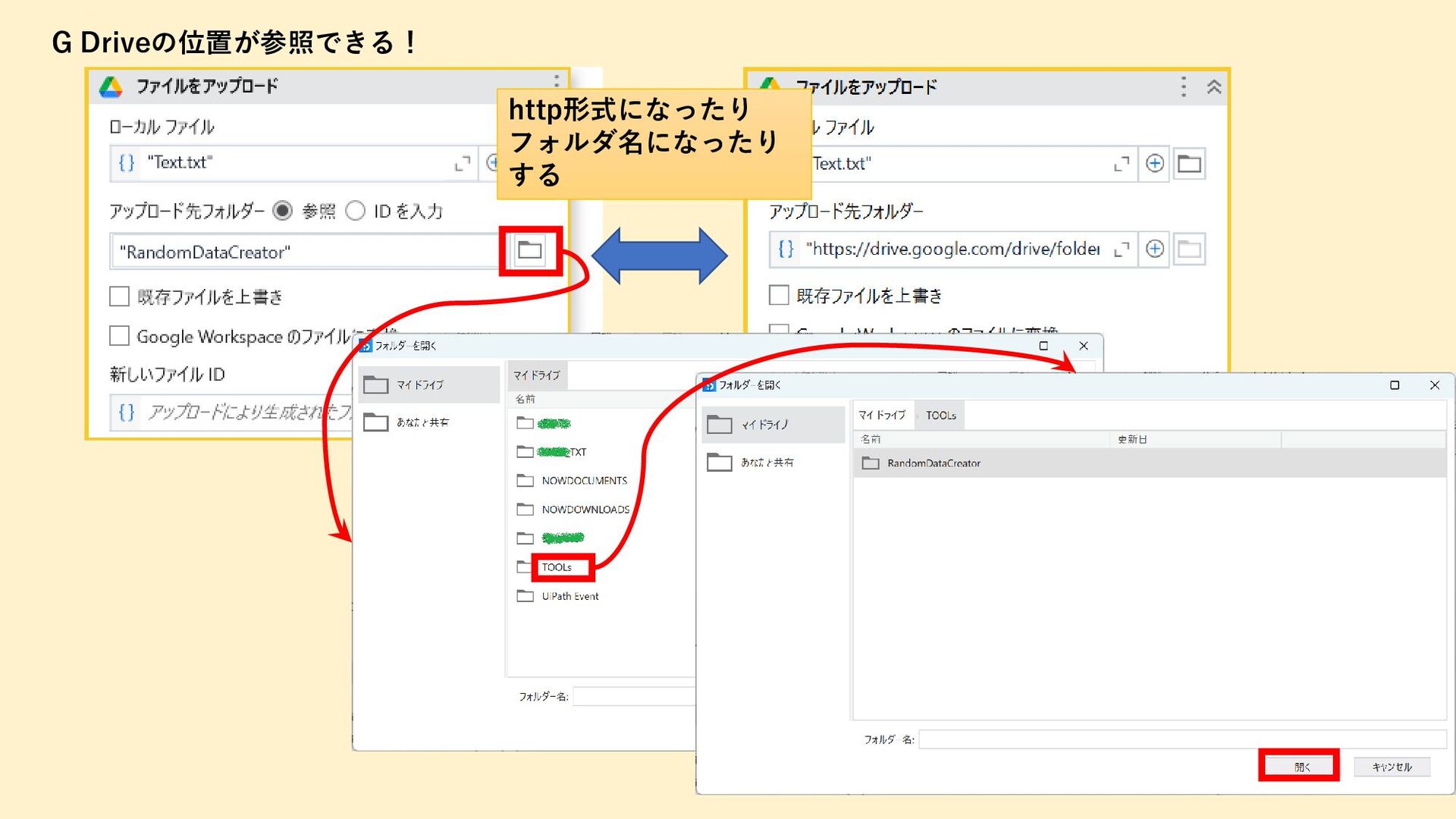
http形式になったり フォルダ名になったり する G Driveの位置が参照できる!
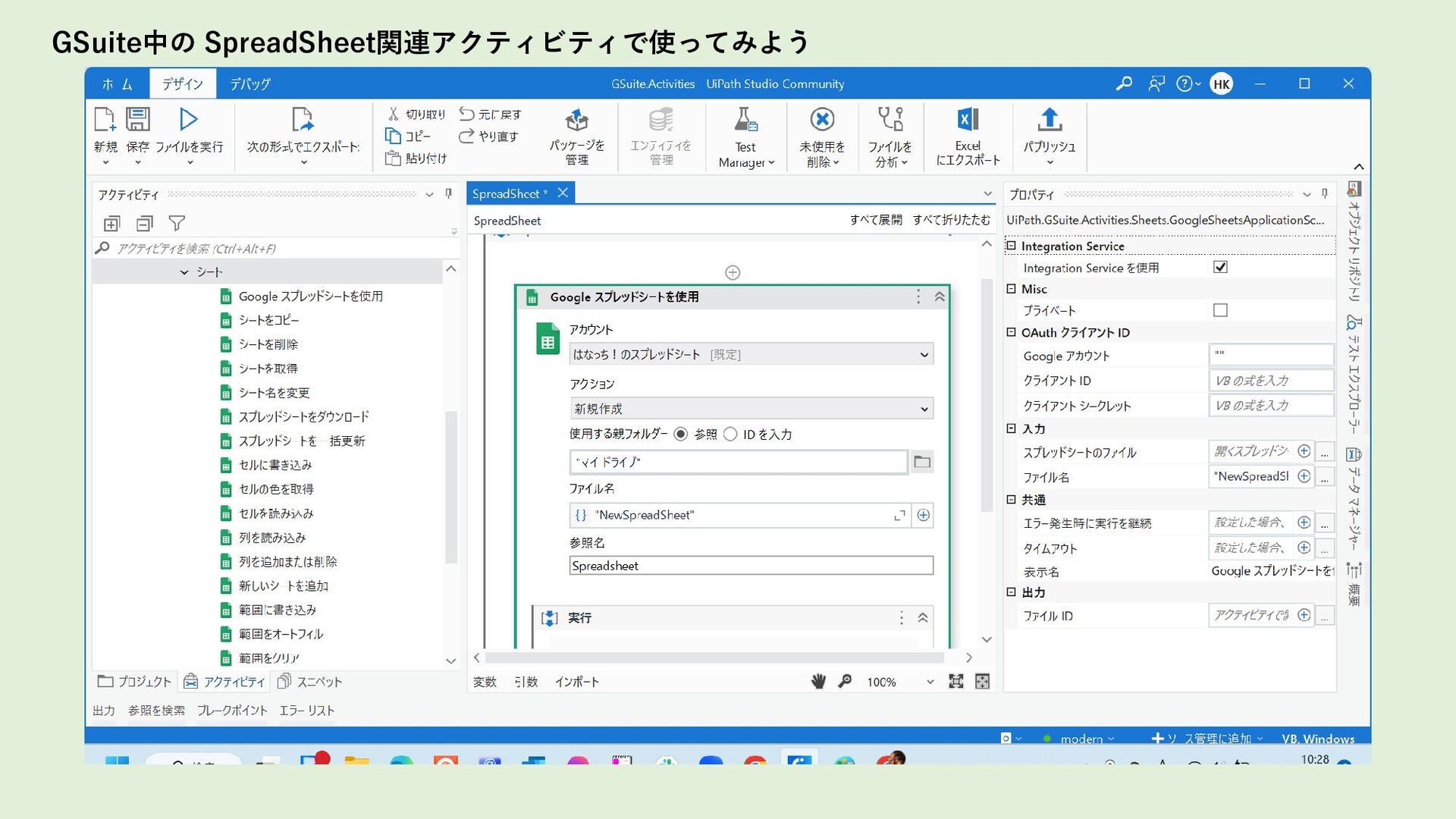
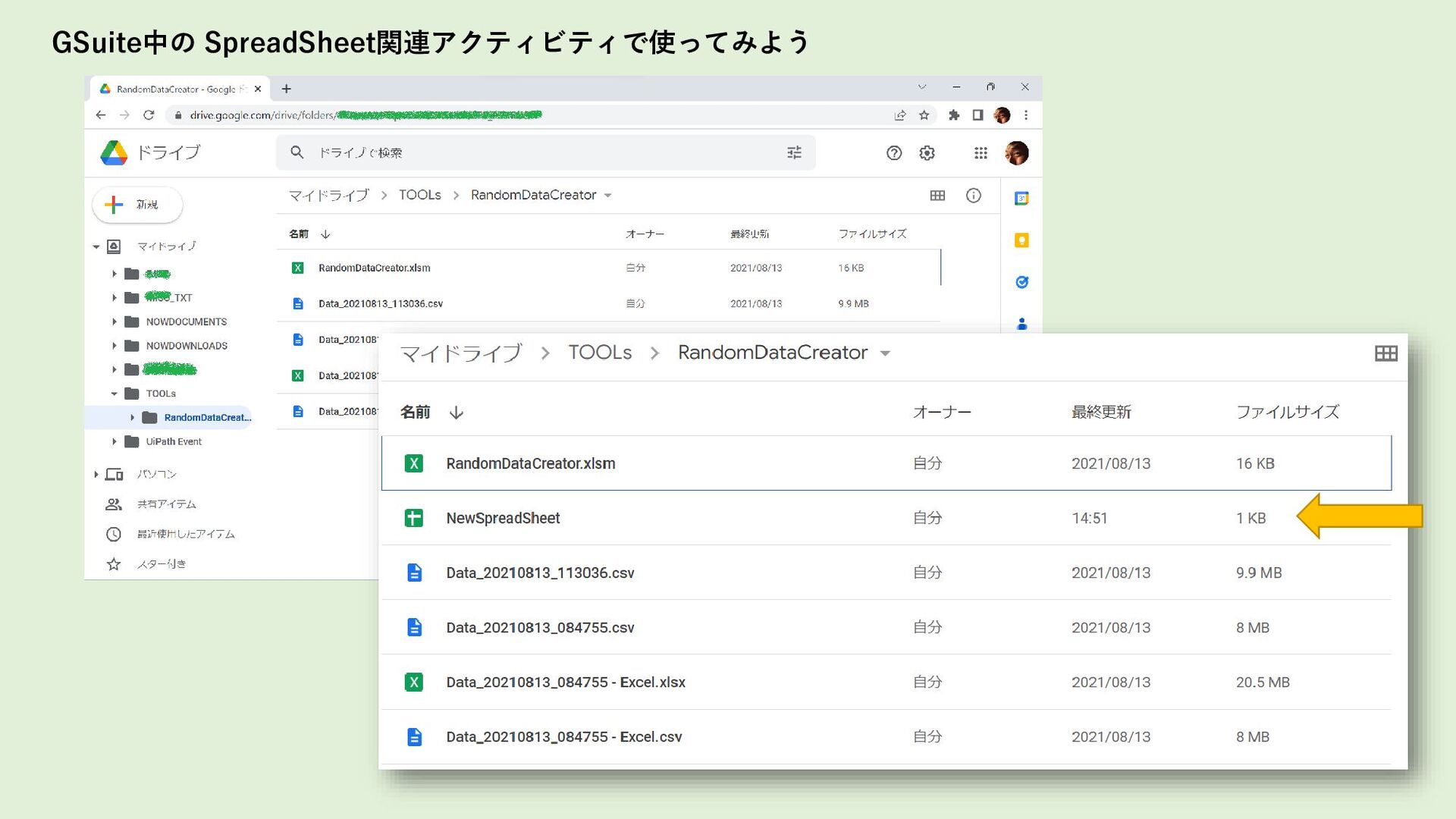
GSuite中の SpreadSheet関連アクティビティで使ってみよう
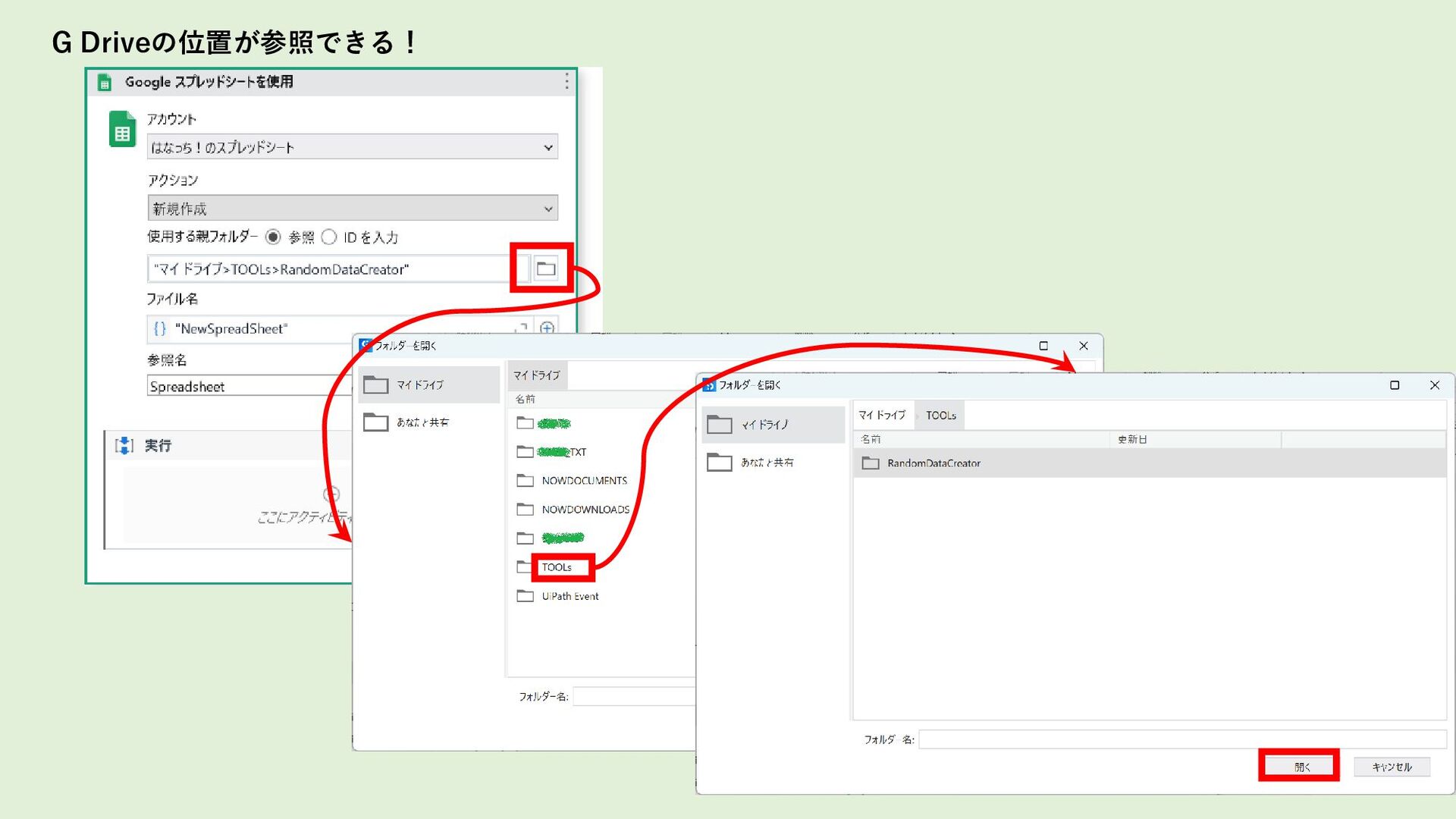
G Driveの位置が参照できる!
GSuite中の SpreadSheet関連アクティビティで使ってみよう
まとめ
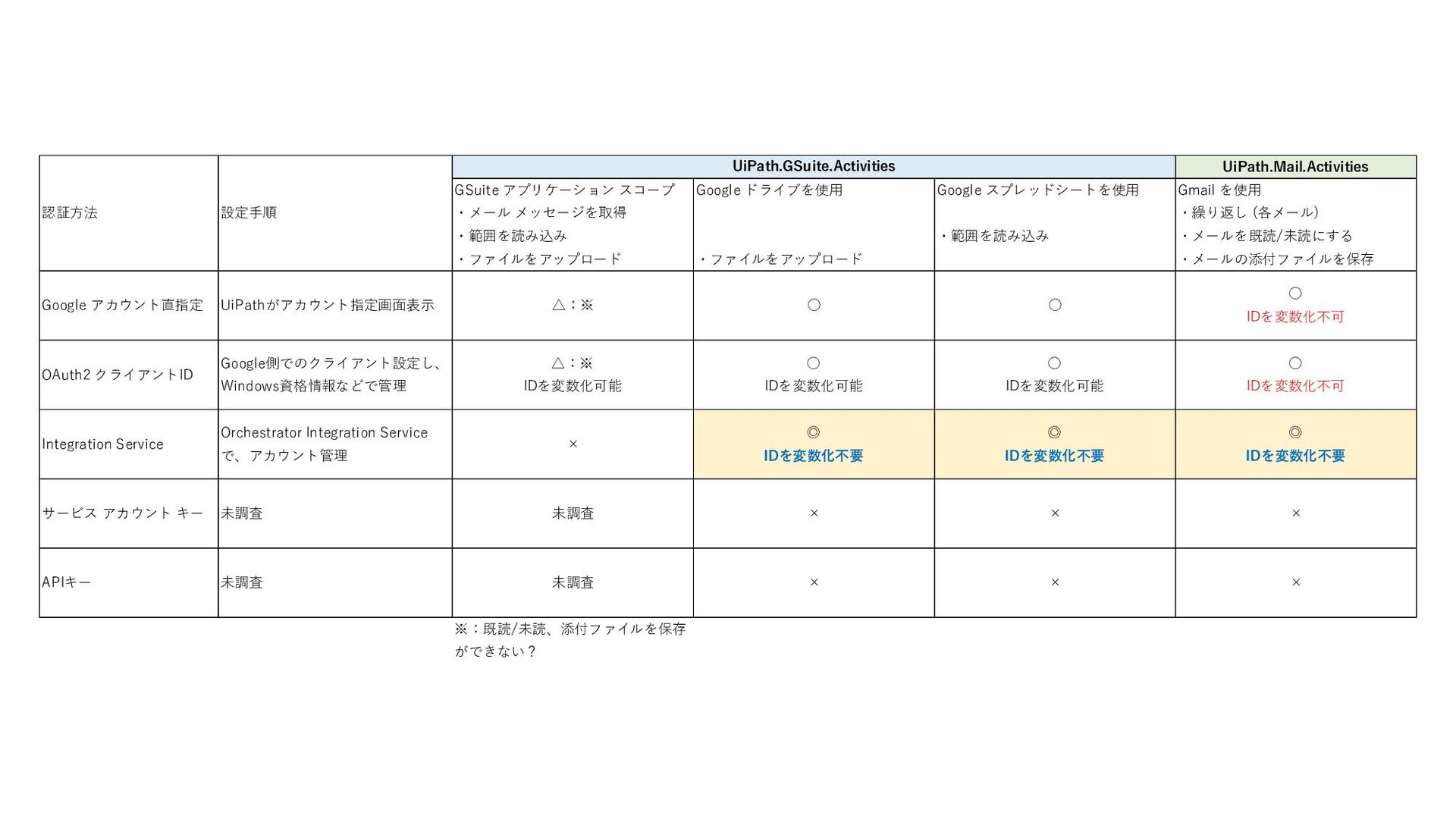
UiPath.Mail.Activities GSuite アプリケーション スコープ ・メール メッセージを取得 ・範囲を読み込み ・ファイルをアップロード Google ドライブを使用
・ファイルをアップロード Google スプレッドシートを使用 ・範囲を読み込み Gmail を使用 ・繰り返し (各メール) ・メールを既読/未読にする ・メールの添付ファイルを保存 Google アカウント直指定 UiPathがアカウント指定画面表示 △:※ ◦ ◦ ◦ IDを変数化不可 OAuth2 クライアントID Google側でのクライアント設定し、 Windows資格情報などで管理 △:※ IDを変数化可能 ◦ IDを変数化可能 ◦ IDを変数化可能 ◦ IDを変数化不可 Integration Service Orchestrator Integration Service で、アカウント管理 × ◎ IDを変数化不要 ◎ IDを変数化不要 ◎ IDを変数化不要 サービス アカウント キー 未調査 未調査 × × × APIキー 未調査 未調査 × × × ※:既読/未読、添付ファイルを保存 ができない? UiPath.GSuite.Activities 認証方法 設定手順


 hanacchi
 teamlab
 yu23ki14
 ivry_presentationmaterials
 ymotongpoo
 pfn
pfn
 sh_fk2
 kash1064
 tokuty
 yahonda
 knishioka
 cogakira
 takonda
 kimpetersen
 mkilby
 reverentgeek
 rkendrick25
 matthewcrist
 inesmontani
 jct
jct
 chriscoyier
 chrisshort
 smashingmag
 sugarenia
![Gmailコネクタを設定してみよう(5) 名前をマウスオーバすると表示され るエンピツアイコンをクリックする 事で、名前を変える事ができます。 [接続を編集]で、アカウントを変更する 事が出来ます。 この時、ロボ側の設定変更は不要です。](https://files.speakerdeck.com/presentations/1e1bb06d64dd47c98fefb520ee2b54a5/slide_8.jpg)
![Google ドライブ コネクタを設定してみよう(5) 名前をマウスオーバすると表示され るエンピツアイコンをクリックする 事で、名前を変える事ができます。 [接続を編集]で、アカウントを変更する 事が出来ます。 この時、ロボ側の設定変更は不要です。](https://files.speakerdeck.com/presentations/1e1bb06d64dd47c98fefb520ee2b54a5/slide_13.jpg)
![名前をマウスオーバすると表示され るエンピツアイコンをクリックする 事で、名前を変える事ができます。 [接続を編集]で、アカウントを変更する 事が出来ます。 この時、ロボ側の設定変更は不要です。 Google スプレッドシート コネクタを設定してみよう(5)](https://files.speakerdeck.com/presentations/1e1bb06d64dd47c98fefb520ee2b54a5/slide_18.jpg)