Share
How AgentCore works (The map of services, and your first deploy) | Learn Amazon Bedrock AgentCore with Kiro 01
This Level 300 deck shows why an agent that runs on one laptop needs isolation, memory, authentication and a record of its actions once many people use it, and maps the 13 services of Amazon Bedrock AgentCore that cover them and the two ways to deploy (a code-based agent on AgentCore Runtime, or a managed harness), with figures that use the official AWS icons. It then takes the help desk agent of a made-up online electronics shop through the AgentCore CLI (create, dev with the local Agent Inspector, deploy to the Tokyo Region, invoke, logs and status), with an architecture diagram of what deploy makes, what stays after clean up and how the cost is counted, as deck 01 (Get started) of the series Learn Amazon Bedrock AgentCore with Kiro.

Riku INADA PRO
Annual Pro sale · Save $30
Have presentations of your own?
Share with private links, password protection, and more control over your work.
Transcript
32 slides
-
Learn Amazon Bedrock AgentCore with Kiro 01 Get started Level
300 How AgentCore works The map of services, and your first deploy 01 As of November 2026 (AgentCore CLI 1.0.2) November 2026 Riku Inada Amazon Web Services Japan © 2026, Amazon Web Services, Inc. or its affiliates. All rights reserved. Kiro + AgentCore 1 -
Introduction About me Riku Inada Amazon Web Services Japan G.K.
Solutions Architect Works mainly with manufacturing customers Recent work Promoting the AI-Driven Development Life Cycle (AI-DLC) Writing and speaking about Kiro and AWS Amplify © 2026, Amazon Web Services, Inc. or its affiliates. All rights reserved. X @inada_riku Speaker Deck speakerdeck.com/inariku Zenn zenn.dev/inariku GitHub github.com/inariku 2 -
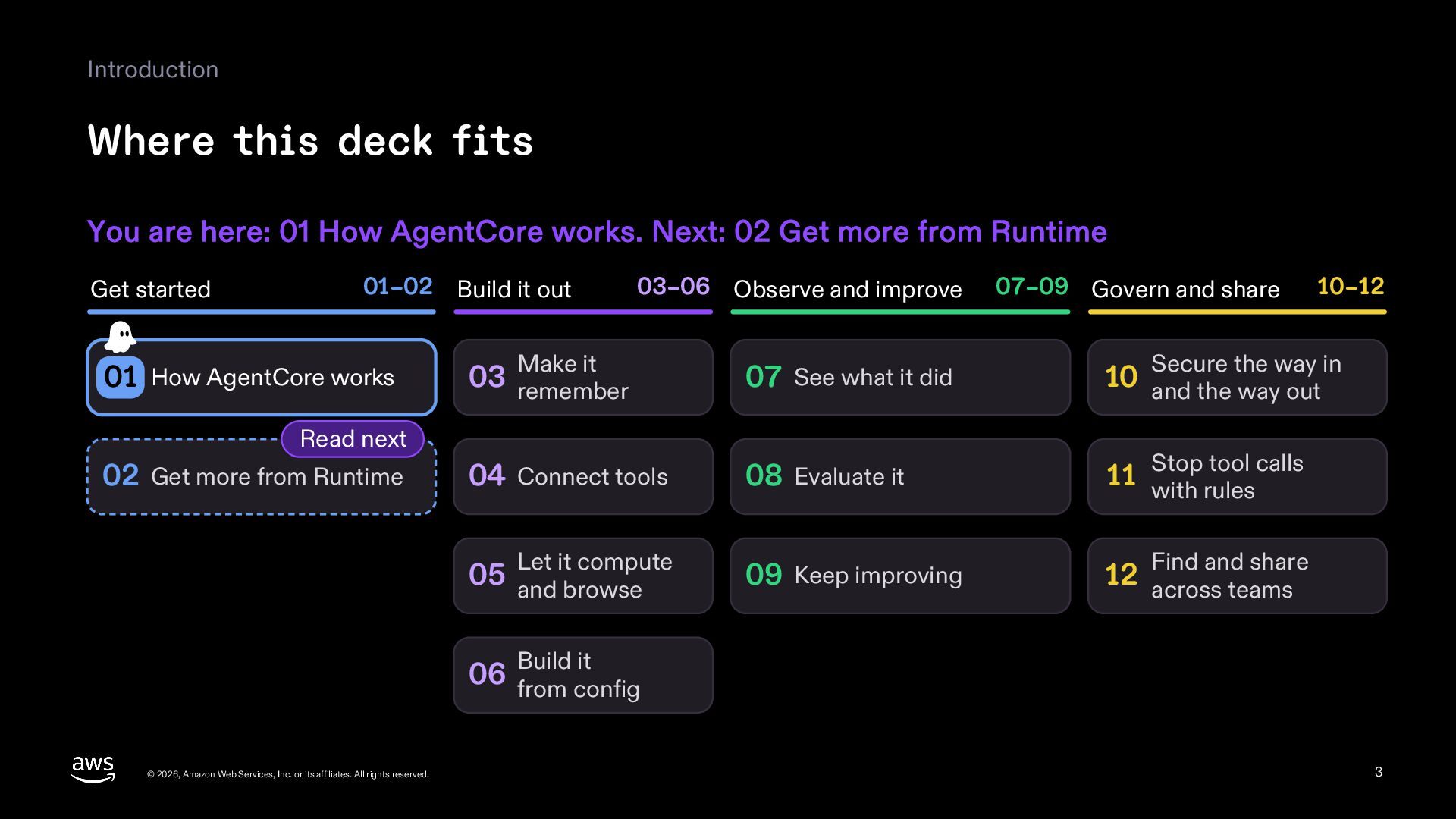
Introduction Where this deck fits You are here: 01 How
AgentCore works. Next: 02 Get more from Runtime Get started 01–02 Build it out 01 How AgentCore works 03–06 Observe and improve Make it 10–12 Secure the way in 03 remember 07 See what it did 10 and the way out 04 Connect tools 08 Evaluate it tool calls 11 Stop with rules 09 Keep improving 12 across teams Read next 02 Get more from Runtime 07–09 Govern and share Let it compute 05 and browse Find and share Build it 06 from config © 2026, Amazon Web Services, Inc. or its affiliates. All rights reserved. 3 -
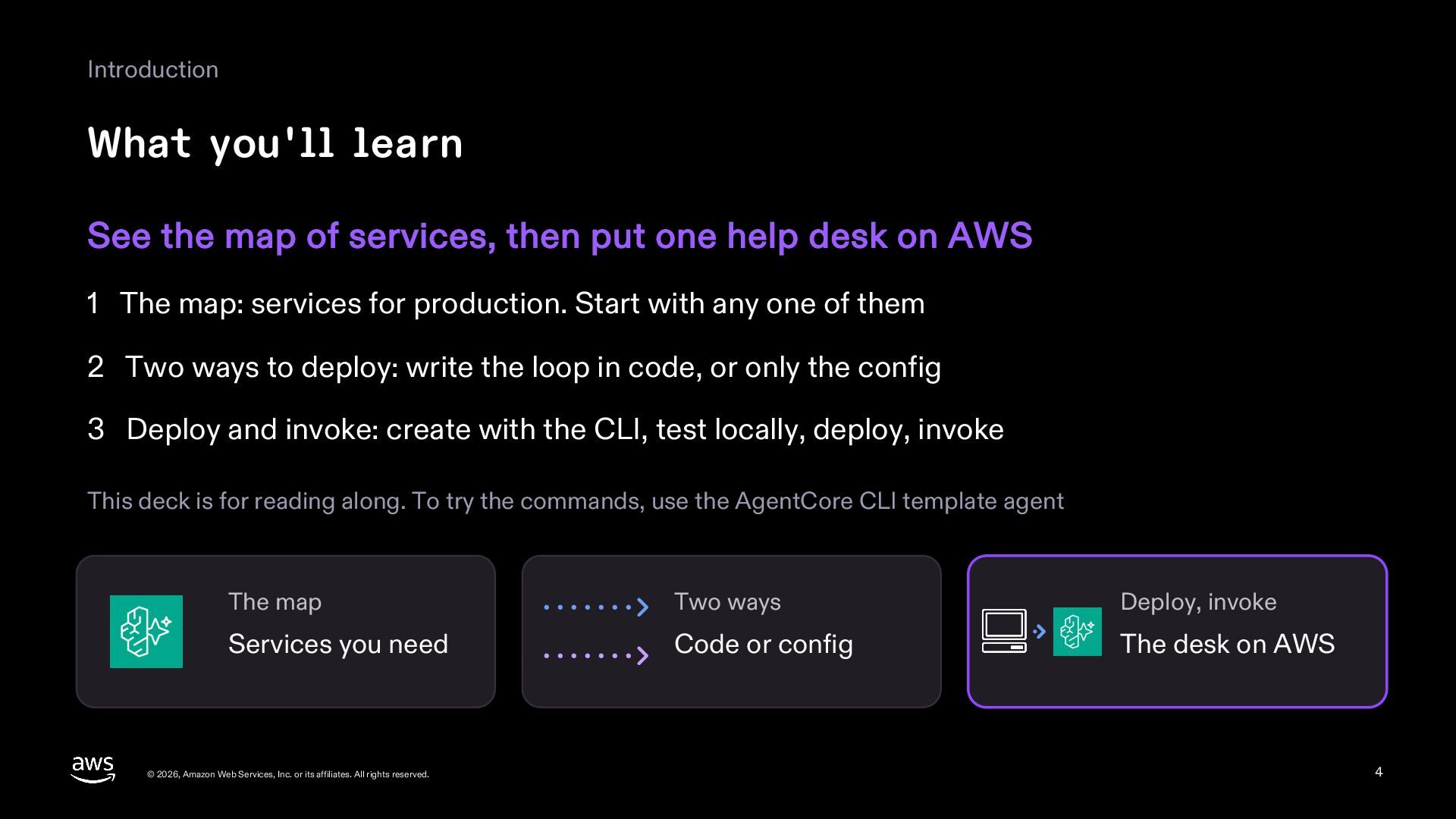
Introduction What you'll learn See the map of services, then
put one help desk on AWS 1 The map: services for production. Start with any one of them 2 Two ways to deploy: write the loop in code, or only the config 3 Deploy and invoke: create with the CLI, test locally, deploy, invoke This deck is for reading along. To try the commands, use the AgentCore CLI template agent The map Two ways Deploy, invoke Services you need Code or config The desk on AWS © 2026, Amazon Web Services, Inc. or its affiliates. All rights reserved. 4 -
1 What AgentCore is © 2026, Amazon Web Services, Inc.
or its affiliates. All rights reserved. 5 -
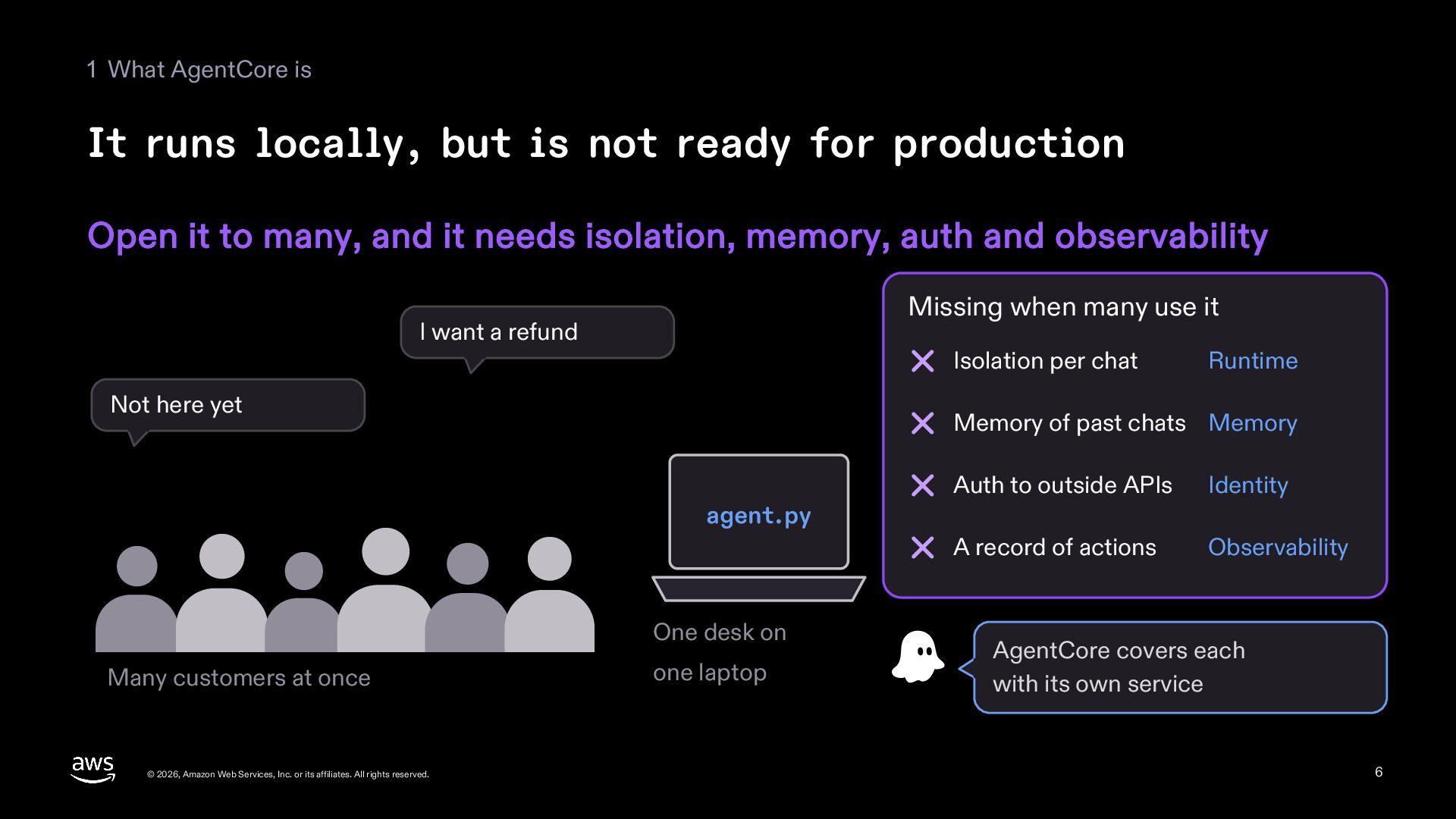
1 What AgentCore is It runs locally, but is not
ready for production Open it to many, and it needs isolation, memory, auth and observability Missing when many use it I want a refund Isolation per chat Not here yet Memory of past chats Memory agent.py One desk on Many customers at once © 2026, Amazon Web Services, Inc. or its affiliates. All rights reserved. Runtime one laptop Auth to outside APIs Identity A record of actions Observability AgentCore covers each with its own service 6 -
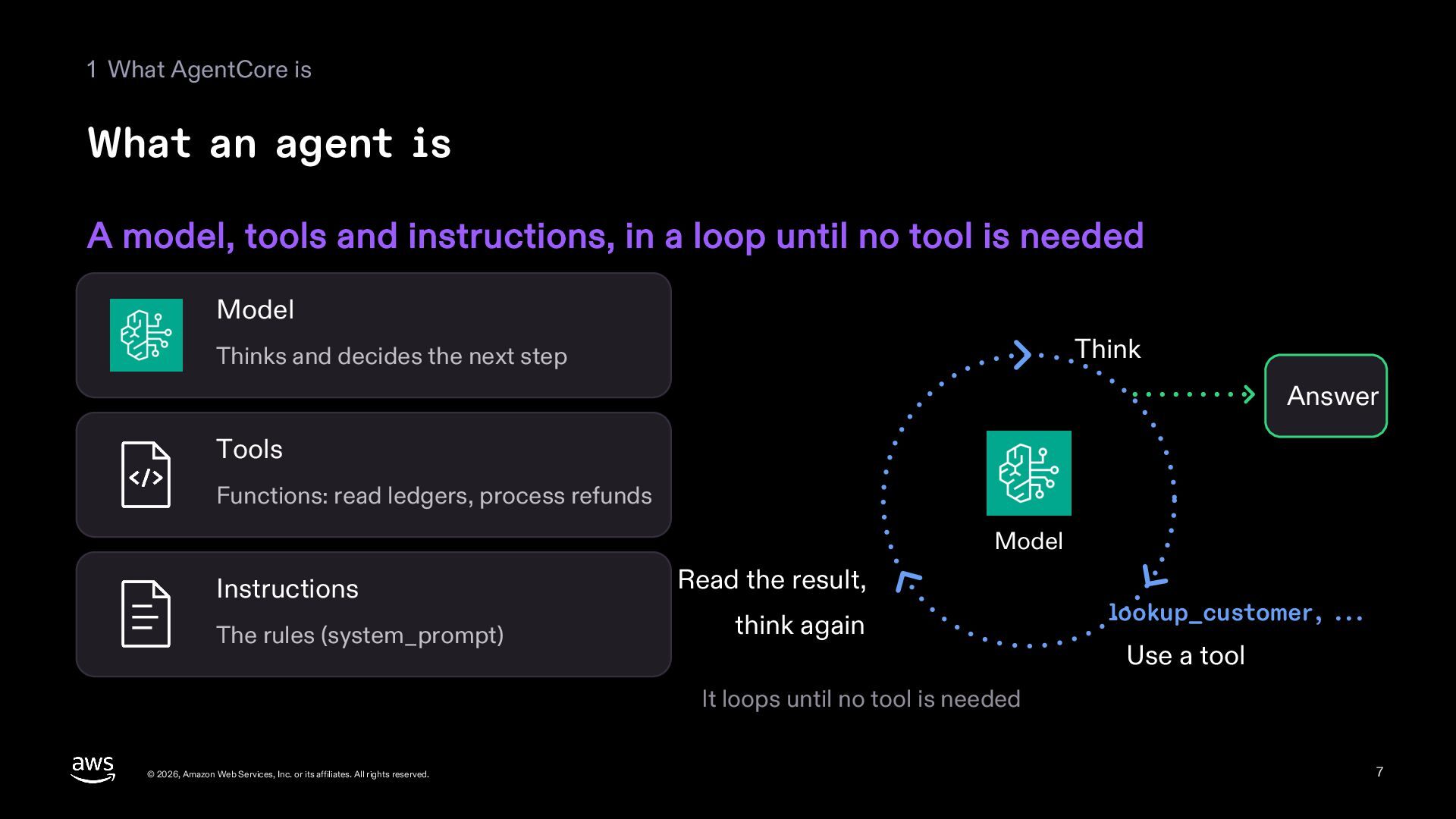
1 What AgentCore is What an agent is A model,
tools and instructions, in a loop until no tool is needed Model Think Thinks and decides the next step Answer Tools Functions: read ledgers, process refunds Model Instructions The rules (system_prompt) Read the result, think again lookup_customer, ... Use a tool It loops until no tool is needed © 2026, Amazon Web Services, Inc. or its affiliates. All rights reserved. 7 -
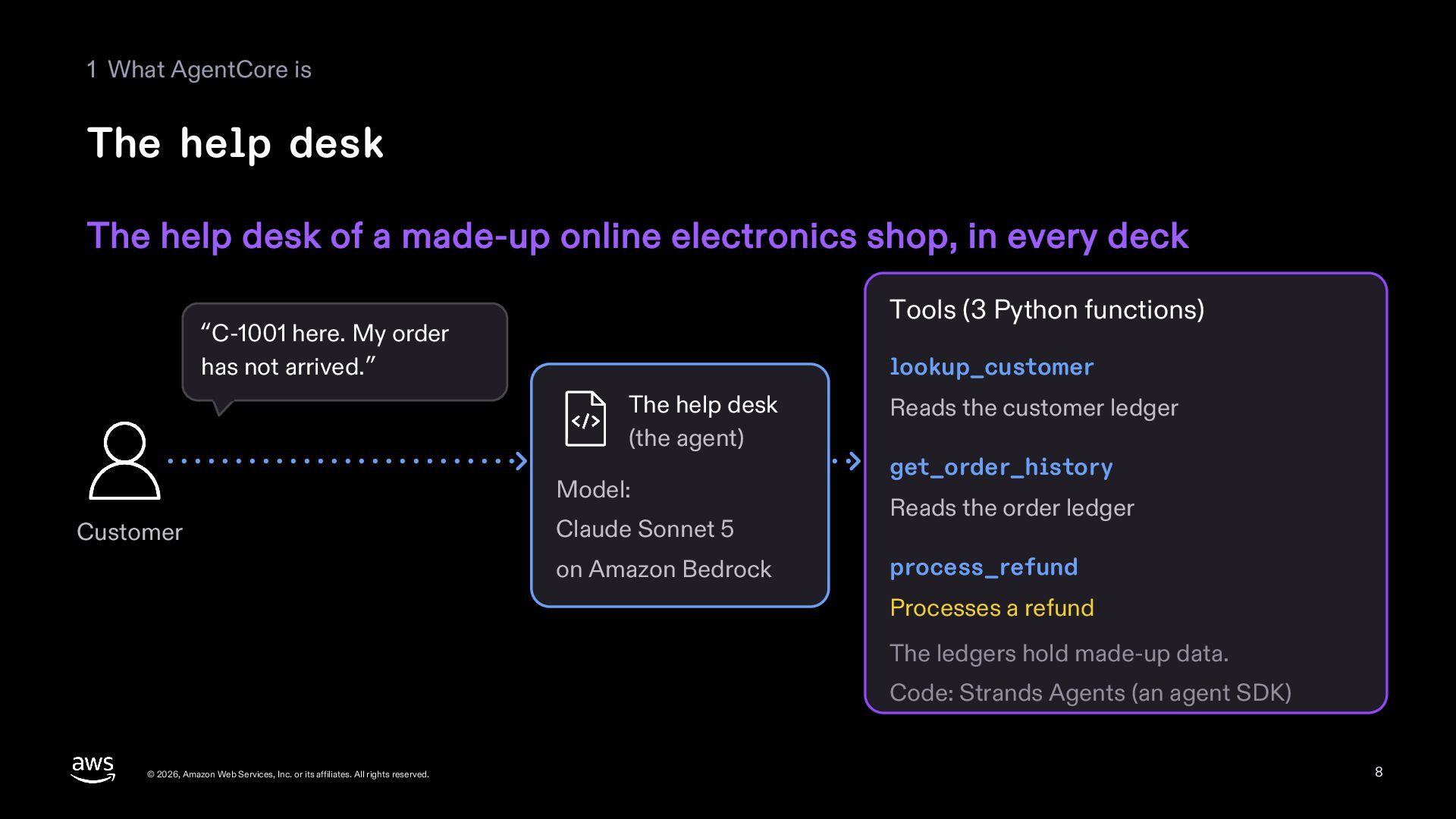
1 What AgentCore is The help desk The help desk
of a made-up online electronics shop, in every deck Tools (3 Python functions) “C-1001 here. My order has not arrived.” lookup_customer The help desk (the agent) Model: Customer Claude Sonnet 5 on Amazon Bedrock Reads the customer ledger get_order_history Reads the order ledger process_refund Processes a refund The ledgers hold made-up data. Code: Strands Agents (an agent SDK) © 2026, Amazon Web Services, Inc. or its affiliates. All rights reserved. 8 -
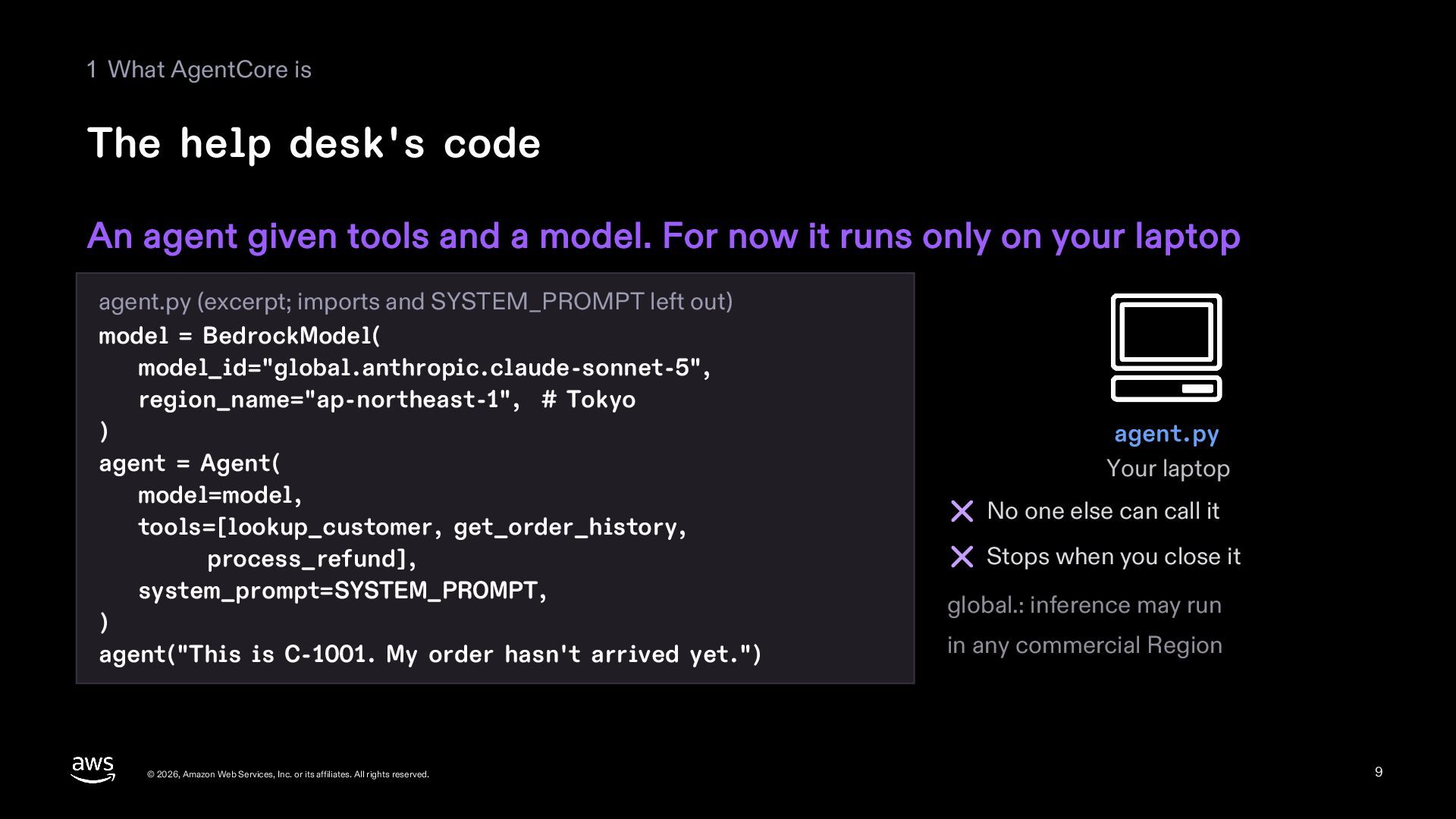
1 What AgentCore is The help desk's code An agent
given tools and a model. For now it runs only on your laptop agent.py (excerpt; imports and SYSTEM_PROMPT left out) model = BedrockModel( model_id="global.anthropic.claude-sonnet-5", region_name="ap-northeast-1", # Tokyo ) agent = Agent( model=model, tools=[lookup_customer, get_order_history, process_refund], system_prompt=SYSTEM_PROMPT, ) agent("This is C-1001. My order hasn't arrived yet.") © 2026, Amazon Web Services, Inc. or its affiliates. All rights reserved. agent.py Your laptop No one else can call it Stops when you close it global.: inference may run in any commercial Region 9 -
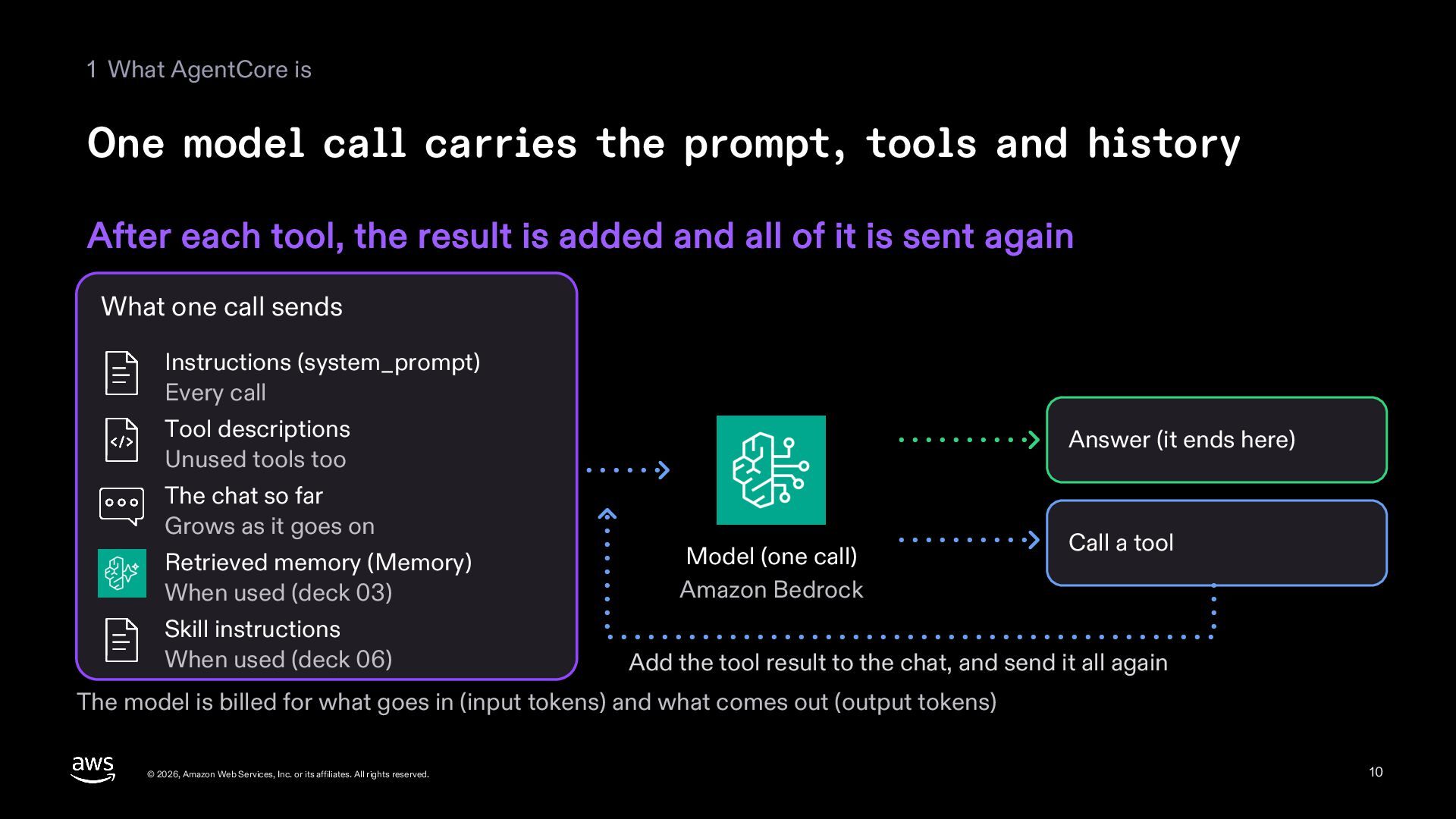
1 What AgentCore is One model call carries the prompt,
tools and history After each tool, the result is added and all of it is sent again What one call sends Instructions (system_prompt) Every call Tool descriptions Unused tools too Answer (it ends here) The chat so far Grows as it goes on Retrieved memory (Memory) When used (deck 03) Skill instructions When used (deck 06) Model (one call) Amazon Bedrock Call a tool Add the tool result to the chat, and send it all again The model is billed for what goes in (input tokens) and what comes out (output tokens) © 2026, Amazon Web Services, Inc. or its affiliates. All rights reserved. 10 -
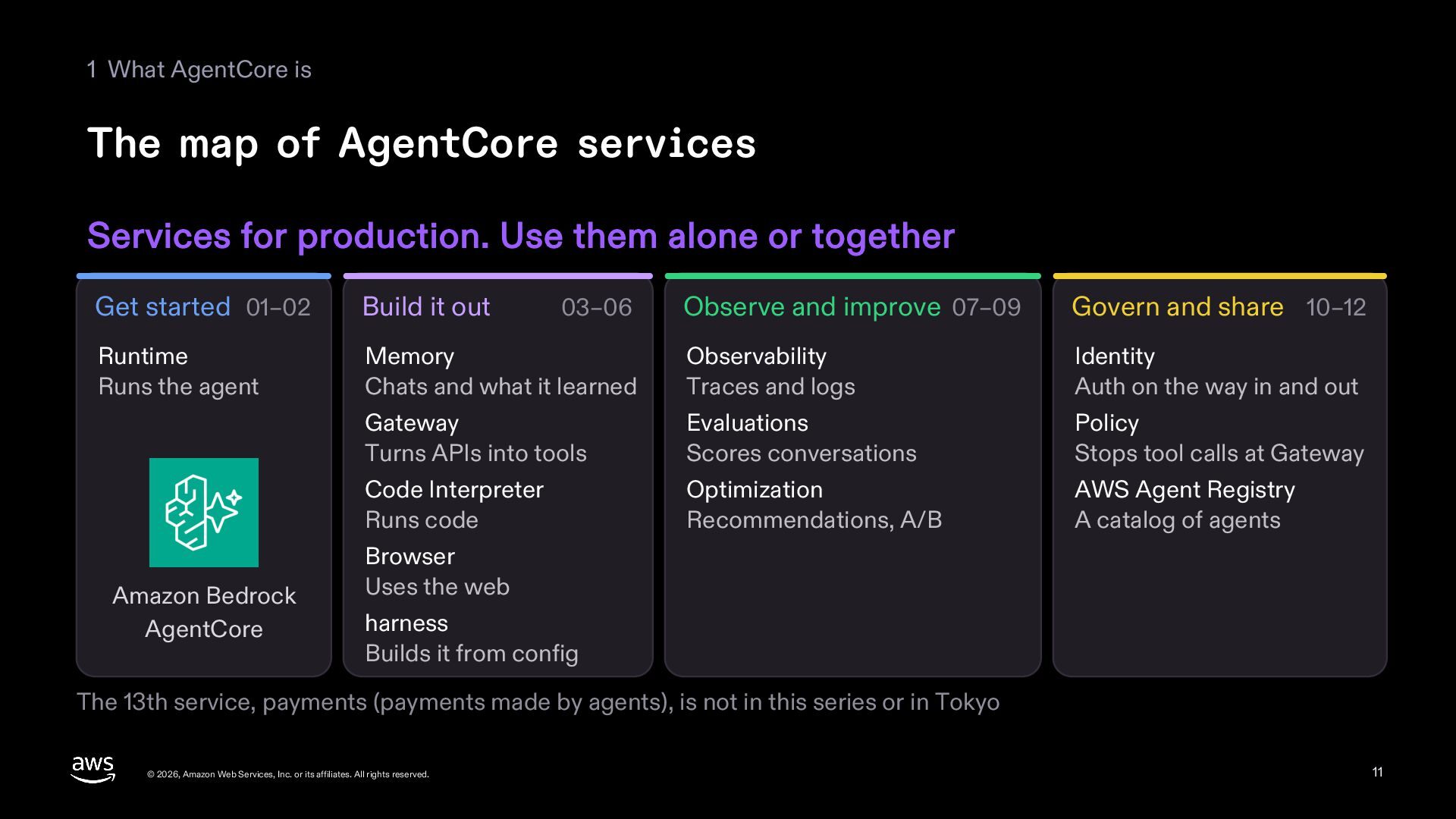
1 What AgentCore is The map of AgentCore services Services
for production. Use them alone or together Get started 01–02 Build it out Runtime Runs the agent Amazon Bedrock AgentCore Observe and improve 07–09 Govern and share 10–12 Memory Chats and what it learned Observability Traces and logs Identity Auth on the way in and out Gateway Turns APIs into tools Evaluations Scores conversations Policy Stops tool calls at Gateway Code Interpreter Runs code Optimization Recommendations, A/B AWS Agent Registry A catalog of agents 03–06 Browser Uses the web harness Builds it from config The 13th service, payments (payments made by agents), is not in this series or in Tokyo © 2026, Amazon Web Services, Inc. or its affiliates. All rights reserved. 11 -
2 Ways to deploy, and what you need © 2026,
Amazon Web Services, Inc. or its affiliates. All rights reserved. 12 -
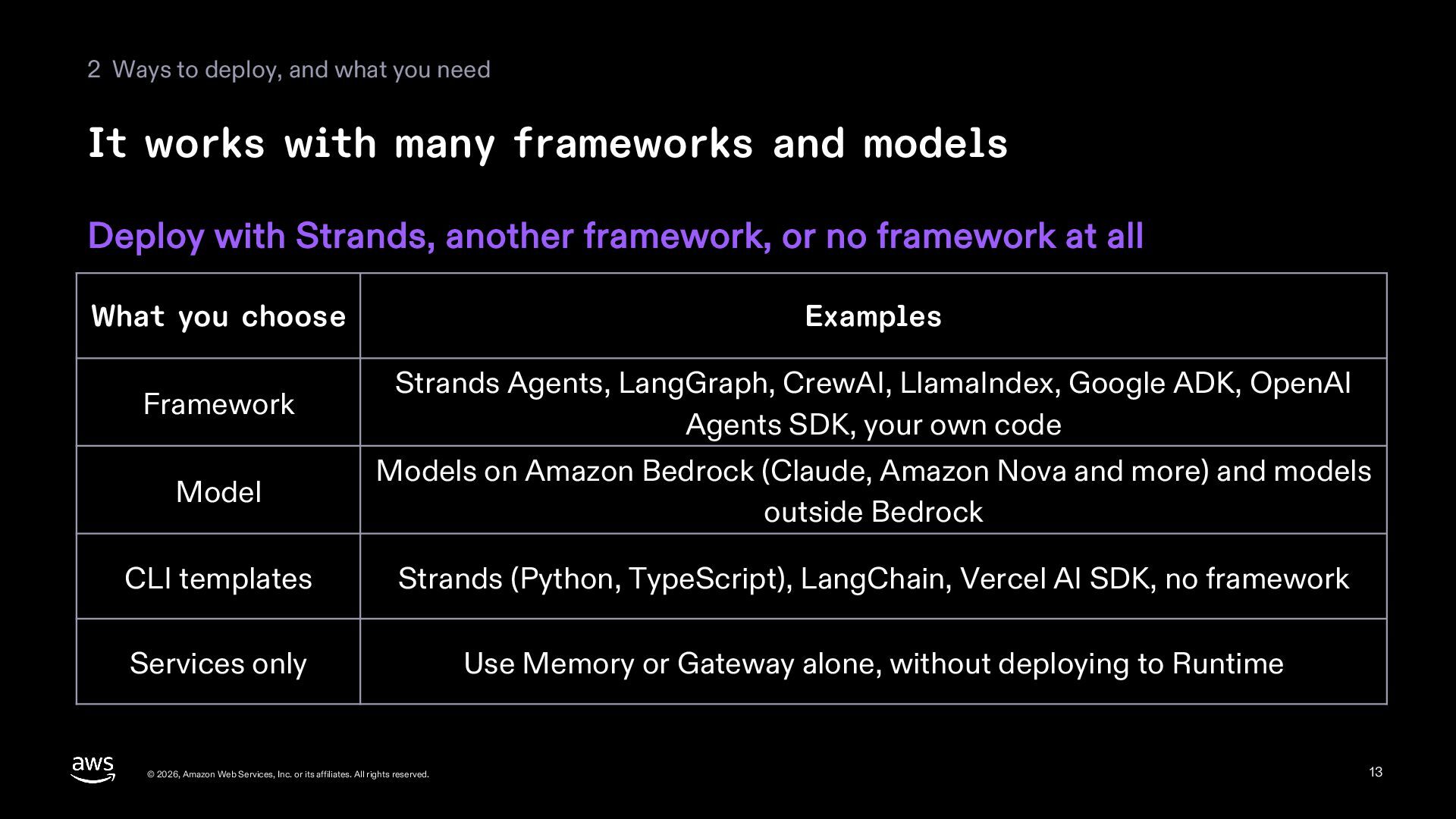
2 Ways to deploy, and what you need It works
with many frameworks and models Deploy with Strands, another framework, or no framework at all What you choose Examples Framework Strands Agents, LangGraph, CrewAI, LlamaIndex, Google ADK, OpenAI Agents SDK, your own code Model Models on Amazon Bedrock (Claude, Amazon Nova and more) and models outside Bedrock CLI templates Strands (Python, TypeScript), LangChain, Vercel AI SDK, no framework Services only Use Memory or Gateway alone, without deploying to Runtime © 2026, Amazon Web Services, Inc. or its affiliates. All rights reserved. 13 -
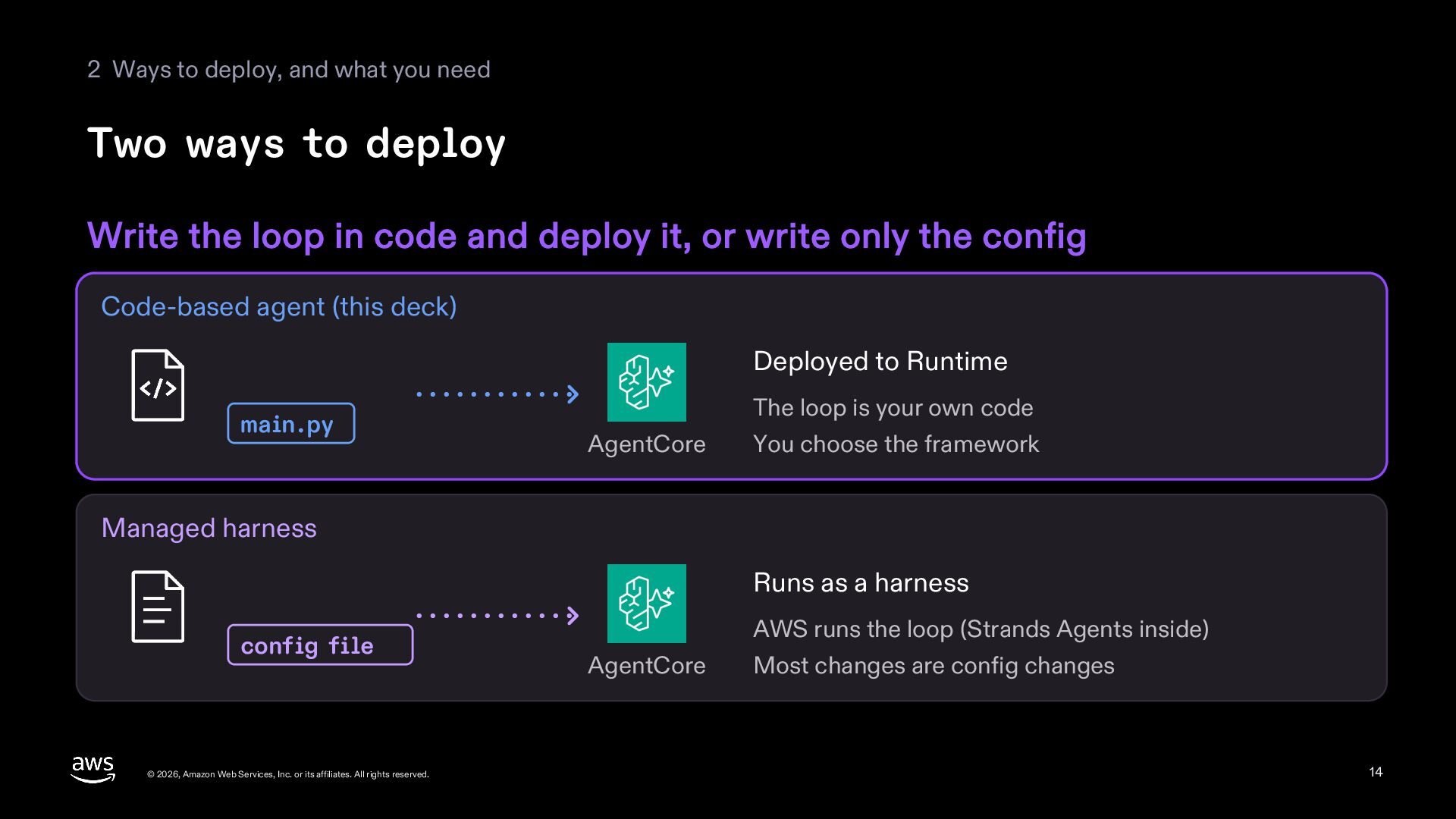
2 Ways to deploy, and what you need Two ways
to deploy Write the loop in code and deploy it, or write only the config Code-based agent (this deck) Deployed to Runtime main.py The loop is your own code AgentCore You choose the framework Managed harness Runs as a harness config file © 2026, Amazon Web Services, Inc. or its affiliates. All rights reserved. AWS runs the loop (Strands Agents inside) AgentCore Most changes are config changes 14 -
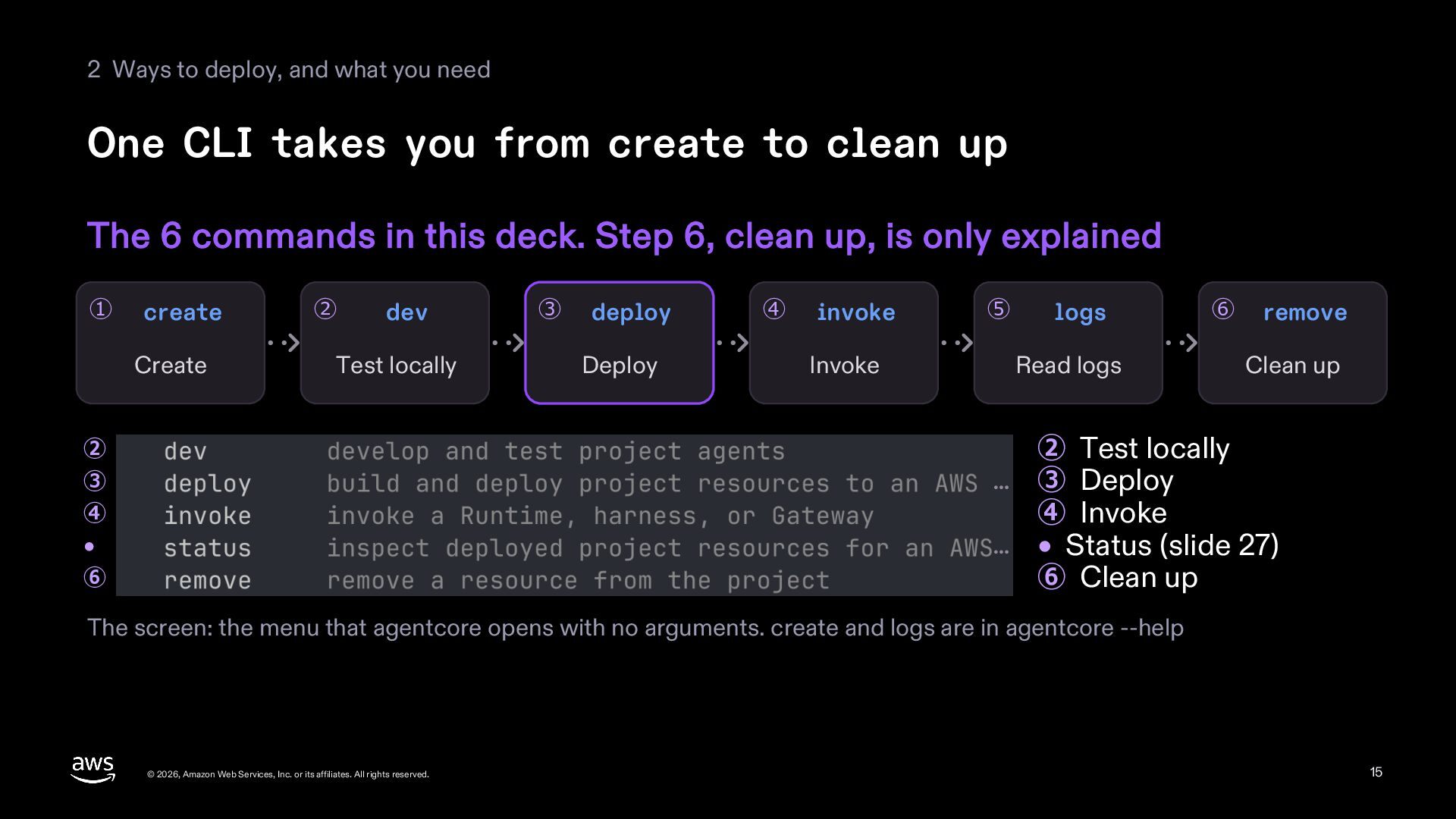
2 Ways to deploy, and what you need One CLI
takes you from create to clean up The 6 commands in this deck. Step 6, clean up, is only explained ① create Create ② dev Test locally ③ deploy Deploy ④ invoke Invoke ⑤ logs Read logs ⑥ remove Clean up ② Test locally ③ Deploy ④ Invoke • Status (slide 27) ⑥ Clean up ② ③ ④ • ⑥ The screen: the menu that agentcore opens with no arguments. create and logs are in agentcore --help © 2026, Amazon Web Services, Inc. or its affiliates. All rights reserved. 15 -
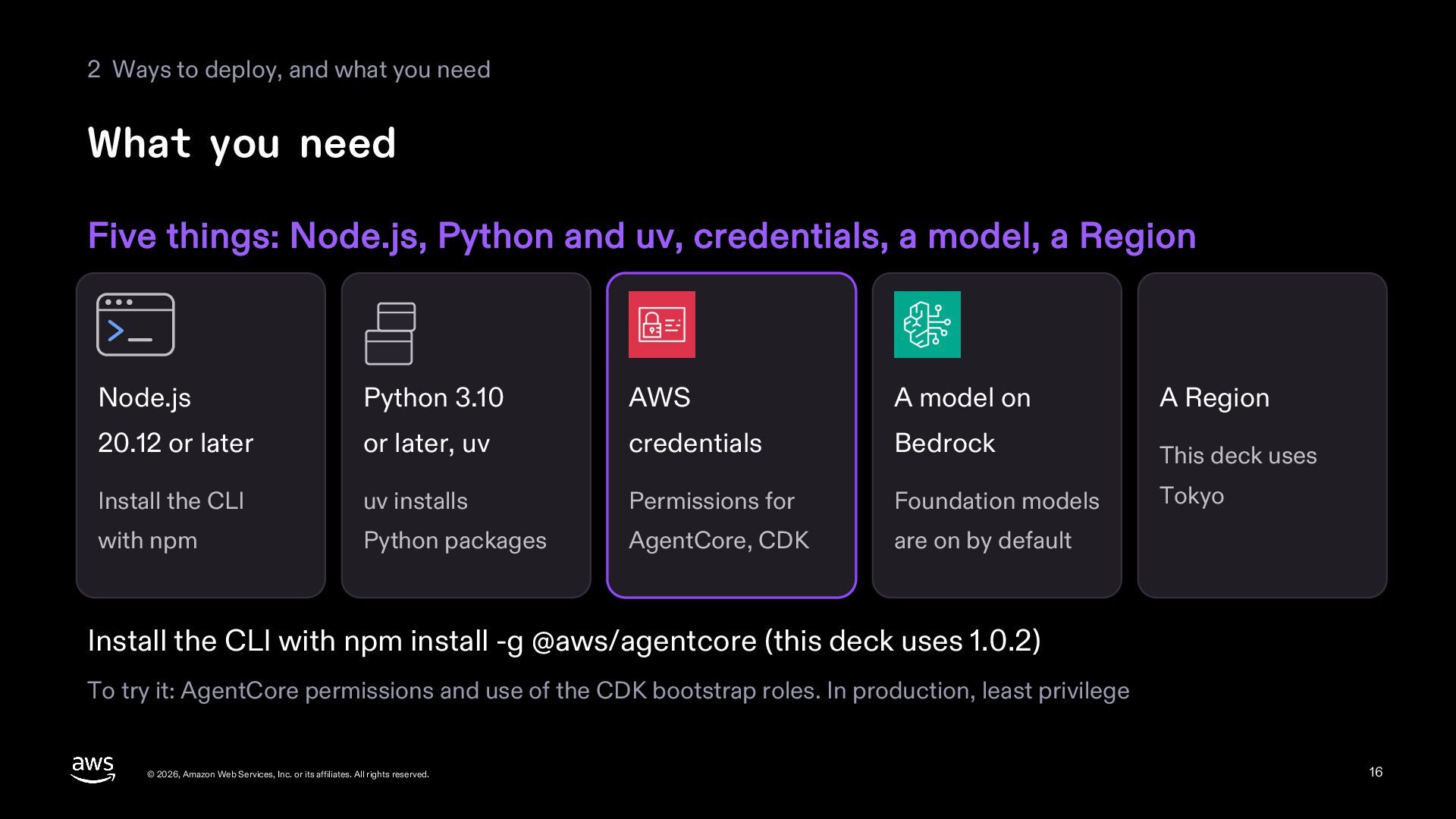
2 Ways to deploy, and what you need What you
need Five things: Node.js, Python and uv, credentials, a model, a Region Node.js Python 3.10 AWS A model on A Region 20.12 or later or later, uv credentials Bedrock This deck uses Install the CLI uv installs Permissions for Foundation models Tokyo with npm Python packages AgentCore, CDK are on by default Install the CLI with npm install -g @aws/agentcore (this deck uses 1.0.2) To try it: AgentCore permissions and use of the CDK bootstrap roles. In production, least privilege © 2026, Amazon Web Services, Inc. or its affiliates. All rights reserved. 16 -
3 Deploy the help desk © 2026, Amazon Web Services,
Inc. or its affiliates. All rights reserved. 17 -
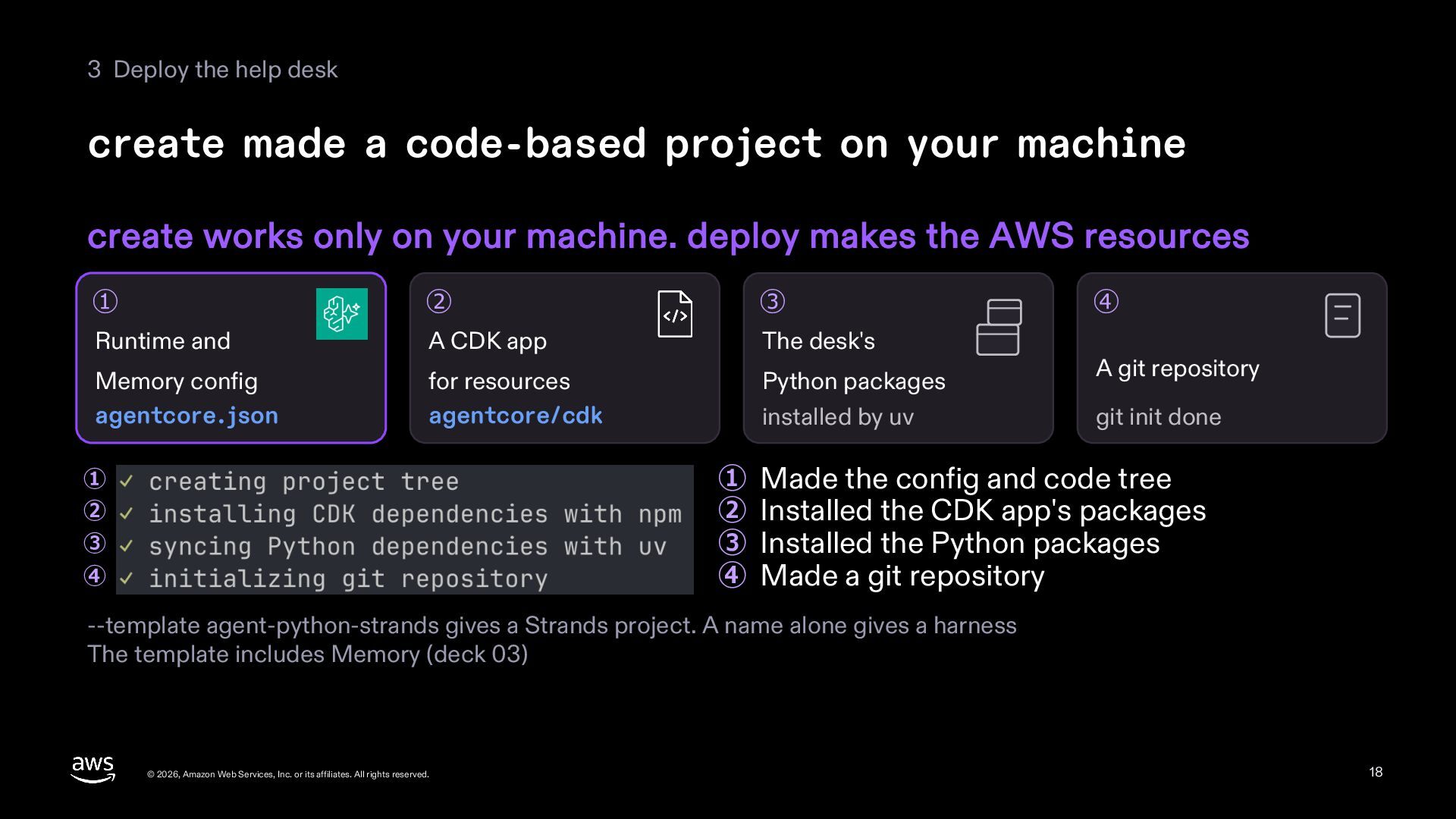
3 Deploy the help desk create made a code-based project
on your machine create works only on your machine. deploy makes the AWS resources ① ② ③ Runtime and A CDK app The desk's Memory config agentcore.json for resources agentcore/cdk Python packages installed by uv ④ A git repository git init done ① Made the config and code tree ② Installed the CDK app's packages ③ Installed the Python packages ④ Made a git repository ① ② ③ ④ --template agent-python-strands gives a Strands project. A name alone gives a harness The template includes Memory (deck 03) © 2026, Amazon Web Services, Inc. or its affiliates. All rights reserved. 18 -
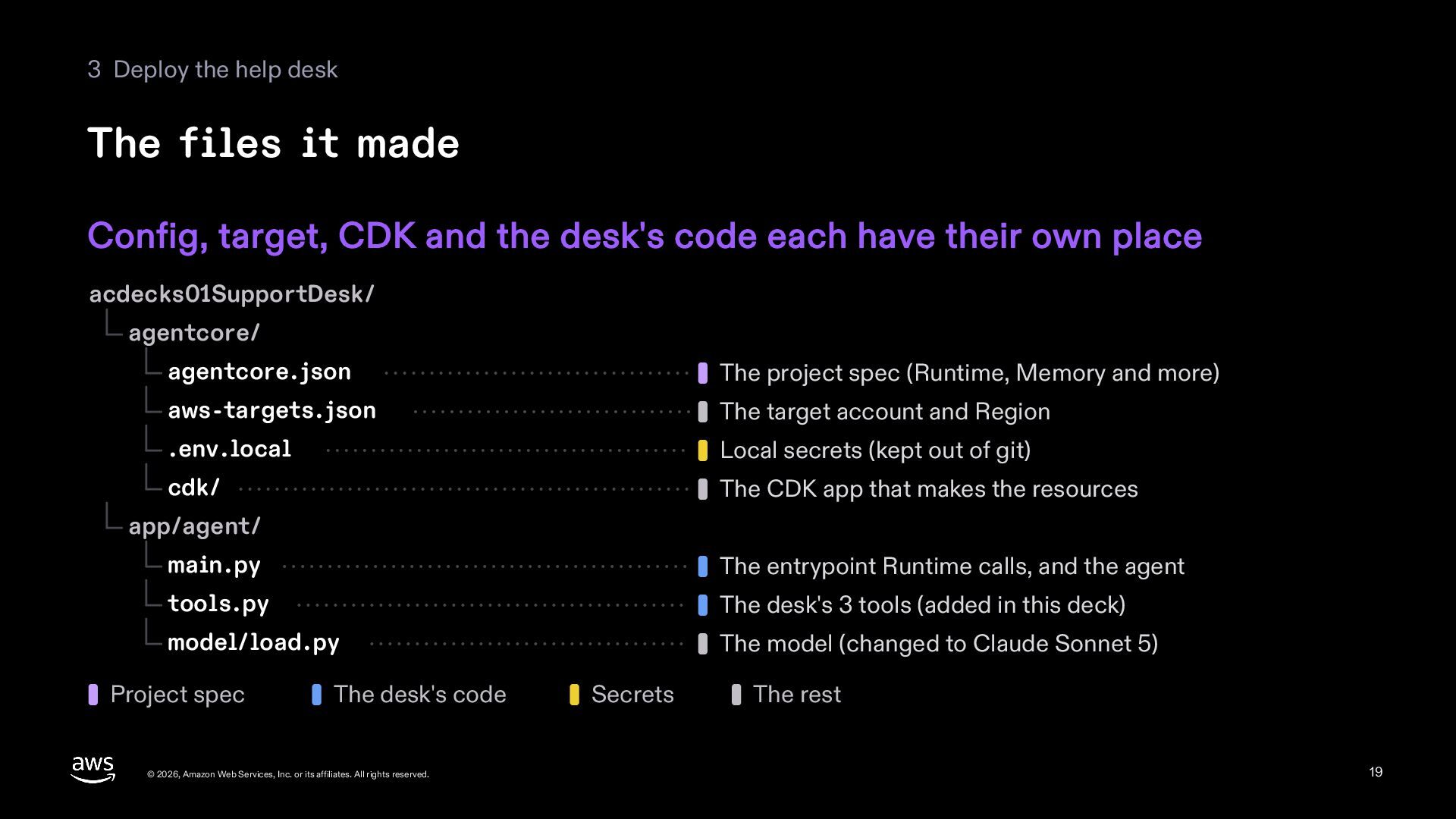
3 Deploy the help desk The files it made Config,
target, CDK and the desk's code each have their own place acdecks01SupportDesk/ agentcore/ agentcore.json The project spec (Runtime, Memory and more) aws-targets.json The target account and Region .env.local Local secrets (kept out of git) cdk/ The CDK app that makes the resources app/agent/ main.py The entrypoint Runtime calls, and the agent tools.py The desk's 3 tools (added in this deck) model/load.py The model (changed to Claude Sonnet 5) Project spec The desk's code © 2026, Amazon Web Services, Inc. or its affiliates. All rights reserved. Secrets The rest 19 -
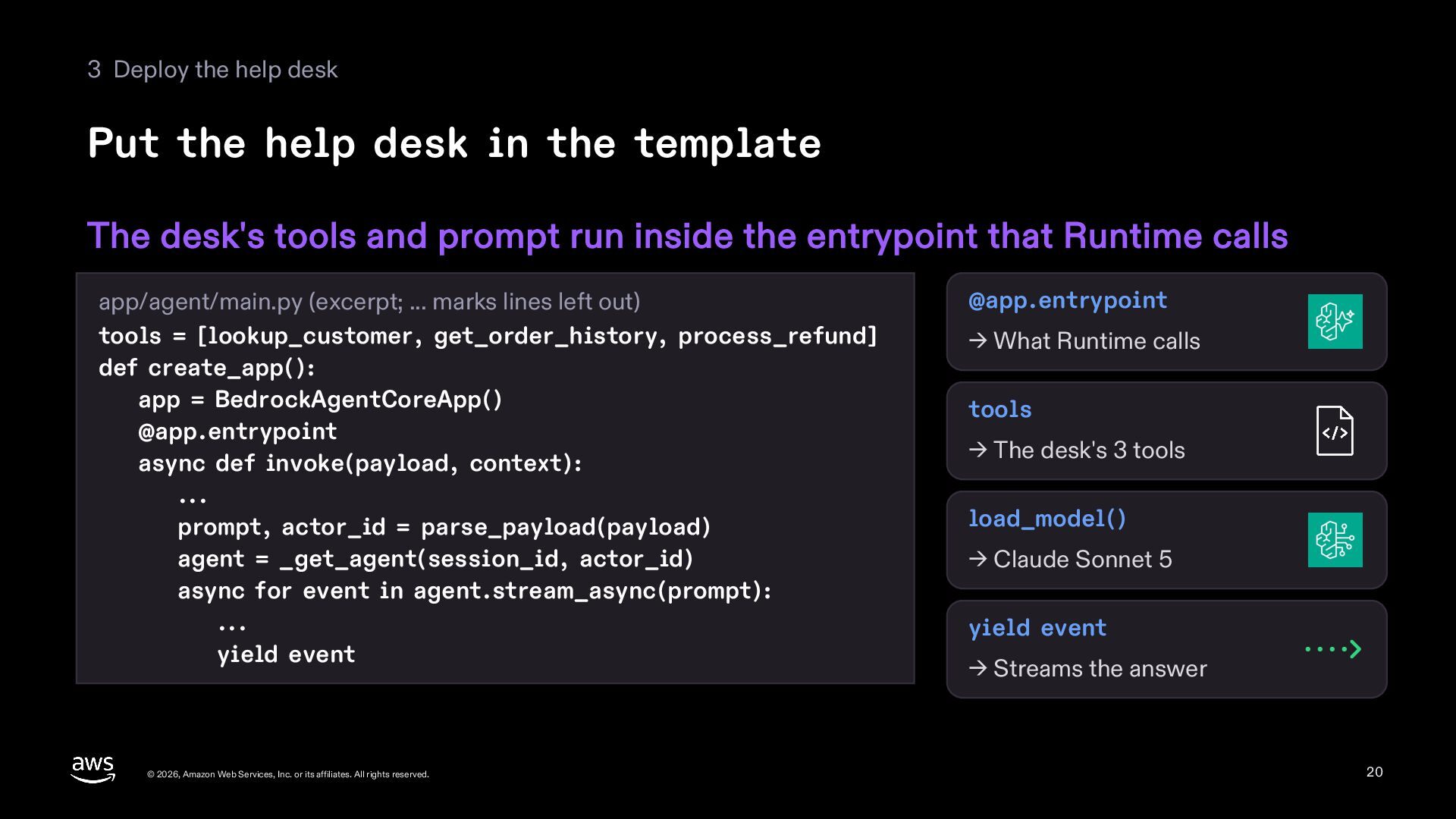
3 Deploy the help desk Put the help desk in
the template The desk's tools and prompt run inside the entrypoint that Runtime calls app/agent/main.py (excerpt; ... marks lines left out) tools = [lookup_customer, get_order_history, process_refund] def create_app(): app = BedrockAgentCoreApp() @app.entrypoint async def invoke(payload, context): ... prompt, actor_id = parse_payload(payload) agent = _get_agent(session_id, actor_id) async for event in agent.stream_async(prompt): ... yield event © 2026, Amazon Web Services, Inc. or its affiliates. All rights reserved. @app.entrypoint → What Runtime calls tools → The desk's 3 tools load_model() → Claude Sonnet 5 yield event → Streams the answer 20 -
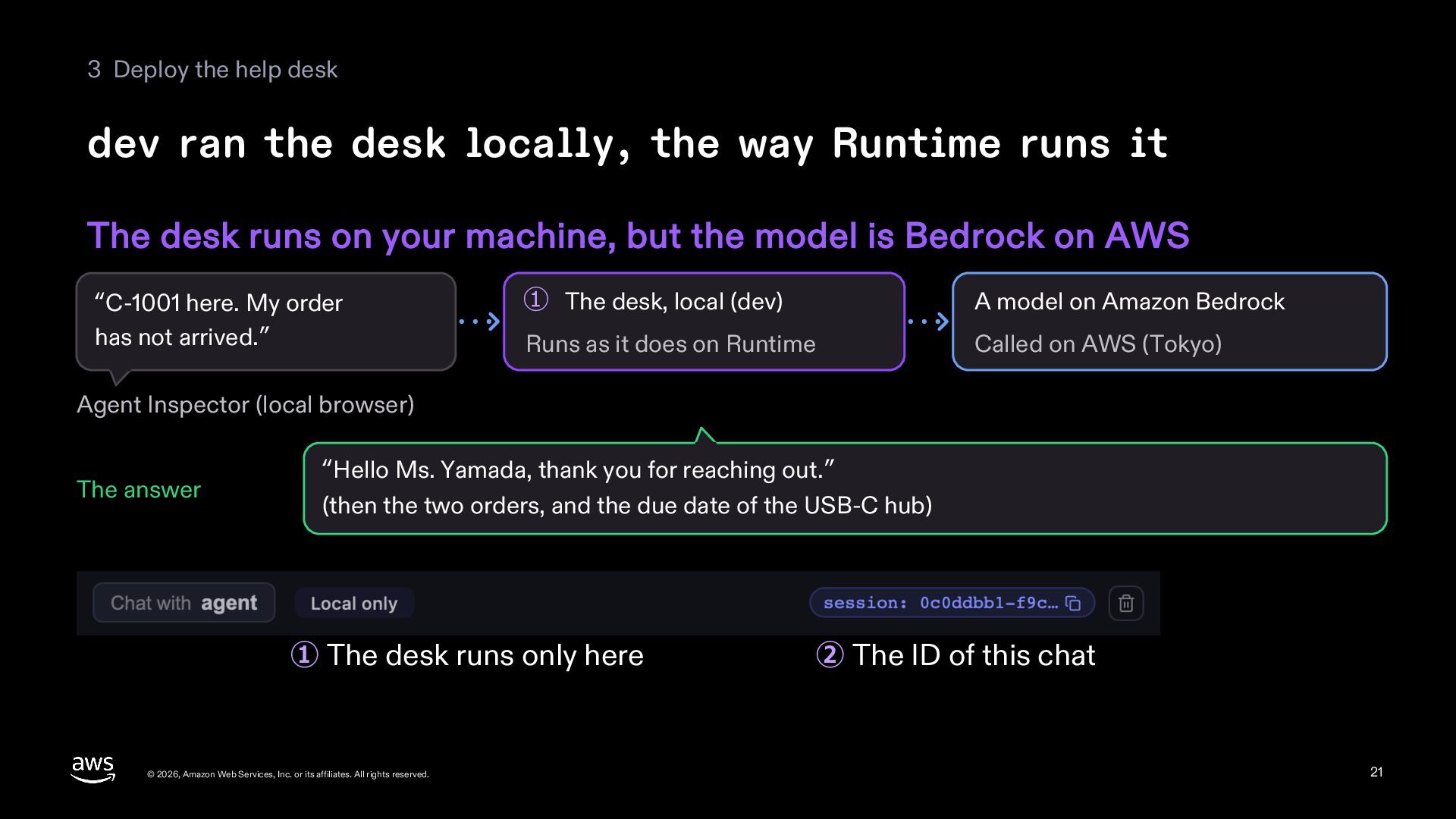
3 Deploy the help desk dev ran the desk locally,
the way Runtime runs it The desk runs on your machine, but the model is Bedrock on AWS “C-1001 here. My order has not arrived.” ① The desk, local (dev) A model on Amazon Bedrock Runs as it does on Runtime Called on AWS (Tokyo) Agent Inspector (local browser) The answer “Hello Ms. Yamada, thank you for reaching out.” (then the two orders, and the due date of the USB-C hub) ① The desk runs only here © 2026, Amazon Web Services, Inc. or its affiliates. All rights reserved. ② The ID of this chat 21 -
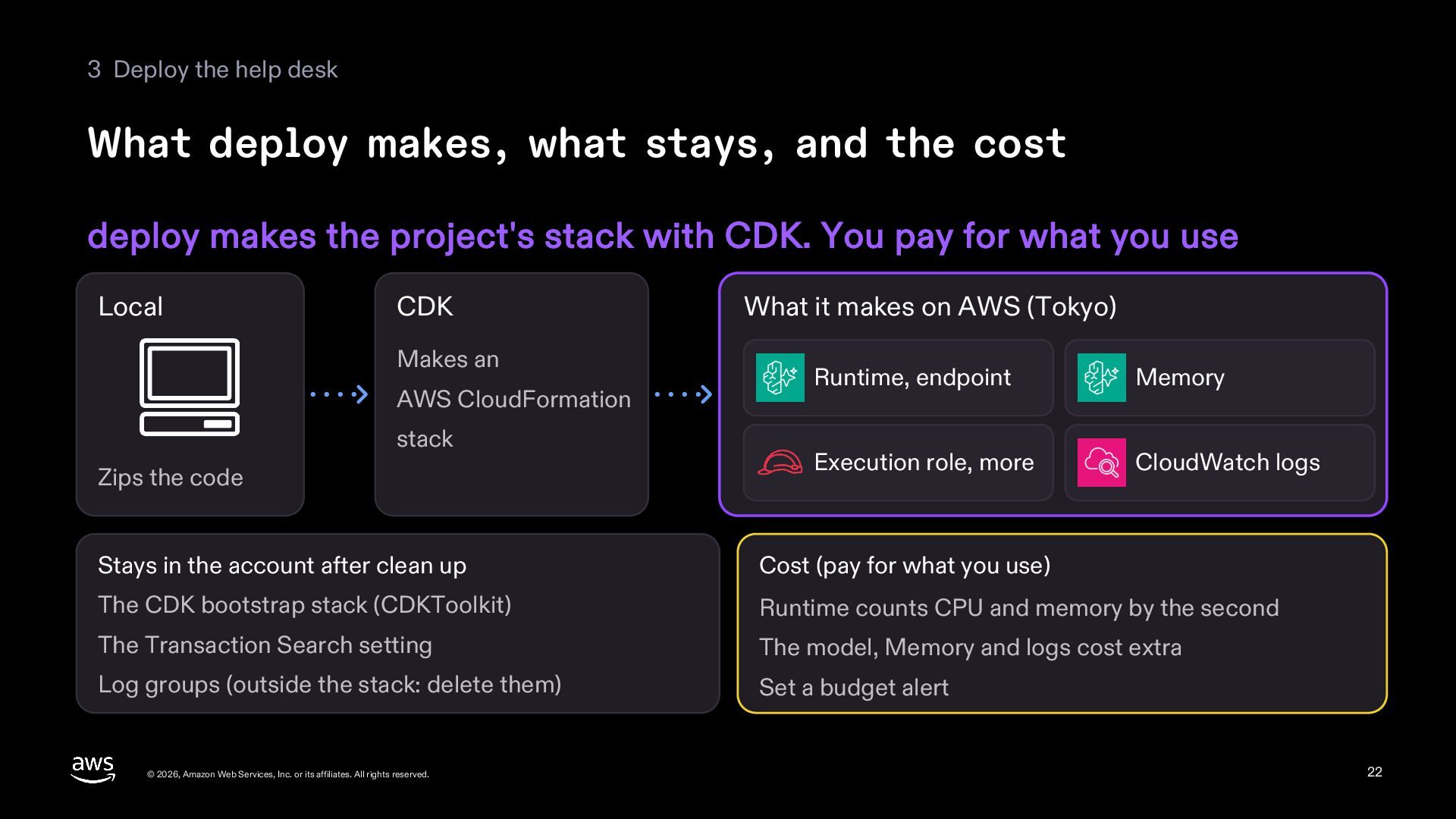
3 Deploy the help desk What deploy makes, what stays,
and the cost deploy makes the project's stack with CDK. You pay for what you use Local CDK Makes an AWS CloudFormation stack Zips the code What it makes on AWS (Tokyo) Runtime, endpoint Memory Execution role, more CloudWatch logs Stays in the account after clean up Cost (pay for what you use) The CDK bootstrap stack (CDKToolkit) Runtime counts CPU and memory by the second The Transaction Search setting The model, Memory and logs cost extra Log groups (outside the stack: delete them) Set a budget alert © 2026, Amazon Web Services, Inc. or its affiliates. All rights reserved. 22 -
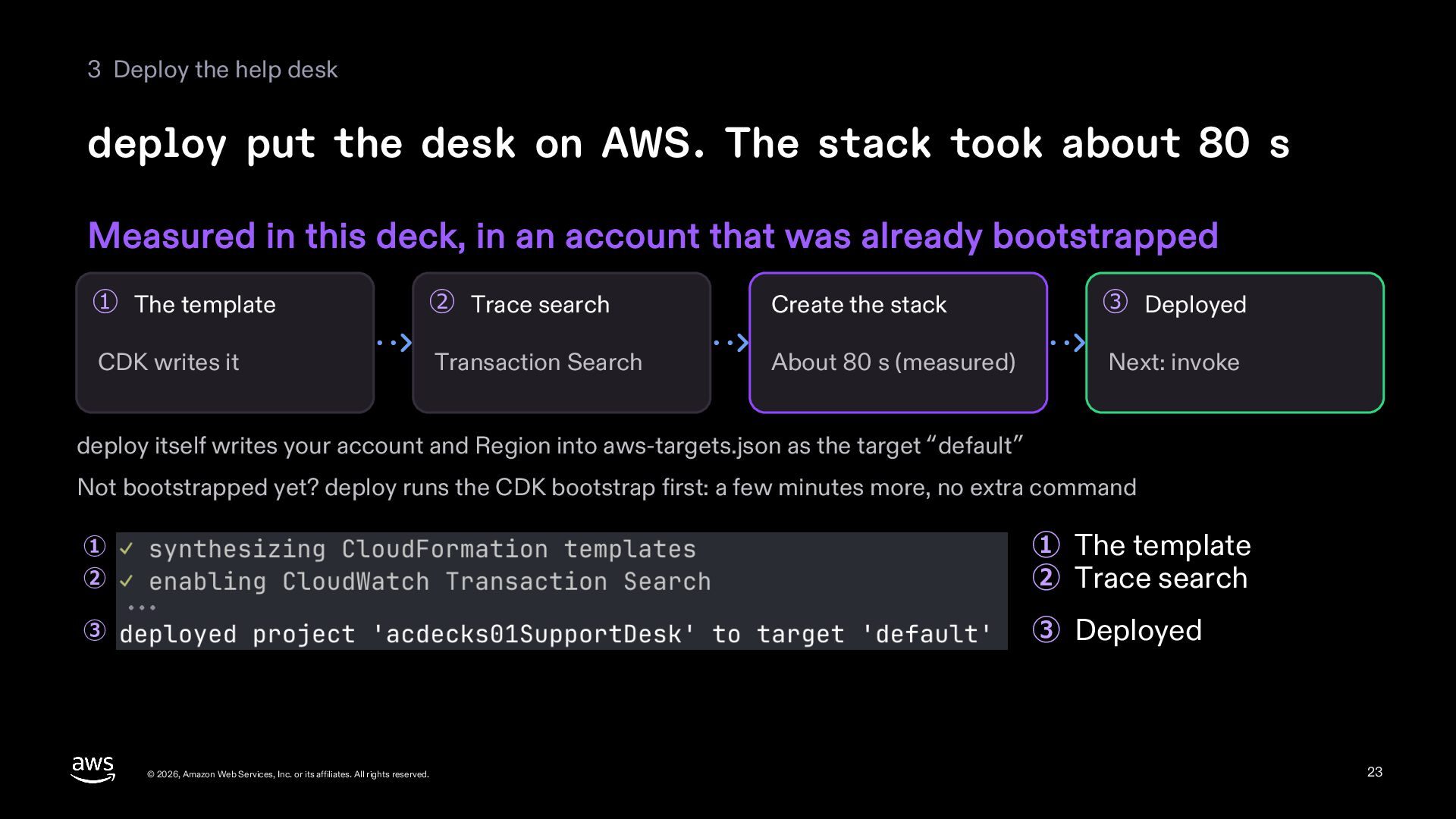
3 Deploy the help desk deploy put the desk on
AWS. The stack took about 80 s Measured in this deck, in an account that was already bootstrapped ① The template ② Trace search Create the stack ③ Deployed CDK writes it Transaction Search About 80 s (measured) Next: invoke deploy itself writes your account and Region into aws-targets.json as the target “default” Not bootstrapped yet? deploy runs the CDK bootstrap first: a few minutes more, no extra command ① ② ① The template ② Trace search ③ ③ Deployed © 2026, Amazon Web Services, Inc. or its affiliates. All rights reserved. 23 -
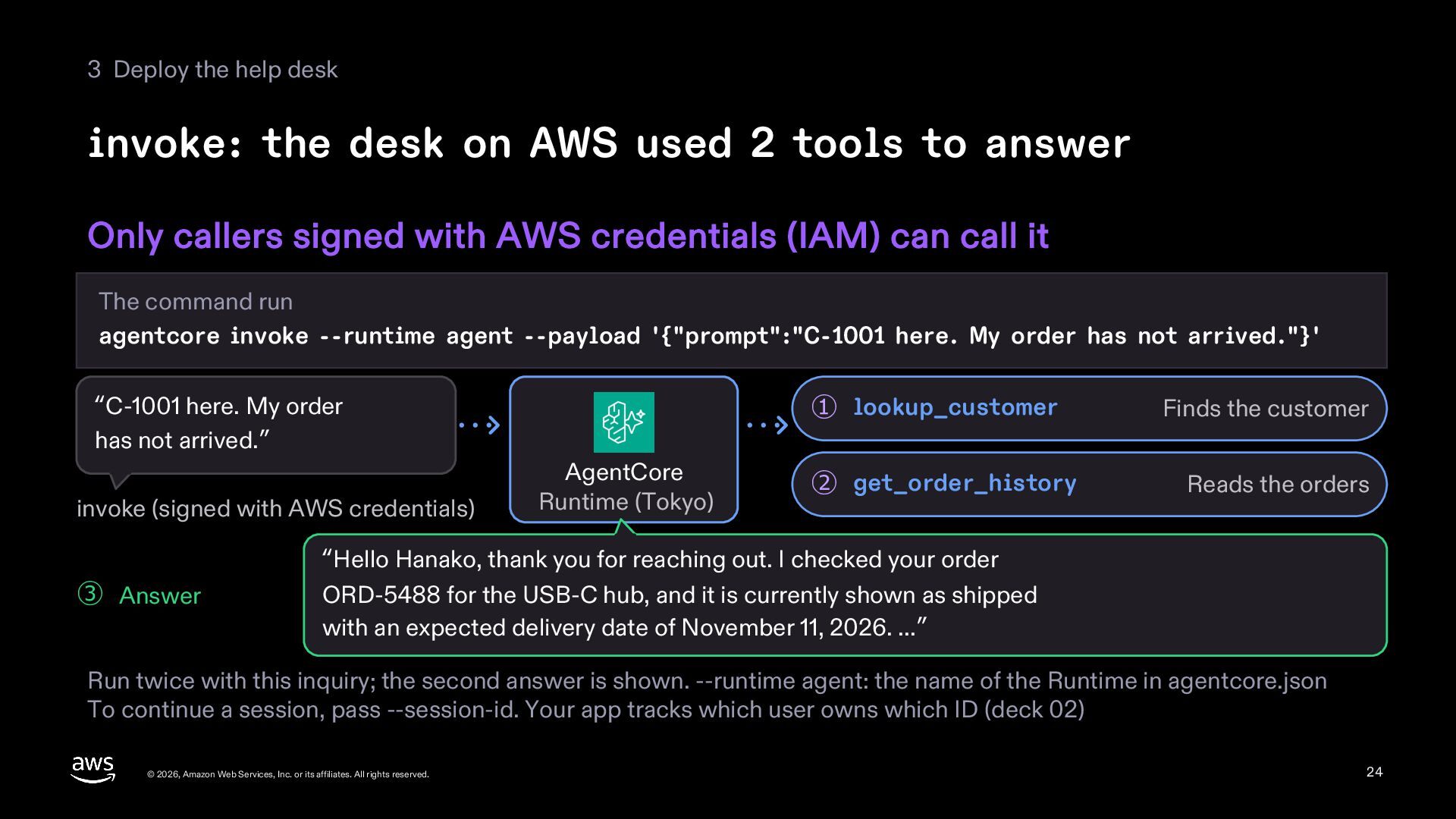
3 Deploy the help desk invoke: the desk on AWS
used 2 tools to answer Only callers signed with AWS credentials (IAM) can call it The command run agentcore invoke --runtime agent --payload '{"prompt":"C-1001 here. My order has not arrived."}' “C-1001 here. My order has not arrived.” invoke (signed with AWS credentials) ③ Answer AgentCore Runtime (Tokyo) ① lookup_customer Finds the customer ② get_order_history Reads the orders “Hello Hanako, thank you for reaching out. I checked your order ORD-5488 for the USB-C hub, and it is currently shown as shipped with an expected delivery date of November 11, 2026. ...” Run twice with this inquiry; the second answer is shown. --runtime agent: the name of the Runtime in agentcore.json To continue a session, pass --session-id. Your app tracks which user owns which ID (deck 02) © 2026, Amazon Web Services, Inc. or its affiliates. All rights reserved. 24 -
3 Deploy the help desk Where the desk sits on
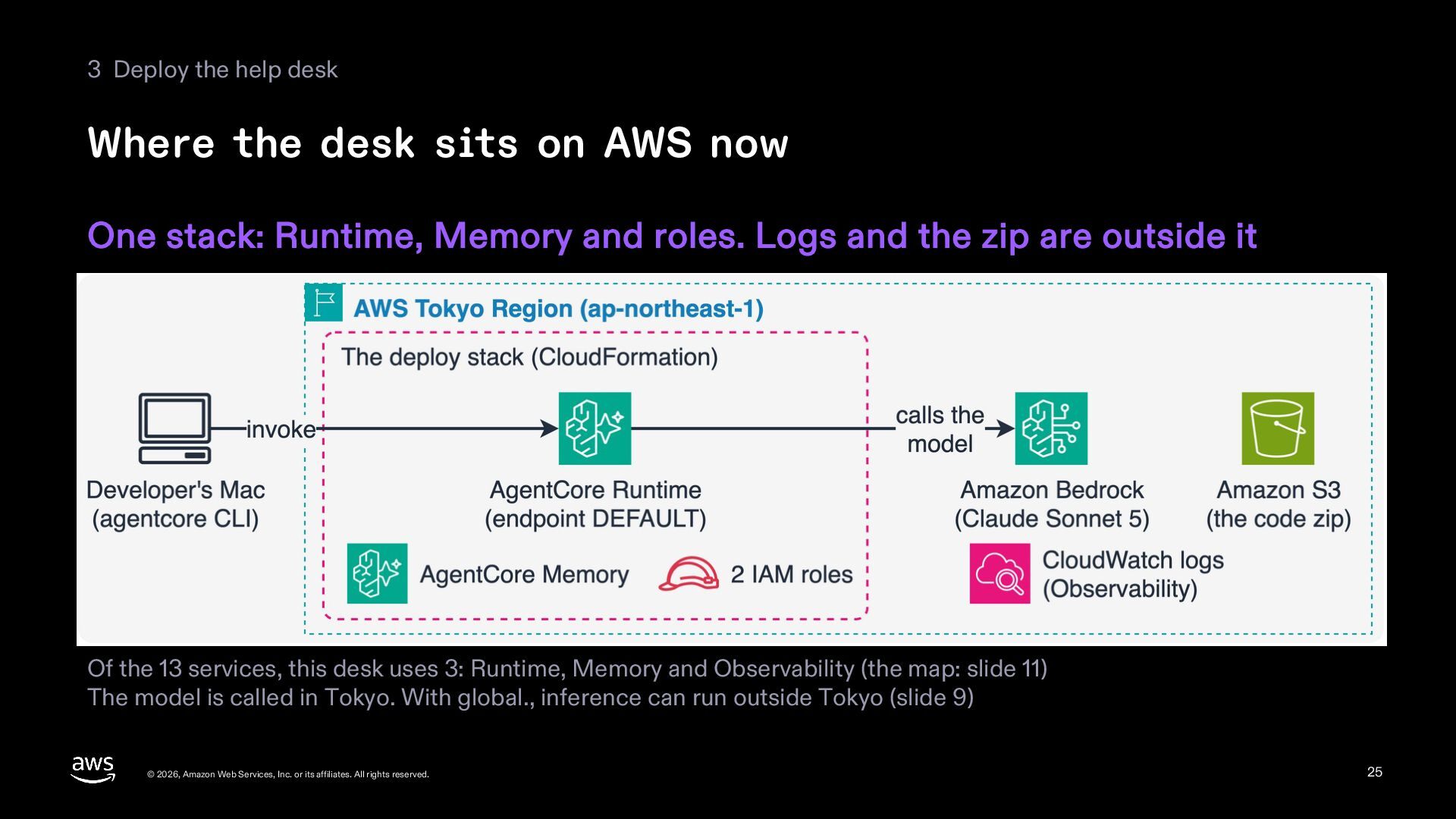
AWS now One stack: Runtime, Memory and roles. Logs and the zip are outside it Of the 13 services, this desk uses 3: Runtime, Memory and Observability (the map: slide 11) The model is called in Tokyo. With global., inference can run outside Tokyo (slide 9) © 2026, Amazon Web Services, Inc. or its affiliates. All rights reserved. 25 -
3 Deploy the help desk logs reads the call records
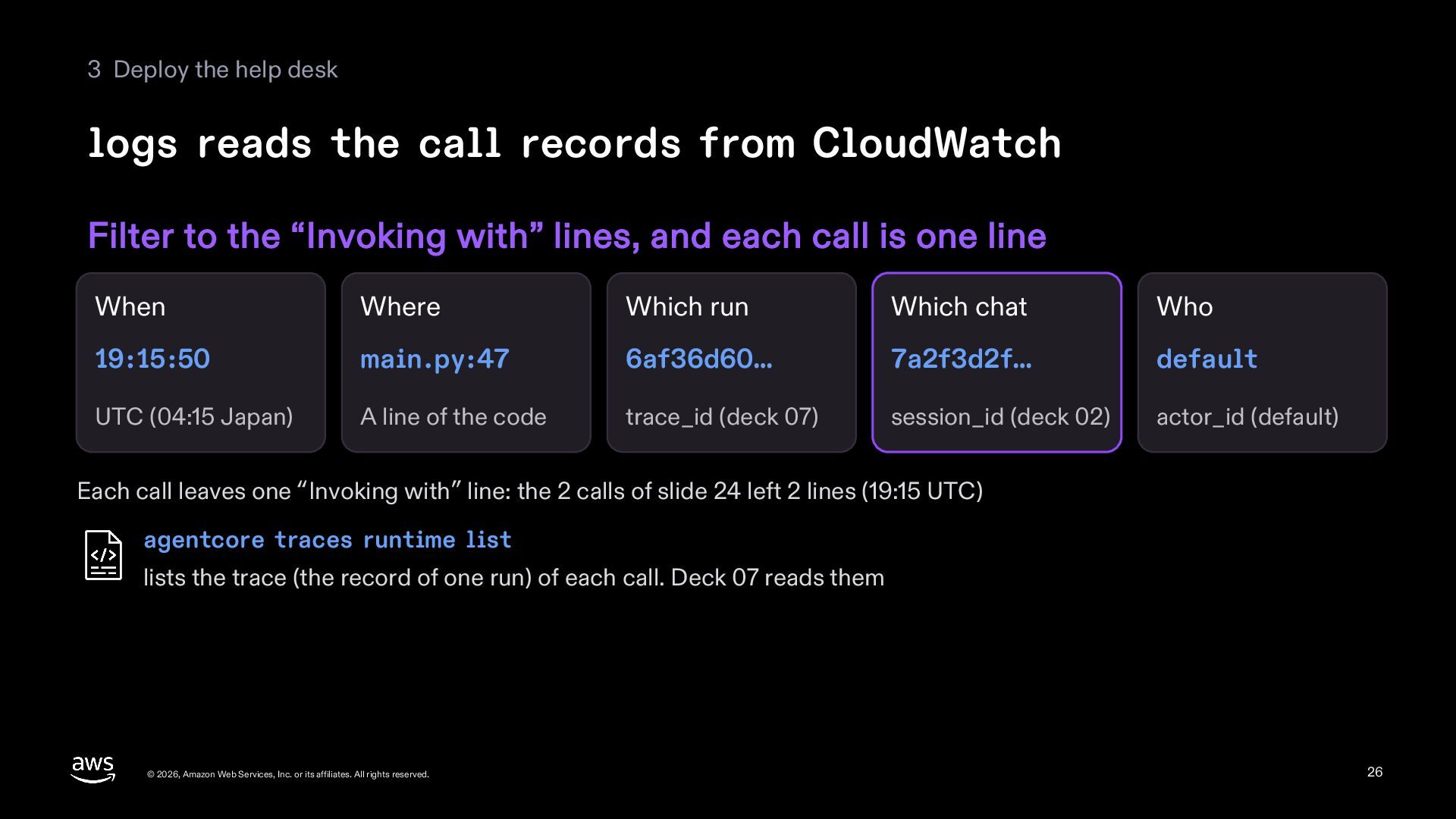
from CloudWatch Filter to the “Invoking with” lines, and each call is one line When Where Which run Which chat Who 19:15:50 main.py:47 6af36d60… 7a2f3d2f… default UTC (04:15 Japan) A line of the code trace_id (deck 07) session_id (deck 02) actor_id (default) Each call leaves one “Invoking with” line: the 2 calls of slide 24 left 2 lines (19:15 UTC) agentcore traces runtime list lists the trace (the record of one run) of each call. Deck 07 reads them © 2026, Amazon Web Services, Inc. or its affiliates. All rights reserved. 26 -
3 Deploy the help desk Clean up takes 2 commands,
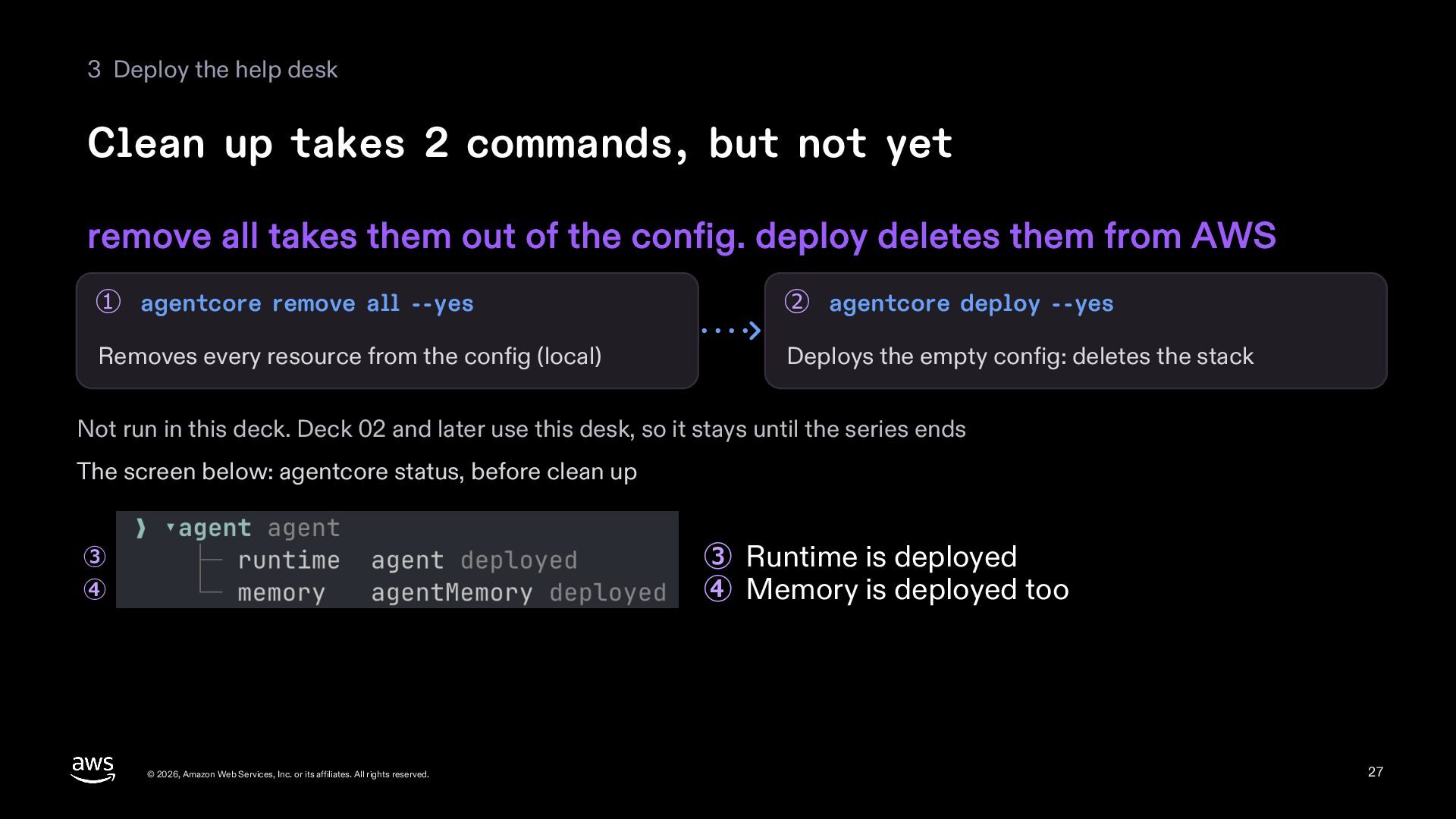
but not yet remove all takes them out of the config. deploy deletes them from AWS ① agentcore remove all --yes ② agentcore deploy --yes Removes every resource from the config (local) Deploys the empty config: deletes the stack Not run in this deck. Deck 02 and later use this desk, so it stays until the series ends The screen below: agentcore status, before clean up ③ Runtime is deployed ④ Memory is deployed too ③ ④ © 2026, Amazon Web Services, Inc. or its affiliates. All rights reserved. 27 -
Summary Summary AgentCore offers services for production. The CLI deploys
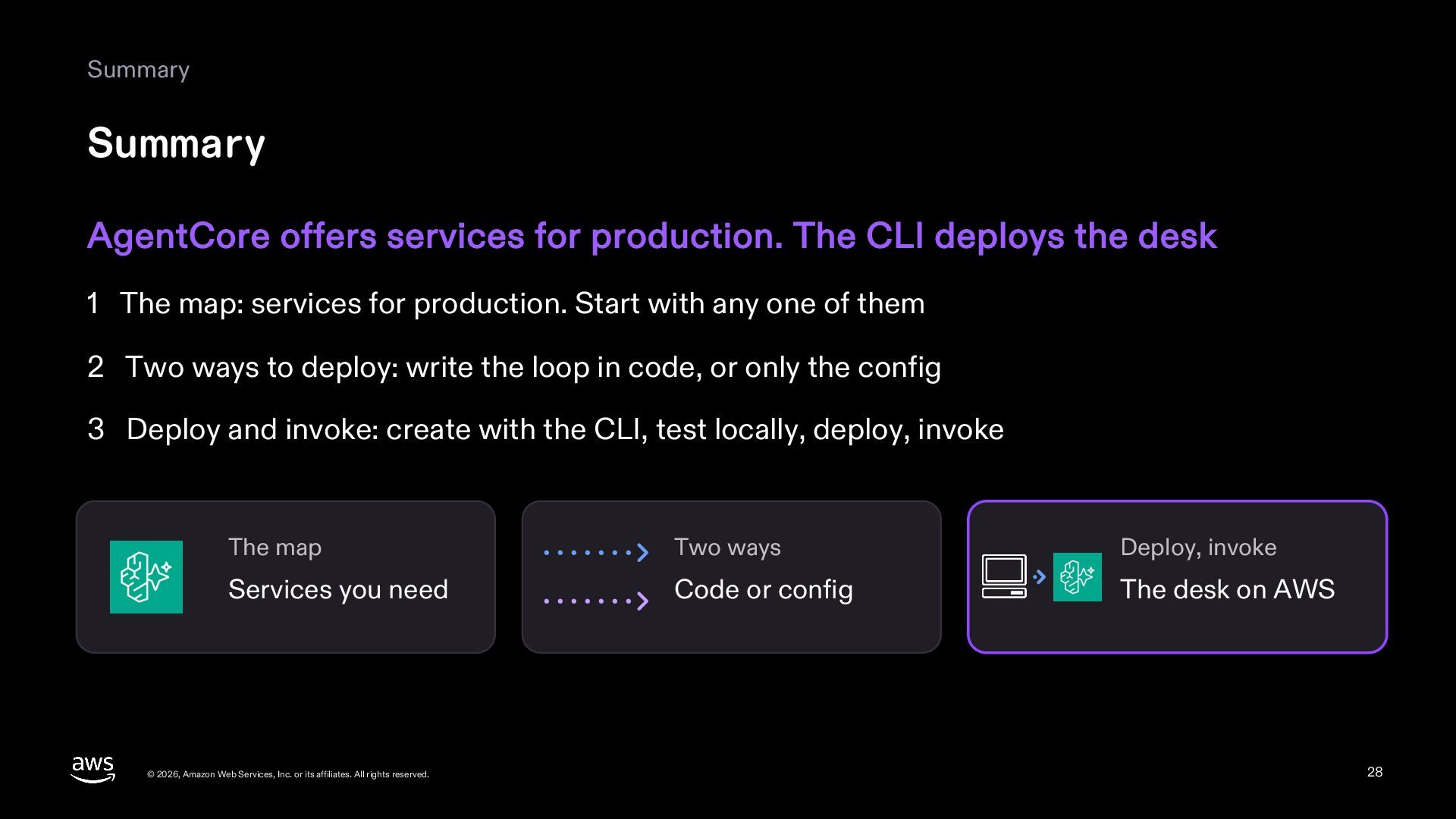
the desk 1 The map: services for production. Start with any one of them 2 Two ways to deploy: write the loop in code, or only the config 3 Deploy and invoke: create with the CLI, test locally, deploy, invoke The map Two ways Deploy, invoke Services you need Code or config The desk on AWS © 2026, Amazon Web Services, Inc. or its affiliates. All rights reserved. 28 -
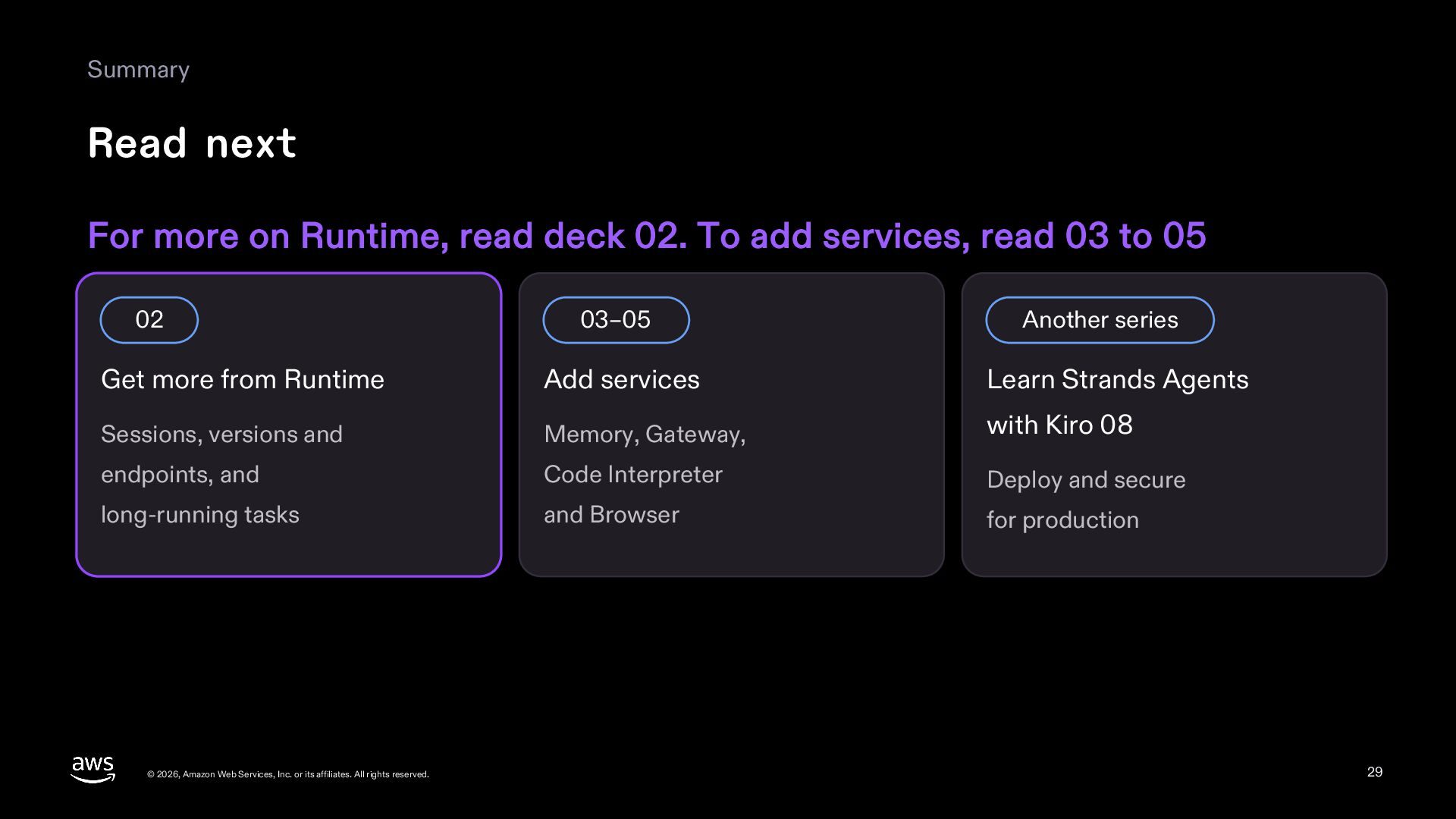
Summary Read next For more on Runtime, read deck 02.
To add services, read 03 to 05 02 03–05 Another series Get more from Runtime Add services Learn Strands Agents Sessions, versions and Memory, Gateway, with Kiro 08 endpoints, and Code Interpreter Deploy and secure long-running tasks and Browser for production © 2026, Amazon Web Services, Inc. or its affiliates. All rights reserved. 29 -
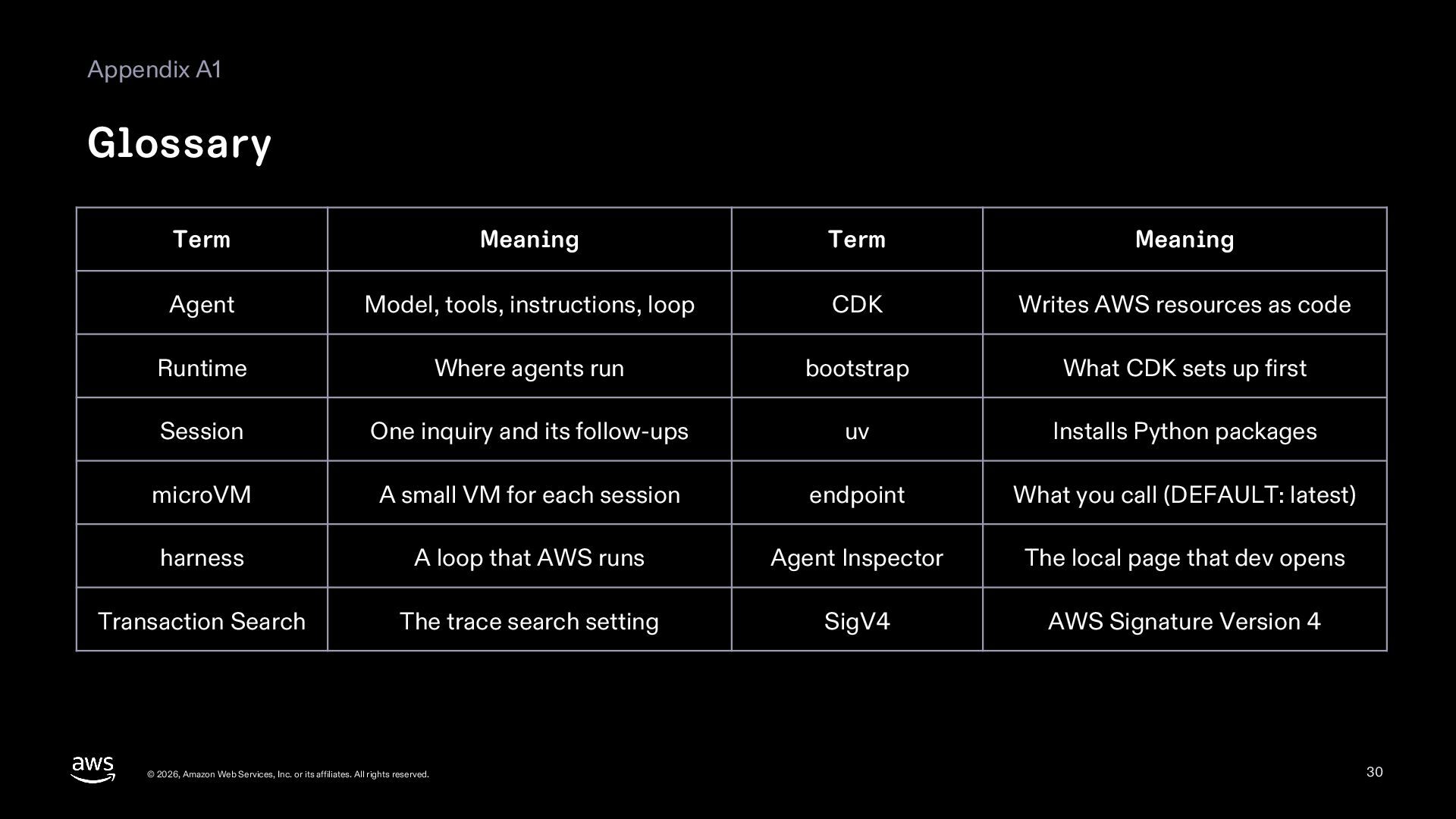
Appendix A1 Glossary Term Meaning Term Meaning Agent Model, tools,
instructions, loop CDK Writes AWS resources as code Runtime Where agents run bootstrap What CDK sets up first Session One inquiry and its follow-ups uv Installs Python packages microVM A small VM for each session endpoint What you call (DEFAULT: latest) harness A loop that AWS runs Agent Inspector The local page that dev opens Transaction Search The trace search setting SigV4 AWS Signature Version 4 © 2026, Amazon Web Services, Inc. or its affiliates. All rights reserved. 30 -
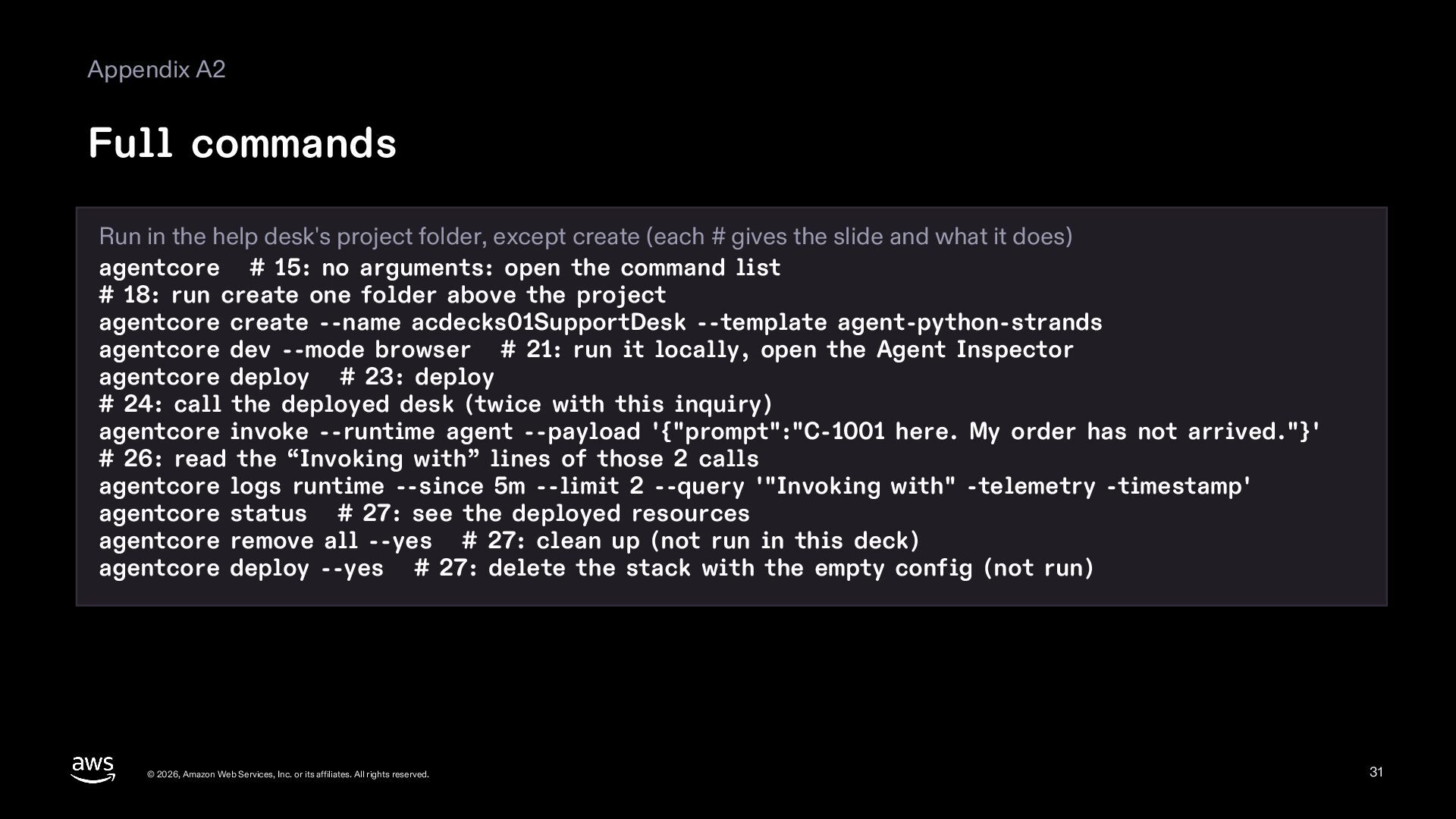
Appendix A2 Full commands Run in the help desk's project
folder, except create (each # gives the slide and what it does) agentcore # 15: no arguments: open the command list # 18: run create one folder above the project agentcore create --name acdecks01SupportDesk --template agent-python-strands agentcore dev --mode browser # 21: run it locally, open the Agent Inspector agentcore deploy # 23: deploy # 24: call the deployed desk (twice with this inquiry) agentcore invoke --runtime agent --payload '{"prompt":"C-1001 here. My order has not arrived."}' # 26: read the “Invoking with” lines of those 2 calls agentcore logs runtime --since 5m --limit 2 --query '"Invoking with" -telemetry -timestamp' agentcore status # 27: see the deployed resources agentcore remove all --yes # 27: clean up (not run in this deck) agentcore deploy --yes # 27: delete the stack with the empty config (not run) © 2026, Amazon Web Services, Inc. or its affiliates. All rights reserved. 31 -
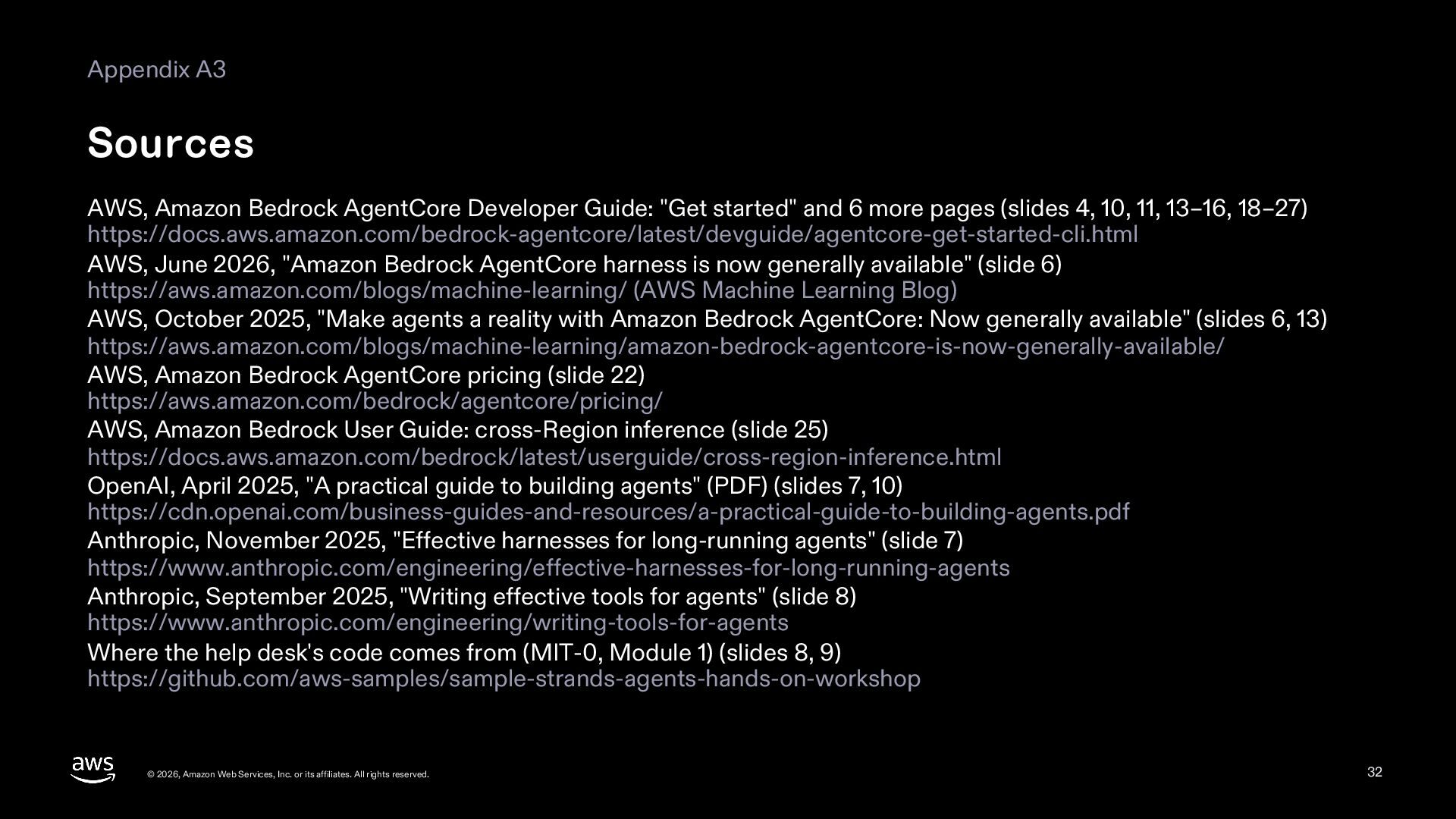
Appendix A3 Sources AWS, Amazon Bedrock AgentCore Developer Guide: "Get
started" and 6 more pages (slides 4, 10, 11, 13–16, 18–27) https://docs.aws.amazon.com/bedrock-agentcore/latest/devguide/agentcore-get-started-cli.html AWS, June 2026, "Amazon Bedrock AgentCore harness is now generally available" (slide 6) https://aws.amazon.com/blogs/machine-learning/ (AWS Machine Learning Blog) AWS, October 2025, "Make agents a reality with Amazon Bedrock AgentCore: Now generally available" (slides 6, 13) https://aws.amazon.com/blogs/machine-learning/amazon-bedrock-agentcore-is-now-generally-available/ AWS, Amazon Bedrock AgentCore pricing (slide 22) https://aws.amazon.com/bedrock/agentcore/pricing/ AWS, Amazon Bedrock User Guide: cross-Region inference (slide 25) https://docs.aws.amazon.com/bedrock/latest/userguide/cross-region-inference.html OpenAI, April 2025, "A practical guide to building agents" (PDF) (slides 7, 10) https://cdn.openai.com/business-guides-and-resources/a-practical-guide-to-building-agents.pdf Anthropic, November 2025, "Effective harnesses for long-running agents" (slide 7) https://www.anthropic.com/engineering/effective-harnesses-for-long-running-agents Anthropic, September 2025, "Writing effective tools for agents" (slide 8) https://www.anthropic.com/engineering/writing-tools-for-agents Where the help desk's code comes from (MIT-0, Module 1) (slides 8, 9) https://github.com/aws-samples/sample-strands-agents-hands-on-workshop © 2026, Amazon Web Services, Inc. or its affiliates. All rights reserved. 32
 inariku
 rokuosan
 zenta
 sms_tech
 masuda220
 tarappo
 copia
 _kotobuki_
 ivry_presentationmaterials
 sansantech
 arawn
 yoshimura_datam
 kyotomon
 akosma
 jonoalderson
 erikaheidi
 elsirapls
 sferik
 palkan
 aleyda
 schroneko
 scottboms
 lynnandtonic
 nikkihalliwell