Upgrade to Pro — share decks privately, control downloads, hide ads and more …

MCP と Powers (外の道具とつなぐ) | 目指せ Kiro マスター 07

Sponsored · SiteGround - Reliable hosting with speed, security, and support you can count on. →

MCP と Powers (外の道具とつなぐ) | 目指せ Kiro マスター 07

Kiro に外の道具を渡す 2 つの仕組み、MCP と Powers をまとめた配布資料です。mcp.json の置き場所と道具の承認、道具が多いときの Tool Search、安全な使い方、社内の API を MCP サーバーにする書き方、Powers の入れ方と作り方、MCP、Powers、Skill、Steering の 4 つの道具の使い分け、管理者がサーバーを絞る方法とその効く範囲を、会議室の予約アプリの例題と Kiro IDE の画面で説明します。シリーズ「目指せ Kiro マスター」の 07 (使いこなす) です。

Avatar for Riku INADA

Riku INADA PRO

November 08, 2026

More Decks by Riku INADA

Other Decks in Technology

Transcript

  1. ⽬指せ Kiro マスター 使いこなす MCP と Powers 外の道具とつなぐ 2026-11 時点

    (Kiro IDE 1.4、Kiro CLI 3.1) 07 2026 年 11 ⽉ 稲⽥ ⼤陸 アマゾン ウェブ サービス ジャパン © 2026, Amazon Web Services, Inc. or its affiliates. All rights reserved. 1
  2. はじめに ⾃⼰紹介 稲⽥ ⼤陸 いなだ りく (いなりく) アマゾン ウェブ サービス

    ジャパン合同会社 ソリューションアーキテクト 製造業のお客様を中⼼に⽀援 最近の取り組み AI 駆動開発ライフサイクルの推進 Kiro と AWS Amplify の情報発信 © 2026, Amazon Web Services, Inc. or its affiliates. All rights reserved. X @inada_riku Speaker Deck speakerdeck.com/inariku Zenn zenn.dev/inariku GitHub github.com/inariku 2
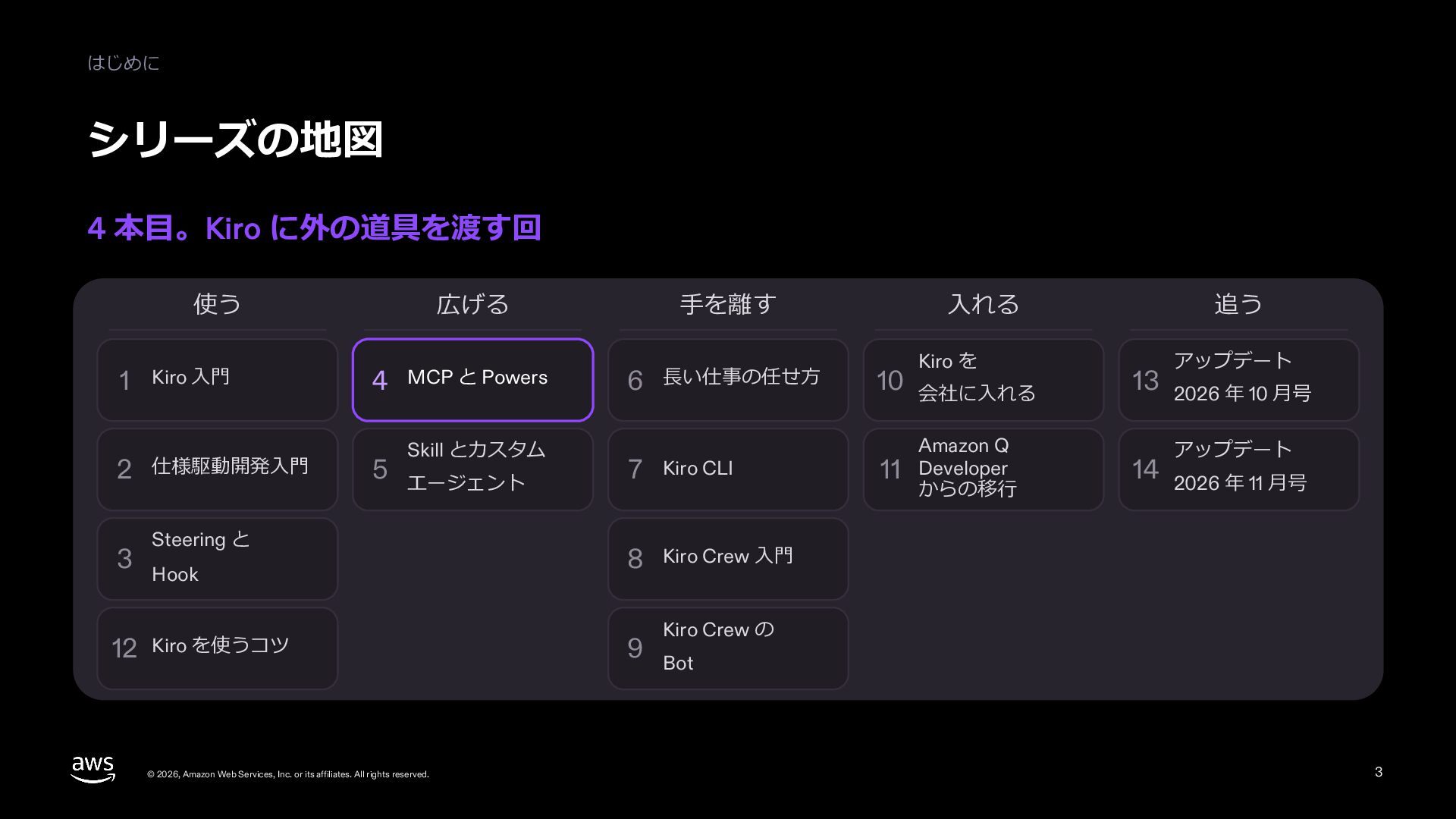
  3. はじめに シリーズの中の位置 いまは 07 MCP と Powers、次は 08 Skill とカスタムエージェント

    はじめる 01–04 使いこなす 01 Kiro ⼊⾨ 05–09 ⼿を離す 05 仕様駆動開発⼊⾨ 前に読む 10–12 会社に⼊れる 13–14 アップデート編 10 ⻑い仕事を任せる 13 Kiro を会社に⼊れる 2026.10 14 からの移⾏ Amazon Q Developer 2026.11 02 Kiro IDE ⼊⾨ 06 Steering と Hook 11 Kiro Crew ⼊⾨ 03 Kiro CLI ⼊⾨ 07 MCP と Powers 12 Kiro Crew の Bot 04 Kiro Web ⼊⾨ Skill と 08 カスタムエージェント 毎⽉増える 次に読む 09 Kiro を使うコツ © 2026, Amazon Web Services, Inc. or its affiliates. All rights reserved. 3
  4. はじめに この資料で分かること MCP で外の道具をつなぎ、Powers で道具と使い⽅を要るときだけ読み込ませる 1 MCP サーバーのつなぎ⽅と、道具の承認。 2 道具が多いときの扱い

    (Tool Search) と、安全な使い⽅。 3 Powers の⼊れ⽅と作り⽅、MCP、Powers、Skill、Steering の使い分け。 前に読むとよい資料: 資料 01「Kiro ⼊⾨」 資料 06「Steering と Hook」を読んでいると、12 枚⽬の許可が分かりやすい 例題は会議室の予約アプリ。社内のシステムの代わりに、会議室の台帳の MCP サーバーを⾜す 図の⾊: 紫は要点と⼈が決める所、⻘は Kiro の動き © 2026, Amazon Web Services, Inc. or its affiliates. All rights reserved. 4
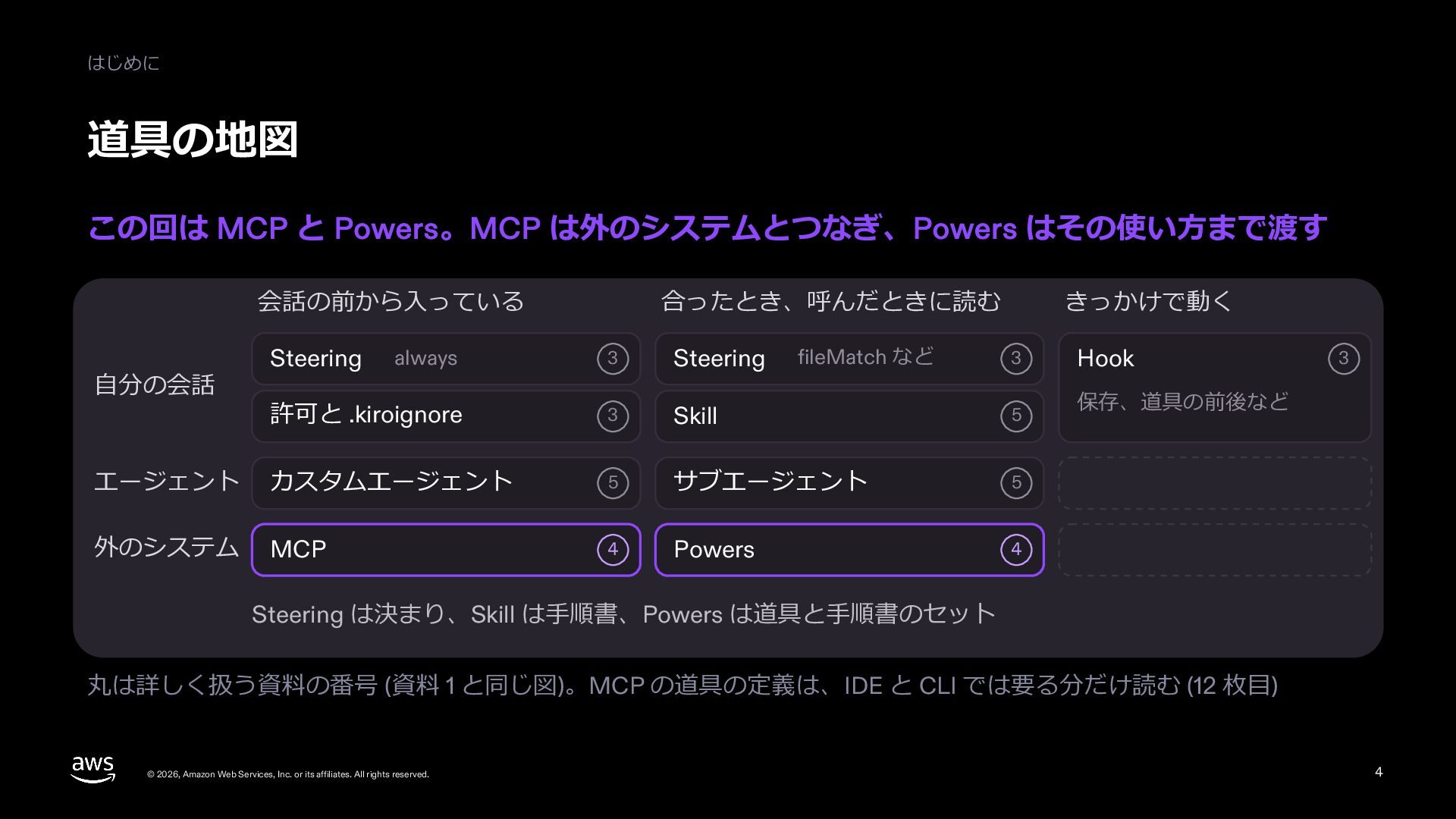
  5. はじめに 道具の地図 この回は MCP と Powers。MCP は外のシステムとつなぎ、Powers はその使い⽅まで渡す 会話の前から⼊っている always

    06 Steering 許可と .kiroignore 06 エージェント カスタムエージェント 外のシステム MCP ⾃分の会話 Steering 合ったとき、呼んだときに読む fileMatch など きっかけで動く 06 Hook Skill 08 保存、道具の前後など 08 サブエージェント 08 07 Powers 07 06 Steering は決まり、Skill は⼿順書、Powers は道具と⼿順書のセット 丸は詳しく扱う資料の番号 (01 と同じ図)。MCP の道具の定義は、IDE と CLI では要る分だけ読む (13 枚⽬) © 2026, Amazon Web Services, Inc. or its affiliates. All rights reserved. 5
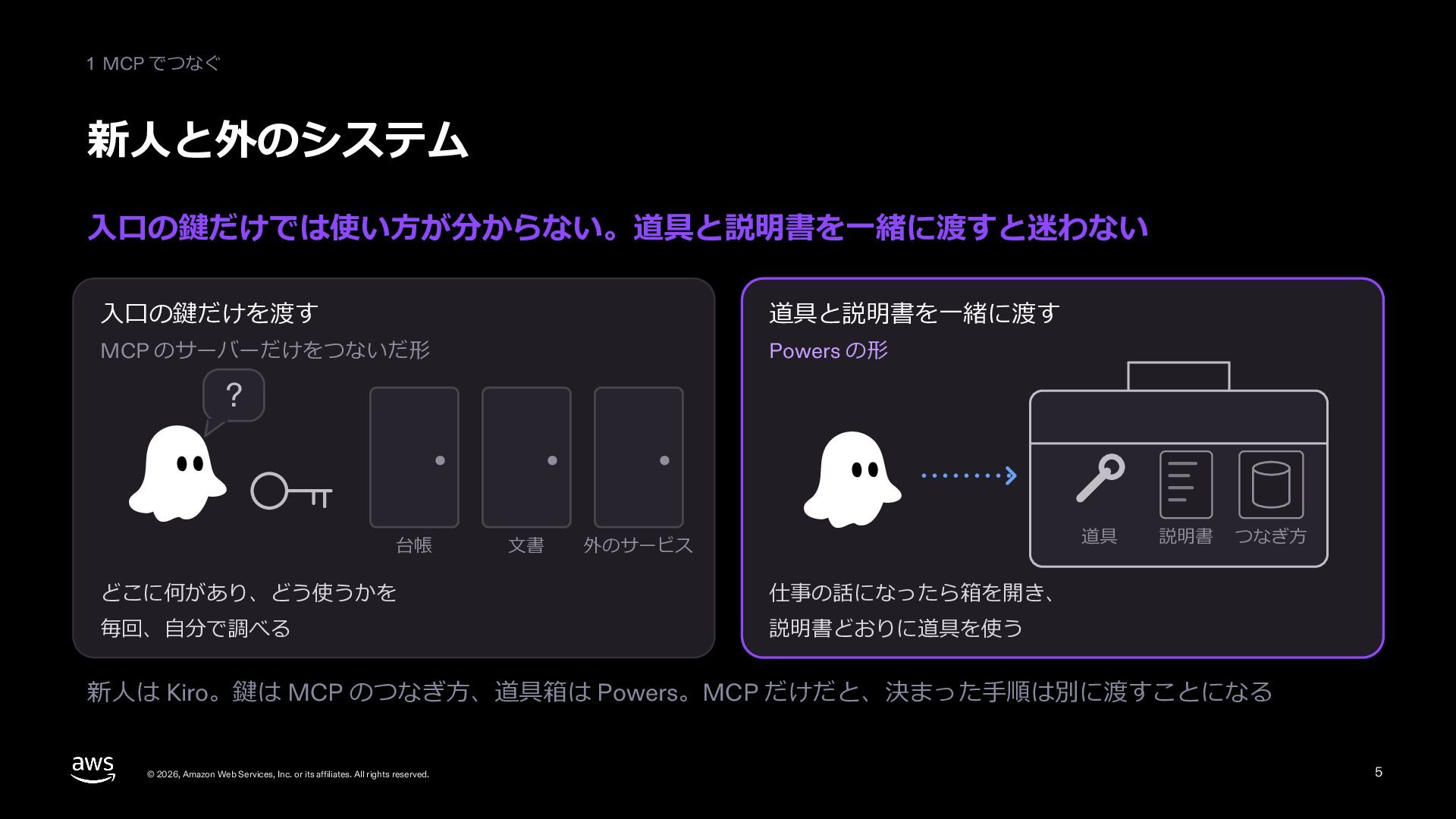
  6. 1 MCP でつなぐ 新⼈と外のシステム ⼊⼝の鍵だけでは使い⽅が分からない。道具と説明書を⼀緒に渡すと迷わない ⼊⼝の鍵だけを渡す 道具と説明書を⼀緒に渡す MCP のサーバーだけをつないだ形 Powers

    の形 ? 台帳 ⽂書 道具 外のサービス どこに何があり、どう使うかを 仕事の話になったら箱を開き、 毎回、⾃分で調べる 説明書どおりに道具を使う 説明書 つなぎ⽅ 新⼈は Kiro。鍵は MCP のつなぎ⽅、道具箱は Powers。MCP だけだと、決まった⼿順は別に渡すことになる © 2026, Amazon Web Services, Inc. or its affiliates. All rights reserved. 6
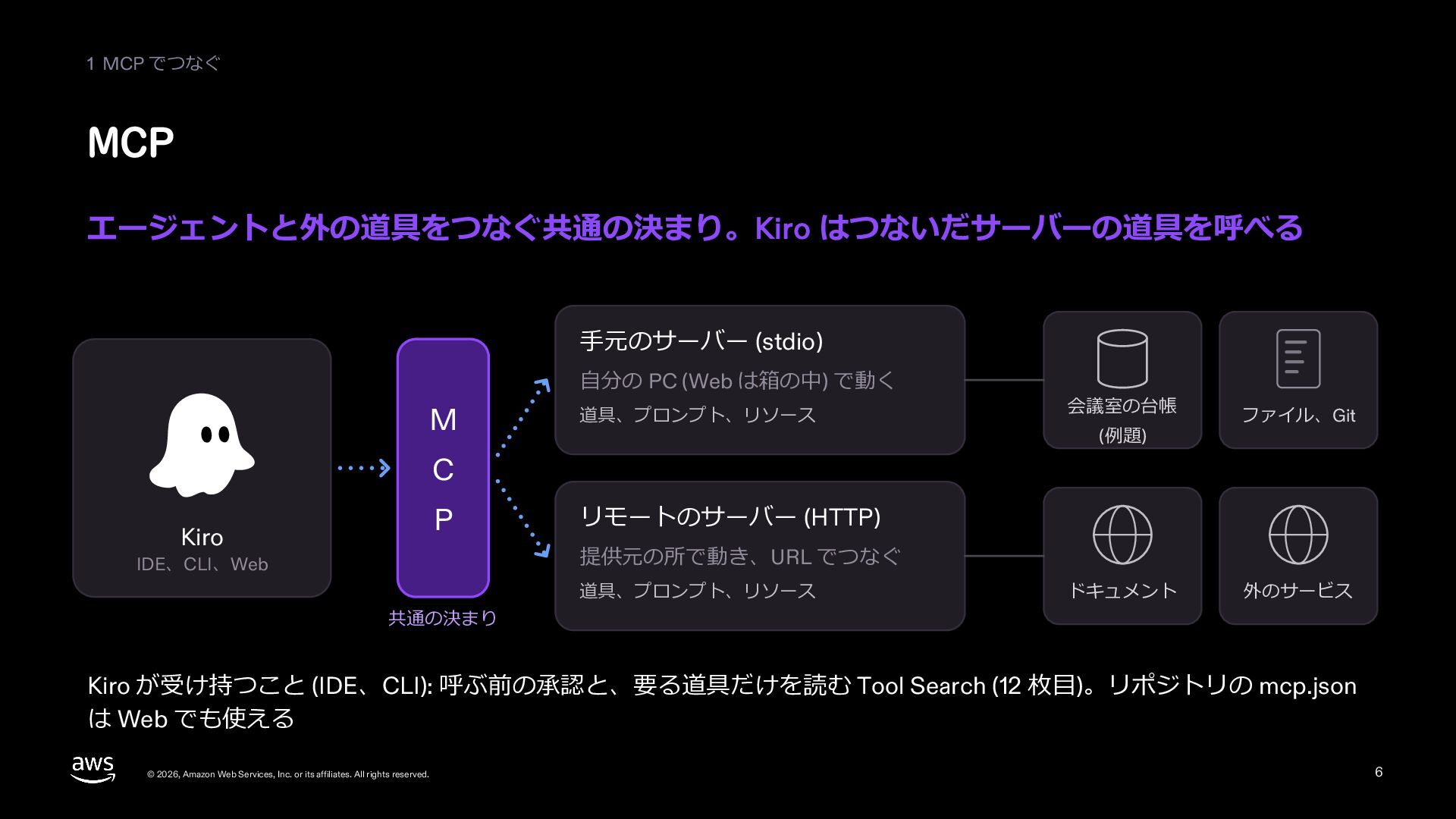
  7. 1 MCP でつなぐ MCP エージェントと外の道具をつなぐ共通の決まり。Kiro はつないだサーバーの道具を呼べる ⼿元のサーバー (stdio) ⾃分の PC

    (Web は箱の中) で動く M 道具、プロンプト、リソース 会議室の台帳 (例題) ファイル、Git C P Kiro リモートのサーバー (HTTP) 提供元の所で動き、URL でつなぐ IDE、CLI、Web 共通の決まり 道具、プロンプト、リソース ドキュメント 外のサービス Kiro が受け持つこと (IDE、CLI): 呼ぶ前の承認と、要る道具だけを読む Tool Search (13 枚⽬)。リポジトリの mcp.json は Web でも使える © 2026, Amazon Web Services, Inc. or its affiliates. All rights reserved. 7
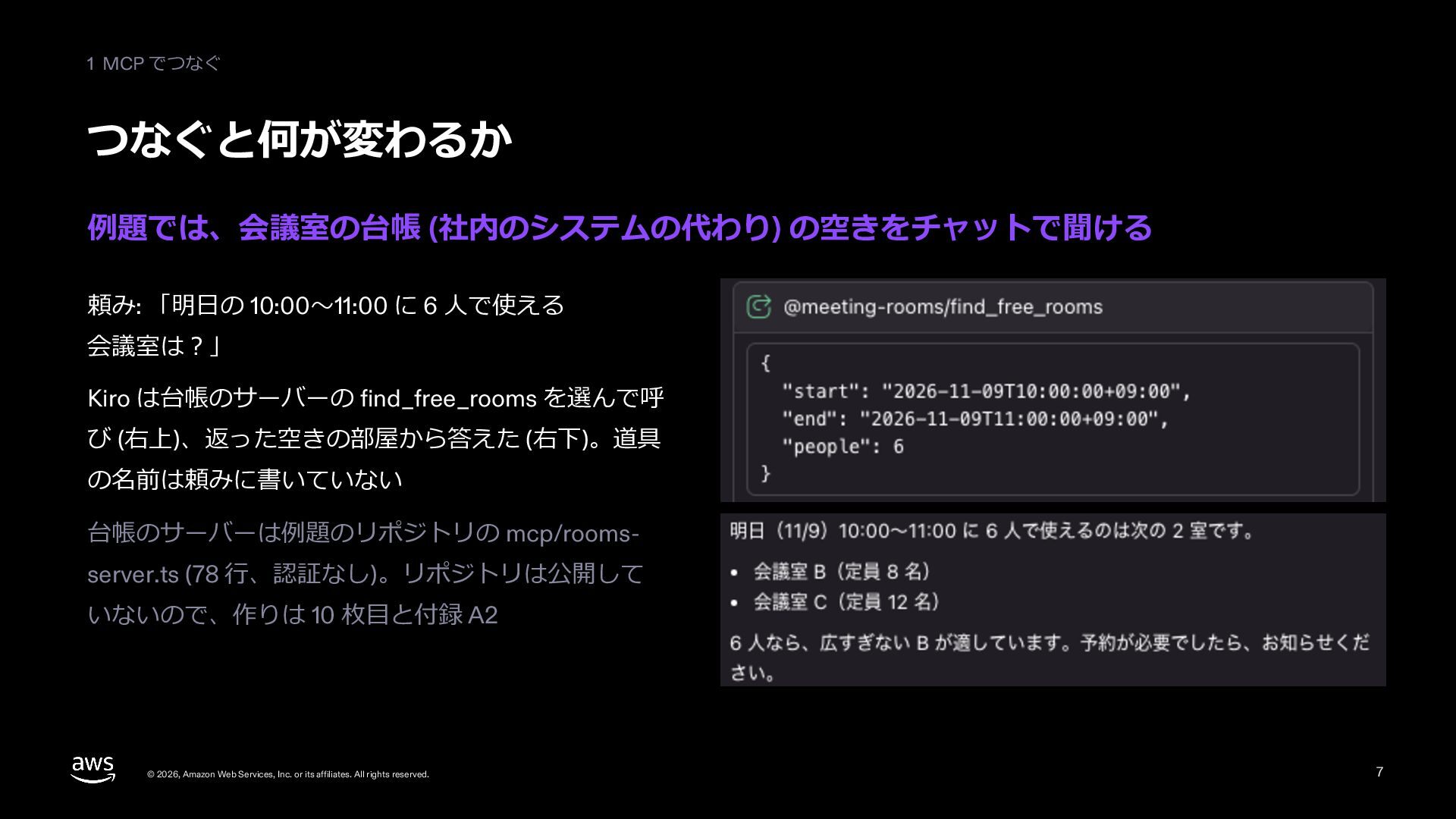
  8. 1 MCP でつなぐ つなぐと何が変わるか 例題では、会議室の台帳 (社内のシステムの代わり) の空きをチャットで聞ける 頼み: 「明⽇の 10:00〜11:00

    に 6 ⼈で使える 会議室は︖」 Kiro は台帳のサーバーの find_free_rooms を選んで呼 び (右上)、返った空きの部屋から答えた (右下)。道具 の名前は頼みに書いていない 台帳のサーバーは例題のリポジトリの mcp/roomsserver.ts (78 ⾏、認証なし)。リポジトリは公開して いないので、作りは 11 枚⽬と付録 A2 © 2026, Amazon Web Services, Inc. or its affiliates. All rights reserved. 8
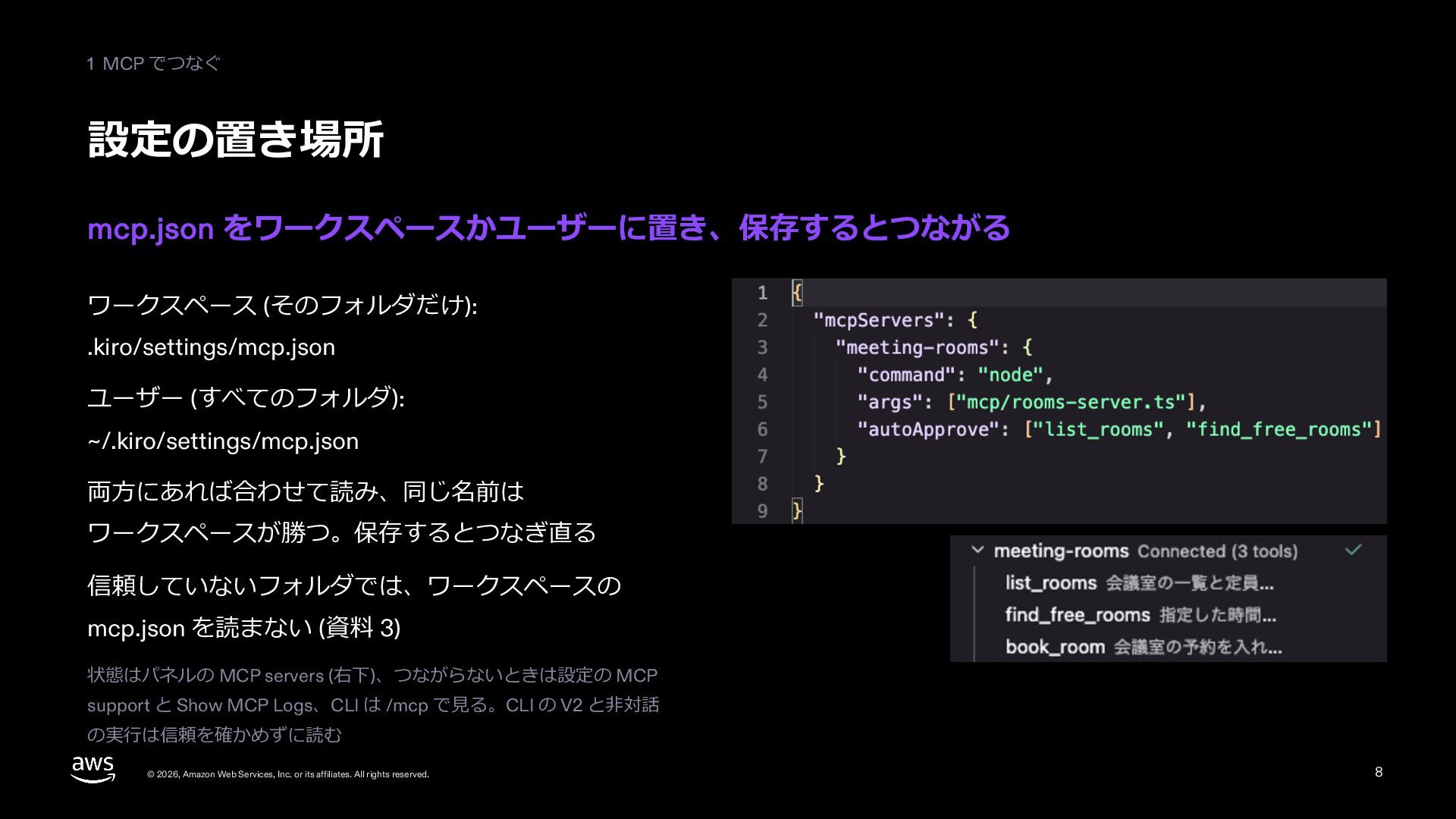
  9. 1 MCP でつなぐ 設定の置き場所 mcp.json をワークスペースかユーザーに置き、保存するとつながる ワークスペース (そのフォルダだけ): .kiro/settings/mcp.json ユーザー

    (すべてのフォルダ): ~/.kiro/settings/mcp.json 両⽅にあれば合わせて読み、同じ名前は ワークスペースが勝つ。保存するとつなぎ直る 信頼していないフォルダでは、ワークスペースの mcp.json を読まない (資料 06) 状態はパネルの MCP servers (右下)、つながらないときは設定の MCP support と Show MCP Logs、CLI は /mcp で⾒る。CLI の V2 と⾮対話 の実⾏は信頼を確かめずに読む © 2026, Amazon Web Services, Inc. or its affiliates. All rights reserved. 9
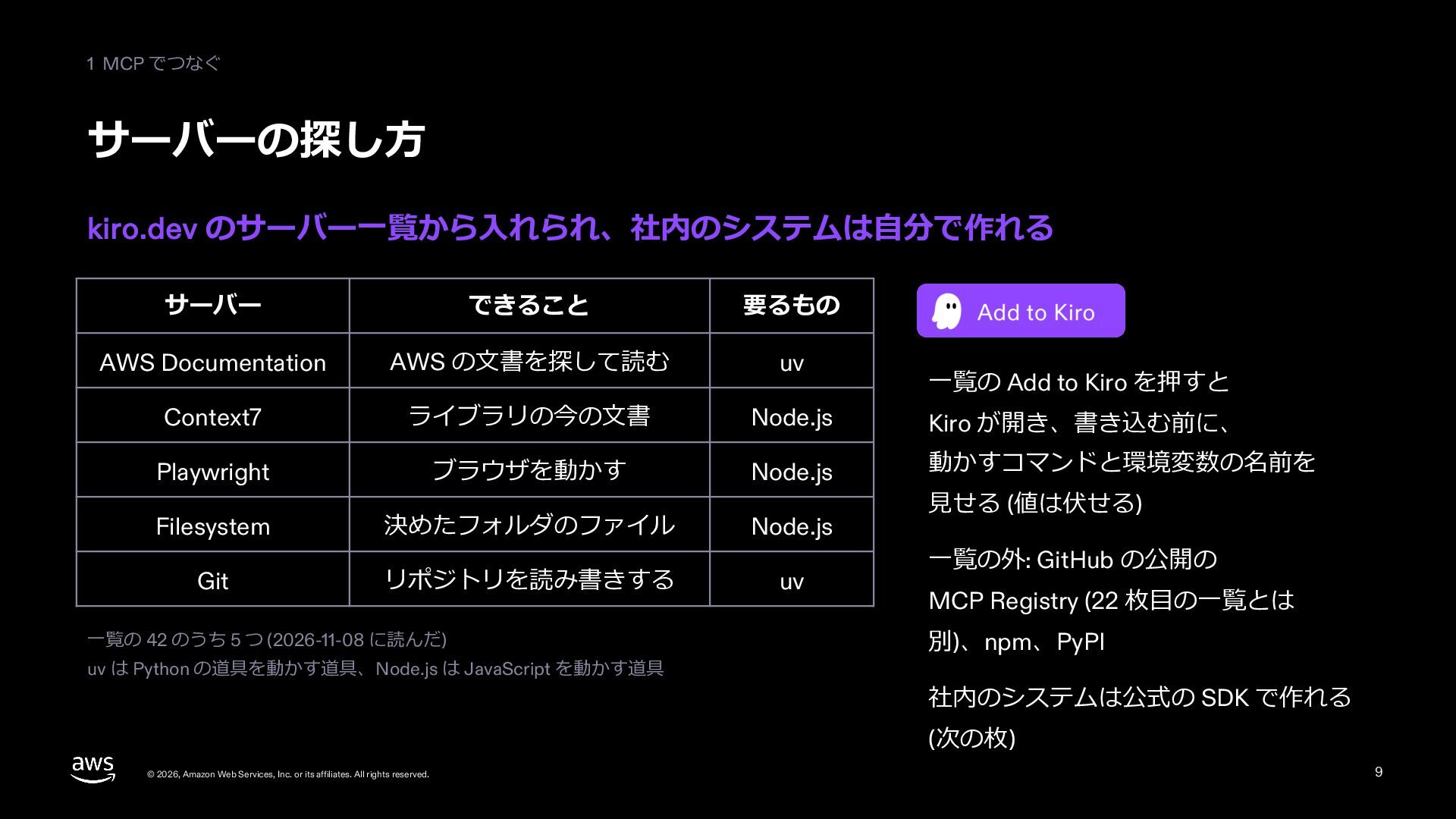
  10. 1 MCP でつなぐ サーバーの探し⽅ kiro.dev のサーバー⼀覧から⼊れられ、社内のシステムは⾃分で作れる サーバー できること 要るもの AWS

    Documentation AWS の⽂書を探して読む uv Context7 ライブラリの今の⽂書 Node.js Kiro が開き、書き込む前に、 Playwright ブラウザを動かす Node.js 動かすコマンドと環境変数の名前を Filesystem 決めたフォルダのファイル Node.js リポジトリを読み書きする uv Git ⼀覧の 42 のうち 5 つ (2026-11-08 に読んだ) uv は Python の道具を動かす道具、Node.js は JavaScript を動かす道具 ⼀覧の Add to Kiro を押すと ⾒せる (値は伏せる) ⼀覧の外: GitHub の公開の MCP Registry (23 枚⽬の⼀覧とは 別)、npm、PyPI 社内のシステムは公式の SDK で作れる (次の枚) © 2026, Amazon Web Services, Inc. or its affiliates. All rights reserved. 10
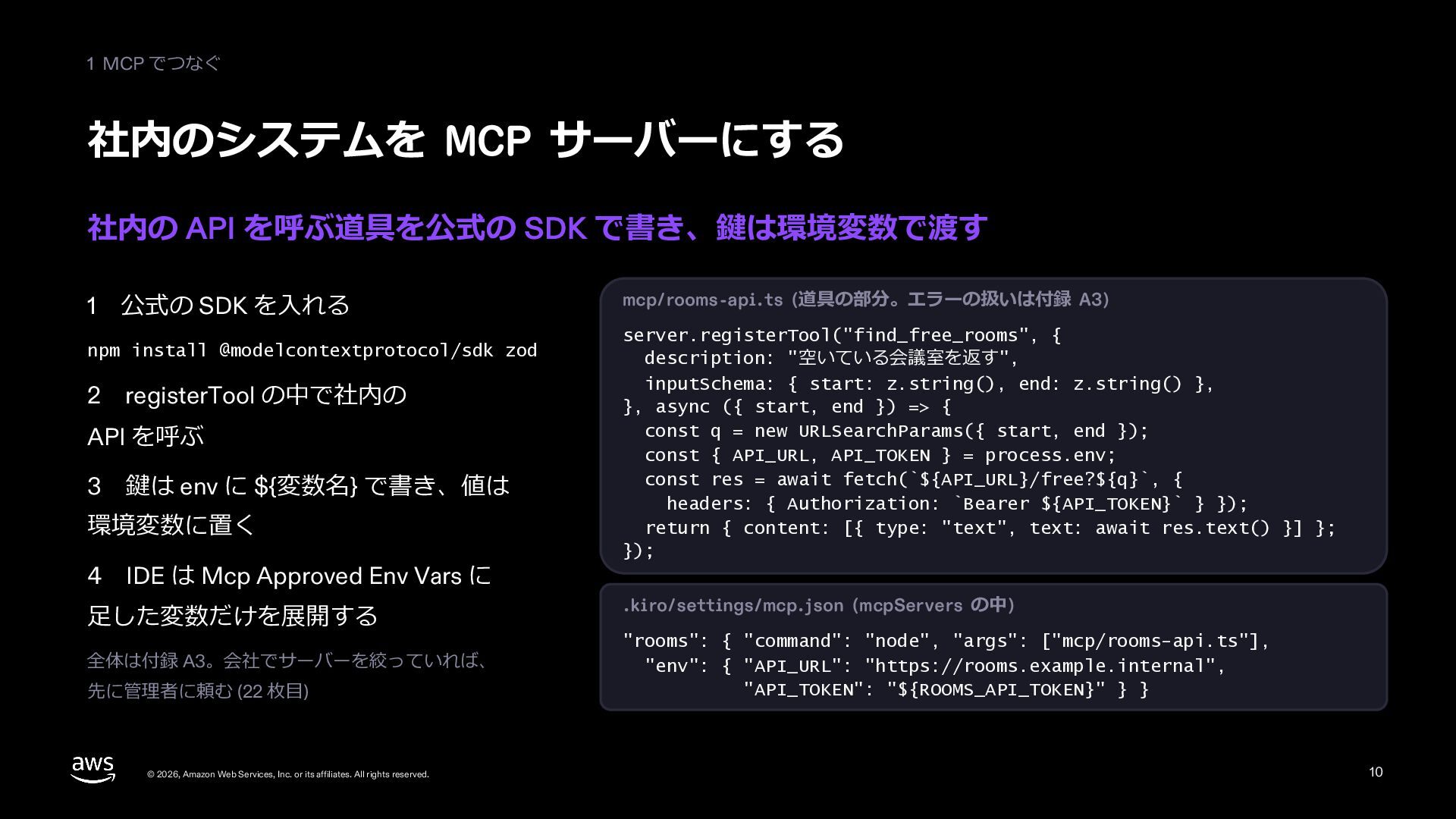
  11. 1 MCP でつなぐ 社内のシステムを MCP サーバーにする 社内の API を呼ぶ道具を公式の SDK

    で書き、鍵は環境変数で渡す 1 公式の SDK を⼊れる npm install @modelcontextprotocol/sdk zod 2 registerTool の中で社内の API を呼ぶ 3 鍵は env に ${変数名} で書き、値は 環境変数に置く 4 IDE は Mcp Approved Env Vars に ⾜した変数だけを展開する 全体は付録 A3。会社でサーバーを絞っていれば、 先に管理者に頼む (23 枚⽬) © 2026, Amazon Web Services, Inc. or its affiliates. All rights reserved. mcp/rooms-api.ts (道具の部分。エラーの扱いは付録 A3) server.registerTool("find_free_rooms", { description: "空いている会議室を返す", inputSchema: { start: z.string(), end: z.string() }, }, async ({ start, end }) => { const q = new URLSearchParams({ start, end }); const { API_URL, API_TOKEN } = process.env; const res = await fetch(`${API_URL}/free?${q}`, { headers: { Authorization: `Bearer ${API_TOKEN}` } }); return { content: [{ type: "text", text: await res.text() }] }; }); .kiro/settings/mcp.json (mcpServers の中) "rooms": { "command": "node", "args": ["mcp/rooms-api.ts"], "env": { "API_URL": "https://rooms.example.internal", "API_TOKEN": "${ROOMS_API_TOKEN}" } } 11
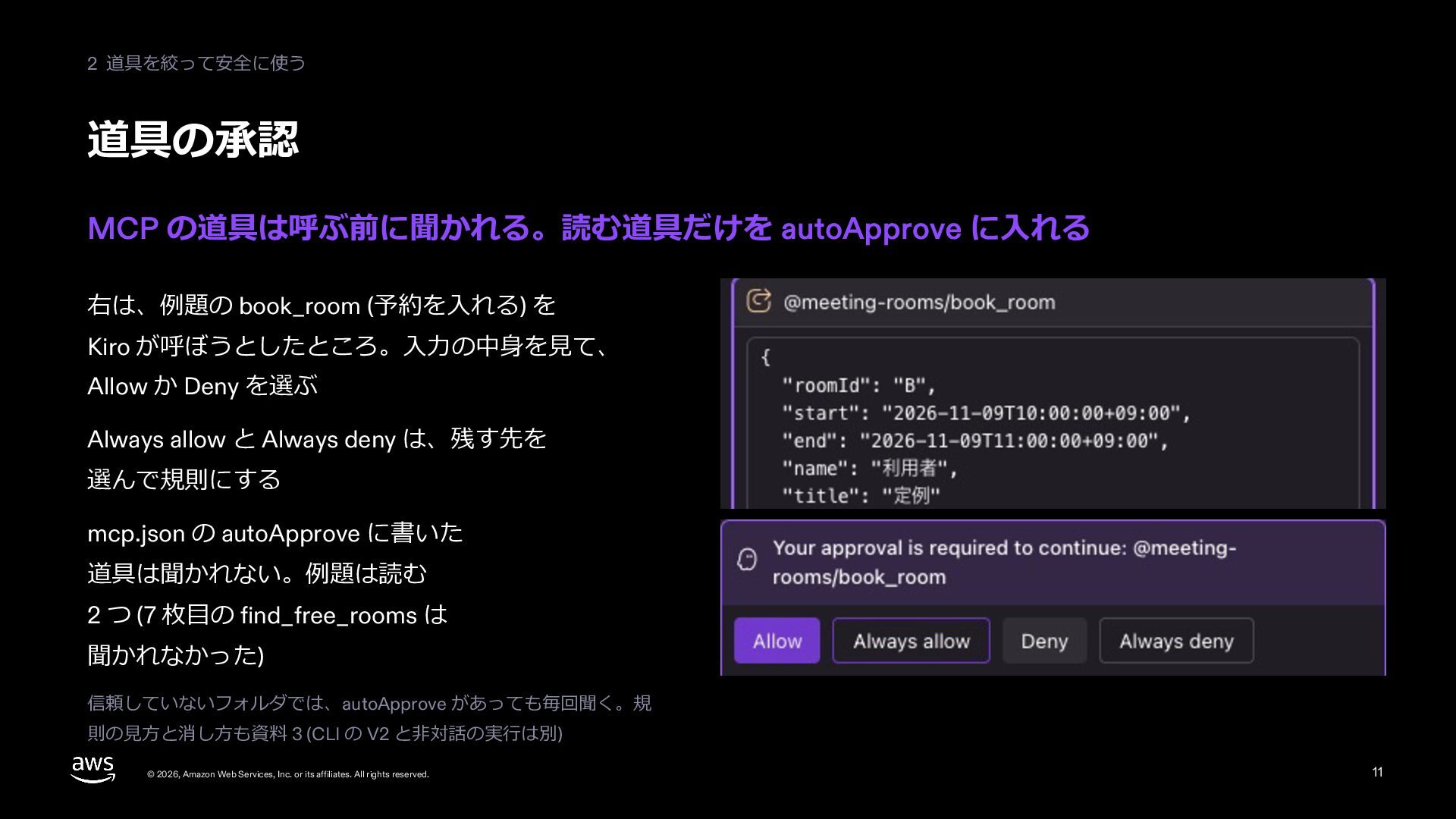
  12. 2 道具を絞って安全に使う 道具の承認 MCP の道具は呼ぶ前に聞かれる。読む道具だけを autoApprove に⼊れる 右は、例題の book_room (予約を⼊れる)

    を Kiro が呼ぼうとしたところ。⼊⼒の中⾝を⾒て、 Allow か Deny を選ぶ Always allow と Always deny は、残す先を 選んで規則にする mcp.json の autoApprove に書いた 道具は聞かれない。例題は読む 2 つ (8 枚⽬の find_free_rooms は 聞かれなかった) 信頼していないフォルダでは、autoApprove があっても毎回聞く。規 則の⾒⽅と消し⽅も資料 06 (CLI の V2 と⾮対話の実⾏は別) © 2026, Amazon Web Services, Inc. or its affiliates. All rights reserved. 12
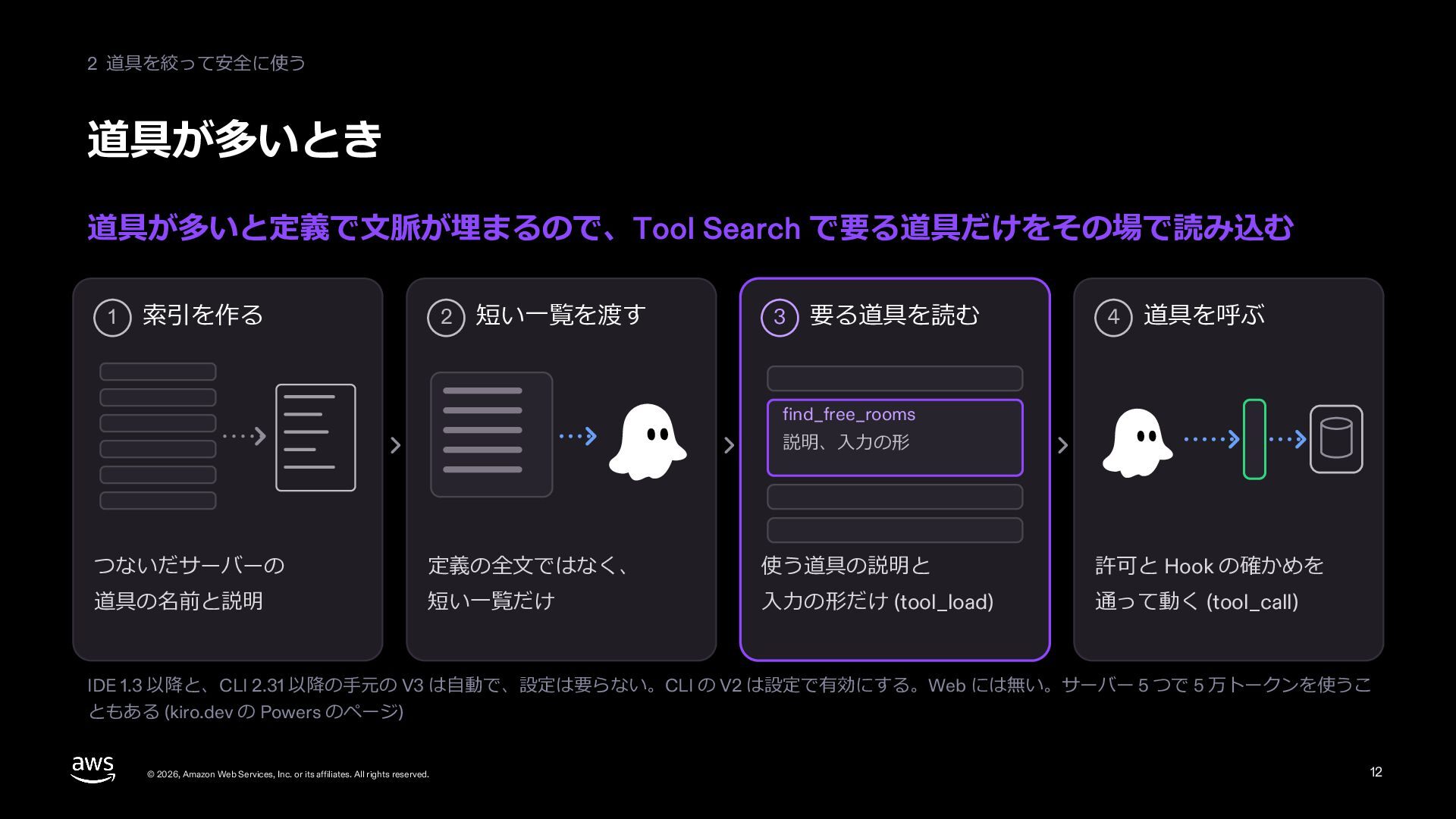
  13. 2 道具を絞って安全に使う 道具が多いとき 道具が多いと定義で⽂脈が埋まるので、Tool Search で要る道具だけをその場で読み込む 1 索引を作る 2 短い⼀覧を渡す

    3 要る道具を読む 4 道具を呼ぶ find_free_rooms 説明、⼊⼒の形 つないだサーバーの 定義の全⽂ではなく、 使う道具の説明と 許可と Hook の確かめを 道具の名前と説明 短い⼀覧だけ ⼊⼒の形だけ (tool_load) 通って動く (tool_call) IDE 1.3 以降と、CLI 2.31 以降の⼿元の V3 は⾃動で、設定は要らない。CLI の V2 は設定で有効にする。Web には無い。サーバー 5 つで 5 万トークンを使うこ ともある (kiro.dev の Powers のページ) © 2026, Amazon Web Services, Inc. or its affiliates. All rights reserved. 13
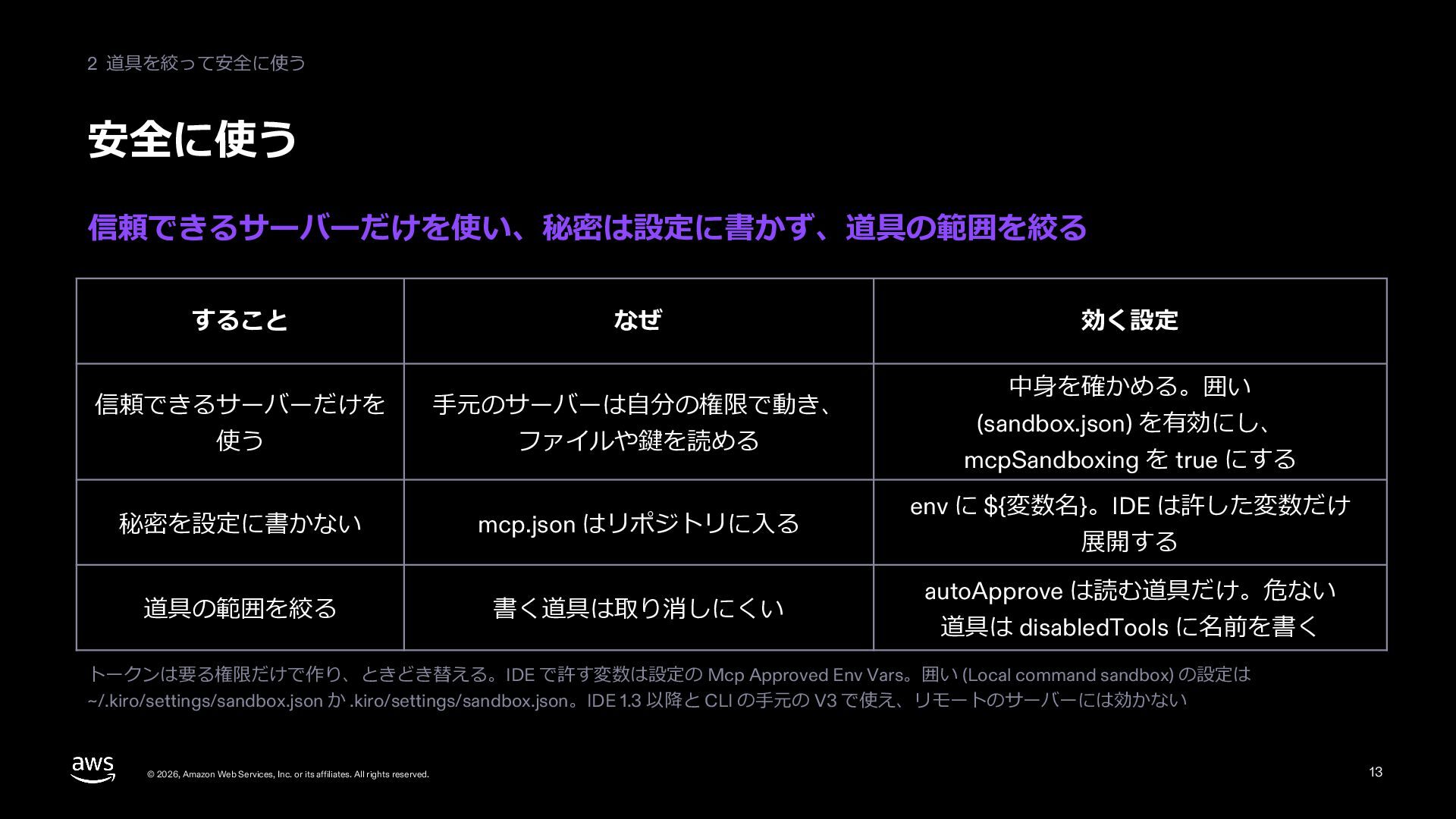
  14. 2 道具を絞って安全に使う 安全に使う 信頼できるサーバーだけを使い、秘密は設定に書かず、道具の範囲を絞る すること なぜ 信頼できるサーバーだけを ⼿元のサーバーは⾃分の権限で動き、 使う ファイルや鍵を読める

    秘密を設定に書かない mcp.json はリポジトリに⼊る 道具の範囲を絞る 書く道具は取り消しにくい 効く設定 中⾝を確かめる。囲い (sandbox.json) を有効にし、 mcpSandboxing を true にする env に ${変数名}。IDE は許した変数だけ 展開する autoApprove は読む道具だけ。危ない 道具は disabledTools に名前を書く トークンは要る権限だけで作り、ときどき替える。IDE で許す変数は設定の Mcp Approved Env Vars。囲い (Local command sandbox) の設定は ~/.kiro/settings/sandbox.json か .kiro/settings/sandbox.json。IDE 1.3 以降と CLI の⼿元の V3 で使え、リモートのサーバーには効かない © 2026, Amazon Web Services, Inc. or its affiliates. All rights reserved. 14
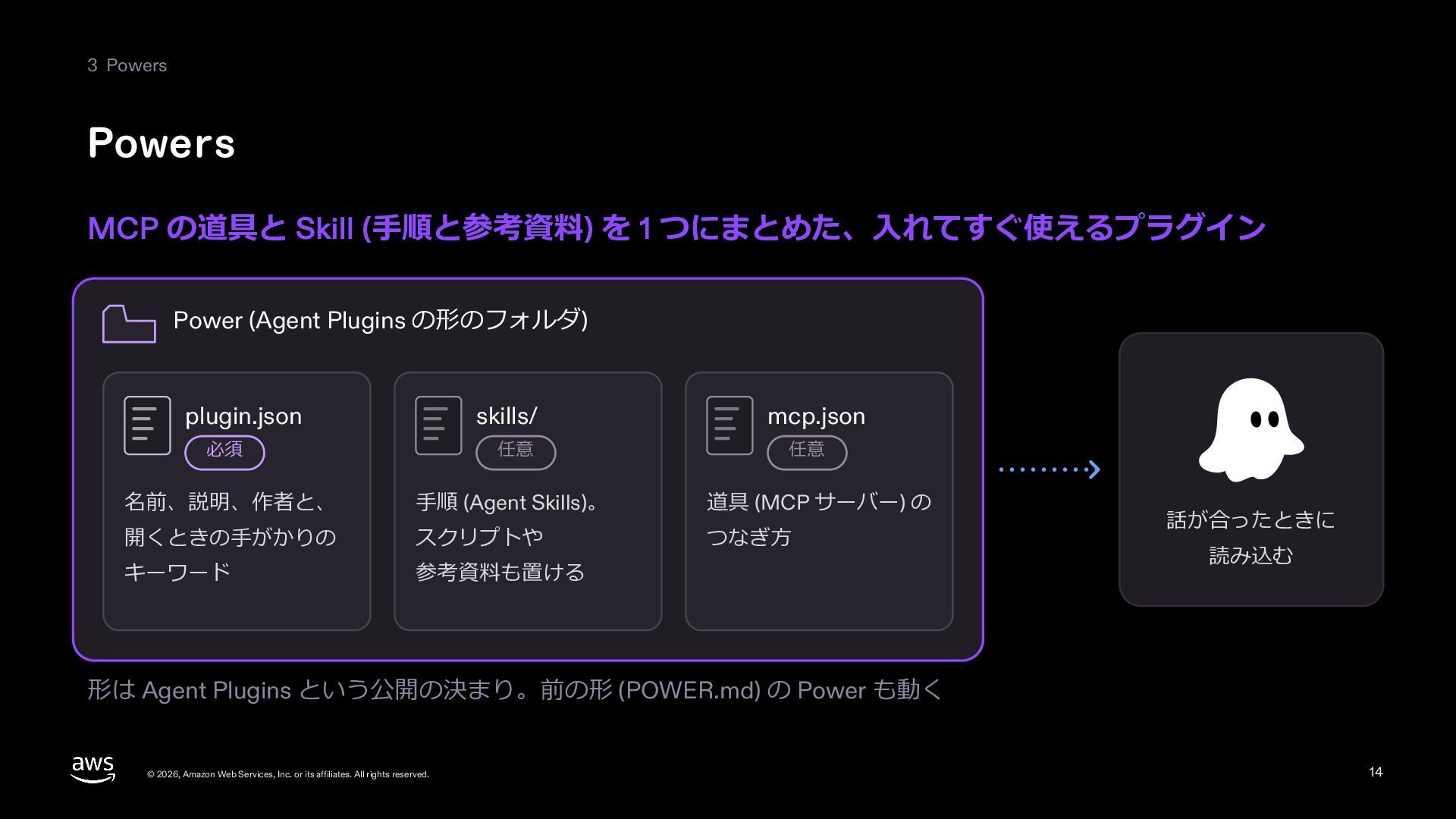
  15. 3 Powers Powers MCP の道具と Skill (⼿順と参考資料) を 1 つにまとめた、⼊れてすぐ使えるプラグイン

    Power (Agent Plugins の形のフォルダ) plugin.json skills/ mcp.json 必須 任意 任意 名前、説明、作者と、 ⼿順 (Agent Skills)。 道具 (MCP サーバー) の 開くときの⼿がかりの スクリプトや つなぎ⽅ キーワード 参考資料も置ける 話が合ったときに 読み込む 形は Agent Plugins という公開の決まり。前の形 (POWER.md) の Power も動く © 2026, Amazon Web Services, Inc. or its affiliates. All rights reserved. 15
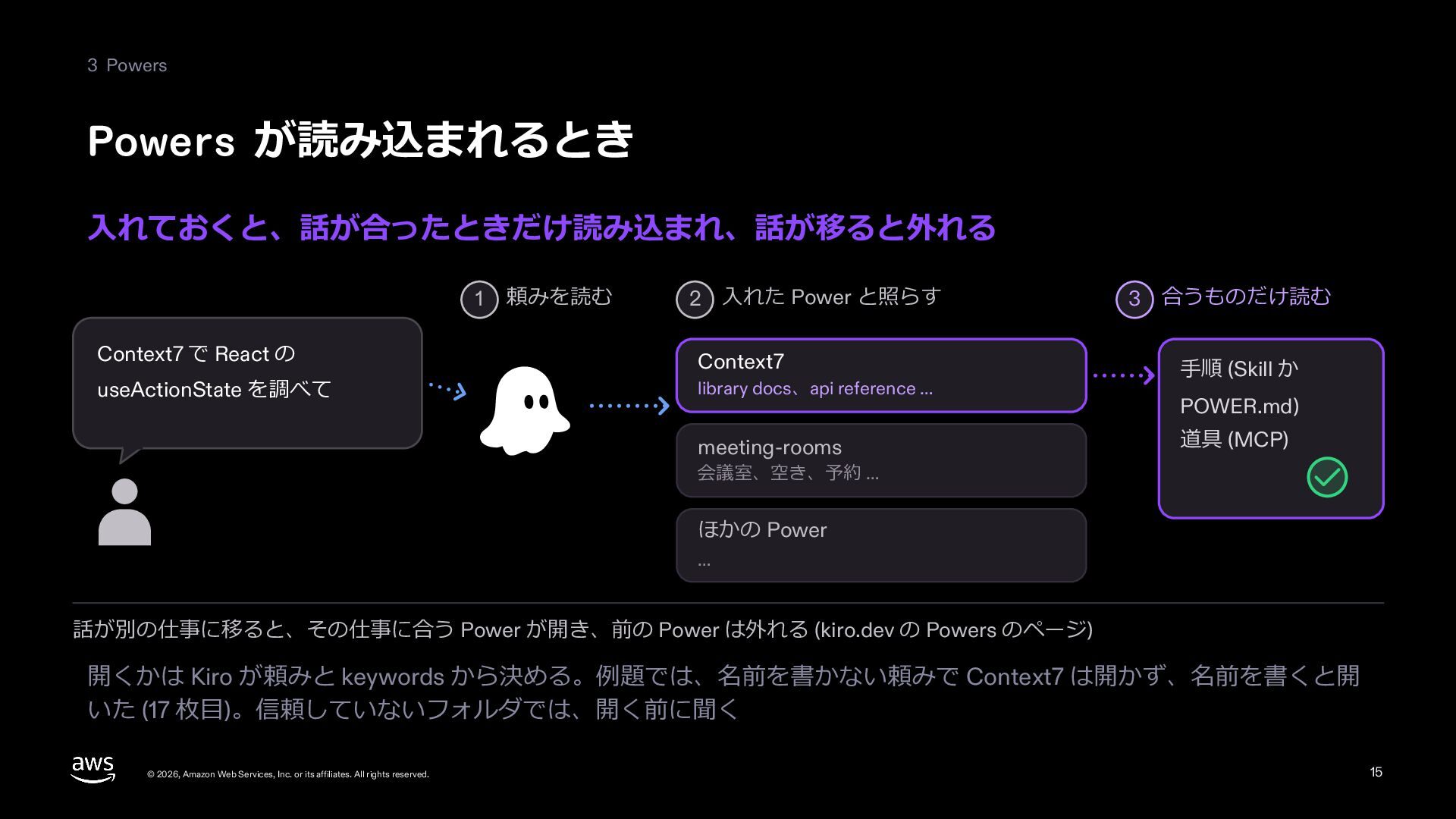
  16. 3 Powers Powers が読み込まれるとき ⼊れておくと、話が合ったときだけ読み込まれ、話が移ると外れる 1 Context7 で React の

    useActionState を調べて 頼みを読む 2 ⼊れた Power と照らす Context7 library docs、api reference … meeting-rooms 3 合うものだけ読む ⼿順 (Skill か POWER.md) 道具 (MCP) 会議室、空き、予約 … ほかの Power … 話が別の仕事に移ると、その仕事に合う Power が開き、前の Power は外れる (kiro.dev の Powers のページ) 開くかは Kiro が頼みと keywords から決める。例題では、名前を書かない頼みで Context7 は開かず、名前を書くと開 いた (18 枚⽬)。信頼していないフォルダでは、開く前に聞く © 2026, Amazon Web Services, Inc. or its affiliates. All rights reserved. 16
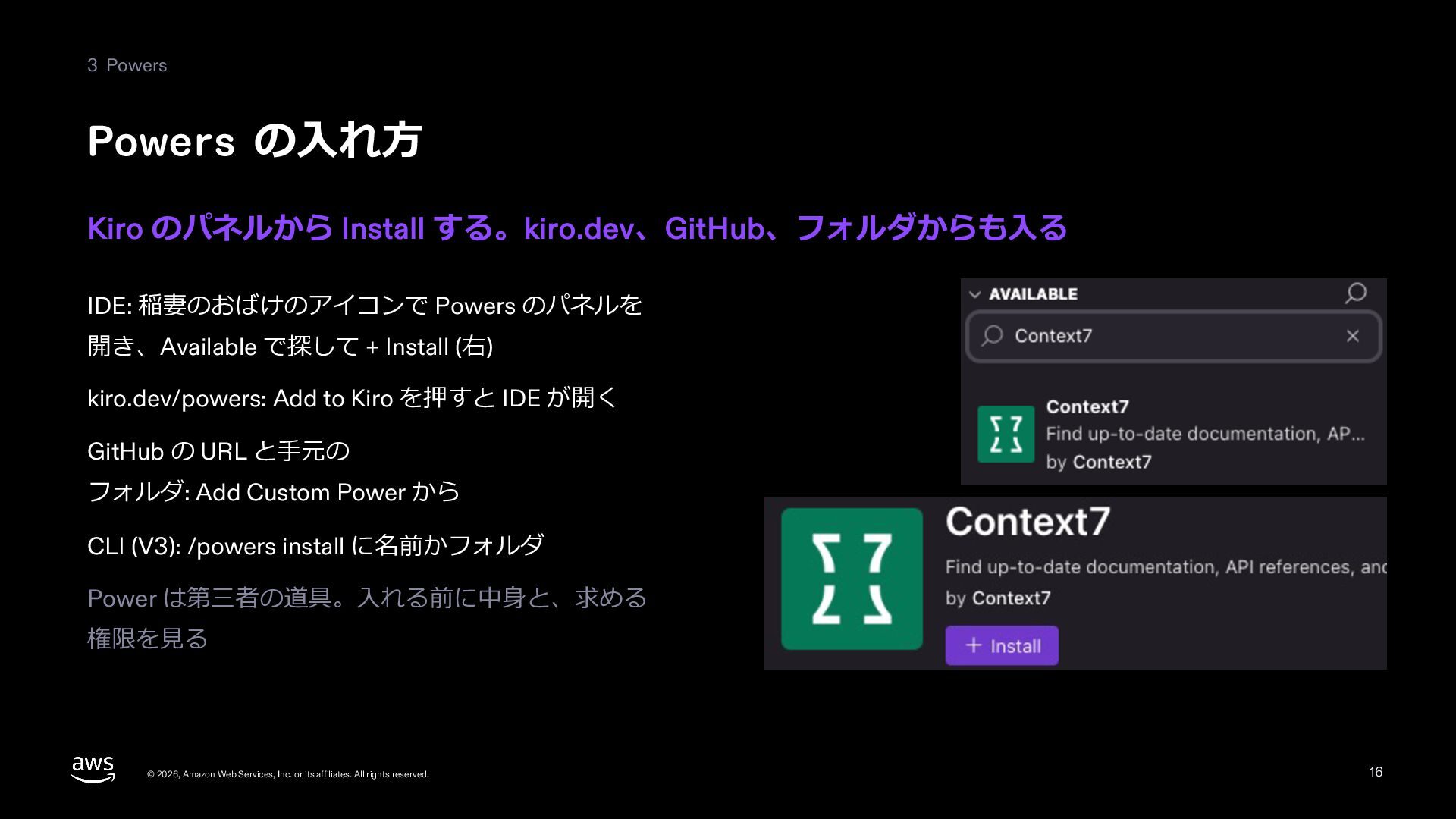
  17. 3 Powers Powers の⼊れ⽅ Kiro のパネルから Install する。kiro.dev、GitHub、フォルダからも⼊る IDE: 稲妻のおばけのアイコンで

    Powers のパネルを 開き、Available で探して + Install (右) kiro.dev/powers: Add to Kiro を押すと IDE が開く GitHub の URL と⼿元の フォルダ: Add Custom Power から CLI (V3): /powers install に名前かフォルダ Power は第三者の道具。⼊れる前に中⾝と、求める 権限を⾒る © 2026, Amazon Web Services, Inc. or its affiliates. All rights reserved. 17
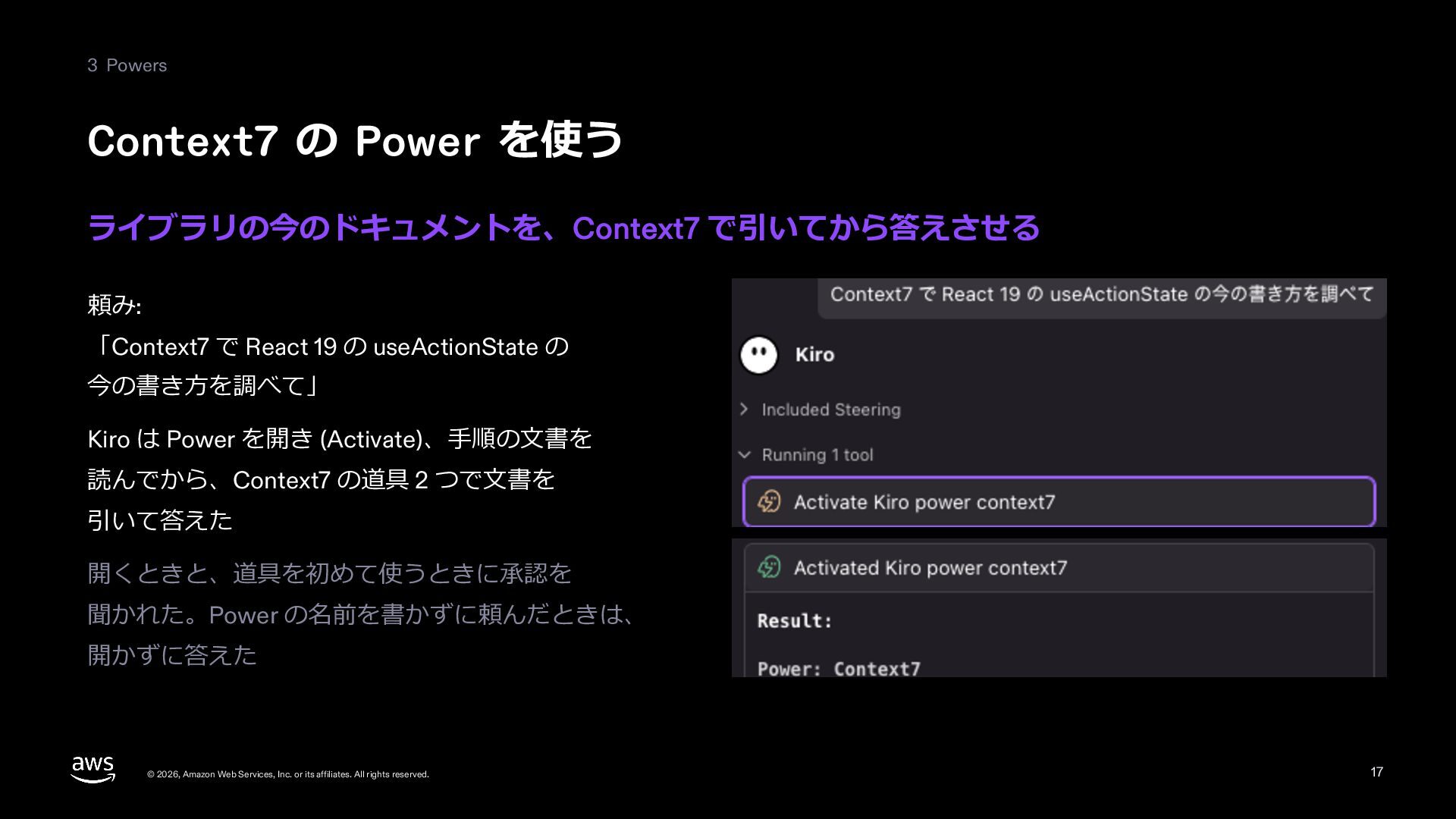
  18. 3 Powers Context7 の Power を使う ライブラリの今のドキュメントを、Context7 で引いてから答えさせる 頼み: 「Context7

    で React 19 の useActionState の 今の書き⽅を調べて」 Kiro は Power を開き (Activate)、⼿順の⽂書を 読んでから、Context7 の道具 2 つで⽂書を 引いて答えた 開くときと、道具を初めて使うときに承認を 聞かれた。Power の名前を書かずに頼んだときは、 開かずに答えた © 2026, Amazon Web Services, Inc. or its affiliates. All rights reserved. 18
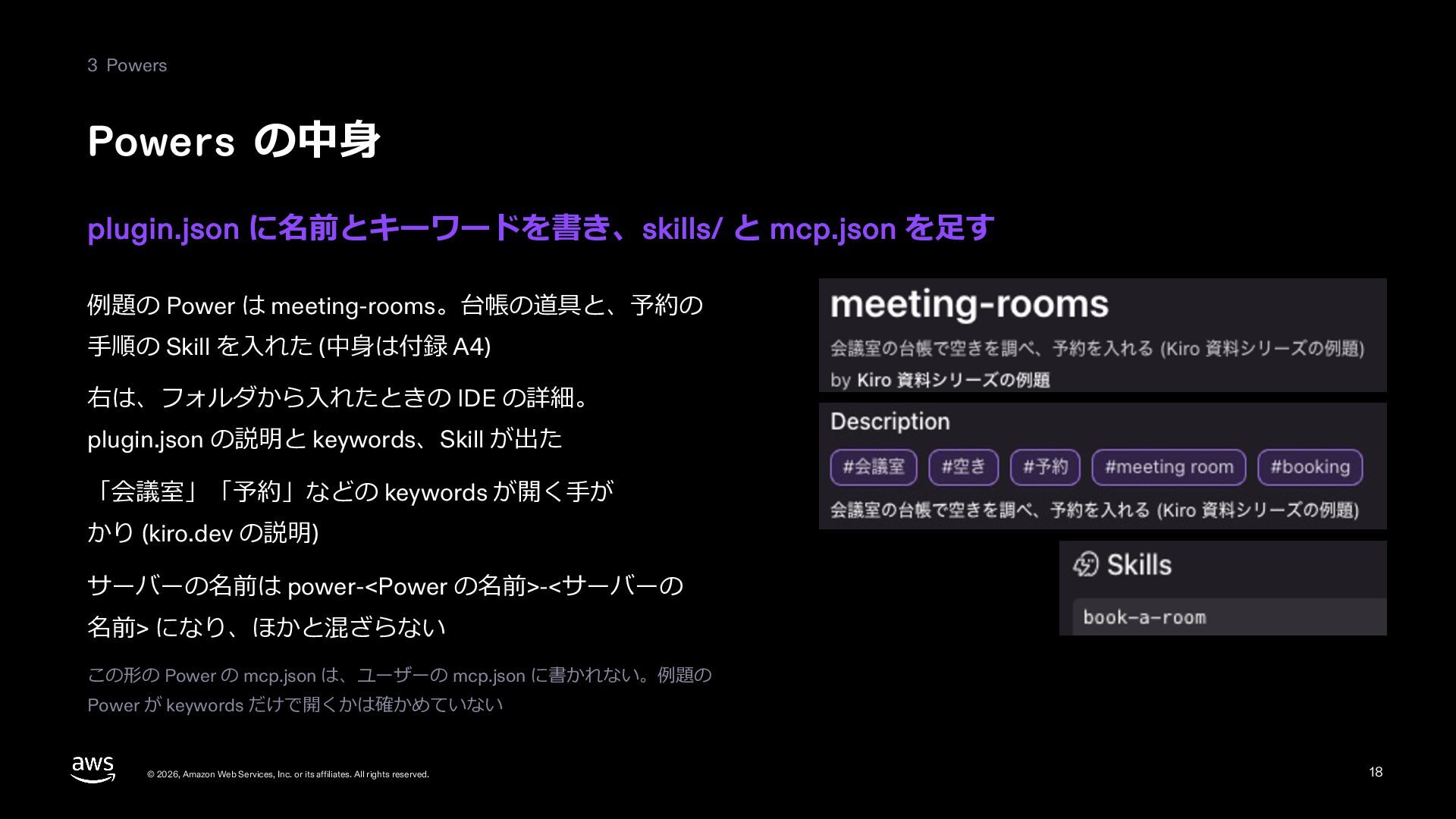
  19. 3 Powers Powers の中⾝ plugin.json に名前とキーワードを書き、skills/ と mcp.json を⾜す 例題の

    Power は meeting-rooms。台帳の道具と、予約の ⼿順の Skill を⼊れた (中⾝は付録 A4) 右は、フォルダから⼊れたときの IDE の詳細。 plugin.json の説明と keywords、Skill が出た 「会議室」「予約」などの keywords が開く⼿が かり (kiro.dev の説明) サーバーの名前は power-<Power の名前>-<サーバーの 名前> になり、ほかと混ざらない この形の Power の mcp.json は、ユーザーの mcp.json に書かれない。例題の Power が keywords だけで開くかは確かめていない © 2026, Amazon Web Services, Inc. or its affiliates. All rights reserved. 19
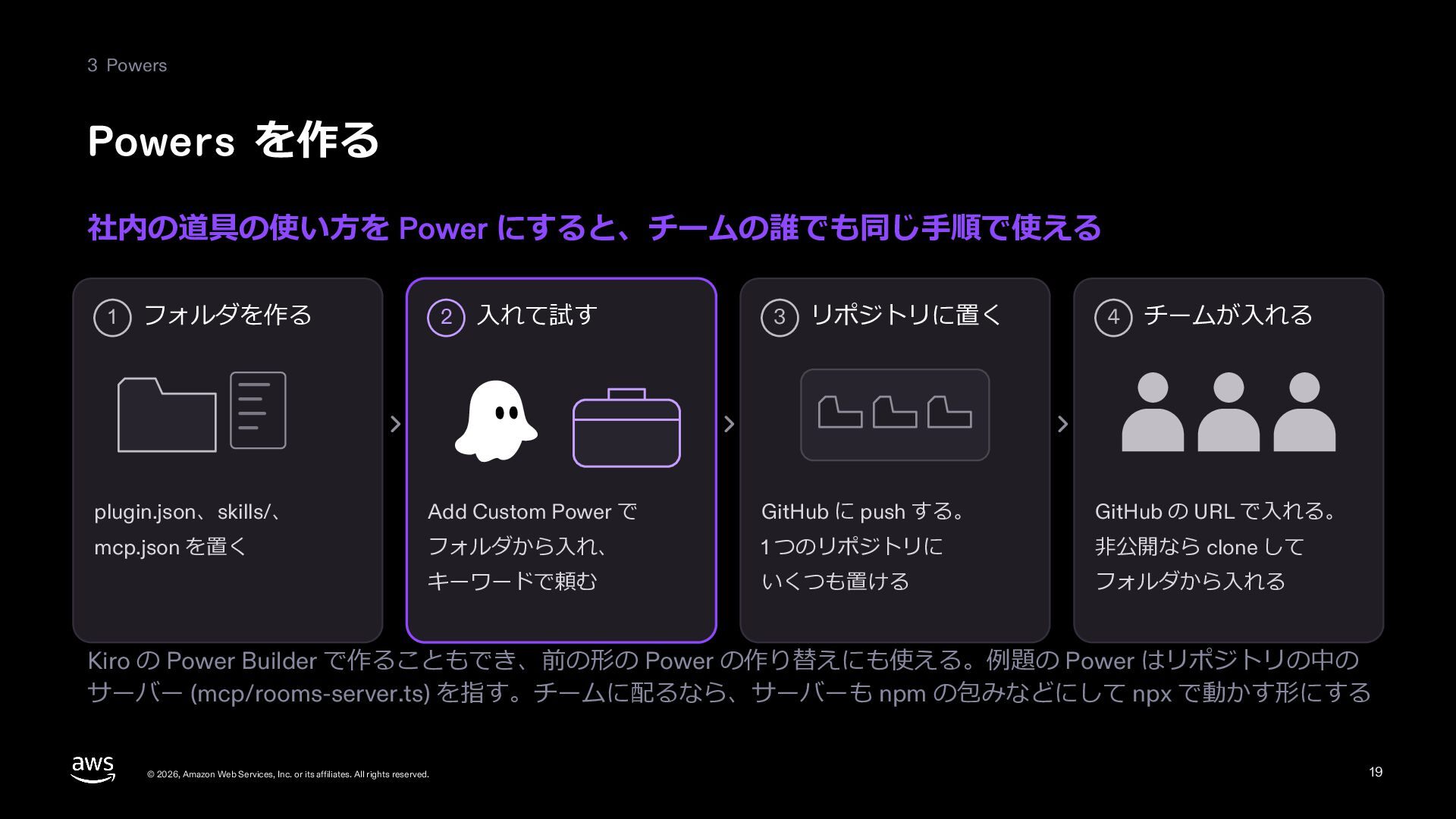
  20. 3 Powers Powers を作る 社内の道具の使い⽅を Power にすると、チームの誰でも同じ⼿順で使える 1 フォルダを作る 2

    ⼊れて試す 3 リポジトリに置く 4 チームが⼊れる plugin.json、skills/、 Add Custom Power で GitHub に push する。 GitHub の URL で⼊れる。 mcp.json を置く フォルダから⼊れ、 1 つのリポジトリに ⾮公開なら clone して キーワードで頼む いくつも置ける フォルダから⼊れる Kiro の Power Builder で作ることもでき、前の形の Power の作り替えにも使える。例題の Power はリポジトリの中の サーバー (mcp/rooms-server.ts) を指す。チームに配るなら、サーバーも npm の包みなどにして npx で動かす形にする © 2026, Amazon Web Services, Inc. or its affiliates. All rights reserved. 20
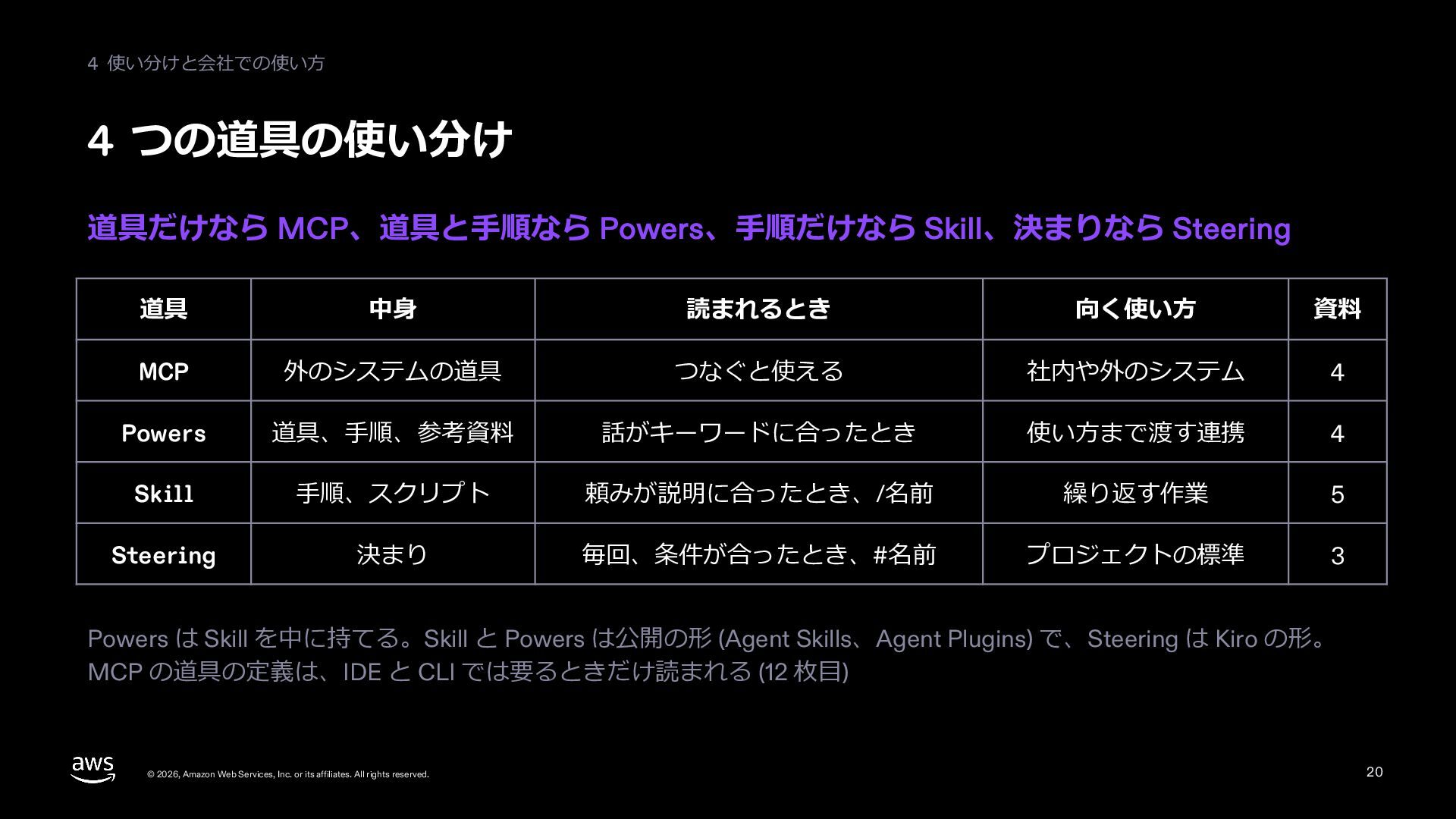
  21. 4 使い分けと会社での使い⽅ 4 つの道具の使い分け 道具だけなら MCP、道具と⼿順なら Powers、⼿順だけなら Skill、決まりなら Steering 道具

    中⾝ 読まれるとき 向く使い⽅ 資料 MCP 外のシステムの道具 つなぐと使える 社内や外のシステム 07 Powers 道具、⼿順、参考資料 話がキーワードに合ったとき 使い⽅まで渡す連携 07 Skill ⼿順、スクリプト 頼みが説明に合ったとき、/名前 繰り返す作業 08 Steering 決まり 毎回、条件が合ったとき、#名前 プロジェクトの標準 06 Powers は Skill を中に持てる。Skill と Powers は公開の形 (Agent Skills、Agent Plugins) で、Steering は Kiro の形。 MCP の道具の定義は、IDE と CLI では要るときだけ読まれる (13 枚⽬) © 2026, Amazon Web Services, Inc. or its affiliates. All rights reserved. 21
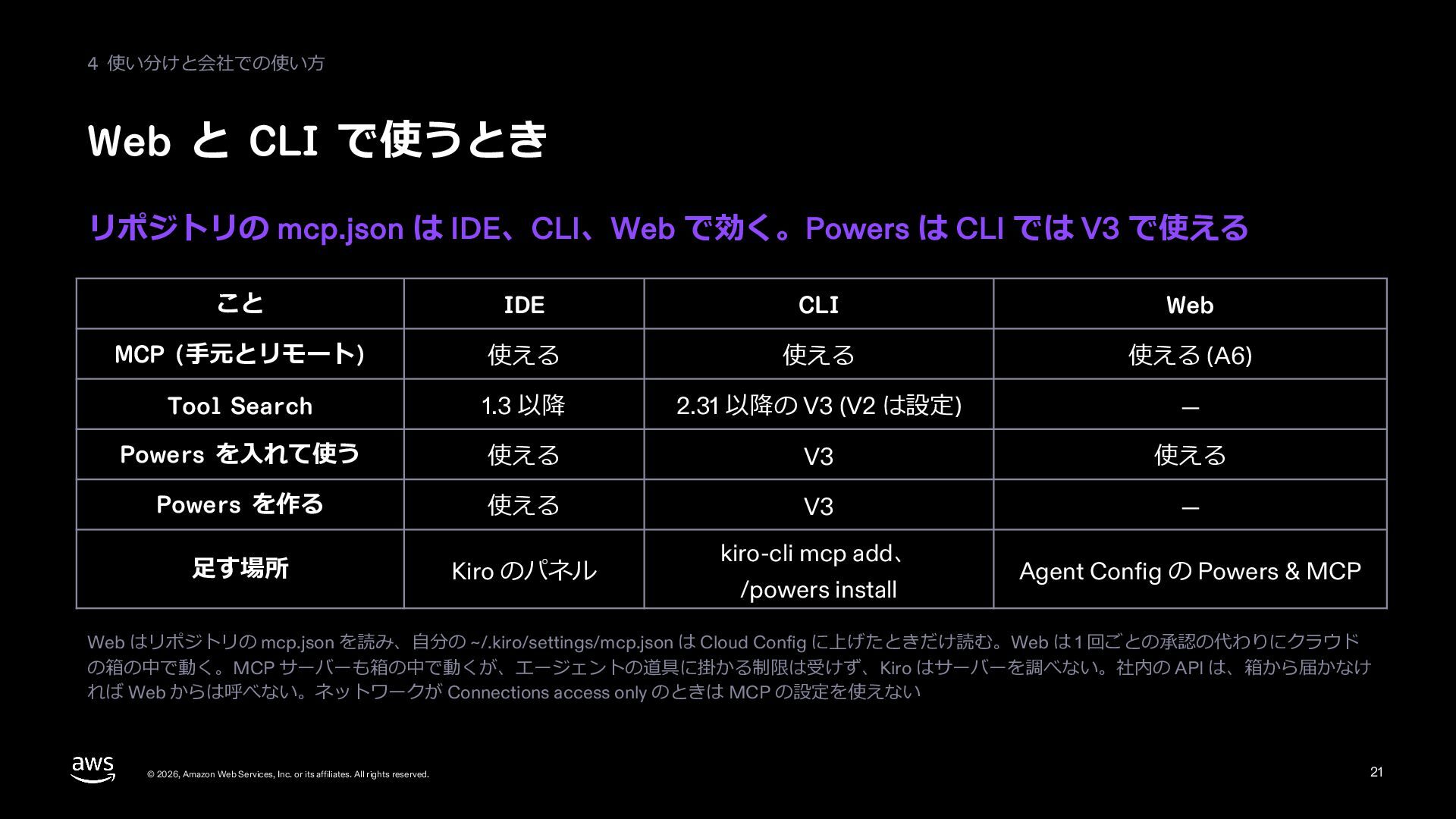
  22. 4 使い分けと会社での使い⽅ Web と CLI で使うとき リポジトリの mcp.json は IDE、CLI、Web

    で効く。Powers は CLI では V3 で使える こと IDE CLI Web MCP (⼿元とリモート) 使える 使える 使える (A6) Tool Search 1.3 以降 2.31 以降の V3 (V2 は設定) — Powers を⼊れて使う 使える V3 使える Powers を作る 使える V3 — ⾜す場所 Kiro のパネル kiro-cli mcp add、 /powers install Agent Config の Powers & MCP Web はリポジトリの mcp.json を読み、⾃分の ~/.kiro/settings/mcp.json は Cloud Config に上げたときだけ読む。Web は 1 回ごとの承認の代わりにクラウド の箱の中で動く。MCP サーバーも箱の中で動くが、エージェントの道具に掛かる制限は受けず、Kiro はサーバーを調べない。社内の API は、箱から届かなけ れば Web からは呼べない。ネットワークが Connections access only のときは MCP の設定を使えない © 2026, Amazon Web Services, Inc. or its affiliates. All rights reserved. 22
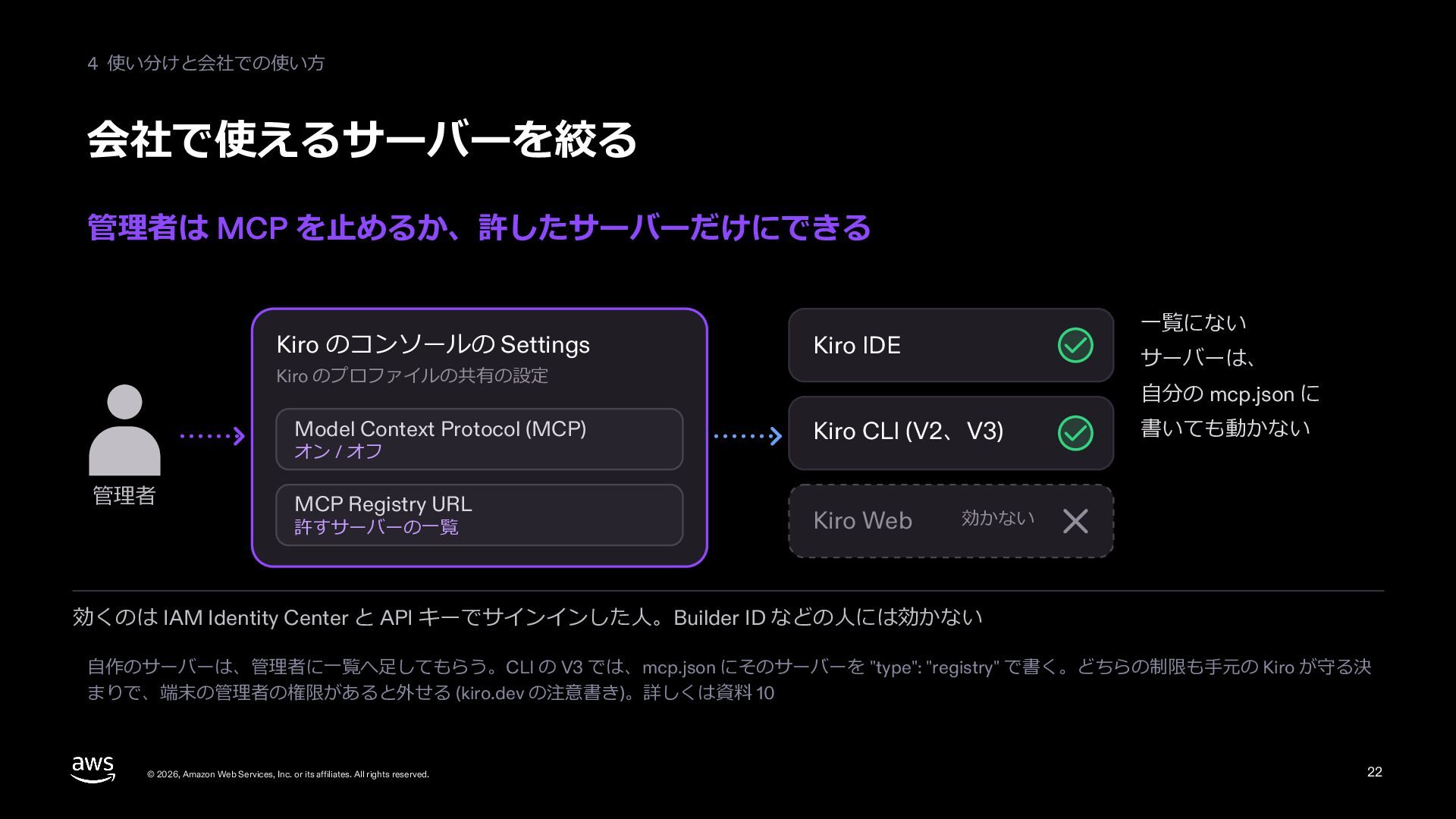
  23. 4 使い分けと会社での使い⽅ 会社で使えるサーバーを絞る 管理者は MCP を⽌めるか、許したサーバーだけにできる Kiro のコンソールの Settings ⼀覧にない

    Kiro IDE サーバーは、 Kiro のプロファイルの共有の設定 Model Context Protocol (MCP) オン / オフ 管理者 MCP Registry URL 許すサーバーの⼀覧 ⾃分の mcp.json に Kiro CLI (V2、V3) Kiro Web 書いても動かない 効かない 効くのは IAM Identity Center と API キーでサインインした⼈。Builder ID などの⼈には効かない ⾃作のサーバーは、管理者に⼀覧へ⾜してもらう。CLI の V3 では、mcp.json にそのサーバーを "type": "registry" で書く。どちらの制限も⼿元の Kiro が守る決 まりで、端末の管理者の権限があると外せる (kiro.dev の注意書き)。詳しくは資料 13 © 2026, Amazon Web Services, Inc. or its affiliates. All rights reserved. 23
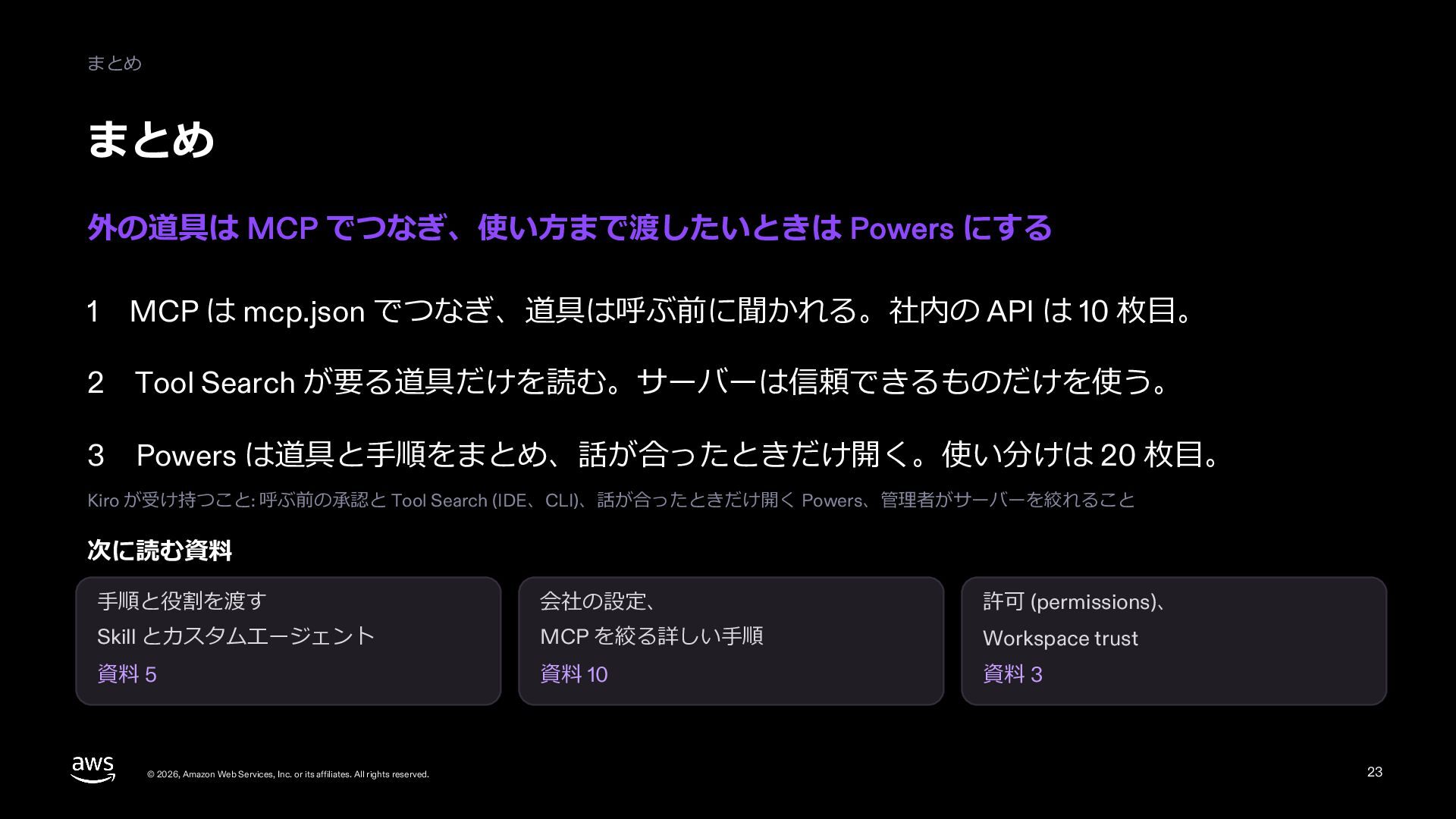
  24. まとめ まとめ 外の道具は MCP でつなぎ、使い⽅まで渡したいときは Powers にする 1 MCP は

    mcp.json でつなぎ、道具は呼ぶ前に聞かれる。社内の API は 11 枚⽬。 2 Tool Search が要る道具だけを読む。サーバーは信頼できるものだけを使う。 3 Powers は道具と⼿順をまとめ、話が合ったときだけ開く。使い分けは 21 枚⽬。 Kiro が受け持つこと: 呼ぶ前の承認と Tool Search (IDE、CLI)、話が合ったときだけ開く Powers、管理者がサーバーを絞れること 次に読む資料 ⼿順と役割を渡す 会社の設定、 許可 (permissions)、 Skill とカスタムエージェント MCP を絞る詳しい⼿順 Workspace trust 資料 08 資料 13 資料 06 © 2026, Amazon Web Services, Inc. or its affiliates. All rights reserved. 24
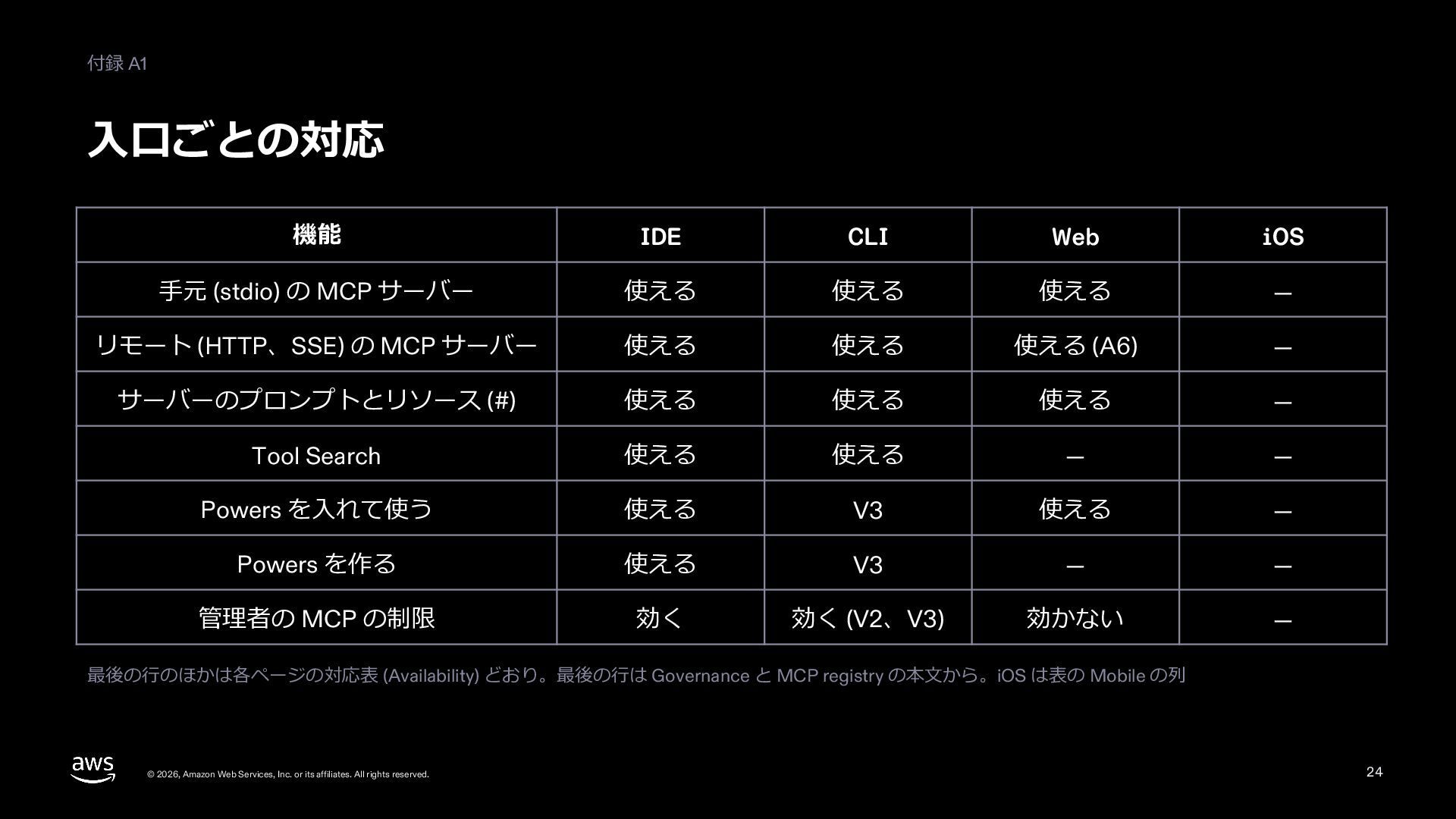
  25. 付録 A1 ⼊⼝ごとの対応 機能 IDE CLI Web iOS ⼿元 (stdio)

    の MCP サーバー 使える 使える 使える — リモート (HTTP、SSE) の MCP サーバー 使える 使える 使える (A6) — サーバーのプロンプトとリソース (#) 使える 使える 使える — Tool Search 使える 使える — — Powers を⼊れて使う 使える V3 使える — Powers を作る 使える V3 — — 管理者の MCP の制限 効く 効く (V2、V3) 効かない — 最後の⾏のほかは各ページの対応表 (Availability) どおり。最後の⾏は Governance と MCP registry の本⽂から。iOS は表の Mobile の列 © 2026, Amazon Web Services, Inc. or its affiliates. All rights reserved. 25
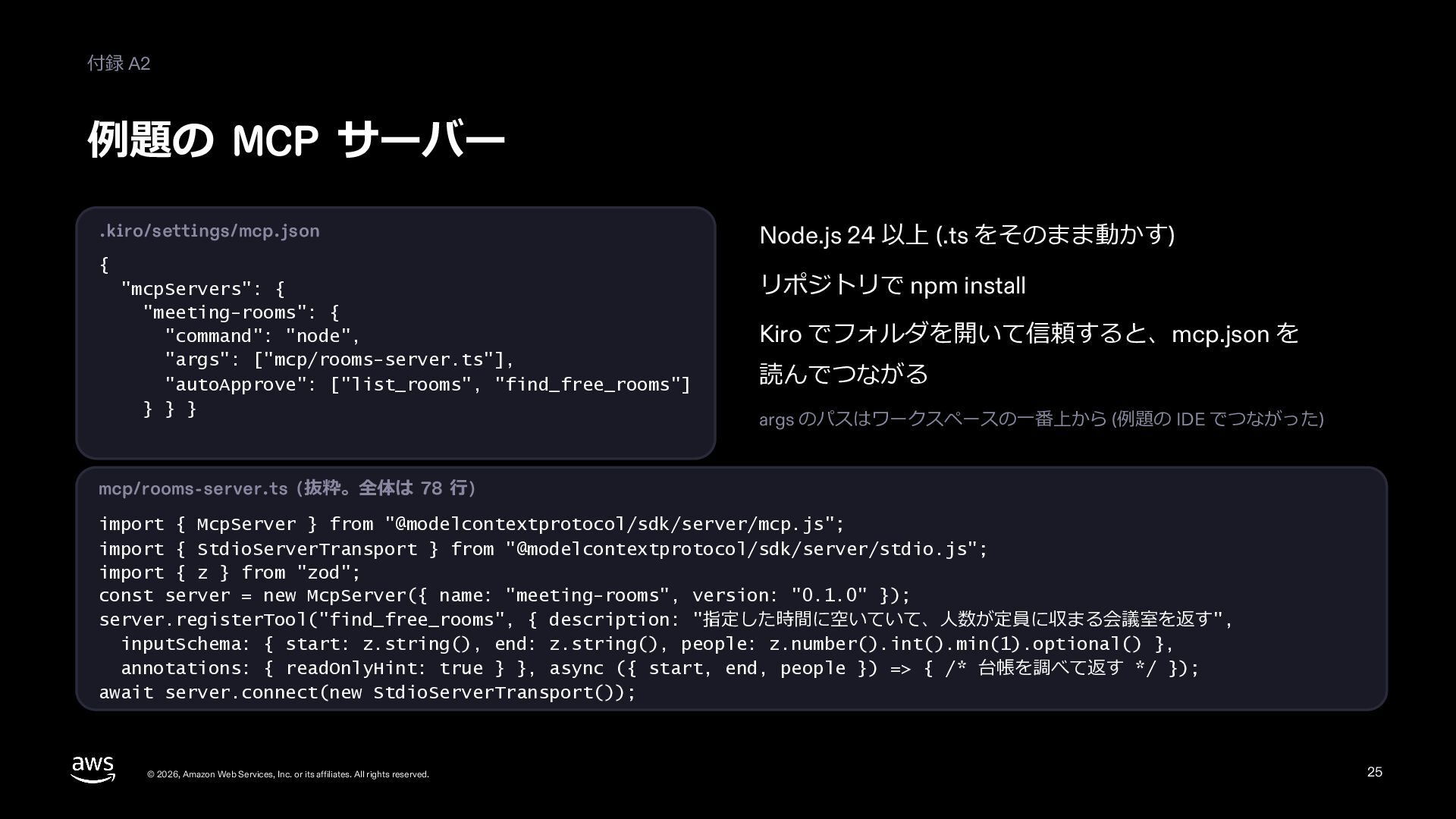
  26. 付録 A2 例題の MCP サーバー .kiro/settings/mcp.json { "mcpServers": { "meeting-rooms":

    { "command": "node", "args": ["mcp/rooms-server.ts"], "autoApprove": ["list_rooms", "find_free_rooms"] } } } Node.js 24 以上 (.ts をそのまま動かす) リポジトリで npm install Kiro でフォルダを開いて信頼すると、mcp.json を 読んでつながる args のパスはワークスペースの⼀番上から (例題の IDE でつながった) mcp/rooms-server.ts (抜粋。全体は 78 ⾏) import { McpServer } from "@modelcontextprotocol/sdk/server/mcp.js"; import { StdioServerTransport } from "@modelcontextprotocol/sdk/server/stdio.js"; import { z } from "zod"; const server = new McpServer({ name: "meeting-rooms", version: "0.1.0" }); server.registerTool("find_free_rooms", { description: "指定した時間に空いていて、⼈数が定員に収まる会議室を返す", inputSchema: { start: z.string(), end: z.string(), people: z.number().int().min(1).optional() }, annotations: { readOnlyHint: true } }, async ({ start, end, people }) => { /* 台帳を調べて返す */ }); await server.connect(new StdioServerTransport()); © 2026, Amazon Web Services, Inc. or its affiliates. All rights reserved. 26
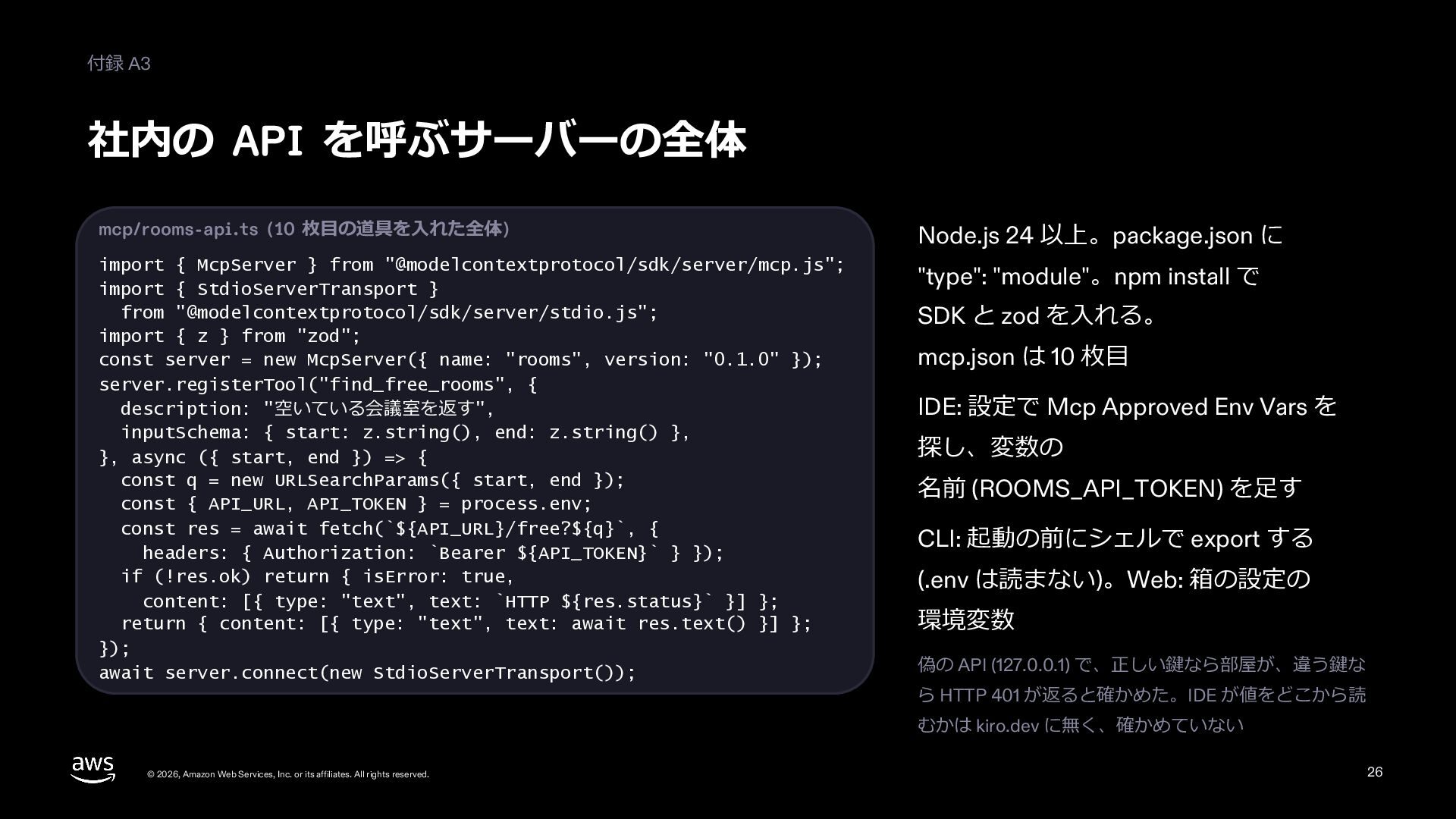
  27. 付録 A3 社内の API を呼ぶサーバーの全体 mcp/rooms-api.ts (11 枚⽬の道具を⼊れた全体) Node.js 24

    以上。package.json に import { McpServer } from "@modelcontextprotocol/sdk/server/mcp.js"; import { StdioServerTransport } from "@modelcontextprotocol/sdk/server/stdio.js"; import { z } from "zod"; const server = new McpServer({ name: "rooms", version: "0.1.0" }); server.registerTool("find_free_rooms", { description: "空いている会議室を返す", inputSchema: { start: z.string(), end: z.string() }, }, async ({ start, end }) => { const q = new URLSearchParams({ start, end }); const { API_URL, API_TOKEN } = process.env; const res = await fetch(`${API_URL}/free?${q}`, { headers: { Authorization: `Bearer ${API_TOKEN}` } }); if (!res.ok) return { isError: true, content: [{ type: "text", text: `HTTP ${res.status}` }] }; return { content: [{ type: "text", text: await res.text() }] }; }); await server.connect(new StdioServerTransport()); "type": "module"。npm install で SDK と zod を⼊れる。 mcp.json は 11 枚⽬ IDE: 設定で Mcp Approved Env Vars を 探し、変数の 名前 (ROOMS_API_TOKEN) を⾜す CLI: 起動の前にシェルで export する (.env は読まない)。Web: 箱の設定の 環境変数 偽の API (127.0.0.1) で、正しい鍵なら部屋が、違う鍵な ら HTTP 401 が返ると確かめた。IDE が値をどこから読 むかは kiro.dev に無く、確かめていない © 2026, Amazon Web Services, Inc. or its affiliates. All rights reserved. 27
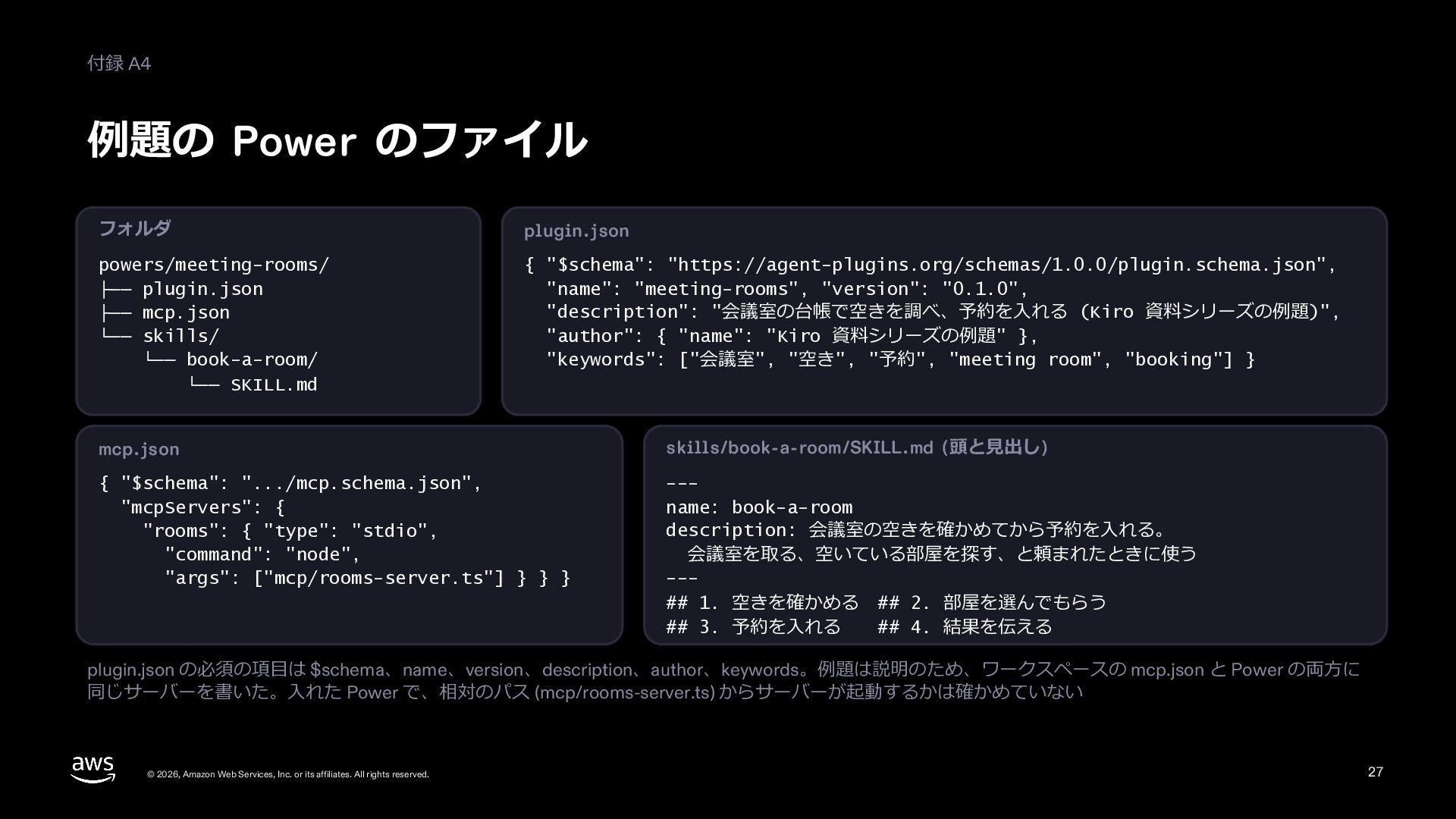
  28. 付録 A4 例題の Power のファイル フォルダ plugin.json powers/meeting-rooms/ ├── plugin.json

    ├── mcp.json └── skills/ └── book-a-room/ └── SKILL.md { "$schema": "https://agent-plugins.org/schemas/1.0.0/plugin.schema.json", "name": "meeting-rooms", "version": "0.1.0", "description": "会議室の台帳で空きを調べ、予約を⼊れる (⽬指せ Kiro マスターの例題)", "author": { "name": "⽬指せ Kiro マスターの例題" }, "keywords": ["会議室", "空き", "予約", "meeting room", "booking"] } mcp.json skills/book-a-room/SKILL.md (頭と⾒出し) { "$schema": ".../mcp.schema.json", "mcpServers": { "rooms": { "type": "stdio", "command": "node", "args": ["mcp/rooms-server.ts"] } } } --name: book-a-room description: 会議室の空きを確かめてから予約を⼊れる。 会議室を取る、空いている部屋を探す、と頼まれたときに使う --## 1. 空きを確かめる ## 2. 部屋を選んでもらう ## 3. 予約を⼊れる ## 4. 結果を伝える plugin.json の必須の項⽬は $schema、name、version、description、author、keywords。例題は説明のため、ワークスペースの mcp.json と Power の両⽅に 同じサーバーを書いた。⼊れた Power で、相対のパス (mcp/rooms-server.ts) からサーバーが起動するかは確かめていない © 2026, Amazon Web Services, Inc. or its affiliates. All rights reserved. 28
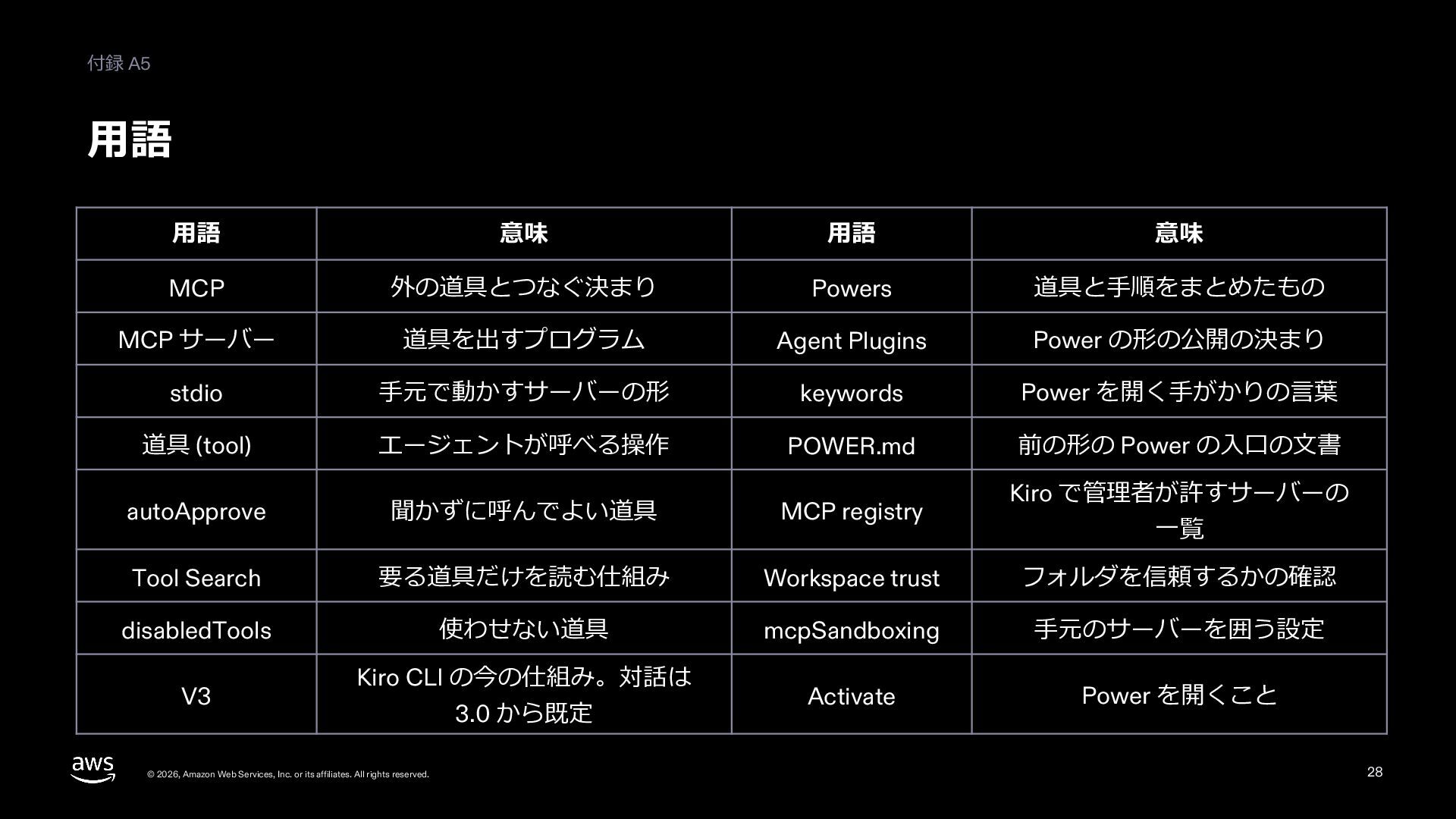
  29. 付録 A5 ⽤語 ⽤語 意味 ⽤語 意味 MCP 外の道具とつなぐ決まり Powers

    道具と⼿順をまとめたもの MCP サーバー 道具を出すプログラム Agent Plugins Power の形の公開の決まり stdio ⼿元で動かすサーバーの形 keywords Power を開く⼿がかりの⾔葉 道具 (tool) エージェントが呼べる操作 POWER.md 前の形の Power の⼊⼝の⽂書 autoApprove 聞かずに呼んでよい道具 MCP registry Tool Search 要る道具だけを読む仕組み Workspace trust フォルダを信頼するかの確認 disabledTools 使わせない道具 mcpSandboxing ⼿元のサーバーを囲う設定 Activate Power を開くこと V3 Kiro CLI の今の仕組み。対話は © 2026, Amazon Web Services, Inc. or its affiliates. All rights reserved. 3.0 から既定 Kiro で管理者が許すサーバーの ⼀覧 29
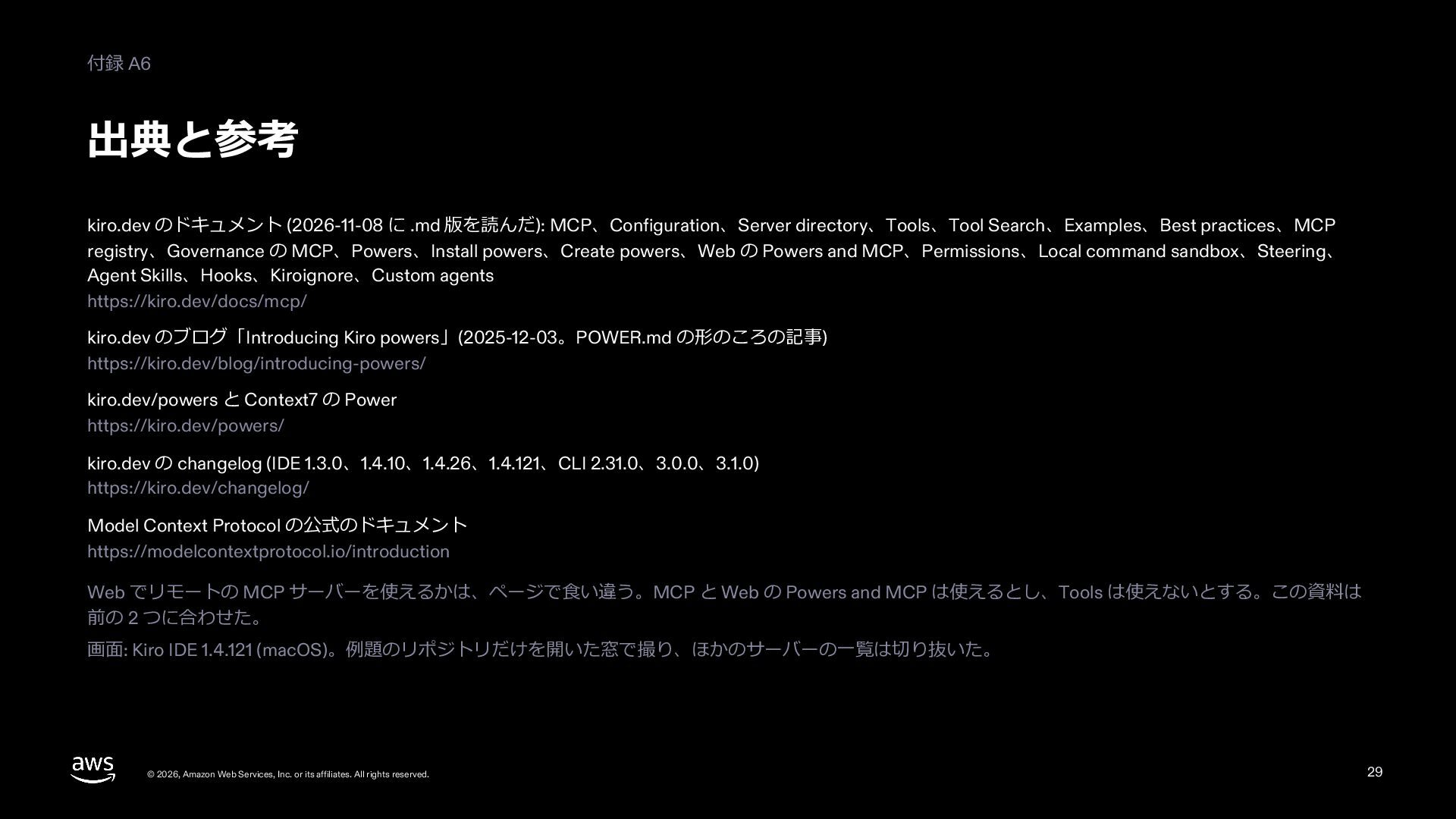
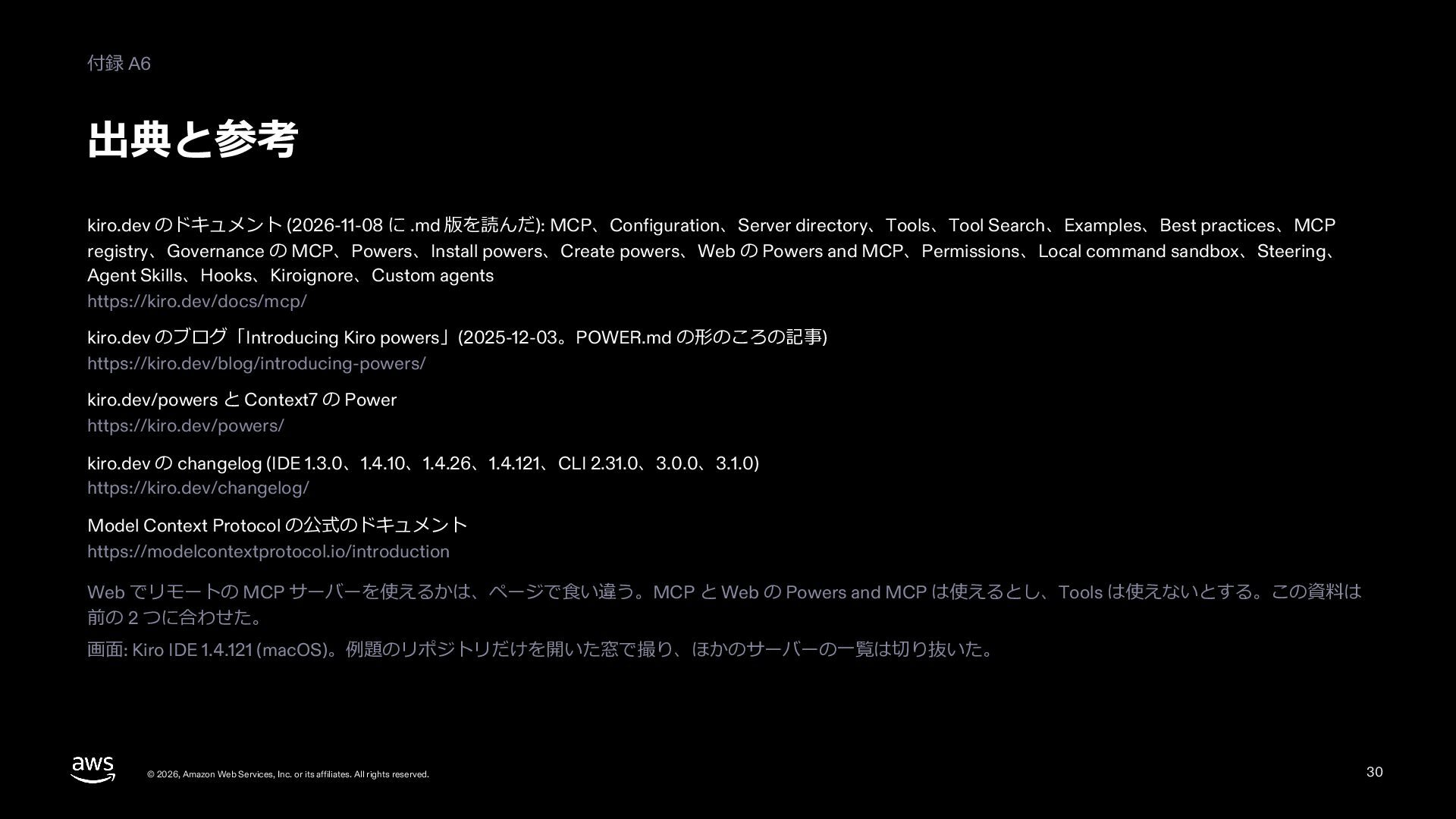
  30. 付録 A6 出典と参考 kiro.dev のドキュメント (2026-11-08 に .md 版を読んだ): MCP、Configuration、Server

    directory、Tools、Tool Search、Examples、Best practices、MCP registry、Governance の MCP、Powers、Install powers、Create powers、Web の Powers and MCP、Permissions、Local command sandbox、Steering、 Agent Skills、Hooks、Kiroignore、Custom agents https://kiro.dev/docs/mcp/ kiro.dev のブログ「Introducing Kiro powers」(2025-12-03。POWER.md の形のころの記事) https://kiro.dev/blog/introducing-powers/ kiro.dev/powers と Context7 の Power https://kiro.dev/powers/ kiro.dev の changelog (IDE 1.3.0、1.4.10、1.4.26、1.4.121、CLI 2.31.0、3.0.0、3.1.0) https://kiro.dev/changelog/ Model Context Protocol の公式のドキュメント https://modelcontextprotocol.io/introduction Web でリモートの MCP サーバーを使えるかは、ページで⾷い違う。MCP と Web の Powers and MCP は使えるとし、Tools は使えないとする。この資料は 前の 2 つに合わせた。 画⾯: Kiro IDE 1.4.121 (macOS)。例題のリポジトリだけを開いた窓で撮り、ほかのサーバーの⼀覧は切り抜いた。 © 2026, Amazon Web Services, Inc. or its affiliates. All rights reserved. 30