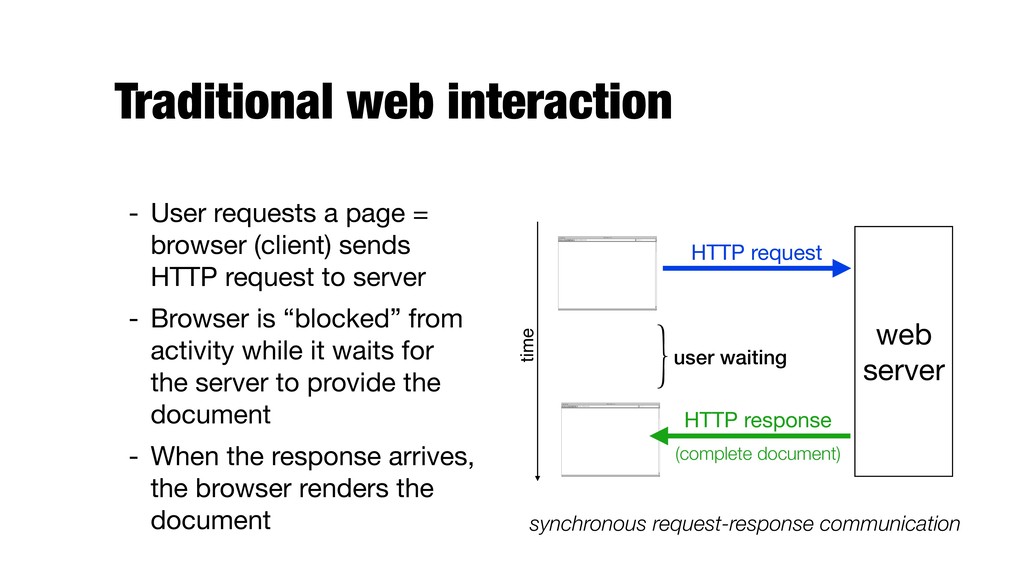
(client) sends HTTP request to server - Browser is “blocked” from activity while it waits for the server to provide the document - When the response arrives, the browser renders the document Google http://domain.com Web Page Title Google http://domain.com Web Page Title user waiting web server HTTP request HTTP response (complete document) synchronous request-response communication time
responsiveness - This requires frequent interactions between the user and the server - Speed of interactions determines the usability of the application! - Often, only (relatively small) parts of the documents are modified or updated. No need to reload the entire page - Client might want to send data to the server in the background
technologies - Client side: HTML, JavaScript - Server side: any programming language - Despite the name, XML is not required! - Two key features - Update only parts of the page - Asynchronous, i.e., no need to "lock" the document while waiting for the response
Title web server initial request complete document interaction #1 partial update #1 interaction #2 partial update #2 update #1 update #2 The response to request #1 might arrive after #2, even though it was made earlier
Python) 2.JavaScript to send the AJAX request to the server 3.Server-side program to receive the request and produce the requested data 4.JavaScript to receive the new data and integrate it into the original document being displayed
call zipcode.js function getPlace(postcode) { var xhr = new XMLHttpRequest(); /* register an embedded function as the handler */ xhr.onreadystatechange = function () { […] } }; /* send the request using GET */ xhr.open("GET", "/getplace?postcode=" + postcode, true); xhr.send(null); } setting this parameter to true means making an asynchronous request
indicates the progress (0..4) - Status is 200 if the request was successfully completed zipcode.js xhr.onreadystatechange = function () { /* readyState = 4 means that the response has been completed * status = 200 indicates that the request was successfully completed */ if (xhr.readyState == 4 && xhr.status == 200) { var result = xhr.responseText; document.getElementById("place").value = result; } };
onkeyup events - I.e., whenever the user presses a key in the name or license fields license.html <input type="text" name="name" id="name" onkeyup="checkLicense();" /> <input type="text" name="license" id="license" onkeyup="checkLicense();" />
Need to add a HTTP header to make it as if it was a form submission license.js function checkLicense() { […] /* send the request using POST */ xhr.open("POST", "/check_license", true); /* To POST data like an HTML form, add an HTTP header */ xhr.setRequestHeader("Content-type", "application/x-www-form-urlencoded"); /* variables go in the request body */ xhr.send("name=" + name + "&license=" + license); […] }
indicates the progress (0..4) - Status is 200 if the request was successfully completed license.js xhr.onreadystatechange = function () { /* readyState = 4 means that the response has been completed * status = 200 indicates that the request was successfully completed */ if (xhr.readyState == 4 && xhr.status == 200) { var result = xhr.responseText; document.getElementById("license_check").innerHTML = result; } };
simple string - HTML snippet - Data as "object" - Both the client and the server need to speak the same language, i.e., how to encode and decode the object
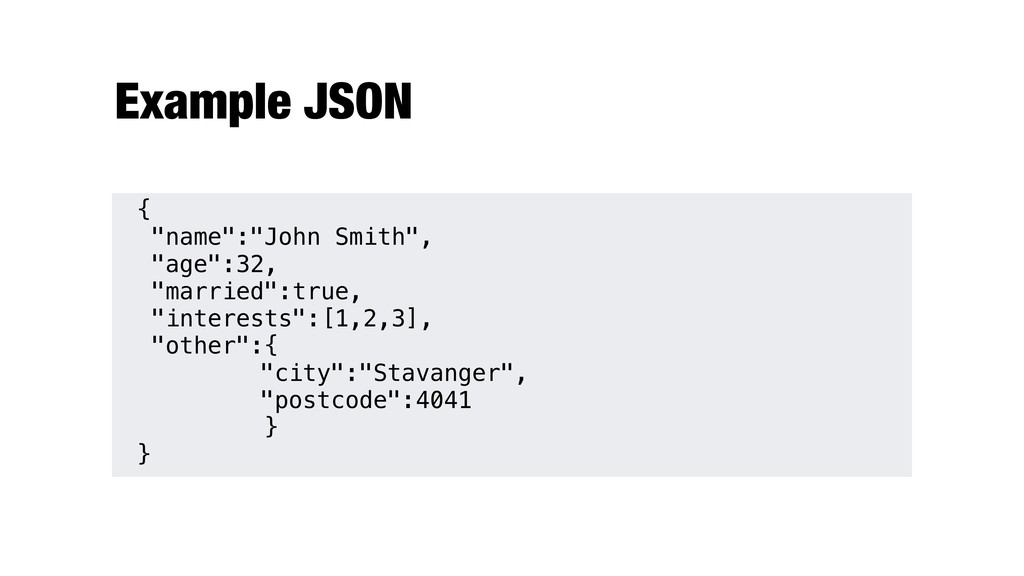
Language independent - Two structures - Collection of name-value pairs (object) - a.k.a. record, struct, dictionary, hash table, associative array - Ordered list of values (array) - a.k.a. vector, list
- json.dumps(data) - returns JSON representation of the data -json.loads(json_value) - decodes a JSON value - json.dumps() and json.loads() work with strings - json.dump() and json.load() work with file streams
methods: $.get() and $.post() - load() method - replaces the HTML content of the matched elements with the content returned from a remote file - (does not work with form input fields!) - Full reference: http://www.w3schools.com/jquery/jquery_ref_ajax.asp
Where: - url where the request is sent - data (optional) data to be sent (map with variables and values) - function(…) callback function to run if the request succeeds - dataType (optional) data type setting (xml, html, text, …) $.post("ajax.php", {"var1":"value"}, function (data) { $("#bar").html(data); });
= new XMLHttpRequest(); /* register an embedded function as the handler */ xhr.onreadystatechange = function () { /* readyState = 4 means that the response has been completed * status = 200 indicates that the request was successfully completed */ if (xhr.readyState == 4 && xhr.status == 200) { var result = xhr.responseText; document.getElementById("place").value = result; } }; /* send the request using GET */ xhr.open("GET", "/getplace?postcode=" + postcode, true); xhr.send(null); } <input type="text" name="postcode" onkeyup="getPlace(this.value);"/>
returned data into the selected element - $load(url,data,function(data,status,xhr)) - Where: - url where the request is sent - data (optional) data to be sent to the server along with the request - function(…) (optional) callback function to run when the load() method is completed $("button").click(function(){ $("#div1").load("demo_test.txt"); });


 ljehl
 cbtlibrary
 minorun365
 madhuri28
 baltimoreniso
 pawan_pharm
 adeputra13
 segadevtech
 2720japanoke
 arnoknobbe
 juanmartin2026
 signer
 hiola
 reverentgeek
 csswizardry
 auna
 jnunemaker
 jeffersonlam
 geoffreycrofte
 jacobian
 sarafernandez
 portentint
 mraible
 eileencodes
 palkan