Flutterにおけるアプリ内課金実装 -Android/iOS完全なる統一 -
Sponsored
·
 Your Podcast. Everywhere. Effortlessly.
Share. Educate. Inspire. Entertain. You do you. We'll handle the rest.
→
Your Podcast. Everywhere. Effortlessly.
Share. Educate. Inspire. Entertain. You do you. We'll handle the rest.
→

Share
Embed
Flutterにおけるアプリ内課金実装 -Android/iOS完全なる統一 -
This slide is made for the DroidKaigi 2023.
https://2023.droidkaigi.jp/
date: 09/15/2023
room: Arctic Fox

nacatl
September 15, 2023
Transcript
110 slides
-
自己紹介 Introduce • Name: 中島譲 / Yuzuru Nakashima • Github:
@nacatl • X(Twitter): @affinity_robots • Job: Android/Flutter Engineer • Affiliation: Studyplus Inc. (~2023/06) Connehito Inc.(2023/07~) • Hobby: Magic: The Gathering 2 -
人の生活に なくてはならないものを つくる • ママ向けサービス「ママリ」 • ママになる3人に1人が利用 • 先輩ママの商品/サービス紹介 「ママリ口コミ大賞」
• データ可視化のtoBサービス 「家族ノート」 • ママに寄り添い 日々の育児問題を解決 3 -
ユーザー同士で悩みを相談しあう Q&A機能 月間投稿数130万件、回答率95%、一つ目の回答がくるまで 2-3分(最頻値) Q&Aコミュニティ 生活に役立つ記事を毎日配信。専門家監修の記事も多数 メディア インスタハッシュタグ「 #ママリ」の投稿数が約 1,030万件超で
#ママ(投稿数:約570万件)よりも投稿されている SNS ママになる3人に1人が利用中! ママ向けNo.1サービス「ママリ」 ※「ママリ」で 2021年内に出産予定と設定したユーザー数と、厚生労働省発表「人口動態統計」の出生数から算出 ※ 4 -
学ぶ喜びを 全てのひとへ • 学習管理SNS • 勉強記録の管理、可視化 • 学習のモチベ維持、 継続のサポート •
大学受験生2人に1人が利用 • Flutterによる開発進行中 5 -
Agenda • 本セッションについて • 利用ライブラリについて • AndroidネイティブAPIとの対応 • 購入と復元 •
iOS特有の処理について • まとめ 8 -
Agenda • 本セッションについて • 利用ライブラリについて • AndroidネイティブAPIとの対応 • 購入と復元 •
iOS特有の処理について • まとめ 9 -
Agenda • 本セッションについて • 利用ライブラリについて • AndroidネイティブAPIとの対応 • 購入と復元 •
iOS特有の処理について • まとめ 19 -
利用ライブラリについて • https://pub.dev/packages/in_app_purchase (以下引用) • A storefront-independent API for purchases
in Flutter apps. This plugin supports in-app purchases (IAP) through an underlying store, which can be the App Store (on iOS and macOS) or Google Play (on Android). • Features ◦ Use this plugin in your Flutter app to: ◦ Show in-app products that are available for sale from the underlying store. Products can include consumables, permanent upgrades, and subscriptions. ◦ Load in-app products that the user owns. ◦ Send the user to the underlying store to purchase products. ◦ Present a UI for redeeming subscription offer codes. (iOS 14 only) 20 -
利用ライブラリについて • flutter.dev公式のアプリ内課金ライブラリ ◦ スター数も最も多い ◦ 2023/09/15 時点最新 v3.1.10 では
BillingLibrary 6.0.1 も対応済み • 内部的にネイティブ接続のライブラリを内包している ◦ in_app_purchase_android ◦ in_app_purchase_storekit 21 -
利用ライブラリについて • インスタンスの取得 ◦ IapPresenter ≒ BillingClientLifecycle相当の処理クラス /// [InAppPurchase]でストア処理を行うPresenter class
IapPresenter extends AsyncNotifier<InAppPurchaseState> { IapPresenter() : super(); final _inAppPurchase = InAppPurchase.instance; @override FutureOr<InAppPurchaseState> build() async { ~~~~ 23 -
利用ライブラリについて • インスタンスの取得 ◦ IapPresenter ≒ BillingClientLifecycle相当の処理クラス ◦ /// [InAppPurchase]でストア処理を行うPresenter
class IapPresenter extends AsyncNotifier<InAppPurchaseState> { IapPresenter() : super(); final _inAppPurchase = InAppPurchase.instance; @override FutureOr<InAppPurchaseState> build() async { ~~~~ 24 -
利用ライブラリについて • インスタンスの取得 ◦ IapPresenter ≒ BillingClientLifecycle相当の処理クラス ◦ /// [InAppPurchase]でストア処理を行うPresenter
class IapPresenter extends AsyncNotifier<InAppPurchaseState> { IapPresenter() : super(); final _inAppPurchase = InAppPurchase.instance; @override FutureOr<InAppPurchaseState> build() async { ~~~~ 25 後ほど説明します -
利用ライブラリについて • ViewからはPresenter経由で操作する ◦ ~~Provider はDaggerのようにインスタンスを管理配布する役割 /// [InAppPurchase]でストア処理を行うPresenterのProvider final iapPresenterProvider
= AsyncNotifierProvider<IapPresenter,InAppPurchaseState>( IapPresenter.new, ); 26 -
利用ライブラリについて • ViewからはPresenter経由で操作する ◦ ホーム画面の生成時に Presenterを参照、InAppPurchaseのインスタンスが生成される /// ログイン後のHomeScreenで呼び出してインスタンス準備 @override Widget
build(BuildContext context, WidgetRef ref) { ~~~~ // IapPresenterの参照(インスタンス生成) ref.watch(iapPresenterProvider); 27 -
Agenda • 本セッションについて • 利用ライブラリについて • AndroidネイティブAPIとの対応 • 購入と復元 •
iOS特有の処理について • まとめ 28 -
AndroidネイティブAPIとの対応 • startConnection(listener: BillingClientStateListener) • queryProductDetails(params: QueryProductDetailsParams) • launchBillingFlow(activity: Activity,
params: BillingFlowParams) • PurchasesUpdatedListener { billingResult, purchaseList -> } • queryPurchases(params: QueryPurchasesParams) • consumePurchase(params: ConsumeParam) • acknowledgePurchase(params: AcknowledgePurchaseParam) • Purchase • Purchase.isAcknowledged 29 -
AndroidネイティブAPIとの対応 • startConnection(listener: BillingClientStateListener) ◦ 基本的にInAppPurchase.instanceを呼ぶだけで開始される 31 /// InAppPurchase.getInstance()内部 if
(defaultTargetPlatform == TargetPlatform.android) { InAppPurchaseAndroidPlatform.registerPlatform(); } else if (defaultTargetPlatform == TargetPlatform.iOS || defaultTargetPlatform == TargetPlatform.macOS) { InAppPurchaseStoreKitPlatform.registerPlatform(); } -
AndroidネイティブAPIとの対応 • startConnection(listener: BillingClientStateListener) ◦ 基本的にInAppPurchase.instanceを呼ぶだけで開始される 32 /// InAppPurchase.getInstance()内部 ///
深掘っていくと…… BillingClientManagerで見つかる _readyFuture = Future<void>.sync(() async { await client.startConnection( onBillingServiceDisconnected: _connect, ); _isConnecting = false; }); -
AndroidネイティブAPIとの対応 • startConnection(listener: BillingClientStateListener) ◦ IapPresenterのbuild時にBillingClientStateListener相当の処理を行う 33 @override FutureOr<InAppPurchaseState> build()
async { /// BillingClientのconnection処理を待機 final isAvailable = await _inAppPurchase.isAvailable(); if (isAvailable) { /// Stateの初期化、PurchasesUpdatedListener登録 /// iOS特有のSKPaymentTransactionObserver処理 } -
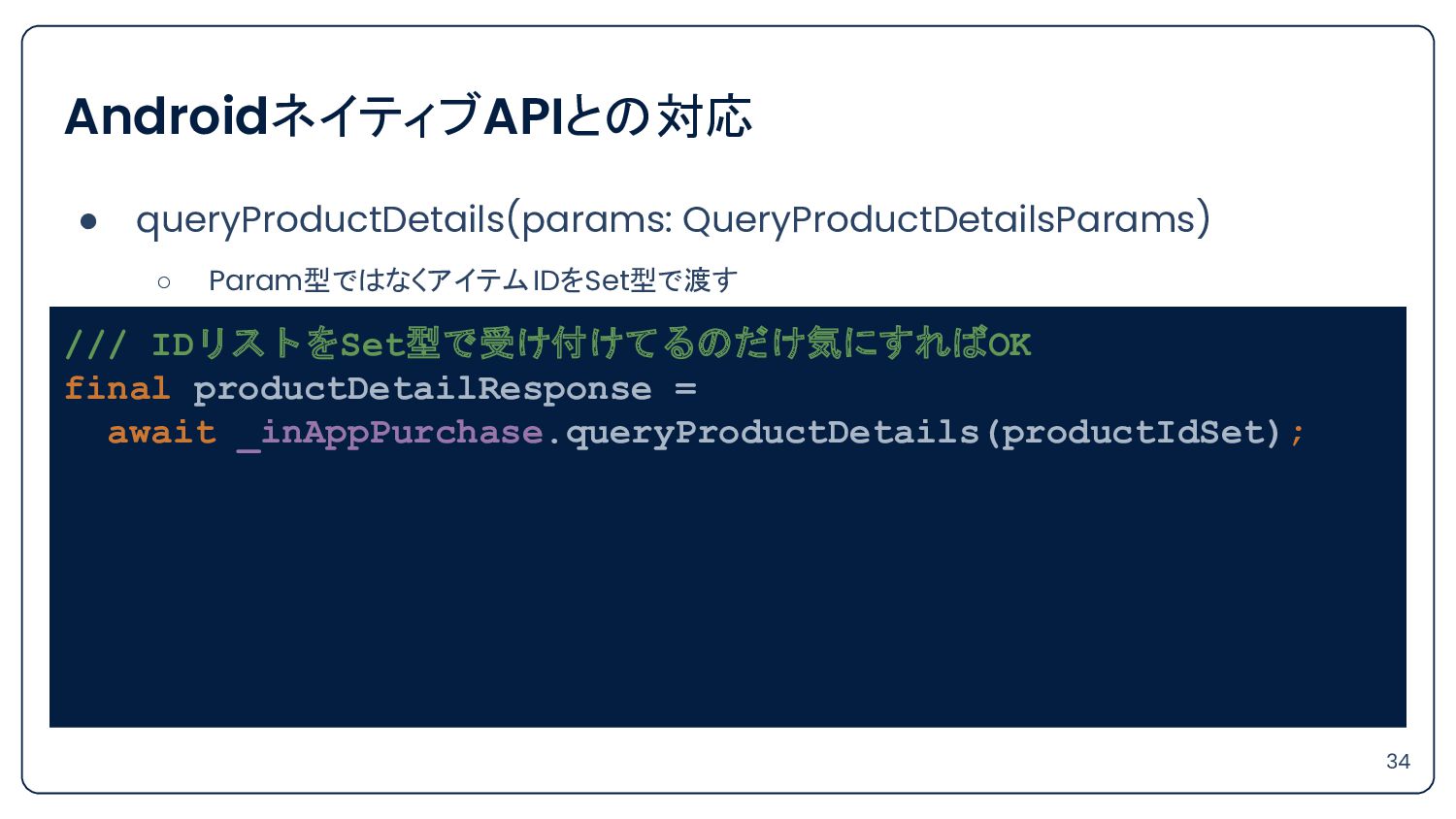
AndroidネイティブAPIとの対応 • queryProductDetails(params: QueryProductDetailsParams) ◦ Param型ではなくアイテムIDをSet型で渡す 34 /// IDリストをSet型で受け付けてるのだけ気にすればOK final
productDetailResponse = await _inAppPurchase.queryProductDetails(productIdSet); -
AndroidネイティブAPIとの対応 • queryProductDetails(params: QueryProductDetailsParams) ◦ inapp/subs両方取得できる 35 billingClientManager.runWithClient( (BillingClient client)
=> client.queryProductDetails( productList: identifiers .map((String productId) => ProductWrapper( productId: productId, productType: ProductType.inapp)) .toList(), ), ), billingClientManager.runWithClient( ~~~ productId: productId, productType: ProductType.subs)) ~~~ -
AndroidネイティブAPIとの対応 • launchBillingFlow(activity: Activity, params: BillingFlowParams) 36 await _inAppPurchase ///
.buyConsumable( .buyNonConsumable( purchaseParam: PurchaseParam( productDetails: productDetails, ), ); -
AndroidネイティブAPIとの対応 • launchBillingFlow(activity: Activity, params: BillingFlowParams) ◦ プラン切り替えのコントロールは GooglePlay特有なので、継承クラスを使う 37
/// プラン切り替えの場合のPurchaseParam final purchaseParam = GooglePlayPurchaseParam( productDetails: productDetails, changeSubscriptionParam: ChangeSubscriptionParam( oldPurchaseDetails: pastPurchases, // 切り替え前のpurchase prorationMode: prorationMode, // 比例配分モード ), ); -
AndroidネイティブAPIとの対応 • PurchasesUpdatedListener { billingResult, purchaseList -> } ◦ Streamが準備されているので
Providerで配布する 38 /// 購入情報通知を受け取るStreamのProvider final iapPurchaseStreamProvider = StreamProvider( (ref) => InAppPurchase.instance.purchaseStream, ); -
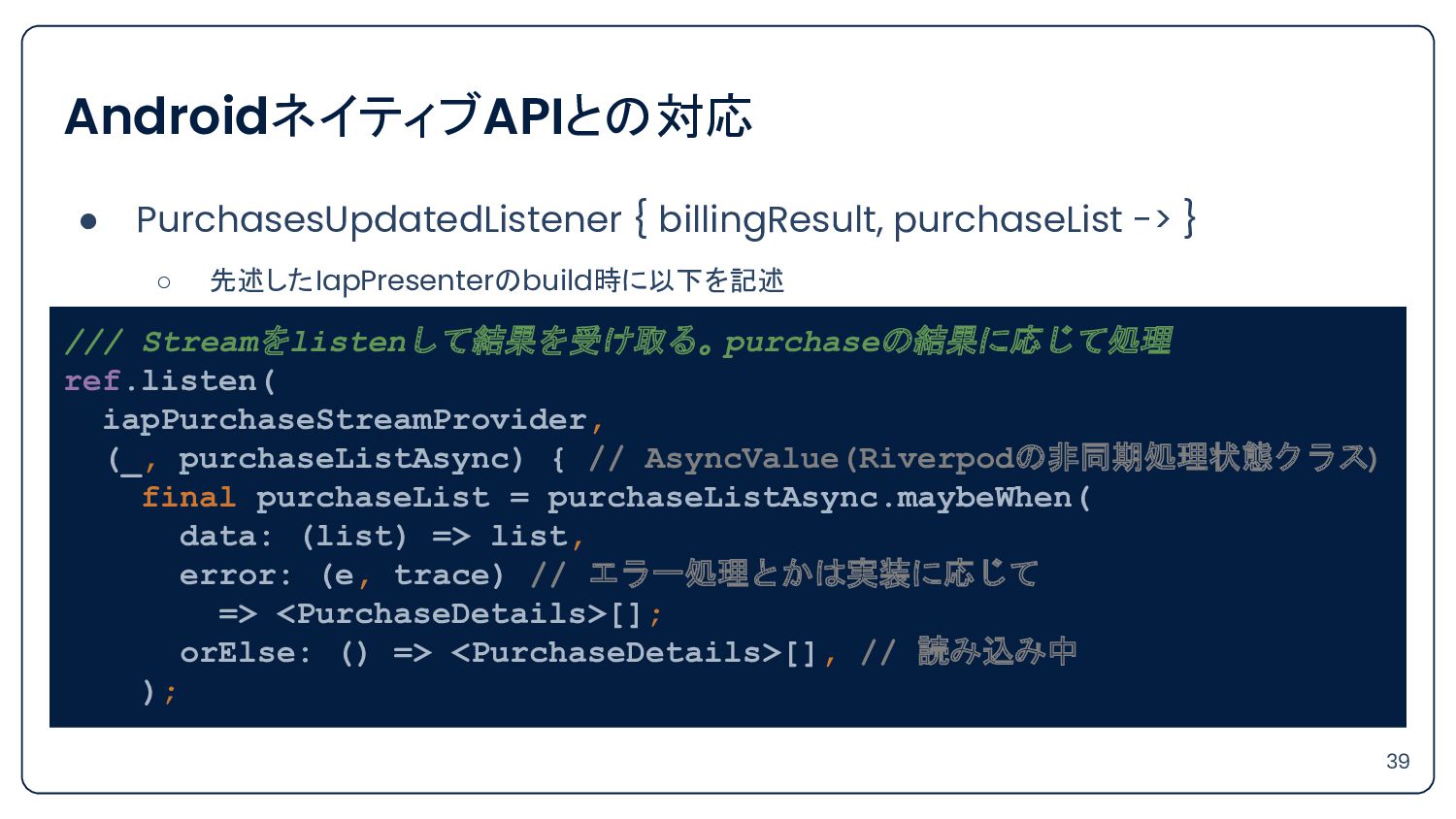
AndroidネイティブAPIとの対応 • PurchasesUpdatedListener { billingResult, purchaseList -> } ◦ 先述したIapPresenterのbuild時に以下を記述
◦ 39 /// Streamをlistenして結果を受け取る。purchaseの結果に応じて処理 ref.listen( iapPurchaseStreamProvider, (_, purchaseListAsync) { // AsyncValue(Riverpodの非同期処理状態クラス) final purchaseList = purchaseListAsync.maybeWhen( data: (list) => list, error: (e, trace) // エラー処理とかは実装に応じて => <PurchaseDetails>[]; orElse: () => <PurchaseDetails>[], // 読み込み中 ); -
AndroidネイティブAPIとの対応 • queryPurchases(params: QueryPurchasesParam) ◦ 復元目的ならこれで OK ◦ 41 ///
内部的にAndroid分岐内でqueryPurchasesを利用している await _inAppPurchase.restorePurchases(); -
AndroidネイティブAPIとの対応 • queryPurchases(params: QueryPurchasesParam) ◦ 復元目的ならこれで OK 42 /// 内部的にAndroid分岐内でqueryPurchasesを利用している
await _inAppPurchase.restorePurchases(); /// BillingClient @override Future<void> restorePurchases({ String? applicationUserName, }) async { List<PurchasesResultWrapper> responses; responses = await Future.wait(<Future<PurchasesResultWrapper>>[ billingClientManager.runWithClient( (BillingClient client) => client.queryPurchases(ProductType.inapp), ), billingClientManager.runWithClient( (BillingClient client) => client.queryPurchases(ProductType.subs), ), ]); -
AndroidネイティブAPIとの対応 • queryPurchases(params: QueryPurchasesParam) ◦ 復元目的ならこれで OK 43 /// 内部的にAndroid分岐内でqueryPurchasesを利用している
await _inAppPurchase.restorePurchases(); /// Storekit @override Future<void> restorePurchases({String? applicationUserName}) async { return _observer .restoreTransactions( queue: _skPaymentQueueWrapper, applicationUserName: applicationUserName) .whenComplete(() => _observer.cleanUpRestoredTransactions()); } -
AndroidネイティブAPIとの対応 • queryPurchases(params: QueryPurchasesParam) ◦ プラン切り替えのために購入済みの PurchaseDetailsが欲しいんだけど……?? 44 /// プラン切り替えの場合のPurchaseParam
final purchaseParam = GooglePlayPurchaseParam( productDetails: productDetails, changeSubscriptionParam: ChangeSubscriptionParam( oldPurchaseDetails: pastPurchases, // 切り替え前のpurchase prorationMode: prorationMode, // 比例配分モード ), ); -
AndroidネイティブAPIとの対応 • queryPurchases(params: QueryPurchasesParam) ◦ プラン切り替えのために購入済みの PurchaseDetailsが欲しいんだけど……?? ◦ 45 ///
READMEのサンプルコード final oldPurchaseDetails = ...; final purchaseParam = GooglePlayPurchaseParam( productDetails: productDetails, changeSubscriptionParam: ChangeSubscriptionParam( oldPurchaseDetails: oldPurchaseDetails, prorationMode: ProrationMode.immediateWithTimeProration)); _inAppPurchase.buyNonConsumable(purchaseParam: purchaseParam); -
AndroidネイティブAPIとの対応 • queryPurchases(params: QueryPurchasesParam) ◦ プラン切り替えのために購入済みの PurchaseDetailsが欲しいんだけど……?? ◦ 46 ///
READMEのサンプルコード final oldPurchaseDetails = ...; final purchaseParam = GooglePlayPurchaseParam( productDetails: productDetails, changeSubscriptionParam: ChangeSubscriptionParam( oldPurchaseDetails: oldPurchaseDetails, prorationMode: ProrationMode.immediateWithTimeProration)); _inAppPurchase.buyNonConsumable(purchaseParam: purchaseParam); ここ!! -
AndroidネイティブAPIとの対応 • queryPurchases(params: QueryPurchasesParam) ◦ プラン切り替えのために購入済みの PurchaseDetailsが欲しいんだけど……?? ◦ 47 ///
Githubのサンプルコード if (Platform.isAndroid) { // NOTE: If you are making a subscription purchase/upgrade/downgrade, // we recommend you to verify the latest status of you your subscription // by using server side receipt validation and update the UI accordingly. // The subscription purchase status shown inside the app may not be accurate. final GooglePlayPurchaseDetails? oldSubscription = _getOldSubscription(productDetails, purchases); -
AndroidネイティブAPIとの対応 • queryPurchases(params: QueryPurchasesParam) ◦ プラン切り替えのために購入済みの PurchaseDetailsが欲しいんだけど……?? ◦ 48 ///
Githubのサンプルコード if (Platform.isAndroid) { // NOTE: If you are making a subscription purchase/upgrade/downgrade, // we recommend you to verify the latest status of you your subscription // by using server side receipt validation and update the UI accordingly. // The subscription purchase status shown inside the app may not be accurate. final GooglePlayPurchaseDetails? oldSubscription = _getOldSubscription(productDetails, purchases); 要約: サーバー上で保持してそれを取得すべき -
AndroidネイティブAPIとの対応 • queryPurchases(params: QueryPurchasesParam) ◦ プラン切り替えのために購入済みの PurchaseDetailsが欲しいんだけど……?? ▪ × ない
▪ ◦ InAppPurchaseのインスタンスから直接は取れない 50 -
AndroidネイティブAPIとの対応 • queryPurchases(params: QueryPurchasesParam) ◦ プラン切り替えのために購入済みの PurchaseDetailsが欲しいんだけど……?? ▪ × ない
▪ ◦ InAppPurchaseのインスタンスから直接は取れない • PlatformAdditionを利用する 51 -
AndroidネイティブAPIとの対応 • AndroidPlatformAddition ◦ queryPurchase ◦ consumePurchase ◦ isFeatureSupported 52
• StorekitPlatformAddition ◦ presentCodeRedemptionSheet ◦ refreshPurchaseVerificationData ◦ setDelegate ◦ showPriceConsentIfNeeded -
AndroidネイティブAPIとの対応 • AndroidPlatformAddition ◦ queryPurchase ◦ consumePurchase ◦ isFeatureSupported 53
• StorekitPlatformAddition ◦ presentCodeRedemptionSheet ◦ refreshPurchaseVerificationData ◦ setDelegate ◦ showPriceConsentIfNeeded -
AndroidネイティブAPIとの対応 • queryPurchases(params: QueryPurchasesParam) ◦ プラットフォーム特有の処理なので PlatformAdditionを利用する 54 /// Google
Play上の現在購入中アイテム情報 [GooglePlayPurchaseDetails]を取得保持 final iapGoogleOwnedPurchaseProvider = FutureProvider.autoDispose( (ref) async { if (!Platform.isAndroid) return null; final platformAddition = inAppPurchase.getPlatformAddition() as InAppPurchaseAndroidPlatformAddition; final response = await platformAddition.queryPastPurchases(); return response.pastPurchases.firstOrNull; }, ); -
AndroidネイティブAPIとの対応 • queryPurchases(params: QueryPurchasesParam) ◦ プラットフォーム特有の処理なので PlatformAdditionを利用する ◦ を利用してプラットフォーム特有の処理をする 55
/// Google Play上の現在購入中アイテム情報 [GooglePlayPurchaseDetails]を取得保持 final iapGoogleOwnedPurchaseProvider = FutureProvider.autoDispose( (ref) async { if (!Platform.isAndroid) return null; final platformAddition = inAppPurchase.getPlatformAddition() as InAppPurchaseAndroidPlatformAddition; final response = await platformAddition.queryPastPurchases(); return response.pastPurchases.firstOrNull; }, ); -
AndroidネイティブAPIとの対応 • consumePurchase(params: ConsumeParam) ◦ こちらもプラットフォーム特有の処理なので PlatformAdditionを利用する ◦ 56 ///
Android専用なのでPlatformAddition経由 final platformAddition = inAppPurchase.getPlatformAddition() as InAppPurchaseAndroidPlatformAddition; final result = await platformAddition.consumePurchases( purchase: purchaseDetail, ); -
AndroidネイティブAPIとの対応 • acknowledgePurchase(params: AcknowledgePurchaseParam) 58 /// 内部的にAndroid分岐内でacknowledgePurchaseを利用している await _inAppPurchase.completePurchase(purchaseDetails); return
billingClientManager.runWithClient( (BillingClient client) => client.acknowledgePurchase( purchase.verificationData.serverVerificationData, ), ); -
AndroidネイティブAPIとの対応 • Purchase ◦ プラットフォームごとに違うので各種 PurchaseDetailsにキャストして取得するといい ◦ /// 共通 class
PurchaseDetails { final String? purchaseID; final String productID; final PurchaseVerificationData verificationData; final String? transactionDate; PurchaseStatus status; 59 -
AndroidネイティブAPIとの対応 • Purchase ◦ プラットフォームごとに違うので各種 PurchaseDetailsにキャストして取得するといい ◦ /// Google Play
class GooglePlayPurchaseDetails extends PurchaseDetails { GooglePlayPurchaseDetails({ super.purchaseID, required super.productID, required super.verificationData, required super.transactionDate, required this.billingClientPurchase, required super.status, }) 60 -
AndroidネイティブAPIとの対応 • Purchase ◦ プラットフォームごとに違うので各種 PurchaseDetailsにキャストして取得するといい ◦ /// App Store
class AppStorePurchaseDetails extends PurchaseDetails { AppStorePurchaseDetails({ super.purchaseID, required super.productID, required super.verificationData, required super.transactionDate, required this.skPaymentTransaction, required PurchaseStatus status, }) 61 -
AndroidネイティブAPIとの対応 • Purchase ◦ VerificationData(購入検証用データ)の内訳 /// GooglePlayPurchaseDetails.verificationData PurchaseVerificationData( localVerificationData: purchase.originalJson,
serverVerificationData: purchase.purchaseToken, source: kIAPSource, // 'google_play'; ), 62 -
AndroidネイティブAPIとの対応 • Purchase ◦ VerificationData(購入検証用データ)の内訳 ◦ ◦ /// AppStorePurchaseDetails.verificationData PurchaseVerificationData(
localVerificationData: base64EncodedReceipt, serverVerificationData: base64EncodedReceipt, source: kIAPSource, // 'app_store'; ), 63 -
AndroidネイティブAPIとの対応 • Purchase ◦ billingClientPurchase にはBilling Libraryで見たことあるパラメータが並ぶ /// GooglePlayPurchaseDetails.billingClientPurchase const
PurchaseWrapper({ required this.orderId, required this.packageName, required this.purchaseTime, required this.purchaseToken, required this.signature, required this.products, required this.isAutoRenewing, required this.originalJson, this.developerPayload, required this.isAcknowledged, required this.purchaseState, this.obfuscatedAccountId, this.obfuscatedProfileId, }); 64 -
• Purchase ◦ 購入検証用データまとめ ◦ /// Google Play final originalJson
= googlePurchaseDetails.verificationData.localVerificationData; = googlePurchaseDetails.billingClientPurchase.originalJson; final purchaseToken = googlePurchaseDetails.verificationData.serverVerificationData; = googlePurchaseDetails.billingClientPurchase.purchaseToken; final signature = googlePurchaseDetails.billingClientPurchase.signature; AndroidネイティブAPIとの対応 65 -
• Purchase ◦ 購入検証用データまとめ ◦ AndroidネイティブAPIとの対応 /// App Store final
base64EncodedReceipt = appStorePurchaseDetails.verificationData.localVerificationData; = appStorePurchaseDetails.verificationData.serverVerificationData; 66 -
AndroidネイティブAPIとの対応 • purchase.isAcknowledged ◦ iOSとかなり意味が違うので、利用時はそこだけ分岐が必要 ◦ 68 /// Android: !isAcknowledged 承認処理のされていない購入であること
class GooglePlayPurchaseDetails extends PurchaseDetails { pendingCompletePurchase = !billingClientPurchase.isAcknowledged; /// iOS: status != PurchaseStatus.pending /// statusが保留中でないこと class AppStorePurchaseDetails extends PurchaseDetails { pendingCompletePurchase = status != PurchaseStatus.pending; -
AndroidネイティブAPIとの対応 • purchase.isAcknowledged ◦ 「購入処理中」「ParentalControlなどによる保留中」の場合に pendingとなる 69 /// AppStorePurchaseDetails.status の判定抜粋
PurchaseStatus toPurchaseStatus( SKPaymentTransactionStateWrapper object, SKError? error) { switch (object) { case SKPaymentTransactionStateWrapper.purchasing: case SKPaymentTransactionStateWrapper.deferred: return PurchaseStatus.pending; -
AndroidネイティブAPIとの対応 • purchase.isAcknowledged ◦ このライブラリでは、 購入処理を始める準備ができているか のbool値と認識するとよさそう 70 /// Android
pendingCompletePurchase = !billingClientPurchase.isAcknowledged; /// iOS pendingCompletePurchase = !SKPaymentTransactionStateWrapper.purchasing && !SKPaymentTransactionStateWrapper.deferred; -
Agenda • 本セッションについて • 利用ライブラリについて • AndroidネイティブAPIとの対応 • 購入と復元 •
iOS特有の処理について • まとめ 71 -
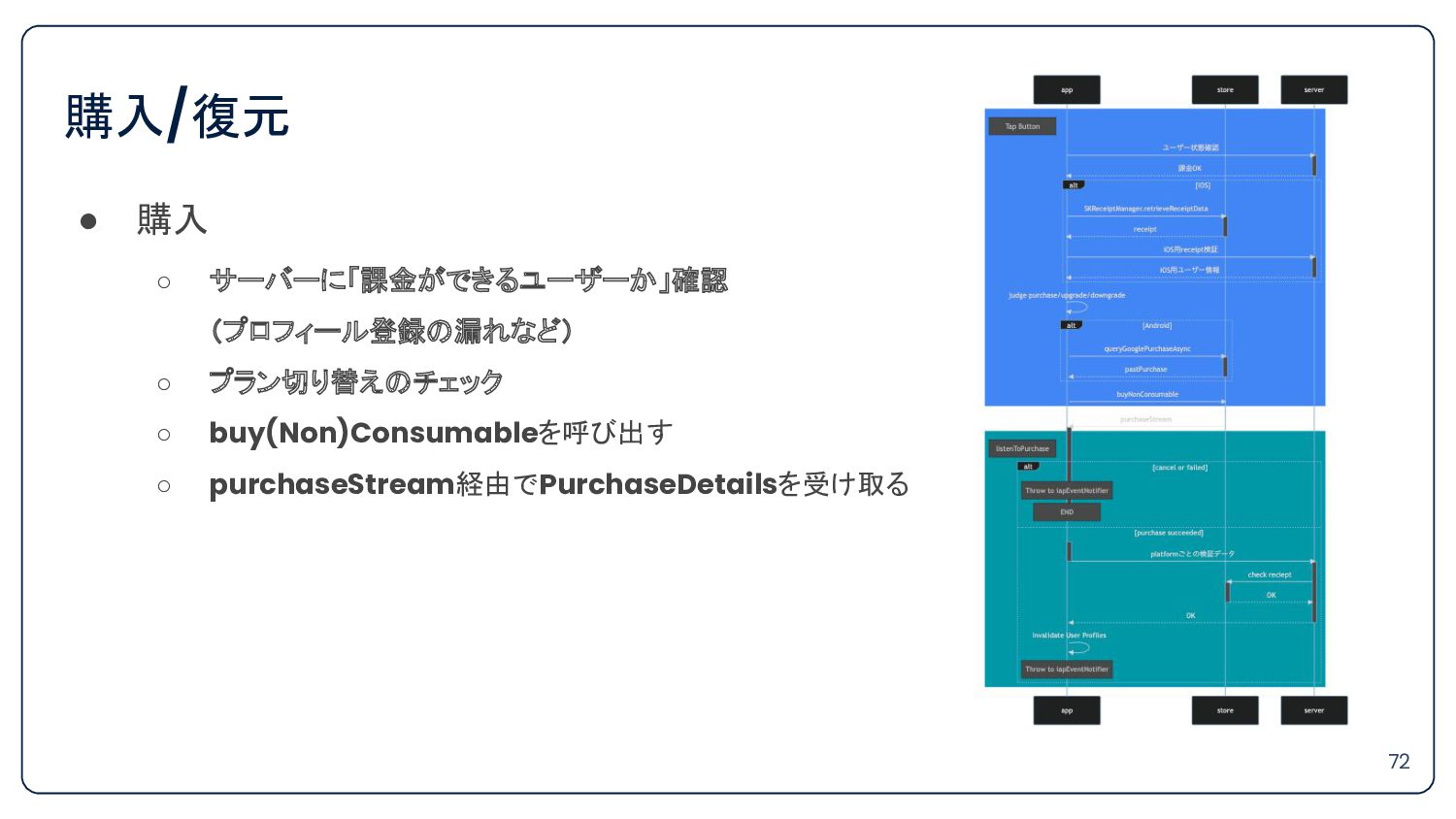
購入/復元 • 購入 ◦ サーバーに「課金ができるユーザーか」確認 (プロフィール登録の漏れなど) ◦ プラン切り替えのチェック ◦ buy(Non)Consumableを呼び出す
◦ purchaseStream経由でPurchaseDetailsを受け取る 72 -
購入/復元 • PurchaseDetails自身が購入結果なのか復元結果なのかを知っている 80 class PurchaseDetails { /// The status
that this [PurchaseDetails] is currently on. PurchaseStatus status; /// Status for a [PurchaseDetails]. enum PurchaseStatus { pending, purchased, error, restored, canceled, } -
購入/復元 • 「購入/復元/アップグレード」 ◦ IMMEDIATE_AND_CHARGE_FULL_PRICE ◦ 即時変更 ◦ キャラクターと謝辞表示 •
「ダウングレード」 ◦ DEFERRED ◦ 次回更新時にプラン変更が遅延 ◦ 簡素にダイアログの表示 83 -
• Androidでの実装では ◦ 購入と復元でフローが違ったので購入時だけ判定できればよかった PurchasesUpdatedListener { billingResult, purchaseList -> /**
アップグレードはIMMEDIATE、ダウングレードはDEFERRED * DEFERREDの場合は購入が成功した直後に purchaseList が * 「現在有効な product(isAcknowledged = true)」で入ってくる */ if (purchaseList.all { it.isAcknowledged }) { // ダウングレード判定 } else { // アップグレード判定 } 購入/復元 84 -
購入/復元 • Flutterでの実装では ◦ 復元も購入と同様に PurchaseStreamを通ることで、復元時も考慮する必要ができた ◦ iOSのことも考えると isAcknowledged( つまり
pendingCompletePurchase) による判定では正しく判定できない 85 -
購入/復元 86 • ここで思い出すInAppPurchaseState /// [InAppPurchase]でストア処理を行うPresenter class IapPresenter extends AsyncNotifier<InAppPurchaseState>
{ IapPresenter() : super(); final _inAppPurchase = InAppPurchase.instance; @override FutureOr<InAppPurchaseState> build() async { ~~~~ 今こそ説明します -
購入/復元 • InAppPurchaseState ◦ IapPresenterで必要な状態/Stateを保持するデータクラス 87 @freezed class InAppPurchaseState with
_$InAppPurchaseState { const factory InAppPurchaseState({ @Default(false) bool isAvailable, @Default(InAppPurchaseFlow.none) InAppPurchaseFlow currentFlow, }) = _InAppPurchaseState; } -
購入/復元 • InAppPurchaseState ◦ InAppPurchaseで必要な状態を保持するデータクラス • 88 @freezed class InAppPurchaseState
with _$InAppPurchaseState { const factory InAppPurchaseState({ @Default(false) bool isAvailable, @Default(InAppPurchaseFlow.none) InAppPurchaseFlow currentFlow, }) = _InAppPurchaseState; } -
購入/復元 • InAppPurchaseFlow ◦ 現在の処理フローを示す列挙型を用意 89 enum InAppPurchaseFlow { ///
purchase (free -> basic or premium) purchase, /// purchase (basic -> premium) planUpgrade, /// purchase (premium -> basic) planDowngrade, /// restore (free -> basic or premium) restore, /// default (Idling) none; } -
購入/復元 • IapPresenterがInAppPurchaseFlowをStateとして所持する 90 /// IapPresenterの復元開始メソッド Future<void> launchRestoreFlow() async {
/// 処理開始時に現在のフローを変更 state = InAppPurchaseFlow.restore; // 重要部抜粋 await _inAppPurchase.restorePurchases(); -
購入/復元 • 処理完了時に「現在の処理が完了した」ことを通知する 91 /// IapPresenterのPurchaseStream受け取り後 /// サーバーへ反映 await ~~;
/// Viewへ処理フローが終わったEventを投げる ref.read(iapEventNotifierProvider.notifier).compleat( flow: currentFlow, ); /// Eventを投げた後にリセット state = InAppPurchaseFlow.none; // 重要部抜粋 -
購入/復元 • IapEventNotifier ◦ 処理フローが終わった際に Viewへの反映のために通知する 92 /// [IapPresenter] が各ストアを通して行った処理の結果を流すための
[Notifier] class IapEventNotifier extends AutoDisposeNotifier<InAppPurchaseEvent> { void compleat({ required InAppPurchaseFlow flow, }) { state = InAppPurchaseEvent.compleat( flow: flow, ); } -
購入/復元 • Viewへの反映 93 ref.listen( iapEventNotifierProvider, (_, event) { event.when(
compleat: (flow) { switch (flow) { case InAppPurchaseFlow.purchase: /// or restore or planUpgrade /// 購入/復元/アップグレード表示 case InAppPurchaseFlow.planDowngrade: /// ダウングレード表示 -
購入/復元 • 課題は2つ 1. 「購入」と「復元」の区別 => 購入結果の値から判別すれば OK 2. 「購入/復元/アップグレード」と「ダウングレード」の区別
=> 処理フローをPresenterがStateとして保持して完了時に通知 94 -
Agenda • 本セッションについて • 利用ライブラリについて • AndroidネイティブAPIとの対応 • 購入と復元 •
iOS特有の処理について • まとめ 95 -
iOS特有の処理について • startConnection成功時の処理 ◦ PaymentQueueDelegateの設定/破棄 /// init iOS IAP [SKPaymentQueue.default().add(SKPaymentTransactionObserver
instance)] if (Platform.isIOS) { final InAppPurchaseStoreKitPlatformAddition iosPlatformAddition = inAppPurchase.getPlatformAddition<InAppPurchaseStoreKitPlatformAddition>(); await iosPlatformAddition.setDelegate(ExamplePaymentQueueDelegate()); } /// close iOS IAP [SKPaymentQueue.default().remove(SKPaymentTransactionObserver instance)] ref.onDispose( () { if (Platform.isIOS) { final InAppPurchaseStoreKitPlatformAddition iosPlatformAddition = inAppPurchase.getPlatformAddition<InAppPurchaseStoreKitPlatformAddition>(); iosPlatformAddition.setDelegate(null); } }, ); 97 -
iOS特有の処理について • startConnection成功時の処理 ◦ StorekitPlatformAdditionが利用されている /// init iOS IAP [SKPaymentQueue.default().add(SKPaymentTransactionObserver
instance)] if (Platform.isIOS) { final InAppPurchaseStoreKitPlatformAddition iosPlatformAddition = inAppPurchase.getPlatformAddition<InAppPurchaseStoreKitPlatformAddition>(); await iosPlatformAddition.setDelegate(ExamplePaymentQueueDelegate()); } /// close iOS IAP [SKPaymentQueue.default().remove(SKPaymentTransactionObserver instance)] ref.onDispose( () { if (Platform.isIOS) { final InAppPurchaseStoreKitPlatformAddition iosPlatformAddition = inAppPurchase.getPlatformAddition<InAppPurchaseStoreKitPlatformAddition>(); iosPlatformAddition.setDelegate(null); } }, ); 98 -
iOS特有の処理について • startConnection成功時の処理 ◦ 注) サンプルコードの実装ママ /// Example implementation of
the /// [`SKPaymentQueueDelegate`] (https://developer.apple.com/documentation/storekit/skpaymentqueuedelegate?language=objc). /// The payment queue delegate can be implemented to provide information needed to complete transactions. class ExamplePaymentQueueDelegate implements SKPaymentQueueDelegateWrapper { /// https://developer.apple.com/documentation/storekit/skpaymentqueuedelegate/3242935-paymentqueue @override bool shouldContinueTransaction( SKPaymentTransactionWrapper transaction, SKStorefrontWrapper storefront, ) => true; /// https://developer.apple.com/documentation/storekit/skpaymentqueue/3521327-showpriceconsentifneeded @override bool shouldShowPriceConsent() => false; } 99 -
iOS特有の処理について • startConnection成功時の処理 ◦ 購入トランザクション中に StoreFrontが変更された際にトランザクションを続行するか否か /// Example implementation of
the /// [`SKPaymentQueueDelegate`] (https://developer.apple.com/documentation/storekit/skpaymentqueuedelegate?language=objc). /// The payment queue delegate can be implemented to provide information needed to complete transactions. class ExamplePaymentQueueDelegate implements SKPaymentQueueDelegateWrapper { /// https://developer.apple.com/documentation/storekit/skpaymentqueuedelegate/3242935-paymentqueue @override bool shouldContinueTransaction( SKPaymentTransactionWrapper transaction, SKStorefrontWrapper storefront, ) => true; /// https://developer.apple.com/documentation/storekit/skpaymentqueue/3521327-showpriceconsentifneeded @override bool shouldShowPriceConsent() => false; } 100 -
iOS特有の処理について • startConnection成功時の処理 ◦ 定期購読の値上げに未応答の場合、価格同意シートを表示するか否か /// Example implementation of the
/// [`SKPaymentQueueDelegate`] (https://developer.apple.com/documentation/storekit/skpaymentqueuedelegate?language=objc). /// The payment queue delegate can be implemented to provide information needed to complete transactions. class ExamplePaymentQueueDelegate implements SKPaymentQueueDelegateWrapper { /// https://developer.apple.com/documentation/storekit/skpaymentqueuedelegate/3242935-paymentqueue @override bool shouldContinueTransaction( SKPaymentTransactionWrapper transaction, SKStorefrontWrapper storefront, ) => true; /// https://developer.apple.com/documentation/storekit/skpaymentqueue/3521327-showpriceconsentifneeded @override bool shouldShowPriceConsent() => false; } 101 -
iOS特有の処理について • ReceiptData取得処理 ◦ StoreKitPlatformAdditionからVerificationDataを取得できる if (!Platform.isIOS) return null; final
platformAddition = inAppPurchase.getPlatformAddition() as InAppPurchaseStoreKitPlatformAddition; final verificationData = await platformAddition.refreshPurchaseVerificationData(); final receipt = verificationData?.serverVerificationData; 103 -
iOS特有の処理について • ReceiptData取得処理 ◦ StoreKitPlatformAddition内部 Future<PurchaseVerificationData?> refreshPurchaseVerificationData() async { await
SKRequestMaker().startRefreshReceiptRequest(); try { final String receipt = await SKReceiptManager.retrieveReceiptData(); return PurchaseVerificationData( localVerificationData: receipt, serverVerificationData: receipt, source: kIAPSource); } catch (e) { print( 'Something is wrong while fetching the receipt, this normally happens when the app is ' 'running on a simulator: $e'); return null; } } 104 -
iOS特有の処理について • ReceiptData取得処理 ◦ リフレッシュした上で Receipt取得している Future<PurchaseVerificationData?> refreshPurchaseVerificationData() async {
await SKRequestMaker().startRefreshReceiptRequest(); try { final String receipt = await SKReceiptManager.retrieveReceiptData(); return PurchaseVerificationData( localVerificationData: receipt, serverVerificationData: receipt, source: kIAPSource); } catch (e) { print( 'Something is wrong while fetching the receipt, this normally happens when the app is ' 'running on a simulator: $e'); return null; } } 105 -
iOS特有の処理について • ReceiptData取得処理 ◦ nullable回避や例外処理まとめたいなら、 in_app_purchase_storekit直接参照も可能 await SKRequestMaker().startRefreshReceiptRequest(); try {
/// 現在ログインしている Appleアカウントの購入情報情報 (Receipt)をAppStoreに問い合わせ final receipt = await SKReceiptManager.retrieveReceiptData(); /// Receiptを使ってサーバーに必要な情報を問い合わせる return await ~~~; }catch (e) { /// 例外処理 } 106 -
Agenda • 本セッションについて • 利用ライブラリについて • AndroidネイティブAPIとの対応 • 購入と復元 •
iOS特有の処理について • まとめ 107 -
• https://pub.dev/packages/in_app_purchase を利用すれば、 アプリ内課金も含めてFlutterによる完全なる統一は目指せる ◦ もちろんサービスの事情次第で「目指すか」自体は検討すべき • Flutter公式のライブラリなので安心感はある • Billing
Libraryの追従は問題なさそう • StoreKit2はこれからに期待 まとめ 108 -
まとめ • APIがInAppPurchase本体になかったら各Platform用のクラスを調べよう ◦ [Android/StoreKit] PlatformAddition ◦ [GooglePlay/AppStore] PurchaseDetails •
それでもなかったら依存先の内部を直接見てみよう ◦ in_app_purchase_android ◦ in_app_purchase_storekit 109
 nacatl
 rkaga
 guaca
 yuuu
 miccheng
 sylph01
 yegor256
 seosoft
 ziobrando
 giljongyu
 akihisaikeda
 quramy
 ivargrimstad
 akihiro_kokubo
 katarinadahlin
 addyosmani
 wayneb77
 morganepeng
 nonsquared
 62gerente
 caitiem20
 akademiya2063
 mfonobong
 stephenakadiri
 mongodb