Share
Embed
Open Build Service Project Workshop
This workshop is for members of open source projects or employees of software vendors that want to use the Open Build Service to deliver not only single packages but large collections of them, for instance a GNU/Linux distribution.
Open Build Service
September 05, 2012
Transcript
34 slides
-
3 Develop Large Project Best Practices ✔ Breaking Projects Down
✔ Multi-level review ✔ Multi-level integration 1 -
4 Develop Large Projects Breaking Project Down Large projects, like
the openSUSE distribution, with many contributors have staging areas where software stacks get integrated Devel Project Package Branched Project Package branch Request Project Package branch Request devel -
5 Terminal X Develop Large Projects Contributor Branch/Submit frank@laptop $
osc branch openSUSE:Factory gcal Note: The branch has been created of a different project, Base:System, which is the primary location of where development for that package takes place. That's also where you would normally make changes against. A direct branch of the specified package can be forced with the --nodevelproject option. A working copy of the branched package can be checked out with: osc co home:frank:branches:Base:System/gcal frank@laptop $ osc submitreq -m "Updated gcal to version 3.6" created request id 0815 After Making the Changes -
6 Develop Large Projects Developer Asseses Requests Terminal X you@laptop
$ Terminal X joe@home $ osc request list Base:System 0815 State:new By:frank When:2012-08-16T15:00:14 submit: home:frank:branches:Base:System/gcal -> Base:System Descr: Updated gcal to version 3.6 joe@home $ osc request show -d 0815 ... joe@home $ osc request accept 0815 -m "Thank you for your contribution :-)" Result of change request state: ok joe@home $ osc submitreq Base:System gcal openSUSE:Factory -m "updated to 3.6" created request id 2342 After Integrating the Changes -
7 Collaborating on Packages Assess Requests Terminal X you@laptop $
Terminal X martin@work $ osc request list openSUSE:Factory 0815 State:new By:frank When:2012-08-16T15:00:14 submit: home:frank:branches:Base:System/gcal -> Base:System Descr: Updated gcal to version 3.6 martin@work $ osc request accept 0815 -m "Accepted, thank you for the update!" Result of change request state: ok -
8 Develop Large Projects Multi-level review Base:System Joe home:frank Frank
openSUSE:Factory Martin Request Branch Request Branch Review Review -
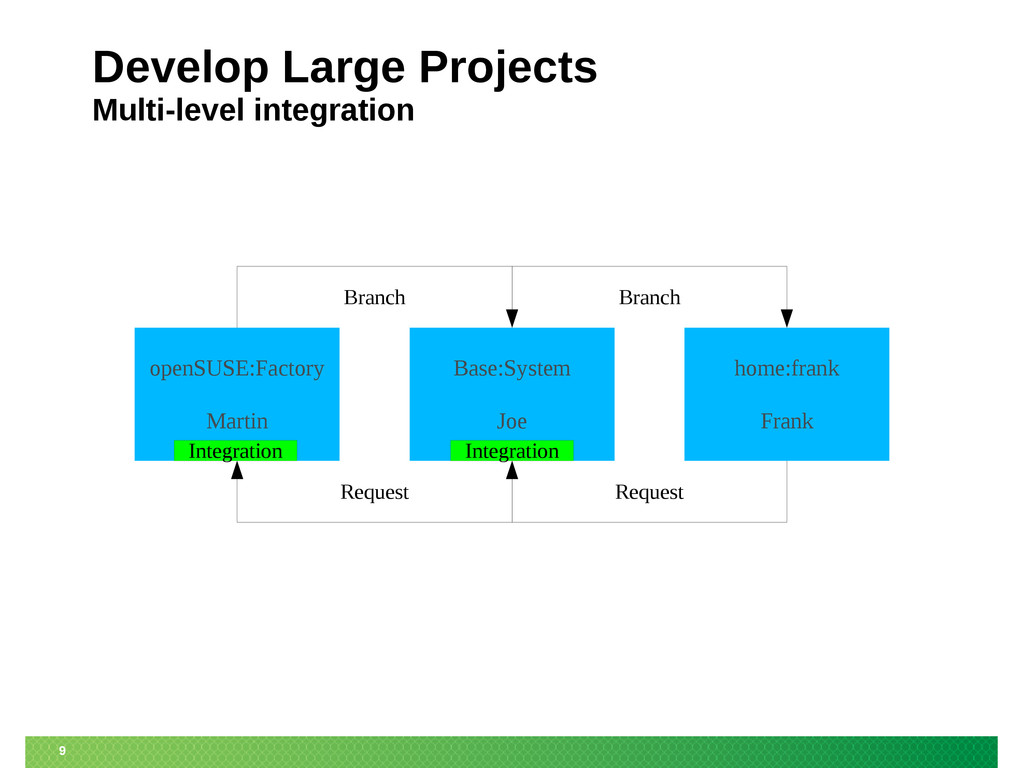
9 Develop Large Projects Multi-level integration Base:System Joe home:frank Frank
openSUSE:Factory Martin Request Branch Request Branch Integration Integration -
11 openSUSE:X.y:Update Reviewer: QA team Reviewer: Factory team Approver: maintenance
team Example: Make an official update openSUSE:Maintenance:99 home:tom:branches... Incident Request (Source only) Maintenance team approval required Release Request (Source & Binaries) Update ID gets generated openSUSE:Maintenance Reviewer: Factory team? Approver: maintenance team -
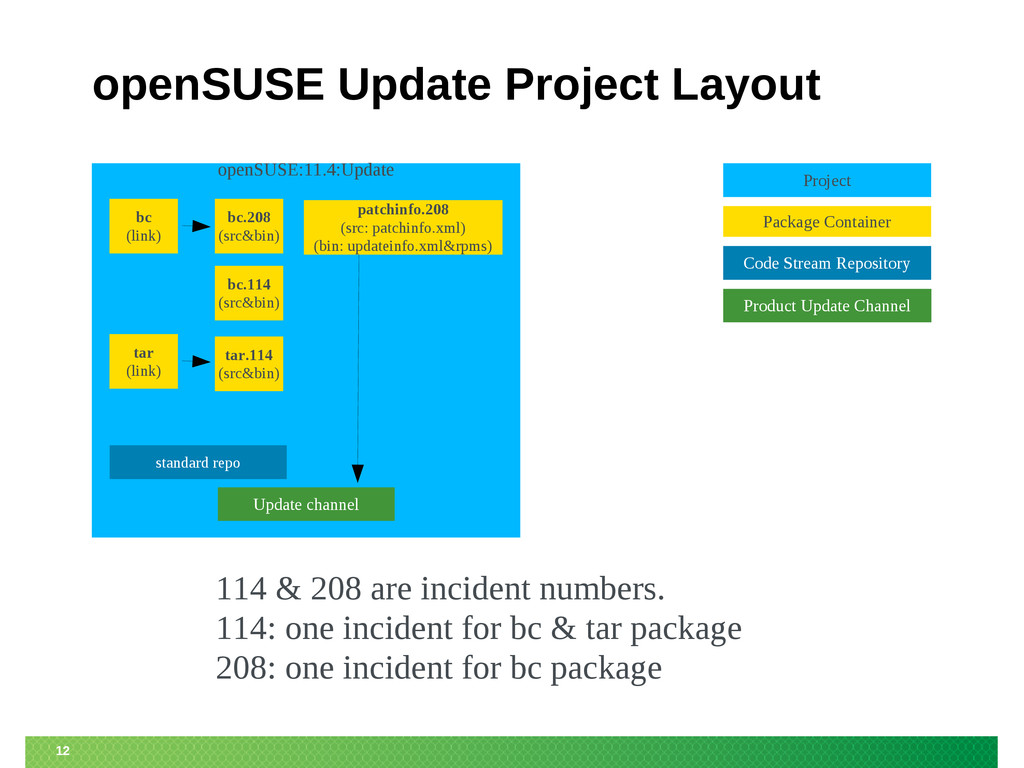
12 openSUSE Update Project Layout openSUSE:11.4:Update standard repo bc.208 (src&bin)
Project Code Stream Repository Package Container Product Update Channel bc.114 (src&bin) bc (link) 114 & 208 are incident numbers. 114: one incident for bc & tar package 208: one incident for bc package Update channel patchinfo.208 (src: patchinfo.xml) (bin: updateinfo.xml&rpms) tar.114 (src&bin) tar (link) -
14 Source Package Image OBS KIWI Imaging OBS user submits
source to OBS and gets a product OBS -
15 OBS Imageing compared to other KIWI solutions 1/2 Running
KIWI manually: ‒ All KIWI functionalities are usable. ‒ Best way to hack on KIWI. ‒ Build happens local. Imaging in Studio: ‒ For fast and easy image creation. ‒ Easy and integrated testing of the image. ‒ Workflow and tool guided image creation. ‒ Interactive working style. ‒ Server side image creation -
16 OBS Imageing compared to other KIWI solutions 2/2 Imaging
in Build Service: ‒ Batched processed image building depending on single package build results. ‒ Recommended for product/installation medias. ‒ Low-Level / Command line interface only. ‒ Allows usage of modified kiwi tool or kiwi descriptions in own project. ‒ Server side and local building options. ‒ Integrating of regular image builds into maintenance process for official products. ‒ Supports multiple KIWI version per Image (using it from the projects). -
17 Image Builds from OBS POV OBS knows currently these
types of packages: ‒ rpm/spec builds ‒ deb/dsc builds ‒ KIWI Image (aka known as appliance image) ‒ KIWI Product Image (aka Installation Media) Planned: ‒ QA builds ‒ MS Windows builds → Image builds are just another “package” build for the Build Service. -
18 Limitations of Image builds within OBS The OBS has
as highest goal a clean and reproducable image build, as soon as possible (eg. not waiting for OpenOffice build when not needed). As a result we have the following limitations compared to plain KIWI usage: • Only OBS repositories can be used. • Own/modified boot description templates needs to get packaged. • Used packages must be unambiguous ! • Currently no pattern support. • Server may wait for building packages and does not start immediately. → Local osc build works at any time. • Non-ISO build results are stored in tar ball, extended with Build number. -
19 How to setup a KIWI repo • Create a
repository in a project. ‒ Enable wanted architectures ‒ No other repository needed in project config. KIWI's xml is specifing it. • Create project config, setting this repository to ‒ Type: kiwi ‒ Repotype: none • Create a package • Submit adapted KIWI config files. -
20 What needs to be changed in KIWI configs for
OBS ? • The config.xml needs to be suffixed as .kiwi • Repositories needs to be specified as obs://$PROJECT/$REPOSITORY ‒ obs:// refers always to the used build service. ‒ Example: obs://openSUSE:11.1/standard • Content of root directory needs to get packaged as root.tar or root.tar.bz2 • In case of expansion error “have choice” just select a package and add it to your package list. -
21 Examples openSUSE Factory Live CD in → openSUSE:Factory:Live Project
KDE:Media Live CDs in → KDE:Medias Project OBS worker images (netboot deployment) in → openSUSE:Tools Project Product preload rescue disk in → internal Devel:Moblin Project JeOS based on SLES 10 and 11 in → internal Devel:JeOS Project -
22 Future Plans • Support patterns • Integrate into QA
system for testing a produced build automatically (NOT interactive). • Connect to SUSE Studio somehow for kiwi config exchange -
24 What are Products ? • Products are SUSE specific.
• Products are medias with plain rpm packages, to be handled via YaST or zypper. • The Media may be bootable. • Medias can be CD iso files, DVD iso files or FTP trees. • The media may support multiple architectures. • Examples are the openSUSE 11.1 DVD or the Non-OSS FTP tree Add-On. -
25 A Product from KIWI POV • A product KIWI
config looks complete different to a system image. (Own section) • No automatic dependency solving between packages. • It works only with local rpm repositories currently. • KIWI needs to deal with ‒ RPM package which are used for installation ‒ Meta packages (get extracted on the media) ‒ Generate meta data -
26 A Product In Detail A typical product media consist
of: • An rpm repository • Meta data ‒ Patterns (prepared package selections) ‒ Bootable initrd starting YaST for installation ‒ Theming ‒ EULA / License Information A product may consist of multiple product medias ! -
27 Example Product OpenSUSE 11.1 comes as: ‒ DVD5 for
i586, x86_64 and ppc each ‒ DVD9 for i586 and x86_64 together ‒ FTP tree for i586 and x86_64 together ‒ FTP tree for ppc and ppc64 together ‒ NET boot media i586, x86_64 and ppc each OpenSUSE 11.1 Non-OSS comes as: ‒ CD for i586, x86_64 and ppc each ‒ FTP tree for i586 and x86_64 together ‒ FTP tree for ppc -
28 The Problem Each product media needs • An own
kiwi config • An own release flavor package • Meta packages to be put one the media. This means in each of them is some data which needs to be kept in sync. Like package lists or the Beta/RC version. -
29 The Solution • We have product configs in Build
Service, specifing all medias for a Product. • Multiple Products from one code stream can share definitions(eg SLE-11 or openSUSE:11.1). • The OBS product converter creates ‒ All kiwi config files ‒ A spec file for release packages, including all flavors. ‒ Patterns on media (in future) • Product definitions are stored in “_product” package, all resulting sources gets generated as “_product:....” packages on checkin time. -
30 Nice New Features • KIWI allows to collect automatically
all required source and debug packages. • Not Yet: One place to maintain package lists for products and patterns. • Not Yet: Automatic dependency solving for products optional. -
31 Examples and Documentation • openSUSE 11.1 was the first
product using this. • SLE-11 based products followed. • Product Definition wiki pages • And of course the general KIWI documentation describing how to create an installation source manually. -
32 Future • Adapt KIWI after PDB migration ‒ Obsolete
some meta packages ‒ Obsolete some autobuild tools with native implementation → Significant speed up hopefully • Support Driver Update Disks in KIWI • Support pattern generation based on product config • Code/return value cleanup • Media overflow handling ? • Optional package dependency resolving ? • KIWI remote repository support ? -
Thank you. 33 Learn more about the Open Build Service
www.openbuildservice.org