Share
Embed
Chicago Roboto 2017: Cool ConstraintLayout
Huyen's talk on cool things about and cool things to do with ConstraintLayout given at Chicago Roboto 2017.
Huyen Tue Dao
April 21, 2017
Transcript
55 slides
-
COOL THINGS ABOUT CONSTRAINT LAYOUT COOL THINGS TO DO WITH
CONSTRAINT LAYOUT -
HOW DOES IT WORK? CONSTRAINTS EQUATIONS SOLVER POSITION FIXED WRAP
CONTENT MATCH CONSTRAINT RATIO EDGE CENTER BASELINE DIMENSION OTHER 8 GUIDELINES CHAINS CONSTRAINT SET -
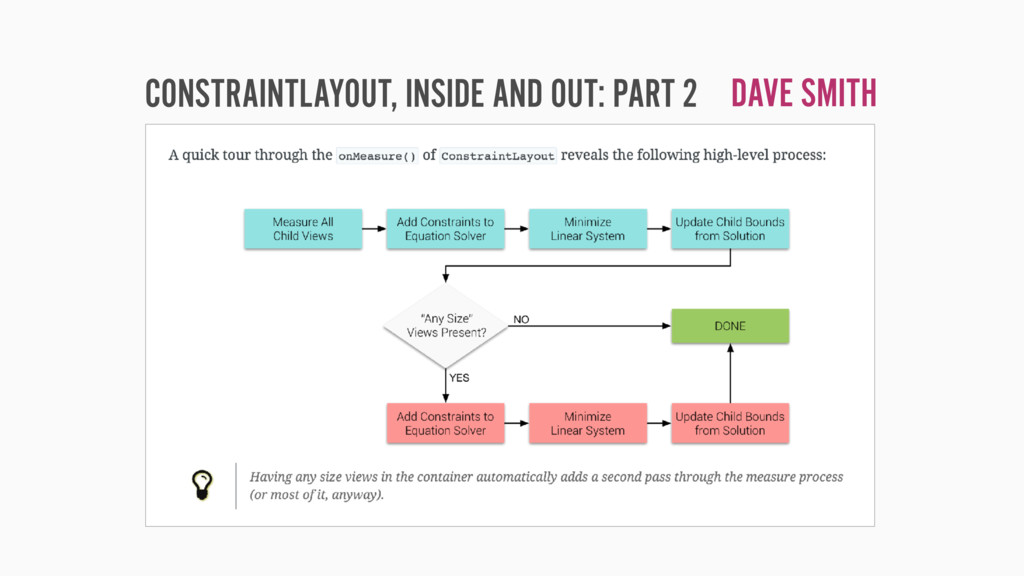
CONSTRAINTS EQUATIONS SOLVER LINEAR SYSTEM OF EQUATIONS/INEQUALITIES 9 HOW DOES
IT WORK? 11 + … + 1n = 11 + … + 1n ≤ 11 + … + 1n ≥ -
CONSTRAINTS EQUATIONS SOLVER CASSOWARY LINEAR ARITHMETIC CONSTRAINT SOLVING ALGORITHM VIEW
BOUNDS 10 HOW DOES IT WORK? -
<android.support.constraint.Guideline android:layout_width="wrap_content" android:layout_height="wrap_content" android:id="@+id/guideline_start" android:orientation="vertical" app:layout_constraintGuide_begin="16dp" /> <android.support.constraint.Guideline
android:layout_width="wrap_content" android:layout_height="wrap_content" android:id="@+id/horizontal" android:orientation="horizontal" app:layout_constraintGuide_percent="0.37" /> -
public class SquareImageView extends ImageView { @Override protected void onMeasure(int
widthMeasureSpec, int heightMeasureSpec) { super.onMeasure(widthMeasureSpec, heightMeasureSpec); final int size = Math.min(getMeasuredWidth(), getMeasuredHeight()); setMeasuredDimension(size, size); } -
<!-- Dimension ratios --> <string name="dimension_ratio_home_hero">H,16:10</string> <!-- In action in
XML --> app:layout_constraintDimensionRatio="@string/dimension_ratio_home_hero" -
private fun updateManualAnchors() { val size = anchorMinSize + seekBar.progress
val halfSize = Math.round(size * 0.5f) val horizontalMargin = resources.getDimensionPixelSize(R.dimen.content_margin_horizontal) - halfSize val verticalMargin = resources.getDimensionPixelSize(R.dimen.alignment_rectangle_margin_vertical) - halfSize updateManualAnchor(frameAnchorTop, size, verticalMargin, 0, 0, 0) updateManualAnchor(frameAnchorStart, size, 0, horizontalMargin, 0, 0) updateManualAnchor(frameAnchorBottom, size, 0, 0, verticalMargin, 0) updateManualAnchor(frameAnchorEnd, size, 0, 0, 0, horizontalMargin) } private fun updateManualAnchor(anchor: View, size: Int, marginTop: Int, marginStart: Int, marginBottom: Int, marginEnd: Int) { val layoutParams = anchor.layoutParams as FrameLayout.LayoutParams layoutParams.width = size layoutParams.height = size layoutParams.topMargin = marginTop layoutParams.bottomMargin = marginBottom layoutParams.marginStart = marginStart layoutParams.marginEnd = marginEnd anchor.layoutParams = layoutParams } WITH CONSTRAINTLAYOUT JUST CHANGE THE SIZE… -
<TextView android:id=“@+id/weighted_chain_head android:layout_width="0dp" android:layout_height="wrap_content" app:layout_constraintHorizontal_chainStyle="spread" app:layout_constraintHorizontal_weight=“1" /> <TextView android:id=“@+id/next android:layout_width="0dp"
android:layout_height="wrap_content" app:layout_constraintHorizontal_weight="2" /> <TextView android:id=“@+id/last android:layout_width="0dp" android:layout_height="wrap_content" app:layout_constraintHorizontal_weight="1" /> 33 WEIGHTED CHAIN -
CONSTRAINT SET CREATE/SAVE/APPLY CREATE MANUALLY CLONE A LAYOUT FILE CLONE
A CONSTRAINT LAYOUT AWESOME WITH TRANSITIONS DEFINE SET OF CONSTRAINTS PROGRAMMATICALLY -
// Inflate initial layout as usual. setContentView(R.layout.activity_constraintset_01) // Get references
to controls constraintLayout = findViewById(R.id.constraint_layout) as ConstraintLayout // Load ConstraintSets. constraintSet01.clone(constraintLayout) constraintSet02.clone(this, R.layout.activity_constraintset_02) …some time later… // Toggle ConstraintSets. TransitionManager.beginDelayedTransition(constraintLayout) if (original) constraintSet02.applyTo(constraintLayout) else constraintSet01.applyTo(constraintLayout) original = !original 39 -
CUSTOM VIEW GROUPS GENERALIZED, REUSABLE LAYOUTS PERFORMANT COMPOSITE LAYOUTS LAYOUT
IS LOW-LEVEL (X, Y) EVEN SIMPLE ONES = MUCH CODE ADVANCED LAYOUTS… WOAH -
@Override protected void onLayout(boolean changed, int left, int top, int
right, int bottom) { MarginLayoutParams layoutParams = (MarginLayoutParams) icon.getLayoutParams(); // Figure out the x-coordinate and y-coordinate of the icon. int x = getPaddingLeft() + layoutParams.leftMargin; int y = getPaddingTop() + layoutParams.topMargin; // Layout the icon. icon.layout(x, y, x + icon.getMeasuredWidth(), y + icon.getMeasuredHeight()); // Calculate the x-coordinate of the title: icon's right coordinate + // the icon's right margin. x += icon.getMeasuredWidth() + layoutParams.rightMargin; // Add in the title's left margin. layoutParams = (MarginLayoutParams) titleView.getLayoutParams(); x += layoutParams.leftMargin; // Calculate the y-coordinate of the title: this ViewGroup's top padding + // the title's top margin y = getPaddingTop() + layoutParams.topMargin; // Layout the title. titleView.layout(x, y, x + titleView.getMeasuredWidth(), y + titleView.getMeasuredHeight()); // The subtitle has the same x-coordinate as the title. So no more calculating there. // Calculate the y-coordinate of the subtitle: the title's bottom coordinate + // the title's bottom margin. y += titleView.getMeasuredHeight() + layoutParams.bottomMargin; layoutParams = (MarginLayoutParams) subtitleView.getLayoutParams(); // Add in the subtitle's top margin. y += layoutParams.topMargin; // Layout the subtitle. subtitleView.layout(x, y, x + subtitleView.getMeasuredWidth(), y + subtitleView.getMeasuredHeight()); } -
private fun addRow(view: View) { constraintLayout.addView(view) val id =
view.id constraintSet.constrainWidth(id, MATCH_CONSTRAINT) constraintSet.constrainHeight(id, rowHeight) // Constrain new view vertically. val target = if (lastRowId PARENT_ID) TOP else BOTTOM constraintSet.connect(id, TOP, lastRowId, target) // Constrain new view horizontally. constraintSet.connect(id, START, PARENT_ID, START) constraintSet.connect(id, END, PARENT_ID, END) // Toggle elevation to elevate last added view. constraintSet.setElevation(id, resources.getDimension(R.dimen.elevation)) constraintSet.setElevation(lastViewId, 0f) // Apply constraints. constraintSet.applyTo(constraintLayout) 45 -
private fun addRowItem(view: View) { … constraintLayout.addView(view) val id
= view.id // Initialize width and height of new view. constraintSet.constrainWidth(id, MATCH_CONSTRAINT) constraintSet.constrainHeight(id, rowHeight) // Constrain new view vertically. val target = if (lastRowId PARENT_ID) TOP else BOTTOM constraintSet.connect(id, TOP, lastRowId, target) 46 -
// Update current row. currentRowIds.add(id) // Re-create horizontal chain with
other row items. constraintSet.createHorizontalChainRtl( PARENT_ID, START, PARENT_ID, END, currentRowIds.toIntArray(), FloatArray(currentRow.size, { 1f }), CHAIN_SPREAD_INSIDE) // Toggle elevation to elevate last added view. constraintSet.setElevation(id, resources.getDimension(R.dimen.elevation)) constraintSet.setElevation(lastViewId, 0f) // Apply constraints. constraintSet.applyTo(constraintLayout) 47 -
REFERENCES 52 CONSTRAINT LAYOUT APIS DOCUMENTATION https://developer.android.com/reference/android/support/constraint/package-summary.html BUILD A RESPONSIVE
UI WITH CONSTRAINTLAYOUT developer.android.com/training/constraint-layout/index.html ANDROID DEVELOPERS BACKSTAGE: EPISODE 50: CONSTRAINT LAYOUT androidbackstage.blogspot.com/2016/06/episode-50-constraint-layout.html USING CONSTRAINTLAYOUT TO DESIGN YOUR VIEWS | CODE LABS codelabs.developers.google.com/codelabs/constraint-layout/index.html ANDROID LAYOUTS: A NEW WORLD | GOOGLE I/O 2016 https://youtu.be/sO9aX87hq9c CONSTRAINTLAYOUT https://speakerdeck.com/writtmeyer/constraintlayout-1 ADVANCED CONSTRAINTLAYOUT http://cfp.devoxx.us/2017/talk/XOD-8930/Advanced_ConstraintLayout -
REFERENCES 53 CONSTRAINTLAYOUT – PART 1 blog.stylingandroid.com/constraintlayout-part-1/ CONSTRAINTLAYOUT, INSIDE AND
OUT: PART 1 http://wiresareobsolete.com/2016/07/constraintlayout-part-1/ SOME THOUGHTS ON ANDROID’S NEW CONSTRAINTLAYOUT AND ANDROID STUDIO’S NEW DESIGN EDITOR http://www.grokkingandroid.com/thoughts-on-constraintlayout-and-design-editor/ BUILD A UI WITH LAYOUT EDITOR developer.android.com/studio/write/layout-editor.html WHAT'S NEW IN ANDROID DEVELOPMENT TOOLS | GOOGLE I/O 2016 https://youtu.be/csaXml4xtN8 THE EXPERTS' GUIDE TO ANDROID DEVELOPMENT TOOLS | GOOGLE I/O 2016 https://youtu.be/hHnTIMjd1Y8 JOHN HOFORD & NICOLAS ROARD : CONSTRAINTLAYOUT | ANDROID DIALOGS https://youtu.be/hHnTIMjd1Y8