Upgrade to Pro — share decks privately, control downloads, hide ads and more …

Zero Trust for AI Workloads on Kubernetes

Sponsored · SiteGround - Reliable hosting with speed, security, and support you can count on. →

Zero Trust for AI Workloads on Kubernetes

Large language models, vector databases, AI agents, and tool-calling services are increasingly being deployed on Kubernetes, introducing new security challenges around identity, access, and trust. In this session, we will explore how Zero Trust principles can be applied to AI workloads running on Amazon EKS. Through a live demo, we will build and secure a small AI platform using workload identity, service-to-service authentication, network isolation, least-privilege access, and policy enforcement. Attendees will see how identity-based controls can help prevent unauthorized access, limit lateral movement, and reduce the blast radius of compromised workloads, while gaining practical patterns for securing modern AI systems on Kubernetes.

Avatar for Muhammad Sumon Molla Selim

Muhammad Sumon Molla Selim

October 18, 2026

More Decks by Muhammad Sumon Molla Selim

Other Decks in Programming

Transcript

  1. Zero Trust for AI Workloads on Kubernetes Muhammad Sumon Molla

    Selim Ask on Slido Rate this talk any time feedback 1
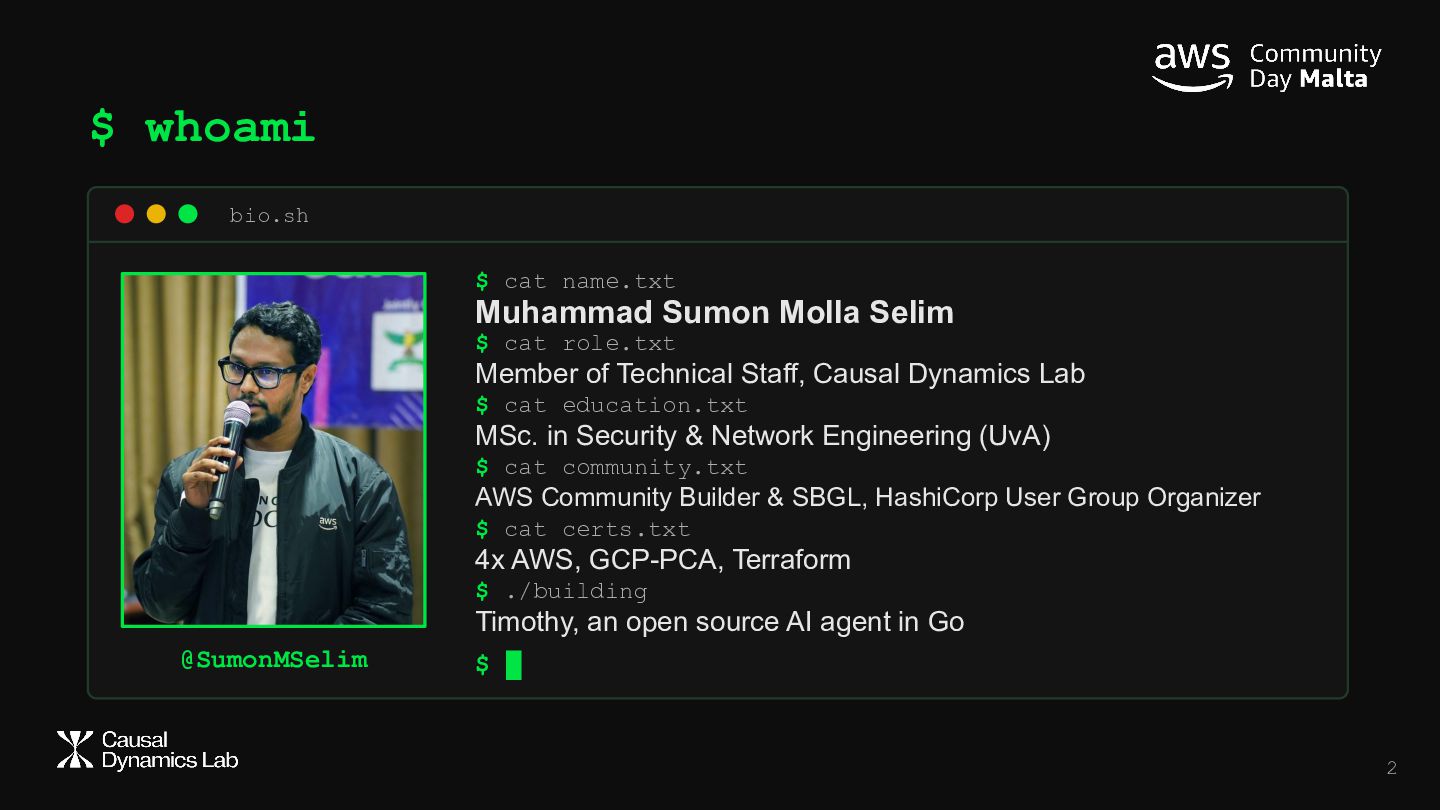
  2. $ whoami bio.sh $ cat name.txt Muhammad Sumon Molla Selim

    $ cat role.txt Member of Technical Staff, Causal Dynamics Lab $ cat education.txt MSc. in Security & Network Engineering (UvA) $ cat community.txt AWS Community Builder & SBGL, HashiCorp User Group Organizer $ cat certs.txt 4x AWS, GCP-PCA, Terraform $ ./building Timothy, an open source AI agent in Go @SumonMSelim $ █ 2
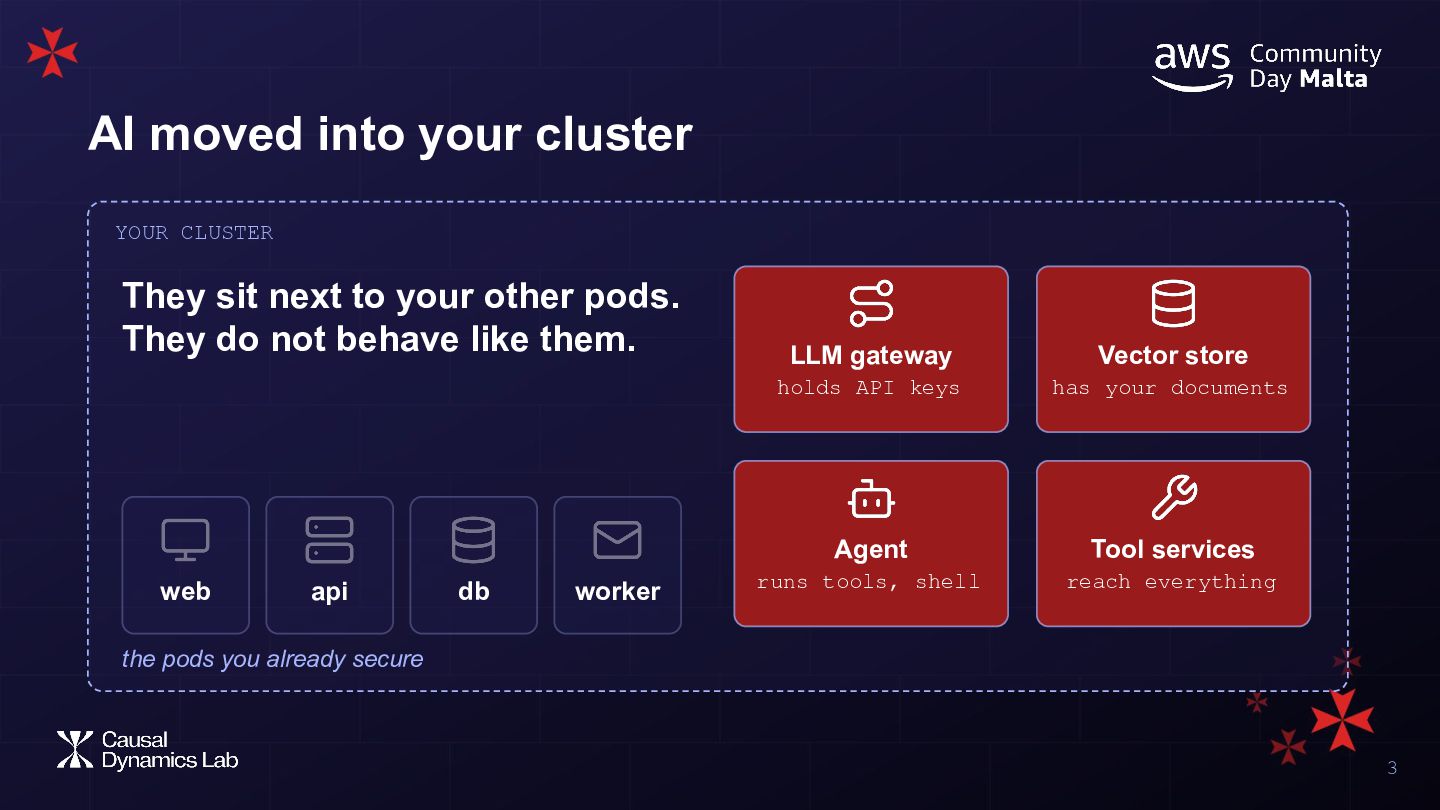
  3. AI moved into your cluster YOUR CLUSTER They sit next

    to your other pods. They do not behave like them. web api db worker LLM gateway Vector store holds API keys has your documents Agent Tool services runs tools, shell reach everything the pods you already secure 3
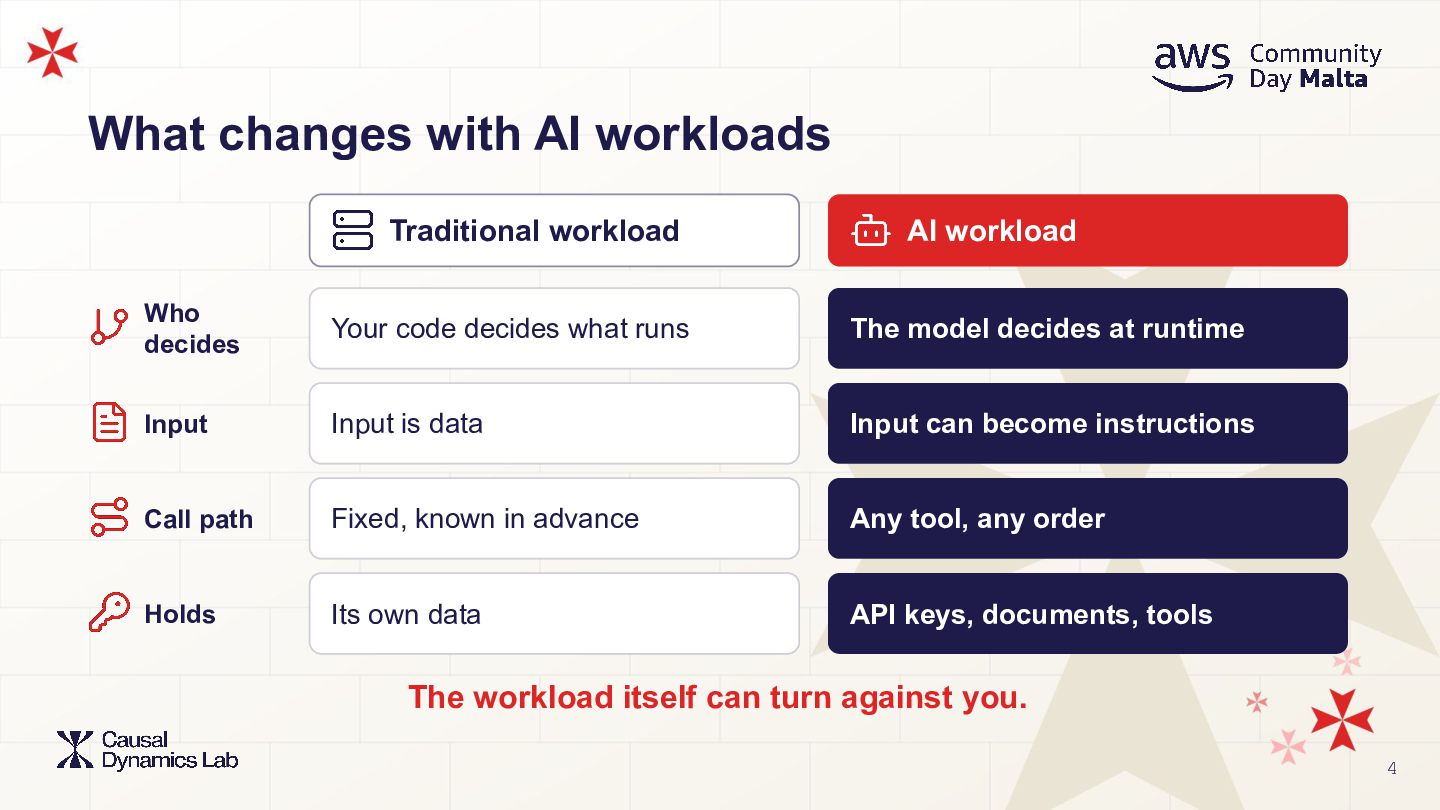
  4. What changes with AI workloads Traditional workload AI workload Who

    decides Your code decides what runs The model decides at runtime Input Input is data Input can become instructions Call path Fixed, known in advance Any tool, any order Holds Its own data API keys, documents, tools The workload itself can turn against you. 4
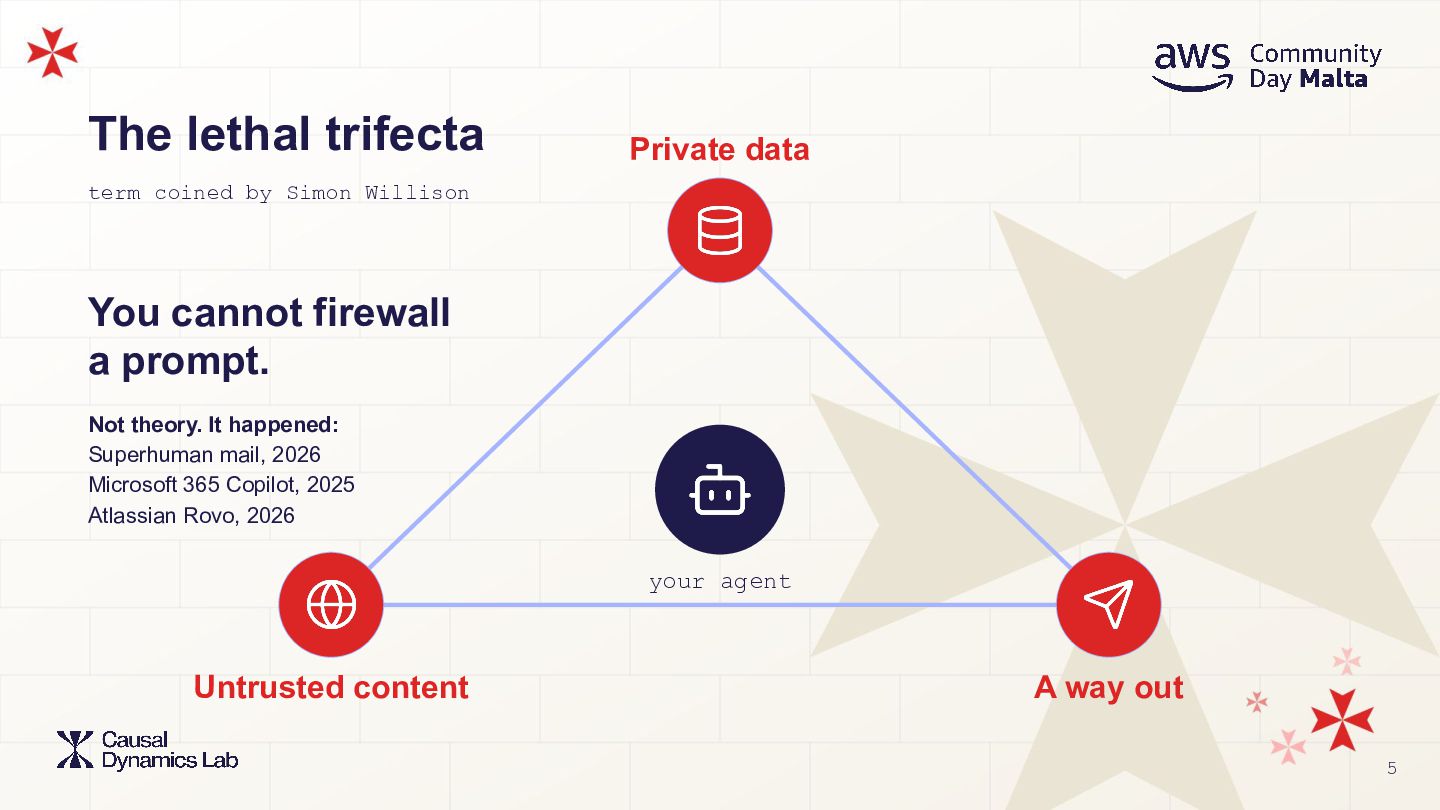
  5. The lethal trifecta Private data term coined by Simon Willison

    You cannot firewall a prompt. Not theory. It happened: Superhuman mail, 2026 Microsoft 365 Copilot, 2025 Atlassian Rovo, 2026 your agent Untrusted content A way out 5
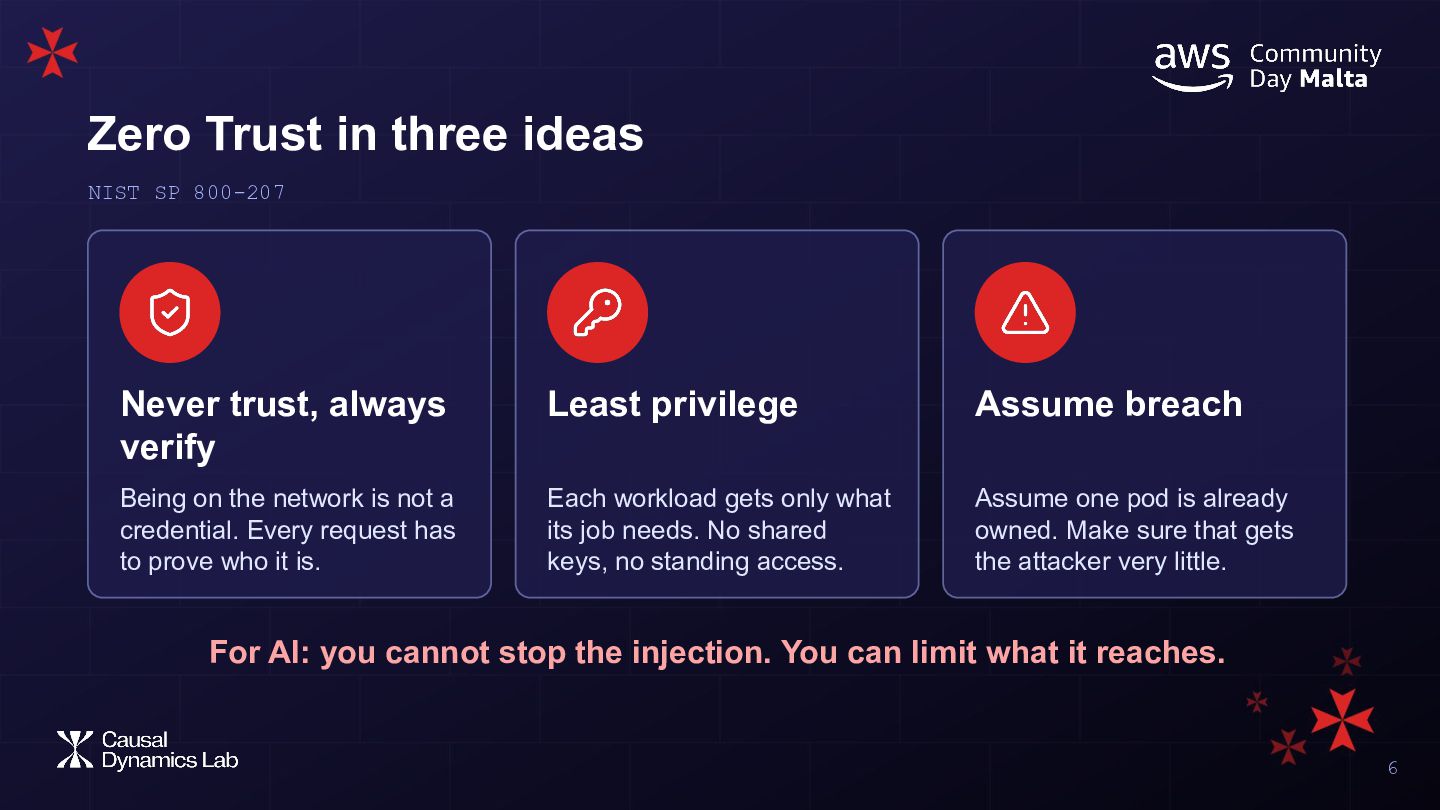
  6. Zero Trust in three ideas NIST SP 800-207 Never trust,

    always verify Least privilege Assume breach Being on the network is not a credential. Every request has to prove who it is. Each workload gets only what its job needs. No shared keys, no standing access. Assume one pod is already owned. Make sure that gets the attacker very little. For AI: you cannot stop the injection. You can limit what it reaches. 6
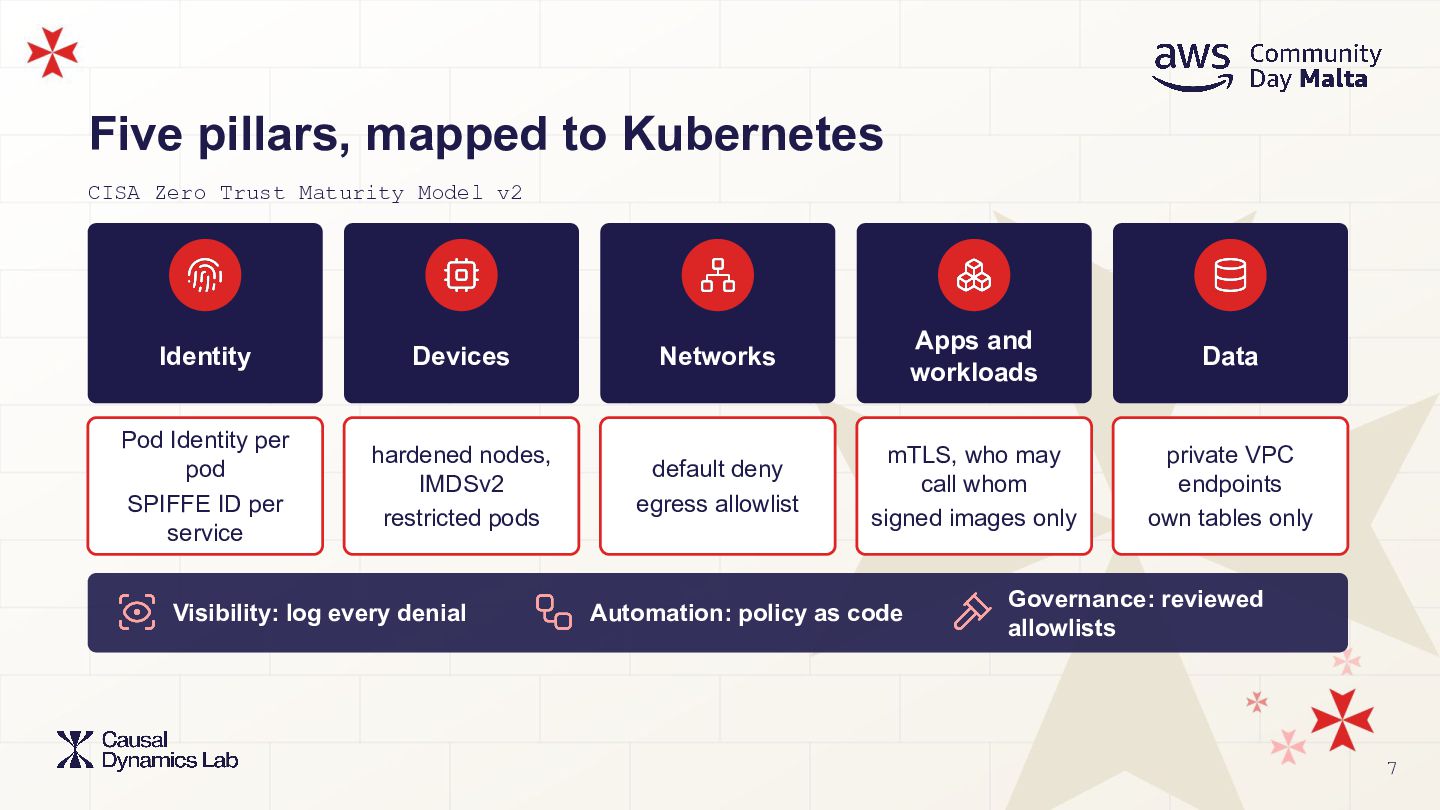
  7. Five pillars, mapped to Kubernetes CISA Zero Trust Maturity Model

    v2 Identity Devices Networks Apps and workloads Data Pod Identity per pod SPIFFE ID per service hardened nodes, IMDSv2 restricted pods default deny egress allowlist mTLS, who may call whom signed images only private VPC endpoints own tables only Visibility: log every denial Automation: policy as code Governance: reviewed allowlists 7
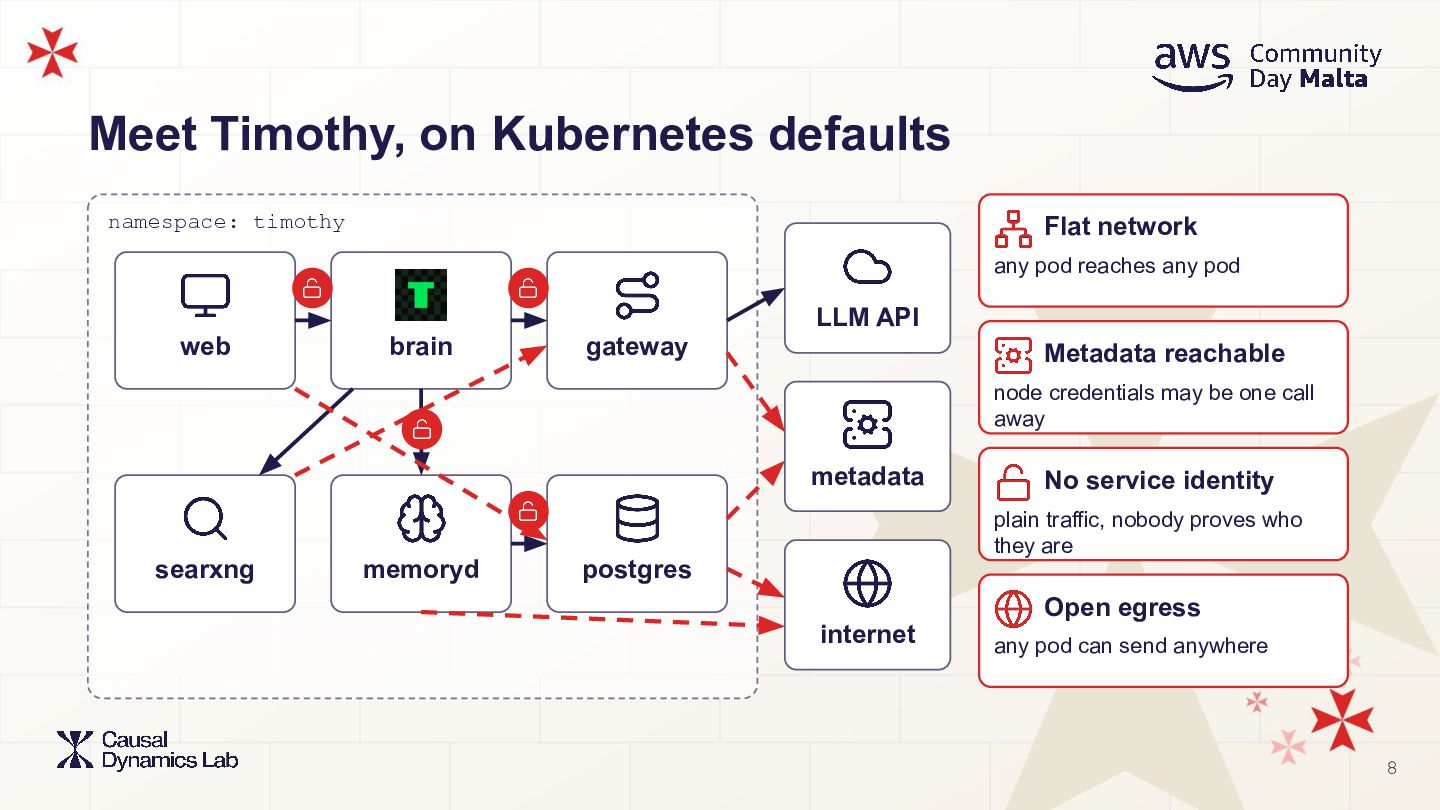
  8. Meet Timothy, on Kubernetes defaults namespace: timothy Flat network any

    pod reaches any pod LLM API web brain gateway Metadata reachable node credentials may be one call away metadata No service identity plain traffic, nobody proves who they are searxng memoryd postgres Open egress internet any pod can send anywhere 8
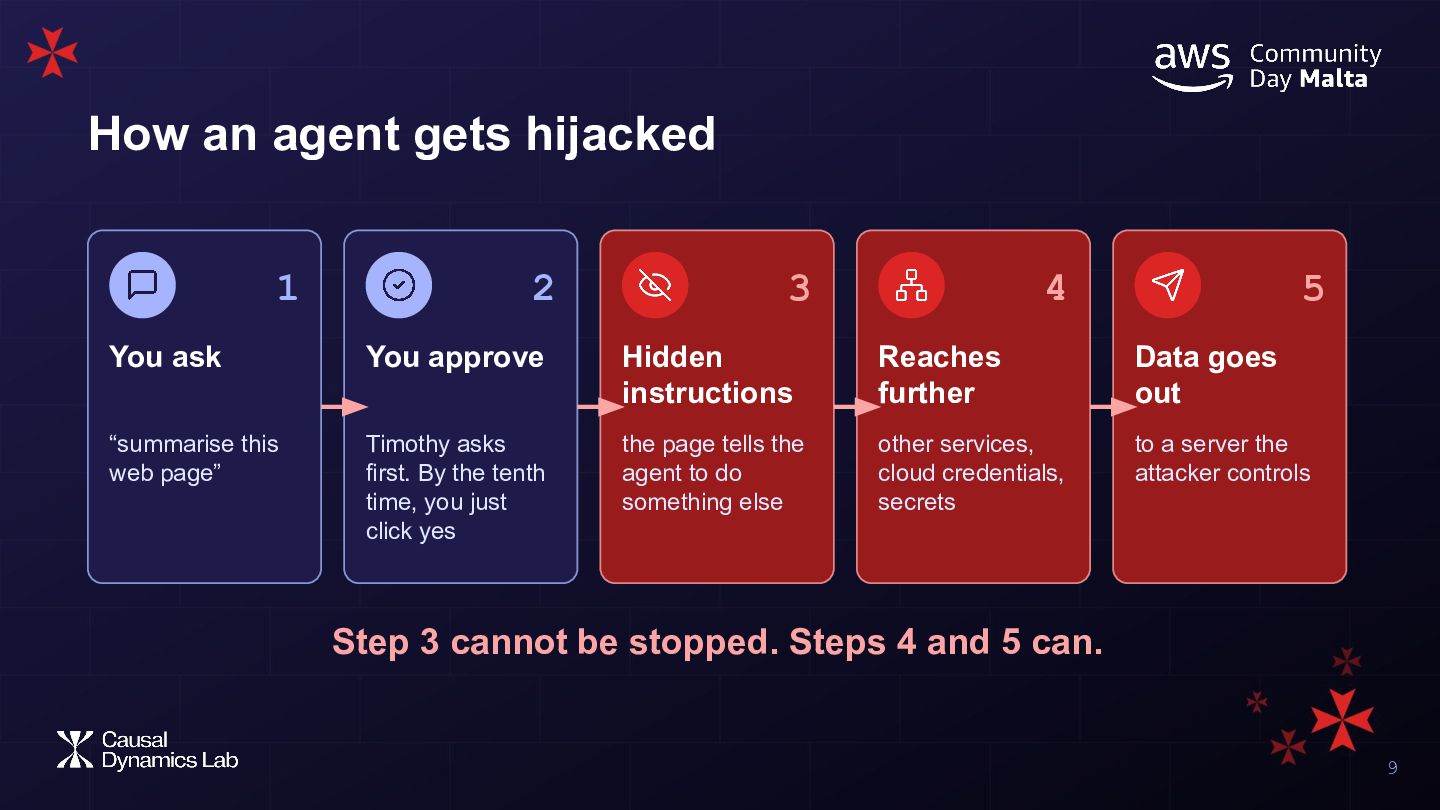
  9. How an agent gets hijacked 1 2 3 4 5

    You ask You approve Hidden instructions Reaches further Data goes out “summarise this web page” Timothy asks first. By the tenth time, you just click yes the page tells the agent to do something else other services, cloud credentials, secrets to a server the attacker controls Step 3 cannot be stopped. Steps 4 and 5 can. 9
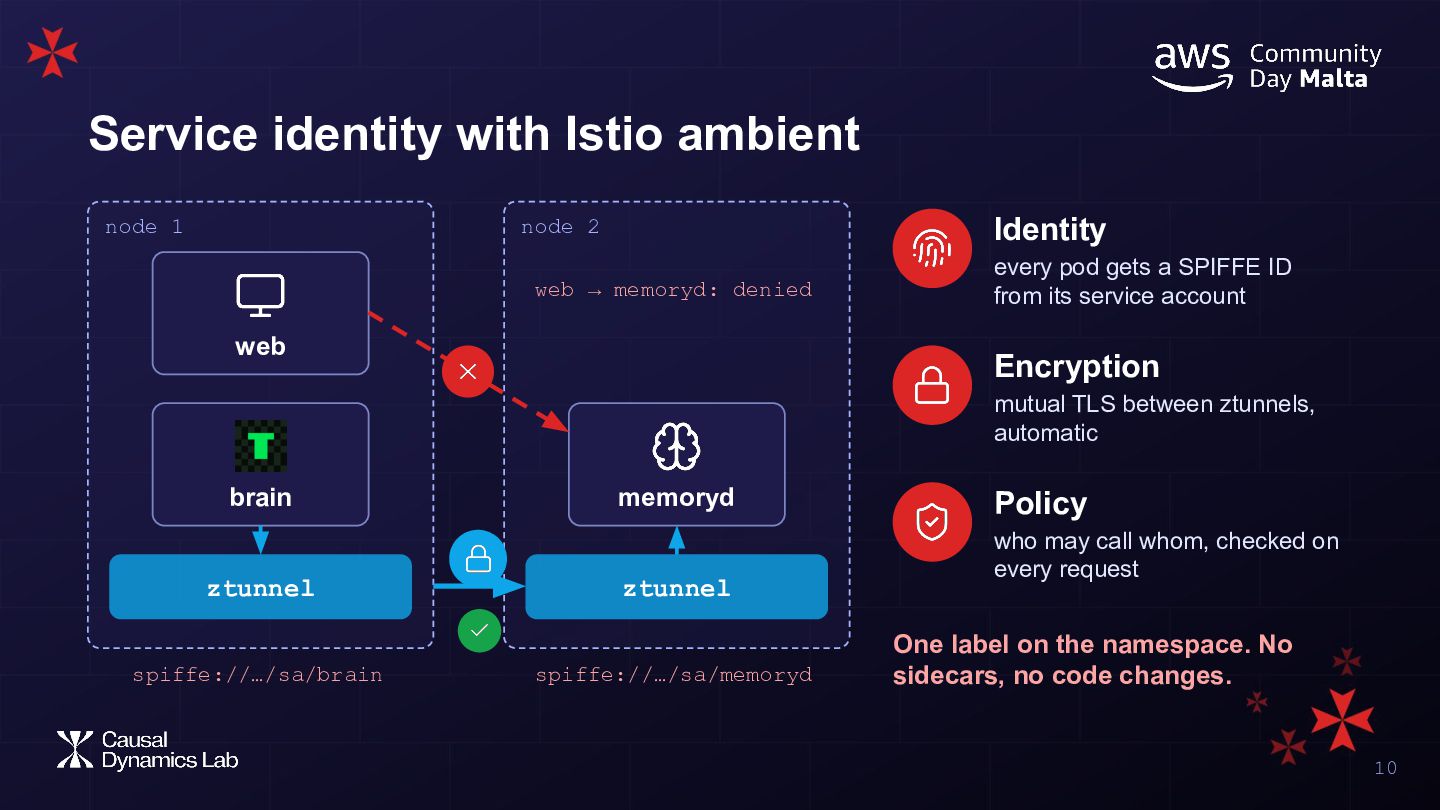
  10. Service identity with Istio ambient node 1 node 2 Identity

    web → memoryd: denied every pod gets a SPIFFE ID from its service account web Encryption mutual TLS between ztunnels, automatic brain ztunnel spiffe://…/sa/brain memoryd ztunnel spiffe://…/sa/memoryd Policy who may call whom, checked on every request One label on the namespace. No sidecars, no code changes. 10
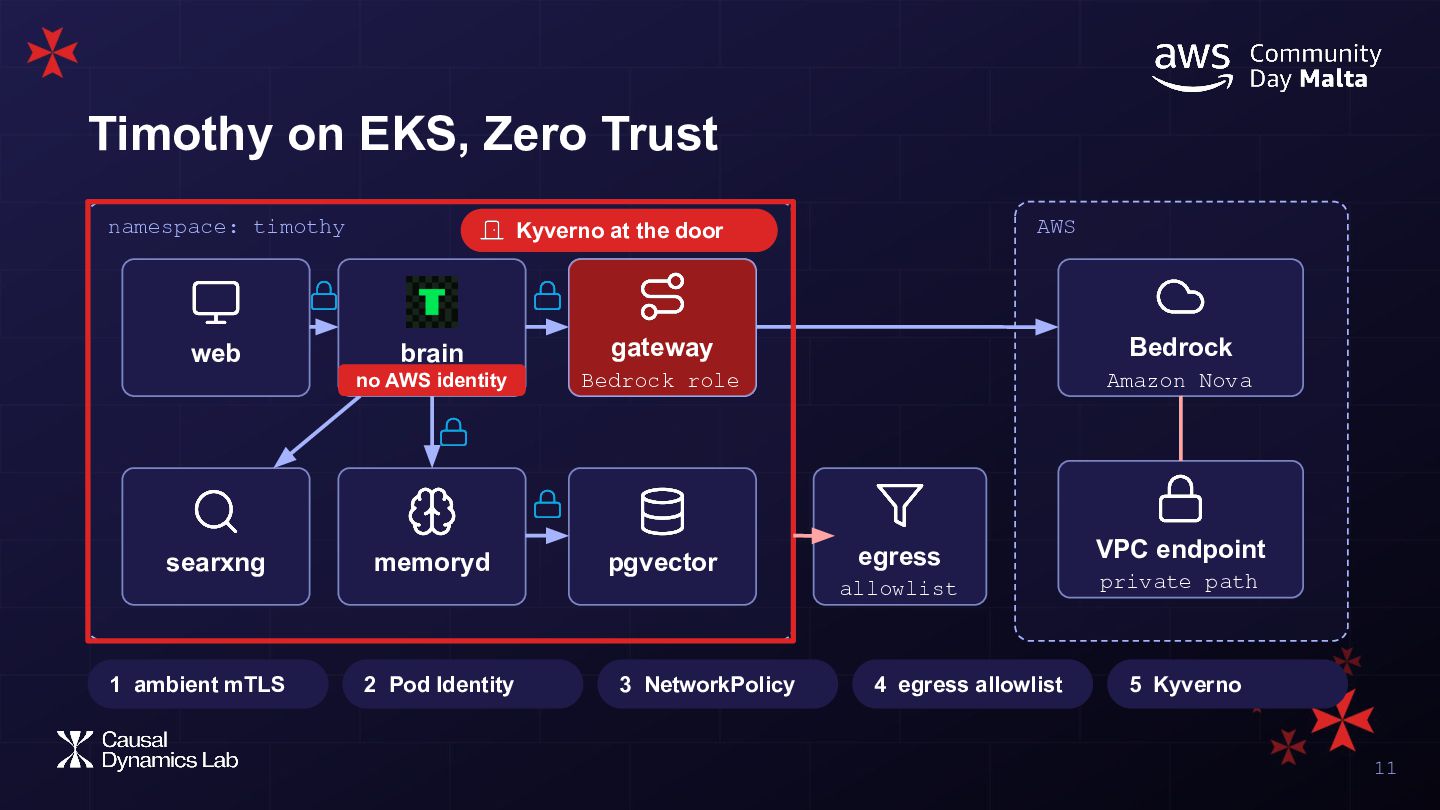
  11. Timothy on EKS, Zero Trust namespace: timothy web searxng 1

    ambient mTLS AWS Kyverno at the door brain gateway gateway Bedrock no AWS identity Bedrock role Amazon Nova memoryd pgvector 2 Pod Identity 3 NetworkPolicy egress VPC endpoint allowlist private path 4 egress allowlist 5 Kyverno 11
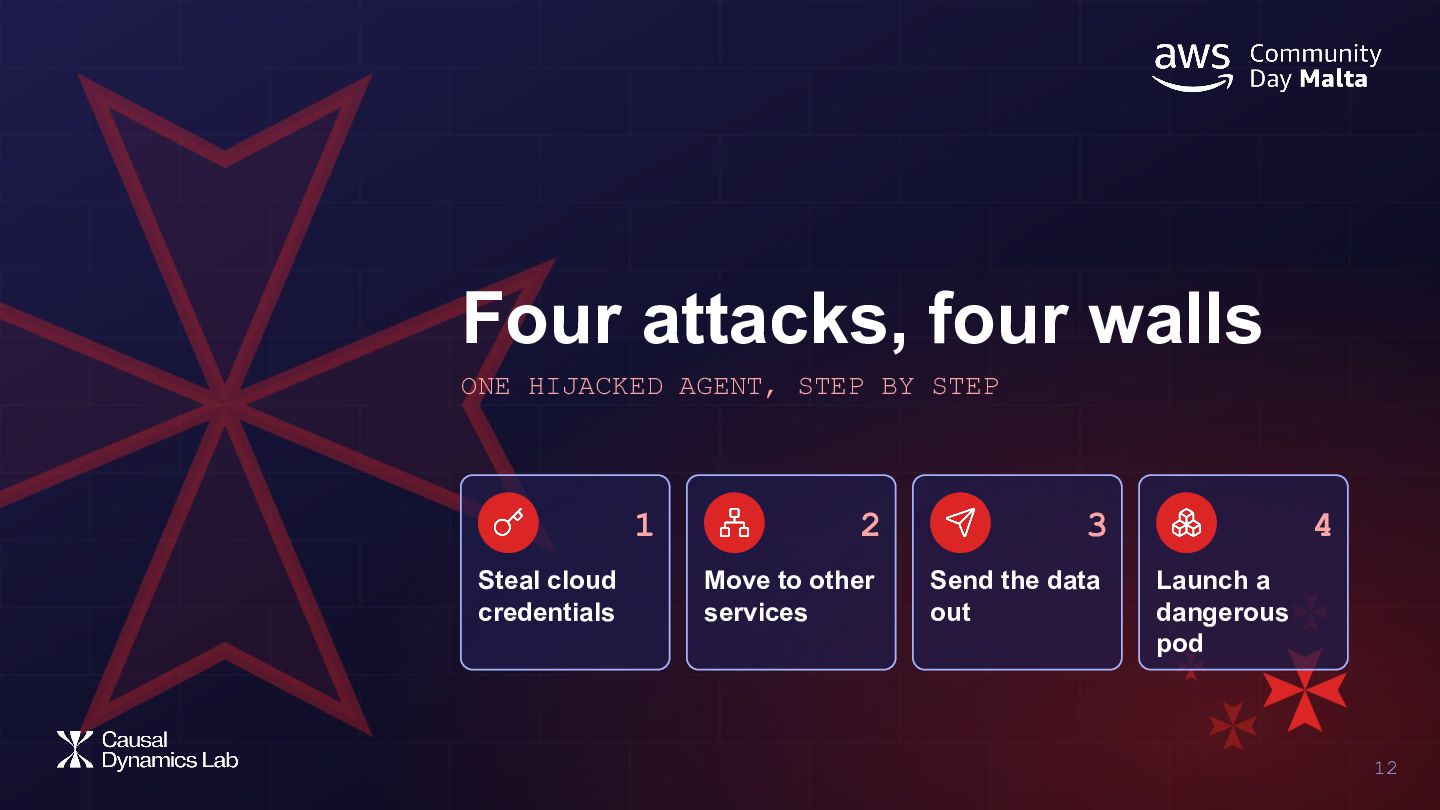
  12. Four attacks, four walls ONE HIJACKED AGENT, STEP BY STEP

    1 Steal cloud credentials 2 3 Move to other services Send the data out 4 Launch a dangerous pod 12
  13. Attack 1: steal cloud credentials AWS gateway Identity: EKS Pod

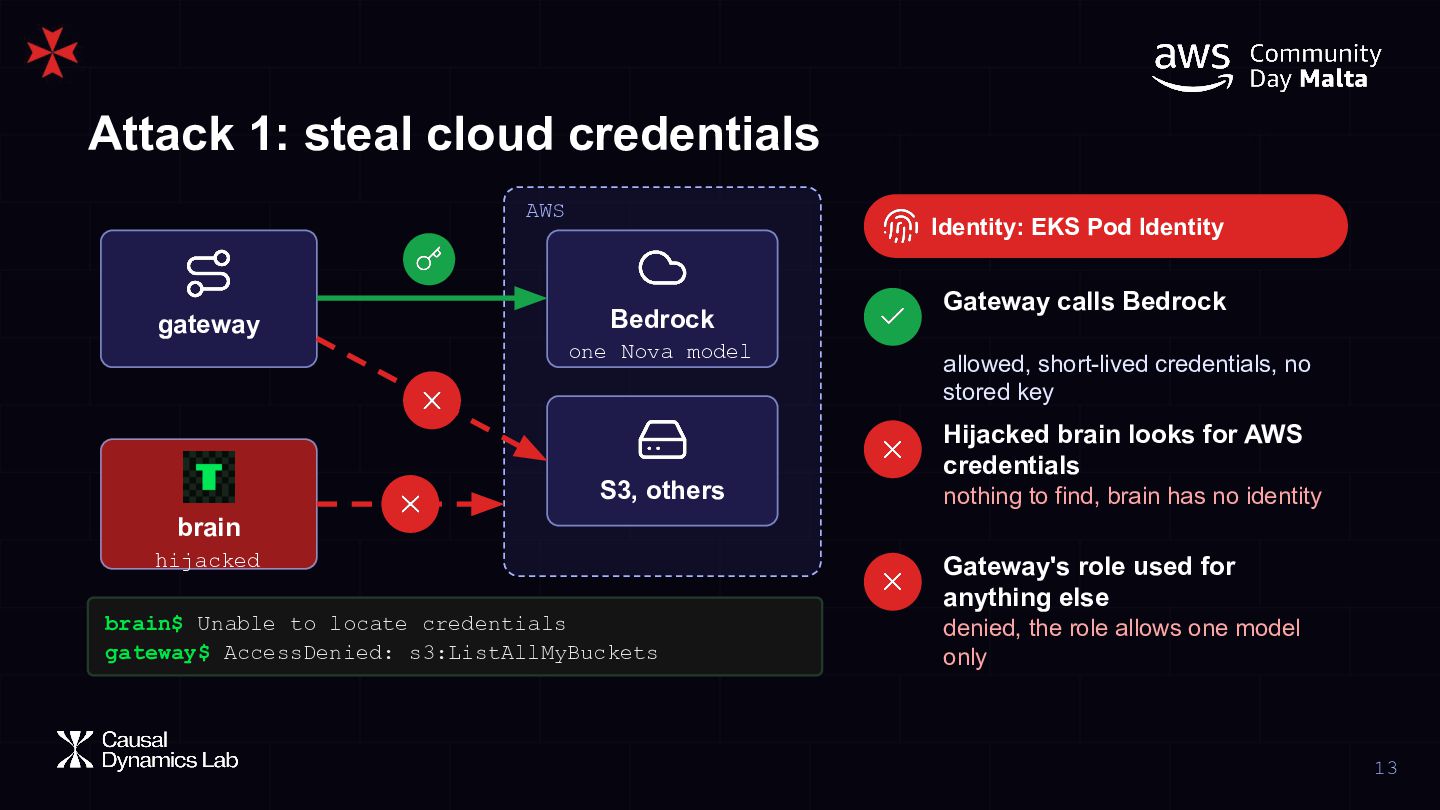
    Identity Bedrock one Nova model Gateway calls Bedrock allowed, short-lived credentials, no stored key Hijacked brain looks for AWS credentials S3, others nothing to find, brain has no identity brain hijacked brain$ Unable to locate credentials gateway$ AccessDenied: s3:ListAllMyBuckets Gateway's role used for anything else denied, the role allows one model only 13
  14. Attack 2: move to other services Istio + NetworkPolicy postgres

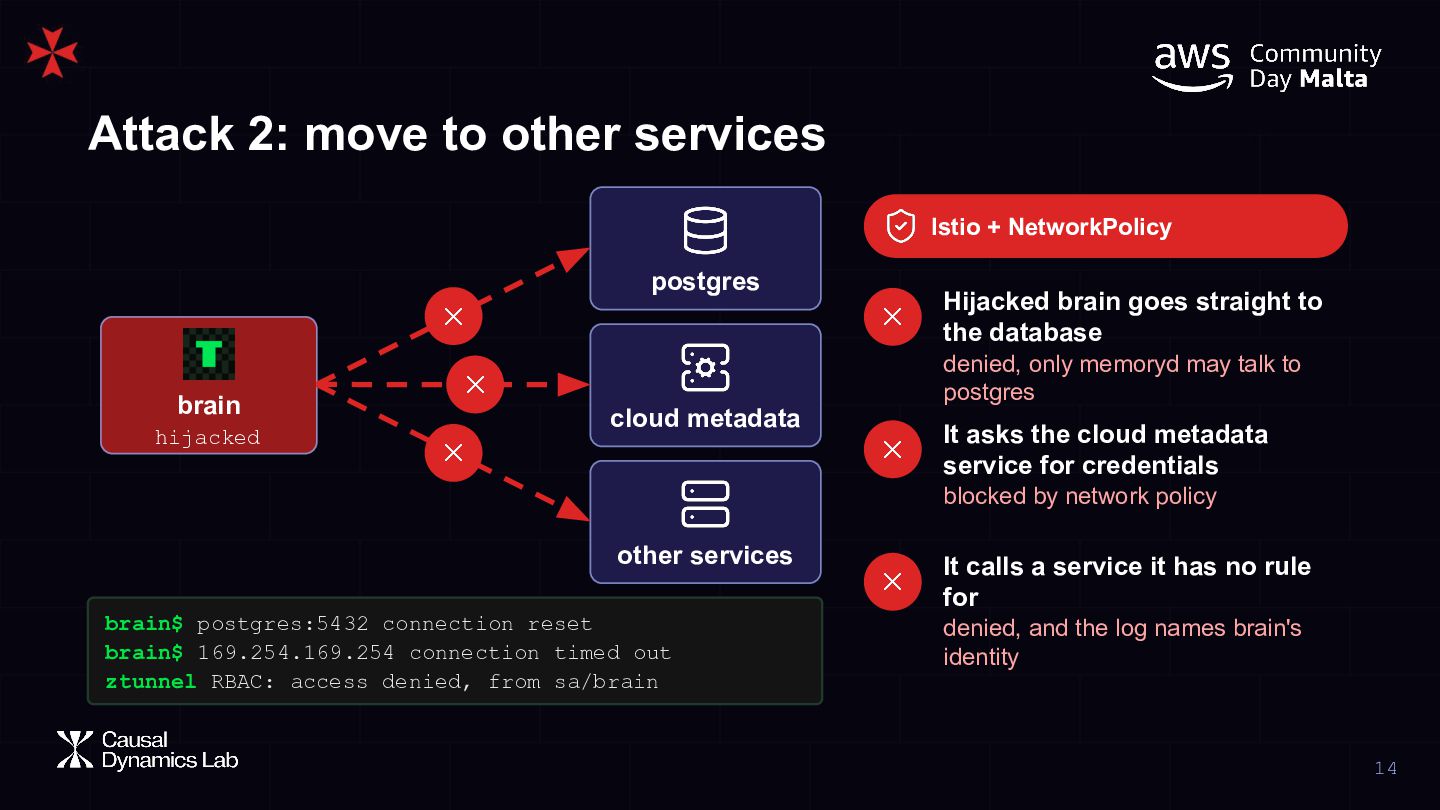
    brain hijacked Hijacked brain goes straight to the database denied, only memoryd may talk to postgres cloud metadata It asks the cloud metadata service for credentials blocked by network policy other services brain$ postgres:5432 connection reset brain$ 169.254.169.254 connection timed out ztunnel RBAC: access denied, from sa/brain It calls a service it has no rule for denied, and the log names brain's identity 14
  15. Attack 3: send the data out Egress + VPC endpoint

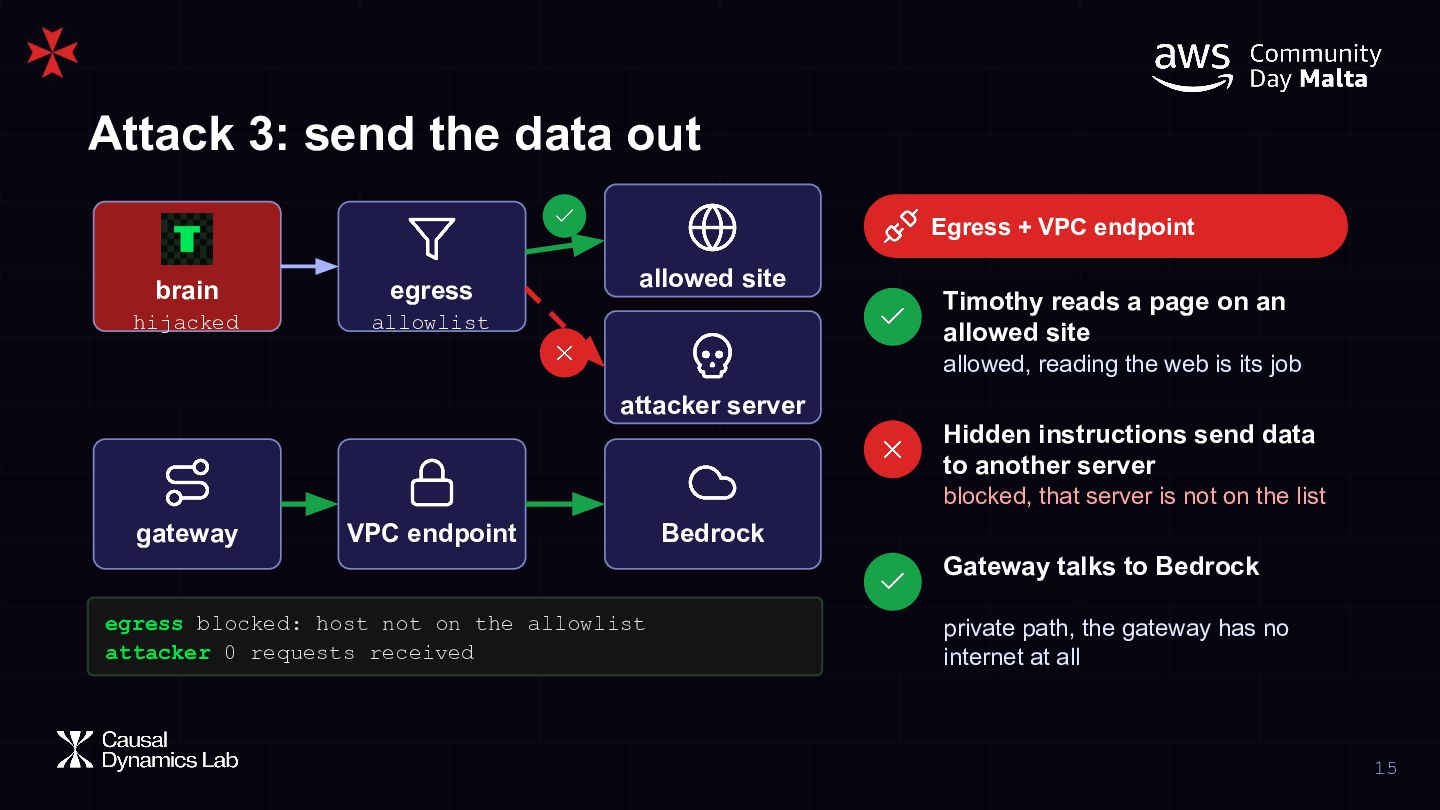
    brain egress hijacked allowlist allowed site Timothy reads a page on an allowed site allowed, reading the web is its job attacker server Hidden instructions send data to another server blocked, that server is not on the list gateway VPC endpoint Bedrock Gateway talks to Bedrock egress blocked: host not on the allowlist attacker 0 requests received private path, the gateway has no internet at all 15
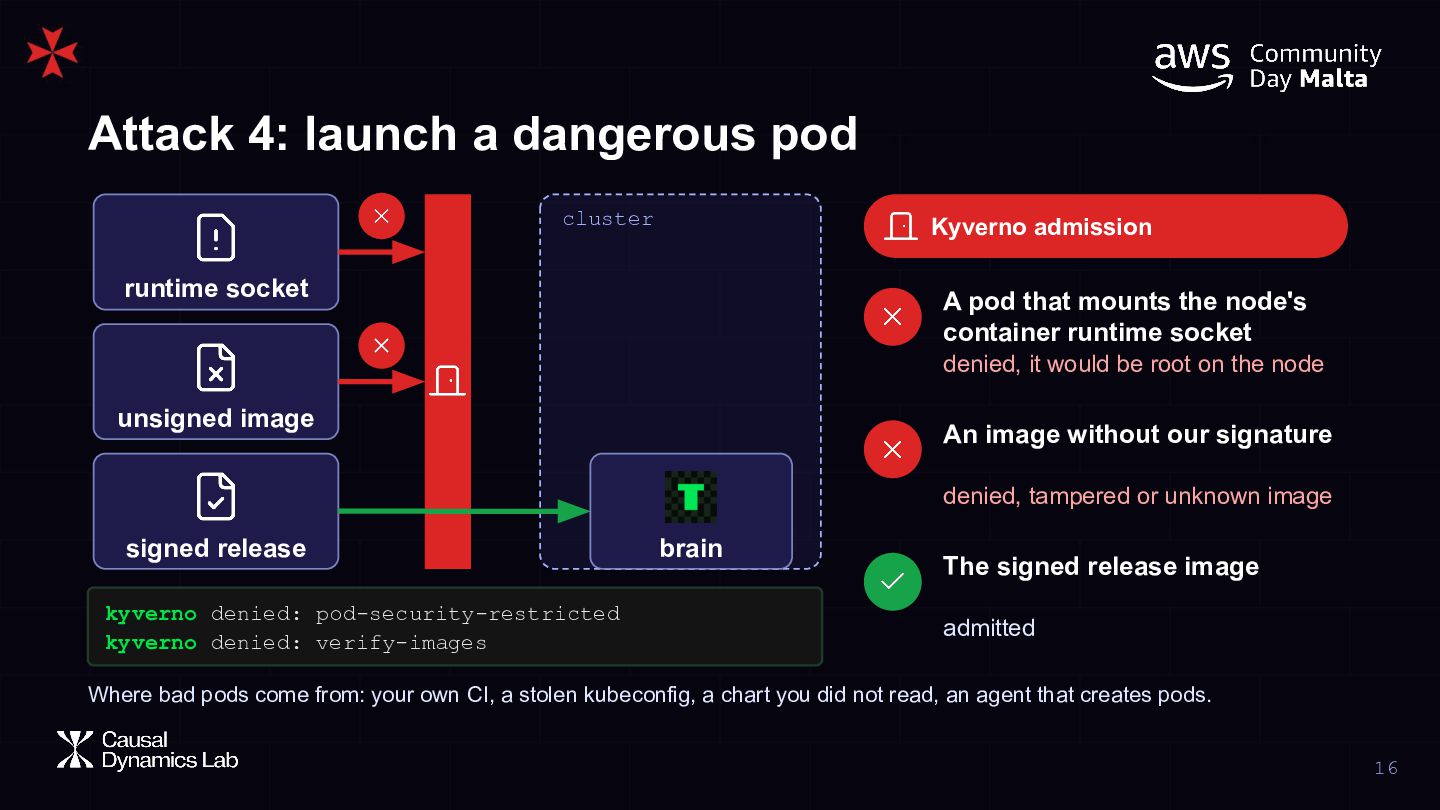
  16. Attack 4: launch a dangerous pod cluster Kyverno admission runtime

    socket A pod that mounts the node's container runtime socket denied, it would be root on the node unsigned image An image without our signature denied, tampered or unknown image signed release kyverno denied: pod-security-restricted kyverno denied: verify-images brain The signed release image admitted Where bad pods come from: your own CI, a stolen kubeconfig, a chart you did not read, an agent that creates pods. 16
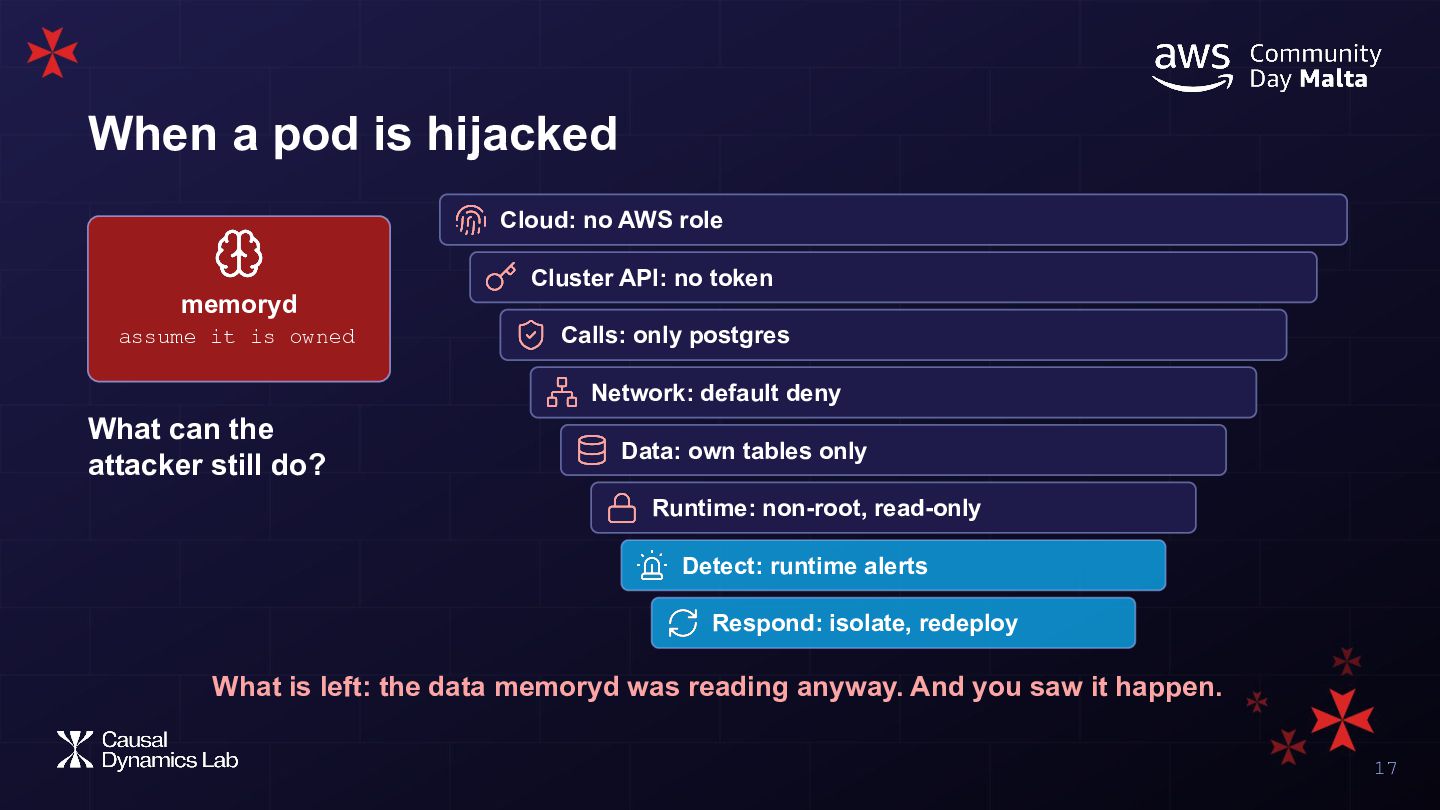
  17. When a pod is hijacked Cloud: no AWS role Cluster

    API: no token memoryd assume it is owned Calls: only postgres Network: default deny What can the attacker still do? Data: own tables only Runtime: non-root, read-only Detect: runtime alerts Respond: isolate, redeploy What is left: the data memoryd was reading anyway. And you saw it happen. 17
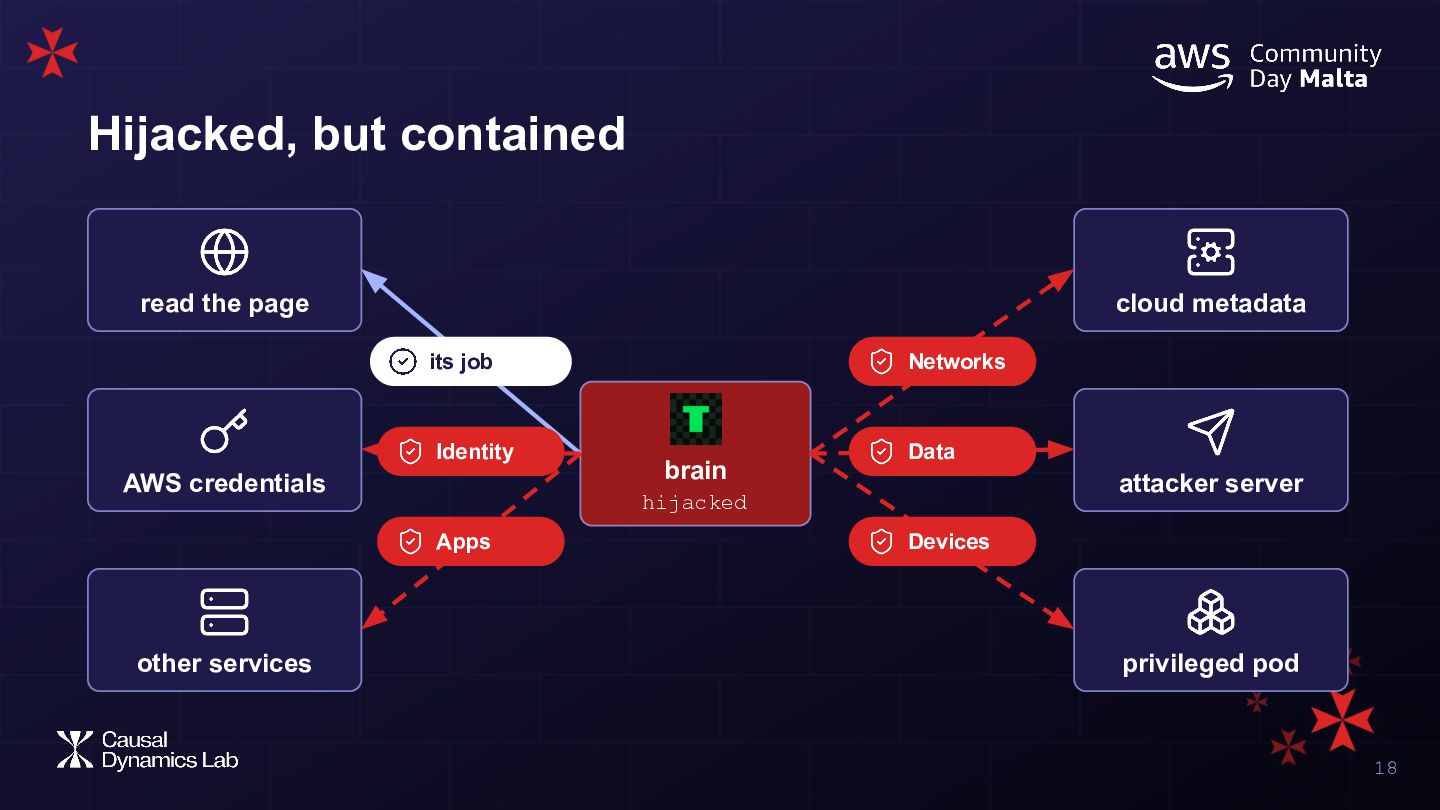
  18. Hijacked, but contained read the page cloud metadata its job

    Identity AWS credentials brain Data attacker server hijacked Apps other services Networks Devices privileged pod 18
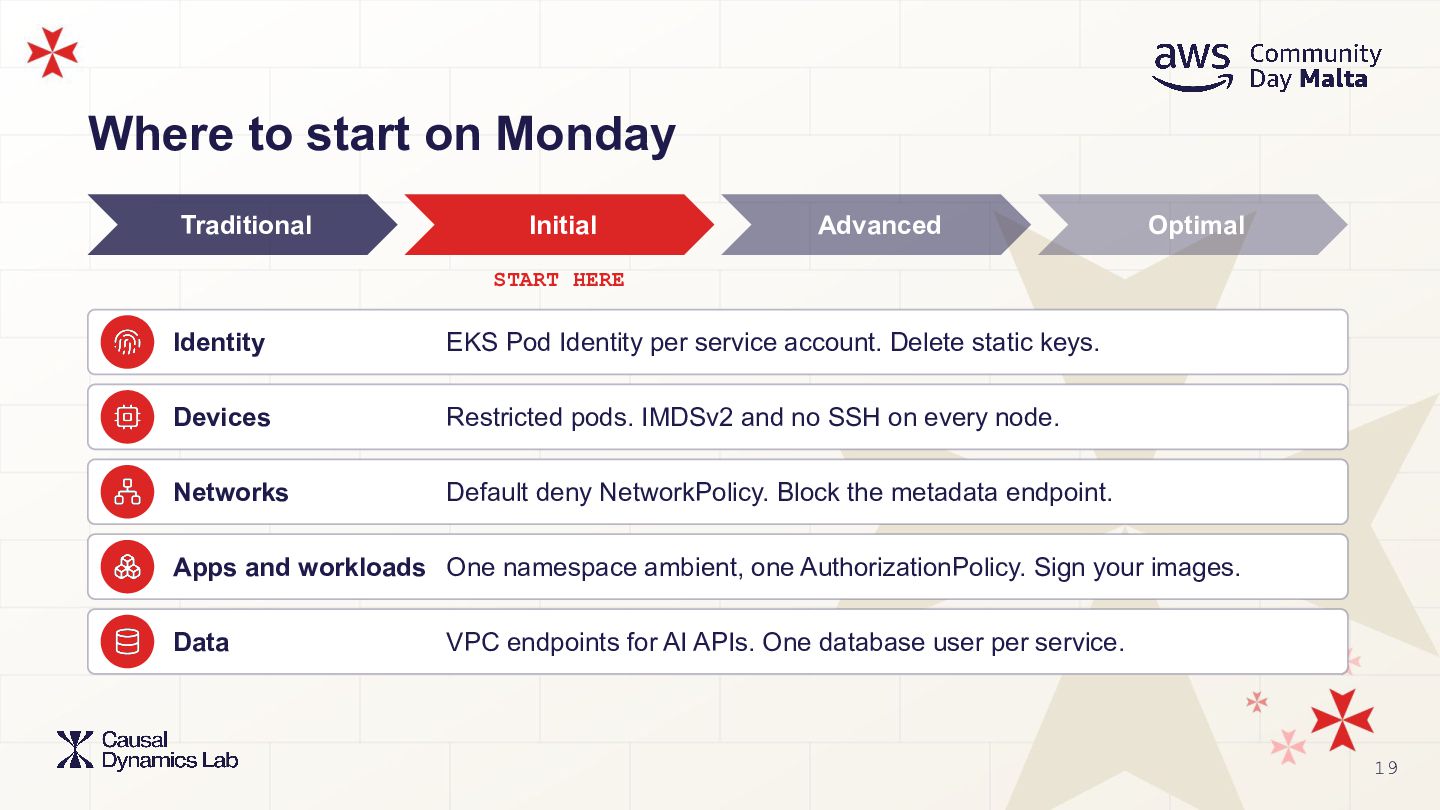
  19. Where to start on Monday Traditional Initial Advanced Optimal START

    HERE Identity EKS Pod Identity per service account. Delete static keys. Devices Restricted pods. IMDSv2 and no SSH on every node. Networks Default deny NetworkPolicy. Block the metadata endpoint. Apps and workloads One namespace ambient, one AuthorizationPolicy. Sign your images. Data VPC endpoints for AI APIs. One database user per service. 19
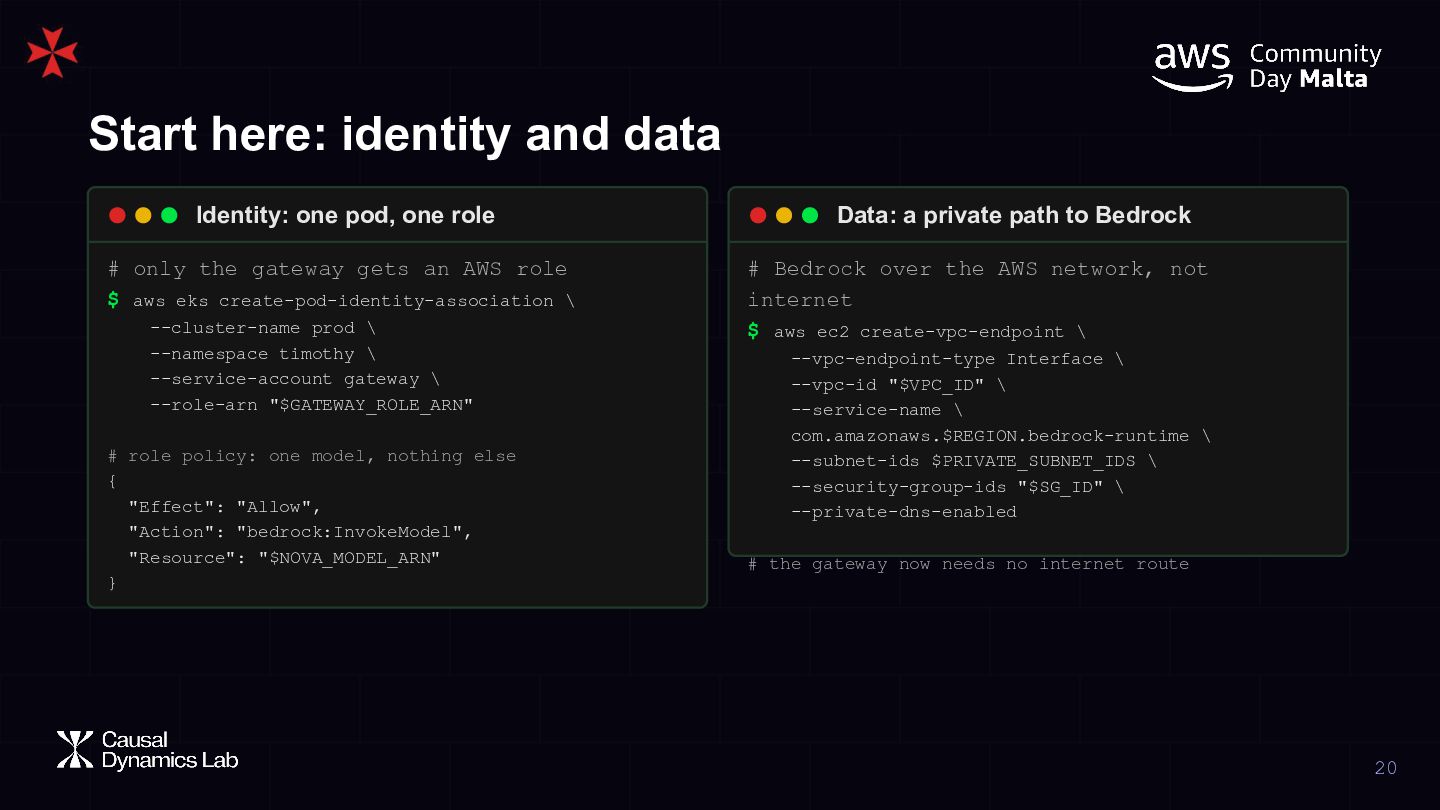
  20. Start here: identity and data Identity: one pod, one role

    # only the gateway gets an AWS role $ aws eks create-pod-identity-association \ --cluster-name prod \ --namespace timothy \ --service-account gateway \ --role-arn "$GATEWAY_ROLE_ARN" # role policy: one model, nothing else { "Effect": "Allow", "Action": "bedrock:InvokeModel", "Resource": "$NOVA_MODEL_ARN" } Data: a private path to Bedrock # Bedrock over the AWS network, not internet $ aws ec2 create-vpc-endpoint \ --vpc-endpoint-type Interface \ --vpc-id "$VPC_ID" \ --service-name \ com.amazonaws.$REGION.bedrock-runtime \ --subnet-ids $PRIVATE_SUBNET_IDS \ --security-group-ids "$SG_ID" \ --private-dns-enabled # the gateway now needs no internet route 20
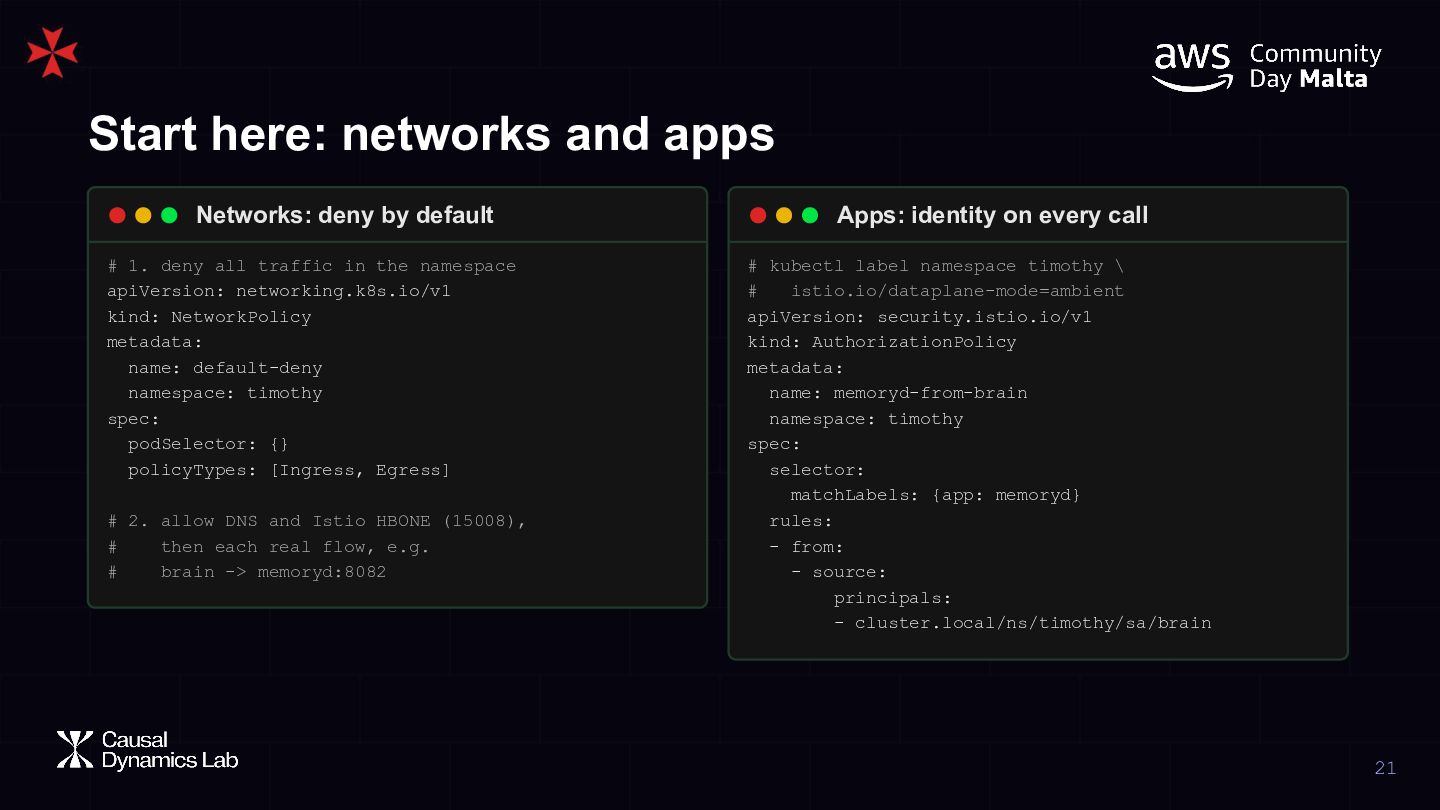
  21. Start here: networks and apps Networks: deny by default #

    1. deny all traffic in the namespace apiVersion: networking.k8s.io/v1 kind: NetworkPolicy metadata: name: default-deny namespace: timothy spec: podSelector: {} policyTypes: [Ingress, Egress] # 2. allow DNS and Istio HBONE (15008), # then each real flow, e.g. # brain -> memoryd:8082 Apps: identity on every call # kubectl label namespace timothy \ # istio.io/dataplane-mode=ambient apiVersion: security.istio.io/v1 kind: AuthorizationPolicy metadata: name: memoryd-from-brain namespace: timothy spec: selector: matchLabels: {app: memoryd} rules: - from: - source: principals: - cluster.local/ns/timothy/sa/brain 21
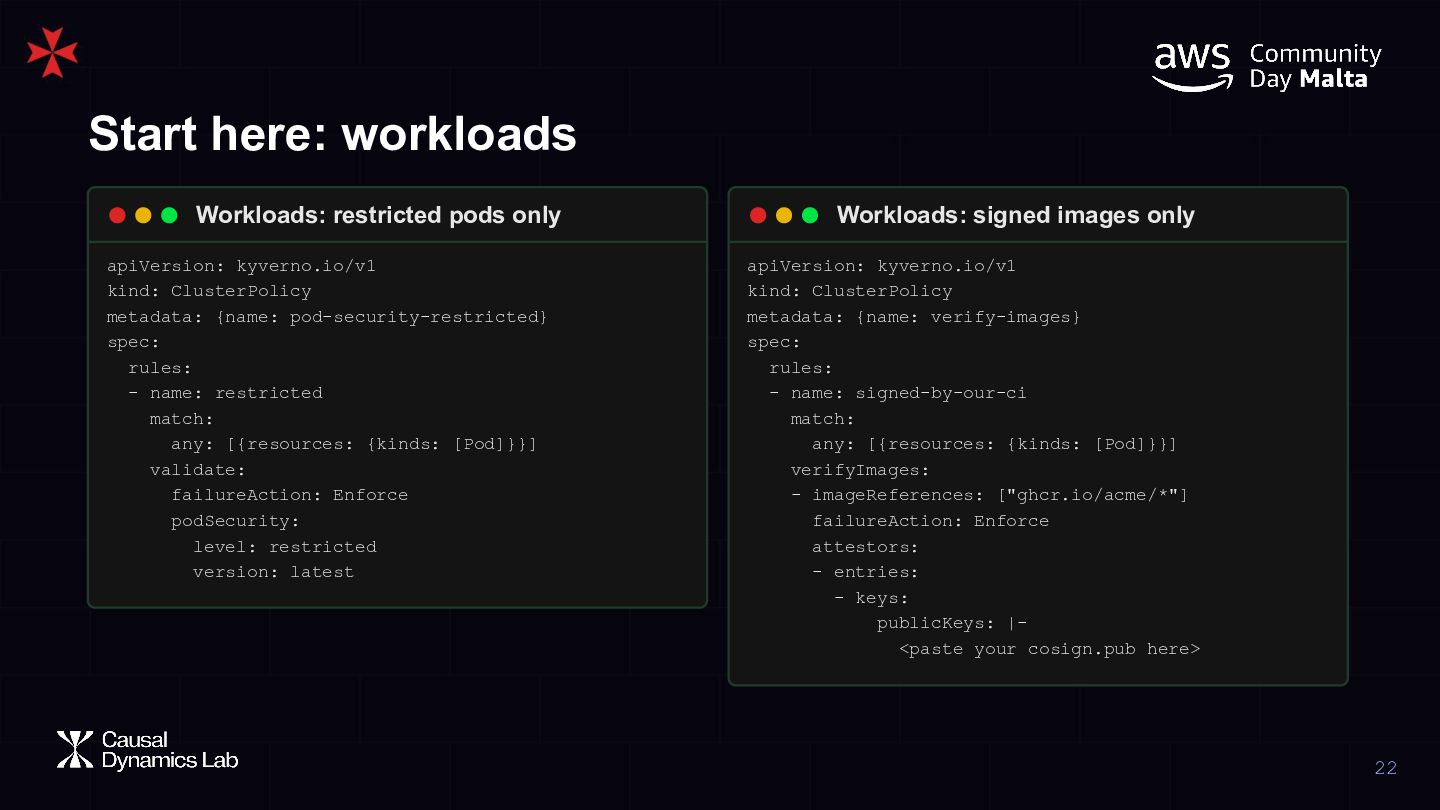
  22. Start here: workloads Workloads: restricted pods only Workloads: signed images

    only apiVersion: kyverno.io/v1 kind: ClusterPolicy metadata: {name: pod-security-restricted} spec: rules: - name: restricted match: any: [{resources: {kinds: [Pod]}}] validate: failureAction: Enforce podSecurity: level: restricted version: latest apiVersion: kyverno.io/v1 kind: ClusterPolicy metadata: {name: verify-images} spec: rules: - name: signed-by-our-ci match: any: [{resources: {kinds: [Pod]}}] verifyImages: - imageReferences: ["ghcr.io/acme/*"] failureAction: Enforce attestors: - entries: - keys: publicKeys: |<paste your cosign.pub here> 22
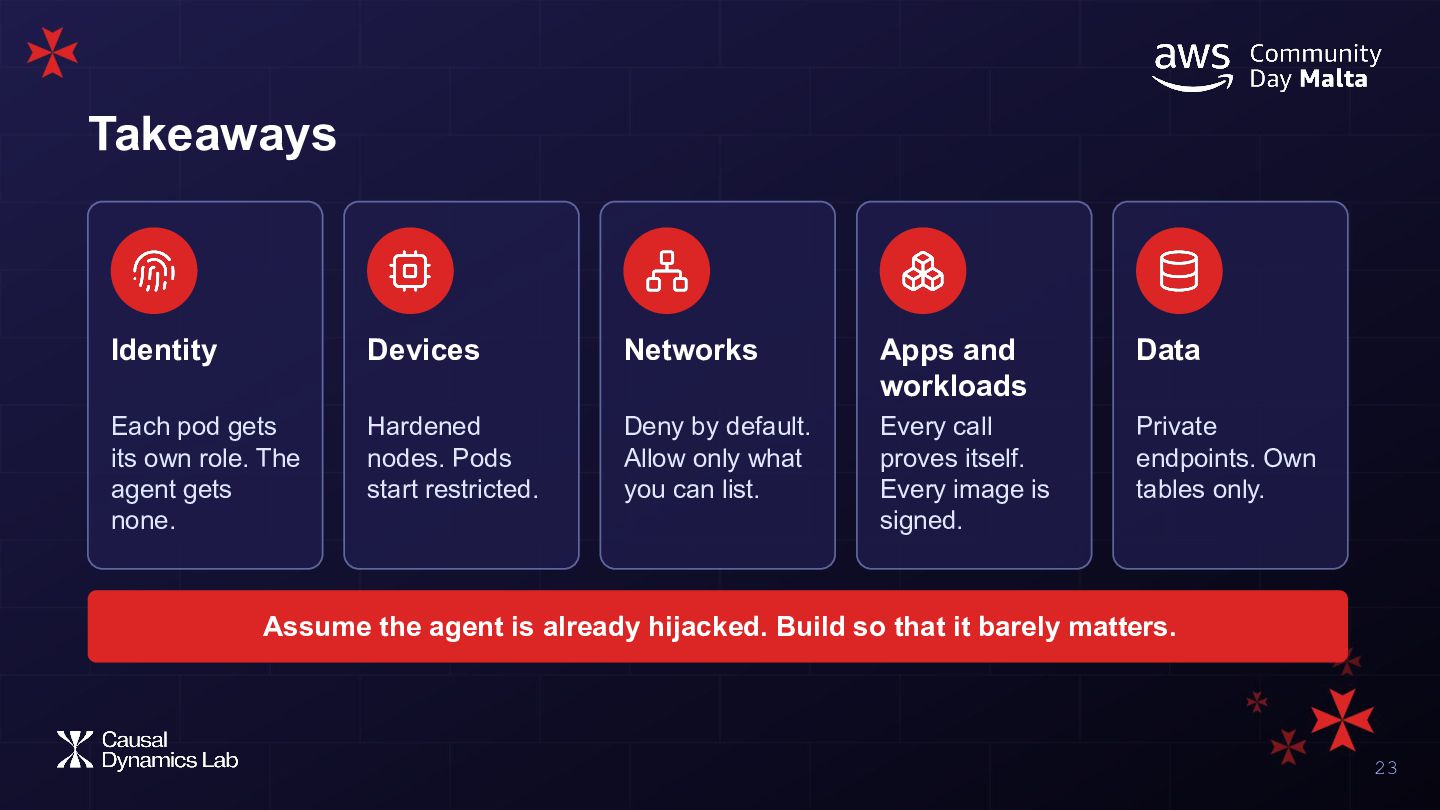
  23. Takeaways Identity Devices Networks Apps and workloads Data Each pod

    gets its own role. The agent gets none. Hardened nodes. Pods start restricted. Deny by default. Allow only what you can list. Every call proves itself. Every image is signed. Private endpoints. Own tables only. Assume the agent is already hijacked. Build so that it barely matters. 23
  24. Questions? Rate this talk Grazzi ħafna @SUMONMSELIM Slides Timothy GitHub

    LinkedIn Website mol.la/sdeck mol.la/timothygh mol.la/github mol.la/linkedin mol.la/web 24
  25. H ow gn si e t di e d t

    e th no g e o D han c to Audience Q&A Presenting with animations, GIFs or speaker notes? Enable our Chrome extension