Upgrade to Pro
— share decks privately, control downloads, hide ads and more …
Speaker Deck
Sign up for free
Menu
Search
Features
All features
Private URLs
Password Protection
Custom URLS
Scheduled publishing
Remove Branding
Restrict embedding
Deck Collections
Notes
Features
All features
Private URLs
Password Protection
Custom URLS
Scheduled publishing
Remove Branding
Restrict embedding
Deck Collections
Notes
Explore
Featured decks
Featured speakers
Programming
Technology
Storyboards
Explore
Featured decks
Featured speakers
Programming
Technology
Storyboards
Pricing
Search
Sign in
Sign up for free
ElasticContainerServicesハンズオン
Search
Sponsored
·
Ship Features Fearlessly
Turn features on and off without deploys. Used by thousands of Ruby developers.
→
tarosaiba
February 28, 2019
Technology
160
0
Share
Embed
Copy iframe code
Copy JS code
Copy link
Start on current slide
ElasticContainerServicesハンズオン
tarosaiba
February 28, 2019
More Decks by tarosaiba
See All by tarosaiba
合格対策 GOOGLE CLOUD CERTIFIED Professional Cloud Architect 編
tarosaiba
2
710
kube-system落としてみました
tarosaiba
8
2.9k
コンテナ技術とコンテナオーケストレーション 入門_改訂版
tarosaiba
0
700
コンテナ技術とコンテナオーケストレーション入門
tarosaiba
0
950
Other Decks in Technology
See All in Technology
夫婦で子育てするための育児標準化
codmoninc
PRO
0
470
事業成長とデータ活用を止めないためのマネジメントへ挑戦
hiracky16
0
410
AI × アーキテクト 第1・2章|生成AIの課題とアーキテクトの素養
daidaidai
0
190
エンタメ企業のM&Aを支えるデータ基盤 ― 統合から店舗のリアルタイム分析まで / Data Engineering Summit 2026
genda
0
210
⾮構造化データを価値に変える AI エージェント基盤とその組織
ivry_presentationmaterials
0
200
スキマバイトという雇用形態は存在しないので、雇用期間1日のアルバイト契約を事業者とワーカーが結ぶ手続きを支えるのがタイミーなんです
akitoshiga
0
210
Kiro Crewで「みのるん式」仕事術やってみた
minorun365
PRO
3
870
How to Design Configuration for Rails Applications
willnet
1
850
CloudWatch Logsのコスト最適化:どこまでAIに任せてどこから人間が承認すべきか
yama3133
0
110
Railsで挑む大量データ永続化 〜600億件を永続化するための設計とボトルネックとの戦い〜
occhi
1
880
Getting Started with Google Antigravity
glaforge
0
330
自作バイナリを動かす「入口」8選
puhitaku
2
1.3k
Featured
See All Featured
30 Presentation Tips
portentint
PRO
1
430
The Hidden Cost of Media on the Web [PixelPalooza 2025]
tammyeverts
2
530
Designing Powerful Visuals for Engaging Learning
tmiket
1
610
Agile Actions for Facilitating Distributed Teams - ADO2019
mkilby
0
310
10 Git Anti Patterns You Should be Aware of
lemiorhan
PRO
659
62k
Let's Do A Bunch of Simple Stuff to Make Websites Faster
chriscoyier
508
140k
Accessibility Awareness
sabderemane
1
250
Test your architecture with Archunit
thirion
2
2.4k
Building Experiences: Design Systems, User Experience, and Full Site Editing
marktimemedia
1
630
HU Berlin: Industrial-Strength Natural Language Processing with spaCy and Prodigy
inesmontani
PRO
0
760
Tips & Tricks on How to Get Your First Job In Tech
honzajavorek
1
800
How GitHub (no longer) Works
holman
316
150k
Transcript
Elastic Container Services 編 2019/2/04 Shuntaro Saiba これからのアプリケーションデプロイが変わる 1
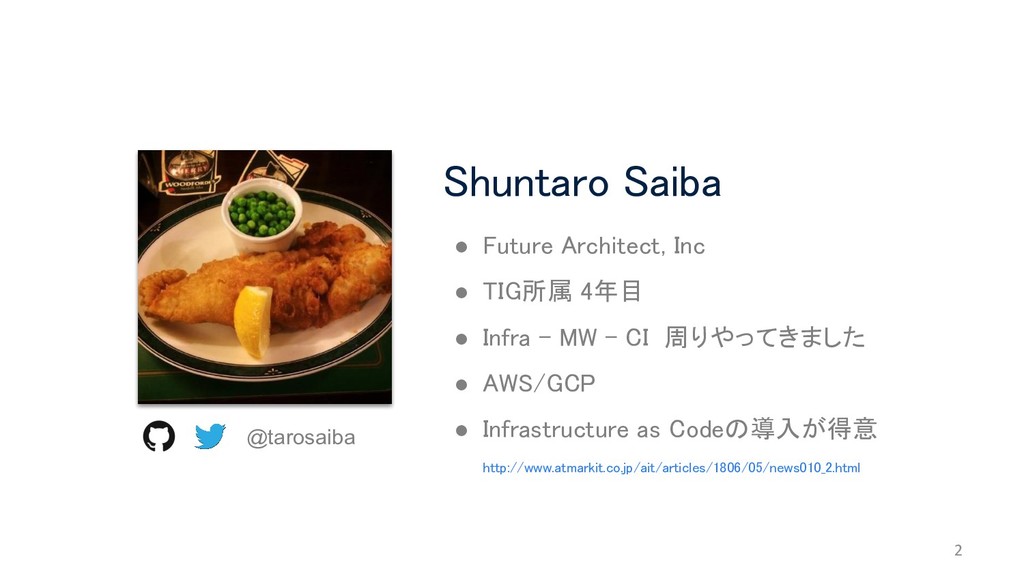
@tarosaiba • Future Architect, Inc • TIG所属 4年目 • Infra
- MW - CI 周りやってきました • AWS/GCP • Infrastructure as Codeの導入が得意 http://www.atmarkit.co.jp/ait/articles/1806/05/news010_2.html Shuntaro Saiba 2
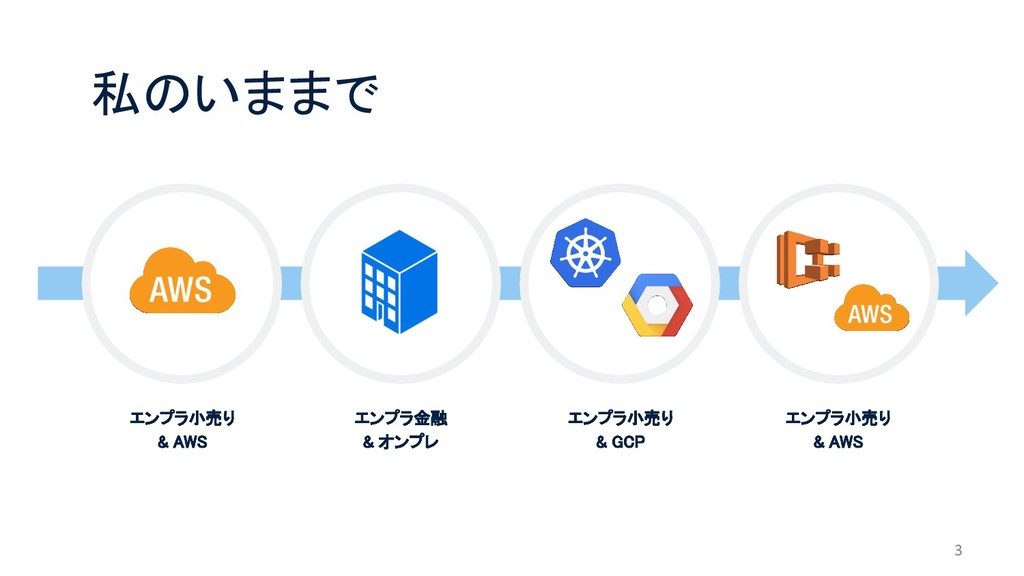
3 私のいままで エンプラ小売り & AWS エンプラ金融 & オンプレ エンプラ小売り &
GCP エンプラ小売り & AWS
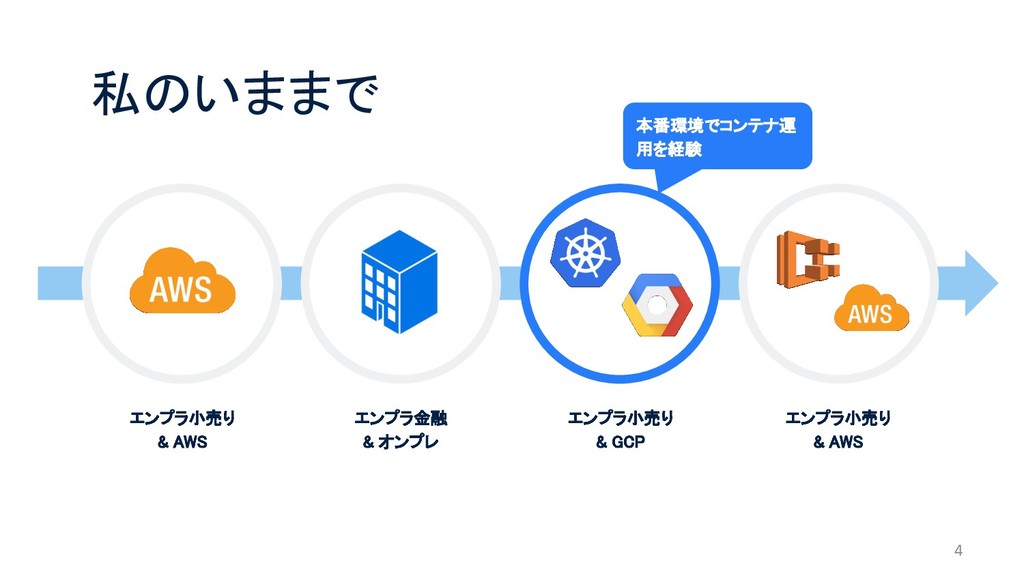
4 私のいままで エンプラ小売り & AWS エンプラ金融 & オンプレ エンプラ小売り &
GCP エンプラ小売り & AWS 本番環境でコンテナ運 用を経験
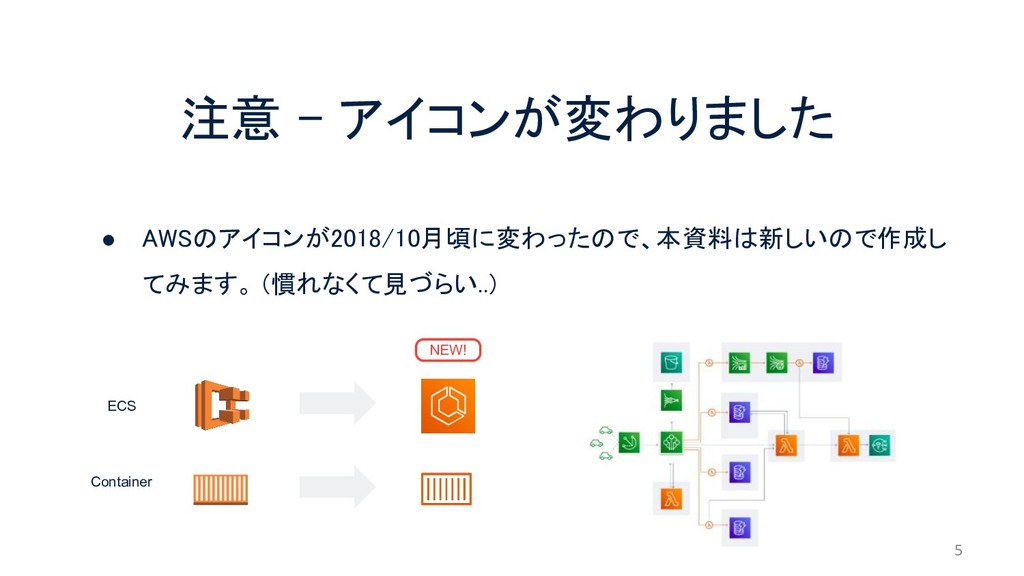
注意 - アイコンが変わりました • AWSのアイコンが2018/10月頃に変わったので、本資料は新しいので作成し てみます。 (慣れなくて見づらい..) 5 NEW! ECS
Container
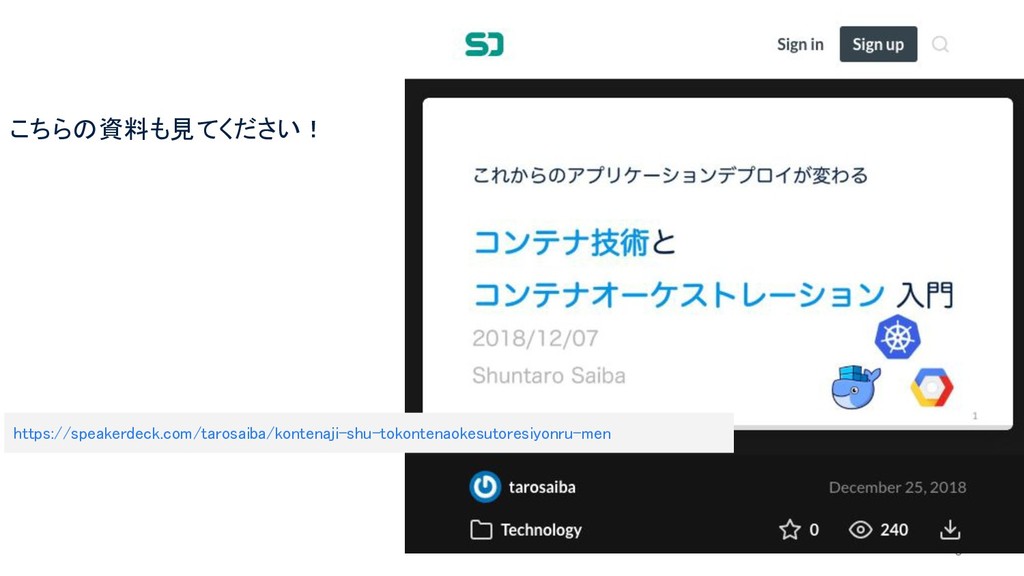
6 https://speakerdeck.com/tarosaiba/kontenaji-shu-tokontenaokesutoresiyonru-men こちらの資料も見てください!
想定読者 • ECSが便利なのは知ってるけど、どうやって使えばよいの? • 「Service」「Task」って何!? • これからのAWSでのシステム構築、アプリデプロイはどう変わっていくの? 7
ECS (Elastic Container Service) 8 • AWSのマネージドサービス • AWS独自のコンテナオーケストレーションツール •
Docker コンテナフォーマットをサポート
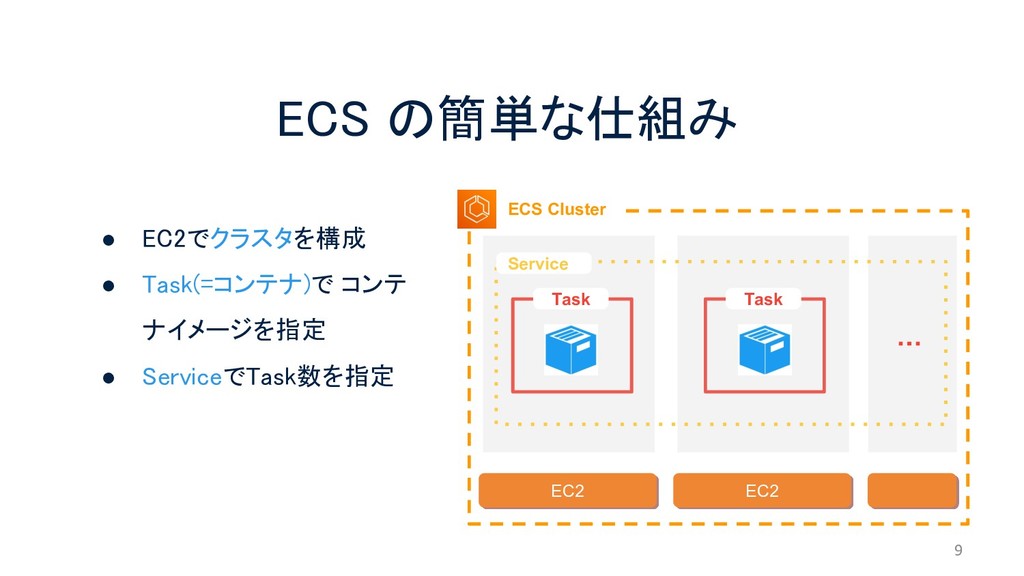
ECS の簡単な仕組み 9 ECS Cluster EC2 EC2 Service Task Task
・・・ • EC2でクラスタを構成 • Task(=コンテナ)で コンテ ナイメージを指定 • ServiceでTask数を指定
10 とりあえず
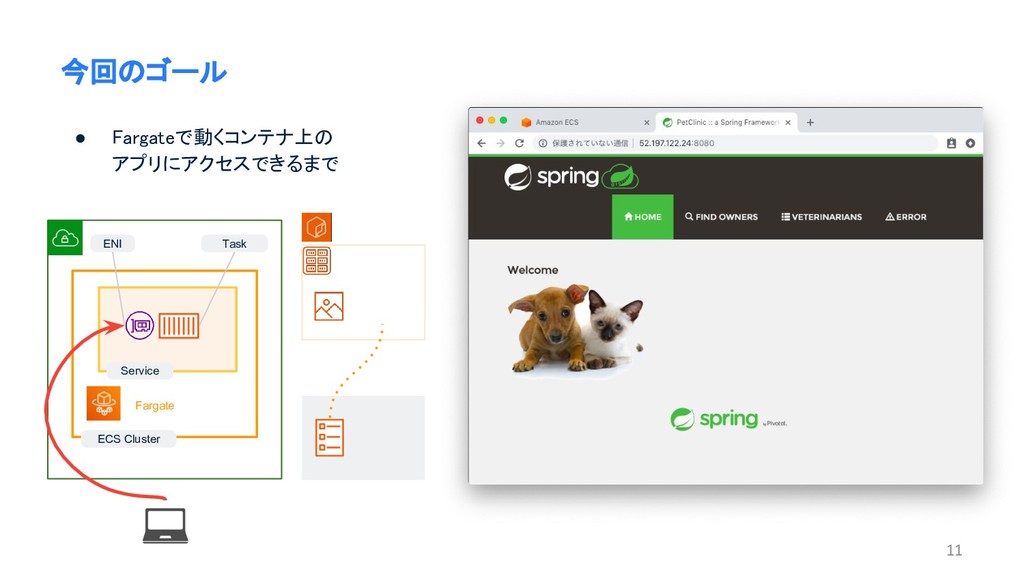
11 今回のゴール • Fargateで動くコンテナ上の アプリにアクセスできるまで ECS Cluster Fargate Service ENI
Task
12 でどんどんデプロイ していきます
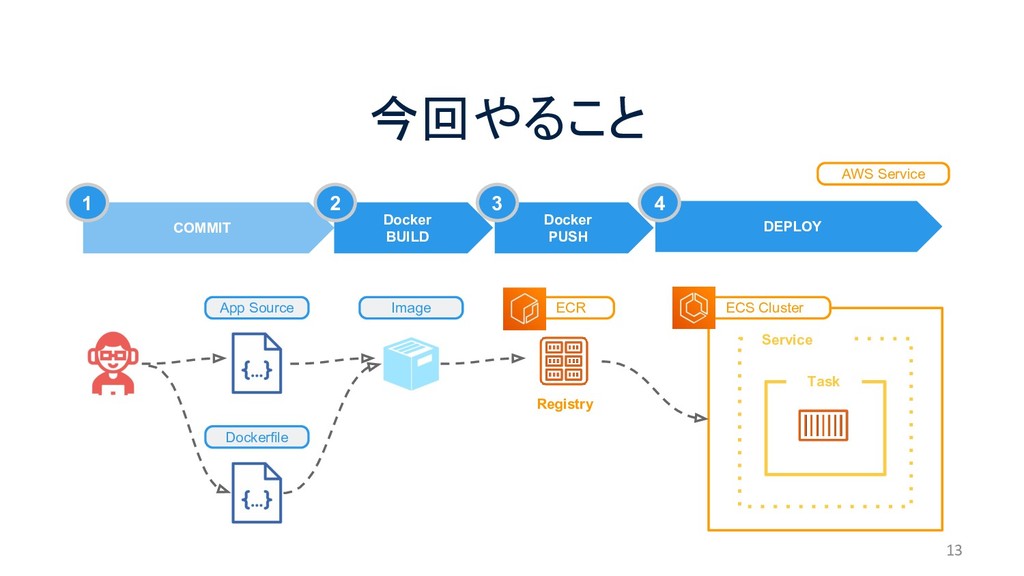
今回やること 13 ECS Cluster App Source Dockerfile Image COMMIT DEPLOY
Service Task Docker BUILD Docker PUSH AWS Service ECR Registry 1 2 3 4
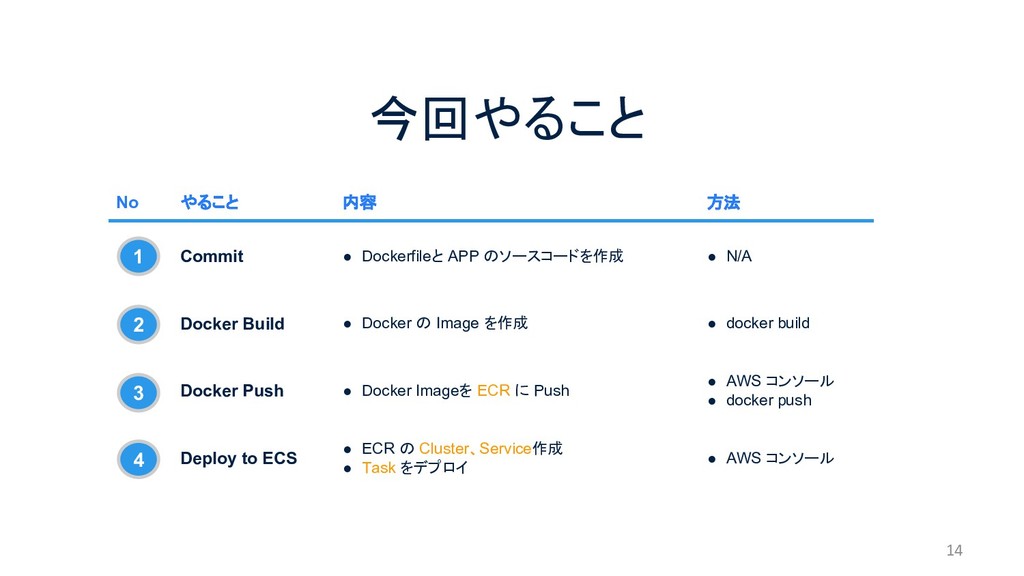
今回やること 14 No やること 内容 方法 Commit • Dockerfileと APP
のソースコードを作成 • N/A Docker Build • Docker の Image を作成 • docker build Docker Push • Docker Imageを ECR に Push • AWS コンソール • docker push Deploy to ECS • ECR の Cluster、Service作成 • Task をデプロイ • AWS コンソール 1 2 3 4
15 1. Commit
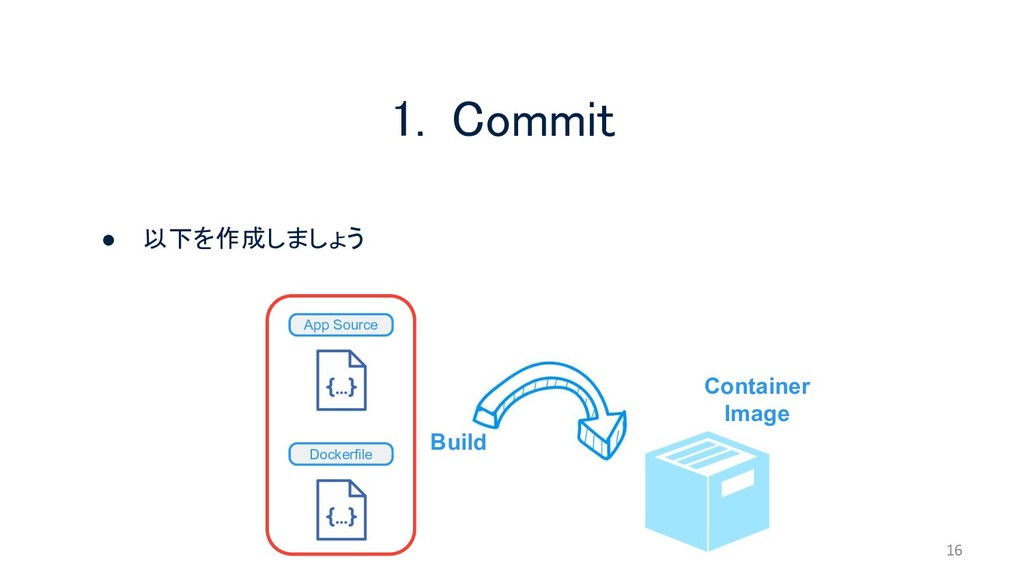
1. Commit 16 Container Image • 以下を作成しましょう Build App Source
Dockerfile
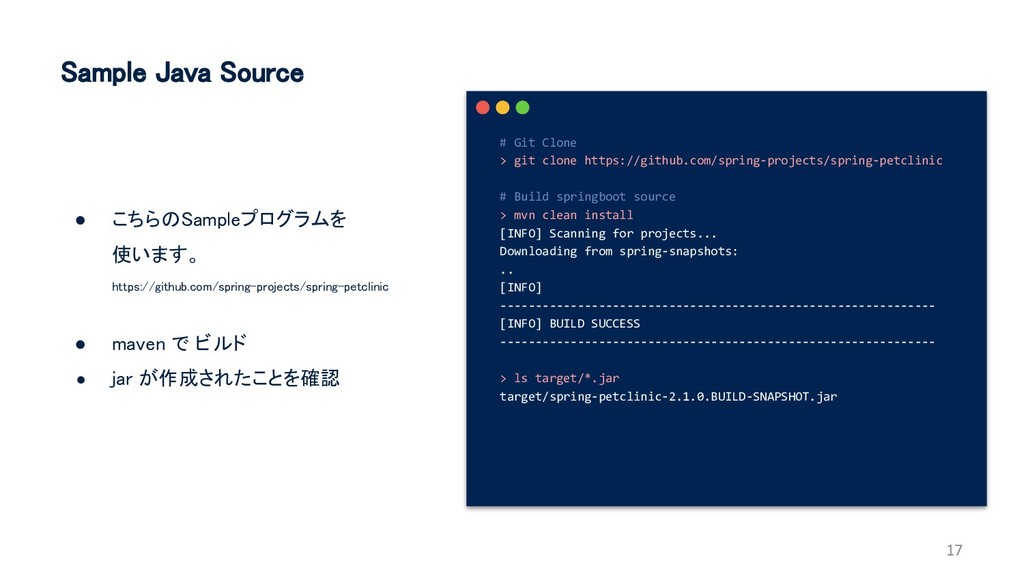
Sample Java Source • こちらのSampleプログラムを 使います。 https://github.com/spring-projects/spring-petclinic • maven で
ビルド • jar が作成されたことを確認 17 # Git Clone > git clone https://github.com/spring-projects/spring-petclinic # Build springboot source > mvn clean install [INFO] Scanning for projects... Downloading from spring-snapshots: .. [INFO] -------------------------------------------------------------- [INFO] BUILD SUCCESS -------------------------------------------------------------- > ls target/*.jar target/spring-petclinic-2.1.0.BUILD-SNAPSHOT.jar
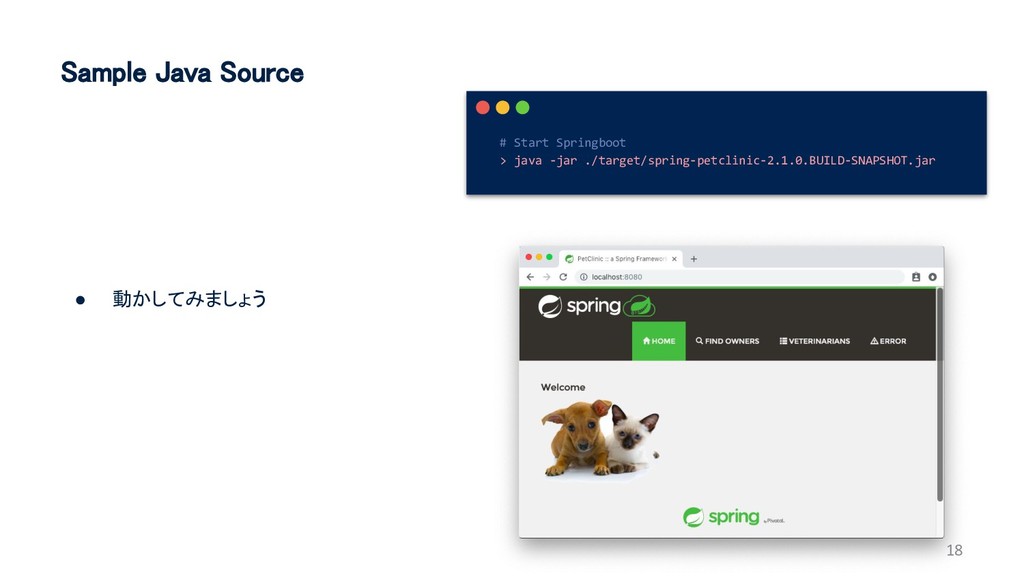
Sample Java Source • 動かしてみましょう 18 # Start Springboot >
java -jar ./target/spring-petclinic-2.1.0.BUILD-SNAPSHOT.jar
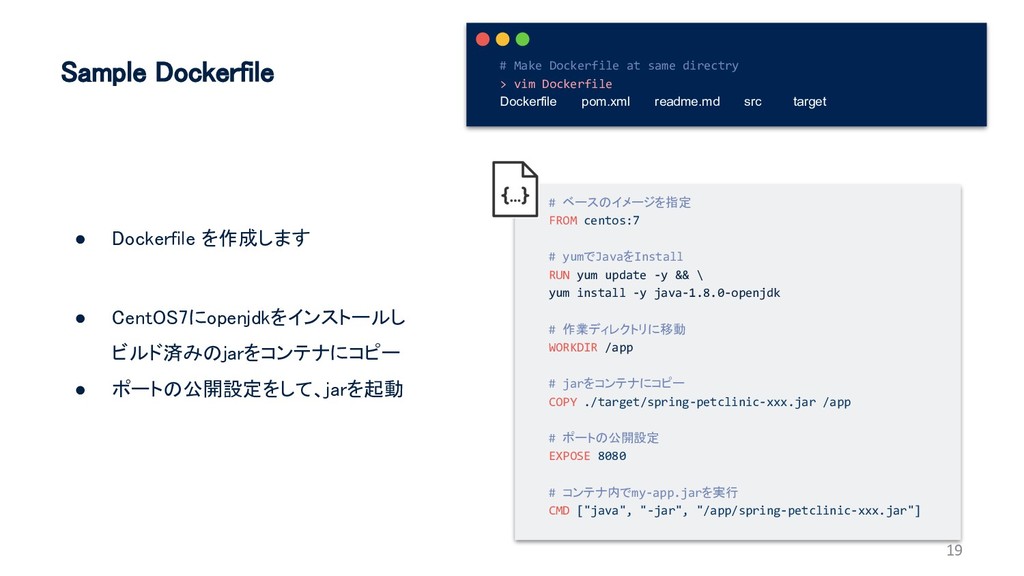
Sample Dockerfile • Dockerfile を作成します • CentOS7にopenjdkをインストールし ビルド済みのjarをコンテナにコピー • ポートの公開設定をして、jarを起動
19 # ベースのイメージを指定 FROM centos:7 # yumでJavaをInstall RUN yum update -y && \ yum install -y java-1.8.0-openjdk # 作業ディレクトリに移動 WORKDIR /app # jarをコンテナにコピー COPY ./target/spring-petclinic-xxx.jar /app # ポートの公開設定 EXPOSE 8080 # コンテナ内でmy-app.jarを実行 CMD ["java", "-jar", "/app/spring-petclinic-xxx.jar"] # Make Dockerfile at same directry > vim Dockerfile Dockerfile pom.xml readme.md src target
20 準備完了です
21 2. Build
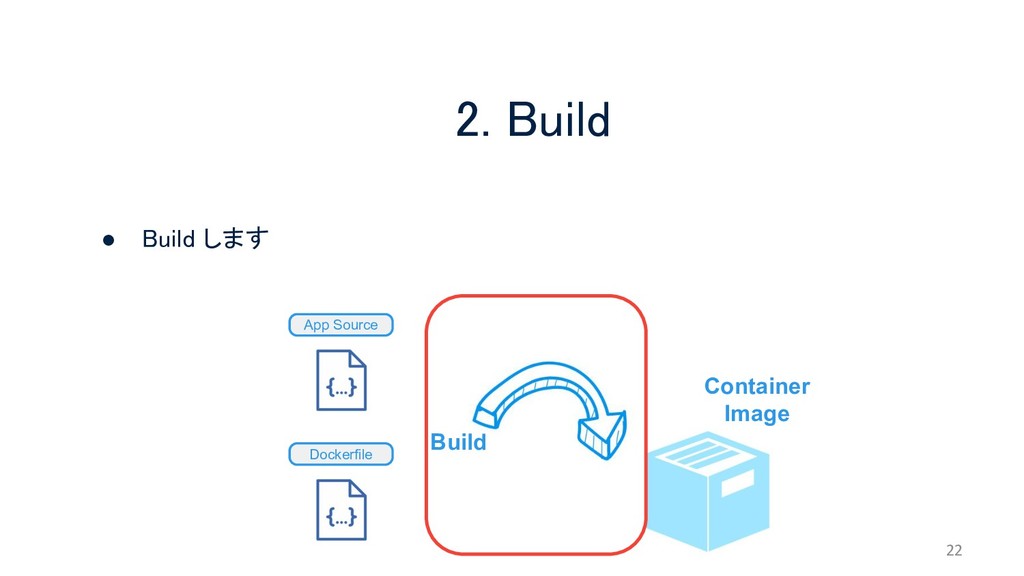
2. Build 22 Container Image • Build します Build App
Source Dockerfile
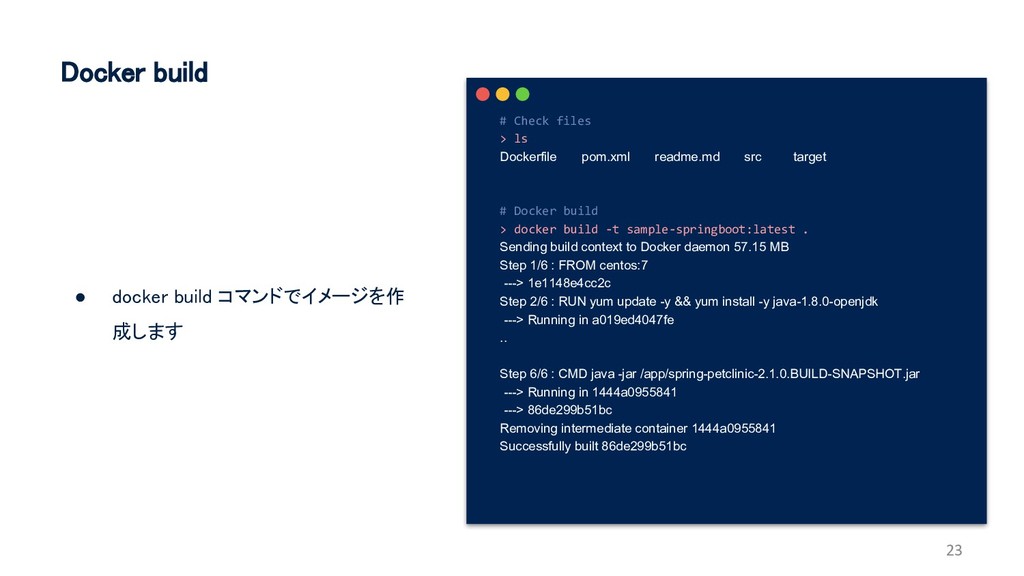
Docker build • docker build コマンドでイメージを作 成します 23 # Check
files > ls Dockerfile pom.xml readme.md src target # Docker build > docker build -t sample-springboot:latest . Sending build context to Docker daemon 57.15 MB Step 1/6 : FROM centos:7 ---> 1e1148e4cc2c Step 2/6 : RUN yum update -y && yum install -y java-1.8.0-openjdk ---> Running in a019ed4047fe .. Step 6/6 : CMD java -jar /app/spring-petclinic-2.1.0.BUILD-SNAPSHOT.jar ---> Running in 1444a0955841 ---> 86de299b51bc Removing intermediate container 1444a0955841 Successfully built 86de299b51bc
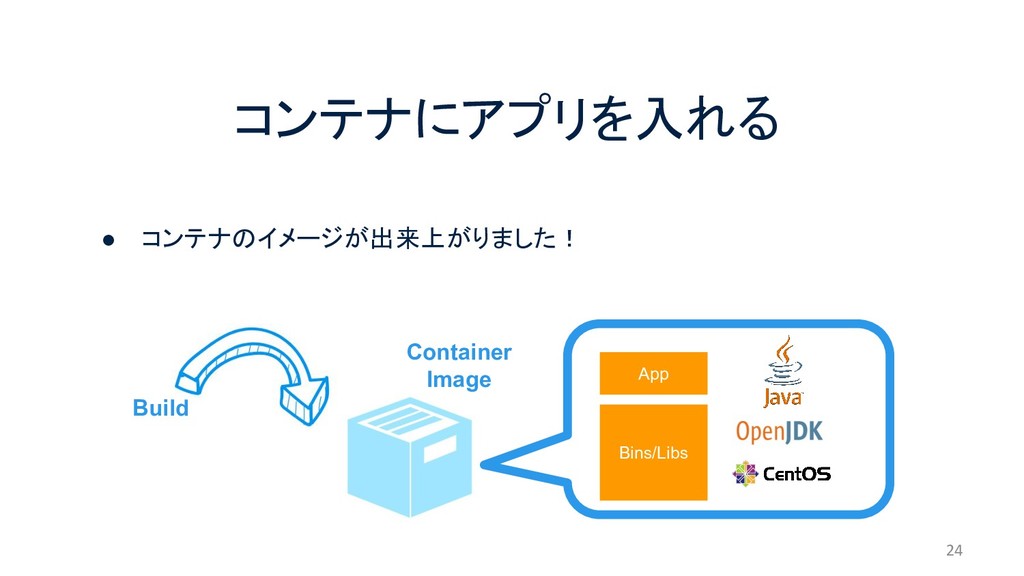
コンテナにアプリを入れる 24 Container Image Bins/Libs App • コンテナのイメージが出来上がりました! Build
25 3. Push
26 ここから が登場
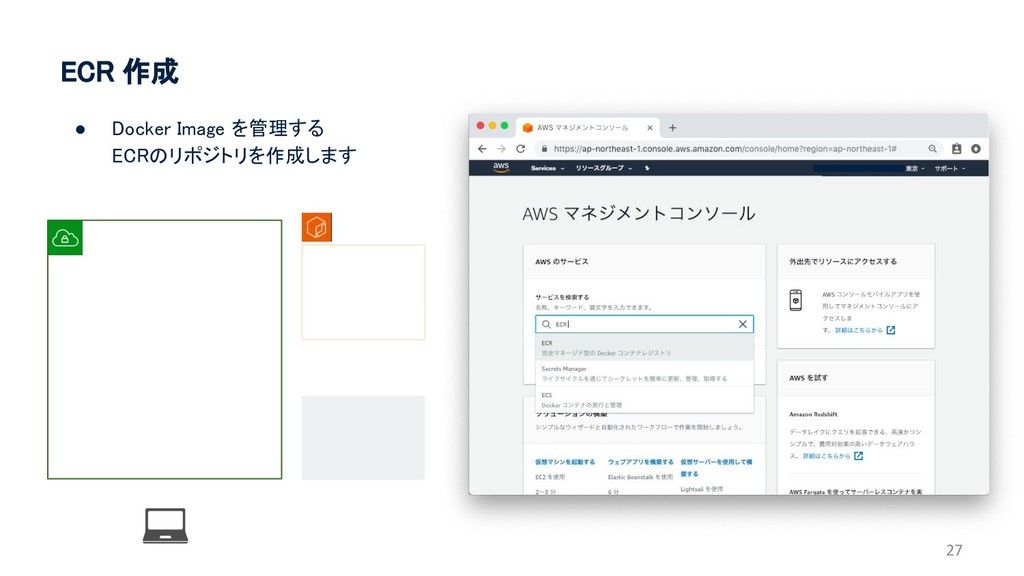
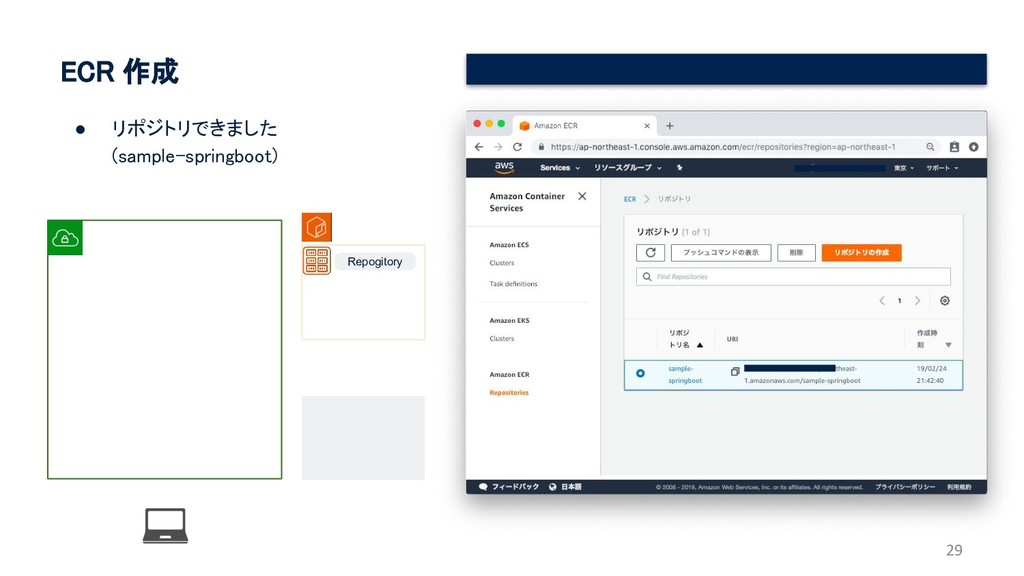
ECR 作成 27 • Docker Image を管理する ECRのリポジトリを作成します
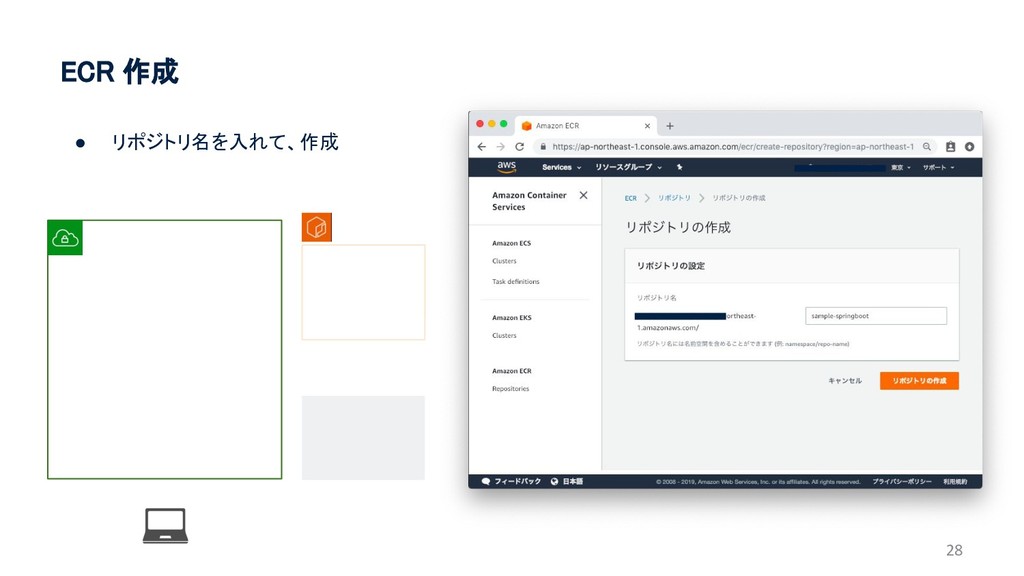
28 ECR 作成 • リポジトリ名を入れて、作成
29 ECR 作成 • リポジトリできました (sample-springboot) Repogitory
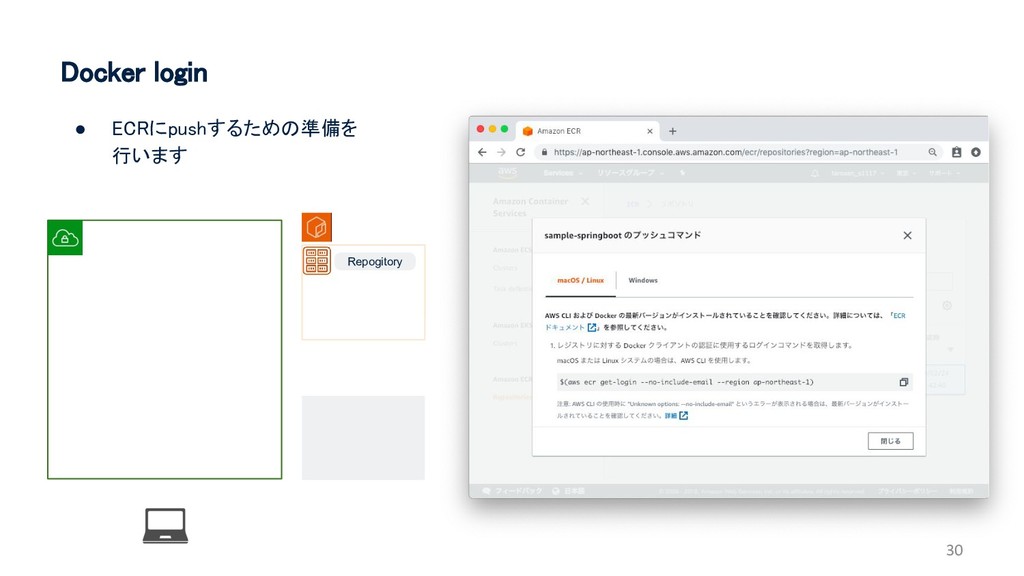
30 Docker login • ECRにpushするための準備を 行います Repogitory
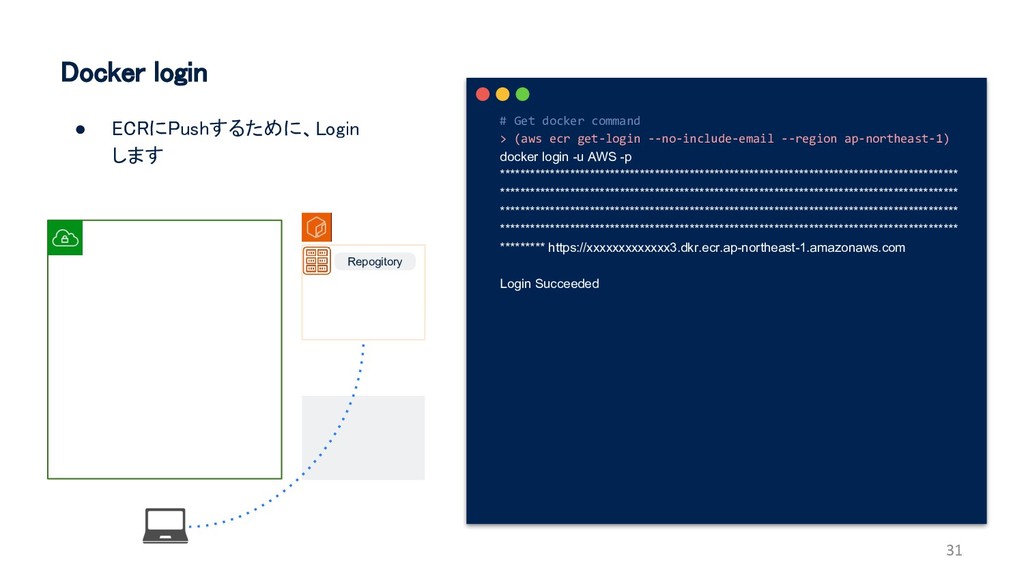
31 # Get docker command > (aws ecr get-login --no-include-email
--region ap-northeast-1) docker login -u AWS -p ******************************************************************************************** ******************************************************************************************** ******************************************************************************************** ******************************************************************************************** ********* https://xxxxxxxxxxxxx3.dkr.ecr.ap-northeast-1.amazonaws.com Login Succeeded Docker login • ECRにPushするために、Login します Repogitory
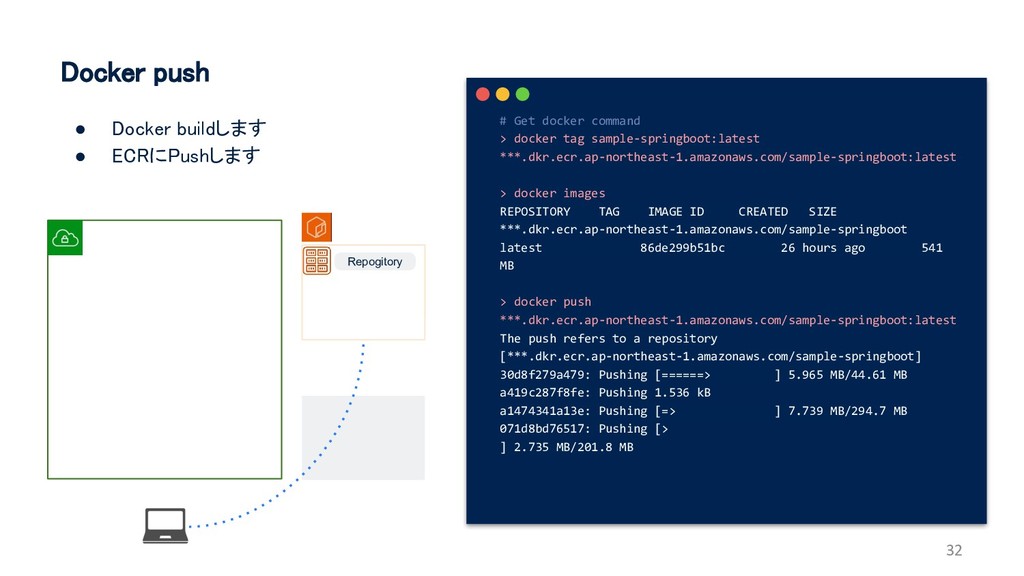
32 # Get docker command > docker tag sample-springboot:latest ***.dkr.ecr.ap-northeast-1.amazonaws.com/sample-springboot:latest
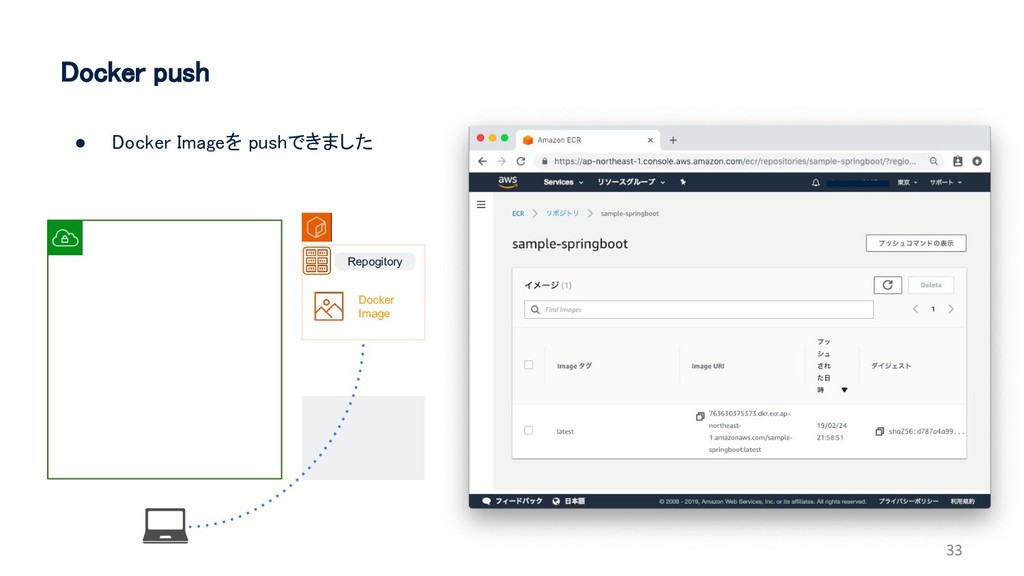
> docker images REPOSITORY TAG IMAGE ID CREATED SIZE ***.dkr.ecr.ap-northeast-1.amazonaws.com/sample-springboot latest 86de299b51bc 26 hours ago 541 MB > docker push ***.dkr.ecr.ap-northeast-1.amazonaws.com/sample-springboot:latest The push refers to a repository [***.dkr.ecr.ap-northeast-1.amazonaws.com/sample-springboot] 30d8f279a479: Pushing [======> ] 5.965 MB/44.61 MB a419c287f8fe: Pushing 1.536 kB a1474341a13e: Pushing [=> ] 7.739 MB/294.7 MB 071d8bd76517: Pushing [> ] 2.735 MB/201.8 MB Docker push • Docker buildします • ECRにPushします Repogitory
33 Docker push • Docker Imageを pushできました Repogitory Docker Image
34 4. Deploy
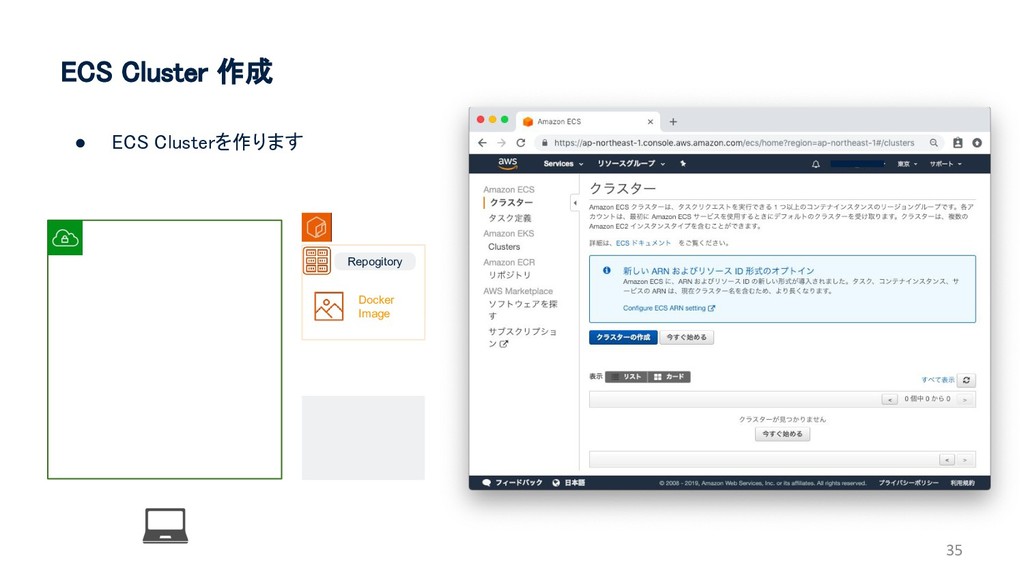
ECS Cluster 作成 35 • ECS Clusterを作ります Repogitory Docker Image
36 ECS Cluster 作成 • ECS Clusterを作ります • AWS Fargateを選択
Repogitory Docker Image
37 ECS Cluster 作成 • ECS Clusterの名前を指定 (ecs-cluster-sample-springboot) Repogitory Docker
Image
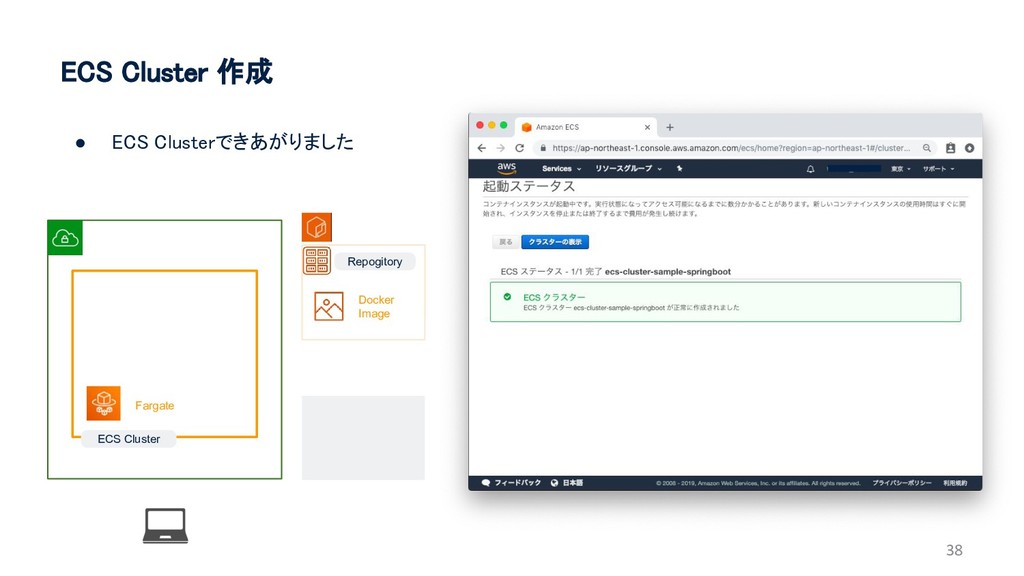
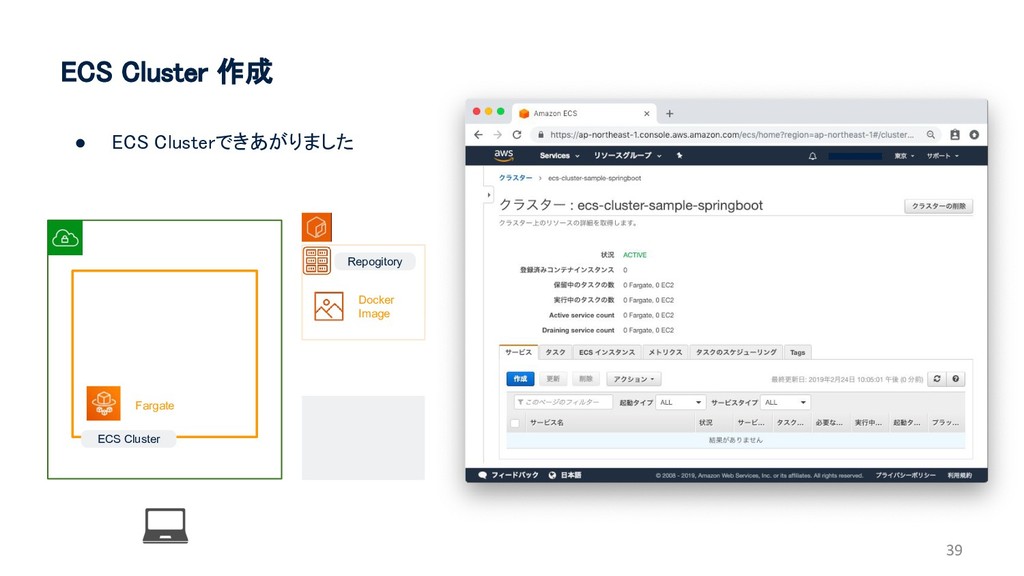
38 ECS Cluster 作成 • ECS Clusterできあがりました Repogitory Docker Image
ECS Cluster Fargate
39 ECS Cluster 作成 • ECS Clusterできあがりました Repogitory Docker Image
ECS Cluster Fargate
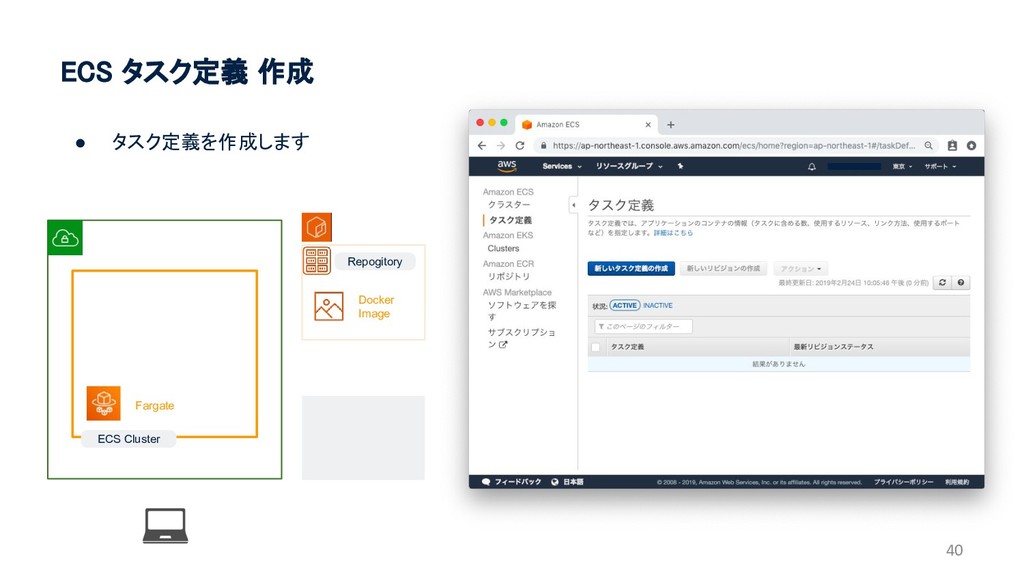
40 ECS タスク定義 作成 • タスク定義を作成します Repogitory Docker Image ECS
Cluster Fargate
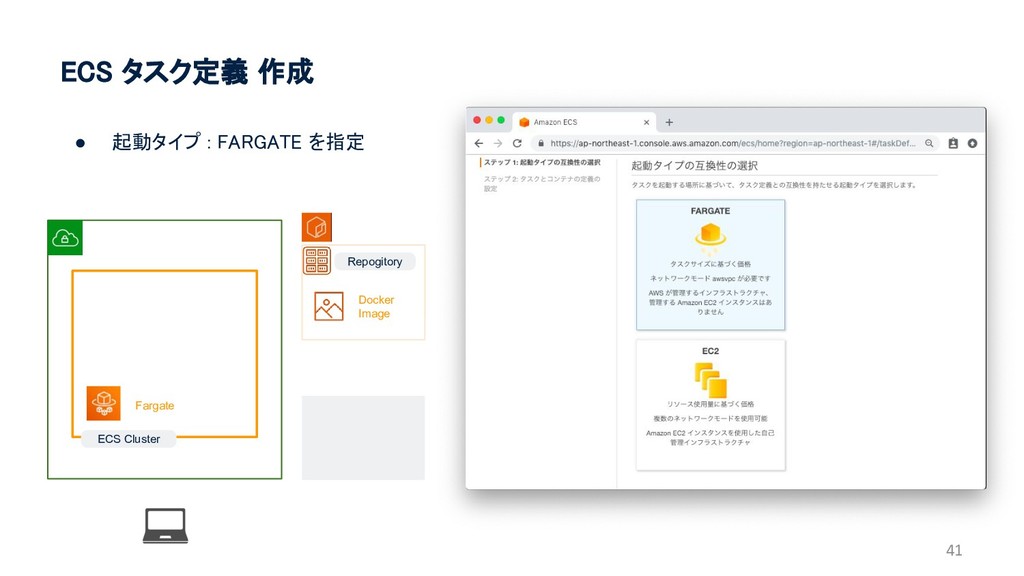
41 ECS タスク定義 作成 • 起動タイプ : FARGATE を指定 Repogitory
Docker Image ECS Cluster Fargate
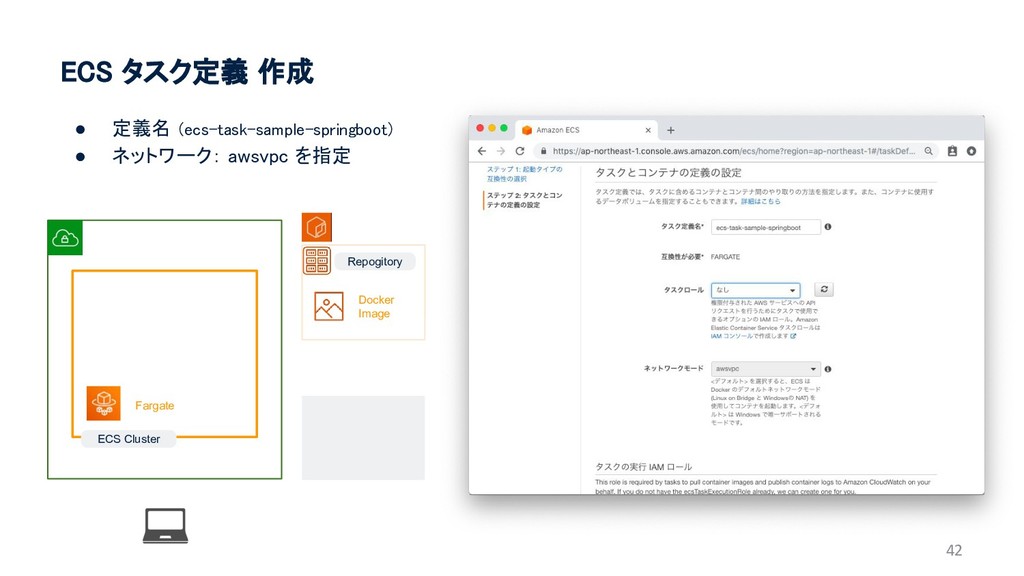
42 ECS タスク定義 作成 • 定義名 (ecs-task-sample-springboot) • ネットワーク: awsvpc
を指定 Repogitory Docker Image ECS Cluster Fargate
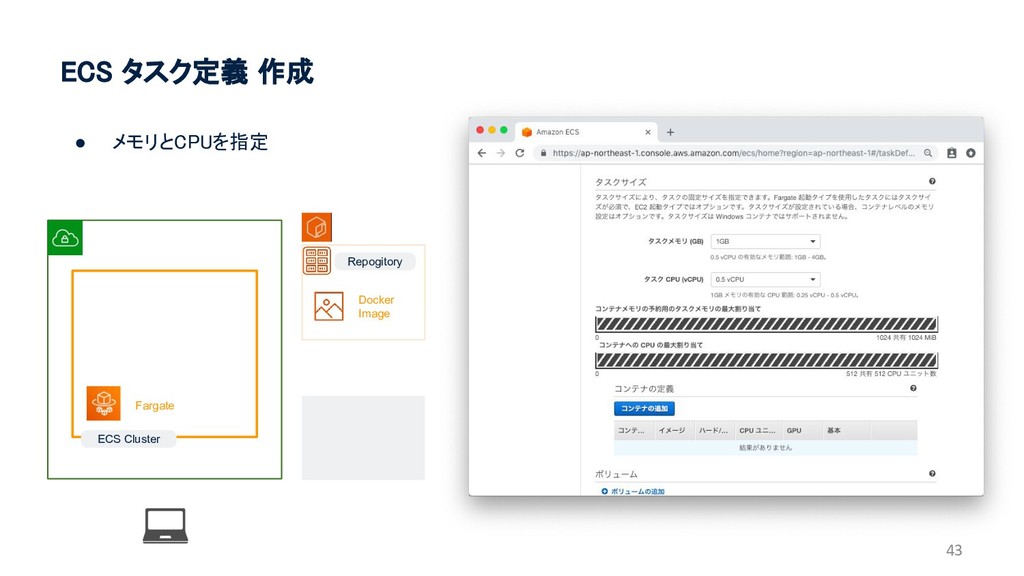
43 ECS タスク定義 作成 • メモリとCPUを指定 Repogitory Docker Image ECS
Cluster Fargate
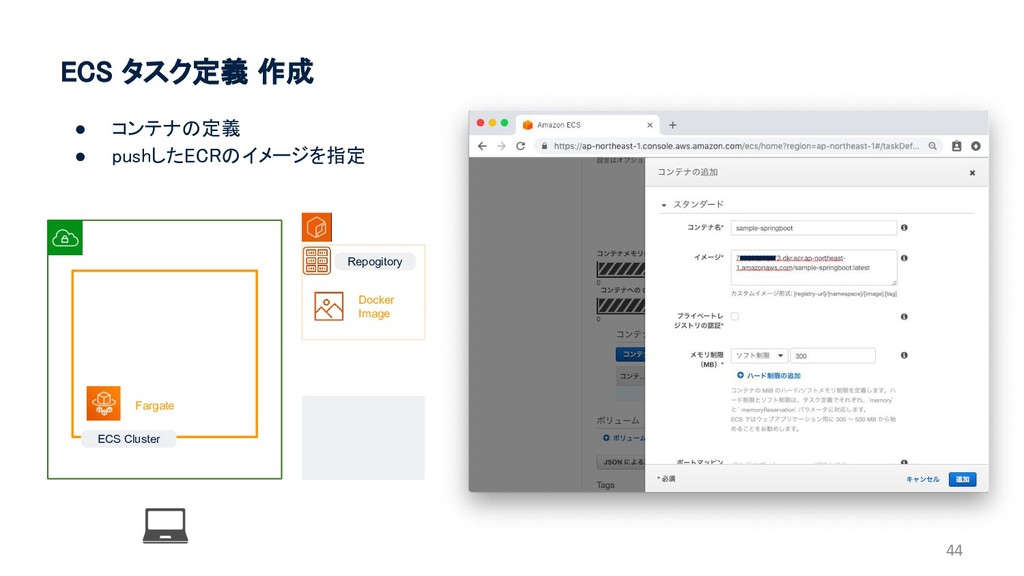
44 ECS タスク定義 作成 • コンテナの定義 • pushしたECRのイメージを指定 Repogitory Docker
Image ECS Cluster Fargate
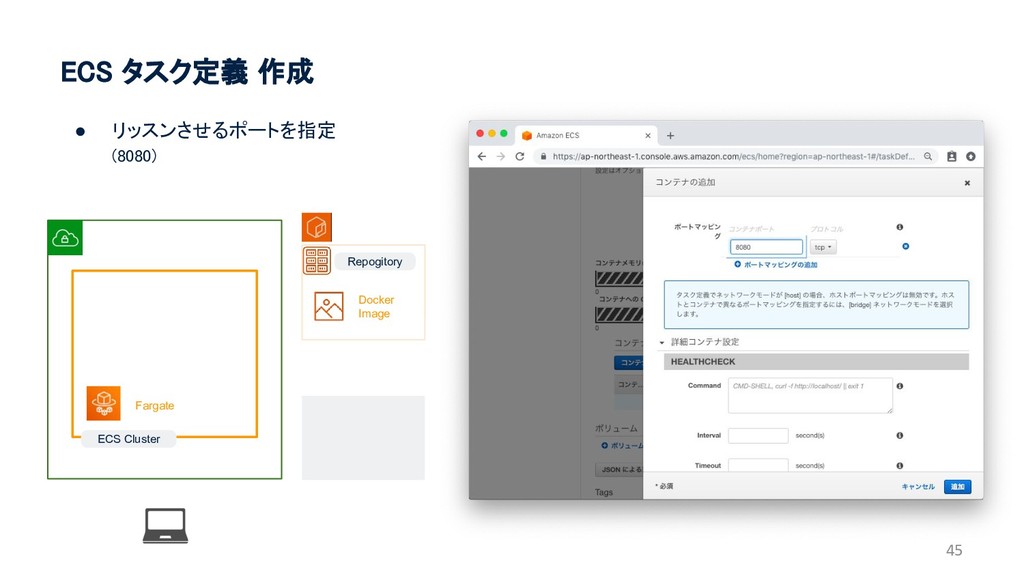
45 ECS タスク定義 作成 • リッスンさせるポートを指定 (8080) Repogitory Docker Image
ECS Cluster Fargate
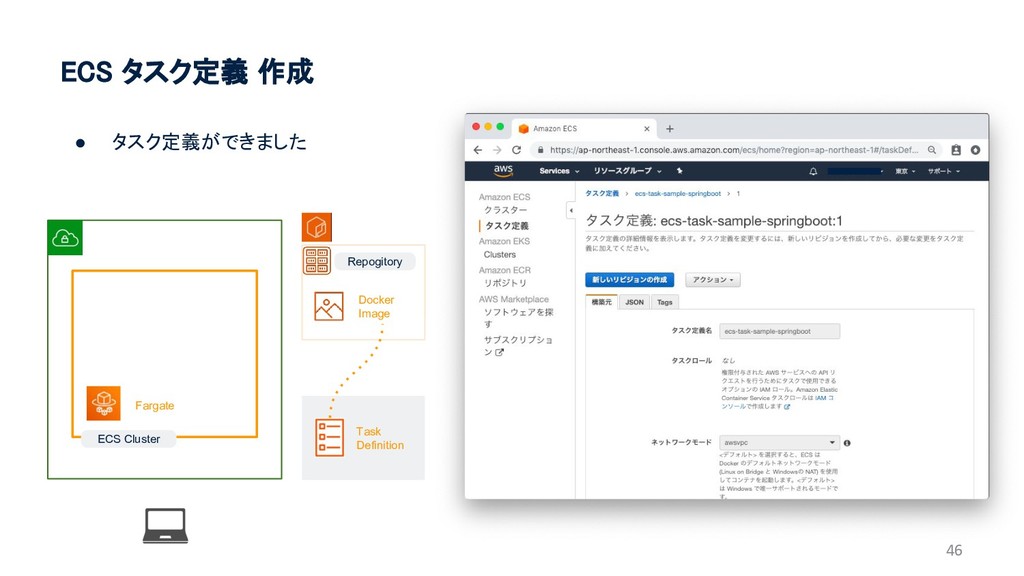
46 ECS タスク定義 作成 • タスク定義ができました Repogitory Docker Image ECS
Cluster Fargate Task Definition
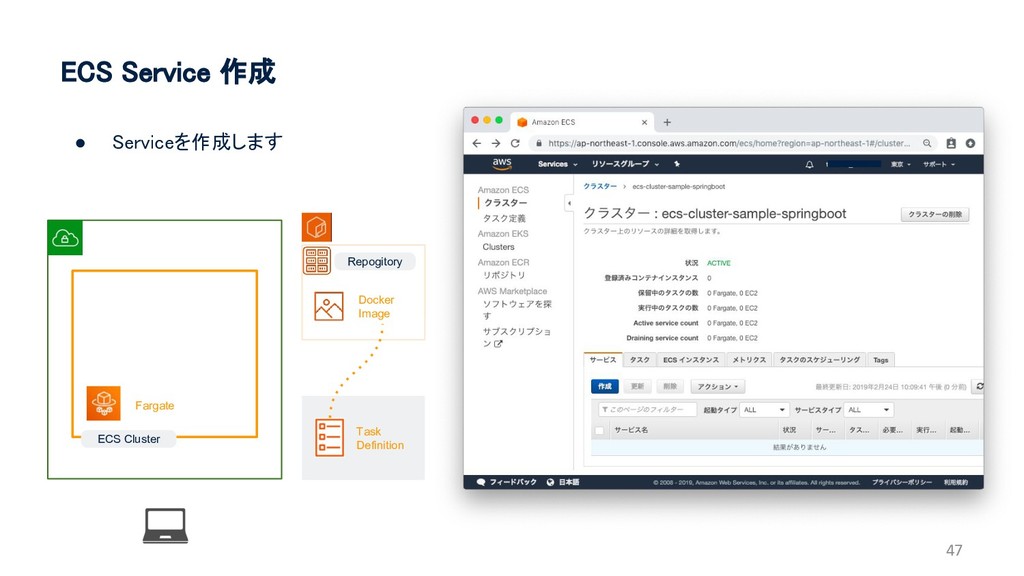
47 ECS Service 作成 • Serviceを作成します Repogitory Docker Image ECS
Cluster Fargate Task Definition
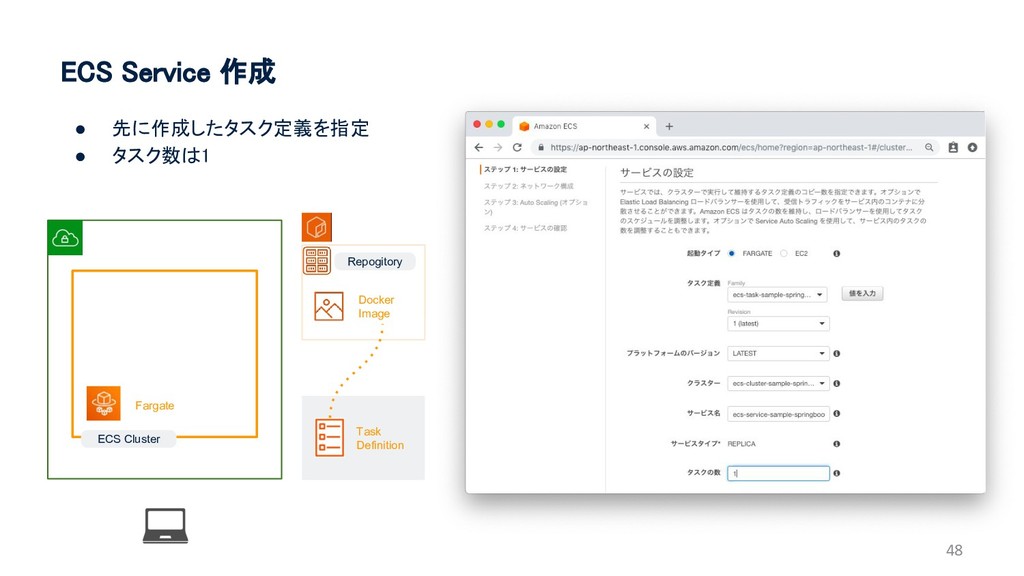
48 ECS Service 作成 • 先に作成したタスク定義を指定 • タスク数は1 Repogitory Docker
Image ECS Cluster Fargate Task Definition
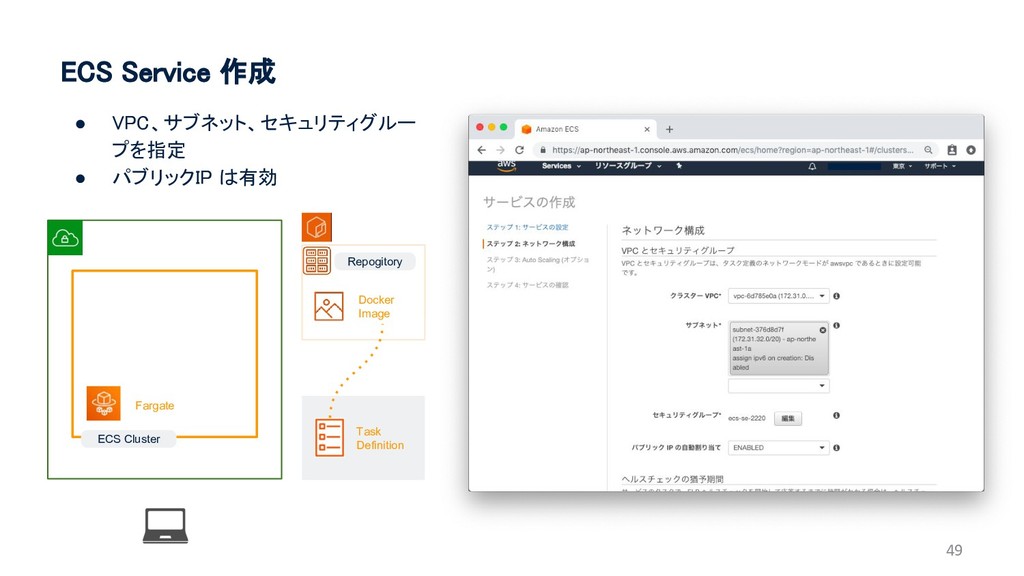
49 ECS Service 作成 • VPC、サブネット、セキュリティグルー プを指定 • パブリックIP は有効
Repogitory Docker Image ECS Cluster Fargate Task Definition
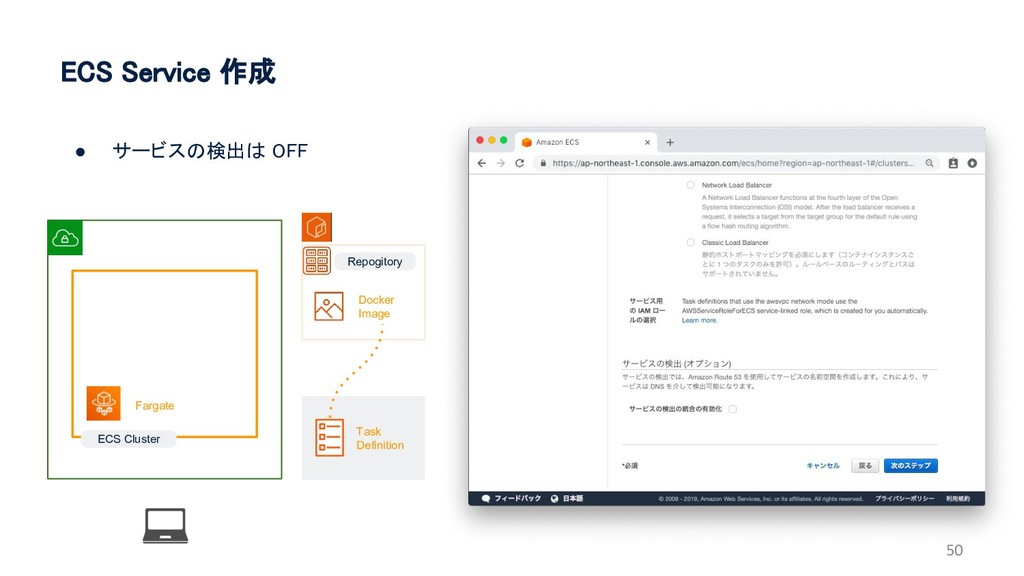
50 ECS Service 作成 • サービスの検出は OFF ECS Cluster Fargate
Repogitory Docker Image Task Definition
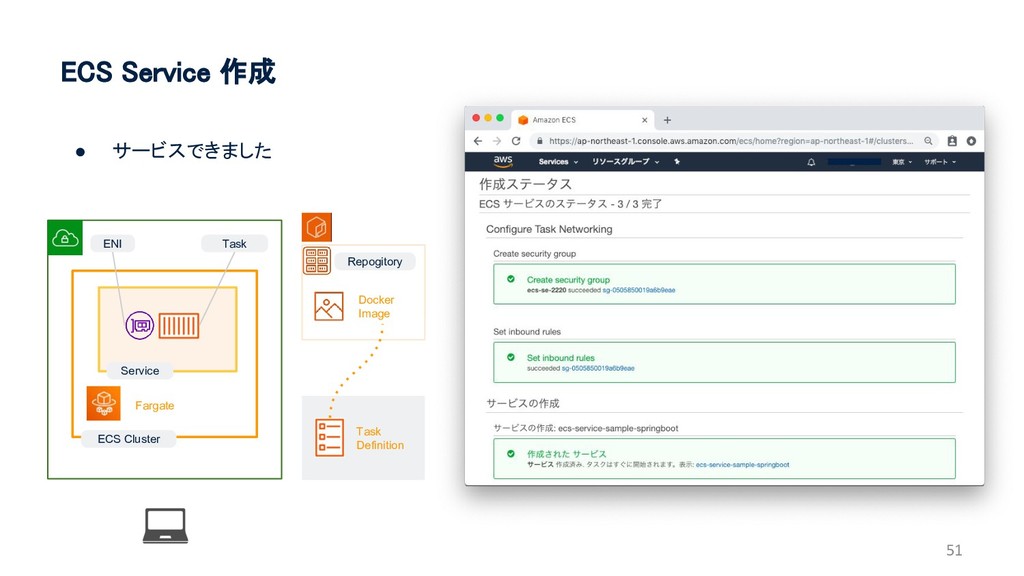
51 ECS Service 作成 • サービスできました ECS Cluster Fargate Service
ENI Task Repogitory Docker Image Task Definition
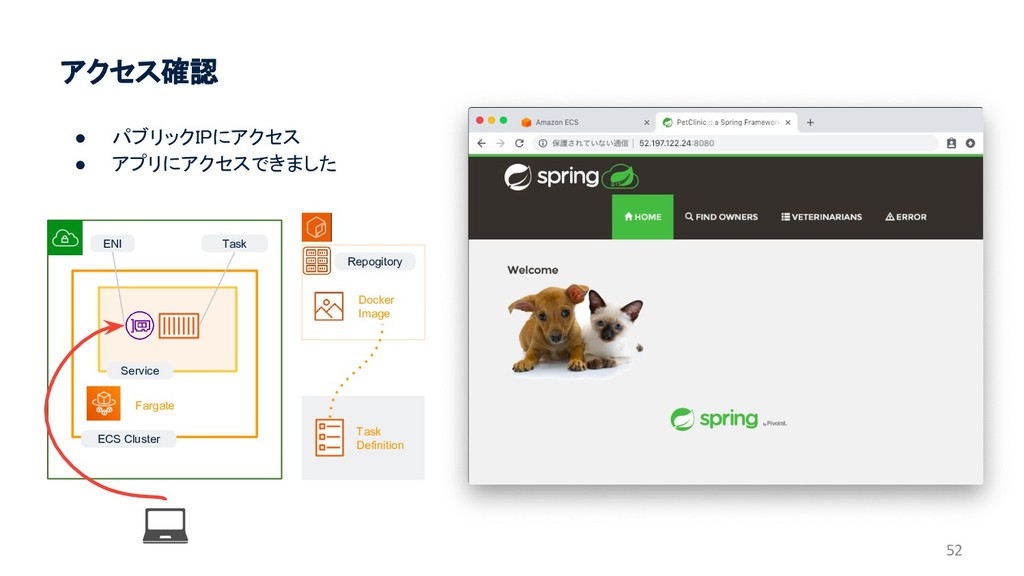
52 アクセス確認 • パブリックIPにアクセス • アプリにアクセスできました ECS Cluster Fargate Service
ENI Task Repogitory Docker Image Task Definition
53 おわり


 tarosaiba
 codmoninc
 hiracky16
 daidaidai
 genda
genda
 ivry_presentationmaterials
 akitoshiga
 minorun365
 willnet
 yama3133
 occhi
occhi
 glaforge
 puhitaku
 portentint
 tammyeverts
 tmiket
 mkilby
 lemiorhan
 chriscoyier
 sabderemane
 thirion
 marktimemedia
 inesmontani
 honzajavorek
 holman