Upgrade to Pro
— share decks privately, control downloads, hide ads and more …
Speaker Deck
Sign up for free
Menu
Search
Features
All features
Private URLs
Password Protection
Custom URLS
Scheduled publishing
Remove Branding
Restrict embedding
Deck Collections
Notes
Features
All features
Private URLs
Password Protection
Custom URLS
Scheduled publishing
Remove Branding
Restrict embedding
Deck Collections
Notes
Explore
Featured decks
Featured speakers
Programming
Technology
Storyboards
Explore
Featured decks
Featured speakers
Programming
Technology
Storyboards
Pricing
Search
Sign in
Sign up for free
suspend関数のテストの疑問調べてみた
Search
Sponsored
·
Ship Features Fearlessly
Turn features on and off without deploys. Used by thousands of Ruby developers.
→
usuiat
October 23, 2026
Technology
21
0
Share
Embed
Copy iframe code
Copy JS code
Copy link
Start on current slide
suspend関数のテストの疑問調べてみた
DroidKaigi.collect { #31@Nagoya }
https://droidkaigi.connpass.com/event/407026/
usuiat
October 23, 2026
More Decks by usuiat
See All by usuiat
Google I/O 2025 報告LT会 Small language models with Google AI Edge
usuiat
0
600
発信から広がった地方エンジニアのキャリア
usuiat
1
78
タッチイベントの仕組みを理解してジェスチャーを使いこなそう
usuiat
1
1.8k
Google I/O 2024 報告LT会(Androidのオンデバイス生成AI)
usuiat
0
1.1k
Modifier.Nodeに移行してパフォーマンスを比べてみた
usuiat
0
570
reifiedって何ですか?
usuiat
2
1.4k
Other Decks in Technology
See All in Technology
日本語に強いオープンな大規模言語モデル「LLM-jp」
odashi
5
1.2k
AI駆動開発における開発環境のセキュリティの考え方
yamahiro
0
150
S3 Filesで挑む! 八戸せんべい汁の食べ頃問題
usanchuu
0
140
Active Record Connection Adaptersにおける長年の課題に再び取り組む
yahonda
0
390
Optunaの最新リリースv5.0について
pfn
PRO
0
130
会社紹介資料 / Sansan Company Profile
sansan33
PRO
31
430k
FinOps Agentが生んだ技術負債:コスト自動調査の落とし穴と解消までの道のり
oasis1994liveforever
3
240
SAENM ~Jupyterで残すPoCの試行錯誤、未来の自分と仲間を助ける記録!~
terapyon
0
170
大型犬好きによるPugの紹介
yamanoku
1
160
AI時代のGraphQL
joere
1
290
AI駆動で「他アプリの音を加工できる」アプリを作った
satomasahiro2005
0
190
顧客価値を追いかけたら、プライシングにたどり着いた
sansantech
PRO
2
310
Featured
See All Featured
CoffeeScript is Beautiful & I Never Want to Write Plain JavaScript Again
sstephenson
162
16k
The Power of CSS Pseudo Elements
geoffreycrofte
82
6.6k
The Language of Interfaces
destraynor
162
27k
Documentation Writing (for coders)
carmenintech
77
5.6k
It's Worth the Effort
3n
188
29k
How People are Using Generative and Agentic AI to Supercharge Their Products, Projects, Services and Value Streams Today
helenjbeal
2
370
How to Build an AI Search Optimization Roadmap - Criteria and Steps to Take #SEOIRL
aleyda
1
2.2k
Public Speaking Without Barfing On Your Shoes - THAT 2023
reverentgeek
1
600
Responsive Adventures: Dirty Tricks From The Dark Corners of Front-End
smashingmag
254
22k
Keith and Marios Guide to Fast Websites
keithpitt
413
23k
Deep Space Network (abreviated)
tonyrice
0
380
Building a Scalable Design System with Sketch
lauravandoore
464
34k
Transcript
suspend関数のテストの疑問 調べてみた 2026.10.23 DroidKaigi.collect { #31@Nagoya } usuiat
About Me Atsushi Usui 臼井 篤志 Android Engineer Cybozu, Inc.
サイボウズ株式会社 Book『詳解 Jetpack Compose』 https://gihyo.jp/book/2024/978-4-297-14488-3 @usuiat Library “Zoomable” https://github.com/usuiat/Zoomable
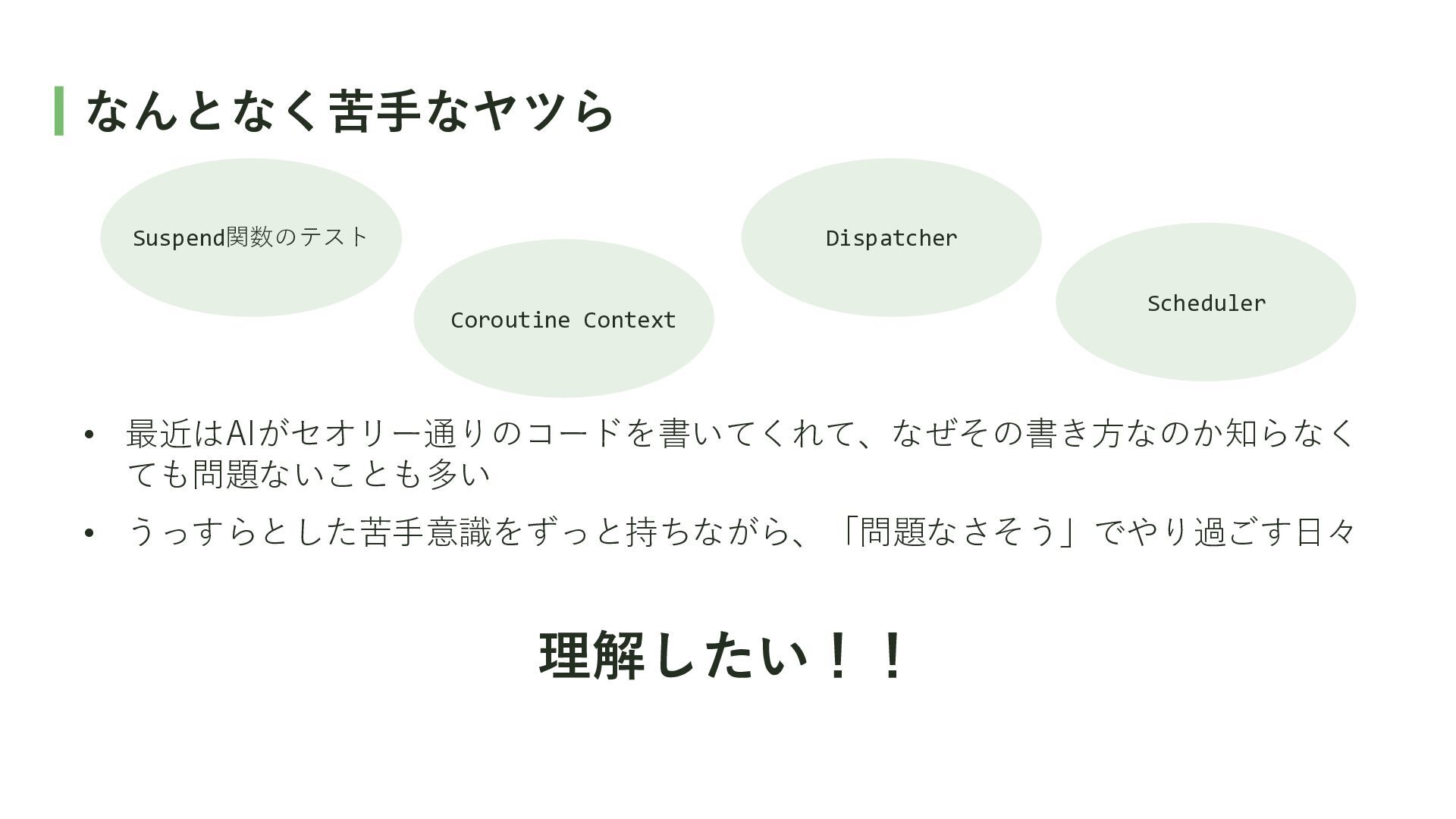
なんとなく苦手なヤツら Suspend関数のテスト Dispatcher Coroutine Context Scheduler • 最近はAIがセオリー通りのコードを書いてくれて、なぜその書き方なのか知らなく ても問題ないことも多い •
うっすらとした苦手意識をずっと持ちながら、「問題なさそう」でやり過ごす日々 理解したい!!
suspend関数のテストの疑問 調べてみた
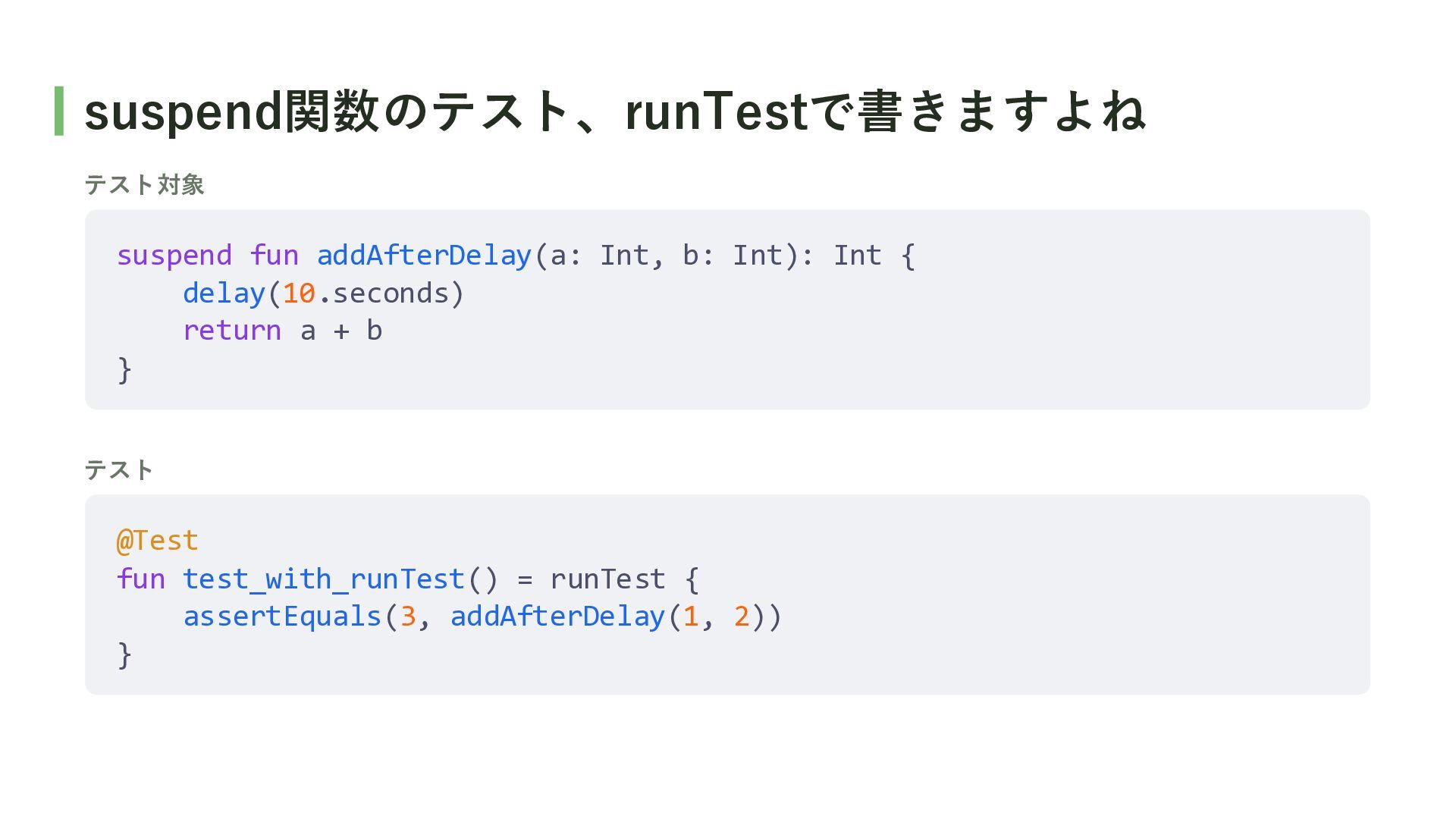
suspend関数のテスト、runTestで書きますよね テスト対象 suspend fun addAfterDelay(a: Int, b: Int): Int {
delay(10.seconds) return a + b } テスト @Test fun test_with_runTest() = runTest { assertEquals(3, addAfterDelay(1, 2)) }
Q. なぜ、runBlockingではなくrunTestを使うの?
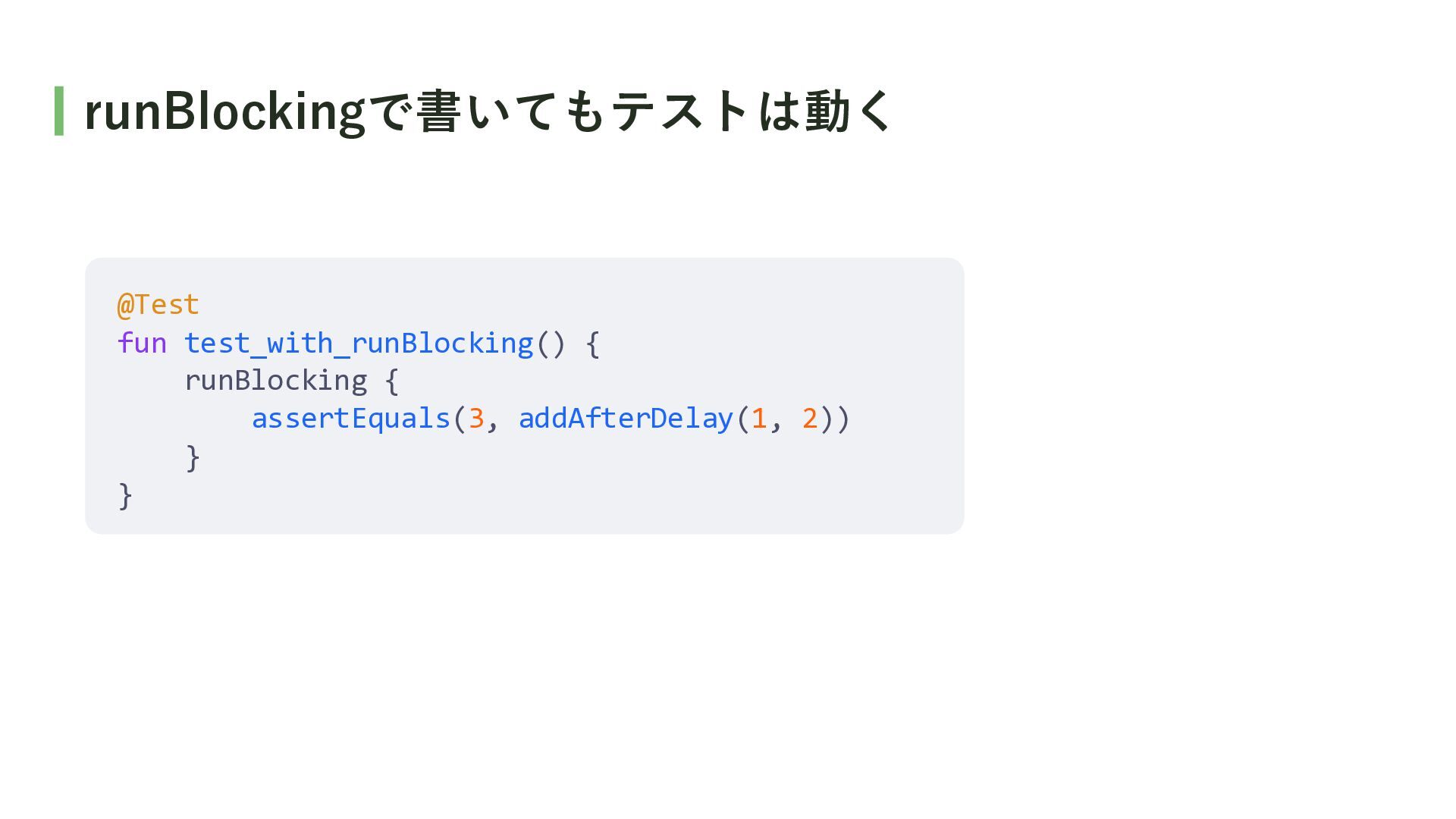
runBlockingで書いてもテストは動く @Test fun test_with_runBlocking() { runBlocking { assertEquals(3, addAfterDelay(1, 2))
} }
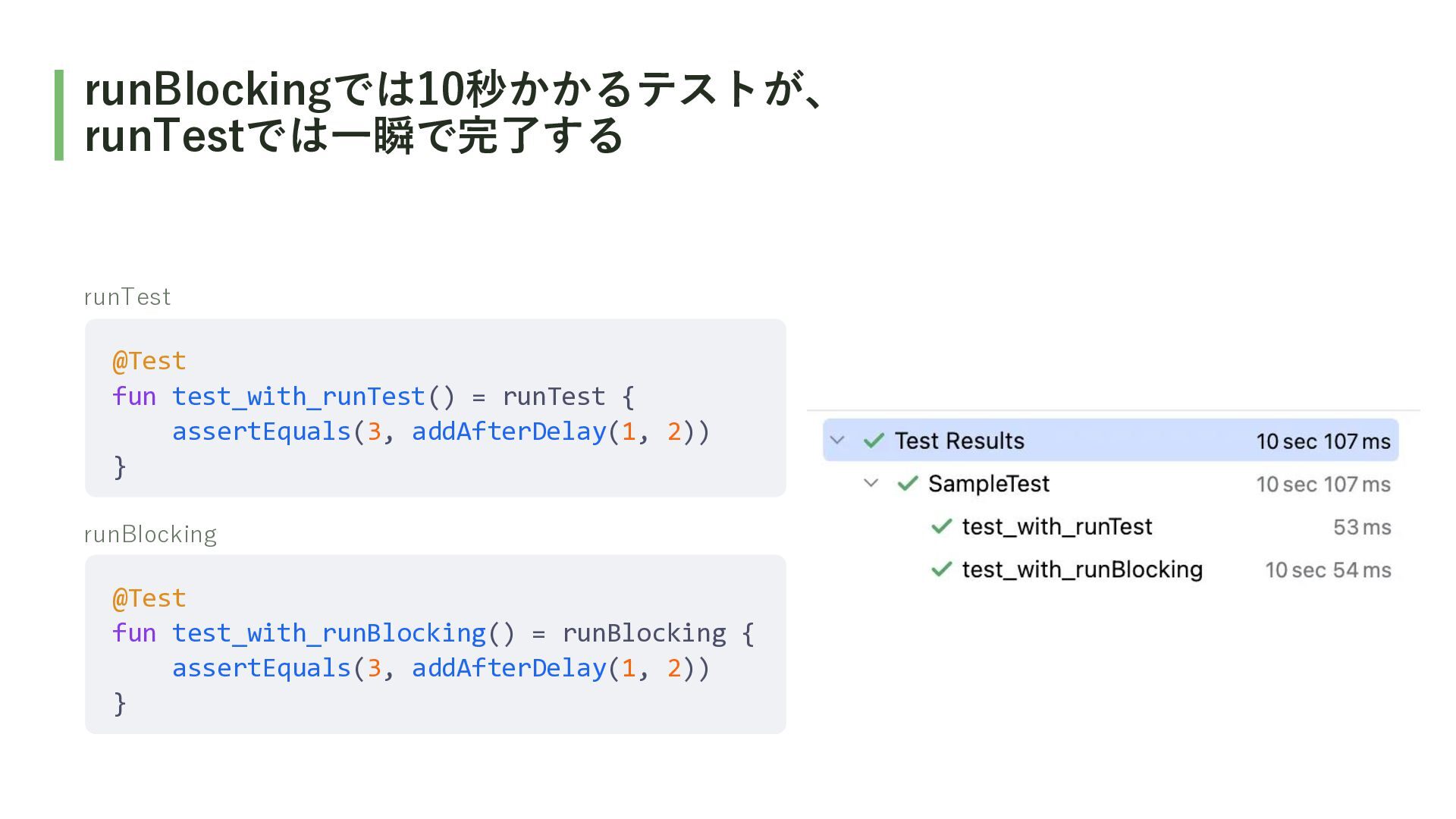
A. runTestはdelayをスキップするので、 テストを高速に実行できるから ※ この発表ではテストの速度に着目して話しますが、runTestの機能はdelayのスキップだけではないです。
runBlockingでは10秒かかるテストが、 runTestでは一瞬で完了する runTest @Test fun test_with_runTest() = runTest { assertEquals(3,
addAfterDelay(1, 2)) } runBlocking @Test fun test_with_runBlocking() = runBlocking { assertEquals(3, addAfterDelay(1, 2)) }
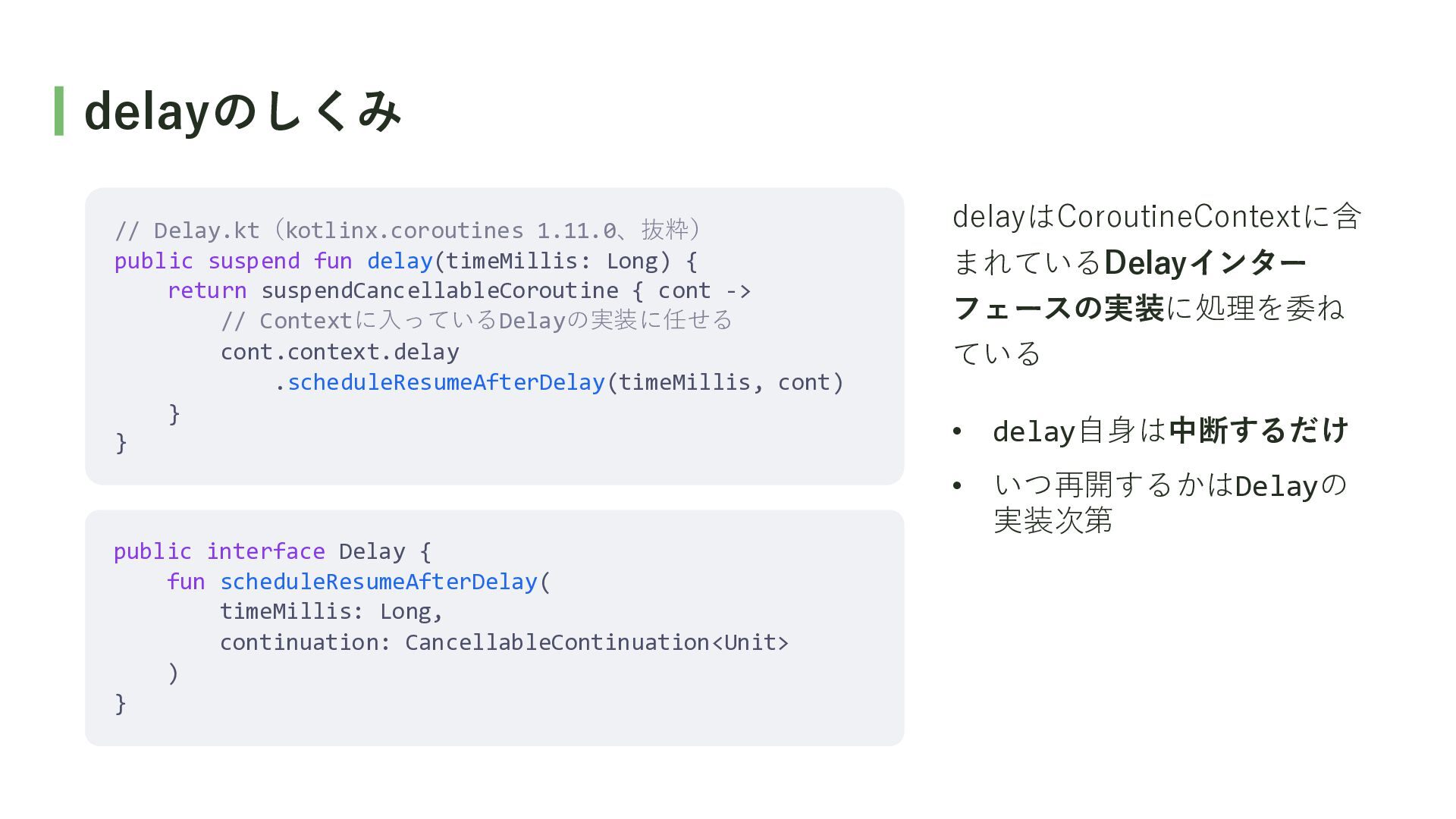
delayのしくみ // Delay.kt(kotlinx.coroutines 1.11.0、抜粋) public suspend fun delay(timeMillis: Long) {
return suspendCancellableCoroutine { cont -> // Contextに入っているDelayの実装に任せる cont.context.delay .scheduleResumeAfterDelay(timeMillis, cont) } } delayはCoroutineContextに含 まれているDelayインター フェースの実装に処理を委ね ている • delay自身は中断するだけ • いつ再開するかはDelayの 実装次第 public interface Delay { fun scheduleResumeAfterDelay( timeMillis: Long, continuation: CancellableContinuation<Unit> ) }
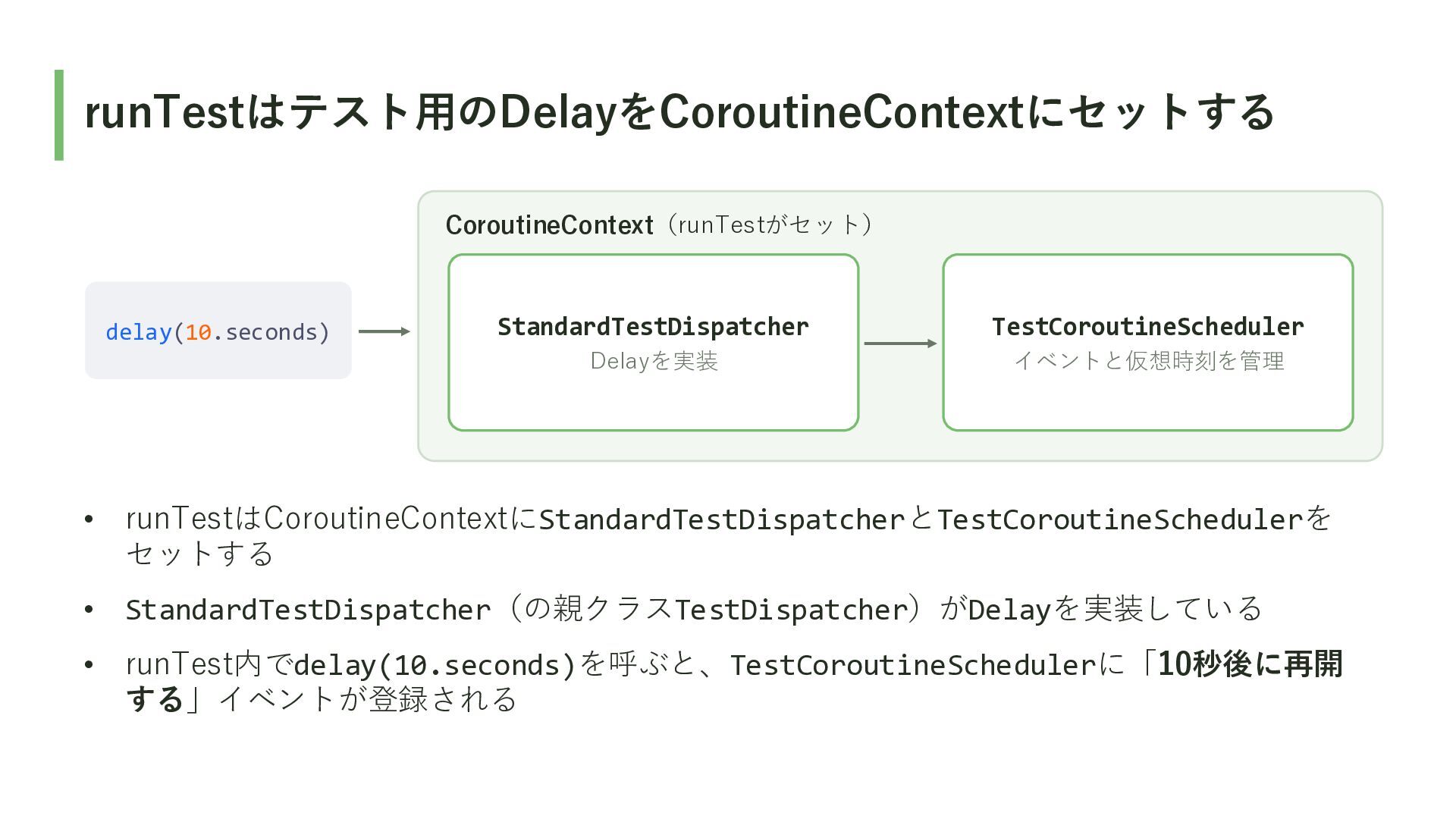
runTestはテスト用のDelayをCoroutineContextにセットする CoroutineContext(runTestがセット) delay(10.seconds) StandardTestDispatcher TestCoroutineScheduler Delayを実装 イベントと仮想時刻を管理 • runTestはCoroutineContextにStandardTestDispatcherとTestCoroutineSchedulerを セットする
• StandardTestDispatcher(の親クラスTestDispatcher)がDelayを実装している • runTest内でdelay(10.seconds)を呼ぶと、TestCoroutineSchedulerに「10秒後に再開 する」イベントが登録される
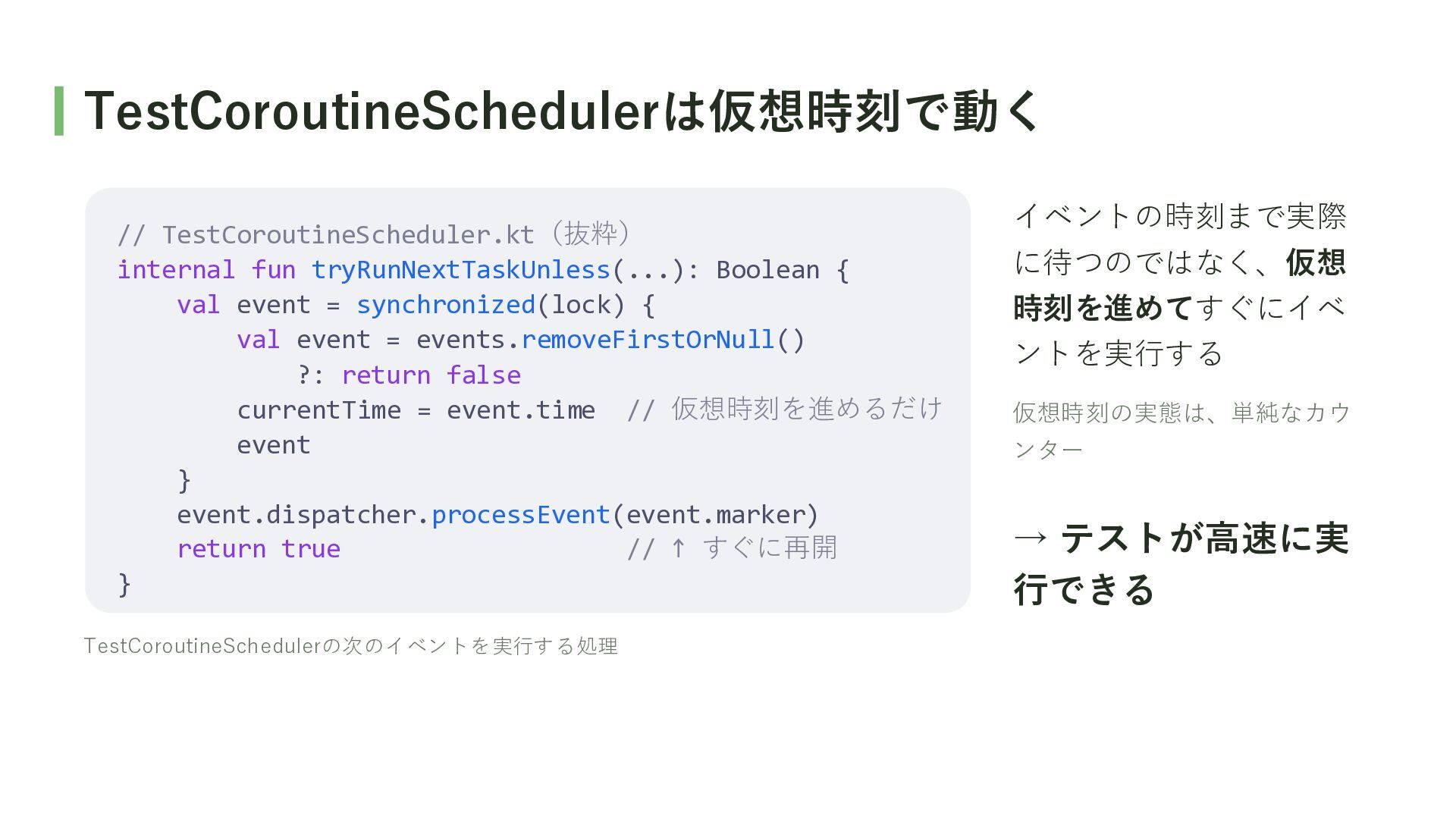
TestCoroutineSchedulerは仮想時刻で動く // TestCoroutineScheduler.kt(抜粋) internal fun tryRunNextTaskUnless(...): Boolean { val event
= synchronized(lock) { val event = events.removeFirstOrNull() ?: return false currentTime = event.time // 仮想時刻を進めるだけ event } event.dispatcher.processEvent(event.marker) return true // ↑ すぐに再開 } TestCoroutineSchedulerの次のイベントを実行する処理 イベントの時刻まで実際 に待つのではなく、仮想 時刻を進めてすぐにイベ ントを実行する 仮想時刻の実態は、単純なカウ ンター → テストが高速に実 行できる
runTestでsuspend関数のテストを書くことで、 delayがスキップされ、テストが高速に実行できる!
Q. なぜDispatcherをDIするの?
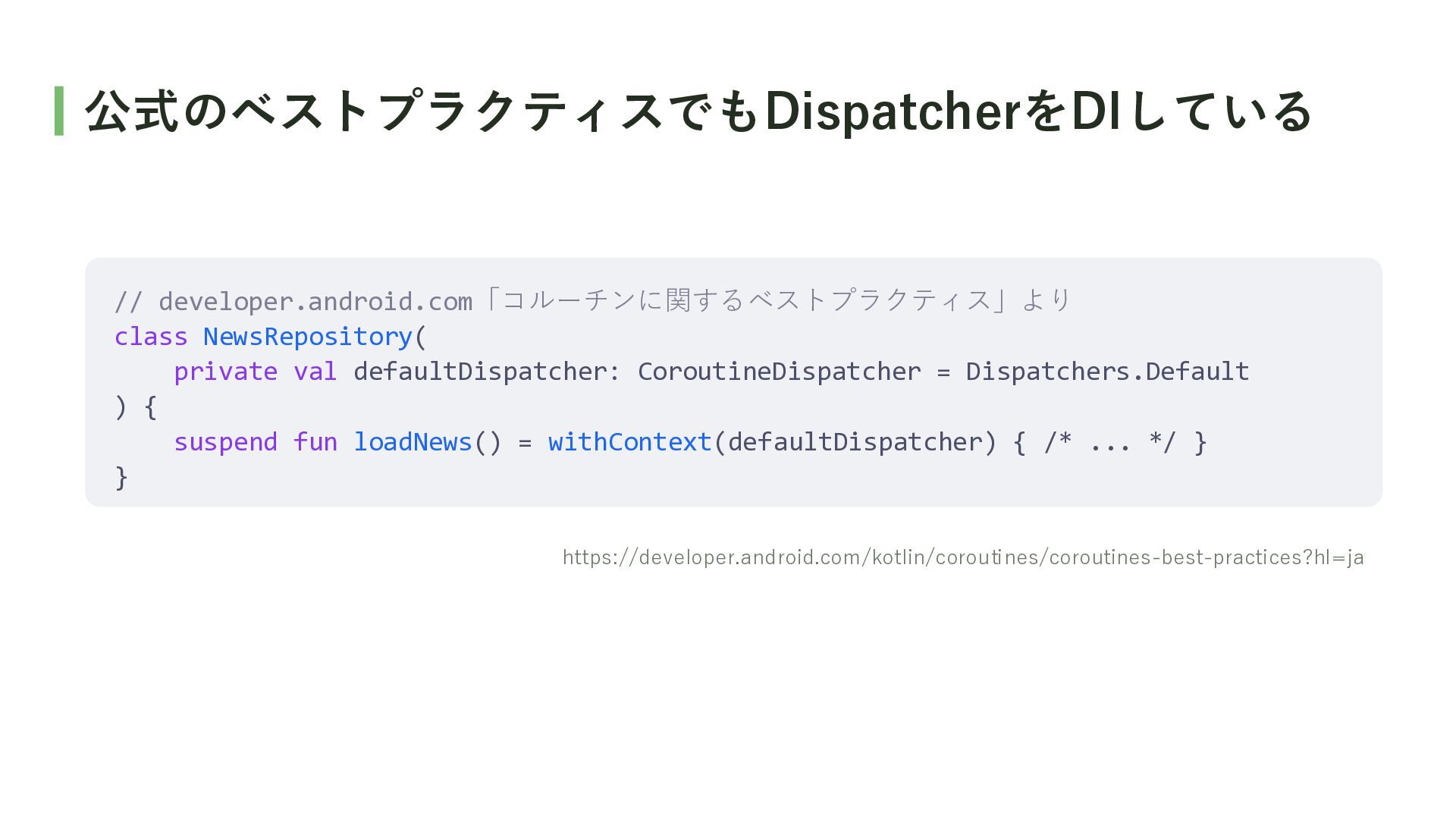
公式のベストプラクティスでもDispatcherをDIしている // developer.android.com「コルーチンに関するベストプラクティス」より class NewsRepository( private val defaultDispatcher: CoroutineDispatcher =
Dispatchers.Default ) { suspend fun loadNews() = withContext(defaultDispatcher) { /* ... */ } } https://developer.android.com/kotlin/coroutines/coroutines-best-practices?hl=ja
A. テストでwithContextの内側のコードを 高速に実行できるから ※ この発表ではテストの速度に着目して話しますが(以下略)
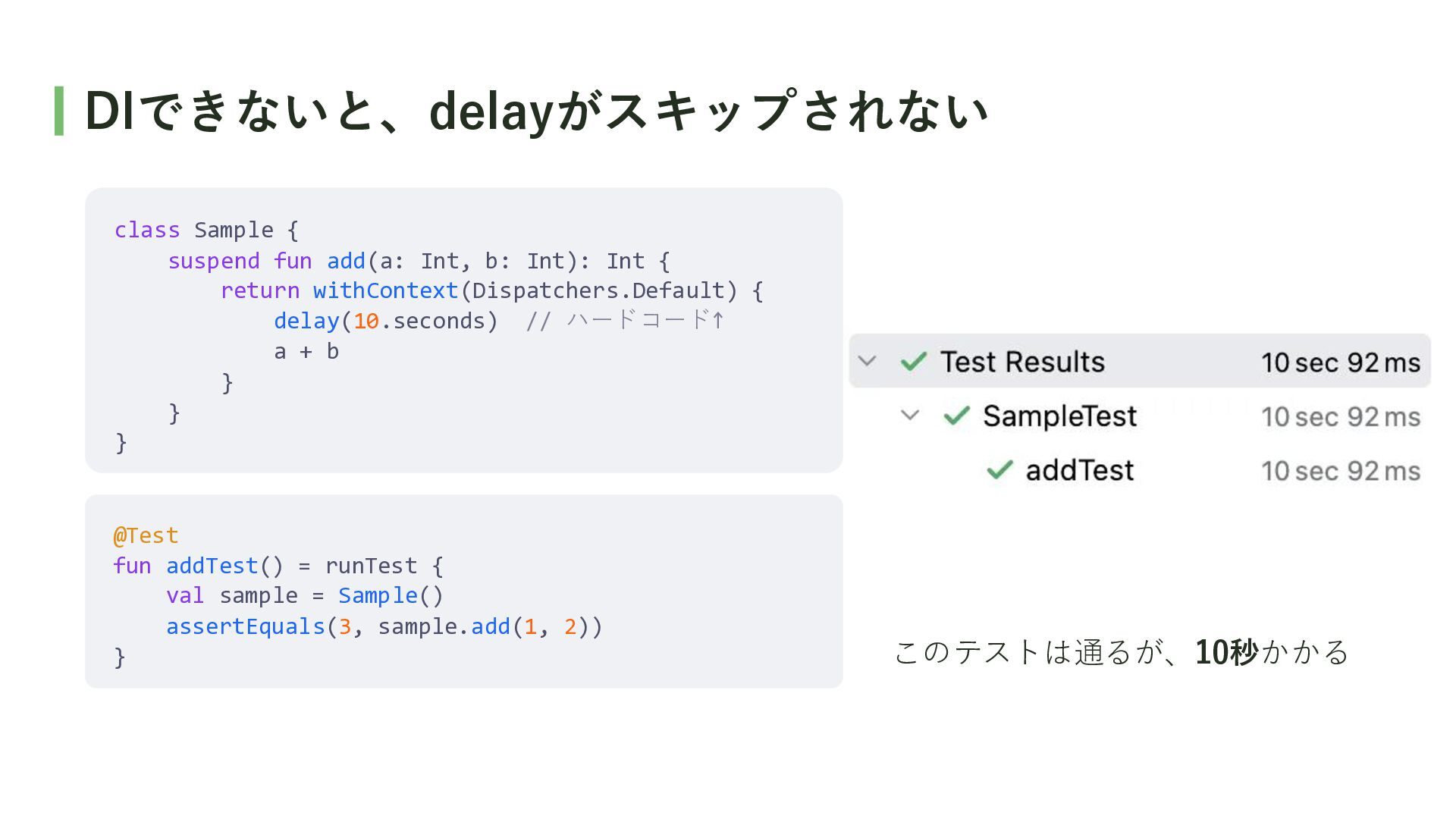
DIできないと、delayがスキップされない class Sample { suspend fun add(a: Int, b: Int):
Int { return withContext(Dispatchers.Default) { delay(10.seconds) // ハードコード↑ a + b } } } @Test fun addTest() = runTest { val sample = Sample() assertEquals(3, sample.add(1, 2)) } このテストは通るが、10秒かかる
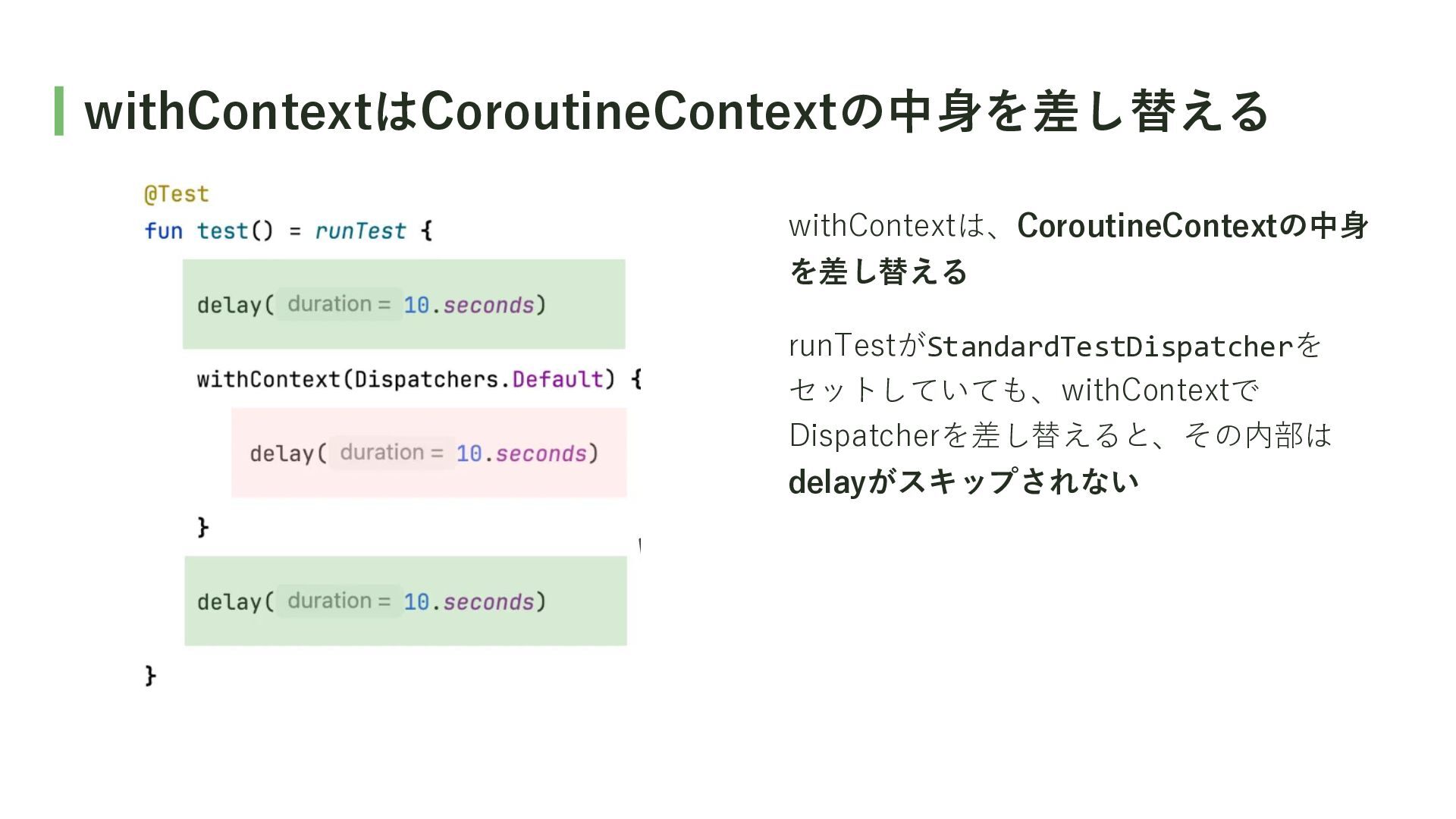
withContextはCoroutineContextの中身を差し替える withContextは、CoroutineContextの中身 を差し替える runTestがStandardTestDispatcherを セットしていても、withContextで Dispatcherを差し替えると、その内部は delayがスキップされない
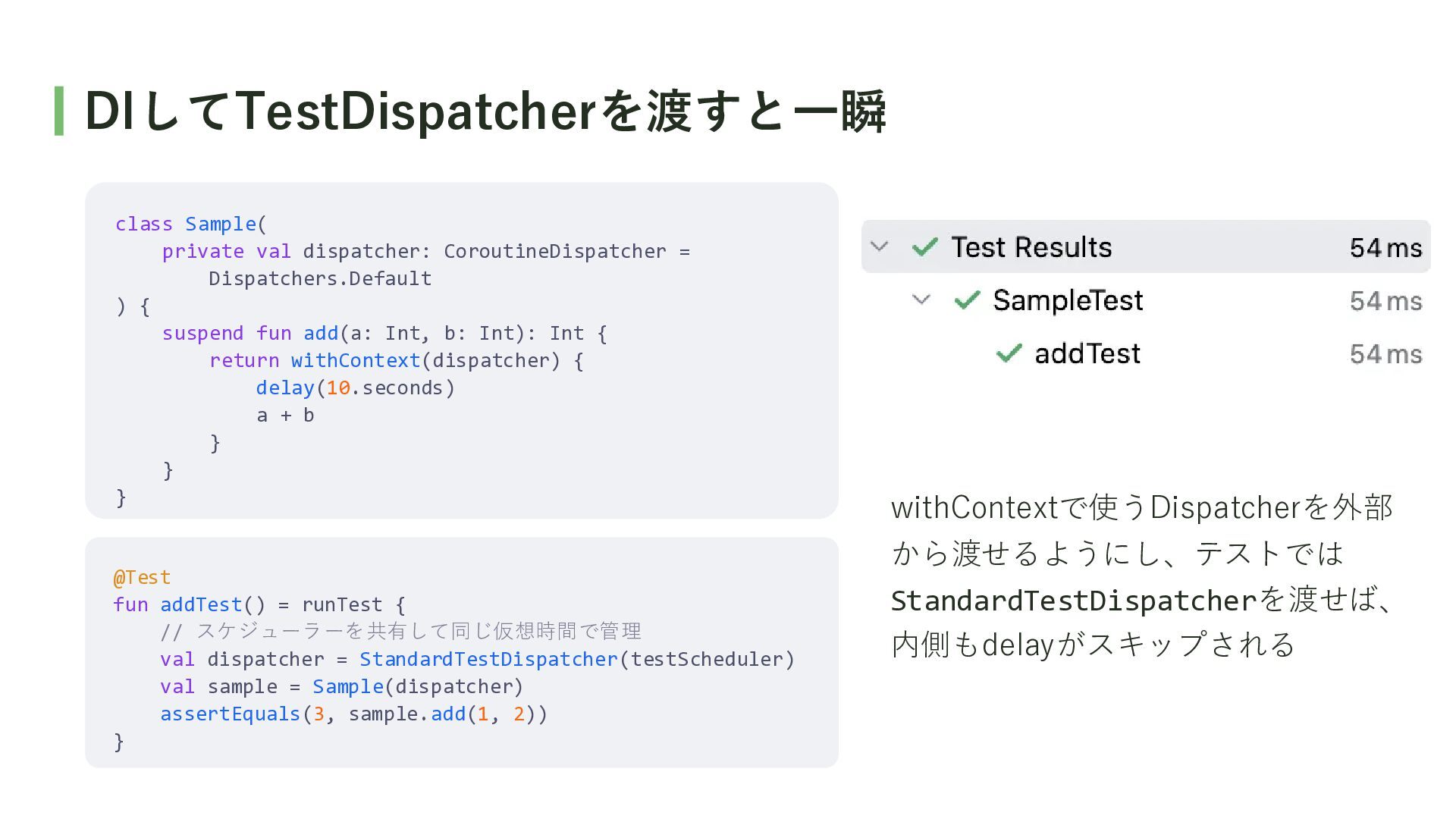
DIしてTestDispatcherを渡すと一瞬 class Sample( private val dispatcher: CoroutineDispatcher = Dispatchers.Default )
{ suspend fun add(a: Int, b: Int): Int { return withContext(dispatcher) { delay(10.seconds) a + b } } } @Test fun addTest() = runTest { // スケジューラーを共有して同じ仮想時間で管理 val dispatcher = StandardTestDispatcher(testScheduler) val sample = Sample(dispatcher) assertEquals(3, sample.add(1, 2)) } withContextで使うDispatcherを外部 から渡せるようにし、テストでは StandardTestDispatcherを渡せば、 内側もdelayがスキップされる
DispatcherをDIすることで、 テストでDispatcherを差し替えられるようになり、 テストを高速に実行できる!
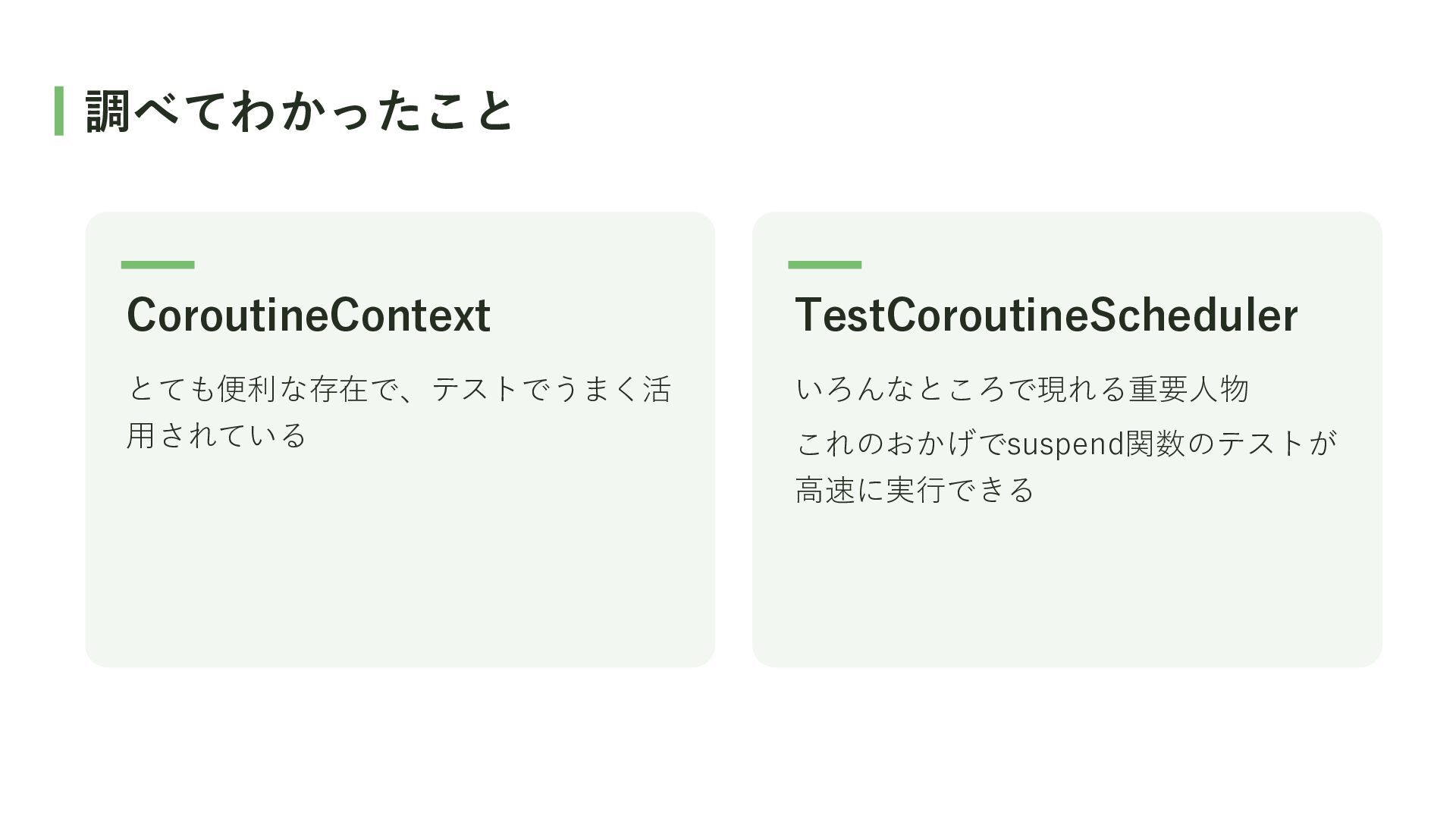
調べてわかったこと CoroutineContext TestCoroutineScheduler とても便利な存在で、テストでうまく活 いろんなところで現れる重要人物 用されている これのおかげでsuspend関数のテストが 高速に実行できる
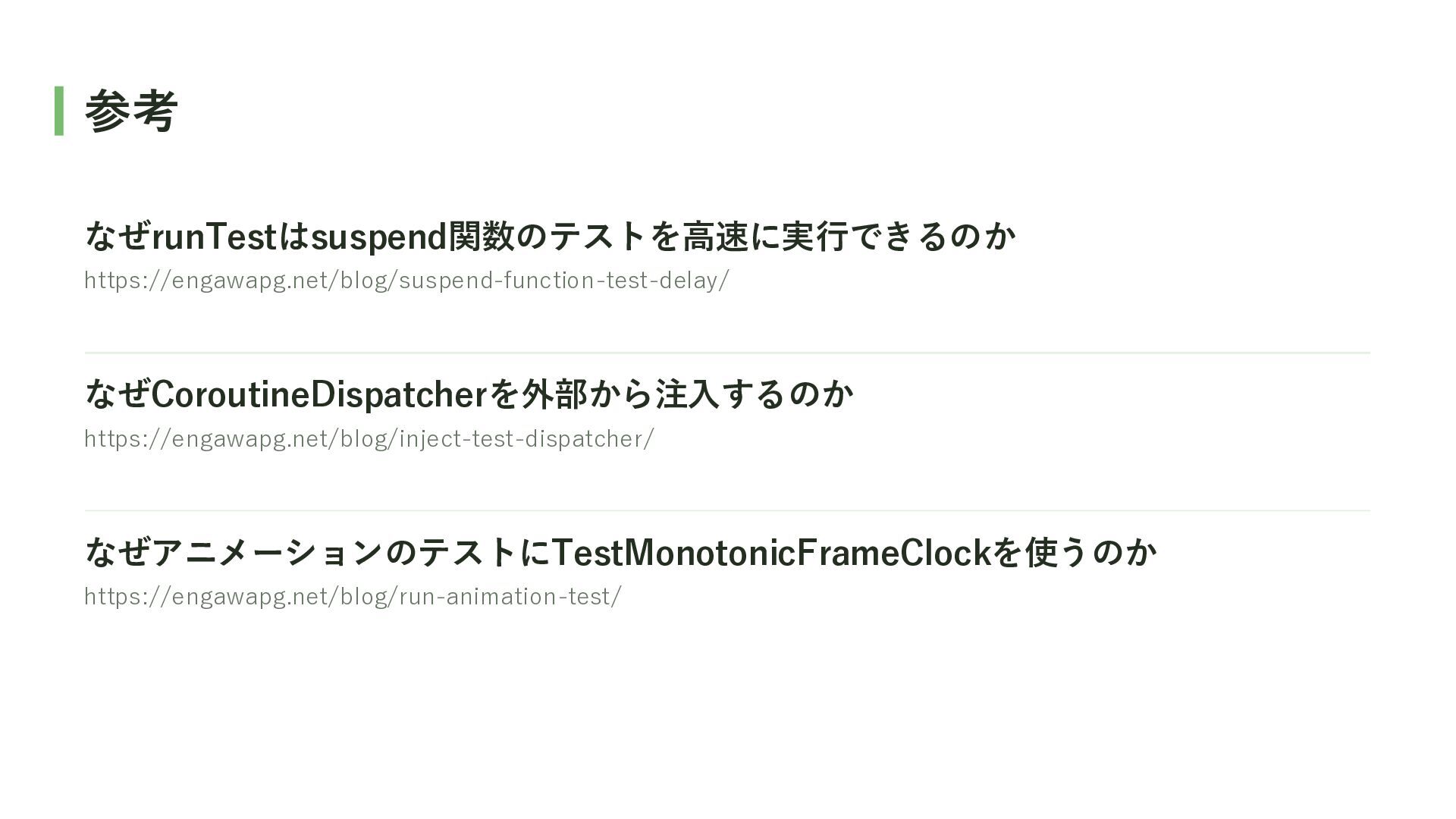
参考 なぜrunTestはsuspend関数のテストを高速に実行できるのか https://engawapg.net/blog/suspend-function-test-delay/ なぜCoroutineDispatcherを外部から注入するのか https://engawapg.net/blog/inject-test-dispatcher/ なぜアニメーションのテストにTestMonotonicFrameClockを使うのか https://engawapg.net/blog/run-animation-test/


 usuiat
 odashi
 yamahiro
 usanchuu
 yahonda
 pfn
pfn
 sansan33
 oasis1994liveforever
 terapyon
 yamanoku
 joere
joere
 satomasahiro2005
 sansantech
 sstephenson
 geoffreycrofte
 destraynor
 carmenintech
 3n
3n
.png) helenjbeal
helenjbeal
 aleyda
 reverentgeek
 smashingmag
 keithpitt
 tonyrice
 lauravandoore