Upgrade to Pro
— share decks privately, control downloads, hide ads and more …
Speaker Deck
Sign up for free
Menu
Search
Features
All features
Private URLs
Password Protection
Custom URLS
Scheduled publishing
Remove Branding
Restrict embedding
Deck Collections
Notes
Features
All features
Private URLs
Password Protection
Custom URLS
Scheduled publishing
Remove Branding
Restrict embedding
Deck Collections
Notes
Explore
Featured decks
Featured speakers
Programming
Technology
Storyboards
Explore
Featured decks
Featured speakers
Programming
Technology
Storyboards
Pricing
Search
Sign in
Sign up for free
Pythonのパッケージマネージャー「uv」
Search
Masafumi Abeta
October 30, 2024
Programming
470
1
Share
Embed
Copy iframe code
Copy JS code
Copy link
Start on current slide
Pythonのパッケージマネージャー「uv」
Masafumi Abeta
October 30, 2024
More Decks by Masafumi Abeta
See All by Masafumi Abeta
GPTモデルでキャラクター設定する際の課題
abeta
0
410
GPTをLINEで使えるようにして布教した
abeta
0
230
【Nishika】プリント基板の電子部品検出
abeta
0
380
初心者向けChatGPT入門
abeta
0
300
GPT Short Talk
abeta
0
180
拡散モデルについて少しだけ
abeta
0
100
動的計画モデル
abeta
0
210
物体追跡
abeta
0
370
特徴量記述
abeta
0
230
Other Decks in Programming
See All in Programming
Workers Cache を知る
syumai
0
350
気持ちぃ〜角丸 Squircle
ryu1013
0
220
Are APIs Still Relevant in the AI Era?
soyuka
0
450
Vue Fes Japan 2026 タイムテーブル徹底解説
448jp
1
650
AI が書く Go コードの品質を劇的に向上させる Linter: “declscope”
mpyw
0
490
Apple Intelligence を用いた個人情報誤送信防止、及びユーザーリクエスト体験の改善について
yukiny
0
330
外から家のPCの電源入れたい!をPHPで解決する
kawashimo0
1
130
R8 の設定見直しでアプリサイズ削減
andpad
0
200
Streamlitで実現する自然言語データアプリ開発
ayumu_yamaguchi
1
360
RAG の “R” を Swift で覗いてみる 〜「意味から探す」検索の仕組み〜
nao_randd
0
140
Java 27新機能 / Java 27 new features
kishida
2
220
JRuby: Past, Present, and Future
headius
0
230
Featured
See All Featured
Measuring Dark Social's Impact On Conversion and Attribution
stephenakadiri
2
300
Statistics for Hackers
jakevdp
799
230k
The Curse of the Amulet
leimatthew05
3
15k
A better future with KSS
kneath
240
18k
Imperfection Machines: The Place of Print at Facebook
scottboms
270
14k
The State of eCommerce SEO: How to Win in Today's Products SERPs - #SEOweek
aleyda
2
12k
Design and Strategy: How to Deal with People Who Don’t "Get" Design
morganepeng
133
20k
What the history of the web can teach us about the future of AI
inesmontani
PRO
2
730
AI: The stuff that nobody shows you
jnunemaker
PRO
10
1.1k
Speed Design
sergeychernyshev
33
2.2k
Digital Ethics as a Driver of Design Innovation
axbom
PRO
1
450
Effective software design: The role of men in debugging patriarchy in IT @ Voxxed Days AMS
baasie
1
560
Transcript
Pythonのパッケージマネージャー「uv」 阿部田将史 – Masafumi Abeta 2024.10.30
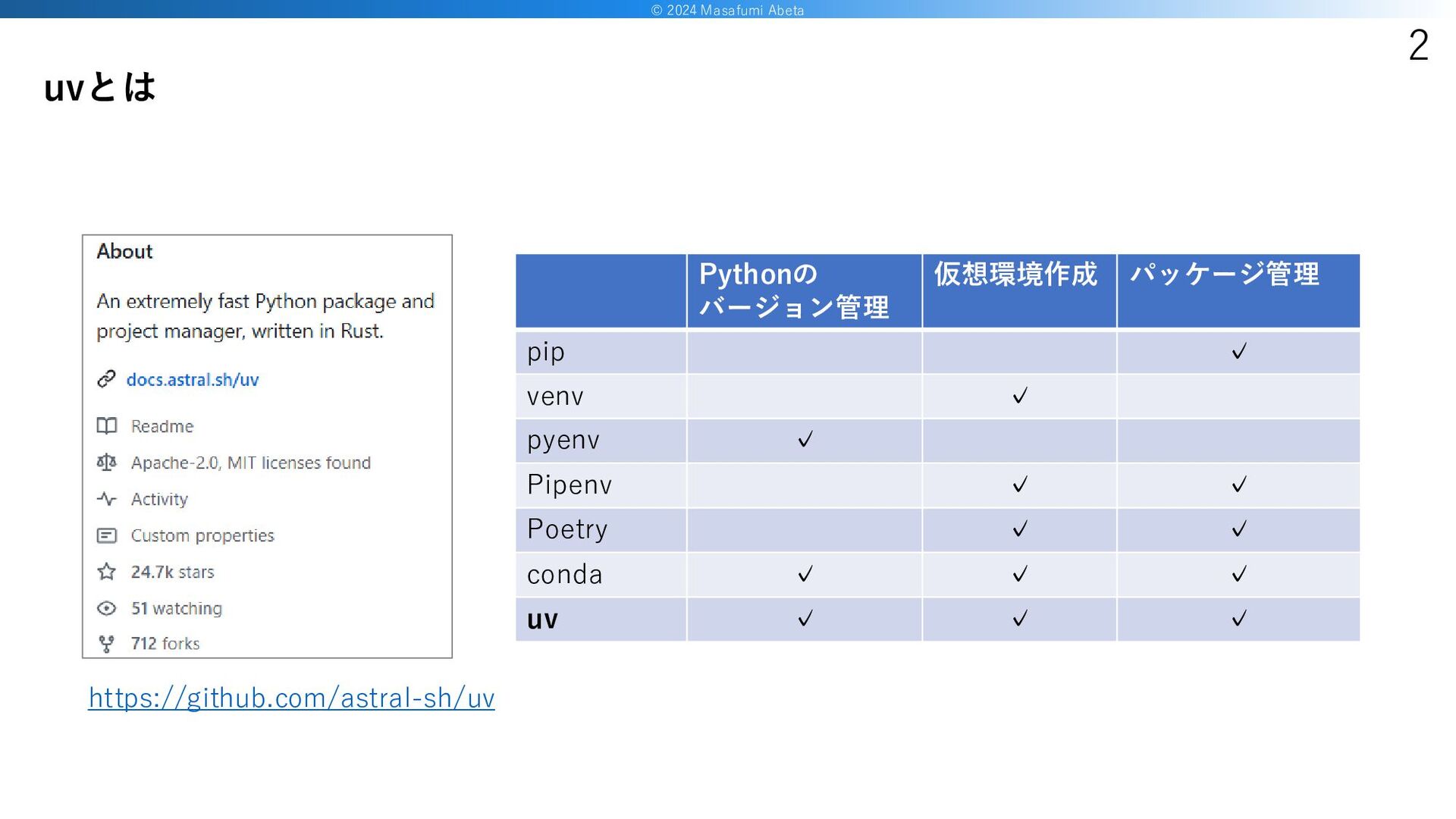
© 2024 Masafumi Abeta 2 uvとは Pythonの バージョン管理 仮想環境作成 パッケージ管理
pip ✓ venv ✓ pyenv ✓ Pipenv ✓ ✓ Poetry ✓ ✓ conda ✓ ✓ ✓ uv ✓ ✓ ✓ https://github.com/astral-sh/uv
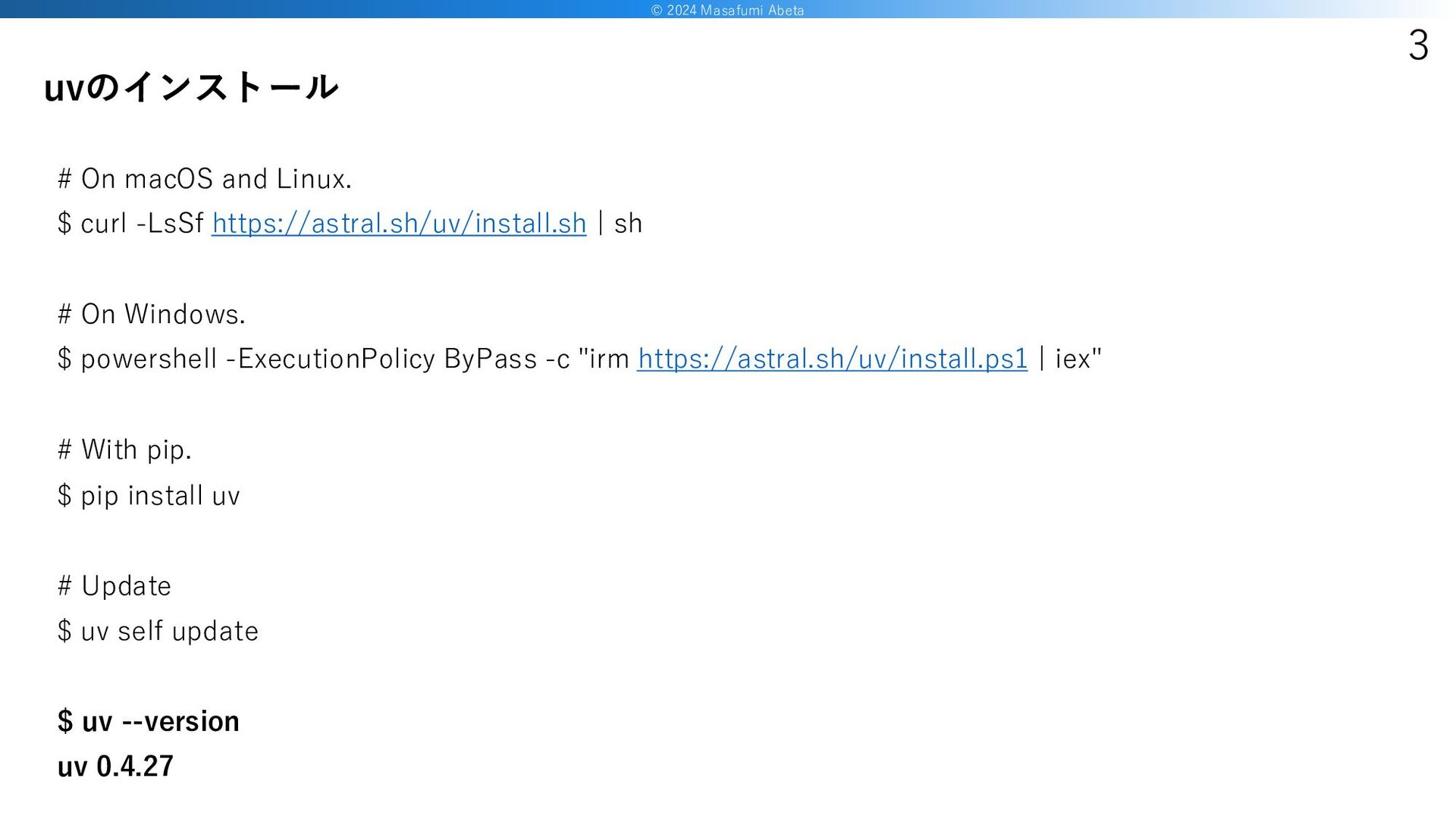
© 2024 Masafumi Abeta 3 # On macOS and Linux.
$ curl -LsSf https://astral.sh/uv/install.sh | sh # On Windows. $ powershell -ExecutionPolicy ByPass -c "irm https://astral.sh/uv/install.ps1 | iex" # With pip. $ pip install uv # Update $ uv self update $ uv --version uv 0.4.27 uvのインストール
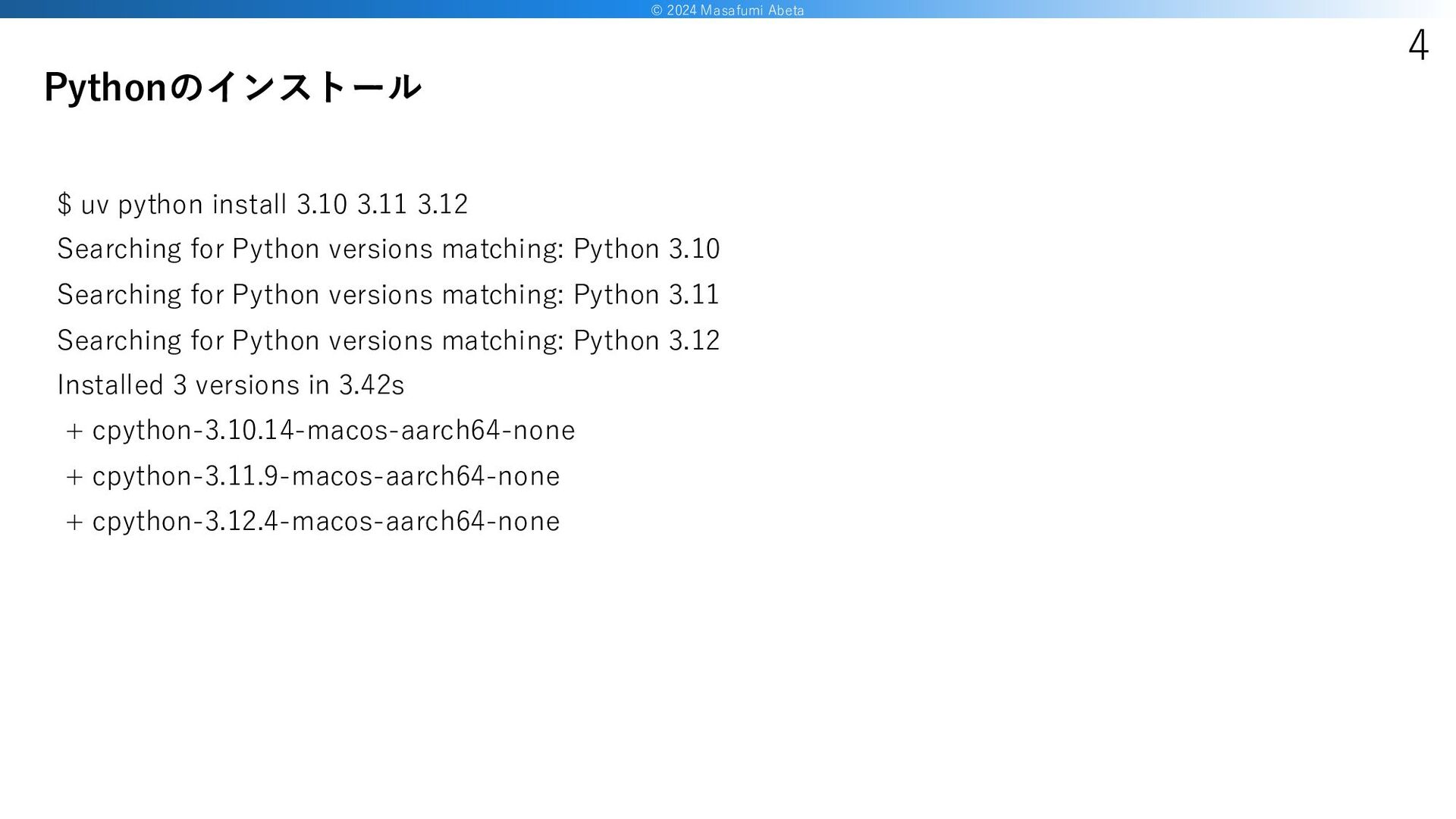
© 2024 Masafumi Abeta 4 $ uv python install 3.10
3.11 3.12 Searching for Python versions matching: Python 3.10 Searching for Python versions matching: Python 3.11 Searching for Python versions matching: Python 3.12 Installed 3 versions in 3.42s + cpython-3.10.14-macos-aarch64-none + cpython-3.11.9-macos-aarch64-none + cpython-3.12.4-macos-aarch64-none Pythonのインストール
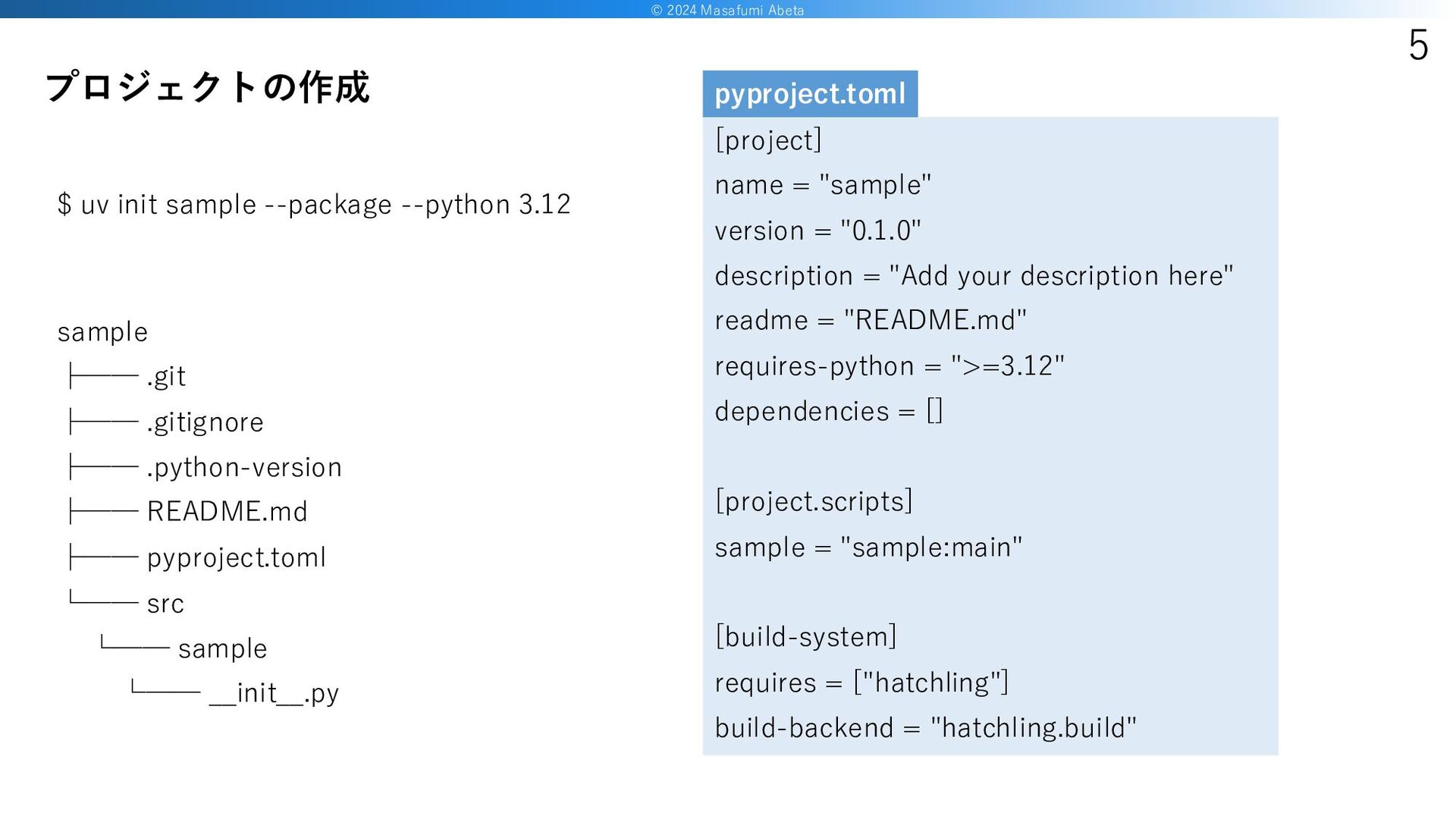
© 2024 Masafumi Abeta 5 $ uv init sample --package
--python 3.12 プロジェクトの作成 sample ├── .git ├── .gitignore ├── .python-version ├── README.md ├── pyproject.toml └── src └── sample └── __init__.py [project] name = "sample" version = "0.1.0" description = "Add your description here" readme = "README.md" requires-python = ">=3.12" dependencies = [] [project.scripts] sample = "sample:main" [build-system] requires = ["hatchling"] build-backend = "hatchling.build" pyproject.toml
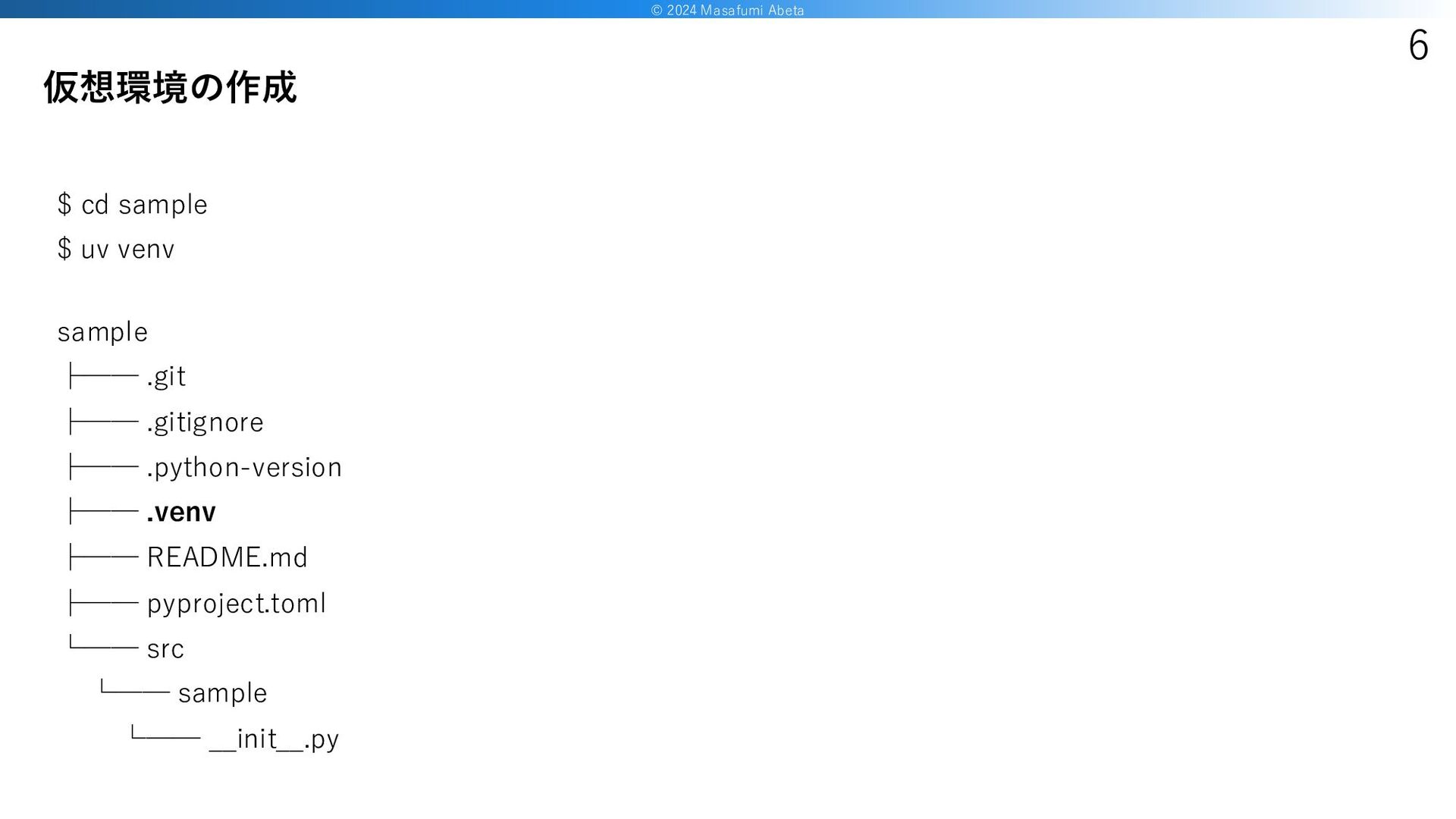
© 2024 Masafumi Abeta 6 $ cd sample $ uv
venv 仮想環境の作成 sample ├── .git ├── .gitignore ├── .python-version ├── .venv ├── README.md ├── pyproject.toml └── src └── sample └── __init__.py
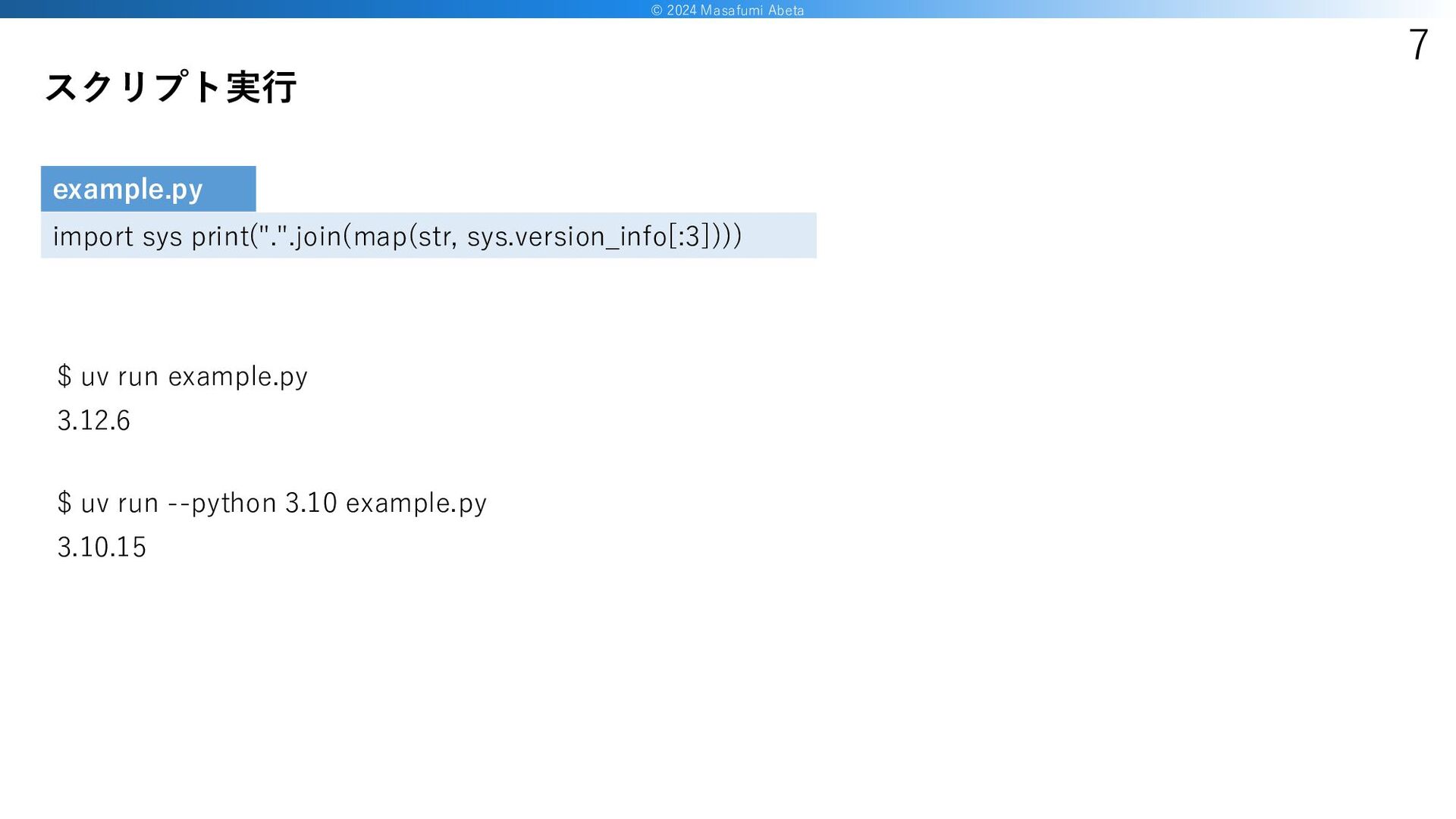
© 2024 Masafumi Abeta 7 $ uv run example.py 3.12.6
$ uv run --python 3.10 example.py 3.10.15 スクリプト実行 import sys print(".".join(map(str, sys.version_info[:3]))) example.py
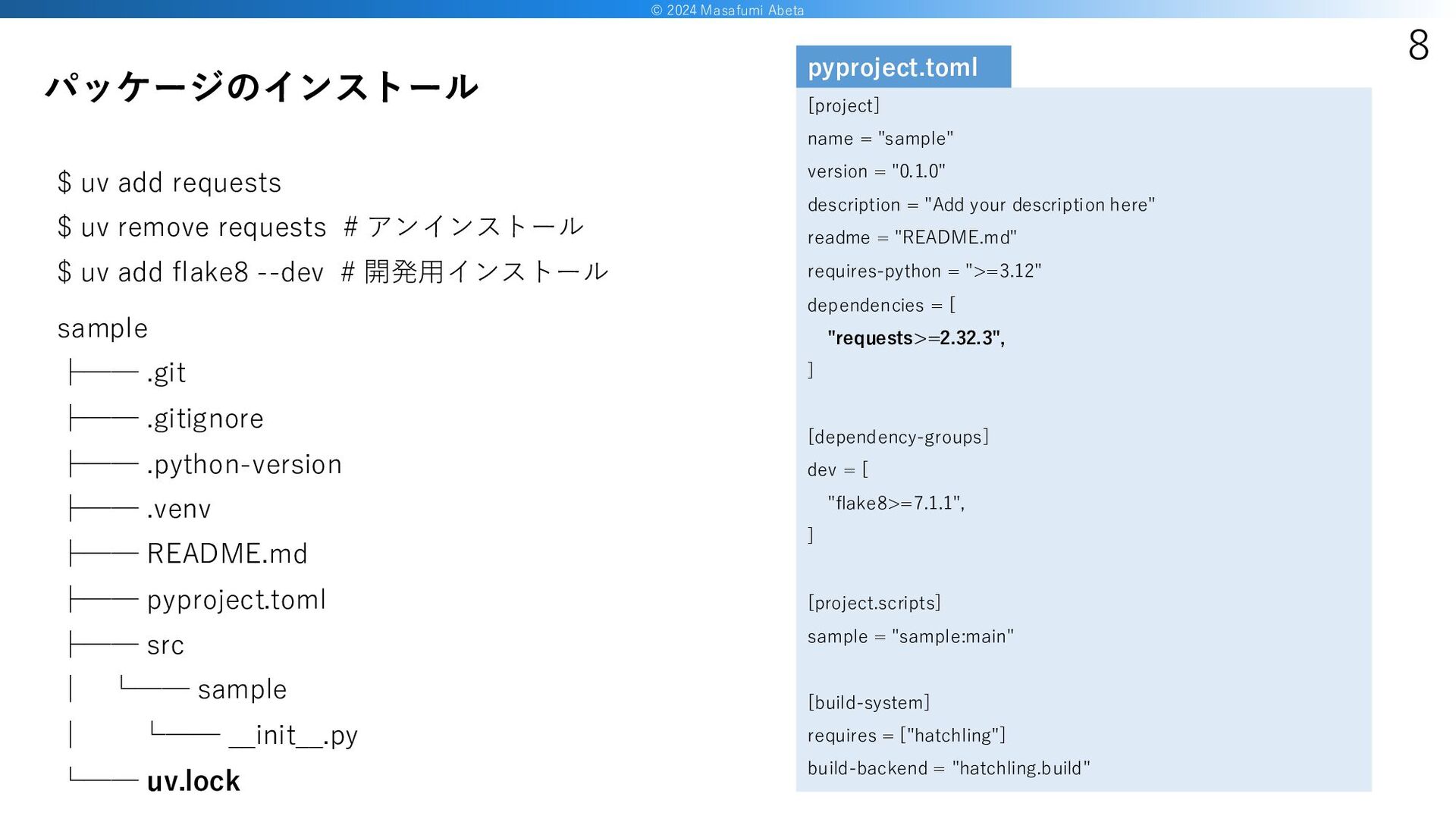
© 2024 Masafumi Abeta 8 $ uv add requests $
uv remove requests # アンインストール $ uv add flake8 --dev # 開発用インストール パッケージのインストール sample ├── .git ├── .gitignore ├── .python-version ├── .venv ├── README.md ├── pyproject.toml ├── src │ └── sample │ └── __init__.py └── uv.lock [project] name = "sample" version = "0.1.0" description = "Add your description here" readme = "README.md" requires-python = ">=3.12" dependencies = [ "requests>=2.32.3", ] [dependency-groups] dev = [ "flake8>=7.1.1", ] [project.scripts] sample = "sample:main" [build-system] requires = ["hatchling"] build-backend = "hatchling.build" pyproject.toml
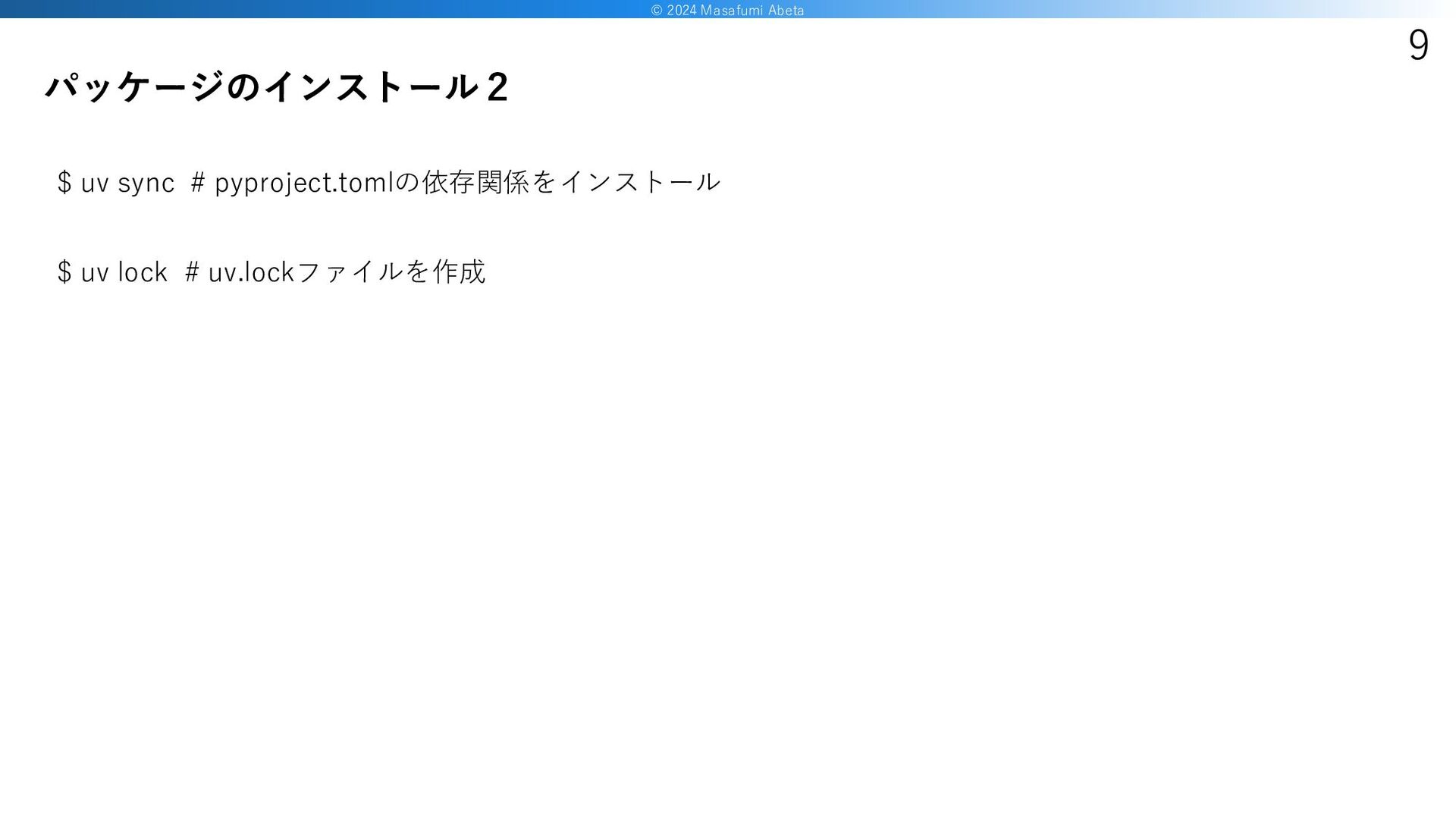
© 2024 Masafumi Abeta 9 $ uv sync # pyproject.tomlの依存関係をインストール
$ uv lock # uv.lockファイルを作成 パッケージのインストール2
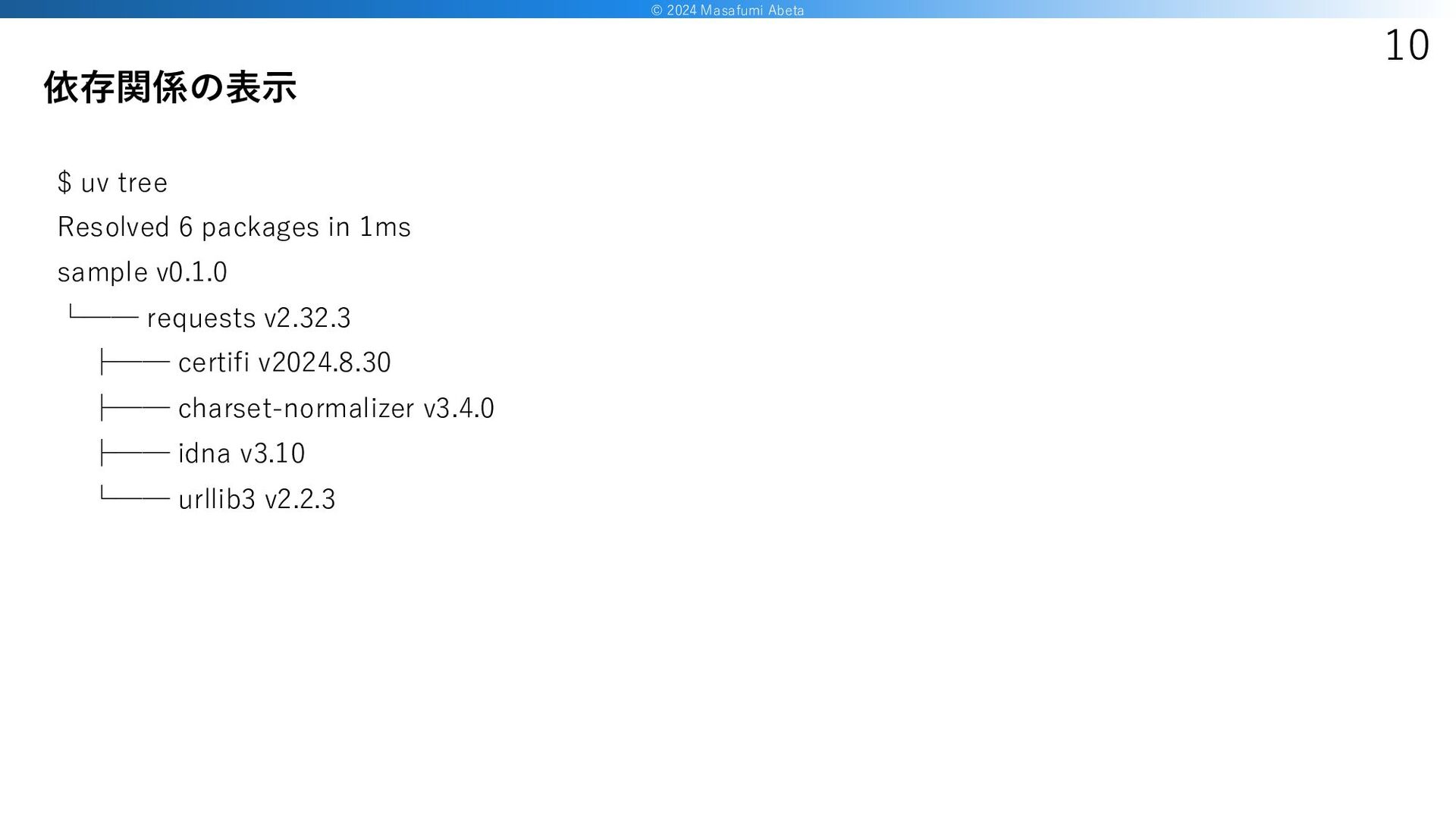
© 2024 Masafumi Abeta 10 $ uv tree Resolved 6
packages in 1ms sample v0.1.0 └── requests v2.32.3 ├── certifi v2024.8.30 ├── charset-normalizer v3.4.0 ├── idna v3.10 └── urllib3 v2.2.3 依存関係の表示
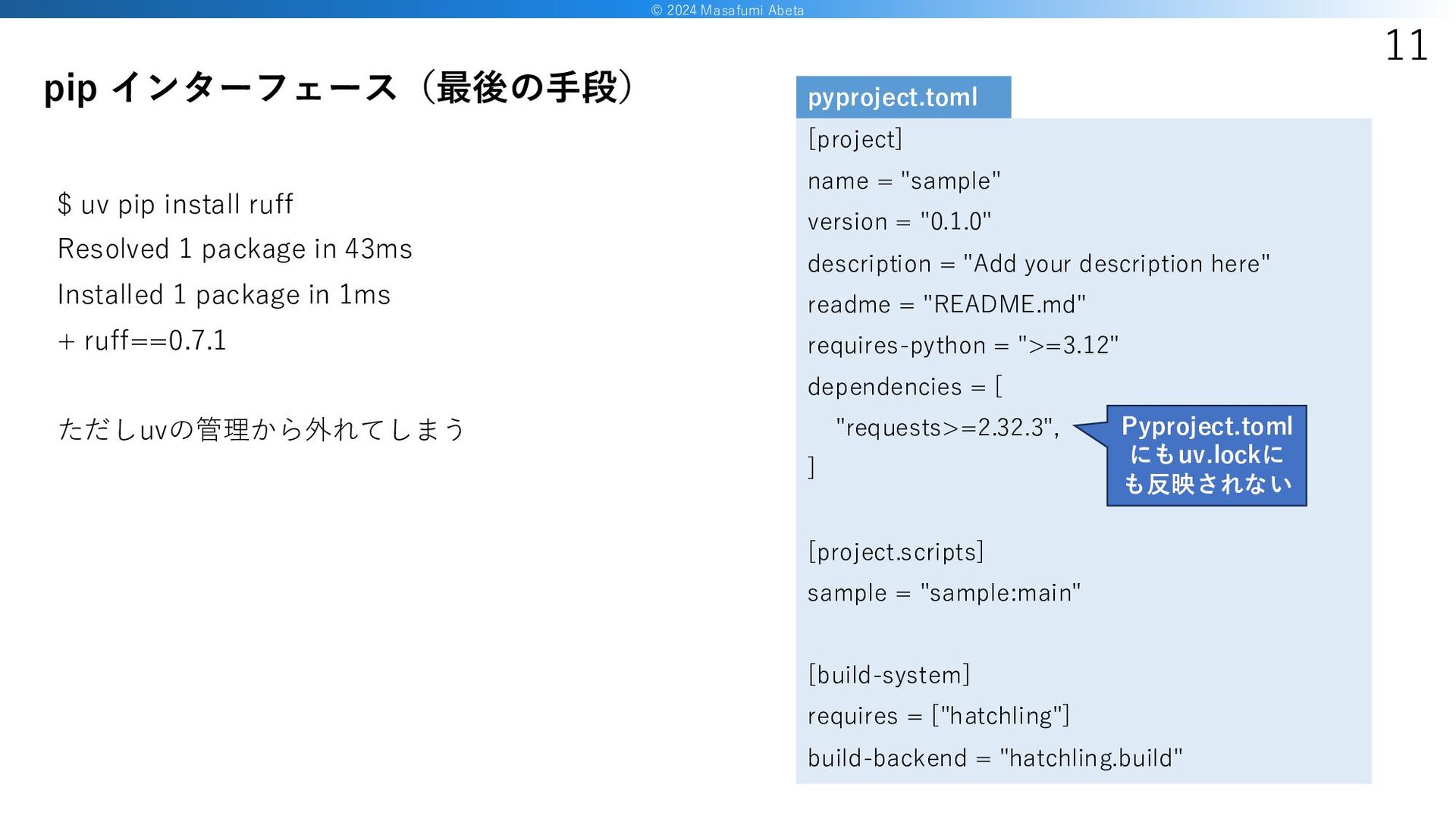
© 2024 Masafumi Abeta 11 $ uv pip install ruff
Resolved 1 package in 43ms Installed 1 package in 1ms + ruff==0.7.1 ただしuvの管理から外れてしまう pip インターフェース(最後の手段) [project] name = "sample" version = "0.1.0" description = "Add your description here" readme = "README.md" requires-python = ">=3.12" dependencies = [ "requests>=2.32.3", ] [project.scripts] sample = "sample:main" [build-system] requires = ["hatchling"] build-backend = "hatchling.build" pyproject.toml Pyproject.toml にもuv.lockに も反映されない
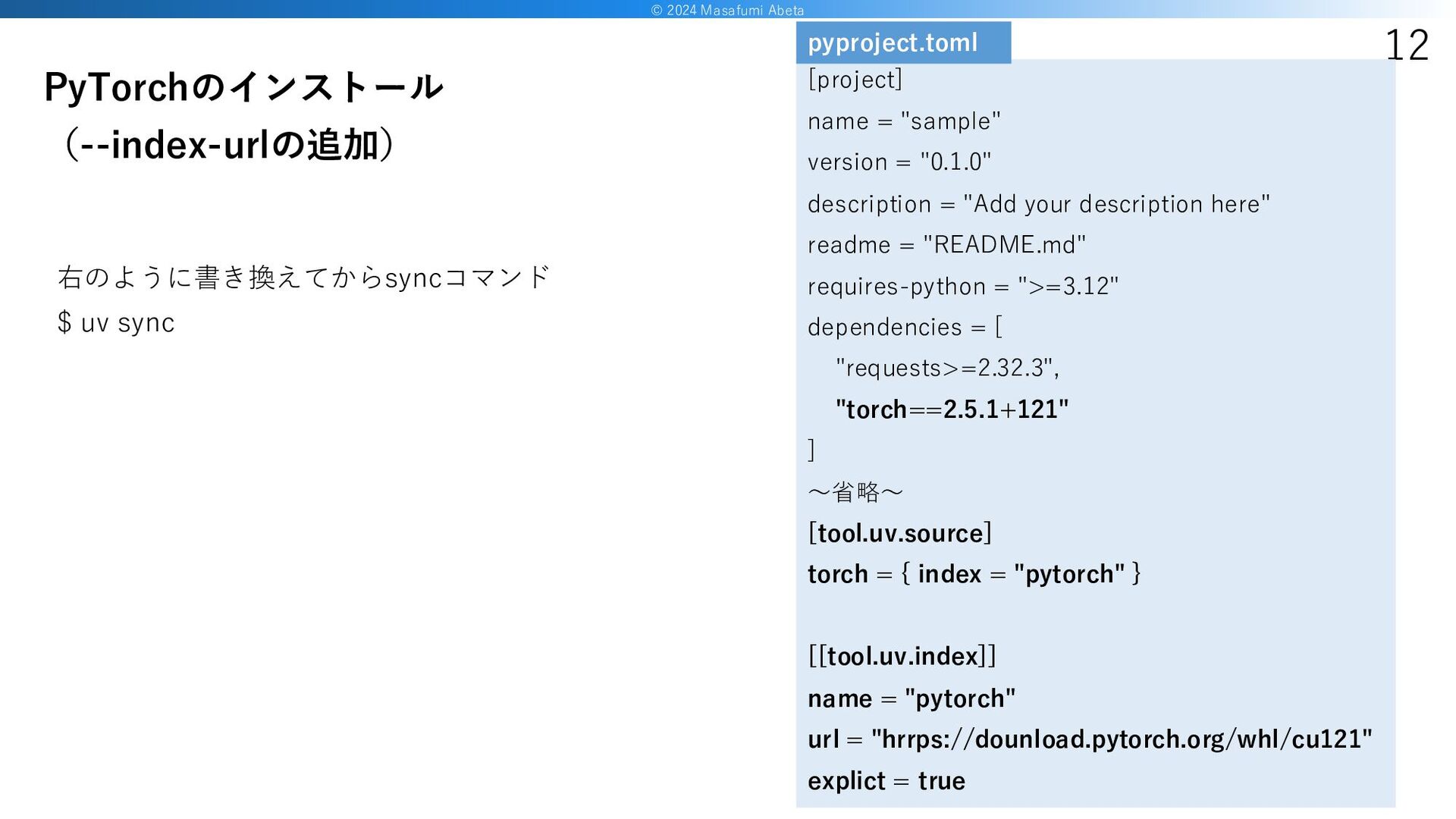
© 2024 Masafumi Abeta 12 右のように書き換えてからsyncコマンド $ uv sync PyTorchのインストール
(--index-urlの追加) [project] name = "sample" version = "0.1.0" description = "Add your description here" readme = "README.md" requires-python = ">=3.12" dependencies = [ "requests>=2.32.3", "torch==2.5.1+121" ] ~省略~ [tool.uv.source] torch = { index = "pytorch" } [[tool.uv.index]] name = "pytorch" url = "hrrps://dounload.pytorch.org/whl/cu121" explict = true pyproject.toml
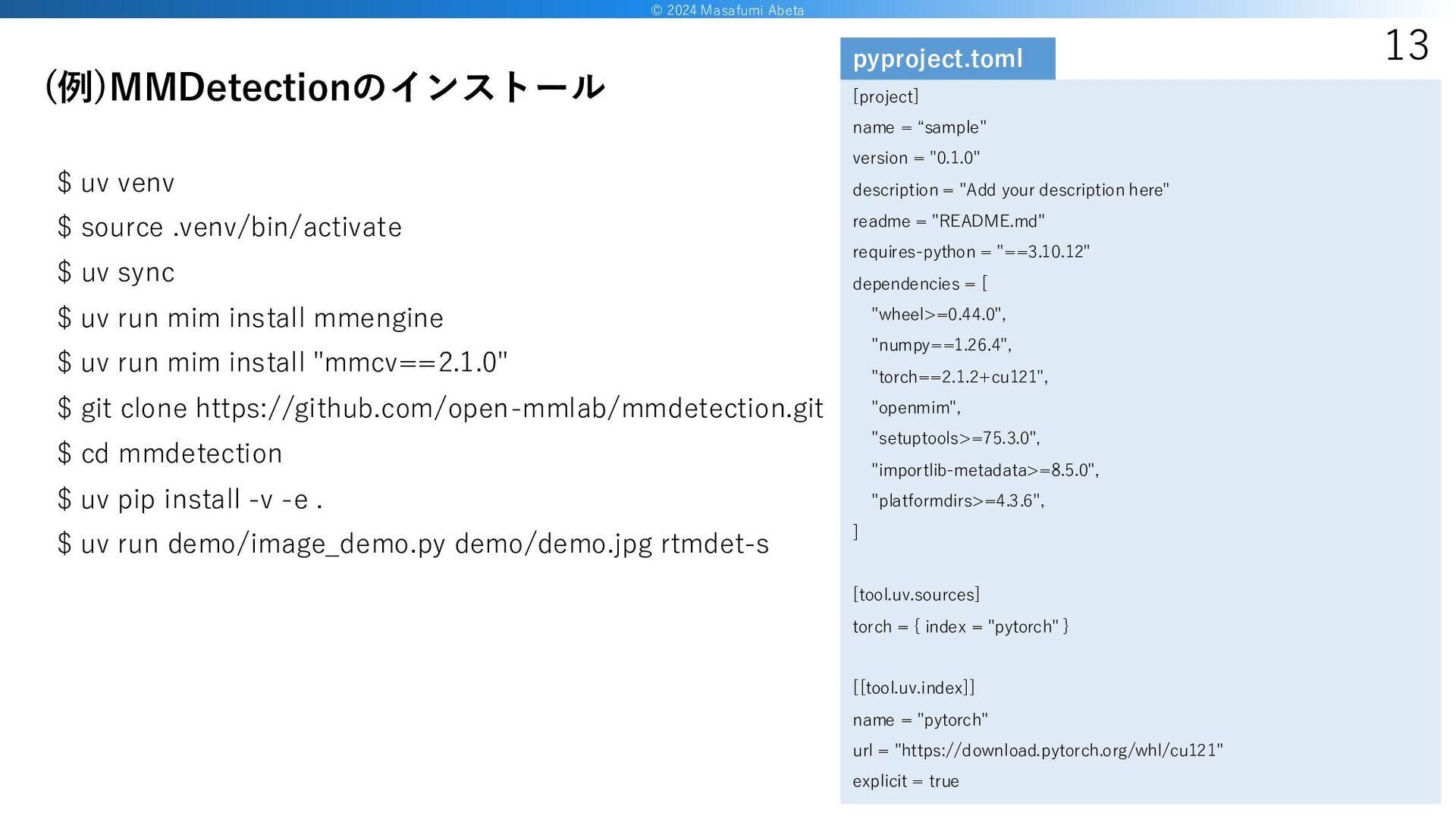
© 2024 Masafumi Abeta 13 $ uv venv $ source
.venv/bin/activate $ uv sync $ uv run mim install mmengine $ uv run mim install "mmcv==2.1.0" $ git clone https://github.com/open-mmlab/mmdetection.git $ cd mmdetection $ uv pip install -v -e . $ uv run demo/image_demo.py demo/demo.jpg rtmdet-s (例)MMDetectionのインストール [project] name = “sample" version = "0.1.0" description = "Add your description here" readme = "README.md" requires-python = "==3.10.12" dependencies = [ "wheel>=0.44.0", "numpy==1.26.4", "torch==2.1.2+cu121", "openmim", "setuptools>=75.3.0", "importlib-metadata>=8.5.0", "platformdirs>=4.3.6", ] [tool.uv.sources] torch = { index = "pytorch" } [[tool.uv.index]] name = "pytorch" url = "https://download.pytorch.org/whl/cu121" explicit = true pyproject.toml
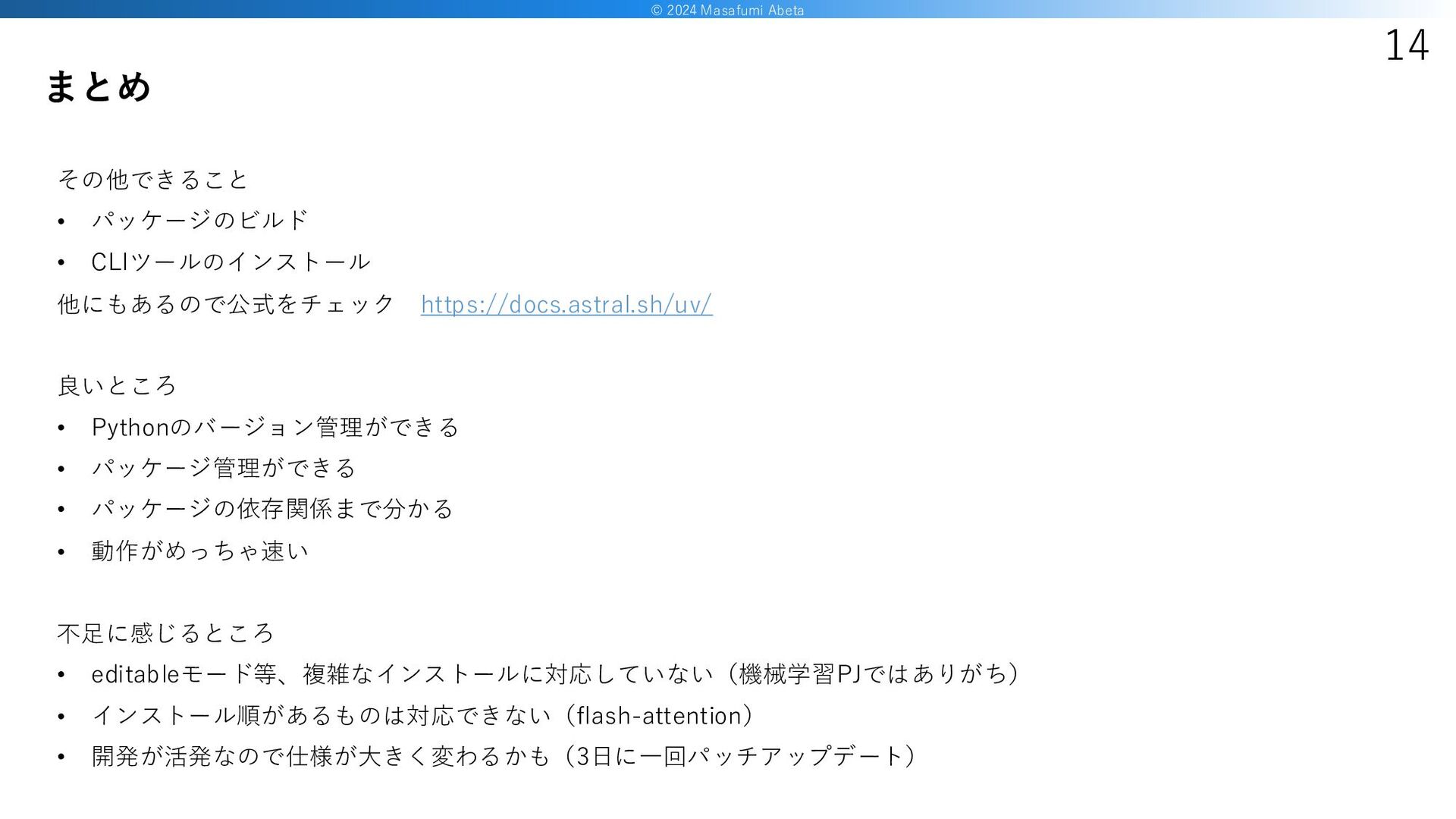
© 2024 Masafumi Abeta 14 その他できること • パッケージのビルド • CLIツールのインストール
他にもあるので公式をチェック https://docs.astral.sh/uv/ 良いところ • Pythonのバージョン管理ができる • パッケージ管理ができる • パッケージの依存関係まで分かる • 動作がめっちゃ速い 不足に感じるところ • editableモード等、複雑なインストールに対応していない(機械学習PJではありがち) • インストール順があるものは対応できない(flash-attention) • 開発が活発なので仕様が大きく変わるかも(3日に一回パッチアップデート) まとめ
15 END


 abeta
abeta
 syumai
 ryu1013
 soyuka
 448jp
448jp
 mpyw
mpyw
 yukiny
 kawashimo0
 andpad
 ayumu_yamaguchi
 nao_randd
 kishida
 headius
 stephenakadiri
 jakevdp
 leimatthew05
 kneath
 scottboms
 aleyda
 morganepeng
 inesmontani
 jnunemaker
 sergeychernyshev
 axbom
axbom
 baasie