Upgrade to Pro — share decks privately, control downloads, hide ads and more …

Vue.js : Développer des interfaces utilisateur ...

Sponsored · Your Podcast. Everywhere. Effortlessly. Share. Educate. Inspire. Entertain. You do you. We'll handle the rest.

Vue.js : Développer des interfaces utilisateur réactives et modulaires

Avatar for Jaime Arias Almeida

Jaime Arias Almeida

June 24, 2026

More Decks by Jaime Arias Almeida

Other Decks in Programming

Transcript

  1. JOURNÉES NATIONALES DU DÉVELOPPEMENT LOGICIEL · JDEV 2026 Vue.js :

    Développer des interfaces utilisateur réactives et modulaires Jaime Arias · 24 juin 2026 CNRS, Laboratoire d'Informatique de Paris Nord (LIPN) Code on GitHub github.com/himito/tutorial-vuejs 1 / 67
  2. WHO I AM Jaime Arias CNRS Research Engineer · LIPN

    Leads the dev-team at LIPN Chargé de Mission at INS2I « Software » Member · Collège Codes Sources et Logiciels Ambassador · Software Heritage arias @ lipn.univ-paris13.fr www.jaime-arias.fr 2 / 67
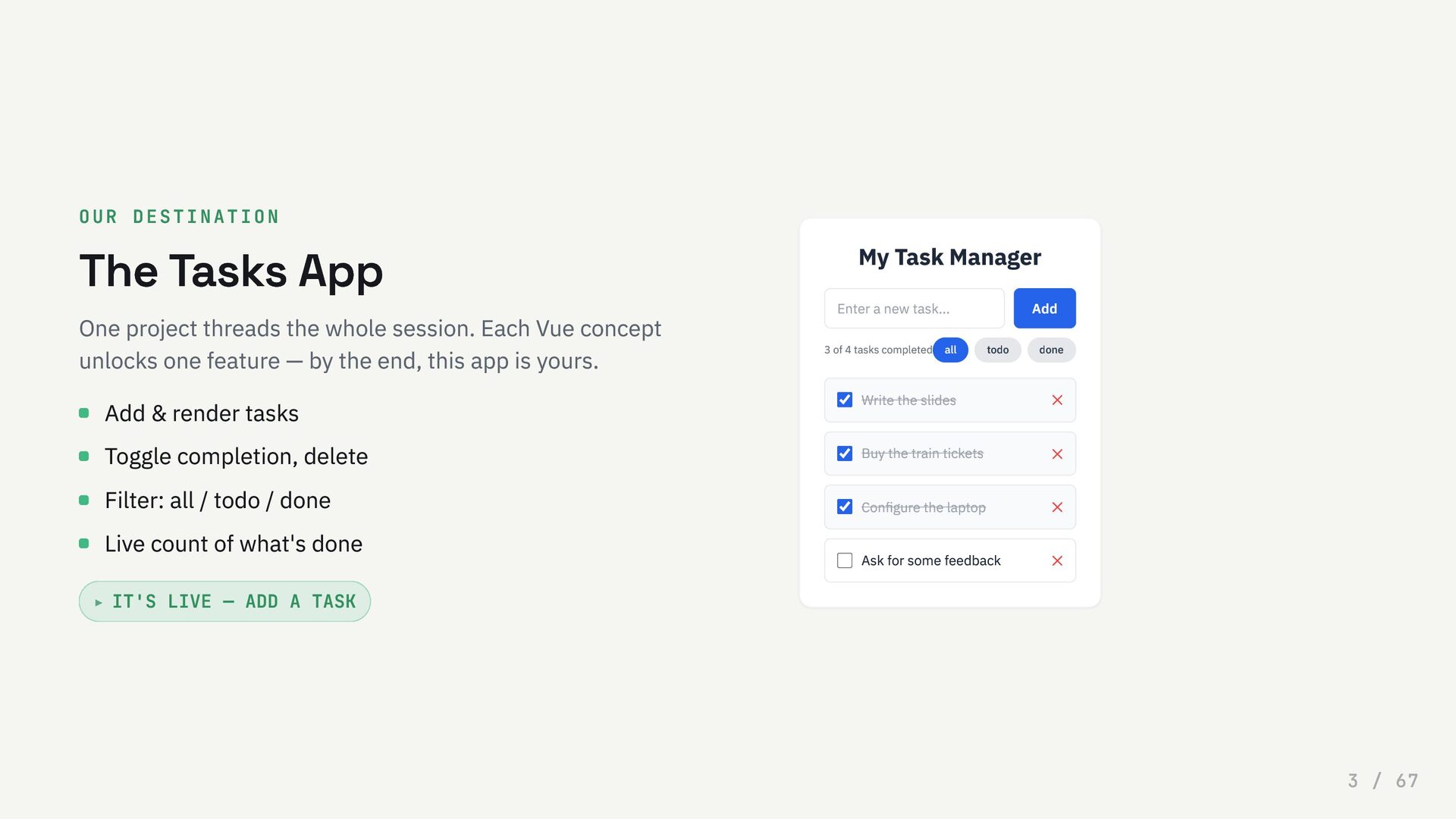
  3. OUR DESTINATION The Tasks App One project threads the whole

    session. Each Vue concept unlocks one feature — by the end, this app is yours. IT'S LIVE — ADD A TASK Add & render tasks Toggle completion, delete Filter: all / todo / done Live count of what's done ▸ My Task Manager Enter a new task... Add 3 of 4 tasks completed all todo done Write the slides ✕ Buy the train tickets ✕ Configure the laptop ✕ Ask for some feedback ✕ 3 / 67
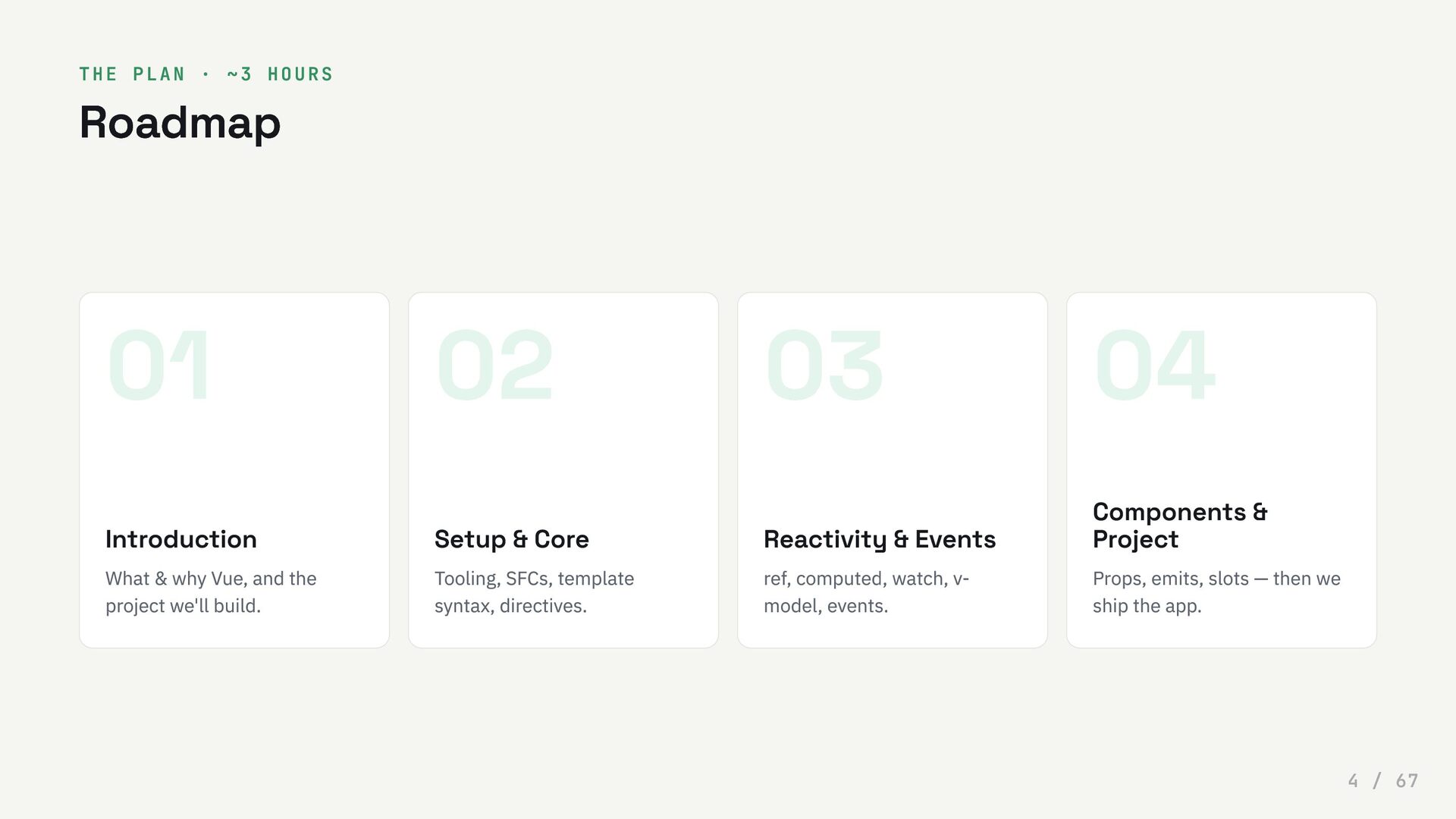
  4. THE PLAN · ~3 HOURS Roadmap 01 Introduction What &

    why Vue, and the project we'll build. 02 Setup & Core Tooling, SFCs, template syntax, directives. 03 Reactivity & Events ref, computed, watch, v- model, events. 04 Components & Project Props, emits, slots — then we ship the app. 4 / 67
  5. 0 1 Introduction What Vue is, where it came from,

    and why it's worth your time. 5 / 67
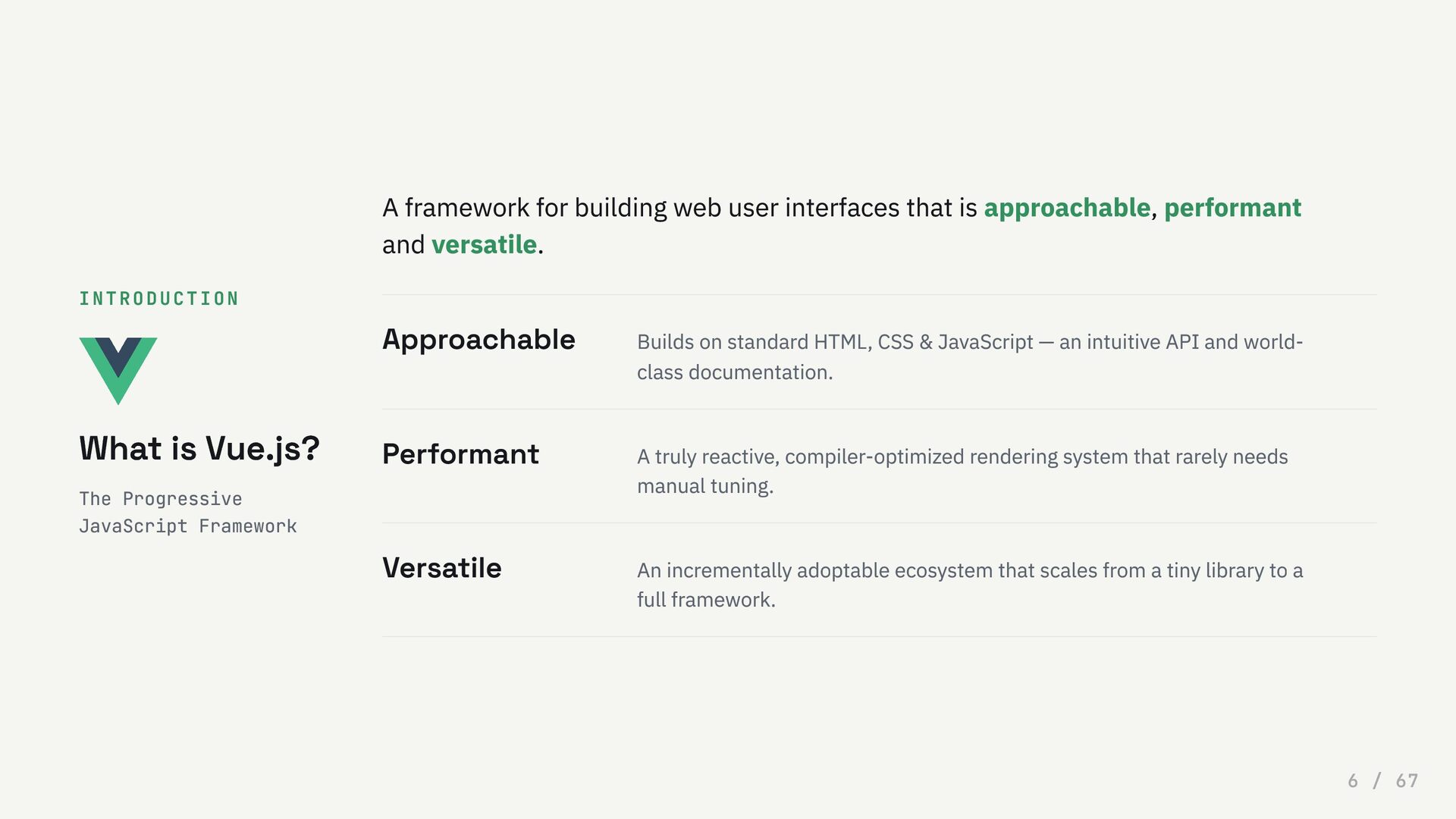
  6. INTRODUCTION What is Vue.js? The Progressive JavaScript Framework A framework

    for building web user interfaces that is approachable, performant and versatile. Approachable Builds on standard HTML, CSS & JavaScript — an intuitive API and world- class documentation. Performant A truly reactive, compiler-optimized rendering system that rarely needs manual tuning. Versatile An incrementally adoptable ecosystem that scales from a tiny library to a full framework. 6 / 67
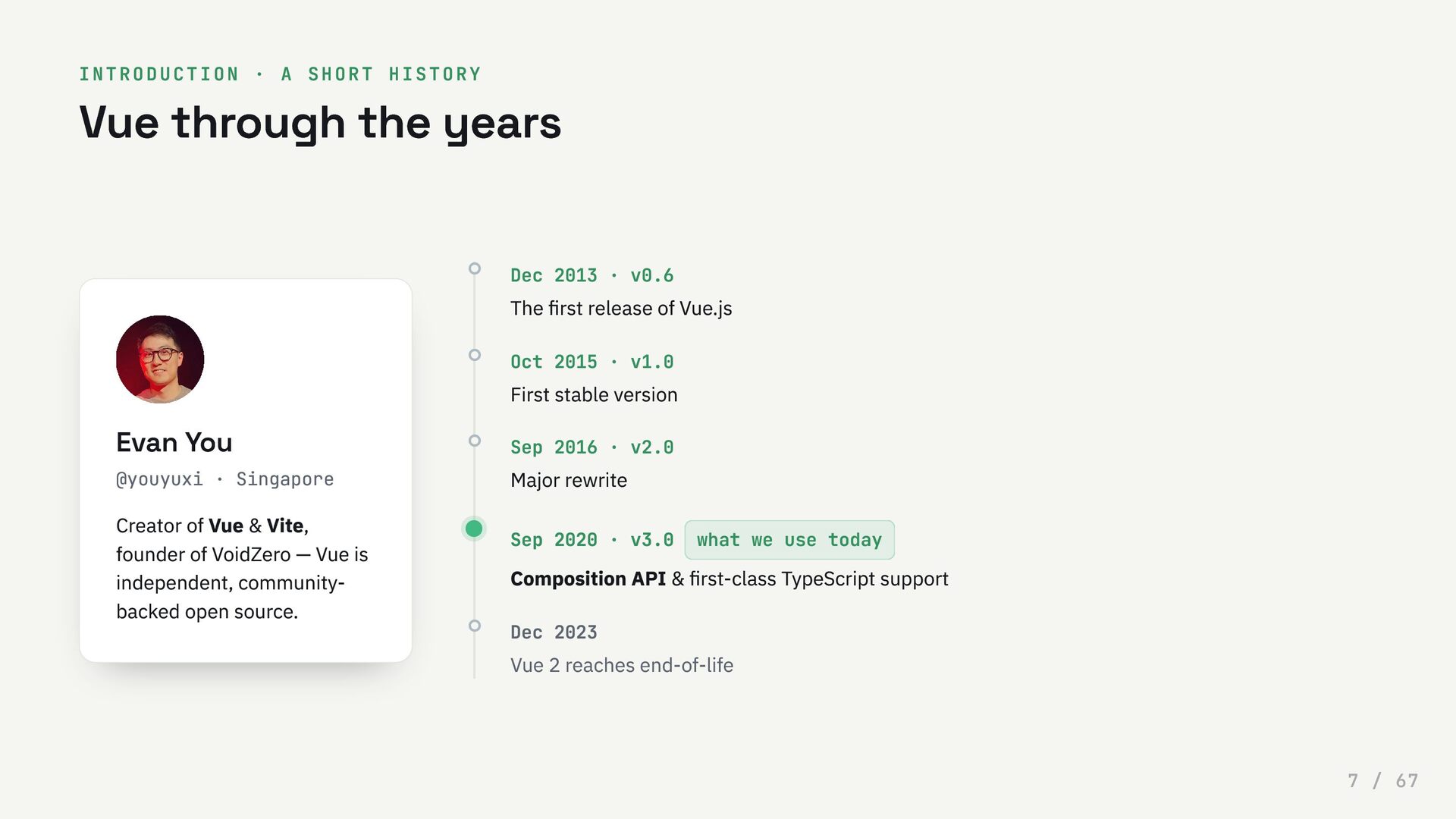
  7. INTRODUCTION · A SHORT HISTORY Vue through the years Evan

    You @youyuxi · Singapore Creator of Vue & Vite, founder of VoidZero — Vue is independent, community- backed open source. Dec 2013 · v0.6 The first release of Vue.js Oct 2015 · v1.0 First stable version Sep 2016 · v2.0 Major rewrite Sep 2020 · v3.0 what we use today Composition API & first-class TypeScript support Dec 2023 Vue 2 reaches end-of-life 7 / 67
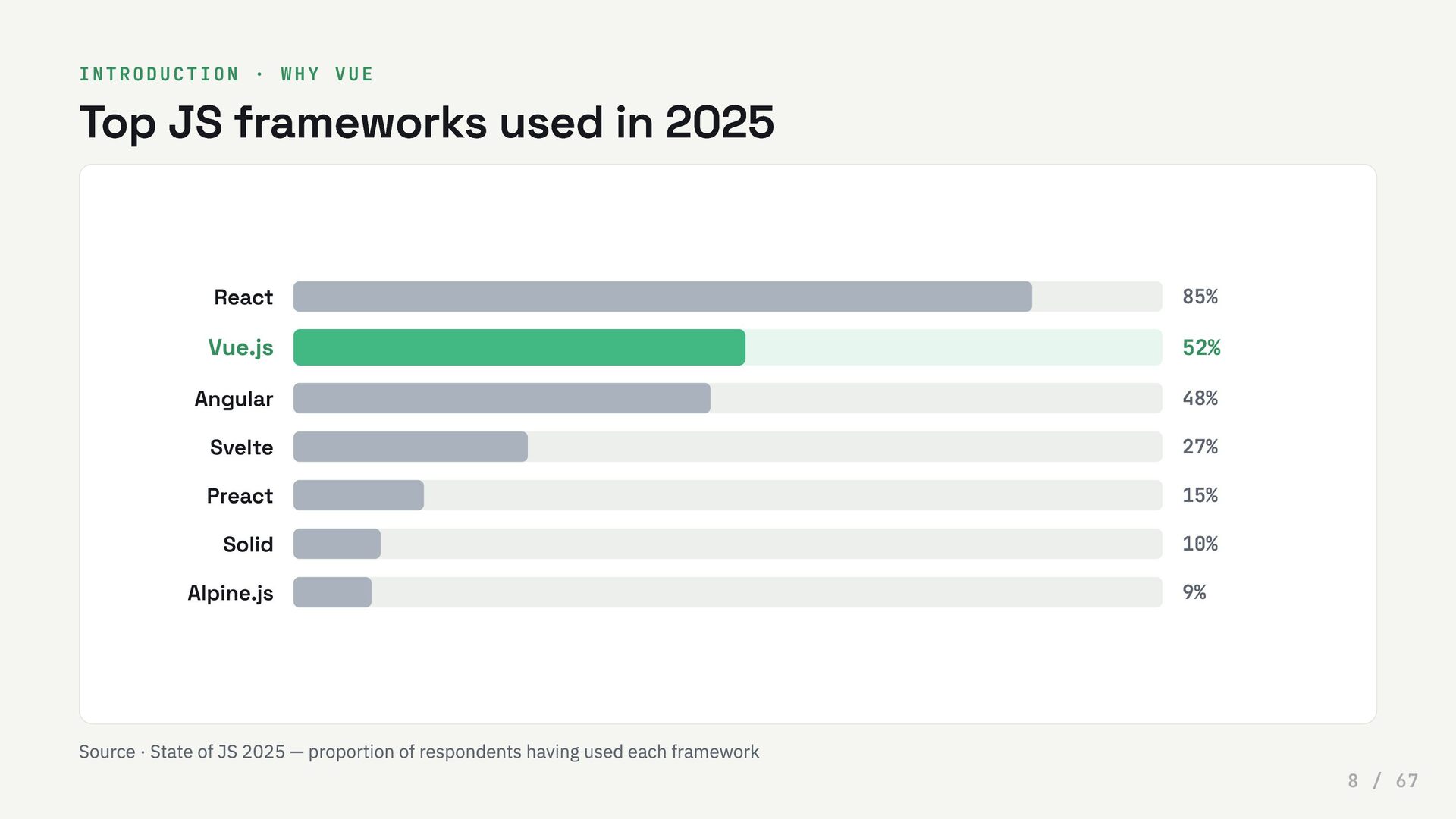
  8. INTRODUCTION · WHY VUE Top JS frameworks used in 2025

    React 85% Vue.js 52% Angular 48% Svelte 27% Preact 15% Solid 10% Alpine.js 9% Source · State of JS 2025 — proportion of respondents having used each framework 8 / 67
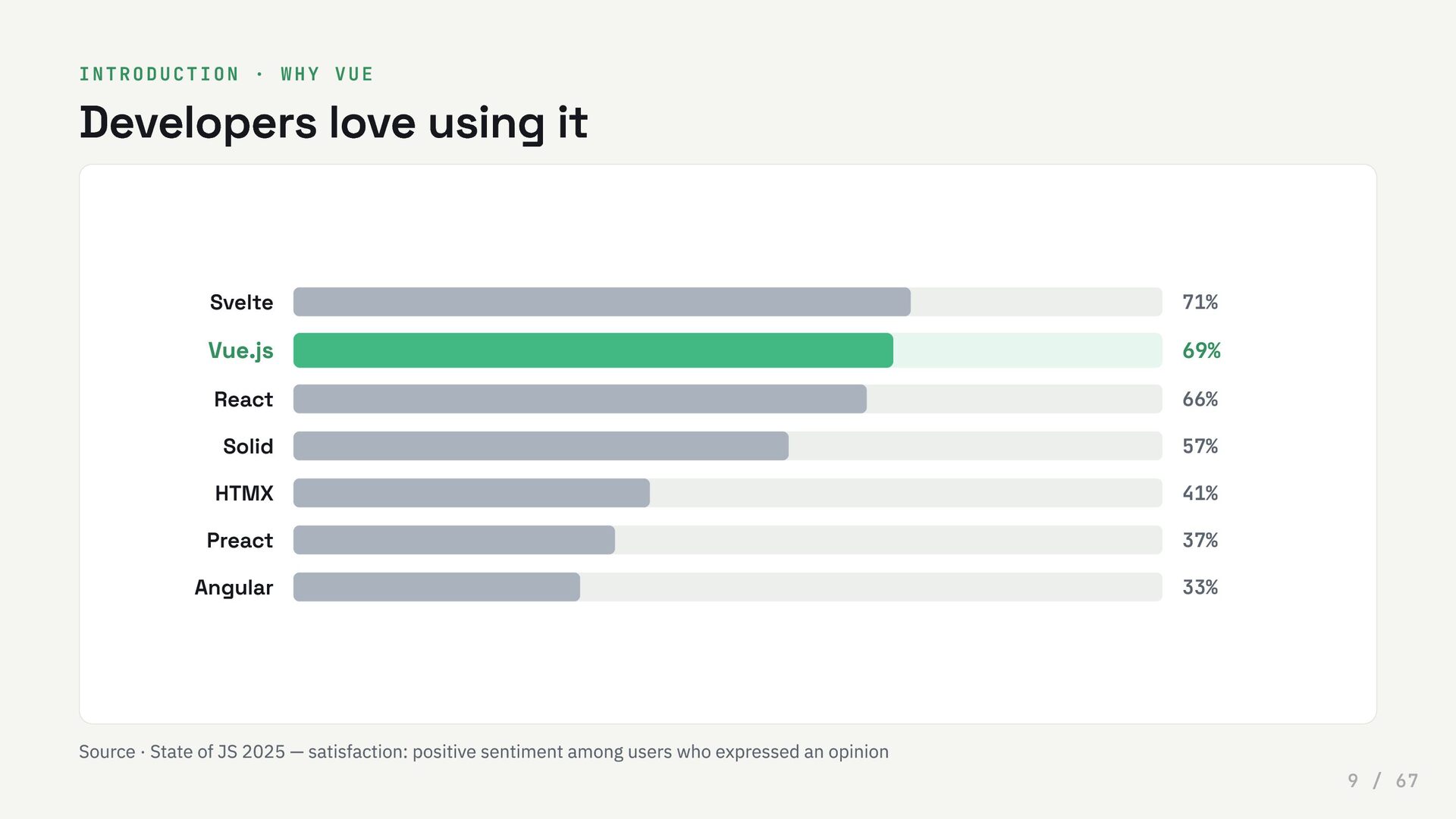
  9. INTRODUCTION · WHY VUE Developers love using it Svelte 71%

    Vue.js 69% React 66% Solid 57% HTMX 41% Preact 37% Angular 33% Source · State of JS 2025 — satisfaction: positive sentiment among users who expressed an opinion 9 / 67
  10. 0 2 Setting up Node, the official scaffolder, your editor,

    and the styling we'll use for the app. 10 / 67
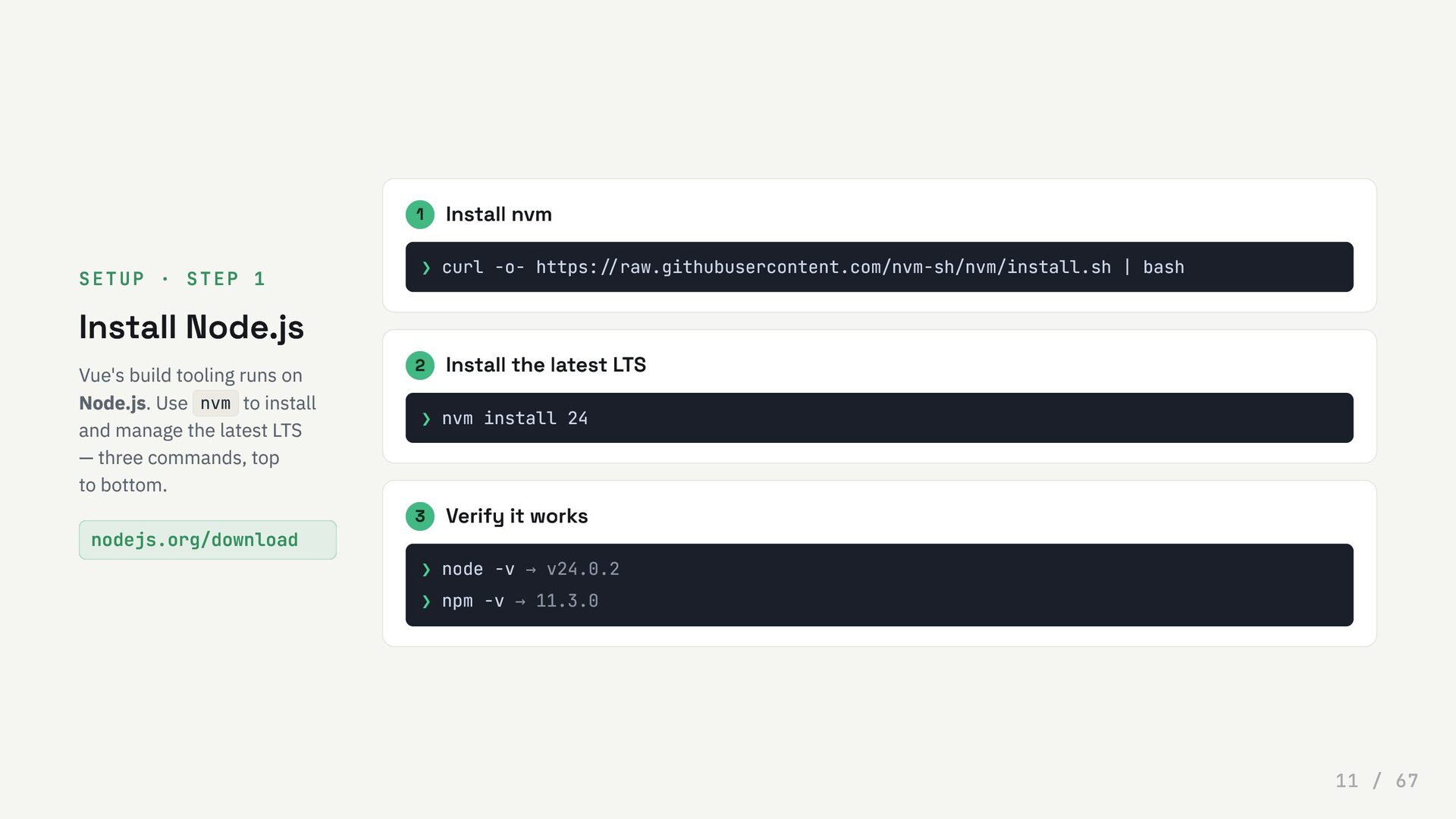
  11. SETUP · STEP 1 Install Node.js Vue's build tooling runs

    on Node.js. Use nvm to install and manage the latest LTS — three commands, top to bottom. nodejs.org/download 1 Install nvm ❯ curl -o- https://raw.githubusercontent.com/nvm-sh/nvm/install.sh | bash 2 Install the latest LTS ❯ nvm install 24 3 Verify it works ❯ node -v → v24.0.2 ❯ npm -v → 11.3.0 11 / 67
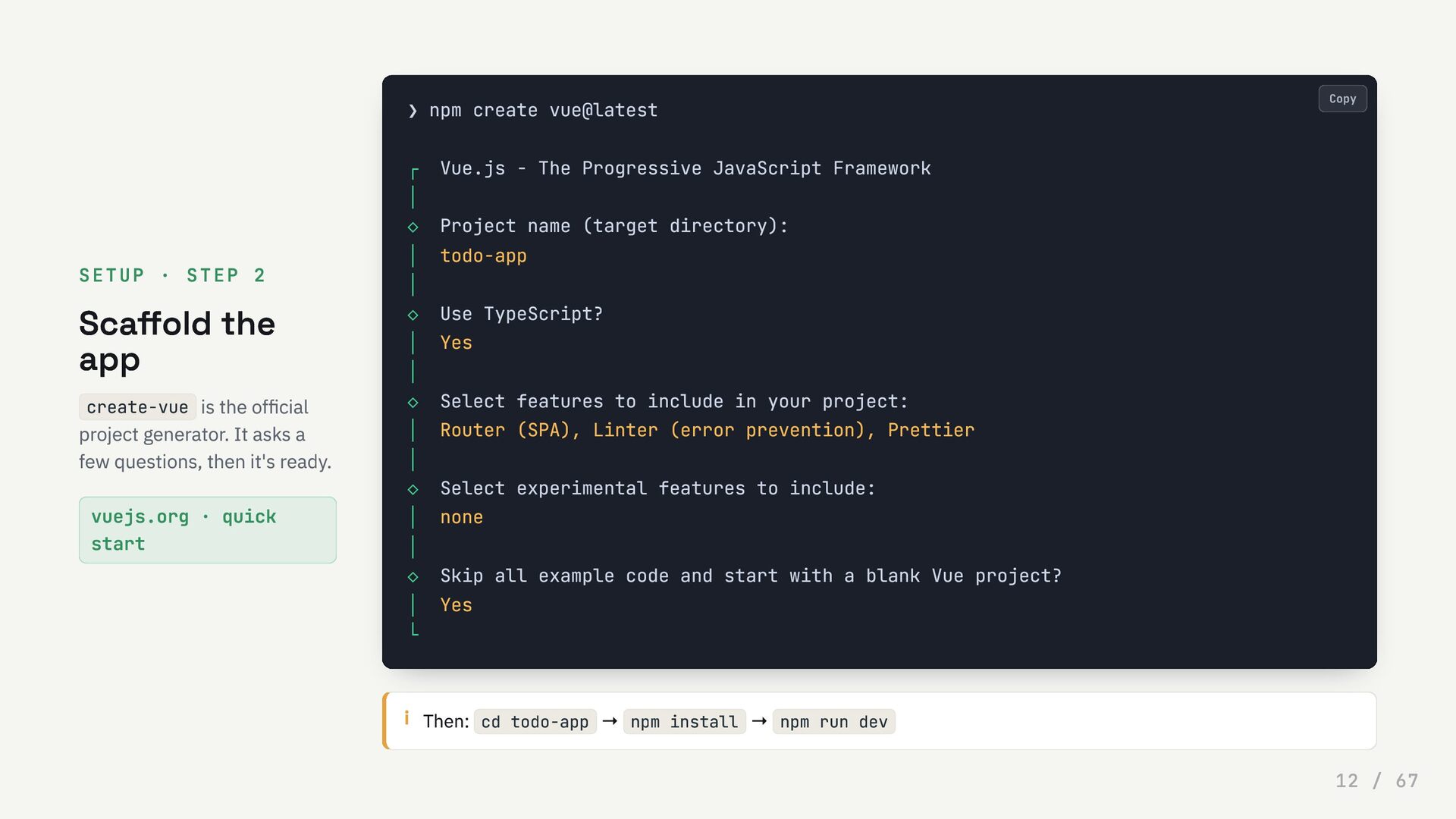
  12. SETUP · STEP 2 Scaffold the app create-vue is the

    official project generator. It asks a few questions, then it's ready. vuejs.org · quick start i Then: cd todo-app → npm install → npm run dev ❯ npm create vue@latest ┌ Vue.js - The Progressive JavaScript Framework │ ◇ Project name (target directory): │ todo-app │ ◇ Use TypeScript? │ Yes │ ◇ Select features to include in your project: │ Router (SPA), Linter (error prevention), Prettier │ ◇ Select experimental features to include: │ none │ ◇ Skip all example code and start with a blank Vue project? │ Yes └ Copy 12 / 67
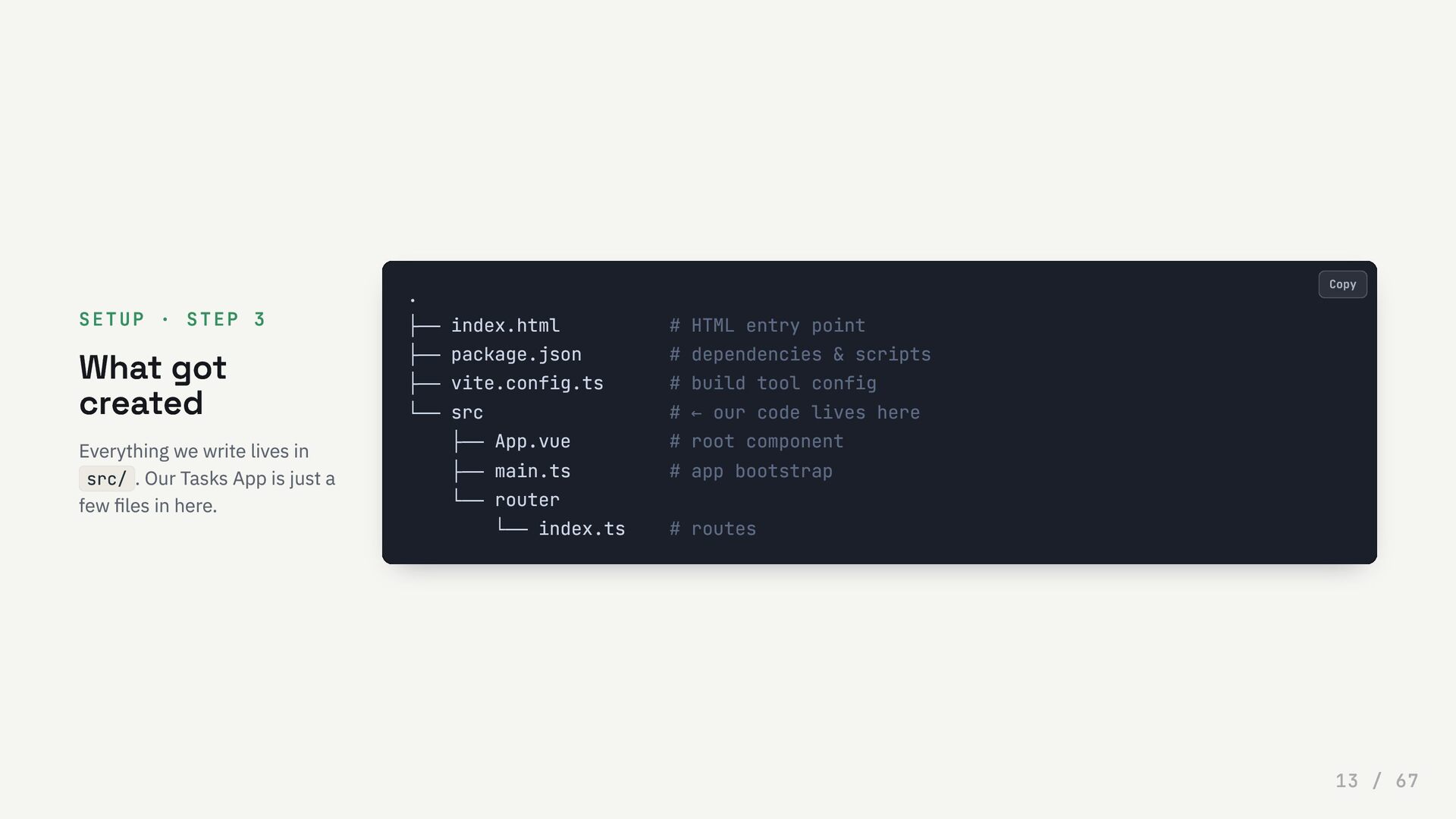
  13. SETUP · STEP 3 What got created Everything we write

    lives in src/ . Our Tasks App is just a few files in here. . ├── index.html # HTML entry point ├── package.json # dependencies & scripts ├── vite.config.ts # build tool config └── src # ← our code lives here ├── App.vue # root component ├── main.ts # app bootstrap └── router └── index.ts # routes Copy 13 / 67
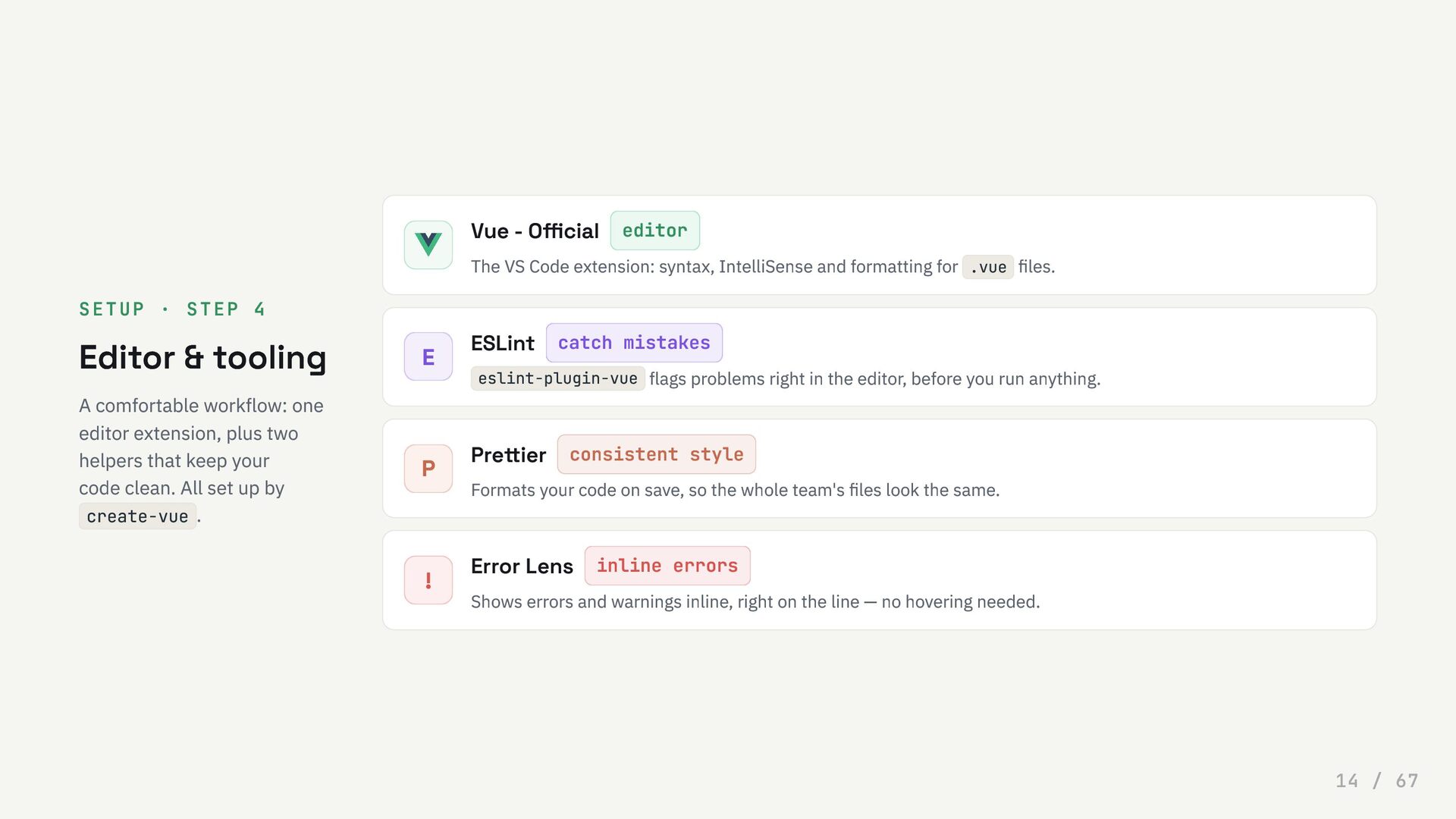
  14. SETUP · STEP 4 Editor & tooling A comfortable workflow:

    one editor extension, plus two helpers that keep your code clean. All set up by create-vue . Vue - Official editor The VS Code extension: syntax, IntelliSense and formatting for .vue files. E ESLint catch mistakes eslint-plugin-vue flags problems right in the editor, before you run anything. P Prettier consistent style Formats your code on save, so the whole team's files look the same. ! Error Lens inline errors Shows errors and warnings inline, right on the line — no hovering needed. 14 / 67
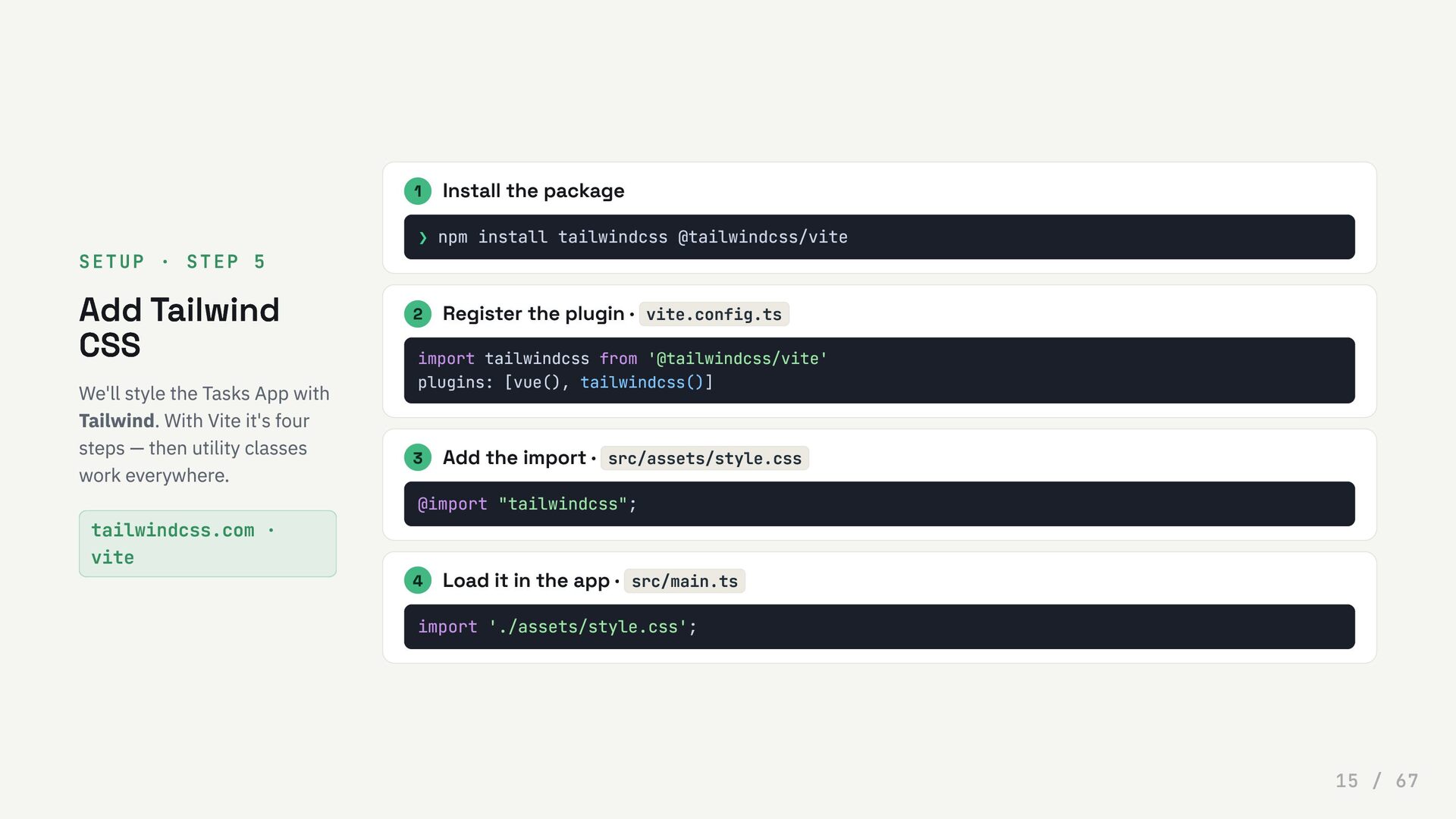
  15. SETUP · STEP 5 Add Tailwind CSS We'll style the

    Tasks App with Tailwind. With Vite it's four steps — then utility classes work everywhere. tailwindcss.com · vite 1 Install the package ❯ npm install tailwindcss @tailwindcss/vite 2 Register the plugin · vite.config.ts import tailwindcss from '@tailwindcss/vite' plugins: [vue(), tailwindcss()] 3 Add the import · src/assets/style.css @import "tailwindcss"; 4 Load it in the app · src/main.ts import './assets/style.css'; 15 / 67
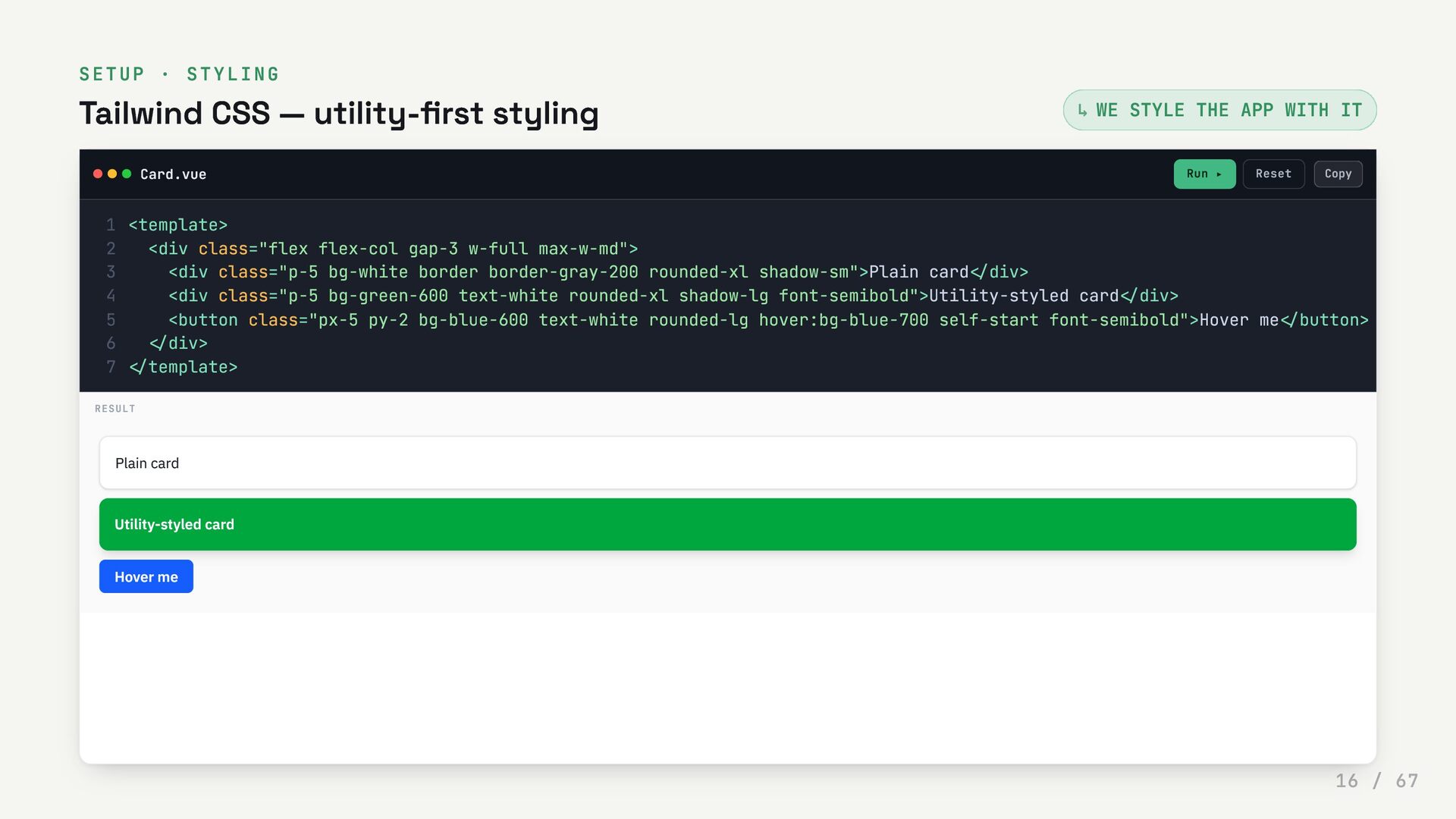
  16. SETUP · STYLING Tailwind CSS — utility-first styling WE STYLE

    THE APP WITH IT Card.vue Run ▸ Reset ↳ <template> 1 <div class="flex flex-col gap-3 w-full max-w-md"> 2 <div class="p-5 bg-white border border-gray-200 rounded-xl shadow-sm">Plain card</div> 3 <div class="p-5 bg-green-600 text-white rounded-xl shadow-lg font-semibold">Utility-styled card</div> 4 <button class="px-5 py-2 bg-blue-600 text-white rounded-lg hover:bg-blue-700 self-start font-semibold">Hover me</button> 5 </div> 6 </template> 7 RESULT Plain card Utility-styled card Hover me Copy 16 / 67
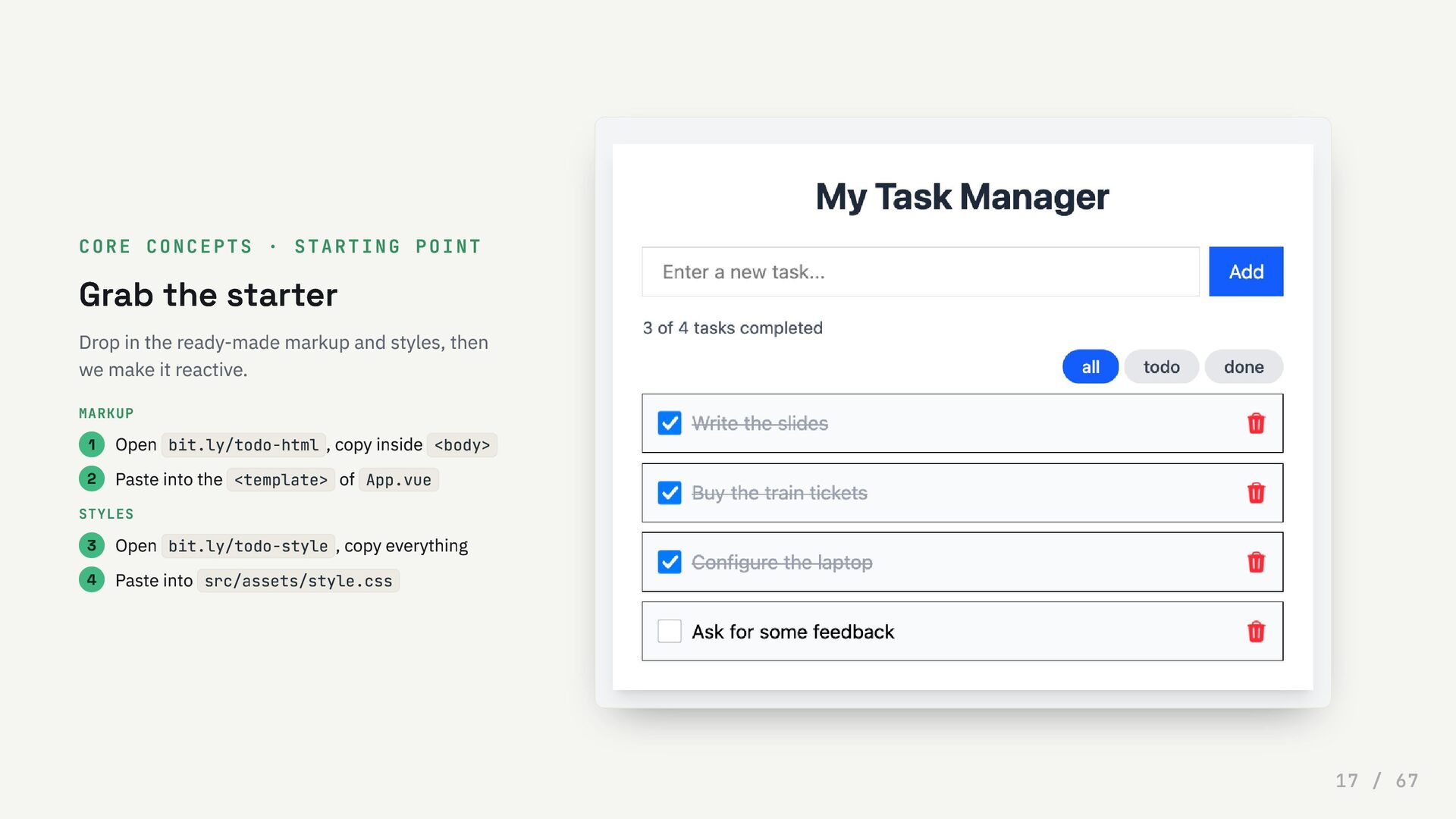
  17. CORE CONCEPTS · STARTING POINT Grab the starter Drop in

    the ready-made markup and styles, then we make it reactive. MARKUP 1 Open bit.ly/todo-html , copy inside <body> 2 Paste into the <template> of App.vue STYLES 3 Open bit.ly/todo-style , copy everything 4 Paste into src/assets/style.css 17 / 67
  18. 0 3 Core concepts SFCs, template syntax and directives —

    the building blocks of every Vue screen. Every demo from here is live: edit and run. 18 / 67
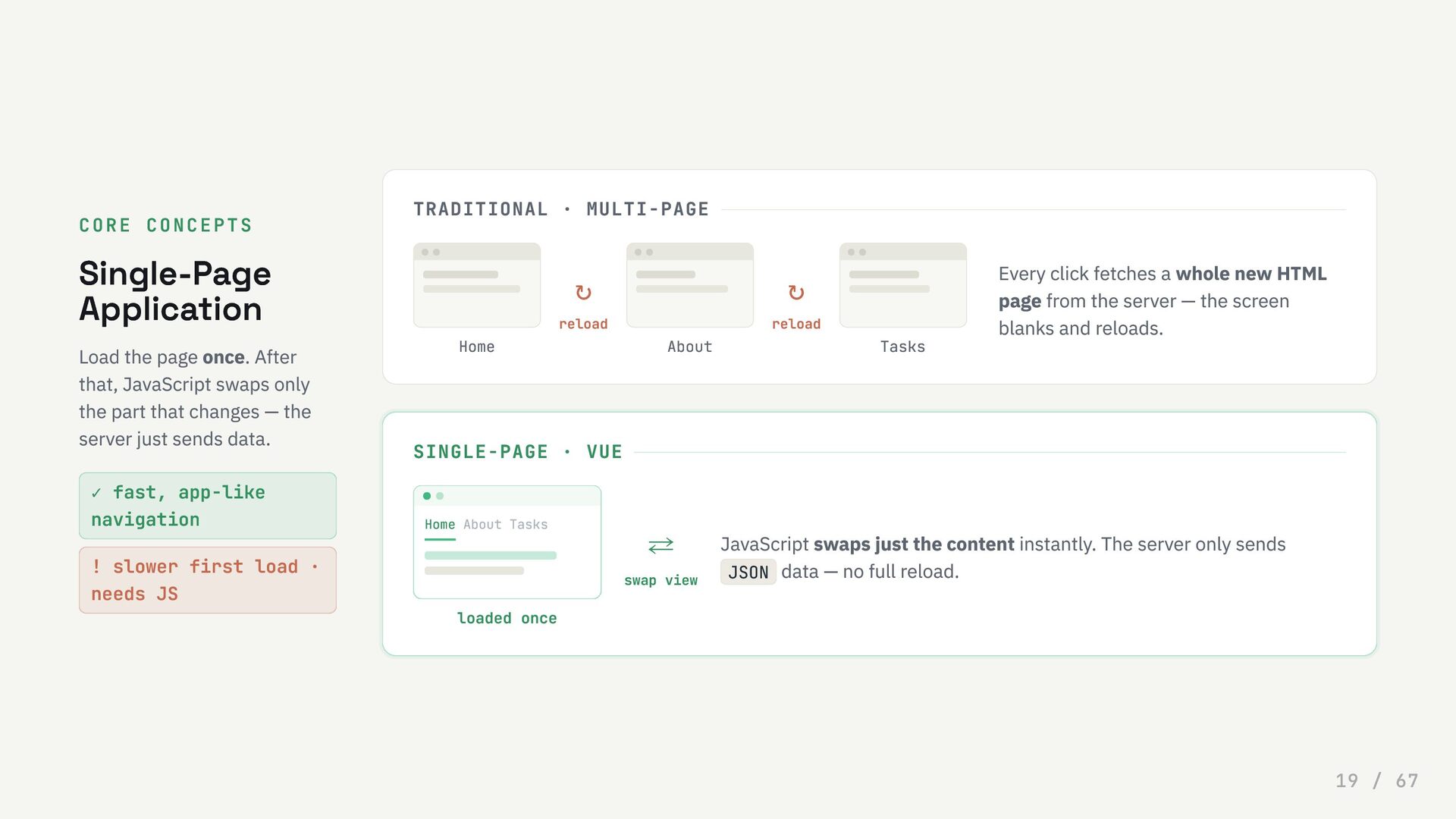
  19. CORE CONCEPTS Single-Page Application Load the page once. After that,

    JavaScript swaps only the part that changes — the server just sends data. ✓ fast, app-like navigation ! slower first load · needs JS TRADITIONAL · MULTI-PAGE Home ↻ reload About ↻ reload Tasks Every click fetches a whole new HTML page from the server — the screen blanks and reloads. SINGLE-PAGE · VUE Home About Tasks loaded once ⇄ swap view JavaScript swaps just the content instantly. The server only sends JSON data — no full reload. 19 / 67
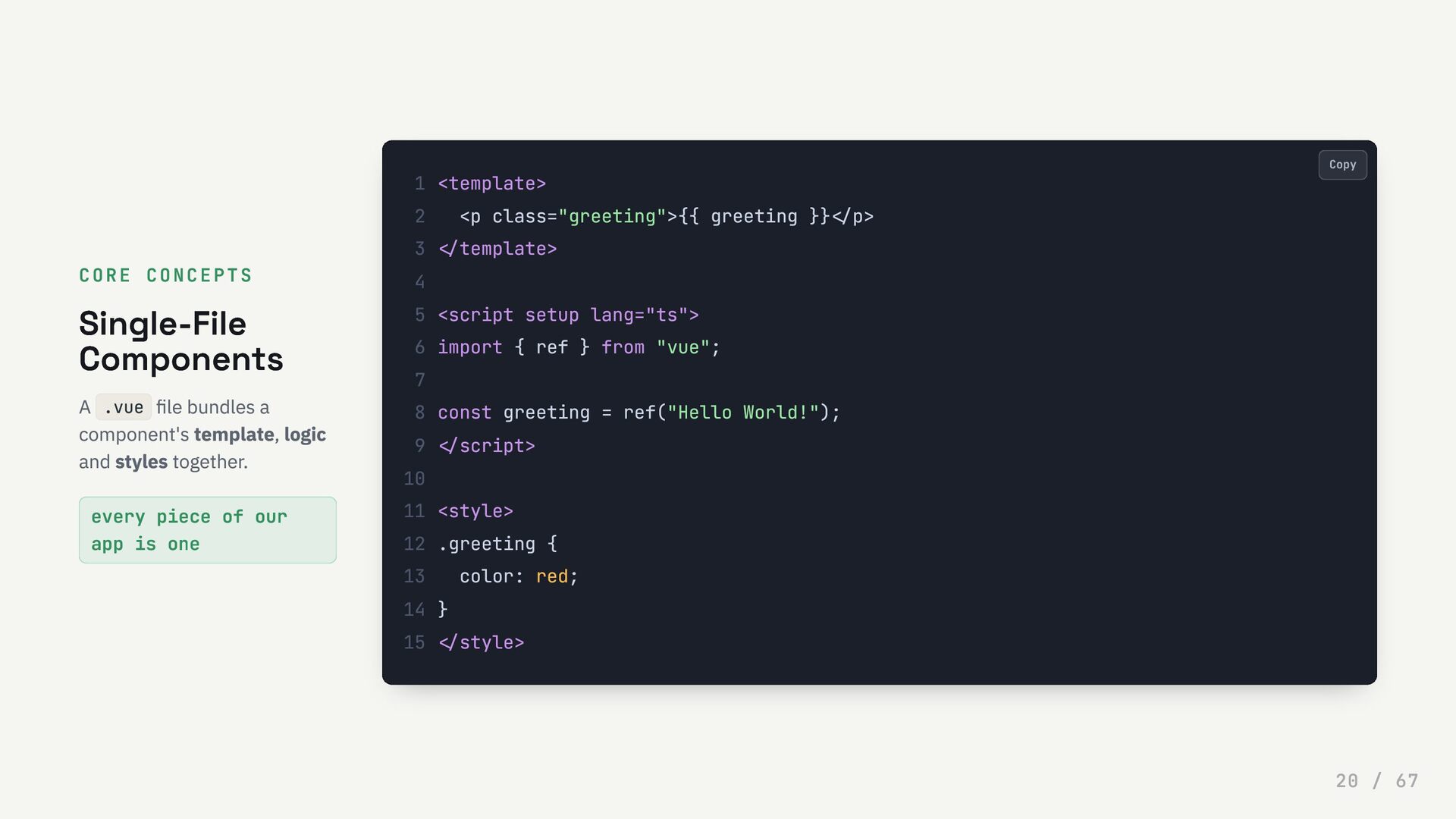
  20. CORE CONCEPTS Single-File Components A .vue file bundles a component's

    template, logic and styles together. every piece of our app is one <template> 1 <p class="greeting">{{ greeting }}</p> 2 </template> 3 4 <script setup lang="ts"> 5 import { ref } from "vue"; 6 7 const greeting = ref("Hello World!"); 8 </script> 9 10 <style> 11 .greeting { 12 color: red; 13 } 14 </style> 15 Copy 20 / 67
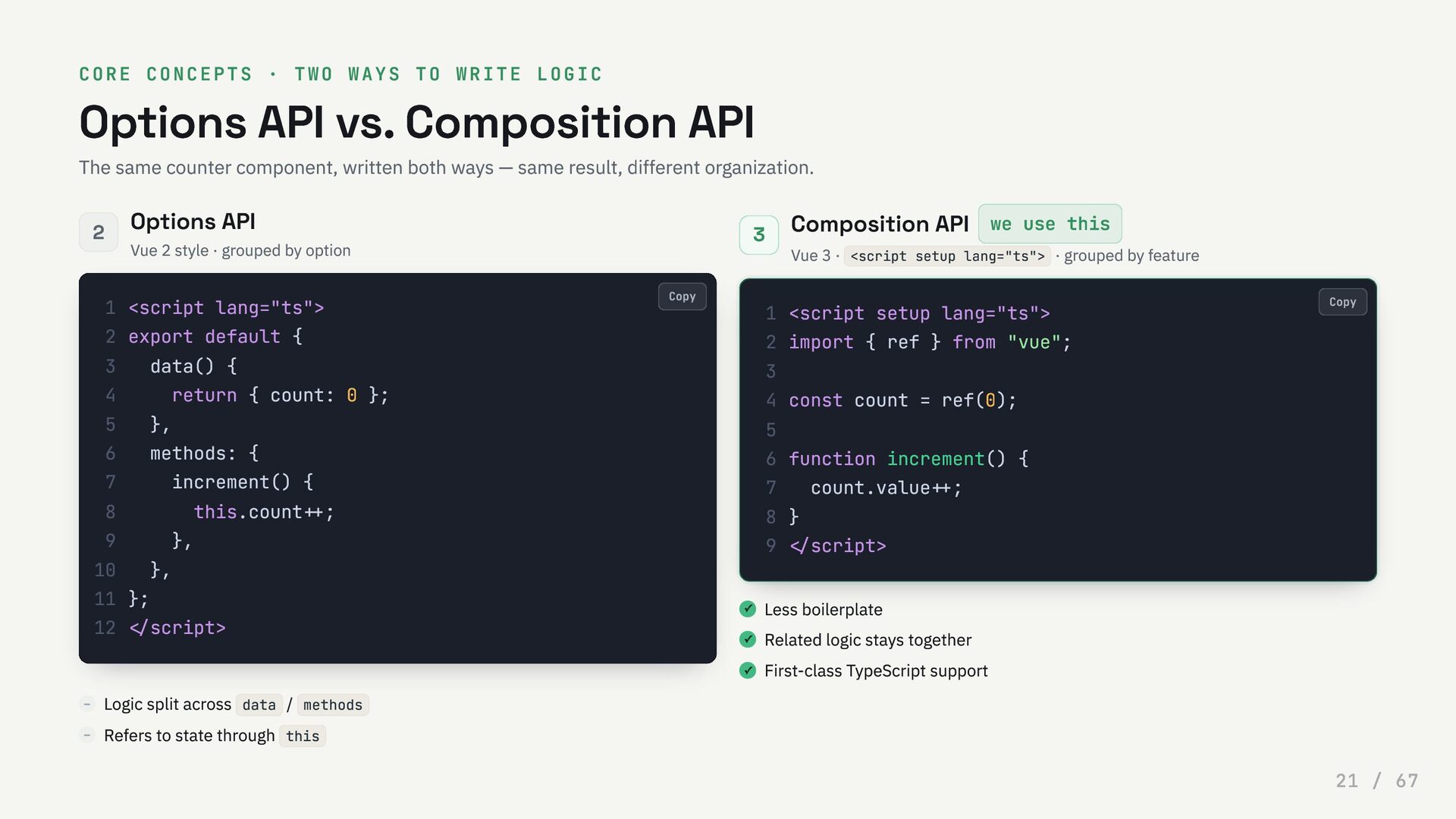
  21. CORE CONCEPTS · TWO WAYS TO WRITE LOGIC Options API

    vs. Composition API The same counter component, written both ways — same result, different organization. 2 Options API Vue 2 style · grouped by option – Logic split across data / methods – Refers to state through this 3 Composition API we use this Vue 3 · <script setup lang="ts"> · grouped by feature ✓ Less boilerplate ✓ Related logic stays together ✓ First-class TypeScript support <script lang="ts"> 1 export default { 2 data() { 3 return { count: 0 }; 4 }, 5 methods: { 6 increment() { 7 this.count++; 8 }, 9 }, 10 }; 11 </script> 12 <script setup lang="ts"> 1 import { ref } from "vue"; 2 3 const count = ref(0); 4 5 function increment() { 6 count.value++; 7 } 8 </script> 9 Copy Copy 21 / 67
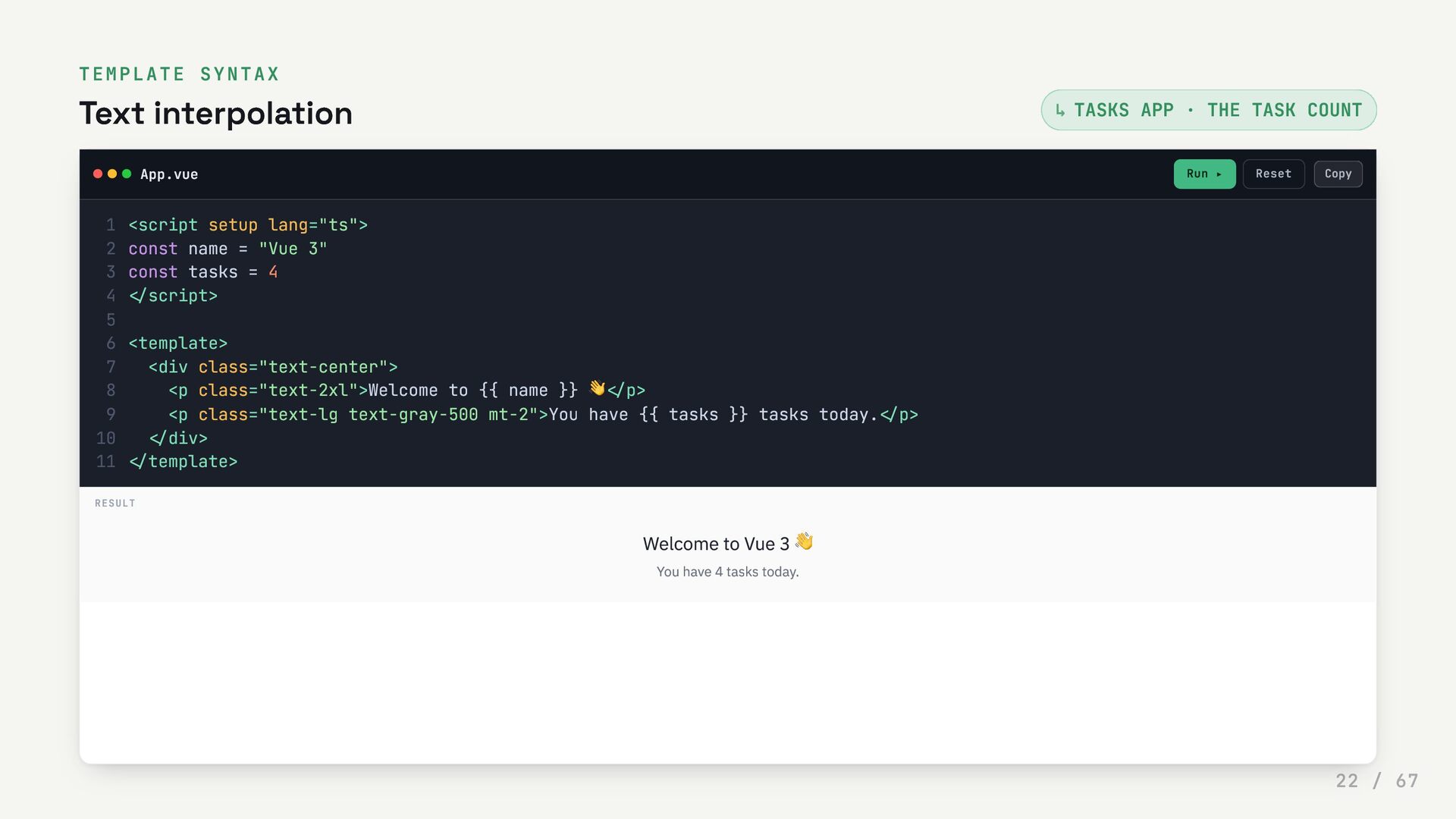
  22. TEMPLATE SYNTAX Text interpolation TASKS APP · THE TASK COUNT

    App.vue Run ▸ Reset ↳ <script setup lang="ts"> 1 const name = "Vue 3" 2 const tasks = 4 3 </script> 4 5 <template> 6 <div class="text-center"> 7 <p class="text-2xl">Welcome to {{ name }} 👋</p> 8 <p class="text-lg text-gray-500 mt-2">You have {{ tasks }} tasks today.</p> 9 </div> 10 </template> 11 RESULT Welcome to Vue 3 👋 You have 4 tasks today. Copy 22 / 67
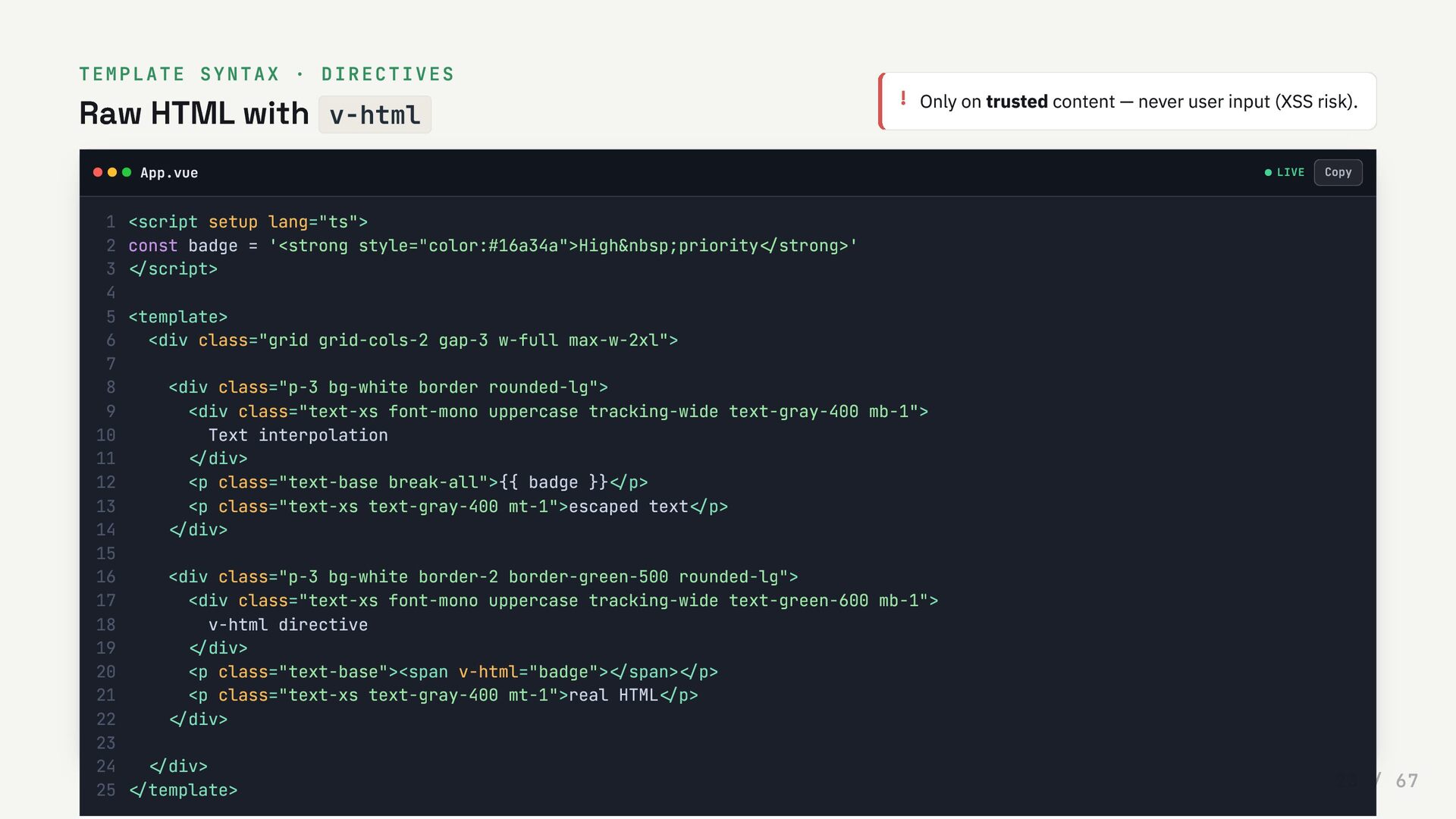
  23. TEMPLATE SYNTAX · DIRECTIVES Raw HTML with v-html ! Only

    on trusted content — never user input (XSS risk). App.vue LIVE <script setup lang="ts"> 1 const badge = '<strong style="color:#16a34a">High&nbsp;priority</strong>' 2 </script> 3 4 <template> 5 <div class="grid grid-cols-2 gap-3 w-full max-w-2xl"> 6 7 <div class="p-3 bg-white border rounded-lg"> 8 <div class="text-xs font-mono uppercase tracking-wide text-gray-400 mb-1"> 9 Text interpolation 10 </div> 11 <p class="text-base break-all">{{ badge }}</p> 12 <p class="text-xs text-gray-400 mt-1">escaped text</p> 13 </div> 14 15 <div class="p-3 bg-white border-2 border-green-500 rounded-lg"> 16 <div class="text-xs font-mono uppercase tracking-wide text-green-600 mb-1"> 17 v-html directive 18 </div> 19 <p class="text-base"><span v-html="badge"></span></p> 20 <p class="text-xs text-gray-400 mt-1">real HTML</p> 21 </div> 22 23 </div> 24 </template> 25 Copy 23 / 67
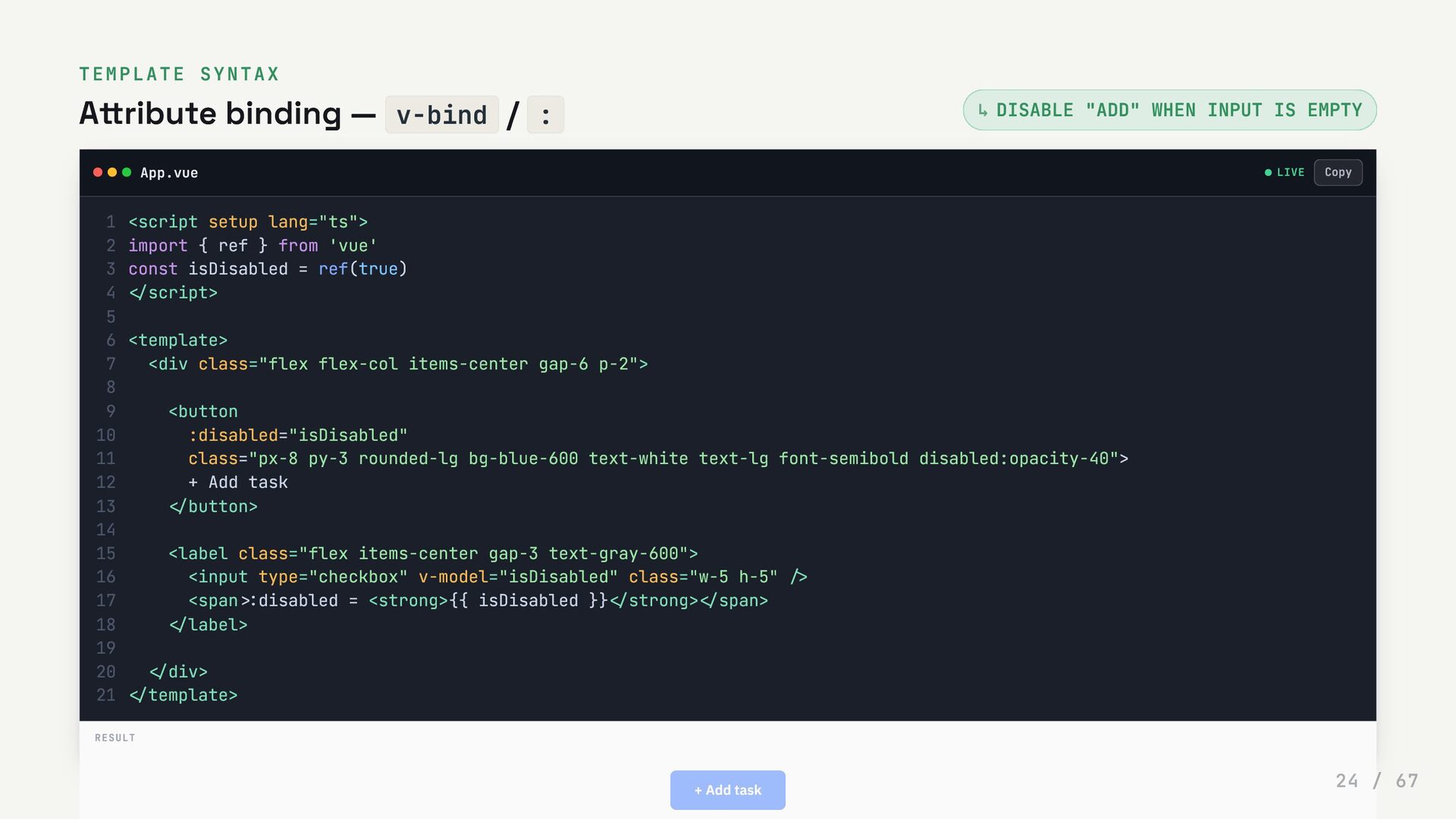
  24. TEMPLATE SYNTAX Attribute binding — v-bind / : DISABLE "ADD"

    WHEN INPUT IS EMPTY App.vue LIVE ↳ <script setup lang="ts"> 1 import { ref } from 'vue' 2 const isDisabled = ref(true) 3 </script> 4 5 <template> 6 <div class="flex flex-col items-center gap-6 p-2"> 7 8 <button 9 :disabled="isDisabled" 10 class="px-8 py-3 rounded-lg bg-blue-600 text-white text-lg font-semibold disabled:opacity-40"> 11 + Add task 12 </button> 13 14 <label class="flex items-center gap-3 text-gray-600"> 15 <input type="checkbox" v-model="isDisabled" class="w-5 h-5" /> 16 <span :disabled = <strong>{{ isDisabled }}</strong></span> 17 </label> 18 19 </div> 20 </template> 21 RESULT + Add task Copy 24 / 67
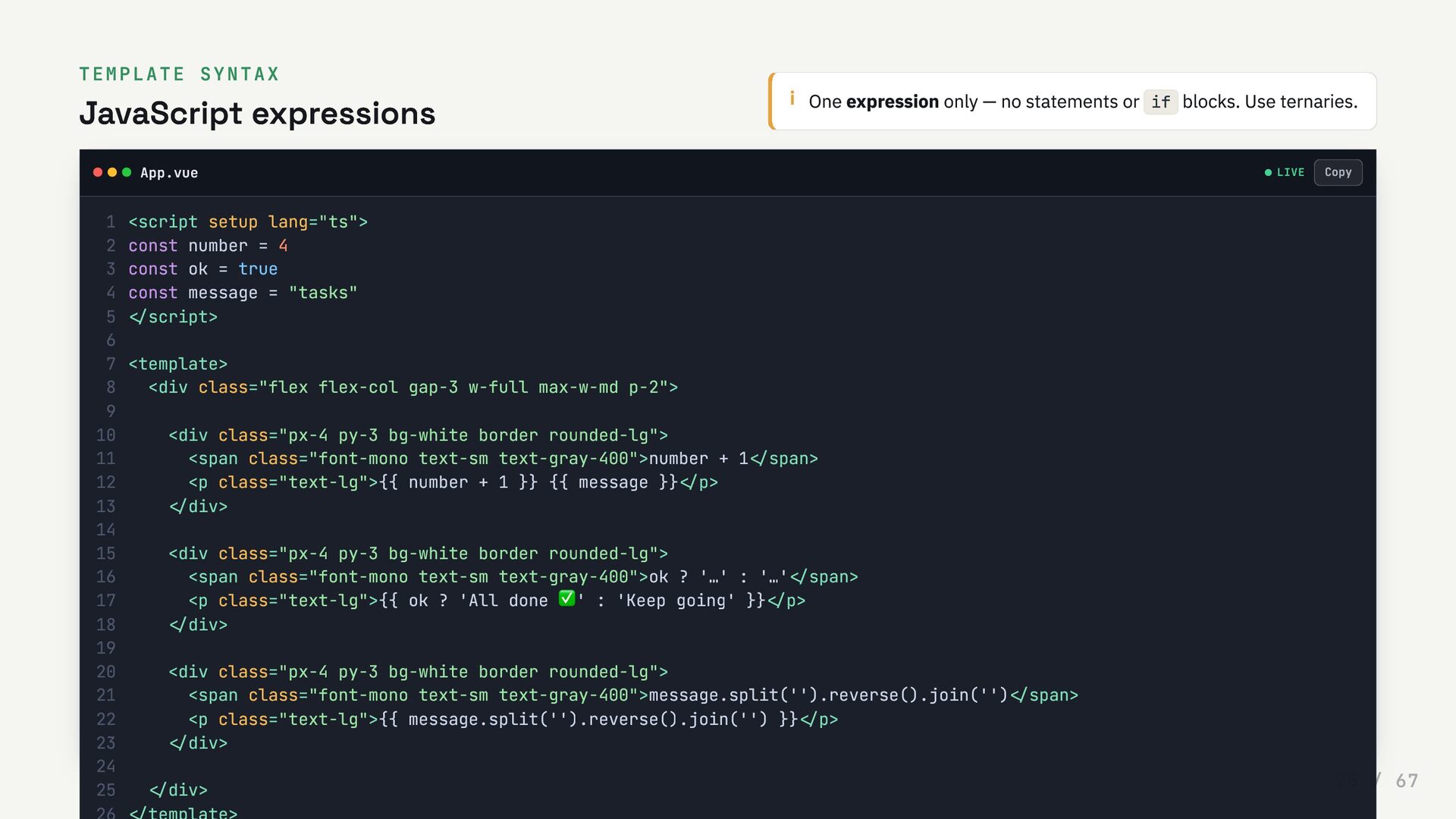
  25. TEMPLATE SYNTAX JavaScript expressions i One expression only — no

    statements or if blocks. Use ternaries. App.vue LIVE <script setup lang="ts"> 1 const number = 4 2 const ok = true 3 const message = "tasks" 4 </script> 5 6 <template> 7 <div class="flex flex-col gap-3 w-full max-w-md p-2"> 8 9 <div class="px-4 py-3 bg-white border rounded-lg"> 10 <span class="font-mono text-sm text-gray-400">number + 1</span> 11 <p class="text-lg">{{ number + 1 }} {{ message }}</p> 12 </div> 13 14 <div class="px-4 py-3 bg-white border rounded-lg"> 15 <span class="font-mono text-sm text-gray-400">ok ? '…' : '…'</span> 16 <p class="text-lg">{{ ok ? 'All done ✅' : 'Keep going' }}</p> 17 </div> 18 19 <div class="px-4 py-3 bg-white border rounded-lg"> 20 <span class="font-mono text-sm text-gray-400">message.split('').reverse().join('')</span> 21 <p class="text-lg">{{ message.split('').reverse().join('') }}</p> 22 </div> 23 24 </div> 25 Copy 25 / 67
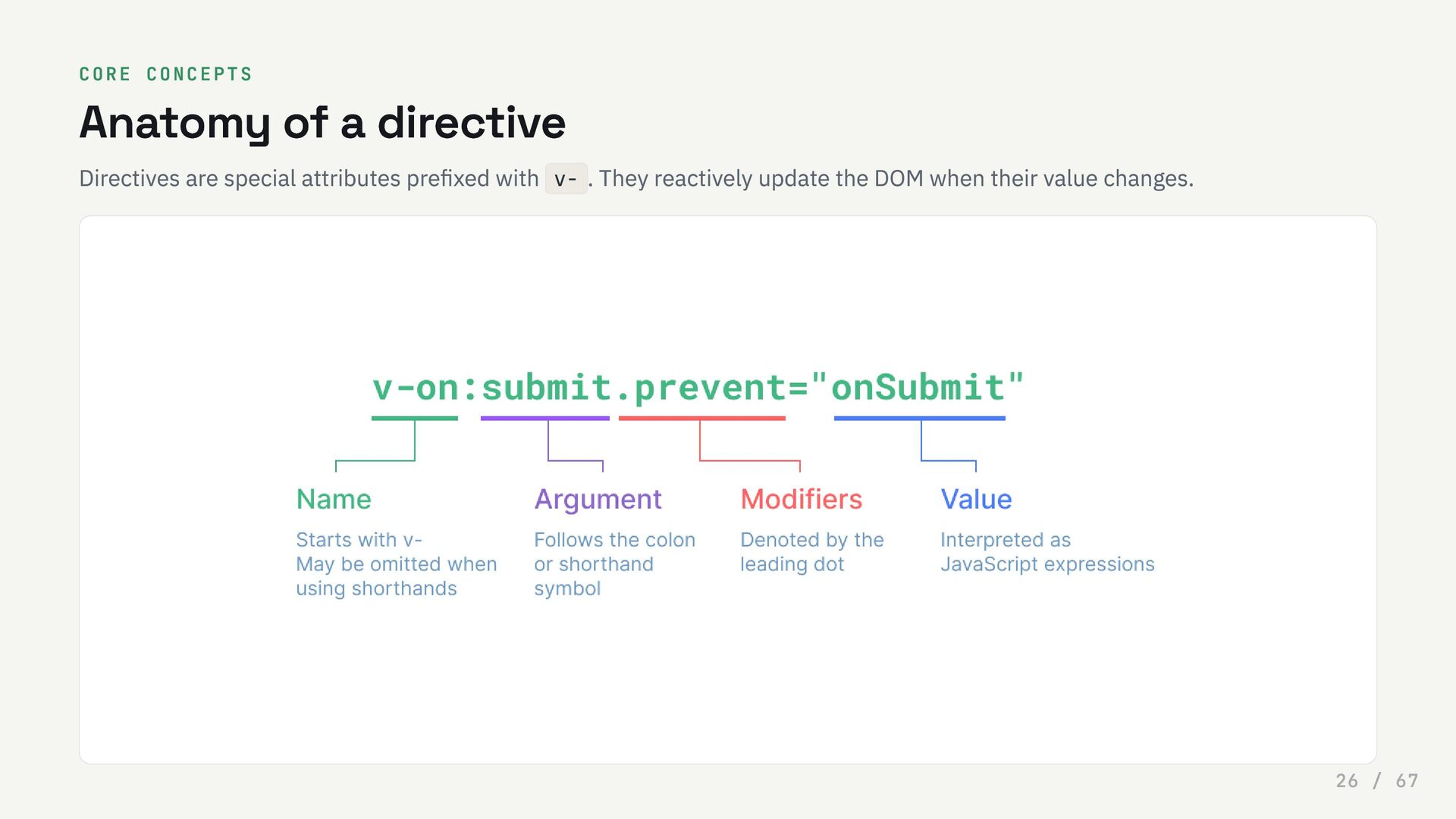
  26. CORE CONCEPTS Anatomy of a directive Directives are special attributes

    prefixed with v- . They reactively update the DOM when their value changes. 26 / 67
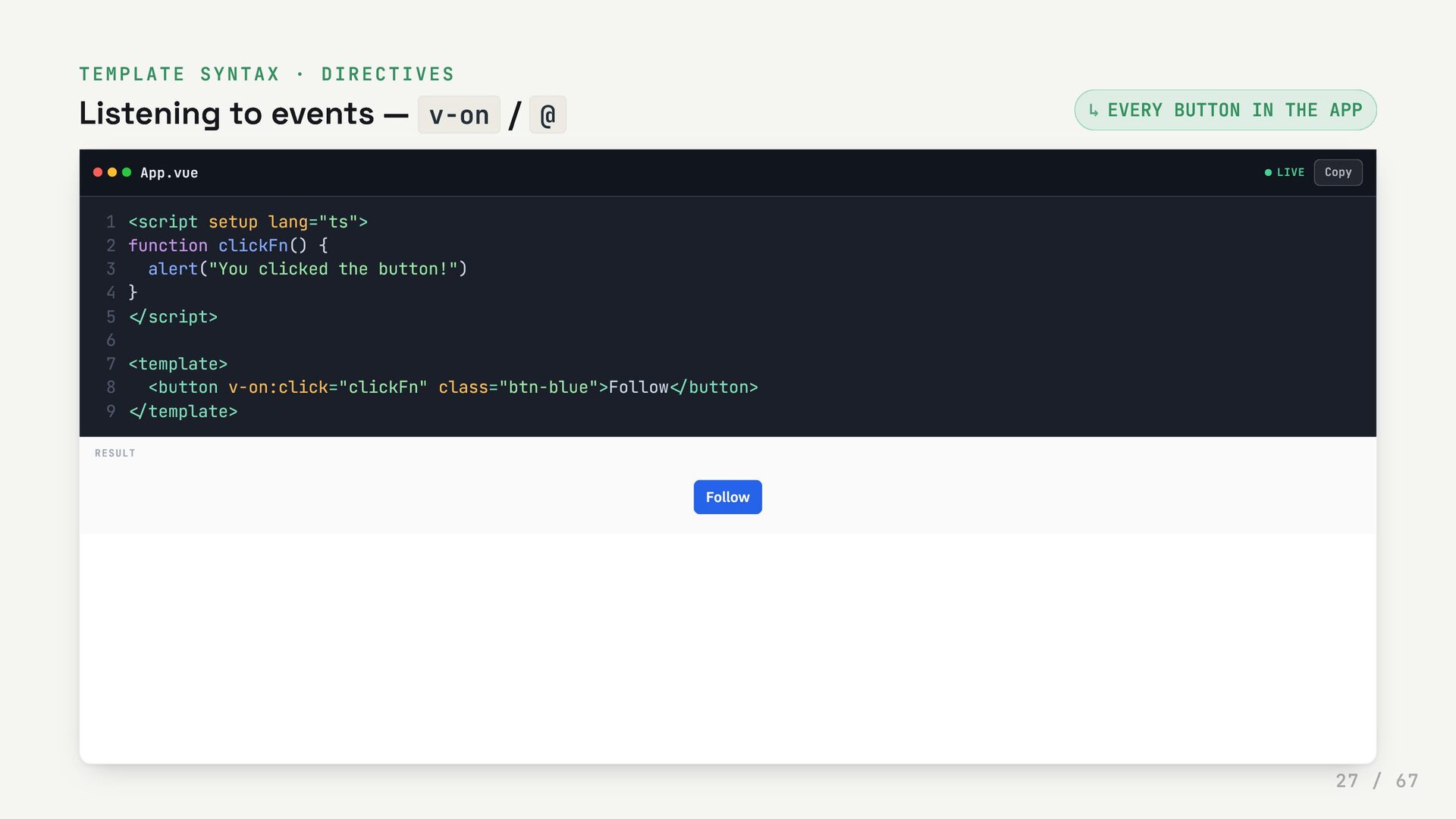
  27. TEMPLATE SYNTAX · DIRECTIVES Listening to events — v-on /

    @ EVERY BUTTON IN THE APP App.vue LIVE ↳ <script setup lang="ts"> 1 function clickFn() { 2 alert("You clicked the button!") 3 } 4 </script> 5 6 <template> 7 <button v-on:click="clickFn" class="btn-blue">Follow</button> 8 </template> 9 RESULT Follow Copy 27 / 67
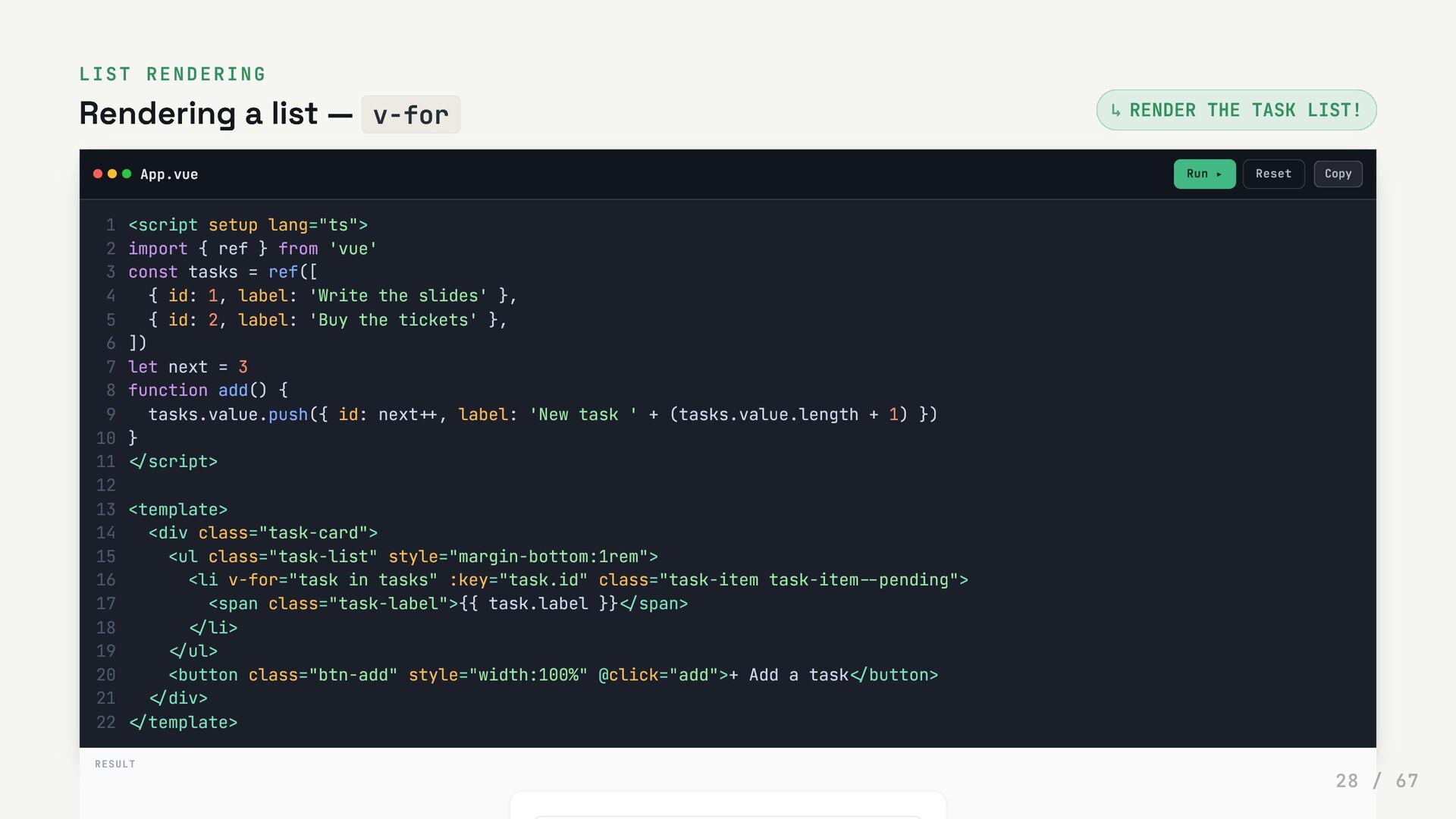
  28. LIST RENDERING Rendering a list — v-for RENDER THE TASK

    LIST! App.vue Run ▸ Reset ↳ <script setup lang="ts"> 1 import { ref } from 'vue' 2 const tasks = ref([ 3 { id: 1, label: 'Write the slides' }, 4 { id: 2, label: 'Buy the tickets' }, 5 ]) 6 let next = 3 7 function add() { 8 tasks.value.push({ id: next++, label: 'New task ' + (tasks.value.length + 1) }) 9 } 10 </script> 11 12 <template> 13 <div class="task-card"> 14 <ul class="task-list" style="margin-bottom:1rem"> 15 <li v-for="task in tasks" :key="task.id" class="task-item task-item--pending"> 16 <span class="task-label">{{ task.label }}</span> 17 </li> 18 </ul> 19 <button class="btn-add" style="width:100%" @click="add">+ Add a task</button> 20 </div> 21 </template> 22 RESULT Copy 28 / 67
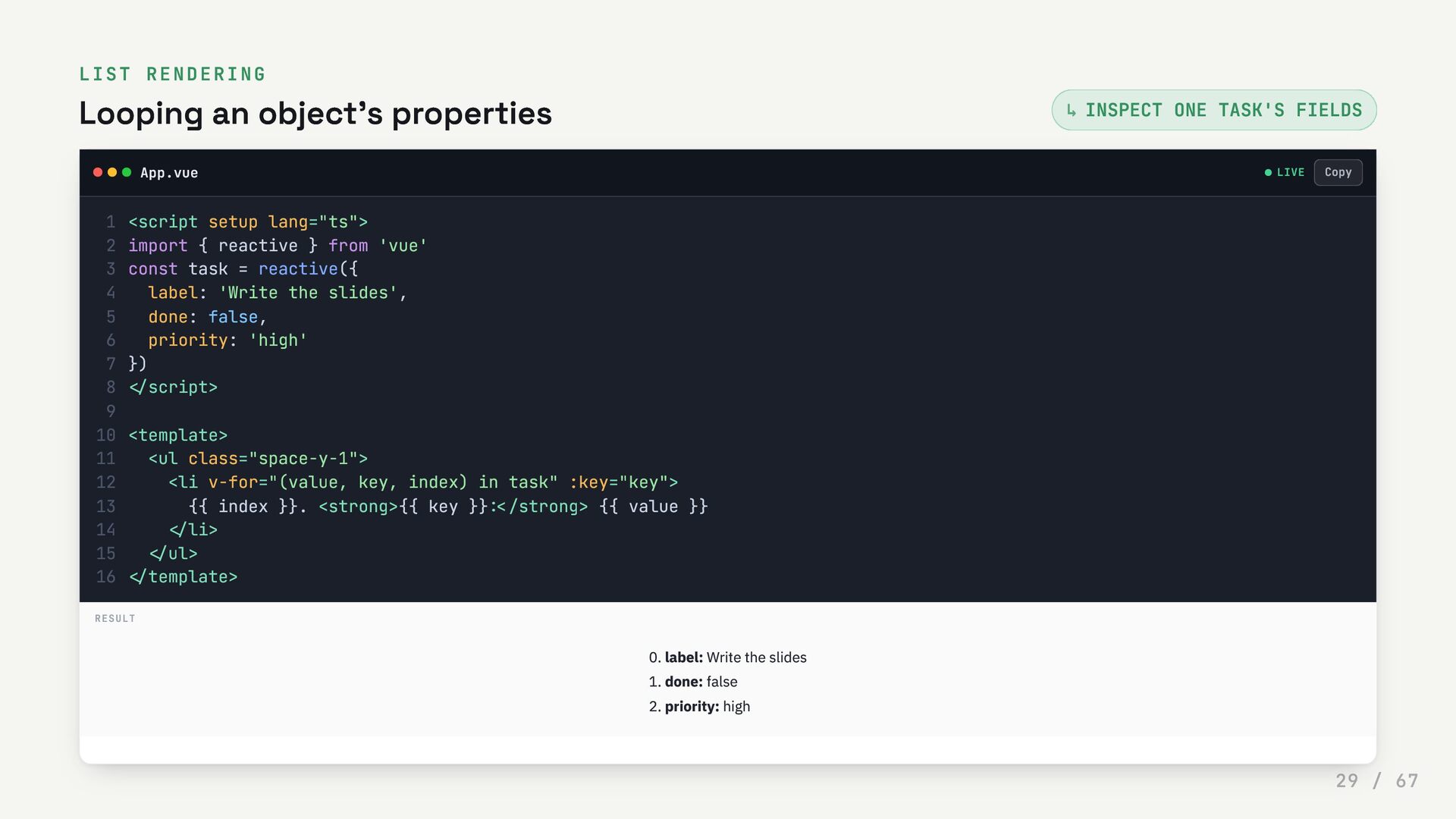
  29. LIST RENDERING Looping an object's properties INSPECT ONE TASK'S FIELDS

    App.vue LIVE ↳ <script setup lang="ts"> 1 import { reactive } from 'vue' 2 const task = reactive({ 3 label: 'Write the slides', 4 done: false, 5 priority: 'high' 6 }) 7 </script> 8 9 <template> 10 <ul class="space-y-1"> 11 <li v-for="(value, key, index) in task" :key="key"> 12 {{ index }}. <strong>{{ key }}:</strong> {{ value }} 13 </li> 14 </ul> 15 </template> 16 RESULT 0. label: Write the slides 1. done: false 2. priority: high Copy 29 / 67
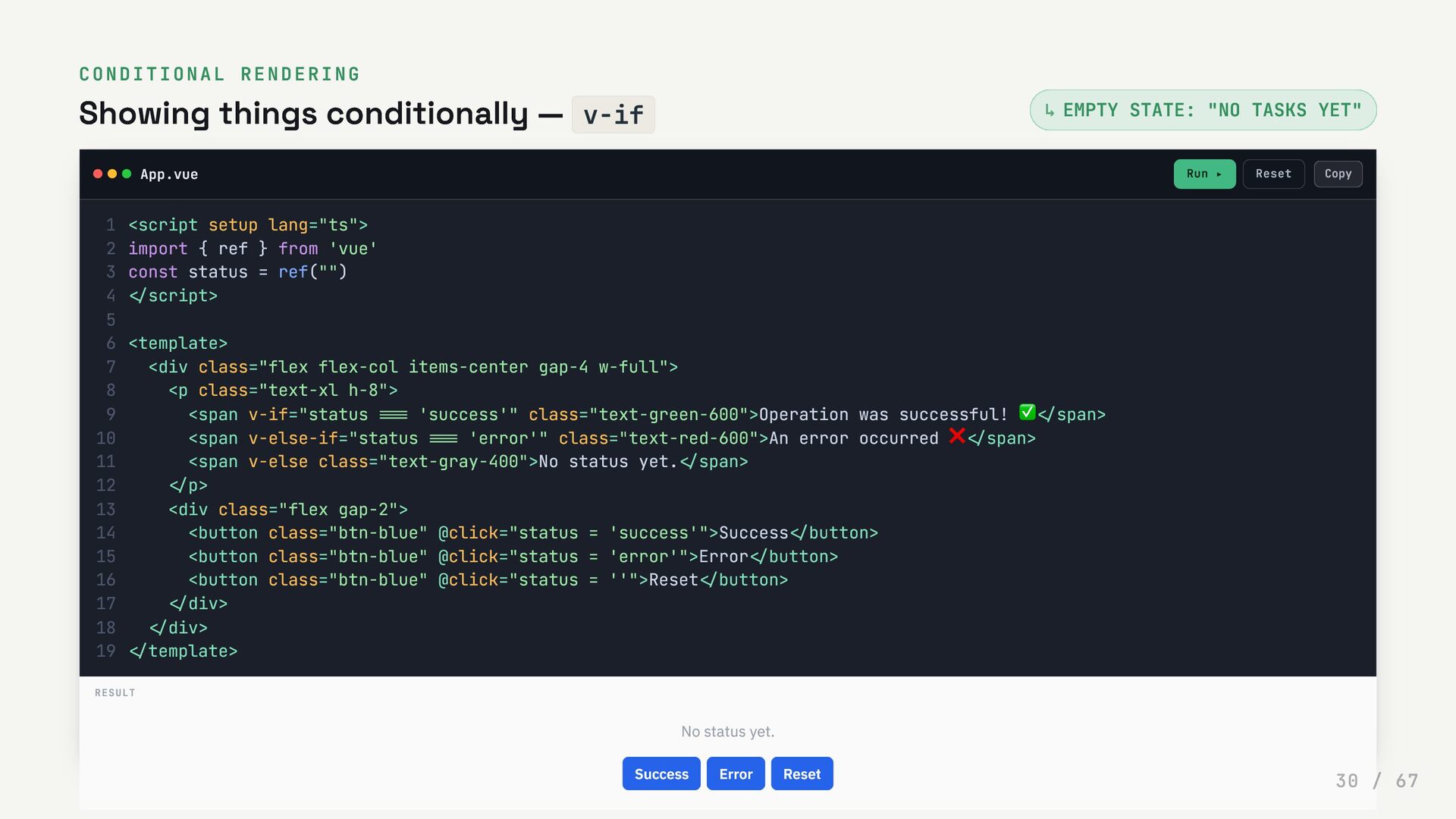
  30. CONDITIONAL RENDERING Showing things conditionally — v-if EMPTY STATE: "NO

    TASKS YET" App.vue Run ▸ Reset ↳ <script setup lang="ts"> 1 import { ref } from 'vue' 2 const status = ref("") 3 </script> 4 5 <template> 6 <div class="flex flex-col items-center gap-4 w-full"> 7 <p class="text-xl h-8"> 8 <span v-if="status === 'success'" class="text-green-600">Operation was successful! ✅</span> 9 <span v-else-if="status === 'error'" class="text-red-600">An error occurred ❌</span> 10 <span v-else class="text-gray-400">No status yet.</span> 11 </p> 12 <div class="flex gap-2"> 13 <button class="btn-blue" @click="status = 'success'">Success</button> 14 <button class="btn-blue" @click="status = 'error'">Error</button> 15 <button class="btn-blue" @click="status = ''">Reset</button> 16 </div> 17 </div> 18 </template> 19 RESULT No status yet. Success Error Reset Copy 30 / 67
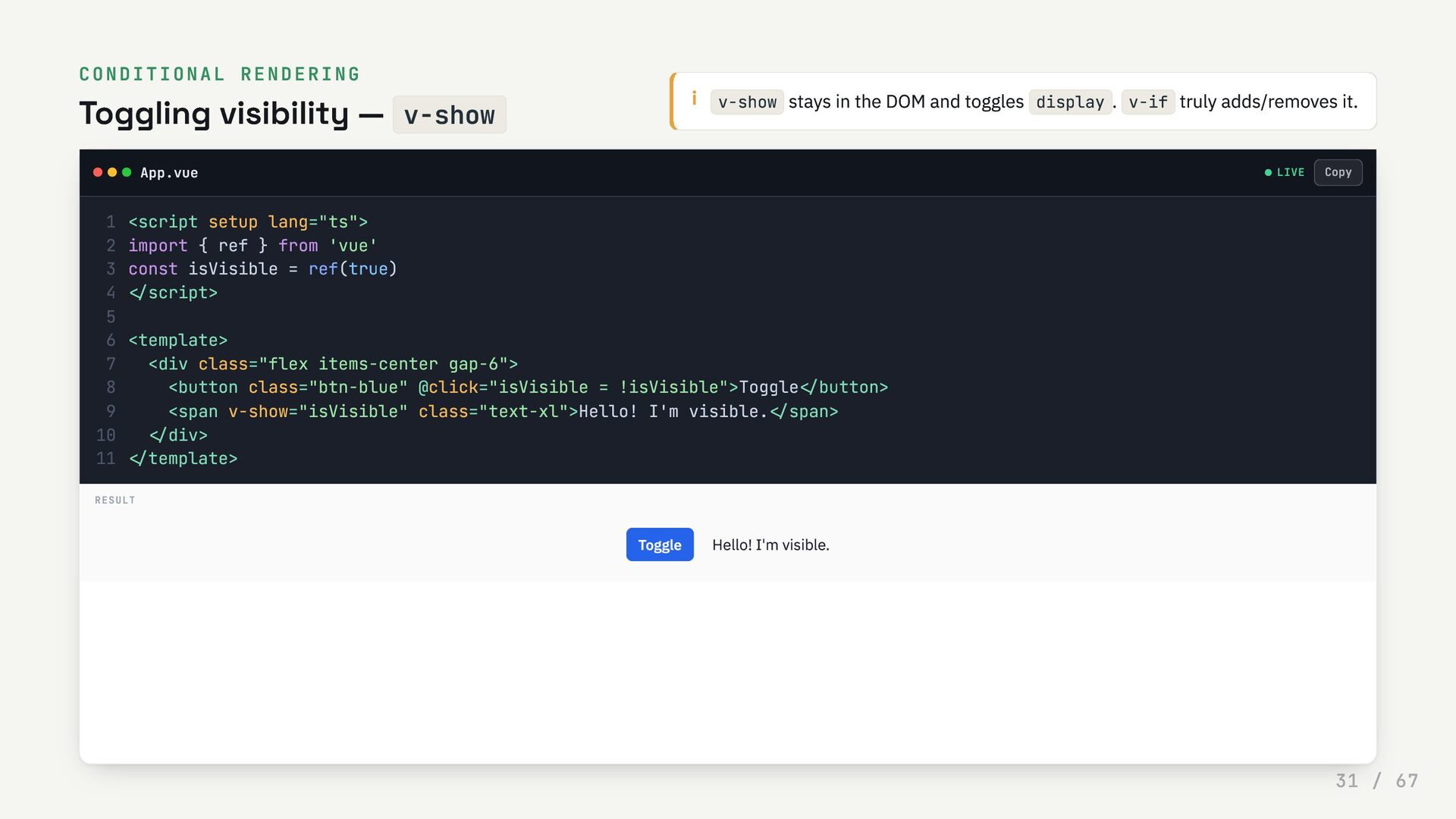
  31. CONDITIONAL RENDERING Toggling visibility — v-show i v-show stays in

    the DOM and toggles display . v-if truly adds/removes it. App.vue LIVE <script setup lang="ts"> 1 import { ref } from 'vue' 2 const isVisible = ref(true) 3 </script> 4 5 <template> 6 <div class="flex items-center gap-6"> 7 <button class="btn-blue" @click="isVisible = !isVisible">Toggle</button> 8 <span v-show="isVisible" class="text-xl">Hello! I'm visible.</span> 9 </div> 10 </template> 11 RESULT Toggle Hello! I'm visible. Copy 31 / 67
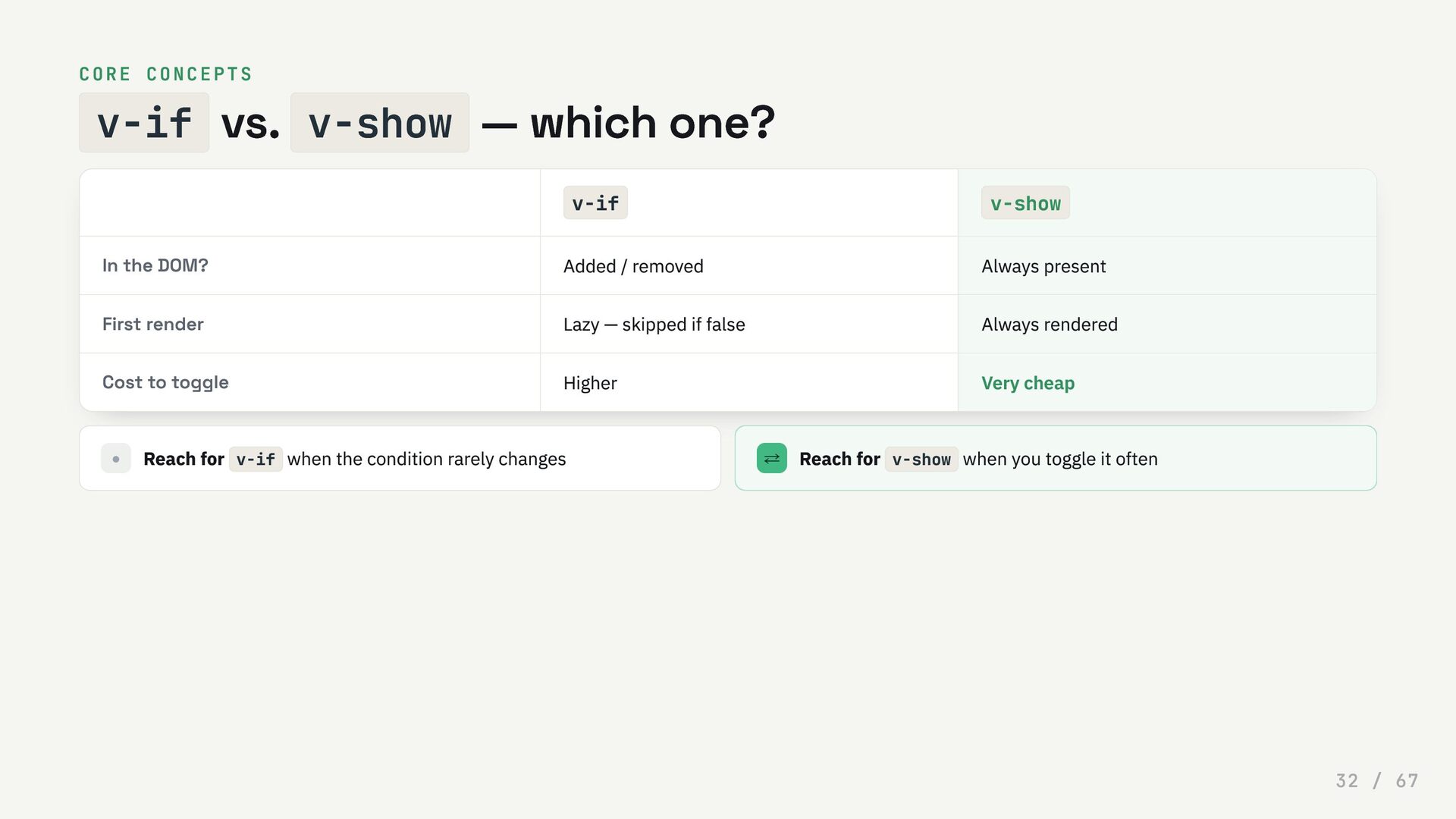
  32. CORE CONCEPTS v-if vs. v-show — which one? v-if v-show

    In the DOM? Added / removed Always present First render Lazy — skipped if false Always rendered Cost to toggle Higher Very cheap • Reach for v-if when the condition rarely changes ⇄ Reach for v-show when you toggle it often 32 / 67
  33. 0 4 Reactivity & events Reactive state is data the

    UI follows automatically. Change the data, the screen updates — no manual DOM work. 33 / 67
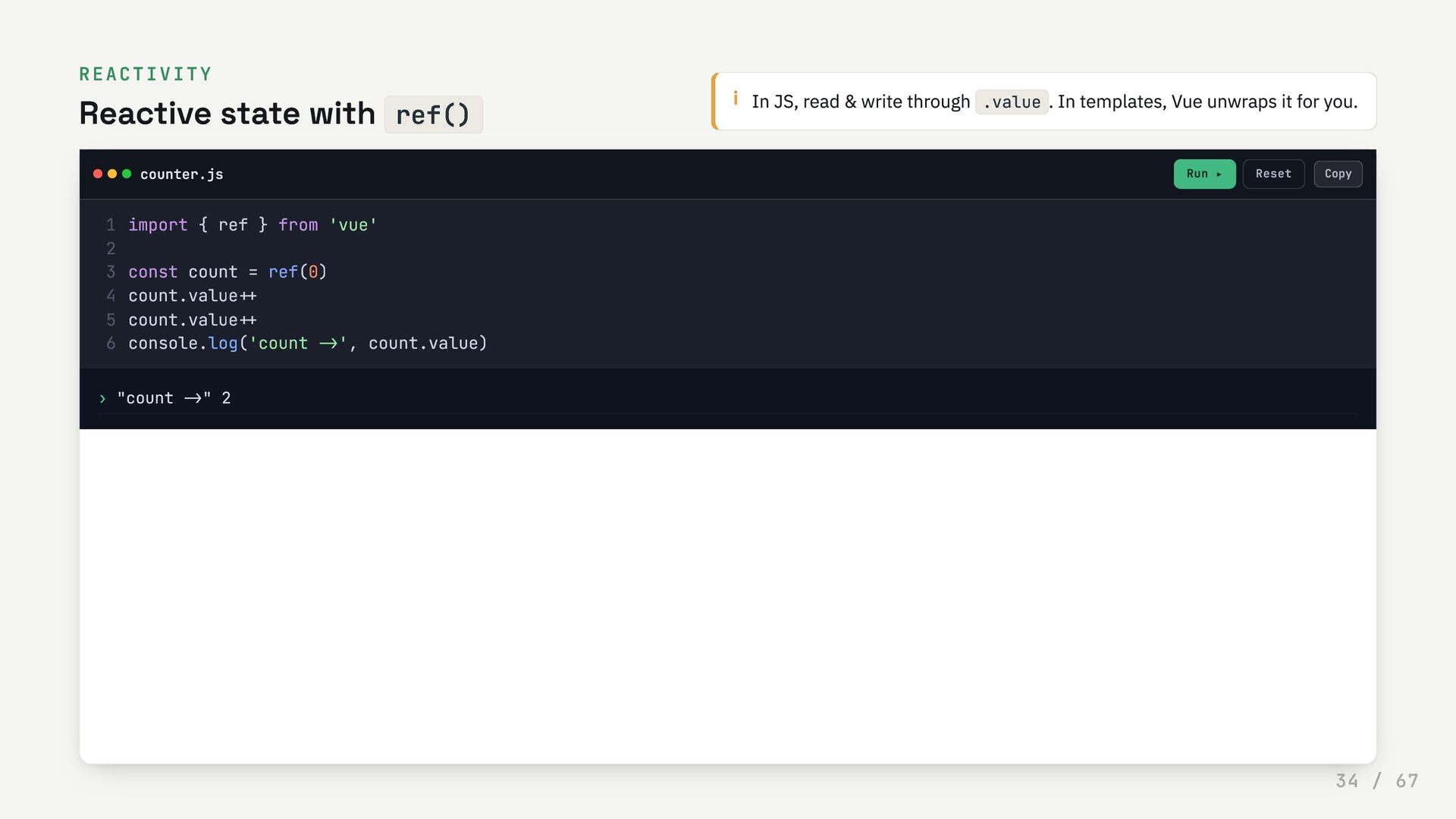
  34. REACTIVITY Reactive state with ref() i In JS, read &

    write through .value . In templates, Vue unwraps it for you. counter.js Run ▸ Reset › "count ->" 2 import { ref } from 'vue' 1 2 const count = ref(0) 3 count.value++ 4 count.value++ 5 console.log('count ->', count.value) 6 Copy 34 / 67
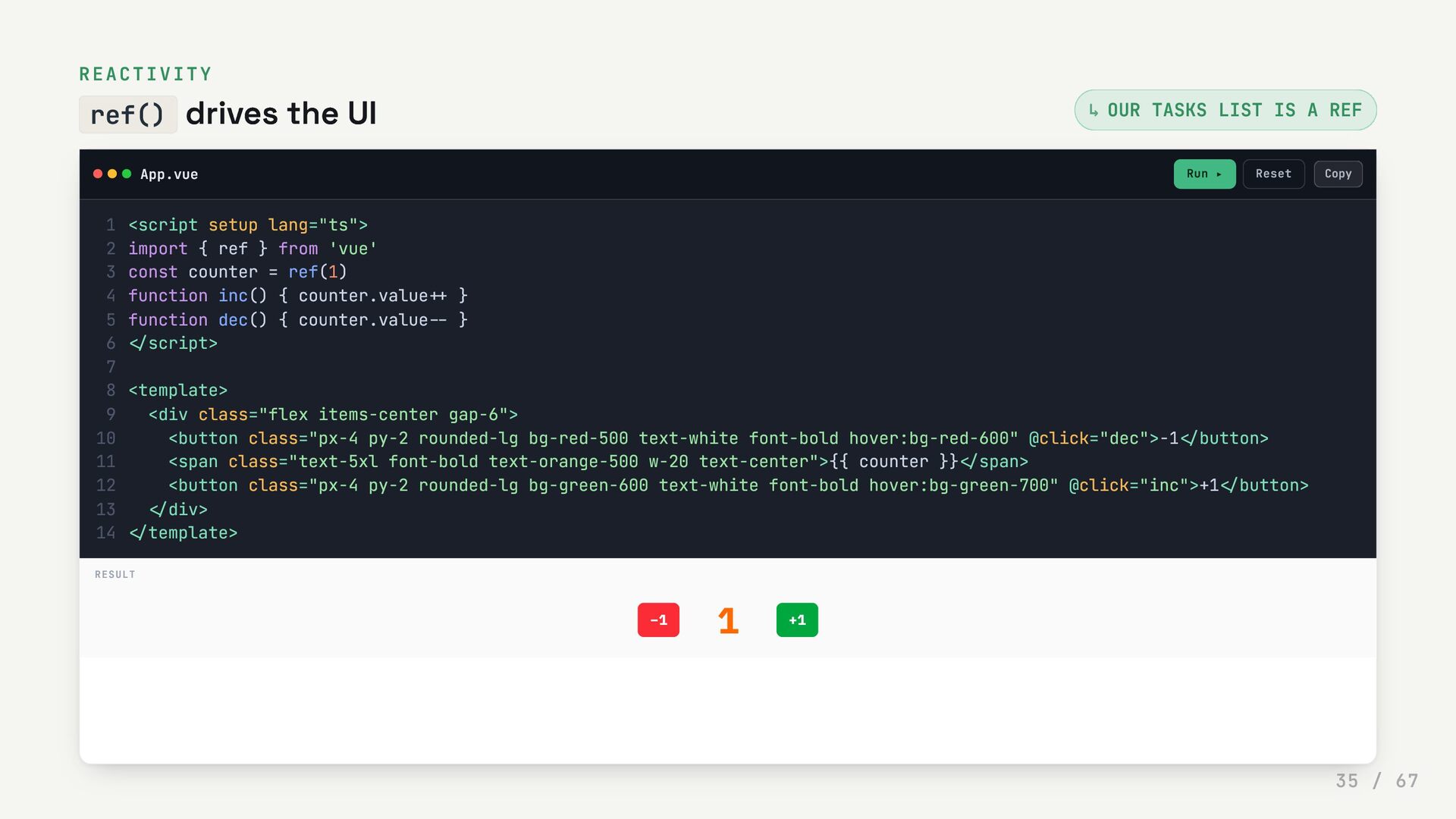
  35. REACTIVITY ref() drives the UI OUR TASKS LIST IS A

    REF App.vue Run ▸ Reset ↳ <script setup lang="ts"> 1 import { ref } from 'vue' 2 const counter = ref(1) 3 function inc() { counter.value++ } 4 function dec() { counter.value-- } 5 </script> 6 7 <template> 8 <div class="flex items-center gap-6"> 9 <button class="px-4 py-2 rounded-lg bg-red-500 text-white font-bold hover:bg-red-600" @click="dec">−1</button> 10 <span class="text-5xl font-bold text-orange-500 w-20 text-center">{{ counter }}</span> 11 <button class="px-4 py-2 rounded-lg bg-green-600 text-white font-bold hover:bg-green-700" @click="inc">+1</button> 12 </div> 13 </template> 14 RESULT −1 1 +1 Copy 35 / 67
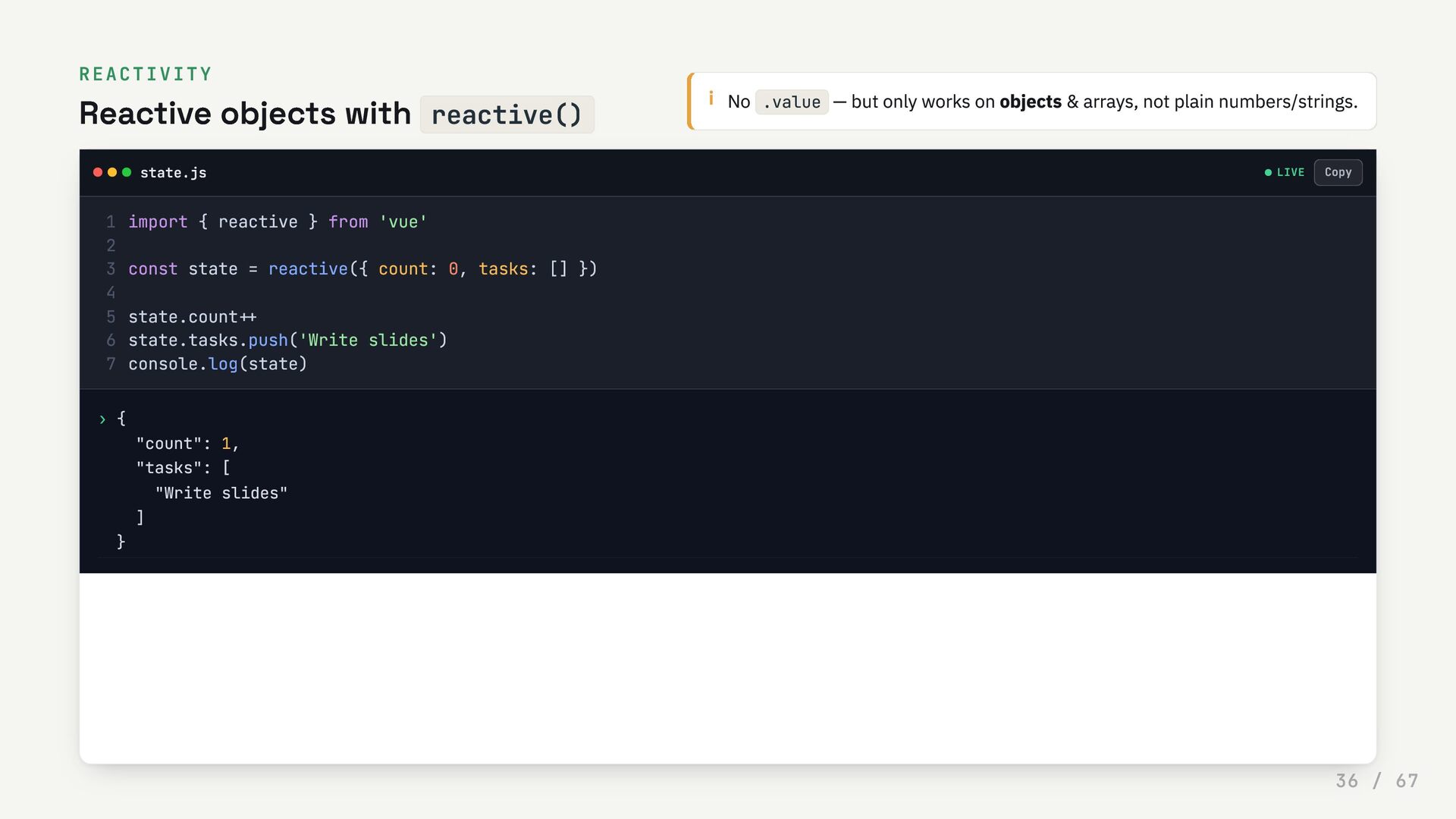
  36. REACTIVITY Reactive objects with reactive() i No .value — but

    only works on objects & arrays, not plain numbers/strings. state.js LIVE › { "count": 1, "tasks": [ "Write slides" ] } import { reactive } from 'vue' 1 2 const state = reactive({ count: 0, tasks: [] }) 3 4 state.count++ 5 state.tasks.push('Write slides') 6 console.log(state) 7 Copy 36 / 67
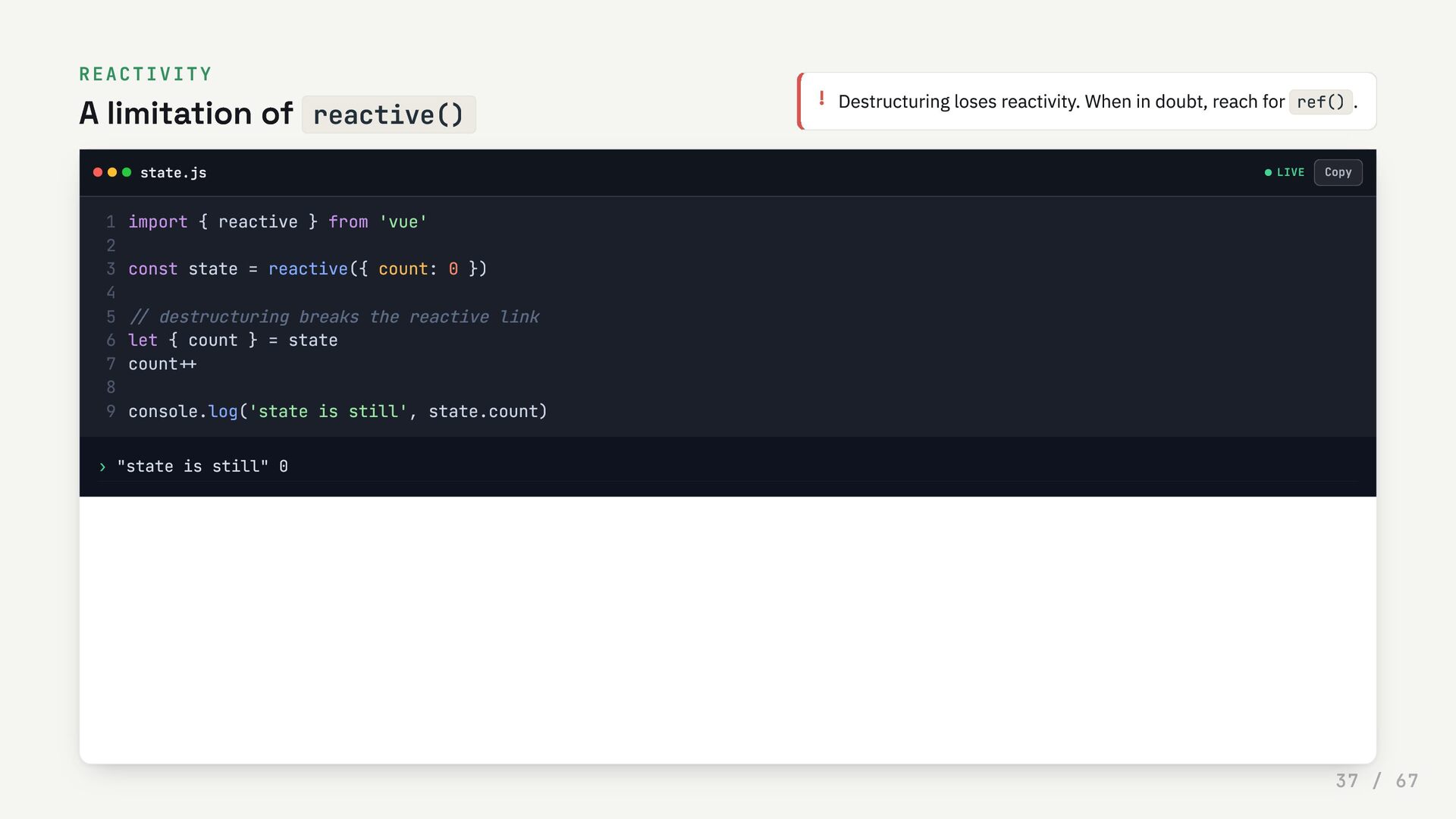
  37. REACTIVITY A limitation of reactive() ! Destructuring loses reactivity. When

    in doubt, reach for ref() . state.js LIVE › "state is still" 0 import { reactive } from 'vue' 1 2 const state = reactive({ count: 0 }) 3 4 // destructuring breaks the reactive link 5 let { count } = state 6 count++ 7 8 console.log('state is still', state.count) 9 Copy 37 / 67
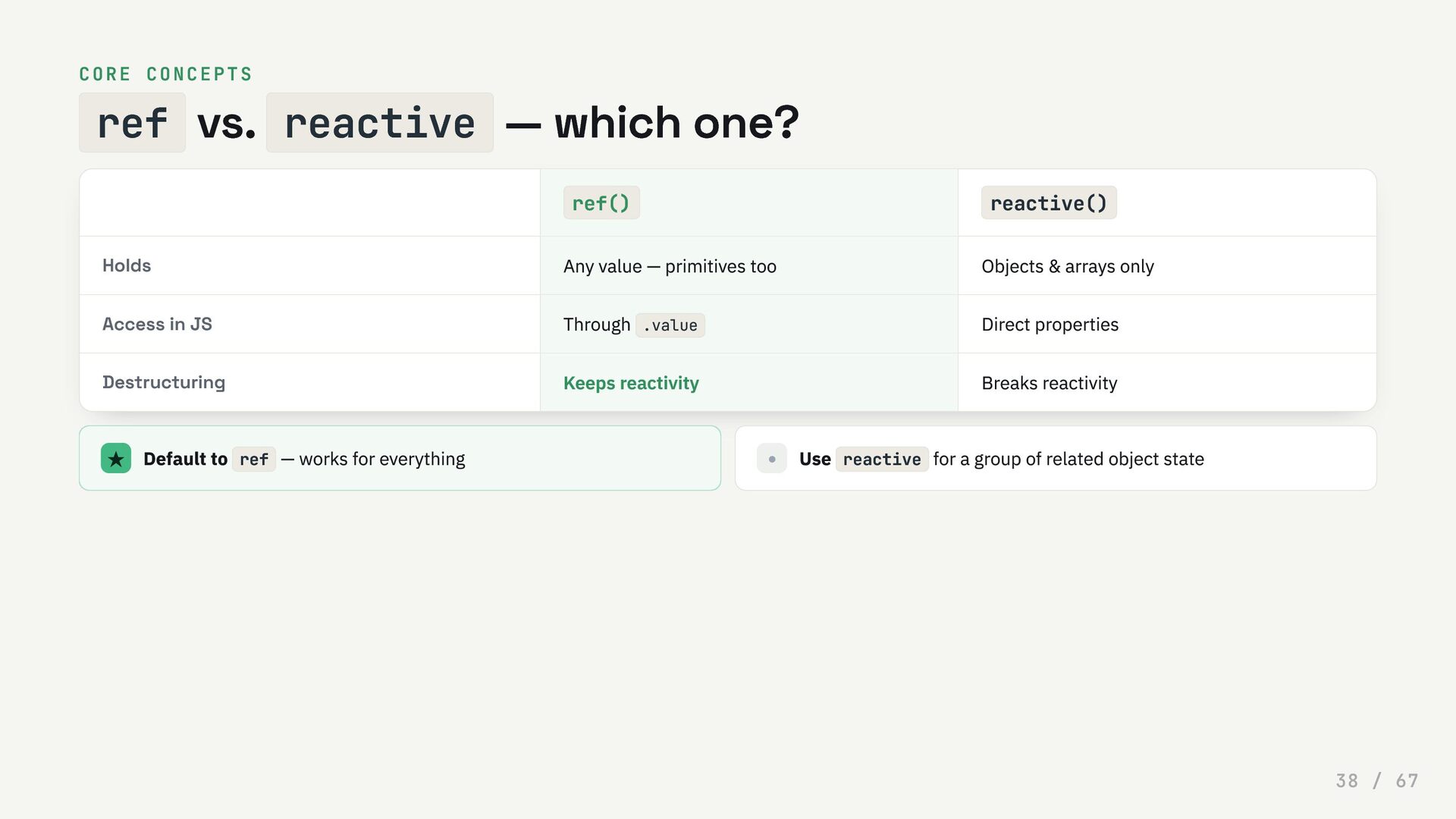
  38. CORE CONCEPTS ref vs. reactive — which one? ref() reactive()

    Holds Any value — primitives too Objects & arrays only Access in JS Through .value Direct properties Destructuring Keeps reactivity Breaks reactivity ★ Default to ref — works for everything • Use reactive for a group of related object state 38 / 67
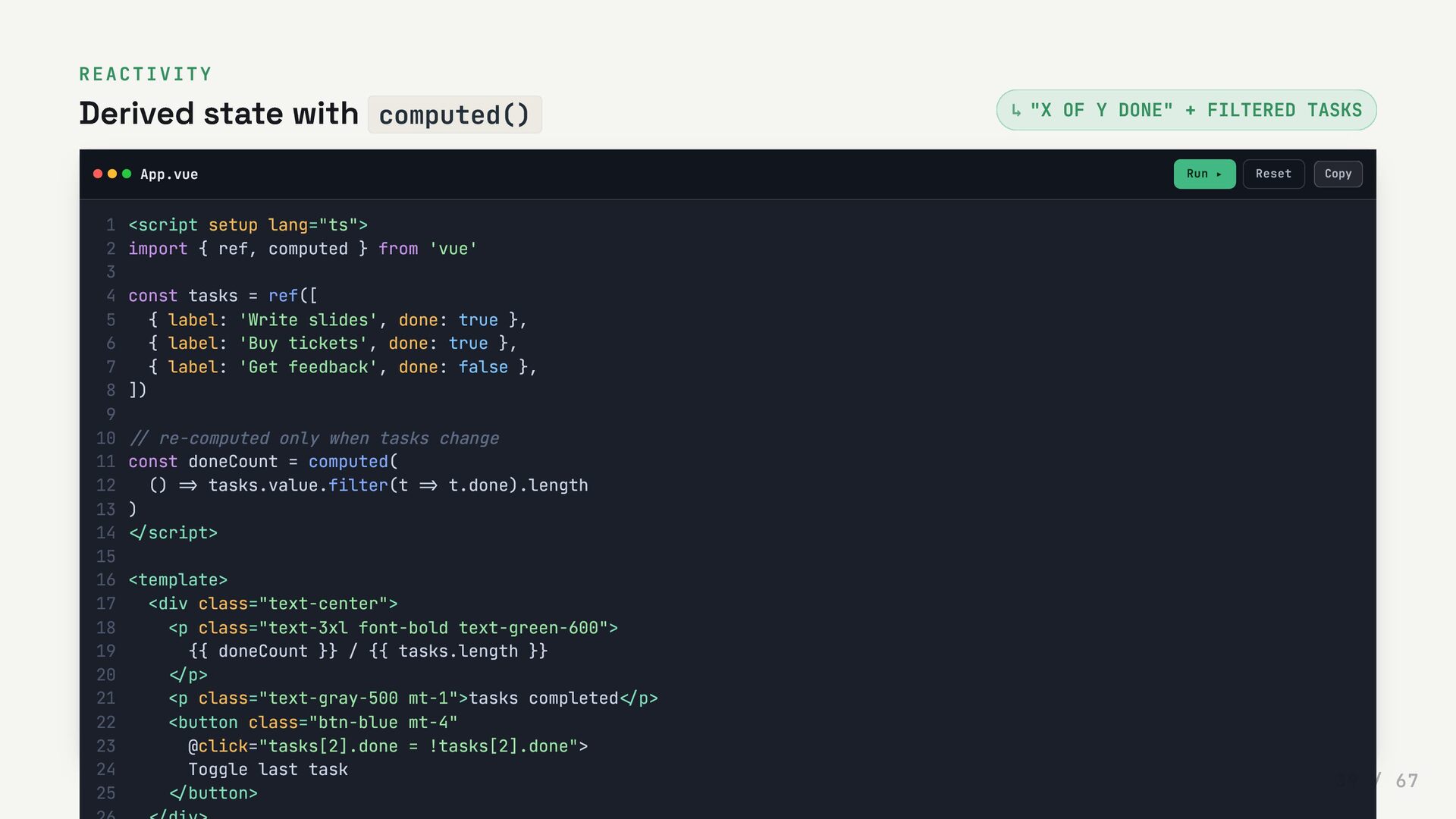
  39. REACTIVITY Derived state with computed() "X OF Y DONE" +

    FILTERED TASKS App.vue Run ▸ Reset ↳ <script setup lang="ts"> 1 import { ref, computed } from 'vue' 2 3 const tasks = ref([ 4 { label: 'Write slides', done: true }, 5 { label: 'Buy tickets', done: true }, 6 { label: 'Get feedback', done: false }, 7 ]) 8 9 // re-computed only when tasks change 10 const doneCount = computed( 11 () => tasks.value.filter(t => t.done).length 12 ) 13 </script> 14 15 <template> 16 <div class="text-center"> 17 <p class="text-3xl font-bold text-green-600"> 18 {{ doneCount }} / {{ tasks.length }} 19 </p> 20 <p class="text-gray-500 mt-1">tasks completed</p> 21 <button class="btn-blue mt-4" 22 @click="tasks[2].done = !tasks[2].done"> 23 Toggle last task 24 </button> 25 Copy 39 / 67
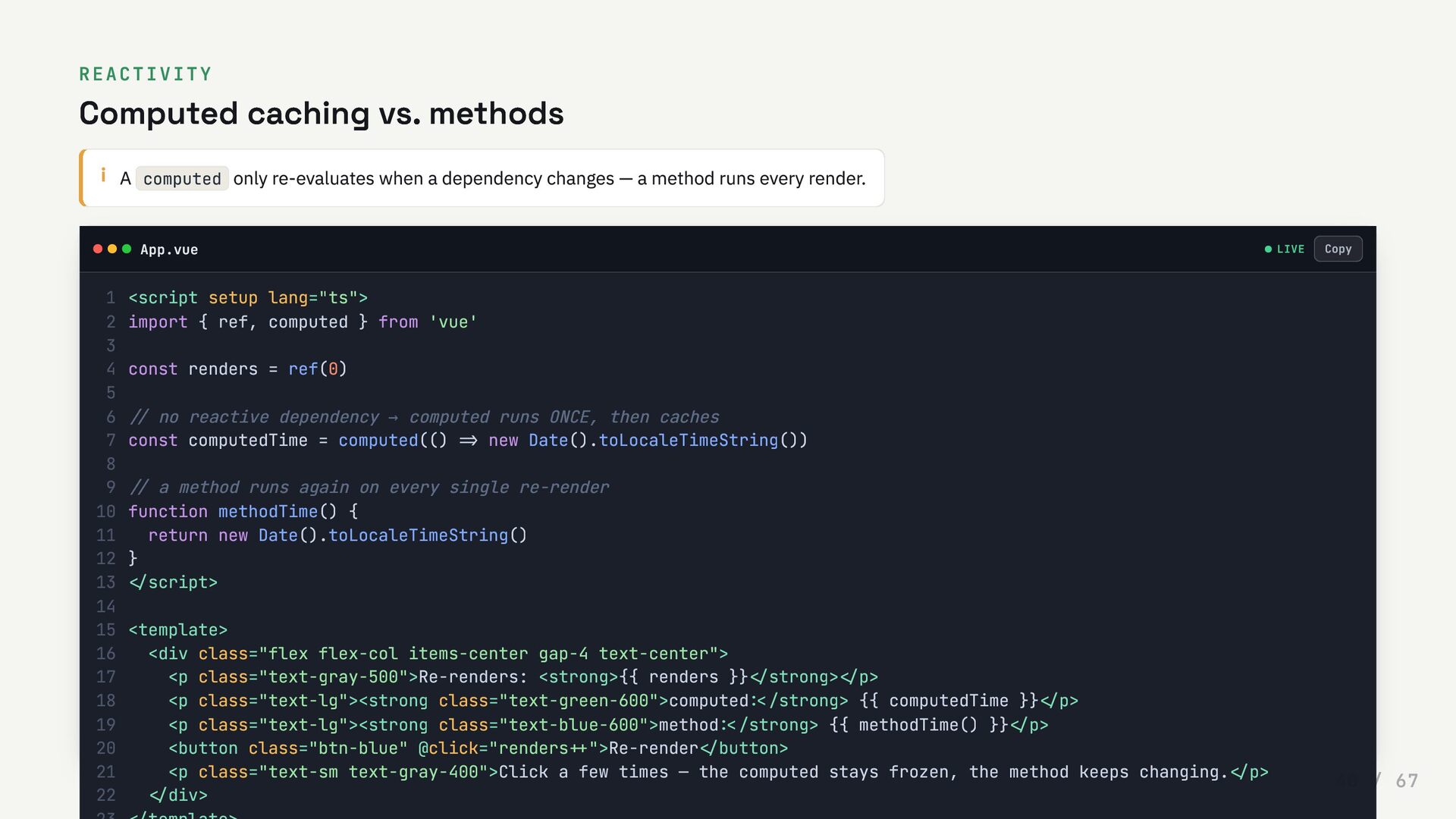
  40. REACTIVITY Computed caching vs. methods i A computed only re-evaluates

    when a dependency changes — a method runs every render. App.vue LIVE <script setup lang="ts"> 1 import { ref, computed } from 'vue' 2 3 const renders = ref(0) 4 5 // no reactive dependency → computed runs ONCE, then caches 6 const computedTime = computed(() => new Date().toLocaleTimeString()) 7 8 // a method runs again on every single re-render 9 function methodTime() { 10 return new Date().toLocaleTimeString() 11 } 12 </script> 13 14 <template> 15 <div class="flex flex-col items-center gap-4 text-center"> 16 <p class="text-gray-500">Re-renders: <strong>{{ renders }}</strong></p> 17 <p class="text-lg"><strong class="text-green-600">computed:</strong> {{ computedTime }}</p> 18 <p class="text-lg"><strong class="text-blue-600">method:</strong> {{ methodTime() }}</p> 19 <button class="btn-blue" @click="renders++">Re-render</button> 20 <p class="text-sm text-gray-400">Click a few times — the computed stays frozen, the method keeps changing.</p> 21 </div> 22 Copy 40 / 67
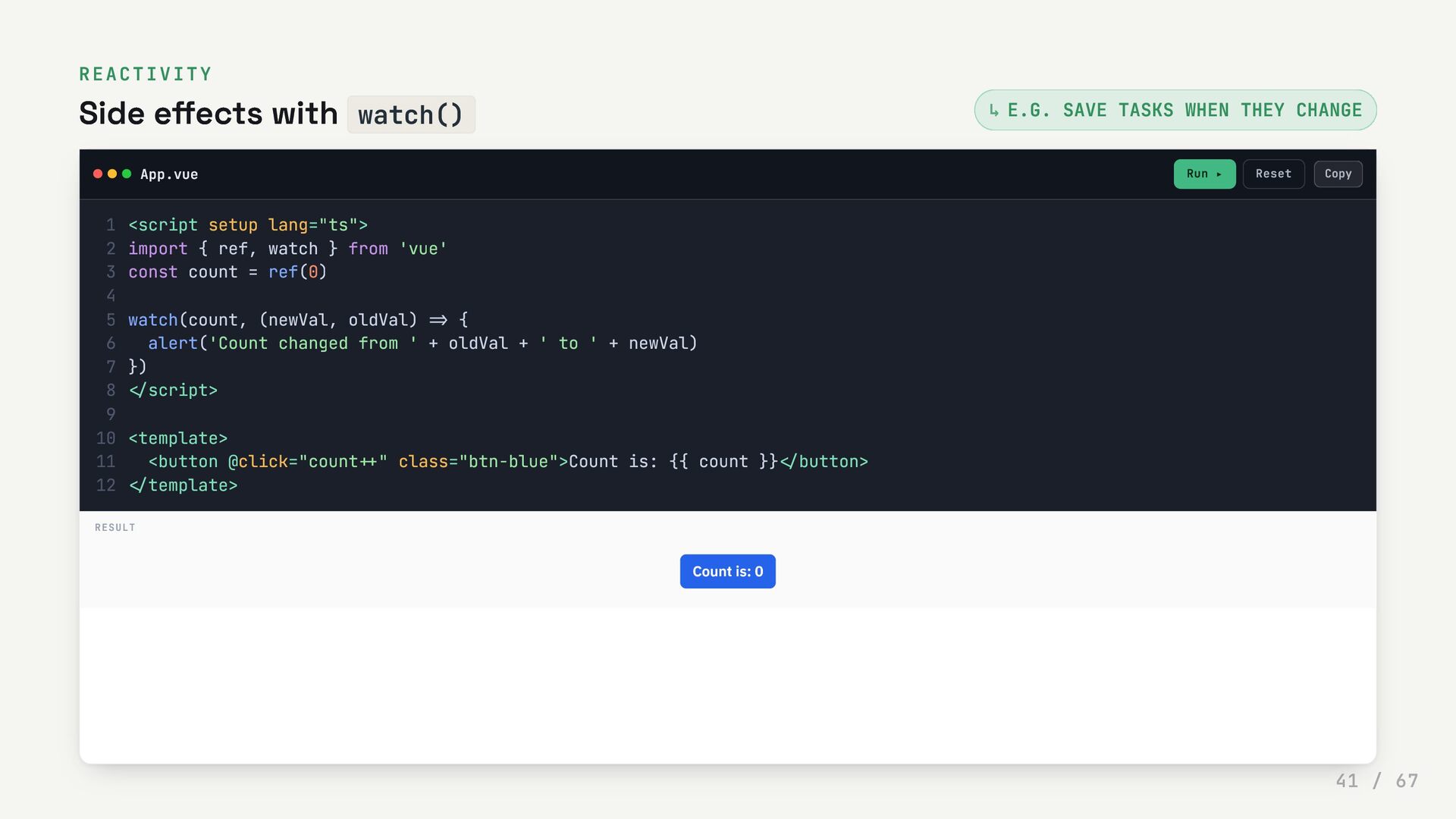
  41. REACTIVITY Side effects with watch() E.G. SAVE TASKS WHEN THEY

    CHANGE App.vue Run ▸ Reset ↳ <script setup lang="ts"> 1 import { ref, watch } from 'vue' 2 const count = ref(0) 3 4 watch(count, (newVal, oldVal) => { 5 alert('Count changed from ' + oldVal + ' to ' + newVal) 6 }) 7 </script> 8 9 <template> 10 <button @click="count++" class="btn-blue">Count is: {{ count }}</button> 11 </template> 12 RESULT Count is: 0 Copy 41 / 67
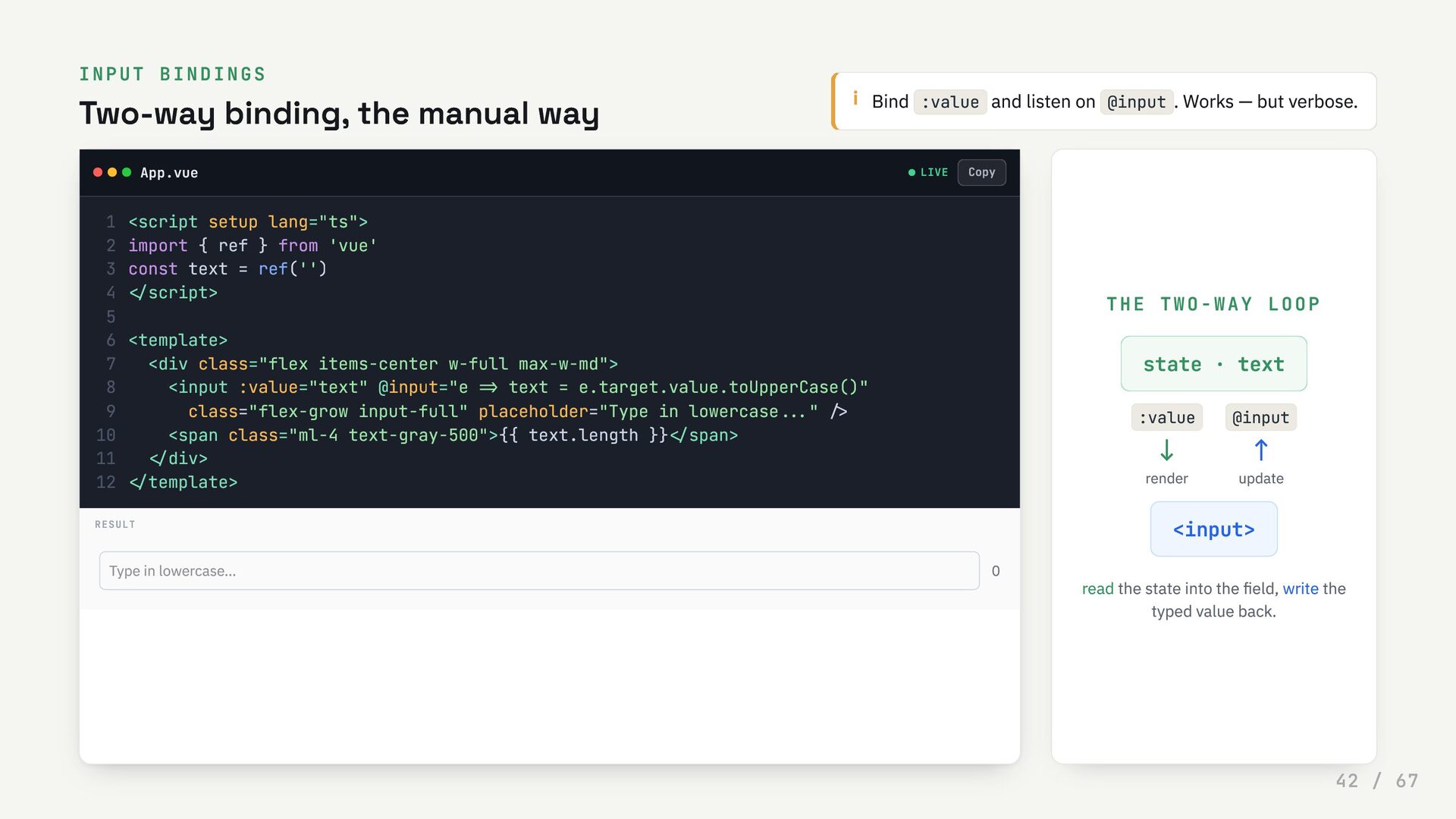
  42. INPUT BINDINGS Two-way binding, the manual way i Bind :value

    and listen on @input . Works — but verbose. App.vue LIVE THE TWO-WAY LOOP state · text :value ↓ render @input ↑ update <input> read the state into the field, write the typed value back. <script setup lang="ts"> 1 import { ref } from 'vue' 2 const text = ref('') 3 </script> 4 5 <template> 6 <div class="flex items-center w-full max-w-md"> 7 <input :value="text" @input="e => text = e.target.value.toUpperCase()" 8 class="flex-grow input-full" placeholder="Type in lowercase..." /> 9 <span class="ml-4 text-gray-500">{{ text.length }}</span> 10 </div> 11 </template> 12 RESULT Type in lowercase... 0 Copy 42 / 67
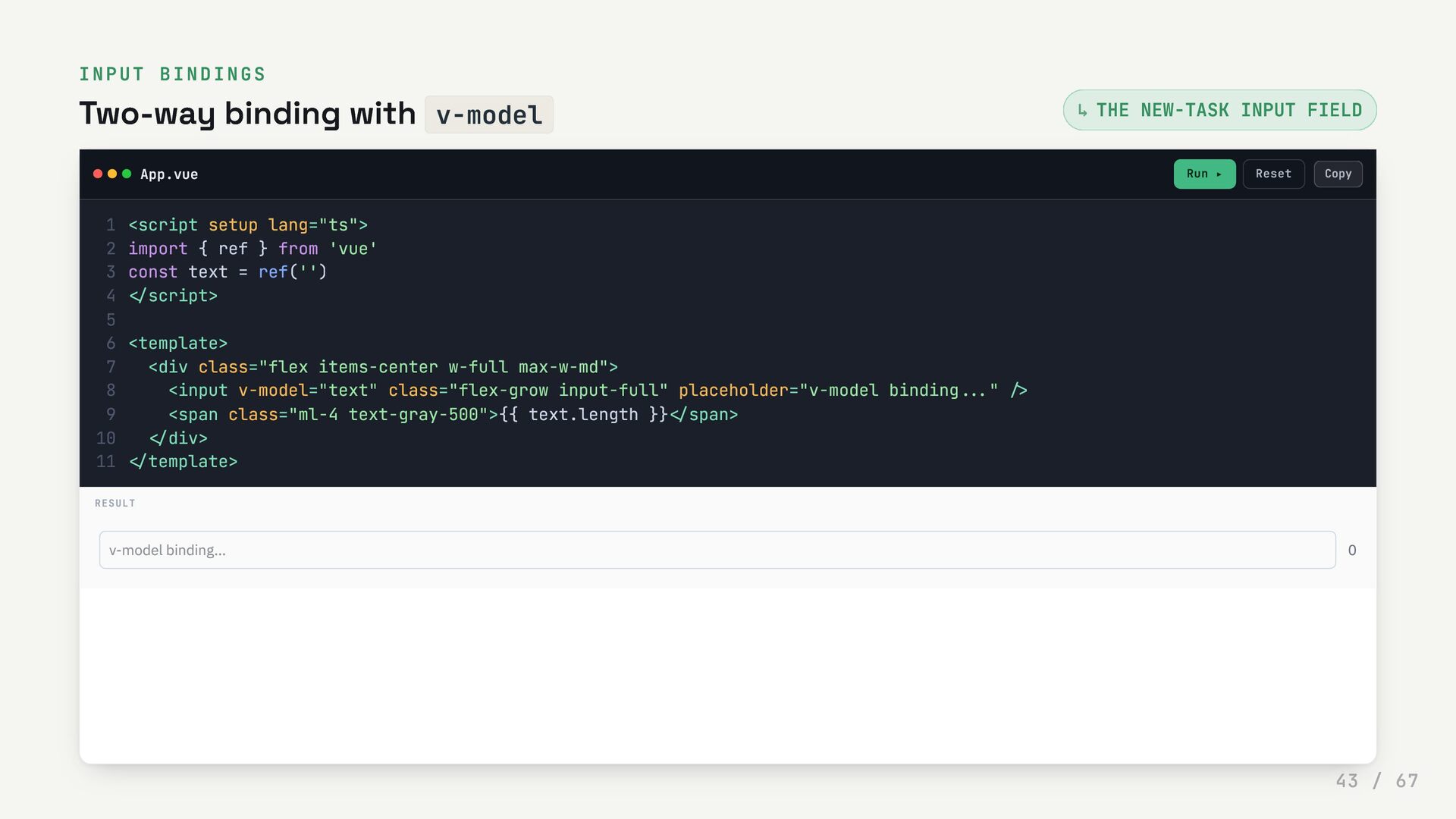
  43. INPUT BINDINGS Two-way binding with v-model THE NEW-TASK INPUT FIELD

    App.vue Run ▸ Reset ↳ <script setup lang="ts"> 1 import { ref } from 'vue' 2 const text = ref('') 3 </script> 4 5 <template> 6 <div class="flex items-center w-full max-w-md"> 7 <input v-model="text" class="flex-grow input-full" placeholder="v-model binding..." /> 8 <span class="ml-4 text-gray-500">{{ text.length }}</span> 9 </div> 10 </template> 11 RESULT v-model binding... 0 Copy 43 / 67
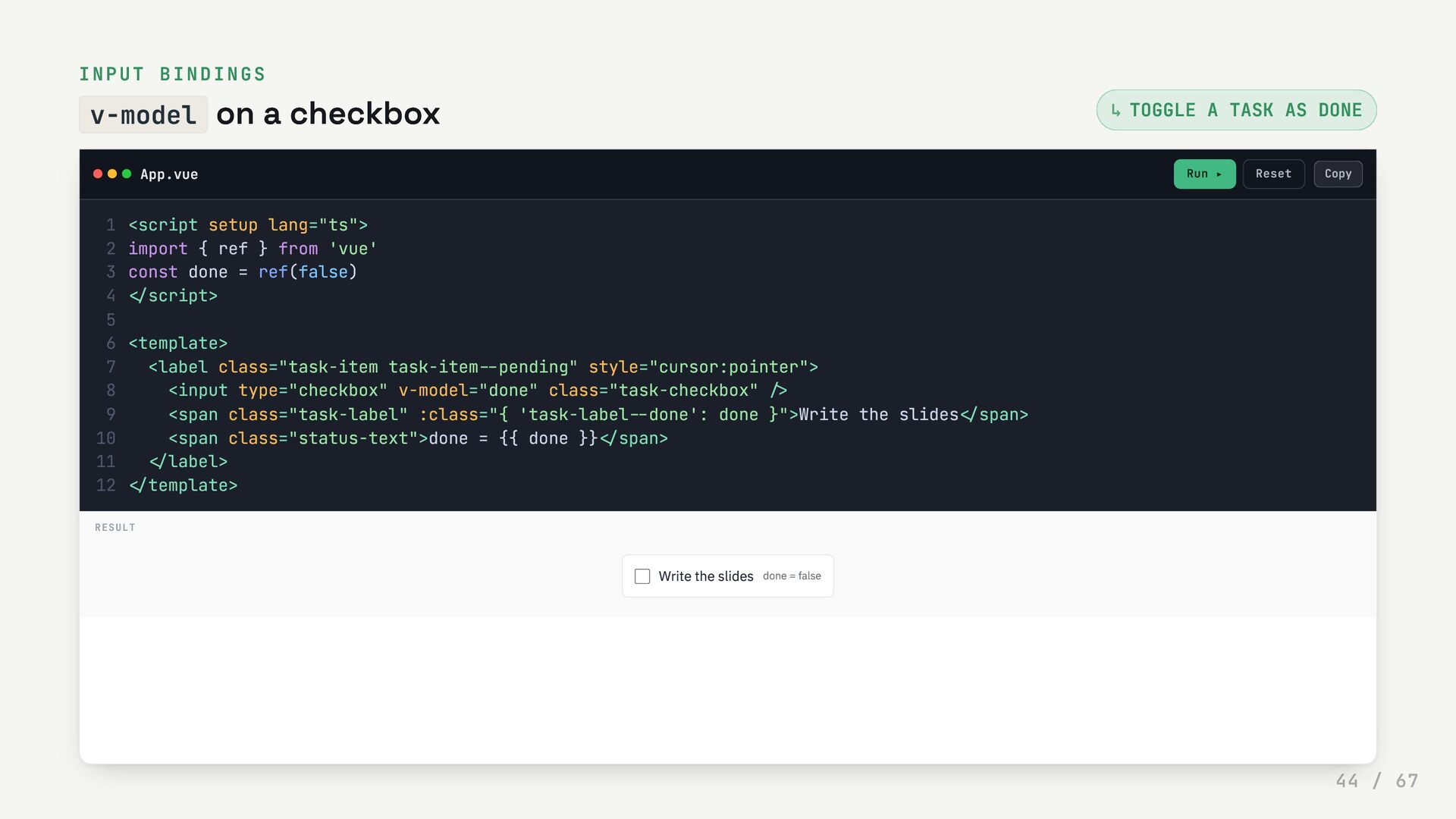
  44. INPUT BINDINGS v-model on a checkbox TOGGLE A TASK AS

    DONE App.vue Run ▸ Reset ↳ <script setup lang="ts"> 1 import { ref } from 'vue' 2 const done = ref(false) 3 </script> 4 5 <template> 6 <label class="task-item task-item--pending" style="cursor:pointer"> 7 <input type="checkbox" v-model="done" class="task-checkbox" /> 8 <span class="task-label" :class="{ 'task-label--done': done }">Write the slides</span> 9 <span class="status-text">done = {{ done }}</span> 10 </label> 11 </template> 12 RESULT Write the slides done = false Copy 44 / 67
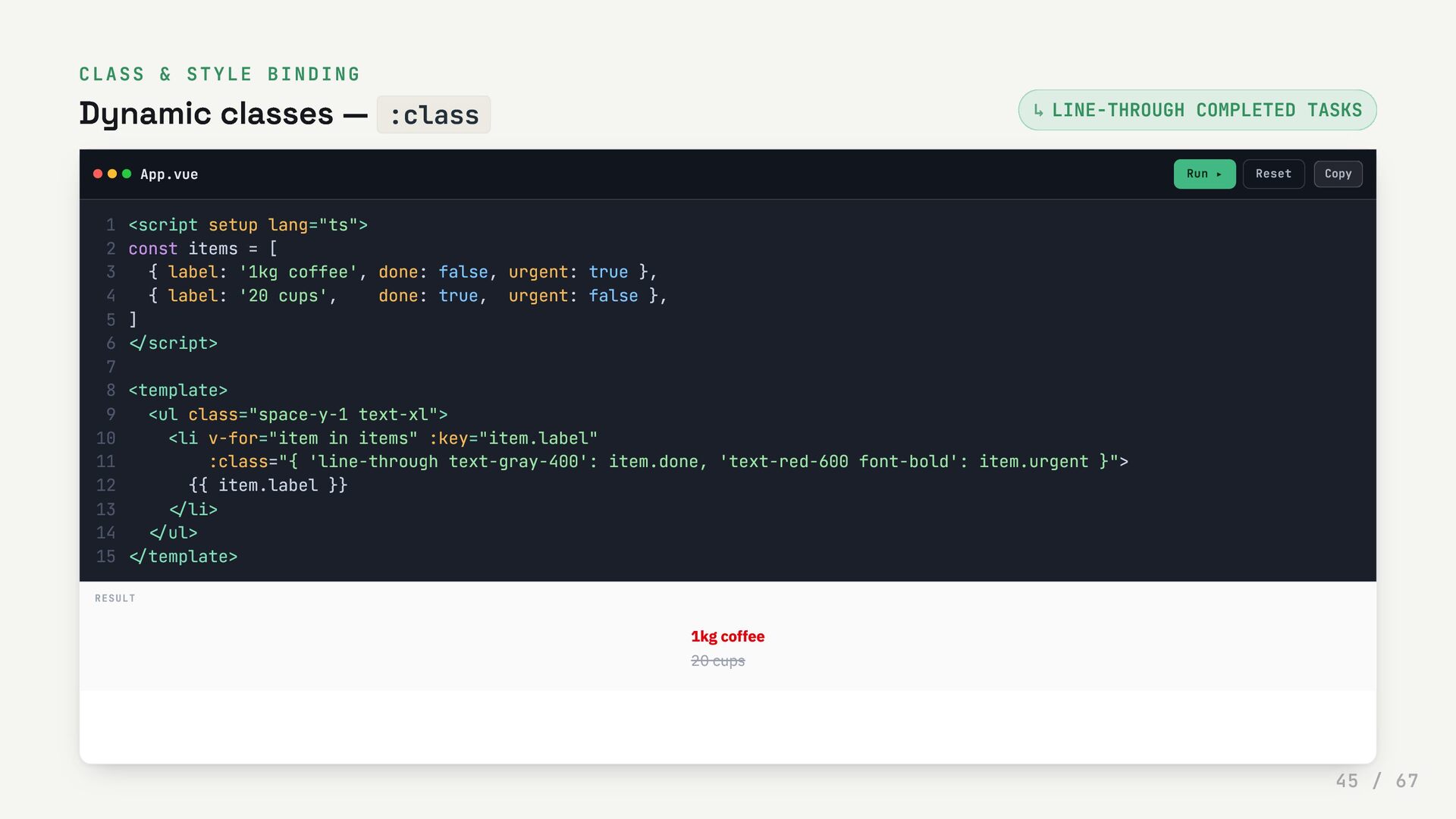
  45. CLASS & STYLE BINDING Dynamic classes — :class LINE-THROUGH COMPLETED

    TASKS App.vue Run ▸ Reset ↳ <script setup lang="ts"> 1 const items = [ 2 { label: '1kg coffee', done: false, urgent: true }, 3 { label: '20 cups', done: true, urgent: false }, 4 ] 5 </script> 6 7 <template> 8 <ul class="space-y-1 text-xl"> 9 <li v-for="item in items" :key="item.label" 10 :class="{ 'line-through text-gray-400': item.done, 'text-red-600 font-bold': item.urgent }"> 11 {{ item.label }} 12 </li> 13 </ul> 14 </template> 15 RESULT 1kg coffee 20 cups Copy 45 / 67
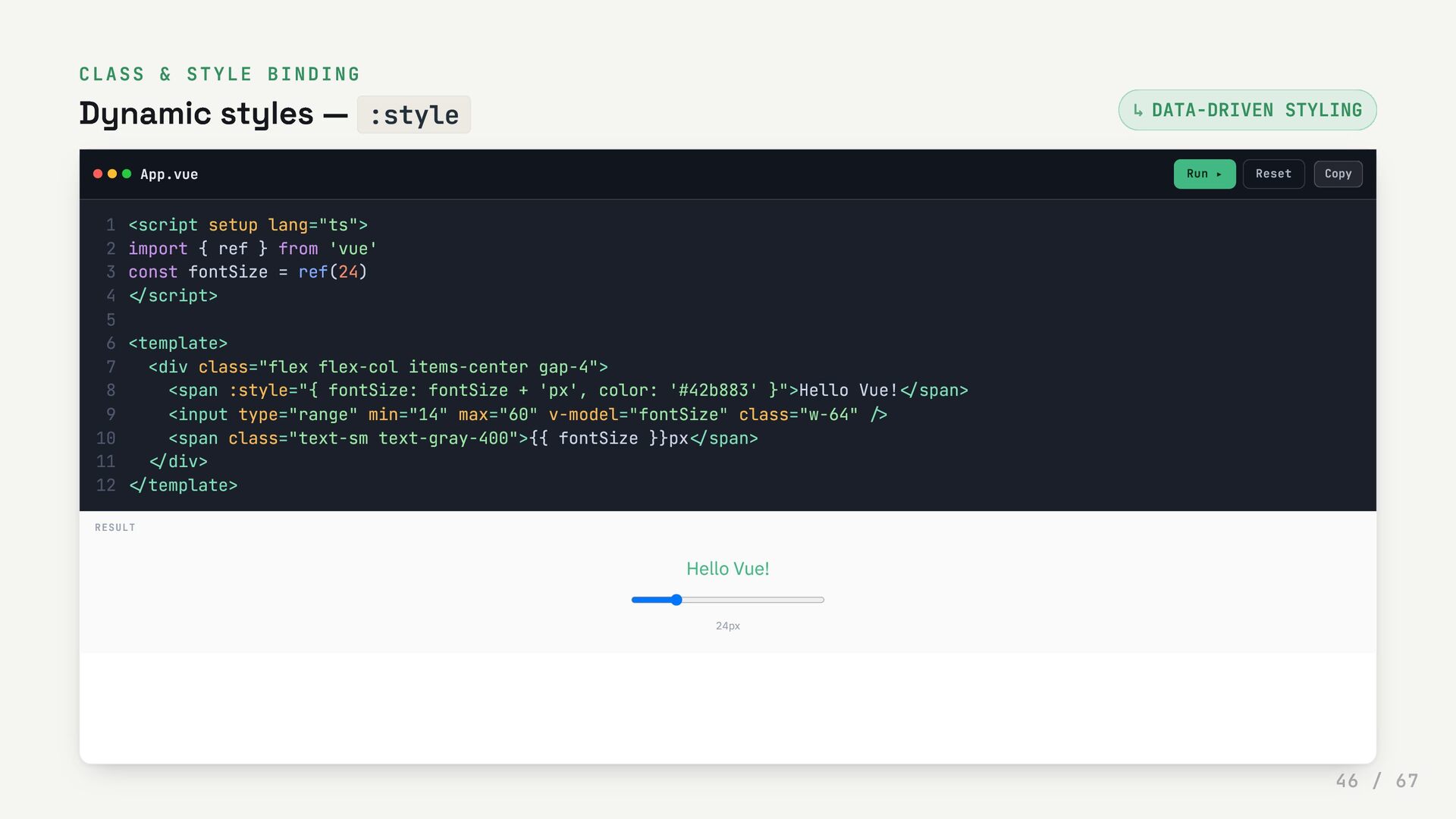
  46. CLASS & STYLE BINDING Dynamic styles — :style DATA-DRIVEN STYLING

    App.vue Run ▸ Reset ↳ <script setup lang="ts"> 1 import { ref } from 'vue' 2 const fontSize = ref(24) 3 </script> 4 5 <template> 6 <div class="flex flex-col items-center gap-4"> 7 <span :style="{ fontSize: fontSize + 'px', color: '#42b883' }">Hello Vue!</span> 8 <input type="range" min="14" max="60" v-model="fontSize" class="w-64" /> 9 <span class="text-sm text-gray-400">{{ fontSize }}px</span> 10 </div> 11 </template> 12 RESULT Hello Vue! 24px Copy 46 / 67
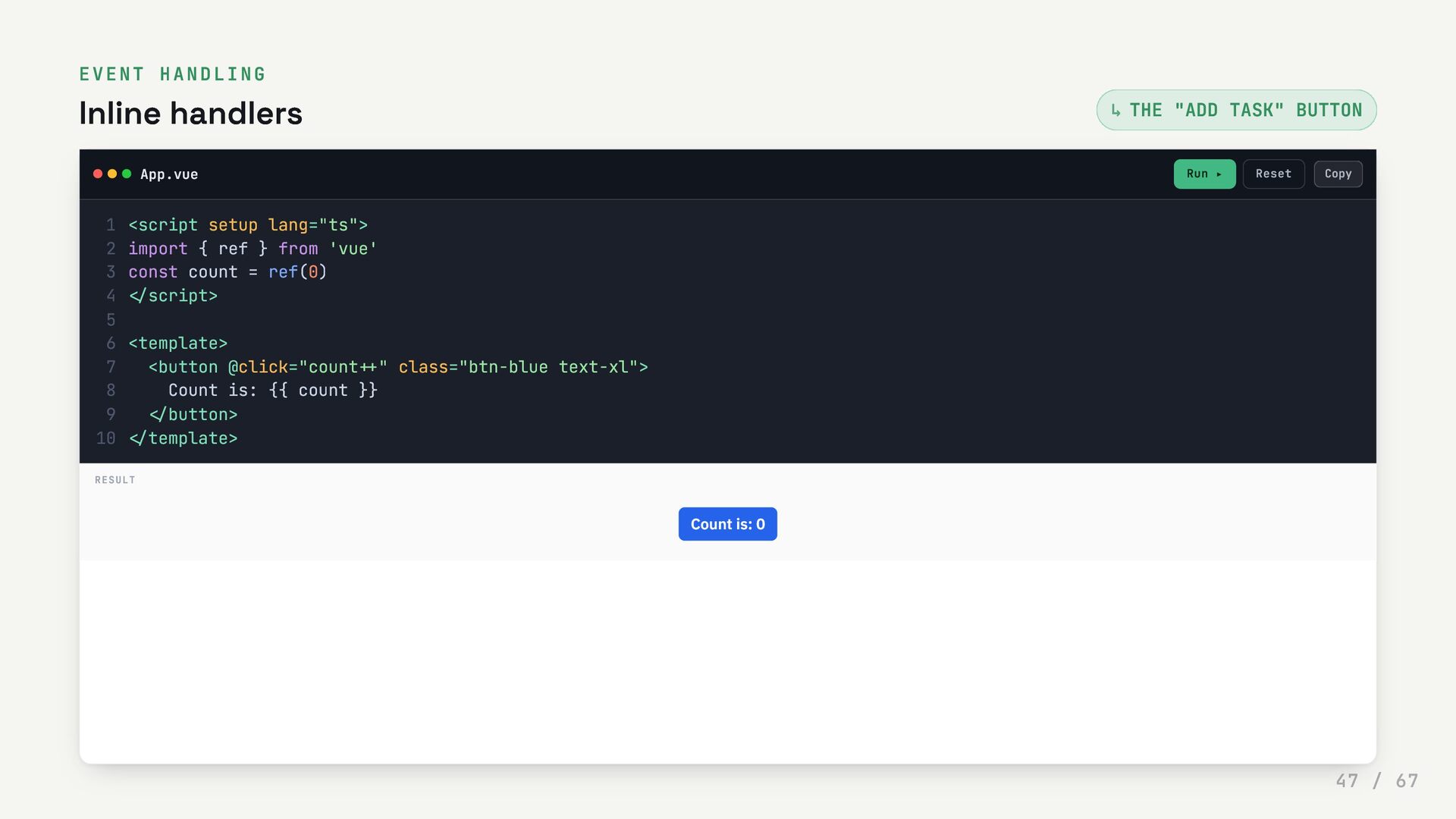
  47. EVENT HANDLING Inline handlers THE "ADD TASK" BUTTON App.vue Run

    ▸ Reset ↳ <script setup lang="ts"> 1 import { ref } from 'vue' 2 const count = ref(0) 3 </script> 4 5 <template> 6 <button @click="count++" class="btn-blue text-xl"> 7 Count is: {{ count }} 8 </button> 9 </template> 10 RESULT Count is: 0 Copy 47 / 67
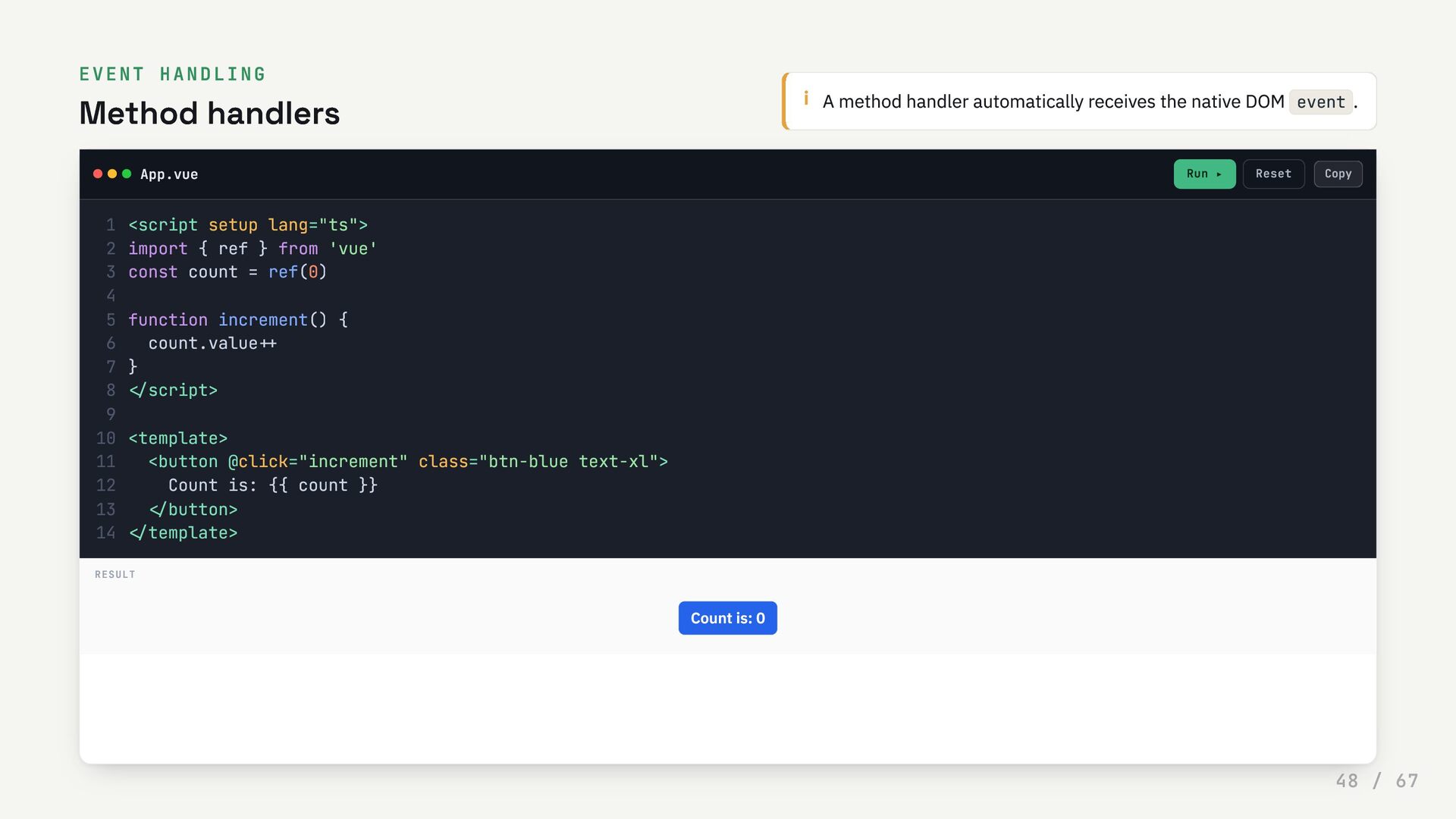
  48. EVENT HANDLING Method handlers i A method handler automatically receives

    the native DOM event . App.vue Run ▸ Reset <script setup lang="ts"> 1 import { ref } from 'vue' 2 const count = ref(0) 3 4 function increment() { 5 count.value++ 6 } 7 </script> 8 9 <template> 10 <button @click="increment" class="btn-blue text-xl"> 11 Count is: {{ count }} 12 </button> 13 </template> 14 RESULT Count is: 0 Copy 48 / 67
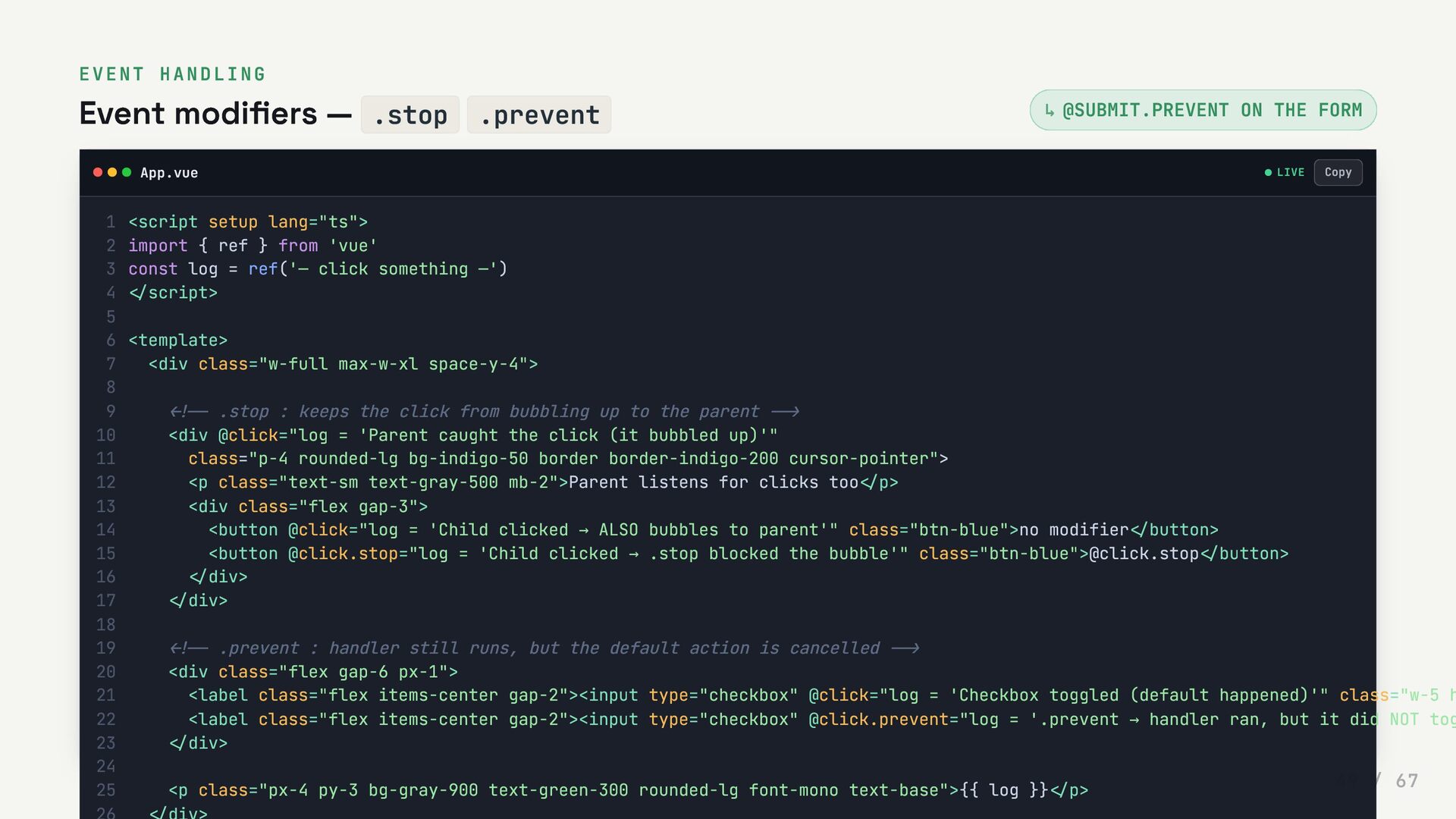
  49. EVENT HANDLING Event modifiers — .stop .prevent @SUBMIT.PREVENT ON THE

    FORM App.vue LIVE ↳ <script setup lang="ts"> 1 import { ref } from 'vue' 2 const log = ref('— click something —') 3 </script> 4 5 <template> 6 <div class="w-full max-w-xl space-y-4"> 7 8 <!-- .stop : keeps the click from bubbling up to the parent --> 9 <div @click="log = 'Parent caught the click (it bubbled up)'" 10 class="p-4 rounded-lg bg-indigo-50 border border-indigo-200 cursor-pointer"> 11 <p class="text-sm text-gray-500 mb-2">Parent listens for clicks too</p> 12 <div class="flex gap-3"> 13 <button @click="log = 'Child clicked → ALSO bubbles to parent'" class="btn-blue">no modifier</button> 14 <button @click.stop="log = 'Child clicked → .stop blocked the bubble'" class="btn-blue">@click.stop</button> 15 </div> 16 </div> 17 18 <!-- .prevent : handler still runs, but the default action is cancelled --> 19 <div class="flex gap-6 px-1"> 20 <label class="flex items-center gap-2"><input type="checkbox" @click="log = 'Checkbox toggled (default happened)'" class="w-5 h 21 <label class="flex items-center gap-2"><input type="checkbox" @click.prevent="log = '.prevent → handler ran, but it did NOT tog 22 </div> 23 24 <p class="px-4 py-3 bg-gray-900 text-green-300 rounded-lg font-mono text-base">{{ log }}</p> 25 Copy 49 / 67
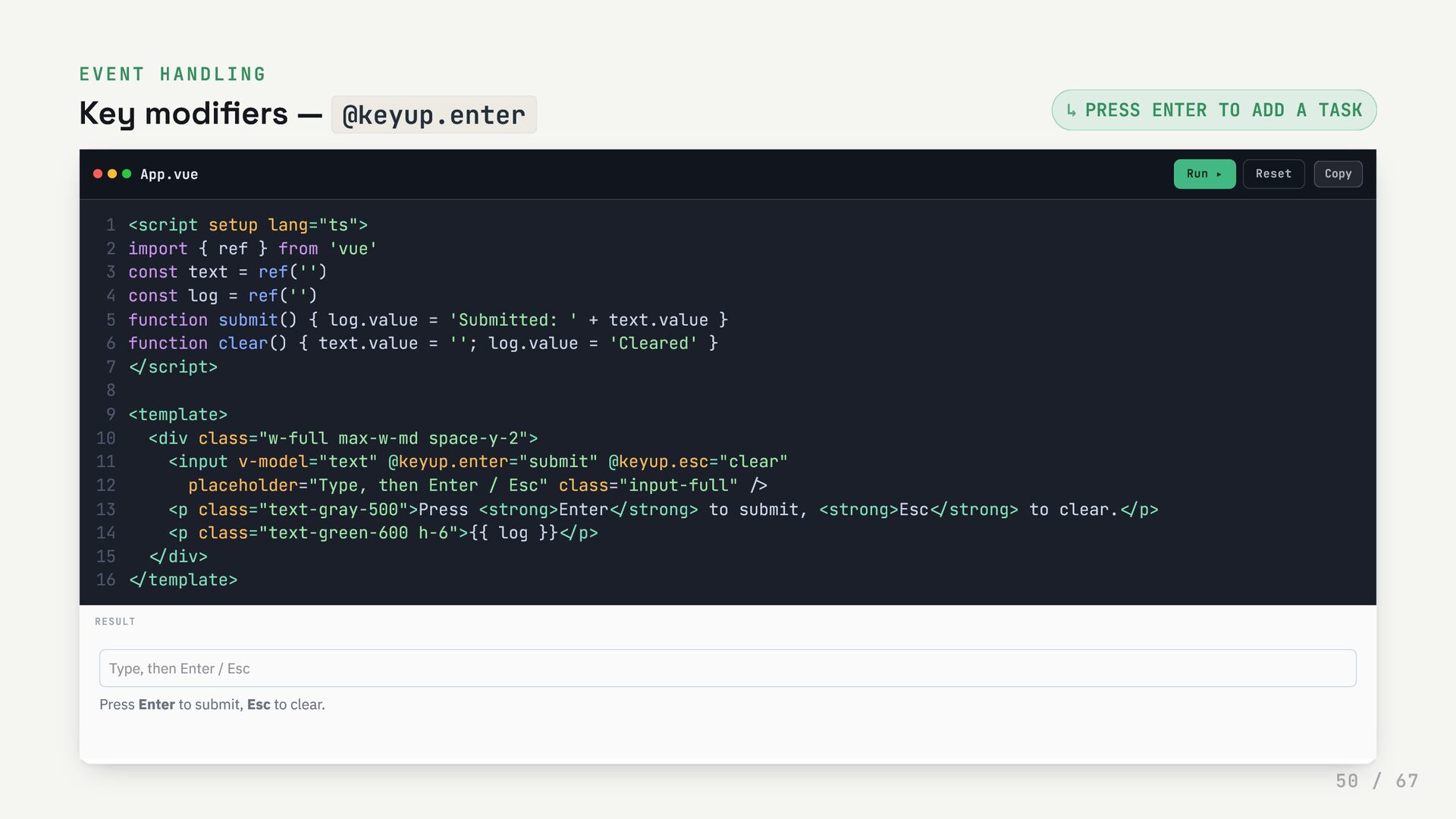
  50. EVENT HANDLING Key modifiers — @keyup.enter PRESS ENTER TO ADD

    A TASK App.vue Run ▸ Reset ↳ <script setup lang="ts"> 1 import { ref } from 'vue' 2 const text = ref('') 3 const log = ref('') 4 function submit() { log.value = 'Submitted: ' + text.value } 5 function clear() { text.value = ''; log.value = 'Cleared' } 6 </script> 7 8 <template> 9 <div class="w-full max-w-md space-y-2"> 10 <input v-model="text" @keyup.enter="submit" @keyup.esc="clear" 11 placeholder="Type, then Enter / Esc" class="input-full" /> 12 <p class="text-gray-500">Press <strong>Enter</strong> to submit, <strong>Esc</strong> to clear.</p> 13 <p class="text-green-600 h-6">{{ log }}</p> 14 </div> 15 </template> 16 RESULT Type, then Enter / Esc Press Enter to submit, Esc to clear. Copy 50 / 67
  51. 0 5 Components Split the app into independent, reusable pieces

    — each with its own template, logic and style. 51 / 67
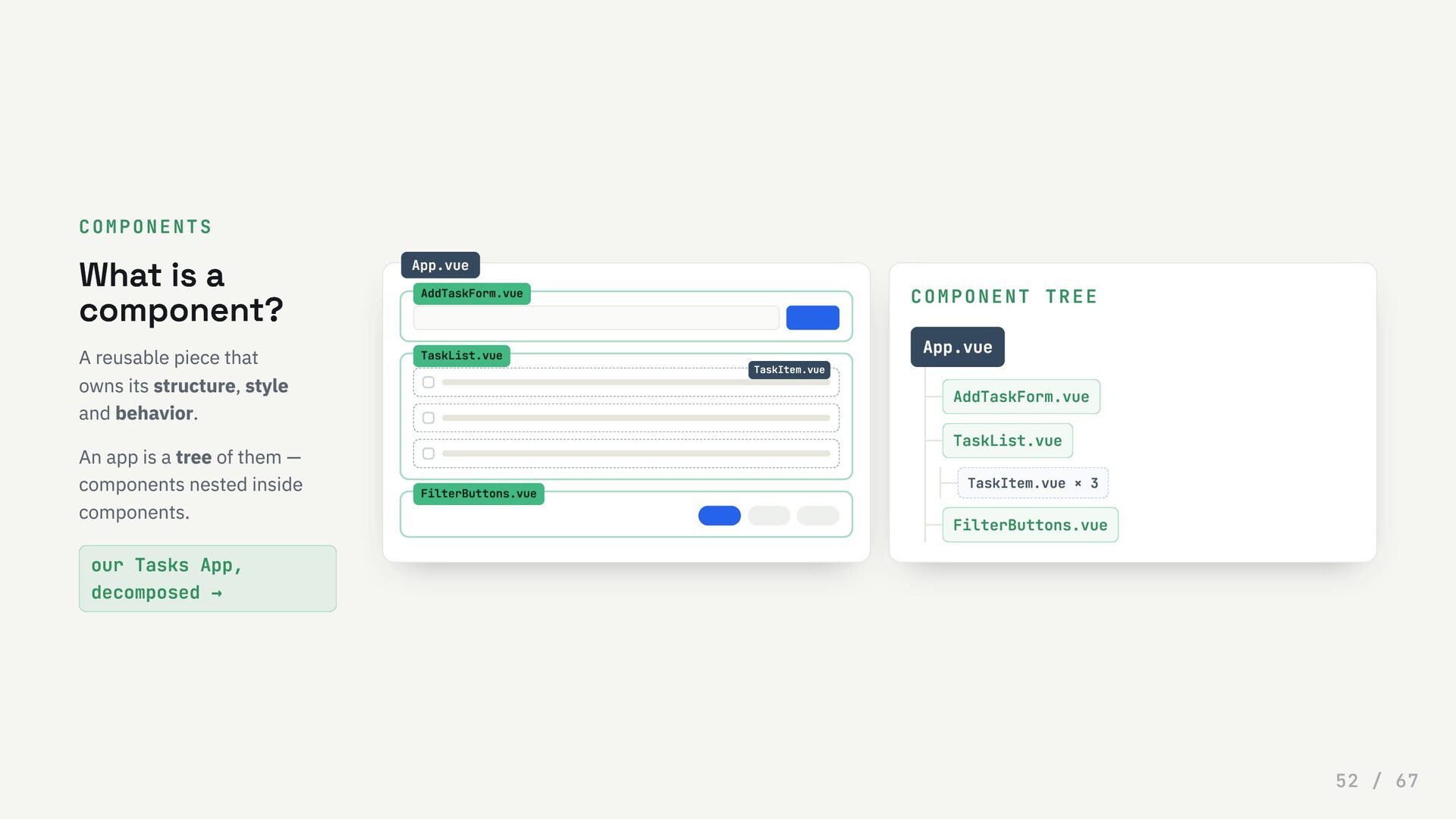
  52. COMPONENTS What is a component? A reusable piece that owns

    its structure, style and behavior. An app is a tree of them — components nested inside components. our Tasks App, decomposed → COMPONENT TREE App.vue AddTaskForm.vue TaskList.vue TaskItem.vue × 3 FilterButtons.vue App.vue AddTaskForm.vue TaskList.vue TaskItem.vue FilterButtons.vue 52 / 67
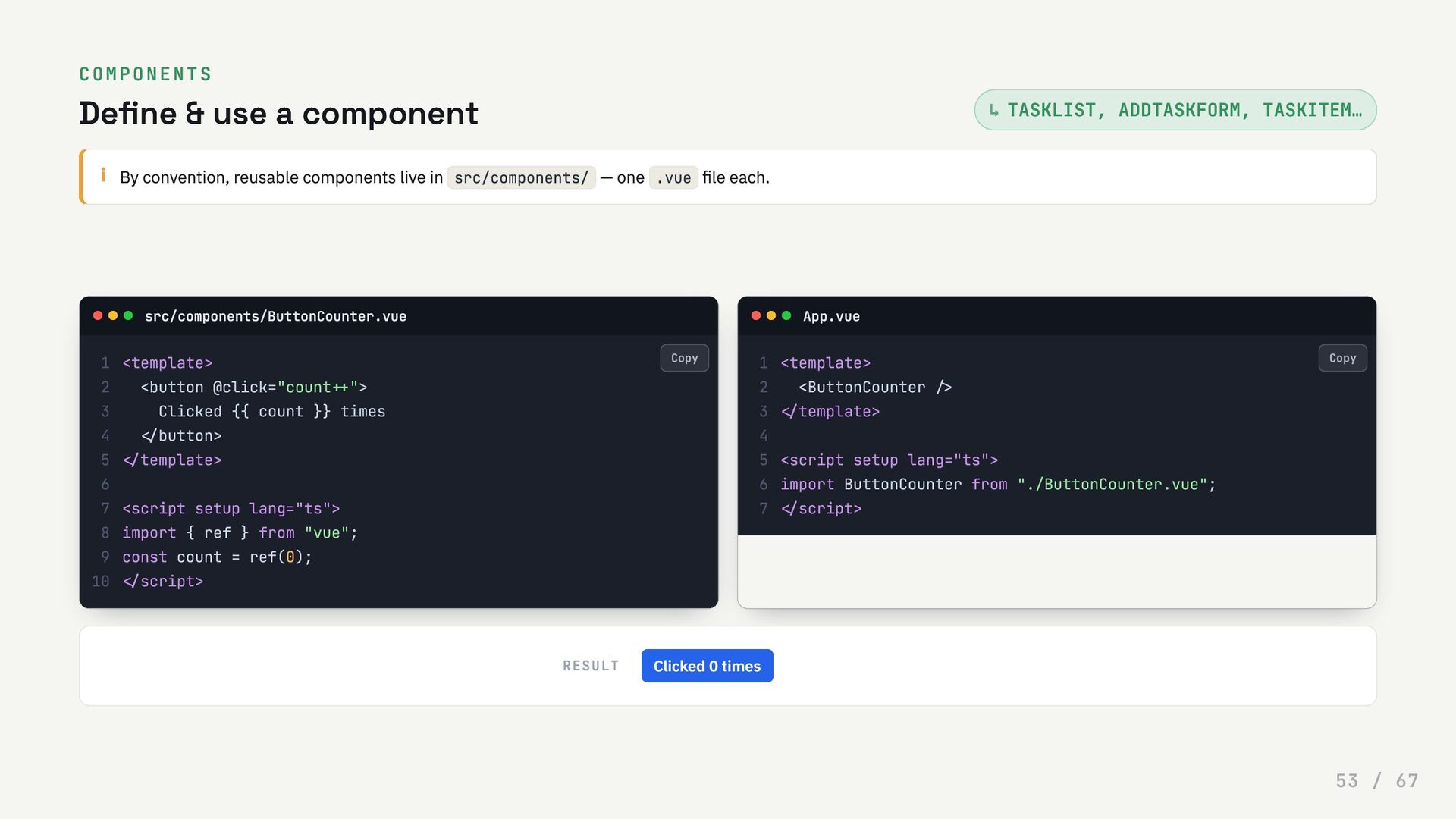
  53. COMPONENTS Define & use a component TASKLIST, ADDTASKFORM, TASKITEM… i

    By convention, reusable components live in src/components/ — one .vue file each. src/components/ButtonCounter.vue App.vue RESULT ↳ <template> 1 <button @click="count++"> 2 Clicked {{ count }} times 3 </button> 4 </template> 5 6 <script setup lang="ts"> 7 import { ref } from "vue"; 8 const count = ref(0); 9 </script> 10 <template> 1 <ButtonCounter /> 2 </template> 3 4 <script setup lang="ts"> 5 import ButtonCounter from "./ButtonCounter.vue"; 6 </script> 7 Clicked 0 times Copy Copy 53 / 67
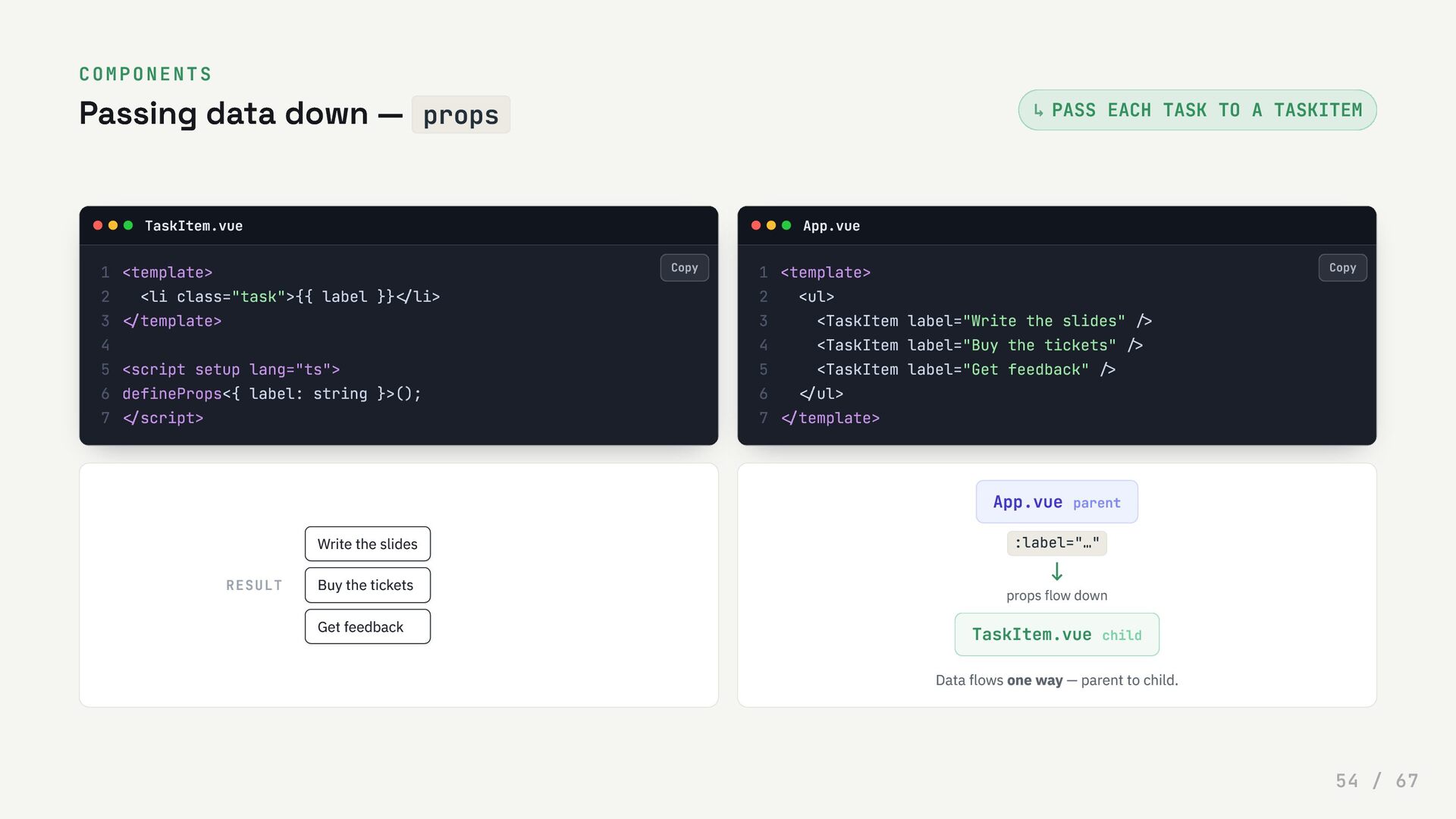
  54. COMPONENTS Passing data down — props PASS EACH TASK TO

    A TASKITEM TaskItem.vue App.vue RESULT App.vue parent :label="…" ↓ props flow down TaskItem.vue child Data flows one way — parent to child. ↳ <template> 1 <li class="task">{{ label }}</li> 2 </template> 3 4 <script setup lang="ts"> 5 defineProps<{ label: string }>(); 6 </script> 7 <template> 1 <ul> 2 <TaskItem label="Write the slides" /> 3 <TaskItem label="Buy the tickets" /> 4 <TaskItem label="Get feedback" /> 5 </ul> 6 </template> 7 Write the slides Buy the tickets Get feedback Copy Copy 54 / 67
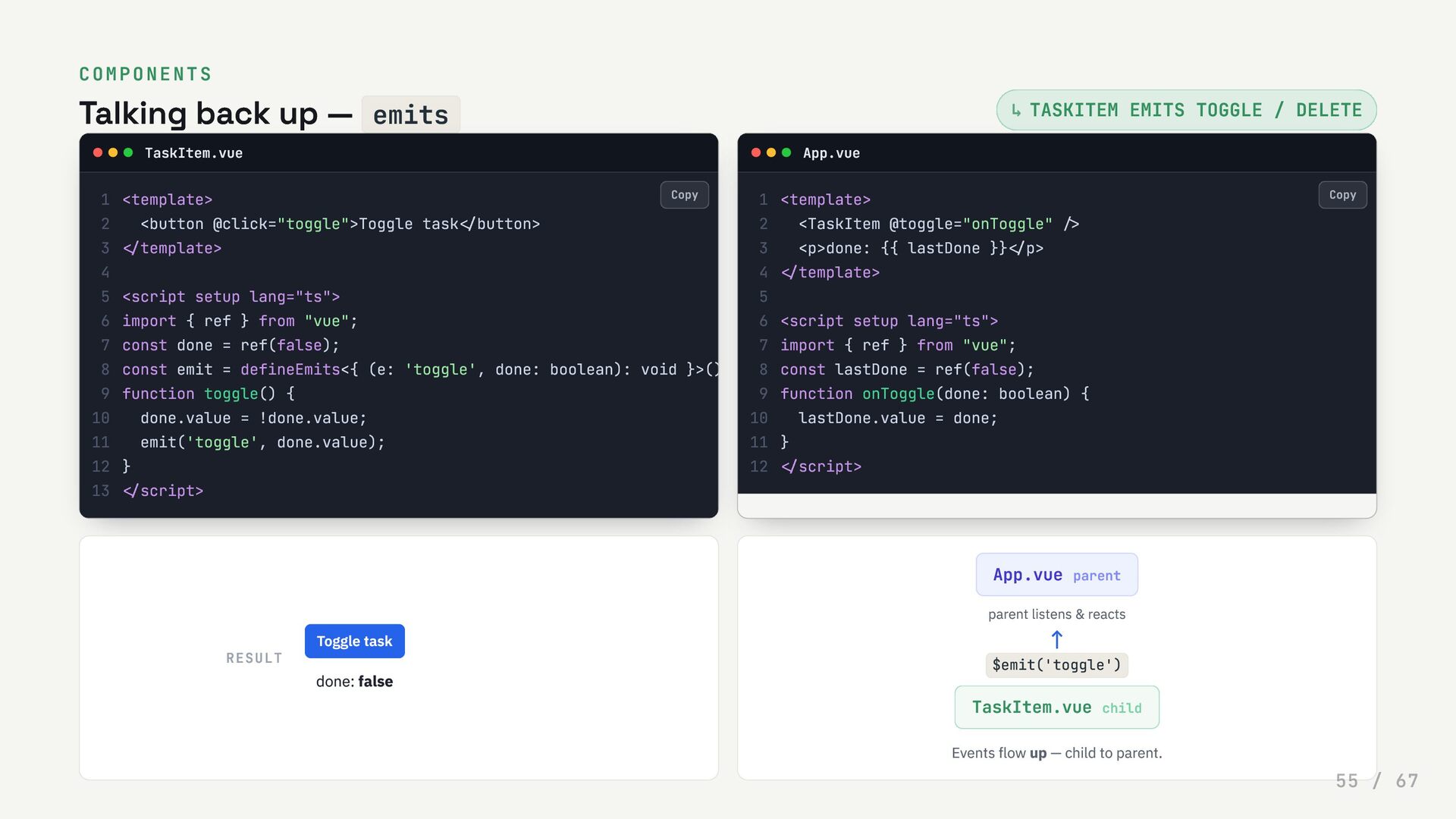
  55. COMPONENTS Talking back up — emits TASKITEM EMITS TOGGLE /

    DELETE TaskItem.vue App.vue RESULT App.vue parent parent listens & reacts ↑ $emit('toggle') TaskItem.vue child Events flow up — child to parent. ↳ <template> 1 <button @click="toggle">Toggle task</button> 2 </template> 3 4 <script setup lang="ts"> 5 import { ref } from "vue"; 6 const done = ref(false); 7 const emit = defineEmits<{ (e: 'toggle', done: boolean): void }>() 8 function toggle() { 9 done.value = !done.value; 10 emit('toggle', done.value); 11 } 12 </script> 13 <template> 1 <TaskItem @toggle="onToggle" /> 2 <p>done: {{ lastDone }}</p> 3 </template> 4 5 <script setup lang="ts"> 6 import { ref } from "vue"; 7 const lastDone = ref(false); 8 function onToggle(done: boolean) { 9 lastDone.value = done; 10 } 11 </script> 12 Toggle task done: false Copy Copy 55 / 67
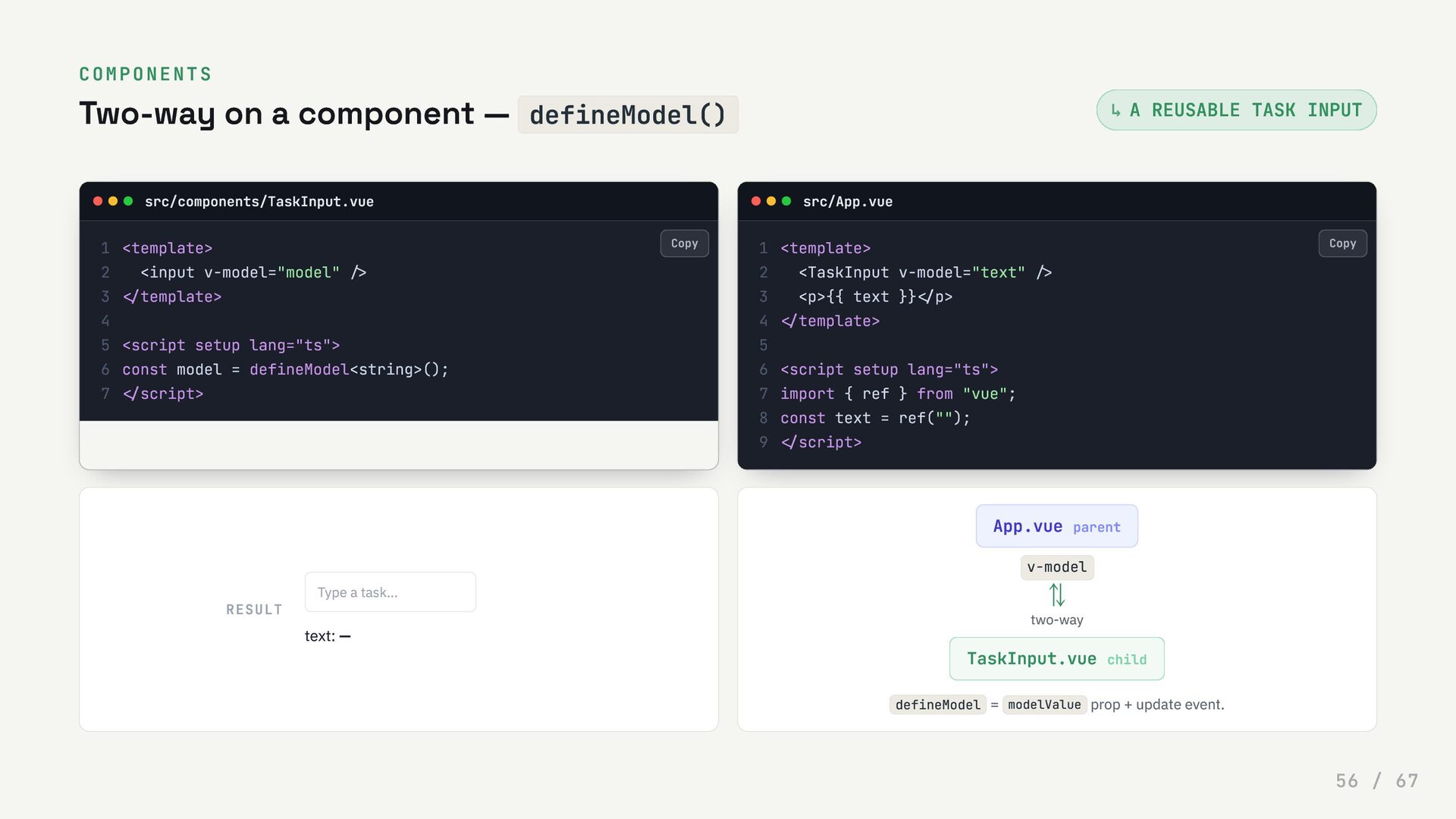
  56. COMPONENTS Two-way on a component — defineModel() A REUSABLE TASK

    INPUT src/components/TaskInput.vue src/App.vue RESULT App.vue parent v-model ⇅ two-way TaskInput.vue child defineModel = modelValue prop + update event. ↳ <template> 1 <input v-model="model" /> 2 </template> 3 4 <script setup lang="ts"> 5 const model = defineModel<string>(); 6 </script> 7 <template> 1 <TaskInput v-model="text" /> 2 <p>{{ text }}</p> 3 </template> 4 5 <script setup lang="ts"> 6 import { ref } from "vue"; 7 const text = ref(""); 8 </script> 9 Type a task... text: — Copy Copy 56 / 67
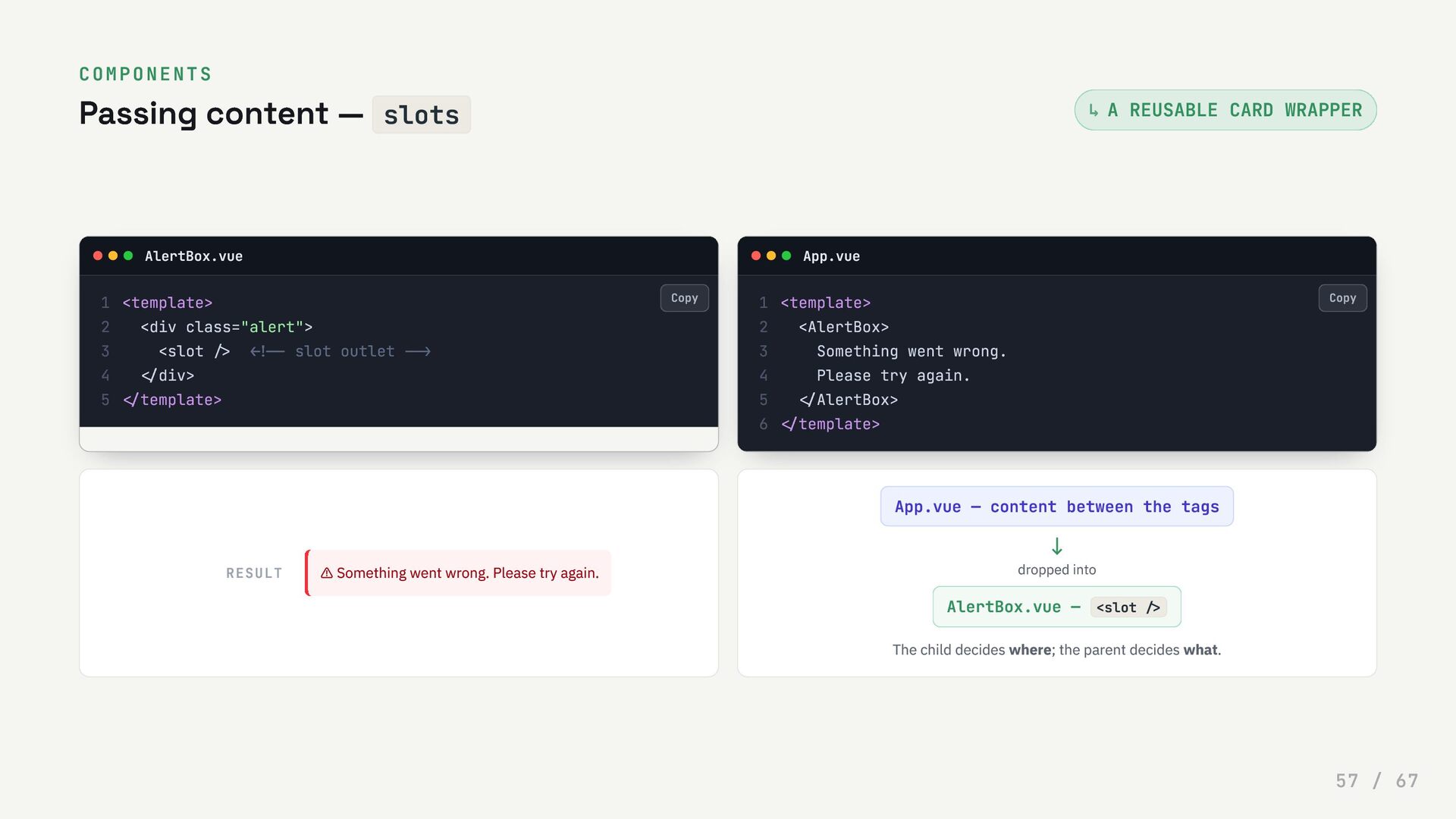
  57. COMPONENTS Passing content — slots A REUSABLE CARD WRAPPER AlertBox.vue

    App.vue RESULT App.vue — content between the tags ↓ dropped into AlertBox.vue — <slot /> The child decides where; the parent decides what. ↳ <template> 1 <div class="alert"> 2 <slot /> <!-- slot outlet --> 3 </div> 4 </template> 5 <template> 1 <AlertBox> 2 Something went wrong. 3 Please try again. 4 </AlertBox> 5 </template> 6 ⚠ Something went wrong. Please try again. Copy Copy 57 / 67
  58. 0 6 Build the Tasks App Everything we've learned, assembled

    one feature at a time. Each step below is live and editable — code along. 58 / 67
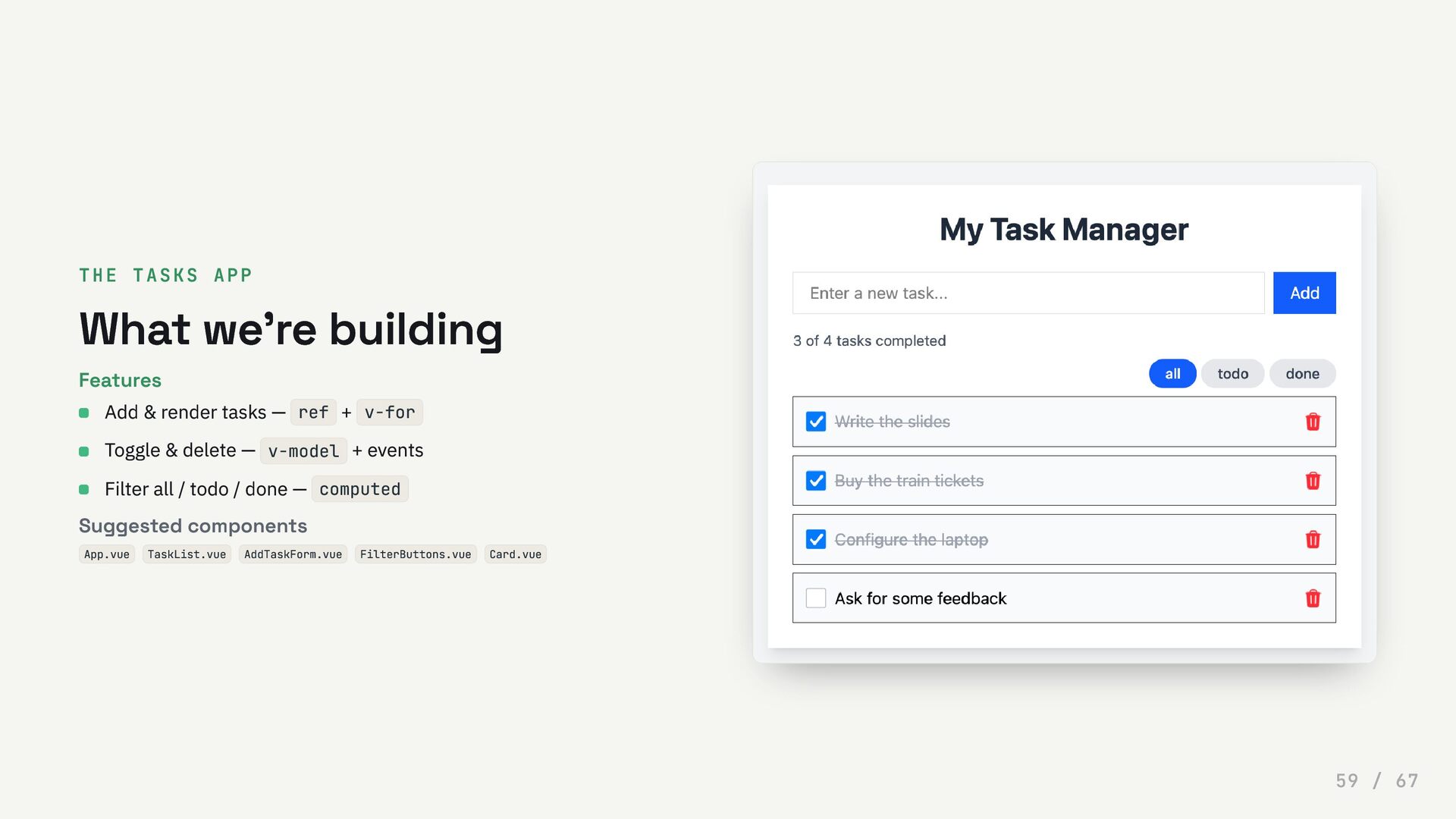
  59. THE TASKS APP What we're building Features Suggested components App.vue

    TaskList.vue AddTaskForm.vue FilterButtons.vue Card.vue Add & render tasks — ref + v-for Toggle & delete — v-model + events Filter all / todo / done — computed 59 / 67
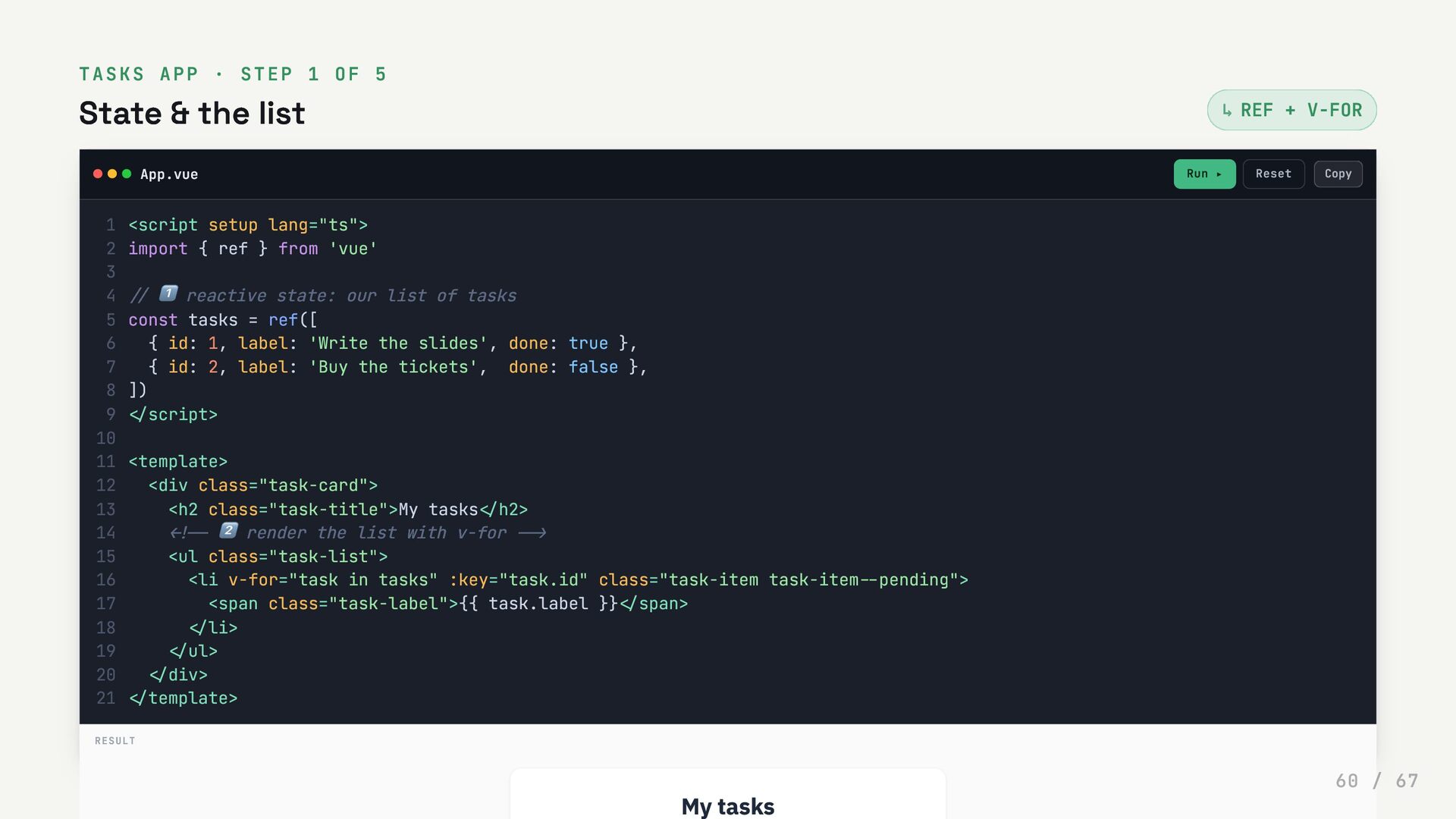
  60. TASKS APP · STEP 1 OF 5 State & the

    list REF + V-FOR App.vue Run ▸ Reset ↳ <script setup lang="ts"> 1 import { ref } from 'vue' 2 3 // 1️⃣ reactive state: our list of tasks 4 const tasks = ref([ 5 { id: 1, label: 'Write the slides', done: true }, 6 { id: 2, label: 'Buy the tickets', done: false }, 7 ]) 8 </script> 9 10 <template> 11 <div class="task-card"> 12 <h2 class="task-title">My tasks</h2> 13 <!-- 2️⃣ render the list with v-for --> 14 <ul class="task-list"> 15 <li v-for="task in tasks" :key="task.id" class="task-item task-item--pending"> 16 <span class="task-label">{{ task.label }}</span> 17 </li> 18 </ul> 19 </div> 20 </template> 21 RESULT My tasks Copy 60 / 67
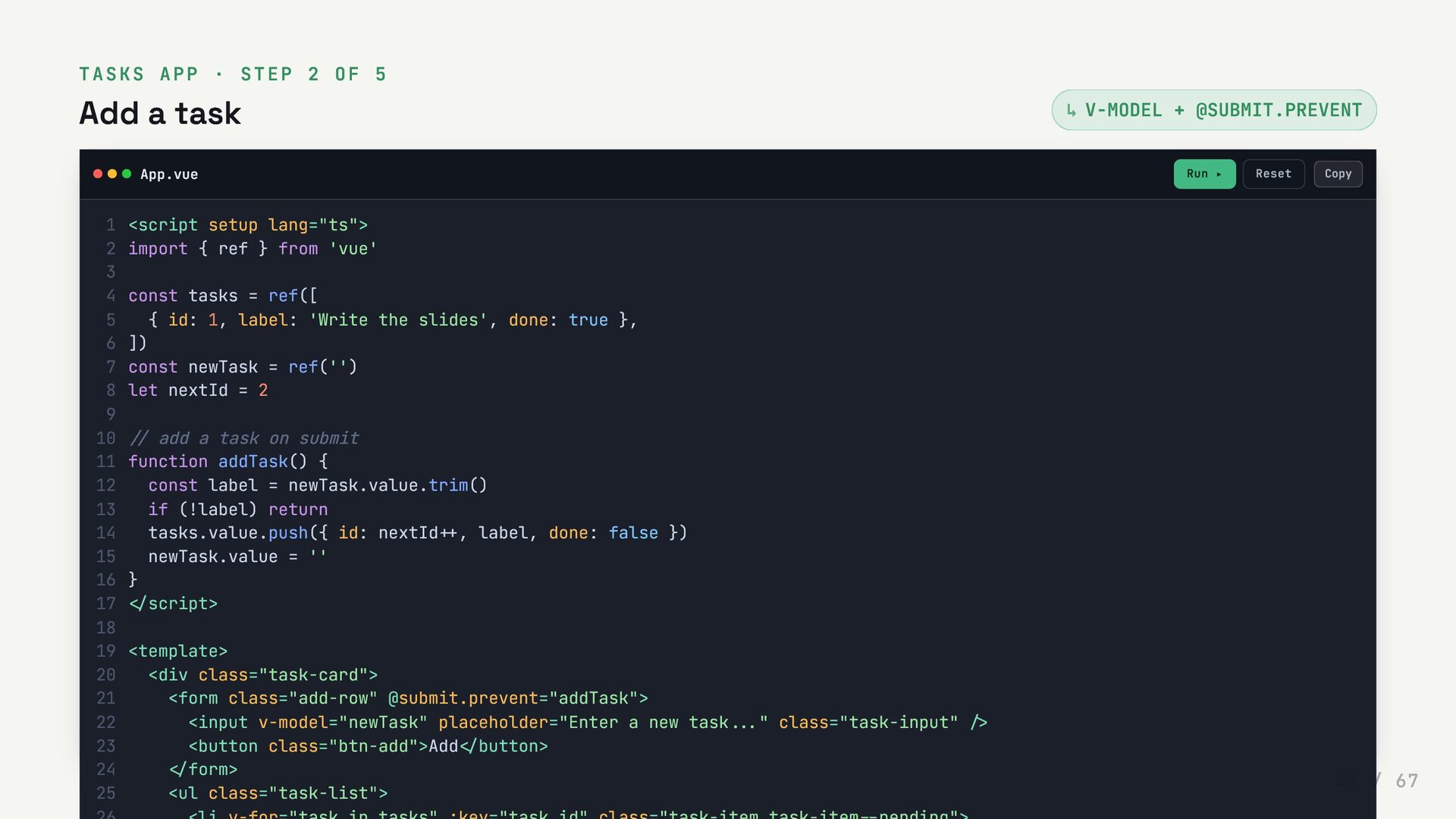
  61. TASKS APP · STEP 2 OF 5 Add a task

    V-MODEL + @SUBMIT.PREVENT App.vue Run ▸ Reset ↳ <script setup lang="ts"> 1 import { ref } from 'vue' 2 3 const tasks = ref([ 4 { id: 1, label: 'Write the slides', done: true }, 5 ]) 6 const newTask = ref('') 7 let nextId = 2 8 9 // add a task on submit 10 function addTask() { 11 const label = newTask.value.trim() 12 if (!label) return 13 tasks.value.push({ id: nextId++, label, done: false }) 14 newTask.value = '' 15 } 16 </script> 17 18 <template> 19 <div class="task-card"> 20 <form class="add-row" @submit.prevent="addTask"> 21 <input v-model="newTask" placeholder="Enter a new task..." class="task-input" /> 22 <button class="btn-add">Add</button> 23 </form> 24 <ul class="task-list"> 25 Copy 61 / 67
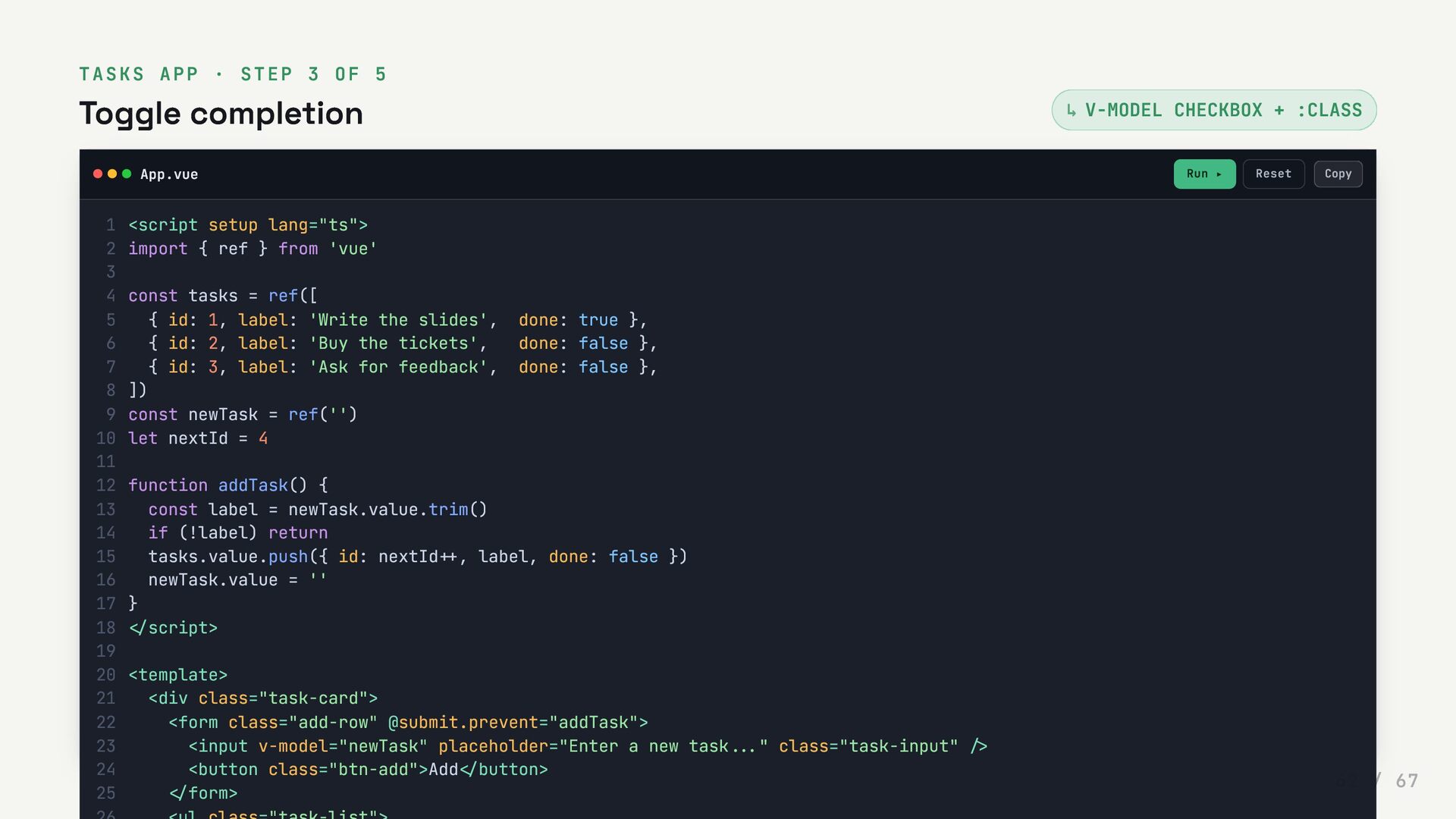
  62. TASKS APP · STEP 3 OF 5 Toggle completion V-MODEL

    CHECKBOX + :CLASS App.vue Run ▸ Reset ↳ <script setup lang="ts"> 1 import { ref } from 'vue' 2 3 const tasks = ref([ 4 { id: 1, label: 'Write the slides', done: true }, 5 { id: 2, label: 'Buy the tickets', done: false }, 6 { id: 3, label: 'Ask for feedback', done: false }, 7 ]) 8 const newTask = ref('') 9 let nextId = 4 10 11 function addTask() { 12 const label = newTask.value.trim() 13 if (!label) return 14 tasks.value.push({ id: nextId++, label, done: false }) 15 newTask.value = '' 16 } 17 </script> 18 19 <template> 20 <div class="task-card"> 21 <form class="add-row" @submit.prevent="addTask"> 22 <input v-model="newTask" placeholder="Enter a new task..." class="task-input" /> 23 <button class="btn-add">Add</button> 24 </form> 25 Copy 62 / 67
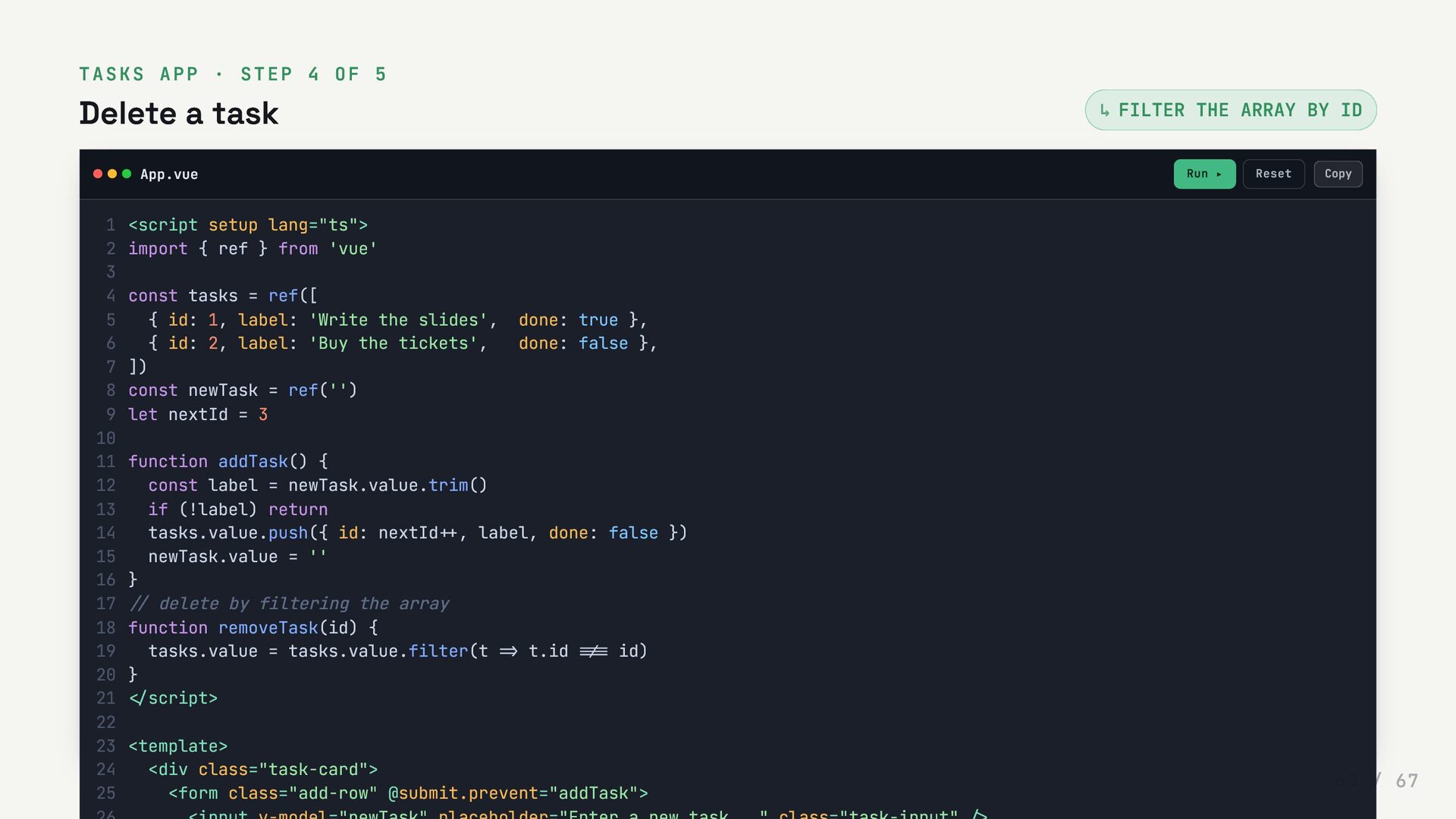
  63. TASKS APP · STEP 4 OF 5 Delete a task

    FILTER THE ARRAY BY ID App.vue Run ▸ Reset ↳ <script setup lang="ts"> 1 import { ref } from 'vue' 2 3 const tasks = ref([ 4 { id: 1, label: 'Write the slides', done: true }, 5 { id: 2, label: 'Buy the tickets', done: false }, 6 ]) 7 const newTask = ref('') 8 let nextId = 3 9 10 function addTask() { 11 const label = newTask.value.trim() 12 if (!label) return 13 tasks.value.push({ id: nextId++, label, done: false }) 14 newTask.value = '' 15 } 16 // delete by filtering the array 17 function removeTask(id) { 18 tasks.value = tasks.value.filter(t => t.id !== id) 19 } 20 </script> 21 22 <template> 23 <div class="task-card"> 24 <form class="add-row" @submit.prevent="addTask"> 25 Copy 63 / 67
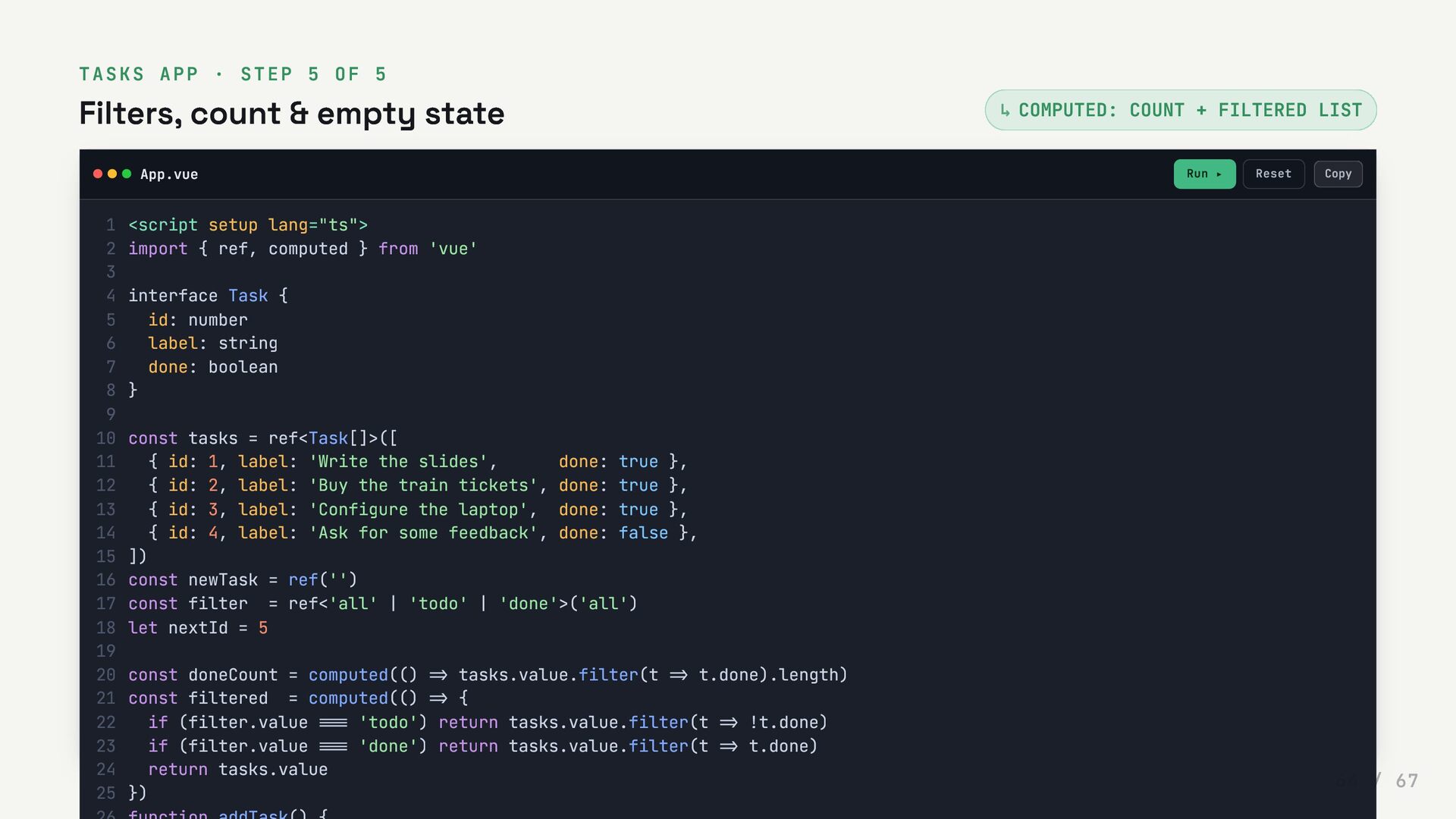
  64. TASKS APP · STEP 5 OF 5 Filters, count &

    empty state COMPUTED: COUNT + FILTERED LIST App.vue Run ▸ Reset ↳ <script setup lang="ts"> 1 import { ref, computed } from 'vue' 2 3 interface Task { 4 id: number 5 label: string 6 done: boolean 7 } 8 9 const tasks = ref<Task[]>([ 10 { id: 1, label: 'Write the slides', done: true }, 11 { id: 2, label: 'Buy the train tickets', done: true }, 12 { id: 3, label: 'Configure the laptop', done: true }, 13 { id: 4, label: 'Ask for some feedback', done: false }, 14 ]) 15 const newTask = ref('') 16 const filter = ref<'all' | 'todo' | 'done'>('all') 17 let nextId = 5 18 19 const doneCount = computed(() => tasks.value.filter(t => t.done).length) 20 const filtered = computed(() => { 21 if (filter.value === 'todo') return tasks.value.filter(t => !t.done) 22 if (filter.value === 'done') return tasks.value.filter(t => t.done) 23 return tasks.value 24 }) 25 Copy 64 / 67
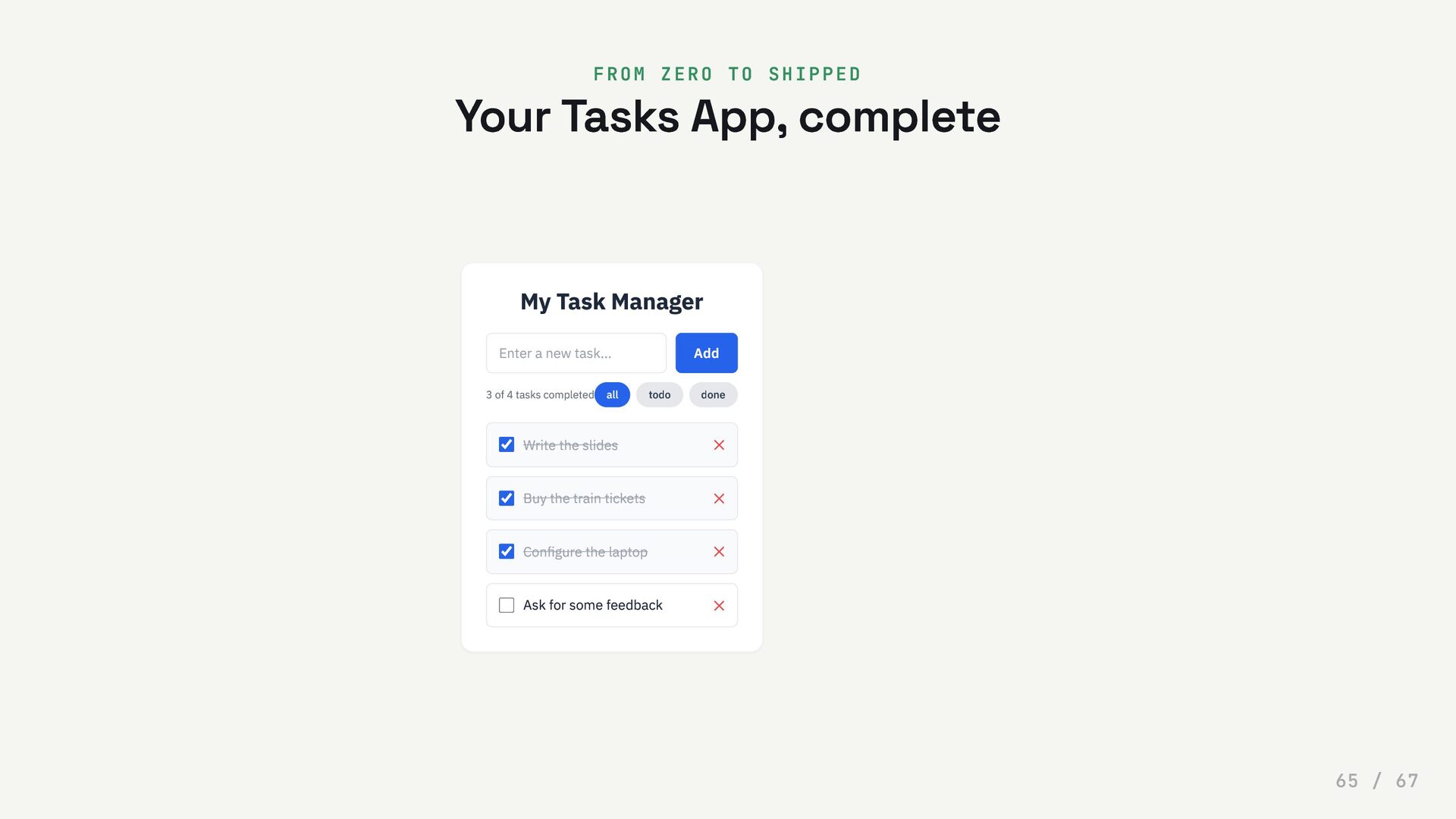
  65. FROM ZERO TO SHIPPED Your Tasks App, complete My Task

    Manager Enter a new task... Add 3 of 4 tasks completed all todo done Write the slides ✕ Buy the train tickets ✕ Configure the laptop ✕ Ask for some feedback ✕ 65 / 67
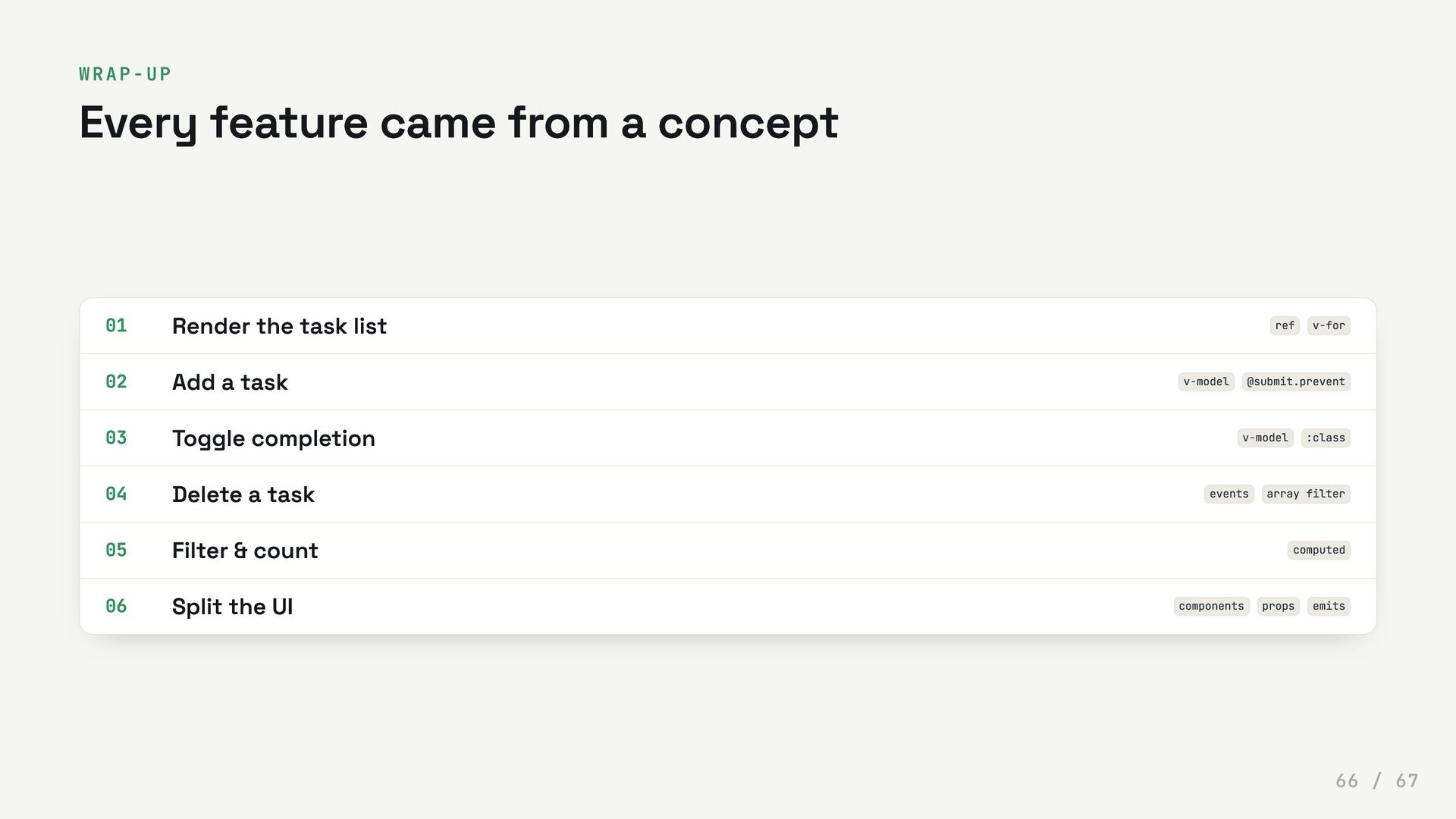
  66. WRAP-UP Every feature came from a concept 01 Render the
    task list ref v-for 02 Add a task v-model @submit.prevent 03 Toggle completion v-model :class 04 Delete a task events array filter 05 Filter & count computed 06 Split the UI components props emits 66 / 67