Upgrade to Pro — share decks privately, control downloads, hide ads and more …

AWS Emulator を評価する: 手元で動く AWS の API の仕組み、始め方、確かめ方

Sponsored · Your Podcast. Everywhere. Effortlessly. Share. Educate. Inspire. Entertain. You do you. We'll handle the rest. →

AWS Emulator を評価する: 手元で動く AWS の API の仕組み、始め方、確かめ方

2026 年 11 月に一般提供になった AWS Emulator を、開発者が自分のプロジェクトで評価するための資料です (Level 300)。AWS の API モデルから作られる仕組み、127.0.0.1 の HTTPS の口と起動ごとの鍵と証明書、サーバーモードと埋め込みモード、Linux と Docker と Kiro などのエージェントからの始め方を、公式の文書と手元で動かした画面で解説します。公開の fidelity テストと点数の読み方、スキルによるプロジェクトの判定、エージェントが作り保守する仕組み、セキュリティとテレメトリー、LocalStack との作りと使い方の違いも扱います。内容は AWS Emulator v1.0.322 の時点のものです。

Avatar for Riku INADA

Riku INADA PRO

November 12, 2026

More Decks by Riku INADA
Other Decks in Technology

Transcript

  1. 開発者のための評価ガイド Level 300 AWS Emulator を 評価する 127.0.0.1:9297 ⼿元で動く AWS

    の API の 仕組み、始め⽅、確かめ⽅ AWS Emulator v1.0.322 の時点 2026 年 11 ⽉ 稲⽥ ⼤陸 アマゾン ウェブ サービス ジャパン © 2026, Amazon Web Services, Inc. or its affiliates. All rights reserved. 1
  2. はじめに ⾃⼰紹介 稲⽥ ⼤陸 いなだ りく (いなりく) アマゾン ウェブ サービス

    ジャパン合同会社 ソリューションアーキテクト 製造業のお客様を中⼼に⽀援 最近の取り組み AI 駆動開発ライフサイクルの推進 Kiro と AWS Amplify の情報発信 © 2026, Amazon Web Services, Inc. or its affiliates. All rights reserved. X @inada_riku Speaker Deck speakerdeck.com/inariku Zenn zenn.dev/inariku GitHub github.com/inariku 2
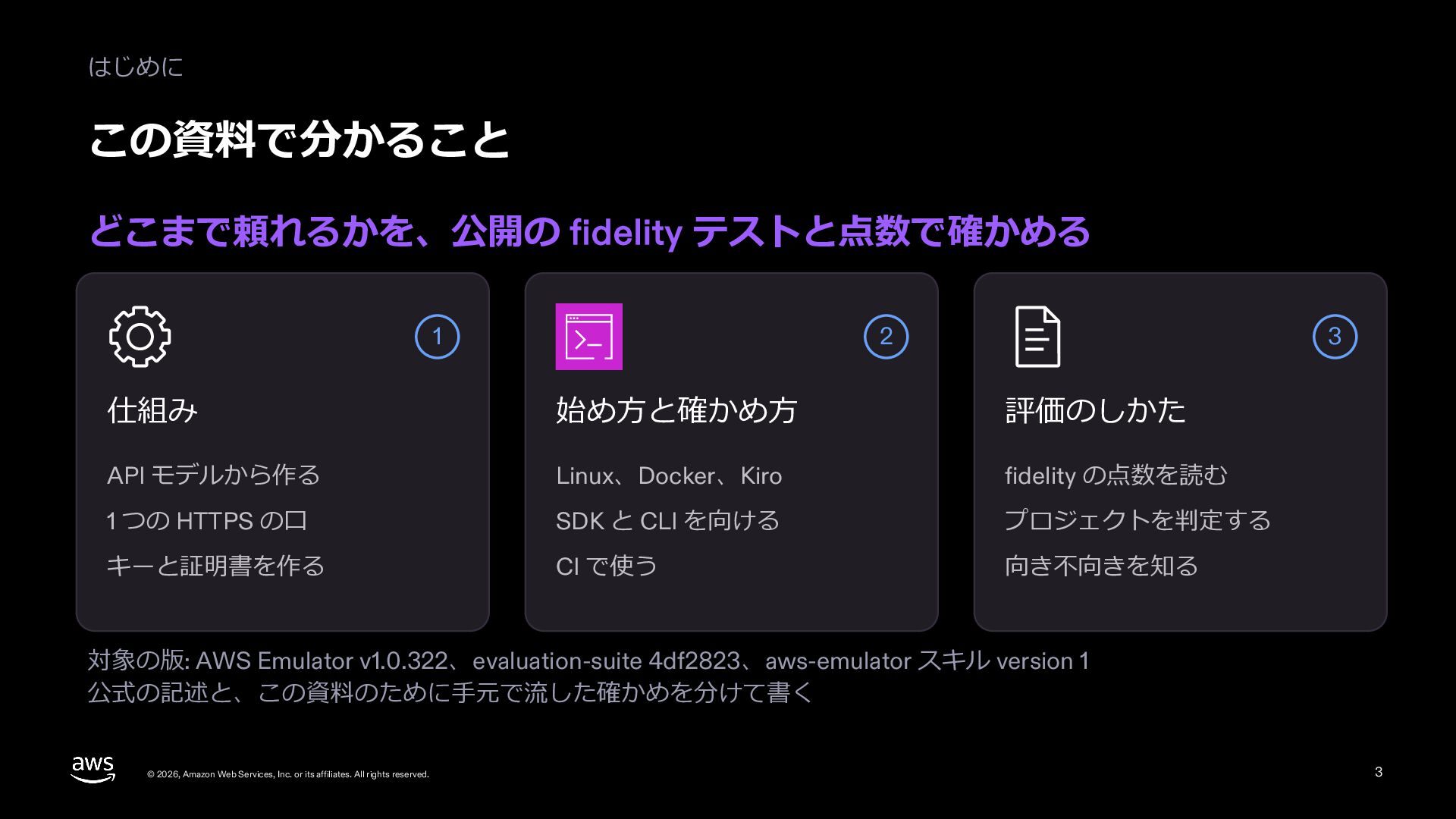
  3. はじめに この資料で分かること どこまで頼れるかを、公開の fidelity テストと点数で確かめる 1 2 3 仕組み 始め⽅と確かめ⽅

    評価のしかた API モデルから作る Linux、Docker、Kiro fidelity の点数を読む 1 つの HTTPS の⼝ SDK と CLI を向ける プロジェクトを判定する キーと証明書を作る CI で使う 向き不向きを知る 対象の版: AWS Emulator v1.0.322、evaluation-suite 4df2823、aws-emulator スキル version 1 公式の記述と、この資料のために⼿元で流した確かめを分けて書く © 2026, Amazon Web Services, Inc. or its affiliates. All rights reserved. 3
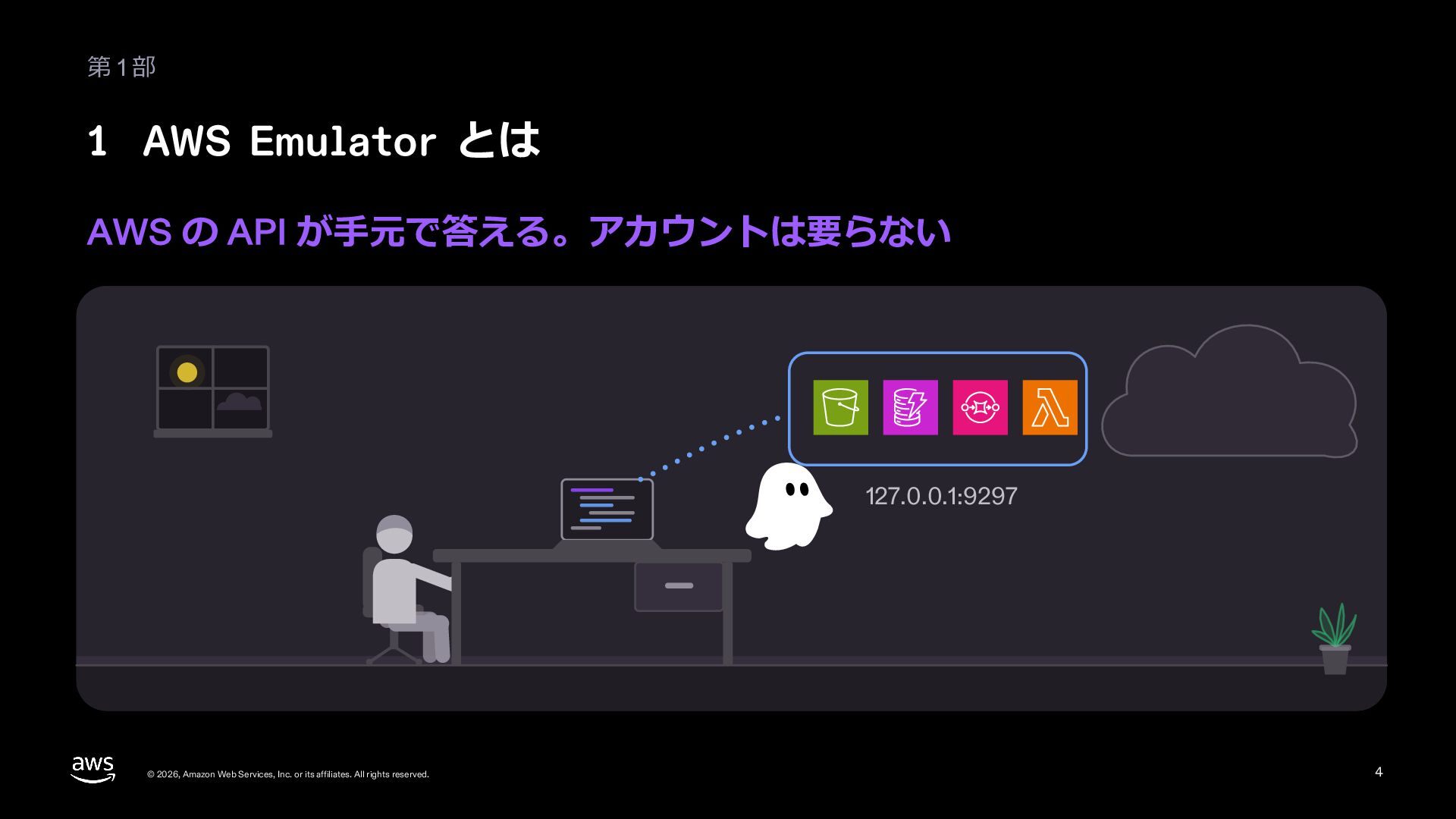
  4. 第1部 1 AWS Emulator とは AWS の API が⼿元で答える。アカウントは要らない 127.0.0.1:9297

    © 2026, Amazon Web Services, Inc. or its affiliates. All rights reserved. 4
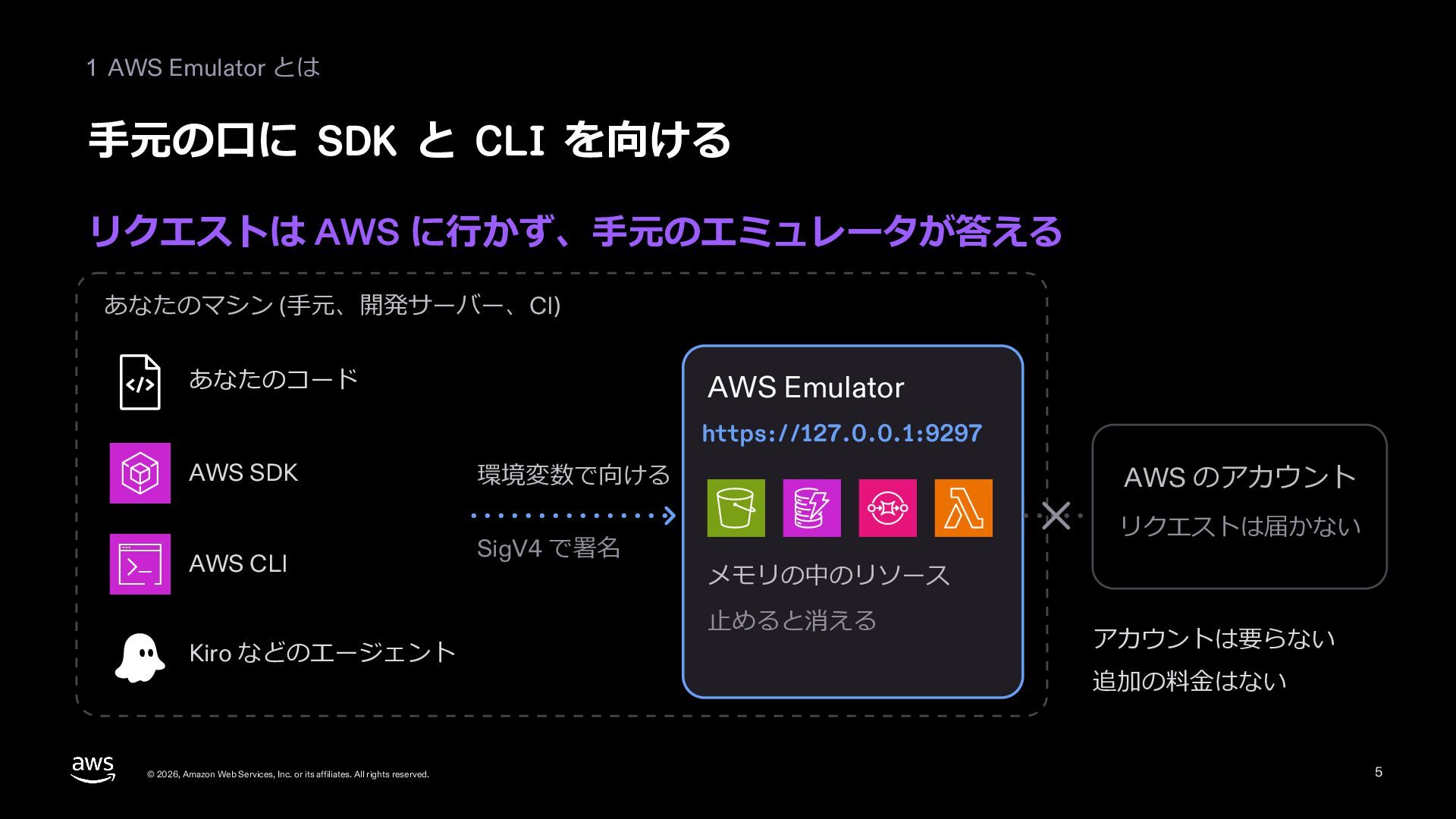
  5. 1 AWS Emulator とは ⼿元の⼝に SDK と CLI を向ける リクエストは

    AWS に⾏かず、⼿元のエミュレータが答える あなたのマシン (⼿元、開発サーバー、CI) あなたのコード AWS Emulator https://127.0.0.1:9297 AWS SDK 環境変数で向ける AWS CLI SigV4 で署名 Kiro などのエージェント © 2026, Amazon Web Services, Inc. or its affiliates. All rights reserved. AWS のアカウント リクエストは届かない メモリの中のリソース ⽌めると消える アカウントは要らない 追加の料⾦はない 5
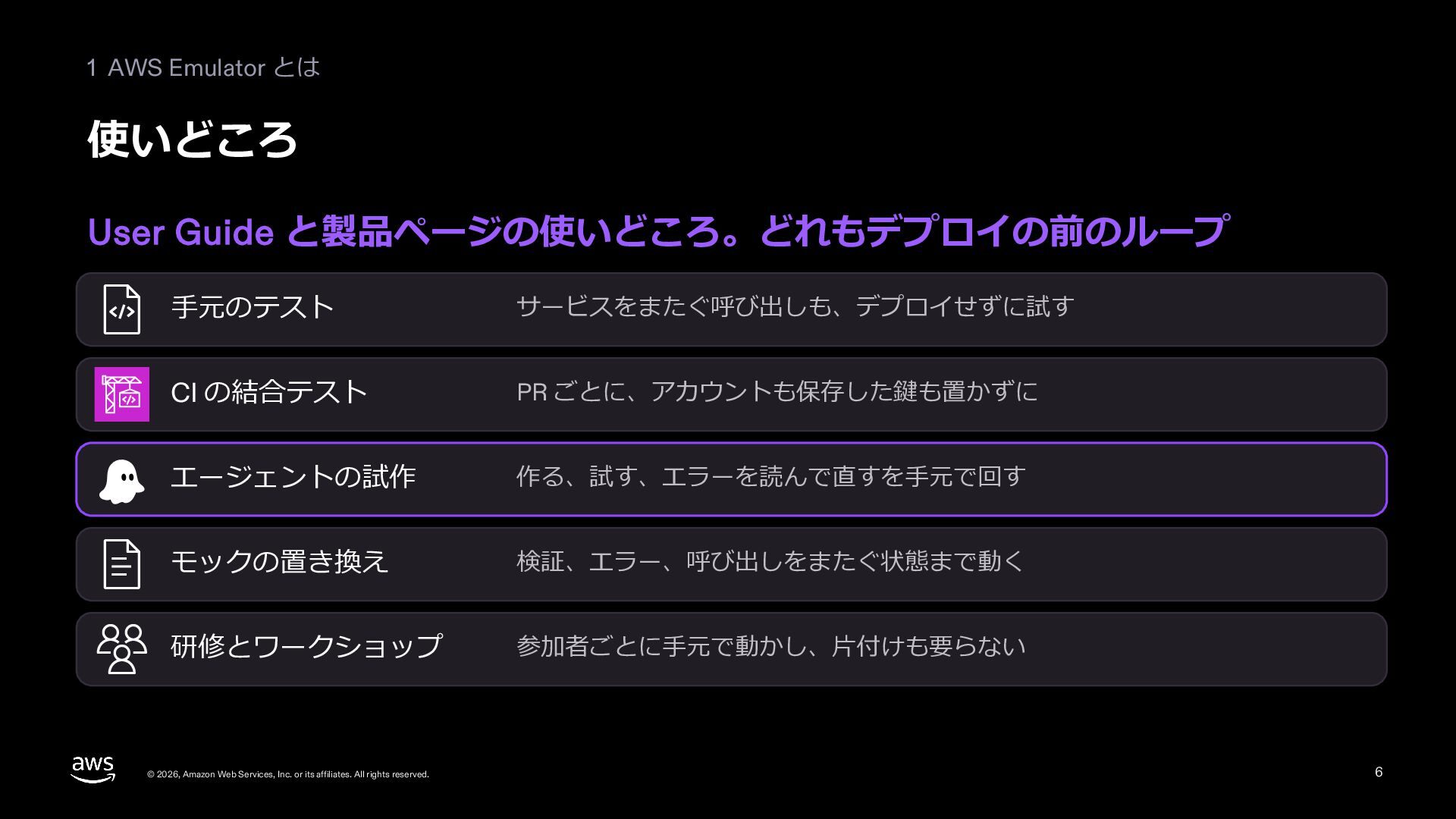
  6. 1 AWS Emulator とは 使いどころ User Guide と製品ページの使いどころ。どれもデプロイの前のループ ⼿元のテスト サービスをまたぐ呼び出しも、デプロイせずに試す

    CI の結合テスト PR ごとに、アカウントも保存した鍵も置かずに エージェントの試作 作る、試す、エラーを読んで直すを⼿元で回す モックの置き換え 検証、エラー、呼び出しをまたぐ状態まで動く 研修とワークショップ 参加者ごとに⼿元で動かし、⽚付けも要らない © 2026, Amazon Web Services, Inc. or its affiliates. All rights reserved. 6
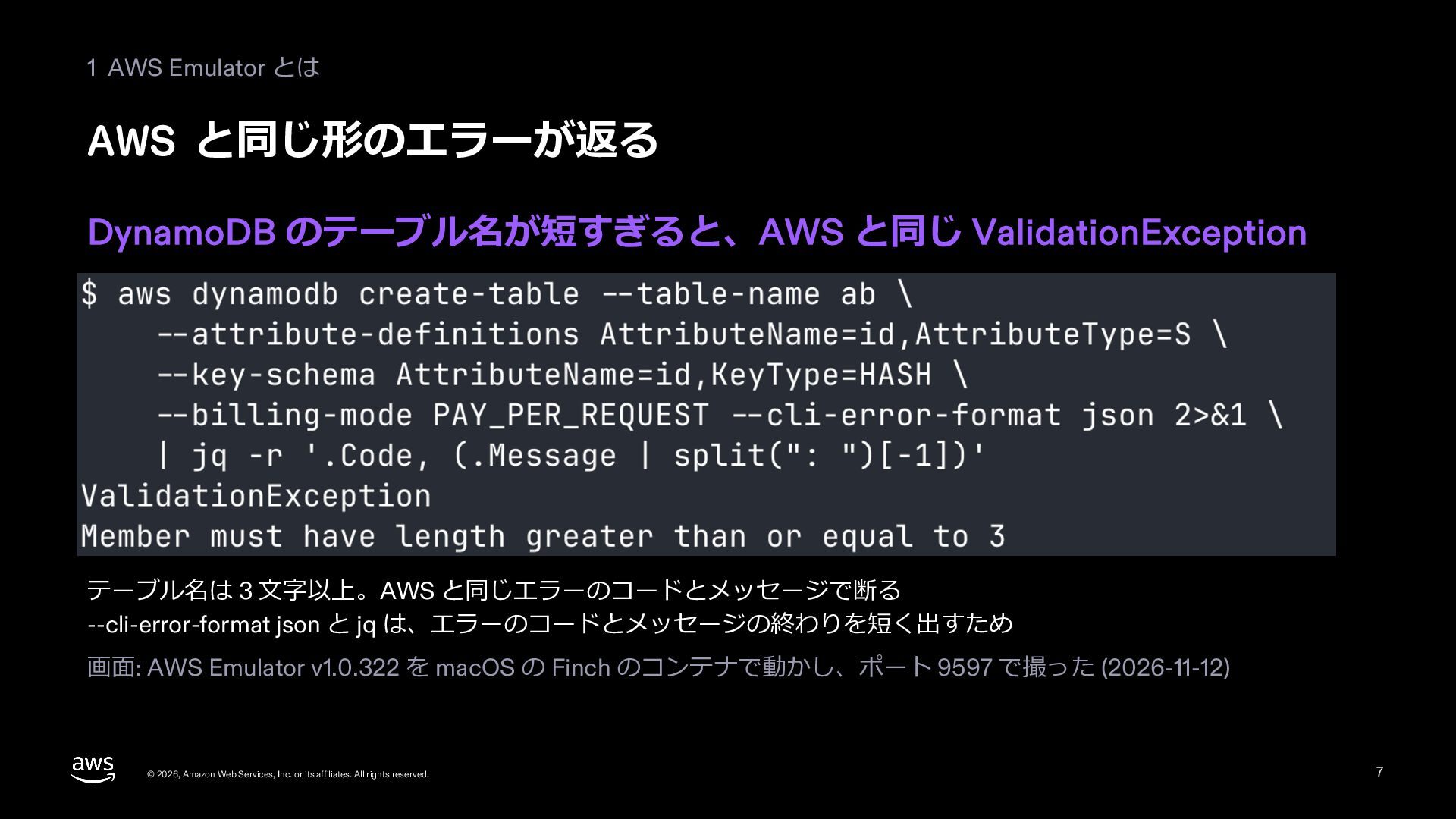
  7. 1 AWS Emulator とは AWS と同じ形のエラーが返る DynamoDB のテーブル名が短すぎると、AWS と同じ ValidationException

    テーブル名は 3 ⽂字以上。AWS と同じエラーのコードとメッセージで断る --cli-error-format json と jq は、エラーのコードとメッセージの終わりを短く出すため 画⾯: AWS Emulator v1.0.322 を macOS の Finch のコンテナで動かし、ポート 9597 で撮った (2026-11-12) © 2026, Amazon Web Services, Inc. or its affiliates. All rights reserved. 7
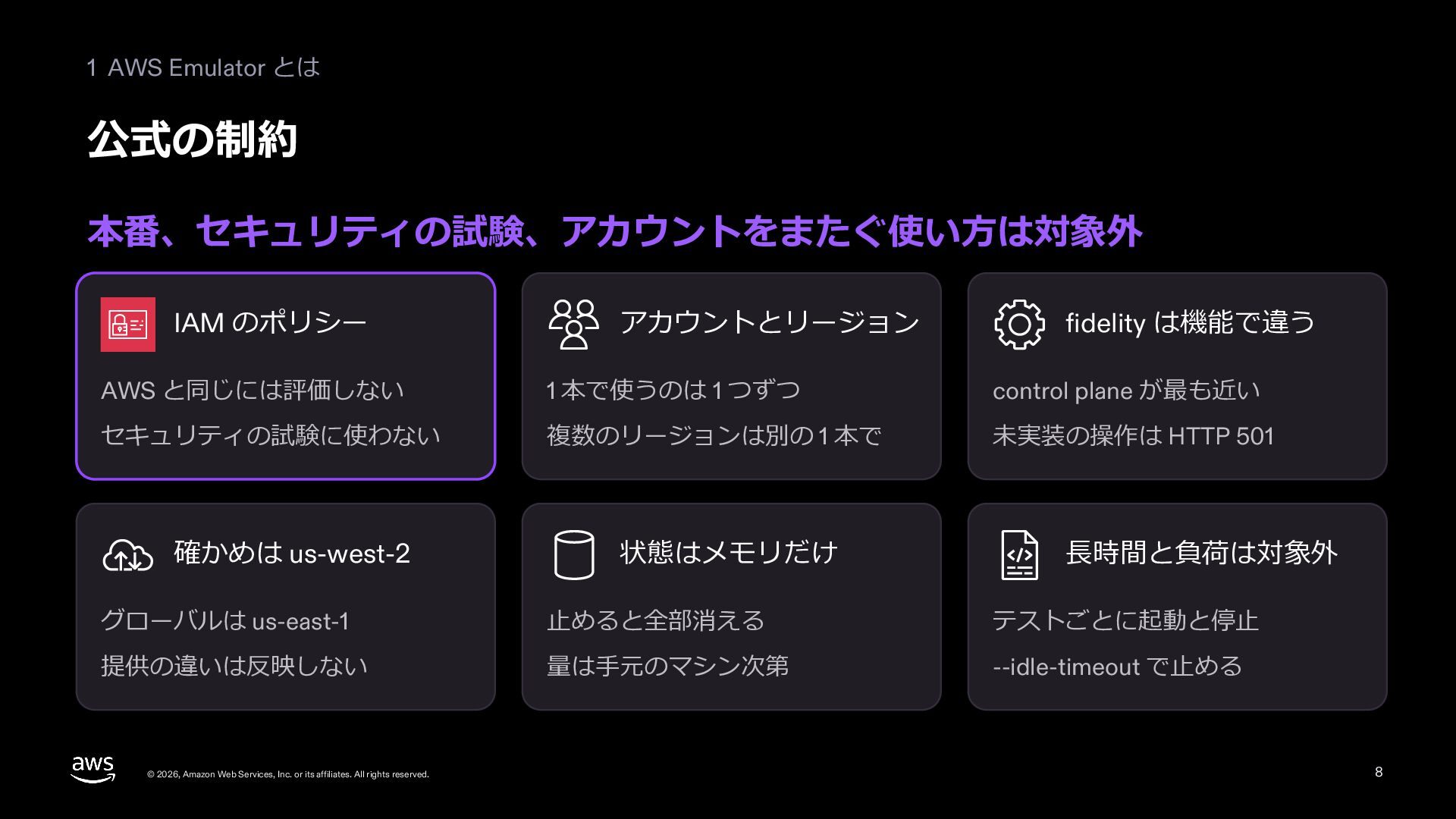
  8. 1 AWS Emulator とは 公式の制約 本番、セキュリティの試験、アカウントをまたぐ使い⽅は対象外 IAM のポリシー アカウントとリージョン fidelity

    は機能で違う AWS と同じには評価しない 1 本で使うのは 1 つずつ control plane が最も近い セキュリティの試験に使わない 複数のリージョンは別の 1 本で 未実装の操作は HTTP 501 確かめは us-west-2 状態はメモリだけ ⻑時間と負荷は対象外 グローバルは us-east-1 ⽌めると全部消える テストごとに起動と停⽌ 提供の違いは反映しない 量は⼿元のマシン次第 --idle-timeout で⽌める © 2026, Amazon Web Services, Inc. or its affiliates. All rights reserved. 8
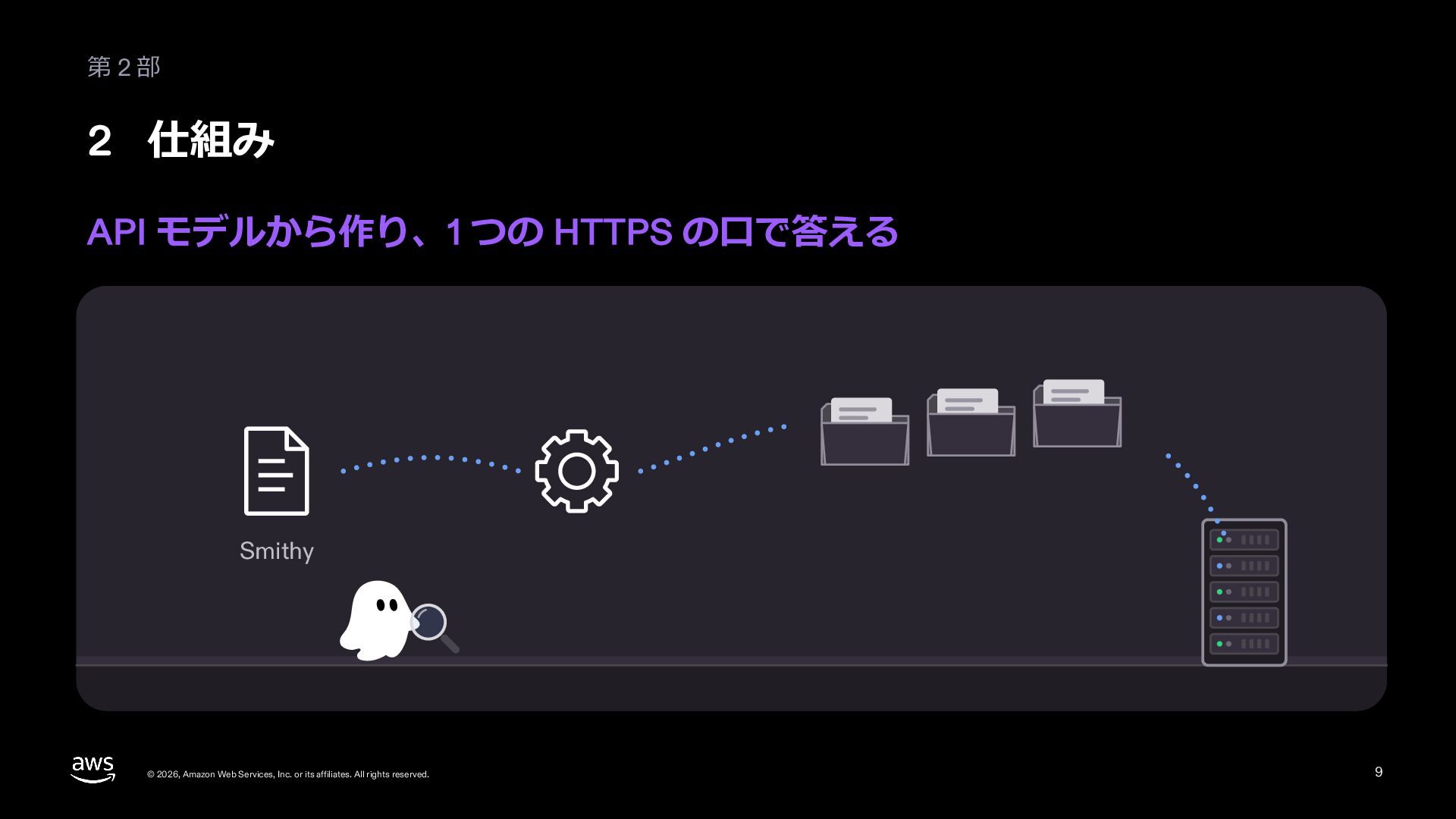
  9. 第2部 2 仕組み API モデルから作り、1 つの HTTPS の⼝で答える Smithy ©

    2026, Amazon Web Services, Inc. or its affiliates. All rights reserved. 9
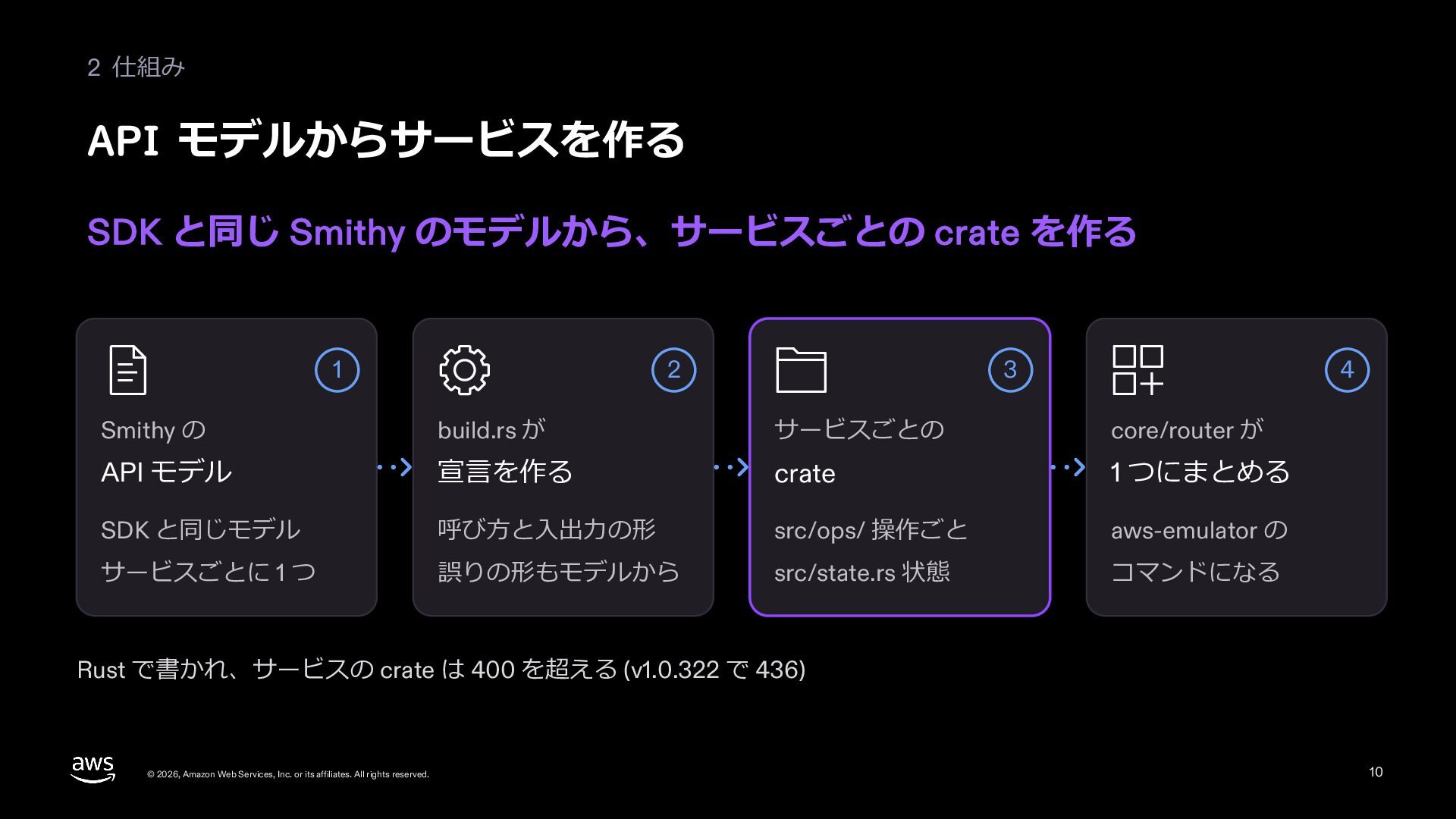
  10. 2 仕組み API モデルからサービスを作る SDK と同じ Smithy のモデルから、サービスごとの crate を作る

    1 2 3 4 Smithy の build.rs が サービスごとの core/router が API モデル 宣⾔を作る crate 1 つにまとめる SDK と同じモデル 呼び⽅と⼊出⼒の形 src/ops/ 操作ごと aws-emulator の サービスごとに 1 つ 誤りの形もモデルから src/state.rs 状態 コマンドになる Rust で書かれ、サービスの crate は 400 を超える (v1.0.322 で 436) © 2026, Amazon Web Services, Inc. or its affiliates. All rights reserved. 10
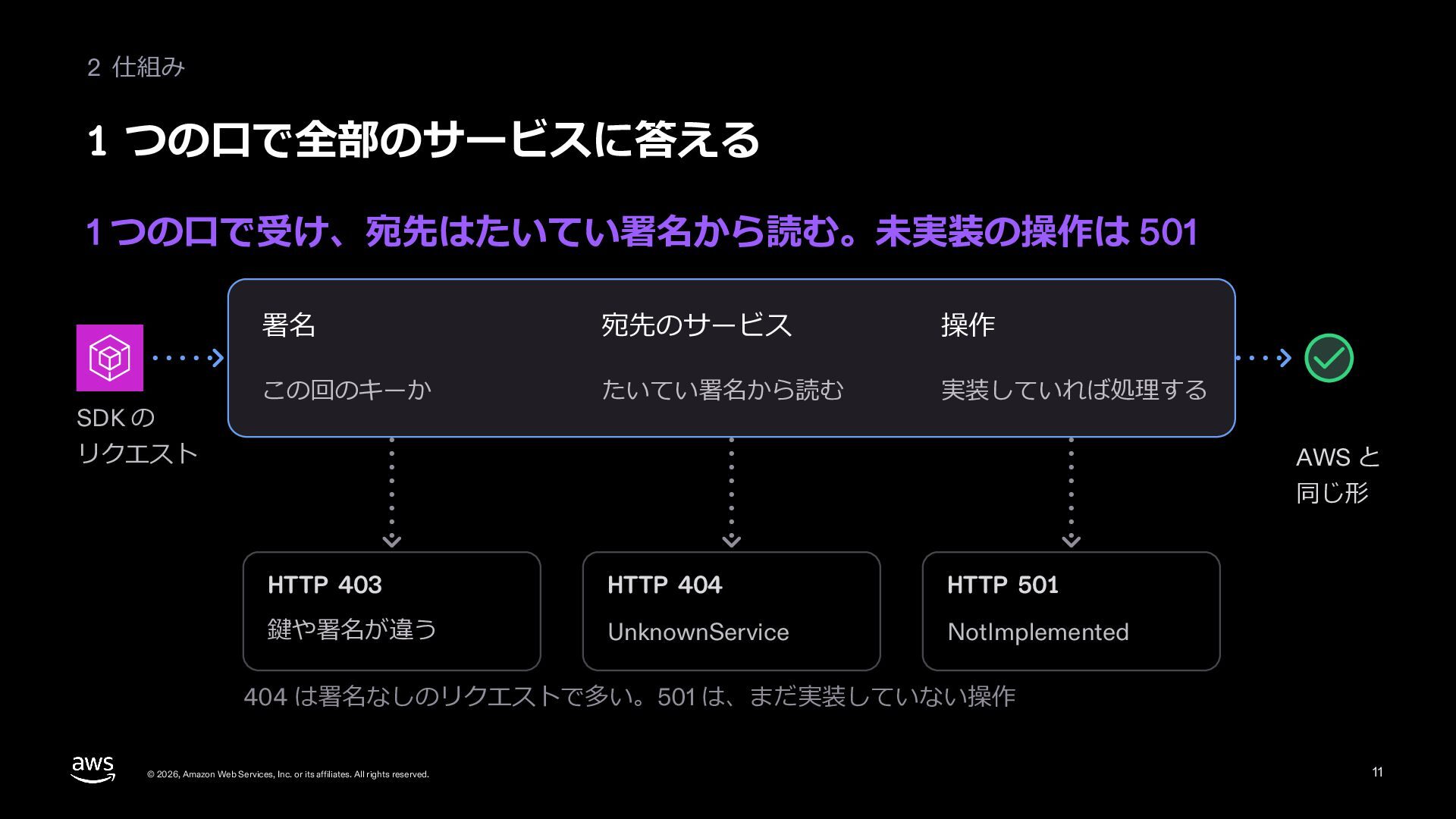
  11. 2 仕組み 1 つの⼝で全部のサービスに答える 1 つの⼝で受け、宛先はたいてい署名から読む。未実装の操作は 501 SDK の 署名

    宛先のサービス 操作 この回のキーか たいてい署名から読む 実装していれば処理する リクエスト AWS と 同じ形 HTTP 403 HTTP 404 HTTP 501 鍵や署名が違う UnknownService NotImplemented 404 は署名なしのリクエストで多い。501 は、まだ実装していない操作 © 2026, Amazon Web Services, Inc. or its affiliates. All rights reserved. 11
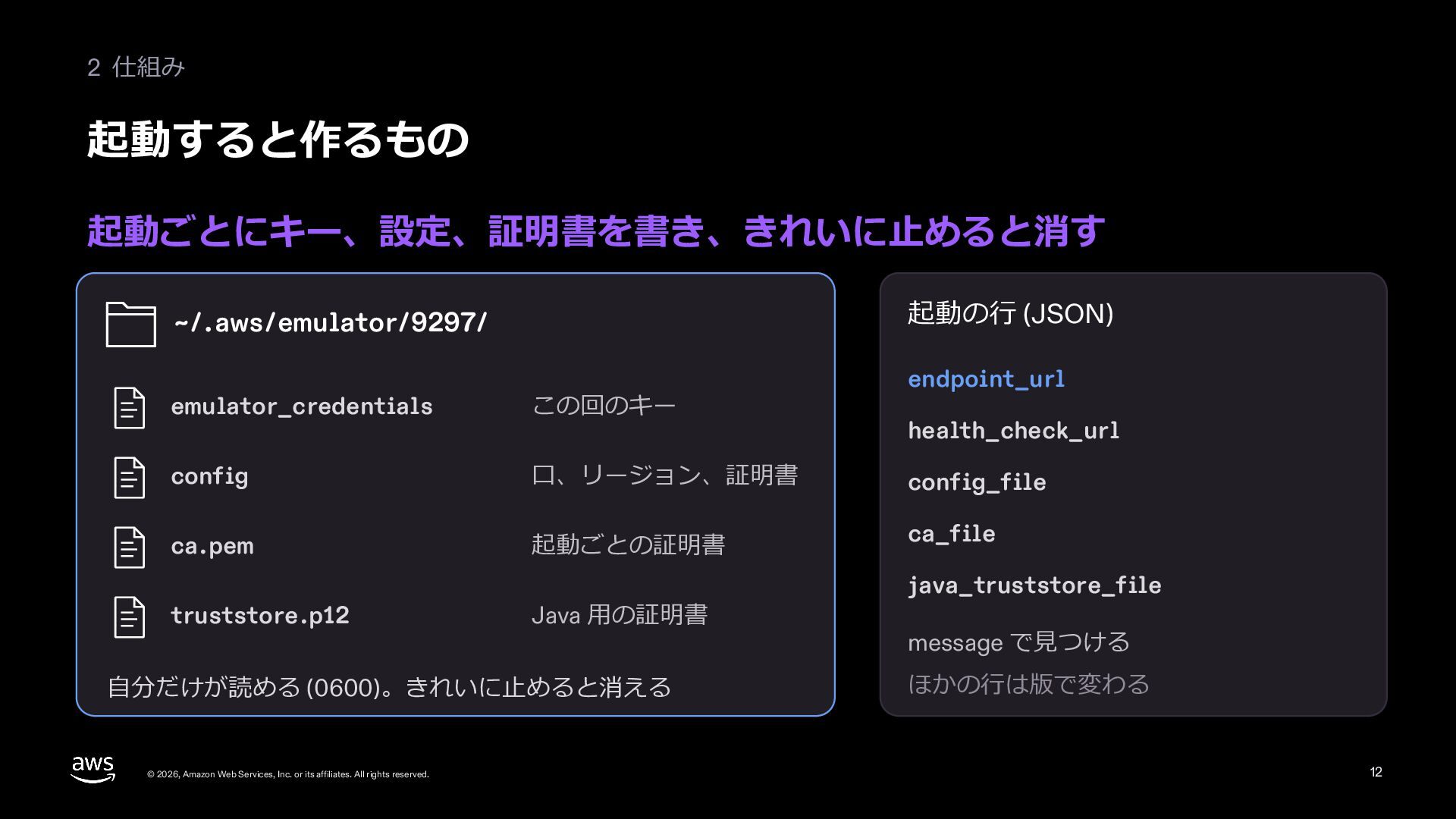
  12. 2 仕組み 起動すると作るもの 起動ごとにキー、設定、証明書を書き、きれいに⽌めると消す 起動の⾏ (JSON) ~/.aws/emulator/9297/ endpoint_url emulator_credentials この回のキー

    config ⼝、リージョン、証明書 config_file ca.pem 起動ごとの証明書 ca_file truststore.p12 Java ⽤の証明書 ⾃分だけが読める (0600)。きれいに⽌めると消える © 2026, Amazon Web Services, Inc. or its affiliates. All rights reserved. health_check_url java_truststore_file message で⾒つける ほかの⾏は版で変わる 12
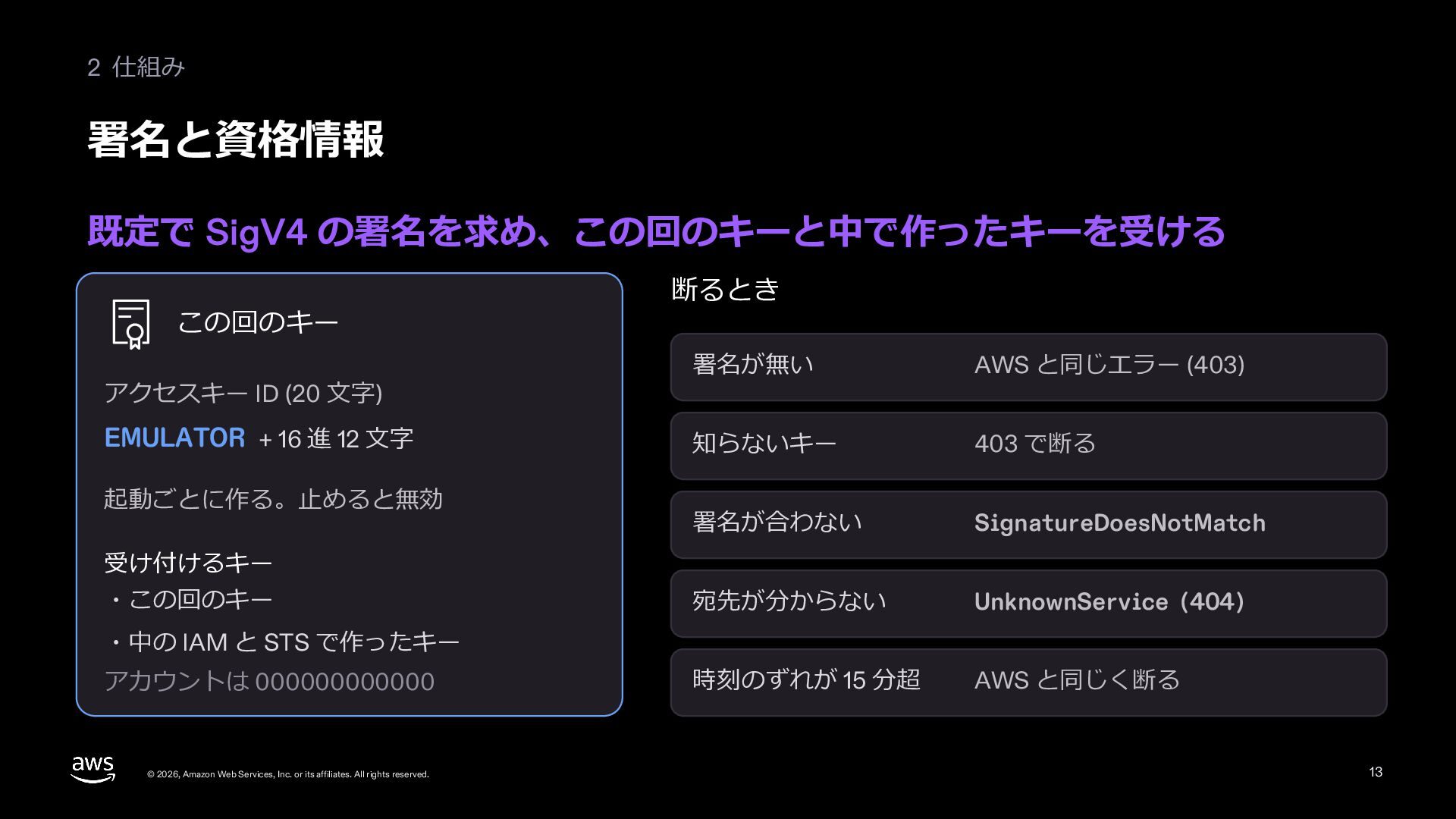
  13. 2 仕組み 署名と資格情報 既定で SigV4 の署名を求め、この回のキーと中で作ったキーを受ける この回のキー アクセスキー ID (20

    ⽂字) EMULATOR + 16 進 12 ⽂字 起動ごとに作る。⽌めると無効 断るとき 署名が無い AWS と同じエラー (403) 知らないキー 403 で断る 署名が合わない SignatureDoesNotMatch 宛先が分からない UnknownService (404) 時刻のずれが 15 分超 AWS と同じく断る 受け付けるキー ・この回のキー ・中の IAM と STS で作ったキー アカウントは 000000000000 © 2026, Amazon Web Services, Inc. or its affiliates. All rights reserved. 13
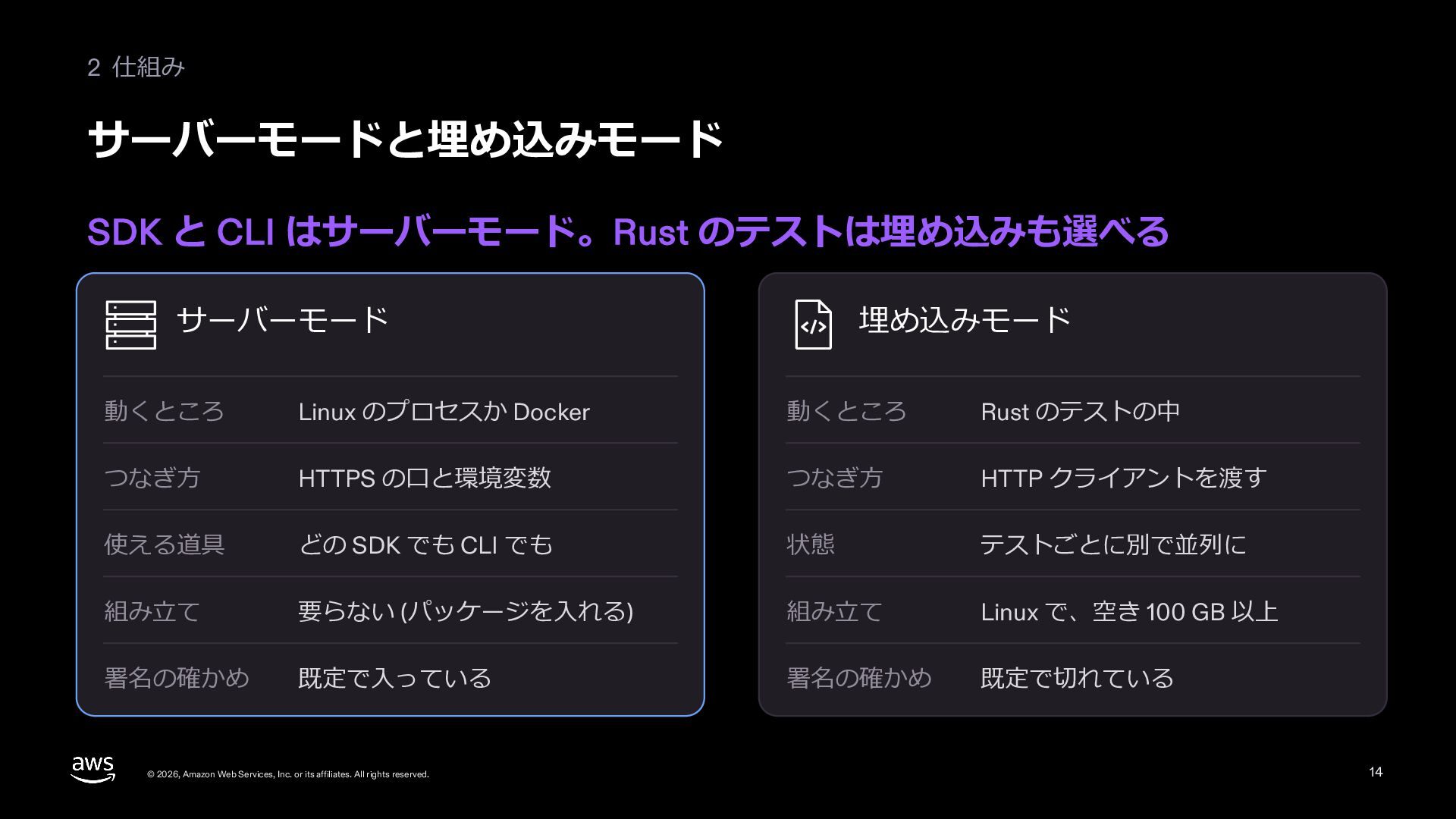
  14. 2 仕組み サーバーモードと埋め込みモード SDK と CLI はサーバーモード。Rust のテストは埋め込みも選べる サーバーモード 埋め込みモード

    動くところ Linux のプロセスか Docker 動くところ Rust のテストの中 つなぎ⽅ HTTPS の⼝と環境変数 つなぎ⽅ HTTP クライアントを渡す 使える道具 どの SDK でも CLI でも 状態 テストごとに別で並列に 組み⽴て 要らない (パッケージを⼊れる) 組み⽴て Linux で、空き 100 GB 以上 署名の確かめ 既定で⼊っている 署名の確かめ 既定で切れている © 2026, Amazon Web Services, Inc. or its affiliates. All rights reserved. 14
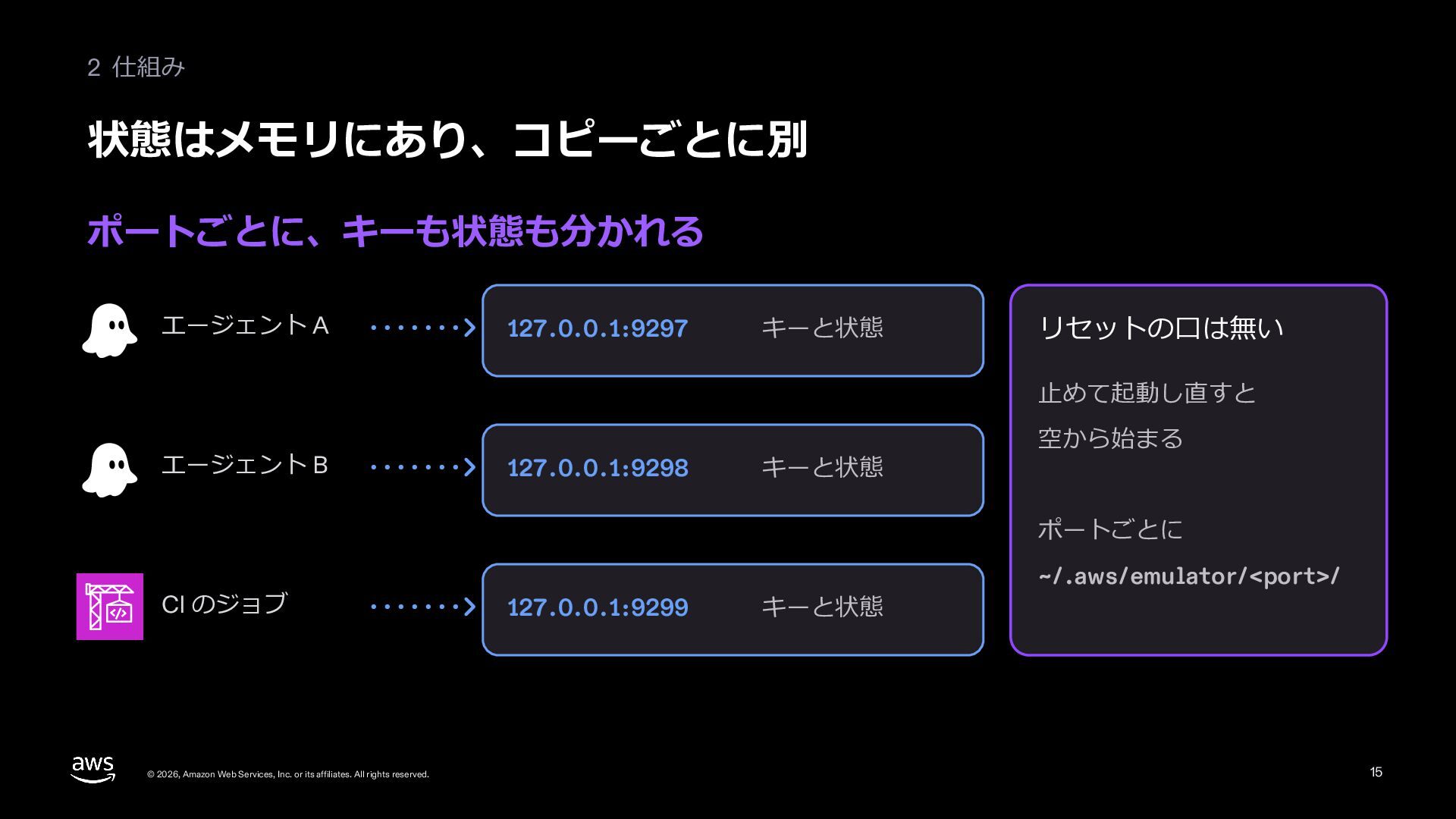
  15. 2 仕組み 状態はメモリにあり、コピーごとに別 ポートごとに、キーも状態も分かれる エージェント A 127.0.0.1:9297 キーと状態 リセットの⼝は無い ⽌めて起動し直すと

    エージェント B 127.0.0.1:9298 キーと状態 空から始まる ポートごとに CI のジョブ © 2026, Amazon Web Services, Inc. or its affiliates. All rights reserved. 127.0.0.1:9299 キーと状態 ~/.aws/emulator/<port>/ 15
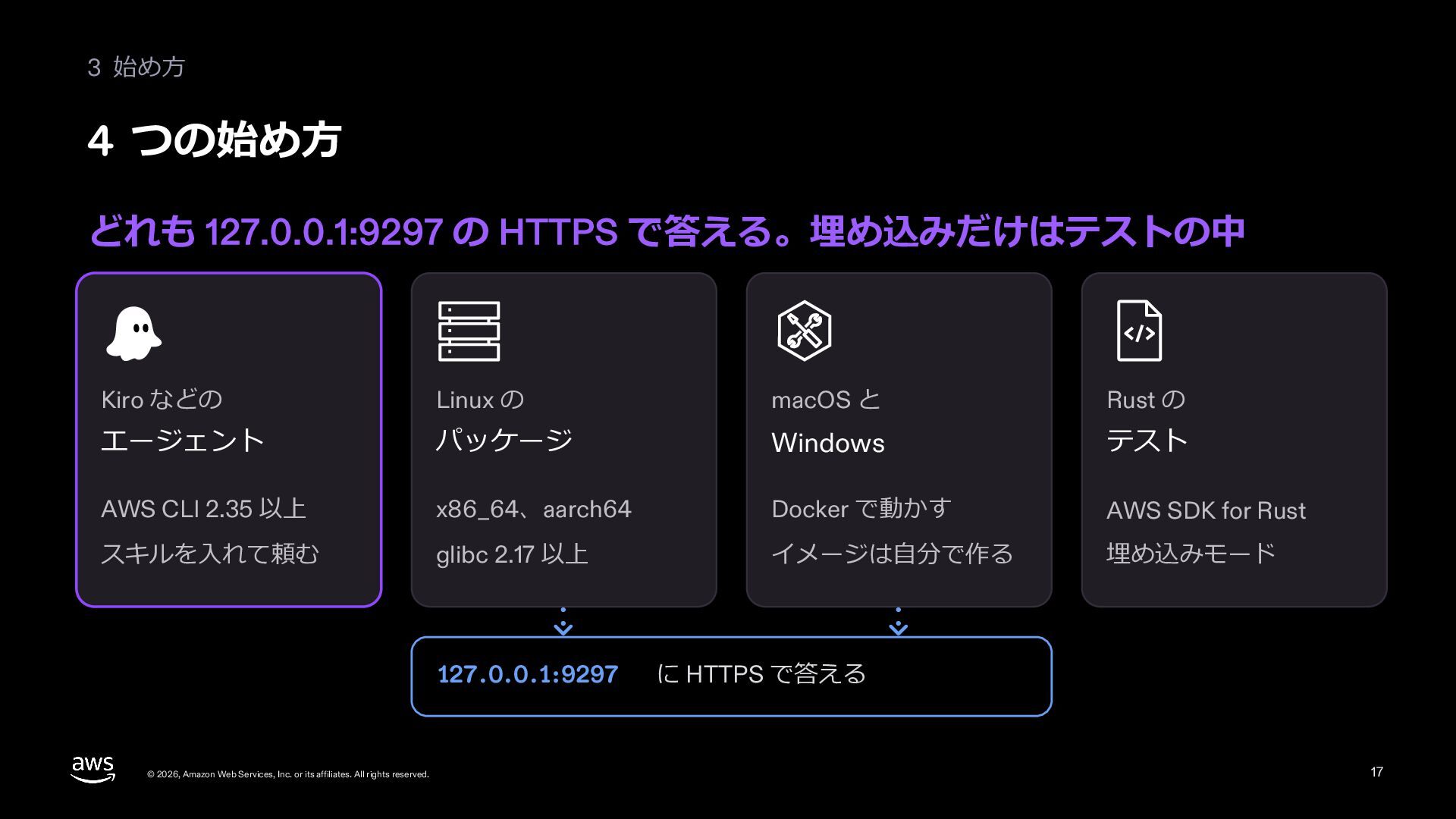
  16. 3 始め⽅ 4 つの始め⽅ どれも 127.0.0.1:9297 の HTTPS で答える。埋め込みだけはテストの中 Kiro

    などの Linux の macOS と Rust の エージェント パッケージ Windows テスト AWS CLI 2.35 以上 x86_64、aarch64 Docker で動かす AWS SDK for Rust スキルを⼊れて頼む glibc 2.17 以上 イメージは⾃分で作る 埋め込みモード 127.0.0.1:9297 © 2026, Amazon Web Services, Inc. or its affiliates. All rights reserved. に HTTPS で答える 17
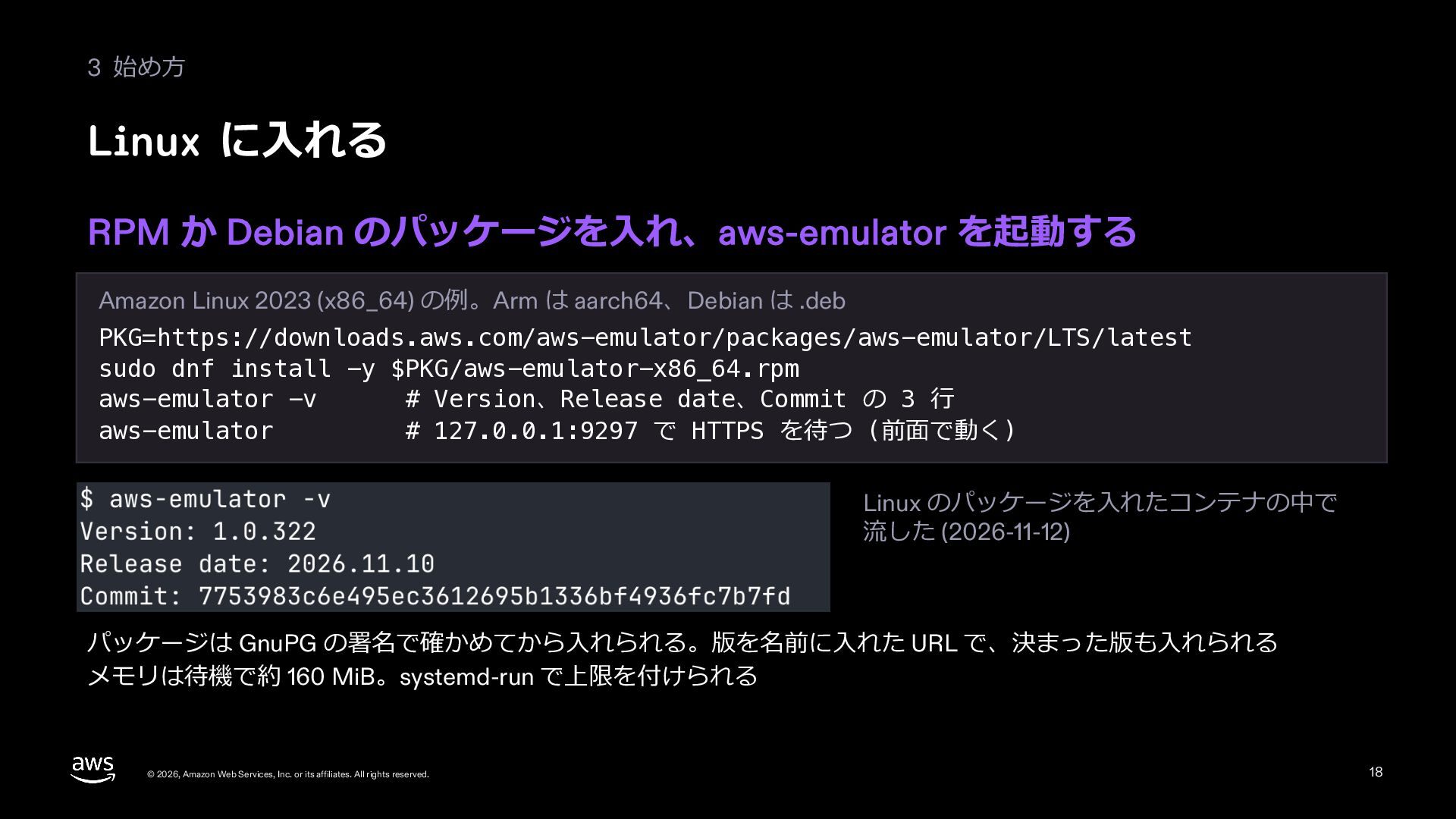
  17. 3 始め⽅ Linux に⼊れる RPM か Debian のパッケージを⼊れ、aws-emulator を起動する Amazon

    Linux 2023 (x86_64) の例。Arm は aarch64、Debian は .deb PKG=https://downloads.aws.com/aws-emulator/packages/aws-emulator/LTS/latest sudo dnf install -y $PKG/aws-emulator-x86_64.rpm aws-emulator -v # Version、Release date、Commit の 3 ⾏ aws-emulator # 127.0.0.1:9297 で HTTPS を待つ (前⾯で動く) Linux のパッケージを⼊れたコンテナの中で 流した (2026-11-12) パッケージは GnuPG の署名で確かめてから⼊れられる。版を名前に⼊れた URL で、決まった版も⼊れられる メモリは待機で約 160 MiB。systemd-run で上限を付けられる © 2026, Amazon Web Services, Inc. or its affiliates. All rights reserved. 18
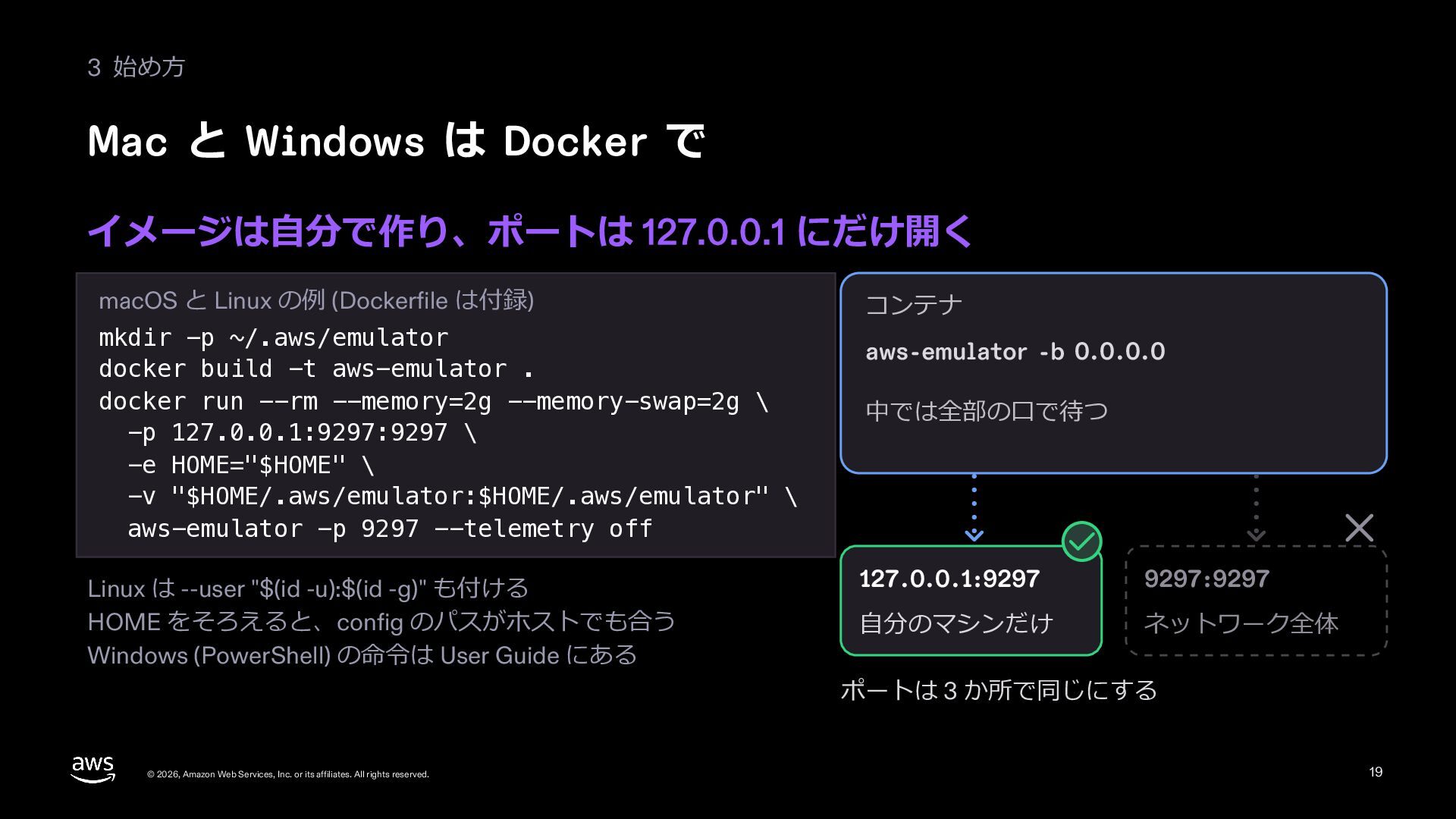
  18. 3 始め⽅ Mac と Windows は Docker で イメージは⾃分で作り、ポートは 127.0.0.1

    にだけ開く macOS と Linux の例 (Dockerfile は付録) mkdir -p ~/.aws/emulator docker build -t aws-emulator . docker run --rm --memory=2g --memory-swap=2g \ -p 127.0.0.1:9297:9297 \ -e HOME="$HOME" \ -v "$HOME/.aws/emulator:$HOME/.aws/emulator" \ aws-emulator -p 9297 --telemetry off Linux は --user "$(id -u):$(id -g)" も付ける HOME をそろえると、config のパスがホストでも合う Windows (PowerShell) の命令は User Guide にある © 2026, Amazon Web Services, Inc. or its affiliates. All rights reserved. コンテナ aws-emulator -b 0.0.0.0 中では全部の⼝で待つ 127.0.0.1:9297 9297:9297 ⾃分のマシンだけ ネットワーク全体 ポートは 3 か所で同じにする 19
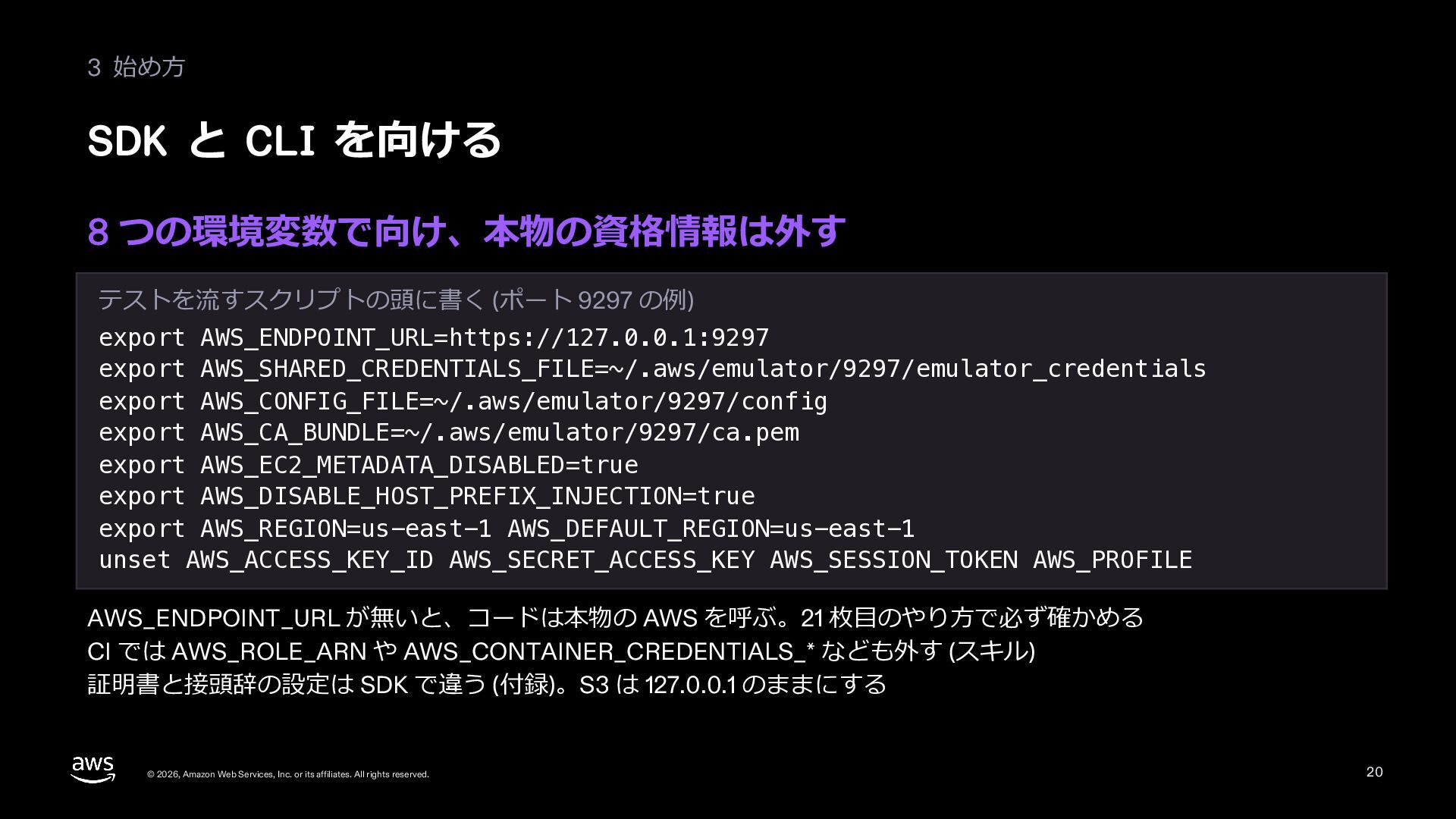
  19. 3 始め⽅ SDK と CLI を向ける 8 つの環境変数で向け、本物の資格情報は外す テストを流すスクリプトの頭に書く (ポート

    9297 の例) export AWS_ENDPOINT_URL=https://127.0.0.1:9297 export AWS_SHARED_CREDENTIALS_FILE=~/.aws/emulator/9297/emulator_credentials export AWS_CONFIG_FILE=~/.aws/emulator/9297/config export AWS_CA_BUNDLE=~/.aws/emulator/9297/ca.pem export AWS_EC2_METADATA_DISABLED=true export AWS_DISABLE_HOST_PREFIX_INJECTION=true export AWS_REGION=us-east-1 AWS_DEFAULT_REGION=us-east-1 unset AWS_ACCESS_KEY_ID AWS_SECRET_ACCESS_KEY AWS_SESSION_TOKEN AWS_PROFILE AWS_ENDPOINT_URL が無いと、コードは本物の AWS を呼ぶ。21 枚⽬のやり⽅で必ず確かめる CI では AWS_ROLE_ARN や AWS_CONTAINER_CREDENTIALS_* なども外す (スキル) 証明書と接頭辞の設定は SDK で違う (付録)。S3 は 127.0.0.1 のままにする © 2026, Amazon Web Services, Inc. or its affiliates. All rights reserved. 20
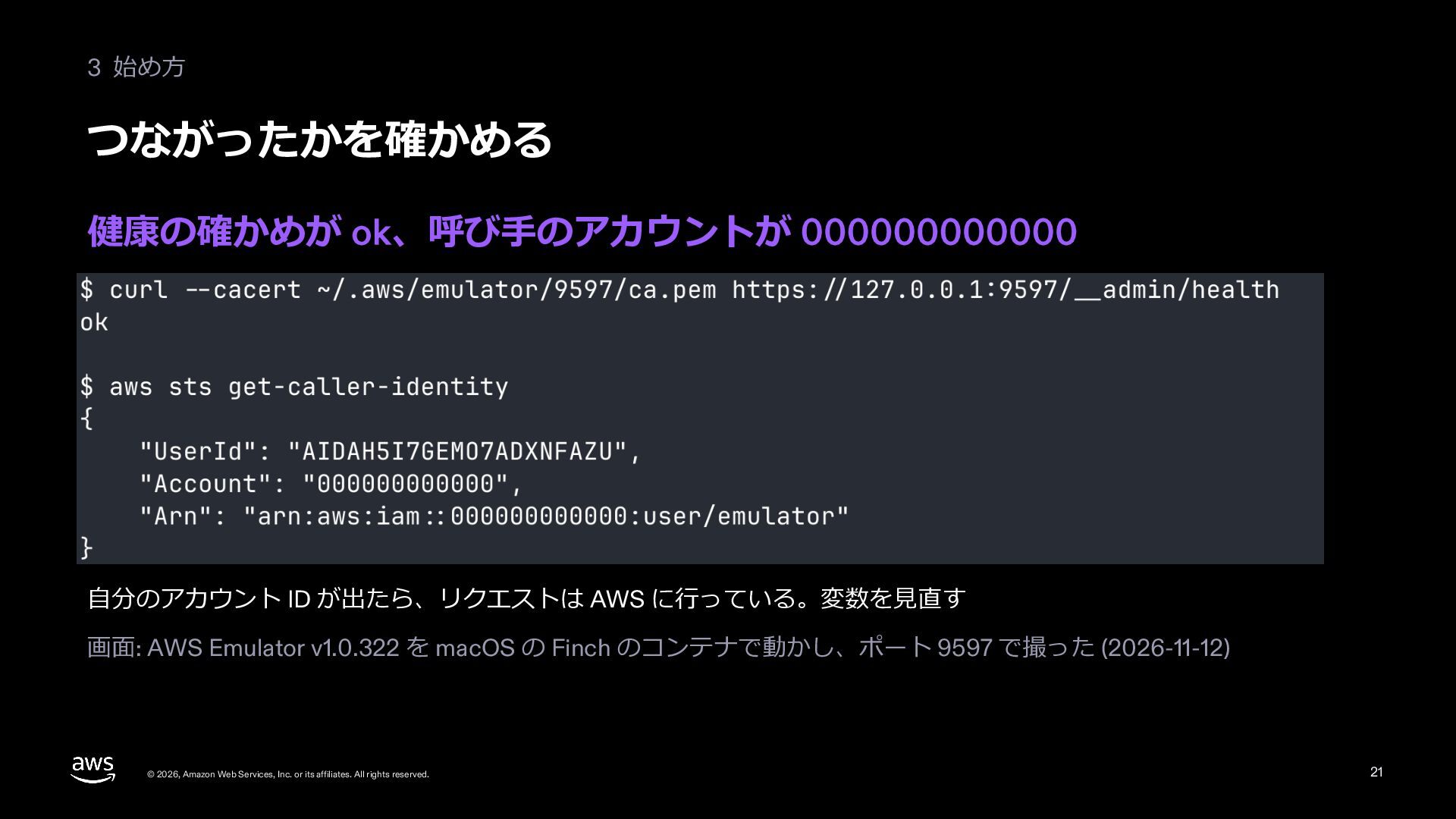
  20. 3 始め⽅ つながったかを確かめる 健康の確かめが ok、呼び⼿のアカウントが 000000000000 ⾃分のアカウント ID が出たら、リクエストは AWS

    に⾏っている。変数を⾒直す 画⾯: AWS Emulator v1.0.322 を macOS の Finch のコンテナで動かし、ポート 9597 で撮った (2026-11-12) © 2026, Amazon Web Services, Inc. or its affiliates. All rights reserved. 21
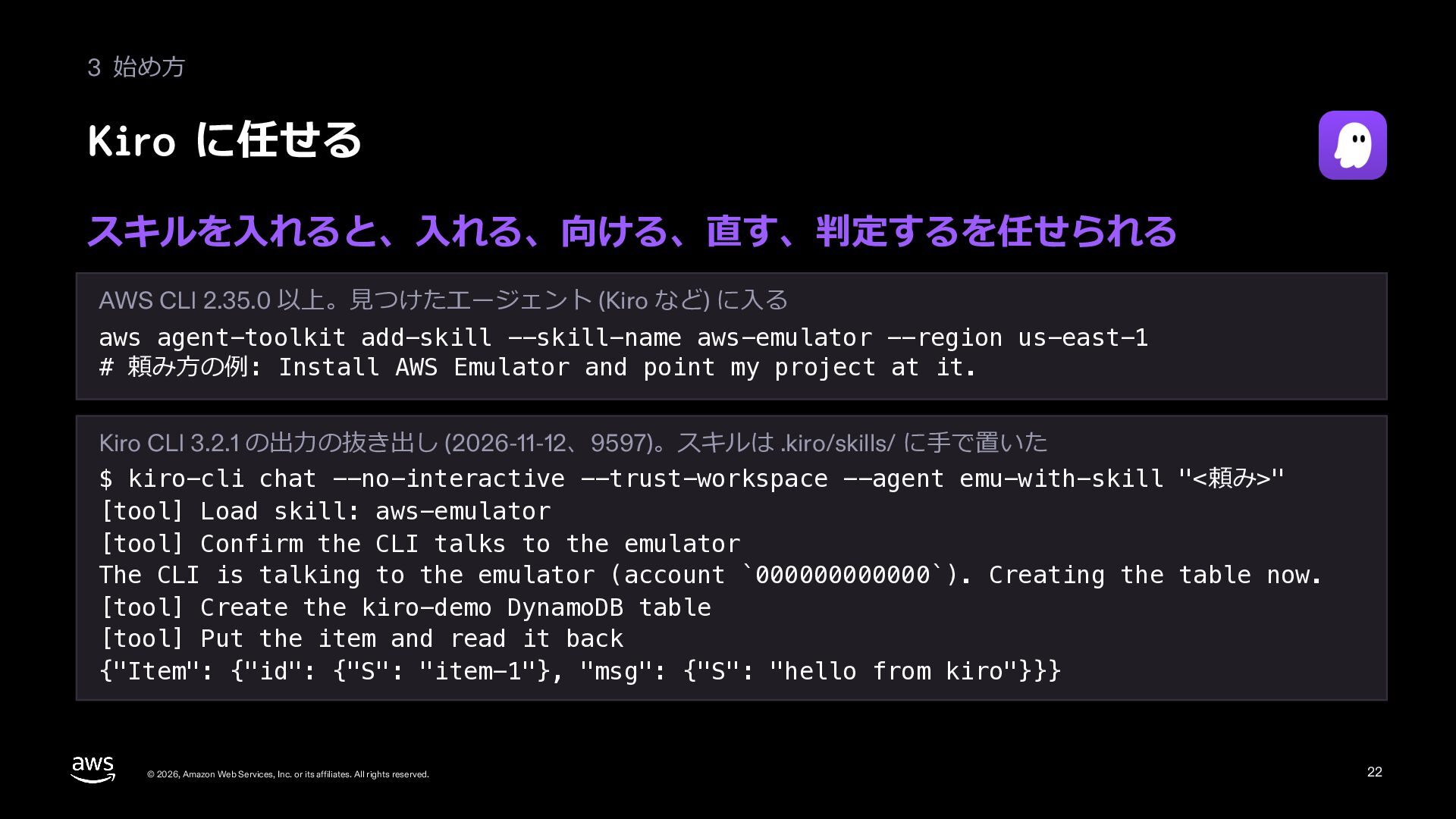
  21. 3 始め⽅ Kiro に任せる スキルを⼊れると、⼊れる、向ける、直す、判定するを任せられる AWS CLI 2.35.0 以上。⾒つけたエージェント (Kiro

    など) に⼊る aws agent-toolkit add-skill --skill-name aws-emulator --region us-east-1 # 頼み⽅の例: Install AWS Emulator and point my project at it. Kiro CLI 3.2.1 の出⼒の抜き出し (2026-11-12、9597)。スキルは .kiro/skills/ に⼿で置いた $ kiro-cli chat --no-interactive --trust-workspace --agent emu-with-skill "<頼み>" [tool] Load skill: aws-emulator [tool] Confirm the CLI talks to the emulator The CLI is talking to the emulator (account `000000000000`). Creating the table now. [tool] Create the kiro-demo DynamoDB table [tool] Put the item and read it back {"Item": {"id": {"S": "item-1"}, "msg": {"S": "hello from kiro"}}} © 2026, Amazon Web Services, Inc. or its affiliates. All rights reserved. 22
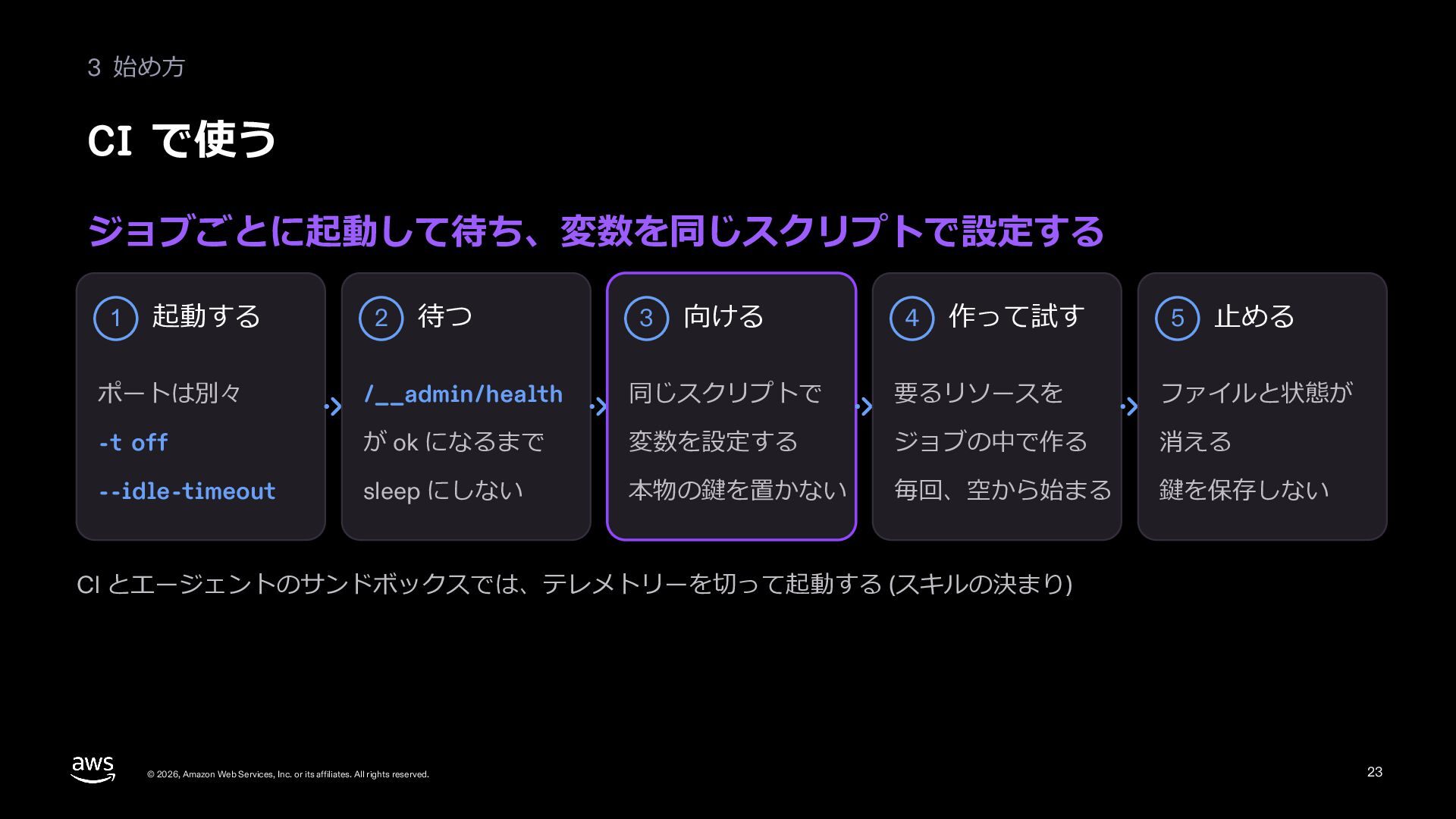
  22. 3 始め⽅ CI で使う ジョブごとに起動して待ち、変数を同じスクリプトで設定する 1 起動する 2 待つ 3

    向ける 4 作って試す 5 ⽌める ポートは別々 /__admin/health 同じスクリプトで 要るリソースを ファイルと状態が -t off が ok になるまで 変数を設定する ジョブの中で作る 消える --idle-timeout sleep にしない 本物の鍵を置かない 毎回、空から始まる 鍵を保存しない CI とエージェントのサンドボックスでは、テレメトリーを切って起動する (スキルの決まり) © 2026, Amazon Web Services, Inc. or its affiliates. All rights reserved. 23
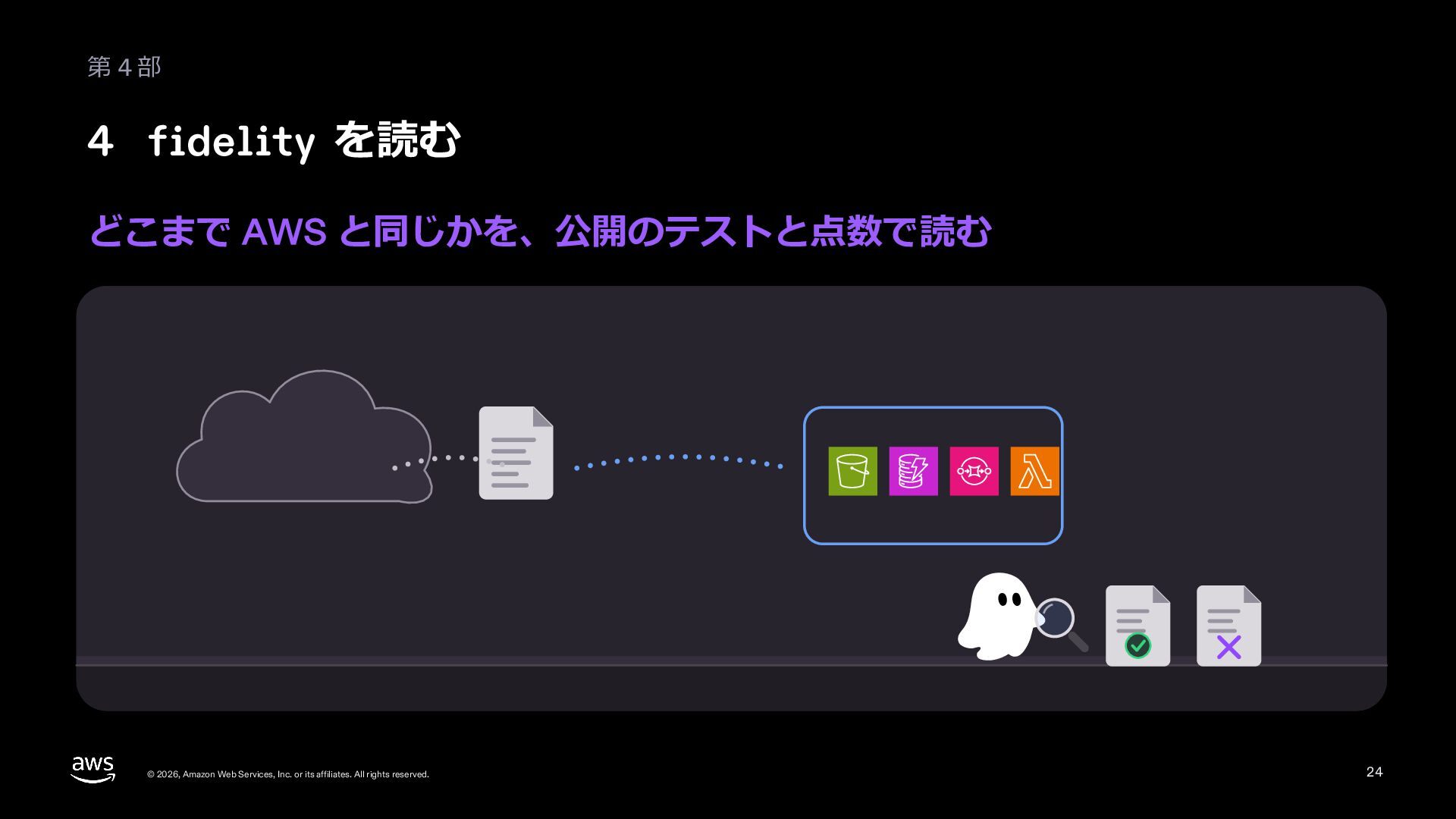
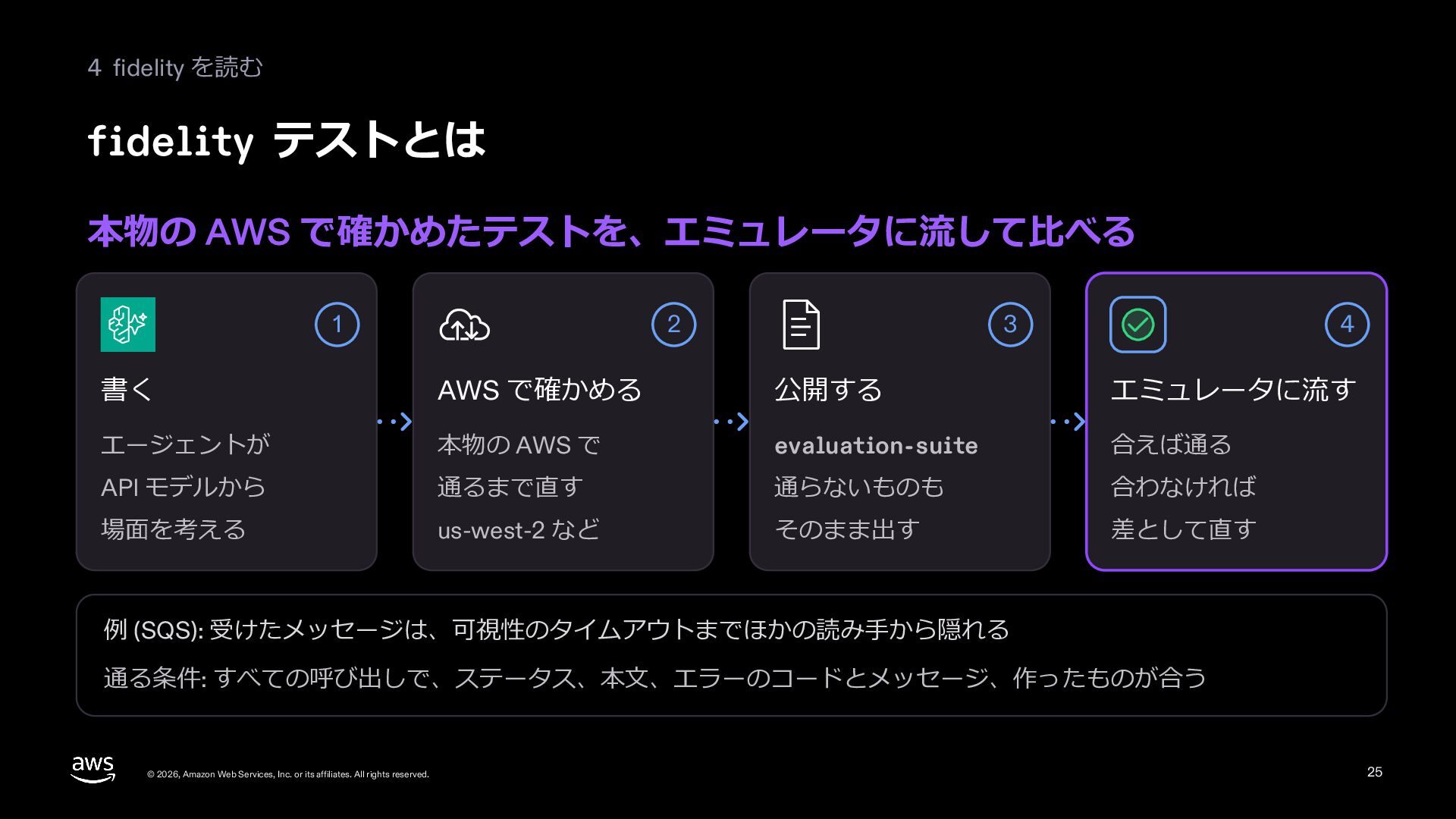
  23. 4 fidelity を読む fidelity テストとは 本物の AWS で確かめたテストを、エミュレータに流して⽐べる 1 2

    3 4 書く AWS で確かめる 公開する エミュレータに流す エージェントが 本物の AWS で evaluation-suite 合えば通る API モデルから 通るまで直す 通らないものも 合わなければ 場⾯を考える us-west-2 など そのまま出す 差として直す 例 (SQS): 受けたメッセージは、可視性のタイムアウトまでほかの読み⼿から隠れる 通る条件: すべての呼び出しで、ステータス、本⽂、エラーのコードとメッセージ、作ったものが合う © 2026, Amazon Web Services, Inc. or its affiliates. All rights reserved. 25
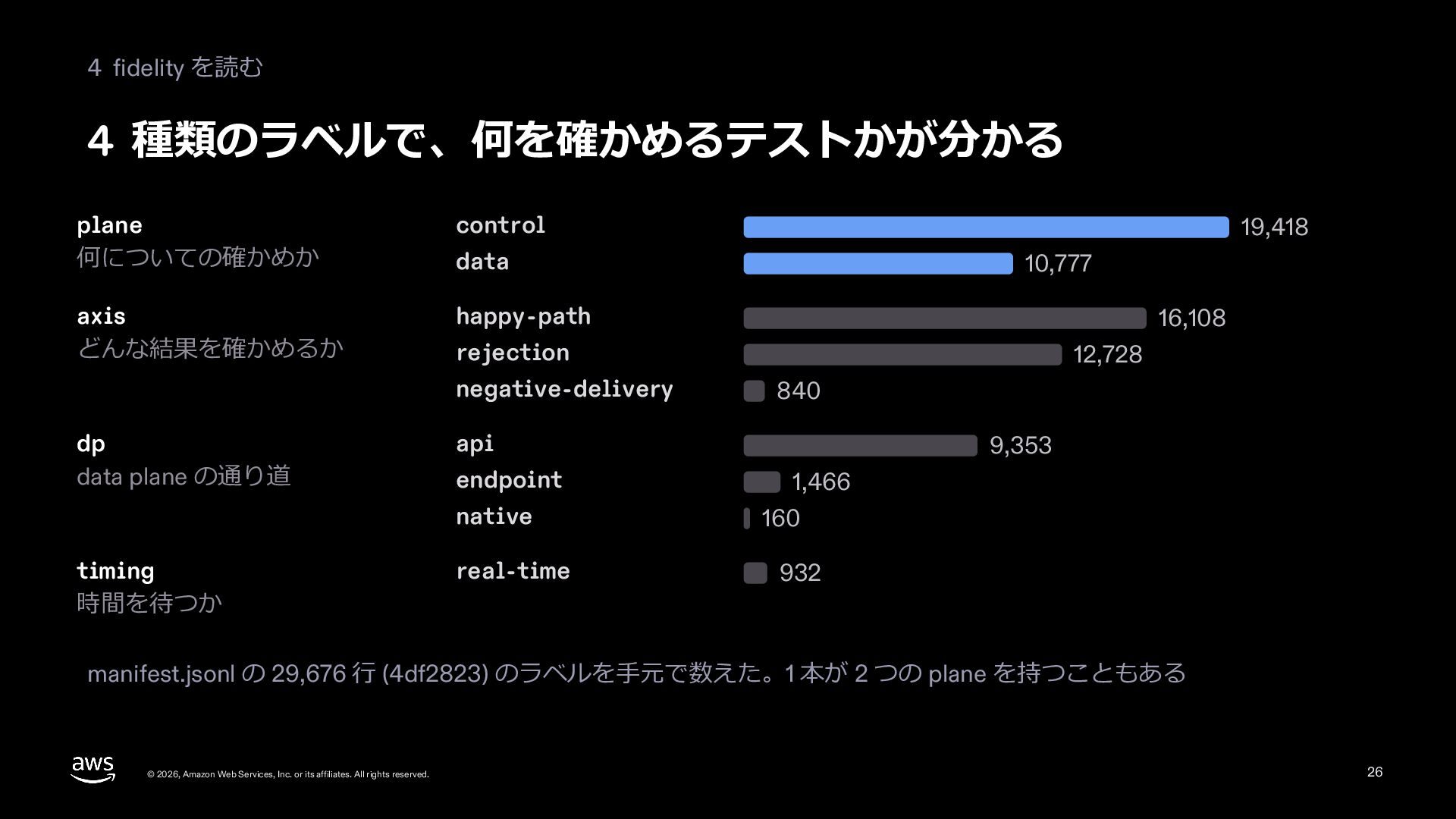
  24. 4 fidelity を読む 4 種類のラベルで、何を確かめるテストかが分かる plane 何についての確かめか control axis どんな結果を確かめるか

    happy-path data 16,108 12,728 840 api endpoint native timing 時間を待つか 10,777 rejection negative-delivery dp data plane の通り道 19,418 real-time 9,353 1,466 160 932 manifest.jsonl の 29,676 ⾏ (4df2823) のラベルを⼿元で数えた。1 本が 2 つの plane を持つこともある © 2026, Amazon Web Services, Inc. or its affiliates. All rights reserved. 26
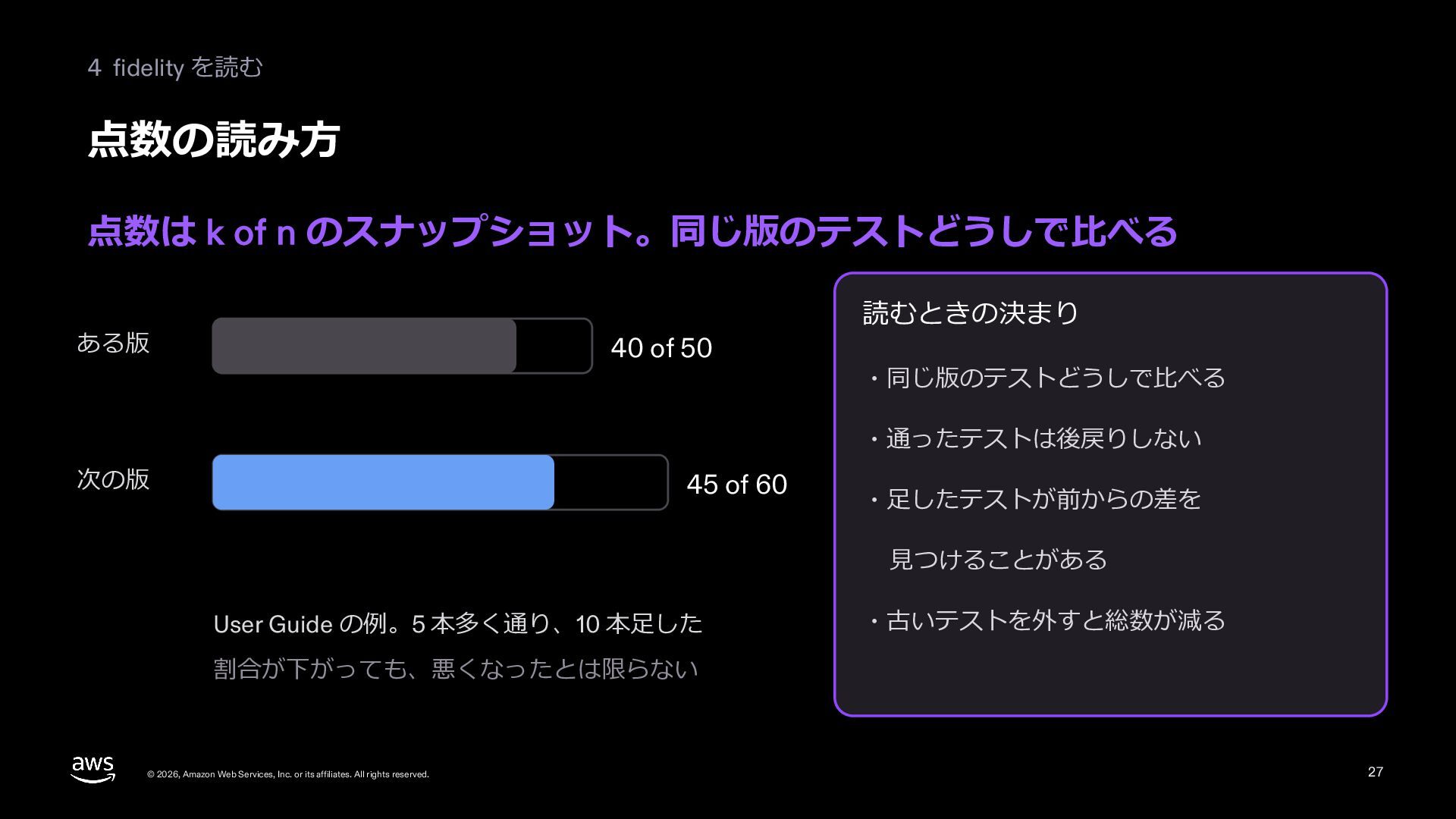
  25. 4 fidelity を読む 点数の読み⽅ 点数は k of n のスナップショット。同じ版のテストどうしで⽐べる ある版

    40 of 50 読むときの決まり ・同じ版のテストどうしで⽐べる ・通ったテストは後戻りしない 次の版 45 of 60 ・⾜したテストが前からの差を ⾒つけることがある User Guide の例。5 本多く通り、10 本⾜した ・古いテストを外すと総数が減る 割合が下がっても、悪くなったとは限らない © 2026, Amazon Web Services, Inc. or its affiliates. All rights reserved. 27
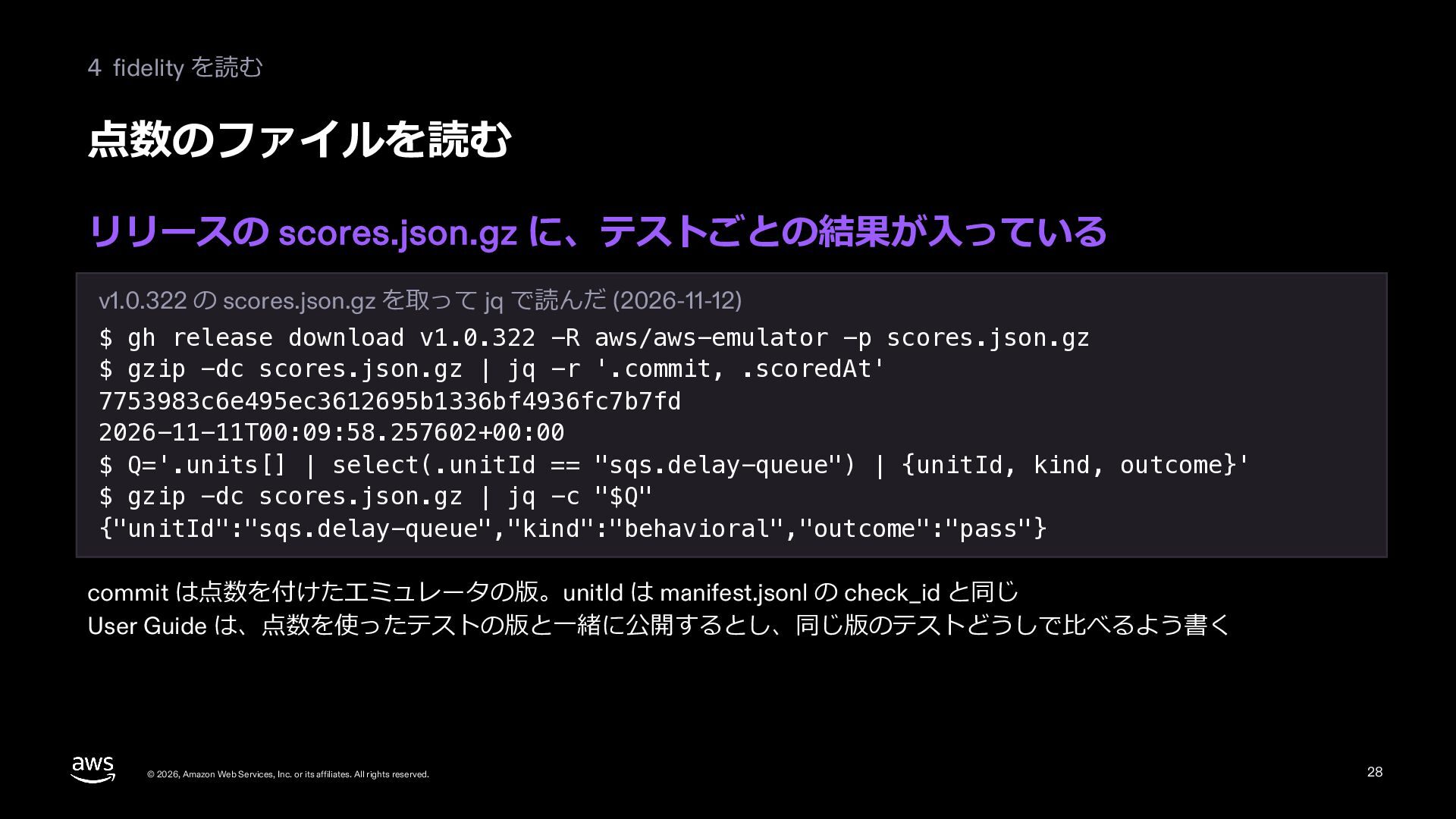
  26. 4 fidelity を読む 点数のファイルを読む リリースの scores.json.gz に、テストごとの結果が⼊っている v1.0.322 の scores.json.gz

    を取って jq で読んだ (2026-11-12) $ gh release download v1.0.322 -R aws/aws-emulator -p scores.json.gz $ gzip -dc scores.json.gz | jq -r '.commit, .scoredAt' 7753983c6e495ec3612695b1336bf4936fc7b7fd 2026-11-11T00:09:58.257602+00:00 $ Q='.units[] | select(.unitId == "sqs.delay-queue") | {unitId, kind, outcome}' $ gzip -dc scores.json.gz | jq -c "$Q" {"unitId":"sqs.delay-queue","kind":"behavioral","outcome":"pass"} commit は点数を付けたエミュレータの版。unitId は manifest.jsonl の check_id と同じ User Guide は、点数を使ったテストの版と⼀緒に公開するとし、同じ版のテストどうしで⽐べるよう書く © 2026, Amazon Web Services, Inc. or its affiliates. All rights reserved. 28
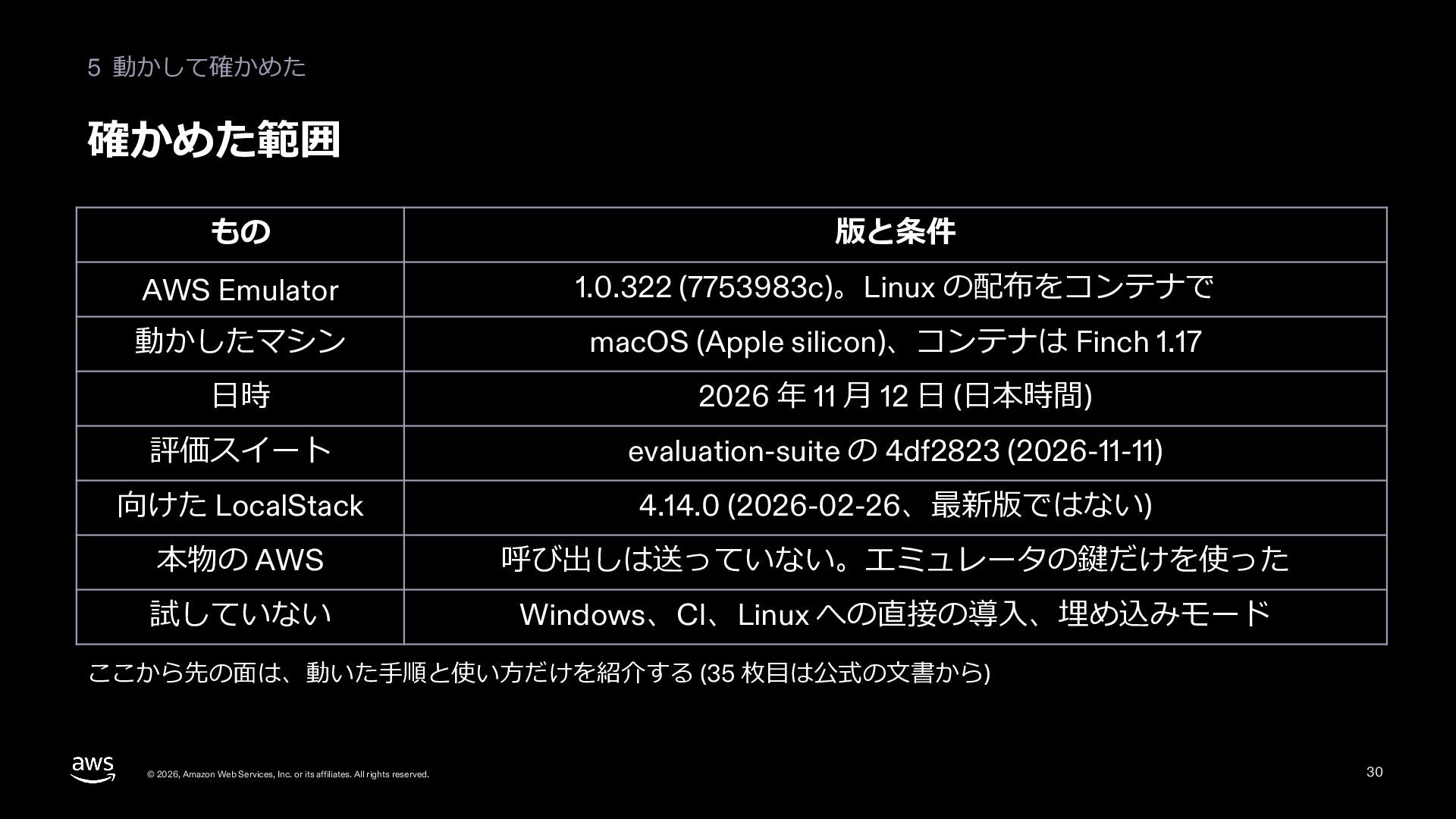
  27. 5 動かして確かめた 確かめた範囲 もの 版と条件 AWS Emulator 1.0.322 (7753983c)。Linux の配布をコンテナで

    動かしたマシン macOS (Apple silicon)、コンテナは Finch 1.17 ⽇時 2026 年 11 ⽉ 12 ⽇ (⽇本時間) 評価スイート evaluation-suite の 4df2823 (2026-11-11) 向けた LocalStack 4.14.0 (2026-02-26、最新版ではない) 本物の AWS 呼び出しは送っていない。エミュレータの鍵だけを使った 試していない Windows、CI、Linux への直接の導⼊、埋め込みモード ここから先の⾯は、動いた⼿順と使い⽅だけを紹介する (35 枚⽬は公式の⽂書から) © 2026, Amazon Web Services, Inc. or its affiliates. All rights reserved. 30
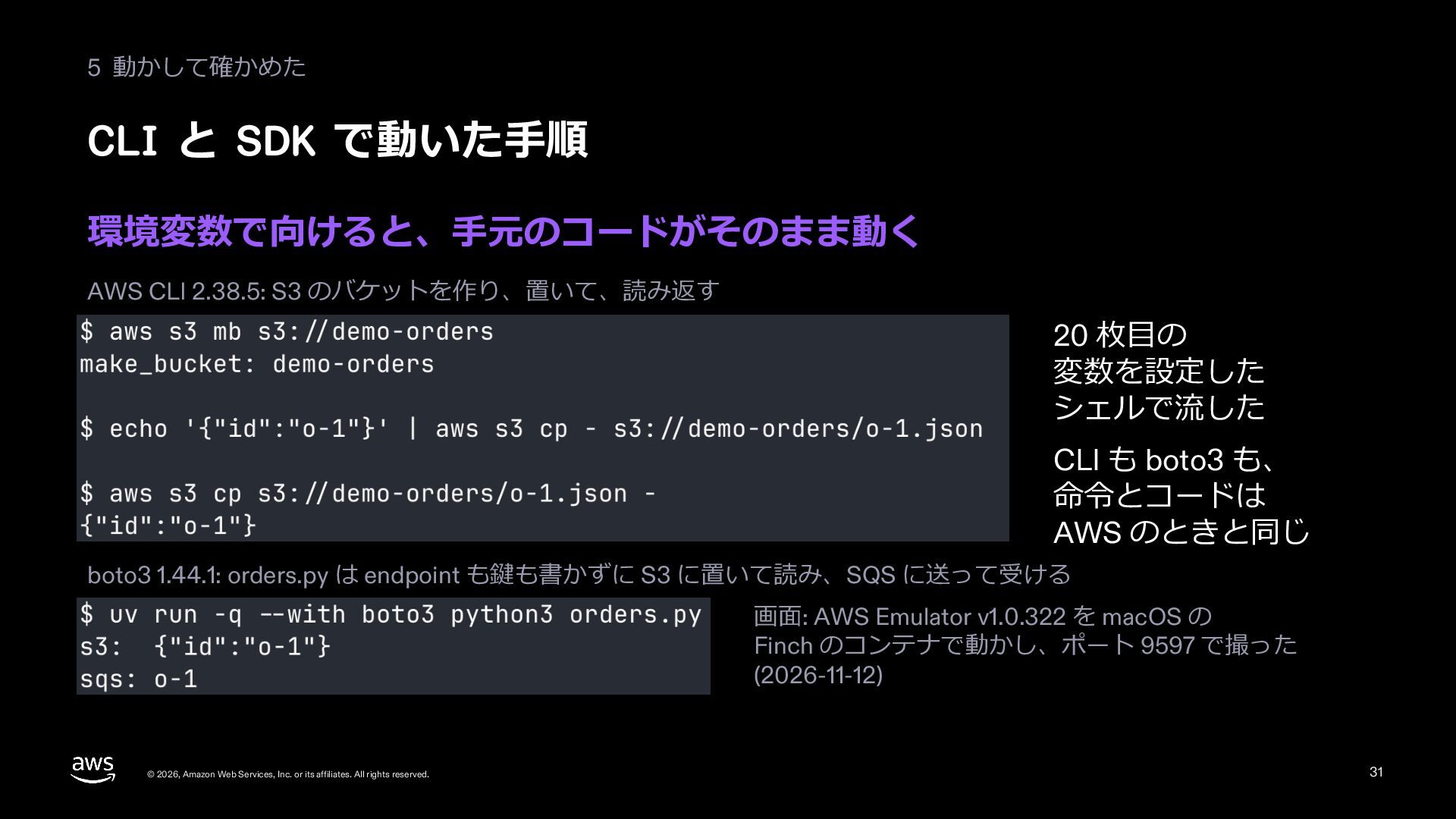
  28. 5 動かして確かめた CLI と SDK で動いた⼿順 環境変数で向けると、⼿元のコードがそのまま動く AWS CLI 2.38.5:

    S3 のバケットを作り、置いて、読み返す 20 枚⽬の 変数を設定した シェルで流した CLI も boto3 も、 命令とコードは AWS のときと同じ boto3 1.44.1: orders.py は endpoint も鍵も書かずに S3 に置いて読み、SQS に送って受ける 画⾯: AWS Emulator v1.0.322 を macOS の Finch のコンテナで動かし、ポート 9597 で撮った (2026-11-12) © 2026, Amazon Web Services, Inc. or its affiliates. All rights reserved. 31
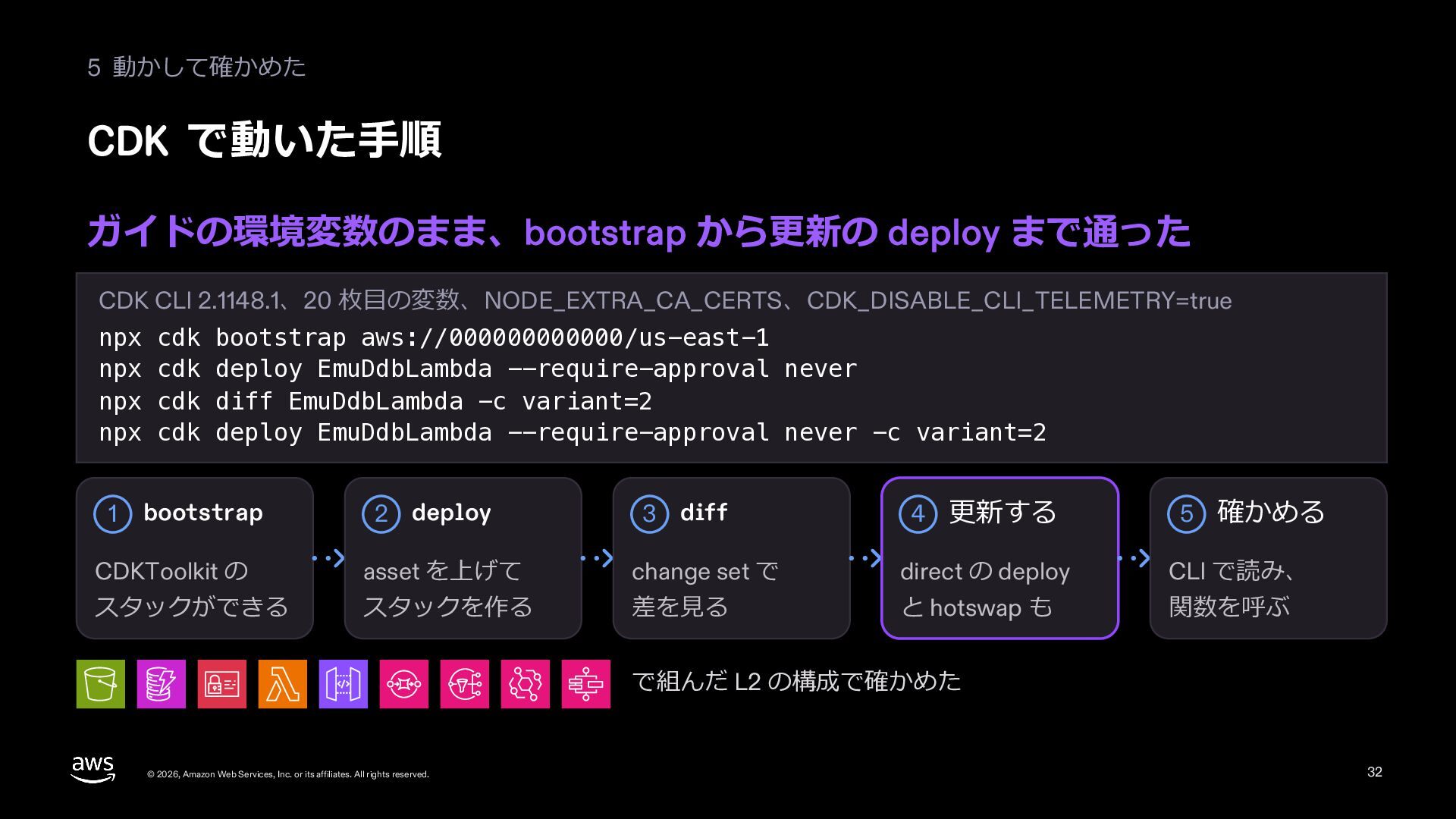
  29. 5 動かして確かめた CDK で動いた⼿順 ガイドの環境変数のまま、bootstrap から更新の deploy まで通った CDK CLI

    2.1148.1、20 枚⽬の変数、NODE_EXTRA_CA_CERTS、CDK_DISABLE_CLI_TELEMETRY=true npx cdk bootstrap aws://000000000000/us-east-1 npx cdk deploy EmuDdbLambda --require-approval never npx cdk diff EmuDdbLambda -c variant=2 npx cdk deploy EmuDdbLambda --require-approval never -c variant=2 2 deploy 3 diff 4 更新する 5 確かめる CDKToolkit の asset を上げて change set で direct の deploy CLI で読み、 スタックができる スタックを作る 差を⾒る と hotswap も 関数を呼ぶ 1 bootstrap で組んだ L2 の構成で確かめた © 2026, Amazon Web Services, Inc. or its affiliates. All rights reserved. 32
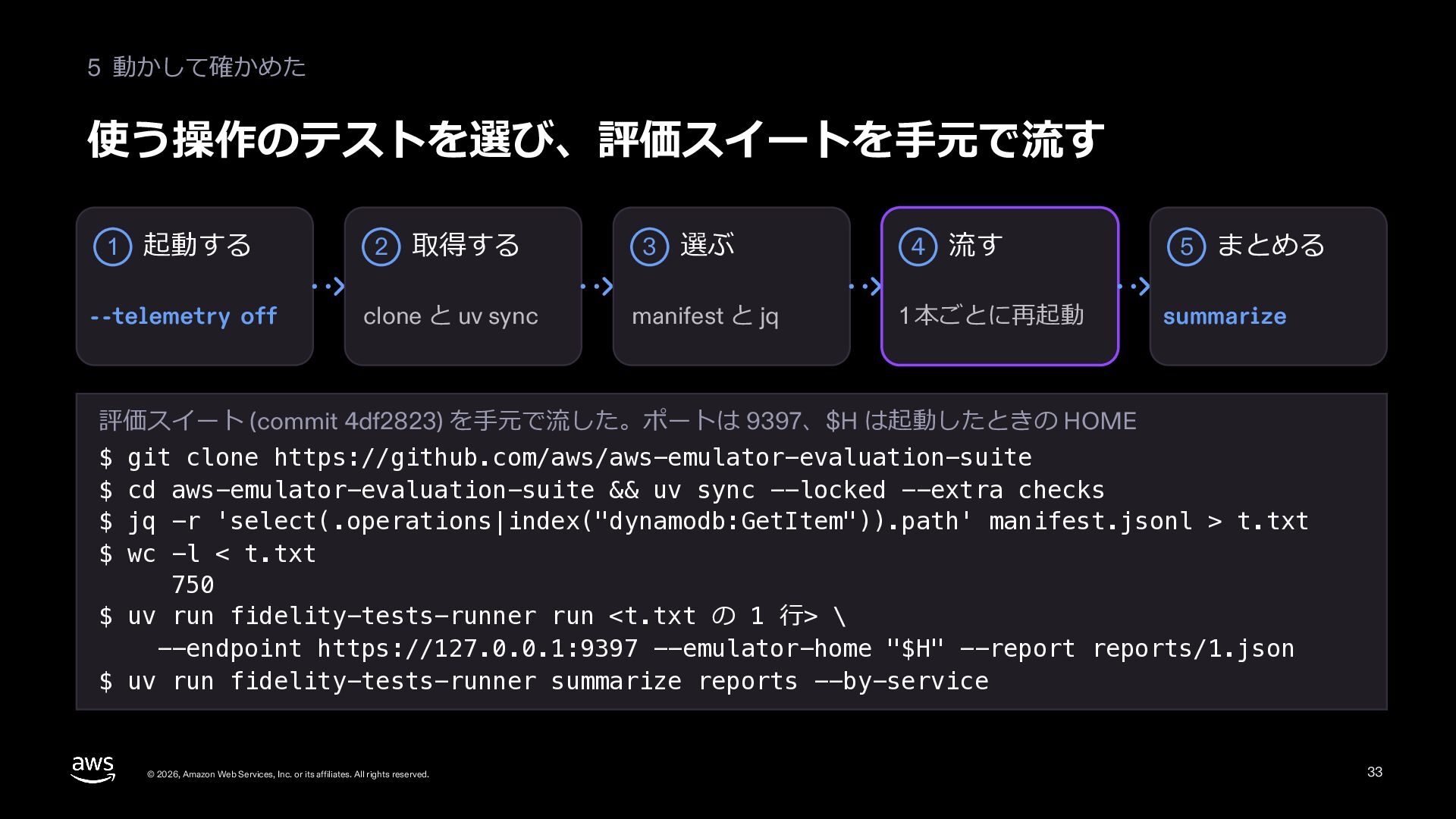
  30. 5 動かして確かめた 使う操作のテストを選び、評価スイートを⼿元で流す 起動する 2 取得する 3 選ぶ 4 流す

    --telemetry off clone と uv sync manifest と jq 1 本ごとに再起動 1 5 まとめる summarize 評価スイート (commit 4df2823) を⼿元で流した。ポートは 9397、$H は起動したときの HOME $ git clone https://github.com/aws/aws-emulator-evaluation-suite $ cd aws-emulator-evaluation-suite && uv sync --locked --extra checks $ jq -r 'select(.operations|index("dynamodb:GetItem")).path' manifest.jsonl > t.txt $ wc -l < t.txt 750 $ uv run fidelity-tests-runner run <t.txt の 1 ⾏> \ --endpoint https://127.0.0.1:9397 --emulator-home "$H" --report reports/1.json $ uv run fidelity-tests-runner summarize reports --by-service © 2026, Amazon Web Services, Inc. or its affiliates. All rights reserved. 33
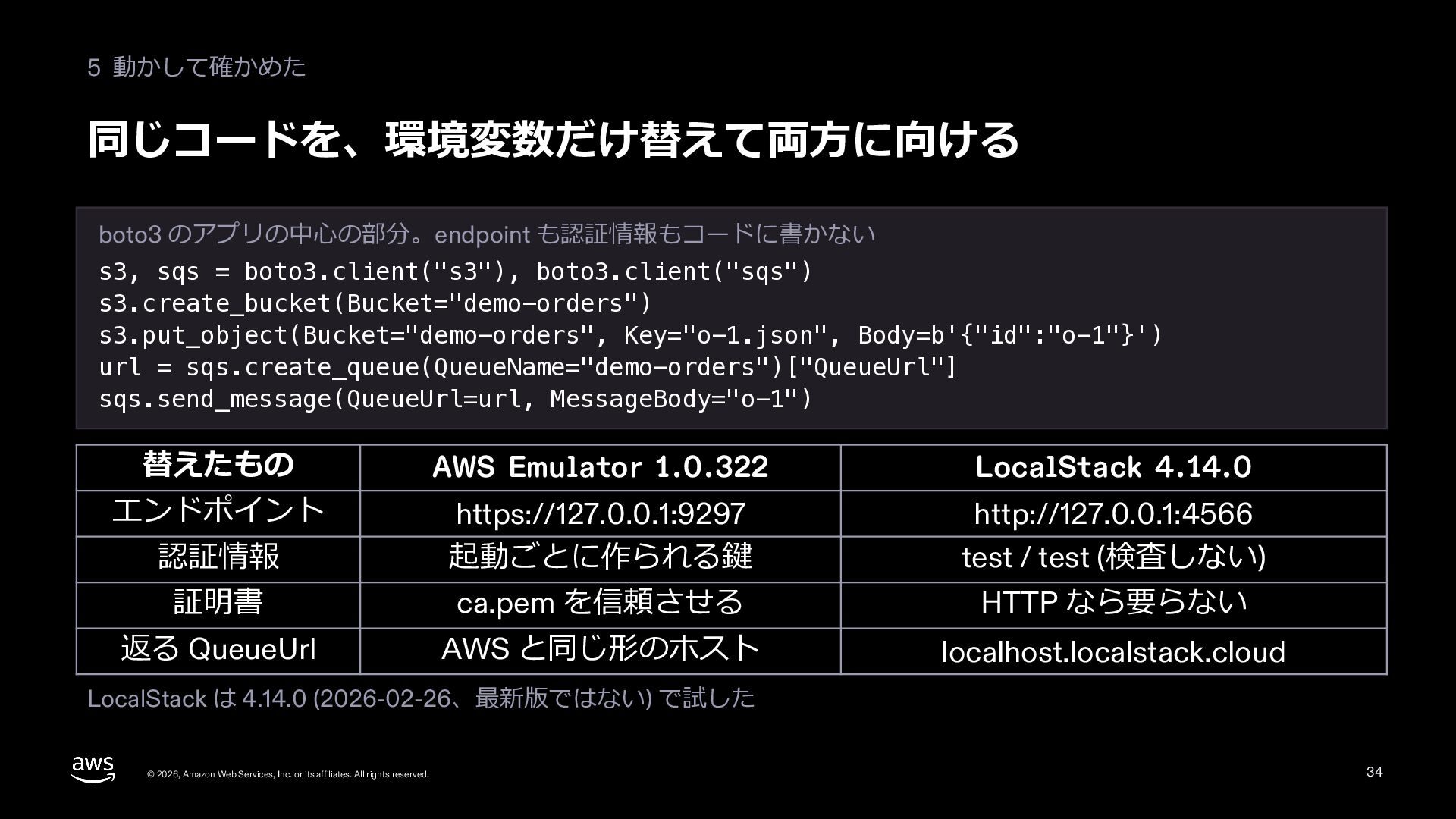
  31. 5 動かして確かめた 同じコードを、環境変数だけ替えて両⽅に向ける boto3 のアプリの中⼼の部分。endpoint も認証情報もコードに書かない s3, sqs = boto3.client("s3"),

    boto3.client("sqs") s3.create_bucket(Bucket="demo-orders") s3.put_object(Bucket="demo-orders", Key="o-1.json", Body=b'{"id":"o-1"}') url = sqs.create_queue(QueueName="demo-orders")["QueueUrl"] sqs.send_message(QueueUrl=url, MessageBody="o-1") 替えたもの AWS Emulator 1.0.322 LocalStack 4.14.0 エンドポイント 認証情報 https://127.0.0.1:9297 起動ごとに作られる鍵 http://127.0.0.1:4566 test / test (検査しない) 証明書 ca.pem を信頼させる HTTP なら要らない 返る QueueUrl AWS と同じ形のホスト localhost.localstack.cloud LocalStack は 4.14.0 (2026-02-26、最新版ではない) で試した © 2026, Amazon Web Services, Inc. or its affiliates. All rights reserved. 34
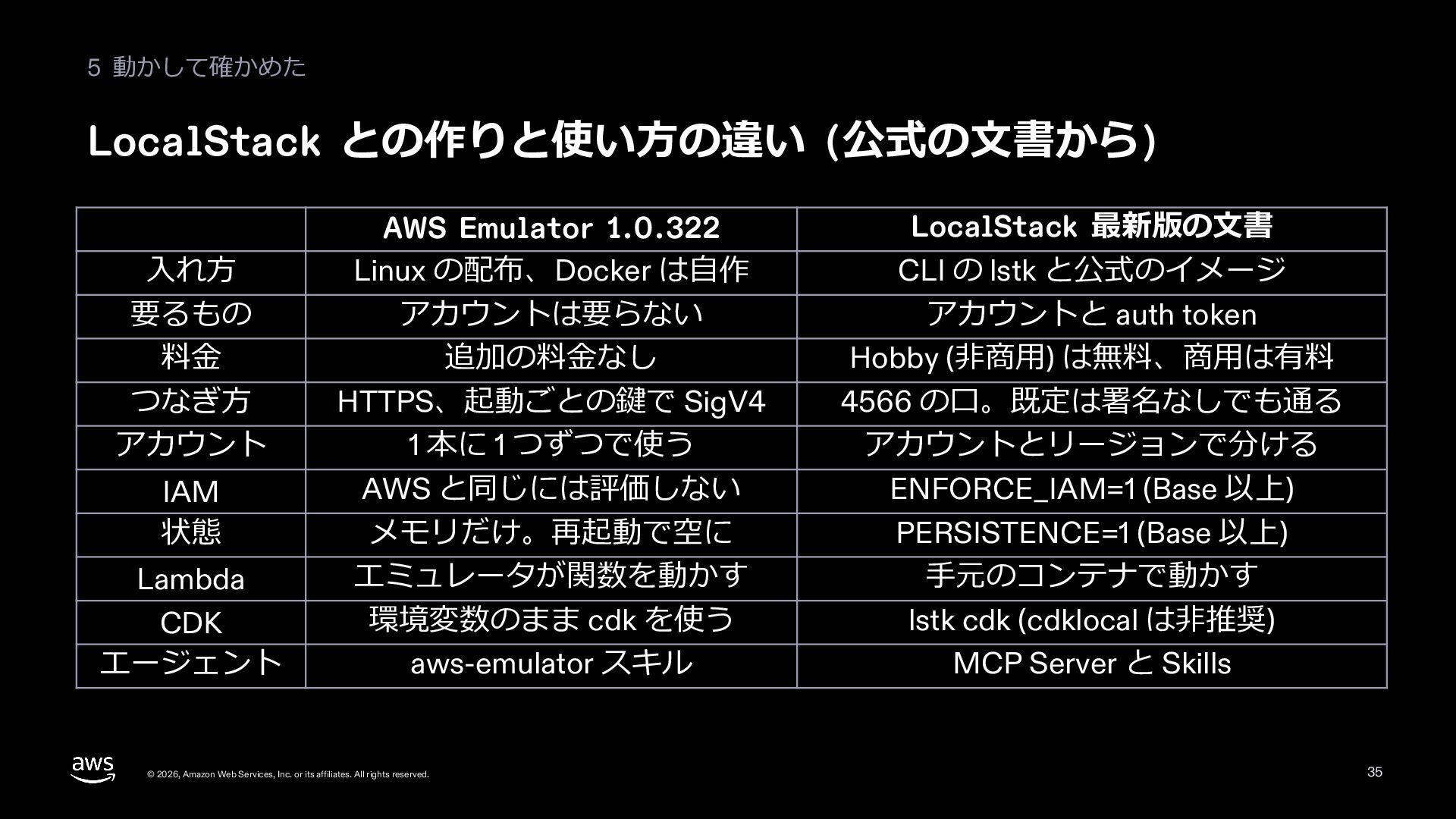
  32. 5 動かして確かめた LocalStack との作りと使い⽅の違い (公式の⽂書から) ⼊れ⽅ 要るもの 料⾦ つなぎ⽅ アカウント

    IAM 状態 Lambda CDK エージェント AWS Emulator 1.0.322 Linux の配布、Docker は⾃作 アカウントは要らない 追加の料⾦なし HTTPS、起動ごとの鍵で SigV4 1 本に 1 つずつで使う AWS と同じには評価しない メモリだけ。再起動で空に エミュレータが関数を動かす 環境変数のまま cdk を使う aws-emulator スキル © 2026, Amazon Web Services, Inc. or its affiliates. All rights reserved. LocalStack 最新版の⽂書 CLI の lstk と公式のイメージ アカウントと auth token Hobby (⾮商⽤) は無料、商⽤は有料 4566 の⼝。既定は署名なしでも通る アカウントとリージョンで分ける ENFORCE_IAM=1 (Base 以上) PERSISTENCE=1 (Base 以上) ⼿元のコンテナで動かす lstk cdk (cdklocal は⾮推奨) MCP Server と Skills 35
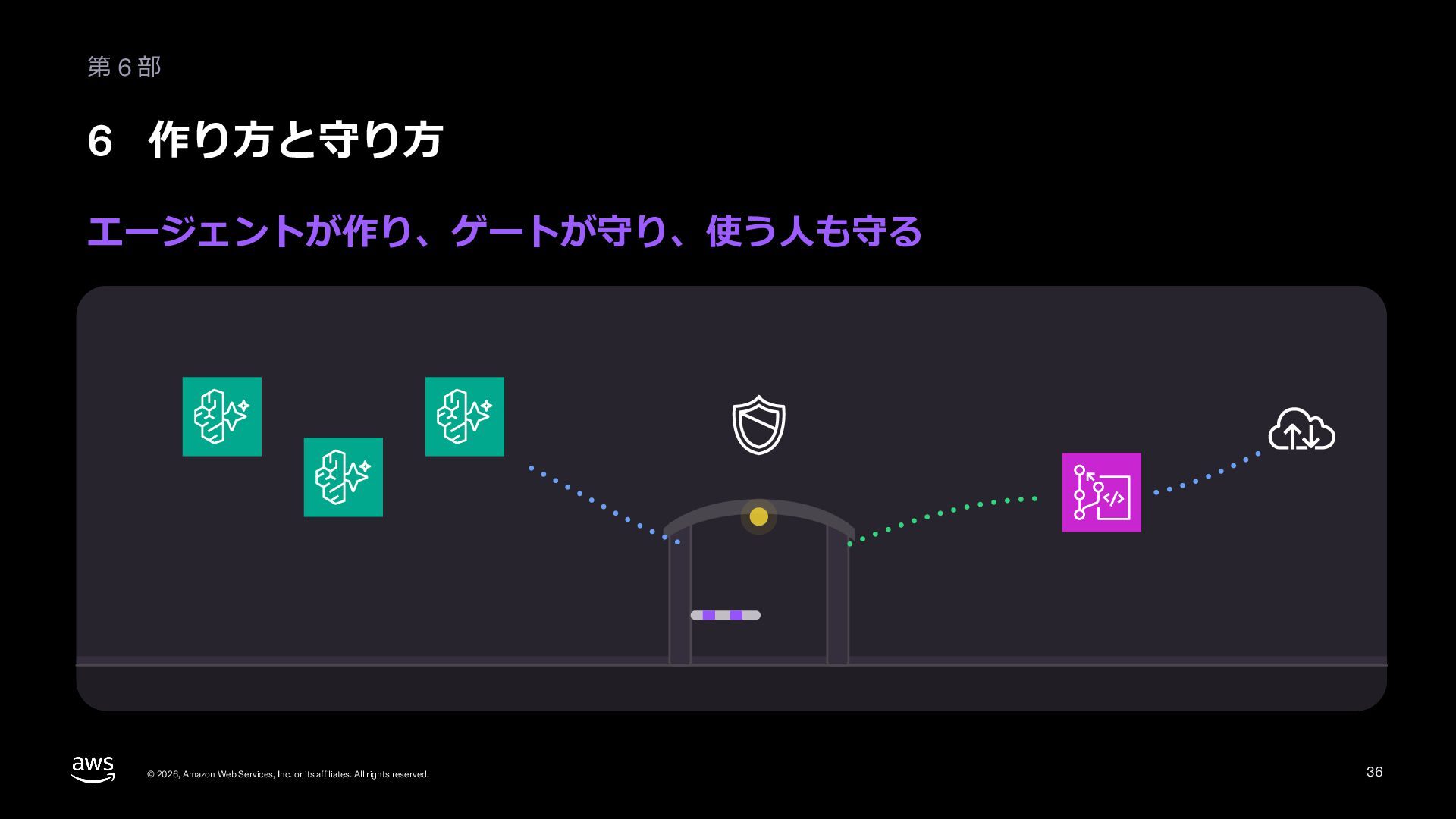
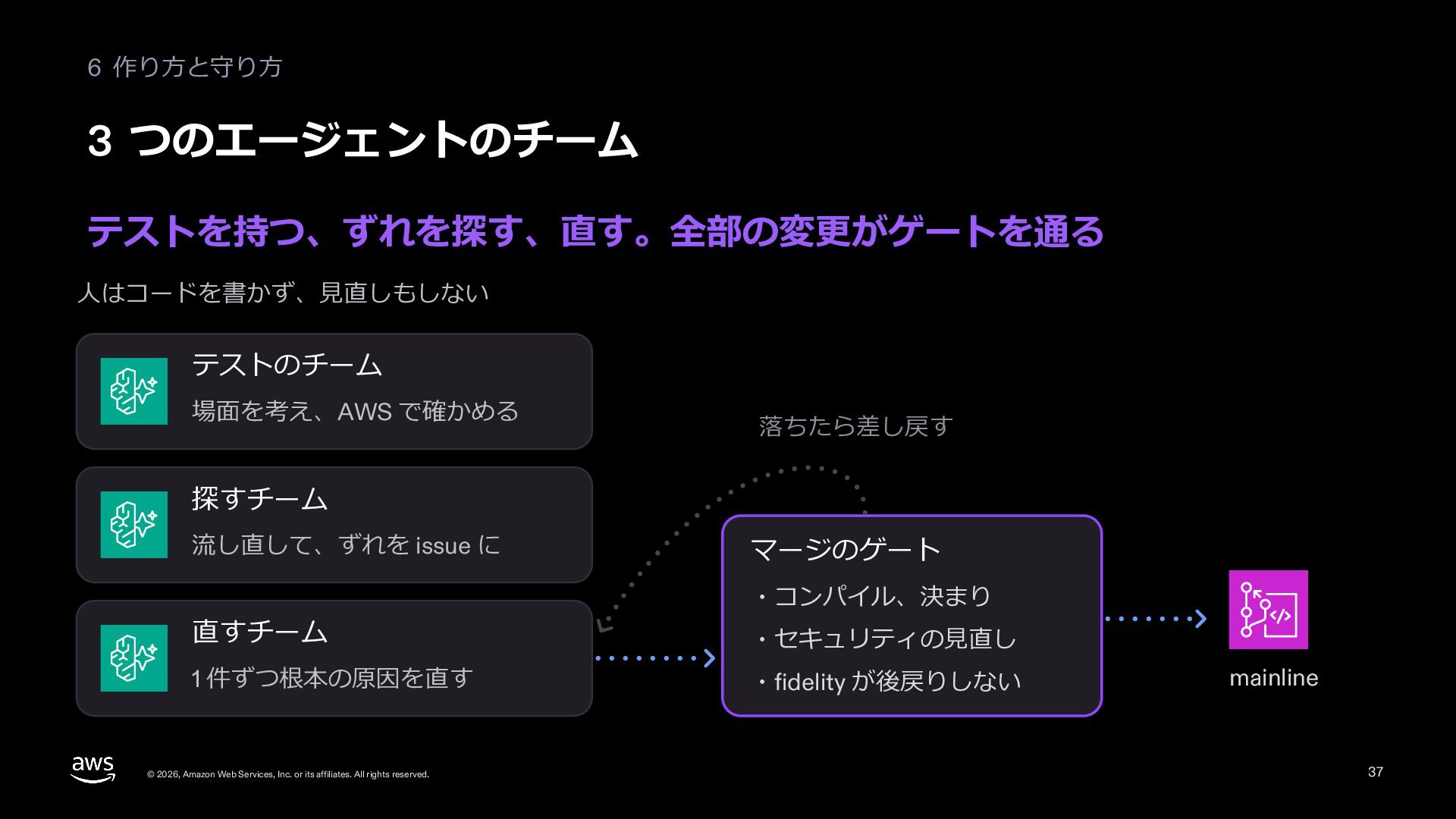
  33. 6 作り⽅と守り⽅ 3 つのエージェントのチーム テストを持つ、ずれを探す、直す。全部の変更がゲートを通る ⼈はコードを書かず、⾒直しもしない テストのチーム 場⾯を考え、AWS で確かめる 落ちたら差し戻す

    探すチーム 流し直して、ずれを issue に 直すチーム 1 件ずつ根本の原因を直す © 2026, Amazon Web Services, Inc. or its affiliates. All rights reserved. マージのゲート ・コンパイル、決まり ・セキュリティの⾒直し ・fidelity が後戻りしない mainline 37
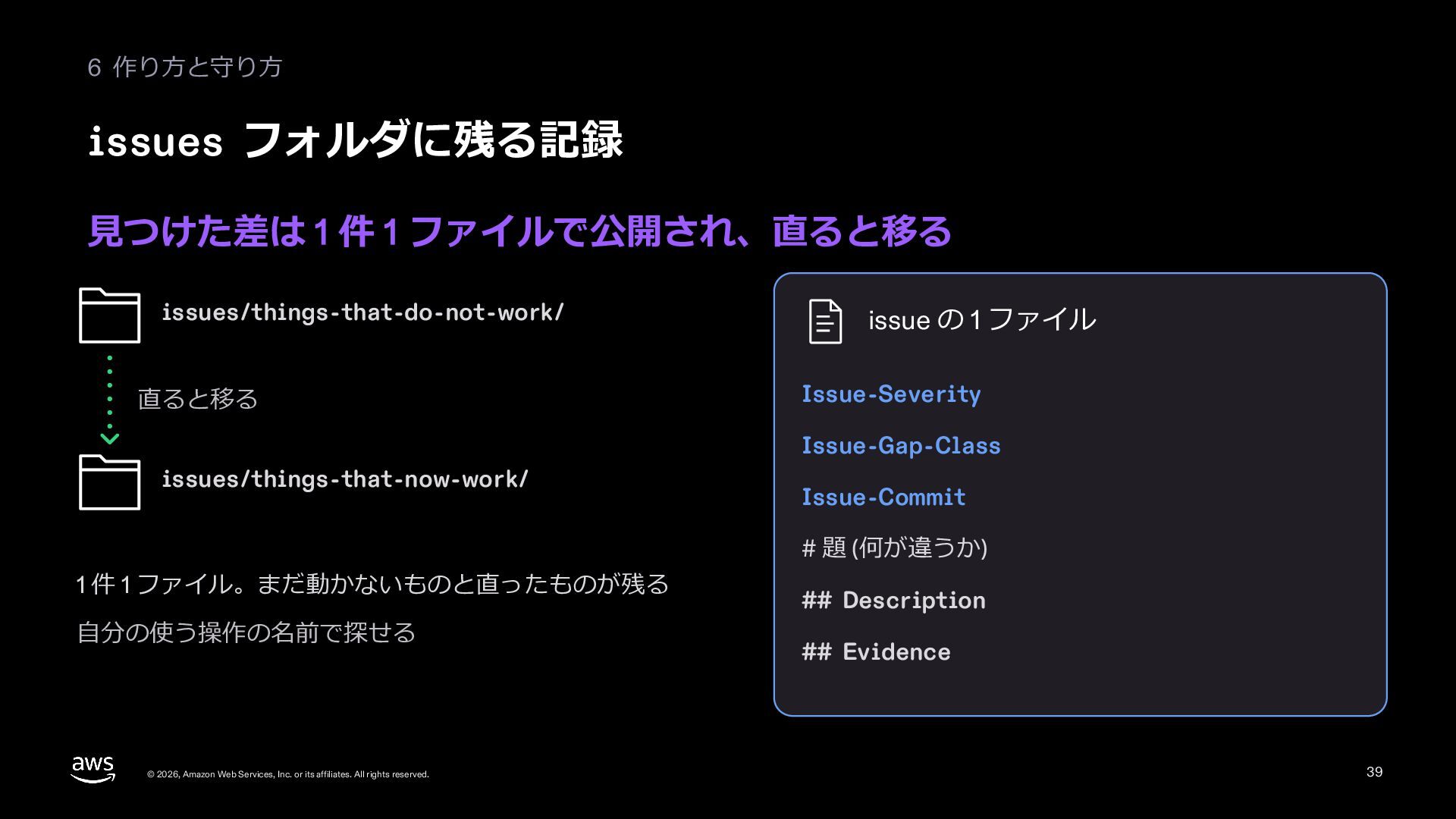
  34. 6 作り⽅と守り⽅ issues フォルダに残る記録 ⾒つけた差は 1 件 1 ファイルで公開され、直ると移る issues/things-that-do-not-work/

    直ると移る issue の 1 ファイル Issue-Severity Issue-Gap-Class issues/things-that-now-work/ Issue-Commit # 題 (何が違うか) 1 件 1 ファイル。まだ動かないものと直ったものが残る ⾃分の使う操作の名前で探せる © 2026, Amazon Web Services, Inc. or its affiliates. All rights reserved. ## Description ## Evidence 39
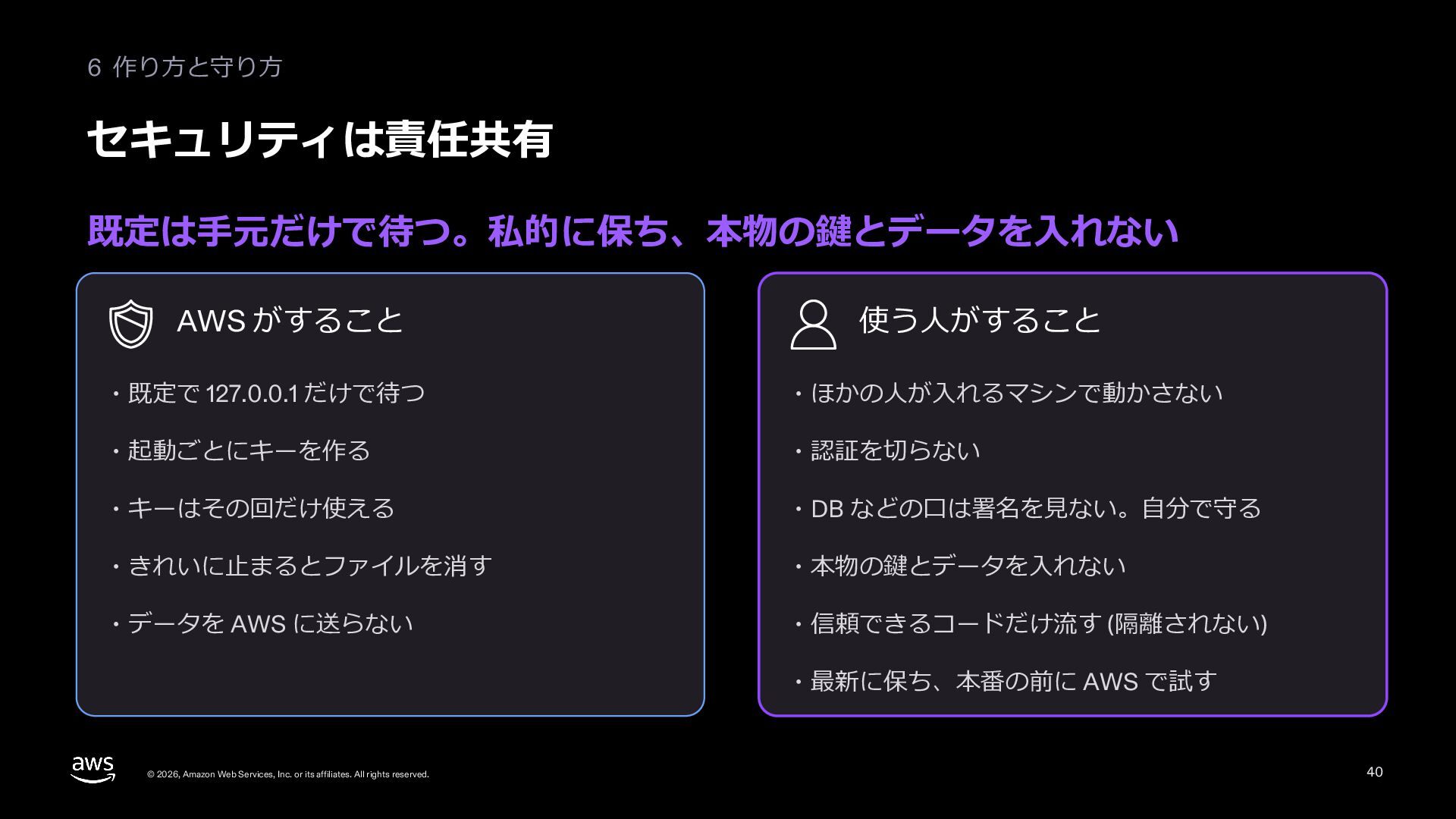
  35. 6 作り⽅と守り⽅ セキュリティは責任共有 既定は⼿元だけで待つ。私的に保ち、本物の鍵とデータを⼊れない AWS がすること 使う⼈がすること ・既定で 127.0.0.1 だけで待つ

    ・ほかの⼈が⼊れるマシンで動かさない ・起動ごとにキーを作る ・認証を切らない ・キーはその回だけ使える ・DB などの⼝は署名を⾒ない。⾃分で守る ・きれいに⽌まるとファイルを消す ・本物の鍵とデータを⼊れない ・データを AWS に送らない ・信頼できるコードだけ流す (隔離されない) ・最新に保ち、本番の前に AWS で試す © 2026, Amazon Web Services, Inc. or its affiliates. All rights reserved. 40
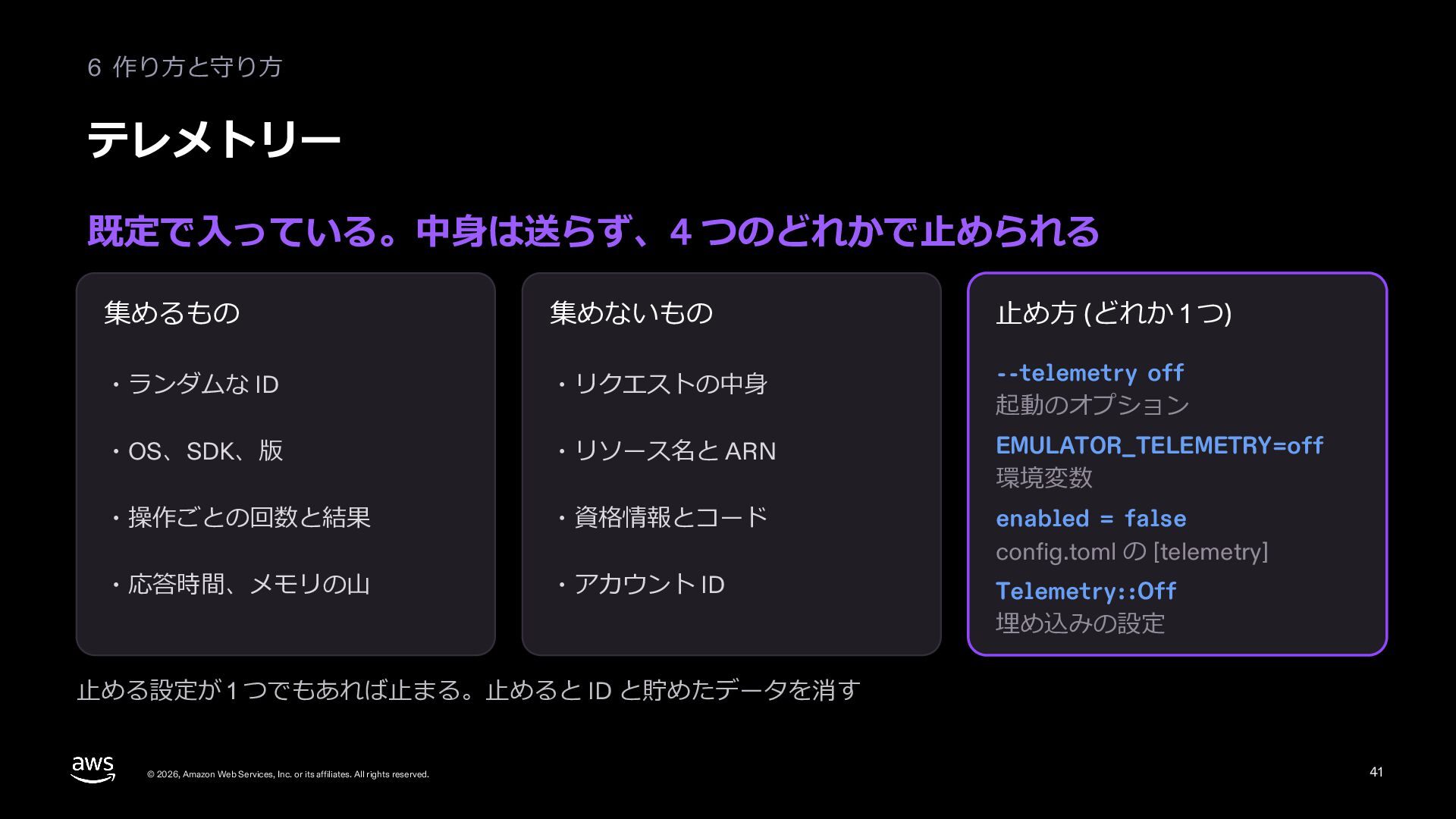
  36. 6 作り⽅と守り⽅ テレメトリー 既定で⼊っている。中⾝は送らず、4 つのどれかで⽌められる 集めるもの 集めないもの ⽌め⽅ (どれか 1

    つ) ・ランダムな ID ・リクエストの中⾝ --telemetry off 起動のオプション ・OS、SDK、版 ・リソース名と ARN EMULATOR_TELEMETRY=off 環境変数 ・操作ごとの回数と結果 ・資格情報とコード ・応答時間、メモリの⼭ ・アカウント ID enabled = false config.toml の [telemetry] Telemetry::Off 埋め込みの設定 ⽌める設定が 1 つでもあれば⽌まる。⽌めると ID と貯めたデータを消す © 2026, Amazon Web Services, Inc. or its affiliates. All rights reserved. 41
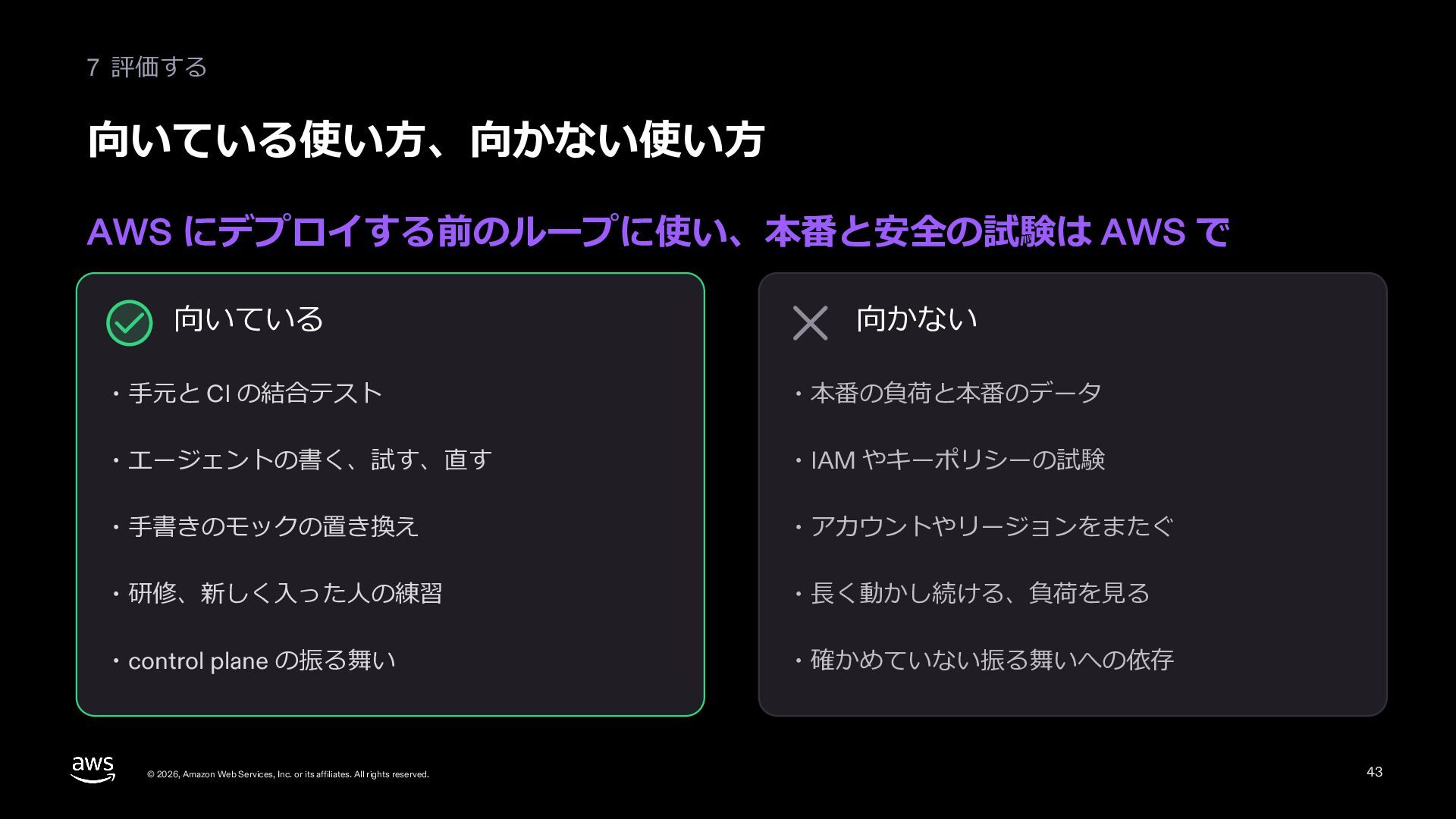
  37. 7 評価する 向いている使い⽅、向かない使い⽅ AWS にデプロイする前のループに使い、本番と安全の試験は AWS で 向いている 向かない ・⼿元と

    CI の結合テスト ・本番の負荷と本番のデータ ・エージェントの書く、試す、直す ・IAM やキーポリシーの試験 ・⼿書きのモックの置き換え ・アカウントやリージョンをまたぐ ・研修、新しく⼊った⼈の練習 ・⻑く動かし続ける、負荷を⾒る ・control plane の振る舞い ・確かめていない振る舞いへの依存 © 2026, Amazon Web Services, Inc. or its affiliates. All rights reserved. 43
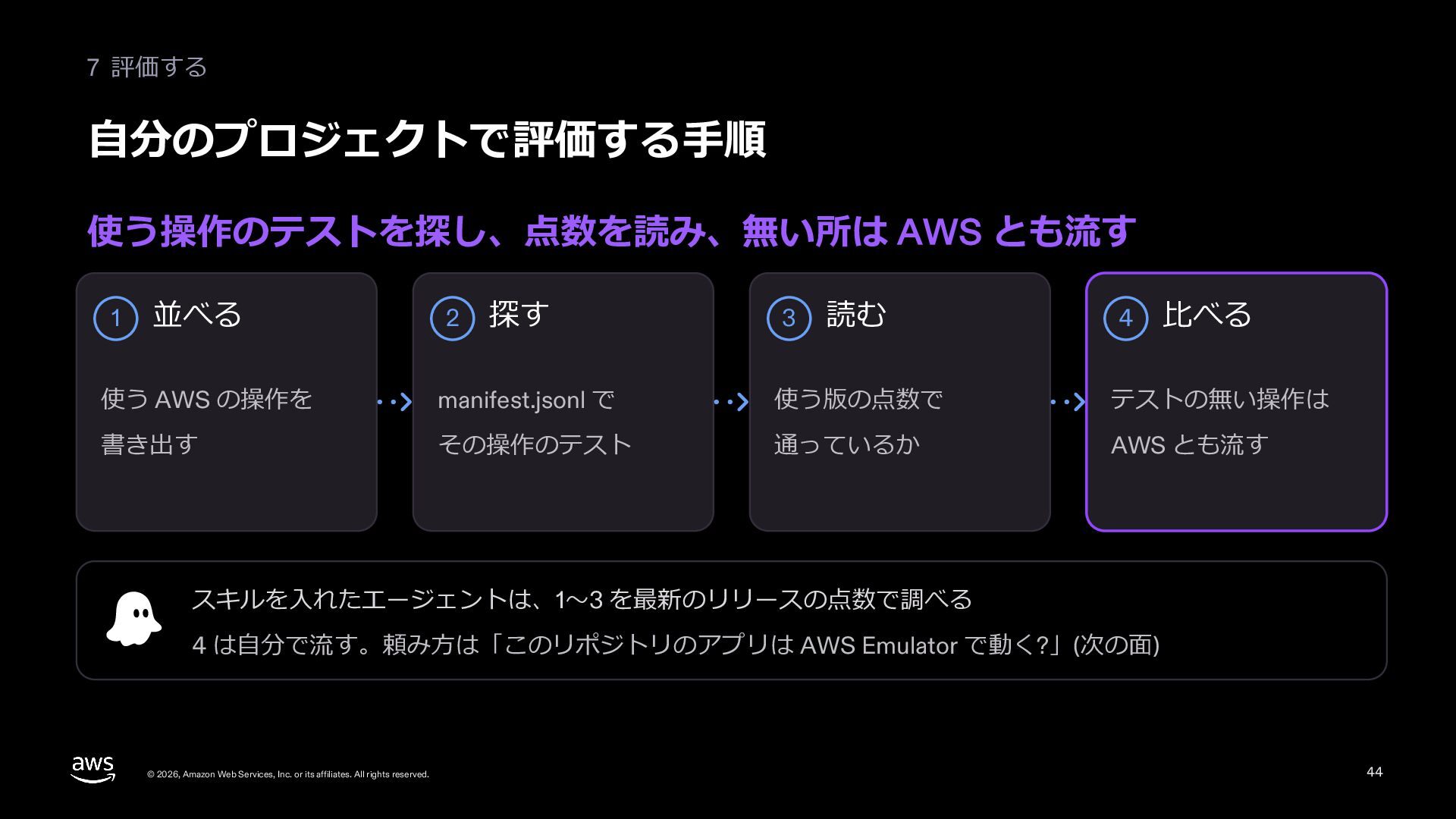
  38. 7 評価する ⾃分のプロジェクトで評価する⼿順 使う操作のテストを探し、点数を読み、無い所は AWS とも流す 1 並べる 2 探す

    3 読む 4 ⽐べる 使う AWS の操作を manifest.jsonl で 使う版の点数で テストの無い操作は 書き出す その操作のテスト 通っているか AWS とも流す スキルを⼊れたエージェントは、1〜3 を最新のリリースの点数で調べる 4 は⾃分で流す。頼み⽅は「このリポジトリのアプリは AWS Emulator で動く?」(次の⾯) © 2026, Amazon Web Services, Inc. or its affiliates. All rights reserved. 44
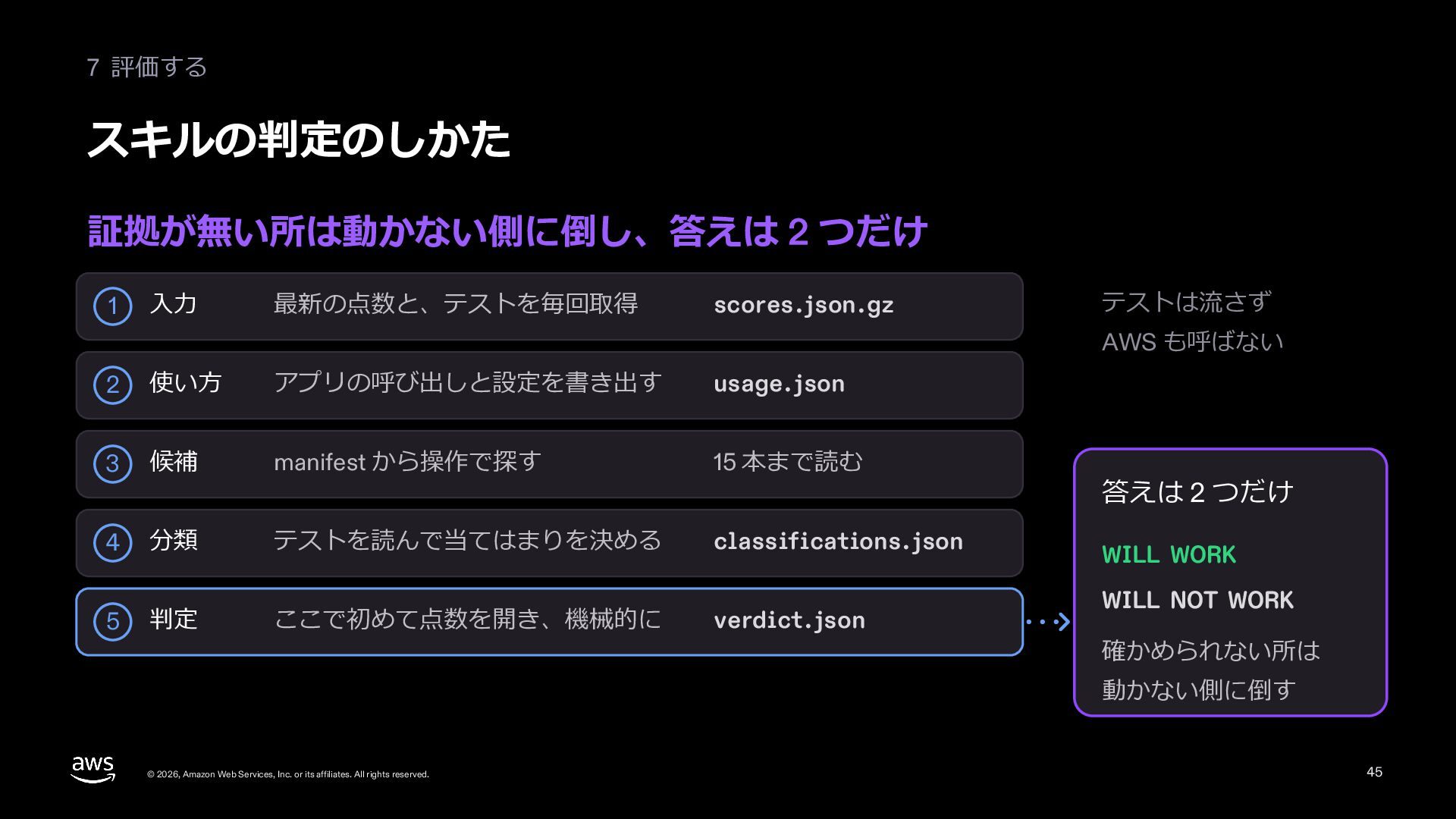
  39. 7 評価する スキルの判定のしかた 証拠が無い所は動かない側に倒し、答えは 2 つだけ 1 ⼊⼒ 最新の点数と、テストを毎回取得 scores.json.gz

    テストは流さず AWS も呼ばない 2 使い⽅ アプリの呼び出しと設定を書き出す usage.json 3 候補 manifest から操作で探す 15 本まで読む 4 分類 テストを読んで当てはまりを決める classifications.json 5 判定 ここで初めて点数を開き、機械的に verdict.json 答えは 2 つだけ WILL WORK WILL NOT WORK 確かめられない所は 動かない側に倒す © 2026, Amazon Web Services, Inc. or its affiliates. All rights reserved. 45
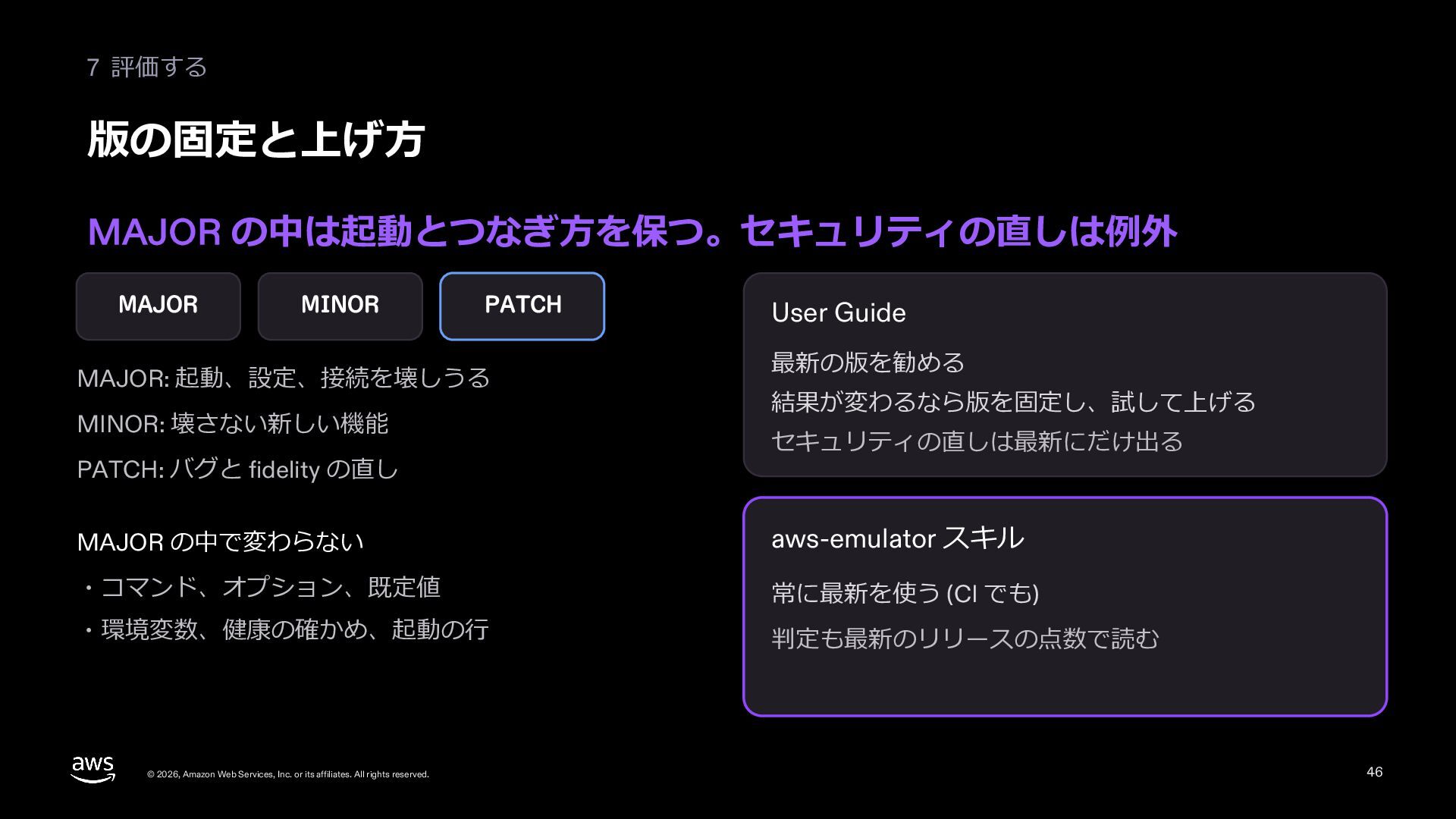
  40. 7 評価する 版の固定と上げ⽅ MAJOR の中は起動とつなぎ⽅を保つ。セキュリティの直しは例外 MAJOR MINOR PATCH MAJOR: 起動、設定、接続を壊しうる

    MINOR: 壊さない新しい機能 PATCH: バグと fidelity の直し User Guide 最新の版を勧める 結果が変わるなら版を固定し、試して上げる セキュリティの直しは最新にだけ出る MAJOR の中で変わらない aws-emulator スキル ・コマンド、オプション、既定値 常に最新を使う (CI でも) ・環境変数、健康の確かめ、起動の⾏ 判定も最新のリリースの点数で読む © 2026, Amazon Web Services, Inc. or its affiliates. All rights reserved. 46
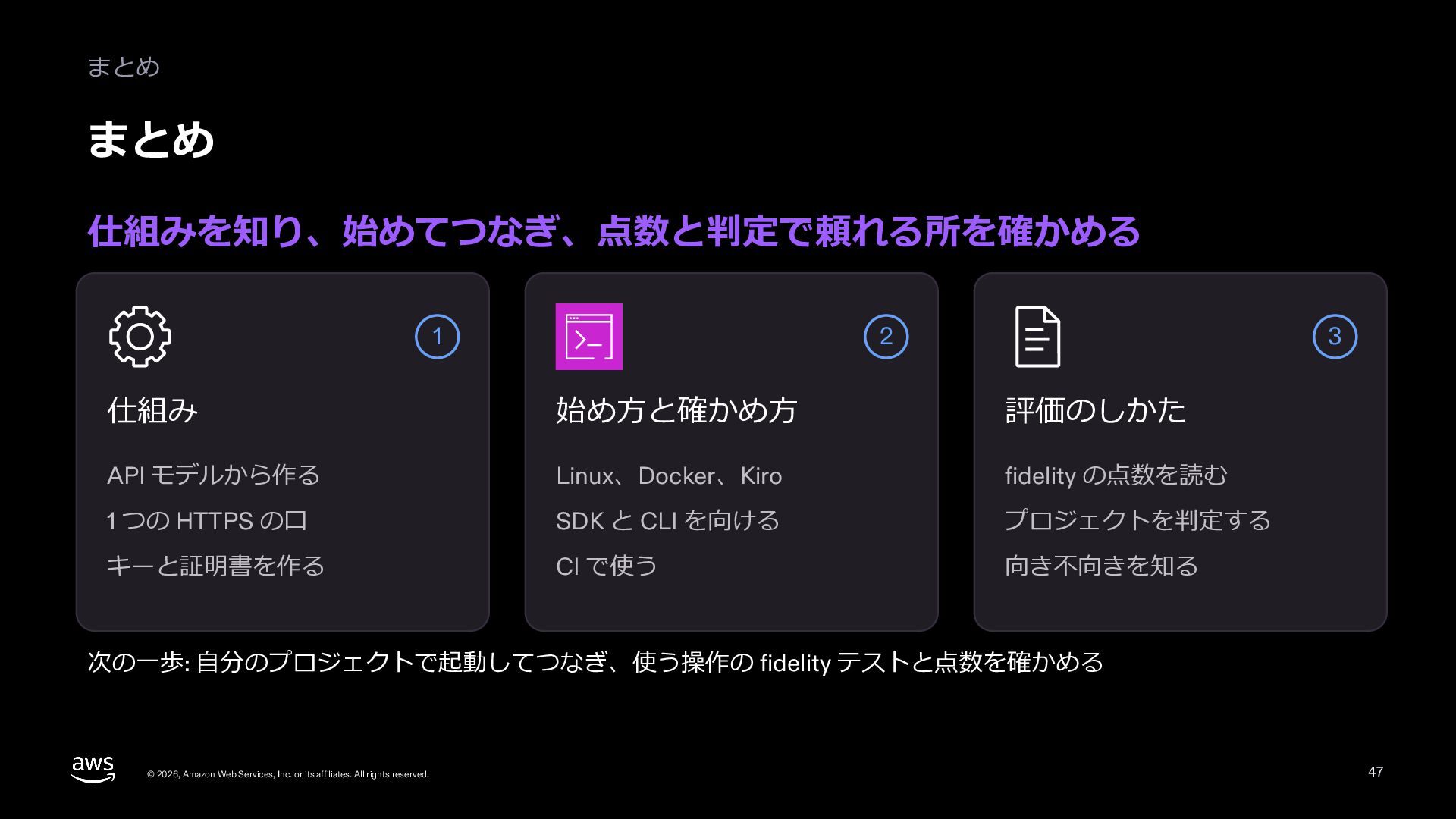
  41. まとめ まとめ 仕組みを知り、始めてつなぎ、点数と判定で頼れる所を確かめる 1 2 3 仕組み 始め⽅と確かめ⽅ 評価のしかた API

    モデルから作る Linux、Docker、Kiro fidelity の点数を読む 1 つの HTTPS の⼝ SDK と CLI を向ける プロジェクトを判定する キーと証明書を作る CI で使う 向き不向きを知る 次の⼀歩: ⾃分のプロジェクトで起動してつなぎ、使う操作の fidelity テストと点数を確かめる © 2026, Amazon Web Services, Inc. or its affiliates. All rights reserved. 47
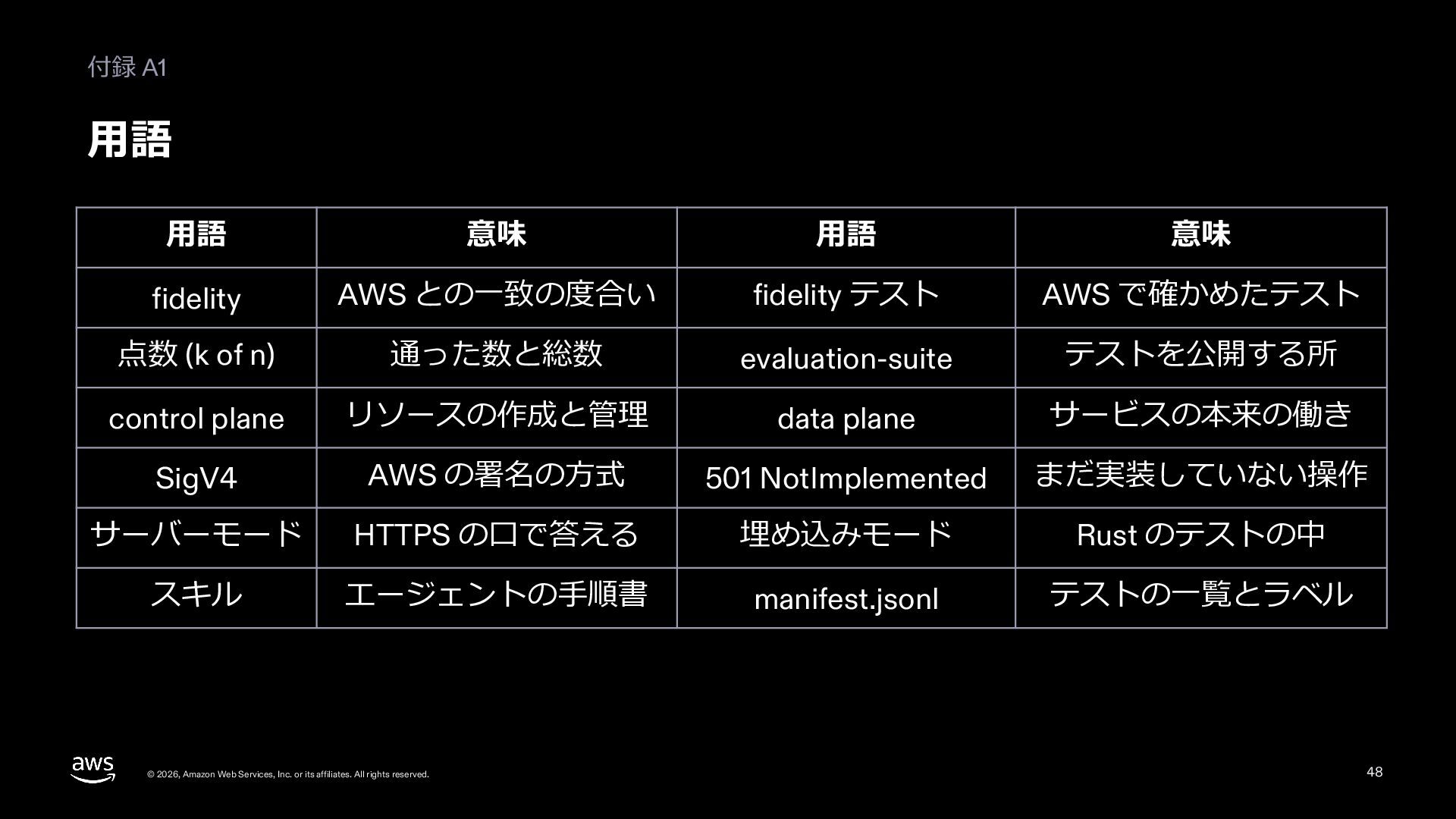
  42. 付録 A1 ⽤語 ⽤語 意味 ⽤語 意味 fidelity AWS との⼀致の度合い

    fidelity テスト AWS で確かめたテスト 点数 (k of n) 通った数と総数 evaluation-suite テストを公開する所 control plane リソースの作成と管理 data plane サービスの本来の働き SigV4 AWS の署名の⽅式 501 NotImplemented まだ実装していない操作 サーバーモード HTTPS の⼝で答える 埋め込みモード Rust のテストの中 スキル エージェントの⼿順書 manifest.jsonl テストの⼀覧とラベル © 2026, Amazon Web Services, Inc. or its affiliates. All rights reserved. 48
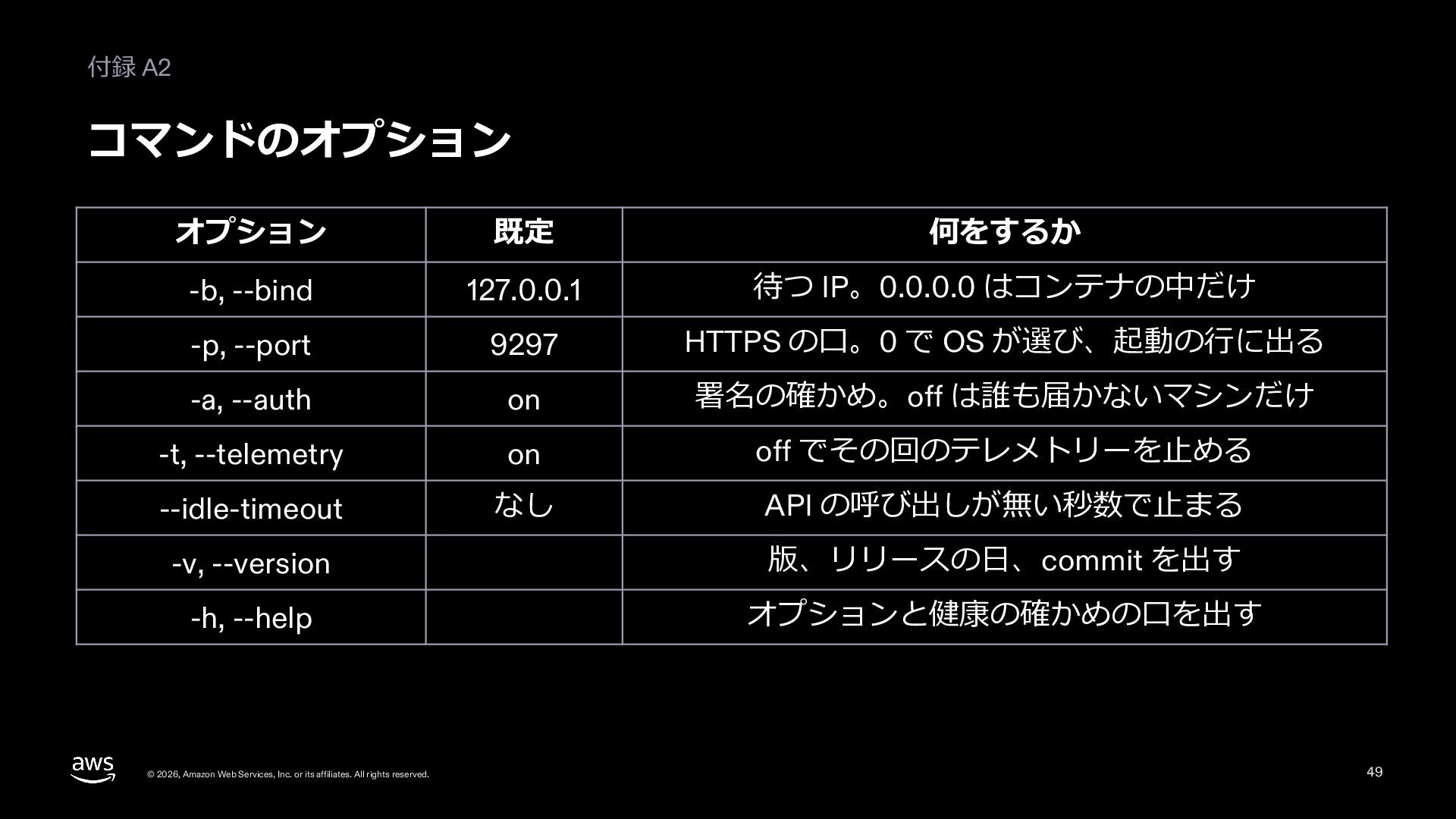
  43. 付録 A2 コマンドのオプション オプション 既定 何をするか -b, --bind 127.0.0.1 待つ

    IP。0.0.0.0 はコンテナの中だけ -p, --port 9297 HTTPS の⼝。0 で OS が選び、起動の⾏に出る -a, --auth on 署名の確かめ。off は誰も届かないマシンだけ -t, --telemetry on off でその回のテレメトリーを⽌める --idle-timeout なし API の呼び出しが無い秒数で⽌まる -v, --version 版、リリースの⽇、commit を出す -h, --help オプションと健康の確かめの⼝を出す © 2026, Amazon Web Services, Inc. or its affiliates. All rights reserved. 49
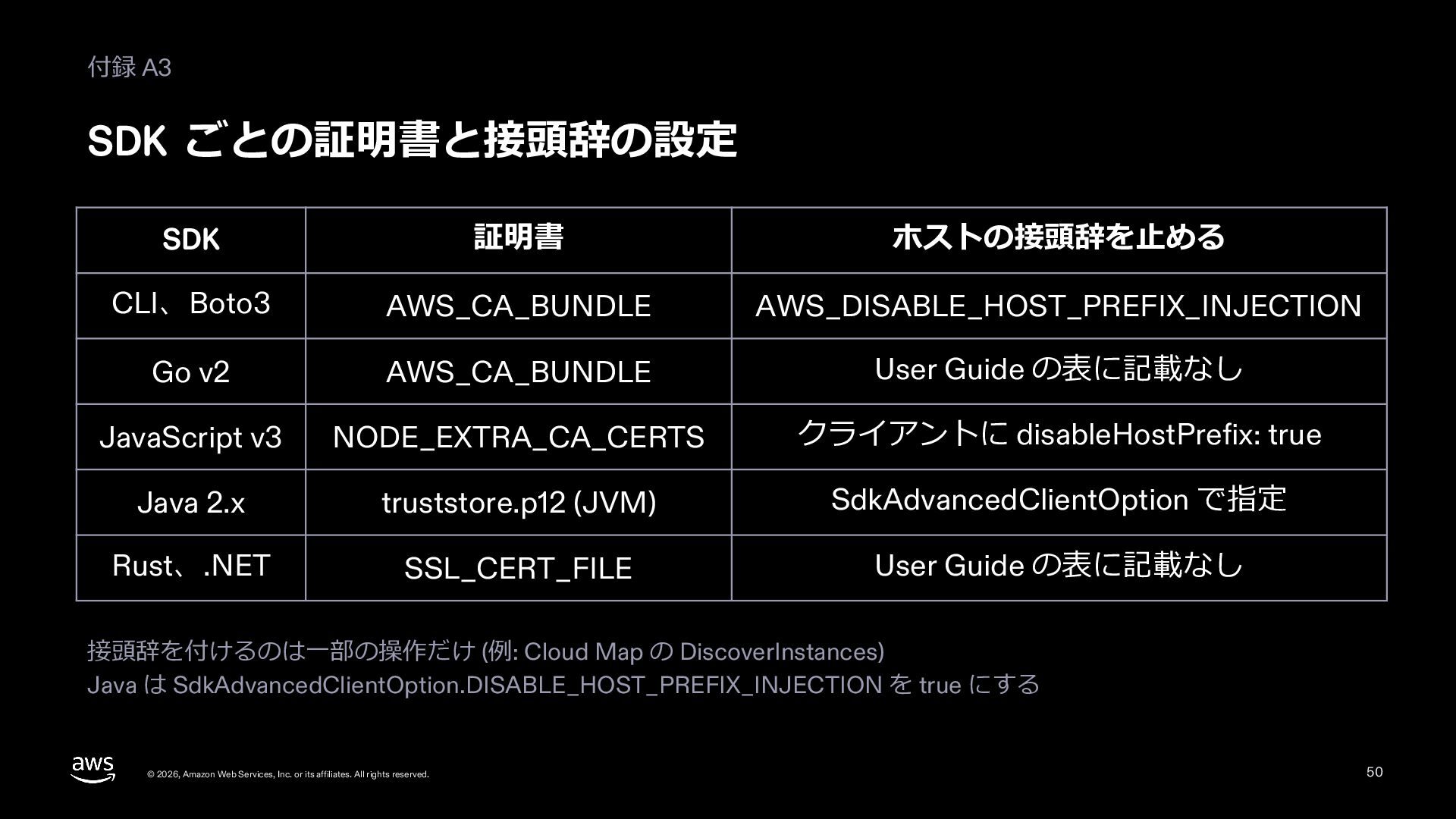
  44. 付録 A3 SDK ごとの証明書と接頭辞の設定 SDK 証明書 ホストの接頭辞を⽌める CLI、Boto3 AWS_CA_BUNDLE AWS_DISABLE_HOST_PREFIX_INJECTION

    Go v2 AWS_CA_BUNDLE User Guide の表に記載なし JavaScript v3 NODE_EXTRA_CA_CERTS クライアントに disableHostPrefix: true Java 2.x truststore.p12 (JVM) SdkAdvancedClientOption で指定 Rust、.NET SSL_CERT_FILE User Guide の表に記載なし 接頭辞を付けるのは⼀部の操作だけ (例: Cloud Map の DiscoverInstances) Java は SdkAdvancedClientOption.DISABLE_HOST_PREFIX_INJECTION を true にする © 2026, Amazon Web Services, Inc. or its affiliates. All rights reserved. 50
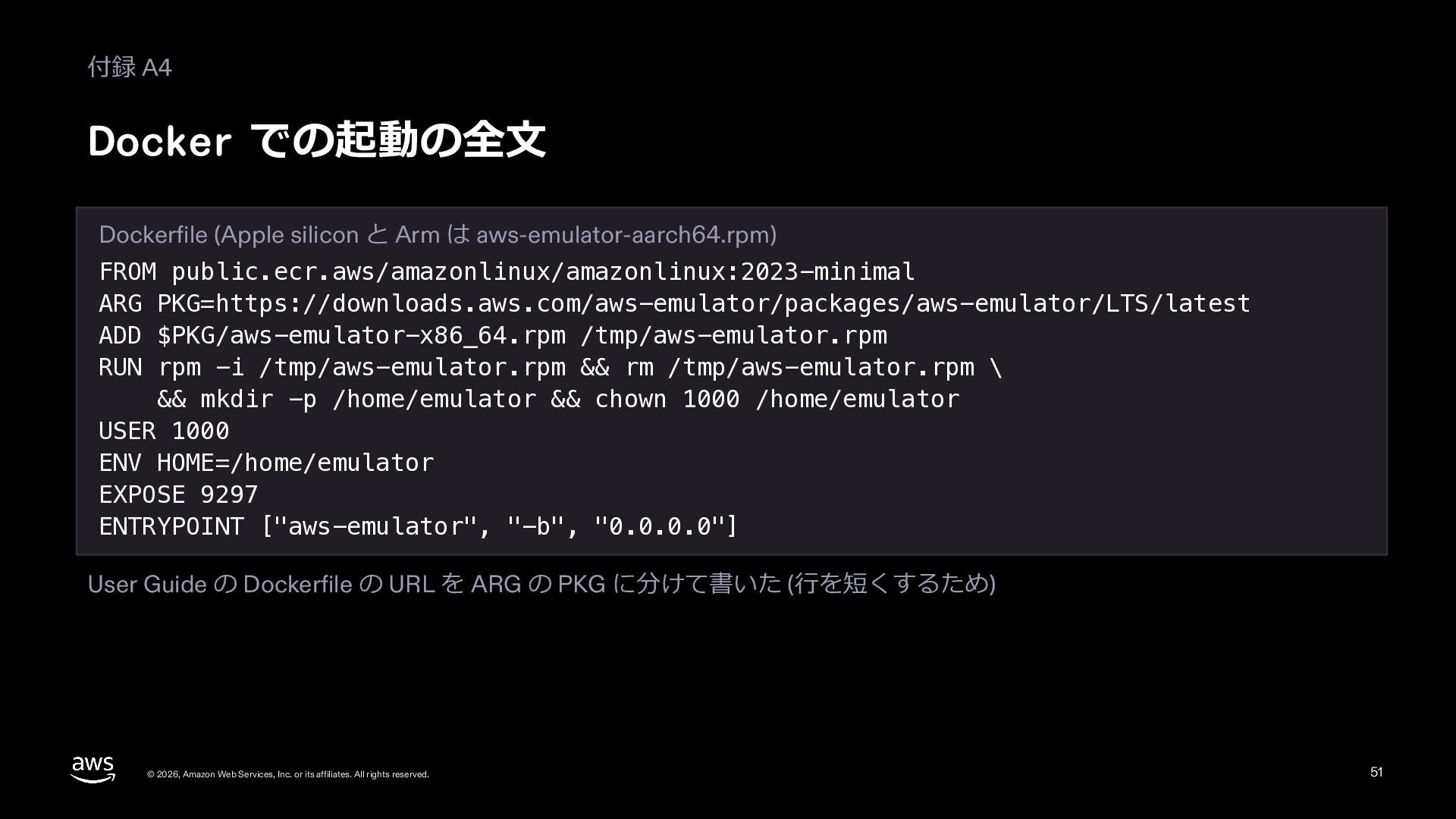
  45. 付録 A4 Docker での起動の全⽂ Dockerfile (Apple silicon と Arm は

    aws-emulator-aarch64.rpm) FROM public.ecr.aws/amazonlinux/amazonlinux:2023-minimal ARG PKG=https://downloads.aws.com/aws-emulator/packages/aws-emulator/LTS/latest ADD $PKG/aws-emulator-x86_64.rpm /tmp/aws-emulator.rpm RUN rpm -i /tmp/aws-emulator.rpm && rm /tmp/aws-emulator.rpm \ && mkdir -p /home/emulator && chown 1000 /home/emulator USER 1000 ENV HOME=/home/emulator EXPOSE 9297 ENTRYPOINT ["aws-emulator", "-b", "0.0.0.0"] User Guide の Dockerfile の URL を ARG の PKG に分けて書いた (⾏を短くするため) © 2026, Amazon Web Services, Inc. or its affiliates. All rights reserved. 51
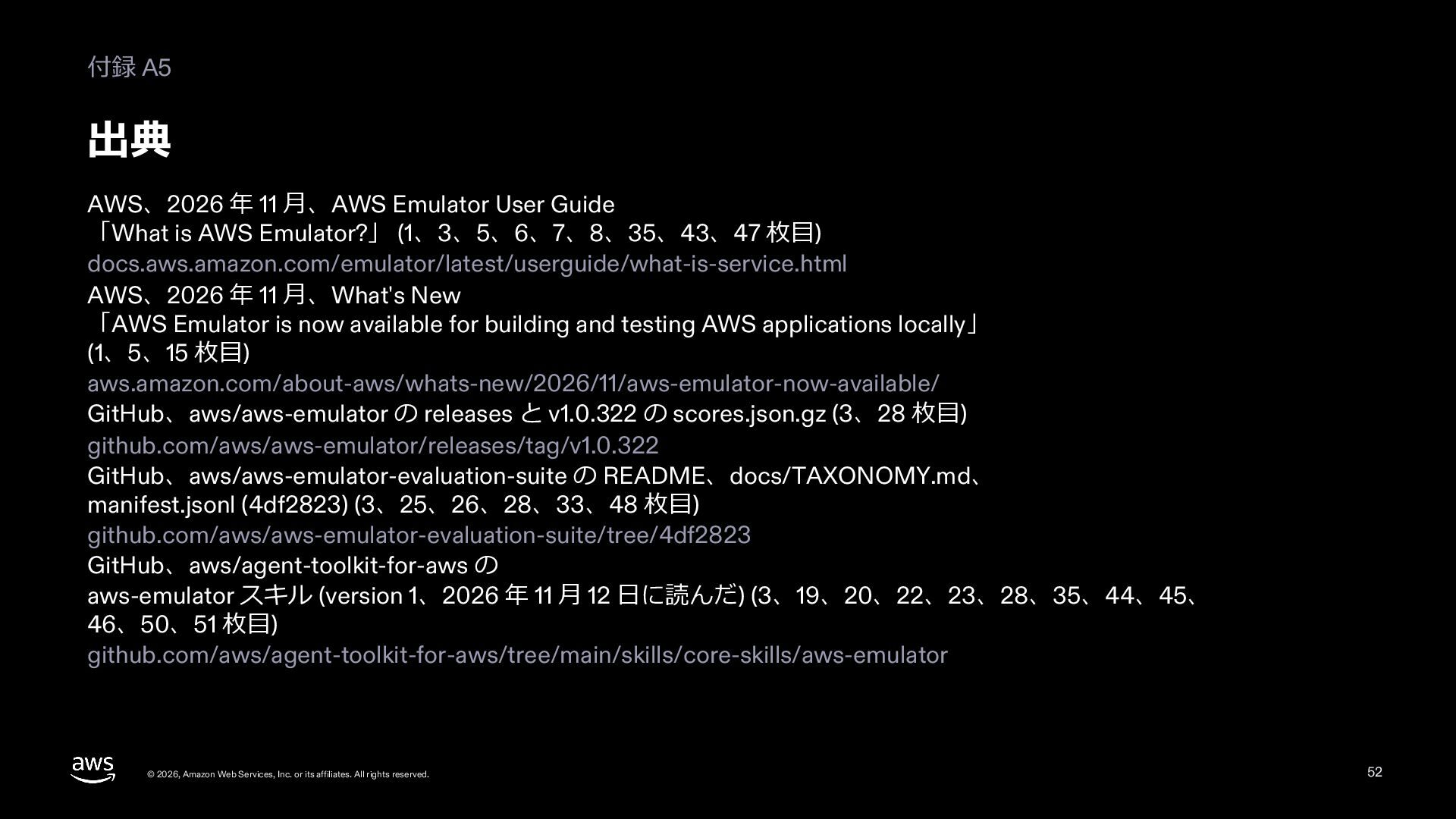
  46. 付録 A5 出典 AWS、2026 年 11 ⽉、AWS Emulator User Guide

    「What is AWS Emulator?」 (1、3、5、6、7、8、35、43、47 枚⽬) docs.aws.amazon.com/emulator/latest/userguide/what-is-service.html AWS、2026 年 11 ⽉、What's New 「AWS Emulator is now available for building and testing AWS applications locally」 (1、5、15 枚⽬) aws.amazon.com/about-aws/whats-new/2026/11/aws-emulator-now-available/ GitHub、aws/aws-emulator の releases と v1.0.322 の scores.json.gz (3、28 枚⽬) github.com/aws/aws-emulator/releases/tag/v1.0.322 GitHub、aws/aws-emulator-evaluation-suite の README、docs/TAXONOMY.md、 manifest.jsonl (4df2823) (3、25、26、28、33、48 枚⽬) github.com/aws/aws-emulator-evaluation-suite/tree/4df2823 GitHub、aws/agent-toolkit-for-aws の aws-emulator スキル (version 1、2026 年 11 ⽉ 12 ⽇に読んだ) (3、19、20、22、23、28、35、44、45、 46、50、51 枚⽬) github.com/aws/agent-toolkit-for-aws/tree/main/skills/core-skills/aws-emulator © 2026, Amazon Web Services, Inc. or its affiliates. All rights reserved. 52
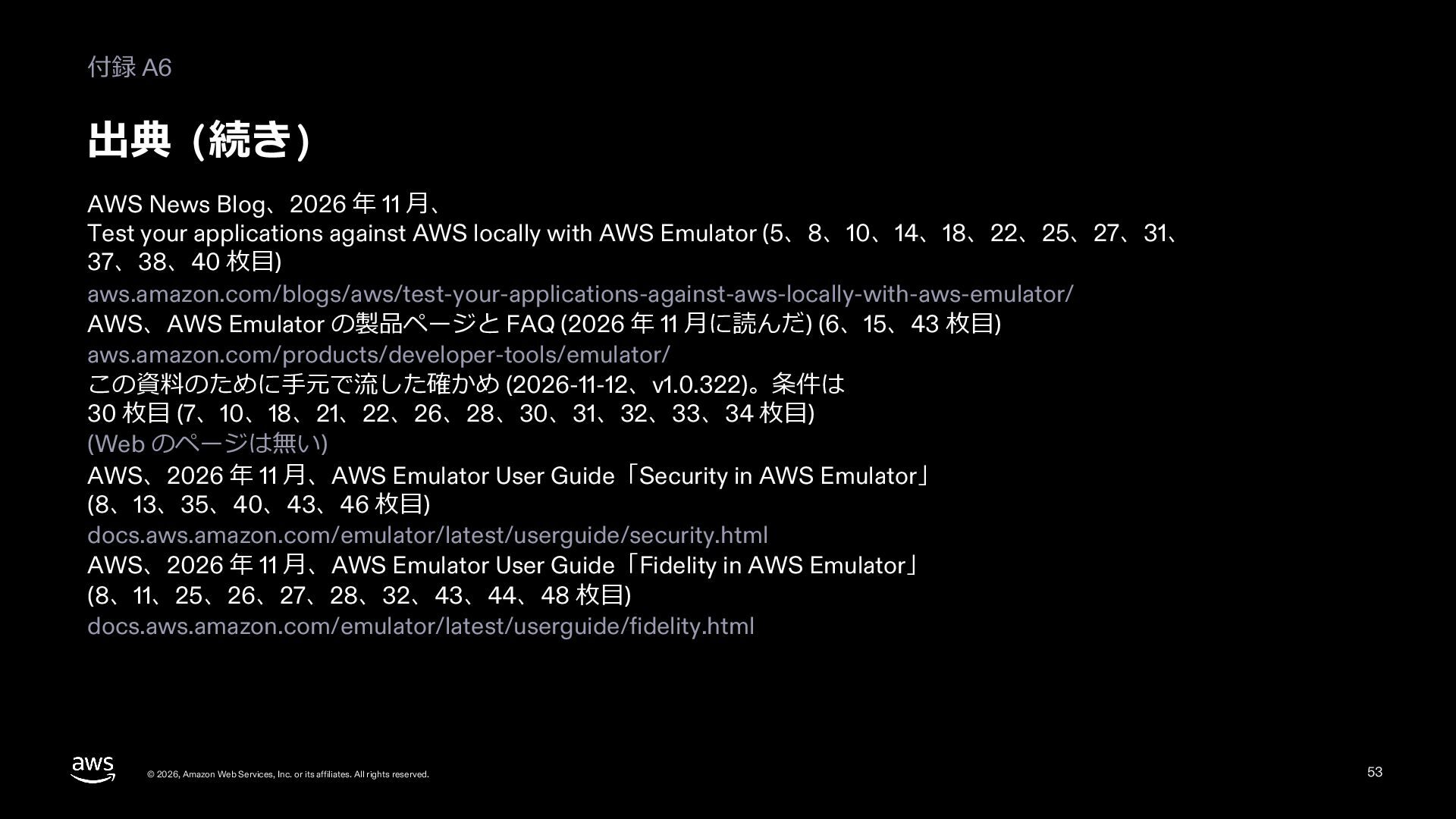
  47. 付録 A6 出典 (続き) AWS News Blog、2026 年 11 ⽉、

    Test your applications against AWS locally with AWS Emulator (5、8、10、14、18、22、25、27、31、 37、38、40 枚⽬) aws.amazon.com/blogs/aws/test-your-applications-against-aws-locally-with-aws-emulator/ AWS、AWS Emulator の製品ページと FAQ (2026 年 11 ⽉に読んだ) (6、15、43 枚⽬) aws.amazon.com/products/developer-tools/emulator/ この資料のために⼿元で流した確かめ (2026-11-12、v1.0.322)。条件は 30 枚⽬ (7、10、18、21、22、26、28、30、31、32、33、34 枚⽬) (Web のページは無い) AWS、2026 年 11 ⽉、AWS Emulator User Guide「Security in AWS Emulator」 (8、13、35、40、43、46 枚⽬) docs.aws.amazon.com/emulator/latest/userguide/security.html AWS、2026 年 11 ⽉、AWS Emulator User Guide「Fidelity in AWS Emulator」 (8、11、25、26、27、28、32、43、44、48 枚⽬) docs.aws.amazon.com/emulator/latest/userguide/fidelity.html © 2026, Amazon Web Services, Inc. or its affiliates. All rights reserved. 53
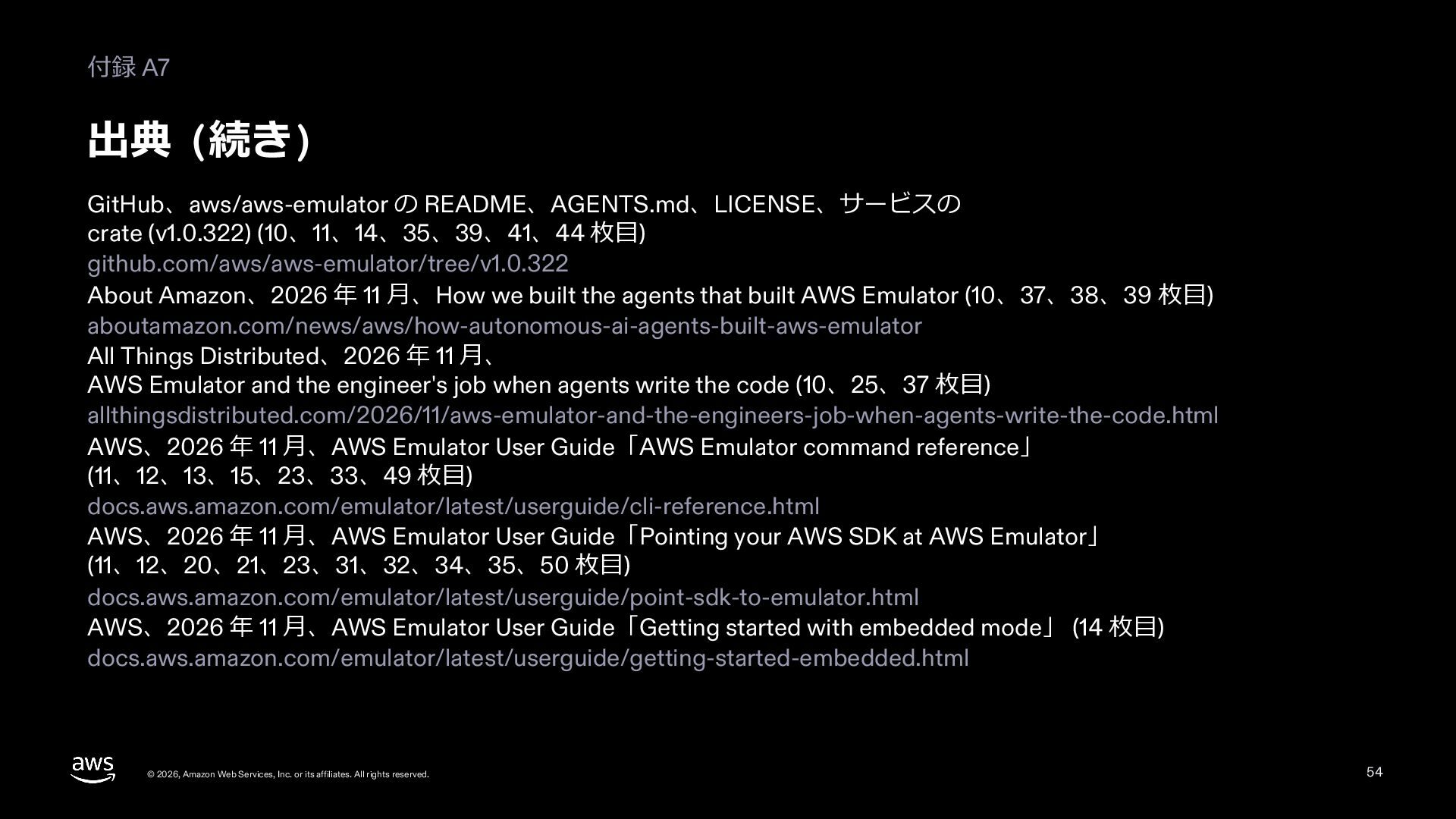
  48. 付録 A7 出典 (続き) GitHub、aws/aws-emulator の README、AGENTS.md、LICENSE、サービスの crate (v1.0.322) (10、11、14、35、39、41、44

    枚⽬) github.com/aws/aws-emulator/tree/v1.0.322 About Amazon、2026 年 11 ⽉、How we built the agents that built AWS Emulator (10、37、38、39 枚⽬) aboutamazon.com/news/aws/how-autonomous-ai-agents-built-aws-emulator All Things Distributed、2026 年 11 ⽉、 AWS Emulator and the engineer's job when agents write the code (10、25、37 枚⽬) allthingsdistributed.com/2026/11/aws-emulator-and-the-engineers-job-when-agents-write-the-code.html AWS、2026 年 11 ⽉、AWS Emulator User Guide「AWS Emulator command reference」 (11、12、13、15、23、33、49 枚⽬) docs.aws.amazon.com/emulator/latest/userguide/cli-reference.html AWS、2026 年 11 ⽉、AWS Emulator User Guide「Pointing your AWS SDK at AWS Emulator」 (11、12、20、21、23、31、32、34、35、50 枚⽬) docs.aws.amazon.com/emulator/latest/userguide/point-sdk-to-emulator.html AWS、2026 年 11 ⽉、AWS Emulator User Guide「Getting started with embedded mode」 (14 枚⽬) docs.aws.amazon.com/emulator/latest/userguide/getting-started-embedded.html © 2026, Amazon Web Services, Inc. or its affiliates. All rights reserved. 54
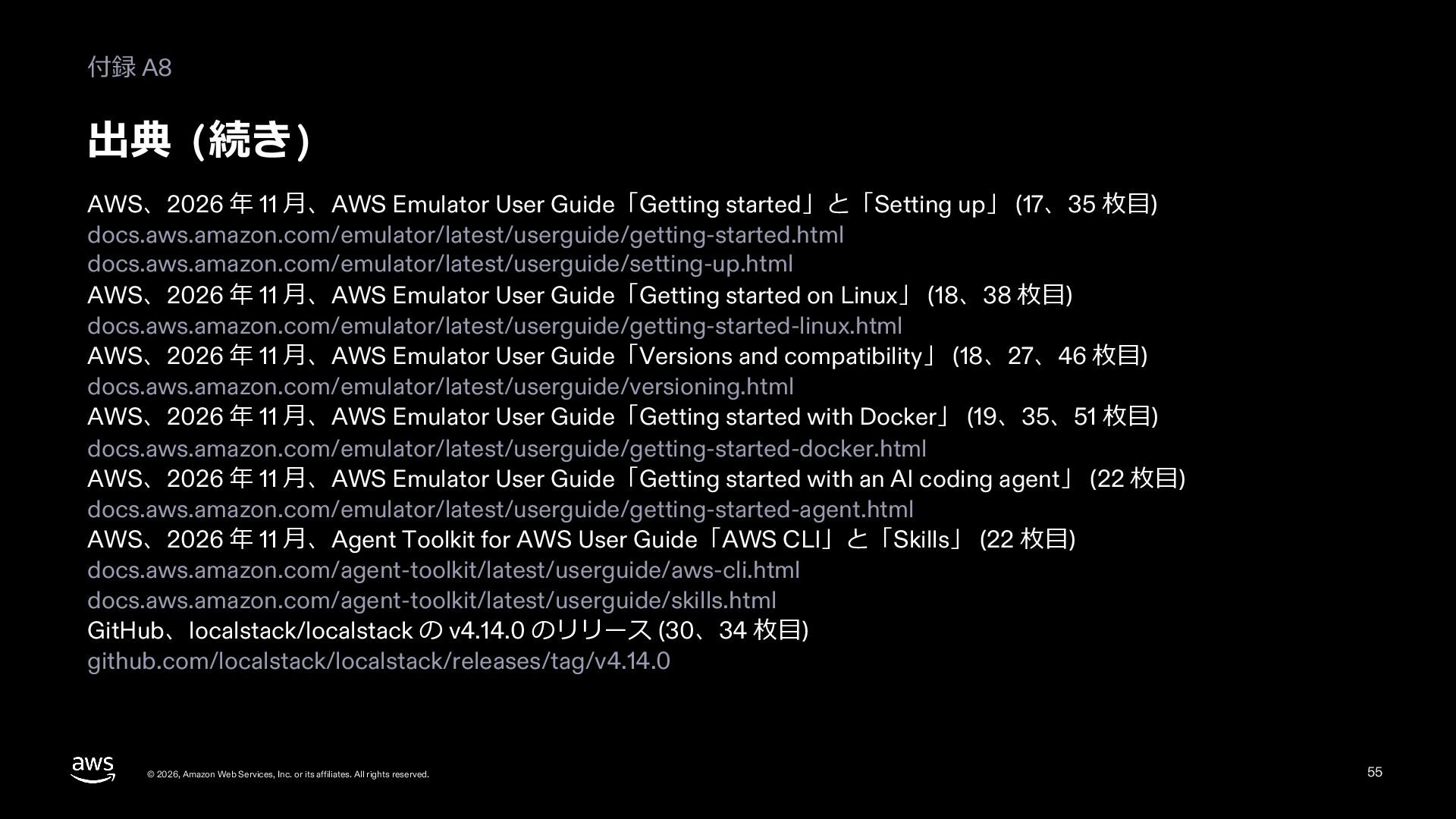
  49. 付録 A8 出典 (続き) AWS、2026 年 11 ⽉、AWS Emulator User

    Guide「Getting started」と「Setting up」 (17、35 枚⽬) docs.aws.amazon.com/emulator/latest/userguide/getting-started.html docs.aws.amazon.com/emulator/latest/userguide/setting-up.html AWS、2026 年 11 ⽉、AWS Emulator User Guide「Getting started on Linux」 (18、38 枚⽬) docs.aws.amazon.com/emulator/latest/userguide/getting-started-linux.html AWS、2026 年 11 ⽉、AWS Emulator User Guide「Versions and compatibility」 (18、27、46 枚⽬) docs.aws.amazon.com/emulator/latest/userguide/versioning.html AWS、2026 年 11 ⽉、AWS Emulator User Guide「Getting started with Docker」 (19、35、51 枚⽬) docs.aws.amazon.com/emulator/latest/userguide/getting-started-docker.html AWS、2026 年 11 ⽉、AWS Emulator User Guide「Getting started with an AI coding agent」 (22 枚⽬) docs.aws.amazon.com/emulator/latest/userguide/getting-started-agent.html AWS、2026 年 11 ⽉、Agent Toolkit for AWS User Guide「AWS CLI」と「Skills」 (22 枚⽬) docs.aws.amazon.com/agent-toolkit/latest/userguide/aws-cli.html docs.aws.amazon.com/agent-toolkit/latest/userguide/skills.html GitHub、localstack/localstack の v4.14.0 のリリース (30、34 枚⽬) github.com/localstack/localstack/releases/tag/v4.14.0 © 2026, Amazon Web Services, Inc. or its affiliates. All rights reserved. 55
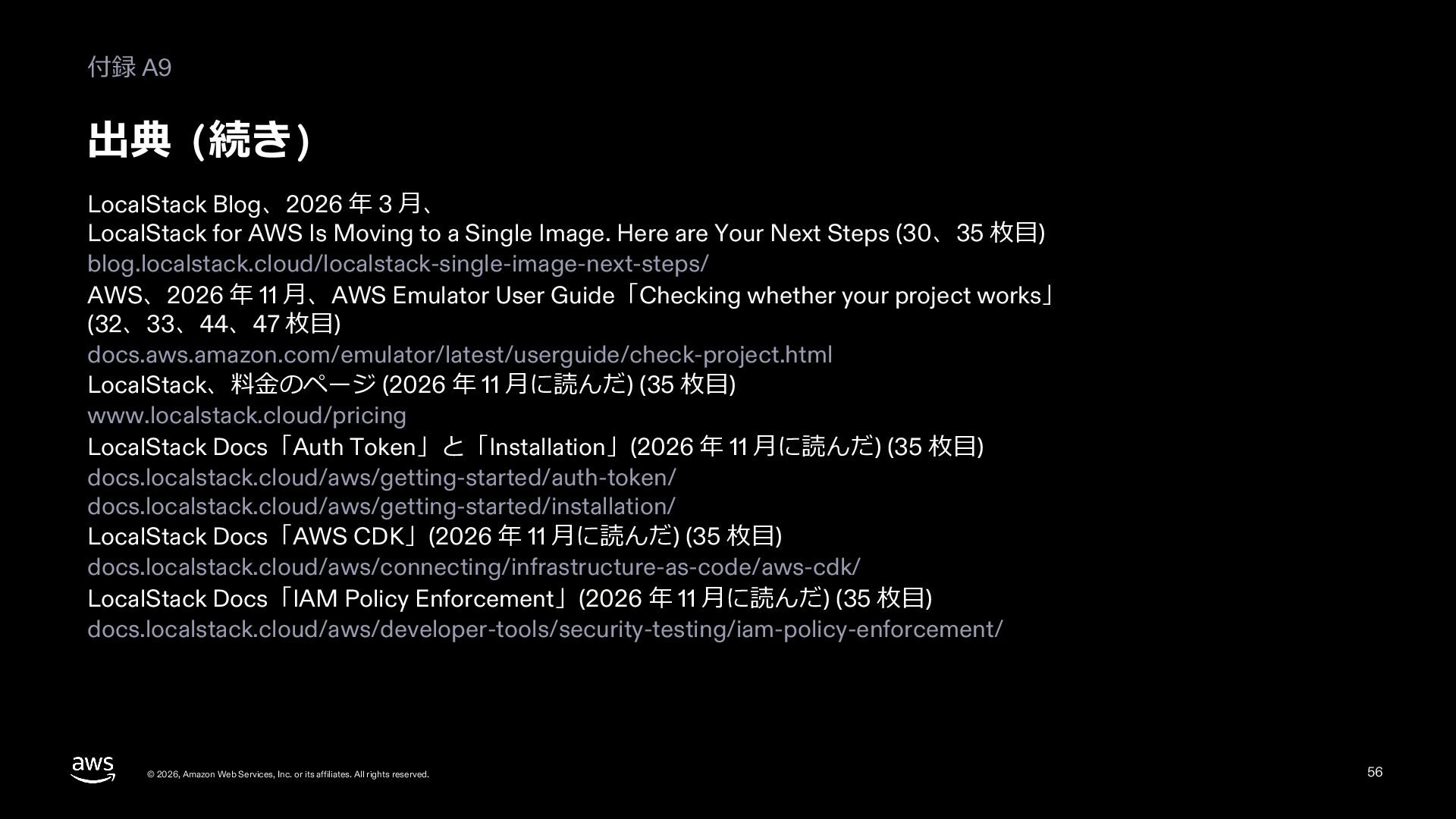
  50. 付録 A9 出典 (続き) LocalStack Blog、2026 年 3 ⽉、 LocalStack

    for AWS Is Moving to a Single Image. Here are Your Next Steps (30、35 枚⽬) blog.localstack.cloud/localstack-single-image-next-steps/ AWS、2026 年 11 ⽉、AWS Emulator User Guide「Checking whether your project works」 (32、33、44、47 枚⽬) docs.aws.amazon.com/emulator/latest/userguide/check-project.html LocalStack、料⾦のページ (2026 年 11 ⽉に読んだ) (35 枚⽬) www.localstack.cloud/pricing LocalStack Docs「Auth Token」と「Installation」(2026 年 11 ⽉に読んだ) (35 枚⽬) docs.localstack.cloud/aws/getting-started/auth-token/ docs.localstack.cloud/aws/getting-started/installation/ LocalStack Docs「AWS CDK」(2026 年 11 ⽉に読んだ) (35 枚⽬) docs.localstack.cloud/aws/connecting/infrastructure-as-code/aws-cdk/ LocalStack Docs「IAM Policy Enforcement」(2026 年 11 ⽉に読んだ) (35 枚⽬) docs.localstack.cloud/aws/developer-tools/security-testing/iam-policy-enforcement/ © 2026, Amazon Web Services, Inc. or its affiliates. All rights reserved. 56
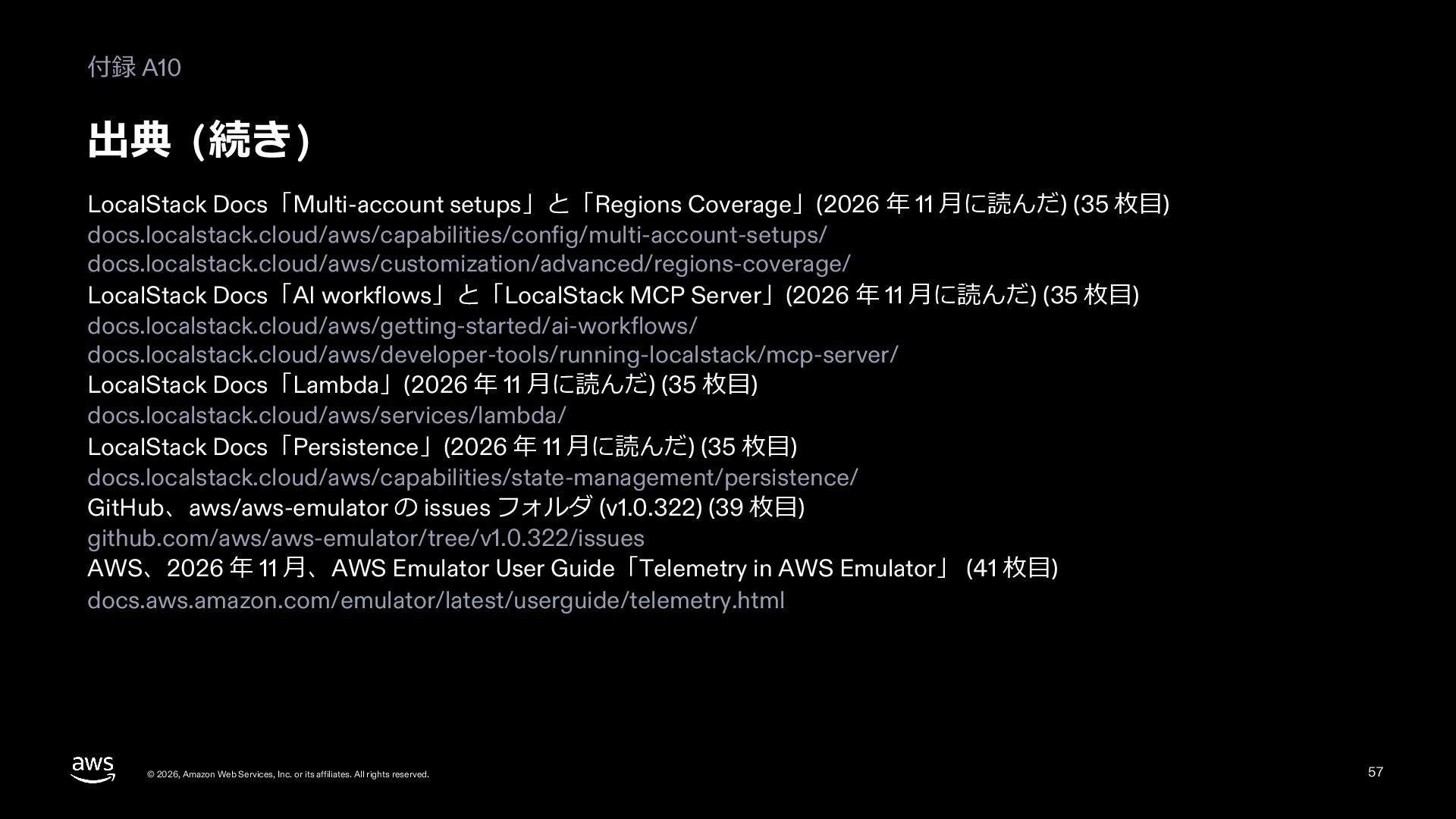
  51. 付録 A10 出典 (続き) LocalStack Docs「Multi-account setups」と「Regions Coverage」(2026 年 11

    ⽉に読んだ) (35 枚⽬) docs.localstack.cloud/aws/capabilities/config/multi-account-setups/ docs.localstack.cloud/aws/customization/advanced/regions-coverage/ LocalStack Docs「AI workflows」と「LocalStack MCP Server」(2026 年 11 ⽉に読んだ) (35 枚⽬) docs.localstack.cloud/aws/getting-started/ai-workflows/ docs.localstack.cloud/aws/developer-tools/running-localstack/mcp-server/ LocalStack Docs「Lambda」(2026 年 11 ⽉に読んだ) (35 枚⽬) docs.localstack.cloud/aws/services/lambda/ LocalStack Docs「Persistence」(2026 年 11 ⽉に読んだ) (35 枚⽬) docs.localstack.cloud/aws/capabilities/state-management/persistence/ GitHub、aws/aws-emulator の issues フォルダ (v1.0.322) (39 枚⽬) github.com/aws/aws-emulator/tree/v1.0.322/issues AWS、2026 年 11 ⽉、AWS Emulator User Guide「Telemetry in AWS Emulator」 (41 枚⽬) docs.aws.amazon.com/emulator/latest/userguide/telemetry.html © 2026, Amazon Web Services, Inc. or its affiliates. All rights reserved. 57