Share
Embed
Refactoring: jQuery to Ember
9 steps to follow for refactoring a jQuery plugin-style app to a clean Ember app
Luke Melia
May 23, 2013
Transcript
44 slides
-
Refactoring jQuery to Ember Luke Melia Ember.js NYC May 23rd,
2013 Friday, May 24, 13 -
▪ An Ember app IS a jQuery app! 3 Hold
it right there... Friday, May 24, 13 -
▪ An Ember app IS a jQuery app! ▪ To
be specific, this talk is about moving code written in jQuery plugin-style to Ember 3 Hold it right there... Friday, May 24, 13 -
▪ Started with a Rails app that had traditional jQuery
event handlers and plugin use ▪ Ended with a clean Ember app 4 Recent Experience Friday, May 24, 13 -
▪plugin activation ▪event handling ▪jQuery-oriented JS library functions 6 Types
of jQuery code Friday, May 24, 13 -
▪Truth in DOM ▪Globals everywhere ▪Sprawling, hard-to-organize code 7 Why
is this style often problematic? Friday, May 24, 13 -
“ Refactoring is a disciplined technique for restructuring an existing
body of code, altering its internal structure without changing its external behavior. 8 What is this “refactoring” you speak of? Friday, May 24, 13 -
“ Its heart is a series of small behavior preserving
transformations. Each transformation (called a 'refactoring') does little, but a sequence of transformations can produce a significant restructuring. Since each refactoring is small, it's less likely to go wrong. 9 What is this “refactoring” you speak of? Friday, May 24, 13 -
“ The system is also kept fully working after each
small refactoring, reducing the chances that a system can get seriously broken during the restructuring. 10 What is this “refactoring” you speak of? -Martin Fowler Friday, May 24, 13 -
Starting point 11 jQuery- powered area window.App = Em.Application.create({
rootElement: "#app" }); <div id="app"> </div> Friday, May 24, 13 -
Starting point 11 jQuery- powered area Ember app window.App =
Em.Application.create({ rootElement: "#app" }); <div id="app"> </div> Friday, May 24, 13 -
Step 1: Create an Ember View 12 App.CropView = Em.View.extend({
templateName: "crop" }); App.CropController = Em.Controller.extend({}); {{render crop}} Friday, May 24, 13 -
Step 1: Create an Ember View 12 application.handlebars App.CropView =
Em.View.extend({ templateName: "crop" }); App.CropController = Em.Controller.extend({}); {{render crop}} Friday, May 24, 13 -
Step 2: Add HTML to the template 13 jQuery- powered
area HTML JAVASCRIPT Friday, May 24, 13 -
Step 2: Add HTML to the template 13 jQuery- powered
area HTML JAVASCRIPT crop.handlebars Friday, May 24, 13 -
Step 2: Add HTML to the template 13 jQuery- powered
area HTML JAVASCRIPT crop.handlebars <div id=crop> ... </div> Friday, May 24, 13 -
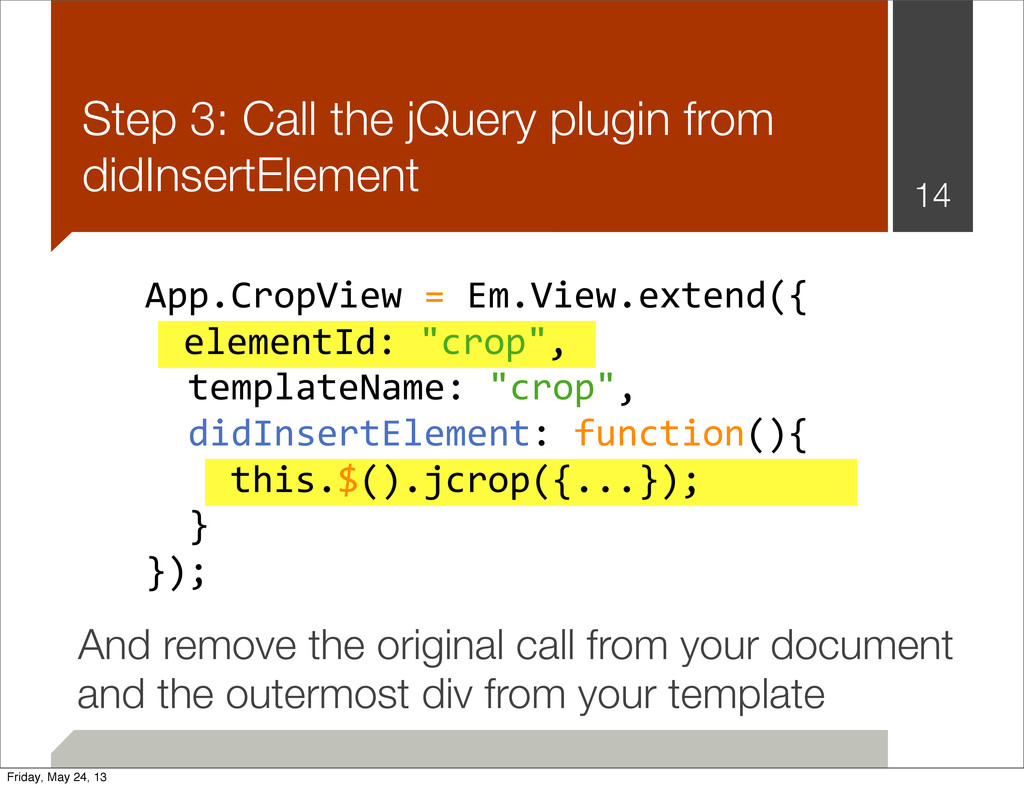
App.CropView = Em.View.extend({ templateName: "crop", didInsertElement: function(){
this.$("#crop").jcrop({...}); } }); Step 3: Call the jQuery plugin from didInsertElement 14 And remove the original call from your document Friday, May 24, 13 -
App.CropView = Em.View.extend({ templateName: "crop", didInsertElement: function(){
this.$("#crop").jcrop({...}); } }); Step 3: Call the jQuery plugin from didInsertElement 14 And remove the original call from your document elementId: "crop", Friday, May 24, 13 -
App.CropView = Em.View.extend({ templateName: "crop", didInsertElement: function(){
this.$("#crop").jcrop({...}); } }); Step 3: Call the jQuery plugin from didInsertElement 14 And remove the original call from your document elementId: "crop", this.$().jcrop({...}); Friday, May 24, 13 -
App.CropView = Em.View.extend({ templateName: "crop", didInsertElement: function(){
this.$("#crop").jcrop({...}); } }); Step 3: Call the jQuery plugin from didInsertElement 14 And remove the original call from your document elementId: "crop", this.$().jcrop({...}); and the outermost div from your template Friday, May 24, 13 -
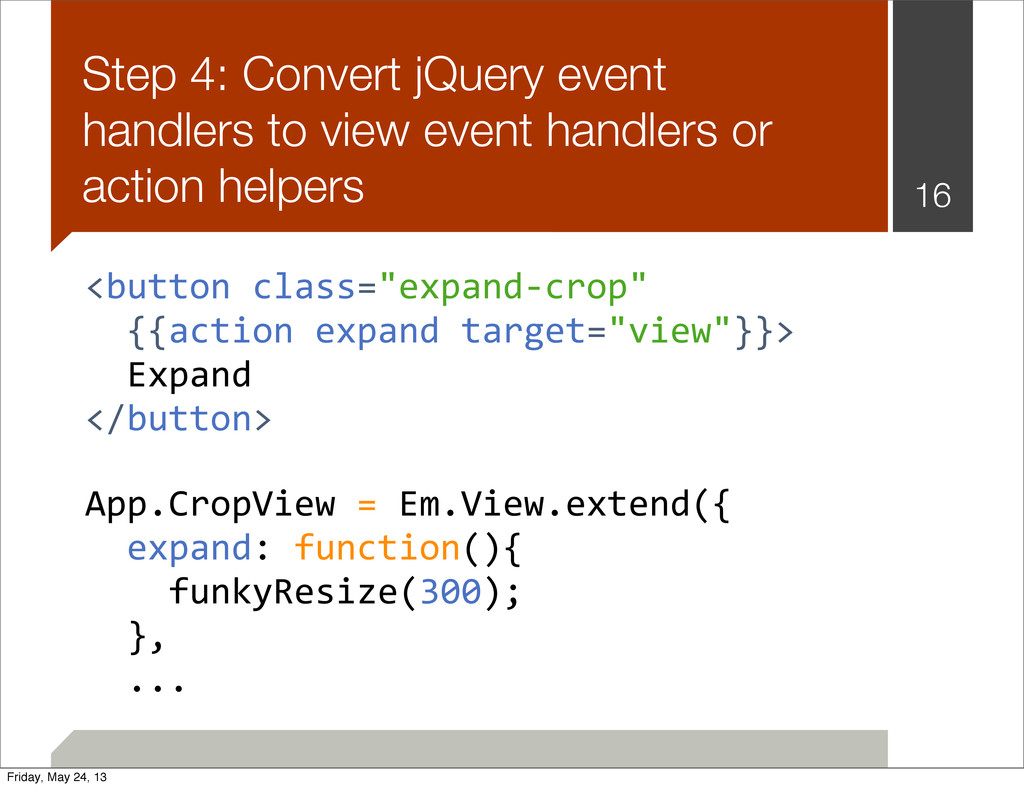
Step 4: Convert jQuery event handlers to view event handlers
or action helpers 15 <button class="expand-‐crop">Expand</button> $(".expand-‐crop").("click", function(evt){ funkyResize(300); }); Friday, May 24, 13 -
Step 4: Convert jQuery event handlers to view event handlers
or action helpers 16 <button class="expand-‐crop" {{action expand target="view"}}> Expand </button> App.CropView = Em.View.extend({ expand: function(){ funkyResize(300); }, ... Friday, May 24, 13 -
Step 5: Move library functions into the view file’s closure
17 App.CropView = Em.View.extend({ ... expand: function(){ funkyResize(300); } }); function funkyResize(w){ ... } Friday, May 24, 13 -
Sidebar: What’s a “closure”? 18 function(){ var a =
{}; function b(){ ... }; }(); a //=> undefined b //=> undefined What I mean more precisely is an IIFE: Immediately-Invoked Function Expression Most build tools you’ll use with Ember enclose each file in an IIFE Friday, May 24, 13 -
Step 6: Refactor library functions to methods on the view
and extract instance variables 19 App.CropView = Em.View.extend({ ... expand: function(){ this.funkyResize(600); }, funkyResize: function(w) { ... } }); Friday, May 24, 13 -
Step 7: Replace global $() calls with this.$() calls ▪
this.$(...) is scoped to the current view’s element 20 Friday, May 24, 13 -
Step 8: Extract properties 21 App.CropView = Em.View.extend({ ...
funkyResize: function(w) { if (this.orientation === "horiz") this.$().width(w + 600); else this.$().width(w + 400); } }); Friday, May 24, 13 -
Step 8: Extract properties 22 App.CropView = Em.View.extend({ baseWidth:
function(){ var orient = this.get("orientation"); return orient == "horiz" ? 600 : 400; }.property("orientation"), funkyResize: function(w) { var newWidth = w + this.get("baseWidth"); this.$().width(newWidth); } }); Friday, May 24, 13 -
Step 9: Move non-DOM properties and methods to the controller
23 App.CropController = Em.Controller.extend({ orientation: "horiz", baseWidth: function(){ var orient = this.get("orientation"); return orient == "horiz" ? 600 : 400; }.property("orientation") }); Friday, May 24, 13 -
Step 9: Move non-DOM properties and methods to the controller
24 App.CropView = Em.View.extend({ funkyResize: function(w) { var newWidth = w + this.get("controller.baseWidth"); this.$().width(newWidth); } }); Friday, May 24, 13 -
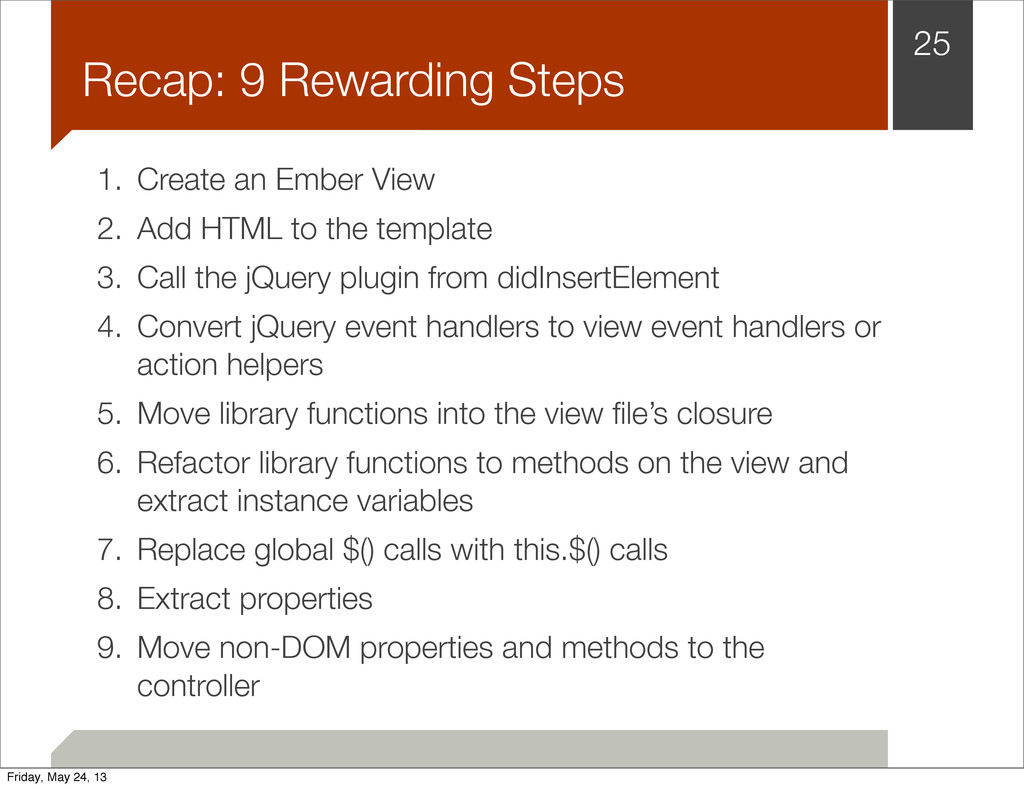
1. Create an Ember View 2. Add HTML to the
template 3. Call the jQuery plugin from didInsertElement 4. Convert jQuery event handlers to view event handlers or action helpers 5. Move library functions into the view file’s closure 6. Refactor library functions to methods on the view and extract instance variables 7. Replace global $() calls with this.$() calls 8. Extract properties 9. Move non-DOM properties and methods to the controller 25 Recap: 9 Rewarding Steps Friday, May 24, 13 -
Caveats ▪ jQuery plugins that rewrite the DOM may break
bindings ▪ Do tear down in willDestroyElement when appropriate 26 Friday, May 24, 13 -
Q & A Follow me @lukemelia Some examples appear courtesy
of my company. Yapp Labs offers Ember.js consulting and training. Creative Commons photo credits: http://www.flickr.com/photos/headovmetal/3338989094, http://www.flickr.com/photos/hatm/5704687902 27 Friday, May 24, 13