Upgrade to Pro — share decks privately, control downloads, hide ads and more …

Kubernetesにおける推論基盤

Avatar for ry ry
March 09, 2026

 Kubernetesにおける推論基盤

第3回 vLLM roundup Community Meetup Tokyo登壇資料
https://ossbyredhat.connpass.com/event/383638/

Avatar for ry

ry

March 09, 2026
Tweet

More Decks by ry

Other Decks in Technology

Transcript

  1. Copyright © Dell Inc. All Rights Reserved. 2 Introduction Name:

    Ryotaro Uwatsu (X: @Uryo_0213) Company: Dell Technologies Japan inc. Title: Principal Engineer, Solutions Architecture Projects: • Kubernetes運用支援 • Kubernetesを用いたAI基盤の設計/構築/支援 • MLOps/LLMOps支援 • etc... Kubernetes Meetup Novice
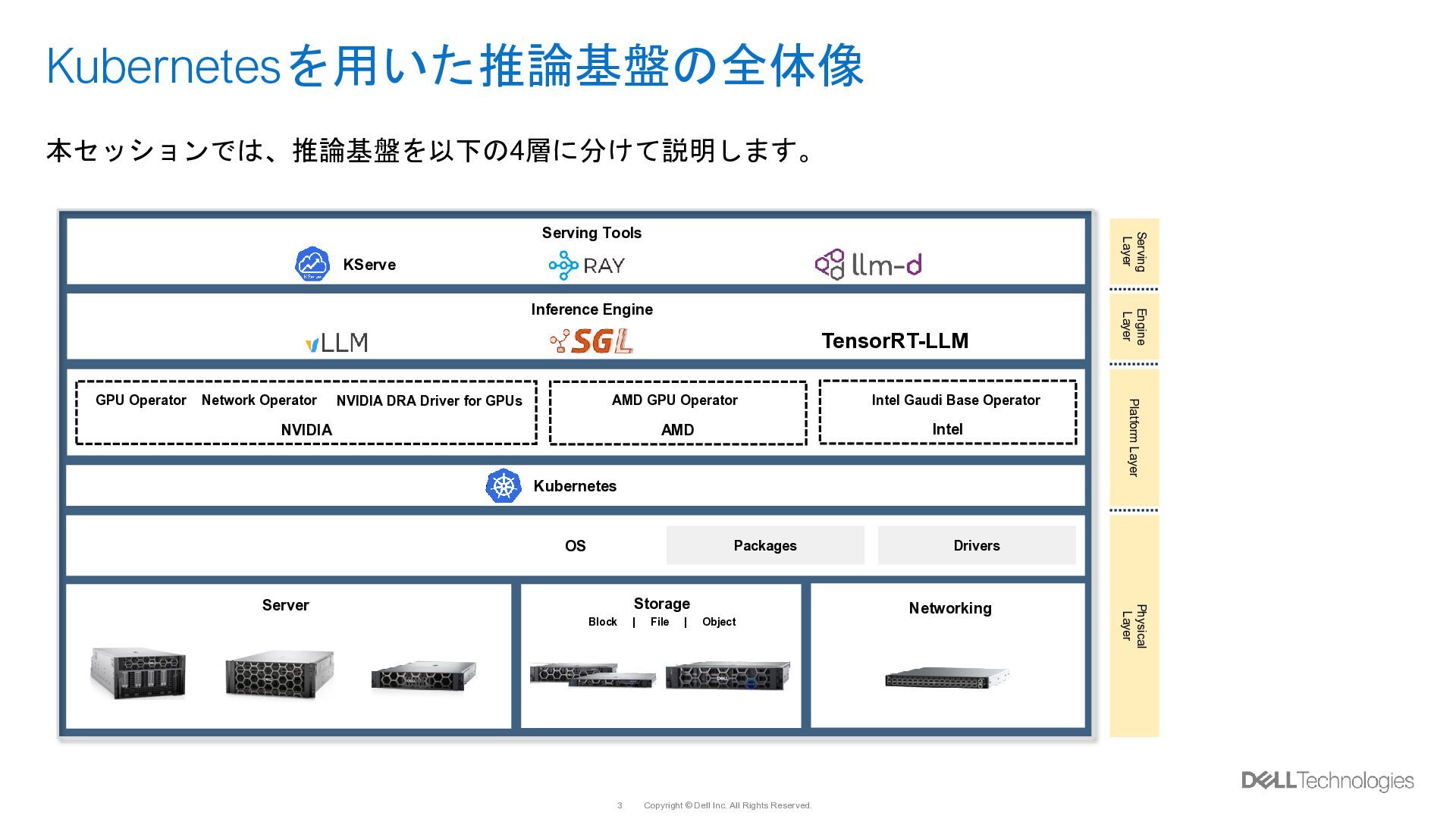
  2. Copyright © Dell Inc. All Rights Reserved. 3 Kubernetesを用いた推論基盤の全体像 Storage

    Block | File | Object Server Networking OS Kubernetes AMD GPU Operator Intel Gaudi Base Operator GPU Operator Network Operator NVIDIA AMD Intel NVIDIA DRA Driver for GPUs Packages Drivers Inference Engine TensorRT-LLM Serving Tools KServe Physical Layer Platform Layer Engine Layer Serving Layer 本セッションでは、推論基盤を以下の4層に分けて説明します。
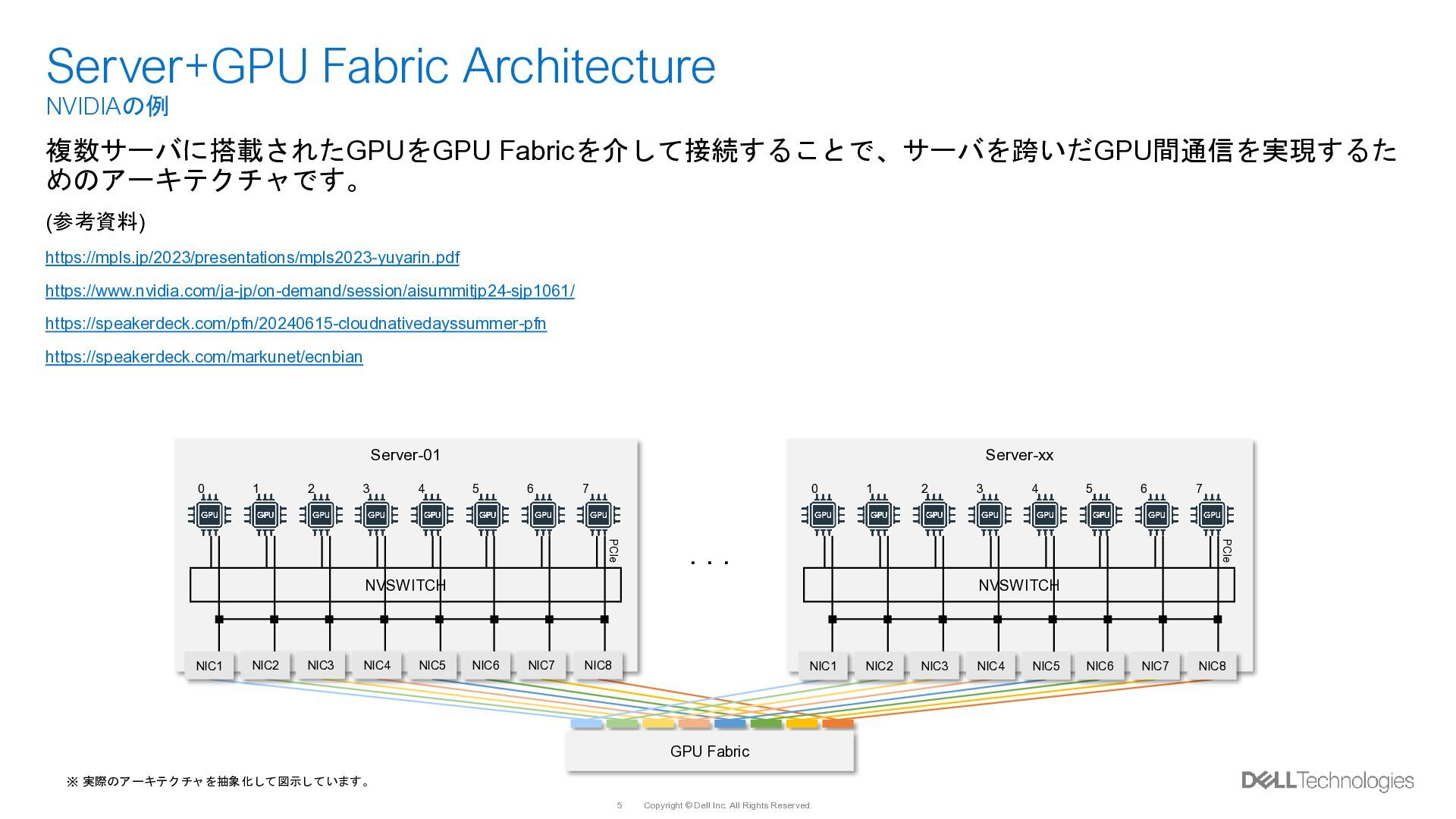
  3. Copyright © Dell Inc. All Rights Reserved. 5 Server+GPU Fabric

    Architecture NVIDIAの例 Server-01 GPU Fabric NVSWITCH PCIe Server-xx NVSWITCH PCIe NIC1 NIC2 NIC3 NIC4 NIC5 NIC6 NIC7 NIC8 NIC1 NIC2 NIC3 NIC4 NIC5 NIC6 NIC7 NIC8 0 1 2 3 4 5 6 7 0 1 2 3 4 5 6 7 ※ 実際のアーキテクチャを抽象化して図示しています。 ・・・ 複数サーバに搭載されたGPUをGPU Fabricを介して接続することで、サーバを跨いだGPU間通信を実現するた めのアーキテクチャです。 (参考資料) https://mpls.jp/2023/presentations/mpls2023-yuyarin.pdf https://www.nvidia.com/ja-jp/on-demand/session/aisummitjp24-sjp1061/ https://speakerdeck.com/pfn/20240615-cloudnativedayssummer-pfn https://speakerdeck.com/markunet/ecnbian
  4. Copyright © Dell Inc. All Rights Reserved. 6 Server+GPU Fabric

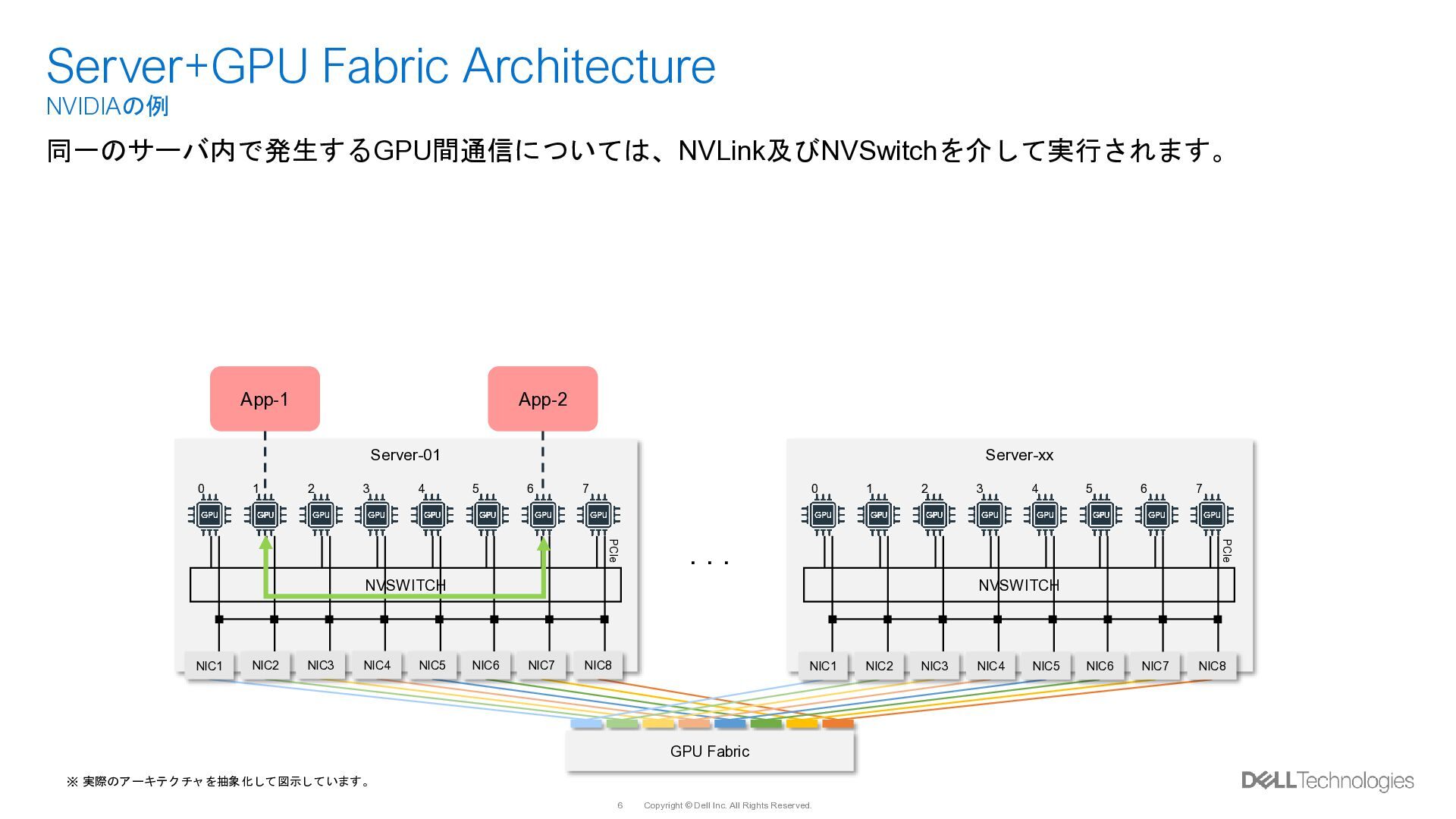
    Architecture NVIDIAの例 Server-01 GPU Fabric NVSWITCH PCIe Server-xx NVSWITCH PCIe 0 1 2 3 4 5 6 7 0 1 2 3 4 5 6 7 ※ 実際のアーキテクチャを抽象化して図示しています。 ・・・ 同一のサーバ内で発生するGPU間通信については、NVLink及びNVSwitchを介して実行されます。 App-1 App-2 NIC1 NIC2 NIC3 NIC4 NIC5 NIC6 NIC7 NIC8 NIC1 NIC2 NIC3 NIC4 NIC5 NIC6 NIC7 NIC8
  5. Copyright © Dell Inc. All Rights Reserved. 7 Server+GPU Fabric

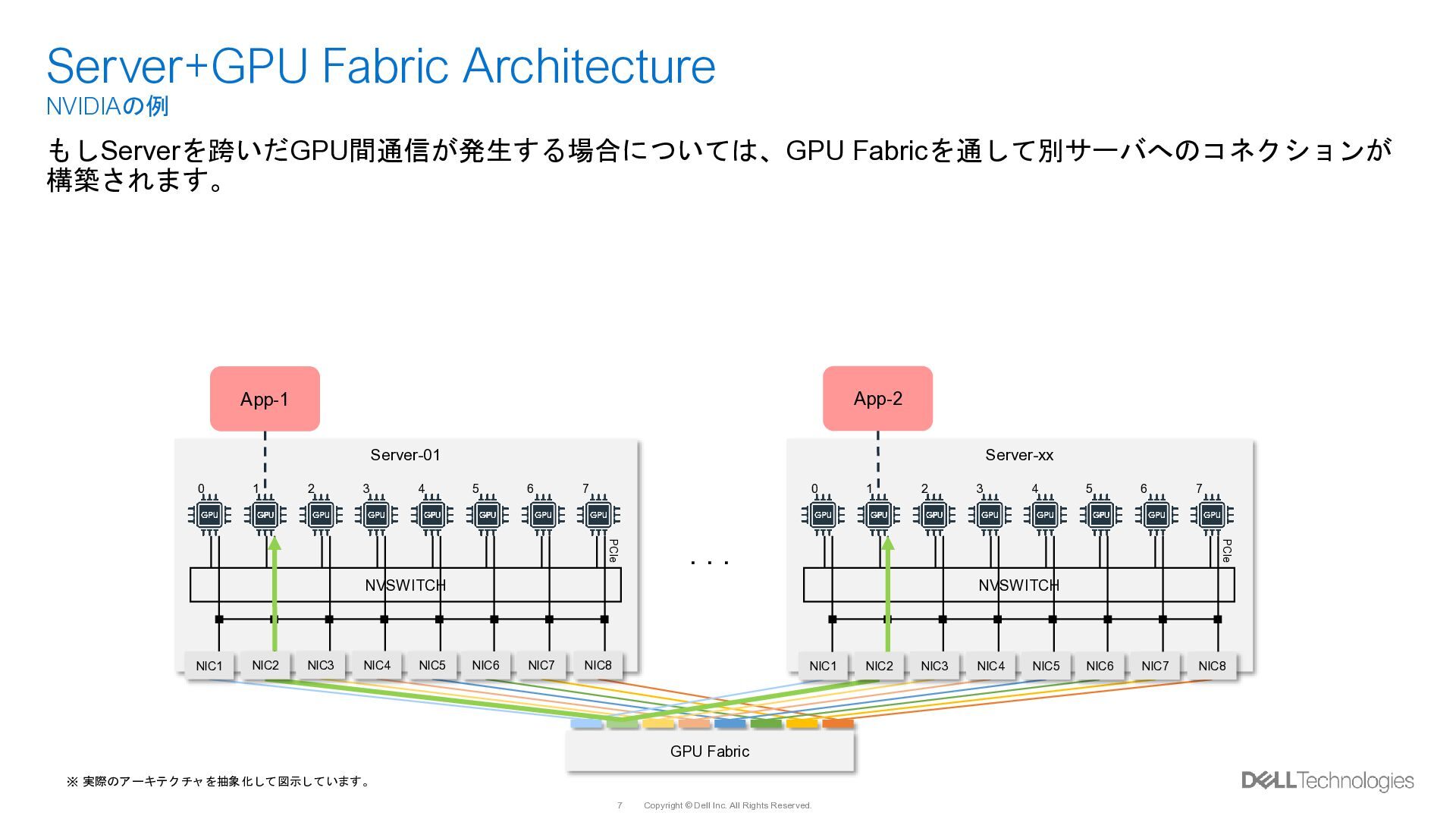
    Architecture NVIDIAの例 Server-01 GPU Fabric NVSWITCH PCIe Server-xx NVSWITCH PCIe 0 1 2 3 4 5 6 7 0 1 2 3 4 5 6 7 ※ 実際のアーキテクチャを抽象化して図示しています。 ・・・ もしServerを跨いだGPU間通信が発生する場合については、GPU Fabricを通して別サーバへのコネクションが 構築されます。 App-1 App-2 NIC1 NIC2 NIC3 NIC4 NIC5 NIC6 NIC7 NIC8 NIC1 NIC2 NIC3 NIC4 NIC5 NIC6 NIC7 NIC8
  6. Copyright © Dell Inc. All Rights Reserved. 8 Rack-01 Rack-Scale

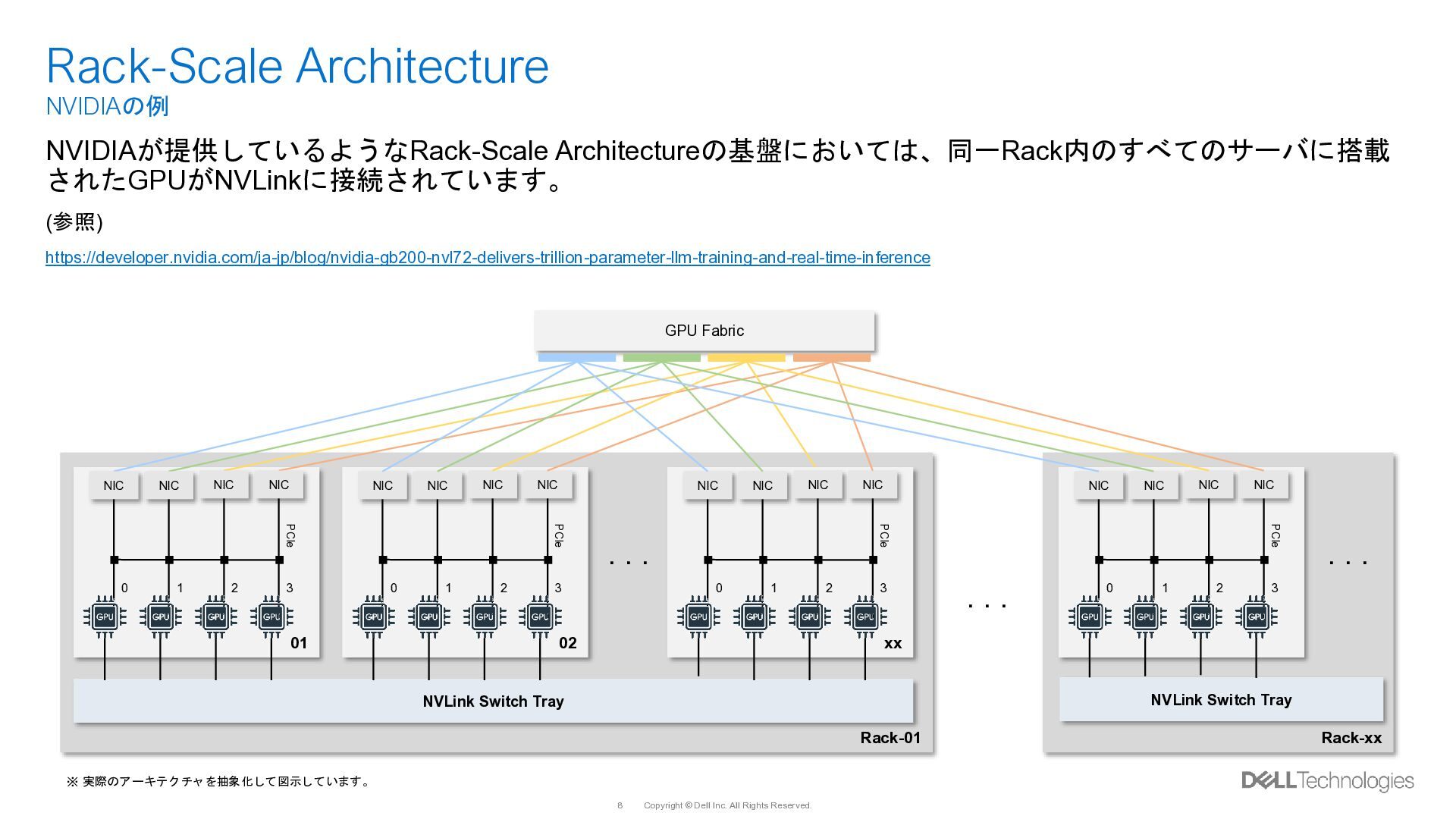
    Architecture NVIDIAの例 01 GPU Fabric PCIe NIC 0 1 2 3 NIC NIC NIC 02 PCIe NIC 0 1 2 3 NIC NIC NIC xx PCIe NIC 0 1 2 3 NIC NIC NIC Rack-xx PCIe NIC 0 1 2 3 NIC NIC NIC ・・・ ・・・ ・・・ NVLink Switch Tray NVLink Switch Tray ※ 実際のアーキテクチャを抽象化して図示しています。 NVIDIAが提供しているようなRack-Scale Architectureの基盤においては、同一Rack内のすべてのサーバに搭載 されたGPUがNVLinkに接続されています。 (参照) https://developer.nvidia.com/ja-jp/blog/nvidia-gb200-nvl72-delivers-trillion-parameter-llm-training-and-real-time-inference
  7. Copyright © Dell Inc. All Rights Reserved. 9 Rack-01 Rack-Scale

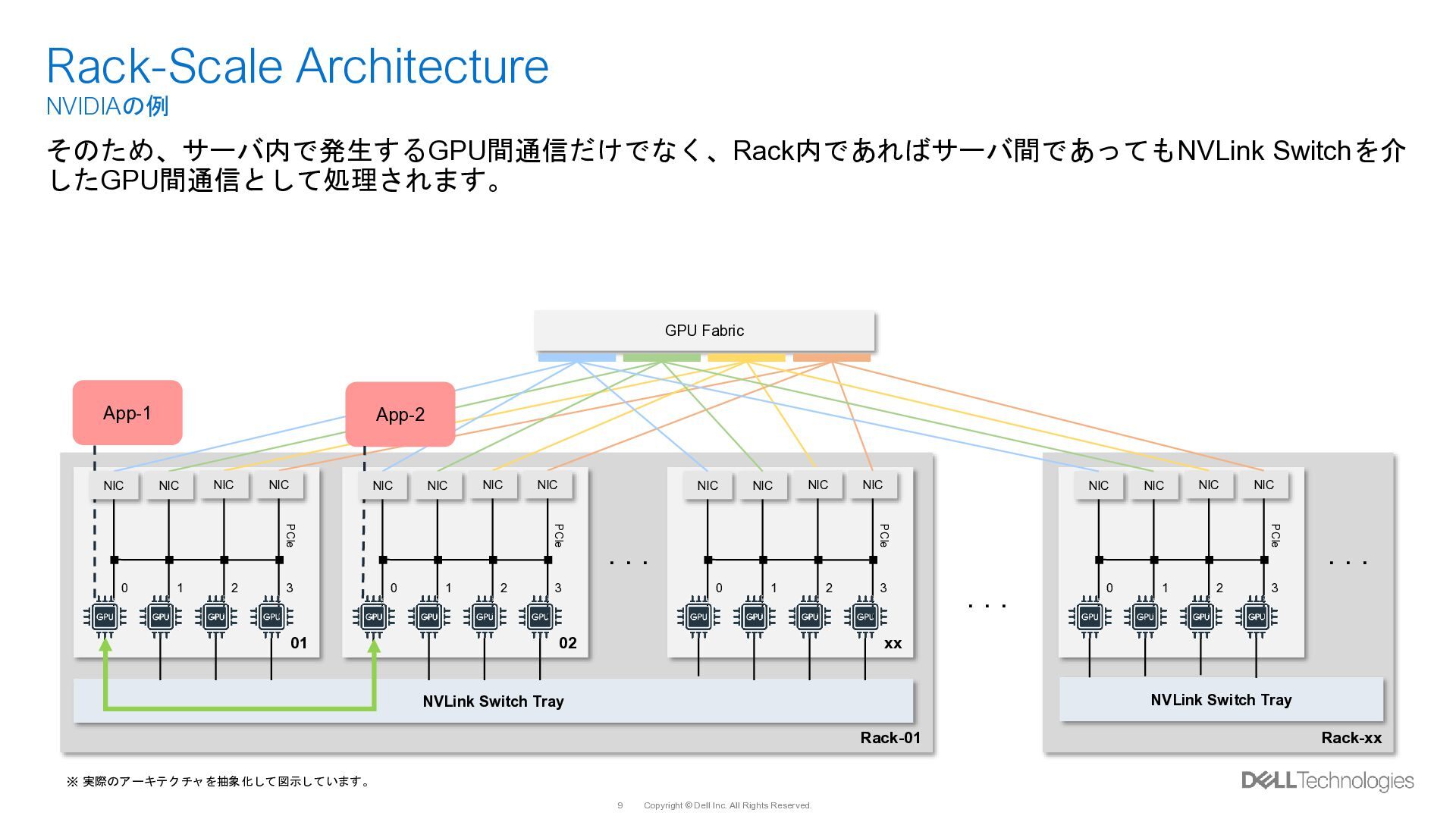
    Architecture NVIDIAの例 01 GPU Fabric PCIe 0 1 2 3 02 PCIe 0 1 2 3 xx PCIe NIC 0 1 2 3 NIC NIC NIC Rack-xx PCIe NIC 0 1 2 3 NIC NIC NIC ・・・ ・・・ ・・・ NVLink Switch Tray NVLink Switch Tray ※ 実際のアーキテクチャを抽象化して図示しています。 そのため、サーバ内で発生するGPU間通信だけでなく、Rack内であればサーバ間であってもNVLink Switchを介 したGPU間通信として処理されます。 App-1 App-2 NIC NIC NIC NIC NIC NIC NIC NIC
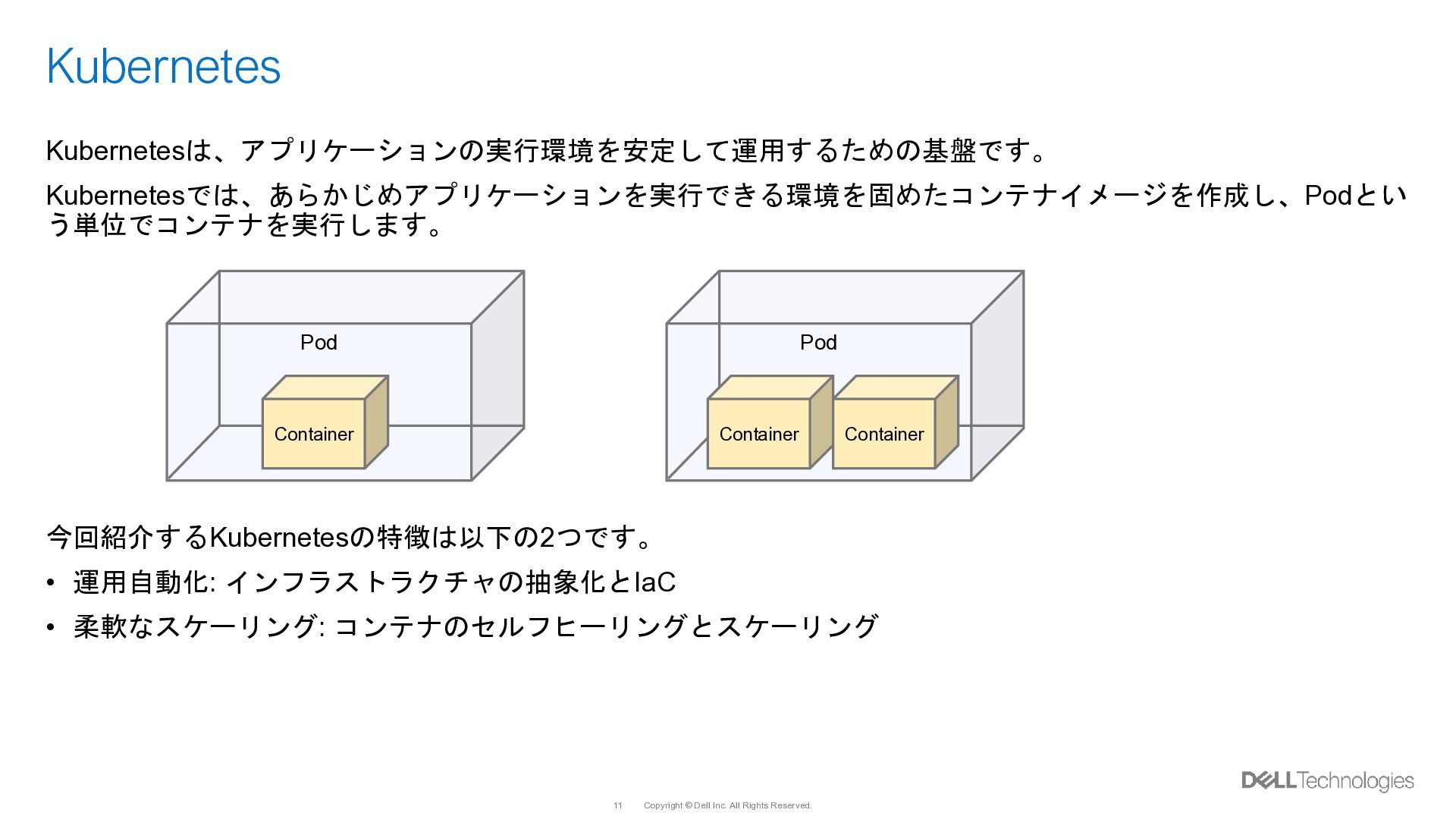
  8. Copyright © Dell Inc. All Rights Reserved. 11 Kubernetes Kubernetesは、アプリケーションの実行環境を安定して運用するための基盤です。

    Kubernetesでは、あらかじめアプリケーションを実行できる環境を固めたコンテナイメージを作成し、Podとい う単位でコンテナを実行します。 今回紹介するKubernetesの特徴は以下の2つです。 • 運用自動化: インフラストラクチャの抽象化とIaC • 柔軟なスケーリング: コンテナのセルフヒーリングとスケーリング Pod Container Pod Container Container
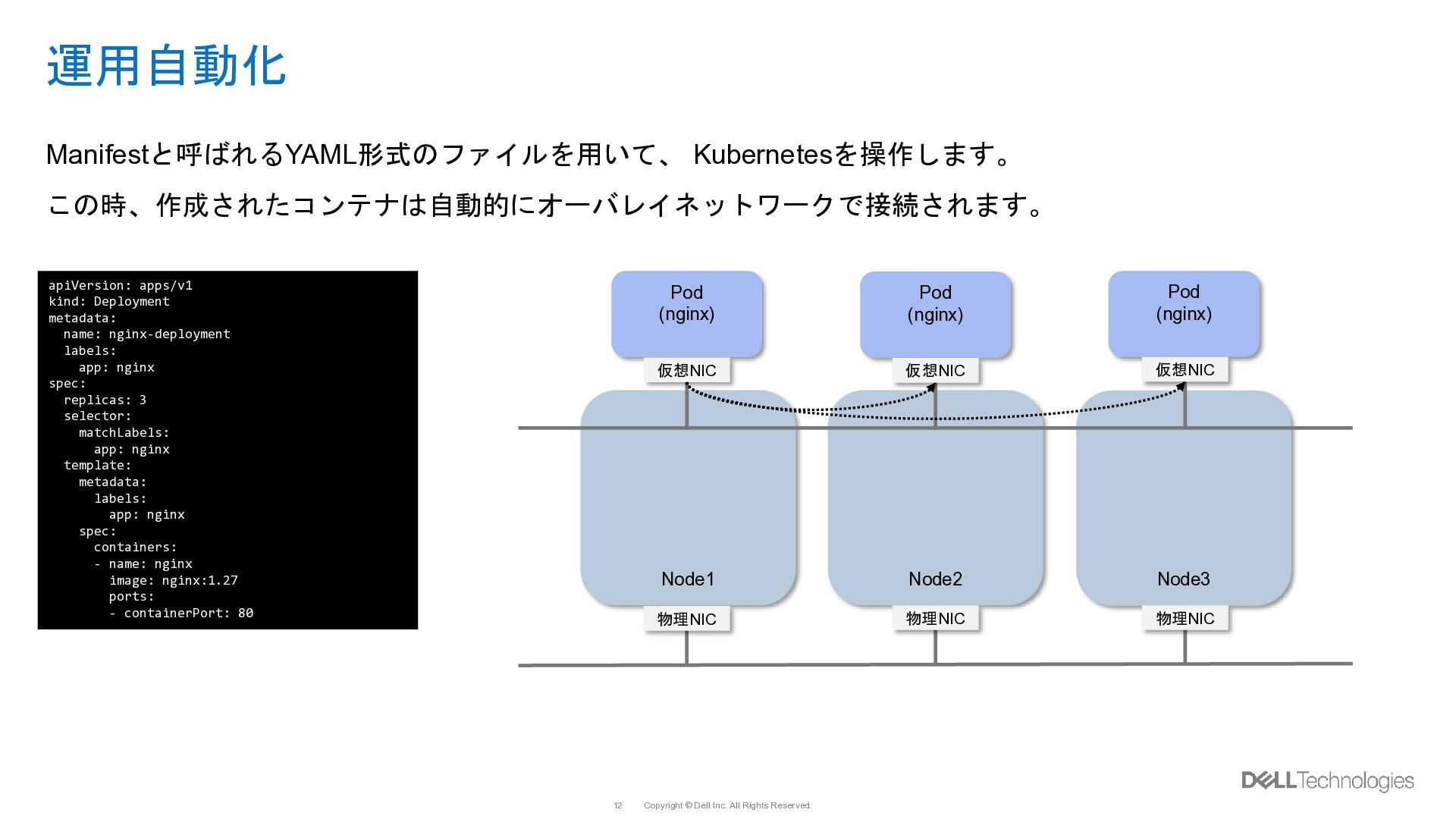
  9. Copyright © Dell Inc. All Rights Reserved. 12 Pod (nginx)

    Pod (nginx) 運用自動化 Manifestと呼ばれるYAML形式のファイルを用いて、 Kubernetesを操作します。 この時、作成されたコンテナは自動的にオーバレイネットワークで接続されます。 Node1 Node2 Node3 Pod (nginx) 物理NIC 物理NIC 物理NIC 仮想NIC 仮想NIC 仮想NIC apiVersion: apps/v1 kind: Deployment metadata: name: nginx-deployment labels: app: nginx spec: replicas: 3 selector: matchLabels: app: nginx template: metadata: labels: app: nginx spec: containers: - name: nginx image: nginx:1.27 ports: - containerPort: 80
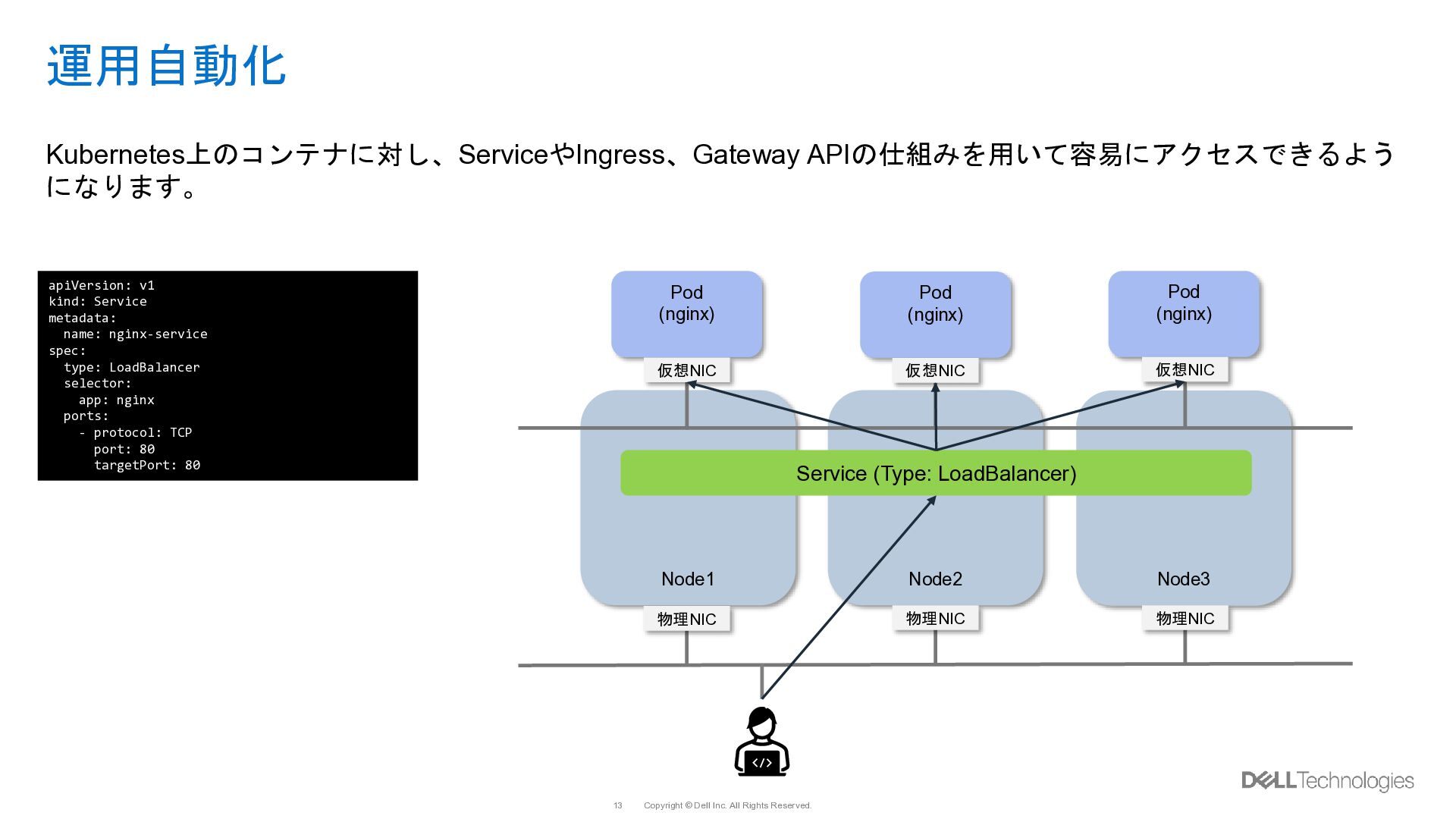
  10. Copyright © Dell Inc. All Rights Reserved. 13 Pod (nginx)

    Pod (nginx) 運用自動化 Kubernetes上のコンテナに対し、ServiceやIngress、Gateway APIの仕組みを用いて容易にアクセスできるよう になります。 Node1 Node2 Node3 Pod (nginx) 物理NIC 物理NIC 物理NIC 仮想NIC 仮想NIC 仮想NIC apiVersion: v1 kind: Service metadata: name: nginx-service spec: type: LoadBalancer selector: app: nginx ports: - protocol: TCP port: 80 targetPort: 80 Service (Type: LoadBalancer)
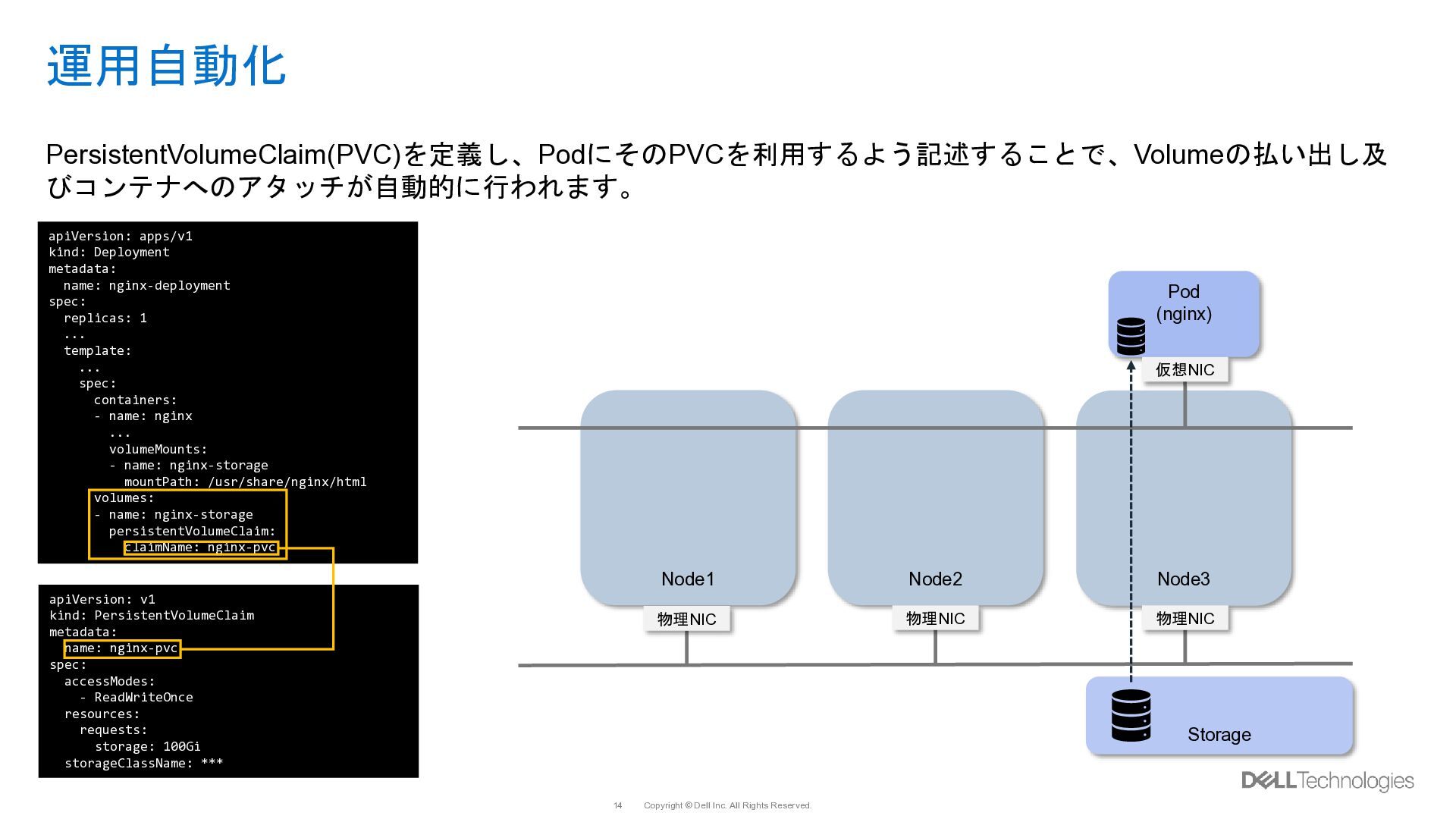
  11. Copyright © Dell Inc. All Rights Reserved. 14 Pod (nginx)

    運用自動化 PersistentVolumeClaim(PVC)を定義し、PodにそのPVCを利用するよう記述することで、Volumeの払い出し及 びコンテナへのアタッチが自動的に行われます。 Node1 Node2 Node3 物理NIC 物理NIC 物理NIC 仮想NIC apiVersion: apps/v1 kind: Deployment metadata: name: nginx-deployment spec: replicas: 1 ... template: ... spec: containers: - name: nginx ... volumeMounts: - name: nginx-storage mountPath: /usr/share/nginx/html volumes: - name: nginx-storage persistentVolumeClaim: claimName: nginx-pvc Storage apiVersion: v1 kind: PersistentVolumeClaim metadata: name: nginx-pvc spec: accessModes: - ReadWriteOnce resources: requests: storage: 100Gi storageClassName: ***
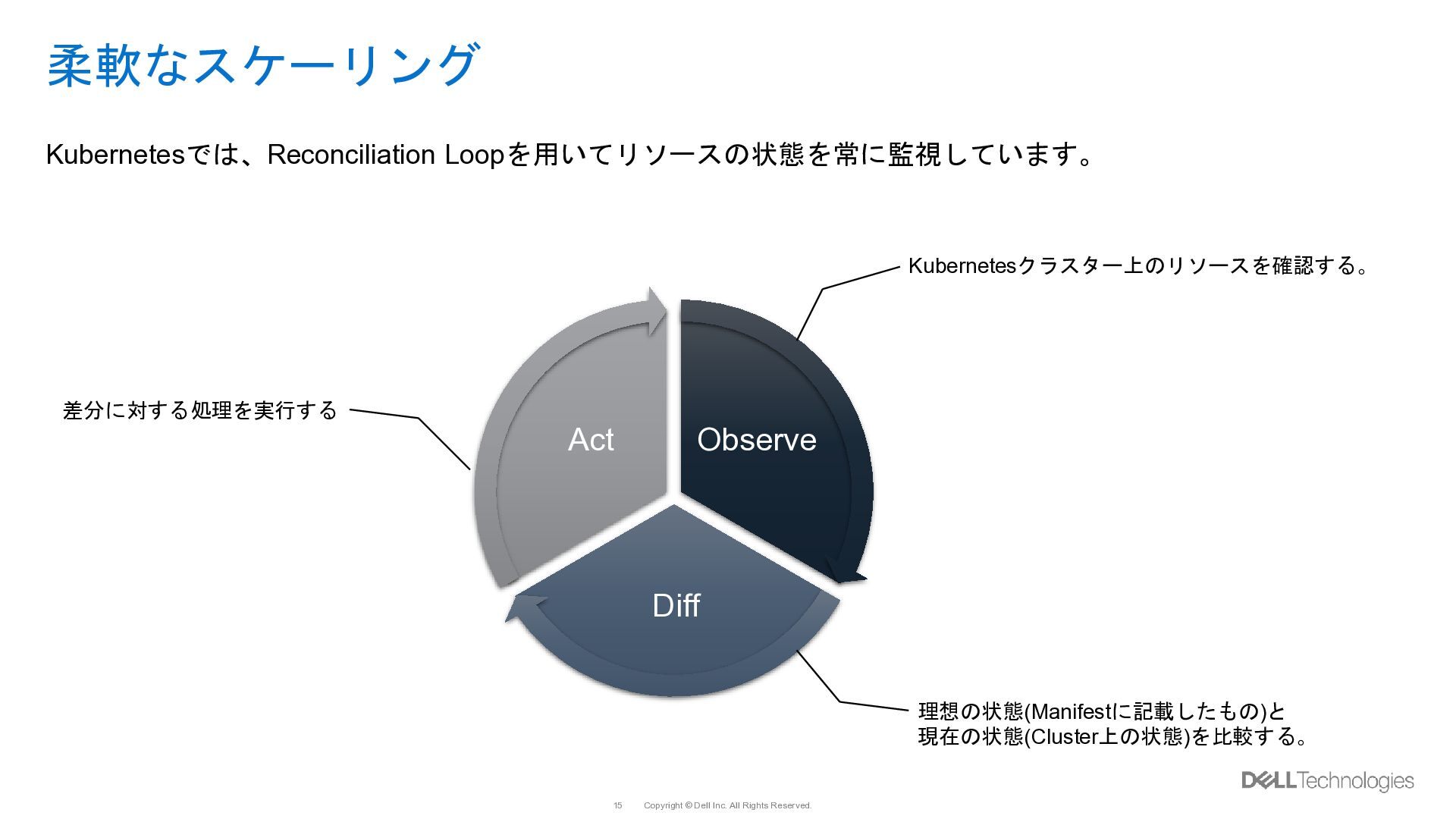
  12. Copyright © Dell Inc. All Rights Reserved. 15 柔軟なスケーリング Observe

    Diff Act Kubernetesクラスター上のリソースを確認する。 理想の状態(Manifestに記載したもの)と 現在の状態(Cluster上の状態)を比較する。 差分に対する処理を実行する Kubernetesでは、Reconciliation Loopを用いてリソースの状態を常に監視しています。
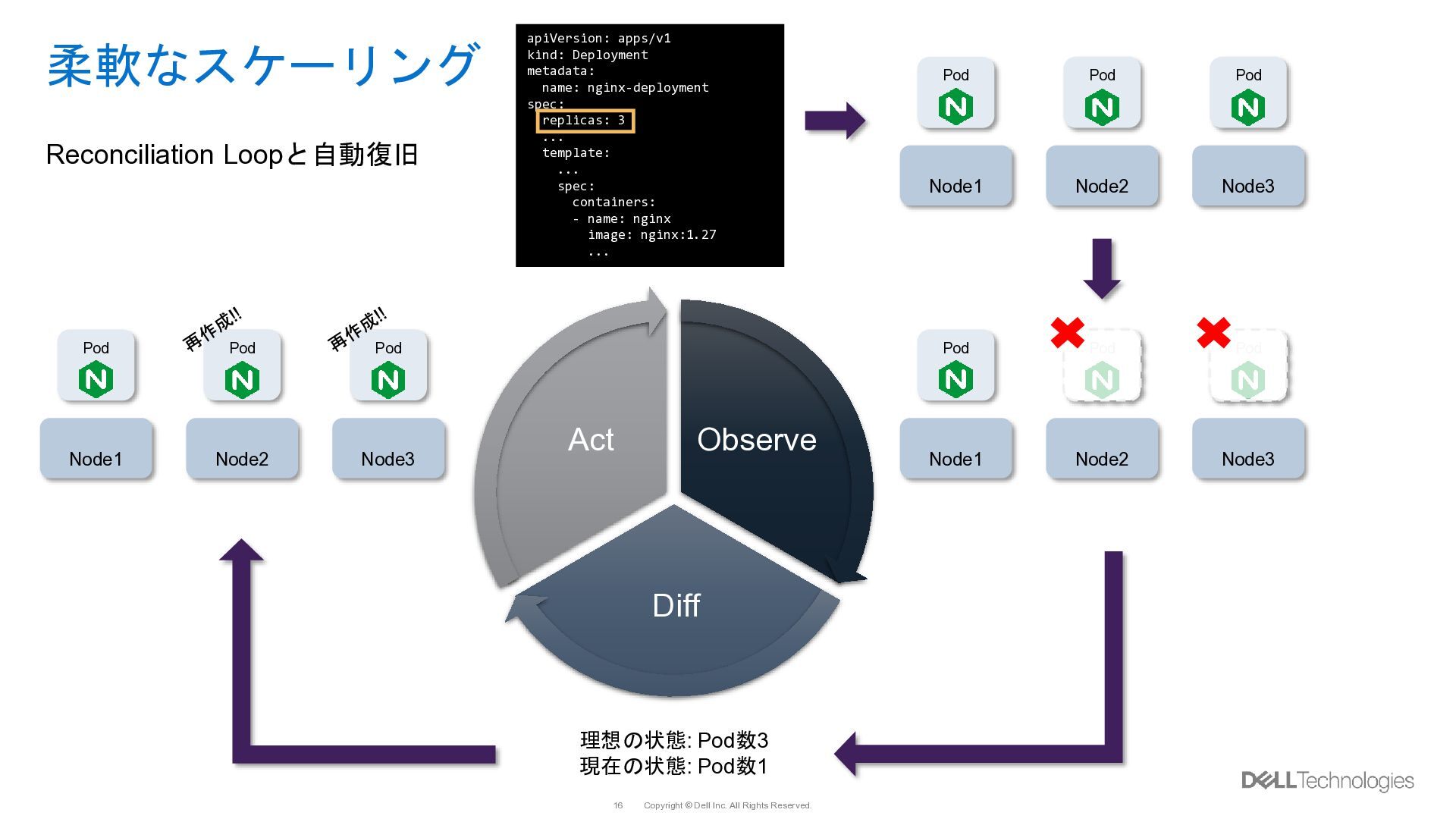
  13. Copyright © Dell Inc. All Rights Reserved. 16 apiVersion: apps/v1

    kind: Deployment metadata: name: nginx-deployment spec: replicas: 3 ... template: ... spec: containers: - name: nginx image: nginx:1.27 ... 柔軟なスケーリング Observe Diff Act Node1 Node2 Node3 Pod Pod Pod Node1 Node2 Node3 Pod Pod Pod 理想の状態: Pod数3 現在の状態: Pod数1 Node1 Node2 Node3 Pod Pod Pod Reconciliation Loopと自動復旧
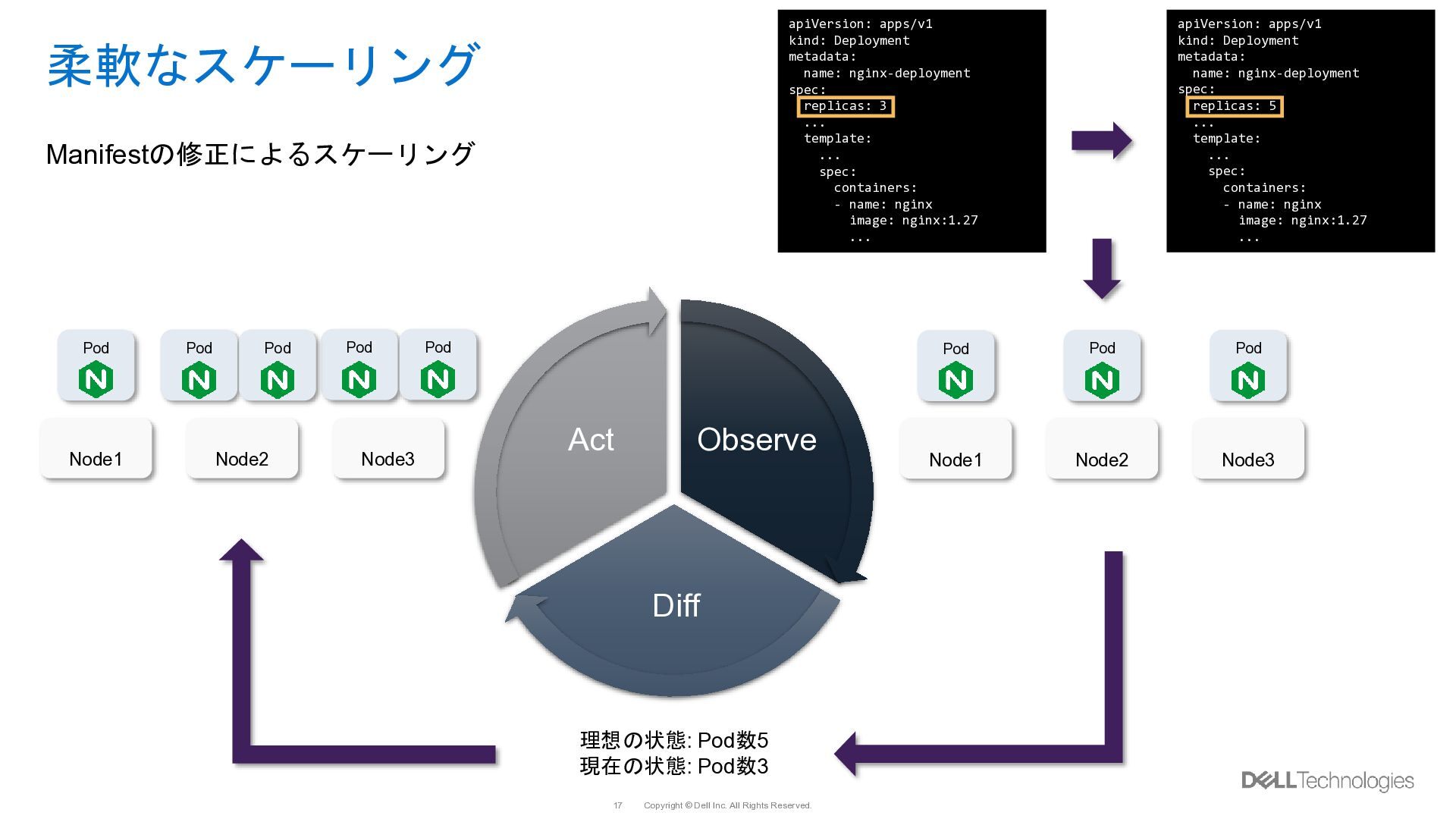
  14. Copyright © Dell Inc. All Rights Reserved. 17 apiVersion: apps/v1

    kind: Deployment metadata: name: nginx-deployment spec: replicas: 3 ... template: ... spec: containers: - name: nginx image: nginx:1.27 ... 柔軟なスケーリング Observe Diff Act 理想の状態: Pod数5 現在の状態: Pod数3 Node1 Node2 Node3 Pod Pod Pod Node1 Node2 Node3 Pod Pod Pod Pod Pod Manifestの修正によるスケーリング apiVersion: apps/v1 kind: Deployment metadata: name: nginx-deployment spec: replicas: 5 ... template: ... spec: containers: - name: nginx image: nginx:1.27 ...
  15. Copyright © Dell Inc. All Rights Reserved. 19 Device Plugins

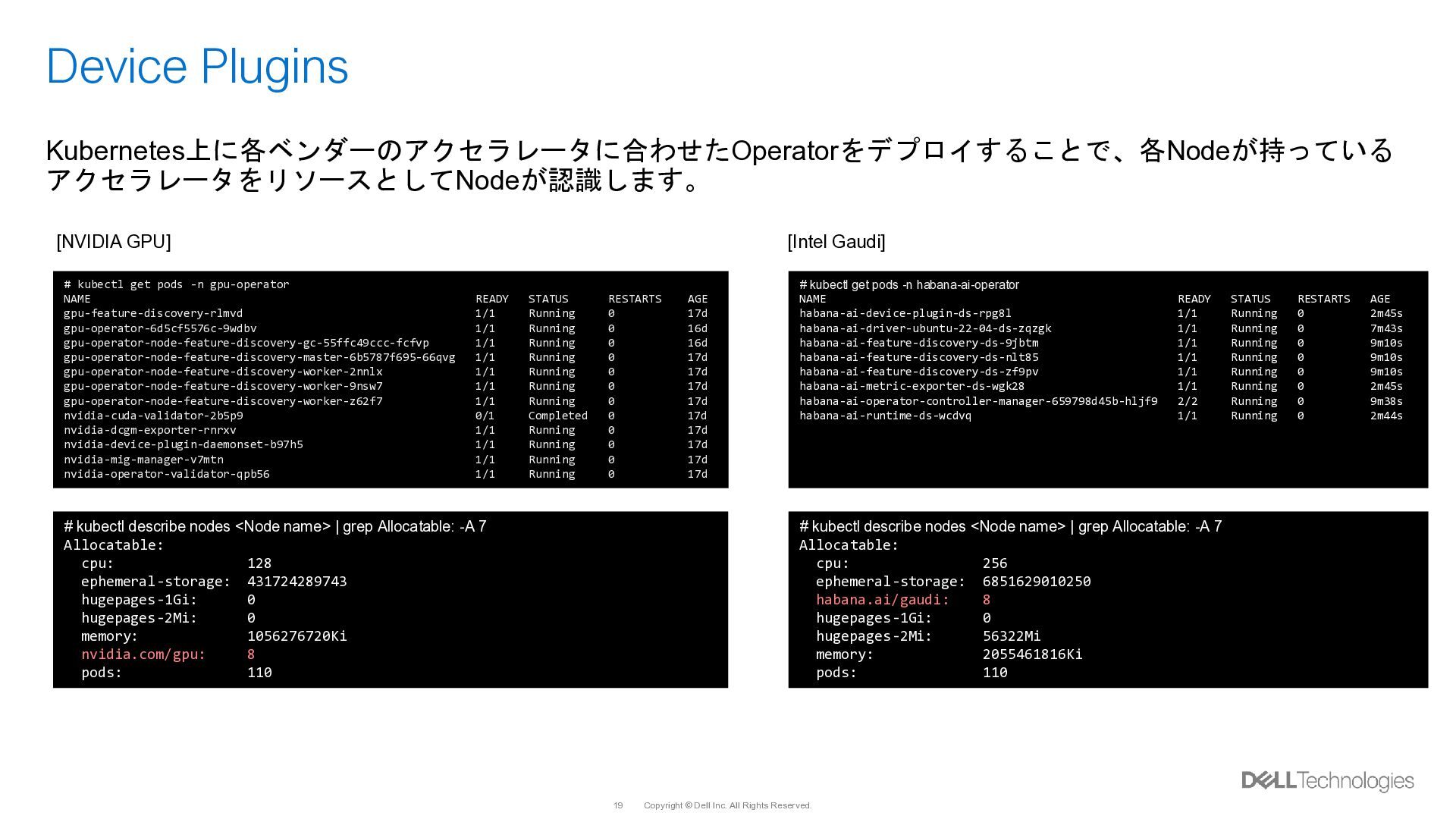
    # kubectl describe nodes <Node name> | grep Allocatable: -A 7 Allocatable: cpu: 128 ephemeral-storage: 431724289743 hugepages-1Gi: 0 hugepages-2Mi: 0 memory: 1056276720Ki nvidia.com/gpu: 8 pods: 110 # kubectl describe nodes <Node name> | grep Allocatable: -A 7 Allocatable: cpu: 256 ephemeral-storage: 6851629010250 habana.ai/gaudi: 8 hugepages-1Gi: 0 hugepages-2Mi: 56322Mi memory: 2055461816Ki pods: 110 [NVIDIA GPU] [Intel Gaudi] # kubectl get pods -n habana-ai-operator NAME READY STATUS RESTARTS AGE habana-ai-device-plugin-ds-rpg8l 1/1 Running 0 2m45s habana-ai-driver-ubuntu-22-04-ds-zqzgk 1/1 Running 0 7m43s habana-ai-feature-discovery-ds-9jbtm 1/1 Running 0 9m10s habana-ai-feature-discovery-ds-nlt85 1/1 Running 0 9m10s habana-ai-feature-discovery-ds-zf9pv 1/1 Running 0 9m10s habana-ai-metric-exporter-ds-wgk28 1/1 Running 0 2m45s habana-ai-operator-controller-manager-659798d45b-hljf9 2/2 Running 0 9m38s habana-ai-runtime-ds-wcdvq 1/1 Running 0 2m44s # kubectl get pods -n gpu-operator NAME READY STATUS RESTARTS AGE gpu-feature-discovery-rlmvd 1/1 Running 0 17d gpu-operator-6d5cf5576c-9wdbv 1/1 Running 0 16d gpu-operator-node-feature-discovery-gc-55ffc49ccc-fcfvp 1/1 Running 0 16d gpu-operator-node-feature-discovery-master-6b5787f695-66qvg 1/1 Running 0 17d gpu-operator-node-feature-discovery-worker-2nnlx 1/1 Running 0 17d gpu-operator-node-feature-discovery-worker-9nsw7 1/1 Running 0 17d gpu-operator-node-feature-discovery-worker-z62f7 1/1 Running 0 17d nvidia-cuda-validator-2b5p9 0/1 Completed 0 17d nvidia-dcgm-exporter-rnrxv 1/1 Running 0 17d nvidia-device-plugin-daemonset-b97h5 1/1 Running 0 17d nvidia-mig-manager-v7mtn 1/1 Running 0 17d nvidia-operator-validator-qpb56 1/1 Running 0 17d Kubernetes上に各ベンダーのアクセラレータに合わせたOperatorをデプロイすることで、各Nodeが持っている アクセラレータをリソースとしてNodeが認識します。
  16. Copyright © Dell Inc. All Rights Reserved. 20 Device Plugins

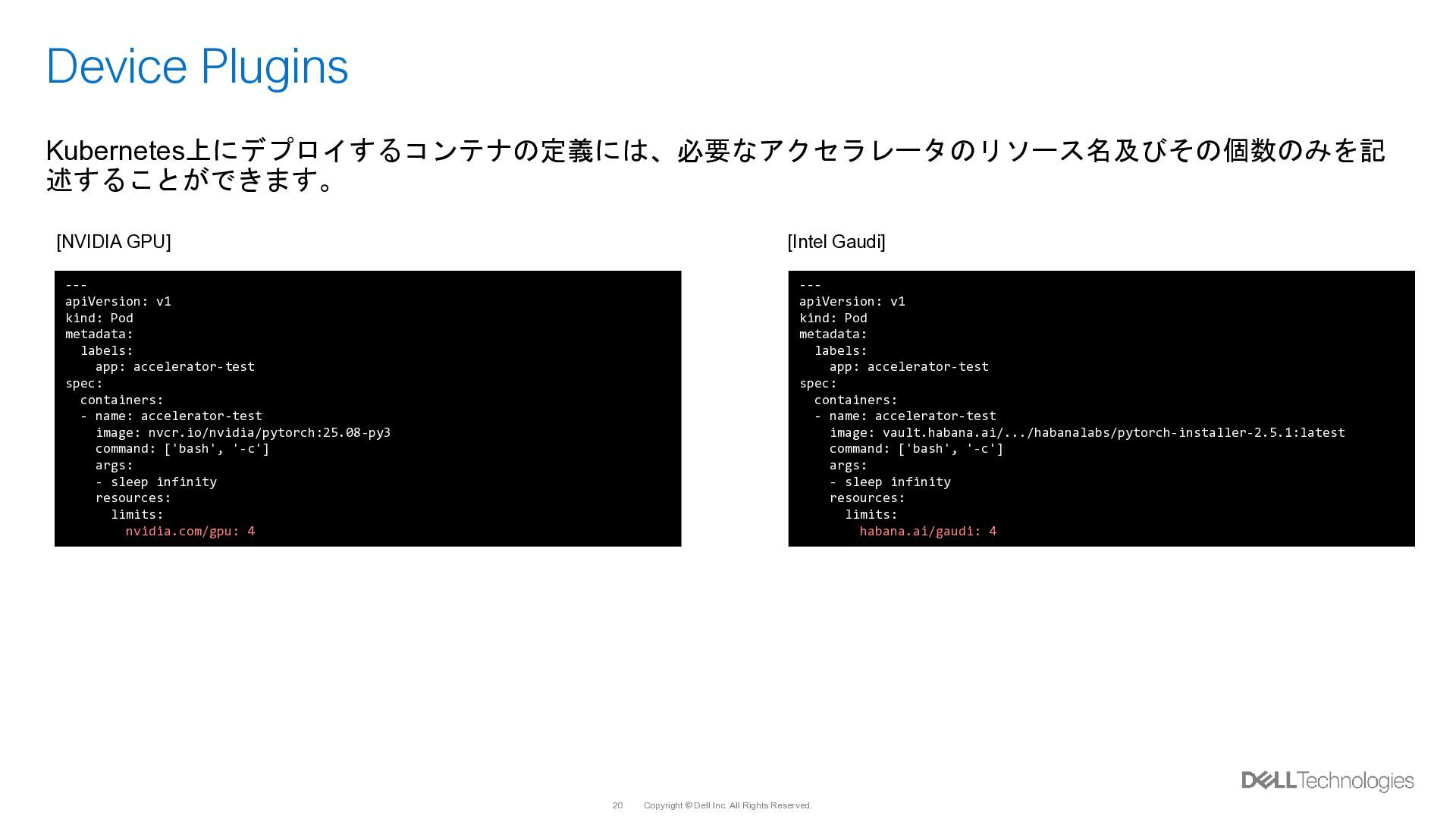
    --- apiVersion: v1 kind: Pod metadata: labels: app: accelerator-test spec: containers: - name: accelerator-test image: nvcr.io/nvidia/pytorch:25.08-py3 command: ['bash', '-c'] args: - sleep infinity resources: limits: nvidia.com/gpu: 4 --- apiVersion: v1 kind: Pod metadata: labels: app: accelerator-test spec: containers: - name: accelerator-test image: vault.habana.ai/.../habanalabs/pytorch-installer-2.5.1:latest command: ['bash', '-c'] args: - sleep infinity resources: limits: habana.ai/gaudi: 4 Kubernetes上にデプロイするコンテナの定義には、必要なアクセラレータのリソース名及びその個数のみを記 述することができます。 [NVIDIA GPU] [Intel Gaudi]
  17. Copyright © Dell Inc. All Rights Reserved. 21 Device Plugins

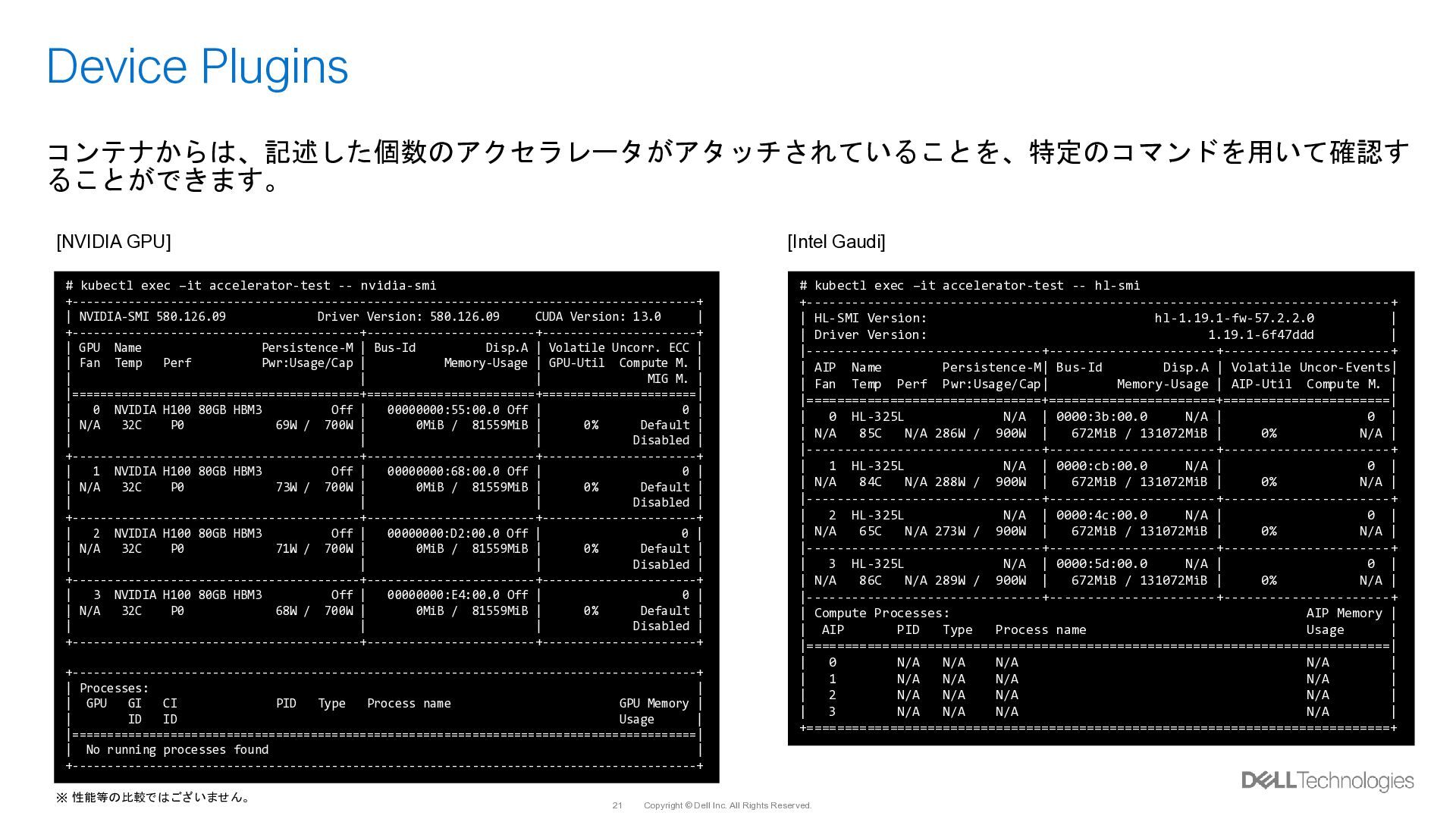
    # kubectl exec –it accelerator-test -- nvidia-smi +-----------------------------------------------------------------------------------------+ | NVIDIA-SMI 580.126.09 Driver Version: 580.126.09 CUDA Version: 13.0 | +-----------------------------------------+------------------------+----------------------+ | GPU Name Persistence-M | Bus-Id Disp.A | Volatile Uncorr. ECC | | Fan Temp Perf Pwr:Usage/Cap | Memory-Usage | GPU-Util Compute M. | | | | MIG M. | |=========================================+========================+======================| | 0 NVIDIA H100 80GB HBM3 Off | 00000000:55:00.0 Off | 0 | | N/A 32C P0 69W / 700W | 0MiB / 81559MiB | 0% Default | | | | Disabled | +-----------------------------------------+------------------------+----------------------+ | 1 NVIDIA H100 80GB HBM3 Off | 00000000:68:00.0 Off | 0 | | N/A 32C P0 73W / 700W | 0MiB / 81559MiB | 0% Default | | | | Disabled | +-----------------------------------------+------------------------+----------------------+ | 2 NVIDIA H100 80GB HBM3 Off | 00000000:D2:00.0 Off | 0 | | N/A 32C P0 71W / 700W | 0MiB / 81559MiB | 0% Default | | | | Disabled | +-----------------------------------------+------------------------+----------------------+ | 3 NVIDIA H100 80GB HBM3 Off | 00000000:E4:00.0 Off | 0 | | N/A 32C P0 68W / 700W | 0MiB / 81559MiB | 0% Default | | | | Disabled | +-----------------------------------------+------------------------+----------------------+ +-----------------------------------------------------------------------------------------+ | Processes: | | GPU GI CI PID Type Process name GPU Memory | | ID ID Usage | |=========================================================================================| | No running processes found | +-----------------------------------------------------------------------------------------+ # kubectl exec –it accelerator-test -- hl-smi +-----------------------------------------------------------------------------+ | HL-SMI Version: hl-1.19.1-fw-57.2.2.0 | | Driver Version: 1.19.1-6f47ddd | |-------------------------------+----------------------+----------------------+ | AIP Name Persistence-M| Bus-Id Disp.A | Volatile Uncor-Events| | Fan Temp Perf Pwr:Usage/Cap| Memory-Usage | AIP-Util Compute M. | |===============================+======================+======================| | 0 HL-325L N/A | 0000:3b:00.0 N/A | 0 | | N/A 85C N/A 286W / 900W | 672MiB / 131072MiB | 0% N/A | |-------------------------------+----------------------+----------------------+ | 1 HL-325L N/A | 0000:cb:00.0 N/A | 0 | | N/A 84C N/A 288W / 900W | 672MiB / 131072MiB | 0% N/A | |-------------------------------+----------------------+----------------------+ | 2 HL-325L N/A | 0000:4c:00.0 N/A | 0 | | N/A 65C N/A 273W / 900W | 672MiB / 131072MiB | 0% N/A | |-------------------------------+----------------------+----------------------+ | 3 HL-325L N/A | 0000:5d:00.0 N/A | 0 | | N/A 86C N/A 289W / 900W | 672MiB / 131072MiB | 0% N/A | |-------------------------------+----------------------+----------------------+ | Compute Processes: AIP Memory | | AIP PID Type Process name Usage | |=============================================================================| | 0 N/A N/A N/A N/A | | 1 N/A N/A N/A N/A | | 2 N/A N/A N/A N/A | | 3 N/A N/A N/A N/A | +=============================================================================+ [NVIDIA GPU] [Intel Gaudi] コンテナからは、記述した個数のアクセラレータがアタッチされていることを、特定のコマンドを用いて確認す ることができます。 ※ 性能等の比較ではございません。
  18. Copyright © Dell Inc. All Rights Reserved. 22 Device Pluginsの課題

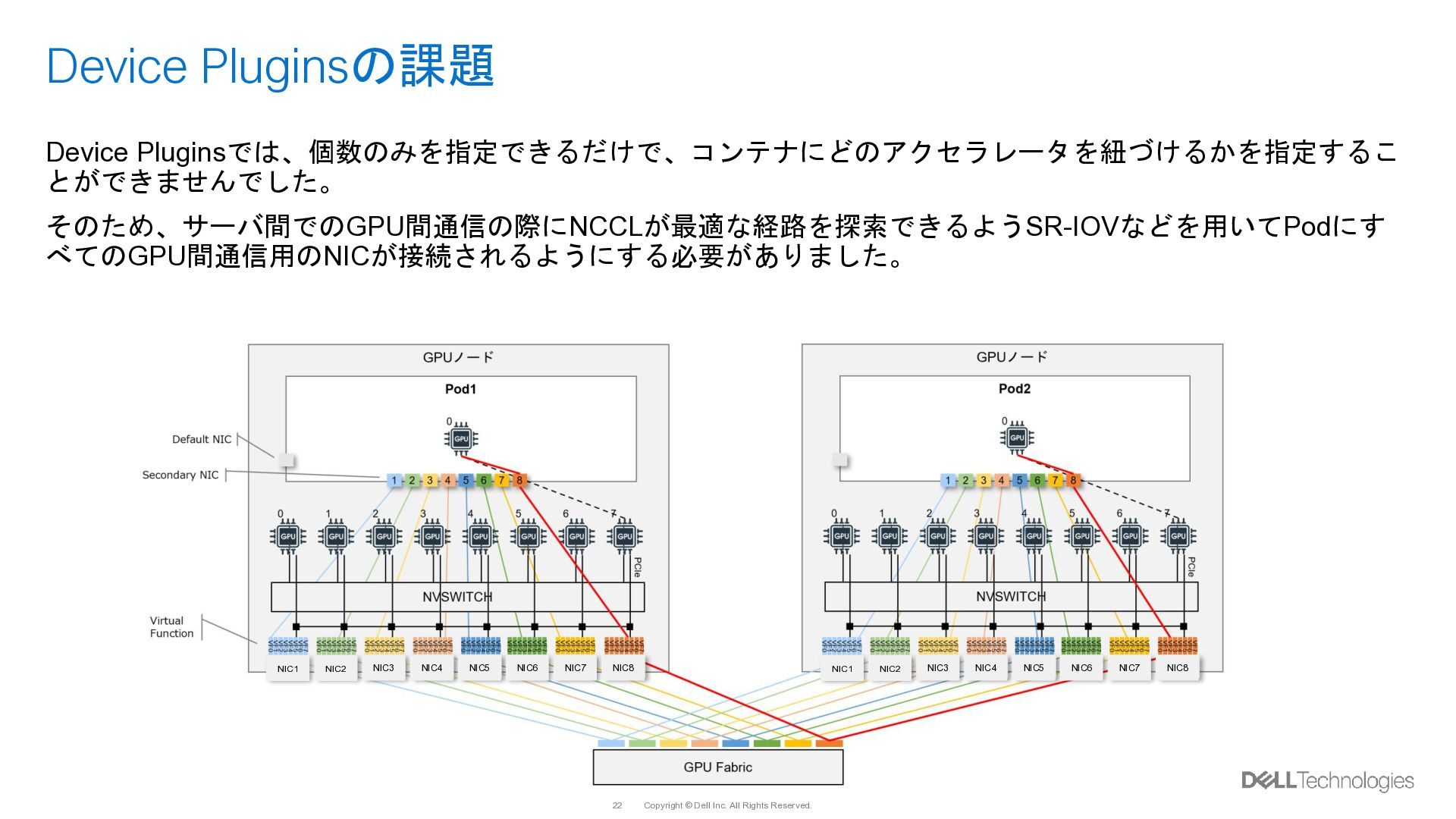
    Device Pluginsでは、個数のみを指定できるだけで、コンテナにどのアクセラレータを紐づけるかを指定するこ とができませんでした。 そのため、サーバ間でのGPU間通信の際にNCCLが最適な経路を探索できるようSR-IOVなどを用いてPodにす べてのGPU間通信用のNICが接続されるようにする必要がありました。 NIC1 NIC2 NIC3 NIC4 NIC5 NIC6 NIC7 NIC8 NIC1 NIC2 NIC3 NIC4 NIC5 NIC6 NIC7 NIC8
  19. Copyright © Dell Inc. All Rights Reserved. 23 DRA Driver

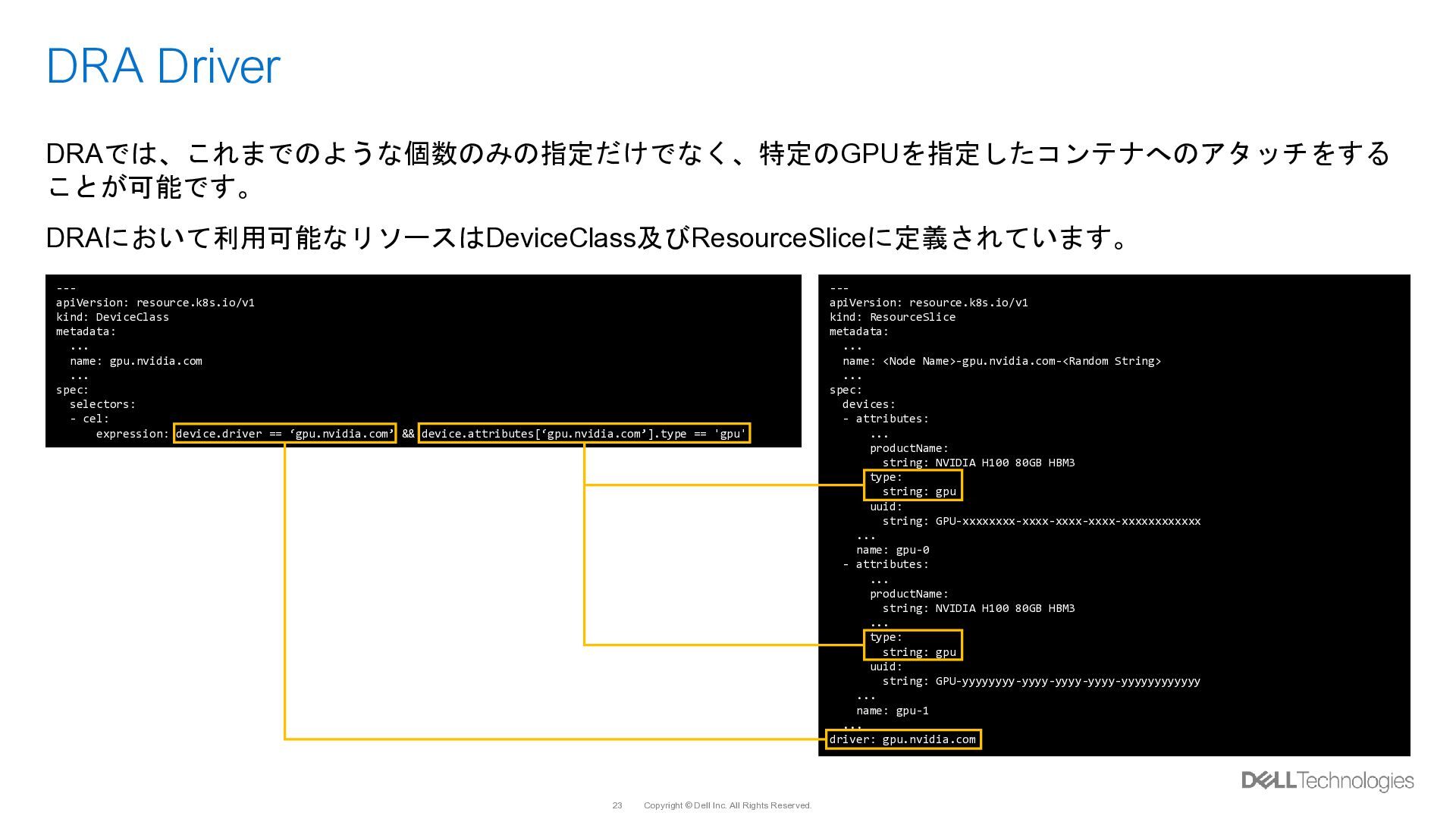
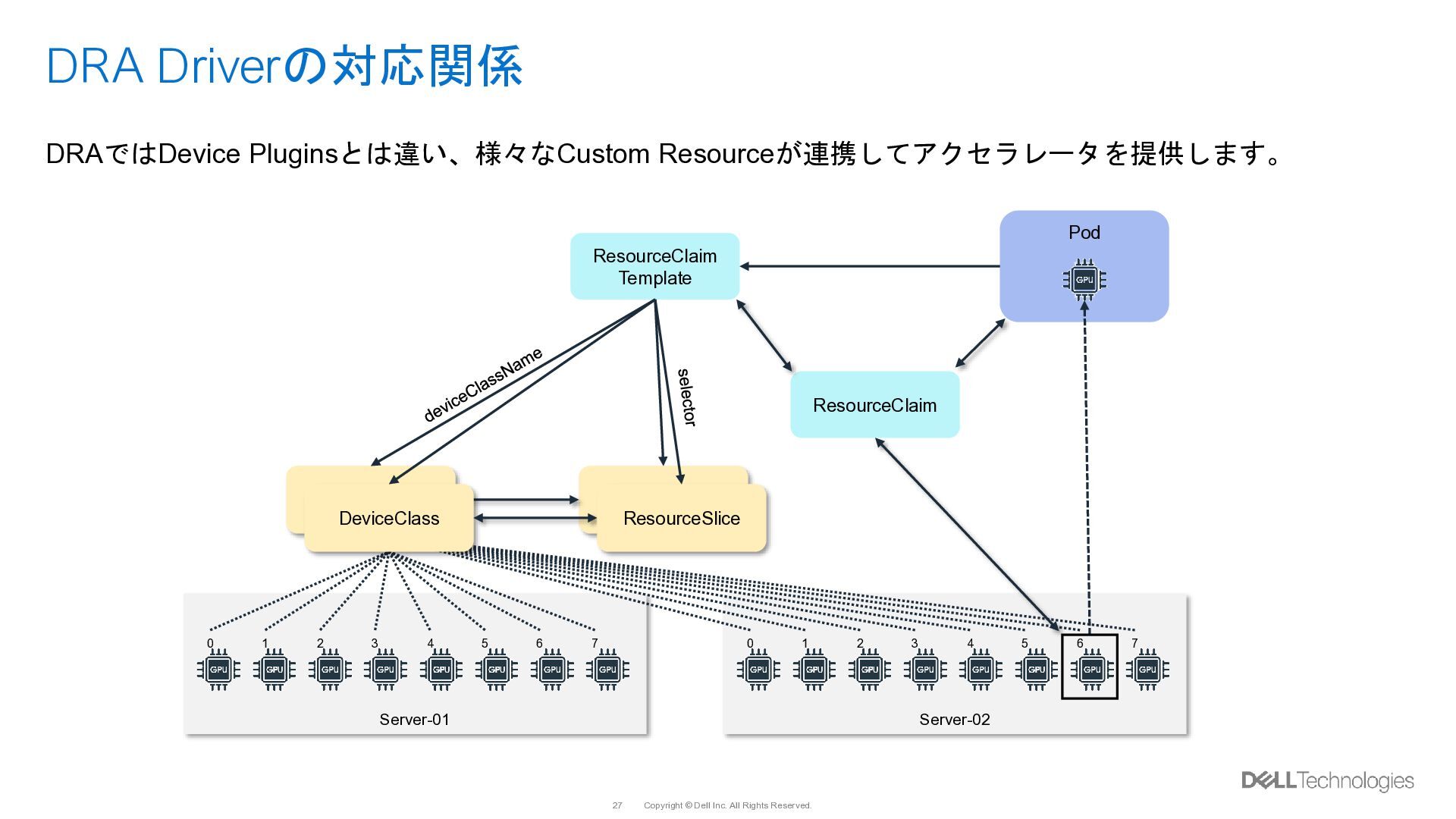
    DRAでは、これまでのような個数のみの指定だけでなく、特定のGPUを指定したコンテナへのアタッチをする ことが可能です。 DRAにおいて利用可能なリソースはDeviceClass及びResourceSliceに定義されています。 --- apiVersion: resource.k8s.io/v1 kind: ResourceSlice metadata: ... name: <Node Name>-gpu.nvidia.com-<Random String> ... spec: devices: - attributes: ... productName: string: NVIDIA H100 80GB HBM3 type: string: gpu uuid: string: GPU-xxxxxxxx-xxxx-xxxx-xxxx-xxxxxxxxxxxx ... name: gpu-0 - attributes: ... productName: string: NVIDIA H100 80GB HBM3 ... type: string: gpu uuid: string: GPU-yyyyyyyy-yyyy-yyyy-yyyy-yyyyyyyyyyyy ... name: gpu-1 ... driver: gpu.nvidia.com --- apiVersion: resource.k8s.io/v1 kind: DeviceClass metadata: ... name: gpu.nvidia.com ... spec: selectors: - cel: expression: device.driver == ‘gpu.nvidia.com’ && device.attributes[‘gpu.nvidia.com’].type == 'gpu'
  20. Copyright © Dell Inc. All Rights Reserved. 24 DRA Driver

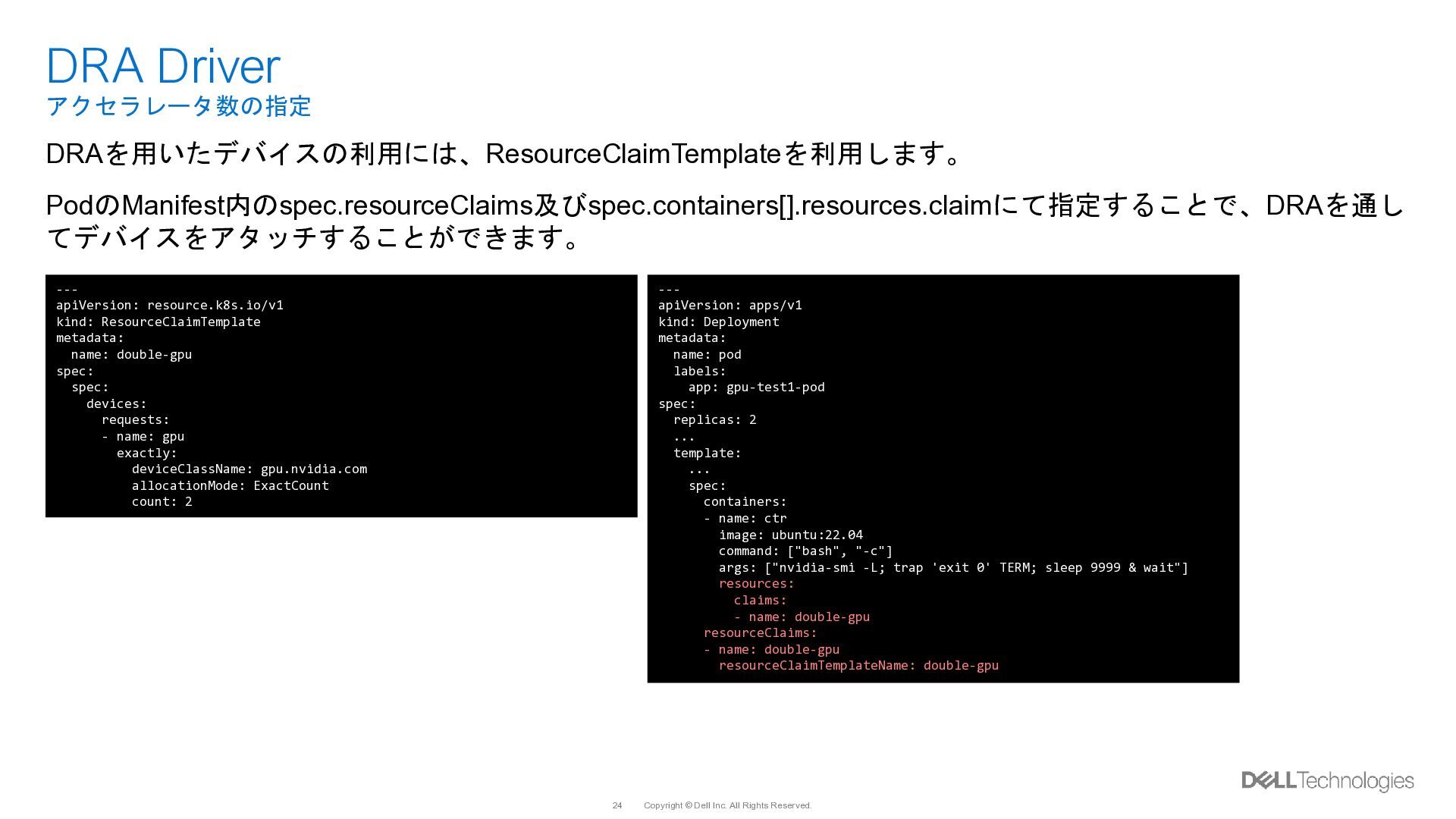
    アクセラレータ数の指定 DRAを用いたデバイスの利用には、ResourceClaimTemplateを利用します。 PodのManifest内のspec.resourceClaims及びspec.containers[].resources.claimにて指定することで、DRAを通し てデバイスをアタッチすることができます。 --- apiVersion: resource.k8s.io/v1 kind: ResourceClaimTemplate metadata: name: double-gpu spec: spec: devices: requests: - name: gpu exactly: deviceClassName: gpu.nvidia.com allocationMode: ExactCount count: 2 --- apiVersion: apps/v1 kind: Deployment metadata: name: pod labels: app: gpu-test1-pod spec: replicas: 2 ... template: ... spec: containers: - name: ctr image: ubuntu:22.04 command: ["bash", "-c"] args: ["nvidia-smi -L; trap 'exit 0' TERM; sleep 9999 & wait"] resources: claims: - name: double-gpu resourceClaims: - name: double-gpu resourceClaimTemplateName: double-gpu
  21. Copyright © Dell Inc. All Rights Reserved. 25 DRA Driver

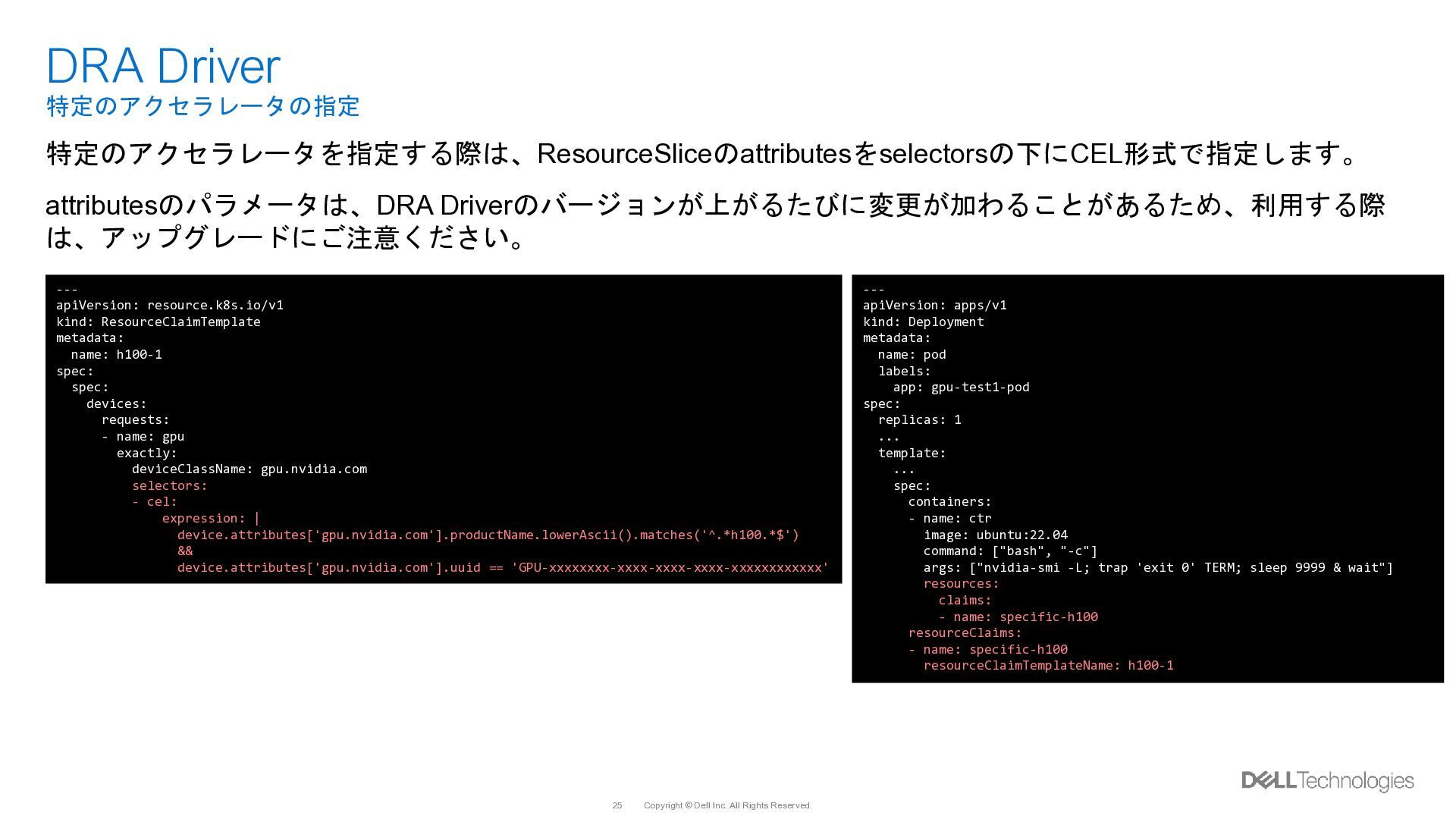
    特定のアクセラレータの指定 特定のアクセラレータを指定する際は、ResourceSliceのattributesをselectorsの下にCEL形式で指定します。 attributesのパラメータは、DRA Driverのバージョンが上がるたびに変更が加わることがあるため、利用する際 は、アップグレードにご注意ください。 --- apiVersion: resource.k8s.io/v1 kind: ResourceClaimTemplate metadata: name: h100-1 spec: spec: devices: requests: - name: gpu exactly: deviceClassName: gpu.nvidia.com selectors: - cel: expression: | device.attributes['gpu.nvidia.com'].productName.lowerAscii().matches('^.*h100.*$') && device.attributes['gpu.nvidia.com'].uuid == 'GPU-xxxxxxxx-xxxx-xxxx-xxxx-xxxxxxxxxxxx' --- apiVersion: apps/v1 kind: Deployment metadata: name: pod labels: app: gpu-test1-pod spec: replicas: 1 ... template: ... spec: containers: - name: ctr image: ubuntu:22.04 command: ["bash", "-c"] args: ["nvidia-smi -L; trap 'exit 0' TERM; sleep 9999 & wait"] resources: claims: - name: specific-h100 resourceClaims: - name: specific-h100 resourceClaimTemplateName: h100-1
  22. Copyright © Dell Inc. All Rights Reserved. 26 DRA Driver

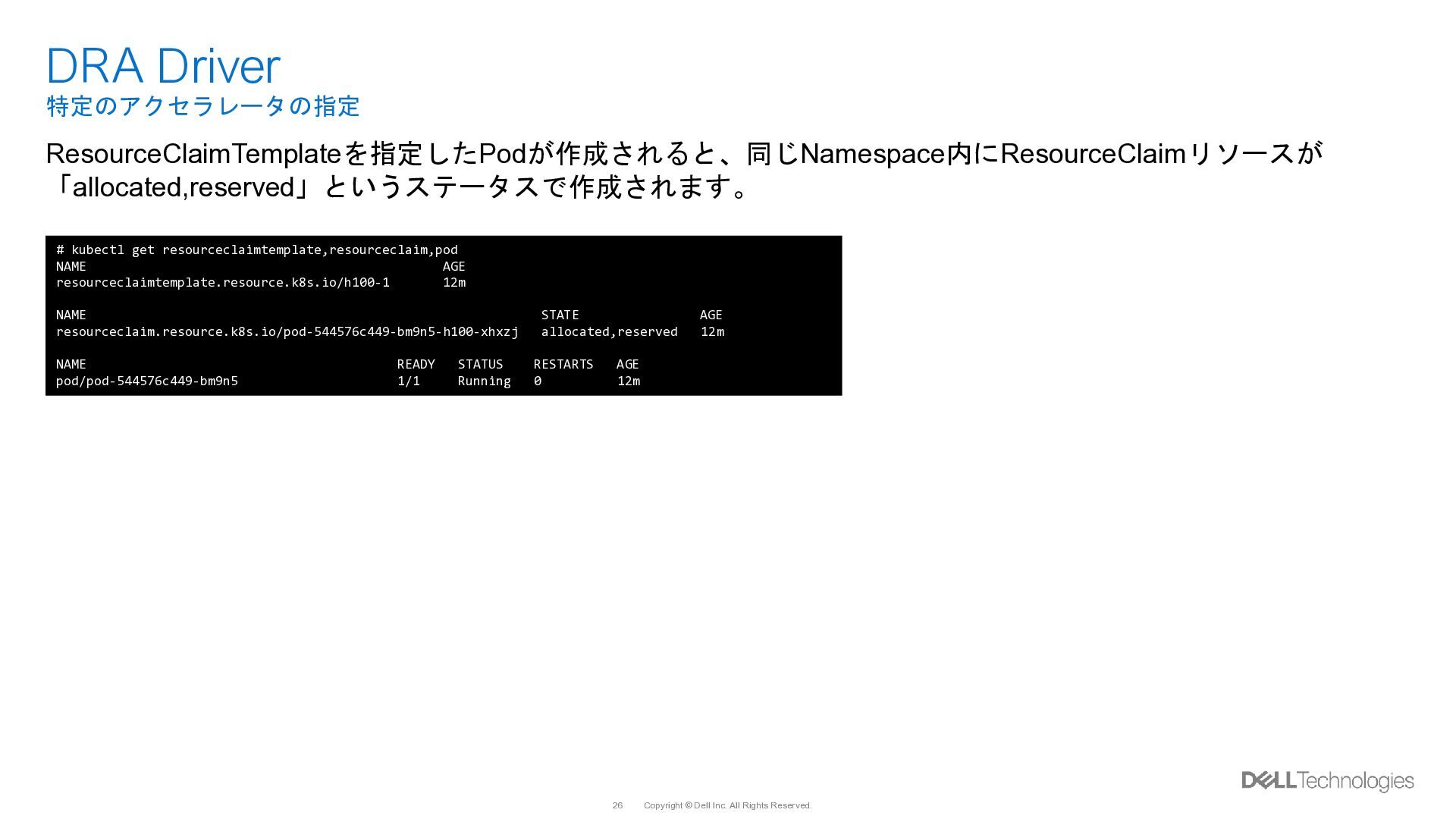
    特定のアクセラレータの指定 ResourceClaimTemplateを指定したPodが作成されると、同じNamespace内にResourceClaimリソースが 「allocated,reserved」というステータスで作成されます。 # kubectl get resourceclaimtemplate,resourceclaim,pod NAME AGE resourceclaimtemplate.resource.k8s.io/h100-1 12m NAME STATE AGE resourceclaim.resource.k8s.io/pod-544576c449-bm9n5-h100-xhxzj allocated,reserved 12m NAME READY STATUS RESTARTS AGE pod/pod-544576c449-bm9n5 1/1 Running 0 12m
  23. Copyright © Dell Inc. All Rights Reserved. 27 DRA Driverの対応関係

    DRAではDevice Pluginsとは違い、様々なCustom Resourceが連携してアクセラレータを提供します。 Server-01 0 1 2 3 4 5 6 7 Server-02 0 1 2 3 4 5 6 7 DeviceClass ResourceSlice DeviceClass ResourceClaim Template Pod ResourceClaim ResourceSlice
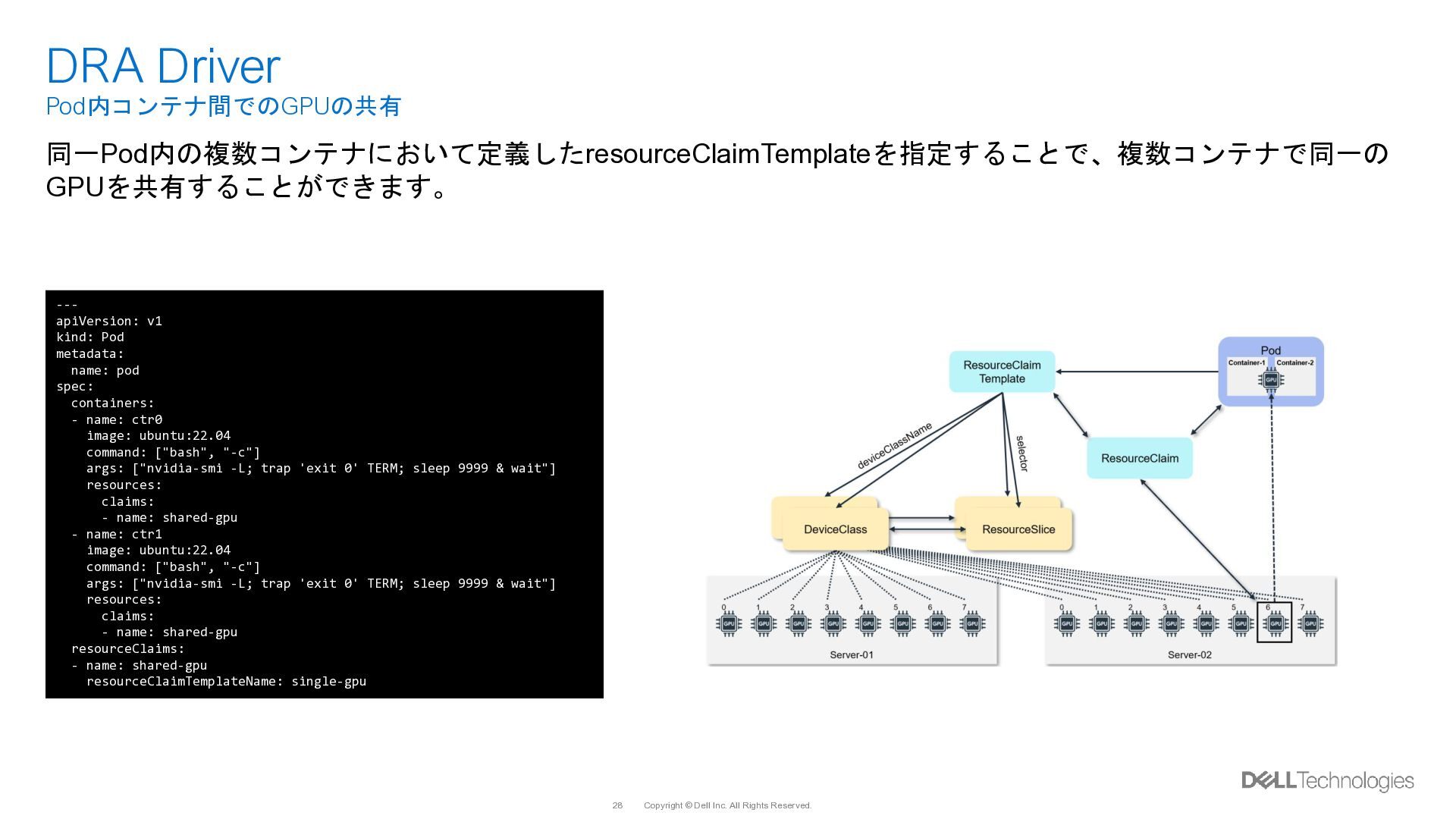
  24. Copyright © Dell Inc. All Rights Reserved. 28 DRA Driver

    Pod内コンテナ間でのGPUの共有 同一Pod内の複数コンテナにおいて定義したresourceClaimTemplateを指定することで、複数コンテナで同一の GPUを共有することができます。 --- apiVersion: v1 kind: Pod metadata: name: pod spec: containers: - name: ctr0 image: ubuntu:22.04 command: ["bash", "-c"] args: ["nvidia-smi -L; trap 'exit 0' TERM; sleep 9999 & wait"] resources: claims: - name: shared-gpu - name: ctr1 image: ubuntu:22.04 command: ["bash", "-c"] args: ["nvidia-smi -L; trap 'exit 0' TERM; sleep 9999 & wait"] resources: claims: - name: shared-gpu resourceClaims: - name: shared-gpu resourceClaimTemplateName: single-gpu
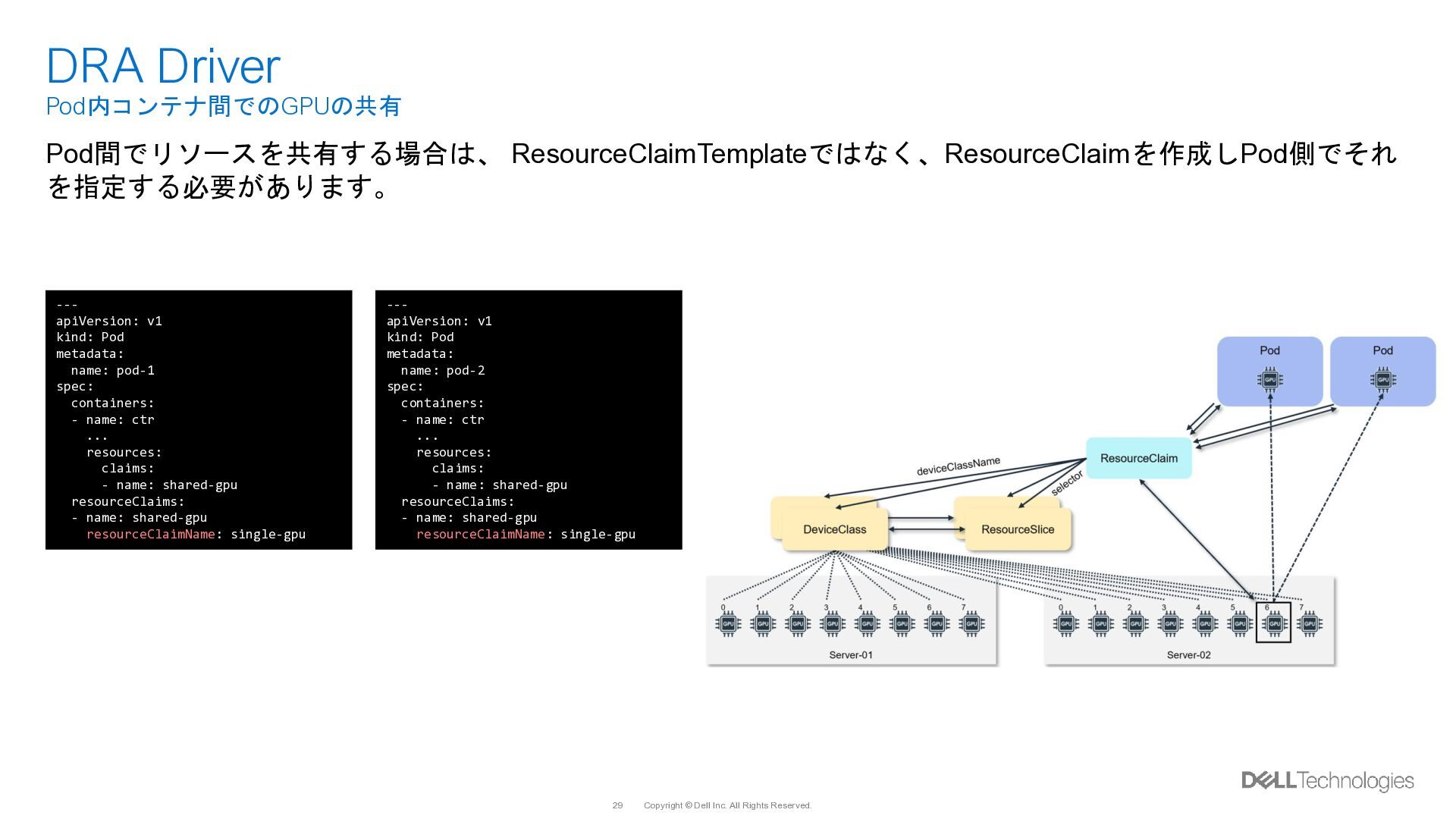
  25. Copyright © Dell Inc. All Rights Reserved. 29 DRA Driver

    Pod内コンテナ間でのGPUの共有 Pod間でリソースを共有する場合は、 ResourceClaimTemplateではなく、ResourceClaimを作成しPod側でそれ を指定する必要があります。 --- apiVersion: v1 kind: Pod metadata: name: pod-1 spec: containers: - name: ctr ... resources: claims: - name: shared-gpu resourceClaims: - name: shared-gpu resourceClaimName: single-gpu --- apiVersion: v1 kind: Pod metadata: name: pod-2 spec: containers: - name: ctr ... resources: claims: - name: shared-gpu resourceClaims: - name: shared-gpu resourceClaimName: single-gpu
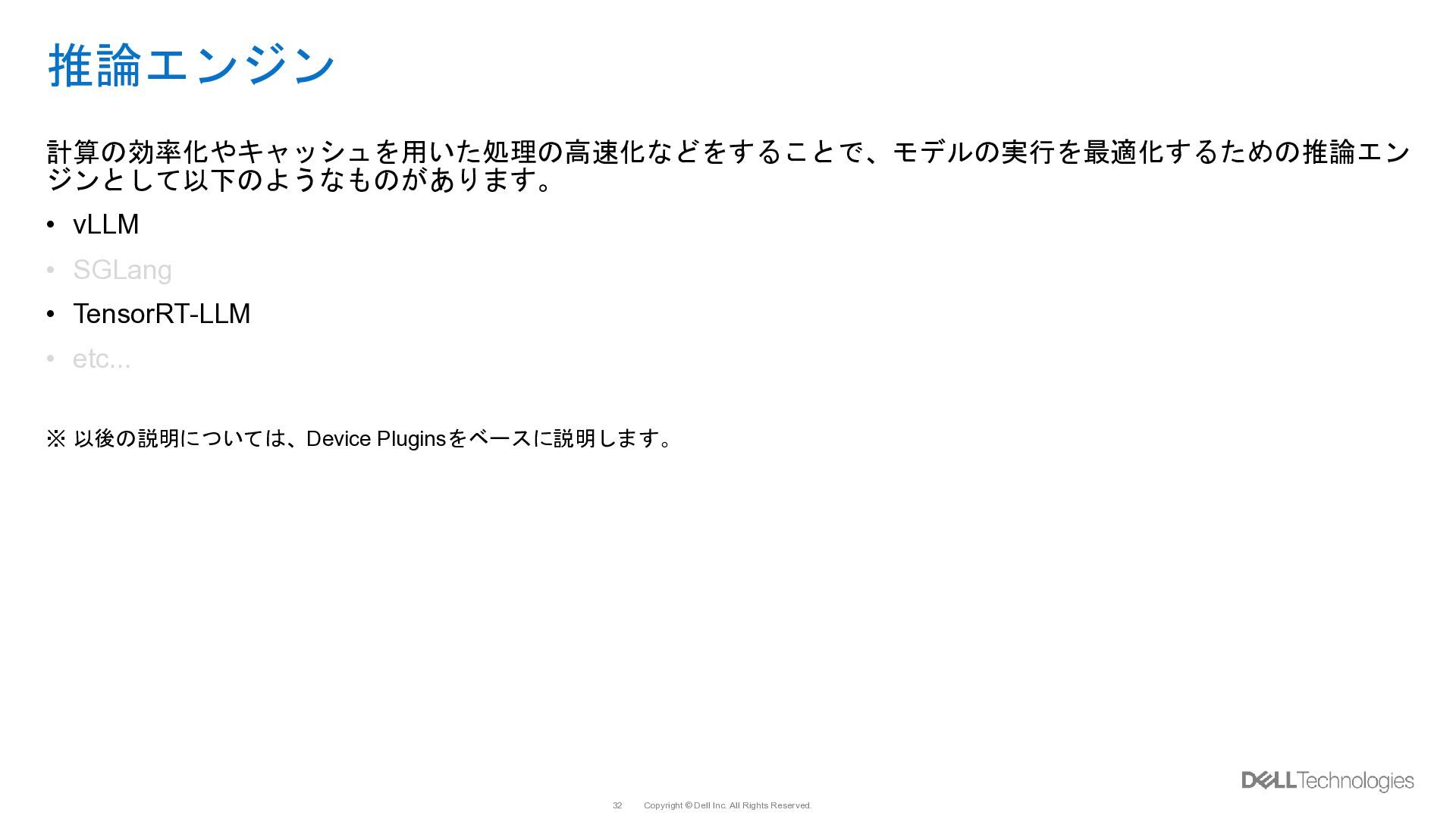
  26. Copyright © Dell Inc. All Rights Reserved. 32 推論エンジン 計算の効率化やキャッシュを用いた処理の高速化などをすることで、モデルの実行を最適化するための推論エン

    ジンとして以下のようなものがあります。 • vLLM • SGLang • TensorRT-LLM • etc... ※ 以後の説明については、Device Pluginsをベースに説明します。
  27. Copyright © Dell Inc. All Rights Reserved. 33 Serving Tool

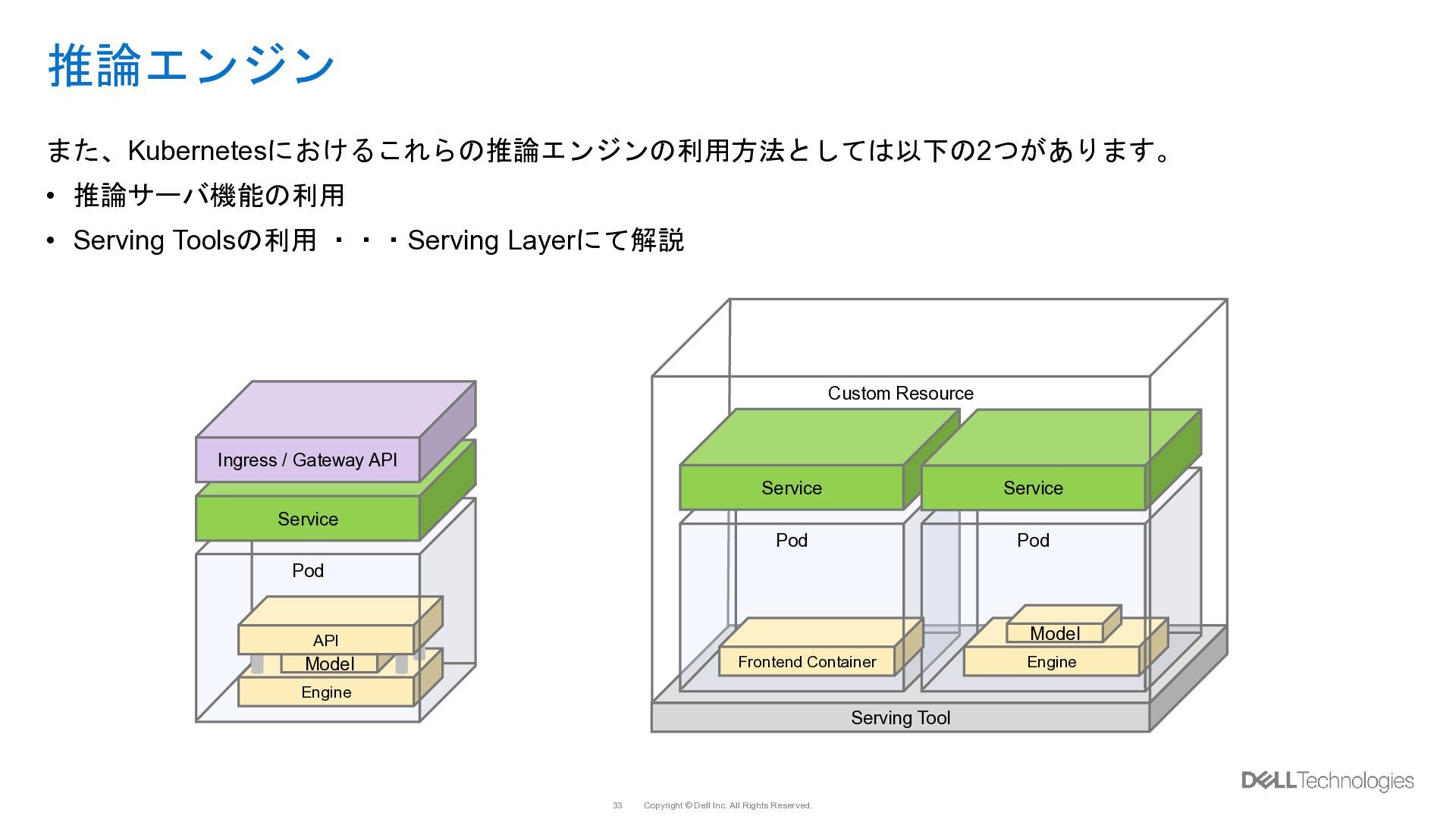
    Custom Resource Pod Service 推論エンジン また、Kubernetesにおけるこれらの推論エンジンの利用方法としては以下の2つがあります。 • 推論サーバ機能の利用 • Serving Toolsの利用 ・・・Serving Layerにて解説 Pod Engine Model API Service Ingress / Gateway API Pod Engine Model Service Frontend Container
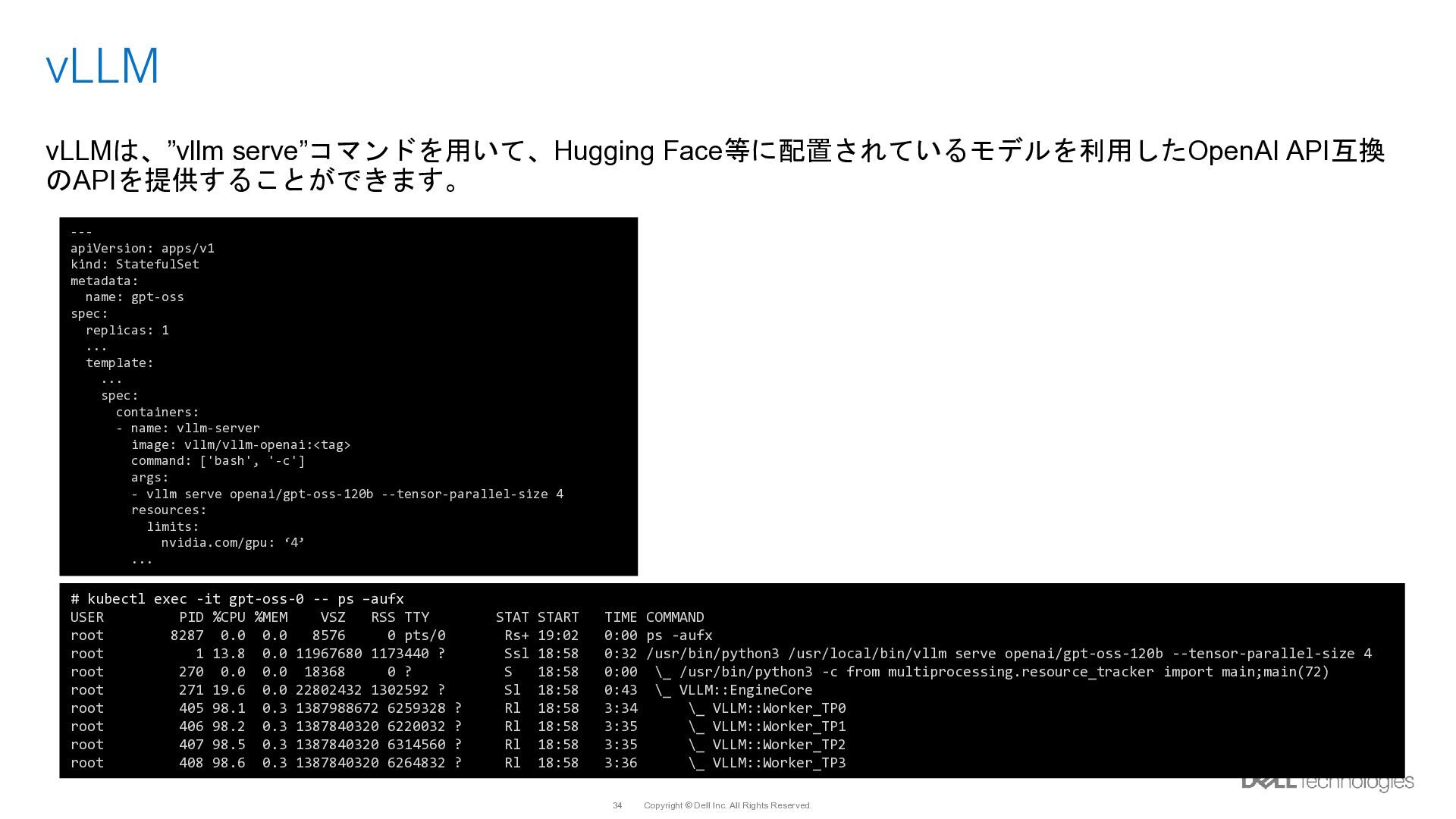
  28. Copyright © Dell Inc. All Rights Reserved. 34 vLLM ---

    apiVersion: apps/v1 kind: StatefulSet metadata: name: gpt-oss spec: replicas: 1 ... template: ... spec: containers: - name: vllm-server image: vllm/vllm-openai:<tag> command: ['bash', '-c'] args: - vllm serve openai/gpt-oss-120b --tensor-parallel-size 4 resources: limits: nvidia.com/gpu: ‘4’ ... # kubectl exec -it gpt-oss-0 -- ps –aufx USER PID %CPU %MEM VSZ RSS TTY STAT START TIME COMMAND root 8287 0.0 0.0 8576 0 pts/0 Rs+ 19:02 0:00 ps -aufx root 1 13.8 0.0 11967680 1173440 ? Ssl 18:58 0:32 /usr/bin/python3 /usr/local/bin/vllm serve openai/gpt-oss-120b --tensor-parallel-size 4 root 270 0.0 0.0 18368 0 ? S 18:58 0:00 \_ /usr/bin/python3 -c from multiprocessing.resource_tracker import main;main(72) root 271 19.6 0.0 22802432 1302592 ? Sl 18:58 0:43 \_ VLLM::EngineCore root 405 98.1 0.3 1387988672 6259328 ? Rl 18:58 3:34 \_ VLLM::Worker_TP0 root 406 98.2 0.3 1387840320 6220032 ? Rl 18:58 3:35 \_ VLLM::Worker_TP1 root 407 98.5 0.3 1387840320 6314560 ? Rl 18:58 3:35 \_ VLLM::Worker_TP2 root 408 98.6 0.3 1387840320 6264832 ? Rl 18:58 3:36 \_ VLLM::Worker_TP3 vLLMは、”vllm serve”コマンドを用いて、Hugging Face等に配置されているモデルを利用したOpenAI API互換 のAPIを提供することができます。
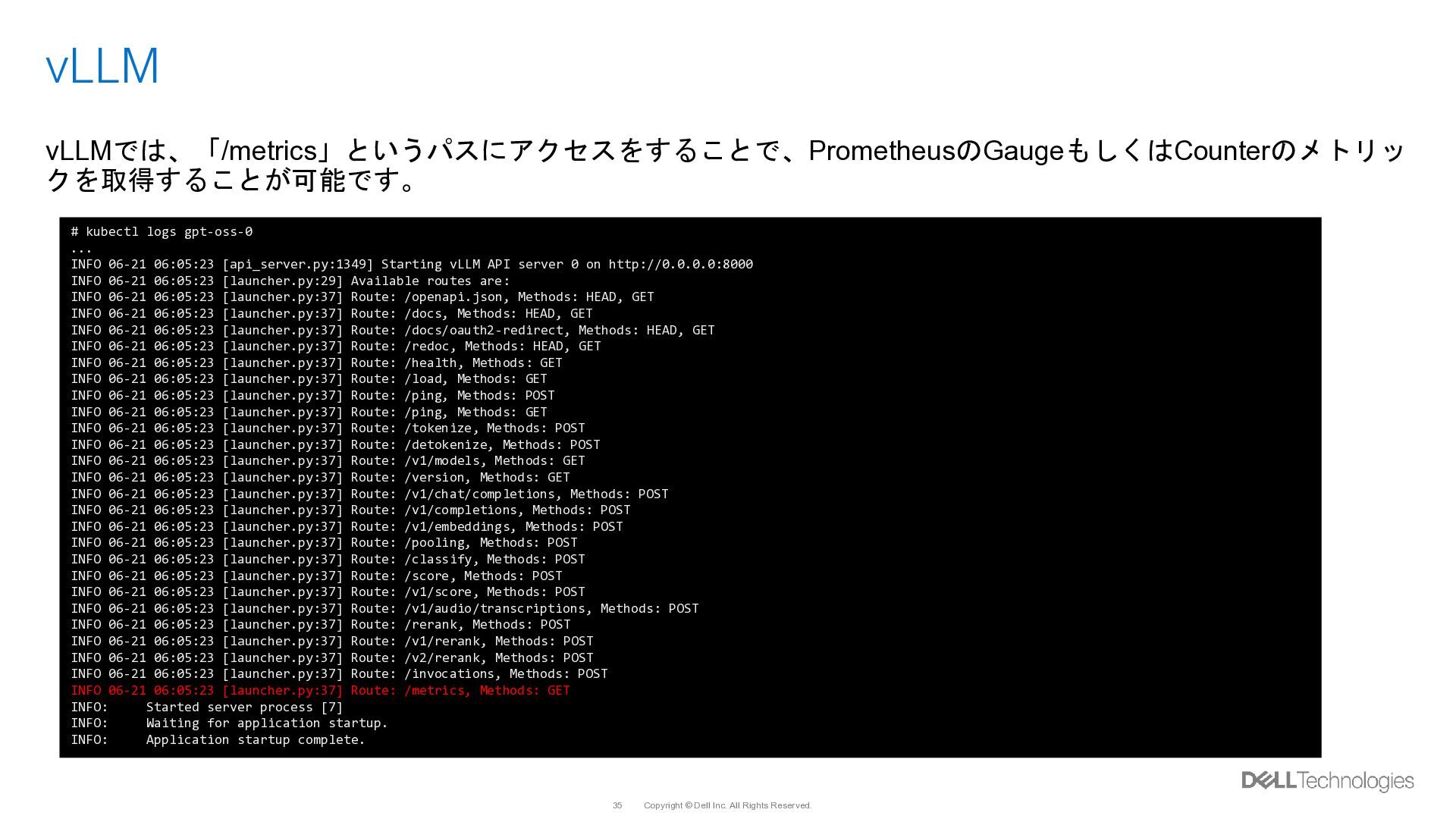
  29. Copyright © Dell Inc. All Rights Reserved. 35 vLLM vLLMでは、「/metrics」というパスにアクセスをすることで、PrometheusのGaugeもしくはCounterのメトリッ

    クを取得することが可能です。 # kubectl logs gpt-oss-0 ... INFO 06-21 06:05:23 [api_server.py:1349] Starting vLLM API server 0 on http://0.0.0.0:8000 INFO 06-21 06:05:23 [launcher.py:29] Available routes are: INFO 06-21 06:05:23 [launcher.py:37] Route: /openapi.json, Methods: HEAD, GET INFO 06-21 06:05:23 [launcher.py:37] Route: /docs, Methods: HEAD, GET INFO 06-21 06:05:23 [launcher.py:37] Route: /docs/oauth2-redirect, Methods: HEAD, GET INFO 06-21 06:05:23 [launcher.py:37] Route: /redoc, Methods: HEAD, GET INFO 06-21 06:05:23 [launcher.py:37] Route: /health, Methods: GET INFO 06-21 06:05:23 [launcher.py:37] Route: /load, Methods: GET INFO 06-21 06:05:23 [launcher.py:37] Route: /ping, Methods: POST INFO 06-21 06:05:23 [launcher.py:37] Route: /ping, Methods: GET INFO 06-21 06:05:23 [launcher.py:37] Route: /tokenize, Methods: POST INFO 06-21 06:05:23 [launcher.py:37] Route: /detokenize, Methods: POST INFO 06-21 06:05:23 [launcher.py:37] Route: /v1/models, Methods: GET INFO 06-21 06:05:23 [launcher.py:37] Route: /version, Methods: GET INFO 06-21 06:05:23 [launcher.py:37] Route: /v1/chat/completions, Methods: POST INFO 06-21 06:05:23 [launcher.py:37] Route: /v1/completions, Methods: POST INFO 06-21 06:05:23 [launcher.py:37] Route: /v1/embeddings, Methods: POST INFO 06-21 06:05:23 [launcher.py:37] Route: /pooling, Methods: POST INFO 06-21 06:05:23 [launcher.py:37] Route: /classify, Methods: POST INFO 06-21 06:05:23 [launcher.py:37] Route: /score, Methods: POST INFO 06-21 06:05:23 [launcher.py:37] Route: /v1/score, Methods: POST INFO 06-21 06:05:23 [launcher.py:37] Route: /v1/audio/transcriptions, Methods: POST INFO 06-21 06:05:23 [launcher.py:37] Route: /rerank, Methods: POST INFO 06-21 06:05:23 [launcher.py:37] Route: /v1/rerank, Methods: POST INFO 06-21 06:05:23 [launcher.py:37] Route: /v2/rerank, Methods: POST INFO 06-21 06:05:23 [launcher.py:37] Route: /invocations, Methods: POST INFO 06-21 06:05:23 [launcher.py:37] Route: /metrics, Methods: GET INFO: Started server process [7] INFO: Waiting for application startup. INFO: Application startup complete.
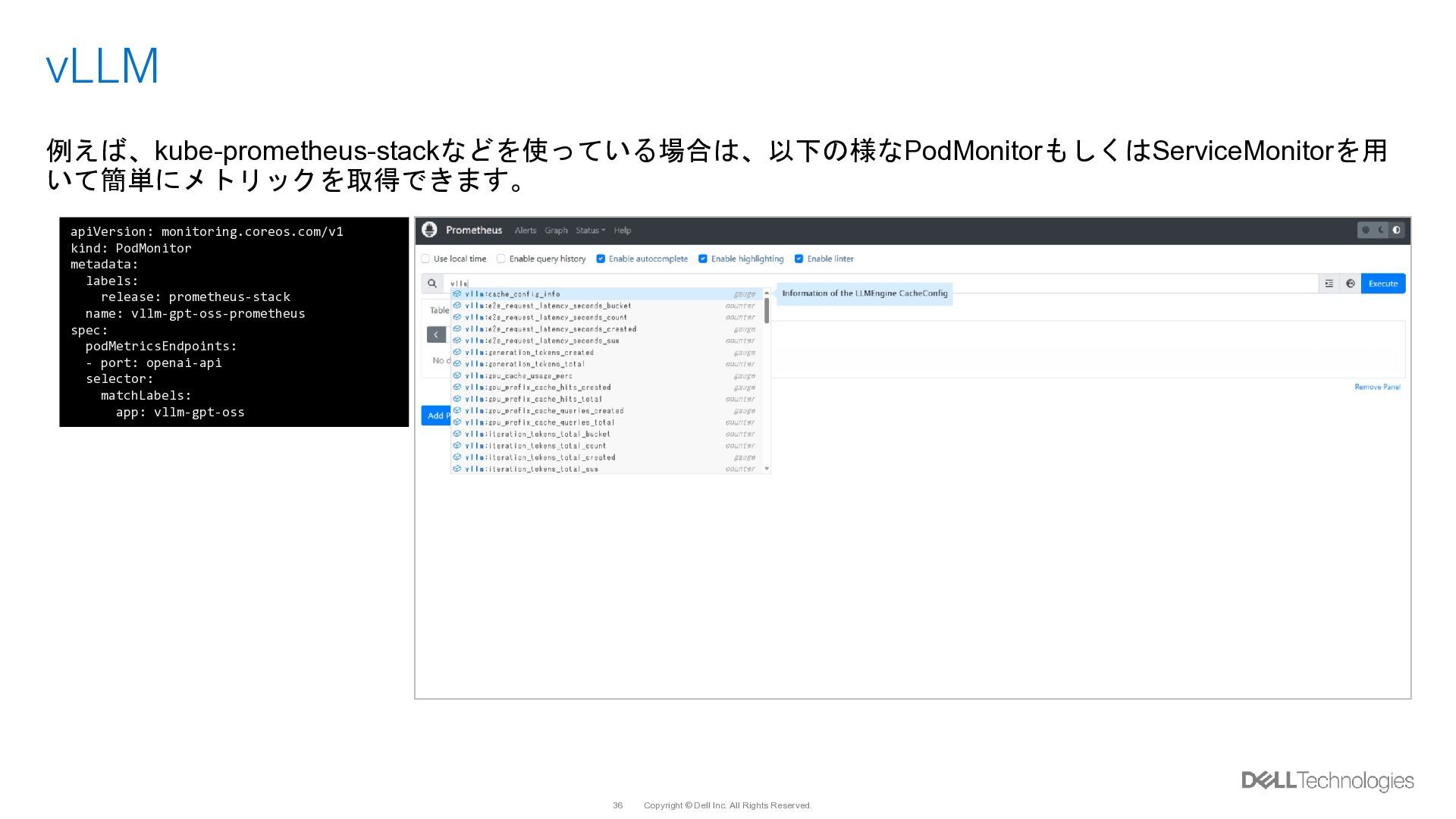
  30. Copyright © Dell Inc. All Rights Reserved. 36 vLLM 例えば、kube-prometheus-stackなどを使っている場合は、以下の様なPodMonitorもしくはServiceMonitorを用

    いて簡単にメトリックを取得できます。 apiVersion: monitoring.coreos.com/v1 kind: PodMonitor metadata: labels: release: prometheus-stack name: vllm-gpt-oss-prometheus spec: podMetricsEndpoints: - port: openai-api selector: matchLabels: app: vllm-gpt-oss
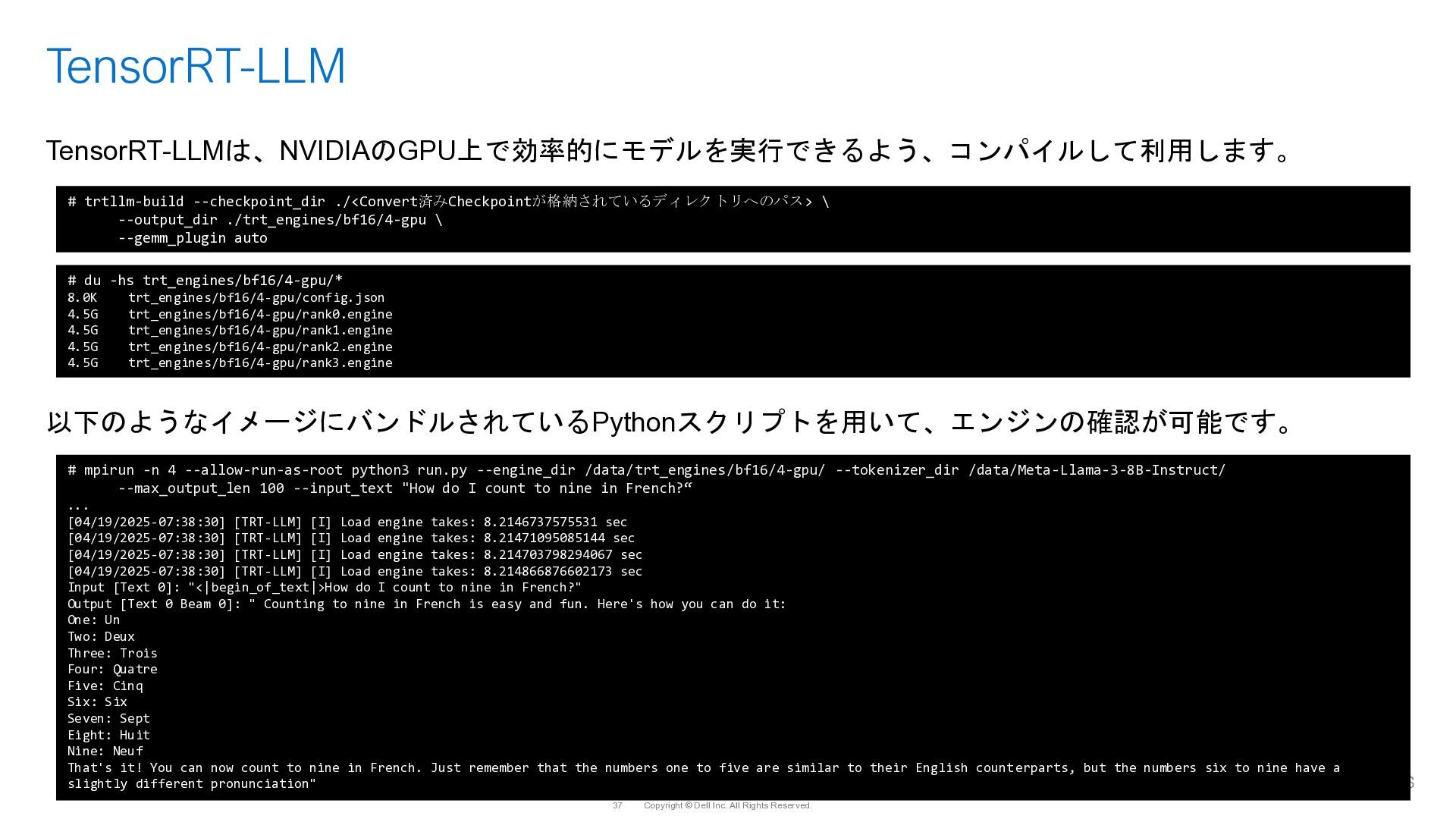
  31. Copyright © Dell Inc. All Rights Reserved. 37 TensorRT-LLM TensorRT-LLMは、NVIDIAのGPU上で効率的にモデルを実行できるよう、コンパイルして利用します。

    以下のようなイメージにバンドルされているPythonスクリプトを用いて、エンジンの確認が可能です。 # trtllm-build --checkpoint_dir ./<Convert済みCheckpointが格納されているディレクトリへのパス> \ --output_dir ./trt_engines/bf16/4-gpu \ --gemm_plugin auto # du -hs trt_engines/bf16/4-gpu/* 8.0K trt_engines/bf16/4-gpu/config.json 4.5G trt_engines/bf16/4-gpu/rank0.engine 4.5G trt_engines/bf16/4-gpu/rank1.engine 4.5G trt_engines/bf16/4-gpu/rank2.engine 4.5G trt_engines/bf16/4-gpu/rank3.engine # mpirun -n 4 --allow-run-as-root python3 run.py --engine_dir /data/trt_engines/bf16/4-gpu/ --tokenizer_dir /data/Meta-Llama-3-8B-Instruct/ --max_output_len 100 --input_text "How do I count to nine in French?“ ... [04/19/2025-07:38:30] [TRT-LLM] [I] Load engine takes: 8.2146737575531 sec [04/19/2025-07:38:30] [TRT-LLM] [I] Load engine takes: 8.21471095085144 sec [04/19/2025-07:38:30] [TRT-LLM] [I] Load engine takes: 8.214703798294067 sec [04/19/2025-07:38:30] [TRT-LLM] [I] Load engine takes: 8.214866876602173 sec Input [Text 0]: "<|begin_of_text|>How do I count to nine in French?" Output [Text 0 Beam 0]: " Counting to nine in French is easy and fun. Here's how you can do it: One: Un Two: Deux Three: Trois Four: Quatre Five: Cinq Six: Six Seven: Sept Eight: Huit Nine: Neuf That's it! You can now count to nine in French. Just remember that the numbers one to five are similar to their English counterparts, but the numbers six to nine have a slightly different pronunciation"
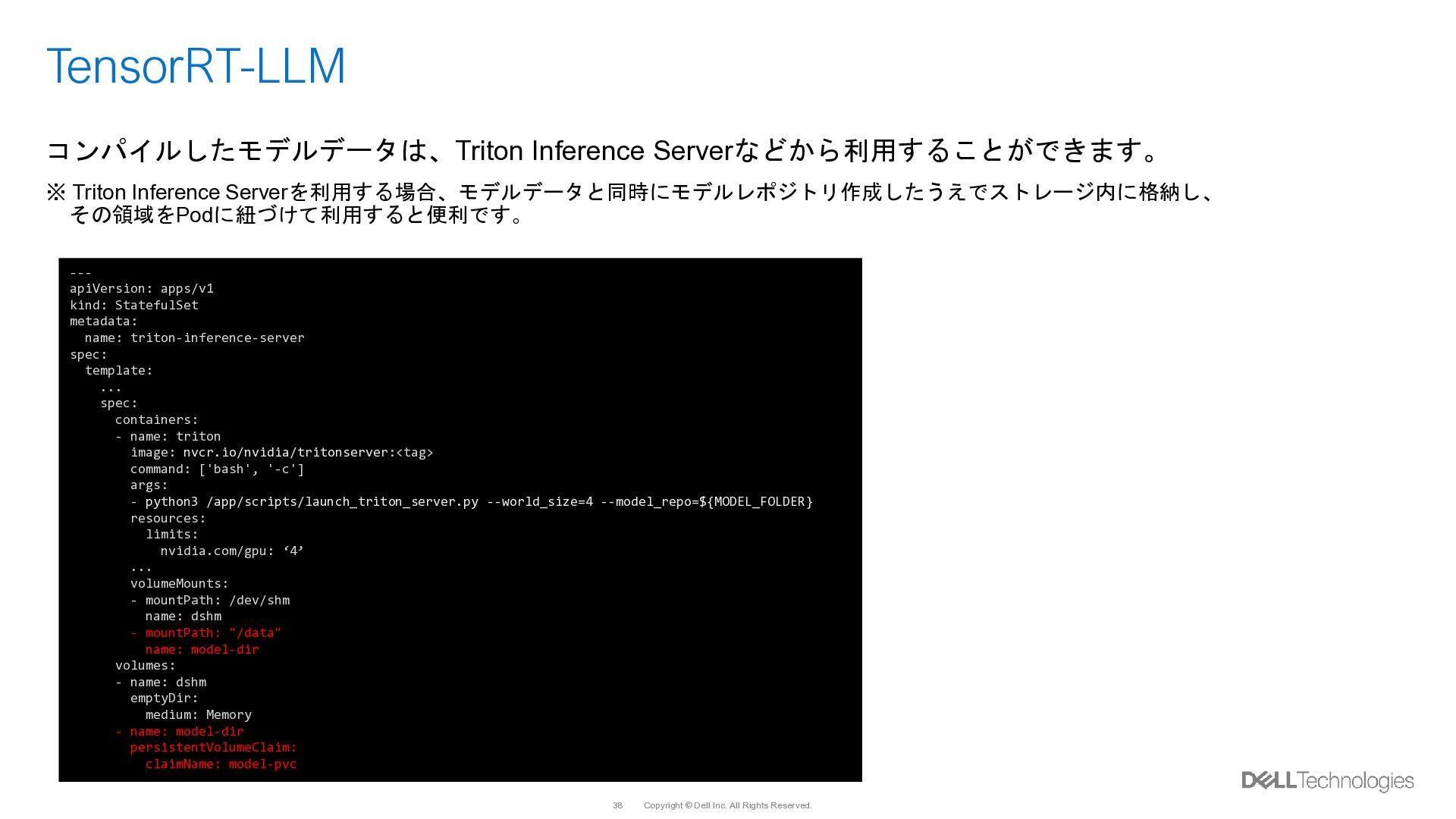
  32. Copyright © Dell Inc. All Rights Reserved. 38 TensorRT-LLM コンパイルしたモデルデータは、Triton

    Inference Serverなどから利用することができます。 ※ Triton Inference Serverを利用する場合、モデルデータと同時にモデルレポジトリ作成したうえでストレージ内に格納し、 その領域をPodに紐づけて利用すると便利です。 --- apiVersion: apps/v1 kind: StatefulSet metadata: name: triton-inference-server spec: template: ... spec: containers: - name: triton image: nvcr.io/nvidia/tritonserver:<tag> command: ['bash', '-c'] args: - python3 /app/scripts/launch_triton_server.py --world_size=4 --model_repo=${MODEL_FOLDER} resources: limits: nvidia.com/gpu: ‘4’ ... volumeMounts: - mountPath: /dev/shm name: dshm - mountPath: "/data" name: model-dir volumes: - name: dshm emptyDir: medium: Memory - name: model-dir persistentVolumeClaim: claimName: model-pvc
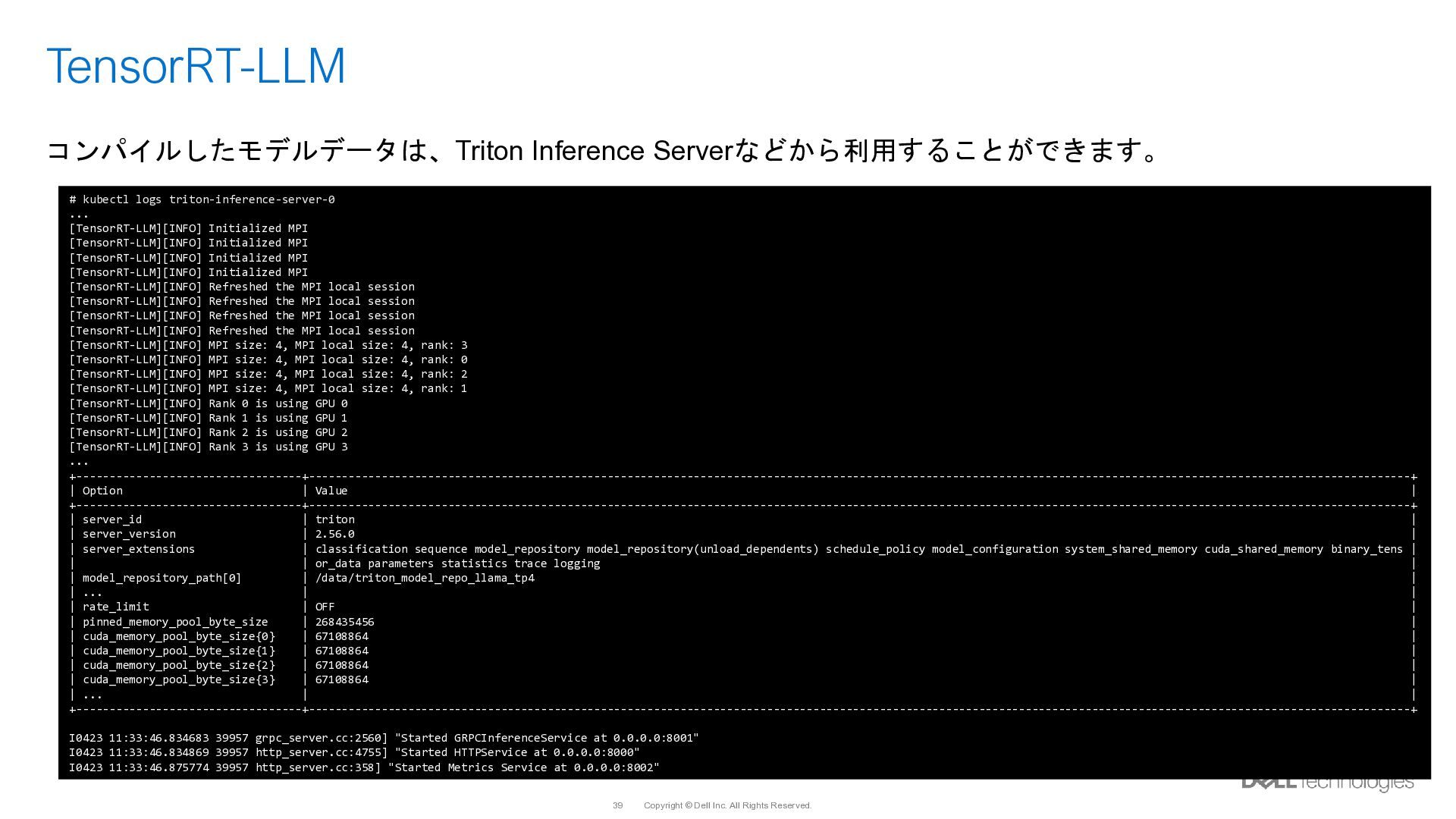
  33. Copyright © Dell Inc. All Rights Reserved. 39 TensorRT-LLM コンパイルしたモデルデータは、Triton

    Inference Serverなどから利用することができます。 # kubectl logs triton-inference-server-0 ... [TensorRT-LLM][INFO] Initialized MPI [TensorRT-LLM][INFO] Initialized MPI [TensorRT-LLM][INFO] Initialized MPI [TensorRT-LLM][INFO] Initialized MPI [TensorRT-LLM][INFO] Refreshed the MPI local session [TensorRT-LLM][INFO] Refreshed the MPI local session [TensorRT-LLM][INFO] Refreshed the MPI local session [TensorRT-LLM][INFO] Refreshed the MPI local session [TensorRT-LLM][INFO] MPI size: 4, MPI local size: 4, rank: 3 [TensorRT-LLM][INFO] MPI size: 4, MPI local size: 4, rank: 0 [TensorRT-LLM][INFO] MPI size: 4, MPI local size: 4, rank: 2 [TensorRT-LLM][INFO] MPI size: 4, MPI local size: 4, rank: 1 [TensorRT-LLM][INFO] Rank 0 is using GPU 0 [TensorRT-LLM][INFO] Rank 1 is using GPU 1 [TensorRT-LLM][INFO] Rank 2 is using GPU 2 [TensorRT-LLM][INFO] Rank 3 is using GPU 3 ... +----------------------------------+----------------------------------------------------------------------------------------------------------------------------------------------------------------------+ | Option | Value | +----------------------------------+----------------------------------------------------------------------------------------------------------------------------------------------------------------------+ | server_id | triton | | server_version | 2.56.0 | | server_extensions | classification sequence model_repository model_repository(unload_dependents) schedule_policy model_configuration system_shared_memory cuda_shared_memory binary_tens | | | or_data parameters statistics trace logging | | model_repository_path[0] | /data/triton_model_repo_llama_tp4 | | ... | | | rate_limit | OFF | | pinned_memory_pool_byte_size | 268435456 | | cuda_memory_pool_byte_size{0} | 67108864 | | cuda_memory_pool_byte_size{1} | 67108864 | | cuda_memory_pool_byte_size{2} | 67108864 | | cuda_memory_pool_byte_size{3} | 67108864 | | ... | | +----------------------------------+----------------------------------------------------------------------------------------------------------------------------------------------------------------------+ I0423 11:33:46.834683 39957 grpc_server.cc:2560] "Started GRPCInferenceService at 0.0.0.0:8001" I0423 11:33:46.834869 39957 http_server.cc:4755] "Started HTTPService at 0.0.0.0:8000" I0423 11:33:46.875774 39957 http_server.cc:358] "Started Metrics Service at 0.0.0.0:8002"
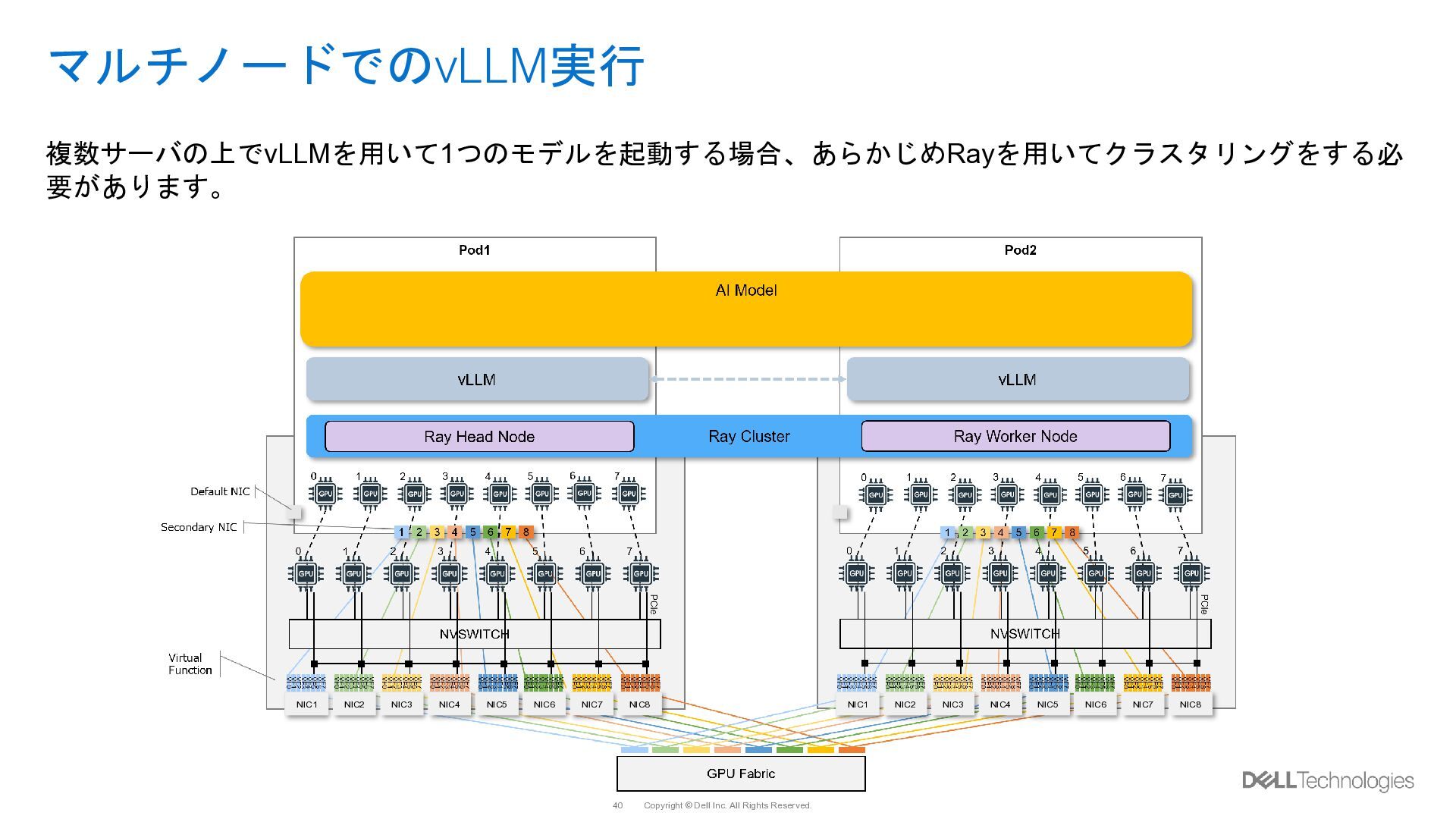
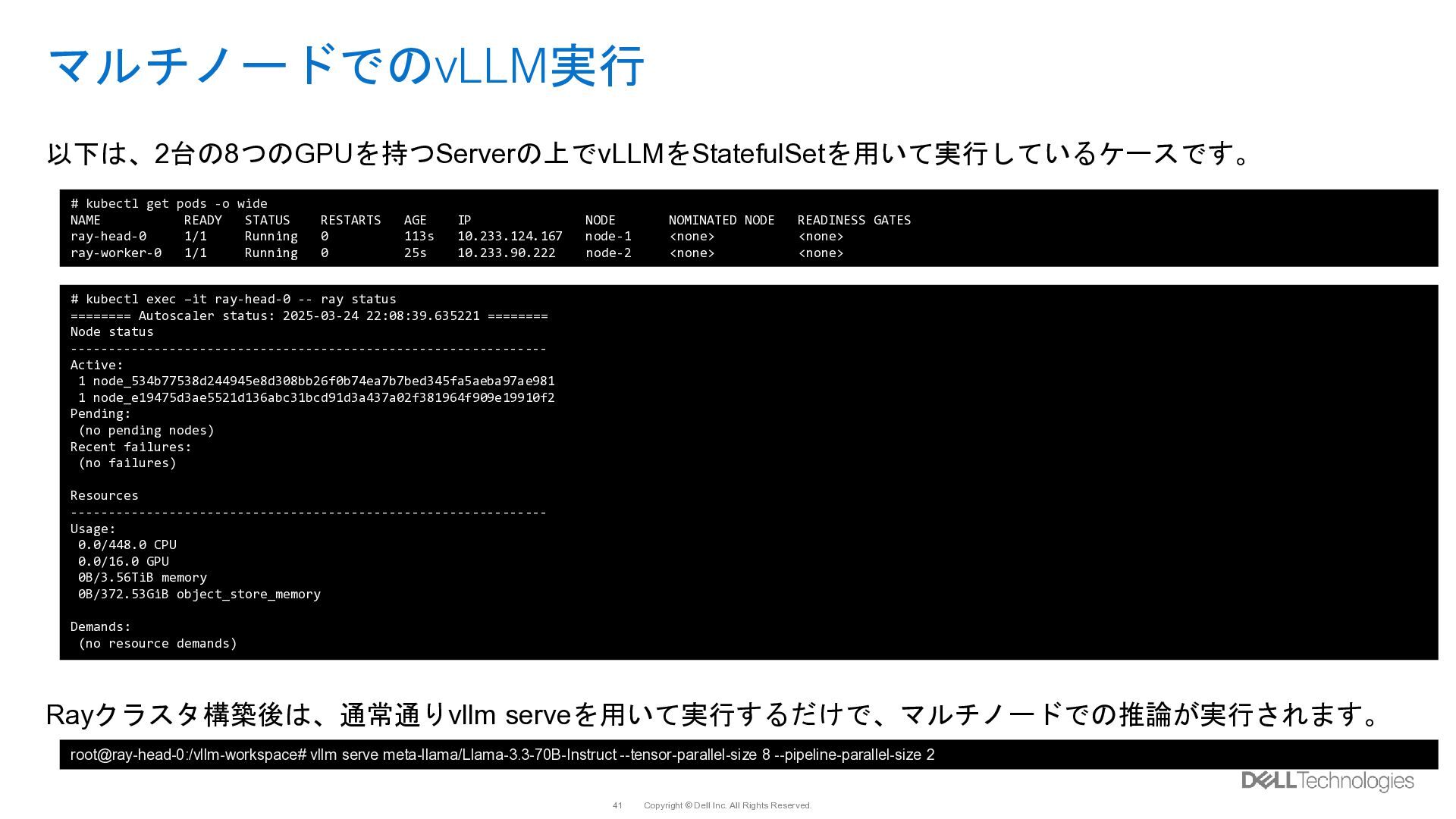
  34. Copyright © Dell Inc. All Rights Reserved. 41 マルチノードでのvLLM実行 以下は、2台の8つのGPUを持つServerの上でvLLMをStatefulSetを用いて実行しているケースです。

    Rayクラスタ構築後は、通常通りvllm serveを用いて実行するだけで、マルチノードでの推論が実行されます。 # kubectl get pods -o wide NAME READY STATUS RESTARTS AGE IP NODE NOMINATED NODE READINESS GATES ray-head-0 1/1 Running 0 113s 10.233.124.167 node-1 <none> <none> ray-worker-0 1/1 Running 0 25s 10.233.90.222 node-2 <none> <none> root@ray-head-0:/vllm-workspace# vllm serve meta-llama/Llama-3.3-70B-Instruct --tensor-parallel-size 8 --pipeline-parallel-size 2 # kubectl exec –it ray-head-0 -- ray status ======== Autoscaler status: 2025-03-24 22:08:39.635221 ======== Node status --------------------------------------------------------------- Active: 1 node_534b77538d244945e8d308bb26f0b74ea7b7bed345fa5aeba97ae981 1 node_e19475d3ae5521d136abc31bcd91d3a437a02f381964f909e19910f2 Pending: (no pending nodes) Recent failures: (no failures) Resources --------------------------------------------------------------- Usage: 0.0/448.0 CPU 0.0/16.0 GPU 0B/3.56TiB memory 0B/372.53GiB object_store_memory Demands: (no resource demands)
  35. Copyright © Dell Inc. All Rights Reserved. 42 マルチノードでのvLLM実行 Kubernetes

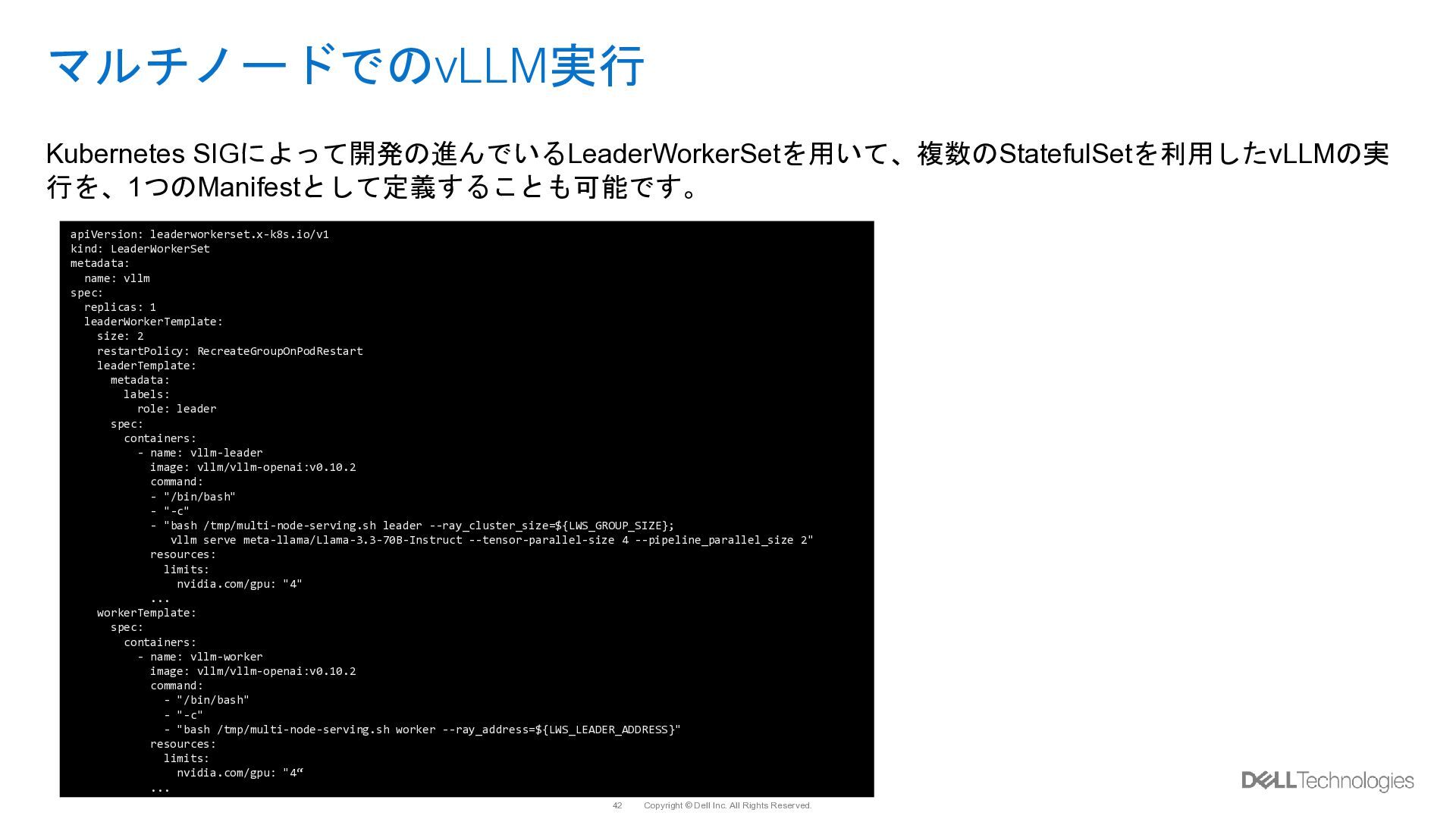
    SIGによって開発の進んでいるLeaderWorkerSetを用いて、複数のStatefulSetを利用したvLLMの実 行を、1つのManifestとして定義することも可能です。 apiVersion: leaderworkerset.x-k8s.io/v1 kind: LeaderWorkerSet metadata: name: vllm spec: replicas: 1 leaderWorkerTemplate: size: 2 restartPolicy: RecreateGroupOnPodRestart leaderTemplate: metadata: labels: role: leader spec: containers: - name: vllm-leader image: vllm/vllm-openai:v0.10.2 command: - "/bin/bash" - "-c" - "bash /tmp/multi-node-serving.sh leader --ray_cluster_size=${LWS_GROUP_SIZE}; vllm serve meta-llama/Llama-3.3-70B-Instruct --tensor-parallel-size 4 --pipeline_parallel_size 2" resources: limits: nvidia.com/gpu: "4" ... workerTemplate: spec: containers: - name: vllm-worker image: vllm/vllm-openai:v0.10.2 command: - "/bin/bash" - "-c" - "bash /tmp/multi-node-serving.sh worker --ray_address=${LWS_LEADER_ADDRESS}" resources: limits: nvidia.com/gpu: "4“ ...
  36. Copyright © Dell Inc. All Rights Reserved. 43 マルチノードでのvLLM実行 Kubernetes

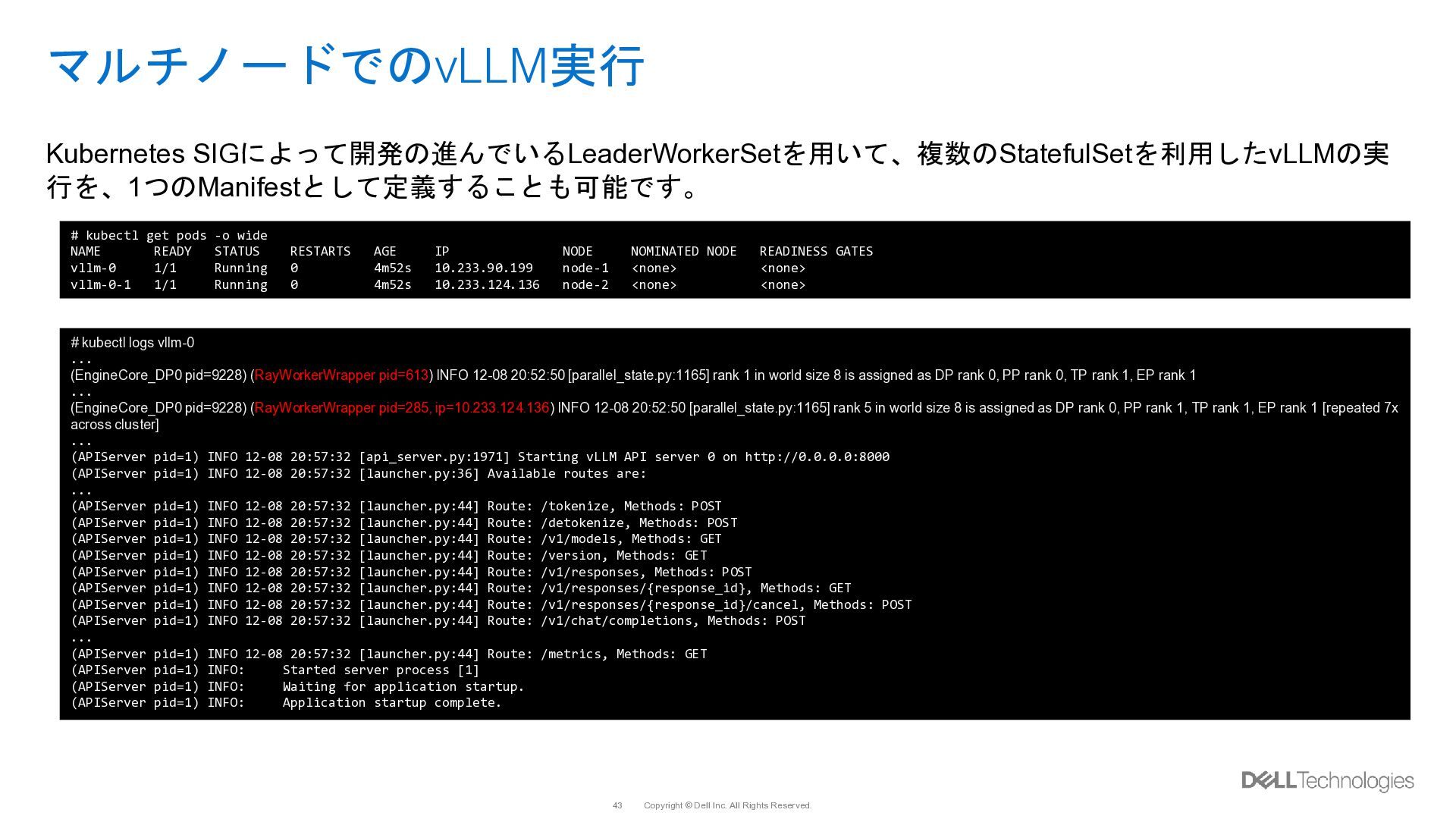
    SIGによって開発の進んでいるLeaderWorkerSetを用いて、複数のStatefulSetを利用したvLLMの実 行を、1つのManifestとして定義することも可能です。 # kubectl get pods -o wide NAME READY STATUS RESTARTS AGE IP NODE NOMINATED NODE READINESS GATES vllm-0 1/1 Running 0 4m52s 10.233.90.199 node-1 <none> <none> vllm-0-1 1/1 Running 0 4m52s 10.233.124.136 node-2 <none> <none> # kubectl logs vllm-0 ... (EngineCore_DP0 pid=9228) (RayWorkerWrapper pid=613) INFO 12-08 20:52:50 [parallel_state.py:1165] rank 1 in world size 8 is assigned as DP rank 0, PP rank 0, TP rank 1, EP rank 1 ... (EngineCore_DP0 pid=9228) (RayWorkerWrapper pid=285, ip=10.233.124.136) INFO 12-08 20:52:50 [parallel_state.py:1165] rank 5 in world size 8 is assigned as DP rank 0, PP rank 1, TP rank 1, EP rank 1 [repeated 7x across cluster] ... (APIServer pid=1) INFO 12-08 20:57:32 [api_server.py:1971] Starting vLLM API server 0 on http://0.0.0.0:8000 (APIServer pid=1) INFO 12-08 20:57:32 [launcher.py:36] Available routes are: ... (APIServer pid=1) INFO 12-08 20:57:32 [launcher.py:44] Route: /tokenize, Methods: POST (APIServer pid=1) INFO 12-08 20:57:32 [launcher.py:44] Route: /detokenize, Methods: POST (APIServer pid=1) INFO 12-08 20:57:32 [launcher.py:44] Route: /v1/models, Methods: GET (APIServer pid=1) INFO 12-08 20:57:32 [launcher.py:44] Route: /version, Methods: GET (APIServer pid=1) INFO 12-08 20:57:32 [launcher.py:44] Route: /v1/responses, Methods: POST (APIServer pid=1) INFO 12-08 20:57:32 [launcher.py:44] Route: /v1/responses/{response_id}, Methods: GET (APIServer pid=1) INFO 12-08 20:57:32 [launcher.py:44] Route: /v1/responses/{response_id}/cancel, Methods: POST (APIServer pid=1) INFO 12-08 20:57:32 [launcher.py:44] Route: /v1/chat/completions, Methods: POST ... (APIServer pid=1) INFO 12-08 20:57:32 [launcher.py:44] Route: /metrics, Methods: GET (APIServer pid=1) INFO: Started server process [1] (APIServer pid=1) INFO: Waiting for application startup. (APIServer pid=1) INFO: Application startup complete.
  37. Copyright © Dell Inc. All Rights Reserved. 45 Serving Tools

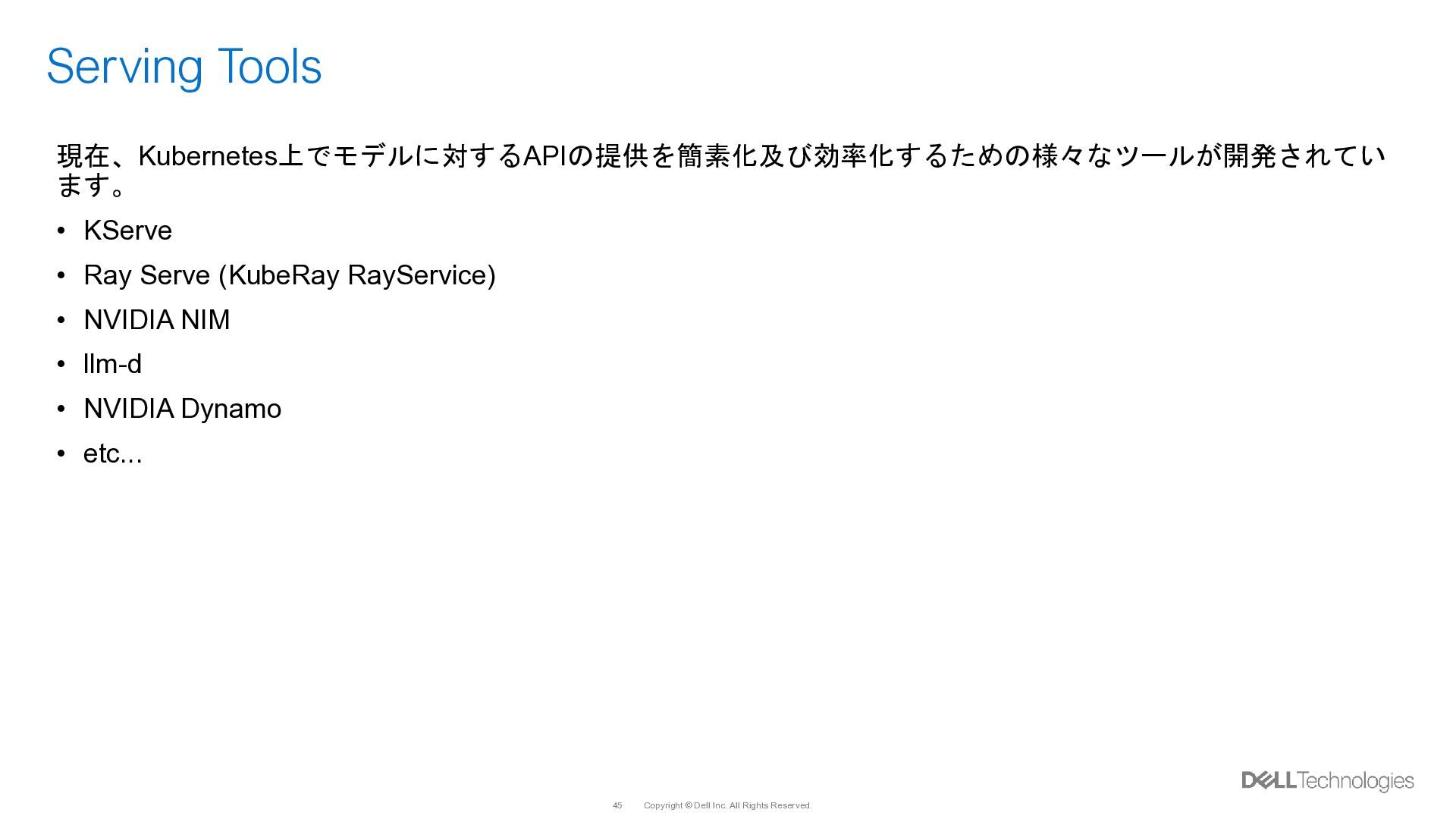
    現在、Kubernetes上でモデルに対するAPIの提供を簡素化及び効率化するための様々なツールが開発されてい ます。 • KServe • Ray Serve (KubeRay RayService) • NVIDIA NIM • llm-d • NVIDIA Dynamo • etc...
  38. Copyright © Dell Inc. All Rights Reserved. 46 Serving Tools

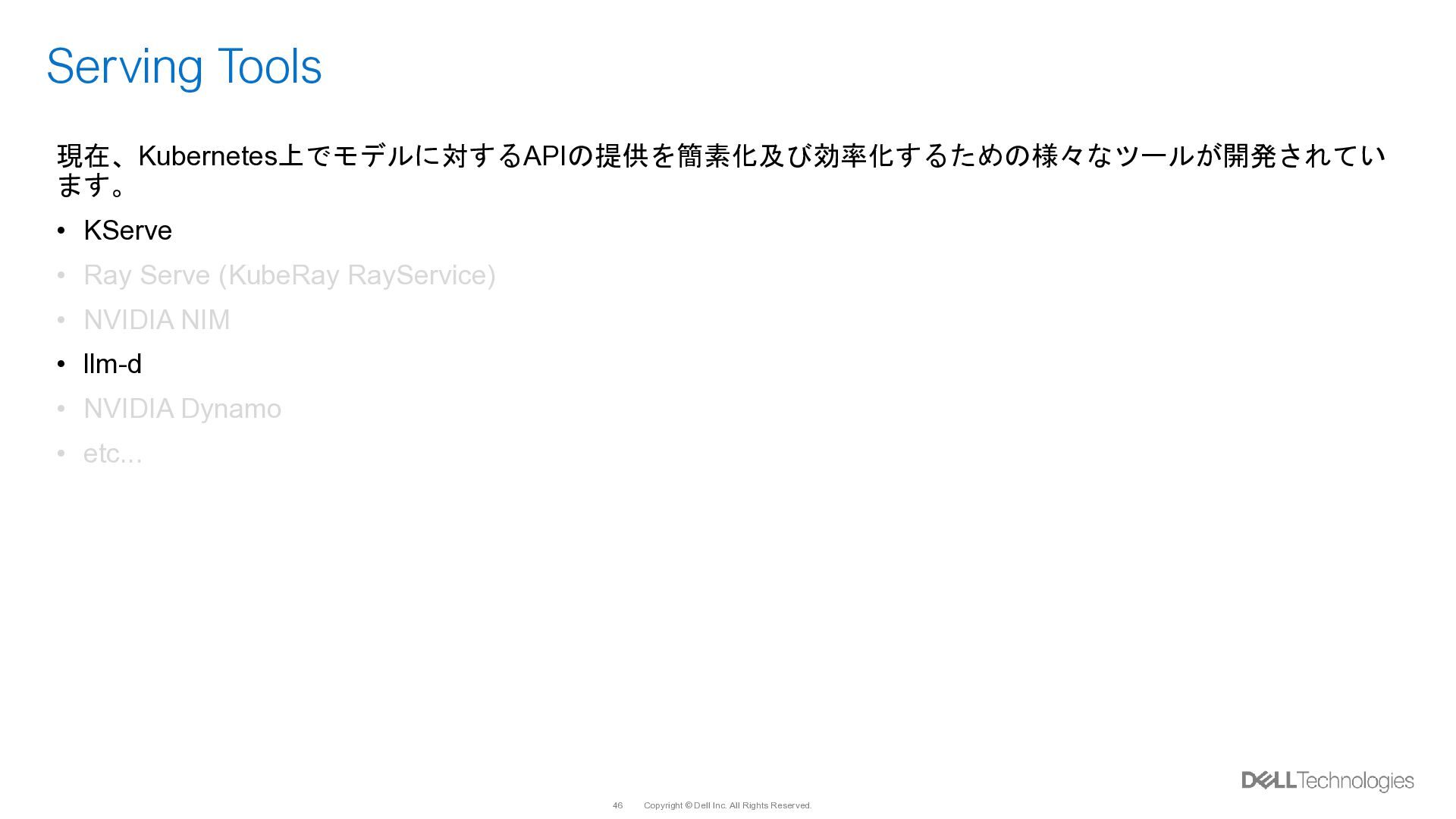
    現在、Kubernetes上でモデルに対するAPIの提供を簡素化及び効率化するための様々なツールが開発されてい ます。 • KServe • Ray Serve (KubeRay RayService) • NVIDIA NIM • llm-d • NVIDIA Dynamo • etc...
  39. Copyright © Dell Inc. All Rights Reserved. 48 Knative Revision
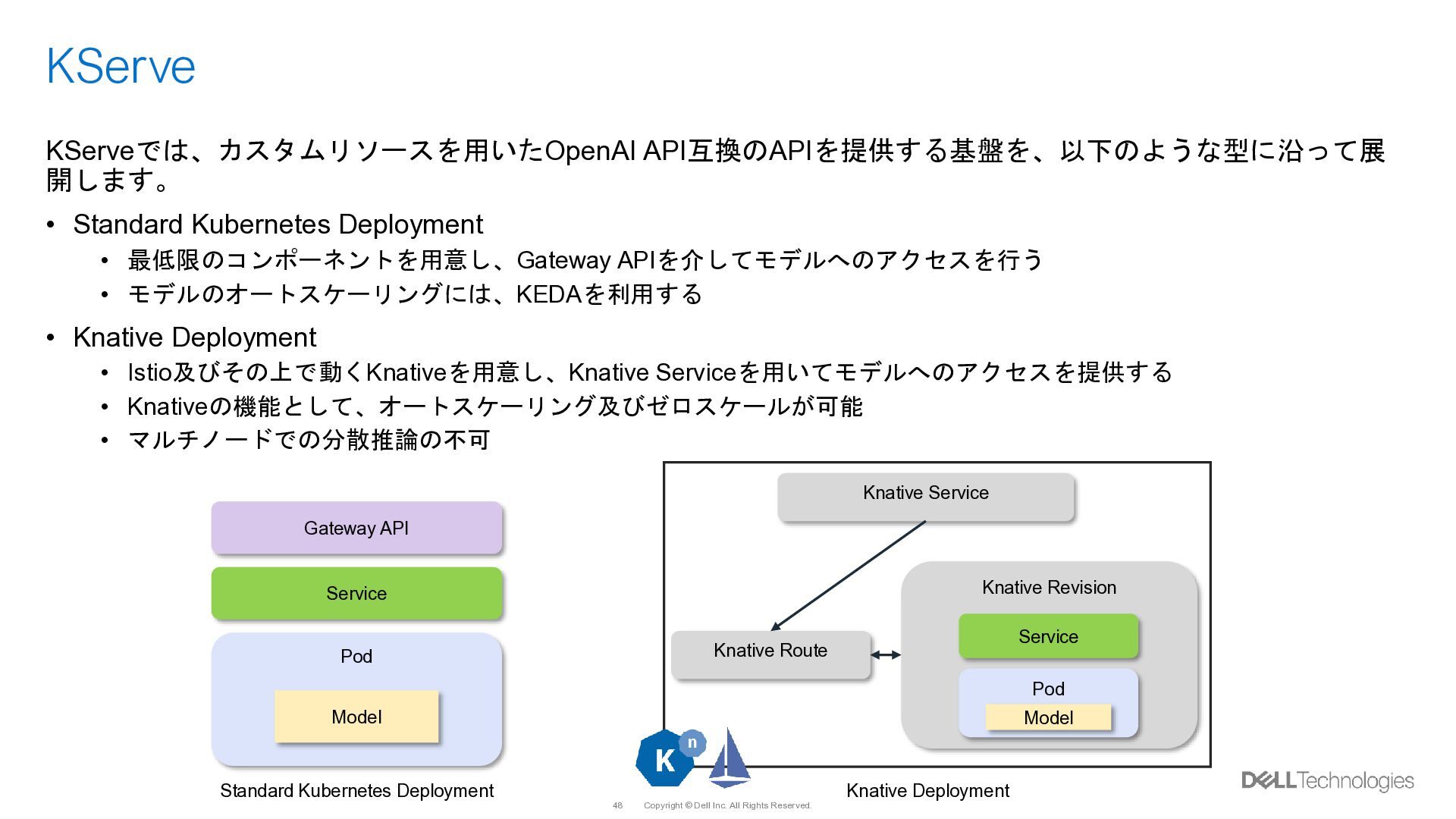
    KServe KServeでは、カスタムリソースを用いたOpenAI API互換のAPIを提供する基盤を、以下のような型に沿って展 開します。 • Standard Kubernetes Deployment • 最低限のコンポーネントを用意し、Gateway APIを介してモデルへのアクセスを行う • モデルのオートスケーリングには、KEDAを利用する • Knative Deployment • Istio及びその上で動くKnativeを用意し、Knative Serviceを用いてモデルへのアクセスを提供する • Knativeの機能として、オートスケーリング及びゼロスケールが可能 • マルチノードでの分散推論の不可 Gateway API Service Pod Pod Service Knative Service Knative Route Model Model Standard Kubernetes Deployment Knative Deployment
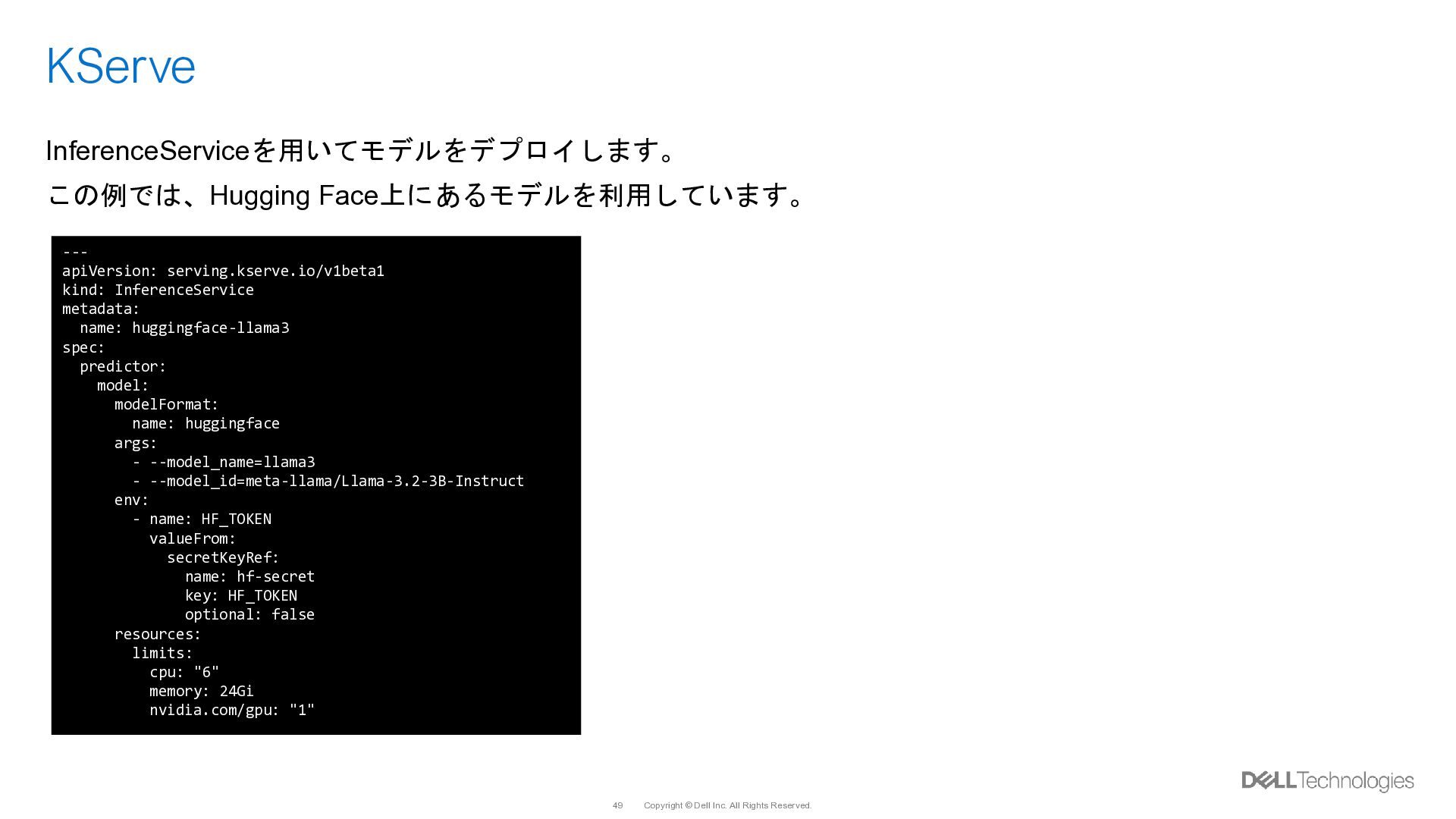
  40. Copyright © Dell Inc. All Rights Reserved. 49 KServe InferenceServiceを用いてモデルをデプロイします。

    この例では、Hugging Face上にあるモデルを利用しています。 --- apiVersion: serving.kserve.io/v1beta1 kind: InferenceService metadata: name: huggingface-llama3 spec: predictor: model: modelFormat: name: huggingface args: - --model_name=llama3 - --model_id=meta-llama/Llama-3.2-3B-Instruct env: - name: HF_TOKEN valueFrom: secretKeyRef: name: hf-secret key: HF_TOKEN optional: false resources: limits: cpu: "6" memory: 24Gi nvidia.com/gpu: "1"
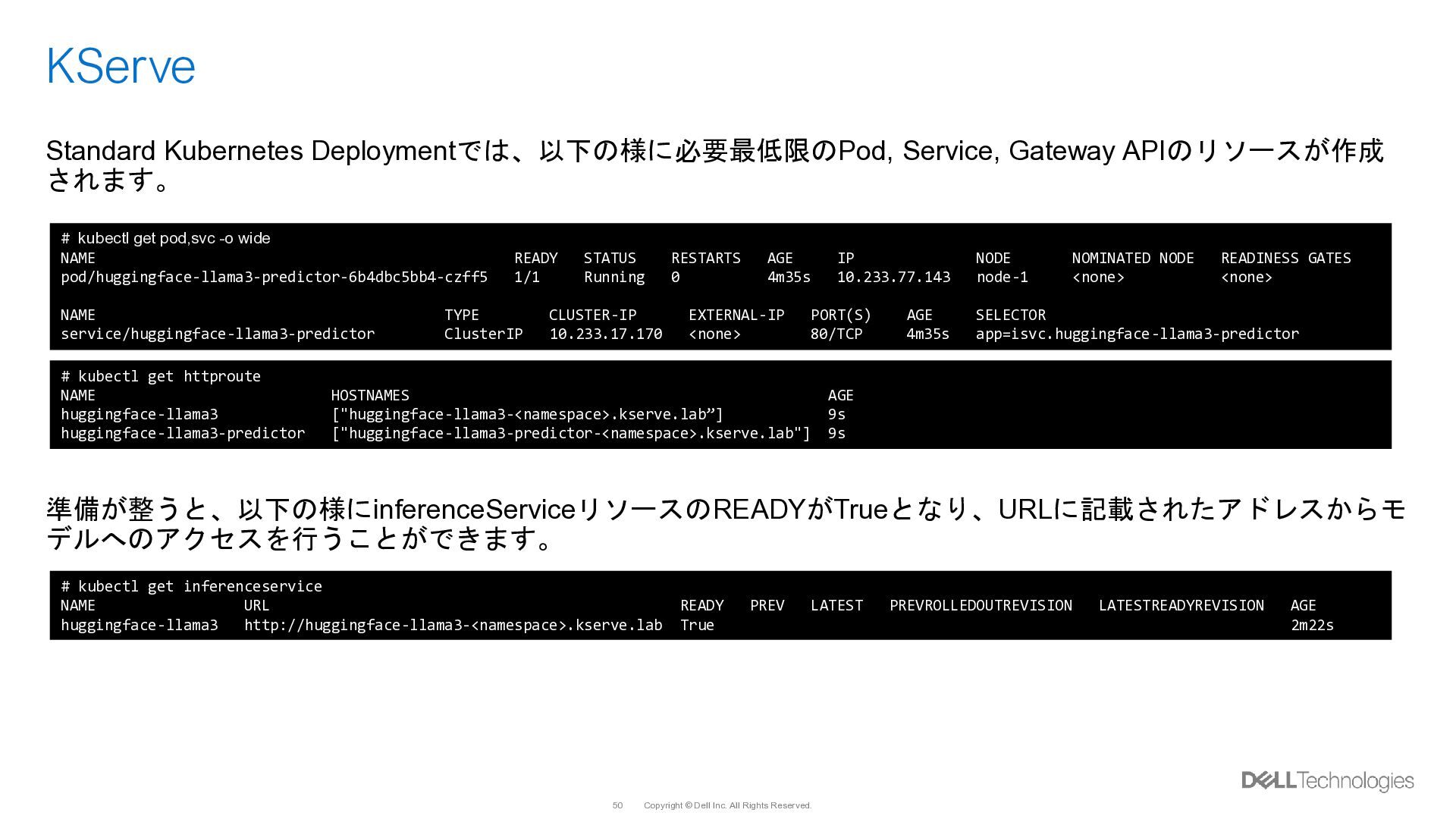
  41. Copyright © Dell Inc. All Rights Reserved. 50 KServe Standard

    Kubernetes Deploymentでは、以下の様に必要最低限のPod, Service, Gateway APIのリソースが作成 されます。 準備が整うと、以下の様にinferenceServiceリソースのREADYがTrueとなり、URLに記載されたアドレスからモ デルへのアクセスを行うことができます。 # kubectl get pod,svc -o wide NAME READY STATUS RESTARTS AGE IP NODE NOMINATED NODE READINESS GATES pod/huggingface-llama3-predictor-6b4dbc5bb4-czff5 1/1 Running 0 4m35s 10.233.77.143 node-1 <none> <none> NAME TYPE CLUSTER-IP EXTERNAL-IP PORT(S) AGE SELECTOR service/huggingface-llama3-predictor ClusterIP 10.233.17.170 <none> 80/TCP 4m35s app=isvc.huggingface-llama3-predictor # kubectl get httproute NAME HOSTNAMES AGE huggingface-llama3 ["huggingface-llama3-<namespace>.kserve.lab”] 9s huggingface-llama3-predictor ["huggingface-llama3-predictor-<namespace>.kserve.lab"] 9s # kubectl get inferenceservice NAME URL READY PREV LATEST PREVROLLEDOUTREVISION LATESTREADYREVISION AGE huggingface-llama3 http://huggingface-llama3-<namespace>.kserve.lab True 2m22s
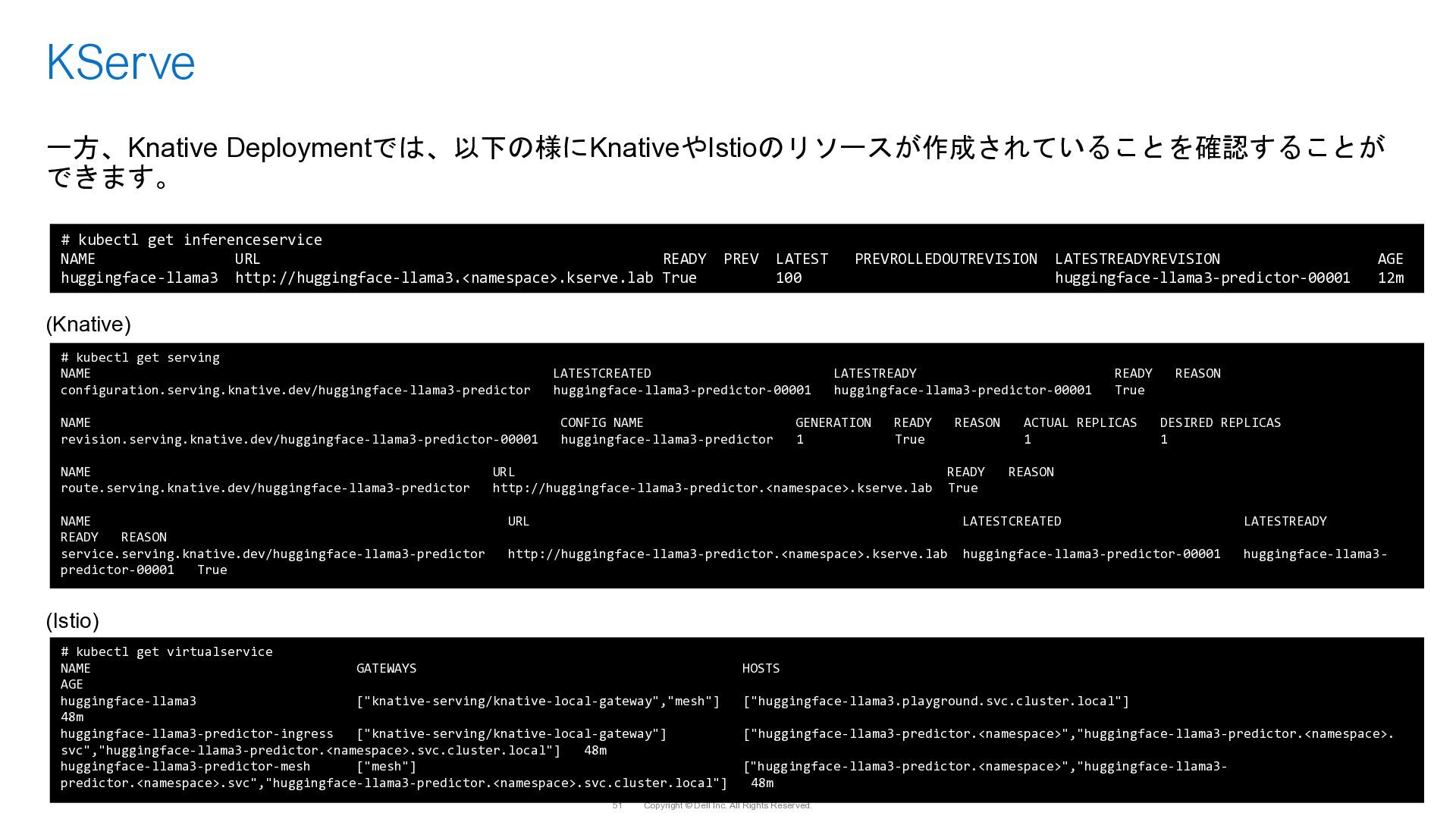
  42. Copyright © Dell Inc. All Rights Reserved. 51 KServe 一方、Knative

    Deploymentでは、以下の様にKnativeやIstioのリソースが作成されていることを確認することが できます。 (Knative) (Istio) # kubectl get inferenceservice NAME URL READY PREV LATEST PREVROLLEDOUTREVISION LATESTREADYREVISION AGE huggingface-llama3 http://huggingface-llama3.<namespace>.kserve.lab True 100 huggingface-llama3-predictor-00001 12m # kubectl get serving NAME LATESTCREATED LATESTREADY READY REASON configuration.serving.knative.dev/huggingface-llama3-predictor huggingface-llama3-predictor-00001 huggingface-llama3-predictor-00001 True NAME CONFIG NAME GENERATION READY REASON ACTUAL REPLICAS DESIRED REPLICAS revision.serving.knative.dev/huggingface-llama3-predictor-00001 huggingface-llama3-predictor 1 True 1 1 NAME URL READY REASON route.serving.knative.dev/huggingface-llama3-predictor http://huggingface-llama3-predictor.<namespace>.kserve.lab True NAME URL LATESTCREATED LATESTREADY READY REASON service.serving.knative.dev/huggingface-llama3-predictor http://huggingface-llama3-predictor.<namespace>.kserve.lab huggingface-llama3-predictor-00001 huggingface-llama3- predictor-00001 True # kubectl get virtualservice NAME GATEWAYS HOSTS AGE huggingface-llama3 ["knative-serving/knative-local-gateway","mesh"] ["huggingface-llama3.playground.svc.cluster.local"] 48m huggingface-llama3-predictor-ingress ["knative-serving/knative-local-gateway"] ["huggingface-llama3-predictor.<namespace>","huggingface-llama3-predictor.<namespace>. svc","huggingface-llama3-predictor.<namespace>.svc.cluster.local"] 48m huggingface-llama3-predictor-mesh ["mesh"] ["huggingface-llama3-predictor.<namespace>","huggingface-llama3- predictor.<namespace>.svc","huggingface-llama3-predictor.<namespace>.svc.cluster.local"] 48m
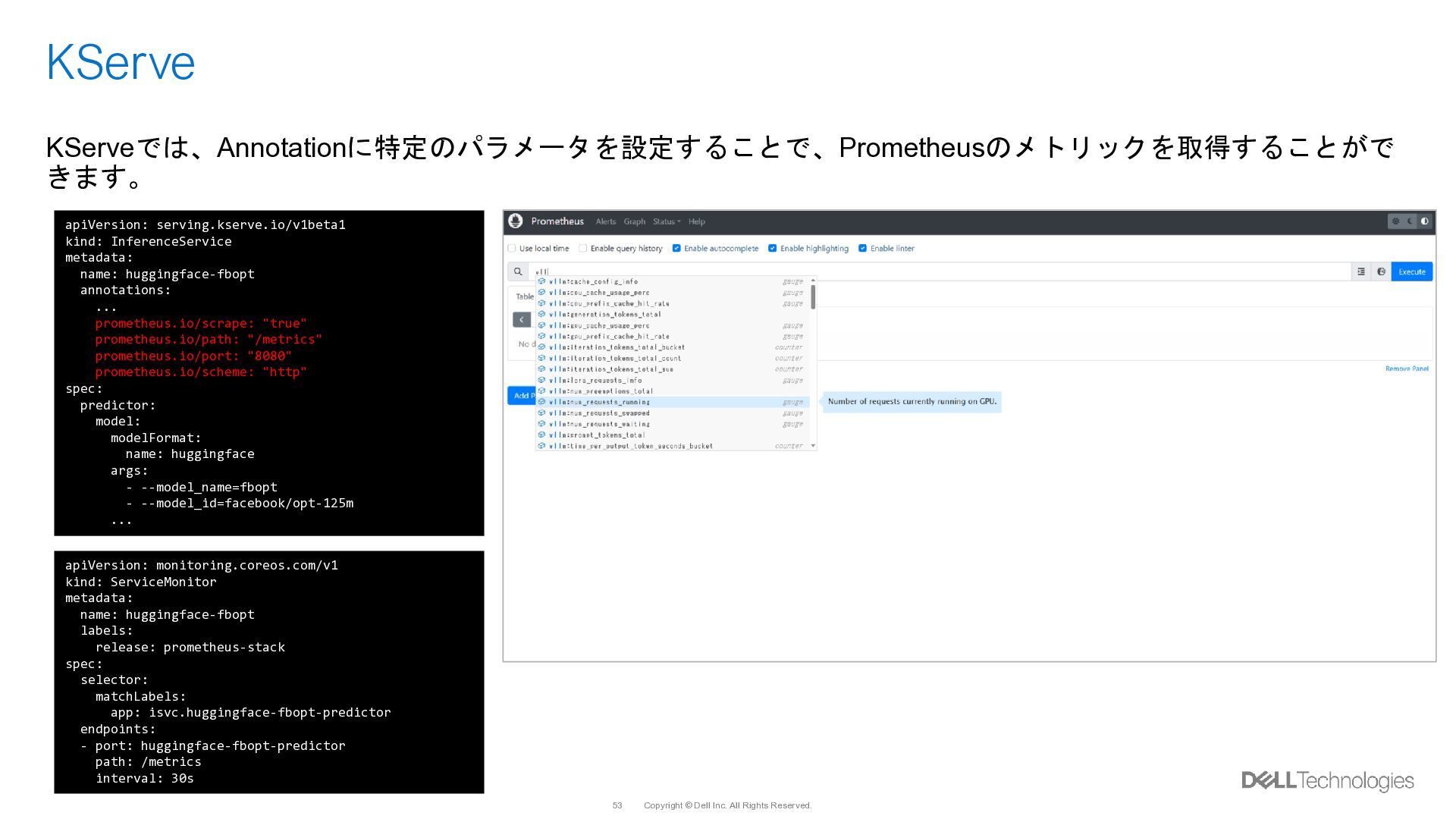
  43. Copyright © Dell Inc. All Rights Reserved. 53 KServe KServeでは、Annotationに特定のパラメータを設定することで、Prometheusのメトリックを取得することがで

    きます。 apiVersion: serving.kserve.io/v1beta1 kind: InferenceService metadata: name: huggingface-fbopt annotations: ... prometheus.io/scrape: "true" prometheus.io/path: "/metrics" prometheus.io/port: "8080" prometheus.io/scheme: "http" spec: predictor: model: modelFormat: name: huggingface args: - --model_name=fbopt - --model_id=facebook/opt-125m ... apiVersion: monitoring.coreos.com/v1 kind: ServiceMonitor metadata: name: huggingface-fbopt labels: release: prometheus-stack spec: selector: matchLabels: app: isvc.huggingface-fbopt-predictor endpoints: - port: huggingface-fbopt-predictor path: /metrics interval: 30s
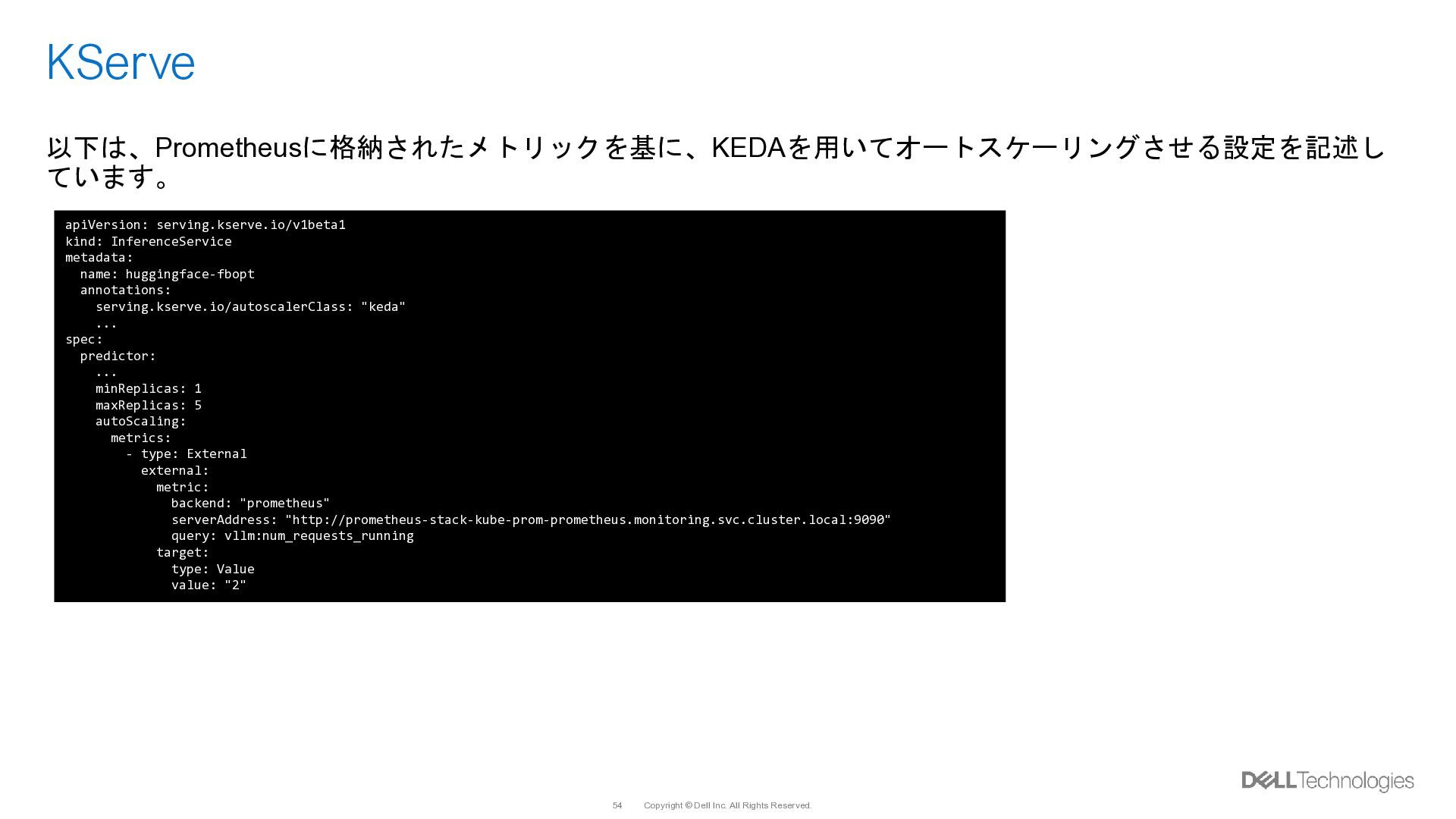
  44. Copyright © Dell Inc. All Rights Reserved. 54 KServe 以下は、Prometheusに格納されたメトリックを基に、KEDAを用いてオートスケーリングさせる設定を記述し

    ています。 apiVersion: serving.kserve.io/v1beta1 kind: InferenceService metadata: name: huggingface-fbopt annotations: serving.kserve.io/autoscalerClass: "keda" ... spec: predictor: ... minReplicas: 1 maxReplicas: 5 autoScaling: metrics: - type: External external: metric: backend: "prometheus" serverAddress: "http://prometheus-stack-kube-prom-prometheus.monitoring.svc.cluster.local:9090" query: vllm:num_requests_running target: type: Value value: "2"
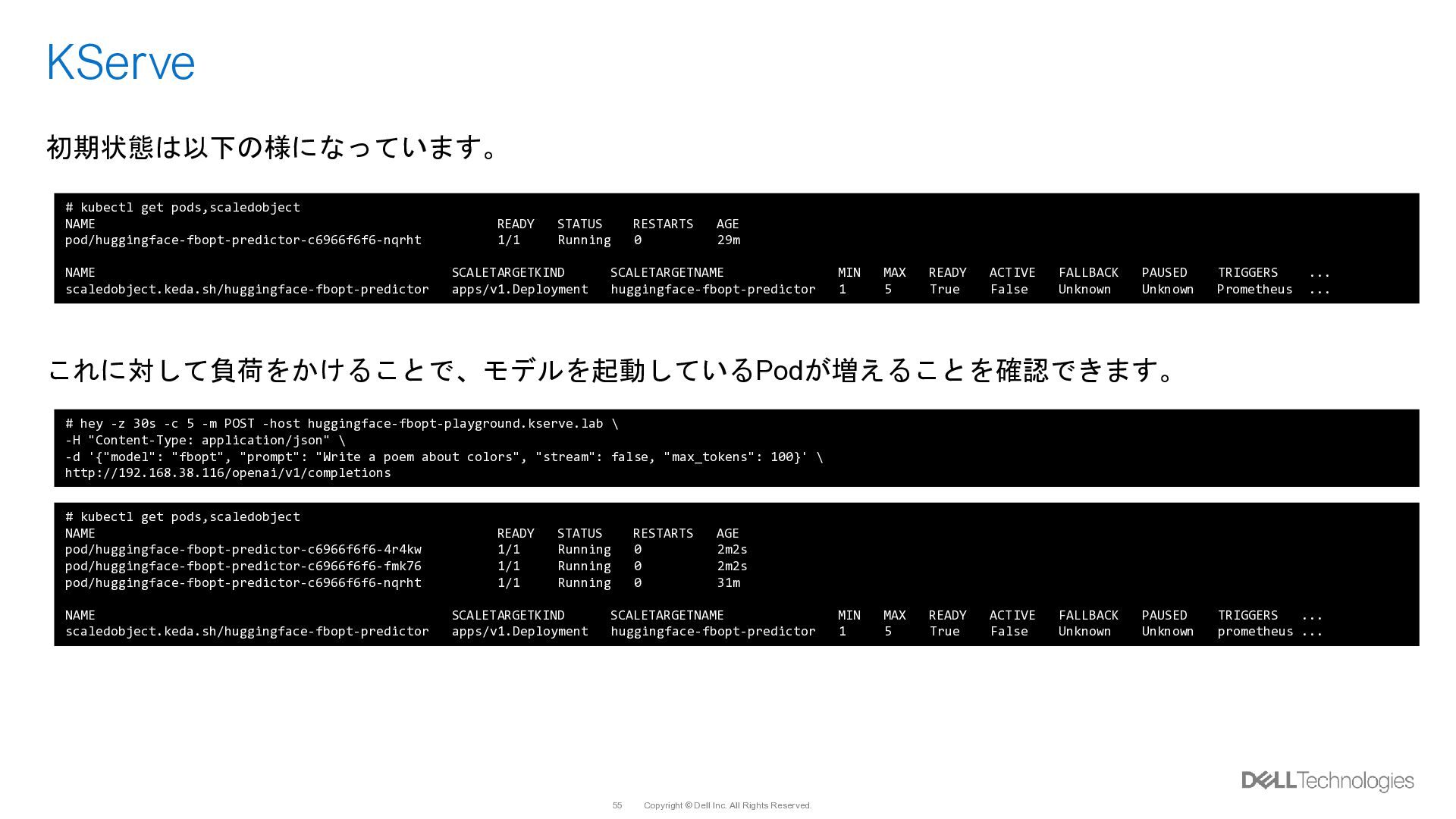
  45. Copyright © Dell Inc. All Rights Reserved. 55 KServe 初期状態は以下の様になっています。

    これに対して負荷をかけることで、モデルを起動しているPodが増えることを確認できます。 # kubectl get pods,scaledobject NAME READY STATUS RESTARTS AGE pod/huggingface-fbopt-predictor-c6966f6f6-nqrht 1/1 Running 0 29m NAME SCALETARGETKIND SCALETARGETNAME MIN MAX READY ACTIVE FALLBACK PAUSED TRIGGERS ... scaledobject.keda.sh/huggingface-fbopt-predictor apps/v1.Deployment huggingface-fbopt-predictor 1 5 True False Unknown Unknown Prometheus ... # hey -z 30s -c 5 -m POST -host huggingface-fbopt-playground.kserve.lab \ -H "Content-Type: application/json" \ -d '{"model": "fbopt", "prompt": "Write a poem about colors", "stream": false, "max_tokens": 100}' \ http://192.168.38.116/openai/v1/completions # kubectl get pods,scaledobject NAME READY STATUS RESTARTS AGE pod/huggingface-fbopt-predictor-c6966f6f6-4r4kw 1/1 Running 0 2m2s pod/huggingface-fbopt-predictor-c6966f6f6-fmk76 1/1 Running 0 2m2s pod/huggingface-fbopt-predictor-c6966f6f6-nqrht 1/1 Running 0 31m NAME SCALETARGETKIND SCALETARGETNAME MIN MAX READY ACTIVE FALLBACK PAUSED TRIGGERS ... scaledobject.keda.sh/huggingface-fbopt-predictor apps/v1.Deployment huggingface-fbopt-predictor 1 5 True False Unknown Unknown prometheus ...
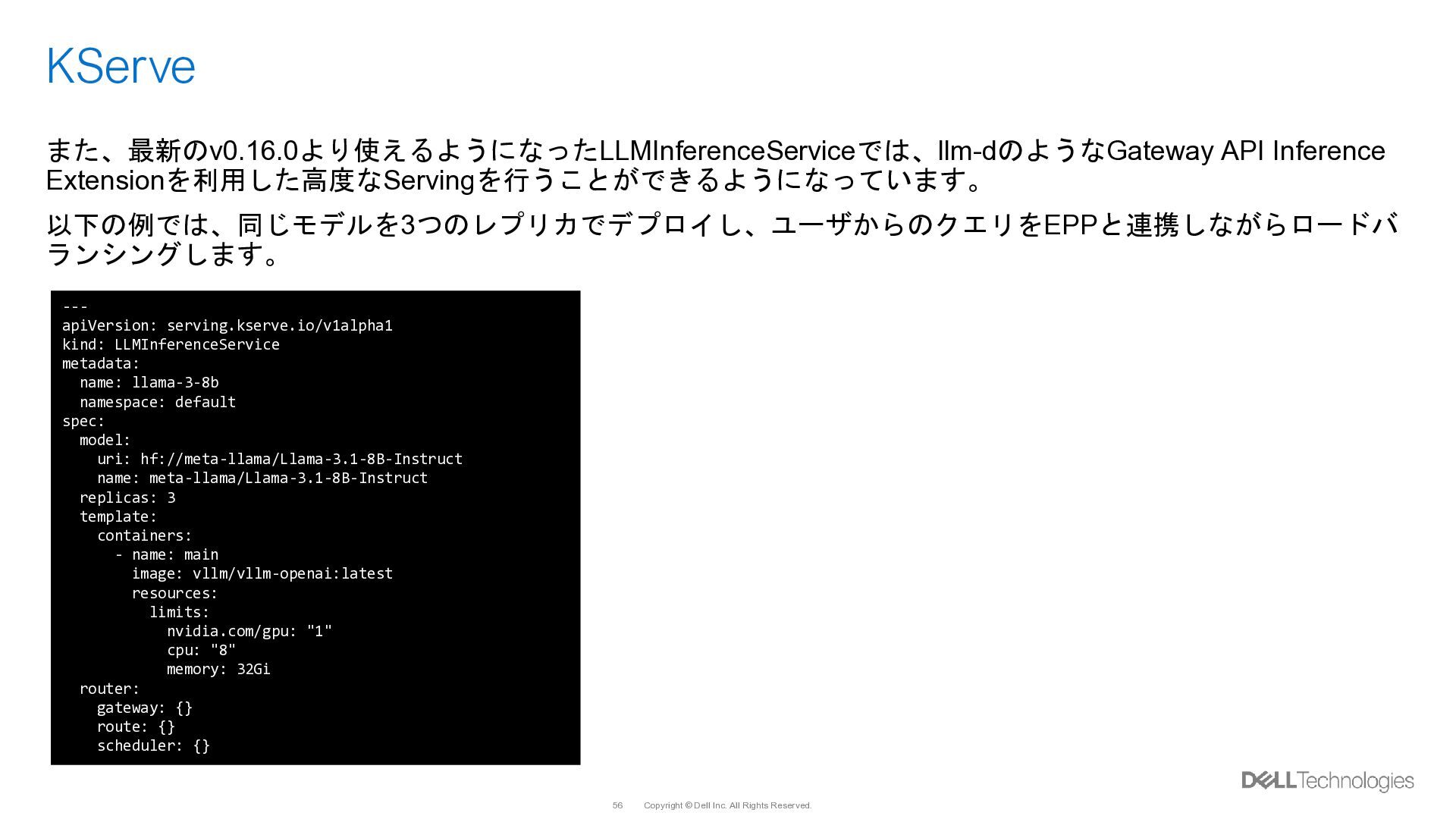
  46. Copyright © Dell Inc. All Rights Reserved. 56 KServe また、最新のv0.16.0より使えるようになったLLMInferenceServiceでは、llm-dのようなGateway

    API Inference Extensionを利用した高度なServingを行うことができるようになっています。 以下の例では、同じモデルを3つのレプリカでデプロイし、ユーザからのクエリをEPPと連携しながらロードバ ランシングします。 --- apiVersion: serving.kserve.io/v1alpha1 kind: LLMInferenceService metadata: name: llama-3-8b namespace: default spec: model: uri: hf://meta-llama/Llama-3.1-8B-Instruct name: meta-llama/Llama-3.1-8B-Instruct replicas: 3 template: containers: - name: main image: vllm/vllm-openai:latest resources: limits: nvidia.com/gpu: "1" cpu: "8" memory: 32Gi router: gateway: {} route: {} scheduler: {}
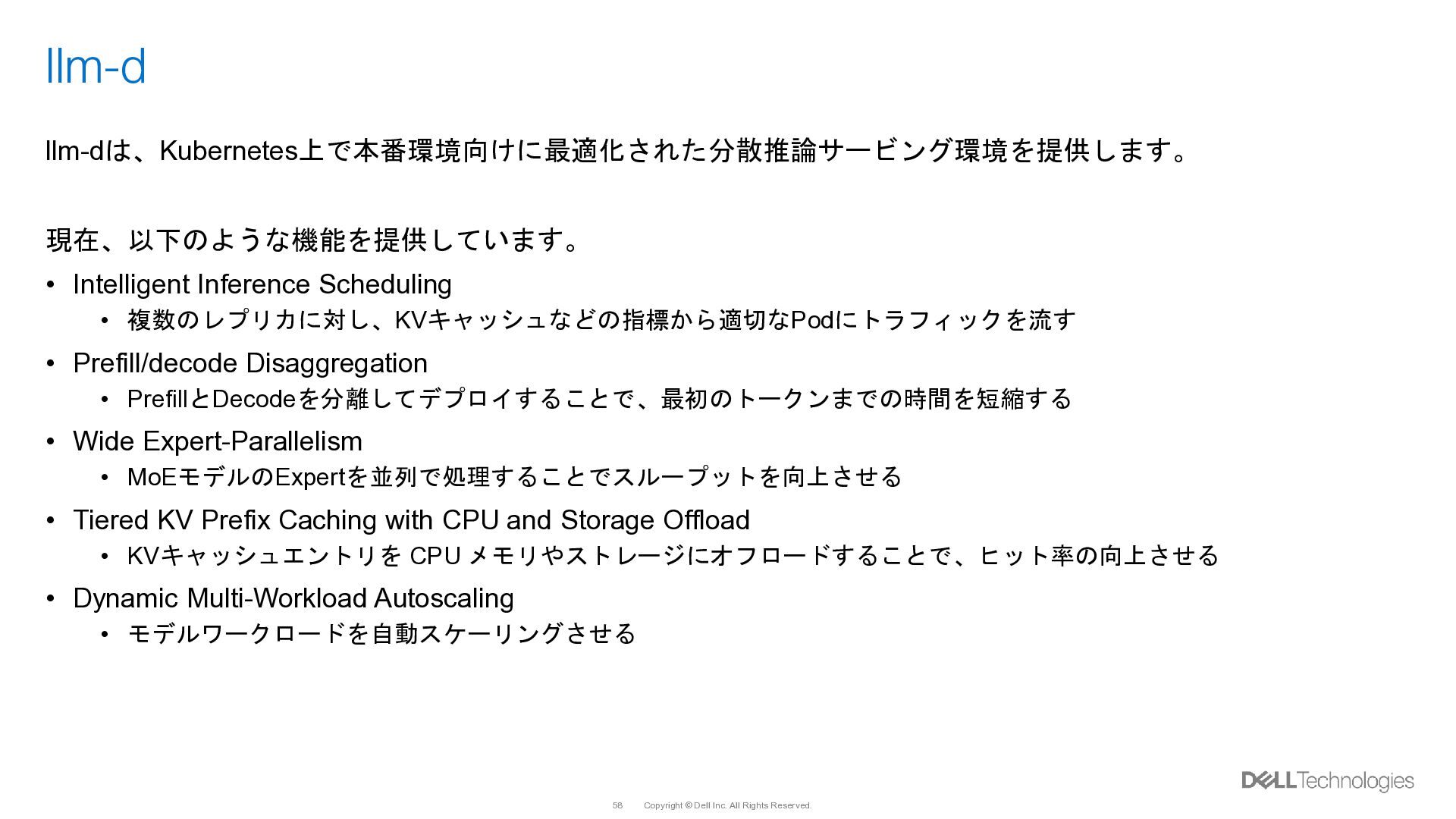
  47. Copyright © Dell Inc. All Rights Reserved. 58 llm-d llm-dは、Kubernetes上で本番環境向けに最適化された分散推論サービング環境を提供します。

    現在、以下のような機能を提供しています。 • Intelligent Inference Scheduling • 複数のレプリカに対し、KVキャッシュなどの指標から適切なPodにトラフィックを流す • Prefill/decode Disaggregation • PrefillとDecodeを分離してデプロイすることで、最初のトークンまでの時間を短縮する • Wide Expert-Parallelism • MoEモデルのExpertを並列で処理することでスループットを向上させる • Tiered KV Prefix Caching with CPU and Storage Offload • KVキャッシュエントリを CPU メモリやストレージにオフロードすることで、ヒット率の向上させる • Dynamic Multi-Workload Autoscaling • モデルワークロードを自動スケーリングさせる
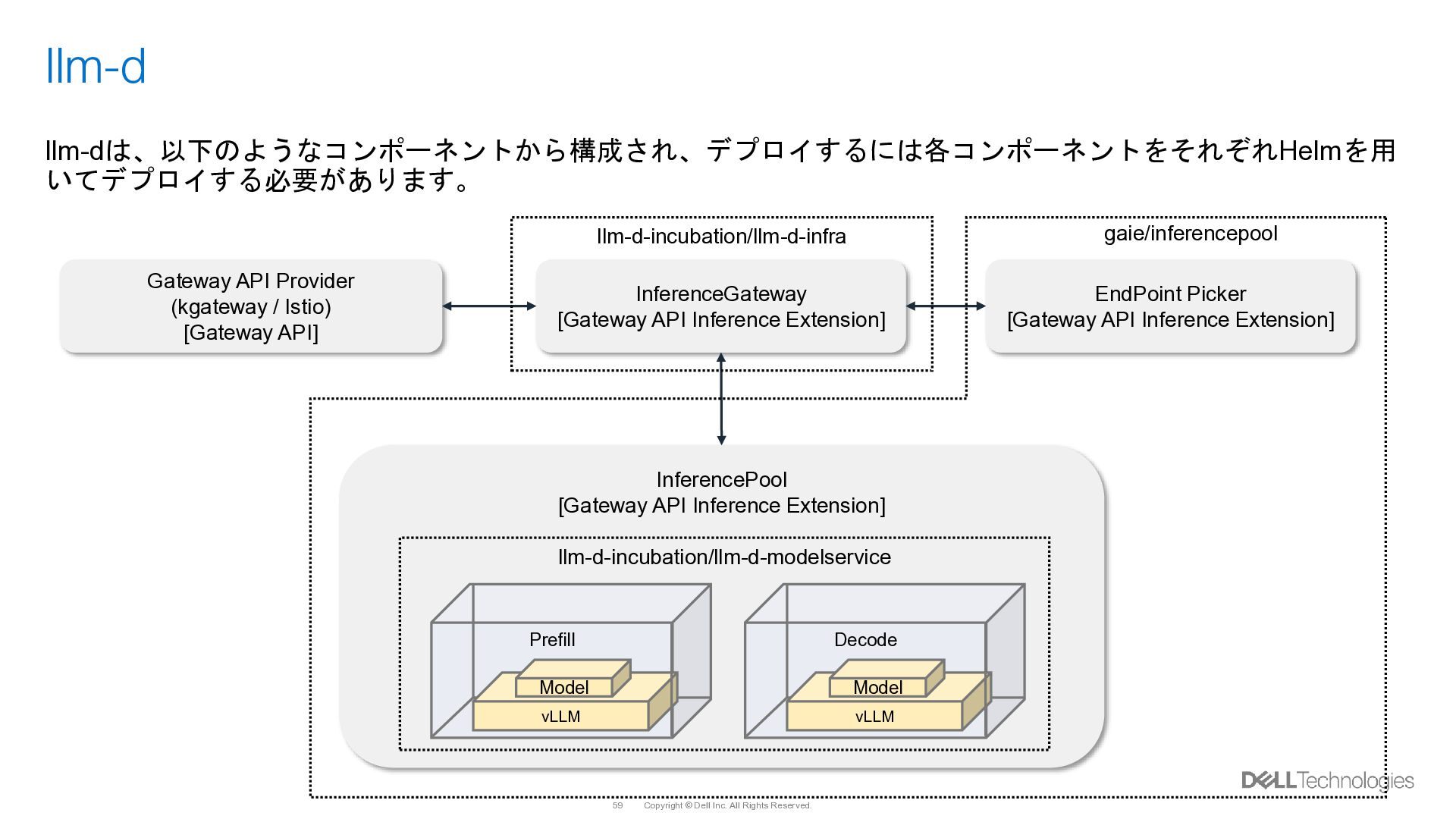
  48. Copyright © Dell Inc. All Rights Reserved. 59 llm-d llm-dは、以下のようなコンポーネントから構成され、デプロイするには各コンポーネントをそれぞれHelmを用

    いてデプロイする必要があります。 Gateway API Provider (kgateway / Istio) [Gateway API] InferenceGateway [Gateway API Inference Extension] EndPoint Picker [Gateway API Inference Extension] InferencePool [Gateway API Inference Extension] Prefill vLLM Model Decode vLLM Model llm-d-incubation/llm-d-infra gaie/inferencepool llm-d-incubation/llm-d-modelservice
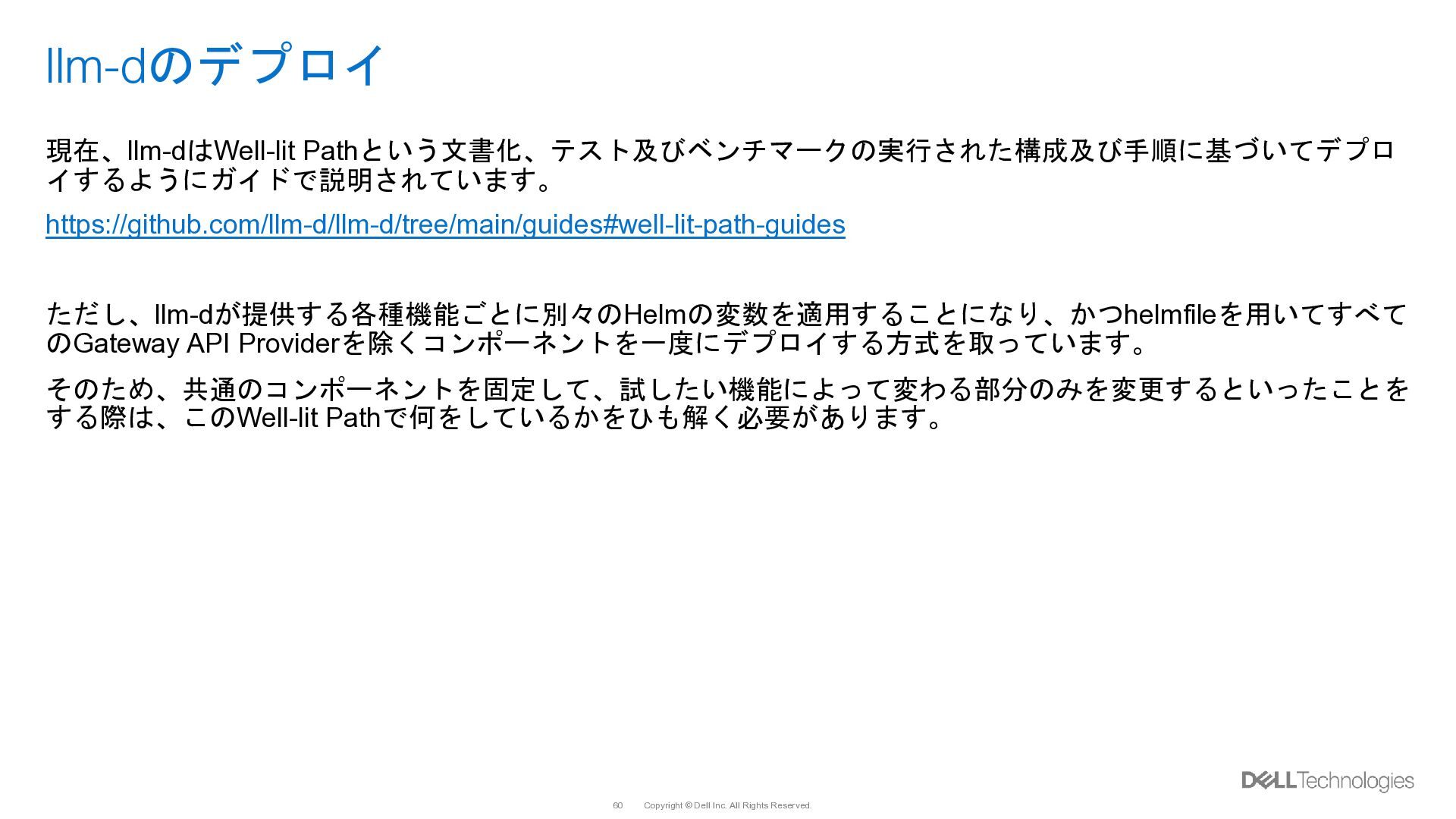
  49. Copyright © Dell Inc. All Rights Reserved. 60 llm-dのデプロイ 現在、llm-dはWell-lit

    Pathという文書化、テスト及びベンチマークの実行された構成及び手順に基づいてデプロ イするようにガイドで説明されています。 https://github.com/llm-d/llm-d/tree/main/guides#well-lit-path-guides ただし、llm-dが提供する各種機能ごとに別々のHelmの変数を適用することになり、かつhelmfileを用いてすべて のGateway API Providerを除くコンポーネントを一度にデプロイする方式を取っています。 そのため、共通のコンポーネントを固定して、試したい機能によって変わる部分のみを変更するといったことを する際は、このWell-lit Pathで何をしているかをひも解く必要があります。
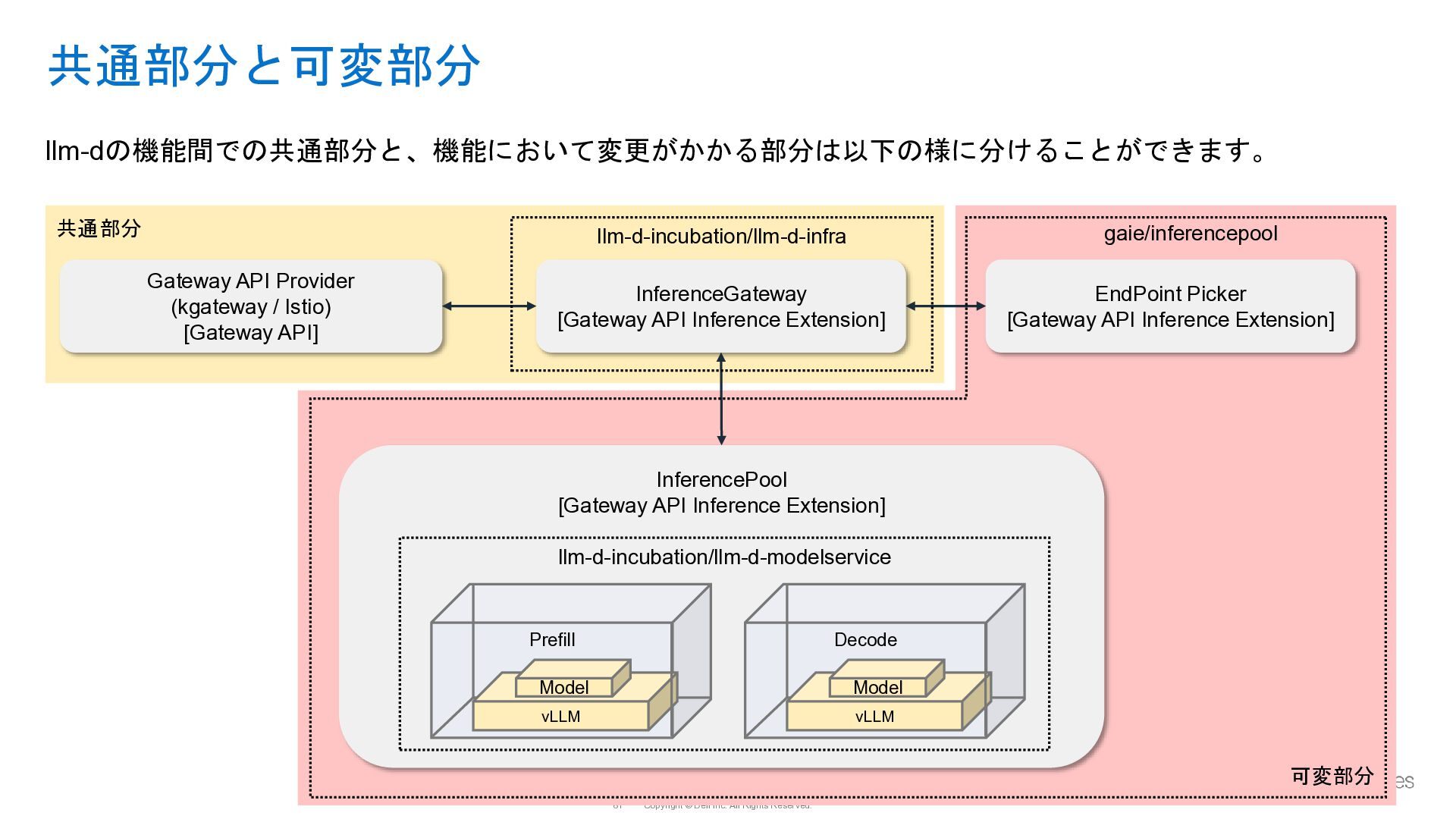
  50. Copyright © Dell Inc. All Rights Reserved. 61 共通部分と可変部分 llm-dの機能間での共通部分と、機能において変更がかかる部分は以下の様に分けることができます。

    Gateway API Provider (kgateway / Istio) [Gateway API] InferenceGateway [Gateway API Inference Extension] EndPoint Picker [Gateway API Inference Extension] InferencePool [Gateway API Inference Extension] Prefill vLLM Model Decode vLLM Model llm-d-incubation/llm-d-infra gaie/inferencepool llm-d-incubation/llm-d-modelservice 共通部分 可変部分
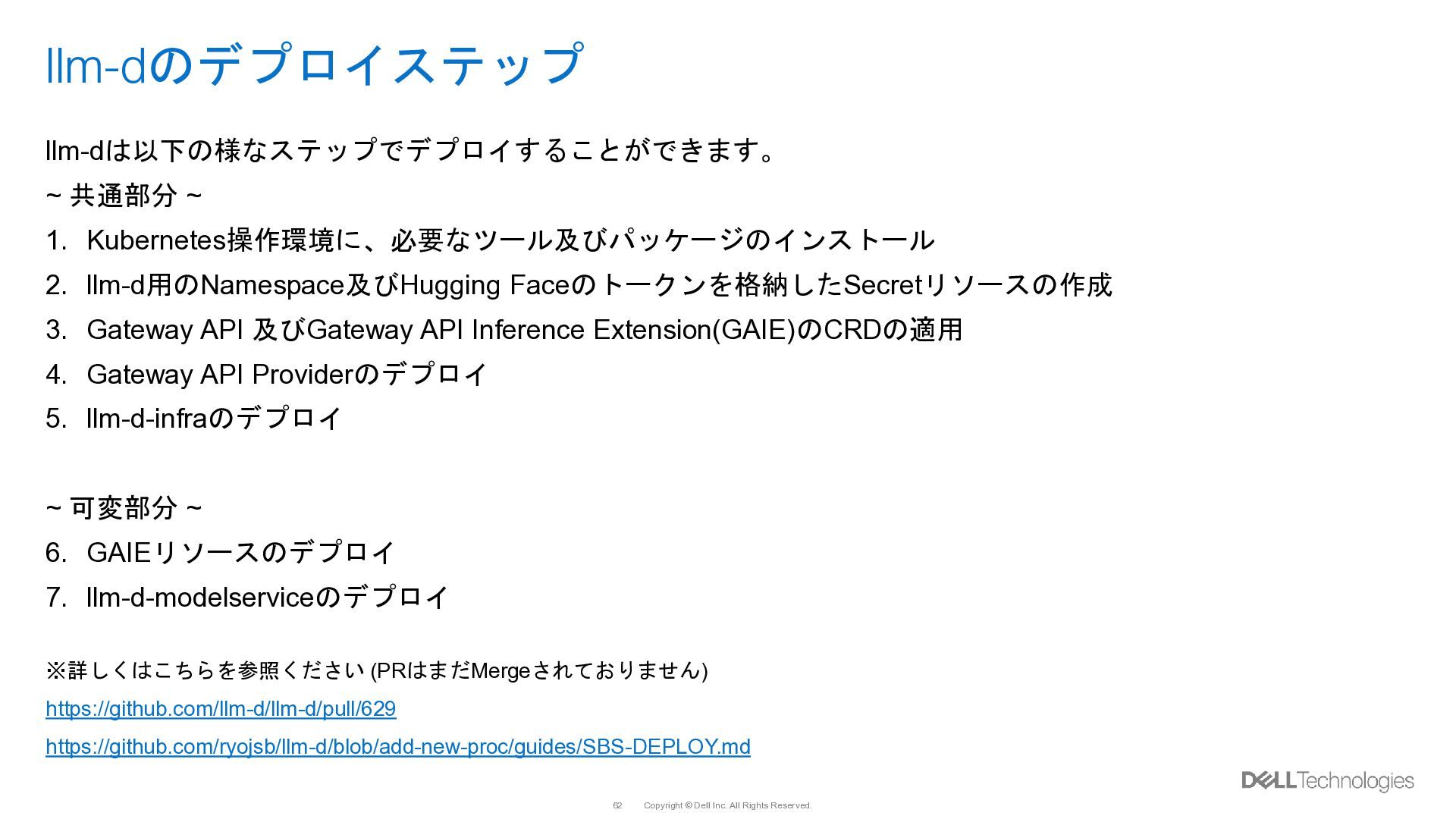
  51. Copyright © Dell Inc. All Rights Reserved. 62 llm-dのデプロイステップ llm-dは以下の様なステップでデプロイすることができます。

    ~ 共通部分 ~ 1. Kubernetes操作環境に、必要なツール及びパッケージのインストール 2. llm-d用のNamespace及びHugging Faceのトークンを格納したSecretリソースの作成 3. Gateway API 及びGateway API Inference Extension(GAIE)のCRDの適用 4. Gateway API Providerのデプロイ 5. llm-d-infraのデプロイ ~ 可変部分 ~ 6. GAIEリソースのデプロイ 7. llm-d-modelserviceのデプロイ ※詳しくはこちらを参照ください (PRはまだMergeされておりません) https://github.com/llm-d/llm-d/pull/629 https://github.com/ryojsb/llm-d/blob/add-new-proc/guides/SBS-DEPLOY.md
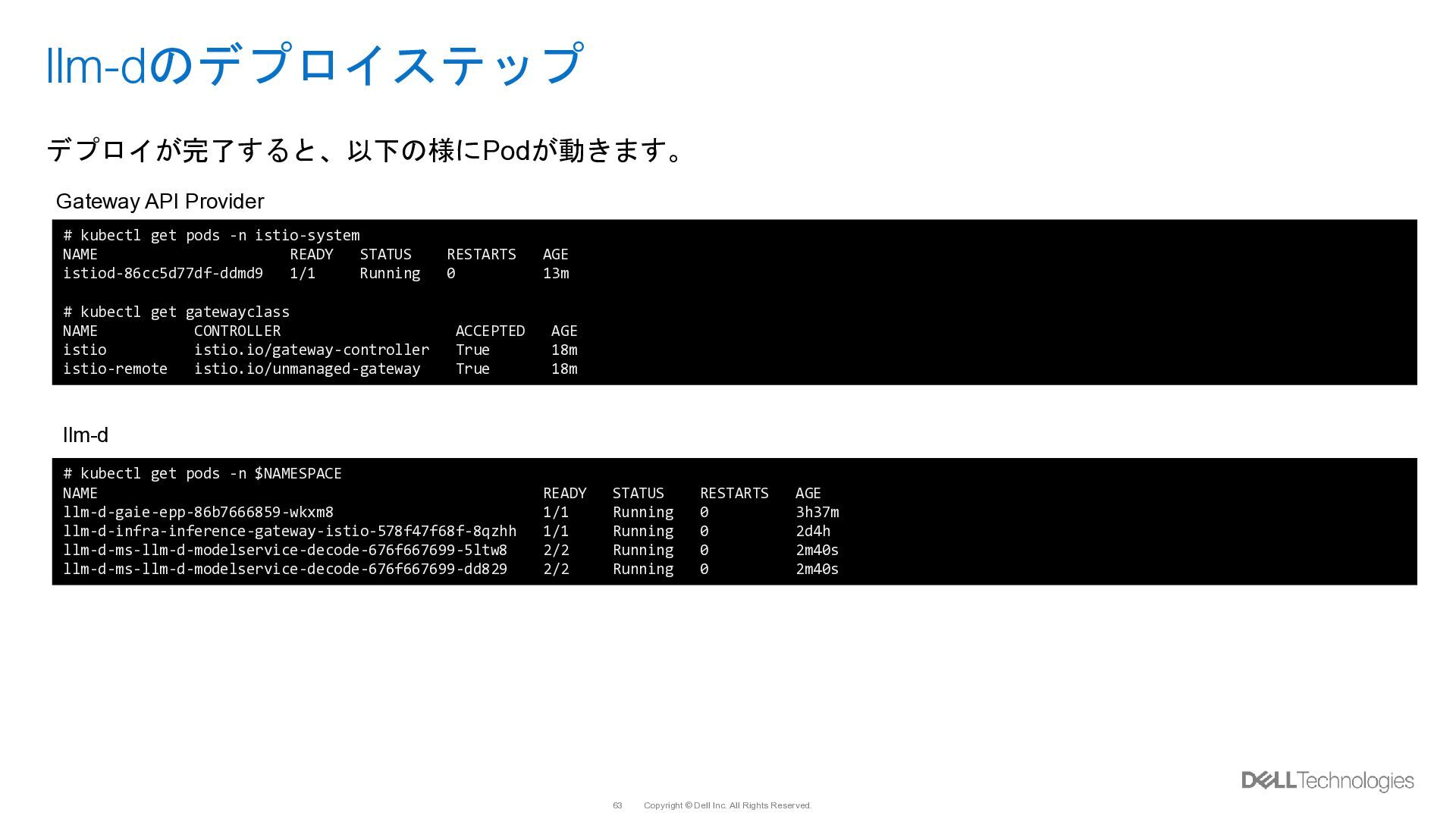
  52. Copyright © Dell Inc. All Rights Reserved. 63 llm-dのデプロイステップ デプロイが完了すると、以下の様にPodが動きます。

    # kubectl get pods -n istio-system NAME READY STATUS RESTARTS AGE istiod-86cc5d77df-ddmd9 1/1 Running 0 13m # kubectl get gatewayclass NAME CONTROLLER ACCEPTED AGE istio istio.io/gateway-controller True 18m istio-remote istio.io/unmanaged-gateway True 18m Gateway API Provider # kubectl get pods -n $NAMESPACE NAME READY STATUS RESTARTS AGE llm-d-gaie-epp-86b7666859-wkxm8 1/1 Running 0 3h37m llm-d-infra-inference-gateway-istio-578f47f68f-8qzhh 1/1 Running 0 2d4h llm-d-ms-llm-d-modelservice-decode-676f667699-5ltw8 2/2 Running 0 2m40s llm-d-ms-llm-d-modelservice-decode-676f667699-dd829 2/2 Running 0 2m40s llm-d
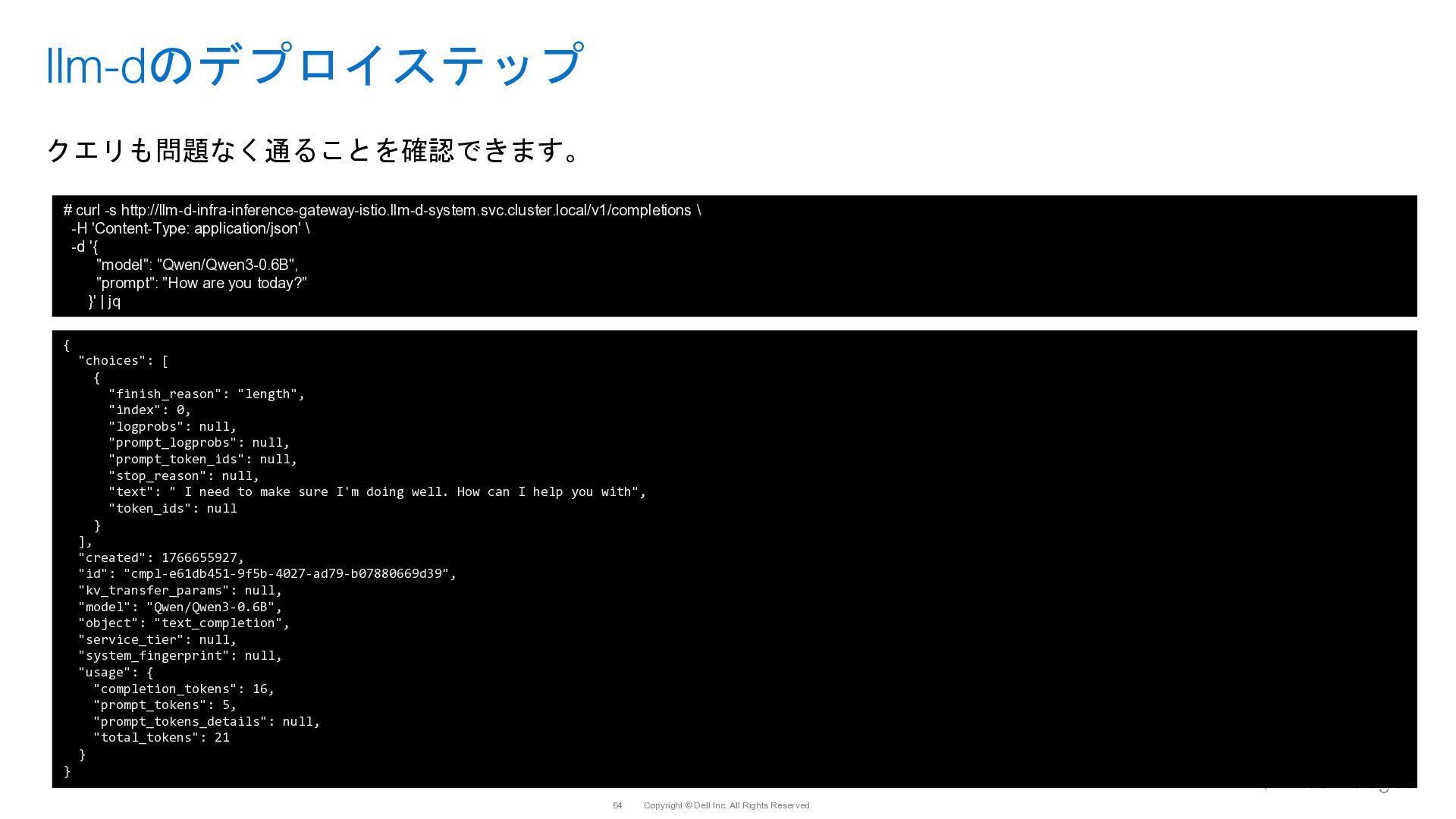
  53. Copyright © Dell Inc. All Rights Reserved. 64 llm-dのデプロイステップ クエリも問題なく通ることを確認できます。

    # curl -s http://llm-d-infra-inference-gateway-istio.llm-d-system.svc.cluster.local/v1/completions \ -H 'Content-Type: application/json' \ -d '{ "model": "Qwen/Qwen3-0.6B", "prompt": "How are you today?" }' | jq { "choices": [ { "finish_reason": "length", "index": 0, "logprobs": null, "prompt_logprobs": null, "prompt_token_ids": null, "stop_reason": null, "text": " I need to make sure I'm doing well. How can I help you with", "token_ids": null } ], "created": 1766655927, "id": "cmpl-e61db451-9f5b-4027-ad79-b07880669d39", "kv_transfer_params": null, "model": "Qwen/Qwen3-0.6B", "object": "text_completion", "service_tier": null, "system_fingerprint": null, "usage": { "completion_tokens": 16, "prompt_tokens": 5, "prompt_tokens_details": null, "total_tokens": 21 } }
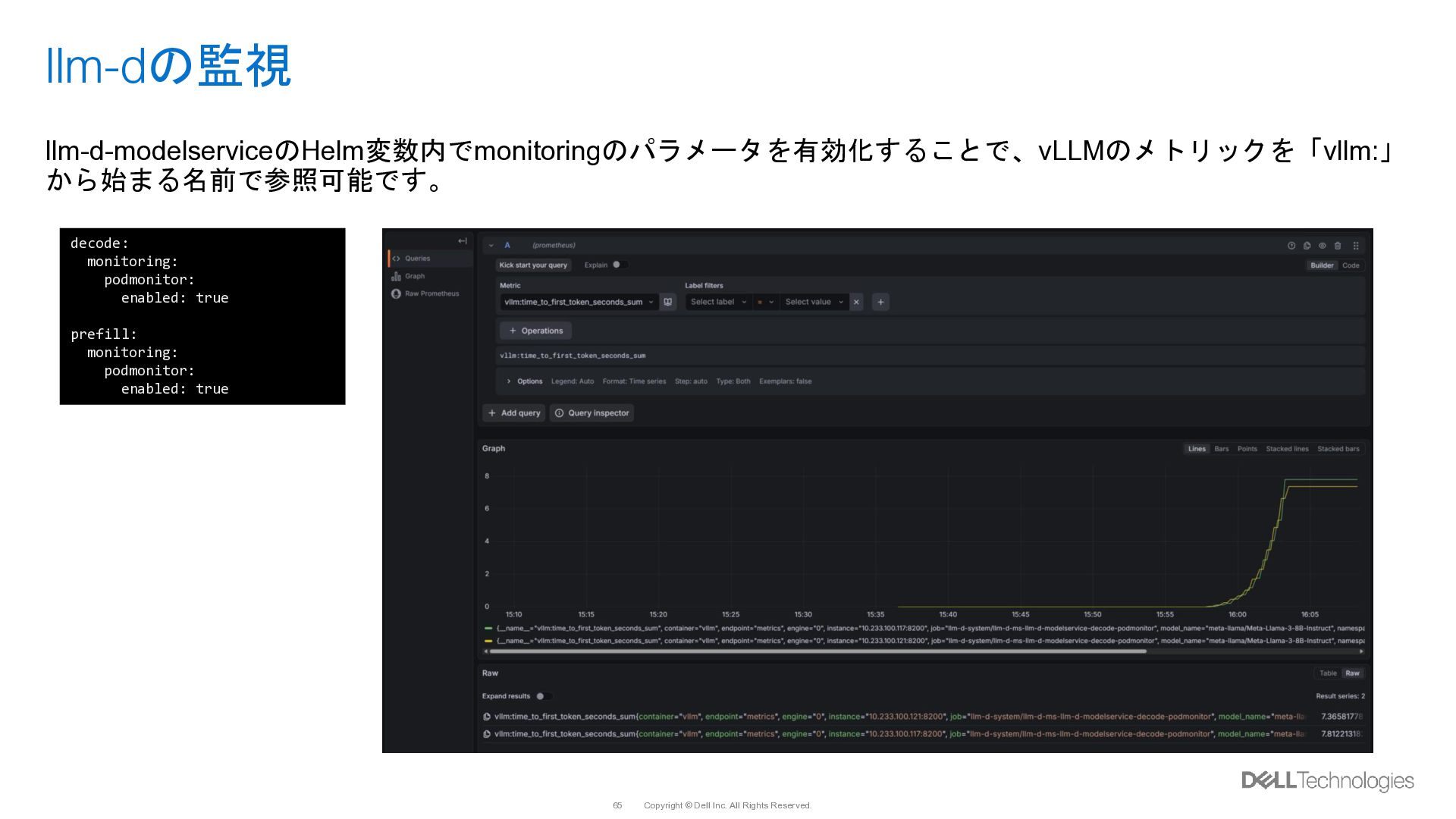
  54. Copyright © Dell Inc. All Rights Reserved. 65 llm-dの監視 llm-d-modelserviceのHelm変数内でmonitoringのパラメータを有効化することで、vLLMのメトリックを「vllm:」

    から始まる名前で参照可能です。 decode: monitoring: podmonitor: enabled: true prefill: monitoring: podmonitor: enabled: true
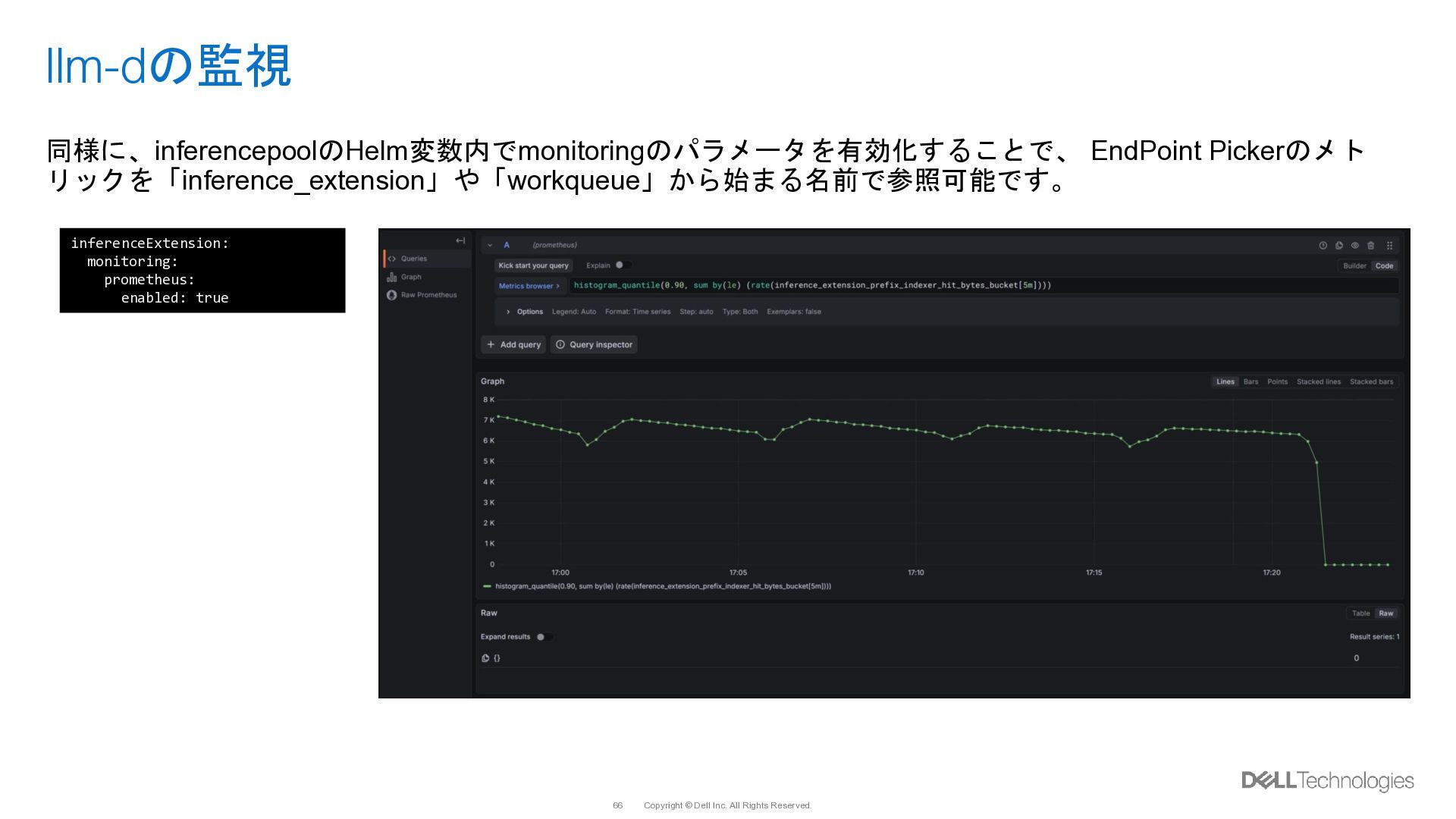
  55. Copyright © Dell Inc. All Rights Reserved. 66 llm-dの監視 同様に、inferencepoolのHelm変数内でmonitoringのパラメータを有効化することで、

    EndPoint Pickerのメト リックを「inference_extension」や「workqueue」から始まる名前で参照可能です。 inferenceExtension: monitoring: prometheus: enabled: true