Share
Embed
~$ aws help # things you might not know about the AWS CLI
The AWS CLI is used by many people to query or manage their AWS infrastructure and is one of the default tools for someone working with AWS. In this talk we try to highlight some more hidden features that will make it easier to use.
Ben Bridts
October 08, 2019
Transcript
21 slides
-
pip install awscli pip install awscli $ pip3 install awscli
--upgrade --user $ aws --version aws-cli/1.16.253 Python/3.7.3 Darwin/18.7.0 botocore/1.12.243 -
cat ~/.aws/config cat ~/.aws/config [default] output = json region =
eu-west-1 [profile source] # this is 123456789012 output = json region = eu-west-1 [profile account1] source_profile = source role_arn = arn:aws:iam::111111111111:role/user mfa_serial = arn:aws:iam::123456789012:mfa/benbridts -
cat ~/.aws/config cat ~/.aws/config [profile source] # this is 123456789012
output = json region = eu-west-1 [profile account1] source_profile = source role_arn = arn:aws:iam::111111111111:role/user mfa_serial = arn:aws:iam::123456789012:mfa/benbridts [profile account2] source_profile = account1 role_arn = arn:aws:iam::2222222222222:role/user -
cat ~/.aws/config cat ~/.aws/config [profile from-env-source] # Environment, Ec2InstanceMetadata or
EcsContainer credential_source = Ec2InstanceMetadata role_arn = arn:aws:iam::2222222222222:role/user external_id = foobar123 -
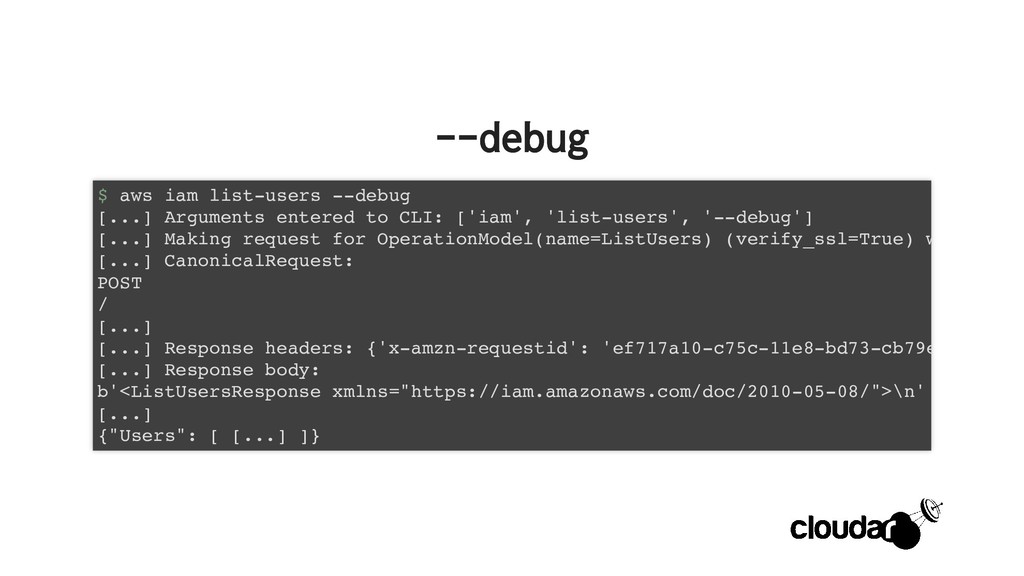
--debug --debug $ aws iam list-users --debug [...] Arguments entered
to CLI: ['iam', 'list-users', '--debug'] [...] Making request for OperationModel(name=ListUsers) (verify_ssl=True) w [...] CanonicalRequest: POST / [...] [...] Response headers: {'x-amzn-requestid': 'ef717a10-c75c-11e8-bd73-cb79e [...] Response body: b'<ListUsersResponse xmlns="https://iam.amazonaws.com/doc/2010-05-08/">\n' [...] {"Users": [ [...] ]} -
history history $ aws configure set cli_history enabled $ aws
history list f95b837e-3040-403c-9f24-7e9524c95f83 2019-10-06 10:06:24 PM iam list-user 094ab0ff-e941-4f3d-b3d3-9d7b2d1a3eab 2019-10-06 10:06:15 PM configure set [...] -
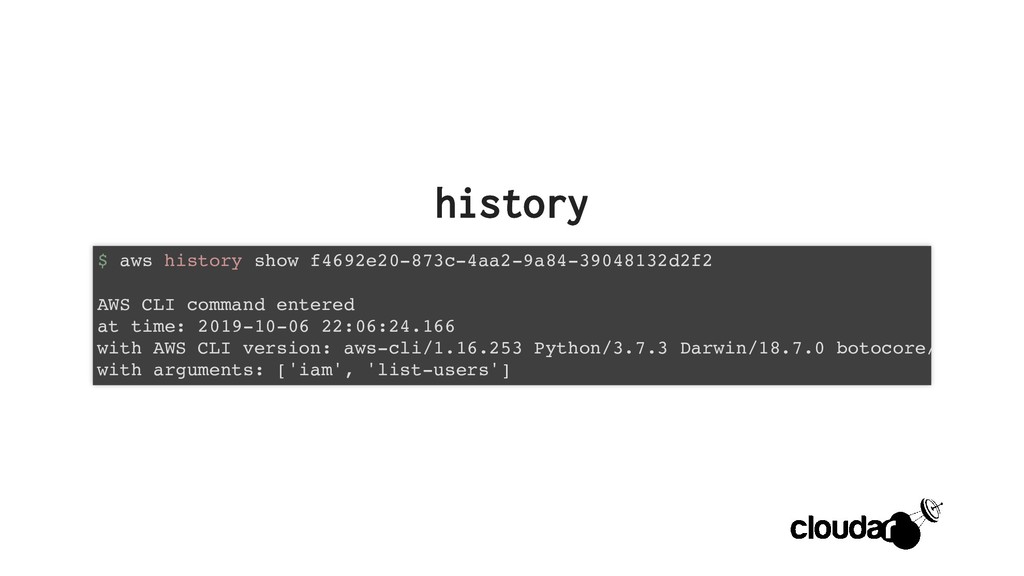
history history $ aws history show f4692e20-873c-4aa2-9a84-39048132d2f2 AWS CLI command
entered at time: 2019-10-06 22:06:24.166 with AWS CLI version: aws-cli/1.16.253 Python/3.7.3 Darwin/18.7.0 botocore/ with arguments: ['iam', 'list-users'] -
history history [0] API call made at time: 2019-10-06 22:06:24.267
to service: iam using operation: ListUsers with parameters: {} -
history history [0] HTTP request sent at time: 2019-10-06 22:06:24.270
to URL: https://iam.amazonaws.com/ with method: POST with headers: { "Authorization": "...", "Content-Length": "35", "Content-Type": "application/x-www-form-urlencoded; charset=utf-8", "User-Agent": "aws-cli/1.16.253 Python/3.7.3 Darwin/18.7.0 botocore "X-Amz-Date": "20191006T200624Z", "X-Amz-Security-Token": "..." } with body: Action=ListUsers&Version=2010-05-08 -
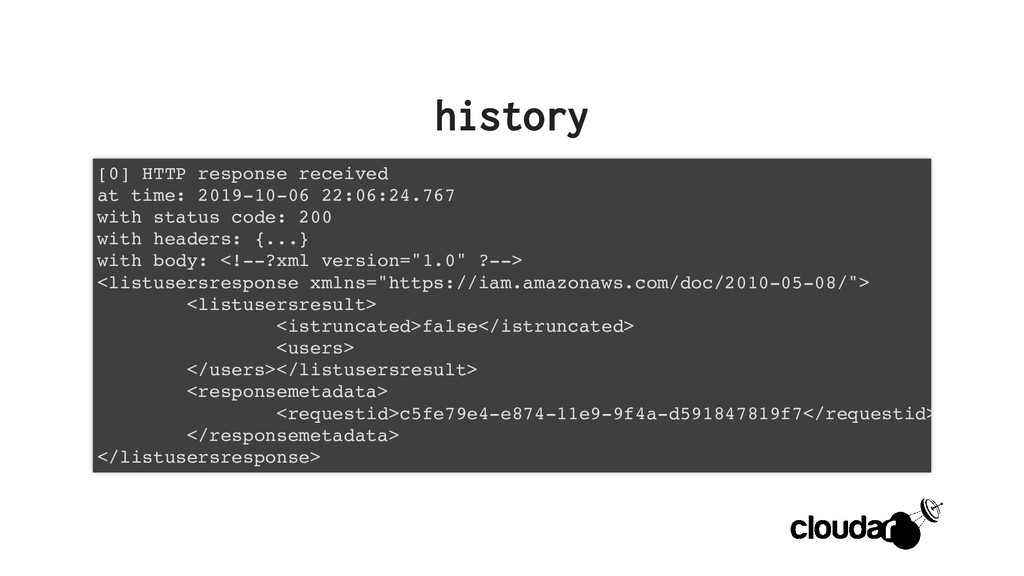
history history [0] HTTP response received at time: 2019-10-06 22:06:24.767
with status code: 200 with headers: {...} with body: <!--?xml version="1.0" ?--> <listusersresponse xmlns="https://iam.amazonaws.com/doc/2010-05-08/"> <listusersresult> <istruncated>false</istruncated> <users> </users></listusersresult> <responsemetadata> <requestid>c5fe79e4-e874-11e9-9f4a-d591847819f7</requestid> </responsemetadata> </listusersresponse> -
history history [0] HTTP response parsed at time: 2019-10-06 22:06:24.767
parsed to: { "IsTruncated": false, "ResponseMetadata": { "HTTPHeaders": { "content-length": "289", "content-type": "text/xml", "date": "Sun, 06 Oct 2019 20:06:24 GMT", "x-amzn-requestid": "c5fe79e4-e874-11e9-9f4a-d59184 }, "HTTPStatusCode": 200, "RequestId": "c5fe79e4-e874-11e9-9f4a-d591847819f7" }, "Users": [] -
history history AWS CLI command exited at time: 2019-10-06 22:06:24.770
with return code: 0 -
cli_follow_urlparam cli_follow_urlparam $ aws ssm put-parameter \ --name search --value
https://google.com --type String An error occurred (ValidationException) when calling the PutParameter operation: 1 validation error detected: Value '[...]' at 'value' failed to satisfy constraint: Member must have length less than or equal to 32768 $ aws configure set cli_follow_urlparam false $ aws ssm put-parameter \ --name search --value https://google.com --type String { "Version": 1 } -
s3 --make-it-go-fast s3 --make-it-go-fast # ~/.aws/config # https://docs.aws.amazon.com/cli/latest/topic/s3-config.html [profile example]
s3 = max_concurrent_requests = 20 max_queue_size = 10000 multipart_threshold = 64MB multipart_chunksize = 16MB # this one can make it go slow max_bandwidth = 50MB/s # mutualy exclusive use_accelerate_endpoint = true use_dualstack_endpoint = false # ... -
alias alias # ~/.aws/cli/alias # https://github.com/awslabs/awscli-aliases [toplevel] whoami = sts
get-caller-identity $ aws whoami { "UserId": "AIDAIXXXXXXXXXXXXXXXX", "Account": "123456789012", "Arn": "arn:aws:iam::123456789012:user/benbridts" } -
--query --query $ aws s3api list-buckets | jq -r '.Buckets[].Name'
example-bucket foobar bucket3 $ aws s3api list-buckets --query 'Buckets[].Name' [ "example-bucket", "foobar", "bucket3" ] $ aws s3api list-buckets --query 'Buckets[].Name' --output text example-bucket foobar bucket3 -
whoami whoami $ whoami Ben Bridts $ jobs Principal AWS
Technologist at Cloudar AWS APN Ambassador $ sendmail [email protected] $ curl https://twitter.com/benbridts $ curl https://cloudar.be