Share
Embed
Automating DITA Builds (DITA Europe 2013)
Expensive solutions are not necessary to automatically publish XML content to PDF or HTML-based formats. There are many ways to automate the process and a range of open source tools and scripting solutions can be used.
This presentation covers several approaches to automated XML publishing and provides simple examples for lightweight continuous integration from scheduled builds to watched folders and commit hooks to more complex hosted systems.
Presented November 18, 2013 in Munich at DITA Europe http://www.infomanagementcenter.com/DITAeurope/2013/.

Roger Sheen
November 18, 2013
Transcript
29 slides
-
Automating DITA Builds Lightweight Continuous Integration for Documentation Projects infotexture
Information Architecture & Content Strategy Roger W. Fienhold Sheen -
Agenda Part I — Background & Concepts 1. Introduction 2.
Motivation & Benefits 3. Continuous Integration Principles 4. Prerequisites 5. Automation Approaches Part II — Automation Examples Q & A 2 -
Summary Expensive solutions are not necessary to automatically publish XML
content to PDF or HTML-based formats. There are many ways to automate the process and a range of open source tools and scripting solutions can be used. This session covers several approaches to automated XML publishing and provides simple examples for lightweight continuous integration from scheduled builds to watched folders and commit hooks to more complex hosted systems. Examples illustrate the alternatives using a sample DITA publication, version control systems such as Subversion and Git, and solutions such as Jenkins. 3 -
Introduction Documentation teams can borrow software development techniques to regularly
publish even minor changes. By building the entire publication with each change, authors can easily verify the impact of their changes on the final document and find errors more quickly. This approach reduces the need for repetitive manual tasks, allowing authors to focus on content and improve document quality. About Roger Roger is an independent Information Architect based in Potsdam, Germany. He provides consulting services to start-ups and global corporations, advising clients on content re-use strategies, XML-based publication processes and authoring environments, version control solutions and organizing information with a sound structure that helps users find what they need. 4 -
Motivation & Benefits Why Automate? — Why Use XML if
You Don’t? Automated publishing is one of the strongest arguments for an XML-based toolchain. Let’s face it: many find the XML authoring user experience tedious, so we better get something out of it – if you’re pressing buttons when you need a PDF, there are easier ways… Let computers do what they do best so humans have more time for their part Latest drafts are available to all stakeholders for immediate verification Quicker time-to-market (even final docs can be published instantly) Why Use Continuous Integration? Avoid embarrassment: Authors find their own mistakes before others do Synchronize documentation release cycle w/ software lifecycle (build the documentation whenever the software is built) Improve quality (can’t commit code that breaks build) 5 -
Continuous Integration Principles “…daily builds are a minimum. A fully
automated process that allows you to build several times a day is both achievable and well worth the effort.” – Martin Fowler Single repository with all documentation dependencies (check out & build) Test before committing (rule out unintended side effects) Commit related changes (granular changes are easier to roll back) Commit often (small chunks integrate better than monolithic pieces) Automated build process (producing deliverables w/o manual intervention) Visible results of latest build provide accountability (who’s to blame) Permanent access to the latest deliverables enables ongoing testing Automated deployment ensures customer access to the latest version 6 -
Prerequisites – What You’ll Need Version-control system (Subversion, Git, Mercurial,
etc.) Familiarity with: Ant DITA Open Toolkit Command-line scripting (UNIX shell scripts, Windows batch files) Build file that defines all target output formats DITA-OT packages include sample Ant build scripts in /samples/ant_sample/ . <?xml version="1.0" encoding="UTF-‐8" ?> <project name="@PROJECT.NAME@_xhtml" default="@DELIVERABLE.NAME@2xhtml" basedir="."> <property name="dita.dir" location="${basedir}${file.separator}..${file.separator}.."/> <target name="@DELIVERABLE.NAME@2xhtml"> <ant antfile="${dita.dir}${file.separator}build.xml"> <property name="args.input" location="@DITA.INPUT@"/> <property name="output.dir" location="@OUTPUT.DIR@"/> <property name="transtype" value="xhtml"/> </ant> </target> </project> 7 -
Automation Approaches — Overview 1. Scheduled builds – build at
certain times 2. Watched folders – build when something happens 3. Version control scripts/hooks – build on or before checkin Subversion examples Git example: commit hooks 4. Dedicated Continuous Integration solutions – CI servers & services 8 -
Scheduled Builds Automatically build output in regular intervals (daily/nightly/hourly, etc.)
with a system service or launch dæmon. Advantages Easy to set up using on-board utilities available with your operating system Minimum solution, “gateway drug” to more granular automation Makes sense when changes are infrequent, but regular Potential Issues Generated output may no longer reflect the actual state of source files May need to wait for the next build in order to see results Less useful when changes are sporadic, but occasionally high in volume Options Linux cron , Mac OS X launchd , Windows Task Scheduler 10 -
Mac OS X launchd Sample — Hourly Builds To run
your build every hour, save a file like this in ~/Library/LaunchAgents : <?xml version="1.0" encoding="UTF-‐8"?> <!DOCTYPE plist PUBLIC "-‐//Apple//DTD PLIST 1.0//EN" "http://www.apple.com/DTDs/PropertyList-‐1.0.dtd"> <plist version="1.0"> <dict> <key>Label</key> <string>net.infotexture.autobuild_hourly</string> <key>ProgramArguments</key> <array> <string>/bin/bash</string> <string>/Users/username/projectdir/scripts/run-‐dita-‐build.sh</string> </array> <key>RunAtLoad</key> <true/> <key>StartInterval</key> <!-‐-‐ ◄ Start job in regular intervals -‐-‐> <integer>3600</integer> <!-‐-‐ ◄ Start every 3600 seconds (1 h) -‐-‐> </dict> </plist> See the launchd man page or the tutorial at launchd.info for an explanation of the available options. If you prefer a more guided approach, utilities like Lingon or LaunchControl provide a user interface and debugging tools for launch scripts. 11 -
Mac OS X launchd Sample — Daily Builds For a
daily build that runs at midnight, replace the StartInterval key and following integer with a StartCalendarInterval and a dictionary of integers that starts the job at 00:00: <plist version="1.0"><!-‐-‐ <dict> <key>Label</key> <string>net.infotexture.autobuild_midnight</string> <key>ProgramArguments</key> <array> <string>/bin/bash</string> <string>/Users/username/projectdir/scripts/run-‐dita-‐build.sh</string> </array> <key>RunAtLoad</key> <true/>-‐-‐> <key>StartCalendarInterval</key><!-‐-‐ ◄ Start job at specified times -‐-‐> <dict> <key>Hour</key> <integer>0</integer> <!-‐-‐ ◄ Start at midnight (00:00) -‐-‐> <key>Minute</key> <integer>0</integer> </dict> <!-‐-‐</dict> </plist>-‐-‐> 12 -
Mac OS X launchd Sample — Build Hourly from 9:00
AM Or combine these approaches to run your build at 9 AM and every hour thereafter: <plist version="1.0"><!-‐-‐ <dict> <key>Label</key> <string>net.infotexture.autobuild_workdays</string> <key>ProgramArguments</key> <array> <string>/bin/bash</string> <string>/Users/username/projectdir/scripts/run-‐dita-‐build.sh</string> </array> <key>RunAtLoad</key> <true/>-‐-‐> <key>StartCalendarInterval</key><!-‐-‐ ◄ Start job at specified times -‐-‐> <dict> <key>Hour</key> <integer>9</integer> <!-‐-‐ ◄ Start at 09:00 AM -‐-‐> <key>Minute</key> <integer>0</integer> </dict> <key>StartInterval</key> <!-‐-‐ ◄ Start job in regular intervals -‐-‐> <integer>3600</integer> <!-‐-‐ ◄ Start every 3600 seconds (1 h) -‐-‐> <!-‐-‐</dict> </plist>-‐-‐> 13 -
Windows Task Scheduler On Windows, use Accessories > System Tools
> Task Scheduler to create a new scheduled task with a trigger that begins the task on a schedule and an action that starts a program (your build script): Creating a scheduled task 14 -
Watched Folders Use a “sentinel” to monitor your source and
generate output when files change. Popular among web developers who maintain code in one format and deliver in another (Less/Sass → CSS, JavaScript minification). Development utilities like CodeKit or Marked make this easy. Many LaTeX tools provide this for PDFs. Advantages More flexible than scheduled builds Output reflects current source files Good when little things change often in odd intervals HTML builds quickly, always up-to-date & available for verification Opportunity for DITA tool vendors — bundle a folder-watcher for live preview. 15 -
Potential Issues More difficult to set up, may require third-party
tools Can be performance intensive if many things change at once (quiet periods and throttling options are essential) Options OS X Folder Actions (works if files added/removed, not if existing change) Hazel — All-purpose automation utility & folder watcher for Mac Windows alternatives like Belvedere, etc. Our XML-based friend launchd Linux: incrond – inotify cron (incron) daemon Dedicated folder watcher utilities such as entr, Guard, Watchr 16 -
Hazel Easy to set up basic rules (Date Last Modified
is after Date Last Matched) May match often with basic rules (requires adjustment to throttle) (Touching 10 files in a folder builds 10x — Git branch switching is deadly) Sample Hazel rule 17 -
Mac OS X launchd Sample A launch dæmon can also
be used to watch folders for changes and build output. Set a ThrottleInterval to limit build frequency if necessary: <?xml version="1.0" encoding="UTF-‐8"?> <!DOCTYPE plist PUBLIC "-‐//Apple//DTD PLIST 1.0//EN" "http://www.apple.com/DTDs/PropertyList-‐1.0.dtd"> <plist version="1.0"> <dict> <key>KeepAlive</key> <false/> <key>Label</key> <string>net.infotexture.autobuild_watcher</string> <key>ProgramArguments</key> <array> <string>/bin/bash</string> <string>/Users/username/projectdir/scripts/run-‐dita-‐build.sh</string> <!-‐-‐ ◄ Run this… -‐-‐> </array> <key>ThrottleInterval</key> <integer>300</integer> <!-‐-‐ ◄ if at least 300 seconds (5m) have passed since last build, AND… -‐-‐> <key>WatchPaths</key> <array> <string>/Users/username/projectdir/dita-‐src</string> <!-‐-‐ ◄ …if any files here have changed -‐-‐> </array> </dict> </plist> 18 -
Version Control Hooks Generate output each time you interact with
the version control system, either before you commit or after each checkin. The terms and options differ between systems & client software, but most version control systems offer a mechanism to “hook” into a stage of the workflow and perform a pre-defined action like running a build script. Hooks are enabled by modifying sample hook templates provided with the system. Replace the template content with a command that runs your DITA build. Advantages Pre-commit hooks serve to verify the input and prevent broken code from being permanently recorded – and preserving your shame for posterity! Build output before committing and reject the changes if build fails. Post-commit actions can be used to generate output for every valid change and typically do not modify the contents of the repository. 19 -
Potential Issues Can be tricky to set up, policies may
require system administator assistance Commits are slower, as version control system waits for build to finish Strict regime can prevent checkins if something’s wrong Options Subversion Some clients provide a user interface for client-side commit actions The hooks subdirectory of a Subversion repository contains templates such as pre-‐commit.tmpl and post-‐commit.tmpl . Remove .tmpl to enable. Git On UNIX-based systems, sample Git hooks are typically found in /usr/share/git-‐core/templates/hooks . Modify a copy of pre-‐commit.sample and save the result to your local repository as .git/hooks/pre-‐commit . 20 -
Sample pre-‐commit Hook #!/bin/sh # #
Get the absolute path of the `.git/hooks` directory export GIT_HOOKS=`cd "\`dirname "\\\`readlink "$0" || echo $0\\\`"\`" && pwd` # Set the absolute path of the build directory export BUILD_FILES="$GIT_HOOKS/../../build-‐files/" # Set the absolute path of the DITA home directory export DITA_HOME="$BUILD_FILES/../bin/dita-‐ot/" # Set the absolute path of the DITA home directory again (weird, but necessary) export DITA_DIR="$BUILD_FILES/../bin/dita-‐ot/" # Execute the build script in the shell that is provided by the DITA start script echo "$BUILD_FILES/build_html.sh" | "$DITA_HOME/startcmd.sh" # Display OS X system notification via <https://github.com/alloy/terminal-‐notifier> echo 'HTML build succeeded. Committing…' | /usr/local/bin/terminal-‐notifier -‐sound default # Exit with status of last command exit $? 21 -
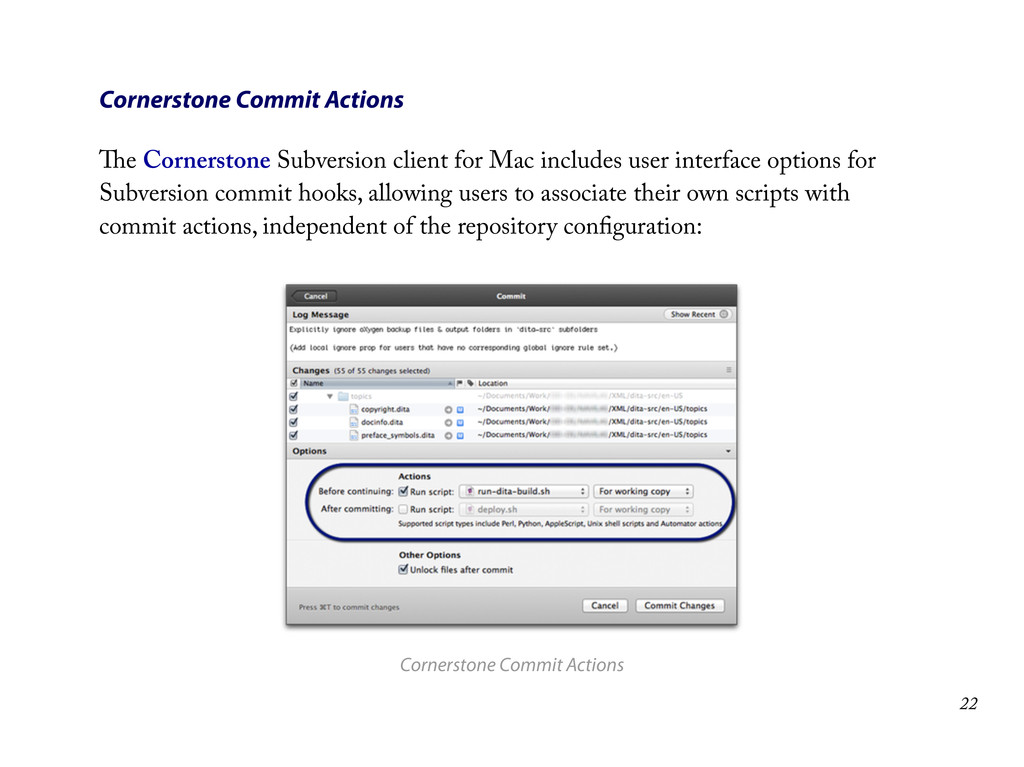
Cornerstone Commit Actions The Cornerstone Subversion client for Mac includes
user interface options for Subversion commit hooks, allowing users to associate their own scripts with commit actions, independent of the repository configuration: Cornerstone Commit Actions 22 -
Bypassing Commit Hooks Some clients and systems allow you to
circumvent commit hooks if necessary: $ git commit -‐-‐no-‐verify Atlassian’s free SourceTree client for Git & Mercurial provides an option to bypass hooks on the commit sheet: Bypassing hooks with SourceTree 23 -
Dedicated CI Solutions If your developers use continuous integration tools
to run automated tests and build software binaries whenever they update their code, you may be able to use the same solution to build your DITA deliverables too. Advantages Leverage existing corporate infrastructure & developer expertise Do more than just build output: provide access to drafts on intranet for internal review & signoff integrate documentation into the final software installers publish to company website for immediate public access Potential Issues Builds/tests typically trigger on push, so bad commits are public Dedicated server not necessarily required, but often advisable May require support from developers and/or IT staff 24 -
Options CruiseControl – the original solution from ThoughtWorks (now open
source) Jenkins (formerly known as Hudson) – cross-platform open source CI server Travis – hosted CI service used to build and test projects hosted at GitHub (including the DITA Open Toolkit) Sample Jenkins Job View Sample Jenkins job 25 -
Sample Jenkins Script #!/bin/bash if [ "$1" ==
"ci" ]; then echo "Continuous integration check for branch $2" RET=0 set +e # if one command fails then exit # Run documentation build script, which sets up the DITA-‐OT environment & runs Ant tasks to build output bash build-‐files/build.sh BRANCH=$(basename $GIT_BRANCH) # Clean & re-‐create target output directory before moving the new generated output rm -‐r /var/www/$BRANCH/manual mkdir /var/www/$BRANCH/manual # Copy all `output` subfolders to Web server "as-‐is" cp -‐r output/* /var/www/$BRANCH/manual exit $RET elif [ "$1" == "nightly" ]; then echo "Nightly check for branch $2" RET=0 #make || RET=1 exit $RET else echo "Unknown parameter: $1" && exit 1 fi 26 -
Alternatives Even systems that are not intended for automated publishing
(or which require the purchase of an expensive add-on or server component) can often be automated via GUI scripting solutions. Sikuli – open-source project from the User Interface Design Group at MIT Fake – web automation tool that “allows you to run (and re-run) fake interactions with the web” — useful for web-based CMS & DITA editors, etc. 27 -
References & Resources Further Reading http://www.martinfowler.com/articles/continuousIntegration.html http://en.wikipedia.org/wiki/Continuous_integration Selected Tools 1.
launchd – http://launchd.info 2. Lingon (launchd GUI) – http://www.peterborgapps.com/lingon 3. LaunchControl (debugger) – http://www.soma-zone.com/LaunchControl 4. Hazel (folder watcher for Mac) – http://www.noodlesoft.com/hazel.php 5. CruiseControl (original CI server) – http://cruisecontrol.sourceforge.net 6. Jenkins (most? popular CI server) – http://jenkins-ci.org 7. Travis (hosted CI for GitHub projects) – http://travis-ci.com 8. Sikuli (cross-platform GUI scripting) – http://www.sikuli.org 9. Fake (Web automation for Mac) – http://fakeapp.com 28 -
Thank You! Updates For updates, comments and the latest code
samples, visit http://infotexture.net/2013/11/automating-dita-builds/. Contact E-mail [email protected] or connect on GitHub, LinkedIn or Twitter @infotexture. 29
 infotexture
 sakawe_ee
 t0yohei
 ternbusty
 inariku
 nextbeatdev
 shogogg
 yukikurage
 bicstone
 ostk0069
 naruogram
 ochtum
 seosoft
 chrislema
 lynnandtonic
 carmenintech
 deanohume
 chriscoyier
 uxyall
 wjessup
 baasie
 paigeccino
 ryanjones
 jacobtomlinson
 takai