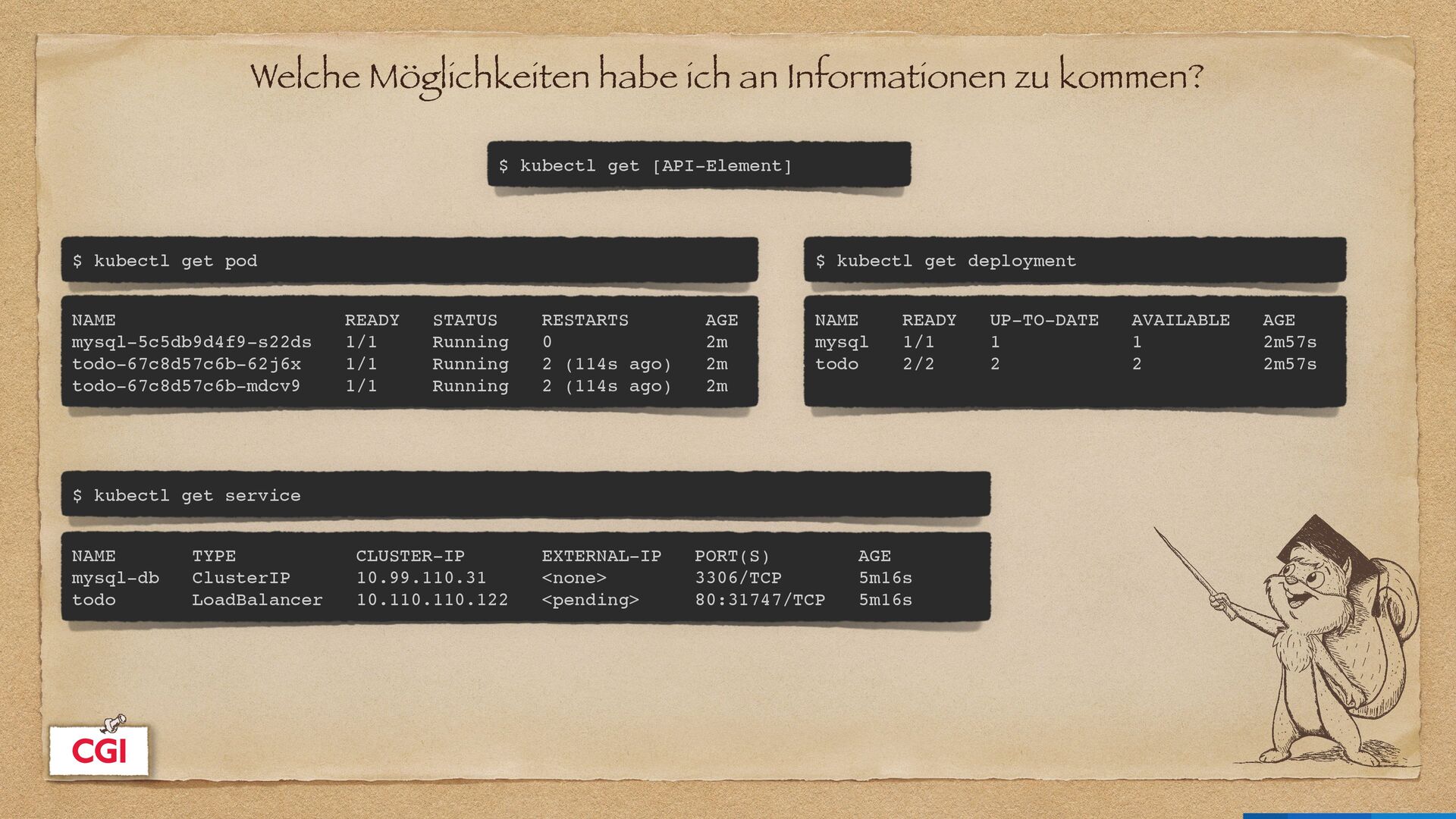
get [API-Element] $ kubectl get pod NAME READY STATUS RESTARTS AGE mysql-5c5db9d4f9-s22ds 1/1 Running 0 2m todo-67c8d57c6b-62j6x 1/1 Running 2 (114s ago) 2m todo-67c8d57c6b-mdcv9 1/1 Running 2 (114s ago) 2m $ kubectl get deployment NAME READY UP-TO-DATE AVAILABLE AGE mysql 1/1 1 1 2m57s todo 2/2 2 2 2m57s $ kubectl get service NAME TYPE CLUSTER-IP EXTERNAL-IP PORT(S) AGE mysql-db ClusterIP 10.99.110.31 <none> 3306/TCP 5m16s todo LoadBalancer 10.110.110.122 <pending> 80:31747/TCP 5m16s
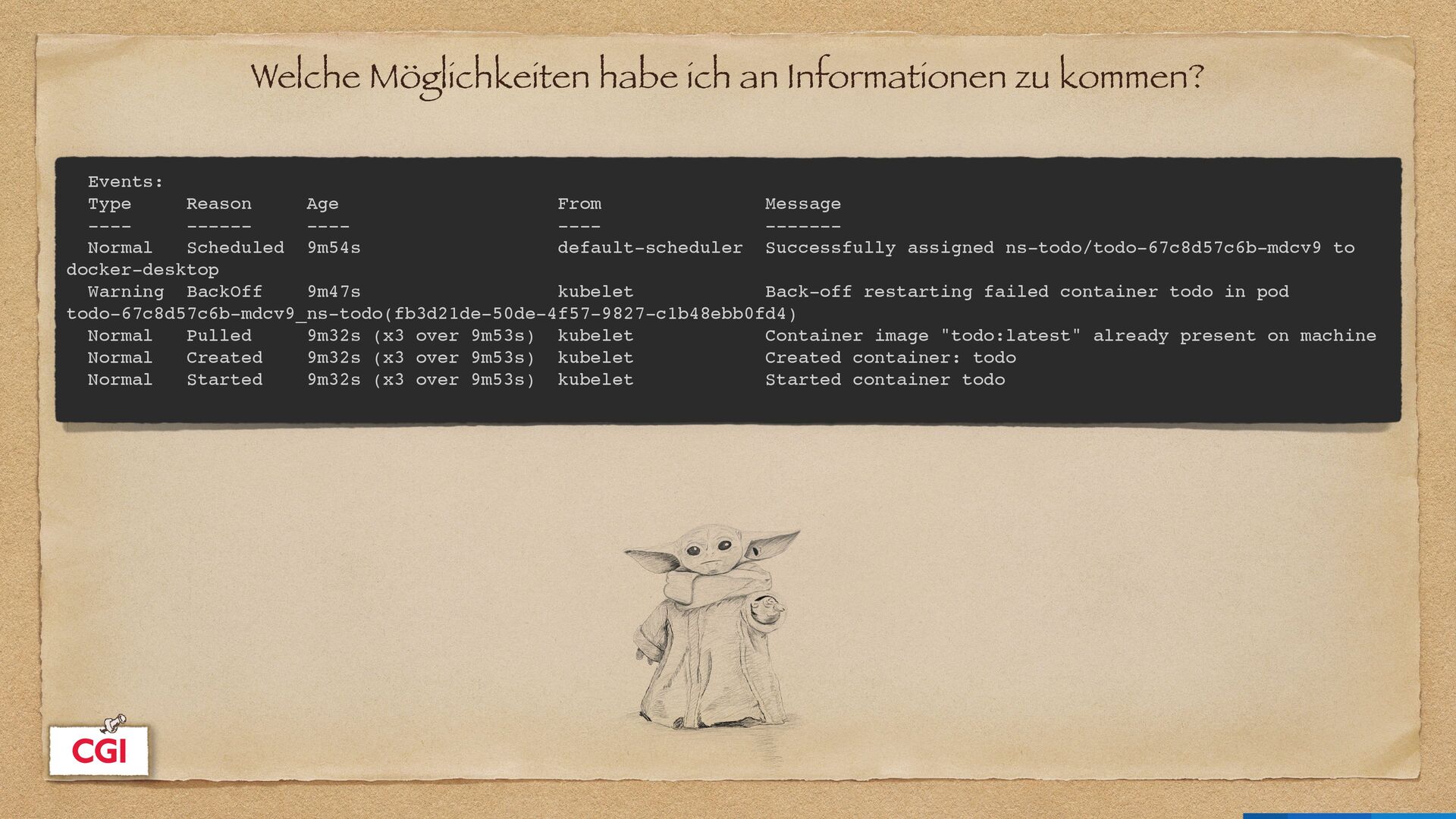
Reason Age From Message ---- ------ ---- ---- ------- Normal Scheduled 9m54s default-scheduler Successfully assigned ns-todo/todo-67c8d57c6b-mdcv9 to docker-desktop Warning BackOff 9m47s kubelet Back-off restarting failed container todo in pod todo-67c8d57c6b-mdcv9_ns-todo(fb3d21de-50de-4f57-9827-c1b48ebb0fd4) Normal Pulled 9m32s (x3 over 9m53s) kubelet Container image "todo:latest" already present on machine Normal Created 9m32s (x3 over 9m53s) kubelet Created container: todo Normal Started 9m32s (x3 over 9m53s) kubelet Started container todo
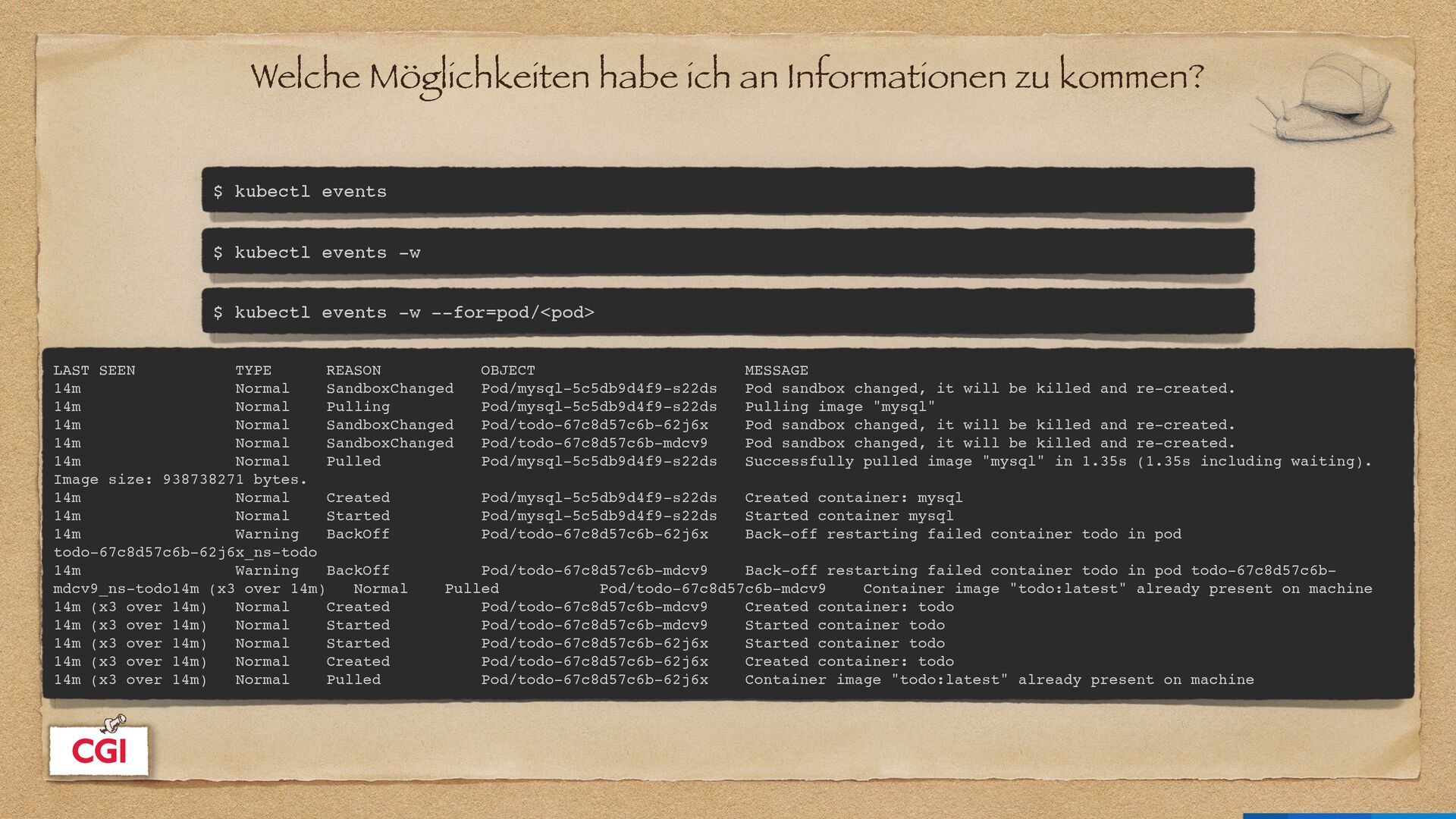
events $ kubectl events -w $ kubectl events -w --for=pod/<pod> LAST SEEN TYPE REASON OBJECT MESSAGE 14m Normal SandboxChanged Pod/mysql-5c5db9d4f9-s22ds Pod sandbox changed, it will be killed and re-created. 14m Normal Pulling Pod/mysql-5c5db9d4f9-s22ds Pulling image "mysql" 14m Normal SandboxChanged Pod/todo-67c8d57c6b-62j6x Pod sandbox changed, it will be killed and re-created. 14m Normal SandboxChanged Pod/todo-67c8d57c6b-mdcv9 Pod sandbox changed, it will be killed and re-created. 14m Normal Pulled Pod/mysql-5c5db9d4f9-s22ds Successfully pulled image "mysql" in 1.35s (1.35s including waiting). Image size: 938738271 bytes. 14m Normal Created Pod/mysql-5c5db9d4f9-s22ds Created container: mysql 14m Normal Started Pod/mysql-5c5db9d4f9-s22ds Started container mysql 14m Warning BackOff Pod/todo-67c8d57c6b-62j6x Back-off restarting failed container todo in pod todo-67c8d57c6b-62j6x_ns-todo 14m Warning BackOff Pod/todo-67c8d57c6b-mdcv9 Back-off restarting failed container todo in pod todo-67c8d57c6b- mdcv9_ns-todo14m (x3 over 14m) Normal Pulled Pod/todo-67c8d57c6b-mdcv9 Container image "todo:latest" already present on machine 14m (x3 over 14m) Normal Created Pod/todo-67c8d57c6b-mdcv9 Created container: todo 14m (x3 over 14m) Normal Started Pod/todo-67c8d57c6b-mdcv9 Started container todo 14m (x3 over 14m) Normal Started Pod/todo-67c8d57c6b-62j6x Started container todo 14m (x3 over 14m) Normal Created Pod/todo-67c8d57c6b-62j6x Created container: todo 14m (x3 over 14m) Normal Pulled Pod/todo-67c8d57c6b-62j6x Container image "todo:latest" already present on machine
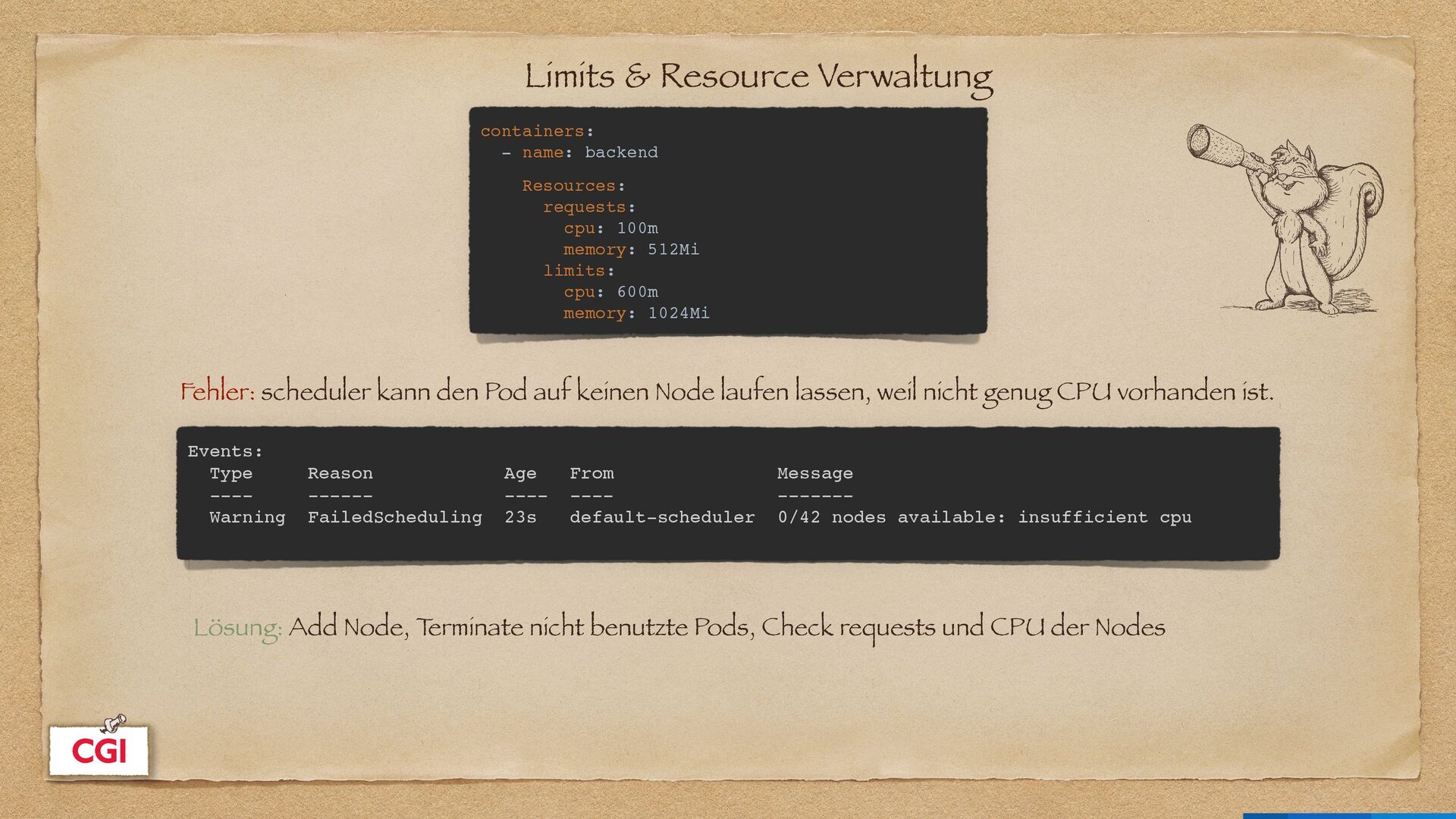
cpu: 100m memory: 512Mi limits: cpu: 600m memory: 1024Mi Events: Type Reason Age From Message ---- ------ ---- ---- ------- Warning FailedScheduling 23s default-scheduler 0/42 nodes available: insufficient cpu Fehler: scheduler kann den Pod auf keinen Node laufen lassen, weil nicht genug CPU vorhanden ist. Lösung: Add Node, T erminate nicht benutzte Pods, Check requests und CPU der Nodes
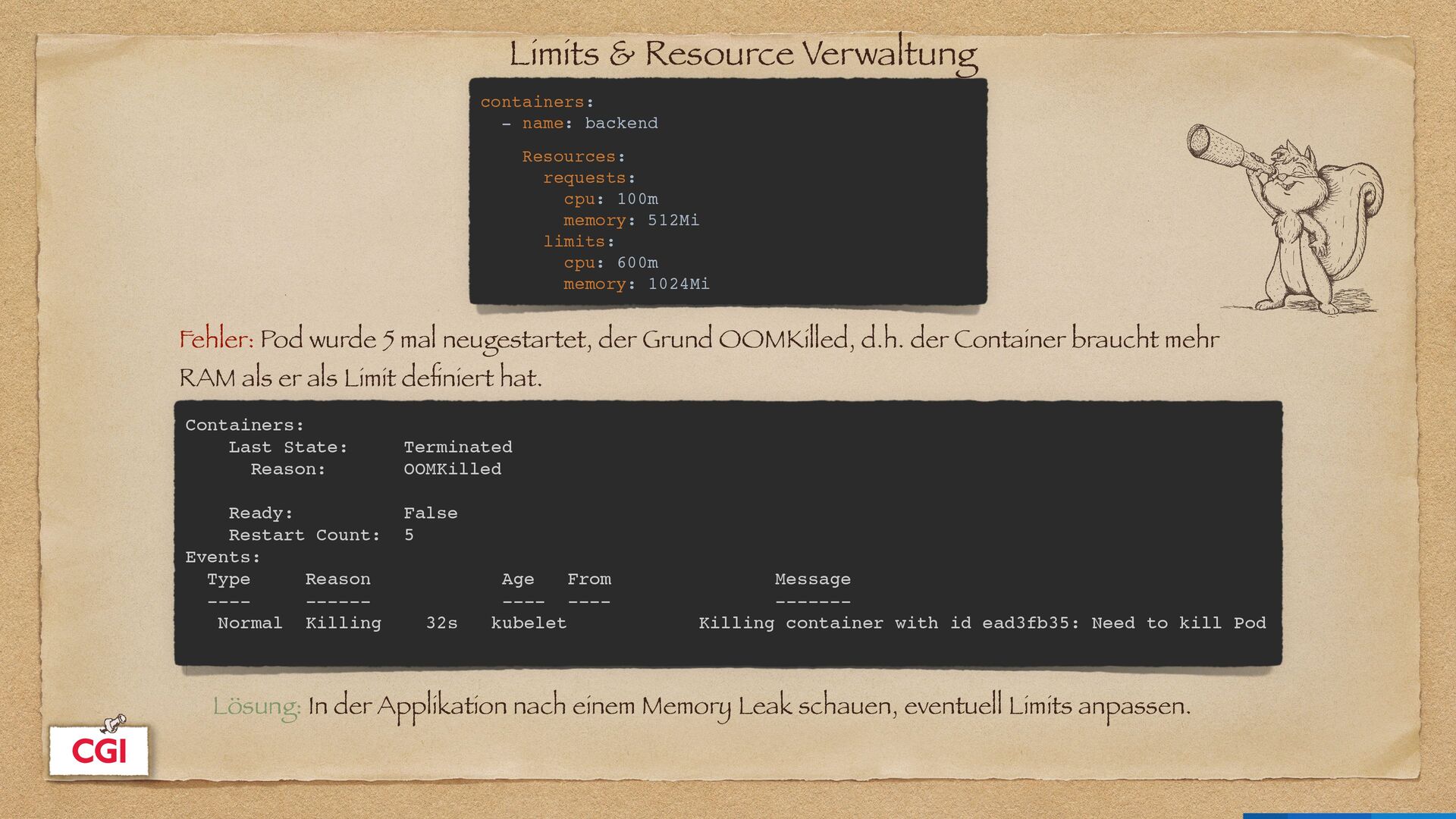
cpu: 100m memory: 512Mi limits: cpu: 600m memory: 1024Mi Containers: Last State: Terminated Reason: OOMKilled Ready: False Restart Count: 5 Events: Type Reason Age From Message ---- ------ ---- ---- ------- Normal Killing 32s kubelet Killing container with id ead3fb35: Need to kill Pod Fehler: Pod wurde 5 mal neugestartet, der Grund OOMKilled, d.h. der Container braucht mehr RAM als er als Limit de fi niert hat. Lösung: In der Applikation nach einem Memory Leak schauen, eventuell Limits anpassen.
kubectl scale deploy [deployment] --replicas=1 $ kubectl delete pod [pod] $ kubectl get deployments -o wide NAME READY UP-TO-DATE AVAILABLE AGE CONTAINERS IMAGES SELECTOR mysql 1/1 1 1 26h mysql mysql app=mysql todo 2/2 2 2 26h todo todo:latest app=todo
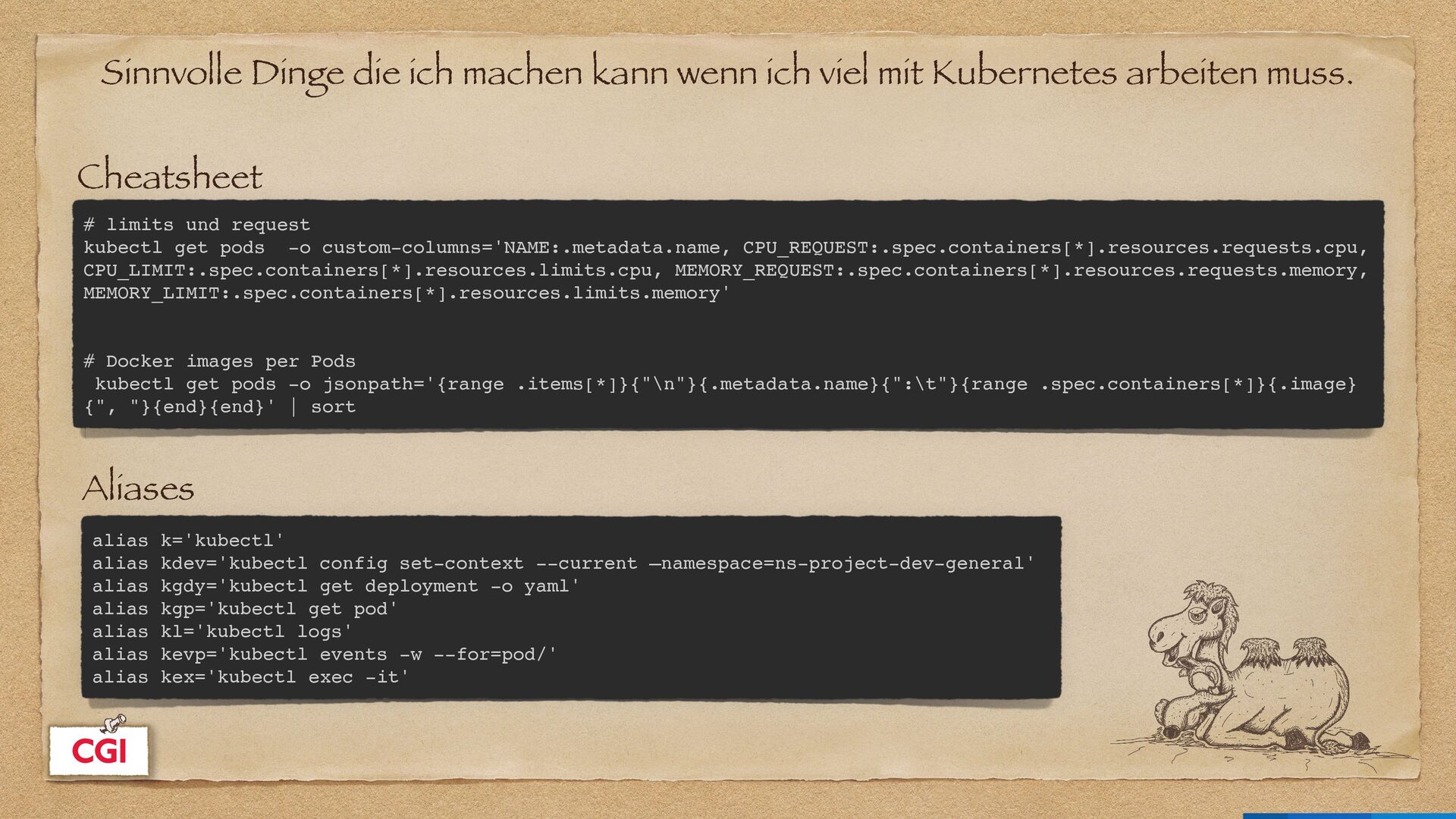
Kubernetes arbeiten muss. Cheatsheet Aliases # limits und request kubectl get pods -o custom-columns='NAME:.metadata.name, CPU_REQUEST:.spec.containers[*].resources.requests.cpu, CPU_LIMIT:.spec.containers[*].resources.limits.cpu, MEMORY_REQUEST:.spec.containers[*].resources.requests.memory, MEMORY_LIMIT:.spec.containers[*].resources.limits.memory' # Docker images per Pods kubectl get pods -o jsonpath='{range .items[*]}{"\n"}{.metadata.name}{":\t"}{range .spec.containers[*]}{.image} {", "}{end}{end}' | sort alias k='kubectl' alias kdev='kubectl config set-context --current —namespace=ns-project-dev-general' alias kgdy='kubectl get deployment -o yaml' alias kgp='kubectl get pod' alias kl='kubectl logs' alias kevp='kubectl events -w --for=pod/' alias kex='kubectl exec -it'


 sandraw
 pfn
pfn
 syuchimu
 satomasahiro2005
 akitoshiga
 ymotongpoo
 sansantech
 greenmidori
 ezaki
ezaki
 yazm
yazm
 puhitaku
 shogo4131
 riyaamemiya
 addyosmani
 baasie
 lindahogenes
 chrisshort
 bkeepers
 scottboms
 stephenakadiri
 tammyeverts
 kastner
 nonsquared
 charlesmeaden
 eileencodes
![Werkzeuge Fehlersuche $ watch -n | kubectl top [pod] $](https://files.speakerdeck.com/presentations/7170659383c34a0a8f4cd345e7f97eeb/slide_20.jpg)