Share
Embed
ForwardJS - RethinkDB - Advanced Queries
Jorge Silva
July 30, 2015
Transcript
66 slides
-
Schedule 1. Map/Reduce and control logic 2. Joins and subqueries
3. Indexes 4. Advanced changefeeds -
What is map? • Transforms each element in a sequence
by applying a mapping function to them -
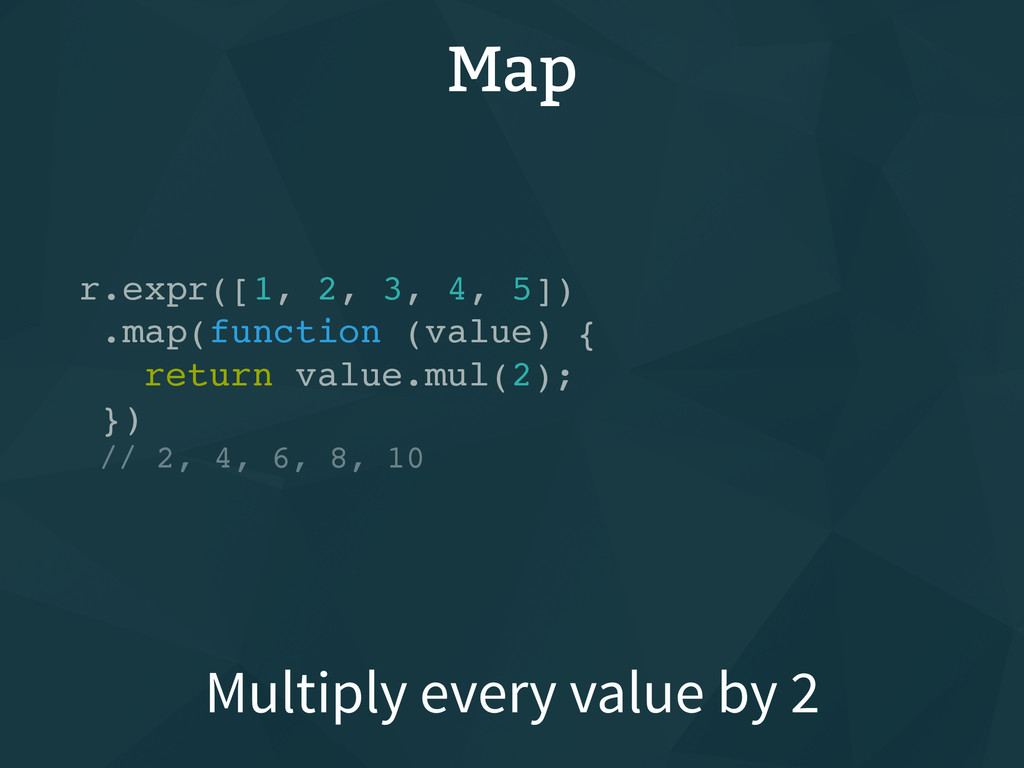
Map r.expr([1, 2, 3, 4, 5]) .map(function (value) { return
value.mul(2); }) // 2, 4, 6, 8, 10 Multiply every value by 2 -
Map r.table('cities') .map(function (row) { // Only get the `name`
property return row('name') }); // Shortcut r.table('cities')('name') Only get a specific value -
What is reduce? • Produce a single value from a
sequence through repeated application of a reduction function -
Reduce r.expr([1, 2, 3, 4, 5]) .reduce(function (left, right) {
return left.add(right); }) // 15 // Shortcut r.expr([1, 2, 3, 4, 5]).sum() Add all values in the array -
Map/reduce • You can do powerful operations by combining map
operations with reduces operations -
Map/reduce r.table('cities') .map(function (row) { // Only get the `name`
property return row('population') }) .reduce(function (left, right) { return left.add(right); }) // Shortcut r.table('cities').sum('population') Get the total population -
Control structures • Often times, you need more complex logic
in your queries, such as if statements -
Map/reduce r.table('cities')('population') .reduce(function (left, right) { // Only count if
more than 1 million return r.branch( right.gt(1000000), left.add(right), 0 ); }) Get the total population -
Install sample data // Create table r.tableCreate('cities') // Insert data
from JSON files r.table('cities') .insert(r.json(r.http( 'https://raw.githubusercontent.com/thejsj/ sample-data/master/data/urban-areas.json' ))) Get `cities` table -
Install sample data // Create table r.tableCreate('countries') // Insert data
from JSON files r.table('countries') .insert(r.json(r.http( 'https://raw.githubusercontent.com/thejsj/ sample-data/master/data/countries.json' ))) Get `countries` table -
Joins • RethinkDB allows for joins • There are three
commands for joins: `eqJoin`, `innerJoin`, and `outerJoin` -
Joins r.table('cities') .eqJoin('country', r.table('countries')) // Returns `left` and `right` properties
.map(function (row) { // Merge `right` into `left` return row('left') .merge({ 'country': row('right') }) }) Get best friend from `people` -
Joins r.table('cities') .eqJoin('country', r.table('countries')) // Returns `left` and `right` properties
.map(function (row) { // Merge `right` into `left` return row('left') .merge({ 'country': row('right') }) }) Get `cities` table -
Joins r.table('cities') .eqJoin('country', r.table('countries')) // Returns `left` and `right` properties
.map(function (row) { // Merge `right` into `left` return row('left') .merge({ 'country': row('right') }) }) Join each city to its country -
Joins r.table('cities') .eqJoin('country', r.table('countries')) // Returns `left` and `right` properties
.map(function (row) { // Merge `right` into `left` return row('left') .merge({ 'country': row('right') }) }) Map every joined row -
Joins r.table('cities') .eqJoin('country', r.table('countries')) // Returns `left` and `right` properties
.map(function (row) { // Merge `right` into `left` return row('left') .merge({ 'country': row('right') }) }) Assign `country` property -
Subqueries • RethinkDB allows for joins and subqueries • You
can execute queries inside queries inside queries inside queries -
Subqueries r.table('cities') .merge((row) => { return { 'country': r.table('countries') .get(row('country'))
} }) Get `country` for every city -
Subqueries r.table('cities') .merge((row) => { return { 'country': r.table('countries') .get(row('country'))
} }) Merge new object into row -
Subqueries r.table('cities') .merge((row) => { return { 'country': r.table('countries') .get(row('country'))
} }) Return object with `country` -
Subqueries r.table('cities') .merge((row) => { return { 'country': r.table('countries') .get(row('country'))
} }) Get single row from `countries` -
Subqueries r.table('cities') .merge((row) => { return { 'country': r.table('countries') .get(row('country'))
} }) Get row found in `country` -
Indexes • Indexes are a way to pre-compute the result
of a query at write time in order to make reading date faster • There are two types of indexes: primary and secondary -
Creating an index // Cities [ { name: 'San Francisco',
state: 'CA' }, { name: 'Oakland', state: 'CA' }, { name: 'Chicago', state: 'IL' }, { name: 'Missoula', state: 'MT' }, { name: 'Richmond', state: 'VA' } ] // Create index on `name` property r.table('cities').indexCreate('name') -
Using an index // Non-indexed operation (Slow!) r.table('cities') .filter(r.row('name').eq('Oakland')) //
Indexed operation (Fast!) r.table('cities') .getAll('Oakland', { index: 'name' }) Operations return same result -
Indexed Operations • get: get a single document by its
primary key • getAll: get all documents who's key matches the key given • between: get all documents with a key between two values -
get • The get command is used to get a
document by its primary index • Primary keys must be unique. The database is ensured by the database. -
get • In RethinkDB, any property can be used as
the primary key. This is set when creating a table • Numbers, strings, booleans, datetime objects, and arrays can all be use as primaries -
Get // Cities [ { id: 1, name: 'Oakland', state:
'CA' }, { id: 2, name: 'Chicago', state: 'IL' }, { id: 3, name: 'Richmond', state: 'VA' } ] // Create index on `name` property r.tableCreate('cities') r.table('cities').get(1) get document with id `1` -
Get // Cities [ { name: 'San Francisco', state: 'CA'
}, { name: 'Oakland', state: 'CA' }, { name: 'Chicago', state: 'IL' } ] // Create index on `name` property r.tableCreate('cities', { primaryKey: 'name' }) r.table('cities').get('Chicago') get documents with name 'Chicago' -
getAll • The getAll command is used to get all
documents with a specific key(s), given an index • Multiple values can be passed -
// Cities [ { name: 'San Francisco', state: 'CA' },
{ name: 'Oakland', state: 'CA' }, { name: 'Chicago', state: 'IL' }, { name: 'Richmond', state: 'VA' } ] // Create index on `state` property r.table('cities').indexCreate('state') // Returns: San Francisco, Oakland r.table('cities') .getAll('CA', { index: 'state' }) getAll get document with state 'CA' -
// Cities [ { name: 'San Francisco', state: 'CA' },
{ name: 'Oakland', state: 'CA' }, { name: 'Chicago', state: 'IL' }, { name: 'Richmond', state: 'VA' } ] // Returns: San Francisco, Oakland, Chicago r.table('cities') .getAll('CA', 'IL', { index: 'state' }) getAll get documents with state 'CA' or 'IL' -
between • The between command is used to get all
documents with a key between two values -
// Cities [ { name: 'San Francisco', population: 800000 },
{ name: 'Oakland', population: 400000 }, { name: 'Chicago', population: 900000 }, { name: 'Richmond', population: 200000 } ] // Create index on `population` property r.table('cities').indexCreate('population') // Returns: Oakland, Richmond r.table('cities') .between(0, 600000, { index: 'population' }) between get documents with pop under 600K -
Types of secondary indexes • Simple indexes • Compound indexes
• Multi-indexes • Indexes based on arbitrary expressions -
Compound Indexes • Compound indexes allow you to retrieve documents
by multiple fields -
// Cities [ { name: 'San Francisco', population: 800000 },
{ name: 'Oakland', population: 400000 }, { name: 'Chicago', population: 900000 }, { name: 'Richmond', population: 200000 } ] // Create index `name` and `population` r.table('cities').indexCreate('name_pop', [ r.row('name'), r.row('population') ]) // Returns: San Francisco, Richmond r.table('cities') .between([ 'R' , 100000], [ r.maxval, r.maxval ], { index: 'name_pop' }) Compound index -
Multi Indexes • With a multi index, a document can
be indexed using more than one key in the same index. • For instance, a blog post might have multiple tags, and each tag might refer to multiple blog posts. -
// Cities [ { name: 'San Francisco', highways: [ 80,
280 ]}, { name: 'Oakland', highways: [ 80, 880 ]}, { name: 'Chicago', highways: [ 90, 55 ]}, { name: 'Richmond', highways: [ 95, 295 ]} ] // Create index for `highways` r.table('cities').indexCreate('highways', { multi: true }) // Returns: San Francisco, Oakland r.table('cities') .getAll(80, { index: 'highways' }) Multi indexes get documents with highway 80 -
Arbitrary expression • You can create an index on an
arbitrary expression by passing an anonymous function to indexCreate • Basically, any function can be used as an index -
// Cities [ { name: 'San Francisco', state: 'CA' },
{ name: 'Oakland', state: 'CA' }, { name: 'Chicago', state: 'IL' }, { name: 'Richmond', state: 'VA' } ] // Create an index for cities beginning with 'San' r.table('cities').indexCreate('san', function (row) { return row('name').match("^San").ne(null); }) // Returns: San Francisco, Oakland r.table('cities') .getAll(true, { index: 'san' }) Arbitrary expression -
Advanced changefeeds • You can attach some terms to a
query before calling `.changes` • Some of these terms are: filter, pluck, map, min, max, between, orderBy -
// Cities [ { name: 'San Francisco', state: 'CA' },
{ name: 'Chicago', state: 'IL' } ] // Will only run when 'Chicago' is modified r.table('cities') .filter({ state: 'IL' }) .changes() Advanced changefeeds listen for cities in Illinois -
// Cities [ { name: 'San Francisco', state: 'CA' },
{ name: 'Chicago', state: 'IL' } ] // Will only run when 'name' is modified r.table('cities') .pluck('name') .changes() Advanced changefeeds Listen for when 'name' changes -
// Will only run when 'name' is modified and //
state is 'IL' r.table('cities') .filter({ state: 'IL' }) .pluck('name') .changes() Advanced changefeeds Combine both listeners -
Advanced changefeeds • You can manipulate the result of a
changefeed by adding terms after `.changes` -
// Cities [ { name: 'San Francisco', state: 'CA' },
{ name: 'Chicago', state: 'IL' } ] // Will only return the new_val r.table('cities') .changes()('new_val') Advanced changefeeds Only get the update value -
// Will append the state r.table('cities') .changes() .filter(r.row('new_val').ne(null)) .map(function (row)
{ return { 'state': r.table('states') .get(row('state') } }) Advanced changefeeds Join the state to changefeed -
// Return the number of cities in table r.table('cities') .changes()
.map(function (row) { return r.table('cities').count() }) Advanced changefeeds Get count of cities on change -
Questions • RethinkDB website: http://rethinkdb.com • Install RethinkDB: http://rethinkdb.com/install/ •
Email me: [email protected] • Tweet: @thejsj, @rethinkdb