Upgrade to Pro — share decks privately, control downloads, hide ads and more …

Build Smarter Android Apps: Intergrate cloud AI...

Build Smarter Android Apps: Intergrate cloud AI and OnDevice AI

Explore how to integrate cloud and on-device AI into native Android applications using Kotlin and Jetpack Compose. Through a hands-on walkthrough of MajibuAI, learn to connect AI providers, stream responses, run Gemma locally with LiteRT-LM, and implement hybrid AI routing for more flexible and resilient Android experiences.

Avatar for ValentineRutto

ValentineRutto

November 06, 2026

More Decks by ValentineRutto

Other Decks in Programming

Transcript

  1. BUILD SMARTER ANDROID APPS: A Hands on codelab for Cloud

    and On-Device AI with MajibuAIApp MAJIBUAI / DROIDCON UGANDA’26 1
  2. ValentineRutto Mobile Engineer • 8+ years building mobile experiences X

    | Linkedin | Medium | Github @valentinerutto github.com/valentineRutto 4
  3. AI is more than an API call Your AI feature

    works well until it does not. 2
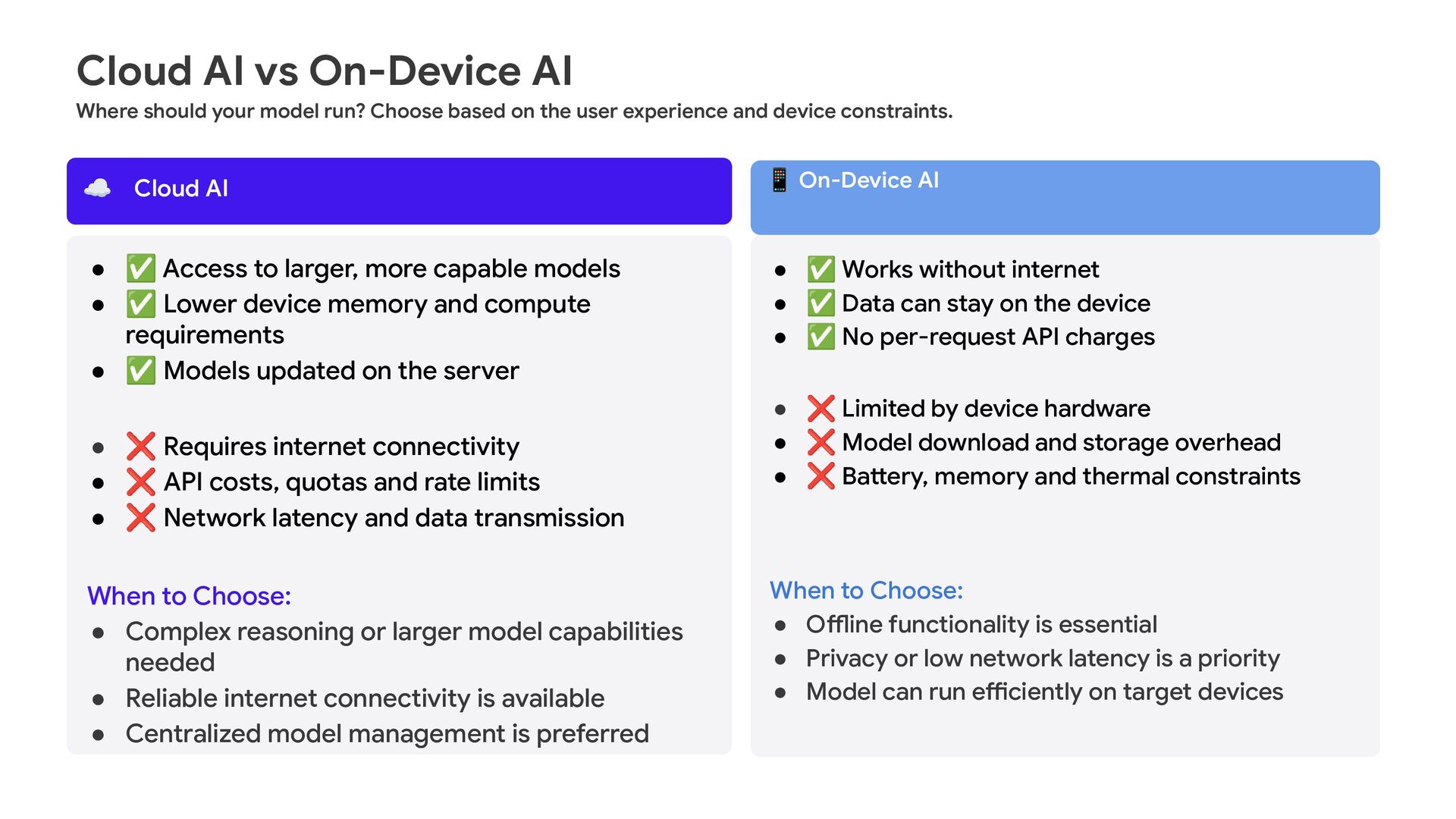
  4. Cloud AI vs On-Device AI Where should your model run?

    Choose based on the user experience and device constraints. ☁ Cloud AI 📱 On-Device AI • ✅ Access to larger, more capable models • ✅ Lower device memory and compute requirements • ✅ Models updated on the server • ✅ Works without internet • ✅ Data can stay on the device • ✅ No per-request API charges • ❌ Requires internet connectivity • ❌ API costs, quotas and rate limits • ❌ Network latency and data transmission When to Choose: • Complex reasoning or larger model capabilities needed • Reliable internet connectivity is available • Centralized model management is preferred • ❌ Limited by device hardware • ❌ Model download and storage overhead • ❌ Battery, memory and thermal constraints When to Choose: • Offline functionality is essential • Privacy or low network latency is a priority • Model can run efficiently on target devices
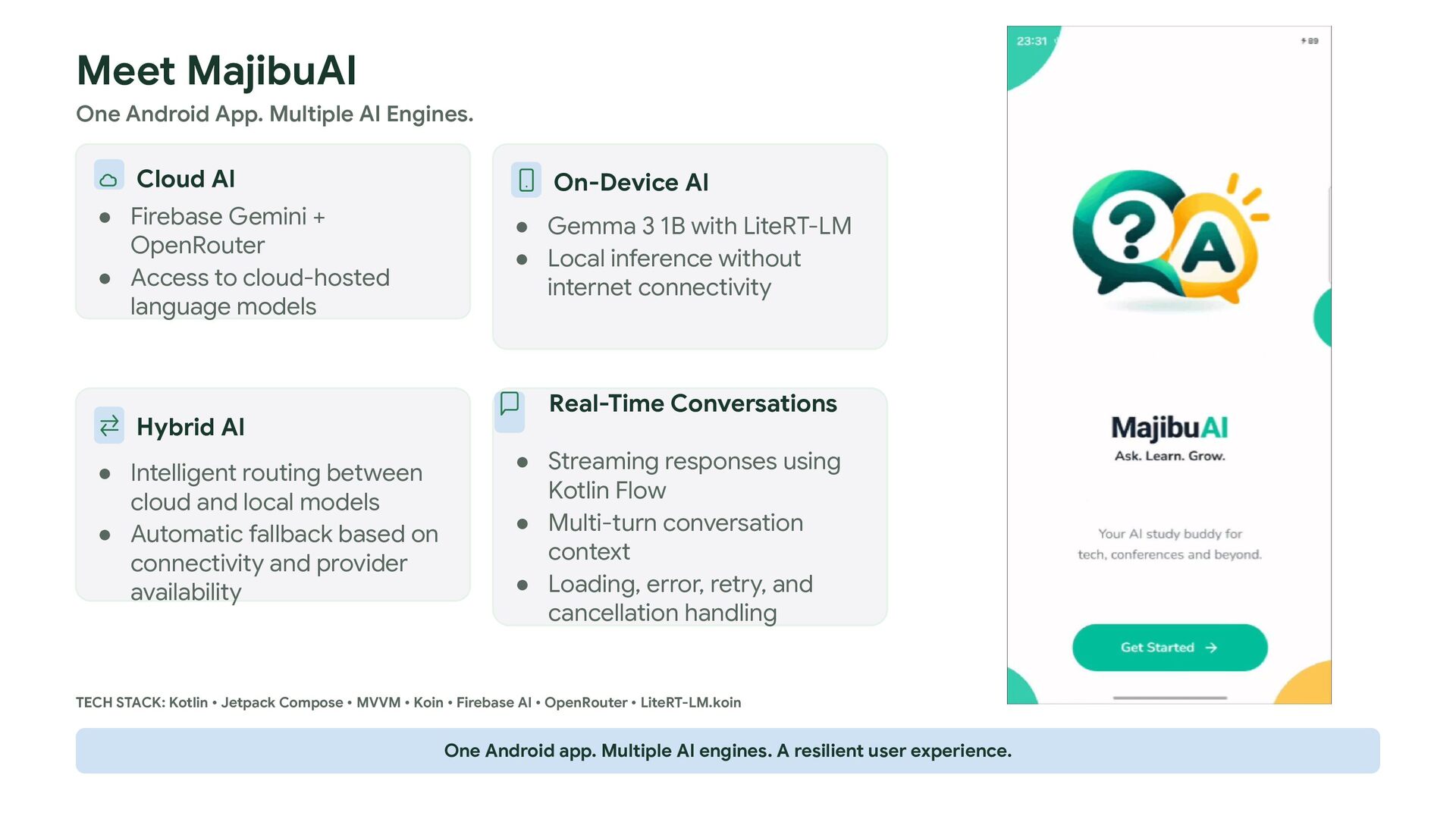
  5. Meet MajibuAI One Android App. Multiple AI Engines. Cloud AI

    • Firebase Gemini + OpenRouter • Access to cloud-hosted language models Hybrid AI • Intelligent routing between cloud and local models • Automatic fallback based on connectivity and provider availability On-Device AI • Gemma 3 1B with LiteRT-LM • Local inference without internet connectivity Real-Time Conversations • Streaming responses using Kotlin Flow • Multi-turn conversation context • Loading, error, retry, and cancellation handling TECH STACK: Kotlin • Jetpack Compose • MVVM • Koin • Firebase AI • OpenRouter • LiteRT-LM.koin One Android app. Multiple AI engines. A resilient user experience.
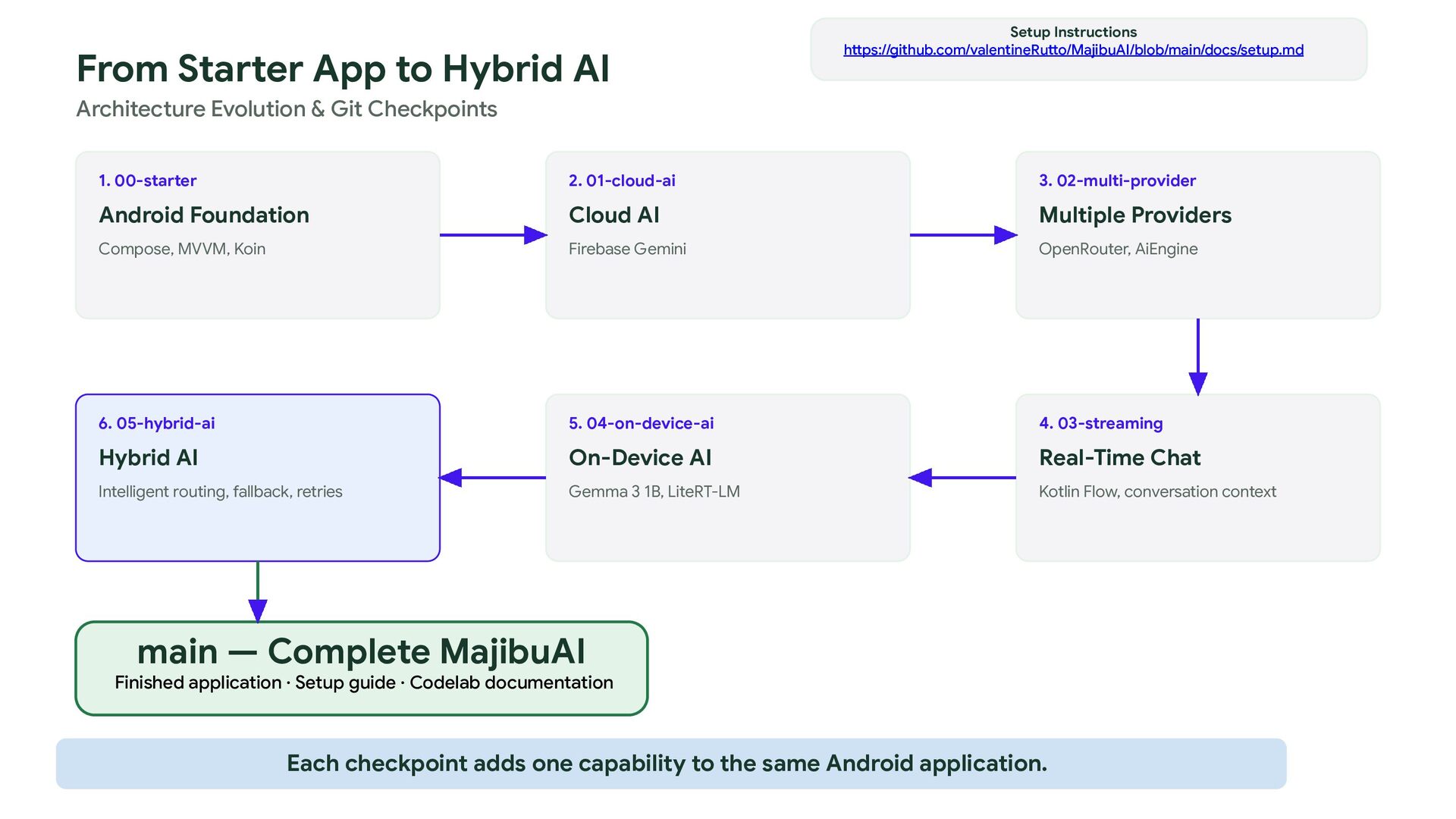
  6. From Starter App to Hybrid AI Setup Instructions https://github.com/valentineRutto/MajibuAI/blob/main/docs/setup.md Architecture

    Evolution & Git Checkpoints 1. 00-starter 2. 01-cloud-ai 3. 02-multi-provider Android Foundation Cloud AI Multiple Providers Compose, MVVM, Koin Firebase Gemini OpenRouter, AiEngine 6. 05-hybrid-ai 5. 04-on-device-ai 4. 03-streaming Hybrid AI On-Device AI Real-Time Chat Intelligent routing, fallback, retries Gemma 3 1B, LiteRT-LM Kotlin Flow, conversation context main — Complete MajibuAI Finished application · Setup guide · Codelab documentation Each checkpoint adds one capability to the same Android application.
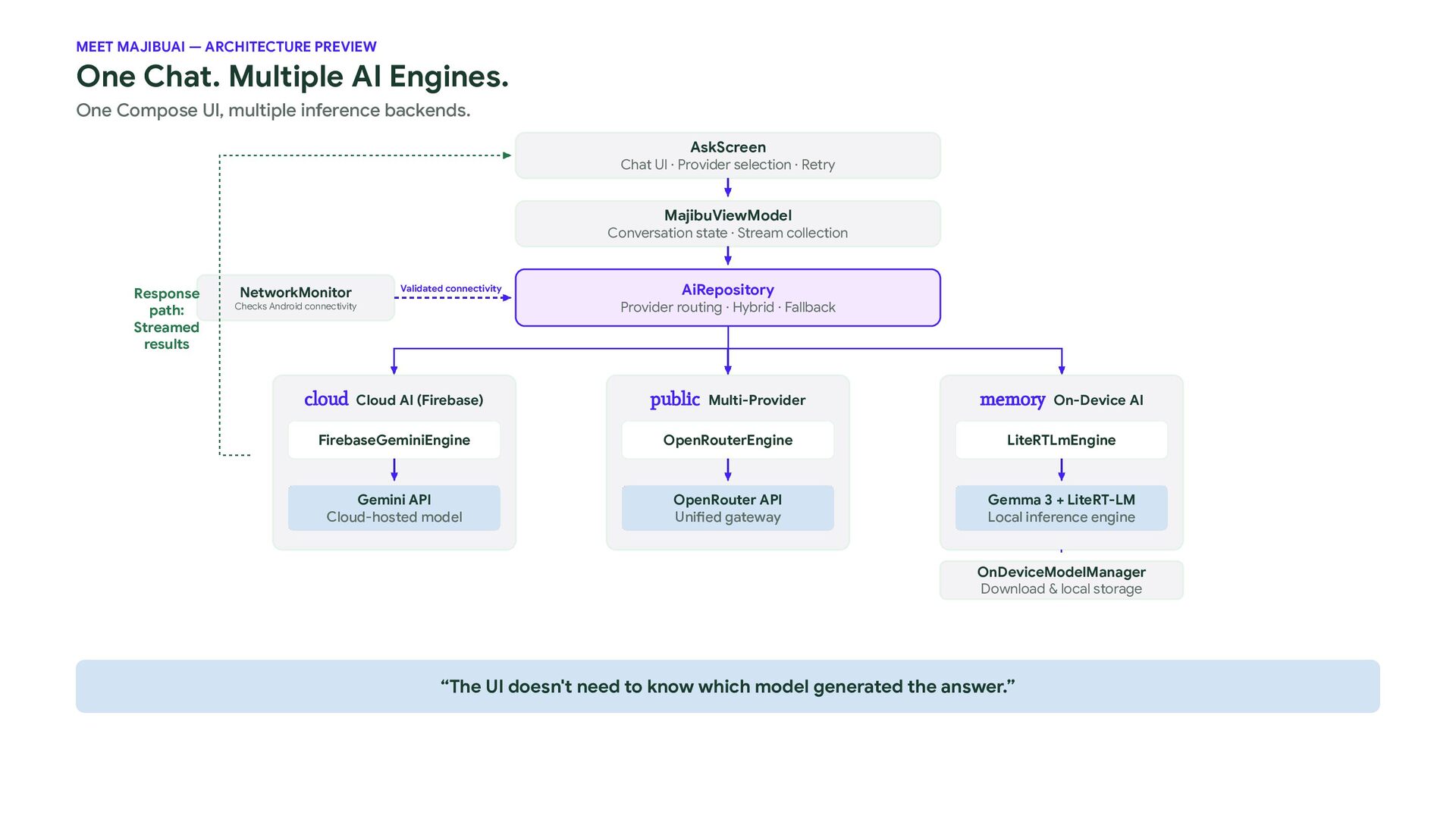
  7. MEET MAJIBUAI — ARCHITECTURE PREVIEW One Chat. Multiple AI Engines.

    One Compose UI, multiple inference backends. AskScreen Chat UI · Provider selection · Retry MajibuViewModel Conversation state · Stream collection Response path: Streamed results NetworkMonitor Validated connectivity AiRepository Provider routing · Hybrid · Fallback Checks Android connectivity cloud Cloud AI (Firebase) public Multi-Provider memory On-Device AI FirebaseGeminiEngine OpenRouterEngine LiteRTLmEngine Gemini API Cloud-hosted model OpenRouter API Unified gateway Gemma 3 + LiteRT-LM Local inference engine OnDeviceModelManager Download & local storage “The UI doesn't need to know which model generated the answer.”
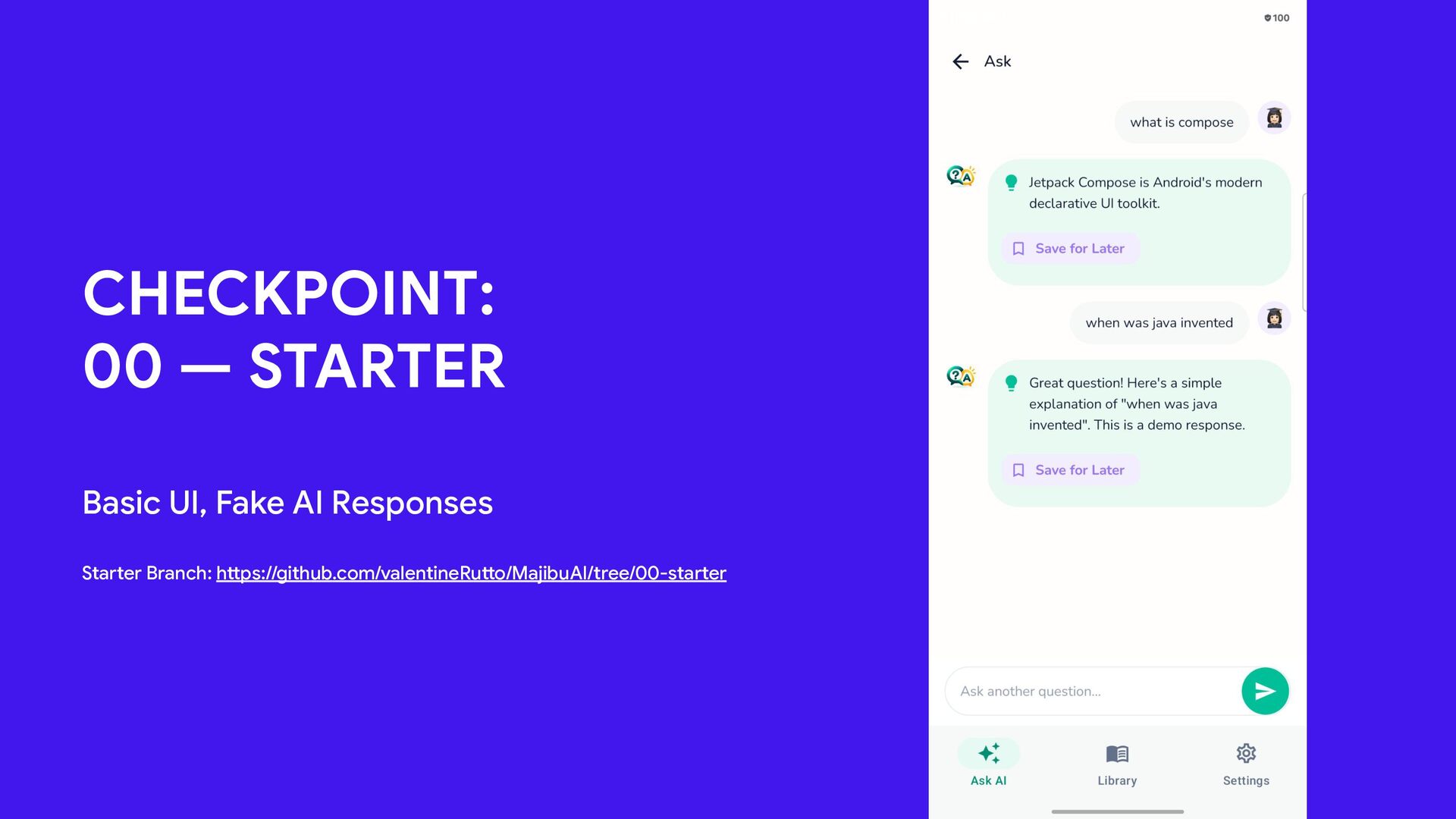
  8. CHECKPOINT: 00 — STARTER Basic UI, Fake AI Responses Starter

    Branch: https://github.com/valentineRutto/MajibuAI/tree/00-starter 6
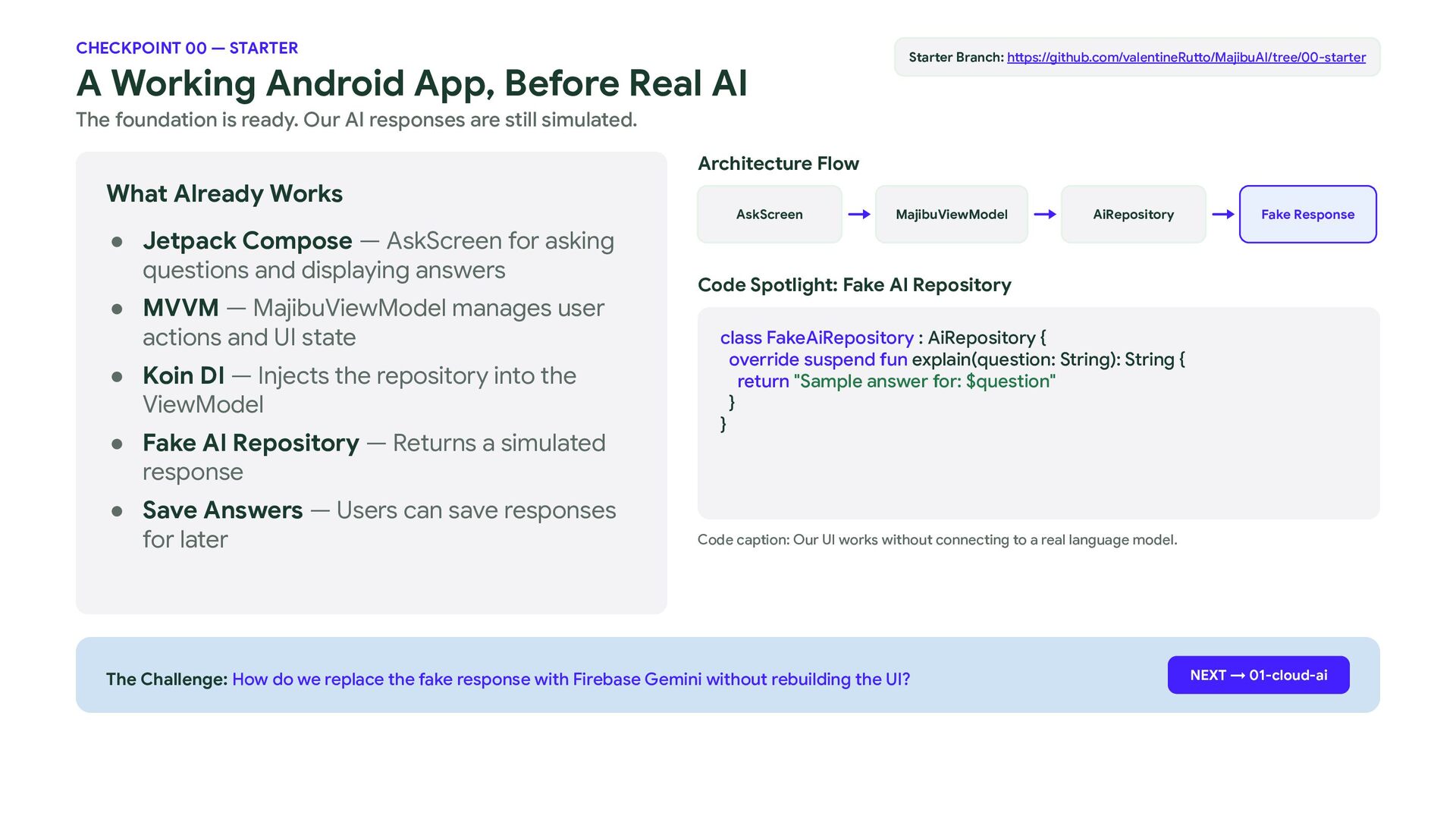
  9. CHECKPOINT 00 — STARTER A Working Android App, Before Real

    AI Starter Branch: https://github.com/valentineRutto/MajibuAI/tree/00-starter The foundation is ready. Our AI responses are still simulated. Architecture Flow What Already Works • Jetpack Compose — AskScreen for asking questions and displaying answers • MVVM — MajibuViewModel manages user actions and UI state • Koin DI — Injects the repository into the ViewModel • Fake AI Repository — Returns a simulated response • Save Answers — Users can save responses for later AskScreen MajibuViewModel AiRepository Fake Response Code Spotlight: Fake AI Repository class FakeAiRepository : AiRepository { override suspend fun explain(question: String): String { return "Sample answer for: $question" } } Code caption: Our UI works without connecting to a real language model. The Challenge: How do we replace the fake response with Firebase Gemini without rebuilding the UI? NEXT → 01-cloud-ai
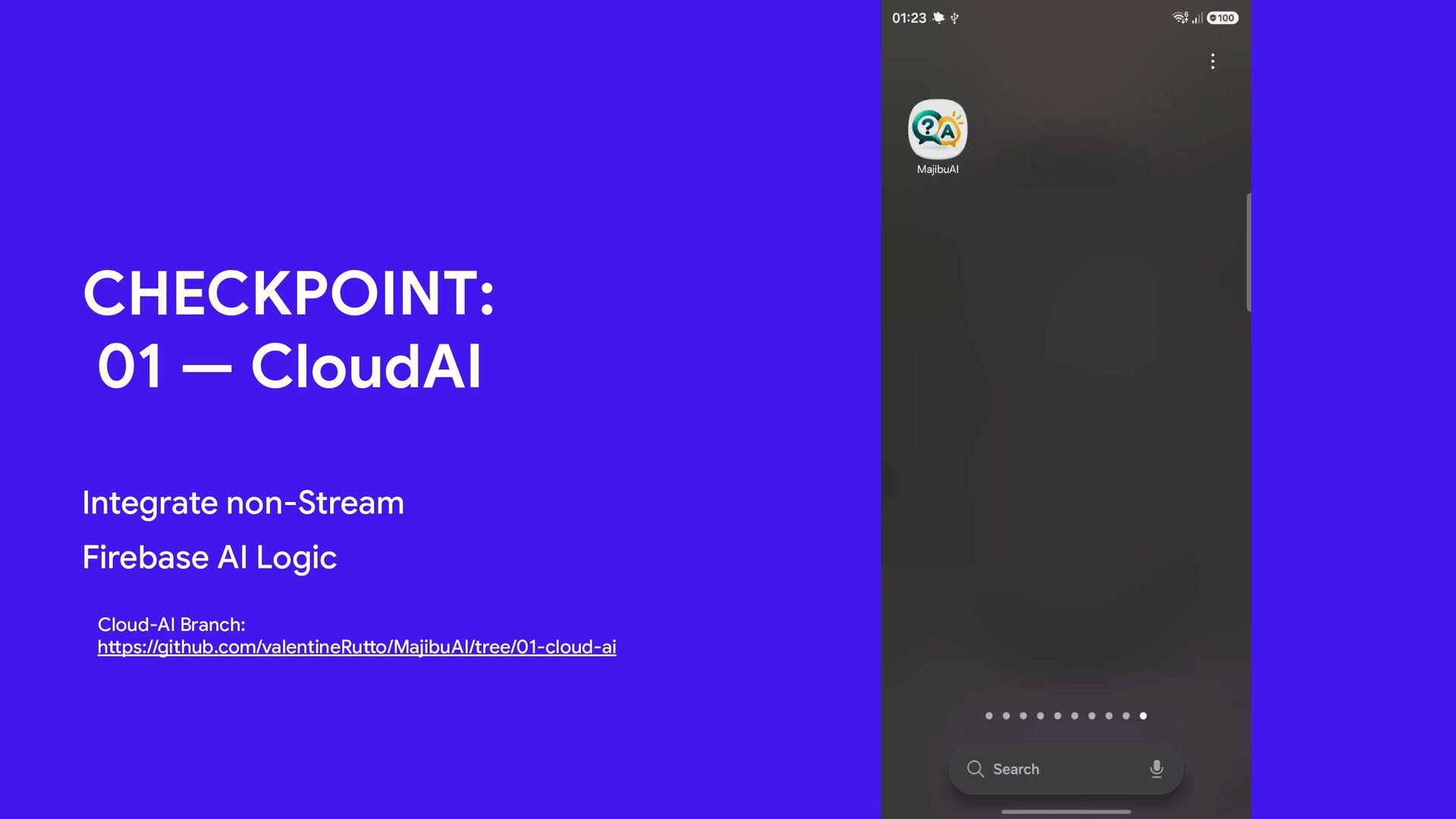
  10. CHECKPOINT: 01 — CloudAI Integrate non-Stream Firebase AI Logic Cloud-AI

    Branch: https://github.com/valentineRutto/MajibuAI/tree/01-cloud-ai 6
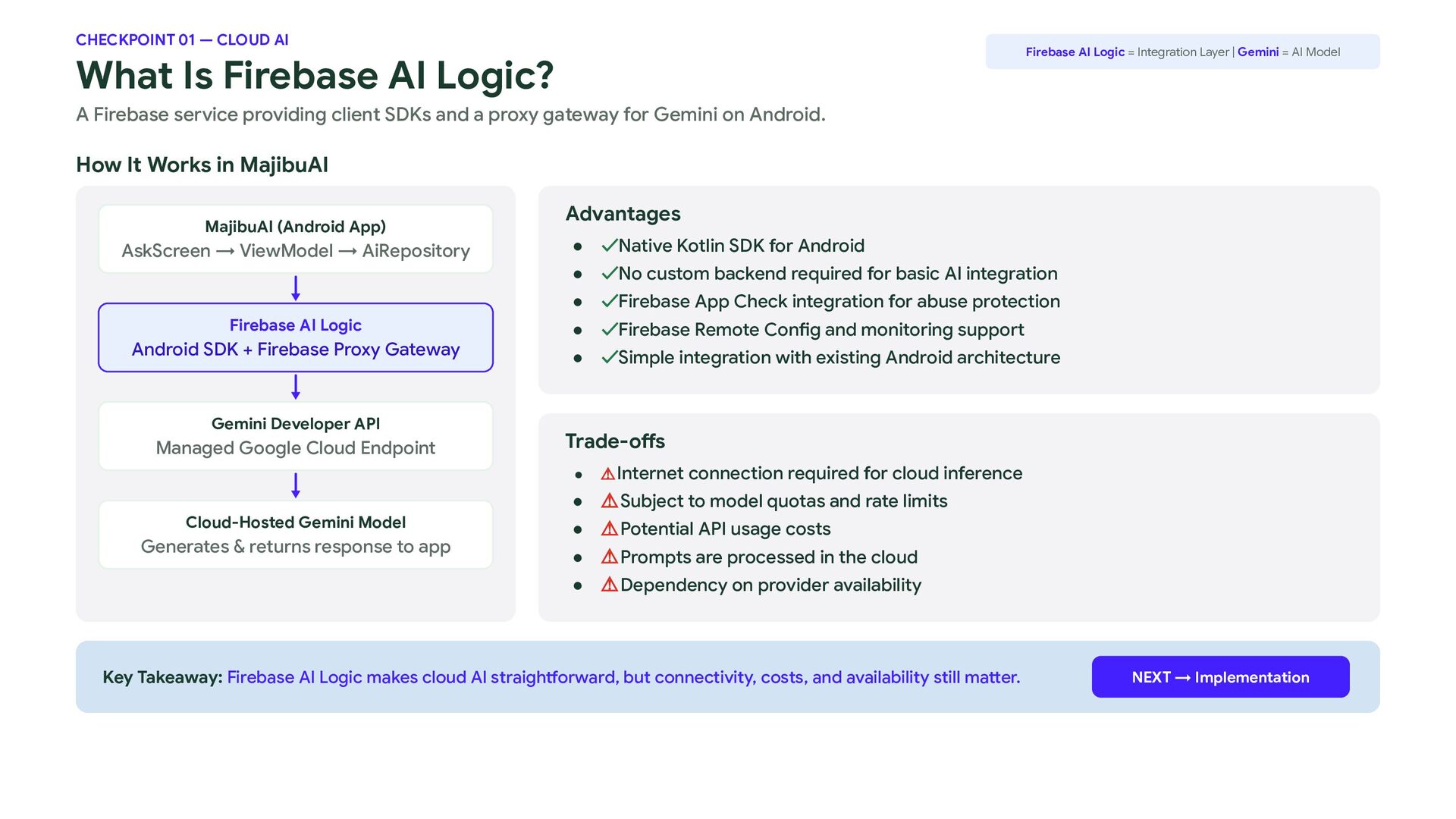
  11. CHECKPOINT 01 — CLOUD AI Firebase AI Logic = Integration

    Layer | Gemini = AI Model What Is Firebase AI Logic? A Firebase service providing client SDKs and a proxy gateway for Gemini on Android. How It Works in MajibuAI MajibuAI (Android App) AskScreen → ViewModel → AiRepository Firebase AI Logic Android SDK + Firebase Proxy Gateway Gemini Developer API Managed Google Cloud Endpoint Cloud-Hosted Gemini Model Generates & returns response to app Advantages • ✓Native Kotlin SDK for Android • ✓No custom backend required for basic AI integration • ✓Firebase App Check integration for abuse protection • ✓Firebase Remote Config and monitoring support • ✓Simple integration with existing Android architecture Trade-offs • ⚠ Internet connection required for cloud inference • ⚠Subject to model quotas and rate limits • ⚠Potential API usage costs • ⚠Prompts are processed in the cloud • ⚠Dependency on provider availability Key Takeaway: Firebase AI Logic makes cloud AI straightforward, but connectivity, costs, and availability still matter. NEXT → Implementation
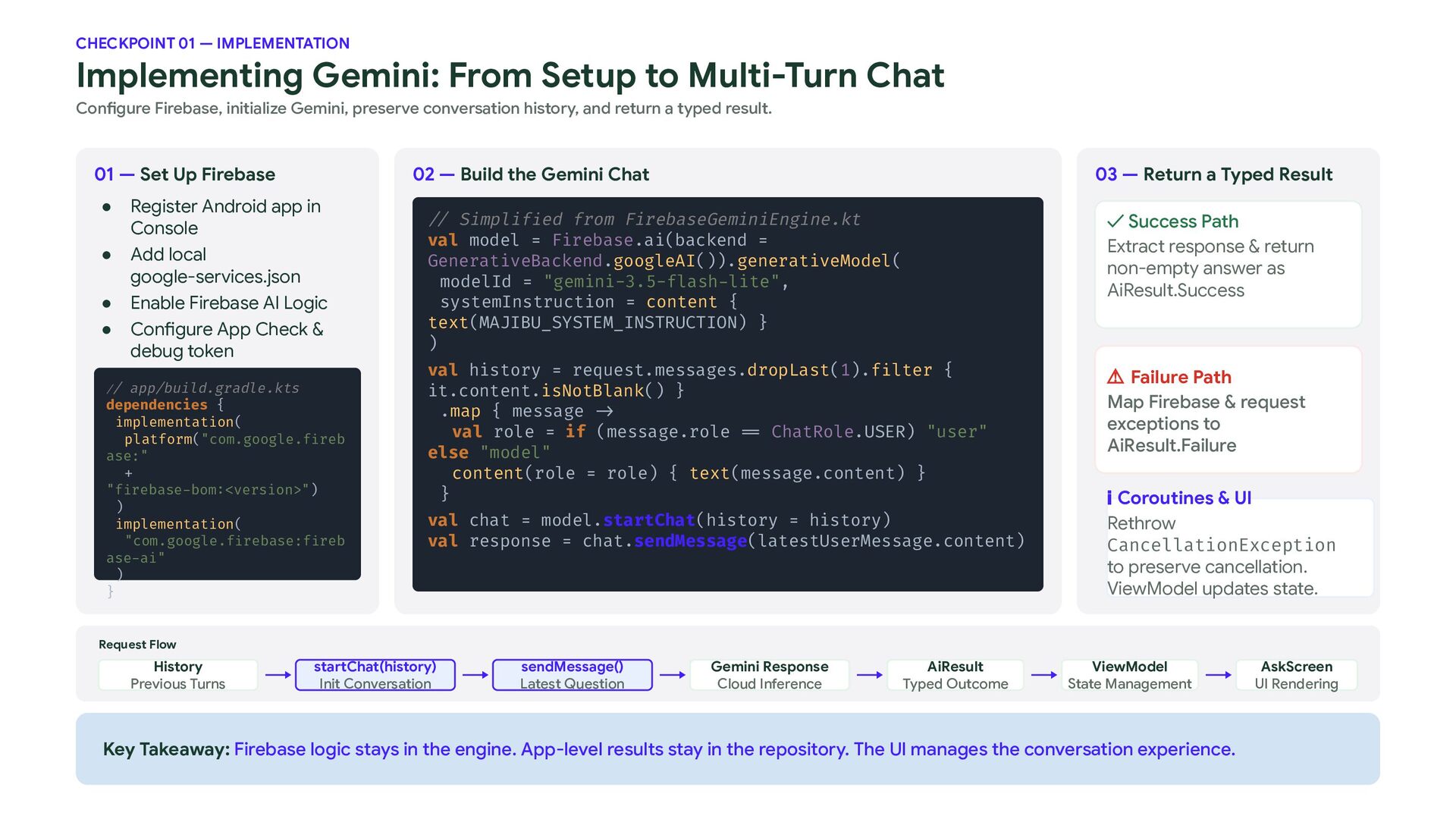
  12. CHECKPOINT 01 — IMPLEMENTATION Implementing Gemini: From Setup to Multi-Turn

    Chat Configure Firebase, initialize Gemini, preserve conversation history, and return a typed result. 01 — Set Up Firebase • • • • 02 — Build the Gemini Chat Register Android app in Console Add local google-services.json Enable Firebase AI Logic Configure App Check & debug token // app/build.gradle.kts dependencies { implementation( platform("com.google.fireb ase:" + "firebase-bom:<version>") ) implementation( "com.google.firebase:fireb ase-ai" ) } 03 — Return a Typed Result // Simplified from FirebaseGeminiEngine.kt val model = Firebase.ai(backend = GenerativeBackend.googleAI()).generativeModel( modelId = "gemini-3.5-flash-lite", systemInstruction = content { text(MAJIBU_SYSTEM_INSTRUCTION) } ) ✓ Success Path Extract response & return non-empty answer as AiResult.Success val history = request.messages.dropLast(1).filter { it.content.isNotBlank() } .map { message -> val role = if (message.role == ChatRole.USER) "user" else "model" content(role = role) { text(message.content) } } ⚠ Failure Path Map Firebase & request exceptions to AiResult.Failure val chat = model.startChat(history = history) val response = chat.sendMessage(latestUserMessage.content) ℹ Coroutines & UI Rethrow CancellationException to preserve cancellation. ViewModel updates state. Request Flow History Previous Turns startChat(history) Init Conversation sendMessage() Latest Question Gemini Response Cloud Inference AiResult Typed Outcome ViewModel State Management Key Takeaway: Firebase logic stays in the engine. App-level results stay in the repository. The UI manages the conversation experience. AskScreen UI Rendering
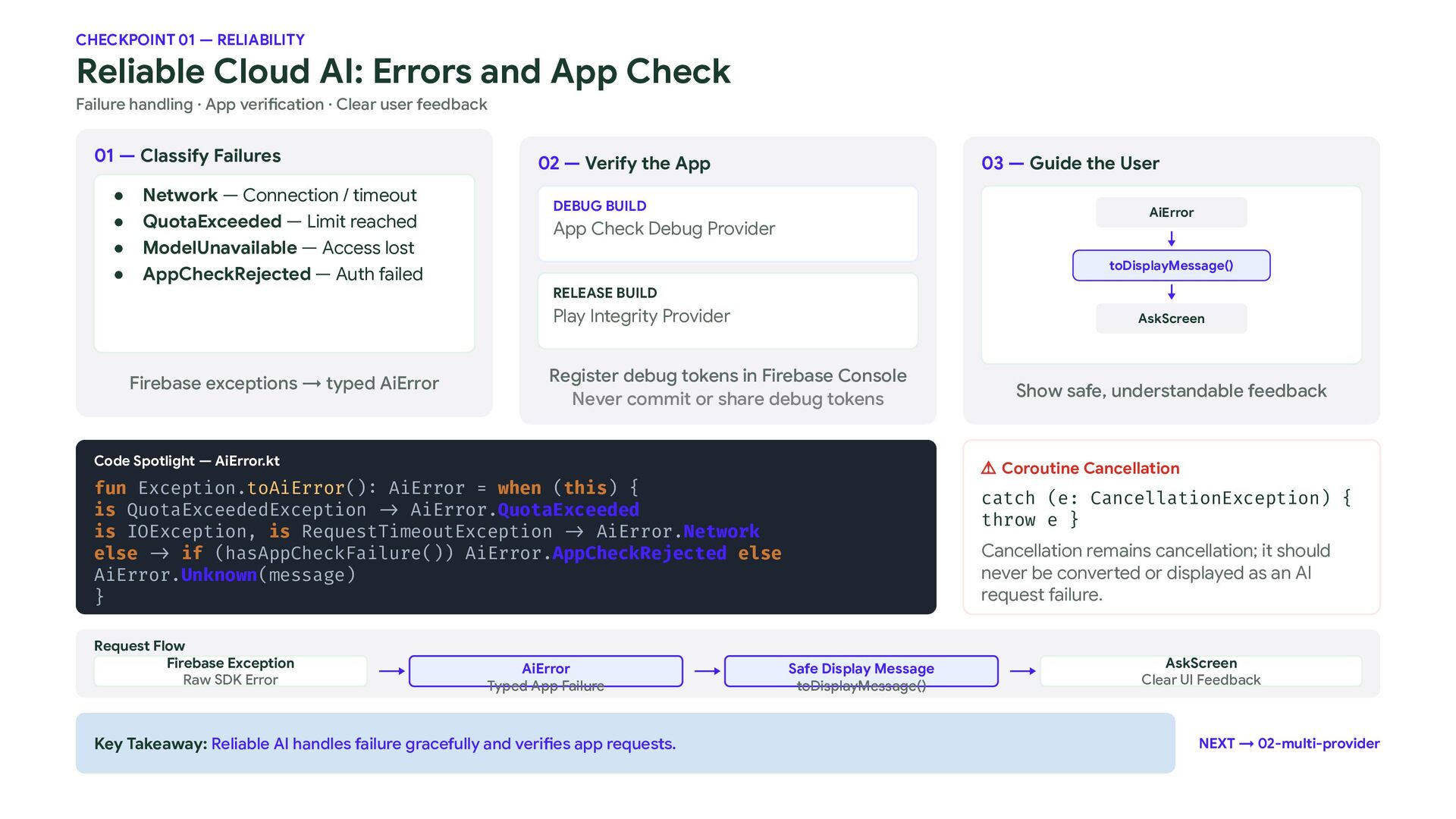
  13. CHECKPOINT 01 — RELIABILITY Reliable Cloud AI: Errors and App

    Check Failure handling · App verification · Clear user feedback 01 — Classify Failures • • • • Network — Connection / timeout QuotaExceeded — Limit reached ModelUnavailable — Access lost AppCheckRejected — Auth failed 02 — Verify the App 03 — Guide the User DEBUG BUILD AiError App Check Debug Provider toDisplayMessage() RELEASE BUILD Play Integrity Provider Firebase exceptions → typed AiError AskScreen Register debug tokens in Firebase Console Never commit or share debug tokens Code Spotlight — AiError.kt ⚠ Coroutine Cancellation fun Exception.toAiError(): AiError = when (this) { is QuotaExceededException -> AiError.QuotaExceeded is IOException, is RequestTimeoutException -> AiError.Network else -> if (hasAppCheckFailure()) AiError.AppCheckRejected else AiError.Unknown(message) } Request Flow Firebase Exception Raw SDK Error AiError Typed App Failure Key Takeaway: Reliable AI handles failure gracefully and verifies app requests. Show safe, understandable feedback catch (e: CancellationException) { throw e } Cancellation remains cancellation; it should never be converted or displayed as an AI request failure. Safe Display Message toDisplayMessage() AskScreen Clear UI Feedback NEXT → 02-multi-provider
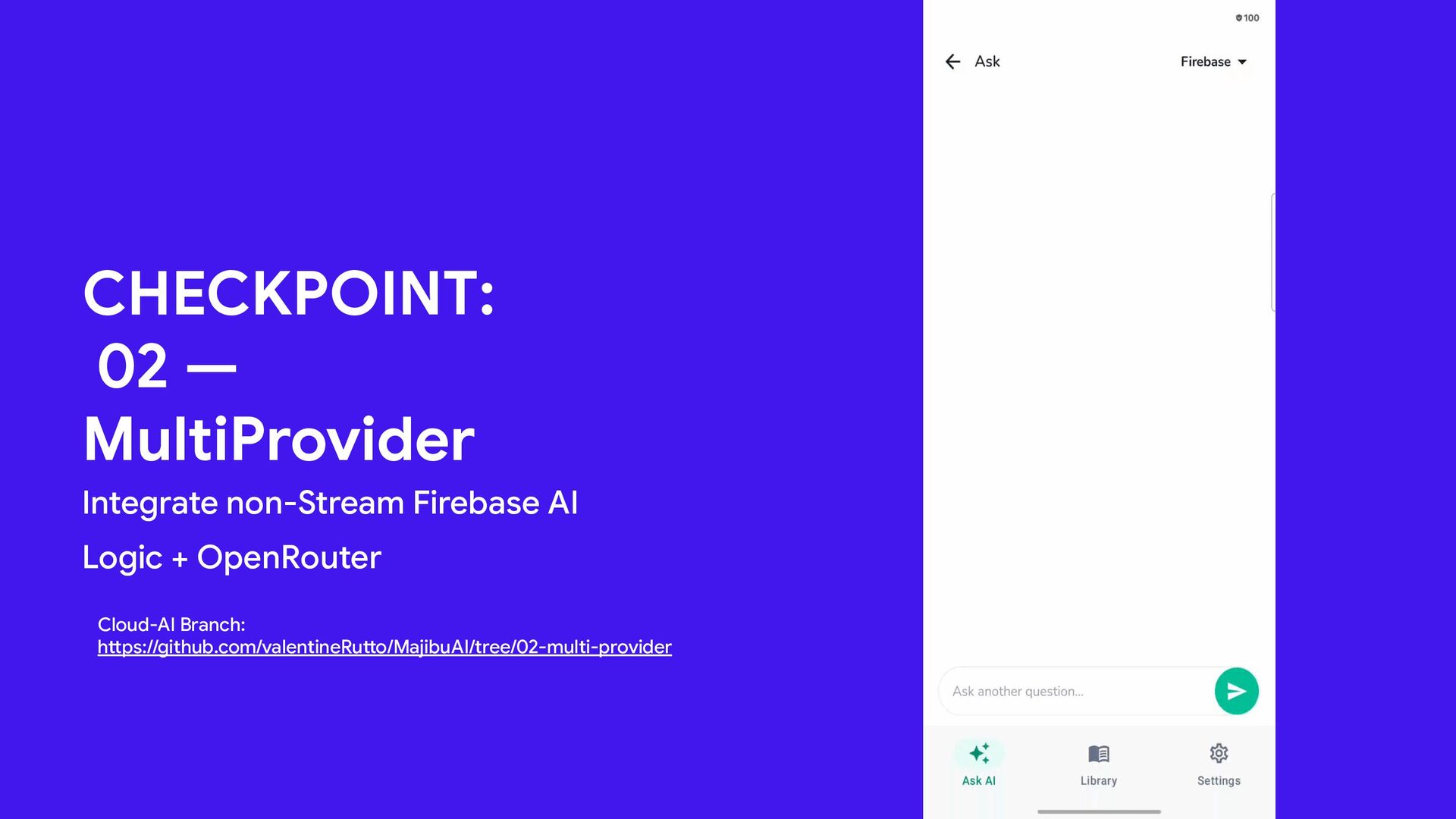
  14. CHECKPOINT: 02 — MultiProvider Integrate non-Stream Firebase AI Logic +

    OpenRouter Cloud-AI Branch: https://github.com/valentineRutto/MajibuAI/tree/02-multi-provider 6
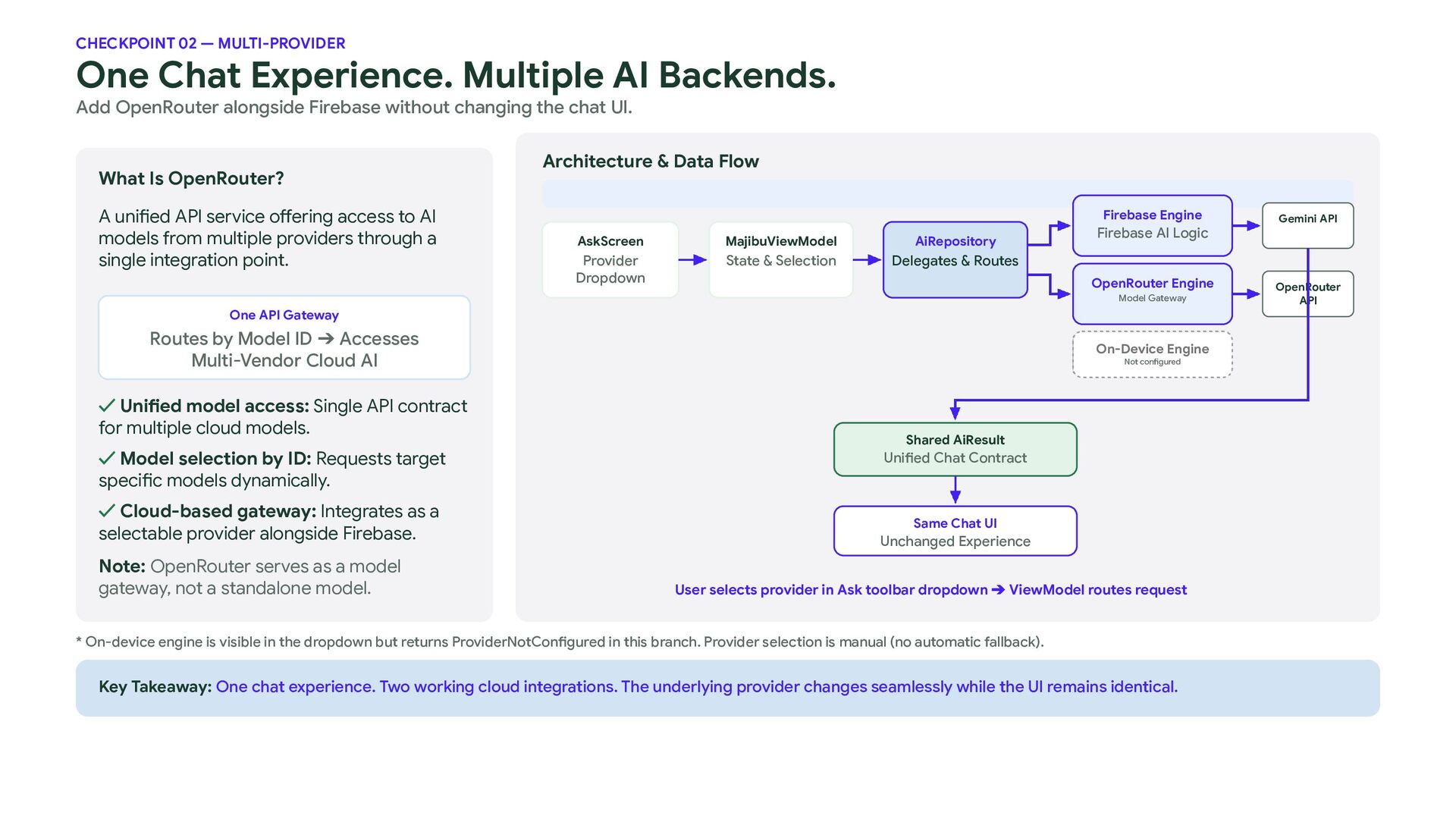
  15. CHECKPOINT 02 — MULTI-PROVIDER One Chat Experience. Multiple AI Backends.

    Add OpenRouter alongside Firebase without changing the chat UI. What Is OpenRouter? A unified API service offering access to AI models from multiple providers through a single integration point. Architecture & Data Flow Firebase Engine AskScreen MajibuViewModel AiRepository Provider Dropdown State & Selection Delegates & Routes Firebase AI Logic OpenRouter Engine Model Gateway One API Gateway Routes by Model ID ➔ Accesses Multi-Vendor Cloud AI ✓ Unified model access: Single API contract for multiple cloud models. ✓ Model selection by ID: Requests target specific models dynamically. ✓ Cloud-based gateway: Integrates as a selectable provider alongside Firebase. Note: OpenRouter serves as a model gateway, not a standalone model. On-Device Engine Not configured Shared AiResult Unified Chat Contract Same Chat UI Unchanged Experience User selects provider in Ask toolbar dropdown ➔ ViewModel routes request * On-device engine is visible in the dropdown but returns ProviderNotConfigured in this branch. Provider selection is manual (no automatic fallback). Key Takeaway: One chat experience. Two working cloud integrations. The underlying provider changes seamlessly while the UI remains identical. Gemini API OpenRouter API
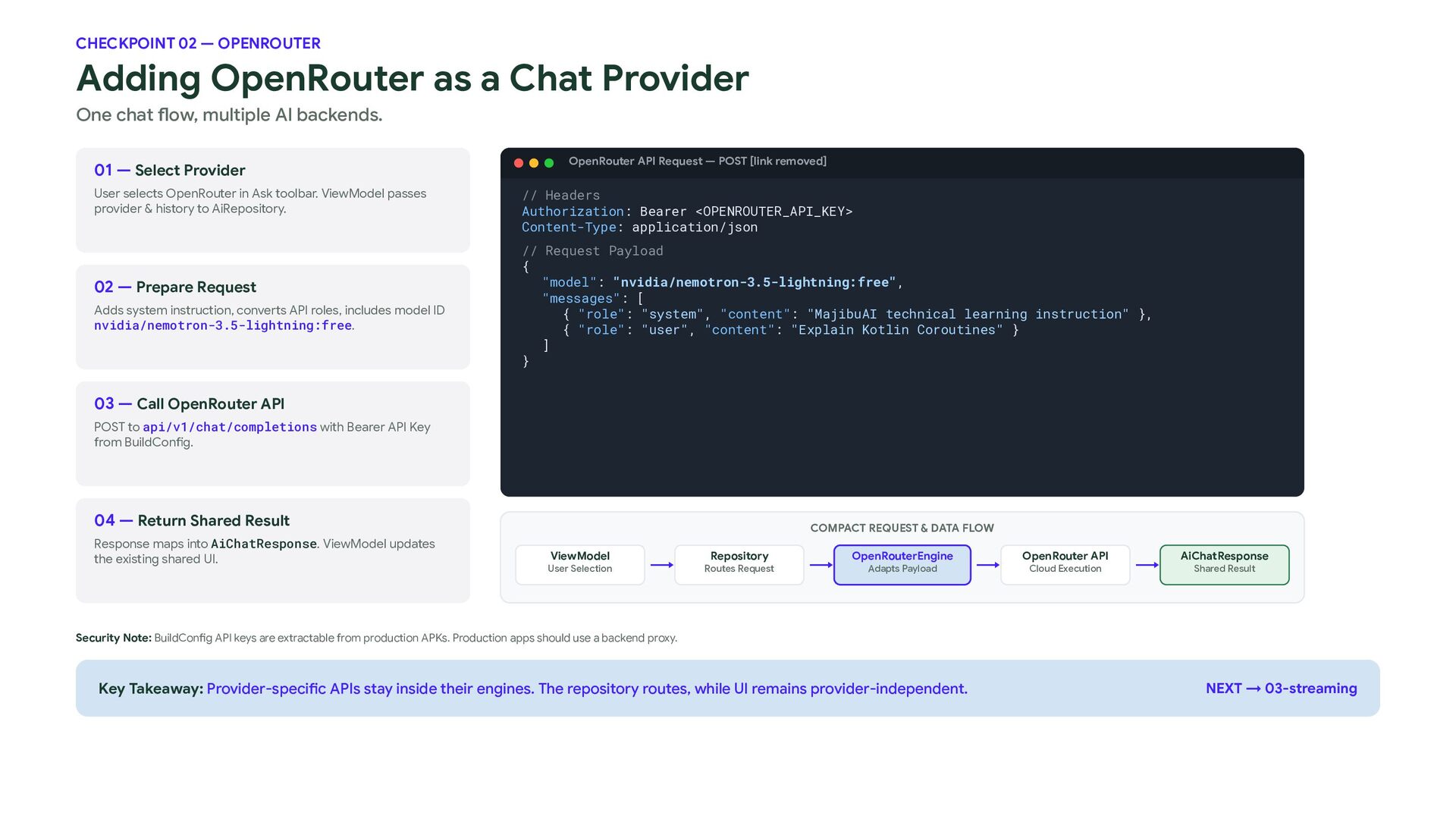
  16. CHECKPOINT 02 — OPENROUTER Adding OpenRouter as a Chat Provider

    One chat flow, multiple AI backends. 01 — Select Provider User selects OpenRouter in Ask toolbar. ViewModel passes provider & history to AiRepository. 02 — Prepare Request Adds system instruction, converts API roles, includes model ID nvidia/nemotron-3.5-lightning:free. OpenRouter API Request — POST [link removed] // Headers Authorization: Bearer <OPENROUTER_API_KEY> Content-Type: application/json // Request Payload { "model": "nvidia/nemotron-3.5-lightning:free", "messages": [ { "role": "system", "content": "MajibuAI technical learning instruction" }, { "role": "user", "content": "Explain Kotlin Coroutines" } ] } 03 — Call OpenRouter API POST to api/v1/chat/completions with Bearer API Key from BuildConfig. 04 — Return Shared Result Response maps into AiChatResponse. ViewModel updates the existing shared UI. COMPACT REQUEST & DATA FLOW ViewModel User Selection Repository Routes Request OpenRouterEngine Adapts Payload OpenRouter API Cloud Execution AiChatResponse Shared Result Security Note: BuildConfig API keys are extractable from production APKs. Production apps should use a backend proxy. Key Takeaway: Provider-specific APIs stay inside their engines. The repository routes, while UI remains provider-independent. NEXT → 03-streaming
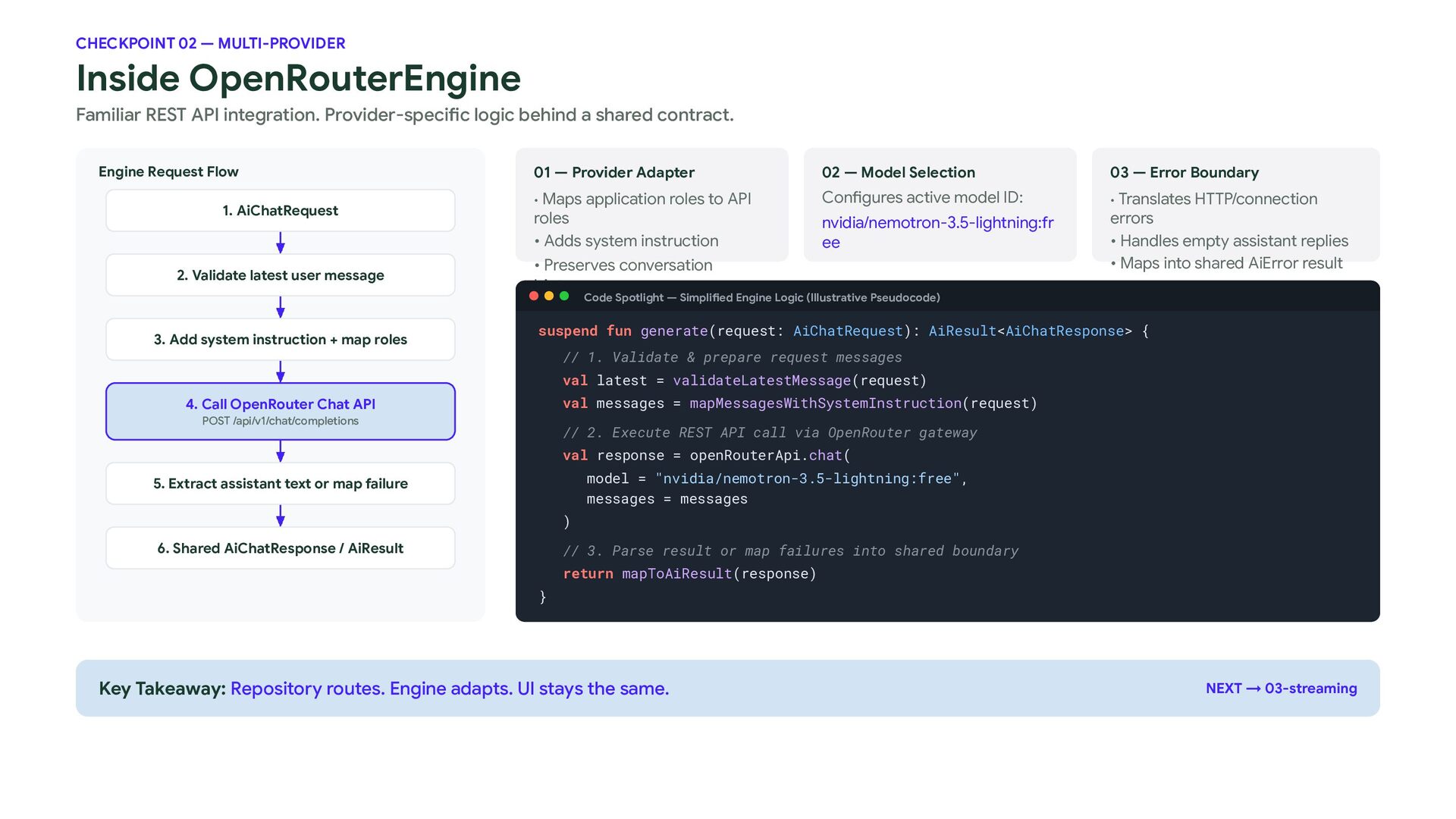
  17. CHECKPOINT 02 — MULTI-PROVIDER Inside OpenRouterEngine Familiar REST API integration.

    Provider-specific logic behind a shared contract. Engine Request Flow 1. AiChatRequest 2. Validate latest user message 01 — Provider Adapter 02 — Model Selection 03 — Error Boundary • Maps application roles to API Configures active model ID: • Translates HTTP/connection roles • Adds system instruction nvidia/nemotron-3.5-lightning:fr ee • Preserves conversation errors • Handles empty assistant replies • Maps into shared AiError result history Code Spotlight — Simplified Engine Logic (Illustrative Pseudocode) 3. Add system instruction + map roles suspend fun generate(request: AiChatRequest): AiResult<AiChatResponse> { // 1. Validate & prepare request messages val latest = validateLatestMessage(request) val messages = mapMessagesWithSystemInstruction(request) 4. Call OpenRouter Chat API POST /api/v1/chat/completions // 2. Execute REST API call via OpenRouter gateway val response = openRouterApi.chat( model = "nvidia/nemotron-3.5-lightning:free", messages = messages 5. Extract assistant text or map failure ) 6. Shared AiChatResponse / AiResult // 3. Parse result or map failures into shared boundary return mapToAiResult(response) } Key Takeaway: Repository routes. Engine adapts. UI stays the same. NEXT → 03-streaming
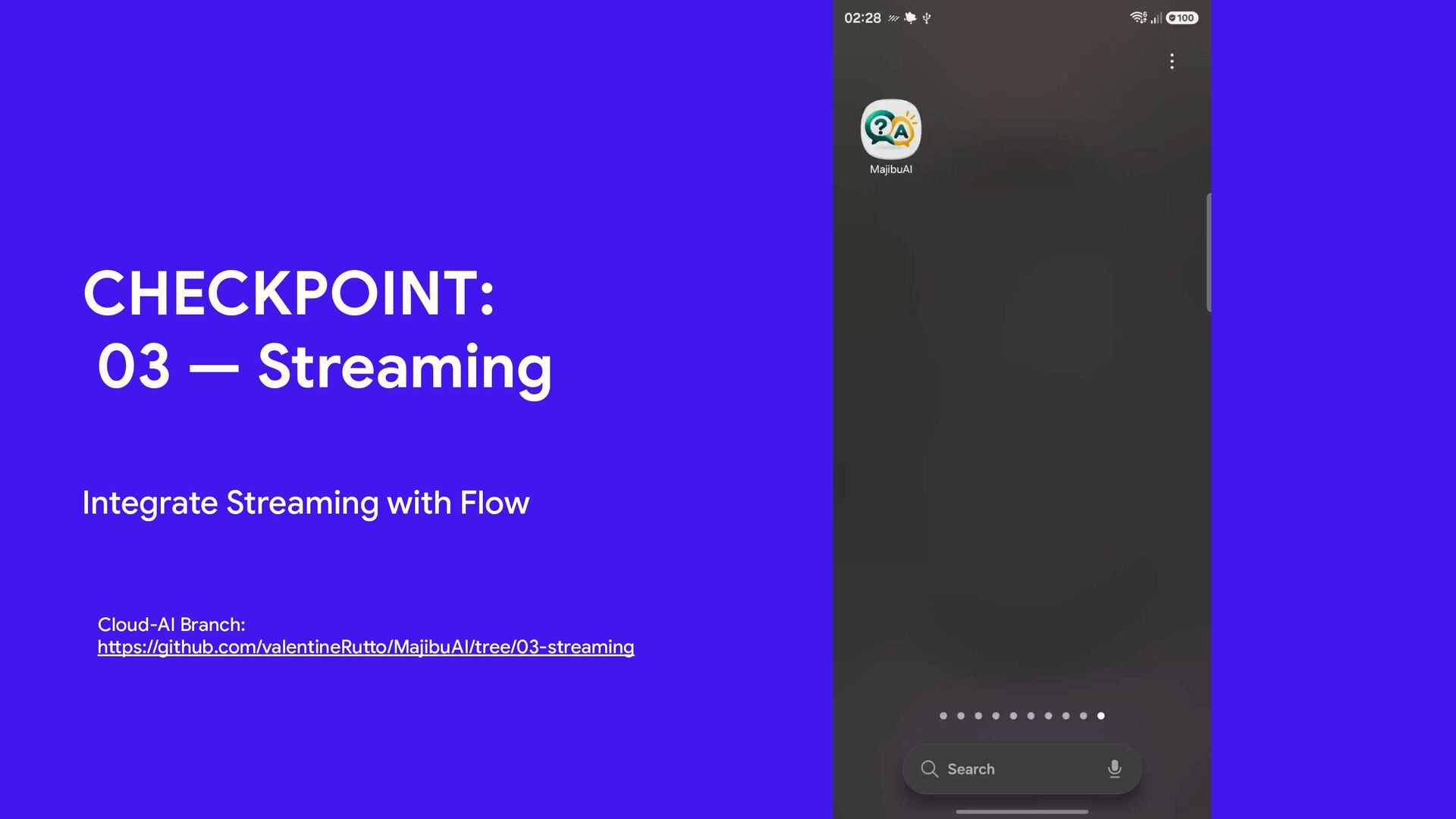
  18. CHECKPOINT: 03 — Streaming Integrate Streaming with Flow Cloud-AI Branch:

    https://github.com/valentineRutto/MajibuAI/tree/03-streaming 6
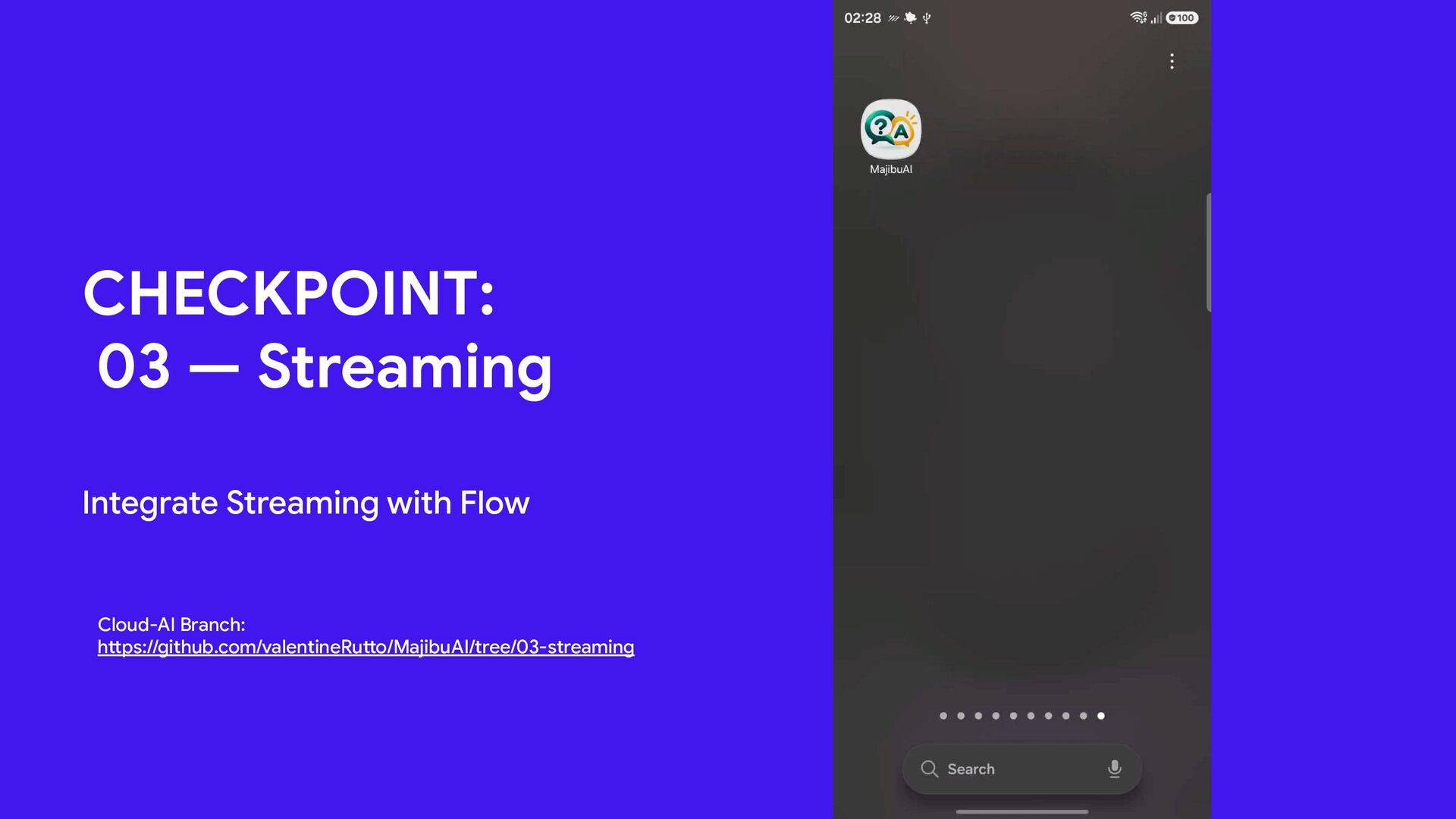
  19. CHECKPOINT: 03 — Streaming Integrate Streaming with Flow Cloud-AI Branch:

    https://github.com/valentineRutto/MajibuAI/tree/03-streaming 6
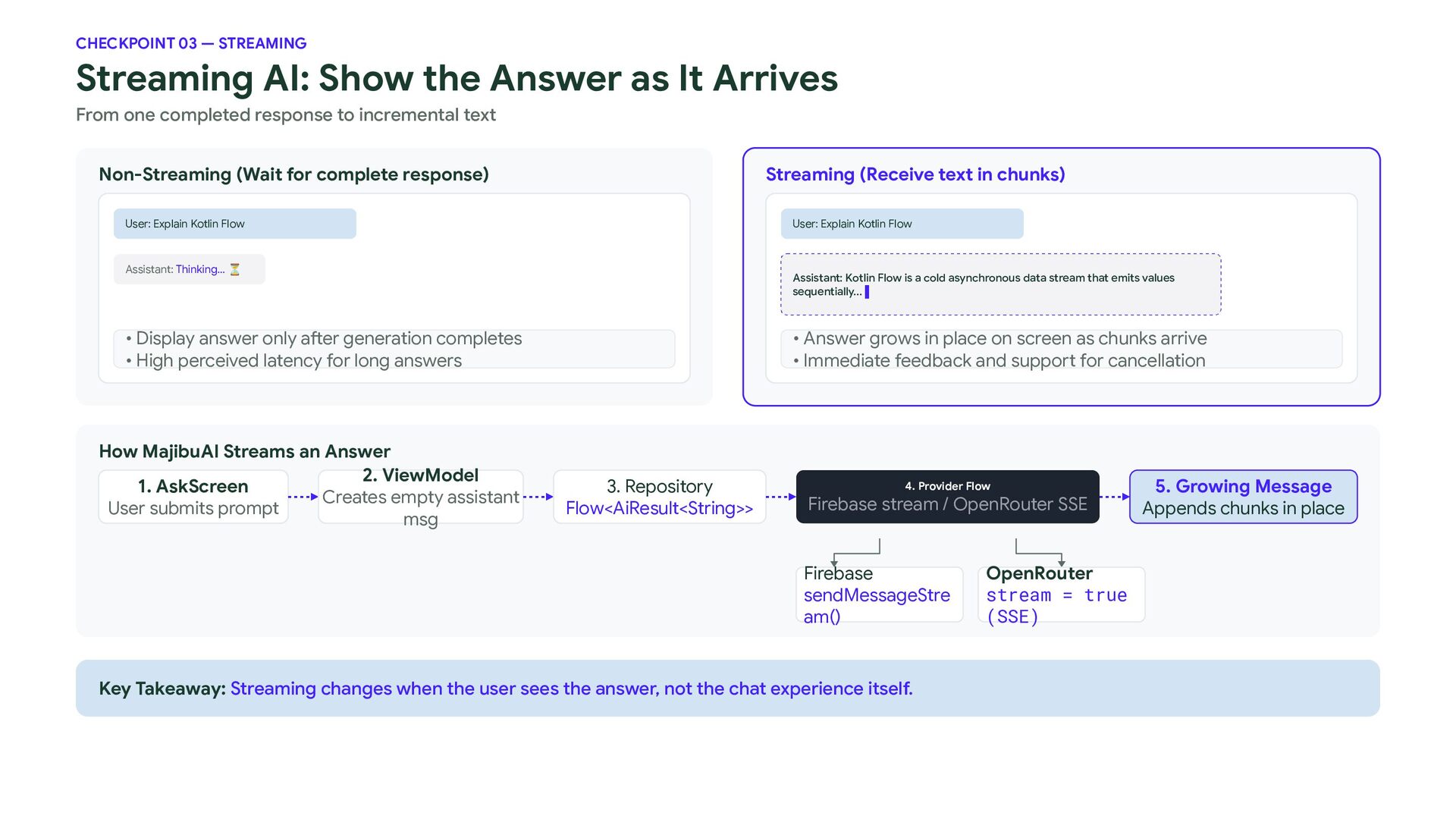
  20. CHECKPOINT 03 — STREAMING Streaming AI: Show the Answer as

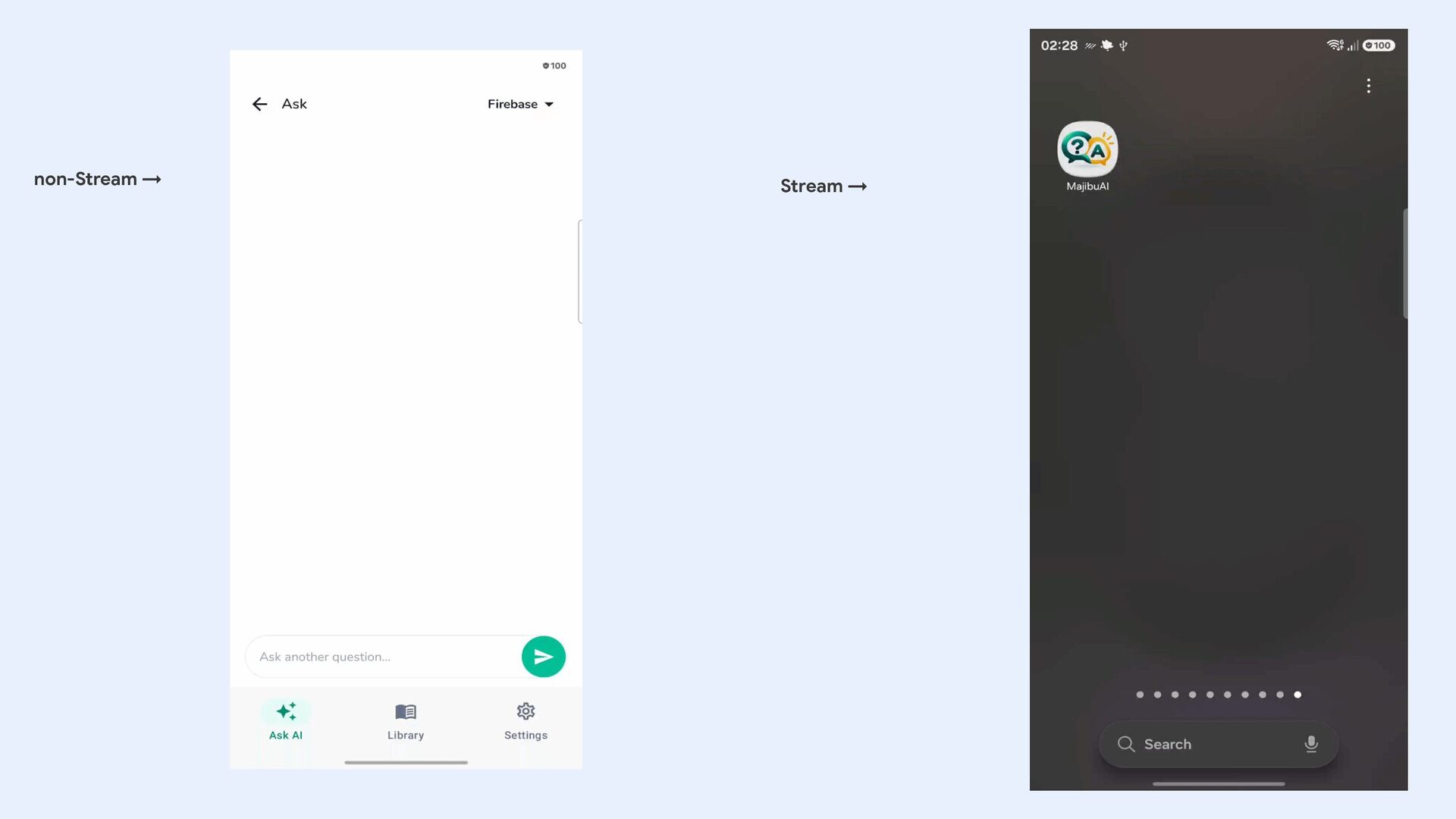
    It Arrives From one completed response to incremental text Non-Streaming (Wait for complete response) Streaming (Receive text in chunks) User: Explain Kotlin Flow User: Explain Kotlin Flow Assistant: Thinking... ⏳ Assistant: Kotlin Flow is a cold asynchronous data stream that emits values sequentially... ▌ • Display answer only after generation completes • High perceived latency for long answers How MajibuAI Streams an Answer 2. ViewModel 1. AskScreen Creates empty assistant User submits prompt msg • Answer grows in place on screen as chunks arrive • Immediate feedback and support for cancellation 3. Repository Flow<AiResult<String>> 4. Provider Flow Firebase stream / OpenRouter SSE Firebase sendMessageStre am() Key Takeaway: Streaming changes when the user sees the answer, not the chat experience itself. OpenRouter stream = true (SSE) 5. Growing Message Appends chunks in place
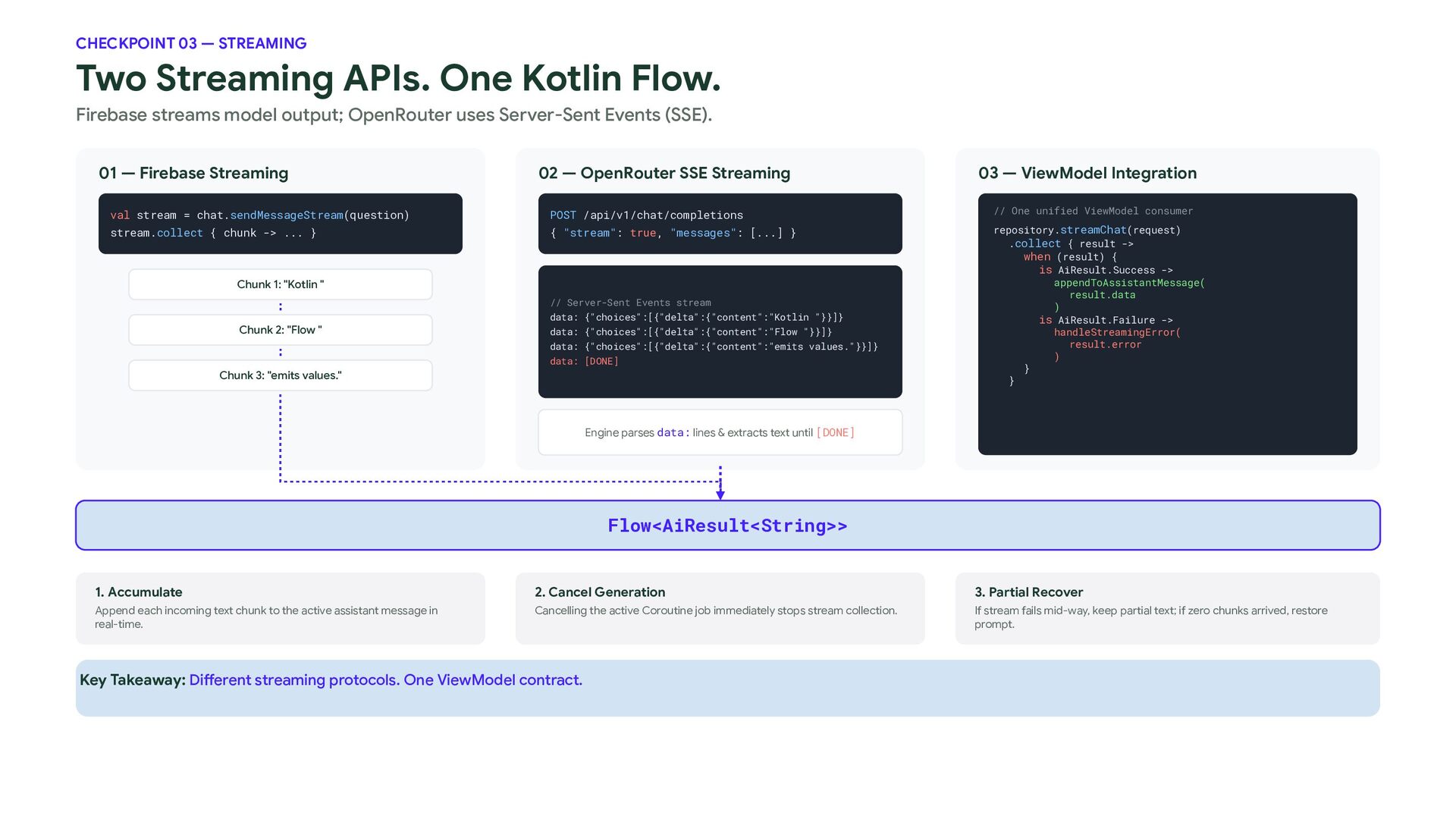
  21. CHECKPOINT 03 — STREAMING Two Streaming APIs. One Kotlin Flow.

    Firebase streams model output; OpenRouter uses Server-Sent Events (SSE). 01 — Firebase Streaming 02 — OpenRouter SSE Streaming val stream = chat.sendMessageStream(question) POST /api/v1/chat/completions stream.collect { chunk -> ... } { "stream": true, "messages": [...] } Chunk 1: "Kotlin " // Server-Sent Events stream Chunk 2: "Flow " data: {"choices":[{"delta":{"content":"Kotlin "}}]} data: {"choices":[{"delta":{"content":"Flow "}}]} data: {"choices":[{"delta":{"content":"emits values."}}]} data: [DONE] Chunk 3: "emits values." 03 — ViewModel Integration // One unified ViewModel consumer repository.streamChat(request) .collect { result -> when (result) { is AiResult.Success -> appendToAssistantMessage( result.data ) is AiResult.Failure -> handleStreamingError( result.error ) } } Engine parses data: lines & extracts text until [DONE] Flow<AiResult<String>> 1. Accumulate 2. Cancel Generation 3. Partial Recover Append each incoming text chunk to the active assistant message in real-time. Cancelling the active Coroutine job immediately stops stream collection. If stream fails mid-way, keep partial text; if zero chunks arrived, restore prompt. Key Takeaway: Different streaming protocols. One ViewModel contract.
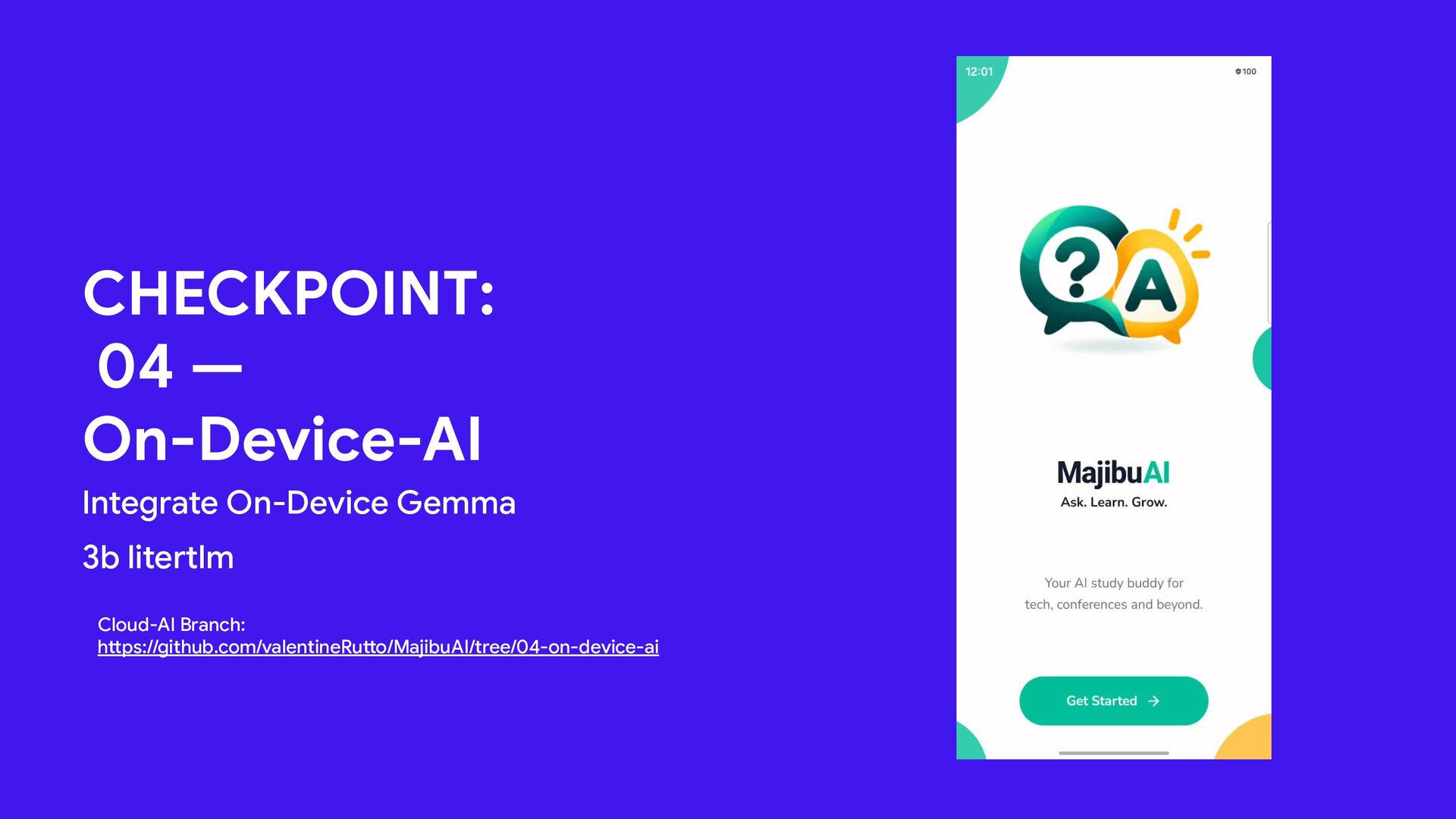
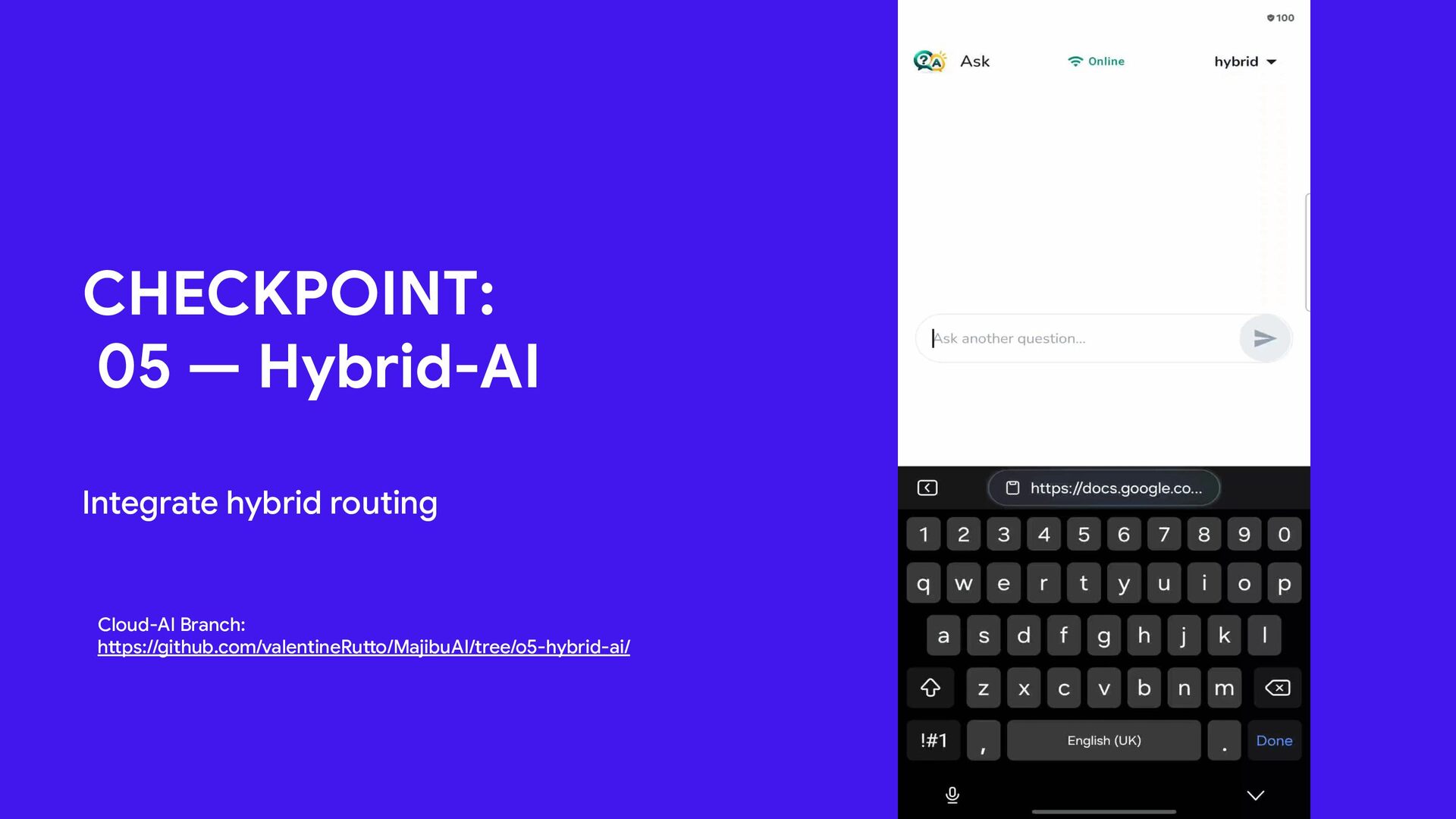
  22. CHECKPOINT: 04 — On-Device-AI Integrate On-Device Gemma 3b litertlm Cloud-AI

    Branch: https://github.com/valentineRutto/MajibuAI/tree/04-on-device-ai 6
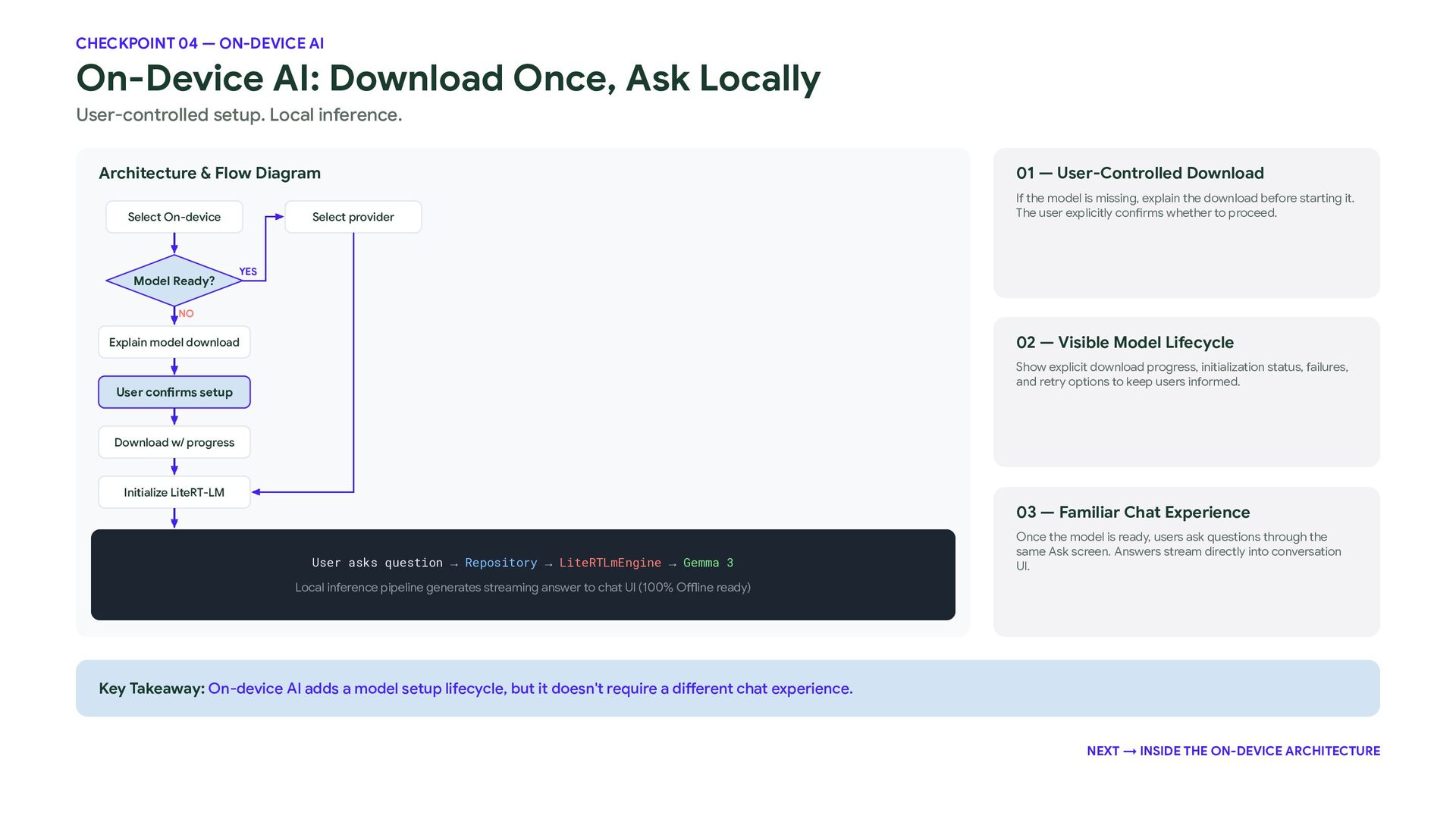
  23. CHECKPOINT 04 — ON-DEVICE AI On-Device AI: Download Once, Ask

    Locally User-controlled setup. Local inference. Architecture & Flow Diagram Select On-device Model Ready? Select provider 01 — User-Controlled Download If the model is missing, explain the download before starting it. The user explicitly confirms whether to proceed. YES NO 02 — Visible Model Lifecycle Explain model download Show explicit download progress, initialization status, failures, and retry options to keep users informed. User confirms setup Download w/ progress Initialize LiteRT-LM 03 — Familiar Chat Experience User asks question → Repository → LiteRTLmEngine → Gemma 3 Once the model is ready, users ask questions through the same Ask screen. Answers stream directly into conversation UI. Local inference pipeline generates streaming answer to chat UI (100% Offline ready) Key Takeaway: On-device AI adds a model setup lifecycle, but it doesn't require a different chat experience. NEXT → INSIDE THE ON-DEVICE ARCHITECTURE
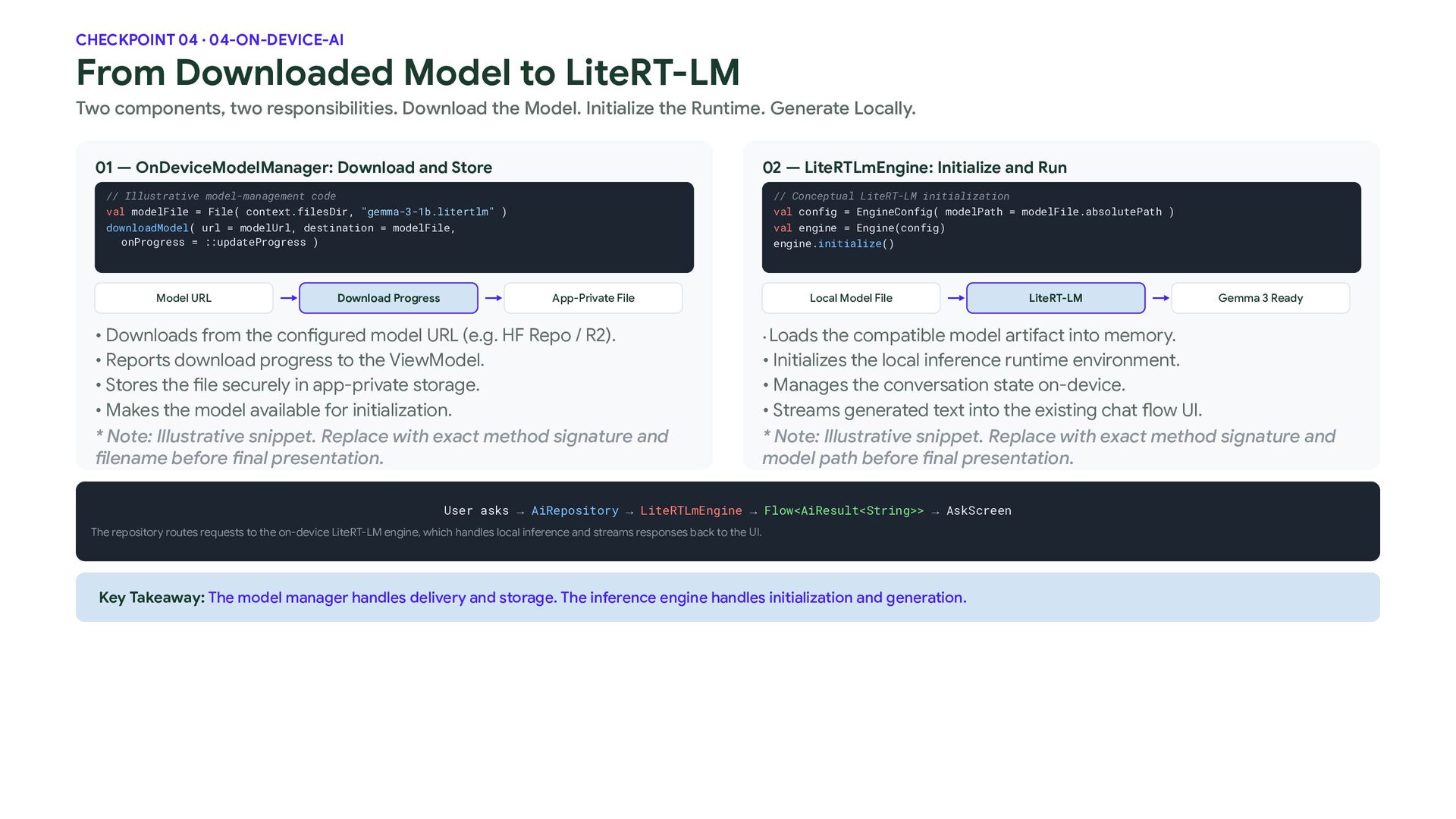
  24. CHECKPOINT 04 · 04-ON-DEVICE-AI From Downloaded Model to LiteRT-LM Two

    components, two responsibilities. Download the Model. Initialize the Runtime. Generate Locally. 01 — OnDeviceModelManager: Download and Store 02 — LiteRTLmEngine: Initialize and Run // Illustrative model-management code val modelFile = File( context.filesDir, "gemma-3-1b.litertlm" ) downloadModel( url = modelUrl, destination = modelFile, onProgress = ::updateProgress ) Model URL Download Progress // Conceptual LiteRT-LM initialization val config = EngineConfig( modelPath = modelFile.absolutePath ) val engine = Engine(config) engine.initialize() App-Private File • Downloads from the configured model URL (e.g. HF Repo / R2). • Reports download progress to the ViewModel. • Stores the file securely in app-private storage. • Makes the model available for initialization. * Note: Illustrative snippet. Replace with exact method signature and filename before final presentation. Local Model File LiteRT-LM Gemma 3 Ready Loads the compatible model artifact into memory. • Initializes the local inference runtime environment. • Manages the conversation state on-device. • Streams generated text into the existing chat flow UI. * Note: Illustrative snippet. Replace with exact method signature and model path before final presentation. • User asks → AiRepository → LiteRTLmEngine → Flow<AiResult<String>> → AskScreen The repository routes requests to the on-device LiteRT-LM engine, which handles local inference and streams responses back to the UI. Key Takeaway: The model manager handles delivery and storage. The inference engine handles initialization and generation.
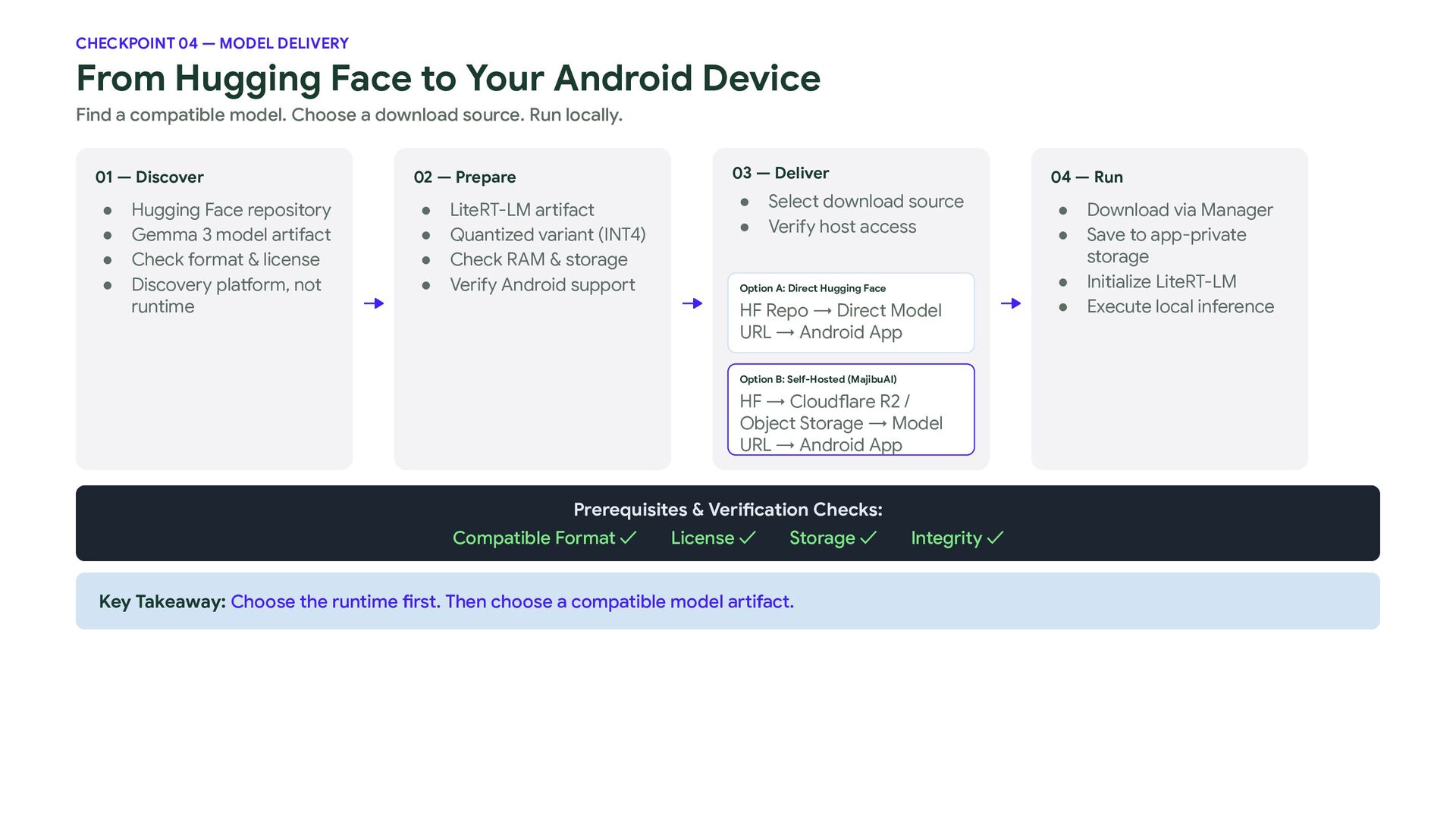
  25. CHECKPOINT 04 — MODEL DELIVERY From Hugging Face to Your

    Android Device Find a compatible model. Choose a download source. Run locally. 01 — Discover • • • • Hugging Face repository Gemma 3 model artifact Check format & license Discovery platform, not runtime 03 — Deliver 02 — Prepare • • • • LiteRT-LM artifact Quantized variant (INT4) Check RAM & storage Verify Android support • • 04 — Run Select download source Verify host access Option A: Direct Hugging Face HF Repo → Direct Model URL → Android App Option B: Self-Hosted (MajibuAI) HF → Cloudflare R2 / Object Storage → Model URL → Android App Prerequisites & Verification Checks: Compatible Format ✓ License ✓ Storage ✓ Key Takeaway: Choose the runtime first. Then choose a compatible model artifact. Integrity ✓ • • • • Download via Manager Save to app-private storage Initialize LiteRT-LM Execute local inference
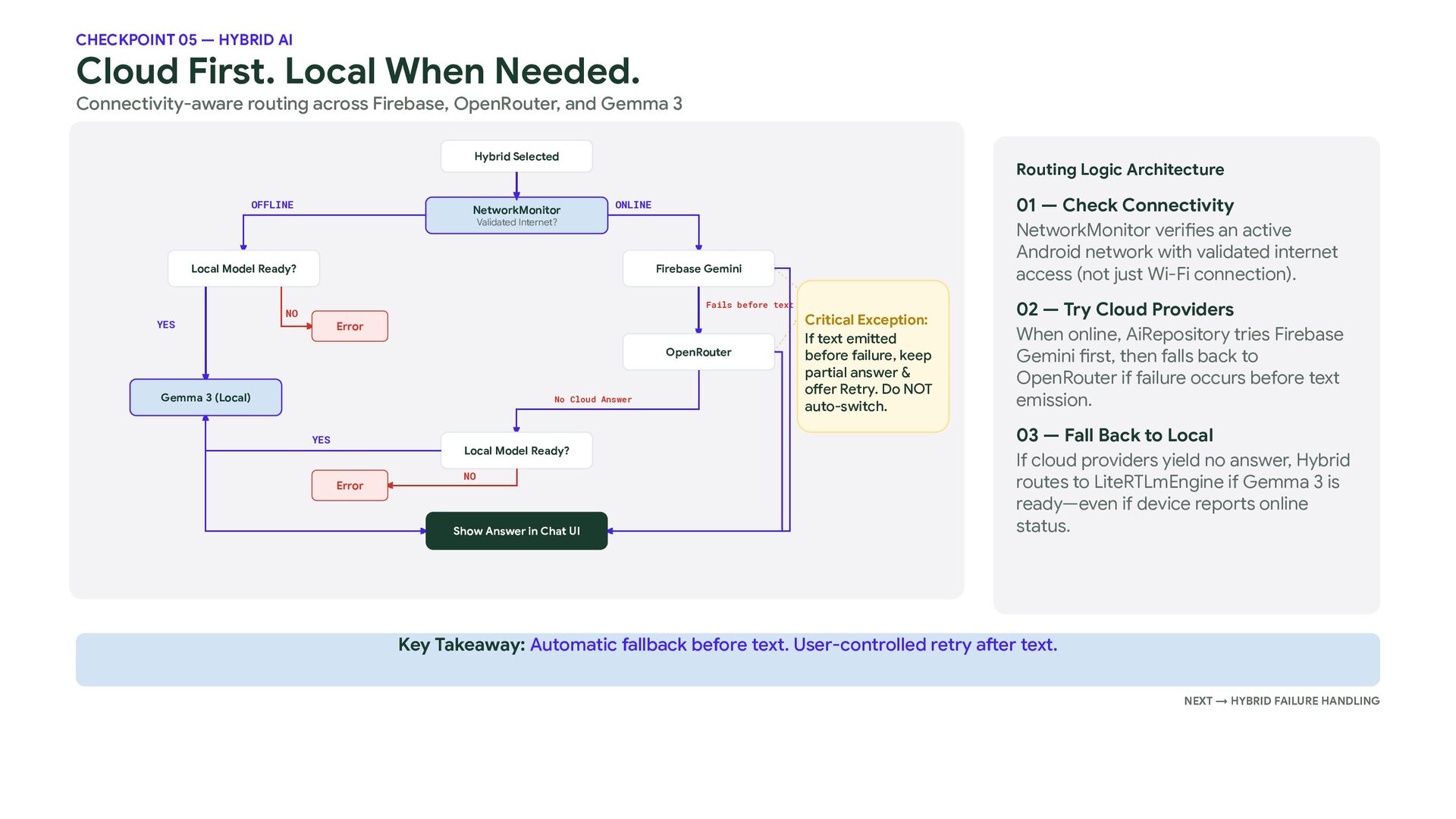
  26. CHECKPOINT 05 — HYBRID AI Cloud First. Local When Needed.

    Connectivity-aware routing across Firebase, OpenRouter, and Gemma 3 Hybrid Selected OFFLINE NetworkMonitor Routing Logic Architecture 01 — Check Connectivity NetworkMonitor verifies an active Android network with validated internet access (not just Wi-Fi connection). ONLINE Validated Internet? Local Model Ready? YES Firebase Gemini Fails before text NO Error OpenRouter Gemma 3 (Local) No Cloud Answer YES Local Model Ready? Error NO Show Answer in Chat UI Critical Exception: If text emitted before failure, keep partial answer & offer Retry. Do NOT auto-switch. 02 — Try Cloud Providers When online, AiRepository tries Firebase Gemini first, then falls back to OpenRouter if failure occurs before text emission. 03 — Fall Back to Local If cloud providers yield no answer, Hybrid routes to LiteRTLmEngine if Gemma 3 is ready—even if device reports online status. Key Takeaway: Automatic fallback before text. User-controlled retry after text. NEXT → HYBRID FAILURE HANDLING
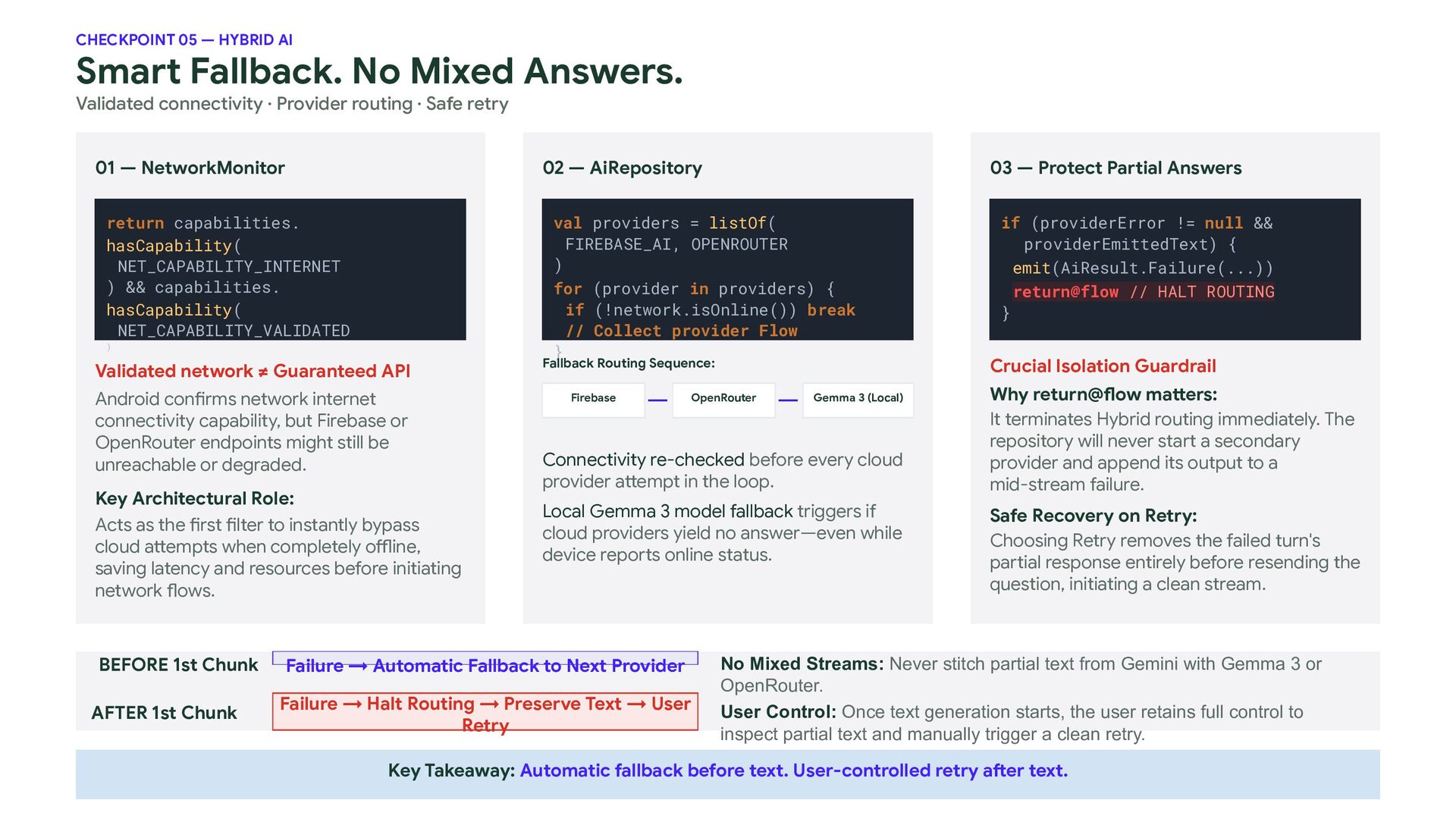
  27. CHECKPOINT 05 — HYBRID AI Smart Fallback. No Mixed Answers.

    Validated connectivity · Provider routing · Safe retry 01 — NetworkMonitor 02 — AiRepository return capabilities. hasCapability( NET_CAPABILITY_INTERNET ) && capabilities. hasCapability( NET_CAPABILITY_VALIDATED ) Validated network ≠ Guaranteed API Android confirms network internet connectivity capability, but Firebase or OpenRouter endpoints might still be unreachable or degraded. Key Architectural Role: Acts as the first filter to instantly bypass cloud attempts when completely offline, saving latency and resources before initiating network flows. 03 — Protect Partial Answers val providers = listOf( FIREBASE_AI, OPENROUTER ) for (provider in providers) { if (!network.isOnline()) break // Collect provider Flow } Fallback Routing Sequence: Firebase OpenRouter Gemma 3 (Local) Connectivity re-checked before every cloud provider attempt in the loop. Local Gemma 3 model fallback triggers if cloud providers yield no answer—even while device reports online status. BEFORE 1st Chunk Failure → Automatic Fallback to Next Provider AFTER 1st Chunk Failure → Halt Routing → Preserve Text → User Retry if (providerError != null && providerEmittedText) { emit(AiResult.Failure(...)) return@flow // HALT ROUTING } Crucial Isolation Guardrail Why return@flow matters: It terminates Hybrid routing immediately. The repository will never start a secondary provider and append its output to a mid-stream failure. Safe Recovery on Retry: Choosing Retry removes the failed turn's partial response entirely before resending the question, initiating a clean stream. No Mixed Streams: Never stitch partial text from Gemini with Gemma 3 or OpenRouter. User Control: Once text generation starts, the user retains full control to inspect partial text and manually trigger a clean retry. Key Takeaway: Automatic fallback before text. User-controlled retry after text.
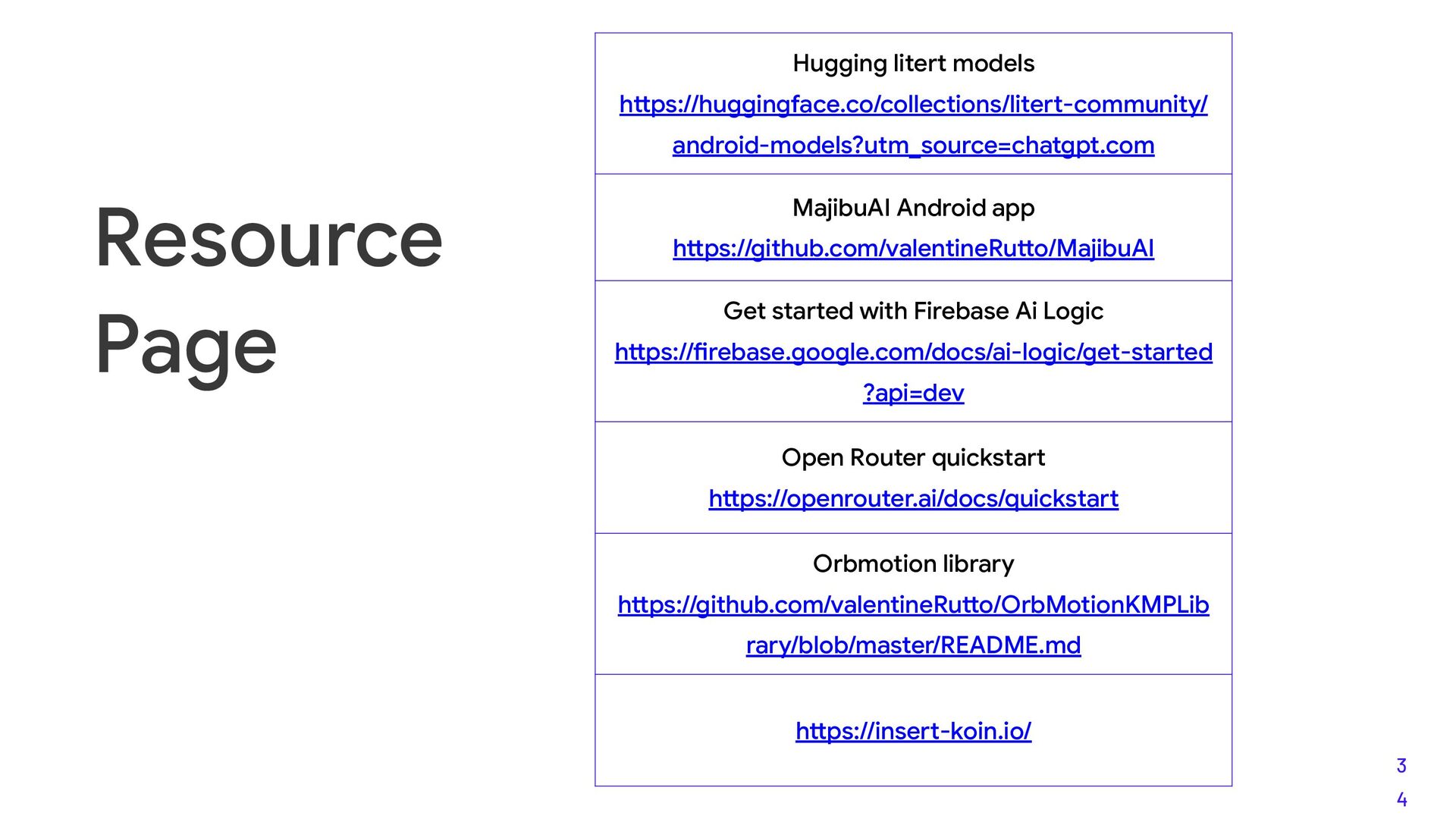
  28. Hugging litert models https://huggingface.co/collections/litert-community/ android-models?utm_source=chatgpt.com Resource Page MajibuAI Android app

    https://github.com/valentineRutto/MajibuAI Get started with Firebase Ai Logic https://firebase.google.com/docs/ai-logic/get-started ?api=dev Open Router quickstart https://openrouter.ai/docs/quickstart Orbmotion library https://github.com/valentineRutto/OrbMotionKMPLib rary/blob/master/README.md https://insert-koin.io/ 3 4