Share
Embed
Web Development with Python and Django (2014)
Slide deck from the CodeMash 2014 edition of the "Web Development with Python and Django" tutorial by Mike Pirnat and David Stanek, featuring the "CodeSmash" conference website sample application.

Mike Pirnat
January 09, 2014
Transcript
227 slides
-
Web Development with Python and Django Mike Pirnat • David
Stanek • CodeMash 2014 -
Today •Iteratively build a full-featured site •Background for each feature
•Implement a feature •Review our example solution • Keep yours? git show tag • Follow directly? git reset --hard tag -
Django! •A high-level Python web framework •Encourages rapid development and
clean, pragmatic design •“For perfectionists with deadlines” •Focus on automation and DRY •Widely supported, many deployment options -
Django •ORM •Automatic admin interface •Regex-based URL design •Templating system
•Cache infrastructure •Internationalization •Command-line job framework -
Python is... •Dynamic •Interpreted •Duck-Typed •Object-Oriented •Functional •Strongly-Namespaced •Exceptional •Comfortable
•Readable •Opinionated •Batteries Included -
Python is... •Dynamic •Interpreted •Duck-Typed •Object-Oriented •Functional •Strongly-Namespaced •Exceptional •Comfortable
•Readable •Opinionated •Batteries Included •Community -
Interactive Shell $ python >>> print "Hello, world!" Hello, world!
>>> $ python3 >>> print("Hello, world!") Hello, world! >>> -
String Operations "foo" + "bar" "foo"[0] "foo"[:1] "foo".upper() "{0}: {1}".format("foo",
"bar") "{foo}: {bar}".format(foo=42, bar=1138) len("foo") -
Lists, Tuples, and Sets ['a', 'b', 'c'] ('Rush', '2112', 5.0)
set(['a', 'b', 'c']) -
Sequence Operations [...][0] [...][-1] [...][:1] # same as [...][0:1] [...].append(4)
[...].extend([4, 5, 6]) [...].pop() len([...]) -
Assignment & Comparison foo = 'bar' foo == 'baz' foo
!= 'baz' foo is None foo is not None -
Flow Control for item in sequence: if expression: continue if
expression: break -
Functions def foo(): return 42 def foo(bar): return bar def
foo(bar, baz='quux'): return (bar, baz) def foo(*args, **kwargs): return (args, kwargs) -
Docstrings "Modules can have docstrings." class Foo(object): "Classes can have
docstrings too." def __init__(self, bar): "So can functions/methods." -
Introspection >>> dir(Foo) ['__class__', '__delattr__', '__dict__', '__doc__', '__format__', '__getattribute__', '__hash__',
'__init__', '__module__', '__new__', '__reduce__', '__reduce_ex__', '__repr__', '__setattr__', '__sizeof__', '__str__', '__subclasshook__', '__weakref__'] -
Introspection >>> help(Foo) Help on class Foo in module __main__:
class Foo(__builtin__.object) | Classes can have docstrings too. | | Methods defined here: | | __init__(self, bar) | So can functions/methods. | ... -------------------------------------------------------- | Data descriptors defined here: -
And more... •Generators •Generator Expressions •List Comprehensions •Set Comprehensions •Dictionary
Comprehensions •Properties •Context Managers •Class Decorators •Abstract Base Classes •Metaclasses -
Style: PEP-8 •No tabs •Four-space indents •Don’t mix tabs &
spaces •lower_case_methods •CamelCaseClasses •Line breaks around 78-79 chars •Some other OCD- pleasing ideas :-) -
Environment Setup •Mac or Linux? You’ve already got Python! •You’ll
also need Git if you don’t have it; download it from http://git-scm.com or use your package manager to install it •Windows? Well, then... -
Windows Setup •Portable Python and Portable Git •Won’t modify your
system at all •Can be easily uninstalled •If you want to permanently install Python and Git you can easily do that too -
Portable Python 2.7 •Download http://bit.ly/13eyQGn http://ftp.osuosl.org/pub/portablepython/v2.7/PortablePython_2.7.3.1.exe •Run the .EXE •Install
into c:\django-precompiler •Download won't work? ftp://ftp.codemash.org/webdev_with_django -
Portable Git •Download http://bit.ly/X4dGps http://msysgit.googlecode.com/files/Git-1.8.0-preview20121022.exe •Create a new folder •Extract
archive into a new folder: c:\django-precompiler\Portable Git 1.8.0-preview20121022 •Download won't work? ftp://ftp.codemash.org/webdev_with_django -
Fixing the Path •Download: https://gist.github.com/4399659 •Save it as a file
named run-cmd.bat •Run it •Download won't work? ftp://ftp.codemash.org/webdev_with_django -
Installing Packages •Installed packages go into a site-packages directory in
your Python lib •That’s the “system Python” by default •But different programs may need different versions of packages... •So we have virtual environments! -
Virtual Environments •virtualenv •Creates an isolated Python environment with its
own site-packages •Install whatever you want without fouling anything else up -
Python 2 or 3? •The future of Python is Python
3 •Django 1.6 fully supports Python 3 •Python 2.7 is still widely used for production applications -
Activate the Virtual Environment # Mac/Linux/etc... $ virtualenv django-precompiler $
cd django-precompiler $ source bin/activate # Windows > python virtualenv django-precompiler > cd django-precompiler > Scripts/activate.bat -
Framework Middleware URLs Views Models Templates DB Tags & Filters
Request Response -
CODE SMASH! •Code Smash is a fictional software development conference
for people who need to punch out awesome code •It needs a website! •We’re going to build one -
Starting a Project # Normally... $ git init src #
Today... $ git clone https://github.com/mpirnat/django- tutorial.git src $ cd src $ git reset --hard ex00 -
Starting a Project # Mac/Linux/etc. $ django-admin.py startproject codesmash ./
$ python manage.py runserver # Windows > python Scripts/django-admin.py startproject codesmash > python manage.py runserver -
Templates •Make a templates directory under src: $ mkdir templates
•Update settings to tell Django where to find the templates •Put an HTML file in the templates directory Framework Middleware URLs Views Models Tem- plates DB Tags & Filters -
URLs •Map URLs in requests to code that can be
executed •Regular expressions! •Subsections of your site can have their own urls.py modules (more on this later) Framework Middleware URLs Views Models Tem- plates DB Tags & Filters -
URLs # codesmash/urls.py from django.conf.urls import patterns, include, url urlpatterns
= patterns('', url(r'^$', 'codesmash.views.home', name='home'), ) Framework Middleware URLs Views Models Tem- plates DB Tags & Filters -
Views •Code that handles requests •Other frameworks often call these
“controllers” •Basically a function that: • gets a request passed to it • returns text or a response Framework Middleware URLs Views Models Tem- plates DB Tags & Filters -
# codesmash/views.py from django.http import HttpResponse def my_view(request): return HttpResponse("Hello,
world!") Views Framework Middleware URLs Views Models Tem- plates DB Tags & Filters -
# codesmash/views.py from django.http import HttpResponse from django.template import Context,
loader def my_view(request): template = loader.get_template('template.html') context = Context({ ... }) return HttpResponse(template.render(context)) Views Framework Middleware URLs Views Models Tem- plates DB Tags & Filters -
# codesmash/views.py from django.shortcuts import render def my_view(request): return render(request,
'template.html', {...}) Views Framework Middleware URLs Views Models Tem- plates DB Tags & Filters -
Exercise 1 •Create a template for the homepage •Create a
view that will respond with the rendered template •Connect the / URL to the view Framework Middleware URLs Views Models Tem- plates DB Tags & Filters -
Let’s see the code! git show ex01 (or) git reset
--hard ex01 -
Apps •Django believes strongly in separating chunks of a site
into apps that can be reused •Ecosystem of reusable apps available •Create an app; from the src directory: $ django-admin.py startapp myapp > python Scripts/django-admin.py startapp myapp •Add it to INSTALLED_APPS in settings.py Framework Middleware URLs Views Models Tem- plates DB Tags & Filters -
New App Contents src/ codesmash/ myapp/ __init__.py admin.py models.py tests.py
<-- you should write them! views.py urls.py <-- you'll want to make one of these forms.py <-- one of these too templates/ Framework Middleware URLs Views Models Tem- plates DB Tags & Filters -
App URLs # myapp/views.py from django.conf.urls import patterns, include, url
urlpatterns = patterns('myapp.views', url(r'^$', 'my_view', name='my_form'), ... ) Framework Middleware URLs Views Models Tem- plates DB Tags & Filters -
Connecting App URLs # codesmash/urls.py # Use include to connect
a regex to an app's urls.py # Use namespace to keep app URL names nicely isolated urlpatterns = patterns('', (r'^myapp/', include('myapp.urls', namespace='myapp')), ... ) Framework Middleware URLs Views Models Tem- plates DB Tags & Filters -
Form Validation •Why? •Classes for each kind of input field
•Form class to gather input fields •View method uses the form class to validate inputs Framework Middleware URLs Views Models Tem- plates DB Tags & Filters -
A Very Simple Form # myapp/forms.py from django import forms
class MyForm(forms.Form): name = forms.CharField(max_length=30) email = forms.EmailField() Framework Middleware URLs Views Models Tem- plates DB Tags & Filters -
Using a Form in a View # myapp/views.py from myapp.forms
import MyForm def my_view(request): form = MyForm(request.POST or None) if request.method == "POST" and form.is_valid(): name = form.cleaned_data['name'] email = form.cleaned_data['email'] # do something great with that data return render(request, 'myapp/myform.html', { 'form': form }) Framework Middleware URLs Views Models Tem- plates DB Tags & Filters -
Django Template Language •Call a function or do logic: {%
... %} •Variable substitution: {{ bar }} •Filters: {{ foo|bar }} Framework Middleware URLs Views Models Tem- plates DB Tags & Filters -
Forms in Templates <html> ... <body> <form action="{% url 'myapp:my_form'
%}" method="post"> {% csrf_token %} {{ form.as_p }} <button type="submit">Go!</button> </form> </body> </html> Framework Middleware URLs Views Models Tem- plates DB Tags & Filters -
Sending Mail •Add an EMAIL_BACKEND in settings.py EMAIL_BACKEND = \
'django.core.mail.backends.console.EmailBackend' •Import and use from django.core.mail import send_mail send_mail('subject', 'message', 'sender', ['recipient', ...]) Framework Middleware URLs Views Models Tem- plates DB Tags & Filters -
Exercise 2 •Create a contact app •Create a contact form
with subject, message, and sender’s email address •Create view to display and process the form and “send” the message •Connect the view to “/contact” URL Framework Middleware URLs Views Models Tem- plates DB Tags & Filters -
Let’s see the code! git show ex02 (or) git reset
--hard ex02 -
Redirecting on Success •Make the POST action redirect with a
GET on successful processing •Avoid “resubmit form” issues when reloading or returning to success page (browser back button) Framework Middleware URLs Views Models Tem- plates DB Tags & Filters -
Redirecting from django.shortcuts import redirect def my_view(request): ... return redirect('namespace:name')
Framework Middleware URLs Views Models Tem- plates DB Tags & Filters -
Exercise 3 •Make a separate contact form URL and template
for displaying a success message •Update the POST handler to redirect to the success page Framework Middleware URLs Views Models Tem- plates DB Tags & Filters -
Let’s see the code! git show ex03 (or) git reset
--hard ex03 -
Class-Based Views • Separate methods for separate HTTP methods instead
of conditional logic • Ease development for common cases • Enables advanced designs • Optional; our example code today doesn’t use them -
Class-Based Views # In views.py... from django.views.generic.base import View class
MyView(View): def get(self, request, *args, **kwargs): ... def post(self, request, *args, **kwargs): ... -
Class-Based Views # In urls.py... from django.conf.urls import patterns from
myapp.views import MyView urlpatterns = patterns('', (r'^my-path/', MyView.as_view()), ) -
Template Inheritance •Define a base template for the site •Other
templates extend the base template •Blocks allow child templates to inject content into areas of the parent template Framework Middleware URLs Views Models Tem- plates DB Tags & Filters -
<!DOCTYPE html> <html> <head> <meta name="..." content="..."> <title>{% block title
%}My Site{% endblock %}</ title> </head> <body> {% block content %} {% endblock %} </body> </html> base.html Framework Middleware URLs Views Models Tem- plates DB Tags & Filters -
{% extends "base.html" %} {% block title %}Hello, World{% endblock
%} {% block content %} <h1>Hey! Great!</h1> <p>Sure is some lovely content right here.</p> <p>Yup.</p> {% endblock %} helloworld.html Framework Middleware URLs Views Models Tem- plates DB Tags & Filters -
Exercise 4 •Refactor those templates! •Make a base.html with appropriate
blocks •Make other templates extend it and fill in the blocks Framework Middleware URLs Views Models Tem- plates DB Tags & Filters -
Let’s see the code! git show ex04 (or) git reset
--hard ex04 -
No Need to Reinvent •Django comes with a robust user
framework: django.contrib.auth •Registration •Login/Logout •Password Recovery •Etc. Framework Middleware URLs Views Models Tem- plates DB Tags & Filters -
Database Settings # codesmash/settings.py import os BASE_DIR = os.path.dirname(os.path.dirname(__file__)) ...
DATABASES = { 'default': { 'ENGINE': 'django.db.backends.sqlite3', 'NAME': os.path.join( BASE_DIR, "database.db") } } Framework Middleware URLs Views Models Tem- plates DB Tags & Filters -
Create the Database $ python manage.py syncdb Framework Middleware URLs
Views Models Tem- plates DB Tags & Filters -
Extend the UserCreationForm from django.contrib.auth.forms import UserCreationForm class RegistrationForm(UserCreationForm): email
= forms.EmailField(required=True) class Meta(UserCreationForm.Meta): fields = ("username", "email") Framework Middleware URLs Views Models Tem- plates DB Tags & Filters -
Register the User form = RegistrationForm(request.POST) if form.is_valid(): form.save() Framework
Middleware URLs Views Models Tem- plates DB Tags & Filters -
Login After Registration from django.contrib.auth import authenticate, login user =
authenticate( username=form.cleaned_data['username'], password=form.cleaned_data['password1']) login(request, user) Framework Middleware URLs Views Models Tem- plates DB Tags & Filters -
The User Object •Always have one in every request •Always
available to templates •Can be anonymous or populated depending on whether the user has authenticated Framework Middleware URLs Views Models Tem- plates DB Tags & Filters -
Exercise 5 • Start a new app called “accounts” •
Set up a UserCreationForm subclass in accounts.forms with username and email • Set up a view that displays the form on GET • Make the view handle POSTs – check the form, register the user, log in, and redirect to a user profile page • Profile page should just display username and email • Set up templates for the form and profile page in templates/accounts/ • Wire up the URLs (be sure to give them names) • Link to registration from the header Framework Middleware URLs Views Models Tem- plates DB Tags & Filters -
Let’s see the code! git show ex05 (or) git reset
--hard ex05 -
More Reusable Goodness •django.contrib.auth provides URLs and views for login
and logout •Will want to provide our own templates Framework Middleware URLs Views Models Tem- plates DB Tags & Filters -
URLs urlpatterns = patterns('', ... (r'auth/', include('django.contrib.auth.urls', namespace='auth')), ... )
Framework Middleware URLs Views Models Tem- plates DB Tags & Filters -
Login/Logout Links {% url 'auth:login' %} {% url 'auth:logout' %}
Framework Middleware URLs Views Models Tem- plates DB Tags & Filters -
Differentiate Logged In/Out {% if user.is_authenticated %} ... {% else
%} ... {% endif %} Framework Middleware URLs Views Models Tem- plates DB Tags & Filters -
Exercise 6 •Enable auth URLs •Add login and logout links
to the site header •Show login when user is logged out, logout when user is logged in •Show username in header when user is logged in •Link to user profile when user is logged in •Customize login and logout pages Framework Middleware URLs Views Models Tem- plates DB Tags & Filters -
Let’s see the code! git show ex06 (or) git reset
--hard ex06 -
Django Admin •Free CRUD! •Navigate database data by model •Make
changes •Highly customizable Framework Middleware URLs Views Models Tem- plates DB Tags & Filters -
Enabling the Admin App •Comes enabled in Django 1.6! •Admin
lines in INSTALLED_APPS in settings.py •Admin lines from the project’s urls.py •Disable in production ;-) Framework Middleware URLs Views Models Tem- plates DB Tags & Filters -
django.contrib.flatpages •Store simple “flat” HTML pages in the database •Has
a URL, title, and content •Useful for one-off pages with no logic that don’t deserve full apps •Add/edit content via the admin app •Let’s enable it now! Framework Middleware URLs Views Models Tem- plates DB Tags & Filters -
settings.py •Add to INSTALLED_APPS: django.contrib.sites django.contrib.flatpages •Add to MIDDLEWARE_CLASSES: django.contrib.flatpages.middleware.FlatpageFallback
Middleware Framework Middleware URLs Views Models Tem- plates DB Tags & Filters -
urls.py •Change root URL to use flatpage: url(r'^$', 'django.contrib.flatpages.views.flatpage', {'url':
'/' }, name='home') Framework Middleware URLs Views Models Tem- plates DB Tags & Filters -
Make a Flatpage Template •Put it in templates/flatpages/default.html •In the
title block, add: {{ flatpage.title }} •In the content block, add: {{ flatpage.content }} Framework Middleware URLs Views Models Tem- plates DB Tags & Filters -
Let’s see the code! git show ex07 (or) git reset
--hard ex07 -
Models •Model classes are the nouns of the system •Used
to create database tables •Integrated with the ORM to interact with the database •Need to `python manage.py syncdb` when adding a new model class Framework Middleware URLs Views Models Tem- plates DB Tags & Filters -
Models from django.db import models class Thingy(models.Model): name = models.CharField(max_length=255)
awesome = models.BooleanField(default=True) description = models.TextField(blank=True) def __str__(self): return self.name def __unicode__(self): # note: not in Python 3 return unicode(str(self)) Framework Middleware URLs Views Models Tem- plates DB Tags & Filters -
Exercise 8 •Create a “talks” app to manage talks •Create
a Talk model; it should have: • title - up to 255 characters • approved - true or false, default false • recording_release - true or false, default false • abstract - text describing the talk • outline - text outlining the talk • notes - text about the talk that won't be public Framework Middleware URLs Views Models Tem- plates DB Tags & Filters -
Let’s see the code! git show ex08 (or) git reset
--hard ex08 -
Wiring the Model for Admin Access •Each app manages its
own admin wiring •Goes into an admin.py within the app Framework Middleware URLs Views Models Tem- plates DB Tags & Filters -
admin.py from django.contrib import admin from myapp.models import Thingy admin.site.register(Thingy)
Framework Middleware URLs Views Models Tem- plates DB Tags & Filters -
Exercise 9 •Create an admin.py for the talks app •Register
the Talk model •Start up the admin app and verify that Talks appears Framework Middleware URLs Views Models Tem- plates DB Tags & Filters -
Let’s see the code! git show ex09 (or) git reset
--hard ex09 -
Pluralize All the Thingys! class Thingy(models.Model): ... class Meta: verbose_name_plural
= "Thingies" Framework Middleware URLs Views Models Tem- plates DB Tags & Filters -
Relations •Foreign key (one-to-many) •Many-to-many Framework Middleware URLs Views Models
Tem- plates DB Tags & Filters -
Foreign Key Relations class Thingy(models.Model): ... class Gadget(models.Model): ... class
Gizmo(models.Model): thingy = models.ForeignKey(Thingy) gadget = models.ForeignKey(Gadget, blank=True, null=True) Framework Middleware URLs Views Models Tem- plates DB Tags & Filters -
Many-to-Many Relations class Thingy(models.Model): ... class Gizmo(models.Model): thingies = models.ManyToManyField(Thingy)
Framework Middleware URLs Views Models Tem- plates DB Tags & Filters -
Saving a Model Object thingy = Thingy() thingy.size = 'big'
thingy.save() gadget = Gadget(thingy=thingy) gadget.save() gizmo = Gizmo(thingies=[thingy]) gizmo.save() Framework Middleware URLs Views Models Tem- plates DB Tags & Filters -
Exercise 10 • Create new model classes for foreign keys:
• Category • Talk Type • Audience Skill Level • Location • Time Slot • All should have a name, up to 255 characters • All should have a __str__; Time Slot’s should use strftime (see strftime.net) • Location and Time Slot should be optional • Do a many-to-many on django.contrib.auth.models. User for talk speakers Framework Middleware URLs Views Models Tem- plates DB Tags & Filters -
Let’s see the code! git show ex10 (or) git reset
--hard ex10 -
Changing Existing Models •Adding/removing/changing fields in a model requires a
schema migration •Django doesn’t support it out of the box (coming in 1.7!) •Pro mode: use South Framework Middleware URLs Views Models Tem- plates DB Tags & Filters -
Cheesy Precompiler Way $ python manage.py dbshell > DROP TABLE
talks; $ python manage.py syncdb Framework Middleware URLs Views Models Tem- plates DB Tags & Filters -
Querying the Model all_thingies = Thingy.objects.all() single_thingy = Thingy.objects.get(id=1) big_thingies
= Thingy.objects.filter(size='big') ordered_thingies = Thingy.objects.all().order_by('size') Framework Middleware URLs Views Models Tem- plates DB Tags & Filters -
Relations in Templates •When a model object retrieved from the
ORM has relations, you get a relation manager and not an actual iterable collection •Need to call .all() (or get or filter) on it before you get back the related model objects Framework Middleware URLs Views Models Tem- plates DB Tags & Filters -
Relations in Templates {% for gizmo in gizmos %} {%
for thingy in gizmo.thingies.all %} ... {% endfor %} {% endfor %} Framework Middleware URLs Views Models Tem- plates DB Tags & Filters -
Exercise 11 •Create a view and template to display a
list of all talks, ordered by title •Be sure to display all of the talk speakers Framework Middleware URLs Views Models Tem- plates DB Tags & Filters -
Let’s see the code! git show ex11 (or) git reset
--hard ex11 -
Optimizing Queries •What we just did will make lots of
extra database queries (because of the loops) •Go read up on: • select_related: does a join in SQL • prefetch_related: queries in advance, caches results, allows “join” in Python -
Model Managers •A place to encapsulate data queries •Extend to
provide extra queries with developer-friendly interfaces Framework Middleware URLs Views Models Tem- plates DB Tags & Filters -
Model Managers class ThingyManager(models.Manager): def big_ones(self): return self.get_query_set().filter(size='big') def of_color(self,
color): return self.get_query_set().filter(color=color) class Thingy(models.Model): objects = ThingyManager() Framework Middleware URLs Views Models Tem- plates DB Tags & Filters -
Using a Model Manager big_thingies = Thingy.objects.big_ones() green_thingies = Thingy.objects.of_color('green')
Framework Middleware URLs Views Models Tem- plates DB Tags & Filters -
Exercise 12 •Move the queries from the previous exercise into
a TalkManager •Change the queries to only get talks that have been approved Framework Middleware URLs Views Models Tem- plates DB Tags & Filters -
Let’s see the code! git show ex12 (or) git reset
--hard ex12 -
Generic Views •Many views fall into the same patterns •Django
provides generic view classes for things like showing a list of objects, creating an object, updating an object, deleting, etc. •Subclass and set properties or override certain methods to customize Framework Middleware URLs Views Models Tem- plates DB Tags & Filters -
Generic List Views from django.views.generic import ListView class ThingyListView(ListView): def
get_queryset(self): return Thingy.objects.all() Framework Middleware URLs Views Models Tem- plates DB Tags & Filters -
Generic List View URLs from django.conf.urls import patterns, include, url
from myapp.views import ThingyListView urlpatterns = patterns('myapp.views', ... url(r'^$', ThingyListView.as_view(), name='things') Framework Middleware URLs Views Models Tem- plates DB Tags & Filters -
Generic List View Templates •Generic List Views are automatically wired
to templates •Naming convention: lowercase model name + “_list.html”, eg: templates/myapp/thingy_list.html Framework Middleware URLs Views Models Tem- plates DB Tags & Filters -
Exercise 13 •Replace the view that lists talks with a
generic list view •Redo the URL mapping to use your new generic list view subclass Framework Middleware URLs Views Models Tem- plates DB Tags & Filters -
Let’s see the code! git show ex13 (or) git reset
--hard ex13 -
Can You Guess What’s Next? •Need to create new talks
•We could do it the hard way... • Make a Form • Make a View • Read validated data, put it into a model object • Save the model, redirect... Framework Middleware URLs Views Models Tem- plates DB Tags & Filters -
Model Forms from django import forms from myapp.models import Thingy
class ThingyForm(forms.ModelForm): class Meta: model = Thingy exclude = ('flavor', 'user') Framework Middleware URLs Views Models Tem- plates DB Tags & Filters -
Generic Create Views from django.views.generic.edit import CreateView from myapp.forms import
ThingyForm class ThingyCreationView(CreateView): model = Thingy form_class = ThingyForm success_url = "/accounts/profile" Framework Middleware URLs Views Models Tem- plates DB Tags & Filters -
Generic Create View Templates •Generic Create Views are automatically wired
to templates •Naming convention: lowercase model name + “_form.html”; eg: templates/myapp/thingy_form.html Framework Middleware URLs Views Models Tem- plates DB Tags & Filters -
Exercise 14 •Make a Generic Create View and ModelForm to
submit new talk proposals •Exclude approval status, location, and time slot (since the speaker doesn’t control them) •Be sure to connect a “create” URL to the new Generic Create View •Don’t forget a template! •Link to the create form from user profile •List user’s submitted talks on user profile Framework Middleware URLs Views Models Tem- plates DB Tags & Filters -
Let’s see the code! git show ex14 (or) git reset
--hard ex14 -
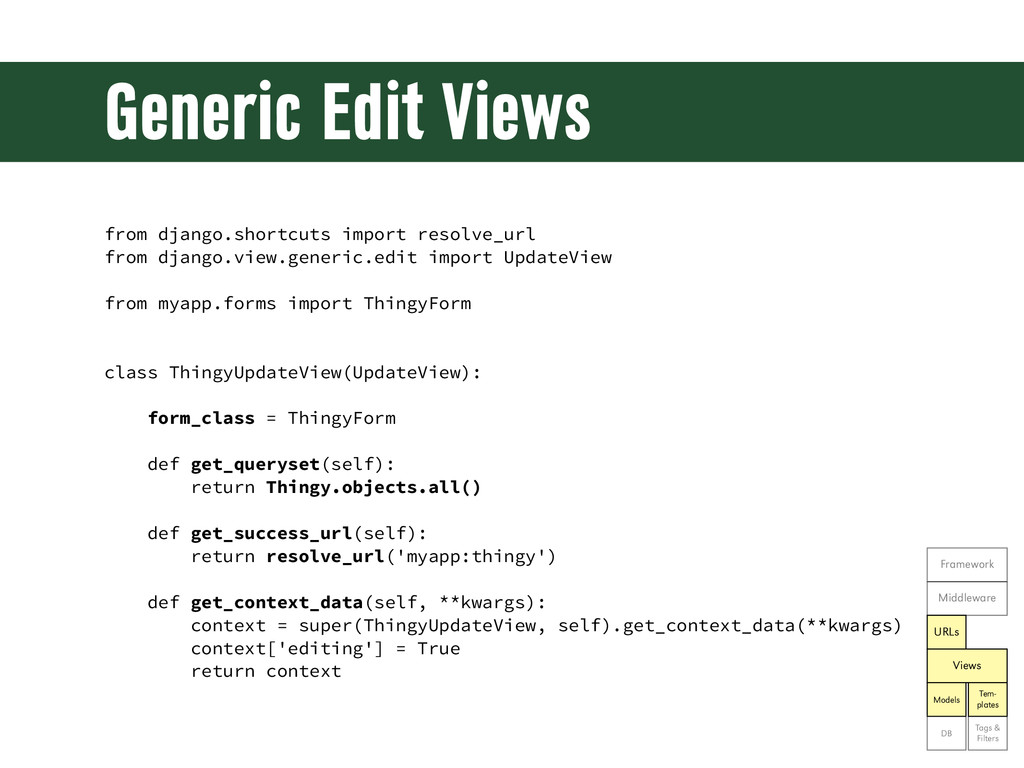
Generic Edit Views from django.shortcuts import resolve_url from django.view.generic.edit import
UpdateView from myapp.forms import ThingyForm class ThingyUpdateView(UpdateView): form_class = ThingyForm def get_queryset(self): return Thingy.objects.all() def get_success_url(self): return resolve_url('myapp:thingy') def get_context_data(self, **kwargs): context = super(ThingyUpdateView, self).get_context_data(**kwargs) context['editing'] = True return context Framework Middleware URLs Views Models Tem- plates DB Tags & Filters -
Generic Edit View URLs from django.conf.urls import patterns, include, url
from myapp.views import ThingyUpdateView urlpatterns = patterns('myapp.views', ... url(r'(?P<pk>[0-9]+)$', ThingyUpdateView.as_view(), name='update'), ) Framework Middleware URLs Views Models Tem- plates DB Tags & Filters -
Exercise 15 •Create a Generic Edit View for talks •Use
the ModelForm from the previous exercise •Be sure to wire it to a URL for editing (perhaps under /talks/edit/talk_id) •Change the existing template to indicate whether we’re editing or creating Framework Middleware URLs Views Models Tem- plates DB Tags & Filters -
Let’s see the code! git show ex15 (or) git reset
--hard ex15 -
Security in Views Framework Middleware URLs Views Models Tem- plates
DB Tags & Filters -
Security in Views •Can you spot a security problem in
the previous exercise? Framework Middleware URLs Views Models Tem- plates DB Tags & Filters -
Security in Views •Can you spot a security problem in
the previous exercise? •Anyone can edit any talk! Framework Middleware URLs Views Models Tem- plates DB Tags & Filters -
Security in Views •Can you spot a security problem in
the previous exercise? •Anyone can edit any talk! •Generic views can restrict access by limiting the queryset available in the view Framework Middleware URLs Views Models Tem- plates DB Tags & Filters -
Restricting Object Access # In models.py... class ThingyManager(models.Manager): def for_user(self,
user): return self.get_query_set().filter(user=user) # In views.py... class ThingyUpdateView(UpdateView): def get_queryset(self): return Thingy.objects.for_user( self.request.user) Framework Middleware URLs Views Models Tem- plates DB Tags & Filters -
Exercise 16 •Lock down the update view from the previous
exercise so that a talk may only be edited by its speakers •Bonus: can you think of another query we should also improve? Framework Middleware URLs Views Models Tem- plates DB Tags & Filters -
Let’s see the code! git show ex16 (or) git reset
--hard ex16 -
Read-Only Data in Generic Edit Views •ModelForm automatically builds form
elements for everything in the model •ModelForm excludes anything that it was told to exclude •Excluded fields are still available as attributes of a variable called “object” (the object being displayed/edited) Framework Middleware URLs Views Models Tem- plates DB Tags & Filters -
Read-Only Data in Generic Edit Views <form ...> {% csrf_token
%} {{ form.as_p }} <p><input type="text" id="flavor" value="{{ object.flavor }}" disabled ></p> <input type="submit" value="Save Changes"> </form> Framework Middleware URLs Views Models Tem- plates DB Tags & Filters -
Exercise 17 •Change the talk form from the previous exercises
•Show time slot, location, and approval status without allowing them to be modified Framework Middleware URLs Views Models Tem- plates DB Tags & Filters -
Let’s see the code! git show ex17 (or) git reset
--hard ex17 -
Requiring Login from django.contrib.auth.decorators import \ login_required @login_required def my_login_only_view(request):
return render(request, "myapp/my_view.html") Framework Middleware URLs Views Models Tem- plates DB Tags & Filters -
Requiring Login: Generic Views from django.conf.urls import patterns, include, url
from django.contrib.auth.decorators import \ login_required from myapp.views import ThingyListView urlpatterns = patterns('myapp.views', ... url(r'^$', login_required(ThingyListView.as_view()), name='things') -
Exercise 18 •Require login on the user profile view •Bonus:
can you think of another view that should require login? Framework Middleware URLs Views Models Tem- plates DB Tags & Filters -
Let’s see the code! git show ex18 (or) git reset
--hard ex18 -
Custom Template Filters •Django comes with many filters •You can
add your own •Function that accepts a value and returns a string Framework Middleware URLs Views Models Tem- plates DB Tags & Filters -
Defining a Custom Filter # In myapp/templatetags/myfilters.py... from django import
template from django.utils.html import format_html register = template.Library() @register.filter def my_filter(value): ... return format_html("...") Framework Middleware URLs Views Models Tem- plates DB Tags & Filters -
Using a Custom Filter {% load myfilters %} {% block
content %} <p>{{ foo|my_filter }}</p> <p>{{ bar }}</p> {% endblock %} Framework Middleware URLs Views Models Tem- plates DB Tags & Filters -
Exercise 19 •Create a custom filter function “boolean_icon” that will
show one image if a value is True and another if it’s False •Use the boolean_icon in the user’s profile to indicate whether a talk has been approved •Use static icons from the admin site: from django.contrib.admin.templatetags.admin_static import static icon_url = static('admin/img/icon-{0}.gif'.format( {True: 'yes', False: 'no', None: 'unknown'}[value]) Framework Middleware URLs Views Models Tem- plates DB Tags & Filters -
Let’s see the code! git show ex19 (or) git reset
--hard ex19 -
Bonus Exercises •Show talks by time slot and/or location •Blog;
include RSS feed •Sponsorship; include sponsor image upload and display •Enhance user profiles; include image upload, default to Gravatar •Room swap/ticket swap Framework Middleware URLs Views Models Tem- plates DB Tags & Filters -
Where to Deploy •Gondor.io •Heroku •Webfaction •Your favorite VPS (Rackspace,
AWS, etc.) •Google App Engine (if that’s what you’re into) -
Production Advice •Don’t enable admin in production •Don’t enable debug
in production •Don’t enable the Django Debug Toolbar in production •Don’t publish your production settings & secrets on github -
Credits •Image from Django Unchained by Sony Pictures http://www.nydailynews.com/entertainment/tv-movies/django-star-foxx-life- built-race-article-1.1220275
•Image of Django Reinhardt by ~Raimondsy http://raimondsy.deviantart.com/art/Django-Reinhardt-314914547 •Other images from ClipArt Etc. http://etc.usf.edu/clipart/ -
Contact Information Mike Pirnat American Greetings http://mike.pirnat.com @mpirnat David Stanek
Rackspace http://traceback.org @dstanek
 mpirnat
 barnbarn
 bicstone
 kishida
 dalinaum
 itsmedreamwalker
 kinakomoti321
 nextbeatdev
 akihisaikeda
 ternbusty
 sodainc
 mtsmfm
 keavy
 smashingmag
 kristinabergwall1
 honnibal
 thekraken
 marktimemedia
 tmiket
 jnunemaker
 tessaabrams
 schroneko
 danielanewman