Upgrade to Pro
— share decks privately, control downloads, hide ads and more …
Speaker Deck
Sign up for free
Menu
Search
Features
All features
Private URLs
Password Protection
Custom URLS
Scheduled publishing
Remove Branding
Restrict embedding
Deck Collections
Notes
Features
All features
Private URLs
Password Protection
Custom URLS
Scheduled publishing
Remove Branding
Restrict embedding
Deck Collections
Notes
Explore
Featured decks
Featured speakers
Programming
Technology
Storyboards
Explore
Featured decks
Featured speakers
Programming
Technology
Storyboards
Pricing
Search
Sign in
Sign up for free
/proc を見てみる
Search
Sponsored
·
SiteGround - Reliable hosting with speed, security, and support you can count on.
→
Osumi, Yusuke
June 20, 2020
Technology
400
1
Share
Embed
Copy iframe code
Copy JS code
Copy link
Start on current slide
/proc を見てみる
「新しいLinuxの教科書」を読む会 オンライン #2
での発表資料です。
https://linuxbook.connpass.com/event/178366/
Osumi, Yusuke
June 20, 2020
More Decks by Osumi, Yusuke
See All by Osumi, Yusuke
本の紹介の補足
ozuma
1
430
gitサービス3兄弟
ozuma
0
430
簡体字は楽
ozuma
0
510
ソフトウェアは固定資産
ozuma
0
450
ASCIIコードの小話
ozuma
0
480
今いるディレクトリを消すとどうなる
ozuma
1
440
名前付きパイプ FIFO
ozuma
0
590
文章、作文技法 リモートワーク
ozuma
1
950
CentOSの今後のリリース(簡易説明)
ozuma
0
430
Other Decks in Technology
See All in Technology
初海外で注意すべきこと12選!!!安全快適なre:invent生活にするために
yuuuuuuu168
1
170
QA4AI 2026-Oct 生成AI時代の品質保証
tokuty
1
880
Benchmarking Disaggregated Serving on vLLM + Dynamo with a Real Coding-Agent Workload
nttcom
1
190
Refining Active Record
shugo
0
160
Code for Security プロジェクト紹介 2026年10月
yu23ki14
0
110
エンタメ企業のM&Aを支えるデータ基盤 ― 統合から店舗のリアルタイム分析まで / Data Engineering Summit 2026
genda
0
190
AI × アーキテクト 第1・2章|生成AIの課題とアーキテクトの素養
daidaidai
0
170
AIカンパニーへの転換を支えた、エンジニアの仕事の再定義
kworkdev
PRO
2
1.3k
AI導入は済んだ。次は統制を作り替える番だ_AI×開発組織 Summit 2026
techtekt
PRO
0
290
Conditional PED-ANOVA: Hyperparameter Importance in Hierarchical & Dynamic Search Spaces
pfn
PRO
0
140
Running Kotlin + Quarkus with Lambda
nealle
1
3.8k
夫婦で子育てするための育児標準化
codmoninc
PRO
0
380
Featured
See All Featured
Test your architecture with Archunit
thirion
2
2.4k
How to Grow Your eCommerce with AI & Automation
katarinadahlin
PRO
2
330
The SEO Collaboration Effect
kristinabergwall1
1
590
Refactoring Trust on Your Teams (GOTO; Chicago 2020)
rmw
35
3.8k
Navigating Algorithm Shifts & AI Overviews - #SMXNext
aleyda
1
1.7k
JavaScript: Past, Present, and Future - NDC Porto 2020
reverentgeek
52
6.1k
Making the Leap to Tech Lead
cromwellryan
135
10k
Reflections from 52 weeks, 52 projects
jeffersonlam
356
22k
AI Search: Implications for SEO and How to Move Forward - #ShenzhenSEOConference
aleyda
1
1.4k
Skip the Path - Find Your Career Trail
mkilby
1
260
CoffeeScript is Beautiful & I Never Want to Write Plain JavaScript Again
sstephenson
162
16k
GraphQLとの向き合い方2022年版
quramy
50
15k
Transcript
/proc を見てみる @ozuma5119 1 「新しいLinuxの教科書」を読む会 オンライン #2 2020/06/20
2
3
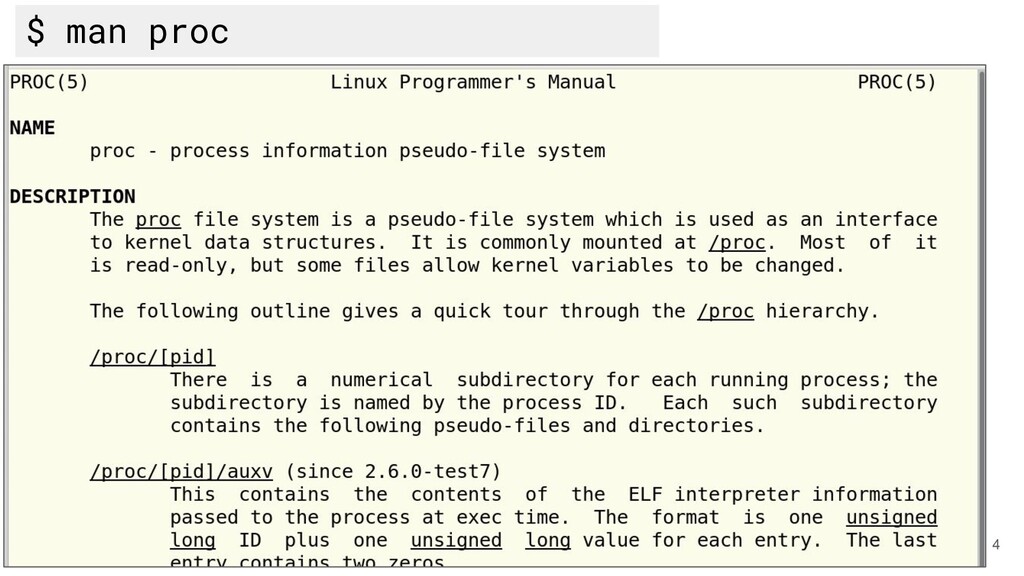
4 $ man proc
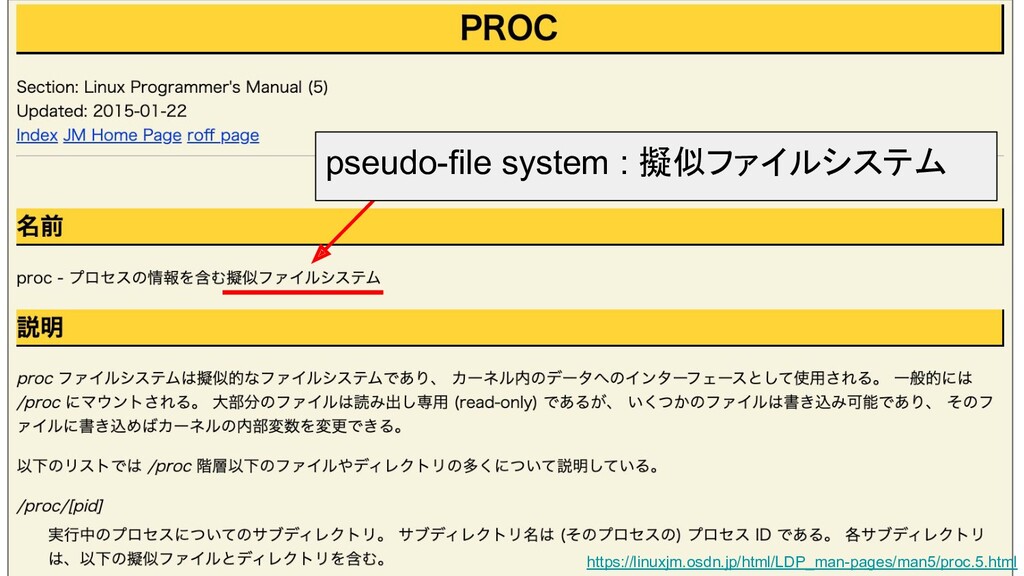
5 https://linuxjm.osdn.jp/html/LDP_man-pages/man5/proc.5.html
6 https://linuxjm.osdn.jp/html/LDP_man-pages/man5/proc.5.html pseudo-file system : 擬似ファイルシステム
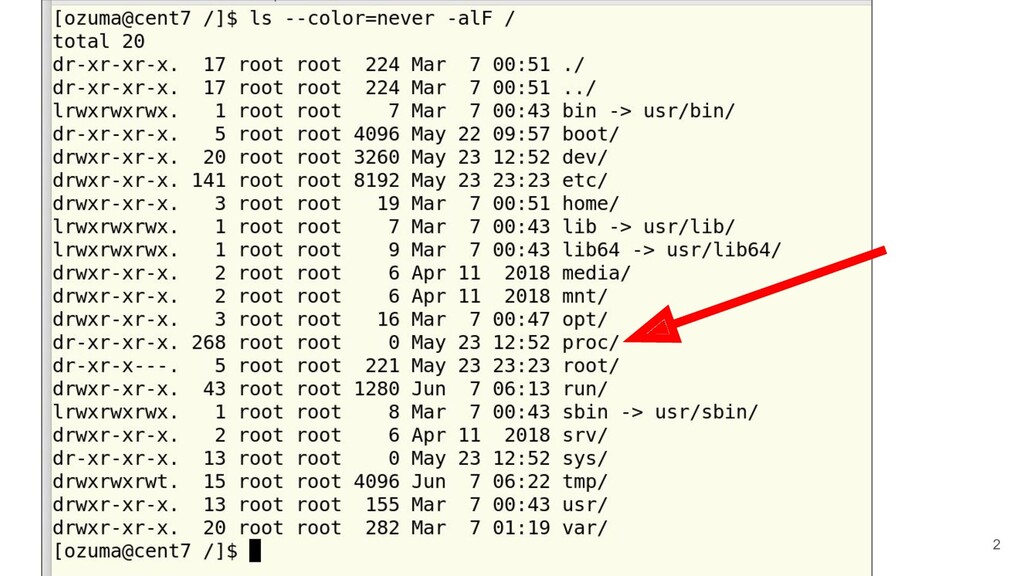
まずは見てみましょう 7
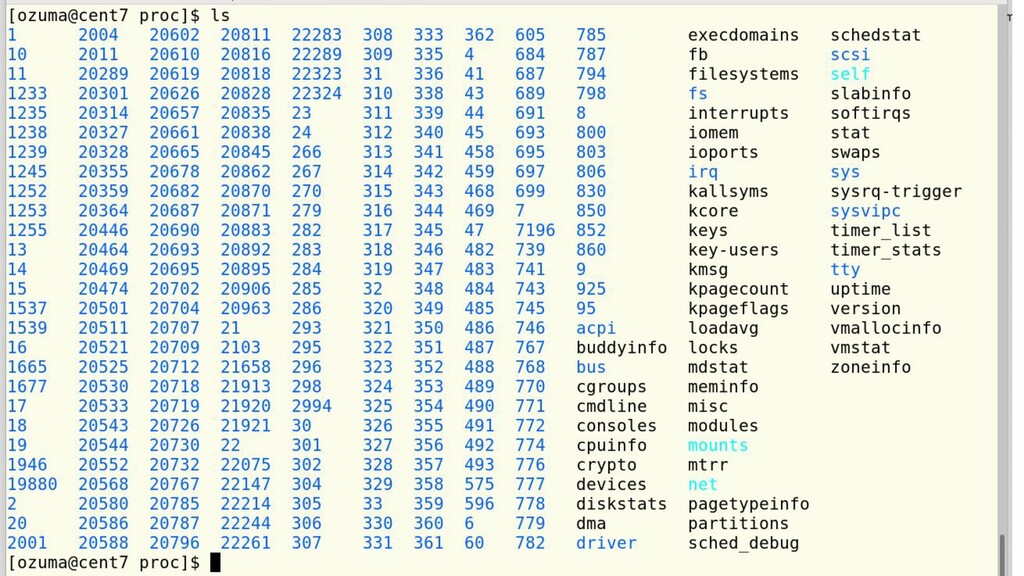
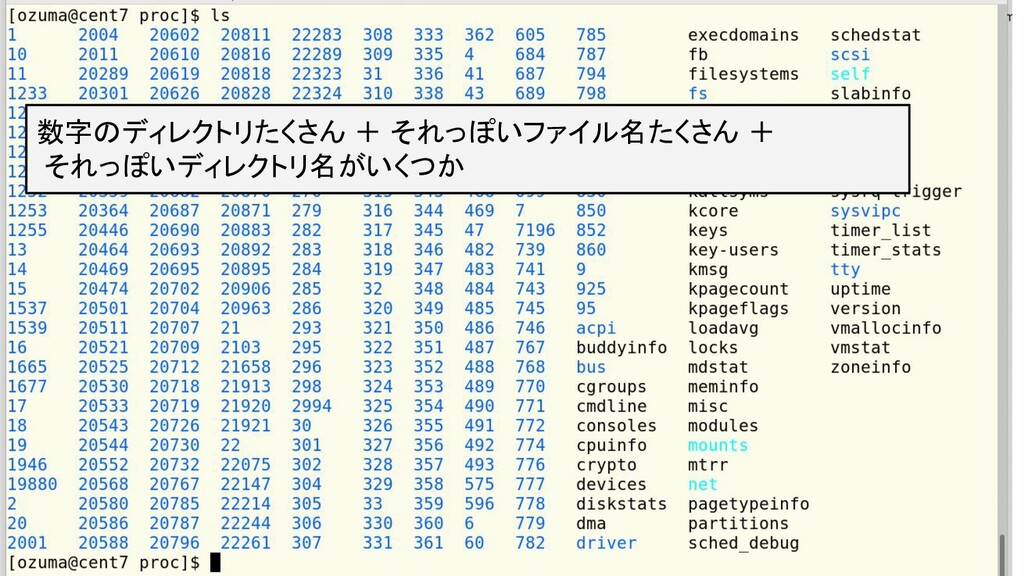
8 数字のディレクトリたくさん + それっぽいファイル名たくさん + それっぽいディレクトリ名がいくつか
9 $ cat /proc/meminfo MemTotal: 16294336 kB MemFree: 15851072 kB
MemAvailable: 15843672 kB Buffers: 25336 kB Cached: 204780 kB SwapCached: 0 kB Active: 164016 kB Inactive: 100876 kB Active(anon): 35612 kB Inactive(anon): 444 kB Active(file): 128404 kB Inactive(file): 100432 kB Unevictable: 16 kB Mlocked: 0 kB SwapTotal: 16666620 kB SwapFree: 16666620 kB Dirty: 0 kB Writeback: 0 kB AnonPages: 34564 kB Mapped: 63636 kB Shmem: 1284 kB KReclaimable: 32704 kB Slab: 81764 kB SReclaimable: 32704 kB SUnreclaim: 49060 kB KernelStack: 2548 kB PageTables: 1304 kB NFS_Unstable: 0 kB Bounce: 0 kB WritebackTmp: 0 kB CommitLimit: 24813788 kB Committed_AS: 261736 kB VmallocTotal: 34359738367 kB VmallocUsed: 41272 kB VmallocChunk: 0 kB Percpu: 3552 kB HardwareCorrupted: 0 kB AnonHugePages: 2048 kB ShmemHugePages: 0 kB
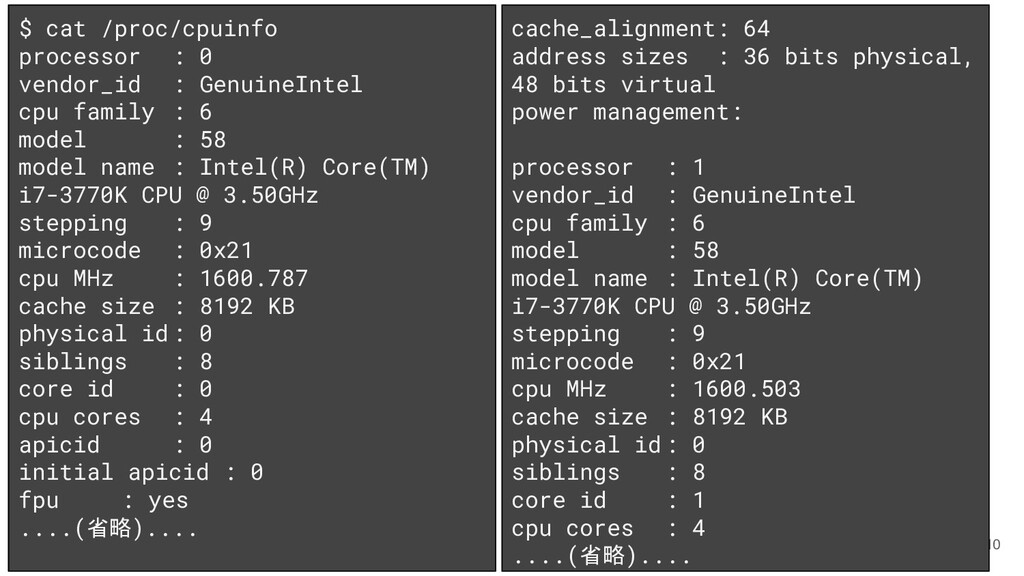
10 $ cat /proc/cpuinfo processor : 0 vendor_id : GenuineIntel
cpu family : 6 model : 58 model name : Intel(R) Core(TM) i7-3770K CPU @ 3.50GHz stepping : 9 microcode : 0x21 cpu MHz : 1600.787 cache size : 8192 KB physical id: 0 siblings : 8 core id : 0 cpu cores : 4 apicid : 0 initial apicid : 0 fpu : yes ....(省略).... cache_alignment: 64 address sizes : 36 bits physical, 48 bits virtual power management: processor : 1 vendor_id : GenuineIntel cpu family : 6 model : 58 model name : Intel(R) Core(TM) i7-3770K CPU @ 3.50GHz stepping : 9 microcode : 0x21 cpu MHz : 1600.503 cache size : 8192 KB physical id: 0 siblings : 8 core id : 1 cpu cores : 4 ....(省略)....
/proc ディレクトリの擬似ファイル (イメージ) 11 メモリ カーネル メモリ上に 展開 窓のような疑似 ファイル(
/proc ) /proc ファイルを通して、カーネルの現在のプロ セス管理状態や各種情報の取得 (一部は書き込み=設定変更も可能)
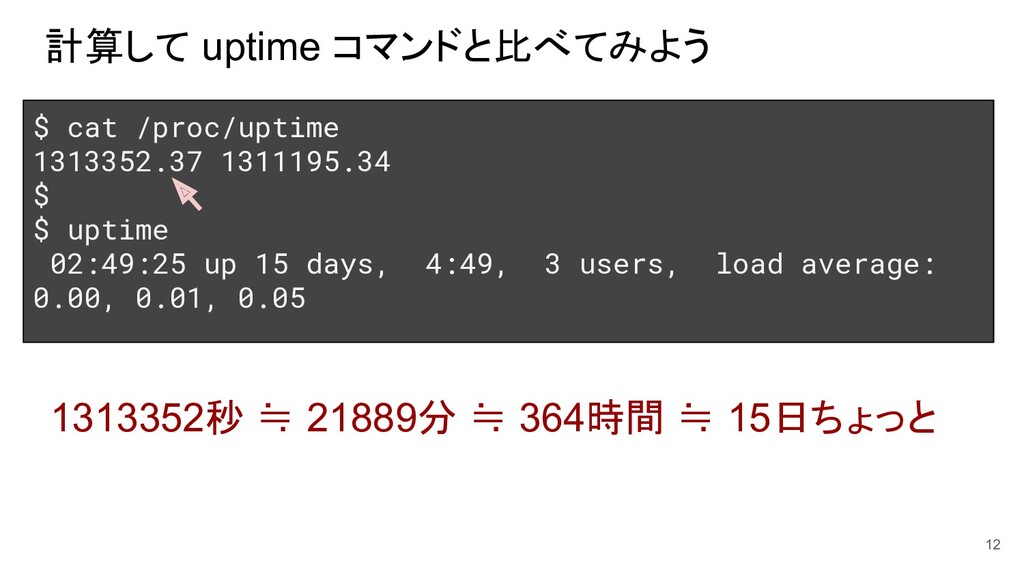
計算して uptime コマンドと比べてみよう 12 $ cat /proc/uptime 1313352.37 1311195.34 $
$ uptime 02:49:25 up 15 days, 4:49, 3 users, load average: 0.00, 0.01, 0.05 1313352秒 ≒ 21889分 ≒ 364時間 ≒ 15日ちょっと
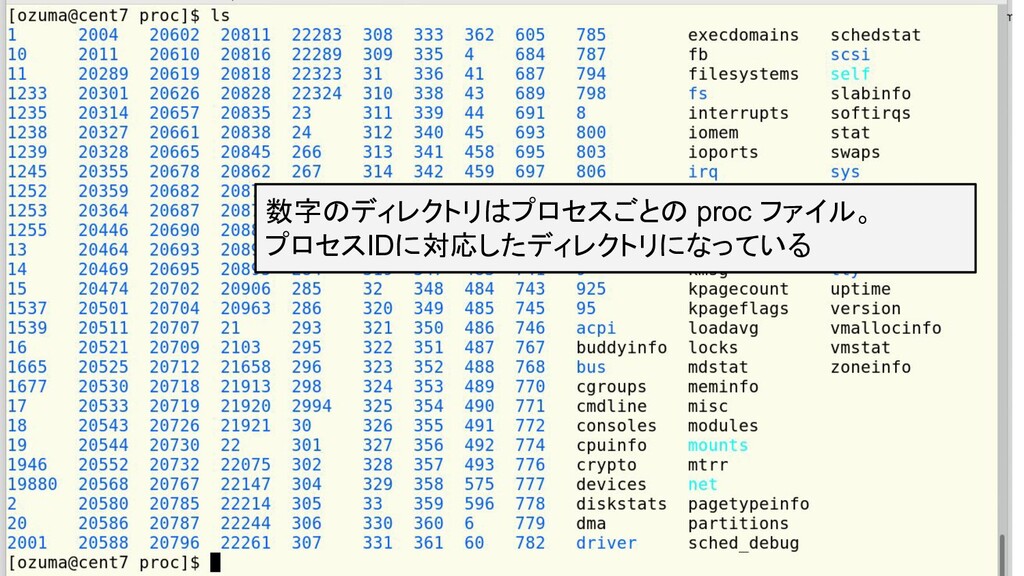
13 数字のディレクトリはプロセスごとの proc ファイル。 プロセスIDに対応したディレクトリになっている
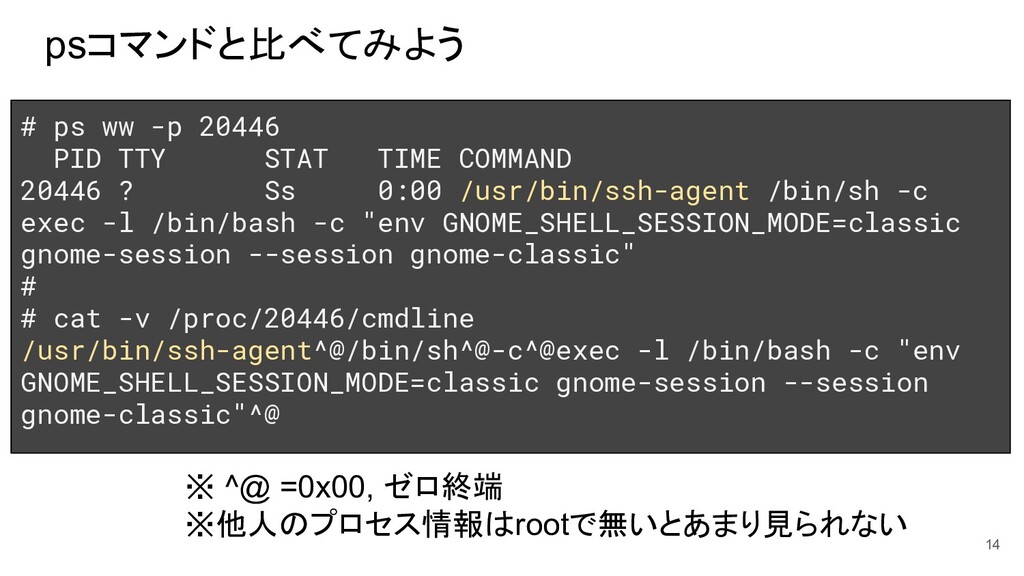
psコマンドと比べてみよう 14 # ps ww -p 20446 PID TTY STAT
TIME COMMAND 20446 ? Ss 0:00 /usr/bin/ssh-agent /bin/sh -c exec -l /bin/bash -c "env GNOME_SHELL_SESSION_MODE=classic gnome-session --session gnome-classic" # # cat -v /proc/20446/cmdline /usr/bin/ssh-agent^@/bin/sh^@-c^@exec -l /bin/bash -c "env GNOME_SHELL_SESSION_MODE=classic gnome-session --session gnome-classic"^@ ※ ^@ =0x00, ゼロ終端 ※他人のプロセス情報はrootで無いとあまり見られない
procfs系のコマンドは、procから拾って組み立てる (ps, top, uptime, vmstat... 等) 15 [root@cent7 ~]# strace
ps execve("/bin/ps", ["ps"], 0x7ffc3e00eb10 /* 18 vars */) = 0 ....(省略)... stat("/proc/1", {st_mode=S_IFDIR|0555, st_size=0, ...}) = 0 open("/proc/1/stat", O_RDONLY) = 6 read(6, "1 (systemd) S 0 1 1 0 -1 4202752"..., 1024) = 375 close(6) = 0 open("/proc/1/status", O_RDONLY) = 6 read(6, "Name:\tsystemd\nUmask:\t0000\nState:"..., 1024) = 1024 read(6, "0,00000000,00000000,00000000,000"..., 1024) = 178 close(6) = 0 stat("/proc/2", {st_mode=S_IFDIR|0555, st_size=0, ...}) = 0 open("/proc/2/stat", O_RDONLY) = 6 read(6, "2 (kthreadd) S 0 0 0 0 -1 213817"..., 2048) = 169 close(6) = 0 ....(省略)...
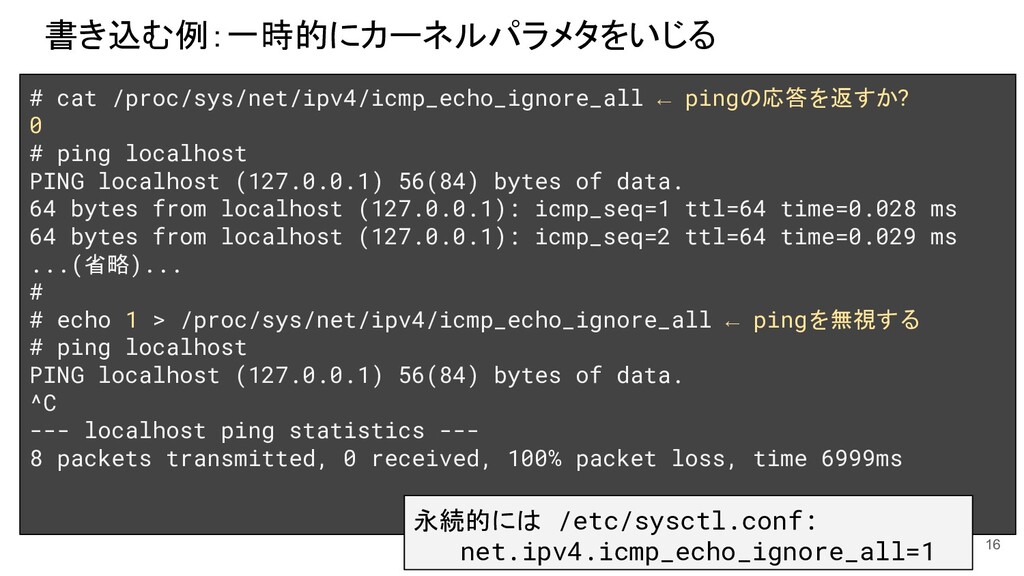
書き込む例:一時的にカーネルパラメタをいじる 16 # cat /proc/sys/net/ipv4/icmp_echo_ignore_all ← pingの応答を返すか? 0 # ping
localhost PING localhost (127.0.0.1) 56(84) bytes of data. 64 bytes from localhost (127.0.0.1): icmp_seq=1 ttl=64 time=0.028 ms 64 bytes from localhost (127.0.0.1): icmp_seq=2 ttl=64 time=0.029 ms ...(省略)... # # echo 1 > /proc/sys/net/ipv4/icmp_echo_ignore_all ← pingを無視する # ping localhost PING localhost (127.0.0.1) 56(84) bytes of data. ^C --- localhost ping statistics --- 8 packets transmitted, 0 received, 100% packet loss, time 6999ms 永続的には /etc/sysctl.conf: net.ipv4.icmp_echo_ignore_all=1
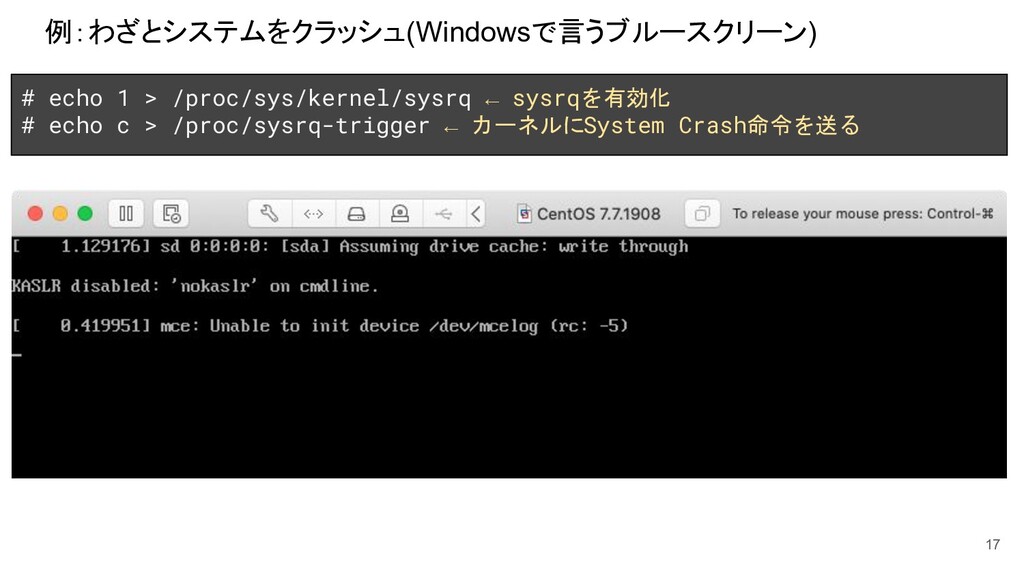
例:わざとシステムをクラッシュ(Windowsで言うブルースクリーン) 17 # echo 1 > /proc/sys/kernel/sysrq ← sysrqを有効化 #
echo c > /proc/sysrq-trigger ← カーネルにSystem Crash命令を送る
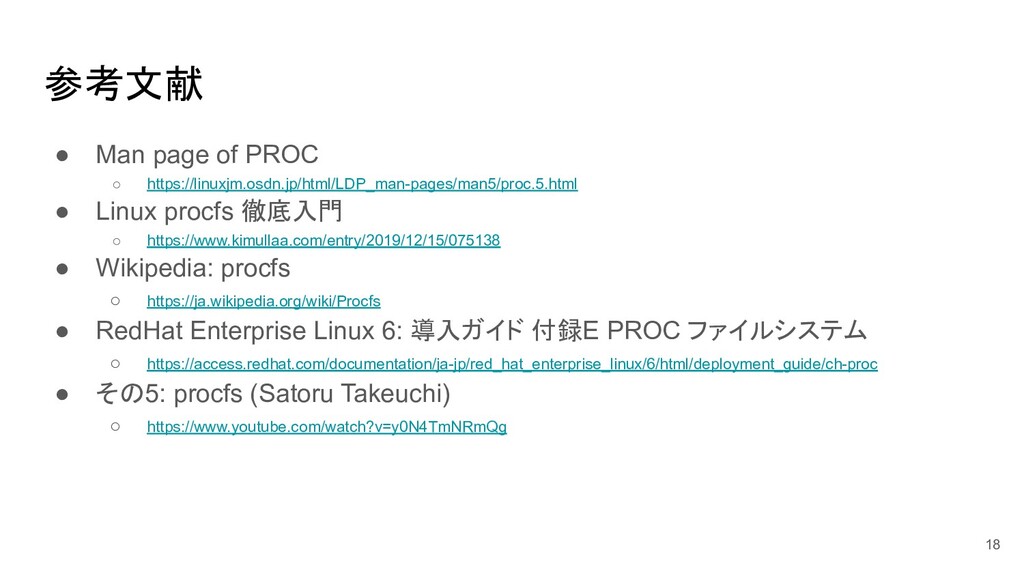
参考文献 • Man page of PROC ◦ https://linuxjm.osdn.jp/html/LDP_man-pages/man5/proc.5.html • Linux
procfs 徹底入門 ◦ https://www.kimullaa.com/entry/2019/12/15/075138 • Wikipedia: procfs ◦ https://ja.wikipedia.org/wiki/Procfs • RedHat Enterprise Linux 6: 導入ガイド 付録E PROC ファイルシステム ◦ https://access.redhat.com/documentation/ja-jp/red_hat_enterprise_linux/6/html/deployment_guide/ch-proc • その5: procfs (Satoru Takeuchi) ◦ https://www.youtube.com/watch?v=y0N4TmNRmQg 18


 ozuma
ozuma
 yuuuuuuu168
 tokuty
 nttcom
 shugo
shugo
 yu23ki14
 genda
genda
 daidaidai
 kworkdev
 techtekt
 pfn
pfn
 nealle
 codmoninc
 thirion
 katarinadahlin
 kristinabergwall1
 rmw
rmw
 aleyda
 reverentgeek
 cromwellryan
 jeffersonlam
 mkilby
 sstephenson
 quramy




![procfs系のコマンドは、procから拾って組み立てる (ps, top, uptime, vmstat... 等) 15 [root@cent7 ~]# strace](https://files.speakerdeck.com/presentations/70d93908d7f848068c153a13dc5502b7/slide_14.jpg)