Upgrade to Pro
— share decks privately, control downloads, hide ads and more …
Speaker Deck
Sign up for free
Menu
Search
Features
All features
Private URLs
Password Protection
Custom URLS
Scheduled publishing
Remove Branding
Restrict embedding
Deck Collections
Notes
Features
All features
Private URLs
Password Protection
Custom URLS
Scheduled publishing
Remove Branding
Restrict embedding
Deck Collections
Notes
Explore
Featured decks
Featured speakers
Programming
Technology
Storyboards
Explore
Featured decks
Featured speakers
Programming
Technology
Storyboards
Pricing
Search
Sign in
Sign up for free
型安全なDrag and Dropの設計を考える
Search
yudppp
May 23, 2025
Programming
1.1k
5
Share
Embed
Copy iframe code
Copy JS code
Copy link
Start on current slide
型安全なDrag and Dropの設計を考える
TSKaigi 2025のLT資料
yudppp
May 23, 2025
More Decks by yudppp
See All by yudppp
開発者にもコーディングエージェントにも働きやすい環境を整える
yudppp
1
190
未知のプログラミング言語にChatGPTと共に挑む
yudppp
0
570
SaaSフロントエンド開発の現場で求められる技術 / Technologies for SaaS Frontend Development in the Field
yudppp
2
300
2019年 HRBrainの技術的挑戦 / hrbain technology challenge 2019
yudppp
3
1.5k
Web開発を支えるマイグレーションツールについて / sqldef introduction for psql users
yudppp
2
3.8k
ISUCON向けのツールを作った話 / isutools
yudppp
1
360
Row Level Securityはマルチテナントの銀の弾丸になりうるのか / Row Level Security is silver bullet for multitenancy?
yudppp
23
34k
Webサービス開発に必要な統計学入門 / study of statistics for web developers
yudppp
1
380
メジャーな Live Reloaderの違いをちゃんと調べて見た / Compare major live reloader of Go
yudppp
1
2k
Other Decks in Programming
See All in Programming
TanStack Vue Query と Pinia Colada から学ぶ非同期状態の型設計
aoshi
0
580
Snowflake Openflow Connector利用の勘所 / 20261024developersio2026tokyo-snowflake-openflow
kasacchiful
PRO
0
260
Modernizing iOS Apps
seyfoyun
0
140
自作Discord音声botをLambda MicroVMsに移行した話 / Migrating My Discord Voice Bot to Lambda MicroVMs
akihisaikeda
1
240
Optunaを作ったときにやりたかったこと、その後 (2026/10/16, Optuna Meetup #3)
iwiwi
4
1.4k
flutter_test のその先へ — Flutter アプリの LLM 機能に「評価」という品質保証を
kosukesaigusa
0
170
AI Augmentation Techniques with Liberty
ivargrimstad
0
240
AIがコードを書いてくれる時代、我々は何を確かめるのか
yosuke_furukawa
PRO
13
5.4k
Apple Intelligenceとオンデバイス時代の到来
yahir0
0
190
Railsのためのパスキー実践入門 〜マルチテナントSaaSでの意思決定〜
utakaha
3
2.3k
AI時代のTerminal環境を UNIX哲学で設計・運用する
yasunori0418
1
330
當我們開始不讀 Code - AI Agent 時代,Code Review 與 Clean Code 還剩下什麼?
jame2408
1
350
Featured
See All Featured
Marketing Yourself as an Engineer | Alaka | Gurzu
gurzu
0
350
VelocityConf: Rendering Performance Case Studies
addyosmani
331
25k
The SEO Collaboration Effect
kristinabergwall1
1
610
Un-Boring Meetings
codingconduct
0
480
Collaborative Software Design: How to facilitate domain modelling decisions
baasie
1
360
XXLCSS - How to scale CSS and keep your sanity
sugarenia
250
1.3M
CoffeeScript is Beautiful & I Never Want to Write Plain JavaScript Again
sstephenson
162
16k
A Tale of Four Properties
chriscoyier
163
24k
End of SEO as We Know It (SMX Advanced Version)
ipullrank
3
4.5k
Chasing Engaging Ingredients in Design
codingconduct
0
380
The agentic SEO stack - context over prompts
schlessera
0
990
The Myth of the Modular Monolith - Day 2 Keynote - Rails World 2024
eileencodes
28
3.7k
Transcript
型安全なDrag and Dropの設計を考える TSKaigi 2025
株式会社HRBrain 執行役員CTO 2018年に HRBrain に 10人目の社員、3人目のエンジニアとして 入社。TypeScriptも2018年からはじめました。 今もバックエンドとフロントエンドのプロダクションのコードを 本当にたくさん書いてます。 yudppp
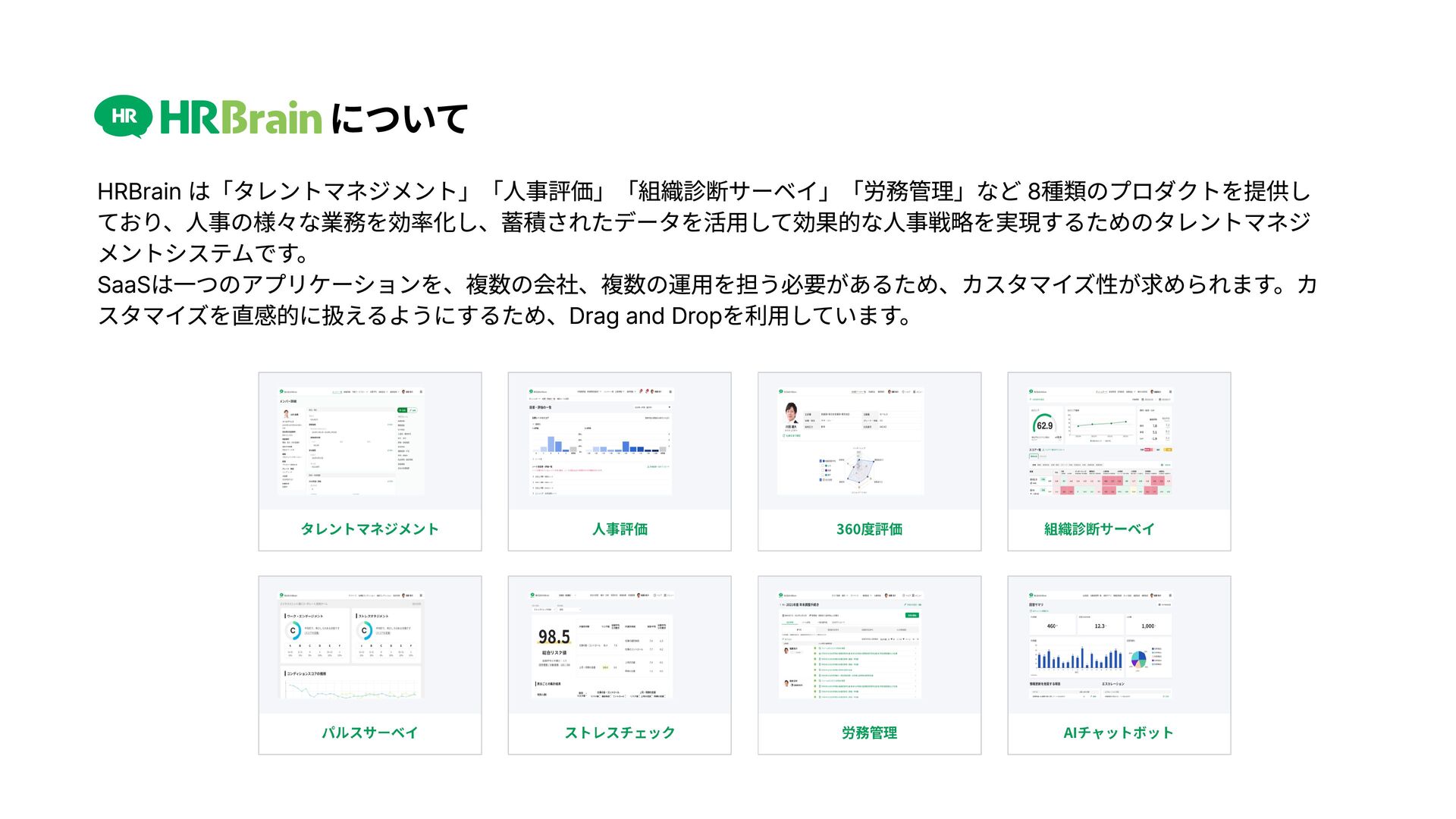
について HRBrain は「タレントマネジメント」「人事評価」「組織診断サーベイ」「労務管理」など 8種類のプロダクトを提供し ており、人事の様々な業務を効率化し、蓄積されたデータを活用して効果的な人事戦略を実現するためのタレントマネジ メントシステムです。 SaaSは一つのアプリケーションを、複数の会社、複数の運用を担う必要があるため、カスタマイズ性が求められます。カ スタマイズを直感的に扱えるようにするため、Drag and
Dropを利用しています。
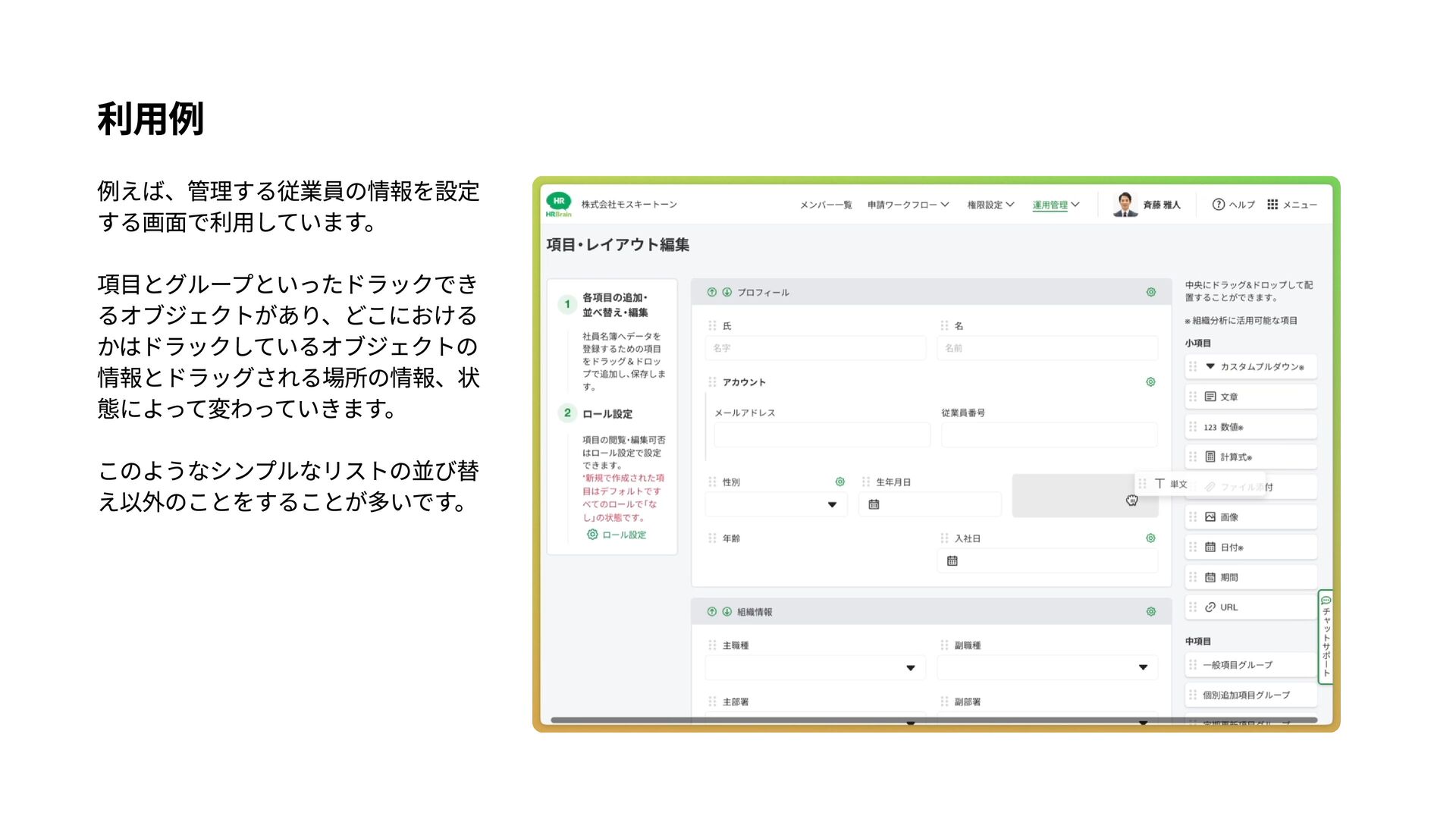
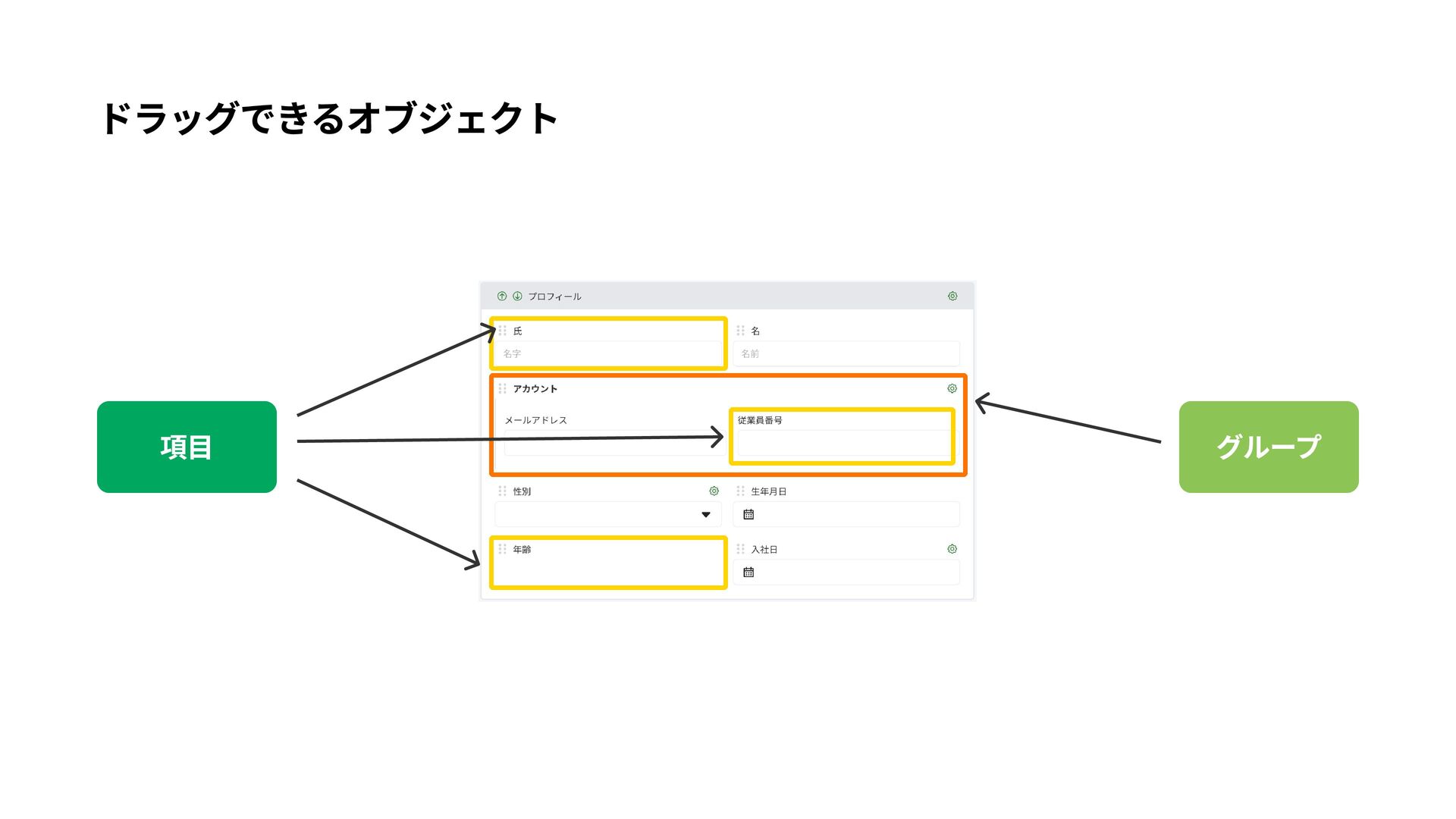
利用例 例えば、管理する従業員の情報を設定 する画面で利用しています。 項目とグループといったドラックでき るオブジェクトがあり、どこにおける かはドラックしているオブジェクトの 情報とドラッグされる場所の情報、状 態によって変わっていきます。 このようなシンプルなリストの並び替 え以外のことをすることが多いです。
Drag and Dropの失敗例 V ドラッグした要素の消S V ドラッグした瞬間にページが真っ白にな$ V インプット付きのアイテムの場合に、中のテキストが元の場所に居残る
Drag and Dropの失敗例 t ドラッグした要素の消s t ドラッグした瞬間にページが真っ白になC t インプット付きのアイテムの場合に、中のテキストが元の場所に居残る ↓↓e
t ドラッグしている要素と、置く要素の関係の定義が漏れていることが多い
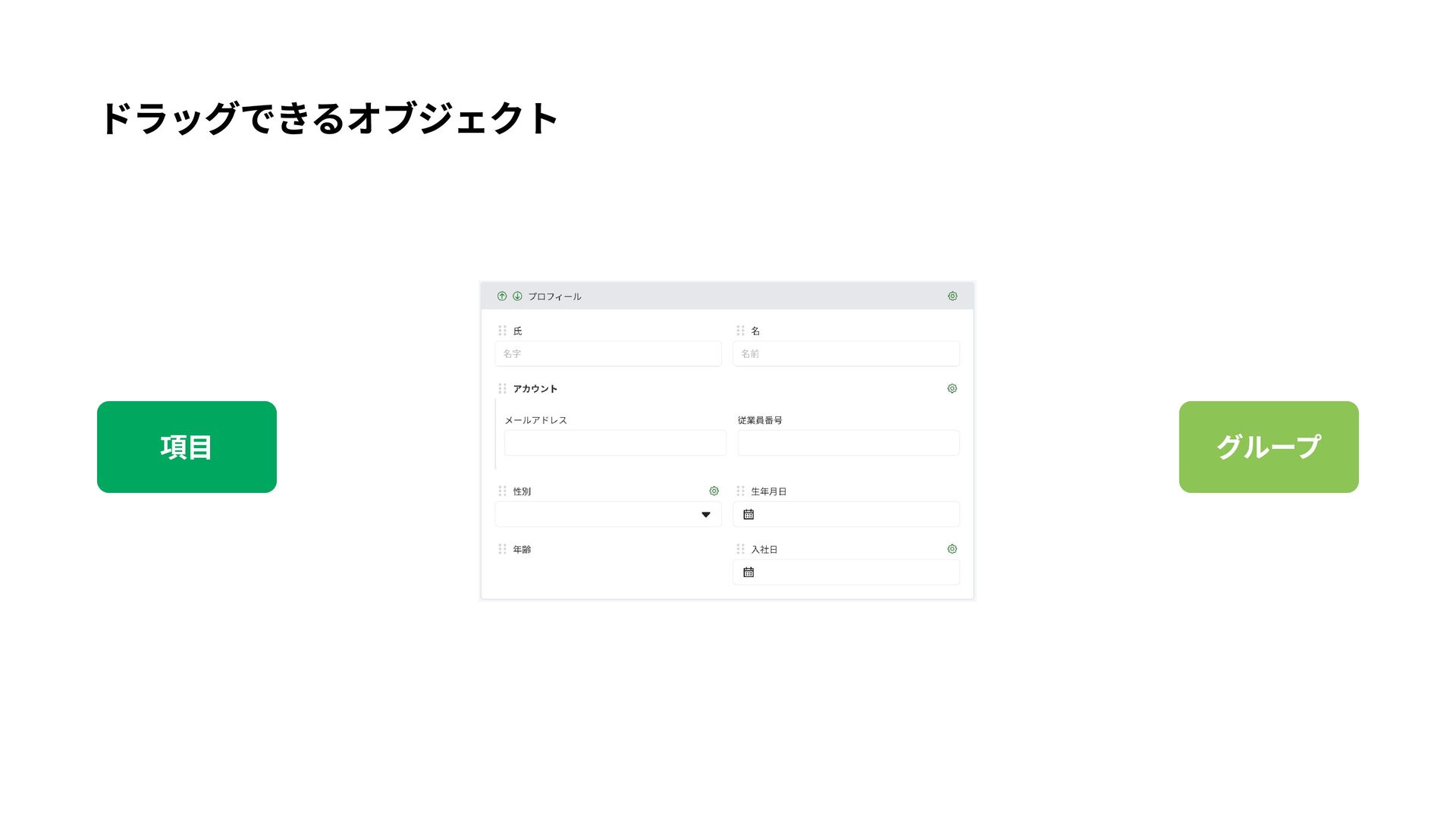
ドラッグできるオブジェクト 項目 グループ
ドラッグできるオブジェクト 項目 グループ
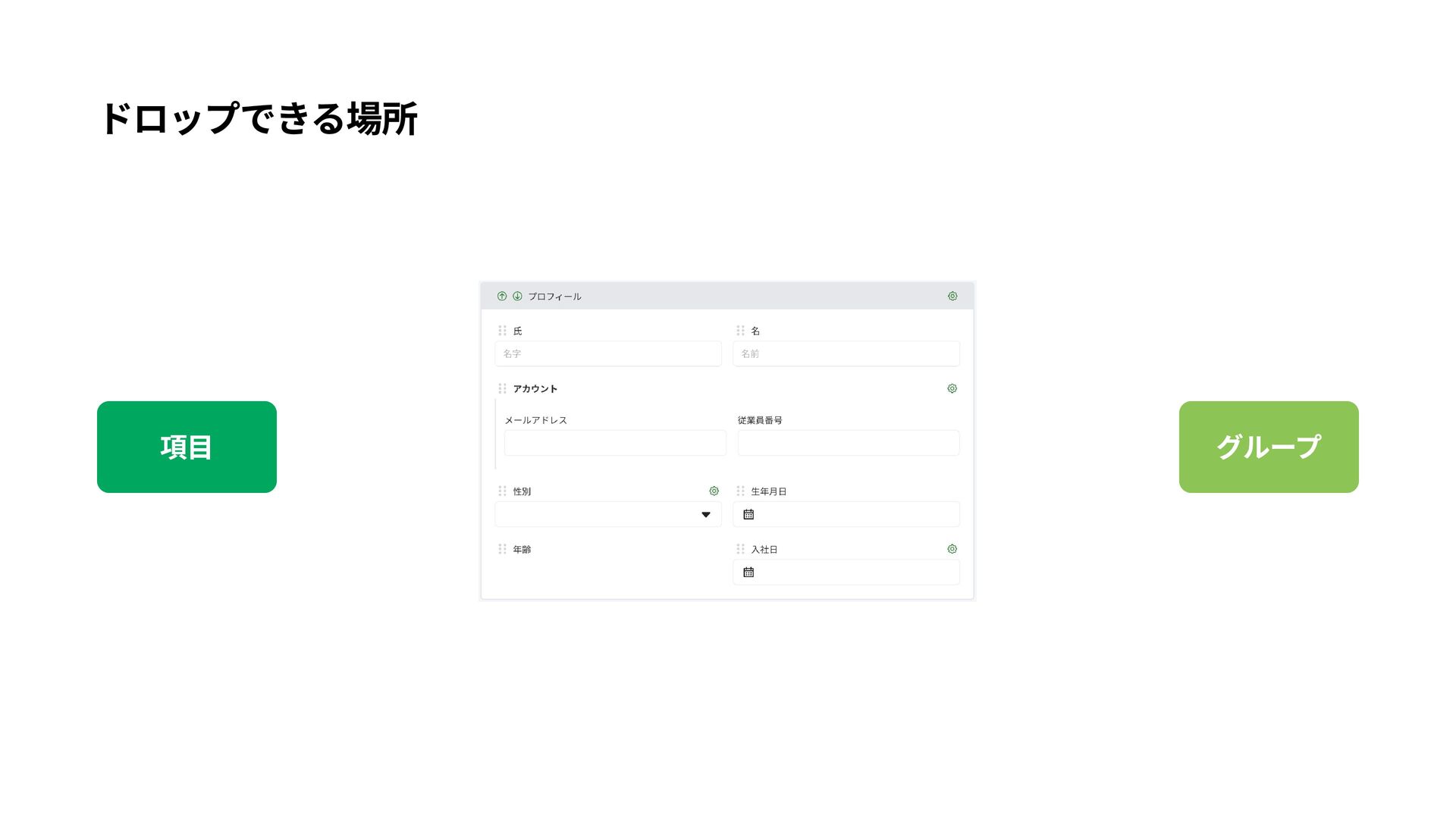
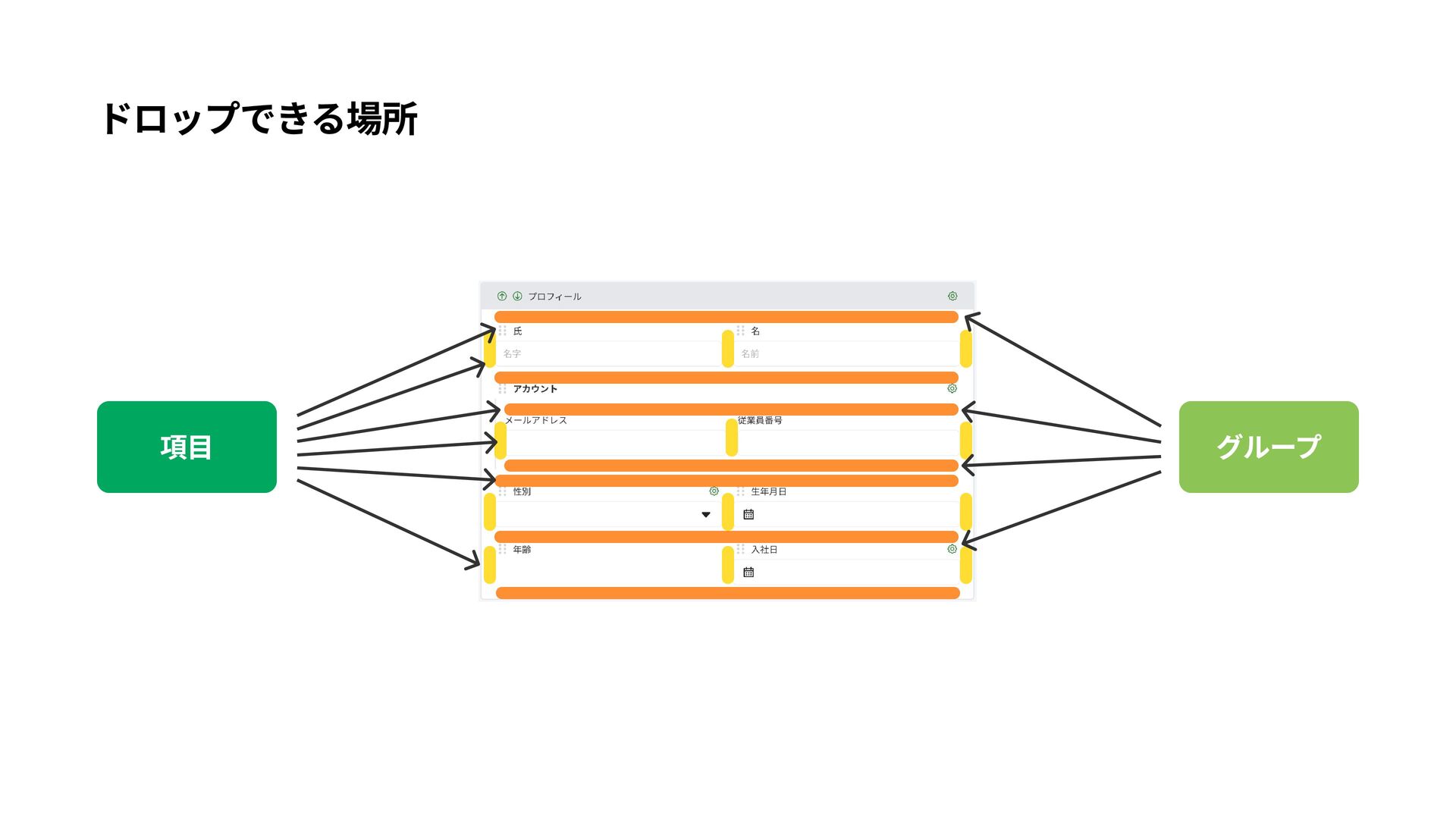
ドロップできる場所 項目 グループ
ドロップできる場所 項目 グループ
これを型に落とし込んでいく
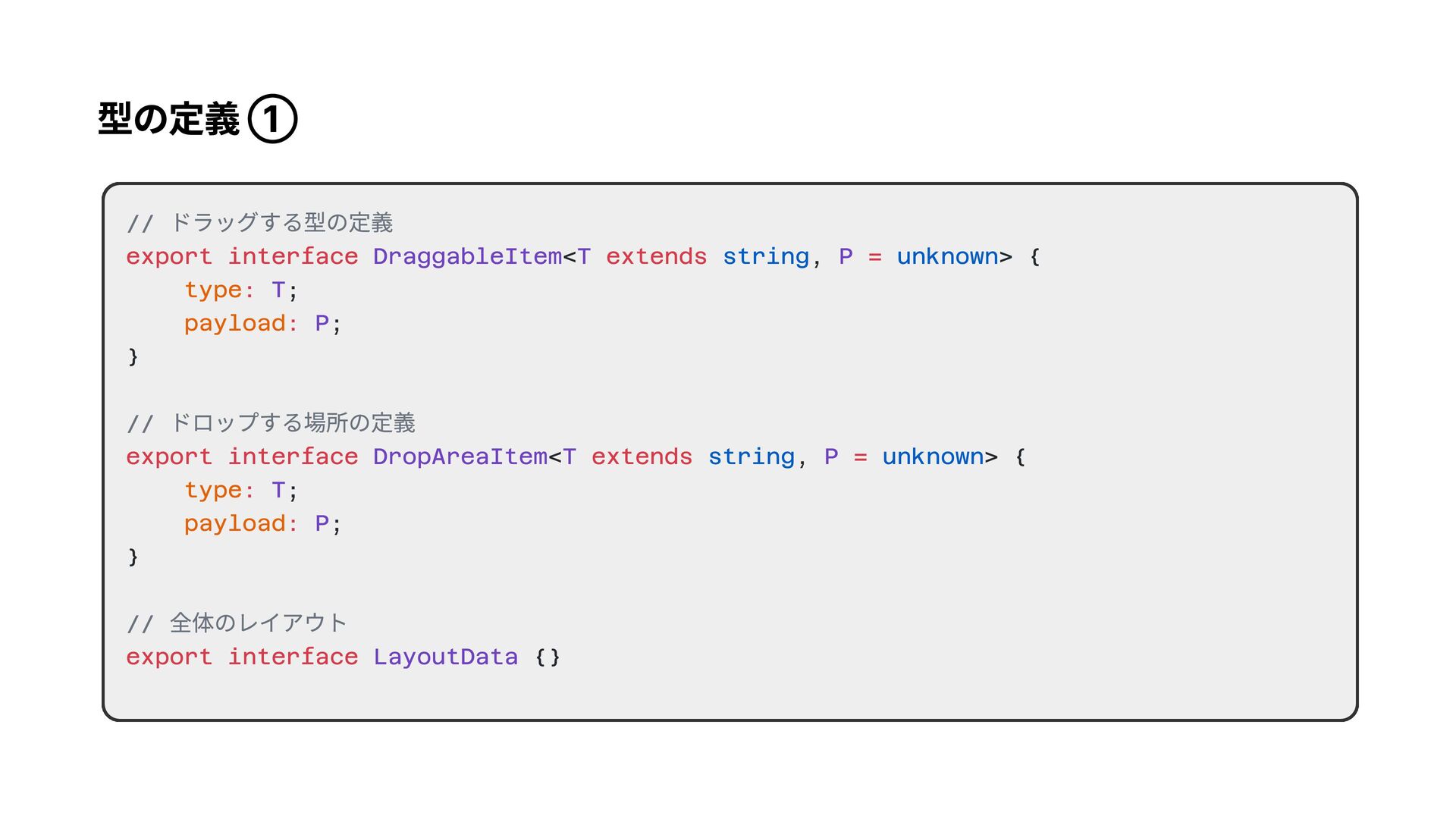
型の定義 ① // ドラッグする型の定義 // ドロップする場所の定義 // 全体のレイアウト export interface
extends = : : export interface extends = : : export interface < , > { ; ; } < , > { ; ; } {} DraggableItem T P T P DropAreaItem T P T P LayoutData string unknown string unknown type payload type payload
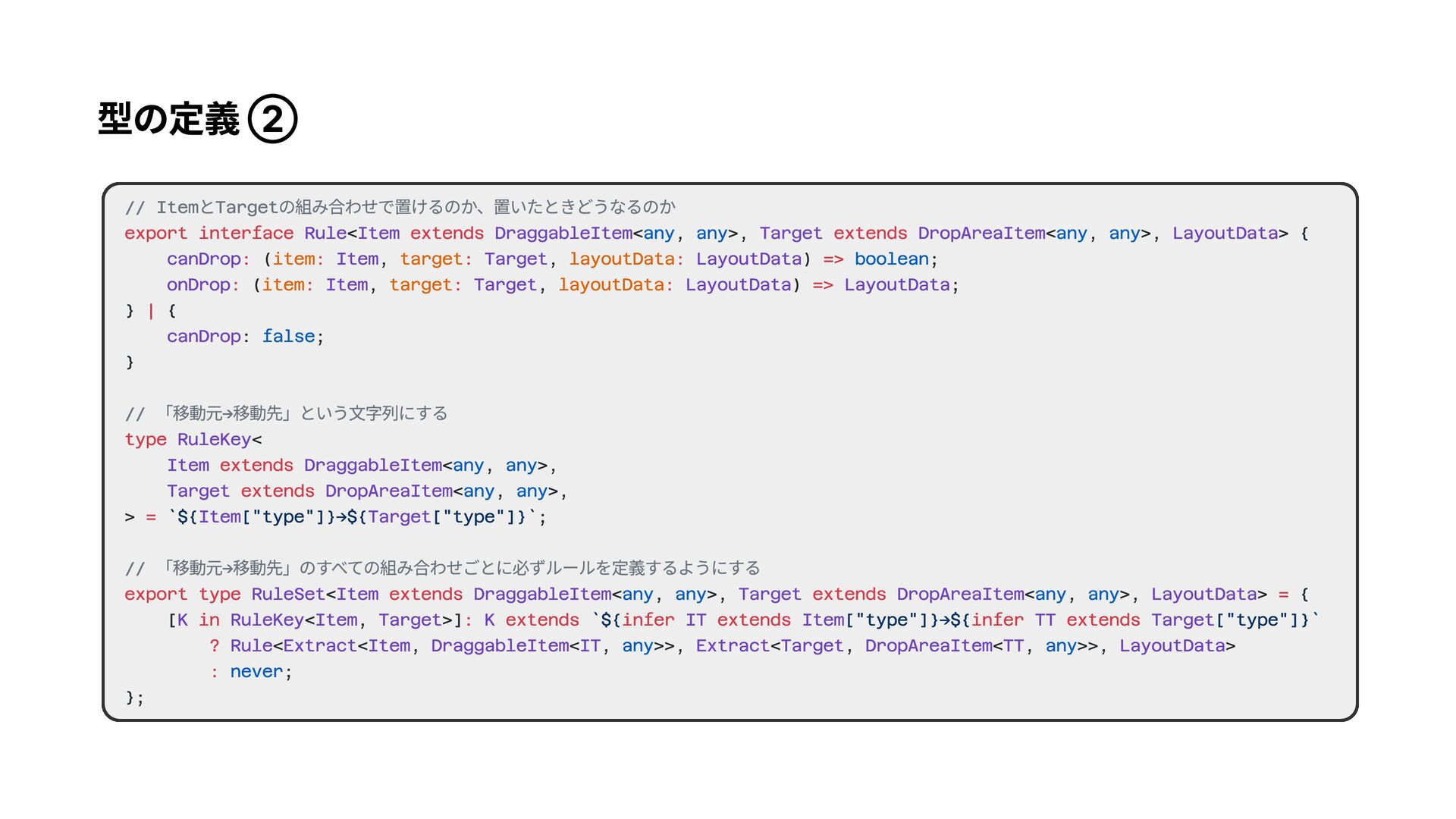
型の定義 ② // ItemとTargetの組み合わせで置けるのか、置いたときどうなるのか // 「移動元→移動先」という文字列にする // 「移動元→移動先」のすべての組み合わせごとに必ずルールを定義するようにする export interface
extends extends : : : : => : : : : => | type extends extends = export type extends extends = in : extends infer extends infer extends ? : < < , >, < , >, > { ( , , ) ; ( , , ) ; } { : ; } < < , >, < , >, > ; < < , >, < , >, > { [ < , >] < < , < , >>, < , < , >>, > ; }; Rule Item DraggableItem Target DropAreaItem LayoutData canDrop Item Target LayoutData onDrop Item Target LayoutData LayoutData canDrop RuleKey Item DraggableItem Target DropAreaItem Item Target RuleSet Item DraggableItem Target DropAreaItem LayoutData K RuleKey Item Target K IT Item TT Target Rule Extract Item DraggableItem IT Extract Target DropAreaItem TT LayoutData any any any any boolean false any any any any any any any any any any never item target layoutData item target layoutData `${ ["type"]}→${ ["type"]}` `${ ["type"]}->${ ["type"]}`
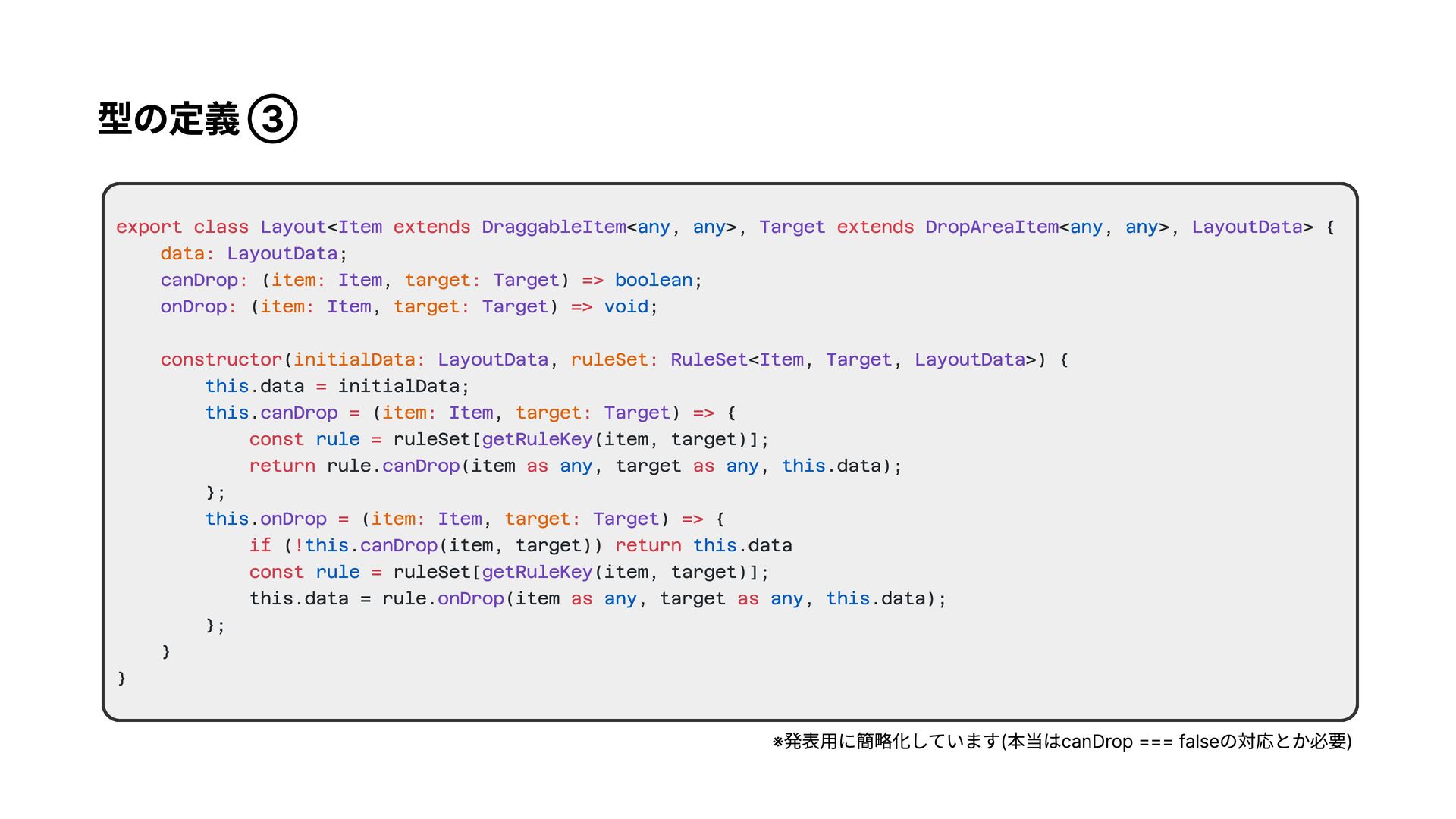
型の定義 ③ export class extends extends : : : :
=> : : : => constructor : : = = : : => const = return as as = : : => if ! return const = as as < < , >, < , >, > { ; ( , ) ; ( , ) ; ( , < , , >) { .data initialData; . ( , ) { ruleSet[ (item, target)]; rule. (item , target , .data); }; . ( , ) { ( . (item, target)) .data ruleSet[ (item, target)]; this.data = rule. (item , target , .data); }; } } Layout Item DraggableItem Target DropAreaItem LayoutData LayoutData canDrop Item Target onDrop Item Target LayoutData RuleSet Item Target LayoutData canDrop Item Target getRuleKey canDrop onDrop Item Target canDrop getRuleKey onDrop any any any any boolean void this this rule any any this this this this rule any any this data item target item target initialData ruleSet item target item target ※発表用に簡略化しています(本当はcanDrop === falseの対応とか必要)
使い方 ① // 全体のデータをどう持つか { [] } // ドラッグできるものの定義 <
, >; < , >; ; < , >; // 行と行の隙間で新しい行作るときのやつ < , { groupId: string, index: number }>; ; type = : type = type = type = | type = type = type = | LayoutData Group DraggableFieldItem DraggableItem Field DraggableGroupItem DraggableItem Group AnyDraggableItem DraggableFieldItem DraggableGroupItem RowDropArea DropAreaItem Row InsertRowDropArea DropAreaItem AnyDropAreaItem RowDropArea InsertRowDropArea groups "field" "group" "row" "insertRow" // ドロップできる場所の定義
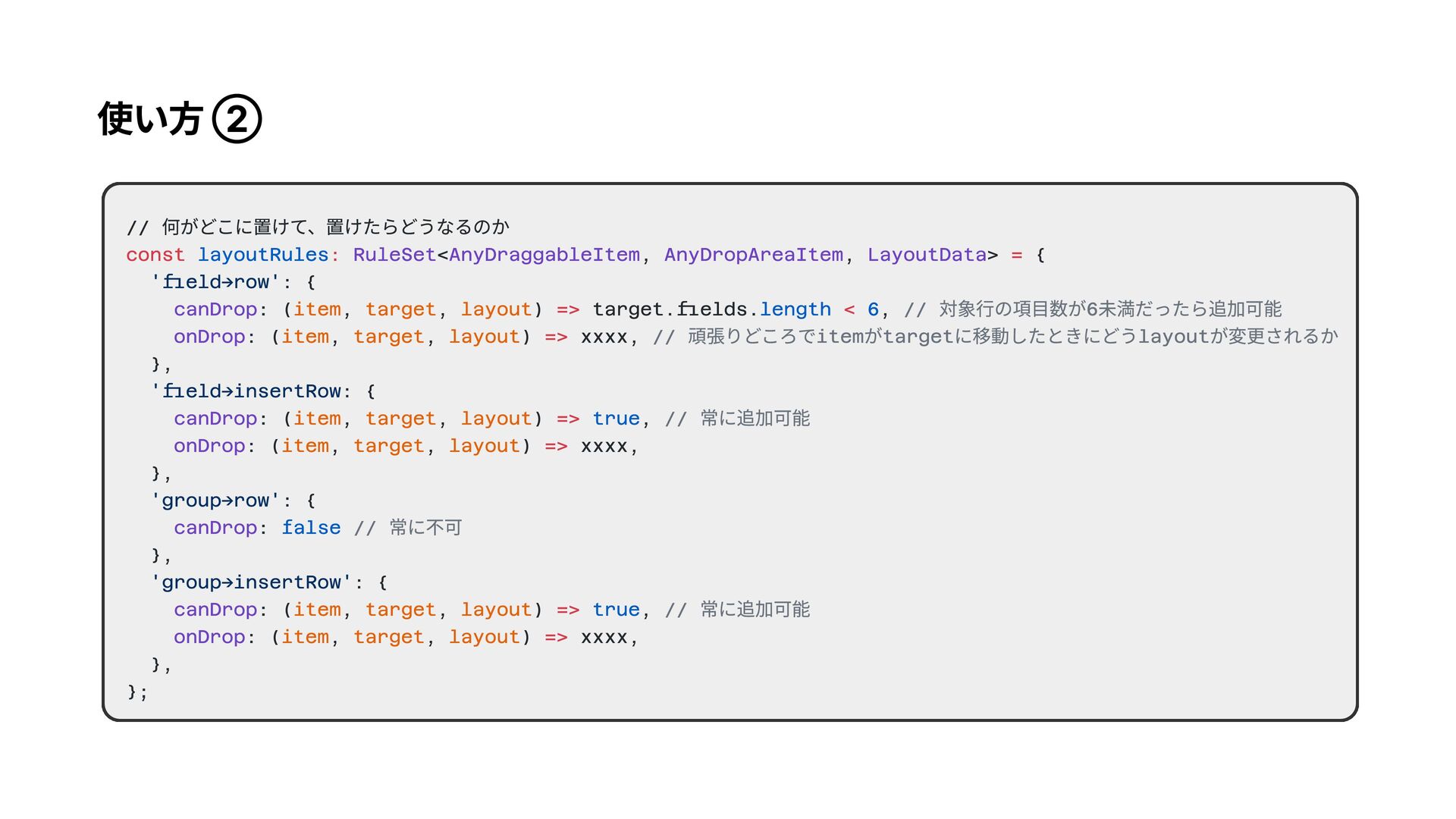
使い方 ② // 何がどこに置けて、置けたらどうなるのか < , , > { :
{ : ( , , ) target.fields. , : ( , , ) xxxx, }, : { : ( , , ) , : ( , , ) xxxx, }, : { : }, : { : ( , , ) , : ( , , ) xxxx, }, }; const : = => < => => => => => layoutRules length 6 true false true RuleSet AnyDraggableItem AnyDropAreaItem LayoutData canDrop onDrop canDrop onDrop canDrop canDrop onDrop 'field->row' 'field→insertRow 'group->row' 'group->insertRow' item target layout item target layout item target layout item target layout item target layout item target layout // 対象行の項目数が6未満だったら追加可能 // 頑張りどころでitemがtargetに移動したときにどうlayoutが変更されるか // 常に追加可能 // 常に不可 // 常に追加可能
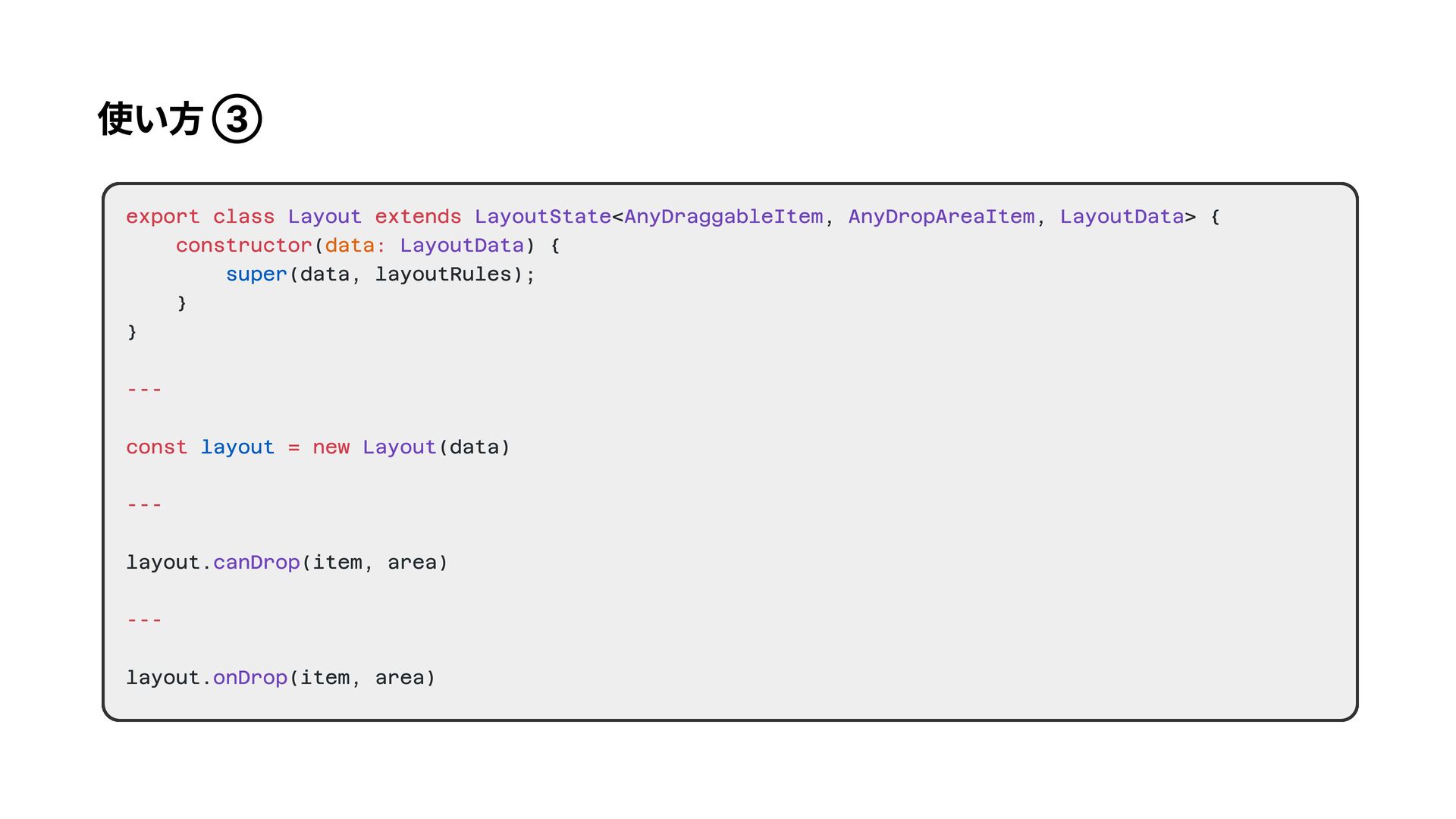
使い方 ③ export class extends constructor : --- const =
new --- --- < , , > { ( ) { (data, layoutRules); } } (data) layout. (item, area) layout. (item, area) Layout LayoutState AnyDraggableItem AnyDropAreaItem LayoutData LayoutData Layout canDrop onDrop data super layout
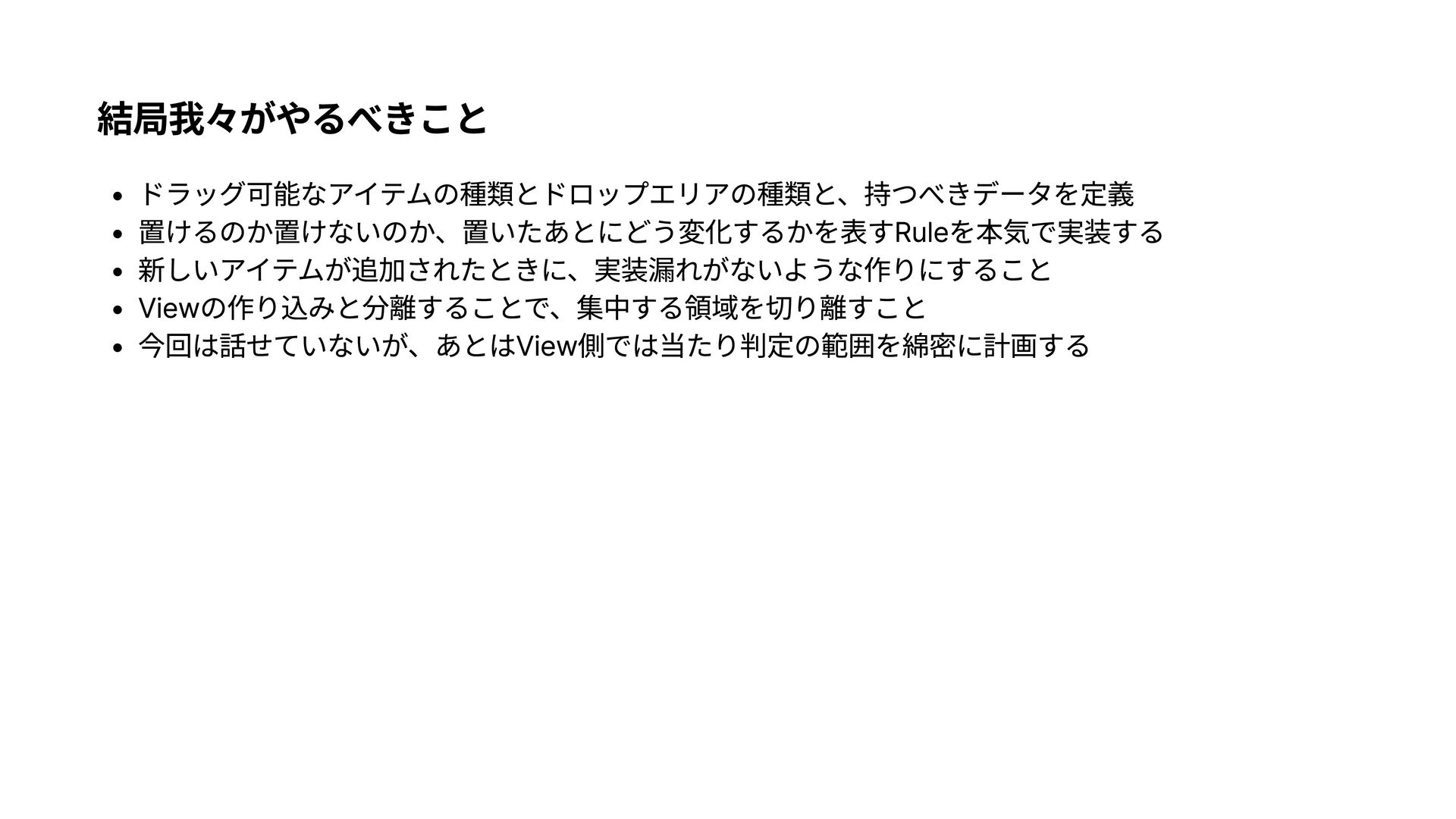
結局我々がやるべきこと ドラッグ可能なアイテムの種類とドロップエリアの種類と、持つべきデータを定R 置けるのか置けないのか、置いたあとにどう変化するかを表すRuleを本気で実装すG 新しいアイテムが追加されたときに、実装漏れがないような作りにするこt Viewの作り込みと分離することで、集中する領域を切り離すこt
今回は話せていないが、あとはView側では当たり判定の範囲を綿密に計画する


 yudppp
 aoshi
aoshi
 kasacchiful
 seyfoyun
 akihisaikeda
 iwiwi
iwiwi
 kosukesaigusa
 ivargrimstad
 yosuke_furukawa
 yahir0
 utakaha
 yasunori0418
 jame2408
 gurzu
gurzu
 addyosmani
 kristinabergwall1
 codingconduct
 baasie
 sugarenia
 sstephenson
 chriscoyier
 ipullrank
 schlessera
 eileencodes


![使い方 ① // 全体のデータをどう持つか { [] } // ドラッグできるものの定義 <](https://files.speakerdeck.com/presentations/0711ca4ab5db472996d5e4ed1ad6f303/slide_14.jpg)